├── social_auth
├── social_auth
│ ├── __init__.py
│ ├── wsgi.py
│ ├── urls.py
│ └── settings.py
├── social_networks
│ ├── __init__.py
│ ├── migrations
│ │ └── __init__.py
│ ├── models.py
│ ├── tests.py
│ ├── admin.py
│ ├── urls.py
│ ├── views.py
│ └── templates
│ │ └── social_networks
│ │ └── testsocialauth.html
├── static
│ ├── login-with-fb.png
│ ├── login-with-google.png
│ └── login-with-twitter.png
└── manage.py
├── Imgs
├── Build Urls.png
├── Dashboard.png
├── Google Form.png
├── CreateAppIDForm.png
├── Facebook Login.png
├── QuickStartPage.png
├── Set up the Url.png
├── Status & Review.png
├── usersocialauth.png
├── CreateAGoogleApp.png
├── Creating Progress.png
├── NameFacebookAppID.png
├── NewDatabaseTables.png
├── Two social Icons.png
├── Create Twitter App .png
├── Name Display on Page.png
├── SocialLoginExample.png
├── ChooseFacebookAppTypes.png
├── CreateANewFacebookApp.png
├── Twitter App Dashboard.png
├── Add twitter on the page.png
├── Check auth user table 1.png
├── Skip the Quick Start Page.png
├── Twiiter Validation Page.png
├── Create twitter access token.png
├── The Twitter Application Form.png
├── Twitter Page for id and secret.png
├── Facebook App Authentication Page.png
├── Agree the Twitter Developers License.png
├── Name the domain name for the local machine.png
├── Put the app id and secret into the setting.png
└── Set up the local machine's domain name successfully.png
├── .gitignore
└── README.md
/social_auth/social_auth/__init__.py:
--------------------------------------------------------------------------------
1 |
--------------------------------------------------------------------------------
/social_auth/social_networks/__init__.py:
--------------------------------------------------------------------------------
1 |
--------------------------------------------------------------------------------
/social_auth/social_networks/migrations/__init__.py:
--------------------------------------------------------------------------------
1 |
--------------------------------------------------------------------------------
/Imgs/Build Urls.png:
--------------------------------------------------------------------------------
https://raw.githubusercontent.com/0xyd/SocialAuthDjangoTutorial/HEAD/Imgs/Build Urls.png
--------------------------------------------------------------------------------
/Imgs/Dashboard.png:
--------------------------------------------------------------------------------
https://raw.githubusercontent.com/0xyd/SocialAuthDjangoTutorial/HEAD/Imgs/Dashboard.png
--------------------------------------------------------------------------------
/Imgs/Google Form.png:
--------------------------------------------------------------------------------
https://raw.githubusercontent.com/0xyd/SocialAuthDjangoTutorial/HEAD/Imgs/Google Form.png
--------------------------------------------------------------------------------
/social_auth/social_networks/models.py:
--------------------------------------------------------------------------------
1 | from django.db import models
2 |
3 | # Create your models here.
4 |
--------------------------------------------------------------------------------
/social_auth/social_networks/tests.py:
--------------------------------------------------------------------------------
1 | from django.test import TestCase
2 |
3 | # Create your tests here.
4 |
--------------------------------------------------------------------------------
/Imgs/CreateAppIDForm.png:
--------------------------------------------------------------------------------
https://raw.githubusercontent.com/0xyd/SocialAuthDjangoTutorial/HEAD/Imgs/CreateAppIDForm.png
--------------------------------------------------------------------------------
/Imgs/Facebook Login.png:
--------------------------------------------------------------------------------
https://raw.githubusercontent.com/0xyd/SocialAuthDjangoTutorial/HEAD/Imgs/Facebook Login.png
--------------------------------------------------------------------------------
/Imgs/QuickStartPage.png:
--------------------------------------------------------------------------------
https://raw.githubusercontent.com/0xyd/SocialAuthDjangoTutorial/HEAD/Imgs/QuickStartPage.png
--------------------------------------------------------------------------------
/Imgs/Set up the Url.png:
--------------------------------------------------------------------------------
https://raw.githubusercontent.com/0xyd/SocialAuthDjangoTutorial/HEAD/Imgs/Set up the Url.png
--------------------------------------------------------------------------------
/Imgs/Status & Review.png:
--------------------------------------------------------------------------------
https://raw.githubusercontent.com/0xyd/SocialAuthDjangoTutorial/HEAD/Imgs/Status & Review.png
--------------------------------------------------------------------------------
/Imgs/usersocialauth.png:
--------------------------------------------------------------------------------
https://raw.githubusercontent.com/0xyd/SocialAuthDjangoTutorial/HEAD/Imgs/usersocialauth.png
--------------------------------------------------------------------------------
/social_auth/social_networks/admin.py:
--------------------------------------------------------------------------------
1 | from django.contrib import admin
2 |
3 | # Register your models here.
4 |
--------------------------------------------------------------------------------
/Imgs/CreateAGoogleApp.png:
--------------------------------------------------------------------------------
https://raw.githubusercontent.com/0xyd/SocialAuthDjangoTutorial/HEAD/Imgs/CreateAGoogleApp.png
--------------------------------------------------------------------------------
/Imgs/Creating Progress.png:
--------------------------------------------------------------------------------
https://raw.githubusercontent.com/0xyd/SocialAuthDjangoTutorial/HEAD/Imgs/Creating Progress.png
--------------------------------------------------------------------------------
/Imgs/NameFacebookAppID.png:
--------------------------------------------------------------------------------
https://raw.githubusercontent.com/0xyd/SocialAuthDjangoTutorial/HEAD/Imgs/NameFacebookAppID.png
--------------------------------------------------------------------------------
/Imgs/NewDatabaseTables.png:
--------------------------------------------------------------------------------
https://raw.githubusercontent.com/0xyd/SocialAuthDjangoTutorial/HEAD/Imgs/NewDatabaseTables.png
--------------------------------------------------------------------------------
/Imgs/Two social Icons.png:
--------------------------------------------------------------------------------
https://raw.githubusercontent.com/0xyd/SocialAuthDjangoTutorial/HEAD/Imgs/Two social Icons.png
--------------------------------------------------------------------------------
/Imgs/Create Twitter App .png:
--------------------------------------------------------------------------------
https://raw.githubusercontent.com/0xyd/SocialAuthDjangoTutorial/HEAD/Imgs/Create Twitter App .png
--------------------------------------------------------------------------------
/Imgs/Name Display on Page.png:
--------------------------------------------------------------------------------
https://raw.githubusercontent.com/0xyd/SocialAuthDjangoTutorial/HEAD/Imgs/Name Display on Page.png
--------------------------------------------------------------------------------
/Imgs/SocialLoginExample.png:
--------------------------------------------------------------------------------
https://raw.githubusercontent.com/0xyd/SocialAuthDjangoTutorial/HEAD/Imgs/SocialLoginExample.png
--------------------------------------------------------------------------------
/Imgs/ChooseFacebookAppTypes.png:
--------------------------------------------------------------------------------
https://raw.githubusercontent.com/0xyd/SocialAuthDjangoTutorial/HEAD/Imgs/ChooseFacebookAppTypes.png
--------------------------------------------------------------------------------
/Imgs/CreateANewFacebookApp.png:
--------------------------------------------------------------------------------
https://raw.githubusercontent.com/0xyd/SocialAuthDjangoTutorial/HEAD/Imgs/CreateANewFacebookApp.png
--------------------------------------------------------------------------------
/Imgs/Twitter App Dashboard.png:
--------------------------------------------------------------------------------
https://raw.githubusercontent.com/0xyd/SocialAuthDjangoTutorial/HEAD/Imgs/Twitter App Dashboard.png
--------------------------------------------------------------------------------
/Imgs/Add twitter on the page.png:
--------------------------------------------------------------------------------
https://raw.githubusercontent.com/0xyd/SocialAuthDjangoTutorial/HEAD/Imgs/Add twitter on the page.png
--------------------------------------------------------------------------------
/Imgs/Check auth user table 1.png:
--------------------------------------------------------------------------------
https://raw.githubusercontent.com/0xyd/SocialAuthDjangoTutorial/HEAD/Imgs/Check auth user table 1.png
--------------------------------------------------------------------------------
/Imgs/Skip the Quick Start Page.png:
--------------------------------------------------------------------------------
https://raw.githubusercontent.com/0xyd/SocialAuthDjangoTutorial/HEAD/Imgs/Skip the Quick Start Page.png
--------------------------------------------------------------------------------
/Imgs/Twiiter Validation Page.png:
--------------------------------------------------------------------------------
https://raw.githubusercontent.com/0xyd/SocialAuthDjangoTutorial/HEAD/Imgs/Twiiter Validation Page.png
--------------------------------------------------------------------------------
/Imgs/Create twitter access token.png:
--------------------------------------------------------------------------------
https://raw.githubusercontent.com/0xyd/SocialAuthDjangoTutorial/HEAD/Imgs/Create twitter access token.png
--------------------------------------------------------------------------------
/social_auth/static/login-with-fb.png:
--------------------------------------------------------------------------------
https://raw.githubusercontent.com/0xyd/SocialAuthDjangoTutorial/HEAD/social_auth/static/login-with-fb.png
--------------------------------------------------------------------------------
/Imgs/The Twitter Application Form.png:
--------------------------------------------------------------------------------
https://raw.githubusercontent.com/0xyd/SocialAuthDjangoTutorial/HEAD/Imgs/The Twitter Application Form.png
--------------------------------------------------------------------------------
/Imgs/Twitter Page for id and secret.png:
--------------------------------------------------------------------------------
https://raw.githubusercontent.com/0xyd/SocialAuthDjangoTutorial/HEAD/Imgs/Twitter Page for id and secret.png
--------------------------------------------------------------------------------
/Imgs/Facebook App Authentication Page.png:
--------------------------------------------------------------------------------
https://raw.githubusercontent.com/0xyd/SocialAuthDjangoTutorial/HEAD/Imgs/Facebook App Authentication Page.png
--------------------------------------------------------------------------------
/social_auth/static/login-with-google.png:
--------------------------------------------------------------------------------
https://raw.githubusercontent.com/0xyd/SocialAuthDjangoTutorial/HEAD/social_auth/static/login-with-google.png
--------------------------------------------------------------------------------
/social_auth/static/login-with-twitter.png:
--------------------------------------------------------------------------------
https://raw.githubusercontent.com/0xyd/SocialAuthDjangoTutorial/HEAD/social_auth/static/login-with-twitter.png
--------------------------------------------------------------------------------
/Imgs/Agree the Twitter Developers License.png:
--------------------------------------------------------------------------------
https://raw.githubusercontent.com/0xyd/SocialAuthDjangoTutorial/HEAD/Imgs/Agree the Twitter Developers License.png
--------------------------------------------------------------------------------
/Imgs/Name the domain name for the local machine.png:
--------------------------------------------------------------------------------
https://raw.githubusercontent.com/0xyd/SocialAuthDjangoTutorial/HEAD/Imgs/Name the domain name for the local machine.png
--------------------------------------------------------------------------------
/Imgs/Put the app id and secret into the setting.png:
--------------------------------------------------------------------------------
https://raw.githubusercontent.com/0xyd/SocialAuthDjangoTutorial/HEAD/Imgs/Put the app id and secret into the setting.png
--------------------------------------------------------------------------------
/Imgs/Set up the local machine's domain name successfully.png:
--------------------------------------------------------------------------------
https://raw.githubusercontent.com/0xyd/SocialAuthDjangoTutorial/HEAD/Imgs/Set up the local machine's domain name successfully.png
--------------------------------------------------------------------------------
/social_auth/social_networks/urls.py:
--------------------------------------------------------------------------------
1 | from django.conf.urls import patterns, include, url
2 | from django.contrib import admin
3 | from social_networks import views
4 |
5 | urlpatterns = patterns('',
6 |
7 | # Url for the social networks
8 | url(r'^$', views.SocialTestView.as_view(), name='social_auth')
9 | )
--------------------------------------------------------------------------------
/social_auth/manage.py:
--------------------------------------------------------------------------------
1 | #!/usr/bin/env python
2 | import os
3 | import sys
4 |
5 | if __name__ == "__main__":
6 | os.environ.setdefault("DJANGO_SETTINGS_MODULE", "social_auth.settings")
7 |
8 | from django.core.management import execute_from_command_line
9 |
10 | execute_from_command_line(sys.argv)
11 |
--------------------------------------------------------------------------------
/social_auth/social_auth/wsgi.py:
--------------------------------------------------------------------------------
1 | """
2 | WSGI config for social_auth project.
3 |
4 | It exposes the WSGI callable as a module-level variable named ``application``.
5 |
6 | For more information on this file, see
7 | https://docs.djangoproject.com/en/1.7/howto/deployment/wsgi/
8 | """
9 |
10 | import os
11 | os.environ.setdefault("DJANGO_SETTINGS_MODULE", "social_auth.settings")
12 |
13 | from django.core.wsgi import get_wsgi_application
14 | application = get_wsgi_application()
15 |
--------------------------------------------------------------------------------
/social_auth/social_networks/views.py:
--------------------------------------------------------------------------------
1 | from django.shortcuts import render, render_to_response
2 | from django.views.generic import TemplateView
3 | from django.template.context import RequestContext
4 | # Create your views here.
5 |
6 | class SocialTestView(TemplateView):
7 |
8 | template = 'social_networks/testsocialauth.html'
9 |
10 | def get(self, request):
11 |
12 | context = RequestContext(
13 | request, {
14 | 'request': request,
15 | 'user': request.user,
16 | }
17 | )
18 |
19 | return render_to_response(self.template,
20 | context_instance=context
21 | )
--------------------------------------------------------------------------------
/social_auth/social_auth/urls.py:
--------------------------------------------------------------------------------
1 | from django.conf.urls import patterns, include, url
2 | from django.contrib import admin
3 |
4 | urlpatterns = patterns('',
5 |
6 | url(r'^admin/', include(admin.site.urls)),
7 |
8 | # Url Entries for social auth
9 | url('', include('social.apps.django_app.urls', namespace='social')),
10 |
11 | # Url Entries for django administration
12 | url('', include('django.contrib.auth.urls', namespace='auth')),
13 |
14 | # Url for the social networks
15 | url(r'^social_networks/', include('social_networks.urls', namespace='social_networks'))
16 | )
17 |
--------------------------------------------------------------------------------
/.gitignore:
--------------------------------------------------------------------------------
1 | # Byte-compiled / optimized / DLL files
2 | __pycache__/
3 | *.py[cod]
4 |
5 | # Ignore personal settings
6 | social_auth/social_auth/my_settings.py
7 | Keynote
8 |
9 | # C extensions
10 | *.so
11 |
12 | # Distribution / packaging
13 | .Python
14 | env/
15 | build/
16 | develop-eggs/
17 | dist/
18 | downloads/
19 | eggs/
20 | lib/
21 | lib64/
22 | parts/
23 | sdist/
24 | var/
25 | *.egg-info/
26 | .installed.cfg
27 | *.egg
28 |
29 | # PyInstaller
30 | # Usually these files are written by a python script from a template
31 | # before PyInstaller builds the exe, so as to inject date/other infos into it.
32 | *.manifest
33 | *.spec
34 |
35 | # Installer logs
36 | pip-log.txt
37 | pip-delete-this-directory.txt
38 |
39 | # Unit test / coverage reports
40 | htmlcov/
41 | .tox/
42 | .coverage
43 | .cache
44 | nosetests.xml
45 | coverage.xml
46 |
47 | # Translations
48 | *.mo
49 | *.pot
50 |
51 | # Django stuff:
52 | *.log
53 |
54 | # Sphinx documentation
55 | docs/_build/
56 |
57 | # PyBuilder
58 | target/
59 |
--------------------------------------------------------------------------------
/social_auth/social_networks/templates/social_networks/testsocialauth.html:
--------------------------------------------------------------------------------
1 |
2 |
3 |
4 |
5 |
8 |
9 |
10 |
40 |
41 |
--------------------------------------------------------------------------------
/social_auth/social_auth/settings.py:
--------------------------------------------------------------------------------
1 | """
2 | Django settings for social_auth project.
3 |
4 | For more information on this file, see
5 | https://docs.djangoproject.com/en/1.7/topics/settings/
6 |
7 | For the full list of settings and their values, see
8 | https://docs.djangoproject.com/en/1.7/ref/settings/
9 | """
10 |
11 | from social_auth.my_settings import *
12 |
13 | # Build paths inside the project like this: os.path.join(BASE_DIR, ...)
14 | import os
15 | BASE_DIR = os.path.dirname(os.path.dirname(__file__))
16 |
17 |
18 | # Quick-start development settings - unsuitable for production
19 | # See https://docs.djangoproject.com/en/1.7/howto/deployment/checklist/
20 |
21 | # SECURITY WARNING: keep the secret key used in production secret!
22 | SECRET_KEY = my_secret_key
23 |
24 | # SECURITY WARNING: don't run with debug turned on in production!
25 | DEBUG = True
26 |
27 | TEMPLATE_DEBUG = True
28 |
29 | ALLOWED_HOSTS = []
30 |
31 |
32 | # Application definition
33 |
34 | INSTALLED_APPS = (
35 | 'django.contrib.admin',
36 | 'django.contrib.auth',
37 | 'django.contrib.contenttypes',
38 | 'django.contrib.sessions',
39 | 'django.contrib.messages',
40 | 'django.contrib.staticfiles',
41 | # Use default Django ORM
42 | 'social.apps.django_app.default',
43 | # For MongoEngine
44 | # 'social.apps.django_app.me',
45 |
46 | # Create the app of the social_networks
47 | 'social_networks',
48 | )
49 |
50 | TEMPLATE_CONTEXT_PROCESSORS = (
51 |
52 | # Default Template context processors
53 | 'django.contrib.auth.context_processors.auth',
54 | 'django.core.context_processors.debug',
55 | 'django.core.context_processors.i18n',
56 | 'django.core.context_processors.media',
57 | 'django.core.context_processors.static',
58 | 'django.core.context_processors.tz',
59 | 'django.contrib.messages.context_processors.messages',
60 |
61 | # Setting of Template Context Processors for Social Auth
62 | 'social.apps.django_app.context_processors.backends',
63 | 'social.apps.django_app.context_processors.login_redirect',
64 | )
65 |
66 | MIDDLEWARE_CLASSES = (
67 | 'django.contrib.sessions.middleware.SessionMiddleware',
68 | 'django.middleware.common.CommonMiddleware',
69 | 'django.middleware.csrf.CsrfViewMiddleware',
70 | 'django.contrib.auth.middleware.AuthenticationMiddleware',
71 | 'django.contrib.auth.middleware.SessionAuthenticationMiddleware',
72 | 'django.contrib.messages.middleware.MessageMiddleware',
73 | 'django.middleware.clickjacking.XFrameOptionsMiddleware',
74 | )
75 |
76 | # Authentication backends Setting
77 | AUTHENTICATION_BACKENDS = (
78 | # For Facebook Authentication
79 | 'social.backends.facebook.FacebookOAuth2',
80 | # For Twitter Authentication
81 | 'social.backends.twitter.TwitterOAuth',
82 | # For Google Authentication
83 | 'social.backends.google.GoogleOpenId',
84 | 'social.backends.google.GoogleOAuth2',
85 | 'social.backends.google.GoogleOAuth',
86 | # Default Django Auth Backends
87 | 'django.contrib.auth.backends.ModelBackend',
88 | )
89 |
90 | # Social Authentication
91 | # For Facebook
92 | SOCIAL_AUTH_FACEBOOK_KEY = my_facebook_app_key
93 | SOCIAL_AUTH_FACEBOOK_SECRET = my_facebook_app_secret
94 |
95 | # For Twitter
96 | SOCIAL_AUTH_TWITTER_KEY = my_twitter_app_key
97 | SOCIAL_AUTH_TWITTER_SECRET = my_twitter_app_secret
98 |
99 | ROOT_URLCONF = 'social_auth.urls'
100 |
101 | WSGI_APPLICATION = 'social_auth.wsgi.application'
102 |
103 |
104 | # Database
105 | # https://docs.djangoproject.com/en/1.7/ref/settings/#databases
106 |
107 | DATABASES = my_database
108 |
109 | # Internationalization
110 | # https://docs.djangoproject.com/en/1.7/topics/i18n/
111 |
112 | LANGUAGE_CODE = 'en-us'
113 |
114 | TIME_ZONE = 'UTC'
115 |
116 | USE_I18N = True
117 |
118 | USE_L10N = True
119 |
120 | USE_TZ = True
121 |
122 |
123 | # Static files (CSS, JavaScript, Images)
124 | # https://docs.djangoproject.com/en/1.7/howto/static-files/
125 | STATIC_PATH = os.path.join(BASE_DIR, 'static')
126 | STATIC_URL = '/static/'
127 | STATICFILES_DIRS = (
128 | STATIC_PATH,
129 | )
--------------------------------------------------------------------------------
/README.md:
--------------------------------------------------------------------------------
1 | # SocialAuthDjangoTutorial
2 |
3 |
4 | ## Introduction
5 |
6 | A simple example for beginners to implement social authentication in their Django Projects.
7 | In this tutorial, we will teach you how to sign up/in with facebook, twitter and Google with your web applications.
8 |
9 | After we finish the basic sign in mechanisms in those three platforms,
10 | the next step is to learn how to get users' profile image from social networks as their profile image in our web services.
11 |
12 | ## Outlines:
13 |
14 | * Chapter 1: Install the Python Social Auth and Finish the Configurations.
15 | * Chapter 2: How to establish apps with a simple social login function?
16 | * A Facebook App
17 | * A Twiiter App
18 | * A Goolgle App
19 | * Chapter 3: Pipleline: Set up our own authentication process.
20 | * What is the Pipleline?
21 | * Application 1: Get the User's Profile Picture
22 | * Application 2: Handle an Exception: Facebook user login without Email Address.
23 |
24 | (Still Continuing....)
25 |
26 | ## Chapter 1: Install the Python Social Auth and Finish the Configurations.
27 |
28 | ### 1. Install From pypi:
29 |
30 | $ pip install python-social-auth
31 |
32 |
33 | You can also install social-auth from github clone, check [here](http://psa.matiasaguirre.net/docs/installing.html#dependencies)
34 |
35 | ### 2. Set up the social apps in our django projects
36 |
37 | ##### A. Set up the INSTALLED_APPS in your setting.py
38 |
39 | If you use the default django ORM, please follow:
40 |
41 | INSTALLED_APPS = (
42 | ...
43 | # Use default Django ORM
44 | 'social.apps.django_app.default',
45 | ...
46 | )
47 |
48 | Using MongoEngine? Follow the below setting:
49 |
50 | INSTALLED_APPS = (
51 | ...
52 | # For MongoEngine
53 | # 'social.apps.django_app.me',
54 | ...
55 | )
56 |
57 | After the setting, do the migration to create tables the social auth need.
58 |
59 | $ python manage.py migrate
60 |
61 | Then go to check our database( I like postgreSQL :) ), we can see that there are 4 tables established with prefix "soical_auth".
62 |
63 | 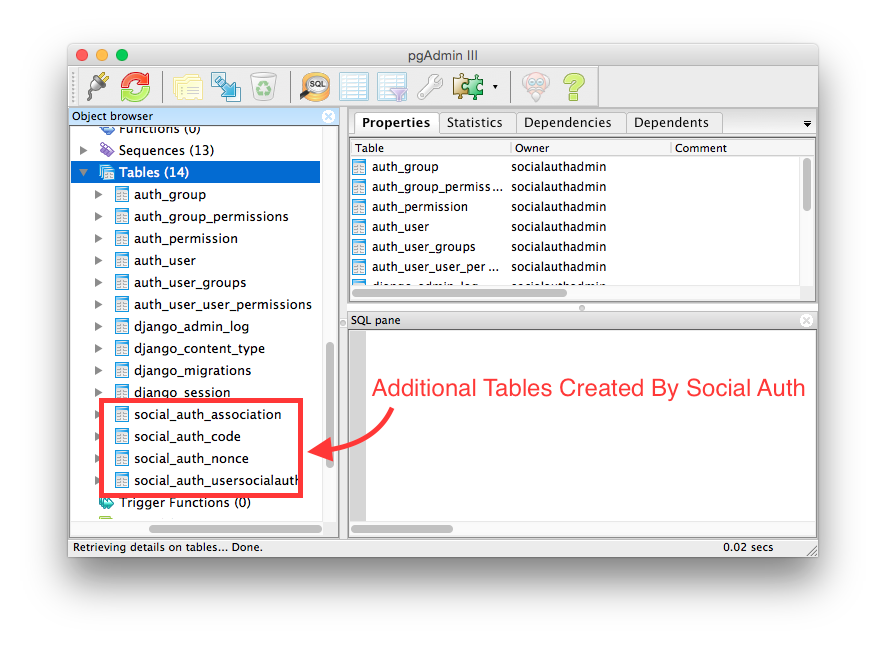
64 | ##### B. Add desired authentication backends to Django's AUTHENTICATION_BACKENDS setting:
65 |
66 | Social Auth provides many social networks' authentications. Facebook, Twitter, Google, Yahoo, Spotify and Instagram are all supported. We can check whether the social authentications are supported by Social Auth in [here](http://psa.matiasaguirre.net/docs/intro.html#features)
67 |
68 | In this tutorial, we will focus on making a Web app with Facebook, Google and Twitter authentications.
69 |
70 |
71 | # Authentication backends Setting
72 | AUTHENTICATION_BACKENDS = (
73 | # For Facebook Authentication
74 | 'social.backends.facebook.FacebookOAuth2',
75 |
76 | # For Twitter Authentication
77 | 'social.backends.twitter.TwitterOAuth',
78 |
79 | # For Google Authentication
80 | 'social.backends.google.GoogleOpenId',
81 | 'social.backends.google.GoogleOAuth2',
82 | 'social.backends.google.GoogleOAuth',
83 |
84 | # Default Django Auth Backends
85 | 'django.contrib.auth.backends.ModelBackend',
86 | )
87 |
88 | ###### Warning: In the tutorial, we use django's authentication system. If you have make a better authentication system on your own. Hope you can share us how to implement customized authentication system with Social Auth :)
89 |
90 | ##### C. Set the Url entries
91 |
92 | Don't forget to set the url entreis for the social auth and the django administration
93 |
94 | urlpatterns = patterns('',
95 | ...
96 |
97 | # Url Entries for social auth
98 | url('', include('social.apps.django_app.urls', namespace='social')),
99 |
100 | # Url Entries for django administration
101 | url('', include('django.contrib.auth.urls', namespace='auth')),
102 |
103 | ...
104 | )
105 |
106 | ##### D. Add social auth's Template Context Processors
107 |
108 | Two template context processors should be added.
109 |
110 |
111 | TEMPLATE_CONTEXT_PROCESSORS = (
112 | # Default Template context processors
113 | 'django.contrib.auth.context_processors.auth',
114 | 'django.core.context_processors.debug',
115 | 'django.core.context_processors.i18n',
116 | 'django.core.context_processors.media',
117 | 'django.core.context_processors.static',
118 | 'django.core.context_processors.tz',
119 | 'django.contrib.messages.context_processors.messages',
120 |
121 | # Setting of Template Context Processors for Social Auth
122 | 'social.apps.django_app.context_processors.backends',
123 | 'social.apps.django_app.context_processors.login_redirect',
124 | )
125 |
126 | Congratulations, we finish the basic social auth configuration. Let's start to build our first facebook login app.
127 |
128 | ## Chapter 2: How to establish apps with a simple social login function?
129 |
130 | ### 1. A Facebook app
131 |
132 | #### A. Enroll an facebook app on Facebook Developer Center
133 |
134 | Everyone who has the facebook account is a facebook developer. If you don't have a facebook account, spend three minutes to apply one.
135 |
136 | Let's go to [facebook developer center](https://developers.facebook.com/).
137 |
138 | Click "Add a New App" in "My Apps"
139 |
140 | 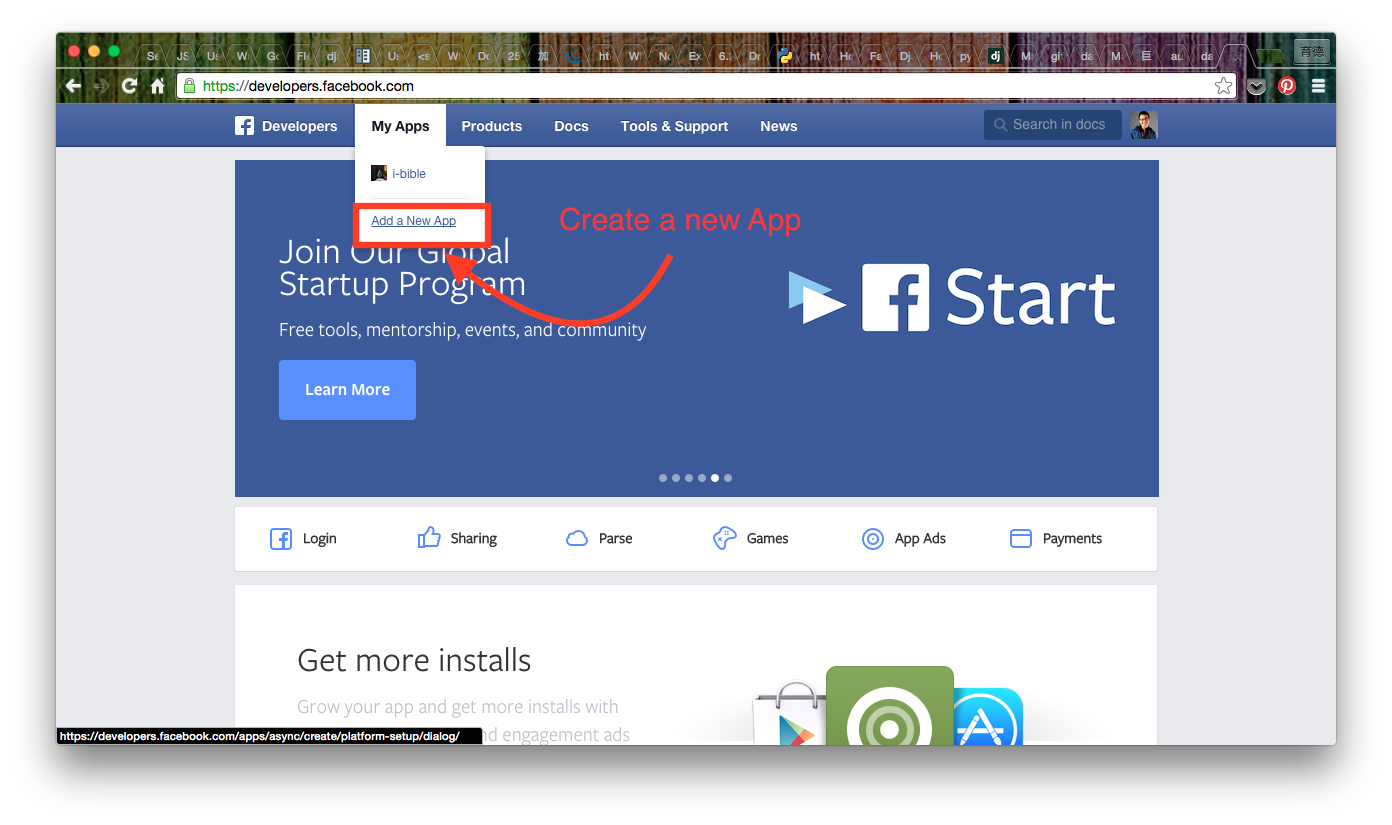
141 |
142 | We are developing a Web app so chick the "www" icon.
143 |
144 | 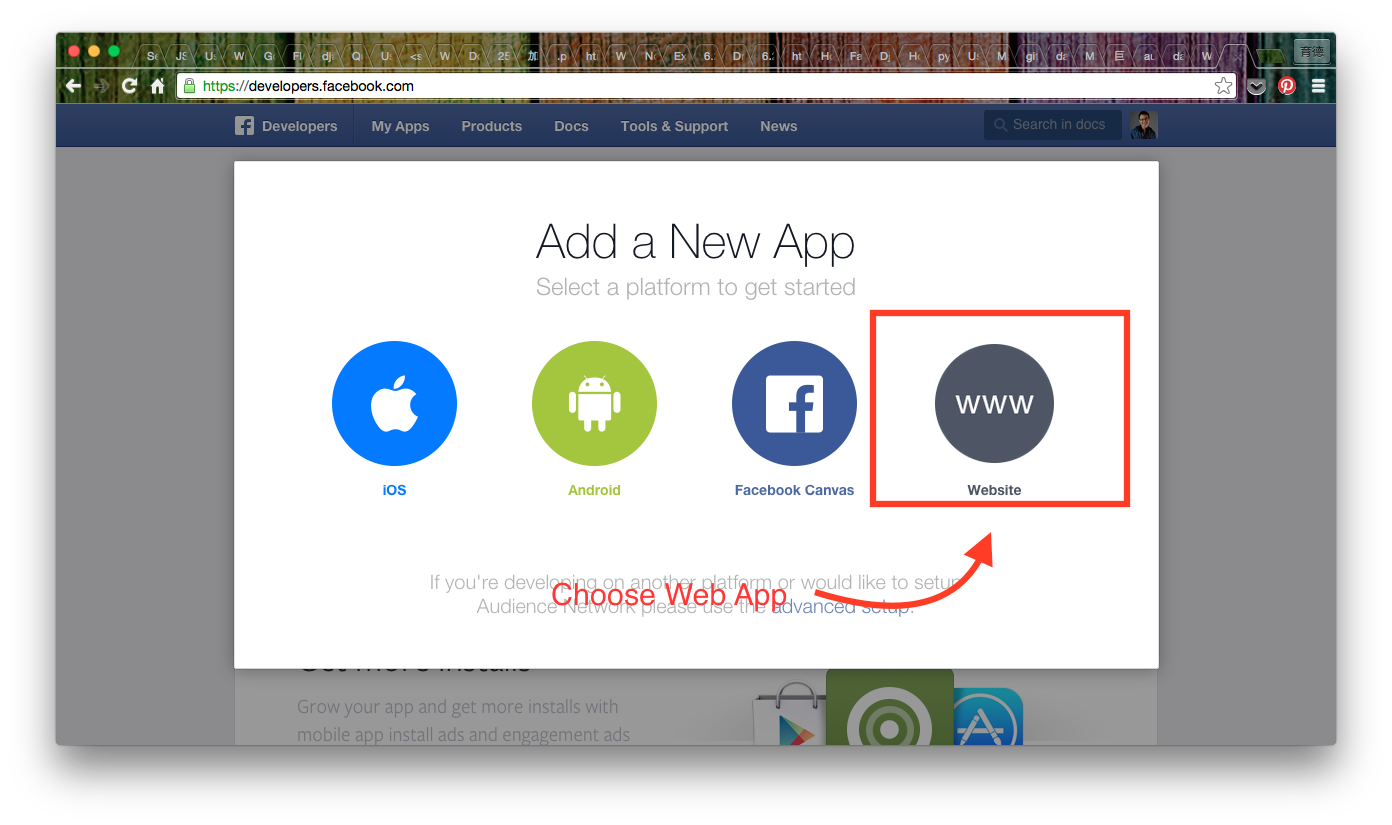
145 |
146 | Then name our app and click the button "Create New Facebook App ID"
147 |
148 | 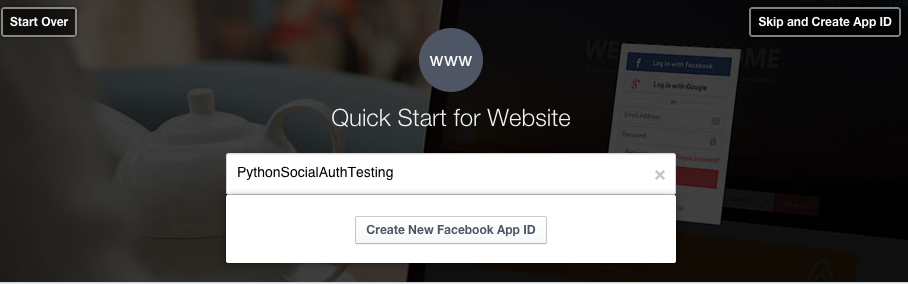
149 |
150 | A form pops out, finish the required blanks and click "Create App ID".
151 |
152 | 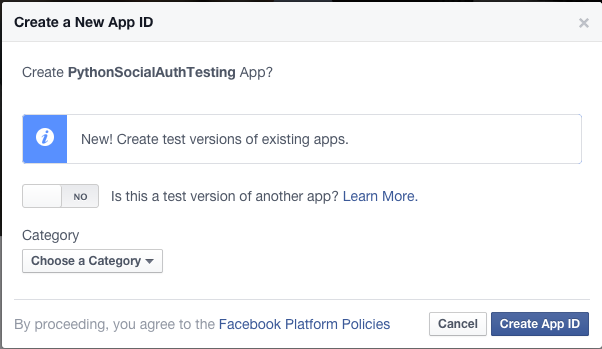
153 |
154 | After the App is created successfully, the page will redirect to a "Quick Start" tutorial.
155 | 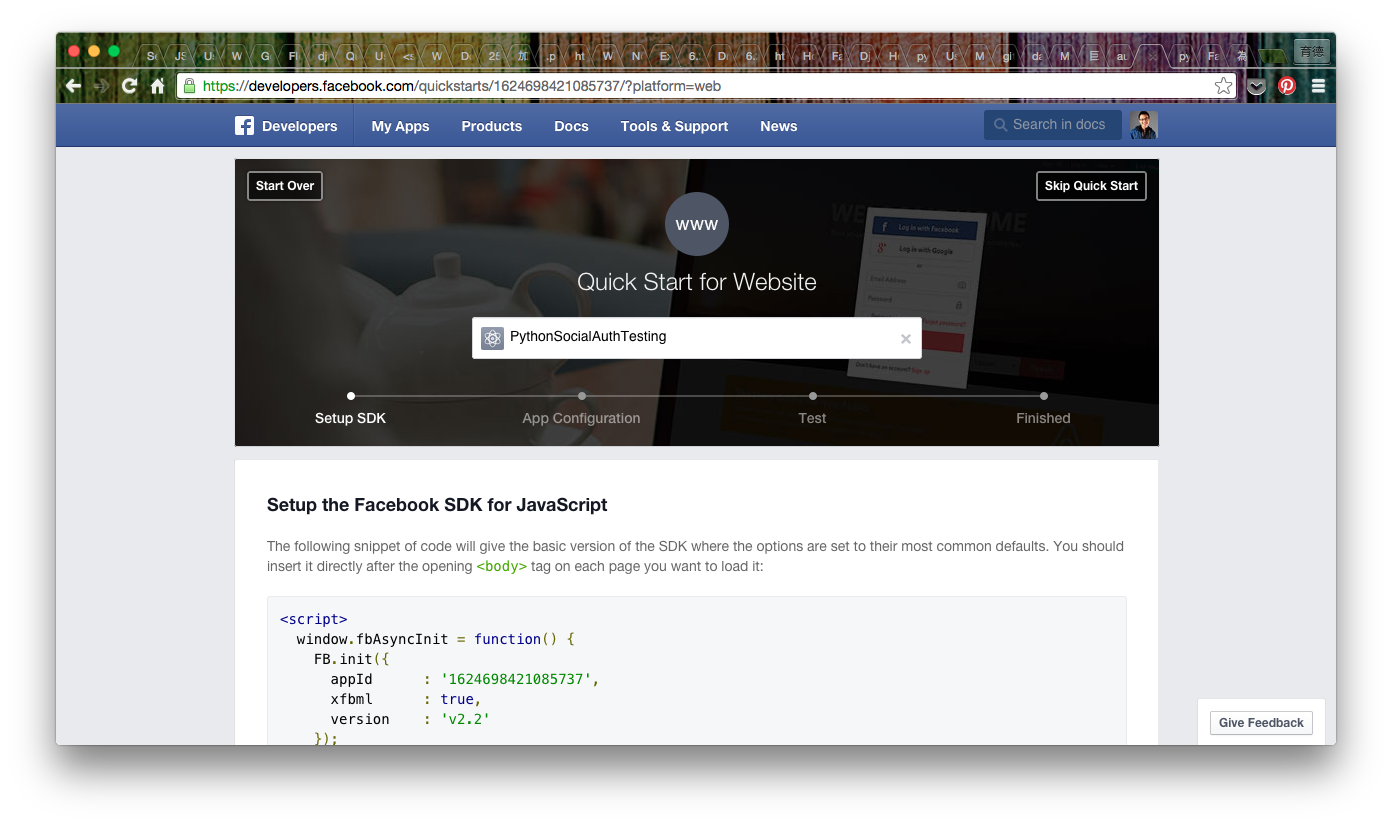
156 |
157 | Scroll down the page, there are two blanks about the settings of the url.
158 | The first one is the url of our websites and the second one is for the mobile websites.
159 |
160 | 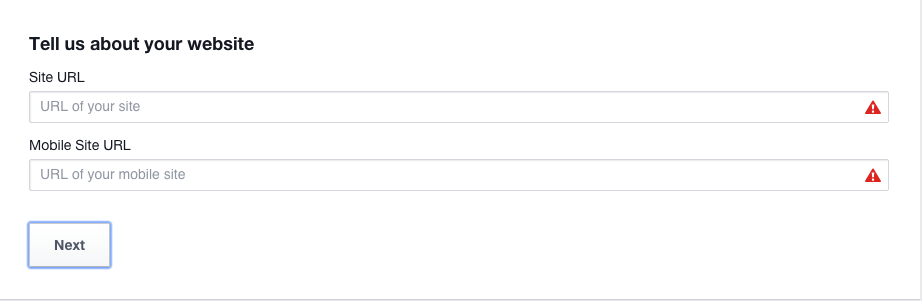
161 |
162 | In the tutorial, we use the normal web app as the example. Hence, we input our web app's url in the above blank.
163 |
164 | ##### B. Set up a test Url configuration on our local machine.
165 |
166 | If we want to test the functions of the social auth on the local machine. There are something we have to do.
167 |
168 | Because the http://localhost and http://127.0.0.1 are not allowed. we have to define the domain name for our local machine local machine.
169 |
170 | My development environment is built on Mac OS X, so the following steps are specific for the developers using Mac. For developers on Windows, I have no idea. Hope there are some professional developers contributing the configuration of windows. (In my point of view, the steps for linux may quite alike, if you guys want to contribute the related information, please do :") )
171 |
172 | ###### Mac:
173 | 1. Open the terminal.
174 |
175 | 2. Open the /etc/hosts with vim
176 |
177 | $ sudo vim /etc/hosts
178 |
179 | 3. Change the localhost to the domain name we want and save the changes.
180 | 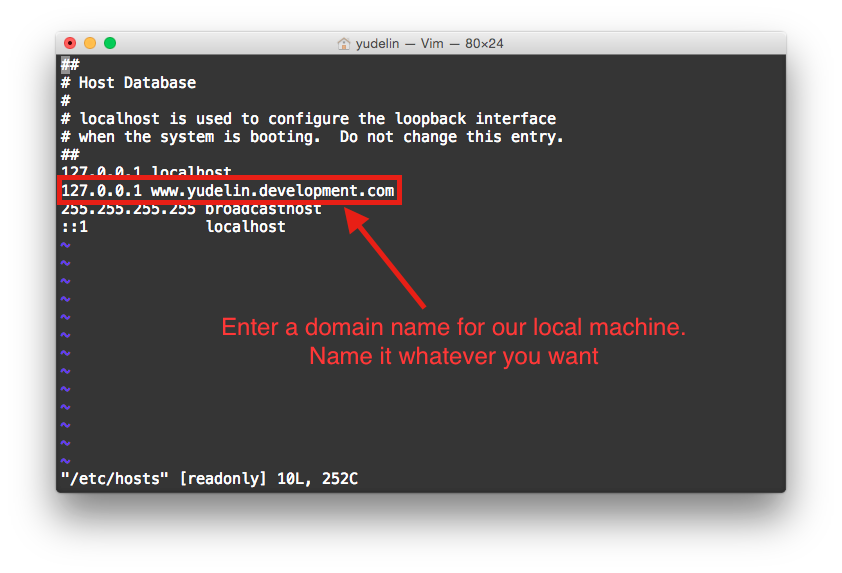
181 |
182 | 4. Recache the modifed Domain Settings.
183 |
184 | $ decacheutil -flushcache
185 |
186 | 5. To check the domain name is successful or not, run the django project we set. If we can open the page with the new domain name. We success.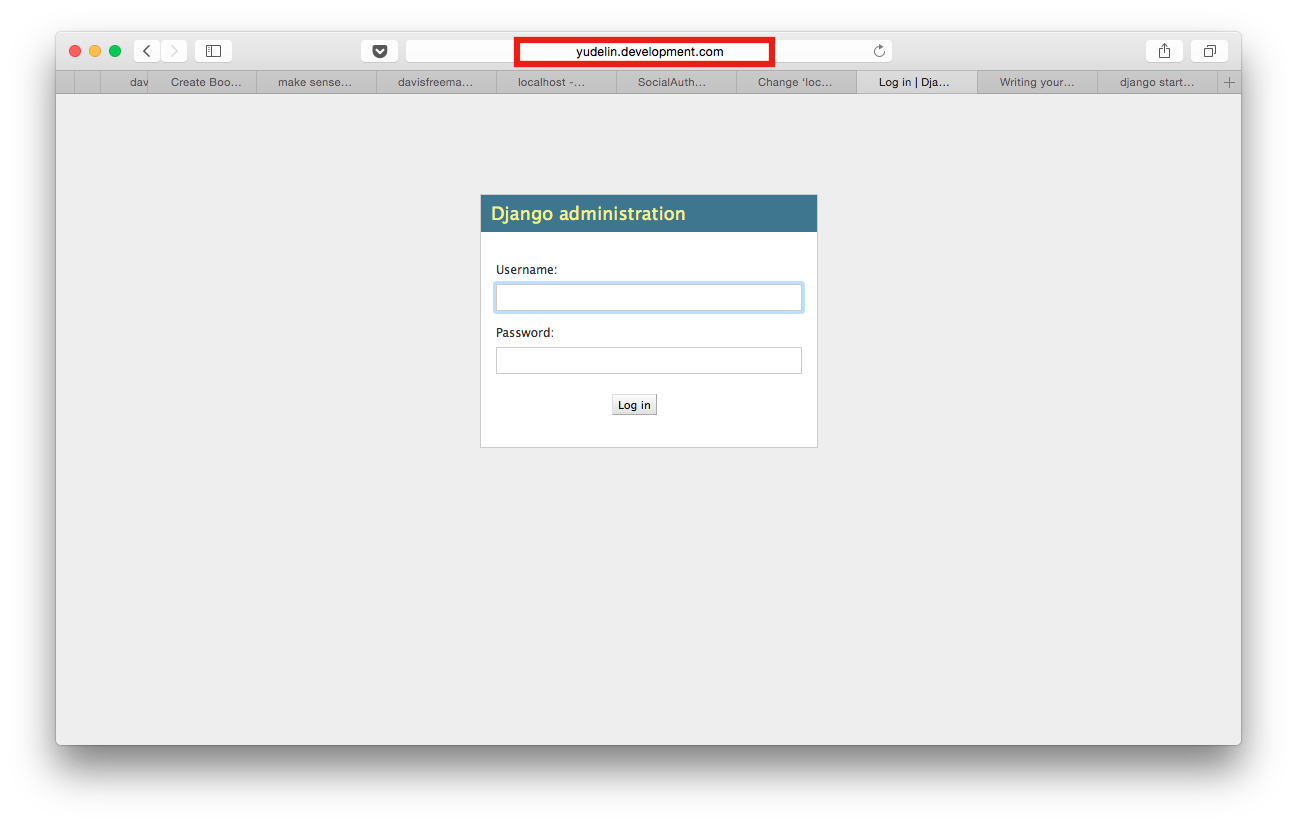
187 |
188 | ##### C. Set up the url for the app.
189 |
190 | Enter the name in the site url blank.
191 | 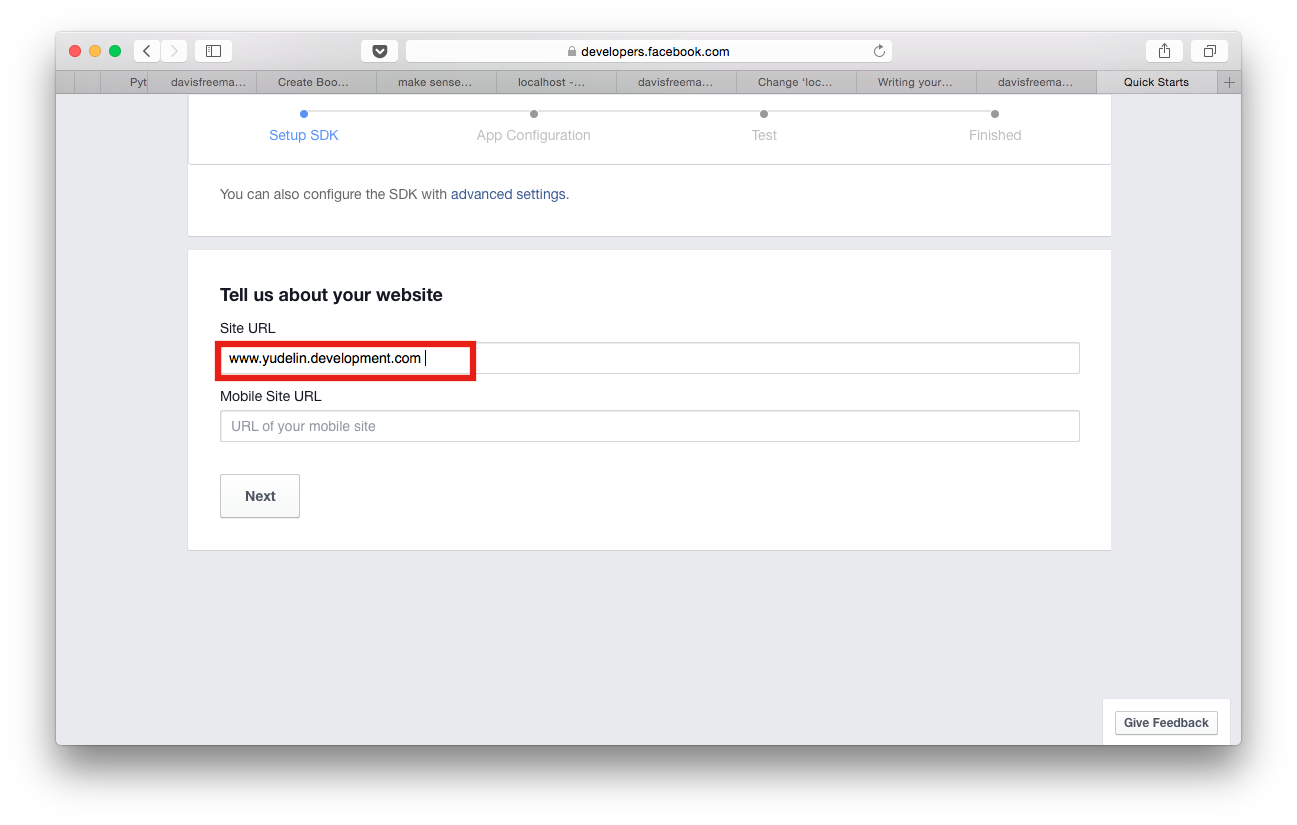
192 |
193 | Congratulations, we create our own facebook app successfully.
194 |
195 | #### 2. Configuration of the Facebook app
196 |
197 | It's worth to read the "Quick Start" page which can give us a quick understanding of the basic facebook APIs. However, life is short. Click the "Skip Quick Start" button and go ahead.
198 | 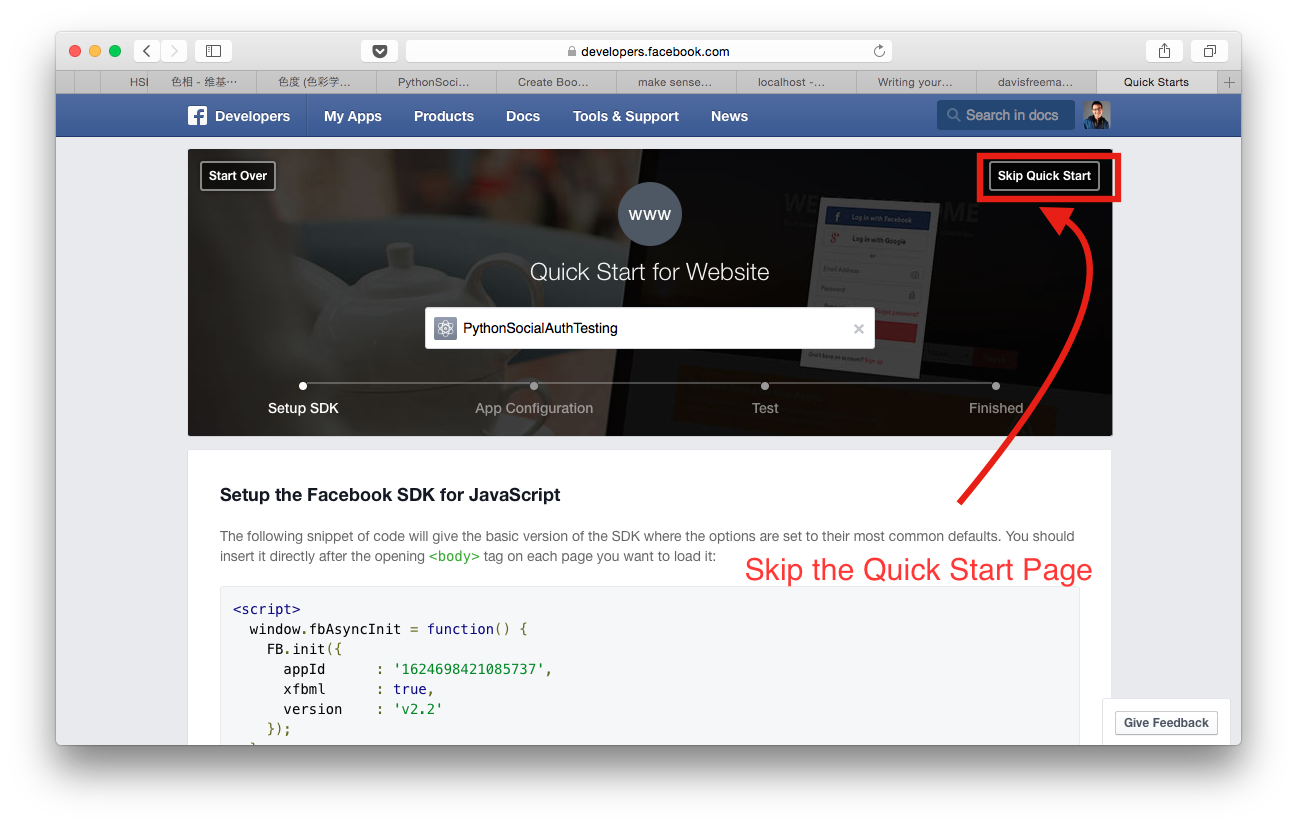
199 |
200 | Then the page will direct to the dashboard of the web app. On the dashboard, we can see two vital properties which have deep connection with the social auth. One is the App Id, the identity number of the app. The other is the App Secret(or App Key), the app's password. Careful, NEVER let other knows the App Secret. Hide it as well as you can.
201 | 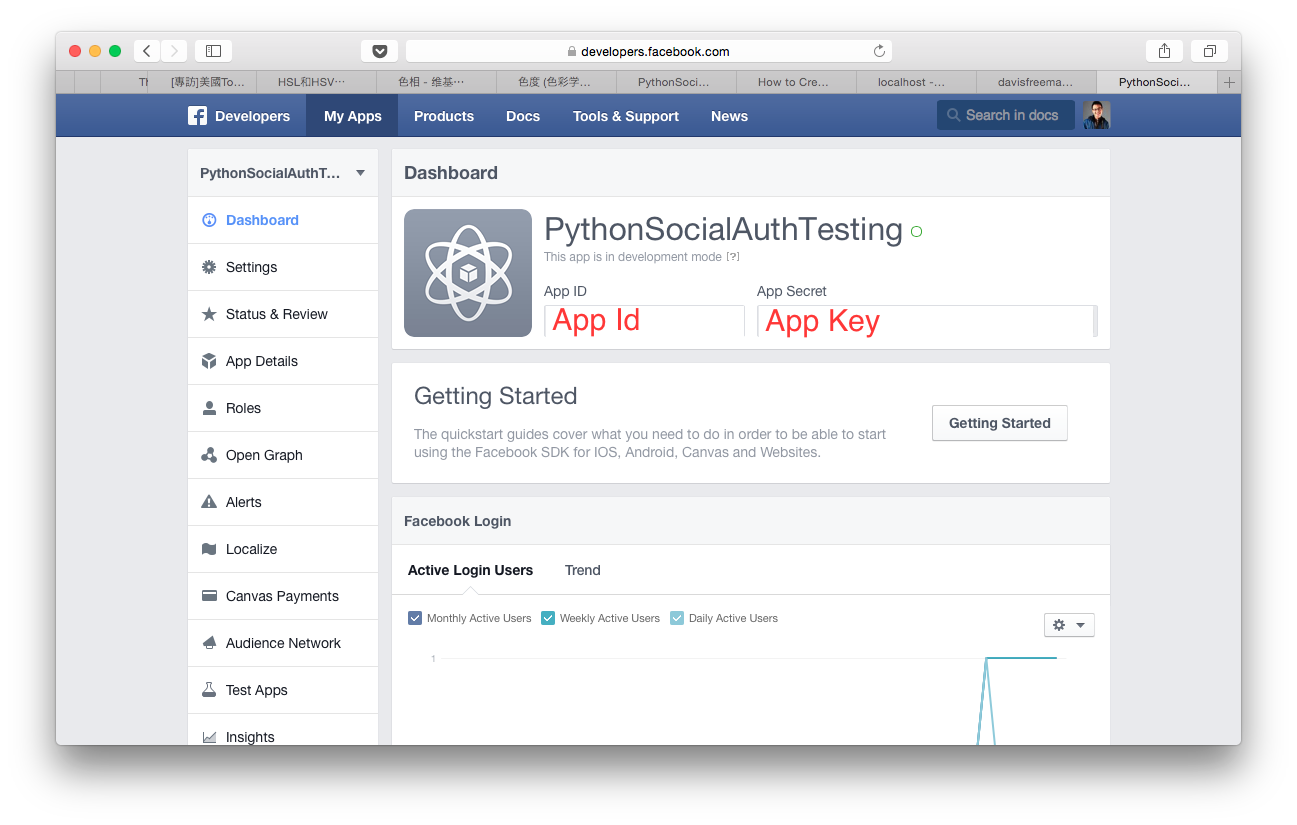
202 |
203 | We are too excited to wait. So let's trigger our web app for development! Go to "Status & Review" page (Mark 1) and there is a toggle on the right side of the page (Mark 2). Click it for start.
204 | 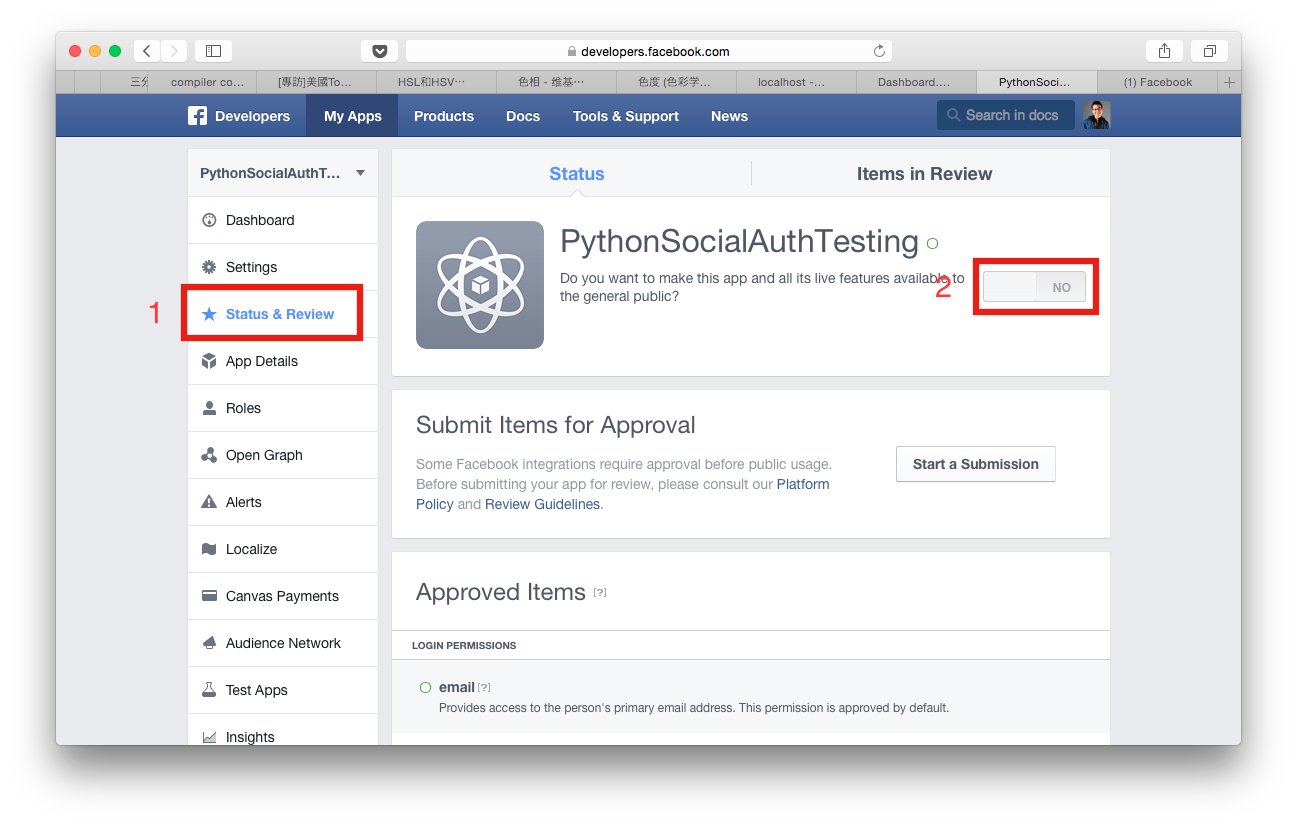
205 |
206 | #### 3. Initialize an app with facebook social authentication
207 |
208 | ##### A. Add the facebook app id and secret into the setting.py.
209 | 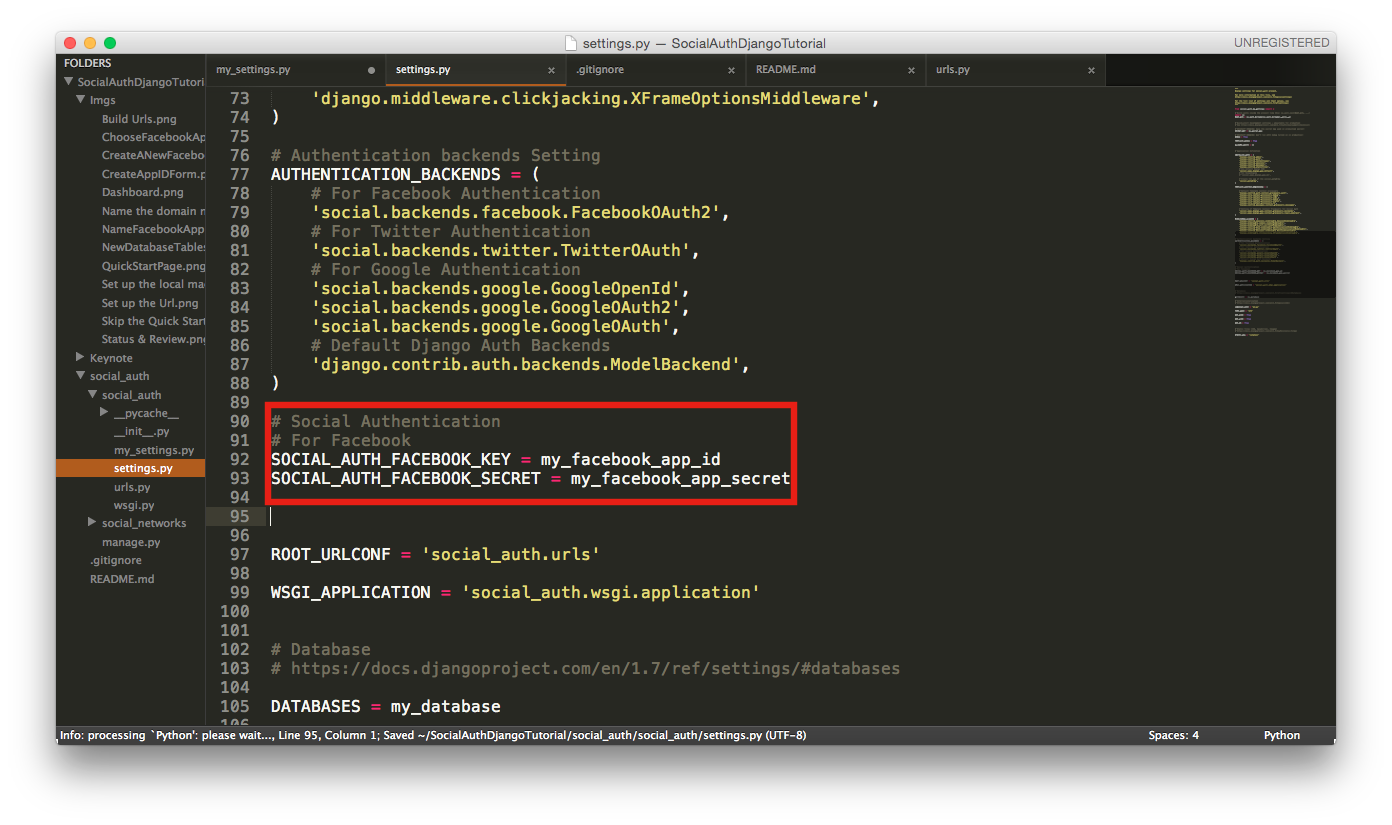
210 |
211 | ##### B. Write the html as below
212 |
213 | 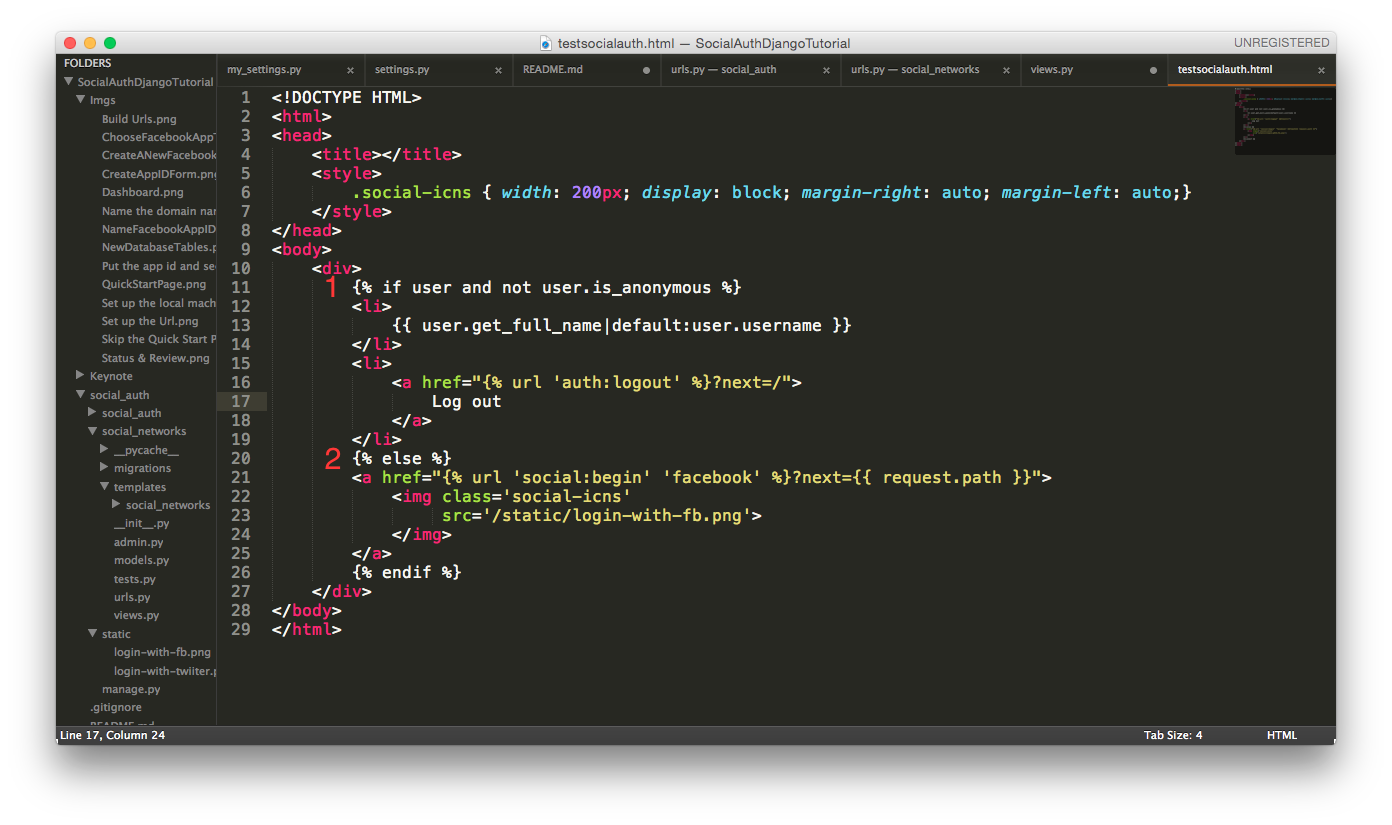
214 |
215 | When a client gets the web page, the server will check the client's session id. If the id is correct, then the server will read the session data to check the user's properties. Getting anonymous represents the client hasn't logged in. Therefore, the "Login with facebook" icon will display.
216 |
217 | 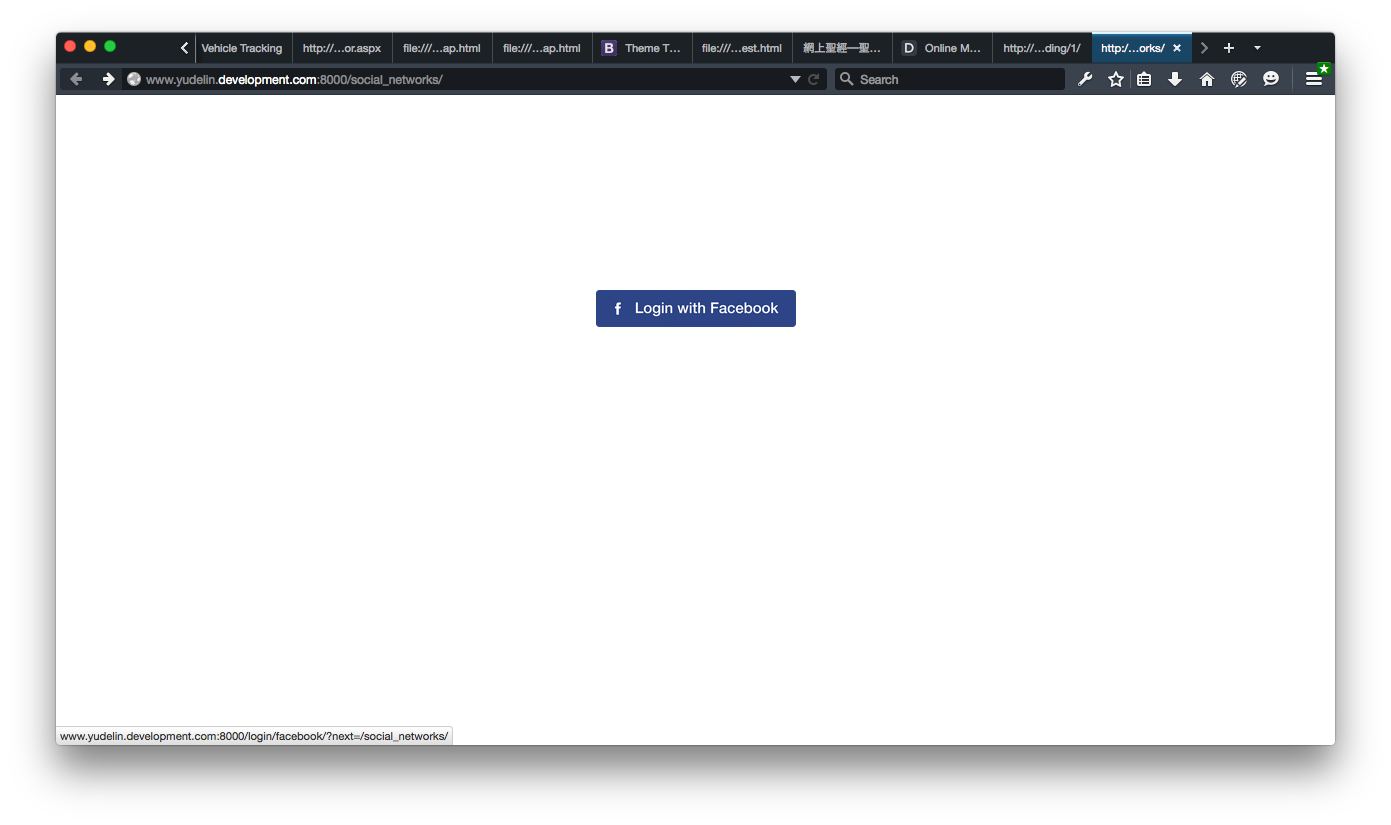
218 |
219 | If our facebook cookies are not expired, we will redirect to the app authentication message page in facebook.
220 | 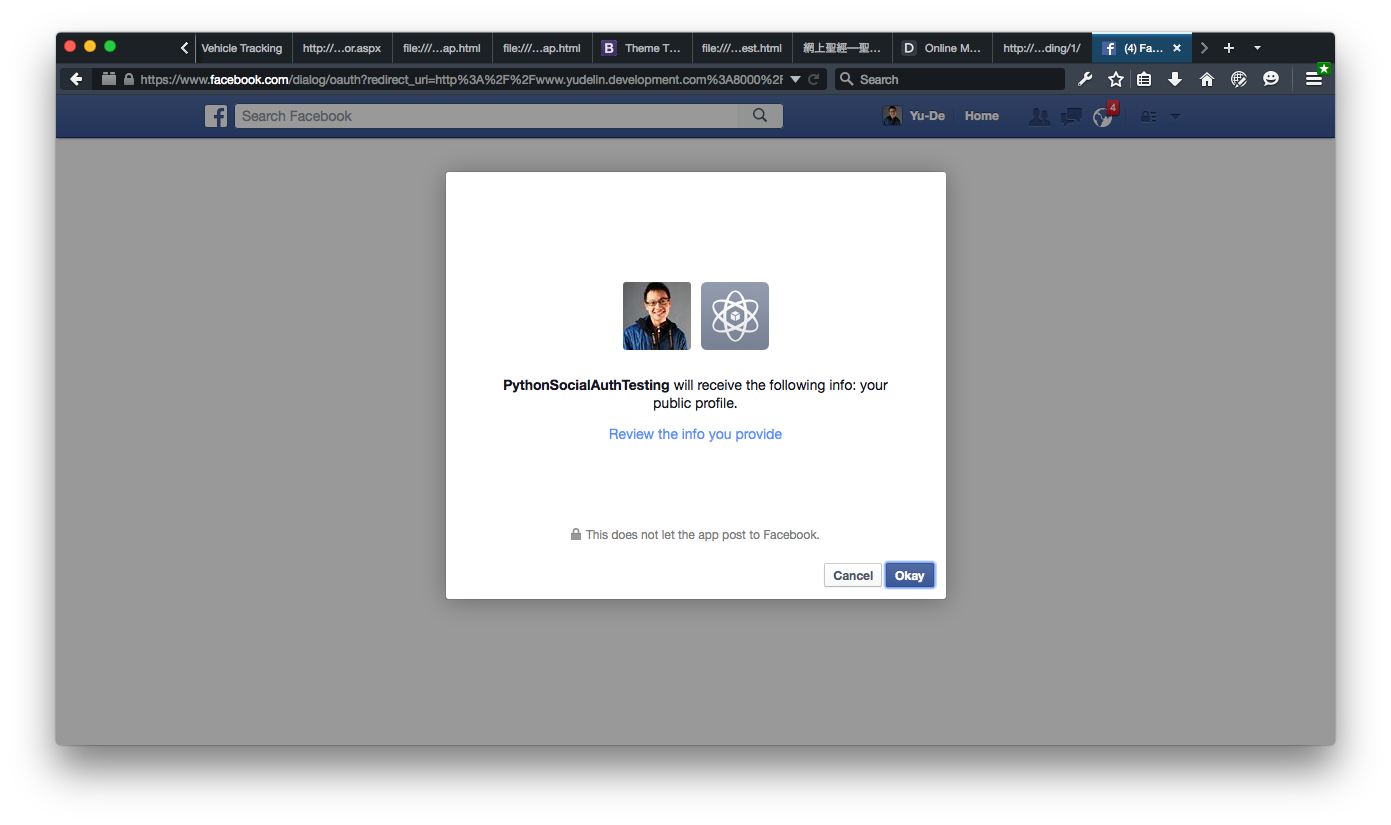
221 |
222 | Suppose that the facebook cookies is expired, the facebook will redirect the clients to the facebook login page. Just finish the login process and the rest of the steps are really similar.
223 |
224 | Click the okay. The page will redirect to the original page and we can see the client's user name is displayed on the page. We can see the name "Yu De Lin" displaying.
225 | 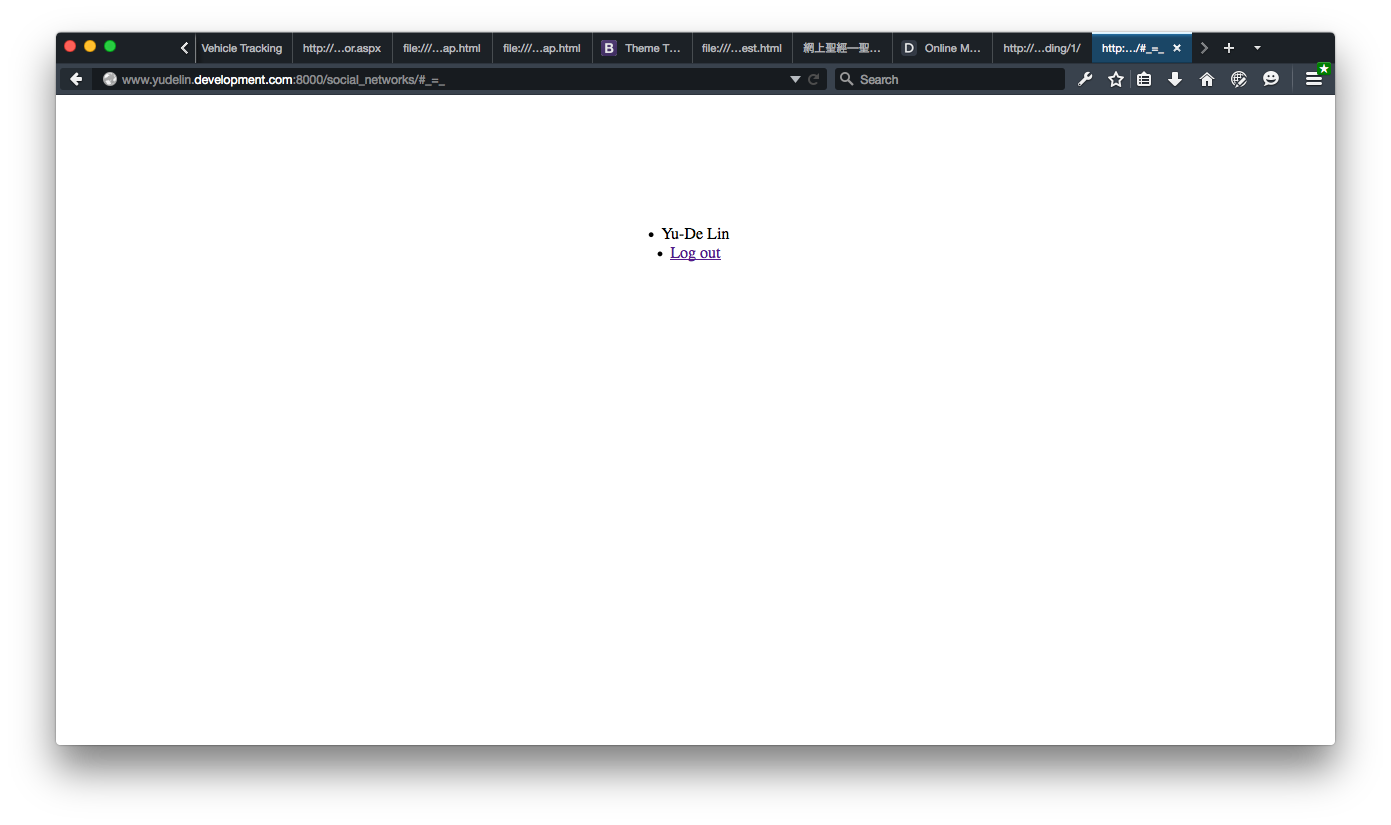
226 |
227 | Let's go to check the "auth_user" table inside the database. We can see the client's related information here.
228 | 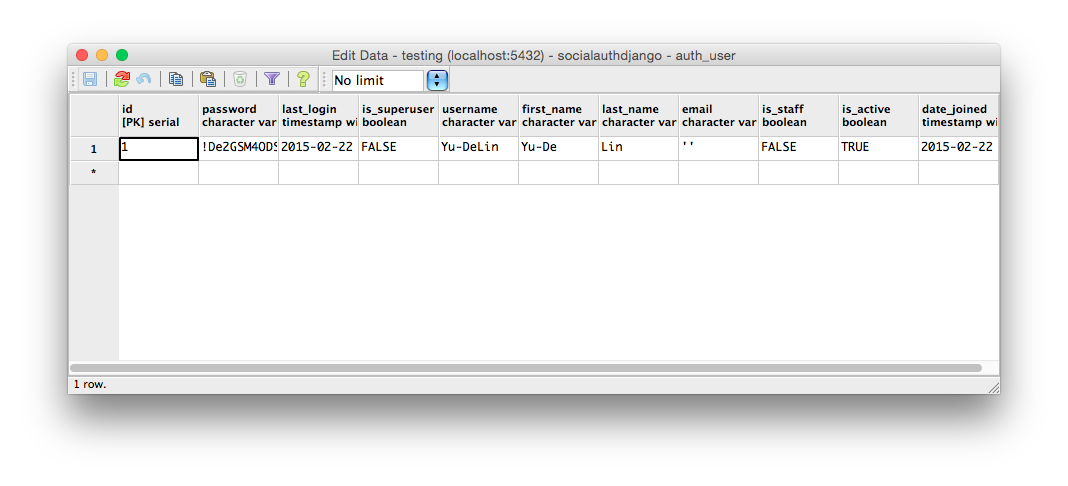
229 |
230 | Also, there is another data storing in "usersocialauth" table.
231 | 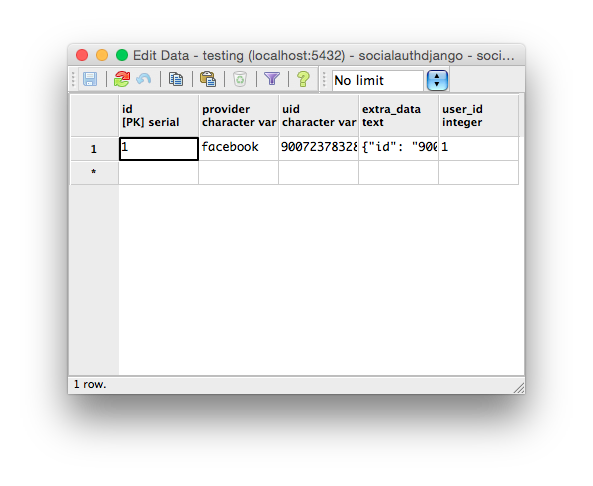
232 |
233 | The "provider" column saves the client's social data provider such as facebook. "uid" is the abbreviation of "user id" meaning the user's identity number in the social provider. The most important part is the "extra_data" where stores the "access token". The higher priority the "access token" with, the more data and social mechanism we can access and use.
234 |
235 | ### 2. A Twitter App
236 |
237 | #### A. Set up an app on twitter
238 | Go to twitter [application management page](https://apps.twitter.com).
239 |
240 | Then sign in with our twitter account, the page will direct to a simple dashboard page. Click the "Create New App" on the right side.
241 |
242 | 
243 |
244 | We will get an application form page for applying app. Fill the following blanks which are marked required and agree the "Developer Agreement". Important, an app with twitter authentication follows Oauth 1.0a rule, so we have to add a call back url like "http://domain.name/complete/twitter".
245 | 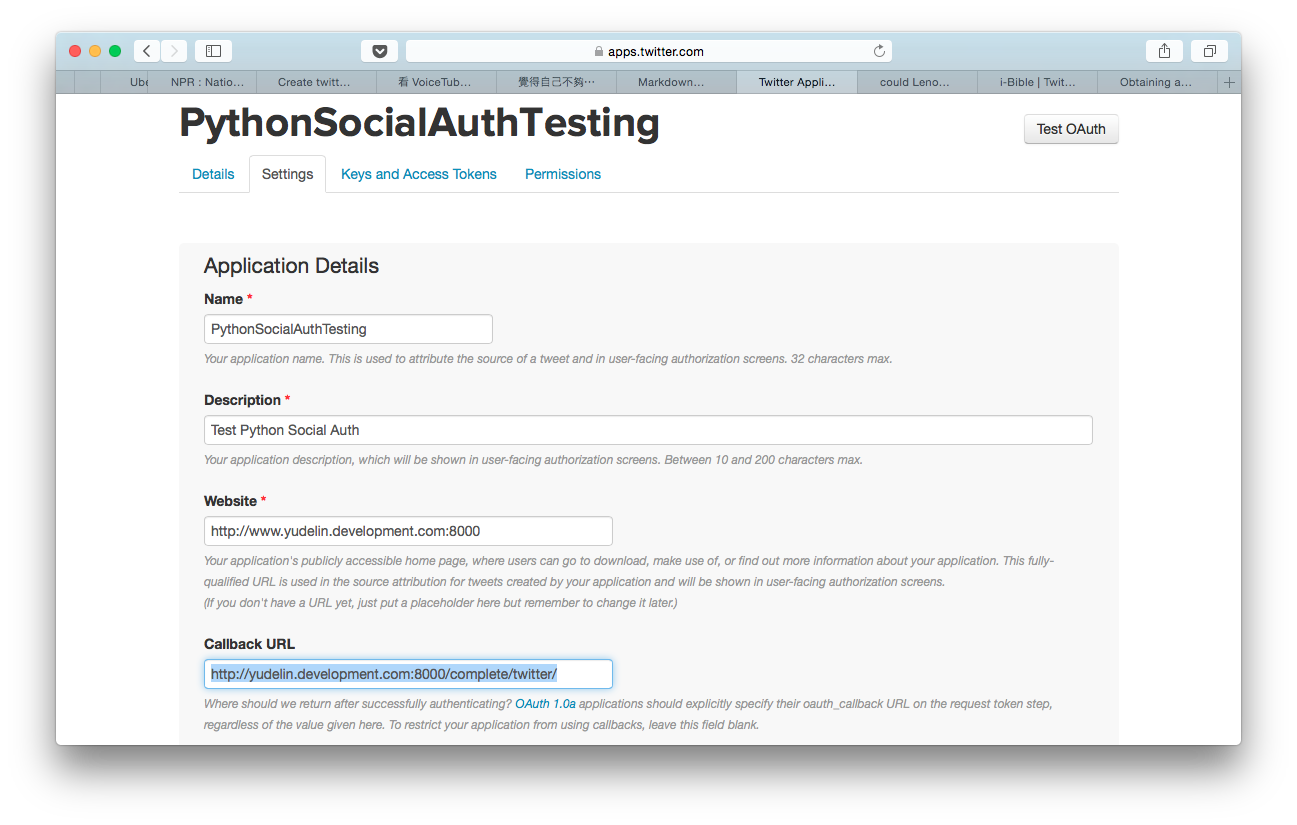
246 | 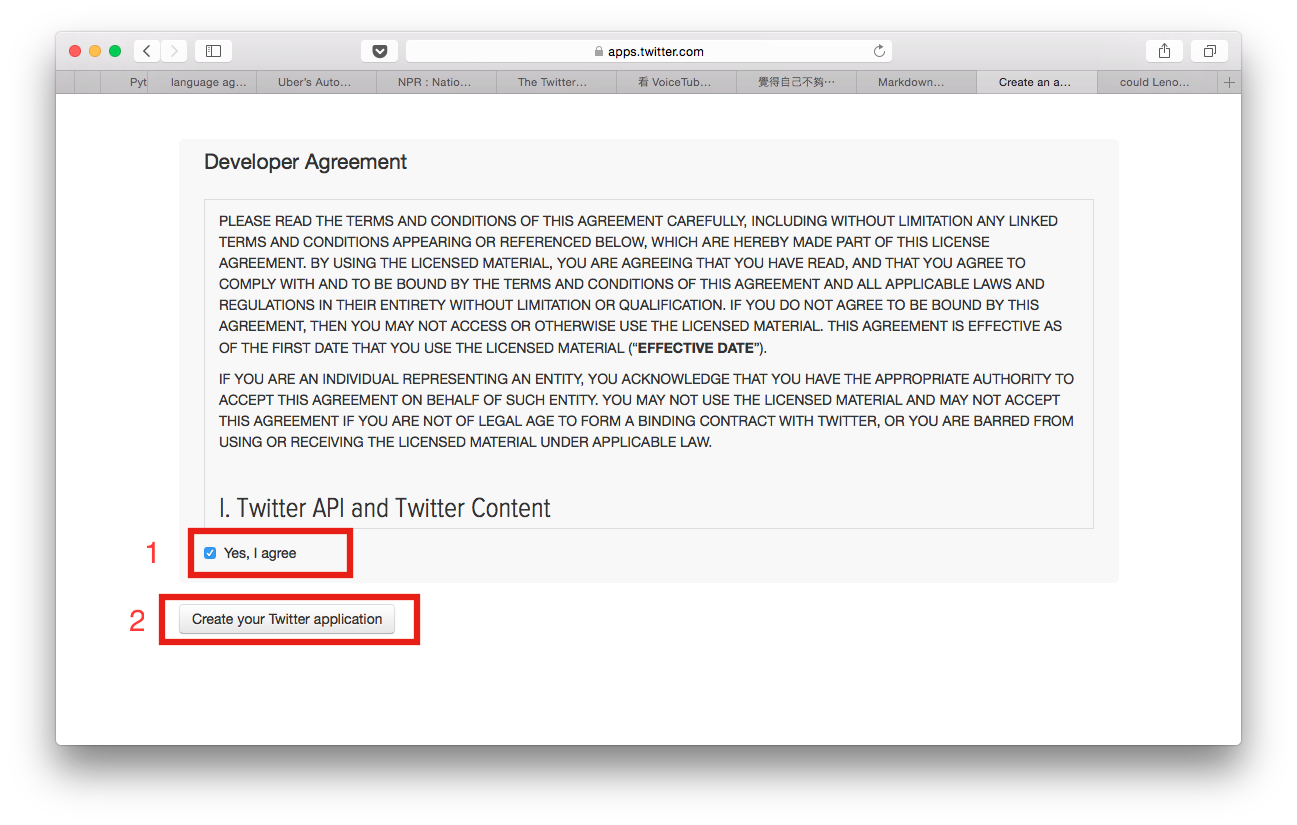
247 |
248 | Like applying a facebook app, twitter will lead us to our dashboard page of the app. To start an app with twitter authentication as we did a facebook auth app, the key and secret are the must. Go to page about "Keys and Access Token".
249 | 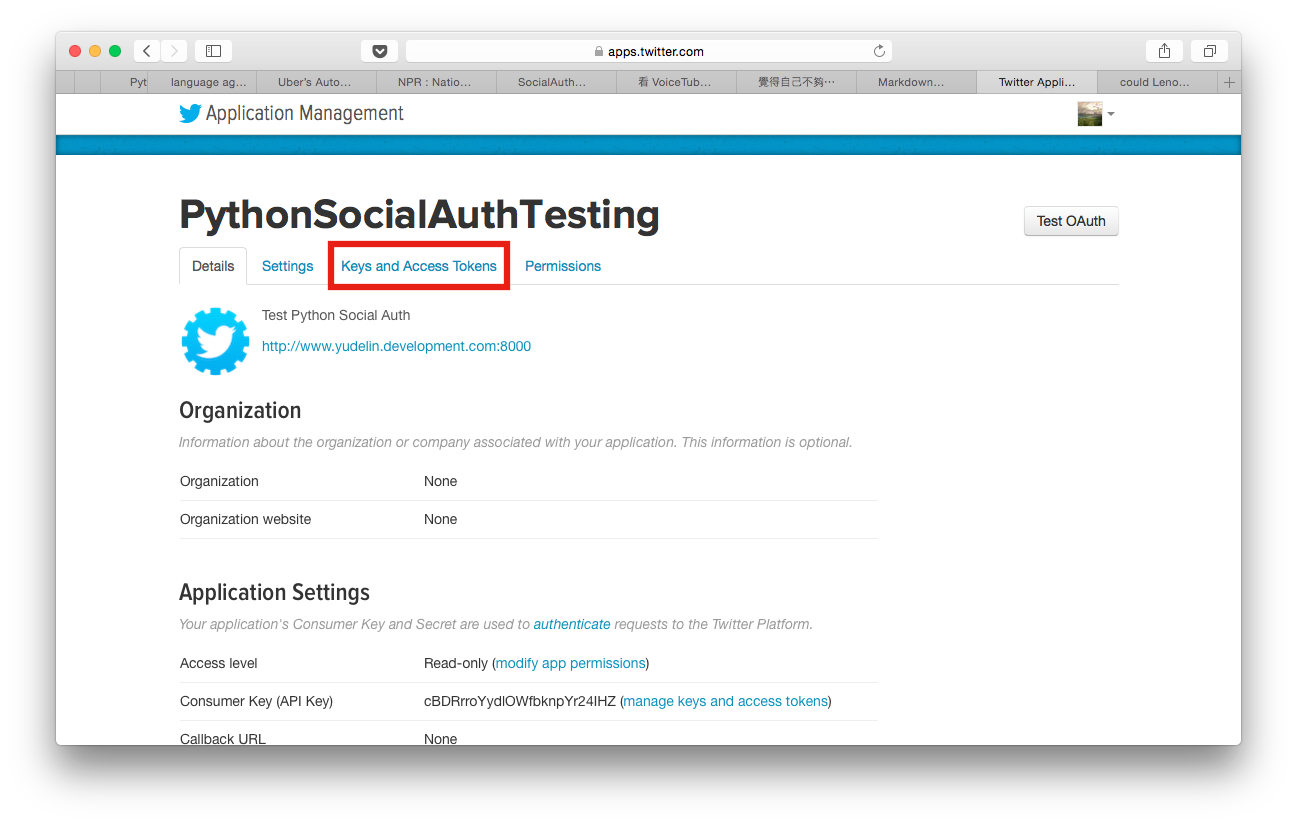
250 |
251 | On the "Keys and Access Token" page, we can find out our App id and App secret here. Please copy these two into our setting files. (Do not leak the "secret" one.) Don't forget to click the "Create my acess token" at the bottom of the page.
252 | 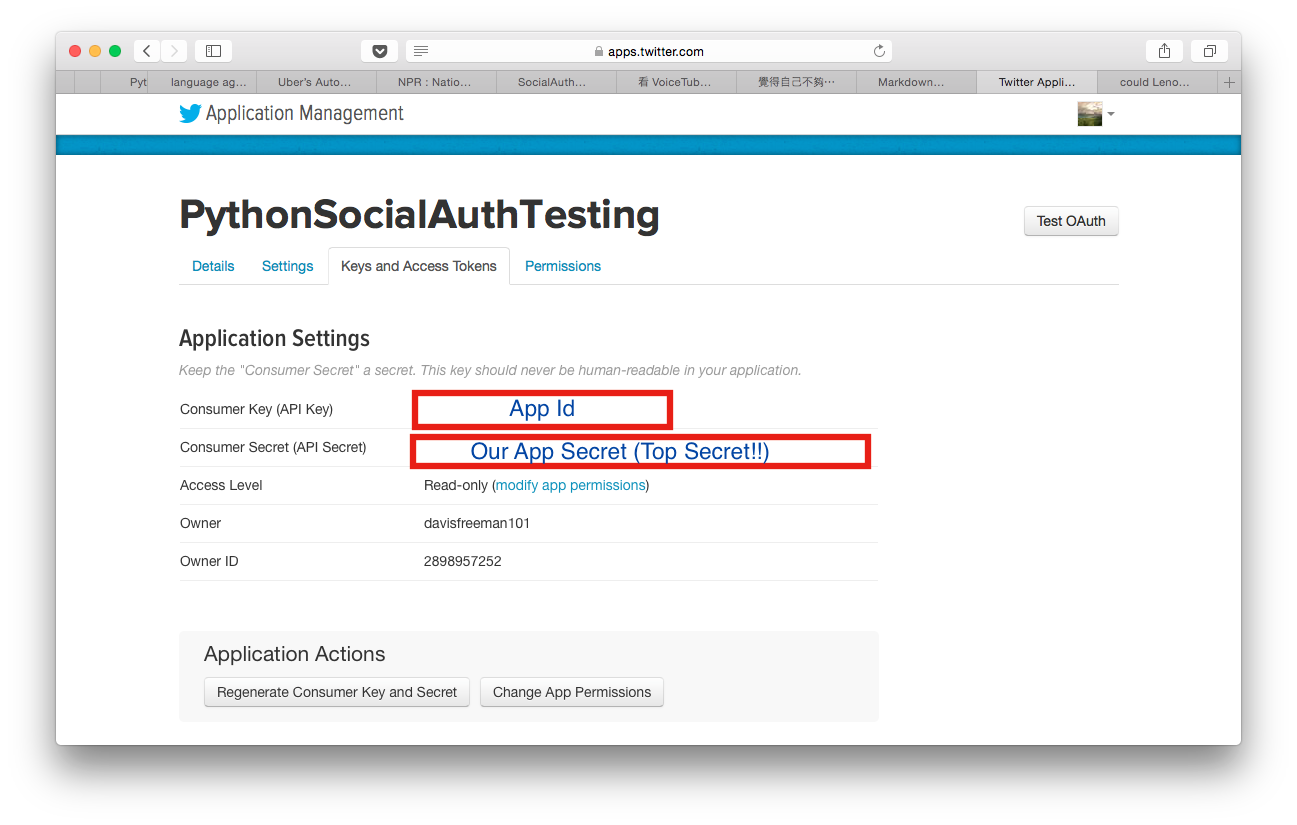
253 | 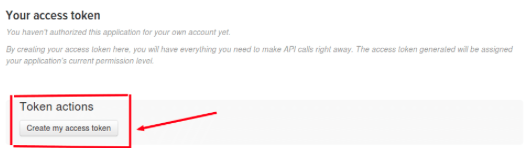
254 |
255 | #### B. Add a "Connect with Twitter" function on the page
256 |
257 | It's really simple. Just add the lines of code as below:
258 | 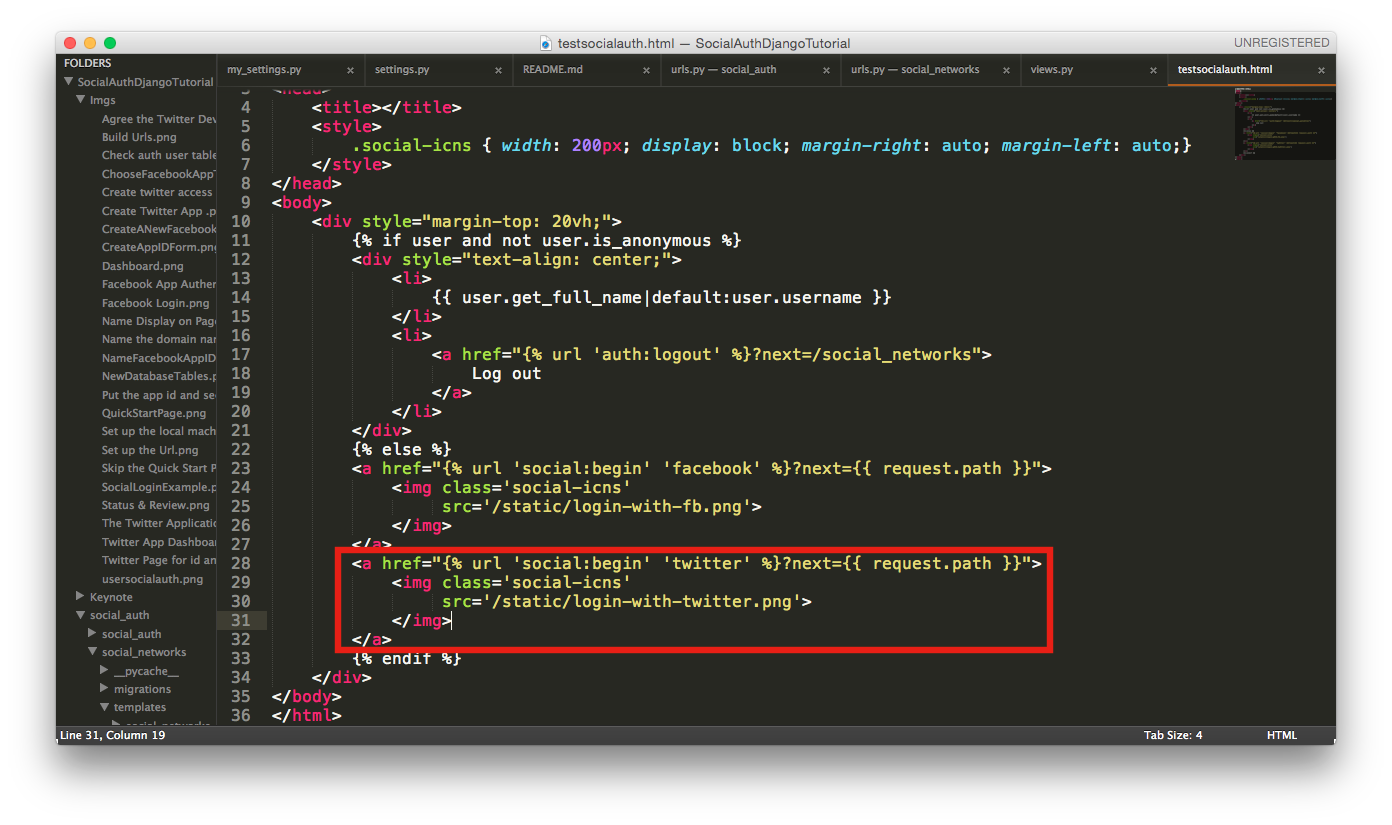
259 | 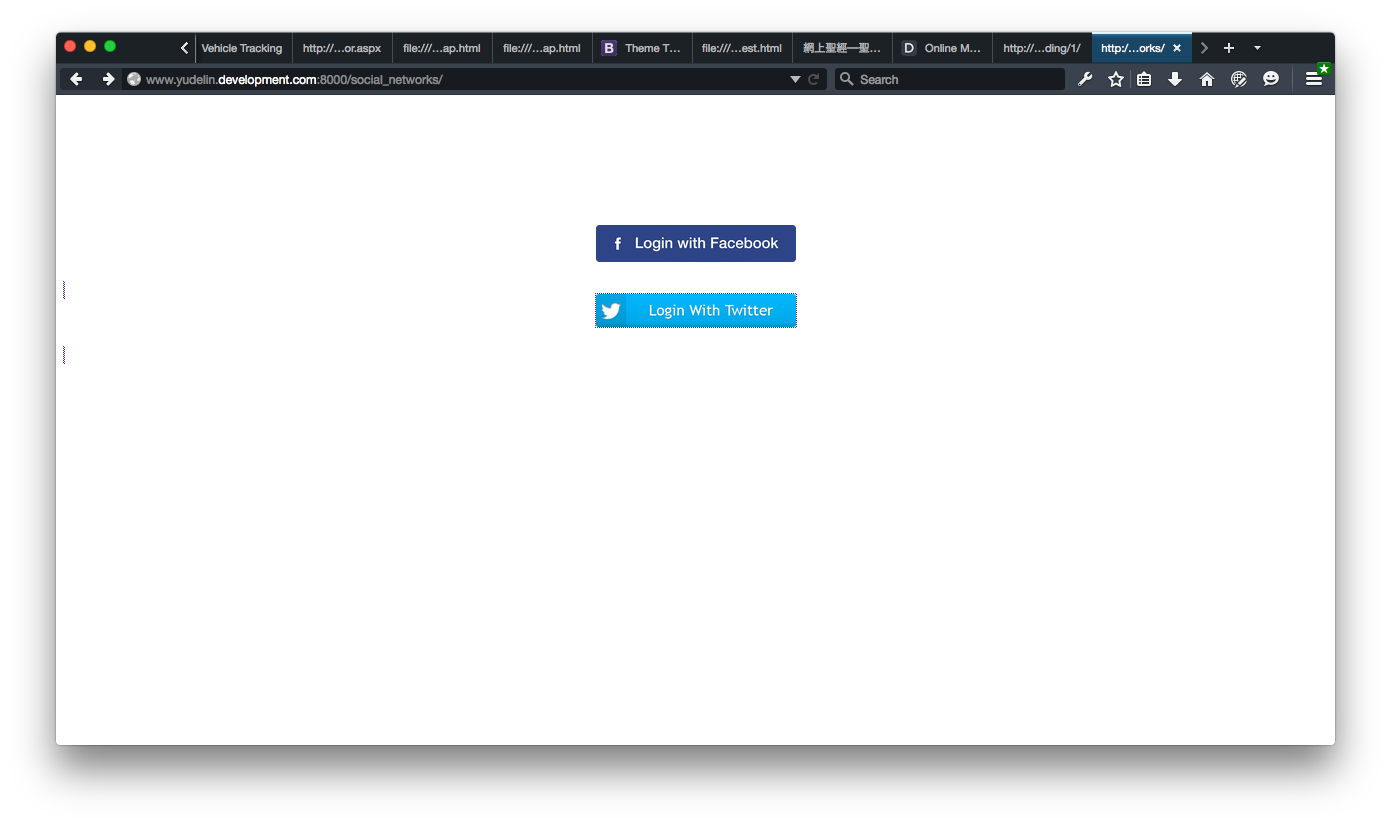
260 |
261 | If a twitter validation page shows up, it means the twitter soical auth app is established successfully.
262 | 
263 |
264 | ### 3. A Google App
265 |
266 | #### A. Enroll a google app
267 |
268 | Just like we apply a facebook or a twiiter app. We have to create an app on the [Google Developer Console](https://console.developers.google.com).
269 |
270 | 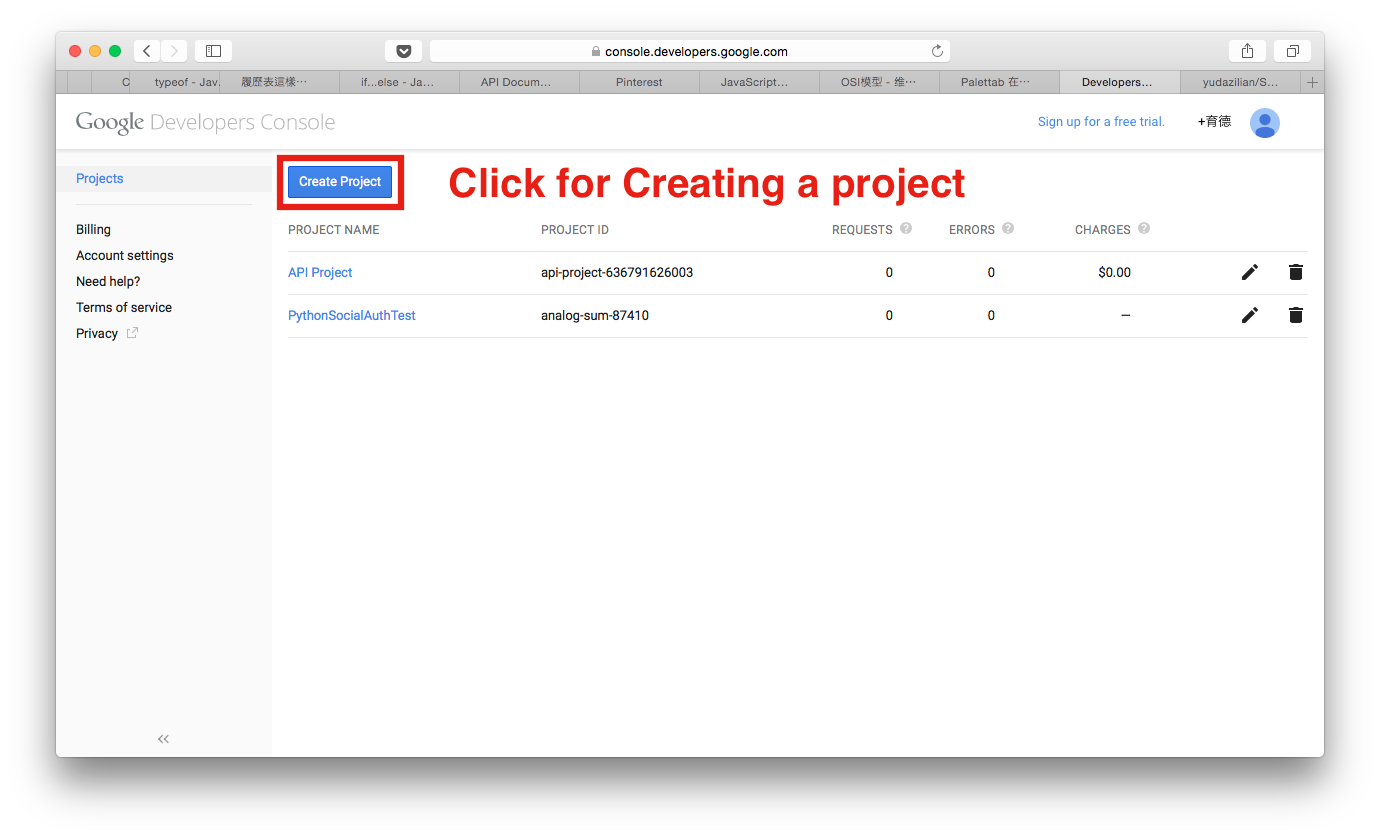
271 |
272 | Then fill the form with a beautiful project name and the project id is a self-created object which I have no idea how to use it on the applications now.
273 |
274 | 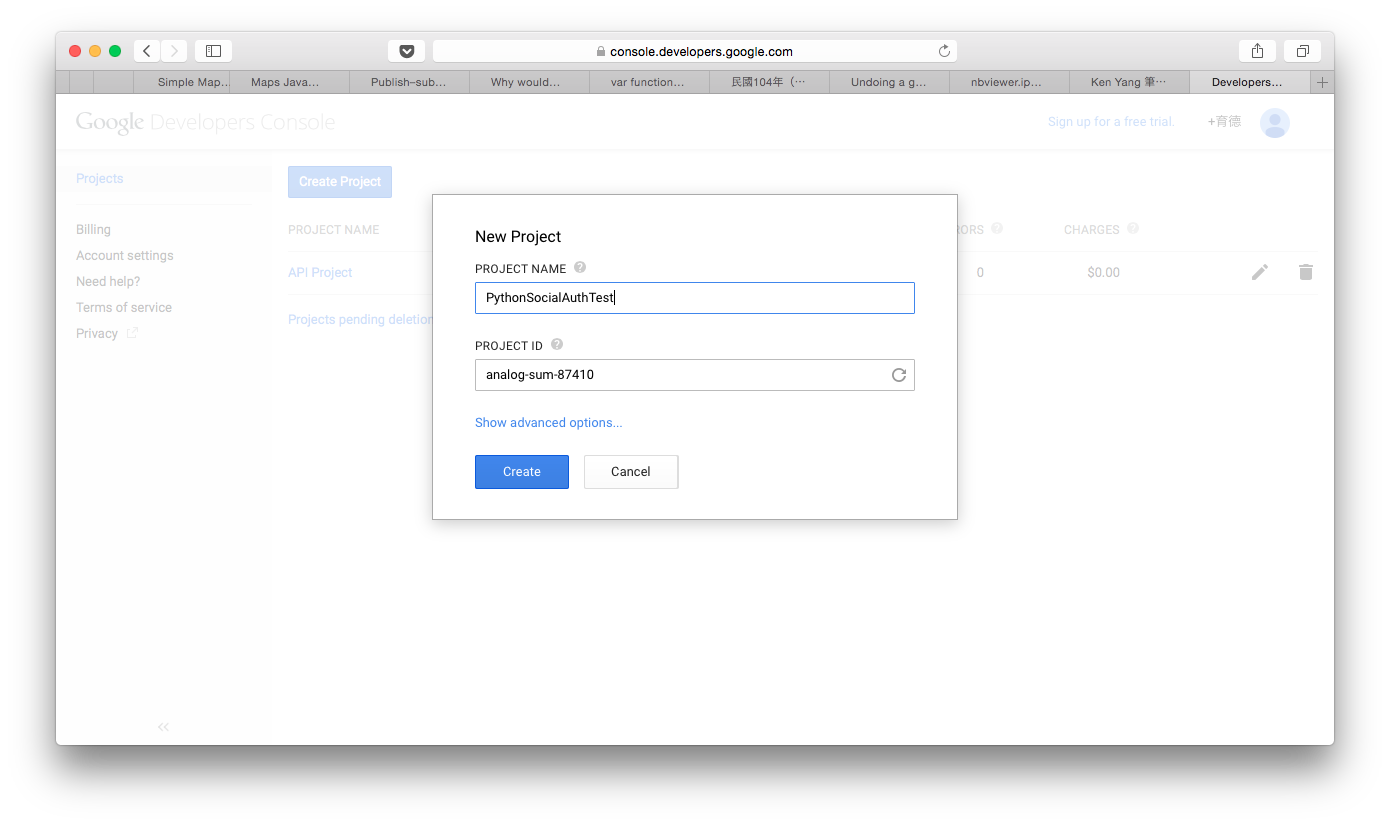
275 |
276 | After completing the form, we can see a block showing the building progress of our project on the right side. The browser also directs us to the project's dashboard page when the progress is completed.
277 | 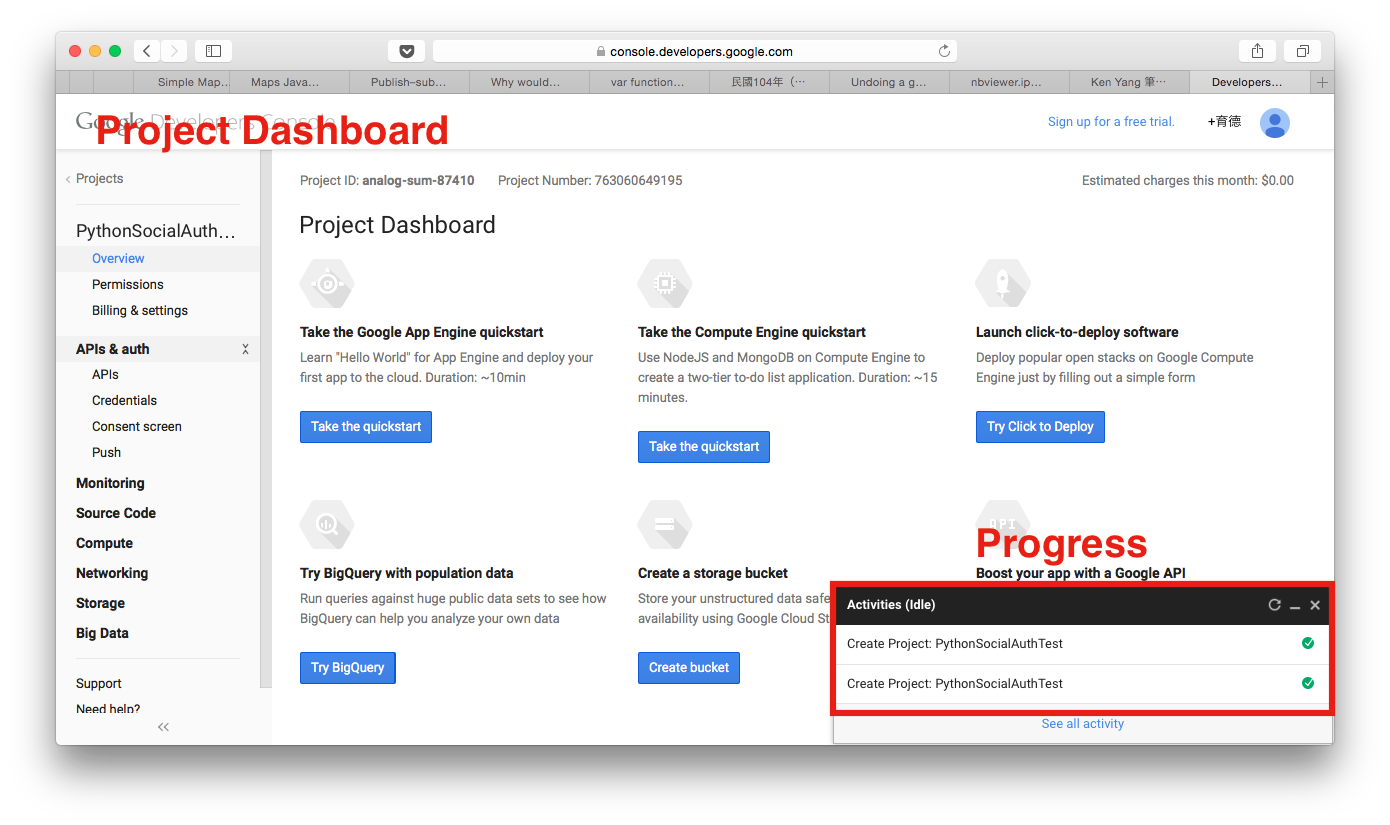
278 |
279 |
280 |
--------------------------------------------------------------------------------
 26 |
27 |
28 |
29 |
26 |
27 |
28 |
29 |  31 |
32 |
33 |
34 |
31 |
32 |
33 |
34 |  36 |
37 |
38 | {% endif %}
39 |
36 |
37 |
38 | {% endif %}
39 |