20 |
21 | Link to: {item.title}
22 |
23 | {// Conditional render example
24 | // Check to see if the background is orange, if so, display the message
25 | item.background === "orange" ? (
26 |
27 | Check store/flux.js scroll to the actions to see the code
28 |
29 | ) : null}
30 |
33 |
34 | );
35 | })}
36 |
37 |
38 |
39 |
40 |
41 |
42 | );
43 | };
44 |
--------------------------------------------------------------------------------
/template.html:
--------------------------------------------------------------------------------
1 |
2 |
3 |
4 |
5 |
6 | Hello Rigo with Vanilla.js
7 |
8 |
9 |
10 |
11 |
12 |
13 |
14 |
15 |
16 |
17 |
18 |
--------------------------------------------------------------------------------
/webpack.common.js:
--------------------------------------------------------------------------------
1 | const webpack = require('webpack');
2 | const path = require('path');
3 | const HtmlWebpackPlugin = require('html-webpack-plugin');
4 | const Dotenv = require('dotenv-webpack');
5 |
6 | module.exports = {
7 | entry: [
8 | './src/js/index.js'
9 | ],
10 | output: {
11 | filename: 'bundle.js',
12 | path: path.resolve(__dirname, 'public'),
13 | publicPath: '/'
14 | },
15 | module: {
16 | rules: [
17 | {
18 | test: /\.(js|jsx)$/,
19 | exclude: /node_modules/,
20 | use: ['babel-loader']
21 | },
22 | {
23 | test: /\.(css)$/, use: [{
24 | loader: "style-loader" // creates style nodes from JS strings
25 | }, {
26 | loader: "css-loader" // translates CSS into CommonJS
27 | }]
28 | }, //css only files
29 | {
30 | test: /\.(png|svg|jpg|gif|jpeg|webp)$/, use: {
31 | loader: 'file-loader',
32 | options: { name: '[name].[ext]' }
33 | }
34 | }, //for images
35 | { test: /\.woff($|\?)|\.woff2($|\?)|\.ttf($|\?)|\.eot($|\?)|\.svg($|\?)/, use: ['file-loader'] } //for fonts
36 | ]
37 | },
38 | resolve: {
39 | extensions: ['*', '.js']
40 | },
41 | plugins: [
42 | new HtmlWebpackPlugin({
43 | favicon: '4geeks.ico',
44 | template: 'template.html'
45 | }),
46 | new Dotenv({ safe: true, systemvars: true })
47 | ]
48 | };
--------------------------------------------------------------------------------
/.devcontainer/devcontainer.json:
--------------------------------------------------------------------------------
1 | // For format details, see https://aka.ms/devcontainer.json. For config options, see the
2 | // README at: https://github.com/devcontainers/templates/tree/main/src/javascript-node
3 | {
4 | "name": "Node.js",
5 | // Or use a Dockerfile or Docker Compose file. More info: https://containers.dev/guide/dockerfile
6 | "image": "mcr.microsoft.com/devcontainers/python:0-3.10",
7 | "features": {
8 | "ghcr.io/devcontainers/features/node:1": {
9 | "nodeGypDependencies": true,
10 | "version": "16"
11 | }
12 | },
13 |
14 | "customizations": {
15 | "vscode": {
16 | "settings": {
17 | "editor.defaultFormatter": "esbenp.prettier-vscode",
18 | "workbench.editorAssociations": {
19 | "*.md": "vscode.markdown.preview.editor"
20 | }
21 | },
22 | }
23 | },
24 |
25 | "onCreateCommand": "npm install && cp .env.example .env",
26 |
27 | // Features to add to the dev container. More info: https://containers.dev/features.
28 | // "features": {},
29 |
30 | // Use 'forwardPorts' to make a list of ports inside the container available locally.
31 | // "forwardPorts": [],
32 |
33 | // Use 'postCreateCommand' to run commands after the container is created.
34 | "postCreateCommand": "python docs/assets/greeting.py",
35 |
36 | // Configure tool-specific properties.
37 | // "customizations": {},
38 |
39 | // Uncomment to connect as root instead. More info: https://aka.ms/dev-containers-non-root.
40 | // "remoteUser": "root"
41 | }
42 |
--------------------------------------------------------------------------------
/src/js/store/appContext.js:
--------------------------------------------------------------------------------
1 | import React, { useState, useEffect } from "react";
2 | import getState from "./flux.js";
3 |
4 | // Don't change, here is where we initialize our context, by default it's just going to be null.
5 | export const Context = React.createContext(null);
6 |
7 | // This function injects the global store to any view/component where you want to use it, we will inject the context to layout.js, you can see it here:
8 | // https://github.com/4GeeksAcademy/react-hello-webapp/blob/master/src/js/layout.js#L35
9 | const injectContext = PassedComponent => {
10 | const StoreWrapper = props => {
11 | //this will be passed as the contenxt value
12 | const [state, setState] = useState(
13 | getState({
14 | getStore: () => state.store,
15 | getActions: () => state.actions,
16 | setStore: updatedStore =>
17 | setState({
18 | store: Object.assign(state.store, updatedStore),
19 | actions: { ...state.actions }
20 | })
21 | })
22 | );
23 |
24 | useEffect(() => {
25 | /**
26 | * EDIT THIS!
27 | * This function is the equivalent to "window.onLoad", it only runs once on the entire application lifetime
28 | * you should do your ajax requests or fetch api requests here. Do not use setState() to save data in the
29 | * store, instead use actions, like this:
30 | *
31 | * state.actions.loadSomeData(); <---- calling this function from the flux.js actions
32 | *
33 | **/
34 | }, []);
35 |
36 | // The initial value for the context is not null anymore, but the current state of this component,
37 | // the context will now have a getStore, getActions and setStore functions available, because they were declared
38 | // on the state of this component
39 | return (
40 |
41 |
42 |
43 | );
44 | };
45 | return StoreWrapper;
46 | };
47 |
48 | export default injectContext;
49 |
--------------------------------------------------------------------------------
/package.json:
--------------------------------------------------------------------------------
1 | {
2 | "name": "react-hello-webapp",
3 | "engines": {
4 | "node": "16.x"
5 | },
6 | "version": "1.0.1",
7 | "description": "",
8 | "main": "index.js",
9 | "scripts": {
10 | "start": "webpack-dev-server --config webpack.dev.js --host 0.0.0.0 --port 3000",
11 | "build": "webpack --config webpack.prod.js",
12 | "deploy": "node deploy-to-github.js"
13 | },
14 | "author": {
15 | "name": "Alejandro Sanchez",
16 | "url": "http://alesanchezr.com/"
17 | },
18 | "contributors": [
19 | {
20 | "name": "Alejandro Sanchez",
21 | "url": "http://alesanchezr.com/"
22 | },
23 | {
24 | "name": "Ignacio Cordoba",
25 | "url": "http://github.com/nachovz"
26 | }
27 | ],
28 | "license": "ISC",
29 | "devDependencies": {
30 | "@babel/cli": "^7.16.0",
31 | "@babel/core": "^7.16.0",
32 | "@babel/plugin-proposal-class-properties": "^7.16.0",
33 | "@babel/plugin-transform-runtime": "^7.16.4",
34 | "@babel/preset-env": "^7.16.4",
35 | "@babel/preset-react": "^7.16.0",
36 | "@babel/runtime": "^7.16.3",
37 | "babel-eslint": "^10.1.0",
38 | "babel-loader": "^8.2.3",
39 | "babel-plugin-transform-class-properties": "^6.24.1",
40 | "bc-console": "0.0.2",
41 | "css-loader": "^6.5.1",
42 | "dotenv-webpack": "^7.0.3",
43 | "envfile": "^6.17.0",
44 | "error-overlay-webpack-plugin": "^1.0.0",
45 | "eslint": "^8.4.0",
46 | "eslint-plugin-react": "^7.27.1",
47 | "eslint-webpack-plugin": "^3.1.1",
48 | "file-loader": "^6.2.0",
49 | "gh-pages": "^3.2.3",
50 | "html-loader": "^3.0.1",
51 | "html-webpack-plugin": "^5.5.0",
52 | "parse-github-url": "^1.0.2",
53 | "prettier": "^2.5.1",
54 | "remote-origin-url": "^2.0.0",
55 | "style-loader": "^3.3.1",
56 | "webpack": "^5.65.0",
57 | "webpack-cli": "^4.9.1",
58 | "webpack-dev-server": "^4.6.0",
59 | "webpack-merge": "^5.8.0"
60 | },
61 | "babel": {
62 | "presets": [
63 | "@babel/preset-env",
64 | "@babel/preset-react"
65 | ],
66 | "plugins": [
67 | "@babel/plugin-proposal-class-properties",
68 | [
69 | "@babel/plugin-transform-runtime",
70 | {
71 | "regenerator": true
72 | }
73 | ]
74 | ]
75 | },
76 | "dependencies": {
77 | "prop-types": "^15.7.2",
78 | "query-string": "^7.0.1",
79 | "react": "^18.2.0",
80 | "react-dom": "^18.2.0",
81 | "react-polyfills": "0.0.1",
82 | "react-router": "^6.0.2",
83 | "react-router-dom": "^6.4.3"
84 | }
85 | }
86 |
--------------------------------------------------------------------------------
/README.md:
--------------------------------------------------------------------------------
1 | # WebApp Template with React JS
2 |
3 |
4 | Used by 4Geeks.com and 4Geeks Academy students, this template helps to bootstrap your first multi-page web applications by integrating with React latest version, vercel deployments and [Vite](https://4geeks.com/lesson/intro-to-vite-module-bundler) for bundling.
5 |
6 | ### Getting stated:
7 |
8 | > 📦 Make sure you are using at least node version 20.
9 |
10 | 1. Install the node package dependencies by typing: `$ npm install`
11 |
12 | 2. Create a .env file by typing `$ cp .env.example .env`
13 |
14 | 3. Start coding! and the vite dev server with live reload by typing: `$ npm run start`
15 |
16 |
17 | ### Styling
18 |
19 | You can update the `./index.css` or create new `.css` files and import them into your current css or js files depending on your needs.
20 |
21 | ### Components
22 |
23 | Add more files into your `./src/components` or styles folder as you need them and import them into your current files as needed.
24 |
25 | 💡Note: There is an example using the Context API inside `pages/demo.js`;
26 |
27 | ### Pages
28 |
29 | Add more files into your `./js/pages` and import them in `./routes.jsx`.
30 | Each page must match at least one route inside `routes.jsx`
31 |
32 | ### Centralized Store with useReducer
33 |
34 | This template comes with a centralized & general state that's shared with all pages and compoentes, we call it "the store".
35 |
36 | The file `./src/store.js` has a default structure for the store, we encourage you to change it and adapt it to your data needs (for example, if you are doing a `Todo list` you will probably have a array of todos here).
37 |
38 | + Learn [how the useReducer works](https://4geeks.com/lesson/what-is-usereducer-react).
39 | + Read more about [implementing a global state with Context API](https://4geeks.com/lesson/context-api)
40 | + Read more about [react hooks](https://content.breatheco.de/lesson/react-hooks-explained)
41 |
42 | The store `Provider` for this context is already set on `./src/main.jsx`. You can access the store from any component using the `useGlobalReducer` hook to get the `store` and `dispatcher`. Check `/views/demo.js` to see a demo. Here is a smaller sample:
43 |
44 | ```jsx
45 | import useGlobalReducer from "./src/hooks/useGlobalReducer";
46 |
47 | const MyComponentSuper = () => {
48 | //here you use the hook to get dispatcher and store
49 | import { dispatch, store } = useGlobalReducer();
50 |
51 | return
{/* you can use your actions or store inside the html */}
52 | }
53 | ```
54 |
55 | ## Publish your website!
56 |
57 | 1. **Vercel:** The FREE recomended hosting provider is [vercel.com](https://vercel.com/), you can deploy in 1 minutes by typing the following 2 commands:
58 |
59 | Login (you need to have an account):
60 | ```sh
61 | $ npm i vercel -g && vercel login
62 | ```
63 | Deploy:
64 | ```sh
65 | $ vercel --prod
66 | ```
67 | ✎ Note: If you don't have an account just go to vercel.com, create a account and come back here.
68 |
69 | 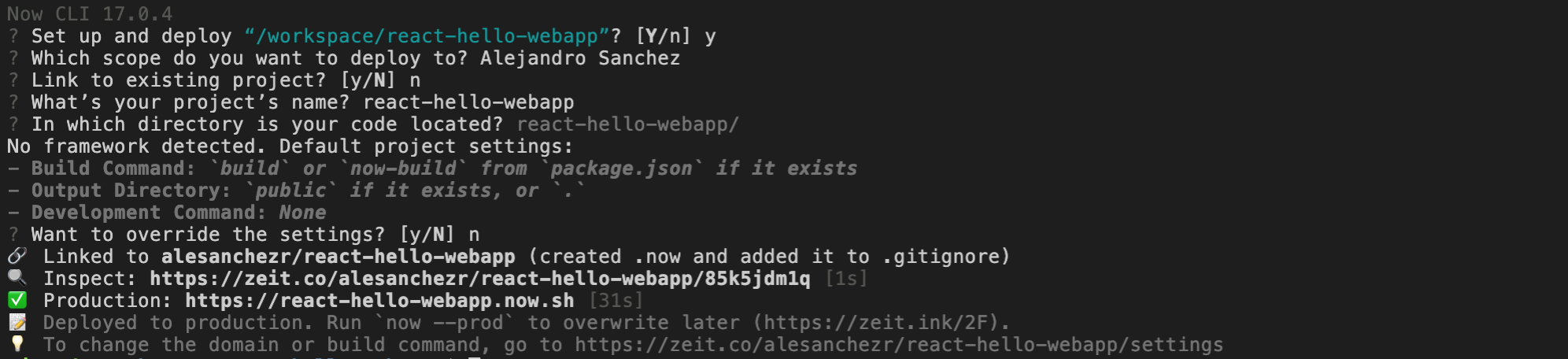
70 |
71 | ## Contributors
72 |
73 | This template was built as part of the 4Geeks Academy [Coding Bootcamp](https://4geeksacademy.com/us/coding-bootcamp) by [Alejandro Sanchez](https://twitter.com/alesanchezr) and many other contributors. Find out more about our [Full Stack Developer Course](https://4geeksacademy.com/us/coding-bootcamps/part-time-full-stack-developer), [Data Science Bootcamp](https://4geeksacademy.com/us/coding-bootcamps/datascience-machine-learning) and [CyberSecurity Bootcamp](https://4geeksacademy.com/us/coding-bootcamps/cybersecurity).
74 |
--------------------------------------------------------------------------------