├── 404.md
├── assets
├── fonts
│ ├── Vazir.eot
│ ├── Vazir.ttf
│ ├── Vazir.woff
│ ├── Vazir.woff2
│ ├── Vazir-Bold.eot
│ ├── Vazir-Bold.ttf
│ ├── Vazir-Thin.eot
│ ├── Vazir-Thin.ttf
│ ├── Vazir-Black.eot
│ ├── Vazir-Black.ttf
│ ├── Vazir-Black.woff
│ ├── Vazir-Black.woff2
│ ├── Vazir-Bold.woff
│ ├── Vazir-Bold.woff2
│ ├── Vazir-Light.eot
│ ├── Vazir-Light.ttf
│ ├── Vazir-Light.woff
│ ├── Vazir-Light.woff2
│ ├── Vazir-Medium.eot
│ ├── Vazir-Medium.ttf
│ ├── Vazir-Medium.woff
│ ├── Vazir-Thin.woff
│ ├── Vazir-Thin.woff2
│ └── Vazir-Medium.woff2
├── images
│ ├── templates.png
│ ├── easyInsattller.png
│ ├── properties
│ │ ├── row.png
│ │ ├── align.png
│ │ ├── appbar.png
│ │ ├── color1.png
│ │ ├── color2.png
│ │ ├── column.png
│ │ ├── grid.png
│ │ ├── items.png
│ │ ├── margin.png
│ │ ├── actions.png
│ │ ├── children.png
│ │ ├── imagefit.png
│ │ ├── options.png
│ │ ├── padding.png
│ │ └── safeArea.png
│ └── logo.svg
└── css
│ ├── fix.css
│ └── vazir-font.css
├── website-template
├── .DS_Store
├── img
│ ├── .DS_Store
│ ├── error.png
│ ├── Iphone.png
│ ├── favicon.ico
│ ├── Banner-1.png
│ ├── Banner-2.png
│ ├── Banner-3.png
│ ├── layout
│ │ ├── shape-2.svg
│ │ ├── shape-3.svg
│ │ ├── hero-wave-16.svg
│ │ ├── newsletter-wave-1.svg
│ │ ├── screenshot-wave-1.svg
│ │ ├── hero-wave-3.svg
│ │ ├── hero-wave-1.svg
│ │ ├── Path 14.svg
│ │ ├── blockquote-1.svg
│ │ ├── diagonal-shape-2.svg
│ │ ├── diagonal-shape-dark-2.svg
│ │ ├── diagonal-shape-1.svg
│ │ ├── shape-16.1.svg
│ │ ├── diagonal-shape-dark-1.svg
│ │ ├── hero-wave-12.svg
│ │ ├── Path 8.svg
│ │ ├── hero-wave-13.svg
│ │ ├── diagonal-shape-3.svg
│ │ ├── circle-2.svg
│ │ ├── hero-wave-15.svg
│ │ ├── Rectangle-1.svg
│ │ ├── oval-14.1.svg
│ │ ├── hero-wave-2.svg
│ │ ├── hero-shape2.1.svg
│ │ ├── hero-shape2.2.svg
│ │ ├── triangles-2.1.svg
│ │ ├── circle.svg
│ │ └── triangles-1.1.svg
│ ├── Logo.svg
│ └── anubias-logo.svg
├── fonts
│ ├── vapp.eot
│ ├── vapp.ttf
│ ├── vapp.woff
│ ├── vapp.woff2
│ ├── fa-brands-400.eot
│ ├── fa-brands-400.ttf
│ ├── fa-solid-900.eot
│ ├── fa-solid-900.ttf
│ ├── fa-solid-900.woff
│ ├── fa-brands-400.woff
│ ├── fa-brands-400.woff2
│ ├── fa-regular-400.eot
│ ├── fa-regular-400.ttf
│ ├── fa-regular-400.woff
│ ├── fa-solid-900.woff2
│ └── fa-regular-400.woff2
├── js
│ ├── src
│ │ └── plugins
│ │ │ ├── scrollIt.min.js
│ │ │ ├── svg-handler.js
│ │ │ ├── scrollreveal.min.js
│ │ │ └── venobox.min.js
│ └── app.js
├── 404.html
├── css
│ └── custom.css
├── download.html
└── Privacy.html
├── fa
├── nav.md
├── classes.md
├── properties
│ ├── icon.md
│ ├── width.md
│ ├── height.md
│ ├── align.md
│ ├── borderRadius.md
│ ├── README.md
│ ├── name.md
│ ├── color.md
│ ├── margin.md
│ └── padding.md
├── events.md
├── components
│ ├── icon.md
│ ├── divider.md
│ ├── preloader.md
│ ├── text.md
│ ├── toggle.md
│ ├── circleButton.md
│ ├── README.md
│ ├── page.md
│ ├── image.md
│ ├── menu.md
│ ├── container.md
│ ├── navbar.md
│ ├── button.md
│ ├── appbar.md
│ ├── grid.md
│ ├── column.md
│ ├── row.md
│ ├── dropdown.md
│ └── input.md
├── classes
│ ├── storage.md
│ ├── app.md
│ └── toast.md
├── README.md
├── start.md
├── sidebar.md
└── project.md
├── nav.md
├── package.json
├── properties
├── icon.md
├── height.md
├── width.md
├── align.md
├── borderRadius.md
├── README.md
├── color.md
├── name.md
├── padding.md
└── margin.md
├── .idea
├── vcs.xml
├── .gitignore
├── modules.xml
├── docs.iml
└── git_toolbox_prj.xml
├── classes.md
├── events.md
├── components
├── icon.md
├── preloader.md
├── divider.md
├── circleButton.md
├── text.md
├── image.md
├── toggle.md
├── page.md
├── README.md
├── menu.md
├── navbar.md
├── container.md
├── button.md
├── grid.md
├── column.md
├── row.md
├── appbar.md
├── dropdown.md
└── input.md
├── classes
├── storage.md
├── app.md
└── toast.md
├── README.md
├── start.md
├── project.md
├── sidebar.md
└── index.html
/404.md:
--------------------------------------------------------------------------------
1 | # 404
2 | ## ops sorry : (
--------------------------------------------------------------------------------
/assets/fonts/Vazir.eot:
--------------------------------------------------------------------------------
https://raw.githubusercontent.com/4xmen/Anubias-Doc/HEAD/assets/fonts/Vazir.eot
--------------------------------------------------------------------------------
/assets/fonts/Vazir.ttf:
--------------------------------------------------------------------------------
https://raw.githubusercontent.com/4xmen/Anubias-Doc/HEAD/assets/fonts/Vazir.ttf
--------------------------------------------------------------------------------
/assets/fonts/Vazir.woff:
--------------------------------------------------------------------------------
https://raw.githubusercontent.com/4xmen/Anubias-Doc/HEAD/assets/fonts/Vazir.woff
--------------------------------------------------------------------------------
/assets/fonts/Vazir.woff2:
--------------------------------------------------------------------------------
https://raw.githubusercontent.com/4xmen/Anubias-Doc/HEAD/assets/fonts/Vazir.woff2
--------------------------------------------------------------------------------
/assets/fonts/Vazir-Bold.eot:
--------------------------------------------------------------------------------
https://raw.githubusercontent.com/4xmen/Anubias-Doc/HEAD/assets/fonts/Vazir-Bold.eot
--------------------------------------------------------------------------------
/assets/fonts/Vazir-Bold.ttf:
--------------------------------------------------------------------------------
https://raw.githubusercontent.com/4xmen/Anubias-Doc/HEAD/assets/fonts/Vazir-Bold.ttf
--------------------------------------------------------------------------------
/assets/fonts/Vazir-Thin.eot:
--------------------------------------------------------------------------------
https://raw.githubusercontent.com/4xmen/Anubias-Doc/HEAD/assets/fonts/Vazir-Thin.eot
--------------------------------------------------------------------------------
/assets/fonts/Vazir-Thin.ttf:
--------------------------------------------------------------------------------
https://raw.githubusercontent.com/4xmen/Anubias-Doc/HEAD/assets/fonts/Vazir-Thin.ttf
--------------------------------------------------------------------------------
/assets/images/templates.png:
--------------------------------------------------------------------------------
https://raw.githubusercontent.com/4xmen/Anubias-Doc/HEAD/assets/images/templates.png
--------------------------------------------------------------------------------
/website-template/.DS_Store:
--------------------------------------------------------------------------------
https://raw.githubusercontent.com/4xmen/Anubias-Doc/HEAD/website-template/.DS_Store
--------------------------------------------------------------------------------
/assets/fonts/Vazir-Black.eot:
--------------------------------------------------------------------------------
https://raw.githubusercontent.com/4xmen/Anubias-Doc/HEAD/assets/fonts/Vazir-Black.eot
--------------------------------------------------------------------------------
/assets/fonts/Vazir-Black.ttf:
--------------------------------------------------------------------------------
https://raw.githubusercontent.com/4xmen/Anubias-Doc/HEAD/assets/fonts/Vazir-Black.ttf
--------------------------------------------------------------------------------
/assets/fonts/Vazir-Black.woff:
--------------------------------------------------------------------------------
https://raw.githubusercontent.com/4xmen/Anubias-Doc/HEAD/assets/fonts/Vazir-Black.woff
--------------------------------------------------------------------------------
/assets/fonts/Vazir-Black.woff2:
--------------------------------------------------------------------------------
https://raw.githubusercontent.com/4xmen/Anubias-Doc/HEAD/assets/fonts/Vazir-Black.woff2
--------------------------------------------------------------------------------
/assets/fonts/Vazir-Bold.woff:
--------------------------------------------------------------------------------
https://raw.githubusercontent.com/4xmen/Anubias-Doc/HEAD/assets/fonts/Vazir-Bold.woff
--------------------------------------------------------------------------------
/assets/fonts/Vazir-Bold.woff2:
--------------------------------------------------------------------------------
https://raw.githubusercontent.com/4xmen/Anubias-Doc/HEAD/assets/fonts/Vazir-Bold.woff2
--------------------------------------------------------------------------------
/assets/fonts/Vazir-Light.eot:
--------------------------------------------------------------------------------
https://raw.githubusercontent.com/4xmen/Anubias-Doc/HEAD/assets/fonts/Vazir-Light.eot
--------------------------------------------------------------------------------
/assets/fonts/Vazir-Light.ttf:
--------------------------------------------------------------------------------
https://raw.githubusercontent.com/4xmen/Anubias-Doc/HEAD/assets/fonts/Vazir-Light.ttf
--------------------------------------------------------------------------------
/assets/fonts/Vazir-Light.woff:
--------------------------------------------------------------------------------
https://raw.githubusercontent.com/4xmen/Anubias-Doc/HEAD/assets/fonts/Vazir-Light.woff
--------------------------------------------------------------------------------
/assets/fonts/Vazir-Light.woff2:
--------------------------------------------------------------------------------
https://raw.githubusercontent.com/4xmen/Anubias-Doc/HEAD/assets/fonts/Vazir-Light.woff2
--------------------------------------------------------------------------------
/assets/fonts/Vazir-Medium.eot:
--------------------------------------------------------------------------------
https://raw.githubusercontent.com/4xmen/Anubias-Doc/HEAD/assets/fonts/Vazir-Medium.eot
--------------------------------------------------------------------------------
/assets/fonts/Vazir-Medium.ttf:
--------------------------------------------------------------------------------
https://raw.githubusercontent.com/4xmen/Anubias-Doc/HEAD/assets/fonts/Vazir-Medium.ttf
--------------------------------------------------------------------------------
/assets/fonts/Vazir-Medium.woff:
--------------------------------------------------------------------------------
https://raw.githubusercontent.com/4xmen/Anubias-Doc/HEAD/assets/fonts/Vazir-Medium.woff
--------------------------------------------------------------------------------
/assets/fonts/Vazir-Thin.woff:
--------------------------------------------------------------------------------
https://raw.githubusercontent.com/4xmen/Anubias-Doc/HEAD/assets/fonts/Vazir-Thin.woff
--------------------------------------------------------------------------------
/assets/fonts/Vazir-Thin.woff2:
--------------------------------------------------------------------------------
https://raw.githubusercontent.com/4xmen/Anubias-Doc/HEAD/assets/fonts/Vazir-Thin.woff2
--------------------------------------------------------------------------------
/website-template/img/.DS_Store:
--------------------------------------------------------------------------------
https://raw.githubusercontent.com/4xmen/Anubias-Doc/HEAD/website-template/img/.DS_Store
--------------------------------------------------------------------------------
/website-template/img/error.png:
--------------------------------------------------------------------------------
https://raw.githubusercontent.com/4xmen/Anubias-Doc/HEAD/website-template/img/error.png
--------------------------------------------------------------------------------
/assets/fonts/Vazir-Medium.woff2:
--------------------------------------------------------------------------------
https://raw.githubusercontent.com/4xmen/Anubias-Doc/HEAD/assets/fonts/Vazir-Medium.woff2
--------------------------------------------------------------------------------
/assets/images/easyInsattller.png:
--------------------------------------------------------------------------------
https://raw.githubusercontent.com/4xmen/Anubias-Doc/HEAD/assets/images/easyInsattller.png
--------------------------------------------------------------------------------
/assets/images/properties/row.png:
--------------------------------------------------------------------------------
https://raw.githubusercontent.com/4xmen/Anubias-Doc/HEAD/assets/images/properties/row.png
--------------------------------------------------------------------------------
/website-template/fonts/vapp.eot:
--------------------------------------------------------------------------------
https://raw.githubusercontent.com/4xmen/Anubias-Doc/HEAD/website-template/fonts/vapp.eot
--------------------------------------------------------------------------------
/website-template/fonts/vapp.ttf:
--------------------------------------------------------------------------------
https://raw.githubusercontent.com/4xmen/Anubias-Doc/HEAD/website-template/fonts/vapp.ttf
--------------------------------------------------------------------------------
/website-template/fonts/vapp.woff:
--------------------------------------------------------------------------------
https://raw.githubusercontent.com/4xmen/Anubias-Doc/HEAD/website-template/fonts/vapp.woff
--------------------------------------------------------------------------------
/website-template/img/Iphone.png:
--------------------------------------------------------------------------------
https://raw.githubusercontent.com/4xmen/Anubias-Doc/HEAD/website-template/img/Iphone.png
--------------------------------------------------------------------------------
/website-template/img/favicon.ico:
--------------------------------------------------------------------------------
https://raw.githubusercontent.com/4xmen/Anubias-Doc/HEAD/website-template/img/favicon.ico
--------------------------------------------------------------------------------
/assets/images/properties/align.png:
--------------------------------------------------------------------------------
https://raw.githubusercontent.com/4xmen/Anubias-Doc/HEAD/assets/images/properties/align.png
--------------------------------------------------------------------------------
/assets/images/properties/appbar.png:
--------------------------------------------------------------------------------
https://raw.githubusercontent.com/4xmen/Anubias-Doc/HEAD/assets/images/properties/appbar.png
--------------------------------------------------------------------------------
/assets/images/properties/color1.png:
--------------------------------------------------------------------------------
https://raw.githubusercontent.com/4xmen/Anubias-Doc/HEAD/assets/images/properties/color1.png
--------------------------------------------------------------------------------
/assets/images/properties/color2.png:
--------------------------------------------------------------------------------
https://raw.githubusercontent.com/4xmen/Anubias-Doc/HEAD/assets/images/properties/color2.png
--------------------------------------------------------------------------------
/assets/images/properties/column.png:
--------------------------------------------------------------------------------
https://raw.githubusercontent.com/4xmen/Anubias-Doc/HEAD/assets/images/properties/column.png
--------------------------------------------------------------------------------
/assets/images/properties/grid.png:
--------------------------------------------------------------------------------
https://raw.githubusercontent.com/4xmen/Anubias-Doc/HEAD/assets/images/properties/grid.png
--------------------------------------------------------------------------------
/assets/images/properties/items.png:
--------------------------------------------------------------------------------
https://raw.githubusercontent.com/4xmen/Anubias-Doc/HEAD/assets/images/properties/items.png
--------------------------------------------------------------------------------
/assets/images/properties/margin.png:
--------------------------------------------------------------------------------
https://raw.githubusercontent.com/4xmen/Anubias-Doc/HEAD/assets/images/properties/margin.png
--------------------------------------------------------------------------------
/website-template/fonts/vapp.woff2:
--------------------------------------------------------------------------------
https://raw.githubusercontent.com/4xmen/Anubias-Doc/HEAD/website-template/fonts/vapp.woff2
--------------------------------------------------------------------------------
/website-template/img/Banner-1.png:
--------------------------------------------------------------------------------
https://raw.githubusercontent.com/4xmen/Anubias-Doc/HEAD/website-template/img/Banner-1.png
--------------------------------------------------------------------------------
/website-template/img/Banner-2.png:
--------------------------------------------------------------------------------
https://raw.githubusercontent.com/4xmen/Anubias-Doc/HEAD/website-template/img/Banner-2.png
--------------------------------------------------------------------------------
/website-template/img/Banner-3.png:
--------------------------------------------------------------------------------
https://raw.githubusercontent.com/4xmen/Anubias-Doc/HEAD/website-template/img/Banner-3.png
--------------------------------------------------------------------------------
/assets/images/properties/actions.png:
--------------------------------------------------------------------------------
https://raw.githubusercontent.com/4xmen/Anubias-Doc/HEAD/assets/images/properties/actions.png
--------------------------------------------------------------------------------
/assets/images/properties/children.png:
--------------------------------------------------------------------------------
https://raw.githubusercontent.com/4xmen/Anubias-Doc/HEAD/assets/images/properties/children.png
--------------------------------------------------------------------------------
/assets/images/properties/imagefit.png:
--------------------------------------------------------------------------------
https://raw.githubusercontent.com/4xmen/Anubias-Doc/HEAD/assets/images/properties/imagefit.png
--------------------------------------------------------------------------------
/assets/images/properties/options.png:
--------------------------------------------------------------------------------
https://raw.githubusercontent.com/4xmen/Anubias-Doc/HEAD/assets/images/properties/options.png
--------------------------------------------------------------------------------
/assets/images/properties/padding.png:
--------------------------------------------------------------------------------
https://raw.githubusercontent.com/4xmen/Anubias-Doc/HEAD/assets/images/properties/padding.png
--------------------------------------------------------------------------------
/assets/images/properties/safeArea.png:
--------------------------------------------------------------------------------
https://raw.githubusercontent.com/4xmen/Anubias-Doc/HEAD/assets/images/properties/safeArea.png
--------------------------------------------------------------------------------
/fa/nav.md:
--------------------------------------------------------------------------------
1 | - خانه
2 | - ترجمه
3 | - [:us: English](/)
4 | - [:iran: پارسی](/fa/)
5 | - [:sweden: Swedish](/sv/)
6 |
--------------------------------------------------------------------------------
/nav.md:
--------------------------------------------------------------------------------
1 | - Home
2 | - Translates
3 | - [:us: English](/)
4 | - [:iran: پارسی](/fa/)
5 | - [:sweden: Swedish](/sv/)
6 |
--------------------------------------------------------------------------------
/website-template/fonts/fa-brands-400.eot:
--------------------------------------------------------------------------------
https://raw.githubusercontent.com/4xmen/Anubias-Doc/HEAD/website-template/fonts/fa-brands-400.eot
--------------------------------------------------------------------------------
/website-template/fonts/fa-brands-400.ttf:
--------------------------------------------------------------------------------
https://raw.githubusercontent.com/4xmen/Anubias-Doc/HEAD/website-template/fonts/fa-brands-400.ttf
--------------------------------------------------------------------------------
/website-template/fonts/fa-solid-900.eot:
--------------------------------------------------------------------------------
https://raw.githubusercontent.com/4xmen/Anubias-Doc/HEAD/website-template/fonts/fa-solid-900.eot
--------------------------------------------------------------------------------
/website-template/fonts/fa-solid-900.ttf:
--------------------------------------------------------------------------------
https://raw.githubusercontent.com/4xmen/Anubias-Doc/HEAD/website-template/fonts/fa-solid-900.ttf
--------------------------------------------------------------------------------
/website-template/fonts/fa-solid-900.woff:
--------------------------------------------------------------------------------
https://raw.githubusercontent.com/4xmen/Anubias-Doc/HEAD/website-template/fonts/fa-solid-900.woff
--------------------------------------------------------------------------------
/website-template/fonts/fa-brands-400.woff:
--------------------------------------------------------------------------------
https://raw.githubusercontent.com/4xmen/Anubias-Doc/HEAD/website-template/fonts/fa-brands-400.woff
--------------------------------------------------------------------------------
/website-template/fonts/fa-brands-400.woff2:
--------------------------------------------------------------------------------
https://raw.githubusercontent.com/4xmen/Anubias-Doc/HEAD/website-template/fonts/fa-brands-400.woff2
--------------------------------------------------------------------------------
/website-template/fonts/fa-regular-400.eot:
--------------------------------------------------------------------------------
https://raw.githubusercontent.com/4xmen/Anubias-Doc/HEAD/website-template/fonts/fa-regular-400.eot
--------------------------------------------------------------------------------
/website-template/fonts/fa-regular-400.ttf:
--------------------------------------------------------------------------------
https://raw.githubusercontent.com/4xmen/Anubias-Doc/HEAD/website-template/fonts/fa-regular-400.ttf
--------------------------------------------------------------------------------
/website-template/fonts/fa-regular-400.woff:
--------------------------------------------------------------------------------
https://raw.githubusercontent.com/4xmen/Anubias-Doc/HEAD/website-template/fonts/fa-regular-400.woff
--------------------------------------------------------------------------------
/website-template/fonts/fa-solid-900.woff2:
--------------------------------------------------------------------------------
https://raw.githubusercontent.com/4xmen/Anubias-Doc/HEAD/website-template/fonts/fa-solid-900.woff2
--------------------------------------------------------------------------------
/website-template/fonts/fa-regular-400.woff2:
--------------------------------------------------------------------------------
https://raw.githubusercontent.com/4xmen/Anubias-Doc/HEAD/website-template/fonts/fa-regular-400.woff2
--------------------------------------------------------------------------------
/package.json:
--------------------------------------------------------------------------------
1 | {
2 | "name": "docs",
3 | "version": "1.0.0",
4 | "scripts": {
5 | "start": "docsify serve ."
6 | },
7 | "dependencies": {
8 | }
9 | }
10 |
--------------------------------------------------------------------------------
/properties/icon.md:
--------------------------------------------------------------------------------
1 | # icon
2 |
3 | They are material icons, You can search them in this page:
4 |
5 | ```
6 | https://fonts.google.com/icons?selected=Material+Icons
7 | ```
8 |
9 |
--------------------------------------------------------------------------------
/.idea/vcs.xml:
--------------------------------------------------------------------------------
1 |
2 |
3 |
4 |
5 |
6 |
--------------------------------------------------------------------------------
/classes.md:
--------------------------------------------------------------------------------
1 | # Classes
2 |
3 | Anubias classes help you use other facilities, You can see list of classes:
4 |
5 | - [app](/classes/app.md)
6 | - [toast](/classes/toast.md)
7 | - [storage](/classes/storage.md)
--------------------------------------------------------------------------------
/.idea/.gitignore:
--------------------------------------------------------------------------------
1 | # Default ignored files
2 | /shelf/
3 | /workspace.xml
4 | # Datasource local storage ignored files
5 | /dataSources/
6 | /dataSources.local.xml
7 | # Editor-based HTTP Client requests
8 | /httpRequests/
9 |
--------------------------------------------------------------------------------
/fa/classes.md:
--------------------------------------------------------------------------------
1 | # کلاس ها
2 |
3 | کلاس های آنوبیاس به شما کمک میکند از سایر امکانات نیز استفاده نمایید
4 | و برنامه خود را جذابتر کنید
5 |
6 | - [app](/fa/classes/app.md)
7 | - [toast](/fa/classes/toast.md)
8 | - [storage](/fa/classes/storage.md)
--------------------------------------------------------------------------------
/properties/height.md:
--------------------------------------------------------------------------------
1 | ## height
2 |
3 | The height based on pixel or you can use percent `%`. Note: don't put between number and percent. The correct sample:
4 |
5 | ``
6 | 85%
7 | ``
8 |
9 | [comment]: <> (If you use `null` the height scaling auto about situation.)
--------------------------------------------------------------------------------
/properties/width.md:
--------------------------------------------------------------------------------
1 | ## width
2 |
3 | The width based on pixel or you can use percent `%`. Note: don't put between number and percent. The correct sample:
4 |
5 | ``
6 | 75%
7 | ``
8 |
9 | If you use `null` the width scaling auto about situation., maybe full width.
--------------------------------------------------------------------------------
/fa/properties/icon.md:
--------------------------------------------------------------------------------
1 | # icon
2 |
3 | نمادها یا آیکون ها امکان انتخاب نماد را به شما میدهد جهت دیدن همه نماد ها به آدرس زیر مراجعه کنید
4 | تا بتوانید آیکون مورد نظر خود را جستجو کنید:
5 |
6 | ```
7 | https://fonts.google.com/icons?selected=Material+Icons
8 | ```
9 |
10 |
--------------------------------------------------------------------------------
/fa/properties/width.md:
--------------------------------------------------------------------------------
1 | ## Width
2 |
3 | عرض بر حسب پیکسل است و میتوانید از درصد نیز استفاده کنید،
4 | فراموش نکنید، به درصد فاصله ندهید و با شکل زیر استفاده کنید:
5 |
6 | ``
7 | 75%
8 | ``
9 |
10 | اگر مقدار ان برابر با `null` باشد اندازه به صورت خودکار متناسب با جایگاه قرار میگیرید
--------------------------------------------------------------------------------
/fa/properties/height.md:
--------------------------------------------------------------------------------
1 | ## height
2 |
3 | ارتفاع بر حسب پیکسل است و میتوانید از درصد نیز استفاده کنید،
4 | فراموش نکنید، به درصد فاصله ندهید و با شکل زیر استفاده کنید:
5 |
6 | ``
7 | 85%
8 | ``
9 |
10 | اگر مقدار ان برابر با `null` باشد اندازه به صورت خودکار متناسب با جایگاه قرار میگیرید
--------------------------------------------------------------------------------
/.idea/modules.xml:
--------------------------------------------------------------------------------
1 |
2 |
3 |
4 |
5 |
6 |
7 |
8 |
--------------------------------------------------------------------------------
/properties/align.md:
--------------------------------------------------------------------------------
1 | # align
2 |
3 | Text or component align:
4 |
5 | - `default` Default form application direction
6 | - `left` Left
7 | - `center` Center
8 | - `right` Right
9 | - `justify` Justify, just for texts.
10 |
11 |
12 | 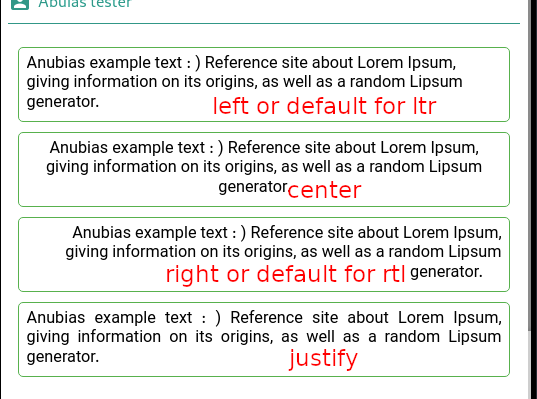
--------------------------------------------------------------------------------
/.idea/docs.iml:
--------------------------------------------------------------------------------
1 |
2 |
3 |
4 |
5 |
6 |
7 |
8 |
--------------------------------------------------------------------------------
/website-template/img/layout/shape-2.svg:
--------------------------------------------------------------------------------
1 |
4 |
--------------------------------------------------------------------------------
/fa/properties/align.md:
--------------------------------------------------------------------------------
1 | # align
2 |
3 | جهت نمایش نوشته یا کامپوننت است که دارای ویژگی های زیر است
4 |
5 | - `default` پیشفرض
6 | - `left` چپ
7 | - `center` وسط
8 | - `right` راست
9 | - `justify` حالت رسمی : فقط قابل استفاده برای متون
10 |
11 |
12 | 
--------------------------------------------------------------------------------
/properties/borderRadius.md:
--------------------------------------------------------------------------------
1 | ## borderRadius
2 |
3 | Border radius of components, Border radius accept 1,2 and 4 numbers.
4 |
5 | - 1 number: for all corners
6 | - 2 number: 1st top-left and right-bottom, 2nd top-right and bottom-left
7 | - 4 number: start from top-right clockwise
8 | > Seprate numbers with comma, sample: `35,75`
--------------------------------------------------------------------------------
/website-template/img/layout/shape-3.svg:
--------------------------------------------------------------------------------
1 |
4 |
--------------------------------------------------------------------------------
/fa/properties/borderRadius.md:
--------------------------------------------------------------------------------
1 | ## borderRadius
2 |
3 | گردی لبهها به شما امکان میدهد تا از المان های صاف جلوگیری کنید،
4 | المان های فلت بین ۱ یا ۲ یا ۴ عدد میپذیریند:
5 |
6 | - ۱ عدد برای هر چهار لبه
7 | - ۲ عدد : عدد اول برای بالا-چپ و پایین-راست
8 | - ۴ عدد: از بالا-راست ساعت گرد میچرخد
9 |
10 | > اعداد را با کاما `,` از یکدیگر جدا کنید مثال: `35,75`
--------------------------------------------------------------------------------
/fa/events.md:
--------------------------------------------------------------------------------
1 | # events | رویدادها
2 |
3 | رویدادها همواره با یک حرکت کاربر فعال میشوند و یکی از مهترین بخش های تصمیم گیری رویداد ها هستند در صورت نیاز میتوانید
4 | در رویداد ها برنامه رو مدیریت و کنترل کنید.
5 |
6 | در ادامه چند نمونه از آنها را مثال میزنیم
7 |
8 | ```
9 | onTap
10 | onPressed
11 | onChanged
12 | onLongPressed
13 | onBlur
14 | onFocus
15 | ```
--------------------------------------------------------------------------------
/events.md:
--------------------------------------------------------------------------------
1 | # events
2 |
3 | Events are fired to notify code of "interesting changes" that
4 | may affect code execution. These can arise from user
5 | interactions such as using a tap or change a input,
6 | changes in the state of the underlying environment
7 |
8 | Samples:
9 |
10 | ```
11 | onTap
12 | onPressed
13 | onChanged
14 | onLongPressed
15 | onBlur
16 | onFocus
17 | ```
--------------------------------------------------------------------------------
/properties/README.md:
--------------------------------------------------------------------------------
1 | # Properties
2 |
3 | You can study about properties here:
4 |
5 | - [align](/properties/align.md)
6 | - [borderRadius](/properties/borderRadius.md)
7 | - [color](/properties/color.md)
8 | - [height](/properties/height.md)
9 | - [icon](/properties/icon.md)
10 | - [margin](/properties/margin.md)
11 | - [name](/properties/name.md)
12 | - [padding](/properties/padding.md)
13 | - [width](/properties/width.md)
--------------------------------------------------------------------------------
/components/icon.md:
--------------------------------------------------------------------------------
1 | # icon
2 |
3 | ## description
4 |
5 | Show a icon of material
6 |
7 | # properties
8 |
9 | - [name](/properties/name.md): name
10 | - [padding](/properties/padding.md): padding
11 | - [icon](/properties/icon.md) : Icon
12 | - [color](/properties/color.md) : color
13 | - [align](/properties/align.md): align of icon
14 | - size: icon's size (pixel)
15 | - hide: hiding component (if you check it, the component hiding)
--------------------------------------------------------------------------------
/website-template/img/layout/hero-wave-16.svg:
--------------------------------------------------------------------------------
1 |
4 |
--------------------------------------------------------------------------------
/website-template/img/layout/newsletter-wave-1.svg:
--------------------------------------------------------------------------------
1 |
4 |
--------------------------------------------------------------------------------
/properties/color.md:
--------------------------------------------------------------------------------
1 | # Colors
2 |
3 | Anubias use materials design colors, Otherwise if you can't find your favorite color click on color squire to open color picker dialog:
4 |
5 | 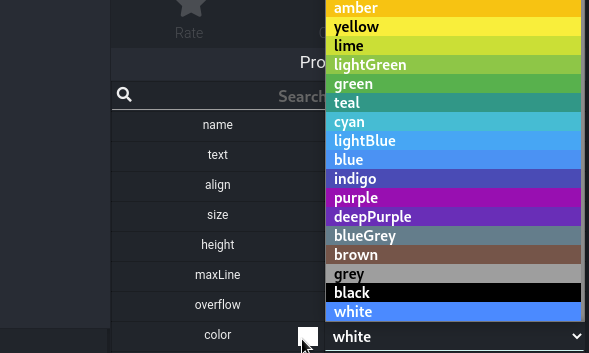
6 |
7 | Then you can choose your favorite color:
8 |
9 |
10 | 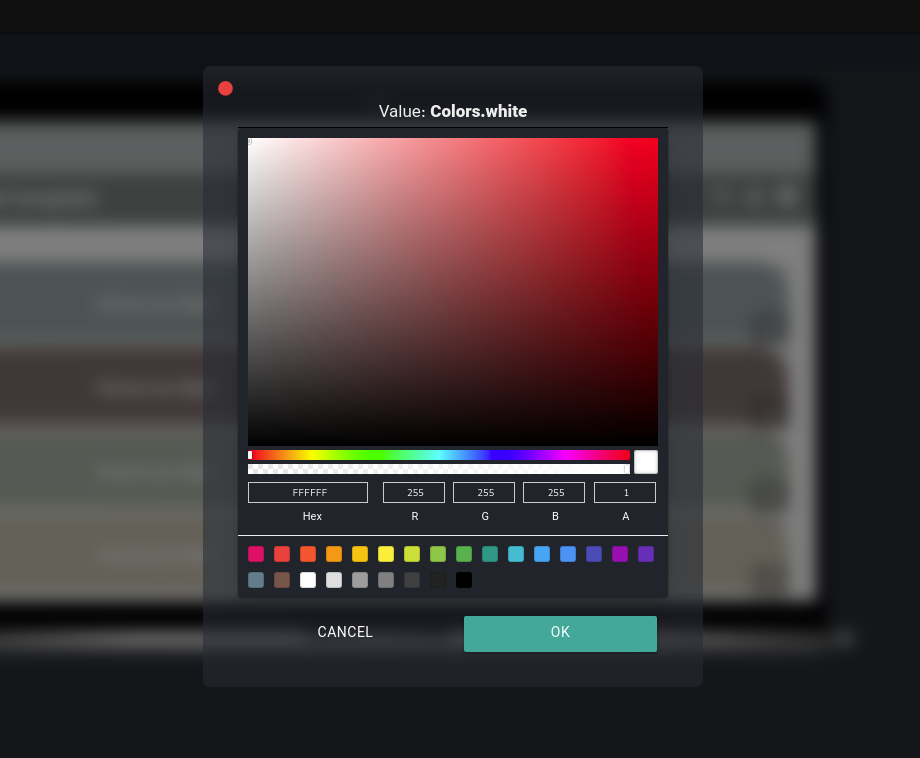
11 |
12 | > The default color depends on you main project color and brightness.
--------------------------------------------------------------------------------
/fa/components/icon.md:
--------------------------------------------------------------------------------
1 | # icon | نماد یا آیکون
2 |
3 | ## توضیحات
4 |
5 | نمایش یک نماد یا آیکون در صفحه
6 |
7 | ## ویژگیها
8 |
9 | - [name](/fa/properties/name.md): نام
10 | - [padding](/fa/properties/padding.md): حاشیه از داخل
11 | - [icon](/fa/properties/icon.md) : نماد یا آیکون
12 | - [color](/fa/properties/color.md) : رنگ آیکون
13 | - [align](/fa/properties/align.md): جهت قرارگیری
14 | - size: سایز آیکون
15 | - hide: پنهان ( این ویژگی در صورت فعال شدن المان ناپیدا میشود)
--------------------------------------------------------------------------------
/website-template/img/layout/screenshot-wave-1.svg:
--------------------------------------------------------------------------------
1 |
4 |
--------------------------------------------------------------------------------
/website-template/img/layout/hero-wave-3.svg:
--------------------------------------------------------------------------------
1 |
2 |
9 |
--------------------------------------------------------------------------------
/components/preloader.md:
--------------------------------------------------------------------------------
1 | # preloader
2 |
3 | ## description
4 |
5 | preloader component as spinner
6 |
7 |
8 | # properties
9 |
10 | - [name](/properties/name.md): name
11 | - [color](/properties/color.md) :color of preloader
12 | - [padding](/properties/padding.md): padding
13 | - [align](/properties/align.md): align of preloader position
14 | - [height](/properties/height.md) : height
15 | - [width](/properties/width.md) : width
16 | - hide: hiding component (if you check it, the component hiding)
--------------------------------------------------------------------------------
/components/divider.md:
--------------------------------------------------------------------------------
1 | # divider
2 |
3 | ## description
4 |
5 | This component is divider or you can use it for make space between two elements.
6 |
7 | # properties
8 |
9 | - [name](/properties/name.md): name
10 | - [color](/properties/color.md) : color of line
11 | - [height](/properties/height.md) : height (pixel)
12 | - thickness: width of line (pixel)
13 | - endindent : space indent of end (pixel)
14 | - indent: space indent of start (pixel)
15 | - hide: hiding component (if you check it, the component hiding)
--------------------------------------------------------------------------------
/fa/components/divider.md:
--------------------------------------------------------------------------------
1 | # divider | جدا کننده
2 | ## توضیحات
3 |
4 | از این کامپوننت برای جدا کردن بخش ها میتوانید استفاده کنید. حتی برای ایجاد فاصله نیاز میتوانید از آن استفاده کنید
5 |
6 | ## ویژگی ها
7 |
8 | - [name](/fa/properties/name.md): نام صفحه
9 | - [color](/fa/properties/color.md) : رنگ خط
10 | - [height](/fa/properties/height.md) : ارتفاع
11 | - thickness: ضخامت خط
12 | - endindent : فاصله خط از انتها به پیکسل
13 | - indent: فاصل خط از ابتدا به پیکسل
14 | - hide: پنهان ( این ویژگی در صورت فعال شدن المان ناپیدا میشود)
--------------------------------------------------------------------------------
/fa/properties/README.md:
--------------------------------------------------------------------------------
1 | # ویژگی ها
2 |
3 | شما میتوانید در مورد ویژگیها اینجا مطالعه کنید:
4 |
5 | - [align | جهت نمایش](/fa/properties/align.md)
6 | - [borderRadius | گردی لبهها](/fa/properties/borderRadius.md)
7 | - [color | رنگ](/fa/properties/color.md)
8 | - [height | ارتفاع](/fa/properties/height.md)
9 | - [icon | آیکون یا نماد](/fa/properties/icon.md)
10 | - [margin | حاشیه خارجی](/fa/properties/margin.md)
11 | - [name | نام](/fa/properties/name.md)
12 | - [padding | حاشیه داخلی](/fa/properties/padding.md)
13 | - [width | عرض](/fa/properties/width.md)
--------------------------------------------------------------------------------
/fa/components/preloader.md:
--------------------------------------------------------------------------------
1 | # preloader | فرفره
2 |
3 | ## توضیحات
4 |
5 | برای نمایش یک preloader به منظور صبر کردن کاربر جهت انجام کاری کارایی دارد
6 |
7 | ## ویژگیها
8 |
9 |
10 | ## ویژگی
11 | - [name](/fa/properties/name.md): نام صفحه
12 | - [color](/fa/properties/color.md) : رنگ زمینه
13 | - [padding](/fa/properties/padding.md): حاشیه از داخل
14 | - [align](/fa/properties/align.md): جهت قرارگیری
15 | - [height](/fa/properties/height.md) : ارتفاع
16 | - [width](/fa/properties/width.md) : عرض
17 | - hide: پنهان ( این ویژگی در صورت فعال شدن المان ناپیدا میشود)
--------------------------------------------------------------------------------
/.idea/git_toolbox_prj.xml:
--------------------------------------------------------------------------------
1 |
2 |
3 |
4 |
9 |
14 |
15 |
--------------------------------------------------------------------------------
/fa/properties/name.md:
--------------------------------------------------------------------------------
1 | # name | نام
2 |
3 | این ویژگی برای انتخاب نام کامپوننتها است و در نامگذاری به شرایط زیر توجه داشته باشید:
4 |
5 | - اسم ها از قاعده اسامی برنامه نویسی تبعیت میکنند
6 | - نام باید با حرف شروع شود
7 | - در حروف دوم و به بعد امکان انتخاب عدد و `_` نیز وجود دارد
8 | - استفاده از `-`و فاصله ` ` در نام مجاز نیست
9 | - بهتر از از حروف بزرگ برای و کوچک برای جداسازی استفاده کنید
10 | - در یک صفحه نمیتواند نام تکراری وجود داشته باشد وگرنه کامپایل با خطا مواجه میشود
11 | - سعی کنید نامها با عناصر شما مرتبط باشد
12 | - سعی کنید نامها با کاربرد آنها متناسب باشد
--------------------------------------------------------------------------------
/components/circleButton.md:
--------------------------------------------------------------------------------
1 | # circleButton
2 |
3 | ## description
4 |
5 | Circle button just with icon
6 |
7 | # properties
8 |
9 | - [name](/properties/name.md): name
10 | - [padding](/properties/padding.md) margin
11 | - [icon](/properties/icon.md) : icon
12 | - [bgColor](/properties/color.md) : background color
13 | - [color](/properties/color.md) : icon color
14 | - size: size of icon
15 | - [onPressed](/events.md) :event when press or tap button
16 | - [onLongPress](/events.md) : event when long press or long tap button
17 | - hide: hiding component (if you check it, the component hiding)
--------------------------------------------------------------------------------
/website-template/img/layout/hero-wave-1.svg:
--------------------------------------------------------------------------------
1 |
2 |
10 |
--------------------------------------------------------------------------------
/properties/name.md:
--------------------------------------------------------------------------------
1 | # name
2 |
3 | Name of component rules:
4 |
5 | - Use programming name rules:
6 | - Variable name must begin with letter or underscore `_`.
7 | - Variables are case sensitive.
8 | - They can be constructed with digits, letters.
9 | - No special symbols are allowed other than underscore.
10 | - The `-` and ` ` not are allowed.
11 | - sum, height, _value are some examples for variable name.
12 | - Better Split words with capitalize, sample: `myVarName`
13 | - Each pages can't duplicate name.
14 | - Try to choose related name about the component.
15 | - Try to choose related component's usage.
--------------------------------------------------------------------------------
/fa/components/text.md:
--------------------------------------------------------------------------------
1 | # text | متن
2 |
3 | ## توضیحات
4 |
5 | این کامپوننت برای نمایش متن در برنامه شماست
6 |
7 | ## ویژگیها
8 |
9 | - [name](/fa/properties/name.md): نام
10 | - text: متن
11 | - [align](/fa/properties/align.md): جهت قرارگیری نوشته
12 | - size: اندازه
13 | - height: ارتفاع هر خط (بین دو خط)
14 | - maxLine: حداکثر تعداد خط
15 | - overflow: نحوه نمایش سر ریز
16 | - [color](/fa/properties/color.md) : رنگ متن
17 | - weight: میزان برجسته یا تو پر بودن متن داخل
18 | - font: قلم، در این مرحله این امکان غیر فعال میباشد
19 | - softWrap: شکستن خط به صورت ملایم
20 | - hide: پنهان ( این ویژگی در صورت فعال شدن المان ناپیدا میشود)
21 |
22 |
--------------------------------------------------------------------------------
/fa/properties/color.md:
--------------------------------------------------------------------------------
1 | # رنگ ها
2 |
3 | در پروژه از رنگهای استاندارد متریال استفاده شده است، که شما میتوانید از آنها استفاده کنید و اما اگر رنگ مورد نظر شما پیدا نشد، امکان انتخاب رنگ سفارشی شما نیز وجود دارد، لذا برای این کار روی رنگ فعلی کلیک کرده در کنار نوشته color تا دیالوگ انتخاب رنگ برای شما باز شود:
4 |
5 | 
6 |
7 | و سپس با دیالوگ رنگ دلخواه یا یکی از رنگ های متریال را انتخاب کنید:
8 |
9 |
10 | 
11 |
12 | > رنگهای پیشفرض با توجه به قواعد موجود، میباشد، مثلا رنگ اصلی برنامه و یا رنگ پیشفرض متن
--------------------------------------------------------------------------------
/fa/properties/margin.md:
--------------------------------------------------------------------------------
1 | # margin
2 | برای تعیین حاشیه از خارج یک کامپوننت به کار میرود، و مقدار ان فقط عدد است امکان استفاده از درصد در آن وجود ندارد.
3 |
4 | > برای margin میتوانید از ۲ یا ۳ یا ۴ عدد نیز استفاده کنید، و اعداد را با کاما `,` از یکدیگر جدا کنید، مثلا `20,25,45,75`
5 | >
6 | > شیوه نمایش به دین صورت است که شما دو عدد بالا و پایین عدد اول چپ و راست عدد دوم است
7 | >
8 | > سه عدد عدد اول بالا، عدد دوم چپ و راست و عدد سوم حاشیه از پایین است
9 | >
10 | > در چهار عدد، ساعت گرد میباشد، یعنی عدد از اول به چهارم به ترتیب : بالا راست، پایین ، چپ میباشد
11 |
12 | 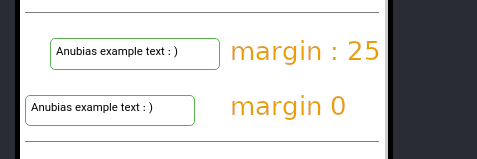
13 |
--------------------------------------------------------------------------------
/assets/css/fix.css:
--------------------------------------------------------------------------------
1 | @import url(vazir-font.css);
2 | *{
3 | font-family: Vazir;
4 | }
5 | input{
6 | font-family: Vazir !important;
7 | }
8 | .app-name-link img{
9 | height: 50px;
10 | }
11 |
12 | .app-nav ul ul{
13 | width: 150px;
14 | }
15 |
16 | .rtl{
17 | direction: rtl;
18 | }
19 |
20 | .rtl blockquote{
21 | border-left-width: 0;
22 | border-right-width: 4px ;
23 | }
24 |
25 | pre{
26 | direction: ltr !important;
27 | }
28 |
29 | img{
30 | display: block;
31 | margin: auto;
32 | }
33 |
34 | img.emoji{
35 | display: inline-block;
36 | }
37 |
38 | td,th{
39 | border: 1px solid #77777788 !important;
40 | }
--------------------------------------------------------------------------------
/fa/properties/padding.md:
--------------------------------------------------------------------------------
1 | # padding
2 | برای تعیین حاشیه از داخل یک کامپوننت به کار میرود، و مقدار ان فقط عدد است امکان استفاده از درصد در آن وجود ندارد.
3 |
4 | > برای padding میتوانید از ۲ یا ۳ یا ۴ عدد نیز استفاده کنید، و اعداد را با کاما `,` از یکدیگر جدا کنید، مثلا `20,25,45,75`
5 | >
6 | > شیوه نمایش به دین صورت است که شما دو عدد بالا و پایین عدد اول چپ و راست عدد دوم است
7 | >
8 | > سه عدد عدد اول بالا، عدد دوم چپ و راست و عدد سوم حاشیه از پایین است
9 | >
10 | > در چهار عدد، ساعت گرد میباشد، یعنی عدد از اول به چهارم به ترتیب : بالا راست، پایین ، چپ میباشد
11 |
12 | 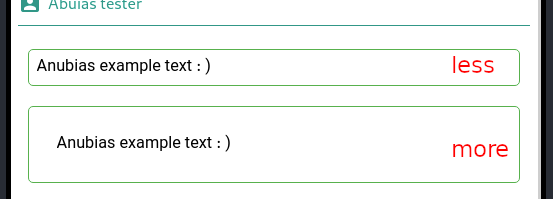
13 |
--------------------------------------------------------------------------------
/components/text.md:
--------------------------------------------------------------------------------
1 | # text
2 |
3 | ## description
4 |
5 | This component for add text to page
6 |
7 | # properties
8 |
9 | - [name](/properties/name.md): name
10 | - text: text (caption)
11 | - [align](/properties/align.md): text align
12 | - size: size of text (pixel)
13 | - height: line height (space between each line) (pixel)
14 | - maxLine: maximum line count of text
15 | - overflow: overflow's type
16 | - [color](/properties/color.md) : text's color
17 | - weight: weight of font
18 | - font: font of input, (it's not work right now)
19 | - softWrap: soft wrap (when break lines)
20 | - hide: hiding component (if you check it, the component hiding)
21 |
22 |
--------------------------------------------------------------------------------
/fa/components/toggle.md:
--------------------------------------------------------------------------------
1 | # toggle | ضامن
2 |
3 | ## توضیحات
4 |
5 | ضامن به شما این امکان را میدهد مانند یک checkbox مقادیر صحیح/غلط را از کاربران دریافت کنید
6 |
7 | ## ویژگیها
8 |
9 | - [name](/fa/properties/name.md): نام
10 | - text: متن
11 | - [bgColor](/fa/properties/color.md) : رنگ زمینه
12 | - [color](/fa/properties/color.md) : رنگ متن
13 | - [activeColor](/fa/properties/color.md) : رنگ زمان فعال شدن
14 | - state: وضعیت روشن/خاموش بودن
15 | - [onChanged](/fa/events.md) : کد نویسی برای زمان تغییر
16 | - [padding](/fa/properties/padding.md): حاشیه از داخل
17 | - enabled: فعال بودن قابلیت انتخاب
18 | - hide: پنهان ( این ویژگی در صورت فعال شدن المان ناپیدا میشود)
--------------------------------------------------------------------------------
/fa/components/circleButton.md:
--------------------------------------------------------------------------------
1 | # circleButton | دکمه گرد
2 |
3 | ## توضیحات
4 |
5 | دکمه گرد همراه با آیکون برای ایجاد دکمه های استاندارد متریال
6 |
7 | ## ویژگیها
8 |
9 | - [name](/fa/properties/name.md): نام دکمه
10 | - [padding](/fa/properties/padding.md): حاشیه از داخل
11 | - [icon](/fa/properties/icon.md) : نماد یا آیکون
12 | - [bgColor](/fa/properties/color.md) : رنگ زمینه
13 | - [color](/fa/properties/color.md) : رنگ متن
14 | - size: سایز نوشته و آیکون
15 | - [onPressed](/fa/events.md) : کد نویسی برای زمان فشرده شدن دکمه
16 | - [onLongPress](/fa/events.md) : کد نویسی برای زمان فشرده شدن به مدت طولانی
17 | - hide: پنهان ( این ویژگی در صورت فعال شدن المان ناپیدا میشود)
--------------------------------------------------------------------------------
/components/image.md:
--------------------------------------------------------------------------------
1 | # image
2 |
3 | ## description
4 |
5 | Show offline or online images.
6 |
7 | # properties
8 |
9 | - [name](/properties/name.md): name
10 | - [padding](/properties/padding.md): padding
11 | - [height](/properties/height.md) : height
12 | - [width](/properties/width.md) : width
13 | - [align](/properties/align.md): align of image
14 | - isOnline: status, is online
15 | - image: If status isOnline checked insert image url, Otherwise open you image
16 | - fit: image object fit (more description below)
17 | - hide: hiding component (if you check it, the component hiding)
18 |
19 | ## fit
20 |
21 | 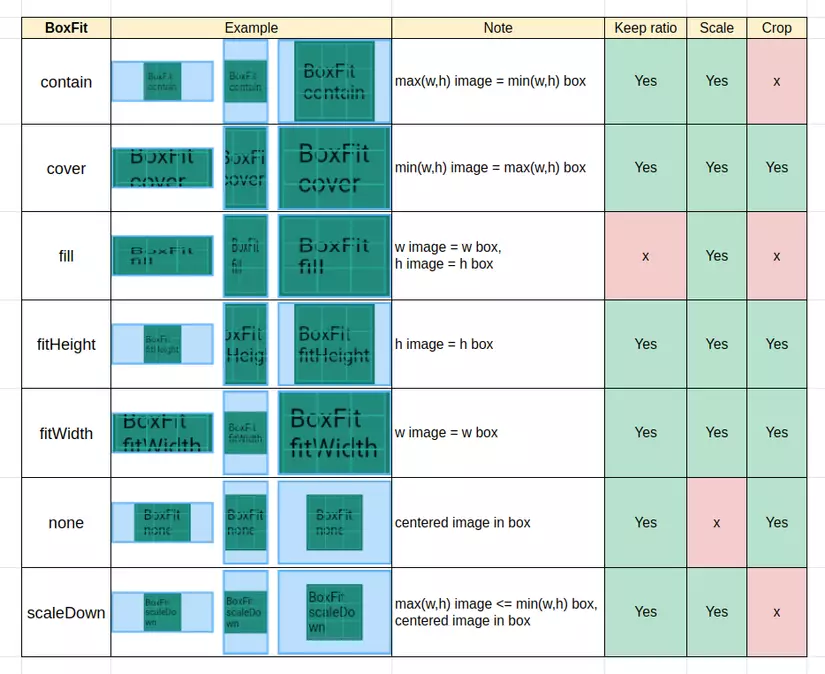
--------------------------------------------------------------------------------
/components/toggle.md:
--------------------------------------------------------------------------------
1 | # toggle
2 |
3 | ## description
4 |
5 | Toggle (switch) is like checkbox, to make boolean input (true/false).
6 |
7 | # properties
8 |
9 | - [name](/properties/name.md): name
10 | - text: text (label)
11 | - [bgColor](/properties/color.md) : background color
12 | - [color](/properties/color.md) : color of text
13 | - [activeColor](/properties/color.md) : color of active switch
14 | - state: default or selected by user state (on/off -> true/false)
15 | - [onChanged](/events.md) : event run when check state
16 | - [padding](/properties/padding.md): padding
17 | - enabled: enabled component (uncheck it to disable component)
18 | - hide: hiding component (if you check it, the component hiding)
--------------------------------------------------------------------------------
/properties/padding.md:
--------------------------------------------------------------------------------
1 | # padding
2 |
3 | padding just by pixel, percent is not available. The padding like css rules difference is that instead
4 | space you must insert comma.
5 |
6 | > You use 1,2,3 or 4 numbers for padding, sample: `20,25,45,75`
7 | >
8 | > When one value is specified, it applies the same padding to all four sides.
9 | >
10 | > When two values are specified, the first padding applies to the top and bottom, the second to the left and right.
11 | >
12 | > When three values are specified, the first padding applies to the top, the second to the right and left, the third to the bottom.
13 | >
14 | > When four values are specified, the paddings apply to the top, right, bottom, and left in that order (clockwise).
15 |
--------------------------------------------------------------------------------
/components/page.md:
--------------------------------------------------------------------------------
1 | # page
2 |
3 | ## description
4 |
5 | The page is primary component on application design
6 |
7 | > You can change main page in the project information's page.
8 |
9 | The main duty of page is component container.
10 | You can navigate between pages.
11 |
12 | # properties
13 |
14 | - [name](/properties/name.md): name
15 | - [bgColor](/properties/color.md/) :background color
16 | - scrollable: scrollable status
17 | - safeArea : when check add safeArea to page:
18 | - 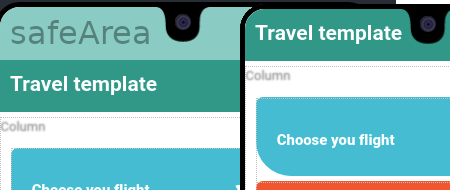
19 | - [padding](/properties/padding.md): padding
20 | - [align](/properties/align.md): align of childrens
21 | - [onShow](/events.md) : events run when page show
22 |
--------------------------------------------------------------------------------
/components/README.md:
--------------------------------------------------------------------------------
1 | - [appbar](/fa/components/appbar.md)
2 | - [button](/fa/components/button.md)
3 | - [circleButton](/fa/components/circleButton.md)
4 | - [divider](/fa/components/divider.md)
5 | - [column](/fa/components/column.md)
6 | - [divider](/fa/components/container.md)
7 | - [dropdown](/fa/components/dropdown.md)
8 | - [grid](/fa/components/grid.md)
9 | - [icon](/fa/components/icon.md)
10 | - [image](/fa/components/image.md)
11 | - [input](/fa/components/input.md)
12 | - [menu](/fa/components/menu.md)
13 | - [nav](/fa/components/navbar.md)
14 | - [page](/fa/components/page.md)
15 | - [preloader](/fa/components/preloader.md)
16 | - [row](/fa/components/row.md)
17 | - [text](/fa/components/text.md)
18 | - [toggle](/fa/components/toggle.md)
19 |
--------------------------------------------------------------------------------
/fa/components/README.md:
--------------------------------------------------------------------------------
1 | - [appbar](/fa/components/appbar.md)
2 | - [button](/fa/components/button.md)
3 | - [circleButton](/fa/components/circleButton.md)
4 | - [divider](/fa/components/divider.md)
5 | - [column](/fa/components/column.md)
6 | - [divider](/fa/components/container.md)
7 | - [dropdown](/fa/components/dropdown.md)
8 | - [grid](/fa/components/grid.md)
9 | - [icon](/fa/components/icon.md)
10 | - [image](/fa/components/image.md)
11 | - [input](/fa/components/input.md)
12 | - [menu](/fa/components/menu.md)
13 | - [nav](/fa/components/navbar.md)
14 | - [page](/fa/components/page.md)
15 | - [preloader](/fa/components/preloader.md)
16 | - [row](/fa/components/row.md)
17 | - [text](/fa/components/text.md)
18 | - [toggle](/fa/components/toggle.md)
19 |
--------------------------------------------------------------------------------
/website-template/img/layout/Path 14.svg:
--------------------------------------------------------------------------------
1 |
2 |
--------------------------------------------------------------------------------
/components/menu.md:
--------------------------------------------------------------------------------
1 | # menu
2 |
3 | ## description
4 |
5 | This non-visual component for make menu
6 |
7 | > To use menu appbar on current page is necessary.
8 |
9 | # properties
10 |
11 | - [name](/properties/name.md): name
12 | - [bgColor](/properties/color.md) :background color
13 | - [color](/properties/color.md) : text's color
14 | - image: image top of menu, by choose this perhaps hide bgColor
15 | - border - border's width
16 | - title: title of Menu
17 | - items: menu items (explanation below)
18 |
19 | ## items
20 |
21 | Here you can add or remove menu items, or sort (drag to up or down),
22 | The items has icon and label (text), to define code for items,
23 | double click on them.
24 |
25 | 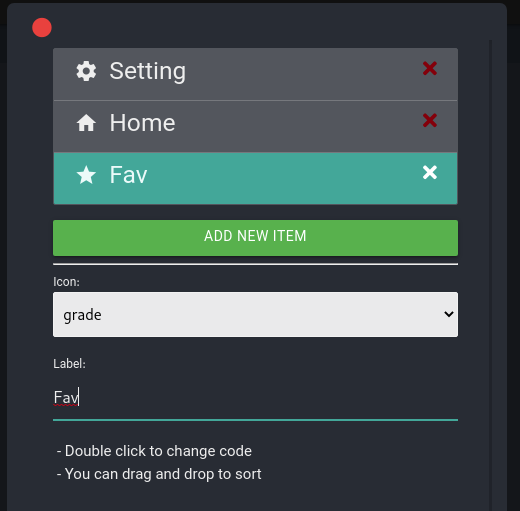
26 |
27 |
--------------------------------------------------------------------------------
/fa/classes/storage.md:
--------------------------------------------------------------------------------
1 | # storage
2 |
3 | کلاس `storage` برای ذخیره و بازیابی دادههای شما در یک بستر امن و رمزنگاری شده است .
4 |
5 | ## read
6 |
7 | خواندن مقدار با نوع رشته string
8 | - پارامتر اول `key` نوع `String`
9 |
10 | ```javascript
11 | await storage.read('samplekey');
12 | ```
13 |
14 | ## write
15 |
16 | نوشتن یک مقدار
17 | - پارامتر اول `key` نوع `String`
18 | - پارامتر دوم `value` نوع `String`
19 |
20 | ```javascript
21 | await storage.write('samplekey', 'my value here like a token');
22 | ```
23 |
24 | ## delete
25 |
26 | حذف یک مقدار
27 | - پارامتر اول `key` نوع `String`
28 |
29 | ```javascript
30 | await storage.delete('samplekey');
31 | ```
32 |
33 | ## truncate
34 | پاک کردن کل مقادیر ذخیره شده
35 |
36 | ```javascript
37 | await storage.truncate();
38 | ```
39 |
--------------------------------------------------------------------------------
/classes/storage.md:
--------------------------------------------------------------------------------
1 | # storage
2 |
3 | The `storage` class to store data in secure storage with encryption.
4 |
5 | ## read
6 |
7 | Read value as string
8 | - first parameter is `key` as `String`
9 |
10 | ```javascript
11 | await storage.read('samplekey');
12 | ```
13 |
14 | ## write
15 |
16 | Write value as string by a key
17 | - first parameter is `key` as `String`
18 | - second parameter is `value` as `String`
19 |
20 | ```javascript
21 | await storage.write('samplekey', 'my value here like a token');
22 | ```
23 |
24 | ## delete
25 |
26 | Delete a key
27 | - first parameter is `key` as `String`
28 |
29 | ```javascript
30 | await storage.delete('samplekey');
31 | ```
32 |
33 | ## truncate
34 | Erase storage of your application
35 |
36 | ```javascript
37 | await storage.truncate();
38 | ```
39 |
--------------------------------------------------------------------------------
/fa/components/page.md:
--------------------------------------------------------------------------------
1 | # page | صفحه
2 |
3 | ## توضیحات
4 | صفحات اصلیترین بخشهای نرمافزار شماست، یک برنامه باید حداقل یک صفحه داشته باشد
5 |
6 | > شما میتوانید صفحه اصلی پروژه را در صفحه تنظیمات مربوط به پروژه عوض کنید
7 |
8 | صفحات کار اصلی آنها نگهداری کامپوننتها هستند،
9 | و شما میتوانید بین صفحات سویچ کنید، صفحات شمام ویژگی های زیر هستند:
10 |
11 | ## ویژگی
12 | - [name](/fa/properties/name.md): نام صفحه
13 | - [bgColor](/fa/properties/color.md) : رنگ زمینه
14 | - scrollable: قابلیت اسکرول شدن
15 | - safeArea : داشتن قسمت امن
16 | - 
17 | - [padding](/fa/properties/padding.md): حاشیه از داخل
18 | - [align](/fa/properties/align.md): جهت قرارگیری
19 | - [onShow](/fa/events.md) : کد نویسی برای زمان نمایش صفحه
20 |
--------------------------------------------------------------------------------
/fa/components/image.md:
--------------------------------------------------------------------------------
1 | # image | تصاویر
2 |
3 | ## توضیحات
4 |
5 | برای نمایش تصاویر چه آنلاین چه آفلاین باید از گزینه استفاده کنید
6 |
7 | ## ویژگیها
8 |
9 | - [name](/fa/properties/name.md): نام تصویر
10 | - [padding](/fa/properties/padding.md): حاشیه از داخل
11 | - [height](/fa/properties/height.md) : ارتفاع
12 | - [width](/fa/properties/width.md) : عرض
13 | - [align](/fa/properties/align.md): جهت قرارگیری
14 | - isOnline: برای تصاویر آنلاین این گزینه را فعال کنید
15 | - image: در صورت آنلاین بودن آدرس عکس را اینجا وارد کنید، در غیر این صورت تصویر مورد نظر را انتخاب کنید
16 | - fit: نحوه نمایش تصویر (توضیح بیشتر در ادامه)
17 | - hide: پنهان ( این ویژگی در صورت فعال شدن المان ناپیدا میشود)
18 |
19 | ## fit | نحوه نمایش
20 |
21 | 
--------------------------------------------------------------------------------
/properties/margin.md:
--------------------------------------------------------------------------------
1 | # margin
2 |
3 | Margin just by pixel, percent is not available. The margin like css rules difference is that instead
4 | space you must insert comma.
5 |
6 | > You use 1,2,3 or 4 numbers for margin, sample: `20,25,45,75`
7 | >
8 | > When one value is specified, it applies the same margin to all four sides.
9 | >
10 | > When two values are specified, the first margin applies to the top and bottom, the second to the left and right.
11 | >
12 | > When three values are specified, the first margin applies to the top, the second to the right and left, the third to the bottom.
13 | >
14 | > When four values are specified, the margins apply to the top, right, bottom, and left in that order (clockwise).
15 |
16 | 
17 |
--------------------------------------------------------------------------------
/fa/components/menu.md:
--------------------------------------------------------------------------------
1 | # menu | فهرست
2 |
3 | ## توضیحات
4 |
5 | فهرست یا منو یکی از المانهای غیر بصری است، یعنی این المان در لحظه نمایش برنامه غیر قابل نمایش است
6 |
7 | > برای نمایش منو باید حتما در صفحه AppBar داشته باشید
8 |
9 | ## ویژگیها
10 |
11 | - [name](/fa/properties/name.md): نام
12 | - [bgColor](/fa/properties/color.md) : رنگ زمینه بالا
13 | - [color](/fa/properties/color.md) : رنگ متن
14 | - image: عکس زمینه بالا در صورت انتخاب این گزینه رنگ زمینه ممکن است نا مشخص شود
15 | - border - ضخامت قاب حاشیه
16 | - title: عنوان فهرست
17 | - items: گزینه های (توضیح در ادامه)
18 |
19 | ## گزینهها
20 |
21 | در این قسمت شما میتوانید به فهرست خود گزینه اضافه یا کم کنید و برای آن آیکون و متن انتخاب کنید و برای کد نویسی هر دکمه
22 | روی آن double click کنید
23 | 
24 |
25 |
--------------------------------------------------------------------------------
/components/navbar.md:
--------------------------------------------------------------------------------
1 | # nav
2 |
3 | ## description
4 |
5 | nav help to add navigation menu on bottom of page.
6 |
7 | > You can just have once nav per page.
8 |
9 | # properties
10 |
11 | - [name](/properties/name.md): name
12 | - [bgColor](/properties/color.md) : background color
13 | - [color](/properties/color.md) : color of text
14 | - [unselectedItemColor](/properties/color.md) : unselected item (text and icon) color
15 | - index: active index of nav items
16 | - [onTap](/events.md) : even run when tap on nav
17 | - items: menu items (explanation below)
18 | - hide: hiding component (if you check it, the component hiding)
19 |
20 | ## items
21 |
22 | Here you can add or remove menu items, or sort (drag to up or down),
23 | The items has icon and label (text), to define code for items,
24 | double click on them.
25 |
26 | 
27 |
28 |
29 |
--------------------------------------------------------------------------------
/README.md:
--------------------------------------------------------------------------------
1 | # What is Anbuias
2 |
3 | > Anbuias is an open source project for seamlessly building and deploying Native Mobile, Desktop & Web applications painless.
4 |
5 | - Translates:
6 | - [:us: English](/)
7 | - [:iran: پارسی](/fa/)
8 | - [:sweden: Swedish](/sv/)
9 |
10 | # Where we can use Anubias
11 |
12 |
13 | Anubias is cross platform and you see supported OS here:
14 |
15 | - **Windows** (10 or above)
16 | - **Linux** (All supported snap store)
17 | - Ubuntu | Debian
18 | - Arch | Manjaro
19 | - Linux mint
20 | - Red Hat | Cent OS
21 | - Elementary OS
22 | - openSuse
23 | - Fedora
24 | - Rasberry pi
25 | - **MacOSX**
26 | - 10.11 El Capitan or above
27 |
28 | # Minimum system requirement
29 |
30 | CPU: intel Core i 3 یا AMD phenom II
31 | Resulation: Width min 1360 pixel
32 | Ram: 4 GigaByte
33 |
34 | > Perhaps you can use Anubias on weaker system, but it don't have enough quality
--------------------------------------------------------------------------------
/components/container.md:
--------------------------------------------------------------------------------
1 | # container
2 |
3 |
4 | ## description
5 |
6 | The container can have style and a child
7 |
8 | # properties
9 |
10 | - [name](/properties/name.md): name of container
11 | - [align](/properties/align.md): align of component
12 | - [padding](/properties/padding.md): padding
13 | - [margin](/properties/margin.md): margin
14 | - [height](/properties/height.md) : height of container
15 | - [width](/properties/width.md) : width of container
16 | - [bgColor](/properties/color.md) : background color
17 | - [borderColor](/properties/color.md) : border color
18 | - border - border width by pixel
19 | - [borderRadius](properties/borderRadius.md) border raduis
20 | - child: to access child of container
21 | - [onPressed](/events.md) :event when press or tap button
22 | - [onLongPress](/events.md) : event when long press or long tap button
23 | - hide: hiding component (if you check it, the component hiding)
24 |
--------------------------------------------------------------------------------
/classes/app.md:
--------------------------------------------------------------------------------
1 | # app
2 |
3 | The `app` class is a general class
4 | to do get general actions or get application's information.
5 |
6 | ## mainColor
7 |
8 | Retrun the main color of application:
9 |
10 | ```javascript
11 | text1.color = app.mainColor();
12 | ```
13 |
14 | ## colorOrMainColor
15 |
16 | If you want to use safe color,
17 | If the color is null then use main color You can use it:
18 |
19 | ```javascript
20 | text1.color = app.colorOrMainColor(text2.color);
21 | ```
22 |
23 | ## isDark
24 |
25 | The `isDark` function let you to know app is dark or not:
26 | ```javascript
27 | if (app.isDark()){
28 | // code
29 | }
30 | ```
31 |
32 | ## pageBack
33 | Go back page or minimize app:
34 |
35 | ```javascript
36 | app.pageBack();
37 | ```
38 |
39 | ## pageLoad
40 | You can load new page with this function
41 |
42 | ```javascript
43 | app.pageLoad( Page2() );
44 | ```
45 |
46 | Page2 is name of your page need to load
--------------------------------------------------------------------------------
/fa/README.md:
--------------------------------------------------------------------------------
1 | # آنوبیاس چیست
2 |
3 | > آنوبیاس یک برنامه متنباز است با استفاده از آن میتوانید، به صورت یکپارچه برنامههای موبایل، دسکتاپ و وب را بدون دردسر بسازید
4 |
5 | ## کجا ها قابل اجرا است
6 |
7 | آنوبیاس مستقل از سکو بوده در تمام سیستم عامل های رایج همچون با کمترین دردسر قابل اجراست.
8 |
9 | - **Windows** (10 یا بالاتر)
10 | - **Linux** ( تمام توزیع هایی که از Snap Store پشتیبانی میکنند.)
11 | - Ubuntu | Debian
12 | - Arch | Manjaro
13 | - Linux mint
14 | - Red Hat | Cent OS
15 | - Elementary OS
16 | - openSuse
17 | - Fedora
18 | - Rasberry pi
19 | - **MacOSX**
20 | - 10.11 El Capitan یا بالاتر
21 |
22 |
23 | ## حداقل سیستم مورد نیاز
24 |
25 | - پردازنده: intel Core i 3 یا AMD phenom II
26 | - وضوح تصویر: با حداقل عرض ۱۳۶۰ پیکسل
27 | - میزان رم: ۴ گیگابایت
28 |
29 | > نکته: ممکن است شما در سیستم ضعیف تر هم بتوانید، آنوبیاس را اجرا کنید در آن صورت کیفیت لازم را برای توسعه برنامهها خود نخواهید داشت.
--------------------------------------------------------------------------------
/fa/components/container.md:
--------------------------------------------------------------------------------
1 | # container | ظرف
2 |
3 |
4 | ## توضیحات
5 |
6 | ضرف یا نگه دارنده، به شما این مکان را میدهد یک المان را در دل خود جای دهد
7 |
8 | ## ویژگیها
9 |
10 | - [name](/fa/properties/name.md): نام
11 | - [align](/fa/properties/align.md): جهت قرارگیری
12 | - [padding](/fa/properties/padding.md): حاشیه از داخل
13 | - [margin](/fa/properties/margin.md): حاشیه از خارج
14 | - [height](/fa/properties/height.md) : ارتفاع
15 | - [width](/fa/properties/width.md) : عرض
16 | - [bgColor](/fa/properties/color.md) : رنگ زمینه
17 | - [borderColor](/fa/properties/color.md) : رنگ خط حاشیه
18 | - border - ضخامت قاب حاشیه
19 | - [borderRadius](fa/properties/borderRadius.md): گردی لبه ها
20 | - child: برای دسترسی به فرزند
21 | - [onPressed](/fa/events.md) : کد نویسی برای زمان فشرده شدن دکمه
22 | - [onLongPress](/fa/events.md) : کد نویسی برای زمان فشرده شدن به مدت طولانی
23 | - hide: پنهان ( این ویژگی در صورت فعال شدن المان ناپیدا میشود)
24 |
--------------------------------------------------------------------------------
/website-template/img/layout/blockquote-1.svg:
--------------------------------------------------------------------------------
1 |
7 |
--------------------------------------------------------------------------------
/components/button.md:
--------------------------------------------------------------------------------
1 | #button
2 |
3 | ## description
4 |
5 | A standard material button with text and icon
6 |
7 | # properties
8 |
9 | - [name](/properties/name.md): name of button
10 | - [padding](/properties/padding.md): padding
11 | - [margin](/properties/margin.md): margin
12 | - [height](/properties/height.md) : height of button
13 | - [width](/properties/width.md) : width of button
14 | - [icon](/properties/icon.md) : icon
15 | - [bgColor](/properties/color.md) : background color
16 | - [color](/properties/color.md) : text color
17 | - text: text of button (caption)
18 | - [borderRadius](properties/borderRadius.md):border radius
19 | - noText: no text (hiding text)
20 | - noIcon: no icon (hiding icon)
21 | - size: size of text and icon
22 | - [onPressed](/events.md) :event when press or tap button
23 | - [onLongPress](/events.md) : event when long press or long tap button
24 | - hide: hiding component (if you check it, the component hiding)
--------------------------------------------------------------------------------
/fa/components/navbar.md:
--------------------------------------------------------------------------------
1 | # nav | پویشگر
2 |
3 | ## توضیحات
4 |
5 | پویشگر به شما این امکان را میدهد که در انتهای صفحه یه فهرست کوچک جهت پویش در نرم افزار را داشته باشید.
6 |
7 | > شما در صفحه فقط میتوانید یک پویشگر داشته باشید
8 |
9 | ## گزینهها
10 |
11 | - [name](/fa/properties/name.md): نام
12 | - [bgColor](/fa/properties/color.md) : رنگ زمینه
13 | - [color](/fa/properties/color.md) : رنگ متن
14 | - [unselectedItemColor](/fa/properties/color.md) : رنگ گزینه های انتخاب نشده
15 | - index: گزینه شاخص فعال روی پویشگر
16 | - [onTap](/fa/events.md) : کد نویسی برای زمان تغییر و لمس پویشگر
17 | - items: گزینه های (توضیح در ادامه)
18 | - hide: پنهان ( این ویژگی در صورت فعال شدن المان ناپیدا میشود)
19 |
20 | ## گزینهها
21 |
22 | در این قسمت شما میتوانید به فهرست خود گزینه اضافه یا کم کنید و برای آن آیکون و متن انتخاب کنید و برای کد نویسی هر دکمه
23 | روی آن double click کنید
24 | 
25 |
26 |
--------------------------------------------------------------------------------
/website-template/img/layout/diagonal-shape-2.svg:
--------------------------------------------------------------------------------
1 |
2 |
3 |
19 |
--------------------------------------------------------------------------------
/fa/components/button.md:
--------------------------------------------------------------------------------
1 | #button | دکمه
2 |
3 | ## توضیحات
4 |
5 | دکمه با محتوای متن + آیکون برای ایجاد دکمه های استاندارد متریال
6 |
7 | ## ویژگیها
8 |
9 | - [name](/fa/properties/name.md): نام دکمه
10 | - [padding](/fa/properties/padding.md): حاشیه از داخل
11 | - [margin](/fa/properties/margin.md): حاشیه از خارج
12 | - [height](/fa/properties/height.md) : ارتفاع
13 | - [width](/fa/properties/width.md) : عرض
14 | - [icon](/fa/properties/icon.md) : نماد یا آیکون
15 | - [bgColor](/fa/properties/color.md) : رنگ زمینه
16 | - [color](/fa/properties/color.md) : رنگ متن
17 | - text: متن داخل دکمه
18 | - [borderRadius](fa/properties/borderRadius.md): گردی لبه ها
19 | - noText: مخفی کردن نوشته
20 | - noIcon: مخفی کردن آیکون
21 | - size: سایز نوشته و آیکون
22 | - [onPressed](/fa/events.md) : کد نویسی برای زمان فشرده شدن دکمه
23 | - [onLongPress](/fa/events.md) : کد نویسی برای زمان فشرده شدن به مدت طولانی
24 | - hide: پنهان ( این ویژگی در صورت فعال شدن المان ناپیدا میشود)
--------------------------------------------------------------------------------
/website-template/img/layout/diagonal-shape-dark-2.svg:
--------------------------------------------------------------------------------
1 |
2 |
3 |
19 |
--------------------------------------------------------------------------------
/website-template/img/layout/diagonal-shape-1.svg:
--------------------------------------------------------------------------------
1 |
2 |
3 |
20 |
--------------------------------------------------------------------------------
/components/grid.md:
--------------------------------------------------------------------------------
1 | # grid
2 |
3 |
4 | ## description
5 |
6 | Grid help you to structured gird with children
7 |
8 | # properties
9 |
10 | - [name](/properties/name.md): name
11 | - [padding](/properties/padding.md): padding
12 | - [margin](/properties/margin.md): margin
13 | - childAspectRatio: children aspect ratio ،
14 | if you choose 2, then 2 components per rows
15 | - [bgColor](/properties/color.md) :background color
16 | - [borderColor](/properties/color.md): color of border
17 | - border -border's width (pixel)
18 | - [borderRadius](properties/borderRadius.md): border radius
19 | - hide: hiding component (if you check it, the component hiding)
20 |
21 | ##children
22 |
23 | To change and sort children click on right button icon:
24 |
25 | 
26 |
27 | Then you can sort (drag to top or bottom), duplicate or remove children:
28 |
29 | 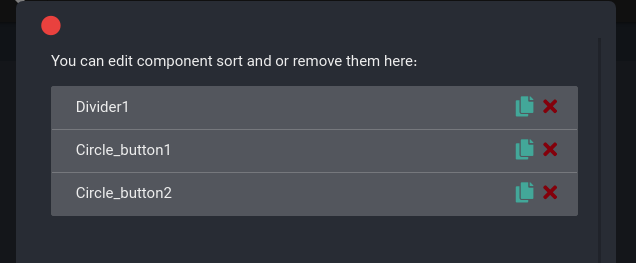
30 |
--------------------------------------------------------------------------------
/website-template/img/layout/shape-16.1.svg:
--------------------------------------------------------------------------------
1 |
2 |
--------------------------------------------------------------------------------
/website-template/img/layout/diagonal-shape-dark-1.svg:
--------------------------------------------------------------------------------
1 |
2 |
3 |
20 |
21 |
22 |
23 |
24 |
--------------------------------------------------------------------------------
/website-template/img/layout/hero-wave-12.svg:
--------------------------------------------------------------------------------
1 |
2 |
3 |
17 |
18 |
19 |
--------------------------------------------------------------------------------
/components/column.md:
--------------------------------------------------------------------------------
1 | # column
2 |
3 | ## description
4 |
5 | Columns help you to put components vertically
6 |
7 |
8 | # properties
9 |
10 | - [name](/properties/name.md): name of column
11 | - [align](/properties/align.md): align
12 | - [padding](/properties/padding.md): padding
13 | - [margin](/properties/margin.md): margin
14 | - [height](/properties/height.md) : height
15 | - [width](/properties/width.md) : width
16 | - [bgColor](/properties/color.md) : background color
17 | - [borderColor](/properties/color.md) : border color
18 | - border - border's width (pixel)
19 | - [borderRadius](/properties/borderRadius.md) border radius
20 | - hide: hiding component (if you check it, the component hiding)
21 |
22 | ## children
23 |
24 | To change and sort children click on right button icon:
25 |
26 | 
27 |
28 | Then you can sort (drag to top or bottom), duplicate or remove children:
29 |
30 | 
31 |
--------------------------------------------------------------------------------
/fa/classes/app.md:
--------------------------------------------------------------------------------
1 | # app
2 |
3 | کلاس `app` یک کلاس عمومی است که
4 | به شما اجازه میدهد که کارهای عمومی در برنامه انجام دهید
5 | و اطلاعات از برنامه بدست بیاورید
6 |
7 | ## mainColor
8 |
9 | برای دریافت رنگ اصلی برنامه :
10 |
11 | ```javascript
12 | text1.color = app.mainColor();
13 | ```
14 |
15 | ## colorOrMainColor
16 |
17 | اگر به یک رنگ ایمن نیاز داشتید
18 | میتوانید رنگ ورودی را به این تابع بدهید و در صورت خالی بودن رنگ،
19 | آنگاه رنگ اصلی برنامه برای شما باز میگردد:
20 |
21 | ```javascript
22 | text1.color = app.colorOrMainColor(text2.color);
23 | ```
24 |
25 | ## isDark
26 |
27 | تابع `isDark` امکانش تخصیص این که برنامه به صورت تیره است یا خیر را به شما میدهد:
28 | ```javascript
29 | if (app.isDark()){
30 | // code
31 | }
32 | ```
33 |
34 | ## pageBack
35 | برای بازگشت به صفحه قبلی و یا کوچک کردن برنامه:
36 |
37 | ```javascript
38 | app.pageBack();
39 | ```
40 |
41 | ## pageLoad
42 | برای نمایش یک صفحه دیگر این تابع کارایی دارید
43 |
44 | ```javascript
45 | app.pageLoad( Page2() );
46 | ```
47 |
48 | Page2 در اینجا نام صفحه جدید جهت بارگزاری است
--------------------------------------------------------------------------------
/components/row.md:
--------------------------------------------------------------------------------
1 | # row
2 |
3 | ## description
4 |
5 | Columns help you to put components horizontally
6 |
7 | # properties
8 |
9 | - [name](/properties/name.md): name
10 | - [align](/properties/align.md): align
11 | - [padding](/properties/padding.md): padding
12 | - [margin](/properties/margin.md): margin
13 | - [height](/properties/height.md) : height
14 | - [width](/properties/width.md) : width
15 | - [bgColor](/properties/color.md) : background color
16 | - [borderColor](/properties/color.md) : border color
17 | - border - border's width (pixel)
18 | - axis - how children's positions
19 | - [borderRadius](/properties/borderRadius.md) border radius
20 | - hide: hiding component (if you check it, the component hiding)
21 |
22 | ## children
23 |
24 | To change and sort children click on right button icon:
25 |
26 |
27 | 
28 |
29 |
30 | Then you can sort (drag to top or bottom), duplicate or remove children:
31 |
32 | 
33 |
34 |
--------------------------------------------------------------------------------
/website-template/img/layout/Path 8.svg:
--------------------------------------------------------------------------------
1 |
2 |
--------------------------------------------------------------------------------
/website-template/img/layout/hero-wave-13.svg:
--------------------------------------------------------------------------------
1 |
2 |
--------------------------------------------------------------------------------
/components/appbar.md:
--------------------------------------------------------------------------------
1 | # appbar
2 |
3 | ## description
4 |
5 | AppBar always on top of the page, and `safeArea` of page colors depends on appbar's color,
6 | and menu active on appbar, so if you have menu appbar is necessary.
7 |
8 | 
9 | appbar's image
10 |
11 | # properties
12 | - [name](/properties/name.md): name of appbar
13 | - [color](/properties/color.md) : background color of appbar
14 | - [textColor](/properties/color.md) :appbar's text color
15 | - back: has back button or not
16 | - hide: hiding component (if you check it, the component hiding)
17 | - menu : testing now, maybe complete or remove next versions
18 | - actions: appbar's action buttons [description below]
19 |
20 | ## actions
21 |
22 | when click on this you manage actions:
23 |
24 | You can add, remove or sort actions, to sort drag and move them up or down,
25 | and double click on them to change code of action, The icon or tooltip of actions are customizable.
26 |
27 | 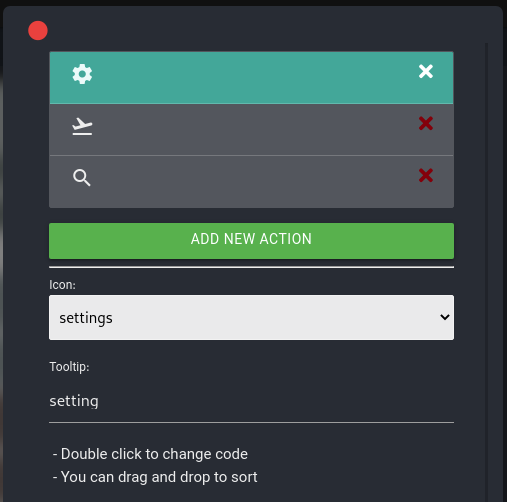
--------------------------------------------------------------------------------
/fa/components/appbar.md:
--------------------------------------------------------------------------------
1 | # appbar | نوار برنامه
2 |
3 | ## توضیحات
4 | AppBar قسمت بالایی صفحه است، امکان در برگرفتن عنوان و برخی از دکمه و ها و منو را داراست و safeArea رنگ خود را با AppBar تطبیق میدهد
5 |
6 | 
7 |
8 | تصویر یک appbar در برنامه
9 |
10 | ## ویژگیها
11 | - [name](/fa/properties/name.md): نام کامپوننت
12 | - [color](/fa/properties/color.md) : رنگ زمینه
13 | - [textColor](/fa/properties/color.md) :رنگ متن
14 | - back: دکمه بازگشت
15 | - hide: پنهان ( این ویژگی در صورت فعال شدن المان ناپیدا میشود)
16 | - menu : در مرحله آزمایشی، اکنون غیرقابل استفاده است
17 | - actions: دکمههای appbar [توضیحات تکمیلی در ادامه]
18 |
19 | ## actions
20 |
21 | با کلیک روی این گزینه آن را مدیریت کنید:
22 |
23 | همانند تصویر میتوانید دکمهها را مدیریت کنید، اضافه یا حذف کنید آیکون و tooltip آن را تغییر دهید،
24 | و یا با Darg & Drop میتوانید ترتیبهای آنها را تغییر دهید، و با دوبار کلیک کردن روی آنها رویداد هنگام کلیک شدن آنرا تغییر دهید
25 |
26 | 
--------------------------------------------------------------------------------
/fa/components/grid.md:
--------------------------------------------------------------------------------
1 | # grid | کاشی
2 |
3 |
4 | ## توضیحات
5 |
6 | برای چیدن المان ها به صورت مرتب و کاشی شده کنار و زیر یکدیگر است
7 |
8 | ## ویژگیها
9 |
10 | - [name](/fa/properties/name.md): نام دکمه
11 | - [padding](/fa/properties/padding.md): حاشیه از داخل
12 | - [margin](/fa/properties/margin.md): حاشیه از خارج
13 | - childAspectRatio: تقسیم هر سطر به این عدد میباشد،
14 | یعنی اگر شما ۲ را قرار دهید، دوتا دوتا المانها کنار هم میچنید
15 | - [bgColor](/fa/properties/color.md) : رنگ زمینه
16 | - [borderColor](/fa/properties/color.md) : رنگ خط حاشیه
17 | - border - ضخامت قاب حاشیه
18 | - [borderRadius](fa/properties/borderRadius.md): گردی لبه ها
19 | - hide: پنهان ( این ویژگی در صورت فعال شدن المان ناپیدا میشود)
20 |
21 | ## زیر مجموعهها
22 |
23 | برای تغییرات در فرزندان با کلیک روی نماد سمت راست زیر امکان پذیر است
24 |
25 | 
26 |
27 | و سپس میتوانید با دیالوگ زیر فرزندان را حذف یا با Drag ترتیب را جا به جا کنید، و یا آنها را تکثیر کنید
28 |
29 | 
30 |
--------------------------------------------------------------------------------
/fa/components/column.md:
--------------------------------------------------------------------------------
1 | # column | ستون
2 |
3 | ## توضیحات
4 |
5 | ستونها به شما این امکان را میدهد المان ها زیر یکدیگر بچنید
6 |
7 | ## ویژگیها
8 |
9 | - [name](/fa/properties/name.md): نام
10 | - [align](/fa/properties/align.md): جهت قرارگیری
11 | - [padding](/fa/properties/padding.md): حاشیه از داخل
12 | - [margin](/fa/properties/margin.md): حاشیه از خارج
13 | - [height](/fa/properties/height.md) : ارتفاع
14 | - [width](/fa/properties/width.md) : عرض
15 | - [bgColor](/fa/properties/color.md) : رنگ زمینه
16 | - [borderColor](/fa/properties/color.md) : رنگ خط حاشیه
17 | - border - ضخامت قاب حاشیه
18 | - [borderRadius](fa/properties/borderRadius.md): گردی لبه ها
19 | - hide: پنهان ( این ویژگی در صورت فعال شدن المان ناپیدا میشود)
20 |
21 | ## زیر مجموعهها
22 |
23 | برای تغییرات در فرزندان با کلیک روی نماد سمت راست زیر امکان پذیر است
24 |
25 | 
26 |
27 | و سپس میتوانید با دیالوگ زیر فرزندان را حذف یا با Drag ترتیب را جا به جا کنید، و یا آنها را تکثیر کنید
28 |
29 | 
30 |
--------------------------------------------------------------------------------
/fa/components/row.md:
--------------------------------------------------------------------------------
1 | # row | سطر
2 |
3 | ## توضیحات
4 |
5 | ستونها به شما این امکان را میدهد المان ها کنار یکدیگر بچنید
6 |
7 | ## ویژگیها
8 |
9 | - [name](/fa/properties/name.md): نام
10 | - [align](/fa/properties/align.md): جهت قرارگیری
11 | - [padding](/fa/properties/padding.md): حاشیه از داخل
12 | - [margin](/fa/properties/margin.md): حاشیه از خارج
13 | - [height](/fa/properties/height.md) : ارتفاع
14 | - [width](/fa/properties/width.md) : عرض
15 | - [bgColor](/fa/properties/color.md) : رنگ زمینه
16 | - [borderColor](/fa/properties/color.md) : رنگ خط حاشیه
17 | - border - ضخامت قاب حاشیه
18 | - axis - نحوه قرار گیری زیرمجموعهها درکنار هم
19 | - [borderRadius](fa/properties/borderRadius.md): گردی لبه ها
20 | - hide: پنهان ( این ویژگی در صورت فعال شدن المان ناپیدا میشود)
21 |
22 | ## زیر مجموعهها
23 |
24 | برای تغییرات در فرزندان با کلیک روی نماد سمت راست زیر امکان پذیر است
25 |
26 | 
27 |
28 | و سپس میتوانید با دیالوگ زیر فرزندان را حذف یا با Drag ترتیب را جا به جا کنید، و یا آنها را تکثیر کنید
29 |
30 | 
31 |
--------------------------------------------------------------------------------
/start.md:
--------------------------------------------------------------------------------
1 | # Get started
2 |
3 | ## Download anubias
4 |
5 | You can download Anubias from main page of website, for Linux, Mac or Windows, otherwise you test demo online.
6 |
7 | We mention the web demo version is not complete.
8 |
9 | Install form snap store:
10 |
11 | ```
12 | sudo snap install anubias --classic
13 | ```
14 |
15 | ## Requirements
16 |
17 | You must install flutter to user anubias:
18 | ```
19 | https://flutter.dev/docs/get-started/install
20 | ```
21 |
22 | Otherwise we create flutter super easy installer for windows and Linux
23 |
24 | 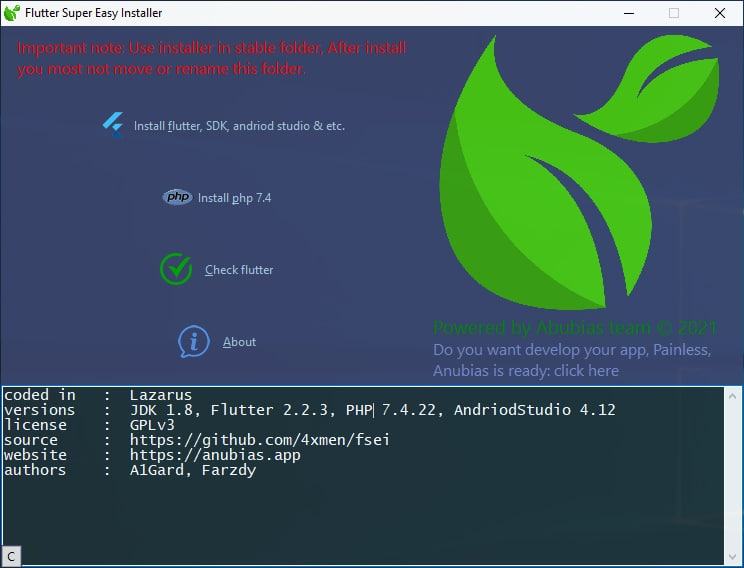
25 |
26 |
27 | Flutter super easy installer available here:
28 |
29 | ```
30 | https://anubias.app/page/flutter-super-easy-installer
31 | ```
32 |
33 |
34 |
35 | ## Create new application
36 |
37 | Now you can start new project, when anubias started you can see some template,
38 | If you click on them, download and open, that you can watch samples how develop your app
39 | 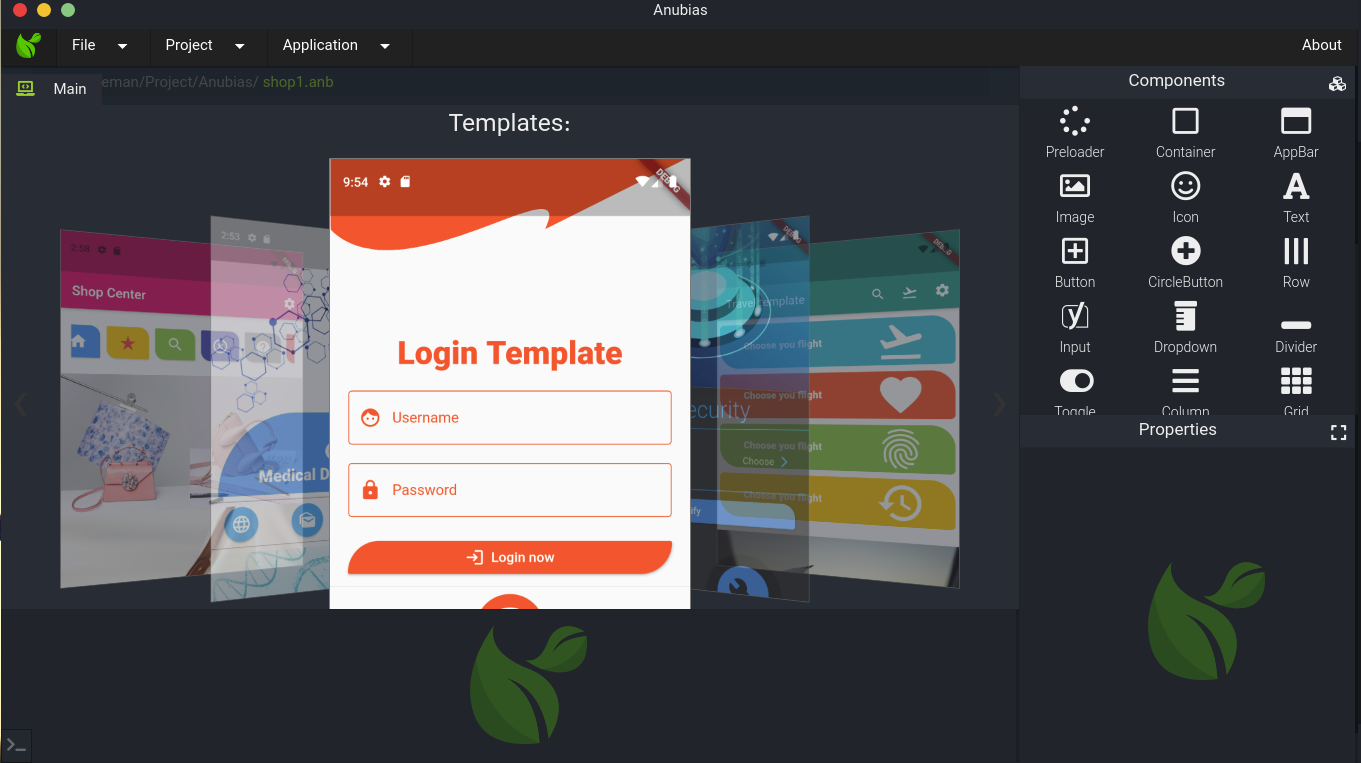
40 |
41 | ## Support
42 |
43 | For support us don't forget start our project:
44 |
45 | ```
46 | https://github.com/4xmen/Anubias-Desktop
47 | ```
--------------------------------------------------------------------------------
/website-template/img/layout/diagonal-shape-3.svg:
--------------------------------------------------------------------------------
1 |
2 |
--------------------------------------------------------------------------------
/website-template/img/layout/circle-2.svg:
--------------------------------------------------------------------------------
1 |
--------------------------------------------------------------------------------
/website-template/img/layout/hero-wave-15.svg:
--------------------------------------------------------------------------------
1 |
2 |
--------------------------------------------------------------------------------
/project.md:
--------------------------------------------------------------------------------
1 | # Project information
2 |
3 | This section for change app main properties, that you can customize.
4 |
5 | ## Project name
6 |
7 | Project name can be defining to any language, BTW use not very short or very long name.
8 |
9 | ## Version
10 |
11 | The version of your application, This version not depends on Anubias version.
12 |
13 | ## isRTL
14 |
15 | If your application is right to left, active it.
16 |
17 | ## isDark
18 |
19 | This option active dark mode for application.
20 |
21 | ## Color
22 |
23 | The project main color, so this color candidate to default other components.
24 |
25 | ## Main page (entry point)
26 |
27 | You can decide here, witch page is your main page.
28 |
29 | ## Text Color
30 | This property is testing, for change default text color, It maybe complete or remove next versions.
31 |
32 | ## Background Color
33 |
34 | This property is testing, for change default background color, It maybe complete or remove next versions.
35 |
36 | ## Language
37 | Your application language. It not depends on user mobile language, This option dosn't hurt user keyboard.
38 |
39 | ## Country
40 | The country of selected language.
41 |
42 | ## Icon
43 |
44 | Choose a png size 1024x1024 for you application, Anubias resize and prepare it automatically.
45 |
--------------------------------------------------------------------------------
/classes/toast.md:
--------------------------------------------------------------------------------
1 |
2 | # toast
3 |
4 | Toast class help you to show a toast message
5 |
6 | ## Show
7 |
8 | This is main function of toast class,
9 | You can change default params as an object (xScript):
10 |
11 | ```javascript
12 | toast.show({
13 | 'text': 'toast sample',
14 | 'bgColor': Colors.black38,
15 | 'txtColor': Colors.white,
16 | 'fontSize': 16.0,
17 | 'pos': toast.POS_CENTER,
18 | 'length': Toast.LENGTH_SHORT,
19 | });
20 | ```
21 | All members of the object are optional, You can ignore them.
22 | for example:
23 |
24 | ```javascript
25 | toast.show({
26 | 'text': 'My new toast msg :)',
27 | 'bgColor': Colors.red,
28 | });
29 | ```
30 |
31 | ## show object information
32 |
33 | | Key | Type | Default |
34 | | ------------ | ------------ | ------------ |
35 | | text | string | 'toast sample' |
36 | | bgColor | color | Colors.black38 |
37 | | txtColor | color | Colors.white |
38 | | fontSize | float | 16.0 |
39 | | pos | const | POS_CENTER |
40 | | length | const | LENGTH_SHORT |
41 |
42 | ### pos - Position constants
43 |
44 | - POS_CENTER
45 | - POS_CENTER_LEFT
46 | - POS_CENTER_RIGHT
47 | - POS_TOP
48 | - POS_TOP_LEFT
49 | - POS_TOP_RIGHT
50 | - POS_BOTTOM
51 | - POS_BOTTOM_LEFT
52 | - POS_BOTTOM_RIGHT
53 |
54 | ### length = toast duration
55 |
56 | - LENGTH_SHORT
57 | - LENGTH_LONG
--------------------------------------------------------------------------------
/website-template/img/layout/Rectangle-1.svg:
--------------------------------------------------------------------------------
1 |
2 |
--------------------------------------------------------------------------------
/fa/classes/toast.md:
--------------------------------------------------------------------------------
1 | # toast
2 |
3 | این کلاس امکان نمایش پیام از نوع toast را میدهد
4 |
5 | ## Show
6 |
7 | این تابع اصلی جهت نمایش است
8 | شما میتوانید تکتک مقادیر دلخواه را جایگزین کنید (xScript):
9 |
10 | ```javascript
11 | toast.show({
12 | 'text': 'toast sample',
13 | 'bgColor': Colors.black38,
14 | 'txtColor': Colors.white,
15 | 'fontSize': 16.0,
16 | 'pos': toast.POS_CENTER,
17 | 'length': Toast.LENGTH_SHORT,
18 | });
19 | ```
20 | همه اعضای object بالا دلخواه میباشد شما هر یک از آنها رو میتوانید نادیده بگیرید
21 | مثال:
22 |
23 | ```javascript
24 | toast.show({
25 | 'text': 'My new toast msg :)',
26 | 'bgColor': Colors.red,
27 | });
28 | ```
29 |
30 | ## اطلاعات object show
31 |
32 | | کلید | نوع | مقدار |
33 | | ------------ | ------------ | ------------ |
34 | | text | string | 'toast sample' |
35 | | bgColor | color | Colors.black38 |
36 | | txtColor | color | Colors.white |
37 | | fontSize | float | 16.0 |
38 | | pos | ثابت | POS_CENTER |
39 | | length | ثابت | LENGTH_SHORT |
40 |
41 | ### pos - ثوابت جهت جایگاه پیام
42 |
43 | - POS_CENTER
44 | - POS_CENTER_LEFT
45 | - POS_CENTER_RIGHT
46 | - POS_TOP
47 | - POS_TOP_LEFT
48 | - POS_TOP_RIGHT
49 | - POS_BOTTOM
50 | - POS_BOTTOM_LEFT
51 | - POS_BOTTOM_RIGHT
52 |
53 | ### length - ثوابت جهت طول نمایش پیام
54 |
55 | - LENGTH_SHORT
56 | - LENGTH_LONG
57 |
--------------------------------------------------------------------------------
/website-template/js/src/plugins/scrollIt.min.js:
--------------------------------------------------------------------------------
1 | (function(e){"use strict";var t="ScrollIt",n="1.0.3";var r={upKey:38,downKey:40,easing:"linear",scrollTime:600,activeClass:"active",onPageChange:null,topOffset:0};e.scrollIt=function(t){var n=e.extend(r,t),i=0,s=e("[data-scroll-index]:last").attr("data-scroll-index");var o=function(t){if(t<0||t>s)return;var r=e("[data-scroll-index="+t+"]").offset().top+n.topOffset+1;e("html,body").animate({scrollTop:r,easing:n.easing},n.scrollTime)};var u=function(t){var n=e(t.target).closest("[data-scroll-nav]").attr("data-scroll-nav")||e(t.target).closest("[data-scroll-goto]").attr("data-scroll-goto");o(parseInt(n))};var a=function(t){var r=t.which;if(e("html,body").is(":animated")&&(r==n.upKey||r==n.downKey)){return false}if(r==n.upKey&&i>0){o(parseInt(i)-1);return false}else if(r==n.downKey&&i=e(i).offset().top+n.topOffset&&t
2 |
3 |
4 |
5 |
6 |
7 | Anubias | Error 404
8 |
9 |
10 |
11 |
12 |
13 |
14 |
15 |
16 |
17 |
18 |
19 |
20 |
21 | Nothing found!
22 |
23 | Anubias is blind, nothing found !
24 | Go back to home
25 |
26 |
27 |
28 |
29 |
30 |
31 |
32 |
33 |
34 |
--------------------------------------------------------------------------------
/website-template/js/src/plugins/svg-handler.js:
--------------------------------------------------------------------------------
1 | $(function () {
2 | "use strict";
3 |
4 | jQuery('img.svg').each(function () {
5 | var $img = jQuery(this);
6 | var imgID = $img.attr('id');
7 | var imgClass = $img.attr('class');
8 | var imgURL = $img.attr('src');
9 |
10 | jQuery.get(imgURL, function (data) {
11 | // Get the SVG tag, ignore the rest
12 | var $svg = jQuery(data).find('svg');
13 |
14 | // Add replaced image's ID to the new SVG
15 | if (typeof imgID !== 'undefined') {
16 | $svg = $svg.attr('id', imgID);
17 | }
18 | // Add replaced image's classes to the new SVG
19 | if (typeof imgClass !== 'undefined') {
20 | $svg = $svg.attr('class', imgClass + ' replaced-svg');
21 | }
22 |
23 | // Remove any invalid XML tags as per http://validator.w3.org
24 | $svg = $svg.removeAttr('xmlns:a');
25 |
26 | // Check if the viewport is set, else we gonna set it if we can.
27 | if (!$svg.attr('viewBox') && $svg.attr('height') && $svg.attr('width')) {
28 | $svg.attr('viewBox', '0 0 ' + $svg.attr('height') + ' ' + $svg.attr('width'))
29 | }
30 |
31 | // Replace image with new SVG
32 | $img.replaceWith($svg);
33 |
34 | }, 'xml');
35 |
36 | });
37 | });
38 |
--------------------------------------------------------------------------------
/website-template/img/layout/oval-14.1.svg:
--------------------------------------------------------------------------------
1 |
2 |
--------------------------------------------------------------------------------
/fa/start.md:
--------------------------------------------------------------------------------
1 | # از کجا شروع کنم
2 |
3 | ## دریافت آنوبیاس
4 |
5 | برای دانلود پروژه به صفحه اصلی وبسایت مراجعه کنید و با توجه به سیستم عامل مورد نظر خود برنامه آنوبیاس را دانلود نمایید،
6 | این برنامه در سه سیستم عامل لینوکس، ویندوز، macOS در دسترس است و صورتی که امکان دانلود را نداشتید، میتوانید با دموی
7 | آنلاین نیز به صورت آزمایشی کار کنید.
8 |
9 | فراموش نکنید که امکانات نسخه آنلاین به کاملی نسخه دانلود نیست.
10 |
11 | نصب در لینوکس snap store:
12 |
13 | ```
14 | sudo snap install anubias --classic
15 | ```
16 |
17 |
18 | ## آماده سازی امکانات
19 |
20 | برای استفاده از کامل از امکانات آنویباس بهتر است، فلاتر را نصب نمایید، برای این امر به سایت رسمی فلاتر مراجعه کنید
21 |
22 | ```
23 | https://flutter.dev/docs/get-started/install
24 | ```
25 |
26 | برای کابران ویندوز یک بسته نصب ساده فلاتر نوشتیم، که با چند کلیک میتواند فلاتر را نصب نمایند
27 |
28 | 
29 |
30 |
31 | برای نصب ساده فلاتر به آدرس زیر مراجعه فرمایید:
32 |
33 | ```
34 | https://anubias.app/page/flutter-super-easy-installer
35 | ```
36 |
37 |
38 |
39 | ## ساخت برنامه
40 |
41 | هم اکنون شما میتوانید از آنوبیاس برای ساخت برنامه های خود استفاده کنید و فراموش نکنید،
42 | چند template آزمایشی برای شما فراهم کردیم تا با روند ساخت برنامه آشنا شوید و فقط کافی است روی آن کلیک کنید.
43 |
44 | 
45 |
46 | ## حمایت
47 |
48 | برای حمایت از ما فراموش نکنید پروژه ما را در گیت هاب star کنید
49 |
50 | ```
51 | https://github.com/4xmen/Anubias-Desktop
52 | ```
--------------------------------------------------------------------------------
/website-template/img/layout/hero-wave-2.svg:
--------------------------------------------------------------------------------
1 |
2 |
--------------------------------------------------------------------------------
/fa/sidebar.md:
--------------------------------------------------------------------------------
1 | - [آنوبیاس چیست](/fa/)
2 | - [از کجا شروع کنم](/fa/start.md)
3 | - [پروژه](/fa/project.md)
4 | - [ویژگیها](/fa/properties/README.md)
5 | - [align | جهت نمایش](/fa/properties/align.md)
6 | - [borderRadius | گردی لبهها](/fa/properties/borderRadius.md)
7 | - [color | رنگ](/fa/properties/color.md)
8 | - [height | ارتفاع](/fa/properties/height.md)
9 | - [icon | آیکون یا نماد](/fa/properties/icon.md)
10 | - [margin | حاشیه خارجی](/fa/properties/margin.md)
11 | - [name | نام](/fa/properties/name.md)
12 | - [padding | حاشیه داخلی](/fa/properties/padding.md)
13 | - [width | عرض](/fa/properties/width.md)
14 | - [کامپوننتها](/fa/components/README.md)
15 | - [appbar](/fa/components/appbar.md)
16 | - [button](/fa/components/button.md)
17 | - [circleButton](/fa/components/circleButton.md)
18 | - [divider](/fa/components/divider.md)
19 | - [column](/fa/components/column.md)
20 | - [divider](/fa/components/container.md)
21 | - [dropdown](/fa/components/dropdown.md)
22 | - [grid](/fa/components/grid.md)
23 | - [icon](/fa/components/icon.md)
24 | - [image](/fa/components/image.md)
25 | - [input](/fa/components/input.md)
26 | - [menu](/fa/components/menu.md)
27 | - [nav](/fa/components/navbar.md)
28 | - [page](/fa/components/page.md)
29 | - [preloader](/fa/components/preloader.md)
30 | - [row](/fa/components/row.md)
31 | - [text](/fa/components/text.md)
32 | - [toggle](/fa/components/toggle.md)
33 | -[Events | رویدادها](/fa/events.md)
34 | - [Classes](/fa/classes.md)
35 | - [app](/fa/classes/app.md)
36 | - [toast](/fa/classes/toast.md)
37 | - [storage](/fa/classes/storage.md)
--------------------------------------------------------------------------------
/website-template/img/layout/hero-shape2.1.svg:
--------------------------------------------------------------------------------
1 |
2 |
16 |
--------------------------------------------------------------------------------
/website-template/img/layout/hero-shape2.2.svg:
--------------------------------------------------------------------------------
1 |
2 |
--------------------------------------------------------------------------------
/fa/components/dropdown.md:
--------------------------------------------------------------------------------
1 | # dropdown | انتخاب گر
2 |
3 | ## توضیحات
4 |
5 | برای انتخاب یک یا چند آتیم از لیست کاربرد دارد
6 |
7 | ## ویژگیها
8 |
9 | - [name](/fa/properties/name.md): نام
10 | - title: متن داخل عنوان
11 | - placeholder: سمت مخالف که زمانی که انتخاب نشده نمایش داده میشود
12 | - [padding](/fa/properties/padding.md): حاشیه از داخل
13 | - [height](/fa/properties/height.md) : ارتفاع
14 | - [width](/fa/properties/width.md) : عرض
15 | - [icon](/fa/properties/icon.md) : نماد یا آیکون
16 | - [bgColor](/fa/properties/color.md) : رنگ زمینه
17 | - [iconColor](/fa/properties/color.md) : رنگ نماد یا آیکون
18 | - iconSize: اندازه نماد یا آیکون
19 | - hint: متن راهنمای کاربر
20 | - [trailingIcon](/fa/properties/icon.md): آیکون انتهایی در کنار placeholder
21 | - [trailingColor](/fa/properties/color.md): رنگ آیکون انتهایی
22 | - trailingSize: اندازه آیکون انتهایی
23 | - [color](/fa/properties/color.md) : رنگ متن
24 | - [modalColor](/fa/properties/color.md) : رنگ مودال
25 | - modalTitle: عنوان مودال
26 | - [modalBgColor](/fa/properties/color.md): رنگ پسزمینه مودال
27 | - multiple : قابلیت انتخاب چندگانه
28 | - isTwoLine: نمایش در دو خط
29 | - searchable: قابلیت سرچ
30 | - enabled: فعال بودن قابلیت انتخاب
31 | - value: مقدار پیشفرض یا انتخاب شده توسط کاربر
32 | - values: مقادیر پیشفرض یا انتخاب شده توسط کاربر (وقتی multiple فعال باشد)
33 | - isLoading: حالت آمادهسازی و صبر
34 | - [onChanged](/fa/events.md) : کد نویسی برای زمان تغییر انتخاب
35 | - hide: پنهان ( این ویژگی در صورت فعال شدن المان ناپیدا میشود)
36 | - options: گزینههای قابل انتخاب (به توضیحات گزینهها توجه کنید)
37 |
38 | > مودال جایی است که موقع انتخاب به کاربر نمایش داده میشود
39 |
40 | # گزینهها
41 |
42 | شما میتوانید با باز کردن این مورد، گزینه ها را تغییر دهید و در پایین یک دکمه برای افزودن وجود دارد
43 |
44 | 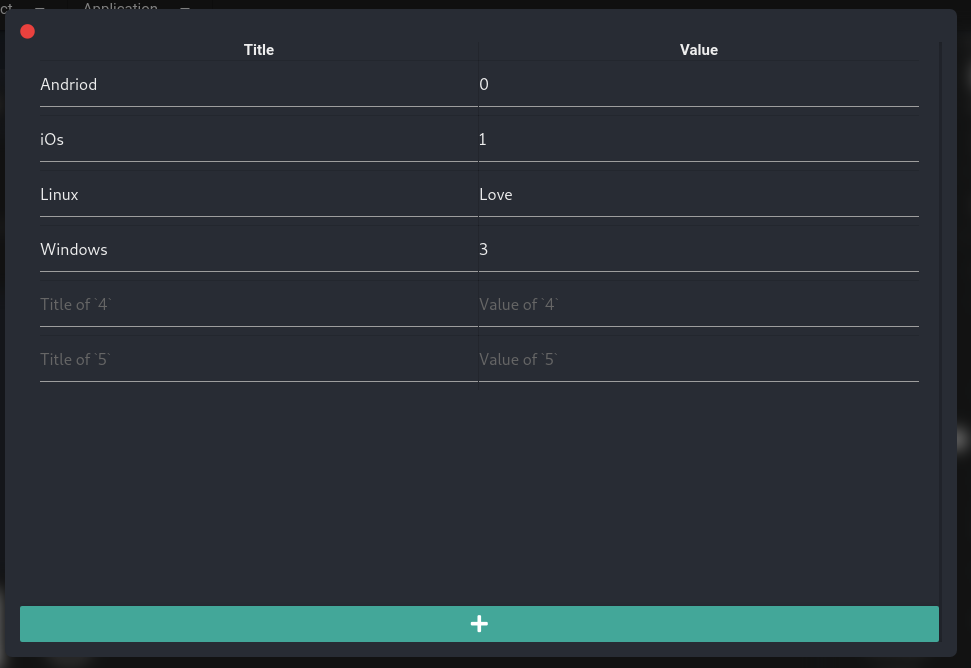
45 |
--------------------------------------------------------------------------------
/components/dropdown.md:
--------------------------------------------------------------------------------
1 | # dropdown
2 |
3 | ## description
4 |
5 | Dropdown selector one or multi options between options
6 |
7 | # properties
8 |
9 | - [name](/properties/name.md): name
10 | - title: title of dropdown inside
11 | - placeholder: placeholder shown when not selected any options
12 | - [padding](/properties/padding.md): padding
13 | - [height](/properties/height.md) : height
14 | - [width](/properties/width.md) : width
15 | - [icon](/properties/icon.md) : icon
16 | - [bgColor](/properties/color.md) : background color
17 | - [iconColor](/properties/color.md) : icon's color
18 | - iconSize: icon's size
19 | - hint: hint of dropdown below of the component
20 | - [trailingIcon](/properties/icon.md): icon beside of placeholder
21 | - [trailingColor](/properties/color.md): color of trailingIcon
22 | - trailingSize: size of trailingIcon (pixel)
23 | - [color](/properties/color.md) : title color
24 | - [modalColor](/properties/color.md) : modal's color
25 | - modalTitle: modal's title
26 | - [modalBgColor](/properties/color.md): modal's background color
27 | - multiple : multiple select
28 | - isTwoLine: show in two lines
29 | - searchable: searchable options (on modal)
30 | - enabled: enabled component (uncheck it to disable component)
31 | - value: default value or selected value by user (active when multiple unchecked)
32 | - values: default values or selected values by user (active when multiple checked)
33 | - isLoading: preloading status
34 | - [onChanged](/events.md) : event run when change value by user
35 | - hide: hiding component (if you check it, the component hiding)
36 | - options: options shows in modal (read about this below)
37 |
38 | > Modal where is the user select options, and show by tap on dropdown.
39 |
40 | # options
41 |
42 | You can define your options here, and bottom of the form has add options button.
43 |
44 | 
45 |
--------------------------------------------------------------------------------
/fa/components/input.md:
--------------------------------------------------------------------------------
1 | # input | ورودی
2 |
3 | ## توضیحات
4 |
5 | برای دریافت ورودی از کاربران کاربرد دارد
6 |
7 | ## ویژگیها
8 |
9 | - [name](/fa/properties/name.md): نام
10 | - text: مقدار ورودی
11 | - labelText: متن عنوان
12 | - labelSize: اندازه عنوان
13 | - prefixSize: اندازه پیشوند
14 | - suffixSize: اندازه پسوند
15 | - iconSize: اندازه آیکون
16 | - hint: متن راهنما زمانی که چیزی وارد نشده نمایش داده میشود
17 | - [align](/fa/properties/align.md): جهت قرارگیری نوشته
18 | - [margin](/fa/properties/margin.md): حاشیه از خارج
19 | - prefix: پیشوند ورودی
20 | - suffix : پسوند ورودی
21 | - size: اندازه
22 | - [icon](/fa/properties/icon.md) : نماد یا آیکون
23 | - [iconColor](/fa/properties/color.md) : رنگ نماد یا آیکون
24 | - [labelColor](/fa/properties/color.md) : رنگ عنوان
25 | - iconSize: اندازه نماد یا آیکون
26 | - [color](/fa/properties/color.md) : رنگ متن
27 | - [bgColor](/fa/properties/color.md) : رنگ پس زمینه
28 | - [borderColor](/fa/properties/color.md) : رنگ قاب حاشیه
29 | - [borderFocusedColor](/fa/properties/color.md) : رنگ قاب حاشیه در زمان تمرکز
30 | - [borderDisableColor](/fa/properties/color.md) : رنگ قاب حاشیه در زمان غیر فعال بودن
31 | - [cursorColor](/fa/properties/color.md) : رنگ مکاننما
32 | - [suffixColor](/fa/properties/color.md): رنگ پسوند
33 | - [prefixColor](/fa/properties/color.md): رنگ پیشوند
34 | - outlined : حاشیه قاب کامل
35 | - readonly: فقط خواندنی، غیر قابل تغییر
36 | - password: قابلیت عدم نمایش مقدار گذرواژه گونه
37 | - enabled: فعال بودن قابلیت انتخاب
38 | - autocorrcet: بررسی املا کلمات
39 | - keyboardType: برای کیبوردهای متخلف مثل: شماره، ایمیل و یا آدرس
40 | - maxLine: حداکثر تعداد خط
41 | - weight: میزان برجسته یا تو پر بودن متن داخل
42 | - font: قلم، در این مرحله این امکان غیر فعال میباشد
43 | - [onChanged](/fa/events.md) : کد نویسی برای زمان تغییر
44 | - [onTap](/fa/events.md) : کد نویسی برای زمان لمس ورودی
45 | - [onFocused](/fa/events.md) : کد نویسی برای زمان تمرکز بر ورودی
46 | - [onBlur](/fa/events.md) : کد نویسی برای زمان ترک ورودی
47 | - hide: پنهان ( این ویژگی در صورت فعال شدن المان ناپیدا میشود)
48 |
49 |
--------------------------------------------------------------------------------
/components/input.md:
--------------------------------------------------------------------------------
1 | # input
2 |
3 | ## description
4 |
5 | Input is text input component
6 |
7 | # properties
8 |
9 | - [name](/properties/name.md): name
10 | - text: default text or any text changed by user
11 | - labelText: text of input's label
12 | - labelSize: size of label text (pixel)
13 | - prefixSize: prefix text's size (pixel)
14 | - suffixSize: suffix text's size (pixel)
15 | - iconSize: icon's size (pixel)
16 | - hint: the text when input empty shown, like placeholder in HTML
17 | - [align](/properties/align.md): text align of input
18 | - [margin](/properties/margin.md): margin
19 | - prefix: text of prefix
20 | - suffix : text of suffix
21 | - size: size of text (pixel)
22 | - [icon](/properties/icon.md) : icon of input
23 | - [iconColor](/properties/color.md) : icon's color
24 | - [labelColor](/properties/color.md) : label's color
25 | - iconSize: icon's size (pixel)
26 | - [color](/properties/color.md) : color of text
27 | - [bgColor](/properties/color.md) : background color
28 | - [borderColor](/properties/color.md) : border's color
29 | - [borderFocusedColor](/properties/color.md) :border's color when input on focus
30 | - [borderDisableColor](/properties/color.md) : border's color when input is disable
31 | - [cursorColor](/properties/color.md) : cursor's solor
32 | - [suffixColor](/properties/color.md): color or prefix's text
33 | - [prefixColor](/properties/color.md): color or suffix's text
34 | - outlined : is full border for input
35 | - readonly: read only status
36 | - password: password (show bullet instead text)
37 | - enabled: enabled component (uncheck it to disable component)
38 | - autocorrcet: autocorrcet status
39 | - keyboardType: keyboard type, like number, tel, email or etc.
40 | - maxLine: max text lines count
41 | - weight: weight font of input's text
42 | - font: font of input, (it's not work right now)
43 | - [onChanged](/events.md) : event run when changed text of input
44 | - [onTap](/events.md) : event run when tap on input
45 | - [onFocused](/events.md) : event run when focus input
46 | - [onBlur](/events.md) : event run when lose focus input
47 | - hide: hiding component (if you check it, the component hiding)
48 |
49 |
--------------------------------------------------------------------------------
/fa/project.md:
--------------------------------------------------------------------------------
1 | # تنظیمات پروژه
2 | در بخش امکان این وجود دارد که شما تنظیمات پروژه را به صورت دلخواه عوض کنید، این بخش شامل موارد کلی پروژه است.
3 |
4 | ## Project name
5 | **نام پروژه**
6 |
7 | نام دلخواهی است که میتواند به هر زبانی باشد
8 | سعی کنید نام مناسب نه خیلی کوتاه و نه خیلی بلند استفاده کنید.
9 |
10 | ## Version
11 | **نگارش**
12 |
13 | این بخش نسخه یا version پروژه را مشخص میکند، و هیچ ارتباطی با نسخه آنوبیاس ندارد.
14 |
15 | ## isRTL
16 | **راست به چپ بودن**
17 |
18 | با فعال کردن این گزینه کل برنامه راست چین خواهد شد.
19 |
20 | ## isDark
21 | **تیره بودن برنامه**
22 |
23 | با فعال کردن این گزینه تمامی بخش های برنامه به صورت تیره نمایش داده میشوند
24 |
25 | ## Color
26 | **رنگ اصلی**
27 |
28 | رنگ اصلی برنامه را مشخص میکند در صورتی که کامپوننت ها رنگ متفاوتی نداشته باشند و از رنگ پیش فرض استفاده کنند، این رنگ کاندیدا قرار گرفتن به عنوان پیش فرض کامپوننت ها است.
29 |
30 | ## Main page (entry point)
31 | **صفحه نخست**
32 |
33 | ممکن است شما چند صفحه طراحی کرده باشید، الزاماً صفحه اصلی صفحه ابتدایی برنامه شما نباشد. در این صورت میبایستی اینجا صفحه اصلی خود را به صفحه دلخواه تغییر دهید.
34 |
35 | ## Text Color
36 | **رنگ متون**
37 |
38 | این ویژگی در حالت آزمایشی میباشد امکان دارد حذف شود. ولی در آینده بنا بر این است که با این رنگ ویژگی رنگ متون را تغییر داد.
39 |
40 | ## Background Color
41 | **رنگ پسزمینه**
42 |
43 | این ویژگی برای تنظیم رنگ پس زمینه برنامه های غیر تیره است و این امکان نیز در حال آزمایشی میباشد. به زودی با بازخورد کاربران یا بهینه خواهد شد یا حذف خواهد شد.
44 |
45 | ## Language
46 | **زبان برنامه**
47 |
48 | زبان برنامه این امکان را به شما میدهد، حتی اگر زبان تلفن همراه کاربر با زبان دیگری فعال بود زبان برنامه شما متفاوت از آن با زبان انتخابی شما نمایش داده شود. این ویژگی هیچ تاثیر منفی روی کیبورد شما ندارد.
49 |
50 | ## Country
51 | **کشور حوزه زبان انتخابی**
52 |
53 | برخی زبان ها مثل انگلیسی تفاوت اندکی در کشور استفاده کنند دارند، برای مثال US برای امریکا و UK برای بریتانیا است، در این قسمت میتوانید نوع کشور مربوط به زبان را انتخاب کنید.
54 |
55 | ## Icon
56 | **نمایه یا آیکون برنامه**
57 |
58 | در قسمت شما یک تصویر png با اندازه1024x1024 انتخاب میکنید، برنامه به صورت خودکار آیکون مطلوب شما را آماده سازی میکند.
59 |
--------------------------------------------------------------------------------
/website-template/img/layout/triangles-2.1.svg:
--------------------------------------------------------------------------------
1 |
2 |
--------------------------------------------------------------------------------
/assets/css/vazir-font.css:
--------------------------------------------------------------------------------
1 | @font-face {
2 | font-family: Vazir;
3 | src: url('../fonts/Vazir.eot');
4 | src: url('../fonts/Vazir.eot?#iefix') format('embedded-opentype'),
5 | url('../fonts/Vazir.woff2') format('woff2'),
6 | url('../fonts/Vazir.woff') format('woff'),
7 | url('../fonts/Vazir.ttf') format('truetype');
8 | font-weight: normal;
9 | }
10 |
11 | @font-face {
12 | font-family: Vazir;
13 | src: url('../fonts/Vazir-Bold.eot');
14 | src: url('../fonts/Vazir-Bold.eot?#iefix') format('embedded-opentype'),
15 | url('../fonts/Vazir-Bold.woff2') format('woff2'),
16 | url('../fonts/Vazir-Bold.woff') format('woff'),
17 | url('../fonts/Vazir-Bold.ttf') format('truetype');
18 | font-weight: bold;
19 | }
20 |
21 | @font-face {
22 | font-family: Vazir;
23 | src: url('../fonts/Vazir-Thin.eot');
24 | src: url('../fonts/Vazir-Thin.eot?#iefix') format('embedded-opentype'),
25 | url('../fonts/Vazir-Thin.woff2') format('woff2'),
26 | url('../fonts/Vazir-Thin.woff') format('woff'),
27 | url('../fonts/Vazir-Thin.ttf') format('truetype');
28 | font-weight: 100;
29 | }
30 |
31 | @font-face {
32 | font-family: Vazir;
33 | src: url('../fonts/Vazir-Light.eot');
34 | src: url('../fonts/Vazir-Light.eot?#iefix') format('embedded-opentype'),
35 | url('../fonts/Vazir-Light.woff2') format('woff2'),
36 | url('../fonts/Vazir-Light.woff') format('woff'),
37 | url('../fonts/Vazir-Light.ttf') format('truetype');
38 | font-weight: 300;
39 | }
40 |
41 | @font-face {
42 | font-family: Vazir;
43 | src: url('../fonts/Vazir-Medium.eot');
44 | src: url('../fonts/Vazir-Medium.eot?#iefix') format('embedded-opentype'),
45 | url('../fonts/Vazir-Medium.woff2') format('woff2'),
46 | url('../fonts/Vazir-Medium.woff') format('woff'),
47 | url('../fonts/Vazir-Medium.ttf') format('truetype');
48 | font-weight: 500;
49 | }
50 |
51 | @font-face {
52 | font-family: Vazir;
53 | src: url('../fonts/Vazir-Black.eot');
54 | src: url('../fonts/Vazir-Black.eot?#iefix') format('embedded-opentype'),
55 | url('../fonts/Vazir-Black.woff2') format('woff2'),
56 | url('../fonts/Vazir-Black.woff') format('woff'),
57 | url('../fonts/Vazir-Black.ttf') format('truetype');
58 | font-weight: 900;
59 | }
--------------------------------------------------------------------------------
/website-template/img/layout/circle.svg:
--------------------------------------------------------------------------------
1 |
2 |
--------------------------------------------------------------------------------
/website-template/img/layout/triangles-1.1.svg:
--------------------------------------------------------------------------------
1 |
2 |
--------------------------------------------------------------------------------
/index.html:
--------------------------------------------------------------------------------
1 |
2 |
3 |
4 |
5 | Anubias doc
6 |
7 |
8 |
9 |
10 |
11 |
12 |
13 |
14 |
15 |
16 |
17 |
