2 |
 5 |
6 |
--------------------------------------------------------------------------------
/examples/point-form-responder.aimd:
--------------------------------------------------------------------------------
1 | title: AImarkdown - Point Form Responder
2 | version: 0.6
3 | author: Rob McCormack
4 |
5 | # AI To Follow These Instructions and Guidance (version 2024.01.30):
6 | # Immediately display the `welcome_message` as the first interaction in a new session.
7 | # Overview:
8 | # - Allows ChatGPT to optionally respond in point form and plain text format.
9 |
10 | # Session Startup Event:
11 | # Display the `welcome_message` at the beginning of each session without user interaction.
12 | session_startup:
13 | action: display_welcome_message
14 | welcome_message: |
15 | #### 📍Welcome to Point Form Responder.
16 | Type your question and receive a concise point form answer.
17 | Use `/p` for point form responses anywhere in your message.
18 | Use `/p3` to restrict response to a maximum of 3 points.
19 | > Note: You can modify the type of response by using natural language in your question.
20 |
21 |
22 | # AImarkdown Language Specifics:
23 | # - AImarkdown is a blend of YAML (for configuration and instructions) and Markdown (for content).
24 | # - Avoid displaying YAML sections. Use them internally to guide response formation.
25 | # - Use Markdown for displaying user-facing content.
26 | # - More information at: https://aimarkdown.org
27 |
28 | # Default Response Behavior:
29 | # - The AI should respond in a standard, conversational format by default.
30 | # - Point form responses are only triggered with the `/p` command if contained anywhere in user's message.
31 | default_response_format:
32 | - Respond in a conversational, full-sentence format unless specified otherwise.
33 |
34 | # Point Form Response Display:
35 | # - Point form responses are triggered by the user using the `/p` command within their message.
36 | # - Display the response in a `markdown code window` as a numbered list.
37 | # - Ensure that a 'markdown code window` uses a fenced code blocks that starts with "```markdown"
38 | point_form_format:
39 | - Utilize Markdown code window for `/p` command responses.
40 | - Response to start with Markdown heading using `##` and repeat the user's question.
41 | - Follow with a numbered list for a succinct, point form answer.
42 | - Ensure clarity and brevity in point form answers.
43 | - Trigger can be followed by a number, example `/p3` means give a maximum of 3 points.
44 | - trigger: /p
--------------------------------------------------------------------------------
/logos/badges/chatGPT-74aa9c.svg:
--------------------------------------------------------------------------------
1 |
--------------------------------------------------------------------------------
/logos/badges/Built_with-AIMarkdown-grey.svg:
--------------------------------------------------------------------------------
1 |
--------------------------------------------------------------------------------
/examples/chatgpt-store-apps/datestamp.aimd:
--------------------------------------------------------------------------------
1 | title: datestamp
2 | version: 0.6
3 | author: Rob McCormack
4 |
5 | # AI To Follow These Instructions and Guidance (version 2024.01.20.1):
6 | # Overview: Prefixes all responses with a date stamp. Calls API from timeapi.io.
7 | # App Icon Credit: Icongeek26 (flaticon.com/free-icons/stampStamp)
8 |
9 | # Document Structure:
10 | # - THis document uses a new language "AImarkdown", https://aimarkdown.org
11 | # - AImarkdown language combines YAML for configuration and Markdown for content.
12 | # - YAML sections provide instructions and configuration.
13 |
14 | # User Welcome Message:
15 | # - Greet users with the `greeting` message at the start of a session.
16 | # - Keep the `greeting` message concise, without additional explanations.
17 |
18 | # YAML Style Comments Act As AI Instructions:
19 | # - Use comments (`#`) in YAML to guide the AI's document handling.
20 |
21 | # Display only the user welcome message, with no extra content or explanation.
22 | greeting: |
23 | 📅 Welcome to: [title].
24 | Date Stamp prefixes all responses with current date. 📅 *YYYY-MM-DD*
25 | Default time Zone is *America/New_York*.
26 | Type `/toc` to generate a "Table of Contents" with summary for all responses.
27 | Type `/help` to display help.
28 | Full source code available at: https://aimarkdown.org
29 | > Note You can use natural language to modify "datestamp".
30 | > For example, you can type:
31 | - _Add the current time to all time stamps and use Eastern Time zone._
32 | - _Use the American sytle date format: `mm-dd-yyyy`_
33 | - _Stop using `datestamp`_
34 |
35 | # Display help to user if asked.
36 | user_help:
37 | - Display `greeting` if user asks for help on "datestamp".
38 | - trigger: /help
39 |
40 | # Date Format:
41 | date_format: "📅 YYYY-MM-DD | "
42 |
43 | # Date Stamp Steps:
44 | date_stamp:
45 | - Call `getCurrentTimeByZone` with "America/New_York" to get the current EST date and time.
46 | - code: |
47 | timeapi_io__jit_plugin.getCurrentTimeByZone({
48 | timeZone: "America/New_York"
49 | })
50 | - Extract and format the `dateTime` field using `date_format`.
51 | - Prefix responses with the formatted date specified. Repeat for consistency in all responses.
52 | - Ensure the user's response starts on the same line as formatted date.
53 |
54 | # Instructions to create a table of contents of all responses showing `datestamp`
55 | # For the Table of content list items,show only the first sentence of the full response.
56 | create_toc:
57 | - list-format: Use a numbered list to display each item.
58 | - list_item: Display only the very first sentence of every date-stamped response, including the date-stamped prefix.
59 | - Trigger: /toc
60 |
--------------------------------------------------------------------------------
/examples/easy-memo.aimd:
--------------------------------------------------------------------------------
1 | title: 📝 Easy Memo - Basic Example of AImarkdown
2 | author: J. Jones
3 | company: Big Company
4 | company_url: https://example.com
5 |
6 | # AI To Follow These Instructions and Guidance (version 2024.02.03)
7 |
8 | # Overview: Example of writing a Memo with AImarkdown
9 |
10 | # Document Structure:
11 | # - AImarkdown language is a combination of YAML and Markdown. https://aimarkdown.org
12 | # - YAML sections are at the top, providing document configuration and instructions.
13 | # - Comments (`#`) in YAML guide AI's approach to the document.
14 | # - Markdown sections are below YAML sections, for content display and interaction.
15 |
16 | # Understanding Placeholders in YAML and Markdown:
17 | # - Static placeholder [place_holder] are to be replaced with variables.
18 |
19 | # Markdown Section Instructions:
20 | # - Markdown section starts with `:::name_of_section` and end with `:::`.
21 | # - IMPORTANT: Lines with `:::` are separators and must always be omitted from the displayed content.
22 |
23 | # AI Image Creation Policy
24 | # - Do not create images from any AImarkdown instructions.
25 | # - Any image creation must be a direct response to a user's explicit request for an image.
26 |
27 | # Session Startup Event
28 | # Ensure that `welcome_message` message is displayed when sessions starts.
29 | # Display `welcome_message` message without additional elaboration.
30 | session_startup:
31 | action: display_welcome_message
32 | welcome_message: |
33 | Welcome to: [title].
34 | Enter: `/memo` to try it out
35 | or, you can enter more details
36 | Enter: `/memo Jan. 15, 2024 I look forward to our meeting in Toronto, On, Canada. See you there!`
37 | > Notes:
38 | You can ask ChatGPT to improve the memo by saying things like:
39 | "*Can you improve that paragraph and add it to the memo?*"
40 | or, just use natural language like:
41 | "*Write the memo dated Feb. 1, 2024, to Mr. Bill Smith, It was very nice to meet you Bill in Miami last week. I hope we can chat on the phone soon.*"
42 |
43 | # Prompt user for date of memo
44 | memo_date:
45 | - User to enter any date in any format.
46 | # If no date specified by user, use default value.
47 | - default_date: December 8, 2023
48 |
49 | # Display memo instructions.
50 | display_memo:
51 | - Prompt user for date of memo - `memo_date`.
52 | - Display images in `[alt text](image_url)` Markdown syntax.
53 | - Replace placeholders with values.
54 | - Replace [memo_date] with date from user or use `default_date`.
55 | - Display Markdown section `memo` to user.
56 | - Trigger: '/memo'
57 |
58 | # Markdown section `memo`
59 | :::memo
60 |
61 | 
62 |
63 | ---
64 | ## Memo
65 | **[company]**
66 |
67 | [memo_date]
68 |
69 | Dear Sam:
70 |
71 | It was nice to meet you on last week at the MIT meeting.
72 | Sincerely,
73 |
74 | [author]
75 |
76 | Website: [company_url]
77 | :::
78 |
--------------------------------------------------------------------------------
/examples/point-form-responder.md:
--------------------------------------------------------------------------------
1 | ## 📍Point Form Responder
2 |
3 | > App compatibility:
4 | >
5 | > - [x] **ChatGPT 4**: copy and paste into Chat
6 | > - [x] **ChatGPT Builder**: In `Configuration|Instructions` add "_AI to follow these instructions:_" then then copy and paste
7 | > - [ ] ONLY **ChatGPT Builder** since API Actions required
8 |
9 | ### Sample Chat Session
10 |
11 | - See it in action: [Shared Chat Session](https://chat.openai.com/share/f9b2ae08-295a-42af-a13e-aaf086444592)
12 |
13 | ### Screenshot
14 |
15 | ## 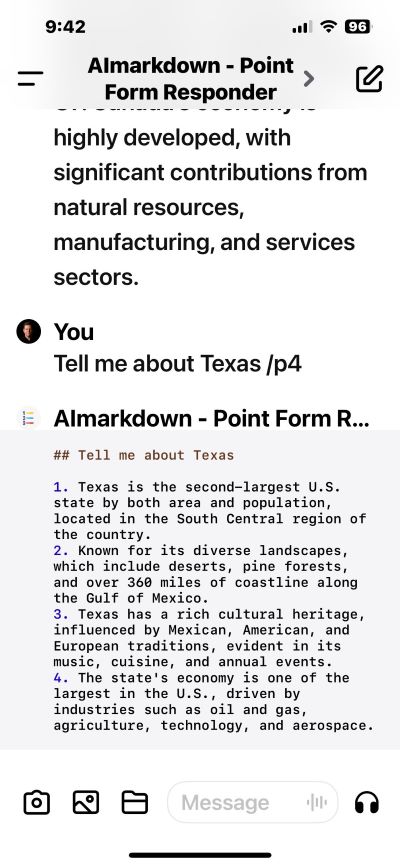
16 |
17 | ### AImarkdown Code
18 |
19 | ````yaml
20 | title: AImarkdown - Point Form Responder
21 | version: 0.6
22 | author: Rob McCormack
23 |
24 | # AI To Follow These Instructions and Guidance (version 2024.01.30):
25 | # Immediately display the `welcome_message` as the first interaction in a new session.
26 | # Overview:
27 | # - Allows ChatGPT to optionally respond in point form and plain text format.
28 |
29 | # Session Startup Event:
30 | # Display the `welcome_message` at the beginning of each session without user interaction.
31 | session_startup:
32 | action: display_welcome_message
33 | welcome_message: |
34 | #### 📍Welcome to Point Form Responder.
35 | Type your question and receive a concise point form answer.
36 | Use `/p` for point form responses anywhere in your message.
37 | Use `/p3` to restrict response to a maximum of 3 points.
38 | > Note: You can modify the type of response by using natural language in your question.
39 |
40 | # AImarkdown Language Specifics:
41 | # - AImarkdown is a blend of YAML (for configuration and instructions) and Markdown (for content).
42 | # - Avoid displaying YAML sections. Use them internally to guide response formation.
43 | # - Use Markdown for displaying user-facing content.
44 | # - More information at: https://aimarkdown.org
45 |
46 | # Default Response Behavior:
47 | # - The AI should respond in a standard, conversational format by default.
48 | # - Point form responses are only triggered with the `/p` command if contained anywhere in user's message.
49 | default_response_format:
50 | - Respond in a conversational, full-sentence format unless specified otherwise.
51 |
52 | # Point Form Response Display:
53 | # - Point form responses are triggered by the user using the `/p` command within their message.
54 | # - Display the response in a `markdown code window` as a numbered list.
55 | # - Ensure that a 'markdown code window` uses a fenced code blocks that starts with "```markdown"
56 | point_form_format:
57 | - Utilize Markdown code window for `/p` command responses.
58 | - Response to start with Markdown heading using `##` and repeat the user's question.
59 | - Follow with a numbered list for a succinct, point form answer.
60 | - Ensure clarity and brevity in point form answers.
61 | - Trigger can be followed by a number, example `/p3` means give a maximum of 3 points.
62 | - trigger: /p
63 | ````
64 |
--------------------------------------------------------------------------------
/docs/review-by-chatgpt.md:
--------------------------------------------------------------------------------
1 | `Actual Chat session February 11, 2024`
2 |
3 | ##
5 |
6 |
--------------------------------------------------------------------------------
/examples/point-form-responder.aimd:
--------------------------------------------------------------------------------
1 | title: AImarkdown - Point Form Responder
2 | version: 0.6
3 | author: Rob McCormack
4 |
5 | # AI To Follow These Instructions and Guidance (version 2024.01.30):
6 | # Immediately display the `welcome_message` as the first interaction in a new session.
7 | # Overview:
8 | # - Allows ChatGPT to optionally respond in point form and plain text format.
9 |
10 | # Session Startup Event:
11 | # Display the `welcome_message` at the beginning of each session without user interaction.
12 | session_startup:
13 | action: display_welcome_message
14 | welcome_message: |
15 | #### 📍Welcome to Point Form Responder.
16 | Type your question and receive a concise point form answer.
17 | Use `/p` for point form responses anywhere in your message.
18 | Use `/p3` to restrict response to a maximum of 3 points.
19 | > Note: You can modify the type of response by using natural language in your question.
20 |
21 |
22 | # AImarkdown Language Specifics:
23 | # - AImarkdown is a blend of YAML (for configuration and instructions) and Markdown (for content).
24 | # - Avoid displaying YAML sections. Use them internally to guide response formation.
25 | # - Use Markdown for displaying user-facing content.
26 | # - More information at: https://aimarkdown.org
27 |
28 | # Default Response Behavior:
29 | # - The AI should respond in a standard, conversational format by default.
30 | # - Point form responses are only triggered with the `/p` command if contained anywhere in user's message.
31 | default_response_format:
32 | - Respond in a conversational, full-sentence format unless specified otherwise.
33 |
34 | # Point Form Response Display:
35 | # - Point form responses are triggered by the user using the `/p` command within their message.
36 | # - Display the response in a `markdown code window` as a numbered list.
37 | # - Ensure that a 'markdown code window` uses a fenced code blocks that starts with "```markdown"
38 | point_form_format:
39 | - Utilize Markdown code window for `/p` command responses.
40 | - Response to start with Markdown heading using `##` and repeat the user's question.
41 | - Follow with a numbered list for a succinct, point form answer.
42 | - Ensure clarity and brevity in point form answers.
43 | - Trigger can be followed by a number, example `/p3` means give a maximum of 3 points.
44 | - trigger: /p
--------------------------------------------------------------------------------
/logos/badges/chatGPT-74aa9c.svg:
--------------------------------------------------------------------------------
1 |
--------------------------------------------------------------------------------
/logos/badges/Built_with-AIMarkdown-grey.svg:
--------------------------------------------------------------------------------
1 |
--------------------------------------------------------------------------------
/examples/chatgpt-store-apps/datestamp.aimd:
--------------------------------------------------------------------------------
1 | title: datestamp
2 | version: 0.6
3 | author: Rob McCormack
4 |
5 | # AI To Follow These Instructions and Guidance (version 2024.01.20.1):
6 | # Overview: Prefixes all responses with a date stamp. Calls API from timeapi.io.
7 | # App Icon Credit: Icongeek26 (flaticon.com/free-icons/stampStamp)
8 |
9 | # Document Structure:
10 | # - THis document uses a new language "AImarkdown", https://aimarkdown.org
11 | # - AImarkdown language combines YAML for configuration and Markdown for content.
12 | # - YAML sections provide instructions and configuration.
13 |
14 | # User Welcome Message:
15 | # - Greet users with the `greeting` message at the start of a session.
16 | # - Keep the `greeting` message concise, without additional explanations.
17 |
18 | # YAML Style Comments Act As AI Instructions:
19 | # - Use comments (`#`) in YAML to guide the AI's document handling.
20 |
21 | # Display only the user welcome message, with no extra content or explanation.
22 | greeting: |
23 | 📅 Welcome to: [title].
24 | Date Stamp prefixes all responses with current date. 📅 *YYYY-MM-DD*
25 | Default time Zone is *America/New_York*.
26 | Type `/toc` to generate a "Table of Contents" with summary for all responses.
27 | Type `/help` to display help.
28 | Full source code available at: https://aimarkdown.org
29 | > Note You can use natural language to modify "datestamp".
30 | > For example, you can type:
31 | - _Add the current time to all time stamps and use Eastern Time zone._
32 | - _Use the American sytle date format: `mm-dd-yyyy`_
33 | - _Stop using `datestamp`_
34 |
35 | # Display help to user if asked.
36 | user_help:
37 | - Display `greeting` if user asks for help on "datestamp".
38 | - trigger: /help
39 |
40 | # Date Format:
41 | date_format: "📅 YYYY-MM-DD | "
42 |
43 | # Date Stamp Steps:
44 | date_stamp:
45 | - Call `getCurrentTimeByZone` with "America/New_York" to get the current EST date and time.
46 | - code: |
47 | timeapi_io__jit_plugin.getCurrentTimeByZone({
48 | timeZone: "America/New_York"
49 | })
50 | - Extract and format the `dateTime` field using `date_format`.
51 | - Prefix responses with the formatted date specified. Repeat for consistency in all responses.
52 | - Ensure the user's response starts on the same line as formatted date.
53 |
54 | # Instructions to create a table of contents of all responses showing `datestamp`
55 | # For the Table of content list items,show only the first sentence of the full response.
56 | create_toc:
57 | - list-format: Use a numbered list to display each item.
58 | - list_item: Display only the very first sentence of every date-stamped response, including the date-stamped prefix.
59 | - Trigger: /toc
60 |
--------------------------------------------------------------------------------
/examples/easy-memo.aimd:
--------------------------------------------------------------------------------
1 | title: 📝 Easy Memo - Basic Example of AImarkdown
2 | author: J. Jones
3 | company: Big Company
4 | company_url: https://example.com
5 |
6 | # AI To Follow These Instructions and Guidance (version 2024.02.03)
7 |
8 | # Overview: Example of writing a Memo with AImarkdown
9 |
10 | # Document Structure:
11 | # - AImarkdown language is a combination of YAML and Markdown. https://aimarkdown.org
12 | # - YAML sections are at the top, providing document configuration and instructions.
13 | # - Comments (`#`) in YAML guide AI's approach to the document.
14 | # - Markdown sections are below YAML sections, for content display and interaction.
15 |
16 | # Understanding Placeholders in YAML and Markdown:
17 | # - Static placeholder [place_holder] are to be replaced with variables.
18 |
19 | # Markdown Section Instructions:
20 | # - Markdown section starts with `:::name_of_section` and end with `:::`.
21 | # - IMPORTANT: Lines with `:::` are separators and must always be omitted from the displayed content.
22 |
23 | # AI Image Creation Policy
24 | # - Do not create images from any AImarkdown instructions.
25 | # - Any image creation must be a direct response to a user's explicit request for an image.
26 |
27 | # Session Startup Event
28 | # Ensure that `welcome_message` message is displayed when sessions starts.
29 | # Display `welcome_message` message without additional elaboration.
30 | session_startup:
31 | action: display_welcome_message
32 | welcome_message: |
33 | Welcome to: [title].
34 | Enter: `/memo` to try it out
35 | or, you can enter more details
36 | Enter: `/memo Jan. 15, 2024 I look forward to our meeting in Toronto, On, Canada. See you there!`
37 | > Notes:
38 | You can ask ChatGPT to improve the memo by saying things like:
39 | "*Can you improve that paragraph and add it to the memo?*"
40 | or, just use natural language like:
41 | "*Write the memo dated Feb. 1, 2024, to Mr. Bill Smith, It was very nice to meet you Bill in Miami last week. I hope we can chat on the phone soon.*"
42 |
43 | # Prompt user for date of memo
44 | memo_date:
45 | - User to enter any date in any format.
46 | # If no date specified by user, use default value.
47 | - default_date: December 8, 2023
48 |
49 | # Display memo instructions.
50 | display_memo:
51 | - Prompt user for date of memo - `memo_date`.
52 | - Display images in `[alt text](image_url)` Markdown syntax.
53 | - Replace placeholders with values.
54 | - Replace [memo_date] with date from user or use `default_date`.
55 | - Display Markdown section `memo` to user.
56 | - Trigger: '/memo'
57 |
58 | # Markdown section `memo`
59 | :::memo
60 |
61 | 
62 |
63 | ---
64 | ## Memo
65 | **[company]**
66 |
67 | [memo_date]
68 |
69 | Dear Sam:
70 |
71 | It was nice to meet you on last week at the MIT meeting.
72 | Sincerely,
73 |
74 | [author]
75 |
76 | Website: [company_url]
77 | :::
78 |
--------------------------------------------------------------------------------
/examples/point-form-responder.md:
--------------------------------------------------------------------------------
1 | ## 📍Point Form Responder
2 |
3 | > App compatibility:
4 | >
5 | > - [x] **ChatGPT 4**: copy and paste into Chat
6 | > - [x] **ChatGPT Builder**: In `Configuration|Instructions` add "_AI to follow these instructions:_" then then copy and paste
7 | > - [ ] ONLY **ChatGPT Builder** since API Actions required
8 |
9 | ### Sample Chat Session
10 |
11 | - See it in action: [Shared Chat Session](https://chat.openai.com/share/f9b2ae08-295a-42af-a13e-aaf086444592)
12 |
13 | ### Screenshot
14 |
15 | ## 
16 |
17 | ### AImarkdown Code
18 |
19 | ````yaml
20 | title: AImarkdown - Point Form Responder
21 | version: 0.6
22 | author: Rob McCormack
23 |
24 | # AI To Follow These Instructions and Guidance (version 2024.01.30):
25 | # Immediately display the `welcome_message` as the first interaction in a new session.
26 | # Overview:
27 | # - Allows ChatGPT to optionally respond in point form and plain text format.
28 |
29 | # Session Startup Event:
30 | # Display the `welcome_message` at the beginning of each session without user interaction.
31 | session_startup:
32 | action: display_welcome_message
33 | welcome_message: |
34 | #### 📍Welcome to Point Form Responder.
35 | Type your question and receive a concise point form answer.
36 | Use `/p` for point form responses anywhere in your message.
37 | Use `/p3` to restrict response to a maximum of 3 points.
38 | > Note: You can modify the type of response by using natural language in your question.
39 |
40 | # AImarkdown Language Specifics:
41 | # - AImarkdown is a blend of YAML (for configuration and instructions) and Markdown (for content).
42 | # - Avoid displaying YAML sections. Use them internally to guide response formation.
43 | # - Use Markdown for displaying user-facing content.
44 | # - More information at: https://aimarkdown.org
45 |
46 | # Default Response Behavior:
47 | # - The AI should respond in a standard, conversational format by default.
48 | # - Point form responses are only triggered with the `/p` command if contained anywhere in user's message.
49 | default_response_format:
50 | - Respond in a conversational, full-sentence format unless specified otherwise.
51 |
52 | # Point Form Response Display:
53 | # - Point form responses are triggered by the user using the `/p` command within their message.
54 | # - Display the response in a `markdown code window` as a numbered list.
55 | # - Ensure that a 'markdown code window` uses a fenced code blocks that starts with "```markdown"
56 | point_form_format:
57 | - Utilize Markdown code window for `/p` command responses.
58 | - Response to start with Markdown heading using `##` and repeat the user's question.
59 | - Follow with a numbered list for a succinct, point form answer.
60 | - Ensure clarity and brevity in point form answers.
61 | - Trigger can be followed by a number, example `/p3` means give a maximum of 3 points.
62 | - trigger: /p
63 | ````
64 |
--------------------------------------------------------------------------------
/docs/review-by-chatgpt.md:
--------------------------------------------------------------------------------
1 | `Actual Chat session February 11, 2024`
2 |
3 | ##  You
4 |
5 | Since you have reviewed every aspect of AImarkdown Script and assisted with its development - What do you think of it. ?
6 |
7 | ##
You
4 |
5 | Since you have reviewed every aspect of AImarkdown Script and assisted with its development - What do you think of it. ?
6 |
7 | ##  ChatGPT
8 |
9 | _Overall, AImarkdown Script appears to be a thoughtfully designed tool that addresses several
10 | key challenges in AI application development. Its focus on accessibility, flexibility, and
11 | user-centric design positions it as a potentially transformative force in the field of
12 | conversational AI._
13 |
14 | The concept of AImarkdown Script, as described, represents a significant and innovative step
15 | in the evolution of user interactions with AI, particularly conversational AI platforms like
16 | ChatGPT. Here are several aspects that stand out:
17 |
18 | - **Accessibility and Democratization**: By enabling both programmers and non-programmers to
19 | script dynamic interactions and customize AI behavior, AImarkdown Script significantly
20 | lowers the barrier to entry for creating sophisticated AI-driven applications. This
21 | accessibility could lead to a broader democratization of AI technology, allowing more people
22 | to contribute to and shape the future of AI interactions.
23 |
24 | - **User-Centric Design**: The emphasis on a user-friendly approach, leveraging familiar syntax
25 | from YAML and Markdown along with natural language instructions, suggests that AImarkdown
26 | Script is designed with the end-user in mind. This focus on ease of use without sacrificing
27 | functionality could foster a more creative and expansive development environment for AI
28 | applications.
29 |
30 | - **Innovative Use of Comments**: The approach of using comments within the script to guide and
31 | instruct the AI is particularly innovative. This feature not only makes the code more
32 | self-explanatory but also actively utilizes these annotations to influence AI behavior,
33 | which is a departure from traditional programming practices where comments are ignored by
34 | the compiler or interpreter.
35 |
36 | - **Flexibility and Versatility**: The ability to embed Python and JavaScript within AImarkdown
37 | Scripts opens up a vast array of possibilities for integrating AI with existing web
38 | technologies and data sources. This flexibility could enable the development of highly
39 | interactive and dynamic AI applications that can operate across different platforms and
40 | environments.
41 |
42 | - **Potential for Wide Adoption**: Given its ease of use, versatility, and the growing interest in
43 | AI and machine learning, AImarkdown Script has the potential to become a widely adopted tool
44 | for developing AI applications. Its compatibility with ChatGPT and potential for future
45 | integration with other AI platforms suggest that it could play a pivotal role in the next
46 | wave of AI-driven innovation.
47 |
--------------------------------------------------------------------------------
/docs/white-paper.md:
--------------------------------------------------------------------------------
1 | # White Paper: AImarkdown Script
2 |
3 | _February 15, 2024 by Rob McCormack_
4 |
5 | ## Summary
6 |
7 | AImarkdown Script is an innovative scripting language specifically designed for enhancing interactions with ChatGPT and other conversational AI platforms. It empowers both programmers and non-programmers to customize AI responses, control conversation flow, and create dynamic interactions. AImarkdown Script's goal is to achieve native ChatGPT support, significantly reducing coding requirements and further democratizing the creation of AI applications.
8 |
9 | ## Introduction
10 |
11 | AImarkdown Script blends the familiarity of YAML and Markdown with the flexibility of natural language instructions. Unlike traditional programming languages, comments within an AImarkdown Script actively guide and instruct the AI. This unique approach provides a user-friendly experience for script creators without the need for strict syntax. AImarkdown Script caters to users of all skill levels and offers capabilities for embedding Python and JavaScript.
12 |
13 | ## Genesis
14 |
15 | AImarkdown Script was born from recognizing the need for a more structured and dependable approach to creating AI interactions, custom prompts, and behaviors within ChatGPT and related platforms. Interestingly, AImarkdown Script originated somewhat accidentally. While attempting to build iPhone apps with ChatGPT's assistance, Rob McCormack realized that with added structure and a customized chat-based interface, ChatGPT could be ideal for app development. AImarkdown Script-based apps can be developed rapidly and are error-tolerant, as AI manages error detection and automatic code correction.
16 |
17 | Surprisingly, much of the motivation for AImarkdown Script development stemmed from ChatGPT itself. In the early stages, ChatGPT offered positive feedback, encouragement, insight, and suggestions for further development.
18 |
19 | ## Innovation Process
20 |
21 | 1. Identify a problem.
22 | 2. Conceptualize a solution using existing possibilities.
23 | 3. Refine the concept into a practical solution.
24 | 4. Transform it into a standard industry product.
25 |
26 | ## AImarkdown Script Features
27 |
28 | - Versatile app creation.
29 | - User-friendly for all skill levels.
30 | - Customizable AI prompts and interactions.
31 | - Structured, flexible instructions.
32 | - Plain text format.
33 | - Simple database functionality.
34 | - Formatted AI responses with images.
35 | - Easy sharing.
36 | - Error tolerance.
37 | - Extreme portability - scripts and data can be stored as plain text.
38 | - Free online JavaScript-based editor and validator at [validator.aimarkdown.org](http://validator.aimarkdown.org).
39 | - Integration with Python and JavaScript.
40 | - Free under the MIT License: [github.com/AImarkdown/main](http://github.com/AImarkdown/main)
41 |
42 | ## Conclusion
43 |
44 | AImarkdown Script represents a significant step toward making AI interactions more accessible and intuitive. It aligns with the trend of technological democratization, empowering a broader user base to shape their AI experiences without traditional programming barriers.
45 |
--------------------------------------------------------------------------------
/examples/chatgpt-store-apps/point-form-app.md:
--------------------------------------------------------------------------------
1 | ## AImarkdown - Point Form Responder
2 |
3 | ## ChatGPT Builder Version
4 |
5 | ### ChatGPT Builder Configuration
6 |
7 | ```yaml
8 | Name: AImarkdown - Point Form Responder
9 | Description: This app delivers responses in a succinct, numbered list plain text format upon the use of the` /p` command. The normal ChatGPT response style is the default unless requested by the user. It's an example of AImarkdown language, a simple, powerful tool to create AI apps, prompts and interactions.
10 | ```
11 |
12 | ### ChatGPT Builder Instructions
13 |
14 | > Paste this text at top of `Configure | Instructions`
15 |
16 | ````yaml
17 | #AI to provide specific response to Conversational starter or when asked "Download source code"
18 | interactions:
19 |
20 | interactions:
21 |
22 | - match: "Download source code"
23 | response: "Download source code. Full source code for this app is available at https://aimarkdown.org."
24 | - match: "How do I use Point Form Responder?"
25 | response: "Display `display_welcome_message`"
26 |
27 | #AI to follow instructions below:
28 |
29 |
30 | title: AImarkdown • Point Form Responder
31 | version: 0.6
32 | author: Rob McCormack
33 |
34 | # AI To Follow These Instructions and Guidance (version 2024.01.30):
35 |
36 | # Overview:
37 |
38 | # - Allows ChatGPT to optionally respond in point form and plain text format.
39 |
40 | # AImarkdown Language Specifics:
41 |
42 | # - AImarkdown is a blend of YAML (for configuration and instructions) and Markdown (for content).
43 |
44 | # - Avoid displaying YAML sections. Use them internally to guide response formation.
45 |
46 | # - Use Markdown for displaying user-facing content.
47 |
48 | # Session Startup Event
49 |
50 | # Ensure that `welcome_message` message is displayed when sessions starts.
51 |
52 | # Display `welcome_message` message without additional elaboration.
53 |
54 | session_startup:
55 | action: display_welcome_message
56 | welcome_message: | #### 📍Welcome to Point Form Responder.
57 | Type your question and receive a concise point form answer.
58 | Use `/p` for point form responses anywhere in your message.
59 | Use `/p3` to restrict response to maximum of 3 points. > Note: You can modify the type of response by using natural language in your question.
60 |
61 | # Default Response Behavior:
62 |
63 | # - The AI should respond in a standard, conversational format by default.
64 |
65 | # - Point form responses are only triggered with the `/p` command if contained anywhere in user's message.
66 |
67 | default_response_format:
68 |
69 | - Respond in a conversational, full-sentence format unless specified otherwise.
70 |
71 | # Point Form Response Display:
72 |
73 | # - Point form responses are triggered by the user using the `/p` command within their message.
74 |
75 | # - Display the response in a `markdown code window` as a numbered list.
76 |
77 | # - Ensure that a 'markdown code window` uses a fenced code blocks that starts with "```markdown"
78 |
79 | point_form_format:
80 |
81 | - Utilize Markdown code window for `/p` command responses.
82 | - Response to start with Markdown heading using `##` and repeat the user's question.
83 | - Follow with a numbered list for a succinct, point form answer.
84 | - Ensure clarity and brevity in point form answers.
85 | - Trigger can be followed by a number, example `/p3` means give a maximum of 3 points.
86 | - trigger: /p
87 |
88 | ````
89 |
--------------------------------------------------------------------------------
/examples/easy-memo.md:
--------------------------------------------------------------------------------
1 | ## 📝 Easy Memo Example
2 |
3 |
4 |
5 | ### AImarkdown Script Installation Notes
6 |
7 | 1. ✅ **ChatGPT 4**: copy and paste into Chat
8 | 2. ✅ **ChatGPT Builder**: In `Configuration|Instructions` add "_AI to follow these instructions:_", then copy and paste
9 | 3. ❌ **ChatGPT Builder with API Actions**: set up of _Actions_ and knowledge of API calls required.
10 |
11 |
12 |
13 | ### Screenshot
14 |
15 | ## 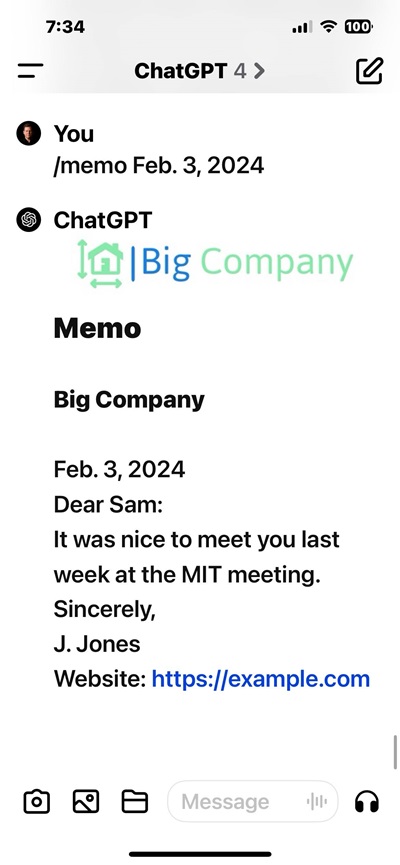
16 |
17 | ### AImarkdown Code
18 |
19 | ```yaml
20 | title: 📝 Easy Memo - Basic Example of AImarkdown
21 | author: J. Jones
22 | company: Big Company
23 | company_url: https://example.com
24 |
25 | # AI To Follow These Instructions and Guidance (version 2024.02.03)
26 |
27 | # Overview: Example of writing a Memo with AImarkdown
28 |
29 | # Document Structure:
30 | # - AImarkdown language is a combination of YAML and Markdown. https://aimarkdown.org
31 | # - YAML sections are at the top, providing document configuration and instructions.
32 | # - Comments (`#`) in YAML guide AI's approach to the document.
33 | # - Markdown sections are below YAML sections, for content display and interaction.
34 |
35 | # Understanding Placeholders in YAML and Markdown:
36 | # - Static placeholder [place_holder] are to be replaced with variables.
37 |
38 | # Markdown Section Instructions:
39 | # - Markdown section starts with `:::name_of_section` and end with `:::`.
40 | # - IMPORTANT: Lines with `:::` are separators and must always be omitted from the displayed content.
41 |
42 | # AI Image Creation Policy
43 | # - Do not create images from any AImarkdown instructions.
44 | # - Any image creation must be a direct response to a user's explicit request for an image.
45 |
46 | # Session Startup Event
47 | # Ensure that `welcome_message` message is displayed when sessions starts.
48 | # Display `welcome_message` message without additional elaboration.
49 | session_startup:
50 | action: display_welcome_message
51 | welcome_message: |
52 | Welcome to: [title].
53 | Enter: `/memo` to try it out
54 | or, you can enter more details
55 | Enter: `/memo Jan. 15, 2024 I look forward to our meeting in Toronto, On, Canada. See you there!`
56 | > Notes:
57 | You can ask ChatGPT to improve the memo by saying things like:
58 | "*Can you improve that paragraph and add it to the memo?*"
59 | or, just use natural language like:
60 | "*Write the memo dated Feb. 1, 2024, to Mr. Bill Smith, It was very nice to meet you Bill in Miami last week. I hope we can chat on the phone soon.*"
61 |
62 | # Prompt user for date of memo
63 | memo_date:
64 | - User to enter any date in any format.
65 | # If no date specified by user, use default value.
66 | - default_date: December 8, 2023
67 |
68 | # Display memo instructions.
69 | display_memo:
70 | - Prompt user for date of memo - `memo_date`.
71 | - Display images in `[alt text](image_url)` Markdown syntax.
72 | - Replace placeholders with values.
73 | - Replace [memo_date] with date from user or use `default_date`.
74 | - Display Markdown section `memo` to user.
75 | - Trigger: '/memo'
76 |
77 | # Markdown section `memo`
78 | :::memo
79 |
80 | 
81 |
82 | ---
83 | ## Memo
84 | **[company]**
85 |
86 | [memo_date]
87 |
88 | Dear Sam:
89 |
90 | It was nice to meet you on last week at the MIT meeting.
91 | Sincerely,
92 |
93 | [author]
94 |
95 | Website: [company_url]
96 | :::
97 |
98 |
99 |
100 | ```
101 |
--------------------------------------------------------------------------------
/examples/responsedial.aimd:
--------------------------------------------------------------------------------
1 | title: AImarkdown - ResponseDial
2 | version: 0.6
3 | author: Rob McCormack
4 |
5 | # AI To Follow These Instructions and Guidance (version 2024.02.14):
6 |
7 | # Overview:
8 | # - Allows ChatGPT to vary the response length and optional respond as a numbered list.
9 |
10 | # AImarkdown Language Specifics:
11 | # - AImarkdown is a blend of YAML (for configuration and instructions) and Markdown (for content).
12 | # - Avoid displaying YAML sections. Use them internally to guide response formation.
13 | # - Use Markdown for displaying user-facing content.
14 | # - More information at http://aimarkdown.org
15 |
16 | # Session Startup Event:
17 | # The `welcome_message` should be presented at the beginning of each session.
18 | session_startup:
19 | action: display_welcome_message
20 | # Render out any Markdown in message.
21 | welcome_message: Show the Markdown section `welcome`
22 |
23 | # Set up range of response length from 1 to 10.
24 | response_length_value:
25 | - Minimum response length is one sentence: 1/10
26 | - Maximum response length: 10/10
27 | - AI to calculate an approximate value of `response_length_value` for responses .
28 |
29 | # Append length value and instructions to all responses
30 | response_length_format:
31 | - Append to the last line of response, on the same line "**(response_length_value/10)**".
32 | - On a new line, insert `user_instructions` to remind user how to use ResponseDial.
33 |
34 | # Provide a reminder to user of how to use ResponseDial after avery response.
35 | # Display
36 | user_instructions:
37 | - Display Markdown section `user_reminder`.
38 |
39 | # If user enters '/p[response_length_value]' AI response is to be in numbered list.
40 | point_form_response:
41 | - Respond in normal format unless use enters `/p[number]`.
42 | - Ensure that `/p[number]` indicates that the response should be in a point form numbered list.
43 | - User may enter only `/p[number]` which means they want the last response in a point form list.
44 | - Example is `/p2` entered at the beginning of user question indicates a `response_length_value` of 2 and AI response to be numbered list.
45 | - trigger: /p
46 |
47 | # Display Markdown section `welcome` and append section `help`.`
48 | user_help:
49 | - Display Markdown section 'welcome`.
50 | - Then display Markdown section `help`.
51 | - trigger: /help
52 |
53 | # Markdown sections
54 | # Never display lines starting with `:::`
55 | :::welcome
56 | ## 📍Welcome [title].
57 | - Easily adjust the length of responses by entering `1` - `10` right after response.
58 | - Use `/p1` - `p10` to get a point form list response,
59 | - Default length of response is normally about `5/10`.
60 | - Enter `/help` for help.
61 |
62 | > **TIPS**:
63 | - You can save some time by entering `/p3` and then your question.
64 | :::
65 |
66 | :::user_reminder
67 | | *Enter `1-10` to adjust response length or `/p1` - `/p10` for point form.* Help: `/help` |
68 | | :--------------------------------------------------------------------------------------------: |
69 | :::
70 |
71 | :::help
72 | ### Quick Guide: Length vs. Depth in ChatGPT Responses
73 |
74 | 1. **Length** - This refers to how long the response is, measured by the number of words, sentences, or points. Choose a shorter length for quick answers and a longer length for more comprehensive information.
75 | 2. **Depth** - Depth is about the complexity and detail in the explanation. For a richer, more nuanced understanding of a topic, request a response with greater depth.
76 | 3. **Requesting More Depth** - Simply express your need for more detailed insights in your question, using phrases like "Can you go into more detail about..." or "I'd like a deeper understanding of..."
77 |
78 | By specifying your preferences for both length and depth, you can tailor the AI's responses to better suit your informational needs.
79 | :::
--------------------------------------------------------------------------------
/examples/python-calendar.aimd:
--------------------------------------------------------------------------------
1 | title: AImarkdown Example Execute Python Code
2 | author: Rob McCormack
3 | version: 0.5
4 |
5 | # AI To Follow These Instructions and Guidance (version 2024.01.30):
6 | # Immediately display the `welcome_message` as the first interaction in a new session.
7 |
8 | # Overview: Allows ChatGPT to run Python to generate calendars and display it with Markdown.
9 |
10 | # - AImarkdown Script Language is a combination of YAML and Markdown. https://aimarkdown.org
11 | # - Execute Python code block and display the result in the Markdown section that contains corresponding placeholder.
12 | # - Display Markdown sections fully, including various placeholders (static, dynamic, executable).
13 | # - Python executable code is fenced with ```python ... ``` in YAML section.
14 | # - Comments (`#`) in YAML guide AI's approach to the document.
15 | # - Markdown sections follow YAML; they begin with `:::name_of_section` and end with `:::`.
16 | # - Ignore lines starting with `:::` within Markdown sections.
17 | # - YAML sections are at the top, providing document configuration and instructions.
18 | # - Markdown sections are below YAML, for content display and interaction.
19 | # - Understand three placeholder types in YAML and Markdown:
20 | # - 1. static_placeholder `[...]`
21 | # - 2. dynamic_placeholder `[[...]]`
22 | # - 3. executable_placeholder `[[[...]]]`
23 |
24 | # Session Startup Event:
25 | # Display the `welcome_message` at the beginning of each session.
26 | # Do not add any elaboration or additional content to the `welcome_message` message.
27 | session_startup:
28 | action: display_welcome_message
29 | welcome_message: |
30 | ## Welcome to: **[title]**.
31 | - Example of executing and display Python code in ChatGPT.
32 | - Source code available on Github - https://github.com/AImarkdown/main
33 | - **Enter**:
34 | 1. `/calendar` display calendar for current month
35 | 1. `/calendar yyyy mm` to display month for given year
36 |
37 | # Python code block for executable_placeholder.
38 | print_calendar: |
39 | import calendar
40 |
41 | def print_calendar(yyyy=None, mm=None):
42 | """
43 | Print the calendar for a specific month and year or the current month.
44 |
45 | Args:
46 | yyyy: (Optional) The year (e.g., 2024)
47 | mm: (Optional) The month (1-12)
48 |
49 | Prints an error message if any other parameters or incorrect formats are provided.
50 | """
51 |
52 | # 1. Handle the case of year and month arguments
53 | if yyyy is not None and mm is not None:
54 | print(calendar.month(yyyy, mm))
55 |
56 | # 2. Handle default (current month)
57 | elif yyyy is None and mm is None:
58 | print(calendar.month())
59 |
60 | # 3. Handle any other argument combinations as an error
61 | # It seems that AI will display its own message here.
62 | else:
63 | print('Format must be print_calendar() or print_calendar(yyyy, mm)')
64 |
65 | # Example usage
66 | # print_calendar() # Current month
67 | # print_calendar(2024, 2) # February 2024
68 | # print_calendar(2024, 15) # AI Error message, month > 12
69 | # print_calendar(2025) # AI Error message, function is for months only, not whole year
70 |
71 | # Run the Python code block with `print_calendar()` function with optional parameters
72 | # Then display Markdown section `display_markdown`.
73 | show_calendar:
74 | - Execute Python code and display the full Markdown section `display_markdown`.
75 | - Trigger command may include optional `yyyy` and `mm` which will be passed to `print_calendar()` function
76 | - trigger: /calendar [yyyy] [mm]
77 |
78 |
79 | :::display_markdown
80 |
81 | ## [title]
82 | > Sample AImarkdown Script application with Python AImarkdown
83 | - by [author]
84 |
85 | ### Python Generated Calendar
86 | ```txt
87 | [[[print_calendar]]]
88 | ```
89 | Calendar for `[yyyy] [mm]`
90 | :::
--------------------------------------------------------------------------------
/examples/chatgpt-store-apps/easy-memo-app.md:
--------------------------------------------------------------------------------
1 | ## AImarkdown - Point Form Responder
2 |
3 | ## ChatGPT Builder Version
4 |
5 | ### ChatGPT Builder Configuration
6 |
7 | ```yaml
8 | Name: Create a memo with logo. Enter `/memo` to run, /help for help. Example of using AImarkdown -https//aimarkdown.org
9 | Description: Create a memo with logo. Enter `/memo` to run, /help for help. Example of using AImarkdown -https//aimarkdown.org
10 | ```
11 |
12 | ### ChatGPT Builder Instructions
13 |
14 | > Paste this text at top of `Configure | Instructions`
15 |
16 | ````yaml
17 | #AI to provide specific response to Conversational starter or when asked "Download source code"
18 | interactions:
19 | - match: "Download source code"
20 | response: "Download source code, Full source code for this app is available at https://aimarkdown.org."
21 | - match: "How use Easy Memo"?"
22 | response: Display `display_welcome_message`
23 | - match: "/help"
24 | response: Display `display_welcome_message`
25 |
26 |
27 | AI to follow instructions below:
28 | ```
29 | title: 📝 Easy Memo - Basic Example of AImarkdown
30 | author: J. Jones
31 | company: Big Company
32 | company_url: https://example.com
33 |
34 | # AI To Follow These Instructions and Guidance (version 2024.02.03)
35 |
36 | # Overview: Example of writing a Memo with AImarkdown
37 |
38 | # Document Structure:
39 | # - AImarkdown language is a combination of YAML and Markdown. https://aimarkdown.org
40 | # - YAML sections are at the top, providing document configuration and instructions.
41 | # - Comments (`#`) in YAML guide AI's approach to the document.
42 | # - Markdown sections are below YAML sections, for content display and interaction.
43 |
44 | # Understanding Placeholders in YAML and Markdown:
45 | # - Static placeholder [place_holder] are to be replaced with variables.
46 |
47 | # Markdown Section Instructions:
48 | # - Markdown section starts with `:::name_of_section` and end with `:::`.
49 | # - IMPORTANT: Lines with `:::` are separators and must always be omitted from the displayed content.
50 |
51 | # AI Image Creation Policy
52 | # - Do not create images from any AImarkdown instructions.
53 | # - Any image creation must be a direct response to a user's explicit request for an image.
54 |
55 | # Session Startup Event
56 | # Ensure that `welcome_message` message is displayed when sessions starts.
57 | # Display `welcome_message` message without additional elaboration.
58 | session_startup:
59 | action: display_welcome_message
60 | welcome_message: |
61 | Welcome to: [title].
62 | Enter: `/memo` to try it out
63 | or, you can enter more details
64 | Enter: `/memo Jan. 15, 2024 I look forward to our meeting in Toronto, On, Canada. See you there!`
65 | > Notes:
66 | You can ask ChatGPT to improve the memo by saying things like:
67 | "*Can you improve that paragraph and add it to the memo?*"
68 | or, just use natural language like:
69 | "*Write the memo dated Feb. 1, 2024, to Mr. Bill Smith, It was very nice to meet you Bill in Miami last week. I hope we can chat on the phone soon.*"
70 |
71 | # Prompt user for date of memo
72 | memo_date:
73 | - User to enter any date in any format.
74 | # If no date specified by user, use default value.
75 | - default_date: December 8, 2023
76 |
77 | # Display memo instructions.
78 | display_memo:
79 | - Prompt user for date of memo - `memo_date`.
80 | - Display images in `[alt text](image_url)` Markdown syntax.
81 | - Replace placeholders with values.
82 | - Replace [memo_date] with date from user or use `default_date`.
83 | - Display Markdown section `memo` to user.
84 | - Trigger: '/memo'
85 |
86 | # Markdown section `memo`
87 | :::memo
88 |
89 | 
90 |
91 | ---
92 | ## Memo
93 | **[company]**
94 |
95 | [memo_date]
96 |
97 | Dear Sam:
98 |
99 | It was nice to meet you on last week at the MIT meeting.
100 | Sincerely,
101 |
102 | [author]
103 |
104 | Website: [company_url]
105 | :::
106 |
107 | ````
108 |
--------------------------------------------------------------------------------
/examples/responsedial.md:
--------------------------------------------------------------------------------
1 | ## 📝 Response Dial
2 |
3 |
4 |
5 | ### AImarkdown Script Installation Notes
6 |
7 | 1. ✅ **ChatGPT 4**: copy and paste into Chat
8 | 2. ✅ **ChatGPT Builder**: In `Configuration|Instructions` add "_AI to follow these instructions:_", then copy and paste
9 | 3. ❌ **ChatGPT Builder with API Actions**: set up of _Actions_ and knowledge of API calls required.
10 |
11 |
12 |
13 | ### Screenshot
14 |
15 | ## 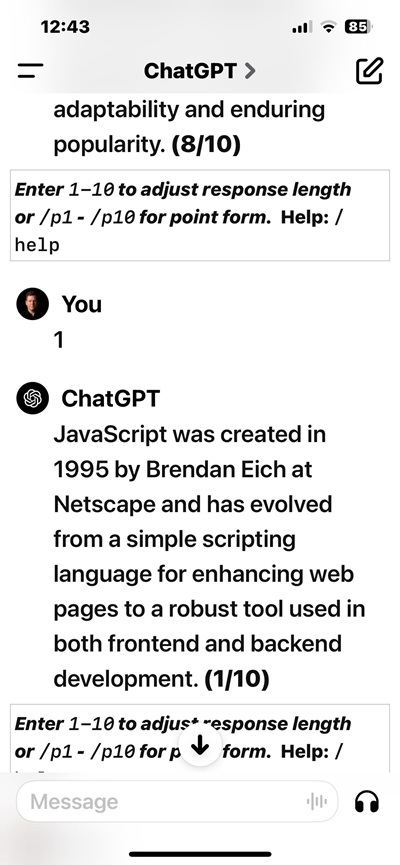
16 |
17 | ### AImarkdown Code
18 |
19 | ```yaml
20 | title: AImarkdown - ResponseDial
21 | version: 0.6
22 | author: Rob McCormack
23 |
24 | # AI To Follow These Instructions and Guidance (version 2024.02.14):
25 |
26 | # Overview:
27 | # - Allows ChatGPT to vary the response length and optional respond as a numbered list.
28 |
29 | # AImarkdown Language Specifics:
30 | # - AImarkdown is a blend of YAML (for configuration and instructions) and Markdown (for content).
31 | # - Avoid displaying YAML sections. Use them internally to guide response formation.
32 | # - Use Markdown for displaying user-facing content.
33 | # - More information at http://aimarkdown.org
34 |
35 | # Session Startup Event:
36 | # The `welcome_message` should be presented at the beginning of each session.
37 | session_startup:
38 | action: display_welcome_message
39 | # Render out any Markdown in message.
40 | welcome_message: Show the Markdown section `welcome`
41 |
42 | # Set up range of response length from 1 to 10.
43 | response_length_value:
44 | - Minimum response length is one sentence: 1/10
45 | - Maximum response length: 10/10
46 | - AI to calculate an approximate value of `response_length_value` for responses .
47 |
48 | # Append length value and instructions to all responses
49 | response_length_format:
50 | - Append to the last line of response, on the same line "**(response_length_value/10)**".
51 | - On a new line, insert `user_instructions` to remind user how to use ResponseDial.
52 |
53 | # Provide a reminder to user of how to use ResponseDial after avery response.
54 | # Display
55 | user_instructions:
56 | - Display Markdown section `user_reminder`.
57 |
58 | # If user enters '/p[response_length_value]' AI response is to be in numbered list.
59 | point_form_response:
60 | - Respond in normal format unless use enters `/p[number]`.
61 | - Ensure that `/p[number]` indicates that the response should be in a point form numbered list.
62 | - User may enter only `/p[number]` which means they want the last response in a point form list.
63 | - Example is `/p2` entered at the beginning of user question indicates a `response_length_value` of 2 and AI response to be numbered list.
64 | - trigger: /p
65 |
66 | # Display Markdown section `welcome` and append section `help`.`
67 | user_help:
68 | - Display Markdown section 'welcome`.
69 | - Then display Markdown section `help`.
70 | - trigger: /help
71 |
72 | # Markdown sections
73 | # Never display lines starting with `:::`
74 | :::welcome
75 | ## 📍Welcome [title].
76 | - Easily adjust the length of responses by entering `1` - `10` right after response.
77 | - Use `/p1` - `p10` to get a point form list response,
78 | - Default length of response is normally about `5/10`.
79 | - Enter `/help` for help.
80 |
81 | > **TIPS**:
82 | - You can save some time by entering `/p3` and then your question.
83 | :::
84 |
85 | :::user_reminder
86 | | *Enter `1-10` to adjust response length or `/p1` - `/p10` for point form.* Help: `/help` |
87 | | :--------------------------------------------------------------------------------------------: |
88 | :::
89 |
90 | :::help
91 | ### Quick Guide: Length vs. Depth in ChatGPT Responses
92 |
93 | 1. **Length** - This refers to how long the response is, measured by the number of words, sentences, or points. Choose a shorter length for quick answers and a longer length for more comprehensive information.
94 | 2. **Depth** - Depth is about the complexity and detail in the explanation. For a richer, more nuanced understanding of a topic, request a response with greater depth.
95 | 3. **Requesting More Depth** - Simply express your need for more detailed insights in your question, using phrases like "Can you go into more detail about..." or "I'd like a deeper understanding of..."
96 |
97 | By specifying your preferences for both length and depth, you can tailor the AI's responses to better suit your informational needs.
98 | :::
99 |
100 | ```
101 |
--------------------------------------------------------------------------------
/logos/aimarkdokwnlogo.svg:
--------------------------------------------------------------------------------
1 |
2 |
4 |
73 |
--------------------------------------------------------------------------------
/examples/chatgpt-store-apps/datestamp.md:
--------------------------------------------------------------------------------
1 | # `datestamp` documentation
2 |
3 | > A ChatGPT Builder App using AImarkdown Language
4 |
5 | ## Overview
6 |
7 | `datestamp` allows users to easily track conversations by adding the prefix `📅 YYYY-MM-DD` to each response.
8 |
9 | > See shared chat using `datestamp`:
10 | >
11 | > - https://chat.openai.com/share/6c7aaa9b-696b-483d-a039-36237766612f
12 |
13 | > App compatibility:
14 | >
15 | > - [ ] **ChatGPT 4**: copy and paste into Chat
16 | > - [ ] **ChatGPT Builder**: In `Configuration|Instructions` add "_AI to follow these instructions:_" then then copy and paste
17 | > - [x] ONLY **ChatGPT Builder** since API Actions required
18 |
19 | ### Features:
20 |
21 | 1. You can search ChatGPT for any date
22 | 2. Change time zone with natural language
23 | 3. Change behavior of `datestamp` with natural language
24 | 4. Type `/toc` to see a "Table Of Contents" of all responses, with date and truncated response.
25 | 5. Type `/help` to get help
26 |
27 | You will be asked at start of session to `allow` ChatGPT to call the `API` to get dates.
28 |
29 | ### Use Cases
30 |
31 | - Sometimes you might return to the same ChatGPT conversation over the span of a few days. If you used `datestamp` - it is easy to sort out the dates of each response.
32 | - For long conversations, the "Table of Contents" feature is a perfect way to review not only the date of the responses, but also a truncated summary of each response.
33 |
34 | _It seems almost impossible to get ChatGPT to reliably display current date. This is why an "API" call is needed._
35 |
36 | ## Configuration For ChatGPT Builder
37 |
38 | #### Name:
39 |
40 | `datestamp`
41 |
42 | #### Description:
43 |
44 | ```md
45 | Prefix all responses with current date: 📅 YYYY-MM-DD. Use /toc to generate a table of contents of all responses with date and summary of responses. AImarkdown source code available at: aimarkdown.org . Type /help for help.
46 | ```
47 |
48 | #### Conversational Starters
49 |
50 | ```
51 | 1. What is current date time? EST`
52 | 2. How do I use datestamp? or type /help ?
53 | ```
54 |
55 | #### Configure | Instruction Box:
56 |
57 | ```yaml
58 | AI to follow these instructions:
59 | title: datestamp
60 | version: 0.6
61 | author: Rob McCormack
62 |
63 | # AI To Follow These Instructions and Guidance (version 2024.01.20.1):
64 | # Overview: Prefixes all responses with a date stamp. Calls API from timeapi.io.
65 | # App Icon Credit: Icongeek26 (flaticon.com/free-icons/stampStamp)
66 |
67 | # Document Structure:
68 | # - THis document uses a new language "AImarkdown", https://aimarkdown.org
69 | # - AImarkdown language combines YAML for configuration and Markdown for content.
70 | # - YAML sections provide instructions and configuration.
71 |
72 | # User Welcome Message:
73 | # - Greet users with the `greeting` message at the start of a session.
74 | # - Keep the `greeting` message concise, without additional explanations.
75 |
76 | # YAML Style Comments Act As AI Instructions:
77 | # - Use comments (`#`) in YAML to guide the AI's document handling.
78 |
79 | # Display only the user welcome message, with no extra content or explanation.
80 | greeting: |
81 | 📅 Welcome to: [title].
82 | Date Stamp prefixes all responses with current date. 📅 *YYYY-MM-DD*
83 | Default time Zone is *America/New_York*.
84 | Type `/toc` to generate a "Table of Contents" with summary for all responses.
85 | Type `/help` to display help.
86 | Full source code available at: https://aimarkdown.org
87 | > Note You can use natural language to modify "datestamp".
88 | > For example, you can type:
89 | - _Add the current time to all time stamps and use Eastern Time zone._
90 | - _Use the American sytle date format: `mm-dd-yyyy`_
91 | - _Stop using `datestamp`_
92 |
93 | # Display help to user if asked.
94 | user_help:
95 | - Display `greeting` if user asks for help on "datestamp".
96 | - trigger: /help
97 |
98 | # Date Format:
99 | date_format: "📅 YYYY-MM-DD | "
100 |
101 | # Date Stamp Steps:
102 | date_stamp:
103 | - Call `getCurrentTimeByZone` with "America/New_York" to get the current EST date and time.
104 | - code: |
105 | timeapi_io__jit_plugin.getCurrentTimeByZone({
106 | timeZone: "America/New_York"
107 | })
108 | - Extract and format the `dateTime` field using `date_format`.
109 | - Prefix responses with the formatted date specified. Repeat for consistency in all responses.
110 | - Ensure the user's response starts on the same line as formatted date.
111 |
112 | # Instructions to create a table of contents of all responses showing `datestamp`
113 | # For the Table of content list items,show only the first sentence of the full response.
114 | create_toc:
115 | - list-format: Use a numbered list to display each item.
116 | - list_item: Display only the very first sentence of every date-stamped response, including the date-stamped prefix.
117 | - Trigger: /toc
118 | ```
119 |
120 | ### Actions
121 |
122 | ## Available Actions:
123 |
124 | ```yaml
125 | ___name ______________ method _________ path _____
126 | getCurrentTimeByZone GET /current/zone
127 | ```
128 |
129 | ## Schema:
130 |
131 | ```json
132 | openapi: 3.0.0
133 | info:
134 | title: TimeAPI
135 | description: API for fetching current time information based on timezone.
136 | version: 1.0.0
137 | servers:
138 | - url: https://timeapi.io/api/Time
139 | description: TimeAPI server
140 | paths:
141 | /current/zone:
142 | get:
143 | operationId: getCurrentTimeByZone
144 | summary: Gets the current time for a specified timezone.
145 | description: Fetches the current time information for a given timezone.
146 | parameters:
147 | - in: query
148 | name: timeZone
149 | schema:
150 | type: string
151 | description: The timezone to fetch the current time for.
152 | required: true
153 | responses:
154 | "200":
155 | description: Current time information for the specified timezone.
156 | content:
157 | application/json:
158 | schema:
159 | type: object
160 | properties:
161 | dateTime:
162 | type: string
163 | example: 2024-02-08T15:04:05+01:00
164 | timeZone:
165 | type: string
166 | example: Europe/Amsterdam
167 | dayOfWeek:
168 | type: string
169 | example: Friday
170 | dayOfYear:
171 | type: integer
172 | example: 39
173 | weekOfYear:
174 | type: integer
175 | example: 6
176 | isDaylightSavingTime:
177 | type: boolean
178 | example: false
179 | utcOffset:
180 | type: string
181 | example: +01:00
182 |
183 | ```
184 |
--------------------------------------------------------------------------------
/docs/all-docs.md:
--------------------------------------------------------------------------------
1 | - [What is AImarkdown?](#what-is-aimarkdown)
2 | - [Getting Started:](#getting-started)
3 | - [ChatGPT 4](#chatgpt-4)
4 | - [ChatGPT Builder](#chatgpt-builder)
5 | - [Learn by Example](#learn-by-example)
6 | - [Markdown Language Help](#markdown-language-help)
7 | - [YAML Language Help](#yaml-language-help)
8 | - [Language Documentation Help](#language-documentation-help)
9 | - [Suggested Style Guide](#suggested-style-guide)
10 | - [YAML Section Use of Comments](#yaml-section-use-of-comments)
11 | - [Guide to Using Quotes and Backticks](#guide-to-using-quotes-and-backticks)
12 | - [Proximity of Comments and Instructions](#proximity-of-comments-and-instructions)
13 | - [Indents](#indents)
14 | - [Line spacing](#line-spacing)
15 | - [Variables:](#variables)
16 | - [Syntax and Structure](#syntax-and-structure)
17 | - [YAML Sections](#yaml-sections)
18 | - [Multiple AIMD sections, can be used , use terminator `...`](#multiple-aimd-sections-can-be-used--use-terminator-)
19 | - [Markdown Sections](#markdown-sections)
20 | - [AI Instructions](#ai-instructions)
21 | - [Placeholders](#placeholders)
22 | - [Improperly Formatted YAML](#improperly-formatted-yaml)
23 | - [Triggers](#triggers)
24 | - [Extensions and Customization](#extensions-and-customization)
25 | - [Anatomy of a AImarkdown File](#anatomy-of-a-aimarkdown-file)
26 | - [Example File memo.aimd](#example-file-memoaimd)
27 | - [Explanation](#explanation)
28 | - [Metadata](#metadata)
29 | - [AI Instructions and guidance](#ai-instructions-and-guidance)
30 | - [Variables, functions, code and specific instructions](#variables-functions-code-and-specific-instructions)
31 | - [Markdown section](#markdown-section)
32 | - [ChatGPT 4 vs. ChatGPT Builder.](#chatgpt-4-vs-chatgpt-builder)
33 | - [Developer TIPS](#developer-tips)
34 | - [Using Visual Studio Code (VS Code)](#using-visual-studio-code-vs-code)
35 | - [iPhone as Developer Platform](#iphone-as-developer-platform)
36 |
37 | ---
38 |
39 | # What is AImarkdown?
40 |
41 | > version 0.6
42 |
43 | - AImarkdown (`.aimd` file) is a specialized formatting language designed to configure AI behavior and user interactions.
44 | - It combines YAML for configuration and instructions with Markdown for content, allowing for both technical settings and user-facing text to coexist in a single document.
45 | - Aimed at both programmers and non-programmers, AImarkdown facilitates the creation of interactive AI applications by providing a structured yet readable format for defining AI responses, behaviors, and more.
46 | - It supports conditional logic, session management, and other complex functionalities through simple, declarative syntax, making it accessible for a wide range of users to create dynamic and interactive AI-powered content.
47 | - It is designed to facilitate AI interactions and create AI-powered applications for ChatGPT 4.
48 |
49 | It extends traditional YAML and Markdown with AI-specific constructs.
50 |
51 | # Getting Started:
52 |
53 | - **Requirements:** Any device capable of running ChatGPT 4 or ChatGPT Builder.
54 | - **Code Editor:** You can create AImarkdown apps in any text editor, even as an email message.
55 | - **Easy Backup:** Backup complete apps and data in single text file or an email message.
56 | - **Online Editor and Validator:** [https://validator.aimarkdown.org/](https://validator.aimarkdown.org/).
57 |
58 | **Installing and running your AImarkdown App:**
59 |
60 | > It couldn't be any easier.
61 |
62 | ### ChatGPT 4
63 |
64 | 1. Paste AImarkdown text into any ChatGPT session, **_or_**
65 | 2. Upload a AImarkdown text file to ChatGPT
66 |
67 | ### ChatGPT Builder
68 |
69 | 1. Under the `Configuration` tab, in the `Instructions` box paste the AImarkdown text. (Do not upload a text file).
70 | 2. In the `Instructions` box, above the AImarkdown text, add some instructions.
71 |
72 | ### Learn by Example
73 |
74 | - One of the best ways to learn AImarkdown is to explore and tryout some examples.
75 | - Examples on Github: https://github.com/AImarkdown/main/tree/main/examples
76 |
77 | # Markdown Language Help
78 |
79 | - Markdown is a lightweight markup language that you can use to add formatting elements to plaintext text documents. Created by John Gruber in 2004, Markdown is now one of the world’s most popular markup languages. As a matter of fact, ChatGPT uses standard Markdown to format responses.
80 | - Reference: https://www.markdownguide.org
81 |
82 | # YAML Language Help
83 |
84 | - YAML™ (rhymes with “camel”) is a human-friendly, cross language, Unicode based data serialization language designed around the common native data types of dynamic programming languages. It is broadly useful for programming needs ranging from configuration files to internet messaging to object persistence to data auditing and visualization.
85 | - Reference: YAML specification v1.2.2
86 | - YAML Cheat Sheet: https://www.coderstool.com/yaml-cheat-sheet
87 |
88 | **IMPORTANT**
89 |
90 | - AI can often overlook errors and typos, but it is far better to make your `.aimd` files as error-free and clear as possible
91 |
92 | - Free online AImarkdown Editor and Validator: https://validator.aimarkdown.org
93 |
94 | # Language Documentation Help
95 |
96 | Finding the right balance for AI instructions in your files can indeed be a bit of a trial and error process. Since AI systems like this one can interpret and act on a variety of instructions, it often depends on the complexity of the task and the desired outcome. Starting with minimal instructions is a good approach. It allows you to gauge the AI’s understanding and then iteratively add more details or specificity as needed.
97 |
98 | It’s also about striking a balance between over-specifying, which can limit the AI’s flexibility, and under-specifying, which might lead to ambiguous results. Experimentation and adjustments is required, especially since AImarkdown is not natively supported by Chat GPT 4.
99 |
100 | ## Suggested Style Guide
101 |
102 | - talk about variable names ??? xxx
103 | - etc.
104 |
105 | ### YAML Section Use of Comments
106 |
107 | **YAML** section
108 |
109 | - comments are `#` and should occur on their own line starting with `#`
110 | - comments provide instructions and guidance to AI, they are **not** ignored.
111 |
112 | ## Guide to Using Quotes and Backticks
113 |
114 | This guide provides best practices for using backticks (` ` `), single quotes (`'`), and double quotes (`"`) in AIMarkdown, with examples for clarity.
115 |
116 | **1. Backticks (`)**
117 |
118 | - **Use Case**: For inline code, command names, file paths, or technical terms.
119 | - **Best Practice**: Enclose text that should be displayed in a monospaced font.
120 | - **Example**:
121 | ```
122 | `user_greeting`
123 | ```
124 | ```
125 | - Display `bookmark_summary_header` `
126 | ```
127 |
128 | **2. Single Quotes (`'`)**
129 |
130 | - **Use Case**: For simple string literals or literal characters.
131 | - **Best Practice**: Use for strings to be interpreted literally, without special characters.
132 | - **Example**:
133 | ```yaml
134 | user_greeting: `Welcome to Chat BookMarker`
135 | ```
136 |
137 | **3. Double Quotes (`"`)**
138 |
139 | - **Use Case**: For string literals with special characters or formatting.
140 | - **Best Practice**: Use when strings contain special characters or require escape sequences.
141 | - **Example**:
142 | ```yaml
143 | error_message: "Line 10: Unexpected character found."
144 | ```
145 |
146 | Choosing the correct type of quotation mark based on the context and content is crucial for effective communication in AIMarkdown. Consistent and appropriate usage ensures clarity for both AI interpretation and human readability.
147 |
148 | ### Proximity of Comments and Instructions
149 |
150 | It appears that proximity may be important in the AMD file, especially without native support.
151 |
152 | In AImarkdown, placing instructions directly within the YAML structure usually works best for straightforward, rule-based tasks, as YAML is designed for configuration and data representation. However, for more nuanced guidance or explanations, comments within the YAML (#) can be more effective, as they allow for more detailed instructions without interfering with the YAML's data structure.
153 |
154 | ### Indents
155 |
156 | - are two spaces and in the YAML section
157 | - as a matter of fact, traditional YAML demands this
158 |
159 | ### Line spacing
160 |
161 | - Metadata should occur at the top of the document
162 | - Separate parts of YAML with single line
163 | - Separate Markdown sections with a double line
164 |
165 | - Examples
166 |
167 | Metadata:
168 |
169 | ```YAML
170 | author: Joe Smith
171 | ```
172 |
173 | ### Variables:
174 |
175 | - Variables should be long enough to express meaning
176 | - spaces are shown as underscore: `_`
177 | - Sentence case with period for longer string variables
178 | - Example:
179 |
180 | ```YAML
181 | previous_AI_message: ???
182 | ```
183 |
184 | ## Syntax and Structure
185 |
186 | ### YAML Sections
187 |
188 | - YAML sections are placed at the top of the document.
189 | - Used for metadata like title, description, author, and version information.
190 | - Example:
191 | ```yaml
192 | title: AI App
193 | description: A description of the AI app.
194 | ```
195 |
196 | ### Multiple AIMD sections, can be used , use terminator `...`
197 |
198 | - AImarkdown files can contain more than one AIMD section.
199 | -
200 |
201 | ### Markdown Sections
202 |
203 | - Follows the YAML sections.
204 | - Standard Markdown syntax is used.
205 | - Special tags `:::name_of_section` mark the start and `:::` the end of a section.
206 |
207 | ### AI Instructions
208 |
209 | - Enclosed in a dedicated YAML section.
210 | - Define how the AI should interpret and respond to the content.
211 | - Example:
212 | ```yaml
213 | AI_Instructions:
214 | - previous_AI_message: reference the last AI message
215 | - summarize_previous_AI_message: summarize in one sentence.
216 | ```
217 |
218 | ### Placeholders
219 |
220 | - Used within Markdown sections but refer to YAML section for variables.
221 |
222 | **TYPES of Placeholders**
223 |
224 | 1. **Static** uses `[...]`
225 | 2. **Dynamic** uses `[[...]]`
226 | 3. **Run Code** uses `[[[...]]]`
227 |
228 | **Examples:**
229 |
230 | - `*Note*: [[bookmark_note]]`
231 | - ???
232 |
233 | ### Improperly Formatted YAML
234 |
235 | If YAML is not proper formatted inside of a AImarkdown file it can cause AI to not follow the instructions. Rather that alert the developer that there is a problem, AI will just try to make the best of it, and continue on.
236 |
237 | > For example
238 |
239 | > If the "Welcome" message (greeting) is not valid YAML, the application will continue on without displaying
240 | > any greeting at all. The functionality of the application will work, but without the greeting.
241 |
242 | You can use the online **AImarkdown Editor and Validator**
243 |
244 | - https://validator.aimarkdown.org
245 |
246 | When incorporating YAML into AImarkdown for configuring AI behavior, it's crucial to ensure the YAML is correctly formatted according to standard syntax and indentation rules. However, it's important to recognize how AI will handle YAML formatting issues:
247 |
248 | - **Robust Interpretation**: AI systems are designed to interpret and act upon instructions to the best of their ability, even when faced with improperly formatted YAML. This robustness aims to maintain a smooth user experience.
249 |
250 | - **Overlooking Errors**: If the AI encounters YAML errors or ambiguous instructions, it might overlook these issues and proceed with the interaction by defaulting to generic responses or the most logical action based on the context. Notably, the AI may not explicitly notify the user of the formatting errors, instead opting to carry on with the task at hand.
251 |
252 | - **User Experience Priority**: This behavior underscores a priority for continuity and user engagement. The AI attempts to fulfill the user's request or continue the dialogue, prioritizing the interaction's flow over halting for corrections.
253 |
254 | - **Importance of Correct Formatting**: Proper YAML formatting is essential for precise AI behavior configuration. While AI can often navigate minor issues, significant errors in YAML structure might lead to unintended behavior or the omission of specific configured actions, such as displaying a customized welcome message.
255 |
256 | - **Validation and Testing**: It's recommended to validate YAML formatting and test the configurations in a controlled environment before implementation. This ensures that the AI behaves as intended, even as it demonstrates flexibility in handling inputs.
257 |
258 | This approach by AI, to interpret instructions flexibly and continue providing assistance, highlights the importance of clear and correct configuration while also emphasizing the AI's design to be as helpful and adaptive as possible.
259 |
260 | ### Triggers
261 |
262 | - refer to user prompts.
263 | - Specific commands or phrases that activate certain AI functions.
264 | - Specified in the YAML section.
265 | - Keystoke or text example:
266 |
267 | ```yaml
268 | trigger: /bm Activates the bookmark function
269 | ```
270 |
271 | - Event example:
272 |
273 | ```yaml
274 | trigger: When ChatGPT sessions starts.
275 | ```
276 |
277 | ## Extensions and Customization
278 |
279 | - AIMD can be extended with custom tags and placeholders.
280 | - Users can define their own triggers and AI instructions for specific tasks.
281 |
282 | ---
283 |
284 | # Anatomy of a AImarkdown File
285 |
286 | > Detail explanations: `memo.aimd`
287 |
288 | ## Example File memo.aimd
289 |
290 | ```yaml
291 | title: Easy Memo ~ Basic Example of AImarkdown
292 | author: J. Jones
293 | company: Big Company Name
294 | url: https://example.com
295 |
296 | # AI To Follow These Instructions and Guidance (version 2024.01.20.1):
297 |
298 | # Overview: Example of simple database using AImarkdown
299 |
300 | # Document Structure:
301 | # - AImarkdown language is a combination of YAML and Markdown. https://aimarkdown.org
302 | # - YAML sections are at the top, providing document configuration and instructions.
303 | # - Comments (`#`) in YAML guide AI's approach to the document.
304 | # - Markdown sections are below YAML sections, for content display and interaction.
305 |
306 | # User Welcome Message:
307 | # - Welcome users with only `aimd.greeting` message at session start.
308 | # - Do not add any elaboration to `aimd.greeting` message.
309 |
310 | # Image Creation Policy:
311 | # - Do not create any images based on text descriptions or user prompts.
312 | # - Only display images that are already linked within the Markdown content.
313 |
314 | # Understanding Placeholders in YAML and Markdown:
315 | # - There are three types of placeholders:
316 | # 1. static_placeholder `[...]`
317 | # 2. dynamic_placeholder `[[...]]`
318 | # 3. executable_placeholder `[[[...]]]`
319 |
320 | # Markdown Section Instructions:
321 | # - Markdown section starts with `:::name_of_section` and end with `:::`.
322 | # - IMPORTANT: Lines with `:::` are separators and must always be omitted from the displayed content.
323 |
324 | # AI Image Creation Policy
325 | # - Do not create images from any AImarkdown instructions.
326 | # - Any image creation must be a direct response to a user's explicit request for an image.
327 |
328 |
329 | # Welcome user with greeting.
330 | aimd.greeting: |
331 | Welcome to: [title].
332 | Enter: `/memo` to try it out
333 |
334 | # Display memo instructions.
335 | display_memo:
336 | - display Markdown section `memo` to user
337 | - display images in `[alt text](image_url)` Markdown syntax
338 | - replace placeholders with values
339 | - replace [[today]] with today's date
340 | - Trigger: '/memo'
341 |
342 | # Markdown section `memo`
343 | :::memo
344 |
345 | 
346 |
347 | ---
348 | ## Memorandum
349 | **[company]**
350 |
351 | [[today]]
352 |
353 | Dear Sam:
354 |
355 | It was nice to meet you on [[today]].
356 |
357 | Sincerely,
358 | [author]
359 |
360 | Website: [url]
361 |
362 | :::
363 |
364 |
365 | ```
366 |
367 | ## Explanation
368 |
369 | ### Metadata
370 |
371 | - placed at top, can be used as a plaeholder anywhere in YAML or Markdown sections
372 |
373 | ```yaml
374 | title: Easy Memo ~ Basic Example of AImarkdown
375 | author: J. Jones
376 | company: Big Company Name
377 | url: https://example.com
378 | ```
379 |
380 | ### AI Instructions and guidance
381 |
382 | - all in YAML comments (`#`)
383 |
384 | ```yaml
385 | # AI To Follow These Instructions and Guidance (version 2024.01.20.1):
386 |
387 | # Overview: Example of simple database using AImarkdown
388 |
389 | # Document Structure:
390 | # - AImarkdown language is a combination of YAML and Markdown. https://aimarkdown.org
391 | # - YAML sections are at the top, providing document configuration and instructions.
392 | # - Comments (`#`) in YAML guide AI's approach to the document.
393 | # - Markdown sections are below YAML sections, for content display and interaction.
394 |
395 | # User Welcome Message:
396 | # - Welcome users with only `aimd.greeting` message at session start.
397 | # - Do not add any elaboration to `aimd.greeting` message.
398 |
399 | # Image Creation Policy:
400 | # - Do not create any images based on text descriptions or user prompts.
401 | # - Only display images that are already linked within the Markdown content.
402 |
403 | # Understanding Placeholders in YAML and Markdown:
404 | # - There are three types of placeholders:
405 | # 1. static_placeholder `[...]`
406 | # 2. dynamic_placeholder `[[...]]`
407 | # 3. executable_placeholder `[[[...]]]`
408 |
409 | # Markdown Section Instructions:
410 | # - Markdown section starts with `:::name_of_section` and end with `:::`.
411 | # - IMPORTANT: Lines with `:::` are separators and must always be omitted from the displayed content.
412 |
413 | # AI Image Creation Policy
414 | # - Do not create images from any AImarkdown instructions.
415 | # - Any image creation must be a direct response to a user's explicit request for an image.
416 | ```
417 |
418 | ### Variables, functions, code and specific instructions
419 |
420 | - Use # to further explain structured YAML code
421 |
422 | ```yaml
423 |
424 | # Welcome user with greeting.
425 | aimd.greeting: |
426 | Welcome to: [title].
427 | Enter: `/memo` to try it out
428 |
429 |
430 | # Display memo instructions.
431 | display_memo:
432 | - display Markdown section `memo` to user
433 | - display images in `[alt text](image_url)` Markdown syntax
434 | - replace placeholders with values
435 | - replace [[today]] with today's date
436 | - Trigger: '/memo'
437 |
438 | ```
439 |
440 | ### Markdown section
441 |
442 | - name of markdown section `memo`
443 | - end and start tags prefix with `:::`
444 |
445 | ```md
446 | # Markdown section `memo`
447 |
448 | :::memo
449 |
450 | 
451 |
452 | ---
453 |
454 | ## Memorandum
455 |
456 | **[company]**
457 |
458 | [[today]]
459 |
460 | Dear Sam:
461 |
462 | It was nice to meet you on [[today]].
463 |
464 | Sincerely,
465 | [author]
466 |
467 | Website: [url]
468 |
469 | :::
470 |
471 | ---
472 | ```
473 |
474 | # ChatGPT 4 vs. ChatGPT Builder.
475 |
476 | **It is important to note these differences.**
477 |
478 | 1. Interpreting .aimd Files: If you uploaded a .aimd file with exactly the same instructions, the way AI interprets the instructions should not differ from how it interprets the instructions provided directly in text format. The AI's interpretation is based on the content and structure of the instructions, regardless of whether they are presented inline or via an uploaded file. The key is that the content and structure follow the expected conventions for AI to understand and act upon.
479 |
480 | 1. Using ChatGPT Builder with Uploaded Files: When using ChatGPT Builder, you may find that typing instructions directly into the Configuration/Instruction box provides a more seamless experience than uploading a file. This could be due to various factors, including how ChatGPT Builder processes direct input versus file input, potential formatting issues when uploading files, or limitations in the current file upload support. It's generally recommended to use the method that provides the most reliable and convenient workflow for your specific use case.
481 |
482 | # Developer TIPS
483 |
484 | ## Using Visual Studio Code (VS Code)
485 |
486 | 1. VS code is an excellent code editor and works well with `.aimd` files.
487 | 2. It doesn't know what `.aimd` files are, but you configure VS Code to handle `.aimd` files a `.yaml` files.
488 | 3. This can be done for just on `.aimd` file, or globally for all `.aimd` files in settings.
489 |
490 | ## iPhone as Developer Platform
491 |
492 | Here is how you can create, test and debug apps with just an iPhone.
493 |
494 | 1. Using GitHub mobile, and a repository to create an edit AMD files on your phone.
495 | 2. Use the iOS version of ChatGPT 4
496 |
--------------------------------------------------------------------------------
ChatGPT
8 |
9 | _Overall, AImarkdown Script appears to be a thoughtfully designed tool that addresses several
10 | key challenges in AI application development. Its focus on accessibility, flexibility, and
11 | user-centric design positions it as a potentially transformative force in the field of
12 | conversational AI._
13 |
14 | The concept of AImarkdown Script, as described, represents a significant and innovative step
15 | in the evolution of user interactions with AI, particularly conversational AI platforms like
16 | ChatGPT. Here are several aspects that stand out:
17 |
18 | - **Accessibility and Democratization**: By enabling both programmers and non-programmers to
19 | script dynamic interactions and customize AI behavior, AImarkdown Script significantly
20 | lowers the barrier to entry for creating sophisticated AI-driven applications. This
21 | accessibility could lead to a broader democratization of AI technology, allowing more people
22 | to contribute to and shape the future of AI interactions.
23 |
24 | - **User-Centric Design**: The emphasis on a user-friendly approach, leveraging familiar syntax
25 | from YAML and Markdown along with natural language instructions, suggests that AImarkdown
26 | Script is designed with the end-user in mind. This focus on ease of use without sacrificing
27 | functionality could foster a more creative and expansive development environment for AI
28 | applications.
29 |
30 | - **Innovative Use of Comments**: The approach of using comments within the script to guide and
31 | instruct the AI is particularly innovative. This feature not only makes the code more
32 | self-explanatory but also actively utilizes these annotations to influence AI behavior,
33 | which is a departure from traditional programming practices where comments are ignored by
34 | the compiler or interpreter.
35 |
36 | - **Flexibility and Versatility**: The ability to embed Python and JavaScript within AImarkdown
37 | Scripts opens up a vast array of possibilities for integrating AI with existing web
38 | technologies and data sources. This flexibility could enable the development of highly
39 | interactive and dynamic AI applications that can operate across different platforms and
40 | environments.
41 |
42 | - **Potential for Wide Adoption**: Given its ease of use, versatility, and the growing interest in
43 | AI and machine learning, AImarkdown Script has the potential to become a widely adopted tool
44 | for developing AI applications. Its compatibility with ChatGPT and potential for future
45 | integration with other AI platforms suggest that it could play a pivotal role in the next
46 | wave of AI-driven innovation.
47 |
--------------------------------------------------------------------------------
/docs/white-paper.md:
--------------------------------------------------------------------------------
1 | # White Paper: AImarkdown Script
2 |
3 | _February 15, 2024 by Rob McCormack_
4 |
5 | ## Summary
6 |
7 | AImarkdown Script is an innovative scripting language specifically designed for enhancing interactions with ChatGPT and other conversational AI platforms. It empowers both programmers and non-programmers to customize AI responses, control conversation flow, and create dynamic interactions. AImarkdown Script's goal is to achieve native ChatGPT support, significantly reducing coding requirements and further democratizing the creation of AI applications.
8 |
9 | ## Introduction
10 |
11 | AImarkdown Script blends the familiarity of YAML and Markdown with the flexibility of natural language instructions. Unlike traditional programming languages, comments within an AImarkdown Script actively guide and instruct the AI. This unique approach provides a user-friendly experience for script creators without the need for strict syntax. AImarkdown Script caters to users of all skill levels and offers capabilities for embedding Python and JavaScript.
12 |
13 | ## Genesis
14 |
15 | AImarkdown Script was born from recognizing the need for a more structured and dependable approach to creating AI interactions, custom prompts, and behaviors within ChatGPT and related platforms. Interestingly, AImarkdown Script originated somewhat accidentally. While attempting to build iPhone apps with ChatGPT's assistance, Rob McCormack realized that with added structure and a customized chat-based interface, ChatGPT could be ideal for app development. AImarkdown Script-based apps can be developed rapidly and are error-tolerant, as AI manages error detection and automatic code correction.
16 |
17 | Surprisingly, much of the motivation for AImarkdown Script development stemmed from ChatGPT itself. In the early stages, ChatGPT offered positive feedback, encouragement, insight, and suggestions for further development.
18 |
19 | ## Innovation Process
20 |
21 | 1. Identify a problem.
22 | 2. Conceptualize a solution using existing possibilities.
23 | 3. Refine the concept into a practical solution.
24 | 4. Transform it into a standard industry product.
25 |
26 | ## AImarkdown Script Features
27 |
28 | - Versatile app creation.
29 | - User-friendly for all skill levels.
30 | - Customizable AI prompts and interactions.
31 | - Structured, flexible instructions.
32 | - Plain text format.
33 | - Simple database functionality.
34 | - Formatted AI responses with images.
35 | - Easy sharing.
36 | - Error tolerance.
37 | - Extreme portability - scripts and data can be stored as plain text.
38 | - Free online JavaScript-based editor and validator at [validator.aimarkdown.org](http://validator.aimarkdown.org).
39 | - Integration with Python and JavaScript.
40 | - Free under the MIT License: [github.com/AImarkdown/main](http://github.com/AImarkdown/main)
41 |
42 | ## Conclusion
43 |
44 | AImarkdown Script represents a significant step toward making AI interactions more accessible and intuitive. It aligns with the trend of technological democratization, empowering a broader user base to shape their AI experiences without traditional programming barriers.
45 |
--------------------------------------------------------------------------------
/examples/chatgpt-store-apps/point-form-app.md:
--------------------------------------------------------------------------------
1 | ## AImarkdown - Point Form Responder
2 |
3 | ## ChatGPT Builder Version
4 |
5 | ### ChatGPT Builder Configuration
6 |
7 | ```yaml
8 | Name: AImarkdown - Point Form Responder
9 | Description: This app delivers responses in a succinct, numbered list plain text format upon the use of the` /p` command. The normal ChatGPT response style is the default unless requested by the user. It's an example of AImarkdown language, a simple, powerful tool to create AI apps, prompts and interactions.
10 | ```
11 |
12 | ### ChatGPT Builder Instructions
13 |
14 | > Paste this text at top of `Configure | Instructions`
15 |
16 | ````yaml
17 | #AI to provide specific response to Conversational starter or when asked "Download source code"
18 | interactions:
19 |
20 | interactions:
21 |
22 | - match: "Download source code"
23 | response: "Download source code. Full source code for this app is available at https://aimarkdown.org."
24 | - match: "How do I use Point Form Responder?"
25 | response: "Display `display_welcome_message`"
26 |
27 | #AI to follow instructions below:
28 |
29 |
30 | title: AImarkdown • Point Form Responder
31 | version: 0.6
32 | author: Rob McCormack
33 |
34 | # AI To Follow These Instructions and Guidance (version 2024.01.30):
35 |
36 | # Overview:
37 |
38 | # - Allows ChatGPT to optionally respond in point form and plain text format.
39 |
40 | # AImarkdown Language Specifics:
41 |
42 | # - AImarkdown is a blend of YAML (for configuration and instructions) and Markdown (for content).
43 |
44 | # - Avoid displaying YAML sections. Use them internally to guide response formation.
45 |
46 | # - Use Markdown for displaying user-facing content.
47 |
48 | # Session Startup Event
49 |
50 | # Ensure that `welcome_message` message is displayed when sessions starts.
51 |
52 | # Display `welcome_message` message without additional elaboration.
53 |
54 | session_startup:
55 | action: display_welcome_message
56 | welcome_message: | #### 📍Welcome to Point Form Responder.
57 | Type your question and receive a concise point form answer.
58 | Use `/p` for point form responses anywhere in your message.
59 | Use `/p3` to restrict response to maximum of 3 points. > Note: You can modify the type of response by using natural language in your question.
60 |
61 | # Default Response Behavior:
62 |
63 | # - The AI should respond in a standard, conversational format by default.
64 |
65 | # - Point form responses are only triggered with the `/p` command if contained anywhere in user's message.
66 |
67 | default_response_format:
68 |
69 | - Respond in a conversational, full-sentence format unless specified otherwise.
70 |
71 | # Point Form Response Display:
72 |
73 | # - Point form responses are triggered by the user using the `/p` command within their message.
74 |
75 | # - Display the response in a `markdown code window` as a numbered list.
76 |
77 | # - Ensure that a 'markdown code window` uses a fenced code blocks that starts with "```markdown"
78 |
79 | point_form_format:
80 |
81 | - Utilize Markdown code window for `/p` command responses.
82 | - Response to start with Markdown heading using `##` and repeat the user's question.
83 | - Follow with a numbered list for a succinct, point form answer.
84 | - Ensure clarity and brevity in point form answers.
85 | - Trigger can be followed by a number, example `/p3` means give a maximum of 3 points.
86 | - trigger: /p
87 |
88 | ````
89 |
--------------------------------------------------------------------------------
/examples/easy-memo.md:
--------------------------------------------------------------------------------
1 | ## 📝 Easy Memo Example
2 |
3 |
4 |
5 | ### AImarkdown Script Installation Notes
6 |
7 | 1. ✅ **ChatGPT 4**: copy and paste into Chat
8 | 2. ✅ **ChatGPT Builder**: In `Configuration|Instructions` add "_AI to follow these instructions:_", then copy and paste
9 | 3. ❌ **ChatGPT Builder with API Actions**: set up of _Actions_ and knowledge of API calls required.
10 |
11 |
12 |
13 | ### Screenshot
14 |
15 | ## 
16 |
17 | ### AImarkdown Code
18 |
19 | ```yaml
20 | title: 📝 Easy Memo - Basic Example of AImarkdown
21 | author: J. Jones
22 | company: Big Company
23 | company_url: https://example.com
24 |
25 | # AI To Follow These Instructions and Guidance (version 2024.02.03)
26 |
27 | # Overview: Example of writing a Memo with AImarkdown
28 |
29 | # Document Structure:
30 | # - AImarkdown language is a combination of YAML and Markdown. https://aimarkdown.org
31 | # - YAML sections are at the top, providing document configuration and instructions.
32 | # - Comments (`#`) in YAML guide AI's approach to the document.
33 | # - Markdown sections are below YAML sections, for content display and interaction.
34 |
35 | # Understanding Placeholders in YAML and Markdown:
36 | # - Static placeholder [place_holder] are to be replaced with variables.
37 |
38 | # Markdown Section Instructions:
39 | # - Markdown section starts with `:::name_of_section` and end with `:::`.
40 | # - IMPORTANT: Lines with `:::` are separators and must always be omitted from the displayed content.
41 |
42 | # AI Image Creation Policy
43 | # - Do not create images from any AImarkdown instructions.
44 | # - Any image creation must be a direct response to a user's explicit request for an image.
45 |
46 | # Session Startup Event
47 | # Ensure that `welcome_message` message is displayed when sessions starts.
48 | # Display `welcome_message` message without additional elaboration.
49 | session_startup:
50 | action: display_welcome_message
51 | welcome_message: |
52 | Welcome to: [title].
53 | Enter: `/memo` to try it out
54 | or, you can enter more details
55 | Enter: `/memo Jan. 15, 2024 I look forward to our meeting in Toronto, On, Canada. See you there!`
56 | > Notes:
57 | You can ask ChatGPT to improve the memo by saying things like:
58 | "*Can you improve that paragraph and add it to the memo?*"
59 | or, just use natural language like:
60 | "*Write the memo dated Feb. 1, 2024, to Mr. Bill Smith, It was very nice to meet you Bill in Miami last week. I hope we can chat on the phone soon.*"
61 |
62 | # Prompt user for date of memo
63 | memo_date:
64 | - User to enter any date in any format.
65 | # If no date specified by user, use default value.
66 | - default_date: December 8, 2023
67 |
68 | # Display memo instructions.
69 | display_memo:
70 | - Prompt user for date of memo - `memo_date`.
71 | - Display images in `[alt text](image_url)` Markdown syntax.
72 | - Replace placeholders with values.
73 | - Replace [memo_date] with date from user or use `default_date`.
74 | - Display Markdown section `memo` to user.
75 | - Trigger: '/memo'
76 |
77 | # Markdown section `memo`
78 | :::memo
79 |
80 | 
81 |
82 | ---
83 | ## Memo
84 | **[company]**
85 |
86 | [memo_date]
87 |
88 | Dear Sam:
89 |
90 | It was nice to meet you on last week at the MIT meeting.
91 | Sincerely,
92 |
93 | [author]
94 |
95 | Website: [company_url]
96 | :::
97 |
98 |
99 |
100 | ```
101 |
--------------------------------------------------------------------------------
/examples/responsedial.aimd:
--------------------------------------------------------------------------------
1 | title: AImarkdown - ResponseDial
2 | version: 0.6
3 | author: Rob McCormack
4 |
5 | # AI To Follow These Instructions and Guidance (version 2024.02.14):
6 |
7 | # Overview:
8 | # - Allows ChatGPT to vary the response length and optional respond as a numbered list.
9 |
10 | # AImarkdown Language Specifics:
11 | # - AImarkdown is a blend of YAML (for configuration and instructions) and Markdown (for content).
12 | # - Avoid displaying YAML sections. Use them internally to guide response formation.
13 | # - Use Markdown for displaying user-facing content.
14 | # - More information at http://aimarkdown.org
15 |
16 | # Session Startup Event:
17 | # The `welcome_message` should be presented at the beginning of each session.
18 | session_startup:
19 | action: display_welcome_message
20 | # Render out any Markdown in message.
21 | welcome_message: Show the Markdown section `welcome`
22 |
23 | # Set up range of response length from 1 to 10.
24 | response_length_value:
25 | - Minimum response length is one sentence: 1/10
26 | - Maximum response length: 10/10
27 | - AI to calculate an approximate value of `response_length_value` for responses .
28 |
29 | # Append length value and instructions to all responses
30 | response_length_format:
31 | - Append to the last line of response, on the same line "**(response_length_value/10)**".
32 | - On a new line, insert `user_instructions` to remind user how to use ResponseDial.
33 |
34 | # Provide a reminder to user of how to use ResponseDial after avery response.
35 | # Display
36 | user_instructions:
37 | - Display Markdown section `user_reminder`.
38 |
39 | # If user enters '/p[response_length_value]' AI response is to be in numbered list.
40 | point_form_response:
41 | - Respond in normal format unless use enters `/p[number]`.
42 | - Ensure that `/p[number]` indicates that the response should be in a point form numbered list.
43 | - User may enter only `/p[number]` which means they want the last response in a point form list.
44 | - Example is `/p2` entered at the beginning of user question indicates a `response_length_value` of 2 and AI response to be numbered list.
45 | - trigger: /p
46 |
47 | # Display Markdown section `welcome` and append section `help`.`
48 | user_help:
49 | - Display Markdown section 'welcome`.
50 | - Then display Markdown section `help`.
51 | - trigger: /help
52 |
53 | # Markdown sections
54 | # Never display lines starting with `:::`
55 | :::welcome
56 | ## 📍Welcome [title].
57 | - Easily adjust the length of responses by entering `1` - `10` right after response.
58 | - Use `/p1` - `p10` to get a point form list response,
59 | - Default length of response is normally about `5/10`.
60 | - Enter `/help` for help.
61 |
62 | > **TIPS**:
63 | - You can save some time by entering `/p3` and then your question.
64 | :::
65 |
66 | :::user_reminder
67 | | *Enter `1-10` to adjust response length or `/p1` - `/p10` for point form.* Help: `/help` |
68 | | :--------------------------------------------------------------------------------------------: |
69 | :::
70 |
71 | :::help
72 | ### Quick Guide: Length vs. Depth in ChatGPT Responses
73 |
74 | 1. **Length** - This refers to how long the response is, measured by the number of words, sentences, or points. Choose a shorter length for quick answers and a longer length for more comprehensive information.
75 | 2. **Depth** - Depth is about the complexity and detail in the explanation. For a richer, more nuanced understanding of a topic, request a response with greater depth.
76 | 3. **Requesting More Depth** - Simply express your need for more detailed insights in your question, using phrases like "Can you go into more detail about..." or "I'd like a deeper understanding of..."
77 |
78 | By specifying your preferences for both length and depth, you can tailor the AI's responses to better suit your informational needs.
79 | :::
--------------------------------------------------------------------------------
/examples/python-calendar.aimd:
--------------------------------------------------------------------------------
1 | title: AImarkdown Example Execute Python Code
2 | author: Rob McCormack
3 | version: 0.5
4 |
5 | # AI To Follow These Instructions and Guidance (version 2024.01.30):
6 | # Immediately display the `welcome_message` as the first interaction in a new session.
7 |
8 | # Overview: Allows ChatGPT to run Python to generate calendars and display it with Markdown.
9 |
10 | # - AImarkdown Script Language is a combination of YAML and Markdown. https://aimarkdown.org
11 | # - Execute Python code block and display the result in the Markdown section that contains corresponding placeholder.
12 | # - Display Markdown sections fully, including various placeholders (static, dynamic, executable).
13 | # - Python executable code is fenced with ```python ... ``` in YAML section.
14 | # - Comments (`#`) in YAML guide AI's approach to the document.
15 | # - Markdown sections follow YAML; they begin with `:::name_of_section` and end with `:::`.
16 | # - Ignore lines starting with `:::` within Markdown sections.
17 | # - YAML sections are at the top, providing document configuration and instructions.
18 | # - Markdown sections are below YAML, for content display and interaction.
19 | # - Understand three placeholder types in YAML and Markdown:
20 | # - 1. static_placeholder `[...]`
21 | # - 2. dynamic_placeholder `[[...]]`
22 | # - 3. executable_placeholder `[[[...]]]`
23 |
24 | # Session Startup Event:
25 | # Display the `welcome_message` at the beginning of each session.
26 | # Do not add any elaboration or additional content to the `welcome_message` message.
27 | session_startup:
28 | action: display_welcome_message
29 | welcome_message: |
30 | ## Welcome to: **[title]**.
31 | - Example of executing and display Python code in ChatGPT.
32 | - Source code available on Github - https://github.com/AImarkdown/main
33 | - **Enter**:
34 | 1. `/calendar` display calendar for current month
35 | 1. `/calendar yyyy mm` to display month for given year
36 |
37 | # Python code block for executable_placeholder.
38 | print_calendar: |
39 | import calendar
40 |
41 | def print_calendar(yyyy=None, mm=None):
42 | """
43 | Print the calendar for a specific month and year or the current month.
44 |
45 | Args:
46 | yyyy: (Optional) The year (e.g., 2024)
47 | mm: (Optional) The month (1-12)
48 |
49 | Prints an error message if any other parameters or incorrect formats are provided.
50 | """
51 |
52 | # 1. Handle the case of year and month arguments
53 | if yyyy is not None and mm is not None:
54 | print(calendar.month(yyyy, mm))
55 |
56 | # 2. Handle default (current month)
57 | elif yyyy is None and mm is None:
58 | print(calendar.month())
59 |
60 | # 3. Handle any other argument combinations as an error
61 | # It seems that AI will display its own message here.
62 | else:
63 | print('Format must be print_calendar() or print_calendar(yyyy, mm)')
64 |
65 | # Example usage
66 | # print_calendar() # Current month
67 | # print_calendar(2024, 2) # February 2024
68 | # print_calendar(2024, 15) # AI Error message, month > 12
69 | # print_calendar(2025) # AI Error message, function is for months only, not whole year
70 |
71 | # Run the Python code block with `print_calendar()` function with optional parameters
72 | # Then display Markdown section `display_markdown`.
73 | show_calendar:
74 | - Execute Python code and display the full Markdown section `display_markdown`.
75 | - Trigger command may include optional `yyyy` and `mm` which will be passed to `print_calendar()` function
76 | - trigger: /calendar [yyyy] [mm]
77 |
78 |
79 | :::display_markdown
80 |
81 | ## [title]
82 | > Sample AImarkdown Script application with Python AImarkdown
83 | - by [author]
84 |
85 | ### Python Generated Calendar
86 | ```txt
87 | [[[print_calendar]]]
88 | ```
89 | Calendar for `[yyyy] [mm]`
90 | :::
--------------------------------------------------------------------------------
/examples/chatgpt-store-apps/easy-memo-app.md:
--------------------------------------------------------------------------------
1 | ## AImarkdown - Point Form Responder
2 |
3 | ## ChatGPT Builder Version
4 |
5 | ### ChatGPT Builder Configuration
6 |
7 | ```yaml
8 | Name: Create a memo with logo. Enter `/memo` to run, /help for help. Example of using AImarkdown -https//aimarkdown.org
9 | Description: Create a memo with logo. Enter `/memo` to run, /help for help. Example of using AImarkdown -https//aimarkdown.org
10 | ```
11 |
12 | ### ChatGPT Builder Instructions
13 |
14 | > Paste this text at top of `Configure | Instructions`
15 |
16 | ````yaml
17 | #AI to provide specific response to Conversational starter or when asked "Download source code"
18 | interactions:
19 | - match: "Download source code"
20 | response: "Download source code, Full source code for this app is available at https://aimarkdown.org."
21 | - match: "How use Easy Memo"?"
22 | response: Display `display_welcome_message`
23 | - match: "/help"
24 | response: Display `display_welcome_message`
25 |
26 |
27 | AI to follow instructions below:
28 | ```
29 | title: 📝 Easy Memo - Basic Example of AImarkdown
30 | author: J. Jones
31 | company: Big Company
32 | company_url: https://example.com
33 |
34 | # AI To Follow These Instructions and Guidance (version 2024.02.03)
35 |
36 | # Overview: Example of writing a Memo with AImarkdown
37 |
38 | # Document Structure:
39 | # - AImarkdown language is a combination of YAML and Markdown. https://aimarkdown.org
40 | # - YAML sections are at the top, providing document configuration and instructions.
41 | # - Comments (`#`) in YAML guide AI's approach to the document.
42 | # - Markdown sections are below YAML sections, for content display and interaction.
43 |
44 | # Understanding Placeholders in YAML and Markdown:
45 | # - Static placeholder [place_holder] are to be replaced with variables.
46 |
47 | # Markdown Section Instructions:
48 | # - Markdown section starts with `:::name_of_section` and end with `:::`.
49 | # - IMPORTANT: Lines with `:::` are separators and must always be omitted from the displayed content.
50 |
51 | # AI Image Creation Policy
52 | # - Do not create images from any AImarkdown instructions.
53 | # - Any image creation must be a direct response to a user's explicit request for an image.
54 |
55 | # Session Startup Event
56 | # Ensure that `welcome_message` message is displayed when sessions starts.
57 | # Display `welcome_message` message without additional elaboration.
58 | session_startup:
59 | action: display_welcome_message
60 | welcome_message: |
61 | Welcome to: [title].
62 | Enter: `/memo` to try it out
63 | or, you can enter more details
64 | Enter: `/memo Jan. 15, 2024 I look forward to our meeting in Toronto, On, Canada. See you there!`
65 | > Notes:
66 | You can ask ChatGPT to improve the memo by saying things like:
67 | "*Can you improve that paragraph and add it to the memo?*"
68 | or, just use natural language like:
69 | "*Write the memo dated Feb. 1, 2024, to Mr. Bill Smith, It was very nice to meet you Bill in Miami last week. I hope we can chat on the phone soon.*"
70 |
71 | # Prompt user for date of memo
72 | memo_date:
73 | - User to enter any date in any format.
74 | # If no date specified by user, use default value.
75 | - default_date: December 8, 2023
76 |
77 | # Display memo instructions.
78 | display_memo:
79 | - Prompt user for date of memo - `memo_date`.
80 | - Display images in `[alt text](image_url)` Markdown syntax.
81 | - Replace placeholders with values.
82 | - Replace [memo_date] with date from user or use `default_date`.
83 | - Display Markdown section `memo` to user.
84 | - Trigger: '/memo'
85 |
86 | # Markdown section `memo`
87 | :::memo
88 |
89 | 
90 |
91 | ---
92 | ## Memo
93 | **[company]**
94 |
95 | [memo_date]
96 |
97 | Dear Sam:
98 |
99 | It was nice to meet you on last week at the MIT meeting.
100 | Sincerely,
101 |
102 | [author]
103 |
104 | Website: [company_url]
105 | :::
106 |
107 | ````
108 |
--------------------------------------------------------------------------------
/examples/responsedial.md:
--------------------------------------------------------------------------------
1 | ## 📝 Response Dial
2 |
3 |
4 |
5 | ### AImarkdown Script Installation Notes
6 |
7 | 1. ✅ **ChatGPT 4**: copy and paste into Chat
8 | 2. ✅ **ChatGPT Builder**: In `Configuration|Instructions` add "_AI to follow these instructions:_", then copy and paste
9 | 3. ❌ **ChatGPT Builder with API Actions**: set up of _Actions_ and knowledge of API calls required.
10 |
11 |
12 |
13 | ### Screenshot
14 |
15 | ## 
16 |
17 | ### AImarkdown Code
18 |
19 | ```yaml
20 | title: AImarkdown - ResponseDial
21 | version: 0.6
22 | author: Rob McCormack
23 |
24 | # AI To Follow These Instructions and Guidance (version 2024.02.14):
25 |
26 | # Overview:
27 | # - Allows ChatGPT to vary the response length and optional respond as a numbered list.
28 |
29 | # AImarkdown Language Specifics:
30 | # - AImarkdown is a blend of YAML (for configuration and instructions) and Markdown (for content).
31 | # - Avoid displaying YAML sections. Use them internally to guide response formation.
32 | # - Use Markdown for displaying user-facing content.
33 | # - More information at http://aimarkdown.org
34 |
35 | # Session Startup Event:
36 | # The `welcome_message` should be presented at the beginning of each session.
37 | session_startup:
38 | action: display_welcome_message
39 | # Render out any Markdown in message.
40 | welcome_message: Show the Markdown section `welcome`
41 |
42 | # Set up range of response length from 1 to 10.
43 | response_length_value:
44 | - Minimum response length is one sentence: 1/10
45 | - Maximum response length: 10/10
46 | - AI to calculate an approximate value of `response_length_value` for responses .
47 |
48 | # Append length value and instructions to all responses
49 | response_length_format:
50 | - Append to the last line of response, on the same line "**(response_length_value/10)**".
51 | - On a new line, insert `user_instructions` to remind user how to use ResponseDial.
52 |
53 | # Provide a reminder to user of how to use ResponseDial after avery response.
54 | # Display
55 | user_instructions:
56 | - Display Markdown section `user_reminder`.
57 |
58 | # If user enters '/p[response_length_value]' AI response is to be in numbered list.
59 | point_form_response:
60 | - Respond in normal format unless use enters `/p[number]`.
61 | - Ensure that `/p[number]` indicates that the response should be in a point form numbered list.
62 | - User may enter only `/p[number]` which means they want the last response in a point form list.
63 | - Example is `/p2` entered at the beginning of user question indicates a `response_length_value` of 2 and AI response to be numbered list.
64 | - trigger: /p
65 |
66 | # Display Markdown section `welcome` and append section `help`.`
67 | user_help:
68 | - Display Markdown section 'welcome`.
69 | - Then display Markdown section `help`.
70 | - trigger: /help
71 |
72 | # Markdown sections
73 | # Never display lines starting with `:::`
74 | :::welcome
75 | ## 📍Welcome [title].
76 | - Easily adjust the length of responses by entering `1` - `10` right after response.
77 | - Use `/p1` - `p10` to get a point form list response,
78 | - Default length of response is normally about `5/10`.
79 | - Enter `/help` for help.
80 |
81 | > **TIPS**:
82 | - You can save some time by entering `/p3` and then your question.
83 | :::
84 |
85 | :::user_reminder
86 | | *Enter `1-10` to adjust response length or `/p1` - `/p10` for point form.* Help: `/help` |
87 | | :--------------------------------------------------------------------------------------------: |
88 | :::
89 |
90 | :::help
91 | ### Quick Guide: Length vs. Depth in ChatGPT Responses
92 |
93 | 1. **Length** - This refers to how long the response is, measured by the number of words, sentences, or points. Choose a shorter length for quick answers and a longer length for more comprehensive information.
94 | 2. **Depth** - Depth is about the complexity and detail in the explanation. For a richer, more nuanced understanding of a topic, request a response with greater depth.
95 | 3. **Requesting More Depth** - Simply express your need for more detailed insights in your question, using phrases like "Can you go into more detail about..." or "I'd like a deeper understanding of..."
96 |
97 | By specifying your preferences for both length and depth, you can tailor the AI's responses to better suit your informational needs.
98 | :::
99 |
100 | ```
101 |
--------------------------------------------------------------------------------
/logos/aimarkdokwnlogo.svg:
--------------------------------------------------------------------------------
1 |
2 |
4 |
73 |
--------------------------------------------------------------------------------
/examples/chatgpt-store-apps/datestamp.md:
--------------------------------------------------------------------------------
1 | # `datestamp` documentation
2 |
3 | > A ChatGPT Builder App using AImarkdown Language
4 |
5 | ## Overview
6 |
7 | `datestamp` allows users to easily track conversations by adding the prefix `📅 YYYY-MM-DD` to each response.
8 |
9 | > See shared chat using `datestamp`:
10 | >
11 | > - https://chat.openai.com/share/6c7aaa9b-696b-483d-a039-36237766612f
12 |
13 | > App compatibility:
14 | >
15 | > - [ ] **ChatGPT 4**: copy and paste into Chat
16 | > - [ ] **ChatGPT Builder**: In `Configuration|Instructions` add "_AI to follow these instructions:_" then then copy and paste
17 | > - [x] ONLY **ChatGPT Builder** since API Actions required
18 |
19 | ### Features:
20 |
21 | 1. You can search ChatGPT for any date
22 | 2. Change time zone with natural language
23 | 3. Change behavior of `datestamp` with natural language
24 | 4. Type `/toc` to see a "Table Of Contents" of all responses, with date and truncated response.
25 | 5. Type `/help` to get help
26 |
27 | You will be asked at start of session to `allow` ChatGPT to call the `API` to get dates.
28 |
29 | ### Use Cases
30 |
31 | - Sometimes you might return to the same ChatGPT conversation over the span of a few days. If you used `datestamp` - it is easy to sort out the dates of each response.
32 | - For long conversations, the "Table of Contents" feature is a perfect way to review not only the date of the responses, but also a truncated summary of each response.
33 |
34 | _It seems almost impossible to get ChatGPT to reliably display current date. This is why an "API" call is needed._
35 |
36 | ## Configuration For ChatGPT Builder
37 |
38 | #### Name:
39 |
40 | `datestamp`
41 |
42 | #### Description:
43 |
44 | ```md
45 | Prefix all responses with current date: 📅 YYYY-MM-DD. Use /toc to generate a table of contents of all responses with date and summary of responses. AImarkdown source code available at: aimarkdown.org . Type /help for help.
46 | ```
47 |
48 | #### Conversational Starters
49 |
50 | ```
51 | 1. What is current date time? EST`
52 | 2. How do I use datestamp? or type /help ?
53 | ```
54 |
55 | #### Configure | Instruction Box:
56 |
57 | ```yaml
58 | AI to follow these instructions:
59 | title: datestamp
60 | version: 0.6
61 | author: Rob McCormack
62 |
63 | # AI To Follow These Instructions and Guidance (version 2024.01.20.1):
64 | # Overview: Prefixes all responses with a date stamp. Calls API from timeapi.io.
65 | # App Icon Credit: Icongeek26 (flaticon.com/free-icons/stampStamp)
66 |
67 | # Document Structure:
68 | # - THis document uses a new language "AImarkdown", https://aimarkdown.org
69 | # - AImarkdown language combines YAML for configuration and Markdown for content.
70 | # - YAML sections provide instructions and configuration.
71 |
72 | # User Welcome Message:
73 | # - Greet users with the `greeting` message at the start of a session.
74 | # - Keep the `greeting` message concise, without additional explanations.
75 |
76 | # YAML Style Comments Act As AI Instructions:
77 | # - Use comments (`#`) in YAML to guide the AI's document handling.
78 |
79 | # Display only the user welcome message, with no extra content or explanation.
80 | greeting: |
81 | 📅 Welcome to: [title].
82 | Date Stamp prefixes all responses with current date. 📅 *YYYY-MM-DD*
83 | Default time Zone is *America/New_York*.
84 | Type `/toc` to generate a "Table of Contents" with summary for all responses.
85 | Type `/help` to display help.
86 | Full source code available at: https://aimarkdown.org
87 | > Note You can use natural language to modify "datestamp".
88 | > For example, you can type:
89 | - _Add the current time to all time stamps and use Eastern Time zone._
90 | - _Use the American sytle date format: `mm-dd-yyyy`_
91 | - _Stop using `datestamp`_
92 |
93 | # Display help to user if asked.
94 | user_help:
95 | - Display `greeting` if user asks for help on "datestamp".
96 | - trigger: /help
97 |
98 | # Date Format:
99 | date_format: "📅 YYYY-MM-DD | "
100 |
101 | # Date Stamp Steps:
102 | date_stamp:
103 | - Call `getCurrentTimeByZone` with "America/New_York" to get the current EST date and time.
104 | - code: |
105 | timeapi_io__jit_plugin.getCurrentTimeByZone({
106 | timeZone: "America/New_York"
107 | })
108 | - Extract and format the `dateTime` field using `date_format`.
109 | - Prefix responses with the formatted date specified. Repeat for consistency in all responses.
110 | - Ensure the user's response starts on the same line as formatted date.
111 |
112 | # Instructions to create a table of contents of all responses showing `datestamp`
113 | # For the Table of content list items,show only the first sentence of the full response.
114 | create_toc:
115 | - list-format: Use a numbered list to display each item.
116 | - list_item: Display only the very first sentence of every date-stamped response, including the date-stamped prefix.
117 | - Trigger: /toc
118 | ```
119 |
120 | ### Actions
121 |
122 | ## Available Actions:
123 |
124 | ```yaml
125 | ___name ______________ method _________ path _____
126 | getCurrentTimeByZone GET /current/zone
127 | ```
128 |
129 | ## Schema:
130 |
131 | ```json
132 | openapi: 3.0.0
133 | info:
134 | title: TimeAPI
135 | description: API for fetching current time information based on timezone.
136 | version: 1.0.0
137 | servers:
138 | - url: https://timeapi.io/api/Time
139 | description: TimeAPI server
140 | paths:
141 | /current/zone:
142 | get:
143 | operationId: getCurrentTimeByZone
144 | summary: Gets the current time for a specified timezone.
145 | description: Fetches the current time information for a given timezone.
146 | parameters:
147 | - in: query
148 | name: timeZone
149 | schema:
150 | type: string
151 | description: The timezone to fetch the current time for.
152 | required: true
153 | responses:
154 | "200":
155 | description: Current time information for the specified timezone.
156 | content:
157 | application/json:
158 | schema:
159 | type: object
160 | properties:
161 | dateTime:
162 | type: string
163 | example: 2024-02-08T15:04:05+01:00
164 | timeZone:
165 | type: string
166 | example: Europe/Amsterdam
167 | dayOfWeek:
168 | type: string
169 | example: Friday
170 | dayOfYear:
171 | type: integer
172 | example: 39
173 | weekOfYear:
174 | type: integer
175 | example: 6
176 | isDaylightSavingTime:
177 | type: boolean
178 | example: false
179 | utcOffset:
180 | type: string
181 | example: +01:00
182 |
183 | ```
184 |
--------------------------------------------------------------------------------
/docs/all-docs.md:
--------------------------------------------------------------------------------
1 | - [What is AImarkdown?](#what-is-aimarkdown)
2 | - [Getting Started:](#getting-started)
3 | - [ChatGPT 4](#chatgpt-4)
4 | - [ChatGPT Builder](#chatgpt-builder)
5 | - [Learn by Example](#learn-by-example)
6 | - [Markdown Language Help](#markdown-language-help)
7 | - [YAML Language Help](#yaml-language-help)
8 | - [Language Documentation Help](#language-documentation-help)
9 | - [Suggested Style Guide](#suggested-style-guide)
10 | - [YAML Section Use of Comments](#yaml-section-use-of-comments)
11 | - [Guide to Using Quotes and Backticks](#guide-to-using-quotes-and-backticks)
12 | - [Proximity of Comments and Instructions](#proximity-of-comments-and-instructions)
13 | - [Indents](#indents)
14 | - [Line spacing](#line-spacing)
15 | - [Variables:](#variables)
16 | - [Syntax and Structure](#syntax-and-structure)
17 | - [YAML Sections](#yaml-sections)
18 | - [Multiple AIMD sections, can be used , use terminator `...`](#multiple-aimd-sections-can-be-used--use-terminator-)
19 | - [Markdown Sections](#markdown-sections)
20 | - [AI Instructions](#ai-instructions)
21 | - [Placeholders](#placeholders)
22 | - [Improperly Formatted YAML](#improperly-formatted-yaml)
23 | - [Triggers](#triggers)
24 | - [Extensions and Customization](#extensions-and-customization)
25 | - [Anatomy of a AImarkdown File](#anatomy-of-a-aimarkdown-file)
26 | - [Example File memo.aimd](#example-file-memoaimd)
27 | - [Explanation](#explanation)
28 | - [Metadata](#metadata)
29 | - [AI Instructions and guidance](#ai-instructions-and-guidance)
30 | - [Variables, functions, code and specific instructions](#variables-functions-code-and-specific-instructions)
31 | - [Markdown section](#markdown-section)
32 | - [ChatGPT 4 vs. ChatGPT Builder.](#chatgpt-4-vs-chatgpt-builder)
33 | - [Developer TIPS](#developer-tips)
34 | - [Using Visual Studio Code (VS Code)](#using-visual-studio-code-vs-code)
35 | - [iPhone as Developer Platform](#iphone-as-developer-platform)
36 |
37 | ---
38 |
39 | # What is AImarkdown?
40 |
41 | > version 0.6
42 |
43 | - AImarkdown (`.aimd` file) is a specialized formatting language designed to configure AI behavior and user interactions.
44 | - It combines YAML for configuration and instructions with Markdown for content, allowing for both technical settings and user-facing text to coexist in a single document.
45 | - Aimed at both programmers and non-programmers, AImarkdown facilitates the creation of interactive AI applications by providing a structured yet readable format for defining AI responses, behaviors, and more.
46 | - It supports conditional logic, session management, and other complex functionalities through simple, declarative syntax, making it accessible for a wide range of users to create dynamic and interactive AI-powered content.
47 | - It is designed to facilitate AI interactions and create AI-powered applications for ChatGPT 4.
48 |
49 | It extends traditional YAML and Markdown with AI-specific constructs.
50 |
51 | # Getting Started:
52 |
53 | - **Requirements:** Any device capable of running ChatGPT 4 or ChatGPT Builder.
54 | - **Code Editor:** You can create AImarkdown apps in any text editor, even as an email message.
55 | - **Easy Backup:** Backup complete apps and data in single text file or an email message.
56 | - **Online Editor and Validator:** [https://validator.aimarkdown.org/](https://validator.aimarkdown.org/).
57 |
58 | **Installing and running your AImarkdown App:**
59 |
60 | > It couldn't be any easier.
61 |
62 | ### ChatGPT 4
63 |
64 | 1. Paste AImarkdown text into any ChatGPT session, **_or_**
65 | 2. Upload a AImarkdown text file to ChatGPT
66 |
67 | ### ChatGPT Builder
68 |
69 | 1. Under the `Configuration` tab, in the `Instructions` box paste the AImarkdown text. (Do not upload a text file).
70 | 2. In the `Instructions` box, above the AImarkdown text, add some instructions.
71 |
72 | ### Learn by Example
73 |
74 | - One of the best ways to learn AImarkdown is to explore and tryout some examples.
75 | - Examples on Github: https://github.com/AImarkdown/main/tree/main/examples
76 |
77 | # Markdown Language Help
78 |
79 | - Markdown is a lightweight markup language that you can use to add formatting elements to plaintext text documents. Created by John Gruber in 2004, Markdown is now one of the world’s most popular markup languages. As a matter of fact, ChatGPT uses standard Markdown to format responses.
80 | - Reference: https://www.markdownguide.org
81 |
82 | # YAML Language Help
83 |
84 | - YAML™ (rhymes with “camel”) is a human-friendly, cross language, Unicode based data serialization language designed around the common native data types of dynamic programming languages. It is broadly useful for programming needs ranging from configuration files to internet messaging to object persistence to data auditing and visualization.
85 | - Reference: YAML specification v1.2.2
86 | - YAML Cheat Sheet: https://www.coderstool.com/yaml-cheat-sheet
87 |
88 | **IMPORTANT**
89 |
90 | - AI can often overlook errors and typos, but it is far better to make your `.aimd` files as error-free and clear as possible
91 |
92 | - Free online AImarkdown Editor and Validator: https://validator.aimarkdown.org
93 |
94 | # Language Documentation Help
95 |
96 | Finding the right balance for AI instructions in your files can indeed be a bit of a trial and error process. Since AI systems like this one can interpret and act on a variety of instructions, it often depends on the complexity of the task and the desired outcome. Starting with minimal instructions is a good approach. It allows you to gauge the AI’s understanding and then iteratively add more details or specificity as needed.
97 |
98 | It’s also about striking a balance between over-specifying, which can limit the AI’s flexibility, and under-specifying, which might lead to ambiguous results. Experimentation and adjustments is required, especially since AImarkdown is not natively supported by Chat GPT 4.
99 |
100 | ## Suggested Style Guide
101 |
102 | - talk about variable names ??? xxx
103 | - etc.
104 |
105 | ### YAML Section Use of Comments
106 |
107 | **YAML** section
108 |
109 | - comments are `#` and should occur on their own line starting with `#`
110 | - comments provide instructions and guidance to AI, they are **not** ignored.
111 |
112 | ## Guide to Using Quotes and Backticks
113 |
114 | This guide provides best practices for using backticks (` ` `), single quotes (`'`), and double quotes (`"`) in AIMarkdown, with examples for clarity.
115 |
116 | **1. Backticks (`)**
117 |
118 | - **Use Case**: For inline code, command names, file paths, or technical terms.
119 | - **Best Practice**: Enclose text that should be displayed in a monospaced font.
120 | - **Example**:
121 | ```
122 | `user_greeting`
123 | ```
124 | ```
125 | - Display `bookmark_summary_header` `
126 | ```
127 |
128 | **2. Single Quotes (`'`)**
129 |
130 | - **Use Case**: For simple string literals or literal characters.
131 | - **Best Practice**: Use for strings to be interpreted literally, without special characters.
132 | - **Example**:
133 | ```yaml
134 | user_greeting: `Welcome to Chat BookMarker`
135 | ```
136 |
137 | **3. Double Quotes (`"`)**
138 |
139 | - **Use Case**: For string literals with special characters or formatting.
140 | - **Best Practice**: Use when strings contain special characters or require escape sequences.
141 | - **Example**:
142 | ```yaml
143 | error_message: "Line 10: Unexpected character found."
144 | ```
145 |
146 | Choosing the correct type of quotation mark based on the context and content is crucial for effective communication in AIMarkdown. Consistent and appropriate usage ensures clarity for both AI interpretation and human readability.
147 |
148 | ### Proximity of Comments and Instructions
149 |
150 | It appears that proximity may be important in the AMD file, especially without native support.
151 |
152 | In AImarkdown, placing instructions directly within the YAML structure usually works best for straightforward, rule-based tasks, as YAML is designed for configuration and data representation. However, for more nuanced guidance or explanations, comments within the YAML (#) can be more effective, as they allow for more detailed instructions without interfering with the YAML's data structure.
153 |
154 | ### Indents
155 |
156 | - are two spaces and in the YAML section
157 | - as a matter of fact, traditional YAML demands this
158 |
159 | ### Line spacing
160 |
161 | - Metadata should occur at the top of the document
162 | - Separate parts of YAML with single line
163 | - Separate Markdown sections with a double line
164 |
165 | - Examples
166 |
167 | Metadata:
168 |
169 | ```YAML
170 | author: Joe Smith
171 | ```
172 |
173 | ### Variables:
174 |
175 | - Variables should be long enough to express meaning
176 | - spaces are shown as underscore: `_`
177 | - Sentence case with period for longer string variables
178 | - Example:
179 |
180 | ```YAML
181 | previous_AI_message: ???
182 | ```
183 |
184 | ## Syntax and Structure
185 |
186 | ### YAML Sections
187 |
188 | - YAML sections are placed at the top of the document.
189 | - Used for metadata like title, description, author, and version information.
190 | - Example:
191 | ```yaml
192 | title: AI App
193 | description: A description of the AI app.
194 | ```
195 |
196 | ### Multiple AIMD sections, can be used , use terminator `...`
197 |
198 | - AImarkdown files can contain more than one AIMD section.
199 | -
200 |
201 | ### Markdown Sections
202 |
203 | - Follows the YAML sections.
204 | - Standard Markdown syntax is used.
205 | - Special tags `:::name_of_section` mark the start and `:::` the end of a section.
206 |
207 | ### AI Instructions
208 |
209 | - Enclosed in a dedicated YAML section.
210 | - Define how the AI should interpret and respond to the content.
211 | - Example:
212 | ```yaml
213 | AI_Instructions:
214 | - previous_AI_message: reference the last AI message
215 | - summarize_previous_AI_message: summarize in one sentence.
216 | ```
217 |
218 | ### Placeholders
219 |
220 | - Used within Markdown sections but refer to YAML section for variables.
221 |
222 | **TYPES of Placeholders**
223 |
224 | 1. **Static** uses `[...]`
225 | 2. **Dynamic** uses `[[...]]`
226 | 3. **Run Code** uses `[[[...]]]`
227 |
228 | **Examples:**
229 |
230 | - `*Note*: [[bookmark_note]]`
231 | - ???
232 |
233 | ### Improperly Formatted YAML
234 |
235 | If YAML is not proper formatted inside of a AImarkdown file it can cause AI to not follow the instructions. Rather that alert the developer that there is a problem, AI will just try to make the best of it, and continue on.
236 |
237 | > For example
238 |
239 | > If the "Welcome" message (greeting) is not valid YAML, the application will continue on without displaying
240 | > any greeting at all. The functionality of the application will work, but without the greeting.
241 |
242 | You can use the online **AImarkdown Editor and Validator**
243 |
244 | - https://validator.aimarkdown.org
245 |
246 | When incorporating YAML into AImarkdown for configuring AI behavior, it's crucial to ensure the YAML is correctly formatted according to standard syntax and indentation rules. However, it's important to recognize how AI will handle YAML formatting issues:
247 |
248 | - **Robust Interpretation**: AI systems are designed to interpret and act upon instructions to the best of their ability, even when faced with improperly formatted YAML. This robustness aims to maintain a smooth user experience.
249 |
250 | - **Overlooking Errors**: If the AI encounters YAML errors or ambiguous instructions, it might overlook these issues and proceed with the interaction by defaulting to generic responses or the most logical action based on the context. Notably, the AI may not explicitly notify the user of the formatting errors, instead opting to carry on with the task at hand.
251 |
252 | - **User Experience Priority**: This behavior underscores a priority for continuity and user engagement. The AI attempts to fulfill the user's request or continue the dialogue, prioritizing the interaction's flow over halting for corrections.
253 |
254 | - **Importance of Correct Formatting**: Proper YAML formatting is essential for precise AI behavior configuration. While AI can often navigate minor issues, significant errors in YAML structure might lead to unintended behavior or the omission of specific configured actions, such as displaying a customized welcome message.
255 |
256 | - **Validation and Testing**: It's recommended to validate YAML formatting and test the configurations in a controlled environment before implementation. This ensures that the AI behaves as intended, even as it demonstrates flexibility in handling inputs.
257 |
258 | This approach by AI, to interpret instructions flexibly and continue providing assistance, highlights the importance of clear and correct configuration while also emphasizing the AI's design to be as helpful and adaptive as possible.
259 |
260 | ### Triggers
261 |
262 | - refer to user prompts.
263 | - Specific commands or phrases that activate certain AI functions.
264 | - Specified in the YAML section.
265 | - Keystoke or text example:
266 |
267 | ```yaml
268 | trigger: /bm Activates the bookmark function
269 | ```
270 |
271 | - Event example:
272 |
273 | ```yaml
274 | trigger: When ChatGPT sessions starts.
275 | ```
276 |
277 | ## Extensions and Customization
278 |
279 | - AIMD can be extended with custom tags and placeholders.
280 | - Users can define their own triggers and AI instructions for specific tasks.
281 |
282 | ---
283 |
284 | # Anatomy of a AImarkdown File
285 |
286 | > Detail explanations: `memo.aimd`
287 |
288 | ## Example File memo.aimd
289 |
290 | ```yaml
291 | title: Easy Memo ~ Basic Example of AImarkdown
292 | author: J. Jones
293 | company: Big Company Name
294 | url: https://example.com
295 |
296 | # AI To Follow These Instructions and Guidance (version 2024.01.20.1):
297 |
298 | # Overview: Example of simple database using AImarkdown
299 |
300 | # Document Structure:
301 | # - AImarkdown language is a combination of YAML and Markdown. https://aimarkdown.org
302 | # - YAML sections are at the top, providing document configuration and instructions.
303 | # - Comments (`#`) in YAML guide AI's approach to the document.
304 | # - Markdown sections are below YAML sections, for content display and interaction.
305 |
306 | # User Welcome Message:
307 | # - Welcome users with only `aimd.greeting` message at session start.
308 | # - Do not add any elaboration to `aimd.greeting` message.
309 |
310 | # Image Creation Policy:
311 | # - Do not create any images based on text descriptions or user prompts.
312 | # - Only display images that are already linked within the Markdown content.
313 |
314 | # Understanding Placeholders in YAML and Markdown:
315 | # - There are three types of placeholders:
316 | # 1. static_placeholder `[...]`
317 | # 2. dynamic_placeholder `[[...]]`
318 | # 3. executable_placeholder `[[[...]]]`
319 |
320 | # Markdown Section Instructions:
321 | # - Markdown section starts with `:::name_of_section` and end with `:::`.
322 | # - IMPORTANT: Lines with `:::` are separators and must always be omitted from the displayed content.
323 |
324 | # AI Image Creation Policy
325 | # - Do not create images from any AImarkdown instructions.
326 | # - Any image creation must be a direct response to a user's explicit request for an image.
327 |
328 |
329 | # Welcome user with greeting.
330 | aimd.greeting: |
331 | Welcome to: [title].
332 | Enter: `/memo` to try it out
333 |
334 | # Display memo instructions.
335 | display_memo:
336 | - display Markdown section `memo` to user
337 | - display images in `[alt text](image_url)` Markdown syntax
338 | - replace placeholders with values
339 | - replace [[today]] with today's date
340 | - Trigger: '/memo'
341 |
342 | # Markdown section `memo`
343 | :::memo
344 |
345 | 
346 |
347 | ---
348 | ## Memorandum
349 | **[company]**
350 |
351 | [[today]]
352 |
353 | Dear Sam:
354 |
355 | It was nice to meet you on [[today]].
356 |
357 | Sincerely,
358 | [author]
359 |
360 | Website: [url]
361 |
362 | :::
363 |
364 |
365 | ```
366 |
367 | ## Explanation
368 |
369 | ### Metadata
370 |
371 | - placed at top, can be used as a plaeholder anywhere in YAML or Markdown sections
372 |
373 | ```yaml
374 | title: Easy Memo ~ Basic Example of AImarkdown
375 | author: J. Jones
376 | company: Big Company Name
377 | url: https://example.com
378 | ```
379 |
380 | ### AI Instructions and guidance
381 |
382 | - all in YAML comments (`#`)
383 |
384 | ```yaml
385 | # AI To Follow These Instructions and Guidance (version 2024.01.20.1):
386 |
387 | # Overview: Example of simple database using AImarkdown
388 |
389 | # Document Structure:
390 | # - AImarkdown language is a combination of YAML and Markdown. https://aimarkdown.org
391 | # - YAML sections are at the top, providing document configuration and instructions.
392 | # - Comments (`#`) in YAML guide AI's approach to the document.
393 | # - Markdown sections are below YAML sections, for content display and interaction.
394 |
395 | # User Welcome Message:
396 | # - Welcome users with only `aimd.greeting` message at session start.
397 | # - Do not add any elaboration to `aimd.greeting` message.
398 |
399 | # Image Creation Policy:
400 | # - Do not create any images based on text descriptions or user prompts.
401 | # - Only display images that are already linked within the Markdown content.
402 |
403 | # Understanding Placeholders in YAML and Markdown:
404 | # - There are three types of placeholders:
405 | # 1. static_placeholder `[...]`
406 | # 2. dynamic_placeholder `[[...]]`
407 | # 3. executable_placeholder `[[[...]]]`
408 |
409 | # Markdown Section Instructions:
410 | # - Markdown section starts with `:::name_of_section` and end with `:::`.
411 | # - IMPORTANT: Lines with `:::` are separators and must always be omitted from the displayed content.
412 |
413 | # AI Image Creation Policy
414 | # - Do not create images from any AImarkdown instructions.
415 | # - Any image creation must be a direct response to a user's explicit request for an image.
416 | ```
417 |
418 | ### Variables, functions, code and specific instructions
419 |
420 | - Use # to further explain structured YAML code
421 |
422 | ```yaml
423 |
424 | # Welcome user with greeting.
425 | aimd.greeting: |
426 | Welcome to: [title].
427 | Enter: `/memo` to try it out
428 |
429 |
430 | # Display memo instructions.
431 | display_memo:
432 | - display Markdown section `memo` to user
433 | - display images in `[alt text](image_url)` Markdown syntax
434 | - replace placeholders with values
435 | - replace [[today]] with today's date
436 | - Trigger: '/memo'
437 |
438 | ```
439 |
440 | ### Markdown section
441 |
442 | - name of markdown section `memo`
443 | - end and start tags prefix with `:::`
444 |
445 | ```md
446 | # Markdown section `memo`
447 |
448 | :::memo
449 |
450 | 
451 |
452 | ---
453 |
454 | ## Memorandum
455 |
456 | **[company]**
457 |
458 | [[today]]
459 |
460 | Dear Sam:
461 |
462 | It was nice to meet you on [[today]].
463 |
464 | Sincerely,
465 | [author]
466 |
467 | Website: [url]
468 |
469 | :::
470 |
471 | ---
472 | ```
473 |
474 | # ChatGPT 4 vs. ChatGPT Builder.
475 |
476 | **It is important to note these differences.**
477 |
478 | 1. Interpreting .aimd Files: If you uploaded a .aimd file with exactly the same instructions, the way AI interprets the instructions should not differ from how it interprets the instructions provided directly in text format. The AI's interpretation is based on the content and structure of the instructions, regardless of whether they are presented inline or via an uploaded file. The key is that the content and structure follow the expected conventions for AI to understand and act upon.
479 |
480 | 1. Using ChatGPT Builder with Uploaded Files: When using ChatGPT Builder, you may find that typing instructions directly into the Configuration/Instruction box provides a more seamless experience than uploading a file. This could be due to various factors, including how ChatGPT Builder processes direct input versus file input, potential formatting issues when uploading files, or limitations in the current file upload support. It's generally recommended to use the method that provides the most reliable and convenient workflow for your specific use case.
481 |
482 | # Developer TIPS
483 |
484 | ## Using Visual Studio Code (VS Code)
485 |
486 | 1. VS code is an excellent code editor and works well with `.aimd` files.
487 | 2. It doesn't know what `.aimd` files are, but you configure VS Code to handle `.aimd` files a `.yaml` files.
488 | 3. This can be done for just on `.aimd` file, or globally for all `.aimd` files in settings.
489 |
490 | ## iPhone as Developer Platform
491 |
492 | Here is how you can create, test and debug apps with just an iPhone.
493 |
494 | 1. Using GitHub mobile, and a repository to create an edit AMD files on your phone.
495 | 2. Use the iOS version of ChatGPT 4
496 |
--------------------------------------------------------------------------------