├── .gitignore
├── packages.txt
├── db
├── Jack Ma.jpg
├── Bill Gates.png
├── Elon Musk.jpg
├── Jeff Bezos.jpg
├── Mark Zuckerberg.jpg
└── Warren Buffett.jpg
├── encoded_faces.pickle
├── test pictures
├── Elon Musk.jpg
├── Jack Ma.jpg
├── Bill Gates.png
├── Jeff Bezos.jpg
├── Warren Buffett.jpg
├── mark_jack ma.jpg
├── Mark Zuckerberg.jpg
├── bill gates_elon musk_ jeff bezos_1.jpg
└── Elon Musk_Bill Gates_Jeff Bezos_Mark Zuckerberg.jpg
├── environment.yml
├── Attendance.csv
├── Training.py
├── Preparing_test_online.py
├── streamlit_local_app_bussines_ready.py
├── Preparing_local.py
├── streamlit_test_app_online.py
└── README.md
/.gitignore:
--------------------------------------------------------------------------------
1 | __pycache__/
--------------------------------------------------------------------------------
/packages.txt:
--------------------------------------------------------------------------------
1 | cmake
2 | libgtk-3-dev
3 | freeglut3-dev
4 |
--------------------------------------------------------------------------------
/db/Jack Ma.jpg:
--------------------------------------------------------------------------------
https://raw.githubusercontent.com/AbdassalamAhmad/Attendance_System/HEAD/db/Jack Ma.jpg
--------------------------------------------------------------------------------
/db/Bill Gates.png:
--------------------------------------------------------------------------------
https://raw.githubusercontent.com/AbdassalamAhmad/Attendance_System/HEAD/db/Bill Gates.png
--------------------------------------------------------------------------------
/db/Elon Musk.jpg:
--------------------------------------------------------------------------------
https://raw.githubusercontent.com/AbdassalamAhmad/Attendance_System/HEAD/db/Elon Musk.jpg
--------------------------------------------------------------------------------
/db/Jeff Bezos.jpg:
--------------------------------------------------------------------------------
https://raw.githubusercontent.com/AbdassalamAhmad/Attendance_System/HEAD/db/Jeff Bezos.jpg
--------------------------------------------------------------------------------
/db/Mark Zuckerberg.jpg:
--------------------------------------------------------------------------------
https://raw.githubusercontent.com/AbdassalamAhmad/Attendance_System/HEAD/db/Mark Zuckerberg.jpg
--------------------------------------------------------------------------------
/db/Warren Buffett.jpg:
--------------------------------------------------------------------------------
https://raw.githubusercontent.com/AbdassalamAhmad/Attendance_System/HEAD/db/Warren Buffett.jpg
--------------------------------------------------------------------------------
/encoded_faces.pickle:
--------------------------------------------------------------------------------
https://raw.githubusercontent.com/AbdassalamAhmad/Attendance_System/HEAD/encoded_faces.pickle
--------------------------------------------------------------------------------
/test pictures/Elon Musk.jpg:
--------------------------------------------------------------------------------
https://raw.githubusercontent.com/AbdassalamAhmad/Attendance_System/HEAD/test pictures/Elon Musk.jpg
--------------------------------------------------------------------------------
/test pictures/Jack Ma.jpg:
--------------------------------------------------------------------------------
https://raw.githubusercontent.com/AbdassalamAhmad/Attendance_System/HEAD/test pictures/Jack Ma.jpg
--------------------------------------------------------------------------------
/test pictures/Bill Gates.png:
--------------------------------------------------------------------------------
https://raw.githubusercontent.com/AbdassalamAhmad/Attendance_System/HEAD/test pictures/Bill Gates.png
--------------------------------------------------------------------------------
/test pictures/Jeff Bezos.jpg:
--------------------------------------------------------------------------------
https://raw.githubusercontent.com/AbdassalamAhmad/Attendance_System/HEAD/test pictures/Jeff Bezos.jpg
--------------------------------------------------------------------------------
/test pictures/Warren Buffett.jpg:
--------------------------------------------------------------------------------
https://raw.githubusercontent.com/AbdassalamAhmad/Attendance_System/HEAD/test pictures/Warren Buffett.jpg
--------------------------------------------------------------------------------
/test pictures/mark_jack ma.jpg:
--------------------------------------------------------------------------------
https://raw.githubusercontent.com/AbdassalamAhmad/Attendance_System/HEAD/test pictures/mark_jack ma.jpg
--------------------------------------------------------------------------------
/test pictures/Mark Zuckerberg.jpg:
--------------------------------------------------------------------------------
https://raw.githubusercontent.com/AbdassalamAhmad/Attendance_System/HEAD/test pictures/Mark Zuckerberg.jpg
--------------------------------------------------------------------------------
/test pictures/bill gates_elon musk_ jeff bezos_1.jpg:
--------------------------------------------------------------------------------
https://raw.githubusercontent.com/AbdassalamAhmad/Attendance_System/HEAD/test pictures/bill gates_elon musk_ jeff bezos_1.jpg
--------------------------------------------------------------------------------
/test pictures/Elon Musk_Bill Gates_Jeff Bezos_Mark Zuckerberg.jpg:
--------------------------------------------------------------------------------
https://raw.githubusercontent.com/AbdassalamAhmad/Attendance_System/HEAD/test pictures/Elon Musk_Bill Gates_Jeff Bezos_Mark Zuckerberg.jpg
--------------------------------------------------------------------------------
/environment.yml:
--------------------------------------------------------------------------------
1 | name: attendance
2 | channels:
3 | - conda-forge
4 | dependencies:
5 | - dlib
6 | - pandas
7 | - numpy
8 | - face_recognition
9 | - pip:
10 | - opencv-python
11 |
--------------------------------------------------------------------------------
/Attendance.csv:
--------------------------------------------------------------------------------
1 | Name,Arrive_Time,Date,Late_penalty
2 | Bill Gates,07:41:57,2022/03/15,0
3 | Jack Ma,07:42:01,2022/03/15,0
4 | Warren Buffett,07:42:04,2022/03/15,0
5 | Jeff Bezos,07:42:07,2022/03/15,0
6 | Elon Musk,07:42:10,2022/03/15,0
--------------------------------------------------------------------------------
/Training.py:
--------------------------------------------------------------------------------
1 | import cv2
2 | import face_recognition
3 | import os
4 | # import streamlit as st
5 | # import pickle
6 | # Declaring variables
7 | path = "db"
8 |
9 | def training(path):
10 | images = os.listdir(path)
11 | encoded_trains =[]
12 |
13 | for image in images:
14 | train_img = face_recognition.load_image_file(f"db/{image}")
15 | train_img = cv2.cvtColor(train_img,cv2.COLOR_BGR2RGB)
16 | encoded_trains.append(face_recognition.face_encodings(train_img)[0])
17 | return encoded_trains, images
18 |
19 |
20 | # encoded_trains, images = training(path)
21 | # st.write(images)
22 | # output_file = 'encoded_faces.pickle'
23 | # with open(output_file, 'wb') as f_out:
24 | # pickle.dump(encoded_trains, f_out)
25 |
--------------------------------------------------------------------------------
/Preparing_test_online.py:
--------------------------------------------------------------------------------
1 | import cv2
2 | import face_recognition
3 | import os
4 | import time
5 | import pandas as pd
6 | import streamlit as st
7 | # Declaring variables
8 | path = "db"
9 | scale = 2
10 |
11 |
12 | def late_penalty(arrive_time):
13 | penalty = 0
14 | if int(arrive_time[0:2])> 8:
15 | penalty = 10
16 | return penalty
17 |
18 |
19 | def markattendance(person_name, new_date):
20 | with open("Attendance.csv",'r+') as f:
21 | lines = f.readlines()
22 | name_list=[]
23 | now = time.localtime()
24 | date = new_date
25 |
26 | for line in lines:
27 | entry = line.split(',')
28 | if len(entry)>1:
29 | if entry[2] == date:
30 | name_list.append(entry[0])
31 |
32 | if person_name not in name_list:
33 | arrive_time = time.strftime("%H:%M:%S", now)
34 | penalty = late_penalty(arrive_time)
35 | f.writelines(f'\n{person_name},{arrive_time},{date},{penalty}')
36 |
37 | f = open("Attendance.csv",'r',encoding = 'utf-8')
38 | df = pd.read_csv(f)
39 | return df
40 |
41 |
42 | def prepare_test_img(test_img):
43 | test_img = face_recognition.load_image_file(test_img)
44 | #test_img = cv2.cvtColor(test_img,cv2.COLOR_BGR2RGB)
45 | test_img_small = cv2.resize(test_img,(0,0),None,0.5,0.5)
46 |
47 | face_test_locations = face_recognition.face_locations(test_img_small, model = "hog")
48 | encoded_tests = face_recognition.face_encodings(test_img_small)
49 | return test_img, encoded_tests, face_test_locations
50 |
51 |
52 | def test(encoded_tests, face_test_locations, test_img, encoded_trains, new_date):
53 | images = os.listdir(path)
54 | name_indices = []
55 | df ="No Faces Found"
56 | for encoded_test, face_test_location in zip(encoded_tests, face_test_locations):
57 | results = face_recognition.compare_faces(encoded_trains,encoded_test,tolerance=0.6)
58 | # face_distances = face_recognition.face_distance(encoded_trains,encoded_test)
59 | # st.write(face_distances)
60 | # st.write(images)
61 | if True in results:
62 | name_index = results.index(True)
63 | name_indices.append(name_index)
64 | for count, image in enumerate(images):
65 | if count == name_index:
66 | person_name = image.split(".")[0]
67 | top_left, bottom_right = (face_test_location[3]*scale, face_test_location[0]*scale) ,(face_test_location[1]*scale, face_test_location[2]*scale)
68 | cv2.rectangle(test_img,(top_left),(bottom_right),(255,0,255),2)
69 | cv2.rectangle(test_img,(bottom_right),(top_left[0], bottom_right[1]+30),(255,0,255),cv2.FILLED)
70 | cv2.putText(test_img,person_name,(top_left[0]+6,bottom_right[1]+25),cv2.FONT_HERSHEY_COMPLEX,1,(255,255,255),1)
71 | df=markattendance(person_name, new_date)
72 | else:
73 | top_left, bottom_right = (face_test_location[3]*scale, face_test_location[0]*scale) ,(face_test_location[1]*scale, face_test_location[2]*scale)
74 | cv2.rectangle(test_img,(top_left),(bottom_right),(255,0,255),2)
75 | cv2.rectangle(test_img,(bottom_right),(top_left[0], bottom_right[1]+30),(255,0,255),cv2.FILLED)
76 | cv2.putText(test_img,"UNKNOWN",(top_left[0]+6,bottom_right[1]+25),cv2.FONT_HERSHEY_COMPLEX,1,(255,255,255),1)
77 | f = open("Attendance.csv",'r',encoding = 'utf-8')
78 | df = pd.read_csv(f)
79 | return (df)
--------------------------------------------------------------------------------
/streamlit_local_app_bussines_ready.py:
--------------------------------------------------------------------------------
1 | import streamlit as st
2 | import time
3 | import cv2
4 | import pickle
5 | import face_recognition
6 | from Preparing_local import prepare_test_img, test
7 |
8 | t0= time.time()
9 | # print("Hello")
10 | # Declaring variables
11 | path = "db"
12 |
13 |
14 | def main():
15 | # Loading the mode
16 | #@st.cache
17 | def load_model():
18 | with open ('encoded_faces.pickle', 'rb') as f_in:
19 | encoded_trains = pickle.load(f_in)
20 | return encoded_trains
21 | encoded_trains = load_model()
22 |
23 | # Start of the project
24 | st.title("Attendance_Project")
25 | st.sidebar.title("What to do")
26 | app_mode = st.sidebar.selectbox("Choose the app mode",
27 | ["Attend from image", "Attend using camera", "Training", "Attend Live"])
28 |
29 |
30 | if app_mode == "Attend from image":
31 | attendance_file = st.file_uploader("Choose attendance file",type =['csv'])
32 | uploaded_file = st.file_uploader("Upload a picture of a person to make him attend", type=['jpg', 'jpeg', 'png'])
33 | if attendance_file is not None and uploaded_file is not None:
34 |
35 | test_img, encoded_tests, face_test_locations = prepare_test_img(uploaded_file)
36 | df = test(encoded_tests, face_test_locations, test_img, encoded_trains, attendance_file)
37 | t1 = time.time() - t0
38 |
39 | st.write("Time elapsed: ", t1)
40 | # test_img = cv2.resize(test_img,(0,0),None,0.50,0.50)
41 | st.image(test_img)
42 | st.write(df)
43 |
44 |
45 | elif app_mode == "Attend using camera":
46 | attendance_file = st.file_uploader("Choose attendance file",type =['csv'])
47 | picture = st.camera_input("Take a picture")
48 | if picture is not None and attendance_file is not None:
49 |
50 | test_img, encoded_tests, face_test_locations = prepare_test_img(picture)
51 | df = test(encoded_tests, face_test_locations, test_img, encoded_trains, attendance_file)
52 | t1 = time.time() - t0
53 |
54 | st.write("Time elapsed: ", t1)
55 | #test_img = cv2.resize(test_img,(0,0),None,0.50,0.50)
56 | st.image(test_img)
57 | st.write(df)
58 |
59 |
60 | elif app_mode == "Training":
61 | st.subheader('Training Steps:')
62 | st.markdown("1. Get a photo of every employee with **only one face** in the picture.")
63 | st.markdown('2. Put all the photos in the **db** folder')
64 | st.markdown("3. Press **Train The Model** Button")
65 |
66 | if st.button("Train The Model"):
67 | import Training
68 | encoded_trains, images = Training.training(path)
69 | st.write(images)
70 | st.write(len(encoded_trains))
71 | output_file = 'encoded_faces.pickle'
72 |
73 | with open(output_file, 'wb') as f_out:
74 | pickle.dump(encoded_trains, f_out)
75 |
76 |
77 | elif app_mode == "Attend Live":
78 | st.title("Webcam Live Feed")
79 | attendance_file = st.file_uploader("Choose attendance file",type =['csv'])
80 |
81 | if attendance_file is not None:
82 | run = st.checkbox('Run')
83 | FRAME_WINDOW = st.image([])
84 | camera = cv2.VideoCapture(0)
85 |
86 | while run:
87 | _, test_img = camera.read()
88 | test_img = cv2.cvtColor(test_img, cv2.COLOR_BGR2RGB)
89 | test_img_small = cv2.resize(test_img,(0,0),None,0.5,0.5)
90 |
91 | face_test_locations = face_recognition.face_locations(test_img_small, model = "hog")
92 | encoded_tests = face_recognition.face_encodings(test_img_small)
93 | df = test(encoded_tests, face_test_locations, test_img, encoded_trains, attendance_file)
94 | #st.image(test_img)
95 | FRAME_WINDOW.image(test_img)
96 | #st.write(df)
97 | else:
98 | st.write('Stopped')
99 |
100 |
101 | if __name__=='__main__':
102 | main()
--------------------------------------------------------------------------------
/Preparing_local.py:
--------------------------------------------------------------------------------
1 | import cv2
2 | import face_recognition
3 | import os
4 | import time
5 | import pandas as pd
6 | import streamlit as st
7 |
8 | # Declaring variables
9 | path = "db"
10 | scale = 2
11 |
12 | def late_penalty(arrive_time):
13 | penalty = 0
14 | if int(arrive_time[0:2])> 8:
15 | penalty = 10
16 | return penalty
17 |
18 | def markattendance(person_name, attendance_file):
19 |
20 | with open(attendance_file.name,'r+') as f:
21 | lines = f.readlines()
22 | name_list=[]
23 | now = time.localtime()
24 | date = time.strftime("%Y/%m/%d", now)
25 |
26 | for line in lines:
27 | entry = line.split(',')
28 | if len(entry)>1:
29 | if entry[2] == date:
30 | name_list.append(entry[0])
31 |
32 | if person_name not in name_list:
33 | arrive_time = time.strftime("%H:%M:%S", now)
34 | penalty = late_penalty(arrive_time)
35 | f.writelines(f'\n{person_name},{arrive_time},{date},{penalty}')
36 |
37 | f = open(attendance_file.name,'r',encoding = 'utf-8')
38 | df = pd.read_csv(f)
39 | return df
40 |
41 |
42 | def prepare_test_img(test_img):
43 | test_img = face_recognition.load_image_file(test_img)
44 | #test_img = cv2.cvtColor(test_img,cv2.COLOR_BGR2RGB)
45 | test_img_small = cv2.resize(test_img,(0,0),None,0.5,0.5)
46 |
47 | face_test_locations = face_recognition.face_locations(test_img_small, model = "hog")
48 | encoded_tests = face_recognition.face_encodings(test_img_small)
49 | return test_img, encoded_tests, face_test_locations
50 |
51 |
52 | def test(encoded_tests, face_test_locations, test_img, encoded_trains, attendance_file):
53 | images = os.listdir(path)
54 | name_indices = []
55 | df ="No Faces Found" #for handling an error when no faces detected
56 |
57 | for encoded_test, face_test_location in zip(encoded_tests, face_test_locations):
58 | results = face_recognition.compare_faces(encoded_trains,encoded_test,tolerance=0.49)
59 | # face_distances = face_recognition.face_distance(encoded_trains,encoded_test)
60 | # st.write(min(face_distances))
61 |
62 | if True in results:
63 | name_index = results.index(True)
64 | name_indices.append(name_index)
65 |
66 | for count, image in enumerate(images):
67 | if count == name_index:
68 | person_name = image.split(".")[0]
69 | top_left, bottom_right = (face_test_location[3]*scale, face_test_location[0]*scale) ,(face_test_location[1]*scale, face_test_location[2]*scale)
70 | cv2.rectangle(test_img,(top_left),(bottom_right),(255,0,255),2)
71 | cv2.rectangle(test_img,(bottom_right),(top_left[0], bottom_right[1]+30),(255,0,255),cv2.FILLED)
72 | cv2.putText(test_img,person_name,(top_left[0]+6,bottom_right[1]+25),cv2.FONT_HERSHEY_COMPLEX,1,(255,255,255),1)
73 | df=markattendance(person_name, attendance_file)
74 |
75 | else:
76 | top_left, bottom_right = (face_test_location[3]*scale, face_test_location[0]*scale) ,(face_test_location[1]*scale, face_test_location[2]*scale)
77 | cv2.rectangle(test_img,(top_left),(bottom_right),(255,0,255),2)
78 | cv2.rectangle(test_img,(bottom_right),(top_left[0], bottom_right[1]+30),(255,0,255),cv2.FILLED)
79 | cv2.putText(test_img,"UNKNOWN",(top_left[0]+6,bottom_right[1]+25),cv2.FONT_HERSHEY_COMPLEX,1,(255,255,255),1)
80 | f = open(attendance_file.name,'r',encoding = 'utf-8')
81 | df = pd.read_csv(f)
82 |
83 | # this code was to put attendances in a dictionary but now i'm using pandas
84 | # attendance_list = [False for i in range(len(results))]
85 | # for i in name_indices:
86 | # attendance_list[i] = True
87 |
88 | # for image in images:
89 | # names.append(image.split(".")[0])
90 |
91 | # ans = {}
92 | # for i, name in enumerate (names):
93 | # ans[name] = attendance_list[i]
94 | return (df)
95 |
96 |
97 |
98 |
99 |
100 |
101 |
102 |
--------------------------------------------------------------------------------
/streamlit_test_app_online.py:
--------------------------------------------------------------------------------
1 | import streamlit as st
2 | import time
3 | import pickle
4 | import os
5 | from Preparing_test_online import prepare_test_img, test
6 |
7 | t0= time.time()
8 | #print("Hello")
9 |
10 | # Declaring variables
11 | path = "db"
12 | test_path = "test pictures"
13 |
14 | def main():
15 | # Loading the model
16 | #@st.cache
17 | def load_model():
18 | with open ('encoded_faces.pickle', 'rb') as f_in:
19 | encoded_trains = pickle.load(f_in)
20 | return encoded_trains
21 | encoded_trains = load_model()
22 |
23 | # Start of the project
24 | st.title("Attendance_Project")
25 | st.sidebar.title("What to do")
26 | app_mode = st.sidebar.selectbox("Choose the app mode",
27 | ["Demo app", "Attend from uploading image", "Attend using camera (photo mode)", "Training"])
28 |
29 | if app_mode == "Demo app":
30 | st.sidebar.write(" ------ ")
31 | photos = []
32 | images = os.listdir(test_path)
33 |
34 | for image in images:
35 | filepath = os.path.join(test_path, image)
36 | photos.append(image)
37 |
38 | option = st.sidebar.selectbox('Please select a sample image, then click Attend button', photos)
39 | pressed = st.sidebar.button('Attend')
40 |
41 | if pressed:
42 | st.sidebar.write('Please wait for the magic to happen!')
43 | pic = os.path.join(test_path, option)
44 | test_img, encoded_tests, face_test_locations = prepare_test_img(pic)
45 |
46 | ############----for trying only----------##########
47 | now = time.localtime()
48 | date = time.strftime("%Y/%m/%d", now)
49 | new_date = st.text_input('For Trying purposes you can put any date to test the program', date)
50 | ############----end trying----------##########
51 |
52 | df = test(encoded_tests, face_test_locations, test_img, encoded_trains, new_date)
53 | st.image(test_img)
54 | st.write(df)
55 |
56 | elif app_mode == "Attend from uploading image":
57 | uploaded_file = st.file_uploader("Upload a picture of a person to make him attend", type=['jpg', 'jpeg', 'png'])
58 | if uploaded_file is not None:
59 |
60 | test_img, encoded_tests, face_test_locations = prepare_test_img(uploaded_file)
61 | ############----for trying only----------##########
62 | now = time.localtime()
63 | date = time.strftime("%Y/%m/%d", now)
64 | new_date = st.text_input('For Trying purposes you can put any date to test the program', date)
65 | ############----end trying----------##########
66 |
67 | df = test(encoded_tests, face_test_locations, test_img, encoded_trains, new_date)
68 | t1 = time.time() - t0
69 |
70 | st.write("Time elapsed: ", t1)
71 | st.image(test_img)
72 | st.write(df)
73 |
74 |
75 | elif app_mode == "Attend using camera (photo mode)":
76 | picture = st.camera_input("Take a picture of yourself to attend")
77 | if picture is not None:
78 |
79 | test_img, encoded_tests, face_test_locations = prepare_test_img(picture)
80 | ############----for trying only----------##########
81 | now = time.localtime()
82 | date = time.strftime("%Y/%m/%d", now)
83 | new_date = st.text_input('For Trying purposes you can put any date to test the program', date)
84 | ############----end trying----------##########
85 | df = test(encoded_tests, face_test_locations, test_img, encoded_trains, new_date)
86 | t1 = time.time() - t0
87 |
88 | st.write("Time elapsed: ", t1)
89 | st.image(test_img)
90 | st.write(df)
91 |
92 |
93 | elif app_mode == "Training":
94 | st.subheader('Training Steps:')
95 | st.markdown("1. Get a photo of every employee with **only one face** in the picture.")
96 | st.markdown('2. Put all the photos in the **db** folder')
97 | st.markdown("3. Press **Train The Model** Button")
98 | if st.button("Train The Model"):
99 | import Training
100 | encoded_trains, images = Training.training(path)
101 | st.write(images)
102 | st.write(len(encoded_trains))
103 | output_file = 'encoded_faces.pickle'
104 | with open(output_file, 'wb') as f_out:
105 | pickle.dump(encoded_trains, f_out)
106 |
107 |
108 | if __name__=='__main__':
109 | main()
--------------------------------------------------------------------------------
/README.md:
--------------------------------------------------------------------------------
1 | [](https://share.streamlit.io/abdassalamahmad/attendance_system/main/streamlit_test_app_online.py)
2 | # Attendance-System Using Face-Recognition in Real-Time
3 |
4 | ## Model Demo
5 |
6 | https://user-images.githubusercontent.com/83673888/158333701-9f2cffd8-cd91-496b-98f7-94702bf4bcb6.mp4
7 |
8 | ## How To Try This Model
9 | There are two versions (Online and Offline)
10 |
11 | | | Online | Offline |
12 | | --------------------------------| :--------------------------------------------: | :------------------------------------------------------------: |
13 | | Training | - Only the host (me) can train new faces. | - When you clone the repo you can train new faces as you want. |
14 | | Attend from Uploading Photo | - [x] | - [x] |
15 | | Attend from Camera (Photo Mode) | - [x] | - [x] |
16 | | Attend Live | - [ ] | - [x] |
17 |
18 | #### **Online Version:**
you can try it from [here](https://share.streamlit.io/abdassalamahmad/attendance_system/main/streamlit_test_app_online.py)
19 | #### **Offline Version:**
Follow these steps to try it:
20 | 1. Clone this repo to get all the code and pre-trained model(pickle_file).
21 | 2. Change current directory into the cloned repo folder.
22 | 3. Install all of the libraries from [environment.yml](https://github.com/AbdassalamAhmad/Attendance_System/blob/main/environment.yml) file by using these commands.
23 | ```
24 | conda env create -f environment.yml
25 | conda activate attendance
26 | ```
27 | (optional step) to check if all libraries installed
28 | ```
29 | conda env list
30 | ```
31 | 4. Install all of the dependencies from [packages.txt](https://github.com/AbdassalamAhmad/Attendance_System/blob/main/packages.txt) using this command.
32 | - **Linux users**: cmake is a must.
33 | ```
34 | sudo apt-get install cmake libgtk-3-dev freeglut3-dev
35 | ```
36 | - **Windows users**:
You need to install visual studio community version from [here](https://visualstudio.microsoft.com/downloads/) and make sure that cmake is checked when installing because it is a must.
37 | 5. Run this script [streamlit_local_app_bussines_ready.py](https://github.com/AbdassalamAhmad/Attendance_System/blob/main/streamlit_local_app_bussines_ready.py) to try the offline version by running this code in the cloned repo directory after installing all dependencies.
38 | ```py
39 | streamlit run streamlit_local_app_bussines_ready.py
40 | ```
41 |
42 | Training :
43 | ----------
44 | To train the model on different faces, do the following:
45 | 1. Get a photo that contains one person and rename it to the person's name and put it in the `db` folder like this picture.
46 | 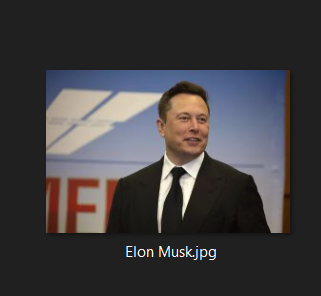
47 | 2. Repeat that for as many faces as you want.
48 | 3. Finally run the [streamlit_local_app_bussines_ready.py](https://github.com/AbdassalamAhmad/Attendance_System/blob/main/streamlit_local_app_bussines_ready.py) script, and put it on Training mode, and press the `Train The Model` button, then you can go for testing.
49 |
50 | Testing :
51 | ---------
52 | - You have three modes. The best one is **Live Attendance** (Real case scenario)
53 | To run it do the following:
54 | 1. From the sidebar select `Attend Live` mode.
55 | 2. Select `Attendance.csv` file, which is a file to record the arrival_time, date, penalty of every attendant.
56 | 3. Check `run` box to start the program then show the camera faces of people you've trained (people in `db` folder)
57 |
58 | - You can also try attending from uploading a picture of your face and it will work as well.
59 | To run it do the following:
60 | 1. From the sidebar select `Attend from uploading image` mode.
61 | 2. Upload your image or drag & drop it and it will detect your face and make you attend **just like this picture**.
62 | 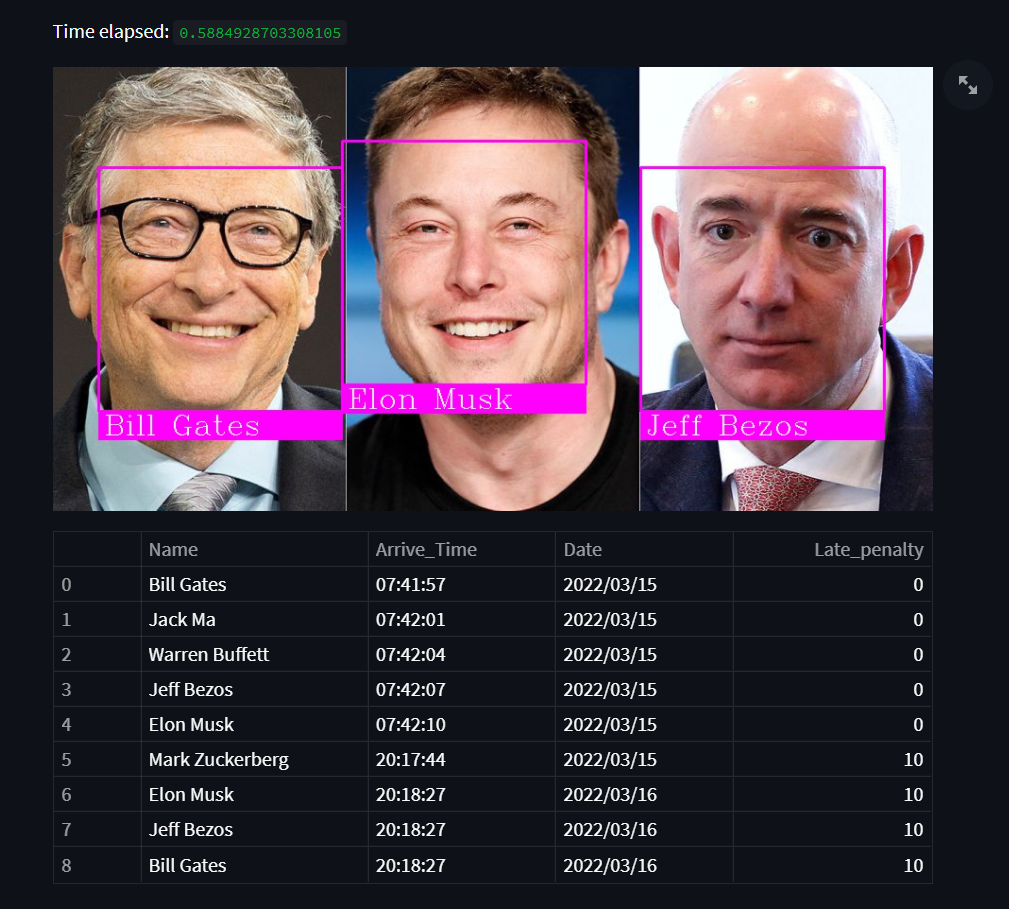
63 | Note: Of course this is for trying purposes the best model is `Attend Live` described above.
64 |
65 | ## Short Description of the Files
66 | 1. [Preparing_local.py](https://github.com/AbdassalamAhmad/Attendance_System/blob/main/Preparing_local.py): It has all of the functions necessary for the main offline version script to work.
67 | 2. [Preparing_test_online.py](https://github.com/AbdassalamAhmad/Attendance_System/blob/main/Preparing_test_online.py): very similar file to the previous file with only some changes to make the online version work properly.
68 | 3. [Training.py](https://github.com/AbdassalamAhmad/Attendance_System/blob/main/Training.py): a script for training the model to memorize faces stored in `db` folder.
69 | 4. [encoded_faces.pickle](https://github.com/AbdassalamAhmad/Attendance_System/blob/main/encoded_faces.pickle): The output file of `Training.py` script, It contains the encoded features of every face to compare it with new faces.
70 | 5. [environment.yml](https://github.com/AbdassalamAhmad/Attendance_System/blob/main/environment.yml) and [packages.txt](https://github.com/AbdassalamAhmad/Attendance_System/blob/main/packages.txt) : libraries and dependencies to make this project work.
71 | 6. [streamlit_local_app_bussines_ready.py](https://github.com/AbdassalamAhmad/Attendance_System/blob/main/streamlit_local_app_bussines_ready.py): Attend live or from uploading photo or take a photo then attend.
72 | 7. [streamlit_test_app_online.py](https://github.com/AbdassalamAhmad/Attendance_System/blob/main/streamlit_test_app_online.py): very similar file to the previous script but without the **Live Attendance Feature** and it works online right from this [link](https://share.streamlit.io/abdassalamahmad/attendance_system/main/streamlit_test_app_online.py).
73 |
74 | ## How This Model Work (what is going on under the hood)
75 | 1. Detecting all of the faces in the picture/video:- using HOG algorithm. This function do the work `face_recognition.face_locations`.
76 | 2. Transform the face to make the eyes and mouth centered after finding main face landmarks using face landmark estimation.
77 | 3. Encode the faces by generating 128 different measuremts per face (saving faces). This function do the training (encodings) `face_recognition.face_encodings`
78 | 4. Recognition:- comparing new faces from photo/video with the encoded faces in our dataset. This function `face_recognition.compare_faces` do the comparing and return a list of True and False.
79 | 5. Make the attendance :- `markattendance()` this function uses OpenCV library to annotate the faces and then add the name each detected face -based on the previous function return `face_recognition.compare_faces`- to the attendance list [Attendance.csv](https://github.com/AbdassalamAhmad/Attendance_System/blob/main/Attendance.csv).
80 |
81 |
82 | ## Resources and Note
83 | I have used these resources to build my project:
84 | 1. [medium article](https://medium.com/@ageitgey/machine-learning-is-fun-part-4-modern-face-recognition-with-deep-learning-c3cffc121d78): - It descripe in details how **face recognition** is really working under the hood.
85 | 2. [YouTube Tutorial](https://www.youtube.com/watch?v=sz25xxF_AVE): - **for attendance part** using OpenCV and HOG. It is basically based on the previous article.
86 | 3. I've written the code myself based on the video and enhanced some features like when attending live it was mainly designed to be used for **one day only.**
87 | I changed the logic and make it work **forever**.
88 | I've aslo added the penalty feature for people who are late to work, (they get a 10$ penalty if they came after 9:00 AM).
89 |
90 | If you like this project, I appreciate you starring this repo.
91 | Please feel free to fork the content and contact me on my [LinkedIn account](https://www.linkedin.com/in/abdassalam-ahmad/) if you have any questions.
92 |
93 |
94 |
95 |
96 |
97 |
98 | ## To-Do List
99 | - [x] Penalty (10$) for comming late to work (After 9:00 AM).
100 | - [ ] Detect 3D faces only. (printed faces or rendered faces on screens shouldn't be detected).
101 |
--------------------------------------------------------------------------------