├── Sorting
├── sorting_algorithms.png
├── Bubble Sort
│ ├── bubble-sort.png
│ └── README.md
├── Insertion Sort
│ ├── insertion_sort.jpg
│ └── README.md
├── Merge Sort
│ ├── images
│ │ ├── merge-sort.png
│ │ └── merge-sort-animation.gif
│ └── README.md
├── Quick Sort
│ ├── images
│ │ └── quick-sort.gif
│ └── README.md
├── Radix Sort
│ ├── images
│ │ └── radix-sort.png
│ └── README.md
├── Selection Sort
│ ├── selection_sort.jpg
│ └── README.md
├── Counting Sort
│ ├── images
│ │ └── counting-sort.jpg
│ ├── counting_sort.php
│ └── README.md
└── README.md
├── Data Structure
├── data-structure.jpg
├── Queue
│ ├── images
│ │ ├── queue.svg
│ │ ├── queue-delete-item.gif
│ │ └── queue-insert-item.gif
│ ├── test.php
│ ├── Queue.php
│ └── README.md
├── Stack
│ ├── images
│ │ ├── stack.svg
│ │ ├── pop-operation.gif
│ │ └── push-operation.gif
│ ├── test.php
│ ├── Stack.php
│ └── README.md
├── BST
│ ├── images
│ │ ├── bst_insert.png
│ │ ├── bst_search.png
│ │ ├── binary_search_tree.jpg
│ │ ├── bst-remove-case-1.png
│ │ ├── binary_tree_inorder.svg
│ │ ├── binary_tree_postorder.svg
│ │ ├── binary_tree_preorder.svg
│ │ ├── bst-remove-case-2-1.png
│ │ ├── bst-remove-case-2-2.png
│ │ ├── bst-remove-case-2-3.png
│ │ ├── bst-remove-case-3-3.png
│ │ ├── bst-remove-case-3-4.png
│ │ ├── bst-remove-case-3-5.png
│ │ └── bst-remove-case-3-6.png
│ └── README.md
├── Linked List
│ ├── images
│ │ ├── circular.png
│ │ ├── doubly.png
│ │ ├── search.gif
│ │ ├── deletion-last.png
│ │ ├── insertion-end.png
│ │ ├── linked-list.png
│ │ ├── deletion-front.png
│ │ ├── deletion-middle.png
│ │ ├── insertion-front.png
│ │ └── insertion-middle.png
│ └── README.md
└── README.md
├── Searching
├── Binary Search
│ ├── binary-search.png
│ ├── binary-and-linear-search-animations.gif
│ ├── binary_search.php
│ └── README.md
├── Linear Search
│ ├── linear_search.gif
│ ├── linear_search.php
│ └── README.md
└── Ternary Search
│ ├── images
│ ├── ternarycase1.png
│ ├── ternarycase2.png
│ ├── ternarycase11.png
│ ├── ternarycase12.png
│ ├── ternarycase21.png
│ ├── ternarycase22.png
│ └── ternarysearch.png
│ ├── README.md
│ └── ternary_search.php
└── README.md
/Sorting/sorting_algorithms.png:
--------------------------------------------------------------------------------
https://raw.githubusercontent.com/Algorithm-archive/Learn-Data_Structure-Algorithm-by-PHP/HEAD/Sorting/sorting_algorithms.png
--------------------------------------------------------------------------------
/Data Structure/data-structure.jpg:
--------------------------------------------------------------------------------
https://raw.githubusercontent.com/Algorithm-archive/Learn-Data_Structure-Algorithm-by-PHP/HEAD/Data Structure/data-structure.jpg
--------------------------------------------------------------------------------
/Sorting/Bubble Sort/bubble-sort.png:
--------------------------------------------------------------------------------
https://raw.githubusercontent.com/Algorithm-archive/Learn-Data_Structure-Algorithm-by-PHP/HEAD/Sorting/Bubble Sort/bubble-sort.png
--------------------------------------------------------------------------------
/Data Structure/Queue/images/queue.svg:
--------------------------------------------------------------------------------
https://raw.githubusercontent.com/Algorithm-archive/Learn-Data_Structure-Algorithm-by-PHP/HEAD/Data Structure/Queue/images/queue.svg
--------------------------------------------------------------------------------
/Data Structure/Stack/images/stack.svg:
--------------------------------------------------------------------------------
https://raw.githubusercontent.com/Algorithm-archive/Learn-Data_Structure-Algorithm-by-PHP/HEAD/Data Structure/Stack/images/stack.svg
--------------------------------------------------------------------------------
/Data Structure/BST/images/bst_insert.png:
--------------------------------------------------------------------------------
https://raw.githubusercontent.com/Algorithm-archive/Learn-Data_Structure-Algorithm-by-PHP/HEAD/Data Structure/BST/images/bst_insert.png
--------------------------------------------------------------------------------
/Data Structure/BST/images/bst_search.png:
--------------------------------------------------------------------------------
https://raw.githubusercontent.com/Algorithm-archive/Learn-Data_Structure-Algorithm-by-PHP/HEAD/Data Structure/BST/images/bst_search.png
--------------------------------------------------------------------------------
/Searching/Binary Search/binary-search.png:
--------------------------------------------------------------------------------
https://raw.githubusercontent.com/Algorithm-archive/Learn-Data_Structure-Algorithm-by-PHP/HEAD/Searching/Binary Search/binary-search.png
--------------------------------------------------------------------------------
/Searching/Linear Search/linear_search.gif:
--------------------------------------------------------------------------------
https://raw.githubusercontent.com/Algorithm-archive/Learn-Data_Structure-Algorithm-by-PHP/HEAD/Searching/Linear Search/linear_search.gif
--------------------------------------------------------------------------------
/Sorting/Insertion Sort/insertion_sort.jpg:
--------------------------------------------------------------------------------
https://raw.githubusercontent.com/Algorithm-archive/Learn-Data_Structure-Algorithm-by-PHP/HEAD/Sorting/Insertion Sort/insertion_sort.jpg
--------------------------------------------------------------------------------
/Sorting/Merge Sort/images/merge-sort.png:
--------------------------------------------------------------------------------
https://raw.githubusercontent.com/Algorithm-archive/Learn-Data_Structure-Algorithm-by-PHP/HEAD/Sorting/Merge Sort/images/merge-sort.png
--------------------------------------------------------------------------------
/Sorting/Quick Sort/images/quick-sort.gif:
--------------------------------------------------------------------------------
https://raw.githubusercontent.com/Algorithm-archive/Learn-Data_Structure-Algorithm-by-PHP/HEAD/Sorting/Quick Sort/images/quick-sort.gif
--------------------------------------------------------------------------------
/Sorting/Radix Sort/images/radix-sort.png:
--------------------------------------------------------------------------------
https://raw.githubusercontent.com/Algorithm-archive/Learn-Data_Structure-Algorithm-by-PHP/HEAD/Sorting/Radix Sort/images/radix-sort.png
--------------------------------------------------------------------------------
/Sorting/Selection Sort/selection_sort.jpg:
--------------------------------------------------------------------------------
https://raw.githubusercontent.com/Algorithm-archive/Learn-Data_Structure-Algorithm-by-PHP/HEAD/Sorting/Selection Sort/selection_sort.jpg
--------------------------------------------------------------------------------
/Data Structure/Linked List/images/circular.png:
--------------------------------------------------------------------------------
https://raw.githubusercontent.com/Algorithm-archive/Learn-Data_Structure-Algorithm-by-PHP/HEAD/Data Structure/Linked List/images/circular.png
--------------------------------------------------------------------------------
/Data Structure/Linked List/images/doubly.png:
--------------------------------------------------------------------------------
https://raw.githubusercontent.com/Algorithm-archive/Learn-Data_Structure-Algorithm-by-PHP/HEAD/Data Structure/Linked List/images/doubly.png
--------------------------------------------------------------------------------
/Data Structure/Linked List/images/search.gif:
--------------------------------------------------------------------------------
https://raw.githubusercontent.com/Algorithm-archive/Learn-Data_Structure-Algorithm-by-PHP/HEAD/Data Structure/Linked List/images/search.gif
--------------------------------------------------------------------------------
/Data Structure/Stack/images/pop-operation.gif:
--------------------------------------------------------------------------------
https://raw.githubusercontent.com/Algorithm-archive/Learn-Data_Structure-Algorithm-by-PHP/HEAD/Data Structure/Stack/images/pop-operation.gif
--------------------------------------------------------------------------------
/Data Structure/Stack/images/push-operation.gif:
--------------------------------------------------------------------------------
https://raw.githubusercontent.com/Algorithm-archive/Learn-Data_Structure-Algorithm-by-PHP/HEAD/Data Structure/Stack/images/push-operation.gif
--------------------------------------------------------------------------------
/Sorting/Counting Sort/images/counting-sort.jpg:
--------------------------------------------------------------------------------
https://raw.githubusercontent.com/Algorithm-archive/Learn-Data_Structure-Algorithm-by-PHP/HEAD/Sorting/Counting Sort/images/counting-sort.jpg
--------------------------------------------------------------------------------
/Data Structure/BST/images/binary_search_tree.jpg:
--------------------------------------------------------------------------------
https://raw.githubusercontent.com/Algorithm-archive/Learn-Data_Structure-Algorithm-by-PHP/HEAD/Data Structure/BST/images/binary_search_tree.jpg
--------------------------------------------------------------------------------
/Data Structure/BST/images/bst-remove-case-1.png:
--------------------------------------------------------------------------------
https://raw.githubusercontent.com/Algorithm-archive/Learn-Data_Structure-Algorithm-by-PHP/HEAD/Data Structure/BST/images/bst-remove-case-1.png
--------------------------------------------------------------------------------
/Searching/Ternary Search/images/ternarycase1.png:
--------------------------------------------------------------------------------
https://raw.githubusercontent.com/Algorithm-archive/Learn-Data_Structure-Algorithm-by-PHP/HEAD/Searching/Ternary Search/images/ternarycase1.png
--------------------------------------------------------------------------------
/Searching/Ternary Search/images/ternarycase2.png:
--------------------------------------------------------------------------------
https://raw.githubusercontent.com/Algorithm-archive/Learn-Data_Structure-Algorithm-by-PHP/HEAD/Searching/Ternary Search/images/ternarycase2.png
--------------------------------------------------------------------------------
/Data Structure/BST/images/binary_tree_inorder.svg:
--------------------------------------------------------------------------------
https://raw.githubusercontent.com/Algorithm-archive/Learn-Data_Structure-Algorithm-by-PHP/HEAD/Data Structure/BST/images/binary_tree_inorder.svg
--------------------------------------------------------------------------------
/Data Structure/BST/images/binary_tree_postorder.svg:
--------------------------------------------------------------------------------
https://raw.githubusercontent.com/Algorithm-archive/Learn-Data_Structure-Algorithm-by-PHP/HEAD/Data Structure/BST/images/binary_tree_postorder.svg
--------------------------------------------------------------------------------
/Data Structure/BST/images/binary_tree_preorder.svg:
--------------------------------------------------------------------------------
https://raw.githubusercontent.com/Algorithm-archive/Learn-Data_Structure-Algorithm-by-PHP/HEAD/Data Structure/BST/images/binary_tree_preorder.svg
--------------------------------------------------------------------------------
/Data Structure/BST/images/bst-remove-case-2-1.png:
--------------------------------------------------------------------------------
https://raw.githubusercontent.com/Algorithm-archive/Learn-Data_Structure-Algorithm-by-PHP/HEAD/Data Structure/BST/images/bst-remove-case-2-1.png
--------------------------------------------------------------------------------
/Data Structure/BST/images/bst-remove-case-2-2.png:
--------------------------------------------------------------------------------
https://raw.githubusercontent.com/Algorithm-archive/Learn-Data_Structure-Algorithm-by-PHP/HEAD/Data Structure/BST/images/bst-remove-case-2-2.png
--------------------------------------------------------------------------------
/Data Structure/BST/images/bst-remove-case-2-3.png:
--------------------------------------------------------------------------------
https://raw.githubusercontent.com/Algorithm-archive/Learn-Data_Structure-Algorithm-by-PHP/HEAD/Data Structure/BST/images/bst-remove-case-2-3.png
--------------------------------------------------------------------------------
/Data Structure/BST/images/bst-remove-case-3-3.png:
--------------------------------------------------------------------------------
https://raw.githubusercontent.com/Algorithm-archive/Learn-Data_Structure-Algorithm-by-PHP/HEAD/Data Structure/BST/images/bst-remove-case-3-3.png
--------------------------------------------------------------------------------
/Data Structure/BST/images/bst-remove-case-3-4.png:
--------------------------------------------------------------------------------
https://raw.githubusercontent.com/Algorithm-archive/Learn-Data_Structure-Algorithm-by-PHP/HEAD/Data Structure/BST/images/bst-remove-case-3-4.png
--------------------------------------------------------------------------------
/Data Structure/BST/images/bst-remove-case-3-5.png:
--------------------------------------------------------------------------------
https://raw.githubusercontent.com/Algorithm-archive/Learn-Data_Structure-Algorithm-by-PHP/HEAD/Data Structure/BST/images/bst-remove-case-3-5.png
--------------------------------------------------------------------------------
/Data Structure/BST/images/bst-remove-case-3-6.png:
--------------------------------------------------------------------------------
https://raw.githubusercontent.com/Algorithm-archive/Learn-Data_Structure-Algorithm-by-PHP/HEAD/Data Structure/BST/images/bst-remove-case-3-6.png
--------------------------------------------------------------------------------
/Data Structure/Linked List/images/deletion-last.png:
--------------------------------------------------------------------------------
https://raw.githubusercontent.com/Algorithm-archive/Learn-Data_Structure-Algorithm-by-PHP/HEAD/Data Structure/Linked List/images/deletion-last.png
--------------------------------------------------------------------------------
/Data Structure/Linked List/images/insertion-end.png:
--------------------------------------------------------------------------------
https://raw.githubusercontent.com/Algorithm-archive/Learn-Data_Structure-Algorithm-by-PHP/HEAD/Data Structure/Linked List/images/insertion-end.png
--------------------------------------------------------------------------------
/Data Structure/Linked List/images/linked-list.png:
--------------------------------------------------------------------------------
https://raw.githubusercontent.com/Algorithm-archive/Learn-Data_Structure-Algorithm-by-PHP/HEAD/Data Structure/Linked List/images/linked-list.png
--------------------------------------------------------------------------------
/Data Structure/Queue/images/queue-delete-item.gif:
--------------------------------------------------------------------------------
https://raw.githubusercontent.com/Algorithm-archive/Learn-Data_Structure-Algorithm-by-PHP/HEAD/Data Structure/Queue/images/queue-delete-item.gif
--------------------------------------------------------------------------------
/Data Structure/Queue/images/queue-insert-item.gif:
--------------------------------------------------------------------------------
https://raw.githubusercontent.com/Algorithm-archive/Learn-Data_Structure-Algorithm-by-PHP/HEAD/Data Structure/Queue/images/queue-insert-item.gif
--------------------------------------------------------------------------------
/Searching/Ternary Search/images/ternarycase11.png:
--------------------------------------------------------------------------------
https://raw.githubusercontent.com/Algorithm-archive/Learn-Data_Structure-Algorithm-by-PHP/HEAD/Searching/Ternary Search/images/ternarycase11.png
--------------------------------------------------------------------------------
/Searching/Ternary Search/images/ternarycase12.png:
--------------------------------------------------------------------------------
https://raw.githubusercontent.com/Algorithm-archive/Learn-Data_Structure-Algorithm-by-PHP/HEAD/Searching/Ternary Search/images/ternarycase12.png
--------------------------------------------------------------------------------
/Searching/Ternary Search/images/ternarycase21.png:
--------------------------------------------------------------------------------
https://raw.githubusercontent.com/Algorithm-archive/Learn-Data_Structure-Algorithm-by-PHP/HEAD/Searching/Ternary Search/images/ternarycase21.png
--------------------------------------------------------------------------------
/Searching/Ternary Search/images/ternarycase22.png:
--------------------------------------------------------------------------------
https://raw.githubusercontent.com/Algorithm-archive/Learn-Data_Structure-Algorithm-by-PHP/HEAD/Searching/Ternary Search/images/ternarycase22.png
--------------------------------------------------------------------------------
/Searching/Ternary Search/images/ternarysearch.png:
--------------------------------------------------------------------------------
https://raw.githubusercontent.com/Algorithm-archive/Learn-Data_Structure-Algorithm-by-PHP/HEAD/Searching/Ternary Search/images/ternarysearch.png
--------------------------------------------------------------------------------
/Sorting/Merge Sort/images/merge-sort-animation.gif:
--------------------------------------------------------------------------------
https://raw.githubusercontent.com/Algorithm-archive/Learn-Data_Structure-Algorithm-by-PHP/HEAD/Sorting/Merge Sort/images/merge-sort-animation.gif
--------------------------------------------------------------------------------
/Data Structure/Linked List/images/deletion-front.png:
--------------------------------------------------------------------------------
https://raw.githubusercontent.com/Algorithm-archive/Learn-Data_Structure-Algorithm-by-PHP/HEAD/Data Structure/Linked List/images/deletion-front.png
--------------------------------------------------------------------------------
/Data Structure/Linked List/images/deletion-middle.png:
--------------------------------------------------------------------------------
https://raw.githubusercontent.com/Algorithm-archive/Learn-Data_Structure-Algorithm-by-PHP/HEAD/Data Structure/Linked List/images/deletion-middle.png
--------------------------------------------------------------------------------
/Data Structure/Linked List/images/insertion-front.png:
--------------------------------------------------------------------------------
https://raw.githubusercontent.com/Algorithm-archive/Learn-Data_Structure-Algorithm-by-PHP/HEAD/Data Structure/Linked List/images/insertion-front.png
--------------------------------------------------------------------------------
/Data Structure/Linked List/images/insertion-middle.png:
--------------------------------------------------------------------------------
https://raw.githubusercontent.com/Algorithm-archive/Learn-Data_Structure-Algorithm-by-PHP/HEAD/Data Structure/Linked List/images/insertion-middle.png
--------------------------------------------------------------------------------
/Searching/Binary Search/binary-and-linear-search-animations.gif:
--------------------------------------------------------------------------------
https://raw.githubusercontent.com/Algorithm-archive/Learn-Data_Structure-Algorithm-by-PHP/HEAD/Searching/Binary Search/binary-and-linear-search-animations.gif
--------------------------------------------------------------------------------
/Data Structure/Stack/test.php:
--------------------------------------------------------------------------------
1 | push(10);
7 | $stack->push(15);
8 |
9 | echo $stack->isEmpty() ? 'Empty' : 'Not Empty';
10 | echo PHP_EOL;
11 |
12 | echo $stack->peek();
13 | echo PHP_EOL;
14 |
15 | echo $stack->pop();
16 | echo PHP_EOL;
17 |
18 | echo $stack->pop();
19 | echo PHP_EOL;
20 |
21 | echo $stack->pop();
22 | echo PHP_EOL;
23 |
24 | echo $stack->isEmpty() ? 'Empty' : 'Not Empty';
25 | echo PHP_EOL;
26 |
27 | ?>
28 |
--------------------------------------------------------------------------------
/Data Structure/Queue/test.php:
--------------------------------------------------------------------------------
1 | enqueue(10);
7 | $queue->enqueue(15);
8 |
9 | echo $queue->isEmpty() ? 'Empty' : 'Not Empty';
10 | echo PHP_EOL;
11 |
12 | echo $queue->peek();
13 | echo PHP_EOL;
14 |
15 | echo $queue->dequeue();
16 | echo PHP_EOL;
17 |
18 | echo $queue->dequeue();
19 | echo PHP_EOL;
20 |
21 | echo $queue->dequeue();
22 | echo PHP_EOL;
23 |
24 | echo $queue->isEmpty() ? 'Empty' : 'Not Empty';
25 | echo PHP_EOL;
26 |
27 | ?>
28 |
--------------------------------------------------------------------------------
/Data Structure/Stack/Stack.php:
--------------------------------------------------------------------------------
1 | _items, $value);
10 | }
11 |
12 | public function pop() {
13 | return array_pop($this->_items);
14 | }
15 |
16 | public function peek() {
17 | return end($this->_items);
18 | }
19 |
20 | public function size() {
21 | return count($this->_items);
22 | }
23 |
24 | public function isEmpty() {
25 | return empty($this->_items);
26 | }
27 | }
28 |
29 | ?>
30 |
--------------------------------------------------------------------------------
/Data Structure/Queue/Queue.php:
--------------------------------------------------------------------------------
1 | _items, $value);
10 | }
11 |
12 | public function dequeue() {
13 | return array_pop($this->_items);
14 | }
15 |
16 | public function peek() {
17 | return end($this->_items);
18 | }
19 |
20 | public function size() {
21 | return count($this->_items);
22 | }
23 |
24 | public function isEmpty() {
25 | return empty($this->_items);
26 | }
27 | }
28 |
29 | ?>
30 |
--------------------------------------------------------------------------------
/Searching/Linear Search/linear_search.php:
--------------------------------------------------------------------------------
1 |
23 |
--------------------------------------------------------------------------------
/Sorting/README.md:
--------------------------------------------------------------------------------
1 | # Sorting
2 |
3 | >A sorting algorithm is an algorithm that puts elements of a list in a certain order. The most-used orders are numerical order and lexicographical order. Efficient sorting is important for optimizing the use of other algorithms (such as search and merge algorithms) which require input data to be in sorted lists; it is also often useful for canonicalizing data and for producing human-readable output. [wikipedia](https://en.wikipedia.org/wiki/Sorting_algorithm)
4 |
5 |
6 |
7 | ### Useful Links:
8 | - [Nice animated visualization of sorting algorithms](https://www.cs.usfca.edu/~galles/visualization/ComparisonSort.html)
9 | - [Sorting visualization](https://visualgo.net/sorting)
10 | - [betterexplained.com article on Sorting algorithms](https://betterexplained.com/articles/sorting-algorithms/)
11 | - [Topcoder article](https://www.topcoder.com/community/data-science/data-science-tutorials/sorting/)
12 | - [Comparison of Sorting algorithms](https://en.wikipedia.org/wiki/Sorting_algorithm#Comparison_of_algorithms)
13 |
--------------------------------------------------------------------------------
/Searching/Binary Search/binary_search.php:
--------------------------------------------------------------------------------
1 |
36 |
--------------------------------------------------------------------------------
/Sorting/Counting Sort/counting_sort.php:
--------------------------------------------------------------------------------
1 | 0) {
17 | $sortedArray[] = $i;
18 | }
19 | }
20 | }
21 |
22 | return $sortedArray;
23 | }
24 |
25 | /************ Testing Binary Search Implementation ***************/
26 | $testList = array();
27 |
28 | foreach (range(1, 10) as $key) {
29 | $testList[] = mt_rand(-100, 100);
30 | }
31 |
32 | $testList = countingSort($testList);
33 |
34 | print_r($testList);
35 |
36 | ?>
37 |
--------------------------------------------------------------------------------
/Sorting/Insertion Sort/README.md:
--------------------------------------------------------------------------------
1 | # Insertion Sort
2 |
3 | **Insertion sort** does exactly what you would expect: it inserts each element of the array into its proper position, leaving progressively larger stretches of the array sorted. What this means in practice is that the sort iterates down an array, and the part of the array already covered is in order; then, the current element of the array is inserted into the proper position at the head of the array, and the rest of the elements are moved down, using the space just vacated by the element inserted as the final space.
4 |
5 |
6 | 
7 |
8 |
9 | #### A visualization on Insertion Sort
10 | 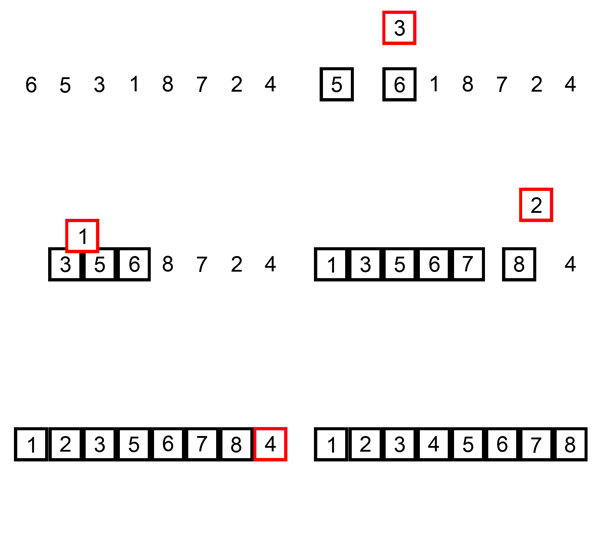
11 |
12 |
13 | #### Complexity Analysis
14 | - Worst Case - О(n2)
15 | - Average Case - О(n2)
16 | - Best Case - O(n)
17 |
18 | ### More on this topic
19 | - [Insertion Sort - WikiPedia](https://en.wikipedia.org/wiki/Insertion_sort)
20 | - [Insertion Sort - geeksforgeeks](http://quiz.geeksforgeeks.org/insertion-sort/)
21 |
--------------------------------------------------------------------------------
/Searching/Linear Search/README.md:
--------------------------------------------------------------------------------
1 | # Linear Search
2 |
3 | **Linear search** is a very simple search algorithm. In this type of search, a sequential search is made over all items one by one. Every item is checked and if a match is found then that particular item is returned, otherwise the search continues till the end of the data collection.
4 |
5 | 
6 |
7 |
8 | #### JavaScript Implementation
9 |
10 | Though it is very easy in JavaScript to find index of an item in a list using [indexOf method](https://developer.mozilla.org/en/docs/Web/JavaScript/Reference/Global_Objects/Array/indexOf?v=example):
11 |
12 | `list.indexOf(item)`
13 |
14 | but sometimes you might need to do some customization on the searching algorithm. Like- *'finding the last occurrence of the item in the list'* etc. This linear search implementation will help you to do that.
15 |
16 | #### Complexity Analysis
17 | - Worst Case - O(n)
18 | - Best Case - O(1)
19 | - Average Case - O(n)
20 |
21 |
22 | ### More on this topic
23 | - https://en.wikipedia.org/wiki/Linear_search
24 | - https://www.tutorialspoint.com/data_structures_algorithms/linear_search_algorithm.htm
25 |
--------------------------------------------------------------------------------
/Sorting/Bubble Sort/README.md:
--------------------------------------------------------------------------------
1 | # Bubble Sort
2 |
3 | **Bubble Sort** is an algorithm which is used to sort **N** elements that are given in a memory for eg: an Array with N number of elements. Bubble Sort compares all the element one by one and sort them based on their values.
4 |
5 | It is called Bubble sort, because *with each iteration the smaller element in the list bubbles up towards the first place*, just like a water bubble rises up to the water surface.
6 |
7 | Sorting takes place by stepping through all the data items one-by-one in pairs and comparing adjacent data items and swapping each pair that is out of order.
8 | 
9 |
10 |
11 | ---
12 | **A visualization on the algorithm:**
13 |
14 | Starting from the beginning of the list, compare every adjacent pair, swap their position if they are not in the right order (the latter one is smaller than the former one). After each iteration, one less element (the last one) is needed to be compared until there are no more elements left to be compared.
15 |
16 | 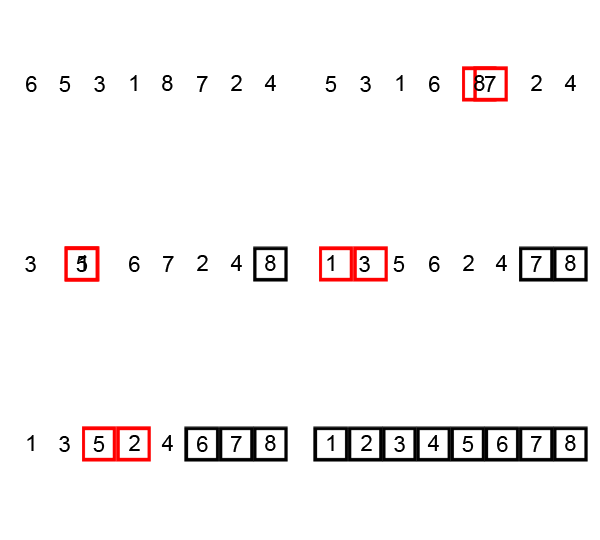
17 |
18 | #### Complexity Analysis
19 | - Worst Case - O(n2)
20 | - Average Case - O(n2)
21 | - Best Case - O(n)
22 |
23 | ### More on this topic
24 | - [Bubble Sort](http://en.wikipedia.org/wiki/Bubble_sort)
25 | - [Bubble Sort](http://quiz.geeksforgeeks.org/bubble-sort/)
26 |
--------------------------------------------------------------------------------
/Data Structure/README.md:
--------------------------------------------------------------------------------
1 | # Data Structure
2 |
3 | Data Structure is a way of collecting and organizing data in such a way that we can perform operations on these data in an effective way.
4 |
5 | A Data Structure is a named group data of different data types which can be processed as a single unit. A data structure has well-defined operations, behavior and properties.
6 |
7 | Different Data Structures are as follows:
8 |
9 | 
10 |
11 | ### Operations on Data Structures
12 |
13 | The basic operations that are performed on data structures are as follows:
14 |
15 | * **Insertion:** Insertion means addition of a new data element in a data structure.
16 |
17 | * **Deletion:** Deletion means removal of a data element from a data structure if it is found.
18 |
19 | * **Searching:** Searching involves searching for the specified data element in a data structure.
20 |
21 | * **Traversal:** Traversal of a data structure means processing all the data elements present in it.
22 |
23 | * **Sorting:** Arranging data elements of a data structure in a specified order is called sorting.
24 |
25 | * **Merging:** Combining elements of two similar data structures to form a new data structure of the same type, is called merging.
26 |
27 |
28 | ### More on this topic
29 | - [Data Structure - Wikipedia](https://en.wikipedia.org/wiki/Data_structure)
30 | - [Data Structure Tutorial - TopCoder](https://www.topcoder.com/community/data-science/data-science-tutorials/data-structures/)
31 | - [Data Structures - GeeksforGeeks](http://www.geeksforgeeks.org/data-structures/)
32 |
--------------------------------------------------------------------------------
/Sorting/Selection Sort/README.md:
--------------------------------------------------------------------------------
1 | # Selection Sort
2 |
3 | **Selection sort** is one of the simplest sorting algorithm.
4 | It works by selecting the smallest (or largest, if you want to sort from big to small) element of the array and placing it at the head of the array. Then the process is repeated for the remainder of the array; the next largest element is selected and put into the next slot, and so on down the line.
5 |
6 | 
7 |
8 | Selection sort algorithm starts by compairing first two elements of an array and swapping if necessary, i.e., if you want to sort the elements of array in ascending order and if the first element is greater than second then, you need to swap the elements but, if the first element is smaller than second, leave the elements as it is. Then, again first element and third element are compared and swapped if necessary. This process goes on until first and last element of an array is compared. This completes the first step of selection sort.
9 |
10 | If there are n elements to be sorted then, the process mentioned above should be repeated n-1 times to get required result.
11 |
12 | #### A visualization on Selection Sort
13 | 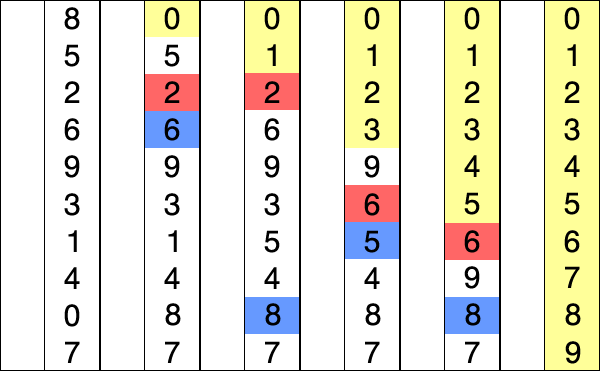
14 |
15 | *Selection sort animation. Red is current min. Yellow is sorted list. Blue is current item.*
16 |
17 | #### Complexity Analysis
18 | - Worst Case - O(n2)
19 | - Average Case - O(n2)
20 | - Best Case - O(n2)
21 |
22 | ### More on this topic
23 | - [Selection Sort - WikiPedia](https://en.wikipedia.org/wiki/Selection_sort)
24 | - [Selection Sort - geeksforgeeks](http://quiz.geeksforgeeks.org/selection-sort/)
25 |
--------------------------------------------------------------------------------
/Sorting/Counting Sort/README.md:
--------------------------------------------------------------------------------
1 | # Counting Sort
2 |
3 | In **Counting sort**, the frequencies of distinct elements of the array to be sorted is counted and stored in an auxiliary array, by mapping its value as an index of the auxiliary array.
4 |
5 | 
6 |
7 | #### Idea:
8 |
9 | Let's assume that, array **A** of size **N** needs to be sorted.
10 |
11 | - Initialize the auxiliary array **Aux[]** with **0**.
12 | Note: The size of this array should be greater than the Max value of the elements in **A[]**.
13 | - Traverse array **A** and store the count of occurrence of each element in the appropriate index of the **Aux** array, which means, execute **Aux[A[i]]++** for each **i**, where **i** ranges from **[0,N−1]**.
14 | - Initialize the empty array **sortedA[]**
15 | - Traverse array **Aux** and copy **i** into **sortedA** for **Aux[i]** number of times where **0≤i≤max(A[])**.
16 |
17 | Simply speaking, you just need to count the frequency of each of the elements in the given array **A** and based on that frequency count write those elements in a new array, so that we would finally have an array with the sorted elements.
18 |
19 | #### Video Tutorial
20 |  22 |
23 |
24 | #### Complexity Analysis
25 | Time Complexity: O(n+k), where **n** is the size of the input array and **k** is the Max value of the elements in the given Array.
26 |
27 | ### More on this topic
28 | - [Counting Sort - WikiPedia](https://en.wikipedia.org/wiki/Counting_sort)
29 | - [Counting Sort - HackerEarth Tutorial](https://www.hackerearth.com/practice/algorithms/sorting/counting-sort/tutorial/)
30 |
--------------------------------------------------------------------------------
/Sorting/Merge Sort/README.md:
--------------------------------------------------------------------------------
1 | # Merge Sort
2 |
3 | **Merge sort** is a divide-and-conquer algorithm based on the idea of breaking down a list into several sub-lists until each sublist consists of a single element and merging those sublists in a manner that results into a sorted list.
4 |
5 | #### Idea:
6 | - Divide the unsorted list into **N** sublists, each containing **1** element.
7 | - Take adjacent pairs of two singleton lists and merge them to form a list of 2 elements. **N** will now convert into **N/2** lists of size 2.
8 | - Repeat the process till a single sorted list of obtained.
9 |
10 | While comparing two sub-lists for merging, the first element of both lists is taken into consideration. While sorting in ascending order, the element that is of a lesser value becomes a new element of the sorted list. This procedure is repeated until both the smaller sub-lists are empty and the new combined sub-list comprises all the elements of both the sub-lists.
11 |
12 | 
13 |
14 | #### A visualization on Merge Sort
15 |
16 | 
17 |
18 | *An example of merge sort. First divide the list into the smallest unit (1 element), then compare each element with the adjacent list to sort and merge the two adjacent lists. Finally all the elements are sorted and merged. (image source-wikipedia)*
19 |
20 | #### Complexity Analysis
21 | - Worst Case - O(nlogn)
22 | - Average Case - O(nlogn)
23 | - Best Case - O(nlogn)
24 |
25 | ### More on this topic
26 | - [Merge Sort - Wikipedia](https://en.wikipedia.org/wiki/Merge_sort)
27 | - [Merge Sort - KhanAcademy Tutorial](https://www.khanacademy.org/computing/computer-science/algorithms/merge-sort/a/overview-of-merge-sort)
28 | - [Merge Sort - HackerEarch Tutorial](https://www.hackerearth.com/practice/algorithms/sorting/merge-sort/tutorial/)
29 |
--------------------------------------------------------------------------------
/Sorting/Quick Sort/README.md:
--------------------------------------------------------------------------------
1 | # Quick Sort
2 |
3 | **Quick sort** is based on the divide-and-conquer approach based on the idea of choosing one element as a pivot element and partitioning the array around it such that: Left side of pivot contains all the elements that are less than the pivot element Right side contains all elements greater than the pivot
4 |
5 | It reduces the space complexity and removes the use of the auxiliary array that is used in merge sort. Selecting a random pivot in an array results in an improved time complexity in most of the cases.
6 |
7 | Like Merge Sort, Quick Sort is a Divide and Conquer algorithm. It picks an element as pivot and partitions the given array around the picked pivot. There are many different versions of Quick Sort that pick pivot in different ways.
8 |
9 | - Always pick first element as pivot.
10 | - Always pick last element as pivot (implemented below)
11 | - Pick a random element as pivot.
12 | - Pick median as pivot.
13 |
14 | The principle of the quicksort algorithm is this:
15 |
16 | - Pick a “pivot” element.
17 | - “Partition” the array into 3 parts:
18 | - First part: all elements in this part is less than the pivot.
19 | - Second part: the pivot itself (only one element!)
20 | - Third part: all elements in this part is greater than or equal to the pivot.
21 | - Then, apply the quicksort algorithm to the first and the third part. (recursively)
22 |
23 | 
24 |
25 | #### Complexity Analysis
26 | - Worst Case - O(n2)
27 | - Average Case - O(nlogn)
28 | - Best Case - O(nlogn)
29 |
30 | ### More on this topic
31 | - [Quick Sort - Wikipedia](https://en.wikipedia.org/wiki/Quicksort)
32 | - [Quick Sort - KhanAcademy Tutorial](https://www.khanacademy.org/computing/computer-science/algorithms/quick-sort/a/overview-of-quicksort)
33 | - [Understanding Quicksort (with interactive demo)](http://me.dt.in.th/page/Quicksort/)
34 | - [Quick Sort - HackerEarch Tutorial](https://www.hackerearth.com/practice/algorithms/sorting/quick-sort/tutorial/)
35 | - [Computer science in JavaScript: Quicksort](https://www.nczonline.net/blog/2012/11/27/computer-science-in-javascript-quicksort/)
36 |
--------------------------------------------------------------------------------
/Sorting/Radix Sort/README.md:
--------------------------------------------------------------------------------
1 | # Radix Sort
2 |
3 | **Radix sort** is a non-comparative integer sorting algorithm that sorts data with integer keys by grouping keys by the individual digits which share the same significant position and value. The idea of Radix Sort is to do digit by digit sort starting from least significant digit to most significant digit. Radix sort uses [counting sort](../Counting%20Sort/) as a subroutine to sort.
4 |
5 | #### Idea:
6 | 
7 |
8 | Assume the input array is:
9 | 123, 2, 999, 609, 111
10 |
11 | Based on the algorithm, we will sort the input array according to the one's digit (least significant digit).
12 |
13 | ```
14 | [0]:
15 | [1]: 111
16 | [2]: 2
17 | [3]: 123
18 | [4]:
19 | [5]:
20 | [6]:
21 | [7]:
22 | [8]:
23 | [9]: 999, 609
24 | ```
25 |
26 | So, the array becomes 111, 2, 123, 999, 609. Note that we placed 999 before 609 because it appeared first.
27 |
28 | Now, we'll sort according to the ten's digit:
29 |
30 | ```
31 | [0]: 609, 2
32 | [1]: 111
33 | [2]: 123
34 | [3]:
35 | [4]:
36 | [5]:
37 | [6]:
38 | [7]:
39 | [8]:
40 | [9]: 999
41 | ```
42 |
43 | Now, the array becomes : 609, 2, 111, 123, 999
44 |
45 | Finally , we sort according to the hundred's digit (most significant digit):
46 |
47 | ```
48 | [0]: 2
49 | [1]: 111, 123
50 | [2]:
51 | [3]:
52 | [4]:
53 | [5]:
54 | [6]: 609
55 | [7]:
56 | [8]:
57 | [9]: 999
58 | ```
59 |
60 | The array becomes : 2, 111, 123, 609, 999 which is sorted. This is how Radix Sort algorithm works.
61 |
62 |
63 | #### Video Tutorial
64 |
22 |
23 |
24 | #### Complexity Analysis
25 | Time Complexity: O(n+k), where **n** is the size of the input array and **k** is the Max value of the elements in the given Array.
26 |
27 | ### More on this topic
28 | - [Counting Sort - WikiPedia](https://en.wikipedia.org/wiki/Counting_sort)
29 | - [Counting Sort - HackerEarth Tutorial](https://www.hackerearth.com/practice/algorithms/sorting/counting-sort/tutorial/)
30 |
--------------------------------------------------------------------------------
/Sorting/Merge Sort/README.md:
--------------------------------------------------------------------------------
1 | # Merge Sort
2 |
3 | **Merge sort** is a divide-and-conquer algorithm based on the idea of breaking down a list into several sub-lists until each sublist consists of a single element and merging those sublists in a manner that results into a sorted list.
4 |
5 | #### Idea:
6 | - Divide the unsorted list into **N** sublists, each containing **1** element.
7 | - Take adjacent pairs of two singleton lists and merge them to form a list of 2 elements. **N** will now convert into **N/2** lists of size 2.
8 | - Repeat the process till a single sorted list of obtained.
9 |
10 | While comparing two sub-lists for merging, the first element of both lists is taken into consideration. While sorting in ascending order, the element that is of a lesser value becomes a new element of the sorted list. This procedure is repeated until both the smaller sub-lists are empty and the new combined sub-list comprises all the elements of both the sub-lists.
11 |
12 | 
13 |
14 | #### A visualization on Merge Sort
15 |
16 | 
17 |
18 | *An example of merge sort. First divide the list into the smallest unit (1 element), then compare each element with the adjacent list to sort and merge the two adjacent lists. Finally all the elements are sorted and merged. (image source-wikipedia)*
19 |
20 | #### Complexity Analysis
21 | - Worst Case - O(nlogn)
22 | - Average Case - O(nlogn)
23 | - Best Case - O(nlogn)
24 |
25 | ### More on this topic
26 | - [Merge Sort - Wikipedia](https://en.wikipedia.org/wiki/Merge_sort)
27 | - [Merge Sort - KhanAcademy Tutorial](https://www.khanacademy.org/computing/computer-science/algorithms/merge-sort/a/overview-of-merge-sort)
28 | - [Merge Sort - HackerEarch Tutorial](https://www.hackerearth.com/practice/algorithms/sorting/merge-sort/tutorial/)
29 |
--------------------------------------------------------------------------------
/Sorting/Quick Sort/README.md:
--------------------------------------------------------------------------------
1 | # Quick Sort
2 |
3 | **Quick sort** is based on the divide-and-conquer approach based on the idea of choosing one element as a pivot element and partitioning the array around it such that: Left side of pivot contains all the elements that are less than the pivot element Right side contains all elements greater than the pivot
4 |
5 | It reduces the space complexity and removes the use of the auxiliary array that is used in merge sort. Selecting a random pivot in an array results in an improved time complexity in most of the cases.
6 |
7 | Like Merge Sort, Quick Sort is a Divide and Conquer algorithm. It picks an element as pivot and partitions the given array around the picked pivot. There are many different versions of Quick Sort that pick pivot in different ways.
8 |
9 | - Always pick first element as pivot.
10 | - Always pick last element as pivot (implemented below)
11 | - Pick a random element as pivot.
12 | - Pick median as pivot.
13 |
14 | The principle of the quicksort algorithm is this:
15 |
16 | - Pick a “pivot” element.
17 | - “Partition” the array into 3 parts:
18 | - First part: all elements in this part is less than the pivot.
19 | - Second part: the pivot itself (only one element!)
20 | - Third part: all elements in this part is greater than or equal to the pivot.
21 | - Then, apply the quicksort algorithm to the first and the third part. (recursively)
22 |
23 | 
24 |
25 | #### Complexity Analysis
26 | - Worst Case - O(n2)
27 | - Average Case - O(nlogn)
28 | - Best Case - O(nlogn)
29 |
30 | ### More on this topic
31 | - [Quick Sort - Wikipedia](https://en.wikipedia.org/wiki/Quicksort)
32 | - [Quick Sort - KhanAcademy Tutorial](https://www.khanacademy.org/computing/computer-science/algorithms/quick-sort/a/overview-of-quicksort)
33 | - [Understanding Quicksort (with interactive demo)](http://me.dt.in.th/page/Quicksort/)
34 | - [Quick Sort - HackerEarch Tutorial](https://www.hackerearth.com/practice/algorithms/sorting/quick-sort/tutorial/)
35 | - [Computer science in JavaScript: Quicksort](https://www.nczonline.net/blog/2012/11/27/computer-science-in-javascript-quicksort/)
36 |
--------------------------------------------------------------------------------
/Sorting/Radix Sort/README.md:
--------------------------------------------------------------------------------
1 | # Radix Sort
2 |
3 | **Radix sort** is a non-comparative integer sorting algorithm that sorts data with integer keys by grouping keys by the individual digits which share the same significant position and value. The idea of Radix Sort is to do digit by digit sort starting from least significant digit to most significant digit. Radix sort uses [counting sort](../Counting%20Sort/) as a subroutine to sort.
4 |
5 | #### Idea:
6 | 
7 |
8 | Assume the input array is:
9 | 123, 2, 999, 609, 111
10 |
11 | Based on the algorithm, we will sort the input array according to the one's digit (least significant digit).
12 |
13 | ```
14 | [0]:
15 | [1]: 111
16 | [2]: 2
17 | [3]: 123
18 | [4]:
19 | [5]:
20 | [6]:
21 | [7]:
22 | [8]:
23 | [9]: 999, 609
24 | ```
25 |
26 | So, the array becomes 111, 2, 123, 999, 609. Note that we placed 999 before 609 because it appeared first.
27 |
28 | Now, we'll sort according to the ten's digit:
29 |
30 | ```
31 | [0]: 609, 2
32 | [1]: 111
33 | [2]: 123
34 | [3]:
35 | [4]:
36 | [5]:
37 | [6]:
38 | [7]:
39 | [8]:
40 | [9]: 999
41 | ```
42 |
43 | Now, the array becomes : 609, 2, 111, 123, 999
44 |
45 | Finally , we sort according to the hundred's digit (most significant digit):
46 |
47 | ```
48 | [0]: 2
49 | [1]: 111, 123
50 | [2]:
51 | [3]:
52 | [4]:
53 | [5]:
54 | [6]: 609
55 | [7]:
56 | [8]:
57 | [9]: 999
58 | ```
59 |
60 | The array becomes : 2, 111, 123, 609, 999 which is sorted. This is how Radix Sort algorithm works.
61 |
62 |
63 | #### Video Tutorial
64 |  66 |
67 |
68 | #### Complexity Analysis
69 | The time complexity for radix sort is : O(d(n+b)), where b is the base for representing numbers, for example, for decimal system, b is 10. If k is the maximum possible value, then d would be O(logb(k)). So overall time complexity is O((n+b) * logb(k))
70 |
71 | ### More on this topic
72 | - [Radix Sort - WikiPedia](https://en.wikipedia.org/wiki/Radix_sort)
73 | - [Radix Sort - HackerEarth Tutorial](https://www.hackerearth.com/practice/algorithms/sorting/radix-sort/tutorial/)
74 | - [Radix Sort - geeksforgeeks](http://www.geeksforgeeks.org/radix-sort/)
75 |
--------------------------------------------------------------------------------
/Data Structure/Queue/README.md:
--------------------------------------------------------------------------------
1 | # Queue
2 |
3 | **Queue** is an abstract data structure, somewhat similar to Stacks. Unlike stacks, a queue is open at both its ends. One end is always used to insert data (enqueue) and the other is used to remove data (dequeue). Queue follows First-In-First-Out methodology, i.e., the data item stored first will be accessed first.
4 |
5 | A real-world example of queue can be a single-lane one-way road, where the vehicle enters first, exits first. More real-world examples can be seen as queues at the ticket windows and bus-stops.
6 |
7 | 
8 |
9 | ### Basic Operations:
10 |
11 | Queue operations may involve initializing or defining the queue, utilizing it, and then completely erasing it from the memory.. Apart from these basic stuffs, a queue is used for the following two primary operations −
12 |
13 |
14 | #### Enqueue
15 |
16 | **Enqueue** means adding (store) an item to the queue.
17 |
18 | Queue maintains two data pointers, **front** and **rear**. To insert a new element to the Queue, first check if the Queue is full (for fixed size Queue). If the queue is not full then insert the element at the rear of the Queue and update the *rear*.
19 |
20 | 
21 |
22 |
23 | #### Dequeue
24 |
25 | **Dequeue** means removing (access) an item from the queue. Accessing data from the queue is a process of two tasks − access the data where front is pointing and remove the data after access. Also remember to update the *front*.
26 |
27 | 
28 |
29 | To use a queue efficiently, we need to check the status of queue as well. For the same purpose, the following functionality are available too −
30 |
31 | - **peek()** − get the first data element of the queue, without removing it.
32 | - **isEmpty()** − check if queue is empty.
33 |
34 | ```
35 | In PHP, Queue can be easily implemented by an Array. PHP have built-in methods called 'array_unshift'(insert at the beginning of an array) and 'array_pop'(remove from the end of an array), which can mimic the operations of an Queue.
36 | ```
37 |
38 | #### Complexity Analysis
39 | - Insertion - O(1)
40 | - Deletion - O(1) (If implemented with array, then deletion will take O(n) for shifting elements to rearrange the Queue)
41 | - Access - O(n)
42 | - Search - O(n)
43 |
44 | ### More on this topic
45 | - https://en.wikipedia.org/wiki/Queue_(abstract_data_type)
46 | - https://www.tutorialspoint.com/data_structures_algorithms/dsa_queue.htm
47 | - https://en.wikibooks.org/wiki/Data_Structures/Stacks_and_Queues
48 |
--------------------------------------------------------------------------------
/Searching/Binary Search/README.md:
--------------------------------------------------------------------------------
1 | # Binary Search
2 |
3 | **Binary search** is an efficient algorithm for finding an item from an ordered list of items. It works by repeatedly dividing in half the portion of the list that could contain the item, until you've narrowed down the possible locations to just one.
4 |
5 | 
6 |
7 | **For a binary search to work, it is mandatory for the target array to be sorted.**
8 |
9 | In the sequential search, when we compare against the first item, there are at most *(n−1)* more items to look through if the first item is not what we are looking for. Instead of searching the list in sequence, a binary search will start by examining the middle item. If that item is the one we are searching for, we are done. If it is not the correct item, we can use the ordered nature of the list to eliminate half of the remaining items. If the item we are searching for is greater than the middle item, we know that the entire lower half of the list as well as the middle item can be eliminated from further consideration. The item, if it is in the list, must be in the upper half.
10 |
11 | We can then repeat the process with the upper half. Start at the middle item and compare it against what we are looking for. Again, we either find it or split the list in half, therefore eliminating another large part of our possible search space.
12 |
13 |
14 | ### Linear Search vs. Binary Search
15 | A linear search looks down a list, one item at a time, without jumping. In complexity terms this is an **O(n)** search - the time taken to search the list gets bigger at the same rate as the list does.
16 |
17 | A binary search is when you start with the middle of a sorted list, and see whether that's greater than or less than the value you're looking for, which determines whether the value is in the first or second half of the list. Jump to the half way through the sub-list, and compare again etc. In complexity terms this is an **O(log n)** search - the number of search operations grows more slowly than the list does, because you're halving the "search space" with each operation.
18 |
19 | 
20 |
21 | ### Complexity Analysis
22 | - Worst Case - O(logn)
23 | - Best Case - O(1)
24 | - Average Case - O(logn)
25 |
26 |
27 | ### More on this topic
28 | - https://en.wikipedia.org/wiki/Binary_search_algorithm
29 | - https://www.khanacademy.org/computing/computer-science/algorithms/binary-search/a/binary-search
30 | - https://www.topcoder.com/community/data-science/data-science-tutorials/binary-search/
31 | - https://www.tutorialspoint.com/data_structures_algorithms/binary_search_algorithm.htm
32 |
--------------------------------------------------------------------------------
/Searching/Ternary Search/README.md:
--------------------------------------------------------------------------------
1 | # Ternary Search
2 |
3 | **Ternary search** algorithm is a technique in computer science for finding the minimum or maximum of a [unimodal](https://en.wikipedia.org/wiki/Unimodality) function. A ternary search determines either that the minimum or maximum cannot be in the first third of the domain or that it cannot be in the last third of the domain, then repeats on the remaining two-thirds.
4 | Unimodal functions are functions that, have a single highest/lowest value.
5 |
6 | Suppose we have a function f(x) with only one max point between A and B. We want to find the point (M, f(M)) where f(M) is the maximum between A and B.
7 |
8 | We split the range from A to B into three intervals. At every iteration of our algorithm, we can narrow down the range by 1/3 and we have a new interval. At every step, we can remove one of the intervals based on the following:
9 |
10 | Let m1 by 1/3 of the way from A and B and let m2 be 2/3 of the way from B.
11 |
12 | 
13 |
14 | **Case 1 :** f(m1) < f(m2)
15 |
16 | * **Case 1.1:** m1 < m2 < M, so m1 < M
17 |
18 | 
19 |
20 | * **Case 1.2:** m1 < M < m2, so m1 < M
21 |
22 | 
23 |
24 | * **Case 1.3:** M < m1 < m2 is not possible.
25 |
26 | Thus if f(m1) < f(m2), then m1 < M, so we only need to search from m1 to B.
27 |
28 | 
29 |
30 | **Case 2:** f(m1) >= f(m2)
31 |
32 | * **Case 2.1:** m1 < M < m2, so M < m2
33 |
34 | 
35 |
36 | * **Case 2.2:** M < m1 < m2, so M < m2
37 |
38 | 
39 |
40 | * **Case 2.3:** m1 < m2 < M is not possible
41 |
42 | Thus, if f(m1) >= f(m2), then M < m2, so we only need to search from A to m2.
43 |
44 | 
45 |
46 | Therefore, based on the values of f(m1) and f(m2), we can always remove a third of the range. We can keep repeating this until the range is within a very small threshold/absolute Precision such as 0.0001.
47 |
48 | #### Binary Search vs. Ternary Search
49 | Binary search looks a zero or a specific value in case of monotonic(Non-increasing or non-decreasing) input; ternary search is used to locate an extremum for unimodal(Having a single extremum) inputs.
50 |
51 |
52 | #### Complexity Analysis
53 | - Average Case - O(logn)
54 |
55 |
56 | ### More on this topic
57 | - https://en.wikipedia.org/wiki/Ternary_search
58 | - https://www.hackerearth.com/practice/algorithms/searching/ternary-search/tutorial/
59 | - http://matteolandi.blogspot.com/2012/11/ternary-search.html
60 | - http://www.thecshandbook.com/Ternary_Search
61 |
--------------------------------------------------------------------------------
/Data Structure/Stack/README.md:
--------------------------------------------------------------------------------
1 | # Stack
2 |
3 | A **stack** is an Abstract Data Type (ADT), commonly used in most programming languages. It is named stack as it behaves like a real-world stack, for example – a deck of cards or a pile of plates, etc.
4 |
5 | A real-world stack allows operations at one end only. For example, we can place or remove a card or plate from the top of the stack only. Likewise, Stack ADT allows all data operations at one end only. At any given time, we can only access the top element of a stack.
6 |
7 | This feature makes it LIFO data structure. LIFO stands for Last-in-first-out. Here, the element which is placed (inserted or added) last, is accessed first. In stack terminology, insertion operation is called **PUSH** operation and removal operation is called **POP** operation.
8 |
9 |
10 | Conceptually, a stack is simple: a data structure that allows adding and removing elements in a particular order. Every time an element is added, it goes on the top of the stack; the only element that can be removed is the element that was at the top of the stack. Consequently, a stack is said to have "first in last out" behavior (or "last in, first out"). The first item added to a stack will be the last item removed from a stack.
11 |
12 | 
13 |
14 | ### Basic Operations:
15 |
16 | Stack operations may involve initializing the stack, using it and then de-initializing it. Apart from these basic stuffs, a stack is used for the following two primary operations −
17 |
18 | #### Push
19 |
20 | The process of putting a new data element onto stack is known as a **Push** Operation.
21 |
22 | There is a pointer generally known as **Top** which tracks the last inserted position or the top of the Stack. In every insertion and deletion in the Stack will update this Top as well.
23 |
24 | To insert a new element to the Stack, first check if the stack is full (for fixed size Stack). If the stack is not full then insert the element at the top of the Stack and update the Top.
25 |
26 | 
27 |
28 |
29 | #### Pop
30 |
31 | Accessing the content while removing it from the stack, is known as a **Pop** Operation.
32 |
33 | In Pop operation, if the Stack is not empty then the last inserted element is removed and the Top points to the next element.
34 |
35 | 
36 |
37 |
38 | To use a stack efficiently, we need to check the status of stack as well. For the same purpose, the following functionality are available too −
39 |
40 | - **Peek** − get the top data element of the Stack, without removing it.
41 | - **isEmpty** − check if Stack is empty.
42 |
43 |
44 | ```
45 | In PHP, Stack can be easily implemented by an Array. PHP have the built-in methods called 'array_push'(insert at the end of an array) and 'array_pop'(remove from the end of an array), which do exactly the same operation as Stack.
46 | ```
47 |
48 |
49 | #### Complexity Analysis
50 | - Insertion - O(1)
51 | - Deletion - O(1)
52 | - Access - O(n)
53 | - Search - O(n)
54 |
55 |
56 | ### More on this topic
57 | - https://en.wikipedia.org/wiki/Stack_(abstract_data_type)
58 | - https://www.tutorialspoint.com/data_structures_algorithms/stack_algorithm.htm
59 | - https://en.wikibooks.org/wiki/Data_Structures/Stacks_and_Queues
60 |
--------------------------------------------------------------------------------
/Searching/Ternary Search/ternary_search.php:
--------------------------------------------------------------------------------
1 |
28 | if ($itemList[$leftThird] < $itemList[$rightThird])
29 | $left = $leftThird;
30 | else
31 | $right = $rightThird;
32 | }
33 |
34 | return floor(($left + $right) / 2);
35 | }
36 |
37 |
38 | /*
39 | Find maximum of unimodal function func() within [left, right]
40 | To find the minimum, reverse the if/else statement or reverse the comparison.
41 | */
42 | function ternarySearch($func, $left, $right, $absolutePrecision) {
43 | while (true) {
44 | //left and right are the current bounds. the maximum is between them
45 | if (abs($right - $left) < $absolutePrecision) {
46 | return floor(($left + $right) / 2);
47 | }
48 |
49 | $leftThird = $left + ($right - $left) / 3;
50 | $rightThird = $right - ($right - $left) / 3;
51 |
52 | if ($func($leftThird) < $func($rightThird))
53 | $left = $leftThird;
54 | else
55 | $right = $rightThird;
56 | }
57 | }
58 |
59 |
60 | /*
61 | Recursive Ternary Search Implementation
62 | */
63 | function ternarySearchRecursive($func, $left, $right, $absolutePrecision) {
64 |
65 | //left and right are the current bounds. the maximum is between them
66 | if (abs($right - $left) < $absolutePrecision)
67 | return floor(($left + $right) / 2);
68 |
69 | $leftThird = (2 * $left + $right) / 3;
70 | $rightThird = ($left + 2 * $right) / 3;
71 |
72 | if ($func($leftThird) < $func($rightThird))
73 | return ternarySearch($func, $leftThird, $right, $absolutePrecision);
74 | else
75 | return ternarySearch($func, $left, $rightThird, $absolutePrecision);
76 | }
77 |
78 |
79 |
80 | /********************* Testing Ternary Search Implementations ***********************/
81 |
82 | // This list must be sorted. If it is not given as sorted, sort it first, then call the binarySearch method
83 | $testList = array(1, 50, 20, 10, 2, 1);
84 | $index = simpleTernarySearch($testList);
85 | echo $testList[$index];
86 | echo PHP_EOL;
87 |
88 | function func($x) {
89 | return (-1 * 1 * $x * $x + 2 * $x + 3); // (-a*x*x + b*x + c) is an unimodal function, here a = 1, b = 2, c = 3
90 | }
91 |
92 | $result = ternarySearch('func', 0, 1, 1e-6);
93 | echo func($result);
94 | echo PHP_EOL;
95 |
96 | $result = ternarySearchRecursive('func', 0, 1, 1e-6);
97 | echo func($result);
98 | echo PHP_EOL;
99 |
100 | ?>
101 |
--------------------------------------------------------------------------------
/Data Structure/BST/README.md:
--------------------------------------------------------------------------------
1 | # Binary Search Tree (BST)
2 |
3 | A **Binary Search Tree (BST)** is a tree in which all the nodes follow the below-mentioned properties −
4 |
5 | - The left subtree of a node contains only nodes with keys less than the node’s key.
6 | - The right subtree of a node contains only nodes with keys greater than the node’s key.
7 | - The left and right subtree each must also be a binary search tree.
8 |
9 | BST is a collection of nodes arranged in a way where they maintain BST properties. Each node has a key and an associated value. While searching, the desired key is compared to the keys in BST and if found, the associated value is retrieved.
10 |
11 | 
12 |
13 | ## Basic Operations:
14 |
15 | Following are the basic operations of a tree −
16 |
17 | - **Search** − Searches an element in a tree.
18 | - **Insert** − Inserts an element in a tree.
19 | - **Pre-order Traversal** − Traverses a tree in a pre-order manner.
20 | - **In-order Traversal** − Traverses a tree in an in-order manner.
21 | - **Post-order Traversal** − Traverses a tree in a post-order manner.
22 |
23 | ### Searching
24 |
25 | To search a given key in Binary Search Tree, we first compare it with root, if the key is present at root, we return root. If key is greater than root’s key, we recur for right subtree of root node. Otherwise we recur for left subtree.
26 |
27 | 
28 |
29 | ### Insertion
30 |
31 | Whenever an element is to be inserted, first locate its proper location. Start searching from the root node, then if the data is less than the key value, search for the empty location in the left subtree and insert the data. Otherwise, search for the empty location in the right subtree and insert the data.
32 |
33 | 
34 |
35 | ### Deletion
36 |
37 | When we delete a node, there possibilities arise.
38 | - **Node to be deleted is leaf:** Simply remove from the tree.
39 |
40 | 
41 |
42 | - **Node to be deleted has only one child:** Copy the child to the node and delete the child.
43 |
44 | 
45 | 
46 | 
47 |
48 | - **Node to be deleted has two children:** Find inorder successor of the node. Copy contents of the inorder successor to the node and delete the inorder successor.
49 |
50 | 
51 | 
52 | 
53 | 
54 |
55 |
56 | ### Tree Traversal
57 |
58 | Traversal is a process to visit all the nodes of a tree and may print their values too. Because, all nodes are connected via edges (links) we always start from the root (head) node. That is, we cannot randomly access a node in a tree.
59 |
60 | Unlike linear data structures (Array, Linked List, Queues, Stacks, etc.) which have only one logical way to traverse them, trees can be traversed in different ways. Following are the generally used ways for traversing trees.
61 |
62 | #### In-order Traversal (Left, Root, Right)
63 |
64 | In this traversal method, the left subtree is visited first, then the root and later the right sub-tree.
65 |
66 | 
67 |
68 | **In-order: A, B, C, D, E, F, G, H, I**
69 |
70 | - Check if the current node is empty / null.
71 | - Traverse the left subtree by recursively calling the in-order function.
72 | - Display the data part of the root (or current node).
73 | - Traverse the right subtree by recursively calling the in-order function.
74 |
75 | In a search tree, in-order traversal retrieves data in sorted order.
76 |
77 |
78 | #### Pre-order Traversal (Root, Left, Right)
79 |
80 | In this traversal method, the root node is visited first, then the left subtree and finally the right subtree.
81 |
82 | 
83 |
84 | **Pre-order: F, B, A, D, C, E, G, I, H**
85 |
86 | - Check if the current node is empty / null.
87 | - Display the data part of the root (or current node).
88 | - Traverse the left subtree by recursively calling the pre-order function.
89 | - Traverse the right subtree by recursively calling the pre-order function.
90 |
91 |
92 | #### Post-order Traversal (Left, Right, Root)
93 |
94 | In this traversal method, the root node is visited last, hence the name. First we traverse the left subtree, then the right subtree and finally the root node.
95 |
96 | 
97 |
98 | **Post-order: A, C, E, D, B, H, I, G, F**
99 |
100 | - Check if the current node is empty / null.
101 | - Traverse the left subtree by recursively calling the post-order function.
102 | - Traverse the right subtree by recursively calling the post-order function.
103 | - Display the data part of the root (or current node).
104 |
105 |
106 | [More about Tree traversal](https://en.wikipedia.org/wiki/Tree_traversal)
107 |
108 |
109 | ### Complexity Analysis
110 | - Insertion - O(log n)
111 | - Deletion - O(log n)
112 | - Access - O(log n)
113 | - Search - O(log n)
114 |
115 | ### More on this topic
116 | - https://www.tutorialspoint.com/data_structures_algorithms/binary_search_tree.htm
117 | - http://www.algolist.net/Data_structures/Binary_search_tree
118 | - http://quiz.geeksforgeeks.org/binary-search-tree-set-1-search-and-insertion/
119 | - http://quiz.geeksforgeeks.org/binary-search-tree-set-2-delete/
120 | - https://en.wikibooks.org/wiki/Data_Structures/Trees#Binary_Search_Trees
121 |
--------------------------------------------------------------------------------
/README.md:
--------------------------------------------------------------------------------
1 | # Learn Data Structure and Algorithms by PHP
2 |
3 | > You need to have basic understanding of the PHP programming language to proceed with the codes from this repository.
4 |
5 |
6 |
7 | ## Table of Contents
8 | - [Introduction to PHP](#introduction)
9 | - [Data Structure](./Data%20Structure/)
10 | - Linked List
11 | - [Stack](./Data%20Structure/Stack)
12 | - [Queue](./Data%20Structure/Queue)
13 | - Binary Search Tree (BST)
14 | - Heap
15 | - Hash Table
16 | - Disjoint Set Union (Union Find)
17 | - Trie
18 | - Suffix Array
19 | - Segment Tree
20 | - Binary Indexed Tree (BIT)
21 | - Heavy Light Decomposition
22 |
23 |
24 | - [Searching](./Searching/)
25 | - [Linear Search](./Searching/Linear%20Search)
26 | - [Binary Search](./Searching/Binary%20Search)
27 | - [Ternary Search](./Searching/Ternary%20Search)
28 |
29 |
30 | - [Sorting](./Sorting/)
31 | - Selection Sort
32 | - Bubble Sort
33 | - Insertion Sort
34 | - Merge Sort
35 | - Quick Sort
36 | - Bucket Sort
37 | - [Counting Sort](./Sorting/Counting%20Sort)
38 | - Heap Sort
39 | - Radix Sort
40 |
41 |
42 | - Graph Algorithms
43 | - Graph Representation
44 | - Breadth First Search (BFS)
45 | - Depth First Search (DFS)
46 | - Topological Sort
47 | - Strongly Connected Components (SCC)
48 | - Minimum Spanning Tree (MST)
49 | - All Pairs Shortest Path (Floyd Warshall's Algorithm)
50 | - Single Source Shortest Path Algorithm
51 | - Djkastra's Algorithm
52 | - Bellman Ford Algorithm
53 | - Directed Acyclic Graph
54 | - Bipartite Matching
55 | - Articulation Point, Bridge
56 | - Euler Tour/Path
57 | - Hamiltonian Cycle
58 | - Stable Marriage Problem
59 | - Chinese Postman Problem
60 | - 2-satisfiability
61 | - Flow Algorithms
62 | - Maximum Flow
63 | - Minimum Cut
64 | - Min-Cost Max Flow
65 | - Maximum Bipartite Matching
66 | - Vertex Cover
67 |
68 | - Dynamic Programming
69 | - Rod Cutting
70 | - Maximum Sum (1D, 2D)
71 | - Coin Change
72 | - Longest Common Subsequence
73 | - Longest Increasing Subsequence
74 | - Matrix Multiplication
75 | - Edit Distance (Levenshtein distance)
76 | - 0/1 Knapsack
77 | - Travelling Salesman Problem
78 | - Optimal Binary Search Tree
79 |
80 |
81 | - Greedy Algorithms
82 | - Activity Selection/Task Scheduling
83 | - Huffman Coding
84 | - Knapsack Problem (Fractional Knapsack)
85 |
86 |
87 | - String Algorithms
88 | - Rabin-Karp Algorithm
89 | - Knuth-Morris-Pratt Algorithm
90 | - Z Algorithm
91 | - Aho-Korasick Algorithm
92 | - Manachers Algorithm
93 | - Boyr-Moore Algorithm
94 |
95 |
96 | - Number Theory
97 | - Greatest Common Divisor (GCD)
98 | - Longest Common Multiplier (LCM)
99 | - Euler Totient (Phi)
100 | - Prime finding(Sieve of Eratosthenes)
101 | - Prime factorization
102 | - Factorial
103 | - Fibonacci
104 | - Counting, Permutation, combination
105 | - Exponentiation
106 | - Big Mod
107 | - Euclid, Extended euclid
108 | - Josephus Problem
109 | - Farey Sequence
110 | - Catalan numbers
111 | - Burnside's lemma/circular permutation
112 | - Modular inverse
113 | - Probability
114 | - Chinese Remainder Theorem
115 | - Gaussian Elmination method
116 | - Dilworth's Theorem
117 | - Matrix Exponentiation
118 |
119 |
120 | - Computational Geometry
121 | - Pick's Theorem
122 | - Convex hull
123 | - Line Intersection
124 | - Point in a polygon
125 | - Area of a polygon
126 | - Line Sweeping
127 | - Polygon intersection
128 | - Closest Pair
129 |
130 |
131 | - Game Theory
132 | - Take Away Game
133 | - Nim's Game
134 | - Sprague-grundy Number
135 |
136 | - Others
137 | - BackTracking
138 | - N-Queen's Problem
139 |
140 | ---
141 |
142 | ## Introduction
143 |
144 | PHP is a **dynamic language** with **Weak Typing**. That means you don't have to declare the type of a variable ahead of time. The type will get determined automatically while the program is being processed. That also means that variables are not "bound" to a specific data type.:
145 | ```php
146 | $foo = "x"; // foo contains a string
147 | $foo = $foo + 2; // foo concatenates with a number
148 | echo $foo;
149 | ```
150 |
151 | ### Data Types in PHP
152 |
153 | PHP supports the following data types:
154 |
155 | - Four scalar types:
156 |
157 | - [boolean](http://php.net/manual/en/language.types.boolean.php) (`True` and `False`)
158 | - [integer](http://php.net/manual/en/language.types.integer.php) (Positive and negative numbers)
159 | - [float](http://php.net/manual/en/language.types.float.php) (Floating point numbers)
160 | - [string](http://php.net/manual/en/language.types.string.php) (series of characters)
161 |
162 | - Four compound types:
163 | - [array](http://php.net/manual/en/language.types.array.php)
164 | - [object](http://php.net/manual/en/language.types.object.php)
165 | - [callable](http://php.net/manual/en/language.types.callable.php)
166 | - iterable
167 |
168 | - Two special types
169 | - [NULL](http://php.net/manual/en/language.types.null.php)
170 | - [resource](http://php.net/manual/en/language.types.resource.php)
171 |
172 |
173 | #### More details about data types in PHP:
174 |
175 | - [Data Types - PHP manual](http://php.net/manual/en/language.types.intro.php)
176 | - [PHP Data Types - W3Schools](https://www.w3schools.com/php/php_datatypes.asp)
177 |
178 | #### Object Oriented Programming in PHP
179 |
180 | - [Object oriented PHP - Tutorialspoint](https://www.tutorialspoint.com/php/php_object_oriented.htm)
181 | - [Object oriented PHP for beginners - Tutsplus](https://code.tutsplus.com/tutorials/object-oriented-php-for-beginners--net-12762)
182 |
183 |
184 | ### Big-O Notation and Time Complexity Analysis
185 |
186 | [Algorithms in plain English: time complexity and Big-O notation](https://medium.freecodecamp.com/time-is-complex-but-priceless-f0abd015063c)
187 |
188 | [Big-O Cheat Sheet Link](http://bigocheatsheet.com/)
189 |
190 | ### How to Use
191 |
192 | If you have PHP installed in your machine you can easily run a PHP file using:
193 | ```
194 | php file_name.php
195 | ```
196 | If `php` command not working in your terminal/command line, then you might need to add it to your environment Path.
197 |
198 |
199 | ### Useful Links:
200 | * [Algorithms, 4th Edition (book by: Robert Sedgewick and Kevin Wayne)](http://algs4.cs.princeton.edu/home/)
201 | * [PHP the right way](http://www.phptherightway.com/)
202 | * [Hacking with PHP](http://www.hackingwithphp.com/)
203 |
--------------------------------------------------------------------------------
/Data Structure/Linked List/README.md:
--------------------------------------------------------------------------------
1 | # Linked List
2 |
3 | A **linked list** is a linear data structure where each element is a separate object.
4 | Each element (known as *node*) of a list is comprising of two items:
5 | - the data and
6 | - a reference to the next node.
7 |
8 | The last node has a reference to `null`. The entry point into a linked list is called the `head` of the list. It should be noted that head is not a separate node, but the reference to the first node. If the list is empty then the head is a null reference.
9 |
10 | 
11 |
12 | A linked list is a dynamic data structure. The number of nodes in a list is not fixed and can grow and shrink on demand. Any application which has to deal with an unknown number of objects can use a linked list.
13 |
14 |
15 | ## Basic Operations:
16 |
17 | Following are the basic operations supported by a list.
18 |
19 | ### Insertion
20 |
21 | In order to add data to the list, we would need to create a new node (to store the new piece of data), and then manipulate the links so that the chain would also include this new node.
22 |
23 | In a single linked list, the insertion operation can be performed in three ways.
24 |
25 | * **Inserting At Beginning of the list**
26 | * **Inserting At End of the list**
27 | * **Inserting At Specific location in the list**
28 |
29 | #### Inserting At Beginning of the list
30 |
31 | 
32 |
33 |
34 | * Create a new NODE with given value.
35 | * Set the new NODE's next reference, to what the HEAD is pointing to
36 | * Set the HEAD reference to the new NODE
37 |
38 |
39 | #### Inserting At End of the list
40 |
41 | 
42 |
43 | * Seek through the list until the final NODE is reached
44 | * Create a new NODE, using the data to be inserted
45 | * Set the new NODE's next reference to null
46 | * Set the last NODE's next reference to the new NODE
47 |
48 |
49 | #### Inserting to the Middle
50 |
51 | 
52 |
53 | * Seek through the list, until the NODE before the desired insertion point is found.
54 | * Create the new NODE, using the data to be inserted
55 | * Set the new NODE's next reference to the same as the next reference of the NODE before the insertion point
56 | * Set the NODE before the insertion point's next reference to the new NODE
57 |
58 |
59 | ### Deletion
60 |
61 | Searching and deletion operations are related by the fact that in order to delete an item from the list, it must first be found. Deletion of nodes relies on manipulating the links between data items so one is 'left out' of the chain - so it is then deleted by the garbage collector or the memory can be freed by the code itself.
62 |
63 | In a single linked list, the deletion operation can be performed in three ways.
64 |
65 | * **Deleting from Beginning of the list**
66 | * **Deleting from End of the list**
67 | * **Deleting a specific node**
68 |
69 | #### Deleting from Beginning of the list
70 |
71 | 
72 |
73 |
74 | * If the list is not empty, just referencing the current HEAD to the next Node will remove the front Node
75 |
76 |
77 | #### Deleting from End of the list
78 |
79 | 
80 |
81 | * Seek through the list until the previous node to the final NODE is reached
82 | * Reference this previous node to null and The target node is then no longer referred to by any variables and will be considered as deleted.
83 |
84 |
85 | #### Deleting a specific node
86 |
87 | 
88 |
89 | * Search the data item to delete.
90 | * If found, go to the node immediately preceding the target. This cannot be done by simply following links; the search will have to hold the 'previous' node, as well as the 'currently testing' node during the search operation.
91 | * Set the previous node's next reference to point to the same node as the target node's next reference. The target node is then no longer referred to by any variables, and is deleted by the garbage collector.
92 |
93 |
94 | ### Searching
95 |
96 | In order to search through the list (to find a piece of data, or an insertion point for some new data), the only option is to traverse through the data one by one, from the start. This is known as a linear search. More efficient search techniques (such as the binary search) cannot be performed, as the link structure between data forces sequential access.
97 |
98 | 
99 |
100 | The step-by-step algorithm to search is, starting at the first data node, and comparing the search key with the corresponding data in the node:
101 |
102 | * if the data matches, the search is complete.
103 | * if there is no match, move to the next node and repeat;
104 | * If the next reference is null, the end of the list has been reached; therefore, the data does not exist in the list. The algorithm can now terminate.
105 |
106 |
107 |
108 | ### Complexity Analysis
109 |
110 | - Indexing - *O(n)*
111 | - Search - *O(n)*
112 | - Insertion
113 | - at beginning - *O(1)*
114 | - at end - *O(n)*
115 | - in middle - *Searching O(n) + insertion O(1)*
116 | - Deletion
117 | - at beginning- *O(1)*
118 | - at end - *O(n)*
119 | - in middle - *Searching O(n) and deletion O(1)*
120 | - Space - O(n)
121 |
122 |
123 |
124 | ### Variations
125 |
126 | #### Doubly Linked List
127 |
128 | In a single linked list, every node has link to its next node in the sequence. So, we can traverse from one node to other node only in one direction and we can not traverse back.
129 |
130 | Double linked list is a sequence of elements in which every element has links to its previous element and next element in the sequence.
131 |
132 | 
133 |
134 | In double linked list, every node has link to its previous node and next node. So, we can traverse forward by using next field and can traverse backward by using previous field.
135 |
136 | Doubly Linked List Implementation is almost same as the Singly Linked List except the places where we can use the facility of the Double Pointers (`next` and `prev`). In every operations we need to be careful about updating both of them.
137 |
138 | [More about Doubly Linked List Operations](http://btechsmartclass.com/DS/U1_T12.html)
139 |
140 |
141 | #### Circular Linked List
142 |
143 | In single linked list, every node points to its next node in the sequence and the last node points NULL. But in circular linked list, every node points to its next node in the sequence but the last node points to the first node in the list. That means circular linked list is similar to the single linked list except that the last node points to the first node in the list.
144 |
145 | 
146 |
147 | Circular lists are useful in applications to repeatedly go around the list (implementing round-robin algorithms). For example, when multiple applications are running on a PC, it is common for the operating system to put the running applications on a list and then to cycle through them, giving each of them a slice of time to execute, and then making them wait while the CPU is given to another application. It is convenient for the operating system to use a circular list so that when it reaches the end of the list it can cycle around to the front of the list.
148 |
149 | [More about Circular Linked List Operations](http://btechsmartclass.com/DS/U1_T11.html)
150 |
151 |
152 | #### Array vs Linked List
153 | http://www.geeksforgeeks.org/linked-list-vs-array/
154 |
155 | ### More on this topic
156 | - https://en.wikipedia.org/wiki/Linked_list
157 | - https://www.hackerearth.com/practice/data-structures/linked-list/singly-linked-list/tutorial/
158 | - https://www.tutorialspoint.com/data_structures_algorithms/linked_list_algorithms.htm
159 |
--------------------------------------------------------------------------------
66 |
67 |
68 | #### Complexity Analysis
69 | The time complexity for radix sort is : O(d(n+b)), where b is the base for representing numbers, for example, for decimal system, b is 10. If k is the maximum possible value, then d would be O(logb(k)). So overall time complexity is O((n+b) * logb(k))
70 |
71 | ### More on this topic
72 | - [Radix Sort - WikiPedia](https://en.wikipedia.org/wiki/Radix_sort)
73 | - [Radix Sort - HackerEarth Tutorial](https://www.hackerearth.com/practice/algorithms/sorting/radix-sort/tutorial/)
74 | - [Radix Sort - geeksforgeeks](http://www.geeksforgeeks.org/radix-sort/)
75 |
--------------------------------------------------------------------------------
/Data Structure/Queue/README.md:
--------------------------------------------------------------------------------
1 | # Queue
2 |
3 | **Queue** is an abstract data structure, somewhat similar to Stacks. Unlike stacks, a queue is open at both its ends. One end is always used to insert data (enqueue) and the other is used to remove data (dequeue). Queue follows First-In-First-Out methodology, i.e., the data item stored first will be accessed first.
4 |
5 | A real-world example of queue can be a single-lane one-way road, where the vehicle enters first, exits first. More real-world examples can be seen as queues at the ticket windows and bus-stops.
6 |
7 | 
8 |
9 | ### Basic Operations:
10 |
11 | Queue operations may involve initializing or defining the queue, utilizing it, and then completely erasing it from the memory.. Apart from these basic stuffs, a queue is used for the following two primary operations −
12 |
13 |
14 | #### Enqueue
15 |
16 | **Enqueue** means adding (store) an item to the queue.
17 |
18 | Queue maintains two data pointers, **front** and **rear**. To insert a new element to the Queue, first check if the Queue is full (for fixed size Queue). If the queue is not full then insert the element at the rear of the Queue and update the *rear*.
19 |
20 | 
21 |
22 |
23 | #### Dequeue
24 |
25 | **Dequeue** means removing (access) an item from the queue. Accessing data from the queue is a process of two tasks − access the data where front is pointing and remove the data after access. Also remember to update the *front*.
26 |
27 | 
28 |
29 | To use a queue efficiently, we need to check the status of queue as well. For the same purpose, the following functionality are available too −
30 |
31 | - **peek()** − get the first data element of the queue, without removing it.
32 | - **isEmpty()** − check if queue is empty.
33 |
34 | ```
35 | In PHP, Queue can be easily implemented by an Array. PHP have built-in methods called 'array_unshift'(insert at the beginning of an array) and 'array_pop'(remove from the end of an array), which can mimic the operations of an Queue.
36 | ```
37 |
38 | #### Complexity Analysis
39 | - Insertion - O(1)
40 | - Deletion - O(1) (If implemented with array, then deletion will take O(n) for shifting elements to rearrange the Queue)
41 | - Access - O(n)
42 | - Search - O(n)
43 |
44 | ### More on this topic
45 | - https://en.wikipedia.org/wiki/Queue_(abstract_data_type)
46 | - https://www.tutorialspoint.com/data_structures_algorithms/dsa_queue.htm
47 | - https://en.wikibooks.org/wiki/Data_Structures/Stacks_and_Queues
48 |
--------------------------------------------------------------------------------
/Searching/Binary Search/README.md:
--------------------------------------------------------------------------------
1 | # Binary Search
2 |
3 | **Binary search** is an efficient algorithm for finding an item from an ordered list of items. It works by repeatedly dividing in half the portion of the list that could contain the item, until you've narrowed down the possible locations to just one.
4 |
5 | 
6 |
7 | **For a binary search to work, it is mandatory for the target array to be sorted.**
8 |
9 | In the sequential search, when we compare against the first item, there are at most *(n−1)* more items to look through if the first item is not what we are looking for. Instead of searching the list in sequence, a binary search will start by examining the middle item. If that item is the one we are searching for, we are done. If it is not the correct item, we can use the ordered nature of the list to eliminate half of the remaining items. If the item we are searching for is greater than the middle item, we know that the entire lower half of the list as well as the middle item can be eliminated from further consideration. The item, if it is in the list, must be in the upper half.
10 |
11 | We can then repeat the process with the upper half. Start at the middle item and compare it against what we are looking for. Again, we either find it or split the list in half, therefore eliminating another large part of our possible search space.
12 |
13 |
14 | ### Linear Search vs. Binary Search
15 | A linear search looks down a list, one item at a time, without jumping. In complexity terms this is an **O(n)** search - the time taken to search the list gets bigger at the same rate as the list does.
16 |
17 | A binary search is when you start with the middle of a sorted list, and see whether that's greater than or less than the value you're looking for, which determines whether the value is in the first or second half of the list. Jump to the half way through the sub-list, and compare again etc. In complexity terms this is an **O(log n)** search - the number of search operations grows more slowly than the list does, because you're halving the "search space" with each operation.
18 |
19 | 
20 |
21 | ### Complexity Analysis
22 | - Worst Case - O(logn)
23 | - Best Case - O(1)
24 | - Average Case - O(logn)
25 |
26 |
27 | ### More on this topic
28 | - https://en.wikipedia.org/wiki/Binary_search_algorithm
29 | - https://www.khanacademy.org/computing/computer-science/algorithms/binary-search/a/binary-search
30 | - https://www.topcoder.com/community/data-science/data-science-tutorials/binary-search/
31 | - https://www.tutorialspoint.com/data_structures_algorithms/binary_search_algorithm.htm
32 |
--------------------------------------------------------------------------------
/Searching/Ternary Search/README.md:
--------------------------------------------------------------------------------
1 | # Ternary Search
2 |
3 | **Ternary search** algorithm is a technique in computer science for finding the minimum or maximum of a [unimodal](https://en.wikipedia.org/wiki/Unimodality) function. A ternary search determines either that the minimum or maximum cannot be in the first third of the domain or that it cannot be in the last third of the domain, then repeats on the remaining two-thirds.
4 | Unimodal functions are functions that, have a single highest/lowest value.
5 |
6 | Suppose we have a function f(x) with only one max point between A and B. We want to find the point (M, f(M)) where f(M) is the maximum between A and B.
7 |
8 | We split the range from A to B into three intervals. At every iteration of our algorithm, we can narrow down the range by 1/3 and we have a new interval. At every step, we can remove one of the intervals based on the following:
9 |
10 | Let m1 by 1/3 of the way from A and B and let m2 be 2/3 of the way from B.
11 |
12 | 
13 |
14 | **Case 1 :** f(m1) < f(m2)
15 |
16 | * **Case 1.1:** m1 < m2 < M, so m1 < M
17 |
18 | 
19 |
20 | * **Case 1.2:** m1 < M < m2, so m1 < M
21 |
22 | 
23 |
24 | * **Case 1.3:** M < m1 < m2 is not possible.
25 |
26 | Thus if f(m1) < f(m2), then m1 < M, so we only need to search from m1 to B.
27 |
28 | 
29 |
30 | **Case 2:** f(m1) >= f(m2)
31 |
32 | * **Case 2.1:** m1 < M < m2, so M < m2
33 |
34 | 
35 |
36 | * **Case 2.2:** M < m1 < m2, so M < m2
37 |
38 | 
39 |
40 | * **Case 2.3:** m1 < m2 < M is not possible
41 |
42 | Thus, if f(m1) >= f(m2), then M < m2, so we only need to search from A to m2.
43 |
44 | 
45 |
46 | Therefore, based on the values of f(m1) and f(m2), we can always remove a third of the range. We can keep repeating this until the range is within a very small threshold/absolute Precision such as 0.0001.
47 |
48 | #### Binary Search vs. Ternary Search
49 | Binary search looks a zero or a specific value in case of monotonic(Non-increasing or non-decreasing) input; ternary search is used to locate an extremum for unimodal(Having a single extremum) inputs.
50 |
51 |
52 | #### Complexity Analysis
53 | - Average Case - O(logn)
54 |
55 |
56 | ### More on this topic
57 | - https://en.wikipedia.org/wiki/Ternary_search
58 | - https://www.hackerearth.com/practice/algorithms/searching/ternary-search/tutorial/
59 | - http://matteolandi.blogspot.com/2012/11/ternary-search.html
60 | - http://www.thecshandbook.com/Ternary_Search
61 |
--------------------------------------------------------------------------------
/Data Structure/Stack/README.md:
--------------------------------------------------------------------------------
1 | # Stack
2 |
3 | A **stack** is an Abstract Data Type (ADT), commonly used in most programming languages. It is named stack as it behaves like a real-world stack, for example – a deck of cards or a pile of plates, etc.
4 |
5 | A real-world stack allows operations at one end only. For example, we can place or remove a card or plate from the top of the stack only. Likewise, Stack ADT allows all data operations at one end only. At any given time, we can only access the top element of a stack.
6 |
7 | This feature makes it LIFO data structure. LIFO stands for Last-in-first-out. Here, the element which is placed (inserted or added) last, is accessed first. In stack terminology, insertion operation is called **PUSH** operation and removal operation is called **POP** operation.
8 |
9 |
10 | Conceptually, a stack is simple: a data structure that allows adding and removing elements in a particular order. Every time an element is added, it goes on the top of the stack; the only element that can be removed is the element that was at the top of the stack. Consequently, a stack is said to have "first in last out" behavior (or "last in, first out"). The first item added to a stack will be the last item removed from a stack.
11 |
12 | 
13 |
14 | ### Basic Operations:
15 |
16 | Stack operations may involve initializing the stack, using it and then de-initializing it. Apart from these basic stuffs, a stack is used for the following two primary operations −
17 |
18 | #### Push
19 |
20 | The process of putting a new data element onto stack is known as a **Push** Operation.
21 |
22 | There is a pointer generally known as **Top** which tracks the last inserted position or the top of the Stack. In every insertion and deletion in the Stack will update this Top as well.
23 |
24 | To insert a new element to the Stack, first check if the stack is full (for fixed size Stack). If the stack is not full then insert the element at the top of the Stack and update the Top.
25 |
26 | 
27 |
28 |
29 | #### Pop
30 |
31 | Accessing the content while removing it from the stack, is known as a **Pop** Operation.
32 |
33 | In Pop operation, if the Stack is not empty then the last inserted element is removed and the Top points to the next element.
34 |
35 | 
36 |
37 |
38 | To use a stack efficiently, we need to check the status of stack as well. For the same purpose, the following functionality are available too −
39 |
40 | - **Peek** − get the top data element of the Stack, without removing it.
41 | - **isEmpty** − check if Stack is empty.
42 |
43 |
44 | ```
45 | In PHP, Stack can be easily implemented by an Array. PHP have the built-in methods called 'array_push'(insert at the end of an array) and 'array_pop'(remove from the end of an array), which do exactly the same operation as Stack.
46 | ```
47 |
48 |
49 | #### Complexity Analysis
50 | - Insertion - O(1)
51 | - Deletion - O(1)
52 | - Access - O(n)
53 | - Search - O(n)
54 |
55 |
56 | ### More on this topic
57 | - https://en.wikipedia.org/wiki/Stack_(abstract_data_type)
58 | - https://www.tutorialspoint.com/data_structures_algorithms/stack_algorithm.htm
59 | - https://en.wikibooks.org/wiki/Data_Structures/Stacks_and_Queues
60 |
--------------------------------------------------------------------------------
/Searching/Ternary Search/ternary_search.php:
--------------------------------------------------------------------------------
1 |
28 | if ($itemList[$leftThird] < $itemList[$rightThird])
29 | $left = $leftThird;
30 | else
31 | $right = $rightThird;
32 | }
33 |
34 | return floor(($left + $right) / 2);
35 | }
36 |
37 |
38 | /*
39 | Find maximum of unimodal function func() within [left, right]
40 | To find the minimum, reverse the if/else statement or reverse the comparison.
41 | */
42 | function ternarySearch($func, $left, $right, $absolutePrecision) {
43 | while (true) {
44 | //left and right are the current bounds. the maximum is between them
45 | if (abs($right - $left) < $absolutePrecision) {
46 | return floor(($left + $right) / 2);
47 | }
48 |
49 | $leftThird = $left + ($right - $left) / 3;
50 | $rightThird = $right - ($right - $left) / 3;
51 |
52 | if ($func($leftThird) < $func($rightThird))
53 | $left = $leftThird;
54 | else
55 | $right = $rightThird;
56 | }
57 | }
58 |
59 |
60 | /*
61 | Recursive Ternary Search Implementation
62 | */
63 | function ternarySearchRecursive($func, $left, $right, $absolutePrecision) {
64 |
65 | //left and right are the current bounds. the maximum is between them
66 | if (abs($right - $left) < $absolutePrecision)
67 | return floor(($left + $right) / 2);
68 |
69 | $leftThird = (2 * $left + $right) / 3;
70 | $rightThird = ($left + 2 * $right) / 3;
71 |
72 | if ($func($leftThird) < $func($rightThird))
73 | return ternarySearch($func, $leftThird, $right, $absolutePrecision);
74 | else
75 | return ternarySearch($func, $left, $rightThird, $absolutePrecision);
76 | }
77 |
78 |
79 |
80 | /********************* Testing Ternary Search Implementations ***********************/
81 |
82 | // This list must be sorted. If it is not given as sorted, sort it first, then call the binarySearch method
83 | $testList = array(1, 50, 20, 10, 2, 1);
84 | $index = simpleTernarySearch($testList);
85 | echo $testList[$index];
86 | echo PHP_EOL;
87 |
88 | function func($x) {
89 | return (-1 * 1 * $x * $x + 2 * $x + 3); // (-a*x*x + b*x + c) is an unimodal function, here a = 1, b = 2, c = 3
90 | }
91 |
92 | $result = ternarySearch('func', 0, 1, 1e-6);
93 | echo func($result);
94 | echo PHP_EOL;
95 |
96 | $result = ternarySearchRecursive('func', 0, 1, 1e-6);
97 | echo func($result);
98 | echo PHP_EOL;
99 |
100 | ?>
101 |
--------------------------------------------------------------------------------
/Data Structure/BST/README.md:
--------------------------------------------------------------------------------
1 | # Binary Search Tree (BST)
2 |
3 | A **Binary Search Tree (BST)** is a tree in which all the nodes follow the below-mentioned properties −
4 |
5 | - The left subtree of a node contains only nodes with keys less than the node’s key.
6 | - The right subtree of a node contains only nodes with keys greater than the node’s key.
7 | - The left and right subtree each must also be a binary search tree.
8 |
9 | BST is a collection of nodes arranged in a way where they maintain BST properties. Each node has a key and an associated value. While searching, the desired key is compared to the keys in BST and if found, the associated value is retrieved.
10 |
11 | 
12 |
13 | ## Basic Operations:
14 |
15 | Following are the basic operations of a tree −
16 |
17 | - **Search** − Searches an element in a tree.
18 | - **Insert** − Inserts an element in a tree.
19 | - **Pre-order Traversal** − Traverses a tree in a pre-order manner.
20 | - **In-order Traversal** − Traverses a tree in an in-order manner.
21 | - **Post-order Traversal** − Traverses a tree in a post-order manner.
22 |
23 | ### Searching
24 |
25 | To search a given key in Binary Search Tree, we first compare it with root, if the key is present at root, we return root. If key is greater than root’s key, we recur for right subtree of root node. Otherwise we recur for left subtree.
26 |
27 | 
28 |
29 | ### Insertion
30 |
31 | Whenever an element is to be inserted, first locate its proper location. Start searching from the root node, then if the data is less than the key value, search for the empty location in the left subtree and insert the data. Otherwise, search for the empty location in the right subtree and insert the data.
32 |
33 | 
34 |
35 | ### Deletion
36 |
37 | When we delete a node, there possibilities arise.
38 | - **Node to be deleted is leaf:** Simply remove from the tree.
39 |
40 | 
41 |
42 | - **Node to be deleted has only one child:** Copy the child to the node and delete the child.
43 |
44 | 
45 | 
46 | 
47 |
48 | - **Node to be deleted has two children:** Find inorder successor of the node. Copy contents of the inorder successor to the node and delete the inorder successor.
49 |
50 | 
51 | 
52 | 
53 | 
54 |
55 |
56 | ### Tree Traversal
57 |
58 | Traversal is a process to visit all the nodes of a tree and may print their values too. Because, all nodes are connected via edges (links) we always start from the root (head) node. That is, we cannot randomly access a node in a tree.
59 |
60 | Unlike linear data structures (Array, Linked List, Queues, Stacks, etc.) which have only one logical way to traverse them, trees can be traversed in different ways. Following are the generally used ways for traversing trees.
61 |
62 | #### In-order Traversal (Left, Root, Right)
63 |
64 | In this traversal method, the left subtree is visited first, then the root and later the right sub-tree.
65 |
66 | 
67 |
68 | **In-order: A, B, C, D, E, F, G, H, I**
69 |
70 | - Check if the current node is empty / null.
71 | - Traverse the left subtree by recursively calling the in-order function.
72 | - Display the data part of the root (or current node).
73 | - Traverse the right subtree by recursively calling the in-order function.
74 |
75 | In a search tree, in-order traversal retrieves data in sorted order.
76 |
77 |
78 | #### Pre-order Traversal (Root, Left, Right)
79 |
80 | In this traversal method, the root node is visited first, then the left subtree and finally the right subtree.
81 |
82 | 
83 |
84 | **Pre-order: F, B, A, D, C, E, G, I, H**
85 |
86 | - Check if the current node is empty / null.
87 | - Display the data part of the root (or current node).
88 | - Traverse the left subtree by recursively calling the pre-order function.
89 | - Traverse the right subtree by recursively calling the pre-order function.
90 |
91 |
92 | #### Post-order Traversal (Left, Right, Root)
93 |
94 | In this traversal method, the root node is visited last, hence the name. First we traverse the left subtree, then the right subtree and finally the root node.
95 |
96 | 
97 |
98 | **Post-order: A, C, E, D, B, H, I, G, F**
99 |
100 | - Check if the current node is empty / null.
101 | - Traverse the left subtree by recursively calling the post-order function.
102 | - Traverse the right subtree by recursively calling the post-order function.
103 | - Display the data part of the root (or current node).
104 |
105 |
106 | [More about Tree traversal](https://en.wikipedia.org/wiki/Tree_traversal)
107 |
108 |
109 | ### Complexity Analysis
110 | - Insertion - O(log n)
111 | - Deletion - O(log n)
112 | - Access - O(log n)
113 | - Search - O(log n)
114 |
115 | ### More on this topic
116 | - https://www.tutorialspoint.com/data_structures_algorithms/binary_search_tree.htm
117 | - http://www.algolist.net/Data_structures/Binary_search_tree
118 | - http://quiz.geeksforgeeks.org/binary-search-tree-set-1-search-and-insertion/
119 | - http://quiz.geeksforgeeks.org/binary-search-tree-set-2-delete/
120 | - https://en.wikibooks.org/wiki/Data_Structures/Trees#Binary_Search_Trees
121 |
--------------------------------------------------------------------------------
/README.md:
--------------------------------------------------------------------------------
1 | # Learn Data Structure and Algorithms by PHP
2 |
3 | > You need to have basic understanding of the PHP programming language to proceed with the codes from this repository.
4 |
5 |
6 |
7 | ## Table of Contents
8 | - [Introduction to PHP](#introduction)
9 | - [Data Structure](./Data%20Structure/)
10 | - Linked List
11 | - [Stack](./Data%20Structure/Stack)
12 | - [Queue](./Data%20Structure/Queue)
13 | - Binary Search Tree (BST)
14 | - Heap
15 | - Hash Table
16 | - Disjoint Set Union (Union Find)
17 | - Trie
18 | - Suffix Array
19 | - Segment Tree
20 | - Binary Indexed Tree (BIT)
21 | - Heavy Light Decomposition
22 |
23 |
24 | - [Searching](./Searching/)
25 | - [Linear Search](./Searching/Linear%20Search)
26 | - [Binary Search](./Searching/Binary%20Search)
27 | - [Ternary Search](./Searching/Ternary%20Search)
28 |
29 |
30 | - [Sorting](./Sorting/)
31 | - Selection Sort
32 | - Bubble Sort
33 | - Insertion Sort
34 | - Merge Sort
35 | - Quick Sort
36 | - Bucket Sort
37 | - [Counting Sort](./Sorting/Counting%20Sort)
38 | - Heap Sort
39 | - Radix Sort
40 |
41 |
42 | - Graph Algorithms
43 | - Graph Representation
44 | - Breadth First Search (BFS)
45 | - Depth First Search (DFS)
46 | - Topological Sort
47 | - Strongly Connected Components (SCC)
48 | - Minimum Spanning Tree (MST)
49 | - All Pairs Shortest Path (Floyd Warshall's Algorithm)
50 | - Single Source Shortest Path Algorithm
51 | - Djkastra's Algorithm
52 | - Bellman Ford Algorithm
53 | - Directed Acyclic Graph
54 | - Bipartite Matching
55 | - Articulation Point, Bridge
56 | - Euler Tour/Path
57 | - Hamiltonian Cycle
58 | - Stable Marriage Problem
59 | - Chinese Postman Problem
60 | - 2-satisfiability
61 | - Flow Algorithms
62 | - Maximum Flow
63 | - Minimum Cut
64 | - Min-Cost Max Flow
65 | - Maximum Bipartite Matching
66 | - Vertex Cover
67 |
68 | - Dynamic Programming
69 | - Rod Cutting
70 | - Maximum Sum (1D, 2D)
71 | - Coin Change
72 | - Longest Common Subsequence
73 | - Longest Increasing Subsequence
74 | - Matrix Multiplication
75 | - Edit Distance (Levenshtein distance)
76 | - 0/1 Knapsack
77 | - Travelling Salesman Problem
78 | - Optimal Binary Search Tree
79 |
80 |
81 | - Greedy Algorithms
82 | - Activity Selection/Task Scheduling
83 | - Huffman Coding
84 | - Knapsack Problem (Fractional Knapsack)
85 |
86 |
87 | - String Algorithms
88 | - Rabin-Karp Algorithm
89 | - Knuth-Morris-Pratt Algorithm
90 | - Z Algorithm
91 | - Aho-Korasick Algorithm
92 | - Manachers Algorithm
93 | - Boyr-Moore Algorithm
94 |
95 |
96 | - Number Theory
97 | - Greatest Common Divisor (GCD)
98 | - Longest Common Multiplier (LCM)
99 | - Euler Totient (Phi)
100 | - Prime finding(Sieve of Eratosthenes)
101 | - Prime factorization
102 | - Factorial
103 | - Fibonacci
104 | - Counting, Permutation, combination
105 | - Exponentiation
106 | - Big Mod
107 | - Euclid, Extended euclid
108 | - Josephus Problem
109 | - Farey Sequence
110 | - Catalan numbers
111 | - Burnside's lemma/circular permutation
112 | - Modular inverse
113 | - Probability
114 | - Chinese Remainder Theorem
115 | - Gaussian Elmination method
116 | - Dilworth's Theorem
117 | - Matrix Exponentiation
118 |
119 |
120 | - Computational Geometry
121 | - Pick's Theorem
122 | - Convex hull
123 | - Line Intersection
124 | - Point in a polygon
125 | - Area of a polygon
126 | - Line Sweeping
127 | - Polygon intersection
128 | - Closest Pair
129 |
130 |
131 | - Game Theory
132 | - Take Away Game
133 | - Nim's Game
134 | - Sprague-grundy Number
135 |
136 | - Others
137 | - BackTracking
138 | - N-Queen's Problem
139 |
140 | ---
141 |
142 | ## Introduction
143 |
144 | PHP is a **dynamic language** with **Weak Typing**. That means you don't have to declare the type of a variable ahead of time. The type will get determined automatically while the program is being processed. That also means that variables are not "bound" to a specific data type.:
145 | ```php
146 | $foo = "x"; // foo contains a string
147 | $foo = $foo + 2; // foo concatenates with a number
148 | echo $foo;
149 | ```
150 |
151 | ### Data Types in PHP
152 |
153 | PHP supports the following data types:
154 |
155 | - Four scalar types:
156 |
157 | - [boolean](http://php.net/manual/en/language.types.boolean.php) (`True` and `False`)
158 | - [integer](http://php.net/manual/en/language.types.integer.php) (Positive and negative numbers)
159 | - [float](http://php.net/manual/en/language.types.float.php) (Floating point numbers)
160 | - [string](http://php.net/manual/en/language.types.string.php) (series of characters)
161 |
162 | - Four compound types:
163 | - [array](http://php.net/manual/en/language.types.array.php)
164 | - [object](http://php.net/manual/en/language.types.object.php)
165 | - [callable](http://php.net/manual/en/language.types.callable.php)
166 | - iterable
167 |
168 | - Two special types
169 | - [NULL](http://php.net/manual/en/language.types.null.php)
170 | - [resource](http://php.net/manual/en/language.types.resource.php)
171 |
172 |
173 | #### More details about data types in PHP:
174 |
175 | - [Data Types - PHP manual](http://php.net/manual/en/language.types.intro.php)
176 | - [PHP Data Types - W3Schools](https://www.w3schools.com/php/php_datatypes.asp)
177 |
178 | #### Object Oriented Programming in PHP
179 |
180 | - [Object oriented PHP - Tutorialspoint](https://www.tutorialspoint.com/php/php_object_oriented.htm)
181 | - [Object oriented PHP for beginners - Tutsplus](https://code.tutsplus.com/tutorials/object-oriented-php-for-beginners--net-12762)
182 |
183 |
184 | ### Big-O Notation and Time Complexity Analysis
185 |
186 | [Algorithms in plain English: time complexity and Big-O notation](https://medium.freecodecamp.com/time-is-complex-but-priceless-f0abd015063c)
187 |
188 | [Big-O Cheat Sheet Link](http://bigocheatsheet.com/)
189 |
190 | ### How to Use
191 |
192 | If you have PHP installed in your machine you can easily run a PHP file using:
193 | ```
194 | php file_name.php
195 | ```
196 | If `php` command not working in your terminal/command line, then you might need to add it to your environment Path.
197 |
198 |
199 | ### Useful Links:
200 | * [Algorithms, 4th Edition (book by: Robert Sedgewick and Kevin Wayne)](http://algs4.cs.princeton.edu/home/)
201 | * [PHP the right way](http://www.phptherightway.com/)
202 | * [Hacking with PHP](http://www.hackingwithphp.com/)
203 |
--------------------------------------------------------------------------------
/Data Structure/Linked List/README.md:
--------------------------------------------------------------------------------
1 | # Linked List
2 |
3 | A **linked list** is a linear data structure where each element is a separate object.
4 | Each element (known as *node*) of a list is comprising of two items:
5 | - the data and
6 | - a reference to the next node.
7 |
8 | The last node has a reference to `null`. The entry point into a linked list is called the `head` of the list. It should be noted that head is not a separate node, but the reference to the first node. If the list is empty then the head is a null reference.
9 |
10 | 
11 |
12 | A linked list is a dynamic data structure. The number of nodes in a list is not fixed and can grow and shrink on demand. Any application which has to deal with an unknown number of objects can use a linked list.
13 |
14 |
15 | ## Basic Operations:
16 |
17 | Following are the basic operations supported by a list.
18 |
19 | ### Insertion
20 |
21 | In order to add data to the list, we would need to create a new node (to store the new piece of data), and then manipulate the links so that the chain would also include this new node.
22 |
23 | In a single linked list, the insertion operation can be performed in three ways.
24 |
25 | * **Inserting At Beginning of the list**
26 | * **Inserting At End of the list**
27 | * **Inserting At Specific location in the list**
28 |
29 | #### Inserting At Beginning of the list
30 |
31 | 
32 |
33 |
34 | * Create a new NODE with given value.
35 | * Set the new NODE's next reference, to what the HEAD is pointing to
36 | * Set the HEAD reference to the new NODE
37 |
38 |
39 | #### Inserting At End of the list
40 |
41 | 
42 |
43 | * Seek through the list until the final NODE is reached
44 | * Create a new NODE, using the data to be inserted
45 | * Set the new NODE's next reference to null
46 | * Set the last NODE's next reference to the new NODE
47 |
48 |
49 | #### Inserting to the Middle
50 |
51 | 
52 |
53 | * Seek through the list, until the NODE before the desired insertion point is found.
54 | * Create the new NODE, using the data to be inserted
55 | * Set the new NODE's next reference to the same as the next reference of the NODE before the insertion point
56 | * Set the NODE before the insertion point's next reference to the new NODE
57 |
58 |
59 | ### Deletion
60 |
61 | Searching and deletion operations are related by the fact that in order to delete an item from the list, it must first be found. Deletion of nodes relies on manipulating the links between data items so one is 'left out' of the chain - so it is then deleted by the garbage collector or the memory can be freed by the code itself.
62 |
63 | In a single linked list, the deletion operation can be performed in three ways.
64 |
65 | * **Deleting from Beginning of the list**
66 | * **Deleting from End of the list**
67 | * **Deleting a specific node**
68 |
69 | #### Deleting from Beginning of the list
70 |
71 | 
72 |
73 |
74 | * If the list is not empty, just referencing the current HEAD to the next Node will remove the front Node
75 |
76 |
77 | #### Deleting from End of the list
78 |
79 | 
80 |
81 | * Seek through the list until the previous node to the final NODE is reached
82 | * Reference this previous node to null and The target node is then no longer referred to by any variables and will be considered as deleted.
83 |
84 |
85 | #### Deleting a specific node
86 |
87 | 
88 |
89 | * Search the data item to delete.
90 | * If found, go to the node immediately preceding the target. This cannot be done by simply following links; the search will have to hold the 'previous' node, as well as the 'currently testing' node during the search operation.
91 | * Set the previous node's next reference to point to the same node as the target node's next reference. The target node is then no longer referred to by any variables, and is deleted by the garbage collector.
92 |
93 |
94 | ### Searching
95 |
96 | In order to search through the list (to find a piece of data, or an insertion point for some new data), the only option is to traverse through the data one by one, from the start. This is known as a linear search. More efficient search techniques (such as the binary search) cannot be performed, as the link structure between data forces sequential access.
97 |
98 | 
99 |
100 | The step-by-step algorithm to search is, starting at the first data node, and comparing the search key with the corresponding data in the node:
101 |
102 | * if the data matches, the search is complete.
103 | * if there is no match, move to the next node and repeat;
104 | * If the next reference is null, the end of the list has been reached; therefore, the data does not exist in the list. The algorithm can now terminate.
105 |
106 |
107 |
108 | ### Complexity Analysis
109 |
110 | - Indexing - *O(n)*
111 | - Search - *O(n)*
112 | - Insertion
113 | - at beginning - *O(1)*
114 | - at end - *O(n)*
115 | - in middle - *Searching O(n) + insertion O(1)*
116 | - Deletion
117 | - at beginning- *O(1)*
118 | - at end - *O(n)*
119 | - in middle - *Searching O(n) and deletion O(1)*
120 | - Space - O(n)
121 |
122 |
123 |
124 | ### Variations
125 |
126 | #### Doubly Linked List
127 |
128 | In a single linked list, every node has link to its next node in the sequence. So, we can traverse from one node to other node only in one direction and we can not traverse back.
129 |
130 | Double linked list is a sequence of elements in which every element has links to its previous element and next element in the sequence.
131 |
132 | 
133 |
134 | In double linked list, every node has link to its previous node and next node. So, we can traverse forward by using next field and can traverse backward by using previous field.
135 |
136 | Doubly Linked List Implementation is almost same as the Singly Linked List except the places where we can use the facility of the Double Pointers (`next` and `prev`). In every operations we need to be careful about updating both of them.
137 |
138 | [More about Doubly Linked List Operations](http://btechsmartclass.com/DS/U1_T12.html)
139 |
140 |
141 | #### Circular Linked List
142 |
143 | In single linked list, every node points to its next node in the sequence and the last node points NULL. But in circular linked list, every node points to its next node in the sequence but the last node points to the first node in the list. That means circular linked list is similar to the single linked list except that the last node points to the first node in the list.
144 |
145 | 
146 |
147 | Circular lists are useful in applications to repeatedly go around the list (implementing round-robin algorithms). For example, when multiple applications are running on a PC, it is common for the operating system to put the running applications on a list and then to cycle through them, giving each of them a slice of time to execute, and then making them wait while the CPU is given to another application. It is convenient for the operating system to use a circular list so that when it reaches the end of the list it can cycle around to the front of the list.
148 |
149 | [More about Circular Linked List Operations](http://btechsmartclass.com/DS/U1_T11.html)
150 |
151 |
152 | #### Array vs Linked List
153 | http://www.geeksforgeeks.org/linked-list-vs-array/
154 |
155 | ### More on this topic
156 | - https://en.wikipedia.org/wiki/Linked_list
157 | - https://www.hackerearth.com/practice/data-structures/linked-list/singly-linked-list/tutorial/
158 | - https://www.tutorialspoint.com/data_structures_algorithms/linked_list_algorithms.htm
159 |
--------------------------------------------------------------------------------