├── csv_import
├── .gitkeep
├── tasks_from_csv.yaml
├── folder_from_csv.yaml
├── csv_package.yaml
├── csv_package.svg
├── addFolderCSV.svg
└── addCardCSV.svg
├── .gitattributes
├── template
├── templates
│ ├── folder
│ │ ├── Asset
│ │ │ └── [Increment]_[Name]
│ │ │ │ ├── 04_Rig
│ │ │ │ └── .gitkeep
│ │ │ │ ├── 03_Textures
│ │ │ │ └── .gitkeep
│ │ │ │ ├── 02_Models
│ │ │ │ └── [Name]_model_v001.blend
│ │ │ │ └── 01_Visual_Development_[Name]
│ │ │ │ └── Concepts
│ │ │ │ └── [Name]_v001.psd
│ │ ├── Shot
│ │ │ └── s[Sequence]_shot_[Number]
│ │ │ │ ├── 01_Footage
│ │ │ │ └── .gitkeep
│ │ │ │ ├── 02_Tracking
│ │ │ │ └── .gitkeep
│ │ │ │ ├── 04_Render_3D
│ │ │ │ └── .gitkeep
│ │ │ │ ├── 06_Render_Comp
│ │ │ │ └── .gitkeep
│ │ │ │ └── 03_3D
│ │ │ │ ├── s[Sequence]_shot_[Number]_anim_v001.blend
│ │ │ │ └── s[Sequence]_shot_[Number]_render_v001.blend
│ │ └── Motion Graphics
│ │ │ └── [YYYYMMDD]_[Client]_[Project]
│ │ │ ├── 01_Briefing
│ │ │ └── .gitkeep
│ │ │ ├── 02_Reference
│ │ │ └── .gitkeep
│ │ │ ├── 04_Shots
│ │ │ └── .gitkeep
│ │ │ ├── 03_Assets
│ │ │ ├── 01_2D
│ │ │ │ └── .gitkeep
│ │ │ ├── 03_HDRi
│ │ │ │ └── .gitkeep
│ │ │ ├── 04_Luts
│ │ │ │ └── .gitkeep
│ │ │ └── 02_3D
│ │ │ │ └── [Client]_[Project]_baseAsset_v001.blend
│ │ │ └── 05_Output
│ │ │ ├── Final
│ │ │ └── .gitkeep
│ │ │ └── Daily
│ │ │ └── Wip_[YYYYMMDD]
│ │ │ └── .gitkeep
│ └── file
│ │ ├── Blender
│ │ └── [Name]_v001.blend
│ │ ├── Cinema 4D
│ │ └── [Name]_v001.c4d
│ │ └── Photoshop
│ │ └── [Name]_v001.psd
├── code
│ ├── template_utility.py
│ ├── template_action_settings.py
│ ├── events.stub
│ ├── template_settings.py
│ └── save_as_template.py
├── README.md
├── save_as_template.yaml
├── folder.yaml
├── file.yaml
├── template_package.yaml
└── folderTemplates.svg
├── .gitignore
├── dcc_pipeline_tools
├── cinema_4d
│ ├── plugin
│ │ ├── open.png
│ │ └── publish.png
│ ├── cinema_4d_integration.yaml
│ ├── cinema_4d_integration.py
│ └── cinema_4D.svg
├── folder_grey.svg
├── inc_project
│ ├── inc_project.yaml
│ ├── inc_timeline.yaml
│ ├── project_settings.yaml
│ └── project_settings.py
├── maya
│ ├── maya_integration.yaml
│ └── maya_integration.py
├── blender
│ ├── blender_integration.yaml
│ ├── blender.svg
│ └── blender_integration.py
├── publish_from_ui.yaml
├── dcc_package.yaml
├── cmd_to_ap.py
├── publish_from_ui.py
├── dcc_action_settings.py
└── README.md
├── examples
├── sidebar
│ ├── sidebar_example.py
│ └── sidebar_example.yaml
├── workspace
│ ├── workspace_example.py
│ └── workspace_example.yaml
├── project
│ ├── README.md
│ ├── print_members.py
│ ├── print_members.yaml
│ ├── project_example.yaml
│ └── project_example.py
├── async
│ ├── README.md
│ ├── async_example.yaml
│ └── async_example.py
├── settings
│ ├── README.md
│ ├── settings_example.yaml
│ └── settings_example.py
├── action input
│ ├── README.md
│ ├── action_input_example.py
│ ├── run_command.yaml
│ └── action_input_example.yaml
├── README.md
├── tasks
│ ├── create_task_set.py
│ ├── mark_tasks_done.py
│ ├── create_tasks.yaml
│ ├── mark_tasks_done.yaml
│ ├── create_task_set.yaml
│ └── create_tasks.py
├── attributes
│ ├── create_attributes.yaml
│ ├── read_attributes.yaml
│ ├── read_attributes.py
│ └── create_attributes.py
├── ui
│ ├── greetings.yaml
│ ├── notification.yaml
│ ├── progress_dialog.yaml
│ ├── complex_dialog.yaml
│ ├── pages_dialog.yaml
│ ├── greetings.py
│ ├── pages_dialog.py
│ ├── progress_dialog.py
│ ├── notification.py
│ └── complex_dialog.py
├── environment
│ └── environment_example.yaml
└── example_package.yaml
├── .github
└── workflows
│ └── ruff.yml
├── blender
├── blender_eevee_settings.py
├── README.md
├── blender_package.yaml
├── blender_thumbnail.yaml
└── blender_thumbnail.py
├── coding
├── open_terminal_here.py
├── open_terminal_here.yaml
├── new_action.yaml
├── coding_package.yaml
├── README.md
├── open_vscode_here.yaml
├── codingUtils.svg
└── new_action.py
├── unreal_binary_sync
├── push_binary_button_state_hook.py
├── auto_pull_hook.yaml
├── local_project_settings.yaml
├── pull_binaries.yaml
├── push_binaries.yaml
├── binary_sync_package.yaml
├── auto_pull_hook.py
├── icons
│ ├── unrealPull.svg
│ └── unrealPush.svg
└── package_settings.py
├── drives
├── README.md
├── unmap_drive.yaml
├── map_drive.yaml
├── drive_package.yaml
├── mapToDrive.svg
├── unmap_drive.py
└── map_drive.py
├── batch_rename
├── batch_rename.yaml
├── batch_rename_package.yaml
├── batch_rename.svg
└── batch_rename.py
├── zip
├── zip.yaml
├── unzip.yaml
├── zip_package.yaml
├── folder_zip.svg
├── unzip_settings.py
├── folder_unzip.svg
├── zip_settings.py
├── unzip.py
└── zip_package.svg
├── referenced_file
├── publish.yaml
├── publish_package.yaml
├── extract.svg
├── publish_settings.py
└── publish.py
├── img_conversion
├── image_conversion_package.yaml
├── copy_as_png.yaml
├── icons
│ ├── copyImage.svg
│ └── imageConversion.svg
└── copy_as_png.py
├── ffmpeg
├── audio_video.yaml
├── ffmpeg_package.yaml
├── ffmpeg_img_to_video.yaml
├── ffmpeg_video_to_mp4.yaml
├── icons
│ ├── videoConversion.svg
│ ├── packageIcon.svg
│ └── audio.svg
├── ffmpeg_helper.py
└── ffmpeg_settings.py
├── README.md
└── ruff.toml
/csv_import/.gitkeep:
--------------------------------------------------------------------------------
1 |
--------------------------------------------------------------------------------
/.gitattributes:
--------------------------------------------------------------------------------
1 | *.webp filter=lfs diff=lfs merge=lfs -text
2 |
--------------------------------------------------------------------------------
/template/templates/folder/Asset/[Increment]_[Name]/04_Rig/.gitkeep:
--------------------------------------------------------------------------------
1 |
--------------------------------------------------------------------------------
/template/templates/folder/Asset/[Increment]_[Name]/03_Textures/.gitkeep:
--------------------------------------------------------------------------------
1 |
--------------------------------------------------------------------------------
/template/templates/folder/Shot/s[Sequence]_shot_[Number]/01_Footage/.gitkeep:
--------------------------------------------------------------------------------
1 |
--------------------------------------------------------------------------------
/template/templates/folder/Shot/s[Sequence]_shot_[Number]/02_Tracking/.gitkeep:
--------------------------------------------------------------------------------
1 |
--------------------------------------------------------------------------------
/template/templates/folder/Shot/s[Sequence]_shot_[Number]/04_Render_3D/.gitkeep:
--------------------------------------------------------------------------------
1 |
--------------------------------------------------------------------------------
/template/templates/folder/Shot/s[Sequence]_shot_[Number]/06_Render_Comp/.gitkeep:
--------------------------------------------------------------------------------
1 |
--------------------------------------------------------------------------------
/template/templates/folder/Motion Graphics/[YYYYMMDD]_[Client]_[Project]/01_Briefing/.gitkeep:
--------------------------------------------------------------------------------
1 |
--------------------------------------------------------------------------------
/template/templates/folder/Motion Graphics/[YYYYMMDD]_[Client]_[Project]/02_Reference/.gitkeep:
--------------------------------------------------------------------------------
1 |
--------------------------------------------------------------------------------
/template/templates/folder/Motion Graphics/[YYYYMMDD]_[Client]_[Project]/04_Shots/.gitkeep:
--------------------------------------------------------------------------------
1 |
--------------------------------------------------------------------------------
/template/templates/folder/Motion Graphics/[YYYYMMDD]_[Client]_[Project]/03_Assets/01_2D/.gitkeep:
--------------------------------------------------------------------------------
1 |
--------------------------------------------------------------------------------
/template/templates/folder/Motion Graphics/[YYYYMMDD]_[Client]_[Project]/03_Assets/03_HDRi/.gitkeep:
--------------------------------------------------------------------------------
1 |
--------------------------------------------------------------------------------
/template/templates/folder/Motion Graphics/[YYYYMMDD]_[Client]_[Project]/03_Assets/04_Luts/.gitkeep:
--------------------------------------------------------------------------------
1 |
--------------------------------------------------------------------------------
/template/templates/folder/Motion Graphics/[YYYYMMDD]_[Client]_[Project]/05_Output/Final/.gitkeep:
--------------------------------------------------------------------------------
1 |
--------------------------------------------------------------------------------
/.gitignore:
--------------------------------------------------------------------------------
1 | #python
2 | venv
3 | __pycache__
4 |
5 | #vscode
6 | .vscode
7 | *.exe
8 |
9 | .DS_Store
--------------------------------------------------------------------------------
/template/templates/folder/Motion Graphics/[YYYYMMDD]_[Client]_[Project]/05_Output/Daily/Wip_[YYYYMMDD]/.gitkeep:
--------------------------------------------------------------------------------
1 |
--------------------------------------------------------------------------------
/dcc_pipeline_tools/cinema_4d/plugin/open.png:
--------------------------------------------------------------------------------
https://raw.githubusercontent.com/Anchorpoint-Software/ap-actions/HEAD/dcc_pipeline_tools/cinema_4d/plugin/open.png
--------------------------------------------------------------------------------
/dcc_pipeline_tools/cinema_4d/plugin/publish.png:
--------------------------------------------------------------------------------
https://raw.githubusercontent.com/Anchorpoint-Software/ap-actions/HEAD/dcc_pipeline_tools/cinema_4d/plugin/publish.png
--------------------------------------------------------------------------------
/examples/sidebar/sidebar_example.py:
--------------------------------------------------------------------------------
1 | import anchorpoint as ap
2 |
3 | ctx = ap.get_context()
4 | ui = ap.UI()
5 |
6 | ui.show_info("sidebar action clicked")
7 |
--------------------------------------------------------------------------------
/template/templates/file/Blender/[Name]_v001.blend:
--------------------------------------------------------------------------------
https://raw.githubusercontent.com/Anchorpoint-Software/ap-actions/HEAD/template/templates/file/Blender/[Name]_v001.blend
--------------------------------------------------------------------------------
/template/templates/file/Cinema 4D/[Name]_v001.c4d:
--------------------------------------------------------------------------------
https://raw.githubusercontent.com/Anchorpoint-Software/ap-actions/HEAD/template/templates/file/Cinema 4D/[Name]_v001.c4d
--------------------------------------------------------------------------------
/template/templates/file/Photoshop/[Name]_v001.psd:
--------------------------------------------------------------------------------
https://raw.githubusercontent.com/Anchorpoint-Software/ap-actions/HEAD/template/templates/file/Photoshop/[Name]_v001.psd
--------------------------------------------------------------------------------
/examples/workspace/workspace_example.py:
--------------------------------------------------------------------------------
1 | import anchorpoint as ap
2 |
3 | ctx = ap.get_context()
4 | ui = ap.UI()
5 |
6 | ui.show_info("workspace overview action clicked")
7 |
--------------------------------------------------------------------------------
/examples/project/README.md:
--------------------------------------------------------------------------------
1 | # Project Example
2 |
3 | This action demonstrates how to:
4 | * create a project
5 | * retrieve a project for any given path
6 | * read and write additional metadata for a project
--------------------------------------------------------------------------------
/.github/workflows/ruff.yml:
--------------------------------------------------------------------------------
1 | name: Ruff
2 | on: [push, pull_request]
3 | jobs:
4 | ruff:
5 | runs-on: ubuntu-latest
6 | steps:
7 | - uses: actions/checkout@v4
8 | - uses: chartboost/ruff-action@v1
9 |
--------------------------------------------------------------------------------
/examples/async/README.md:
--------------------------------------------------------------------------------
1 | # Async Example
2 |
3 | This example action demonstrates how to:
4 |
5 | * Run a long running function in a separate thread
6 | * Report progress to the user
7 | * React when the user cancels the action
--------------------------------------------------------------------------------
/template/templates/folder/Asset/[Increment]_[Name]/02_Models/[Name]_model_v001.blend:
--------------------------------------------------------------------------------
https://raw.githubusercontent.com/Anchorpoint-Software/ap-actions/HEAD/template/templates/folder/Asset/[Increment]_[Name]/02_Models/[Name]_model_v001.blend
--------------------------------------------------------------------------------
/blender/blender_eevee_settings.py:
--------------------------------------------------------------------------------
1 | import bpy # pyright: ignore[reportMissingImports]
2 |
3 | bpy.context.scene.render.resolution_x = 1280
4 | bpy.context.scene.render.resolution_y = 720
5 | bpy.context.scene.eevee.taa_render_samples = 1
6 |
--------------------------------------------------------------------------------
/examples/settings/README.md:
--------------------------------------------------------------------------------
1 | # Settings
2 |
3 | This example action demonstrates how to:
4 |
5 | * Store settings for your actions
6 | * Assign names to your settings so that you can load them from another action
7 | * Store settings that are valid per workspace or per project
--------------------------------------------------------------------------------
/template/templates/folder/Asset/[Increment]_[Name]/01_Visual_Development_[Name]/Concepts/[Name]_v001.psd:
--------------------------------------------------------------------------------
https://raw.githubusercontent.com/Anchorpoint-Software/ap-actions/HEAD/template/templates/folder/Asset/[Increment]_[Name]/01_Visual_Development_[Name]/Concepts/[Name]_v001.psd
--------------------------------------------------------------------------------
/template/templates/folder/Shot/s[Sequence]_shot_[Number]/03_3D/s[Sequence]_shot_[Number]_anim_v001.blend:
--------------------------------------------------------------------------------
https://raw.githubusercontent.com/Anchorpoint-Software/ap-actions/HEAD/template/templates/folder/Shot/s[Sequence]_shot_[Number]/03_3D/s[Sequence]_shot_[Number]_anim_v001.blend
--------------------------------------------------------------------------------
/template/templates/folder/Shot/s[Sequence]_shot_[Number]/03_3D/s[Sequence]_shot_[Number]_render_v001.blend:
--------------------------------------------------------------------------------
https://raw.githubusercontent.com/Anchorpoint-Software/ap-actions/HEAD/template/templates/folder/Shot/s[Sequence]_shot_[Number]/03_3D/s[Sequence]_shot_[Number]_render_v001.blend
--------------------------------------------------------------------------------
/examples/action input/README.md:
--------------------------------------------------------------------------------
1 | # Action Input
2 |
3 | These example actions demonstrate how to:
4 |
5 | * Pass inputs from YAML to python
6 | * Ask the user to provide the input
7 | * Store the user provided input in the action settings
8 | * Call a detached executable with an environment provided by the user
--------------------------------------------------------------------------------
/coding/open_terminal_here.py:
--------------------------------------------------------------------------------
1 | import anchorpoint as ap
2 | import os
3 | import platform
4 |
5 | ctx = ap.get_context()
6 | if platform.system() == "Darwin":
7 | os.system(f'open -a Terminal "{ctx.path}"')
8 | elif platform.system() == "Windows":
9 | os.system(f'start cmd /k cd "{ctx.path}"')
10 |
--------------------------------------------------------------------------------
/template/templates/folder/Motion Graphics/[YYYYMMDD]_[Client]_[Project]/03_Assets/02_3D/[Client]_[Project]_baseAsset_v001.blend:
--------------------------------------------------------------------------------
https://raw.githubusercontent.com/Anchorpoint-Software/ap-actions/HEAD/template/templates/folder/Motion Graphics/[YYYYMMDD]_[Client]_[Project]/03_Assets/02_3D/[Client]_[Project]_baseAsset_v001.blend
--------------------------------------------------------------------------------
/blender/README.md:
--------------------------------------------------------------------------------
1 | # Blender Actions
2 |
3 | With the [blender](https://www.blender.org) action you can render a thumbnail for Anchorpoint using Eevee. Make sure to provide the correct path to your blender installation in the YAML file.
4 |
5 | 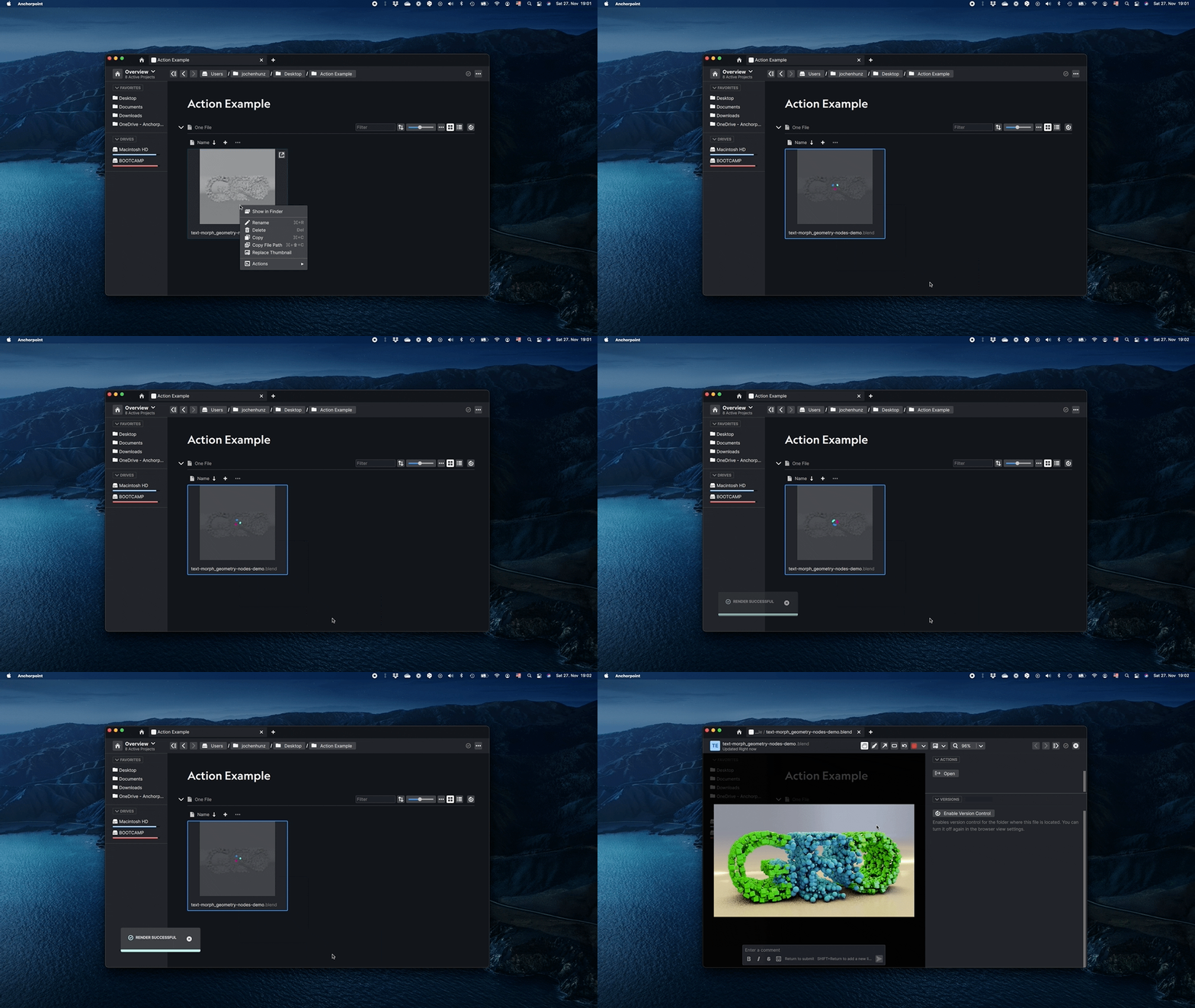
6 |
7 |
--------------------------------------------------------------------------------
/unreal_binary_sync/push_binary_button_state_hook.py:
--------------------------------------------------------------------------------
1 | import anchorpoint as ap
2 | import apsync as aps
3 |
4 |
5 | def on_is_action_enabled(path: str, type: ap.Type, ctx: ap.Context):
6 |
7 | local_settings = aps.Settings()
8 | binary_push_enabled = local_settings.get(
9 | ctx.project_path+"_enable_binary_push", False)
10 |
11 | return binary_push_enabled
12 |
--------------------------------------------------------------------------------
/examples/project/print_members.py:
--------------------------------------------------------------------------------
1 | import apsync
2 | import anchorpoint
3 |
4 | ctx = anchorpoint.get_context()
5 |
6 | # Optional
7 | project = apsync.get_project_by_id(ctx.project_id, ctx.workspace_id)
8 |
9 | users = apsync.get_users(ctx.workspace_id, project)
10 | for u in users:
11 | print(u.name)
12 | print(u.email)
13 | print(u.id)
14 | print(u.picture_url)
15 |
16 | anchorpoint.UI().show_console()
--------------------------------------------------------------------------------
/unreal_binary_sync/auto_pull_hook.yaml:
--------------------------------------------------------------------------------
1 | # Anchorpoint Markup Language
2 | # Predefined Variables: e.g. ${path}
3 | # Environment Variables: e.g. ${MY_VARIABLE}
4 | # Full documentation: https://docs.anchorpoint.app/api/intro
5 |
6 | version: 1.0
7 | action:
8 | name: Hooks
9 |
10 | version: 1
11 | id: ap::unreal::hooks
12 | type: python
13 | author: Anchorpoint Software GmbH
14 |
15 | script: auto_pull_hook.py
--------------------------------------------------------------------------------
/dcc_pipeline_tools/folder_grey.svg:
--------------------------------------------------------------------------------
1 |
4 |
--------------------------------------------------------------------------------
/examples/README.md:
--------------------------------------------------------------------------------
1 | # Examples
2 |
3 | This folder contains various example actions that are a very good starting point.
4 | Use these snippets to learn how to write Anchorpoint actions.
5 |
6 | Within the UI folder, find various actions to create simple and more complex dialogs with python.
7 | The attributes examples show how to read and write attributes with python.
8 | Use the settings example to learn how to read and write settings for your actions.
--------------------------------------------------------------------------------
/dcc_pipeline_tools/inc_project/inc_project.yaml:
--------------------------------------------------------------------------------
1 | # Anchorpoint Markup Language
2 | # Predefined Variables: e.g. ${path}
3 | # Environment Variables: e.g. ${MY_VARIABLE}
4 | # Full documentation: https://docs.anchorpoint.app/api/intro
5 |
6 | version: 1.0
7 | action:
8 | name: Incremental Saves Project
9 |
10 | version: 1
11 | id: ap::inc::project
12 | type: python
13 | author: Anchorpoint Software GmbH
14 |
15 | script: inc_project.py
--------------------------------------------------------------------------------
/dcc_pipeline_tools/inc_project/inc_timeline.yaml:
--------------------------------------------------------------------------------
1 | # Anchorpoint Markup Language
2 | # Predefined Variables: e.g. ${path}
3 | # Environment Variables: e.g. ${MY_VARIABLE}
4 | # Full documentation: https://docs.anchorpoint.app/api/intro
5 |
6 | version: 1.0
7 | action:
8 | name: Incremental Saves Timeline
9 |
10 | version: 1
11 | id: ap::inc::timeline
12 | type: python
13 | author: Anchorpoint Software GmbH
14 |
15 | script: inc_timeline.py
--------------------------------------------------------------------------------
/examples/tasks/create_task_set.py:
--------------------------------------------------------------------------------
1 | import anchorpoint as ap
2 |
3 | if __name__ == "__main__":
4 | ctx = ap.get_context()
5 | api = ap.get_api()
6 |
7 | # Get task block
8 | task_block = api.tasks.get_task_list_by_id(ctx.block_id)
9 |
10 | # And create a few new tasks
11 | for i in range(5):
12 | task = api.tasks.create_task(task_block, f"Python Task {i}")
13 |
14 | ui = ap.UI()
15 | ui.show_success("Tasks Created")
16 |
--------------------------------------------------------------------------------
/unreal_binary_sync/local_project_settings.yaml:
--------------------------------------------------------------------------------
1 | # Anchorpoint Markup Language
2 | # Predefined Variables: e.g. ${path}
3 | # Environment Variables: e.g. ${MY_VARIABLE}
4 | # Full documentation: https://docs.anchorpoint.app/api/intro
5 |
6 | version: 1.0
7 | action:
8 | name: Unreal
9 |
10 | version: 1
11 | id: ap::unreal::settings
12 | category: user
13 | type: python
14 | author: Anchorpoint Software GmbH
15 | description: ""
16 |
17 | script: "local_project_settings.py"
--------------------------------------------------------------------------------
/dcc_pipeline_tools/inc_project/project_settings.yaml:
--------------------------------------------------------------------------------
1 | # Anchorpoint Markup Language
2 | # Predefined Variables: e.g. ${path}
3 | # Environment Variables: e.g. ${MY_VARIABLE}
4 | # Full documentation: https://docs.anchorpoint.app/api/intro
5 |
6 | version: 1.0
7 | action:
8 | name: Unreal
9 |
10 | version: 1
11 | id: ap::inc::project-settings
12 | category: user
13 | type: python
14 | author: Anchorpoint Software GmbH
15 | description: ""
16 |
17 | script: project_settings.py
--------------------------------------------------------------------------------
/template/code/template_utility.py:
--------------------------------------------------------------------------------
1 | import os
2 |
3 |
4 | def get_template_dir(project_path: str):
5 | hidden_template_location = os.path.join(project_path, ".ap/templates")
6 | if os.path.exists(hidden_template_location):
7 | return hidden_template_location
8 | else:
9 | return os.path.join(project_path, "anchorpoint/templates")
10 |
11 |
12 | def get_template_callbacks(template_dir: str):
13 | return os.path.join(template_dir, "template_action_events.py")
14 |
--------------------------------------------------------------------------------
/dcc_pipeline_tools/maya/maya_integration.yaml:
--------------------------------------------------------------------------------
1 | # Anchorpoint Markup Language
2 | # Predefined Variables: e.g. ${path}
3 | # Environment Variables: e.g. ${MY_VARIABLE}
4 | # Full documentation: https://docs.anchorpoint.app/api/intro
5 |
6 | version: 1.0
7 | action:
8 | name: Maya Integration
9 |
10 | version: 1
11 | id: ap::integrations::maya
12 | category: integrations
13 | type: python
14 | enable: true
15 | author: Anchorpoint Software GmbH
16 | description: Integration for Autodesk Maya
17 |
18 | script: maya_integration.py
19 |
--------------------------------------------------------------------------------
/dcc_pipeline_tools/blender/blender_integration.yaml:
--------------------------------------------------------------------------------
1 | # Anchorpoint Markup Language
2 | # Predefined Variables: e.g. ${path}
3 | # Environment Variables: e.g. ${MY_VARIABLE}
4 | # Full documentation: https://docs.anchorpoint.app/api/intro
5 |
6 | version: 1.0
7 | action:
8 | name: Blender Integration
9 |
10 | version: 1
11 | id: ap::integrations::blender
12 | category: integrations
13 | type: python
14 | enable: true
15 | author: Anchorpoint Software GmbH
16 | description: Integration for Blender
17 |
18 | script: blender_integration.py
19 |
--------------------------------------------------------------------------------
/dcc_pipeline_tools/cinema_4d/cinema_4d_integration.yaml:
--------------------------------------------------------------------------------
1 | # Anchorpoint Markup Language
2 | # Predefined Variables: e.g. ${path}
3 | # Environment Variables: e.g. ${MY_VARIABLE}
4 | # Full documentation: https://docs.anchorpoint.app/api/intro
5 |
6 | version: 1.0
7 | action:
8 | name: Cinema 4D Integration
9 |
10 | version: 1
11 | id: ap::integrations::cinema-4d
12 | category: integrations
13 | type: python
14 | enable: true
15 | author: Anchorpoint Software GmbH
16 | description: Integration for Cinema 4D
17 |
18 | script: cinema_4d_integration.py
19 |
--------------------------------------------------------------------------------
/drives/README.md:
--------------------------------------------------------------------------------
1 | # Drive Actions
2 |
3 | ---
4 | **NOTE**
5 |
6 | These actions are only supported on Windows
7 |
8 | ---
9 |
10 | ## Map Folder as Drive
11 |
12 | With this action you can map any given folder to a drive (e.g. X:). This is super useful when dealing with broken absolute paths of scene files.
13 |
14 | Example:
15 |
16 | A folder like **C:/Dropbox/Assets** can be mapped so that a file C:/Dropbox/Assets/car.c4d can be accessed as **X:/Assets/car.c4d**
17 |
18 |
19 | ## Unmap drive
20 |
21 | Allows you to unmount a previously mounted drive
22 |
--------------------------------------------------------------------------------
/examples/tasks/mark_tasks_done.py:
--------------------------------------------------------------------------------
1 | import anchorpoint as ap
2 | import apsync as aps
3 |
4 | if __name__ == "__main__":
5 | ctx = ap.get_context()
6 | api = ap.get_api()
7 |
8 | # Iterate over all selected tasks
9 | for task in ctx.selected_tasks:
10 | # Retrieve a task by id
11 | task = api.tasks.get_task_by_id(task.id)
12 |
13 | # And update its status
14 | api.attributes.set_attribute_value(
15 | task, "Status", aps.AttributeTag("Done", "green")
16 | )
17 |
18 | ui = ap.UI()
19 | ui.show_success("Tasks Updated")
20 |
--------------------------------------------------------------------------------
/drives/unmap_drive.yaml:
--------------------------------------------------------------------------------
1 | # Anchorpoint Markup Language
2 | # Predefined Variables: e.g. ${path}
3 | # Environment Variables: e.g. ${MY_VARIABLE}
4 | # Full documentation: https://docs.anchorpoint.app/api/intro
5 |
6 | version: 1.0
7 | action:
8 | name: Unmap Drive
9 |
10 | version: 1
11 | id: ap::unmapdrive
12 | category: map
13 | type: python
14 | enable: false
15 | author: Anchorpoint Software GmbH
16 | description: Unmaps (unmounts) a drive
17 | icon:
18 | path: :/icons/hardDrive.svg
19 |
20 | script: unmap_drive.py
21 |
22 | register:
23 | folder:
24 | enable: true
--------------------------------------------------------------------------------
/drives/map_drive.yaml:
--------------------------------------------------------------------------------
1 | # Anchorpoint Markup Language
2 | # Predefined Variables: e.g. ${path}
3 | # Environment Variables: e.g. ${MY_VARIABLE}
4 | # Full documentation: https://docs.anchorpoint.app/api/intro
5 |
6 | version: 1.0
7 | action:
8 | name: Map as Drive
9 |
10 | version: 1
11 | id: ap::mapasdrive
12 | category: map
13 | type: python
14 | enable: false
15 | author: Anchorpoint Software GmbH
16 | description: Maps (mounts) a folder to a drive
17 | icon:
18 | path: :/icons/hardDrive.svg
19 |
20 | script: map_drive.py
21 |
22 | register:
23 | folder:
24 | enable: true
--------------------------------------------------------------------------------
/unreal_binary_sync/pull_binaries.yaml:
--------------------------------------------------------------------------------
1 | # Anchorpoint Markup Language
2 | # Predefined Variables: e.g. ${path}
3 | # Environment Variables: e.g. ${MY_VARIABLE}
4 | # Full documentation: https://docs.anchorpoint.app/api/intro
5 |
6 | version: 1.0
7 | action:
8 | name: Pull Binaries
9 |
10 | version: 1
11 | id: ap::unreal::pull
12 | category: user
13 | type: python
14 | author: Anchorpoint Software GmbH
15 | description: Pulls Game and Editor binaries
16 |
17 | script: pull_binaries.py
18 | icon:
19 | path: icons/unrealPull.svg
20 |
21 | register:
22 | sidebar:
23 | enable: True
--------------------------------------------------------------------------------
/batch_rename/batch_rename.yaml:
--------------------------------------------------------------------------------
1 | # Anchorpoint Markup Language
2 | # Predefined Variables: e.g. ${path}
3 | # Environment Variables: e.g. ${MY_VARIABLE}
4 | # Full documentation: https://docs.anchorpoint.app/api/intro
5 |
6 | version: 1.0
7 | action:
8 | name: Batch Rename
9 |
10 | version: 1
11 | id: ap::rename
12 | category: user
13 | type: python
14 | author: Anchorpoint Software GmbH
15 | description: Renames a set of selected files
16 | icon:
17 | path: :/icons/design-tools-photo-editing/pencil.svg
18 |
19 | script: batch_rename.py
20 |
21 | register:
22 | file:
23 | enable: true
--------------------------------------------------------------------------------
/examples/action input/action_input_example.py:
--------------------------------------------------------------------------------
1 | import anchorpoint as ap
2 |
3 | ctx = ap.get_context()
4 | ui = ap.UI()
5 |
6 | # Access the YAML inputs through the context inputs dict
7 | if "some_hardcoded_variable" in ctx.inputs:
8 | print("some_hardcoded_variable: " + ctx.inputs["some_hardcoded_variable"])
9 |
10 | if "ask_the_user_variable" in ctx.inputs:
11 | print("ask_the_user_variable: " + ctx.inputs["ask_the_user_variable"])
12 |
13 | if "ask_the_user_once_variable" in ctx.inputs:
14 | print("ask_the_user_once_variable: " + ctx.inputs["ask_the_user_once_variable"])
15 |
16 | ui.show_console()
17 |
--------------------------------------------------------------------------------
/zip/zip.yaml:
--------------------------------------------------------------------------------
1 | # Anchorpoint Markup Language
2 | # Predefined Variables: e.g. ${path}
3 | # Environment Variables: e.g. ${MY_VARIABLE}
4 | # Full documentation: https://docs.anchorpoint.app/api/intro
5 |
6 | version: 1.0
7 | action:
8 | name: Zip
9 |
10 | version: 1
11 | id: ap::zip
12 | category: user
13 | type: python
14 | author: Anchorpoint Software GmbH
15 | description: Creates a ZIP archive
16 | icon:
17 | path: folder_zip.svg
18 |
19 | script: "create_zip.py"
20 | settings: "zip_settings.py"
21 |
22 | register:
23 | file:
24 | enable: true
25 | folder:
26 | enable: true
--------------------------------------------------------------------------------
/csv_import/tasks_from_csv.yaml:
--------------------------------------------------------------------------------
1 | # Anchorpoint Markup Language
2 | # Predefined Variables: e.g. ${path}
3 | # Environment Variables: e.g. ${MY_VARIABLE}
4 | # Full documentation: https://docs.anchorpoint.app/Actions/Reference
5 |
6 | version: 1.0
7 | action:
8 | name: Tasks from CSV
9 |
10 | version: 1
11 | id: ap::tasksfromcsv
12 | category: csv
13 | type: python
14 | author: Anchorpoint Software GmbH
15 | description: ""
16 | icon:
17 | path: addCardCSV.svg
18 | enable: true
19 | inputs:
20 | type: "task"
21 |
22 | script: objects_from_csv.py
23 | register:
24 | new_task:
25 | enable: true
26 |
--------------------------------------------------------------------------------
/unreal_binary_sync/push_binaries.yaml:
--------------------------------------------------------------------------------
1 | # Anchorpoint Markup Language
2 | # Predefined Variables: e.g. ${path}
3 | # Environment Variables: e.g. ${MY_VARIABLE}
4 | # Full documentation: https://docs.anchorpoint.app/api/intro
5 |
6 | version: 1.0
7 | action:
8 | name: Push Binaries
9 |
10 | version: 1
11 | id: ap::unreal::push
12 | category: user
13 | type: python
14 | author: Anchorpoint Software GmbH
15 | description: Pushes Game and Editor binaries
16 |
17 | script: push_binaries.py
18 | icon:
19 | path: icons/unrealPush.svg
20 |
21 | register:
22 | sidebar:
23 | enable: push_binary_button_state_hook.py
--------------------------------------------------------------------------------
/zip/unzip.yaml:
--------------------------------------------------------------------------------
1 | # Anchorpoint Markup Language
2 | # Predefined Variables: e.g. ${path}
3 | # Environment Variables: e.g. ${MY_VARIABLE}
4 | # Full documentation: https://docs.anchorpoint.app/api/intro
5 |
6 | version: 1.0
7 | action:
8 | name: Unzip
9 |
10 | version: 1
11 | id: ap::unzip
12 | category: user
13 | type: python
14 | enable: true
15 | author: Anchorpoint Software GmbH
16 | description: Unpacks archives
17 | icon:
18 | path: folder_unzip.svg
19 |
20 | script: "unzip.py"
21 | settings: "unzip_settings.py"
22 |
23 | register:
24 | file:
25 | enable: true
26 | filter: "*.zip;*.rar;"
27 |
--------------------------------------------------------------------------------
/csv_import/folder_from_csv.yaml:
--------------------------------------------------------------------------------
1 | # Anchorpoint Markup Language
2 | # Predefined Variables: e.g. ${path}
3 | # Environment Variables: e.g. ${MY_VARIABLE}
4 | # Full documentation: https://docs.anchorpoint.app/Actions/Reference
5 |
6 | version: 1.0
7 | action:
8 | name: Folder from CSV
9 |
10 | version: 1
11 | id: ap::folderfromcsv
12 | category: csv
13 | type: python
14 | author: Anchorpoint Software GmbH
15 | description: ""
16 | icon:
17 | path: addFolderCSV.svg
18 | enable: true
19 | inputs:
20 | type: "folder"
21 |
22 | script: objects_from_csv.py
23 | register:
24 | new_folder:
25 | enable: true
26 |
--------------------------------------------------------------------------------
/examples/sidebar/sidebar_example.yaml:
--------------------------------------------------------------------------------
1 | # Anchorpoint Markup Language
2 | # Predefined Variables: e.g. ${path}
3 | # Environment Variables: e.g. ${MY_VARIABLE}
4 | # Full documentation: https://docs.anchorpoint.app/api/intro
5 |
6 | version: 1.0
7 | action:
8 | name: Sidebar Example
9 |
10 | version: 1
11 | id: ap::examples::sidebar
12 | category: utility/code/examples/sidebar
13 | type: python
14 | enable: false
15 | author: Anchorpoint Software GmbH
16 | description: An example action that shows up as a button on the left sidebar
17 |
18 | script: sidebar_example.py
19 |
20 | register:
21 | sidebar:
22 | enable: true
--------------------------------------------------------------------------------
/dcc_pipeline_tools/publish_from_ui.yaml:
--------------------------------------------------------------------------------
1 | # Anchorpoint Markup Language
2 | # Predefined Variables: e.g. ${path}
3 | # Environment Variables: e.g. ${MY_VARIABLE}
4 | # Full documentation: https://docs.anchorpoint.app/api/intro
5 |
6 | version: 1.0
7 | action:
8 | name: Publish to Timeline
9 |
10 | version: 1
11 | id: ap::inc::publish
12 | category: vc
13 | type: python
14 | enable: false
15 | author: Anchorpoint Software GmbH
16 | description: Publishes any file using a context menu
17 | icon:
18 | path: :/icons/Misc/single Version.svg
19 |
20 | script: publish_from_ui.py
21 |
22 | register:
23 | file:
24 | enable: true
--------------------------------------------------------------------------------
/drives/drive_package.yaml:
--------------------------------------------------------------------------------
1 | # Anchorpoint Markup Language
2 | # Predefined Variables: e.g. ${path}
3 | # Environment Variables: e.g. ${MY_VARIABLE}
4 | # Full documentation: https://docs.anchorpoint.app/api/intro
5 |
6 | version: 1.0
7 | action:
8 | name: Map Folder as Drive
9 |
10 | version: 1
11 | id: ap::package::drive
12 | category: map
13 | type: package
14 | enable: true
15 | author: Anchorpoint Software GmbH
16 | description: Maps (mounts) a folder as an internal drive
17 |
18 | icon:
19 | path: "mapToDrive.svg"
20 |
21 | platforms:
22 | - win
23 |
24 | actions:
25 | - ap::mapasdrive
26 | - ap::unmapdrive
--------------------------------------------------------------------------------
/referenced_file/publish.yaml:
--------------------------------------------------------------------------------
1 | # Anchorpoint Markup Language
2 | # Predefined Variables: e.g. ${path}
3 | # Environment Variables: e.g. ${MY_VARIABLE}
4 | # Full documentation: https://docs.anchorpoint.app/api/intro
5 |
6 | version: 1.0
7 | action:
8 | name: Create Referenced File
9 |
10 | version: 1
11 | id: ap::referenced::file
12 | category: user
13 | type: python
14 | author: Anchorpoint Software GmbH
15 | description: Creates a copy of this file without the increment
16 | icon:
17 | path: extract.svg
18 |
19 | script: publish.py
20 | settings: publish_settings.py
21 |
22 | register:
23 | file:
24 | enable: true
--------------------------------------------------------------------------------
/coding/open_terminal_here.yaml:
--------------------------------------------------------------------------------
1 | # Anchorpoint Markup Language
2 | # Predefined Variables: e.g. ${path}
3 | # Environment Variables: e.g. ${MY_VARIABLE}
4 | # Full documentation: https://docs.anchorpoint.app/api/intro
5 |
6 | version: 1.0
7 | action:
8 | name: Open Terminal Here
9 |
10 | version: 1
11 | id: ap::openterminal
12 | category: utility/code
13 | enable: false
14 | type: python
15 | author: Anchorpoint Software GmbH
16 | description: Opens the Terminal / Command line in the current folder
17 | icon:
18 | path: :/icons/action.svg
19 |
20 | script: open_terminal_here.py
21 |
22 | register:
23 | folder:
24 | enable: true
--------------------------------------------------------------------------------
/examples/async/async_example.yaml:
--------------------------------------------------------------------------------
1 | # Anchorpoint Markup Language
2 | # Predefined Variables: e.g. ${path}
3 | # Environment Variables: e.g. ${MY_VARIABLE}
4 | # Full documentation: https://docs.anchorpoint.app/api/intro
5 |
6 | version: 1.0
7 | action:
8 | name: Async Example
9 |
10 | version: 1
11 | id: ap::examples::async
12 | category: utility/code/examples/async
13 | type: python
14 | enable: false
15 | author: Anchorpoint Software GmbH
16 | description: Runs an async function thar reports progress to the user
17 | icon:
18 | path: :/icons/aplogo.svg
19 |
20 | script: async_example.py
21 |
22 | register:
23 | folder:
24 | enable: true
--------------------------------------------------------------------------------
/examples/tasks/create_tasks.yaml:
--------------------------------------------------------------------------------
1 | # Anchorpoint Markup Language
2 | # Predefined Variables: e.g. ${path}
3 | # Environment Variables: e.g. ${MY_VARIABLE}
4 | # Full documentation: https://docs.anchorpoint.app/api/intro
5 |
6 | version: 1.0
7 | action:
8 | name: Example / Create Tasks
9 |
10 | version: 1
11 | id: ap::examples::tasks
12 | category: utility/code/examples/tasks
13 | type: python
14 | enable: false
15 | author: Anchorpoint Software GmbH
16 | description: Example action to demonstrate how to create tasks
17 | icon:
18 | path: :/icons/action.svg
19 |
20 | script: create_tasks.py
21 |
22 | register:
23 | folder:
24 | enable: true
--------------------------------------------------------------------------------
/blender/blender_package.yaml:
--------------------------------------------------------------------------------
1 | #Anchorpoint Markup Language
2 | #Predefined Variables: e.g. ${path}
3 | #Environment Variables: e.g. ${MY_VARIABLE}
4 | #Full documentation: https://docs.anchorpoint.app/api/intro
5 |
6 | version: "1.0"
7 |
8 | action:
9 | #Must Have Properties
10 | name: "Blender"
11 |
12 | #Optional Properties
13 | version: 1
14 | id: "ap::package::blender"
15 | category: "dcc/blender"
16 | type: package
17 | enable: false
18 | description: Render a thumbnail for Anchorpoint using Eevee
19 |
20 | author: "Anchorpoint Software GmbH"
21 | icon:
22 | path: "blender.svg"
23 |
24 | actions:
25 | - ap::blender::thumbnail
26 |
27 |
28 |
--------------------------------------------------------------------------------
/examples/project/print_members.yaml:
--------------------------------------------------------------------------------
1 | # Anchorpoint Markup Language
2 | # Predefined Variables: e.g. ${path}
3 | # Environment Variables: e.g. ${MY_VARIABLE}
4 | # Full documentation: https://docs.anchorpoint.app/api/intro
5 |
6 | version: 1.0
7 | action:
8 | name: Print Project Members
9 |
10 | version: 1
11 | id: ap::examples::projectmembers
12 | category: utility/code/examples/project
13 | type: python
14 | enable: false
15 | author: Anchorpoint Software GmbH
16 | description: Prints the members of a project to the Console
17 | icon:
18 | path: :/icons/aplogo.svg
19 |
20 | script: print_members.py
21 |
22 | register:
23 | folder:
24 | enable: true
--------------------------------------------------------------------------------
/examples/workspace/workspace_example.yaml:
--------------------------------------------------------------------------------
1 | # Anchorpoint Markup Language
2 | # Predefined Variables: e.g. ${path}
3 | # Environment Variables: e.g. ${MY_VARIABLE}
4 | # Full documentation: https://docs.anchorpoint.app/api/intro
5 |
6 | version: 1.0
7 | action:
8 | name: Workspace Example
9 |
10 | version: 1
11 | id: ap::examples::workspace
12 | category: utility/code/examples/workspace
13 | type: python
14 | enable: false
15 | author: Anchorpoint Software GmbH
16 | description: An example action that shows up as a button in the workspace / project overview
17 |
18 | script: workspace_example.py
19 |
20 | register:
21 | workspace_overview:
22 | enable: true
--------------------------------------------------------------------------------
/zip/zip_package.yaml:
--------------------------------------------------------------------------------
1 | #Anchorpoint Markup Language
2 | #Predefined Variables: e.g. ${path}
3 | #Environment Variables: e.g. ${MY_VARIABLE}
4 | #Full documentation: https://docs.anchorpoint.app/api/intro
5 |
6 | version: "1.0"
7 |
8 | action:
9 | #Must Have Properties
10 | name: "ZIP"
11 |
12 | #Optional Properties
13 | version: 1
14 | id: "ap::package::zip"
15 | category: "zip"
16 | type: package
17 | enable: false
18 | description: Archive your projects and filter out unwanted files and folders.
19 |
20 | author: "Anchorpoint Software GmbH"
21 | icon:
22 | path: "zip_package.svg"
23 |
24 | actions:
25 | - ap::unzip
26 | - ap::zip
27 |
28 |
29 |
--------------------------------------------------------------------------------
/batch_rename/batch_rename_package.yaml:
--------------------------------------------------------------------------------
1 | #Anchorpoint Markup Language
2 | #Predefined Variables: e.g. ${path}
3 | #Environment Variables: e.g. ${MY_VARIABLE}
4 | #Full documentation: https://docs.anchorpoint.app/api/intro
5 |
6 | version: "1.0"
7 |
8 | action:
9 | #Must Have Properties
10 | name: Batch Rename
11 |
12 | #Optional Properties
13 | version: 1
14 | id: ap::package::rename
15 | category: user
16 | type: package
17 | enable: false
18 | description: A simple batch rename tool, that can be customized to your needs
19 |
20 | author: Anchorpoint Software GmbH
21 | icon:
22 | path: batch_rename.svg
23 |
24 | actions:
25 | - ap::rename
26 |
27 |
28 |
--------------------------------------------------------------------------------
/img_conversion/image_conversion_package.yaml:
--------------------------------------------------------------------------------
1 | #Anchorpoint Markup Language
2 | #Predefined Variables: e.g. ${path}
3 | #Environment Variables: e.g. ${MY_VARIABLE}
4 | #Full documentation: https://docs.anchorpoint.app/api/intro
5 |
6 | version: "1.0"
7 |
8 | action:
9 | #Must Have Properties
10 | name: "Image Conversion"
11 |
12 | #Optional Properties
13 | version: 1
14 | id: "ap::package::image"
15 | category: "image"
16 | type: package
17 | enable: true
18 | author: "Anchorpoint Software GmbH"
19 | description: Converts any image to PNG and puts it on the clipboard
20 |
21 | icon:
22 | path: "icons/imageConversion.svg"
23 |
24 | actions:
25 | - ap::image::copy
26 |
--------------------------------------------------------------------------------
/coding/new_action.yaml:
--------------------------------------------------------------------------------
1 | #Anchorpoint Markup Language
2 | #Predefined Variables: e.g. ${path}
3 | #Environment Variables: e.g. ${MY_VARIABLE}
4 | #Full documentation: https://docs.anchorpoint.app/api/intro
5 |
6 | version: "1.0"
7 |
8 | action:
9 | #Must Have Properties
10 | name: "New Action"
11 |
12 | #Optional Properties
13 | version: 1
14 | id: "ap::newaction"
15 | category: utility/code
16 | type: python
17 | enable: false
18 | author: "Anchorpoint Software GmbH"
19 |
20 | icon:
21 | path: ":/icons/pencil.svg"
22 |
23 | script: "new_action.py"
24 |
25 | #Where to register this action
26 | register:
27 | folder:
28 | filter: "*/actions/*" #Wildcard matching
29 |
--------------------------------------------------------------------------------
/ffmpeg/audio_video.yaml:
--------------------------------------------------------------------------------
1 | # Anchorpoint Markup Language
2 | # Predefined Variables: e.g. ${path}
3 | # Environment Variables: e.g. ${MY_VARIABLE}
4 | # Full documentation: https://docs.anchorpoint.app/api/intro
5 |
6 | version: 1.0
7 | action:
8 | name: Change Audio of Video
9 |
10 | version: 1
11 | id: "ap::video::audiovideo"
12 | category: "video"
13 | type: python
14 | enable: false
15 | author: "Anchorpoint Software GmbH"
16 | description: "Replaces the audio in a video file, or removes it."
17 | icon:
18 | path: icons/audio.svg
19 |
20 | script: audio_video.py
21 |
22 | register:
23 | file:
24 | enable: true
25 | filter: "*.mov;*.mp4;*.avi" #Wildcard matching
--------------------------------------------------------------------------------
/examples/settings/settings_example.yaml:
--------------------------------------------------------------------------------
1 | # Anchorpoint Markup Language
2 | # Predefined Variables: e.g. ${path}
3 | # Environment Variables: e.g. ${MY_VARIABLE}
4 | # Full documentation: https://docs.anchorpoint.app/api/intro
5 |
6 | version: 1.0
7 | action:
8 | name: Settings Example
9 |
10 | version: 1
11 | id: ap::examples::settings
12 | category: utility/code/examples/settings
13 | type: python
14 | enable: false
15 | author: Anchorpoint Software GmbH
16 | description: An example action that demonstrates how to read and write action settings
17 | icon:
18 | path: :/icons/settings.svg
19 |
20 | script: settings_example.py
21 |
22 | register:
23 | folder:
24 | enable: true
--------------------------------------------------------------------------------
/coding/coding_package.yaml:
--------------------------------------------------------------------------------
1 | # Anchorpoint Markup Language
2 | # Predefined Variables: e.g. ${path}
3 | # Environment Variables: e.g. ${MY_VARIABLE}
4 | # Full documentation: https://docs.anchorpoint.app/api/intro
5 |
6 | version: 1.0
7 | action:
8 | name: Coding Utilities
9 |
10 | version: 1
11 | id: ap::package::coding
12 | category: utility/code
13 | type: package
14 | enable: false
15 |
16 | author: Anchorpoint Software GmbH
17 | description: Contains a set of developer tools that are very useful when you want to create your own Actions for Anchorpoint
18 | icon:
19 | path: codingUtils.svg
20 |
21 | actions:
22 | - ap::newaction
23 | - ap::openterminal
24 | - ap::openvscode
--------------------------------------------------------------------------------
/examples/project/project_example.yaml:
--------------------------------------------------------------------------------
1 | # Anchorpoint Markup Language
2 | # Predefined Variables: e.g. ${path}
3 | # Environment Variables: e.g. ${MY_VARIABLE}
4 | # Full documentation: https://docs.anchorpoint.app/api/intro
5 |
6 | version: 1.0
7 | action:
8 | name: Project Example
9 |
10 | version: 1
11 | id: ap::examples::project
12 | category: utility/code/examples/project
13 | type: python
14 | enable: false
15 | author: Anchorpoint Software GmbH
16 | description: An action that demonstrates how to create a project and how to set additional metadata
17 | icon:
18 | path: :/icons/aplogo.svg
19 |
20 | script: project_example.py
21 |
22 | register:
23 | folder:
24 | enable: true
--------------------------------------------------------------------------------
/examples/tasks/mark_tasks_done.yaml:
--------------------------------------------------------------------------------
1 | # Anchorpoint Markup Language
2 | # Predefined Variables: e.g. ${path}
3 | # Environment Variables: e.g. ${MY_VARIABLE}
4 | # Full documentation: https://docs.anchorpoint.app/api/intro
5 |
6 | version: 1.0
7 | action:
8 | name: Example / Mark Tasks Done
9 |
10 | version: 1
11 | id: ap::examples::marktasksdone
12 | category: utility/code/examples/tasks
13 | type: python
14 | enable: false
15 | author: Anchorpoint Software GmbH
16 | description: Example action to demonstrate how register actions on the tasks context menu
17 | icon:
18 | path: :/icons/action.svg
19 |
20 | script: mark_tasks_done.py
21 |
22 | register:
23 | task:
24 | enable: true
--------------------------------------------------------------------------------
/examples/tasks/create_task_set.yaml:
--------------------------------------------------------------------------------
1 | # Anchorpoint Markup Language
2 | # Predefined Variables: e.g. ${path}
3 | # Environment Variables: e.g. ${MY_VARIABLE}
4 | # Full documentation: https://docs.anchorpoint.app/api/intro
5 |
6 | version: 1.0
7 | action:
8 | name: Example / Create Set of Tasks
9 |
10 | version: 1
11 | id: ap::examples::setoftasks
12 | category: utility/code/examples/tasks
13 | type: python
14 | enable: false
15 | author: Anchorpoint Software GmbH
16 | description: Example action to demonstrate how to create tasks using the "New Task" button
17 | icon:
18 | path: :/icons/action.svg
19 |
20 | script: create_task_set.py
21 |
22 | register:
23 | new_task:
24 | enable: true
--------------------------------------------------------------------------------
/template/README.md:
--------------------------------------------------------------------------------
1 | # Template Actions
2 |
3 | For a visual quickstart [check out this video how to use the template actions!](https://www.loom.com/share/87c1c0909f444af69833bec8ce621635)
4 |
5 | Template actions allow you to create folder structures, projects, and files with the click of a button.
6 |
7 | To create your own custom templates, just right click on a file or folder and call the __Save as Template__
8 |
9 | ## Tokens
10 |
11 | Use tokens, such as __[Client_Name]__, within your files and folders. Based on user input, the tokens will be replaced when instantiating the template.
12 | When using tokens on a project template, the tokens will be stored on the project so that when using file and folder templates, the tokens will be reused.
13 |
--------------------------------------------------------------------------------
/examples/attributes/create_attributes.yaml:
--------------------------------------------------------------------------------
1 | # Anchorpoint Markup Language
2 | # Predefined Variables: e.g. ${path}
3 | # Environment Variables: e.g. ${MY_VARIABLE}
4 | # Full documentation: https://docs.anchorpoint.app/api/intro
5 |
6 | version: 1.0
7 | action:
8 | name: Example / Create Attributes
9 |
10 | version: 1
11 | id: ap::examples::attributes
12 | category: utility/code/examples/attributes
13 | type: python
14 | enable: false
15 | author: Anchorpoint Software GmbH
16 | description: Example action to demonstrate how to create all kinds of attributes
17 | icon:
18 | path: :/icons/action.svg
19 |
20 | script: create_attributes.py
21 |
22 | register:
23 | file:
24 | enable: true
25 | folder:
26 | enable: true
--------------------------------------------------------------------------------
/examples/attributes/read_attributes.yaml:
--------------------------------------------------------------------------------
1 | # Anchorpoint Markup Language
2 | # Predefined Variables: e.g. ${path}
3 | # Environment Variables: e.g. ${MY_VARIABLE}
4 | # Full documentation: https://docs.anchorpoint.app/api/intro
5 |
6 | version: 1.0
7 | action:
8 | name: Example / Read Attributes
9 |
10 | version: 1
11 | id: ap::examples::attributes::read
12 | category: utility/code/examples/attributes
13 | type: python
14 | enable: false
15 | author: Anchorpoint Software GmbH
16 | description: Example action to demonstrate how to read all kinds of attributes
17 | icon:
18 | path: :/icons/action.svg
19 |
20 | script: read_attributes.py
21 |
22 | register:
23 | file:
24 | enable: true
25 | folder:
26 | enable: true
--------------------------------------------------------------------------------
/csv_import/csv_package.yaml:
--------------------------------------------------------------------------------
1 | #Anchorpoint Markup Language
2 | #Predefined Variables: e.g. ${path}
3 | #Environment Variables: e.g. ${MY_VARIABLE}
4 | #Full documentation: https://docs.anchorpoint.app/api/intro
5 |
6 | version: "1.0"
7 |
8 | action:
9 | #Must Have Properties
10 | name: "CSV Import"
11 |
12 | #Optional Properties
13 | version: 1
14 | id: "ap::package::csv"
15 | category: "csv"
16 | type: package
17 | enable: true
18 | description: Creates folders or tasks from a CSV file including Attributes.
19 |
20 | author: "Anchorpoint Software GmbH"
21 | icon:
22 | path: "csv_package.svg"
23 |
24 | actions:
25 | - ap::tasksfromcsv
26 | - ap::folderfromcsv
27 |
28 |
29 |
--------------------------------------------------------------------------------
/template/save_as_template.yaml:
--------------------------------------------------------------------------------
1 | # Anchorpoint Markup Language
2 | # Predefined Variables: e.g. ${path}
3 | # Environment Variables: e.g. ${MY_VARIABLE}
4 | # Full documentation: https://docs.anchorpoint.app/api/intro
5 |
6 | version: 1.0
7 | action:
8 | name: Save as Template
9 |
10 | version: 1
11 | id: ap::template::save
12 | category: automation/template
13 | type: python
14 | author: Anchorpoint Software GmbH
15 | description: Saves the selected file or folder as a template
16 | icon:
17 | path: :/icons/folderCloud.svg
18 |
19 | script: code/save_as_template.py
20 | settings: code/template_action_settings.py
21 | inputs:
22 | template_dir: templates
23 |
24 | register:
25 | folder:
26 | enable: true
27 | file:
28 | enable: true
29 |
--------------------------------------------------------------------------------
/zip/folder_zip.svg:
--------------------------------------------------------------------------------
1 |
4 |
--------------------------------------------------------------------------------
/coding/README.md:
--------------------------------------------------------------------------------
1 | # Coding Actions
2 |
3 | This folder contains a collection of useful utility actions when writing your own Actions.
4 |
5 | ## New Action
6 |
7 | An action that invokes a simple dialog in Anchorpoint to create a new action. You can specify a name and a description for your action. With advanced settings you can control things like the internal ID and the autor, for example.
8 | This action is also a great learning material how to create simple dialogs in python.
9 |
10 | 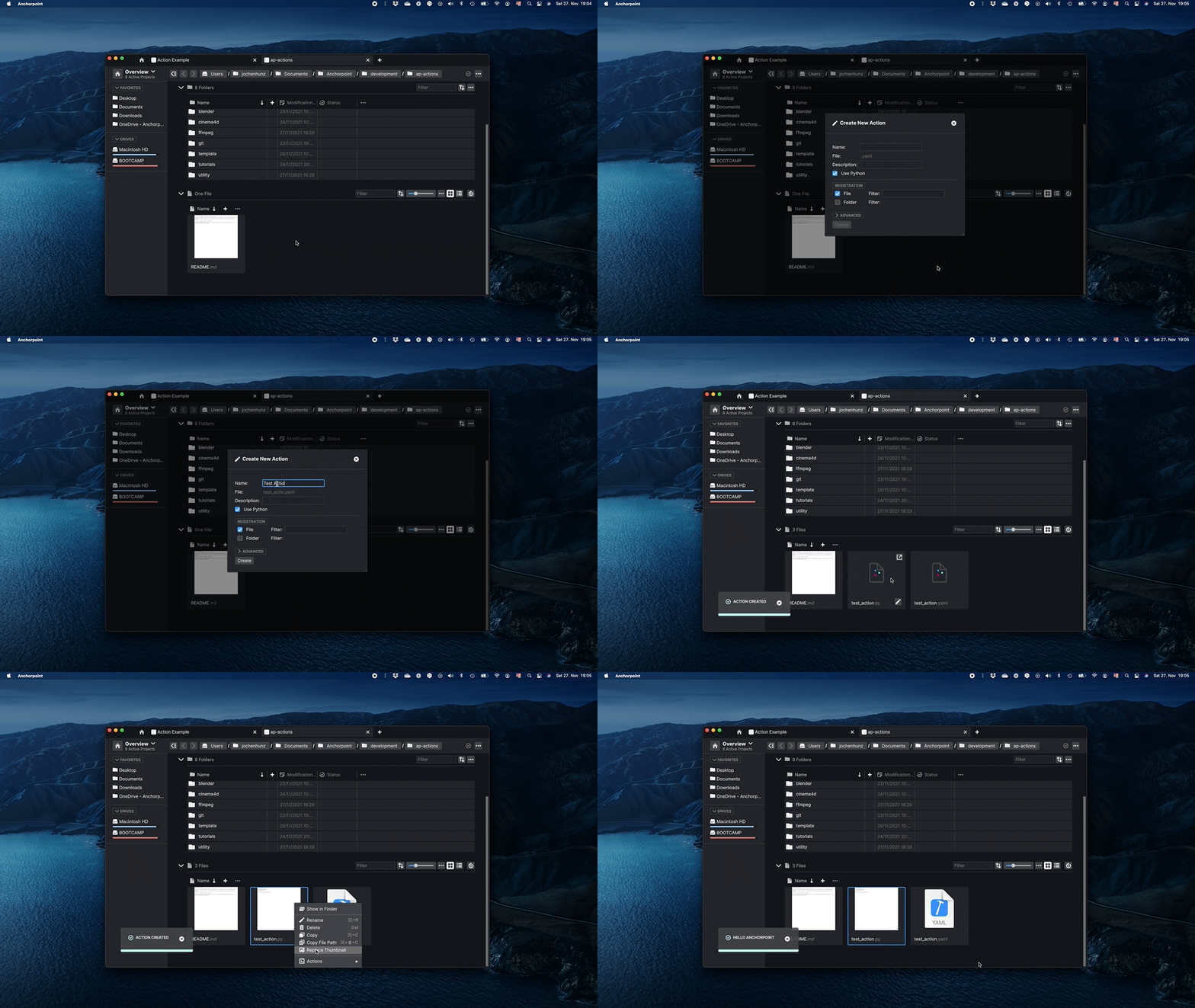
11 |
12 | ## Open Terminal Here
13 |
14 | Opens the console application (CMD / Terminal) in the current folder.
15 |
16 | ## Open VSCode Here
17 |
18 | Opens Visual Studio Code and opens the current folder.
19 |
20 |
--------------------------------------------------------------------------------
/examples/ui/greetings.yaml:
--------------------------------------------------------------------------------
1 | #Anchorpoint Markup Language
2 | #Predefined Variables: e.g. ${path}
3 | #Environment Variables: e.g. ${MY_VARIABLE}
4 | #Full documentation: https://docs.anchorpoint.app/api/intro
5 |
6 | version: "1.0"
7 |
8 | action:
9 | #Must Have Properties
10 | name: "UI / Greetings Dialog"
11 |
12 | #Optional Properties
13 | version: 1
14 | id: "ap::examples::greetings"
15 | category: "utility/code/examples/dialog"
16 | type: python
17 | enable: false
18 | author: "Anchorpoint Software GmbH"
19 | description: "This is a basic example that shows how to create simple dialogs"
20 | icon:
21 | path: ":icons/aplogo.svg"
22 |
23 | script: "greetings.py"
24 |
25 | #Where to register this action: in all folders
26 | register:
27 | folder:
28 | enable: true
--------------------------------------------------------------------------------
/coding/open_vscode_here.yaml:
--------------------------------------------------------------------------------
1 | # Anchorpoint Markup Language
2 | # Predefined Variables: e.g. ${path}
3 | # Environment Variables: e.g. ${MY_VARIABLE}
4 | # Full documentation: https://docs.anchorpoint.app/api/intro
5 |
6 | version: 1.0
7 | action:
8 | name: Open VSCode Here
9 |
10 | version: 1
11 | id: ap::openvscode
12 | category: utility/code
13 | enable: false
14 | type: command
15 | author: Anchorpoint Software GmbH
16 | description: Opens Visual Studio Code in the current Folder. Make sure that the VSCode shell command 'code' is installed
17 | icon:
18 | path: :/icons/action.svg
19 |
20 | command: code
21 | arguments: ${path}
22 |
23 | register:
24 | folder:
25 | enable: true
26 |
27 | toast:
28 | error:
29 | message: "VSCode or the VSCode shell command 'code' is not installed"
--------------------------------------------------------------------------------
/examples/ui/notification.yaml:
--------------------------------------------------------------------------------
1 | #Anchorpoint Markup Language
2 | #Predefined Variables: e.g. ${path}
3 | #Environment Variables: e.g. ${MY_VARIABLE}
4 | #Full documentation: https://docs.anchorpoint.app/api/intro
5 |
6 | version: "1.0"
7 |
8 | action:
9 | #Must Have Properties
10 | name: "UI / System Notification"
11 |
12 | #Optional Properties
13 | version: 1
14 | id: "ap::examples::notification"
15 | category: "utility/code/examples/notification"
16 | type: python
17 | enable: false
18 | author: "Anchorpoint Software GmbH"
19 | description: "This is a basic example that shows how to show a system notification"
20 | icon:
21 | path: ":icons/aplogo.svg"
22 |
23 | script: "notification.py"
24 |
25 | #Where to register this action: in all folders
26 | register:
27 | folder:
28 | enable: true
29 |
--------------------------------------------------------------------------------
/examples/ui/progress_dialog.yaml:
--------------------------------------------------------------------------------
1 | #Anchorpoint Markup Language
2 | #Predefined Variables: e.g. ${path}
3 | #Environment Variables: e.g. ${MY_VARIABLE}
4 | #Full documentation: https://docs.anchorpoint.app/api/intro
5 |
6 | version: "1.0"
7 |
8 | action:
9 | #Must Have Properties
10 | name: "UI / Progress Dialog"
11 |
12 | #Optional Properties
13 | version: 1
14 | id: "ap::examples::progressdialog"
15 | category: "utility/code/examples/dialog"
16 | type: python
17 | enable: false
18 | author: "Anchorpoint Software GmbH"
19 | description: "Shows how to create a progress dialog in Anchorpoint."
20 | icon:
21 | path: ":icons/aplogo.svg"
22 | color: "white"
23 |
24 | script: "progress_dialog.py"
25 |
26 | #Where to register this action: in all folders
27 | register:
28 | folder:
29 | enable: true
30 |
--------------------------------------------------------------------------------
/ffmpeg/ffmpeg_package.yaml:
--------------------------------------------------------------------------------
1 | #Anchorpoint Markup Language
2 | #Predefined Variables: e.g. ${path}
3 | #Environment Variables: e.g. ${MY_VARIABLE}
4 | #Full documentation: https://docs.anchorpoint.app/api/intro
5 |
6 | version: "1.0"
7 |
8 | action:
9 | #Must Have Properties
10 | name: "Video Conversion"
11 |
12 | #Optional Properties
13 | version: 1
14 | id: "ap::package::video"
15 | category: "video"
16 | type: package
17 | enable: true
18 | author: "Anchorpoint Software GmbH"
19 | description: Creates video files from image sequences or other videos with a single click
20 |
21 | icon:
22 | path: "icons/packageIcon.svg"
23 |
24 | actions:
25 | - ap::video::seqtovideo
26 | - ap::video::videotomp4
27 | - ap::video::audiovideo
--------------------------------------------------------------------------------
/examples/ui/complex_dialog.yaml:
--------------------------------------------------------------------------------
1 | #Anchorpoint Markup Language
2 | #Predefined Variables: e.g. ${path}
3 | #Environment Variables: e.g. ${MY_VARIABLE}
4 | #Full documentation: https://docs.anchorpoint.app/api/intro
5 |
6 | version: "1.0"
7 |
8 | action:
9 | #Must Have Properties
10 | name: "UI / Complex Dialog"
11 |
12 | #Optional Properties
13 | version: 1
14 | id: "ap::examples::complexdialog"
15 | category: "utility/code/examples/dialog"
16 | type: python
17 | enable: false
18 | author: "Anchorpoint Software GmbH"
19 | description: "This is an advanced example action that demonstrates how to create and control a more complex dialog in anchorpoint"
20 | icon:
21 | path: ":icons/aplogo.svg"
22 | color: "white"
23 |
24 | script: "complex_dialog.py"
25 |
26 | #Where to register this action: in all folders
27 | register:
28 | folder:
29 | enable: true
--------------------------------------------------------------------------------
/examples/tasks/create_tasks.py:
--------------------------------------------------------------------------------
1 | import anchorpoint as ap
2 | import apsync as aps
3 |
4 | ctx = ap.get_context()
5 | api = ap.get_api()
6 |
7 | # To quickly create a task (and a task list) call
8 | task = api.tasks.create_task(ctx.path, "Todo List", "Create Rig")
9 |
10 | # You can access a task list by name
11 | tasklist = api.tasks.get_task_list(ctx.path, "Todo List")
12 |
13 | # And get all tasks
14 | all_tasks = api.tasks.get_tasks(tasklist)
15 | for task in all_tasks:
16 | print(f"Task: {task.name}")
17 |
18 | # Set an icon for the task. To get the path of an icon right click the icon in the icon picker
19 | api.tasks.set_task_icon(task, aps.Icon("qrc:/icons/multimedia/setting.svg", "blue"))
20 |
21 | # Set a status on the task
22 | api.attributes.set_attribute_value(task, "Status", aps.AttributeTag("Done", "green"))
23 |
24 |
25 | ui = ap.UI()
26 | ui.show_success("Tasks created")
27 |
--------------------------------------------------------------------------------
/img_conversion/copy_as_png.yaml:
--------------------------------------------------------------------------------
1 | #Anchorpoint Markup Language
2 | #Predefined Variables: e.g. ${path}
3 | #Environment Variables: e.g. ${MY_VARIABLE}
4 | #Full documentation: https://docs.anchorpoint.app/api/intro
5 |
6 | version: "1.0"
7 |
8 | action:
9 | #Must Have Properties
10 | name: "Copy as PNG"
11 |
12 | #Optional Properties
13 | version: 1
14 | id: "ap::image::copy"
15 | category: "utility/code/examples/dialog"
16 | type: python
17 | enable: true
18 | author: "Anchorpoint Software GmbH"
19 | description: "This command takes an image, converts it to png and copies the bitmap to clipboard"
20 | icon:
21 | path: "icons/copyImage.svg"
22 |
23 | script: "copy_as_png.py"
24 |
25 | #Where to register this action: on specific filetypes
26 | register:
27 | file:
28 | enable: true
29 | filter: "*.psd;*.exr;*.tga;*.obj;*.fbx;*.glb;*.gltf;*.hdr;*.psb"
--------------------------------------------------------------------------------
/referenced_file/publish_package.yaml:
--------------------------------------------------------------------------------
1 | #Anchorpoint Markup Language
2 | #Predefined Variables: e.g. ${path}
3 | #Environment Variables: e.g. ${MY_VARIABLE}
4 | #Full documentation: https://docs.anchorpoint.app/api/intro
5 |
6 | version: "1.0"
7 |
8 | action:
9 | #Must Have Properties
10 | name: "Create Referenced File"
11 |
12 | #Optional Properties
13 | version: 1
14 | id: ap::package::referenced::file
15 | category: user
16 | type: package
17 | enable: false
18 | description: Creates (publishes) a copy of the latest version in the incremental stack and removes the increment. Useful for importing an asset into a shot or assembling scenes.
19 |
20 | author: "Anchorpoint Software GmbH"
21 | icon:
22 | path: "extract.svg"
23 |
24 | actions:
25 | - ap::referenced::file
26 |
27 |
28 |
--------------------------------------------------------------------------------
/examples/ui/pages_dialog.yaml:
--------------------------------------------------------------------------------
1 | #Anchorpoint Markup Language
2 | #Predefined Variables: e.g. ${path}
3 | #Environment Variables: e.g. ${MY_VARIABLE}
4 | #Full documentation: https://docs.anchorpoint.app/api/intro
5 |
6 | version: "1.0"
7 |
8 | action:
9 | #Must Have Properties
10 | name: "UI / Pages Dialog"
11 |
12 | #Optional Properties
13 | version: 1
14 | id: "ap::examples::pagesdialog"
15 | category: "utility/code/examples/dialog"
16 | type: python
17 | enable: false
18 | author: "Anchorpoint Software GmbH"
19 | description: "This is an advanced example action that demonstrates how to create and control a more complex dialog in anchorpoint that uses pages"
20 | icon:
21 | path: ":icons/aplogo.svg"
22 | color: "white"
23 |
24 | script: "pages_dialog.py"
25 |
26 | #Where to register this action: in all folders
27 | register:
28 | folder:
29 | enable: true
30 |
--------------------------------------------------------------------------------
/template/folder.yaml:
--------------------------------------------------------------------------------
1 | # Anchorpoint Markup Language
2 | # Predefined Variables: e.g. ${path}
3 | # Environment Variables: e.g. ${MY_VARIABLE}
4 | # Full documentation: https://docs.anchorpoint.app/api/intro
5 |
6 | version: 1.0
7 | action:
8 | name: Folder from Template
9 |
10 | version: 1
11 | id: ap::template::newfolder
12 | category: automation/template
13 | type: python
14 | enable: false
15 | author: Anchorpoint Software GmbH
16 | description: Creates a folder from a template with the correct naming convention
17 | icon:
18 | path: :/icons/folderGrey.svg
19 |
20 | inputs:
21 | template_dir: templates
22 | template_subdir: folder
23 |
24 | script: code/templates.py
25 | settings: code/template_action_settings.py
26 |
27 | dependencies:
28 | - templates/folder
29 |
30 | register:
31 | new_folder:
32 | enable: true
33 |
--------------------------------------------------------------------------------
/template/file.yaml:
--------------------------------------------------------------------------------
1 | # Anchorpoint Markup Language
2 | # Predefined Variables: e.g. ${path}
3 | # Environment Variables: e.g. ${MY_VARIABLE}
4 | # Full documentation: https://docs.anchorpoint.app/api/intro
5 |
6 | version: 1.0
7 | action:
8 | name: File from Template
9 |
10 | version: 1
11 | id: ap::template::newfile
12 | category: automation/template
13 | type: python
14 | enable: false
15 | author: Anchorpoint Software GmbH
16 | description: Creates a new file from a template with the correct naming convention
17 | icon:
18 | path: :/icons/singleFile.svg
19 |
20 | inputs:
21 | template_dir: templates
22 | template_subdir: file
23 | file_mode: true
24 |
25 | script: code/templates.py
26 | settings: code/template_action_settings.py
27 |
28 | dependencies:
29 | - templates/file
30 |
31 | register:
32 | new_file:
33 | enable: true
34 |
--------------------------------------------------------------------------------
/examples/ui/greetings.py:
--------------------------------------------------------------------------------
1 | # This example demonstrates how to create a simple dialog in Anchorpoint
2 | import anchorpoint as ap
3 |
4 | # Anchorpoint UI class allows us to show e.g. Toast messages in Anchorpoint
5 | ui = ap.UI()
6 |
7 | name_var = "name"
8 |
9 |
10 | def button_clicked_cb(dialog):
11 | name = dialog.get_value(name_var)
12 | ui.show_info(f"Hello {name}")
13 |
14 |
15 | # Create a dialog container
16 | dialog = ap.Dialog()
17 |
18 | # Set a nice title
19 | dialog.title = "Greetings Dialog"
20 |
21 | # Add an input dialog entry so the user can provide a name.
22 | # Assign a variable to the input entry so that we can identify it later.
23 | dialog.add_input("John Doe", var=name_var)
24 |
25 | # Add a button to show the greetings, register a callback when the button is clicked.
26 | dialog.add_button("Show Greetings", callback=button_clicked_cb)
27 |
28 | # Present the dialog to the user
29 | dialog.show()
30 |
--------------------------------------------------------------------------------
/ffmpeg/ffmpeg_img_to_video.yaml:
--------------------------------------------------------------------------------
1 | #Anchorpoint Markup Language
2 | #Predefined Variables: e.g. ${path}
3 | #Environment Variables: e.g. ${MY_VARIABLE}
4 | #Full documentation: https://docs.anchorpoint.app/api/intro
5 |
6 | version: "1.0"
7 |
8 | action:
9 | #Must Have Properties
10 | name: "Convert to mp4"
11 |
12 | #Optional Properties
13 | version: 1
14 | id: "ap::video::seqtovideo"
15 | category: "video"
16 | type: python
17 | enable: false
18 | author: "Anchorpoint Software GmbH"
19 |
20 | description: Converts a sequence of images to a video
21 | icon:
22 | path: icons/videoConversion.svg
23 | script: "ffmpeg_img_to_video.py"
24 | inputs:
25 | ffmpeg_mac: "/usr/local/bin/ffmpeg"
26 | fps: "25"
27 | settings: "ffmpeg_settings.py"
28 |
29 | #Where to register this action: on all files matching the filter
30 | register:
31 | file:
32 | filter: "*.png;*.exr;*.jpg;*.jpeg;*.tif;*.tiff" #Wildcard matching
--------------------------------------------------------------------------------
/template/template_package.yaml:
--------------------------------------------------------------------------------
1 | # Anchorpoint Markup Language
2 | # Predefined Variables: e.g. ${path}
3 | # Environment Variables: e.g. ${MY_VARIABLE}
4 | # Full documentation: https://docs.anchorpoint.app/api/intro
5 |
6 | version: 1.0
7 | action:
8 | name: Create from Templates
9 |
10 | version: 1
11 | id: ap::package::template
12 | category: automation/template
13 | type: package
14 | enable: true
15 | author: Anchorpoint Software GmbH
16 | description: Create new file and folder structures from templates
17 | icon:
18 | path: folderTemplates.svg
19 |
20 | settings: code/template_settings.py
21 | inputs:
22 | template_dir: templates
23 |
24 | dependencies:
25 | - code/template_utility.py
26 | - code/events.stub
27 |
28 | actions:
29 | - ap::template::newfile
30 | - ap::template::newfolder
31 | - ap::template::save
32 |
--------------------------------------------------------------------------------
/ffmpeg/ffmpeg_video_to_mp4.yaml:
--------------------------------------------------------------------------------
1 | #Anchorpoint Markup Language
2 | #Predefined Variables: e.g. ${path}
3 | #Environment Variables: e.g. ${MY_VARIABLE}
4 | #Full documentation: https://docs.anchorpoint.app/api/intro
5 |
6 | version: "1.0"
7 |
8 | action:
9 | #Must Have Properties
10 | name: "Convert to mp4"
11 |
12 | #Optional Properties
13 | version: 1
14 | id: "ap::video::videotomp4"
15 | category: "video"
16 | type: python
17 | enable: false
18 | author: "Anchorpoint Software GmbH"
19 |
20 | description: Creates a proxy video file
21 | icon:
22 | path: icons/videoConversion.svg
23 | script: "ffmpeg_img_to_video.py"
24 | inputs:
25 | ffmpeg_win: "${yaml_dir}/ffmpeg.exe"
26 | ffmpeg_mac: "/usr/local/bin/ffmpeg"
27 | fps: "25"
28 | settings: "ffmpeg_settings.py"
29 |
30 | #Where to register this action: on all files matching the filter
31 | register:
32 | file:
33 | filter: "*.mov;*.MOV;*.m4v;*.mpg;*.avi;*.wmv;*.3gp;*.3gp2;*.avchd;*.dv;*.mkv"
--------------------------------------------------------------------------------
/img_conversion/icons/copyImage.svg:
--------------------------------------------------------------------------------
1 |
5 |
--------------------------------------------------------------------------------
/unreal_binary_sync/binary_sync_package.yaml:
--------------------------------------------------------------------------------
1 | #Anchorpoint Markup Language
2 | #Predefined Variables: e.g. ${path}
3 | #Environment Variables: e.g. ${MY_VARIABLE}
4 | #Full documentation: https://docs.anchorpoint.app/api/intro
5 |
6 | version: "1.0"
7 |
8 | action:
9 | #Must Have Properties
10 | name: "Unreal Binary Sync"
11 |
12 | #Optional Properties
13 | version: 1
14 | id: "ap::package::unreal-sync"
15 | category: unreal
16 | type: package
17 | enable: false
18 | description: Sync the engine and game binaries from an external source to your project. Find out how to set it up.
19 |
20 | author: "Anchorpoint Software GmbH"
21 | settings: "package_settings.py"
22 |
23 | icon:
24 | path: :/icons/unrealEngine.svg
25 |
26 | platforms:
27 | - win
28 |
29 | actions:
30 | - ap::unreal::pull
31 | - ap::unreal::push
32 | - ap::unreal::hooks
33 | - ap::unreal::settings
34 |
35 |
36 |
--------------------------------------------------------------------------------
/zip/unzip_settings.py:
--------------------------------------------------------------------------------
1 | import anchorpoint as ap
2 | import apsync as aps
3 | import unzip
4 |
5 | def store_settings(dialog, _):
6 | settings = aps.Settings()
7 | settings.set("delete_after_unpacking",
8 | dialog.get_value("delete_after_unpacking"))
9 | settings.store()
10 |
11 | def button_clicked(dialog):
12 | dialog.close()
13 | unzip.run_action()
14 |
15 | def main():
16 | settings = aps.Settings()
17 | ctx = ap.Context.instance()
18 | delete_after_unpacking = settings.get("delete_after_unpacking", False)
19 |
20 | dialog = ap.Dialog()
21 | if ctx.icon:
22 | dialog.icon = ctx.icon
23 | dialog.title = "Unzip Settings"
24 | dialog.add_checkbox(
25 | text="Delete Archive after unpacking", var="delete_after_unpacking", default=delete_after_unpacking, callback=store_settings)
26 | dialog.add_button("Unzip", callback=button_clicked)
27 | dialog.show()
28 |
29 |
30 | if __name__ == "__main__":
31 | main()
32 |
--------------------------------------------------------------------------------
/dcc_pipeline_tools/dcc_package.yaml:
--------------------------------------------------------------------------------
1 | #Anchorpoint Markup Language
2 | #Predefined Variables: e.g. ${path}
3 | #Environment Variables: e.g. ${MY_VARIABLE}
4 | #Full documentation: https://docs.anchorpoint.app/api/intro
5 |
6 | version: "1.0"
7 |
8 | action:
9 | #Must Have Properties
10 | name: DCC Pipeline Tools
11 |
12 | #Optional Properties
13 | version: 1
14 | id: ap::package::dcc
15 | category: vc
16 | type: package
17 | enable: false
18 | description: Publish file versions based on incremental file versioning for digital content creation tools. Adds a new project type for shared folders and DCC integrations.
19 | icon:
20 | path: dccs.svg
21 |
22 | settings: "dcc_action_settings.py"
23 | author: "Anchorpoint Software GmbH"
24 |
25 | actions:
26 | - ap::inc::timeline
27 | - ap::inc::project
28 | - ap::inc::project-settings
29 | - ap::inc::publish
30 | - ap::integrations::cinema-4d
31 | - ap::integrations::maya
32 |
--------------------------------------------------------------------------------
/unreal_binary_sync/auto_pull_hook.py:
--------------------------------------------------------------------------------
1 | import anchorpoint as ap
2 | import apsync as aps
3 | import pull_binaries
4 |
5 | # This is not using Git hooks but Anchorpoint's event system to listen for Git pull events
6 |
7 |
8 | def on_event_received(id, payload, ctx: ap.Context):
9 | local_settings = aps.Settings()
10 | project_path = ctx.project_path
11 | enable_binary_pull = local_settings.get(
12 | project_path+"_enable_binary_auto_pull", False)
13 |
14 | if not enable_binary_pull:
15 | return
16 |
17 | # payload looks like this: {'type': 'success'}
18 |
19 | if isinstance(payload, dict):
20 | payload = payload.get('type')
21 |
22 | # trigger on pull
23 | if id == "gitpull" and payload == "success":
24 | pull_binaries.pull(ctx)
25 | # trigger on merge
26 | if id == "gitmergebranch" and payload == "success":
27 | pull_binaries.pull(ctx)
28 | # trigger on switch branch
29 | if id == "gitswitchbranch" and payload == "success":
30 | pull_binaries.pull(ctx)
31 |
--------------------------------------------------------------------------------
/referenced_file/extract.svg:
--------------------------------------------------------------------------------
1 |
5 |
--------------------------------------------------------------------------------
/blender/blender_thumbnail.yaml:
--------------------------------------------------------------------------------
1 | #Anchorpoint Markup Language
2 | #Predefined Variables: e.g. ${path}
3 | #Environment Variables: e.g. ${MY_VARIABLE}
4 | #Full documentation: https://docs.anchorpoint.app/api/intro
5 |
6 | version: "1.0"
7 |
8 | action:
9 | #Must Have Properties
10 | name: "Blender / Render Thumbnail"
11 |
12 | #Optional Properties
13 | version: 1
14 | id: "ap::blender::thumbnail"
15 | category: "dcc/blender/thumbnail"
16 | enable: false
17 | type: python
18 | author: "Anchorpoint Software GmbH"
19 | icon:
20 | path: "blender.svg"
21 |
22 | script: "blender_thumbnail.py"
23 | inputs:
24 | blender:
25 | message: Path to Blender # The message that is displayed to the user
26 | browse: file # Show a browse button so that the user can browse to the executable
27 | store: user # Only ask once, store in user settings
28 |
29 | dependencies:
30 | - blender_eevee_settings.py
31 |
32 | #Where to register this action
33 | register:
34 | file:
35 | filter: "*.blend" #Wildcard matching
--------------------------------------------------------------------------------
/examples/environment/environment_example.yaml:
--------------------------------------------------------------------------------
1 | # Anchorpoint Markup Language
2 | # Predefined Variables: e.g. ${path}
3 | # Environment Variables: e.g. ${MY_VARIABLE}
4 | # Full documentation: https://docs.anchorpoint.app/api/intro
5 |
6 | version: 1.0
7 | action:
8 | name: Environment Example
9 |
10 | version: 1
11 | id: ap::examples::environment
12 | category: utility/code/examples/environment
13 | type: command
14 | enable: false
15 | author: Anchorpoint Software GmbH
16 | description: Demonstrates how to set a custom environment when running a command action
17 | icon:
18 | path: :/icons/action.svg
19 |
20 | command: cmd.exe # Will only work on windows, setting the environment as demonstrated works on all operating systems, however.
21 | arguments: /c set MY_ENVIRONMENT
22 |
23 | environment:
24 | MY_ENVIRONMENT: my custom environment variable # A variable that only exists for this invocation
25 | PATH: ${PATH};custom/path # You can append to existing enironment varialbes easily like this
26 |
27 | register:
28 | folder:
29 | enable: true
--------------------------------------------------------------------------------
/csv_import/csv_package.svg:
--------------------------------------------------------------------------------
1 |
9 |
--------------------------------------------------------------------------------
/zip/folder_unzip.svg:
--------------------------------------------------------------------------------
1 |
5 |
--------------------------------------------------------------------------------
/examples/attributes/read_attributes.py:
--------------------------------------------------------------------------------
1 | import anchorpoint
2 |
3 | ctx = anchorpoint.get_context()
4 | api = anchorpoint.get_api()
5 | ui = anchorpoint.UI()
6 |
7 | # Get the current selection of files and folders
8 | selected_files = ctx.selected_files
9 | selected_folders = ctx.selected_folders
10 |
11 |
12 | def read_attribute(path):
13 | # Get all attributes in the project (everything what is under "Recent Attributes")
14 | proj_attributes = api.attributes.get_attributes()
15 | # Collect the output in a string
16 | output = ""
17 |
18 | # Get the Attribute field of the file/folder
19 | for attribute in proj_attributes:
20 | atttribute_value = api.attributes.get_attribute_value(path, attribute.name)
21 |
22 | # If the Attribute field is not empty, add it to the output string. Add a linebreak at the end
23 | if atttribute_value is not None:
24 | output += attribute.name + ": " + str(atttribute_value) + "
"
25 |
26 | # Show a toast in the UI
27 | ui.show_info("Attributes", output)
28 |
29 |
30 | for f in selected_files:
31 | read_attribute(f)
32 |
33 | for f in selected_folders:
34 | read_attribute(f)
35 |
--------------------------------------------------------------------------------
/csv_import/addFolderCSV.svg:
--------------------------------------------------------------------------------
1 |
6 |
--------------------------------------------------------------------------------
/drives/mapToDrive.svg:
--------------------------------------------------------------------------------
1 |
9 |
--------------------------------------------------------------------------------
/csv_import/addCardCSV.svg:
--------------------------------------------------------------------------------
1 |
5 |
--------------------------------------------------------------------------------
/examples/ui/pages_dialog.py:
--------------------------------------------------------------------------------
1 | # This example demonstrates how to create and control a more complex dialog in Anchorpoint that creates multiple pages
2 |
3 | import anchorpoint as ap
4 | import os
5 |
6 | ctx = ap.get_context()
7 | path = ctx.path
8 |
9 |
10 | def create_file(dialog):
11 | file_name = dialog.get_value("file_name")
12 | content = dialog.get_value("content")
13 | with open(os.path.join(path, file_name), "w") as f:
14 | f.write(content)
15 |
16 | dialog.close()
17 | ap.UI().show_success(f"File {file_name} created")
18 |
19 |
20 | # Defines and shows the pages dialog
21 | def show_dialog():
22 | dialog = ap.Dialog()
23 | dialog.title = "Create Example File"
24 |
25 | dialog.add_text("This dialog will create a new file in the current folder.")
26 | dialog.add_text("Filename: ").add_input(placeholder="File Name", var="file_name")
27 |
28 | dialog.add_button("Next", callback=lambda dialog: dialog.next_page())
29 |
30 | dialog.start_page("content")
31 | dialog.add_text("Content: ").add_input(placeholder="Content", var="content")
32 |
33 | dialog.add_button(
34 | "Back",
35 | callback=lambda dialog: dialog.prev_page(), # pyright: ignore[reportAttributeAccessIssue]
36 | primary=False,
37 | ).add_button("Create", callback=create_file)
38 |
39 | dialog.show()
40 |
41 |
42 | show_dialog()
43 |
--------------------------------------------------------------------------------
/examples/ui/progress_dialog.py:
--------------------------------------------------------------------------------
1 | # This example demonstrates how to show progress on a dialog in Anchorpoint
2 |
3 | import anchorpoint as ap
4 |
5 |
6 | def add_progress(d):
7 | progress = d.get_value("progress") + 10
8 | print(f"Current Progress: {progress}")
9 | d.set_value("progress", progress)
10 | d.set_value("progress", f"Showing progress: {progress}%")
11 | d.set_enabled("-", True)
12 | if progress == 100:
13 | d.set_enabled("+", False)
14 |
15 |
16 | def reduce_progress(d):
17 | progress = d.get_value("progress") - 10
18 | print(f"Current Progress: {progress}")
19 | d.set_value("progress", progress)
20 | d.set_enabled("+", True)
21 | if progress == 0:
22 | d.set_value("progress", "Showing an infinite progress indicator")
23 | d.set_enabled("-", False)
24 | else:
25 | d.set_value("progress", f"Showing progress: {progress}%")
26 |
27 |
28 | # Defines and shows the pages dialog
29 | def show_dialog():
30 | dialog = ap.Dialog()
31 | dialog.title = "Show Progress"
32 |
33 | dialog.add_button(
34 | "(-) Remove Progress", var="-", callback=reduce_progress, enabled=False
35 | ).add_button("(+) Add Progress", var="+", callback=add_progress)
36 |
37 | dialog.add_progress(
38 | "Creating Awesome Experience...",
39 | "Showing an infinite progress indicator",
40 | var="progress",
41 | )
42 |
43 | dialog.show()
44 |
45 |
46 | show_dialog()
47 |
--------------------------------------------------------------------------------
/examples/async/async_example.py:
--------------------------------------------------------------------------------
1 | import anchorpoint as ap
2 | import time
3 |
4 | ctx = ap.get_context()
5 |
6 |
7 | def long_running_function(run_for_seconds):
8 | # Update every 100ms just to see progress in the UI more frequent
9 | update_interval = run_for_seconds * 10
10 |
11 | # Once a progress object is created, Anchorpoint starts to show a running Task in the UI.
12 | # The task disappears as soon as the progress object is destroyed or finish() is called manually.
13 | # When setting infinite=True the progress indicator will just spin as long as it is active.
14 | # When setting cancelable=True the user is able to cancel the action within the UI.
15 | progress = ap.Progress(
16 | "Async Example",
17 | f"Running for {run_for_seconds} seconds...",
18 | infinite=False,
19 | cancelable=True,
20 | )
21 |
22 | # Simulate a heavy workload by sleeping
23 | for i in range(update_interval):
24 | time.sleep(0.1)
25 |
26 | # Report the progress to Anchorpoint
27 | progress.report_progress((i + 1) / (update_interval))
28 |
29 | # You can update the progress text as well
30 | # progress.set_text("What is the answer to life, the universe, and everthing?")
31 |
32 | # React to cancellation
33 | if progress.canceled:
34 | return
35 |
36 |
37 | # Run our long running function in a separate Thread by calling 'run_async'
38 | # The syntax is run_async(function_name, parameter1, parameter2, ...)
39 | ctx.run_async(long_running_function, 5)
40 |
--------------------------------------------------------------------------------
/template/code/template_action_settings.py:
--------------------------------------------------------------------------------
1 | import anchorpoint as ap
2 | import apsync as aps
3 | import os
4 |
5 | import template_utility
6 | from template_settings import get_workspace_template_dir
7 |
8 | ctx = ap.get_context()
9 | ui = ap.UI()
10 |
11 | is_file_template = ctx.type == ap.Type.File or ctx.type == ap.Type.NewFile
12 | settings = aps.SharedSettings(ctx.workspace_id, "AnchorpointTemplateSettings")
13 | project = aps.get_project(ctx.path)
14 |
15 | template_dir = os.path.join(ctx.yaml_dir, ctx.inputs["template_dir"])
16 | template_dir = get_workspace_template_dir(settings, template_dir)
17 |
18 |
19 | def get_tab_location(template_dir: str):
20 | if is_file_template:
21 | return os.path.join(template_dir, "file")
22 | else:
23 | return os.path.join(template_dir, "folder")
24 |
25 |
26 | template_dir = get_tab_location(template_dir)
27 |
28 | # Open the template directories in new tabs
29 | has_project_templates = False
30 | if project:
31 | project_templates_location = get_tab_location(
32 | template_utility.get_template_dir(project.path)
33 | )
34 | if os.path.exists(project_templates_location):
35 | has_project_templates = True
36 | ui.open_tab(project_templates_location)
37 |
38 | if os.path.exists(template_dir):
39 | if has_project_templates:
40 | ui.create_tab(template_dir)
41 | else:
42 | ui.open_tab(template_dir)
43 | elif has_project_templates is False:
44 | ui.show_info(
45 | "No templates installed",
46 | 'Use "Save as Template" Action to create a new template',
47 | )
48 |
--------------------------------------------------------------------------------
/examples/example_package.yaml:
--------------------------------------------------------------------------------
1 | # Anchorpoint Markup Language
2 | # Predefined Variables: e.g. ${path}
3 | # Environment Variables: e.g. ${MY_VARIABLE}
4 | # Full documentation: https://docs.anchorpoint.app/api/intro
5 |
6 | version: 1.0
7 | action:
8 | name: Coding Examples
9 |
10 | version: 1
11 | id: ap::package::examples
12 | category: utility/code/examples
13 | type: package
14 | enable: false
15 | author: Anchorpoint Software GmbH
16 | description: A useful collection of Action examples that showcase how to write your own Actions
17 | icon:
18 | path: codingExamples.svg
19 |
20 | actions:
21 | - ap::examples::async
22 | - ap::examples::attributes
23 | - ap::examples::attributes::read
24 | - ap::examples::tasks
25 | - ap::examples::input
26 | - ap::examples::inputcommand
27 | - ap::examples::project
28 | - ap::examples::complexdialog
29 | - ap::examples::greetings
30 | - ap::examples::notification
31 | - ap::examples::qml::greetings
32 | - ap::examples::widgets::greetings
33 | - ap::examples::settings
34 | - ap::examples::sidebar
35 | - ap::examples::environment
36 | - ap::examples::trigger::timer
37 | - ap::examples::trigger::actionenabled
38 | - ap::examples::trigger::attributeschanged
39 | - ap::examples::workspace
40 | - ap::examples::pagesdialog
41 | - ap::examples::progressdialog
42 | - ap::examples::marktasksdone
43 | - ap::examples::setoftasks
44 | - ap::examples::projectmembers
45 |
--------------------------------------------------------------------------------
/README.md:
--------------------------------------------------------------------------------
1 | # What is Anchorpoint
2 | Anchorpoint is a version control solution for artists. It is fully compatible to Git and can be extended to other version control solutions.
3 |
4 | ## What are Anchorpoint Actions?
5 | Actions are plugins, that allow you to extend the UI of Anchorpoint or integrate it with other applications. Actions can be enabled and disabled for all Anchorpoint users in a particular workspace.
6 |
7 | ## Example use cases
8 |
9 | - Create folder structures from templates and use your own naming conventions
10 | - Map Drives
11 | - Batch rename
12 | - Build custom UIs
13 | - Build integrations to your DCCs
14 | - Convert image sequences to video
15 | - Sync editor binaries for Unreal Engine based your current checked out commit (similar to UGS)
16 | - Perform AI-based image tagging
17 |
18 | Everything where you have to do a lot of manual work (renaming files, copying files, constantly opening the DCC to load files and save them again or bugging your teammates to put data in the right place) you can automate with Actions.
19 |
20 | ## Documentation
21 | - [Actions introduction](https://docs.anchorpoint.app/api/intro/)
22 | - [YAML reference](https://docs.anchorpoint.app/api/yaml/)
23 | - [Python reference](https://docs.anchorpoint.app/api/python/api/)
24 |
25 | ## Want to contribute?
26 | Do you have scripts that you use in your workflow and think that they could be valuable for other users? Share them via a pull request. If you need any help feel free to contact us directly.
27 | You can talk to us on our [Discord](https://discord.com/invite/ZPyPzvx) server or via [Email](mailto:support@anchorpoint.app).
28 |
--------------------------------------------------------------------------------
/batch_rename/batch_rename.svg:
--------------------------------------------------------------------------------
1 |
17 |
--------------------------------------------------------------------------------
/examples/ui/notification.py:
--------------------------------------------------------------------------------
1 | # This example demonstrates how to show a system notification from Anchorpoint
2 | import anchorpoint as ap
3 |
4 | # Anchorpoint UI class allows us to show e.g. system notification from Anchorpoint
5 | ui = ap.UI()
6 |
7 | title_var = "title"
8 | message_var = "message"
9 |
10 |
11 | def notification_clicked_cb():
12 | ui.show_info("Hello from Notification click")
13 |
14 |
15 | def button_clicked_cb(dialog):
16 | title = dialog.get_value(title_var)
17 | message = dialog.get_value(message_var)
18 |
19 | # Show a system notification with title, message and register a callback when the notification is clicked.
20 | ui.show_system_notification(title, message, callback=notification_clicked_cb)
21 | dialog.close()
22 |
23 |
24 | # Create a dialog container
25 | dialog = ap.Dialog()
26 |
27 | # Set a nice title
28 | dialog.title = "Notification Dialog"
29 |
30 | # Add an input dialog entry so the user can provide a title for the notification.
31 | # Assign a variable to the input entry so that we can identify it later.
32 | dialog.add_text("Notification Title")
33 | dialog.add_input("From Anchorpoint", var=title_var)
34 |
35 | # Add an input dialog entry so the user can provide a message for the notification.
36 | # Assign a variable to the input entry so that we can identify it later.
37 | dialog.add_text("Notification Message")
38 | dialog.add_input("Click me to open Anchorpoint", var=message_var)
39 |
40 | # Add a button to show the greetings, register a callback when the button is clicked.
41 | dialog.add_button("Show Notification", callback=button_clicked_cb)
42 |
43 | # Present the dialog to the user
44 | dialog.show()
45 |
--------------------------------------------------------------------------------
/examples/action input/run_command.yaml:
--------------------------------------------------------------------------------
1 | # Anchorpoint Markup Language
2 | # Predefined Variables: e.g. ${path}
3 | # Environment Variables: e.g. ${MY_VARIABLE}
4 | # Full documentation: https://docs.anchorpoint.app/api/intro
5 |
6 | version: 1.0
7 | action:
8 | name: Run Command Example
9 |
10 | version: 1
11 | id: ap::examples::inputcommand
12 | category: utility/code/examples/input
13 | type: command
14 | enable: false
15 | author: Anchorpoint Software GmbH
16 | description: Demonstrates how to run a command that is provided by the user
17 | icon:
18 | path: :/icons/action.svg
19 |
20 | command: ${command_to_run}
21 | detach: true # Detach the command from Anchorpoint so that it becomes a standalone application
22 | workingDirectory: ${path} # Set the working directory of the command explicity (default is current folder)
23 |
24 | inputs:
25 | command_to_run: # The command to run
26 | message: Choose an application to run # The message that is displayed to the user
27 | browse: file # Show a browse button so that the user can choose something on the file system.
28 | store: action # Store the setting so that the user is only aksed once for this project.
29 |
30 | custom_path: # A custom extension to the PATH environment
31 | message: Append to PATH # The message that is displayed to the user
32 | store: action # Store the setting so that the user is only aksed once for this project.
33 |
34 | environment:
35 | PATH: ${PATH};${custom_path}
36 |
37 | register:
38 | folder:
39 | enable: true
--------------------------------------------------------------------------------
/template/folderTemplates.svg:
--------------------------------------------------------------------------------
1 |
4 |
--------------------------------------------------------------------------------
/img_conversion/copy_as_png.py:
--------------------------------------------------------------------------------
1 | # This example demonstrates how to create a simple dialog in Anchorpoint
2 | import anchorpoint as ap
3 | import apsync as aps
4 | import os
5 | import tempfile
6 |
7 |
8 | def get_image(workspace_id, input_path):
9 | # start progress
10 | progress = ap.Progress("Copying image", "Processing", infinite=True)
11 | # create temporary folder
12 | output_folder = create_temp_directory()
13 |
14 | # generate the thumbnail which is a png file and put it in the temporary directory
15 | aps.generate_thumbnails(
16 | [input_path],
17 | output_folder,
18 | with_detail=True,
19 | with_preview=False,
20 | workspace_id=workspace_id,
21 | )
22 |
23 | # get the proper filename, rename it because the generated PNG file has a _pt appendix
24 | file_name = os.path.basename(input_path).split(".")[0]
25 | image_path = os.path.join(output_folder, file_name + str("_dt") + str(".png"))
26 |
27 | if not os.path.exists(image_path):
28 | ap.UI().show_error(
29 | "Cannot copy to clipboard", "PNG file could not be generated"
30 | )
31 | progress.finish()
32 | return
33 |
34 | renamed_image_path = os.path.join(output_folder, file_name + str(".png"))
35 | os.rename(image_path, renamed_image_path)
36 |
37 | # trigger the copy to clipboard function
38 | ap.copy_files_to_clipboard([renamed_image_path])
39 |
40 | ap.UI().show_success("Image copied to clipboard", "Paste it as a PNG file")
41 |
42 | progress.finish()
43 |
44 |
45 | def create_temp_directory():
46 | # Create a temporary directory
47 | temp_dir = tempfile.mkdtemp()
48 | return temp_dir
49 |
50 |
51 | ctx = ap.get_context()
52 | ctx.run_async(get_image, ctx.workspace_id, ctx.path)
53 |
--------------------------------------------------------------------------------
/unreal_binary_sync/icons/unrealPull.svg:
--------------------------------------------------------------------------------
1 |
5 |
--------------------------------------------------------------------------------
/drives/unmap_drive.py:
--------------------------------------------------------------------------------
1 | import anchorpoint as ap
2 | import platform
3 | import subprocess
4 | import os
5 | from os import path
6 |
7 | ctx = ap.get_context()
8 | ui = ap.UI()
9 |
10 | drive_var = "drive"
11 |
12 |
13 | def remove_bat_file(drive):
14 | try:
15 | app_data = os.getenv("APPDATA")
16 | startup_path = f"{app_data}/Microsoft/Windows/Start Menu/Programs/Startup"
17 | path_to_bat = path.join(startup_path, "ap_mount_" + drive[:-1] + ".bat")
18 | if path.isfile(path_to_bat):
19 | os.remove(path_to_bat)
20 | except Exception as e:
21 | print(e)
22 |
23 |
24 | def get_used_drives():
25 | subst = subprocess.run(["subst"], capture_output=True)
26 |
27 | if subst.returncode == 0:
28 | return subst.stdout.splitlines()
29 | return []
30 |
31 |
32 | def unmount(dialog):
33 | drive = dialog.get_value(drive_var)
34 | drive = drive[0:2]
35 |
36 | subst = subprocess.run(["subst", f"{drive}", "/D"])
37 |
38 | if subst.returncode != 0:
39 | print(subst.stderr)
40 | ui.show_error("Failed to Unmount!")
41 | else:
42 | print(subst.stdout)
43 | remove_bat_file(drive)
44 | ui.show_success("Unmount Successful")
45 | ui.reload_drives()
46 |
47 | dialog.close()
48 |
49 |
50 | def show_options():
51 | drives = get_used_drives()
52 | if len(drives) == 0:
53 | ui.show_info("No drives to unmount", "Mount another drive first")
54 | return
55 |
56 | dialog = ap.Dialog()
57 | dialog.title = "Unmap Drive"
58 |
59 | if ctx.icon:
60 | dialog.icon = ctx.icon
61 |
62 | dialog.add_text("Unmap Drive:\t").add_dropdown(drives[-1], drives, var=drive_var)
63 | dialog.add_button("Unmap", callback=unmount)
64 |
65 | dialog.show()
66 |
67 |
68 | if platform.system() == "Darwin":
69 | ui.show_error("Unsupported Action", "This action is only supported on Windows :-(")
70 | else:
71 | show_options()
72 |
--------------------------------------------------------------------------------
/template/code/events.stub:
--------------------------------------------------------------------------------
1 | import apsync
2 |
3 | ######################################
4 | # Create File / Folder from Template #
5 | ######################################
6 |
7 | def resolve_tokens(tokens: dict[str, str], target_folder: str):
8 | """ In this function you can overwrite all the resolved tokens of a template based on your needs.
9 | This happens before the Dialog is shown to the user.
10 |
11 | Example:
12 | if "Client" in tokens:
13 | tokens["Client"] = "Anchorpoint"
14 | """
15 | pass
16 |
17 | def file_from_template_created(path: str, source: str, tokens: dict[str, str]):
18 | """ This function is called when a file template has been used.
19 | You can freely modify documents here. How about setting an attribute?
20 | """
21 | pass
22 |
23 | def folder_from_template_created(path: str, source: str, tokens: dict[str, str]):
24 | """ This function is called when a folder template has been used.
25 | You can freely modify documents here. How about setting an attribute?
26 | """
27 | pass
28 |
29 | def project_from_template_created(path: str, source: str, tokens: dict[str, str], project: apsync.Project):
30 | """ This function is called when a project template has been used.
31 | You can freely modify documents here. How about setting an attribute?
32 | """
33 | pass
34 |
35 |
36 | ####################
37 | # Save as Template #
38 | ####################
39 |
40 | def file_template_saved(name: str, path: str):
41 | """ This function is called when the 'Save as Template' action has saved a file template.
42 | You can freely modify the template here (e.g. add tokens and rename things)
43 | """
44 | pass
45 |
46 | def folder_template_saved(name: str, path: str):
47 | """ This function is called when the 'Save as Template' action has saved a folder template.
48 | You can freely modify the template here (e.g. add tokens and rename things)
49 | """
50 | pass
--------------------------------------------------------------------------------
/unreal_binary_sync/icons/unrealPush.svg:
--------------------------------------------------------------------------------
1 |
5 |
--------------------------------------------------------------------------------
/examples/action input/action_input_example.yaml:
--------------------------------------------------------------------------------
1 | # Anchorpoint Markup Language
2 | # Predefined Variables: e.g. ${path}
3 | # Environment Variables: e.g. ${MY_VARIABLE}
4 | # Full documentation: https://docs.anchorpoint.app/api/intro
5 |
6 | version: 1.0
7 | action:
8 | name: Action Input Example
9 |
10 | version: 1
11 | id: ap::examples::input
12 | category: utility/code/examples/input
13 | type: python
14 | enable: false
15 | author: Anchorpoint Software GmbH
16 | description: An example action that demonstrates how to pass data to an action by asking the user for input
17 | icon:
18 | path: :/icons/bubble.svg
19 |
20 | script: action_input_example.py
21 |
22 | inputs: # Inputs can have arbitrary names
23 | some_hardcoded_variable: This is a hardcoded string # This input value will never change
24 |
25 | ask_the_user_variable: # Optionally, we can ask the user for input
26 | message: What is your name? # The message that is displayed to the user
27 | default: ${username}
28 |
29 | ask_the_user_once_variable: # And another input variable, this time we store the user provided value in the action settings
30 | message: What is your favorite app? # The message that is displayed to the user
31 | browse: file # Show a browse button so that the user can choose something on the file system. Valid values are folder, file
32 | store: action # Store the setting so that the user is only aksed once. If all inputs are stored, the user is not asked again. Valid valure are:
33 | # User: The value is stored for the user account. This means this value is the same for all actions
34 | # Action: The value is stored only for this action
35 | # Project: The value is stored for the current project. If no project is selected, it's stored for the user.
36 |
37 | register:
38 | folder:
39 | enable: true
--------------------------------------------------------------------------------
/examples/project/project_example.py:
--------------------------------------------------------------------------------
1 | import anchorpoint as ap
2 | import apsync as aps
3 | import os
4 |
5 | ctx = ap.get_context()
6 | ui = ap.UI()
7 |
8 | project_folder = os.path.join(ctx.path, "python_example_project")
9 |
10 | # First, we check if the folder already exists
11 | if os.path.exists(project_folder):
12 | # Too bad, tell the user about the already existing folder
13 | ui.show_error("Project Example Error", "The directory already exists.")
14 | else:
15 | # OK, let's create a new project at the current location. This will create a new folder and will convert it to an Anchorpoint project called "Python Example"
16 | project = ctx.create_project(
17 | os.path.join(ctx.path, "python_example_project"),
18 | "Python Example",
19 | ctx.workspace_id,
20 | )
21 |
22 | # Let's print the name of the project
23 | print("The project name is: " + project.name) # pyright: ignore[reportAttributeAccessIssue]
24 |
25 | # A project can store additional metadata that is not shown as attributes.
26 | # This is useful for setting up technical information about a project such as a client name or the general aspect ratio
27 | metadata = project.get_metadata() # pyright: ignore[reportAttributeAccessIssue]
28 |
29 | # Metadata of a project is just a python dict[str,str]
30 | metadata["Project_Name"] = "Anchorpoint"
31 | metadata["Aspect_Ratio"] = "16:9"
32 |
33 | # Update the projects metadata so that all actions can use them
34 | # Note that only the creator of a project can update the metadata. Reading metadata is generally possible.
35 | project.update_metadata(metadata) # pyright: ignore[reportAttributeAccessIssue]
36 |
37 | # When working with an existing project, you can always look up the active project for any given path (file or folder)
38 | other_project = aps.get_project(project_folder)
39 |
40 | # Let's print the project metadata
41 | print("The project metadata is: " + str(other_project.get_metadata()))
42 |
43 | ui.show_success("Project Created")
44 |
--------------------------------------------------------------------------------
/examples/attributes/create_attributes.py:
--------------------------------------------------------------------------------
1 | import anchorpoint as ap
2 | import apsync as aps
3 |
4 | ctx = ap.get_context()
5 | api = ap.get_api()
6 | ui = ap.UI()
7 |
8 | selected_files = ctx.selected_files
9 | selected_folders = ctx.selected_folders
10 |
11 |
12 | def create_attribute_example():
13 | # This example shows how to access attributes and update the set of tags
14 | attribute = api.attributes.get_attribute("Python Example")
15 | if not attribute:
16 | attribute = api.attributes.create_attribute(
17 | "Python Example", aps.AttributeType.single_choice_tag
18 | )
19 |
20 | new_tag_name = f"Example Tag {len(attribute.tags) + 1}"
21 | tags = attribute.tags
22 | tags.append(aps.AttributeTag(new_tag_name, "blue"))
23 | api.attributes.set_attribute_tags(attribute, tags)
24 |
25 | return attribute
26 |
27 |
28 | def create_attribute(object, example_attribute):
29 | # We can either use the attribute that we have created before ...
30 | latest_tag = example_attribute.tags[-1]
31 | api.attributes.set_attribute_value(object, example_attribute, latest_tag)
32 | print(api.attributes.get_attribute_value(object, example_attribute))
33 |
34 | # ... or create / use attributes described by their title
35 | api.attributes.set_attribute_value(object, "Message", "Hello from Python")
36 | print(api.attributes.get_attribute_value(object, "Message"))
37 |
38 | # To set a date, use datetime.dateime or a unix timestamp
39 | from datetime import datetime
40 |
41 | api.attributes.set_attribute_value(object, "Created At", datetime.now())
42 | print(api.attributes.get_attribute_value(object, "Created At"))
43 |
44 |
45 | attribute = create_attribute_example()
46 |
47 | for f in selected_files:
48 | create_attribute(f, attribute)
49 |
50 | for f in selected_folders:
51 | create_attribute(f, attribute)
52 | aps.set_folder_icon(aps.Icon("qrc:/icons/multimedia/microphone (3).svg", "green")) # pyright: ignore[reportCallIssue]
53 |
54 | ui.show_success("Attributes created")
55 |
--------------------------------------------------------------------------------
/ffmpeg/icons/videoConversion.svg:
--------------------------------------------------------------------------------
1 |
6 |
--------------------------------------------------------------------------------
/drives/map_drive.py:
--------------------------------------------------------------------------------
1 | import anchorpoint as ap
2 | import platform
3 | import subprocess
4 | import os
5 |
6 |
7 | ctx = ap.get_context()
8 | ui = ap.UI()
9 |
10 | drive_var = "drive"
11 |
12 |
13 | def get_unused_drives():
14 | import string
15 | from ctypes import windll # pyright: ignore[reportAttributeAccessIssue]
16 |
17 | drives = []
18 | bitmask = windll.kernel32.GetLogicalDrives()
19 | for letter in string.ascii_uppercase:
20 | if not bitmask & 1:
21 | drives.append(letter)
22 | bitmask >>= 1
23 |
24 | return drives
25 |
26 |
27 | def create_bat_file(command, drive):
28 | try:
29 | app_data = os.getenv("APPDATA")
30 | startup_path = f"{app_data}/Microsoft/Windows/Start Menu/Programs/Startup/ap_mount_{drive}.bat"
31 | with open(startup_path, "w") as f:
32 | f.write(command)
33 | except Exception as e:
34 | print(e)
35 |
36 |
37 | def mount(dialog):
38 | drive = dialog.get_value(drive_var)
39 |
40 | subst = subprocess.run(["subst", f"{drive}:", f"{ctx.path}"])
41 |
42 | if subst.returncode != 0:
43 | print(subst.stderr)
44 | ui.show_error("Failed to Mount!")
45 | else:
46 | print(subst.stdout)
47 | create_bat_file("subst " + f'{drive}: "' + f'{ctx.path}"', drive)
48 | ui.show_success("Mount Successful")
49 | ui.reload_drives()
50 |
51 | dialog.close()
52 |
53 |
54 | def show_options():
55 | drives = get_unused_drives()
56 | if len(drives) == 0:
57 | ui.show_error("No drives to mount", "Unmount another drive first")
58 | return
59 |
60 | dialog = ap.Dialog()
61 | dialog.title = "Map Folder as Drive"
62 |
63 | if ctx.icon:
64 | dialog.icon = ctx.icon
65 |
66 | dialog.add_text("Map to Drive:\t").add_dropdown(drives[-1], drives, var=drive_var)
67 | dialog.add_button("Map", callback=mount)
68 |
69 | dialog.show()
70 |
71 |
72 | if platform.system() == "Darwin":
73 | ui.show_error("Unsupported Action", "This action is only supported on Windows :-(")
74 | else:
75 | show_options()
76 |
--------------------------------------------------------------------------------
/zip/zip_settings.py:
--------------------------------------------------------------------------------
1 | import anchorpoint as ap
2 | import apsync as aps
3 | import create_zip
4 |
5 |
6 | def store_settings(dialog, _):
7 | settings = aps.Settings()
8 | settings.set("ignore_extensions", dialog.get_value("ignore_extensions"))
9 | settings.set("ignore_folders", dialog.get_value("ignore_folders"))
10 | settings.set("archive_name", dialog.get_value("archive_name"))
11 | settings.set("exclude_incremental_saves",
12 | dialog.get_value("exclude_incremental_saves"))
13 | settings.store()
14 |
15 | def button_clicked(dialog):
16 | dialog.close()
17 | create_zip.run_action()
18 |
19 | def main():
20 | settings = aps.Settings()
21 | ctx = ap.Context.instance()
22 | ignore_extensions = settings.get("ignore_extensions", ["blend1"])
23 | ignore_folders = settings.get("ignore_folders", [])
24 | archive_name = create_zip.get_default_archive_name(
25 | ctx.selected_files, ctx.selected_folders)
26 | exclude_incremental_saves = settings.get(
27 | "exclude_incremental_saves", False)
28 |
29 | dialog = ap.Dialog()
30 | if ctx.icon:
31 | dialog.icon = ctx.icon
32 | dialog.title = "Create ZIP with Settings"
33 | dialog.add_text("Ignore Files \t").add_tag_input(
34 | ignore_extensions, placeholder="txt", var="ignore_extensions", callback=store_settings)
35 | dialog.add_text("Ignore Folders \t").add_tag_input(
36 | ignore_folders, placeholder="temp", var="ignore_folders", callback=store_settings)
37 | dialog.add_text("Archive Name \t").add_input(
38 | archive_name, var="archive_name", callback=store_settings, width=300, placeholder="archive")
39 | dialog.add_switch(
40 | text="Exclude old incremental saves", var="exclude_incremental_saves", default=exclude_incremental_saves, callback=store_settings)
41 | dialog.add_info(
42 | "Adds only the latest version, e.g. asset_v023.blend, to the archive and
ignores incremental saves below it")
43 | dialog.add_button("Zip", callback=button_clicked)
44 | dialog.show()
45 |
46 |
47 | if __name__ == "__main__":
48 | main()
49 |
--------------------------------------------------------------------------------
/ruff.toml:
--------------------------------------------------------------------------------
1 | # Exclude a variety of commonly ignored directories.
2 | exclude = [
3 | ".bzr",
4 | ".direnv",
5 | ".eggs",
6 | ".git",
7 | ".git-rewrite",
8 | ".hg",
9 | ".ipynb_checkpoints",
10 | ".mypy_cache",
11 | ".nox",
12 | ".pants.d",
13 | ".pyenv",
14 | ".pytest_cache",
15 | ".pytype",
16 | ".ruff_cache",
17 | ".svn",
18 | ".tox",
19 | ".venv",
20 | ".vscode",
21 | "__pypackages__",
22 | "_build",
23 | "buck-out",
24 | "build",
25 | "dist",
26 | "node_modules",
27 | "site-packages",
28 | "venv",
29 | ]
30 |
31 | # Same as Black.
32 | line-length = 88
33 | indent-width = 4
34 |
35 | # Assume Python 3.13
36 | target-version = "py313"
37 |
38 | [lint]
39 | # Enable Pyflakes (`F`) and a subset of the pycodestyle (`E`) codes by default.
40 | # Unlike Flake8, Ruff doesn't enable pycodestyle warnings (`W`) or
41 | # McCabe complexity (`C901`) by default.
42 | select = ["E4", "E7", "E9", "F"]
43 | ignore = ["F841", "E722", "E402"]
44 |
45 | # Allow fix for all enabled rules (when `--fix`) is provided.
46 | fixable = ["ALL"]
47 | unfixable = []
48 |
49 | # Allow unused variables when underscore-prefixed.
50 | dummy-variable-rgx = "^(_+|(_+[a-zA-Z0-9_]*[a-zA-Z0-9]+?))$"
51 |
52 | [format]
53 | # Like Black, use double quotes for strings.
54 | quote-style = "double"
55 |
56 | # Like Black, indent with spaces, rather than tabs.
57 | indent-style = "space"
58 |
59 | # Like Black, respect magic trailing commas.
60 | skip-magic-trailing-comma = false
61 |
62 | # Like Black, automatically detect the appropriate line ending.
63 | line-ending = "auto"
64 |
65 | # Enable auto-formatting of code examples in docstrings. Markdown,
66 | # reStructuredText code/literal blocks and doctests are all supported.
67 | #
68 | # This is currently disabled by default, but it is planned for this
69 | # to be opt-out in the future.
70 | docstring-code-format = false
71 |
72 | # Set the line length limit used when formatting code snippets in
73 | # docstrings.
74 | #
75 | # This only has an effect when the `docstring-code-format` setting is
76 | # enabled.
77 | docstring-code-line-length = "dynamic"
78 |
--------------------------------------------------------------------------------
/dcc_pipeline_tools/cmd_to_ap.py:
--------------------------------------------------------------------------------
1 | import sys
2 | import json
3 | import apsync as aps
4 | import anchorpoint as ap
5 | import publish
6 |
7 | # Summary
8 | # This script is called by the Anchorpoint plugin for Cinema 4D to publish a file.
9 | # It takes a look at the file path and the message provided by the the cinema 4D plugin and initiates the publish process.
10 |
11 | # This function is called form the C4D plugin
12 |
13 |
14 | def main():
15 | # add the parent directory to the sys.path to be able to import inc_publish_utils
16 |
17 | arguments = sys.argv[1]
18 | msg = ""
19 | doc_path = ""
20 | additional_file_objects = []
21 | thumbnail_path = ""
22 |
23 | # Parse the JSON string
24 | try:
25 | parsed_arguments = json.loads(arguments)
26 | # Access and print the "msg" object
27 | if "msg" in parsed_arguments:
28 | msg = parsed_arguments["msg"]
29 | if "doc-path" in parsed_arguments:
30 | doc_path = parsed_arguments["doc-path"]
31 | if "screenshot" in parsed_arguments:
32 | thumbnail_path = parsed_arguments["screenshot"]
33 | except json.JSONDecodeError:
34 | raise Exception("Cannot decode JSON.")
35 |
36 | # check if post processing needs to be done
37 | ctx = ap.get_context()
38 | project_settings = aps.SharedSettings(
39 | ctx.project_id, ctx.workspace_id, "inc_settings"
40 | )
41 | data_object = {
42 | "create_master": project_settings.get("create_master_file", True),
43 | "attached_doc_thumbnail": thumbnail_path,
44 | "additional_file_objects": additional_file_objects,
45 | }
46 |
47 | # Trigger the publish process
48 | try:
49 | publish_successful = publish.publish_file(
50 | msg, doc_path, data_object=data_object)
51 | # Print a success to stdout so the C4D plugin can read it
52 | if publish_successful:
53 | sys.__stdout__.write("The file has been published")
54 | ap.log_success("DCC publish successful")
55 | except Exception as e:
56 | sys.__stdout__.write("An issue has occurred: " + str(e))
57 | ap.log_error("DCC publish failed")
58 |
59 |
60 | if __name__ == "__main__":
61 | main()
62 |
--------------------------------------------------------------------------------
/referenced_file/publish_settings.py:
--------------------------------------------------------------------------------
1 | import anchorpoint as ap
2 | import apsync as aps
3 | import sys
4 | import publish
5 |
6 | ctx = ap.Context.instance()
7 | project = aps.get_project(ctx.path)
8 | ui = ap.UI()
9 | if project is None:
10 | ui.show_info("Action only works with projects")
11 | sys.exit(0)
12 |
13 | settings = project.get_metadata()
14 |
15 |
16 | def store_settings_and_run(dialog):
17 | settings["publish_version_appendix"] = dialog.get_value("appendix_var")
18 | settings["checkbox"] = str(dialog.get_value("checkbox_var"))
19 | if dialog.get_value("checkbox_var") is True:
20 | settings["publish_file_location"] = dialog.get_value("location_var")
21 | else:
22 | settings["publish_file_location"] = ""
23 |
24 | try:
25 | project.update_metadata(settings)
26 | except Exception as e:
27 | ui.show_info("Cannot store settings","You need proper project permissions to store the settings")
28 | publish.run_action(ctx,settings)
29 | dialog.close()
30 |
31 |
32 | def create_dialog():
33 | def checkBoxChecked(dialog, value):
34 | dialog.set_enabled("location_var", value)
35 | pass
36 |
37 | checkbox_default = "False"
38 | try:
39 | checkbox_default = settings["checkbox"]
40 | except:
41 | pass
42 |
43 | path = ""
44 | try:
45 | path = settings["publish_file_location"]
46 | except:
47 | pass
48 |
49 | appendix = ""
50 | try:
51 | appendix = settings["publish_version_appendix"]
52 | except:
53 | pass
54 |
55 | dialog = ap.Dialog()
56 | dialog.title = "Create Referenced File"
57 | dialog.add_switch(
58 | text="Copy into a dedicated Folder",
59 | var="checkbox_var",
60 | callback=checkBoxChecked,
61 | default=(checkbox_default == "True")
62 | )
63 | dialog.add_text("Folder\t ").add_input(
64 | path,
65 | placeholder="published_versions",
66 | browse=ap.BrowseType.Folder,
67 | browse_path=project.path,
68 | var="location_var",
69 | enabled=False,
70 | )
71 | dialog.add_text("Appendix\t ").add_input(
72 | appendix, placeholder="_published", var="appendix_var", enabled=True
73 | )
74 | dialog.add_info(
75 | "What should follow after the name without increment. E.g. character_rig_v023.blend
becomes character_rig_published.blend"
76 | )
77 |
78 | if ctx.icon:
79 | dialog.icon = ctx.icon
80 |
81 | dialog.add_button("Create File", callback=store_settings_and_run)
82 | dialog.show()
83 |
84 |
85 | create_dialog()
86 |
--------------------------------------------------------------------------------
/ffmpeg/icons/packageIcon.svg:
--------------------------------------------------------------------------------
1 |
15 |
--------------------------------------------------------------------------------
/blender/blender_thumbnail.py:
--------------------------------------------------------------------------------
1 | import anchorpoint as ap
2 | import apsync as aps
3 | import subprocess
4 | import random
5 | import string
6 | import os
7 |
8 | ui = ap.UI()
9 | ctx = ap.get_context()
10 |
11 |
12 | def create_random_text():
13 | ran = "".join(random.choices(string.ascii_uppercase + string.digits, k=10))
14 | return str(ran)
15 |
16 |
17 | def render_blender(blender_path, selected_files, yaml_dir):
18 | # Use a random output path within the Anchorpoint temporary directory
19 | # so that we do not conflict with any other file
20 | output = f"{ap.temp_dir()}/blender/{create_random_text()}"
21 |
22 | # Show Progress
23 | progress = ap.Progress(
24 | "Blender Thumbnail",
25 | "Rendering Images",
26 | infinite=True,
27 | cancelable=len(selected_files) > 1,
28 | )
29 |
30 | for file in selected_files:
31 | if progress.canceled:
32 | for file in ctx.selected_files:
33 | ui.finish_busy(file)
34 | return
35 |
36 | subprocess.run(
37 | [
38 | blender_path,
39 | "-b",
40 | file,
41 | "-E",
42 | "BLENDER_EEVEE",
43 | "-F",
44 | "PNG",
45 | "-P",
46 | f"{yaml_dir}/blender_eevee_settings.py",
47 | "-o",
48 | f"{output}#",
49 | "-f",
50 | "0",
51 | ]
52 | )
53 | ui.replace_thumbnail(file, f"{output}0.png")
54 |
55 | ui.show_success("Render Successful")
56 |
57 |
58 | # First, check if the tool can be found on the machine
59 | if "blender" in ctx.inputs:
60 | blender_path = ctx.inputs["blender"]
61 |
62 | if blender_path.lower().endswith("blender.app"):
63 | blender_path = os.path.join(blender_path, "Contents/MacOS/Blender")
64 |
65 | if ap.check_application(
66 | blender_path, "Path to Blender is not correct, please try again", "blender"
67 | ):
68 | # Tell the UI that these files are being processed
69 | for file in ctx.selected_files:
70 | ui.show_busy(file)
71 |
72 | # Render the thumbnail
73 | # We don't want to block the Anchorpoint UI, hence we run on a background thread
74 | ctx.run_async(render_blender, blender_path, ctx.selected_files, ctx.yaml_dir)
75 | else:
76 | # Remove the path to blender from the action settings so that the user must provide it again
77 | settings = aps.Settings()
78 | if settings:
79 | settings.remove("blender")
80 | settings.store()
81 |
--------------------------------------------------------------------------------
/dcc_pipeline_tools/blender/blender.svg:
--------------------------------------------------------------------------------
1 |
6 |
--------------------------------------------------------------------------------
/dcc_pipeline_tools/blender/blender_integration.py:
--------------------------------------------------------------------------------
1 | import anchorpoint as ap
2 | import apsync as aps
3 | import os
4 | import subprocess
5 | import platform
6 |
7 |
8 | plugin_action_id = "open_plugin_directory"
9 |
10 | # Hook, triggered by Anchorpoint
11 |
12 |
13 | def on_load_integrations(integrations, ctx: ap.Context):
14 | integration = Cinema4DIntegration(ctx)
15 | integrations.add(integration)
16 |
17 |
18 | class Cinema4DIntegration(ap.ApIntegration):
19 | def __init__(self, ctx: ap.Context):
20 | super().__init__()
21 |
22 | self.ctx = ctx
23 | self.name = "Blender"
24 | self.description = "Publish incremental file versions from Blender and automate pipeline steps. Useful for product visualization and asset creation workflows. Requires Blender 4.5 or newer."
25 | self.priority = 100
26 | self.dashboard_icon = os.path.join(ctx.yaml_dir, "blender.svg")
27 | self.preferences_icon = os.path.join(ctx.yaml_dir, "blender.svg")
28 |
29 | plugin_folder = ap.IntegrationAction()
30 | plugin_folder.name = "Open Plugin"
31 | plugin_folder.enabled = True
32 | plugin_folder.icon = aps.Icon(
33 | os.path.join(os.path.dirname(ctx.yaml_dir), "folder_grey.svg")
34 | )
35 | plugin_folder.identifier = plugin_action_id
36 | plugin_folder.tooltip = (
37 | "Copy and paste the plugin to your Blender plugin directory"
38 | )
39 | self.add_preferences_action(plugin_folder)
40 |
41 | def execute_preferences_action(self, action_id: str):
42 | if action_id == plugin_action_id:
43 | system = platform.system()
44 | path = os.path.join(
45 | self.ctx.app_dir,
46 | "scripts",
47 | "ap-actions",
48 | "dcc_pipeline_tools",
49 | "blender",
50 | "plugin",
51 | )
52 |
53 | # fallback e.g. for macOS
54 | if not os.path.exists(path):
55 | path = os.path.join(self.ctx.yaml_dir, "plugin")
56 |
57 | if system == "Windows":
58 | # Open folder or select a file
59 | if os.path.isfile(path):
60 | subprocess.run(["explorer", "/select,", os.path.normpath(path)])
61 | else:
62 | subprocess.run(["explorer", os.path.normpath(path)])
63 | elif system == "Darwin": # macOS
64 | if os.path.isfile(path):
65 | subprocess.run(["open", "-R", path])
66 | else:
67 | subprocess.run(["open", path])
68 | else: # Linux, fallback
69 | subprocess.run(["xdg-open", path])
70 |
--------------------------------------------------------------------------------
/img_conversion/icons/imageConversion.svg:
--------------------------------------------------------------------------------
1 |
13 |
--------------------------------------------------------------------------------
/dcc_pipeline_tools/maya/maya_integration.py:
--------------------------------------------------------------------------------
1 | import anchorpoint as ap
2 | import apsync as aps
3 | import os
4 | import subprocess
5 | import platform
6 |
7 |
8 | plugin_action_id = "open_plugin_directory"
9 |
10 | # Hook, triggered by Anchorpoint
11 |
12 |
13 | def load_integration(integrations, callback, ctx: ap.Context):
14 | integration = MayaIntegration(ctx)
15 | integrations.add(integration)
16 | callback(None)
17 |
18 |
19 | def on_load_integrations_async(integrations, callback, ctx: ap.Context):
20 | ctx.run_async(load_integration, integrations, callback, ctx)
21 |
22 |
23 | class MayaIntegration(ap.ApIntegration):
24 | def __init__(self, ctx: ap.Context):
25 | super().__init__()
26 |
27 | self.ctx = ctx
28 | self.name = "Maya"
29 | self.description = "Publish incremental file versions from Maya and automate pipeline steps. Useful for product visualization and asset creation workflows."
30 | self.priority = 100
31 | self.dashboard_icon = os.path.join(ctx.yaml_dir, "maya.svg")
32 | self.preferences_icon = os.path.join(ctx.yaml_dir, "maya.svg")
33 |
34 | plugin_folder = ap.IntegrationAction()
35 | plugin_folder.name = "Open Plugin"
36 | plugin_folder.enabled = True
37 | plugin_folder.icon = aps.Icon(
38 | os.path.join(os.path.dirname(ctx.yaml_dir), "folder_grey.svg")
39 | )
40 | plugin_folder.identifier = plugin_action_id
41 | plugin_folder.tooltip = (
42 | "Copy and paste the plugin to your default Maya plugin directory"
43 | )
44 | self.add_preferences_action(plugin_folder)
45 |
46 | def execute_preferences_action(self, action_id: str):
47 | if action_id == plugin_action_id:
48 | system = platform.system()
49 | path = os.path.join(
50 | self.ctx.app_dir,
51 | "scripts",
52 | "ap-actions",
53 | "dcc_pipeline_tools",
54 | "maya",
55 | "plugin",
56 | )
57 |
58 | # fallback e.g. for macOS
59 | if not os.path.exists(path):
60 | path = os.path.join(self.ctx.yaml_dir, "plugin")
61 |
62 | if system == "Windows":
63 | # Open folder or select a file
64 | if os.path.isfile(path):
65 | subprocess.run(["explorer", "/select,", os.path.normpath(path)])
66 | else:
67 | subprocess.run(["explorer", os.path.normpath(path)])
68 | elif system == "Darwin": # macOS
69 | if os.path.isfile(path):
70 | subprocess.run(["open", "-R", path])
71 | else:
72 | subprocess.run(["open", path])
73 | else: # Linux, fallback
74 | subprocess.run(["xdg-open", path])
75 |
--------------------------------------------------------------------------------
/dcc_pipeline_tools/cinema_4d/cinema_4d_integration.py:
--------------------------------------------------------------------------------
1 | import anchorpoint as ap
2 | import apsync as aps
3 | import os
4 | import subprocess
5 | import platform
6 |
7 |
8 | plugin_action_id = "open_plugin_directory"
9 |
10 | # Hook, triggered by Anchorpoint
11 |
12 |
13 | def load_integration(integrations, callback, ctx: ap.Context):
14 | integration = Cinema4DIntegration(ctx)
15 | integrations.add(integration)
16 | callback(None)
17 |
18 |
19 | def on_load_integrations_async(integrations, callback, ctx: ap.Context):
20 | ctx.run_async(load_integration, integrations, callback, ctx)
21 |
22 |
23 | class Cinema4DIntegration(ap.ApIntegration):
24 | def __init__(self, ctx: ap.Context):
25 | super().__init__()
26 |
27 | self.ctx = ctx
28 | self.name = "Cinema 4D"
29 | self.description = "Publish incremental file versions from Cinema 4D and automate pipeline steps. Useful for product visualization and asset creation workflows."
30 | self.priority = 100
31 | self.dashboard_icon = os.path.join(ctx.yaml_dir, "cinema_4d.svg")
32 | self.preferences_icon = os.path.join(ctx.yaml_dir, "cinema_4d.svg")
33 |
34 | plugin_folder = ap.IntegrationAction()
35 | plugin_folder.name = "Open Plugin"
36 | plugin_folder.enabled = True
37 | plugin_folder.icon = aps.Icon(
38 | os.path.join(os.path.dirname(ctx.yaml_dir), "folder_grey.svg")
39 | )
40 | plugin_folder.identifier = plugin_action_id
41 | plugin_folder.tooltip = (
42 | "Copy and paste the plugin to your Cinema 4D plugin directory"
43 | )
44 | self.add_preferences_action(plugin_folder)
45 |
46 | def execute_preferences_action(self, action_id: str):
47 | if action_id == plugin_action_id:
48 | system = platform.system()
49 | path = os.path.join(
50 | self.ctx.app_dir,
51 | "scripts",
52 | "ap-actions",
53 | "dcc_pipeline_tools",
54 | "cinema_4d",
55 | "plugin",
56 | )
57 |
58 | # fallback e.g. for macOS
59 | if not os.path.exists(path):
60 | path = os.path.join(self.ctx.yaml_dir, "plugin")
61 |
62 | if system == "Windows":
63 | # Open folder or select a file
64 | if os.path.isfile(path):
65 | subprocess.run(["explorer", "/select,", os.path.normpath(path)])
66 | else:
67 | subprocess.run(["explorer", os.path.normpath(path)])
68 | elif system == "Darwin": # macOS
69 | if os.path.isfile(path):
70 | subprocess.run(["open", "-R", path])
71 | else:
72 | subprocess.run(["open", path])
73 | else: # Linux, fallback
74 | subprocess.run(["xdg-open", path])
75 |
--------------------------------------------------------------------------------
/coding/codingUtils.svg:
--------------------------------------------------------------------------------
1 |
10 |
--------------------------------------------------------------------------------
/dcc_pipeline_tools/publish_from_ui.py:
--------------------------------------------------------------------------------
1 | import anchorpoint as ap
2 | import apsync as aps
3 |
4 | # Import the publish class, that is also triggered from the DCC plugins
5 | import publish
6 |
7 | # Summary
8 | # This action is triggered from the right click context menu on a file.
9 | # The purpose is to allow to publish files that don't have a plugin yet
10 |
11 | ctx = ap.get_context()
12 | project_id = ctx.project_id
13 | workspace_id = ctx.workspace_id
14 | shared_settings = aps.SharedSettings(project_id, workspace_id, "inc_settings")
15 | create_master = shared_settings.get("create_master_file", False)
16 |
17 | # send the data to the publish class that creates the timeline entry
18 |
19 |
20 | def trigger_publish(msg, path, data_object):
21 | progress = ap.Progress("Publishing File", "Please wait...")
22 | ui = ap.UI()
23 | try:
24 | publish_successful = publish.publish_file(msg, path, data_object)
25 | if publish_successful:
26 | ap.log_success("DCC publish successful")
27 | ui.show_success(
28 | "Publish Successful",
29 | "The file has been added to the timeline",
30 | )
31 | else:
32 | ui.show_error(
33 | "Cannot publish the file",
34 | "Check the console for more information",
35 | )
36 | ap.log_error("DCC publish failed")
37 | except Exception as e:
38 | print(e)
39 | ui.show_error("Cannot publish the file",
40 | "Check the console for more informatio")
41 | ap.log_error("DCC publish failed")
42 |
43 | progress.finish()
44 |
45 |
46 | # The function that is triggered when the user clicks on the button
47 |
48 |
49 | def button_callback(dialog):
50 | data_object = {"create_master": dialog.get_value("create_master")}
51 | comment = dialog.get_value("comment")
52 | # Run the publish process async because it could take a while
53 | ctx.run_async(trigger_publish, comment, ctx.path, data_object)
54 | dialog.close()
55 |
56 |
57 | # Make the button only clickable when the textfield is not empty
58 |
59 |
60 | def text_callback(dialog, value):
61 | dialog.set_enabled("publish_button_var", value != "")
62 |
63 |
64 | def main():
65 | # Create the dialog
66 | dialog = ap.Dialog()
67 | dialog.title = "Publish to Timeline"
68 | if ctx.icon:
69 | dialog.icon = ctx.icon
70 | dialog.add_input(
71 | var="comment",
72 | placeholder="Add a comment to this version",
73 | width=400,
74 | callback=text_callback,
75 | )
76 | dialog.add_info("Creates a timeline entry for this file")
77 | dialog.add_checkbox(
78 | create_master, text="Create Master File", var="create_master")
79 | dialog.add_info(
80 | "This will create a file without increments in the file name")
81 | dialog.add_button(
82 | "Publish", var="publish_button_var", callback=button_callback, enabled=False
83 | )
84 | dialog.show()
85 |
86 |
87 | main()
88 |
--------------------------------------------------------------------------------
/dcc_pipeline_tools/cinema_4d/cinema_4D.svg:
--------------------------------------------------------------------------------
1 |
21 |
--------------------------------------------------------------------------------
/zip/unzip.py:
--------------------------------------------------------------------------------
1 | import anchorpoint as ap
2 | import apsync as aps
3 | import zipfile
4 | import rarfile
5 | import os
6 |
7 |
8 | def unzip_file(file_path, output_dir, delete_after_unpacking):
9 | progress = ap.Progress("Unzipping Archive", infinite=False)
10 | progress.set_cancelable(True)
11 |
12 | try:
13 | if file_path.endswith('.zip'):
14 | with zipfile.ZipFile(file_path, 'r') as archive:
15 | file_list = archive.namelist()
16 | total_files = len(file_list)
17 | for index, file in enumerate(file_list):
18 | if progress.canceled:
19 | print("Unzipping process was canceled.")
20 | progress.finish()
21 | return False
22 | archive.extract(file, output_dir)
23 | progress.set_text(f"Unzipping {file}")
24 | progress.report_progress((index + 1) / total_files)
25 | elif file_path.endswith('.rar'):
26 | with rarfile.RarFile(file_path, 'r') as archive:
27 | file_list = archive.namelist()
28 | total_files = len(file_list)
29 | for index, file in enumerate(file_list):
30 | if progress.canceled:
31 | print("Unzipping process was canceled.")
32 | progress.finish()
33 | return False
34 | archive.extract(file, output_dir)
35 | progress.set_text(f"Unzipping {file}")
36 | progress.report_progress((index + 1) / total_files)
37 | else:
38 | progress.finish()
39 | print("Unsupported archive type.")
40 | return False
41 |
42 | progress.finish()
43 |
44 | # Delete the archive if the setting is enabled
45 | if delete_after_unpacking:
46 | os.remove(file_path)
47 | print(f"Deleted the archive: {file_path}")
48 |
49 | return True
50 |
51 | except Exception as e:
52 | progress.finish()
53 | print(f"An error occurred: {e}")
54 | return False
55 |
56 | def run_action():
57 | main()
58 |
59 | def main():
60 | ctx = ap.get_context()
61 | ui = ap.UI()
62 |
63 | selected_files = ctx.selected_files
64 |
65 | if not selected_files:
66 | ui.show_error("No file selected",
67 | "Please select an archive file to unzip.")
68 | return
69 |
70 | archive_path = selected_files[0]
71 | output_dir = os.path.join(os.path.dirname(
72 | archive_path), os.path.splitext(os.path.basename(archive_path))[0])
73 |
74 | if not os.path.exists(output_dir):
75 | os.makedirs(output_dir)
76 |
77 | settings = aps.Settings()
78 | delete_after_unpacking = settings.get("delete_after_unpacking", False)
79 |
80 | def unzip_and_notify():
81 | success = unzip_file(archive_path, output_dir, delete_after_unpacking)
82 | if success:
83 | ui.show_success(
84 | "Unpacking finished", f"The archive has been unpacked to {os.path.basename(output_dir)}")
85 |
86 | ctx.run_async(unzip_and_notify)
87 |
88 |
89 | if __name__ == "__main__":
90 | main()
91 |
--------------------------------------------------------------------------------
/examples/settings/settings_example.py:
--------------------------------------------------------------------------------
1 | import anchorpoint as ap
2 | import apsync as aps
3 |
4 | ctx = ap.get_context()
5 | ui = ap.UI()
6 |
7 |
8 | def set_settings(settings, setting_name, increment):
9 | # Get a setting with a default value. Each Setting is identified by a name, here "my setting".
10 | # The default parameter is optional. If a setting cannot be found and no default is provided, None is returned.
11 | value = settings.get(setting_name, default=0)
12 |
13 | # Do some changes
14 | value = value + increment
15 |
16 | # Update the settings object
17 | settings.set(setting_name, value)
18 |
19 | # You can remove a single setting with
20 | # settings.remove(setting_name)
21 |
22 | # You can also remove all settings with
23 | # settings.clear()
24 |
25 | # Finally, store the settings on disk
26 | settings.store()
27 |
28 | # Print the setting to the console
29 | print(f'Setting "{setting_name}" has new value: {value}')
30 |
31 |
32 | def action_settings():
33 | # Create a Settings object for this python script
34 | settings = aps.Settings(__file__)
35 | set_settings(settings, "my action setting", 1)
36 |
37 |
38 | def user_settings():
39 | # Create a Settings object for the current user
40 | settings = aps.Settings()
41 | set_settings(settings, "my user setting", 2)
42 |
43 |
44 | def named_settings():
45 | # Create a Settings object with a name
46 | settings = aps.Settings("my named settings")
47 | set_settings(settings, "my named setting", 3)
48 |
49 |
50 | def workspace_settings():
51 | # Get the current project
52 | project = aps.get_project(ctx.path)
53 | if not project:
54 | print("Skipped workspace settings example: No active Project")
55 | return
56 |
57 | # Create a Settings object and identify it with the current active workspace
58 | settings = aps.Settings(identifier=project.workspace_id)
59 | set_settings(settings, "my workspace setting", 4)
60 |
61 |
62 | def project_settings():
63 | # Get the current project
64 | project = aps.get_project(ctx.path)
65 | if not project:
66 | print("Skipped project settings example: No active Project")
67 | return
68 |
69 | # Create a Settings object and identify it with the project id
70 | settings = aps.Settings(identifier=project.id)
71 | set_settings(settings, "my project setting", 5)
72 |
73 |
74 | # Note: All settings demonstrated here are stored locally per user account.
75 | # They are not shared through the cloud with your teammates
76 | # When signing out from your account, another user will not overwrite your settings.
77 |
78 | # Demonstrates how to store settings for this specific action script so that the settings are unique for *this* action
79 | action_settings()
80 |
81 | # Demonstrates how to store settings for the current user
82 | user_settings()
83 |
84 | # Demonstrates how to store settings with a name so that they can be written and read from any action
85 | named_settings()
86 |
87 | # Demonstrates how to store settings so that they are shared for all actions within a workspace (current user only)
88 | workspace_settings()
89 |
90 | # Demonstrates how to store settings so that they are shared for all actions within a project (current user only)
91 | project_settings()
92 |
93 | # Displays the action console in Anchorpoint
94 | ui.show_console()
95 |
--------------------------------------------------------------------------------
/referenced_file/publish.py:
--------------------------------------------------------------------------------
1 | import anchorpoint as ap
2 | import apsync as aps
3 | import os
4 | import sys
5 | import re
6 |
7 | ctx = ap.Context.instance()
8 | project = aps.get_project(ctx.project_path)
9 | ui = ap.UI()
10 | api = ap.get_api()
11 |
12 |
13 | def split_name_and_version(filename):
14 | # This regex matches any number of digits,
15 | # optionally preceded by 'v' or '_v', and optionally separated by '_'
16 | # It allows for additional content after the version number
17 | match = re.search(r'(.*?)(?:_v?(\d+))(?:_|$)', filename, re.IGNORECASE)
18 | if match:
19 | return match.group(1), match.group(2)
20 |
21 | # If no match with underscore, try matching 'v' followed by digits at the end
22 | match = re.search(r'(.*?v)(\d+)$', filename, re.IGNORECASE)
23 | if match:
24 | return match.group(1), match.group(2)
25 |
26 | # If still no match, try matching any digits at the end
27 | match = re.search(r'(.*?)(\d+)$', filename)
28 | if match:
29 | return match.group(1), match.group(2)
30 |
31 | return filename, None
32 |
33 | def copy(settings):
34 | if project is None:
35 | ui.show_info("Action only works with projects")
36 | sys.exit(0)
37 |
38 | base_name, version = split_name_and_version(ctx.filename)
39 |
40 | if version is not None:
41 | progress = ap.Progress("Publishing", "Creating a copy")
42 |
43 | new_name = base_name
44 |
45 | new_name_appendix = new_name
46 |
47 | try:
48 | new_name_appendix += settings["publish_version_appendix"]
49 | except:
50 | pass
51 |
52 | new_location = ctx.folder
53 |
54 | try:
55 | if settings["publish_file_location"] != "":
56 | new_location = settings["publish_file_location"]
57 | except:
58 | new_location = ctx.folder
59 |
60 | # possibility to publish in parent folder and adding relative paths
61 | location_split = new_location.split("../")
62 | backsteps = len(location_split)
63 | if backsteps > 1:
64 | new_location = ctx.folder
65 | x = range(1, backsteps)
66 | for i in x:
67 | new_location = os.path.dirname(new_location)
68 | appendix = location_split[-1]
69 |
70 | new_location = new_location + "/" + appendix
71 | # check if folder is correct
72 | if not os.path.isdir(new_location):
73 | ui.show_error(
74 | "Folder not set correctly",
75 | "Please check your output folder in the settings.",
76 | )
77 | return
78 |
79 | new_path = os.path.join(new_location, new_name_appendix + "." + ctx.suffix)
80 |
81 | aps.copy_file(ctx.path, new_path, overwrite=True)
82 | api.attributes.set_attribute_value(new_path, "Source File", ctx.filename, True)
83 |
84 | ui.show_success(
85 | f"Published {new_name_appendix}", f"Published in {new_location}"
86 | )
87 | progress.finish()
88 |
89 | else:
90 | ui.show_error("Not an increment", "This file has no v001 or similar")
91 | return
92 |
93 | if __name__ == "__main__":
94 | ctx.run_async(copy,project.get_metadata())
95 |
96 | def run_action(ctx,settings):
97 | ctx.run_async(copy,settings)
--------------------------------------------------------------------------------
/dcc_pipeline_tools/dcc_action_settings.py:
--------------------------------------------------------------------------------
1 | import anchorpoint as ap
2 | import apsync as aps
3 | import os
4 |
5 | # Summary
6 | # These are settings for the action. They cover templates and the webhook that is triggered on the publish process
7 |
8 | ctx = ap.get_context()
9 | ui = ap.UI()
10 | settings = aps.SharedSettings(ctx.workspace_id, "inc_workspace_settings")
11 |
12 | # save the settings
13 |
14 |
15 | def apply_callback(dialog, value):
16 | template_dir_win = dialog.get_value("template_dir_win")
17 | template_dir_mac = dialog.get_value("template_dir_mac")
18 | tokens = dialog.get_value("tokens_var")
19 | webhook_url = dialog.get_value("webhook_url")
20 |
21 | # Check if the directories are valid or empty
22 | if (template_dir_win and not os.path.isdir(template_dir_win)) or (
23 | template_dir_mac and not os.path.isdir(template_dir_mac)
24 | ):
25 | ui.show_error(
26 | "One of the folders does not exist",
27 | "Add an existing folder or leave it empty",
28 | )
29 | return # Exit the function if the paths are invalid
30 |
31 | # Set and store the settings
32 | settings.set("template_dir_win", template_dir_win)
33 | settings.set("template_dir_mac", template_dir_mac)
34 | settings.set("tokens", tokens)
35 | settings.set("webhook_url", webhook_url)
36 | settings.store()
37 |
38 |
39 | def main():
40 | # Create a dialog container
41 | dialog = ap.Dialog()
42 | dialog.title = "Template Settings"
43 | template_dir_win = settings.get("template_dir")
44 | template_dir_mac = settings.get("template_dir_mac")
45 | tokens = settings.get("tokens", [])
46 | webhook_url = settings.get("webhook_url", "")
47 |
48 | dialog.add_text("Workspace Templates Location")
49 | dialog.add_text("Windows", width=70).add_input(
50 | template_dir_win,
51 | browse=ap.BrowseType.Folder,
52 | var="template_dir_win",
53 | width=400,
54 | placeholder="C:/Projects/Templates",
55 | callback=apply_callback,
56 | )
57 | dialog.add_text("macOS", width=70).add_input(
58 | template_dir_mac,
59 | browse=ap.BrowseType.Folder,
60 | var="template_dir_mac",
61 | width=400,
62 | placeholder="/Users/John/Templates",
63 | callback=apply_callback,
64 | )
65 | dialog.add_info(
66 | "Set a location that your team can access and that is the same for all Windows and macOS users"
67 | )
68 | dialog.add_text("Tokens", width=70).add_tag_input(
69 | tokens,
70 | placeholder="client, project_id",
71 | width=400,
72 | var="tokens_var",
73 | callback=apply_callback,
74 | )
75 | dialog.add_info(
76 | "Tokens are placeholders marked with square brackets e.g. [placeholder] on files and folders that
can be replaced with user input during the creation from a template."
77 | )
78 | dialog.add_text("Webhook")
79 | dialog.add_text("Url", width=70).add_input(
80 | webhook_url,
81 | var="webhook_url",
82 | width=400,
83 | placeholder="https://yourdomain.com/webhook",
84 | callback=apply_callback,
85 | )
86 | dialog.add_info(
87 | "Optional: Set a webhook URL to trigger an automation when a new version is published"
88 | )
89 |
90 | # Present the dialog to the user
91 | dialog.show(settings, store_settings_on_close=False)
92 |
93 |
94 | main()
95 |
--------------------------------------------------------------------------------
/ffmpeg/icons/audio.svg:
--------------------------------------------------------------------------------
1 |
7 |
--------------------------------------------------------------------------------
/dcc_pipeline_tools/inc_project/project_settings.py:
--------------------------------------------------------------------------------
1 | import anchorpoint as ap
2 | import apsync as aps
3 |
4 | # Register the Project Settings type, so that it can be accessed from the Project Settings in Anchorpoint
5 |
6 |
7 | class IncProjectSettings(ap.AnchorpointSettings):
8 | def __init__(self, ctx: ap.Context):
9 | super().__init__()
10 |
11 | if ctx.project_id is None or ctx.project_id == "":
12 | raise Exception(
13 | "Inc project settings can only be used inside a project"
14 | )
15 |
16 | self.project_id = ctx.project_id
17 | self.workspace_id = ctx.workspace_id
18 |
19 | self.shared_settings = aps.SharedSettings(
20 | self.project_id, self.workspace_id, "inc_settings")
21 |
22 | self.dialog = ap.Dialog()
23 |
24 | # Display local settings for all users
25 | self.dialog.add_text("Publishing Settings")
26 |
27 | self.dialog.add_checkbox(
28 | text="Create Master File per default",
29 | var="create_master_file",
30 | default=self.shared_settings.get("create_master_file", True),
31 | callback=self.store_shared_settings
32 | )
33 | self.dialog.add_text("File Appendix").add_input(
34 | placeholder="MyDocument_master.c4d",
35 | var="master_file_appendix",
36 | default=self.shared_settings.get("master_file_appendix", "master"),
37 | width=344,
38 | callback=self.store_shared_settings,
39 | enabled=self.dialog.get_value("create_master_file")
40 | )
41 | self.dialog.add_info(
42 | "Creates a copy of the latest incremental file version that can be referenced in other files")
43 |
44 | # Show tokens if they have been created during project creation
45 | tokens = self.shared_settings.get("tokens")
46 | if tokens:
47 | self.dialog.add_text("Project Tokens")
48 | for name, value in tokens.items():
49 | self.dialog.add_text(
50 | name, width=100).add_text(value)
51 | self.dialog.add_info(
52 | "Tokens can replace [placeholders] in file names when creating from templates")
53 |
54 | def get_dialog(self):
55 | return self.dialog
56 |
57 | # Store settings on interface value changes
58 | def store_shared_settings(self, dialog, value):
59 |
60 | create_master_file = dialog.get_value("create_master_file")
61 |
62 | self.dialog.set_enabled("master_file_appendix", create_master_file)
63 |
64 | self.shared_settings.set("create_master_file", create_master_file)
65 | self.shared_settings.set("master_file_appendix",
66 | dialog.get_value("master_file_appendix"))
67 | self.shared_settings.store()
68 | return
69 |
70 |
71 | def on_show_project_preferences(settings_list, ctx: ap.Context):
72 | project = aps.get_project_by_id(ctx.project_id, ctx.workspace_id)
73 | if not project:
74 | return
75 | # Do not show the settings if it's not a inc versioning project, defined in inc_project.py
76 | channel = aps.get_timeline_channel(project, "inc-vc-basic")
77 | if not channel:
78 | return
79 |
80 | inc_project_settings = IncProjectSettings(ctx)
81 | inc_project_settings.name = "Workflow"
82 | inc_project_settings.priority = 90
83 | inc_project_settings.icon = ":/icons/Misc/single Version.svg"
84 | settings_list.add(inc_project_settings)
85 |
--------------------------------------------------------------------------------
/template/code/template_settings.py:
--------------------------------------------------------------------------------
1 | from shutil import copyfile
2 | import anchorpoint as ap
3 | import apsync as aps
4 | import os
5 | import platform
6 |
7 | ctx = ap.get_context()
8 | ui = ap.UI()
9 |
10 |
11 | def _get_workspace_template_dir_impl(template_dir_win, template_dir_mac, fallback):
12 | if os.path.exists(template_dir_win) and template_dir_win != fallback:
13 | return template_dir_win
14 |
15 | if platform.system() == "Darwin":
16 | return template_dir_mac
17 |
18 | return fallback
19 |
20 |
21 | def get_workspace_template_dir(settings, fallback):
22 | template_dir_win = settings.get("template_dir", fallback)
23 | template_dir_mac = settings.get("template_dir_mac", fallback)
24 | return _get_workspace_template_dir_impl(
25 | template_dir_win, template_dir_mac, fallback
26 | )
27 |
28 |
29 | def _get_callback_location_impl(callback_dir, template_dir):
30 | if len(callback_dir) == 0:
31 | return ""
32 |
33 | if os.path.isabs(callback_dir):
34 | return os.path.join(callback_dir, "template_action_events.py")
35 | else:
36 | return os.path.join(template_dir, callback_dir, "template_action_events.py")
37 |
38 |
39 | def get_callback_location(settings, template_dir):
40 | callback_dir = settings.get("callback_dir", "")
41 | return _get_callback_location_impl(callback_dir, template_dir)
42 |
43 |
44 | template_dir = os.path.join(ctx.yaml_dir, ctx.inputs["template_dir"]).replace(
45 | "/", os.sep
46 | )
47 | events_stub_dir = os.path.join(ctx.yaml_dir, "code", "events.stub")
48 |
49 | settings = aps.SharedSettings(ctx.workspace_id, "AnchorpointTemplateSettings")
50 |
51 |
52 | def apply_callback(dialog: ap.Dialog):
53 | dir = dialog.get_value("callback_dir")
54 | template_dir_win = dialog.get_value("template_dir")
55 | template_dir_mac = dialog.get_value("template_dir_mac")
56 |
57 | template_dir = _get_workspace_template_dir_impl(
58 | template_dir_win, template_dir_mac, template_dir_win
59 | )
60 | callback_file = _get_callback_location_impl(dir, template_dir)
61 | if callback_file and len(callback_file) > 0:
62 | if os.path.exists(callback_file) is False:
63 | callback_dir = os.path.dirname(callback_file)
64 | if os.path.exists(callback_dir) is False:
65 | os.makedirs(callback_dir)
66 | copyfile(events_stub_dir, callback_file)
67 |
68 | dialog.store_settings()
69 | dialog.close()
70 |
71 |
72 | # Create a dialog container
73 | dialog = ap.Dialog()
74 | dialog.title = "Template Action Settings"
75 | dialog.icon = ctx.icon
76 |
77 | dialog.add_text("Workspace Templates Location")
78 | dialog.add_text("Windows\t").add_input(
79 | template_dir, browse=ap.BrowseType.Folder, var="template_dir", width=400
80 | )
81 | dialog.add_text("macOS\t").add_input(
82 | template_dir, browse=ap.BrowseType.Folder, var="template_dir_mac", width=400
83 | )
84 | dialog.add_info(
85 | "Set a location that your team can access, such as a folder in your Dropbox"
86 | )
87 |
88 | dialog.add_empty()
89 |
90 | dialog.add_text("Workspace Event Callbacks Location")
91 | dialog.add_input(
92 | placeholder="Optional", browse=ap.BrowseType.Folder, var="callback_dir"
93 | )
94 | dialog.add_info(
95 | "Use event callbacks to customize templates according to your needs. Can be a relative path.
For projects, place event callbacks here: project/anchorpoint/templates/template_action_events.py"
96 | )
97 |
98 | dialog.add_button("Apply", callback=apply_callback)
99 |
100 | # Present the dialog to the user
101 | dialog.show(settings, store_settings_on_close=False)
102 |
--------------------------------------------------------------------------------
/ffmpeg/ffmpeg_helper.py:
--------------------------------------------------------------------------------
1 | import platform
2 | import os
3 | import requests
4 | import zipfile
5 | import io
6 | import shutil
7 | import stat
8 | import anchorpoint as ap
9 |
10 | if platform.system() == "Darwin":
11 | FFMPEG_INSTALL_URL = "https://s3.eu-central-1.amazonaws.com/releases.anchorpoint.app/ffmpeg/ffmpeg.zip"
12 | FFMPEG_ZIP_PATH = "ffmpeg/ffmpeg"
13 | else:
14 | FFMPEG_INSTALL_URL = "https://github.com/BtbN/FFmpeg-Builds/releases/download/latest/ffmpeg-master-latest-win64-gpl.zip"
15 | FFMPEG_ZIP_PATH = "ffmpeg-master-latest-win64-gpl/bin/ffmpeg.exe"
16 |
17 | ffmpeg_folder_path = "~/Documents/Anchorpoint/actions/ffmpeg"
18 |
19 |
20 | def _get_ffmpeg_dir():
21 | dir = os.path.expanduser(ffmpeg_folder_path)
22 | return os.path.normpath(dir)
23 |
24 |
25 | def get_ffmpeg_fullpath():
26 | dir = _get_ffmpeg_dir()
27 | if platform.system() == "Darwin":
28 | dir = os.path.join(dir, "ffmpeg")
29 | else:
30 | dir = os.path.join(dir, "ffmpeg.exe")
31 | return os.path.normpath(dir)
32 |
33 |
34 | def _install_ffmpeg_async(callback, *args, **kwargs):
35 | ctx = ap.get_context()
36 | ffmpeg_dir = _get_ffmpeg_dir()
37 |
38 | try:
39 | # Log directory path
40 | ap.UI().show_info("FFmpeg Installation",
41 | f"FFmpeg directory: {ffmpeg_dir}")
42 |
43 | if not os.path.isdir(ffmpeg_dir):
44 | os.makedirs(ffmpeg_dir, exist_ok=True)
45 |
46 | # Verify directory creation
47 | if not os.path.isdir(ffmpeg_dir):
48 | raise FileNotFoundError(
49 | f"Failed to create directory: {ffmpeg_dir}")
50 |
51 | # download zip
52 | progress = ap.Progress("Installing FFmpeg", infinite=True)
53 | r = requests.get(FFMPEG_INSTALL_URL)
54 |
55 | # open zip file and extract ffmpeg.exe to the right folder
56 | z = zipfile.ZipFile(io.BytesIO(r.content))
57 |
58 | with z.open(FFMPEG_ZIP_PATH) as source:
59 | with open(get_ffmpeg_fullpath(), "wb") as target:
60 | shutil.copyfileobj(source, target)
61 |
62 | if platform.system() == "Darwin":
63 | os.chmod(get_ffmpeg_fullpath(), stat.S_IRWXU)
64 |
65 | progress.finish()
66 | ctx.run_async(callback, *args, **kwargs)
67 | except Exception as e:
68 | ap.UI().show_error("FFmpeg Installation Error", str(e))
69 | progress.finish()
70 |
71 |
72 | def _install_ffmpeg(dialog, callback, *args, **kwargs):
73 | ap.get_context().run_async(_install_ffmpeg_async, callback, *args, **kwargs)
74 | dialog.close()
75 |
76 |
77 | def _ffmpeg_install_dialog(callback, *args, **kwargs):
78 | dialog = ap.Dialog()
79 | dialog.title = "Install Conversion Tools"
80 | dialog.add_text(
81 | "Anchorpoint's video conversion tools are based on FFmpeg.")
82 | dialog.add_info(
83 | 'When installing FFmpeg you are accepting the license of the owner.'
84 | )
85 | dialog.add_button(
86 | "Install", callback=lambda d: _install_ffmpeg(d, callback, *args, **kwargs)
87 | )
88 | dialog.show()
89 |
90 |
91 | def guarantee_ffmpeg(callback, *args, **kwargs):
92 | ctx = ap.get_context()
93 |
94 | # First, check if the tool can be found on the machine
95 | ffmpeg_path = get_ffmpeg_fullpath()
96 |
97 | # check for ffmpeg.exe and download if missing
98 | if not os.path.isfile(ffmpeg_path):
99 | _ffmpeg_install_dialog(callback, *args, **kwargs)
100 | else:
101 | ctx.run_async(callback, *args, **kwargs)
102 |
103 |
--------------------------------------------------------------------------------
/zip/zip_package.svg:
--------------------------------------------------------------------------------
1 |
6 |
--------------------------------------------------------------------------------
/ffmpeg/ffmpeg_settings.py:
--------------------------------------------------------------------------------
1 | from typing import cast
2 | import anchorpoint as ap
3 | import apsync as aps
4 | import os
5 | import platform
6 | import ffmpeg_img_to_video
7 |
8 | ctx = ap.get_context()
9 | settings = aps.Settings("ffmpeg_settings")
10 | project = aps.get_project(ctx.path)
11 |
12 | framerate_var = "25"
13 | location_var = "Same Folder"
14 | path_var = "path"
15 | resolution_var = "Original"
16 | audio_track_var = "audio_track"
17 | add_audio_switch_var = "add_audio_switch"
18 |
19 |
20 | def button_clicked(dialog):
21 | fps = dialog.get_value(framerate_var)
22 | location = dialog.get_value(location_var)
23 | path = dialog.get_value(path_var)
24 | resolution = dialog.get_value(resolution_var)
25 | audio_track = dialog.get_value(audio_track_var)
26 | add_audio = dialog.get_value(add_audio_switch_var)
27 |
28 | if location == "Same Folder":
29 | settings.remove("path")
30 | else:
31 | settings.set("path", path)
32 |
33 | settings.set("fps", fps)
34 | settings.set("location", location)
35 | settings.set("resolution", resolution)
36 | settings.set("audio_track", audio_track)
37 | settings.set("add_audio", add_audio)
38 |
39 | settings.store()
40 | dialog.close()
41 | ffmpeg_img_to_video.run_action(ctx,ap.UI())
42 |
43 |
44 | def input_callback(dialog, value):
45 | dialog.hide_row(path_var, value == "Same Folder")
46 |
47 |
48 | def add_audio_callback(dialog, value):
49 | dialog.set_enabled(audio_track_var, value)
50 |
51 |
52 | def open_dialog():
53 | fps = settings.get("fps")
54 | location = settings.get("location")
55 | resolution = settings.get("resolution")
56 | path = settings.get("path")
57 | audio_track = cast(str, settings.get("audio_track"))
58 | add_audio = settings.get("add_audio", False)
59 | location_bool = True
60 |
61 | if fps == "":
62 | fps = ctx.inputs["fps"]
63 |
64 | if location == "":
65 | location = location_var
66 | elif location == "Custom Folder":
67 | location_bool = False
68 |
69 | if resolution == "":
70 | resolution = "Original"
71 |
72 | if path == "":
73 | if platform.system() == "Darwin":
74 | path = os.path.expanduser("~/Desktop")
75 | else:
76 | path = os.path.join(os.environ["HOMEPATH"], "Desktop")
77 |
78 | if audio_track == "":
79 | audio_track = ""
80 |
81 | dialog = ap.Dialog()
82 | input_callback(dialog, location_var)
83 | dialog.title = "Conversion Settings"
84 | dialog.add_text("Framerate", width=88).add_input(fps, var=framerate_var, width=320)
85 | dialog.add_text("Location", width=88).add_dropdown(
86 | location,
87 | ["Same Folder", "Custom Folder"],
88 | var=location_var,
89 | callback=input_callback,
90 | width=320
91 | )
92 | dialog.add_text("Folder", width=88).add_input(
93 | path, browse=ap.BrowseType.Folder, var=path_var
94 | )
95 | dialog.add_text("Resolution", width=88).add_dropdown(
96 | resolution,
97 | [
98 | "Original",
99 | "HD (1280x720)",
100 | "Full HD (1920x1080)",
101 | "2K (2048x1556)",
102 | "4K (4096x3112)",
103 | ],
104 | var=resolution_var,
105 | width=320
106 | )
107 | dialog.add_info("Adjusts the video to the smaller height or width")
108 | dialog.add_switch(
109 | text="Add Audio Track",
110 | var=add_audio_switch_var,
111 | default=add_audio,
112 | callback=add_audio_callback
113 | )
114 |
115 | project_path = ""
116 | if audio_track:
117 | project_path = os.path.dirname(audio_track)
118 | elif project:
119 | project_path = project.path
120 |
121 | dialog.add_text("Audio Track", width=88).add_input(
122 | audio_track, placeholder=".../audio/shot_0010.wav", browse=ap.BrowseType.File,
123 | browse_path=project_path, var=audio_track_var, enabled=add_audio, width=223
124 | )
125 |
126 | dialog.add_info("Adds an audio track and adjusts it to the length of the sequence")
127 | dialog.add_button("Convert", callback=button_clicked)
128 | dialog.hide_row(path_var, location_bool)
129 |
130 | if ctx.icon:
131 | dialog.icon = ctx.icon
132 |
133 | dialog.show()
134 |
135 | def main():
136 | open_dialog()
137 |
138 | if __name__ == "__main__":
139 | main()
--------------------------------------------------------------------------------
/coding/new_action.py:
--------------------------------------------------------------------------------
1 | import anchorpoint as ap
2 | import apsync as aps
3 | import string
4 | import random
5 | import os
6 |
7 | ctx = ap.get_context()
8 | ui = ap.UI()
9 |
10 | current_folder = ctx.path
11 | username = ctx.username
12 |
13 | create_button_var = "create"
14 | action_name_var = "name"
15 | action_filename_var = "filename"
16 | action_desc_var = "desc"
17 | action_author_var = "author"
18 | action_cat_var = "category"
19 | action_id_var = "id"
20 | action_icon_var = "icon"
21 | action_python_var = "python"
22 | registration_file_var = "regfile"
23 | registration_folder_var = "regfolder"
24 | registration_filefilter_var = "regfilefilter"
25 | registration_folderfilter_var = "regfolderfilter"
26 |
27 |
28 | def create_random_id():
29 | ran = "".join(random.choices(string.ascii_uppercase + string.digits, k=10))
30 | return f"user::{str(ran)}"
31 |
32 |
33 | def cb_name(dialog, value):
34 | dialog.set_enabled(create_button_var, len(value) != 0)
35 | filename = get_filename(value)
36 | dialog.set_value(action_filename_var, filename + ".yaml")
37 |
38 |
39 | def cb_reg_file(dialog, value):
40 | dialog.set_enabled(registration_filefilter_var, value)
41 |
42 |
43 | def cb_reg_folder(dialog, value):
44 | dialog.set_enabled(registration_folderfilter_var, value)
45 |
46 |
47 | def get_filename(action_name):
48 | return action_name.lower().replace(" ", "_")
49 |
50 |
51 | def create_action(dialog):
52 | action = ap.Action()
53 | action.name = dialog.get_value(action_name_var)
54 | action.description = dialog.get_value(action_desc_var)
55 | action.author = dialog.get_value(action_author_var)
56 | action.category = dialog.get_value(action_cat_var)
57 | action.id = dialog.get_value(action_id_var)
58 | action.icon = dialog.get_value(action_icon_var)
59 | action.is_python = dialog.get_value(action_python_var)
60 |
61 | regfile = dialog.get_value(registration_file_var)
62 | regfolder = dialog.get_value(registration_folder_var)
63 | if regfile:
64 | action.file_registration = dialog.get_value(registration_filefilter_var)
65 | if regfolder:
66 | action.folder_registration = dialog.get_value(registration_folderfilter_var)
67 |
68 | filename = dialog.get_value(action_filename_var)
69 | filepath = os.path.join(current_folder, filename)
70 | if action.is_python:
71 | action.script = filepath.replace(".yaml", ".py")
72 |
73 | ap.create_action(filepath, action)
74 |
75 | dialog.close()
76 | ui.show_success("Action created")
77 |
78 | settings = aps.Settings()
79 | settings.set("author", action.author)
80 | settings.set("category", action.category)
81 | settings.set("icon", action.icon)
82 | settings.store()
83 |
84 |
85 | settings = aps.Settings()
86 |
87 | author_default = settings.get("author", username)
88 | category_default = settings.get("category", "user")
89 | icon_default = settings.get("icon", ":/icons/action.svg")
90 |
91 | dialog = ap.Dialog()
92 | dialog.title = "Create New Action"
93 | dialog.icon = ctx.icon
94 |
95 | dialog.add_text("Name:\t").add_input(
96 | placeholder="My Action", var=action_name_var, callback=cb_name
97 | )
98 | dialog.add_text("File:\t").add_input(".yaml", var=action_filename_var, enabled=False)
99 | dialog.add_text("Description:\t").add_input(
100 | placeholder="Describe your action", var=action_desc_var
101 | )
102 | dialog.add_checkbox(True, var=action_python_var, text="Use Python")
103 | dialog.add_info(
104 | "Create a python action or create a command action that runs an exectuable"
105 | )
106 | dialog.add_empty()
107 |
108 | dialog.start_section("Registration", foldable=False)
109 | dialog.add_checkbox(True, var=registration_file_var, callback=cb_reg_file).add_text(
110 | "File\tFilter:"
111 | ).add_input(placeholder="*.png;*.jpeg", var=registration_filefilter_var)
112 | dialog.add_checkbox(
113 | False, var=registration_folder_var, callback=cb_reg_folder
114 | ).add_text("Folder\tFilter:").add_input(
115 | placeholder="assets", var=registration_folderfilter_var, enabled=False
116 | )
117 | dialog.add_info(
118 | "Controls whether or not the action is available in the file and folder context menus"
119 | )
120 | dialog.end_section()
121 |
122 | dialog.start_section("Advanced")
123 | dialog.add_text("Unique ID:\t").add_input(create_random_id(), var=action_id_var)
124 | dialog.add_text("Author:\t").add_input(author_default, var=action_author_var)
125 | dialog.add_text("Category:\t").add_input(category_default, var=action_cat_var)
126 | dialog.add_text("Icon:\t").add_input(icon_default, var=action_icon_var)
127 | dialog.end_section()
128 |
129 | dialog.add_button("Create", create_action, var=create_button_var, enabled=False)
130 |
131 | dialog.show()
132 |
--------------------------------------------------------------------------------
/examples/ui/complex_dialog.py:
--------------------------------------------------------------------------------
1 | # This example demonstrates how to create and control a more complex dialog in Anchorpoint
2 |
3 | import anchorpoint as ap
4 | import apsync as aps
5 | import os
6 |
7 | ctx = ap.get_context()
8 | ui = ap.UI()
9 |
10 | current_folder = ctx.path
11 |
12 | # Dialog Entry Variables
13 | # Use them to identify a dialog entry
14 | # so that you can read the value of the dialog within a callback
15 | folder_name_var = "name"
16 | folder_count_var = "count"
17 | folder_cap_var = "cap"
18 | button_var = "button"
19 | attr_wip_var = "wip"
20 | attr_link_var = "link"
21 |
22 |
23 | # Dialog Callbacks
24 | # The changed challback is called whenever the item has changed (e.g. when the user types something in the text input)
25 | # The first paramter is the dialog itself, the second parameter is the changed value
26 | def cb_name_changed(dialog, value):
27 | # Toggle the enable state on the button when the content of the name input field changes
28 | enable = len(value) != 0
29 | dialog.set_enabled(button_var, enable)
30 | print(f"button enable: {enable}")
31 |
32 |
33 | # The button pressed callback takes only one parameter: the dialog itself
34 | def button_pressed(dialog):
35 | # First, retrieve all the input fields from the dialog that we are interested in by using the variables declared above
36 | folder_name = dialog.get_value(folder_name_var)
37 | capitalize = dialog.get_value(folder_cap_var)
38 | set_wip = dialog.get_value(attr_wip_var)
39 | set_link = dialog.get_value(attr_link_var)
40 |
41 | # The count field is a string, so we have to re-interpret it as a number
42 | count = int(dialog.get_value(folder_count_var))
43 |
44 | if capitalize:
45 | # CAPITALIZE IT
46 | folder_name = folder_name.upper()
47 |
48 | create_folders(current_folder, folder_name, count, set_wip, set_link)
49 |
50 | dialog.close()
51 | ui.reload()
52 |
53 |
54 | # This callback is called whenever the dialog is closed
55 | def cb_closed(dialog):
56 | print("dialog closed")
57 |
58 |
59 | # Other Functions used to control the behavior of our action
60 | # This functions creates attributes and sets values to the corresponding folder
61 | def set_attributes(folder, set_wip, set_link):
62 | if set_wip:
63 | # Adds a new single choice tag attribute called "Status" and assigns a yellow tag called "WIP" to the folder
64 | aps.set_attribute_tag(folder, "Status", "WIP", tag_color=aps.TagColor.yellow)
65 | if set_link:
66 | # Adds a new link attribute called "Link" and assigns the best homepage in the world to it
67 | aps.set_attribute_link(folder, "Link", "https://www.anchorpoint.app")
68 |
69 |
70 | # This function does the heavy lifting: It creates the "count" number of folders on the filesystem
71 | def create_folders(folder, folder_name, count, set_wip, set_link):
72 | # We are interacting with the file system which is a danger zone.
73 | # Better play safe by using the try-except-else paradigm of python.
74 | # By that we can capture exceptions and report them to the user.
75 | try:
76 | for i in range(count):
77 | # Create all the fancy folders
78 | prefix = str((i + 1) * 10)
79 | current_folder = os.path.join(folder, f"{prefix}_{folder_name}")
80 | os.mkdir(current_folder)
81 |
82 | # And set the attributes, if asked for
83 | set_attributes(current_folder, set_wip, set_link)
84 |
85 | except Exception as e:
86 | # Yikes, something went wrong! Tell the user about it
87 | ui.show_error("Failed to create folders", description=str(e))
88 | else:
89 | ui.show_success("Folders created successfully")
90 |
91 |
92 | # Defines and shows the complex dialog
93 | def showDialog():
94 | dialog = ap.Dialog()
95 | dialog.title = "Create Folders"
96 |
97 | # Set the icon hat is used by our dialog
98 | if ctx.icon:
99 | dialog.icon = ctx.icon
100 | if ctx.icon_color:
101 | dialog.icon_color = ctx.icon_color
102 |
103 | dialog.callback_closed = cb_closed
104 |
105 | dialog.add_text("Name:\t").add_input(
106 | placeholder="provide a folder name",
107 | var=folder_name_var,
108 | callback=cb_name_changed,
109 | )
110 | dialog.add_text("Count:\t").add_input("2", var=folder_count_var)
111 | dialog.add_separator()
112 |
113 | dialog.start_section("Advanced", folded=True)
114 | dialog.add_checkbox(var=folder_cap_var, text="Capitalize")
115 | dialog.add_info("This will capitalize all folders")
116 | dialog.add_empty()
117 |
118 | dialog.start_section("Attributes", foldable=False)
119 | dialog.add_checkbox(True, var=attr_wip_var, text="Set WIP")
120 | dialog.add_checkbox(False, var=attr_link_var, text="Set Link")
121 | dialog.add_info("Enable the checkboxes to set attributes on the folders")
122 | dialog.end_section()
123 |
124 | dialog.end_section()
125 |
126 | dialog.add_button("Create", button_pressed, var=button_var, enabled=False)
127 |
128 | dialog.show()
129 |
130 |
131 | showDialog()
132 |
--------------------------------------------------------------------------------
/template/code/save_as_template.py:
--------------------------------------------------------------------------------
1 | import anchorpoint as ap
2 | import apsync as aps
3 | import os
4 |
5 | import template_utility
6 | from template_settings import get_workspace_template_dir, get_callback_location
7 |
8 | ctx = ap.get_context()
9 | ui = ap.UI()
10 |
11 | template_dir = ctx.inputs["template_dir"]
12 | template_dir = os.path.join(ctx.yaml_dir, template_dir)
13 | is_file_template = ctx.type == ap.Type.File or ctx.type == ap.Type.NewFile
14 | source = ctx.path
15 |
16 | settings = aps.SharedSettings(ctx.workspace_id, "AnchorpointTemplateSettings")
17 | template_dir = get_workspace_template_dir(settings, template_dir)
18 | callback_file = get_callback_location(settings, template_dir)
19 |
20 | project = aps.get_project(source)
21 | if project:
22 | project_templates_location = template_utility.get_template_dir(project.path)
23 | project_callbacks = template_utility.get_template_callbacks(
24 | project_templates_location
25 | )
26 | if os.path.exists(project_callbacks):
27 | callback_file = project_callbacks
28 |
29 | if os.path.exists(callback_file):
30 | callbacks = aps.import_local(os.path.splitext(callback_file)[0], True)
31 | else:
32 | callbacks = None
33 |
34 |
35 | def get_template_dir(save_in_project: bool):
36 | if project and save_in_project:
37 | return project_templates_location
38 | return template_dir
39 |
40 |
41 | def get_target(name: str, save_in_project: bool):
42 | if is_file_template:
43 | return f"{get_template_dir(save_in_project)}/file/{name}/{os.path.basename(source)}"
44 | return (
45 | f"{get_template_dir(save_in_project)}/folder/{name}/{os.path.basename(source)}"
46 | )
47 |
48 |
49 | def create_template_async(name, source, target, ctx):
50 | try:
51 | progress = ap.Progress("Create Template", "Copying Files", infinite=True)
52 | if is_file_template is False:
53 | if aps.is_project(source, True):
54 | ui.show_info(
55 | "Could not create template",
56 | "The folder contains a project. This is not yet supported, unfortunately.",
57 | )
58 | dialog.close()
59 | return
60 |
61 | os.makedirs(target)
62 | aps.copy_folder(source, target, workspace_id=ctx.workspace_id)
63 | if callbacks and "folder_template_saved" in dir(callbacks):
64 | callbacks.folder_template_saved(name, target) # pyright: ignore[reportAttributeAccessIssue]
65 | else:
66 | os.makedirs(os.path.dirname(target))
67 | aps.copy_file(source, target, workspace_id=ctx.workspace_id)
68 | if callbacks and "file_template_saved" in dir(callbacks):
69 | callbacks.file_template_saved(name, target) # pyright: ignore[reportAttributeAccessIssue]
70 |
71 | ui.create_tab(os.path.dirname(target))
72 |
73 | ui.show_success("Template created")
74 | except:
75 | ui.show_error("Failed to create template")
76 |
77 |
78 | def create_template(dialog: ap.Dialog):
79 | name = dialog.get_value("name")
80 | save_in_project = dialog.get_value("project")
81 | target = get_target(name, save_in_project)
82 | ctx.run_async(create_template_async, name, source, target, ctx)
83 | dialog.close()
84 |
85 |
86 | def validate_input(name: str, target: str):
87 | if len(name) == 0:
88 | return False
89 | if os.path.exists(target):
90 | return False
91 | if os.path.exists(os.path.dirname(target)):
92 | return False
93 | if "." in name:
94 | return False
95 | return True
96 |
97 |
98 | def name_changed(dialog: ap.Dialog, name):
99 | save_in_project = dialog.get_value("project")
100 | target = get_target(name, save_in_project)
101 | is_valid_input = validate_input(name, target)
102 | dialog.set_enabled("button", is_valid_input)
103 |
104 |
105 | def project_check_changed(dialog: ap.Dialog, save_in_project):
106 | name = dialog.get_value("name")
107 | target = get_target(name, save_in_project)
108 | is_valid_input = validate_input(name, target)
109 | dialog.set_enabled("button", is_valid_input)
110 |
111 |
112 | dialog = ap.Dialog()
113 | dialog.icon = ctx.icon
114 |
115 | if not is_file_template:
116 | dialog.title = "Save Folder as Template"
117 | else:
118 | dialog.title = "Save File as Template"
119 |
120 | dialog.add_text("Name:").add_input(
121 | placeholder="Character Template", var="name", callback=name_changed
122 | )
123 | dialog.add_info(
124 | "Your template will appear in a new tab.
Templates are accessible from the New context menu.
Learn more about templates"
125 | )
126 |
127 | if project and project.path:
128 | dialog.add_separator()
129 | project_dir = os.path.split(project.path)[1]
130 | dialog.add_checkbox(
131 | True, var="project", callback=project_check_changed, text="Save in Project"
132 | )
133 | dialog.add_info(
134 | f"Project templates are stored here:
{project_dir}/anchorpoint/templates"
135 | )
136 |
137 | dialog.add_button(
138 | "Create Template", callback=create_template, enabled=False, var="button"
139 | )
140 |
141 | dialog.show()
142 |
--------------------------------------------------------------------------------
/dcc_pipeline_tools/README.md:
--------------------------------------------------------------------------------
1 | # Publish from DCCs workflow
2 |
3 | This action contains tools and scripts to streamline the workflow for creating and publishing new assets using DCCs like Cinema 4D. It's used for product visualization or asset creation workflows and allows to perform versioning on a shared drive such as a NAS, Dropbox or Google Drive.
4 |
5 | ## How it works
6 | When enabling the Action in the Action Settings, it will:
7 | - Add a new project type to the list
8 | - Add the DCC integrations, so that users can install the Anchorpoint plugin to their DCC (e.g. Cinema 4D)
9 |
10 | When creating a new project, the new project type has to be chosen. It can only be used if files are on a shared drive and is not compatible with Git. The project type, has also an option to use a folder template. The template has to be configured in the Action Settings.
11 |
12 | ### Templates
13 | Folder structures from Templates can be created when the Anchorpoint project is created. Templates have to be placed on a folder, that is accessible for all team members. The file path to macOS and Windows have to be set in the Action Settings. Furthermore, tokens can be also specified. A token is a placeholder, that can replace a name on a file or folder.
14 |
15 | For example, a file that is stored as `[customer]_model_v001.psd` can be automatically renamed to `ACME_model_v001.psd` if a token `customer` has been set in the Action Settings. Then, the user will get an input field where the actual name of the customer has to be entered.
16 |
17 | ### The publish process
18 | Publishing means to mark a file as "ready" for the next step. In most cases publishes follow a review process by another team member. Publishing can be either done from a context menu entry, that will show a popup where the user can enter a message or via DCC plugins. Currently, publishing allows also to create a "master" file, which is basically a copy of the working file version without the increment appendix (v_001).
19 |
20 | You can also trigger a webhook at the end of the publish process to e.g. connect to web based project management applications.
21 |
22 |
23 | ## Adjusting this workflow for your own pipeline
24 | This workflow can be completely customized for your own needs. The recommended way is to copy and paste this code to a new Git repository, that you then import in Anchorpoint in the Action Settings. Before you start, make sure that you understand the [development of Actions](https://docs.anchorpoint.app/api/intro/) in Anchorpoint.
25 |
26 | 1. Create a new public Git repository on GitHub
27 | 2. Copy and paste the content from this folder to your new repository and push it to GitHub
28 | 3. In Anchorpoint, go to Workspace Settings / Actions and import your new created repository
29 | 4. Disable the default "DCC Pipeline Tools" Action that comes with Anchorpoint
30 | 5. Restart Anchorpoint
31 | 6. To use the DCC plugin (e.g. Cinema 4D) you have to go to Workspace Settings / Integrations to see where your plugin will be located as it's part of the code that you can modify. It's recommended to point (add a new plugin folder) Cinema 4D or other DCCs to the plugin rather than copying it to your plugins directory. This should be also done by every member in your team. Once you make plugin updates, they are automatically read by the DCC and don't need to be manually copied over again.
32 |
33 | Then you can start developing.
34 |
35 | ## Action content and structure
36 |
37 | Metadata (the version history) is stored using the shared_settings module. The timeline content is stored as a JSON representation. The publish class (publish.py) is adding new entries, while the inc_timeline class is reading and displaying these entries in the Anchorpoint timeline UI.
38 |
39 | **publish_from_ui**
40 | Allows to create a timeline entry by opening a dialog in the Anchorpoint context menu. This is a fallback if other DCC files are published than the ones that have plugins.
41 |
42 | ### inc_project
43 | This folder contains the code to display the new project entry and the timeline entries in that project. The project settings and the timeline entries are only read if the timeline channel (a way to manage project types) is set to `inc-vc-basic`. The project settings entry are also only displayed it the project has that timeline channel, to prevent them displaying on Git projects.
44 |
45 | **inc_project**
46 | - Creates a new Anchorpoint project type
47 | - Handles the folder structure from template creation part
48 |
49 | **inc_timeline**
50 | Creates timeline entries from the metadata database manages in settings
51 |
52 | **project_settings**
53 | Controls whether a master file should be created
54 |
55 | ### cinema_4d
56 | Includes the display of the Cinema 4D integration in Anchorpoint and the plugin that connects to the Anchorpoint CLI to send commands.
57 |
58 | **c4d_to_ap**
59 | Converts the data from the plugin and triggers `publish.py` which creates a new timeline entry. The Cinema 4D plugin triggers the Anchorpoint CLI (ap.exe) with arguments. One of the argument is to pass the `c4d_to_ap.py` script with other arguments. This script can then use the Anchorpoint python modules to e.g. access the Anchorpoint metadata. This would not be possible to write in the Cinema 4D python plugin on it's own.
60 |
61 | **cinema_4d_integration**
62 | This covers only the display of the Cinema 4D plugin in the Workspace Settings / Integration section.
63 |
64 | **plugin/Anchorpoint**
65 | This folder is the actual Cinema 4D plugin that has to be added to Cinema 4D if you develop your own integration. When you are using the default Action, that comes with Anchorpoint, copy and paste the plugin folder to your Cinema 4D plugin directory. It will then always point to the Anchorpoint installation path, including the default Actions.
66 |
67 |
--------------------------------------------------------------------------------
/batch_rename/batch_rename.py:
--------------------------------------------------------------------------------
1 | import anchorpoint as ap
2 | import os
3 | import apsync as aps
4 |
5 | # Set the option that will be shown in the dropdown and map it to the number of digits
6 | # 0 means variable, so no leading zeros
7 | DIGIT_OPTIONS_MAP = {
8 | 1: ("1 Digit (1, 2, 3)", 1),
9 | 2: ("2 Digits (01, 02, 03)", 2),
10 | 3: ("3 Digits (001, 002, 003)", 3),
11 | 4: ("4 Digits (0001, 0002, 0003)", 4),
12 | 0: ("Variable (no leading zeros)", 0)
13 | }
14 | # The default base name that will be shown in the input field
15 | DEFAULT_BASENAME = "File_"
16 |
17 |
18 | # Limit the options that can be chosen based on the number of selected files. E.g. if you have 15 files selected, you cannot pick 1 digit
19 | def get_digit_options(file_count):
20 | options = []
21 | if file_count <= 9:
22 | options.append(DIGIT_OPTIONS_MAP[1])
23 | if file_count <= 99:
24 | options.append(DIGIT_OPTIONS_MAP[2])
25 | if file_count <= 999:
26 | options.append(DIGIT_OPTIONS_MAP[3])
27 | if file_count <= 9999:
28 | options.append(DIGIT_OPTIONS_MAP[4])
29 | options.append(DIGIT_OPTIONS_MAP[0])
30 | return options
31 |
32 | # Generate a preview string based on the current settings
33 |
34 |
35 | def get_preview_names(base_name, ext, count, digit_count, variable, selected_files):
36 | preview = ""
37 | for i in range(min(3, count)):
38 | if variable:
39 | num = str(i+1)
40 | else:
41 | num = str(i+1).zfill(digit_count)
42 | preview += (f"{base_name}{num}{ext},")
43 | return preview+"..."
44 |
45 | # Update the preview text in the dialog when user changes input
46 |
47 |
48 | def update_preview(dialog, value):
49 | ctx = ap.get_context()
50 | selected_files = ctx.selected_files
51 | file_count = len(selected_files)
52 | # Get extension from first file
53 | first_ext = os.path.splitext(selected_files[0])[1]
54 | base_name = dialog.get_value("base_name_var")
55 | digits_label = dialog.get_value("digits_var")
56 | # Map the selected label back to the digit value
57 | digits = get_digits(digits_label)
58 | variable = digits == 0
59 |
60 | preview = get_preview_names(
61 | base_name, first_ext, file_count, digits, variable, selected_files)
62 |
63 | dialog.set_value("preview_var", preview)
64 |
65 | # get the number of digits (int) based on that the user chose in the dropdown
66 |
67 |
68 | def get_digits(digits_label):
69 | for label, value in DIGIT_OPTIONS_MAP.values():
70 | if label == digits_label:
71 | return value
72 | return 0
73 |
74 | # prepare the rename options and start the async process
75 |
76 |
77 | def init_rename(dialog):
78 | ctx = ap.get_context()
79 | selected_files = ctx.selected_files
80 | base_name = dialog.get_value("base_name_var")
81 | digits_label = dialog.get_value("digits_var")
82 | digits = get_digits(digits_label)
83 | variable = digits == 0
84 |
85 | # Start the async rename process to not block the UI
86 | ctx.run_async(rename, selected_files, variable, digits, base_name)
87 |
88 | dialog.close()
89 |
90 |
91 | def rename(files, variable, digits, base_name):
92 | # Set the progress that will be displayed in the top right corner of the desktop application
93 | progress = ap.Progress("Renaming Files", infinite=False)
94 | progress.set_cancelable(True) # allow the user to cancel the progress
95 | for file in files:
96 | if progress.canceled: # Check if the user canceled the operation
97 | break
98 | idx = files.index(file)
99 | # Report progress to the desktop application
100 | progress.report_progress(idx / len(files))
101 | ext = os.path.splitext(file)[1]
102 | if variable: # no leading zeros because no digits have been picked in the dropdown
103 | num = str(idx + 1)
104 | else:
105 | num = str(idx + 1).zfill(digits)
106 | new_name = f"{base_name}{num}{ext}"
107 |
108 | dir_path = os.path.dirname(file)
109 | new_path = os.path.join(dir_path, new_name)
110 | if file != new_path:
111 | # Use Anchorpoint rename instead of Pythons native rename to keep Attributes
112 | aps.rename_file(file, new_path)
113 | pass
114 |
115 | progress.finish()
116 | ap.UI().show_success("Batch Rename", "Files have been renamed.")
117 |
118 |
119 | def main():
120 |
121 | # Get the current context from the desktop application
122 | ctx = ap.get_context()
123 | selected_files = ctx.selected_files
124 | file_count = len(selected_files)
125 | # Calculate the available digit options, that will be options ins the dropdown based on the number of selected files
126 | digit_options = get_digit_options(file_count)
127 | digit_labels = [opt[0] for opt in digit_options]
128 |
129 | # Build the dialog with all it's interface building blocks
130 | dlg = ap.Dialog()
131 | dlg.title = "Batch Rename Files"
132 | if ctx.icon:
133 | dlg.icon = ctx.icon # take the icon from the YAML file
134 | # add the input field for the base name and add the dropdown for the number of digits
135 | dlg.add_input(placeholder="Base name",
136 | default=DEFAULT_BASENAME, callback=update_preview, var="base_name_var").add_dropdown(digit_labels[0], digit_labels, var="digits_var",
137 | callback=update_preview)
138 | # add a static text
139 | dlg.add_text("Preview")
140 | # add a smaller info text field that will be updated with the preview content such as File_01.ext, File_02.ext, File_03.ext...
141 | dlg.add_info("", var="preview_var")
142 | # add the main button to start the rename process
143 | dlg.add_button("Rename", callback=init_rename)
144 |
145 | # set the preview based on the default values
146 | update_preview(dlg, None)
147 |
148 | dlg.show()
149 |
150 |
151 | if __name__ == "__main__":
152 | main()
153 |
--------------------------------------------------------------------------------
/unreal_binary_sync/package_settings.py:
--------------------------------------------------------------------------------
1 | import anchorpoint as ap
2 | import apsync as aps
3 |
4 | ctx = ap.get_context()
5 | ui = ap.UI()
6 | settings = aps.SharedSettings(ctx.workspace_id, "unreal_binary_sync")
7 |
8 | # keys are stored as settings and values are displayed in the dropdown
9 |
10 | BINARY_LOCATIONS = {
11 | "folder": "Shared Folder",
12 | "s3": "S3 Cloud Storage"
13 | }
14 |
15 |
16 | def apply_callback(dialog, value):
17 | # Get the selected value from the dropdown
18 | binary_location_value = dialog.get_value("binary_location_type_var")
19 |
20 | settings.set("tag_pattern", dialog.get_value("tag_pattern_var"))
21 |
22 | if (binary_location_value == "S3 Cloud Storage"):
23 | settings.set("binary_location_type", "s3")
24 |
25 | dialog.set_enabled("access_key_var", True)
26 | dialog.set_enabled("secret_key_var", True)
27 | dialog.set_enabled("endpoint_url_var", True)
28 | dialog.set_enabled("bucket_name_var", True)
29 | settings.set("access_key", dialog.get_value("access_key_var").strip())
30 | settings.set("secret_key", dialog.get_value("secret_key_var").strip())
31 | settings.set("endpoint_url", dialog.get_value(
32 | "endpoint_url_var").strip())
33 | settings.set("bucket_name", dialog.get_value(
34 | "bucket_name_var").strip())
35 | else:
36 | settings.set("binary_location_type", "folder")
37 |
38 | dialog.set_enabled("access_key_var", False)
39 | dialog.set_enabled("secret_key_var", False)
40 | dialog.set_enabled("endpoint_url_var", False)
41 | dialog.set_enabled("bucket_name_var", False)
42 |
43 | settings.store()
44 |
45 |
46 | def text_connection_callback(dialog):
47 | ctx.run_async(text_connection_async, dialog)
48 |
49 |
50 | def text_connection_async(dialog):
51 | dialog.set_processing("text_button_var", True, "Testing...")
52 | ctx = ap.get_context()
53 | try:
54 | import boto3 # pyright: ignore[reportMissingImports]
55 | except ImportError:
56 | ctx.install("boto3")
57 | import boto3 # pyright: ignore[reportMissingImports]
58 |
59 | access_key = dialog.get_value("access_key_var").strip()
60 | secret_key = dialog.get_value("secret_key_var").strip()
61 | endpoint_url = dialog.get_value("endpoint_url_var").strip()
62 | bucket_name = dialog.get_value("bucket_name_var").strip()
63 |
64 | try:
65 | s3 = boto3.client(
66 | "s3",
67 | aws_access_key_id=access_key,
68 | aws_secret_access_key=secret_key,
69 | endpoint_url=endpoint_url
70 | )
71 | # Try to list objects in the bucket to test credentials
72 | s3.list_objects_v2(Bucket=bucket_name, MaxKeys=1)
73 | ui.show_success("Connection successful", "Credentials are valid")
74 | except Exception as e:
75 | ui.show_error("Cannot connect", "See console for details")
76 | print(str(e))
77 |
78 | dialog.set_processing("text_button_var", False)
79 |
80 |
81 | def main():
82 | # Create a dialog container
83 | dialog = ap.Dialog()
84 | dialog.title = "Sync Settings"
85 |
86 | binary_location = settings.get("binary_location_type", "folder")
87 | tag_pattern = settings.get("tag_pattern", "")
88 | access_key = settings.get("access_key", "")
89 | secret_key = settings.get("secret_key", "")
90 | endpoint_url = settings.get("endpoint_url", "")
91 | bucket_name = settings.get("bucket_name", "")
92 |
93 | dialog.add_text("Tag Pattern", width=110).add_input(
94 | placeholder="Editor",
95 | var="tag_pattern_var",
96 | default=tag_pattern,
97 | callback=apply_callback
98 | )
99 | dialog.add_info("Specify a pattern for Git tags that tells Anchorpoint that there is a binary attached to a
commit. E.g. use Editor if your tagis named Editor-1. Learn more about binary syncing.")
100 |
101 | dialog.add_text("Binary Location", width=110).add_dropdown(
102 | default=BINARY_LOCATIONS[binary_location],
103 | values=list(BINARY_LOCATIONS.values()),
104 | var="binary_location_type_var",
105 | callback=apply_callback
106 | )
107 | dialog.add_info("Select where the binaries are stored in your studio. A shared folder can be something
like a Google Drive. An S3 Cloud Storage can be something like AWS S3 or Backblaze B2.")
108 |
109 | dialog.start_section("S3 Access Credentials", foldable=True)
110 | dialog.add_info(
111 | "Only applicable when using S3 Cloud Storage. Provide the access credentials to access
your S3 bucket where the binaries are stored.")
112 | dialog.add_text("Access Key", width=110).add_input(
113 | default=access_key,
114 | placeholder="7879ABCD1234EFGH...",
115 | var="access_key_var", enabled=(binary_location == "s3"),
116 | callback=apply_callback
117 | )
118 | dialog.add_text("Secret Key", width=110).add_input(
119 | default=secret_key,
120 | placeholder="s9d8f7987s9d8f7987s9d8f7987...",
121 | var="secret_key_var",
122 | enabled=(binary_location == "s3"),
123 | callback=apply_callback
124 | )
125 | dialog.add_text("Endpoint URL", width=110).add_input(
126 | default=endpoint_url,
127 | placeholder="s3.some-cloud-provider.com...",
128 | var="endpoint_url_var", enabled=(binary_location == "s3"),
129 | callback=apply_callback
130 | )
131 | dialog.add_text("Bucket Name", width=110).add_input(
132 | default=bucket_name,
133 | placeholder="my_bucket/unreal_binaries...",
134 | var="bucket_name_var", enabled=(binary_location == "s3"),
135 | callback=apply_callback
136 | )
137 | dialog.add_button("Test Connection",
138 | callback=text_connection_callback, var="text_button_var", primary=False)
139 | dialog.end_section()
140 |
141 | # Present the dialog to the user
142 | dialog.show()
143 |
144 |
145 | main()
146 |
--------------------------------------------------------------------------------