├── .prettierrc.json
├── src
├── App.vue
├── pages
│ ├── not-found.vue
│ ├── about.vue
│ └── home.vue
├── tailwindcss.css
├── assets
│ ├── logo.png
│ └── common.css
├── main.js
├── store
│ └── index.js
├── components
│ └── HelloWorld.vue
├── routes
│ └── index.js
└── api
│ └── index.js
├── .vscode
└── extensions.json
├── public
└── favicon.ico
├── postcss.config.js
├── tailwind.config.js
├── .eslintrc.js
├── .gitignore
├── index.html
├── vite.config.js
├── package.json
└── README.md
/.prettierrc.json:
--------------------------------------------------------------------------------
1 |
2 |
--------------------------------------------------------------------------------
/src/App.vue:
--------------------------------------------------------------------------------
1 |
2 |
3 |
4 |
--------------------------------------------------------------------------------
/src/pages/not-found.vue:
--------------------------------------------------------------------------------
1 |
2 | 404
3 |
4 |
--------------------------------------------------------------------------------
/.vscode/extensions.json:
--------------------------------------------------------------------------------
1 | {
2 | "recommendations": ["johnsoncodehk.volar"]
3 | }
4 |
--------------------------------------------------------------------------------
/src/tailwindcss.css:
--------------------------------------------------------------------------------
1 | @tailwind base;
2 | @tailwind components;
3 | @tailwind utilities;
--------------------------------------------------------------------------------
/public/favicon.ico:
--------------------------------------------------------------------------------
https://raw.githubusercontent.com/Asscre/vite-vue3-template/HEAD/public/favicon.ico
--------------------------------------------------------------------------------
/src/assets/logo.png:
--------------------------------------------------------------------------------
https://raw.githubusercontent.com/Asscre/vite-vue3-template/HEAD/src/assets/logo.png
--------------------------------------------------------------------------------
/postcss.config.js:
--------------------------------------------------------------------------------
1 | module.exports = {
2 | plugins: {
3 | tailwindcss: {},
4 | autoprefixer: {},
5 | },
6 | };
7 |
--------------------------------------------------------------------------------
/tailwind.config.js:
--------------------------------------------------------------------------------
1 | module.exports = {
2 | content: ['./src/**/*.{html,js,vue}'],
3 | theme: {
4 | extend: {},
5 | },
6 | plugins: [],
7 | };
8 |
--------------------------------------------------------------------------------
/src/assets/common.css:
--------------------------------------------------------------------------------
1 | html,
2 | body {
3 | height: 100vh;
4 | width: 100vw;
5 | }
6 |
7 | #app {
8 | height: 100vh;
9 | width: 100vw;
10 | text-align: center;
11 | }
12 |
--------------------------------------------------------------------------------
/src/main.js:
--------------------------------------------------------------------------------
1 | import { createApp } from 'vue';
2 | import './assets/common.css';
3 | import './tailwindcss.css';
4 | import App from './App.vue';
5 | import router from './routes';
6 | import store from './store';
7 |
8 | createApp(App).use(router).use(store).mount('#app');
9 |
--------------------------------------------------------------------------------
/.eslintrc.js:
--------------------------------------------------------------------------------
1 | module.exports = {
2 | env: {
3 | node: true,
4 | },
5 | extends: ['eslint:recommended', 'plugin:vue/vue3-recommended', 'prettier'],
6 | rules: {
7 | // override/add rules settings here, such as:
8 | // 'vue/no-unused-vars': 'error'
9 | },
10 | };
11 |
--------------------------------------------------------------------------------
/src/store/index.js:
--------------------------------------------------------------------------------
1 | import { createStore } from 'vuex';
2 |
3 | const store = createStore({
4 | state() {
5 | return {
6 | count: 0,
7 | };
8 | },
9 | mutations: {
10 | increment(state) {
11 | state.count++;
12 | },
13 | },
14 | });
15 |
16 | export default store;
17 |
--------------------------------------------------------------------------------
/.gitignore:
--------------------------------------------------------------------------------
1 | # Logs
2 | logs
3 | *.log
4 | npm-debug.log*
5 | yarn-debug.log*
6 | yarn-error.log*
7 | pnpm-debug.log*
8 | lerna-debug.log*
9 |
10 | node_modules
11 | dist
12 | dist-ssr
13 | *.local
14 |
15 | # Editor directories and files
16 | .vscode/*
17 | !.vscode/extensions.json
18 | .idea
19 | .DS_Store
20 | *.suo
21 | *.ntvs*
22 | *.njsproj
23 | *.sln
24 | *.sw?
25 |
--------------------------------------------------------------------------------
/index.html:
--------------------------------------------------------------------------------
1 |
2 |
3 |
4 |
5 |
6 |
7 | Vite App
8 |
9 |
10 |
11 |
12 |
13 |
14 |
--------------------------------------------------------------------------------
/vite.config.js:
--------------------------------------------------------------------------------
1 | import { defineConfig } from 'vite';
2 | import vue from '@vitejs/plugin-vue';
3 | import AutoImport from 'unplugin-auto-import/vite';
4 | import Components from 'unplugin-vue-components/vite';
5 | import { ElementPlusResolver } from 'unplugin-vue-components/resolvers';
6 | import eslintPlugin from 'vite-plugin-eslint';
7 |
8 | // https://vitejs.dev/config/
9 | export default defineConfig({
10 | plugins: [
11 | vue(),
12 | AutoImport({
13 | resolvers: [ElementPlusResolver()],
14 | }),
15 | Components({
16 | resolvers: [ElementPlusResolver()],
17 | }),
18 | eslintPlugin(),
19 | ],
20 | });
21 |
--------------------------------------------------------------------------------
/package.json:
--------------------------------------------------------------------------------
1 | {
2 | "name": "vite-vue3-template",
3 | "private": true,
4 | "version": "0.0.0",
5 | "scripts": {
6 | "dev": "vite",
7 | "build": "vite build",
8 | "preview": "vite preview",
9 | "lint": "eslint --ext .js,.vue --ignore-path .gitignore --fix src",
10 | "format": "prettier . --write"
11 | },
12 | "dependencies": {
13 | "axios": "^0.26.0",
14 | "vue": "^3.2.25",
15 | "vue-router": "^4.0.12",
16 | "vuex": "^4.0.2"
17 | },
18 | "devDependencies": {
19 | "@vitejs/plugin-vue": "^2.2.0",
20 | "autoprefixer": "^10.4.2",
21 | "eslint": "^8.9.0",
22 | "eslint-config-prettier": "^8.3.0",
23 | "eslint-plugin-vue": "^8.4.1",
24 | "postcss": "^8.4.6",
25 | "prettier": "2.5.1",
26 | "tailwindcss": "^3.0.22",
27 | "unplugin-auto-import": "^0.5.11",
28 | "unplugin-vue-components": "^0.17.18",
29 | "vite": "^2.8.0",
30 | "vite-plugin-eslint": "^1.3.0"
31 | }
32 | }
33 |
--------------------------------------------------------------------------------
/src/components/HelloWorld.vue:
--------------------------------------------------------------------------------
1 |
10 |
11 |
12 | {{ msg }}
13 |
14 |
15 | Recommended IDE setup:
16 | VSCode
17 | +
18 | Volar
19 |
20 |
21 |
22 |
23 | Vite Documentation
24 |
25 | |
26 | Vue 3 Documentation
27 |
28 |
29 |
30 |
31 | Edit
32 | components/HelloWorld.vue to test hot module replacement.
33 |
34 |
35 |
36 |
41 |
--------------------------------------------------------------------------------
/src/routes/index.js:
--------------------------------------------------------------------------------
1 | import { createRouter, createWebHistory } from 'vue-router';
2 | import Home from '../pages/home.vue';
3 | import About from '../pages/about.vue';
4 | import NotFound from '../pages/not-found.vue';
5 |
6 | const routes = [
7 | {
8 | path: '/',
9 | component: Home,
10 | meta: { title: 'Home' },
11 | },
12 | {
13 | path: '/About',
14 | component: About,
15 | meta: { title: 'About' },
16 | // example of route level code-splitting
17 | // this generates a separate chunk (About.[hash].js) for this route
18 | // which is lazy-loaded when the route is visited.
19 | // component: () => import('./views/About.vue')
20 | },
21 | { path: '/:path(.*)', component: NotFound },
22 | ];
23 |
24 | const router = createRouter({
25 | history: createWebHistory(),
26 | routes,
27 | });
28 |
29 | // 路由全局前置守卫
30 | // router.beforeEach((to, from, next) => {
31 | // console.log("路由全局前置守卫", to, from);
32 | // next();
33 | // });
34 |
35 | // 路由全局后置守卫
36 | // router.afterEach((to, from, next) => {
37 | // console.log('路由全局后置守卫', to, from);
38 | // next();
39 | // });
40 |
41 | export default router;
42 |
--------------------------------------------------------------------------------
/src/pages/about.vue:
--------------------------------------------------------------------------------
1 |
2 | About Page
3 | {{ store.state.count }}
4 |
5 |
11 |
12 |
18 |
19 |
20 |
33 |
--------------------------------------------------------------------------------
/src/pages/home.vue:
--------------------------------------------------------------------------------
1 |
2 | Home Page
3 | {{ store.state.count }}
4 |
5 |
11 |
12 |
13 |
19 |
20 |
21 |
34 |
--------------------------------------------------------------------------------
/src/api/index.js:
--------------------------------------------------------------------------------
1 | import axios from 'axios';
2 |
3 | import { ElNotification, ElMessageBox } from 'element-plus';
4 | // import { getCookie, removeCookie } from './cookie';
5 |
6 | let debounceTime = null;
7 |
8 | /**
9 | * 配置文件上传下载、业务增删改查接口
10 | */
11 |
12 | // 创建axios实例
13 | const service = axios.create({
14 | baseURL: import.meta.env.VITE_APP_BASEURL,
15 | timeout: 30000,
16 | validateStatus: (status) => status === 200, // 200 外的状态码都认定为失败
17 | });
18 |
19 | // 添加请求拦截器
20 | service.interceptors.request.use(
21 | (config) =>
22 | // if (store.getters.token) {
23 | // config.headers["Authentication"] = getCookie("token");
24 | // }
25 | config,
26 | (error) => Promise.reject(error)
27 | );
28 |
29 | // 添加响应拦截器
30 | service.interceptors.response.use(
31 | (response) => {
32 | const res = response.data;
33 |
34 | if (res.code !== 200) {
35 | const { data, url, method, params } = response.config;
36 |
37 | const errorInfo = `错误消息:${res.message};失败Code:${
38 | res.code
39 | };失败接口地址:${url};参数:${
40 | method === 'get' ? JSON.stringify(params) : data
41 | };`;
42 | ElNotification({
43 | title: '错误',
44 | message: res.message,
45 | type: 'error',
46 | });
47 | return Promise.reject(new Error(errorInfo || 'Error'));
48 | }
49 | if (res.status === 'error') {
50 | ElNotification({
51 | title: '错误',
52 | message: res.message,
53 | type: 'error',
54 | });
55 | } else {
56 | res.message &&
57 | ElNotification({
58 | title: '成功',
59 | message: res.message,
60 | type: 'success',
61 | });
62 | return res;
63 | }
64 | },
65 | (error) => {
66 | const { status, data } = error.response;
67 | // const {status, config, data} = error.response
68 | console.log(error.response);
69 |
70 | debounceTime && clearTimeout(debounceTime);
71 | debounceTime = setTimeout(() => {
72 | // 401 没token
73 | if (status === 401) {
74 | ElNotification({
75 | title: '错误',
76 | message: `系统提示:${status},当前请求未带token`,
77 | type: 'error',
78 | });
79 | } else if (status === 402) {
80 | // 402 被登出
81 | // removeCookie('token');
82 | ElMessageBox.confirm(
83 | `系统提示:${status},很抱歉,您的账号已再其他地方登录,请点击提示弹框“重新登录”按钮', '挤退下线重新登录`,
84 | '警告',
85 | {
86 | confirmButtonText: '确定',
87 | cancelButtonText: '取消',
88 | type: 'warning',
89 | }
90 | )
91 | .then(() => {
92 | location.reload();
93 | })
94 | .catch(() => {
95 | console.log('取消删除');
96 | });
97 | } else if (status === 500) {
98 | ElNotification({
99 | title: '错误',
100 | message: `系统提示:${status},${data.message}`,
101 | type: 'error',
102 | });
103 | }
104 | }, 100);
105 | return Promise.reject(error);
106 | }
107 | );
108 |
109 | export default service;
110 |
--------------------------------------------------------------------------------
/README.md:
--------------------------------------------------------------------------------
1 | ---
2 | theme: channing-cyan
3 | ---
4 |
5 | ## 前言
6 |
7 | 大家好,我是 Asscre。
8 |
9 | 近期接手一个 Web 前端项目,通过对公司人员的技术栈和 Javascript 掌握程度分析决定选择 Vue3 框架进项目搭建。
10 |
11 | 在这里,总结一下本次技术选型后的架构搭建过程。
12 |
13 | ## 思路
14 |
15 | 之前一直使用的 Vue2(long long ago),现在我们也通过之前的开发经验进行搭建。
16 |
17 | - 框架: [Vue3](https://v3.cn.vuejs.org/)
18 | - api 请求: [Axios](https://axios-http.com/)
19 | - 路由管理: [Vue-router](https://router.vuejs.org/)
20 | - 状态管理:[Vuex](https://vuex.vuejs.org/)
21 | - Css 库:[Tailwind css](https://tailwindcss.com/)
22 | - UI 组件库:[Element UI](https://element-plus.gitee.io/zh-CN/)
23 | - 代码检查: [Eslint](https://eslint.org/)
24 | - 代码格式化: [Prettier](https://prettier.io/)
25 |
26 | 下面,我们就对项目架构依次搭建起来。
27 |
28 | ## 撸一个基础项目出来
29 |
30 | ### 初始化项目,安装 Vue3
31 |
32 | ```cmd
33 | npm create vite@latest
34 | ```
35 |
36 | 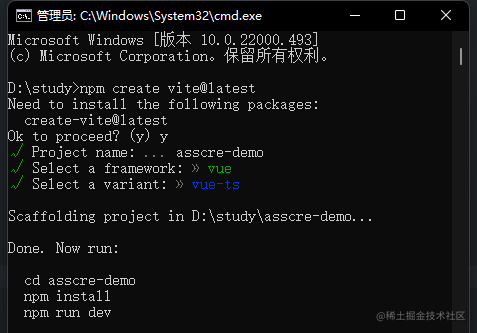
37 |
38 | ```cmd
39 | // 安装依赖
40 | npm i
41 |
42 | // run
43 | npm run dev
44 | ```
45 |
46 | 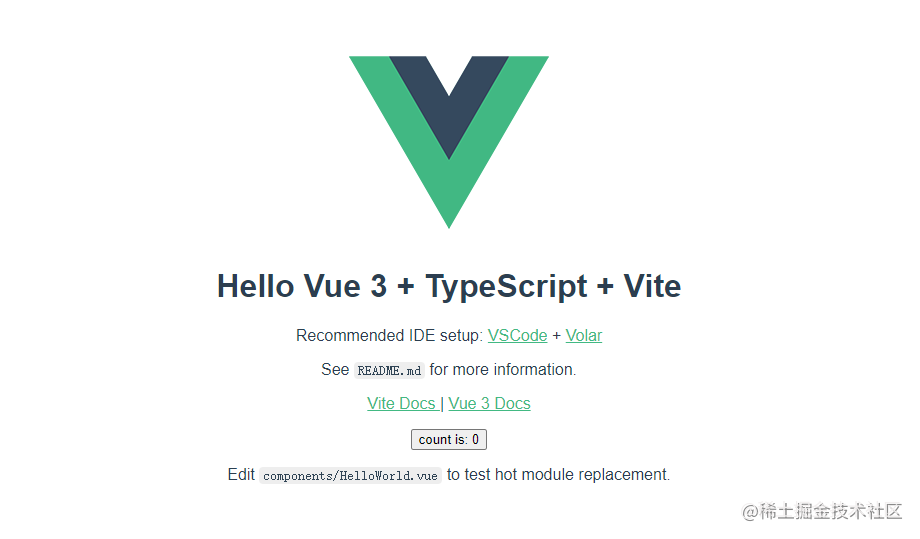
47 |
48 | ### api 请求: Axios
49 |
50 | ```
51 | npm install axios
52 | ```
53 |
54 | 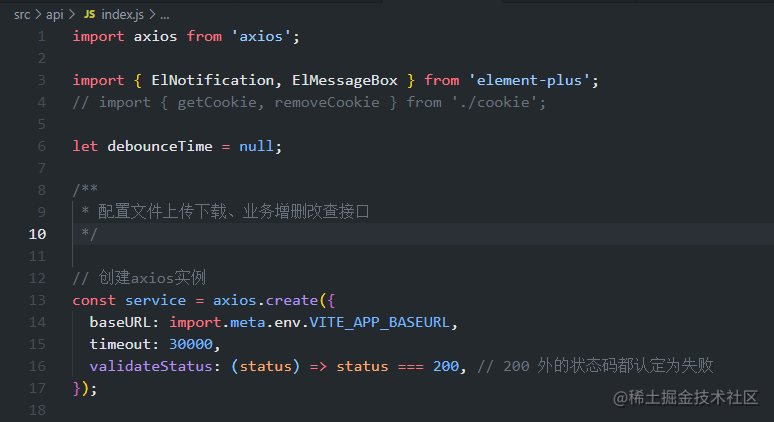
55 |
56 | ### 路由管理:Vue-router
57 |
58 | ```cmd
59 | npm install vue-router@4
60 | ```
61 |
62 | 创建 3 个页面
63 |
64 | ```vue
65 | // home page
66 |
67 | home page
68 |
69 |
70 |
71 |
78 |
79 | // about page
80 |
81 | about page
82 |
83 |
84 |
85 |
92 |
93 | // 404 page
94 |
95 | 404
96 |
97 | ```
98 |
99 | 初始化路由
100 |
101 | ```js
102 | import { createRouter, createWebHistory } from 'vue-router';
103 | import Home from '../pages/home.vue';
104 | import About from '../pages/about.vue';
105 | import NotFound from '../pages/not-found.vue';
106 |
107 | const routes = [
108 | {
109 | path: '/',
110 | component: Home,
111 | meta: { title: 'Home' },
112 | },
113 | {
114 | path: '/About',
115 | component: About,
116 | meta: { title: 'About' },
117 | // example of route level code-splitting
118 | // this generates a separate chunk (About.[hash].js) for this route
119 | // which is lazy-loaded when the route is visited.
120 | // component: () => import('./views/About.vue')
121 | },
122 | { path: '/:path(.*)', component: NotFound },
123 | ];
124 |
125 | const router = createRouter({
126 | history: createWebHistory(),
127 | routes,
128 | });
129 |
130 | // 路由全局前置守卫
131 | router.beforeEach((to, from, next) => {
132 | // console.log("路由全局前置守卫", to, from);
133 | next();
134 | });
135 |
136 | // 路由全局后置守卫
137 | router.afterEach((to, from, next) => {
138 | console.log('路由全局后置守卫', to, from);
139 | next();
140 | });
141 |
142 | export default router;
143 | ```
144 |
145 | 注册路由
146 |
147 | /main.js
148 |
149 | ```js
150 | import { createApp } from 'vue';
151 | // import './tailwind.css';
152 | import App from './App.vue';
153 | import router from './routes';
154 |
155 | createApp(App).use(router).mount('#app');
156 | ```
157 |
158 | src/App.vue
159 |
160 | ```vue
161 |
162 |
163 |
164 | ```
165 |
166 | > 效果展示:
167 |
168 | 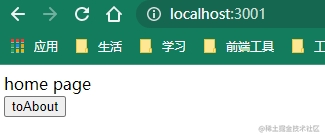
169 |
170 | ### 状态管理: Vuex
171 |
172 | ```cmd
173 | npm install vuex@next --save
174 | ```
175 |
176 | 初始化 vuex,src/store/index.js
177 |
178 | ```js
179 | import { createStore } from 'vuex';
180 |
181 | const store = createStore({
182 | state() {
183 | return {
184 | count: 0,
185 | };
186 | },
187 | mutations: {
188 | increment(state) {
189 | state.count++;
190 | },
191 | },
192 | });
193 |
194 | export default store;
195 | ```
196 |
197 | 挂载:
198 |
199 | ```js
200 | import { createApp } from 'vue';
201 | import App from './App.vue';
202 | import router from './routes';
203 | import store from './store';
204 |
205 | createApp(App).use(router).use(store).mount('#app');
206 | ```
207 |
208 | 使用:
209 |
210 | ```vue
211 |
212 | home page
213 | {{ store.state.count }}
214 |
215 |
216 |
217 |
218 |
231 | ```
232 |
233 | 效果:
234 |
235 | 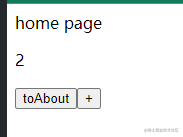
236 |
237 | ### Css 库:Tailwind css
238 |
239 | Tailwind CSS 的工作原理是扫描您的所有 HTML 文件、JavaScript 组件和任何其他模板以查找类名,生成相应的样式,然后将它们写入静态 CSS 文件。
240 |
241 | 生成的样式是原子级的 Css。
242 |
243 | - 安装 Tailwind css
244 | 因为我们使用的 vite 创建的工程项目,既然要便于开发者快速响应开发,我们就要使用到**PostCSS** 帮助我们快速监听生成 css 样式。
245 | > 通过 npm 安装`tailwindcss`及其对等依赖项,并创建您的文件。 `tailwind.config.js`
246 |
247 | ```cmd
248 | npm install -D tailwindcss postcss autoprefixer
249 | npx tailwindcss init
250 | ```
251 |
252 | > 添加`tailwindcss`和`autoprefixer`到您的文件,或在您的项目中配置 PostCSS 的任何位置。 `postcss.config.js`
253 |
254 | ```js
255 | module.exports = {
256 | plugins: {
257 | tailwindcss: {},
258 | autoprefixer: {},
259 | },
260 | };
261 | ```
262 |
263 | > 在文件中添加所有模板文件的路径`tailwind.config.js`。
264 |
265 | ```
266 | module.exports = {
267 | content: ['./src/**/*.{html,js,vue}'],
268 | theme: {
269 | extend: {},
270 | },
271 | plugins: [],
272 | };
273 |
274 | ```
275 |
276 | > `@tailwind`将 Tailwind 的每个层的指令添加到您的主 CSS 文件中。
277 | > /index.css
278 |
279 | ```css
280 | @tailwind base;
281 | @tailwind components;
282 | @tailwind utilities;
283 | ```
284 |
285 | > `npm run dev`使用文件中配置的命令或任何命令运行构建过程`package.json`。
286 |
287 | ```cmd
288 | npm run dev
289 | ```
290 |
291 | > /main.js 中引入 tailwindcss
292 |
293 | ```js
294 | import './tailwindcss.css';
295 | ```
296 |
297 | 修改一下 home page 代码,效果:
298 |
299 | 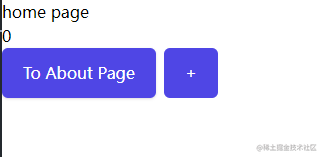
300 |
301 | ### UI 组件库: 按需导入 Element UI
302 |
303 | ```
304 | npm install -D unplugin-vue-components unplugin-auto-import
305 | ```
306 |
307 | > 在 vite.config.js 中导入 element
308 |
309 | ```
310 | import { defineConfig } from 'vite';
311 | import vue from '@vitejs/plugin-vue';
312 | import AutoImport from 'unplugin-auto-import/vite';
313 | import Components from 'unplugin-vue-components/vite';
314 | import { ElementPlusResolver } from 'unplugin-vue-components/resolvers';
315 |
316 | // https://vitejs.dev/config/
317 | export default defineConfig({
318 | plugins: [
319 | vue(),
320 | AutoImport({
321 | resolvers: [ElementPlusResolver()],
322 | }),
323 | Components({
324 | resolvers: [ElementPlusResolver()],
325 | }),
326 | ],
327 | });
328 |
329 | ```
330 |
331 | ### 代码格式化:Prettier
332 |
333 | ```
334 | npm install --save-dev --save-exact prettier
335 | ```
336 |
337 | **接下来我们将为 prettier 创建一个配置文件**。
338 |
339 | 因为 prettier 的目标是开箱即用的配置,所以该配置文件的内容可以只是一个空对象。我们只是添加它,因为一些 IDE 使用它的存在来检测更漂亮。如果您想配置 Prettier 确实提供的少数选项之一,请参阅[配置选项的 Prettier 文档](https://prettier.io/docs/en/options.html)。
340 |
341 | ```
342 | echo {}> .prettierrc.json
343 | ```
344 |
345 | 
346 |
347 | ### 代码检查:Eslint
348 |
349 | ```
350 | npm install --save-dev eslint eslint-plugin-vue
351 | ```
352 |
353 | **接下来,我们将**通过创建`.eslintrc.js`具有以下配置的文件来配置 ESLint,以便将其配置为使用 ESLint 推荐规则以及 Vue 3 的推荐规则。
354 |
355 | ```
356 | module.exports = {
357 | env: {
358 | node: true,
359 | },
360 | extends: [
361 | 'eslint:recommended',
362 | 'plugin:vue/vue3-recommended',
363 | ],
364 | rules: {
365 | // override/add rules settings here, such as:
366 | // 'vue/no-unused-vars': 'error'
367 | }
368 | }
369 | ```
370 |
371 | [如果需要,请访问 eslint-plugin-vue 文档](https://eslint.vuejs.org/user-guide/#usage)以查看可用于 Vue 3 的其他配置,以获得不太严格的选项。不同的配置对应[Vue.js 3 style guide](https://v3.vuejs.org/style-guide/)中的 3 个不同的优先级。
372 |
373 | ### 处理 Prettier 与 ESLint 格式规则冲突
374 |
375 | **最后,我们将关闭与 Prettier 冲突的 ESLint 格式规则**。如果我们不执行此步骤,我们将在 2 之间进行一场永无止境的死亡比赛,看起来像这样:
376 |
377 | 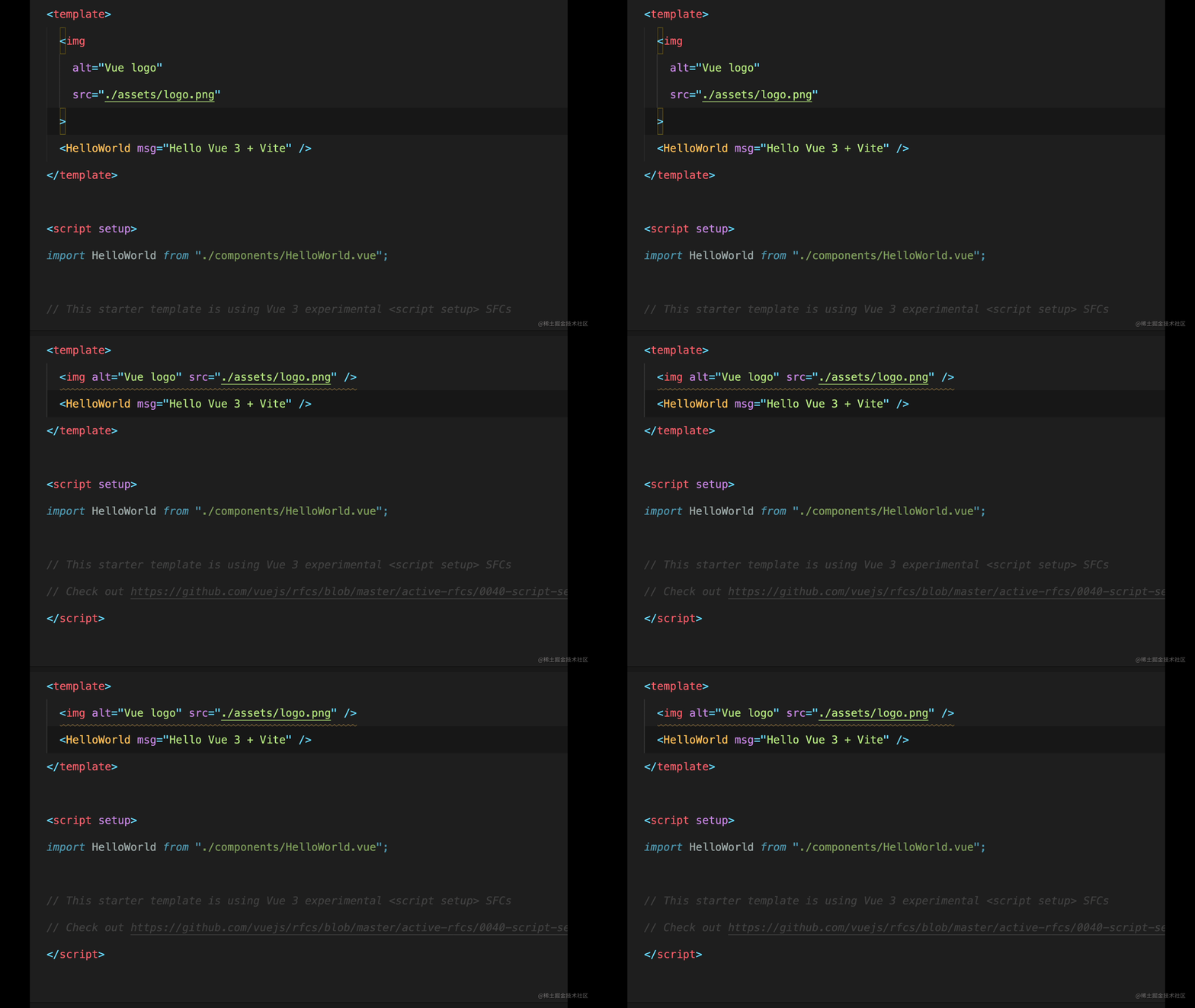
378 |
379 | 如果您在设置 Prettier 和 ESLint 时没有意识到这一步,那么您可能再也不想使用这两个工具了!幸运的是,它很容易修复。
380 |
381 | **我们只需要安装`eslint-config-prettier`配置。** 这将禁用 Prettier 将负责处理的 ESLint 中的格式化规则。
382 |
383 | ```
384 | npm install eslint-config-prettier --save-dev
385 | ```
386 |
387 | **`.eslintrc.js`并在 extends 下的文件中注册配置**。确保它是在扩展数组中定义的最后一个配置,因为配置的顺序决定了处理不同配置中的重复规则(以后的配置会覆盖以前的配置)!
388 |
389 | ```
390 | //.eslintrc.js
391 | extends: [
392 | 'eslint:recommended',
393 | "plugin:vue/vue3-recommended",
394 | "prettier"
395 | ],
396 | ```
397 |
398 | #### 从命令行运行
399 |
400 | 此时,我们应该设置为让 ESLint 报告并纠正可修复的错误,并让 Prettier 重新格式化我们的源代码。让我们将以下两项添加到`scripts`package.json 的部分。
401 |
402 | ```
403 | "scripts":{
404 | //...
405 | "lint": "eslint --ext .js,.vue --ignore-path .gitignore --fix src",
406 | "format": "prettier . --write"
407 | }
408 | ```
409 |
410 | 此处定义的**lint**命令非常适合在 CI/CD 管道中运行 lint 或仅用于在终端中手动测试。您可以通过运行相应的命令来快速查看其中的任何一个,但这不一定是您希望在整个开发过程中持续使用它们的方式。
411 |
412 | #### 使用 VS Code 为 Vue 3 设置 ESLint 和 Prettier
413 |
414 | 为了简化您的工作流程,您需要将这 2 个工具与您的 IDE 集成。这样做可以让您实时为错误添加下划线,并提供 ESLint 错误的自动修复和文件保存时更漂亮的格式。谈论节省时间!由于 VS Code 是一个免费且流行的 IDE,也是我使用的 IDE,让我们看看如何将 ESLint 和 Prettier 与 VS Code 集成到您的 Vite 驱动的 Vue.js 3 项目中。
415 |
416 | 首先,您需要为 Prettier 和 ESLint 安装 2 个[相应](https://marketplace.visualstudio.com/items?itemName=esbenp.prettier-vscode)的[插件](https://marketplace.visualstudio.com/items?itemName=dbaeumer.vscode-eslint)。[如果您还没有安装 Vetur](https://vuejs.github.io/vetur/) ,您还需要安装它,因为它为 .vue 文件提供语法高亮和更多功能。
417 |
418 | 接下来,在您的 VS 代码设置中,您应该提供以下内容以关闭 Vetur 对模板的验证,并让 ESLint 根据`.eslintrc.js`文件中的规则处理它。
419 |
420 | ```
421 | // Code/User/settings.json
422 | "vetur.validation.template": false
423 | ```
424 |
425 | 现在,如果您打开 HelloWorld 组件,您可以看到 ESLint 正在运行。你可以看到下面的黄色波浪线`msg: String`,如果你将鼠标悬停在它上面,你会看到更多关于为什么 ESLint 会警告你的信息。在这种情况下,这是因为规则`vue/require-default-prop`。
426 |
427 | 
428 |
429 | 所以为了解决这个问题,我们可以做两件事之一。
430 |
431 | 1. 如果我们想允许没有默认值的道具,我们可以`vue/require-default-prop`在文件中关闭规则。`.eslintrc.js`
432 |
433 | ```
434 | // Code/User/settings.json
435 | rules: {
436 | //...
437 | "vue/require-default-prop": "off",
438 | },
439 | ```
440 |
441 | 2. 或者我们通过提供默认值来更改代码以遵守规则,并且波浪线消失了!非常好!
442 |
443 | 
444 |
445 | 现在我们已经让 ESLint 直接在文件中报告错误,但我们没有任何自动设置让 Prettier 重新格式化代码或让 ESLint 自动更正可修复的问题。我们可以通过将以下内容添加到我们的 VS 代码设置中来告诉 VS 代码在保存时执行这两项操作。
446 |
447 | ```
448 | // Code/User/settings.json
449 | {
450 | "editor.formatOnSave": true,
451 | "editor.codeActionsOnSave": {
452 | "source.fixAll.eslint": true
453 | },
454 | }
455 | ```
456 |
457 | 我们还应该确保我们的 vue 和 js 文件已配置为具有以下设置的默认格式化程序更漂亮:
458 |
459 | ```
460 | // Code/User/settings.json
461 | "[vue]": {
462 | "editor.defaultFormatter": "esbenp.prettier-vscode"
463 | },
464 | "[javascript]": {
465 | "editor.defaultFormatter": "esbenp.prettier-vscode"
466 | },
467 | ```
468 |
469 | 现在,如果你打开 App.vue,然后将图像放在一张上并保存,它会自动弹回它应该在的位置!工作时更漂亮!
470 |
471 | 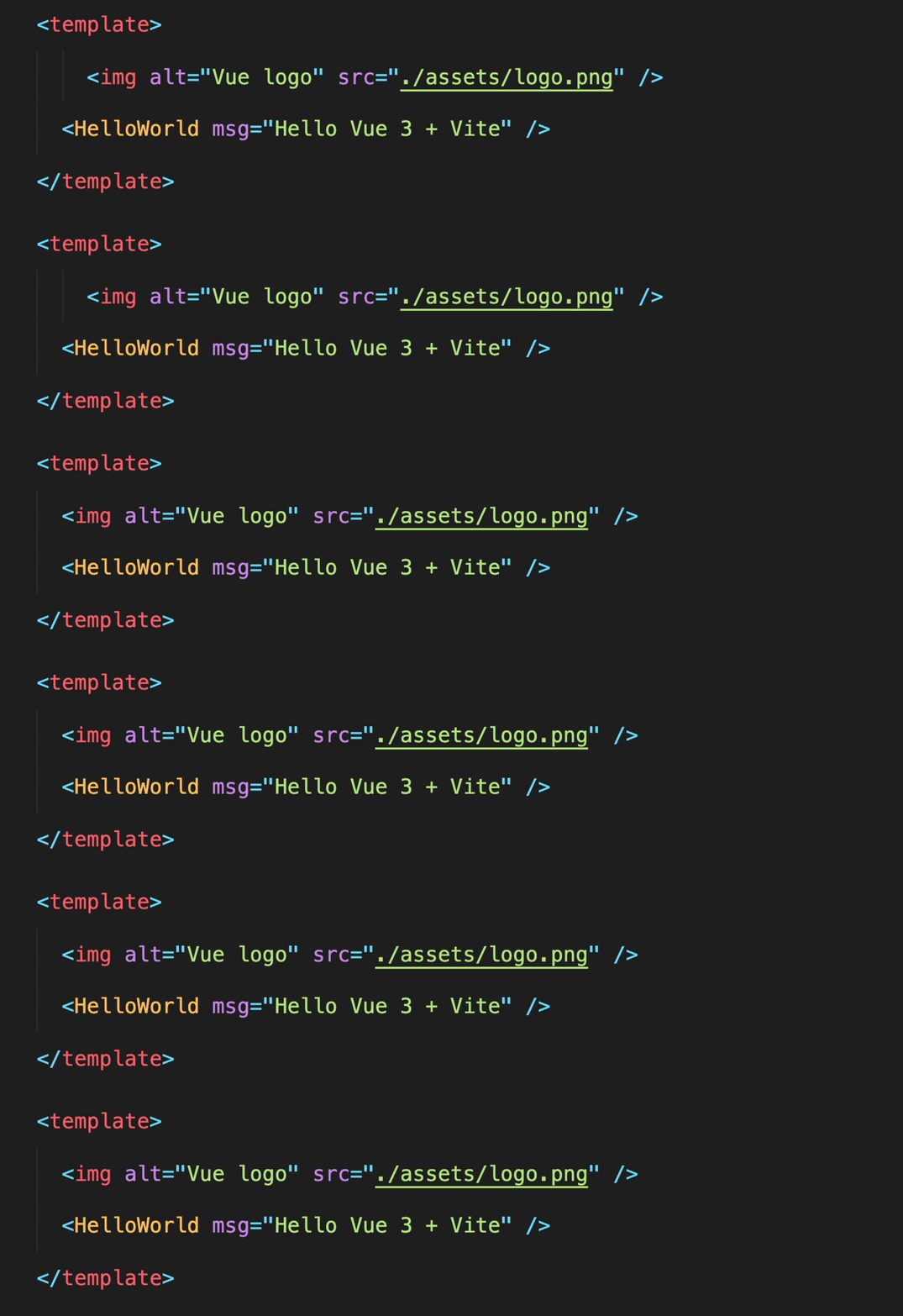
472 |
473 | 如果您将图像更改为循环放置在`key`之前的虚构项目数组,则`v-for`如下所示:
474 |
475 | ```
476 |  477 | ```
478 |
479 | 您会看到 ESLint 将`vue/attributes-order`规则付诸实施,在保存时自动修复了问题。这太方便了!
480 |
481 | 
482 |
483 | #### 浏览器中的 ESLint 错误
484 |
485 | 对于大多数开发人员和团队来说,我们目前的设置可能足以提高生产力。但是,如果您想更进一步,您可以安装 Vite ESLint 插件以在浏览器中查看覆盖在您的应用程序上的 ESLint 问题。
486 |
487 | 
488 |
489 | 这使得那些无法自动修复的 ESLint 错误无法被忽略。我知道一些喜欢这个的开发人员和其他人觉得它超级烦人,所以如果你愿意就安装它,否则只要确保你特别注意你的 IDE 中的那些红色曲线。
490 |
491 | **`vite-plugin-eslint`**通过运行**安装**
492 |
493 | ```
494 | npm install vite-plugin-eslint --save-dev
495 | ```
496 |
497 | **然后**通过导入插件注册插件并将其添加为插件`vite.config.js`
498 |
499 | ```
500 | import { defineConfig } from 'vite';
501 | import eslintPlugin from 'vite-plugin-eslint';
502 |
503 | export default defineConfig({
504 | plugins: [eslintPlugin()],
505 | });
506 | ```
507 |
508 | 就是这样,任何 ESLint 错误现在都会在浏览器中报告!如果它不适合您,请尝试重新启动**development server**。
509 |
--------------------------------------------------------------------------------
477 | ```
478 |
479 | 您会看到 ESLint 将`vue/attributes-order`规则付诸实施,在保存时自动修复了问题。这太方便了!
480 |
481 | 
482 |
483 | #### 浏览器中的 ESLint 错误
484 |
485 | 对于大多数开发人员和团队来说,我们目前的设置可能足以提高生产力。但是,如果您想更进一步,您可以安装 Vite ESLint 插件以在浏览器中查看覆盖在您的应用程序上的 ESLint 问题。
486 |
487 | 
488 |
489 | 这使得那些无法自动修复的 ESLint 错误无法被忽略。我知道一些喜欢这个的开发人员和其他人觉得它超级烦人,所以如果你愿意就安装它,否则只要确保你特别注意你的 IDE 中的那些红色曲线。
490 |
491 | **`vite-plugin-eslint`**通过运行**安装**
492 |
493 | ```
494 | npm install vite-plugin-eslint --save-dev
495 | ```
496 |
497 | **然后**通过导入插件注册插件并将其添加为插件`vite.config.js`
498 |
499 | ```
500 | import { defineConfig } from 'vite';
501 | import eslintPlugin from 'vite-plugin-eslint';
502 |
503 | export default defineConfig({
504 | plugins: [eslintPlugin()],
505 | });
506 | ```
507 |
508 | 就是这样,任何 ESLint 错误现在都会在浏览器中报告!如果它不适合您,请尝试重新启动**development server**。
509 |
--------------------------------------------------------------------------------