├── img
├── update
└── buktitrx.jpg
├── qriss.png
├── .github
└── FUNDING.yml
├── LICENSE
├── README.md
├── README.go.md
├── kodebot.js
├── README.py.md
└── README.js.md
/img/update:
--------------------------------------------------------------------------------
1 |
2 |
--------------------------------------------------------------------------------
/qriss.png:
--------------------------------------------------------------------------------
https://raw.githubusercontent.com/AutoFTbot/Qris-OrderKuota/HEAD/qriss.png
--------------------------------------------------------------------------------
/img/buktitrx.jpg:
--------------------------------------------------------------------------------
https://raw.githubusercontent.com/AutoFTbot/Qris-OrderKuota/HEAD/img/buktitrx.jpg
--------------------------------------------------------------------------------
/.github/FUNDING.yml:
--------------------------------------------------------------------------------
1 | ko_fi: FighterTunnel
2 | custom: ['https://trakteer.id/FighterTunnel']
3 |
--------------------------------------------------------------------------------
/LICENSE:
--------------------------------------------------------------------------------
1 | MIT License
2 |
3 | Copyright (c) 2025 AutoFTbot
4 |
5 | Permission is hereby granted, free of charge, to any person obtaining a copy
6 | of this software and associated documentation files (the "Software"), to deal
7 | in the Software without restriction, including without limitation the rights
8 | to use, copy, modify, merge, publish, distribute, sublicense, and/or sell
9 | copies of the Software, and to permit persons to whom the Software is
10 | furnished to do so, subject to the following conditions:
11 |
12 | The above copyright notice and this permission notice shall be included in all
13 | copies or substantial portions of the Software.
14 |
15 | THE SOFTWARE IS PROVIDED "AS IS", WITHOUT WARRANTY OF ANY KIND, EXPRESS OR
16 | IMPLIED, INCLUDING BUT NOT LIMITED TO THE WARRANTIES OF MERCHANTABILITY,
17 | FITNESS FOR A PARTICULAR PURPOSE AND NONINFRINGEMENT. IN NO EVENT SHALL THE
18 | AUTHORS OR COPYRIGHT HOLDERS BE LIABLE FOR ANY CLAIM, DAMAGES OR OTHER
19 | LIABILITY, WHETHER IN AN ACTION OF CONTRACT, TORT OR OTHERWISE, ARISING FROM,
20 | OUT OF OR IN CONNECTION WITH THE SOFTWARE OR THE USE OR OTHER DEALINGS IN THE
21 | SOFTWARE.
22 |
--------------------------------------------------------------------------------
/README.md:
--------------------------------------------------------------------------------
1 |
2 |  3 |
3 |
4 |
5 | 🚀 QRIS Payment Package
6 |
7 |
8 | Paket powerful untuk generate QRIS dan cek status pembayaran secara real-time 🔄
9 |
10 |
11 |
12 |
13 |  14 |
15 |
16 |
14 |
15 |
16 |  17 |
18 |
19 |
17 |
18 |
19 |  20 |
21 |
20 |
21 |
22 |
23 |
24 |
25 |  26 |
27 |
28 |
26 |
27 |
28 |  29 |
30 |
31 |
29 |
30 |
31 |  32 |
33 |
34 |
32 |
33 |
34 |  35 |
36 |
35 |
36 |
37 |
38 |
39 | Fitur •
40 | Cara Penggunaan •
41 | Dokumentasi •
42 | Dukungan
43 |
44 |
45 | ---
46 |
47 | ## 🌟 Fitur Utama
48 |
49 |
50 |
51 | | Fitur | Deskripsi |
52 | |:---:|:---|
53 | | ✅ Generate QRIS | Generate QRIS untuk nominal tertentu |
54 | | 🖼️ Custom Logo | Tambah logo custom di tengah QR |
55 | | 📡 Real-time Status | Cek status pembayaran dari API |
56 | | 🛡️ Validasi | Validasi format QRIS |
57 | | 📊 Checksum | Hitung checksum CRC16 |
58 |
59 |
60 |
61 | ---
62 |
63 | ## 🧾 Cara Mendapatkan `YOUR_BASE_QR_STRING`
64 |
65 | Untuk menggunakan package ini, kamu membutuhkan **QR base string** dari QRIS. Ikuti langkah berikut:
66 |
67 | 1. **Siapkan Gambar QRIS** yang kamu miliki.
68 | 2. Buka situs:
69 | 👉 [https://www.imagetotext.info/qr-code-scanner](https://www.imagetotext.info/qr-code-scanner)
70 | 3. Upload gambar QRIS ke situs tersebut.
71 | 4. Tunggu hingga proses scan selesai.
72 | 5. Salin hasil **output QR string** yang muncul.
73 | 6. Gunakan hasil tersebut sebagai nilai `YOUR_BASE_QR_STRING`.
74 |
75 | > 💡 **Contoh hasil:**
76 | > ```
77 | > 00020101021226690014ID.CO.QRIS.WWW01189360091311520010303120123456789040415ID10203040506070809051003UME51440014ID.CO.BANK90203123456303201234567890503...
78 | > ```
79 |
80 | ---
81 |
82 | ## 🤖 Cara Mendapatkan Token & Username untuk Mutasi
83 |
84 | Untuk mengakses fitur mutasi OrderKuota, kamu membutuhkan **auth_token** dan **auth_username**. Dapatkan melalui bot Telegram:
85 |
86 | ### **Via Bot Telegram:**
87 | 1. **Buka Bot:** [@orderkuotaBot](https://t.me/orderkuotaBot)
88 | 2. **Login:** `/login username password`
89 | 3. **Verifikasi OTP:** `/otp kode_otp`
90 | 4. **Dapatkan Token:** Bot akan menampilkan `auth_token` setelah login berhasil
91 |
92 | > ⚠️ **Penting:** Token akan expired setelah 1 jam. Login ulang jika diperlukan.
93 |
94 | ---
95 |
96 | ## 📚 Dokumentasi
97 |
98 |
99 |
100 | | Bahasa | Dokumentasi |
101 | |:---:|:---|
102 | |

JavaScript | [`README.js.md`](README.js.md) |
103 | |

Python | [`README.py.md`](README.py.md) |
104 | |

Go | [`README.go.md`](README.go.md)
⚠️ Fitur Custom Logo tidak tersedia |
105 |
106 |
124 |  125 |
125 |
126 |
127 | ---
128 |
129 |
132 |
--------------------------------------------------------------------------------
/README.go.md:
--------------------------------------------------------------------------------
1 | # 🚀 Paket Pembayaran QRIS untuk Go
2 |
3 | Paket Go yang menyediakan integrasi pembayaran QRIS (Quick Response Code Indonesian Standard) untuk aplikasi Anda.
4 |
5 | ## 🎯 Fitur Utama
6 |
7 | - Generate QRIS dengan format standar
8 | - Pengecekan status pembayaran secara real-time
9 | - Validasi format QRIS
10 | - Kalkulasi checksum CRC16
11 | - Dukungan base QRIS string
12 | - Penanganan error yang lebih baik
13 | - QR code dengan tingkat koreksi error tinggi
14 |
15 | ## 📦 Instalasi
16 |
17 | ```bash
18 | go get github.com/AutoFTbot/OrderKuota-go
19 | ```
20 |
21 | ## 🚀 Penggunaan
22 |
23 | ### Inisialisasi
24 |
25 | ```go
26 | import "github.com/AutoFTbot/OrderKuota-go/qris"
27 |
28 | config := qris.QRISConfig{
29 | MerchantID: "123456789",
30 | APIKey: "your-api-key",
31 | BaseQrString: "your-base-qr-string",
32 | }
33 |
34 | qrisInstance, err := qris.NewQRIS(config)
35 | if err != nil {
36 | // handle error
37 | }
38 | ```
39 |
40 | ### Generate QR Code
41 |
42 | ```go
43 | data := qris.QRISData{
44 | Amount: 100000,
45 | TransactionID: "TRX123",
46 | }
47 |
48 | qrCode, err := qrisInstance.GenerateQRCode(data)
49 | if err != nil {
50 | // handle error
51 | }
52 |
53 | // Simpan QR code ke file
54 | err = qrCode.Save("qris.png")
55 | ```
56 |
57 | ### Generate QRIS String
58 |
59 | ```go
60 | data := qris.QRISData{
61 | Amount: 100000,
62 | TransactionID: "TRX123",
63 | }
64 |
65 | qrString, err := qrisInstance.GetQRISString(data)
66 | if err != nil {
67 | // handle error
68 | }
69 | ```
70 |
71 | ### Cek Status Pembayaran
72 |
73 | ```go
74 | status, err := qrisInstance.CheckPaymentStatus("TRX123", 100000)
75 | if err != nil {
76 | // handle error
77 | }
78 |
79 | if status.Status == "PAID" {
80 | // Pembayaran berhasil
81 | fmt.Printf("Pembayaran diterima dari %s pada %s\n",
82 | status.BrandName, status.Date)
83 | }
84 | ```
85 |
86 | ### Validasi String QRIS
87 |
88 | ```go
89 | err := qrisInstance.ValidateQRISString(qrString)
90 | if err != nil {
91 | // handle error
92 | }
93 | ```
94 |
95 | ## 📝 Dokumentasi
96 |
97 | ### QRISConfig
98 |
99 | ```go
100 | type QRISConfig struct {
101 | MerchantID string // ID merchant dari payment gateway
102 | APIKey string // API key untuk autentikasi
103 | BaseQrString string // Base QRIS string dari merchant
104 | }
105 | ```
106 |
107 | ### QRISData
108 |
109 | ```go
110 | type QRISData struct {
111 | Amount int64 // Nominal pembayaran
112 | TransactionID string // ID transaksi unik
113 | }
114 | ```
115 |
116 | ### PaymentStatus
117 |
118 | ```go
119 | type PaymentStatus struct {
120 | Status string // Status pembayaran (PAID/UNPAID)
121 | Amount int64 // Nominal pembayaran
122 | Reference string // Referensi pembayaran
123 | Date string // Tanggal pembayaran (jika PAID)
124 | BrandName string // Nama brand pembayar (jika PAID)
125 | BuyerRef string // Referensi pembeli (jika PAID)
126 | }
127 | ```
128 |
129 | ### Contoh Kode
130 |
131 | ```go
132 | package main
133 |
134 | import (
135 | "fmt"
136 | "log"
137 | "time"
138 |
139 | "github.com/autoftbot/orderkuota-go/qris"
140 | )
141 |
142 | func main() {
143 | // Inisialisasi QRIS dengan konfigurasi
144 | config := qris.QRISConfig{
145 | MerchantID: "#",
146 | APIKey: "#",
147 | BaseQrString: "#",
148 | }
149 |
150 | // Buat instance QRIS
151 | qrisInstance := qris.NewQRIS(config)
152 |
153 | // Generate QR Code
154 | data := qris.QRISData{
155 | Amount: 1000,
156 | TransactionID: "TRX123",
157 | }
158 |
159 | qrCode, err := qrisInstance.GenerateQRCode(data)
160 | if err != nil {
161 | log.Fatalf("Error generating QR code: %v", err)
162 | }
163 |
164 | // Simpan QR code ke file
165 | err = qrCode.WriteFile(256, "qris.png")
166 | if err != nil {
167 | log.Fatalf("Error saving QR code: %v", err)
168 | }
169 |
170 | fmt.Println("QR Code berhasil dibuat dan disimpan sebagai qris.png")
171 | fmt.Println("Silahkan scan QR code untuk melakukan pembayaran...")
172 |
173 | // Cek status pembayaran secara berulang
174 | for {
175 | fmt.Println("\nMengecek status pembayaran...")
176 | status, err := qrisInstance.CheckPaymentStatus("TRX123", 1000)
177 | if err != nil {
178 | log.Printf("Error checking payment status: %v", err)
179 | time.Sleep(5 * time.Second)
180 | continue
181 | }
182 |
183 | // Tampilkan detail status
184 | fmt.Printf("Status Pembayaran: %s\n", status.Status)
185 | fmt.Printf("Amount yang diharapkan: %d\n", 1000)
186 | fmt.Printf("Amount yang diterima: %d\n", status.Amount)
187 | fmt.Printf("Reference: %s\n", status.Reference)
188 |
189 | if status.Status == "PAID" {
190 | fmt.Printf("Pembayaran berhasil!\n")
191 | fmt.Printf("Date: %s\n", status.Date)
192 | fmt.Printf("Brand: %s\n", status.BrandName)
193 | fmt.Printf("Buyer Ref: %s\n", status.BuyerRef)
194 | break
195 | } else {
196 | fmt.Println("Menunggu pembayaran...")
197 | }
198 |
199 | // Tunggu 5 detik sebelum cek lagi
200 | time.Sleep(5 * time.Second)
201 | }
202 | }
203 | ```
204 |
205 | ## 🔍 Penanganan Error
206 |
207 | Paket ini menyediakan penanganan error yang lebih baik dengan pesan error yang jelas:
208 |
209 | - Validasi input saat inisialisasi
210 | - Validasi format QRIS
211 | - Validasi checksum
212 | - Error saat generate QR code
213 | - Error saat cek status pembayaran
214 |
215 | ## 🛠️ Praktik Terbaik
216 |
217 | 1. Selalu cek error saat inisialisasi QRIS
218 | 2. Gunakan ID transaksi unik untuk setiap transaksi
219 | 3. Validasi string QRIS sebelum digunakan
220 | 4. Gunakan penanganan error yang tepat
221 | 5. Simpan QR code dalam format PNG untuk kualitas terbaik
222 |
--------------------------------------------------------------------------------
/kodebot.js:
--------------------------------------------------------------------------------
1 | process.env.NODE_TLS_REJECT_UNAUTHORIZED = '0';
2 | const TelegramBot = require('node-telegram-bot-api');
3 | const { processApiRequest } = require('./lib/orderkuota-logic');
4 |
5 | const TELEGRAM_TOKEN = '#';
6 |
7 | const bot = new TelegramBot(TELEGRAM_TOKEN, { polling: true });
8 |
9 | const userStates = {};
10 |
11 | async function deleteLastBotMessage(chatId) {
12 | const state = userStates[chatId];
13 | if (state && state.lastBotMessageId) {
14 | try {
15 | await bot.deleteMessage(chatId, state.lastBotMessageId);
16 | } catch (e) {
17 | }
18 | state.lastBotMessageId = null;
19 | }
20 | }
21 |
22 | bot.onText(/\/start/, async (msg) => {
23 | await deleteLastBotMessage(msg.chat.id);
24 | const sent = await bot.sendMessage(
25 | msg.chat.id,
26 | 'Selamat datang di OrderKuota Bot!\nKetik /otp untuk login OrderKuota.\n\n*Privasi Anda aman!* Semua proses dan data yang Anda kirim _tidak disimpan di database manapun_. Hanya Anda dan bot yang tahu data yang dikirimkan.',
27 | { parse_mode: 'Markdown' }
28 | );
29 | userStates[msg.chat.id] = { lastBotMessageId: sent.message_id };
30 | });
31 |
32 | bot.onText(/\/otp/, async (msg) => {
33 | await deleteLastBotMessage(msg.chat.id);
34 | userStates[msg.chat.id] = { step: 'awaiting_username' };
35 | const sent = await bot.sendMessage(msg.chat.id, 'Masukkan username OrderKuota Anda untuk request OTP:');
36 | userStates[msg.chat.id].lastBotMessageId = sent.message_id;
37 | });
38 |
39 | bot.onText(/\/verify/, async (msg) => {
40 | await deleteLastBotMessage(msg.chat.id);
41 | userStates[msg.chat.id] = { step: 'verify_awaiting_username' };
42 | const sent = await bot.sendMessage(msg.chat.id, 'Masukkan username OrderKuota Anda untuk verifikasi OTP:');
43 | userStates[msg.chat.id].lastBotMessageId = sent.message_id;
44 | });
45 |
46 | bot.on('message', async (msg) => {
47 | const chatId = msg.chat.id;
48 | const state = userStates[chatId];
49 | if (!state) return;
50 |
51 | // OTP flow
52 | if (state.step === 'awaiting_username' && !msg.text.startsWith('/')) {
53 | state.username = msg.text.trim();
54 | state.step = 'awaiting_password';
55 | await deleteLastBotMessage(chatId);
56 | const sent = await bot.sendMessage(chatId, 'Masukkan password OrderKuota Anda:');
57 | state.lastBotMessageId = sent.message_id;
58 | return;
59 | }
60 | if (state.step === 'awaiting_password' && !msg.text.startsWith('/')) {
61 | state.password = msg.text.trim();
62 | state.step = 'processing_otp';
63 | await deleteLastBotMessage(chatId);
64 | const sentReq = await bot.sendMessage(chatId, 'Meminta OTP...');
65 | state.lastBotMessageId = sentReq.message_id;
66 | try {
67 | const result = await processApiRequest({
68 | action: 'request_otp',
69 | username: state.username,
70 | password: state.password
71 | });
72 | if (result && result.success === false) {
73 | await deleteLastBotMessage(chatId);
74 | const sent = await bot.sendMessage(chatId, `❌ *Gagal request OTP!*
75 | _${result.message || 'Terjadi kesalahan.'}_`, { parse_mode: 'Markdown' });
76 | state.lastBotMessageId = sent.message_id;
77 | delete userStates[chatId];
78 | return;
79 | }
80 | await deleteLastBotMessage(chatId);
81 | const sent = await bot.sendMessage(chatId, `✅ *OTP berhasil dikirim!*
82 | Silakan cek email/nomor Anda dan masukkan kode OTP di bawah ini.\n\n_Respon server:_ \`${JSON.stringify(result)}\``, { parse_mode: 'Markdown' });
83 | state.lastBotMessageId = sent.message_id;
84 | state.step = 'verify_awaiting_otp';
85 | const sentOtp = await bot.sendMessage(chatId, 'Masukkan kode OTP yang Anda terima:');
86 | state.lastBotMessageId = sentOtp.message_id;
87 | } catch (err) {
88 | await deleteLastBotMessage(chatId);
89 | const sent = await bot.sendMessage(chatId, `❌ *Gagal request OTP!*
90 | _${err.message}_`, { parse_mode: 'Markdown' });
91 | state.lastBotMessageId = sent.message_id;
92 | delete userStates[chatId];
93 | }
94 | return;
95 | }
96 |
97 | if (state.step === 'verify_awaiting_otp' && !msg.text.startsWith('/')) {
98 | state.otp = msg.text.trim();
99 | state.step = 'processing_verify';
100 | await deleteLastBotMessage(chatId);
101 | const sentVer = await bot.sendMessage(chatId, '🔄 Memverifikasi OTP...');
102 | state.lastBotMessageId = sentVer.message_id;
103 | try {
104 | const result = await processApiRequest({
105 | action: 'verify_otp',
106 | username: state.username,
107 | otp: state.otp
108 | });
109 | if (result && result.success === false) {
110 | await deleteLastBotMessage(chatId);
111 | const sent = await bot.sendMessage(chatId, `❌ *Gagal verifikasi OTP!*
112 | _${result.message || 'Terjadi kesalahan.'}_`, { parse_mode: 'Markdown' });
113 | state.lastBotMessageId = sent.message_id;
114 | delete userStates[chatId];
115 | return;
116 | }
117 | await deleteLastBotMessage(chatId);
118 | const token = result?.results?.token || '-';
119 | const sent = await bot.sendMessage(chatId, `🎉 *Verifikasi Berhasil!*
120 | Berikut token Anda (jaga kerahasiaannya):
121 | \`${token}\`
122 | \n_Respon server:_ \`${JSON.stringify(result)}\``, { parse_mode: 'Markdown' });
123 | state.lastBotMessageId = sent.message_id;
124 | } catch (err) {
125 | await deleteLastBotMessage(chatId);
126 | const sent = await bot.sendMessage(chatId, `❌ *Gagal verifikasi OTP!*
127 | _${err.message}_`, { parse_mode: 'Markdown' });
128 | state.lastBotMessageId = sent.message_id;
129 | }
130 | delete userStates[chatId];
131 | return;
132 | }
133 | });
134 |
--------------------------------------------------------------------------------
/README.py.md:
--------------------------------------------------------------------------------
1 | # QRIS Payment Python Package
2 |
3 | Package Python untuk generate QRIS dan cek status pembayaran dengan fitur monitoring realtime.
4 |
5 | ## 🚀 Fitur Terbaru (v1.1.3)
6 |
7 | - ✅ **Generate QRIS** dengan nominal tertentu
8 | - ✅ **Tambah logo** di tengah QR
9 | - ✅ **Cek status pembayaran** realtime
10 | - ✅ **Filter waktu 10 menit** (lebih fleksibel)
11 | - ✅ **Debug mode** untuk monitoring detail
12 | - ✅ **Validasi format QRIS** yang robust
13 | - ✅ **Perhitungan checksum CRC16**
14 | - ✅ **Error handling** yang informatif
15 | - ✅ **Type hints** untuk development yang lebih baik
16 |
17 | ## 📦 Instalasi
18 |
19 | ```bash
20 | pip install qris-payment==1.1.3
21 | ```
22 |
23 | ## 🔑 Cara Mendapatkan Auth Token
24 |
25 | Untuk mendapatkan `auth_username` dan `auth_token`, hubungi bot Telegram:
26 |
27 | **@AutoFtBot** - Bot resmi untuk mendapatkan kredensial QRIS Payment
28 |
29 | ### Langkah-langkah:
30 | 1. Buka Telegram dan cari **@AuutooFtBot**
31 | 2. Kirim pesan `/start`
32 | 3. Ikuti instruksi untuk mendapatkan kredensial
33 | 4. Bot akan memberikan `auth_username` dan `auth_token`
34 |
35 | ## 🛠️ Penggunaan
36 |
37 | ### Inisialisasi
38 |
39 | ```python
40 | from qris_payment import QRISPayment
41 |
42 | config = {
43 | 'auth_username': 'YOUR_AUTH_USERNAME', # Dapat dari @AutoFtBot
44 | 'auth_token': 'YOUR_AUTH_TOKEN', # Dapat dari @AutoFtBot
45 | 'base_qr_string': 'YOUR_BASE_QR_STRING',
46 | 'logo_path': 'path/to/logo.png' # Opsional
47 | }
48 |
49 | qris = QRISPayment(config)
50 | ```
51 |
52 | ### Generate QRIS
53 |
54 | ```python
55 | def generate_qr():
56 | try:
57 | result = qris.generate_qr(10000)
58 |
59 | # Simpan QR ke file
60 | result['qr_image'].save('qr.png')
61 | print('QR String:', result['qr_string'])
62 | except Exception as e:
63 | print(f"Error: {str(e)}")
64 | ```
65 |
66 | ### Cek Status Pembayaran
67 |
68 | ```python
69 | def check_payment():
70 | try:
71 | # Reference tidak dipakai untuk pengecekan, hanya amount
72 | result = qris.check_payment('REF123', 10000)
73 | print('Status pembayaran:', result)
74 | except Exception as e:
75 | print(f"Error: {str(e)}")
76 | ```
77 |
78 | ### Debug Mode
79 |
80 | ```python
81 | # Untuk monitoring detail proses pengecekan
82 | from qris_payment.payment_checker import PaymentChecker
83 |
84 | checker = PaymentChecker({
85 | 'auth_username': 'YOUR_AUTH_USERNAME',
86 | 'auth_token': 'YOUR_AUTH_TOKEN'
87 | }, debug=True)
88 |
89 | result = checker.check_payment_status(None, 10000)
90 | ```
91 |
92 | ## 📋 Konfigurasi
93 |
94 | | Parameter | Tipe | Deskripsi | Wajib |
95 | |-----------|------|-----------|-------|
96 | | auth_username | string | Username dari @AutoFtBot | Ya |
97 | | auth_token | string | Token dari @AutoFtBot | Ya |
98 | | base_qr_string | string | String dasar QRIS | Ya |
99 | | logo_path | string | Path ke file logo (opsional) | Tidak |
100 |
101 | ## 📊 Response
102 |
103 | ### Generate QR
104 |
105 | ```python
106 | {
107 | 'qr_string': "000201010212...", # String QRIS dengan checksum
108 | 'qr_image': # Objek gambar QR
109 | }
110 | ```
111 |
112 | ### Cek Pembayaran
113 |
114 | ```python
115 | {
116 | 'success': True,
117 | 'data': {
118 | 'status': 'PAID' | 'UNPAID',
119 | 'amount': int,
120 | 'date': str, # Hanya jika status PAID
121 | 'brand_name': str, # Hanya jika status PAID
122 | 'buyer_reff': str # Hanya jika status PAID
123 | }
124 | }
125 | ```
126 |
127 | ## ⚡ Contoh Realtime Payment
128 |
129 | ```python
130 | import time
131 | import random
132 | from qris_payment import QRISPayment
133 |
134 | config = {
135 | 'auth_username': 'YOUR_AUTH_USERNAME',
136 | 'auth_token': 'YOUR_AUTH_TOKEN',
137 | 'base_qr_string': 'YOUR_BASE_QR_STRING',
138 | 'logo_path': './logo.png'
139 | }
140 |
141 | def realtime_payment_test():
142 | qris = QRISPayment(config)
143 |
144 | # Generate QR dengan nominal random
145 | amount = 100 + random.randint(1, 99)
146 | result = qris.generate_qr(amount)
147 | result['qr_image'].save('qr.png')
148 |
149 | print(f'Amount: {amount}')
150 | print('QR saved as: qr.png')
151 | print('Silakan scan dan transfer tepat Rp', amount)
152 |
153 | # Monitor pembayaran (10 menit terakhir)
154 | start_time = time.time()
155 | while time.time() - start_time < 300: # 5 menit timeout
156 | payment_result = qris.check_payment('REF', amount)
157 | if payment_result['success'] and payment_result['data']['status'] == 'PAID':
158 | print('🎉 Pembayaran berhasil!')
159 | print('Detail:', payment_result['data'])
160 | return
161 | time.sleep(3)
162 | print('Menunggu pembayaran...')
163 |
164 | print('Timeout: Pembayaran tidak diterima')
165 |
166 | if __name__ == '__main__':
167 | realtime_payment_test()
168 | ```
169 |
170 | ## 🔍 Error Handling
171 |
172 | Package ini akan melempar exception dengan pesan yang jelas:
173 |
174 | - **Format QRIS tidak valid** - Pastikan base_qr_string mengandung "5802ID"
175 | - **Nominal harus > 0** - Amount harus positif
176 | - **Auth credentials tidak valid** - Cek username dan token dari @AutoFtBot
177 | - **API tidak dapat diakses** - Cek koneksi internet
178 | - **Response tidak valid** - Ada masalah dengan server API
179 |
180 | ## 📝 Changelog
181 |
182 | ### v1.1.3 (Latest)
183 | - ✅ Filter waktu diperpanjang dari 5 menit ke 10 menit
184 | - ✅ Debug mode untuk monitoring detail
185 | - ✅ Error handling yang lebih robust
186 | - ✅ Type hints untuk development
187 | - ✅ Dokumentasi yang lebih lengkap
188 |
189 | ### v1.1.2
190 | - Perbaikan bug minor
191 | - Optimasi performa
192 |
193 | ### v1.1.1
194 | - Fitur QRIS generation
195 | - Payment checking
196 |
197 | ## 🖥️ Persyaratan Sistem
198 |
199 | - **Python** >= 3.6
200 | - **Dependencies:**
201 | - qrcode >= 7.4.2
202 | - Pillow >= 9.0.0
203 | - requests >= 2.28.0
204 |
205 | ## 📞 Support
206 |
207 | - **Bot Telegram:** @AutoFtBot (untuk kredensial)
208 | - **Repository:** [GitHub](https://github.com/AutoFtBot/qris-payment-py)
209 | - **Email:** autoftbot@gmail.com
210 |
211 | ## 📄 Lisensi
212 |
213 | MIT License
214 |
215 | ## 🤝 Kontribusi
216 |
217 | Silakan buat pull request untuk kontribusi. Untuk perubahan besar, buka issue terlebih dahulu untuk mendiskusikan perubahan yang diinginkan.
218 |
219 | ---
220 |
221 | **Dibuat dengan ❤️ oleh AutoFtBot Team**
222 |
--------------------------------------------------------------------------------
/README.js.md:
--------------------------------------------------------------------------------
1 | # AutoFT QRIS Generator
2 |
3 | Node.js package untuk generate QRIS, cek status pembayaran, dan otomatis generate PDF receipt menggunakan API OrderKuota.
4 |
5 | [](https://badge.fury.io/js/autoft-qris)
6 | [](https://www.npmjs.com/package/autoft-qris)
7 | [](https://opensource.org/licenses/MIT)
8 |
9 | **Updated by AlfiDev as contributor - Version 0.0.9**
10 |
11 | ## 🚀 Pembaruan Terbaru v0.0.9
12 |
13 | - ✨ **Dual Module Support**: ESM dan CommonJS
14 | - 🔧 **Clean Code**: Code tanpa komentar dan lebih bersih
15 | - 🎨 **2 Tema QRIS**: Default (biru) dan Meta Style (hijau)
16 | - 🏷️ **Logo Support**: Tambah logo di tengah QR code
17 | - 💰 **Payment Checker**: Realtime status pembayaran
18 | - 🧾 **Receipt Generator**: PDF receipt otomatis
19 | - 💳 **Balance Checker**: Cek saldo akun API
20 | - 🔒 **CRC16 Validation**: Checksum validation
21 | - 📱 **QRIS Indonesia**: Format standar Indonesia
22 |
23 | ## Fitur
24 |
25 | - Generate QRIS dengan nominal tertentu
26 | - **2 Tema QRIS**: Tema (default) dan Tema style Meta
27 | - Tambah logo di tengah QR
28 | - Cek status pembayaran (realtime polling) menggunakan API OrderKuota
29 | - Cek saldo API akun (endpoint saldo)
30 | - Generate PDF bukti transaksi otomatis saat pembayaran sukses
31 | - Support ESM dan CommonJS module systems
32 | - Node.js version compatibility checking
33 |
34 | ## Contoh Output Receipt
35 |
36 | 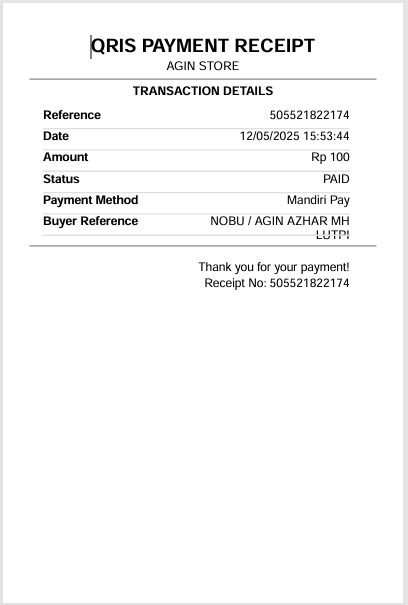 37 |
38 | ## Instalasi
39 |
40 | ```bash
41 | npm install autoft-qris
42 | ```
43 |
44 | ## Penggunaan
45 |
46 | ### ESM (ES Modules)
47 |
48 | ```javascript
49 | import { QRISGenerator, PaymentChecker, ReceiptGenerator } from 'autoft-qris';
50 | import { writeFileSync } from 'fs';
51 |
52 | const config = {
53 | storeName: 'Nama Toko Contoh',
54 | auth_username: '#',
55 | auth_token: '#',
56 | baseQrString: '#',
57 | logoPath: './logo-agin.png'
58 | };
59 |
60 | const qrisGen = new QRISGenerator(config, 'theme1');
61 | const paymentChecker = new PaymentChecker({
62 | auth_token: config.auth_token,
63 | auth_username: config.auth_username
64 | });
65 | const receiptGen = new ReceiptGenerator(config);
66 |
67 | const amount = 50000;
68 | const qrString = qrisGen.generateQrString(amount);
69 | const qrBuffer = await qrisGen.generateQRWithLogo(qrString);
70 | writeFileSync('qris.png', qrBuffer);
71 |
72 | const paymentResult = await paymentChecker.checkPaymentStatus('REF123', amount);
73 | if (paymentResult.success && paymentResult.data.status === 'PAID') {
74 | const receipt = await receiptGen.generateReceipt(paymentResult.data);
75 | console.log('Receipt generated:', receipt.filePath);
76 | }
77 | ```
78 |
79 | ### CommonJS
80 |
81 | ```javascript
82 | const { QRISGenerator, PaymentChecker, ReceiptGenerator } = require('autoft-qris');
83 | const fs = require('fs');
84 |
85 | const config = {
86 | storeName: 'Nama Toko Contoh',
87 | auth_username: '#',
88 | auth_token: '#',
89 | baseQrString: '#',
90 | logoPath: './logo-agin.png'
91 | };
92 |
93 | const qrisGen = new QRISGenerator(config, 'theme1');
94 | const paymentChecker = new PaymentChecker({
95 | auth_token: config.auth_token,
96 | auth_username: config.auth_username
97 | });
98 | const receiptGen = new ReceiptGenerator(config);
99 |
100 | async function main() {
101 | const amount = 50000;
102 | const qrString = qrisGen.generateQrString(amount);
103 | const qrBuffer = await qrisGen.generateQRWithLogo(qrString);
104 | fs.writeFileSync('qris.png', qrBuffer);
105 |
106 | const paymentResult = await paymentChecker.checkPaymentStatus('REF123', amount);
107 | if (paymentResult.success && paymentResult.data.status === 'PAID') {
108 | const receipt = await receiptGen.generateReceipt(paymentResult.data);
109 | console.log('Receipt generated:', receipt.filePath);
110 | }
111 | }
112 |
113 | main();
114 | ```
115 |
116 | ## Penggunaan dengan Tema
117 |
118 | ### Tema yang Tersedia
119 |
120 | 1. **Theme 1 (Default)**: QRIS dengan aksen warna biru
121 | 2. **Theme 2 (Meta Style)**: QRIS dengan aksen warna meta
122 |
123 | ### Contoh Penggunaan Tema
124 |
125 | ```javascript
126 | const { QRISGenerator } = require('autoft-qris');
127 | const fs = require('fs');
128 |
129 | const config = {
130 | storeName: 'Nama Toko Contoh',
131 | auth_username: '#',
132 | auth_token: '#',
133 | baseQrString: '#',
134 | logoPath: './logo-agin.png'
135 | };
136 |
137 | const qrGenerator1 = new QRISGenerator(config, 'theme1');
138 | const qrString1 = qrGenerator1.generateQrString(50000);
139 | const qrBuffer1 = await qrGenerator1.generateQRWithLogo(qrString1);
140 | fs.writeFileSync('qris-theme1.png', qrBuffer1);
141 |
142 | const qrGenerator2 = new QRISGenerator(config, 'theme2');
143 | const qrString2 = qrGenerator2.generateQrString(50000);
144 | const qrBuffer2 = await qrGenerator2.generateQRWithLogo(qrString2);
145 | fs.writeFileSync('qris-theme2.png', qrBuffer2);
146 |
147 | const qrGenerator = new QRISGenerator(config, 'theme1');
148 | qrGenerator.setTheme('theme2');
149 |
150 | const themes = QRISGenerator.getAvailableThemes();
151 | console.log(themes);
152 | ```
153 |
154 | ## Penggunaan Complete Example
155 |
156 | ```javascript
157 | const { QRISGenerator, PaymentChecker, ReceiptGenerator } = require('autoft-qris');
158 | const fs = require('fs');
159 |
160 | const config = {
161 | storeName: 'Nama Toko Contoh',
162 | auth_username: '#',
163 | auth_token: '#',
164 | baseQrString: '#',
165 | logoPath: './logo-agin.png'
166 | };
167 |
168 | const qrisGen = new QRISGenerator(config, 'theme1');
169 | const paymentChecker = new PaymentChecker({
170 | auth_token: config.auth_token,
171 | auth_username: config.auth_username
172 | });
173 | const receiptGen = new ReceiptGenerator(config);
174 |
175 | async function main() {
176 | try {
177 | console.log('=== TEST REALTIME QRIS PAYMENT ===\n');
178 | const randomAmount = Math.floor(Math.random() * 99) + 1;
179 | const amount = 100 + randomAmount;
180 | const reference = 'REF' + Date.now();
181 |
182 | const qrString = qrisGen.generateQrString(amount);
183 | const qrBuffer = await qrisGen.generateQRWithLogo(qrString);
184 | fs.writeFileSync('qr.png', qrBuffer);
185 |
186 | console.log('=== TRANSACTION DETAILS ===');
187 | console.log('Reference:', reference);
188 | console.log('Amount:', amount);
189 | console.log('QR Image:', 'qr.png');
190 | console.log('\nSilakan scan QR code dan lakukan pembayaran');
191 | console.log('\nMenunggu pembayaran...\n');
192 |
193 | const startTime = Date.now();
194 | const timeout = 5 * 60 * 1000;
195 |
196 | while (Date.now() - startTime < timeout) {
197 | const result = await paymentChecker.checkPaymentStatus(reference, amount);
198 | if (result.success && result.data.status === 'PAID') {
199 | console.log('✓ Pembayaran berhasil!');
200 |
201 | const receipt = await receiptGen.generateReceipt(result.data);
202 | console.log('✓ Bukti transaksi:', receipt.filePath);
203 | return;
204 | }
205 | await new Promise(resolve => setTimeout(resolve, 3000));
206 | console.log('Menunggu pembayaran...');
207 | }
208 | throw new Error('Timeout: Pembayaran tidak diterima dalam 5 menit');
209 | } catch (error) {
210 | console.error('Error:', error.message);
211 | }
212 | }
213 |
214 | main();
215 | ```
216 |
217 | ## API Reference
218 |
219 | ### QRISGenerator
220 |
221 | ```javascript
222 | const qrisGen = new QRISGenerator(config, theme)
223 |
224 | qrisGen.generateQrString(amount)
225 | await qrisGen.generateQRWithLogo(qrString)
226 | qrisGen.calculateCRC16(str)
227 | qrisGen.setTheme(theme)
228 | qrisGen.getCurrentTheme()
229 | QRISGenerator.getAvailableThemes()
230 | ```
231 |
232 | ### PaymentChecker
233 |
234 | ```javascript
235 | const paymentChecker = new PaymentChecker(config)
236 |
237 | await paymentChecker.checkPaymentStatus(reference, amount)
238 | await paymentChecker.checkSaldo()
239 | ```
240 |
241 | ### ReceiptGenerator
242 |
243 | ```javascript
244 | const receiptGen = new ReceiptGenerator(config)
245 |
246 | await receiptGen.generateReceipt(transactionData)
247 | ```
248 |
249 | ## Cek Saldo
250 |
251 | ```javascript
252 | const paymentChecker = new PaymentChecker({
253 | auth_token: 'your_token',
254 | auth_username: 'your_username'
255 | });
256 |
257 | const saldo = await paymentChecker.checkSaldo();
258 | if (saldo.success) {
259 | console.log('Saldo:', saldo.data.saldo);
260 | }
261 | ```
262 |
263 | ## Module Support
264 |
265 | Package ini mendukung both ESM dan CommonJS:
266 |
267 | - **ESM**: Menggunakan `.mjs` files dan `import` statements
268 | - **CommonJS**: Menggunakan `.cjs` files dan `require()` statements
269 | - **Auto-detect**: Package otomatis mendeteksi module system yang digunakan
270 |
271 | ## Node.js Version Compatibility
272 |
273 | Package ini akan menampilkan warning jika menggunakan Node.js 21+ karena masalah kompatibilitas dengan chalk package. Recommended menggunakan Node.js 20.18.3 LTS.
274 |
275 | ## Konfigurasi API
276 |
277 | Package ini menggunakan API OrderKuota untuk cek status pembayaran. Pastikan Anda memiliki:
278 |
279 | - `auth_username`: Username autentikasi
280 | - `auth_token`: Token autentikasi
281 |
282 | **Untuk mendapatkan kredensial API, hubungi [@AutoFtBot69](https://t.me/AutoFtBot69)**
283 |
284 | ## FAQ
285 |
286 | **Q: Apakah receipt bisa custom logo dan nama toko?**
287 | A: Bisa, cukup atur `logoPath` dan `storeName` di config.
288 |
289 | **Q: Apakah receipt otomatis dibuat saat pembayaran sukses?**
290 | A: Ya, receipt PDF otomatis dibuat dan path-nya bisa diambil dari `paymentResult.receipt.filePath`.
291 |
292 | **Q: Apakah bisa polling pembayaran lebih cepat/lebih lama?**
293 | A: Bisa, atur parameter `interval` dan `maxAttempts` pada fungsi polling.
294 |
295 | **Q: Bagaimana cara mendapatkan kredensial API OrderKuota?**
296 | A: Hubungi [@AutoFtBot69](https://t.me/AutoFtBot69) untuk mendapatkan username dan token autentikasi.
297 |
298 | **Q: Apakah support ESM dan CommonJS?**
299 | A: Ya, package ini fully support both module systems dengan auto-detection.
300 |
301 | ## Requirements
302 |
303 | - Node.js >= 20.18.3 LTS (recommended)
304 | - Canvas support untuk image generation
305 |
306 | ## Contributors
307 |
308 | - **AutoFTbot** - Original author & maintainer
309 | - **AlfiDev** - ESM/CommonJS dual support contributor
310 | - GitHub: [github.com/cloudkuimages](https://github.com/cloudkuimages)
311 | - Telegram: [@cloudkudev](https://t.me/cloudkudev)
312 |
313 | ## Kontribusi
314 |
315 | Pull request sangat diterima!
316 | Buka issue untuk diskusi fitur/bug sebelum submit PR.
317 |
318 | ## Support
319 |
320 | Jika ada pertanyaan, silakan buka [issue di GitHub](https://github.com/AutoFTbot/Qris-OrderKuota/issues)
321 |
322 | ## Repository
323 |
324 | [GitHub Repository](https://github.com/AutoFTbot/Qris-OrderKuota)
325 |
326 | ## License
327 |
328 | MIT # AutoFT QRIS Generator
329 |
330 | Package untuk generate QRIS dengan 2 tema (Biru & Hijau) dan cek payment status secara realtime dengan API OrderKuota.
331 |
332 | **Updated by AlfiDev as contributor - Version 0.0.7**
333 |
334 | ## Features
335 |
336 | - ✨ Dual module support (ESM & CommonJS)
337 | - 🎨 2 tema QR code yang dapat disesuaikan
338 | - 🏷️ Logo support pada QR code
339 | - 🔒 CRC16 checksum validation
340 | - 📱 QRIS format support untuk Indonesia
341 |
342 | ## Installation
343 |
344 | ```bash
345 | npm install autoft-qris
346 | ```
347 |
348 | ## Usage
349 |
350 | ### ESM (ES Modules)
351 |
352 | ```javascript
353 | import { QRISGenerator } from 'autoft-qris';
354 |
355 | const config = {
356 | baseQrString: 'your_base_qris_string_here',
357 | logoPath: './path/to/logo.png' // optional
358 | };
359 |
360 | const qrisGen = new QRISGenerator(config, 'theme1');
361 |
362 | const amount = 50000;
363 | const qrString = qrisGen.generateQrString(amount);
364 | const qrImage = await qrisGen.generateQRWithLogo(qrString);
365 |
366 | console.log('QR String:', qrString);
367 | ```
368 |
369 | ### CommonJS
370 |
371 | ```javascript
372 | const { QRISGenerator } = require('autoft-qris');
373 |
374 | const config = {
375 | baseQrString: 'your_base_qris_string_here',
376 | logoPath: './path/to/logo.png' // optional
377 | };
378 |
379 | const qrisGen = new QRISGenerator(config, 'theme2');
380 |
381 | const amount = 50000;
382 | const qrString = qrisGen.generateQrString(amount);
383 | const qrImage = await qrisGen.generateQRWithLogo(qrString);
384 |
385 | console.log('QR String:', qrString);
386 | ```
387 |
388 | ### Available Themes
389 |
390 | ```javascript
391 | // Get available themes
392 | const themes = QRISGenerator.getAvailableThemes();
393 | console.log(themes);
394 |
395 | // Switch theme
396 | qrisGen.setTheme('theme2');
397 | console.log('Current theme:', qrisGen.getCurrentTheme());
398 | ```
399 |
400 | ### Individual Theme Classes
401 |
402 | #### ESM Import
403 |
404 | ```javascript
405 | import QRISGeneratorTheme1 from 'autoft-qris/src/qr-generator.mjs';
406 | import QRISGeneratorTheme2 from 'autoft-qris/src/qr-generator2.mjs';
407 | ```
408 |
409 | #### CommonJS Require
410 |
411 | ```javascript
412 | const QRISGeneratorTheme1 = require('autoft-qris/src/qr-generator.cjs');
413 | const QRISGeneratorTheme2 = require('autoft-qris/src/qr-generator2.cjs');
414 | ```
415 |
416 | ## API Reference
417 |
418 | ### Constructor
419 |
420 | ```javascript
421 | new QRISGenerator(config, theme)
422 | ```
423 |
424 | - `config` (Object): Configuration object
425 | - `baseQrString` (String): Base QRIS string (required)
426 | - `logoPath` (String): Path to logo image (optional)
427 | - `theme` (String): Theme selection ('theme1' or 'theme2', default: 'theme1')
428 |
429 | ### Methods
430 |
431 | #### `generateQrString(amount)`
432 | Generate QRIS string with specified amount.
433 |
434 | **Parameters:**
435 | - `amount` (Number): Payment amount
436 |
437 | **Returns:** String - Complete QRIS string with checksum
438 |
439 | #### `generateQRWithLogo(qrString)`
440 | Generate QR code image with optional logo.
441 |
442 | **Parameters:**
443 | - `qrString` (String): QRIS string to encode
444 |
445 | **Returns:** Promise - PNG image buffer
446 |
447 | #### `calculateCRC16(str)`
448 | Calculate CRC16 checksum for QRIS string.
449 |
450 | **Parameters:**
451 | - `str` (String): String to calculate checksum for
452 |
453 | **Returns:** String - 4-character uppercase hex checksum
454 |
455 | #### `setTheme(theme)`
456 | Switch between themes.
457 |
458 | **Parameters:**
459 | - `theme` (String): 'theme1' or 'theme2'
460 |
461 | #### `getCurrentTheme()`
462 | Get current active theme.
463 |
464 | **Returns:** String - Current theme name
465 |
466 | #### `static getAvailableThemes()`
467 | Get list of available themes.
468 |
469 | **Returns:** Array - Available themes with descriptions
470 |
471 | ## Module Support
472 |
473 | This package supports both ESM and CommonJS:
474 |
475 | - **ESM**: Uses `.mjs` files and `import` statements
476 | - **CommonJS**: Uses `.cjs` files and `require()` statements
477 | - **Automatic**: Package automatically detects your module system
478 |
479 | ## Requirements
480 |
481 | - Node.js >= 20.18.3
482 | - Canvas support for image generation
483 |
484 | ## License
485 |
486 | MIT
487 |
488 | ## Contributors
489 |
490 | - **AutoFTbot** - Original author
491 | - **AlfiDev** - ESM/CommonJS dual support contributor
492 |
493 | ## Repository
494 |
495 | [GitHub Repository](https://github.com/AutoFTbot/Qris-OrderKuota)
496 |
--------------------------------------------------------------------------------
37 |
38 | ## Instalasi
39 |
40 | ```bash
41 | npm install autoft-qris
42 | ```
43 |
44 | ## Penggunaan
45 |
46 | ### ESM (ES Modules)
47 |
48 | ```javascript
49 | import { QRISGenerator, PaymentChecker, ReceiptGenerator } from 'autoft-qris';
50 | import { writeFileSync } from 'fs';
51 |
52 | const config = {
53 | storeName: 'Nama Toko Contoh',
54 | auth_username: '#',
55 | auth_token: '#',
56 | baseQrString: '#',
57 | logoPath: './logo-agin.png'
58 | };
59 |
60 | const qrisGen = new QRISGenerator(config, 'theme1');
61 | const paymentChecker = new PaymentChecker({
62 | auth_token: config.auth_token,
63 | auth_username: config.auth_username
64 | });
65 | const receiptGen = new ReceiptGenerator(config);
66 |
67 | const amount = 50000;
68 | const qrString = qrisGen.generateQrString(amount);
69 | const qrBuffer = await qrisGen.generateQRWithLogo(qrString);
70 | writeFileSync('qris.png', qrBuffer);
71 |
72 | const paymentResult = await paymentChecker.checkPaymentStatus('REF123', amount);
73 | if (paymentResult.success && paymentResult.data.status === 'PAID') {
74 | const receipt = await receiptGen.generateReceipt(paymentResult.data);
75 | console.log('Receipt generated:', receipt.filePath);
76 | }
77 | ```
78 |
79 | ### CommonJS
80 |
81 | ```javascript
82 | const { QRISGenerator, PaymentChecker, ReceiptGenerator } = require('autoft-qris');
83 | const fs = require('fs');
84 |
85 | const config = {
86 | storeName: 'Nama Toko Contoh',
87 | auth_username: '#',
88 | auth_token: '#',
89 | baseQrString: '#',
90 | logoPath: './logo-agin.png'
91 | };
92 |
93 | const qrisGen = new QRISGenerator(config, 'theme1');
94 | const paymentChecker = new PaymentChecker({
95 | auth_token: config.auth_token,
96 | auth_username: config.auth_username
97 | });
98 | const receiptGen = new ReceiptGenerator(config);
99 |
100 | async function main() {
101 | const amount = 50000;
102 | const qrString = qrisGen.generateQrString(amount);
103 | const qrBuffer = await qrisGen.generateQRWithLogo(qrString);
104 | fs.writeFileSync('qris.png', qrBuffer);
105 |
106 | const paymentResult = await paymentChecker.checkPaymentStatus('REF123', amount);
107 | if (paymentResult.success && paymentResult.data.status === 'PAID') {
108 | const receipt = await receiptGen.generateReceipt(paymentResult.data);
109 | console.log('Receipt generated:', receipt.filePath);
110 | }
111 | }
112 |
113 | main();
114 | ```
115 |
116 | ## Penggunaan dengan Tema
117 |
118 | ### Tema yang Tersedia
119 |
120 | 1. **Theme 1 (Default)**: QRIS dengan aksen warna biru
121 | 2. **Theme 2 (Meta Style)**: QRIS dengan aksen warna meta
122 |
123 | ### Contoh Penggunaan Tema
124 |
125 | ```javascript
126 | const { QRISGenerator } = require('autoft-qris');
127 | const fs = require('fs');
128 |
129 | const config = {
130 | storeName: 'Nama Toko Contoh',
131 | auth_username: '#',
132 | auth_token: '#',
133 | baseQrString: '#',
134 | logoPath: './logo-agin.png'
135 | };
136 |
137 | const qrGenerator1 = new QRISGenerator(config, 'theme1');
138 | const qrString1 = qrGenerator1.generateQrString(50000);
139 | const qrBuffer1 = await qrGenerator1.generateQRWithLogo(qrString1);
140 | fs.writeFileSync('qris-theme1.png', qrBuffer1);
141 |
142 | const qrGenerator2 = new QRISGenerator(config, 'theme2');
143 | const qrString2 = qrGenerator2.generateQrString(50000);
144 | const qrBuffer2 = await qrGenerator2.generateQRWithLogo(qrString2);
145 | fs.writeFileSync('qris-theme2.png', qrBuffer2);
146 |
147 | const qrGenerator = new QRISGenerator(config, 'theme1');
148 | qrGenerator.setTheme('theme2');
149 |
150 | const themes = QRISGenerator.getAvailableThemes();
151 | console.log(themes);
152 | ```
153 |
154 | ## Penggunaan Complete Example
155 |
156 | ```javascript
157 | const { QRISGenerator, PaymentChecker, ReceiptGenerator } = require('autoft-qris');
158 | const fs = require('fs');
159 |
160 | const config = {
161 | storeName: 'Nama Toko Contoh',
162 | auth_username: '#',
163 | auth_token: '#',
164 | baseQrString: '#',
165 | logoPath: './logo-agin.png'
166 | };
167 |
168 | const qrisGen = new QRISGenerator(config, 'theme1');
169 | const paymentChecker = new PaymentChecker({
170 | auth_token: config.auth_token,
171 | auth_username: config.auth_username
172 | });
173 | const receiptGen = new ReceiptGenerator(config);
174 |
175 | async function main() {
176 | try {
177 | console.log('=== TEST REALTIME QRIS PAYMENT ===\n');
178 | const randomAmount = Math.floor(Math.random() * 99) + 1;
179 | const amount = 100 + randomAmount;
180 | const reference = 'REF' + Date.now();
181 |
182 | const qrString = qrisGen.generateQrString(amount);
183 | const qrBuffer = await qrisGen.generateQRWithLogo(qrString);
184 | fs.writeFileSync('qr.png', qrBuffer);
185 |
186 | console.log('=== TRANSACTION DETAILS ===');
187 | console.log('Reference:', reference);
188 | console.log('Amount:', amount);
189 | console.log('QR Image:', 'qr.png');
190 | console.log('\nSilakan scan QR code dan lakukan pembayaran');
191 | console.log('\nMenunggu pembayaran...\n');
192 |
193 | const startTime = Date.now();
194 | const timeout = 5 * 60 * 1000;
195 |
196 | while (Date.now() - startTime < timeout) {
197 | const result = await paymentChecker.checkPaymentStatus(reference, amount);
198 | if (result.success && result.data.status === 'PAID') {
199 | console.log('✓ Pembayaran berhasil!');
200 |
201 | const receipt = await receiptGen.generateReceipt(result.data);
202 | console.log('✓ Bukti transaksi:', receipt.filePath);
203 | return;
204 | }
205 | await new Promise(resolve => setTimeout(resolve, 3000));
206 | console.log('Menunggu pembayaran...');
207 | }
208 | throw new Error('Timeout: Pembayaran tidak diterima dalam 5 menit');
209 | } catch (error) {
210 | console.error('Error:', error.message);
211 | }
212 | }
213 |
214 | main();
215 | ```
216 |
217 | ## API Reference
218 |
219 | ### QRISGenerator
220 |
221 | ```javascript
222 | const qrisGen = new QRISGenerator(config, theme)
223 |
224 | qrisGen.generateQrString(amount)
225 | await qrisGen.generateQRWithLogo(qrString)
226 | qrisGen.calculateCRC16(str)
227 | qrisGen.setTheme(theme)
228 | qrisGen.getCurrentTheme()
229 | QRISGenerator.getAvailableThemes()
230 | ```
231 |
232 | ### PaymentChecker
233 |
234 | ```javascript
235 | const paymentChecker = new PaymentChecker(config)
236 |
237 | await paymentChecker.checkPaymentStatus(reference, amount)
238 | await paymentChecker.checkSaldo()
239 | ```
240 |
241 | ### ReceiptGenerator
242 |
243 | ```javascript
244 | const receiptGen = new ReceiptGenerator(config)
245 |
246 | await receiptGen.generateReceipt(transactionData)
247 | ```
248 |
249 | ## Cek Saldo
250 |
251 | ```javascript
252 | const paymentChecker = new PaymentChecker({
253 | auth_token: 'your_token',
254 | auth_username: 'your_username'
255 | });
256 |
257 | const saldo = await paymentChecker.checkSaldo();
258 | if (saldo.success) {
259 | console.log('Saldo:', saldo.data.saldo);
260 | }
261 | ```
262 |
263 | ## Module Support
264 |
265 | Package ini mendukung both ESM dan CommonJS:
266 |
267 | - **ESM**: Menggunakan `.mjs` files dan `import` statements
268 | - **CommonJS**: Menggunakan `.cjs` files dan `require()` statements
269 | - **Auto-detect**: Package otomatis mendeteksi module system yang digunakan
270 |
271 | ## Node.js Version Compatibility
272 |
273 | Package ini akan menampilkan warning jika menggunakan Node.js 21+ karena masalah kompatibilitas dengan chalk package. Recommended menggunakan Node.js 20.18.3 LTS.
274 |
275 | ## Konfigurasi API
276 |
277 | Package ini menggunakan API OrderKuota untuk cek status pembayaran. Pastikan Anda memiliki:
278 |
279 | - `auth_username`: Username autentikasi
280 | - `auth_token`: Token autentikasi
281 |
282 | **Untuk mendapatkan kredensial API, hubungi [@AutoFtBot69](https://t.me/AutoFtBot69)**
283 |
284 | ## FAQ
285 |
286 | **Q: Apakah receipt bisa custom logo dan nama toko?**
287 | A: Bisa, cukup atur `logoPath` dan `storeName` di config.
288 |
289 | **Q: Apakah receipt otomatis dibuat saat pembayaran sukses?**
290 | A: Ya, receipt PDF otomatis dibuat dan path-nya bisa diambil dari `paymentResult.receipt.filePath`.
291 |
292 | **Q: Apakah bisa polling pembayaran lebih cepat/lebih lama?**
293 | A: Bisa, atur parameter `interval` dan `maxAttempts` pada fungsi polling.
294 |
295 | **Q: Bagaimana cara mendapatkan kredensial API OrderKuota?**
296 | A: Hubungi [@AutoFtBot69](https://t.me/AutoFtBot69) untuk mendapatkan username dan token autentikasi.
297 |
298 | **Q: Apakah support ESM dan CommonJS?**
299 | A: Ya, package ini fully support both module systems dengan auto-detection.
300 |
301 | ## Requirements
302 |
303 | - Node.js >= 20.18.3 LTS (recommended)
304 | - Canvas support untuk image generation
305 |
306 | ## Contributors
307 |
308 | - **AutoFTbot** - Original author & maintainer
309 | - **AlfiDev** - ESM/CommonJS dual support contributor
310 | - GitHub: [github.com/cloudkuimages](https://github.com/cloudkuimages)
311 | - Telegram: [@cloudkudev](https://t.me/cloudkudev)
312 |
313 | ## Kontribusi
314 |
315 | Pull request sangat diterima!
316 | Buka issue untuk diskusi fitur/bug sebelum submit PR.
317 |
318 | ## Support
319 |
320 | Jika ada pertanyaan, silakan buka [issue di GitHub](https://github.com/AutoFTbot/Qris-OrderKuota/issues)
321 |
322 | ## Repository
323 |
324 | [GitHub Repository](https://github.com/AutoFTbot/Qris-OrderKuota)
325 |
326 | ## License
327 |
328 | MIT # AutoFT QRIS Generator
329 |
330 | Package untuk generate QRIS dengan 2 tema (Biru & Hijau) dan cek payment status secara realtime dengan API OrderKuota.
331 |
332 | **Updated by AlfiDev as contributor - Version 0.0.7**
333 |
334 | ## Features
335 |
336 | - ✨ Dual module support (ESM & CommonJS)
337 | - 🎨 2 tema QR code yang dapat disesuaikan
338 | - 🏷️ Logo support pada QR code
339 | - 🔒 CRC16 checksum validation
340 | - 📱 QRIS format support untuk Indonesia
341 |
342 | ## Installation
343 |
344 | ```bash
345 | npm install autoft-qris
346 | ```
347 |
348 | ## Usage
349 |
350 | ### ESM (ES Modules)
351 |
352 | ```javascript
353 | import { QRISGenerator } from 'autoft-qris';
354 |
355 | const config = {
356 | baseQrString: 'your_base_qris_string_here',
357 | logoPath: './path/to/logo.png' // optional
358 | };
359 |
360 | const qrisGen = new QRISGenerator(config, 'theme1');
361 |
362 | const amount = 50000;
363 | const qrString = qrisGen.generateQrString(amount);
364 | const qrImage = await qrisGen.generateQRWithLogo(qrString);
365 |
366 | console.log('QR String:', qrString);
367 | ```
368 |
369 | ### CommonJS
370 |
371 | ```javascript
372 | const { QRISGenerator } = require('autoft-qris');
373 |
374 | const config = {
375 | baseQrString: 'your_base_qris_string_here',
376 | logoPath: './path/to/logo.png' // optional
377 | };
378 |
379 | const qrisGen = new QRISGenerator(config, 'theme2');
380 |
381 | const amount = 50000;
382 | const qrString = qrisGen.generateQrString(amount);
383 | const qrImage = await qrisGen.generateQRWithLogo(qrString);
384 |
385 | console.log('QR String:', qrString);
386 | ```
387 |
388 | ### Available Themes
389 |
390 | ```javascript
391 | // Get available themes
392 | const themes = QRISGenerator.getAvailableThemes();
393 | console.log(themes);
394 |
395 | // Switch theme
396 | qrisGen.setTheme('theme2');
397 | console.log('Current theme:', qrisGen.getCurrentTheme());
398 | ```
399 |
400 | ### Individual Theme Classes
401 |
402 | #### ESM Import
403 |
404 | ```javascript
405 | import QRISGeneratorTheme1 from 'autoft-qris/src/qr-generator.mjs';
406 | import QRISGeneratorTheme2 from 'autoft-qris/src/qr-generator2.mjs';
407 | ```
408 |
409 | #### CommonJS Require
410 |
411 | ```javascript
412 | const QRISGeneratorTheme1 = require('autoft-qris/src/qr-generator.cjs');
413 | const QRISGeneratorTheme2 = require('autoft-qris/src/qr-generator2.cjs');
414 | ```
415 |
416 | ## API Reference
417 |
418 | ### Constructor
419 |
420 | ```javascript
421 | new QRISGenerator(config, theme)
422 | ```
423 |
424 | - `config` (Object): Configuration object
425 | - `baseQrString` (String): Base QRIS string (required)
426 | - `logoPath` (String): Path to logo image (optional)
427 | - `theme` (String): Theme selection ('theme1' or 'theme2', default: 'theme1')
428 |
429 | ### Methods
430 |
431 | #### `generateQrString(amount)`
432 | Generate QRIS string with specified amount.
433 |
434 | **Parameters:**
435 | - `amount` (Number): Payment amount
436 |
437 | **Returns:** String - Complete QRIS string with checksum
438 |
439 | #### `generateQRWithLogo(qrString)`
440 | Generate QR code image with optional logo.
441 |
442 | **Parameters:**
443 | - `qrString` (String): QRIS string to encode
444 |
445 | **Returns:** Promise - PNG image buffer
446 |
447 | #### `calculateCRC16(str)`
448 | Calculate CRC16 checksum for QRIS string.
449 |
450 | **Parameters:**
451 | - `str` (String): String to calculate checksum for
452 |
453 | **Returns:** String - 4-character uppercase hex checksum
454 |
455 | #### `setTheme(theme)`
456 | Switch between themes.
457 |
458 | **Parameters:**
459 | - `theme` (String): 'theme1' or 'theme2'
460 |
461 | #### `getCurrentTheme()`
462 | Get current active theme.
463 |
464 | **Returns:** String - Current theme name
465 |
466 | #### `static getAvailableThemes()`
467 | Get list of available themes.
468 |
469 | **Returns:** Array - Available themes with descriptions
470 |
471 | ## Module Support
472 |
473 | This package supports both ESM and CommonJS:
474 |
475 | - **ESM**: Uses `.mjs` files and `import` statements
476 | - **CommonJS**: Uses `.cjs` files and `require()` statements
477 | - **Automatic**: Package automatically detects your module system
478 |
479 | ## Requirements
480 |
481 | - Node.js >= 20.18.3
482 | - Canvas support for image generation
483 |
484 | ## License
485 |
486 | MIT
487 |
488 | ## Contributors
489 |
490 | - **AutoFTbot** - Original author
491 | - **AlfiDev** - ESM/CommonJS dual support contributor
492 |
493 | ## Repository
494 |
495 | [GitHub Repository](https://github.com/AutoFTbot/Qris-OrderKuota)
496 |
--------------------------------------------------------------------------------