├── README.MD
├── 23#README.MD
├── REGEXINJS.MD
├── 4#README.MD
├── LSC.MD
├── 13#README.MD
├── 19#README.MD
├── 3#README.MD
├── 21#README.MD
├── 22#README.MD
├── 12#README.MD
├── 2#README.MD
├── 18#README.MD
├── 15#README.MD
├── 11#README.MD
├── 5#README.MD
├── 8#README.MD
├── 6#README.MD
├── 7#README.MD
├── 14#README.MD
├── 16#README.MD
├── 1#README.MD
├── 9#README.MD
├── 10#README.MD
├── 17#README.MD
└── 20#README.MD
/README.MD:
--------------------------------------------------------------------------------
1 | # 30 DAYS OF JAVASCRIPT CHALLENGE WITH CHAI AUR CODE START FROM 13 Jul 2024
2 |
3 | - `DAY 1:` Variables and Data Types in JavaScript
4 | - `DAY 2:` Operators in JavaScript
5 | - `DAY 3:` Control Structures in JavaScript
6 | - `DAY 4:` Loops in JavaScript
7 | - `DAY 5:` Functions in JavaScript
8 | - `Day 6:` Arrays in JavaScript
9 | - `Day 7:` Objects in JavaScript
10 | - `Day 8:` Modern JavaScript Features
11 | - `Day 9:` DOM Manipulation in JavaScript
12 | - `Day 10:` Event Handling in JavaScript
13 | - `Day 11:` Promises and Async/Awaitin JavaScript
14 | - `Day 12:` Error Handling in JavaScript
15 | - `Day 13:` JavaScript Module Activities
16 | - `Day 14:` Classes in JavaScript
17 | - `Day 15:` Closures in JavaScript
18 | - `Day 16:` Recursion in JavaScript
19 | - `Day 17:` Data Structures in JavaScript
20 | - `Day 18:` Algorithms in JavaScript
21 | - `Day 19:` Regular Expressions in JavaScript
22 | - `Day 20:` LocalStorage and SessionStorage in JavaScript
23 | - `Day 21:` LeetCode Easy
24 | - `Day 22:` LeetCode Medium
25 | - `Day 23:` LeetCode Hard
26 |
--------------------------------------------------------------------------------
/23#README.MD:
--------------------------------------------------------------------------------
1 | # Day 23: LeetCode Hard
2 |
3 | ## Table of Contents
4 |
5 | 1. [Activity 1: Median of Two Sorted Arrays](#activity-1-median-of-two-sorted-arrays)
6 | 2. [Activity 2: Merge k Sorted Lists](#activity-2-merge-k-sorted-lists)
7 | 3. [Activity 3: Trapping Rain Water](#activity-3-trapping-rain-water)
8 | 4. [Activity 4: N-Queens](#activity-4-n-queens)
9 | 5. [Activity 5: Word Ladder](#activity-5-word-ladder)
10 | 6. [Feature Request](#feature-request)
11 | 7. [Achievements](#achievements)
12 |
13 | ## Activity 1: Median of Two Sorted Arrays
14 |
15 | - Task 1: Solve the "Median of Two Sorted Arrays" problem on LeetCode.
16 | - Write a function that takes two sorted arrays of integers and returns the median of the two sorted arrays.
17 | - Log the median for a few test cases, including edge cases.
18 |
19 | ```js
20 | // Pending
21 | ```
22 |
23 | ## Activity 2: Merge k Sorted Lists
24 |
25 | - Task 2: Solve the "Merge k Sorted Lists" problem on LeetCode.
26 | - Write a function that takes an array of k linked lists, each linked list is sorted in ascending order, and merges all the linked lists into one sorted linked list.
27 | - Create a few test cases with linked lists and log the merged list.
28 |
29 | ```js
30 | // Pending
31 | ```
32 |
33 | ## Activity 3: Trapping Rain Water
34 |
35 | - Task 3: Solve the "Trapping Rain Water" problem on LeetCode.
36 | - Write a function that takes an array of non-negative integers representing an elevation map where the width of each bar is 1, and computes how much water it can trap after raining.
37 | - Log the amount of trapped water for a few test cases.
38 |
39 | ```js
40 | // Pending
41 | ```
42 |
43 | ## Activity 4: N-Queens
44 |
45 | - Task 4: Solve the "N-Queens" problem on LeetCode.
46 | - Write a function that places n queens on an n×n chessboard such that no two queens attack each other, and returns all distinct solutions to the n-queens puzzle.
47 | - Log the distinct solutions for a few test cases.
48 |
49 | ```js
50 | // Pending
51 | ```
52 |
53 | ## Activity 5: Word Ladder
54 |
55 | - Task 5: Solve the "Word Ladder" problem on LeetCode.
56 | - Write a function that takes a begin word, an end word, and a dictionary of words, and finds the length of the shortest transformation sequence from the begin word to the end word, such that only one letter can be changed at a time and each transformed word must exist in the word list.
57 | - Log the length of the shortest transformation sequence for a few test cases.
58 |
59 | ```js
60 | // Pending
61 | ```
62 |
63 | ## Feature Request
64 |
65 | 1. **Median of Two Sorted Arrays Script:** Write a script that includes a function to find the median of two sorted arrays and logs the median.
66 | 2. **Merge k Sorted Lists Script:** Create a script that includes a function to merge k sorted linked lists and logs the merged list.
67 | 3. **Trapping Rain Water Script:** Write a script that includes a function to calculate the amount of trapped rainwater and logs the result.
68 | 4. **N-Queens Script:** Create a script that includes a function to solve the N-Queens problem and logs the distinct solutions.
69 | 5. **Word Ladder Script:** Write a script that includes a function to find the shortest transformation sequence in a word ladder and logs the sequence length.
70 |
71 | ## Achievements
72 |
73 | By the end of these activities, students will:
74 |
75 | - Solve complex LeetCode problems.
76 | - Apply advanced problem-solving skills to implement efficient algorithms.
77 | - Understand and handle edge cases in hard algorithmic solutions.
78 | - Gain confidence in solving hard-level coding challenges on LeetCode.
79 |
--------------------------------------------------------------------------------
/REGEXINJS.MD:
--------------------------------------------------------------------------------
1 | # Intro to Regex for Web Developers
2 |
3 | Regular expressions (regex) are a powerful tool for finding patterns in strings. As a web developer, understanding regex can help you with tasks such as validating user input, extracting data from strings, and replacing text.
4 |
5 | ## What are Regular Expressions?
6 |
7 | Regular expressions are a way to describe a search pattern using a string of characters. They can be used to find matches in a string, and can be created using a variety of methods, including forward slashes `//` or the `new RegExp()` constructor.
8 |
9 | ## 1.
10 |
11 | - Regular expressions find parts of a string that match a pattern and then used in methods like `match`, `test`, or `replace`
12 | - You can define the regex beforehand, or directly when calling the method
13 |
14 |
15 |
16 |
17 |
18 | ## 2.
19 |
20 | - Match individual characters one at a time, or put multiple characters in square `brackets []` to capture any that match Capture a range of characters with a `hyphen -`
21 |
22 |
23 |
24 |
25 |
26 | ## 3.
27 |
28 | - Add optional flags to the end of a regex to modify how the matcher works.
29 |
30 | - In JavaScript, these flags are:
31 |
32 | 1. `i` = case insensitive
33 | 2. `m` = multi line matching
34 | 3. `g` = global match (find all, instead of find one)
35 |
36 |
37 |
38 |
39 |
40 | ## 4.
41 |
42 | - Using a `caret ^` at the start means **"start of string"**
43 | - Using a `dollar sign $` at the end means **"end of string"**
44 | - Start putting groups of matches together to match longer strings
45 |
46 |
47 |
48 |
49 |
50 | ## 5.
51 |
52 | - Use wildcards and special escaped characters to match larger classes of characters
53 |
54 | 1. `.` = any character except line break
55 | 2. `\d` = digit
56 | 3. `\D` = NOT a digit
57 | 4. `\s` = white space
58 | 5. `\S` = any NON white space
59 | 6. `\n` = new line
60 |
61 |
62 |
63 |
64 |
65 | ## 6.
66 |
67 | - Match only certain counts of matched characters or groups with quantifiers
68 |
69 | 1. `.*` = zero or more
70 | 2. `?` = 0 or 1
71 | 3. `{3}` = exactly 3 times
72 | 4. `{2, 4}` = two, three, or four times
73 | 5. `{2,}` = two or more times
74 |
75 |
76 |
77 |
78 |
79 | ## 7.
80 |
81 | - Use `parens ()` to capture in a group.
82 | - `match` will return the full match plus the groups, unless you use the `g` flag
83 | - Use the `pipe operator |` inside of `parens ()` to specify what that group matches
84 |
85 |
86 |
87 |
88 |
89 | ## 8.
90 |
91 | - To match special characters, escape them with a `backslash \`
92 |
93 | - Special characters in JS regex are: `^` `$` `\` `.` `*` `+` `?` `( )` `[ ]` `{ }` `|`
94 |
95 | - So to match an `asterisks`, you'd use: `\*` Instead of just `*`
96 |
97 |
98 |
99 |
100 |
101 | ## 9.
102 |
103 | - To match anything BUT a certain character, use a `caret ^` inside of square brackets. This means `^` has two meanings, which can be confusing.
104 |
105 | - It means both **"start of string"** when it is at the front of a regex, and **"not this character"** when used inside of square brackets.
106 |
107 |
108 |
109 |
110 |
111 | ## 10.
112 |
113 | 💡 Regexs can be used to find and match all sort of things, from urls to filenames
114 |
115 | 💡 HOWEVER! be careful if you try to use regexs for really complex tasks, such as parsing emails (which get really confusing, really fast), or HTML (which is not a regular language, and so can't be fully parsed by a regular expression)
116 |
--------------------------------------------------------------------------------
/4#README.MD:
--------------------------------------------------------------------------------
1 | # Day 4: Loops in JavaScript
2 |
3 | Welcome to Day 4 of JavaScript Basics! Today, we'll be focusing on loops. This includes **for** loops, **while** loops, **do...while** loops, **nested loops**, and **loop control** statements.
4 |
5 | ## Table of Contents
6 |
7 | 1. [Activity 1: For Loop](#activity-1-for-loop)
8 | - Task 1: Print Numbers 1 to 10
9 | - Task 2: Multiplication Table of 5
10 | 2. [Activity 2: While Loop](#activity-2-while-loop)
11 | - Task 3: Sum of Numbers 1 to 10
12 | - Task 4: Print Numbers 10 to 1
13 | 3. [Activity 3: Do...While Loop](#activity-3-do-while-loop)
14 | - Task 5: Print Numbers 1 to 5
15 | - Task 6: Factorial Calculation
16 | 4. [Activity 4: Nested Loops](#activity-4-nested-loops)
17 | - Task 7: Print Pattern
18 | 5. [Activity 5: Loop Control Statements](#activity-5-loop-control-statements)
19 | - Task 8: Skip Number 5
20 | - Task 9: Break at Number 7
21 | 6. [Feature Request](#feature-request)
22 | 7. [Achievements](#achievements)
23 |
24 | ## Activity 1: For Loop
25 |
26 | **Task 1:** Write a program to print numbers from 1 to 10 using a for loop.
27 |
28 | ```javascript
29 | for (let i = 1; i <= 10; i++) {
30 | console.log(i);
31 | }
32 |
33 | /*
34 | Expected Output:
35 | 1
36 | 2
37 | 3
38 | 4
39 | 5
40 | 6
41 | 7
42 | 8
43 | 9
44 | 10
45 | */
46 | ```
47 |
48 | **Task 2:** Write a program to print the multiplication table of 5 using a for loop.
49 |
50 | ```javascript
51 | const number = 5;
52 | for (let i = 1; i <= 10; i++) {
53 | console.log(`${number} * ${i} = ${number * i}`);
54 | }
55 |
56 | /*
57 | Expected Output:
58 | 5 * 1 = 5
59 | 5 * 2 = 10
60 | 5 * 3 = 15
61 | 5 * 4 = 20
62 | 5 * 5 = 25
63 | 5 * 6 = 30
64 | 5 * 7 = 35
65 | 5 * 8 = 40
66 | 5 * 9 = 45
67 | 5 * 10 = 50
68 | */
69 | ```
70 |
71 | ## Activity 2: While Loop
72 |
73 | **Task 3:** Write a program to calculate the sum of numbers from 1 to 10 using a while loop.
74 |
75 | ```javascript
76 | let sum = 0;
77 | let i = 1;
78 | while (i <= 10) {
79 | sum += i;
80 | i++;
81 | }
82 | console.log("Sum:", sum);
83 |
84 | /*
85 | Expected Output:
86 | Sum: 55
87 | */
88 | ```
89 |
90 | **Task 4:** Write a program to print numbers from 10 to 1 using a while loop.
91 |
92 | ```javascript
93 | let i = 10;
94 | while (i >= 1) {
95 | console.log(i);
96 | i--;
97 | }
98 |
99 | /*
100 | Expected Output:
101 | 10
102 | 9
103 | 8
104 | 7
105 | 6
106 | 5
107 | 4
108 | 3
109 | 2
110 | 1
111 | */
112 | ```
113 |
114 | ## Activity 3: Do...While Loop
115 |
116 | **Task 5:** Write a program to print numbers from 1 to 5 using a do...while loop.
117 |
118 | ```javascript
119 | let i = 1;
120 | do {
121 | console.log(i);
122 | i++;
123 | } while (i <= 5);
124 |
125 | /*
126 | Expected Output:
127 | 1
128 | 2
129 | 3
130 | 4
131 | 5
132 | */
133 | ```
134 |
135 | **Task 6:** Write a program to calculate the factorial of a number using a do...while loop.
136 |
137 | ```javascript
138 | const number = 5;
139 | let factorial = 1;
140 | let i = number;
141 |
142 | do {
143 | factorial *= i;
144 | i--;
145 | } while (i > 0);
146 |
147 | console.log(`Factorial of ${number} is ${factorial}`);
148 |
149 | /*
150 | Expected Output:
151 | Factorial of 5 is 120
152 | */
153 | ```
154 |
155 | ## Activity 4: Nested Loops
156 |
157 | **Task 7:** Write a program to print a pattern using nested for loops:
158 |
159 |
160 |
161 |
162 |
163 | ```javascript
164 | for (let row = 0; row < 5; row++) {
165 | let pattern = "";
166 | for (let col = 0; col < row + 1; col++) {
167 | pattern += "* ";
168 | }
169 | console.log(pattern.trim());
170 | }
171 |
172 | /*
173 | Expected Output:
174 | *
175 | * *
176 | * * *
177 | * * * *
178 | * * * * *
179 | */
180 | ```
181 |
182 | ## Activity 5: Loop Control Statements
183 |
184 | **Task 8:** Write a program to print numbers from 1 to 10, but skip the number 5 using the `continue` statement.
185 |
186 | ```javascript
187 | for (let i = 1; i <= 10; i++) {
188 | if (i === 5) continue;
189 | console.log(i);
190 | }
191 |
192 | /*
193 | Expected Output:
194 | 1
195 | 2
196 | 3
197 | 4
198 | 6
199 | 7
200 | 8
201 | 9
202 | 10
203 | */
204 | ```
205 |
206 | **Task 9:** Write a program to print numbers from 1 to 10, but stop the loop when the number is 7 using the `break` statement.
207 |
208 | ```javascript
209 | for (let i = 1; i <= 10; i++) {
210 | if (i === 7) break;
211 | console.log(i);
212 | }
213 |
214 | /*
215 | 1
216 | 2
217 | 3
218 | 4
219 | 5
220 | 6
221 | */
222 | ```
223 |
224 | ## Feature Request:
225 |
226 | 1. Number Printing Script: Write a script that prints numbers from 1 to 10 using a `for` loop and a while loop.
227 |
228 | 2. Multiplication Table Script: Create a script that prints the multiplication table of 5 using a `for` loop.
229 |
230 | 3. Pattern Printing Script: Write a script that prints a pattern of stars using nested loops.
231 |
232 | 4. Sum Calculation Script: Write a script that calculates the sum of numbers from 1 to 10 using a `while` loop.
233 |
234 | 5. Factorial Calculation Script: Create a script that calculates the factorial of a number using a `do...while` loop.
235 |
236 | ## Achievements:
237 |
238 | By the end of these activities, students will:
239 |
240 | - Understand and use `for` loops to iterate over a sequence of numbers.
241 |
242 | - Utilize `while` loops for iteration based on a condition.
243 |
244 | - Apply `do...while` loops to ensure the loop body is executed at least once.
245 |
246 | - Implement nested loops to solve more complex problems.
247 |
248 | - Use loop control statements (`break` and `continue`) to control the flow of loops.
249 |
--------------------------------------------------------------------------------
/LSC.MD:
--------------------------------------------------------------------------------
1 | # Understanding LocalStorage, SessionStorage, and Cookies
2 |
3 | LocalStorage, SessionStorage, and Cookies are all mechanisms for storing data on the client-side. Each has its own use cases, advantages, and limitations.
4 |
5 | ## LocalStorage
6 |
7 | ### Why Use LocalStorage?
8 |
9 | - Persistent storage: Data stored in LocalStorage does not expire.
10 | - Can store a larger amount of data compared to cookies (up to 5MB per origin).
11 | - Ideal for saving user preferences, settings, or any information that should persist across browser sessions.
12 |
13 | ### When to Use LocalStorage?
14 |
15 | - When you need to store data for long periods.
16 | - For data that doesn't need to be sent to the server with every HTTP request.
17 |
18 | ### How to Use LocalStorage?
19 |
20 | Example Code:
21 |
22 | ```JS
23 | // Save a string to LocalStorage
24 | localStorage.setItem('username', 'manojofficialmj');
25 |
26 | // Retrieve the string from LocalStorage
27 | const username = localStorage.getItem('username');
28 | console.log(username); // Output: "manojofficialmj"
29 |
30 | // Save an object to LocalStorage
31 | const user = { name: 'Manoj Kumar', age: 25 };
32 | localStorage.setItem('user', JSON.stringify(user));
33 |
34 | // Retrieve and parse the object from LocalStorage
35 | const retrievedUser = JSON.parse(localStorage.getItem('user'));
36 | console.log(retrievedUser); // Output: { name: "Manoj Kumar", age: 25 }
37 |
38 | // Remove an item from LocalStorage
39 | localStorage.removeItem('username');
40 |
41 | // Clear all data from LocalStorage
42 | localStorage.clear();
43 | ```
44 |
45 | ## SessionStorage
46 |
47 | ### Why Use SessionStorage?
48 |
49 | - Session-specific storage: Data is stored only for the duration of the page session.
50 | - Data is deleted when the page session ends (e.g., when the tab is closed).
51 |
52 | ### When to Use SessionStorage?
53 |
54 | - When you need to store temporary data that should only be available during a single session.
55 | - For sensitive data that should not persist beyond the current session.
56 |
57 | ### How to Use SessionStorage?
58 |
59 | Example Code:
60 |
61 | ```JS
62 | // Save a string to SessionStorage
63 | sessionStorage.setItem('sessionUsername', 'manojofficialmj');
64 |
65 | // Retrieve the string from SessionStorage
66 | const sessionUsername = sessionStorage.getItem('sessionUsername');
67 | console.log(sessionUsername); // Output: "manojofficialmj"
68 |
69 | // Save an object to SessionStorage
70 | const sessionUser = { name: 'Manoj Kumar', age: 25 };
71 | sessionStorage.setItem('sessionUser', JSON.stringify(sessionUser));
72 |
73 | // Retrieve and parse the object from SessionStorage
74 | const retrievedSessionUser = JSON.parse(sessionStorage.getItem('sessionUser'));
75 | console.log(retrievedSessionUser); // Output: { name: "Manoj Kumar", age: 25 }
76 |
77 | // Remove an item from SessionStorage
78 | sessionStorage.removeItem('sessionUsername');
79 |
80 | // Clear all data from SessionStorage
81 | sessionStorage.clear();
82 | ```
83 |
84 | ## Cookies
85 |
86 | ### Why Use Cookies?
87 |
88 | - Can be sent to the server with every HTTP request, making them suitable for maintaining sessions or authentication tokens.
89 | - Expiry dates can be set to control how long data persists.
90 | - Data can be shared across multiple pages and even across different browser sessions.
91 |
92 | ### When to Use Cookies?
93 |
94 | - When you need to maintain session state between server and client.
95 | - For storing authentication tokens, user preferences, and tracking information.
96 |
97 | ### How to Use Cookies?
98 |
99 | Example Code:
100 |
101 | ```JS
102 | // Save a cookie
103 | document.cookie = "username=manojofficialmj; expires=Fri, 31 Dec 2024 23:59:59 GMT; path=/";
104 |
105 | // Retrieve a cookie
106 | function getCookie(name) {
107 | const value = `; ${document.cookie}`;
108 | const parts = value.split(`; ${name}=`);
109 | if (parts.length === 2) return parts.pop().split(';').shift();
110 | }
111 |
112 | const cookieUsername = getCookie('username');
113 | console.log(cookieUsername); // Output: "manojofficialmj"
114 |
115 | // Remove a cookie by setting its expiry date to the past
116 | document.cookie = "username=; expires=Thu, 01 Jan 1970 00:00:00 GMT; path=/";
117 |
118 | // Clear all cookies (setting them to past date, but path and domain need to be known for each cookie)
119 | document.cookie.split(";").forEach(function(c) {
120 | document.cookie = c.trim().split("=")[0] +
121 | "=;expires=Thu, 01 Jan 1970 00:00:00 UTC; path=/";
122 | });
123 | ```
124 |
125 | # LocalStorage Vs SessionStorage Vs Cookies
126 |
127 | | Feature | LocalStorage | SessionStorage | Cookies |
128 | | ----------------------- | ---------------------------------------- | ----------------------------------- | ------------------------------------------------- |
129 | | **Storage Limit** | ~5MB per origin | ~5MB per origin | ~4KB per cookie |
130 | | **Expiry** | Never expires (until explicitly deleted) | Expires when the page session ends | Can be set to expire at a specific time |
131 | | **Scope** | Window/tab | Window/tab | Browser and server (via HTTP headers) |
132 | | **Use Cases** | Persistent data, user preferences | Temporary data for a single session | Session management, authentication, tracking |
133 | | **Accessibility** | Accessible via JavaScript | Accessible via JavaScript | Accessible via JavaScript and server-side scripts |
134 | | **Data Sent to Server** | No | No | Yes, with every HTTP request |
135 |
136 | ## Description
137 |
138 | This table summarizes the key differences between LocalStorage, SessionStorage, and Cookies. Each storage mechanism has its own strengths and weaknesses, and this table helps to highlight the main features and use cases for each.
139 |
--------------------------------------------------------------------------------
/13#README.MD:
--------------------------------------------------------------------------------
1 | # Day 13: JavaScript Module Activities
2 |
3 | Welcome to JavaScript Module Activities! In these activities, we will explore creating, exporting, and importing modules in JavaScript. We'll also cover using third-party modules, named and default exports, and importing entire modules. By the end of these activities, you'll have a strong understanding of how to work with modules in JavaScript.
4 |
5 | ## Table of Contents
6 |
7 | 1. [Activity 1: Creating and Exporting Modules](#activity-1-creating-and-exporting-modules)
8 | 2. [Activity 2: Named and Default Exports](#activity-2-named-and-default-exports)
9 | 3. [Activity 3: Importing Entire Modules](#activity-3-importing-entire-modules)
10 | 4. [Activity 4: Using Third-Party Modules](#activity-4-using-third-party-modules)
11 | 5. [Feature Request](#feature-request)
12 | 6. [Achievements](#achievements)
13 |
14 | ## Activity 1: Creating and Exporting Modules
15 |
16 | **Task 1:** Create a module that exports a function to add two numbers. Import and use this module in another script.
17 |
18 | ```JS
19 | // -------------- mathModule.js
20 |
21 | // Exporting a function to add two numbers
22 | function add(a, b) {
23 | return a + b;
24 | }
25 |
26 | export {add};
27 | ```
28 |
29 | ```JS
30 | // -------------- app.js
31 |
32 | // Importing the add function from mathModule.js
33 | import { add } from "./mathModule";
34 |
35 | const result = add(5, 3);
36 | console.log(`The sum is: ${result}`); // The sum is: 8
37 | ```
38 |
39 | **Task 2:** Create a module that exports an object representing a person with properties and methods. Import and use this module in another script.
40 |
41 | ```JS
42 | // -------------- personModule.js
43 |
44 | // Exporting an object representing a person with properties and methods
45 | export const person = {
46 | name: 'manoj',
47 | age: 25,
48 | greet() {
49 | return `Hello, my name is ${this.name}`;
50 | }
51 | };
52 | ```
53 |
54 | ```JS
55 | // -------------- app.js
56 |
57 | // Importing the person object from personModule.js
58 | import { person } from './personModule';
59 |
60 | console.log(person.greet()); // Hello, my name is manoj
61 | console.log(`Age: ${person.age}`); // Age: 25
62 | ```
63 |
64 | ## Activity 2: Named and Default Exports
65 |
66 | **Task 3:** Create a module that exports multiple functions using named exports. Import and use these functions in another script.
67 |
68 | ```JS
69 | // -------------- utilsModule.js
70 |
71 | // Exporting multiple functions using named exports
72 | export function add(a, b) {
73 | return a + b;
74 | }
75 |
76 | export function subtract(a, b) {
77 | return a - b;
78 | }
79 |
80 | ```
81 |
82 | ```JS
83 | // -------------- app.js
84 |
85 | // Importing the add and subtract functions from utilsModule.js
86 | import { add, subtract } from './utilsModule';
87 |
88 | console.log(`The sum is: ${add(5, 3)}`); // The sum is: 8
89 | console.log(`The difference is: ${subtract(5, 3)}`); // The difference is: 2
90 | ```
91 |
92 | **Task 4:** Create a module that exports a single function using default export. Import and use this function in another script.
93 |
94 | ```JS
95 | // -------------- defaultExportModule.js
96 |
97 | // Exporting a function using default export
98 | export default function multiply(a, b) {
99 | return a * b;
100 | }
101 | ```
102 |
103 | ```JS
104 | // -------------- app.js
105 |
106 | // Importing the multiply function from defaultExportModule.js
107 | import multiply from './defaultExportModule';
108 |
109 | console.log(`The product is: ${multiply(5, 3)}`); // The product is: 15
110 | ```
111 |
112 | ## Activity 3: Importing Entire Modules
113 |
114 | **Task 5:** Create a module that exports multiple constants and functions. Import the entire module as an object in another script and use its properties.
115 |
116 | ```JS
117 | // -------------- constantsModule.js
118 |
119 | // Exporting multiple constants and functions
120 | export const PI = 3.14;
121 | export const E = 2.71;
122 |
123 | export function square(x) {
124 | return x * x;
125 | }
126 | ```
127 |
128 | ```JS
129 | // -------------- app.js
130 |
131 | // Importing the entire constantsModule.js as an object
132 | import * as constants from './constantsModule';
133 |
134 | console.log(`PI: ${constants.PI}`); // PI: 3.14
135 | console.log(`E: ${constants.E}`); // E: 2.71
136 | console.log(`Square of 4: ${constants.square(4)}`); // Square of 4: 16
137 | ```
138 |
139 | ## Activity 4: Using Third-Party Modules
140 |
141 | **Task 6:** Install a third-party module (e.g., lodash) using npm. Import and use a function from this module in a script.
142 |
143 | ```BASH
144 | npm install lodash
145 | ```
146 |
147 | ```JS
148 | // -------------- app.js
149 |
150 | import _ from 'lodash';
151 |
152 | const array = [1, 2, 3, 4, 5];
153 | const reversedArray = _.reverse([...array]); // Using spread operator to create a copy
154 |
155 | console.log(`Reversed array: ${reversedArray}`); // Reversed array: [5, 4, 3, 2, 1]
156 | ```
157 |
158 | **Task 7:** Install a third-party module (e.g., axios) using npm. Import and use this module to make a network request in a script.
159 |
160 | ```BASH
161 | npm install axios
162 | ```
163 |
164 | ```JS
165 | // -------------- app.js
166 |
167 | // Importing axios
168 | import axios from 'axios';
169 |
170 | axios.get('https://jsonplaceholder.typicode.com/todos/1')
171 | .then(response => {
172 | console.log(response.data);
173 | })
174 | .catch(error => {
175 | console.error(error);
176 | });
177 |
178 |
179 | /*
180 | {
181 | userId: 1,
182 | id: 1,
183 | title: "CHAI AUR CODE",
184 | completed: false
185 | }
186 | */
187 | ```
188 |
189 | ## Feature Request
190 |
191 | 1. **Basic Module Script:** Write a script that creates a module exporting a function and imports it in another script.
192 | 2. **Named and Default Exports Script:** Create a script demonstrating both named and default exports and their usage.
193 | 3. **Third-Party Module Script:** Write a script that installs, imports, and uses functions from third-party modules like lodash and axios.
194 | 4. **Module Bundling Script:** Create a script demonstrating how to bundle JavaScript files using a module bundler (optional).
195 |
196 | ## Achievements
197 |
198 | By the end of these activities, students will:
199 |
200 | - Create and export functions, objects, and constants using modules.
201 | - Import modules using named and default imports.
202 | - Use third-party modules installed via npm.
203 | - Understand the basics of module bundling (optional).
204 |
--------------------------------------------------------------------------------
/19#README.MD:
--------------------------------------------------------------------------------
1 | # Day 19: Regular Expressions in JavaScript
2 |
3 | Welcome to Regular Expression Activities! In these activities, we will delve into the world of regular expressions, exploring their fundamentals and applications through hands-on tasks and practical examples. By the end of these activities, you'll have a solid understanding of how to create and use regular expressions effectively in programming, enabling you to tackle complex text processing and validation challenges with confidence.
4 |
5 | 💡 Regexs can be used to find and match all sort of things, from urls to filenames
6 |
7 | 💡 HOWEVER! be careful if you try to use regexs for really complex tasks, such as parsing emails (which get really confusing, really fast), or HTML (which is not a regular language, and so can't be fully parsed by a regular expression)
8 |
9 | - [Basic Understanding of Regexs](https://github.com/BCAPATHSHALA/30-DAYS-OF-JAVASCRIPT-CHALLENGE/blob/main/REGEXINJS.MD)
10 | - [Regexs Website for Developer](https://regexr.com/)
11 | - 🙋🏻♂️ This is a hard task: Use tools like AI, or any other regex generator for generating Regex but you have a basic understanding of regex.
12 |
13 | ## Table of Contents
14 |
15 | 1. [Activity 1: Basic Regular Expressions](#activity-1-basic-regular-expressions)
16 | 2. [Activity 2: Character Classes and Quantifiers](#activity-2-character-classes-and-quantifiers)
17 | 3. [Activity 3: Grouping and Capturing](#activity-3-grouping-and-capturing)
18 | 4. [Activity 4: Assertions and Boundaries](#activity-4-assertions-and-boundaries)
19 | 5. [Activity 5: Practical Applications](#activity-5-practical-applications)
20 | 6. [Feature Request](#feature-request)
21 | 7. [Achievements](#achievements)
22 |
23 | ## Activity 1: Basic Regular Expressions
24 |
25 | **Task 1:** Write a regular expression to match a simple pattern (e.g., match all occurrences of the word "JavaScript" in a string). Log the matches.
26 |
27 | ```js
28 | const str =
29 | "JavaScript is a programming language. Many developers love JavaScript.";
30 | const regex = /JavaScript/g;
31 | const matches = str.match(regex);
32 | console.log(matches); // Output: ["JavaScript", "JavaScript"]
33 | ```
34 |
35 | **Task 2:** Write a regular expression to match all digits in a string. Log the matches.
36 |
37 | ```js
38 | const str = "There are 123 apples and 456 oranges.";
39 | const regex = /\d+/g;
40 | const matches = str.match(regex);
41 | console.log(matches); // Output: ["123", "456"]
42 | ```
43 |
44 | ## Activity 2: Character Classes and Quantifiers
45 |
46 | **Task 3:** Write a regular expression to match all words in a string that start with a capital letter. Log the matches.
47 |
48 | ```js
49 | const str = "JavaScript is a programming language. Many developers love it.";
50 | const regex = /\b[A-Z][a-z]*\b/g;
51 | const matches = str.match(regex);
52 | console.log(matches); // Output: ["JavaScript", "Many"]
53 | ```
54 |
55 | **Task 4:** Write a regular expression to match all sequences of one or more digits in a string. Log the matches.
56 |
57 | ```js
58 | const str = "The numbers are 123, 4567, and 89.";
59 | const regex = /\d+/g;
60 | const matches = str.match(regex);
61 | console.log(matches); // Output: ["123", "4567", "89"]
62 | ```
63 |
64 | ## Activity 3: Grouping and Capturing
65 |
66 | **Task 5:** Write a regular expression to capture the area code, central office code, and line number from a US phone number format (e.g., (123) 456-7890). Log the captures.
67 |
68 | ```js
69 | const str = "(123) 456-7890";
70 | const regex = /\((\d{3})\)\s(\d{3})-(\d{4})/;
71 | const matches = str.match(regex);
72 | console.log(matches); // Output: ["(123) 456-7890", "123", "456", "7890"]
73 | ```
74 |
75 | **Task 6:** Write a regular expression to capture the username and domain from an email address. Log the captures.
76 |
77 | ```js
78 | const str = "example@domain.com";
79 | const regex = /(\w+)@([\w.]+)/;
80 | const matches = str.match(regex);
81 | console.log(matches); // Output: ["example@domain.com", "example", "domain.com"]
82 | ```
83 |
84 | ## Activity 4: Assertions and Boundaries
85 |
86 | **Task 7:** Write a regular expression to match a word only if it is at the beginning of a string. Log the matches.
87 |
88 | ```js
89 | const str = "JavaScript is great. JavaScript is fun.";
90 | const regex = /^\w+/;
91 | const matches = str.match(regex);
92 | console.log(matches); // Output: ["JavaScript"]
93 | ```
94 |
95 | **Task 8:** Write a regular expression to match a word only if it is at the end of a string. Log the matches.
96 |
97 | ```js
98 | const str = "I love JavaScript";
99 | const regex = /\w+$/;
100 | const matches = str.match(regex);
101 | console.log(matches); // Output: ["JavaScript"]
102 | ```
103 |
104 | ## Activity 5: Practical Applications
105 |
106 | Task 9: Write a regular expression to validate a simple password (must include at least one uppercase letter, one lowercase letter, one digit, and one special character). Log whether the password is valid.
107 |
108 | ```js
109 | const password = "P@ssw0rd";
110 | const regex =
111 | /^(?=.*[a-z])(?=.*[A-Z])(?=.*\d)(?=.*[@$!%*?&])[A-Za-z\d@$!%*?&]{8,}$/;
112 | const isValid = regex.test(password);
113 | console.log(isValid); // Output: true
114 | ```
115 |
116 | **Task 10:** Write a regular expression to validate a URL. Log whether the URL is valid.
117 |
118 | ```js
119 | const url = "https://www.example.com";
120 | const regex = /^(https?:\/\/)?([\w.-]+)+(:\d+)?(\/[\w.-]*)*\/?$/;
121 | const isValid = regex.test(url);
122 | console.log(isValid); // Output: true
123 | ```
124 |
125 | ## Feature Request:
126 |
127 | 1. **Basic Regex Script:** Write a script that uses regular expressions to match simple patterns and log the matches.
128 | 2. **Character Classes and Quantifiers Script:** Create a script that uses regular expressions to match words with specific characteristics and log the matches.
129 | 3. **Grouping and Capturing Script:** Write a script that uses regular expressions to capture parts of a string, such as phone numbers and email addresses, and log the captures.
130 | 4. **Assertions and Boundaries Script:** Create a script that uses regular expressions to match words at specific positions in a string and log the matches.
131 | 5. **Validation Script:** Write a script that uses regular expressions to validate passwords and URLs and log whether they are valid.
132 |
133 | ## Achievements:
134 |
135 | By the end of these activities, students will:
136 |
137 | - Understand and create basic regular expressions.
138 | - Use character classes and quantifiers in regular expressions.
139 | - Implement grouping and capturing in regular expressions.
140 | - Apply assertions and boundaries in regular expressions.
141 | - Use regular expressions for practical applications like validating passwords and URLs.
142 |
--------------------------------------------------------------------------------
/3#README.MD:
--------------------------------------------------------------------------------
1 | # Day 3: Control Structures in JavaScript
2 |
3 | Welcome to Day 3 of JavaScript Basics! Today, we'll be focusing on control structures. This includes if-else statements, nested if-else statements, switch case statements, and the ternary operator.
4 |
5 | ## Table of Contents
6 |
7 | 1. [Activity 1: If-Else Statements](#activity-1-if-else-statements)
8 | - Task 1: Number Check
9 | - Task 2: Voting Eligibility
10 | 2. [Activity 2: Nested If-Else Statements](#activity-2-nested-if-else-statements)
11 | - Task 3: Find the Largest Number
12 | 3. [Activity 3: Switch Case](#activity-3-switch-case)
13 | - Task 4: Day of the Week
14 | - Task 5: Grade Assignment
15 | 4. [Activity 4: Conditional (Ternary) Operator](#activity-4-conditional-ternary-operator)
16 | - Task 6: Even or Odd Check
17 | 5. [Activity 5: Combining Conditions](#activity-5-combining-conditions)
18 | - Task 7: Leap Year Check
19 | 6. [Feature Request](#feature-request)
20 | - 1. Number Check Script
21 | - 2. Voting Eligibility Script
22 | - 3. Day of the Week Script
23 | - 4. Grade Assignment Script
24 | - 5. Leap Year Check Script
25 | 7. [Achievements](#achievements)
26 |
27 | ## Activity 1: If-Else Statements
28 |
29 | **Task 1:** Write a program to check if a number is positive, negative, or zero, and log the result to the console.
30 |
31 | ```javascript
32 | function checkNumber(num) {
33 | if (num > 0) {
34 | console.log("The number is positive.");
35 | } else if (num < 0) {
36 | console.log("The number is negative.");
37 | } else {
38 | console.log("The number is zero.");
39 | }
40 | }
41 |
42 | checkNumber(5); // Output: The number is positive.
43 | checkNumber(-3); // Output: The number is negative.
44 | checkNumber(0); // Output: The number is zero.
45 | ```
46 |
47 | **Task 2:** Write a program to check if a person is eligible to vote (age >= 18) and log the result to the console.
48 |
49 | ```javascript
50 | function checkVotingEligibility(age) {
51 | if (age >= 18) {
52 | console.log("The person is eligible to vote.");
53 | } else {
54 | console.log("The person is not eligible to vote.");
55 | }
56 | }
57 |
58 | checkVotingEligibility(20); // Output: The person is eligible to vote.
59 | checkVotingEligibility(16); // Output: The person is not eligible to vote.
60 | ```
61 |
62 | ## Activity 2: Nested If-Else Statements
63 |
64 | **Task 3:** Write a program to find the largest of three numbers using nested if-else statements.
65 |
66 | ```javascript
67 | function findLargest(a, b, c) {
68 | if (a >= b) {
69 | if (a >= c) {
70 | console.log(`The largest number is ${a}.`);
71 | } else {
72 | console.log(`The largest number is ${c}.`);
73 | }
74 | } else {
75 | if (b >= c) {
76 | console.log(`The largest number is ${b}.`);
77 | } else {
78 | console.log(`The largest number is ${c}.`);
79 | }
80 | }
81 | }
82 |
83 | findLargest(3, 7, 5); // Output: The largest number is 7.
84 | findLargest(10, 2, 8); // Output: The largest number is 10.
85 | ```
86 |
87 | ## Activity 3: Switch Case
88 |
89 | **Task 4:** Write a program that uses a switch case to determine the day of the week based on a number (1-7) and log the day name to the console.
90 |
91 | ```javascript
92 | function getDayOfWeek(dayNumber) {
93 | switch (dayNumber) {
94 | case 1:
95 | console.log("Sunday");
96 | break;
97 | case 2:
98 | console.log("Monday");
99 | break;
100 | case 3:
101 | console.log("Tuesday");
102 | break;
103 | case 4:
104 | console.log("Wednesday");
105 | break;
106 | case 5:
107 | console.log("Thursday");
108 | break;
109 | case 6:
110 | console.log("Friday");
111 | break;
112 | case 7:
113 | console.log("Saturday");
114 | break;
115 | default:
116 | console.log("Invalid day number. Please enter a number between 1 and 7.");
117 | }
118 | }
119 |
120 | getDayOfWeek(1); // Output: Sunday
121 | getDayOfWeek(5); // Output: Thursday
122 | ```
123 |
124 | **Task 5:** Write a program that uses a switch case to assign a grade ('A', 'B', 'C', 'D', 'F') based on a score and log the grade to the console.
125 |
126 | ```javascript
127 | function getGrade(score) {
128 | let grade;
129 | switch (true) {
130 | case score >= 90:
131 | grade = "A";
132 | break;
133 | case score >= 80:
134 | grade = "B";
135 | break;
136 | case score >= 70:
137 | grade = "C";
138 | break;
139 | case score >= 60:
140 | grade = "D";
141 | break;
142 | default:
143 | grade = "F";
144 | }
145 | console.log(`The grade is ${grade}.`);
146 | }
147 |
148 | getGrade(85); // Output: The grade is B.
149 | getGrade(72); // Output: The grade is C.
150 | ```
151 |
152 | ## Activity 4: Conditional (Ternary) Operator
153 |
154 | **Task 6:** Write a program that uses the ternary operator to check if a number is even or odd and log the result to the console.
155 |
156 | ```javascript
157 | function checkEvenOdd(num) {
158 | const result = num % 2 === 0 ? "The number is even." : "The number is odd.";
159 | console.log(result);
160 | }
161 |
162 | checkEvenOdd(4); // Output: The number is even.
163 | checkEvenOdd(7); // Output: The number is odd.
164 | ```
165 |
166 | ## Activity 5: Combining Conditions
167 |
168 | **Task 7:** Write a program to check if a year is a leap year using multiple conditions (divisible by 4, but not 100 unless also divisible by 400) and log the result to the console.
169 |
170 | ```javascript
171 | function isLeapYear(year) {
172 | if ((year % 4 === 0 && year % 100 !== 0) || year % 400 === 0) {
173 | console.log(`${year} is a leap year.`);
174 | } else {
175 | console.log(`${year} is not a leap year.`);
176 | }
177 | }
178 |
179 | isLeapYear(2020); // Output: 2020 is a leap year.
180 | isLeapYear(1900); // Output: 1900 is not a leap year.
181 | isLeapYear(2000); // Output: 2000 is a leap year.
182 | ```
183 |
184 | ## Feature Request:
185 |
186 | 1. **Number Check Script:** Write a script that checks if a number is positive, negative, or zero using if-else statements and logs the result.
187 | 2. **Voting Eligibility Script:** Create a script to check if a person is eligible to vote based on their age and log the result.
188 | 3. **Day of the Week Script:** Write a script that uses a switch case to determine the day of the week based on a number (1-7) and logs the day name.
189 | 4. **Grade Assignment Script:** Create a script that uses a switch case to assign a grade based on a score and logs the grade.
190 | 5. **Leap Year Check Script:** Write a script that checks if a year is a leap year using multiple conditions and logs the result.
191 |
192 | ## Achievements:
193 |
194 | By the end of these activities, students will:
195 |
196 | - Implement and understand basic if-else control flow.
197 | - Use nested if-else statements to handle multiple conditions.
198 | - Utilize switch cases for control flow based on specific values.
199 | - Apply the ternary operator for concise condition checking.
200 | - Combine multiple conditions to solve more complex problems.
201 |
--------------------------------------------------------------------------------
/21#README.MD:
--------------------------------------------------------------------------------
1 | # Day 21: LeetCode Easy
2 |
3 | ## Table of Contents
4 |
5 | 1. [Activity 1: Two Sum](#activity-1-two-sum)
6 | 2. [Activity 2: Reverse Integer](#activity-2-reverse-integer)
7 | 3. [Activity 3: Palindrome Number](#activity-3-palindrome-number)
8 | 4. [Activity 4: Merge Two Sorted Lists](#activity-4-merge-two-sorted-lists)
9 | 5. [Activity 5: Valid Parentheses](#activity-5-valid-parentheses)
10 | 6. [Feature Request](#feature-request)
11 | 7. [Achievements](#achievements)
12 |
13 | ## Activity 1: Two Sum
14 |
15 | - Task 1: Solve the "Two Sum" problem on LeetCode.
16 | - Write a function that takes an array of numbers and a target number, and returns the indices of the two numbers that add up to the target.
17 | - Log the indices for a few test cases.
18 |
19 | ```js
20 | /**
21 | * @param {number[]} nums
22 | * @param {number} target
23 | * @return {number[]}
24 | */
25 | var twoSum = function (nums, target) {
26 | let numMap = new Map();
27 | let n = nums.length;
28 | /*
29 | This is a logic
30 | a + b = sum;
31 | b = sum - a;
32 | */
33 |
34 | for (let i = 0; i < n; i++) {
35 | let complement = target - nums[i];
36 | if (numMap.has(complement)) {
37 | return [numMap.get(complement), i];
38 | }
39 | numMap.set(nums[i], i);
40 | }
41 |
42 | return []; // No solution found
43 | };
44 | ```
45 |
46 | ## Activity 2: Reverse Integer
47 |
48 | - Task 2: Solve the "Reverse Integer" problem on LeetCode.
49 | - Write a function that takes an integer and returns it with its digits reversed.
50 | - Handle edge cases like negative numbers and numbers ending in zero.
51 | - Log the reversed integers for a few test cases.
52 |
53 | ```js
54 | /**
55 | * @param {number} x
56 | * @return {number}
57 | */
58 | var reverse = function (x) {
59 | let reversed = 0;
60 | let temp = Math.abs(x);
61 |
62 | while (temp > 0) {
63 | let digit = temp % 10;
64 | reversed = reversed * 10 + digit;
65 | temp = Math.floor(temp / 10);
66 | }
67 |
68 | // Check if the reversed integer fits within the range of a 32-bit signed integer
69 | if (reversed >= -Math.pow(2, 31) && reversed <= Math.pow(2, 31) - 1) {
70 | // Return reversed integer if overflow does not occur
71 | return x < 0 ? -reversed : reversed;
72 | } else {
73 | // Return 0 if overflow occurs
74 | return 0;
75 | }
76 | };
77 | ```
78 |
79 | ## Activity 3: Palindrome Number
80 |
81 | - Task 3: Solve the "Palindrome Number" problem on LeetCode.
82 | - Write a function that takes an integer and returns true if it is a palindrome, and false otherwise.
83 | - Log the result for a few test cases, including edge cases like negative numbers.
84 |
85 | ```js
86 | /**
87 | * @param {number} x
88 | * @return {boolean}
89 | */
90 | var isPalindrome = function (x) {
91 | // Corner Case: for negative number is always non-palindrome
92 | if (x < 0) {
93 | return false;
94 | }
95 |
96 | let reversed = 0;
97 | let temp = x;
98 |
99 | while (temp !== 0) {
100 | let digit = temp % 10;
101 | reversed = reversed * 10 + digit;
102 | temp = Math.floor(temp / 10);
103 | }
104 |
105 | return reversed === x;
106 | };
107 | ```
108 |
109 | ## Activity 4: Merge Two Sorted Lists
110 |
111 | - Task 4: Solve the "Merge Two Sorted Lists" problem on LeetCode.
112 | - Write a function that takes two sorted linked lists and returns a new sorted list by merging them.
113 | - Create a few test cases with linked lists and log the merged list.
114 |
115 | ```js
116 | /**
117 | * Definition for singly-linked list.
118 | * function ListNode(val, next) {
119 | * this.val = (val===undefined ? 0 : val)
120 | * this.next = (next===undefined ? null : next)
121 | * }
122 | */
123 | /**
124 | * @param {ListNode} l1
125 | * @param {ListNode} l2
126 | * @return {ListNode}
127 | */
128 | var mergeTwoLists = function (l1, l2) {
129 | if (!l1) return l2;
130 | if (!l2) return l1;
131 |
132 | let ans = new ListNode(0);
133 | let current = ans;
134 |
135 | while (l1 && l2) {
136 | if (l1.val <= l2.val) {
137 | current.next = l1;
138 | current = l1;
139 | l1 = l1.next;
140 | } else {
141 | current.next = l2;
142 | current = l2;
143 | l2 = l2.next;
144 | }
145 | }
146 |
147 | if (l1 !== null) {
148 | current.next = l1;
149 | }
150 |
151 | if (l2 !== null) {
152 | current.next = l2;
153 | }
154 |
155 | return ans.next;
156 | };
157 | ```
158 |
159 | ## Activity 5: Valid Parentheses
160 |
161 | - Task 5: Solve the "Valid Parentheses" problem on LeetCode.
162 | - Write a function that takes a string containing just the characters `'('`,`')'`, `''`, `'}'`, `'T'` and `']'`, and determines if the input string is valid.
163 | - A string is valid if open brackets are closed in the correct order.
164 | - Log the result for a few test cases.
165 |
166 | ```js
167 | /**
168 | * @param {string} s
169 | * @return {boolean}
170 | */
171 | var isValid = function (s) {
172 | let stack = [];
173 |
174 | for (let i = 0; i < s.length; i++) {
175 | let bracket = s[i];
176 |
177 | if (bracket === "(" || bracket === "{" || bracket === "[") {
178 | stack.push(bracket);
179 | } else {
180 | if (stack.length > 0) {
181 | if (
182 | (bracket === ")" && stack[stack.length - 1] === "(") ||
183 | (bracket === "}" && stack[stack.length - 1] === "{") ||
184 | (bracket === "]" && stack[stack.length - 1] === "[")
185 | ) {
186 | // Stack is not empty, and we a a matched bracket of stack top so pop the top from stack
187 | stack.pop();
188 | } else {
189 | // Stack is not empty, but we have a not matched bracket of stack top so invalid parentheses
190 | return false;
191 | }
192 | } else {
193 | // Stack is empty, but we have a bracket so invalid parentheses
194 | return false;
195 | }
196 | }
197 | }
198 |
199 | // if stack is empty it means string have valid parentheses
200 | return stack.length === 0;
201 | };
202 | ```
203 |
204 | ## Feature Request:
205 |
206 | ---
207 |
208 | 1. **Two Sum Script:** Write a script that includes a function to solve the "Two Sum" problem and logs the indices of the two numbers.
209 | 2. **Reverse Integer Script:** Create a script that includes a function to reverse an integer and handles edge cases.
210 | 3. **Palindrome Number Script:** Write a script that includes a function to check if an integer is a palindrome and logs the result.
211 | 4. **Merge Two Sorted Lists Script:** Create a script that includes a function to merge two sorted linked lists and logs the merged list.
212 | 5. **Valid Parentheses Script:** Write a script that includes a function to check if a string of parentheses is valid and logs the result.
213 |
214 | ## Achievements:
215 |
216 | By the end of these activities, students will:
217 |
218 | - Solve common LeetCode problems.
219 | - Apply problem-solving skills to implement algorithms.
220 | - Understand and handle edge cases in algorithmic solutions.
221 | - Gain confidence in solving easy-level coding challenges on LeetCode.
222 |
--------------------------------------------------------------------------------
/22#README.MD:
--------------------------------------------------------------------------------
1 | # Day 22: LeetCode Medium
2 |
3 | ## Table of Contents
4 |
5 | 1. [Activity 1: Add Two Numbers](#activity-1-add-two-numbers)
6 | 2. [Activity 2: Longest Substring Without Repeating Characters](#activity-2-longest-substring-without-repeating-characters)
7 | 3. [Activity 3: Container With Most Water](#activity-3-container-with-most-water)
8 | 4. [Activity 4: 3Sum](#activity-4-3sum)
9 | 5. [Activity 5: Group Anagrams](#activity-5-group-anagrams)
10 | 6. [Feature Request](#feature-request)
11 | 7. [Achievements](#achievements)
12 |
13 | ## Activity 1: Add Two Numbers
14 |
15 | - Task 1: Solve the **"Add Two Numbers"** problem on LeetCode.
16 | - Write a function that takes two non-empty linked lists representing two non-negative integers. The digits are stored in reverse order, and each node contains a single digit. Add the two numbers and return the sum as a linked
17 | list.
18 | - Create a few test cases with linked lists and log the sum as a linked list.
19 |
20 | ```js
21 | /**
22 | * @param {ListNode} l1
23 | * @param {ListNode} l2
24 | * @return {ListNode}
25 | */
26 | var addTwoNumbers = function (l1, l2) {
27 | let dummyHead = new ListNode(0);
28 | let current = dummyHead;
29 | let carry = 0;
30 |
31 | while (l1 !== null || l2 !== null || carry !== 0) {
32 | let sum = (l1 !== null ? l1.val : 0) + (l2 !== null ? l2.val : 0) + carry;
33 | carry = Math.floor(sum / 10);
34 | let val = sum % 10;
35 |
36 | current.next = new ListNode(val);
37 | current = current.next;
38 |
39 | l1 = l1 !== null ? l1.next : null;
40 | l2 = l2 !== null ? l2.next : null;
41 | }
42 |
43 | return dummyHead.next;
44 | };
45 | ```
46 |
47 | ## Activity 2: Longest Substring Without Repeating Characters 🙋🏻♂️
48 |
49 | - Task 2: Solve the **"Longest Substring Without Repeating Characters"** problem on LeetCode.
50 | - Write a function that takes a string and returns the length of the longest substring without repeating characters.
51 | - Log the length for a few test cases, including edge cases.
52 |
53 | ```js
54 | /**
55 | * @param {string} s
56 | * @return {number}
57 | */
58 | var lengthOfLongestSubstring = function (s) {
59 | let chars = new Set(); // to store characters in the current window
60 | let maxSize = 0;
61 | let left = 0,
62 | right = 0; // pointers for the sliding window
63 |
64 | while (right < s.length) {
65 | // if the current character at s[right] is already in the set
66 | while (chars.has(s[right])) {
67 | // remove characters from the set and move the left pointer to the right
68 | chars.delete(s[left]);
69 | left++;
70 | }
71 |
72 | // update the maximum length found so far
73 | maxSize = Math.max(maxSize, right - left + 1);
74 |
75 | // add the current character to the set and move the right pointer to the right
76 | chars.add(s[right]);
77 | right++;
78 | }
79 |
80 | return maxSize;
81 | };
82 | ```
83 |
84 | ## Activity 3: Container With Most Water 🙋🏻♂️
85 |
86 | - Task 3: Solve the **"Container With Most Water"** problem on LeetCode.
87 | - Write a function that takes an array of non-negative integers where each integer represents the height of a line drawn at each point. Find two lines that together with the x-axis form a container, such that the container holds the most water.
88 | - Log the maximum amount of water for a few test cases.
89 |
90 | ```js
91 | /**
92 | * @param {number[]} height
93 | * @return {number}
94 | */
95 | var maxArea = function (height) {
96 | let i = 0;
97 | let j = height.length - 1;
98 | let maxi = 0;
99 |
100 | while (i < j) {
101 | let h = Math.min(height[i], height[j]);
102 | let w = j - i;
103 | let area = h * w;
104 | maxi = Math.max(area, maxi);
105 |
106 | if (height[i] < height[j]) {
107 | i++;
108 | } else {
109 | j--;
110 | }
111 | }
112 |
113 | return maxi;
114 | };
115 | ```
116 |
117 | ## Activity 4: 3Sum
118 |
119 | - Task 4: Solve the **"3Sum"** problem on LeetCode.
120 | - Write a function that takes an array of integers and finds all unique triplets in the array which give the sum of zero.
121 | - Log the triplets for a few test cases, including edge cases.
122 |
123 | ```js
124 | /**
125 | * @param {number[]} nums
126 | * @return {number[][]}
127 | */
128 | var threeSum = function (nums) {
129 | let result = [];
130 |
131 | nums.sort((a, b) => a - b);
132 |
133 | for (let i = 0; i < nums.length; i++) {
134 | if (i > 0 && nums[i] === nums[i - 1]) {
135 | continue;
136 | }
137 | let n1 = nums[i];
138 | let target = -n1;
139 | let startIndex = i + 1;
140 | let endIndex = nums.length - 1;
141 | twoSum(nums, target, startIndex, endIndex);
142 | }
143 |
144 | function twoSum(nums, target, i, j) {
145 | while (i < j) {
146 | if (nums[i] + nums[j] > target) {
147 | j--;
148 | } else if (nums[i] + nums[j] < target) {
149 | i++;
150 | } else {
151 | while (i < j && nums[i] === nums[i + 1]) i++;
152 | while (i < j && nums[j] === nums[j - 1]) j--;
153 | result.push([-target, nums[i], nums[j]]);
154 | i++;
155 | j--;
156 | }
157 | }
158 | }
159 |
160 | return result;
161 | };
162 | ```
163 |
164 | ## Activity 5: Group Anagrams
165 |
166 | - Task 5: Solve the **"Group Anagrams"** problem on LeetCode.
167 | - Write a function that takes an array of strings and groups anagrams together.
168 | - Log the grouped anagrams for a few test cases.
169 |
170 | ```js
171 | /**
172 | * @param {string[]} strs
173 | * @return {string[][]}
174 | */
175 | var groupAnagrams = function (strs) {
176 | function hash(s) {
177 | let hash = new Array(256).fill(0);
178 | for (let i = 0; i < s.length; i++) {
179 | hash[s.charCodeAt(i)]++;
180 | }
181 | return hash;
182 | }
183 |
184 | let mp = new Map();
185 |
186 | for (let str of strs) {
187 | let hashArray = hash(str);
188 | let hashString = hashArray.join(",");
189 | if (mp.has(hashString)) {
190 | mp.get(hashString).push(str);
191 | } else {
192 | mp.set(hashString, [str]);
193 | }
194 | }
195 |
196 | let result = [];
197 | for (let value of mp.values()) {
198 | result.push(value);
199 | }
200 |
201 | return result;
202 | };
203 | ```
204 |
205 | ## Feature Request
206 |
207 | 1. **Add Two Numbers Script:** Write a script that includes a function to solve the "Add Two Numbers" problem and logs the sum as a linked list.
208 | 2. **Longest Substring Script:** Create a script that includes a function to find the longest substring without repeating characters and logs the length.
209 | 3. **Container With Most Water Script:** Write a script that includes a function to find the container with the most water and logs the maximum amount of water.
210 | 4. **3Sum Script:** Create a script that includes a function to find all unique triplets in an array that sum to zero and logs the triplets.
211 | 5. **Group Anagrams Script:** Write a script that includes a function to group anagrams and logs the grouped anagrams.
212 |
213 | ## Achievements
214 |
215 | - Solve common medium-level LeetCode problems.
216 | - Apply advanced problem-solving skills to implement algorithms.
217 | - Understand and handle edge cases in more complex algorithmic solutions.
218 | - Gain confidence in solving medium-level coding challenges on LeetCode.
219 |
--------------------------------------------------------------------------------
/12#README.MD:
--------------------------------------------------------------------------------
1 | # Day 12: Error Handling in JavaScript
2 |
3 | Welcome to Day 12 of JavaScript Basics! Today, we'll explore error handling in JavaScript. We'll cover basic error handling with try-catch, using the finally block, creating custom error objects, handling errors in promises, and gracefully handling errors when using the `fetch` API. By the end of these activities, you'll have a strong understanding of how to handle errors in your JavaScript code effectively.
4 |
5 | ## Table of Contents
6 |
7 | 1. [Activity 1: Basic Error Handling with Try-Catch](#activity-1-basic-error-handling-with-try-catch)
8 | 2. [Activity 2: Finally Block](#activity-2-finally-block)
9 | 3. [Activity 3: Custom Error Objects](#activity-3-custom-error-objects)
10 | 4. [Activity 4: Error Handling in Promises](#activity-4-error-handling-in-promises)
11 | 5. [Activity 5: Graceful Error Handling in `fetch`](#activity-5-graceful-error-handling-in-fetch)
12 | 6. [Feature Request](#feature-request)
13 | 7. [Achievements](#achievements)
14 |
15 | ## Activity 1: Basic Error Handling with Try-Catch
16 |
17 | **Task 1:** Write a function that intentionally throws an error and use a try-catch block to handle the error and log an appropriate message to the console.
18 |
19 | ```js
20 | function throwError() {
21 | throw new Error("This is an intentional error.");
22 | }
23 |
24 | try {
25 | throwError();
26 | } catch (error) {
27 | console.log("Caught an error:", error.message);
28 | }
29 |
30 | /*
31 | OUTPUT:
32 | Caught an error: This is an intentional error.
33 | */
34 | ```
35 |
36 | **Task 2:** Create a function that divides two numbers and throws an error if the denominator is zero. Use a try-catch block to handle this error.
37 |
38 | ```js
39 | function divide(a, b) {
40 | if (b === 0) {
41 | throw new Error("Division by zero is not allowed.");
42 | }
43 | return a / b;
44 | }
45 |
46 | try {
47 | console.log(divide(4, 2)); // Expected output: 2
48 | console.log(divide(4, 0)); // This will throw an error
49 | } catch (error) {
50 | console.log("Caught an error:", error.message);
51 | }
52 |
53 | /*
54 | OUTPUT:
55 | 2
56 | Caught an error: Division by zero is not allowed.
57 | */
58 | ```
59 |
60 | ## Activity 2: Finally Block
61 |
62 | **Task 3:** Write a script that includes a try-catch block and a finally block. Log messages in the try, catch, and finally blocks to observe the execution flow.
63 |
64 | ```js
65 | function testFinallyBlock() {
66 | try {
67 | console.log("In try block");
68 | throw new Error("Error in try block");
69 | } catch (error) {
70 | console.log("In catch block:", error.message);
71 | } finally {
72 | console.log("In finally block");
73 | }
74 | }
75 |
76 | testFinallyBlock();
77 |
78 | /*
79 | OUTPUT:
80 | In try block
81 | In catch block: Error in try block
82 | In finally block
83 | */
84 | ```
85 |
86 | ## Activity 3: Custom Error Objects
87 |
88 | **Task 4:** Create a custom error class that extends the built-in Error class. Throw an instance of this custom error in a function and handle it using a try-catch block.
89 |
90 | ```js
91 | class CustomError extends Error {
92 | constructor(message) {
93 | super(message);
94 | this.name = "CustomError";
95 | }
96 | }
97 |
98 | function throwError() {
99 | throw new CustomError("This is a custom error.");
100 | }
101 |
102 | try {
103 | throwError();
104 | } catch (error) {
105 | console.log(`${error.name}: ${error.message}`);
106 | }
107 |
108 | /*
109 | OUTPUT:
110 | CustomError: This is a custom error.
111 | */
112 | ```
113 |
114 | **Task 5:** Write a function that validates user input (e.g., checking if a string is not empty) and throws a custom error if the validation fails. Handle the custom error using a try-catch block.
115 |
116 | ```js
117 | class ValidationError extends Error {
118 | constructor(message) {
119 | super(message);
120 | this.name = "ValidationError";
121 | }
122 | }
123 |
124 | function validateInput(input) {
125 | if (!input) {
126 | throw new ValidationError("Input cannot be empty.");
127 | }
128 | return true;
129 | }
130 |
131 | try {
132 | validateInput(""); // This will throw an error
133 | } catch (error) {
134 | console.log(`${error.name}: ${error.message}`);
135 | }
136 |
137 | /*
138 | OUTPUT:
139 | ValidationError: Input cannot be empty.
140 | */
141 | ```
142 |
143 | ## Activity 4: Error Handling in Promises
144 |
145 | **Task 6:** Create a promise that randomly resolves or rejects. Use `.catch()` to handle the rejection and log an appropriate message to the console.
146 |
147 | ```js
148 | function randomPromise() {
149 | return new Promise((resolve, reject) => {
150 | const random = Math.random();
151 | if (random > 0.5) {
152 | resolve("Promise resolved!");
153 | } else {
154 | reject(new Error("Promise rejected."));
155 | }
156 | });
157 | }
158 |
159 | randomPromise()
160 | .then((message) => console.log(message))
161 | .catch((error) => console.log("Caught an error:", error.message));
162 |
163 | /*
164 | OUTPUT:
165 | Promise resolved!
166 | */
167 | ```
168 |
169 | **Task 7:** Use try-catch within an async function to handle errors from a promise that randomly resolves or rejects, and log the error message.
170 |
171 | ```js
172 | function randomPromise() {
173 | return new Promise((resolve, reject) => {
174 | const random = Math.random();
175 | if (random > 0.5) {
176 | resolve("Promise resolved!");
177 | } else {
178 | reject(new Error("Promise rejected."));
179 | }
180 | });
181 | }
182 |
183 | async function handlePromise() {
184 | try {
185 | const message = await randomPromise();
186 | console.log(message);
187 | } catch (error) {
188 | console.log("Caught an error:", error.message);
189 | }
190 | }
191 |
192 | handlePromise();
193 |
194 | /*
195 | OUTPUT:
196 | Caught an error: Promise rejected.
197 | */
198 | ```
199 |
200 | ## Activity 5: Graceful Error Handling in `fetch`
201 |
202 | **Task 8:** Use the `fetch` API to request data from an invalid URL and handle the error using `.catch()`. Log an appropriate error message to the console.
203 |
204 | ```js
205 | fetch("https://jsonplaceholder.typicode.com/postsssssssssssss")
206 | .then((response) => response.json())
207 | .catch((error) => console.log("Fetch error:", error.message));
208 |
209 | /*
210 | OUTPUT:
211 | Fetch error: Failed to fetch
212 | */
213 | ```
214 |
215 | **Task 9:** Use the `fetch` API to request data from an invalid URL within an async function and handle the error using try-catch. Log an appropriate error message.
216 |
217 | ```js
218 | async function fetchData() {
219 | try {
220 | const response = await fetch(
221 | "https://jsonplaceholder.typicode.com/postsssssssssssss"
222 | );
223 | const data = await response.json();
224 | console.log(data);
225 | } catch (error) {
226 | console.log("Fetch error:", error.message);
227 | }
228 | }
229 |
230 | fetchData();
231 |
232 | /*
233 | OUTPUT:
234 | Fetch error: Failed to fetch
235 | */
236 | ```
237 |
238 | ## Feature Request
239 |
240 | 1. **Basic Error Handling Script:** Write a script that demonstrates basic error handling using try-catch and finally blocks.
241 | 2. **Custom Error Script:** Create a script that defines and throws custom errors, handling them with try-catch blocks.
242 | 3. **Promise Error Handling Script:** Write a script that handles errors in promises using `.catch()` and try-catch within async functions.
243 | 4. **Fetch Error Handling Script:** Create a script that handles errors when using the `fetch` API to request data from invalid URLs.
244 |
245 | ## Achievements
246 |
247 | By the end of these activities, students will:
248 |
249 | - Understand and implement basic error handling using try-catch blocks.
250 | - Use finally blocks to execute code regardless of the try-catch outcome.
251 | - Create and use custom error classes.
252 | - Handle errors in promises using `.catch()` and within async functions using try-catch.
253 | - Implement graceful error handling when making network requests with the `fetch` API.
254 |
--------------------------------------------------------------------------------
/2#README.MD:
--------------------------------------------------------------------------------
1 | # DAY 2: JavaScript Operators
2 |
3 | Welcome to Day 2 of JavaScript Basics! Today, we'll be focusing on JavaScript operators. This includes arithmetic, assignment, comparison, logical, and ternary operators.
4 |
5 | ## Table of Contents
6 |
7 | 1. [Activity 1: Arithmetic Operations](#activity-1-arithmetic-operations)
8 | - Task 1: Addition
9 | - Task 2: Subtraction
10 | - Task 3: Multiplication
11 | - Task 4: Division
12 | - Task 5: Remainder
13 | 2. [Activity 2: Assignment Operators](#activity-2-assignment-operators)
14 | - Task 6: `+=` Operator
15 | - Task 7: `-=` Operator
16 | 3. [Activity 3: Comparison Operators](#activity-3-comparison-operators)
17 | - Task 8: `>` and `<` Operators
18 | - Task 9: `>=` and `<=` Operators
19 | - Task 10: `==` and `===` Operators
20 | 4. [Activity 4: Logical Operators](#activity-4-logical-operators)
21 | - Task 11: `&&` Operator
22 | - Task 12: `||` Operator
23 | - Task 13: `!` Operator
24 | 5. [Activity 5: Ternary Operator](#activity-5-ternary-operator)
25 | - Task 14: Ternary Operator
26 | 6. [Feature Request](#feature-request)
27 | - 1. Arithmetic Operations Script
28 | - 2. Comparison and Logical Operators Script
29 | - 3. Ternary Operator Script
30 | 7. [Achievements](#achievements)
31 |
32 | ## Activity 1: Arithmetic Operations
33 |
34 | **Task 1:** Write a program to add two numbers and log the result to the console.
35 |
36 | ```javascript
37 | let a = 5;
38 | let b = 3;
39 | let sum = a + b;
40 | console.log("Sum:", sum); // Sum: 8
41 | ```
42 |
43 | **Task 2:** Write a program to subtract two numbers and log the result to the console.
44 |
45 | ```javascript
46 | let a = 10;
47 | let b = 4;
48 | let difference = a - b;
49 | console.log("Difference:", difference); // Difference: 6
50 | ```
51 |
52 | **Task 3:** Write a program to multiply two numbers and log the result to the console.
53 |
54 | ```javascript
55 | let a = 7;
56 | let b = 6;
57 | let product = a * b;
58 | console.log("Product:", product); // Product: 42
59 | ```
60 |
61 | **Task 4:** Write a program to divide two numbers and log the result to the console.
62 |
63 | ```javascript
64 | let a = 20;
65 | let b = 5;
66 | let quotient = a / b;
67 | console.log("Quotient:", quotient); // Quotient: 4
68 | ```
69 |
70 | **Task 5:** Write a program to find the remainder when one number is divided by another and log the result to the console.
71 |
72 | ```javascript
73 | let a = 15;
74 | let b = 4;
75 | let remainder = a % b;
76 | console.log("Remainder:", remainder); // Remainder: 3
77 | ```
78 |
79 | ## Activity 2: Assignment Operators
80 |
81 | **Task 6:** Use the `+=` operator to add a number to a variable and log the result to the console.
82 |
83 | ```javascript
84 | let a = 10;
85 | a += 5;
86 | console.log("After += operation:", a); // After += operation: 15
87 | ```
88 |
89 | **Task 7:** Use the `-= `operator to subtract a number from a variable and log the result to the console.
90 |
91 | ```javascript
92 | let a = 10;
93 | a -= 3;
94 | console.log("After -= operation:", a); // After -= operation: 7
95 | ```
96 |
97 | ## Activity 3: Comparison Operators
98 |
99 | **Task 8:** Write a program to compare two numbers using `>` and `<` and log the result to the console.
100 |
101 | ```javascript
102 | let a = 8;
103 | let b = 5;
104 | console.log("a > b:", a > b); // a > b: true
105 | console.log("a < b:", a < b); // a < b: false
106 | ```
107 |
108 | **Task 9:** Write a program to compare two numbers using `>=` and `<=` and log the result to the console.
109 |
110 | ```javascript
111 | let a = 8;
112 | let b = 8;
113 | console.log("a >= b:", a >= b); // a >= b: true
114 | console.log("a <= b:", a <= b); // a <= b: true
115 | ```
116 |
117 | **Task 10:** Write a program to compare two numbers using `==` and `===` and log the result to the console.
118 |
119 | ```javascript
120 | let a = 10;
121 | let b = "10";
122 | console.log("a == b:", a == b); // a == b: true -> because == does type coercion
123 | console.log("a === b:", a === b); // a === b: false -> because === checks for strict equality
124 | ```
125 |
126 | ## Activity 4: Logical Operators
127 |
128 | **Task 11:** Write a program that uses the `&&` operator to combine two conditions and log the result to the console.
129 |
130 | ```javascript
131 | let a = true;
132 | let b = false;
133 | console.log("a && b:", a && b); // a && b: false -> because both conditions are not true
134 | ```
135 |
136 | **Task 12:** Write a program that uses the `||` operator to combine two conditions and log the result to the console.
137 |
138 | ```javascript
139 | let a = true;
140 | let b = false;
141 | console.log("a || b:", a || b); // a || b: true -> because at least one condition is true
142 | ```
143 |
144 | **Task 13:** Write a program that uses the `!` operator to negate a condition and log the result to the console.
145 |
146 | ```javascript
147 | let a = true;
148 | console.log("!a:", !a); // !a: false -> because the negation of true is false
149 | ```
150 |
151 | ## Activity 5: Ternary Operator
152 |
153 | **Task 14:** Write a program that uses the ternary operator to check if a number is positive or negative and log the result to the console.
154 |
155 | ```javascript
156 | let num = -5;
157 | let result = num > 0 ? "Positive" : "Negative";
158 | console.log("The number is:", result); // The number is: Negative
159 | ```
160 |
161 | ```javascript
162 | let num = 5;
163 | let result = num > 0 ? "Positive" : "Negative";
164 | console.log("The number is:", result); // The number is: Positive
165 | ```
166 |
167 | ## Feature Request:
168 |
169 | ### 1. Arithmetic Operations Script:
170 |
171 | Write a script that performs basic arithmetic operations **(addition, subtraction, multiplication, division, remainder)** on two numbers and logs the results.
172 |
173 | ```javascript
174 | let num1 = 12;
175 | let num2 = 8;
176 |
177 | // Addition
178 | let addition = num1 + num2;
179 | console.log("Addition:", addition); // Addition: 20
180 |
181 | // Subtraction
182 | let subtraction = num1 - num2;
183 | console.log("Subtraction:", subtraction); // Subtraction: 4
184 |
185 | // Multiplication
186 | let multiplication = num1 * num2;
187 | console.log("Multiplication:", multiplication); // Multiplication: 96
188 |
189 | // Division
190 | let division = num1 / num2;
191 | console.log("Division:", division); // Division: 1
192 |
193 | // Remainder
194 | let remainder = num1 % num2;
195 | console.log("Remainder:", remainder); // Remainder: 4
196 | ```
197 |
198 | ### 2. Comparison and Logical Operators Script:
199 |
200 | Create a script that compares two numbers using different comparison operators and combines conditions using logical operators, logging the results.
201 |
202 | ```javascript
203 | let a = 15;
204 | let b = 10;
205 |
206 | // Comparison Operators
207 | console.log("a > b:", a > b); // Output: true
208 | console.log("a < b:", a < b); // Output: false
209 | console.log("a >= b:", a >= b); // Output: true
210 | console.log("a <= b:", a <= b); // Output: false
211 | console.log("a == b:", a == b); // Output: false
212 | console.log("a === b:", a === b); // Output: false
213 |
214 | // Logical Operators
215 | let condition1 = a > b; // Output: true
216 | let condition2 = a == 15; // Output: true
217 |
218 | console.log("condition1 && condition2:", condition1 && condition2); // Output: true
219 | console.log("condition1 || condition2:", condition1 || condition2); // Output: true
220 | console.log("!condition1:", !condition1); // Output: false
221 | ```
222 |
223 | ### 3. Ternary Operator Script:
224 |
225 | Write a script that uses the ternary operator to determine if a number is positive or negative and logs the result.
226 |
227 | ```javascript
228 | let number = -7;
229 | let result = number >= 0 ? "Positive" : "Negative";
230 | console.log("The number is:", result); // The number is: Negative
231 | ```
232 |
233 | ## Achievements:
234 |
235 | By the end of these activities, students will:
236 |
237 | - Understand and use arithmetic operators to perform basic calculations.
238 | - Use assignment operators to modify variable values.
239 | - Compare values using comparison operators.
240 | - Combine conditions using logical operators.
241 | - Use the ternary operator for concise conditional expressions.
242 |
--------------------------------------------------------------------------------
/18#README.MD:
--------------------------------------------------------------------------------
1 | # Day 18: Algorithms in JavaScript
2 |
3 | Welcome to Algorithm Activities! In these activities, we will explore various fundamental algorithms through tasks and practical examples. By the end of these activities, you'll have a solid understanding of how to implement and use different algorithms effectively in programming.
4 |
5 | ## Table of Contents
6 |
7 | 1. [Activity 1: Sorting Algorithms](#activity-1-sorting-algorithms)
8 | 2. [Activity 2: Searching Algorithms](#activity-2-searching-algorithms)
9 | 3. [Activity 3: String Algorithms](#activity-3-string-algorithms)
10 | 4. [Activity 4: Array Algorithms](#activity-4-array-algorithms)
11 | 5. [Activity 5: Dynamic Programming (Optional)](#activity-5-dynamic-programming-optional)
12 | 6. [Feature Request](#feature-request)
13 | 7. [Achievements](#achievements)
14 |
15 | ## Activity 1: Sorting Algorithms
16 |
17 | **Task 1:** Implement the bubble sort algorithm to sort an array of numbers in ascending order. Log the sorted array.
18 |
19 | ```js
20 | function bubbleSort(arr) {
21 | let n = arr.length;
22 | for (let i = 0; i < n - 1; i++) {
23 | for (let j = 0; j < n - i - 1; j++) {
24 | if (arr[j] > arr[j + 1]) {
25 | let temp = arr[j];
26 | arr[j] = arr[j + 1];
27 | arr[j + 1] = temp;
28 | }
29 | }
30 | }
31 | return arr;
32 | }
33 |
34 | console.log(bubbleSort([64, 34, 25, 12, 22, 11, 90])); // Output: [11, 12, 22, 25, 34, 64, 90]
35 | ```
36 |
37 | **Task 2:** Implement the selection sort algorithm to sort an array of numbers in ascending order. Log the sorted array.
38 |
39 | ```js
40 | function selectionSort(arr) {
41 | let n = arr.length;
42 | for (let i = 0; i < n - 1; i++) {
43 | let minIndex = i;
44 | for (let j = i + 1; j < n; j++) {
45 | if (arr[j] < arr[minIndex]) {
46 | minIndex = j;
47 | }
48 | }
49 | let temp = arr[minIndex];
50 | arr[minIndex] = arr[i];
51 | arr[i] = temp;
52 | }
53 | return arr;
54 | }
55 |
56 | console.log(selectionSort([64, 34, 25, 12, 22, 11, 90])); // Output: [11, 12, 22, 25, 34, 64, 90]
57 | ```
58 |
59 | **Task 3:** Implement the quicksort algorithm to sort an array of numbers in ascending order. Log the sorted array.
60 |
61 | ```js
62 | function quickSort(arr) {
63 | if (arr.length <= 1) {
64 | return arr;
65 | }
66 | let pivot = arr[Math.floor(arr.length / 2)];
67 | let left = [];
68 | let right = [];
69 | for (let i = 0; i < arr.length; i++) {
70 | if (i !== Math.floor(arr.length / 2)) {
71 | arr[i] < pivot ? left.push(arr[i]) : right.push(arr[i]);
72 | }
73 | }
74 | return quickSort(left).concat(pivot, quickSort(right));
75 | }
76 |
77 | console.log(quickSort([64, 34, 25, 12, 22, 11, 90])); // Output: [11, 12, 22, 25, 34, 64, 90]
78 | ```
79 |
80 | ## Activity 2: Searching Algorithms
81 |
82 | **Task 4:** Implement the linear search algorithm to find a target value in an array. Log the index of the target value.
83 |
84 | ```js
85 | function linearSearch(arr, target) {
86 | for (let i = 0; i < arr.length; i++) {
87 | if (arr[i] === target) {
88 | return i;
89 | }
90 | }
91 | return -1;
92 | }
93 |
94 | console.log(linearSearch([64, 34, 25, 12, 22, 11, 90], 22)); // Output: 4
95 | ```
96 |
97 | **Task 5:** Implement the binary search algorithm to find a target value in a sorted array. Log the index of the target value.
98 |
99 | ```js
100 | function binarySearch(arr, target) {
101 | let left = 0;
102 | let right = arr.length - 1;
103 | while (left <= right) {
104 | let mid = Math.floor(left + (right - left) / 2);
105 | if (arr[mid] === target) {
106 | return mid;
107 | } else if (arr[mid] < target) {
108 | left = mid + 1;
109 | } else {
110 | right = mid - 1;
111 | }
112 | }
113 | return -1;
114 | }
115 |
116 | console.log(binarySearch([11, 12, 22, 25, 34, 64, 90], 22)); // Output: 2
117 | console.log(binarySearch([11, 12, 22, 25, 34, 64, 90], 202)); // Output: -1
118 | ```
119 |
120 | ## Activity 3: String Algorithms
121 |
122 | **Task 6:** Write a function to count the occurrences of each character in a string. Log the character counts.
123 |
124 | ```js
125 | function charCount(str) {
126 | let count = {};
127 | for (let char of str) {
128 | count[char] = count[char] + 1 || 1;
129 | }
130 | return count;
131 | }
132 |
133 | console.log(charCount("hello")); // Output: { h: 1, e: 1, l: 2, o: 1 }
134 | ```
135 |
136 | **Task 7:** Write a function to find the longest substring without repeating characters in a string. Log the length of the substring.
137 |
138 | ```js
139 | function longestSubstring(str) {
140 | let maxLength = 0;
141 | let start = 0;
142 | let seen = {};
143 | for (let end = 0; end < str.length; end++) {
144 | if (seen[str[end]] !== undefined) {
145 | start = Math.max(start, seen[str[end]] + 1);
146 | }
147 | seen[str[end]] = end;
148 | maxLength = Math.max(maxLength, end - start + 1);
149 | }
150 | return maxLength;
151 | }
152 |
153 | console.log(longestSubstring("abcabcbb")); // Output: 3 (abc)
154 | ```
155 |
156 | ## Activity 4: Array Algorithms
157 |
158 | **Task 8:** Write a function to rotate an array by `k` positions. Log the rotated array.
159 |
160 | ```js
161 | function rotateArray(arr, k) {
162 | k = k % arr.length;
163 | return arr.slice(-k).concat(arr.slice(0, -k));
164 | }
165 |
166 | console.log(rotateArray([1, 2, 3, 4, 5, 6, 7], 3)); // Output: [5, 6, 7, 1, 2, 3, 4]
167 | ```
168 |
169 | **Task 9:** Write a function to merge two sorted arrays into one sorted array. Log the merged array.
170 |
171 | ```js
172 | function mergeArrays(arr1, arr2) {
173 | let merged = [];
174 | let i = 0;
175 | let j = 0;
176 | while (i < arr1.length && j < arr2.length) {
177 | if (arr1[i] < arr2[j]) {
178 | merged.push(arr1[i]);
179 | i++;
180 | } else {
181 | merged.push(arr2[j]);
182 | j++;
183 | }
184 | }
185 | return merged.concat(arr1.slice(i)).concat(arr2.slice(j));
186 | }
187 |
188 | console.log(mergeArrays([1, 3, 5], [2, 4, 6])); // Output: [1, 2, 3, 4, 5, 6]
189 | ```
190 |
191 | ## Activity 5: Dynamic Programming (Optional)
192 |
193 | **Task 10:** Write a function to solve the Fibonacci sequence using dynamic programming. Log the Fibonacci numbers.
194 |
195 | ```js
196 | function fibonacci(n) {
197 | let fib = [0, 1];
198 | for (let i = 2; i <= n; i++) {
199 | fib[i] = fib[i - 1] + fib[i - 2];
200 | }
201 | return fib;
202 | }
203 |
204 | console.log(fibonacci(10)); // Output: [0, 1, 1, 2, 3, 5, 8, 13, 21, 34, 55]
205 | ```
206 |
207 | **Task 11:** Write a function to solve the knapsack problem using dynamic programming. Log the maximum value that can be obtained.
208 |
209 | ```js
210 | function knapsack(weights, values, capacity) {
211 | let n = weights.length;
212 | let dp = Array(n + 1)
213 | .fill()
214 | .map(() => Array(capacity + 1).fill(0));
215 | for (let i = 1; i <= n; i++) {
216 | for (let w = 0; w <= capacity; w++) {
217 | if (weights[i - 1] <= w) {
218 | dp[i][w] = Math.max(
219 | dp[i - 1][w],
220 | dp[i - 1][w - weights[i - 1]] + values[i - 1]
221 | );
222 | } else {
223 | dp[i][w] = dp[i - 1][w];
224 | }
225 | }
226 | }
227 | return dp[n][capacity];
228 | }
229 |
230 | console.log(knapsack([1, 2, 3], [10, 15, 40], 6)); // Output: 55
231 | ```
232 |
233 | ## Feature Request
234 |
235 | 1. **Sorting Algorithm Script:** Write a script that implements bubble sort, selection sort, and quicksort algorithms to sort arrays.
236 | 2. **Searching Algorithm Script:** Create a script that implements linear search and binary search algorithms to find values in arrays.
237 | 3. **String Algorithm Script:** Write a script that counts character occurrences and finds the longest substring without repeating characters.
238 | 4. **Array Algorithm Script:** Create a script that rotates arrays and merges sorted arrays.
239 | 5. **Dynamic Programming Script:** Write a script that solves the Fibonacci sequence and knapsack problem using dynamic programming (optional).
240 |
241 | ## Achievements:
242 |
243 | By the end of these activities, students will:
244 |
245 | - Implement and understand common sorting algorithms.
246 | - Implement and understand common searching algorithms.
247 | - Solve string manipulation problems using algorithms.
248 | - Perform array operations using algorithms.
249 | - Apply dynamic programming to solve complex problems (optional).
250 |
--------------------------------------------------------------------------------
/15#README.MD:
--------------------------------------------------------------------------------
1 | # Day 15: Closures in JavaScript
2 |
3 | Welcome to JavaScript Closures Activities! In these activities, we will explore the concept of closures in JavaScript through various tasks and practical examples. By the end of these activities, you'll have a solid understanding of how to use closures effectively in JavaScript.
4 |
5 | ## Table of Contents
6 |
7 | 1. [Activity 1: Understanding Closures](#activity-1-understanding-closures)
8 | 2. [Activity 2: Practical Closures](#activity-2-practical-closures)
9 | 3. [Activity 3: Closures in Loops](#activity-3-closures-in-loops)
10 | 4. [Activity 4: Module Pattern](#activity-4-module-pattern)
11 | 5. [Activity 5: Event Listeners](#activity-5-event-listeners)
12 | 6. [Activity 6: Memoization](#activity-6-memoization)
13 | 7. [Activity 7: Function Currying](#activity-7-function-currying)
14 | 8. [Feature Request](#feature-request)
15 | 9. [Achievements](#achievements)
16 |
17 | ## Activity 1: Understanding Closures
18 |
19 | **Task 1:** Write a function that returns another function, where the inner function accesses a variable from the outer function’s scope. Call the inner function and log the result.
20 |
21 | ```js
22 | function outerFunction() {
23 | let outerVar = "I am from outer function";
24 |
25 | return function innerFunction() {
26 | console.log(outerVar);
27 | };
28 | }
29 |
30 | const inner = outerFunction();
31 | console.log(inner); // inner: [Function: innerFunction]
32 | inner(); // I am from outer function
33 | ```
34 |
35 | **Task 2:** Create a closure that maintains a private counter. Implement functions to increment and get the current value of the counter.
36 |
37 | ```js
38 | function createCounter() {
39 | let count = 0;
40 |
41 | return {
42 | increment() {
43 | count++;
44 | },
45 | getCount() {
46 | return count;
47 | },
48 | };
49 | }
50 |
51 | const counter = createCounter();
52 | console.log(counter); // counter: { increment: [Function: increment], getCount: [Function: getCount] }
53 | counter.increment(); // count: 1
54 | counter.increment(); // count: 2
55 | console.log(counter.getCount()); // 2
56 | ```
57 |
58 | ## Activity 2: Practical Closures
59 |
60 | **Task 3:** Write a function that generates unique IDs. Use a closure to keep track of the last generated ID and increment it with each call.
61 |
62 | ```js
63 | function createUniqueIdGenerator() {
64 | let lastId = 0;
65 |
66 | return function () {
67 | lastId++;
68 | return lastId;
69 | };
70 | }
71 |
72 | const generateId = createUniqueIdGenerator();
73 | console.log(generateId); // generateId: [Function (anonymous)]
74 | console.log(generateId()); // 1
75 | console.log(generateId()); // 2
76 | ```
77 |
78 | **Task 4:** Create a closure that captures a user’s name and returns a function that greets the user by name.
79 |
80 | ```js
81 | function greetUser(name) {
82 | return function () {
83 | console.log(`Hello, ${name}!`);
84 | };
85 | }
86 |
87 | const greetSANOJ = greetUser("SANOJ");
88 | greetSANOJ(); // Hello, SANOJ!
89 | ```
90 |
91 | ## Activity 3: Closures in Loops
92 |
93 | **Task 5:** Write a loop that creates an array of functions. Each function should log its index when called. Use a closure to ensure each function logs the correct index.
94 |
95 | ```js
96 | let functions = [];
97 |
98 | for (let i = 0; i < 5; i++) {
99 | functions.push(
100 | (function (index) {
101 | return function () {
102 | console.log(index);
103 | };
104 | })(i)
105 | );
106 | }
107 |
108 | functions.forEach((func) => func());
109 | /*
110 | 0
111 | 1
112 | 2
113 | 3
114 | 4
115 | */
116 | ```
117 |
118 | ## Activity 4: Module Pattern
119 |
120 | **Task 6:** Use closures to create a simple module for managing a collection of items. Implement methods to `add`, `remove`, and `list` items.
121 |
122 | ```js
123 | const itemManager = (function () {
124 | let items = [];
125 |
126 | return {
127 | addItem(item) {
128 | items.push(item);
129 | },
130 | removeItem(item) {
131 | items = items.filter((i) => i !== item);
132 | },
133 | listItems() {
134 | return items;
135 | },
136 | };
137 | })();
138 |
139 | console.log(itemManager);
140 | /*
141 | {
142 | addItem: [Function: addItem],
143 | removeItem: [Function: removeItem],
144 | listItems: [Function: listItems]
145 | }
146 | */
147 | console.log(itemManager.listItems()); // []
148 | itemManager.addItem("Apple");
149 | itemManager.addItem("Banana");
150 | itemManager.addItem("Mango");
151 | console.log(itemManager.listItems()); // [ 'Apple', 'Banana', 'Mango' ]
152 | itemManager.removeItem("Apple");
153 | console.log(itemManager.listItems()); // [ 'Banana', 'Mango' ]
154 | ```
155 |
156 | ## Activity 5: Event Listeners
157 |
158 | **Task 7:** Write a function that attaches a click event listener to a button. Use a closure to keep track of the number of clicks and log the count each time the button is clicked.
159 |
160 | ```js
161 | document.body.innerHTML = '';
162 |
163 | function attachClickListener() {
164 | let clickCount = 0;
165 |
166 | document.getElementById("myButton").addEventListener("click", function () {
167 | clickCount++;
168 | console.log(`Button clicked ${clickCount} times`);
169 | });
170 | }
171 |
172 | attachClickListener();
173 | ```
174 |
175 | ```html
176 |
177 |
178 |
179 |
180 |
181 | Document
182 |
183 |
184 |
185 |
186 |
187 |
201 |
202 |
203 | ```
204 |
205 | ## Activity 6: Memoization
206 |
207 | **Task 8:** Implement a memoized version of a function that calculates the factorial of a number. Use a closure to store previously calculated results.
208 |
209 | ```js
210 | function memoize(fn) {
211 | const cache = {};
212 |
213 | return function (...args) {
214 | const key = args.toString();
215 | if (cache[key]) {
216 | return cache[key];
217 | } else {
218 | const result = fn(...args);
219 | cache[key] = result;
220 | return result;
221 | }
222 | };
223 | }
224 |
225 | const factorial = memoize(function (n) {
226 | if (n <= 1) {
227 | return 1;
228 | } else {
229 | return n * factorial(n - 1);
230 | }
231 | });
232 |
233 | console.log(factorial(5)); // 120
234 | console.log(factorial(6)); // 720
235 | ```
236 |
237 | ## Activity 7: Function Currying
238 |
239 | **Task 9:** Write a curried function that takes three arguments one by one (e.g., `add(a)(b)(c)`) and returns their sum.
240 |
241 | ```js
242 | function add(a) {
243 | return function (b) {
244 | return function (c) {
245 | return a + b + c;
246 | };
247 | };
248 | }
249 |
250 | console.log(add(1)(2)(3)); // 6
251 | ```
252 |
253 | **Task 10:** Create a curried version of a function that multiplies two numbers.
254 |
255 | ```js
256 | function multiply(a) {
257 | return function (b) {
258 | return a * b;
259 | };
260 | }
261 |
262 | console.log(multiply(2)(3)); // 6
263 | ```
264 |
265 | ## Feature Request
266 |
267 | 1. Basic Closure Script: Write a script that demonstrates a basic closure with a function returning another function that accesses the outer function's variable.
268 | 2. Counter Closure Script: Create a script that uses a closure to maintain a private counter with increment and get functions.
269 | 3. Unique ID Generator Script: Write a script that generates unique IDs using a closure to keep track of the last generated ID.
270 | 4. Loop Closure Script: Create a script that demonstrates closures in loops to ensure functions log the correct index.
271 | 5. Memoization Script: Write a script that memoizes the results of a function and demonstrates it with a factorial calculation.
272 |
273 | ## Achievements
274 |
275 | By the end of these activities, students will:
276 |
277 | - Understand and create closures in JavaScript.
278 | - Use closures to maintain private state and create encapsulated modules.
279 | - Apply closures in practical scenarios like generating unique IDs and memoization.
280 | - Use closures in loops to capture and use variables correctly.
281 |
--------------------------------------------------------------------------------
/11#README.MD:
--------------------------------------------------------------------------------
1 | # Day 11: Promises and Async/Awaitin Javascript
2 |
3 | Welcome to Day 11 of JavaScript Basics! Today, we'll explore Promises and Async/Await. We'll cover creating and handling promises, chaining promises, using async/await, fetching data from APIs, and handling multiple concurrent promises. This session will help you understand asynchronous programming in JavaScript.
4 |
5 | ## Table of Contents
6 |
7 | 1. [Activity 1: Understanding Promises](#activity-1-understanding-promises)
8 | - Task 1: Create a Promise that Resolves
9 | - Task 2: Create a Promise that Rejects
10 | 2. [Activity 2: Chaining Promises](#activity-2-chaining-promises)
11 | - Task 3: Sequence of Promises
12 | 3. [Activity 3: Using Async/Await](#activity-3-using-asyncawait)
13 | - Task 4: Async Function with Resolved Promise
14 | - Task 5: Async Function with Rejected Promise
15 | 4. [Activity 4: Fetching Data from an API](#activity-4-fetching-data-from-an-api)
16 | - Task 6: Fetch API with Promises
17 | - Task 7: Fetch API with Async/Await
18 | 5. [Activity 5: Concurrent Promises](#activity-5-concurrent-promises)
19 | - Task 8: Using `Promise.all`
20 | - Task 9: Using `Promise.race`
21 | 6. [Feature Request](#feature-request)
22 | 7. [Achievements](#achievements)
23 |
24 | ## Activity 1: Understanding Promises
25 |
26 | **Task 1:** Create a promise that resolves with a message after a 2-second timeout and log the message to the console.
27 |
28 | ```js
29 | const resolvePromise = new Promise((resolve) => {
30 | setTimeout(() => {
31 | resolve("Promise resolved after 2 seconds");
32 | }, 2000);
33 | });
34 |
35 | resolvePromise.then((message) => {
36 | console.log(message); // Promise resolved after 2 seconds
37 | });
38 | ```
39 |
40 | **Task 2:** Create a promise that rejects with an error message after a 2-second timeout and handle the error using `.catch()`.
41 |
42 | ```js
43 | const rejectPromise = new Promise((_, reject) => {
44 | setTimeout(() => {
45 | reject("Promise rejected after 2 seconds");
46 | }, 2000);
47 | });
48 |
49 | rejectPromise.catch((error) => {
50 | console.error(error); // Promise rejected after 2 seconds
51 | });
52 | ```
53 |
54 | ## Activity 2: Chaining Promises
55 |
56 | **Task 3:** Create a sequence of promises that simulate fetching data from a server. Chain the promises to log messages in a specific order.
57 |
58 | ```js
59 | const fetchData = (data, delay) => {
60 | return new Promise((resolve) => {
61 | setTimeout(() => {
62 | resolve(data);
63 | }, delay);
64 | });
65 | };
66 |
67 | fetchData("Fetching data from server 1", 1000)
68 | .then((message) => {
69 | console.log(message); // Fetching data from server 1
70 | return fetchData("Fetching data from server 2", 1000);
71 | })
72 | .then((message) => {
73 | console.log(message); // Fetching data from server 2
74 | return fetchData("Fetching data from server 3", 1000);
75 | })
76 | .then((message) => {
77 | console.log(message); // Fetching data from server 3
78 | });
79 | ```
80 |
81 | ## Activity 3: Using Async/Await
82 |
83 | **Task 4:** Write an async function that waits for a promise to resolve and then logs the resolved value.
84 |
85 | ```js
86 | const asyncResolve = async () => {
87 | const promise = new Promise((resolve) => {
88 | setTimeout(() => {
89 | resolve("Resolved value from async function");
90 | }, 2000);
91 | });
92 |
93 | const result = await promise;
94 | console.log(result); // Resolved value from async function
95 | };
96 |
97 | asyncResolve();
98 | ```
99 |
100 | **Task 5:** Write an async function that handles a rejected promise using try-catch and logs the error message.
101 |
102 | ```js
103 | const asyncReject = async () => {
104 | const promise = new Promise((_, reject) => {
105 | setTimeout(() => {
106 | reject("Rejected value from async function");
107 | }, 2000);
108 | });
109 |
110 | try {
111 | const result = await promise;
112 | console.log(result);
113 | } catch (error) {
114 | console.error(error); // Rejected value from async function
115 | }
116 | };
117 |
118 | asyncReject();
119 | ```
120 |
121 | ## Activity 4: Fetching Data from an API
122 |
123 | **Task 6:** Use the fetch API to get data from a public API and log the response data to the console using promises.
124 |
125 | ```js
126 | fetch("https://jsonplaceholder.typicode.com/posts")
127 | .then((response) => response.json())
128 | .then((data) => {
129 | console.log(data);
130 | })
131 | .catch((error) => {
132 | console.error("Error fetching data:", error);
133 | });
134 |
135 | /*
136 | [
137 | {
138 | "userId": 1,
139 | "id": 1,
140 | "title": "sunt aut facere repellat provident occaecati excepturi optio reprehenderit",
141 | "body": "quia et suscipit\nsuscipit recusandae consequuntur expedita et cum\nreprehenderit molestiae ut ut quas totam\nnostrum rerum est autem sunt rem eveniet architecto"
142 | },
143 | {
144 | "userId": 1,
145 | "id": 2,
146 | "title": "qui est esse",
147 | "body": "est rerum tempore vitae\nsequi sint nihil reprehenderit dolor beatae ea dolores neque\nfugiat blanditiis voluptate porro vel nihil molestiae ut reiciendis\nqui aperiam non debitis possimus qui neque nisi nulla"
148 | }
149 | ]
150 | */
151 | ```
152 |
153 | **Task 7:** Use the fetch API to get data from a public API and log the response data to the console using async/await.
154 |
155 | ```js
156 | const fetchDataAsync = async () => {
157 | try {
158 | const response = await fetch("https://jsonplaceholder.typicode.com/posts");
159 | const data = await response.json();
160 | console.log(data);
161 | } catch (error) {
162 | console.error("Error fetching data:", error);
163 | }
164 | };
165 |
166 | fetchDataAsync();
167 | /*
168 | [
169 | {
170 | "userId": 1,
171 | "id": 1,
172 | "title": "sunt aut facere repellat provident occaecati excepturi optio reprehenderit",
173 | "body": "quia et suscipit\nsuscipit recusandae consequuntur expedita et cum\nreprehenderit molestiae ut ut quas totam\nnostrum rerum est autem sunt rem eveniet architecto"
174 | },
175 | {
176 | "userId": 1,
177 | "id": 2,
178 | "title": "qui est esse",
179 | "body": "est rerum tempore vitae\nsequi sint nihil reprehenderit dolor beatae ea dolores neque\nfugiat blanditiis voluptate porro vel nihil molestiae ut reiciendis\nqui aperiam non debitis possimus qui neque nisi nulla"
180 | }
181 | ]
182 | */
183 | ```
184 |
185 | ## Activity 5: Concurrent Promises
186 |
187 | **Task 8:** Use `Promise.all` to wait for multiple promises to resolve and then log all their values.
188 | **Task 9:** Use `Promise.race` to log the value of the first promise that resolves among multiple promises.
189 |
190 | ```js
191 | // Task 8
192 | const promise1 = new Promise((resolve) =>
193 | setTimeout(resolve, 1000, "First promise")
194 | );
195 | const promise2 = new Promise((resolve) =>
196 | setTimeout(resolve, 2000, "Second promise")
197 | );
198 | const promise3 = new Promise((resolve) =>
199 | setTimeout(resolve, 3000, "Third promise")
200 | );
201 |
202 | Promise.all([promise1, promise2, promise3]).then((values) => {
203 | console.log("All promises resolved:", values);
204 | });
205 |
206 | // Task 9
207 | Promise.race([promise1, promise2, promise3]).then((value) => {
208 | console.log("First promise resolved:", value);
209 | });
210 |
211 | /*
212 | First promise resolved: First promise
213 | All promises resolved: [ 'First promise', 'Second promise', 'Third promise' ]
214 | */
215 | ```
216 |
217 | ## Feature Request
218 |
219 | 1. **Promise Creation Script:** Write a script that demonstrates creating and handling promises, including both resolved and rejected states.
220 | 2. **Promise Chaining Script:** Create a script that chains multiple promises and logs messages in a specific sequence.
221 | 3. **Async/Await Script:** Write a script that uses async/await to handle promises and includes error handling with try-catch.
222 | 4. **API Fetch Script:** Create a script that fetches data from a public API using both promises and async/await, and logs the response data.
223 | 5. **Concurrent Promises Script:** Write a script that uses `Promise.all` and `Promise.race` to handle multiple promises concurrently and logs the results.
224 |
225 | ## Achievements
226 |
227 | By the end of these activities, students will:
228 |
229 | - Understand and create promises, including handling resolved and rejected states.
230 | - Chain multiple promises to perform sequential asynchronous operations.
231 | - Use async/await to handle asynchronous code more readably.
232 | - Fetch data from public APIs using both promises and async/await.
233 | - Manage multiple concurrent promises using `Promise.all` and `Promise.race`.
234 |
--------------------------------------------------------------------------------
/5#README.MD:
--------------------------------------------------------------------------------
1 | # Day 5: Functions in JavaScript
2 |
3 | Welcome to Day 5 of JavaScript Basics! Today, we'll be focusing on functions in JavaScript. This includes function declarations, function expressions, arrow functions, function parameters with default values, and higher-order functions.
4 |
5 | ## Table of Contents
6 |
7 | 1. [Activity 1: Function Declaration](#activity-1-function-declaration)
8 | - Task 1: Write a function to check if a number is even or odd and log the result to the console.
9 | - Task 2: Write a function to calculate the square of a number and return the result.
10 | 2. [Activity 2: Function Expression](#activity-2-function-expression)
11 | - Task 3: Write a function expression to find the maximum of two numbers and log the result to the console.
12 | - Task 4: Write a function expression to concatenate two strings and return the result.
13 | 3. [Activity 3: Arrow Functions](#activity-3-arrow-functions)
14 | - Task 5: Write an arrow function to calculate the sum of two numbers and return the result.
15 | - Task 6: Write an arrow function to check if a string contains a specific character and return a boolean value.
16 | 4. [Activity 4: Function Parameters and Default Values](#activity-4-function-parameters-and-default-values)
17 | - Task 7: Write a function that takes two parameters and returns their product. Provide a default value for the second parameter.
18 | - Task 8: Write a function that takes a person’s name and age and returns a greeting message. Provide a default value for the age.
19 | 5. [Activity 5: Higher-Order Functions](#activity-5-higher-order-functions)
20 | - Task 9: Write a higher-order function that takes a function and a number, and calls the function that many times.
21 | - Task 10: Write a higher-order function that takes two functions and a value, applies the first function to the value, and then applies the second function to the result.
22 | 6. [Feature Request](#feature-request)
23 | 7. [Achievements](#achievements)
24 |
25 | ## Activity 1: Function Declaration
26 |
27 | **Task 1:** Write a function to check if a number is even or odd and log the result to the console.
28 |
29 | ```javascript
30 | function isEvenOrOdd(number) {
31 | if (number % 2 === 0) {
32 | console.log(`${number} is even.`);
33 | } else {
34 | console.log(`${number} is odd.`);
35 | }
36 | }
37 |
38 | isEvenOrOdd(7); // Output: 7 is odd.
39 | isEvenOrOdd(12); // Output: 12 is even.
40 | ```
41 |
42 | **Task 2:** Write a function to calculate the square of a number and return the result.
43 |
44 | ```javascript
45 | function square(number) {
46 | return number * number;
47 | }
48 |
49 | console.log(square(5)); // Output: 25
50 | console.log(square(9)); // Output: 81
51 | ```
52 |
53 | ## Activity 2: Function Expression
54 |
55 | **Task 3:** Write a function expression to find the maximum of two numbers and log the result to the console.
56 |
57 | ```javascript
58 | const findMax = function (num1, num2) {
59 | let max = num1 > num2 ? num1 : num2;
60 | console.log(`The maximum of ${num1} and ${num2} is ${max}.`);
61 | };
62 |
63 | findMax(10, 20); // Output: The maximum of 10 and 20 is 20.
64 | findMax(42, 39); // Output: The maximum of 42 and 39 is 42.
65 | ```
66 |
67 | **Task 4:** Write a function expression to concatenate two strings and return the result.
68 |
69 | ```javascript
70 | const concatenateStrings = function (str1, str2) {
71 | return str1 + str2;
72 | };
73 |
74 | console.log(concatenateStrings("Hello, ", "World!")); // Output: Hello, World!
75 | console.log(concatenateStrings("JavaScript ", "is awesome!")); // Output: JavaScript is awesome!
76 | ```
77 |
78 | ## Activity 3: Arrow Functions
79 |
80 | **Task 5:** Write an arrow function to calculate the sum of two numbers and return the result.
81 |
82 | ```javascript
83 | const sum = (num1, num2) => num1 + num2;
84 |
85 | console.log(sum(8, 12)); // Output: 20
86 | console.log(sum(25, 17)); // Output: 42
87 | ```
88 |
89 | **Task 6:** Write an arrow function to check if a string contains a specific character and return a boolean value.
90 |
91 | ```javascript
92 | const containsChar = (str, char) => str.includes(char);
93 |
94 | console.log(containsChar("Hello, World!", "o")); // Output: true
95 | console.log(containsChar("JavaScript", "z")); // Output: false
96 | ```
97 |
98 | ## Activity 4: Function Parameters and Default Values
99 |
100 | **Task 7:** Write a function that takes two parameters and returns their product. Provide a default value for the second parameter.
101 |
102 | ```javascript
103 | function multiply(num1, num2 = 1) {
104 | return num1 * num2;
105 | }
106 |
107 | console.log(multiply(5, 4)); // Output: 20
108 | console.log(multiply(7)); // Output: 7
109 | ```
110 |
111 | **Task 8:** Write a function that takes a person’s name and age and returns a greeting message. Provide a default value for the age.
112 |
113 | ```javascript
114 | function greet(name, age = 30) {
115 | return `Hello, ${name}! You are ${age} years old.`;
116 | }
117 |
118 | console.log(greet("Manoj")); // Output: Hello, Manoj! You are 30 years old.
119 | console.log(greet("Alice", 25)); // Output: Hello, Alice! You are 25 years old.
120 | ```
121 |
122 | ## Activity 5: Higher-Order Functions
123 |
124 | **Task 9:** Write a higher-order function that takes a function and a number, and calls the function that many times.
125 |
126 | ```javascript
127 | function repeatFunction(fn, times) {
128 | for (let i = 0; i < times; i++) {
129 | fn();
130 | }
131 | }
132 |
133 | repeatFunction(() => console.log("Hello!"), 3);
134 | // Output:
135 | // Hello!
136 | // Hello!
137 | // Hello!
138 | ```
139 |
140 | **Task 10:** Write a higher-order function that takes two functions and a value, applies the first function to the value, and then applies the second function to the result.
141 |
142 | ```javascript
143 | function applyFunctions(fn1, fn2, value) {
144 | return fn2(fn1(value));
145 | }
146 |
147 | const addFive = (x) => x + 5;
148 | const square = (x) => x * x;
149 |
150 | console.log(applyFunctions(addFive, square, 3)); // Output: 64
151 | // Explanation: addFive(3) => 8, then square(8) => 64
152 | ```
153 |
154 | ## Feature Request:
155 |
156 | 1. Even or Odd Function Script: Write a script that includes a function to check if a number is even or odd and logs the result.
157 |
158 | ```javascript
159 | function evenOrOddScript(number) {
160 | const isEven = (num) => num % 2 === 0;
161 | const result = isEven(number) ? "even" : "odd";
162 | console.log(`${number} is ${result}.`);
163 | }
164 |
165 | evenOrOddScript(10); // Output: 10 is even.
166 | evenOrOddScript(7); // Output: 7 is odd.
167 | ```
168 |
169 | 2. Square Calculation Function Script: Create a script that includes a function to calculate the square of a number and returns the result.
170 |
171 | ```javascript
172 | function squareFunctionScript(number) {
173 | const square = (num) => num * num;
174 | return square(number);
175 | }
176 |
177 | console.log(squareFunctionScript(6)); // Output: 36
178 | console.log(squareFunctionScript(3)); // Output: 9
179 | ```
180 |
181 | 3. Concatenation Function Script: Write a script that includes a function expression to concatenate two strings and returns the result.
182 |
183 | ```javascript
184 | const concatenate = (str1, str2) => str1 + str2;
185 |
186 | console.log(concatenate("Good ", "Morning!")); // Output: Good Morning!
187 | console.log(concatenate("Front ", "End")); // Output: Front End
188 | ```
189 |
190 | 4. Sum Calculation Arrow Function Script: Create a script that includes an arrow function to calculate the sum of two numbers and returns the result.
191 |
192 | ```javascript
193 | const sumCalculation = (num1, num2) => num1 + num2;
194 |
195 | console.log(sumCalculation(15, 25)); // Output: 40
196 | console.log(sumCalculation(7, 14)); // Output: 21
197 | ```
198 |
199 | 5. Higher-Order Function Script: Write a script that includes a higher-order function to apply a given function multiple times.
200 |
201 | ```javascript
202 | const higherOrderFunction = (fn, times, value) => {
203 | let result = value;
204 | for (let i = 0; i < times; i++) {
205 | result = fn(result);
206 | }
207 | return result;
208 | };
209 |
210 | const addTen = (num) => num + 10;
211 |
212 | console.log(higherOrderFunction(addTen, 3, 5)); // Output: 35
213 | // Explanation: 5 + 10 + 10 + 10 = 35
214 | ```
215 |
216 | ## Achievements:
217 |
218 | By the end of these activities, students will:
219 |
220 | - Understand and define functions using function declarations, expressions, and arrow functions.
221 | - Use function parameters and default values effectively.
222 | - Create and utilize higher-order functions.
223 | - Apply functions to solve common problems and perform calculations.
224 | - Enhance code reusability and organization using functions.
225 |
--------------------------------------------------------------------------------
/8#README.MD:
--------------------------------------------------------------------------------
1 | # Day 8: Modern JavaScript Features
2 |
3 | Welcome to Day 8 of JavaScript Basics! Today, we'll be focusing on modern JavaScript features including template literals, destructuring, spread and rest operators, default parameters, and enhanced object literals.
4 |
5 | ## Table of Contents
6 |
7 | 1. [Activity 1: Template Literals](#activity-1-template-literals)
8 | - Task 1: Use template literals to create a string that includes variables for a person's name and age, and log the string to the console.
9 | - Task 2: Create a multi-line string using template literals and log it to the console.
10 | 2. [Activity 2: Destructuring](#activity-2-destructuring)
11 | - Task 3: Use array destructuring to extract the first and second elements from an array of numbers and log them to the console.
12 | - Task 4: Use object destructuring to extract the title and author from a book object and log them to the console.
13 | 3. [Activity 3: Spread and Rest Operators](#activity-3-spread-and-rest-operators)
14 | - Task 5: Use the spread operator to create a new array that includes all elements of an existing array plus additional elements, and log the new array to the console.
15 | - Task 6: Use the rest operator in a function to accept an arbitrary number of arguments, sum them, and return the result.
16 | 4. [Activity 4: Default Parameters](#activity-4-default-parameters)
17 | - Task 7: Write a function that takes two parameters and returns their product, with the second parameter having a default value of 1. Log the result of calling this function with and without the second parameter.
18 | 5. [Activity 5: Enhanced Object Literals](#activity-5-enhanced-object-literals)
19 | - Task 8: Use enhanced object literals to create an object with methods and properties, and log the object to the console.
20 | - Task 9: Create an object with computed property names based on variables and log the object to the console.
21 | 6. [Feature Request](#feature-request)
22 | - Template Literals Script
23 | - Destructuring Script
24 | - Spread and Rest Operators Script
25 | - Default Parameters Script
26 | - Enhanced Object Literals Script
27 | 7. [Achievements](#achievements)
28 |
29 | ## Activity 1: Template Literals
30 |
31 | **Task 1:** Use template literals to create a string that includes variables for a person's name and age, and log the string to the console.
32 |
33 | ```javascript
34 | const name = "AMIT";
35 | const age = 25;
36 | const message = `My name is ${name} and I am ${age} years old.`;
37 | console.log(message);
38 | // Output: My name is AMIT and I am 25 years old.
39 | ```
40 |
41 | **Task 2:** Create a multi-line string using template literals and log it to the console.
42 |
43 | ```javascript
44 | const multiLineString = `My name is amit.
45 | I am BCA passout student.
46 | Now i am learning AI.`;
47 | console.log(multiLineString);
48 | /*
49 | Output:
50 | My name is amit.
51 | I am BCA passout student.
52 | Now i am learning AI.
53 | */
54 | ```
55 |
56 | ## Activity 2: Destructuring
57 |
58 | **Task 3:** Use array destructuring to extract the first and second elements from an array of numbers and log them to the console.
59 |
60 | ```javascript
61 | const numbers = [1, 2, 3, 4, 5];
62 | const [first, second] = numbers;
63 | console.log(`First: ${first}, Second: ${second}`);
64 | // Output: First: 1, Second: 2
65 | ```
66 |
67 | **Task 4:** Use object destructuring to extract the title and author from a book object and log them to the console.
68 |
69 | ```javascript
70 | const book = {
71 | title: "Chai Aur Code",
72 | author: "HC",
73 | year: 2024,
74 | };
75 | const { title, author } = book;
76 | console.log(`Title: ${title}, Author: ${author}`);
77 | // Output: Title: Chai Aur Code, Author: HC
78 | ```
79 |
80 | ## Activity 3: Spread and Rest Operators
81 |
82 | **Task 5:** Use the spread operator to create a new array that includes all elements of an existing array plus additional elements, and log the new array to the console.
83 |
84 | ```javascript
85 | const oldArray = [1, 2, 3];
86 | const newArray = [...oldArray, 4, 5, 6];
87 | console.log(newArray);
88 | // Output: [1, 2, 3, 4, 5, 6]
89 | ```
90 |
91 | **Task 6:** Use the rest operator in a function to accept an arbitrary number of arguments, sum them, and return the result.
92 |
93 | ```javascript
94 | function sum(...numbers) {
95 | return numbers.reduce((total, num) => total + num, 0);
96 | }
97 | console.log(sum(1, 2, 3, 4, 5)); // Output: 15
98 | ```
99 |
100 | ## Activity 4: Default Parameters
101 |
102 | **Task 7:** Write a function that takes two parameters and returns their product, with the second parameter having a default value of 1. Log the result of calling this function with and without the second parameter.
103 |
104 | ```javascript
105 | function multiply(a, b = 1) {
106 | return a * b;
107 | }
108 | console.log(multiply(5)); // Output: 5
109 | console.log(multiply(5, 2)); // Output: 10
110 | ```
111 |
112 | ## Activity 5: Enhanced Object Literals
113 |
114 | **Task 8:** Use enhanced object literals to create an object with methods and properties, and log the object to the console.
115 |
116 | ```javascript
117 | const name = "MANOJ NISHAD";
118 | const age = 25;
119 |
120 | const person = {
121 | name,
122 | age,
123 | greet() {
124 | console.log(
125 | `Hello, my name is ${this.name} and I am ${this.age} years old.`
126 | );
127 | },
128 | };
129 |
130 | console.log(person);
131 | // Output: { name: 'MANOJ NISHAD', age: 25, greet: [Function: greet] }
132 | person.greet();
133 | // Output: Hello, my name is MANOJ NISHAD and I am 25 years old.
134 | ```
135 |
136 | **Task 9:** Create an object with computed property names based on variables and log the object to the console.
137 |
138 | ```javascript
139 | const key = "favoriteColor";
140 | const value = "blue";
141 |
142 | const obj = {
143 | [key]: value,
144 | };
145 |
146 | console.log(obj);
147 | // Output: { favoriteColor: 'blue' }
148 | ```
149 |
150 | ## Feature Request
151 |
152 | 1. **Template Literals Script:** Create a string that includes variables for a person's name and age, and log the string to the console.
153 |
154 | ```javascript
155 | const personName = "MANOJ";
156 | const personAge = 28;
157 | const greeting = `Hello, my name is ${personName} and I am ${personAge} years old.
158 | Nice to meet you!`;
159 | console.log(greeting);
160 | // Output: Hello, my name is MANOJ and I am 28 years old.
161 | // Nice to meet you!
162 | ```
163 |
164 | 2. **Destructuring Script:** Use object destructuring to extract properties from an object and log them to the console.
165 |
166 | ```javascript
167 | const user = {
168 | username: "MANOJ",
169 | email: "manoj@example.com",
170 | password: "12345",
171 | };
172 |
173 | const { username, email } = user;
174 | console.log(`Username: ${username}, Email: ${email}`);
175 | // Output: Username: MANOJ, Email: manoj@example.com
176 | ```
177 |
178 | 3. **Spread and Rest Operators Script:** Use the spread operator to create a new array and the rest operator to sum an arbitrary number of arguments.
179 |
180 | ```javascript
181 | const array1 = [1, 2, 3];
182 | const array2 = [4, 5, 6];
183 | const combinedArray = [...array1, ...array2];
184 | console.log(combinedArray);
185 | // Output: [1, 2, 3, 4, 5, 6]
186 |
187 | function multiplyNumbers(multiplier, ...numbers) {
188 | console.log(multiplier); // 2
189 | return numbers.map((num) => num * multiplier);
190 | }
191 |
192 | console.log(multiplyNumbers(2, 1, 2, 3, 4)); // Output: [2, 4, 6, 8]
193 | ```
194 |
195 | 4. **Default Parameters Script:** Write a function with default parameters and log the results.
196 |
197 | ```javascript
198 | function greet(name = "MANOJ") {
199 | console.log(`Hello, ${name}!`);
200 | }
201 |
202 | greet(); // Output: Hello, MANOJ!
203 | greet("AMIT"); // Output: Hello, AMIT!
204 | ```
205 |
206 | 5. **Enhanced Object Literals Script:** Create an object with methods and properties using enhanced object literals and log the object and method results.
207 |
208 | ```javascript
209 | const x = 10;
210 | const y = 20;
211 |
212 | const mathOperations = {
213 | x,
214 | y,
215 | add() {
216 | return this.x + this.y;
217 | },
218 | multiply() {
219 | return this.x * this.y;
220 | },
221 | };
222 |
223 | console.log(mathOperations);
224 | // Output: { x: 10, y: 20, add: [Function: add], multiply: [Function: multiply] }
225 | console.log(mathOperations.add()); // Output: 30
226 | console.log(mathOperations.multiply()); // Output: 200
227 | ```
228 |
229 | ## Achievements
230 |
231 | By the end of these activities, students will:
232 |
233 | - Understand and use template literals for string interpolation and multi-line strings.
234 | - Utilize array and object destructuring to extract values from arrays and objects.
235 | - Apply the spread and rest operators for various use cases including function arguments and array manipulation.
236 | - Implement default parameters in functions.
237 | - Create and manage objects with enhanced object literals for cleaner and more concise code.
238 |
--------------------------------------------------------------------------------
/6#README.MD:
--------------------------------------------------------------------------------
1 | # Day 6: Arrays in JavaScript
2 |
3 | Welcome to Day 6 of JavaScript Basics! Today, we'll be focusing on arrays in JavaScript. This includes array creation, basic and intermediate array methods, array iteration, and working with multi-dimensional arrays.
4 |
5 | ## Table of Contents
6 |
7 | 1. [Activity 1: Array Creation and Access](#activity-1-array-creation-and-access)
8 | - Task 1: Create an array of numbers from 1 to 5 and log the array to the console.
9 | - Task 2: Access the first and last elements of the array and log them to the console.
10 | 2. [Activity 2: Array Methods (Basic)](#activity-2-array-methods-basic)
11 | - Task 3: Use the `push` method to add a new number to the end of the array and log the updated array.
12 | - Task 4: Use the `pop` method to remove the last element from the array and log the updated array.
13 | - Task 5: Use the `shift` method to remove the first element from the array and log the updated array.
14 | - Task 6: Use the `unshift` method to add a new number to the beginning of the array and log the updated array.
15 | 3. [Activity 3: Array Methods (Intermediate)](#activity-3-array-methods-intermediate)
16 | - Task 7: Use the `map` method to create a new array where each number is doubled and log the new array.
17 | - Task 8: Use the `filter` method to create a new array with only even numbers and log the new array.
18 | - Task 9: Use the `reduce` method to calculate the sum of all numbers in the array and log the result.
19 | 4. [Activity 4: Array Iteration](#activity-4-array-iteration)
20 | - Task 10: Use a `for` loop to iterate over the array and log each element to the console.
21 | - Task 11: Use the `forEach` method to iterate over the array and log each element to the console.
22 | 5. [Activity 5: Multi-dimensional Arrays](#activity-5-multi-dimensional-arrays)
23 | - Task 12: Create a two-dimensional array (matrix) and log the entire array to the console.
24 | - Task 13: Access and log a specific element from the two-dimensional array.
25 | 6. [Feature Request](#feature-request)
26 | 7. [Achievements](#achievements)
27 |
28 | ## Activity 1: Array Creation and Access
29 |
30 | **Task 1:** Create an array of numbers from 1 to 5 and log the array to the console.
31 |
32 | ```javascript
33 | let array = [1, 2, 3, 4, 5];
34 | console.log(array);
35 | // Output: [1, 2, 3, 4, 5]
36 | ```
37 |
38 | **Task 2:** Access the first and last elements of the array and log them to the console.
39 |
40 | ```javascript
41 | let array = [1, 2, 3, 4, 5];
42 | console.log(array[0]); // Output: 1
43 | console.log(array[array.length - 1]); // Output: 5
44 | ```
45 |
46 | ## Activity 2: Array Methods (Basic)
47 |
48 | **Task 3:** Use the push method to add a new number to the end of the array and log the updated array.
49 |
50 | ```javascript
51 | let array = [1, 2, 3, 4, 5];
52 | array.push(6);
53 | console.log(array);
54 | // Output: [1, 2, 3, 4, 5, 6]
55 | ```
56 |
57 | **Task 4:** Use the pop method to remove the last element from the array and log the updated array.
58 |
59 | ```javascript
60 | let array = [1, 2, 3, 4, 5, 6];
61 | array.pop();
62 | console.log(array);
63 | // Output: [1, 2, 3, 4, 5]
64 | ```
65 |
66 | **Task 5:** Use the shift method to remove the first element from the array and log the updated array.
67 |
68 | ```javascript
69 | let array = [1, 2, 3, 4, 5];
70 | array.shift();
71 | console.log(array);
72 | // Output: [2, 3, 4, 5]
73 | ```
74 |
75 | **Task 6:** Use the unshift method to add a new number to the beginning of the array and log the updated array.
76 |
77 | ```javascript
78 | let array = [2, 3, 4, 5];
79 | array.unshift(1);
80 | console.log(array);
81 | // Output: [1, 2, 3, 4, 5]
82 | ```
83 |
84 | ## Activity 3: Array Methods (Intermediate)
85 |
86 | **Task 7:** Use the map method to create a new array where each number is doubled and log the new array.
87 |
88 | ```javascript
89 | let array = [2, 3, 4, 5];
90 | let doubledArray = array.map((num) => num * 2);
91 | console.log(doubledArray);
92 | // Output: [2, 4, 6, 8, 10]
93 | ```
94 |
95 | **Task 8:** Use the filter method to create a new array with only even numbers and log the new array.
96 |
97 | ```javascript
98 | let array = [1, 2, 3, 4, 5];
99 | let evenArray = array.filter((num) => num % 2 === 0);
100 | console.log(evenArray);
101 | // Output: [2, 4]
102 | ```
103 |
104 | **Task 9:** Use the reduce method to calculate the sum of all numbers in the array and log the result.
105 |
106 | ```javascript
107 | let array = [1, 2, 3, 4, 5];
108 | let sum = array.reduce(
109 | (accumulator, currentValue) => accumulator + currentValue,
110 | 0
111 | );
112 | console.log(sum);
113 | // Output: 15
114 | ```
115 |
116 | ## Activity 4: Array Iteration
117 |
118 | **Task 10:** Use a for loop to iterate over the array and log each element to the console.
119 |
120 | ```javascript
121 | let array = [1, 2, 3, 4, 5];
122 | for (let i = 0; i < array.length; i++) {
123 | console.log(array[i]);
124 | }
125 | /*
126 | Output:
127 | 1
128 | 2
129 | 3
130 | 4
131 | 5
132 | */
133 | ```
134 |
135 | **Task 11:** Use the forEach method to iterate over the array and log each element to the console.
136 |
137 | ```javascript
138 | let array = [1, 2, 3, 4, 5];
139 | array.forEach((element) => console.log(element));
140 | /*
141 | Output:
142 | 1
143 | 2
144 | 3
145 | 4
146 | 5
147 | */
148 | ```
149 |
150 | ## Activity 5: Multi-dimensional Arrays
151 |
152 | **Task 12:** Create a two-dimensional array (matrix) and log the entire array to the console.
153 |
154 | ```javascript
155 | let matrix = [
156 | [1, 2, 3],
157 | [4, 5, 6],
158 | [7, 8, 9],
159 | ];
160 | console.log(matrix);
161 | // Output: [ [1, 2, 3], [4, 5, 6], [7, 8, 9] ]
162 | ```
163 |
164 | **Task 13:** Access and log a specific element from the two-dimensional array.
165 |
166 | ```javascript
167 | let matrix = [
168 | [1, 2, 3],
169 | [4, 5, 6],
170 | [7, 8, 9],
171 | ];
172 |
173 | // Accessing the element at the second row and second column
174 | console.log(matrix[1][1]);
175 | // Output: 5
176 | ```
177 |
178 | ## Feature Request
179 |
180 | 1. Array Manipulation Script: Write a script that demonstrates the creation of an array, adding and removing elements using push, pop, shift, and unshift methods.
181 |
182 | ```javascript
183 | // Create an array
184 | let arr = [10, 20, 30];
185 | console.log("Initial array:", arr); // [10, 20, 30]
186 |
187 | // Add 40 to the end of the array
188 | arr.push(40);
189 | console.log("After push(40):", arr); // [10, 20, 30, 40]
190 |
191 | // Remove the last element from the array
192 | arr.pop();
193 | console.log("After pop():", arr); // [10, 20, 30]
194 |
195 | // Remove the first element from the array
196 | arr.shift();
197 | console.log("After shift():", arr); // [20, 30]
198 |
199 | // Add 5 to the beginning of the array
200 | arr.unshift(5);
201 | console.log("After unshift(5):", arr); // [5, 20, 30]
202 | ```
203 |
204 | 2. Array Transformation Script: Create a script that uses map, filter, and reduce methods to transform and aggregate array data.
205 |
206 | ```javascript
207 | // Create an array
208 | let originalArray = [1, 2, 3, 4, 5];
209 | console.log("Original array:", originalArray); // [1, 2, 3, 4, 5]
210 |
211 | // Double each element using map
212 | let doubledArray = originalArray.map((num) => num * 2);
213 | console.log("Doubled array:", doubledArray); // [2, 4, 6, 8, 10]
214 |
215 | // Filter out only even numbers
216 | let evenArray = doubledArray.filter((num) => num % 2 === 0);
217 | console.log("Even array:", evenArray); // [ 2, 4, 6, 8, 10 ]
218 |
219 | // Calculate the sum of the filtered array using reduce
220 | let sum = evenArray.reduce(
221 | (accumulator, currentValue) => accumulator + currentValue,
222 | 0
223 | );
224 | console.log("Sum of even array:", sum); // 30
225 | ```
226 |
227 | 3. Array Iteration Script: Write a script that iterates over an array using both for loop and forEach method and logs each element.
228 |
229 | ```javascript
230 | // Create an array
231 | let iterationArray = [1, 2, 3];
232 | console.log("Array for iteration:", iterationArray); // [1, 2, 3]
233 |
234 | // Iterate using forEach
235 | console.log("Iteration using forEach:");
236 | iterationArray.forEach((element) => console.log(element)); // 1, 2, 3
237 |
238 | // Iterate using for loop
239 | console.log("Iteration using for loop:");
240 | for (let i = 0; i < iterationArray.length; i++) {
241 | console.log(iterationArray[i]); // 1, 2, 3
242 | }
243 | ```
244 |
245 | 4. Two-dimensional Array Script: Create a script that demonstrates the creation and manipulation of a two-dimensional array.
246 |
247 | ```javascript
248 | // Create a two-dimensional array (matrix)
249 | let twoDimArray = [
250 | [1, 2],
251 | [3, 4],
252 | [5, 6],
253 | ];
254 | console.log("Two-dimensional array:");
255 | console.log(twoDimArray); // [ [ 1, 2 ], [ 3, 4 ], [ 5, 6 ] ]
256 |
257 | // Access and log each row
258 | console.log("Accessing each row:");
259 | twoDimArray.forEach((row) => console.log(row));
260 | /*
261 | [ 1, 2 ]
262 | [ 3, 4 ]
263 | [ 5, 6 ]
264 | */
265 |
266 | // Access and log a specific element
267 | console.log("Accessing a specific element (row 2, col 2):", twoDimArray[1][1]); // Output: 4
268 | ```
269 |
270 | ## Achievements:
271 |
272 | By the end of these activities, students will:
273 |
274 | - Create and manipulate arrays using various methods.
275 | - Transform and aggregate array data using map, filter, and reduce.
276 | - Iterate over arrays using loops and iteration methods.
277 | - Understand and work with multi-dimensional arrays.
278 |
--------------------------------------------------------------------------------
/7#README.MD:
--------------------------------------------------------------------------------
1 | ## Day 7: Objects in JavaScript
2 |
3 | Welcome to Day 7 of JavaScript Basics! Today, we'll be focusing on objects in JavaScript. This includes object creation, object methods, nested objects, the this keyword, and object iteration.
4 |
5 | ## Table of Contents
6 |
7 | 1. [Activity 1: Object Creation and Access](#activity-1-object-creation-and-access)
8 | - Task 1: Create an object representing a book with properties like title, author, and year, and log the object to the console.
9 | - Task 2: Access and log the title and author properties of the book object.
10 | 2. [Activity 2: Object Methods](#activity-2-object-methods)
11 | - Task 3: Add a method to the book object that returns a string with the book’s title and author, and log the result of calling this method.
12 | - Task 4: Add a method to the book object that takes a parameter (year) and updates the book’s year property, then log the updated object.
13 | 3. [Activity 3: Nested Objects](#activity-3-nested-objects)
14 | - Task 5: Create a nested object representing a library with properties like name and books (an array of book objects), and log the library object to the console.
15 | - Task 6: Access and log the name of the library and the titles of all the books in the library.
16 | 4. [Activity 4: The `this` Keyword](#activity-4-the-this-keyword)
17 | - Task 7: Add a method to the book object that uses the `this` keyword to return a string with the book’s title and year, and log the result of calling this method.
18 | 5. [Activity 5: Object Iteration](#activity-5-object-iteration)
19 | - Task 8: Use a `for...in` loop to iterate over the properties of the book object and log each property and its value.
20 | - Task 9: Use `Object.keys(obj)` and `Object.values(obj)` methods to log all the keys and values of the book object.
21 | 6. [Feature Request](#feature-request)
22 | - Book Object Script
23 | - Library Object Script
24 | - Object Iteration Script
25 | 7. [Achievements](#achievements)
26 |
27 | ## Activity 1: Object Creation and Access
28 |
29 | **Task 1:** Create an object representing a book with properties like title, author, and year, and log the object to the console.
30 |
31 | ```javascript
32 | let book = {
33 | title: "Chai Aur Code",
34 | author: "HC",
35 | year: 2024,
36 | };
37 |
38 | console.log(book);
39 | // Output: { title: 'Chai Aur Code', author: 'HC', year: 2024 }
40 | ```
41 |
42 | **Task 2:** Access and log the title and author properties of the book object.
43 |
44 | ```javascript
45 | let book = {
46 | title: "Chai Aur Code",
47 | author: "HC",
48 | year: 2024,
49 | };
50 |
51 | console.log(book.title); // Output: Chai Aur Code
52 | console.log(book.author); // Output: HC
53 | ```
54 |
55 | ## Activity 2: Object Methods
56 |
57 | **Task 3:** Add a method to the book object that returns a string with the book’s title and author, and log the result of calling this method.
58 |
59 | ```javascript
60 | let book = {
61 | title: "Chai Aur Code",
62 | author: "HC",
63 | year: 2024,
64 | };
65 |
66 | book.getInfo = function () {
67 | return `${this.title} by ${this.author}`;
68 | };
69 |
70 | console.log(book.getInfo());
71 | // Output: Chai Aur Code by HC
72 | ```
73 |
74 | **Task 4:** Add a method to the book object that takes a parameter (year) and updates the book’s year property, then log the updated object.
75 |
76 | ```javascript
77 | let book = {
78 | title: "Chai Aur Code",
79 | author: "HC",
80 | year: 2024,
81 | };
82 |
83 | book.getInfo = function () {
84 | return `${this.title} by ${this.author}`;
85 | };
86 |
87 | book.updateYear = function (newYear) {
88 | this.year = newYear;
89 | };
90 | book.updateYear(2020);
91 |
92 | console.log(book);
93 | /*
94 | Output:
95 | {
96 | title: 'Chai Aur Code',
97 | author: 'HC',
98 | year: 2020,
99 | getInfo: [Function (anonymous)],
100 | updateYear: [Function (anonymous)]
101 | }
102 | */
103 | ```
104 |
105 | ## Activity 3: Nested Objects
106 |
107 | **Task 5:** Create a nested object representing a library with properties like name and books (an array of book objects), and log the library object to the console.
108 |
109 | ```javascript
110 | let library = {
111 | name: "City Library",
112 | books: [
113 | { title: "Console Busters", author: "MJ", year: 2024 },
114 | { title: "Chai Aur Code", author: "HC", year: 2024 },
115 | ],
116 | };
117 |
118 | console.log(library);
119 | /*
120 | Output:
121 | {
122 | name: 'City Library',
123 | books: [
124 | { title: 'Console Busters', author: 'MJ', year: 2024 },
125 | { title: 'Chai Aur Code', author: 'HC', year: 2024 }
126 | ]
127 | }
128 | */
129 | ```
130 |
131 | **Task 6:** Access and log the name of the library and the titles of all the books in the library.
132 |
133 | ```javascript
134 | let library = {
135 | name: "City Library",
136 | books: [
137 | { title: "Console Busters", author: "MJ", year: 2024 },
138 | { title: "Chai Aur Code", author: "HC", year: 2024 },
139 | ],
140 | };
141 |
142 | console.log(library.name); // Output: City Library
143 | library.books.forEach((book) => {
144 | console.log(book.title);
145 | });
146 | // Output:
147 | // Console Busters
148 | // Chai Aur Code
149 | ```
150 |
151 | ## Activity 4: The `this` Keyword
152 |
153 | **Task 7:** Add a method to the book object that uses the `this` keyword to return a string with the book’s title and year, and log the result of calling this method.
154 |
155 | ```javascript
156 | let book = {
157 | title: "Chai Aur Code",
158 | author: "HC",
159 | year: 2024,
160 | };
161 |
162 | book.getTitleAndYear = function () {
163 | return `${this.title} (${this.year})`;
164 | };
165 |
166 | console.log(book.getTitleAndYear());
167 | // Output: Chai Aur Code (2024)
168 | ```
169 |
170 | ## Activity 5: Object Iteration
171 |
172 | **Task 8:** Use a `for...in` loop to iterate over the properties of the book object and log each property and its value.
173 |
174 | ```javascript
175 | let book = {
176 | title: "Chai Aur Code",
177 | author: "HC",
178 | year: 2024,
179 | };
180 |
181 | book.getInfo = function () {
182 | return `${this.title} by ${this.author}`;
183 | };
184 |
185 | book.updateYear = function (newYear) {
186 | this.year = newYear;
187 | };
188 | book.updateYear(2020);
189 |
190 | for (let key in book) {
191 | if (book.hasOwnProperty(key)) {
192 | console.log(`${key}: ${book[key]}`);
193 | }
194 | }
195 | /*
196 | Output:
197 | title: Chai Aur Code
198 | author: HC
199 | year: 2020
200 | getInfo: function () {
201 |
202 | return `${this.title} by ${this.author}`;
203 |
204 | }
205 | updateYear: function (newYear) {
206 |
207 | this.year = newYear;
208 |
209 | }
210 | */
211 | ```
212 |
213 | **Task 9:** Use `Object.keys(obj)` and `Object.values(obj)` methods to log all the keys and values of the book object.
214 |
215 | ```javascript
216 | let book = {
217 | title: "Chai Aur Code",
218 | author: "HC",
219 | year: 2024,
220 | };
221 |
222 | book.getInfo = function () {
223 | return `${this.title} by ${this.author}`;
224 | };
225 |
226 | book.updateYear = function (newYear) {
227 | this.year = newYear;
228 | };
229 | book.updateYear(2020);
230 |
231 | console.log(Object.keys(book));
232 | // Output: [ 'title', 'author', 'year', 'getInfo', 'updateYear' ]
233 | console.log(Object.values(book));
234 | /*
235 | Output:
236 | [
237 | 'Chai Aur Code',
238 | 'HC',
239 | 2020,
240 | [Function (anonymous)],
241 | [Function (anonymous)]
242 | ]
243 | */
244 | ```
245 |
246 | ## Feature Request
247 |
248 | 1. **Book Object Script:** Write a script that creates a book object, adds methods to it, and logs its properties and method results.
249 |
250 | ```javascript
251 | let newBook = {
252 | title: "Chai Aur Javascript",
253 | author: "HC",
254 | year: 2024,
255 | getInfo: function () {
256 | return `${this.title} by ${this.author}`;
257 | },
258 | updateYear: function (newYear) {
259 | this.year = newYear;
260 | },
261 | getTitleAndYear: function () {
262 | return `${this.title} (${this.year})`;
263 | },
264 | };
265 |
266 | console.log(newBook.getInfo());
267 | // Output: Chai Aur Javascript by HC
268 | newBook.updateYear(2021);
269 | console.log(newBook.getTitleAndYear());
270 | // Output: Chai Aur Javascript (2021)
271 | ```
272 |
273 | 2. **Library Object Script:** Create a script that defines a library object containing an array of book objects and logs the library’s details.
274 |
275 | ```javascript
276 | let libraryExample = {
277 | name: "Town Library",
278 | books: [
279 | { title: "Book1", author: "A1", year: 2020 },
280 | { title: "Book2", author: "B1", year: 2024 },
281 | ],
282 | };
283 |
284 | console.log(libraryExample.name); // Output: Town Library
285 | libraryExample.books.forEach((book) => {
286 | console.log(`${book.title} by ${book.author} (${book.year})`);
287 | });
288 | // Output:
289 | // Book1 by A1 (2020)
290 | // Book2 by B1 (2024)
291 | ```
292 |
293 | 3. **Object Iteration Script:** Write a script that demonstrates iterating over an object’s properties using `for...in` loop and `Object.keys`/`Object.values`.
294 |
295 | ```javascript
296 | let sampleBook = {
297 | title: "Chai Aur Code",
298 | author: "HC",
299 | year: 2024,
300 | };
301 |
302 | console.log("Using for...in loop:");
303 | for (let key in sampleBook) {
304 | console.log(`${key}: ${sampleBook[key]}`);
305 | }
306 | /*
307 | Output: Using for...in loop:
308 | title: Chai Aur Code
309 | author: HC
310 | year: 2024
311 | */
312 |
313 | console.log("Using Object.keys and Object.values:");
314 | Object.keys(sampleBook).forEach((key) => {
315 | console.log(`${key}: ${sampleBook[key]}`);
316 | });
317 |
318 | /*
319 | Output: Using Object.keys and Object.values:
320 | title: Chai Aur Code
321 | author: HC
322 | year: 2024
323 | */
324 | ```
325 |
326 | ## Achievements
327 |
328 | By the end of these activities, students will:
329 |
330 | - Create and manipulate objects with properties and methods.
331 | - Understand and use the this keyword in object methods.
332 | - Work with nested objects and arrays of objects.
333 | - Iterate over an object’s properties using loops and built-in methods.
334 |
--------------------------------------------------------------------------------
/14#README.MD:
--------------------------------------------------------------------------------
1 | # Day 14: Classes in JavaScript
2 |
3 | Welcome to JavaScript Classes Activities! In these activities, we will explore defining classes, using inheritance, implementing static methods and properties, and working with getters, setters, and private fields. By the end of these activities, you'll have a solid understanding of how to use classes in JavaScript.
4 |
5 | ## Table of Contents
6 |
7 | 1. [Activity 1: Class Definition](#activity-1-class-definition)
8 | 2. [Activity 2: Class Inheritance](#activity-2-class-inheritance)
9 | 3. [Activity 3: Static Methods and Properties](#activity-3-static-methods-and-properties)
10 | 4. [Activity 4: Getters and Setters](#activity-4-getters-and-setters)
11 | 5. [Activity 5: Private Fields (Optional)](#activity-5-private-fields-optional)
12 | 6. [Feature Request](#feature-request)
13 | 7. [Achievements](#achievements)
14 |
15 | ## Activity 1: Class Definition
16 |
17 | **Task 1:** Define a class `Person` with properties `name` and `age`, and a method to return a greeting message. Create an instance of the class and log the greeting message.
18 |
19 | ```js
20 | class Person {
21 | constructor(name, age) {
22 | this.name = name;
23 | this.age = age;
24 | }
25 |
26 | greet() {
27 | return `Hello, my name is ${this.name} and I am ${this.age} years old.`;
28 | }
29 | }
30 |
31 | const person1 = new Person("MANOJ", 25);
32 | console.log(person1.greet()); // Hello, my name is MANOJ and I am 25 years old.
33 | ```
34 |
35 | **Task 2:** Add a method to the `Person` class that updates the `age` property and logs the updated age.
36 |
37 | ```js
38 | class Person {
39 | constructor(name, age) {
40 | this.name = name;
41 | this.age = age;
42 | }
43 |
44 | greet() {
45 | return `Hello, my name is ${this.name} and I am ${this.age} years old.`;
46 | }
47 |
48 | updateAge(newAge) {
49 | this.age = newAge;
50 | console.log(`Updated age: ${this.age}`);
51 | }
52 | }
53 |
54 | const person1 = new Person("MANOJ", 25);
55 | console.log(person1.greet()); // Hello, my name is MANOJ and I am 25 years old.
56 | person1.updateAge(26); // Updated age: 26
57 | console.log(person1.greet()); // Hello, my name is MANOJ and I am 26 years old.
58 | ```
59 |
60 | ## Activity 2: Class Inheritance
61 |
62 | **Task 3:** Define a class `Student` that extends the `Person` class. Add a property `studentId` and a method to return the student ID. Create an instance of the `Student` class and log the student ID.
63 |
64 | ```js
65 | class Person {
66 | constructor(name, age) {
67 | this.name = name;
68 | this.age = age;
69 | }
70 |
71 | greet() {
72 | return `Hello, my name is ${this.name} and I am ${this.age} years old.`;
73 | }
74 | }
75 |
76 | class Student extends Person {
77 | constructor(name, age, studentId) {
78 | super(name, age);
79 | this.studentId = studentId;
80 | }
81 |
82 | getStudentId() {
83 | return `Student ID: ${this.studentId}`;
84 | }
85 | }
86 |
87 | const student1 = new Student("UMESH", 22, "S12345");
88 | console.log(student1.getStudentId()); // Student ID: S12345
89 | ```
90 |
91 | **Task 4:** Override the greeting method in the `Student` class to include the student ID in the message. Log the overridden greeting message.
92 |
93 | ```js
94 | class Person {
95 | constructor(name, age) {
96 | this.name = name;
97 | this.age = age;
98 | }
99 |
100 | greet() {
101 | return `Hello, my name is ${this.name} and I am ${this.age} years old.`;
102 | }
103 | }
104 |
105 | class Student extends Person {
106 | constructor(name, age, studentId) {
107 | super(name, age);
108 | this.studentId = studentId;
109 | }
110 |
111 | // Override the greet method of person class
112 | greet() {
113 | return `Hello, my name is ${this.name}, I am ${this.age} years old, and my student ID is ${this.studentId}.`;
114 | }
115 | }
116 |
117 | const student1 = new Student("UMESH", 22, "S12345");
118 | console.log(student1.greet()); // Hello, my name is UMESH, I am 22 years old, and my student ID is S12345.
119 | ```
120 |
121 | ## Activity 3: Static Methods and Properties
122 |
123 | **Task 5:** Add a static method to the `Person` class that returns a generic greeting message. Call this static method without creating an instance of the class and log the message.
124 |
125 | ```js
126 | class Person {
127 | constructor(name, age) {
128 | this.name = name;
129 | this.age = age;
130 | }
131 |
132 | // Static method: we can call it without creating the instance of person class
133 | static genericGreet() {
134 | return "Hello, welcome to our community!";
135 | }
136 | }
137 |
138 | console.log(Person.genericGreet()); // Hello, welcome to our community!
139 | ```
140 |
141 | **Task 6:** Add a static property to the `Student` class to keep track of the number of students created. Increment this property in the constructor and log the total number of students.
142 |
143 | ```js
144 | class Person {
145 | constructor(name, age) {
146 | this.name = name;
147 | this.age = age;
148 | }
149 |
150 | // Static method: we can call it without creating the instance of person class
151 | static genericGreet() {
152 | return "Hello, welcome to our community!";
153 | }
154 |
155 | greet() {
156 | return `Hello, my name is ${this.name} and I am ${this.age} years old.`;
157 | }
158 | }
159 |
160 | class Student extends Person {
161 | // Static variable
162 | static studentCount = 0;
163 |
164 | constructor(name, age, studentId) {
165 | // super method call a constructor of our parent class person to initialize the name and age fields
166 | super(name, age);
167 | this.studentId = studentId;
168 | Student.studentCount++;
169 | }
170 |
171 | // Override the greet method of person class
172 | greet() {
173 | return `Hello, my name is ${this.name}, I am ${this.age} years old, and my student ID is ${this.studentId}.`;
174 | }
175 | }
176 |
177 | const student1 = new Student("RAKESH", 22, "S12345");
178 | const student2 = new Student("SAMAR", 23, "S12346");
179 | console.log(`Total number of students: ${Student.studentCount}`); // Total number of students: 2
180 | ```
181 |
182 | ## Activity 4: Getters and Setters
183 |
184 | **Task 7:** Add a getter method to the `Person` class to return the full name (assume a `firstName` and `lastName` property). Create an instance and log the full name using the getter.
185 |
186 | ```js
187 | class Person {
188 | constructor(firstName, lastName, age) {
189 | this.firstName = firstName;
190 | this.lastName = lastName;
191 | this.age = age;
192 | }
193 |
194 | get fullName() {
195 | return `${this.firstName} ${this.lastName}`;
196 | }
197 | }
198 |
199 | const person1 = new Person("SAMAR", "SARKAR", 25);
200 | console.log(person1.fullName); // SAMAR SARKAR
201 | ```
202 |
203 | **Task 8:** Add a setter method to the `Person` class to update the name properties (`firstName` and `lastName`). Update the name using the setter and log the updated full name.
204 |
205 | ```js
206 | class Person {
207 | constructor(firstName, lastName, age) {
208 | this.firstName = firstName;
209 | this.lastName = lastName;
210 | this.age = age;
211 | }
212 |
213 | get fullName() {
214 | return `${this.firstName} ${this.lastName}`;
215 | }
216 |
217 | set fullName(name) {
218 | console.log("Hello " + name); // Hello Umesh Chaurasiya
219 | const [firstName, lastName] = name.split(" "); // ["Umesh", "Chaurasiya"]
220 | this.firstName = firstName; // Umesh
221 | this.lastName = lastName; // Chaurasiya
222 | }
223 | }
224 |
225 | const person1 = new Person("Samar", "Sarkar", 25);
226 | console.log(person1.fullName); // Samar Sarkar
227 | person1.fullName = "Umesh Chaurasiya";
228 | console.log(person1.fullName); // Umesh Chaurasiya
229 | ```
230 |
231 | ## Activity 5: Private Fields (Optional)
232 |
233 | **Task 9:** Define a class `Account` with private fields for `balance` and a method to deposit and withdraw money. Ensure that the balance can only be updated through these methods.
234 |
235 | **Task 10:** Create an instance of the `Account` class and test the deposit and withdraw methods, logging the balance after each operation.
236 |
237 | ```js
238 | // Task 1:
239 | class Account {
240 | // Private Instance Variable Of Account
241 | _balance;
242 |
243 | constructor(initialBalance) {
244 | this._balance = initialBalance;
245 | }
246 |
247 | deposit(amount) {
248 | this._balance += amount;
249 | this.logBalance();
250 | }
251 |
252 | withdraw(amount) {
253 | if (amount <= this._balance) {
254 | this._balance -= amount;
255 | } else {
256 | console.log("Insufficient balance");
257 | }
258 | this.logBalance();
259 | }
260 |
261 | logBalance() {
262 | console.log(`Current balance: ${this._balance}`);
263 | }
264 | }
265 |
266 | // Task 10:
267 | const instanceOfAccount = new Account(1000);
268 | console.log(instanceOfAccount._balance); // 1000
269 | instanceOfAccount.deposit(1000); // Current balance: 2000
270 | instanceOfAccount.withdraw(150); // Current balance: 1850
271 | ```
272 |
273 | ## Feature Request
274 |
275 | 1. **Basic Class Script:** Write a script that defines a `Person` class with properties and methods, creates instances, and logs messages.
276 | 2. **Class Inheritance Script:** Create a script that defines a `Student` class extending `Person`, overrides methods, and logs the results.
277 | 3. **Static Methods and Properties Script:** Write a script that demonstrates static methods and properties in classes.
278 | 4. **Getters and Setters Script:** Create a script that uses getters and setters in a class.
279 | 5. **Private Fields Script:** Write a script that defines a class with private fields and methods to manipulate these fields (optional).
280 |
281 | ## Achievements
282 |
283 | By the end of these activities, students will:
284 |
285 | - Define and use classes with properties and methods.
286 | - Implement inheritance to extend classes.
287 | - Utilize static methods and properties.
288 | - Apply getters and setters for encapsulation.
289 | - Understand and use private fields in classes (optional).
290 |
--------------------------------------------------------------------------------
/16#README.MD:
--------------------------------------------------------------------------------
1 | # Day 16: Recursion in JavaScript
2 |
3 | Welcome to Recursion Activities! In these activities, we will explore the concept of recursion through various tasks and practical examples. By the end of these activities, you'll have a solid understanding of how to use recursion effectively in programming.
4 |
5 | ## Table of Contents
6 |
7 | 1. [Activity 1: Basic Recursion](#activity-1-basic-recursion)
8 | 2. [Activity 2: Recursion with Arrays](#activity-2-recursion-with-arrays)
9 | 3. [Activity 3: String Manipulation with Recursion](#activity-3-string-manipulation-with-recursion)
10 | 4. [Activity 4: Recursive Search](#activity-4-recursive-search)
11 | 5. [Activity 5: Tree Traversal (Optional)](#activity-5-tree-traversal-optional)
12 | 6. [Feature Request](#feature-request)
13 | 7. [Achievements](#achievements)
14 |
15 | ## Activity 1: Basic Recursion
16 |
17 | **Task 1:** Write a recursive function to calculate the _factorial of a number_. Log the result for a few test cases.
18 |
19 | ```js
20 | function factorial(n) {
21 | // Base Case
22 | if (n === 0) {
23 | return 1;
24 | }
25 |
26 | // Recursive Relation
27 | let recursionAns = n * factorial(n - 1); // 5: 5 * (5-1) * (5-2) * (5-3) * (5-4) * (5-5)
28 | return recursionAns;
29 | }
30 |
31 | console.log(factorial(5)); // 120
32 | console.log(factorial(6)); // 720
33 | ```
34 |
35 | **Task 2:** Write a recursive function to calculate the _nth Fibonacci number_. Log the result for a few test cases.
36 |
37 | ```js
38 | function fibonacci(n) {
39 | // Base Case
40 | if (n <= 1) {
41 | return n;
42 | }
43 |
44 | // Recursive Relation
45 | let a = fibonacci(n - 1);
46 | let b = fibonacci(n - 2);
47 | let recursionAns = a + b;
48 |
49 | return recursionAns;
50 | }
51 |
52 | console.log(fibonacci(5)); // 5: 0, 1, 1, 2, 3
53 | console.log(fibonacci(6)); // 8: 0, 1, 1, 2, 3, 5, 8, 13
54 | ```
55 |
56 | ## Activity 2: Recursion with Arrays
57 |
58 | **Task 3:** Write a recursive function to find the _sum of all elements in an array_. Log the result for a few test cases.
59 |
60 | ```js
61 | function sumArray(arr) {
62 | // Base Case
63 | if (arr.length === 0) {
64 | return 0;
65 | }
66 |
67 | // Recursive Relation
68 | let recursionAns = arr[0] + sumArray(arr.slice(1));
69 | return recursionAns;
70 | }
71 |
72 | console.log(sumArray([1, 2, 3, 4, 5])); // 15
73 | console.log(sumArray([10, 20, 30])); // 60
74 |
75 | /*
76 | DRY RUN ON [1, 2, 3, 4, 5]
77 | CALL STACK OF THE FUNCTION:
78 | Call 1: [ 1, 2, 3, 4, 5 ]: Return recursionAns 6: 1 + 14 = 15
79 | Call 2: [ 2, 3, 4, 5 ]: Return recursionAns 5: 2 + 12 = 14
80 | Call 3: [ 3, 4, 5 ]: Return recursionAns 4: 3 + 9 = 12
81 | Call 4: [ 4, 5 ]: Return recursionAns 3: 4 + 5 = 9
82 | Call 5: [ 5 ] : Return recursionAns 2: 5 + 0 = 5
83 | Call 6: [] : Return recursionAns 1: 0
84 | */
85 | ```
86 |
87 | **Task 4:** Write a recursive function to find the _maximum element in an array_. Log the result for a few test cases.
88 |
89 | ```js
90 | function maxArray(arr) {
91 | // Base Case
92 | if (arr.length === 1) {
93 | return arr[0];
94 | }
95 |
96 | // Recursive Relation
97 | let recursionAns = Math.max(arr[0], maxArray(arr.slice(1)));
98 | return recursionAns;
99 | }
100 |
101 | console.log(maxArray([1, 5, 3, 9, 2])); // 9
102 | console.log(maxArray([10, 20, 30, 15])); // 30
103 |
104 | /*
105 | DRY RUN ON [1, 5, 3, 9, 2]
106 | CALL STACK OF THE FUNCTION:
107 | Call 1: [1, 5, 3, 9, 2]: Return recursionAns 5: max(1, 9) = 9
108 | Call 2: [5, 3, 9, 2]: Return recursionAns 4: max(5, 9) = 9
109 | Call 3: [3, 9, 2]: Return recursionAns 3: max(3, 9) = 9
110 | Call 4: [9, 2]: Return recursionAns 2: max(9, 2) = 9
111 | Call 5: [2] : Return recursionAns 1: max(2, 2) = 2
112 | */
113 | ```
114 |
115 | ## Activity 3: String Manipulation with Recursion
116 |
117 | **Task 5:** Write a recursive function to _reverse a string_. Log the result for a few test cases.
118 |
119 | ```js
120 | function reverseString(str) {
121 | // Base Case
122 | if (str === "") {
123 | return "";
124 | }
125 |
126 | // Recursive Relation
127 | let recursionAns = reverseString(str.slice(1)) + str[0];
128 | return recursionAns;
129 | }
130 |
131 | console.log(reverseString("hello")); // "olleh"
132 | console.log(reverseString("world")); // "dlrow"
133 |
134 | /*
135 | DRY RUN ON "hello"
136 | CALL STACK OF THE FUNCTION:
137 | Call 1: "hello": Return recursionAns 6: "olle" + "h" = "olleh"
138 | Call 2: "ello": Return recursionAns 5: "oll" + "e" = "olle"
139 | Call 3: "llo": Return recursionAns 4: "ol" + "l" = "oll"
140 | Call 4: "lo": Return recursionAns 3: "o" + "l" = "ol"
141 | Call 5: "o" : Return recursionAns 2: "" + "o" = "o"
142 | Call 6: "" : Return recursionAns 1: ""
143 | */
144 | ```
145 |
146 | **Task 6:** Write a recursive function to _check if a string is a palindrome_. Log the result for a few test cases.
147 |
148 | ```js
149 | function isPalindrome(str) {
150 | // Base Case 1
151 | if (str.length <= 1) {
152 | return true;
153 | }
154 |
155 | // Base Case 2
156 | if (str[0] !== str[str.length - 1]) {
157 | // If first and last char of string are not same, string is not palindrome
158 | return false;
159 | }
160 |
161 | // Recursive Relation
162 | let recursionAns = isPalindrome(str.slice(1, str.length - 1));
163 | return recursionAns;
164 | }
165 |
166 | console.log(isPalindrome("racecar")); // true
167 | console.log(isPalindrome("hello")); // false
168 |
169 | /*
170 | DRY RUN ON "racecar"
171 | CALL STACK OF THE FUNCTION:
172 | Call 1: "racecar": Return recursionAns 4: 'r' === 'r' = true
173 | Call 2: "aceca": Return recursionAns 3: 'a' === 'a' = true
174 | Call 3: "cec": Return recursionAns 2: 'c' === 'c' = true
175 | Call 4: "e": Return recursionAns 1: 'e' === 'e' = true
176 | */
177 | ```
178 |
179 | ## Activity 4: Recursive Search
180 |
181 | **Task 7:** Write a recursive function to _perform a binary search on a sorted array_. Log the index of the target element for a few test cases.
182 |
183 | ```js
184 | function binarySearch(arr, target, low = 0, high = arr.length - 1) {
185 | // Base Case
186 | if (low > high) {
187 | return -1;
188 | }
189 |
190 | // Processing + Recursive Relation
191 | let recursionAns;
192 | let mid = Math.floor(low + (high - low) / 2);
193 |
194 | // Target Found
195 | if (arr[mid] === target) {
196 | return mid;
197 | }
198 |
199 | // Go to left side from mid - 1 to low
200 | if (arr[mid] > target) {
201 | recursionAns = binarySearch(arr, target, low, mid - 1);
202 | }
203 | // Go to right side from mid + 1 to high
204 | if (arr[mid] < target) {
205 | recursionAns = binarySearch(arr, target, mid + 1, high);
206 | }
207 |
208 | return recursionAns;
209 | }
210 |
211 | console.log(binarySearch([1, 2, 3, 4, 5], 3)); // 2
212 | console.log(binarySearch([10, 20, 30, 40, 50], 25)); // -1
213 | ```
214 |
215 | **Task 8:** Write a recursive function to _count the occurrences of a target element in an array_. Log the result for a few test cases.
216 |
217 | ```js
218 | function countOccurrences(arr, target) {
219 | // Base Case
220 | if (arr.length === 0) {
221 | return 0;
222 | }
223 |
224 | // Recursive Relation + Processing
225 | let recursionAns = countOccurrences(arr.slice(1), target);
226 | let isTargetFound = arr[0] === target ? 1 : 0;
227 | let count = isTargetFound + recursionAns;
228 | return count;
229 | }
230 |
231 | console.log(countOccurrences([1, 2, 3, 1, 4, 1], 1)); // 3
232 | console.log(countOccurrences([10, 20, 30, 40, 50], 25)); // 0
233 | ```
234 |
235 | ## Activity 5: Tree Traversal (Optional)
236 |
237 | **Task 9:** Write a recursive function to _perform an in-order traversal of a binary tree_. Log the nodes as they are visited.
238 |
239 | ```js
240 | // Create the Binary Tree Node
241 | class TreeNode {
242 | constructor(value) {
243 | this.value = value;
244 | this.left = null;
245 | this.right = null;
246 | }
247 | }
248 |
249 | // In-order Traversal Of A Binary Tree (Left-Node-Right)
250 | function inOrderTraversal(root) {
251 | // Base Case
252 | if (root === null) {
253 | return;
254 | }
255 |
256 | // Recursive Relation + Processing
257 | // Left
258 | inOrderTraversal(root.left);
259 | // Node
260 | console.log(root.value);
261 | // Right
262 | inOrderTraversal(root.right);
263 | }
264 |
265 | const root = new TreeNode(1); // Create the root of BT: 1
266 | root.left = new TreeNode(2); // Create the left child 2 of root of BT 1
267 | root.right = new TreeNode(3); // Create the right child 3 of root of BT 1
268 | root.left.left = new TreeNode(4); // Create the left child 4 of node of BT 2
269 | root.left.right = new TreeNode(5); // Create the right child 4 of node of BT 2
270 |
271 | inOrderTraversal(root); // 4 2 5 1 3
272 | ```
273 |
274 | **Task 10:** Write a recursive function to _calculate the depth of a binary tree_. Log the result for a few test cases.
275 |
276 | ```js
277 | function treeDepth(root) {
278 | // Base Case
279 | if (root === null) {
280 | return 0;
281 | }
282 | // Recursive Relation + Processing
283 | let leftSubTreeH = treeDepth(root.left);
284 | let rightSubTreeH = treeDepth(root.right);
285 | let heightOfBT = Math.max(leftSubTreeH + rightSubTreeH) + 1;
286 | return heightOfBT;
287 | }
288 |
289 | console.log(treeDepth(root)); // 3
290 | ```
291 |
292 | ## Feature Request
293 |
294 | 1. **Factorial and Fibonacci Script:** Write a script that includes recursive functions to calculate the factorial and Fibonacci numbers.
295 | 2. **Array Recursion Script:** Create a script that includes recursive functions to find the sum and maximum element of an array.
296 | 3. **String Recursion Script:** Write a script that includes recursive functions to reverse a string and check if a string is a palindrome.
297 | 4. **Recursive Search Script:** Create a script that includes recursive functions for binary search and counting occurrences in an array.
298 | 5. **Tree Traversal Script:** Write a script that includes recursive functions for in-order traversal and depth calculation of a binary tree (optional).
299 |
300 | ## Achievements
301 |
302 | By the end of these activities, students will:
303 |
304 | - Understand and implement basic recursion.
305 | - Apply recursion to solve problems with arrays and strings.
306 | - Use recursion for searching and counting elements in arrays.
307 | - Perform tree traversal and calculate tree depth using recursion (optional).
308 |
--------------------------------------------------------------------------------
/1#README.MD:
--------------------------------------------------------------------------------
1 | # DAY 1: JavaScript Variables and Data Types
2 |
3 | ## Table of Contents
4 |
5 | - [What is a Variable?](#what-is-a-variable)
6 | - [Why Use Variables?](#why-use-variables)
7 | - [What are Data Types?](#what-are-data-types)
8 | - [Why Use Data Types?](#why-use-data-types)
9 | - [Rules for Declaring Variables](#rules-for-declaring-variables)
10 | - [`var`, `let`, and `const`](#var-let-and-const)
11 | - [Declare variable using var](#declare-variable-using-var)
12 | - [Declare variable using let](#declare-variable-using-let)
13 | - [Declare variable using const](#declare-variable-using-const)
14 | - [Data Types in JavaScript](#data-types-in-javascript)
15 | - [1. undefined type](#1-undefined-type)
16 | - [2. null type](#2-null-type)
17 | - [3. number type](#3-number-type)
18 | - [4. Big Integers type](#4-big-integers-type)
19 | - [5. string type](#5-string-type)
20 | - [6. boolean type](#6-boolean-type)
21 | - [7. symbol type](#7-symbol-type)
22 | - [8. object type](#8-object-type)
23 | - [Data Type Conversion](#data-type-conversion)
24 | - [STRING TO NUMBER](#string-to-number)
25 | - [STRING TO BOOLEAN](#string-to-boolean)
26 | - [NUMBER TO STRING](#number-to-string)
27 | - [NUMBER TO BOOLEAN](#number-to-boolean)
28 | - [BOOLEAN TO STRING](#boolean-to-string)
29 |
30 | ## What is a Variable?
31 |
32 | A variable is a named storage that programmers can use to store data and retrieve it later using the variable name.
33 |
34 | ## Why Use Variables?
35 |
36 | 1. Variable can store some information.
37 | 2. We can use that information later.
38 | 3. We can change that information later.
39 |
40 | ## What are Data Types?
41 |
42 | Data types specify the kind of data that can be stored and manipulated within a program. JavaScript supports various data types, each serving a unique purpose.
43 |
44 | ## Why Use Data Types?
45 |
46 | 1. The data is stored appropriately for its type.
47 | 2. Data is retrieved correctly according to its type.
48 | 3. Data is manipulated in ways suitable for its type.
49 |
50 | ## Rules for Declaring Variables
51 |
52 | 1. Variable names must start with a letter, underscore (\_), or dollar sign ($).
53 | 2. Variable names cannot start with a number.
54 | 3. Variable names are case-sensitive.
55 | 4. Reserved words (like JavaScript keywords) cannot be used as variable names.
56 |
57 | ```javascript
58 | // 1. You cannot start with number
59 | var value1 = 10;
60 | console.log(value1);
61 |
62 | // 2. You can use only underscore _ or dollar symbol $
63 | var first_name = "Manoj";
64 | var _lastname = "Kumar";
65 | console.log(first_name + " " + _lastname);
66 |
67 | var first$name = "Rohit";
68 | var $firstname = "Jain";
69 | console.log(first$name + " " + $firstname);
70 |
71 | // Convention 1. Use camelCase writing
72 | var firstName = "camelCase";
73 | console.log(firstName);
74 |
75 | // Convention 2. Use snake_case writing
76 | var first_name = "snake_case";
77 | console.log(first_name);
78 | ```
79 |
80 | ## `var`, `let`, and `const`
81 |
82 | ### Declare variable using var
83 |
84 | ```javascript
85 | // Declare a variable
86 | var firstName = "MANOJ KUMAR";
87 |
88 | // Use a variable
89 | console.log(firstName);
90 |
91 | // Change value
92 | firstName = "BCA PATHSHALA";
93 | console.log(firstName);
94 |
95 | /*
96 | Expected Output:
97 | MANOJ KUMAR
98 | BCA PATHSHALA
99 | */
100 | ```
101 |
102 | ### Declare variable using let
103 |
104 | ```javascript
105 | // Declare a variable
106 | let value = 10;
107 |
108 | // Use a variable
109 | console.log(value);
110 |
111 | // Change value
112 | value = 11;
113 | console.log(value);
114 |
115 | /*
116 | Expected Output:
117 | 10
118 | 11
119 | */
120 | ```
121 |
122 | ### Declare variable using const
123 |
124 | ```javascript
125 | // Declare a variable
126 | const value = 10;
127 |
128 | // Use a variable
129 | console.log(value);
130 |
131 | /*
132 | Expected Output:
133 | 10
134 | */
135 | ```
136 |
137 | ## Data Types in JavaScript
138 |
139 | JavaScript is a dynamically typed language, meaning that a variable isn’t associated with a specific type. In other words, a variable can hold a value of different types. For example:
140 |
141 | > To determine the current type of the value stored in a variable, you use the `typeof `operator
142 |
143 | ```javascript
144 | let x = 120;
145 | console.log(typeof x); // "number"
146 |
147 | x = false;
148 | console.log(typeof x); // "boolean"
149 |
150 | x = "Hi";
151 | console.log(typeof x); // "string"
152 | ```
153 |
154 | ### 1. undefined type
155 |
156 | It has only one value `null`
157 |
158 | ```javascript
159 | let x;
160 | console.log(x); // undefined
161 | console.log(typeof x); // undefined
162 | ```
163 |
164 | **Note 1:** When a variable is declared but not initialized, it defaults to undefined.
165 |
166 | ### 2. null type
167 |
168 | It has only one value `null`
169 |
170 | ```javascript
171 | let x = null;
172 | console.log(typeof x); // object
173 |
174 | console.log(null == undefined); // true
175 | ```
176 |
177 | **Note 1:** The `typeof null` returns `object` is a known bug in JavaScript. A proposal to fix was rejected due to the potential to break many existing sites.
178 |
179 | **Note 2:** JavaScript defines that `null` is equal to `undefined`
180 |
181 | ### 3. number type
182 |
183 | JavaScript uses the number type to represent both integer and floating-point numbers.
184 |
185 | ```javascript
186 | let num = 100; // interpreted as an integer 100
187 | let price = 12.5; // interpreted as floating 12.5
188 | let discount = 0.05; // interpreted as floating 0.05
189 | let offer = 200.0; // interpreted as an integer 200
190 | ```
191 |
192 | ### 4. Big Integers type
193 |
194 | To make a `BigInt`, you append n to the end of the number literal
195 |
196 | ```javascript
197 | let bigInt = 9007199254740991n;
198 | // OR
199 | let bigInt = BigInt(9007199254740991);
200 | ```
201 |
202 | ### 5. string type
203 |
204 | A string that begins with a double quote must end with a double quote, and a string that begins with a single quote must also end with a single quote. For example:
205 |
206 | ```javascript
207 | let greeting = "Hi";
208 | let message = "Bye";
209 | ```
210 |
211 | ### 6. boolean type
212 |
213 | The boolean type has two literal values: `true` and `false` in lowercase.
214 |
215 | ```javascript
216 | let inProgress = true;
217 | let completed = false;
218 |
219 | console.log(typeof completed); // boolean
220 |
221 | // Important values to know about falsy and truely value
222 | console.log(Boolean("Hi")); // true
223 | console.log(Boolean("")); // false
224 |
225 | console.log(Boolean(20)); // true
226 | console.log(Boolean(Infinity)); // true
227 | console.log(Boolean(0)); // false
228 |
229 | console.log(Boolean({ foo: 100 })); // true on non-empty object
230 | console.log(Boolean(null)); // false
231 | ```
232 |
233 | ### 7. symbol type
234 |
235 | The Symbol function creates a new unique value every time you call it.
236 |
237 | ```javascript
238 | console.log(Symbol() == Symbol()); // false
239 | ```
240 |
241 | ### 8. object type
242 |
243 | In JavaScript, an object is a collection of properties, where each property is defined as a key-value pair.
244 |
245 | ```javascript
246 | // Defines an empty object
247 | let obj = {};
248 |
249 | // Defines the person object with two properties: firstName and lastName.
250 | let person = {
251 | firstName: "John",
252 | lastName: "Doe",
253 | };
254 | ```
255 |
256 | ## Data Type Conversion
257 |
258 | **Warning:** Whenever you are doing type conversion, check both value and type.
259 |
260 | ### STRING TO NUMBER
261 |
262 | ```javascript
263 | //* EXAMPLE 1 (NaN)
264 | let fullName = "MANOJ";
265 | console.log("Type: ", typeof fullName, " Value: ", fullName);
266 | // OUTPUT: Type: string Value: MANOJ
267 |
268 | let num = Number(fullName);
269 | console.log("Type: ", typeof num, " Value: ", num);
270 | // OUTPUT: Type: number Value: NaN
271 |
272 | //* EXAMPLE 2 (Integer)
273 | let str1 = "123";
274 | console.log("Type: ", typeof str1, " Value: ", str1);
275 | // OUTPUT: Type: string Value: 123
276 |
277 | let num1 = Number(str1);
278 | console.log("Type: ", typeof num1, " Value: ", num1);
279 | // OUTPUT: Type: number Value: 123
280 | ```
281 |
282 | ### STRING TO BOOLEAN
283 |
284 | ```javascript
285 | //* EXAMPLE 1 (true)
286 | let str2 = "123";
287 | console.log("Type: ", typeof str2, " Value: ", str2);
288 | // OUTPUT: Type: string Value: 123
289 |
290 | let flag1 = Boolean(str2);
291 | console.log("Type: ", typeof flag1, " Value: ", flag1);
292 | // OUTPUT: Type: boolean Value: true
293 |
294 | //* EXAMPLE 1 (false)
295 | let str3 = "";
296 | console.log("Type: ", typeof str3, " Value: ", str3);
297 | // OUTPUT: Type: string Value:
298 |
299 | let flag2 = Boolean(str3);
300 | console.log("Type: ", typeof flag2, " Value: ", flag2);
301 | // OUTPUT: Type: boolean Value: false
302 | ```
303 |
304 | ### NUMBER TO STRING
305 |
306 | ```javascript
307 | //* EXAMPLE 1
308 | let count1 = 786;
309 | console.log("Type: ", typeof count1, " Value: ", count1);
310 | // OUTPUT: Type: number Value: 786
311 |
312 | let word1 = String(count1);
313 | console.log("Type: ", typeof word1, " Value: ", word1);
314 | // OUTPUT: Type: string Value: 786
315 | ```
316 |
317 | ### NUMBER TO BOOLEAN
318 |
319 | ```javascript
320 | //* EXAMPLE 1 (false)
321 | let count2 = NaN;
322 | console.log("Type: ", typeof count2, " Value: ", count2);
323 | // OUTPUT: Type: number Value: NaN
324 |
325 | let word2 = Boolean(count2);
326 | console.log("Type: ", typeof word2, " Value: ", word2);
327 | // OUTPUT: Type: boolean Value: false
328 |
329 | //* EXAMPLE 2 (false)
330 | let count3 = 0;
331 | console.log("Type: ", typeof count3, " Value: ", count3);
332 | // OUTPUT: Type: number Value: 0
333 |
334 | let word3 = Boolean(count3);
335 | console.log("Type: ", typeof word3, " Value: ", word3);
336 | // OUTPUT: Type: boolean Value: false
337 |
338 | //* EXAMPLE 3 (true)
339 | let count4 = 7867;
340 | console.log("Type: ", typeof count4, " Value: ", count4);
341 | // OUTPUT: Type: number Value: 7867
342 |
343 | let word4 = Boolean(count4);
344 | console.log("Type: ", typeof word4, " Value: ", word4);
345 | // OUTPUT: Type: boolean Value: true
346 | ```
347 |
348 | ### BOOLEAN TO STRING
349 |
350 | ```javascript
351 | //* EXAMPLE 1 (false->false)
352 | let flag5 = false;
353 | console.log("Type: ", typeof flag5, " Value: ", flag5);
354 | // OUTPUT: Type: boolean Value: false
355 |
356 | let str4 = String(flag5);
357 | console.log("Type: ", typeof str4, " Value: ", str4);
358 | // OUTPUT: Type: string Value: false
359 | ```
360 |
--------------------------------------------------------------------------------
/9#README.MD:
--------------------------------------------------------------------------------
1 | # Day 9: DOM Manipulation in Javascript
2 |
3 | Welcome to Day 9 of JavaScript Basics! Today, we'll dive into DOM Manipulation. We'll explore how to select and manipulate elements, create and append new elements, remove existing ones, modify attributes and classes, and handle events. This session will help you understand the core techniques to interact with and modify the web page dynamically using JavaScript.
4 |
5 | ## Table of Contents
6 |
7 | 1. [HTML File](#html-file)
8 | 2. [Activity 1: Selecting and Manipulating Elements](#activity-1-selecting-and-manipulating-elements)
9 | 3. [Activity 2: Creating and Appending Elements](#activity-2-creating-and-appending-elements)
10 | 4. [Activity 3: Removing Elements](#activity-3-removing-elements)
11 | 5. [Activity 4: Modifying Attributes and Classes](#activity-4-modifying-attributes-and-classes)
12 | 6. [Activity 5: Event Handling](#activity-5-event-handling)
13 | 7. [JavaScript File](#javascript-file)
14 | 8. [CSS File](#css-file)
15 | 9. [Feature Request](#feature-request)
16 | 10. [Achievements](#achievements)
17 |
18 | ## HTML File
19 |
20 | ```html
21 |
22 |
23 |
24 |
25 |
26 |
27 | Day 9: DOM Manipulation
28 |
29 |
30 |
31 |
32 |
Day 9: DOM Manipulation
33 |
34 |
35 |
38 | TASK 1
39 |
40 |
Original Text
41 |
42 |
43 |
46 | TASK 2
47 |
48 |
Background Color Change
49 |
50 |
53 | TASK 3
54 |
55 |
56 |
57 |
58 |
61 | TASK 4
62 |
63 |
64 |
Item 1
65 |
Item 2
66 |
67 |
68 |
69 |
72 | TASK 5, 6
73 |
74 |
75 |
Child 1
76 |
Child 2
77 |
Child 3
78 |
79 |
80 |
81 |
84 | TASK 7
85 |
86 |
87 |
88 |
89 |
92 | TASK 8
93 |
94 |
Class Modification
95 |
96 |
97 |
100 | TASK 9
101 |
102 |
103 |
Original Paragraph Text
104 |
105 |
106 |
109 | TASK 10
110 |
111 |
115 | Hover over me
116 |
117 |
118 |
119 |
120 |
121 | ```
122 |
123 | ## Activity 1: Selecting and Manipulating Elements
124 |
125 | **Task 1:** Select an HTML element by its ID and change its text content.
126 |
127 | ```javascript
128 | document.getElementById("task1").textContent = "New text content";
129 | ```
130 |
131 | **Task 2:** Select an HTML element by its class and change its background color.
132 |
133 | ```javascript
134 | document.querySelector(".task2").style.backgroundColor = "green";
135 | ```
136 |
137 | ## Activity 2: Creating and Appending Elements
138 |
139 | **Task 3:** Create a new `div` element with some text content and append it to the body.
140 |
141 | ```javascript
142 | const newDiv = document.createElement("div");
143 | newDiv.textContent = "This is a new div";
144 | document.body.appendChild(newDiv);
145 | ```
146 |
147 | **Task 4:** Create a new `li` element and add it to an existing `ul` list.
148 |
149 | ```javascript
150 | const newLi = document.createElement("li");
151 | newLi.textContent = "New list item 3";
152 | document.querySelector("ul").appendChild(newLi);
153 | ```
154 |
155 | ## Activity 3: Removing Elements
156 |
157 | **Task 5:** Select an HTML element and remove it from the DOM.
158 |
159 | ```javascript
160 | const elementToRemove = document.getElementById("task5");
161 | elementToRemove.parentNode.removeChild(elementToRemove);
162 | ```
163 |
164 | **Task 6:** Remove the last child of a specific HTML element.
165 |
166 | ```javascript
167 | const parentElement = document.getElementById("task5");
168 | parentElement.removeChild(parentElement.lastChild);
169 | ```
170 |
171 | ## Activity 4: Modifying Attributes and Classes
172 |
173 | **Task 7:** Select an HTML element and change one of its attributes (e.g., `src` of an `img` tag).
174 |
175 | ```javascript
176 | document.querySelector("img").setAttribute("src", "newImage.jpg");
177 | ```
178 |
179 | **Task 8:** Add and remove a CSS class to/from an HTML element.
180 |
181 | ```javascript
182 | const element = document.getElementById("task8");
183 | element.classList.add("newClass");
184 | element.classList.remove("oldClass");
185 | ```
186 |
187 | ## Activity 5: Event Handling
188 |
189 | **Task 9:** Add a click event listener to a button that changes the text content of a paragraph.
190 |
191 | ```javascript
192 | document.getElementById("task9Button").addEventListener("click", function () {
193 | document.getElementById("task9Text").textContent = "Text has been changed!";
194 | });
195 | ```
196 |
197 | **Task 10:** Add a mouseover event listener to an element that changes its border color.
198 |
199 | ```javascript
200 | document.getElementById("task10").addEventListener("mouseover", function () {
201 | this.style.borderColor = "red";
202 | });
203 | ```
204 |
205 | ## JavaScript File
206 |
207 | ```javascript
208 | // index.js
209 | // Task 1: Select an HTML element by its ID and change its text content.
210 | document.getElementById("task1").textContent = "New text content";
211 |
212 | // Task 2: Select an HTML element by its class and change its background color.
213 | document.querySelector(".task2").style.backgroundColor = "green";
214 |
215 | // Task 3: Create a new div element with some text content and append it to the body.
216 | const newDiv = document.createElement("div");
217 | newDiv.textContent = "This is a new div";
218 | document.body.appendChild(newDiv);
219 |
220 | // Task 4: Create a new li element and add it to an existing ul list.
221 | const newLi = document.createElement("li");
222 | newLi.textContent = "New list item 3";
223 | document.querySelector("ul").appendChild(newLi);
224 |
225 | // Task 5: Select an HTML element and remove it from the DOM.
226 | const elementToRemove = document.getElementById("task5");
227 | elementToRemove.parentNode.removeChild(elementToRemove);
228 |
229 | // Task 6: Remove the last child of a specific HTML element.
230 | const parentElement = document.getElementById("task5");
231 | parentElement.removeChild(parentElement.lastChild);
232 |
233 | // Task 7: Select an HTML element and change one of its attributes (e.g., src of an img tag).
234 | document.querySelector("img").setAttribute("src", "newImage.jpg");
235 |
236 | // Task 8: Add and remove a CSS class to/from an HTML element.
237 | const element = document.getElementById("task8");
238 | element.classList.add("newClass");
239 | element.classList.remove("oldClass");
240 |
241 | // Task 9: Add a click event listener to a button that changes the text content of a paragraph.
242 | document.getElementById("task9Button").addEventListener("click", function () {
243 | document.getElementById("task9Text").textContent = "Text has been changed!";
244 | });
245 |
246 | // Task 10: Add a mouseover event listener to an element that changes its border color.
247 | document.getElementById("task10").addEventListener("mouseover", function () {
248 | this.style.borderColor = "red";
249 | });
250 | ```
251 |
252 | ## CSS File
253 |
254 | ```css
255 | /* style.css */
256 | body {
257 | font-family: Arial, sans-serif;
258 | margin: 20px;
259 | padding: 0;
260 | background-color: #f0f0f0;
261 | }
262 |
263 | h1 {
264 | color: #333;
265 | }
266 |
267 | p,
268 | div,
269 | ul,
270 | li,
271 | img,
272 | button {
273 | margin-bottom: 20px;
274 | }
275 |
276 | .task2 {
277 | padding: 10px;
278 | border: 1px solid #ccc;
279 | }
280 |
281 | #task10 {
282 | display: flex;
283 | align-items: center;
284 | justify-content: center;
285 | transition: border-color 0.3s ease;
286 | }
287 |
288 | button {
289 | padding: 10px 20px;
290 | cursor: pointer;
291 | background-color: #007bff;
292 | color: white;
293 | border: none;
294 | border-radius: 5px;
295 | transition: background-color 0.3s ease;
296 | }
297 |
298 | button:hover {
299 | background-color: #0056b3;
300 | }
301 |
302 | .newClass {
303 | background-color: lightblue;
304 | }
305 |
306 | .oldClass {
307 | background-color: lightcoral;
308 | }
309 | ```
310 |
311 | ## Feature Request
312 |
313 | 1. Text Content Manipulation Script: Write a script that selects an HTML element by its ID and changes its text content.
314 | 2. Element Creation Script: Create a script that demonstrates creating a new div element and appending it to the body.
315 | 3. Element Removal Script: Write a script that selects an HTML element and removes it from the DOM.
316 | 4. Attribute Modification Script: Create a script that changes the attributes of an HTML element.
317 | 5. Event Handling Script: Write a script that adds event listeners to HTML elements to change their content or style based on user interactions.
318 |
319 | ## Achievements
320 |
321 | By the end of these activities, students will:
322 |
323 | - Select and manipulate DOM elements using JavaScript.
324 | - Create and append new elements to the DOM.
325 | - Remove elements from the DOM.
326 | - Modify attributes and classes of HTML elements.
327 | - Add and handle events to make web pages interactive.
328 |
--------------------------------------------------------------------------------
/10#README.MD:
--------------------------------------------------------------------------------
1 | # Day 10: Event Handling in Javascript
2 |
3 | Welcome to Day 10 of JavaScript Basics! Today, we'll explore Event Handling. We'll cover various types of events such as mouse events, keyboard events, form events, and event delegation. This session will help you understand how to interact with user actions and make your web pages more interactive and dynamic using JavaScript.
4 |
5 | ## Table of Contents
6 |
7 | 1. [Activity 1: Basic Event Handling](#activity-1-basic-event-handling)
8 | - Task 1: Click Event Listener
9 | - Task 2: Double-Click Event Listener
10 | 2. [Activity 2: Mouse Events](#activity-2-mouse-events)
11 | - Task 3: Mouseover Event Listener
12 | - Task 4: Mouseout Event Listener
13 | 3. [Activity 3: Keyboard Events](#activity-3-keyboard-events)
14 | - Task 5: Keydown Event Listener
15 | - Task 6: Keyup Event Listener
16 | 4. [Activity 4: Form Events](#activity-4-form-events)
17 | - Task 7: Submit Event Listener
18 | - Task 8: Change Event Listener
19 | 5. [Activity 5: Event Delegation](#activity-5-event-delegation)
20 | - Task 9: Click Event Delegation
21 | - Task 10: Event Listener for Dynamically Added Elements
22 | 6. [Feature Request](#feature-request)
23 | 7. [Achievements](#achievements)
24 |
25 | ## Activity 1: Basic Event Handling
26 |
27 | **Task 1:** Add a click event listener to a button that changes the text content of a paragraph.
28 |
29 | ```html
30 |
31 |
32 |
33 |
34 |
35 | Event Handling
36 |
37 |
38 |
103 |
104 |
111 |
112 |
113 | ```
114 |
115 | **Task 4:** Add a mouseout event listener to an element that resets its background color.
116 |
117 | ```javascript
118 |
119 |
120 |
121 |
122 |
123 | Event Handling
124 |
131 |
132 |
133 |
Hover over me!
134 |
135 |
146 |
147 |
148 | ```
149 |
150 | ## Activity 3: Keyboard Events
151 |
152 | **Task 5:** Add a keydown event listener to an input field that logs the key pressed to the console.
153 |
154 | ```html
155 |
156 |
157 |
158 |
159 |
160 | Event Handling
161 |
162 |
163 |
164 |
165 |
172 |
173 |
174 | ```
175 |
176 | **Task 6:** Add a keyup event listener to an input field that displays the current value in a paragraph.
177 |
178 | ```html
179 |
180 |
181 |
182 |
183 |
184 | Event Handling
185 |
186 |
187 |
188 |
189 |
190 |
197 |
198 |
199 | ```
200 |
201 | ## Activity 4: Form Events
202 |
203 | **Task 7:** Add a submit event listener to a form that prevents the default submission and logs the form data to the console.
204 |
205 | ```html
206 |
207 |
208 |
209 |
210 |
211 | Event Handling
212 |
213 |
214 |
218 |
219 |
227 |
228 |
229 | ```
230 |
231 | **Task 8:** Add a change event listener to a select dropdown that displays the selected value in a paragraph.
232 |
233 | ```html
234 |
235 |
236 |
237 |
238 |
239 | Event Handling
240 |
241 |
242 |
247 |
248 |
249 |
258 |
259 |
260 | ```
261 |
262 | ## Activity 5: Event Delegation
263 |
264 | **Task 9:** Add a click event listener to a list that logs the text content of the clicked list item using event delegation.
265 |
266 | ```html
267 |
268 |
269 |
270 |
271 |
272 | Event Handling
273 |
274 |
275 |
276 |
Item 1
277 |
Item 2
278 |
Item 3
279 |
280 |
281 |
290 |
291 |
292 | ```
293 |
294 | **Task 10:** Add an event listener to a parent element that listens for events from dynamically added child elements.
295 |
296 | ```html
297 |
298 |
299 |
300 |
301 |
302 | Event Handling
303 |
304 |
305 |
306 |
Parent Element
307 |
308 |
309 |
328 |
329 |
330 | ```
331 |
332 | ## Feature Request
333 |
334 | 1. **Click Event Script:** Add a click event listener to a button to change the text content of a paragraph. (Already covered in Activity 1, Task 1)
335 |
336 | 2. **Mouse Events Script:** Handle mouseover and mouseout events to change the background color of an element. (Already covered in Activity 2, Tasks 3 and 4)
337 |
338 | 3. **Keyboard Events Script:** Log key presses and display input field values using keydown and keyup event listeners. (Already covered in Activity 3, Tasks 5 and 6)
339 |
340 | 4. **Form Events Script:** Handle form submission and change events on a select dropdown. (Already covered in Activity 4, Tasks 7 and 8)
341 |
342 | 5. **Event Delegation Script:** Demonstrate event delegation by handling events on dynamically added child elements. (Already covered in Activity 5, Task 10)
343 |
344 | ## Achievements
345 |
346 | By completing these activities, students will:
347 |
348 | - Add and handle basic events like click, double-click, mouseover, mouseout, keydown, and keyup.
349 | - Understand and handle form events.
350 | - Implement event delegation to manage events on dynamically added elements.
351 | - Make web pages interactive by responding to various user actions.
352 |
--------------------------------------------------------------------------------
/17#README.MD:
--------------------------------------------------------------------------------
1 | # Day 17: Data Structures in JavaScript
2 |
3 | Welcome to Data Structures Activities! In these activities, we will explore various fundamental data structures through tasks and practical examples. By the end of these activities, you'll have a solid understanding of how to implement and use different data structures effectively in programming.
4 |
5 | ## Table of Contents
6 |
7 | 1. [Activity 1: Linked List](#activity-1-linked-list)
8 | 2. [Activity 2: Stack](#activity-2-stack)
9 | 3. [Activity 3: Queue](#activity-3-queue)
10 | 4. [Activity 4: Binary Tree](#activity-4-binary-tree)
11 | 5. [Activity 5: Graph (Optional)](#activity-5-graph-optional)
12 | 6. [Feature Request](#feature-request)
13 | 7. [Achievements](#achievements)
14 |
15 | ## Activity 1: Linked List
16 |
17 | **Task 1:** Implement a _Node_ class to represent an element in a linked list with properties _value_ and _next_.
18 |
19 | ```js
20 | class Node {
21 | constructor(value) {
22 | this.value = value;
23 | this.next = null;
24 | }
25 | }
26 | ```
27 |
28 | **Task 2:** Implement a _LinkedList_ class with methods to add a node to the end, remove a node from the end, and display all nodes.
29 |
30 | ```js
31 | class LinkedList {
32 | constructor() {
33 | this.head = null;
34 | }
35 |
36 | // Method 1: to add a node to the end of the linked list
37 | add(value) {
38 | const newNode = new Node(value);
39 | if (!this.head) {
40 | // When head is null, then newNode join to the next of head
41 | this.head = newNode;
42 | } else {
43 | // When head is not null, then newNode join to the next of tail
44 | let current = this.head;
45 | while (current.next) {
46 | current = current.next;
47 | }
48 | current.next = newNode;
49 | }
50 | }
51 |
52 | // Method 2: to remove a node from the end of the linked list
53 | remove() {
54 | if (!this.head) return null;
55 |
56 | if (!this.head.next) {
57 | const value = this.head.value;
58 | this.head = null;
59 | return value;
60 | }
61 |
62 | let current = this.head;
63 | while (current.next.next) {
64 | current = current.next;
65 | }
66 |
67 | const value = current.next.value;
68 | current.next = null;
69 | return value;
70 | }
71 |
72 | // Method 3: to display all nodes of the linked list
73 | display() {
74 | let current = this.head;
75 | while (current) {
76 | console.log(current.value);
77 | current = current.next;
78 | }
79 | }
80 | }
81 |
82 | // Example usage
83 | const list = new LinkedList();
84 | list.add(1);
85 | list.add(2);
86 | list.add(3);
87 | list.display(); // 1 2 3
88 | console.log(list.remove()); // 3
89 | list.display(); // 1 2
90 | ```
91 |
92 | ## Activity 2: Stack
93 |
94 | **Task 3:** Implement a _Stack_ class with methods _push_ (add element), _pop_ (remove element), and _peek_ (view the top element).
95 |
96 | ```js
97 | class Stack {
98 | constructor() {
99 | this.items = [];
100 | }
101 |
102 | push(value) {
103 | this.items.push(value);
104 | }
105 |
106 | pop() {
107 | if (this.items.length === 0) return null;
108 | return this.items.pop();
109 | }
110 |
111 | peek() {
112 | if (this.items.length === 0) return null;
113 | return this.items[this.items.length - 1];
114 | }
115 | }
116 |
117 | // Example usage
118 | const stack = new Stack();
119 | stack.push(1);
120 | stack.push(2);
121 | stack.push(3);
122 | console.log(stack.peek()); // 3
123 | console.log(stack.pop()); // 3
124 | console.log(stack.pop()); // 2
125 | console.log(stack.pop()); // 1
126 | console.log(stack.pop()); // null
127 | ```
128 |
129 | **Task 4:** Use the _Stack_ class to reverse a string by pushing all characters onto the stack and then popping them off.
130 |
131 | ```js
132 | function reverseString(str) {
133 | // pushing all characters onto the stack
134 | const stack = new Stack();
135 | for (let char of str) {
136 | stack.push(char);
137 | }
138 |
139 | // popping all characters from the stack
140 | let reversed = "";
141 | while (stack.peek() !== null) {
142 | reversed += stack.pop();
143 | }
144 | return reversed;
145 | }
146 |
147 | // Example usage
148 | console.log(reverseString("hello")); // "olleh"
149 | console.log(reverseString("world")); // "dlrow"
150 | ```
151 |
152 | ## Activity 3: Queue
153 |
154 | **Task 5:** Implement a _Queue_ class with methods _enqueue_ (add element), _dequeue_ (remove element), and _front_ (view the first element).
155 |
156 | ```js
157 | class Queue {
158 | constructor() {
159 | this.items = [];
160 | }
161 |
162 | enqueue(value) {
163 | this.items.push(value);
164 | }
165 |
166 | dequeue() {
167 | if (this.items.length === 0) return null;
168 | return this.items.shift();
169 | }
170 |
171 | front() {
172 | if (this.items.length === 0) return null;
173 | return this.items[0];
174 | }
175 | }
176 |
177 | // Example usage
178 | const queue = new Queue();
179 | queue.enqueue(1);
180 | queue.enqueue(2);
181 | queue.enqueue(3);
182 | console.log(queue.front()); // 1
183 | console.log(queue.dequeue()); // 1
184 | console.log(queue.dequeue()); // 2
185 | console.log(queue.dequeue()); // 3
186 | console.log(queue.dequeue()); // null
187 | ```
188 |
189 | **Task 6:** Use the _Queue_ class to simulate a simple printer queue where print jobs are added to the queue and processed in order.
190 |
191 | ```js
192 | class PrinterQueue {
193 | constructor() {
194 | this.queue = new Queue();
195 | }
196 |
197 | addPrintJob(job) {
198 | this.queue.enqueue(job);
199 | console.log(`Print job added: ${job}`);
200 | }
201 |
202 | processPrintJobs() {
203 | while (this.queue.front() !== null) {
204 | const job = this.queue.dequeue();
205 | console.log(`Processing print job: ${job}`);
206 | }
207 | }
208 | }
209 |
210 | // Example usage
211 | const printer = new PrinterQueue();
212 | printer.addPrintJob("Document1");
213 | printer.addPrintJob("Document2");
214 | printer.addPrintJob("Document3");
215 | printer.processPrintJobs();
216 | // Output:
217 | // Print job added: Document1
218 | // Print job added: Document2
219 | // Print job added: Document3
220 | // Processing print job: Document1
221 | // Processing print job: Document2
222 | // Processing print job: Document3
223 | ```
224 |
225 | ## Activity 4: Binary Tree
226 |
227 | **Task 7:** Implement a _TreeNode_ class to represent a node in a binary tree with properties _value_, _left_, and _right_.
228 |
229 | ```js
230 | class TreeNode {
231 | constructor(value) {
232 | this.value = value;
233 | this.left = null;
234 | this.right = null;
235 | }
236 | }
237 | ```
238 |
239 | **Task 8:** Implement a _BinaryTree_ class with methods for inserting values and performing in-order traversal to display nodes.
240 |
241 | ```js
242 | class BinaryTree {
243 | constructor() {
244 | this.root = null;
245 | }
246 |
247 | // Method 1: to insert values
248 | insert(value) {
249 | const newNode = new TreeNode(value);
250 | if (!this.root) {
251 | // When root is null, then newNode join to the root node of BT
252 | this.root = newNode;
253 | return;
254 | }
255 |
256 | let current = this.root;
257 | while (true) {
258 | if (value < current.value) {
259 | if (!current.left) {
260 | // Join the newNode to left of the current root node
261 | current.left = newNode;
262 | return;
263 | }
264 | // Update the current root node via left node
265 | current = current.left;
266 | } else {
267 | if (!current.right) {
268 | // Join the newNode to right of the current root node
269 | current.right = newNode;
270 | return;
271 | }
272 | // Update the current root node via right node
273 | current = current.right;
274 | }
275 | }
276 | }
277 |
278 | // Method 2: to perform in-order traversal to display nodes (LNR)
279 | inOrderTraversal(node = this.root) {
280 | if (node !== null) {
281 | // L
282 | this.inOrderTraversal(node.left);
283 | // N
284 | console.log(node.value);
285 | // R
286 | this.inOrderTraversal(node.right);
287 | }
288 | }
289 | }
290 |
291 | // Example usage
292 | const tree = new BinaryTree();
293 | tree.insert(5);
294 | tree.insert(3);
295 | tree.insert(7);
296 | tree.insert(2);
297 | tree.insert(4);
298 | tree.insert(6);
299 | tree.insert(8);
300 | tree.inOrderTraversal();
301 | // Output: 2 3 4 5 6 7 8
302 | ```
303 |
304 | ## Activity 5: Graph (Optional)
305 |
306 | **Task 9:** Implement a _Graph_ class with methods to add vertices, add edges, and perform a breadth-first search (BFS).
307 |
308 | ```js
309 | class Graph {
310 | constructor() {
311 | this.adjList = new Map();
312 | }
313 |
314 | // Method 1: to add vertices
315 | addVertex(vertex) {
316 | if (!this.adjList.has(vertex)) {
317 | this.adjList.set(vertex, []);
318 | }
319 | }
320 |
321 | // Method 2: to add the edges
322 | addEdge(vertex1, vertex2) {
323 | if (this.adjList.has(vertex1)) {
324 | this.adjList.get(vertex1).push(vertex2);
325 | }
326 | if (this.adjList.has(vertex2)) {
327 | this.adjList.get(vertex2).push(vertex1);
328 | }
329 | }
330 |
331 | // Method 3: to perform a breadth-first search (BFS)
332 | bfs(start) {
333 | const visited = new Set();
334 | const queue = [start];
335 | while (queue.length > 0) {
336 | const vertex = queue.shift();
337 | if (!visited.has(vertex)) {
338 | console.log(vertex);
339 | visited.add(vertex);
340 | const neighbors = this.adjList.get(vertex);
341 | for (const neighbor of neighbors) {
342 | if (!visited.has(neighbor)) {
343 | queue.push(neighbor);
344 | }
345 | }
346 | }
347 | }
348 | }
349 | }
350 |
351 | // Example usage
352 | const graph = new Graph();
353 | graph.addVertex("A");
354 | graph.addVertex("B");
355 | graph.addVertex("C");
356 | graph.addVertex("D");
357 | graph.addEdge("A", "B");
358 | graph.addEdge("A", "C");
359 | graph.addEdge("B", "D");
360 | graph.addEdge("C", "D");
361 | graph.bfs("A");
362 | // Output: A B C D
363 | ```
364 |
365 | **Task 10:** Use the _Graph_ class to represent a simple network and perform BFS to find the shortest path between two nodes.
366 |
367 | ```js
368 | class SimpleNetwork {
369 | constructor() {
370 | this.graph = new Graph();
371 | }
372 |
373 | addNode(node) {
374 | this.graph.addVertex(node);
375 | }
376 |
377 | addConnection(node1, node2) {
378 | this.graph.addEdge(node1, node2);
379 | }
380 |
381 | findShortestPath(start, end) {
382 | const visited = new Set();
383 | const queue = [[start, [start]]];
384 | while (queue.length > 0) {
385 | const [vertex, path] = queue.shift();
386 | if (vertex === end) return path;
387 | if (!visited.has(vertex)) {
388 | visited.add(vertex);
389 | const neighbors = this.graph.adjList.get(vertex);
390 | for (const neighbor of neighbors) {
391 | queue.push([neighbor, [...path, neighbor]]);
392 | }
393 | }
394 | }
395 | return null;
396 | }
397 | }
398 |
399 | // Example usage
400 | const network = new SimpleNetwork();
401 | network.addNode("A");
402 | network.addNode("B");
403 | network.addNode("C");
404 | network.addNode("D");
405 | network.addConnection("A", "B");
406 | network.addConnection("A", "C");
407 | network.addConnection("B", "D");
408 | network.addConnection("C", "D");
409 | console.log(network.findShortestPath("A", "D")); // Output: ['A', 'B', 'D']
410 | ```
411 |
412 | ## Feature Request
413 |
414 | 1. **Linked List Script:** Write a script that implements a linked list with methods to add, remove, and display nodes.
415 | 2. **Stack Script:** Create a script that implements a stack and uses it to reverse a string.
416 | 3. **Queue Script:** Write a script that implements a queue and simulates a printer queue.
417 | 4. **Binary Tree Script:** Create a script that implements a binary tree with insertion and in-order traversal methods.
418 | 5. **Graph Script:** Write a script that implements a graph and performs breadth-first search (optional).
419 |
420 | ## Achievements
421 |
422 | By the end of these activities, students will:
423 |
424 | - Implement and use linked lists for dynamic data storage.
425 | - Use stacks for `LIFO (Last-In-First-Out)` operations and reverse data.
426 | - Use queues for `FIFO (First-In-First-Out)` operations and simulate real-world scenarios.
427 | - Implement binary trees for hierarchical data storage and traversal.
428 | - Understand and use graphs for network representations and pathfinding (optional).
429 |
--------------------------------------------------------------------------------
/20#README.MD:
--------------------------------------------------------------------------------
1 | # Day 20: LocalStorage and SessionStorage in JavaScript
2 |
3 | In these activities, we will explore the fundamentals of LocalStorage and SessionStorage in JavaScript. By the end of these activities, you'll have a solid understanding of how to use LocalStorage and SessionStorage for persistent and session-specific data storage.
4 |
5 | ## Table of Contents
6 |
7 | 1. [Activity 1: Understanding LocalStorage](#activity-1-understanding-localstorage)
8 | 2. [Activity 2: Using LocalStorage](#activity-2-using-localstorage)
9 | 3. [Activity 3: Understanding SessionStorage](#activity-3-understanding-sessionstorage)
10 | 4. [Activity 4: Using SessionStorage](#activity-4-using-sessionstorage)
11 | 5. [Activity 5: Comparing LocalStorage and SessionStorage](#activity-5-comparing-localstorage-and-sessionstorage)
12 | 6. [Feature Request](#feature-request)
13 | 7. [Achievements](#achievements)
14 |
15 | 🙋🏻♂️ [Understanding LocalStorage, SessionStorage, and Cookies](https://github.com/BCAPATHSHALA/30-DAYS-OF-JAVASCRIPT-CHALLENGE/blob/main/LSC.MD)
16 |
17 | ## Activity 1: Understanding LocalStorage
18 |
19 | **Task 1:** Write a script to save a string value to localStorage and retrieve it. Log the retrieved value.
20 |
21 | ```js
22 | let key = "myString";
23 | let value = "Hello, LocalStorage!";
24 |
25 | // Save a string to localStorage
26 | localStorage.setItem(key, value);
27 |
28 | // Retrieve the string from localStorage
29 | const retrievedString = localStorage.getItem(key);
30 | console.log(retrievedString); // Output: "Hello, LocalStorage!"
31 | ```
32 |
33 | **Task 2:** Write a script to save an object to localStorage by converting it to a JSON string. Retrieve and parse the object, then log it.
34 |
35 | ```js
36 | const myObject = { channel: "CHAI AUR CODE", subscribers: "1M" };
37 |
38 | console.log("OBJECT: ", myObject); // OBJECT: {channel: 'CHAI AUR CODE', subscribers: '1M'}
39 | console.log("OBJECT TO JSON: ", JSON.stringify(myObject)); // OBJECT TO JSON: {"channel":"CHAI AUR CODE","subscribers":"1M"}
40 |
41 | // Save an object to localStorage
42 | localStorage.setItem("myObject", JSON.stringify(myObject));
43 |
44 | console.log("JSON: ", localStorage.getItem("myObject")); // JSON: {"channel":"CHAI AUR CODE","subscribers":"1M"}
45 | console.log("JSON TO OBJECT: ", JSON.parse(localStorage.getItem("myObject"))); // JSON TO OBJECT: {channel: 'CHAI AUR CODE', subscribers: '1M'}
46 |
47 | // Retrieve and parse the object from localStorage
48 | const retrievedObject = JSON.parse(localStorage.getItem("myObject"));
49 | console.log(retrievedObject); // Output: { channel: "CHAI AUR CODE", subscribers: "1M" }
50 | ```
51 |
52 | ## Activity 2: Using LocalStorage
53 |
54 | **Task 3:** Create a simple form that saves user input (e.g., name and email) to `localStorage` when submitted. Retrieve and display the saved data on page load.
55 |
56 | ```html
57 |
58 |
59 |
60 |
61 |
62 | LocalStorage Form
63 |
64 |
65 |
66 |
67 |
72 |
73 |
74 |
113 |
114 |
115 | ```
116 |
117 |
118 |
119 |
120 |
121 | **Task 4:** Write a script to remove an item from `localStorage`. Log the `localStorage` content before and after removal.
122 |
123 | ```js
124 | let key = "myString";
125 | let value = "Hello, LocalStorage!";
126 |
127 | // Save a string to localStorage
128 | localStorage.setItem(key, value);
129 |
130 | // Log localStorage content before removal
131 | console.log(localStorage.getItem(key)); // Output: "Hello, LocalStorage!"
132 |
133 | // Remove an item from localStorage
134 | localStorage.removeItem(key);
135 |
136 | // Log localStorage content after removal
137 | console.log(localStorage.getItem(key)); // Output: null
138 | ```
139 |
140 |
141 |
142 |
143 |
144 | ## Activity 3: Understanding SessionStorage
145 |
146 | **Task 5:** Write a script to save a string value to `sessionStorage` and retrieve it. Log the retrieved value.
147 |
148 | ```js
149 | let key = "mySessionString";
150 | let value = "Hello, SessionStorage!";
151 |
152 | // Save a string to sessionStorage
153 | sessionStorage.setItem(key, value);
154 |
155 | // Retrieve the string from sessionStorage
156 | const retrievedSessionString = sessionStorage.getItem(key);
157 | console.log(retrievedSessionString); // Output: "Hello, SessionStorage!"
158 | ```
159 |
160 |
161 |
162 |
163 |
164 | **Task 6:** Write a script to save an object to `sessionStorage` by converting it to a JSON string. Retrieve and parse the object, then log it.
165 |
166 | ```js
167 | const mySessionObject = { channel: "CHAI AUR CODE", subscribers: "1M" };
168 |
169 | // Save an object to sessionStorage
170 | sessionStorage.setItem("mySessionObject", JSON.stringify(mySessionObject));
171 |
172 | // Retrieve and parse the object from sessionStorage
173 | const retrievedSessionObject = JSON.parse(
174 | sessionStorage.getItem("mySessionObject")
175 | );
176 | console.log(retrievedSessionObject); // Output: {channel: 'CHAI AUR CODE', subscribers: '1M'}
177 | ```
178 |
179 |
180 |
181 |
182 |
183 | ## Activity 4: Using SessionStorage
184 |
185 | **Task 7:** Create a simple form that saves user input (e.g., name and email) to `sessionStorage` when submitted. Retrieve and display the saved data on page load.
186 |
187 | ```html
188 |
189 |
190 |
191 |
192 |
193 | SessionStorage Form
194 |
195 |
196 |
197 |
198 |
203 |
204 |
205 |
247 |
248 |
249 | ```
250 |
251 |
252 |
253 |
254 |
255 | **Task 8:** Write a script to remove an item from `sessionStorage`. Log the `sessionStorage` content before and after removal.
256 |
257 | ```js
258 | const mySessionObject = { channel: "CHAI AUR CODE", subscribers: "1M" };
259 |
260 | // Save an object to sessionStorage
261 | sessionStorage.setItem("mySessionObject", JSON.stringify(mySessionObject));
262 |
263 | // Log sessionStorage content before removal
264 | console.log(sessionStorage.getItem("mySessionObject")); // Output: {"channel":"CHAI AUR CODE","subscribers":"1M"}
265 |
266 | // Remove an item from sessionStorage
267 | sessionStorage.removeItem("mySessionObject");
268 |
269 | // Log sessionStorage content after removal
270 | console.log(sessionStorage.getItem("mySessionObject")); // Output: null
271 | ```
272 |
273 | ## Activity 5: Comparing LocalStorage and SessionStorage
274 |
275 | **Task 9:** Write a function that accepts a key and a value, and saves the value to both `localStorage` and `sessionStorage`. Retrieve and log the values from both storage mechanisms.
276 |
277 | ```js
278 | function saveToBothStorages(key, value) {
279 | localStorage.setItem(key, value);
280 | sessionStorage.setItem(key, value);
281 | console.log("localStorage:", localStorage.getItem(key));
282 | console.log("sessionStorage:", sessionStorage.getItem(key));
283 | }
284 |
285 | saveToBothStorages("myKey", "myValue");
286 | // Output:
287 | // localStorage: myValue
288 | // sessionStorage: myValue
289 | ```
290 |
291 | **Task 10:** Write a function that clears all data from both `localStorage` and `sessionStorage`. Verify that both storages are empty.
292 |
293 | ```js
294 | function saveToBothStorages(key, value) {
295 | localStorage.setItem(key, value);
296 | sessionStorage.setItem(key, value);
297 | console.log("localStorage:", localStorage.getItem(key));
298 | console.log("sessionStorage:", sessionStorage.getItem(key));
299 | }
300 |
301 | saveToBothStorages("myKey", "myValue");
302 | // Output:
303 | // localStorage: myValue
304 | // sessionStorage: myValue
305 |
306 | function clearAllStorages() {
307 | localStorage.clear();
308 | sessionStorage.clear();
309 | console.log("localStorage:", localStorage.length);
310 | console.log("sessionStorage:", sessionStorage.length);
311 | }
312 |
313 | clearAllStorages();
314 |
315 | // Output:
316 | // localStorage: 0
317 | // sessionStorage: 0
318 | ```
319 |
320 | ## Feature Request:
321 |
322 | 1. **LocalStorage Script:** Write a script that saves, retrieves, and removes items from localStorage, and displays the saved data on page load.
323 |
324 | ```js
325 | function localStorageScript() {
326 | // Save item
327 | localStorage.setItem("localKey", "localValue");
328 |
329 | // Retrieve item
330 | const localItem = localStorage.getItem("localKey");
331 | console.log("Retrieved from localStorage:", localItem);
332 |
333 | // Remove item
334 | localStorage.removeItem("localKey");
335 | console.log(
336 | "After removal from localStorage:",
337 | localStorage.getItem("localKey")
338 | );
339 | }
340 |
341 | localStorageScript();
342 | // Output:
343 | // Retrieved from localStorage: localValue
344 | // After removal from localStorage: null
345 | ```
346 |
347 | 2. **SessionStorage Script:** Create a script that saves, retrieves, and removes items from sessionStorage, and displays the saved data on page load.
348 |
349 | ```js
350 | function sessionStorageScript() {
351 | // Save item
352 | sessionStorage.setItem("sessionKey", "sessionValue");
353 |
354 | // Retrieve item
355 | const sessionItem = sessionStorage.getItem("sessionKey");
356 | console.log("Retrieved from sessionStorage:", sessionItem);
357 |
358 | // Remove item
359 | sessionStorage.removeItem("sessionKey");
360 | console.log(
361 | "After removal from sessionStorage:",
362 | sessionStorage.getItem("sessionKey")
363 | );
364 | }
365 |
366 | sessionStorageScript();
367 |
368 | localStorageScript();
369 | // Output:
370 | // Retrieved from sessionStorage: sessionValue
371 | // After removal from sessionStorage: null
372 | ```
373 |
374 | 3. **Storage Comparison Script:** Write a script that saves data to both localStorage and sessionStorage, retrieves the data, and compares the results.
375 |
376 | ```js
377 | function storageComparisonScript() {
378 | // Save item to both storages
379 | localStorage.setItem("compareKey", "compareValue");
380 | sessionStorage.setItem("compareKey", "compareValue");
381 |
382 | // Retrieve items
383 | const localItem = localStorage.getItem("compareKey");
384 | const sessionItem = sessionStorage.getItem("compareKey");
385 | console.log("Retrieved from localStorage:", localItem);
386 | console.log("Retrieved from sessionStorage:", sessionItem);
387 |
388 | // Compare results
389 | console.log("Comparison result:", localItem === sessionItem);
390 | }
391 |
392 | storageComparisonScript();
393 | // Output:
394 | // Retrieved from localStorage: compareValue
395 | // Retrieved from sessionStorage: compareValue
396 | // Comparison result: true
397 | ```
398 |
399 | 4. **Clear Storage Script:** Create a script that clears all data from both localStorage and sessionStorage, and verifies the operation.
400 |
401 | ```js
402 | function clearStorageScript() {
403 | // Clear both storages
404 | localStorage.clear();
405 | sessionStorage.clear();
406 |
407 | // Verify operation
408 | console.log("localStorage:", localStorage.length); // Output: 0
409 | console.log("sessionStorage:", sessionStorage.length); // Output: 0
410 | }
411 |
412 | clearStorageScript();
413 | // Output:
414 | // localStorage: 0
415 | // sessionStorage: 0
416 | ```
417 |
418 | ## Achievements:
419 |
420 | By the end of these activities, students will:
421 |
422 | - Understand how to use localStorage and sessionStorage for persistent and session-specific data storage.
423 | - Save, retrieve, and remove data from both localStorage and sessionStorage.
424 | - Implement form data storage using localStorage and sessionStorage.
425 | - Compare and contrast the use cases for localStorage and sessionStorage.
426 |
--------------------------------------------------------------------------------
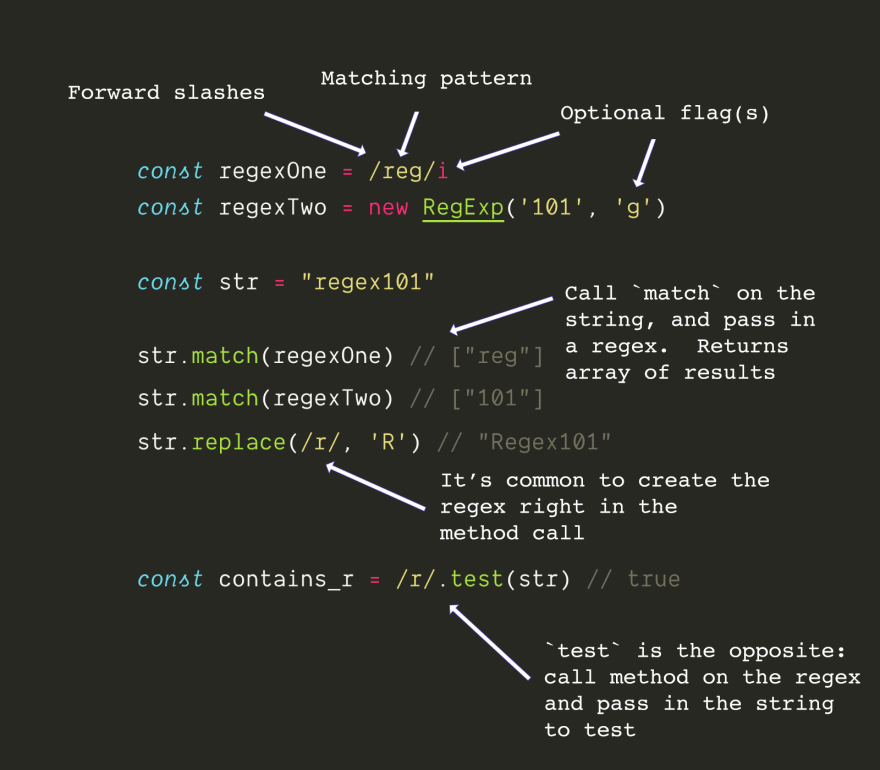 16 |
16 | 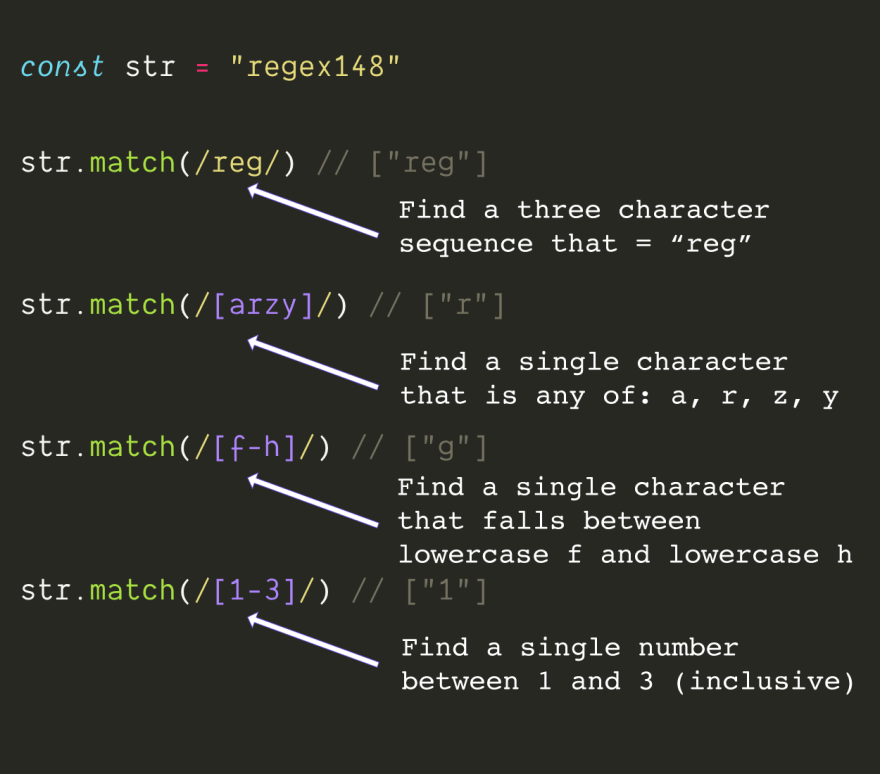 24 |
24 | 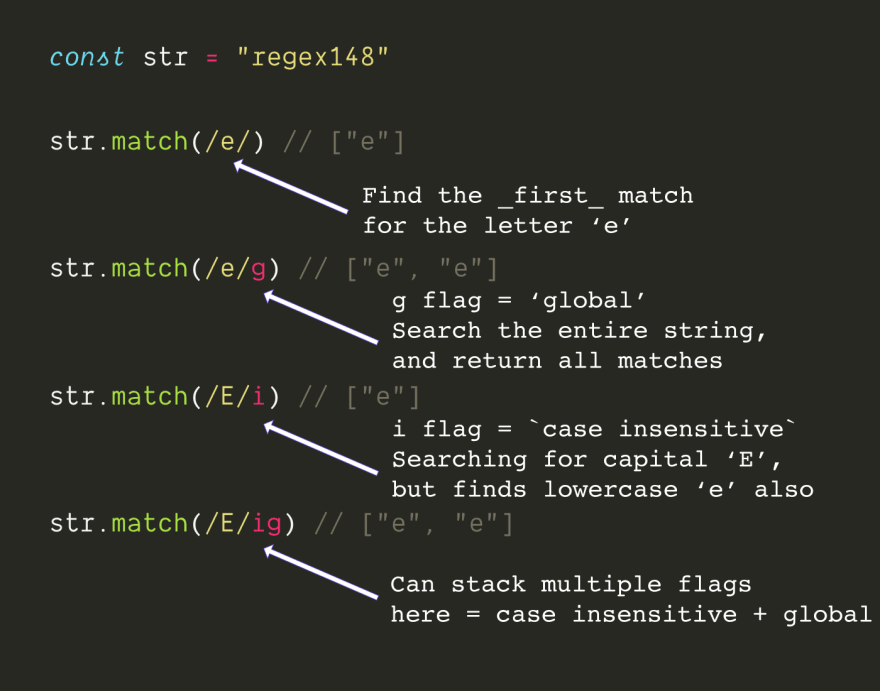 38 |
38 | 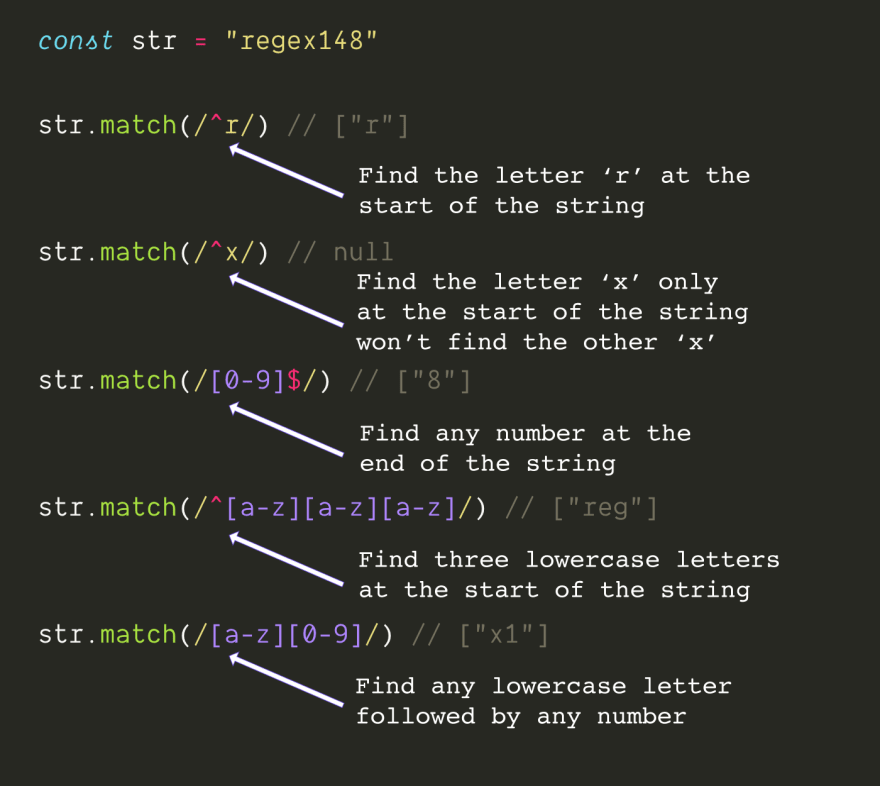 48 |
48 | 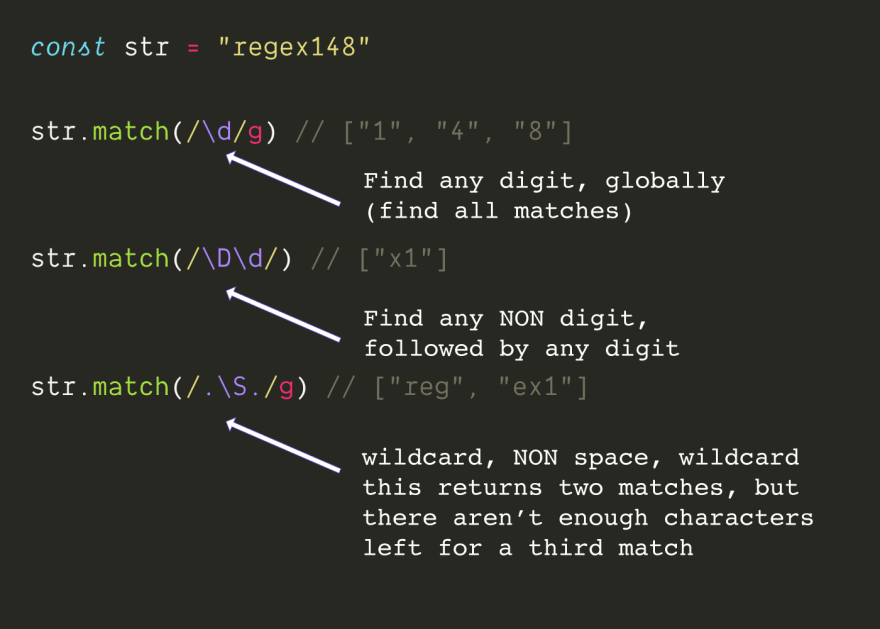 63 |
63 | 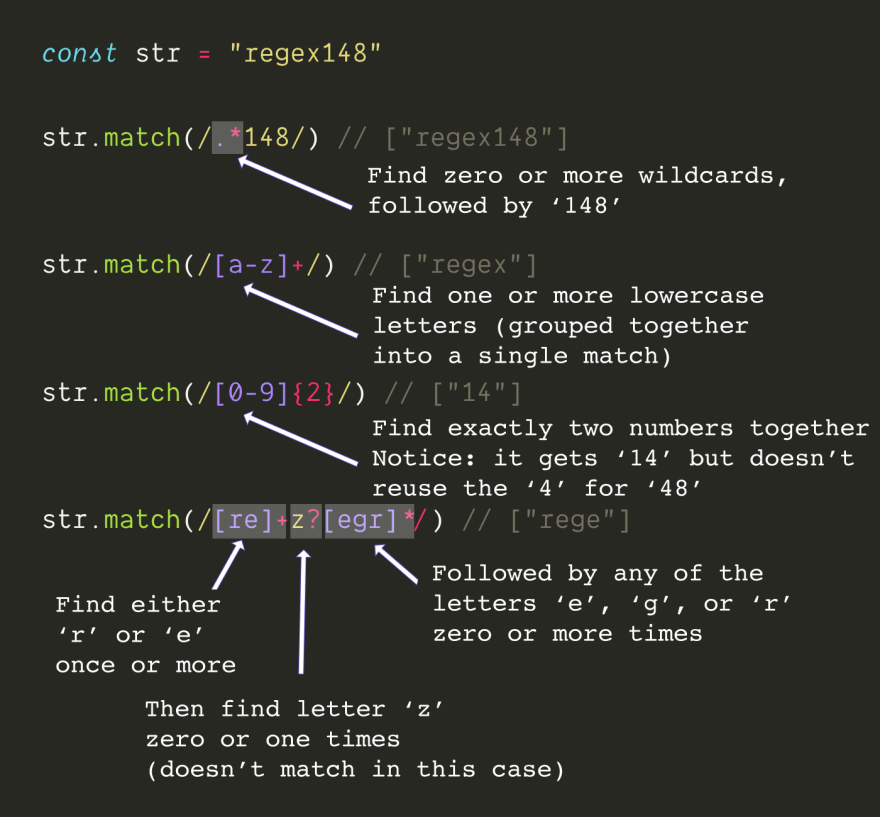 77 |
77 | 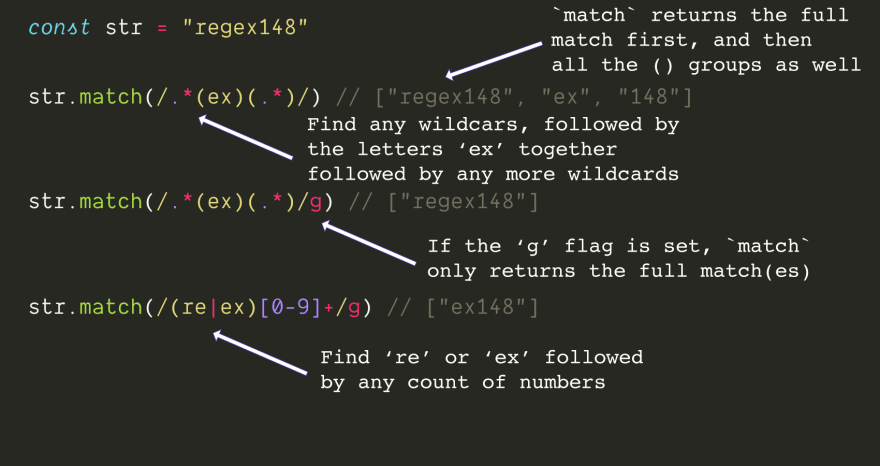 87 |
87 | 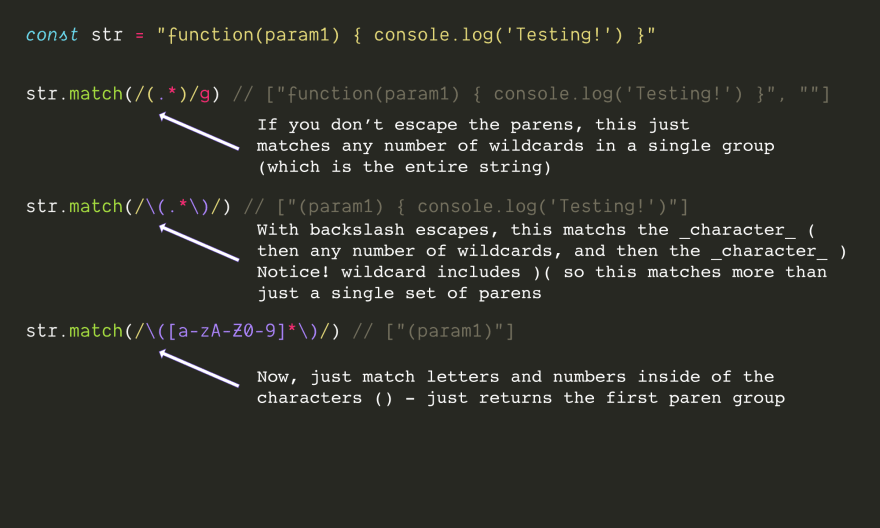 99 |
99 | 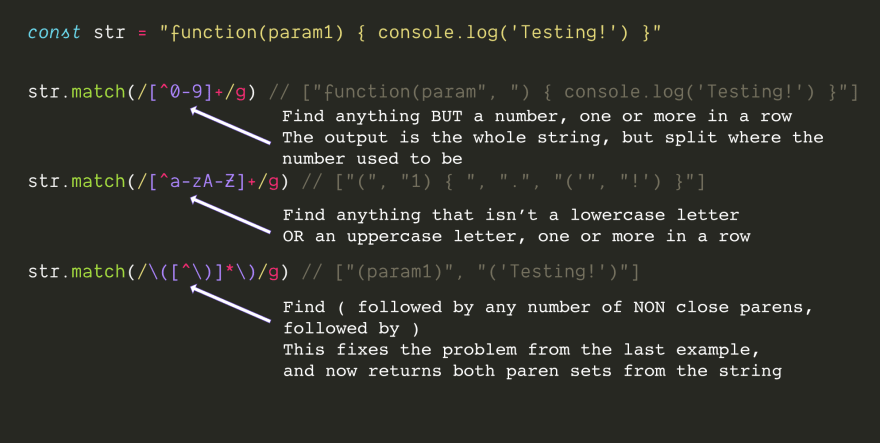 109 |
109 | 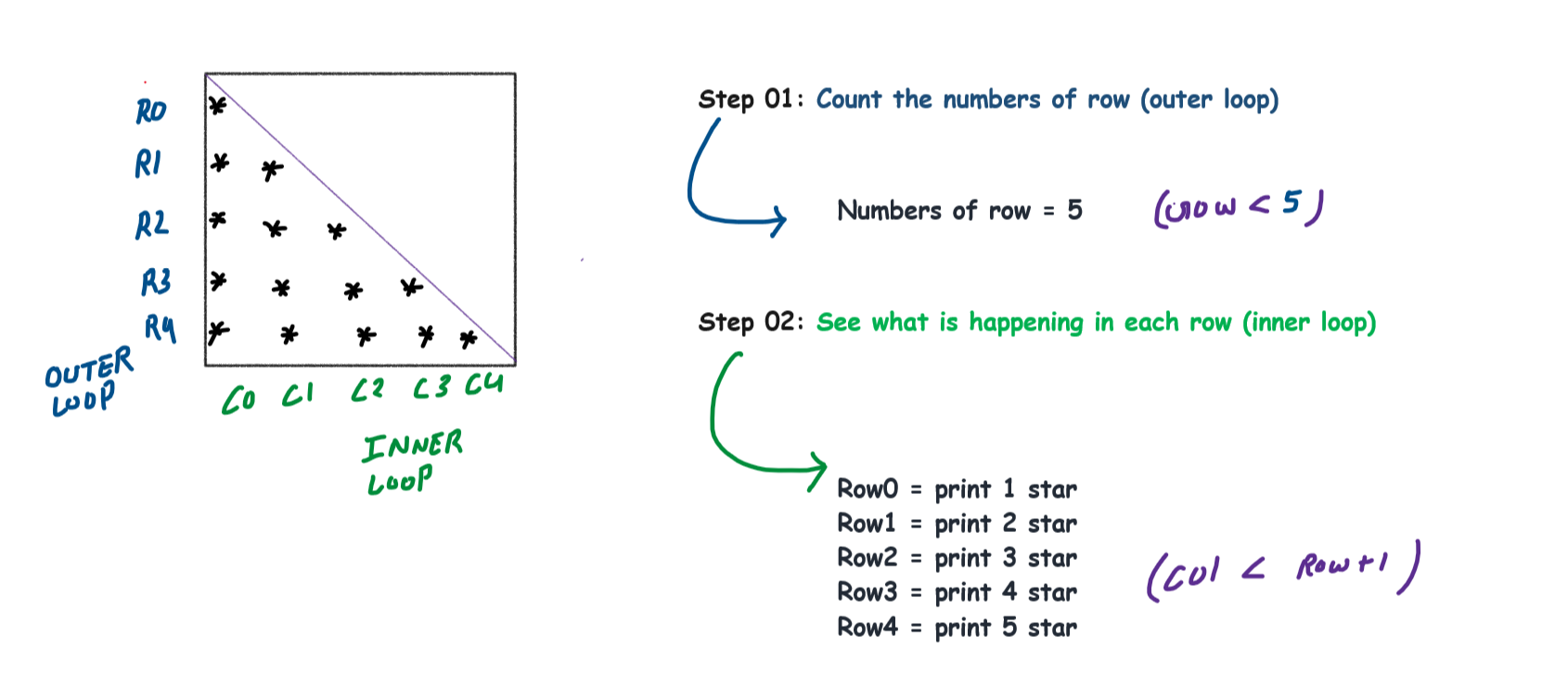 161 |
161 |  87 |
88 |
89 |
87 |
88 |
89 |  70 |
71 |
78 |
79 |
80 | ```
81 |
82 | ## Activity 2: Mouse Events
83 |
84 | **Task 3:** Add a mouseover event listener to an element that changes its background color.
85 |
86 | ```html
87 |
88 |
89 |
90 |
91 |
92 |
70 |
71 |
78 |
79 |
80 | ```
81 |
82 | ## Activity 2: Mouse Events
83 |
84 | **Task 3:** Add a mouseover event listener to an element that changes its background color.
85 |
86 | ```html
87 |
88 |
89 |
90 |
91 |
92 | 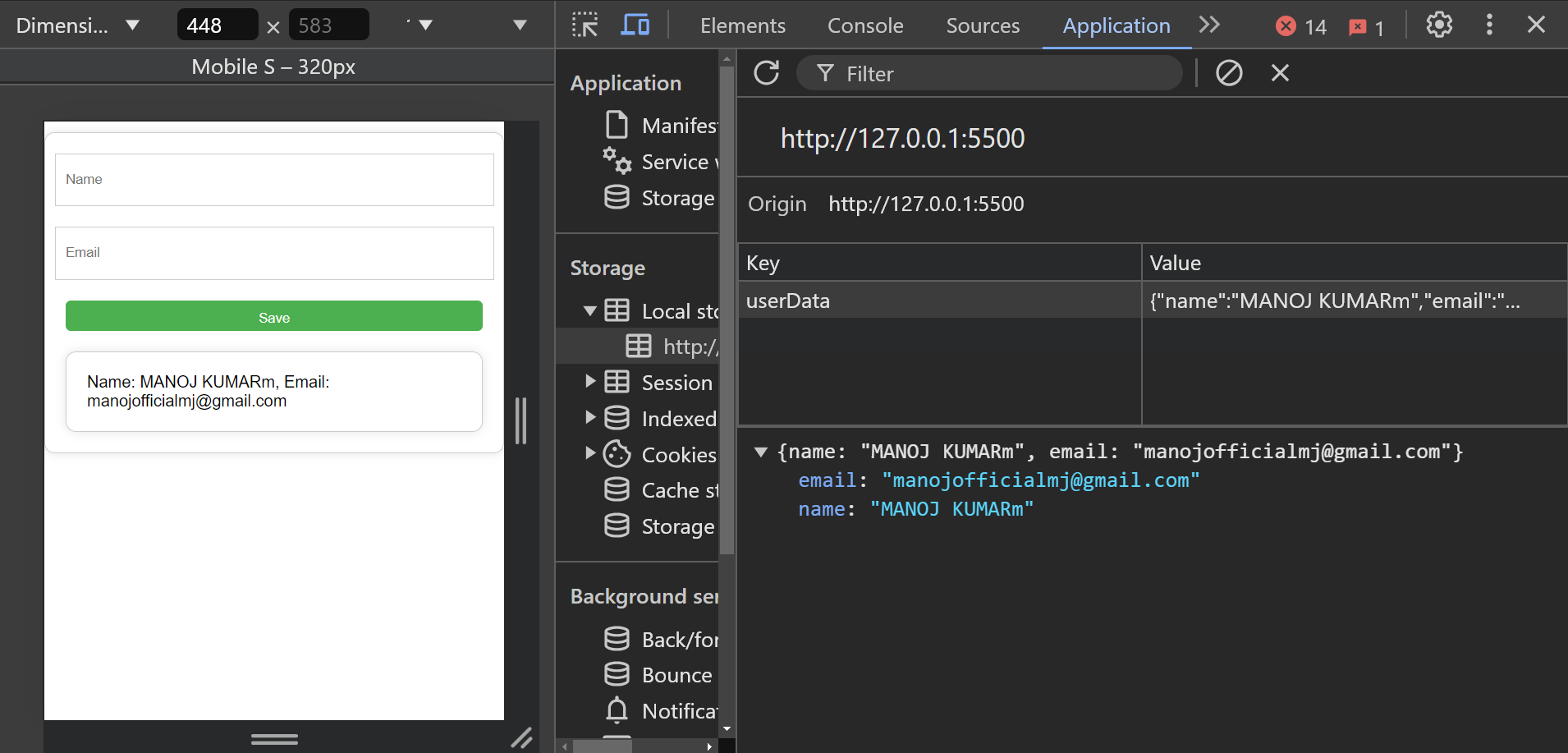 119 |
119 | 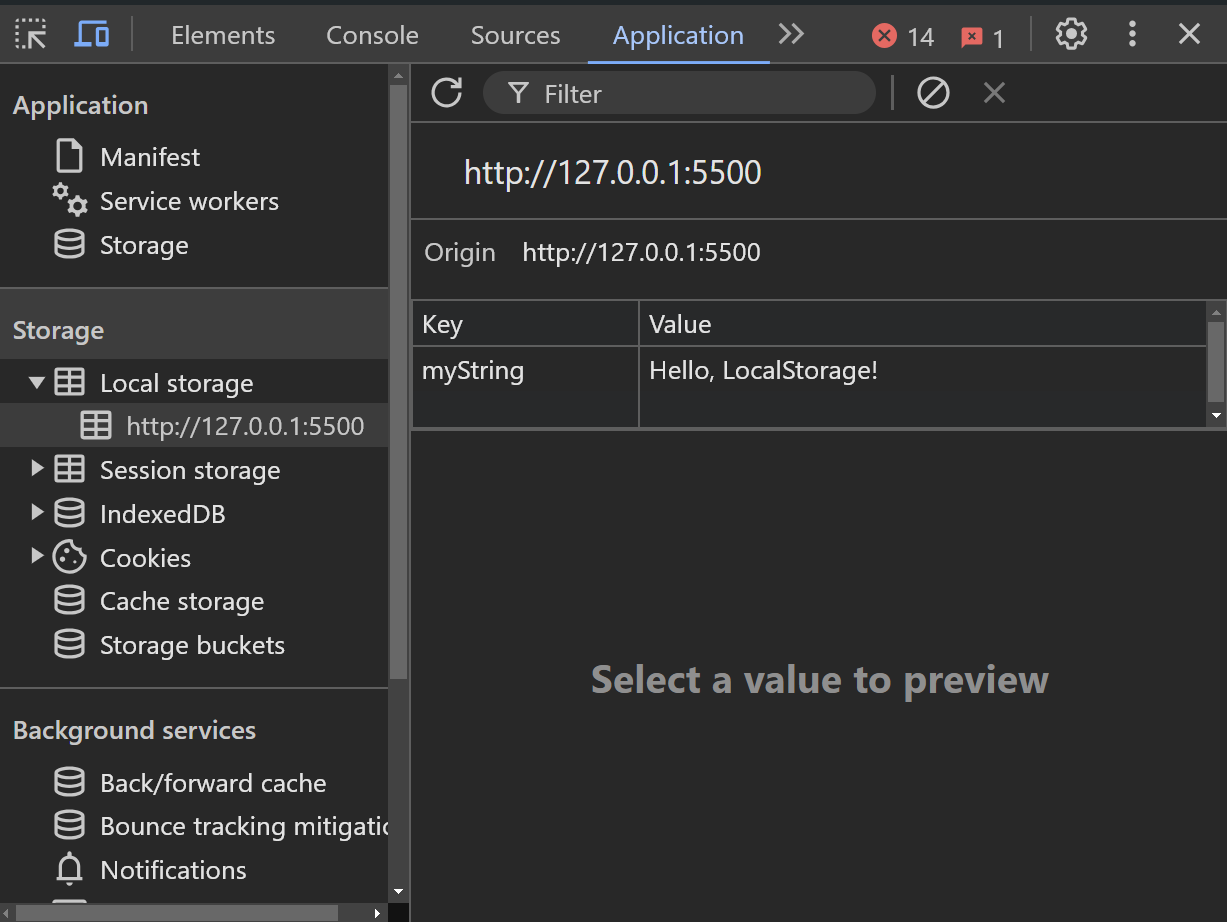 142 |
142 | 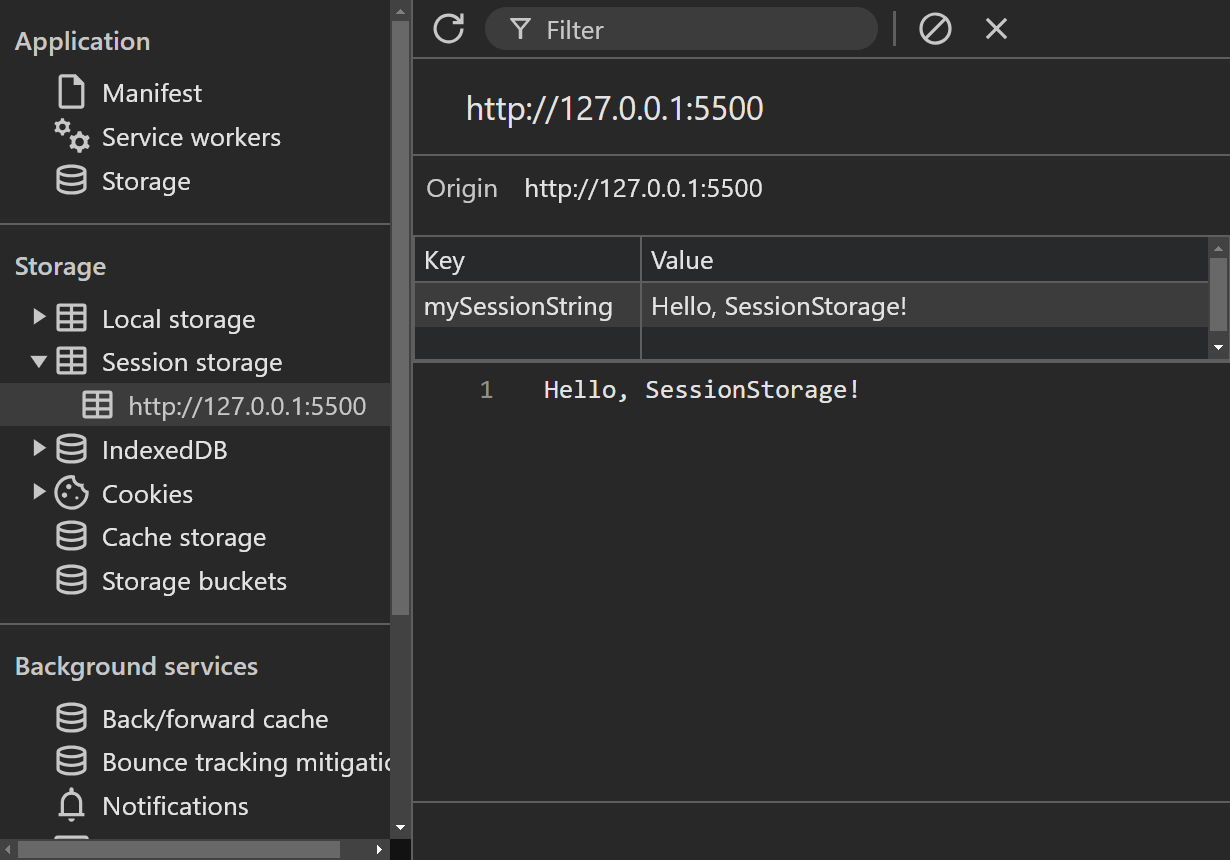 162 |
162 | 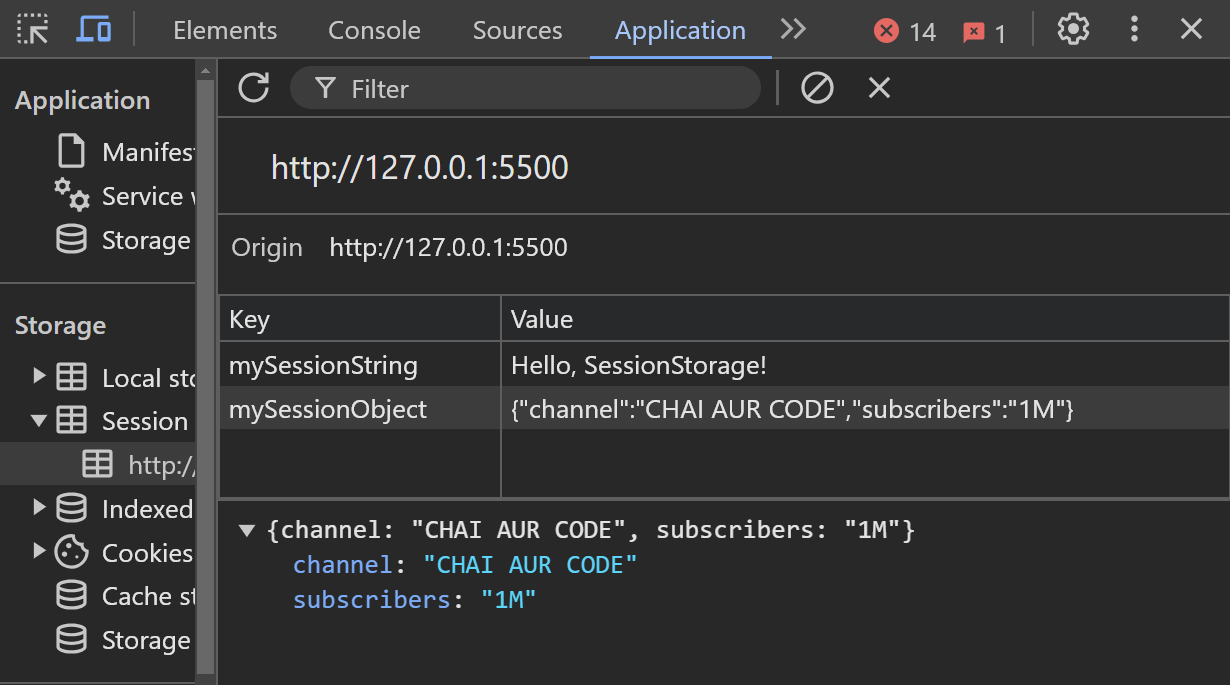 181 |
181 | 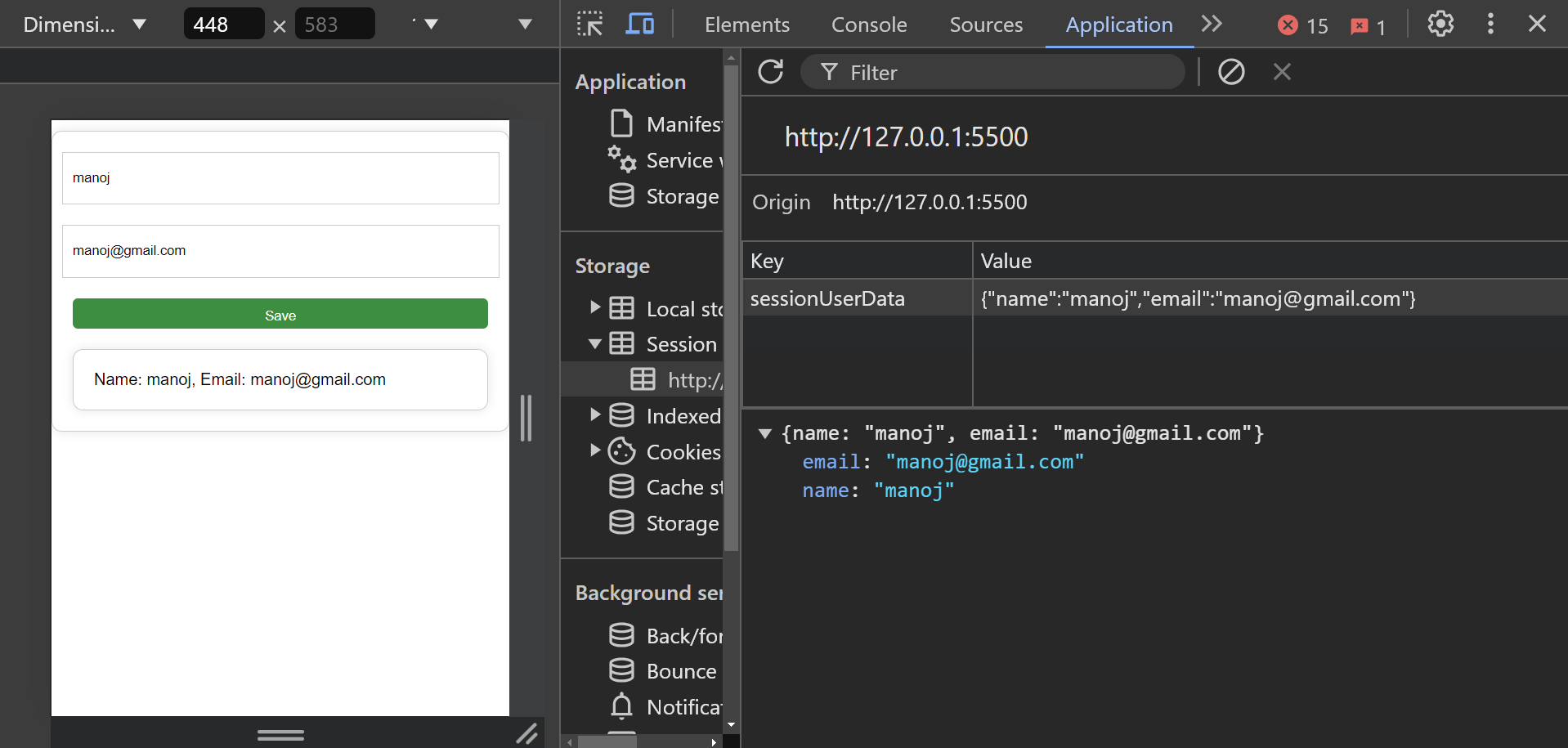 253 |
253 |