├── grub_setup_amd.sh
├── grub_setup_intel.sh
├── libvirt_configuration.sh
├── README.md
├── libvirtd.conf
└── qemu.conf
/grub_setup_amd.sh:
--------------------------------------------------------------------------------
1 | if [ $EUID -ne 0 ]
2 | then
3 | echo "This program must run as root to function."
4 | exit 1
5 | fi
6 |
7 | echo "This script will configure your grub config for virtualization."
8 |
9 | GRUB=`cat /etc/default/grub | grep "GRUB_CMDLINE_LINUX_DEFAULT" | rev | cut -c 2- | rev`
10 | #adds amd_iommu=on and iommu=pt to the grub config
11 | GRUB+=" amd_iommu=on iommu=pt video=efifb:off\""
12 | sed -i -e "s|^GRUB_CMDLINE_LINUX_DEFAULT.*|${GRUB}|" /etc/default/grub
13 |
14 | grub-mkconfig -o /boot/grub/grub.cfg
15 | sleep 5s
16 | clear
17 | echo
18 | echo "Grub bootloader has been modified successfully, reboot time!"
19 | echo "press Y to reboot now and n to reboot later."
20 | read REBOOT
21 |
22 | if [ $REBOOT = "Y" ]
23 | then
24 | reboot
25 | fi
26 | exit
27 |
--------------------------------------------------------------------------------
/grub_setup_intel.sh:
--------------------------------------------------------------------------------
1 | if [ $EUID -ne 0 ]
2 | then
3 | echo "This program must run as root to function."
4 | exit 1
5 | fi
6 |
7 | echo "This script will configure your grub config for virtualization."
8 |
9 | GRUB=`cat /etc/default/grub | grep "GRUB_CMDLINE_LINUX_DEFAULT" | rev | cut -c 2- | rev`
10 | #adds amd_iommu=on and iommu=pt to the grub config
11 | GRUB+=" intel_iommu=on iommu=pt\""
12 | sed -i -e "s|^GRUB_CMDLINE_LINUX_DEFAULT.*|${GRUB}|" /etc/default/grub
13 |
14 | grub-mkconfig -o /boot/grub/grub.cfg
15 | sleep 5s
16 | clear
17 | echo
18 | echo "Grub bootloader has been modified successfully, reboot time!"
19 | echo "press Y to reboot now and n to reboot later."
20 | read REBOOT
21 |
22 | if [ $REBOOT = "y" ]
23 | then
24 | reboot
25 | fi
26 | exit
27 |
--------------------------------------------------------------------------------
/libvirt_configuration.sh:
--------------------------------------------------------------------------------
1 | if [ $EUID -ne 0 ]
2 | then
3 | echo "This program must run as root to function."
4 | exit 1
5 | fi
6 | echo "This will install and configure libvirt."
7 | sleep 1s
8 | pacman -S libvirt libvirt-glib libvirt-python virt-install virt-manager qemu qemu-arch-extra ovmf vde2 ebtables dnsmasq bridge-utils openbsd-netcat iptables swtpm
9 | sleep 1s
10 | systemctl enable libvirtd
11 | echo "systemctl enable libvirtd"
12 | sleep 1s
13 | systemctl start libvirtd
14 | echo "systemctl start libvirtd"
15 | clear
16 | echo "Now it's time to edit your configs!"
17 | mv /etc/libvirt/libvirtd.conf /etc/libvirt/libvirtd.conf.old
18 | echo "mv /etc/libvirt/libvirtd.conf /etc/libvirt/libvirtd.conf.old"
19 | sleep 1s
20 | echo "What is your username?"
21 | read USERNAME
22 | sleep 1s
23 | clear
24 | echo "Adding $USERNAME to kvm and libvirt groups..."
25 | gpasswd -M $USERNAME kvm
26 | gpasswd -M $USERNAME libvirt
27 | sleep 2s
28 | clear
29 | mv libvirtd.conf /etc/libvirt
30 | echo "mv libvirtd.conf /etc/libvirt"
31 | sleep 1s
32 | clear
33 | echo "libvirt has been successfully configured!"
34 | sleep 2s
35 | clear
36 | echo "Time for your QEMU configs babe!"
37 | sleep 2s
38 | echo
39 | echo "Yes, honey"
40 | sleep 3s
41 | clear
42 | echo "mv /etc/libvirt/qemu.conf /etc/libvirt/qemu.conf.old"
43 | mv /etc/libvirt/qemu.conf /etc/libvirt/qemu.conf.old
44 | sleep 1s
45 | echo "mv qemu.conf /etc/libvirt"
46 | mv qemu.conf /etc/libvirt
47 | sleep 1s
48 | clear
49 | systemctl restart libvirtd
50 | echo "QEMU has been successfully configured!"
51 | sleep 5s
52 | exit
53 |
--------------------------------------------------------------------------------
/README.md:
--------------------------------------------------------------------------------
1 | # KVM-GPU-Passthrough
2 |
3 | If you want a video guide to walk you through this, check out my tutorial: https://youtu.be/R5c25kV4tZ0
4 |
5 | ***THIS GUIDE IS MEANT FOR ADVANCED ARCH LINUX USERS***
6 |
7 | ### Preparations
8 |
9 | To prepare, make sure you have virtualization enabled in your BIOS.
10 |
11 | For AMD this could be done by enabling
12 |
13 | • IOMMU
14 | • NX Mode
15 | • SVM Mode
16 |
17 | For you lame Intel users, just enable
18 |
19 | • VT-d
20 | • VT-x
21 |
22 | And then clone the repository by typing:
23 |
24 | ```
25 | git clone https://github.com/BigAnteater/KVM-GPU-Passthrough/ && cd KVM-GPU-Passthrough
26 | ```
27 |
28 | And then you should be good to go.
29 |
30 | ### Preparing GRUB
31 |
32 | Preparing GRUB is very simple. Just follow these instructions.
33 |
34 | 1) Mark the script as executable: for AMD: ``chmod +x grub_setup_amd.sh`` for Intel: ``chmod +x grub_setup_intel.sh``.
35 | 2) Then run the script: AMD: ``sudo ./grub_setup_amd.sh`` Intel: ``sudo ./grub_setup_intel.sh``.
36 | 3) Then just follow the instructions in script!
37 |
38 | ### Configuring Libvirt
39 |
40 | To configure libvirt run my script which configures libvirt and QEMU for you by typing ``sudo ./libvirt_configuration.sh``.
41 |
42 | ### Setting up Virt Manager
43 |
44 | 1) Download the latest ISO for Windows 10 from: https://www.microsoft.com/en-us/software-download/windows10ISO.
45 | 2) Open up Virt Manager and create a new virtual machine.
46 | 3) Select local install media, and choose your Windows 10 ISO. Then choose how much ram you want, and how many CPUs you want. You can select your own custom storage, but for the sake of this guide I will be using the default location. Make sure to allocate at least 60 gigabytes.
47 | 5) Name the Virtual Machine Win10, and tick the box which says customize configuration before install.
48 | 6) Make sure your firmware is set to OVMF_CODE.fd, because you need the special UEFI firmware for the VM to boot properly.
49 | 
50 | 7) Then go into the CPU options and change it so that it looks like the picture below. Change the ammount of cores to however many CPU cores you want, and make sure to set the threads ammount to 2 because it will give 2 threads to every 1 core.
51 | 
52 | 8) Lastly, go into your boot settings and make sure that your optical disk is checked.
53 | 
54 | 9) And then you should be able to click begin installation!
55 | 10) After you finish installing windows, you should be good to shut down the VM and follow along with the next steps.
56 |
57 | ### Exporting your ROM
58 |
59 | 1) Find your GPU's device ID: `lspci -vnn | grep '\[03'`. You should see some output such as the following; the first bit (`03:00.0` in this case) is the device ID.
60 | ```
61 | 03:00.0 VGA compatible controller: Advanced Micro Devices [AMD] nee ATI RV710 [Radeon HD 4350/4550] (prog-if 00 [VGA controller])
62 | ```
63 | 1) Run `find /sys/devices -name rom` and ensure the device ID matches.
64 | For example looking at the case above, you'll want the last part before the `/rom` to be `03:00.0`, so you might see something like this (the extra `0000:` in front is fine):
65 | ```
66 | /sys/devices/pci0000:00/0000:00:01.0/0000:03:00.0/rom
67 | ```
68 | 1) For convenience's sake, let's call this PATH_TO_ROM. You can manually set this variable as well, by first becoming root (run `sudo su`) then running `export PATH_TO_ROM=/sys/devices/pci0000:00/0000:00:01.0/0000:03:00.0/rom`
69 | 1) Then, still as `root`, run the following commands:
70 | ```
71 | echo 1 > $PATH_TO_ROM
72 | mkdir -p /var/lib/libvirt/vbios/
73 | cat $PATH_TO_ROM > /var/lib/libvirt/vbios/gpu.rom
74 | echo 0 > $PATH_TO_ROM
75 | ```
76 | 1) Run `exit` or press Ctrl-D to stop acting as `root`
77 |
78 | ### Hook Scripts
79 |
80 | This is an amazing hook script made by @risingprismtv on gitlab. What this script does is stop your display manager service and all of your running programs, and unhooks your graphics card off of Linux and rehooks it onto the Windows VM.
81 |
82 | 1) Clone Risngprism's single GPU passthrough gitlab page: ``git clone https://gitlab.com/risingprismtv/single-gpu-passthrough && cd single-gpu-passthrough``.
83 | 2) Run the install script as sudo: ``sudo ./install-hooks.sh``.
84 | 3) The scripts will successfully install into their required places without issue!
85 |
86 | ### Adding your GPU and USB devices to the VM
87 |
88 | For the VM to actually pass the gpu, you need to add the PCI device to your VM. Here is how to do so.
89 |
90 | *Before we edit pass through our GPU, make sure to enable XML editing.*
91 | 
92 |
93 |
94 |
95 | 1) Add every PCI device which has to do with your graphics card to the VM.
96 | 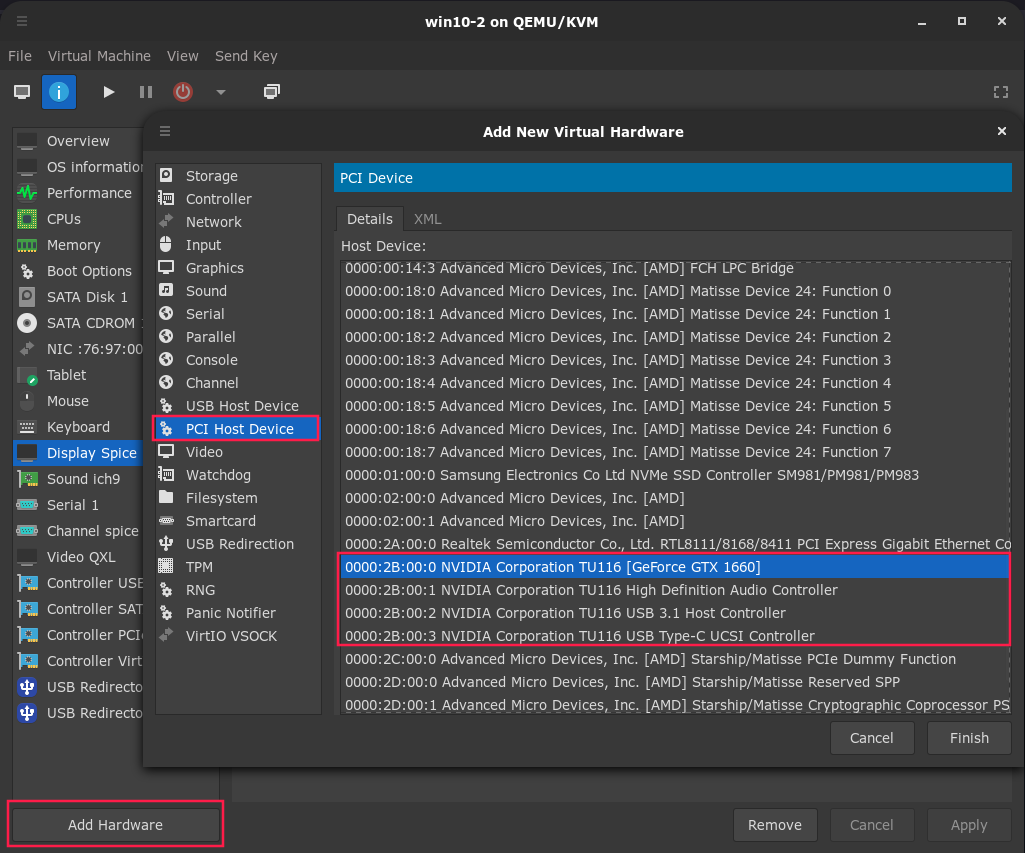
97 | 2) Pass through your audio device and your USB controller. It will look like this for me
98 | 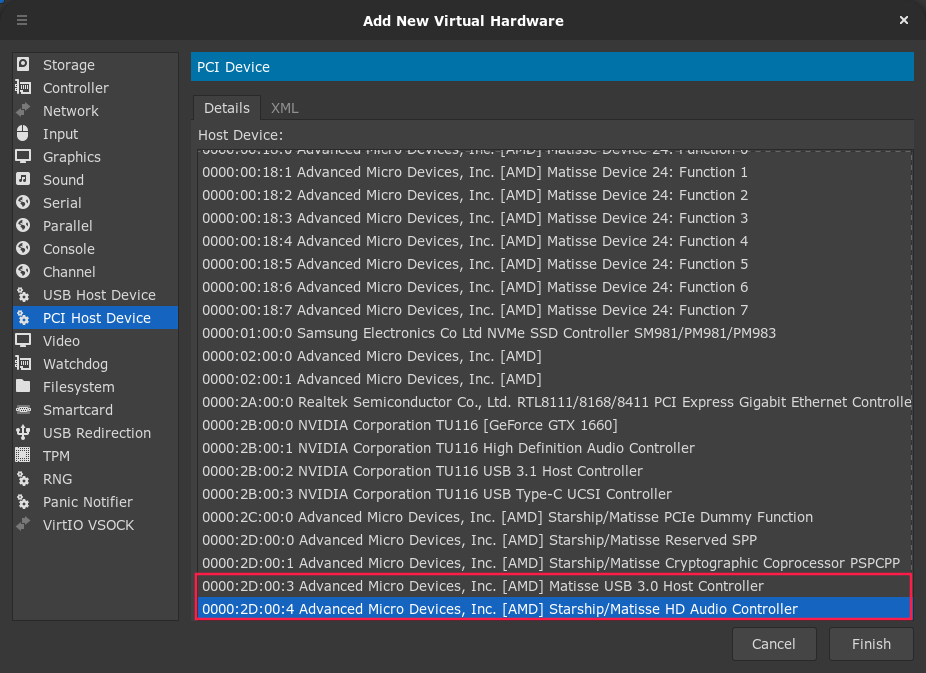
99 | 3) Remember the ROM we exported? Well we're gonna use it now.
100 | 4) Edit the XML of each passed through PCI device that has to do with your GPU and add the line ``.
101 | 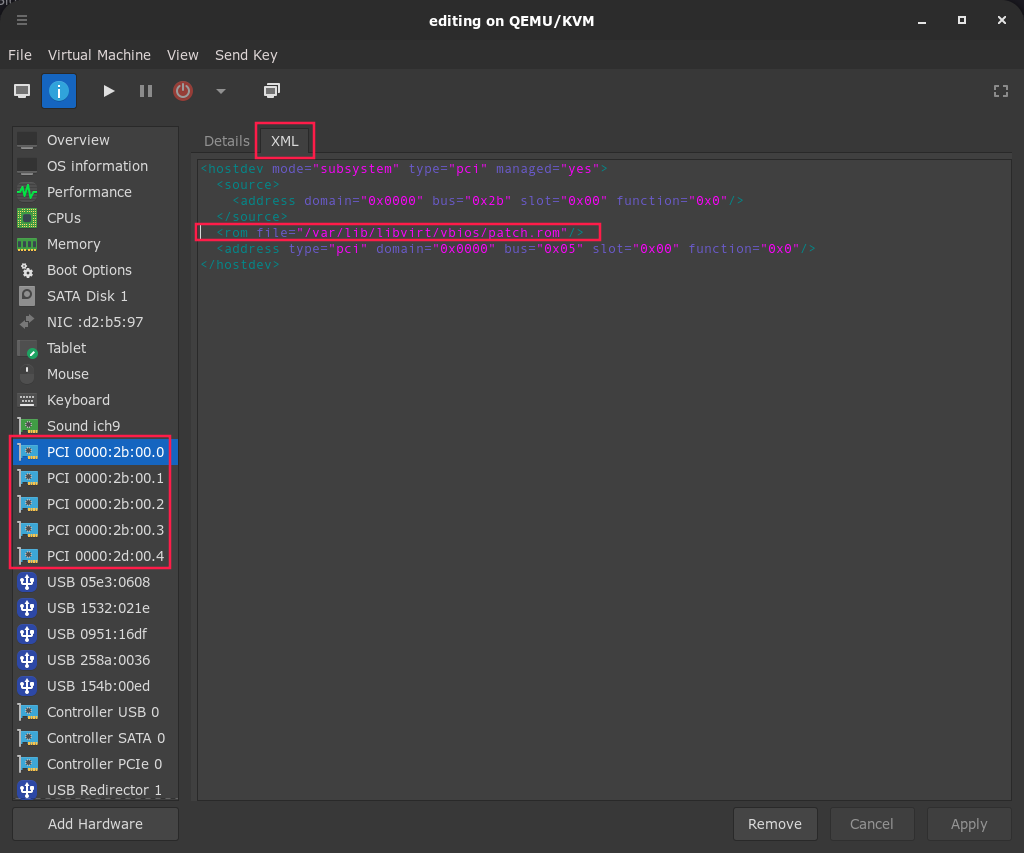
102 | 5) Lastly, remove every spice/qxl device from your virtual machine
103 | 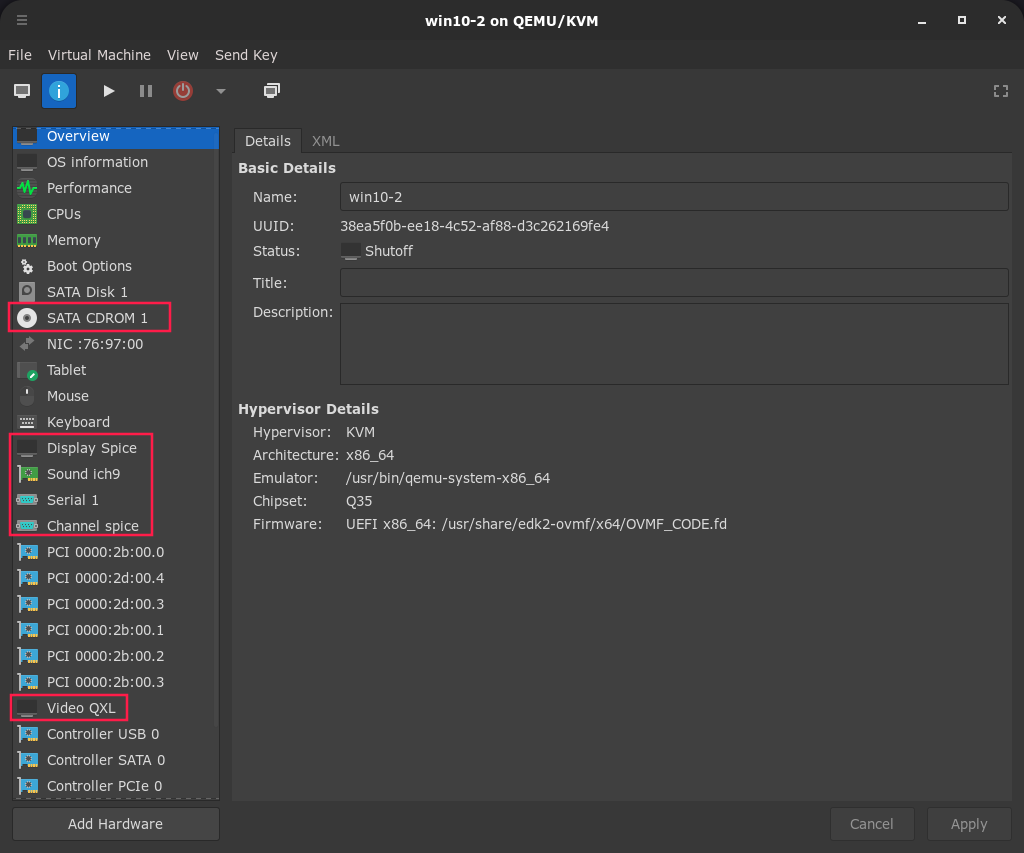
104 | 6) If you are using an NVIDIA graphics card, add these lines to your XML overview.
105 | ```
106 |
107 |
108 |
109 |
110 |
111 |
112 |
113 |
114 |
115 |
116 |
117 |
118 |
119 |
120 |
121 |
122 | ```
123 | 
124 |
125 | ### Editing hooks
126 | This is usefull for people who want to name their VMs to something other than win10.
127 |
128 | 1) Edit the hooks script by typing ``sudo nano /etc/libvirt/hooks/qemu``
129 | 2) On the line with the if then statement, add in ``|| [[ $OBJECT == "RENAME TO YOUR VM" ]]`` before the ;.
130 | 
131 | 3) Now you should be good to turn on your VM! On Windows drivers will auto install.
132 |
133 |
134 | ### SHOUTOUT TO RisingPrism GITLAB FOR SCRIPTS & IDEA: https://gitlab.com/risingprismtv/single-gpu-passthrough/-/wikis/home. SHOUTOUT TO SomeOrdinaryGamers FOR SOME ASPECTS OF THE GUIDE: https://youtu.be/BUSrdUoedTo. https://github.com/pavolelsig/Ubuntu_GVT-g_helper/blob/master/part_1.sh FOR MAKING GRUB SHELL SCRIPT (I changed it to work for arch).
135 |
136 | ### Also thank you for choosing my guide! it took a lot of time to complete the scripts and readme. Multiple hairs were torn out in the making.
137 |
--------------------------------------------------------------------------------
/libvirtd.conf:
--------------------------------------------------------------------------------
1 | # Master libvirt daemon configuration file
2 | #
3 |
4 | #################################################################
5 | #
6 | # Network connectivity controls
7 | #
8 |
9 | # Flag listening for secure TLS connections on the public TCP/IP port.
10 | # NB, must pass the --listen flag to the libvirtd process for this to
11 | # have any effect.
12 | #
13 | # This setting is not required or honoured if using systemd socket
14 | # activation.
15 | #
16 | # It is necessary to setup a CA and issue server certificates before
17 | # using this capability.
18 | #
19 | # This is enabled by default, uncomment this to disable it
20 | #listen_tls = 0
21 |
22 | # Listen for unencrypted TCP connections on the public TCP/IP port.
23 | # NB, must pass the --listen flag to the libvirtd process for this to
24 | # have any effect.
25 | #
26 | # This setting is not required or honoured if using systemd socket
27 | # activation.
28 | #
29 | # Using the TCP socket requires SASL authentication by default. Only
30 | # SASL mechanisms which support data encryption are allowed. This is
31 | # DIGEST_MD5 and GSSAPI (Kerberos5)
32 | #
33 | # This is disabled by default, uncomment this to enable it.
34 | #listen_tcp = 1
35 |
36 |
37 |
38 | # Override the port for accepting secure TLS connections
39 | # This can be a port number, or service name
40 | #
41 | # This setting is not required or honoured if using systemd socket
42 | # activation with systemd version >= 227
43 | #
44 | #tls_port = "16514"
45 |
46 | # Override the port for accepting insecure TCP connections
47 | # This can be a port number, or service name
48 | #
49 | # This setting is not required or honoured if using systemd socket
50 | # activation with systemd version >= 227
51 | #
52 | #tcp_port = "16509"
53 |
54 |
55 | # Override the default configuration which binds to all network
56 | # interfaces. This can be a numeric IPv4/6 address, or hostname
57 | #
58 | # This setting is not required or honoured if using systemd socket
59 | # activation.
60 | #
61 | # If the libvirtd service is started in parallel with network
62 | # startup (e.g. with systemd), binding to addresses other than
63 | # the wildcards (0.0.0.0/::) might not be available yet.
64 | #
65 | #listen_addr = "192.168.0.1"
66 |
67 |
68 | #################################################################
69 | #
70 | # UNIX socket access controls
71 | #
72 |
73 | # Set the UNIX domain socket group ownership. This can be used to
74 | # allow a 'trusted' set of users access to management capabilities
75 | # without becoming root.
76 | #
77 | # This setting is not required or honoured if using systemd socket
78 | # activation.
79 | #
80 | # This is restricted to 'root' by default.
81 | unix_sock_group="libvirt"
82 |
83 | # Set the UNIX socket permissions for the R/O socket. This is used
84 | # for monitoring VM status only
85 | #
86 | # This setting is not required or honoured if using systemd socket
87 | # activation.
88 | #
89 | # Default allows any user. If setting group ownership, you may want to
90 | # restrict this too.
91 | unix_sock_ro_perms="0777"
92 |
93 | # Set the UNIX socket permissions for the R/W socket. This is used
94 | # for full management of VMs
95 | #
96 | # This setting is not required or honoured if using systemd socket
97 | # activation.
98 | #
99 | # Default allows only root. If PolicyKit is enabled on the socket,
100 | # the default will change to allow everyone (eg, 0777)
101 | #
102 | # If not using PolicyKit and setting group ownership for access
103 | # control, then you may want to relax this too.
104 | #unix_sock_rw_perms = "0770"
105 |
106 | # Set the UNIX socket permissions for the admin interface socket.
107 | #
108 | # This setting is not required or honoured if using systemd socket
109 | # activation.
110 | #
111 | # Default allows only owner (root), do not change it unless you are
112 | # sure to whom you are exposing the access to.
113 | #unix_sock_admin_perms = "0700"
114 |
115 | # Set the name of the directory in which sockets will be found/created.
116 | #
117 | # This setting is not required or honoured if using systemd socket
118 | # activation with systemd version >= 227
119 | #
120 | #unix_sock_dir = "/run/libvirt"
121 |
122 |
123 |
124 | #################################################################
125 | #
126 | # Authentication.
127 | #
128 | # There are the following choices available:
129 | #
130 | # - none: do not perform auth checks. If you can connect to the
131 | # socket you are allowed. This is suitable if there are
132 | # restrictions on connecting to the socket (eg, UNIX
133 | # socket permissions), or if there is a lower layer in
134 | # the network providing auth (eg, TLS/x509 certificates)
135 | #
136 | # - sasl: use SASL infrastructure. The actual auth scheme is then
137 | # controlled from /etc/sasl2/libvirt.conf. For the TCP
138 | # socket only GSSAPI & DIGEST-MD5 mechanisms will be used.
139 | # For non-TCP or TLS sockets, any scheme is allowed.
140 | #
141 | # - polkit: use PolicyKit to authenticate. This is only suitable
142 | # for use on the UNIX sockets. The default policy will
143 | # require a user to supply their own password to gain
144 | # full read/write access (aka sudo like), while anyone
145 | # is allowed read/only access.
146 | #
147 |
148 | # Set an authentication scheme for UNIX read-only sockets
149 | #
150 | # By default socket permissions allow anyone to connect
151 | #
152 | # If libvirt was compiled without support for 'polkit', then
153 | # no access control checks are done, but libvirt still only
154 | # allows execution of APIs which don't change state.
155 | #
156 | # If libvirt was compiled with support for 'polkit', then
157 | # the libvirt socket will perform a check with polkit after
158 | # connections. The default policy still allows any local
159 | # user access.
160 | #
161 | # To restrict monitoring of domains you may wish to either
162 | # enable 'sasl' here, or change the polkit policy definition.
163 | #auth_unix_ro = "polkit"
164 |
165 | # Set an authentication scheme for UNIX read-write sockets.
166 | #
167 | # If libvirt was compiled without support for 'polkit', then
168 | # the systemd .socket files will use SocketMode=0600 by default
169 | # thus only allowing root user to connect, and 'auth_unix_rw'
170 | # will default to 'none'.
171 | #
172 | # If libvirt was compiled with support for 'polkit', then
173 | # the systemd .socket files will use SocketMode=0666 which
174 | # allows any user to connect and 'auth_unix_rw' will default
175 | # to 'polkit'. If you disable use of 'polkit' here, then it
176 | # is essential to change the systemd SocketMode parameter
177 | # back to 0600, to avoid an insecure configuration.
178 | #
179 | #auth_unix_rw = "polkit"
180 |
181 | # Change the authentication scheme for TCP sockets.
182 | #
183 | # If you don't enable SASL, then all TCP traffic is cleartext.
184 | # Don't do this outside of a dev/test scenario. For real world
185 | # use, always enable SASL and use the GSSAPI or DIGEST-MD5
186 | # mechanism in /etc/sasl2/libvirt.conf
187 | #auth_tcp = "sasl"
188 |
189 | # Change the authentication scheme for TLS sockets.
190 | #
191 | # TLS sockets already have encryption provided by the TLS
192 | # layer, and limited authentication is done by certificates
193 | #
194 | # It is possible to make use of any SASL authentication
195 | # mechanism as well, by using 'sasl' for this option
196 | #auth_tls = "none"
197 |
198 |
199 | # Change the API access control scheme
200 | #
201 | # By default an authenticated user is allowed access
202 | # to all APIs. Access drivers can place restrictions
203 | # on this. By default the 'nop' driver is enabled,
204 | # meaning no access control checks are done once a
205 | # client has authenticated with libvirtd
206 | #
207 | #access_drivers = [ "polkit" ]
208 |
209 | #################################################################
210 | #
211 | # TLS x509 certificate configuration
212 | #
213 |
214 | # Use of TLS requires that x509 certificates be issued. The default locations
215 | # for the certificate files is as follows:
216 | #
217 | # /etc/pki/CA/cacert.pem - The CA master certificate
218 | # /etc/pki/libvirt/servercert.pem - The server certificate signed by cacert.pem
219 | # /etc/pki/libvirt/private/serverkey.pem - The server private key
220 | #
221 | # It is possible to override the default locations by altering the 'key_file',
222 | # 'cert_file', and 'ca_file' values and uncommenting them below.
223 | #
224 | # NB, overriding the default of one location requires uncommenting and
225 | # possibly additionally overriding the other settings.
226 | #
227 |
228 | # Override the default server key file path
229 | #
230 | #key_file = "/etc/pki/libvirt/private/serverkey.pem"
231 |
232 | # Override the default server certificate file path
233 | #
234 | #cert_file = "/etc/pki/libvirt/servercert.pem"
235 |
236 | # Override the default CA certificate path
237 | #
238 | #ca_file = "/etc/pki/CA/cacert.pem"
239 |
240 | # Specify a certificate revocation list.
241 | #
242 | # Defaults to not using a CRL, uncomment to enable it
243 | #crl_file = "/etc/pki/CA/crl.pem"
244 |
245 |
246 |
247 | #################################################################
248 | #
249 | # Authorization controls
250 | #
251 |
252 |
253 | # Flag to disable verification of our own server certificates
254 | #
255 | # When libvirtd starts it performs some sanity checks against
256 | # its own certificates.
257 | #
258 | # Default is to always run sanity checks. Uncommenting this
259 | # will disable sanity checks which is not a good idea
260 | #tls_no_sanity_certificate = 1
261 |
262 | # Flag to disable verification of client certificates
263 | #
264 | # Client certificate verification is the primary authentication mechanism.
265 | # Any client which does not present a certificate signed by the CA
266 | # will be rejected.
267 | #
268 | # Default is to always verify. Uncommenting this will disable
269 | # verification.
270 | #tls_no_verify_certificate = 1
271 |
272 |
273 | # An access control list of allowed x509 Distinguished Names
274 | # This list may contain wildcards such as
275 | #
276 | # "C=GB,ST=London,L=London,O=Red Hat,CN=*"
277 | #
278 | # See the g_pattern_match function for the format of the wildcards:
279 | #
280 | # https://developer.gnome.org/glib/stable/glib-Glob-style-pattern-matching.html
281 | #
282 | # NB If this is an empty list, no client can connect, so comment out
283 | # entirely rather than using empty list to disable these checks
284 | #
285 | # By default, no DN's are checked
286 | #tls_allowed_dn_list = ["DN1", "DN2"]
287 |
288 |
289 | # Override the compile time default TLS priority string. The
290 | # default is usually "NORMAL" unless overridden at build time.
291 | # Only set this is it is desired for libvirt to deviate from
292 | # the global default settings.
293 | #
294 | #tls_priority="NORMAL"
295 |
296 |
297 | # An access control list of allowed SASL usernames. The format for username
298 | # depends on the SASL authentication mechanism. Kerberos usernames
299 | # look like username@REALM
300 | #
301 | # This list may contain wildcards such as
302 | #
303 | # "*@EXAMPLE.COM"
304 | #
305 | # See the g_pattern_match function for the format of the wildcards.
306 | #
307 | # https://developer.gnome.org/glib/stable/glib-Glob-style-pattern-matching.html
308 | #
309 | # NB If this is an empty list, no client can connect, so comment out
310 | # entirely rather than using empty list to disable these checks
311 | #
312 | # By default, no Username's are checked
313 | #sasl_allowed_username_list = ["joe@EXAMPLE.COM", "fred@EXAMPLE.COM" ]
314 |
315 |
316 | #################################################################
317 | #
318 | # Processing controls
319 | #
320 |
321 | # The maximum number of concurrent client connections to allow
322 | # over all sockets combined.
323 | #max_clients = 5000
324 |
325 | # The maximum length of queue of connections waiting to be
326 | # accepted by the daemon. Note, that some protocols supporting
327 | # retransmission may obey this so that a later reattempt at
328 | # connection succeeds.
329 | #max_queued_clients = 1000
330 |
331 | # The maximum length of queue of accepted but not yet
332 | # authenticated clients. The default value is 20. Set this to
333 | # zero to turn this feature off.
334 | #max_anonymous_clients = 20
335 |
336 | # The minimum limit sets the number of workers to start up
337 | # initially. If the number of active clients exceeds this,
338 | # then more threads are spawned, up to max_workers limit.
339 | # Typically you'd want max_workers to equal maximum number
340 | # of clients allowed
341 | #min_workers = 5
342 | #max_workers = 20
343 |
344 |
345 | # The number of priority workers. If all workers from above
346 | # pool are stuck, some calls marked as high priority
347 | # (notably domainDestroy) can be executed in this pool.
348 | #prio_workers = 5
349 |
350 | # Limit on concurrent requests from a single client
351 | # connection. To avoid one client monopolizing the server
352 | # this should be a small fraction of the global max_workers
353 | # parameter.
354 | #max_client_requests = 5
355 |
356 | # Same processing controls, but this time for the admin interface.
357 | # For description of each option, be so kind to scroll few lines
358 | # upwards.
359 |
360 | #admin_min_workers = 1
361 | #admin_max_workers = 5
362 | #admin_max_clients = 5
363 | #admin_max_queued_clients = 5
364 | #admin_max_client_requests = 5
365 |
366 | #################################################################
367 | #
368 | # Logging controls
369 | #
370 |
371 | # Logging level: 4 errors, 3 warnings, 2 information, 1 debug
372 | # basically 1 will log everything possible
373 | #
374 | # WARNING: USE OF THIS IS STRONGLY DISCOURAGED.
375 | #
376 | # WARNING: It outputs too much information to practically read.
377 | # WARNING: The "log_filters" setting is recommended instead.
378 | #
379 | # WARNING: Journald applies rate limiting of messages and so libvirt
380 | # WARNING: will limit "log_level" to only allow values 3 or 4 if
381 | # WARNING: journald is the current output.
382 | #
383 | # WARNING: USE OF THIS IS STRONGLY DISCOURAGED.
384 | #log_level = 3
385 |
386 | # Logging filters:
387 | # A filter allows to select a different logging level for a given category
388 | # of logs. The format for a filter is:
389 | #
390 | # level:match
391 | #
392 | # where 'match' is a string which is matched against the category
393 | # given in the VIR_LOG_INIT() at the top of each libvirt source
394 | # file, e.g., "remote", "qemu", or "util.json". The 'match' in the
395 | # filter matches using shell wildcard syntax (see 'man glob(7)').
396 | # The 'match' is always treated as a substring match. IOW a match
397 | # string 'foo' is equivalent to '*foo*'.
398 | #
399 | # 'level' is the minimal level where matching messages should
400 | # be logged:
401 | #
402 | # 1: DEBUG
403 | # 2: INFO
404 | # 3: WARNING
405 | # 4: ERROR
406 | #
407 | # Multiple filters can be defined in a single @log_filters, they just need
408 | # to be separated by spaces. Note that libvirt performs "first" match, i.e.
409 | # if there are concurrent filters, the first one that matches will be applied,
410 | # given the order in @log_filters.
411 | #
412 | # A typical need is to capture information from a hypervisor driver,
413 | # public API entrypoints and some of the utility code. Some utility
414 | # code is very verbose and is generally not desired. Taking the QEMU
415 | # hypervisor as an example, a suitable filter string for debugging
416 | # might be to turn off object, json & event logging, but enable the
417 | # rest of the util code:
418 | #
419 | log_filters="1:qemu"
420 |
421 | # Logging outputs:
422 | # An output is one of the places to save logging information
423 | # The format for an output can be:
424 | # level:stderr
425 | # output goes to stderr
426 | # level:syslog:name
427 | # use syslog for the output and use the given name as the ident
428 | # level:file:file_path
429 | # output to a file, with the given filepath
430 | # level:journald
431 | # output to journald logging system
432 | # In all cases 'level' is the minimal priority, acting as a filter
433 | # 1: DEBUG
434 | # 2: INFO
435 | # 3: WARNING
436 | # 4: ERROR
437 | #
438 | # Multiple outputs can be defined, they just need to be separated by spaces.
439 | # e.g. to log all warnings and errors to syslog under the libvirtd ident:
440 | log_outputs="1:file:/var/log/libvirt/libvirtd.log"
441 |
442 |
443 | ##################################################################
444 | #
445 | # Auditing
446 | #
447 | # This setting allows usage of the auditing subsystem to be altered:
448 | #
449 | # audit_level == 0 -> disable all auditing
450 | # audit_level == 1 -> enable auditing, only if enabled on host (default)
451 | # audit_level == 2 -> enable auditing, and exit if disabled on host
452 | #
453 | #audit_level = 2
454 | #
455 | # If set to 1, then audit messages will also be sent
456 | # via libvirt logging infrastructure. Defaults to 0
457 | #
458 | #audit_logging = 1
459 |
460 | ###################################################################
461 | # UUID of the host:
462 | # Host UUID is read from one of the sources specified in host_uuid_source.
463 | #
464 | # - 'smbios': fetch the UUID from 'dmidecode -s system-uuid'
465 | # - 'machine-id': fetch the UUID from /etc/machine-id
466 | #
467 | # The host_uuid_source default is 'smbios'. If 'dmidecode' does not provide
468 | # a valid UUID a temporary UUID will be generated.
469 | #
470 | # Another option is to specify host UUID in host_uuid.
471 | #
472 | # Keep the format of the example UUID below. UUID must not have all digits
473 | # be the same.
474 |
475 | # NB This default all-zeros UUID will not work. Replace
476 | # it with the output of the 'uuidgen' command and then
477 | # uncomment this entry
478 | #host_uuid = "00000000-0000-0000-0000-000000000000"
479 | #host_uuid_source = "smbios"
480 |
481 | ###################################################################
482 | # Keepalive protocol:
483 | # This allows libvirtd to detect broken client connections or even
484 | # dead clients. A keepalive message is sent to a client after
485 | # keepalive_interval seconds of inactivity to check if the client is
486 | # still responding; keepalive_count is a maximum number of keepalive
487 | # messages that are allowed to be sent to the client without getting
488 | # any response before the connection is considered broken. In other
489 | # words, the connection is automatically closed approximately after
490 | # keepalive_interval * (keepalive_count + 1) seconds since the last
491 | # message received from the client. If keepalive_interval is set to
492 | # -1, libvirtd will never send keepalive requests; however clients
493 | # can still send them and the daemon will send responses. When
494 | # keepalive_count is set to 0, connections will be automatically
495 | # closed after keepalive_interval seconds of inactivity without
496 | # sending any keepalive messages.
497 | #
498 | #keepalive_interval = 5
499 | #keepalive_count = 5
500 |
501 | #
502 | # These configuration options are no longer used. There is no way to
503 | # restrict such clients from connecting since they first need to
504 | # connect in order to ask for keepalive.
505 | #
506 | #keepalive_required = 1
507 | #admin_keepalive_required = 1
508 |
509 | # Keepalive settings for the admin interface
510 | #admin_keepalive_interval = 5
511 | #admin_keepalive_count = 5
512 |
513 | ###################################################################
514 | # Open vSwitch:
515 | # This allows to specify a timeout for openvswitch calls made by
516 | # libvirt. The ovs-vsctl utility is used for the configuration and
517 | # its timeout option is set by default to 5 seconds to avoid
518 | # potential infinite waits blocking libvirt.
519 | #
520 | #ovs_timeout = 5
521 |
--------------------------------------------------------------------------------
/qemu.conf:
--------------------------------------------------------------------------------
1 | # Master configuration file for the QEMU driver.
2 | # All settings described here are optional - if omitted, sensible
3 | # defaults are used.
4 |
5 | # Use of TLS requires that x509 certificates be issued. The default is
6 | # to keep them in /etc/pki/qemu. This directory must contain
7 | #
8 | # ca-cert.pem - the CA master certificate
9 | # server-cert.pem - the server certificate signed with ca-cert.pem
10 | # server-key.pem - the server private key
11 | #
12 | # and optionally may contain
13 | #
14 | # dh-params.pem - the DH params configuration file
15 | #
16 | # If the directory does not exist, libvirtd will fail to start. If the
17 | # directory doesn't contain the necessary files, QEMU domains will fail
18 | # to start if they are configured to use TLS.
19 | #
20 | # In order to overwrite the default path alter the following. This path
21 | # definition will be used as the default path for other *_tls_x509_cert_dir
22 | # configuration settings if their default path does not exist or is not
23 | # specifically set.
24 | #
25 | #default_tls_x509_cert_dir = "/etc/pki/qemu"
26 |
27 |
28 | # The default TLS configuration only uses certificates for the server
29 | # allowing the client to verify the server's identity and establish
30 | # an encrypted channel.
31 | #
32 | # It is possible to use x509 certificates for authentication too, by
33 | # issuing an x509 certificate to every client who needs to connect.
34 | #
35 | # Enabling this option will reject any client who does not have a
36 | # certificate signed by the CA in /etc/pki/qemu/ca-cert.pem
37 | #
38 | # The default_tls_x509_cert_dir directory must also contain
39 | #
40 | # client-cert.pem - the client certificate signed with the ca-cert.pem
41 | # client-key.pem - the client private key
42 | #
43 | # If this option is supplied it provides the default for the "_verify" option
44 | # of specific TLS users such as vnc, backups, migration, etc. The specific
45 | # users of TLS may override this by setting the specific "_verify" option.
46 | #
47 | # When not supplied the specific TLS users provide their own defaults.
48 | #
49 | #default_tls_x509_verify = 1
50 |
51 | #
52 | # Libvirt assumes the server-key.pem file is unencrypted by default.
53 | # To use an encrypted server-key.pem file, the password to decrypt
54 | # the PEM file is required. This can be provided by creating a secret
55 | # object in libvirt and then to uncomment this setting to set the UUID
56 | # of the secret.
57 | #
58 | # NB This default all-zeros UUID will not work. Replace it with the
59 | # output from the UUID for the TLS secret from a 'virsh secret-list'
60 | # command and then uncomment the entry
61 | #
62 | #default_tls_x509_secret_uuid = "00000000-0000-0000-0000-000000000000"
63 |
64 |
65 | # VNC is configured to listen on 127.0.0.1 by default.
66 | # To make it listen on all public interfaces, uncomment
67 | # this next option.
68 | #
69 | # NB, strong recommendation to enable TLS + x509 certificate
70 | # verification when allowing public access
71 | #
72 | #vnc_listen = "0.0.0.0"
73 |
74 | # Enable this option to have VNC served over an automatically created
75 | # unix socket. This prevents unprivileged access from users on the
76 | # host machine, though most VNC clients do not support it.
77 | #
78 | # This will only be enabled for VNC configurations that have listen
79 | # type=address but without any address specified. This setting takes
80 | # preference over vnc_listen.
81 | #
82 | #vnc_auto_unix_socket = 1
83 |
84 | # Enable use of TLS encryption on the VNC server. This requires
85 | # a VNC client which supports the VeNCrypt protocol extension.
86 | # Examples include vinagre, virt-viewer, virt-manager and vencrypt
87 | # itself. UltraVNC, RealVNC, TightVNC do not support this
88 | #
89 | # It is necessary to setup CA and issue a server certificate
90 | # before enabling this.
91 | #
92 | #vnc_tls = 1
93 |
94 |
95 | # In order to override the default TLS certificate location for
96 | # vnc certificates, supply a valid path to the certificate directory.
97 | # If the provided path does not exist, libvirtd will fail to start.
98 | # If the path is not provided, but vnc_tls = 1, then the
99 | # default_tls_x509_cert_dir path will be used.
100 | #
101 | #vnc_tls_x509_cert_dir = "/etc/pki/libvirt-vnc"
102 |
103 |
104 | # Uncomment and use the following option to override the default secret
105 | # UUID provided in the default_tls_x509_secret_uuid parameter.
106 | #
107 | #vnc_tls_x509_secret_uuid = "00000000-0000-0000-0000-000000000000"
108 |
109 |
110 | # The default TLS configuration only uses certificates for the server
111 | # allowing the client to verify the server's identity and establish
112 | # an encrypted channel.
113 | #
114 | # It is possible to use x509 certificates for authentication too, by
115 | # issuing an x509 certificate to every client who needs to connect.
116 | #
117 | # Enabling this option will reject any client that does not have a
118 | # certificate (as described in default_tls_x509_verify) signed by the
119 | # CA in the vnc_tls_x509_cert_dir (or default_tls_x509_cert_dir).
120 | #
121 | # If this option is not supplied, it will be set to the value of
122 | # "default_tls_x509_verify". If "default_tls_x509_verify" is not supplied either,
123 | # the default is "0".
124 | #
125 | #vnc_tls_x509_verify = 1
126 |
127 |
128 | # The default VNC password. Only 8 bytes are significant for
129 | # VNC passwords. This parameter is only used if the per-domain
130 | # XML config does not already provide a password. To allow
131 | # access without passwords, leave this commented out. An empty
132 | # string will still enable passwords, but be rejected by QEMU,
133 | # effectively preventing any use of VNC. Obviously change this
134 | # example here before you set this.
135 | #
136 | #vnc_password = "XYZ12345"
137 |
138 |
139 | # Enable use of SASL encryption on the VNC server. This requires
140 | # a VNC client which supports the SASL protocol extension.
141 | # Examples include vinagre, virt-viewer and virt-manager
142 | # itself. UltraVNC, RealVNC, TightVNC do not support this
143 | #
144 | # It is necessary to configure /etc/sasl2/qemu.conf to choose
145 | # the desired SASL plugin (eg, GSSPI for Kerberos)
146 | #
147 | #vnc_sasl = 1
148 |
149 |
150 | # The default SASL configuration file is located in /etc/sasl2/
151 | # When running libvirtd unprivileged, it may be desirable to
152 | # override the configs in this location. Set this parameter to
153 | # point to the directory, and create a qemu.conf in that location
154 | #
155 | #vnc_sasl_dir = "/some/directory/sasl2"
156 |
157 |
158 | # QEMU implements an extension for providing audio over a VNC connection,
159 | # though if your VNC client does not support it, your only chance for getting
160 | # sound output is through regular audio backends. By default, libvirt will
161 | # disable all QEMU sound backends if using VNC, since they can cause
162 | # permissions issues. Enabling this option will make libvirtd honor the
163 | # QEMU_AUDIO_DRV environment variable when using VNC.
164 | #
165 | #vnc_allow_host_audio = 0
166 |
167 |
168 |
169 | # SPICE is configured to listen on 127.0.0.1 by default.
170 | # To make it listen on all public interfaces, uncomment
171 | # this next option.
172 | #
173 | # NB, strong recommendation to enable TLS + x509 certificate
174 | # verification when allowing public access
175 | #
176 | #spice_listen = "0.0.0.0"
177 |
178 |
179 | # Enable use of TLS encryption on the SPICE server.
180 | #
181 | # It is necessary to setup CA and issue a server certificate
182 | # before enabling this.
183 | #
184 | #spice_tls = 1
185 |
186 |
187 | # In order to override the default TLS certificate location for
188 | # spice certificates, supply a valid path to the certificate directory.
189 | # If the provided path does not exist, libvirtd will fail to start.
190 | # If the path is not provided, but spice_tls = 1, then the
191 | # default_tls_x509_cert_dir path will be used.
192 | #
193 | #spice_tls_x509_cert_dir = "/etc/pki/libvirt-spice"
194 |
195 |
196 | # Enable this option to have SPICE served over an automatically created
197 | # unix socket. This prevents unprivileged access from users on the
198 | # host machine.
199 | #
200 | # This will only be enabled for SPICE configurations that have listen
201 | # type=address but without any address specified. This setting takes
202 | # preference over spice_listen.
203 | #
204 | #spice_auto_unix_socket = 1
205 |
206 |
207 | # The default SPICE password. This parameter is only used if the
208 | # per-domain XML config does not already provide a password. To
209 | # allow access without passwords, leave this commented out. An
210 | # empty string will still enable passwords, but be rejected by
211 | # QEMU, effectively preventing any use of SPICE. Obviously change
212 | # this example here before you set this.
213 | #
214 | #spice_password = "XYZ12345"
215 |
216 |
217 | # Enable use of SASL encryption on the SPICE server. This requires
218 | # a SPICE client which supports the SASL protocol extension.
219 | #
220 | # It is necessary to configure /etc/sasl2/qemu.conf to choose
221 | # the desired SASL plugin (eg, GSSPI for Kerberos)
222 | #
223 | #spice_sasl = 1
224 |
225 | # The default SASL configuration file is located in /etc/sasl2/
226 | # When running libvirtd unprivileged, it may be desirable to
227 | # override the configs in this location. Set this parameter to
228 | # point to the directory, and create a qemu.conf in that location
229 | #
230 | #spice_sasl_dir = "/some/directory/sasl2"
231 |
232 | # Enable use of TLS encryption on the chardev TCP transports.
233 | #
234 | # It is necessary to setup CA and issue a server certificate
235 | # before enabling this.
236 | #
237 | #chardev_tls = 1
238 |
239 |
240 | # In order to override the default TLS certificate location for character
241 | # device TCP certificates, supply a valid path to the certificate directory.
242 | # If the provided path does not exist, libvirtd will fail to start.
243 | # If the path is not provided, but chardev_tls = 1, then the
244 | # default_tls_x509_cert_dir path will be used.
245 | #
246 | #chardev_tls_x509_cert_dir = "/etc/pki/libvirt-chardev"
247 |
248 |
249 | # The default TLS configuration only uses certificates for the server
250 | # allowing the client to verify the server's identity and establish
251 | # an encrypted channel.
252 | #
253 | # It is possible to use x509 certificates for authentication too, by
254 | # issuing an x509 certificate to every client who needs to connect.
255 | #
256 | # Enabling this option will reject any client that does not have a
257 | # certificate (as described in default_tls_x509_verify) signed by the
258 | # CA in the chardev_tls_x509_cert_dir (or default_tls_x509_cert_dir).
259 | #
260 | # If this option is not supplied, it will be set to the value of
261 | # "default_tls_x509_verify". If "default_tls_x509_verify" is not supplied either,
262 | # the default is "1".
263 | #
264 | #chardev_tls_x509_verify = 1
265 |
266 |
267 | # Uncomment and use the following option to override the default secret
268 | # UUID provided in the default_tls_x509_secret_uuid parameter.
269 | #
270 | # NB This default all-zeros UUID will not work. Replace it with the
271 | # output from the UUID for the TLS secret from a 'virsh secret-list'
272 | # command and then uncomment the entry
273 | #
274 | #chardev_tls_x509_secret_uuid = "00000000-0000-0000-0000-000000000000"
275 |
276 |
277 | # Enable use of TLS encryption for all VxHS network block devices that
278 | # don't specifically disable.
279 | #
280 | # When the VxHS network block device server is set up appropriately,
281 | # x509 certificates are required for authentication between the clients
282 | # (qemu processes) and the remote VxHS server.
283 | #
284 | # It is necessary to setup CA and issue the client certificate before
285 | # enabling this.
286 | #
287 | #vxhs_tls = 1
288 |
289 |
290 | # In order to override the default TLS certificate location for VxHS
291 | # backed storage, supply a valid path to the certificate directory.
292 | # This is used to authenticate the VxHS block device clients to the VxHS
293 | # server.
294 | #
295 | # If the provided path does not exist, libvirtd will fail to start.
296 | # If the path is not provided, but vxhs_tls = 1, then the
297 | # default_tls_x509_cert_dir path will be used.
298 | #
299 | # VxHS block device clients expect the client certificate and key to be
300 | # present in the certificate directory along with the CA master certificate.
301 | # If using the default environment, default_tls_x509_verify must be configured.
302 | # Since this is only a client the server-key.pem certificate is not needed.
303 | # Thus a VxHS directory must contain the following:
304 | #
305 | # ca-cert.pem - the CA master certificate
306 | # client-cert.pem - the client certificate signed with the ca-cert.pem
307 | # client-key.pem - the client private key
308 | #
309 | #vxhs_tls_x509_cert_dir = "/etc/pki/libvirt-vxhs"
310 |
311 |
312 | # Uncomment and use the following option to override the default secret
313 | # UUID provided in the default_tls_x509_secret_uuid parameter.
314 | #
315 | # NB This default all-zeros UUID will not work. Replace it with the
316 | # output from the UUID for the TLS secret from a 'virsh secret-list'
317 | # command and then uncomment the entry
318 | #
319 | #vxhs_tls_x509_secret_uuid = "00000000-0000-0000-0000-000000000000"
320 |
321 |
322 | # Enable use of TLS encryption for all NBD disk devices that don't
323 | # specifically disable it.
324 | #
325 | # When the NBD server is set up appropriately, x509 certificates are required
326 | # for authentication between the client and the remote NBD server.
327 | #
328 | # It is necessary to setup CA and issue the client certificate before
329 | # enabling this.
330 | #
331 | #nbd_tls = 1
332 |
333 |
334 | # In order to override the default TLS certificate location for NBD
335 | # backed storage, supply a valid path to the certificate directory.
336 | # This is used to authenticate the NBD block device clients to the NBD
337 | # server.
338 | #
339 | # If the provided path does not exist, libvirtd will fail to start.
340 | # If the path is not provided, but nbd_tls = 1, then the
341 | # default_tls_x509_cert_dir path will be used.
342 | #
343 | # NBD block device clients expect the client certificate and key to be
344 | # present in the certificate directory along with the CA certificate.
345 | # Since this is only a client the server-key.pem certificate is not needed.
346 | # Thus a NBD directory must contain the following:
347 | #
348 | # ca-cert.pem - the CA master certificate
349 | # client-cert.pem - the client certificate signed with the ca-cert.pem
350 | # client-key.pem - the client private key
351 | #
352 | #nbd_tls_x509_cert_dir = "/etc/pki/libvirt-nbd"
353 |
354 |
355 | # Uncomment and use the following option to override the default secret
356 | # UUID provided in the default_tls_x509_secret_uuid parameter.
357 | #
358 | # NB This default all-zeros UUID will not work. Replace it with the
359 | # output from the UUID for the TLS secret from a 'virsh secret-list'
360 | # command and then uncomment the entry
361 | #
362 | #nbd_tls_x509_secret_uuid = "00000000-0000-0000-0000-000000000000"
363 |
364 |
365 | # In order to override the default TLS certificate location for migration
366 | # certificates, supply a valid path to the certificate directory. If the
367 | # provided path does not exist, libvirtd will fail to start. If the path is
368 | # not provided, but TLS-encrypted migration is requested, then the
369 | # default_tls_x509_cert_dir path will be used. Once/if a default certificate is
370 | # enabled/defined, migration will then be able to use the certificate via
371 | # migration API flags.
372 | #
373 | #migrate_tls_x509_cert_dir = "/etc/pki/libvirt-migrate"
374 |
375 |
376 | # The default TLS configuration only uses certificates for the server
377 | # allowing the client to verify the server's identity and establish
378 | # an encrypted channel.
379 | #
380 | # It is possible to use x509 certificates for authentication too, by
381 | # issuing an x509 certificate to every client who needs to connect.
382 | #
383 | # Enabling this option will reject any client that does not have a
384 | # certificate (as described in default_tls_x509_verify) signed by the
385 | # CA in the migrate_tls_x509_cert_dir (or default_tls_x509_cert_dir).
386 | #
387 | # If this option is not supplied, it will be set to the value of
388 | # "default_tls_x509_verify". If "default_tls_x509_verify" is not supplied
389 | # either, the default is "1".
390 | #
391 | #migrate_tls_x509_verify = 1
392 |
393 |
394 | # Uncomment and use the following option to override the default secret
395 | # UUID provided in the default_tls_x509_secret_uuid parameter.
396 | #
397 | # NB This default all-zeros UUID will not work. Replace it with the
398 | # output from the UUID for the TLS secret from a 'virsh secret-list'
399 | # command and then uncomment the entry
400 | #
401 | #migrate_tls_x509_secret_uuid = "00000000-0000-0000-0000-000000000000"
402 |
403 |
404 | # By default TLS is requested using the VIR_MIGRATE_TLS flag, thus not requested
405 | # automatically. Setting 'migate_tls_force' to "1" will prevent any migration
406 | # which is not using VIR_MIGRATE_TLS to ensure higher level of security in
407 | # deployments with TLS.
408 | #
409 | #migrate_tls_force = 0
410 |
411 |
412 | # In order to override the default TLS certificate location for backup NBD
413 | # server certificates, supply a valid path to the certificate directory. If the
414 | # provided path does not exist, libvirtd will fail to start. If the path is
415 | # not provided, but TLS-encrypted backup is requested, then the
416 | # default_tls_x509_cert_dir path will be used.
417 | #
418 | #backup_tls_x509_cert_dir = "/etc/pki/libvirt-backup"
419 |
420 |
421 | # The default TLS configuration only uses certificates for the server
422 | # allowing the client to verify the server's identity and establish
423 | # an encrypted channel.
424 | #
425 | # It is possible to use x509 certificates for authentication too, by
426 | # issuing an x509 certificate to every client who needs to connect.
427 | #
428 | # Enabling this option will reject any client that does not have a
429 | # certificate (as described in default_tls_x509_verify) signed by the
430 | # CA in the backup_tls_x509_cert_dir (or default_tls_x509_cert_dir).
431 | #
432 | # If this option is not supplied, it will be set to the value of
433 | # "default_tls_x509_verify". If "default_tls_x509_verify" is not supplied either,
434 | # the default is "1".
435 | #
436 | #backup_tls_x509_verify = 1
437 |
438 |
439 | # Uncomment and use the following option to override the default secret
440 | # UUID provided in the default_tls_x509_secret_uuid parameter.
441 | #
442 | # NB This default all-zeros UUID will not work. Replace it with the
443 | # output from the UUID for the TLS secret from a 'virsh secret-list'
444 | # command and then uncomment the entry
445 | #
446 | #backup_tls_x509_secret_uuid = "00000000-0000-0000-0000-000000000000"
447 |
448 |
449 | # By default, if no graphical front end is configured, libvirt will disable
450 | # QEMU audio output since directly talking to alsa/pulseaudio may not work
451 | # with various security settings. If you know what you're doing, enable
452 | # the setting below and libvirt will passthrough the QEMU_AUDIO_DRV
453 | # environment variable when using nographics.
454 | #
455 | #nographics_allow_host_audio = 1
456 |
457 |
458 | # Override the port for creating both VNC and SPICE sessions (min).
459 | # This defaults to 5900 and increases for consecutive sessions
460 | # or when ports are occupied, until it hits the maximum.
461 | #
462 | # Minimum must be greater than or equal to 5900 as lower number would
463 | # result into negative vnc display number.
464 | #
465 | # Maximum must be less than 65536, because higher numbers do not make
466 | # sense as a port number.
467 | #
468 | #remote_display_port_min = 5900
469 | #remote_display_port_max = 65535
470 |
471 | # VNC WebSocket port policies, same rules apply as with remote display
472 | # ports. VNC WebSockets use similar display <-> port mappings, with
473 | # the exception being that ports start from 5700 instead of 5900.
474 | #
475 | #remote_websocket_port_min = 5700
476 | #remote_websocket_port_max = 65535
477 |
478 | # The default security driver is SELinux. If SELinux is disabled
479 | # on the host, then the security driver will automatically disable
480 | # itself. If you wish to disable QEMU SELinux security driver while
481 | # leaving SELinux enabled for the host in general, then set this
482 | # to 'none' instead. It's also possible to use more than one security
483 | # driver at the same time, for this use a list of names separated by
484 | # comma and delimited by square brackets. For example:
485 | #
486 | # security_driver = [ "selinux", "apparmor" ]
487 | #
488 | # Notes: The DAC security driver is always enabled; as a result, the
489 | # value of security_driver cannot contain "dac". The value "none" is
490 | # a special value; security_driver can be set to that value in
491 | # isolation, but it cannot appear in a list of drivers.
492 | #
493 | #security_driver = "selinux"
494 |
495 | # If set to non-zero, then the default security labeling
496 | # will make guests confined. If set to zero, then guests
497 | # will be unconfined by default. Defaults to 1.
498 | #security_default_confined = 1
499 |
500 | # If set to non-zero, then attempts to create unconfined
501 | # guests will be blocked. Defaults to 0.
502 | #security_require_confined = 1
503 |
504 | # The user for QEMU processes run by the system instance. It can be
505 | # specified as a user name or as a user id. The qemu driver will try to
506 | # parse this value first as a name and then, if the name doesn't exist,
507 | # as a user id.
508 | #
509 | # Since a sequence of digits is a valid user name, a leading plus sign
510 | # can be used to ensure that a user id will not be interpreted as a user
511 | # name.
512 | #
513 | # Some examples of valid values are:
514 | #
515 | # user = "qemu" # A user named "qemu"
516 | # user = "+0" # Super user (uid=0)
517 | # user = "100" # A user named "100" or a user with uid=100
518 | #
519 | user="root"
520 |
521 | # The group for QEMU processes run by the system instance. It can be
522 | # specified in a similar way to user.
523 | group="wheel"
524 |
525 | # Whether libvirt should dynamically change file ownership
526 | # to match the configured user/group above. Defaults to 1.
527 | # Set to 0 to disable file ownership changes.
528 | #dynamic_ownership = 1
529 |
530 | # Whether libvirt should remember and restore the original
531 | # ownership over files it is relabeling. Defaults to 1, set
532 | # to 0 to disable the feature.
533 | #remember_owner = 1
534 |
535 | # What cgroup controllers to make use of with QEMU guests
536 | #
537 | # - 'cpu' - use for scheduler tunables
538 | # - 'devices' - use for device access control
539 | # - 'memory' - use for memory tunables
540 | # - 'blkio' - use for block devices I/O tunables
541 | # - 'cpuset' - use for CPUs and memory nodes
542 | # - 'cpuacct' - use for CPUs statistics.
543 | #
544 | # NB, even if configured here, they won't be used unless
545 | # the administrator has mounted cgroups, e.g.:
546 | #
547 | # mkdir /dev/cgroup
548 | # mount -t cgroup -o devices,cpu,memory,blkio,cpuset none /dev/cgroup
549 | #
550 | # They can be mounted anywhere, and different controllers
551 | # can be mounted in different locations. libvirt will detect
552 | # where they are located.
553 | #
554 | #cgroup_controllers = [ "cpu", "devices", "memory", "blkio", "cpuset", "cpuacct" ]
555 |
556 | # This is the basic set of devices allowed / required by
557 | # all virtual machines.
558 | #
559 | # As well as this, any configured block backed disks,
560 | # all sound device, and all PTY devices are allowed.
561 | #
562 | # This will only need setting if newer QEMU suddenly
563 | # wants some device we don't already know about.
564 | #
565 | #cgroup_device_acl = [
566 | # "/dev/null", "/dev/full", "/dev/zero",
567 | # "/dev/random", "/dev/urandom",
568 | # "/dev/ptmx", "/dev/kvm"
569 | #]
570 | #
571 | # RDMA migration requires the following extra files to be added to the list:
572 | # "/dev/infiniband/rdma_cm",
573 | # "/dev/infiniband/issm0",
574 | # "/dev/infiniband/issm1",
575 | # "/dev/infiniband/umad0",
576 | # "/dev/infiniband/umad1",
577 | # "/dev/infiniband/uverbs0"
578 |
579 |
580 | # The default format for QEMU/KVM guest save images is raw; that is, the
581 | # memory from the domain is dumped out directly to a file. If you have
582 | # guests with a large amount of memory, however, this can take up quite
583 | # a bit of space. If you would like to compress the images while they
584 | # are being saved to disk, you can also set "lzop", "gzip", "bzip2", or "xz"
585 | # for save_image_format. Note that this means you slow down the process of
586 | # saving a domain in order to save disk space; the list above is in descending
587 | # order by performance and ascending order by compression ratio.
588 | #
589 | # save_image_format is used when you use 'virsh save' or 'virsh managedsave'
590 | # at scheduled saving, and it is an error if the specified save_image_format
591 | # is not valid, or the requested compression program can't be found.
592 | #
593 | # dump_image_format is used when you use 'virsh dump' at emergency
594 | # crashdump, and if the specified dump_image_format is not valid, or
595 | # the requested compression program can't be found, this falls
596 | # back to "raw" compression.
597 | #
598 | # snapshot_image_format specifies the compression algorithm of the memory save
599 | # image when an external snapshot of a domain is taken. This does not apply
600 | # on disk image format. It is an error if the specified format isn't valid,
601 | # or the requested compression program can't be found.
602 | #
603 | #save_image_format = "raw"
604 | #dump_image_format = "raw"
605 | #snapshot_image_format = "raw"
606 |
607 | # When a domain is configured to be auto-dumped when libvirtd receives a
608 | # watchdog event from qemu guest, libvirtd will save dump files in directory
609 | # specified by auto_dump_path. Default value is /var/lib/libvirt/qemu/dump
610 | #
611 | #auto_dump_path = "/var/lib/libvirt/qemu/dump"
612 |
613 | # When a domain is configured to be auto-dumped, enabling this flag
614 | # has the same effect as using the VIR_DUMP_BYPASS_CACHE flag with the
615 | # virDomainCoreDump API. That is, the system will avoid using the
616 | # file system cache while writing the dump file, but may cause
617 | # slower operation.
618 | #
619 | #auto_dump_bypass_cache = 0
620 |
621 | # When a domain is configured to be auto-started, enabling this flag
622 | # has the same effect as using the VIR_DOMAIN_START_BYPASS_CACHE flag
623 | # with the virDomainCreateWithFlags API. That is, the system will
624 | # avoid using the file system cache when restoring any managed state
625 | # file, but may cause slower operation.
626 | #
627 | #auto_start_bypass_cache = 0
628 |
629 | # If provided by the host and a hugetlbfs mount point is configured,
630 | # a guest may request huge page backing. When this mount point is
631 | # unspecified here, determination of a host mount point in /proc/mounts
632 | # will be attempted. Specifying an explicit mount overrides detection
633 | # of the same in /proc/mounts. Setting the mount point to "" will
634 | # disable guest hugepage backing. If desired, multiple mount points can
635 | # be specified at once, separated by comma and enclosed in square
636 | # brackets, for example:
637 | #
638 | # hugetlbfs_mount = ["/dev/hugepages2M", "/dev/hugepages1G"]
639 | #
640 | # The size of huge page served by specific mount point is determined by
641 | # libvirt at the daemon startup.
642 | #
643 | # NB, within these mount points, guests will create memory backing
644 | # files in a location of $MOUNTPOINT/libvirt/qemu
645 | #
646 | #hugetlbfs_mount = "/dev/hugepages"
647 |
648 |
649 | # Path to the setuid helper for creating tap devices. This executable
650 | # is used to create interfaces when libvirtd is
651 | # running unprivileged. libvirt invokes the helper directly, instead
652 | # of using "-netdev bridge", for security reasons.
653 | #bridge_helper = "/usr/lib/qemu/qemu-bridge-helper"
654 |
655 |
656 | # If enabled, libvirt will have QEMU set its process name to
657 | # "qemu:VM_NAME", where VM_NAME is the name of the VM. The QEMU
658 | # process will appear as "qemu:VM_NAME" in process listings and
659 | # other system monitoring tools. By default, QEMU does not set
660 | # its process title, so the complete QEMU command (emulator and
661 | # its arguments) appear in process listings.
662 | #
663 | #set_process_name = 1
664 |
665 |
666 | # If max_processes is set to a positive integer, libvirt will use
667 | # it to set the maximum number of processes that can be run by qemu
668 | # user. This can be used to override default value set by host OS.
669 | # The same applies to max_files which sets the limit on the maximum
670 | # number of opened files.
671 | #
672 | #max_processes = 0
673 | #max_files = 0
674 |
675 | # If max_threads_per_process is set to a positive integer, libvirt
676 | # will use it to set the maximum number of threads that can be
677 | # created by a qemu process. Some VM configurations can result in
678 | # qemu processes with tens of thousands of threads. systemd-based
679 | # systems typically limit the number of threads per process to
680 | # 16k. max_threads_per_process can be used to override default
681 | # limits in the host OS.
682 | #
683 | #max_threads_per_process = 0
684 |
685 | # If max_core is set to a non-zero integer, then QEMU will be
686 | # permitted to create core dumps when it crashes, provided its
687 | # RAM size is smaller than the limit set.
688 | #
689 | # Be warned that the core dump will include a full copy of the
690 | # guest RAM, if the 'dump_guest_core' setting has been enabled,
691 | # or if the guest XML contains
692 | #
693 | # ...guest ram...
694 | #
695 | # If guest RAM is to be included, ensure the max_core limit
696 | # is set to at least the size of the largest expected guest
697 | # plus another 1GB for any QEMU host side memory mappings.
698 | #
699 | # As a special case it can be set to the string "unlimited" to
700 | # to allow arbitrarily sized core dumps.
701 | #
702 | # By default the core dump size is set to 0 disabling all dumps
703 | #
704 | # Size is a positive integer specifying bytes or the
705 | # string "unlimited"
706 | #
707 | #max_core = "unlimited"
708 |
709 | # Determine if guest RAM is included in QEMU core dumps. By
710 | # default guest RAM will be excluded if a new enough QEMU is
711 | # present. Setting this to '1' will force guest RAM to always
712 | # be included in QEMU core dumps.
713 | #
714 | # This setting will be ignored if the guest XML has set the
715 | # dumpcore attribute on the element.
716 | #
717 | #dump_guest_core = 1
718 |
719 | # mac_filter enables MAC addressed based filtering on bridge ports.
720 | # This currently requires ebtables to be installed.
721 | #
722 | #mac_filter = 1
723 |
724 |
725 | # By default, PCI devices below non-ACS switch are not allowed to be assigned
726 | # to guests. By setting relaxed_acs_check to 1 such devices will be allowed to
727 | # be assigned to guests.
728 | #
729 | #relaxed_acs_check = 1
730 |
731 |
732 | # In order to prevent accidentally starting two domains that
733 | # share one writable disk, libvirt offers two approaches for
734 | # locking files. The first one is sanlock, the other one,
735 | # virtlockd, is then our own implementation. Accepted values
736 | # are "sanlock" and "lockd".
737 | #
738 | #lock_manager = "lockd"
739 |
740 |
741 | # Set limit of maximum APIs queued on one domain. All other APIs
742 | # over this threshold will fail on acquiring job lock. Specially,
743 | # setting to zero turns this feature off.
744 | # Note, that job lock is per domain.
745 | #
746 | #max_queued = 0
747 |
748 | ###################################################################
749 | # Keepalive protocol:
750 | # This allows qemu driver to detect broken connections to remote
751 | # libvirtd during peer-to-peer migration. A keepalive message is
752 | # sent to the daemon after keepalive_interval seconds of inactivity
753 | # to check if the daemon is still responding; keepalive_count is a
754 | # maximum number of keepalive messages that are allowed to be sent
755 | # to the daemon without getting any response before the connection
756 | # is considered broken. In other words, the connection is
757 | # automatically closed approximately after
758 | # keepalive_interval * (keepalive_count + 1) seconds since the last
759 | # message received from the daemon. If keepalive_interval is set to
760 | # -1, qemu driver will not send keepalive requests during
761 | # peer-to-peer migration; however, the remote libvirtd can still
762 | # send them and source libvirtd will send responses. When
763 | # keepalive_count is set to 0, connections will be automatically
764 | # closed after keepalive_interval seconds of inactivity without
765 | # sending any keepalive messages.
766 | #
767 | #keepalive_interval = 5
768 | #keepalive_count = 5
769 |
770 |
771 |
772 | # Use seccomp syscall filtering sandbox in QEMU.
773 | # 1 == filter enabled, 0 == filter disabled
774 | #
775 | # Unless this option is disabled, QEMU will be run with
776 | # a seccomp filter that stops it from executing certain
777 | # syscalls.
778 | #
779 | #seccomp_sandbox = 1
780 |
781 |
782 | # Override the listen address for all incoming migrations. Defaults to
783 | # 0.0.0.0, or :: if both host and qemu are capable of IPv6.
784 | #migration_address = "0.0.0.0"
785 |
786 |
787 | # The default hostname or IP address which will be used by a migration
788 | # source for transferring migration data to this host. The migration
789 | # source has to be able to resolve this hostname and connect to it so
790 | # setting "localhost" will not work. By default, the host's configured
791 | # hostname is used.
792 | #migration_host = "host.example.com"
793 |
794 |
795 | # Override the port range used for incoming migrations.
796 | #
797 | # Minimum must be greater than 0, however when QEMU is not running as root,
798 | # setting the minimum to be lower than 1024 will not work.
799 | #
800 | # Maximum must not be greater than 65535.
801 | #
802 | #migration_port_min = 49152
803 | #migration_port_max = 49215
804 |
805 |
806 |
807 | # Timestamp QEMU's log messages (if QEMU supports it)
808 | #
809 | # Defaults to 1.
810 | #
811 | #log_timestamp = 0
812 |
813 |
814 | # Location of master nvram file
815 | #
816 | # This configuration option is obsolete. Libvirt will follow the
817 | # QEMU firmware metadata specification to automatically locate
818 | # firmware images. See docs/interop/firmware.json in the QEMU
819 | # source tree. These metadata files are distributed alongside any
820 | # firmware images intended for use with QEMU.
821 | #
822 | # NOTE: if ANY firmware metadata files are detected, this setting
823 | # will be COMPLETELY IGNORED.
824 | #
825 | # ------------------------------------------
826 | #
827 | # When a domain is configured to use UEFI instead of standard
828 | # BIOS it may use a separate storage for UEFI variables. If
829 | # that's the case libvirt creates the variable store per domain
830 | # using this master file as image. Each UEFI firmware can,
831 | # however, have different variables store. Therefore the nvram is
832 | # a list of strings when a single item is in form of:
833 | # ${PATH_TO_UEFI_FW}:${PATH_TO_UEFI_VARS}.
834 | # Later, when libvirt creates per domain variable store, this list is
835 | # searched for the master image. The UEFI firmware can be called
836 | # differently for different guest architectures. For instance, it's OVMF
837 | # for x86_64 and i686, but it's AAVMF for aarch64. The libvirt default
838 | # follows this scheme.
839 | #nvram = [
840 | # "/usr/share/OVMF/OVMF_CODE.fd:/usr/share/OVMF/OVMF_VARS.fd",
841 | # "/usr/share/OVMF/OVMF_CODE.secboot.fd:/usr/share/OVMF/OVMF_VARS.fd",
842 | # "/usr/share/AAVMF/AAVMF_CODE.fd:/usr/share/AAVMF/AAVMF_VARS.fd",
843 | # "/usr/share/AAVMF/AAVMF32_CODE.fd:/usr/share/AAVMF/AAVMF32_VARS.fd"
844 | #]
845 |
846 | # The backend to use for handling stdout/stderr output from
847 | # QEMU processes.
848 | #
849 | # 'file': QEMU writes directly to a plain file. This is the
850 | # historical default, but allows QEMU to inflict a
851 | # denial of service attack on the host by exhausting
852 | # filesystem space
853 | #
854 | # 'logd': QEMU writes to a pipe provided by virtlogd daemon.
855 | # This is the current default, providing protection
856 | # against denial of service by performing log file
857 | # rollover when a size limit is hit.
858 | #
859 | #stdio_handler = "logd"
860 |
861 | # QEMU gluster libgfapi log level, debug levels are 0-9, with 9 being the
862 | # most verbose, and 0 representing no debugging output.
863 | #
864 | # The current logging levels defined in the gluster GFAPI are:
865 | #
866 | # 0 - None
867 | # 1 - Emergency
868 | # 2 - Alert
869 | # 3 - Critical
870 | # 4 - Error
871 | # 5 - Warning
872 | # 6 - Notice
873 | # 7 - Info
874 | # 8 - Debug
875 | # 9 - Trace
876 | #
877 | # Defaults to 4
878 | #
879 | #gluster_debug_level = 9
880 |
881 | # virtiofsd debug
882 | #
883 | # Whether to enable the debugging output of the virtiofsd daemon.
884 | # Possible values are 0 or 1. Disabled by default.
885 | #
886 | #virtiofsd_debug = 1
887 |
888 | # To enhance security, QEMU driver is capable of creating private namespaces
889 | # for each domain started. Well, so far only "mount" namespace is supported. If
890 | # enabled it means qemu process is unable to see all the devices on the system,
891 | # only those configured for the domain in question. Libvirt then manages
892 | # devices entries throughout the domain lifetime. This namespace is turned on
893 | # by default.
894 | #namespaces = [ "mount" ]
895 |
896 | # This directory is used for memoryBacking source if configured as file.
897 | # NOTE: big files will be stored here
898 | #memory_backing_dir = "/var/lib/libvirt/qemu/ram"
899 |
900 | # Path to the SCSI persistent reservations helper. This helper is
901 | # used whenever are enabled for SCSI LUN devices.
902 | #pr_helper = "/usr/bin/qemu-pr-helper"
903 |
904 | # Path to the SLIRP networking helper.
905 | #slirp_helper = "/usr/bin/slirp-helper"
906 |
907 | # Path to the dbus-daemon
908 | #dbus_daemon = "/usr/bin/dbus-daemon"
909 |
910 | # User for the swtpm TPM Emulator
911 | #
912 | # Default is 'tss'; this is the same user that tcsd (TrouSerS) installs
913 | # and uses; alternative is 'root'
914 | #
915 | #swtpm_user = "tss"
916 | #swtpm_group = "tss"
917 |
918 | # For debugging and testing purposes it's sometimes useful to be able to disable
919 | # libvirt behaviour based on the capabilities of the qemu process. This option
920 | # allows to do so. DO _NOT_ use in production and beaware that the behaviour
921 | # may change across versions.
922 | #
923 | #capability_filters = [ "capname" ]
924 |
925 | # 'deprecation_behavior' setting controls how the qemu process behaves towards
926 | # deprecated commands and arguments used by libvirt.
927 | #
928 | # This setting is meant for developers and CI efforts to make it obvious when
929 | # libvirt relies on fields which are deprecated so that it can be fixes as soon
930 | # as possible.
931 | #
932 | # Possible options are:
933 | # "none" - (default) qemu is supposed to accept and output deprecated fields
934 | # and commands
935 | # "omit" - qemu is instructed to omit deprecated fields on output, behaviour
936 | # towards fields and commands from qemu is not changed
937 | # "reject" - qemu is instructed to report an error if a deprecated command or
938 | # field is used by libvirtd
939 | # "crash" - qemu crashes when an deprecated command or field is used by libvirtd
940 | #
941 | # For both "reject" and "crash" qemu is instructed to omit any deprecated fields
942 | # on output.
943 | #
944 | # The "reject" option is less harsh towards the VMs but some code paths ignore
945 | # errors reported by qemu and thus it may not be obvious that a deprecated
946 | # command/field was used, thus it's suggested to use the "crash" option instead.
947 | #
948 | # In cases when qemu doesn't support configuring the behaviour this setting is
949 | # silently ignored to allow testing older qemu versions without having to
950 | # reconfigure libvirtd.
951 | #
952 | # DO NOT use in production.
953 | #
954 | #deprecation_behavior = "none"
955 |
956 |
--------------------------------------------------------------------------------