`的之前)添加
260 | ```html
261 |
264 | ```
265 |
266 | 此时登录后,主页面如下图
267 | 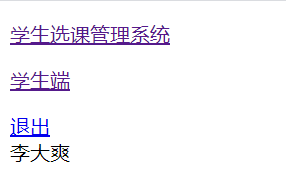
268 |
269 | 点击退出按钮,就可以退出登录,返回登录主页面。
270 |
271 | ### 5 简化登录主页url
272 | 每次要打开登录主页,都需要在浏览器中输入`http://127.0.0.1:8000/user/login`
273 | 运行django后,控制台只自动给出`http://127.0.0.1:8000`。
274 | 所以这里修改下urlpattern,能够访问`http://127.0.0.1:8000`即得到登录主页
275 | 修改后的`SSCMS/urls.py`如下
276 | ```python
277 | from django.urls import path, include
278 | from user.views import home
279 |
280 | urlpatterns = [
281 | path('', home, name="login"),
282 | path('user/', include("user.urls")),
283 | path('course/', include("course.urls")),
284 | ]
285 | ```
--------------------------------------------------------------------------------
/docs/12.md:
--------------------------------------------------------------------------------
1 | ## CSS样式完善
2 |
3 | 课程模块的逻辑代码到这里就已经全部完成了。
4 | 最后,我们完善下课程模块的样式。
5 |
6 | ### 1 - 优化课程主页布局
7 | 新建`static/css/main.css`如下
8 | ```css
9 | .main-content {
10 | width: 900px;
11 | margin: 0 auto;
12 | background: #e6e6f0;
13 | }
14 |
15 | .main-container {
16 | width: 850px;
17 | margin: 0 auto;
18 | }
19 |
20 | .main-content h3{
21 | width: 850px;
22 | }
23 |
24 | .main-content .right-button{
25 | float: right;
26 | margin: 0 5px;
27 | }
28 |
29 | .main-bar {
30 | width: 850px;
31 | height: 30px;
32 | }
33 |
34 | .main-bar .search-form {
35 | display: inline-block;
36 | }
37 |
38 | .main-bar .button {
39 | height: 30px;
40 | vertical-align:top;
41 | border:none;
42 | color:#eee;
43 | background:#4a2c98;
44 | font-size: 16px;
45 | border-radius: 5px;
46 | }
47 |
48 | .main-bar .input{
49 | width: 150px;
50 | height: 24px;
51 | margin: auto 10px;
52 | vertical-align:top
53 | }
54 |
55 | .main-bar .right-button {
56 | float: right;
57 | margin: 0 5px;
58 | }
59 | ```
60 | 然后再在`templates/course/nav.html`中导入这个css文件,
61 | 即在``之前,添加如下一行代码:
62 | ```html
63 |
64 | ```
65 | 由于课程模块所有模板都是继承的`templates/course/nav.html`,所以这个样式是对所有模板生效的。
66 |
67 | 不过这里样式会有一些问题,主页的中间内容面板没有纵向填满,如下图
68 | 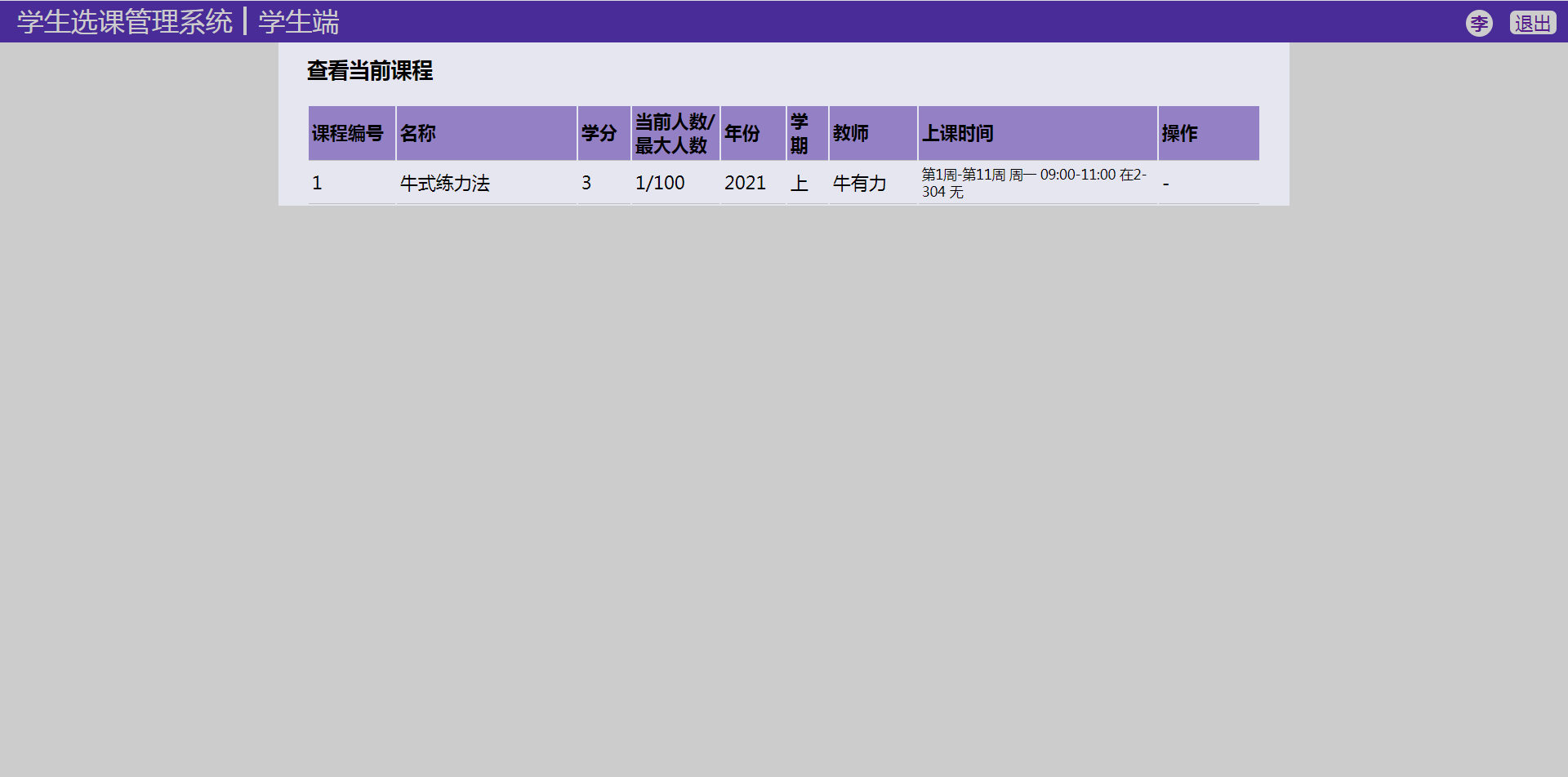
69 |
70 | 而如果给`.main-content`设置`height: 100%;`导致了面板纵向超出,在只有一条记录的情况下页面还可以下滑,如下图
71 | 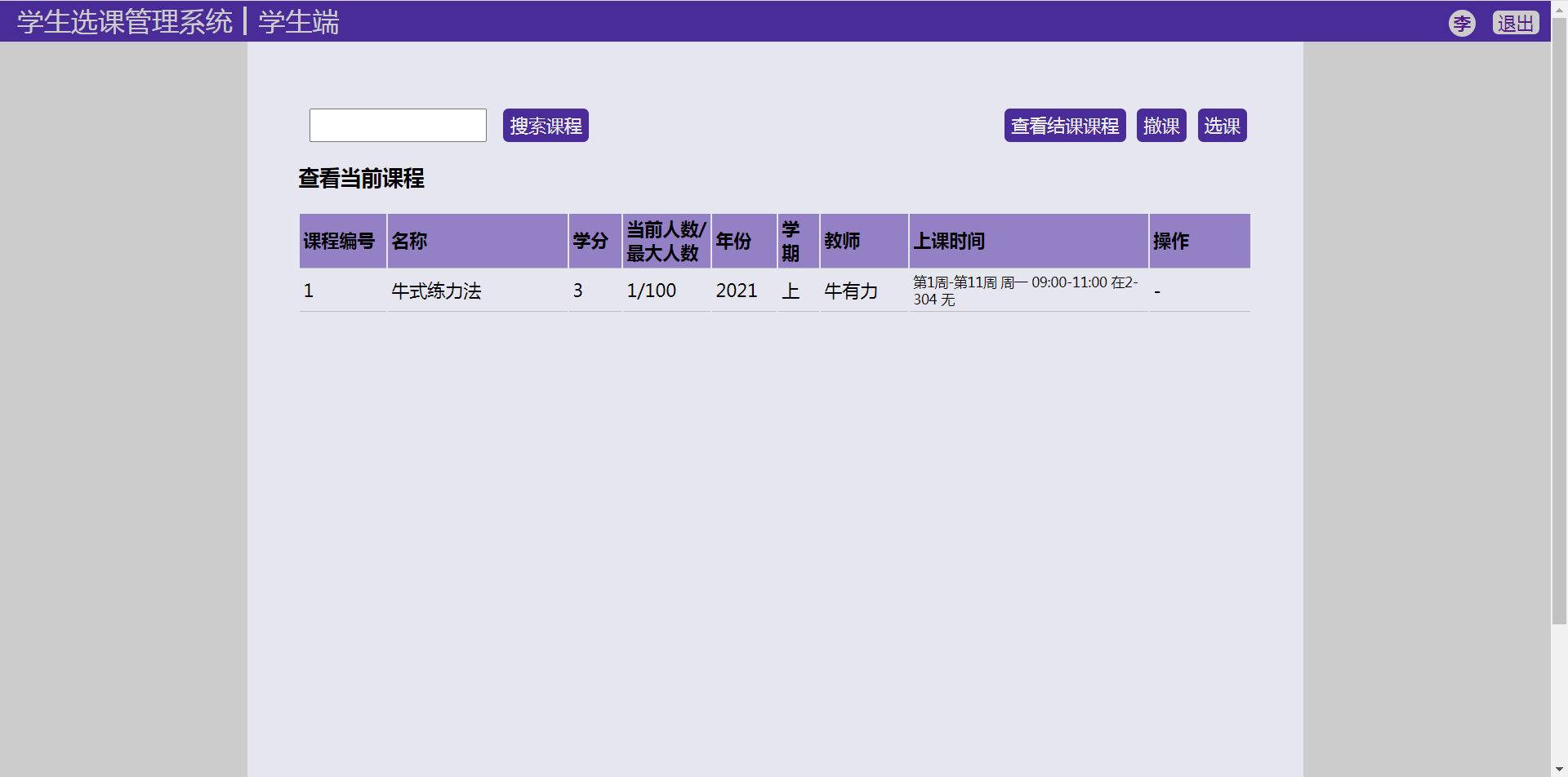
72 |
73 | 所以这里需要调整下导航条和主内容的`position`属性,改为`fixed`。
74 | 修改后的`static/css/nav.css`中的`.nav`属性如下
75 | ```
76 | .nav {
77 | background: #4a2c98;
78 | position: fixed;
79 | width: 100%;
80 | color: #ccc;
81 | z-index: 1;
82 | }
83 | ```
84 | 修改后的`static/css/main.css`中的`.main-content`属性如下
85 | ```css
86 | .main-content {
87 | width: 900px;
88 | margin: 0 auto;
89 | background: #e6e6f0;
90 | min-height: 100%;
91 | position: fixed;
92 | left: 0;
93 | right: 0;
94 | padding: 60px 20px;
95 | top: 0;
96 | }
97 | ```
98 |
99 | ### 2 - 优化课程列表样式
100 | 课程模块中,有一些页面有表格(table)样式的列表,这里优化下列表样式。
101 |
102 | 新建`static/css/list.css`如下
103 | ```css
104 | table.item-list {
105 | margin: 10px 0;
106 | width: 850px;
107 | }
108 |
109 | .item-list th,
110 | .item-list td {
111 | box-sizing: content-box;
112 | width: fit-content;
113 | padding: 3px;
114 | text-align: left;
115 | border-bottom: 1px solid #C0C0C0;
116 | }
117 |
118 |
119 | .item-list tr:nth-child(even) {
120 | background-color: #dfdfdf;
121 | }
122 |
123 | .item-list th {
124 | background-color: #9481c5;
125 | }
126 |
127 |
128 | /* for course table col width*/
129 | .item-list th.course-no,
130 | .item-list td.course-no {
131 | width: 70px;
132 | }
133 |
134 | .item-list th.course-name,
135 | .item-list td.course-name {
136 | width: 150px;
137 | }
138 |
139 | .item-list th.course-credit,
140 | .item-list td.course-credit {
141 | width: 40px;
142 | }
143 |
144 | .item-list th.course-number,
145 | .item-list td.course-number {
146 | width: 70px;
147 | }
148 |
149 | .item-list th.course-year,
150 | .item-list td.course-year {
151 | width: 50px;
152 | }
153 |
154 | .item-list th.course-semester,
155 | .item-list td.course-semester {
156 | width: 30px;
157 | }
158 |
159 | .item-list th.course-status,
160 | .item-list td.course-status {
161 | width: 100px;
162 | }
163 |
164 | .item-list th.course-teacher,
165 | .item-list td.course-teacher {
166 | width: 70px;
167 | }
168 |
169 | .item-list th.course-operation,
170 | .item-list td.course-operation {
171 | width: 150px;
172 | }
173 |
174 | .item-list th.course-schedule,
175 | .item-list td.course-schedule {
176 | width: 200px
177 | }
178 |
179 | .item-list td.course-schedule {
180 | font-size: 10px;
181 | }
182 |
183 | .item-list th.course-operation.student-course,
184 | .item-list td.course-operation.student-course {
185 | width: 80px;
186 | }
187 |
188 | .item-list th.course-year-semester,
189 | .item-list td.course-year-semester {
190 | width: 70px;
191 | }
192 | ```
193 | 需要导入这个css文件的模板有:
194 | - `templates/course/student/home.html`
195 | - `templates/course/teacher/home.html`
196 | - `templates/course/teacher/course.html`
197 |
198 | 老师和学生的主页有课程列表,所以需要导入这个css文件。
199 | 而老师的课程详情页里有选课的学生列表,所以也需要导入这个css文件。
200 |
201 | 导入方法为,在`block`块中(比如`{% block content %}`这行后面),添加下面一行代码:
202 | ```html
203 |
204 | ```
205 |
206 | ### 3 - 优化表单样式
207 | 课程模块还有这几个使用了form表单的页面需要优化:
208 | - `templates/course/teacher/create_course.html`
209 | - `templates/course/teacher/create_schedule.html`
210 | - `templates/course/teacher/score.html`
211 | - `templates/course/student/rating.html`
212 |
213 | 新建`static/css/form.css`如下
214 | ```css
215 | .create-update-from {
216 | margin: 10px;
217 | }
218 |
219 | .create-update-from p{
220 | padding: 5px;
221 | }
222 |
223 |
224 | .create-update-from p:nth-child(even) {
225 | background-color: #dfdfdf;
226 | }
227 |
228 | .create-update-from p:nth-child(odd) {
229 | background-color: #c8c8d2;
230 | }
231 |
232 | .create-update-from p label{
233 | display:inline-block;
234 | width: 200px;
235 | }
236 |
237 | .create-update-from .submit-button {
238 | margin-top: 20px;
239 | }
240 |
241 | .create-update-from .submit-button input {
242 | width: 80px;
243 | margin-right: 20px;
244 | }
245 | ```
246 |
247 | 将该css文件导入上面说的需要的四个模板中,导入方法同本文第二部分,
248 | 即在`block`块中(比如`{% block content %}`这行后面),添加下面一行代码:
249 | ```html
250 |
251 | ```
252 |
253 | ### 4 - 特殊处理学生课程详情页
254 |
255 | 学生课程详情页这里打算不像上面那样简单的展示,所以做了一个特殊的样式来展示学生课程详情信息。
256 | `static/css/details.css`如下
257 | ```css
258 | ul.course-details {
259 | margin: 20px;
260 | list-style: none;
261 | padding: 0 20px;
262 | }
263 |
264 | li.course-detail {
265 | min-height: 24px;
266 | padding: 2px;
267 | }
268 |
269 | li.course-detail .detail-name {
270 | display: inline-block;
271 | vertical-align: top;
272 | width: 150px;
273 | font-weight: bolder;
274 | }
275 |
276 | li.course-detail span.course-schedules {
277 | display: inline-block;
278 | }
279 |
280 | ul.course-details li:nth-child(odd) {
281 | background-color: #ccc;
282 | }
283 |
284 | ul.course-details li:nth-child(even) {
285 | background-color: #dfdfdf;
286 | }
287 | ```
288 | 将该css文件导入`templates/course/student/course.html`模板中,导入方法同上,
289 | 即在`block`块中(比如`{% block content %}`这行后面),添加下面一行代码:
290 | ```html
291 |
292 | ```
293 |
294 | ### 5 - static 处理
295 |
296 | 模板中导入css的link标签里,使用了模板语法中的`static`标签(tag),
297 | 所以使用了`static`标签的模板都要在开头导入这个标签。
298 | 虽然`templates/course/nav.html`开头有`{% load static %}`,
299 | 但是继承它的子模板中如果用到了`static`标签,仍然需要再导入一遍。
300 |
301 | 导入方法为在模板文件的`{% extends "course/nav.html" %}`这一句后面,添加这样一行代码
302 | ```html
303 | {% load static %}
304 | ```
305 | 补充说明:模板文件中如果出现了继承语句`{% extends "..." %}`, 则该继承语句必须在模板的第一行。所以新增只能在这后面增添。
306 |
307 | 不过这样子一个一个增添`{% load static %}`,还是太过麻烦,尤其是需要改动多个模板文件时。
308 | 除了一个一个模板里面添加这个,Django还给我们实现了一种方便快捷的手段:
309 | 在设置文件中修改,
310 | 在`SSCMS/settings.py`的`TEMPLATES`中,给其Django模板(一般是第一个)配置字典中的`OPTIONS`属性,添加这样一个配置关系:
311 | ```python
312 | 'builtins': ['django.templatetags.static']
313 | ```
314 | 修改后的`TEMPLATES`设置如下
315 | ```python
316 | TEMPLATES = [
317 | {
318 | 'BACKEND': 'django.template.backends.django.DjangoTemplates',
319 | 'DIRS': [os.path.join(BASE_DIR, 'templates')]
320 | ,
321 | 'APP_DIRS': True,
322 | 'OPTIONS': {
323 | 'context_processors': [
324 | 'django.template.context_processors.debug',
325 | 'django.template.context_processors.request',
326 | 'django.contrib.auth.context_processors.auth',
327 | 'django.contrib.messages.context_processors.messages',
328 | ],
329 | 'builtins': ['django.templatetags.static']
330 | },
331 | },
332 | ]
333 | ```
334 |
335 | 添加这个后,模板开头有没有`{% load static %}`都可以用`static`标签了。
336 |
337 | 不过最好去除掉无用代码,删掉所有之前模板中添加的`{% load static %}`。
338 |
339 | ### 5 - 完结
340 |
341 | 到这里,本项目就彻底完成了。
342 | 完成效果可见:
343 | - 本人b站投稿:[https://www.bilibili.com/video/BV1er4y1w7ty](https://www.bilibili.com/video/BV1er4y1w7ty)
344 | - 本教程第0节:[初步介绍与演示](https://www.cnblogs.com/BigShuang/p/14304500.html)
--------------------------------------------------------------------------------
/user/views.py:
--------------------------------------------------------------------------------
1 | # usr/bin/env python3
2 | # -*- coding:utf-8- -*-
3 | import random
4 |
5 | from django.http import HttpResponse, HttpResponseRedirect
6 | from django.shortcuts import render, reverse, redirect
7 | from django.views.generic import CreateView, UpdateView
8 |
9 | from constants import INVALID_KIND
10 | from user.forms import StuLoginForm, TeaLoginForm, StuRegisterForm, TeaRegisterForm, StuUpdateForm
11 | from user.models import Student, Teacher
12 |
13 |
14 | def home(request):
15 | return render(request, "user/login_home.html")
16 |
17 |
18 | # def login(request, kind)
19 | def login(request, *args, **kwargs):
20 | if not kwargs or "kind" not in kwargs or kwargs["kind"] not in ["teacher", "student"]:
21 | return HttpResponse(INVALID_KIND)
22 |
23 | kind = kwargs["kind"]
24 |
25 | if request.method == 'POST':
26 | if kind == "teacher":
27 | form = TeaLoginForm(data=request.POST)
28 | else:
29 | form = StuLoginForm(data=request.POST)
30 |
31 | if form.is_valid():
32 | uid = form.cleaned_data["uid"]
33 | if len(uid) != 10:
34 | form.add_error("uid", "账号长度必须为10")
35 | else:
36 | if kind == "teacher":
37 | department_no = uid[:3]
38 | number = uid[3:]
39 | object_set = Teacher.objects.filter(department_no=department_no, number=number)
40 | else:
41 | grade = uid[:4]
42 | number = uid[4:]
43 | object_set = Student.objects.filter(grade=grade, number=number)
44 | if object_set.count() == 0:
45 | form.add_error("uid", "该账号不存在.")
46 | else:
47 | user = object_set[0]
48 | if form.cleaned_data["password"] != user.password:
49 | form.add_error("password", "密码不正确.")
50 | else:
51 | request.session['kind'] = kind
52 | request.session['user'] = uid
53 | request.session['id'] = user.id
54 | # successful login
55 | to_url = reverse("course", kwargs={'kind': kind})
56 | return redirect(to_url)
57 |
58 | return render(request, 'user/login_detail.html', {'form': form, 'kind': kind})
59 | else:
60 | context = {'kind': kind}
61 | if request.GET.get('uid'):
62 | uid = request.GET.get('uid')
63 | context['uid'] = uid
64 | if kind == "teacher":
65 | form = TeaLoginForm({"uid": uid, 'password': '12345678'})
66 | else:
67 | form = StuLoginForm({"uid": uid, 'password': '12345678'})
68 | else:
69 | if kind == "teacher":
70 | form = TeaLoginForm()
71 | else:
72 | form = StuLoginForm()
73 | context['form'] = form
74 | if request.GET.get('from_url'):
75 | context['from_url'] = request.GET.get('from_url')
76 |
77 | return render(request, 'user/login_detail.html', context)
78 |
79 |
80 | def logout(request):
81 | if request.session.get("kind", ""):
82 | del request.session["kind"]
83 | if request.session.get("user", ""):
84 | del request.session["user"]
85 | if request.session.get("id", ""):
86 | del request.session["id"]
87 | return redirect(reverse("login"))
88 |
89 |
90 | def register(request, kind):
91 | func = None
92 | if kind == "student":
93 | func = CreateStudentView.as_view()
94 | elif kind == "teacher":
95 | func = CreateTeacherView.as_view()
96 |
97 | if func:
98 | return func(request)
99 | else:
100 | return HttpResponse(INVALID_KIND)
101 |
102 |
103 | class CreateStudentView(CreateView):
104 | model = Student
105 | form_class = StuRegisterForm
106 | # fields = "__all__"
107 | template_name = "user/register.html"
108 | success_url = "login"
109 |
110 | def post(self, request, *args, **kwargs):
111 | form = self.get_form()
112 |
113 | if form.is_valid():
114 | return self.form_valid(form)
115 | else:
116 | self.object = None
117 | return self.form_invalid(form)
118 |
119 | def form_valid(self, form):
120 | # 学生注册时选定年级自动生成学号
121 | grade = form.cleaned_data["grade"]
122 | # order_by默认升序排列,number前的负号表示降序排列
123 | student_set = Student.objects.filter(grade=grade).order_by("-number")
124 | if student_set.count() > 0:
125 | last_student = student_set[0]
126 | new_number = str(int(last_student.number) + 1)
127 | for i in range(6 - len(new_number)):
128 | new_number = "0" + new_number
129 | else:
130 | new_number = "000001"
131 |
132 | # Create, but don't save the new student instance.
133 | new_student = form.save(commit=False)
134 | # Modify the student
135 | new_student.number = new_number
136 | # Save the new instance.
137 | new_student.save()
138 | # Now, save the many-to-many data for the form.
139 | form.save_m2m()
140 |
141 | self.object = new_student
142 |
143 | uid = grade + new_number
144 | from_url = "register"
145 | base_url = reverse(self.get_success_url(), kwargs={'kind': 'student'})
146 | return redirect(base_url + '?uid=%s&from_url=%s' % (uid, from_url))
147 |
148 |
149 | class CreateTeacherView(CreateView):
150 | model = Teacher
151 | form_class = TeaRegisterForm
152 | template_name = "user/register.html"
153 | success_url = "login"
154 |
155 | def post(self, request, *args, **kwargs):
156 | form = self.get_form()
157 |
158 | if form.is_valid():
159 | return self.form_valid(form)
160 | else:
161 | self.object = None
162 | return self.form_invalid(form)
163 |
164 | def form_valid(self, form):
165 | # 老师注册时随机生成院系号, 院系号范围为[0,300)
166 | department_no = random.randint(0, 300)
167 | # 把非三位数的院系号转换为以0填充的三位字符串,如1转换为'001'
168 | department_no = '{:0>3}'.format(department_no)
169 | teacher_set = Teacher.objects.filter(department_no=department_no).order_by("-number")
170 | if teacher_set.count() > 0:
171 | last_teacher = teacher_set[0]
172 | new_number = int(last_teacher.number) + 1
173 | new_number = '{:0>7}'.format(new_number)
174 | else:
175 | new_number = "0000001"
176 |
177 | # Create, but don't save the new teacher instance.
178 | new_teacher = form.save(commit=False)
179 | # Modify the teacher
180 | new_teacher.department_no = department_no
181 | new_teacher.number = new_number
182 | # Save the new instance.
183 | new_teacher.save()
184 | # Now, save the many-to-many data for the form.
185 | form.save_m2m()
186 |
187 | self.object = new_teacher
188 |
189 | uid = department_no + new_number
190 | from_url = "register"
191 | base_url = reverse(self.get_success_url(), kwargs={'kind': 'teacher'})
192 | return redirect(base_url + '?uid=%s&from_url=%s' % (uid, from_url))
193 |
194 |
195 | def update(request, kind):
196 | func = None
197 | if kind == "student":
198 | func = UpdateStudentView.as_view()
199 | elif kind == "teacher":
200 | func = UpdateTeacherView.as_view()
201 |
202 | if func:
203 | pk = request.session.get("id", "")
204 | if pk:
205 | context = {
206 | "name": request.session.get("name", ""),
207 | "kind": request.session.get("kind", ""),
208 | }
209 | return func(request, pk=pk, context=context)
210 | else:
211 | return redirect(reverse("login"))
212 | else:
213 | return HttpResponse(INVALID_KIND)
214 |
215 |
216 | class UpdateStudentView(UpdateView):
217 | model = Student
218 | form_class = StuUpdateForm
219 | template_name = "user/update.html"
220 |
221 | def get_context_data(self, **kwargs):
222 | context = super(UpdateStudentView, self).get_context_data(**kwargs)
223 | context.update(kwargs)
224 | context["kind"] = "student"
225 | return context
226 |
227 | def get_success_url(self):
228 | return reverse("course", kwargs={"kind": "student"})
229 |
230 |
231 | class UpdateTeacherView(UpdateView):
232 | model = Teacher
233 | form_class = TeaRegisterForm
234 | template_name = "user/update.html"
235 |
236 | def get_context_data(self, **kwargs):
237 | context = super(UpdateTeacherView, self).get_context_data(**kwargs)
238 | context.update(kwargs)
239 | context["kind"] = "teacher"
240 | return context
241 |
242 | def get_success_url(self):
243 | return reverse("course", kwargs={"kind": "teacher"})
244 |
--------------------------------------------------------------------------------
/docs/8.md:
--------------------------------------------------------------------------------
1 | ## CSS样式优化
2 |
3 | > 前面的几节下来,用户模块基本功能已经完成了,但是网页的样式十分简陋。
4 | > 所以这里需要对样式进行美化。
5 | > 前端网页美化样式,需要使用CSS,没听过CSS的推荐阅读下
6 | > [CSS 简介](https://www.runoob.com/css/css-intro.html)
7 | > [CSS 语法](https://www.runoob.com/css/css-syntax.html)
8 |
9 | 首先,需要在项目的`static`文件夹下,新建文件夹`css`用于存放css文件。
10 |
11 | 同时需要修改下设置,把这个css文件夹放到`STATICFILES_DIRS`中,使得 Django也会在那里查找静态文件。
12 |
13 | 即在`SSCMS/settings.py`末尾添加如下代码
14 | ```python
15 | STATICFILES_DIRS = [
16 | os.path.join(BASE_DIR, "static"),
17 | ]
18 | ```
19 |
20 | ### 1 优化登录页样式
21 | 先为登录页面添加样式,在`css`文件夹下新建`login.css`如下
22 | ```css
23 | body {
24 | margin: 0;
25 | }
26 |
27 | .main-container {
28 | position: absolute;
29 | width: 100%;
30 | height:100%;
31 | background: #4a2c964d;
32 | background: linear-gradient(rgba(230, 100, 101, 0.2), rgba(145, 152, 229, 0.3)),
33 | linear-gradient(#9198e560, #4a2c9880);
34 | }
35 |
36 | .main-header {
37 | height: 45%;
38 | text-align: center;
39 | font-size: 40px;
40 | color: #4a2c98;
41 | }
42 |
43 | .main-header .main-title {
44 | font-size: 50px;
45 | margin-top: 5%;
46 | }
47 |
48 | .main-header .welcome-message {
49 | font-size: 26px;
50 | margin-top: 60px;
51 | color: #ff5722;
52 | }
53 |
54 | .login-container {
55 | height: 40%;
56 | width: 400px;
57 | margin: 0 auto;
58 | background: #eee;
59 | border-radius: 10px;
60 | box-shadow: 0 0 15px 2px rgba(0, 0, 0, .33);
61 | overflow: hidden;
62 | }
63 |
64 | .login-container .login-kind {
65 | padding-top: 10%;
66 | font-size: 30px
67 | }
68 |
69 | .login-container .login-kind a {
70 | text-decoration: none;
71 | background: #4a2c98;
72 | color: #eeeeee;
73 | padding: 10px;
74 | text-align: center;
75 | display: block;
76 | width:50%;
77 | margin: 0 auto;
78 | border-radius: 10px;
79 | }
80 |
81 |
82 | /* for login detail page */
83 | .login-kind-title {
84 | height: auto;
85 | padding: 2%;
86 | text-align: center;
87 | color: #4d2f99;
88 | width: 96%;
89 | font-size: 22px;
90 | display: block;
91 | background: #ccc;
92 | overflow: hidden
93 | }
94 |
95 |
96 | .login-container .form p,
97 | .login-container .form .submit-button {
98 | widht: 90%;
99 | padding-top: 4%;
100 | margin: 0 auto;
101 | display: flex;
102 | align-items: center;
103 | justify-content: center;
104 | font-family: "Roboto", "Lucida Grande", "DejaVu Sans", "Bitstream Vera Sans",
105 | Verdana, Arial, sans-serif;
106 |
107 | }
108 |
109 |
110 | .login-container .form p label {
111 | padding-right: 10px;
112 | width: 80px;
113 | }
114 |
115 | .login-container .form p input {
116 | clear: both;
117 | padding: 8px;
118 | width: 60%;
119 | -webkit-box-sizing: border-box;
120 | -moz-box-sizing: border-box;
121 | box-sizing: border-box;
122 | border: 1px solid #ccc;
123 | border-radius: 4px;
124 | }
125 |
126 | .login-container .form .submit-button,
127 | .login-container .return-button {
128 | margin: 5px auto 0;
129 | padding-top: 20px;
130 | }
131 |
132 | .submit-button input,
133 | .submit-button a {
134 | border: none;
135 | text-decoration: none;
136 | font-size: 18px;
137 | background: #4a2c98;
138 | color: #eeeeee;
139 | padding: 5px 0;
140 | text-align: center;
141 | display: block;
142 | width: 30%;
143 | margin: 5px 10px;
144 | border-radius: 10px
145 | }
146 |
147 | .return-button a{
148 | border: none;
149 | text-decoration: none;
150 | font-size: 18px;
151 | background: #cccccc;
152 | color: #4a2c98;
153 | padding: 5px 0;
154 | text-align: center;
155 | display: block;
156 | width: 30%;
157 | margin: 0 auto;
158 | border-radius: 10px;
159 | }
160 | ```
161 |
162 | 并在`templates/user/background.html`的第8行和第九行之间,
163 | 即``之后、``之前,添加一行如下代码
164 | ```html
165 |
166 | ```
167 | 即可导入css文件。
168 | 注意:要使用`{% static 'css/login.css' %}`语法,必须在模板文件中先使用语句`{% load static %}`,这个之前就已经写在`templates/user/background.html`中了,所以不需要再写一遍。
169 |
170 | 运行项目,此时登录主页效果如下图
171 |
172 | 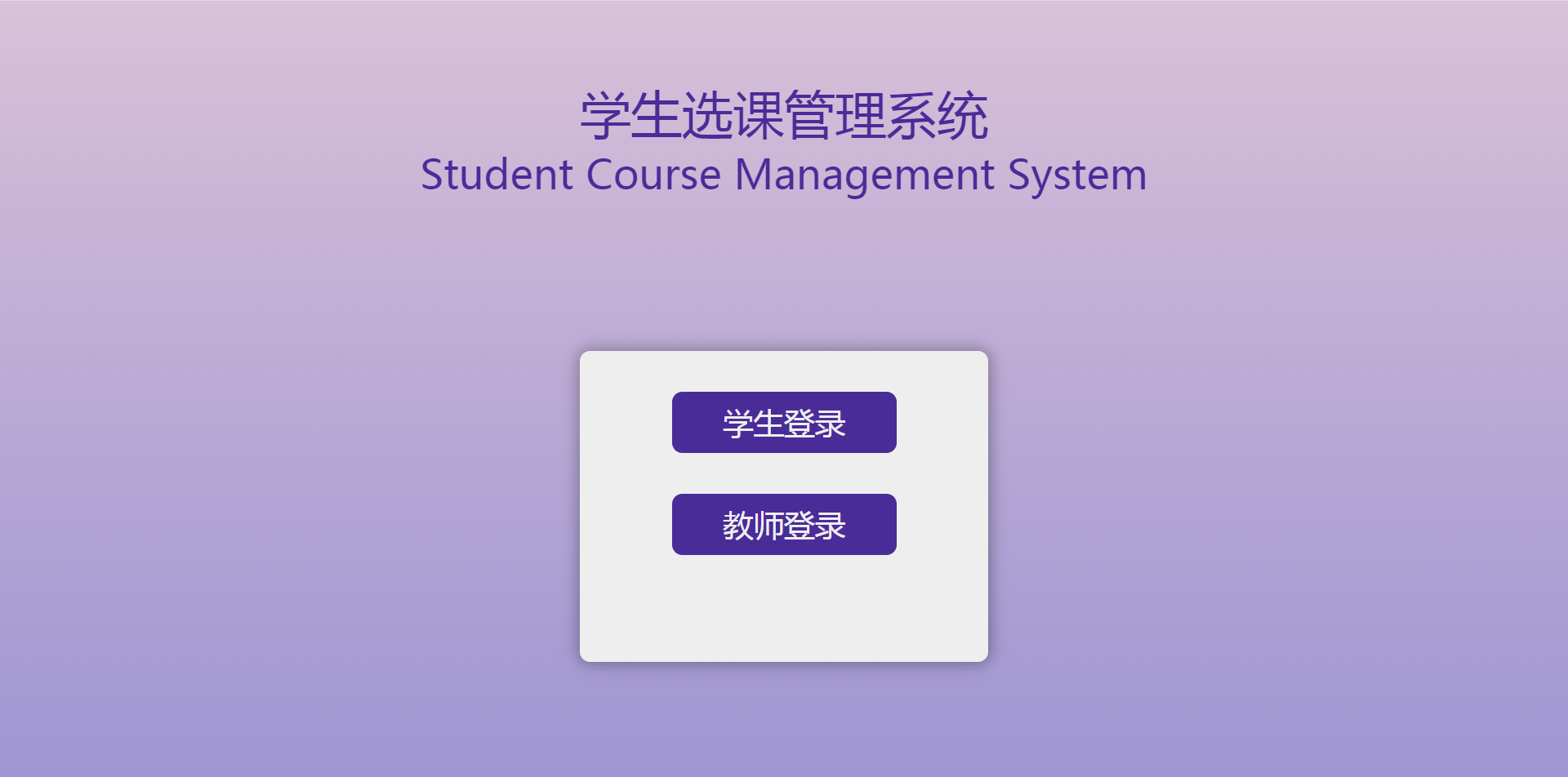
173 |
174 | 学生登录详情页效果如下图
175 |
176 | 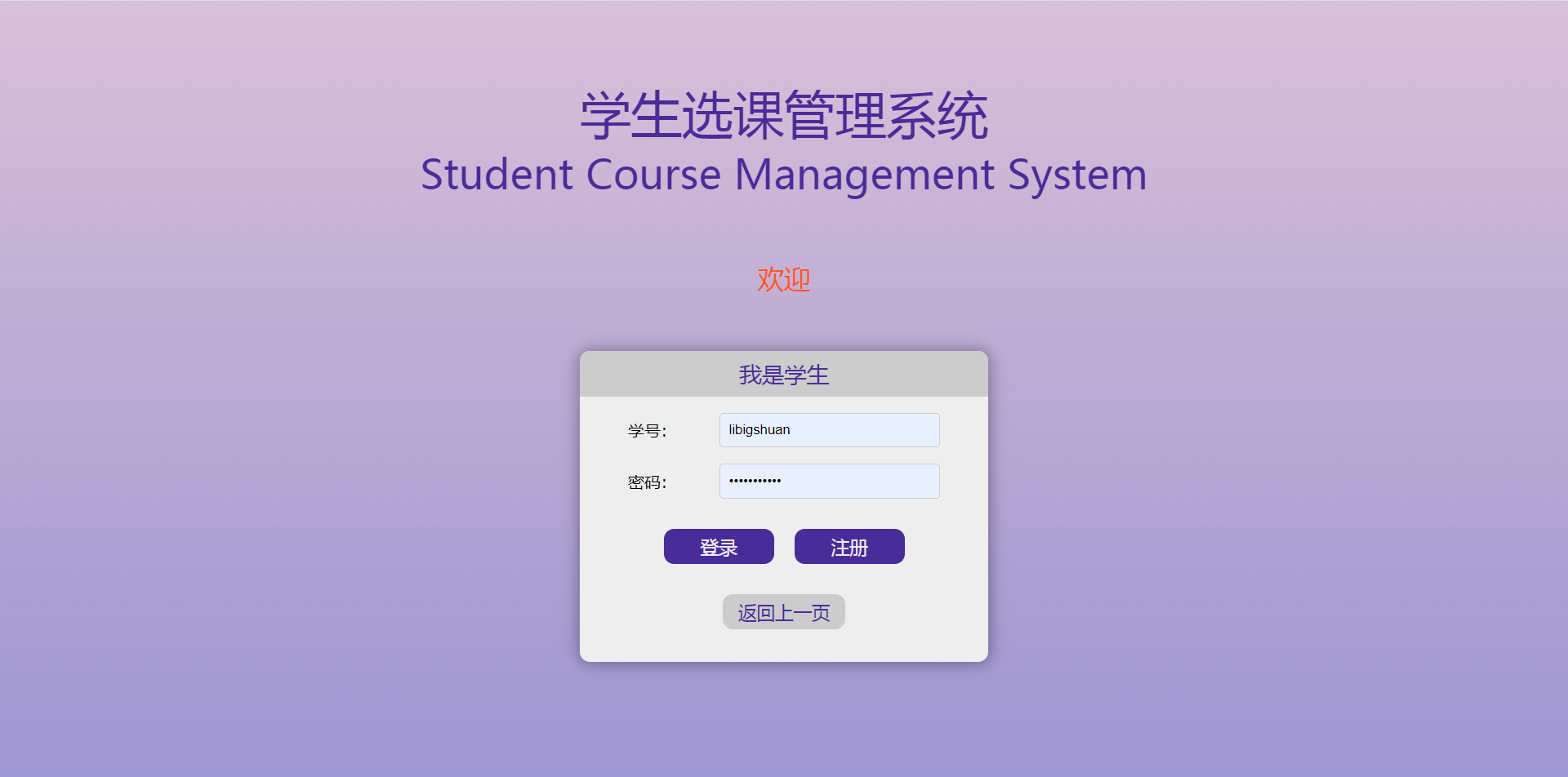
177 |
178 | ### 2 优化注册页面样式
179 | 注册页面和用户信息修改页面,核心内容都是表单,且基本相似。
180 | 所以注册页面的样式也可以给用户信息修改页面的样式一起设置
181 |
182 | 新建`static/css/register.css`如下
183 | ```css
184 | .register-container {
185 | height: 40%;
186 | width: 500px;
187 | margin: 100px auto;
188 | background: #eee;
189 | border-radius: 10px;
190 | box-shadow: 0 0 15px 2px rgba(0, 0, 0, 0.33);
191 | overflow: hidden;
192 | }
193 |
194 |
195 | .register-container .register-title {
196 | height: auto;
197 | padding: 2%;
198 | justify-content: center;
199 | text-align: center;
200 | color: #ccc;
201 | width: 96%;
202 | font-size: 22px;
203 | display: block;
204 | background: #4d2f99;
205 | overflow: hidden;
206 | }
207 |
208 | .register-container .form p {
209 | width: 90%;
210 | padding-top: 15px;
211 | margin: 0 auto;
212 | display: flex;
213 | align-items: center;
214 | justify-content: center;
215 | font-family: "Roboto", "Lucida Grande", "DejaVu Sans", "Bitstream Vera Sans",
216 | Verdana, Arial, sans-serif;
217 | word-break: break-all;
218 | flex-flow: wrap;
219 | }
220 |
221 | .register-container .form p label {
222 | padding-right: 10px;
223 | width: 80px;
224 | }
225 |
226 |
227 | .register-container .form p input,
228 | .register-container .form p select {
229 | clear: both;
230 | padding: 8px;
231 | width: 60%;
232 | -webkit-box-sizing: border-box;
233 | -moz-box-sizing: border-box;
234 | box-sizing: border-box;
235 | border: 1px solid #ccc;
236 | border-radius: 4px;
237 | }
238 |
239 | .register-container .form p span.helptext {
240 | color: slategrey;
241 | }
242 |
243 | .register-container .form p .submit-button {
244 | border: none;
245 | text-decoration: none;
246 | font-size: 18px;
247 | background: #4a2c98;
248 | color: #eeeeee;
249 | padding: 5px 0;
250 | text-align: center;
251 | display: block;
252 | width: 30%;
253 | margin: 0 10px 30px;
254 | border-radius: 10px;
255 | }
256 |
257 | .register-container .return-button {
258 | padding-left: 20px;
259 | padding-bottom: 10px;
260 | }
261 | ```
262 | 在`templates/user/register.html`和`templates/user/update.html`中,
263 | `head`标签之前(即``之前),添加下面一行代码导入`static`。
264 | ```html
265 | {% load static %}
266 | ```
267 | `head`标签内部最后(即``之前),添加下面一行代码。
268 | ```html
269 |
270 | ```
271 |
272 | 运行项目,此时注册页面效果如下图
273 |
274 | 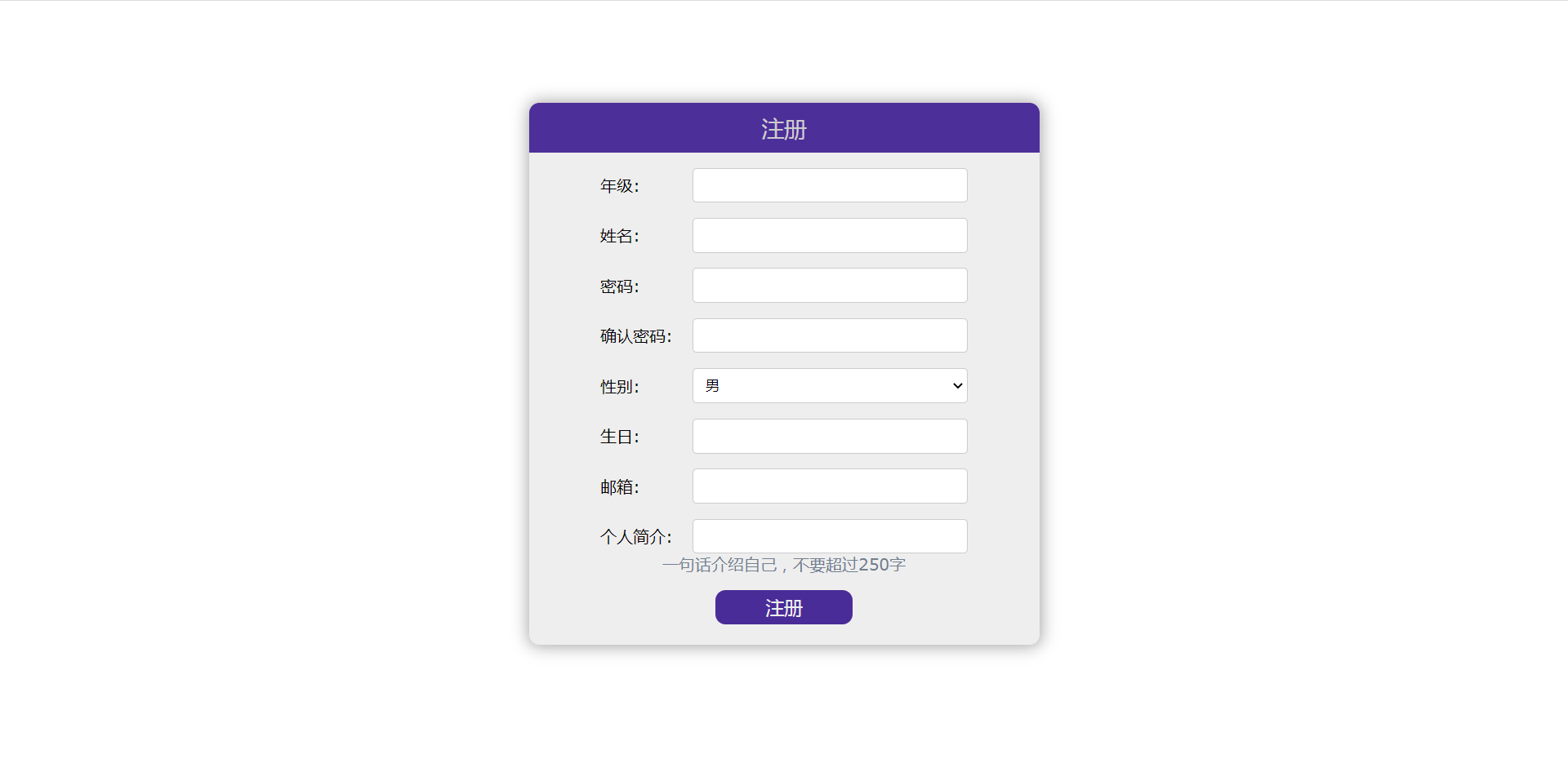
275 |
276 | 用户信息修改页面效果如下图
277 |
278 | 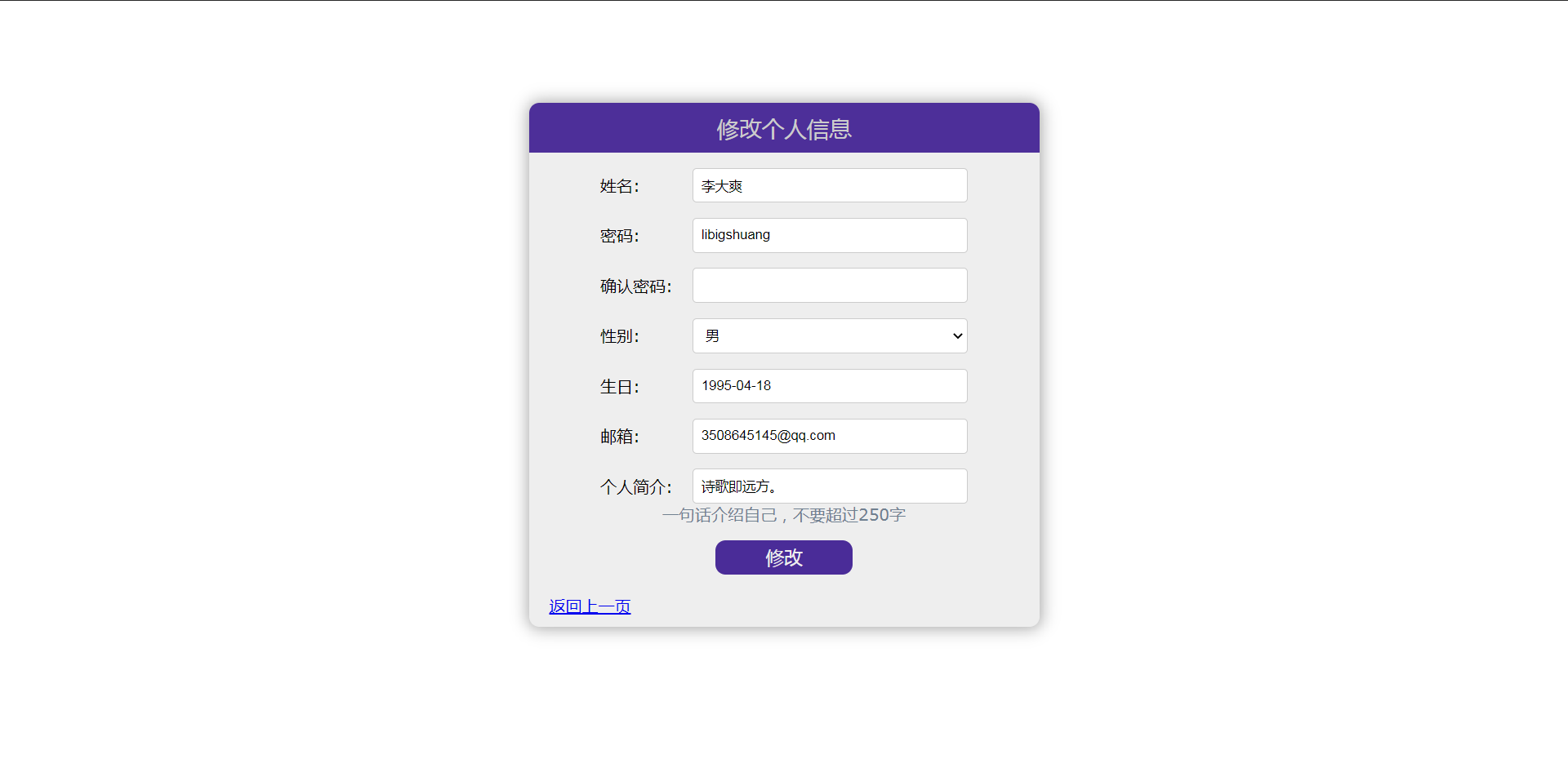
279 |
280 | ### 3 - 修改主页样式
281 | 修改登录后的主页样式,即未来的课程主页的样式
282 | 添加`static/css/nav.css`如下
283 | ```css
284 | body,p {
285 | margin: 0;
286 | padding: 0;
287 | }
288 |
289 | html, body {
290 | height: 100%;
291 | width: 100%;
292 | }
293 |
294 | body {
295 | background: #ccc;
296 | }
297 |
298 | .nav {
299 | background: #4a2c98;
300 | width: 100%;
301 | }
302 |
303 | .nav a {
304 | color: #ccc;
305 | text-decoration: unset;
306 | }
307 |
308 | .nav .nav-title,
309 | .nav .name-logo,
310 | .nav .log-out {
311 | display: inline-block;
312 | margin: 5px;
313 | }
314 |
315 | .nav p {
316 | display: inline-block;
317 | float: left;
318 | padding-left: 10px;
319 | }
320 |
321 | .nav .nav-title {
322 | font-size: 24px;
323 | line-height: 26px;
324 | height: 26px;
325 | vertical-align: top;
326 | }
327 |
328 |
329 | .nav p.main-title {
330 | margin-right: 10px;
331 | }
332 |
333 | .nav p.sub-title {
334 | border-left: 3px solid #cccccc;
335 | }
336 |
337 | .nav .name-logo,
338 | .nav .log-out {
339 | float: right;
340 | margin: 8px 5px 0;
341 | vertical-align: top;
342 | }
343 |
344 | .nav .name-logo .user-name {
345 | background: #ccc;
346 | border-radius: 50%;
347 | width: 24px;
348 | height: 24px;
349 |
350 | text-align: center;
351 | line-height: 24px;
352 | font-size: 16px;
353 | font-weight: bold;
354 | }
355 |
356 | .nav .name-logo .user-name a {
357 | color: #4a2c98;
358 | }
359 |
360 | .nav .log-out a {
361 | margin: 5px;
362 | background: #ccc;
363 | color: #4a2c98;
364 | border-radius: 5px;
365 | text-decoration: none;
366 | padding: 0 5px;
367 | }
368 | ```
369 |
370 | 在`templates/course/nav.html`中,
371 | `head`标签内部最后(即``之前),添加下面一行代码。
372 | ```html
373 |
374 | ```
375 |
376 | 运行项目,此时登录成功后主页效果如下
377 |
378 | 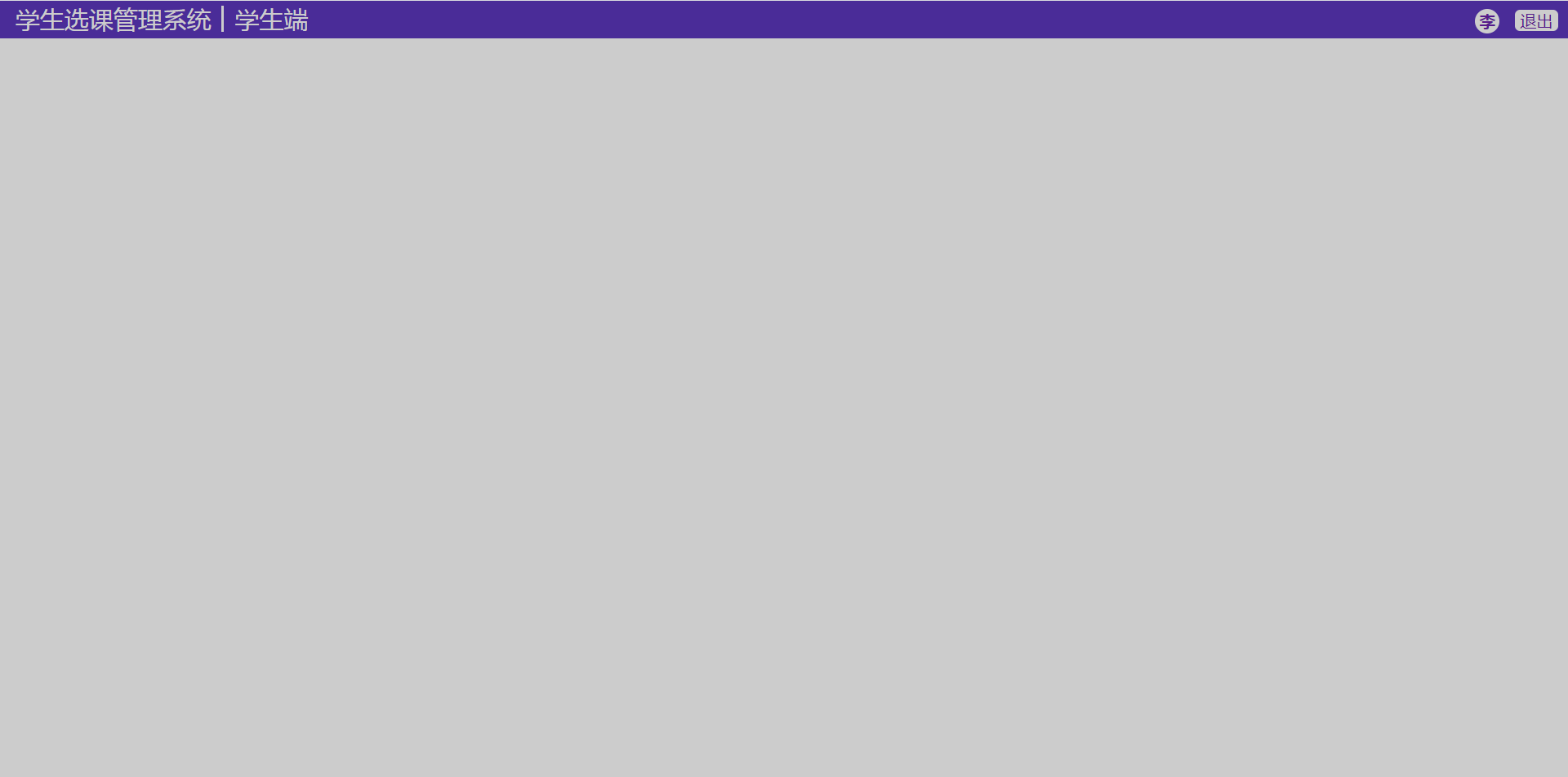
379 |
380 |
381 | ### 4 小结
382 |
383 | 到这里,用户模块就算彻底完成了,同时也额外完成了课程模块的主页,因为这个和用户主页是同一个页面。
384 |
385 | 未来将完成课程模块。
386 |
--------------------------------------------------------------------------------
/course/views.py:
--------------------------------------------------------------------------------
1 | from django.http.response import HttpResponse
2 | from django.shortcuts import render, reverse, redirect
3 | from django.db.models import Q
4 |
5 | from constants import INVALID_KIND, INVALID_REQUEST_METHOD, ILLEGAL_KIND
6 | from course.forms import CourseForm, ScheduleForm
7 | from course.models import Course, StudentCourse, Schedule
8 | from user.util import get_user
9 |
10 | from django.utils import timezone
11 |
12 |
13 | def to_home(request):
14 | kind = request.session.get('kind', '')
15 | return redirect(reverse("course", kwargs={"kind": kind}))
16 |
17 |
18 | def home(request, kind):
19 | if kind == "teacher":
20 | return teacher_home(request)
21 | elif kind == "student":
22 | return student_home(request)
23 | return HttpResponse(INVALID_KIND)
24 |
25 |
26 | def teacher_home(request):
27 | user = get_user(request, "teacher")
28 | if not user:
29 | return redirect(reverse("login", kwargs={"kind": "teacher"}))
30 |
31 | info = {
32 | "name": user.name,
33 | "kind": "teacher",
34 | }
35 |
36 | is_search = False
37 | search_key = ""
38 | if request.method == "POST":
39 | search_key = request.POST.get("search")
40 | if search_key:
41 | is_search = True
42 |
43 | context = {"info": info}
44 | q = Q(teacher=user)
45 | if is_search:
46 | q = q & Q(name__icontains=search_key)
47 | context["search_key"] = search_key
48 |
49 | context["course_list"] = Course.objects.filter(q).order_by('status')
50 |
51 | return render(request, 'course/teacher/home.html', context)
52 |
53 |
54 | def student_home(request):
55 | return redirect(reverse("view_course", kwargs={"view_kind": "current"}))
56 |
57 |
58 | def create_course(request):
59 | user = get_user(request, "teacher")
60 | if not user:
61 | return redirect(reverse("login", kwargs={"kind": "teacher"}))
62 |
63 | info = {
64 | "name": user.name,
65 | "kind": "teacher",
66 | }
67 |
68 | if request.method == 'POST':
69 | form = CourseForm(request.POST)
70 | if form.is_valid():
71 | obj = form.save(commit=False)
72 | obj.status = 1
73 | obj.teacher = user
74 |
75 | obj.save()
76 | return redirect(reverse("course", kwargs={"kind": "teacher"}))
77 | elif request.method == 'GET':
78 | form = CourseForm()
79 | else:
80 | return HttpResponse(INVALID_REQUEST_METHOD)
81 |
82 | return render(request, 'course/teacher/create_course.html', {'info': info, 'form': form})
83 |
84 |
85 | def create_schedule(request, course_id):
86 | user = get_user(request, "teacher")
87 | if not user:
88 | return redirect(reverse("login", kwargs={"kind": "teacher"}))
89 |
90 | info = {
91 | "name": user.name,
92 | "kind": "teacher",
93 | }
94 |
95 | course = Course.objects.get(pk=course_id)
96 |
97 | if request.method == 'POST':
98 | form = ScheduleForm(request.POST)
99 | if form.is_valid():
100 | obj = form.save(commit=False)
101 | obj.course = course
102 | obj.save()
103 |
104 | return redirect(reverse("view_detail", kwargs={"course_id": course_id}))
105 | elif request.method == 'GET':
106 | form = ScheduleForm()
107 | else:
108 | return HttpResponse(INVALID_REQUEST_METHOD)
109 |
110 | return render(request, 'course/teacher/create_schedule.html', {'info': info, 'form': form, "course": course})
111 |
112 |
113 | def delete_schedule(request, schedule_id):
114 | user = get_user(request, "teacher")
115 | if not user:
116 | return redirect(reverse("login", kwargs={"kind": "teacher"}))
117 |
118 | schedule = Schedule.objects.get(pk=schedule_id)
119 |
120 | course_id = request.GET.get("course_id") or schedule.course.id
121 |
122 | schedule.delete()
123 |
124 | return redirect(reverse("view_detail", kwargs={"course_id": course_id}))
125 |
126 |
127 | def handle_course(request, course_id, handle_kind):
128 | """
129 | :param request:
130 | :param course_id:
131 | :param handle_kind:
132 | 1: "开始选课",
133 | 2: "结束选课",
134 | 3: "结课",
135 | 4: "给分完成"
136 | :return:
137 | """
138 | user = get_user(request, "teacher")
139 | if not user:
140 | return redirect(reverse("login", kwargs={"kind": "teacher"}))
141 |
142 | info = {
143 | "name": user.name,
144 | "kind": "teacher",
145 | }
146 |
147 | course = Course.objects.get(pk=course_id)
148 | if course.status == handle_kind and course.status < 5:
149 | if course.status == 4:
150 | scs = StudentCourse.objects.filter(course=course)
151 | all_given = True
152 | res = ""
153 | for sc in scs:
154 | if sc.scores is None:
155 | all_given = False
156 | res += "
%s 未打分
" % sc.student
157 |
158 | if all_given:
159 | course.status += 1
160 | course.save()
161 | return redirect(reverse("view_detail", kwargs={"course_id": course.id}))
162 | else:
163 | return HttpResponse(res)
164 | else:
165 | course.status += 1
166 | course.save()
167 |
168 | course_list = Course.objects.filter(teacher=user)
169 | return render(request, 'course/teacher/home.html', {'info': info, 'course_list': course_list})
170 |
171 |
172 | def view_detail(request, course_id):
173 | user = get_user(request, "teacher")
174 | if not user:
175 | return redirect(reverse("login", kwargs={"kind": "teacher"}))
176 |
177 | info = {
178 | "name": user.name,
179 | "kind": "teacher",
180 | }
181 |
182 | course = Course.objects.get(pk=course_id)
183 | c_stu_list = StudentCourse.objects.filter(course=course)
184 | sche_list = Schedule.objects.filter(course=course)
185 |
186 | context = {
187 | "info": info,
188 | "course": course,
189 | "course_students": c_stu_list,
190 | "schedules": sche_list
191 | }
192 |
193 | if course.status == 5:
194 | sorted_cs_list = sorted(c_stu_list, key=lambda cs: cs.scores)
195 | context["sorted_course_students"] = sorted_cs_list
196 |
197 | return render(request, "course/teacher/course.html", context)
198 |
199 |
200 | def view_course(request, view_kind):
201 | """
202 | :param view_kind:
203 | current: 查看当前课程
204 | is_end: 查看结课课程
205 | select: 选课
206 | withdraw: 撤课
207 | """
208 | user = get_user(request, "student")
209 | if not user:
210 | return redirect(reverse("login", kwargs={"kind": "student"}))
211 |
212 | is_search = False
213 | search_key = ""
214 | if request.method == "POST":
215 | search_key = request.POST.get("search")
216 | if search_key:
217 | is_search = True
218 |
219 | info = {
220 | "name": user.name,
221 | "kind": "student",
222 | }
223 |
224 | course_list = []
225 |
226 | if view_kind in ["select", "current", "withdraw", "is_end"]:
227 | if view_kind == "select":
228 | q = Q(status=2)
229 | if is_search:
230 | q = q & (Q(name__icontains=search_key) | Q(teacher__name__icontains=search_key))
231 |
232 | course_list = Course.objects.filter(q)
233 |
234 | my_course = StudentCourse.objects.filter(Q(student=user) & Q(with_draw=False))
235 | my_cids = [c.course.id for c in my_course]
236 | course_list = [c for c in course_list if c.id not in my_cids]
237 | else:
238 | q = Q(student=user) & Q(with_draw=False)
239 | if is_search:
240 | q = q & (Q(course__name__icontains=search_key) | Q(course__teacher__name__icontains=search_key))
241 | my_course = StudentCourse.objects.filter(q)
242 | if view_kind == "current":
243 | course_list = [c.course for c in my_course if c.course.status < 4]
244 | elif view_kind == "withdraw":
245 | course_list = [c.course for c in my_course if c.course.status == 2]
246 | elif view_kind == "is_end":
247 | course_list = [c for c in my_course if c.course.status >= 4]
248 |
249 | else:
250 | return HttpResponse(INVALID_REQUEST_METHOD)
251 |
252 | context = {
253 | 'info': info,
254 | 'view_kind': view_kind,
255 | 'course_list': course_list
256 | }
257 | if is_search:
258 | context["search_key"] = search_key
259 |
260 | return render(request, 'course/student/home.html', context)
261 |
262 |
263 | def operate_course(request, operate_kind, course_id):
264 | """
265 | :param operate_kind:
266 | current: 查看当前课程
267 | is_end: 查看结课课程
268 | select: 选课
269 | withdraw: 撤课
270 | """
271 | user = get_user(request, "student")
272 | if not user:
273 | return redirect(reverse("login", kwargs={"kind": "student"}))
274 |
275 | if operate_kind not in ["select", "withdraw"]:
276 | return HttpResponse(ILLEGAL_KIND)
277 | elif operate_kind == "select":
278 | course = Course.objects.filter(pk=course_id).get()
279 | new_course = StudentCourse(student=user, course=course)
280 | new_course.save()
281 | elif operate_kind == "withdraw":
282 | q = Q(course__id=course_id) & Q(student=user) & Q(with_draw=False)
283 | course = StudentCourse.objects.filter(q).get()
284 | course.with_draw = True
285 | course.with_draw_time = timezone.now()
286 | course.save()
287 |
288 | return redirect(reverse("view_course", kwargs={"view_kind": operate_kind}))
289 |
--------------------------------------------------------------------------------
/docs/5.md:
--------------------------------------------------------------------------------
1 | ## 实现注册功能
2 |
3 | > 本文涉及到的新的额外知识点:`Class-based views`
4 | > 没有这部分基础的读者,建议一边阅读本文一边查阅相关知识
5 | > 这里推荐我的专栏:[Django自学笔记](https://blog.csdn.net/python1639er/article/details/105008729) 相关章节内容
6 |
7 | ### 1 添加注册页面模板(template)
8 | 在`templates/user`下新建`register.html`如下
9 | ```html
10 |
11 |
12 |
13 |
14 |
15 | Register
16 |
17 |
18 |
19 |
27 |
28 | ```
29 | ### 2 添加对应的视图(view)方法
30 |
31 | 这里先思考,要完成注册功能,视图方法应该实现怎样的功能。
32 |
33 | 注册一个新的学生账号,就是在student数据库表中添加一个新的记录。
34 |
35 | 对应到Django项目,则是通过新建一个学生模型(model)实例。 (教师同理)
36 |
37 | Django为 model 类实现了一些功能强大的视图类,使你能够快速完成一个为model进行增删查改等等操作的视图类,同时使用视图类的特定方法生成视图。
38 |
39 | 这样的视图类一般称为**CBV(Class-based views)**
40 |
41 | 在这里我们直接使用为model类进行新增实例的`CreateView`。
42 |
43 | 方便我们直接根据指定的字段生成前端表单,该生成的表单自带检查字段格式的功能,同时也方便我们在后端接受表单请求后按照表单数据生成对应的实例。
44 |
45 | _如果不使用CBV,上面介绍的繁琐的过程都需要我们手动一步一步实现,这是很痛苦麻烦低效的。_
46 |
47 |
48 | cbv本身只能够指定根据哪些字段生成对应的前端表单。
49 |
50 | 但我们这里需要实现一个略微复杂一点的功能: 注册页面除了需要填写密码还需要确认密码(即再填写一遍密码),同时提交时,需要先检查这两个是否一致。
51 |
52 | 要完成这个功能,我们需要实现一个定制化的表单
53 |
54 | #### 实现定制化的表单
55 |
56 | 在`user/forms.py`文件中,添加代码
57 | ```python
58 | class StuRegisterForm(forms.ModelForm):
59 | confirm_password = forms.CharField(widget=forms.PasswordInput(), label="确认密码")
60 |
61 | class Meta:
62 | model = Student
63 | fields = ('grade',
64 | 'name',
65 | 'password',
66 | 'confirm_password',
67 | 'gender',
68 | 'birthday',
69 | 'email',
70 | 'info')
71 |
72 | def clean(self):
73 | cleaned_data = super(StuRegisterForm, self).clean()
74 | password = cleaned_data.get('password')
75 | confirm_password = cleaned_data.get('confirm_password')
76 | if confirm_password != password:
77 | self.add_error('confirm_password', 'Password does not match.')
78 |
79 |
80 | class TeaRegisterForm(forms.ModelForm):
81 | confirm_password = forms.CharField(widget=forms.PasswordInput(), label="确认密码")
82 |
83 | class Meta:
84 | model = Teacher
85 | fields = ('name',
86 | 'password',
87 | 'confirm_password',
88 | 'gender',
89 | 'birthday',
90 | 'email',
91 | 'info')
92 |
93 | def clean(self):
94 | cleaned_data = super(TeaRegisterForm, self).clean()
95 | password = cleaned_data.get('password')
96 | confirm_password = cleaned_data.get('confirm_password')
97 | if confirm_password != password:
98 | self.add_error('confirm_password', 'Password does not match.')
99 | ```
100 |
101 | 然后为学生和老师这两种model都添加下对应的视图类
102 |
103 | #### 实现CBV
104 | 新建`user/cbvs.py`如下
105 | ```python
106 | from django.shortcuts import reverse, redirect
107 | from django.views.generic import CreateView
108 |
109 | from user.forms import StuRegisterForm, TeaRegisterForm
110 |
111 | from user.models import Student, Teacher
112 | import random
113 |
114 |
115 | class CreateStudentView(CreateView):
116 | model = Student
117 | form_class = StuRegisterForm
118 | # fields = "__all__"
119 | template_name = "user/register.html"
120 | success_url = "login"
121 |
122 | def form_valid(self, form):
123 | # 学生注册时选定年级自动生成学号
124 | grade = form.cleaned_data["grade"]
125 | # order_by默认升序排列,number前的负号表示降序排列
126 | student_set = Student.objects.filter(grade=grade).order_by("-number")
127 | if student_set.count() > 0:
128 | last_student = student_set[0]
129 | new_number = str(int(last_student.number) + 1)
130 | for i in range(6 - len(new_number)):
131 | new_number = "0" + new_number
132 | else:
133 | new_number = "000001"
134 |
135 | # Create, but don't save the new student instance.
136 | new_student = form.save(commit=False)
137 | # Modify the student
138 | new_student.number = new_number
139 | # Save the new instance.
140 | new_student.save()
141 | # Now, save the many-to-many data for the form.
142 | form.save_m2m()
143 |
144 | self.object = new_student
145 |
146 | uid = grade + new_number
147 | from_url = "register"
148 | base_url = reverse(self.get_success_url(), kwargs={'kind': 'student'})
149 | return redirect(base_url + '?uid=%s&from_url=%s' % (uid, from_url))
150 |
151 |
152 | class CreateTeacherView(CreateView):
153 | model = Teacher
154 | form_class = TeaRegisterForm
155 | template_name = "user/register.html"
156 | success_url = "login"
157 |
158 | def post(self, request, *args, **kwargs):
159 | form = self.get_form()
160 |
161 | if form.is_valid():
162 | return self.form_valid(form)
163 | else:
164 | return self.form_invalid(form)
165 |
166 | def form_valid(self, form):
167 | # 老师注册时随机生成院系号, 院系号范围为[0,300)
168 | department_no = random.randint(0, 300)
169 | # 把非三位数的院系号转换为以0填充的三位字符串,如1转换为'001'
170 | department_no = '{:0>3}'.format(department_no)
171 | teacher_set = Teacher.objects.filter(department_no=department_no).order_by("-number")
172 | if teacher_set.count() > 0:
173 | last_teacher = teacher_set[0]
174 | new_number = int(last_teacher.number) + 1
175 | new_number = '{:0>7}'.format(new_number)
176 | else:
177 | new_number = "0000001"
178 |
179 | # Create, but don't save the new teacher instance.
180 | new_teacher = form.save(commit=False)
181 | # Modify the teacher
182 | new_teacher.department_no = department_no
183 | new_teacher.number = new_number
184 | # Save the new instance.
185 | new_teacher.save()
186 | # Now, save the many-to-many data for the form.
187 | form.save_m2m()
188 |
189 | self.object = new_teacher
190 |
191 | uid = department_no + new_number
192 | from_url = "register"
193 | base_url = reverse(self.get_success_url(), kwargs={'kind': 'teacher'})
194 | return redirect(base_url + '?uid=%s&from_url=%s' % (uid, from_url))
195 | ```
196 |
197 | 这里介绍下上面的业务逻辑,在本项目S1的第三章第一节说过:
198 |
199 | > 学生年级号为4位数字组成的字符串,年级下子学号为6位数字组成的字符串。
200 | > 这两个连接起来组成学生的唯一学号,该学号也为其登录使用的账号。
201 | > 比如学生李大爽,年级号为`"2020"`,子学号为`"000001"`,其学号为`"2020000001"`。
202 |
203 | 其中年级号是学生注册时自己选择的,子学号是注册时按照其年级内注册的先后顺序生成的。
204 | 同一年级,第一个注册的是`"000001"`,第二个是`"000002"`,依次类推。
205 |
206 | 这部分功能是在上面的`CreateStudentView`中的`form_valid`方法中实现的,该方法会返回一个`HttpResponseRedirect`对象,对应的效果是学生注册成功后,会返回到该重定向页面所指向的网页,这里对应的是注册详情页。
207 |
208 | _一般来说转么做一个注册成功页面会好些,不过这是个小项目,这里我就懒得去专门再搞个新页面了。_
209 |
210 | 由于注册后的账号是后台生成的,注册者并不知道,所以重定向后需要将账号展示给注册者看。
211 |
212 | 这里采用的技术是通过url来传参,传到注册详情页展示给注册者看。
213 |
214 | 而对于老师
215 | > 说明:老师院系号为3位数字组成的字符串,院内编号为7位数字组成的字符串。
216 | > 这两个连接起来组成老师的唯一教师号,该教师号也为其登录使用的账号。
217 | > 比如老师牛有力,院系号为`"266"`,院内编号为`"0000001"`,其教师号为`"2660000001"`。
218 |
219 | 其中院系号目前是随机生成的(最早是想做由院系模块,后来觉得工作量大就先放弃了,如果有人想做的话可以自行拓展)
220 | 院内编号是注册时按照其院内注册的先后顺序生成的。
221 |
222 | 同一院系,第一个注册的是`"0000001"`,第二个是`"0000002"`,依次类推。
223 |
224 | 这部分功能是在上面的`CreateTeacherView`中的`form_valid`方法中实现的,该方法会返回一个`HttpResponseRedirect`对象,对应的效果是老师注册成功后,会返回到该重定向页面所指向的网页,这里对应的是注册详情页。
225 |
226 | #### 实现注册视图方法
227 |
228 | 一般来说,实现CBV后,使用CBV自带的as_view()就可以生成需要的view方法了。
229 | 但是我们这里有些不同,由于有老师和学生两种注册,我想要用同一个视图方法来处理这两种请求。
230 | 那么视图方法
231 | 1. 需要接收个参数,该参数需要标明是老师注册与学生注册中的哪一种
232 | 2. 内部用条件判断语句,针对不同的种类,返回不同的视图结果
233 |
234 | 逻辑理清,在`user/views.py`中,继续添加代码如下
235 | ```python
236 | # 在开头导入视图类
237 | from user.cbvs import CreateStudentView, CreateTeacherView
238 |
239 |
240 | def register(request, kind):
241 | func = None
242 | if kind == "student":
243 | func = CreateStudentView.as_view()
244 | elif kind == "teacher":
245 | func = CreateTeacherView.as_view()
246 |
247 | if func:
248 | return func(request)
249 | else:
250 | return HttpResponse(INVALID_KIND)
251 | ```
252 |
253 | 好了,到这里,注册部分的视图方法就算完成了
254 |
255 | ### 3 更新url
256 | 在`user/urls.py`文件中,
257 | 给urlpatterns列表添加一行元素:
258 | ```python
259 | path('register/
', views.register, name="register")
260 | ```
261 |
262 | 再修改下`templates/user/login_detail.html`,为注册功能添加对应的进入链接
263 |
264 | 即修改第17行,修改前应该是
265 | ```html
266 | 注册
267 | ```
268 | 修改后为
269 | ```html
270 | 注册
271 | ```
272 |
273 | ### 4 展示注册后的账号信息
274 | 最后,修改下登录详情页部分代码,使其能够展示注册得到的账号信息,该信息是通过url来进行传参的。
275 |
276 | 更新`user/views.py`中的`login`方法如下
277 | ```python
278 | def login(request, *args, **kwargs):
279 | if not kwargs or kwargs.get("kind", "") not in ["student", "teacher"]:
280 | return HttpResponse(INVALID_KIND)
281 |
282 | kind = kwargs["kind"]
283 | context = {'kind': kind}
284 |
285 | if request.method == 'POST':
286 | if kind == "teacher":
287 | form = TeaLoginForm(data=request.POST)
288 | else:
289 | form = StuLoginForm(data=request.POST)
290 |
291 | if form.is_valid():
292 | uid = form.cleaned_data["uid"]
293 |
294 | temp_res = "hello, %s" % uid
295 | return HttpResponse(temp_res)
296 | else:
297 | context['form'] = form
298 | elif request.method == 'GET':
299 | if request.GET.get('uid'):
300 | uid = request.GET.get('uid')
301 | context['uid'] = uid
302 | data = {"uid":uid, 'password': '12345678'}
303 | if kind == "teacher":
304 | form = TeaLoginForm(data)
305 | else:
306 | form = StuLoginForm(data)
307 | else:
308 | if kind == "teacher":
309 | form = TeaLoginForm()
310 | else:
311 | form = StuLoginForm()
312 |
313 | context['form'] = form
314 | if request.GET.get('from_url'):
315 | context['from_url'] = request.GET.get('from_url')
316 |
317 | return render(request, 'user/login_detail.html', context)
318 | ```
319 | 再更新`templates/user/login_detail.html`如下
320 | ```html
321 | {% extends "user/background.html" %}
322 | {% block welcome_message %}
323 | {% if from_url == "register" %}
324 | 注册成功,你的{% if kind == "student" %}学号{% else %}账号{% endif %}是 {{ uid }}
325 | {% else %}
326 | 欢迎
327 | {% endif %}
328 | {% endblock %}
329 | {% block login_container %}
330 | {% if kind == "student" %}
331 | 我是学生
332 | {% else %}
333 | 我是老师
334 | {% endif %}
335 |
346 | {% endblock %}
347 | ```
348 |
349 | 然后运行项目,浏览器打开`http://127.0.0.1:8000/user/register/student`,效果如图
350 |
351 |
352 | 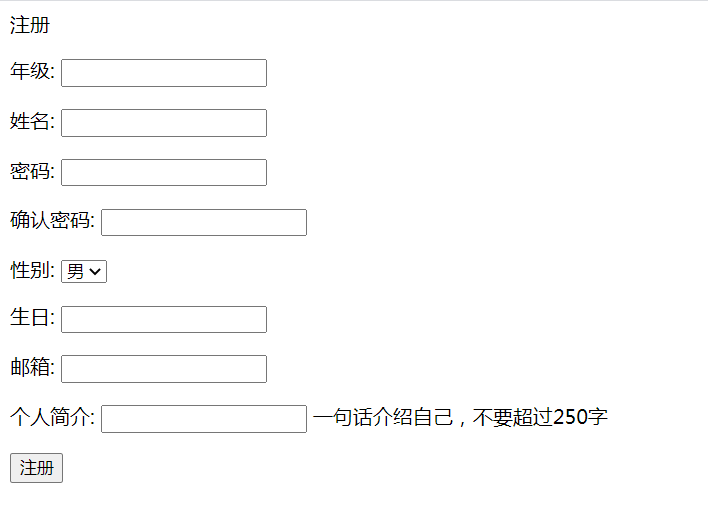
353 |
354 | 按如下图信息(其中密码为zhang333)
355 |
356 | 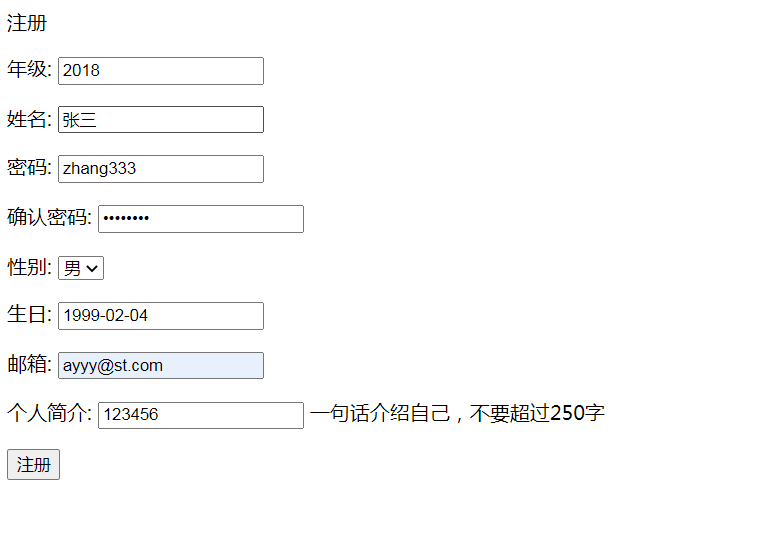
357 |
358 | 注册账号后,效果如下
359 |
360 | 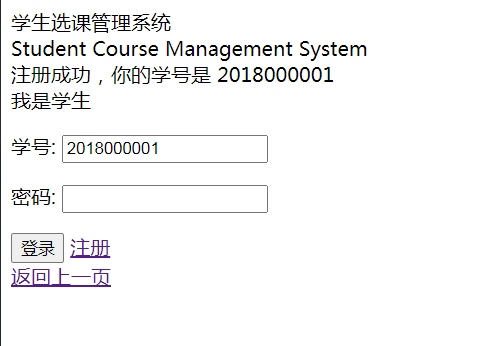
361 |
362 | ### 5 后续优化之添加返回按钮
363 | 后续发现注册页面缺乏返回按钮,这里补充上。
364 |
365 | 在`templates/user/register.html`的表单下,即``之后添加
366 | ```html
367 |
370 | ```
371 | 这时模板需要kind这个变量。我们需要在参数里面加上。
372 |
373 | 在`user/cbvs.py`中,分别给`CreateStudentView`类、`CreateTeacherView`类重写一下`get_context_data`方法,如下
374 | ```python
375 | ### 在CreateStudentView类中重写:
376 | def get_context_data(self, **kwargs):
377 | context = super(CreateStudentView, self).get_context_data(**kwargs)
378 | context["kind"] = "student"
379 |
380 | return context
381 |
382 | ### 在CreateTeacherView类中重写:
383 | def get_context_data(self, **kwargs):
384 | context = super(CreateTeacherView, self).get_context_data(**kwargs)
385 | context["kind"] = "teacher"
386 |
387 | return context
388 | ```
389 |
--------------------------------------------------------------------------------
/docs/11.md:
--------------------------------------------------------------------------------
1 | ## 学生课程业务实现
2 |
3 |
4 | 课程模块中,学生需要拥有的功能有:
5 | - 查看课程列表
6 | - 选课撤课
7 | - 结课后评教
8 |
9 | ### 1 - 查看课程列表
10 | 学生可以按类别`view_kind`查看课程,`view_kind`分为
11 | - `current`: 查看当前课程
12 | - `is_end`: 查看结课课程
13 | - `select`: 可选课的
14 | - `withdraw`: 可撤课的
15 |
16 | 新建学生查看课程的模板`templates/course/student/home.html`如下
17 |
18 | ```html
19 | {% extends "course/nav.html" %}
20 | {% block title %}HomePage{% endblock %}
21 | {% block content %}
22 |
142 | {% endblock %}
143 | ```
144 |
145 | 然后在`course/views.py`中添加代码如下
146 | ```python
147 | def view_course(request, view_kind):
148 | """
149 | :param view_kind:
150 | current: 查看当前课程
151 | is_end: 查看结课课程
152 | select: 选课
153 | withdraw: 撤课
154 | """
155 | user = get_user(request, "student")
156 | if not user:
157 | return redirect(reverse("login", kwargs={"kind": "student"}))
158 |
159 | is_search = False
160 | search_key = ""
161 | if request.method == "POST":
162 | search_key = request.POST.get("search")
163 | if search_key:
164 | is_search = True
165 |
166 | info = {
167 | "name": user.name,
168 | "kind": "student",
169 | }
170 |
171 | course_list = []
172 |
173 | if view_kind in ["select", "current", "withdraw", "is_end"]:
174 | if view_kind == "select":
175 | q = Q(status=2)
176 | if is_search:
177 | q = q & (Q(name__icontains=search_key) | Q(teacher__name__icontains=search_key))
178 |
179 | course_list = Course.objects.filter(q)
180 |
181 | my_course = StudentCourse.objects.filter(Q(student=user) & Q(with_draw=False))
182 | my_cids = [c.course.id for c in my_course]
183 | course_list = [c for c in course_list if c.id not in my_cids]
184 | else:
185 | q = Q(student=user) & Q(with_draw=False)
186 | if is_search:
187 | q = q & (Q(course__name__icontains=search_key) | Q(course__teacher__name__icontains=search_key))
188 | my_course = StudentCourse.objects.filter(q)
189 | if view_kind == "current":
190 | course_list = [c.course for c in my_course if c.course.status < 4]
191 | elif view_kind == "withdraw":
192 | course_list = [c.course for c in my_course if c.course.status == 2]
193 | elif view_kind == "is_end":
194 | course_list = [c for c in my_course if c.course.status >= 4]
195 |
196 | else:
197 | return HttpResponse(INVALID_REQUEST_METHOD)
198 |
199 | context = {
200 | 'info': info,
201 | 'view_kind': view_kind,
202 | 'course_list': course_list
203 | }
204 | if is_search:
205 | context["search_key"] = search_key
206 |
207 | return render(request, 'course/student/home.html', context)
208 | ```
209 | 课程主页即学生的个人主页,故修改`course/views.py`中的原视图方法`student_home`为
210 | ```python
211 | def student_home(request):
212 | return redirect(reverse("view_course", kwargs={"view_kind": "current"}))
213 | ```
214 |
215 |
216 | ### 2 - 选课撤课
217 | 选课是新建一个学生课程关系记录,撤课则是修改对应的学生课程关系记录。
218 | 即学生有两种操作课程方法,`operate_kind`如下:
219 | - `select`: 选课
220 | - `withdraw`: 撤课
221 |
222 | 如果网页请求发送的方法不在这两种里面,则不符合规范,同时需要将这一信息通过响应返回告知浏览器。
223 | 故在`constants.py`中添加`ILLEGAL_KIND = "Illegal kind for you."`
224 |
225 | 在`course/views.py`中,导入`ILLEGAL_KIND`,然后添加代码如下
226 |
227 | ```python
228 | # 在开头导入timezone
229 | from django.utils import timezone
230 |
231 | def operate_course(request, operate_kind, course_id):
232 | """
233 | :param operate_kind:
234 | select: 选课
235 | withdraw: 撤课
236 | """
237 | user = get_user(request, "student")
238 | if not user:
239 | return redirect(reverse("login", kwargs={"kind": "student"}))
240 |
241 | if operate_kind not in ["select", "withdraw"]:
242 | return HttpResponse(ILLEGAL_KIND)
243 | elif operate_kind == "select":
244 | course = Course.objects.filter(pk=course_id).get()
245 | new_course = StudentCourse(student=user, course=course)
246 | new_course.save()
247 | elif operate_kind == "withdraw":
248 | q = Q(course__id=course_id) & Q(student=user) & Q(with_draw=False)
249 | course = StudentCourse.objects.filter(q).get()
250 | course.with_draw = True
251 | course.with_draw_time = timezone.now()
252 | course.save()
253 |
254 | return redirect(reverse("view_course", kwargs={"view_kind": operate_kind}))
255 | ```
256 |
257 | ### 3 - 结课后评教
258 | 学生给老师评教和老师给学生评分的后端逻辑是一样的,都是修改学生课程关系表内的数据。
259 |
260 | 先在`course/forms.py`中添加
261 | ```python
262 | class RateForm(forms.ModelForm):
263 | class Meta:
264 | model = StudentCourse
265 | fields = ["course", "scores", "comments", "rating", "assessment"]
266 |
267 | course = forms.CharField(label="课程", disabled=True)
268 | scores = forms.IntegerField(label="成绩", disabled=True)
269 | comments = forms.CharField(label="老师评价", disabled=True)
270 |
271 | def __init__(self, *args, **kwargs):
272 | super().__init__(*args, **kwargs)
273 | self.initial['course'] = self.instance.course
274 | self.initial['scores'] = self.instance.scores
275 | self.initial['comments'] = self.instance.comments
276 |
277 | def clean_course(self):
278 | return self.initial['course']
279 |
280 | def clean_scores(self):
281 | return self.initial['scores']
282 |
283 | def clean_comments(self):
284 | return self.initial['comments']
285 | ```
286 | 然后添加模板文件`templates/course/student/rating.html`:
287 | ```html
288 | {% extends "course/nav.html" %}
289 | {% block title %}评教{% endblock %}
290 | {% block content %}
291 | 评教
292 |
302 | {% endblock %}
303 | ```
304 |
305 | 再在`course/cbvs.py`中导入`RateForm`类,然后添加代码如下
306 | ```python
307 | class RateUpdateView(UpdateView):
308 | model = StudentCourse
309 | form_class = RateForm
310 | template_name = 'course/student/rating.html'
311 |
312 | def get(self, request, *args, **kwargs):
313 | self.object = self.get_object()
314 |
315 | info = {}
316 | return_url = reverse("view_course", kwargs={"view_kind": "is_end"})
317 | if self.object:
318 | student = self.object.student
319 | info = {
320 | "name": student.name,
321 | "kind": "student",
322 | }
323 |
324 | return self.render_to_response(self.get_context_data(info=info, return_url=return_url))
325 |
326 | def get_success_url(self):
327 | return reverse("view_course", kwargs={"view_kind": "is_end"})
328 | ```
329 |
330 | ### 4 - 学生课程详情页
331 | 这个使用CBVs实现起来最快
332 | 先添加模板`templates/course/student/course.html`如下
333 | ```html
334 | {% extends "course/nav.html" %}
335 | {% block title %}课程详情{% endblock %}
336 | {% block content %}
337 | 课程详情
338 |
339 | - 课程编号 {{ object.course.id }}
340 | - 课程名 {{ object.course.name }}
341 | - 学分 {{ object.course.credit }}
342 | - 课程人数/最大人数 {{ object.course.get_current_count }}/{{ object.course.max_number }}
343 | - 年份 {{ object.course.year }}
344 | - 学期 {{ object.course.get_semester_display }}
345 |
346 | - 教师 {{ object.course.teacher.name }}
347 | - 上课时间
348 |
349 | {% for schedule in object.course.get_schedules %}
350 |
{{ schedule }}
351 | {% endfor %}
352 |
353 |
354 | - 得分
355 | {% if object.scores != None %}{{ object.scores }}{% else %} - {% endif %}
356 |
357 | - 评语
358 | {% if object.comments != None %}{{ object.comments }}{% else %} - {% endif %}
359 |
360 | - 学生评分
361 | {% if object.rating != None %}{{ object.rating }}{% else %} - {% endif %}
362 |
363 | - 学生评价
364 | {% if object.assessment != None %}{{ object.assessment }}{% else %} - {% endif %}
365 |
366 |
367 |
368 |
369 | {% endblock %}
370 | ```
371 |
372 | 再在`course/cbvs.py`中添加代码如下
373 | ```python
374 | class StudentCourseDetailView(DetailView):
375 | model = StudentCourse
376 | template_name = 'course/student/course.html'
377 |
378 | def get(self, request, *args, **kwargs):
379 | self.object = self.get_object()
380 | context = self.get_context_data(object=self.object)
381 | if self.object:
382 | context["info"] = {
383 | "name": self.object.student.name,
384 | "kind": "student",
385 | }
386 | return self.render_to_response(context)
387 | ```
388 |
389 | ### 5 - 添加路由
390 | 上面已经把学生需要的视图方法全部实现完毕了,接下来就是添加到路由里面。
391 | 修改后的`course/urls.py`如下
392 | ```python
393 | from django.urls import path
394 | from course.views import *
395 | from course.cbvs import ScoreUpdateView, RateUpdateView, StudentCourseDetailView
396 |
397 |
398 | urlpatterns = [
399 | path('/', home, name="course"),
400 | path('teacher/create_course', create_course, name="create_course"),
401 | path('teacher/view_detail/', view_detail, name="view_detail"),
402 | path('teacher/create_schedule/', create_schedule, name="create_schedule"),
403 | path('teacher/delete_schedule/', delete_schedule, name="delete_schedule"),
404 | path('teacher/score/', ScoreUpdateView.as_view(), name="score"),
405 | path('teacher/handle_course//', handle_course, name="handle_course"),
406 |
407 | path('student/view/', view_course, name="view_course"),
408 | path('student/operate//', operate_course, name="operate_course"),
409 |
410 | path('student/evaluate/', RateUpdateView.as_view(), name="evaluate"),
411 | path('student/view_detail/', StudentCourseDetailView.as_view(), name="sview_detail"),
412 | ]
413 | ```
414 |
415 | ### 6 - 效果
416 | 选课页面
417 | 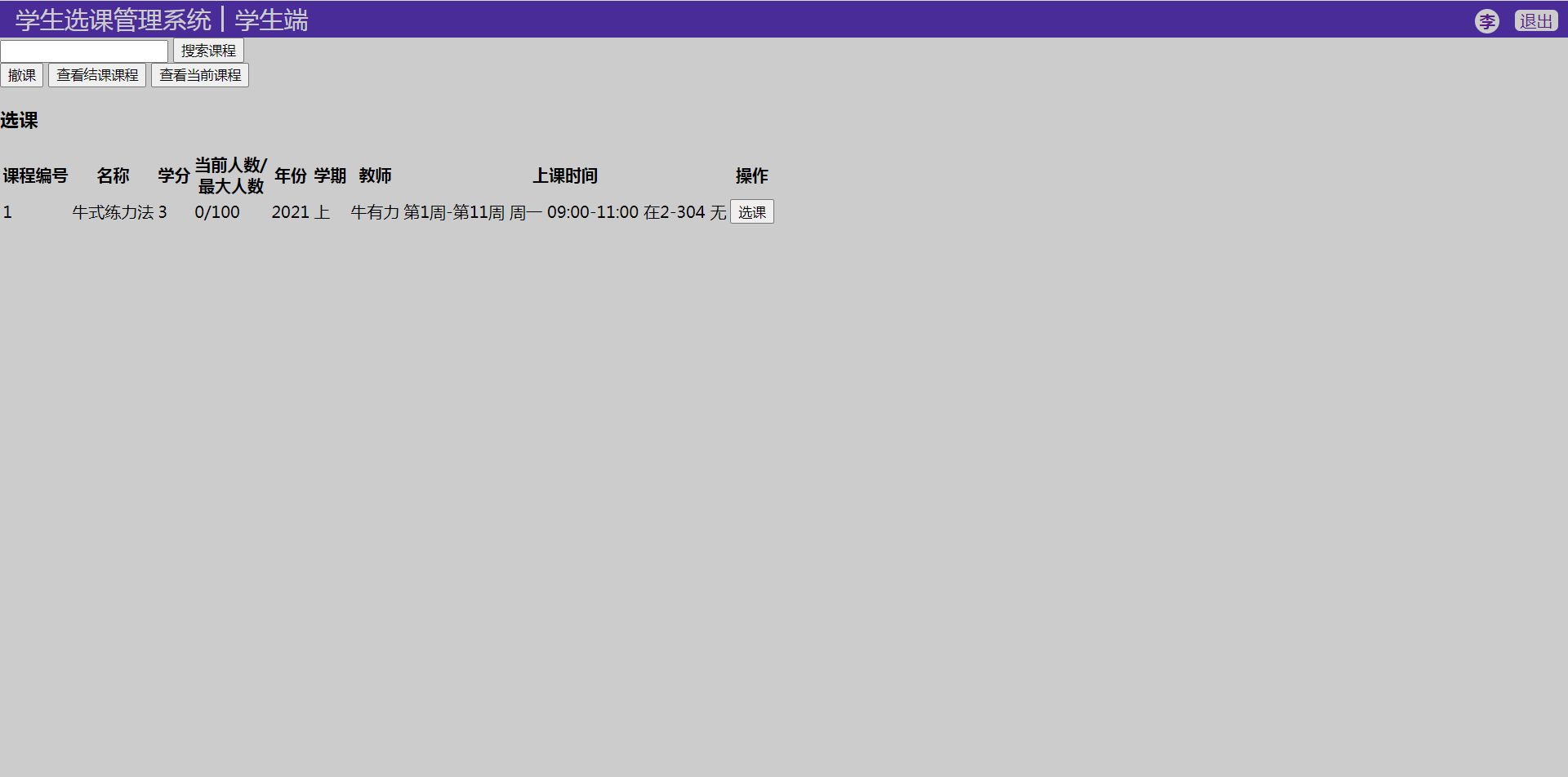
418 |
419 | 当前课程页面
420 | 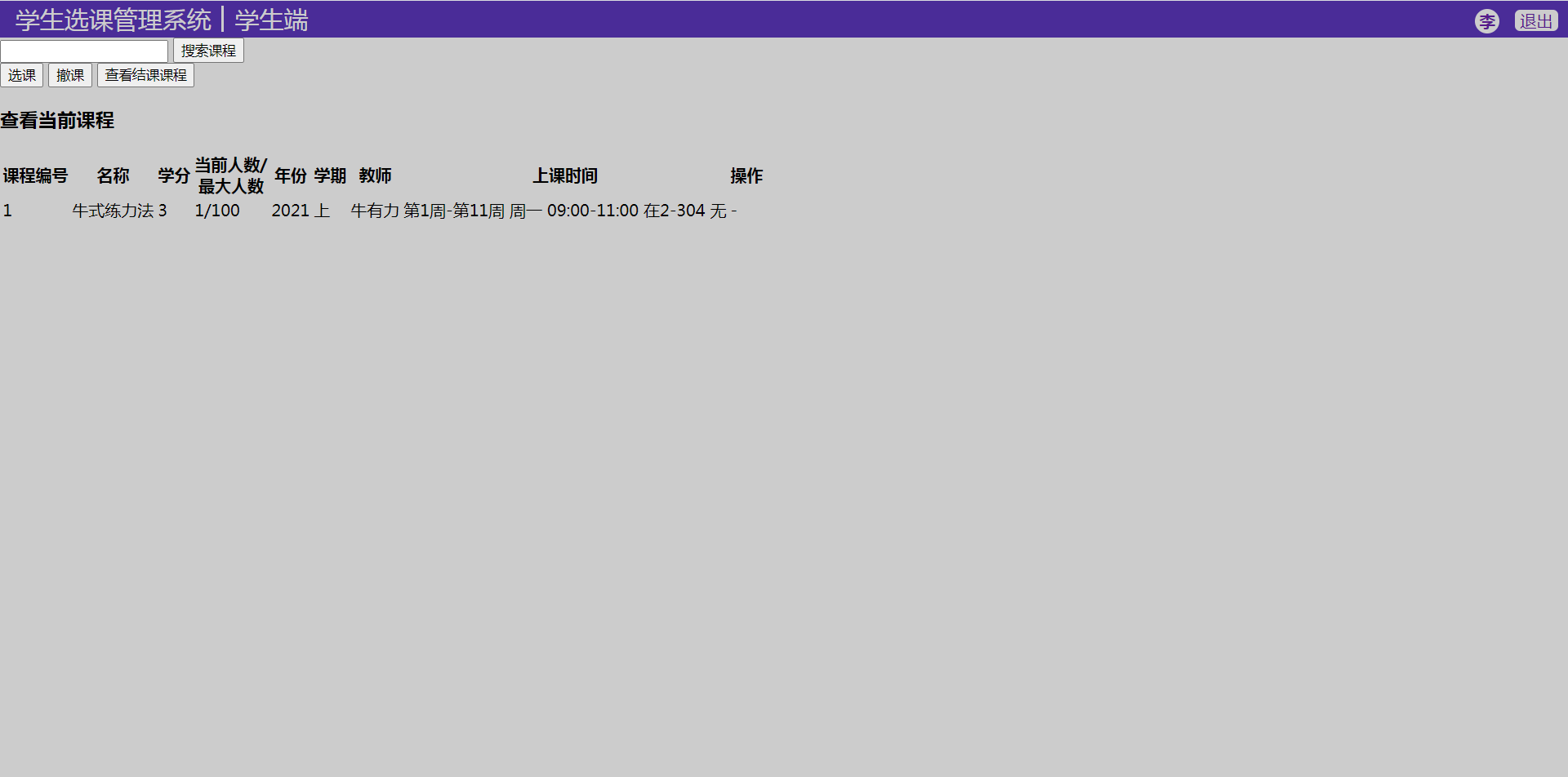
--------------------------------------------------------------------------------
/docs/10.md:
--------------------------------------------------------------------------------
1 | ## 老师课程业务实现
2 |
3 |
4 | 课程模块中,老师将要使用到的功能有:
5 | - 创建课程
6 | - 添加、删除课程时刻表
7 | - 查看课程列表
8 | - 操作课程:修改状态,给学生打分
9 |
10 | 这里一个一个实现
11 |
12 | 首先,在`course/views.py`中将课程的模型类全部导入,以便后面使用
13 | ```
14 | from .models import Course, Schedule, StudentCourse
15 | ```
16 |
17 | ### 1 - 创建课程
18 | 首先需要实现的是创建课程的表单,
19 | 新建`course/forms.py`如下
20 | ```python
21 | from django import forms
22 | from .models import Course, Schedule, StudentCourse
23 |
24 |
25 | class CourseForm(forms.ModelForm):
26 |
27 | class Meta:
28 | model = Course
29 | exclude = ['status', 'teacher']
30 | ```
31 |
32 | 同时对于新建课程的请求,在`constants.py`中添加一个非法请求的响应如下
33 | ```python
34 | INVALID_REQUEST_METHOD = "Invalid request method."
35 | ```
36 |
37 | 新建对应模板`templates/course/teacher/create_course.html`如下
38 |
39 | ```html
40 | {% extends "course/nav.html" %}
41 | {% block title %}创建课程{% endblock %}
42 | {% block content %}
43 | 创建课程
44 |
54 | {% endblock %}
55 | ```
56 |
57 | 再在`course/views.py`中导入`CourseForm`类和`INVALID_REQUEST_METHOD`常量,然后添加代码如下
58 |
59 | ```python
60 | def create_course(request):
61 | user = get_user(request, "teacher")
62 | if not user:
63 | return redirect(reverse("login", kwargs={"kind": "teacher"}))
64 |
65 | info = {
66 | "name": user.name,
67 | "kind": "teacher",
68 | }
69 |
70 | if request.method == 'POST':
71 | form = CourseForm(request.POST)
72 | if form.is_valid():
73 | obj = form.save(commit=False)
74 | obj.status = 1
75 | obj.teacher = user
76 |
77 | obj.save()
78 | return redirect(reverse("course", kwargs={"kind": "teacher"}))
79 | elif request.method == 'GET':
80 | form = CourseForm()
81 | else:
82 | return HttpResponse(INVALID_REQUEST_METHOD)
83 |
84 | return render(request, 'course/teacher/create_course.html', {'info': info, 'form': form})
85 | ```
86 |
87 | ### 2 - 添加、删除课程时刻表
88 | 先需要实现的是添加课程时刻表的表单,
89 |
90 | 在`course/forms.py`中添加代码如下
91 | ```python
92 | class ScheduleForm(forms.ModelForm):
93 | class Meta:
94 | model = Schedule
95 | exclude = ["course"]
96 | ```
97 |
98 | 新建对应模板`templates/course/teacher/create_schedule.html`如下
99 | ```html
100 | {% extends "course/nav.html" %}
101 | {% block title %}创建时刻表{% endblock %}
102 | {% block content %}
103 | 创建时刻表: [{{ course.id }}] {{ course.name }}
104 |
114 | {% endblock %}
115 | ```
116 |
117 | 在`course/views.py`中导入这个表单,
118 | 然后添加代码如下
119 | ```python
120 | def create_schedule(request, course_id):
121 | user = get_user(request, "teacher")
122 | if not user:
123 | return redirect(reverse("login", kwargs={"kind": "teacher"}))
124 |
125 | info = {
126 | "name": user.name,
127 | "kind": "teacher",
128 | }
129 |
130 | course = Course.objects.get(pk=course_id)
131 |
132 | if request.method == 'POST':
133 | form = ScheduleForm(request.POST)
134 | if form.is_valid():
135 | obj = form.save(commit=False)
136 | obj.course = course
137 | obj.save()
138 |
139 | return redirect(reverse("view_detail", kwargs={"course_id": course_id}))
140 | elif request.method == 'GET':
141 | form = ScheduleForm()
142 | else:
143 | return HttpResponse(INVALID_REQUEST_METHOD)
144 |
145 | return render(request, 'course/teacher/create_schedule.html', {'info': info, 'form': form, "course": course})
146 |
147 |
148 | def delete_schedule(request, schedule_id):
149 | user = get_user(request, "teacher")
150 | if not user:
151 | return redirect(reverse("login", kwargs={"kind": "teacher"}))
152 |
153 | schedule = Schedule.objects.get(pk=schedule_id)
154 |
155 | course_id = request.GET.get("course_id") or schedule.course.id
156 |
157 | schedule.delete()
158 |
159 | return redirect(reverse("view_detail", kwargs={"course_id": course_id}))
160 | ```
161 |
162 | ### 3 查看课程列表
163 | 在本项目中,老师和学生的个人主页就是其课程主页,将展示其所有课程列表。
164 | 为老师的课程主页添加模板`templates/course/teacher/home.html`如下
165 | ```html
166 | {% extends "course/nav.html" %}
167 | {% block title %}HomePage{% endblock %}
168 | {% block content %}
169 |
170 |
171 |
176 |
177 |
178 |
179 |
221 |
课程详情
276 |
277 |
278 |
279 | | 课程编号 |
280 | 名称 |
281 | 学分 |
282 | 当前人数/总人数 |
283 | 年份 |
284 | 学期 |
285 |
286 |
287 |
288 |
289 | | {{ course.id }} |
290 | {{ course.name }} |
291 | {{ course.credit }} |
292 | {{ course.get_current_count }}/{{ course.max_number }} |
293 | {{ course.year }} |
294 | {{ course.get_semester_display }} |
295 |
296 |
297 |
298 |
299 | 上课时间
300 |
321 |
322 | 学生列表
323 | {% if course.status == 4 %}
324 |
325 | {% endif %}
326 |
327 |
369 |
370 | {% if course.status == 5 %}
371 | 学生评价
372 |
373 |
374 |
375 | | 学生评分 |
376 |
377 |
378 |
379 |
380 | {% for cs in sorted_course_students %}
381 | {% if cs.rating != None %}
382 |
383 | | {{ cs.rating }} |
384 | {{ cs.assessment }} |
385 |
386 | {% endif %}
387 | {% endfor %}
388 |
389 |
390 | {% endif %}
391 | {% endblock %}
392 | ```
393 |
394 | 在`course/views.py`中添加代码如下
395 | ```python
396 | def handle_course(request, course_id, handle_kind):
397 | """
398 | :param request:
399 | :param course_id:
400 | :param handle_kind:
401 | 1: "开始选课",
402 | 2: "结束选课",
403 | 3: "结课",
404 | 4: "给分完成"
405 | :return:
406 | """
407 | user = get_user(request, "teacher")
408 | if not user:
409 | return redirect(reverse("login", kwargs={"kind": "teacher"}))
410 |
411 | info = {
412 | "name": user.name,
413 | "kind": "teacher",
414 | }
415 |
416 | course = Course.objects.get(pk=course_id)
417 | if course.status == handle_kind and course.status < 5:
418 | if course.status == 4:
419 | scs = StudentCourse.objects.filter(course=course)
420 | all_given = True
421 | res = ""
422 | for sc in scs:
423 | if sc.scores is None:
424 | all_given = False
425 | res += "%s 未打分
" % sc.student
426 |
427 | if all_given:
428 | course.status += 1
429 | course.save()
430 | return redirect(reverse("view_detail", kwargs={"course_id": course.id}))
431 | else:
432 | return HttpResponse(res)
433 | else:
434 | course.status += 1
435 | course.save()
436 |
437 | course_list = Course.objects.filter(teacher=user)
438 | return render(request, 'course/teacher/home.html', {'info': info, 'course_list': course_list})
439 |
440 |
441 | def view_detail(request, course_id):
442 | user = get_user(request, "teacher")
443 | if not user:
444 | return redirect(reverse("login", kwargs={"kind": "teacher"}))
445 |
446 | info = {
447 | "name": user.name,
448 | "kind": "teacher",
449 | }
450 |
451 | course = Course.objects.get(pk=course_id)
452 | c_stu_list = StudentCourse.objects.filter(course=course)
453 | sche_list = Schedule.objects.filter(course=course)
454 |
455 | context = {
456 | "info": info,
457 | "course": course,
458 | "course_students": c_stu_list,
459 | "schedules": sche_list
460 | }
461 |
462 | if course.status == 5:
463 | sorted_cs_list = sorted(c_stu_list, key=lambda cs: cs.scores)
464 | context["sorted_course_students"] = sorted_cs_list
465 |
466 | return render(request, "course/teacher/course.html", context)
467 | ```
468 | ### 5 打分
469 |
470 | 学生的分数是记录在学生课程关系表中的,
471 | 在学生选课成功后会新建一条对应的数据。
472 | 给分,则是修改其中的分数字段,即对学生课程表模型进行更新。
473 |
474 | 这里我们首选CBVs中的`UpdateView`,
475 | 不过要先给这个视图建立一个表单,在`course/forms.py`中添加代码如下
476 | ```python
477 | class ScoreForm(forms.ModelForm):
478 | class Meta:
479 | model = StudentCourse
480 | fields = ["student", "course", "scores", "comments"]
481 |
482 | student = forms.CharField(label="学生", disabled=True)
483 | # course = forms.CharField(widget=forms.TextInput(attrs={'readonly': 'readonly'}))
484 | course = forms.CharField(label="课程", disabled=True)
485 |
486 | def __init__(self, *args, **kwargs):
487 | super().__init__(*args, **kwargs)
488 | self.initial['student'] = self.instance.student
489 | self.initial['course'] = self.instance.course
490 |
491 | def clean_student(self):
492 | return self.initial['student']
493 |
494 | def clean_course(self):
495 | return self.initial['course']
496 | ```
497 |
498 | 新建`course/cbvs.py`如下:
499 | ```python
500 | from django.views.generic.edit import DeleteView, CreateView, UpdateView
501 | from django.views.generic.detail import DetailView
502 | from django.shortcuts import render, reverse, redirect
503 |
504 | # Relative import of GeeksModel
505 | from .models import Schedule, StudentCourse
506 | from .forms import ScoreForm
507 |
508 |
509 | class ScoreUpdateView(UpdateView):
510 | model = StudentCourse
511 | form_class = ScoreForm
512 | template_name = 'course/teacher/score.html'
513 |
514 | def get(self, request, *args, **kwargs):
515 | self.object = self.get_object()
516 |
517 | title = "给分"
518 | if request.GET.get("update"):
519 | title = "修改成绩"
520 |
521 | info = {}
522 | return_url = reverse("course", kwargs={"kind": "teacher"})
523 | if self.object:
524 | teacher = self.object.course.teacher
525 | info = {
526 | "name": teacher.name,
527 | "kind": "teacher",
528 | }
529 | return_url = reverse("view_detail", kwargs={"course_id": self.object.course.id})
530 |
531 | return self.render_to_response(self.get_context_data(info=info, title=title, return_url=return_url))
532 |
533 | def get_success_url(self):
534 | if self.object:
535 | return reverse("view_detail", kwargs={"course_id": self.object.course.id})
536 | else:
537 | return reverse("course", kwargs={"kind": "teacher"})
538 | ```
539 |
540 | 同时补上其对应的模板文件`templates/course/teacher/score.html`如下
541 |
542 | ```html
543 | {% extends "course/nav.html" %}
544 | {% block title %}{{ title }}{% endblock %}
545 | {% block content %}
546 | {{ title }}
547 |
557 | {% endblock %}
558 | ```
559 |
560 | ### 5 添加url
561 | 上面已经把老师需要的视图方法全部实现完毕了,接下来就是添加到路由里面。
562 | 修改后的`course/urls.py`如下
563 | ```python
564 | from django.urls import path
565 | from course.views import *
566 | from course.cbvs import ScoreUpdateView
567 |
568 |
569 | urlpatterns = [
570 | path('/', home, name="course"),
571 | path('/', home, name="course"),
572 | path('teacher/create_course', create_course, name="create_course"),
573 | path('teacher/view_detail/', view_detail, name="view_detail"),
574 | path('teacher/create_schedule/', create_schedule, name="create_schedule"),
575 | path('teacher/delete_schedule/', delete_schedule, name="delete_schedule"),
576 | path('teacher/score/', ScoreUpdateView.as_view(), name="score"),
577 | path('teacher/handle_course//', handle_course, name="handle_course"),
578 | ]
579 | ```
580 |
581 | ### 6 效果
582 | 创建课程页面:
583 | 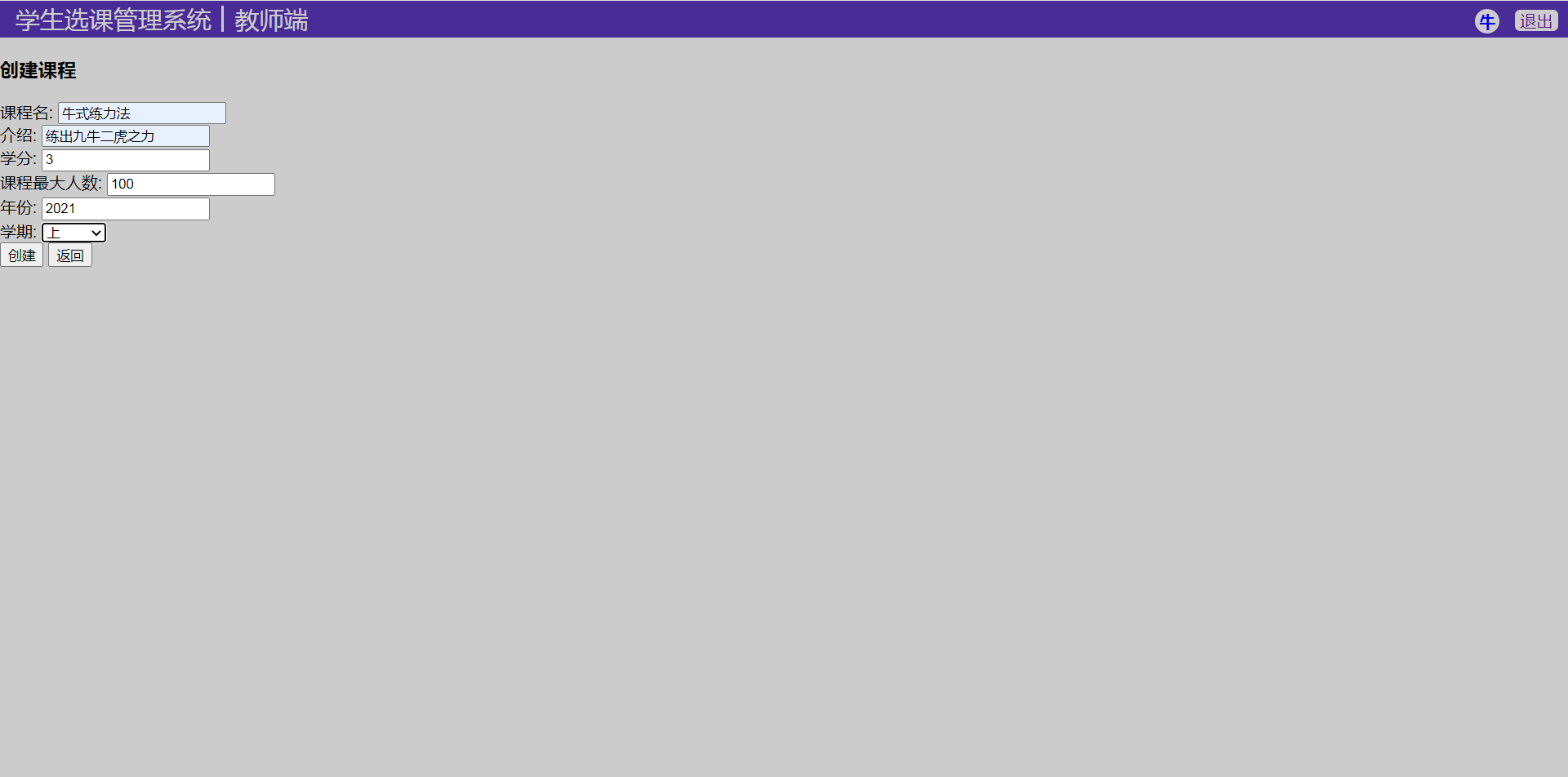
584 |
585 | 教师主页:
586 | 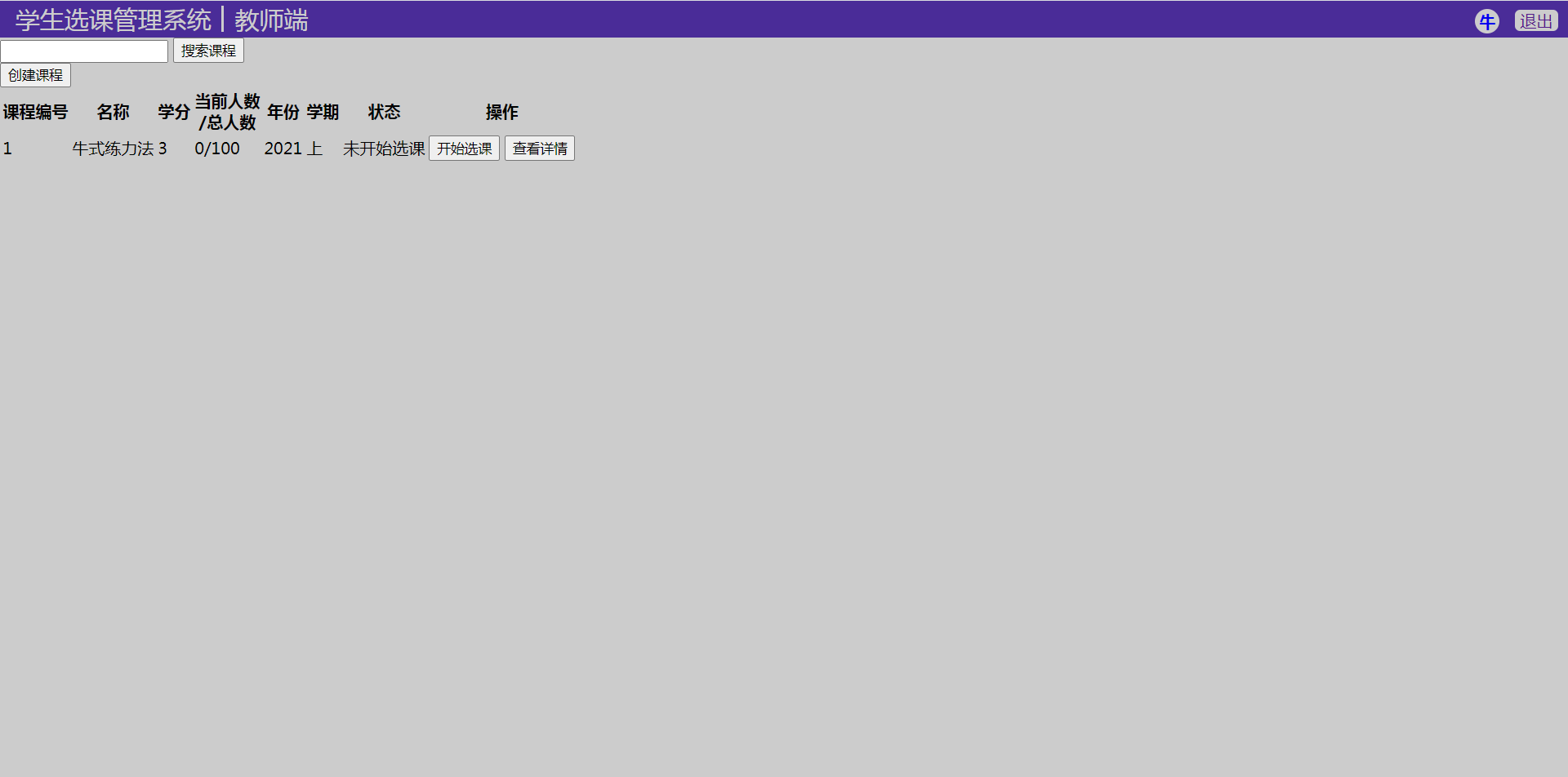
587 |
588 | 教师课程详情页:
589 | 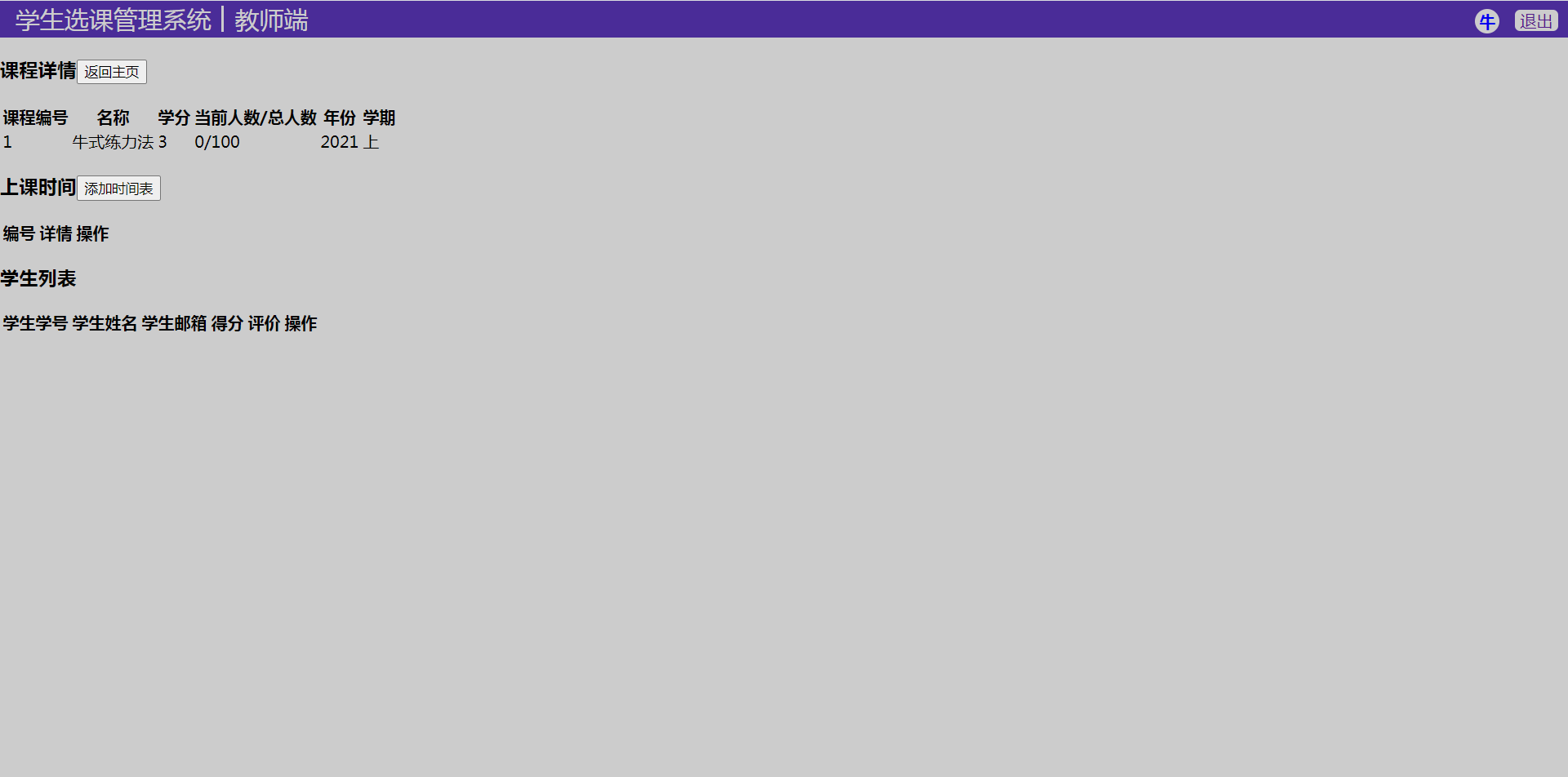
590 |
591 | 添加课程时刻表页面:
592 | 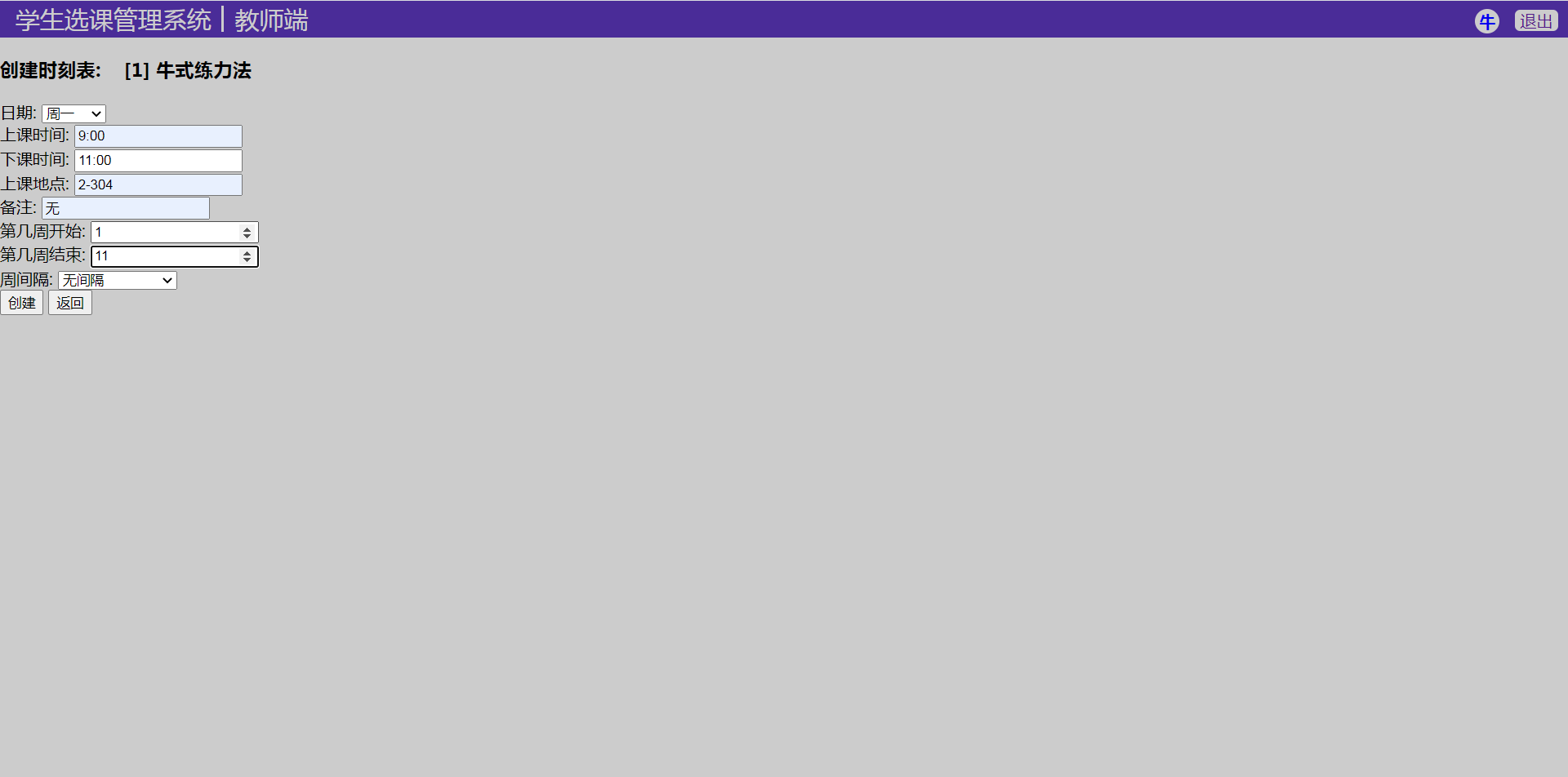
593 |
594 |
595 |
--------------------------------------------------------------------------------