├── .DS_Store
├── Process
├── .DS_Store
├── WritingFiles.png
├── InstallComplete.png
├── PreparingInstallation.png
├── Screenshot 2024-05-29 at 1.23.46 PM.png
└── Screenshot 2024-05-29 at 2.36.17 PM.png
├── Disclaimer.txt
└── README.md
/.DS_Store:
--------------------------------------------------------------------------------
https://raw.githubusercontent.com/Birdabo404/BMAS/HEAD/.DS_Store
--------------------------------------------------------------------------------
/Process/.DS_Store:
--------------------------------------------------------------------------------
https://raw.githubusercontent.com/Birdabo404/BMAS/HEAD/Process/.DS_Store
--------------------------------------------------------------------------------
/Process/WritingFiles.png:
--------------------------------------------------------------------------------
https://raw.githubusercontent.com/Birdabo404/BMAS/HEAD/Process/WritingFiles.png
--------------------------------------------------------------------------------
/Process/InstallComplete.png:
--------------------------------------------------------------------------------
https://raw.githubusercontent.com/Birdabo404/BMAS/HEAD/Process/InstallComplete.png
--------------------------------------------------------------------------------
/Process/PreparingInstallation.png:
--------------------------------------------------------------------------------
https://raw.githubusercontent.com/Birdabo404/BMAS/HEAD/Process/PreparingInstallation.png
--------------------------------------------------------------------------------
/Process/Screenshot 2024-05-29 at 1.23.46 PM.png:
--------------------------------------------------------------------------------
https://raw.githubusercontent.com/Birdabo404/BMAS/HEAD/Process/Screenshot 2024-05-29 at 1.23.46 PM.png
--------------------------------------------------------------------------------
/Process/Screenshot 2024-05-29 at 2.36.17 PM.png:
--------------------------------------------------------------------------------
https://raw.githubusercontent.com/Birdabo404/BMAS/HEAD/Process/Screenshot 2024-05-29 at 2.36.17 PM.png
--------------------------------------------------------------------------------
/Disclaimer.txt:
--------------------------------------------------------------------------------
1 | ⚠️ Disclaimer
2 |
3 | This repository is provided for **educational and archival purposes only.
4 |
5 | - Microsoft software linked here is sourced directly from Microsoft's official servers
6 | - Third-party activation tools are **not created, maintained, or endorsed** by this repository/user
7 | - Use of activation tools may violate Microsoft's Terms of Service and local laws
8 | - Users are solely responsible for compliance with applicable licensing agreements
9 | - **No support will be provided** for any issues arising from tool usage
10 |
11 | Proceed at your own risk and responsibility.
12 |
--------------------------------------------------------------------------------
/README.md:
--------------------------------------------------------------------------------
1 | 
2 | Birdabo's Microsoft Activation Script (BMAS)
3 | A simplified Windows & Office activator | This repo now includes macOS Office Activator 🍎
4 |
5 | ## 🪟 - Windows Activation
6 | ```Prerequisite:``` Make sure you have an OEM install of WINDOWS/OFFICE first. if not Download them below.
7 |
8 | ## Terminal Method
9 |
10 | 1. Right-click Windows start menu → **PowerShell/Terminal (Admin)**
11 | 2. Run: `irm https://massgrave.dev/get | iex`
12 | 3. Select options:
13 | - `[5]` Check activation status
14 | - `[1]` Activate Windows permanently
15 | - `[2]` Activate Office permanently
16 |
17 | Done. for educational purpose only.
18 |
19 | ### 💾 Preview
20 | 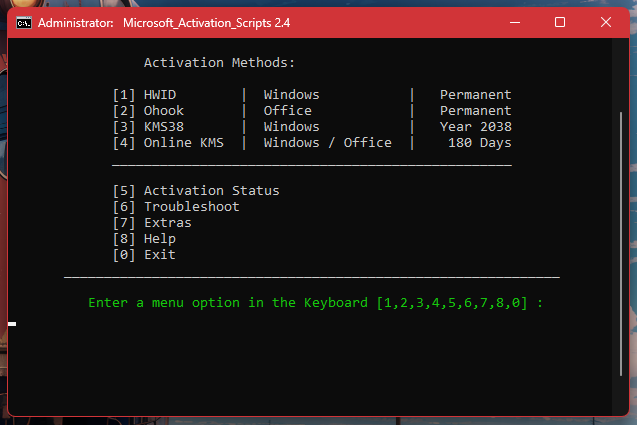
21 |
22 | ### NOTE: DO NOT reactivate windows/office if it's already licensed and working. This will VOID your license.
23 | #### ⬇️ IMPORTANT Downloads:
24 |
25 | OEM Windows 11 / 10 / 8.1 / 7 - [Download](https://www.microsoft.com/en-us/software-download)\
26 | OEM Microsoft 365 ```2021``` - [Download](https://c2rsetup.officeapps.live.com/c2r/download.aspx?ProductreleaseID=ProPlus2021Retail&platform=x64&language=en-us&version=O16GA)\
27 | OEM Microsoft office 2024 - [Download](https://c2rsetup.officeapps.live.com/c2r/download.aspx?ProductreleaseID=HomeBusiness2024Retail&platform=x64&language=en-us&version=O16GA)
28 | - after installation DO NOT open microsoft apps but proceed with ```Terminal Method``` to activate.
29 |
30 | ------------------------------------------------------------------------------
31 |
32 | # 🍎 - Office for MACOS 2024
33 | - Supports only `Ventura 13.x.x` to `macOS Sequoia 15.x.x`
34 | - native support with ALL M-series chips
35 | - Works with Hackintosh
36 |
37 | ```
38 | MACOS VERSION AVAILABLE:
39 |
40 | - macOS Sequoia (macOS 15) ✅
41 | - macOS Sonoma (macOS 14) ✅
42 | - macOS Ventura (macOS 13) ✅
43 | - macOS Monterey (macOS 12) Request via ISSUES
44 | - macOS BigSur (macOS 11) Request via ISSUES
45 | ```
46 | ### Step 1: Remove Existing Office Installation & clean old license
47 |
48 | 1. Install the application called **Office-Reset** - [Download](https://office-reset.com/download/Microsoft_Office_Reset_1.9.1.pkg)
49 | 2. Follow through the installation process and select > `Completely Remove Microsoft 365/Office`
50 | 3. Finish the installation process.
51 |
52 | ### Step 2: Download Microsoft Office
53 |
54 | Choose the appropriate version from the links below:\
55 | Generation - 2024 only.
56 |
57 | | Application | Link |
58 | |-------------|------|
59 | | Office suite (with Teams)| [download](https://go.microsoft.com/fwlink/p/?linkid=2009112) |
60 | | Office suite (without Teams) | [download](https://go.microsoft.com/fwlink/p/?linkid=525133) |
61 | | Word - recommended| [download](https://go.microsoft.com/fwlink/p/?linkid=525134) |
62 | | Excel | [download](https://go.microsoft.com/fwlink/p/?linkid=525135) |
63 | | PowerPoint | [download](https://go.microsoft.com/fwlink/p/?linkid=525136) |
64 | | Outlook | [download](https://go.microsoft.com/fwlink/p/?linkid=525137) |
65 | | OneNote | [download](https://go.microsoft.com/fwlink/p/?linkid=820886) |
66 |
67 | ### Step 3: Install the Office Activator
68 |
69 | Run the appropriate activator pkg file and install. (**Don't open Office apps before installing activator pkg file**)
70 |
71 | | Serializer | Activator | Applicable On |
72 | |------------|-----------|---------------|
73 | | Office 2024 | [install me](https://drive.massgrave.dev/Microsoft_Office_LTSC_2024_VL_Serializer.pkg) | Sequoia, Sonoma, Ventura |
74 | | Office 2021 | [install me](https://drive.massgrave.dev/Microsoft_Office_LTSC_2021_VL_Serializer.pkg) | ~~No longer supported~~|
75 |
76 |
77 | ### Step 4: Follow the process and voila! 🎉😇
78 | - after doing the step by step process you'll eventually have an activated office for macOS, virus free!
79 | - This is for educational purpose only. I dont own any script shown in this repo.
80 | - leave a ⭐️ so it may reach more students.
81 |
82 | ------------------
83 | ### 📪 Credits
84 | [massgrave](https://github.com/massgravel/Microsoft-Activation-Scripts.git)\
85 | https://massgrave.dev \
86 | [Alsyundawy](https://github.com/alsyundawy)
87 |
88 |
89 |
90 |
--------------------------------------------------------------------------------