├── docs
├── get-started
│ ├── beginner.md
│ ├── overview.md
│ ├── how_to_read.md
│ ├── apply-node.md
│ ├── productoverview.md
│ ├── voting.md
│ ├── wallet.md
│ └── run-node.md
├── masternode
│ ├── .gitkeep
│ ├── requirements.md
│ ├── snapshot.md
│ ├── name-your-masternode.md
│ ├── applying.md
│ ├── tomox-fullnode.md
│ ├── docker.md
│ ├── tmn.md
│ ├── tomonative.md
│ ├── create-tomochain-masternode.md
│ └── tomox-sdk.md
├── products
│ ├── tomomaster
│ │ ├── .gitkeep
│ │ └── features.md
│ ├── tomoscan
│ │ ├── .gitkeep
│ │ └── features.md
│ ├── tomowallet
│ │ ├── .gitkeep
│ │ ├── features.md
│ │ ├── voting.md
│ │ └── terms.md
│ ├── tomobridge
│ │ └── faq.md
│ └── tomoissuer
│ │ ├── index.md
│ │ ├── termofcondition.md
│ │ └── policyprivacy.md
├── tomochain-client
│ └── .gitkeep
├── assets
│ ├── al1.png
│ ├── home.png
│ ├── mew1.jpg
│ ├── mew1.png
│ ├── mew2.jpg
│ ├── mew2.png
│ ├── mew3.jpg
│ ├── mew3.png
│ ├── vote.jpg
│ ├── vote.png
│ ├── Rewards.png
│ ├── design.pptx
│ ├── favicon.png
│ ├── login.jpeg
│ ├── login2.jpeg
│ ├── mewtomo.jpg
│ ├── overview.png
│ ├── scanqr.jpeg
│ ├── tmn_key.png
│ ├── candidates.png
│ ├── metamask1.jpg
│ ├── metamask2.jpg
│ ├── metamask3.jpg
│ ├── overview.pptx
│ ├── privacyfee.png
│ ├── tmn_python.png
│ ├── tmn_stats.png
│ ├── tomoscan1.jpg
│ ├── tomoscan2.jpg
│ ├── tomoscan3.jpg
│ ├── tomoscan4.jpg
│ ├── tomoscan5.jpg
│ ├── tomoscan6.jpg
│ ├── Figure_Epoch.jpg
│ ├── accountinfo.png
│ ├── architecture.jpg
│ ├── cross-shard.png
│ ├── enteraddress.png
│ ├── importwallet.png
│ ├── infographic.jpg
│ ├── settingpage.jpg
│ ├── tomomaster.jpeg
│ ├── tomowallet1.jpg
│ ├── tomowallet2.jpg
│ ├── tomowallet3.jpg
│ ├── tomowallet4.jpg
│ ├── trustwallet1.jpg
│ ├── trustwallet2.jpg
│ ├── trustwallet3.jpg
│ ├── walletwelcome.png
│ ├── crossshardchain.png
│ ├── examplesolidity.png
│ ├── home_tomoissuer.png
│ ├── overviewprivacy.png
│ ├── votesuccessful.jpeg
│ ├── doublevalidation.jpg
│ ├── issuetoken_step1.png
│ ├── issuetoken_step2.png
│ ├── issuetoken_step21.png
│ ├── issuetoken_step3.png
│ ├── issuetoken_step4.png
│ ├── issuetoken_step5.png
│ ├── issuetoken_step6.png
│ ├── loginconfirmation.jpeg
│ ├── singlevalidation.jpg
│ ├── voteconfirmation.png
│ ├── voteinformation.jpeg
│ ├── ChainMakingProcess3.jpg
│ ├── confirmationmessage.jpeg
│ └── shardingarchitecture.jpg
├── developers
│ ├── blockheader.md
│ ├── dappdeploytuto.md
│ ├── icosmartcontract.md
│ ├── txtypes.md
│ ├── clicommands.md
│ ├── trc20-integrations.md
│ ├── trc21-integrations.md
│ ├── staking-integrations.md
│ ├── integrations.md
│ └── tutoprivatenet.md
├── general
│ ├── about.md
│ ├── important-links.md
│ ├── use-cases.md
│ ├── changelog.md
│ └── networks.md
├── misc
│ └── wip.md
├── index.md
└── legal
│ ├── terms-of-use.md
│ └── privacy.md
├── serve.sh
├── material_override
├── images
│ ├── logo.png
│ ├── favicon.ico
│ ├── favicon.png
│ └── logo.svg
├── css
│ └── style.css
└── js
│ └── MathJax.js
├── requirements.txt
├── .travis.yml
├── .github
└── ISSUE_TEMPLATE
│ └── content-request.md
├── LICENSE
├── .gitignore
├── README.md
└── mkdocs.yml
/docs/get-started/beginner.md:
--------------------------------------------------------------------------------
1 |
--------------------------------------------------------------------------------
/docs/get-started/overview.md:
--------------------------------------------------------------------------------
1 |
--------------------------------------------------------------------------------
/docs/masternode/.gitkeep:
--------------------------------------------------------------------------------
1 |
--------------------------------------------------------------------------------
/docs/products/tomomaster/.gitkeep:
--------------------------------------------------------------------------------
1 |
--------------------------------------------------------------------------------
/docs/products/tomoscan/.gitkeep:
--------------------------------------------------------------------------------
1 |
--------------------------------------------------------------------------------
/docs/products/tomowallet/.gitkeep:
--------------------------------------------------------------------------------
1 |
--------------------------------------------------------------------------------
/docs/tomochain-client/.gitkeep:
--------------------------------------------------------------------------------
1 |
--------------------------------------------------------------------------------
/serve.sh:
--------------------------------------------------------------------------------
1 | #!/usr/bin/env bash
2 | mkdocs serve --dev-addr=0.0.0.0:3000
3 |
--------------------------------------------------------------------------------
/docs/assets/al1.png:
--------------------------------------------------------------------------------
https://raw.githubusercontent.com/BuildOnViction/docs/HEAD/docs/assets/al1.png
--------------------------------------------------------------------------------
/docs/assets/home.png:
--------------------------------------------------------------------------------
https://raw.githubusercontent.com/BuildOnViction/docs/HEAD/docs/assets/home.png
--------------------------------------------------------------------------------
/docs/assets/mew1.jpg:
--------------------------------------------------------------------------------
https://raw.githubusercontent.com/BuildOnViction/docs/HEAD/docs/assets/mew1.jpg
--------------------------------------------------------------------------------
/docs/assets/mew1.png:
--------------------------------------------------------------------------------
https://raw.githubusercontent.com/BuildOnViction/docs/HEAD/docs/assets/mew1.png
--------------------------------------------------------------------------------
/docs/assets/mew2.jpg:
--------------------------------------------------------------------------------
https://raw.githubusercontent.com/BuildOnViction/docs/HEAD/docs/assets/mew2.jpg
--------------------------------------------------------------------------------
/docs/assets/mew2.png:
--------------------------------------------------------------------------------
https://raw.githubusercontent.com/BuildOnViction/docs/HEAD/docs/assets/mew2.png
--------------------------------------------------------------------------------
/docs/assets/mew3.jpg:
--------------------------------------------------------------------------------
https://raw.githubusercontent.com/BuildOnViction/docs/HEAD/docs/assets/mew3.jpg
--------------------------------------------------------------------------------
/docs/assets/mew3.png:
--------------------------------------------------------------------------------
https://raw.githubusercontent.com/BuildOnViction/docs/HEAD/docs/assets/mew3.png
--------------------------------------------------------------------------------
/docs/assets/vote.jpg:
--------------------------------------------------------------------------------
https://raw.githubusercontent.com/BuildOnViction/docs/HEAD/docs/assets/vote.jpg
--------------------------------------------------------------------------------
/docs/assets/vote.png:
--------------------------------------------------------------------------------
https://raw.githubusercontent.com/BuildOnViction/docs/HEAD/docs/assets/vote.png
--------------------------------------------------------------------------------
/docs/assets/Rewards.png:
--------------------------------------------------------------------------------
https://raw.githubusercontent.com/BuildOnViction/docs/HEAD/docs/assets/Rewards.png
--------------------------------------------------------------------------------
/docs/assets/design.pptx:
--------------------------------------------------------------------------------
https://raw.githubusercontent.com/BuildOnViction/docs/HEAD/docs/assets/design.pptx
--------------------------------------------------------------------------------
/docs/assets/favicon.png:
--------------------------------------------------------------------------------
https://raw.githubusercontent.com/BuildOnViction/docs/HEAD/docs/assets/favicon.png
--------------------------------------------------------------------------------
/docs/assets/login.jpeg:
--------------------------------------------------------------------------------
https://raw.githubusercontent.com/BuildOnViction/docs/HEAD/docs/assets/login.jpeg
--------------------------------------------------------------------------------
/docs/assets/login2.jpeg:
--------------------------------------------------------------------------------
https://raw.githubusercontent.com/BuildOnViction/docs/HEAD/docs/assets/login2.jpeg
--------------------------------------------------------------------------------
/docs/assets/mewtomo.jpg:
--------------------------------------------------------------------------------
https://raw.githubusercontent.com/BuildOnViction/docs/HEAD/docs/assets/mewtomo.jpg
--------------------------------------------------------------------------------
/docs/assets/overview.png:
--------------------------------------------------------------------------------
https://raw.githubusercontent.com/BuildOnViction/docs/HEAD/docs/assets/overview.png
--------------------------------------------------------------------------------
/docs/assets/scanqr.jpeg:
--------------------------------------------------------------------------------
https://raw.githubusercontent.com/BuildOnViction/docs/HEAD/docs/assets/scanqr.jpeg
--------------------------------------------------------------------------------
/docs/assets/tmn_key.png:
--------------------------------------------------------------------------------
https://raw.githubusercontent.com/BuildOnViction/docs/HEAD/docs/assets/tmn_key.png
--------------------------------------------------------------------------------
/docs/assets/candidates.png:
--------------------------------------------------------------------------------
https://raw.githubusercontent.com/BuildOnViction/docs/HEAD/docs/assets/candidates.png
--------------------------------------------------------------------------------
/docs/assets/metamask1.jpg:
--------------------------------------------------------------------------------
https://raw.githubusercontent.com/BuildOnViction/docs/HEAD/docs/assets/metamask1.jpg
--------------------------------------------------------------------------------
/docs/assets/metamask2.jpg:
--------------------------------------------------------------------------------
https://raw.githubusercontent.com/BuildOnViction/docs/HEAD/docs/assets/metamask2.jpg
--------------------------------------------------------------------------------
/docs/assets/metamask3.jpg:
--------------------------------------------------------------------------------
https://raw.githubusercontent.com/BuildOnViction/docs/HEAD/docs/assets/metamask3.jpg
--------------------------------------------------------------------------------
/docs/assets/overview.pptx:
--------------------------------------------------------------------------------
https://raw.githubusercontent.com/BuildOnViction/docs/HEAD/docs/assets/overview.pptx
--------------------------------------------------------------------------------
/docs/assets/privacyfee.png:
--------------------------------------------------------------------------------
https://raw.githubusercontent.com/BuildOnViction/docs/HEAD/docs/assets/privacyfee.png
--------------------------------------------------------------------------------
/docs/assets/tmn_python.png:
--------------------------------------------------------------------------------
https://raw.githubusercontent.com/BuildOnViction/docs/HEAD/docs/assets/tmn_python.png
--------------------------------------------------------------------------------
/docs/assets/tmn_stats.png:
--------------------------------------------------------------------------------
https://raw.githubusercontent.com/BuildOnViction/docs/HEAD/docs/assets/tmn_stats.png
--------------------------------------------------------------------------------
/docs/assets/tomoscan1.jpg:
--------------------------------------------------------------------------------
https://raw.githubusercontent.com/BuildOnViction/docs/HEAD/docs/assets/tomoscan1.jpg
--------------------------------------------------------------------------------
/docs/assets/tomoscan2.jpg:
--------------------------------------------------------------------------------
https://raw.githubusercontent.com/BuildOnViction/docs/HEAD/docs/assets/tomoscan2.jpg
--------------------------------------------------------------------------------
/docs/assets/tomoscan3.jpg:
--------------------------------------------------------------------------------
https://raw.githubusercontent.com/BuildOnViction/docs/HEAD/docs/assets/tomoscan3.jpg
--------------------------------------------------------------------------------
/docs/assets/tomoscan4.jpg:
--------------------------------------------------------------------------------
https://raw.githubusercontent.com/BuildOnViction/docs/HEAD/docs/assets/tomoscan4.jpg
--------------------------------------------------------------------------------
/docs/assets/tomoscan5.jpg:
--------------------------------------------------------------------------------
https://raw.githubusercontent.com/BuildOnViction/docs/HEAD/docs/assets/tomoscan5.jpg
--------------------------------------------------------------------------------
/docs/assets/tomoscan6.jpg:
--------------------------------------------------------------------------------
https://raw.githubusercontent.com/BuildOnViction/docs/HEAD/docs/assets/tomoscan6.jpg
--------------------------------------------------------------------------------
/docs/assets/Figure_Epoch.jpg:
--------------------------------------------------------------------------------
https://raw.githubusercontent.com/BuildOnViction/docs/HEAD/docs/assets/Figure_Epoch.jpg
--------------------------------------------------------------------------------
/docs/assets/accountinfo.png:
--------------------------------------------------------------------------------
https://raw.githubusercontent.com/BuildOnViction/docs/HEAD/docs/assets/accountinfo.png
--------------------------------------------------------------------------------
/docs/assets/architecture.jpg:
--------------------------------------------------------------------------------
https://raw.githubusercontent.com/BuildOnViction/docs/HEAD/docs/assets/architecture.jpg
--------------------------------------------------------------------------------
/docs/assets/cross-shard.png:
--------------------------------------------------------------------------------
https://raw.githubusercontent.com/BuildOnViction/docs/HEAD/docs/assets/cross-shard.png
--------------------------------------------------------------------------------
/docs/assets/enteraddress.png:
--------------------------------------------------------------------------------
https://raw.githubusercontent.com/BuildOnViction/docs/HEAD/docs/assets/enteraddress.png
--------------------------------------------------------------------------------
/docs/assets/importwallet.png:
--------------------------------------------------------------------------------
https://raw.githubusercontent.com/BuildOnViction/docs/HEAD/docs/assets/importwallet.png
--------------------------------------------------------------------------------
/docs/assets/infographic.jpg:
--------------------------------------------------------------------------------
https://raw.githubusercontent.com/BuildOnViction/docs/HEAD/docs/assets/infographic.jpg
--------------------------------------------------------------------------------
/docs/assets/settingpage.jpg:
--------------------------------------------------------------------------------
https://raw.githubusercontent.com/BuildOnViction/docs/HEAD/docs/assets/settingpage.jpg
--------------------------------------------------------------------------------
/docs/assets/tomomaster.jpeg:
--------------------------------------------------------------------------------
https://raw.githubusercontent.com/BuildOnViction/docs/HEAD/docs/assets/tomomaster.jpeg
--------------------------------------------------------------------------------
/docs/assets/tomowallet1.jpg:
--------------------------------------------------------------------------------
https://raw.githubusercontent.com/BuildOnViction/docs/HEAD/docs/assets/tomowallet1.jpg
--------------------------------------------------------------------------------
/docs/assets/tomowallet2.jpg:
--------------------------------------------------------------------------------
https://raw.githubusercontent.com/BuildOnViction/docs/HEAD/docs/assets/tomowallet2.jpg
--------------------------------------------------------------------------------
/docs/assets/tomowallet3.jpg:
--------------------------------------------------------------------------------
https://raw.githubusercontent.com/BuildOnViction/docs/HEAD/docs/assets/tomowallet3.jpg
--------------------------------------------------------------------------------
/docs/assets/tomowallet4.jpg:
--------------------------------------------------------------------------------
https://raw.githubusercontent.com/BuildOnViction/docs/HEAD/docs/assets/tomowallet4.jpg
--------------------------------------------------------------------------------
/docs/assets/trustwallet1.jpg:
--------------------------------------------------------------------------------
https://raw.githubusercontent.com/BuildOnViction/docs/HEAD/docs/assets/trustwallet1.jpg
--------------------------------------------------------------------------------
/docs/assets/trustwallet2.jpg:
--------------------------------------------------------------------------------
https://raw.githubusercontent.com/BuildOnViction/docs/HEAD/docs/assets/trustwallet2.jpg
--------------------------------------------------------------------------------
/docs/assets/trustwallet3.jpg:
--------------------------------------------------------------------------------
https://raw.githubusercontent.com/BuildOnViction/docs/HEAD/docs/assets/trustwallet3.jpg
--------------------------------------------------------------------------------
/docs/assets/walletwelcome.png:
--------------------------------------------------------------------------------
https://raw.githubusercontent.com/BuildOnViction/docs/HEAD/docs/assets/walletwelcome.png
--------------------------------------------------------------------------------
/docs/assets/crossshardchain.png:
--------------------------------------------------------------------------------
https://raw.githubusercontent.com/BuildOnViction/docs/HEAD/docs/assets/crossshardchain.png
--------------------------------------------------------------------------------
/docs/assets/examplesolidity.png:
--------------------------------------------------------------------------------
https://raw.githubusercontent.com/BuildOnViction/docs/HEAD/docs/assets/examplesolidity.png
--------------------------------------------------------------------------------
/docs/assets/home_tomoissuer.png:
--------------------------------------------------------------------------------
https://raw.githubusercontent.com/BuildOnViction/docs/HEAD/docs/assets/home_tomoissuer.png
--------------------------------------------------------------------------------
/docs/assets/overviewprivacy.png:
--------------------------------------------------------------------------------
https://raw.githubusercontent.com/BuildOnViction/docs/HEAD/docs/assets/overviewprivacy.png
--------------------------------------------------------------------------------
/docs/assets/votesuccessful.jpeg:
--------------------------------------------------------------------------------
https://raw.githubusercontent.com/BuildOnViction/docs/HEAD/docs/assets/votesuccessful.jpeg
--------------------------------------------------------------------------------
/docs/assets/doublevalidation.jpg:
--------------------------------------------------------------------------------
https://raw.githubusercontent.com/BuildOnViction/docs/HEAD/docs/assets/doublevalidation.jpg
--------------------------------------------------------------------------------
/docs/assets/issuetoken_step1.png:
--------------------------------------------------------------------------------
https://raw.githubusercontent.com/BuildOnViction/docs/HEAD/docs/assets/issuetoken_step1.png
--------------------------------------------------------------------------------
/docs/assets/issuetoken_step2.png:
--------------------------------------------------------------------------------
https://raw.githubusercontent.com/BuildOnViction/docs/HEAD/docs/assets/issuetoken_step2.png
--------------------------------------------------------------------------------
/docs/assets/issuetoken_step21.png:
--------------------------------------------------------------------------------
https://raw.githubusercontent.com/BuildOnViction/docs/HEAD/docs/assets/issuetoken_step21.png
--------------------------------------------------------------------------------
/docs/assets/issuetoken_step3.png:
--------------------------------------------------------------------------------
https://raw.githubusercontent.com/BuildOnViction/docs/HEAD/docs/assets/issuetoken_step3.png
--------------------------------------------------------------------------------
/docs/assets/issuetoken_step4.png:
--------------------------------------------------------------------------------
https://raw.githubusercontent.com/BuildOnViction/docs/HEAD/docs/assets/issuetoken_step4.png
--------------------------------------------------------------------------------
/docs/assets/issuetoken_step5.png:
--------------------------------------------------------------------------------
https://raw.githubusercontent.com/BuildOnViction/docs/HEAD/docs/assets/issuetoken_step5.png
--------------------------------------------------------------------------------
/docs/assets/issuetoken_step6.png:
--------------------------------------------------------------------------------
https://raw.githubusercontent.com/BuildOnViction/docs/HEAD/docs/assets/issuetoken_step6.png
--------------------------------------------------------------------------------
/docs/assets/loginconfirmation.jpeg:
--------------------------------------------------------------------------------
https://raw.githubusercontent.com/BuildOnViction/docs/HEAD/docs/assets/loginconfirmation.jpeg
--------------------------------------------------------------------------------
/docs/assets/singlevalidation.jpg:
--------------------------------------------------------------------------------
https://raw.githubusercontent.com/BuildOnViction/docs/HEAD/docs/assets/singlevalidation.jpg
--------------------------------------------------------------------------------
/docs/assets/voteconfirmation.png:
--------------------------------------------------------------------------------
https://raw.githubusercontent.com/BuildOnViction/docs/HEAD/docs/assets/voteconfirmation.png
--------------------------------------------------------------------------------
/docs/assets/voteinformation.jpeg:
--------------------------------------------------------------------------------
https://raw.githubusercontent.com/BuildOnViction/docs/HEAD/docs/assets/voteinformation.jpeg
--------------------------------------------------------------------------------
/material_override/images/logo.png:
--------------------------------------------------------------------------------
https://raw.githubusercontent.com/BuildOnViction/docs/HEAD/material_override/images/logo.png
--------------------------------------------------------------------------------
/requirements.txt:
--------------------------------------------------------------------------------
1 | mkdocs==1.0.4
2 | mkdocs-material==3.0.4
3 | python-markdown-math==0.5
4 | mkdocs-redirects==0.0.4
5 |
--------------------------------------------------------------------------------
/docs/assets/ChainMakingProcess3.jpg:
--------------------------------------------------------------------------------
https://raw.githubusercontent.com/BuildOnViction/docs/HEAD/docs/assets/ChainMakingProcess3.jpg
--------------------------------------------------------------------------------
/docs/assets/confirmationmessage.jpeg:
--------------------------------------------------------------------------------
https://raw.githubusercontent.com/BuildOnViction/docs/HEAD/docs/assets/confirmationmessage.jpeg
--------------------------------------------------------------------------------
/docs/assets/shardingarchitecture.jpg:
--------------------------------------------------------------------------------
https://raw.githubusercontent.com/BuildOnViction/docs/HEAD/docs/assets/shardingarchitecture.jpg
--------------------------------------------------------------------------------
/material_override/images/favicon.ico:
--------------------------------------------------------------------------------
https://raw.githubusercontent.com/BuildOnViction/docs/HEAD/material_override/images/favicon.ico
--------------------------------------------------------------------------------
/material_override/images/favicon.png:
--------------------------------------------------------------------------------
https://raw.githubusercontent.com/BuildOnViction/docs/HEAD/material_override/images/favicon.png
--------------------------------------------------------------------------------
/docs/developers/blockheader.md:
--------------------------------------------------------------------------------
1 | This shows the different fields included in a block header of TomoChain.
2 |
3 | ## Content to be updated
--------------------------------------------------------------------------------
/docs/general/about.md:
--------------------------------------------------------------------------------
1 | ## Headquarters
2 |
3 | ```
4 | TomoChain Pte. Ltd.
5 | 10 Anson Road #22-15
6 | International Plaza
7 | Singapore 079903
8 | ```
9 |
--------------------------------------------------------------------------------
/docs/developers/dappdeploytuto.md:
--------------------------------------------------------------------------------
1 | For developers who are interested in building and deploying DApps on TomoChain, please
2 | refer to [this article](https://medium.com/tomochain/how-to-build-a-dapp-on-tomochain-85532a1192e7) for a detailed guideline.
--------------------------------------------------------------------------------
/docs/misc/wip.md:
--------------------------------------------------------------------------------
1 | # Work in progress
2 |
3 | We are working hard to provide a complete documentation for all our products but this page is not yet ready.
4 |
5 | If you have any questions, please join us on [Gitter](https://gitter.im/tomochain/docs).
6 |
--------------------------------------------------------------------------------
/docs/developers/icosmartcontract.md:
--------------------------------------------------------------------------------
1 | For developers who are interested in building and deploying an ICO smart contract on TomoChain, please refer to [this article](https://medium.com/tomochain/how-to-deploy-an-ico-smart-contract-on-tomochain-782142d95538) for a detailed guideline.
2 |
--------------------------------------------------------------------------------
/docs/developers/txtypes.md:
--------------------------------------------------------------------------------
1 | This shows the different transaction types processed in the TomoChain blockchain.
2 |
3 | * Send TOMO to an external account
4 | * Send TOMO to a smart contract
5 | * Send tokens from one contract to another contract
6 | * Send a signing transaction in TomoChain
7 |
8 | ## Content to be updated
--------------------------------------------------------------------------------
/.travis.yml:
--------------------------------------------------------------------------------
1 | language: python
2 | python: "3.6"
3 |
4 | script:
5 | - mkdocs build --clean
6 |
7 | deploy:
8 | provider: pages
9 | skip_cleanup: true
10 | github-token: $GH_TOKEN
11 | repo: tomochain/docs
12 | target-branch: gh-pages
13 | local-dir: site
14 | fqdn: docs.tomochain.com
15 | on:
16 | branch: master
17 |
--------------------------------------------------------------------------------
/docs/general/important-links.md:
--------------------------------------------------------------------------------
1 | # Links
2 |
3 | - [Main website](https://tomochain.com)
4 | - [Technical Whitepaper](https://docs.tomochain.com/wp-and-research/technical-whitepaper/)
5 | - [Github](https://github.com/tomochain)
6 |
7 | ## Testnet
8 |
9 | - [Status page](https://stats.testnet.tomochain.com)
10 | - [Block explorer](https://scan.testnet.tomochain.com) (TomoScan)
11 | - [Governance dApp](https://master.testnet.tomochain.com) (TomoMaster)
12 | - [Wallet dApp](https://wallet.testnet.tomochain.com) (TomoWallet)
13 | - [Faucet](https://faucet.testnet.tomochain.com) (receive free testnet TOMO)
14 |
--------------------------------------------------------------------------------
/material_override/css/style.css:
--------------------------------------------------------------------------------
1 | .md-header {
2 | background-color: #1a1f36 !important
3 | }
4 |
5 | .md-footer-nav {
6 | background-color: #1a1f36 !important
7 | }
8 |
9 | .md-footer-meta {
10 | background-color: #272f4b !important;
11 | }
12 |
13 | .md-tabs {
14 | background-color: #272f4b !important;
15 | }
16 |
17 | @media only screen and (max-width: 76.1875em) {
18 | html .md-nav--primary .md-nav__title--site {
19 | background-color: #1a1f36 !important
20 | }
21 | }
22 |
23 | @media only screen and (max-width: 59.9375em) {
24 | .md-nav__source {
25 | background-color: #272f4b !important;
26 | }
27 | }
28 |
--------------------------------------------------------------------------------
/.github/ISSUE_TEMPLATE/content-request.md:
--------------------------------------------------------------------------------
1 | ---
2 | name: Content request
3 | about: Content/writing requests or ideas
4 |
5 | ---
6 |
7 | **Estimated time:** [xx]h
8 |
9 | ---------------
10 |
11 | (**Why:**)
12 |
13 | **What:**
14 | Lorem ipsum dolor sit amet, consectetur adipiscing elit, sed do eiusmod tempor incididunt ut labore et dolore magna aliqua. Ut enim ad minim veniam, quis nostrud exercitation ullamco laboris nisi ut aliquip ex ea commodo consequat. Duis aute irure dolor in reprehenderit in voluptate velit esse cillum dolore eu fugiat nulla pariatur. Excepteur sint occaecat cupidatat non proident, sunt in culpa qui officia deserunt mollit anim id est laborum.
15 |
--------------------------------------------------------------------------------
/docs/general/use-cases.md:
--------------------------------------------------------------------------------
1 | # Use Cases
2 |
3 | Partners willing to run applications on top of Tomochain:
4 |
5 | - Social Network: [replyblock.com](https://replyblock.com)
6 | - E-commerce: [binkabi.io](http://binkabi.io)
7 | - Advertising Ecosystem: [bigbom.com](https://bigbom.com)
8 | - Robotics Ecosystem: [kambria.io](https://kambria.io/)
9 | - Open Banking: [orcaalliance.eu](https://orcaalliance.eu/)
10 | - Food Traceability: [te-food.com](https://www.te-food.com/)
11 | - Pharmaceutical Tracking: [farmatrust.com](https://www.farmatrust.com/)
12 | - Travel Network: [triip.me](https://www.triip.me/)
13 | - Decentralized Domain Name: [portal.network](https://www.portal.network/)
14 |
15 | You can consult a more detailed list of dApps on the main Tomochain [website](https://tomochain.com/dapps/).
16 |
--------------------------------------------------------------------------------
/docs/products/tomobridge/faq.md:
--------------------------------------------------------------------------------
1 | ### Is TomoChain migrating to Binance Chain?
2 |
3 | No we are not. We are simply offering a 2-way bridge to allow TomoChain holders to operate on Binance Chain (TomoChain <-> Binance Chain). This is TomoChain’s first real test of cross-chain compatibility using TomoBridge.
4 |
5 | ### What is TOMOB?
6 |
7 | TomoChain has issued BEP-2 TOMO tokens on Binance Chain called TOMOB. With the creation of TOMOB, we have locked up an equal number of native TOMO to ensure the total supply remains the same.
8 |
9 | ### Can I trade TOMOB on Binance DEX now after swapping?
10 |
11 | Yes, you can.
12 |
13 | ### How do I swap my TOMO to TOMOB and vice versa?
14 |
15 | Go to [TomoBridge](https://bridge.tomochain.com) and swap between TOMO and TOMOB. Check out this video for details: [TomoBridge Tutorial](https://www.youtube.com/watch?v=TglV_VyAYI4&feature=youtu.be)
16 |
17 | ### Can TomoB be staked?
18 |
19 | No you can't stake TomoB.
20 |
--------------------------------------------------------------------------------
/LICENSE:
--------------------------------------------------------------------------------
1 | MIT License
2 |
3 | Copyright (c) 2018 TomoChain
4 |
5 | Permission is hereby granted, free of charge, to any person obtaining a copy
6 | of this software and associated documentation files (the "Software"), to deal
7 | in the Software without restriction, including without limitation the rights
8 | to use, copy, modify, merge, publish, distribute, sublicense, and/or sell
9 | copies of the Software, and to permit persons to whom the Software is
10 | furnished to do so, subject to the following conditions:
11 |
12 | The above copyright notice and this permission notice shall be included in all
13 | copies or substantial portions of the Software.
14 |
15 | THE SOFTWARE IS PROVIDED "AS IS", WITHOUT WARRANTY OF ANY KIND, EXPRESS OR
16 | IMPLIED, INCLUDING BUT NOT LIMITED TO THE WARRANTIES OF MERCHANTABILITY,
17 | FITNESS FOR A PARTICULAR PURPOSE AND NONINFRINGEMENT. IN NO EVENT SHALL THE
18 | AUTHORS OR COPYRIGHT HOLDERS BE LIABLE FOR ANY CLAIM, DAMAGES OR OTHER
19 | LIABILITY, WHETHER IN AN ACTION OF CONTRACT, TORT OR OTHERWISE, ARISING FROM,
20 | OUT OF OR IN CONNECTION WITH THE SOFTWARE OR THE USE OR OTHER DEALINGS IN THE
21 | SOFTWARE.
22 |
--------------------------------------------------------------------------------
/docs/developers/clicommands.md:
--------------------------------------------------------------------------------
1 | This shows useful CLI commands for developers to work with the TomoChain client `tomo`.
2 |
3 | Command:
4 | `$ tomo [OPTIONS]`
5 |
6 | **Options:**
7 |
8 | - `--verbosity`: log level from 1 to 5. Here we're using 4 for debug messages
9 | - `--datadir`: path to your data directory created above.
10 | - `--keystore`: path to your account's keystore created above.
11 | - `--identity`: your full-node's name.
12 | - `--password`: your account's password.
13 | - `--networkid`: our network ID.
14 | - `--port`: your full-node's listening port (default to 30303)
15 | - `--rpc, --rpccorsdomain, --rpcaddr, --rpcport, --rpcvhosts`: your full-node will accept RPC requests at 8545 TCP.
16 | - `--ws, --wsaddr, --wsport, --wsorigins`: your full-node will accept Websocket requests at 8546 TCP.
17 | - `--mine`: [required] your full-node wants to register to be a candidate for masternode selection.
18 | - `--gasprice`: Minimal gas price to accept for mining a transaction.
19 | - `--targetgaslimit`: Target gas limit sets the artificial target gas floor for the blocks to mine (default: 4712388)
20 | - `--bootnode`: bootnode information to help to discover other nodes in the network
21 | - `--gcmode`: blockchain garbage collection mode ("full", "archive")
22 | - `--synmode`: [required] blockchain sync mode ("full". More detail: https://github.com/tomochain/tomochain/blob/master/eth/downloader/modes.go#L24)
23 | - `--ethstats`: send data to stats website
24 | - `--tomo-testnet`: required when the networkid is testnet(89)
25 | - `--store-reward`: store reward report
26 |
--------------------------------------------------------------------------------
/material_override/js/MathJax.js:
--------------------------------------------------------------------------------
1 | (function () {
2 | var newMathJax = 'https://cdnjs.cloudflare.com/ajax/libs/mathjax/2.7.1/MathJax.js';
3 | var oldMathJax = 'cdn.mathjax.org/mathjax/latest/MathJax.js';
4 |
5 | var replaceScript = function (script, src) {
6 | //
7 | // Make redirected script
8 | //
9 | var newScript = document.createElement('script');
10 | newScript.src = newMathJax + src.replace(/.*?(\?|$)/, '$1');
11 | //
12 | // Move onload and onerror handlers to new script
13 | //
14 | newScript.onload = script.onload;
15 | newScript.onerror = script.onerror;
16 | script.onload = script.onerror = null;
17 | //
18 | // Move any content (old-style configuration scripts)
19 | //
20 | while (script.firstChild) newScript.appendChild(script.firstChild);
21 | //
22 | // Copy script id
23 | //
24 | if (script.id != null) newScript.id = script.id;
25 | //
26 | // Replace original script with new one
27 | //
28 | script.parentNode.replaceChild(newScript, script);
29 | //
30 | // Issue a console warning
31 | //
32 | console.warn('WARNING: cdn.mathjax.org has been retired. Check https://www.mathjax.org/cdn-shutting-down/ for migration tips.')
33 | }
34 |
35 | if (document.currentScript) {
36 | var script = document.currentScript;
37 | replaceScript(script, script.src);
38 | } else {
39 | //
40 | // Look for current script by searching for one with the right source
41 | //
42 | var n = oldMathJax.length;
43 | var scripts = document.getElementsByTagName('script');
44 | for (var i = 0; i < scripts.length; i++) {
45 | var script = scripts[i];
46 | var src = (script.src || '').replace(/.*?:\/\//,'');
47 | if (src.substr(0, n) === oldMathJax) {
48 | replaceScript(script, src);
49 | break;
50 | }
51 | }
52 | }
53 | })();
--------------------------------------------------------------------------------
/docs/products/tomowallet/features.md:
--------------------------------------------------------------------------------
1 | # TomoWallet
2 |
3 | TomoWallet is available for Android, iOS and Web Application.
4 |
5 | ### [Android Download](https://play.google.com/store/apps/details?id=com.tomochain.wallet)
6 | ### [iOS Download](https://itunes.apple.com/us/app/tomo-wallet/id1436476145?mt=8)
7 | ### [TomoWallet Web](https://wallet.tomochain.com)
8 |
9 | # Create new wallet
10 |
11 | You can create a new wallet, if you click on "CREATE NEW WALLET" after launching the App.
12 | You will receive a recovery passphrase consisting of 12 words to restore your wallet in case you lose your password.
13 | To protect your wallet you should click on "Settings" > "Create passcode" so all transfers from your wallet will need to be confirmed with a passcode.
14 |
15 | # Import wallet
16 |
17 | By clicking on "IMPORT YOUR WALLET" after launching the App, you can choose to import your wallet either with your private key or your recovery passphrase. There is also a "view only" mode, where you just have to enter your adress. You can monitor, but not send any transactions in this mode.
18 |
19 | # Receive TOMO
20 |
21 | By clicking on "Adress" you can either receive TOMO by sharing your adress or your QR-code. It's also possible to create a QR-code that requests a certain amount.
22 |
23 | # Send Tomo
24 |
25 | By clicking on "Send" you can either send TOMO by scanning a QR-code or entering a recipient adress manually.
26 |
27 | # Vote for masternodes
28 |
29 | TomoWallet has an integrated voting function, that enables
30 | stakeholders to vote without having to login to the masternode platform.
31 | Token holders are recommended to read this [Voting tutorial](/tomowallet/voting/) for how to vote
32 | for masterrnodes using TomoWallet.
33 |
34 | # Track rewards
35 |
36 | Voters and masternodes can track their rewards from staking dicrectly in the App.
37 |
38 | 
39 |
40 |
--------------------------------------------------------------------------------
/.gitignore:
--------------------------------------------------------------------------------
1 | .*sw*
2 | .DS_Store
3 |
4 | # Byte-compiled / optimized / DLL files
5 | __pycache__/
6 | *.py[cod]
7 | *$py.class
8 |
9 | # C extensions
10 | *.so
11 |
12 | # Distribution / packaging
13 | .Python
14 | build/
15 | develop-eggs/
16 | dist/
17 | downloads/
18 | eggs/
19 | .eggs/
20 | lib/
21 | lib64/
22 | parts/
23 | sdist/
24 | var/
25 | wheels/
26 | *.egg-info/
27 | .installed.cfg
28 | *.egg
29 | MANIFEST
30 |
31 | # PyInstaller
32 | # Usually these files are written by a python script from a template
33 | # before PyInstaller builds the exe, so as to inject date/other infos into it.
34 | *.manifest
35 | *.spec
36 |
37 | # Installer logs
38 | pip-log.txt
39 | pip-delete-this-directory.txt
40 |
41 | # Unit test / coverage reports
42 | htmlcov/
43 | .tox/
44 | .nox/
45 | .coverage
46 | .coverage.*
47 | .cache
48 | nosetests.xml
49 | coverage.xml
50 | *.cover
51 | .hypothesis/
52 | .pytest_cache/
53 |
54 | # Translations
55 | *.mo
56 | *.pot
57 |
58 | # Django stuff:
59 | *.log
60 | local_settings.py
61 | db.sqlite3
62 |
63 | # Flask stuff:
64 | instance/
65 | .webassets-cache
66 |
67 | # Scrapy stuff:
68 | .scrapy
69 |
70 | # Sphinx documentation
71 | docs/_build/
72 |
73 | # PyBuilder
74 | target/
75 |
76 | # Jupyter Notebook
77 | .ipynb_checkpoints
78 |
79 | # IPython
80 | profile_default/
81 | ipython_config.py
82 |
83 | # pyenv
84 | .python-version
85 |
86 | # celery beat schedule file
87 | celerybeat-schedule
88 |
89 | # SageMath parsed files
90 | *.sage.py
91 |
92 | # Environments
93 | .env
94 | .venv
95 | env/
96 | venv/
97 | ENV/
98 | env.bak/
99 | venv.bak/
100 |
101 | # Spyder project settings
102 | .spyderproject
103 | .spyproject
104 |
105 | # Rope project settings
106 | .ropeproject
107 |
108 | # mkdocs documentation
109 | /site
110 |
111 | # mypy
112 | .mypy_cache/
113 | .dmypy.json
114 | dmypy.json
115 |
--------------------------------------------------------------------------------
/docs/masternode/requirements.md:
--------------------------------------------------------------------------------
1 | Running a masternode candidate require to pay attention to the team's announcements regarding updates and technical notices.
2 |
3 | Here are the base recommendations for running a masternode candidate.
4 |
5 | ## Minimum hardware requirements {#hardware .unnumbered}
6 |
7 | Processing transactions is mostly CPU bound.
8 | Therefore we recommend running CPU optimized servers.
9 |
10 | - Directly facing internet (public IP, no NAT)
11 | - 16 cores CPU
12 | - 32GB of RAM
13 | - SSD storage
14 |
15 | !!! note
16 | If you are running a node in Testnet, 2CPU/8GB of RAM is sufficient.
17 |
18 | We recommend using popular cloud providers as there reliability and uptime are close to 100%.
19 | Those servers would be a good starting point:
20 |
21 | - **DigitalOcean**: CPU optimized droplet 32GB/16CPU
22 | - **Amazon EC2**: C5 instance
23 | - **Google Cloud Engine**: n1-highcpu-16
24 |
25 | Setting up a masternode candidate on a weaker machine might result in poor performances.
26 | Significantly impacting owner's rewards and the chain performance.
27 |
28 | If you have other production grade environment than cloud provider at your disposal, please come chat with us on our [Gitter](https://gitter.im/tomochain).
29 |
30 | !!! info Performances
31 | A masternode have a certain amount of tasks to process (validations, block creations, etc.) over time.
32 | You masternode should be able to process all the tasks that are attributed to him or the rewards will be negatively impacted.
33 | However, over sizing your masternode will not get you more rewards.
34 |
35 | ## Maintenance {#maintenance .unnumbered}
36 |
37 | All IT systems require maintenance.
38 |
39 | It is of the owner's responsability to ensure over time that your node has enough:
40 |
41 | - disk space to store the new blockchain data
42 | - processing power to keep the chain operating at optimal speed
43 | - monitoring to be able to react quickly in case of problem
44 | - security mesures like firewalling, os security patching, ssh via keypairs, etc.
45 |
46 | This is a non exhaustive list.
47 |
--------------------------------------------------------------------------------
/docs/masternode/snapshot.md:
--------------------------------------------------------------------------------
1 |
2 | Latest snapshot: [download](https://chaindata.tomochain.com/20190813.tar) (91 GB, md5sum 0b23a48b0d6585690350e91b0f6c9f14)
3 |
4 | The following commands are step by step instructions for Tomo masternode operators that can be used for two major use-cases:
5 |
6 | 1. Fixing nodes that are stuck; evidenced by a node that stays on a block and doesn't progress
7 | 2. Jumpstarting a newly setup masternode; avoid waiting a week for synchronization
8 |
9 | Basically, you download a compressed version of the last-known "good" chaindata. This comes from Tomochain Ptd on a weekly basis. You remove the nodes old data and update it with the newly downloaded data. Finally you restart the sync-process from this known-good checkpoint.
10 |
11 | *Note: Assure that you have enough disk space for both the tar file AND its uncompressed contents. Double the space or more.*
12 |
13 | ```
14 | # Login as user that has access to tmn
15 | # Download Tomo's chaindata archive (make sure you have enough disk space available)
16 | wget -c https://chaindata.tomochain.com/20190813.tar -P /tmp
17 |
18 | # Stop your node (for tmn users)
19 | tmn stop
20 | # or in the node folder (for docker-compose users)
21 | docker-compose stop
22 |
23 | # Find the name of your volume
24 | docker volume ls
25 |
26 | # Remove your node old data
27 | sudo rm -rf /var/lib/docker/volumes/NAME_OF_YOUR_VOLUME/_data/data/tomo/chaindata
28 |
29 | # Find the name of your volume
30 | docker volume ls
31 |
32 | # Extract the data
33 | cd /tmp
34 | sudo tar xvC /var/lib/docker/volumes/NAME_OF_YOUR_VOLUME/_data/data/tomo/ -f 20190813.tar
35 |
36 | # Start your node back(for tmn users)
37 | tmn start
38 | # or in the node folder (for docker-compose users)
39 | docker-compose start
40 |
41 | # If you're really running out of space, remove the tar file
42 | # keeping it might be a good idea if you get stuck further before a new snapshot is released
43 | rm /tmp/20190813.tar
44 | ```
45 |
46 | **Tip: extract the data in backgroud**
47 |
48 | In case you can not wait for the extraction finish, you can run it in the background
49 | ```
50 | nohup tar xvC /var/lib/docker/volumes/NAME_OF_YOUR_VOLUME/_data/data/tomo/ -f 20190813.tar &
51 | ```
52 |
--------------------------------------------------------------------------------
/docs/get-started/how_to_read.md:
--------------------------------------------------------------------------------
1 | # How to read this documentation site
2 | The documentation site is designed to facilitate readers
3 | in understanding what are written on the site.
4 |
5 | * For voters: Voters who mainly vote for masternodes to receive rewards are
6 | encouraged to our tutorials on [how to connect wallets to TomoChain](/get-started/wallet) and [how to vote](/get-started/voting/).
7 |
8 | * For masternode owners: A masternode is an important entity in TomoChain's ecosystem.
9 | A TomoChain masternode is a server which uses its computing power to
10 | contribute to the network. Its job is to create and sign blocks.
11 | For this contribution to the network, masternodes receive rewards in
12 | the form of TOMO.
13 | A masternode must satisfy a [minimum requirements](/masternode/masternode-setup-guide/#technical-requirements-recommendations) about
14 | its computing power, RAM, and storage
15 | in order to stably maintain the network.
16 | A financial requirement of 50k TOMO is also needed to [apply](/masternode/masternode-setup-guide/#11-apply-for-masternode-candidacy)
17 | to become a masternode candidate.
18 | For this, masternode owners are highly recommended to carefully read our dedicated guide
19 | to [running a masternode](/masternode/masternode-setup-guide),
20 | using [tmn](/masternode/masternode-setup-guide/#6-installing-tmn-utility) and [Docker](/masternode/masternode-setup-guide/#5-setup-docker-logged-in-as-new-user).
21 | Also, masternode owners can follow our [tutorial](https://medium.com/tomochain/how-to-run-a-tomochain-masternode-from-a-to-z-3793752dc3d1) on TomoChain medium page
22 | and our [wiki page](https://github.com/tomochain/docs/wiki).
23 |
24 |
25 | * For developers: We highly encourage developers to contribute to the development of
26 | TomoChain ecosystem growth.
27 | For this reason, we have been building a set of developer tutorials and documentation
28 | on developing DApps to be run on TomoChain as well as to contribute to the development
29 | of TomoChain's products.
30 | This [DApp tutorial](/advance/dappdeploytuto/) shows how to deploy a smart contract
31 | on TomoChain.
32 | For developers who are curious about TomoChain's source code, this
33 | [private TomoChain testnet](/advance/tutoprivatenet/) guides you how to setup
34 | a private TomoChain testnet.
--------------------------------------------------------------------------------
/docs/index.md:
--------------------------------------------------------------------------------
1 | # The most efficient Blockchain for the Token Economy
2 |
3 | The blockchain industry and the infrastructure of the Internet of Value are being built rapidly around the globe, and to many the atmosphere is eerily similar to the building of the Internet in the late ’90s, with pioneers and dreamers coming together to build a new future. The objective of TomoChain is to become a leading part of this phenomenon through seamlessly merging an ecosystem of applications with cryptographic tokens used by millions of mainstream users with a unique blockchain infrastructure architecture, allowing for fast, frictionless payment and a secure, decentralised, and trusted store of value.
4 |
5 | 
6 |
7 | > TomoChain aims to be a public EVM-compatible blockchain with the following advantages: low transaction fee, fast confirmation time, double validation and randomization for security guarantees. TomoChain envisions an ecosystem of different DApps running on the TomoChain blockchain infrastructure.
8 |
9 | In particular, we propose a solution for solving the transaction processing performance bottleneck in Ethereum which hinders its adoption into industries, especially finance. More specifically, we are constructing an efficient and secured consensus protocol, which tackles the following main bottlenecks of classic blockchains:
10 |
11 | - Efficiency: The small throughput of Bitcoin and Ethereum severely hinders a widespread adoption of such crypto- currencies.
12 | - Confirmation times: Bitcoin takes on average 1 hour to confirm a transaction because the confirmation of a Bitcoin block requires 5 subsequent blocks created following it. While Ethereum uses a smaller block-time, the average confirmation time still remains relatively high, around 13 minutes. These long confirmation times hinder many important applications (especially smart contract applications).
13 | - Fork Generation: The problem of fork chain consumes computational energy, time, and creates potential vulnerabilities for different types of attacks.
14 |
15 | In the newly published technical paper, TomoChain proposes the Proof-of-Stake Voting (PoSV) consensus, which is a PoS-based blockchain protocol with a fair voting mechanism, rigorous security guarantees, and uniform probability eventually. The consensus has the following key novelties:
16 |
17 | - Double Validation to strengthen security and reduce fork
18 | - Randomization to guarantee the fair and prevent handshaking attack
19 | - Fast confirmation time and efficient checkpoints for finality or rebase
20 |
--------------------------------------------------------------------------------
/docs/get-started/apply-node.md:
--------------------------------------------------------------------------------
1 | Once your full node is up and running, you need to apply
2 | it to make it eligible as a masternode.
3 | [This page](/get-started/run-node/) shows a tutorial for beginners to run a full node.
4 |
5 | ## Getting sufficient TOMO
6 | As 50'000 TOMO are required to apply:
7 |
8 | * If you plan to run your node on testnet, you need to
9 | fill out the following [form](https://docs.google.com/forms/d/183UxYRET9I183L7lFHCredjaTd9oj4kmf4UdH7eLNNs):
10 | to get 50k TOMO for testnet.
11 |
12 |
13 |
14 | Our team will then review your request and send you the required funds.
15 |
16 | *Note: Those testnet TOMO are only usable in testnet, they have absolutely no trading value*
17 |
18 | * If you plan to run your node on mainnet, you need to acquire at least 50k TOMO on
19 | exchanges that list TOMO.
20 | Please refer to [this page](https://tomochain.com/about-us/) for which exchanges listing TOMO.
21 |
22 | ## Applying to become a masternode
23 | You can now apply by going to the TomoMaster page for
24 | [testnet](https://master.testnet.tomochain.com) or [mainnet](https://master.tomochain.com).
25 | Login with the wallet that contains your newly received 50'000 TOMO.
26 |
27 | On the top right corner, click on "Become a Candidate".
28 |
29 | Enter the amount of TOMO you want to deposit (minimum 50'000).
30 |
31 | Enter your coinbase address. This is the public key of the account that your masternode is using.
32 | If your are running your node with `tmn`, you can simply run `tmn inspect` to get it.
33 |
34 | Confirm with apply and proceed to make the payement.
35 |
36 | Your full node will now be listed on TomoMaster.
37 | People can view its details and vote for it.
38 |
39 | If your node is in the top 150 most voted nodes, it will be promoted
40 | as a masternode and will start producing blocks at the next epoch.
41 |
42 | ## Resigning your masternode
43 | In case you want to stop your node, you need to resign it from TomoMaster first
44 | in order to retrieve your locked funds.
45 | Access TomoMaster for [testnet](https://master.testnet.tomochain.com) or
46 | [mainnet](https://master.tomochain.com), go to your candidate detail page,
47 | and click the `Resign` button.
48 | Your funds will be available to withdraw 1440 epochs (around 30 days) after the resignation.
49 |
50 | After resigning successfully, you can stop your node. If you ran it with `tmn`, simply run:
51 | ```
52 | tmn remove
53 | ```
54 |
55 | At this point, your masternode is completly terminated.
56 |
--------------------------------------------------------------------------------
/README.md:
--------------------------------------------------------------------------------
1 | # TomoChain Documentation
2 |
3 | [](https://gitter.im/tomochain/docs?utm_source=badge&utm_medium=badge&utm_campaign=pr-badge&utm_content=badge)
4 |
5 | TomoChain [documentation](https://docs.tomochain.com).
6 |
7 | ## Requirements
8 |
9 | - python
10 | - virtualenv
11 |
12 | ## Contribute
13 |
14 | Clone the project.
15 |
16 | ```bash
17 | git clone https://github.com/tomochain/docs.git
18 | ```
19 |
20 | Create a virtualenv for this project.
21 |
22 | ```bash
23 | cd docs
24 | virtualenv .env
25 | ```
26 |
27 | Activate your virtualenv.
28 |
29 | ```bash
30 | source .env/bin/activate
31 | ```
32 |
33 | Install the required libraries in your project's virtualenv.
34 |
35 | ```
36 | pip install -r requirements.txt
37 | ```
38 |
39 | You can now edit some files and check your changes live by running a local server.
40 | You can access it at [localhost:3000](http://localhost:3000/).
41 |
42 | ```bash
43 | ./ serve.sh
44 | ```
45 |
46 | Note: don't forget to activate/deactivate your virtualenv when you start/stop working on this project.
47 |
48 | ```bash
49 | # activate: from the project folder
50 | source .env/bin/activate
51 |
52 | # deactivate: from everywhere
53 | deactivate
54 | ```
55 |
56 | ## Contribution guideline
57 |
58 | ### Branches
59 |
60 | If you are a technical writer with assigned issues, please work on a separate branch for each of them.
61 |
62 | They should be named `tw/[id of the issue]`
63 |
64 | Example:
65 |
66 | `git checkout -b tw/24`
67 |
68 | All other branches can be named with a short descriptive word.
69 |
70 | Example:
71 |
72 | `git checkout -b guidelines`
73 |
74 | ### Commits
75 |
76 | Commits should start by a verb.
77 |
78 | Example:
79 |
80 | `fix typo in technical whitepaper`
81 |
82 | ### Markdown
83 |
84 | When contributing to the documentation, please write one sentence per line.
85 |
86 | This will not create a new paragraph as markdown require two blank line to create one.
87 |
88 | It will help keep git diffs clearer.
89 | When editing a file, if you see multiples sentences in one line, it would be welcomed if you split them.
90 |
91 | Example:
92 |
93 | ```markdown
94 | Hello, this is the first paragraph.
95 | This is still the first paragraph and this is still on the same line.
96 |
97 | This is on a new paragraph because there is two new lines.
98 | ```
99 |
100 | Hello, this is the first paragraph.
101 | This is still the first paragraph and this is still on the same line.
102 |
103 | This is on a new paragraph because there is two new lines.
104 |
--------------------------------------------------------------------------------
/docs/general/changelog.md:
--------------------------------------------------------------------------------
1 | # Changelog
2 | This page contains all the major new features about the Tomochain software.
3 | You can follow the progress of the project here chronologically.
4 |
5 | ## 08-10-2018
6 | ### TomoWallet (mobile)
7 | TomoWallet is now available on the [App Store](https://itunes.apple.com/us/app/tomo-wallet/id1436476145) and [Play Store](https://play.google.com/store/apps/details?id=com.tomochain.wallet).
8 |
9 | ## 01-10-2018
10 | ### TomoScan [v0.2](https://github.com/tomochain/tomoscan/releases/tag/v0.2.0)
11 | - Added anchors for tabs.
12 | - Code of the crawler revised.
13 | - New users will receive a welcome email.
14 | - You can now add an address to the list of followed addresses.
15 |
16 | ## 28-09-2018
17 | ### tmn [v0.2](https://github.com/tomochain/tmn/releases/tag/v0.2.0)
18 | - Add a `update` command to use the latest TomoChain client.
19 | - Logic has been refactored for better extensibility.
20 | - Your logs will now never exceed 3GB thanks to the log rotation.
21 | - Minor aesthetics changes.
22 |
23 | ## 26-09-2018
24 | ### TomoWallet [v0.1](https://github.com/tomochain/tomowallet/releases/tag/v0.1.0)
25 | - Create and import a wallet.
26 | - Transfer and receive TOMO for Testnet use only.
27 | - Earn TOMO for Testnet use only with an integrated faucet.
28 |
29 | ## 20-09-2018
30 | ### TomoScan [v0.1](https://github.com/tomochain/tomoscan/releases/tag/v0.1.0)
31 | - Crawl data from a full node.
32 | - Serve a modern webapp frontend.
33 |
34 | ## 10-09-2018
35 | ### tmn [v0.1](https://github.com/tomochain/tmn/releases/tag/v0.1.0)
36 | - Start a full node.
37 | - Stop a full node.
38 | - Inspect the full node.
39 | - Get the full node status.
40 | - Remove a full node.
41 | ### TomoChain [v0.2](https://github.com/tomochain/tomochain/releases/tag/v0.2.0)
42 | - Enhance masternode set selection on each epoch
43 | - Introduce single TOML file to run full-node to get rid of long-typing multiple flags
44 | - Stabilize block importing between nodes
45 |
46 | ## 06-09-2018
47 | ### TomoMaster [v0.2](https://github.com/tomochain/tomochain/releases/tag/v0.2.0)
48 | - Desktop version released.
49 | - Optimize withdrawals page.
50 | - Voters can now search for a candidate.
51 | - Several bug fixes.
52 |
53 | ## 21-08-2018
54 | ### TomoMaster [v0.1](https://github.com/tomochain/tomomaster/releases/tag/v0.1.0-alpha)
55 | - Vote for masternodes with TOMO.
56 | - Unvote and withdraw.
57 | - Calculate rewards for voters and masternodes.
58 | - List masternodes and candidates
59 | - Monitor masternodes' performance
60 | ### TomoChain [v0.1](https://github.com/tomochain/tomochain/releases/tag/v0.1.0)
61 | - PoSV consensus (Proof of Stake Voting)
62 | - Block producers (masternode)
63 | - Reward engine and staking mechanism
64 | - Integrate with TomoScan and TomoMaster
65 | - Built-in smart contracts for voting and reward
66 |
67 |
--------------------------------------------------------------------------------
/docs/get-started/productoverview.md:
--------------------------------------------------------------------------------
1 | This page will provide users with an overview of TomoChain's product map and
2 | [how to read](/get-started/how_to_read/) the documentation site, depending on readers' interest.
3 |
4 | # Overview of TomoChain's products
5 |
6 | The backbone of TomoChain's products and ecosystem is the TomoChain blockchain
7 | with its innovative Proof-of-Staking Voting (PoSV) consensus.
8 | To facilitate interactions between users (including voters and masternode owners)
9 | and the TomoChain blockchain,
10 | a set of products have been built, including TomoScan, TomoMaster, TomoWallet,
11 | and our stats page.
12 | TomoChain has been also developing a decentralized exchange protocol with
13 | its relayer-based architecture.
14 | These products will be continuously improved in our long-term plan.
15 | Furthermore, more highly innovative products and technologies will be intensively
16 | developed and researched to make TomoChain become an ideal platform for blockchain
17 | games, open finance, and enterprise-oriented applications.
18 |
19 | * **TomoChain**: TomoChain is the backbone public blockchain of TomoChain's product map.
20 |
21 | * **TomoScan**: TomoScan provides a user friendly,
22 | details and perfection-oriented user interface for TomoChain block explorer.
23 | From a user perspective, TomoScan brings TomoChain’s transparency to users,
24 | because all block, transaction, finality, smart contracts,
25 | dApp and token information are read from TomoChain and shown to users.
26 | Furthermore, TomoScan also offers technical visualisations and does
27 | useful statistics about the TomoChain performance, token holders and
28 | other functionalities.
29 |
30 | * **TomoMaster**: The `Governance dApp` - TomoMaster, provides a professional
31 | UI that allows to see the list of masternodes and candidates,
32 | to deposit 50k TOMO to become a masternode candidate, to vote for masternodes,
33 | and to show masternode performance statistics.
34 |
35 | * **TomoWallet**: Tomo Wallet is the official mobile wallet for TomoChain,
36 | aiming to store the TOMO native coin and tokens issued on TomoChain.
37 | Tomo Wallet also allows users to vote for masternodes and track rewards.
38 |
39 | * **TomoX**: TomoX is a decentralized cryptocurrency exchange directly
40 | integrated into the core layer of the TomoChain blockchain.
41 | Decentralized exchanges called relayers built following the TomoX
42 | standard will all interact with TomoX.
43 |
44 | * **TomoZ**: is a TomoChain on-chain protocol that allows any token holders to transfer tokens without holding TOMO in their wallet. The transaction fees will be paid in the token the user is holding.
45 |
46 | * **TomoIssuer**: provides a friendly UI and a smart contract that allow any user to issue a TRC21 token and apply the token to the TomoZ protocol in minutes without any programming skills required.
47 |
--------------------------------------------------------------------------------
/docs/get-started/voting.md:
--------------------------------------------------------------------------------
1 | ## Prerequisites
2 |
3 | - Have a wallet connected to the Testnet (See [this tutorial](/get-started/wallet))
4 |
5 | ## Introduction
6 |
7 | With a connected wallet, it's not time to try voting for some masternodes.
8 |
9 | ## Get some TOMO
10 |
11 | !!! info
12 | Testnet TOMO are only used for experimenting with the testnet.
13 | They have no value in the main blockchain and not market value.
14 |
15 | ### Using TomoWallet
16 |
17 | TomoWallet provides a function named `Earn TOMO to test`. It allows you to get 15 TOMO on the Testnet.
18 | Just click on it and you will see your balance go up.
19 |
20 | !!! note
21 | You can use this function only once. You then have to use the faucet for any extra Testnet TOMO needed.
22 |
23 | ### Using any wallets
24 |
25 | We also have a service called "Faucet" which allows you to get 15 TOMO at a time.
26 |
27 | Access the faucet site at: [faucet.testnet.tomochain.com](https://faucet.testnet.tomochain.com)
28 |
29 | Enter your wallet address in the field and tick the `I'm not a robot` box.
30 |
31 | Click `REQUEST 15 TOMO` and Wait for some seconds for the transaction to be confirmed.
32 |
33 | You will receive a success confirmation message and the amount of TOMO in your wallet should be updated. You can check your TOMO balance by either looking at your wallet or using [TomoScan](https://scan.testnet.tomochain.com).
34 |
35 | ## How To Vote
36 |
37 | Now you have some TOMO. You can access our governance dApp, [TomoMaster](https://master.testnet.tomochain.com/), to start voting for masternodes.
38 |
39 |
40 | TomoMaster natively supports Metamask. You can also access your account page (the vertical three dots on the top right) to fill in your wallet Private Key or MNEMONIC (see image below).
41 |
42 | If you use Metamask, you need to connect Mettamask to our testnet (please see the "Create a wallet" section) and choose Metamask in the drop-down settings list.
43 |
44 |
45 | 
46 |
47 | Once configured, you can vote for masternodes by clicking on the `Vote` button.
48 |
49 |
50 | 
51 |
52 | At least 100 TOMO is required per vote. After clicking submit, your TOMO will be sent to the voting smart contract and locked there.
53 |
54 | ## Reward
55 | Every epoch (~30 minutes), you will automatically receive rewards for each masternode you voted for.
56 |
57 | ## How to Unvote
58 |
59 | If you do not want to support a masternode you voted for, you can unvote it by clicking the `Unvote` button on the masternode's page and enter the amount of TOMO you want to unvote.
60 |
61 | After unvoting, your TOMO is still locked in the smart contract for 48 hours before you are able to withdraw.
62 |
63 | ## How to Withdraw
64 |
65 | For withdrawals after unvoting, you need to wait until your TOMO is unlocked from the smart contract. Then you can click the `withdraw` button in your account page (the vertical three dots on the top right) and choose which withdrawal you want to receive back your TOMO.
66 |
67 | Note that you might see multiple withdrawals on your account page if you made multiple unvotes previously.
68 |
69 | If you withdraw before the unlock period expires, an error will be raised.
70 |
--------------------------------------------------------------------------------
/docs/masternode/name-your-masternode.md:
--------------------------------------------------------------------------------
1 | # Name Your Masternode
2 | Masternodes and proposed-masternodes (not enough votes yet) can be given alternate names and info on https://master.tomochain.com/ .
3 |
4 | To alter this information, you will need to login to master with your WALLET2 Deposit Wallet (50k), find your masternode, edit the text, and then sign the change with your wallet.
5 | By signing the changes, you are cryptographically proving that this is actually the owner who wants to change the info.
6 |
7 | 0. Know which wallet and wallet-software you used for the 50k
8 |
9 | For example, maybe you use your Ledger Hardware Wallet with Metamask.
10 | Or maybe you used a mobile wallet like Tomochains Tomo Wallet or Binances Trust Wallet.
11 |
12 | 1. Head to https://master.tomochain.com/
13 |
14 | If you originally setup your masternode with a Ledger or MyEtherWallet or MetaMask, you do this on a computer browser.
15 | If you originally used a mobile wallet such as Tomochains Tomo Wallet or Binances Trust Wallet app, you will visit this webpage inside those apps.
16 |
17 | 2. Login with your wallet
18 |
19 | a. Click the **GEAR** icon in the upper right corner
20 |
21 | b. Click the dropdown to select which Wallet type you are using
22 |
23 | For Ledger, you will need to enter the Derivation Path of `m/44'/60'/0'` and on the actual ledger, you are using `Ethereum` app with setting `Browser Support: Yes`.
24 |
25 | `Network provider was changed successfully` will temporarily popup on the same webpage if you succeed.
26 | `Account Information` section will now show the Address for this wallet.
27 |
28 | 3. Navigate to your Masternode
29 |
30 | a. Click the Address shown
31 |
32 | This should be the Address of your masternodes WALLET2 Deposit Wallet where you originally posted your 50k.
33 | This will take you to an intermediate page showing your address as if it were a voter.
34 |
35 | b. Click the Address under `Candidates` section
36 |
37 | This should be the Address of your masternodes WALLET1 Operating Wallet which uniquely identifies your masternode.
38 | This will take you to your masternodes home page... where voters vote on you and find information such as your past rewards, status, and masternode information.
39 |
40 | 4. Click the **EDIT** icon next to your masternodes name
41 |
42 | This icon looks like a paper and pencil.
43 | The icon will not appear if you are not the owner or are not logged into the wallet.
44 |
45 | 5. Alter your Name, Hardware, Data Center, and Location
46 |
47 | There are no requirements here.
48 | The information is for voters.
49 | Click `Next` and then `Submit` once done.
50 |
51 | 6. Sign the transaction
52 |
53 | Use your wallet to sign the transaction.
54 | This proves that you are who you say you are.
55 | With Ledger, you will need to click it physically to confirm.
56 | Mobile apps will have a popup where you confirm.
57 |
58 | `Candidate information updated successfully` will temporarily popup if successful.
59 |
60 | 7. Check main page of https://master.tomochain.com/ ! Done!
61 |
62 | Changes you made should now be visible here.
63 | Note that the name does **not** change on the stats.tomochain.com website.
64 |
--------------------------------------------------------------------------------
/docs/masternode/applying.md:
--------------------------------------------------------------------------------
1 | Once your full node is up and running, you need to apply to make it eligible as a masternode.
2 |
3 | Masternodes will receive a significant amount of block rewards, which likely exceeds the cost for running the infrastructure.
4 | However, masternode candidates need to invest in TomoChain by depositing at least 50'000 Tomo, and stake them for a long term.
5 | Furthermore, after the initial deposit to become a candidate, if he doesn't make it to the top 150 most voted candidates, he will not be promoted as masternode and thus receive no rewards.
6 | Therefore, candidates have an incentive to do as much as they can such as signalling their capability to support TomoChain to get into top 150 most voted candidates.
7 |
8 | ## Requirements
9 | To have a masternode candidate, the following requirements must be satisfied:
10 |
11 | - The token holder has an up and running node -- see our [documentation](https://docs.tomochain.com/masternode/tmn/).
12 |
13 | - The token holder must hold a minimum required amount of tokens (50 000 TOMO).
14 | These 50 000 TOMO are deposited to the Voting Smart Contract.
15 |
16 | - Must be one of the 150 most voted masternode candidates in the system.
17 | The voting by token holders is credited through a Voting DApp that allows token holders to send TOMO through the smart contract mechanism.
18 |
19 | ## Applying to become a masternode
20 | You can apply by going on [TomoMaster](https://master.tomochain.com).
21 | Connect the wallet that contains the funds you want to deposit.
22 |
23 | !!! warning
24 | The wallet who makes the initial deposit will be the one receiving block rewards.
25 |
26 | On the top right corner, click on "Become a Candidate".
27 |
28 | Enter the amount of TOMO you want to deposit (minimum 50'000).
29 |
30 | Enter your coinbase address. This is the address of the account that your masternode is using.
31 | If your are running your node with `tmn`, you can simply run `tmn inspect` to get it.
32 |
33 | !!! note "Important note:"
34 | We advise for security measures to use a fresh new account for your masternode or 'coinbase address'.
35 | This is not the account that will receive the rewards.
36 | The rewards are sent to the account that will make the 50k TOMO initial deposit.
37 |
38 | Confirm with apply and proceed to make the payment.
39 |
40 | Your full node will now be listed on TomoMaster.
41 | People can view its details and vote for it.
42 |
43 | A candidate becomes a masternode when it belongs to top 150 most voted candidates in each epoch.
44 |
45 | !!! info
46 | An epoch is a period of 900 blocks (~ 30 minutes) starting from block #1
47 |
48 | If your node is in the top 150 most voted candidates at the checkpoint between two epochs, it will be promoted as a masternode and will start producing blocks at the next epoch.
49 |
50 | ## Resigning your masternode
51 | In case you want to stop your node, you need to resign it from the governance first in order to retrieve your locked funds.
52 | Access TomoMaster, go to your candidate detail page, and click the `Resign` button.
53 | Your funds will be available to withdraw 30 days after the resignation (1,296,000 blocks).
54 |
55 | After resigning successfully, you can stop your node. If you ran it with `tmn`, simply run:
56 | ```
57 | tmn remove
58 | ```
59 |
60 | At this point, your masternode is completely terminated.
61 |
--------------------------------------------------------------------------------
/docs/general/networks.md:
--------------------------------------------------------------------------------
1 | ## Mainnet
2 |
3 | TomoChain, a independent public blockchain, the most efficient platform for the token economy
4 |
5 | ### Specifications
6 |
7 | - Chain id: `88`
8 | - RPC endpoint: `https://rpc.tomochain.com`
9 | - Websocket endpoint: `wss://ws.tomochain.com`
10 | - Metrics endpoint: `https://metrics.tomochain.com`
11 | - HD derivation path: `m/44'/889'/0'/0/`
12 | - Consensus: POSV
13 | - Block finality: `>75%`
14 | - Consensus nodes: up to 150 (masternodes)
15 | - Genesis block date: `December 14th, 2018`
16 | - Transaction fee: gas price 0.25 Gwei
17 | - Smart contract creation fee: gas price 10000 Gwei, gas limit >= 1000000
18 | - Solidity Compiler version: < 0.5
19 |
20 | ### Usefull links
21 |
22 | - [Status page](https://stats.tomochain.com)
23 | - [TomoScan](https://scan.tomochain.com) (Block explorer)
24 | - [TomoMaster](https://master.tomochain.com) (Governance dApp)
25 |
26 | ### Bootnodes
27 |
28 | ```
29 | enode://97f0ca95a653e3c44d5df2674e19e9324ea4bf4d47a46b1d8560f3ed4ea328f725acec3fcfcb37eb11706cf07da669e9688b091f1543f89b2425700a68bc8876@3.212.20.0:30301
30 | enode://b72927f349f3a27b789d0ca615ffe3526f361665b496c80e7cc19dace78bd94785fdadc270054ab727dbb172d9e3113694600dd31b2558dd77ad85a869032dea@188.166.207.189:30301
31 | enode://c8f2f0643527d4efffb8cb10ef9b6da4310c5ac9f2e988a7f85363e81d42f1793f64a9aa127dbaff56b1e8011f90fe9ff57fa02a36f73220da5ff81d8b8df351@104.248.98.60:30301
32 | ```
33 |
34 | ### Stats websocket secret
35 |
36 | `getty-site-pablo-auger-room-sos-blair-shin-whiz-delhi`
37 |
38 | Host: stats.tomochain.com:443
39 |
40 | ## Testnet
41 |
42 | The Testnet network is meant to be a public demo of our products and a way for us to test new features.
43 |
44 | ### Specifications
45 |
46 | - Chain id: `89`
47 | - RPC endpoint: `https://rpc.testnet.tomochain.com`
48 | - Websocket endpoint: `wss://ws.testnet.tomochain.com`
49 | - Metrics endpoint: `https://metrics.testnet.tomochain.com`
50 | - HD derivation path: `m/44'/889'/0'/0/`
51 | - Consensus: POSV
52 | - Block finality: `>75%`
53 | - Consensus nodes: up to 150 (masternodes)
54 | - Smart contract creation fee: gas price 10000 Gwei, gas limit >= 1000000
55 | - Solidity Compiler version: < 0.5
56 |
57 | ### Usefull links
58 |
59 | - [Status page](https://stats.testnet.tomochain.com)
60 | - [TomoScan](https://scan.testnet.tomochain.com) (Block explorer)
61 | - [TomoMaster](https://master.testnet.tomochain.com) (Governance dApp)
62 | - [TomoWallet](https://wallet.testnet.tomochain.com) (Wallet dApp)
63 | - [Faucet](https://faucet.testnet.tomochain.com) (Free testnet TOMO)
64 |
65 | ### For developers
66 |
67 | Testnet is the best way to test your smart contracts.
68 | Configure your deployment tool (truffle for example) to connect to the testnet and deploy your new code without having to worry about fees.
69 |
70 | ### For investors and enthusiasts
71 |
72 | You will find on the Testnet the exact same ecosystem as on the actual Mainnet.
73 | You can try all the features we propose like voting, running a masternode, discovering our dApps, etc.
74 |
75 | ### Bootnodes
76 |
77 | ```
78 | enode://ba966140e161ad416a7bd7c75dc695e0a41232723e2b19cbbf651883ef5e8f2528801b17b9d63152814d219a58a4fcc3e3c877486e64057523f6714092348efa@195.154.150.210:30301
79 | ```
80 |
81 | ### Stats websocket secret
82 |
83 | `9tlu4EymcTrEzaqWpSxh3KSa926au8`
84 |
85 | Host: wss://stats.testnet.tomochain.com:443
86 |
--------------------------------------------------------------------------------
/docs/get-started/wallet.md:
--------------------------------------------------------------------------------
1 | ## TomoWallet
2 |
3 | Download TomoWallet from [Apple Store](https://itunes.apple.com/vn/app/tomo-wallet/id1436476145) or [Google Play](https://play.google.com/store/apps/details?id=com.tomochain.wallet).
4 | You can create a new wallet, import an existing wallet, stake for Masternodes and transfer/receive TOMO back and forth.
5 |
6 | *Note: Under Settings you can Choose Network: TomoChain (Mainnet) or TomoChain Testnet (Testnet).*
7 |
8 | TomoWallet also has Web Application. It allows you to create a new wallet or unlock your wallet with Private Key, Seed Phrase, Harware Wallet, Metamask.
9 |
10 | - Mainnet: [https://wallet.tomochain.com](https://wallet.tomochain.com)
11 | - Testnet: [https://wallet.testnet.tomochain.com](https://wallet.testnet.tomochain.com)
12 |
13 | 
14 |
15 | ## Metamask
16 |
17 | TomoChain will guide you how to connect MetaMask to TomoChain Mainnet.
18 | It is an essential step to study an overview of TomoChain features in term of meeting the crypto trading needs on system.
19 |
20 | Get started! You first need to install [MetaMask Extension](https://metamask.io/) on Chrome or Brave browsers.
21 | Once you agree to the Metamask Terms of Use and create an account successfully, follow instructions:
22 |
23 | **Step 1:** Click MetaMask logo on the browser to open the Extension -> select `Network` -> select `Custom RPC` as shown below:
24 |
25 | 
26 |
27 | **Step 2:** When Settings screen pops up, scroll down to `New Network` and click `Show Advanced Options`.
28 | Enter the following information, then Save:
29 |
30 | | | **Mainnet** | **Testnet** |
31 | |--------------------|------------------------------|--------------------------------------|
32 | | New RPC URL | `https://rpc.tomochain.com` | `https://rpc.testnet.tomochain.com` |
33 | | ChainID | `88` | `89` |
34 | | Symbol | `TOMO` | `TOMO` |
35 | | Nickname | `TomoChain` | `TomoChain Testnet` |
36 | | Block Explorer URL | `https://scan.tomochain.com` | `https://scan.testnet.tomochain.com` |
37 |
38 | 
39 |
40 | Set `Privacy Mode` On, if you want to connect Metamask with your hardware wallet (Trezor, Ledger Nano S).
41 |
42 | 
43 |
44 | **Step 3:** You are successfully connected to TomoChain Mainnet.
45 |
46 | ## MyEtherWallet
47 |
48 | TomoChain is now supported by [MyEtherWallet](https://www.myetherwallet.com/).
49 | In order to connect your MyEtherWallet wallet to TomoChain, all you need to do is to choose `Network TOMO` in the dropdown network list at top right corner.
50 |
51 | 
52 |
53 | ## TrustWallet
54 |
55 | **Step 1:** Open [Trust Wallet](https://trustwallet.com/assets/tomochain) then go to Settings > Wallets > and tap on the plus sign in the top right corner to import a new wallet.
56 |
57 | 
58 |
59 | **Step 2:** Tap on `Import Wallet` and select TomoChain on the next screen
60 |
61 | 
62 |
63 | **Step 3:** Tap on `Private Key` and enter your Private key.
64 | Tap one last time on `Import` to complete the recovery.
65 |
66 | 
67 |
--------------------------------------------------------------------------------
/docs/products/tomowallet/voting.md:
--------------------------------------------------------------------------------
1 | # How to vote for TomoChain masternodes using TomoWallet
2 |
3 | To vote for masternodes via the TomoWallet App you need two devices:
4 |
5 | 1 - A mobile device that runs the latest version of the TomoWallet App.
6 | Download the TomoWallet App here:
7 |
8 | ### [Android Download](https://play.google.com/store/apps/details?id=com.tomochain.wallet)
9 | ### [iOS Download](https://itunes.apple.com/us/app/tomo-wallet/id1436476145?mt=8)
10 |
11 | To import TomoChain Private Key into Tomo Mobile Wallet after downloading the app, open it and follow these below steps:
12 |
13 | Click Import your wallet
14 |
15 | 
16 |
17 | Select “Recovery Phrase or Private Key”
18 |
19 | 
20 |
21 | Enter your Private Key then click “Import Wallet”
22 |
23 | 
24 |
25 | 2 - Another device from that you can access the TomoMaster platform.
26 | After you made sure that you have installed the latest version of TomoWallet on your mobile device and set up your wallet, switch to your other device and open the TomoMaster platform in your browser: https://master.tomochain.com
27 | Now click on Login in the upper right corner.
28 |
29 | 
30 |
31 | You can now choose the Network Provider you want to use to access the platform. Make sure to choose TomoWallet.
32 |
33 | 
34 |
35 | A QR-Code will appear.
36 | Now switch to your mobile device and touch the QR-scan icon in your TomoWallet App and scan the QR-Code.
37 |
38 | 
39 |
40 | After scanning the QR-Code, the Account Information of you wallet will appear right under the QR-Code, including your wallet address and your balance:
41 |
42 | 
43 |
44 | In your TomoWallet App, a confirmation message will appear:
45 |
46 | 
47 |
48 | After confirming your Login via the App, you will have to switch back to your other device and click on TOMOMASTER in the upper left corner to go back to the home page.
49 |
50 | 
51 |
52 | Under the Candidates title, you'll find a list of all the masternode candidates. Now you have to click on Vote in the right column next to the masternode you have chosen to vote for. To decide which masternodes to vote for, you can first click on the addresses of the masternodes to get more information regarding their performance, location, etc.
53 |
54 | 
55 |
56 | After clicking Vote, your address, balance and the address of the masternode you voted for will appear. Now you can adjust the number TOMO you want to vote.
57 |
58 | 
59 |
60 | Click Next to proceed and another QR-Code will appear.
61 |
62 | 
63 |
64 | After scanning the QR-Code, a confirmation message will appear in the TomoWallet App on your mobile device:
65 |
66 | 
67 |
68 | Before confirming your vote, make sure that the Voting Information above, including the address of the masternode and the amount you want to stake for the vote, are correct.
69 | After confirming your vote, this message will appear:
70 |
71 | 
72 |
73 | You will now find a new transaction in the transaction history of your TomoWallet App with detailed information about your vote:
74 |
75 | 
76 |
77 | You’re done! Your vote has been counted and you can now monitor your rewards from the masternodes you voted for in your TomoWallet App:
78 |
79 | 
80 |
81 |
--------------------------------------------------------------------------------
/docs/products/tomoissuer/index.md:
--------------------------------------------------------------------------------
1 | Below are the most important features of TomoIssuer that have made it a revolutionary tool:
2 |
3 | - **User-Friendly Interface:** Issue a TRC21 token in only a few steps.
4 | - **No Coding Experience Required:** No prerequisite knowledge about smart contract programming is needed.
5 | - **Token Customization Options:** Customize the token supply, token name, and minimum transaction fee through TomoIssuer’s dashboard.
6 |
7 |
8 | ### Issue token
9 | At the homepage you will see two main options with the TomoIssuer. The first one is to create the new TRC21 token and the second one is donate fee for an existing TRC21 token.
10 |
11 | 
12 |
13 | Go to Token Issuance dashboard, then sets of the parameters (From top to bottom: Token’s Name; Token’s Symbol; Token’s Total Supply, and Token’s Decimals). A small number of issuance fee will be charged, make sure that your wallet has enough testnet TOMO. You can get free testnet TOMO from our [faucet](https://faucet.testnet.tomochain.com).
14 |
15 | 
16 |
17 | **Disclaimer**: The token issuance fee is not fixed, the fee is adjusted by RPC owner who runs the full-node
18 |
19 | TomoIssuer will ask you the token’s information to confirm. Please check all the criteria carefully before clicking on the “Issue token” and wait for the contract to be deployed.
20 |
21 | 
22 |
23 | **Note:** Any developer with some experience of developing and deploying smart contracts can refer to our reference implementation of the TRC21 standard to make customizations to the deployed token contract.
24 |
25 | 
26 |
27 | ### Apply TomoZ protocol
28 | You will receive a notification when your token is successfully issued, click “view detail” to check the token’s summary including: number of holders, transactions, etc. Choose “Apply to pay fee by any token” for TomoZ integration.
29 |
30 | 
31 |
32 | Once deployed, the issuer needs to claim to the network that the fees for all transactions to the newly deployed token contract will be paid in terms of the issued token. If you agree with the condition then move to the next step by entering “I understand”
33 |
34 | 
35 |
36 | Token issuer need to deposit a minimum amount of 10TOMO to apply TomoZ protocol. The deposit can’t be withdrawn, that amount is deducted to pay masternodes for transaction processing.
37 |
38 | 
39 |
40 | Congratulations! You have already applied your TRC21 token to TomoZ protocol. Now you can edit the transaction fee (transaction fee in your token). You can change this number during the operation of your token.
41 |
42 | In the token management dashboard, you will have some buttons to interact with the tokens such as transfer, deposit more TOMO to pay for subsequent transaction fees. Don’t forget to check your TRC21 fee fund because transactions will not be processed if the remaining deposit is not enough to pay transaction fees.
43 |
44 | ### Donate transaction fee
45 | If the TOMO funds of the token issuer in TomoIssuer is not enough to pay for subsequent transaction fees, any token holders can deposit more TOMO to the TomoIssuer contract to continue making transactions.
46 |
47 | Go to donate transaction fee tab from TomoIssuer’s homepage. Enter the name of token you want to donate fee then input the donation amount. Considering that transaction fee in TomoChain is near-zero, 1 TOMO can power thousands of transactions.
48 |
49 | 
50 |
51 | ### Transfer token
52 | You can transfer your TRC21 token to any member in your community just by going to “transfers token”. TomoWallet (testnet version) will start running in a new tab so you can use it to transfer issued token.
53 |
--------------------------------------------------------------------------------
/docs/products/tomomaster/features.md:
--------------------------------------------------------------------------------
1 | Here are the pages and features available on TomoMaster.
2 |
3 | ## [Home](https://master.tomochain.com/)
4 | ### Network Status
5 | On TomoMaster, this area shows you what the current block is, the block time, how many blocks are in each epoch, and the next checkpoint (end of epoch).
6 |
7 |
8 | ### Candidates List
9 | The candidates list includes everyone who has deposited enough tokens to run a masternode as well as those who resigned running a masternode.
10 | A candidate is required to be one of the top 150 most voted masternode candidates on this list to become a masternode earning rewards.
11 | Voters can use this list to help choose which masternode candidate(s) they would like to stake their tokens for.
12 |
13 | !!! tip
14 | Voting for the top voted masternode candidate could lower your rewards as the rewards that go to voters per token is inversely proportional to the number of tokens staked for a specific masternode.
15 |
16 |
17 | ### Voting
18 | Voters who want to stake their tokens for a masternode or masternodes in order to earn rewards can vote through TomoMaster.
19 | Simply click ‘Vote’ and you will be taken to a page that allows you to vote through staking your tokens.
20 |
21 |
22 | ### Unvoting
23 | If you do not want to support a masternode you voted for, you can unvote it by clicking the Unvote button on the masternode's page and enter the amount of TOMO you want to unvote.
24 |
25 | !!! warning
26 | After unvoting, your TOMO will be locked in the smart contract for 48 hours before you are able to withdraw.
27 |
28 |
29 | ## [Candidate](https://master.tomochain.com/candidate/0x98ffa09ae64a3ad63289ee0def385e6455b777e5)
30 | ### General Information
31 | On the top of the page, you can find general information on a masternode candidate.
32 | Voters can use this information to better understand the masternode candidates they plan to vote for.
33 |
34 |
35 | ### Metrics
36 | The metrics area shows the performance of the masternode.
37 | This section is useful to see if the masternode candidate is strong or weak.
38 |
39 |
40 | ### Rewards
41 | The rewards section shows the estimated rewards the masternode has been receiving.
42 | If the masternode has been receiving less rewards than other masternodes, it might be a weak masternode.
43 |
44 |
45 | ### Voters
46 | Under the section for voters, you can see the list of TOMO stakers who voted for this candidate.
47 |
48 |
49 | ### Transactions
50 | In this section, you can see all transactions of this candidate.
51 |
52 |
53 | ## [Voter](https://master.tomochain.com/voter/0x82d83629f48b690226af91547cbfbfc8a52b73e6)
54 | ### General Information
55 | On this page you can find general information about specific voters.
56 |
57 | !!! tip
58 | As a voter, use this page to make sure you're earning your fair share of rewards.
59 |
60 |
61 | ### Candidates
62 | The candidates section shows all masternode candidates that have been voted by this voter.
63 |
64 | ### Rewards
65 | The rewards section shows the rewards the voter has been receiving.
66 |
67 | !!! tip
68 | If you voted an equal amount of TOMO for different masternodes and you see one is giving less rewards, you may have voted for a weak masternode and should consider changing your vote.
69 |
70 |
71 | ### Transactions
72 | This section shows all transactions by the voter.
73 |
74 |
75 | ## [Settings](https://master.tomochain.com/setting)
76 | ### Network Provider
77 | Use settings to select the network provider you are using for TomoMaster (e.g., Metamask, TomoChain Testnet, Custom Network).
78 |
79 |
80 | ### Account Infos
81 | This section will show you information about your public address and TOMO balance.
82 |
83 |
84 | ## [Apply](https://master.tomochain.com/apply)
85 | This web page is used by TOMO holders looking to apply to become a masternode candidate.
86 |
87 | ## Search
88 | On the top of the page, you can find a search bar.
89 | You can use this bar to search for a Candidate or Voter by its address.
90 |
91 | !!! tip
92 | The search will not work if your input is not an address.
93 |
--------------------------------------------------------------------------------
/docs/developers/trc20-integrations.md:
--------------------------------------------------------------------------------
1 | This tutorial is a guide for a developer who wants to know how to integrate TRC20 token to applications (e.g. wallet, exchange)
2 |
3 | Smart Contract ABI: [TRC20.json](https://raw.githubusercontent.com/tomochain/trc20/master/TRC20.json)
4 |
5 | TRC20 Contract Interface:
6 | ```javascript
7 | function totalSupply() public view returns (uint);
8 | function balanceOf(address tokenOwner) public view returns (uint balance);
9 | function allowance(address tokenOwner, address spender) public view returns (uint remaining);
10 | function transfer(address to, uint tokens) public returns (bool success);
11 | function approve(address spender, uint tokens) public returns (bool success);
12 | function transferFrom(address from, address to, uint tokens) public returns (bool success);
13 |
14 | event Transfer(address indexed from, address indexed to, uint tokens);
15 | event Approval(address indexed tokenOwner, address indexed spender, uint tokens);
16 | ```
17 |
18 | TomoChain provides RPC APIs. So you can use Web3 library to directly call the functions in the smart contract.
19 |
20 | You can follow the steps below to interact with the smart contract by using Web3 library and NodeJS.
21 |
22 | ## Init Web3 provider
23 | At the first step, you need init Web3 provider by connecting TomoChain Fullnode RPC endpoint.
24 |
25 | You can take a look to [TomoChain Networks](https://docs.tomochain.com/general/networks/) page to get the details of Testnet/Mainnet network information.
26 |
27 | ```javascript
28 | const Web3 = require('web3')
29 | const web3 = new Web3('https://rpc.tomochain.com')
30 | const chainId = 88
31 | ```
32 |
33 | ## Unlock wallet
34 | To create a wallet, you can refer to [Create wallet page](https://docs.tomochain.com/developers/integrations/#create-wallet)
35 |
36 | You need to unlock the wallet before interact TRC20 contract
37 | #### Example
38 | ```javascript
39 | // Unlock wallet by private key
40 | const account = web3.eth.accounts.privateKeyToAccount(pkey)
41 | const holder = account.address
42 | web3.eth.accounts.wallet.add(account)
43 | web.eth.defaultAccount = holder
44 | ```
45 |
46 | ## Init Web3 TRC20 Contract
47 |
48 | ```javascript
49 | const trc20Abi = require('./TRC20.json')
50 | const address = '[enter_your_contract_address]'
51 | const trc20 = new web3.eth.Contract(trc20Abi,
52 | address, {gasPrice: 250000000, gas: 2000000 })
53 | ```
54 |
55 | Note: you can get TRC20.json [here](https://raw.githubusercontent.com/tomochain/trc20/master/TRC20.json)
56 |
57 | ## Check balance
58 | You need to call function `balanceOf()` from TRC20 contract to check your token balance for an address.
59 |
60 | #### Example
61 | ```javascript
62 | trc20.methods.balanceOf(holder).call()
63 | .then((result) => {
64 | console.log(result)
65 | }).catch(e => console.log(e))
66 | ```
67 |
68 | ## Estimate TX fee (gas)
69 | Before sending tokens, you need to estimate fee to make sure you have enough TOMO for sending.
70 |
71 | You need to use this method:
72 | ```
73 | myContract.methods.myMethod([param1[, param2[, ...]]]).estimateGas(options[, callback])
74 | ```
75 |
76 | #### Example
77 | ```javascript
78 | trc20.methods.transfer(to, '500000000000000000000').estimateGas({
79 | from: holder
80 | })
81 | .then((result) => {
82 | console.log(result)
83 | }).catch(e => console.log(e))
84 |
85 | ```
86 |
87 | ## Transfer token
88 | Token holder needs to call function `transfer` to send token to an address
89 |
90 | #### Example
91 | ```javascript
92 | // send 500000000000000000000 tokens to this address (e.g decimals 18)
93 | const to = "0xf8ac9d5022853c5847ef75aea0104eed09e5f402"
94 | trc20.methods.transfer(to, '500000000000000000000').send({
95 | from: holder,
96 | gas: 2000000,
97 | gasPrice: 250000000,
98 | chainId: chainId
99 | })
100 | .then((result) => {
101 | console.log(result)
102 | }).catch(e => console.log(e))
103 |
104 | ```
105 |
106 | You can refer to [Transfer TRC20 script](https://gist.github.com/thanhson1085/3c831416287b0c1f4afbf9fcb3aa05dc)
107 |
--------------------------------------------------------------------------------
/docs/developers/trc21-integrations.md:
--------------------------------------------------------------------------------
1 | This tutorial is a guide for a developer who wants to know how to integrate TRC21 token to applications (e.g., wallet, exchange)
2 |
3 | Smart Contract ABI: [TRC21.json](https://raw.githubusercontent.com/tomochain/trc21/master/TRC21.json)
4 |
5 | TRC21 Contract Interface:
6 | ```javascript
7 | function totalSupply() external view returns (uint256);
8 | function balanceOf(address who) external view returns (uint256);
9 | function estimateFee(uint256 value) external view returns (uint256);
10 | function issuer() external view returns (address);
11 | function allowance(address owner, address spender) external view returns (uint256);
12 | function transfer(address to, uint256 value) external returns (bool);
13 | function approve(address spender, uint256 value) external returns (bool);
14 | function transferFrom(address from, address to, uint256 value) external returns (bool);
15 |
16 | event Transfer(address indexed from, address indexed to, uint256 value);
17 | event Approval(address indexed owner, address indexed spender, uint256 value);
18 | event Fee(address indexed from, address indexed to, address indexed issuer, uint256 value);
19 | ```
20 | Refer to [TRC21 Specification](https://docs.tomochain.com/wp-and-research/specs/trc21_standard/)
21 |
22 | TomoChain provides RPC APIs. So you can use Web3 library to directly call the functions in the smart contract.
23 |
24 | You can follow the steps below to interact with the smart contract by using Web3 library and NodeJS.
25 |
26 | ## Init Web3 provider
27 | At the first step, you need init Web3 provider by connecting TomoChain Fullnode RPC endpoint.
28 |
29 | You can take a look to [TomoChain Networks](https://docs.tomochain.com/general/networks/) page to get the details of Testnet/Mainnet network information.
30 |
31 | ```javascript
32 | const Web3 = require('web3')
33 | const web3 = new Web3('https://rpc.tomochain.com')
34 | const chainId = 88
35 | ```
36 |
37 | ## Unlock wallet
38 | You need to unlock the wallet before interact TRC21 contract
39 | #### Example
40 | ```javascript
41 | // Unlock wallet by private key
42 | const account = web3.eth.accounts.privateKeyToAccount(pkey)
43 | const holder = account.address
44 | web3.eth.accounts.wallet.add(account)
45 | web3.eth.defaultAccount = holder
46 | ```
47 |
48 | ## Init Web3 TRC21 Contract
49 |
50 | ```javascript
51 | const trc21Abi = require('./TRC21.json')
52 | const address = '[enter_your_contract_address]'
53 | const trc21 = new web3.eth.Contract(trc21Abi,
54 | address, {gasPrice: 250000000, gas: 2000000 })
55 | ```
56 |
57 | Note: you can get TRC21.json [here](https://raw.githubusercontent.com/tomochain/trc21/master/TRC21.json)
58 |
59 | ## Check balance
60 | You need to call function `balanceOf()` from TRC21 contract to check your token balance for an address.
61 |
62 | #### Example
63 | ```javascript
64 | trc21.methods.balanceOf(holder).call()
65 | .then((result) => {
66 | console.log(result)
67 | }).catch(e => console.log(e))
68 | ```
69 |
70 | ## Estimate fee
71 | Before sending tokens, we need to check TX fee by calling `estimateFee` function in TRC21 smart contract.
72 |
73 | #### Example
74 | ```javascript
75 | trc21.methods.estimateFee().call()
76 | .then((result) => {
77 | console.log(result)
78 | }).catch(e => console.log(e))
79 | ```
80 |
81 | Note: this fee is amount token you need to pay to send TRC21 token that applied TomoZ
82 |
83 | ## Transfer token
84 | Token holder needs to call function `transfer` to send token to an address
85 |
86 | #### Example
87 | ```javascript
88 | // send 500000000000000000000 tokens to this address (e.g decimals 18)
89 | const to = "0xf8ac9d5022853c5847ef75aea0104eed09e5f402"
90 | trc21.methods.transfer(to, '500000000000000000000').send({
91 | from: holder,
92 | gas: 2000000,
93 | gasPrice: 250000000,
94 | chainId: chainId
95 | })
96 | .then((result) => {
97 | console.log(result)
98 | }).catch(e => console.log(e))
99 | ```
100 |
101 | You can take a look to this example [Transfer TRC21 token](https://gist.github.com/thanhson1085/03e983e933dc9cbf7a3d5c88ef503b18)
102 |
103 | ## Checking TomoZ
104 | You need to call `getTokenCapacity` to https://scan.tomochain.com/address/0x8c0faeb5c6bed2129b8674f262fd45c4e9468bee#readContract.
105 | If the return value > 0, the token enabled TomoZ protocol.
106 |
--------------------------------------------------------------------------------
/docs/masternode/tomox-fullnode.md:
--------------------------------------------------------------------------------
1 | This guide shows how to run a TomoX MongoDb Fullnode.
2 |
3 | To run the fullnode, you need to have MongoDb instance that enable replica set.
4 |
5 | ## Start MongoDB
6 | In this tutorial, we will run a mongo instance with Docker. Run this command:
7 | ```bash
8 | docker run -d -p 27017:27017 --name mongodb \
9 | --hostname mongodb mongo:4.2 --replSet rs0
10 | ```
11 |
12 | Enable Mongodb replica set:
13 |
14 | ```bash
15 | docker exec -it mongodb mongo --eval "rs.initiate()"
16 | ```
17 |
18 |
19 | ## Run a fullnode
20 |
21 | Download `tomo` version 2.0+ from [TomoChain Github Release page](https://github.com/tomochain/tomochain/releases)
22 |
23 | E.g:
24 | ```
25 | wget https://github.com/tomochain/tomochain/releases/download/v2.0.0-beta/tomo-linux-amd64 -O tomo
26 | chmod +x tomo
27 | sudo mv tomo /usr/bin/
28 | ```
29 |
30 | Create a coinbase address:
31 | ```bash
32 | tomo account new
33 | ```
34 |
35 | Init genesis block:
36 | **Testnet**
37 | ```
38 | curl -L https://raw.githubusercontent.com/tomochain/tomochain/master/genesis/testnet.json -o genesis.json
39 | tomo init genesis.json
40 | ```
41 |
42 | Then run the node:
43 |
44 | **Testnet**
45 | ```bash
46 | NODENAME=[your_node_name]
47 | tomo \
48 | --bootnodes "enode://ce1191bf9a634e7939676d136816ad84941b079c03d6a96e64cca35852363012169055c6879c644e821dc236a01d0499a1b7ff39e9518dbc00da87c7f1898604@13.251.101.216:30301,enode://cf2d05f71f143d85dce45dae6f74fae0ba56fc5ea1d1c548a095e29a5becb3a1fb93eb33e7b1dec43946dcfe608fd1495a02740af710bc615b90ad60fcc04d14@13.250.94.232:30301" \
49 | --networkid 89 \
50 | --rpc --rpccorsdomain "*" --rpcaddr 0.0.0.0 --rpcport 8545 --rpcvhosts "*" \
51 | --ws --wsaddr 0.0.0.0 --wsport 8546 --wsorigins "*" \
52 | --rpcapi "personal,db,eth,net,web3,txpool,miner,tomox" \
53 | --announce-txs \
54 | --tomo-testnet \
55 | --tomox.dbengine "mongodb" \
56 | --ethstats "${NODENAME}:anna-coal-flee-carrie-zip-hhhh-tarry-laue-felon-rhine@stats.testnet.tomochain.com"
57 |
58 | ```
59 |
60 | You node will sync the data from TomoChain network, you need to wait until your node catch up the latest block. You can check the status in the logs or the stats page.
61 |
62 | To save your time, you should download [chaindata snapshot](#testnet-chaindata-snapshot) and override your chaindata.
63 |
64 | ## Troubleshoot
65 | **Fatal: Failed to write genesis block**
66 |
67 | You already inited genesis block for the default datadir. So you need to use another datadir by `--datadir`
68 | ```
69 | tomo account new --datadir [YOUR_DATADIR]
70 | tomo init genesis.json --datadir [YOUR_DATADIR]
71 | ```
72 |
73 | ## Example
74 | **Testnet**
75 | ```
76 | wget https://github.com/tomochain/tomochain/releases/download/v2.0.0-beta/tomo-linux-amd64 -O tomo
77 | chmod +x tomo
78 | sudo mv tomo /usr/bin/
79 | tomo --version
80 | tomo version
81 | curl -L https://raw.githubusercontent.com/tomochain/tomochain/master/genesis/testnet.json -o genesis.json
82 | tomo init genesis.json
83 | tomo account new --datadir /tmp/chaindata
84 | tomo init genesis.json --datadir /tmp/chaindata/
85 | NODENAME=testnode02
86 | tomo \
87 | --bootnodes "enode://ce1191bf9a634e7939676d136816ad84941b079c03d6a96e64cca35852363012169055c6879c644e821dc236a01d0499a1b7ff39e9518dbc00da87c7f1898604@13.251.101.216:30301,enode://cf2d05f71f143d85dce45dae6f74fae0ba56fc5ea1d1c548a095e29a5becb3a1fb93eb33e7b1dec43946dcfe608fd1495a02740af710bc615b90ad60fcc04d14@13.250.94.232:30301" \
88 | --networkid 89 \
89 | --rpc \
90 | --rpccorsdomain "*" --rpcaddr 0.0.0.0 --rpcport 8545 --rpcvhosts "*" \
91 | --ws --wsaddr 0.0.0.0 --wsport 8546 --wsorigins "*" \
92 | --rpcapi "personal,db,eth,net,web3,txpool,miner,tomox" \
93 | --announce-txs --tomo-testnet --tomox.dbengine "mongodb" \
94 | --ethstats "${NODENAME}:anna-coal-flee-carrie-zip-hhhh-tarry-laue-felon-rhine@stats.testnet.tomochain.com" \
95 | --datadir /tmp/chaindata/
96 |
97 | ```
98 |
99 | ## Testnet chaindata snapshot
100 | To speed up syncing chaindata, you can download chaindata snapshot and override your local chaindata.
101 |
102 | Download: [Testnet chaindata](https://chaindata-testnet.s3-ap-southeast-1.amazonaws.com/chaindata-testnet.tar)
103 |
104 | E.g:
105 | ```
106 | # Download
107 | wget -c https://chaindata-testnet.s3-ap-southeast-1.amazonaws.com/chaindata-testnet.tar
108 |
109 | # Uncompress
110 | tar xvf chaindata-testnet.tar
111 | ```
112 |
--------------------------------------------------------------------------------
/docs/masternode/docker.md:
--------------------------------------------------------------------------------
1 | Alternatively to using our simple tool `tmn`, people or companies with existing infrastructure might want to directly run our docker images for more flexibility.
2 |
3 | To achieve that, you just need to run our `tomochain/node` docker image.
4 |
5 | This image runs the [TomoChain go client](https://github.com/tomochain/tomochain) with some automation added on top.
6 |
7 | ## Tags
8 |
9 | | Environment | Tag |
10 | | ----------- | ---------- |
11 | | Testnet | `:testnet` |
12 | | Mainnet | `:stable` |
13 |
14 | ## Environment variables
15 |
16 | | Variable | Required | Default | Example | Description |
17 | | --------------- | -------- | --------------- | ------------------------------------------ | --------------------------------------------------------------------------------------------------------------- |
18 | | `IDENTITY` | False | Random name | `my-super-node` | The name of your masternode |
19 | | `PASSWORD` | False | Random password | `S5G@fS3A8+*g-)ftYc` | The password used by the the client to localy encrypt its account |
20 | | `PRIVATE_KEY` | False | Random account | `0xa3f5195...` | The private key of the account who will identify the node and receive txs fees |
21 | | `BOOTNODES` | True | None | `enode://4d3...@1.2.3.4:30301,enode://...` | The comma separated list of bootnodes. Find them [here](https://docs.tomochain.com/general/networks/) |
22 | | `VERBOSITY` | False | 3 | `4` | The level of logging (default one should be enough) |
23 | | `NETWORK_ID` | False | 89 | `88` | The network id of the join your node is joining. Find them [here](https://docs.tomochain.com/general/networks/) |
24 | | `WS_SECRET` | False | None | `d$M4J4\5gLAz%Zjn>%` | The password to send data to the stats website |
25 | | `NETSTATS_HOST` | False | netstats-server | `https://stats.tomochain.com` | The stats website to report to, regarding to your environment |
26 | | `NETSTATS_PORT` | False | 3000 | `443` | The port used by the stats website (usually 443) |
27 | | `ANNOUNCE_TXS` | False | None | `True` | Enable reporting transactions via RPC/WS |
28 |
29 | ## Ports
30 |
31 | | Exposed | Protocol | Description |
32 | | ------- | --------- | ------------------------- |
33 | | `30303` | tcp | TomoChain client p2p port |
34 | | `30303` | udp | TomoChain client p2p port |
35 | | `8545` | tcp | Blockchain RPC |
36 | | `8546` | tcp | Blockchain WS |
37 |
38 | ## Filesystem
39 |
40 | | Path | Content |
41 | | --------------------- | --------- |
42 | | `/tomochain/data` | Chaindata |
43 | | `/tomochain/keystore` | Accounts |
44 |
45 | ## Examples
46 | `docker run`
47 |
48 | ```bash
49 | docker run -d --name masternode \
50 | -e IDENTITY=$MASTERNODE_NAME \
51 | -e PRIVATE_KEY=$MASTERNODE_PK \
52 | -e BOOTNODES=$BOOTNODES \
53 | -e NETSTATS_HOST=stats.tomochain.com \
54 | -e NETSTATS_PORT=443 \
55 | -e WS_SECRET=$STATS_WS_SECRET \
56 | -p 30303:30303 \
57 | -p 30303:30303/udp \
58 | -v chaindata:/tomochain/data \
59 | tomochain/node:stable
60 | ```
61 |
62 | `docker-compose.yml`
63 |
64 | ```yml
65 | version: "3.4"
66 | services:
67 | masternode:
68 | image: tomochain/node:stable
69 | environment:
70 | IDENTITY: $MASTERNODE_NAME
71 | PRIVATE_KEY: $MASTERNODE_PK
72 | BOOTNODES: $BOOTNODES
73 | NETSTATS_HOST: stats.tomochain.com
74 | NETSTATS_PORT: 443
75 | WS_SECRET: $STATS_WS_SECRET
76 | ports:
77 | - 30303:30303
78 | - 30303:30303/udp
79 | volumes:
80 | - chaindata:/tomochain/data
81 | ```
82 |
--------------------------------------------------------------------------------
/docs/get-started/run-node.md:
--------------------------------------------------------------------------------
1 | This tutorial shows you how to run a full node and meet the requirements
2 | to apply to becoming a masternode candidate on TomoMaster,
3 | you have to run the [TomoChain client](https://github.com/tomochain/tomochain),
4 | which is our TomoChain implementation written in _Go_.
5 |
6 | ## General hardware notice
7 |
8 | The TomoChain team has extensively tested performances and
9 | come up with those minimal requirements for any TomoChain masternode host.
10 |
11 | **Testnet**
12 |
13 | - Must be facing internet directly (no NAT, public IP)
14 | - Must have at least 2 cores
15 | - Must have at least 8GB of RAM
16 | - Must use an IaaS ("cloud") provider of your choice (AWS, Digital Ocean, Google Cloud, etc.).
17 | - Storage must be SSD
18 |
19 | **Mainnet**
20 |
21 | - Must be facing internet directly (no NAT, public IP)
22 | - Must have at least 16 cores
23 | - Must have at least 32GB of RAM
24 | - Must use an IaaS ("cloud") provider of your choice (AWS, Digital Ocean, Google Cloud, etc.)
25 | - Storage must be SSD
26 |
27 | We recommand prioritizing CPU. For example with Digital Ocean, pick a CPU optimized droplet.
28 | On AWS EC2, an C5 type instance would be a perfect match.
29 |
30 | The full node will serve on port `30303` udp and tcp for p2p
31 | communication with other nodes, `8545` tcp for RPC api and `8546` tcp for websocket api.
32 | You may need to edit your firewall configuration accordingly.
33 |
34 | If you have other production grade environment than cloud provider at your displosal,
35 | please tell us more about on our [Gitter](https://gitter.im/tomochain).
36 |
37 | ## tmn
38 |
39 | We made a simple command line interface called [tmn](https://github.com/tomochain/masternode)
40 | to easily and quickly start a TomoChain full node.
41 | It takes care of starting the necessary docker containers with the proper settings for you.
42 | It will really suit you if you don't already have a big infrastructure running.
43 | Spin up a machine in your favorite cloud and get your full node running in a few minutes!
44 |
45 | ### Prerequisites
46 |
47 | To use tmn, you should meet these requirements in addition to the hardware ones:
48 |
49 | - [Docker CE](https://docs.docker.com/install/)
50 | - [Python](https://docs.python-guide.org/starting/install3/linux/) >= 3.5
51 |
52 | ### Installation
53 |
54 | Simply install it from pip.
55 |
56 | ```
57 | pip3 install --user tmn
58 | ```
59 |
60 | ### Update
61 |
62 | Update it from pip.
63 |
64 | ```
65 | pip3 install -U tmn
66 | ```
67 |
68 | ### First start
69 |
70 | When you first start your full node with tmn, you need to give some informations.
71 |
72 | `--name`: The name of your full node.
73 | It should be formatted as a slug string.
74 | Slug format authorize all letters and numbers, dashes ("-") and underscores ("\_").
75 | You can name it to reflect your identity, company name, etc.
76 |
77 | `--net`: The network your full node will connect to.
78 | You can choose here to connect it to the TomoChain Testnet or Mainnet (once launched).
79 |
80 | `--pkey`: The private key of the account that your full node will use.
81 | A TomoChain full node uses an account to be uniquely identified and to receive transaction fee.
82 |
83 | **Important note:** we advise for security measures to use a fresh new account for your masternode.
84 | This is not the account who will receive the rewards.
85 | The rewards are sent to the account who will make the 50k TOMO initial deposit.
86 |
87 | It could look like this:
88 |
89 | ```
90 | tmn start --name [YOUR_NODE_NAME] \
91 | --net testnet \
92 | --pkey [YOUR_COINBASE_PRIVATE_KEY]
93 | ```
94 |
95 | Once started, you should see your node on the [testnet stats page](https://stats.testnet.tomochain.com)
96 | or the [mainnet stats page](https://stats.tomochain.com),
97 | depending on which net you are connecting to!
98 |
99 | Note: it can take up to one hour or more (depending on the
100 | blockchain data size) to properly sync the entire blockchain.
101 |
102 | ### Usage
103 |
104 | You can now interact with it via the other commands:
105 |
106 | `stop`: Stop your full node.
107 |
108 | `start`: Start your full node if it is stopped.
109 |
110 | `status`: The current status of your full node.
111 |
112 | `inspect`: Display the details related to your full node.
113 | Useful for applying your full node as a masternode.
114 |
115 | `remove`: Completely remove your masternode, unique identity and data.
116 |
117 | ### Troubleshooting
118 |
119 | #### tmn: command not found
120 |
121 | It might happen that your PATH is not set by default to include the default user binary directory.
122 | You can add it by adding it to your shell $PATH:
123 |
124 | On GNU/Linux:
125 | ```
126 | echo 'export PATH=$PATH:~/.local/bin' >> ~/.bashrc
127 | ```
128 |
129 | On MacOS:
130 | Replace `[VERSION]` by your version of python (3.5, 3.6, 3.7)
131 | ```
132 | echo 'export PATH=$PATH:~/Library/Python/[VERSION]/bin' >> ~/.bashrc
133 | ```
134 |
135 | #### error: could not access the docker daemon
136 |
137 | If you have installed Docker, you probably forgot to add your user to the docker group.
138 | Please run this, close your session and open it again.
139 |
140 | ```
141 | usermod -aG docker $your_user_name
142 | ```
143 |
--------------------------------------------------------------------------------
/mkdocs.yml:
--------------------------------------------------------------------------------
1 | site_name: TomoChain Documentation
2 | site_description: TomoChain aims to be a public EVM-compatible blockchain with the following advantages as low transaction fee, fast confirmation time, double validation.
3 |
4 | theme:
5 | name: 'material'
6 | custom_dir: material_override
7 | logo: 'images/logo.png'
8 | favicon: 'images/favicon.png'
9 | feature:
10 | tabs: false
11 |
12 | plugins:
13 | - redirects
14 | - search
15 |
16 | redirects:
17 | 'tomoscan/features/index': 'products/tomoscan/features/index'
18 | 'tomomaster/features/index': 'products/tomomaster/features/index'
19 |
20 | markdown_extensions:
21 | - admonition
22 | - mdx_math:
23 | enable_dollar_delimiter: True
24 | - markdown.extensions.extra
25 | - markdown.extensions.toc:
26 | permalink: True
27 | - codehilite:
28 | guess_lang: false
29 |
30 | extra_javascript:
31 | - js/MathJax.js?config=TeX-AMS_HTML
32 |
33 | extra_css:
34 | - https://maxcdn.bootstrapcdn.com/font-awesome/4.6.1/css/font-awesome.min.css
35 | - css/style.css
36 |
37 | extra:
38 | disqus:
39 | social:
40 | - type: 'github'
41 | link: 'https://github.com/tomochain'
42 | - type: 'twitter'
43 | link: 'https://twitter.com/tomochainANN'
44 | - type: 'reddit'
45 | link: 'https://www.reddit.com/r/Tomochain/'
46 | - type: 'facebook'
47 | link: 'https://www.facebook.com/tomochainofficial/'
48 | - type: 'telegram'
49 | link: 'https://t.me/tomochain'
50 | - type: 'medium'
51 | link: 'https://medium.com/tomochain'
52 |
53 | site_url: https://docs.tomochain.com
54 | repo_url: https://github.com/tomochain/docs
55 | repo_name: tomochain/docs
56 | google_analytics: ['UA-124597188-1', 'docs.tomochain.com']
57 |
58 | nav:
59 | - Get started:
60 | - Introduction: index.md
61 | - Products overview: get-started/productoverview.md
62 | - How to read: get-started/how_to_read.md
63 | - Connect your wallet: get-started/wallet.md
64 | - Voting: get-started/voting.md
65 | - Networks: general/networks.md
66 | - FAQ: general/faq.md
67 | # - TomoChain client:
68 | # - Getting started: misc/wip.md
69 | # - Contributing: misc/wip.md
70 | - Masternode/DEX:
71 | - Requirements: masternode/requirements.md
72 | - Detailed guide: masternode/masternode-setup-guide.md
73 | - Running a node with:
74 | - Binary: masternode/tomonative.md
75 | - Create-tomochain-masternode: masternode/create-tomochain-masternode.md
76 | - Tmn: masternode/tmn.md
77 | - Docker: masternode/docker.md
78 | - Applying for Masternode Candidacy: masternode/applying.md
79 | - Chaindata Snapshots: masternode/snapshot.md
80 | - Run a full node in testnet: get-started/run-node.md
81 | - Apply your node in testnet: get-started/apply-node.md
82 | - Running a TomoX Mongodb fullnode: masternode/tomox-fullnode.md
83 | - Running a TomoX DEX: masternode/tomox-sdk.md
84 | # - Contributing: misc/wip.md
85 | # - FAQ: misc/wip.md
86 | - Developers guide:
87 | - Networks: general/networks.md
88 | - Integrations:
89 | - TOMO Exchange/Wallet: developers/integrations.md
90 | - TomoChain Staking Governance: developers/staking-integrations.md
91 | - TRC20 Exchange/Wallet: developers/trc20-integrations.md
92 | - TRC21 Exchange/Wallet: developers/trc21-integrations.md
93 | - Working with TomoChain:
94 | - TomoChain private testnet setup: developers/tutoprivatenet.md
95 | - Useful manual CLI commands: developers/clicommands.md
96 | - DApps on TomoChain:
97 | - Deploy DApp on TomoChain: developers/dappdeploytuto.md
98 | - Deploy an ICO smart contract: developers/icosmartcontract.md
99 | - API Documentation: https://apidocs.tomochain.com
100 | - Whitepapers/Specs:
101 | - Technical whitepaper: wp-and-research/technical-whitepaper.md
102 | - Sharding design paper: wp-and-research/sharding-paper.md
103 | - Economics paper: wp-and-research/economics-paper.md
104 | - Standard & Specification:
105 | - TRC21 Specification: wp-and-research/specs/trc21_standard.md
106 | - TomoP whitepaper: wp-and-research/privacy.md
107 | - Legal:
108 | - Terms of Use: legal/terms-of-use.md
109 | - Privacy Policy: legal/privacy.md
110 | - Products:
111 | - TomoMaster: products/tomomaster/features.md
112 | # - Contributing: misc/wip.md
113 | - TomoScan: products/tomoscan/features.md
114 | - TomoWallet:
115 | - Features: products/tomowallet/features.md
116 | - Voting with TomoWallet: products/tomowallet/voting.md
117 | - Terms & Privacy: products/tomowallet/terms.md
118 | - TomoBridge:
119 | - FAQ: products/tomobridge/faq.md
120 | - TomoIssuer:
121 | - Overview: products/tomoissuer/index.md
122 | - Term Of Condition: products/tomoissuer/termofcondition.md
123 | - Policy Privacy: products/tomoissuer/policyprivacy.md
124 | # - Getting started: misc/wip.md
125 | # - Contributing: misc/wip.md
126 | copyright: If you wish to improve this site, please open an issue or send a pull request. TomoDocs v0.1.0. TomoChain Project 2018.
127 |
--------------------------------------------------------------------------------
/docs/products/tomoissuer/termofcondition.md:
--------------------------------------------------------------------------------
1 | **ATTENTION: PLEASE READ CAREFULLY THESE TERMS AND CONDITIONS AS THEY AFFECT YOUR OBLIGATIONS AND LEGAL RIGHTS, INCLUDING, BUT NOT LIMITED TO LIMITATION OF LIABILITY. IF YOU DO NOT AGREE WITH THESE TERMS AND CONDITIONS DO NOT USE OUR SOFTWARE AND SERVICES**
2 |
3 |
4 | ### AGREEMENT
5 |
6 | This licence agreement (Licence) is a legal agreement between you (Licensee or you) and TomoChain Pte. Ltd. (UEN: 201716924E), a company incorporated under the laws of Singapore, and its subsidiaries, affiliates and related corporations who own or operate the Website defined below (“Company”, “we”, “us” or “our”). By accessing or using the TomoIssuer (defined below) or any part of it, you accept and agree to be bound by the Terms and the Privacy & Data Protection Policy (accessible at: https://tomochain.com). Please read the Privacy & Data Protection Policy to find out how we collect, use, disclose, process and protect your personal data, in accordance with the Personal Data Protection Act 2012 (No. 26 of 2012) of Singapore.
7 |
8 | If you do not agree to these Terms, you should stop accessing or using the TomoIssuer immediately. In these Terms, the “TomoIssuer” means the application owned and operated by the Company and its subsidiaries, affiliates and related corporations. The Company reserves the right to change, modify, add or remove any of terms contained in these Terms, at any time, for any reason.
9 |
10 | ### ELIGIBILITY
11 |
12 | To be eligible to use TomoIssuer, you must be at least eighteen (18) years old and be able to form legally binding contracts.
13 |
14 | If you are using our Services on behalf of a legal entity, you further represent and warrant that: (a) the legal entity is duly organized and validly existing under the applicable laws of the jurisdiction of its organization; and (b) you are duly authorized by such legal entity to act on its behalf.
15 |
16 | You can only use our Services if permitted under the laws of your jurisdiction. Please make sure that these Terms are in compliance with all laws, rules, and regulations that apply to you.
17 |
18 | By using TomoIssuer, you represent and warrant that you meet all eligibility requirements that we outline in these Terms. We may still refuse to let certain people access or use TomoIssuer, however, and we reserve the right to change our eligibility criteria at any time.
19 |
20 | ### SERVICES
21 |
22 | 3.1. You may use TomoIssuer under these Terms of Use and receive the following services (“Services”):
23 |
24 | a) Token issuance tool that allows you to issue TRC-21 tokens
25 | TomoIssuer provides a dashboard for any token issuer to issue a TRC-21 token on TomoChain by only configuring some parameters such as token supply, token name and minimum transaction fee. Through the dashboard, a token issuer can deploy a TRC-21 token on TomoChain without any coding experience.
26 |
27 | b, TomoZ protocol application allows token to be paid transaction fee by token itself
28 | Once deployed, the issuer needs to claim to the network that the fees for all transactions to the newly deployed token contract will be paid in terms of the issued token. The dashboard provides a convenient graphical interface for the issuer to make the claim transaction.
29 |
30 | 3.2. Any fee that you might pay while using the Services is not a remuneration of the Company for the Services. This fee is to pay for Masternodes who produces the block to maintain the TomoChain blockchain.
31 |
32 | 3.3. The Company provides you with technical opportunity to issue TRC-21 tokens, you are the only person who is liable for any losses, damages, claims related to the issuance of Tokens. The Company assumes no responsibility or liability related to your issuance of Tokens or your transfer of Tokens issued via TomoIssuer.
33 |
34 | ### RISK WARNING
35 | TomoIssuer will not be responsible for any losses, damages or claims arising from events falling within the scope of the following five categories:
36 |
37 | (1) Mistakes made by the user of any cryptocurrency-related software or service, e.g., forgotten passwords, and payments sent to wrong coin addresses.
38 |
39 | (2) Software problems of TomoIssuer and/or any cryptocurrency-related software or service, e.g., corrupted wallet file, incorrectly constructed transactions, unsafe cryptographic libraries, malware affecting the wallet and/or any cryptocurrency-related software or service.
40 |
41 | (3) Technical failures in the hardware of the user of any cryptocurrency-related software or service, e.g., data loss due to a faulty or damaged storage device.
42 |
43 | (4) Security problems experienced by the user of any cryptocurrency-related software or service, e.g., unauthorized access to users' wallets and/or accounts.
44 |
45 | (5) Actions or inactions of third parties and/or events experienced by third parties, e.g., bankruptcy of service providers, information security attacks on service providers, and fraud conducted by third parties.
46 |
47 | (6) There is considerable exposure to risk in any crypto-currency exchange transaction. Any transaction involving currencies involves risks including, but not limited to, the potential for changing economic conditions that may substantially affect the price or liquidity of a currency. Investments in crypto-currency exchange speculation may also be susceptible to sharp rises and falls as the relevant market values fluctuate. It is for this reason that when speculating in such markets it is advisable to use only risk capital.
48 |
49 | ### COMPLIANCE WITH TAX OBLIGATIONS
50 | The users of TomoIssuer are solely responsible to determinate what, if any, taxes apply to their crypto-currency transactions. The owners of, or contributors to, TomoIssuer are NOT responsible for determining the taxes that apply to crypto-currency transactions.
51 |
52 | ### LIMITATION OF LIABILITY
53 | Unless otherwise required by law, in no event shall the owners of, or contributors to, the wallet be liable for any damages of any kind, including, but not limited to, loss of use, loss of profits, or loss of data arising out of or in any way connected with the use of the wallet. In no way are the owners of, or contributors to, the wallet responsible for the actions, decisions, or other behavior taken or not taken by you in reliance upon the wallet.
54 |
55 | ### ARBITRATION
56 | The user of TomoMaster agrees to arbitrate any dispute arising from or in connection with the service or this disclaimer, except for disputes related to copyrights, logos, trademarks, trade names, trade secrets or patents.
57 |
58 | ### LAST AMENDMENT
59 | This disclaimer was amended for the last time on July 8th, 2019.
60 |
61 |
--------------------------------------------------------------------------------
/docs/masternode/tmn.md:
--------------------------------------------------------------------------------
1 | We made a simple command line interface called [tmn](https://github.com/tomochain/masternode) to easily and quickly start a TomoChain masternode.
2 | It takes care of starting the necessary docker containers with the proper settings for you.
3 | It will really suit you if you don't already have a big infrastructure running.
4 | Spin up a machine in your favorite cloud and get your masternode running in a few minutes!
5 |
6 | ## Prerequisites
7 |
8 | - [Python](https://docs.python-guide.org/starting/install3/linux/) >= 3.6
9 | - [Docker CE](https://docs.docker.com/install/)
10 |
11 | !!! warning
12 | We recommand to run your masternode on Ubuntu 18.04 LTS.
13 | This version have python 3.6 and has been reported as working out of the box.
14 |
15 | ### Installation of Python
16 |
17 | To install Python under debian based distribution, run the following commands.
18 | ```
19 | apt update
20 |
21 | apt install python3-pip
22 | ```
23 |
24 | To check if you have installed the right Python version (must be greater than 3.5).
25 | ```
26 | python3 --version
27 | ```
28 |
29 | 
30 |
31 | ### Installation of Docker CE
32 |
33 | To install Docker, first update the apt package index.
34 | ```
35 | sudo apt update
36 | ```
37 |
38 | Then Install packages to allow apt to use a repository over HTTPS.
39 | ```
40 | sudo apt install apt-transport-https ca-certificates curl software-properties-common
41 | ```
42 |
43 | Add Docker’s official GPG key.
44 | ```
45 | curl -fsSL https://download.docker.com/linux/ubuntu/gpg | sudo apt-key add -
46 | ```
47 |
48 | Verify that you now have the key with the fingerprint `9DC8 5822 9FC7 DD38 854A E2D8 8D81 803C 0EBF CD88`, by searching for the last 8 characters of the fingerprint.
49 | ```
50 | apt-key fingerprint 0EBFCD88
51 | ```
52 |
53 | 
54 |
55 | Set up the stable Docker repository.
56 | ```
57 | sudo add-apt-repository "deb [arch=amd64] https://download.docker.com/linux/ubuntu $(lsb_release -cs) stable"
58 | ```
59 |
60 | Update the apt package index. Then install the latest version of Docker CE.
61 | ```
62 | sudo apt update
63 |
64 | sudo apt install docker-ce
65 | ```
66 |
67 | Once installed, add your current user to the Docker group.
68 | ```
69 | usermod -aG docker $your_user_name
70 | ```
71 | !!! warning
72 | You need to relog into your account for this to take effect.
73 |
74 | Verify that Docker CE is installed correctly by running the hello-world image:
75 | ```
76 | docker run hello-world
77 | ```
78 |
79 | This command downloads a test image and runs it in a container.
80 | When the container runs, it prints an informational message and exits.
81 |
82 | ## tmn
83 |
84 | ### Installation
85 |
86 | Simply install it from pip.
87 | ```
88 | pip3 install --user tmn
89 | ```
90 |
91 | ### Update
92 |
93 | Update it from pip.
94 | ```
95 | pip3 install -U tmn
96 | ```
97 |
98 | ### First start
99 |
100 | When you first start your full node with tmn, you need to give some information.
101 |
102 | `--name`: The name of your full node.
103 | It should be formatted as a slug string.
104 | Slug format authorize all letters and numbers, dashes ("-") and underscores ("\_").
105 | You can name it to reflect your identity, company name, etc.
106 |
107 | `--net`: The network your full node will connect to.
108 | You can choose here to connect it to the TomoChain Testnet or Mainnet (once launched).
109 |
110 | `--pkey`: The private key of the account that your full node will use.
111 | A TomoChain full node uses an account to be uniquely identified and to receive transaction fee.
112 |
113 | !!! note "Important note:"
114 | We advise for security measures to use a fresh new account for your masternode.
115 | This is not the account who will receive the rewards.
116 | The rewards are sent to the account who will make the 50k TOMO initial deposit.
117 |
118 | `--api`: Expose RPC and websocket on ports `8545` and `8546`.
119 |
120 | !!! note "Important note:"
121 | Those ports should not be accessible directly from the internet.
122 | Please setup firewalling accordingly if you need to access them localy.
123 | Use a reverse proxy if you want to expose them to the outside.
124 |
125 | It could look like this:
126 | ```
127 | tmn start --name [YOUR_NODE_NAME] --net testnet --pkey [YOUR_COINBASE_PRIVATE_KEY] --api
128 | ```
129 |
130 | Once started, you should see your node on the [stats page](https://stats.testnet.tomochain.com)!
131 |
132 | Note: it can take up to one hour to properly sync the entire blockchain.
133 |
134 | 
135 |
136 | ## Usage
137 |
138 | You can now interact with it via the other commands:
139 |
140 | `stop`: Stop your full node.
141 |
142 | `start`: Start your full node if it is stopped.
143 |
144 | `status`: The current status of your full node.
145 |
146 | `inspect`: Display the details related to your full node.
147 | Useful for applying your full node as a masternode.
148 |
149 | `remove`: Completely remove your masternode, unique identity and data.
150 |
151 | ## Troubleshooting
152 |
153 | ### tmn: command not found
154 |
155 | It might happen that your PATH is not set by default to include the default user binary directory.
156 | You can add it by adding it to your shell $PATH:
157 |
158 | On GNU/Linux:
159 | ```
160 | echo 'export PATH=$PATH:$HOME/.local/bin' >> $HOME/.bashrc
161 | ```
162 |
163 | On MacOS:
164 | Replace `[VERSION]` by your version of python (3.5, 3.6, 3.7)
165 | ```
166 | echo 'export PATH=$PATH:$HOME/Library/Python/[VERSION]/bin' >> $HOME/.bashrc
167 | ```
168 |
169 | Then reload your environment:
170 | ```
171 | source ~/.bashrc
172 | ```
173 |
174 | ### error: could not access the docker daemon
175 |
176 | If you have installed Docker, you probably forgot to add your user to the docker group.
177 | Please run this, close your session and open it again.
178 |
179 | ```
180 | usermod -aG docker $your_user_name
181 | ```
182 |
183 | ### pip3 install fails due to not being able to build some package
184 |
185 | Your OS might not come with build tools preinstalled.
186 |
187 | For ubuntu, you can solve that by running:
188 |
189 | ```
190 | sudo apt install build-essential python3-dev python3-wheel
191 | ```
192 |
193 | ### pip3 install fails due to "No Module named Setuptools"
194 |
195 | Your OS might not come with setuptools preinstalled.
196 |
197 | For ubuntu, you can solve that by running:
198 |
199 | ```
200 | sudo apt install python3-setuptools
201 | ```
202 |
--------------------------------------------------------------------------------
/docs/products/tomoscan/features.md:
--------------------------------------------------------------------------------
1 | # TomoScan
2 |
3 | TomoScan provides a block explorer to the TomoChain ecosystem with user friendly, detailed and professional user interface.
4 | TomoScan brings TomoChain’s transparency to users.
5 | All blocks, transactions, smart contracts, tokens and basically everything happening on the chain are shown to the users.
6 | Furthermore, TomoScan also offers technical overview and expose useful metrics about the TomoChain.
7 |
8 | ## [Home](https://scan.tomochain.com/)
9 |
10 | 
11 |
12 | This is the home page of TomoScan.
13 | In the middle of the page you can find a search field that let you find anything by its address.
14 | Under it, some general stats gives you the total amount of accounts, tokens, contracts and blocks.
15 |
16 | ## [Transactions](https://scan.tomochain.com/txs)
17 |
18 | 
19 |
20 | All the transactions pages list the following informations:
21 | - The transaction's ID (Transaction Hash).
22 | - The block containing this transaction.
23 | - The transaction's age.
24 | - The sender's address.
25 | - The recipient's address.
26 | - The transaction's ammount in TOMO.
27 | - The gas fees.
28 |
29 | ### [All transactions](https://scan.tomochain.com/txs)
30 | All the transactions that happened on the chain.
31 |
32 | ### [Sign transactions](https://scan.tomochain.com/txs/signTxs)
33 | Sign transactions emited by the masternodes.
34 |
35 | ### [Pending transactions](https://scan.tomochain.com/txs/pending)
36 | Transactions that are not yet confirmed.
37 |
38 | ### [Other Transactions]()
39 | All the transactions minus the sign and pending ones.
40 |
41 | ## [Transaction](https://scan.tomochain.com/txs/0xf15f3cfd9d298cb52df881a4d48d0a99b4b2ecbf7268255a2eb4792d5d75ad0f)
42 | When consulting a single transaction, the page list the following informations:
43 | - The transaction's ID (Transaction Hash).
44 | - The transaction status.
45 | - The transaction containing block.
46 | - The transaction age.
47 | - The transaction sender address.
48 | - The transaction recipient address.
49 | - The transaction ammount in TOMO.
50 | - The transaction gas used.
51 | - The transaction gas price.
52 | - The transaction total gas cost.
53 | - The transaction data.
54 |
55 | ## [Accounts](https://scan.tomochain.com/accounts)
56 |
57 | 
58 |
59 | List the accounts on TomoChain.
60 |
61 | ### [All accounts](https://scan.tomochain.com/accounts)
62 | All the accounts that exist on the chain.
63 | The page list the following informations:
64 | - The account rank (ordered by balance).
65 | - The account address.
66 | - The account balance in TOMO.
67 | - The account transactions count.
68 |
69 | ### [All masternodes](https://scan.tomochain.com/masternodes)
70 | All the masternode accounts that exist on the chain.
71 | The page list these informations:
72 | - The account address.
73 | - The account linked to the masternode name.
74 | - The account linked to the masternode owner.
75 | - The account linked to the masternode status.
76 | - The account linked to the masternode latest signed block.
77 |
78 | ### [Verified Contracts](https://scan.tomochain.com/contracts)
79 | All the verified contracts that exist on the chain.
80 | A contracts has to be manually verified by it's owner to appear here.
81 | The page list the following informations:
82 | - The account address.
83 | - The account contract name.
84 | - The account balance in TOMO.
85 | - The account transactions count.
86 | - The account contract verification date.
87 |
88 | ## [Account](https://scan.tomochain.com/address/0x48Aa20c9135a10544c57F4de7a80A6209152b98D)
89 | When clicking on an account, the following informations are displayed:
90 | - The account balance in TOMO.
91 | - The TOMO USD Value.
92 | - The account transactions count.
93 | - The transactions of this account.
94 | - The mined blocks.
95 | - The events of this account.
96 | - The rewards of the account for each epoch.
97 |
98 | ## [Tokens](https://scan.tomochain.com/tokens)
99 |
100 | 
101 |
102 | List the tokens on TomoChain and their transfers.
103 |
104 | ### [All Tokens](https://scan.tomochain.com/tokens)
105 | All the tokens on the chain.
106 | The page list the following informations:
107 | - The token address (hash).
108 | - The token name.
109 | - The token symbol.
110 | - The token total supply.
111 | - The token decimals.
112 | - The token transactions count.
113 |
114 | ### [Tokens transfers](https://scan.tomochain.com/tokentxs)
115 | All the tokens transfers on the chain.
116 | The page list the following informations:
117 | - The transaction hash.
118 | - The transaction age.
119 | - The transaction sender address.
120 | - The transaction recipient address.
121 | - The transaction value in token.
122 | - The token name.
123 |
124 | ### [Token](https://scan.tomochain.com/tokens/0x8602ce2124f9b05dc6654230079dd31250292bd5)
125 |
126 | When clicking on an token, the following informations are displayed:
127 | - The token name.
128 | - The number of token holders.
129 | - The number of transfers made with the token.
130 | - The link of the official site, please keep in mind that TomoScan is constantly updating.
131 | Some links might be missing.
132 | - The official contract adress.
133 | - Number of decimal.
134 | - Useful links.
135 | - "Filtered by": use it if you want to see a the transactions of an adress in particular.
136 | In this example, you can check all the transactions made of the BigBom tokens from an adress to another.
137 |
138 | ## [Blocks](https://scan.tomochain.com/blocks)
139 |
140 | 
141 |
142 | List all the blocks on TomoChain.
143 | The page list the following informations:
144 | - The block height (index).
145 | - The block age.
146 | - The block number of transactions.
147 | - The block creator.
148 | - The block total gas used.
149 | - The block finality.
150 |
151 | !!! note "Finality"
152 | The percentage of the network who validated this block.
153 | When it reach 75%, the block reach it's finality state and is added permanently to the chain.
154 |
155 | ## [Block](https://scan.tomochain.com/blocks/200000)
156 |
157 | When consulting a single block, the page list the following informations:
158 | - The block height (index).
159 | - The block age.
160 | - The block number of transactions.
161 | - The block hash.
162 | - The block parent hash.
163 | - The block creator adress.
164 | - The block finality.
165 | - The block total gas used.
166 | - The global pre block gas limit.
167 | - The block extra data.
168 |
169 | A tab "Transactions" contains the list of transactions in this block.
170 | A tab "Signers" contains the list of masternode who signed this block.
171 |
172 | ## [Login and Register]()
173 |
174 | If you register, you will be able to keep a watchlist of some addresses you are interested into.
175 | You will receive an email notification when this address perform actions.
176 |
177 | Please keep in mind that TomoScan is subject to go through some changes.
178 | This is why your feedback is so much appreciated!
179 |
--------------------------------------------------------------------------------
/material_override/images/logo.svg:
--------------------------------------------------------------------------------
1 |
2 |
--------------------------------------------------------------------------------
/docs/masternode/tomonative.md:
--------------------------------------------------------------------------------
1 | This guide shows how to run a TomoChain masternode in testnet and
2 | mainnet without the need of using Docker and `tmn`.
3 |
4 |
5 | ## Install Golang
6 | - Reference: https://golang.org/doc/install
7 | - Set environment variables
8 | - Supports Go 1.10, 1.11, 1.12
9 |
10 | ```bash
11 | export GOROOT=$HOME/usr/local/go
12 | export GOPATH=$HOME/go
13 | ```
14 |
15 | ## Prepare tomo client software
16 | #### Build from source code
17 | Create new directory for the project
18 | ```bash
19 | mkdir -p $GOPATH/src/github.com/ethereum/
20 | cd $GOPATH/src/github.com/ethereum/
21 | ```
22 |
23 | - Download source code and build
24 | ```bash
25 | git clone https://github.com/tomochain/tomochain.git go-ethereum
26 | cd go-ethereum
27 | ```
28 |
29 | - Checkout the latest version (e.g v1.5.4)
30 | ```
31 | git pull origin --tags
32 | git checkout v1.4.1
33 | ```
34 |
35 | - Build the project
36 | ```
37 | make all
38 | ```
39 |
40 | - Binary file should be generated in build folder `$GOPATH/src/github.com/ethereum/go-ethereum/build/bin`
41 | ```bash
42 | alias tomo=$GOPATH/src/github.com/ethereum/go-ethereum/build/bin/tomo
43 | ```
44 |
45 | #### Download TomoChain binary from Github release page
46 | Download tomo binary from our [releases page](https://github.com/tomochain/tomochain/releases)
47 |
48 | ```bash
49 | alias tomo=path/to/tomo/binary
50 | ```
51 |
52 | ## Download genesis block
53 | $GENESIS_PATH : location of genesis file you would like to put
54 | ```bash
55 | export GENESIS_PATH=path/to/genesis.json
56 | ```
57 | - Testnet
58 | ```bash
59 | curl -L https://raw.githubusercontent.com/tomochain/tomochain/master/genesis/testnet.json -o $GENESIS_PATH
60 | ```
61 |
62 | - Mainnet
63 | ```bash
64 | curl -L https://raw.githubusercontent.com/tomochain/tomochain/master/genesis/mainnet.json -o $GENESIS_PATH
65 | ```
66 |
67 | ## Create datadir
68 | - create a folder to store tomochain data on your machine
69 |
70 | ```
71 | export DATA_DIR=/path/to/your/data/folder
72 | mkdir -p $DATA_DIR/tomo
73 | ```
74 | ## Initialize the chain from genesis
75 |
76 | ```bash
77 | tomo init $GENESIS_PATH --datadir $DATA_DIR
78 | ```
79 |
80 | ## Initialize / Import accounts for the nodes's keystore
81 | If you already had an existing account, import it. Otherwise, please initialize new accounts
82 |
83 | ```bash
84 | export KEYSTORE_DIR=path/to/keystore
85 | ```
86 |
87 | #### Initialize new accounts
88 | ```
89 | tomo account new \
90 | --password [YOUR_PASSWORD_FILE_TO_LOCK_YOUR_ACCOUNT] \
91 | --keystore $KEYSTORE_DIR
92 | ```
93 |
94 | #### Import accounts
95 |
96 | ```bash
97 | tomo account import [PRIVATE_KEY_FILE_OF_YOUR_ACCOUNT] \
98 | --keystore $KEYSTORE_DIR \
99 | --password [YOUR_PASSWORD_FILE_TO_LOCK_YOUR_ACCOUNT]
100 | ```
101 |
102 | #### List all available accounts in keystore folder
103 |
104 | ```bash
105 | tomo account list --datadir $DATA_DIR --keystore $KEYSTORE_DIR
106 | ```
107 |
108 | ## Start a node
109 | #### Environment variables
110 | - $IDENTITY: the name of your node
111 | - $PASSWORD: the password file to unlock your account
112 | - $YOUR_COINBASE_ADDRESS: address of your account which generated in the previous step
113 | - $NETWORK_ID: the networkId. Mainnet: 88. Testnet: 89
114 | - $BOOTNODES: The comma separated list of bootnodes. Find them [here](https://docs.tomochain.com/general/networks/)
115 | - $WS_SECRET: The password to send data to the stats website. Find them [here](https://docs.tomochain.com/general/networks/)
116 | - $NETSTATS_HOST: The stats website to report to, regarding to your environment. Find them [here](https://docs.tomochain.com/general/networks/)
117 | - $NETSTATS_PORT: The port used by the stats website (usually 443)
118 |
119 | #### Let's start a node
120 | ```bash
121 | tomo --syncmode "full" \
122 | --datadir $DATA_DIR --networkid $NETWORK_ID --port 30303 \
123 | --keystore $KEYSTORE_DIR --password $PASSWORD \
124 | --identity $IDENTITY \
125 | --mine --gasprice 250000000 \
126 | --bootnodes $BOOTNODES \
127 | --ethstats $IDENTITY:$WS_SECRET@$NETSTATS_HOST:$NETSTATS_PORT
128 | ```
129 |
130 | If you are a dapp developer, you should open RPC and WS apis:
131 | ```bash
132 | tomo --syncmode "full" \
133 | --datadir $DATA_DIR --networkid $NETWORK_ID --port 30303 \
134 | --keystore $KEYSTORE_DIR --password $PASSWORD \
135 | --rpc --rpccorsdomain "*" --rpcaddr 0.0.0.0 --rpcport 8545 --rpcvhosts "*" \
136 | --rpcapi "db,eth,net,web3,personal,debug" \
137 | --gcmode "archive" \
138 | --ws --wsaddr 0.0.0.0 --wsport 8546 --wsorigins "*" --unlock "$YOUR_COINBASE_ADDRESS" \
139 | --identity $IDENTITY \
140 | --mine --gasprice 250000000 \
141 | --bootnodes $BOOTNODES \
142 | --ethstats $IDENTITY:$WS_SECRET@$NETSTATS_HOST:$NETSTATS_PORT
143 | ```
144 |
145 | #### Some explanations on the flags
146 |
147 | ```
148 | --verbosity: log level from 1 to 5. Here we're using 4 for debug messages
149 |
150 | --datadir: path to your data directory created above.
151 |
152 | --keystore: path to your account's keystore created above.
153 |
154 | --identity: your full-node's name.
155 |
156 | --password: your account's password.
157 |
158 | --networkid: our network ID.
159 |
160 | --port: your full-node's listening port (default to 30303)
161 |
162 | --rpc, --rpccorsdomain, --rpcaddr, --rpcport, --rpcvhosts: your full-node will accept RPC requests at 8545 TCP.
163 |
164 | --ws, --wsaddr, --wsport, --wsorigins: your full-node will accept Websocket requests at 8546 TCP.
165 |
166 | --mine: your full-node wants to register to be a candidate for masternode selection.
167 |
168 | --gasprice: Minimal gas price to accept for mining a transaction.
169 |
170 | --targetgaslimit: Target gas limit sets the artificial target gas floor for the blocks to mine (default: 4712388)
171 |
172 | --bootnode: bootnode information to help to discover other nodes in the network
173 |
174 | --gcmode: blockchain garbage collection mode ("full", "archive")
175 |
176 | --synmode: blockchain sync mode ("fast", "full", or "light". More detail: https://github.com/tomochain/tomochain/blob/master/eth/downloader/modes.go#L24)
177 |
178 | --ethstats: send data to stats website
179 |
180 | --tomo-testnet: required when the networkid is testnet(89)
181 |
182 | --store-reward: store reward report
183 | ```
184 | To see all flags usage
185 |
186 | ```bash
187 | tomo --help
188 | ```
189 |
190 | ## See your node on stats page
191 | - Testnet: [https://stats.testnet.tomochain.com](https://stats.testnet.tomochain.com)
192 | - Mainnet: [http://stats.tomochain.com](http://stats.tomochain.com)
193 |
194 | ## Troubleshoot
195 | If your node seems run smooth with no error logs but still get slash frequently. You need to check system time on your node, your system time have to be synced from NTP server
196 |
197 | E.g:
198 | ```
199 | $ timedatectl
200 | Local time: Fri 2019-07-26 05:57:40 CEST
201 | Universal time: Fri 2019-07-26 03:57:40 UTC
202 | RTC time: Fri 2019-07-26 03:58:01
203 | Time zone: Europe/Berlin (CEST, +0200)
204 | Network time on: yes
205 | NTP synchronized: no
206 | RTC in local TZ: no
207 | ```
208 | `NTP synchronized: no` means your node does not use NTP, you have to enable it.
209 |
--------------------------------------------------------------------------------
/docs/masternode/create-tomochain-masternode.md:
--------------------------------------------------------------------------------
1 | This tool aims to help beginner/intermediate masternode owners.
2 | It acts as a terminal wizard which helps the user generate a working configuration for docker-compose to run the node.
3 |
4 | Using create-tomochain-masternode and docker-compose offers you benefits like:
5 |
6 | - working "out of the box" docker-compose configuration
7 | - auto-restarting your node on failure
8 | - flexible configuration (storage, logging, ports)
9 |
10 | ## Prerequisites
11 |
12 | - Docker
13 | - Docker-compose
14 |
15 | ### Installation of Docker CE
16 |
17 | To install Docker, first update the apt package index.
18 | ```
19 | sudo apt update
20 | ```
21 |
22 | Then install packages to allow apt to use a repository over HTTPS.
23 | ```
24 | sudo apt install apt-transport-https ca-certificates curl software-properties-common dirmngr gnupg
25 | ```
26 |
27 | Add Docker’s official GPG key.
28 | ```
29 | curl -fsSL https://download.docker.com/linux/ubuntu/gpg | sudo apt-key add -
30 | ```
31 |
32 | Verify that you now have the key with the fingerprint `9DC8 5822 9FC7 DD38 854A E2D8 8D81 803C 0EBF CD88`, by searching for the last 8 characters of the fingerprint.
33 | ```
34 | apt-key fingerprint 0EBFCD88
35 | ```
36 |
37 | Set up the stable Docker repository.
38 | ```
39 | sudo add-apt-repository "deb [arch=amd64] https://download.docker.com/linux/ubuntu $(lsb_release -cs) stable"
40 | ```
41 |
42 | Update the apt package index, then install the latest version of Docker CE.
43 | ```
44 | sudo apt update
45 |
46 | sudo apt install docker-ce
47 | ```
48 |
49 | Once installed, add your current user to the Docker group.
50 | ```
51 | sudo usermod -aG docker $(whoami)
52 | ```
53 | !!! warning
54 | You need to relog into your account for this to take effect.
55 | Until then, you will not be able to access the Docker deamon.
56 |
57 | Verify that Docker CE is installed correctly by running the hello-world image:
58 | ```
59 | docker run hello-world
60 | ```
61 |
62 | This command downloads a test image and runs it in a container.
63 | When the container runs, it prints an informational message starting by "Hello from Docker!" and exits.
64 |
65 | ### Installation of Docker-compose
66 |
67 | To install docker-compose, start by downloading the executable.
68 | ```
69 | sudo curl -L "https://github.com/docker/compose/releases/download/1.23.2/docker-compose-$(uname -s)-$(uname -m)" -o /usr/local/bin/docker-compose
70 | ```
71 |
72 | Make it executable.
73 | ```
74 | sudo chmod +x /usr/local/bin/docker-compose
75 | ```
76 |
77 | Optional: install bash completion.
78 | ```
79 | sudo curl -L https://raw.githubusercontent.com/docker/compose/1.23.2/contrib/completion/bash/docker-compose -o /etc/bash_completion.d/docker-compose
80 | ```
81 |
82 | Verify that docker-compose is correctly installed by running the version command.
83 | ```
84 | docker-compose version
85 | ```
86 |
87 | ## Installation
88 |
89 | Download `create-tomochain-masternode` from the [latest release](https://github.com/tomochain/create-tomochain-masternode/releases/latest).
90 |
91 | Make it executable.
92 | ```
93 | chmod +x create-tomochain-masternode
94 | ```
95 |
96 | Move it in your path.
97 | ```
98 | sudo mv create-tomochain-masternode /usr/local/bin/
99 | ```
100 | ## Usage
101 |
102 | Simply run create-tomochain-masternode with the name of your masternode as argument.
103 |
104 | ```bash
105 | create-tomochain-masternode mymasternode
106 | ```
107 |
108 | Follow the wizard by replying to the following questions:
109 |
110 | - **Coinbase private key**:
111 | Your masternode coinbase account private key.
112 | A TomoChain node uses an account to be uniquely identified and to receive transaction fee.
113 |
114 | !!! note "Important note:"
115 | We advise for security measures to use a fresh new account for your masternode.
116 | This is not the account which will receive the rewards.
117 | The rewards are sent to the account which will make the initial deposit.
118 |
119 | - **Storage**:
120 | The storage location for your node data (chaindata).
121 | Either `docker volume` if you want to use the default docker volume location, or `host directory` if you want to define specific location on your filesystem (usefull when extending storage).
122 |
123 | - **Chaindata**:
124 | The name of the docker volume that will be used or the path to the directory coontaining the chaindata, depending on your answer to the last question.
125 |
126 | - **The volume already exists**:
127 | If you selected "docker volume", this will determine if the volume already exists or if it needs to be created.
128 |
129 | - **Expose RPC**:
130 | If you want to expose or not port `8545`.
131 | It is the RPC api to your node.
132 | It should be only exposed if you have a specific reason to access the TomoChain JSON-RPC Protocol.
133 | The masternode owner is responsible of proxing and securing the RPC api as it should not be directly exposed to the internet.
134 |
135 | - **Expose WebSocket**:
136 | If you want to expose or not port `8546`.
137 | It is the WebSocket api to your node.
138 | It should only be exposed if you have a specific reason to access the TomoChain Protocol via WebSocket.
139 | The masternode owner is responsible of proxing and securing the WebSocket api as it should not be directly exposed to the internet.
140 |
141 | - **Logging level**:
142 | Set the logging level of the TomoChain container to error, info or debug.
143 | Info or Error is usually a good logging level.
144 | Only use the debug level if you have a good reason to do so, it will generate a lot of output and increase ressource usage.
145 |
146 |
147 | Once finished, you will get a folder named after your masternode (in our case "mymasternode") with two files.
148 |
149 | - `.env`
150 | Which contains the configuration generated from your answers to the question.
151 |
152 | - `docker-compose.yml`
153 | Which tells docker-compose how and which container run for your node.
154 | Your specific configuration will be read from the `.env` file.
155 |
156 | Now that we have generated the correct initial configuration for docker-compose, we just need to start our node.
157 |
158 | ```bash
159 | docker-compose up -d
160 | ```
161 |
162 | You can check that your masternode is running with the `ps` sub-command.
163 |
164 | ```bash
165 | docker-compose ps
166 | ```
167 |
168 | For more docker-compose commands, use `docker-compose --help` or refer to their [documentation](https://docs.docker.com/compose/reference/overview/).
169 |
170 | ## Migrating from `tmn`
171 |
172 | You can find a guide on migrating from `tmn` in the [wiki](https://github.com/tomochain/docs/wiki/Migrate-from-tmn-to-docker-compose-with-create-tomochain-masternode).
173 |
174 | For the long time masternode runners who started with our older tool, `tmn`, here are the commands to achieve the same actions.
175 |
176 | **tmn start**:
177 | ```
178 | docker-compose up -d
179 | ```
180 |
181 | **tmn stop**:
182 | ```
183 | docker-compose stop
184 | ```
185 |
186 | **tmn update**:
187 | ```
188 | docker-compose pull
189 | docker-compose up -d
190 | ```
191 |
192 | **tmn remove**:
193 | ```
194 | docker-compose down
195 | ```
196 |
197 | ## Troubleshooting
198 |
199 | ### error: could not access the docker daemon
200 |
201 | If you have installed Docker, you probably forgot to add your user to the docker group.
202 | Please run this, close your session and open it again.
203 |
204 | ```
205 | usermod -aG docker $your_user_name
206 | ```
207 |
--------------------------------------------------------------------------------
/docs/developers/staking-integrations.md:
--------------------------------------------------------------------------------
1 | Masternodes and stakers is stored and governared in [TomoChain Validator smart contract](https://scan.tomochain.com/address/0x0000000000000000000000000000000000000088):
2 |
3 | - Smart Contract Code: [TomoChain Validator](https://github.com/tomochain/tomomaster/blob/master/contracts/TomoValidator.sol)
4 | - Smart Contract ABI: [TomoValidatorAbi.json](https://raw.githubusercontent.com/tomochain/tomomaster/master/abis/TomoValidatorAbi.json)
5 |
6 | TomoChain Validator Smart Contract Interface:
7 | ```javascript
8 | // apply a new masternode candidate
9 | function propose(address _candidate) external payable;
10 |
11 | // Deposit to stake/vote for a candidate
12 | function vote(address _candidate) external payable;
13 |
14 | // Unstake/unvote for a candidate
15 | function unvote(address _candidate, uint256 _cap) public;
16 |
17 | // Resign a candidate
18 | function resign(address _candidate) public;
19 |
20 | // Withdraw after unvote, resign
21 | function withdraw(uint256 _blockNumber, uint _index) public;
22 |
23 | function getCandidates() public view returns(address[]);
24 |
25 | function getCandidateCap(address _candidate) public view returns(uint256);
26 |
27 | function getCandidateOwner(address _candidate) public view returns(address);
28 |
29 | function getVoterCap(address _candidate, address _voter) public view returns(uint256);
30 |
31 | function getVoters(address _candidate) public view returns(address[]);
32 |
33 | function isCandidate(address _candidate) public view returns(bool);
34 |
35 | function getWithdrawBlockNumbers() public view returns(uint256[]);
36 |
37 | function getWithdrawCap(uint256 _blockNumber) public view returns(uint256);
38 |
39 | ```
40 |
41 | TomoChain provides RPC APIs. So you can use Web3 library to directly call the functions in the smart contract.
42 |
43 | You can follow the steps below to interact with the smart contract by using Web3 library and NodeJS.
44 |
45 | ## Init Web3 provider
46 | At the first step, you need init Web3 provider by connecting TomoChain Fullnode RPC endpoint.
47 |
48 | ```javascript
49 | const Web3 = require('web3')
50 | const web3 = new Web3('https://rpc.tomochain.com')
51 | const chainId = 88
52 | ```
53 |
54 | For testnet/mainnet details, you can get network information [here](https://docs.tomochain.com/general/networks/)
55 | ## Unlock wallet
56 | You need to unlock the wallet before staking for the nodes
57 | #### Example
58 | ```javascript
59 | // Unlock wallet by private key
60 | const account = web3.eth.accounts.privateKeyToAccount(pkey)
61 | const owner = account.address
62 | web3.eth.accounts.wallet.add(account)
63 | web3.eth.defaultAccount = owner
64 | ```
65 |
66 | ## Init Web3 TomoChain Validator Contract
67 |
68 | ```javascript
69 | const validatorAbi = require('./TomoValidatorAbi.json')
70 | const address = '0x0000000000000000000000000000000000000088'
71 | const validator = new web3.eth.Contract(validatorAbi,
72 | address, {gasPrice: 250000000, gas: 2000000 })
73 | ```
74 |
75 | Note: you can get TomoValidatorAbi.json [here](https://raw.githubusercontent.com/tomochain/tomomaster/master/abis/TomoValidatorAbi.json)
76 |
77 | ## Propose/Apply a candidate
78 | Masternode owner need to have at least 50000 TOMO to apply a fullnode to become a Masternode candidate. So make sure you have > 50000 TOMO in your masternode owner wallet to deposit to the smart contract and pay transaction fee.
79 |
80 | You can apply a masternode candidate by call `propose` function from the smart contract
81 |
82 | #### Example
83 | ```javascript
84 | // Masternode coinbase address
85 | const coinbase = "0xf8ac9d5022853c5847ef75aea0104eed09e5f402"
86 |
87 | validator.methods.propose(coinbase).send({
88 | from : owner,
89 | value: '50000000000000000000000', // 50000 TOMO
90 | gas: 2000000,
91 | gasPrice: 250000000,
92 | chainId: chainId
93 | })
94 | .then((result) => {
95 | console.log(result)
96 | }).catch(e => console.log(e))
97 | ```
98 |
99 | You can refer to [Staking TomoChain script](https://gist.github.com/thanhson1085/7a6471ea0d6c0d6321a0454789d6266c)
100 | ## Stake/Vote a candidate
101 | You can stake at least 100 TOMO for a node by calling `vote` function from the smart contract.
102 |
103 | #### Example
104 | Stake 500 TOMO to a node.
105 | ```javascript
106 | validator.methods.vote(coinbase).send({
107 | from: owner,
108 | value: '500000000000000000000', // 500 TOMO
109 | gas: 2000000,
110 | gasPrice: 250000000,
111 | chainId: chainId
112 | })
113 | .then((result) => {
114 | console.log(result)
115 | }).catch(e => console.log(e))
116 | ```
117 |
118 | ## Unstake/Unvote a candidate
119 | You can unstake by calling `unvote` function from the smart contract
120 |
121 | ```javascript
122 | const cap = '500000000000000000000' // unvote 500 TOMO
123 |
124 | validator.methods.unvote(coinbase, cap).send({
125 | from : owner,
126 | gas: 2000000,
127 | gasPrice: 250000000,
128 | chainId: chainId
129 | })
130 | .then((result) => {
131 | console.log(result)
132 | }).catch(e => console.log(e))
133 | ```
134 |
135 | ## Resign a candidate
136 |
137 | ```javascript
138 | validator.methods.resign(coinbase).send({
139 | from : owner,
140 | gas: 2000000,
141 | gasPrice: 250000000,
142 | chainId: chainId
143 | })
144 | .then((result) => {
145 | console.log(result)
146 | }).catch(e => console.log(e))
147 | ```
148 |
149 | ## Withdraw TOMO
150 | You need to wait for 48 epochs (if unvote), 30 days (if resign) to unlock your TOMO staked
151 |
152 | #### Example
153 | ```javascript
154 | // get highest block number
155 | web3.eth.getBlockNumber().then(blockNumber => {
156 | return validator.methods.getWithdrawBlockNumbers().call({
157 | from: owner
158 | }).then((result) => {
159 | let map = result.map(it, idx => {
160 | it = it.toString()
161 | if (parseInt(it) < blockNumber && it != "0") {
162 | return validator.methods.withdraw(it, idx).send({
163 | from : owner,
164 | gas: 2000000,
165 | gasPrice: 250000000,
166 | chainId: chainId
167 | })
168 | }
169 | })
170 | return Promise.all(map)
171 | })
172 | }).then((result) => {
173 | console.log(result)
174 | }).catch(e => console.log(e))
175 | ```
176 |
177 | ## Get list Withdrawals
178 | We need to call `getWithdrawBlockNumbers` and `getWithdrawCap` function from TomoValidator smart contract to get the data
179 |
180 | #### Example
181 | ```javascript
182 | let blks = await contract.getWithdrawBlockNumbers.call({ from: owner })
183 | // remove duplicate
184 | blks = [...new Set(blks)]
185 | let withdraws = []
186 |
187 | await Promise.all(blks.map(async (it, index) => {
188 | let blk = new BigNumber(it).toString()
189 | if (blk !== '0') {
190 | self.aw = true
191 | }
192 | let wd = {
193 | blockNumber: blk
194 | }
195 | wd.cap = await contract.methods.getWithdrawCap(blk).call({ from: owner })
196 | withdraws[index] = wd
197 | }))
198 | console.log(withdraws)
199 | ```
200 |
201 | ## Get list candidates
202 | You can get list candidates from [RPC endpoint](https://apidocs.tomochain.com/?shell#eth_getcandidates):
203 | ```
204 | curl https://rpc.tomochain.com \
205 | -X POST \
206 | -H "Content-Type: application/json" \
207 | -d '{"jsonrpc":"2.0","method":"eth_getCandidates","params": ["latest"],"id":1}'
208 |
209 | ```
210 | Or [get list candidates from TomoMaster](https://apidocs.tomochain.com/?shell#tomomaster-apis-candidates):
211 | ```
212 | curl -X GET https://master.tomochain.com/api/candidates \
213 | -H 'Accept: application/json'
214 | ```
215 |
216 |
--------------------------------------------------------------------------------
/docs/masternode/tomox-sdk.md:
--------------------------------------------------------------------------------
1 | This guide will show you how to start a TomoX DEX on your server.
2 |
3 | To start, you need to download TomoX-SDK source code, and it includes two parts:
4 |
5 | * [TomoX-SDK](https://github.com/tomochain/tomox-sdk): Backend server, API, it requires Mongodb database with rabbitmq.
6 | * [TomoX-SDK-UI](https://github.com/tomochain/tomox-sdk-ui): Frontend - DEX UI, requires NodeJs, React
7 |
8 | To enable trading for your DEX, you need to register your DEX on TomoRelayer by depositing 25K TOMO.
9 |
10 | ## Quick start
11 | Run this command on an empty server Ubuntu version 16+:
12 | ```
13 | bash <(curl -sSL https://tomochain.com/get-tomox.sh)
14 | ```
15 | After finishing the command above, you can see the result:
16 |
17 | - See fullnode in the Stats Page (Testnet: https://stats.testnet.tomochain.com/)
18 | - Open your relayer on browser (http://[SERVER_IP])
19 |
20 | !!! Note
21 | You need to wait for until your fullnode pass the block number that you registered your relayer to see the pairs
22 |
23 | ## Setup manually
24 |
25 | ### Prerequisite ###
26 |
27 | #### Minimum hardware and software requirements ####
28 |
29 | * Processing transactions is mostly CPU bound. Therefore we recommend running CPU
30 | optimized servers.(You can check our base recommendations to create your
31 | fullnode [here](https://docs.tomochain.com/masternode/requirements/))
32 |
33 | * Directly facing internet (public IP, no NAT)
34 | * 16 cores CPU
35 | * 32 GB of RAM
36 | * SSD Storage
37 |
38 | !!! Note
39 | If you are running a node in Testnet, 8CPU/32GB of RAM is sufficient.
40 |
41 | #### Application platform ####
42 |
43 | * Go 1.12 or higher
44 | * Docker with the latest version
45 | * Nodejs 8.16.x or higher
46 | * Nginx
47 |
48 | #### Networks ####
49 |
50 | Your server needs to open these ports:
51 |
52 | * 80/443 for HTTP/HTTPs
53 | * 30303 for fullnode
54 |
55 | #### All IT systems require maintenance ####
56 |
57 | It is of the owner's responsibility to ensure over time that your node has enough:
58 |
59 | * Disk space to store the new blockchain data
60 | * Processing power to keep the chain operating at optimal speed
61 | * Monitoring to be able to react quickly in case of a problem
62 | * Security mesures like firewalling, os security patching, ssh via keypairs, etc.
63 |
64 |
65 | ## Prepare RabbitMQ, MongoDB, and TomoX fullnode
66 |
67 | Run MongoDB and TomoX Fullnode:
68 |
69 | Use this [guide](/masternode/tomox-fullnode/) to run your fullnode and MongoDB on the server.
70 |
71 | And run RabbitMQ:
72 |
73 | ```bash
74 | docker run -d -p 5672:5672 --name rabbitmq rabbitmq:3.8
75 | ```
76 |
77 | ## Basic Deployment ##
78 |
79 | ### TomoX SDK Backend
80 |
81 | Download `tomox-sdk` binary from [TomoX-SDK Github Releases](https://github.com/tomochain/tomox-sdk/releases).
82 |
83 | E.g:
84 | ```
85 | wget https://github.com/tomochain/tomox-sdk/releases/download/v1.0.1-beta/tomox-sdk.v1.0.1-beta.linux.amd64 -O tomox-sdk
86 | chmod +x tomox-sdk
87 | ```
88 |
89 | Or you can build the binary from the source code by following the steps below:
90 |
91 | Clone [tomox-sdk](https://github.com/tomochain/tomox-sdk.git) to your server:
92 |
93 | `$ git clone https://github.com/tomochain/tomox-sdk.git`
94 |
95 | Go to `tomox-sdk` and create and edit your config file.
96 | ```
97 | cd tomox-sdk
98 | cp config/config.yaml.example config/config.yaml
99 | ```
100 |
101 | We have some parameter that needs to be changed.
102 |
103 | * `exchange_address` : Your DEX coinbase (the address you use to register a DEX on TomoRelayer)
104 | * `contract_address` : TomoRelayer smart contract address (Testnet: `0xe7c16037992bEcAFaeeE779Dacaf8991637953F3`)
105 |
106 | After customizing your config, you can build SDK backend
107 |
108 | ```bash
109 | cd tomox-sdk
110 | GO111MODULE=on
111 | go mod download
112 | go build .
113 | ```
114 |
115 | And run it:
116 | ```
117 | ./tomox-sdk
118 | ```
119 | Note: `tomox-sdk` requires `./config/config.yaml` and `./config/errors.yaml` file to run the service.
120 |
121 | To run tomox-sdk as daemon service, you can use `pm2`, `supervisord` or `systemd`.
122 |
123 | ### TomoX SDK UI ###
124 | Download the site from [TomoX-SDK-UI Github Releases](https://github.com/tomochain/tomox-sdk-ui/releases)
125 |
126 | E.g:
127 | ```
128 | # download
129 | wget https://github.com/tomochain/tomox-sdk-ui/releases/download/v1.0.1-beta/tomox-sdk-ui.v1.0.1-beta.testnet.tar.gz
130 | # uncompress
131 | tar xvzf tomox-sdk-ui.v1.0.1-beta.testnet.tar.gz
132 | ```
133 |
134 | Or you can build the site by following the steps below:
135 |
136 | Clone [tomox-sdk-ui](https://github.com/tomochain/tomox-sdk-ui.git) to your server:
137 | ```bash
138 | git clone https://github.com/tomochain/tomox-sdk-ui.git
139 | ```
140 | Go to `tomox-sdk-ui` to update the `env` file:
141 | ```
142 | cd tomox-sdk-ui
143 | cp .env.sample .env
144 | ```
145 | There are some parameters that need to be changed:
146 |
147 | - `REACT_APP_ENGINE_HTTP_URL`: url backend, `http://[SERVER_IP_OR_DOMAIN]/api`
148 | - `REACT_APP_ENGINE_WS_URL`: url websocket backend, `ws://[SERVER_IP_OR_DOMAIN]/socket`
149 |
150 | You need to have `yarn` and `sass` to build the site, install it:
151 | ```
152 | npm install -g yarn sass
153 | ```
154 | Build the site:
155 |
156 | ```bash
157 | cd tomox-sdk-ui
158 | yarn install && yarn build
159 | ```
160 |
161 | Your DEX UI is created into `./buid` directory. You can setup web server (nginx) and domain to publish your site to internet.
162 |
163 | You can use `nginx` to serve the site.
164 |
165 | ## Setup web server (nginx)
166 |
167 | TomoX-SDK backend run on port 8080 in the default. We can use Nginx to serve both TomoX-SDK and TomoX-SDK-UI and publish it to internet.
168 |
169 | ```
170 | server {
171 | listen 80;
172 | server_name _;
173 |
174 | root /path_to_your_tomox_sdk_ui_build;
175 |
176 | index index.html index.htm;
177 |
178 | # TomoX-SDK API
179 | location /api {
180 | proxy_set_header X-Real-IP $remote_addr;
181 | proxy_set_header X-Forwarded-For $proxy_add_x_forwarded_for;
182 | proxy_set_header Host $host;
183 | proxy_pass http://localhost:8080;
184 | }
185 |
186 | # TomoX-SDK socket
187 | location /socket {
188 | auth_basic off;
189 | proxy_set_header Host $host;
190 | proxy_set_header Upgrade $http_upgrade;
191 | proxy_set_header Connection "Upgrade";
192 | proxy_set_header X-Real-IP $remote_addr;
193 | proxy_set_header X-Forwarded-For $proxy_add_x_forwarded_for;
194 | proxy_pass http://localhost:8080/socket;
195 | }
196 |
197 | # TomoX-SDK UI
198 | location / {
199 | try_files $uri $uri/ /index.html;
200 | }
201 | }
202 | ```
203 |
204 | After reloading `nginx` with the new configuration. You can access your DEX via `http://SERVER_IP`
205 |
206 | ## Troubleshot & FAQ
207 |
208 | **How to secure my DEX?**
209 |
210 | You need to setup HTTPS and INBOUND firewall for your DEX, open only SSH (22), HTTP (80), HTTPS (443), Fullnode RLPX (30303).
211 |
212 | You can setup firewall by using software on your server or create firewall on your cloud provider.
213 |
214 | **Why doesn't ledger work with my DEX?**
215 |
216 | Ledger required HTTPS to work properly with your DEX. On testnet, you can only use HD path `44/60` for your ledger, path `44/889` is only supported on mainnet.
217 |
218 | **Error: Cannot get tokens or pairs**
219 |
220 | You need to wait for until your fullnode pass the block number that you registered your relayer to see the pairs.
221 |
222 | In another case, might you setup TomoX-SDK backend incorrectly. You need to make sure that `exchange_address` in `config/config.yaml` file is your DEX coinbase.
223 |
--------------------------------------------------------------------------------
/docs/developers/integrations.md:
--------------------------------------------------------------------------------
1 | TomoChain is an EVM-compatible public blockchain. So you can use [TomoChain JSON-RPC APIs](https://apidocs.tomochain.com/#tomochain-apis-json-rpc) the same as Ethereum.
2 |
3 | It means that you can use [Web3 library](https://web3js.readthedocs.io) to create a wallet, check the balance or send the transaction. You just need to change RPC endpoint to TomoChain fullnode or TomoChain public RPC endpoint.
4 | You can take a look to [TomoChain Networks](https://docs.tomochain.com/general/networks/) page to the details of Testnet/Mainnet network information.
5 |
6 | ## Connect to TomoChain nodes
7 | ```javascript
8 | import Web3 from 'web3';
9 |
10 | const web3 = new Web3('https://rpc.tomochain.com');
11 | ```
12 |
13 | ## Create wallet
14 | Generates an account object with private key and public key.
15 | ```
16 | web3.eth.accounts.create([entropy]);
17 | ```
18 | #### Example
19 | ```javascript
20 | web3.eth.accounts.create();
21 | > {
22 | address: "0xb8CE9ab6943e0eCED004cDe8e3bBed6568B2Fa01",
23 | privateKey: "0x348ce564d427a3311b6536bbcff9390d69395b06ed6c486954e971d960fe8709",
24 | signTransaction: function(tx){...},
25 | sign: function(data){...},
26 | encrypt: function(password){...}
27 | }
28 |
29 | web3.eth.accounts.create('2435@#@#@±±±±!!!!678543213456764321§34567543213456785432134567');
30 | > {
31 | address: "0xF2CD2AA0c7926743B1D4310b2BC984a0a453c3d4",
32 | privateKey: "0xd7325de5c2c1cf0009fac77d3d04a9c004b038883446b065871bc3e831dcd098",
33 | signTransaction: function(tx){...},
34 | sign: function(data){...},
35 | encrypt: function(password){...}
36 | }
37 |
38 | web3.eth.accounts.create(web3.utils.randomHex(32));
39 | > {
40 | address: "0xe78150FaCD36E8EB00291e251424a0515AA1FF05",
41 | privateKey: "0xcc505ee6067fba3f6fc2050643379e190e087aeffe5d958ab9f2f3ed3800fa4e",
42 | signTransaction: function(tx){...},
43 | sign: function(data){...},
44 | encrypt: function(password){...}
45 | }
46 | ```
47 |
48 | ## Wallet balances
49 | Get account balance.
50 | ```javascript
51 | web3.eth.getBalance(address [, defaultBlock] [, callback])
52 | ```
53 |
54 | #### Example
55 | ```javascript
56 | web3.eth.getBalance("0x407d73d8a49eeb85d32cf465507dd71d507100c1").then(console.log);
57 | > "1000000000000"
58 | ```
59 |
60 | ## Create transaction
61 | Sends transaction to the network. You need to unlock wallet before using this function.
62 | ```javascript
63 | web3.eth.sendTransaction(transactionObject [, callback])
64 | ```
65 |
66 | #### Parameters
67 | 1. Object - The transaction object to send:
68 | - `from` - `String|Number`: The address for the sending account. Uses the web3.eth.defaultAccount property, if not specified. Or an address or index of a local wallet in web3.eth.accounts.wallet.
69 | - `to` - `String`: (optional) The destination address of the message, left undefined for a contract-creation transaction.
70 | - `value` - `Number|String|BN|BigNumber`: (optional) The value transferred for the transaction in wei, also the endowment if it’s a contract-creation transaction.
71 | - `gas` - `Number`: (optional, default: To-Be-Determined) The amount of gas to use for the transaction (unused gas is refunded).
72 | - `gasPrice` - `Number|String|BN|BigNumber`: (optional) The price of gas for this transaction in wei, defaults to web3.eth.gasPrice.
73 | - `data` - `String`: (optional) Either a ABI byte string containing the data of the function call on a contract, or in the case of a contract-creation transaction the initialisation code.
74 | - nonce - `Number`: (optional) Integer of a nonce. This allows to overwrite your own pending transactions that use the same nonce.
75 | 2. `callback` - `Function`: (optional) Optional callback, returns an error object as first parameter and the result as second.
76 |
77 | #### Example
78 | ```javascript
79 | const Web3 = require('web3')
80 |
81 | // Connect to TomoChain nodes
82 | const provider = new Web3.providers.HttpProvider('https://rpc.tomochain.com')
83 | const web3 = new Web3(provider)
84 |
85 | // Unlock wallet by private key
86 | const account = web3.eth.accounts.privateKeyToAccount(pkey)
87 | let coinbase = account.address
88 | web3.eth.accounts.wallet.add(account)
89 | web3.eth.defaultAccount = coinbase
90 |
91 | // Make a transaction using the promise
92 | web3.eth.sendTransaction({
93 | from: coinbase,
94 | to: '0x11f4d0A3c12e86B4b5F39B213F7E19D048276DAe',
95 | value: '1000000000000000'
96 | })
97 | .then(function(receipt){
98 | ...
99 | });
100 |
101 | ```
102 |
103 | ## Sign data
104 | After unlock a wallet, you can sign the data
105 | ```
106 | web3.eth.sign(dataToSign, address [, callback])
107 | ```
108 | #### Parameters
109 | 1. `String` - Data to sign. If String it will be converted using web3.utils.utf8ToHex.
110 | 2. `String|Number` - Address to sign data with. Or an address or index of a local wallet in web3.eth.accounts.wallet.
111 | 3. `Function` - (optional) Optional callback, returns an error object as first parameter and the result as second.
112 |
113 | #### Example
114 | ```javascript
115 | const Web3 = require('web3')
116 |
117 | // Connect to TomoChain nodes
118 | const provider = new Web3.providers.HttpProvider('https://rpc.tomochain.com')
119 | const web3 = new Web3(provider)
120 |
121 | // Unlock wallet by private key
122 | const account = web3.eth.accounts.privateKeyToAccount(pkey)
123 | let coinbase = account.address
124 | web3.eth.accounts.wallet.add(account)
125 | web3.eth.defaultAccount = coinbase
126 |
127 | // Make a transaction using the promise
128 | web3.eth.sign('testdata').then(function(result){
129 | console.log(result)
130 | });
131 |
132 | ```
133 |
134 | ## Check transaction status
135 | ```javascript
136 | web3.eth.getTransactionReceipt(hash [, callback])
137 | ```
138 | > The receipt is not available for pending transactions and returns null.
139 |
140 | #### Parameters
141 | 1. String - The transaction hash.
142 | 2. Function - (optional) Optional callback, returns an error object as first parameter and the result as second.
143 | #### Returns
144 | Promise returns Object - A transaction receipt object, or null when no receipt was found:
145 |
146 | - `status` - `Boolean`: `TRUE` if the transaction was successful, `FALSE`, if the EVM reverted the transaction.
147 | - `blockHash` 32 Bytes - `String`: Hash of the block where this transaction was in.
148 | - `blockNumber` - `Number`: Block number where this transaction was in.
149 | - `transactionHash` 32 Bytes - `String`: Hash of the transaction.
150 | - `transactionIndex` - `Number`: Integer of the transactions index position in the block.
151 | - `from` - `String`: Address of the sender.
152 | - `to` - `String`: Address of the receiver. null when its a contract creation transaction.
153 | - `contractAddress` - `String`: The contract address created, if the transaction was a contract creation, otherwise null.
154 | - `cumulativeGasUsed` - `Number`: The total amount of gas used when this transaction was executed in the block.
155 | - `gasUsed` - `Number`: The amount of gas used by this specific transaction alone.
156 | - `logs` - `Array`: Array of log objects, which this transaction generated.
157 |
158 | ## Irreversible blocks
159 | In normal case, you can wait for 60 confirmations, then checking block finality via `eth_getBlockFinalityByNumber` or `eth_getBlockFinalityByHash` API:
160 |
161 | - [eth_getBlockFinalityByNumber](https://apidocs.tomochain.com/#eth_getblockfinalitybynumber)
162 | - [eth_getBlockFinalityByHash](https://apidocs.tomochain.com/#eth_getblockFinalitybyhash)
163 |
164 | If `result` > 75, it means block finality and Irreversible.
165 |
166 |
167 | ## How does TomoChain smart contract work?
168 | Same as Ethereum, supports Solidity compiler version < 0.5.0
169 |
170 | ## Possible to create muti-signature wallet?
171 | Yes. Same as Ethereum. You can use Gnosis MultiSigWallet.
172 |
173 | ## Run TomoChain node
174 | Refer to [Run TomoChain Fullnode](https://docs.tomochain.com/masternode/requirements/)
175 |
176 |
--------------------------------------------------------------------------------
/docs/products/tomowallet/terms.md:
--------------------------------------------------------------------------------
1 | ATTENTION: PLEASE READ CAREFULLY THESE TERMS AND CONDITIONS AS THEY AFFECT YOUR OBLIGATIONS AND LEGAL RIGHTS, INCLUDING, BUT NOT LIMITED TO LIMITATION OF LIABILITY. IF YOU DO NOT AGREE WITH THESE TERMS AND CONDITIONS DO NOT USE OUR SOFTWARE AND SERVICES
2 |
3 | ### AGREEMENT
4 |
5 | This licence agreement (Licence) is a legal agreement between you (Licensee or you) and TomoChain Pte. Ltd. (UEN: 201716924E), a company incorporated under the laws of Singapore, and its subsidiaries, affiliates and related corporations who own or operate the Website defined below (“Company”, “we”, “us” or “our”). By accessing or using the TomoWallet (defined below) or any part of it, you accept and agree to be bound by the Terms and the Privacy & Data Protection Policy (accessible at: https://tomochain.com). Please read the Privacy & Data Protection Policy to find out how we collect, use, disclose, process and protect your personal data, in accordance with the Personal Data Protection Act 2012 (No. 26 of 2012) of Singapore.
6 |
7 | If you do not agree to these Terms, you should stop accessing or using the TomoWallet immediately. In these Terms, the “TomoWallet” means the application owned and operated by the Company and its subsidiaries, affiliates and related corporations. The Company reserves the right to change, modify, add or remove any of terms contained in these Terms, at any time, for any reason.
8 |
9 | ### ELIGIBILITY
10 | To be eligible to use TomoWallet, you must be at least eighteen (18) years old and be able to form legally binding contracts.
11 | If you are using our Services on behalf of a legal entity, you further represent and warrant that: (a) the legal entity is duly organized and validly existing under the applicable laws of the jurisdiction of its organization; and (b) you are duly authorized by such legal entity to act on its behalf.
12 | You can only use our Services if permitted under the laws of your jurisdiction. Please make sure that these Terms are in compliance with all laws, rules, and regulations that apply to you.
13 | By using TomoWallet, you represent and warrant that you meet all eligibility requirements that we outline in these Terms. We may still refuse to let certain people access or use TomoWallet, however, and we reserve the right to change our eligibility criteria at any time.
14 |
15 | ### DEFINITIONS
16 | - “Applicable Law” means the laws of the Republic of Singapore.
17 | -“Company” means Tomochain Pte.Ltd.(UEN:UEN201716924E), a company incorporated under the laws of Singapore and having its registered office at 10 Anson Road, #22-15, International Plaza, Singapore 079903.
18 |
19 | - “Cryptocurrency(ies)” means a digital currency, also referred to as a token, in which encryption techniques are used to regulate the generation of units of the currency and to verify the transfer of the currency and which operates independently of the central bank of a country. Such digital currency is not legal tender issued by any central bank nor does it confer any interest in the ownership of, or debt relating to, any asset or property.
20 | - “Digital Assets” Similar to Cryptocurrencies, Digital Assets are not backed by governments or central banks. They are not protected by government deposit protection schemes. Digital Assets may be extremely volatile. Digital Assets technology is extremely nascent and unproven. Digital Assets software and providers are regularly subject to hacking attempts resulting in loss of funds.
21 | - “You” or “Your” or “Token Holder” means and shall refer to any person or entity (whether incorporated or not) who purchases the TOMO.
22 |
23 | ### THE BLOCKCHAIN SERVICES
24 | - Wallet Address, Private Key, and Backup Capabilities. The private key is connected to the Wallet address and, together, they can be used to authorize the transfer of Cryptocurrencies to and from that Wallet address. You are solely responsible for maintaining the security of your private key and any mnemonic (backup) phrase associated with your Wallet. You must keep your Wallet address, mnemonic (backup) phrase, and private key access information secure. Failure to do so may result in the loss of control of Cryptocurrencies associated with the Wallet.
25 | - TomoWallet Cannot Assist With Password Retrieval. TomoWallet stores your Wallet address but does not receive or store your Wallet password, encrypted private key, unencrypted private key, or mnemonic (backup) phrase associated with your Wallet. We cannot, therefore, assist you with Wallet password retrieval. We cannot generate a new password for your Wallet if you fail to remember your original password. If you have not safely stored a backup of any Wallet address and private key pairs maintained in your Wallet, you accept and acknowledge that any Cryptocurrencies you have associated with such a Wallet address will become inaccessible if you do not have your Wallet password.
26 |
27 | - Cryptocurrencies Transactions. In order to be completed, all proposed Cryptocurrencies transactions must be confirmed and recorded in the Cryptocurrencies of associated public blockchain. By using TomoWallet, you acknowledge and agree that the transaction details you submit may not be completed, or may be substantially delayed, by the TomoChain Networks.
28 | - Transactions. Once transaction details have been submitted via the Services, we cannot assist you to cancel or otherwise modify your transaction. You must ensure that you have an adequate balance in your Wallet and/or gas to complete transactions before initiating a transaction. You acknowledge and agree that we will not be liable for any failed transactions due to insufficient funds or gas associated with your TomoWallet account.
29 |
30 | ### RESTRICTIONS OF USING TomoWallet
31 | - As a user of the Services, we grant you a limited, personal, non-commercial, non-exclusive, non-transferable, and revocable license to use TomoWallet. When using our Services, we ask that you follow some basic rules:
32 |
33 | - Don’t Use Our Services to Break the Law. You agree that you will not violate any laws when using our Services. This includes any local, provincial, state, federal, national, or international laws that may apply to you. You agree that you will not use our Services to pay for, support, or otherwise engage in any illegal activities including, but not limited to, illegal gambling, fraud, money laundering, or terrorist activities. If we discover that you have violated this Agreement or other regulatory requirements including, but not limited to, the Bank Secrecy Act, by participating in money laundering or by financing terrorist activities, we will take proportional disciplinary action. You further agree not to encourage or induce any third party to engage in any of the activities prohibited under this Section.
34 |
35 | - Don’t Interfere With Other’s Use of the Services. You agree that you will not use or attempt to use another user’s Wallet without authorization or use our Services in any manner that could interfere, disrupt, negatively affect, or inhibit other users from fully enjoying it.
36 |
37 | - Don’t Try to Harm Our System. You agree not to distribute any virus or other harmful computer code through TomoWallet. You also agree to not take any action that may impose an unreasonable or disproportionately large load on our or any of our third party providers’ infrastructure.
38 |
39 | - Don’t Attempt to Circumvent Our Security. You agree not to bypass, circumvent, or attempt to bypass or circumvent any measures that we may use to prevent or restrict access to the Services including, without limitation, other accounts, computer systems, or networks connected to the Services.
40 |
41 | - Any use of TomoWallet other than as specifically authorized in this Agreement, without our prior written permission, is strictly prohibited and will terminate your license to use TomoWallet.
42 |
43 | ### LIMITATION OF LIABILITY & DISCLAIMER OF WARRANTIES
44 | You understand and agree that we have no control over, and no duty to take any action regarding:
45 |
46 | - Failures, disruptions, errors, or delays in processing Cryptocurrencies that you may experience while using the Services;
47 | - The risk of failure of hardware, software, and Internet connections;
48 | - The risk of malicious software being introduced or found in the software underlying TomoWallet;
49 | - The risk that third parties may obtain unauthorized access to information stored within your Wallet, including, but not limited to your Wallet address, private key, and mnemonic (backup) phrase; and
50 | - The risk of unknown vulnerabilities in or unanticipated changes to the TomoChain Networks.
51 | - Disasters. Disasters may damage the Cryptocurrencies systems resulting in loss of Cryptocurrencies held by users.
52 |
53 |
--------------------------------------------------------------------------------
/docs/products/tomoissuer/policyprivacy.md:
--------------------------------------------------------------------------------
1 | Last updated: July, 2019
2 |
3 | ### INTRODUCTION
4 | Welcome to TomoIssuer, a free, open-source, client-side tool for interacting with the blockchain. TomoChain values privacy and we make a concerted effort to minimize and, to the extent possible, eliminate the exposure of personal data during the use of our interface. TomoIssuer does not collect, hold, or store keys, account information, or passwords. We do not collect data passively, do not monetize the collection of data, and do not use your data for marketing or advertising.
5 |
6 | To the extent we collect any personal information, this privacy policy (“Policy”) describes how TomoIssuer collects, uses, and shares personal information of people who visit our website (the “Site”), use our mobile application, TomoIssuer (the “App”), or otherwise use our services (collectively, the “Services”).
7 |
8 | This Policy applies to anyone who accesses the Services. Please read the Policy carefully to understand our practices regarding your information and how we will treat it. By visiting the Site, App, and/or using the Services, you acknowledge that the collection, use, and sharing of your information will take place as described in this Policy.
9 |
10 | So that we are clear about the terminology we are using, when we use the phrase “Personal Information” in this Privacy Policy, we mean information about an individual that (either by itself or when combined with information from other available sources) allows that individual to be identified, including, the individual’s name, telephone number, or e-mail address.
11 |
12 | ### THE BLOCKCHAIN
13 | Due to the inherent transparency of many blockchains, including the TomoChain Blockchain, transactions that individuals broadcast via TomoIssuer may be publicly accessible. This includes, but is not limited to, your public sending address, the public address of the receiver, the amount sent or received, and any other data a user has chosen to include in a given transaction. Information stored on a blockchain may be public, immutable, and difficult or even impossible to remove or delete. Transactions and addresses may reveal information about the user’s identity and information can potentially be correlated now or in the future by any party who chooses to do so, including law enforcement. Users are encouraged to review how privacy and transparency on the blockchain works.
14 |
15 | ### WHAT WE COLLECT
16 | We collect information about you as described below. We use this information to enhance your experience with our Services.
17 |
18 | Information You Provide
19 |
20 | We may collect Personal Information you choose to provide to us. For example, when you contact us for support through the Services, you give us with your e-mail address and any other information that you choose to provide. Also, if you participate in a TomoIssuer offer, give-away, or promotion (“Promotion”), you provide your name, e-mail address, and mailing address.
21 |
22 | California Do Not Track Disclosures
23 |
24 | TomoIssuer does not track users over time and across third party websites to provide targeted advertising and therefore does not respond to Do Not Track (DNT) signals.
25 |
26 | ### USE OF INFORMATION
27 | We use the information that we have about you to provide support and certain Services to you.
28 |
29 | We may use the Personal Information we collect from and about you to (1) provide you with information or services that you request from us, including to respond to your comments, questions, and/or provide customer service; (2) monitor and analyze usage and trends and personalize and improve the Services and your experience using the Services; and (3) for any other purpose with your consent.
30 |
31 | ### SHARING OF PERSONAL INFORMATION
32 | We will not disclose your Personal Information other than as described below, and we do not and will not sell your Personal Information to anyone.
33 |
34 | We may share the Personal Information we collect from and about you (1) to fulfill the purpose for which you provided it; (2) with your consent; (3) for legal, protection, and safety purposes; (4) to comply with any court order, law, or legal process, including to respond to any government or regulatory request; (5) to protect the rights of TomoIssuer, our agents, customers, and others, including by enforcing our agreements, policies, and terms of service; and (6) with those who need it to do work for us (our Service Providers, as defined below).
35 |
36 | Service providers
37 | We may contract with third parties to perform functions related to the Services (“Service Providers”). In general, Service Providers will have access to your Personal Information only to the extent needed to perform their business functions but may not use or share that personal information for purposes outside the scope of their functions related to the Services.
38 |
39 | ### LINKS TO OTHER SITES
40 | The Services contain links to other third-party websites or applications. Once you click on such a link and leave the Site or are redirected to a third-party website or application, you are no longer governed by this Policy. Any information you provide on those sites is subject to that third party’s privacy policy and we are not responsible for the privacy and security practices and policies of those third-party sites or applications.
41 |
42 | ### OUR COMMITMENT TOWARDS CHILDREN'S PRIVACY
43 | We do not direct the Services to, nor do we knowingly collect any Personal Information from children under 13. Children under 13 are not eligible to use the Services. If we learn that someone using our Services is under 13 years of age, we will take steps to remove any Personal Information from our database and to prevent them from utilizing the Services.
44 |
45 | ### SECURITY OF YOUR PERSONAL INFORMATION & RIGHTS
46 | We are committed to protecting the security of Personal Information. We have taken certain physical, administrative, and technical steps to help safeguard the information we collect from and about you. While we take steps to help ensure the integrity and security of our network and systems, we cannot guarantee our security measures.
47 |
48 | In certain circumstances, you will also have the following rights:
49 |
50 | Right to access: the right to request certain information about, access to and copies of any Personal Information about you that we are holding (please note that you are entitled to request one copy of the Personal Information that we hold about you at no cost, but for any further copies, we reservethe right to charge a reasonable fee based on administration costs);
51 |
52 | Right to rectification: the right to have your Personal Information rectified if it is inaccurate or incomplete;
53 |
54 | Right to erasure/“right to be forgotten”: where the processing of your information is based on your consent, the right to withdraw that consent and the right to request that we delete or erase your Personal Information from our systems (however, this will not apply if we are required to hold on to the information for compliance with any legal obligation, or if we require the information to establish or defend any legal claim);
55 |
56 | Right to restriction of use of your information: the right to stop us from using your Personal Information or limit the way in which we can use it;
57 |
58 | Right to data portability: the right to request that we return any information you have provided in a structured, commonly used, and machine-readable format, or that we send it directly to another company, where technically feasible; and
59 |
60 | Right to object: the right to object to our use of your Personal Information including where we use it for our legitimate interests.
61 |
62 | Requests in relation to the above rights should be sent to: admin@tomochain.com
63 |
64 | Legal Basis for Processing
65 |
66 | The following legal bases apply to the ways in which we use and share an individual’s Personal Information:
67 |
68 | We rely on an individual’s consent to process Personal Information to provide support and/or carry out Promotions. This consent can be withdrawn at any time.
69 |
70 | We also process the information provided by an individual in our legitimate interests in ensuring our business is conducted legitimately and to a high standard.
71 |
72 | ### RETENTION
73 | We will retain the information you provide in order to process your request, provide support, and/or carry out and fulfill our Promotions. If you request support, we will retain your information for no longer than six (6) months. If you participate in a Promotion, we will retain your information until the Promotion is carried out and ninety (90) days after any prize, reward, or offer is fulfilled. Your Personal Information will then be deleted.
74 |
75 | ### CONTACT INFORMATION
76 | We welcome your comments or questions about this Policy. You may contact us at admin@tomochain.com
77 |
78 | ### CHANGES TO PRIVACY POLICY
79 | We may modify this Policy from time to time. If we make any changes, we will change the Last Updated date above. We also may provide additional notice, as applicable, depending on the type of change. If you object to any changes, you may stop using the Services. Your continued use of the Services after we publish or otherwise provide notice about our changes to the Policy means that you are consenting to the updated Policy.
80 |
81 |
--------------------------------------------------------------------------------
/docs/developers/tutoprivatenet.md:
--------------------------------------------------------------------------------
1 | This tutorial shows how to setup a private TomoChain testnet on a local machine.
2 | The purpose is to help developers familiarise TomoChain's source code and initial setup
3 | so that one can learn to contribute to the development of TomoChain.
4 | The tutorial is alo a first step for any developer who wants to customize TomoChain's
5 | source code to use in a private or consortium environment.
6 |
7 | The following will walk you step-by-step to setup a TomoChain private net with three masternodes.
8 |
9 | ## Install Golang
10 | - Reference: https://golang.org/doc/install
11 | - Set environment variables
12 |
13 | ```
14 | set GOROOT=$HOME/usr/local/go
15 | set GOPATH=$HOME/go
16 | ```
17 |
18 | ## Prepare tomo client software
19 | - ```cd $GOPATH/src/github.com/ethereum/go-ethereum```
20 | - Download source code and build
21 |
22 | ```
23 | git init
24 | git remote add git@github.com:tomochain/tomochain.git
25 | git pull origin master
26 | make all
27 | ```
28 |
29 | - Create shortcuts/alias for easier access
30 |
31 | ```
32 | alias tomo=$GOPATH/src/github.com/ethereum/go-ethereum/build/bin/tomo
33 | alias bootnode=$GOPATH/src/github.com/ethereum/go-ethereum/build/bin/bootnode
34 | alias puppeth=$GOPATH/src/github.com/ethereum/go-ethereum/build/bin/puppeth
35 | ```
36 |
37 | ## Setup chain data folders `datadir` and corresponding `keystore` folders for 3 masternodes
38 |
39 | ```
40 | mkdir $HOME/tomochain
41 | mkdir $HOME/tomochain/nodes
42 | mkdir $HOME/tomochain/nodes/1 $HOME/tomochain/nodes/2 $HOME/tomochain/nodes/3
43 | mkdir $HOME/tomochain/keystore/1 $HOME/tomochain/keystore/2 $HOME/tomochain/keystore/3
44 | ```
45 |
46 | ## Initialize / Import accounts for the masternodes's keystore
47 | - Initialize new accounts: If you have existing accounts and prefer importing them, please ignore this step and go to `Import Accounts`
48 |
49 | ```
50 | tomo account new \
51 | --password [YOUR_PASSWORD_FILE_TO_LOCK_YOUR_ACCOUNT] \
52 | --keystore $HOME/tomochain/keystore/1
53 | ```
54 |
55 | ```
56 | tomo account new \
57 | --password [YOUR_PASSWORD_FILE_TO_LOCK_YOUR_ACCOUNT] \
58 | --keystore $HOME/tomochain/keystore/2
59 | ```
60 |
61 | ```
62 | tomo account new \
63 | --password [YOUR_PASSWORD_FILE_TO_LOCK_YOUR_ACCOUNT] \
64 | --keystore $HOME/tomochain/keystore/3
65 | ```
66 |
67 | - Import accounts
68 |
69 | ```
70 | tomo account import [PRIVATE_KEY_FILE_OF_YOUR_ACCOUNT] \
71 | --keystore $HOME/tomochain/keystore/1 \
72 | --password [YOUR_PASSWORD_FILE_TO_LOCK_YOUR_ACCOUNT]
73 | ```
74 |
75 | Repeat this step to import two more private keys for our three masternodes.
76 |
77 | ## Customize genesis block by using the `puppeth` tool
78 | - Run puppeth command and answer questions about your private chain as follows:
79 |
80 | ```
81 | puppeth
82 | ```
83 |
84 | - Set chain name
85 | ```
86 | > localtomo
87 | ```
88 | 
89 |
90 | - Enter 2 to configure new genesis
91 | - Enter 3 to select `POSV` consensus
92 | - Set blocktime (default 2 seconds)
93 | - Set reward of each epoch
94 | - Set addresses to be initial masternodes
95 | - Set number of blocks of each epoch (default 900). If you would like to customize epoch number, please update code here
96 | `common/constants.go:14`
97 | ```
98 | EpocBlockRandomize = 900
99 | ```
100 |
101 | - Set gap (How many blocks before checkpoint need prepare new masternodes set ?)
102 | `suggestedGap = 5`
103 | - Enter foundation address which you hold private key
104 |
105 | 
106 |
107 | - Enter accounts which you control private keys to unlock MultiSig wallet
108 |
109 | 
110 |
111 | - Enter swap wallet address for fund 55 million TOMO
112 |
113 | 
114 |
115 | - Export genesis file
116 | - Select `2. Manage existing genesis`
117 | - Select `2. Export genesis configuration`
118 | - Enter genesis filename
119 |
120 | 
121 |
122 | - `Control + C` to exit
123 |
124 | ## Initialize your private chain with above genesis block
125 |
126 | ```
127 | tomo --datadir $HOME/tomochain/nodes/1 init [PATH/TO/GENESIS_FILE]
128 | tomo --datadir $HOME/tomochain/nodes/2 init [PATH/TO/GENESIS_FILE]
129 | tomo --datadir $HOME/tomochain/nodes/3 init [PATH/TO/GENESIS_FILE]
130 | ```
131 |
132 | ## Setup bootnode
133 | - Initialize bootnode key
134 |
135 | ```
136 | bootnode -genkey bootnode.key
137 | ```
138 |
139 | - Start bootnode and copy bootnode information
140 |
141 | ```
142 | bootnode -nodekey ./bootnode.key
143 | ```
144 |
145 | `enode://7e59324b1e54f8c282719465eb96786fb3a04a0265deee2cdb0f62e912337ca6f118d0c91f7ebfae6f5c17825205279249cf7ff65ae54d0a1a8908ef16f80f63@[::]:30301`
146 | 
147 |
148 | ## Start masternodes
149 | - Start masternode 1
150 |
151 | ```
152 | tomo --syncmode "full" \
153 | --datadir $HOME/tomochain/nodes/1 --networkid [YOUR_NETWORK_ID] --port 10303 \
154 | --keystore $HOME/tomochain/keystore/1 --password [YOUR_PASSWORD_FILE_TO_UNLOCK_YOUR_ACCOUNT] \
155 | --rpc --rpccorsdomain "*" --rpcaddr 0.0.0.0 --rpcport 1545 --rpcvhosts "*" \
156 | --rpcapi "db,eth,net,web3,personal,debug" \
157 | --gcmode "archive" \
158 | --ws --wsaddr 0.0.0.0 --wsport 1546 --wsorigins "*" --unlock "[ADDRESS_MASTERNODE_1]" \
159 | --identity "NODE1" \
160 | --mine --gasprice 2500 \
161 | --bootnodes [YOUR_BOOTNODE_INFORMATION] \
162 | console
163 | ```
164 | - Start masternode 2
165 |
166 | ```
167 | tomo --syncmode "full" \
168 | --datadir $HOME/tomochain/nodes/2 --networkid [YOUR_NETWORK_ID] --port 20303 \
169 | --keystore $HOME/tomochain/keystore/2 --password [YOUR_PASSWORD_FILE_TO_UNLOCK_YOUR_ACCOUNT] \
170 | --rpc --rpccorsdomain "*" --rpcaddr 0.0.0.0 --rpcport 2545 --rpcvhosts "*" \
171 | --rpcapi "db,eth,net,web3,personal,debug" \
172 | --gcmode "archive" \
173 | --ws --wsaddr 0.0.0.0 --wsport 2546 --wsorigins "*" --unlock "[ADDRESS_MASTERNODE_2]" \
174 | --identity "NODE2" \
175 | --mine --gasprice 2500 \
176 | --bootnodes [YOUR_BOOTNODE_INFORMATION] \
177 | console
178 | ```
179 |
180 | - Start masternode 3
181 | ```
182 | tomo --syncmode "full" \
183 | --datadir $HOME/tomochain/nodes/3 --networkid [YOUR_NETWORK_ID] --port 30303 \
184 | --keystore $HOME/tomochain/keystore/3 --password [YOUR_PASSWORD_FILE_TO_UNLOCK_YOUR_ACCOUNT] \
185 | --rpc --rpccorsdomain "*" --rpcaddr 0.0.0.0 --rpcport 3545 --rpcvhosts "*" \
186 | --rpcapi "db,eth,net,web3,personal,debug" \
187 | --gcmode "archive" \
188 | --ws --wsaddr 0.0.0.0 --wsport 3546 --wsorigins "*" --unlock "[ADDRESS_MASTERNODE_3]" \
189 | --identity "NODE3" \
190 | --mine --gasprice 2500 \
191 | --bootnodes [YOUR_BOOTNODE_INFORMATION] \
192 | console
193 | ```
194 |
195 | - Some explanations on the flags
196 |
197 | ```
198 | --verbosity: log level from 1 to 5. Here we're using 4 for debug messages
199 | --datadir: path to your data directory created above.
200 | --keystore: path to your account's keystore created above.
201 | --identity: your full-node's name.
202 | --password: your account's password.
203 | --networkid: our testnet network ID.
204 | --port: your full-node's listening port (default to 30303)
205 | --rpc, --rpccorsdomain, --rpcaddr, --rpcport, --rpcvhosts: your full-node will accept RPC requests at 8545 TCP.
206 | --ws, --wsaddr, --wsport, --wsorigins: your full-node will accept Websocket requests at 8546 TCP.
207 | --mine: your full-node wants to register to be a candidate for masternode selection.
208 | --gasprice: Minimal gas price to accept for mining a transaction.
209 | --targetgaslimit: Target gas limit sets the artificial target gas floor for the blocks to mine (default: 4712388)
210 | --bootnode: bootnode information to help to discover other nodes in the network
211 | --gcmode: blockchain garbage collection mode ("full", "archive")
212 | --synmode: blockchain sync mode ("fast", "full", or "light". More detail: https://github.com/tomochain/tomochain/blob/master/eth/downloader/modes.go#L24)
213 | ```
214 | To see all flags usage
215 |
216 | ```
217 | tomo --help
218 | ```
219 |
220 |
221 | ## Check your private chain
222 | - Connect ipc
223 |
224 | ```
225 | tomo attach $HOME/tomochain/nodes/1/tomo.ipc
226 | ```
227 |
228 | ```
229 | admin.nodeInfo
230 | eth.getBlock(0)
231 | eth.getBlock(1)
232 | ```
233 |
234 | - Connect rpc
235 |
236 | ```
237 | tomo attach tomo attach http://localhost:1545
238 | ```
239 |
240 | ```
241 | eth.getBlock(0)
242 | eth.getBlock(1)
243 | ```
244 |
245 | - Verify Checkpoints
246 |
247 | Wait about 30 minutes to see if your chain passes the first checkpoint
248 | 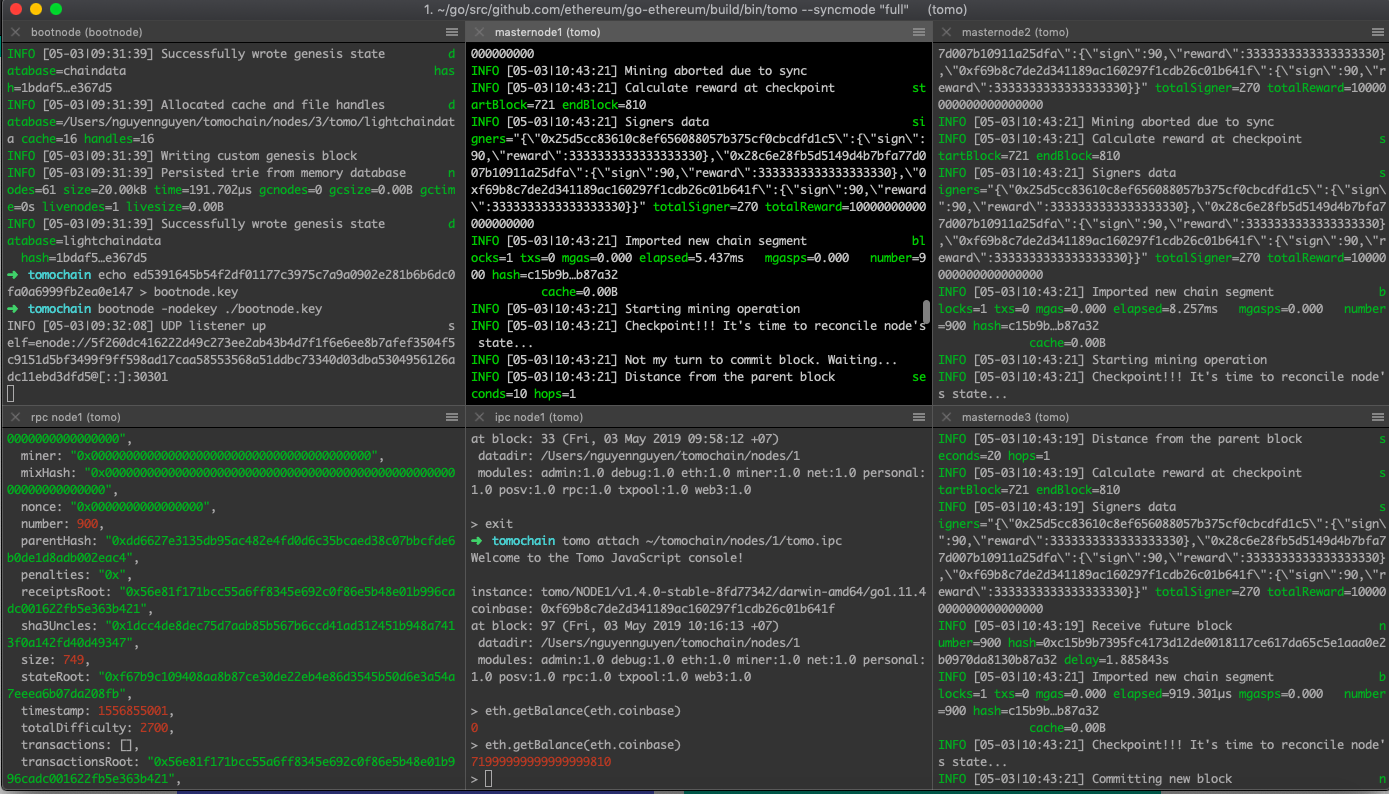
249 |
250 | ```
251 | tomo attach http://0.0.0.0:1545
252 | ```
253 |
254 | ```
255 | eth.getBlock(900)
256 | ```
257 |
258 | ## Troubleshooting
259 | - Reset your chain
260 |
261 | ```
262 | rm -rf $HOME/tomochain/nodes/1/tomo $HOME/tomochain/nodes/2/tomo $HOME/tomochain/nodes/3/tomo
263 | tomo --datadir $HOME/tomochain/nodes/1 init genesis.json
264 | tomo --datadir $HOME/tomochain/nodes/2 init genesis.json
265 | tomo --datadir $HOME/tomochain/nodes/3 init genesis.json
266 | ```
267 |
268 | Note: we use the Gnosis Multisig Wallet: https://github.com/gnosis/MultiSigWallet
269 |
--------------------------------------------------------------------------------
/docs/legal/terms-of-use.md:
--------------------------------------------------------------------------------
1 | !!! note
2 | PLEASE READ CAREFULLY THESE TERMS AND CONDITIONS AS THEY AFFECT YOUR OBLIGATIONS AND LEGAL RIGHTS, INCLUDING, BUT NOT LIMITED TO LIMITATION OF LIABILITY. IF YOU DO NOT AGREE WITH THESE TERMS AND CONDITIONS DO NOT USE OUR SERVICES
3 |
4 |
5 | ### AGREEMENT
6 | This Terms of Use is a legal agreement between you (Licensee or you) and TomoChain Pte. Ltd. (UEN: 201716924E), a company incorporated under the laws of Singapore, and its subsidiaries, affiliates and related corporations who own or operate the Services (defined below) (“Company”, “we”, “us” or “our”).
7 |
8 |
9 | By accessing or using our Services or any part of it, you accept and agree to be bound by the Terms of Use, the Privacy Policy, all applicable laws and regulations, and agree that you are responsible for compliance with any applicable local laws. Please read the Privacy Policy to find out how we collect, use, disclose, process and protect your personal data.
10 |
11 |
12 | If you do not agree to these Terms, you should stop accessing or using our Services immediately. In these Terms, the “Services” means the application owned and operated by the Company including: our websites (the “Site”), TomoWallet, TomoScan, TomoMaster, TomoIssuer, TomoRelayer, TomoStats, TomoBridge and our other products. The “Cryptocurrency(ies)” means a digital currency, also referred to as a token, in which encryption techniques are used to regulate the generation of units of the currency and to verify the transfer of the currency and which operates independently of the central bank of a country. Such digital currency is not legal tender issued by any central bank nor does it confer any interest in the ownership of, or debt relating to, any asset or property.
13 |
14 |
15 | The Company reserves the right to change, modify, add or remove any of terms contained in these Terms, at any time, for any reason.
16 |
17 | ### ELIGIBILITY
18 |
19 | To be eligible to use the Company's Services, you must be at least eighteen (18) years old and be able to form legally binding contracts.
20 |
21 |
22 | If you are using our Services on behalf of a legal entity, you further represent and warrant that: (a) the legal entity is duly organized and validly existing under the applicable laws of the jurisdiction of its organization; and (b) you are duly authorized by such legal entity to act on its behalf.
23 |
24 |
25 | You can only use our Services if permitted under the laws of your jurisdiction. Please make sure that these Terms are in compliance with all laws, rules, and regulations that apply to you.
26 |
27 |
28 | By using our Services, you represent and warrant that you meet all eligibility requirements that we outline in these Terms. We may still refuse to let certain people access or use our Services, however, and we reserve the right to change our eligibility criteria at any time.
29 |
30 | ### RESTRICTIONS OF USING OUR SERVICES
31 | As a user of the Services, we grant you a limited, personal, non-commercial, non-exclusive, non-transferable, and revocable license to use our Services. When using our Services, we ask that you follow some basic rules:
32 |
33 |
34 | **DO NOT Use Our Services to Break the Law.**
35 |
36 |
37 | You agree that you will not violate any laws when using our Services. This includes any local, provincial, state, federal, national, or international laws that may apply to you. You agree that you will not use our Services to pay for, support, or otherwise engage in any illegal activities including, but not limited to, illegal gambling, fraud, money laundering, or terrorist activities. If we discover that you have violated this Agreement or other regulatory requirements by participating in money laundering or by financing terrorist activities, we will take proportional disciplinary action. You further agree not to encourage or induce any third party to engage in any of the activities prohibited under this Section.
38 |
39 |
40 | **DO NOT Interfere With Other’s Use of the Services.**
41 |
42 | You agree that you will not use or attempt to use another user’s Wallet without authorization or use our Services in any manner that could interfere, disrupt, negatively affect, or inhibit other users from fully enjoying it.
43 |
44 | **DO NOT Try to Harm Our System.**
45 |
46 | You agree not to distribute any virus or other harmful computer code through our Services. You also agree to not take any action that may impose an unreasonable or disproportionately large load on our or any of our third party providers’ infrastructure.
47 |
48 | **DO NOT Attempt to Circumvent Our Security.**
49 |
50 | You agree not to bypass, circumvent, or attempt to bypass or circumvent any measures that we may use to prevent or restrict access to the Services including, without limitation, other accounts, computer systems, or networks connected to the Services.
51 | Any use of our Services other than as specifically authorized in this Agreement, without our prior written permission, is strictly prohibited and will terminate your license to use our Services.
52 |
53 | ###LIMITATION & DISCLAIMER ¶
54 |
55 | **Wallet Address, Private Key, and Backup Capabilities.**
56 |
57 |
58 | The private key is connected to the Wallet address and, together, they can be used to authorize the transfer of Cryptocurrencies to and from that Wallet address. You are solely responsible for maintaining the security of your private key and any mnemonic (backup) phrase associated with your Wallet. You must keep your Wallet address, mnemonic (backup) phrase, and private key access information secure. Failure to do so may result in the loss of control of Cryptocurrencies associated with the Wallet.
59 |
60 | **The Company Cannot Assist With Password Retrieval.**
61 |
62 | Our Services may store your Wallet address but does not receive or store your Wallet password, encrypted private key, unencrypted private key, or mnemonic (backup) phrase associated with your Wallet. We cannot, therefore, assist you with Wallet password retrieval. We cannot generate a new password for your Wallet if you fail to remember your original password. If you have not safely stored a backup of any Wallet address and private key pairs maintained in your Wallet, you accept and acknowledge that any Cryptocurrencies you have associated with such a Wallet address will become inaccessible if you do not have your Wallet password.
63 |
64 | **Cryptocurrencies Transactions.**
65 |
66 | In order to be completed, all proposed Cryptocurrencies transactions must be confirmed and recorded in the Cryptocurrencies of associated public blockchain. By using our Services, you acknowledge and agree that the transaction details you submit may not be completed, or may be substantially delayed, by the TomoChain Networks.
67 |
68 | Once transaction details have been submitted via the Services, we cannot assist you to cancel or otherwise modify your transaction. You must ensure that you have an adequate balance in your Wallet and/or gas to complete transactions before initiating a transaction. You acknowledge and agree that we will not be liable for any failed transactions due to insufficient funds or gas associated with your account.
69 |
70 | **No Control and No Duty over risks**
71 |
72 | Any fee that you might pay while using the Services is not a remuneration of the Company for the Services. This fee is to pay for Masternodes who produces the block to maintain the TomoChain blockchain.
73 |
74 | The Company provides you with the Services but you are the only person who is liable for any losses, damages, claims related to the use of the Services. The Company assumes no responsibility or liability related to TomoChain's Services.
75 |
76 | You understand and agree that the Company have no control over, and no duty to take any action regarding:
77 |
78 |
79 | - Failures, disruptions, errors, or delays in processing Cryptocurrencies that you may experience while using the Services;
80 |
81 | - The risk of failure of hardware, software, and Internet connections;
82 |
83 | - The risk of malicious software being introduced or found in the software underlying our Services;
84 |
85 | - The risk that third parties may obtain unauthorized access to information stored within your Wallet, including, but not limited to your Wallet address, private key, and mnemonic (backup) phrase; and
86 |
87 | - The risk of unknown vulnerabilities in or unanticipated changes to the TomoChain Networks.
88 |
89 | - Disasters. Disasters may damage the Cryptocurrencies systems resulting in loss of Cryptocurrencies held by users.
90 |
91 | - Mistakes made by the user of any cryptocurrency-related software or service, e.g., forgotten passwords, and payments sent to wrong coin addresses.
92 |
93 | - Software problems of TomoChain's and/or any cryptocurrency-related software or service, e.g., corrupted wallet file, incorrectly constructed transactions, unsafe cryptographic libraries, malware affecting the wallet and/or any cryptocurrency-related software or service
94 |
95 | - Technical failures in the hardware of the user of any cryptocurrency-related software or service, e.g., data loss due to a faulty or damaged storage device
96 |
97 | - Security problems experienced by the user of any cryptocurrency-related software or service, e.g., unauthorized access to users' wallets and/or accounts
98 |
99 | - Actions or inactions of third parties and/or events experienced by third parties, e.g., bankruptcy of service providers, information security attacks on service providers, and fraud conducted by third parties.
100 |
101 | - There is considerable exposure to risk in any crypto-currency exchange transaction. Any transaction involving currencies involves risks including, but not limited to, the potential for changing economic conditions that may substantially affect the price or liquidity of a currency. Investments in crypto-currency exchange speculation may also be susceptible to sharp rises and falls as the relevant market values fluctuate. It is for this reason that when speculating in such markets it is advisable to use only risk capital.
102 |
103 | ###ACCURACY OF MATERIALS
104 | The materials appearing on our Services could include technical, typographical, or photographic errors. The Company does not warrant that any of the materials on its Services are accurate, complete or current. The Company may make changes to the materials contained on its Services at any time without notice. However the Company does not make any commitment to update the materials.
105 |
106 | ###COMPLIANCE WITH TAX OBLIGATIONS
107 | The users of our Services are solely responsible to determinate what, if any, taxes apply to their crypto-currency transactions. The owners of, or contributors to, our Services are NOT responsible for determining the taxes that apply to crypto-currency transactions.
108 |
109 | ### ARBITRATION
110 | The user of our Services agrees to arbitrate any dispute arising from or in connection with the service or this disclaimer, except for disputes related to copyrights, logos, trademarks, trade names, trade secrets or patents.
111 |
112 | ### LAST AMENDMENT
113 | This Terms of Use was amended for the last time on **February 27, 2020**.
114 |
--------------------------------------------------------------------------------
/docs/legal/privacy.md:
--------------------------------------------------------------------------------
1 | This Privacy Policy is a legal agreement between you (Licensee or you) and TomoChain Pte. Ltd. (UEN: 201716924E), a company incorporated under the laws of Singapore, and its subsidiaries, affiliates and related corporations who own or operate the Services (defined below) (“Company”, “we”, “us” or “our”)
2 |
3 | This Policy (together with our Terms of Use) explains and sets out the basis for why and when we collect personal information about the people who use our Service(s), how we use it, the conditions under which we may disclose it to others and the measures we take to keep it secure.
4 |
5 | By using our Services, you are accepting and consenting to the practices described in this policy. Please note that this includes consenting to the collection and processing of any personal information you provide, as described below. We may amend this Policy from time to time so please check it occasionally to ensure that you agree with any changes. Your continued use of our Services will constitute your acceptance of, and agreement to, any changes.
6 |
7 | ### INTRODUCTION
8 |
9 | The Company values privacy and we make a concerted effort to minimize and, to the extent possible, eliminate the exposure of personal data during the use of our interface. TomoChain does not collect, hold, or store keys, account information, or passwords.
10 |
11 | To the extent we collect any personal information, this privacy policy (“Policy”) describes how the Company collects, uses, and shares personal information of people who use our websites (the “Site”), TomoWallet, TomoScan, TomoMaster, TomoIssuer, TomoRelayer, TomoStats, TomoBridge and our other products (collectively, the “Services”).
12 |
13 | This Policy applies to anyone who accesses the Services. Please read the Policy carefully to understand our practices regarding your information and how we will treat it. By visiting the Site, App, and/or using the Services, you acknowledge that the collection, use, and sharing of your information will take place as described in this Policy.
14 |
15 | So that we are clear about the terminology we are using, when we use the phrase “Personal Information” in this Privacy Policy, we mean information about an individual that (either by itself or when combined with information from other available sources) allows that individual to be identified, including but not limited , the individual’s name, telephone number, or e-mail address.
16 |
17 | ### THE BLOCKCHAIN
18 | Due to the inherent transparency of many blockchains, including the TomoChain Blockchain, transactions that individuals broadcast via TomoChain may be publicly accessible. This includes, but is not limited to, your public sending address, the public address of the receiver, the amount sent or received, and any other data a user has chosen to include in a given transaction. Information stored on a blockchain may be public, immutable, and difficult or even impossible to remove or delete. Transactions and addresses may reveal information about the user’s identity and information can potentially be correlated now or in the future by any party who chooses to do so, including law enforcement. Users are encouraged to review how privacy and transparency on the blockchain works.
19 |
20 | ### HOW WE COLLECT INFORMATION
21 | We obtain information about you when you use our website, when you contact us via email or a web form or if you register to receive one of our regular newsletters. We may collect and process the following types of information about you:
22 |
23 | Information you provide us
24 |
25 | You may provide us with personal information by filling in forms on our website(s) or by corresponding with us by e-mail or live-chat. The personal information you provide may include your name, email, address, phone number, IP address, language preference and information regarding the pages you access. By providing us with this information, you expressly consent to our use of your personal information in accordance with this privacy policy.
26 |
27 | Information we collect about you
28 |
29 | When you use our Services we may collect information about your IP address, information about your visit, your browsing activity, and how you use our Services. This information may be combined with other information you provide.
30 |
31 | Information we receive from other sources
32 |
33 | We may receive information about you if you use any other Services we, or our partners, operate. We also work with third parties (including, contractors, project partners, service providers, analytics providers) and may receive information about you from them. This may be combined with other information you provide to use collect information about you as described below. We use this information to enhance your experience with our Services.
34 |
35 | The Company does not track users over time and across third party websites to provide targeted advertising and therefore does not respond to Do Not Track (DNT) signals.
36 |
37 | ### USE OF INFORMATION
38 | We use the information that we have about you to provide support and certain Services to you.
39 |
40 | We may use the Personal Information we collect from and about you to (1) provide you with information or services that you request from us, including to respond to your comments, questions, and/or provide customer service; (2) monitor and analyze usage and trends and personalize and improve the Services and your experience using the Services; and (3) for any other purpose with your consent.
41 |
42 | We review our retention periods for personal information on a regular basis. We will hold your personal information on our systems for as long as is necessary for the relevant activity
43 |
44 | ### SHARING OF PERSONAL INFORMATION
45 | We will not disclose your Personal Information other than as described below, and we do not and will not sell your Personal Information to anyone.
46 |
47 | We may share the Personal Information we collect from and about you (1) to fulfill the purpose for which you provided it; (2) with your consent; (3) for legal, protection, and safety purposes; (4) to comply with any court order, law, or legal process, including to respond to any government or regulatory request; (5) to protect the rights of the Company, our agents, customers, and others, including by enforcing our agreements, policies, and terms of service; and (6) with those who need it to do work for us (our Service Providers, as defined below).
48 |
49 | Service providers: We may contract with third parties to perform functions related to the Services (“Service Providers”). In general, Service Providers will have access to your Personal Information only to the extent needed to perform their business functions but may not use or share that personal information for purposes outside the scope of their functions related to the Services.
50 |
51 | ### LINKS TO OTHER SITES
52 | The Services contain links to other third-party websites or applications. Once you click on such a link and leave the Site or are redirected to a third-party website or application, you are no longer governed by this Policy. Any information you provide on those sites is subject to that third party’s privacy policy and we are not responsible for the privacy and security practices and policies of those third-party sites or applications.
53 |
54 | ### OUR COMMITMENT TOWARDS CHILDREN'S PRIVACY
55 | We do not direct the Services to, nor do we knowingly collect any Personal Information from children under 13. Children under 13 are not eligible to use the Services. If we learn that someone using our Services is under 13 years of age, we will take steps to remove any Personal Information from our database and to prevent them from utilizing the Services.
56 |
57 | ### SECURITY OF YOUR PERSONAL INFORMATION & RIGHTS
58 |
59 | We are committed to protecting the security of Personal Information. We have taken certain physical, administrative, and technical steps to help safeguard the information we collect from and about you. While we take steps to help ensure the integrity and security of our network and systems, we cannot guarantee our security measures.
60 |
61 | In certain circumstances, you will also have the following rights:
62 |
63 | Right to access: the right to request certain information about, access to and copies of any Personal Information about you that we are holding (please note that you are entitled to request one copy of the Personal Information that we hold about you at no cost, but for any further copies, we reserve the right to charge a reasonable fee based on administration costs);
64 |
65 | Right to rectification: the right to have your Personal Information rectified if it is inaccurate or incomplete;
66 |
67 | Right to erasure/“right to be forgotten”: where the processing of your information is based on your consent, the right to withdraw that consent and the right to request that we delete or erase your Personal Information from our systems (however, this will not apply if we are required to hold on to the information for compliance with any legal obligation, or if we require the information to establish or defend any legal claim);
68 |
69 | Right to restriction of use of your information: the right to stop us from using your Personal Information or limit the way in which we can use it;
70 |
71 | Right to data portability: the right to request that we return any information you have provided in a structured, commonly used, and machine-readable format, or that we send it directly to another company, where technically feasible; and
72 |
73 | Right to object: the right to object to our use of your Personal Information including where we use it for our legitimate interests.
74 |
75 | Requests in relation to the above rights should be sent to: admin@tomochain.com
76 |
77 | Legal Basis for Processing
78 |
79 | The following legal bases apply to the ways in which we use and share an individual’s Personal Information:
80 |
81 | We rely on an individual’s consent to process Personal Information to provide support and/or carry out Promotions. This consent can be withdrawn at any time.
82 |
83 | We also process the information provided by an individual in our legitimate interests in ensuring our business is conducted legitimately and to a high standard.
84 |
85 | We will retain the information you provide in order to process your request, provide support, and/or carry out and fulfill our Promotions. If you request support, we will retain your information for no longer than six (6) months. If you participate in a Promotion, we will retain your information until the Promotion is carried out and ninety (90) days after any prize, reward, or offer is fulfilled. Your Personal Information will then be deleted.
86 |
87 | ### CONTACT INFORMATION
88 |
89 | Any questions regarding this policy and our privacy practices should be sent by email to admin@tomochain.com or by writing TomoChain Pte., Ltd at 10 Anson Road #22-15 International Plaza, Singapore 079903.
90 |
91 | ### CHANGES TO PRIVACY POLICY
92 |
93 | We may modify this Policy from time to time. We also may provide additional notice, as applicable, depending on the type of change. If you object to any changes, you may stop using the Services. Your continued use of the Services after we publish or otherwise provide notice about our changes to the Policy means that you are consenting to the updated Policy.
94 |
95 | We keep this Policy under regular review. This Policy was last updated in **February 27, 2020**
96 |
--------------------------------------------------------------------------------