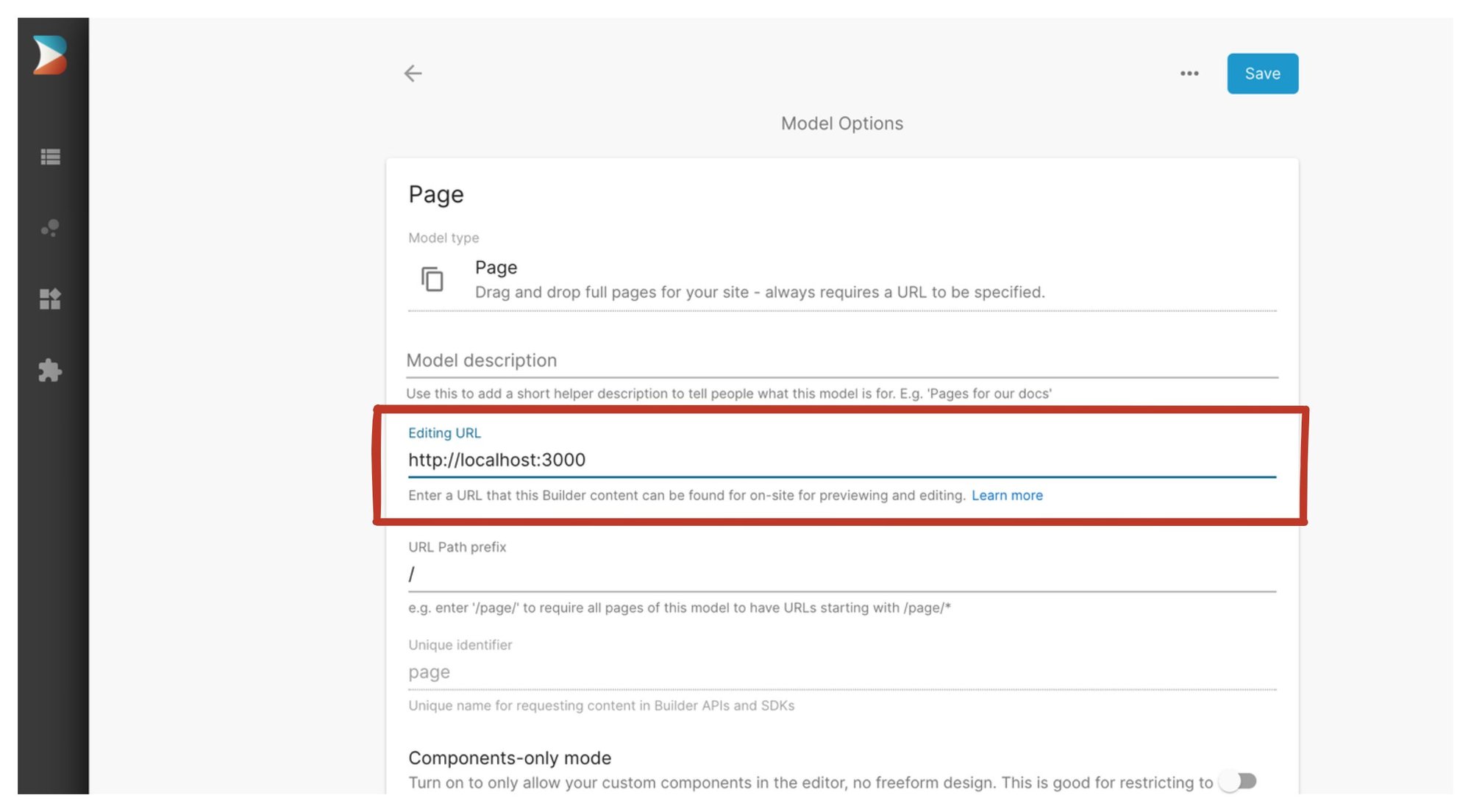
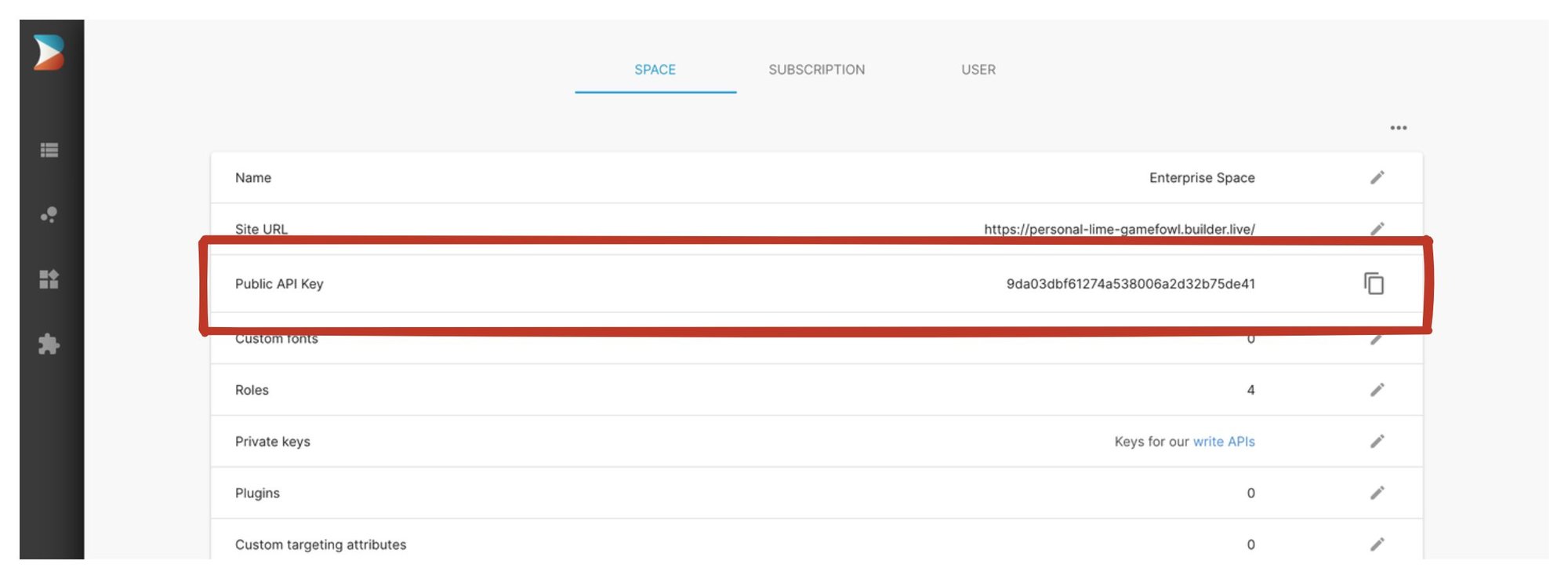
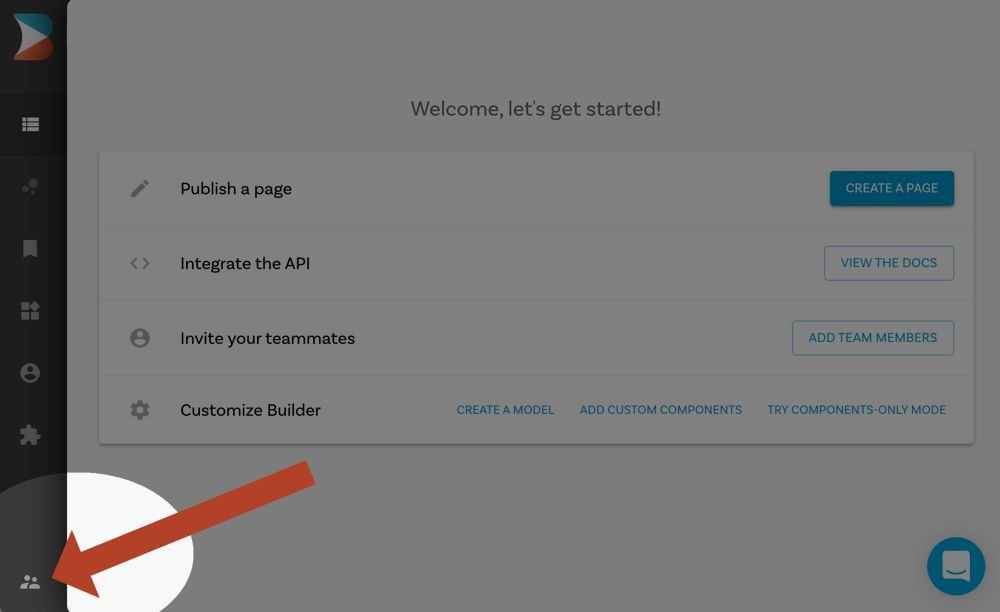
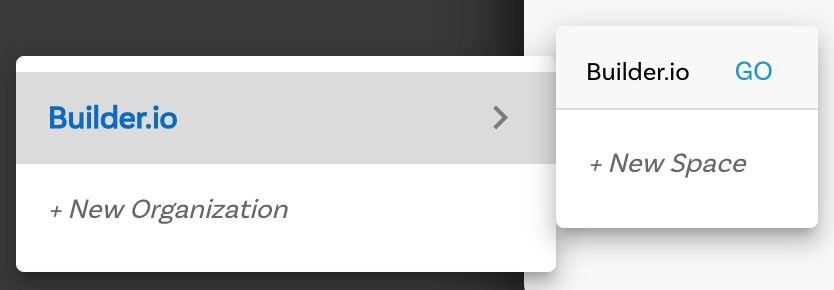
├── .env.template ├── .env.production ├── .prettierignore ├── .env.development ├── next-env.d.ts ├── config └── builder.ts ├── components └── Link │ └── Link.tsx ├── pages ├── _app.tsx └── [[...page]].tsx ├── .gitignore ├── next.config.js ├── tsconfig.json ├── package.json └── README.md /.env.template: -------------------------------------------------------------------------------- 1 | BUILDER_PUBLIC_KEY= 2 | -------------------------------------------------------------------------------- /.env.production: -------------------------------------------------------------------------------- 1 | BUILDER_PUBLIC_KEY= 2 | -------------------------------------------------------------------------------- /.prettierignore: -------------------------------------------------------------------------------- 1 | node_modules 2 | .next 3 | public -------------------------------------------------------------------------------- /.env.development: -------------------------------------------------------------------------------- 1 | # BUILDER_PUBLIC_KEY=f1a790f8c3204b3b8c5c1795aeac4660 2 | BUILDER_PUBLIC_KEY=265fd34debd14bc0a1973a87b1a0b67e 3 | -------------------------------------------------------------------------------- /next-env.d.ts: -------------------------------------------------------------------------------- 1 | /// 2 | /// 3 | 4 | // NOTE: This file should not be edited 5 | // see https://nextjs.org/docs/pages/building-your-application/configuring/typescript for more information. 6 | -------------------------------------------------------------------------------- /config/builder.ts: -------------------------------------------------------------------------------- 1 | if (!process.env.BUILDER_PUBLIC_KEY) { 2 | throw new Error( 3 | 'Missing environment variable BUILDER_PUBLIC_KEY, signup for builder.io and add your public key to env file' 4 | ) 5 | } 6 | 7 | export default { 8 | apiKey: process.env.BUILDER_PUBLIC_KEY, 9 | } 10 | -------------------------------------------------------------------------------- /components/Link/Link.tsx: -------------------------------------------------------------------------------- 1 | import NextLink from 'next/link' 2 | 3 | export const Link: React.FC> = ({ 4 | href, 5 | children, 6 | ...props 7 | }) => { 8 | return ( 9 | 10 | {children} 11 | 12 | ) 13 | } 14 | -------------------------------------------------------------------------------- /pages/_app.tsx: -------------------------------------------------------------------------------- 1 | import type { AppProps } from 'next/app' 2 | 3 | import { builder } from '@builder.io/react' 4 | import builderConfig from '@config/builder' 5 | builder.init(builderConfig.apiKey) 6 | 7 | export default function MyApp({ Component, pageProps }: AppProps) { 8 | return 9 | } 10 | -------------------------------------------------------------------------------- /.gitignore: -------------------------------------------------------------------------------- 1 | # See https://help.github.com/articles/ignoring-files/ for more about ignoring files. 2 | 3 | # dependencies 4 | node_modules 5 | /.pnp 6 | .pnp.js 7 | 8 | # testing 9 | /coverage 10 | 11 | # next.js 12 | .next/ 13 | out/ 14 | 15 | # production 16 | /build 17 | 18 | # misc 19 | .DS_Store 20 | *.pem 21 | 22 | # debug 23 | npm-debug.log* 24 | yarn-debug.log* 25 | yarn-error.log* 26 | 27 | # local env files 28 | .env.local 29 | .env.development.local 30 | .env.test.local 31 | .env.production.local 32 | 33 | # vercel 34 | .vercel 35 | 36 | # dev 37 | framework 38 | -------------------------------------------------------------------------------- /next.config.js: -------------------------------------------------------------------------------- 1 | const bundleAnalyzer = require('@next/bundle-analyzer')({ 2 | enabled: !!process.env.BUNDLE_ANALYZE, 3 | }) 4 | 5 | module.exports = bundleAnalyzer({ 6 | images: { 7 | domains: ['cdn.builder.io'], 8 | }, 9 | async headers() { 10 | return [ 11 | { 12 | source: '/:path*', 13 | headers: [ 14 | // this will allow site to be framed under builder.io for wysiwyg editing 15 | { 16 | key: 'Content-Security-Policy', 17 | value: 'frame-ancestors https://*.builder.io https://builder.io', 18 | }, 19 | ], 20 | }, 21 | ] 22 | }, 23 | env: { 24 | // expose env to the browser 25 | BUILDER_PUBLIC_KEY: process.env.BUILDER_PUBLIC_KEY, 26 | }, 27 | }) 28 | -------------------------------------------------------------------------------- /tsconfig.json: -------------------------------------------------------------------------------- 1 | { 2 | "compilerOptions": { 3 | "baseUrl": ".", 4 | "target": "esnext", 5 | "lib": [ 6 | "dom", 7 | "dom.iterable", 8 | "esnext" 9 | ], 10 | "allowJs": true, 11 | "skipLibCheck": true, 12 | "strict": true, 13 | "forceConsistentCasingInFileNames": true, 14 | "noEmit": true, 15 | "esModuleInterop": true, 16 | "module": "esnext", 17 | "moduleResolution": "node", 18 | "resolveJsonModule": true, 19 | "isolatedModules": true, 20 | "jsx": "preserve", 21 | "paths": { 22 | "@lib/*": [ 23 | "lib/*" 24 | ], 25 | "@assets/*": [ 26 | "assets/*" 27 | ], 28 | "@config/*": [ 29 | "config/*" 30 | ], 31 | "@components/*": [ 32 | "components/*" 33 | ], 34 | "@utils/*": [ 35 | "utils/*" 36 | ] 37 | }, 38 | "incremental": true 39 | }, 40 | "include": [ 41 | "next-env.d.ts", 42 | "**/*.ts", 43 | "**/*.tsx", 44 | "**/*.js" 45 | ], 46 | "exclude": [ 47 | "node_modules" 48 | ] 49 | } 50 | -------------------------------------------------------------------------------- /package.json: -------------------------------------------------------------------------------- 1 | { 2 | "name": "nextjs-builder-io-landing-page", 3 | "version": "1.0.0", 4 | "scripts": { 5 | "dev": "next dev", 6 | "build": "next build", 7 | "start": "next start", 8 | "analyze": "BUNDLE_ANALYZE=both yarn build", 9 | "find:unused": "next-unused", 10 | "prettier": "prettier" 11 | }, 12 | "prettier": { 13 | "semi": false, 14 | "singleQuote": true 15 | }, 16 | "next-unused": { 17 | "alias": { 18 | "@lib/*": [ 19 | "lib/*" 20 | ], 21 | "@assets/*": [ 22 | "assets/*" 23 | ], 24 | "@config/*": [ 25 | "config/*" 26 | ], 27 | "@components/*": [ 28 | "components/*" 29 | ], 30 | "@utils/*": [ 31 | "utils/*" 32 | ] 33 | }, 34 | "debug": true, 35 | "include": [ 36 | "components", 37 | "lib", 38 | "pages", 39 | "sections" 40 | ], 41 | "exclude": [], 42 | "entrypoints": [ 43 | "pages" 44 | ] 45 | }, 46 | "dependencies": { 47 | "@builder.io/react": "^7.0.1", 48 | "@builder.io/react-hydration-overlay": "^0.3.0", 49 | "@builder.io/widgets": "^1.2.23", 50 | "@spotlightjs/spotlight": "^2.5.0", 51 | "next": "^15.0.3", 52 | "next-seo": "^5.4.0", 53 | "react": "^18.2.0", 54 | "react-dom": "^18.2.0" 55 | }, 56 | "devDependencies": { 57 | "@next/bundle-analyzer": "^10.0.1", 58 | "@types/node": "^14.11.2", 59 | "@types/react": "^16.9.49", 60 | "bunyan": "^1.8.14", 61 | "bunyan-prettystream": "^0.1.3", 62 | "next-unused": "^0.0.6", 63 | "prettier": "^2.1.2", 64 | "typescript": "^4.0.3" 65 | }, 66 | "resolutions": { 67 | "webpack": "^5.0.0-beta.30" 68 | }, 69 | "license": "MIT" 70 | } 71 | -------------------------------------------------------------------------------- /pages/[[...page]].tsx: -------------------------------------------------------------------------------- 1 | import type { GetServerSideProps } from 'next'; 2 | import { useRouter } from 'next/router'; 3 | import { BuilderComponent, builder, useIsPreviewing } from '@builder.io/react'; 4 | import DefaultErrorPage from 'next/error'; 5 | import Head from 'next/head'; 6 | import builderConfig from '@config/builder'; 7 | import '@builder.io/widgets/dist/lib/builder-widgets-async'; 8 | 9 | // Initialize builder 10 | builder.init(builderConfig.apiKey); 11 | 12 | // Define types 13 | type PageProps = { 14 | page: any; 15 | builderConfig?: any; 16 | }; 17 | 18 | // Replace getStaticProps with getServerSideProps 19 | export const getServerSideProps: GetServerSideProps = async ({ params, req, res }) => { 20 | try { 21 | 22 | // Get the page content 23 | const page = await builder 24 | .get('ssr-page', { 25 | userAttributes: { 26 | urlPath: '/' + (params?.page?.join('/') || ''), 27 | }, 28 | }) 29 | .toPromise(); 30 | 31 | return { 32 | props: { 33 | page: page || null, 34 | builderConfig: builderConfig || null, 35 | }, 36 | }; 37 | } catch (error) { 38 | console.error('Error fetching page:', error); 39 | return { 40 | props: { 41 | page: null, 42 | builderConfig: null, 43 | }, 44 | }; 45 | } 46 | }; 47 | 48 | export default function Page({ page, builderConfig }: PageProps) { 49 | const router = useRouter(); 50 | const isPreviewingInBuilder = useIsPreviewing(); 51 | const show404 = !page && !isPreviewingInBuilder; 52 | 53 | // Handle loading state 54 | if (router.isFallback) { 55 | return ( 56 |
57 |

Loading...

58 |
59 | ); 60 | } 61 | 62 | return ( 63 | <> 64 | 65 | 66 | {!page && } 67 | 68 | 69 | {show404 ? ( 70 | 71 | ) : ( 72 | 81 | )} 82 | 83 | ); 84 | } -------------------------------------------------------------------------------- /README.md: -------------------------------------------------------------------------------- 1 | # Next.js + Builder.io Minimal Starter 2 | 3 | This example walks you through using Builder.io with a minimal Next.js application. 4 | 5 | ## Prerequisites 6 | 7 | Before using this example, make sure you have the following: 8 | 9 | - A [Builder.io](builder.io) account. Check out the [plans](https://www.builder.io/m/pricing), which range from our free tier to custom. 10 | - [npm](https://www.npmjs.com/) 11 | 12 | A basic understanding of the following is helpful too: 13 | 14 | - The [command line](https://developer.mozilla.org/en-US/docs/Learn/Tools_and_testing/Understanding_client-side_tools/Command_line) 15 | - JavaScript and [React](https://reactjs.org/) 16 | - [Next.js](https://nextjs.org/) 17 | - What it means to [clone a GitHub repo](https://docs.github.com/en/repositories/creating-and-managing-repositories/cloning-a-repository) 18 | 19 | ## Overview 20 | 21 | To use this project, you need to do three things: 22 | 23 | 1. Get a copy of this repo. 24 | 1. Create a corresponding space in your account on [Builder.io](builder.io). 25 | 1. Connect the two. 26 | 27 | The next sections walk you through each step. 28 | 29 | ### Clone this project 30 | 31 | This example provides you with a ready-made application that you can copy locally and configure for use with your Builder.io account. 32 | 33 | 1. At the command line, run the following command to create a local copy of the Builder.io repo: 34 | 35 | ```shell 36 | git clone https://github.com/BuilderIO/builder.git 37 | ``` 38 | 39 | 1. Change into the example application by using the `cd` command: 40 | 41 | ```shell 42 | cd builder/examples/next-js-simple 43 | ``` 44 | 45 | 1. Open this directory in your favorite code editor. 46 | You'll come back here when you're ready to connect your application to your Builder space. 47 | 48 | ### Generating your Builder.io space 49 | 50 | If you've just created your Builder.io account and logged in for the first time, Builder prompts you to create a space with a new Builder site or add Builder to an existing application. 51 | For this example, click **Add Builder to an existing site or app**. 52 | 53 |
54 | Builder.io Welcome screen for creating a new Organization 55 |
56 | 57 | **If you don't have the introductory prompt for creating a space, take the following steps. If you do have the prompt in the previous step, skip to step 4.** 58 | 59 | 1. Click on the Organization icon on the bottom left. 60 | 61 |
62 | Organization icon with two people standing together 63 |
64 | 65 | 1. Hover over **Builder.io** and choose **+ New Space**. 66 | 67 |
68 | Menu options for creating a new space 69 |
70 | 71 | 1. Click **Add Builder to an existing site or app**. 72 | 73 | 1. When Builder asks you which ecommerce platform you use, select **None**. 74 | 75 | 1. Name your new space by entering "My Next.js App" and click **Create**. 76 | 77 |
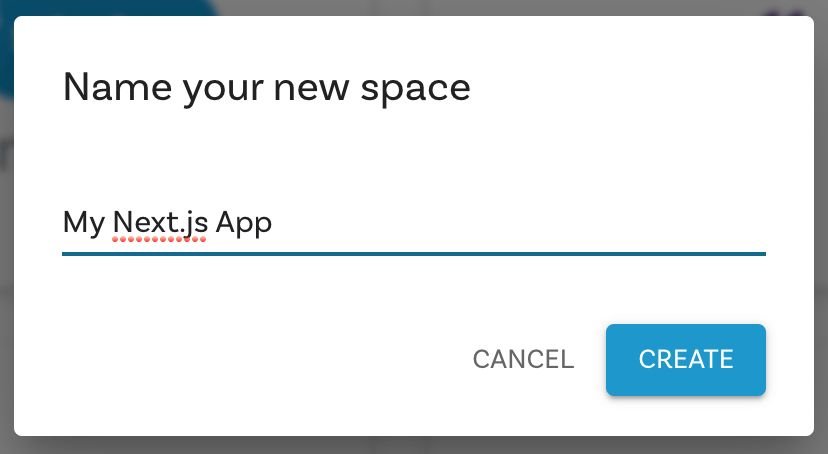
78 | Dialogue for creating a new space 79 |
80 | 81 | Now that you have a new space, the next step is connecting "My Next.js App" with your application. 82 | 83 | ### Connecting Builder.io to your application 84 | 85 | To connect your Builder.io space and your application, set the model preview URL and get your API key as follows: 86 | 87 | #### Setting the model preview URL 88 | To enable Builder to open your site in the visual editor, you will need to provide a URL that we can open which has the Builder rendering component in it. 89 | 90 | Go to the [/models](https://builder.io/models) page in Builder and choose your **page** model. 91 | 92 | Then, set the Preview URL to http://localhost:3000. Be sure to include the http://. 93 | 94 | ![Image showing where to put the Preview URL](https://cdn.builder.io/api/v1/image/assets%2FYJIGb4i01jvw0SRdL5Bt%2F5c26e2c8b4ec437aaef196c8d4e32fc3) 95 | 96 | **Note: once you deploy your updates, you will want to update this to a public URL, such as your live site or your staging site (e.g. `https://your-site.com`), so anyone on your team can connect to your site for visual editing** 97 | 98 | #### Getting your API Key 99 | 100 | In the [Account settings](https://builder.io/account/space), copy your Public API Key. We're going to paste the API Key into your Next.js app in the next section. 101 | 102 | ![Image showing where to get your API Key](https://cdn.builder.io/api/v1/image/assets%2FYJIGb4i01jvw0SRdL5Bt%2F761e521019724d8bbd59ed0d5f079c8e) 103 | 104 | 105 | In your code editor, configure `.env.production` and `.env.development` with the [Public API Key](https://builder.io/account/space) by adding a line to each file as follows, but using your Public API Key that you copied in the previous step. 106 | For example: 107 | 108 | ```shell 109 | BUILDER_PUBLIC_KEY=08837cee608a405c806a3bed69acfe2d <-- replace this with your API Key 110 | ``` 111 | 112 | ## Running your application 113 | 114 | To serve your application locally, install dependencies, serve, and view your preview. 115 | 116 | 1. Install dependencies by entering the follw\owing at the command line. 117 | 118 | ``` 119 | npm install 120 | ``` 121 | 122 | 1. Serve your application by running the following at the command line: 123 | 124 | ``` 125 | npm run dev 126 | ``` 127 | 128 | 1. In your browser, go to `http://localhost:3000` to see your application. 129 | 130 | ### Experimenting 131 | 132 | Now that you have a configured Builder.io application, you can try different features, such as creating a page. 133 | Create a new page entry, assign any URL, publish and preview. 134 | For more detail and ideas on creating pages, see [Creating a landing page in Builder 135 | ](https://www.builder.io/c/docs/creating-a-landing-page). 136 | 137 | ### Deploy 138 | 139 | You can deploy anywhere you like, but for this project we recommend [Vercel](https://nextjs.org/docs/deployment). 140 | [![Deploy with Vercel](https://vercel.com/button)](https://vercel.com/new/git/external?repository-url=https%3A%2F%2Fgithub.com%2Fbuilderio%2Fbuilder%2Ftree%2Fmaster%2Fexamples%2Fnext-js-simple) 141 | 142 | ## Next steps 143 | 144 | - Learn how to [use your react components in our visual editor](https://www.builder.io/c/docs/custom-react-components) 145 | - For more information on previewing your applications, see [Editing and previewing directly on your site](https://www.builder.io/c/docs/guides/preview-url). 146 | - See [Getting started with the visual editor](https://www.builder.io/c/docs/guides/page-building) for an introduction to editing your pages without having to code. 147 | - Check out [Builder best practices](https://www.builder.io/c/docs/best-practices) for guidance on how to approach site development with Builder. 148 | # next-js-example 149 | --------------------------------------------------------------------------------