--------------------------------------------------------------------------------
/Assets/JavaScriptEnd.html:
--------------------------------------------------------------------------------
1 |
4 |
5 |
--------------------------------------------------------------------------------
/_Example/WORKGROUP-Get-PSVersion-Report-2021-10-10-1030 [SingleTable].csv:
--------------------------------------------------------------------------------
1 | "Get-PSVersion","Computer","OperatingSystem","PSVersion","PSCLRVersion","PSWSManStackVersion","PSRemotingProtocolVersion","PSSerializationVersion","PSBuildVersion","PSEdition","PSOS","PSPlatform","PSCompatibleVersions"
2 | ,"BATTLESTATION","Microsoft Windows 10 Pro","7.1.4","4.0.30319","3.0","2.3","1.1.0.1","N\A","Core","Microsoft Windows 10.0.19043","Win32NT","1.0,2.0,3.0,4.0,5.0,5.1.10032.0,6.0.0,6.1.0,6.2.0,7.0.0,7.1.4"
3 | ,"BATTLESTATION","Microsoft Windows 10 Pro","5.1.19041.1237","4.0.30319.42000","3.0","2.3","1.1.0.1","10.0.19041.1237","Desktop","Microsoft Windows 10.0.19043","Win32NT","1.0,2.0,3.0,4.0,5.0,5.1.19041.1237"
4 |
--------------------------------------------------------------------------------
/_Example/WORKGROUP-Get-PSVersion-Report-2021-10-10-1053 [MultiTable].csv:
--------------------------------------------------------------------------------
1 | "Get-PSVersion","Computer","OperatingSystem","PSVersion","PSCLRVersion","PSWSManStackVersion","PSRemotingProtocolVersion","PSSerializationVersion","PSBuildVersion","PSEdition","PSOS","PSPlatform","PSCompatibleVersions"
2 | ,"BATTLESTATION","Microsoft Windows 10 Pro","7.1.4","4.0.30319","3.0","2.3","1.1.0.1","N\A","Core","Microsoft Windows 10.0.19043","Win32NT","1.0,2.0,3.0,4.0,5.0,5.1.10032.0,6.0.0,6.1.0,6.2.0,7.0.0,7.1.4"
3 | ,"BATTLESTATION","Microsoft Windows 10 Pro","5.1.19041.1237","4.0.30319.42000","3.0","2.3","1.1.0.1","10.0.19041.1237","Desktop","Microsoft Windows 10.0.19043","Win32NT","1.0,2.0,3.0,4.0,5.0,5.1.19041.1237"
4 |
--------------------------------------------------------------------------------
/Assets/JavaScriptHeader.html:
--------------------------------------------------------------------------------
1 |
20 |
--------------------------------------------------------------------------------
/LICENSE:
--------------------------------------------------------------------------------
1 | MIT License
2 |
3 | Copyright (c) 2021 Celerium
4 |
5 | Permission is hereby granted, free of charge, to any person obtaining a copy
6 | of this software and associated documentation files (the "Software"), to deal
7 | in the Software without restriction, including without limitation the rights
8 | to use, copy, modify, merge, publish, distribute, sublicense, and/or sell
9 | copies of the Software, and to permit persons to whom the Software is
10 | furnished to do so, subject to the following conditions:
11 |
12 | The above copyright notice and this permission notice shall be included in all
13 | copies or substantial portions of the Software.
14 |
15 | THE SOFTWARE IS PROVIDED "AS IS", WITHOUT WARRANTY OF ANY KIND, EXPRESS OR
16 | IMPLIED, INCLUDING BUT NOT LIMITED TO THE WARRANTIES OF MERCHANTABILITY,
17 | FITNESS FOR A PARTICULAR PURPOSE AND NONINFRINGEMENT. IN NO EVENT SHALL THE
18 | AUTHORS OR COPYRIGHT HOLDERS BE LIABLE FOR ANY CLAIM, DAMAGES OR OTHER
19 | LIABILITY, WHETHER IN AN ACTION OF CONTRACT, TORT OR OTHERWISE, ARISING FROM,
20 | OUT OF OR IN CONNECTION WITH THE SOFTWARE OR THE USE OR OTHER DEALINGS IN THE
21 | SOFTWARE.
22 |
--------------------------------------------------------------------------------
/README.md:
--------------------------------------------------------------------------------
1 |
2 |
3 | # Modern PowerShell HTML Reports
4 |
5 | This project is aimed at trying to generate more modern HTML reports from PowerShell.
6 |
7 | ##### Everything in here is a proof of concept right now.
8 |
9 | ## Goals for this Project:
10 |
11 | - Goal 1: Create a modern HTML report using PowerShell
12 | - Goal 2: Reports will not require a webserver
13 | - Goal 3: Reports should be mobile friendly
14 | - Goal 4: Reports should be easily adaptable
15 | - Goal 5: A report should look the same when accessed offline
16 |
17 | ## How-To:
18 | As of 2021-10, this proof of concept gathers the PowerShell version installed on a Windows computer and sends the results to a CSV and or an HTML file. Tested and it works on PowerShell 5+.
19 |
20 | 1. Download the [GitHub repo](https://github.com/Celerium/Modern-HTML-Reports/archive/refs/heads/main.zip)
21 | 2. Open PowerShell & run either Get-PSVersion-*.ps1 scripts
22 | 3. ``` .\Get-PSVersion-MultiTable.ps1 -Report All -ShowReport ```
23 | - Note: Both scripts are identical and the only difference is that the "MultiTable" script shows how a report would look if you generated multiple tables in the same HTML report.
24 | - [ -Report ] All,CSV, HTML
25 | - Gives you the option to generate a report in a CSV, HTML, or both.
26 | - [ -ShowReport ] This opens the report folder located at "C:\Audits\Logs" that is created when the script is run
27 |
28 |
29 | ## Example:
30 |
31 | -Command ``` .\Get-PSVersion-MultiTable.ps1 -Report All -ShowReport ```
32 |
33 |
--------------------------------------------------------------------------------
/Assets/SideBar.html:
--------------------------------------------------------------------------------
1 |
2 |
3 |
33 |
37 |
38 |
--------------------------------------------------------------------------------
/Assets/Meta.html:
--------------------------------------------------------------------------------
1 |
2 |
3 |
4 |
5 |
6 |
7 |
8 |
9 |
10 |
12 |
xTITLECHANGEx
13 |
14 |
15 |
16 |
17 |
18 |
19 |
20 |
21 |
22 |
23 |
--------------------------------------------------------------------------------
/Assets/Summary.html:
--------------------------------------------------------------------------------
1 |
2 |
3 |
33 |
34 |
35 |
36 |
37 |
38 |
39 |
40 |
41 | Earnings (Monthly)
42 |
xCARD1Valuex
43 |
44 |
45 |
47 |
48 |
49 |
50 |
51 |
52 |
53 |
54 |
55 |
56 |
57 |
58 |
59 | Earnings (Annual)
60 |
xCARD2Valuex
61 |
62 |
63 |
65 |
66 |
67 |
68 |
69 |
70 |
71 |
72 |
73 |
74 |
75 |
76 |
Tasks
77 |
78 |
88 |
89 |
90 |
92 |
93 |
94 |
95 |
96 |
97 |
98 |
99 |
100 |
101 |
102 |
103 |
104 | Pending Requests
105 |
18
106 |
107 |
108 |
109 |
110 |
111 |
112 |
113 |
114 |
115 |
116 |
117 |
118 |
119 |
120 |
121 |
122 | Pending Requests
123 |
18
124 |
125 |
126 |
127 |
128 |
129 |
130 |
131 |
132 |
--------------------------------------------------------------------------------
/Assets/TopBar.html:
--------------------------------------------------------------------------------
1 |
2 |
3 |
--------------------------------------------------------------------------------
/Get-PSVersion-SingleTable.ps1:
--------------------------------------------------------------------------------
1 | #Region [ Script Paramters ]
2 | param(
3 |
4 | [Parameter(Mandatory=$false)]
5 | [ValidateSet('None','Audit')]
6 | [String]$Audit = 'None',
7 |
8 | [Parameter(Mandatory=$false)]
9 | [ValidateSet('All','CSV','HTML')]
10 | [String]$Report = 'CSV',
11 |
12 | [Parameter(Mandatory=$false)]
13 | [Switch]$ShowReport
14 | )
15 | #EndRegion [ Script Paramters ]
16 |
17 | #Region [ PowerShell Function ]
18 | ''
19 | Write-Output "START - $(Get-Date -Format yyyy-MM-dd-HH:mm)"
20 | ''
21 |
22 | Write-Output " - (1/3) - $(Get-Date -Format MM-dd-HH:mm) - Gathering PowerShell Versions"
23 |
24 | Function Get-PSVersion{
25 | <#
26 | .SYNOPSIS
27 | Provides PowerShell version information
28 |
29 | .Description
30 | Provides both Both PowerShell and PowerShell Core version information
31 |
32 | .Link
33 | https://celerium.org
34 |
35 | .EXAMPLE
36 | Get-PSVersion
37 |
38 | .Notes
39 | This is a proof of concept script to see If I could create better HTML reports
40 | #>
41 | Try{
42 | $PSInfo = $PSVersionTable
43 | $PowerShell7 = (Test-Path -Path "C:\Program Files\PowerShell\7\pwsh.exe")
44 | $OSInformation = Get-CimInstance -ClassName Win32_Operatingsystem
45 |
46 | $ParameterSplat =
47 | @{Name='Computer';Expression={($OSInformation).CSName}}, `
48 | @{Name='OperatingSystem';Expression={($OSInformation).Caption}}, `
49 | @{Name='PSVersion';Expression={($_.PSVersion).ToString()}}, `
50 | @{Name='PSCLRVersion';Expression={If($Null -eq $_.CLRVersion){([System.Reflection.Assembly]::GetExecutingAssembly().ImageRuntimeVersion).Replace("v","")}Else{($_.CLRVersion).ToString()}}}, `
51 | @{Name='PSWSManStackVersion';Expression={($_.WSManStackVersion).ToString()}}, `
52 | @{Name='PSRemotingProtocolVersion';Expression={($_.PSRemotingProtocolVersion).ToString()}}, `
53 | @{Name='PSSerializationVersion';Expression={($_.SerializationVersion).ToString()}}, `
54 | @{Name='PSBuildVersion';Expression={If($Null -eq $_.BuildVersion){'N\A'}Else{($_.BuildVersion).ToString()}}}, `
55 | @{Name='PSEdition';Expression={$_.PSEdition}}, `
56 | @{Name='PSOS';Expression={If($Null -eq $_.OS){(($OSInformation).Caption -replace "(?<=Microsoft Windows).*")+" "+($OSInformation).Version}Else{$_.OS}}}, ` #positive reverse lookup
57 | @{Name='PSPlatform';Expression={If($Null -eq $_.Platform){"Win32NT"}Else{$_.Platform}}},`
58 | @{Name='PSCompatibleVersions';Expression={$_.PSCompatibleVersions -Join(',')}}
59 |
60 | If ($PowerShell7 -eq $False){
61 | #PSVersion 1-5
62 | $PSInfo | Select-Object $ParameterSplat
63 | }
64 | ElseIf($PowerShell7 -eq $True){
65 | #PSVersion 1-5
66 | $PSInfo = powershell.exe -nologo -noprofile -command {$PSVersionTable}
67 | $PSInfo | Select-Object $ParameterSplat
68 |
69 | #PSVersion 7+
70 | $PSInfo = pwsh -nologo -noprofile -command {$PSVersionTable}
71 | $PSInfo | Select-Object $ParameterSplat
72 | }
73 | Else{$PSVersionTable | Select-Object $ParameterSplat
74 | }
75 | }
76 | Catch{
77 | $ErrorMessage = $_ | Out-String
78 | Write-Host ($ErrorMessage).Trim() -ForegroundColor Red -BackgroundColor Black
79 | }
80 | Finally{
81 | #Future Use
82 | }
83 | }
84 |
85 | #EndRegion [ PowerShell Function ]
86 |
87 | #Region [ Report\Script Variables ]
88 |
89 | $PSVersion = Get-PSVersion
90 |
91 | #$ScriptName = $MyInvocation.MyCommand.Name
92 | $ScriptName = 'Get-PSVersion'
93 | $ReportFolderName = "$ScriptName-Report"
94 | $FileDate = Get-Date -Format 'yyyy-MM-dd-HHmm'
95 | $HTMLDate = (Get-Date -Format 'yyyy-MM-dd h:mmtt').ToLower()
96 |
97 | $FQDN = ((Get-CimInstance -ClassName Win32_ComputerSystem).Domain).Split('.')[0]
98 | $ShortFQDN = ($FQDN).Split('.')[0]
99 | $DomainController = ($env:LOGONSERVER).Replace('\\','')
100 |
101 | #Define Logging Location
102 | Try{
103 | If ($Audit -eq 'None'){
104 | $Log = "C:\Audits\Logs\$ReportFolderName"
105 | }
106 | If ($Audit -eq 'Audit'){
107 | $Log = "C:\Audits\Logs\$ShortFQDN-$Audit-Audit-Reports\$ReportFolderName"
108 | }
109 | }
110 | Catch{
111 | $ErrorMessage = $_ | Out-String
112 | Write-Host ($ErrorMessage).Trim() -ForegroundColor Red -BackgroundColor Black
113 | break
114 | }
115 |
116 | #Create Logging Location
117 | Try{
118 | If (Test-Path -Path $Log -PathType Container){$Null}
119 | Else{
120 | New-Item -Path $Log -ItemType Directory | Out-Null
121 | }
122 | }
123 | Catch{
124 | $ErrorMessage = $_ | Out-String
125 | Write-Host ($ErrorMessage).Trim() -ForegroundColor Red -BackgroundColor Black
126 | break
127 | }
128 |
129 | #Log Names
130 | $CSVReport = "$Log\$ShortFQDN-$ScriptName-Report-$($FileDate).csv"
131 | $HTMLReport = "$Log\$ShortFQDN-$ScriptName-Report-$($FileDate).html"
132 |
133 |
134 | #EndRegion [ Report\Script Variables ]
135 |
136 | #Region [ CSV Report ]
137 | Try{
138 | If($Report -eq 'All' -or $Report -eq 'CSV'){
139 | Write-Output " - (2/3) - $(Get-Date -Format MM-dd-HH:mm) - Generating CSV"
140 | $PSVersion | Sort-Object Computer | Select-Object $Scriptname,* | Export-Csv $CSVReport -NoTypeInformation
141 | }
142 | }
143 | Catch{
144 | $ErrorMessage = $_ | Out-String
145 | Write-Host ($ErrorMessage).Trim() -ForegroundColor Red -BackgroundColor Black
146 | break
147 | }
148 |
149 | #EndRegion [ CSV Report ]
150 |
151 | #Region [ HTML Report]
152 |
153 | Try{
154 | If($Report -eq 'All' -or $Report -eq 'HTML'){
155 | Write-Output " - (3/2) - $(Get-Date -Format MM-dd-HH:mm) - Generating HTML"
156 | #Region [ HTML Report Building Blocks ]
157 |
158 | # Build the HTML header
159 | # This grabs the raw text from files to shorten the amount of lines in the PSScript
160 | # General idea is that the HTML assets would infrequently be changed once set
161 | $Meta = Get-Content -Path "$PSScriptRoot\Assets\Meta.html" -Raw
162 | $Meta = $Meta -replace 'xTITLECHANGEx',"$ScriptName"
163 | $CSS = Get-Content -Path "$PSScriptRoot\Assets\Styles.css" -Raw
164 | $JavaScript = Get-Content -Path "$PSScriptRoot\Assets\JavaScriptHeader.html" -Raw
165 | $Head = $Meta + ("") + $JavaScript
166 |
167 | # HTML Body Building Blocks (In order)
168 | $TopNav = Get-Content -Path "$PSScriptRoot\Assets\TopBar.html" -Raw
169 | $DivMainStart = '
'
170 | $SideBar = Get-Content -Path "$PSScriptRoot\Assets\SideBar.html" -Raw
171 | $SideBar = $SideBar -replace ('xTIMESETx',"$HTMLDate")
172 | $DivSecondStart = '
'
173 | $PreLoader = Get-Content -Path "$PSScriptRoot\Assets\PreLoader.html" -Raw
174 | $MainStart = ''
175 |
176 | #Base Table Container
177 | $BaseTableContainer = Get-Content -Path "$PSScriptRoot\Assets\TableContainer.html" -Raw
178 |
179 | #Summary Header
180 | $SummaryTableContainer = $BaseTableContainer
181 | $SummaryTableContainer = $SummaryTableContainer -replace ('xHEADERx',"$ScriptName - Summary")
182 | $SummaryTableContainer = $SummaryTableContainer -replace ('xBreadCrumbx',"Data gathered from $DomainController")
183 |
184 | #Summary Cards
185 | #HTML in Summary.html would be edited depending on the report and summary info you want to show
186 | $SummaryCards = Get-Content -Path "$PSScriptRoot\Assets\Summary.html" -Raw
187 | $SummaryCards = $SummaryCards -replace ('xCARD1Valuex','$100.00')
188 | $SummaryCards = $SummaryCards -replace ('xCARD2Valuex','$125,525.00')
189 | $SummaryCards = $SummaryCards -replace ('xCARD3Valuex','80%')
190 |
191 | #Body table headers, would be duplicated\adjusted depending on how many tables you want to show
192 | $BodyTableContainer = $BaseTableContainer
193 | $BodyTableContainer = $BodyTableContainer -replace ('xHEADERx',"$ScriptName - Details")
194 | $BodyTableContainer = $BodyTableContainer -replace ('xBreadCrumbx',"Data gathered from $DomainController")
195 |
196 | #Ending HTML
197 | $DivEnd = '
'
198 | $MainEnd = ''
199 | $JavaScriptEnd = Get-Content -Path "$PSScriptRoot\Assets\JavaScriptEnd.html" -Raw
200 |
201 | #EndRegion [ HTML Report Building Blocks ]
202 | #Region [ Example HTML Report Data\Structure ]
203 |
204 | #Temp data filler to simulate large tables of data
205 | #Used just an an example
206 | $PSVersion = [Array]$PSVersion + $PSVersion + $PSVersion + $PSVersion + $PSVersion + $PSVersion + $PSVersion + $PSVersion + $PSVersion + $PSVersion +
207 | $PSVersion + $PSVersion + $PSVersion + $PSVersion + $PSVersion + $PSVersion + $PSVersion + $PSVersion + $PSVersion + $PSVersion +
208 | $PSVersion + $PSVersion + $PSVersion + $PSVersion + $PSVersion + $PSVersion + $PSVersion + $PSVersion + $PSVersion + $PSVersion +
209 | $PSVersion + $PSVersion + $PSVersion + $PSVersion + $PSVersion + $PSVersion + $PSVersion + $PSVersion + $PSVersion + $PSVersion +
210 | $PSVersion + $PSVersion + $PSVersion + $PSVersion + $PSVersion + $PSVersion + $PSVersion + $PSVersion + $PSVersion + $PSVersion
211 |
212 | #Creates an HTML table from PowerShell function results without any extra HTML tags
213 | $TableResults = $PSVersion | ConvertTo-Html -As Table -Fragment -Property Computer,OperatingSystem,PSVersion,PSBuildVersion,PSEdition,PSOS `
214 | -PostContent '
215 | Note: SAMPLE 1 = Only applies stuff and things
216 | Note: SAMPLE 2 = Only applies stuff and things
217 | Note: SAMPLE 3 = Only applies stuff and things
218 |
219 | '
220 |
221 | #Table section segragation
222 | #PS doesnt create a
tag so I have find the first row and make it so
223 | $TableHeader = $TableResults -split "`r`n" | Where-Object {$_ -match ''}
224 | #Unsure why PS makes empty as it contains no data
225 | $TableColumnGroup = $TableResults -split "`r`n" | Where-Object {$_ -match ' '}
226 |
227 | #Table ModIfications
228 | #Replacing empty html table tags with simple replacable names
229 | #It was annoying me that empty rows showed in the raw HTML and I couldnt delete them as they were not $NUll but were empty
230 | $TableResults = $TableResults -replace ($TableHeader,'xblanklinex')
231 | $TableResults = $TableResults -replace ($TableColumnGroup,'xblanklinex')
232 | $TableResults = $TableResults | Where-Object {$_ -ne 'xblanklinex'} | ForEach-Object {$_.Replace('xblanklinex','')}
233 |
234 | #Inject Modifyied data back into the table
235 | #Makes the table have a tag
236 | $TableResults = $TableResults -replace '',"`n$TableHeader "
237 | $TableResults = $TableResults -replace '',''
238 |
239 | #Mark Focus Data to draw attention\talking points
240 | #Need to understand RegEx more as this doesnt scale at all
241 | $TableResults = $TableResults -replace '7.1.4 ','7.1.4 '
242 | $TableResults = $TableResults -replace '5.1.19041.1237 ','5.1.19041.1237 '
243 | $TableResults = $TableResults -replace 'N\\A ','N\A ' # RegEx \ to escape the other \
244 | $TableResults = $TableResults -replace 'Core ','Core '
245 |
246 |
247 | #Building the final HTML report using the various ordered HTML building blocks from above.
248 | #This is injecting html\css\javascript in a certain order into a file to make an HTML report
249 | $HTML = ConvertTo-HTML -Head $Head -Body " $TopNav $DivMainStart $SideBar $DivSecondStart $PreLoader $MainStart
250 | $SummaryTableContainer $SummaryCards $DivEnd $DivEnd $DivEnd
251 | $BodyTableContainer $TableResults $DivEnd $DivEnd $DivEnd
252 | $MainEnd $DivEnd $DivEnd $JavaScriptEnd
253 | "
254 | $HTML = $HTML -replace '',''
255 | $HTML | Out-File $HTMLReport -Encoding utf8
256 |
257 | }
258 | }
259 | Catch{
260 | $ErrorMessage = $_ | Out-String
261 | Write-Host ($ErrorMessage).Trim() -ForegroundColor Red -BackgroundColor Black
262 | break
263 | }
264 | #EndRegion [ Example HTML Report Data\Structure ]
265 | #EndRegion [ HTML Report ]
266 |
267 | #Region [ Show Report]
268 |
269 | #Open File Explorer to show log output
270 | If ($ShowReport){
271 |
272 | Invoke-Item $Log
273 |
274 | }
275 |
276 | ''
277 | Write-Output "END - $(Get-Date -Format yyyy-MM-dd-HH:mm)"
278 | ''
279 | #EndRegion [ Show Report]
--------------------------------------------------------------------------------
/Get-PSVersion-MultiTable.ps1:
--------------------------------------------------------------------------------
1 | #Region [ Script Paramters ]
2 | param(
3 |
4 | [Parameter(Mandatory=$false)]
5 | [ValidateSet('None','Audit')]
6 | [String]$Audit = 'None',
7 |
8 | [Parameter(Mandatory=$false)]
9 | [ValidateSet('All','CSV','HTML')]
10 | [String]$Report = 'CSV',
11 |
12 | [Parameter(Mandatory=$false)]
13 | [Switch]$ShowReport
14 | )
15 | #EndRegion [ Script Paramters ]
16 |
17 | #Region [ PowerShell Function ]
18 | ''
19 | Write-Output "START - $(Get-Date -Format yyyy-MM-dd-HH:mm)"
20 | ''
21 |
22 | Write-Output " - (1/3) - $(Get-Date -Format MM-dd-HH:mm) - Gathering PowerShell Versions"
23 |
24 | Function Get-PSVersion{
25 | <#
26 | .SYNOPSIS
27 | Provides PowerShell version information
28 |
29 | .Description
30 | Provides both Both PowerShell and PowerShell Core version information
31 |
32 | .Link
33 | https://celerium.org
34 |
35 | .EXAMPLE
36 | Get-PSVersion
37 |
38 | .Notes
39 | This is a proof of concept script to see If I could create better HTML reports
40 | #>
41 | Try{
42 | $PSInfo = $PSVersionTable
43 | $PowerShell7 = (Test-Path -Path "C:\Program Files\PowerShell\7\pwsh.exe")
44 | $OSInformation = Get-CimInstance -ClassName Win32_Operatingsystem
45 |
46 | $ParameterSplat =
47 | @{Name='Computer';Expression={($OSInformation).CSName}}, `
48 | @{Name='OperatingSystem';Expression={($OSInformation).Caption}}, `
49 | @{Name='PSVersion';Expression={($_.PSVersion).ToString()}}, `
50 | @{Name='PSCLRVersion';Expression={If($Null -eq $_.CLRVersion){([System.Reflection.Assembly]::GetExecutingAssembly().ImageRuntimeVersion).Replace("v","")}Else{($_.CLRVersion).ToString()}}}, `
51 | @{Name='PSWSManStackVersion';Expression={($_.WSManStackVersion).ToString()}}, `
52 | @{Name='PSRemotingProtocolVersion';Expression={($_.PSRemotingProtocolVersion).ToString()}}, `
53 | @{Name='PSSerializationVersion';Expression={($_.SerializationVersion).ToString()}}, `
54 | @{Name='PSBuildVersion';Expression={If($Null -eq $_.BuildVersion){'N\A'}Else{($_.BuildVersion).ToString()}}}, `
55 | @{Name='PSEdition';Expression={$_.PSEdition}}, `
56 | @{Name='PSOS';Expression={If($Null -eq $_.OS){(($OSInformation).Caption -replace "(?<=Microsoft Windows).*")+" "+($OSInformation).Version}Else{$_.OS}}}, ` #positive reverse lookup
57 | @{Name='PSPlatform';Expression={If($Null -eq $_.Platform){"Win32NT"}Else{$_.Platform}}},`
58 | @{Name='PSCompatibleVersions';Expression={$_.PSCompatibleVersions -Join(',')}}
59 |
60 | If ($PowerShell7 -eq $False){
61 | #PSVersion 1-5
62 | $PSInfo | Select-Object $ParameterSplat
63 | }
64 | ElseIf($PowerShell7 -eq $True){
65 | #PSVersion 1-5
66 | $PSInfo = powershell.exe -nologo -noprofile -command {$PSVersionTable}
67 | $PSInfo | Select-Object $ParameterSplat
68 |
69 | #PSVersion 7+
70 | $PSInfo = pwsh -nologo -noprofile -command {$PSVersionTable}
71 | $PSInfo | Select-Object $ParameterSplat
72 | }
73 | Else{$PSVersionTable | Select-Object $ParameterSplat
74 | }
75 | }
76 | Catch{
77 | $ErrorMessage = $_ | Out-String
78 | Write-Host ($ErrorMessage).Trim() -ForegroundColor Red -BackgroundColor Black
79 | }
80 | Finally{
81 | #Future Use
82 | }
83 | }
84 |
85 | #EndRegion [ PowerShell Function ]
86 |
87 | #Region [ Report\Script Variables ]
88 |
89 | $PSVersion = Get-PSVersion
90 |
91 | #$ScriptName = $MyInvocation.MyCommand.Name
92 | $ScriptName = 'Get-PSVersion'
93 | $ReportFolderName = "$ScriptName-Report"
94 | $FileDate = Get-Date -Format 'yyyy-MM-dd-HHmm'
95 | $HTMLDate = (Get-Date -Format 'yyyy-MM-dd h:mmtt').ToLower()
96 |
97 | $FQDN = ((Get-CimInstance -ClassName Win32_ComputerSystem).Domain).Split('.')[0]
98 | $ShortFQDN = ($FQDN).Split('.')[0]
99 | $DomainController = ($env:LOGONSERVER).Replace('\\','')
100 |
101 | #Define Logging Location
102 | Try{
103 | If ($Audit -eq 'None'){
104 | $Log = "C:\Audits\Logs\$ReportFolderName"
105 | }
106 | If ($Audit -eq 'Audit'){
107 | $Log = "C:\Audits\Logs\$ShortFQDN-$Audit-Audit-Reports\$ReportFolderName"
108 | }
109 | }
110 | Catch{
111 | $ErrorMessage = $_ | Out-String
112 | Write-Host ($ErrorMessage).Trim() -ForegroundColor Red -BackgroundColor Black
113 | break
114 | }
115 |
116 | #Create Logging Location
117 | Try{
118 | If (Test-Path -Path $Log -PathType Container){$Null}
119 | Else{
120 | New-Item -Path $Log -ItemType Directory | Out-Null
121 | }
122 | }
123 | Catch{
124 | $ErrorMessage = $_ | Out-String
125 | Write-Host ($ErrorMessage).Trim() -ForegroundColor Red -BackgroundColor Black
126 | break
127 | }
128 |
129 | #Log Names
130 | $CSVReport = "$Log\$ShortFQDN-$ScriptName-Report-$($FileDate).csv"
131 | $HTMLReport = "$Log\$ShortFQDN-$ScriptName-Report-$($FileDate).html"
132 |
133 |
134 | #EndRegion [ Report\Script Variables ]
135 |
136 | #Region [ CSV Report ]
137 | Try{
138 | If($Report -eq 'All' -or $Report -eq 'CSV'){
139 | Write-Output " - (2/3) - $(Get-Date -Format MM-dd-HH:mm) - Generating CSV"
140 | $PSVersion | Sort-Object Computer | Select-Object $Scriptname,* | Export-Csv $CSVReport -NoTypeInformation
141 | }
142 | }
143 | Catch{
144 | $ErrorMessage = $_ | Out-String
145 | Write-Host ($ErrorMessage).Trim() -ForegroundColor Red -BackgroundColor Black
146 | break
147 | }
148 |
149 | #EndRegion [ CSV Report ]
150 |
151 | #Region [ HTML Report]
152 |
153 | Try{
154 | If($Report -eq 'All' -or $Report -eq 'HTML'){
155 | Write-Output " - (3/2) - $(Get-Date -Format MM-dd-HH:mm) - Generating HTML"
156 | #Region [ HTML Report Building Blocks ]
157 |
158 | # Build the HTML header
159 | # This grabs the raw text from files to shorten the amount of lines in the PSScript
160 | # General idea is that the HTML assets would infrequently be changed once set
161 | $Meta = Get-Content -Path "$PSScriptRoot\Assets\Meta.html" -Raw
162 | $Meta = $Meta -replace 'xTITLECHANGEx',"$ScriptName"
163 | $CSS = Get-Content -Path "$PSScriptRoot\Assets\Styles.css" -Raw
164 | $JavaScript = Get-Content -Path "$PSScriptRoot\Assets\JavaScriptHeader.html" -Raw
165 | $Head = $Meta + ("") + $JavaScript
166 |
167 | # HTML Body Building Blocks (In order)
168 | $TopNav = Get-Content -Path "$PSScriptRoot\Assets\TopBar.html" -Raw
169 | $DivMainStart = ''
170 | $SideBar = Get-Content -Path "$PSScriptRoot\Assets\SideBar.html" -Raw
171 | $SideBar = $SideBar -replace ('xTIMESETx',"$HTMLDate")
172 | $DivSecondStart = '
'
173 | $PreLoader = Get-Content -Path "$PSScriptRoot\Assets\PreLoader.html" -Raw
174 | $MainStart = ''
175 |
176 | #Base Table Container
177 | $BaseTableContainer = Get-Content -Path "$PSScriptRoot\Assets\TableContainer.html" -Raw
178 |
179 | #Summary Header
180 | $SummaryTableContainer = $BaseTableContainer
181 | $SummaryTableContainer = $SummaryTableContainer -replace ('xHEADERx',"$ScriptName - Summary")
182 | $SummaryTableContainer = $SummaryTableContainer -replace ('xBreadCrumbx',"Data gathered from $DomainController")
183 |
184 | #Summary Cards
185 | #HTML in Summary.html would be edited depending on the report and summary info you want to show
186 | $SummaryCards = Get-Content -Path "$PSScriptRoot\Assets\Summary.html" -Raw
187 | $SummaryCards = $SummaryCards -replace ('xCARD1Valuex','$100.00')
188 | $SummaryCards = $SummaryCards -replace ('xCARD2Valuex','$125,525.00')
189 | $SummaryCards = $SummaryCards -replace ('xCARD3Valuex','80%')
190 |
191 | #Body table headers, would be duplicated\adjusted depending on how many tables you want to show
192 | $BodyTableContainer = $BaseTableContainer
193 | $BodyTableContainer = $BodyTableContainer -replace ('xHEADERx',"$ScriptName - Details")
194 | $BodyTableContainer = $BodyTableContainer -replace ('xBreadCrumbx',"Data gathered from $DomainController")
195 |
196 | #Ending HTML
197 | $DivEnd = '
'
198 | $MainEnd = ''
199 | $JavaScriptEnd = Get-Content -Path "$PSScriptRoot\Assets\JavaScriptEnd.html" -Raw
200 |
201 | #EndRegion [ HTML Report Building Blocks ]
202 | #Region [ Example HTML Report Data\Structure ]
203 |
204 | #Temp data filler to simulate large tables of data
205 | #Used just an an example
206 | $PSVersion = [Array]$PSVersion + $PSVersion + $PSVersion + $PSVersion + $PSVersion + $PSVersion + $PSVersion + $PSVersion + $PSVersion + $PSVersion +
207 | $PSVersion + $PSVersion + $PSVersion + $PSVersion + $PSVersion + $PSVersion + $PSVersion + $PSVersion + $PSVersion + $PSVersion +
208 | $PSVersion + $PSVersion + $PSVersion + $PSVersion + $PSVersion + $PSVersion + $PSVersion + $PSVersion + $PSVersion + $PSVersion +
209 | $PSVersion + $PSVersion + $PSVersion + $PSVersion + $PSVersion + $PSVersion + $PSVersion + $PSVersion + $PSVersion + $PSVersion +
210 | $PSVersion + $PSVersion + $PSVersion + $PSVersion + $PSVersion + $PSVersion + $PSVersion + $PSVersion + $PSVersion + $PSVersion
211 |
212 | #Creates an HTML table from PowerShell function results without any extra HTML tags
213 | $TableResults = $PSVersion | ConvertTo-Html -As Table -Fragment -Property Computer,OperatingSystem,PSVersion,PSBuildVersion,PSEdition,PSOS `
214 | -PostContent '
215 | Note: SAMPLE 1 = Only applies stuff and things
216 | Note: SAMPLE 2 = Only applies stuff and things
217 | Note: SAMPLE 3 = Only applies stuff and things
218 |
219 | '
220 |
221 | #Table section segragation
222 | #PS doesnt create a
tag so I have find the first row and make it so
223 | $TableHeader = $TableResults -split "`r`n" | Where-Object {$_ -match ''}
224 | #Unsure why PS makes empty as it contains no data
225 | $TableColumnGroup = $TableResults -split "`r`n" | Where-Object {$_ -match ' '}
226 |
227 | #Table ModIfications
228 | #Replacing empty html table tags with simple replacable names
229 | #It was annoying me that empty rows showed in the raw HTML and I couldnt delete them as they were not $NUll but were empty
230 | $TableResults = $TableResults -replace ($TableHeader,'xblanklinex')
231 | $TableResults = $TableResults -replace ($TableColumnGroup,'xblanklinex')
232 | $TableResults = $TableResults | Where-Object {$_ -ne 'xblanklinex'} | ForEach-Object {$_.Replace('xblanklinex','')}
233 |
234 | #Inject Modifyied data back into the table
235 | #Makes the table have a tag
236 | $TableResults = $TableResults -replace '',"`n$TableHeader "
237 | $TableResults = $TableResults -replace '',''
238 |
239 | #Mark Focus Data to draw attention\talking points
240 | #Need to understand RegEx more as this doesnt scale at all
241 | $TableResults = $TableResults -replace '7.1.4 ','7.1.4 '
242 | $TableResults = $TableResults -replace '5.1.19041.1237 ','5.1.19041.1237 '
243 | $TableResults = $TableResults -replace 'N\\A ','N\A ' # RegEx \ to escape the other \
244 | $TableResults = $TableResults -replace 'Core ','Core '
245 |
246 |
247 | #Building the final HTML report using the various ordered HTML building blocks from above.
248 | #This is injecting html\css\javascript in a certain order into a file to make an HTML report
249 | $HTML = ConvertTo-HTML -Head $Head -Body " $TopNav $DivMainStart $SideBar $DivSecondStart $PreLoader $MainStart
250 | $SummaryTableContainer $SummaryCards $DivEnd $DivEnd $DivEnd
251 | $BodyTableContainer $TableResults $DivEnd $DivEnd $DivEnd
252 | $BodyTableContainer $TableResults $DivEnd $DivEnd $DivEnd
253 | $BodyTableContainer $TableResults $DivEnd $DivEnd $DivEnd
254 | $MainEnd $DivEnd $DivEnd $JavaScriptEnd
255 | "
256 | $HTML = $HTML -replace '',''
257 | $HTML | Out-File $HTMLReport -Encoding utf8
258 |
259 | }
260 | }
261 | Catch{
262 | $ErrorMessage = $_ | Out-String
263 | Write-Host ($ErrorMessage).Trim() -ForegroundColor Red -BackgroundColor Black
264 | break
265 | }
266 | #EndRegion [ Example HTML Report Data\Structure ]
267 | #EndRegion [ HTML Report ]
268 |
269 | #Region [ Show Report]
270 |
271 | #Open File Explorer to show log output
272 | If ($ShowReport){
273 |
274 | Invoke-Item $Log
275 |
276 | }
277 |
278 | ''
279 | Write-Output "END - $(Get-Date -Format yyyy-MM-dd-HH:mm)"
280 | ''
281 | #EndRegion [ Show Report]
--------------------------------------------------------------------------------
/Assets/styles.css:
--------------------------------------------------------------------------------
1 | @charset "UTF-8";
2 | /*!*Start Bootstrap - SB Admin v7.0.3 (https://startbootstrap.com/template/sb-admin)*/
3 | :root {
4 | --bs-blue: #0d6efd;
5 | --bs-white: #fff;
6 | --bs-gray: #6c757d;
7 | --bs-gray-dark: #343a40;
8 | --bs-gray-100: #f8f9fa;
9 | --bs-gray-200: #e9ecef;
10 | --bs-gray-300: #dee2e6;
11 | --bs-gray-400: #ced4da;
12 | --bs-gray-500: #adb5bd;
13 | --bs-gray-600: #6c757d;
14 | --bs-gray-700: #495057;
15 | --bs-gray-800: #343a40;
16 | --bs-gray-900: #212529;
17 | --bs-primary: #0d6efd;
18 | --bs-secondary: #6c757d;
19 | --bs-success: #198754;
20 | --bs-info: #0dcaf0;
21 | --bs-warning: #ffc107;
22 | --bs-danger: #dc3545;
23 | --bs-light: #f8f9fa;
24 | --bs-dark: #212529;
25 | --bs-primary-rgb: 13, 110, 253;
26 | --bs-secondary-rgb: 108, 117, 125;
27 | --bs-success-rgb: 25, 135, 84;
28 | --bs-info-rgb: 13, 202, 240;
29 | --bs-warning-rgb: 255, 193, 7;
30 | --bs-danger-rgb: 220, 53, 69;
31 | --bs-light-rgb: 248, 249, 250;
32 | --bs-dark-rgb: 33, 37, 41;
33 | --bs-white-rgb: 255, 255, 255;
34 | --bs-black-rgb: 0, 0, 0;
35 | --bs-body-rgb: 33, 37, 41;
36 | --bs-font-sans-serif: system-ui, -apple-system, "Segoe UI", Roboto,"Helvetica Neue", Arial, "Noto Sans", "Liberation Sans", sans-serif,"Apple Color Emoji", "Segoe UI Emoji", "Segoe UI Symbol", "Noto Color Emoji";
37 | --bs-font-monospace: SFMono-Regular, Menlo, Monaco, Consolas,"Liberation Mono", "Courier New", monospace;
38 | --bs-gradient: linear-gradient(180deg,rgba(255, 255, 255, 0.15),rgba(255, 255, 255, 0));
39 | --bs-body-font-family: var(--bs-font-sans-serif);
40 | --bs-body-font-size: 1rem;
41 | --bs-body-font-weight: 400;
42 | --bs-body-line-height: 1.5;
43 | --bs-body-color: #212529;
44 | --bs-body-bg: #fff;
45 | }
46 | *,::after,::before {
47 | box-sizing: border-box;
48 | }
49 | @media (prefers-reduced-motion: no-preference) {
50 | :root {
51 | scroll-behavior: smooth;
52 | }
53 | }
54 | /* custom scrollbar (Chrome & Edge) */
55 | ::-webkit-scrollbar {
56 | width: 10px;
57 | height: 10px;
58 | }
59 | ::-webkit-scrollbar-thumb {
60 | background: rgba(100, 100, 100);
61 | }
62 | ::-webkit-scrollbar-track {
63 | background: rgba(0, 0, 0, 0.050);
64 | }
65 | body {
66 | margin: 0;
67 | font-family: var(--bs-body-font-family);
68 | font-size: var(--bs-body-font-size);
69 | font-weight: var(--bs-body-font-weight);
70 | line-height: var(--bs-body-line-height);
71 | color: var(--bs-body-color);
72 | text-align: var(--bs-body-text-align);
73 | background-color: var(--bs-body-bg);
74 | -webkit-text-size-adjust: 100%;
75 | -webkit-tap-highlight-color: transparent;
76 | }
77 | .h1,.h2,.h3,.h4,.h5,.h6,h1,h2,h3,h4,h5,h6 {
78 | margin-top: 0;
79 | margin-bottom: 0.5rem;
80 | font-weight: 500;
81 | line-height: 1.2;
82 | }
83 | .h1,h1 {
84 | font-size: calc(1.375rem + 1.5vw);
85 | }
86 | @media (min-width: 1200px) {
87 | .h1,h1 {
88 | font-size: 2.5rem;
89 | }
90 | }
91 | .h2,h2 {
92 | font-size: calc(1.325rem + 0.9vw);
93 | }
94 | @media (min-width: 1200px) {
95 | .h2,h2 {
96 | font-size: 2rem;
97 | }
98 | }
99 | .h3,h3 {
100 | font-size: calc(1.3rem + 0.6vw);
101 | }
102 | @media (min-width: 1200px) {
103 | .h3,h3 {
104 | font-size: 1.75rem;
105 | }
106 | }
107 | .h4,h4 {
108 | font-size: calc(1.275rem + 0.3vw);
109 | }
110 | @media (min-width: 1200px) {
111 | .h4,h4 {
112 | font-size: 1.5rem;
113 | }
114 | }
115 | .h5,h5 {
116 | font-size: 1.25rem;
117 | }
118 | .h6,h6 {
119 | font-size: 1rem;
120 | }
121 | p {
122 | margin-top: 0;
123 | margin-bottom: 1rem;
124 | }
125 | ol,ul {
126 | padding-left: 2rem;
127 | }
128 | dl,ol,ul {
129 | margin-top: 0;
130 | margin-bottom: 1rem;
131 | }
132 | .small,small {
133 | font-size: 0.875em;
134 | }
135 | img,svg {
136 | vertical-align: middle;
137 | }
138 | table {
139 | caption-side: bottom;
140 | border-collapse: collapse;
141 | }
142 | th {
143 | text-align: inherit;
144 | text-align: -webkit-match-parent;
145 | }
146 | tbody,td,tfoot,th,thead,tr {
147 | border-color: inherit;
148 | border-style: solid;
149 | border-width: 0;
150 | }
151 | .GoodStatus {
152 | --bs-bg-opacity: 1;
153 | /*background-color: rgba(var(--bs-success-rgb), var(--bs-bg-opacity)) !important;
154 | */
155 | background-color: #1cc88a !important;
156 | --bs-text-opacity: 1;
157 | color: rgba(var(--bs-white-rgb), var(--bs-text-opacity)) !important;
158 | }
159 | .InfoStatus {
160 | --bs-bg-opacity: 1;
161 | /*background-color: rgba(var(--bs-primary-rgb), var(--bs-bg-opacity)) !important;
162 | */
163 | background-color: #36b9cc !important;
164 | --bs-text-opacity: 1;
165 | color: rgba(var(--bs-white-rgb), var(--bs-text-opacity)) !important;
166 | }
167 | .WarningStatus {
168 | --bs-bg-opacity: 1;
169 | /*background-color: rgba(var(--bs-warning-rgb), var(--bs-bg-opacity)) !important;
170 | */
171 | background-color: #f6c23e !important;
172 | --bs-text-opacity: 1;
173 | color: rgba(var(--bs-white-rgb), var(--bs-text-opacity)) !important;
174 | }
175 | .BadStatus {
176 | --bs-bg-opacity: 1;
177 | /*background-color: rgba(var(--bs-danger-rgb), var(--bs-bg-opacity)) !important;
178 | */
179 | background-color: #e74a3b !important;
180 | --bs-text-opacity: 1;
181 | color: rgba(var(--bs-white-rgb), var(--bs-text-opacity)) !important;
182 | }
183 | /*Row from SB-Admin2*/
184 | .row {
185 | display: flex;
186 | flex-wrap: wrap;
187 | margin-right: -0.75rem;
188 | margin-left: -0.75rem;
189 | }
190 | .col-1, .col-2, .col-3, .col-4, .col-5, .col-6, .col-7, .col-8, .col-9, .col-10, .col-11, .col-12, .col,.col-auto, .col-sm-1, .col-sm-2, .col-sm-3, .col-sm-4, .col-sm-5, .col-sm-6, .col-sm-7, .col-sm-8, .col-sm-9, .col-sm-10, .col-sm-11, .col-sm-12, .col-sm,.col-sm-auto, .col-md-1, .col-md-2, .col-md-3, .col-md-4, .col-md-5, .col-md-6, .col-md-7, .col-md-8, .col-md-9, .col-md-10, .col-md-11, .col-md-12, .col-md,.col-md-auto, .col-lg-1, .col-lg-2, .col-lg-3, .col-lg-4, .col-lg-5, .col-lg-6, .col-lg-7, .col-lg-8, .col-lg-9, .col-lg-10, .col-lg-11, .col-lg-12, .col-lg,.col-lg-auto, .col-xl-1, .col-xl-2, .col-xl-3, .col-xl-4, .col-xl-5, .col-xl-6, .col-xl-7, .col-xl-8, .col-xl-9, .col-xl-10, .col-xl-11, .col-xl-12, .col-xl,.col-xl-auto {
191 | position: relative;
192 | width: 100%;
193 | padding-right: 0.75rem;
194 | padding-left: 0.75rem;
195 | }
196 | .col-auto {
197 | flex: 0 0 auto;
198 | width: auto;
199 | max-width: 100%;
200 | }
201 | @media (min-width: 1200px) {
202 | .col-xl {
203 | flex-basis: 0;
204 | flex-grow: 1;
205 | max-width: 100%;
206 | }
207 | .row-cols-xl-1 > * {
208 | flex: 0 0 100%;
209 | max-width: 100%;
210 | }
211 | .row-cols-xl-2 > * {
212 | flex: 0 0 50%;
213 | max-width: 50%;
214 | }
215 | .row-cols-xl-3 > * {
216 | flex: 0 0 33.33333%;
217 | max-width: 33.33333%;
218 | }
219 | .row-cols-xl-4 > * {
220 | flex: 0 0 25%;
221 | max-width: 25%;
222 | }
223 | .row-cols-xl-5 > * {
224 | flex: 0 0 20%;
225 | max-width: 20%;
226 | }
227 | .row-cols-xl-6 > * {
228 | flex: 0 0 16.66667%;
229 | max-width: 16.66667%;
230 | }
231 | .col-xl-auto {
232 | flex: 0 0 auto;
233 | width: auto;
234 | max-width: 100%;
235 | }
236 | .col-xl-1 {
237 | flex: 0 0 8.33333%;
238 | max-width: 8.33333%;
239 | }
240 | .col-xl-2 {
241 | flex: 0 0 16.66667%;
242 | max-width: 16.66667%;
243 | }
244 | .col-xl-20 {
245 | flex: 0 0 20%;
246 | max-width: 20%;
247 | }
248 | .col-xl-3 {
249 | flex: 0 0 25%;
250 | max-width: 25%;
251 | }
252 | .col-xl-4 {
253 | flex: 0 0 33.33333%;
254 | max-width: 33.33333%;
255 | }
256 | .col-xl-5 {
257 | flex: 0 0 41.66667%;
258 | max-width: 41.66667%;
259 | }
260 | .col-xl-6 {
261 | flex: 0 0 50%;
262 | max-width: 50%;
263 | }
264 | .col-xl-7 {
265 | flex: 0 0 58.33333%;
266 | max-width: 58.33333%;
267 | }
268 | .col-xl-8 {
269 | flex: 0 0 66.66667%;
270 | max-width: 66.66667%;
271 | }
272 | .col-xl-9 {
273 | flex: 0 0 75%;
274 | max-width: 75%;
275 | }
276 | .col-xl-10 {
277 | flex: 0 0 83.33333%;
278 | max-width: 83.33333%;
279 | }
280 | .col-xl-11 {
281 | flex: 0 0 91.66667%;
282 | max-width: 91.66667%;
283 | }
284 | .col-xl-12 {
285 | flex: 0 0 100%;
286 | max-width: 100%;
287 | }
288 | .order-xl-first {
289 | order: -1;
290 | }
291 | .order-xl-last {
292 | order: 13;
293 | }
294 | .order-xl-0 {
295 | order: 0;
296 | }
297 | .order-xl-1 {
298 | order: 1;
299 | }
300 | .order-xl-2 {
301 | order: 2;
302 | }
303 | .order-xl-3 {
304 | order: 3;
305 | }
306 | .order-xl-4 {
307 | order: 4;
308 | }
309 | .order-xl-5 {
310 | order: 5;
311 | }
312 | .order-xl-6 {
313 | order: 6;
314 | }
315 | .order-xl-7 {
316 | order: 7;
317 | }
318 | .order-xl-8 {
319 | order: 8;
320 | }
321 | .order-xl-9 {
322 | order: 9;
323 | }
324 | .order-xl-10 {
325 | order: 10;
326 | }
327 | .order-xl-11 {
328 | order: 11;
329 | }
330 | .order-xl-12 {
331 | order: 12;
332 | }
333 | .offset-xl-0 {
334 | margin-left: 0;
335 | }
336 | .offset-xl-1 {
337 | margin-left: 8.33333%;
338 | }
339 | .offset-xl-2 {
340 | margin-left: 16.66667%;
341 | }
342 | .offset-xl-3 {
343 | margin-left: 25%;
344 | }
345 | .offset-xl-4 {
346 | margin-left: 33.33333%;
347 | }
348 | .offset-xl-5 {
349 | margin-left: 41.66667%;
350 | }
351 | .offset-xl-6 {
352 | margin-left: 50%;
353 | }
354 | .offset-xl-7 {
355 | margin-left: 58.33333%;
356 | }
357 | .offset-xl-8 {
358 | margin-left: 66.66667%;
359 | }
360 | .offset-xl-9 {
361 | margin-left: 75%;
362 | }
363 | .offset-xl-10 {
364 | margin-left: 83.33333%;
365 | }
366 | .offset-xl-11 {
367 | margin-left: 91.66667%;
368 | }
369 | }
370 | @media (min-width: 768px) {
371 | .col-md {
372 | flex-basis: 0;
373 | flex-grow: 1;
374 | max-width: 100%;
375 | }
376 | .row-cols-md-1 > * {
377 | flex: 0 0 100%;
378 | max-width: 100%;
379 | }
380 | .row-cols-md-2 > * {
381 | flex: 0 0 50%;
382 | max-width: 50%;
383 | }
384 | .row-cols-md-3 > * {
385 | flex: 0 0 33.33333%;
386 | max-width: 33.33333%;
387 | }
388 | .row-cols-md-4 > * {
389 | flex: 0 0 25%;
390 | max-width: 25%;
391 | }
392 | .row-cols-md-5 > * {
393 | flex: 0 0 20%;
394 | max-width: 20%;
395 | }
396 | .row-cols-md-6 > * {
397 | flex: 0 0 16.66667%;
398 | max-width: 16.66667%;
399 | }
400 | .col-md-auto {
401 | flex: 0 0 auto;
402 | width: auto;
403 | max-width: 100%;
404 | }
405 | .col-md-1 {
406 | flex: 0 0 8.33333%;
407 | max-width: 8.33333%;
408 | }
409 | .col-md-2 {
410 | flex: 0 0 16.66667%;
411 | max-width: 16.66667%;
412 | }
413 | .col-md-3 {
414 | flex: 0 0 25%;
415 | max-width: 25%;
416 | }
417 | .col-md-4 {
418 | flex: 0 0 33.33333%;
419 | max-width: 33.33333%;
420 | }
421 | .col-md-5 {
422 | flex: 0 0 41.66667%;
423 | max-width: 41.66667%;
424 | }
425 | .col-md-6 {
426 | flex: 0 0 50%;
427 | /*max-width: 50%;
428 | */
429 | }
430 | .col-md-7 {
431 | flex: 0 0 58.33333%;
432 | max-width: 58.33333%;
433 | }
434 | .col-md-8 {
435 | flex: 0 0 66.66667%;
436 | max-width: 66.66667%;
437 | }
438 | .col-md-9 {
439 | flex: 0 0 75%;
440 | max-width: 75%;
441 | }
442 | .col-md-10 {
443 | flex: 0 0 83.33333%;
444 | max-width: 83.33333%;
445 | }
446 | .col-md-11 {
447 | flex: 0 0 91.66667%;
448 | max-width: 91.66667%;
449 | }
450 | .col-md-12 {
451 | flex: 0 0 100%;
452 | max-width: 100%;
453 | }
454 | .order-md-first {
455 | order: -1;
456 | }
457 | .order-md-last {
458 | order: 13;
459 | }
460 | .order-md-0 {
461 | order: 0;
462 | }
463 | .order-md-1 {
464 | order: 1;
465 | }
466 | .order-md-2 {
467 | order: 2;
468 | }
469 | .order-md-3 {
470 | order: 3;
471 | }
472 | .order-md-4 {
473 | order: 4;
474 | }
475 | .order-md-5 {
476 | order: 5;
477 | }
478 | .order-md-6 {
479 | order: 6;
480 | }
481 | .order-md-7 {
482 | order: 7;
483 | }
484 | .order-md-8 {
485 | order: 8;
486 | }
487 | .order-md-9 {
488 | order: 9;
489 | }
490 | .order-md-10 {
491 | order: 10;
492 | }
493 | .order-md-11 {
494 | order: 11;
495 | }
496 | .order-md-12 {
497 | order: 12;
498 | }
499 | .offset-md-0 {
500 | margin-left: 0;
501 | }
502 | .offset-md-1 {
503 | margin-left: 8.33333%;
504 | }
505 | .offset-md-2 {
506 | margin-left: 16.66667%;
507 | }
508 | .offset-md-3 {
509 | margin-left: 25%;
510 | }
511 | .offset-md-4 {
512 | margin-left: 33.33333%;
513 | }
514 | .offset-md-5 {
515 | margin-left: 41.66667%;
516 | }
517 | .offset-md-6 {
518 | margin-left: 50%;
519 | }
520 | .offset-md-7 {
521 | margin-left: 58.33333%;
522 | }
523 | .offset-md-8 {
524 | margin-left: 66.66667%;
525 | }
526 | .offset-md-9 {
527 | margin-left: 75%;
528 | }
529 | .offset-md-10 {
530 | margin-left: 83.33333%;
531 | }
532 | .offset-md-11 {
533 | margin-left: 91.66667%;
534 | }
535 | }
536 | .mb-4,.my-4 {
537 | margin-bottom: 1.5rem !important;
538 | }
539 | .border-left-primary {
540 | border-left: 0.25rem solid #4e73df !important;
541 | }
542 | .border-left-secondary {
543 | border-left: 0.25rem solid #858796 !important;
544 | }
545 | .border-left-success {
546 | border-left: 0.25rem solid #1cc88a !important;
547 | }
548 | .border-left-info {
549 | border-left: 0.25rem solid #36b9cc !important;
550 | }
551 | .border-left-warning {
552 | border-left: 0.25rem solid #f6c23e !important;
553 | }
554 | .border-left-danger {
555 | border-left: 0.25rem solid #e74a3b !important;
556 | }
557 | .border-bottom-light {
558 | border-bottom: 0.25rem solid #f8f9fc !important;
559 | }
560 | .border-left-dark {
561 | border-left: 0.25rem solid #5a5c69 !important;
562 | }
563 | .shadow-sm {
564 | box-shadow: 0 0.125rem 0.25rem 0 rgba(58, 59, 69, 0.2) !important;
565 | }
566 | .shadow {
567 | box-shadow: 0 0.15rem 1.75rem 0 rgba(58, 59, 69, 0.15) !important;
568 | }
569 | .shadow-lg {
570 | box-shadow: 0 1rem 3rem rgba(0, 0, 0, 0.175) !important;
571 | }
572 | .shadow-none {
573 | box-shadow: none !important;
574 | }
575 | progress {
576 | vertical-align: baseline;
577 | }
578 | .progress-sm {
579 | height: .5rem;
580 | }
581 | @-webkit-keyframes progress-bar-stripes {
582 | from {
583 | background-position: 1rem 0;
584 | }
585 | to {
586 | background-position: 0 0;
587 | }
588 | }
589 | @keyframes progress-bar-stripes {
590 | from {
591 | background-position: 1rem 0;
592 | }
593 | to {
594 | background-position: 0 0;
595 | }
596 | }
597 | .progress {
598 | display: flex;
599 | height: 1rem;
600 | overflow: hidden;
601 | line-height: 0;
602 | font-size: 0.75rem;
603 | background-color: #eaecf4;
604 | border-radius: 0.35rem;
605 | height: 7px;
606 | }
607 | .progress-bar {
608 | display: flex;
609 | flex-direction: column;
610 | justify-content: center;
611 | overflow: hidden;
612 | color: #fff;
613 | text-align: center;
614 | white-space: nowrap;
615 | background-color: #4e73df;
616 | transition: width 0.6s ease;
617 | }
618 | @media (prefers-reduced-motion: reduce) {
619 | .progress-bar {
620 | transition: none;
621 | }
622 | }
623 | .progress-bar-striped {
624 | background-image: linear-gradient(45deg, rgba(255, 255, 255, 0.15) 25%, transparent 25%, transparent 50%, rgba(255, 255, 255, 0.15) 50%, rgba(255, 255, 255, 0.15) 75%, transparent 75%, transparent);
625 | background-size: 1rem 1rem;
626 | }
627 | .progress-bar-animated {
628 | -webkit-animation: 1s linear infinite progress-bar-stripes;
629 | animation: 1s linear infinite progress-bar-stripes;
630 | }
631 | @media (prefers-reduced-motion: reduce) {
632 | .progress-bar-animated {
633 | -webkit-animation: none;
634 | animation: none;
635 | }
636 | }
637 | .bg-info {
638 | background-color: #36b9cc !important;
639 | }
640 | a.bg-info:hover, a.bg-info:focus,button.bg-info:hover,button.bg-info:focus {
641 | background-color: #2a96a5 !important;
642 | }
643 | .h-100 {
644 | height: 100% !important;
645 | }
646 | .pt-2,.py-2 {
647 | padding-top: 0.5rem !important;
648 | }
649 | .pb-2,.py-2 {
650 | padding-bottom: 0.5rem !important;
651 | }
652 | .mb-1,.my-1 {
653 | margin-bottom: 0.25rem !important;
654 | }
655 | .mr-2,.mx-2 {
656 | margin-right: 0.5rem !important;
657 | }
658 | .mb-0,.my-0 {
659 | margin-bottom: 0 !important;
660 | }
661 | .mr-3,.mx-3 {
662 | margin-right: 1rem !important;
663 | }
664 | .text-gray-800 {
665 | color: #5a5c69 !important;
666 | }
667 | .text-gray-300 {
668 | color: #dddfeb !important;
669 | }
670 | .text-xs {
671 | font-size: .7rem;
672 | }
673 | .text-primary {
674 | color: #4e73df !important;
675 | }
676 | a.text-primary:hover, a.text-primary:focus {
677 | color: #224abe !important;
678 | }
679 | .text-uppercase, .dropdown .dropdown-menu .dropdown-header, .sidebar .sidebar-heading {
680 | text-transform: uppercase !important;
681 | }
682 | .font-weight-bold {
683 | font-weight: 700 !important;
684 | }
685 | .no-gutters {
686 | margin-right: 0;
687 | margin-left: 0;
688 | }
689 | .no-gutters > .col,.no-gutters > [class*="col-"] {
690 | padding-right: 0;
691 | padding-left: 0;
692 | }
693 | .col {
694 | flex-basis: 0;
695 | flex-grow: 1;
696 | max-width: 100%;
697 | }
698 | .align-items-center {
699 | align-items: center !important;
700 | }
701 | .mr-2,.mx-2 {
702 | margin-right: 0.5rem !important;
703 | }
704 | label {
705 | display: inline-block;
706 | }
707 | button {
708 | border-radius: 0;
709 | }
710 | button:focus:not(:focus-visible) {
711 | outline: 0;
712 | }
713 | button,input,optgroup,select,textarea {
714 | margin: 0;
715 | font-family: inherit;
716 | font-size: inherit;
717 | line-height: inherit;
718 | }
719 | button,select {
720 | text-transform: none;
721 | }
722 | select {
723 | word-wrap: normal;
724 | }
725 | [type="button"],[type="reset"],[type="submit"],button {
726 | -webkit-appearance: button;
727 | }
728 | [type="button"]:not(:disabled),[type="reset"]:not(:disabled),[type="submit"]:not(:disabled),button:not(:disabled) {
729 | cursor: pointer;
730 | }
731 | ::-moz-focus-inner {
732 | padding: 0;
733 | border-style: none;
734 | }
735 | .container,.container-fluid,.container-lg,.container-md,.container-sm,.container-xl,.container-xxl {
736 | width: 100%;
737 | padding-right: var(--bs-gutter-x, 0.75rem);
738 | padding-left: var(--bs-gutter-x, 0.75rem);
739 | margin-right: auto;
740 | margin-left: auto;
741 | }
742 | @media (min-width: 576px) {
743 | .container,.container-sm {
744 | max-width: 540px;
745 | }
746 | }
747 | @media (min-width: 768px) {
748 | .container,.container-md,.container-sm {
749 | max-width: 720px;
750 | }
751 | }
752 | @media (min-width: 992px) {
753 | .container,.container-lg,.container-md,.container-sm {
754 | max-width: 960px;
755 | }
756 | }
757 | @media (min-width: 1200px) {
758 | .container,.container-lg,.container-md,.container-sm,.container-xl {
759 | max-width: 1140px;
760 | }
761 | }
762 | @media (min-width: 1400px) {
763 | .container,.container-lg,.container-md,.container-sm,.container-xl,.container-xxl {
764 | max-width: 1320px;
765 | }
766 | }
767 | .dataTable-table,.table {
768 | --bs-table-bg: transparent;
769 | --bs-table-accent-bg: transparent;
770 | --bs-table-striped-color: #212529;
771 | --bs-table-striped-bg: rgba(0, 0, 0, 0.05);
772 | --bs-table-active-color: #212529;
773 | --bs-table-active-bg: rgba(0, 0, 0, 0.1);
774 | --bs-table-hover-color: #212529;
775 | --bs-table-hover-bg: #d8cba0;
776 | width: 100%;
777 | margin-bottom: 1rem;
778 | color: #212529;
779 | vertical-align: top;
780 | border-color: #dee2e6;
781 | }
782 | .dataTable-table > :not(caption) > * > *,.table > :not(caption) > * > * {
783 | padding: 0.5rem 0.5rem;
784 | background-color: var(--bs-table-bg);
785 | border-bottom-width: 1px;
786 | box-shadow: inset 0 0 0 9999px var(--bs-table-accent-bg);
787 | }
788 | .dataTable-table > tbody,.table > tbody {
789 | vertical-align: inherit;
790 | }
791 | .dataTable-table > thead,.table > thead {
792 | vertical-align: bottom;
793 | }
794 | .dataTable-table > :not(:last-child) > :last-child > *,.table > :not(:last-child) > :last-child > * {
795 | border-bottom-color: currentColor;
796 | }
797 | .caption-top {
798 | caption-side: top;
799 | }
800 | .table-sm > :not(caption) > * > * {
801 | padding: 0.25rem 0.25rem;
802 | }
803 | .dataTable-table > :not(caption) > *,.table-bordered > :not(caption) > * {
804 | border-width: 1px 0;
805 | }
806 | .table-borderless > :not(caption) > * > * {
807 | border-bottom-width: 0;
808 | }
809 | .table-striped > tbody > tr:nth-of-type(odd) {
810 | --bs-table-accent-bg: var(--bs-table-striped-bg);
811 | color: var(--bs-table-striped-color);
812 | }
813 | .table-active {
814 | --bs-table-accent-bg: var(--bs-table-active-bg);
815 | color: var(--bs-table-active-color);
816 | }
817 | .dataTable-table > tbody > tr:hover,.table-hover > tbody > tr:hover {
818 | --bs-table-accent-bg: var(--bs-table-hover-bg);
819 | color: var(--bs-table-hover-color);
820 | }
821 | .dataTable-wrapper .dataTable-container,.table-responsive {
822 | overflow-x: auto;
823 | -webkit-overflow-scrolling: touch;
824 | width: 100% !important;
825 | }
826 | @media (max-width: 575.98px) {
827 | .table-responsive-sm {
828 | overflow-x: auto;
829 | -webkit-overflow-scrolling: touch;
830 | }
831 | }
832 | @media (max-width: 767.98px) {
833 | .table-responsive-md {
834 | overflow-x: auto;
835 | -webkit-overflow-scrolling: touch;
836 | }
837 | }
838 | @media (max-width: 991.98px) {
839 | .table-responsive-lg {
840 | overflow-x: auto;
841 | -webkit-overflow-scrolling: touch;
842 | }
843 | }
844 | @media (max-width: 1199.98px) {
845 | .table-responsive-xl {
846 | overflow-x: auto;
847 | -webkit-overflow-scrolling: touch;
848 | }
849 | }
850 | @media (max-width: 1399.98px) {
851 | .table-responsive-xxl {
852 | overflow-x: auto;
853 | -webkit-overflow-scrolling: touch;
854 | }
855 | }
856 | .dataTable-input,.form-control {
857 | display: block;
858 | width: 100%;
859 | padding: 0.375rem 0.75rem;
860 | font-size: 1rem;
861 | font-weight: 400;
862 | line-height: 1.5;
863 | color: #212529;
864 | background-color: #fff;
865 | background-clip: padding-box;
866 | border: 1px solid #ced4da;
867 | -webkit-appearance: none;
868 | -moz-appearance: none;
869 | appearance: none;
870 | border-radius: 0.25rem;
871 | transition: border-color 0.15s ease-in-out, box-shadow 0.15s ease-in-out;
872 | }
873 | @media (prefers-reduced-motion: reduce) {
874 | .dataTable-input,.form-control {
875 | transition: none;
876 | }
877 | }
878 | .form-control[type="file"],[type="file"].dataTable-input {
879 | overflow: hidden;
880 | }
881 | .form-control[type="file"]:not(:disabled):not([readonly]),[type="file"].dataTable-input:not(:disabled):not([readonly]) {
882 | cursor: pointer;
883 | }
884 | .dataTable-input:focus,.form-control:focus {
885 | color: #212529;
886 | background-color: #fff;
887 | border-color: #86b7fe;
888 | outline: 0;
889 | box-shadow: 0 0 0 0.25rem rgba(13, 110, 253, 0.25);
890 | }
891 | .dataTable-input::-webkit-date-and-time-value,.form-control::-webkit-date-and-time-value {
892 | height: 1.5em;
893 | }
894 | .dataTable-input::-moz-placeholder,.form-control::-moz-placeholder {
895 | color: #6c757d;
896 | opacity: 1;
897 | }
898 | .dataTable-input:-ms-input-placeholder,.form-control:-ms-input-placeholder {
899 | color: #6c757d;
900 | opacity: 1;
901 | }
902 | .dataTable-input::placeholder,.form-control::placeholder {
903 | color: #6c757d;
904 | opacity: 1;
905 | }
906 | .dataTable-selector,.form-select {
907 | display: block;
908 | width: 100%;
909 | padding: 0.375rem 2.25rem 0.375rem 0.75rem;
910 | -moz-padding-start: calc(0.75rem - 3px);
911 | font-size: 1rem;
912 | font-weight: 400;
913 | line-height: 1.5;
914 | color: #212529;
915 | background-color: #fff;
916 | background-image: url("data:image/svg+xml,%3csvg xmlns='http://www.w3.org/2000/svg' viewBox='0 0 16 16'%3e%3cpath fill='none' stroke='%23343a40' stroke-linecap='round' stroke-linejoin='round' stroke-width='2' d='M2 5l6 6 6-6'/%3e%3c/svg%3e");
917 | background-repeat: no-repeat;
918 | background-position: right 0.75rem center;
919 | background-size: 16px 12px;
920 | border: 1px solid #ced4da;
921 | border-radius: 0.25rem;
922 | transition: border-color 0.15s ease-in-out, box-shadow 0.15s ease-in-out;
923 | -webkit-appearance: none;
924 | -moz-appearance: none;
925 | appearance: none;
926 | }
927 | @media (prefers-reduced-motion: reduce) {
928 | .dataTable-selector,.form-select {
929 | transition: none;
930 | }
931 | }
932 | .dataTable-selector:focus,.form-select:focus {
933 | border-color: #86b7fe;
934 | outline: 0;
935 | box-shadow: 0 0 0 0.25rem rgba(13, 110, 253, 0.25);
936 | }
937 | .btn {
938 | display: inline-block;
939 | font-weight: 400;
940 | line-height: 1.5;
941 | color: #212529;
942 | text-align: center;
943 | text-decoration: none;
944 | vertical-align: middle;
945 | cursor: pointer;
946 | -webkit-user-select: none;
947 | -moz-user-select: none;
948 | -ms-user-select: none;
949 | user-select: none;
950 | background-color: transparent;
951 | border: 1px solid transparent;
952 | padding: 0.375rem 0.75rem;
953 | font-size: 1rem;
954 | border-radius: 0.25rem;
955 | transition: color 0.15s ease-in-out, background-color 0.15s ease-in-out,border-color 0.15s ease-in-out, box-shadow 0.15s ease-in-out;
956 | }
957 | @media (prefers-reduced-motion: reduce) {
958 | .btn {
959 | transition: none;
960 | }
961 | }
962 | .btn:hover {
963 | color: #212529;
964 | }
965 | .btn-check:focus + .btn,.btn:focus {
966 | outline: 0;
967 | box-shadow: 0 0 0 0.25rem rgba(13, 110, 253, 0.25);
968 | }
969 | .btn-link {
970 | font-weight: 400;
971 | color: #0d6efd;
972 | text-decoration: underline;
973 | }
974 | .btn-link:hover {
975 | color: #0a58ca;
976 | }
977 | .btn-group-sm > .btn,.btn-sm {
978 | padding: 0.25rem 0.5rem;
979 | font-size: 0.875rem;
980 | border-radius: 0.2rem;
981 | }
982 | .nav {
983 | display: flex;
984 | flex-wrap: wrap;
985 | padding-left: 0;
986 | margin-bottom: 0;
987 | list-style: none;
988 | }
989 | .nav-link {
990 | display: block;
991 | padding: 0.5rem 1rem;
992 | color: #0d6efd;
993 | text-decoration: none;
994 | transition: color 0.15s ease-in-out, background-color 0.15s ease-in-out,border-color 0.15s ease-in-out;
995 | }
996 | @media (prefers-reduced-motion: reduce) {
997 | .nav-link {
998 | transition: none;
999 | }
1000 | }
1001 | .nav-link:focus,.nav-link:hover {
1002 | color: #0a58ca;
1003 | }
1004 | .navbar {
1005 | position: relative;
1006 | display: flex;
1007 | flex-wrap: wrap;
1008 | align-items: center;
1009 | justify-content: space-between;
1010 | padding-top: 0.5rem;
1011 | padding-bottom: 0.5rem;
1012 | }
1013 | .navbar-brand {
1014 | padding-top: 0.3125rem;
1015 | padding-bottom: 0.3125rem;
1016 | margin-right: 1rem;
1017 | font-size: 1.25rem;
1018 | text-decoration: none;
1019 | white-space: nowrap;
1020 | }
1021 | .navbar-expand {
1022 | flex-wrap: nowrap;
1023 | justify-content: flex-start;
1024 | }
1025 | .navbar-dark .navbar-brand {
1026 | color: #fff;
1027 | }
1028 | .card {
1029 | position: relative;
1030 | display: flex;
1031 | flex-direction: column;
1032 | min-width: 0;
1033 | word-wrap: break-word;
1034 | background-color: #fff;
1035 | background-clip: border-box;
1036 | border-radius: 0.25rem;
1037 | }
1038 | .card-body {
1039 | flex: 1 1 auto;
1040 | min-height: 1px;
1041 | padding: 1rem 1rem;
1042 | }
1043 | /*.card-body {
1044 | flex: 1 1 auto;
1045 | min-height: 1px;
1046 | padding: 1.25rem;
1047 | }
1048 | */
1049 | .breadcrumb {
1050 | display: flex;
1051 | flex-wrap: wrap;
1052 | padding: 0 0;
1053 | margin-bottom: 1rem;
1054 | list-style: none;
1055 | }
1056 | .breadcrumb-item + .breadcrumb-item {
1057 | padding-left: 0.5rem;
1058 | }
1059 | .breadcrumb-item + .breadcrumb-item::before {
1060 | float: left;
1061 | padding-right: 0.5rem;
1062 | color: #6c757d;
1063 | content: var(--bs-breadcrumb-divider, "/");
1064 | }
1065 | .breadcrumb-item.active {
1066 | color: #6c757d;
1067 | }
1068 | .dataTable-pagination ul,.pagination {
1069 | display: flex;
1070 | padding-left: 0;
1071 | list-style: none;
1072 | }
1073 | .dataTable-pagination a,.page-link {
1074 | position: relative;
1075 | display: block;
1076 | color: #0d6efd;
1077 | text-decoration: none;
1078 | background-color: #fff;
1079 | border: 1px solid #dee2e6;
1080 | transition: color 0.15s ease-in-out, background-color 0.15s ease-in-out,border-color 0.15s ease-in-out, box-shadow 0.15s ease-in-out;
1081 | }
1082 | @media (prefers-reduced-motion: reduce) {
1083 | .dataTable-pagination a,.page-link {
1084 | transition: none;
1085 | }
1086 | }
1087 | .dataTable-pagination a:hover,.page-link:hover {
1088 | z-index: 2;
1089 | color: #0a58ca;
1090 | background-color: #e9ecef;
1091 | border-color: #dee2e6;
1092 | }
1093 | .dataTable-pagination a:focus,.page-link:focus {
1094 | z-index: 3;
1095 | color: #0a58ca;
1096 | background-color: #e9ecef;
1097 | outline: 0;
1098 | box-shadow: 0 0 0 0.25rem rgba(13, 110, 253, 0.25);
1099 | }
1100 | .dataTable-pagination .page-item:not(:first-child) a,.dataTable-pagination li:not(:first-child) .page-link,.dataTable-pagination li:not(:first-child) a,.page-item:not(:first-child) .dataTable-pagination a,.page-item:not(:first-child) .page-link {
1101 | margin-left: -1px;
1102 | }
1103 | .dataTable-pagination .page-item.active a,.dataTable-pagination li.active .page-link,.dataTable-pagination li.active a,.page-item.active .dataTable-pagination a,.page-item.active .page-link {
1104 | z-index: 3;
1105 | color: #fff;
1106 | background-color: #0d6efd;
1107 | border-color: #0d6efd;
1108 | }
1109 | .dataTable-pagination .page-item.disabled a,.dataTable-pagination li.disabled .page-link,.dataTable-pagination li.disabled a,.page-item.disabled .dataTable-pagination a,.page-item.disabled .page-link {
1110 | color: #6c757d;
1111 | pointer-events: none;
1112 | background-color: #fff;
1113 | border-color: #dee2e6;
1114 | }
1115 | .dataTable-pagination a,.page-link {
1116 | padding: 0.375rem 0.75rem;
1117 | }
1118 | .dataTable-pagination .page-item:first-child a,.dataTable-pagination li:first-child .page-link,.dataTable-pagination li:first-child a,.page-item:first-child .dataTable-pagination a,.page-item:first-child .page-link {
1119 | border-top-left-radius: 0.25rem;
1120 | border-bottom-left-radius: 0.25rem;
1121 | }
1122 | .dataTable-pagination .page-item:last-child a,.dataTable-pagination li:last-child .page-link,.dataTable-pagination li:last-child a,.page-item:last-child .dataTable-pagination a,.page-item:last-child .page-link {
1123 | border-top-right-radius: 0.25rem;
1124 | border-bottom-right-radius: 0.25rem;
1125 | }
1126 | .dataTable-pagination .pagination-lg a,.pagination-lg .dataTable-pagination a,.pagination-lg .page-link {
1127 | padding: 0.75rem 1.5rem;
1128 | font-size: 1.25rem;
1129 | }
1130 | .dataTable-pagination .pagination-lg .page-item:first-child a,.dataTable-pagination .pagination-lg li:first-child .page-link,.dataTable-pagination .pagination-lg li:first-child a,.pagination-lg .dataTable-pagination li:first-child .page-link,.pagination-lg .dataTable-pagination li:first-child a,.pagination-lg .page-item:first-child .dataTable-pagination a,.pagination-lg .page-item:first-child .page-link {
1131 | border-top-left-radius: 0.3rem;
1132 | border-bottom-left-radius: 0.3rem;
1133 | }
1134 | .dataTable-pagination .pagination-lg .page-item:last-child a,.dataTable-pagination .pagination-lg li:last-child .page-link,.dataTable-pagination .pagination-lg li:last-child a,.pagination-lg .dataTable-pagination li:last-child .page-link,.pagination-lg .dataTable-pagination li:last-child a,.pagination-lg .page-item:last-child .dataTable-pagination a,.pagination-lg .page-item:last-child .page-link {
1135 | border-top-right-radius: 0.3rem;
1136 | border-bottom-right-radius: 0.3rem;
1137 | }
1138 | .dataTable-pagination .pagination-sm a,.pagination-sm .dataTable-pagination a,.pagination-sm .page-link {
1139 | padding: 0.25rem 0.5rem;
1140 | font-size: 0.875rem;
1141 | }
1142 | .dataTable-pagination .pagination-sm .page-item:first-child a,.dataTable-pagination .pagination-sm li:first-child .page-link,.dataTable-pagination .pagination-sm li:first-child a,.pagination-sm .dataTable-pagination li:first-child .page-link,.pagination-sm .dataTable-pagination li:first-child a,.pagination-sm .page-item:first-child .dataTable-pagination a,.pagination-sm .page-item:first-child .page-link {
1143 | border-top-left-radius: 0.2rem;
1144 | border-bottom-left-radius: 0.2rem;
1145 | }
1146 | .dataTable-pagination .pagination-sm .page-item:last-child a,.dataTable-pagination .pagination-sm li:last-child .page-link,.dataTable-pagination .pagination-sm li:last-child a,.pagination-sm .dataTable-pagination li:last-child .page-link,.pagination-sm .dataTable-pagination li:last-child a,.pagination-sm .page-item:last-child .dataTable-pagination a,.pagination-sm .page-item:last-child .page-link {
1147 | border-top-right-radius: 0.2rem;
1148 | border-bottom-right-radius: 0.2rem;
1149 | }
1150 | .fixed-top,.sb-nav-fixed #layoutSidenav #layoutSidenav_nav,.sb-nav-fixed .sb-topnav {
1151 | position: fixed;
1152 | top: 0;
1153 | right: 0;
1154 | left: 0;
1155 | z-index: 1030;
1156 | }
1157 | .fixed-bottom {
1158 | position: fixed;
1159 | right: 0;
1160 | bottom: 0;
1161 | left: 0;
1162 | z-index: 1030;
1163 | }
1164 | .sticky-top {
1165 | position: sticky;
1166 | top: 0;
1167 | z-index: 1020;
1168 | }
1169 | .order-first {
1170 | order: -1 !important;
1171 | }
1172 | .order-0 {
1173 | order: 0 !important;
1174 | }
1175 | .order-1 {
1176 | order: 1 !important;
1177 | }
1178 | .order-2 {
1179 | order: 2 !important;
1180 | }
1181 | .order-3 {
1182 | order: 3 !important;
1183 | }
1184 | .order-4 {
1185 | order: 4 !important;
1186 | }
1187 | .order-5 {
1188 | order: 5 !important;
1189 | }
1190 | .order-last {
1191 | order: 6 !important;
1192 | }
1193 | .mt-0 {
1194 | margin-top: 0 !important;
1195 | }
1196 | .mt-1 {
1197 | margin-top: 0.25rem !important;
1198 | }
1199 | .mt-2 {
1200 | margin-top: 0.5rem !important;
1201 | }
1202 | .mt-3 {
1203 | margin-top: 1rem !important;
1204 | }
1205 | .mt-4 {
1206 | margin-top: 1.5rem !important;
1207 | }
1208 | .mt-5 {
1209 | margin-top: 3rem !important;
1210 | }
1211 | .mt-auto {
1212 | margin-top: auto !important;
1213 | }
1214 | .me-0 {
1215 | margin-right: 0 !important;
1216 | }
1217 | .me-1 {
1218 | margin-right: 0.25rem !important;
1219 | }
1220 | .me-2 {
1221 | margin-right: 0.5rem !important;
1222 | }
1223 | .me-3 {
1224 | margin-right: 1rem !important;
1225 | }
1226 | .me-4 {
1227 | margin-right: 1.5rem !important;
1228 | }
1229 | .me-5 {
1230 | margin-right: 3rem !important;
1231 | }
1232 | .me-auto {
1233 | margin-right: auto !important;
1234 | }
1235 | .mb-0 {
1236 | margin-bottom: 0 !important;
1237 | }
1238 | .mb-1 {
1239 | margin-bottom: 0.25rem !important;
1240 | }
1241 | .mb-2 {
1242 | margin-bottom: 0.5rem !important;
1243 | }
1244 | .mb-3 {
1245 | margin-bottom: 1rem !important;
1246 | }
1247 | .mb-4 {
1248 | margin-bottom: 1.5rem !important;
1249 | }
1250 | .mb-5 {
1251 | margin-bottom: 3rem !important;
1252 | }
1253 | .mb-auto {
1254 | margin-bottom: auto !important;
1255 | }
1256 | .px-0 {
1257 | padding-right: 0 !important;
1258 | padding-left: 0 !important;
1259 | }
1260 | .px-1 {
1261 | padding-right: 0.25rem !important;
1262 | padding-left: 0.25rem !important;
1263 | }
1264 | .px-2 {
1265 | padding-right: 0.5rem !important;
1266 | padding-left: 0.5rem !important;
1267 | }
1268 | .px-3 {
1269 | padding-right: 1rem !important;
1270 | padding-left: 1rem !important;
1271 | }
1272 | .px-4 {
1273 | padding-right: 1.5rem !important;
1274 | padding-left: 1.5rem !important;
1275 | }
1276 | .px-5 {
1277 | padding-right: 3rem !important;
1278 | padding-left: 3rem !important;
1279 | }
1280 | .ps-0 {
1281 | padding-left: 0 !important;
1282 | }
1283 | .ps-1 {
1284 | padding-left: 0.25rem !important;
1285 | }
1286 | .ps-2 {
1287 | padding-left: 0.5rem !important;
1288 | }
1289 | .ps-3 {
1290 | padding-left: 1rem !important;
1291 | }
1292 | .ps-4 {
1293 | padding-left: 1.5rem !important;
1294 | }
1295 | .ps-5 {
1296 | padding-left: 3rem !important;
1297 | }
1298 | .bg-dark {
1299 | --bs-bg-opacity: 1;
1300 | background-color: rgba(var(--bs-dark-rgb), var(--bs-bg-opacity)) !important;
1301 | }
1302 | body,html {
1303 | height: 100%;
1304 | }
1305 | #layoutSidenav {
1306 | display: flex;
1307 | }
1308 | #layoutSidenav #layoutSidenav_nav {
1309 | flex-basis: 225px;
1310 | flex-shrink: 0;
1311 | transition: transform 0.15s ease-in-out;
1312 | z-index: 1038;
1313 | transform: translateX(-225px);
1314 | }
1315 | #layoutSidenav #layoutSidenav_content {
1316 | position: relative;
1317 | display: flex;
1318 | flex-direction: column;
1319 | justify-content: space-between;
1320 | min-width: 0;
1321 | flex-grow: 1;
1322 | min-height: calc(100vh - 56px);
1323 | margin-left: -225px;
1324 | }
1325 | .sb-sidenav-toggled #layoutSidenav #layoutSidenav_nav {
1326 | transform: translateX(0);
1327 | }
1328 | .sb-sidenav-toggled #layoutSidenav #layoutSidenav_content:before {
1329 | content: "";
1330 | display: block;
1331 | position: absolute;
1332 | top: 0;
1333 | left: 0;
1334 | width: 100%;
1335 | height: 100%;
1336 | background: #000;
1337 | z-index: 1037;
1338 | opacity: 0.5;
1339 | transition: opacity 0.3s ease-in-out;
1340 | }
1341 | @media (min-width: 992px) {
1342 | #layoutSidenav #layoutSidenav_nav {
1343 | transform: translateX(0);
1344 | }
1345 | #layoutSidenav #layoutSidenav_content {
1346 | margin-left: 0;
1347 | transition: margin 0.15s ease-in-out;
1348 | }
1349 | .sb-sidenav-toggled #layoutSidenav #layoutSidenav_nav {
1350 | transform: translateX(-225px);
1351 | }
1352 | .sb-sidenav-toggled #layoutSidenav #layoutSidenav_content {
1353 | margin-left: -225px;
1354 | }
1355 | .sb-sidenav-toggled #layoutSidenav #layoutSidenav_content:before {
1356 | display: none;
1357 | }
1358 | }
1359 | .sb-nav-fixed .sb-topnav {
1360 | z-index: 1039;
1361 | }
1362 | .sb-nav-fixed #layoutSidenav #layoutSidenav_nav {
1363 | width: 225px;
1364 | height: 100vh;
1365 | z-index: 1038;
1366 | }
1367 | .sb-nav-fixed #layoutSidenav #layoutSidenav_nav .sb-sidenav {
1368 | padding-top: 56px;
1369 | }
1370 | .sb-nav-fixed #layoutSidenav #layoutSidenav_nav .sb-sidenav .sb-sidenav-menu {
1371 | overflow-y: auto;
1372 | }
1373 | .sb-nav-fixed #layoutSidenav #layoutSidenav_content {
1374 | padding-left: 225px;
1375 | top: 56px;
1376 | }
1377 | .nav .nav-link .sb-nav-link-icon,.sb-sidenav-menu .nav-link .sb-nav-link-icon {
1378 | margin-right: 0.5rem;
1379 | }
1380 | .sb-topnav {
1381 | padding-left: 0;
1382 | height: 56px;
1383 | z-index: 1039;
1384 | }
1385 | .sb-topnav .navbar-brand {
1386 | width: 225px;
1387 | margin: 0;
1388 | }
1389 | .sb-topnav.navbar-dark #sidebarToggle {
1390 | color: rgba(255, 255, 255, 0.5);
1391 | }
1392 | .sb-sidenav {
1393 | display: flex;
1394 | flex-direction: column;
1395 | height: 100%;
1396 | flex-wrap: nowrap;
1397 | }
1398 | .sb-sidenav .sb-sidenav-menu {
1399 | flex-grow: 1;
1400 | }
1401 | .sb-sidenav .sb-sidenav-menu .nav {
1402 | flex-direction: column;
1403 | flex-wrap: nowrap;
1404 | }
1405 | .sb-sidenav .sb-sidenav-menu .nav .sb-sidenav-menu-heading {
1406 | padding: 1.75rem 1rem 0.75rem;
1407 | font-size: 0.75rem;
1408 | font-weight: 700;
1409 | text-transform: uppercase;
1410 | }
1411 | .sb-sidenav .sb-sidenav-menu .nav .nav-link {
1412 | display: flex;
1413 | align-items: center;
1414 | padding-top: 0.75rem;
1415 | padding-bottom: 0.75rem;
1416 | position: relative;
1417 | }
1418 | .sb-sidenav .sb-sidenav-menu .nav .nav-link .sb-nav-link-icon {
1419 | font-size: 0.9rem;
1420 | }
1421 | .sb-sidenav .sb-sidenav-menu .nav .nav-link .sb-sidenav-collapse-arrow {
1422 | display: inline-block;
1423 | margin-left: auto;
1424 | transition: transform 0.15s ease;
1425 | }
1426 | .sb-sidenav.sb-sidenav-menu.nav.nav-link.collapsed.sb-sidenav-collapse-arrow {
1427 | transform: rotate(-90deg);
1428 | }
1429 | .sb-sidenav .sb-sidenav-menu .nav .sb-sidenav-menu-nested {
1430 | margin-left: 1.5rem;
1431 | flex-direction: column;
1432 | }
1433 | .sb-sidenav .sb-sidenav-footer {
1434 | padding: 0.75rem;
1435 | flex-shrink: 0;
1436 | }
1437 | .sb-sidenav-dark {
1438 | background-color: #212529;
1439 | color: rgba(255, 255, 255, 0.5);
1440 | }
1441 | .sb-sidenav-dark .sb-sidenav-menu .sb-sidenav-menu-heading {
1442 | color: rgba(255, 255, 255, 0.25);
1443 | }
1444 | .sb-sidenav-dark .sb-sidenav-menu .nav-link {
1445 | color: rgba(255, 255, 255, 0.5);
1446 | }
1447 | .sb-sidenav-dark .sb-sidenav-menu .nav-link .sb-nav-link-icon {
1448 | color: rgba(255, 255, 255, 0.25);
1449 | }
1450 | .sb-sidenav-dark .sb-sidenav-menu .nav-link .sb-sidenav-collapse-arrow {
1451 | color: rgba(255, 255, 255, 0.25);
1452 | }
1453 | .sb-sidenav-dark .sb-sidenav-menu .nav-link:hover {
1454 | color: #fff;
1455 | }
1456 | .sb-sidenav-dark .sb-sidenav-menu .nav-link.active {
1457 | color: #fff;
1458 | }
1459 | .sb-sidenav-dark .sb-sidenav-menu .nav-link.active .sb-nav-link-icon {
1460 | color: #fff;
1461 | }
1462 | .sb-sidenav-dark .sb-sidenav-footer {
1463 | background-color: #343a40;
1464 | }
1465 | .dataTable-wrapper .dataTable-container {
1466 | font-size: 0.875rem;
1467 | }
1468 | .dataTable-wrapper.no-header .dataTable-container {
1469 | border-top: none;
1470 | }
1471 | .dataTable-wrapper.no-footer .dataTable-container {
1472 | border-bottom: none;
1473 | border-top-left-radius: 15px;
1474 | border-top-right-radius: 15px;
1475 | }
1476 | .dataTable-top {
1477 | padding: 0 0 1rem;
1478 | }
1479 | .dataTable-bottom {
1480 | padding: 0;
1481 | }
1482 | .dataTable-bottom > div:first-child,.dataTable-bottom > nav:first-child,.dataTable-top > div:first-child,.dataTable-top > nav:first-child {
1483 | float: left;
1484 | }
1485 | .dataTable-bottom > div:last-child,.dataTable-bottom > nav:last-child,.dataTable-top > div:last-child,.dataTable-top > nav:last-child {
1486 | float: right;
1487 | }
1488 | .dataTable-selector {
1489 | width: auto;
1490 | display: inline-block;
1491 | padding-left: 1.125rem;
1492 | padding-right: 2.125rem;
1493 | margin-right: 0.25rem;
1494 | }
1495 | .dataTable-info {
1496 | margin: 7px 0;
1497 | }
1498 | .dataTable-pagination a:hover {
1499 | background-color: #e9ecef;
1500 | }
1501 | .dataTable-pagination .active a,.dataTable-pagination .active a:focus,.dataTable-pagination .active a:hover {
1502 | background-color: #0d6efd;
1503 | }
1504 | .dataTable-pagination .disabled a,.dataTable-pagination .disabled a:focus,.dataTable-pagination .disabled a:hover,.dataTable-pagination .ellipsis a {
1505 | cursor: not-allowed;
1506 | }
1507 | .dataTable-pagination .disabled a,.dataTable-pagination .disabled a:focus,.dataTable-pagination .disabled a:hover {
1508 | cursor: not-allowed;
1509 | opacity: 0.4;
1510 | }
1511 | .dataTable-pagination .pager a {
1512 | font-weight: 700;
1513 | }
1514 | .dataTable-table {
1515 | border-collapse: collapse;
1516 | }
1517 | .dataTable-table > tbody > tr > td,.dataTable-table > tbody > tr > th,.dataTable-table > tfoot > tr > td,.dataTable-table > tfoot > tr > th,.dataTable-table > thead > tr > td,.dataTable-table > thead > tr > th {
1518 | vertical-align: top;
1519 | padding: 0.5rem 0.5rem;
1520 | }
1521 | .dataTable-table > thead > tr > th {
1522 | vertical-align: bottom;
1523 | text-align: left;
1524 | border-bottom: none;
1525 | }
1526 | .dataTable-table thead tr {
1527 | background-color: rgb(35 115 212);
1528 | color: #fff;
1529 | text-align: left;
1530 | }
1531 | .dataTable-table tbody tr {
1532 | border-bottom: 1px solid #ddd;
1533 | }
1534 | .dataTable-table tbody tr:nth-of-type(even) {
1535 | background-color: #f3f3f3;
1536 | }
1537 | .dataTable-table tbody tr:last-of-type {
1538 | border-bottom: 5px solid rgb(35 115 212);
1539 | }
1540 | .dataTable-table > tfoot > tr > th {
1541 | vertical-align: bottom;
1542 | text-align: left;
1543 | }
1544 | .dataTable-table th {
1545 | vertical-align: bottom;
1546 | text-align: left;
1547 | }
1548 | .dataTable-table th a {
1549 | text-decoration: none;
1550 | color: inherit;
1551 | }
1552 | .dataTable-sorter {
1553 | display: inline-block;
1554 | height: 100%;
1555 | position: relative;
1556 | width: 100%;
1557 | padding-right: 1rem;
1558 | }
1559 | .dataTable-sorter::after,.dataTable-sorter::before {
1560 | content: "";
1561 | height: 0;
1562 | width: 0;
1563 | position: absolute;
1564 | right: 4px;
1565 | border-left: 4px solid transparent;
1566 | border-right: 4px solid transparent;
1567 | opacity: 0.2;
1568 | }
1569 | .dataTable-sorter::before {
1570 | bottom: 4px;
1571 | }
1572 | .dataTable-sorter::after {
1573 | top: 0;
1574 | }
1575 | .asc .dataTable-sorter::after,.desc .dataTable-sorter::before {
1576 | opacity: 0.6;
1577 | }
1578 | .dataTables-empty {
1579 | text-align: center;
1580 | }
1581 | .dataTable-bottom::after,.dataTable-top::after {
1582 | clear: both;
1583 | content: " ";
1584 | display: table;
1585 | }
1586 | .btn-datatable {
1587 | height: 20px !important;
1588 | width: 20px !important;
1589 | font-size: 0.75rem;
1590 | border-radius: 0.25rem !important;
1591 | }
1592 | /** Custom loader screen to add some flare to the report* https://ihatetomatoes.net/create-custom-preloading-screen/*/
1593 | #loader-wrapper {
1594 | position: fixed;
1595 | top: 0;
1596 | left: 0;
1597 | width: 100%;
1598 | height: 100%;
1599 | z-index: 1000;
1600 | }
1601 | #loader {
1602 | display: block;
1603 | position: relative;
1604 | left: 50%;
1605 | top: 50%;
1606 | width: 150px;
1607 | height: 150px;
1608 | margin: -75px 0 0 -75px;
1609 | border-radius: 50%;
1610 | border: 3px solid transparent;
1611 | border-top-color: #3498db;
1612 | -webkit-animation: spin 2s linear infinite;
1613 | animation: spin 2s linear infinite;
1614 | z-index: 1001;
1615 | }
1616 | #loader:before {
1617 | content: "";
1618 | position: absolute;
1619 | top: 5px;
1620 | left: 5px;
1621 | right: 5px;
1622 | bottom: 5px;
1623 | border-radius: 50%;
1624 | border: 3px solid transparent;
1625 | border-top-color: #e74c3c;
1626 | -webkit-animation: spin 3s linear infinite;
1627 | animation: spin 3s linear infinite;
1628 | }
1629 | #loader:after {
1630 | content: "";
1631 | position: absolute;
1632 | top: 15px;
1633 | left: 15px;
1634 | right: 15px;
1635 | bottom: 15px;
1636 | border-radius: 50%;
1637 | border: 3px solid transparent;
1638 | border-top-color: #f9c922;
1639 | -webkit-animation: spin 1.5s linear infinite;
1640 | animation: spin 1.5s linear infinite;
1641 | }
1642 | @-webkit-keyframes spin {
1643 | 0% {
1644 | -webkit-transform: rotate(0);
1645 | -ms-transform: rotate(0);
1646 | transform: rotate(0);
1647 | }
1648 | 100% {
1649 | -webkit-transform: rotate(360deg);
1650 | -ms-transform: rotate(360deg);
1651 | transform: rotate(360deg);
1652 | }
1653 | }
1654 | @keyframes spin {
1655 | 0% {
1656 | -webkit-transform: rotate(0);
1657 | -ms-transform: rotate(0);
1658 | transform: rotate(0);
1659 | }
1660 | 100% {
1661 | -webkit-transform: rotate(360deg);
1662 | -ms-transform: rotate(360deg);
1663 | transform: rotate(360deg);
1664 | }
1665 | }
1666 | #loader-wrapper .loader-section {
1667 | position: fixed;
1668 | top: 0;
1669 | width: 51%;
1670 | height: 100%;
1671 | background: #222;
1672 | z-index: 1000;
1673 | }
1674 | #loader-wrapper .loader-section.section-left {
1675 | left: 0;
1676 | }
1677 | #loader-wrapper .loader-section.section-right {
1678 | right: 0;
1679 | }
1680 | .loaded #loader-wrapper .loader-section.section-left {
1681 | -webkit-transform: translateX(-100%);
1682 | -ms-transform: translateX(-100%);
1683 | transform: translateX(-100%);
1684 | -webkit-transition: all 0.7s 0.3s cubic-bezier(0.645, 0.045, 0.355, 1);
1685 | transition: all 0.7s 0.3s cubic-bezier(0.645, 0.045, 0.355, 1);
1686 | }
1687 | .loaded #loader-wrapper .loader-section.section-right {
1688 | -webkit-transform: translateX(100%);
1689 | -ms-transform: translateX(100%);
1690 | transform: translateX(100%);
1691 | -webkit-transition: all 0.7s 0.3s cubic-bezier(0.645, 0.045, 0.355, 1);
1692 | transition: all 0.7s 0.3s cubic-bezier(0.645, 0.045, 0.355, 1);
1693 | }
1694 | .loaded #loader {
1695 | opacity: 0;
1696 | -webkit-transition: all 0.3s ease-out;
1697 | transition: all 0.3s ease-out;
1698 | }
1699 | .loaded #loader-wrapper {
1700 | visibility: hidden;
1701 | -webkit-transform: translateY(-100%);
1702 | -ms-transform: translateY(-100%);
1703 | transform: translateY(-100%);
1704 | -webkit-transition: all 0.3s 1s ease-out;
1705 | transition: all 0.3s 1s ease-out;
1706 | }
1707 | /* Table styles */
1708 | table.dataTable {
1709 | width: 100%;
1710 | margin: 0 auto;
1711 | clear: both;
1712 | border-collapse: separate;
1713 | border-spacing: 0;
1714 | }
1715 | table.dataTable thead th,table.dataTable tfoot th {
1716 | font-weight: bold;
1717 | }
1718 | .dataTables_scrollHeadInner{
1719 | width: 100% !important;
1720 | }
1721 | .dataTable-table dataTable no-footer{
1722 | width: 100% !important;
1723 | }
1724 | /*table.dataTable thead th,table.dataTable thead td {
1725 | /*padding: 10px 18px;
1726 | */
1727 | /*border-bottom: 1px solid #111;
1728 | }
1729 | */
1730 | table.dataTable thead {
1731 | width: 100% !important;
1732 | }
1733 | /* Adds round border at full screen*/
1734 | table.dataTable thead th:first-child,table.dataTable thead td {
1735 | border-top-left-radius: 15px;
1736 | }
1737 | /* Adds round border at full screen*/
1738 | table.dataTable thead th:last-child,table.dataTable thead td {
1739 | border-top-right-radius: 15px;
1740 | }
1741 | table.dataTable thead th:active,table.dataTable thead td:active {
1742 | outline: none;
1743 | }
1744 | table.dataTable tfoot th,table.dataTable tfoot td {
1745 | padding: 10px 18px 6px 18px;
1746 | border-top: 1px solid #111;
1747 | }
1748 | table.dataTable thead .sorting,table.dataTable thead .sorting_asc,table.dataTable thead .sorting_desc,table.dataTable thead .sorting_asc_disabled,table.dataTable thead .sorting_desc_disabled {
1749 | cursor: pointer;
1750 | *cursor: hand;
1751 | background-repeat: no-repeat;
1752 | background-position: center right;
1753 | }
1754 | table.dataTable tbody tr {
1755 | background-color: #ffffff;
1756 | }
1757 | table.dataTable tbody tr.selected {
1758 | background-color: #B0BED9;
1759 | }
1760 | table.dataTable tbody th,table.dataTable tbody td {
1761 | padding: 8px 10px;
1762 | }
1763 | table.dataTable.row-border tbody th, table.dataTable.row-border tbody td, table.dataTable.display tbody th, table.dataTable.display tbody td {
1764 | border-top: 1px solid #ddd;
1765 | }
1766 | table.dataTable.row-border tbody tr:first-child th,table.dataTable.row-border tbody tr:first-child td, table.dataTable.display tbody tr:first-child th,table.dataTable.display tbody tr:first-child td {
1767 | border-top: none;
1768 | }
1769 | table.dataTable.cell-border tbody th, table.dataTable.cell-border tbody td {
1770 | border-top: 1px solid #ddd;
1771 | border-right: 1px solid #ddd;
1772 | }
1773 | table.dataTable.cell-border tbody tr th:first-child,table.dataTable.cell-border tbody tr td:first-child {
1774 | border-left: 1px solid #ddd;
1775 | }
1776 | table.dataTable.cell-border tbody tr:first-child th,table.dataTable.cell-border tbody tr:first-child td {
1777 | border-top: none;
1778 | }
1779 | table.dataTable.stripe tbody tr.odd, table.dataTable.display tbody tr.odd {
1780 | background-color: #f9f9f9;
1781 | }
1782 | table.dataTable.stripe tbody tr.odd.selected, table.dataTable.display tbody tr.odd.selected {
1783 | background-color: #acbad4;
1784 | }
1785 | table.dataTable.hover tbody tr:hover, table.dataTable.display tbody tr:hover {
1786 | background-color: #f6f6f6;
1787 | }
1788 | table.dataTable.hover tbody tr:hover.selected, table.dataTable.display tbody tr:hover.selected {
1789 | background-color: #aab7d1;
1790 | }
1791 | table.dataTable.order-column tbody tr > .sorting_1,table.dataTable.order-column tbody tr > .sorting_2,table.dataTable.order-column tbody tr > .sorting_3, table.dataTable.display tbody tr > .sorting_1,table.dataTable.display tbody tr > .sorting_2,table.dataTable.display tbody tr > .sorting_3 {
1792 | background-color: #fafafa;
1793 | }
1794 | table.dataTable.order-column tbody tr.selected > .sorting_1,table.dataTable.order-column tbody tr.selected > .sorting_2,table.dataTable.order-column tbody tr.selected > .sorting_3, table.dataTable.display tbody tr.selected > .sorting_1,table.dataTable.display tbody tr.selected > .sorting_2,table.dataTable.display tbody tr.selected > .sorting_3 {
1795 | background-color: #acbad5;
1796 | }
1797 | table.dataTable.display tbody tr.odd > .sorting_1, table.dataTable.order-column.stripe tbody tr.odd > .sorting_1 {
1798 | background-color: #f1f1f1;
1799 | }
1800 | table.dataTable.display tbody tr.odd > .sorting_2, table.dataTable.order-column.stripe tbody tr.odd > .sorting_2 {
1801 | background-color: #f3f3f3;
1802 | }
1803 | table.dataTable.display tbody tr.odd > .sorting_3, table.dataTable.order-column.stripe tbody tr.odd > .sorting_3 {
1804 | background-color: whitesmoke;
1805 | }
1806 | table.dataTable.display tbody tr.odd.selected > .sorting_1, table.dataTable.order-column.stripe tbody tr.odd.selected > .sorting_1 {
1807 | background-color: #a6b4cd;
1808 | }
1809 | table.dataTable.display tbody tr.odd.selected > .sorting_2, table.dataTable.order-column.stripe tbody tr.odd.selected > .sorting_2 {
1810 | background-color: #a8b5cf;
1811 | }
1812 | table.dataTable.display tbody tr.odd.selected > .sorting_3, table.dataTable.order-column.stripe tbody tr.odd.selected > .sorting_3 {
1813 | background-color: #a9b7d1;
1814 | }
1815 | table.dataTable.display tbody tr.even > .sorting_1, table.dataTable.order-column.stripe tbody tr.even > .sorting_1 {
1816 | background-color: #fafafa;
1817 | }
1818 | table.dataTable.display tbody tr.even > .sorting_2, table.dataTable.order-column.stripe tbody tr.even > .sorting_2 {
1819 | background-color: #fcfcfc;
1820 | }
1821 | table.dataTable.display tbody tr.even > .sorting_3, table.dataTable.order-column.stripe tbody tr.even > .sorting_3 {
1822 | background-color: #fefefe;
1823 | }
1824 | table.dataTable.display tbody tr.even.selected > .sorting_1, table.dataTable.order-column.stripe tbody tr.even.selected > .sorting_1 {
1825 | background-color: #acbad5;
1826 | }
1827 | table.dataTable.display tbody tr.even.selected > .sorting_2, table.dataTable.order-column.stripe tbody tr.even.selected > .sorting_2 {
1828 | background-color: #aebcd6;
1829 | }
1830 | table.dataTable.display tbody tr.even.selected > .sorting_3, table.dataTable.order-column.stripe tbody tr.even.selected > .sorting_3 {
1831 | background-color: #afbdd8;
1832 | }
1833 | table.dataTable.display tbody tr:hover > .sorting_1, table.dataTable.order-column.hover tbody tr:hover > .sorting_1 {
1834 | background-color: #eaeaea;
1835 | }
1836 | table.dataTable.display tbody tr:hover > .sorting_2, table.dataTable.order-column.hover tbody tr:hover > .sorting_2 {
1837 | background-color: #ececec;
1838 | }
1839 | table.dataTable.display tbody tr:hover > .sorting_3, table.dataTable.order-column.hover tbody tr:hover > .sorting_3 {
1840 | background-color: #efefef;
1841 | }
1842 | table.dataTable.display tbody tr:hover.selected > .sorting_1, table.dataTable.order-column.hover tbody tr:hover.selected > .sorting_1 {
1843 | background-color: #a2aec7;
1844 | }
1845 | table.dataTable.display tbody tr:hover.selected > .sorting_2, table.dataTable.order-column.hover tbody tr:hover.selected > .sorting_2 {
1846 | background-color: #a3b0c9;
1847 | }
1848 | table.dataTable.display tbody tr:hover.selected > .sorting_3, table.dataTable.order-column.hover tbody tr:hover.selected > .sorting_3 {
1849 | background-color: #a5b2cb;
1850 | }
1851 | /*table.dataTable.no-footer {
1852 | /*border-bottom: 1px solid #111;
1853 | }
1854 | */
1855 | table.dataTable.nowrap th, table.dataTable.nowrap td {
1856 | white-space: nowrap;
1857 | }
1858 | table.dataTable.compact thead th,table.dataTable.compact thead td {
1859 | padding: 4px 17px;
1860 | }
1861 | table.dataTable.compact tfoot th,table.dataTable.compact tfoot td {
1862 | padding: 4px;
1863 | }
1864 | table.dataTable.compact tbody th,table.dataTable.compact tbody td {
1865 | padding: 4px;
1866 | }
1867 | table.dataTable th.dt-left,table.dataTable td.dt-left {
1868 | text-align: left;
1869 | }
1870 | table.dataTable th.dt-center,table.dataTable td.dt-center,table.dataTable td.dataTables_empty {
1871 | text-align: center;
1872 | }
1873 | table.dataTable th.dt-right,table.dataTable td.dt-right {
1874 | text-align: right;
1875 | }
1876 | table.dataTable th.dt-justify,table.dataTable td.dt-justify {
1877 | text-align: justify;
1878 | }
1879 | table.dataTable th.dt-nowrap,table.dataTable td.dt-nowrap {
1880 | white-space: nowrap;
1881 | }
1882 | table.dataTable thead th.dt-head-left,table.dataTable thead td.dt-head-left,table.dataTable tfoot th.dt-head-left,table.dataTable tfoot td.dt-head-left {
1883 | text-align: left;
1884 | }
1885 | table.dataTable thead th.dt-head-center,table.dataTable thead td.dt-head-center,table.dataTable tfoot th.dt-head-center,table.dataTable tfoot td.dt-head-center {
1886 | text-align: center;
1887 | }
1888 | table.dataTable thead th.dt-head-right,table.dataTable thead td.dt-head-right,table.dataTable tfoot th.dt-head-right,table.dataTable tfoot td.dt-head-right {
1889 | text-align: right;
1890 | }
1891 | table.dataTable thead th.dt-head-justify,table.dataTable thead td.dt-head-justify,table.dataTable tfoot th.dt-head-justify,table.dataTable tfoot td.dt-head-justify {
1892 | text-align: justify;
1893 | }
1894 | table.dataTable thead th.dt-head-nowrap,table.dataTable thead td.dt-head-nowrap,table.dataTable tfoot th.dt-head-nowrap,table.dataTable tfoot td.dt-head-nowrap {
1895 | white-space: nowrap;
1896 | }
1897 | table.dataTable tbody th.dt-body-left,table.dataTable tbody td.dt-body-left {
1898 | text-align: left;
1899 | }
1900 | table.dataTable tbody th.dt-body-center,table.dataTable tbody td.dt-body-center {
1901 | text-align: center;
1902 | }
1903 | table.dataTable tbody th.dt-body-right,table.dataTable tbody td.dt-body-right {
1904 | text-align: right;
1905 | }
1906 | table.dataTable tbody th.dt-body-justify,table.dataTable tbody td.dt-body-justify {
1907 | text-align: justify;
1908 | }
1909 | table.dataTable tbody th.dt-body-nowrap,table.dataTable tbody td.dt-body-nowrap {
1910 | white-space: nowrap;
1911 | }
1912 | table.dataTable,table.dataTable th,table.dataTable td {
1913 | box-sizing: content-box;
1914 | font-size: 14px;
1915 | }
1916 | /** Control feature layout*/
1917 | .dataTables_wrapper {
1918 | position: relative;
1919 | clear: both;
1920 | *zoom: 1;
1921 | zoom: 1;
1922 | }
1923 | .dataTables_wrapper .dataTables_length {
1924 | float: left;
1925 | }
1926 | .dataTables_wrapper .dataTables_filter {
1927 | float: right;
1928 | text-align: right;
1929 | padding-bottom: 5px;
1930 | }
1931 | .dataTables_wrapper .dataTables_filter input {
1932 | margin-left: 0.5em;
1933 | }
1934 | .dataTables_wrapper .dataTables_info {
1935 | clear: both;
1936 | float: left;
1937 | padding-top: 0.755em;
1938 | }
1939 | .dataTables_wrapper .dataTables_paginate {
1940 | float: right;
1941 | text-align: right;
1942 | /*padding-top: 0.25em;
1943 | */
1944 | }
1945 | .dataTables_wrapper .dataTables_paginate .paginate_button {
1946 | box-sizing: border-box;
1947 | display: inline-block;
1948 | min-width: 1.5em;
1949 | /*padding: 0.5em 1em;
1950 | */
1951 | /*margin-left: 2px;
1952 | */
1953 | text-align: center;
1954 | text-decoration: none !important;
1955 | cursor: pointer;
1956 | *cursor: hand;
1957 | color: #333 !important;
1958 | /*border: 1px solid transparent;
1959 | */
1960 | border-radius: 2px;
1961 | }
1962 | .dataTables_wrapper .dataTables_paginate .paginate_button.current, .dataTables_wrapper .dataTables_paginate .paginate_button.current:hover {
1963 | color: #333 !important;
1964 | border: 1px solid #979797;
1965 | background-color: white;
1966 | background: -webkit-gradient(linear, left top, left bottom, color-stop(0%, white), color-stop(100%, #dcdcdc));
1967 | /* Chrome,Safari4+ */
1968 | background: -webkit-linear-gradient(top, white 0%, #dcdcdc 100%);
1969 | /* Chrome10+,Safari5.1+ */
1970 | background: -moz-linear-gradient(top, white 0%, #dcdcdc 100%);
1971 | /* FF3.6+ */
1972 | background: -ms-linear-gradient(top, white 0%, #dcdcdc 100%);
1973 | /* IE10+ */
1974 | background: -o-linear-gradient(top, white 0%, #dcdcdc 100%);
1975 | /* Opera 11.10+ */
1976 | background: linear-gradient(to bottom, white 0%, #dcdcdc 100%);
1977 | /* W3C */
1978 | }
1979 | .dataTables_wrapper .dataTables_paginate .paginate_button.disabled, .dataTables_wrapper .dataTables_paginate .paginate_button.disabled:hover, .dataTables_wrapper .dataTables_paginate .paginate_button.disabled:active {
1980 | cursor: default;
1981 | color: #666 !important;
1982 | /*border: 1px solid transparent;
1983 | */
1984 | background: transparent;
1985 | box-shadow: none;
1986 | }
1987 | .dataTables_wrapper .dataTables_paginate .paginate_button:hover {
1988 | color: white !important;
1989 | /*border: 1px solid #111;
1990 | */
1991 | background-color: #585858;
1992 | background: -webkit-gradient(linear, left top, left bottom, color-stop(0%, #585858), color-stop(100%, #111));
1993 | /* Chrome,Safari4+ */
1994 | background: -webkit-linear-gradient(top, #585858 0%, #111 100%);
1995 | /* Chrome10+,Safari5.1+ */
1996 | background: -moz-linear-gradient(top, #585858 0%, #111 100%);
1997 | /* FF3.6+ */
1998 | background: -ms-linear-gradient(top, #585858 0%, #111 100%);
1999 | /* IE10+ */
2000 | background: -o-linear-gradient(top, #585858 0%, #111 100%);
2001 | /* Opera 11.10+ */
2002 | background: linear-gradient(to bottom, #585858 0%, #111 100%);
2003 | /* W3C */
2004 | }
2005 | .dataTables_wrapper .dataTables_paginate .paginate_button:active {
2006 | outline: none;
2007 | background-color: #2b2b2b;
2008 | background: -webkit-gradient(linear, left top, left bottom, color-stop(0%, #2b2b2b), color-stop(100%, #0c0c0c));
2009 | /* Chrome,Safari4+ */
2010 | background: -webkit-linear-gradient(top, #2b2b2b 0%, #0c0c0c 100%);
2011 | /* Chrome10+,Safari5.1+ */
2012 | background: -moz-linear-gradient(top, #2b2b2b 0%, #0c0c0c 100%);
2013 | /* FF3.6+ */
2014 | background: -ms-linear-gradient(top, #2b2b2b 0%, #0c0c0c 100%);
2015 | /* IE10+ */
2016 | background: -o-linear-gradient(top, #2b2b2b 0%, #0c0c0c 100%);
2017 | /* Opera 11.10+ */
2018 | background: linear-gradient(to bottom, #2b2b2b 0%, #0c0c0c 100%);
2019 | /* W3C */
2020 | box-shadow: inset 0 0 3px #111;
2021 | }
2022 | .dataTables_wrapper .dataTables_paginate .ellipsis {
2023 | padding: 0 1em;
2024 | }
2025 | .dataTables_wrapper .dataTables_processing {
2026 | position: absolute;
2027 | top: 50%;
2028 | left: 50%;
2029 | width: 100%;
2030 | height: 40px;
2031 | margin-left: -50%;
2032 | margin-top: -25px;
2033 | padding-top: 20px;
2034 | text-align: center;
2035 | font-size: 1.2em;
2036 | background-color: white;
2037 | background: -webkit-gradient(linear, left top, right top, color-stop(0%, rgba(255, 255, 255, 0)), color-stop(25%, rgba(255, 255, 255, 0.9)), color-stop(75%, rgba(255, 255, 255, 0.9)), color-stop(100%, rgba(255, 255, 255, 0)));
2038 | background: -webkit-linear-gradient(left, rgba(255, 255, 255, 0) 0%, rgba(255, 255, 255, 0.9) 25%, rgba(255, 255, 255, 0.9) 75%, rgba(255, 255, 255, 0) 100%);
2039 | background: -moz-linear-gradient(left, rgba(255, 255, 255, 0) 0%, rgba(255, 255, 255, 0.9) 25%, rgba(255, 255, 255, 0.9) 75%, rgba(255, 255, 255, 0) 100%);
2040 | background: -ms-linear-gradient(left, rgba(255, 255, 255, 0) 0%, rgba(255, 255, 255, 0.9) 25%, rgba(255, 255, 255, 0.9) 75%, rgba(255, 255, 255, 0) 100%);
2041 | background: -o-linear-gradient(left, rgba(255, 255, 255, 0) 0%, rgba(255, 255, 255, 0.9) 25%, rgba(255, 255, 255, 0.9) 75%, rgba(255, 255, 255, 0) 100%);
2042 | background: linear-gradient(to right, rgba(255, 255, 255, 0) 0%, rgba(255, 255, 255, 0.9) 25%, rgba(255, 255, 255, 0.9) 75%, rgba(255, 255, 255, 0) 100%);
2043 | }
2044 | .dataTables_wrapper .dataTables_length,.dataTables_wrapper .dataTables_filter,.dataTables_wrapper .dataTables_info,.dataTables_wrapper .dataTables_processing,.dataTables_wrapper .dataTables_paginate {
2045 | color: #333;
2046 | }
2047 | .dataTables_wrapper .dataTables_scroll {
2048 | clear: both;
2049 | /*box-shadow: 0 4px 8px 0 rgba(0, 0, 0, 0.2), 0 6px 20px 0 rgba(0, 0, 0, 0.19);
2050 | box-shadow: 0px 25px 20px -25px rgba(0, 0, 0, 0.2), 25px 0px 20px -25px rgba(0, 0, 0, 0.19);
2051 | box-shadow: 0 4px 8px 0 rgba(0, 0, 0, 0.2), 0 6px 20px 0 rgba(0, 0, 0, 0.19);
2052 | -webkit-box-shadow: 20px 20px 10px -10px rgba(184,184,184,0.1);
2053 | -moz-box-shadow: 20px 20px 10px -10px rgba(184,184,184,0.1);
2054 | box-shadow: 20px 20px 10px -10px rgba(184,184,184,0.1);
2055 | */
2056 | }
2057 | .dataTables_wrapper .dataTables_scroll div.dataTables_scrollBody {
2058 | *margin-top: -1px;
2059 | -webkit-overflow-scrolling: touch;
2060 | }
2061 | .dataTables_wrapper .dataTables_scroll div.dataTables_scrollBody > table > thead > tr > th, .dataTables_wrapper .dataTables_scroll div.dataTables_scrollBody > table > thead > tr > td, .dataTables_wrapper .dataTables_scroll div.dataTables_scrollBody > table > tbody > tr > th, .dataTables_wrapper .dataTables_scroll div.dataTables_scrollBody > table > tbody > tr > td {
2062 | vertical-align: middle;
2063 | }
2064 | .dataTables_wrapper .dataTables_scroll div.dataTables_scrollBody > table > thead > tr > th > div.dataTables_sizing,.dataTables_wrapper .dataTables_scroll div.dataTables_scrollBody > table > thead > tr > td > div.dataTables_sizing, .dataTables_wrapper .dataTables_scroll div.dataTables_scrollBody > table > tbody > tr > th > div.dataTables_sizing,.dataTables_wrapper .dataTables_scroll div.dataTables_scrollBody > table > tbody > tr > td > div.dataTables_sizing {
2065 | height: 0;
2066 | overflow: hidden;
2067 | margin: 0 !important;
2068 | padding: 0 !important;
2069 | }
2070 | .dataTables_wrapper.no-footer div.dataTables_scrollHead table.dataTable {
2071 | width: 100% !important;
2072 | }
2073 | .dataTables_wrapper.no-footer div.dataTables_scrollHead table.dataTable,.dataTables_wrapper.no-footer div.dataTables_scrollBody > table {
2074 | border-bottom: none;
2075 | /*border-top-right-radius: 15px;
2076 | */
2077 | }
2078 | .dataTables_wrapper:after {
2079 | visibility: hidden;
2080 | display: block;
2081 | content: "";
2082 | clear: both;
2083 | height: 0;
2084 | }
2085 | @media screen and (max-width: 767px) {
2086 | .dataTables_wrapper .dataTables_info,.dataTables_wrapper .dataTables_paginate {
2087 | float: none;
2088 | text-align: center;
2089 | }
2090 | .dataTables_wrapper .dataTables_paginate {
2091 | margin-top: 0.5em;
2092 | }
2093 | }
2094 | @media screen and (max-width: 640px) {
2095 | .dataTables_wrapper .dataTables_length,.dataTables_wrapper .dataTables_filter {
2096 | float: none;
2097 | text-align: center;
2098 | }
2099 | .dataTables_wrapper .dataTables_filter {
2100 | margin-top: 0.5em;
2101 | }
2102 | }
2103 |
--------------------------------------------------------------------------------
 2 |
3 | # Modern PowerShell HTML Reports
4 |
5 | This project is aimed at trying to generate more modern HTML reports from PowerShell.
6 |
7 | ##### Everything in here is a proof of concept right now.
8 |
9 | ## Goals for this Project:
10 |
11 | - Goal 1: Create a modern HTML report using PowerShell
12 | - Goal 2: Reports will not require a webserver
13 | - Goal 3: Reports should be mobile friendly
14 | - Goal 4: Reports should be easily adaptable
15 | - Goal 5: A report should look the same when accessed offline
16 |
17 | ## How-To:
18 | As of 2021-10, this proof of concept gathers the PowerShell version installed on a Windows computer and sends the results to a CSV and or an HTML file. Tested and it works on PowerShell 5+.
19 |
20 | 1. Download the [GitHub repo](https://github.com/Celerium/Modern-HTML-Reports/archive/refs/heads/main.zip)
21 | 2. Open PowerShell & run either Get-PSVersion-*.ps1 scripts
22 | 3. ``` .\Get-PSVersion-MultiTable.ps1 -Report All -ShowReport ```
23 | - Note: Both scripts are identical and the only difference is that the "MultiTable" script shows how a report would look if you generated multiple tables in the same HTML report.
24 | - [ -Report ] All,CSV, HTML
25 | - Gives you the option to generate a report in a CSV, HTML, or both.
26 | - [ -ShowReport ] This opens the report folder located at "C:\Audits\Logs" that is created when the script is run
27 |
28 |
29 | ## Example:
30 |
31 | -Command ``` .\Get-PSVersion-MultiTable.ps1 -Report All -ShowReport ```
32 |
33 |
2 |
3 | # Modern PowerShell HTML Reports
4 |
5 | This project is aimed at trying to generate more modern HTML reports from PowerShell.
6 |
7 | ##### Everything in here is a proof of concept right now.
8 |
9 | ## Goals for this Project:
10 |
11 | - Goal 1: Create a modern HTML report using PowerShell
12 | - Goal 2: Reports will not require a webserver
13 | - Goal 3: Reports should be mobile friendly
14 | - Goal 4: Reports should be easily adaptable
15 | - Goal 5: A report should look the same when accessed offline
16 |
17 | ## How-To:
18 | As of 2021-10, this proof of concept gathers the PowerShell version installed on a Windows computer and sends the results to a CSV and or an HTML file. Tested and it works on PowerShell 5+.
19 |
20 | 1. Download the [GitHub repo](https://github.com/Celerium/Modern-HTML-Reports/archive/refs/heads/main.zip)
21 | 2. Open PowerShell & run either Get-PSVersion-*.ps1 scripts
22 | 3. ``` .\Get-PSVersion-MultiTable.ps1 -Report All -ShowReport ```
23 | - Note: Both scripts are identical and the only difference is that the "MultiTable" script shows how a report would look if you generated multiple tables in the same HTML report.
24 | - [ -Report ] All,CSV, HTML
25 | - Gives you the option to generate a report in a CSV, HTML, or both.
26 | - [ -ShowReport ] This opens the report folder located at "C:\Audits\Logs" that is created when the script is run
27 |
28 |
29 | ## Example:
30 |
31 | -Command ``` .\Get-PSVersion-MultiTable.ps1 -Report All -ShowReport ```
32 |
33 | 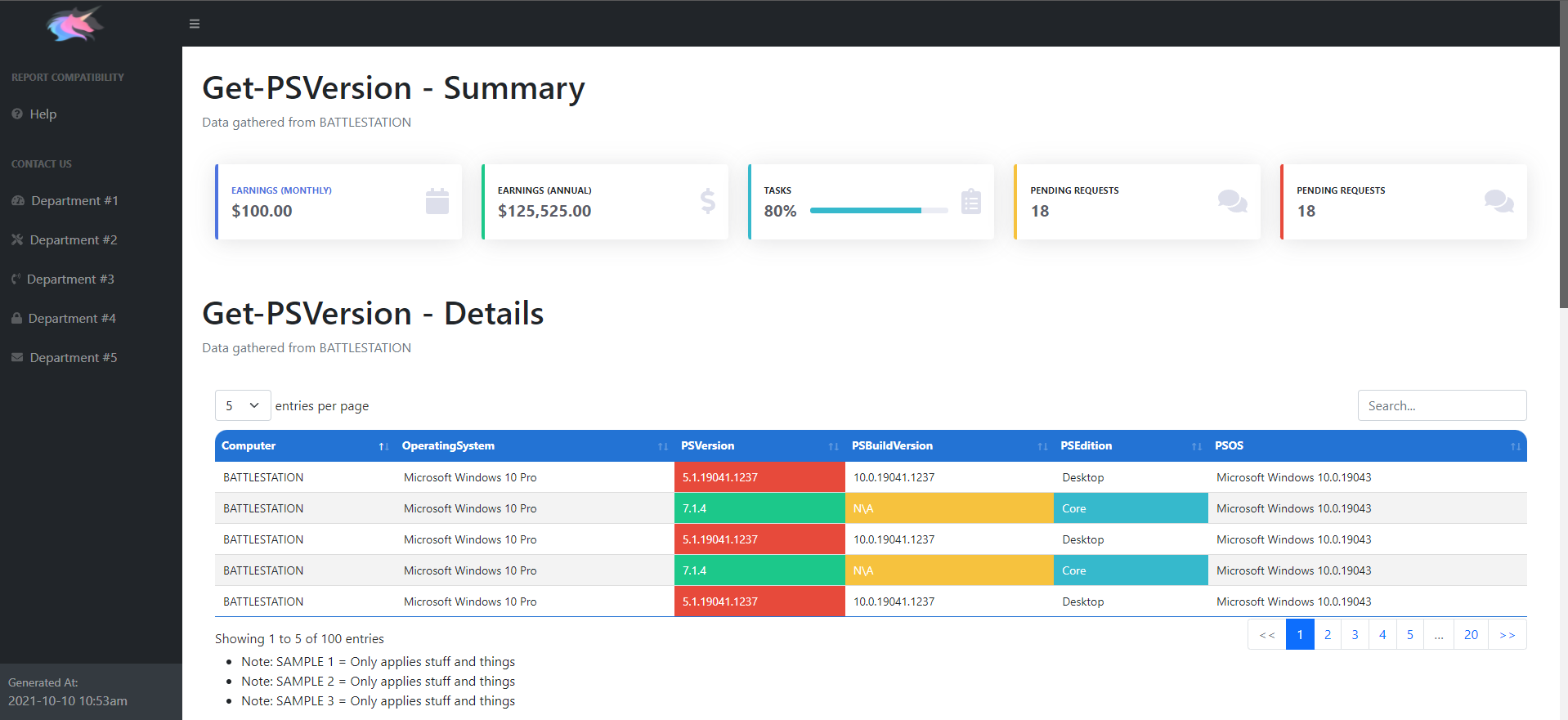 --------------------------------------------------------------------------------
/Assets/SideBar.html:
--------------------------------------------------------------------------------
1 |
--------------------------------------------------------------------------------
/Assets/Meta.html:
--------------------------------------------------------------------------------
1 |
2 |
3 |
4 |
5 |
6 |
7 |
8 |
9 |
10 |
12 |
--------------------------------------------------------------------------------
/Assets/SideBar.html:
--------------------------------------------------------------------------------
1 |
--------------------------------------------------------------------------------
/Assets/Meta.html:
--------------------------------------------------------------------------------
1 |
2 |
3 |
4 |
5 |
6 |
7 |
8 |
9 |
10 |
12 |