├── CNAME ├── .gitignore ├── img ├── logo.png ├── team.jpg ├── favicon.png ├── corgea_small.png ├── corgi_running.gif └── encryption_flow.png ├── style.css ├── LICENSE ├── README.md ├── .github └── workflows │ └── static.yml ├── js ├── crypto.js └── app.js ├── why.html └── index.html /CNAME: -------------------------------------------------------------------------------- 1 | retriever.corgea.io -------------------------------------------------------------------------------- /.gitignore: -------------------------------------------------------------------------------- 1 | .idea 2 | .DS_Store 3 | -------------------------------------------------------------------------------- /img/logo.png: -------------------------------------------------------------------------------- https://raw.githubusercontent.com/Corgea/retriever/HEAD/img/logo.png -------------------------------------------------------------------------------- /img/team.jpg: -------------------------------------------------------------------------------- https://raw.githubusercontent.com/Corgea/retriever/HEAD/img/team.jpg -------------------------------------------------------------------------------- /img/favicon.png: -------------------------------------------------------------------------------- https://raw.githubusercontent.com/Corgea/retriever/HEAD/img/favicon.png -------------------------------------------------------------------------------- /img/corgea_small.png: -------------------------------------------------------------------------------- https://raw.githubusercontent.com/Corgea/retriever/HEAD/img/corgea_small.png -------------------------------------------------------------------------------- /img/corgi_running.gif: -------------------------------------------------------------------------------- https://raw.githubusercontent.com/Corgea/retriever/HEAD/img/corgi_running.gif -------------------------------------------------------------------------------- /img/encryption_flow.png: -------------------------------------------------------------------------------- https://raw.githubusercontent.com/Corgea/retriever/HEAD/img/encryption_flow.png -------------------------------------------------------------------------------- /style.css: -------------------------------------------------------------------------------- 1 | body { 2 | min-height: 100vh; 3 | background-color: #f9f9f9; 4 | } 5 | 6 | textarea { 7 | resize: none; 8 | } 9 | 10 | h1 img { 11 | height: 60px; 12 | margin-top: -10px; 13 | } 14 | 15 | .encrypt-btn-container { 16 | width: 100%; 17 | text-align: right; 18 | padding-top: 8px; 19 | margin-bottom: 10px; 20 | } 21 | 22 | .encrypt-btn-container svg { 23 | margin-top: -3px; 24 | } 25 | 26 | .btn-copy { 27 | width: 85px; 28 | } 29 | 30 | footer { 31 | background-color: #fff; 32 | margin-top: auto; 33 | position: relative; 34 | bottom: 0; 35 | width: 100%; 36 | padding-left: 20%; 37 | padding-right: 20%; 38 | } 39 | 40 | .how-it-works { 41 | font-size: 18px; 42 | text-align: left; 43 | line-height: 32px; 44 | } 45 | -------------------------------------------------------------------------------- /LICENSE: -------------------------------------------------------------------------------- 1 | MIT License 2 | 3 | Copyright (c) 2023 Corgea 4 | 5 | Permission is hereby granted, free of charge, to any person obtaining a copy 6 | of this software and associated documentation files (the "Software"), to deal 7 | in the Software without restriction, including without limitation the rights 8 | to use, copy, modify, merge, publish, distribute, sublicense, and/or sell 9 | copies of the Software, and to permit persons to whom the Software is 10 | furnished to do so, subject to the following conditions: 11 | 12 | The above copyright notice and this permission notice shall be included in all 13 | copies or substantial portions of the Software. 14 | 15 | THE SOFTWARE IS PROVIDED "AS IS", WITHOUT WARRANTY OF ANY KIND, EXPRESS OR 16 | IMPLIED, INCLUDING BUT NOT LIMITED TO THE WARRANTIES OF MERCHANTABILITY, 17 | FITNESS FOR A PARTICULAR PURPOSE AND NONINFRINGEMENT. IN NO EVENT SHALL THE 18 | AUTHORS OR COPYRIGHT HOLDERS BE LIABLE FOR ANY CLAIM, DAMAGES OR OTHER 19 | LIABILITY, WHETHER IN AN ACTION OF CONTRACT, TORT OR OTHERWISE, ARISING FROM, 20 | OUT OF OR IN CONNECTION WITH THE SOFTWARE OR THE USE OR OTHER DEALINGS IN THE 21 | SOFTWARE. 22 | -------------------------------------------------------------------------------- /README.md: -------------------------------------------------------------------------------- 1 |

2 | 3 |

4 | 5 | # Retriever 6 | Secure secret sharing through the browser using web crypto. No server required! 7 | 8 | [Try it here](https://retriever.corgea.io) 9 | 10 | 11 | [Why did we build this?](https://retriever.corgea.io/why.html) 12 | 13 | ## Features 14 | * 100% client-side 15 | * Uses standard browser web crypto APIs 16 | * Links are secure and won't decrypt the secret 17 | * Your secrets and the private keys that encrypt them are never sent to a server by Retriever 18 | 19 | ## How it works 20 | ![How retriever works](https://github.com/Corgea/retriever/blob/main/img/encryption_flow.png?raw=true) 21 | 22 | ## Roadmap 23 | * Support for larger secrets 24 | * File sharing 25 | * Bi-directional sharing 26 | 27 | ## Analytics disclosure 28 | Retriever does use Mixpanel to help the Corgea team know if it's getting traffic. We do not transmit any of your secrets and private keys to Mixpanel. 29 | It is only used if you use https://retriever.corgea.io/. If you run this locally it will not send any analytics to Mixpanel and you can choose to remove it. -------------------------------------------------------------------------------- /.github/workflows/static.yml: -------------------------------------------------------------------------------- 1 | # Simple workflow for deploying static content to GitHub Pages 2 | name: Deploy static content to Pages 3 | 4 | on: 5 | # Runs on pushes targeting the default branch 6 | push: 7 | branches: ["main"] 8 | 9 | # Allows you to run this workflow manually from the Actions tab 10 | workflow_dispatch: 11 | 12 | # Sets permissions of the GITHUB_TOKEN to allow deployment to GitHub Pages 13 | permissions: 14 | contents: read 15 | pages: write 16 | id-token: write 17 | 18 | # Allow only one concurrent deployment, skipping runs queued between the run in-progress and latest queued. 19 | # However, do NOT cancel in-progress runs as we want to allow these production deployments to complete. 20 | concurrency: 21 | group: "pages" 22 | cancel-in-progress: false 23 | 24 | jobs: 25 | # Single deploy job since we're just deploying 26 | deploy: 27 | environment: 28 | name: github-pages 29 | url: ${{ steps.deployment.outputs.page_url }} 30 | runs-on: ubuntu-latest 31 | steps: 32 | - name: Checkout 33 | uses: actions/checkout@v3 34 | - name: Setup Pages 35 | uses: actions/configure-pages@v3 36 | - name: Upload artifact 37 | uses: actions/upload-pages-artifact@v2 38 | with: 39 | # Upload entire repository 40 | path: '.' 41 | - name: Deploy to GitHub Pages 42 | id: deployment 43 | uses: actions/deploy-pages@v2 44 | -------------------------------------------------------------------------------- /js/crypto.js: -------------------------------------------------------------------------------- 1 | const ALGO_NAME = 'RSA-OAEP' 2 | const ALGO_HASH = 'SHA-256' 3 | const ALGO_KEY_LENGTH = 2048 4 | 5 | function serialize_key(key) { 6 | return btoa(JSON.stringify(key)) 7 | } 8 | 9 | function deserialize_key(str) { 10 | return JSON.parse(atob(str)) 11 | } 12 | 13 | async function generateKeyPair() { 14 | let pubKeySer = localStorage.getItem("publicKey") 15 | 16 | if (pubKeySer !== null) { 17 | return pubKeySer 18 | } 19 | 20 | const keyPair = await window.crypto.subtle.generateKey( 21 | { 22 | name: ALGO_NAME, 23 | modulusLength: ALGO_KEY_LENGTH, 24 | publicExponent: new Uint8Array([1, 0, 1]), 25 | hash: ALGO_HASH, 26 | }, 27 | true, 28 | ['encrypt', 'decrypt'] 29 | ); 30 | 31 | const publicKeyJWK = await window.crypto.subtle.exportKey( 32 | 'jwk', 33 | keyPair.publicKey 34 | ); 35 | 36 | const privateKeyJWK = await window.crypto.subtle.exportKey( 37 | 'jwk', 38 | keyPair.privateKey 39 | ); 40 | 41 | pubKeySer = serialize_key(publicKeyJWK); 42 | let privKeySer = serialize_key(privateKeyJWK); 43 | 44 | localStorage.setItem(pubKeySer, privKeySer) 45 | localStorage.setItem('publicKey', pubKeySer) 46 | 47 | return pubKeySer 48 | } 49 | 50 | async function importJWKey(key, usage) { 51 | return await window.crypto.subtle.importKey( 52 | 'jwk', 53 | key, 54 | { 55 | name: ALGO_NAME, 56 | hash: ALGO_HASH, 57 | }, 58 | true, 59 | [usage] 60 | ); 61 | } 62 | 63 | async function load_public_key() { 64 | return await importJWKey(deserialize_key(location.hash.split('#')[1]), 'encrypt') 65 | } 66 | 67 | async function load_key(serialized_key, usage) { 68 | return await importJWKey(deserialize_key(serialized_key), usage) 69 | } 70 | 71 | async function load_private_key(public_key_ser) { 72 | return await importJWKey(deserialize_key(localStorage.getItem(pub_key_ser)), 'decrypt') 73 | } 74 | 75 | async function encryptString(publicKey, plaintext) { 76 | const textBuffer = new TextEncoder().encode(plaintext); 77 | 78 | const encryptedBuffer = await window.crypto.subtle.encrypt( 79 | { 80 | name: ALGO_NAME, 81 | }, 82 | publicKey, 83 | textBuffer 84 | ); 85 | 86 | return btoa(String.fromCharCode(...new Uint8Array(encryptedBuffer))); 87 | } 88 | 89 | async function decryptString(privateKey, encryptedBase64) { 90 | const encryptedBuffer = Uint8Array.from(atob(encryptedBase64), c => c.charCodeAt(0)); 91 | 92 | const decryptedBuffer = await window.crypto.subtle.decrypt( 93 | { 94 | name: ALGO_NAME, 95 | }, 96 | privateKey, 97 | encryptedBuffer 98 | ); 99 | 100 | // Convert the decrypted buffer to a string 101 | return new TextDecoder().decode(decryptedBuffer); 102 | } -------------------------------------------------------------------------------- /js/app.js: -------------------------------------------------------------------------------- 1 | const {createApp, ref, computed} = Vue 2 | 3 | const urlcopy = { 4 | props: ['url'], 5 | data() { 6 | return { 7 | copyText: 'Copy' 8 | } 9 | }, 10 | methods: { 11 | copyToClipboard() { 12 | navigator.clipboard.writeText(this.url) 13 | this.copyText = 'Copied!' 14 | } 15 | }, 16 | template: ` 17 |
18 | 19 | 22 |
` 23 | } 24 | 25 | createApp({ 26 | components: { 27 | urlcopy 28 | }, 29 | setup() { 30 | const url = ref('') 31 | const inputData = ref('') 32 | const encryptedUrl = ref('') 33 | const newSecret = ref(false) 34 | const decryptSecret = ref(false) 35 | const errorShow = ref(false) 36 | const errorTitle = ref('') 37 | const errorMessage = ref('') 38 | 39 | let publicKey, privateKey, publicKeySer, encryptedText; 40 | 41 | function showError(error, title, message) { 42 | console.log(error) 43 | errorShow.value = true 44 | errorTitle.value = title 45 | errorMessage.value = message 46 | document.body.classList.add('modal-open') 47 | } 48 | 49 | function encrypt() { 50 | encryptString(publicKey, inputData.value).then( 51 | (value) => value 52 | ).then(function (encryptedValue) { 53 | url.value = window.location.href + ';' + encryptedValue 54 | inputData.value = "" 55 | }).catch(function (error) { 56 | let title = 'Unable to encrypt' 57 | let message = 'Double check to make sure the correct link was sent.' 58 | showError(error, title, message) 59 | }) 60 | } 61 | 62 | function decrypt() { 63 | let [pubKeySer, encryptedText] = location.hash.replace('#', '').split(';') 64 | load_key(window.localStorage.getItem(pubKeySer), 'decrypt').then(function (privKey) { 65 | return privKey 66 | }).then(function (privKey) { 67 | return decryptString(privKey, encryptedText).then((value) => value) 68 | }).then(function (decryptedValue) { 69 | inputData.value = decryptedValue 70 | }).catch(function (error) { 71 | let title, message 72 | 73 | if (error.toString() === 'OperationError') { 74 | title = 'Unable to decrypt' 75 | message = 'Unable to decrypt secret. Make sure the url is correct and was not cut off.' 76 | } else { 77 | title = 'Unable to load private key' 78 | message = ` 79 | Could not find the private key associated to the public key in the url in the browser. 80 | Make sure this is the correct browser and the url is correct. 81 | Only the requester can decrypt the secret. 82 | ` 83 | } 84 | 85 | showError(error, title, message) 86 | }) 87 | } 88 | 89 | if (location.hash === '') { 90 | newSecret.value = true 91 | generateKeyPair().then(function (value) { 92 | url.value = location.href + '#' + value 93 | }) 94 | } else if (location.hash.includes(';')) { 95 | decryptSecret.value = true 96 | decrypt() 97 | } else { 98 | load_key(location.hash.split('#')[1], 'encrypt').then(function (value) { 99 | publicKey = value 100 | }).catch(function (error) { 101 | let title = 'Unable to load public key' 102 | let message = 'Unable to load public key from the url. Make sure the url is correct.' 103 | showError(error, title, message) 104 | }) 105 | } 106 | 107 | return { 108 | encrypt, 109 | encryptedUrl, 110 | inputData, 111 | newSecret, 112 | decryptSecret, 113 | url, 114 | errorShow, 115 | errorTitle, 116 | errorMessage 117 | } 118 | } 119 | }).mount('#app') -------------------------------------------------------------------------------- /why.html: -------------------------------------------------------------------------------- 1 | 2 | 3 | 4 | 5 | 6 | 7 | 8 | Retriever 9 | 10 | 11 | 12 | 13 | 14 | 15 | 16 | 19 | 20 | 21 | 22 |
23 | Retriever Logo 24 | 25 |

The most secure way of sharing secrets over the internet


26 |
27 | 28 | 29 | 30 |
31 |
32 | 33 |

The story

34 |

A few months ago my team and I were on a customer call, and we needed to get some secrets from them. We went through the typical process where they shared their secret through their password manager. The process took 15 minutes, and it felt heavy. Adam from our team realized that he hadn’t seen a way to request secrets from someone. Most people send passwords, but what if you could ask for one? What if it could also be done without a server in the middle? Shouldn’t secret sharing really be secret? Also, what if it was a light and easy experience?

35 | 36 |

The experiment

37 |

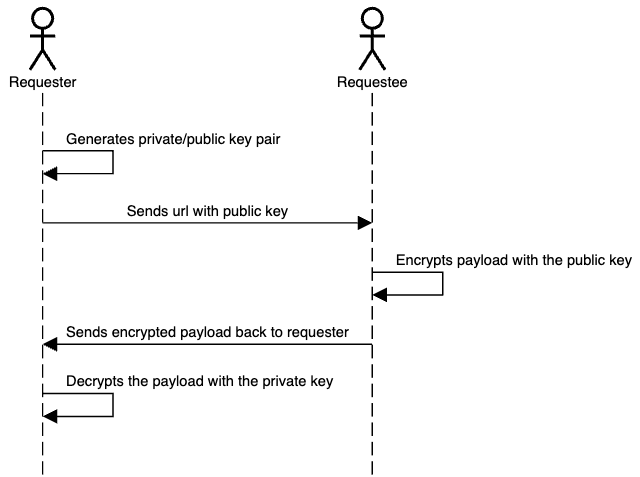
This is why we developed Retriever, an open-source research project to help users receive secrets and sensitive information without needing a server in the middle. It works by using Public-key cryptography to coordinate the message sharing between the two devices. The requesting user visits https://retriever.corgea.io/, which generates a URL with the public key, and a private key is then stored in the browser. The URL can be shared with anyone so that they can enter their secret. When a secret is filled in, it’s encrypted with the public key, and the user can send the final link back to the requester. Using the private key, the requester can see the secret on their machine.

38 | 39 |

Here’s a diagram that shows the flow:

40 | 41 |

What makes this better and unique?

42 |

Interestingly, most services like LastPass, 1Password, and others don't offer a way to request a secret from someone. In most cases, sharing secrets requires the initiator to have a password manager. Retriever addresses the scenario where a user wants to share confidential information but lacks a secure method, or when the parties use different secret management systems.

43 | 44 |

One of the most significant challenges with many solutions is the exposure of URLs. If someone gets hold of a secret URL, they could essentially have access to the secret it contains. This new system acknowledges this flaw and encrypts the secret within the URL. Only the intended recipient, with the decryption key, can access the secret, ensuring an added layer of security. Anyone who wants to get access to the secret in the second link needs to get the private key from the browser and the link itself.

45 | 46 |

Traditional methods of sharing secrets often involve a third-party server that orchestrates the transfer. While this might seem convenient, it poses a significant risk. Users have to trust that the third party will delete their data after the transfer. This new system ensures that data is transferred directly between the sender and receiver, reducing potential points of failure. Retriever does not store or log any secrets or data about the parties involved in the sharing process. See the open source project for more details: https://github.com/Corgea/retriever. We’ve also gotten asked, why not use WebRTC? Yes, this can be achieved with WebRTC, but you still need a signaling server to make this work.

47 | 48 |

Another big issue with most open-source projects is just because a project is open source doesn't mean it's hosted openly. This new system ensures that while the codebase is open for everyone to see and contribute to, the hosting remains open. Retriever.corgea.io is actually hosted on Github pages (do a CNAME check to see).

49 | 50 |

Finally, the system's backbone lies in its use of standard web cryptography. By leveraging these standards, the system ensures that the encryption and decryption processes are not only secure but also fast and efficient.

51 | 52 | 53 |
54 |

Who are we?

55 | 56 |
57 |
58 | 59 |
60 |
61 |

We are the team behind Corgea. A passionate bunch of engineers, designers, and product builders that like to tackle the most urgent and stimulating problems in security. In our prior roles, we designed, secured and built software products for the likes of Coupa, Autodesk, and PlanGrid. 62 |

63 |

A big thank you to Adam Bronte for authoring Retriever and Tamara for putting the finishing touches on usability and design.

64 | 65 | 66 |
67 | 68 |
69 | 70 | 71 | 72 | 73 |
74 | 75 |
76 | 77 | 78 |
79 | 80 | 98 | 99 | 100 | 101 | 102 | 103 | -------------------------------------------------------------------------------- /index.html: -------------------------------------------------------------------------------- 1 | 2 | 3 | 4 | 5 | 6 | 7 | Retriever 8 | 9 | 11 | 12 | 13 | 14 | 15 | 16 | 17 | 18 | 19 | 26 | 27 | 32 | 33 | 34 | 35 | 36 | 37 |
38 | 39 |
40 |
41 |

42 | Retriever Logo 43 |

44 |

Retriever

45 |

Secure Secrets Retrieval

46 |
47 |

Retriever lets you request secrets from anyone
without any of the data going to a server.

48 |
49 | 50 |
51 | 52 | 53 | 54 |
55 |

Share this URL to get a secret.

56 | 57 | 58 |
59 |
60 |

Below is the decrypted secret shared with you.

61 | 63 |
64 |
65 |

Somebody is requesting a secret
66 | No one except for the requester will see this information. 67 | 68 |

69 |
70 | 72 | 73 |
74 | 80 |
81 | 82 |
83 |

Success!

84 |

Send this URL back to the requester to share the secret.

85 | 86 |
87 |
88 |
89 |
90 | 91 | 92 | 93 | 94 | 95 |
96 | 97 | 98 |
99 |
100 |

How it works

101 |
102 |
    103 |
  1. 104 | 1 105 | Send the above link to someone you want to get a secret from. 106 |
  2. 107 |
  3. 108 | 2 109 | They add their secret and share the URL Retriever generates. 110 |
  4. 111 |
  5. 112 | 3 113 | Only you can open that URL in the browser to see their secret. 🪄 114 |
  6. 115 |
116 |
117 |
118 |
119 | 120 |
121 | 122 |
123 | 135 | 136 |
137 |
138 |
139 | 140 | 141 | 158 | 159 | 160 | 161 | 162 | --------------------------------------------------------------------------------