├── .python-version
├── src
└── windows_mcp
│ ├── __init__.py
│ ├── tree
│ ├── __init__.py
│ ├── utils.py
│ ├── config.py
│ ├── views.py
│ └── service.py
│ ├── desktop
│ ├── __init__.py
│ ├── config.py
│ ├── views.py
│ └── service.py
│ ├── analytics.py
│ └── __main__.py
├── .mcpbignore
├── assets
├── demo1.mov
├── demo2.mov
├── logo.png
└── screenshots
│ ├── screenshot_1.png
│ ├── screenshot_2.png
│ └── screenshot_3.png
├── server.json
├── LICENSE.md
├── pyproject.toml
├── .gitignore
├── manifest.json
├── CONTRIBUTING.md
├── SECURITY.md
└── README.md
/.python-version:
--------------------------------------------------------------------------------
1 | 3.13
2 |
--------------------------------------------------------------------------------
/src/windows_mcp/__init__.py:
--------------------------------------------------------------------------------
1 |
--------------------------------------------------------------------------------
/src/windows_mcp/tree/__init__.py:
--------------------------------------------------------------------------------
1 |
--------------------------------------------------------------------------------
/src/windows_mcp/desktop/__init__.py:
--------------------------------------------------------------------------------
1 |
--------------------------------------------------------------------------------
/.mcpbignore:
--------------------------------------------------------------------------------
1 | .venv
2 | __pycache__
3 | build
4 | dist
5 | notebook.ipynb
--------------------------------------------------------------------------------
/assets/demo1.mov:
--------------------------------------------------------------------------------
https://raw.githubusercontent.com/CursorTouch/Windows-MCP/HEAD/assets/demo1.mov
--------------------------------------------------------------------------------
/assets/demo2.mov:
--------------------------------------------------------------------------------
https://raw.githubusercontent.com/CursorTouch/Windows-MCP/HEAD/assets/demo2.mov
--------------------------------------------------------------------------------
/assets/logo.png:
--------------------------------------------------------------------------------
https://raw.githubusercontent.com/CursorTouch/Windows-MCP/HEAD/assets/logo.png
--------------------------------------------------------------------------------
/assets/screenshots/screenshot_1.png:
--------------------------------------------------------------------------------
https://raw.githubusercontent.com/CursorTouch/Windows-MCP/HEAD/assets/screenshots/screenshot_1.png
--------------------------------------------------------------------------------
/assets/screenshots/screenshot_2.png:
--------------------------------------------------------------------------------
https://raw.githubusercontent.com/CursorTouch/Windows-MCP/HEAD/assets/screenshots/screenshot_2.png
--------------------------------------------------------------------------------
/assets/screenshots/screenshot_3.png:
--------------------------------------------------------------------------------
https://raw.githubusercontent.com/CursorTouch/Windows-MCP/HEAD/assets/screenshots/screenshot_3.png
--------------------------------------------------------------------------------
/src/windows_mcp/desktop/config.py:
--------------------------------------------------------------------------------
1 | from typing import Set
2 |
3 | BROWSER_NAMES=set([
4 | 'msedge.exe',
5 | 'chrome.exe',
6 | 'firefox.exe'
7 | ])
8 |
9 | AVOIDED_APPS:Set[str]=set([
10 | 'AgentUI'
11 | ])
12 |
13 | EXCLUDED_APPS:Set[str]=set([
14 | 'Progman',
15 | 'Shell_TrayWnd',
16 | 'Shell_SecondaryTrayWnd',
17 | 'Microsoft.UI.Content.PopupWindowSiteBridge',
18 | 'Windows.UI.Core.CoreWindow',
19 | ])
20 |
21 | PROCESS_PER_MONITOR_DPI_AWARE = 2
--------------------------------------------------------------------------------
/server.json:
--------------------------------------------------------------------------------
1 | {
2 | "$schema": "https://static.modelcontextprotocol.io/schemas/2025-07-09/server.schema.json",
3 | "name": "io.github.CursorTouch/Windows-MCP",
4 | "description": "An MCP Server for computer-use in Windows OS",
5 | "status": "active",
6 | "repository": {
7 | "url": "https://github.com/CursorTouch/Windows-MCP",
8 | "source": "github"
9 | },
10 | "version": "1.0.0",
11 | "packages": [
12 | {
13 | "registry_type": "pypi",
14 | "registry_base_url": "https://pypi.org",
15 | "identifier": "windows_mcp",
16 | "version": "0.5.4",
17 | "runtime_hint": "uvx",
18 | "transport": {
19 | "type": "stdio"
20 | }
21 | }
22 | ]
23 | }
--------------------------------------------------------------------------------
/src/windows_mcp/tree/utils.py:
--------------------------------------------------------------------------------
1 | import random
2 | from uiautomation import Control
3 |
4 | def random_point_within_bounding_box(node: Control, scale_factor: float = 1.0) -> tuple[int, int]:
5 | """
6 | Generate a random point within a scaled-down bounding box.
7 |
8 | Args:
9 | node (Control): The node with a bounding rectangle
10 | scale_factor (float, optional): The factor to scale down the bounding box. Defaults to 1.0.
11 |
12 | Returns:
13 | tuple: A random point (x, y) within the scaled-down bounding box
14 | """
15 | box = node.BoundingRectangle
16 | scaled_width = int(box.width() * scale_factor)
17 | scaled_height = int(box.height() * scale_factor)
18 | scaled_left = box.left + (box.width() - scaled_width) // 2
19 | scaled_top = box.top + (box.height() - scaled_height) // 2
20 | x = random.randint(scaled_left, scaled_left + scaled_width)
21 | y = random.randint(scaled_top, scaled_top + scaled_height)
22 | return (x, y)
--------------------------------------------------------------------------------
/LICENSE.md:
--------------------------------------------------------------------------------
1 | MIT License
2 |
3 | Copyright (c) 2025 JEOMON GEORGE
4 |
5 | Permission is hereby granted, free of charge, to any person obtaining a copy
6 | of this software and associated documentation files (the "Software"), to deal
7 | in the Software without restriction, including without limitation the rights
8 | to use, copy, modify, merge, publish, distribute, sublicense, and/or sell
9 | copies of the Software, and to permit persons to whom the Software is
10 | furnished to do so, subject to the following conditions:
11 |
12 | The above copyright notice and this permission notice shall be included in all
13 | copies or substantial portions of the Software.
14 |
15 | THE SOFTWARE IS PROVIDED "AS IS", WITHOUT WARRANTY OF ANY KIND, EXPRESS OR
16 | IMPLIED, INCLUDING BUT NOT LIMITED TO THE WARRANTIES OF MERCHANTABILITY,
17 | FITNESS FOR A PARTICULAR PURPOSE AND NONINFRINGEMENT. IN NO EVENT SHALL THE
18 | AUTHORS OR COPYRIGHT HOLDERS BE LIABLE FOR ANY CLAIM, DAMAGES OR OTHER
19 | LIABILITY, WHETHER IN AN ACTION OF CONTRACT, TORT OR OTHERWISE, ARISING FROM,
20 | OUT OF OR IN CONNECTION WITH THE SOFTWARE OR THE USE OR OTHER DEALINGS IN THE
21 | SOFTWARE.
--------------------------------------------------------------------------------
/src/windows_mcp/tree/config.py:
--------------------------------------------------------------------------------
1 | INTERACTIVE_CONTROL_TYPE_NAMES=set([
2 | 'ButtonControl',
3 | 'ListItemControl',
4 | 'MenuItemControl',
5 | 'EditControl',
6 | 'CheckBoxControl',
7 | 'RadioButtonControl',
8 | 'ComboBoxControl',
9 | 'HyperlinkControl',
10 | 'SplitButtonControl',
11 | 'TabItemControl',
12 | 'TreeItemControl',
13 | 'DataItemControl',
14 | 'HeaderItemControl',
15 | 'TextBoxControl',
16 | 'SpinnerControl',
17 | 'ScrollBarControl'
18 | ])
19 |
20 | DOCUMENT_CONTROL_TYPE_NAMES=set([
21 | 'DocumentControl'
22 | ])
23 |
24 | STRUCTURAL_CONTROL_TYPE_NAMES = set([
25 | 'PaneControl',
26 | 'GroupControl',
27 | 'CustomControl'
28 | ])
29 |
30 | INFORMATIVE_CONTROL_TYPE_NAMES=set([
31 | 'TextControl',
32 | 'ImageControl',
33 | 'StatusBarControl',
34 | # 'ProgressBarControl',
35 | # 'ToolTipControl',
36 | # 'TitleBarControl',
37 | # 'SeparatorControl',
38 | # 'HeaderControl',
39 | # 'HeaderItemControl',
40 | ])
41 |
42 | DEFAULT_ACTIONS=set([
43 | 'Click',
44 | 'Press',
45 | 'Jump',
46 | 'Check',
47 | 'Uncheck',
48 | 'Double Click'
49 | ])
50 |
51 | THREAD_MAX_RETRIES = 3
--------------------------------------------------------------------------------
/pyproject.toml:
--------------------------------------------------------------------------------
1 | [project]
2 | name = "windows-mcp"
3 | version = "0.5.7"
4 | description = "Lightweight MCP Server for interacting with Windows Operating System."
5 | authors = [
6 | { name = "Jeomon George", email = "jeogeoalukka@gmail.com" }
7 | ]
8 | readme = "README.md"
9 | license = { file = "LICENSE.md" }
10 | urls = { homepage = "https://github.com/CursorTouch" }
11 | keywords = ["windows", "mcp", "ai", "desktop","ai agent"]
12 | requires-python = ">=3.13"
13 | dependencies = [
14 | "click>=8.2.1",
15 | "fastmcp>=2.8.1",
16 | "fuzzywuzzy>=0.18.0",
17 | "humancursor>=1.1.5",
18 | "ipykernel>=6.30.0",
19 | "live-inspect>=0.1.2",
20 | "markdownify>=1.1.0",
21 | "pdfplumber>=0.11.7",
22 | "pillow>=11.2.1",
23 | "posthog>=7.4.0",
24 | "psutil>=7.0.0",
25 | "pyautogui>=0.9.54",
26 | "pygetwindow>=0.0.9",
27 | "python-dotenv>=1.1.0",
28 | "python-levenshtein>=0.27.1",
29 | "pywinauto>=0.6.9",
30 | "requests>=2.32.3",
31 | "tabulate>=0.9.0",
32 | "uiautomation>=2.0.24",
33 | "uuid7>=0.1.0",
34 | ]
35 |
36 | [project.scripts]
37 | windows-mcp = "windows_mcp.__main__:main"
38 |
39 | [build-system]
40 | requires = ["hatchling"]
41 | build-backend = "hatchling.build"
42 |
43 |
44 |
--------------------------------------------------------------------------------
/src/windows_mcp/desktop/views.py:
--------------------------------------------------------------------------------
1 | from windows_mcp.tree.views import TreeState
2 | from dataclasses import dataclass
3 | from tabulate import tabulate
4 | from typing import Optional
5 | from PIL.Image import Image
6 | from enum import Enum
7 |
8 | class Browser(Enum):
9 | CHROME='Chrome'
10 | EDGE='Edge'
11 | FIREFOX='Firefox'
12 |
13 | class Status(Enum):
14 | MAXIMIZED='Maximized'
15 | MINIMIZED='Minimized'
16 | NORMAL='Normal'
17 | HIDDEN='Hidden'
18 |
19 |
20 | @dataclass
21 | class App:
22 | name:str
23 | depth:int
24 | status:Status
25 | size:'Size'
26 | handle: int
27 | process_id:int
28 |
29 | def to_row(self):
30 | return [self.name, self.depth, self.status.value, self.size.width, self.size.height, self.handle]
31 |
32 | @dataclass
33 | class Size:
34 | width:int
35 | height:int
36 |
37 | def to_string(self):
38 | return f'({self.width},{self.height})'
39 |
40 | @dataclass
41 | class DesktopState:
42 | apps:list[App]
43 | active_app:Optional[App]
44 | screenshot:Image|None
45 | tree_state:TreeState
46 |
47 | def active_app_to_string(self):
48 | if self.active_app is None:
49 | return 'No active app found'
50 | headers = ["Name", "Depth", "Status", "Width", "Height", "Handle"]
51 | return tabulate([self.active_app.to_row()], headers=headers, tablefmt="simple")
52 |
53 | def apps_to_string(self):
54 | if not self.apps:
55 | return 'No apps running in background'
56 | headers = ["Name", "Depth", "Status", "Width", "Height", "Handle"]
57 | rows = [app.to_row() for app in self.apps]
58 | return tabulate(rows, headers=headers, tablefmt="simple")
--------------------------------------------------------------------------------
/src/windows_mcp/tree/views.py:
--------------------------------------------------------------------------------
1 | from dataclasses import dataclass,field
2 | from tabulate import tabulate
3 | from typing import Optional
4 |
5 | @dataclass
6 | class DOMInfo:
7 | horizontal_scrollable: bool
8 | horizontal_scroll_percent: float
9 | vertical_scrollable: bool
10 | vertical_scroll_percent: float
11 |
12 | @dataclass
13 | class TreeState:
14 | interactive_nodes:list['TreeElementNode']=field(default_factory=list)
15 | scrollable_nodes:list['ScrollElementNode']=field(default_factory=list)
16 | dom_informative_nodes:list['TextElementNode']=field(default_factory=list)
17 | dom_info:Optional['DOMInfo']=None
18 |
19 | def interactive_elements_to_string(self) -> str:
20 | if not self.interactive_nodes:
21 | return "No interactive elements"
22 | headers = ["Label", "App Name", "ControlType", "Name", "Value", "Shortcut", "Coordinates" ,"IsFocused"]
23 | rows = [node.to_row(idx) for idx, node in enumerate(self.interactive_nodes)]
24 | return tabulate(rows, headers=headers, tablefmt="simple")
25 |
26 | def scrollable_elements_to_string(self) -> str:
27 | if not self.scrollable_nodes:
28 | return "No scrollable elements"
29 | headers = [
30 | "Label", "App Name", "ControlType", "Name", "Coordinates",
31 | "Horizontal Scrollable", "Horizontal Scroll Percent(%)", "Vertical Scrollable", "Vertical Scroll Percent(%)", "IsFocused"
32 | ]
33 | base_index = len(self.interactive_nodes)
34 | rows = [node.to_row(idx, base_index) for idx, node in enumerate(self.scrollable_nodes)]
35 | return tabulate(rows, headers=headers, tablefmt="simple")
36 |
37 | @dataclass
38 | class BoundingBox:
39 | left:int
40 | top:int
41 | right:int
42 | bottom:int
43 | width:int
44 | height:int
45 |
46 | def get_center(self)->'Center':
47 | return Center(x=self.left+self.width//2,y=self.top+self.height//2)
48 |
49 | def xywh_to_string(self):
50 | return f'({self.left},{self.top},{self.width},{self.height})'
51 |
52 | def xyxy_to_string(self):
53 | x1,y1,x2,y2=self.convert_xywh_to_xyxy()
54 | return f'({x1},{y1},{x2},{y2})'
55 |
56 | def convert_xywh_to_xyxy(self)->tuple[int,int,int,int]:
57 | x1,y1=self.left,self.top
58 | x2,y2=self.left+self.width,self.top+self.height
59 | return x1,y1,x2,y2
60 |
61 | @dataclass
62 | class Center:
63 | x:int
64 | y:int
65 |
66 | def to_string(self)->str:
67 | return f'({self.x},{self.y})'
68 |
69 | @dataclass
70 | class TreeElementNode:
71 | name: str
72 | control_type: str
73 | app_name: str
74 | value:str
75 | shortcut: str
76 | bounding_box: BoundingBox
77 | center: Center
78 | xpath:str
79 | is_focused:bool
80 |
81 | def to_row(self, index: int):
82 | return [index, self.app_name, self.control_type, self.name, self.value, self.shortcut, self.center.to_string(),self.is_focused]
83 |
84 | @dataclass
85 | class ScrollElementNode:
86 | name: str
87 | control_type: str
88 | xpath:str
89 | app_name: str
90 | bounding_box: BoundingBox
91 | center: Center
92 | horizontal_scrollable: bool
93 | horizontal_scroll_percent: float
94 | vertical_scrollable: bool
95 | vertical_scroll_percent: float
96 | is_focused: bool
97 |
98 | def to_row(self, index: int, base_index: int):
99 | return [
100 | base_index + index,
101 | self.app_name,
102 | self.control_type,
103 | self.name,
104 | self.center.to_string(),
105 | self.horizontal_scrollable,
106 | self.horizontal_scroll_percent,
107 | self.vertical_scrollable,
108 | self.vertical_scroll_percent,
109 | self.is_focused
110 | ]
111 |
112 | @dataclass
113 | class TextElementNode:
114 | text:str
115 |
116 | ElementNode=TreeElementNode|ScrollElementNode
--------------------------------------------------------------------------------
/.gitignore:
--------------------------------------------------------------------------------
1 | # Byte-compiled / optimized / DLL files
2 | __pycache__/
3 | *.py[cod]
4 | *$py.class
5 |
6 | # C extensions
7 | *.so
8 |
9 | # Distribution / packaging
10 | .Python
11 | build/
12 | develop-eggs/
13 | dist/
14 | downloads/
15 | eggs/
16 | .eggs/
17 | lib/
18 | lib64/
19 | parts/
20 | sdist/
21 | var/
22 | wheels/
23 | share/python-wheels/
24 | *.egg-info/
25 | .installed.cfg
26 | *.egg
27 | MANIFEST
28 |
29 | # PyInstaller
30 | # Usually these files are written by a python script from a template
31 | # before PyInstaller builds the exe, so as to inject date/other infos into it.
32 | *.manifest
33 | *.spec
34 |
35 | # Installer logs
36 | pip-log.txt
37 | pip-delete-this-directory.txt
38 |
39 | # Unit test / coverage reports
40 | htmlcov/
41 | .tox/
42 | .nox/
43 | .coverage
44 | .coverage.*
45 | .cache
46 | nosetests.xml
47 | coverage.xml
48 | *.cover
49 | *.py,cover
50 | .hypothesis/
51 | .pytest_cache/
52 | cover/
53 |
54 | # Translations
55 | *.mo
56 | *.pot
57 |
58 | # Django stuff:
59 | *.log
60 | local_settings.py
61 | db.sqlite3
62 | db.sqlite3-journal
63 |
64 | # Flask stuff:
65 | instance/
66 | .webassets-cache
67 |
68 | # Scrapy stuff:
69 | .scrapy
70 |
71 | # Sphinx documentation
72 | docs/_build/
73 |
74 | # PyBuilder
75 | .pybuilder/
76 | target/
77 |
78 | # Jupyter Notebook
79 | .ipynb_checkpoints
80 |
81 | # IPython
82 | profile_default/
83 | ipython_config.py
84 |
85 | # pyenv
86 | # For a library or package, you might want to ignore these files since the code is
87 | # intended to run in multiple environments; otherwise, check them in:
88 | # .python-version
89 |
90 | # pipenv
91 | # According to pypa/pipenv#598, it is recommended to include Pipfile.lock in version control.
92 | # However, in case of collaboration, if having platform-specific dependencies or dependencies
93 | # having no cross-platform support, pipenv may install dependencies that don't work, or not
94 | # install all needed dependencies.
95 | #Pipfile.lock
96 |
97 | # poetry
98 | # Similar to Pipfile.lock, it is generally recommended to include poetry.lock in version control.
99 | # This is especially recommended for binary packages to ensure reproducibility, and is more
100 | # commonly ignored for libraries.
101 | # https://python-poetry.org/docs/basic-usage/#commit-your-poetrylock-file-to-version-control
102 | #poetry.lock
103 |
104 | # pdm
105 | # Similar to Pipfile.lock, it is generally recommended to include pdm.lock in version control.
106 | #pdm.lock
107 | # pdm stores project-wide configurations in .pdm.toml, but it is recommended to not include it
108 | # in version control.
109 | # https://pdm.fming.dev/latest/usage/project/#working-with-version-control
110 | .pdm.toml
111 | .pdm-python
112 | .pdm-build/
113 |
114 | # PEP 582; used by e.g. github.com/David-OConnor/pyflow and github.com/pdm-project/pdm
115 | __pypackages__/
116 |
117 | # Celery stuff
118 | celerybeat-schedule
119 | celerybeat.pid
120 |
121 | # SageMath parsed files
122 | *.sage.py
123 |
124 | # Environments
125 | .env
126 | .venv
127 | env/
128 | venv/
129 | ENV/
130 | env.bak/
131 | venv.bak/
132 |
133 | # Spyder project settings
134 | .spyderproject
135 | .spyproject
136 |
137 | # Rope project settings
138 | .ropeproject
139 |
140 | # mkdocs documentation
141 | /site
142 |
143 | # mypy
144 | .mypy_cache/
145 | .dmypy.json
146 | dmypy.json
147 |
148 | # Pyre type checker
149 | .pyre/
150 |
151 | # pytype static type analyzer
152 | .pytype/
153 |
154 | # Cython debug symbols
155 | cython_debug/
156 |
157 | # PyCharm
158 | # JetBrains specific template is maintained in a separate JetBrains.gitignore that can
159 | # be found at https://github.com/github/gitignore/blob/main/Global/JetBrains.gitignore
160 | # and can be added to the global gitignore or merged into this file. For a more nuclear
161 | # option (not recommended) you can uncomment the following to ignore the entire idea folder.
162 | #.idea/
163 |
164 | .vscode
165 | .mcpregistry_github_token
166 | .mcpregistry_registry_token
167 | sandbox
168 | *.ipynb
169 | *.mcpb
--------------------------------------------------------------------------------
/manifest.json:
--------------------------------------------------------------------------------
1 | {
2 | "manifest_version": "0.2",
3 | "name": "Windows-MCP",
4 | "version": "0.5.6",
5 | "description": "MCP Server that enables Claude to interact with Windows OS",
6 | "long_description": "Windows MCP is an open-source project that enables seamless integration between AI agents and the Windows operating system. Acting as an MCP server bridges the gap between LLMs and the Windows operating system, allowing agents to perform tasks such as **file navigation, application control, UI interaction, QA testing,** and more.\\n\\n## Key Features\\n\\n- **Seamless Windows Integration**: Interacts natively with Windows UI elements, opens apps, controls windows, simulates user input, and more.\\n- **Use Any LLM (Vision Optional)**: Unlike many automation tools, Windows MCP doesn't rely on any traditional computer vision techniques or specific fine-tuned models; it works with any LLMs, reducing complexity and setup time.\\n- **Rich Toolset for UI Automation**: Includes tools for basic keyboard, mouse operation and capturing window/UI state.\\n- **Lightweight & Open-Source**: Minimal dependencies and easy setup with full source code available under MIT license.\\n- **Customizable & Extendable**: Easily adapt or extend tools to suit your unique automation or AI integration needs.\\n- **Real-Time Interaction**: Typical latency between actions (e.g., from one mouse click to the next) ranges from **1.5 to 2.3 secs**, and may slightly vary based on the number of active applications and system load, also the inferencing speed of the llm.\\n\\n## Requirements\\n\\n### UV Package Manager\\nThis MCP server requires [UV](https://github.com/astral-sh/uv), a fast Python package manager. \\n\\n```bash\\npip install uv\\n```\\n\\nFor detailed installation instructions, see the [UV documentation](https://github.com/astral-sh/uv#installation).",
7 | "author": {
8 | "name": "CursorTouch",
9 | "url": "https://cursortouch.com/"
10 | },
11 | "homepage": "https://cursortouch.com/",
12 | "documentation": "https://github.com/CursorTouch/Windows-MCP",
13 | "support": "https://github.com/CursorTouch/Windows-MCP",
14 | "icon": "./assets/logo.png",
15 | "screenshots": [
16 | "./assets/screenshots/screenshot_1.png",
17 | "./assets/screenshots/screenshot_2.png",
18 | "./assets/screenshots/screenshot_3.png"
19 | ],
20 | "server": {
21 | "type": "python",
22 | "entry_point": "./src/windows_mcp/__main__.py",
23 | "mcp_config": {
24 | "command": "uv",
25 | "args": [
26 | "--directory",
27 | "${__dirname}",
28 | "run",
29 | "windows-mcp"
30 | ],
31 | "env": {
32 | "ANONYMIZED_TELEMETRY": "${user_config.anonymized_telemetry}"
33 | }
34 | }
35 | },
36 | "user_config": {
37 | "anonymized_telemetry": {
38 | "type": "boolean",
39 | "title": "Anonymized Telemetry",
40 | "description": "Windows-MCP collects basic usage data to help improve the MCP server. No personal information, tool arguments, or tool outputs are tracked.",
41 | "required": false,
42 | "default": true
43 | }
44 | },
45 | "tools": [
46 | {
47 | "name": "App Tool",
48 | "description": "Manages Windows applications through launch, resize, and window switching operations."
49 | },
50 | {
51 | "name": "Powershell Tool",
52 | "description": "Execute PowerShell commands and return the output with status code"
53 | },
54 | {
55 | "name": "State Tool",
56 | "description": "Capture comprehensive desktop state including focused/opened applications, interactive UI elements (buttons, text fields, menus), informative content (text, labels, status), and scrollable areas. Optionally includes visual screenshot when use_vision=True. Essential for understanding current desktop context and available UI interactions."
57 | },
58 | {
59 | "name": "Click Tool",
60 | "description": "Click on UI elements at specific coordinates. Supports left/right/middle mouse buttons and single/double/triple clicks. Use coordinates from State Tool output."
61 | },
62 | {
63 | "name": "Type Tool",
64 | "description": "Type text into input fields, text areas, or focused elements. Set clear=True to replace existing text, False to append. Click on target element coordinates first."
65 | },
66 | {
67 | "name": "Scroll Tool",
68 | "description": "Scroll at specific coordinates or current mouse position. Use wheel_times to control scroll amount (1 wheel = ~3-5 lines). Essential for navigating lists, web pages, and long content."
69 | },
70 | {
71 | "name": "Drag Tool",
72 | "description": "Drag and drop operation from source coordinates to destination coordinates. Useful for moving files, resizing windows, or drag-and-drop interactions."
73 | },
74 | {
75 | "name": "Move Tool",
76 | "description": "Move mouse cursor to specific coordinates without clicking. Useful for hovering over elements or positioning cursor before other actions."
77 | },
78 | {
79 | "name": "Shortcut Tool",
80 | "description": "Execute keyboard shortcuts using key combinations. Pass keys as list (e.g., 'ctrl'+'c' for copy, 'alt'+'tab' for app switching, 'win'+'r' for Run dialog, 'win' is for opening the start menu)."
81 | },
82 | {
83 | "name": "Wait Tool",
84 | "description": "Pause execution for specified duration in seconds. Useful for waiting for applications to load, animations to complete, or adding delays between actions."
85 | },
86 | {
87 | "name": "Scrape Tool",
88 | "description": "Fetch content from a URL or the active browser tab. By default (use_dom=False), performs a lightweight HTTP request to the URL and returns markdown content of complete webpage. Note: Some websites may block automated HTTP requests. If this fails, open the page in a browser and retry with use_dom=True to extract visible text from the active tab's DOM within the viewport."
89 | }
90 | ],
91 | "compatibility": {
92 | "platforms": [
93 | "win32"
94 | ],
95 | "runtimes": {
96 | "python": ">=3.13"
97 | }
98 | },
99 | "keywords": [
100 | "windows",
101 | "automation",
102 | "ai",
103 | "mcp",
104 | "computer-use"
105 | ],
106 | "license": "MIT",
107 | "repository": {
108 | "type": "git",
109 | "url": "https://github.com/CursorTouch/Windows-MCP"
110 | }
111 | }
--------------------------------------------------------------------------------
/src/windows_mcp/analytics.py:
--------------------------------------------------------------------------------
1 | from typing import Optional, Dict, Any, TypeVar, Callable, Protocol, Awaitable
2 | from tempfile import TemporaryDirectory
3 | from uuid_extensions import uuid7str
4 | from fastmcp import Context
5 | from functools import wraps
6 | from pathlib import Path
7 | import posthog
8 | import asyncio
9 | import logging
10 | import time
11 | import os
12 |
13 | logging.basicConfig(level=logging.DEBUG)
14 | logger = logging.getLogger(__name__)
15 |
16 | T = TypeVar("T")
17 |
18 | class Analytics(Protocol):
19 | async def track_tool(self, tool_name: str, result: Dict[str, Any]) -> None:
20 | """Tracks the execution of a tool."""
21 | ...
22 |
23 | async def track_error(self, error: Exception, context: Dict[str, Any]) -> None:
24 | """Tracks an error that occurred during the execution of a tool."""
25 | ...
26 |
27 | async def is_feature_enabled(self, feature: str) -> bool:
28 | """Checks if a feature flag is enabled."""
29 | ...
30 |
31 | async def close(self) -> None:
32 | """Closes the analytics client."""
33 | ...
34 |
35 | class PostHogAnalytics:
36 | TEMP_FOLDER = Path(TemporaryDirectory().name).parent
37 | API_KEY = 'phc_uxdCItyVTjXNU0sMPr97dq3tcz39scQNt3qjTYw5vLV'
38 | HOST = 'https://us.i.posthog.com'
39 |
40 | def __init__(self):
41 | self.client = posthog.Posthog(
42 | self.API_KEY,
43 | host=self.HOST,
44 | disable_geoip=False,
45 | enable_exception_autocapture=True,
46 | debug=True
47 | )
48 | self._user_id = None
49 | self.mcp_interaction_id = f"mcp_{int(time.time()*1000)}_{os.getpid()}"
50 |
51 | if self.client:
52 | logger.debug(f"Initialized with user ID: {self.user_id} and session ID: {self.mcp_interaction_id}")
53 |
54 | @property
55 | def user_id(self) -> str:
56 | if self._user_id:
57 | return self._user_id
58 |
59 | user_id_file = self.TEMP_FOLDER / '.windows-mcp-user-id'
60 | if user_id_file.exists():
61 | self._user_id = user_id_file.read_text(encoding='utf-8').strip()
62 | else:
63 | self._user_id = uuid7str()
64 | try:
65 | user_id_file.write_text(self._user_id, encoding='utf-8')
66 | except Exception as e:
67 | logger.warning(f"Could not persist user ID: {e}")
68 |
69 | return self._user_id
70 |
71 | async def track_tool(self, tool_name: str, result: Dict[str, Any]) -> None:
72 | if self.client:
73 | self.client.capture(
74 | distinct_id=self.user_id,
75 | event="tool_executed",
76 | properties={
77 | "tool_name": tool_name,
78 | "session_id": self.mcp_interaction_id,
79 | "process_person_profile": True,
80 | **result
81 | }
82 | )
83 |
84 | duration = result.get("duration_ms", 0)
85 | success_mark = "SUCCESS" if result.get("success") else "FAILED"
86 | # Using print for immediate visibility in console during debugging
87 | print(f"[Analytics] {tool_name}: {success_mark} ({duration}ms)")
88 | logger.info(f"{tool_name}: {success_mark} ({duration}ms)")
89 | if self.client:
90 | self.client.flush()
91 |
92 | async def track_error(self, error: Exception, context: Dict[str, Any]) -> None:
93 | if self.client:
94 | self.client.capture(
95 | distinct_id=self.user_id,
96 | event="exception",
97 | properties={
98 | "exception": str(error),
99 | "traceback": str(error) if not hasattr(error, '__traceback__') else str(error),
100 | "session_id": self.mcp_interaction_id,
101 | "process_person_profile": True,
102 | **context
103 | }
104 | )
105 |
106 | if self.client:
107 | self.client.flush()
108 |
109 | logger.error(f"ERROR in {context.get('tool_name')}: {error}")
110 |
111 | async def is_feature_enabled(self, feature: str) -> bool:
112 | if not self.client:
113 | return False
114 | return self.client.is_feature_enabled(feature, self.user_id)
115 |
116 | async def close(self) -> None:
117 | if self.client:
118 | self.client.shutdown()
119 | logger.debug("Closed analytics")
120 |
121 | def with_analytics(analytics_instance: Optional[Analytics], tool_name: str):
122 | """
123 | Decorator to wrap tool functions with analytics tracking.
124 | """
125 | def decorator(func: Callable[..., Awaitable[T]]) -> Callable[..., Awaitable[T]]:
126 | @wraps(func)
127 | async def wrapper(*args, **kwargs) -> T:
128 | start = time.time()
129 |
130 | # Capture client info from Context passed as argument
131 | client_data = {}
132 | try:
133 | ctx = next((arg for arg in args if isinstance(arg, Context)), None)
134 | if not ctx:
135 | ctx = next((val for val in kwargs.values() if isinstance(val, Context)), None)
136 |
137 | if ctx and ctx.session and ctx.session.client_params and ctx.session.client_params.clientInfo:
138 | info = ctx.session.client_params.clientInfo
139 | client_data["client_name"] = info.name
140 | client_data["client_version"] = info.version
141 | except Exception:
142 | pass
143 |
144 | try:
145 | if asyncio.iscoroutinefunction(func):
146 | result = await func(*args, **kwargs)
147 | else:
148 | # Run sync function in thread to avoid blocking loop
149 | result = await asyncio.to_thread(func, *args, **kwargs)
150 |
151 | duration_ms = int((time.time() - start) * 1000)
152 |
153 | if analytics_instance:
154 | await analytics_instance.track_tool(tool_name, {
155 | "duration_ms": duration_ms,
156 | "success": True,
157 | **client_data
158 | })
159 |
160 | return result
161 | except Exception as error:
162 | duration_ms = int((time.time() - start) * 1000)
163 | if analytics_instance:
164 | await analytics_instance.track_error(error, {
165 | "tool_name": tool_name,
166 | "duration_ms": duration_ms,
167 | **client_data
168 | })
169 | raise error
170 | return wrapper
171 | return decorator
172 |
--------------------------------------------------------------------------------
/CONTRIBUTING.md:
--------------------------------------------------------------------------------
1 | # Contributing to Windows-MCP
2 |
3 | Thank you for your interest in contributing to Windows-MCP! We welcome contributions from the community to help make this project better. This document provides guidelines and instructions for contributing.
4 |
5 | ## Table of Contents
6 |
7 | - [Code of Conduct](#code-of-conduct)
8 | - [Getting Started](#getting-started)
9 | - [Prerequisites](#prerequisites)
10 | - [Development Environment Setup](#development-environment-setup)
11 | - [Development Workflow](#development-workflow)
12 | - [Branching Strategy](#branching-strategy)
13 | - [Making Changes](#making-changes)
14 | - [Commit Messages](#commit-messages)
15 | - [Code Style](#code-style)
16 | - [Testing](#testing)
17 | - [Running Tests](#running-tests)
18 | - [Adding Tests](#adding-tests)
19 | - [Pull Requests](#pull-requests)
20 | - [Before Submitting](#before-submitting)
21 | - [Pull Request Process](#pull-request-process)
22 | - [Review Process](#review-process)
23 | - [Documentation](#documentation)
24 | - [Reporting Issues](#reporting-issues)
25 | - [Security Vulnerabilities](#security-vulnerabilities)
26 | - [Getting Help](#getting-help)
27 |
28 | ## Code of Conduct
29 |
30 | By participating in this project, you agree to maintain a respectful and inclusive environment. We expect all contributors to:
31 |
32 | - Be respectful and considerate in communication
33 | - Welcome newcomers and help them get started
34 | - Accept constructive criticism gracefully
35 | - Focus on what's best for the community and project
36 |
37 | ## Getting Started
38 |
39 | ### Prerequisites
40 |
41 | Before you begin, ensure you have:
42 |
43 | - **Windows OS**: Windows 7, 8, 8.1, 10, or 11
44 | - **Python 3.13+**: [Download Python](https://www.python.org/downloads/)
45 | - **UV Package Manager**: Install with `pip install uv` or see [UV documentation](https://github.com/astral-sh/uv)
46 | - **Git**: [Download Git](https://git-scm.com/downloads)
47 | - **A GitHub account**: [Sign up here](https://github.com/join)
48 |
49 | ### Development Environment Setup
50 |
51 | 1. **Fork the Repository**
52 |
53 | Click the "Fork" button on the [Windows-MCP repository](https://github.com/CursorTouch/Windows-MCP) to create your own copy.
54 |
55 | 2. **Clone Your Fork**
56 |
57 | ```bash
58 | git clone https://github.com/YOUR_USERNAME/Windows-MCP.git
59 | cd Windows-MCP
60 | ```
61 |
62 | 3. **Add Upstream Remote**
63 |
64 | ```bash
65 | git remote add upstream https://github.com/CursorTouch/Windows-MCP.git
66 | ```
67 |
68 | 4. **Install Dependencies**
69 |
70 | ```bash
71 | uv sync
72 | ```
73 |
74 | 5. **Verify Installation**
75 |
76 | ```bash
77 | uv run main.py --help
78 | ```
79 |
80 | ## Development Workflow
81 |
82 | ### Branching Strategy
83 |
84 | - **`main`** branch contains the latest stable code
85 | - Create feature branches from `main` using descriptive names:
86 | - Features: `feature/add-new-tool`
87 | - Bug fixes: `fix/click-tool-coordinates`
88 | - Documentation: `docs/update-readme`
89 | - Refactoring: `refactor/desktop-service`
90 |
91 | ### Making Changes
92 |
93 | 1. **Create a New Branch**
94 |
95 | ```bash
96 | git checkout -b feature/your-feature-name
97 | ```
98 |
99 | 2. **Make Your Changes**
100 |
101 | - Write clean, readable code
102 | - Follow the existing code structure
103 | - Add comments for complex logic
104 | - Update documentation as needed
105 |
106 | 3. **Test Your Changes**
107 |
108 | - Test manually in a safe environment (VM recommended)
109 | - Add automated tests if applicable
110 | - Ensure existing functionality isn't broken
111 |
112 | 4. **Commit Your Changes**
113 |
114 | ```bash
115 | git add .
116 | git commit -m "Add feature: description of your changes"
117 | ```
118 |
119 | ### Commit Messages
120 |
121 | While we don't enforce a strict commit message format, please make your commits informative:
122 |
123 | **Good examples:**
124 | - `Add support for multi-monitor setups in State-Tool`
125 | - `Fix Click-Tool coordinate offset on high DPI displays`
126 | - `Update README with Perplexity Desktop installation steps`
127 | - `Refactor Desktop class to improve error handling`
128 |
129 | **Avoid:**
130 | - `fix bug`
131 | - `update`
132 | - `changes`
133 |
134 | ### Code Style
135 |
136 | We use **[Ruff](https://github.com/astral-sh/ruff)** for code formatting and linting.
137 |
138 | **Key Guidelines:**
139 | - **Line length**: 100 characters maximum
140 | - **Quotes**: Use double quotes for strings
141 | - **Naming conventions**: Follow PEP 8
142 | - `snake_case` for functions and variables
143 | - `PascalCase` for classes
144 | - `UPPER_CASE` for constants
145 | - **Type hints**: Add type annotations to function signatures
146 | - **Docstrings**: Use Google-style docstrings for all public functions and classes
147 |
148 | **Example:**
149 |
150 | ```python
151 | def click_tool(
152 | loc: list[int],
153 | button: Literal['left', 'right', 'middle'] = 'left',
154 | clicks: int = 1
155 | ) -> str:
156 | """Click on UI elements at specific coordinates.
157 |
158 | Args:
159 | loc: List of [x, y] coordinates to click
160 | button: Mouse button to use (left, right, or middle)
161 | clicks: Number of clicks (1=single, 2=double, 3=triple)
162 |
163 | Returns:
164 | Confirmation message describing the action performed
165 |
166 | Raises:
167 | ValueError: If loc doesn't contain exactly 2 integers
168 | """
169 | if len(loc) != 2:
170 | raise ValueError("Location must be a list of exactly 2 integers [x, y]")
171 | # Implementation...
172 | ```
173 |
174 | **Format Code:**
175 |
176 | ```bash
177 | ruff format .
178 | ```
179 |
180 | **Run Linter:**
181 |
182 | ```bash
183 | ruff check .
184 | ```
185 |
186 | ## Testing
187 |
188 | ### Running Tests
189 |
190 | If the project has tests (check the `tests/` directory):
191 |
192 | ```bash
193 | pytest
194 | ```
195 |
196 | Run specific test files:
197 |
198 | ```bash
199 | pytest tests/test_desktop.py
200 | ```
201 |
202 | Run with coverage:
203 |
204 | ```bash
205 | pytest --cov=src tests/
206 | ```
207 |
208 | ### Adding Tests
209 |
210 | When adding new features:
211 |
212 | 1. **Create test files** in the `tests/` directory matching the module structure
213 | 2. **Write unit tests** for individual functions
214 | 3. **Write integration tests** for tool workflows
215 | 4. **Use fixtures** for common test setup
216 | 5. **Mock external dependencies** (Windows API calls, file system operations)
217 |
218 | **Example Test:**
219 |
220 | ```python
221 | import pytest
222 | from src.desktop.service import Desktop
223 |
224 | def test_click_tool_validates_coordinates():
225 | """Test that click_tool raises ValueError for invalid coordinates."""
226 | with pytest.raises(ValueError, match="exactly 2 integers"):
227 | click_tool([100]) # Missing y coordinate
228 | ```
229 |
230 | ## Pull Requests
231 |
232 | ### Before Submitting
233 |
234 | - [ ] Code follows the project's style guidelines
235 | - [ ] All tests pass (if applicable)
236 | - [ ] Documentation is updated (README, docstrings, etc.)
237 | - [ ] Commit messages are clear and descriptive
238 | - [ ] Changes are tested in a safe environment (VM recommended)
239 | - [ ] No sensitive information (API keys, passwords) is included
240 |
241 | ### Pull Request Process
242 |
243 | 1. **Update Your Branch**
244 |
245 | ```bash
246 | git fetch upstream
247 | git rebase upstream/main
248 | ```
249 |
250 | 2. **Push to Your Fork**
251 |
252 | ```bash
253 | git push origin feature/your-feature-name
254 | ```
255 |
256 | 3. **Create Pull Request**
257 |
258 | - Go to the [Windows-MCP repository](https://github.com/CursorTouch/Windows-MCP)
259 | - Click "New Pull Request"
260 | - Select your fork and branch
261 | - Fill out the PR template with:
262 | - **Description**: What does this PR do?
263 | - **Motivation**: Why is this change needed?
264 | - **Testing**: How was this tested?
265 | - **Screenshots**: If applicable (UI changes, new features)
266 | - **Related Issues**: Link any related issues
267 |
268 | 4. **Respond to Feedback**
269 |
270 | - Address reviewer comments promptly
271 | - Make requested changes in new commits
272 | - Push updates to the same branch
273 |
274 | ### Review Process
275 |
276 | - Maintainers will review your PR within a few days
277 | - You may be asked to make changes or provide clarification
278 | - Once approved, a maintainer will merge your PR
279 | - Your contribution will be acknowledged in release notes
280 |
281 | ## Documentation
282 |
283 | Good documentation is crucial! When contributing:
284 |
285 | ### Code Documentation
286 |
287 | - **Docstrings**: Add to all public functions, classes, and methods
288 | - **Comments**: Explain complex logic or non-obvious decisions
289 | - **Type hints**: Help users and tools understand your code
290 |
291 | ### User Documentation
292 |
293 | Update relevant documentation files:
294 |
295 | - **README.md**: For user-facing features or installation changes
296 | - **SECURITY.md**: For security-related changes
297 | - **CONTRIBUTING.md**: For development process changes
298 |
299 | ### Tool Documentation
300 |
301 | When adding or modifying tools:
302 |
303 | 1. Update the tool's `description` parameter in `main.py`
304 | 2. Add appropriate `ToolAnnotations`
305 | 3. Update the tools list in `README.md`
306 | 4. Update `manifest.json` if needed
307 |
308 | ## Reporting Issues
309 |
310 | Found a bug or have a feature request? Please open an issue!
311 |
312 | ### Bug Reports
313 |
314 | Include:
315 | - **Description**: Clear description of the bug
316 | - **Steps to Reproduce**: Detailed steps to recreate the issue
317 | - **Expected Behavior**: What should happen
318 | - **Actual Behavior**: What actually happens
319 | - **Environment**: Windows version, Python version, MCP client
320 | - **Screenshots/Logs**: If applicable
321 |
322 | ### Feature Requests
323 |
324 | Include:
325 | - **Description**: What feature do you want?
326 | - **Use Case**: Why is this feature needed?
327 | - **Proposed Solution**: How might this be implemented?
328 | - **Alternatives**: Other approaches you've considered
329 |
330 | ## Security Vulnerabilities
331 |
332 | **DO NOT** report security vulnerabilities through public GitHub issues.
333 |
334 | Instead, please:
335 | 1. Email the maintainers at [jeogeoalukka@gmail.com](mailto:jeogeoalukka@gmail.com)
336 | 2. Or use [GitHub Security Advisories](https://github.com/CursorTouch/Windows-MCP/security/advisories)
337 |
338 | See our [Security Policy](SECURITY.md) for more details.
339 |
340 | ## Getting Help
341 |
342 | Need help with your contribution?
343 |
344 | - **Discord**: Join our [Discord Community](https://discord.com/invite/Aue9Yj2VzS)
345 | - **Twitter/X**: Follow [@CursorTouch](https://x.com/CursorTouch)
346 | - **GitHub Discussions**: Ask questions in [Discussions](https://github.com/CursorTouch/Windows-MCP/discussions)
347 | - **Issues**: Open an issue for technical questions
348 |
349 | ## Types of Contributions
350 |
351 | We welcome many types of contributions:
352 |
353 | ### Code Contributions
354 |
355 | - **New Tools**: Add new MCP tools for Windows automation
356 | - **Bug Fixes**: Fix issues in existing tools
357 | - **Performance Improvements**: Optimize code for speed or efficiency
358 | - **Refactoring**: Improve code structure and maintainability
359 |
360 | ### Non-Code Contributions
361 |
362 | - **Documentation**: Improve README, guides, or docstrings
363 | - **Testing**: Add test cases or improve test coverage
364 | - **Bug Reports**: Report issues with detailed information
365 | - **Feature Requests**: Suggest new features or improvements
366 | - **Community Support**: Help others in Discord or Discussions
367 | - **Translations**: Help translate documentation (future)
368 |
369 | ## Recognition
370 |
371 | Contributors are recognized in:
372 | - GitHub contributors page
373 | - Release notes for significant contributions
374 | - Special mentions for major features or fixes
375 |
376 | ## License
377 |
378 | By contributing to Windows-MCP, you agree that your contributions will be licensed under the [MIT License](LICENSE.md).
379 |
380 | ---
381 |
382 | Thank you for contributing to Windows-MCP! Your efforts help make this project better for everyone. 🙏
383 |
384 | Made with ❤️ by the CursorTouch community
--------------------------------------------------------------------------------
/SECURITY.md:
--------------------------------------------------------------------------------
1 | # Security Policy
2 |
3 | ## Overview
4 |
5 | Windows-MCP provides powerful automation capabilities that interact directly with your Windows operating system. This document outlines security considerations, best practices, and our commitment to maintaining a secure project.
6 |
7 | ## ⚠️ CRITICAL WARNING
8 |
9 | **READ THIS BEFORE DEPLOYING WINDOWS-MCP**
10 |
11 | ### Direct Operating System Interaction
12 |
13 | Windows-MCP is **NOT** a sandboxed or isolated tool. It interacts **directly with your actual Windows operating system** on behalf of the connected LLM agent. This means:
14 |
15 | - **Real System Actions**: Every tool call executes real actions on your physical or virtual Windows machine
16 | - **No Safety Net**: There is no intermediate layer, simulation, or preview mode
17 | - **User Permissions**: The MCP server operates on behalf of the user running it
18 |
19 | ### Irreversible and Destructive Changes
20 |
21 | Many operations performed by Windows-MCP **CANNOT BE UNDONE**:
22 |
23 | - **File Deletions**: Files deleted through PowerShell or UI interactions may be permanently lost
24 | - **Data Overwrites**: Text typed with `clear=True` replaces existing content without recovery options
25 | - **System Modifications**: PowerShell commands can modify registry, services, and system configurations
26 | - **Application Actions**: Clicking "Delete", "Yes", or "Confirm" buttons has real consequences
27 | - **No Undo/Rollback**: Unlike text editors or IDEs, most Windows operations don't have an undo feature
28 |
29 | ### Where NOT to Deploy
30 |
31 | **DO NOT** deploy Windows-MCP on systems where you cannot tolerate the risk of:
32 |
33 | - ❌ Accidental data loss or corruption
34 | - ❌ Unintended system configuration changes
35 | - ❌ Exposure of sensitive information through screenshots
36 | - ❌ Execution of malicious commands if the LLM is compromised
37 | - ❌ Compliance violations in regulated environments
38 |
39 | **Specifically, NEVER deploy on:**
40 |
41 | - Production servers or workstations
42 | - Systems containing irreplaceable data
43 | - Machines with access to sensitive databases or networks
44 | - Compliance-regulated environments (healthcare, finance, government)
45 | - Shared systems or multi-user environments without explicit consent
46 | - Any system you don't fully control and can't afford to lose
47 |
48 | ### Recommended Safe Deployment
49 |
50 | For safer experimentation and usage, **strongly consider** deploying Windows-MCP in:
51 |
52 | ✅ **Virtual Machines (VMs)**
53 | - Use VMware, VirtualBox, Hyper-V, or similar virtualization platforms
54 | - Take snapshots before each session for easy rollback
55 | - Isolate the VM from production networks
56 | - Limit VM access to non-sensitive resources only
57 |
58 | ✅ **Sandboxed Environments**
59 | - Windows Sandbox (built into Windows 10/11 Pro/Enterprise)
60 | - Containerized Windows environments
61 | - Dedicated test machines with no production data
62 | - Isolated network segments with restricted access
63 |
64 | ✅ **Dedicated Test Systems**
65 | - Separate physical machines used only for testing
66 | - Systems with regular backups and disaster recovery plans
67 | - Machines that can be wiped and rebuilt without consequence
68 |
69 | ### Impact Limitation Strategies
70 |
71 | If you must use Windows-MCP on a regular system:
72 |
73 | 1. **Create a Dedicated User Account**: Run the MCP server under a restricted user account with minimal permissions
74 | 2. **Regular Backups**: Maintain frequent, verified backups of all important data
75 | 3. **Network Isolation**: Disconnect from production networks or use firewall rules
76 | 4. **Supervised Operation**: Always monitor the agent's actions in real-time
77 | 5. **Disable High-Risk Tools**: Remove or restrict access to PowerShell-Tool and other destructive tools
78 | 6. **Test First**: Thoroughly test workflows in a safe environment before production use
79 |
80 | ## Security Considerations
81 |
82 | ### System Access Level
83 |
84 | Windows-MCP operates with the same permissions as the user running it. This means:
85 |
86 | - **Full System Access**: The MCP server can perform any action that the current user can perform
87 | - **No Sandboxing**: Tools execute directly on your Windows system without isolation
88 | - **Persistent Changes**: Actions taken by the MCP server can permanently modify your system state
89 |
90 | ### Tool-Specific Security Implications
91 |
92 | Based on our tool annotations, here's the security profile of each tool:
93 |
94 | #### **High-Risk Tools** (Potentially Destructive)
95 |
96 | These tools can make permanent changes to your system:
97 |
98 | | Tool | Risk | Description |
99 | |------|------|-------------|
100 | | **Powershell-Tool** | Critical | Can execute arbitrary PowerShell commands, including system modifications, file deletions, and network operations |
101 | | **Click-Tool** | High | Can trigger destructive UI actions (delete confirmations, system dialogs) |
102 | | **Type-Tool** | High | Can overwrite text, potentially destroying data when `clear=True` |
103 | | **Drag-Tool** | High | Can move/reorganize files, potentially overwriting existing files |
104 | | **Shortcut-Tool** | High | Can execute destructive keyboard shortcuts (Ctrl+D delete, Alt+F4 close) |
105 |
106 | #### **Medium-Risk Tools** (Modifying but Non-Destructive)
107 |
108 | These tools modify system state but are generally safe:
109 |
110 | | Tool | Risk | Description |
111 | |------|------|-------------|
112 | | **App-Tool** | Medium | Launches/manages applications but doesn't modify data |
113 | | **Scroll-Tool** | Low | Only changes viewport position |
114 | | **Move-Tool** | Low | Only positions mouse cursor |
115 |
116 | #### **Low-Risk Tools** (Read-Only)
117 |
118 | These tools only read information without making changes:
119 |
120 | | Tool | Risk | Description |
121 | |------|------|-------------|
122 | | **State-Tool** | Safe | Only captures desktop state and screenshots |
123 | | **Wait-Tool** | Safe | Only pauses execution |
124 | | **Scrape-Tool** | Safe* | Fetches web content (*may expose browsing activity) |
125 |
126 | ## Best Practices
127 |
128 | ### 1. **Run with Least Privilege**
129 |
130 | - Use a standard user account, not an administrator account, when possible
131 | - Avoid running Windows-MCP with elevated privileges unless absolutely necessary
132 | - Consider creating a dedicated user account for automation tasks
133 |
134 | ### 2. **Trusted LLM Clients Only**
135 |
136 | - Only connect Windows-MCP to trusted MCP clients
137 | - Be cautious when using with third-party or experimental LLM applications
138 | - Review the client application's security practices before integration
139 |
140 | ### 3. **Monitor Tool Usage**
141 |
142 | - Regularly review logs to understand what actions are being performed
143 | - Be especially vigilant with high-risk tools (Powershell-Tool, Click-Tool, etc.)
144 | - Set up alerts for unexpected or suspicious activity
145 |
146 | ### 4. **Network Security**
147 |
148 | - When using SSE or HTTP transport modes, ensure proper network isolation
149 | - Use localhost binding (`127.0.0.1`) instead of `0.0.0.0` when possible
150 | - Implement firewall rules to restrict access to the MCP server ports
151 | - Never expose the MCP server directly to the internet without proper authentication
152 |
153 | ### 5. **Data Protection**
154 |
155 | - Be aware that **State-Tool** captures screenshots that may contain sensitive information
156 | - **Scrape-Tool** may fetch content from untrusted websites
157 | - Avoid using Windows-MCP in environments with highly sensitive data
158 | - Consider disabling screenshot functionality (`use_vision=False`) when handling confidential information
159 |
160 | ### 6. **Code Review**
161 |
162 | - Review the source code before deployment in production environments
163 | - Audit any custom extensions or modifications
164 | - Keep dependencies up to date to patch known vulnerabilities
165 |
166 | ### 7. **Backup and Recovery**
167 |
168 | - Maintain regular backups before using automation tools
169 | - Test automation workflows in a safe environment first
170 | - Have a recovery plan in case of unintended system changes
171 |
172 | ## Deployment Recommendations
173 |
174 | ### **Recommended Use Cases**
175 |
176 | - Personal productivity automation on your own machine
177 | - Development and testing environments
178 | - QA automation in isolated test systems
179 | - Controlled demonstrations with supervision
180 |
181 | ### **Use with Caution**
182 |
183 | - Shared workstations or multi-user systems
184 | - Systems with access to production data
185 | - Environments with compliance requirements (HIPAA, PCI-DSS, etc.)
186 | - Automated workflows without human oversight
187 |
188 | ### **Not Recommended**
189 |
190 | - Production servers or critical infrastructure
191 | - Systems handling highly sensitive data (financial, medical, personal)
192 | - Public-facing systems or kiosks
193 | - Environments where destructive actions cannot be tolerated
194 | - Systems without proper backups
195 |
196 | ## Vulnerability Reporting
197 |
198 | We take security vulnerabilities seriously. If you discover a security issue, please follow responsible disclosure practices:
199 |
200 | ### How to Report
201 |
202 | **DO NOT** open a public GitHub issue for security vulnerabilities.
203 |
204 | Instead, please report security issues via:
205 |
206 | 1. **Email**: Send details to the project maintainers at [jeogeoalukka@gmail.com](mailto:jeogeoalukka@gmail.com)
207 | 2. **GitHub Security Advisories**: Use the [GitHub Security Advisory](https://github.com/CursorTouch/Windows-MCP/security/advisories) feature (preferred)
208 |
209 | ### What to Include
210 |
211 | Please provide:
212 |
213 | - Description of the vulnerability
214 | - Steps to reproduce the issue
215 | - Potential impact assessment
216 | - Suggested fix (if available)
217 | - Your contact information for follow-up
218 |
219 | ### Response Timeline
220 |
221 | - **Initial Response**: Within 48 hours
222 | - **Status Update**: Within 7 days
223 | - **Fix Timeline**: Depends on severity (critical issues prioritized)
224 |
225 | We will acknowledge your contribution in the security advisory and release notes (unless you prefer to remain anonymous).
226 |
227 | ## Security Updates
228 |
229 | ### Staying Informed
230 |
231 | - Watch this repository for security announcements
232 | - Follow [@CursorTouch](https://x.com/CursorTouch) on X for updates
233 | - Join our [Discord Community](https://discord.com/invite/Aue9Yj2VzS) for discussions
234 |
235 | ### Update Policy
236 |
237 | - Security patches will be released as soon as possible
238 | - Critical vulnerabilities will be addressed within 7 days
239 | - Users will be notified via GitHub releases and community channels
240 |
241 | ## Dependency Security
242 |
243 | Windows-MCP relies on several third-party libraries. We:
244 |
245 | - Regularly update dependencies to patch known vulnerabilities
246 | - Monitor security advisories for our dependencies
247 | - Use `uv` for reproducible dependency management
248 |
249 | ### Key Dependencies
250 |
251 | - **PyAutoGUI**: Mouse and keyboard automation
252 | - **UIAutomation**: Windows UI interaction
253 | - **FastMCP**: MCP server framework
254 | - **httpx**: HTTP client for web scraping
255 |
256 | ## Compliance and Auditing
257 |
258 | ### Logging
259 |
260 | Windows-MCP does not implement comprehensive audit logging by default. For compliance-sensitive environments, consider:
261 |
262 | - Implementing custom logging middleware
263 | - Using Windows Event Logging for system-level auditing
264 | - Monitoring file system and registry changes
265 |
266 | ### Data Privacy
267 |
268 | - Windows-MCP collects basic usage data to help improve the MCP server.
269 | - **No personal information, tool arguments, or tool outputs are tracked.**
270 | - Telemetry is enabled by default but can be disabled by setting the `ANONYMIZED_TELEMETRY` environment variable to `false` in the MCP server configuration.
271 | - Windows-MCP processes commands locally on your machine.
272 | - Screenshots and state captures remain on your local system.
273 | - Web scraping may expose browsing activity to target websites.
274 |
275 | ## Tool Annotations Reference
276 |
277 | All tools include security-relevant annotations:
278 |
279 | - **readOnlyHint**: `true` if the tool only reads data
280 | - **destructiveHint**: `true` if the tool may perform destructive updates
281 | - **idempotentHint**: `true` if repeated calls have no additional effect
282 | - **openWorldHint**: `true` if the tool interacts with external entities
283 |
284 | Refer to `main.py` for complete tool annotations.
285 |
286 | ## Disclaimer
287 |
288 | **USE AT YOUR OWN RISK**
289 |
290 | Windows-MCP is provided "as is" without warranty of any kind. The maintainers are not responsible for:
291 |
292 | - Data loss or system damage caused by tool usage
293 | - Security breaches resulting from improper configuration
294 | - Actions performed by LLM agents using this MCP server
295 | - Compliance violations in regulated environments
296 |
297 | Users are solely responsible for:
298 |
299 | - Ensuring appropriate use in their environment
300 | - Implementing necessary security controls
301 | - Complying with applicable laws and regulations
302 | - Monitoring and auditing tool usage
303 |
304 | ## License
305 |
306 | This security policy is part of the Windows-MCP project, licensed under the MIT License. See [LICENSE](LICENSE.md) for details.
--------------------------------------------------------------------------------
/README.md:
--------------------------------------------------------------------------------
1 | [](https://mseep.ai/app/cursortouch-windows-mcp)
2 |
3 |
21 |
22 |
23 |
24 | **Windows MCP** is a lightweight, open-source project that enables seamless integration between AI agents and the Windows operating system. Acting as an MCP server bridges the gap between LLMs and the Windows operating system, allowing agents to perform tasks such as **file navigation, application control, UI interaction, QA testing,** and more.
25 |
26 | mcp-name: io.github.CursorTouch/Windows-MCP
27 |
28 | ## Updates
29 | - Windows-MCP is now available on [PyPI](https://pypi.org/project/windows-mcp/) (thus supports `uvx`)
30 | - Windows-MCP is added to [MCP Registry](https://github.com/modelcontextprotocol/registry)
31 | - Try out 🪟[Windows-Use](https://github.com/CursorTouch/Windows-Use)!!, an agent built using Windows-MCP.
32 | - Windows-MCP is now featured as Desktop Extension in `Claude Desktop`.
33 |
34 | ### Supported Operating Systems
35 |
36 | - Windows 7
37 | - Windows 8, 8.1
38 | - Windows 10
39 | - Windows 11
40 |
41 | ## 🎥 Demos
42 |
43 |
44 |
45 |
46 |
47 | ## ✨ Key Features
48 |
49 | - **Seamless Windows Integration**
50 | Interacts natively with Windows UI elements, opens apps, controls windows, simulates user input, and more.
51 |
52 | - **Use Any LLM (Vision Optional)**
53 | Unlike many automation tools, Windows MCP doesn't rely on any traditional computer vision techniques or specific fine-tuned models; it works with any LLMs, reducing complexity and setup time.
54 |
55 | - **Rich Toolset for UI Automation**
56 | Includes tools for basic keyboard, mouse operation and capturing window/UI state.
57 |
58 | - **Lightweight & Open-Source**
59 | Minimal dependencies and easy setup with full source code available under MIT license.
60 |
61 | - **Customizable & Extendable**
62 | Easily adapt or extend tools to suit your unique automation or AI integration needs.
63 |
64 | - **Real-Time Interaction**
65 | Typical latency between actions (e.g., from one mouse click to the next) ranges from **0.7 to 2.5 secs**, and may slightly vary based on the number of active applications and system load, also the inferencing speed of the llm.
66 |
67 | - **DOM Mode for Browser Automation**
68 | Special `use_dom=True` mode for State-Tool that focuses exclusively on web page content, filtering out browser UI elements for cleaner, more efficient web automation.
69 |
70 | ## 🛠️Installation
71 |
72 | ### Prerequisites
73 |
74 | - Python 3.13+
75 | - UV (Package Manager) from Astra, install with `pip install uv` or `curl -LsSf https://astral.sh/uv/install.sh | sh`
76 | - `English` as the default language in Windows highly preferred or disable the `App-Tool` in the MCP Server for Windows with other languages.
77 |
78 |
79 | Install in Claude Desktop
80 |
81 | 1. Install [Claude Desktop](https://claude.ai/download) and
82 |
83 | ```shell
84 | npm install -g @anthropic-ai/mcpb
85 | ```
86 |
87 |
88 | 2. Configure the extension:
89 |
90 | **Option A: Install from PyPI (Recommended)**
91 |
92 | Use `uvx` to run the latest version directly from PyPI.
93 |
94 | Add this to your `claude_desktop_config.json`:
95 | ```json
96 | {
97 | "mcpServers": {
98 | "windows-mcp": {
99 | "command": "uvx",
100 | "args": [
101 | "windows-mcp"
102 | ]
103 | }
104 | }
105 | }
106 | ```
107 |
108 | **Option B: Install from Source**
109 |
110 | 1. Clone the repository:
111 | ```shell
112 | git clone https://github.com/CursorTouch/Windows-MCP.git
113 | cd Windows-MCP
114 | ```
115 |
116 | 2. Add this to your `claude_desktop_config.json`:
117 | ```json
118 | {
119 | "mcpServers": {
120 | "windows-mcp": {
121 | "command": "uv",
122 | "args": [
123 | "--directory",
124 | "",
125 | "run",
126 | "windows-mcp"
127 | ]
128 | }
129 | }
130 | }
131 | ```
132 |
133 |
134 |
135 | 3. Open Claude Desktop and enjoy! 🥳
136 |
137 |
138 | 5. Enjoy 🥳.
139 |
140 | For additional Claude Desktop integration troubleshooting, see the [MCP documentation](https://modelcontextprotocol.io/quickstart/server#claude-for-desktop-integration-issues). The documentation includes helpful tips for checking logs and resolving common issues.
141 |
142 |
143 |
144 | Install in Perplexity Desktop
145 |
146 | 1. Install [Perplexity Desktop](https://apps.microsoft.com/detail/xp8jnqfbqh6pvf):
147 |
148 | 2. Clone the repository.
149 |
150 | ```shell
151 | git clone https://github.com/CursorTouch/Windows-MCP.git
152 |
153 | cd Windows-MCP
154 | ```
155 |
156 | 3. Open Perplexity Desktop:
157 |
158 | Go to `Settings->Connectors->Add Connector->Advanced`
159 |
160 | 4. Enter the name as `Windows-MCP`, then paste the following JSON in the text area.
161 |
162 |
163 | **Option A: Install from PyPI (Recommended)**
164 |
165 | ```json
166 | {
167 | "command": "uvx",
168 | "args": [
169 | "windows-mcp"
170 | ]
171 | }
172 | ```
173 |
174 | **Option B: Install from Source**
175 |
176 | ```json
177 | {
178 | "command": "uv",
179 | "args": [
180 | "--directory",
181 | "",
182 | "run",
183 | "windows-mcp"
184 | ]
185 | }
186 | ```
187 |
188 |
189 | 5. Click `Save` and Enjoy 🥳.
190 |
191 | For additional Claude Desktop integration troubleshooting, see the [Perplexity MCP Support](https://www.perplexity.ai/help-center/en/articles/11502712-local-and-remote-mcps-for-perplexity). The documentation includes helpful tips for checking logs and resolving common issues.
192 |
193 |
194 |
195 | Install in Gemini CLI
196 |
197 | 1. Install Gemini CLI:
198 |
199 | ```shell
200 | npm install -g @google/gemini-cli
201 | ```
202 |
203 |
204 | 2. Configure the server in `%USERPROFILE%/.gemini/settings.json`:
205 |
206 |
207 | 3. Navigate to `%USERPROFILE%/.gemini` in File Explorer and open `settings.json`.
208 |
209 | 4. Add the `windows-mcp` config in the `settings.json` and save it.
210 |
211 | ```json
212 | {
213 | "theme": "Default",
214 | ...
215 | "mcpServers": {
216 | "windows-mcp": {
217 | "command": "uvx",
218 | "args": [
219 | "windows-mcp"
220 | ]
221 | }
222 | }
223 | }
224 | ```
225 | *Note: To run from source, replace the command with `uv` and args with `["--directory", "", "run", "windows-mcp"]`.*
226 |
227 |
228 | 5. Rerun Gemini CLI in terminal. Enjoy 🥳
229 |
230 |
231 |
232 | Install in Qwen Code
233 | 1. Install Qwen Code:
234 |
235 | ```shell
236 | npm install -g @qwen-code/qwen-code@latest
237 | ```
238 |
239 | 2. Configure the server in `%USERPROFILE%/.qwen/settings.json`:
240 |
241 |
242 | 3. Navigate to `%USERPROFILE%/.qwen/settings.json`.
243 |
244 | 4. Add the `windows-mcp` config in the `settings.json` and save it.
245 |
246 | ```json
247 | {
248 | "mcpServers": {
249 | "windows-mcp": {
250 | "command": "uvx",
251 | "args": [
252 | "windows-mcp"
253 | ]
254 | }
255 | }
256 | }
257 | ```
258 | *Note: To run from source, replace the command with `uv` and args with `["--directory", "", "run", "windows-mcp"]`.*
259 |
260 |
261 | 5. Rerun Qwen Code in terminal. Enjoy 🥳
262 |
263 |
264 |
265 | Install in Codex CLI
266 | 1. Install Codex CLI:
267 |
268 | ```shell
269 | npm install -g @openai/codex
270 | ```
271 |
272 | 2. Configure the server in `%USERPROFILE%/.codex/config.toml`:
273 |
274 | 3. Navigate to `%USERPROFILE%/.codex/config.toml`.
275 |
276 | 4. Add the `windows-mcp` config in the `config.toml` and save it.
277 |
278 | ```toml
279 | [mcp_servers.windows-mcp]
280 | command="uvx"
281 | args=[
282 | "windows-mcp"
283 | ]
284 | ```
285 | *Note: To run from source, replace the command with `uv` and args with `["--directory", "", "run", "windows-mcp"]`.*
286 |
287 |
288 | 5. Rerun Codex CLI in terminal. Enjoy 🥳
289 |
290 |
291 | ---
292 |
293 | ## 🔨MCP Tools
294 |
295 | MCP Client can access the following tools to interact with Windows:
296 |
297 | - `Click-Tool`: Click on the screen at the given coordinates.
298 | - `Type-Tool`: Type text on an element (optionally clears existing text).
299 | - `Scroll-Tool`: Scroll vertically or horizontally on the window or specific regions.
300 | - `Drag-Tool`: Drag from one point to another.
301 | - `Move-Tool`: Move mouse pointer.
302 | - `Shortcut-Tool`: Press keyboard shortcuts (`Ctrl+c`, `Alt+Tab`, etc).
303 | - `Wait-Tool`: Pause for a defined duration.
304 | - `State-Tool`: Combined snapshot of default language, browser, active apps and interactive, textual and scrollable elements along with screenshot of the desktop. Supports `use_dom=True` for browser content extraction (web page elements only) and `use_vision=True` for including screenshots.
305 | - `App-Tool`: To launch an application from the start menu, resize or move the window and switch between apps.
306 | - `Shell-Tool`: To execute PowerShell commands.
307 | - `Scrape-Tool`: To scrape the entire webpage for information.
308 |
309 | ## 🤝 Connect with Us
310 | Stay updated and join our community:
311 |
312 | - 📢 Follow us on [X](https://x.com/CursorTouch) for the latest news and updates
313 |
314 | - 💬 Join our [Discord Community](https://discord.com/invite/Aue9Yj2VzS)
315 |
316 | ## Star History
317 |
318 | [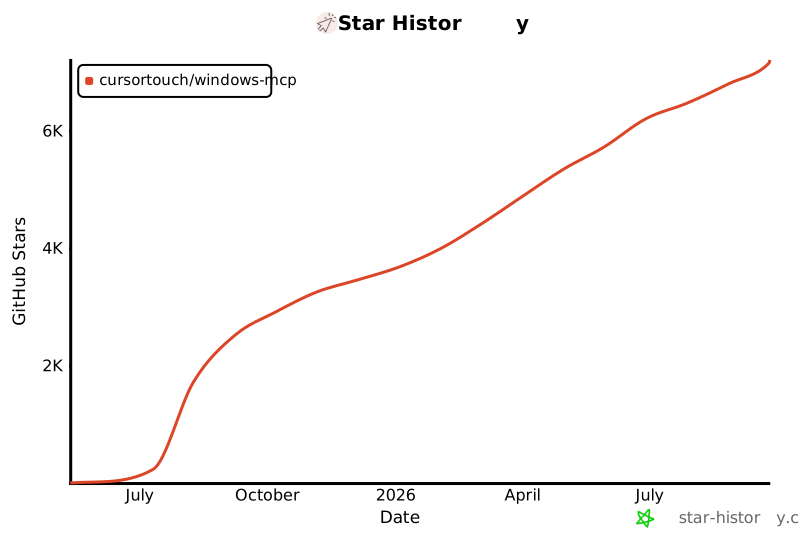](https://www.star-history.com/#CursorTouch/Windows-MCP&Date)
319 |
320 | ## ⚠️Caution
321 |
322 | This MCP interacts directly with your Windows operating system to perform actions. Use with caution and avoid deploying it in environments where such risks cannot be tolerated.
323 |
324 | ## 🔒 Security
325 |
326 | **Important**: Windows-MCP operates with full system access and can perform irreversible operations. Please review our comprehensive security guidelines before deployment.
327 |
328 | For detailed security information, including:
329 | - Tool-specific risk assessments
330 | - Deployment recommendations
331 | - Vulnerability reporting procedures
332 | - Compliance and auditing guidelines
333 |
334 | Please read our [Security Policy](SECURITY.md).
335 |
336 | ## 📊 Telemetry
337 |
338 | Windows-MCP collects usage data to help improve the MCP server. No personal information, no tool arguments, no outputs are tracked.
339 |
340 | To disable telemetry, add the following to your MCP client configuration:
341 |
342 | ```json
343 | {
344 | "mcpServers": {
345 | "windows-mcp": {
346 | "command": "uvx",
347 | "args": [
348 | "windows-mcp"
349 | ],
350 | "env": {
351 | "ANONYMIZED_TELEMETRY": "false"
352 | }
353 | }
354 | }
355 | }
356 | ```
357 |
358 | ## 📝 Limitations
359 |
360 | - Selecting specific sections of the text in a paragraph, as the MCP is relying on a11y tree. (⌛ Working on it.)
361 | - `Type-Tool` is meant for typing text, not programming in IDE because of it types program as a whole in a file. (⌛ Working on it.)
362 | - This MCP server can't be used to play video games 🎮.
363 |
364 | ## 🪪 License
365 |
366 | This project is licensed under the MIT License - see the [LICENSE](LICENSE) file for details.
367 |
368 | ## 🙏 Acknowledgements
369 |
370 | Windows-MCP makes use of several excellent open-source projects that power its Windows automation features:
371 |
372 | - [UIAutomation](https://github.com/yinkaisheng/Python-UIAutomation-for-Windows)
373 |
374 | - [PyAutoGUI](https://github.com/asweigart/pyautogui)
375 |
376 | Huge thanks to the maintainers and contributors of these libraries for their outstanding work and open-source spirit.
377 |
378 | ## 🤝Contributing
379 |
380 | Contributions are welcome! Please see [CONTRIBUTING](CONTRIBUTING) for setup instructions and development guidelines.
381 |
382 | Made with ❤️ by [CursorTouch](https://github.com/CursorTouch)
383 |
384 | ## Citation
385 |
386 | ```bibtex
387 | @software{
388 | author = {CursorTouch},
389 | title = {Windows-MCP: Lightweight open-source project for integrating LLM agents with Windows},
390 | year = {2024},
391 | publisher = {GitHub},
392 | url={https://github.com/CursorTouch/Windows-MCP}
393 | }
394 | ```
395 |
396 |
--------------------------------------------------------------------------------
/src/windows_mcp/__main__.py:
--------------------------------------------------------------------------------
1 | from windows_mcp.analytics import PostHogAnalytics, with_analytics
2 | from live_inspect.watch_cursor import WatchCursor
3 | from windows_mcp.desktop.service import Desktop
4 | from contextlib import asynccontextmanager
5 | from fastmcp.utilities.types import Image
6 | from mcp.types import ToolAnnotations
7 | from typing import Literal, Optional
8 | from humancursor import SystemCursor
9 | from fastmcp import FastMCP, Context
10 | from dotenv import load_dotenv
11 | from textwrap import dedent
12 | import pyautogui as pg
13 | import asyncio
14 | import click
15 | import os
16 |
17 | load_dotenv()
18 |
19 | pg.FAILSAFE=False
20 | pg.PAUSE=1.0
21 |
22 | desktop=Desktop()
23 | cursor=SystemCursor()
24 | watch_cursor=WatchCursor()
25 | windows_version=desktop.get_windows_version()
26 | default_language=desktop.get_default_language()
27 | screen_width,screen_height=desktop.get_resolution()
28 |
29 | instructions=dedent(f'''
30 | Windows MCP server provides tools to interact directly with the {windows_version} desktop,
31 | thus enabling to operate the desktop on the user's behalf.
32 | ''')
33 |
34 | # Initialize analytics at module level to be used in decorators
35 | if os.getenv("ANONYMIZED_TELEMETRY", "true").lower() == "false":
36 | analytics = None
37 | else:
38 | analytics = PostHogAnalytics()
39 |
40 | @asynccontextmanager
41 | async def lifespan(app: FastMCP):
42 | """Runs initialization code before the server starts and cleanup code after it shuts down."""
43 | try:
44 | watch_cursor.start()
45 | await asyncio.sleep(1) # Simulate startup latency
46 | yield
47 | finally:
48 | watch_cursor.stop()
49 | if analytics:
50 | await analytics.close()
51 |
52 | mcp=FastMCP(name='windows-mcp',instructions=instructions,lifespan=lifespan)
53 |
54 | @mcp.tool(
55 | name="App-Tool",
56 | description="Manages Windows applications with three modes: 'launch' (start app by name), 'resize' (set window position/size using window_loc=[x,y] and window_size=[width,height]), 'switch' (activate app by name). Essential for application lifecycle management.",
57 | annotations=ToolAnnotations(
58 | title="App Tool",
59 | readOnlyHint=False,
60 | destructiveHint=True,
61 | idempotentHint=False,
62 | openWorldHint=False
63 | )
64 | )
65 | @with_analytics(analytics, "App-Tool")
66 | def app_tool(mode:Literal['launch','resize','switch'],name:str|None=None,window_loc:list[int]|None=None,window_size:list[int]|None=None, ctx: Context = None):
67 | return desktop.app(mode,name,window_loc,window_size)
68 |
69 | @mcp.tool(
70 | name='Powershell-Tool',
71 | description='Execute PowerShell commands directly on the Windows system and return output with status code. Supports all PowerShell cmdlets, scripts, and system commands. Use for file operations, system queries, and administrative tasks.',
72 | annotations=ToolAnnotations(
73 | title="Powershell Tool",
74 | readOnlyHint=False,
75 | destructiveHint=True,
76 | idempotentHint=False,
77 | openWorldHint=True
78 | )
79 | )
80 | @with_analytics(analytics, "Powershell-Tool")
81 | def powershell_tool(command: str, ctx: Context = None) -> str:
82 | response,status_code=desktop.execute_command(command)
83 | return f'Response: {response}\nStatus Code: {status_code}'
84 |
85 | @mcp.tool(
86 | name='State-Tool',
87 | description='Captures complete desktop state including: system language, focused/opened apps, interactive elements (buttons, text fields, links, menus with coordinates), and scrollable areas. Set use_vision=True to include screenshot. Set use_dom=True for browser content to get web page elements instead of browser UI. Always call this first to understand the current desktop state before taking actions.',
88 | annotations=ToolAnnotations(
89 | title="State Tool",
90 | readOnlyHint=True,
91 | destructiveHint=False,
92 | idempotentHint=True,
93 | openWorldHint=False
94 | )
95 | )
96 | @with_analytics(analytics, "State-Tool")
97 | def state_tool(use_vision:bool=False,use_dom:bool=False, ctx: Context = None):
98 | # Calculate scale factor to cap resolution at 1080p (1920x1080)
99 | max_width, max_height = 1920, 1080
100 | scale_width = max_width / screen_width if screen_width > max_width else 1.0
101 | scale_height = max_height / screen_height if screen_height > max_height else 1.0
102 | scale = min(scale_width, scale_height) # Use the smaller scale to ensure both dimensions fit
103 |
104 | desktop_state=desktop.get_state(use_vision=use_vision,use_dom=use_dom,as_bytes=True,scale=scale)
105 | interactive_elements=desktop_state.tree_state.interactive_elements_to_string()
106 | scrollable_elements=desktop_state.tree_state.scrollable_elements_to_string()
107 | apps=desktop_state.apps_to_string()
108 | active_app=desktop_state.active_app_to_string()
109 | return [dedent(f'''
110 | Default Language of User:
111 | {default_language} with encoding: {desktop.encoding}
112 |
113 | Focused App:
114 | {active_app}
115 |
116 | Opened Apps:
117 | {apps}
118 |
119 | List of Interactive Elements:
120 | {interactive_elements or 'No interactive elements found.'}
121 |
122 | List of Scrollable Elements:
123 | {scrollable_elements or 'No scrollable elements found.'}
124 | ''')]+([Image(data=desktop_state.screenshot,format='png')] if use_vision else [])
125 |
126 | @mcp.tool(
127 | name='Click-Tool',
128 | description='Performs mouse clicks at specified coordinates [x, y]. Supports button types: left (default), right (context menu), middle. Supports clicks: 1 (single), 2 (double), 3 (triple). Always use coordinates from State-Tool output to ensure accuracy.',
129 | annotations=ToolAnnotations(
130 | title="Click Tool",
131 | readOnlyHint=False,
132 | destructiveHint=True,
133 | idempotentHint=False,
134 | openWorldHint=False
135 | )
136 | )
137 | @with_analytics(analytics, "Click-Tool")
138 | def click_tool(loc:list[int],button:Literal['left','right','middle']='left',clicks:int=1, ctx: Context = None)->str:
139 | if len(loc) != 2:
140 | raise ValueError("Location must be a list of exactly 2 integers [x, y]")
141 | x,y=loc[0],loc[1]
142 | desktop.click(loc=loc,button=button,clicks=clicks)
143 | num_clicks={1:'Single',2:'Double',3:'Triple'}
144 | return f'{num_clicks.get(clicks)} {button} clicked at ({x},{y}).'
145 |
146 | @mcp.tool(
147 | name='Type-Tool',
148 | description='Types text at specified coordinates [x, y]. Set clear=True to clear existing text first (Ctrl+A then type), clear=False to append. Set press_enter=True to submit after typing. Always click on the target input field first to ensure focus.',
149 | annotations=ToolAnnotations(
150 | title="Type Tool",
151 | readOnlyHint=False,
152 | destructiveHint=True,
153 | idempotentHint=False,
154 | openWorldHint=False
155 | )
156 | )
157 | @with_analytics(analytics, "Type-Tool")
158 | def type_tool(loc:list[int],text:str,clear:bool=False,press_enter:bool=False, ctx: Context = None)->str:
159 | if len(loc) != 2:
160 | raise ValueError("Location must be a list of exactly 2 integers [x, y]")
161 | x,y=loc[0],loc[1]
162 | desktop.type(loc=loc,text=text,clear=clear,press_enter=press_enter)
163 | return f'Typed {text} at ({x},{y}).'
164 |
165 | @mcp.tool(
166 | name='Scroll-Tool',
167 | description='Scrolls at coordinates [x, y] or current mouse position if loc=None. Type: vertical (default) or horizontal. Direction: up/down for vertical, left/right for horizontal. wheel_times controls amount (1 wheel ≈ 3-5 lines). Use for navigating long content, lists, and web pages.',
168 | annotations=ToolAnnotations(
169 | title="Scroll Tool",
170 | readOnlyHint=False,
171 | destructiveHint=False,
172 | idempotentHint=True,
173 | openWorldHint=False
174 | )
175 | )
176 | @with_analytics(analytics, "Scroll-Tool")
177 | def scroll_tool(loc:list[int]=None,type:Literal['horizontal','vertical']='vertical',direction:Literal['up','down','left','right']='down',wheel_times:int=1, ctx: Context = None)->str:
178 | if loc and len(loc) != 2:
179 | raise ValueError("Location must be a list of exactly 2 integers [x, y]")
180 | response=desktop.scroll(loc,type,direction,wheel_times)
181 | if response:
182 | return response
183 | return f'Scrolled {type} {direction} by {wheel_times} wheel times'+f' at ({loc[0]},{loc[1]}).' if loc else ''
184 |
185 | @mcp.tool(
186 | name='Drag-Tool',
187 | description='Performs drag-and-drop from current mouse position to destination coordinates [x, y]. Click or move to source position first, then call this tool with target coordinates. Use for moving files, reordering items, resizing windows, or any drag-drop UI interactions.',
188 | annotations=ToolAnnotations(
189 | title="Drag Tool",
190 | readOnlyHint=False,
191 | destructiveHint=True,
192 | idempotentHint=False,
193 | openWorldHint=False
194 | )
195 | )
196 | @with_analytics(analytics, "Drag-Tool")
197 | def drag_tool(to_loc:list[int], ctx: Context = None)->str:
198 | if len(to_loc) != 2:
199 | raise ValueError("to_loc must be a list of exactly 2 integers [x, y]")
200 | desktop.drag(to_loc)
201 | x2,y2=to_loc[0],to_loc[1]
202 | return f'Dragged the element to ({x2},{y2}).'
203 |
204 | @mcp.tool(
205 | name='Move-Tool',
206 | description='Moves mouse cursor to coordinates [x, y] without clicking. Use for hovering to reveal tooltips/menus, positioning cursor before drag operations, or triggering hover-based UI changes. Does not interact with elements.',
207 | annotations=ToolAnnotations(
208 | title="Move Tool",
209 | readOnlyHint=False,
210 | destructiveHint=False,
211 | idempotentHint=True,
212 | openWorldHint=False
213 | )
214 | )
215 | @with_analytics(analytics, "Move-Tool")
216 | def move_tool(to_loc:list[int], ctx: Context = None)->str:
217 | if len(to_loc) != 2:
218 | raise ValueError("to_loc must be a list of exactly 2 integers [x, y]")
219 | x,y=to_loc[0],to_loc[1]
220 | desktop.move(to_loc)
221 | return f'Moved the mouse pointer to ({x},{y}).'
222 |
223 | @mcp.tool(
224 | name='Shortcut-Tool',
225 | description='Executes keyboard shortcuts using key combinations separated by +. Examples: "ctrl+c" (copy), "ctrl+v" (paste), "alt+tab" (switch apps), "win+r" (Run dialog), "win" (Start menu), "ctrl+shift+esc" (Task Manager). Use for quick actions and system commands.',
226 | annotations=ToolAnnotations(
227 | title="Shortcut Tool",
228 | readOnlyHint=False,
229 | destructiveHint=True,
230 | idempotentHint=False,
231 | openWorldHint=False
232 | )
233 | )
234 | @with_analytics(analytics, "Shortcut-Tool")
235 | def shortcut_tool(shortcut:str, ctx: Context = None):
236 | desktop.shortcut(shortcut)
237 | return f"Pressed {shortcut}."
238 |
239 | @mcp.tool(
240 | name='Wait-Tool',
241 | description='Pauses execution for specified duration in seconds. Use when waiting for: applications to launch/load, UI animations to complete, page content to render, dialogs to appear, or between rapid actions. Helps ensure UI is ready before next interaction.',
242 | annotations=ToolAnnotations(
243 | title="Wait Tool",
244 | readOnlyHint=True,
245 | destructiveHint=False,
246 | idempotentHint=True,
247 | openWorldHint=False
248 | )
249 | )
250 | @with_analytics(analytics, "Wait-Tool")
251 | def wait_tool(duration:int, ctx: Context = None)->str:
252 | pg.sleep(duration)
253 | return f'Waited for {duration} seconds.'
254 |
255 | @mcp.tool(
256 | name='Scrape-Tool',
257 | description='Fetch content from a URL or the active browser tab. By default (use_dom=False), performs a lightweight HTTP request to the URL and returns markdown content of complete webpage. Note: Some websites may block automated HTTP requests. If this fails, open the page in a browser and retry with use_dom=True to extract visible text from the active tab\'s DOM within the viewport.',
258 | annotations=ToolAnnotations(
259 | title="Scrape Tool",
260 | readOnlyHint=True,
261 | destructiveHint=False,
262 | idempotentHint=True,
263 | openWorldHint=True
264 | )
265 | )
266 | @with_analytics(analytics, "Scrape-Tool")
267 | def scrape_tool(url:str,use_dom:bool=False, ctx: Context = None)->str:
268 | if not use_dom:
269 | content=desktop.scrape(url)
270 | return f'URL:{url}\nContent:\n{content}'
271 |
272 | desktop_state=desktop.get_state(use_vision=False,use_dom=use_dom)
273 | tree_state=desktop_state.tree_state
274 | if not tree_state.dom_info:
275 | return f'No DOM information found. Please open {url} in browser first.'
276 | dom_info=tree_state.dom_info
277 | vertical_scroll_percent=dom_info.vertical_scroll_percent
278 | content='\n'.join([node.text for node in tree_state.dom_informative_nodes])
279 | header_status = "Reached top" if vertical_scroll_percent <= 0 else "Scroll up to see more"
280 | footer_status = "Reached bottom" if vertical_scroll_percent >= 100 else "Scroll down to see more"
281 | return f'URL:{url}\nContent:\n[{header_status}]\n{content}\n[{footer_status}]'
282 |
283 |
284 | @click.command()
285 | @click.option(
286 | "--transport",
287 | help="The transport layer used by the MCP server.",
288 | type=click.Choice(['stdio','sse','streamable-http']),
289 | default='stdio'
290 | )
291 | @click.option(
292 | "--host",
293 | help="Host to bind the SSE/Streamable HTTP server.",
294 | default="localhost",
295 | type=str,
296 | show_default=True
297 | )
298 | @click.option(
299 | "--port",
300 | help="Port to bind the SSE/Streamable HTTP server.",
301 | default=8000,
302 | type=int,
303 | show_default=True
304 | )
305 | def main(transport, host, port):
306 | if transport=='stdio':
307 | mcp.run()
308 | else:
309 | mcp.run(transport=transport,host=host,port=port)
310 |
311 | if __name__ == "__main__":
312 | main()
313 |
--------------------------------------------------------------------------------
/src/windows_mcp/desktop/service.py:
--------------------------------------------------------------------------------
1 | from windows_mcp.desktop.config import BROWSER_NAMES, PROCESS_PER_MONITOR_DPI_AWARE
2 | from windows_mcp.desktop.views import DesktopState, App, Size, Status
3 | from windows_mcp.tree.service import Tree
4 | from locale import getpreferredencoding
5 | from contextlib import contextmanager
6 | from typing import Optional,Literal
7 | from markdownify import markdownify
8 | from fuzzywuzzy import process
9 | from psutil import Process
10 | from time import sleep
11 | from PIL import Image
12 | import win32process
13 | import subprocess
14 | import win32gui
15 | import win32con
16 | import requests
17 | import logging
18 | import base64
19 | import ctypes
20 | import csv
21 | import re
22 | import os
23 | import io
24 |
25 | logger = logging.getLogger(__name__)
26 | logger.setLevel(logging.INFO)
27 | handler = logging.StreamHandler()
28 | formatter = logging.Formatter('[%(levelname)s] %(message)s')
29 | handler.setFormatter(formatter)
30 | logger.addHandler(handler)
31 |
32 | try:
33 | ctypes.windll.shcore.SetProcessDpiAwareness(PROCESS_PER_MONITOR_DPI_AWARE)
34 | except Exception:
35 | ctypes.windll.user32.SetProcessDPIAware()
36 |
37 | import uiautomation as uia
38 | import pyautogui as pg
39 |
40 | pg.FAILSAFE=False
41 | pg.PAUSE=1.0
42 |
43 | class Desktop:
44 | def __init__(self):
45 | self.encoding=getpreferredencoding()
46 | self.tree=Tree(self)
47 | self.desktop_state=None
48 |
49 | def get_resolution(self)->tuple[int,int]:
50 | return pg.size()
51 |
52 | def get_state(self,use_vision:bool=False,use_dom:bool=False,as_bytes:bool=False,scale:float=1.0)->DesktopState:
53 | sleep(0.1)
54 | apps=self.get_apps()
55 | active_app=self.get_active_app()
56 | if active_app is not None and active_app in apps:
57 | apps.remove(active_app)
58 | logger.debug(f"Active app: {active_app}")
59 | logger.debug(f"Apps: {apps}")
60 | tree_state=self.tree.get_state(active_app,apps,use_dom=use_dom)
61 | if use_vision:
62 | screenshot=self.tree.get_annotated_screenshot(tree_state.interactive_nodes,scale=scale)
63 | if as_bytes:
64 | bytes_io=io.BytesIO()
65 | screenshot.save(bytes_io,format='PNG')
66 | screenshot=bytes_io.getvalue()
67 | else:
68 | screenshot=None
69 | self.desktop_state=DesktopState(apps= apps,active_app=active_app,screenshot=screenshot,tree_state=tree_state)
70 | return self.desktop_state
71 |
72 | def get_window_element_from_element(self,element:uia.Control)->uia.Control|None:
73 | while element is not None:
74 | if uia.IsTopLevelWindow(element.NativeWindowHandle):
75 | return element
76 | element = element.GetParentControl()
77 | return None
78 |
79 | def get_active_app(self)->App|None:
80 | try:
81 | handle=uia.GetForegroundWindow()
82 | for app in self.get_apps():
83 | if app.handle!=handle:
84 | continue
85 | return app
86 | except Exception as ex:
87 | logger.error(f"Error in get_active_app: {ex}")
88 | return None
89 |
90 | def get_app_status(self,control:uia.Control)->Status:
91 | if uia.IsIconic(control.NativeWindowHandle):
92 | return Status.MINIMIZED
93 | elif uia.IsZoomed(control.NativeWindowHandle):
94 | return Status.MAXIMIZED
95 | elif uia.IsWindowVisible(control.NativeWindowHandle):
96 | return Status.NORMAL
97 | else:
98 | return Status.HIDDEN
99 |
100 | def get_cursor_location(self)->tuple[int,int]:
101 | position=pg.position()
102 | return (position.x,position.y)
103 |
104 | def get_element_under_cursor(self)->uia.Control:
105 | return uia.ControlFromCursor()
106 |
107 | def get_apps_from_start_menu(self)->dict[str,str]:
108 | command='Get-StartApps | ConvertTo-Csv -NoTypeInformation'
109 | apps_info,_=self.execute_command(command)
110 | reader=csv.DictReader(io.StringIO(apps_info))
111 | return {row.get('Name').lower():row.get('AppID') for row in reader}
112 |
113 | def execute_command(self,command:str)->tuple[str,int]:
114 | try:
115 | encoded = base64.b64encode(command.encode("utf-16le")).decode("ascii")
116 | result = subprocess.run(
117 | ['powershell', '-NoProfile', '-EncodedCommand', encoded],
118 | capture_output=True,
119 | errors='ignore',
120 | timeout=25,
121 | cwd=os.path.expanduser(path='~')
122 | )
123 | stdout=result.stdout
124 | stderr=result.stderr
125 | return (stdout or stderr,result.returncode)
126 | except subprocess.TimeoutExpired:
127 | return ('Command execution timed out', 1)
128 | except Exception as e:
129 | return ('Command execution failed', 1)
130 |
131 | def is_app_browser(self,node:uia.Control):
132 | process=Process(node.ProcessId)
133 | return process.name() in BROWSER_NAMES
134 |
135 | def get_default_language(self)->str:
136 | command="Get-Culture | Select-Object Name,DisplayName | ConvertTo-Csv -NoTypeInformation"
137 | response,_=self.execute_command(command)
138 | reader=csv.DictReader(io.StringIO(response))
139 | return "".join([row.get('DisplayName') for row in reader])
140 |
141 | def resize_app(self,size:tuple[int,int]=None,loc:tuple[int,int]=None)->tuple[str,int]:
142 | active_app=self.desktop_state.active_app
143 | if active_app is None:
144 | return "No active app found",1
145 | if active_app.status==Status.MINIMIZED:
146 | return f"{active_app.name} is minimized",1
147 | elif active_app.status==Status.MAXIMIZED:
148 | return f"{active_app.name} is maximized",1
149 | else:
150 | app_control=uia.ControlFromHandle(active_app.handle)
151 | if loc is None:
152 | x=app_control.BoundingRectangle.left
153 | y=app_control.BoundingRectangle.top
154 | loc=(x,y)
155 | if size is None:
156 | width=app_control.BoundingRectangle.width()
157 | height=app_control.BoundingRectangle.height()
158 | size=(width,height)
159 | x,y=loc
160 | width,height=size
161 | app_control.MoveWindow(x,y,width,height)
162 | return (f'{active_app.name} resized to {width}x{height} at {x},{y}.',0)
163 |
164 | def is_app_running(self,name:str)->bool:
165 | apps={app.name:app for app in self.get_apps()}
166 | return process.extractOne(name,list(apps.keys()),score_cutoff=60) is not None
167 |
168 | def app(self,mode:Literal['launch','switch','resize'],name:Optional[str]=None,loc:Optional[tuple[int,int]]=None,size:Optional[tuple[int,int]]=None):
169 | match mode:
170 | case 'launch':
171 | response,status=self.launch_app(name)
172 | sleep(1.25)
173 | if status!=0:
174 | return response
175 | consecutive_waits=10
176 | for _ in range(consecutive_waits):
177 | if not self.is_app_running(name):
178 | sleep(1.25)
179 | else:
180 | return f'{name.title()} launched.'
181 | return f'Launching {name.title()} wait for it to come load.'
182 | case 'resize':
183 | response,status=self.resize_app(size=size,loc=loc)
184 | if status!=0:
185 | return response
186 | else:
187 | return response
188 | case 'switch':
189 | response,status=self.switch_app(name)
190 | if status!=0:
191 | return response
192 | else:
193 | return response
194 |
195 | def launch_app(self,name:str)->tuple[str,int]:
196 | apps_map=self.get_apps_from_start_menu()
197 | matched_app=process.extractOne(name,apps_map.keys(),score_cutoff=70)
198 | if matched_app is None:
199 | return (f'{name.title()} not found in start menu.',1)
200 | app_name,_=matched_app
201 | appid=apps_map.get(app_name)
202 | if appid is None:
203 | return (f'{name.title()} not found in start menu.',1)
204 | if appid.endswith('.exe'):
205 | command=f"Start-Process '{appid}'"
206 | else:
207 | command=f"Start-Process shell:AppsFolder\\{appid}"
208 | response,status=self.execute_command(command)
209 | return response,status
210 |
211 | def switch_app(self,name:str):
212 | apps={app.name:app for app in [self.desktop_state.active_app]+self.desktop_state.apps if app is not None}
213 | matched_app:Optional[tuple[str,float]]=process.extractOne(name,list(apps.keys()),score_cutoff=70)
214 | if matched_app is None:
215 | return (f'Application {name.title()} not found.',1)
216 | app_name,_=matched_app
217 | app=apps.get(app_name)
218 | target_handle=app.handle
219 |
220 | if uia.IsIconic(target_handle):
221 | uia.ShowWindow(target_handle, win32con.SW_RESTORE)
222 | content=f'{app_name.title()} restored from Minimized state.'
223 | else:
224 | self.bring_window_to_top(target_handle)
225 | content=f'Switched to {app_name.title()} window.'
226 | return content,0
227 |
228 | def bring_window_to_top(self,target_handle:int):
229 | foreground_handle=win32gui.GetForegroundWindow()
230 | foreground_thread,_=win32process.GetWindowThreadProcessId(foreground_handle)
231 | target_thread,_=win32process.GetWindowThreadProcessId(target_handle)
232 | try:
233 | ctypes.windll.user32.AllowSetForegroundWindow(-1)
234 | win32process.AttachThreadInput(foreground_thread,target_thread,True)
235 | win32gui.SetForegroundWindow(target_handle)
236 | win32gui.BringWindowToTop(target_handle)
237 | except Exception as e:
238 | logger.error(f'Failed to bring window to top: {e}')
239 | finally:
240 | win32process.AttachThreadInput(foreground_thread,target_thread,False)
241 |
242 | def get_element_handle_from_label(self,label:int)->uia.Control:
243 | tree_state=self.desktop_state.tree_state
244 | element_node=tree_state.interactive_nodes[label]
245 | xpath=element_node.xpath
246 | element_handle=self.get_element_from_xpath(xpath)
247 | return element_handle
248 |
249 | def get_coordinates_from_label(self,label:int)->tuple[int,int]:
250 | element_handle=self.get_element_handle_from_label(label)
251 | bounding_rectangle=element_handle.BoundingRectangle
252 | return bounding_rectangle.xcenter(),bounding_rectangle.ycenter()
253 |
254 | def click(self,loc:tuple[int,int],button:str='left',clicks:int=2):
255 | x,y=loc
256 | pg.click(x,y,button=button,clicks=clicks,duration=0.1)
257 |
258 | def type(self,loc:tuple[int,int],text:str,caret_position:Literal['start','end','none']='none',clear:Literal['true','false']='false',press_enter:Literal['true','false']='false'):
259 | x,y=loc
260 | pg.leftClick(x,y)
261 | if caret_position == 'start':
262 | pg.press('home')
263 | elif caret_position == 'end':
264 | pg.press('end')
265 | else:
266 | pass
267 | if clear=='true':
268 | pg.sleep(0.5)
269 | pg.hotkey('ctrl','a')
270 | pg.press('backspace')
271 | pg.typewrite(text,interval=0.02)
272 | if press_enter=='true':
273 | pg.press('enter')
274 |
275 | def scroll(self,loc:tuple[int,int]=None,type:Literal['horizontal','vertical']='vertical',direction:Literal['up','down','left','right']='down',wheel_times:int=1)->str|None:
276 | if loc:
277 | self.move(loc)
278 | match type:
279 | case 'vertical':
280 | match direction:
281 | case 'up':
282 | uia.WheelUp(wheel_times)
283 | case 'down':
284 | uia.WheelDown(wheel_times)
285 | case _:
286 | return 'Invalid direction. Use "up" or "down".'
287 | case 'horizontal':
288 | match direction:
289 | case 'left':
290 | pg.keyDown('Shift')
291 | pg.sleep(0.05)
292 | uia.WheelUp(wheel_times)
293 | pg.sleep(0.05)
294 | pg.keyUp('Shift')
295 | case 'right':
296 | pg.keyDown('Shift')
297 | pg.sleep(0.05)
298 | uia.WheelDown(wheel_times)
299 | pg.sleep(0.05)
300 | pg.keyUp('Shift')
301 | case _:
302 | return 'Invalid direction. Use "left" or "right".'
303 | case _:
304 | return 'Invalid type. Use "horizontal" or "vertical".'
305 | return None
306 |
307 | def drag(self,loc:tuple[int,int]):
308 | x,y=loc
309 | pg.sleep(0.5)
310 | pg.dragTo(x,y,duration=0.6)
311 |
312 | def move(self,loc:tuple[int,int]):
313 | x,y=loc
314 | pg.moveTo(x,y,duration=0.1)
315 |
316 | def shortcut(self,shortcut:str):
317 | shortcut=shortcut.split('+')
318 | if len(shortcut)>1:
319 | pg.hotkey(*shortcut)
320 | else:
321 | pg.press(''.join(shortcut))
322 |
323 | def multi_select(self,press_ctrl:Literal['true','false']='false',elements:list[tuple[int,int]|int]=[]):
324 | if press_ctrl=='true':
325 | pg.keyDown('ctrl')
326 | for element in elements:
327 | x,y=element
328 | pg.click(x,y,duration=0.2)
329 | pg.sleep(0.5)
330 | pg.keyUp('ctrl')
331 |
332 | def multi_edit(self,elements:list[tuple[int,int,str]|tuple[int,str]]):
333 | for element in elements:
334 | x,y,text=element
335 | self.type((x,y),text=text,clear='true')
336 |
337 | def scrape(self,url:str)->str:
338 | response=requests.get(url,timeout=10)
339 | html=response.text
340 | content=markdownify(html=html)
341 | return content
342 |
343 | def get_app_size(self,control:uia.Control):
344 | window=control.BoundingRectangle
345 | if window.isempty():
346 | return Size(width=0,height=0)
347 | return Size(width=window.width(),height=window.height())
348 |
349 | def is_app_visible(self,app)->bool:
350 | is_minimized=self.get_app_status(app)!=Status.MINIMIZED
351 | size=self.get_app_size(app)
352 | area=size.width*size.height
353 | is_overlay=self.is_overlay_app(app)
354 | return not is_overlay and is_minimized and area>10
355 |
356 | def is_overlay_app(self,element:uia.Control) -> bool:
357 | no_children = len(element.GetChildren()) == 0
358 | is_name = "Overlay" in element.Name.strip()
359 | return no_children or is_name
360 |
361 | def get_apps(self) -> list[App]:
362 | try:
363 | desktop = uia.GetRootControl() # Get the desktop control
364 | children = desktop.GetChildren()
365 | apps = []
366 | for depth, child in enumerate(children):
367 | if isinstance(child,(uia.WindowControl,uia.PaneControl)):
368 | window_pattern=child.GetPattern(uia.PatternId.WindowPattern)
369 | if (window_pattern is None):
370 | continue
371 | if window_pattern.CanMinimize and window_pattern.CanMaximize:
372 | status = self.get_app_status(child)
373 | size=self.get_app_size(child)
374 | apps.append(App(**{
375 | "name":child.Name,
376 | "depth":depth,
377 | "status":status,
378 | "size":size,
379 | "handle":child.NativeWindowHandle,
380 | "process_id":child.ProcessId
381 | }))
382 | except Exception as ex:
383 | logger.error(f"Error in get_apps: {ex}")
384 | apps = []
385 | return apps
386 |
387 | def get_xpath_from_element(self,element:uia.Control):
388 | current=element
389 | if current is None:
390 | return ""
391 | path_parts=[]
392 | while current is not None:
393 | parent=current.GetParentControl()
394 | if parent is None:
395 | # we are at the root node
396 | path_parts.append(f'{current.ControlTypeName}')
397 | break
398 | children=parent.GetChildren()
399 | same_type_children=["-".join(map(lambda x:str(x),child.GetRuntimeId())) for child in children if child.ControlType==current.ControlType]
400 | index=same_type_children.index("-".join(map(lambda x:str(x),current.GetRuntimeId())))
401 | if same_type_children:
402 | path_parts.append(f'{current.ControlTypeName}[{index+1}]')
403 | else:
404 | path_parts.append(f'{current.ControlTypeName}')
405 | current=parent
406 | path_parts.reverse()
407 | xpath="/".join(path_parts)
408 | return xpath
409 |
410 | def get_element_from_xpath(self,xpath:str)->uia.Control:
411 | pattern = re.compile(r'(\w+)(?:\[(\d+)\])?')
412 | parts=xpath.split("/")
413 | root=uia.GetRootControl()
414 | element=root
415 | for part in parts[1:]:
416 | match=pattern.fullmatch(part)
417 | if match is None:
418 | continue
419 | control_type, index=match.groups()
420 | index=int(index) if index else None
421 | children=element.GetChildren()
422 | same_type_children=list(filter(lambda x:x.ControlTypeName==control_type,children))
423 | if index:
424 | element=same_type_children[index-1]
425 | else:
426 | element=same_type_children[0]
427 | return element
428 |
429 | def get_windows_version(self)->str:
430 | response,status=self.execute_command("(Get-CimInstance Win32_OperatingSystem).Caption")
431 | if status==0:
432 | return response.strip()
433 | return "Windows"
434 |
435 | def get_user_account_type(self)->str:
436 | response,status=self.execute_command("(Get-LocalUser -Name $env:USERNAME).PrincipalSource")
437 | return "Local Account" if response.strip()=='Local' else "Microsoft Account" if status==0 else "Local Account"
438 |
439 | def get_dpi_scaling(self):
440 | user32 = ctypes.windll.user32
441 | dpi = user32.GetDpiForSystem()
442 | return dpi / 96.0
443 |
444 | def get_screen_size(self)->Size:
445 | width, height = uia.GetScreenSize()
446 | return Size(width=width,height=height)
447 |
448 | def get_screenshot(self)->Image.Image:
449 | return pg.screenshot()
450 |
451 | @contextmanager
452 | def auto_minimize(self):
453 | try:
454 | handle = uia.GetForegroundWindow()
455 | uia.ShowWindow(handle, win32con.SW_MINIMIZE)
456 | yield
457 | finally:
458 | uia.ShowWindow(handle, win32con.SW_RESTORE)
--------------------------------------------------------------------------------
/src/windows_mcp/tree/service.py:
--------------------------------------------------------------------------------
1 | from windows_mcp.tree.config import INTERACTIVE_CONTROL_TYPE_NAMES,DOCUMENT_CONTROL_TYPE_NAMES,INFORMATIVE_CONTROL_TYPE_NAMES, DEFAULT_ACTIONS, THREAD_MAX_RETRIES
2 | from windows_mcp.tree.views import TreeElementNode, ScrollElementNode, TextElementNode, Center, BoundingBox, TreeState, DOMInfo
3 | from uiautomation import Control,ImageControl,ScrollPattern,WindowControl,Rect,GetRootControl,PatternId
4 | from concurrent.futures import ThreadPoolExecutor, as_completed
5 | from windows_mcp.tree.utils import random_point_within_bounding_box
6 | from PIL import Image, ImageFont, ImageDraw
7 | from typing import TYPE_CHECKING,Optional
8 | from windows_mcp.desktop.views import App
9 | from time import sleep
10 | import logging
11 | import random
12 |
13 | logger = logging.getLogger(__name__)
14 | logger.setLevel(logging.INFO)
15 | handler = logging.StreamHandler()
16 | formatter = logging.Formatter('[%(levelname)s] %(message)s')
17 | handler.setFormatter(formatter)
18 | logger.addHandler(handler)
19 |
20 | if TYPE_CHECKING:
21 | from windows_mcp.desktop.service import Desktop
22 |
23 | class Tree:
24 | def __init__(self,desktop:'Desktop'):
25 | self.desktop=desktop
26 | self.screen_size=self.desktop.get_screen_size()
27 | self.dom_info:Optional[DOMInfo]=None
28 | self.dom_bounding_box:BoundingBox=None
29 | self.screen_box=BoundingBox(
30 | top=0, left=0, bottom=self.screen_size.height, right=self.screen_size.width,
31 | width=self.screen_size.width, height=self.screen_size.height
32 | )
33 |
34 | def get_state(self,active_app:App,other_apps:list[App],use_dom:bool=False)->TreeState:
35 | root=GetRootControl()
36 | other_apps_handle=set(map(lambda other_app: other_app.handle,other_apps))
37 | apps=list(filter(lambda app:app.NativeWindowHandle not in other_apps_handle,root.GetChildren()))
38 | del other_apps_handle
39 | if active_app:
40 | apps=list(filter(lambda app:app.ClassName!='Progman',apps))
41 | interactive_nodes,scrollable_nodes,dom_informative_nodes=self.get_appwise_nodes(apps=apps,use_dom=use_dom)
42 | return TreeState(dom_info=self.dom_info,interactive_nodes=interactive_nodes,scrollable_nodes=scrollable_nodes,dom_informative_nodes=dom_informative_nodes)
43 |
44 | def get_appwise_nodes(self,apps:list[Control],use_dom:bool=False)-> tuple[list[TreeElementNode],list[ScrollElementNode],list[TextElementNode]]:
45 | interactive_nodes, scrollable_nodes,dom_informative_nodes = [], [], []
46 | with ThreadPoolExecutor() as executor:
47 | retry_counts = {app: 0 for app in apps}
48 | future_to_app = {
49 | executor.submit(
50 | self.get_nodes, app,
51 | self.desktop.is_app_browser(app),
52 | use_dom
53 | ): app
54 | for app in apps
55 | }
56 | while future_to_app: # keep running until no pending futures
57 | for future in as_completed(list(future_to_app)):
58 | app = future_to_app.pop(future) # remove completed future
59 | try:
60 | result = future.result()
61 | if result:
62 | element_nodes, scroll_nodes,informative_nodes = result
63 | interactive_nodes.extend(element_nodes)
64 | scrollable_nodes.extend(scroll_nodes)
65 | dom_informative_nodes.extend(informative_nodes)
66 | except Exception as e:
67 | retry_counts[app] += 1
68 | logger.debug(f"Error in processing node {app.Name}, retry attempt {retry_counts[app]}\nError: {e}")
69 | if retry_counts[app] < THREAD_MAX_RETRIES:
70 | logger.debug(f"Retrying {app.Name} for the {retry_counts[app]}th time")
71 | new_future = executor.submit(self.get_nodes, app, self.desktop.is_app_browser(app),use_dom)
72 | future_to_app[new_future] = app
73 | else:
74 | logger.error(f"Task failed completely for {app.Name} after {THREAD_MAX_RETRIES} retries")
75 | return interactive_nodes,scrollable_nodes,dom_informative_nodes
76 |
77 | def iou_bounding_box(self,window_box: Rect,element_box: Rect,) -> BoundingBox:
78 | # Step 1: Intersection of element and window (existing logic)
79 | intersection_left = max(window_box.left, element_box.left)
80 | intersection_top = max(window_box.top, element_box.top)
81 | intersection_right = min(window_box.right, element_box.right)
82 | intersection_bottom = min(window_box.bottom, element_box.bottom)
83 |
84 | # Step 2: Clamp to screen boundaries (new addition)
85 | intersection_left = max(self.screen_box.left, intersection_left)
86 | intersection_top = max(self.screen_box.top, intersection_top)
87 | intersection_right = min(self.screen_box.right, intersection_right)
88 | intersection_bottom = min(self.screen_box.bottom, intersection_bottom)
89 |
90 | # Step 3: Validate intersection
91 | if (intersection_right > intersection_left and intersection_bottom > intersection_top):
92 | bounding_box = BoundingBox(
93 | left=intersection_left,
94 | top=intersection_top,
95 | right=intersection_right,
96 | bottom=intersection_bottom,
97 | width=intersection_right - intersection_left,
98 | height=intersection_bottom - intersection_top
99 | )
100 | else:
101 | # No valid visible intersection (either outside window or screen)
102 | bounding_box = BoundingBox(
103 | left=0,
104 | top=0,
105 | right=0,
106 | bottom=0,
107 | width=0,
108 | height=0
109 | )
110 | return bounding_box
111 |
112 | def get_nodes(self, node: Control, is_browser:bool=False,use_dom:bool=False) -> tuple[list[TreeElementNode],list[ScrollElementNode]]:
113 | window_bounding_box=node.BoundingRectangle
114 |
115 | def is_element_visible(node:Control,threshold:int=0):
116 | is_control=node.IsControlElement
117 | box=node.BoundingRectangle
118 | if box.isempty():
119 | return False
120 | width=box.width()
121 | height=box.height()
122 | area=width*height
123 | is_offscreen=(not node.IsOffscreen) or node.ControlTypeName in ['EditControl']
124 | return area > threshold and is_offscreen and is_control
125 |
126 | def is_element_enabled(node:Control):
127 | try:
128 | return node.IsEnabled
129 | except Exception:
130 | return False
131 |
132 | def is_default_action(node:Control):
133 | legacy_pattern=node.GetLegacyIAccessiblePattern()
134 | default_action=legacy_pattern.DefaultAction.title()
135 | if default_action in DEFAULT_ACTIONS:
136 | return True
137 | return False
138 |
139 | def is_element_image(node:Control):
140 | if isinstance(node,ImageControl):
141 | if node.LocalizedControlType=='graphic' or not node.IsKeyboardFocusable:
142 | return True
143 | return False
144 |
145 | def is_element_text(node:Control):
146 | try:
147 | if node.ControlTypeName in INFORMATIVE_CONTROL_TYPE_NAMES:
148 | if is_element_visible(node) and is_element_enabled(node) and not is_element_image(node):
149 | return True
150 | except Exception:
151 | return False
152 | return False
153 |
154 | def is_window_modal(node:WindowControl):
155 | try:
156 | window_pattern=node.GetWindowPattern()
157 | return window_pattern.IsModal
158 | except Exception:
159 | return False
160 |
161 | def is_keyboard_focusable(node:Control):
162 | try:
163 | if node.ControlTypeName in set(['EditControl','ButtonControl','CheckBoxControl','RadioButtonControl','TabItemControl']):
164 | return True
165 | return node.IsKeyboardFocusable
166 | except Exception:
167 | return False
168 |
169 | def element_has_child_element(node:Control,control_type:str,child_control_type:str):
170 | if node.LocalizedControlType==control_type:
171 | first_child=node.GetFirstChildControl()
172 | if first_child is None:
173 | return False
174 | return first_child.LocalizedControlType==child_control_type
175 |
176 | def group_has_no_name(node:Control):
177 | try:
178 | if node.ControlTypeName=='GroupControl':
179 | if not node.Name.strip():
180 | return True
181 | return False
182 | except Exception:
183 | return False
184 |
185 | def is_element_scrollable(node:Control):
186 | try:
187 | if (node.ControlTypeName in INTERACTIVE_CONTROL_TYPE_NAMES|INFORMATIVE_CONTROL_TYPE_NAMES) or node.IsOffscreen:
188 | return False
189 | scroll_pattern:ScrollPattern=node.GetPattern(PatternId.ScrollPattern)
190 | if scroll_pattern is None:
191 | return False
192 | return scroll_pattern.VerticallyScrollable
193 | except Exception:
194 | return False
195 |
196 | def is_element_interactive(node:Control):
197 | try:
198 | if is_browser and node.ControlTypeName in set(['DataItemControl','ListItemControl']) and not is_keyboard_focusable(node):
199 | return False
200 | elif not is_browser and node.ControlTypeName=="ImageControl" and is_keyboard_focusable(node):
201 | return True
202 | elif node.ControlTypeName in INTERACTIVE_CONTROL_TYPE_NAMES|DOCUMENT_CONTROL_TYPE_NAMES:
203 | return is_element_visible(node) and is_element_enabled(node) and (not is_element_image(node) or is_keyboard_focusable(node))
204 | elif node.ControlTypeName=='GroupControl':
205 | if is_browser:
206 | return is_element_visible(node) and is_element_enabled(node) and (is_default_action(node) or is_keyboard_focusable(node))
207 | # else:
208 | # return is_element_visible and is_element_enabled(node) and is_default_action(node)
209 | except Exception:
210 | return False
211 | return False
212 |
213 | def dom_correction(node:Control):
214 | if element_has_child_element(node,'list item','link') or element_has_child_element(node,'item','link'):
215 | dom_interactive_nodes.pop()
216 | return None
217 | elif node.ControlTypeName=='GroupControl':
218 | dom_interactive_nodes.pop()
219 | if is_keyboard_focusable(node):
220 | child=node
221 | try:
222 | while child.GetFirstChildControl() is not None:
223 | if child.ControlTypeName in INTERACTIVE_CONTROL_TYPE_NAMES:
224 | return None
225 | child=child.GetFirstChildControl()
226 | except Exception:
227 | return None
228 | if child.ControlTypeName!='TextControl':
229 | return None
230 | legacy_pattern=node.GetLegacyIAccessiblePattern()
231 | value=legacy_pattern.Value
232 | element_bounding_box = node.BoundingRectangle
233 | bounding_box=self.iou_bounding_box(self.dom_bounding_box,element_bounding_box)
234 | center = bounding_box.get_center()
235 | is_focused=node.HasKeyboardFocus
236 | dom_interactive_nodes.append(TreeElementNode(**{
237 | 'name':child.Name.strip(),
238 | 'control_type':node.LocalizedControlType,
239 | 'value':value,
240 | 'shortcut':node.AcceleratorKey,
241 | 'bounding_box':bounding_box,
242 | 'xpath':'',
243 | 'center':center,
244 | 'app_name':app_name,
245 | 'is_focused':is_focused
246 | }))
247 | elif element_has_child_element(node,'link','heading'):
248 | dom_interactive_nodes.pop()
249 | node=node.GetFirstChildControl()
250 | control_type='link'
251 | legacy_pattern=node.GetLegacyIAccessiblePattern()
252 | value=legacy_pattern.Value
253 | element_bounding_box = node.BoundingRectangle
254 | bounding_box=self.iou_bounding_box(self.dom_bounding_box,element_bounding_box)
255 | center = bounding_box.get_center()
256 | is_focused=node.HasKeyboardFocus
257 | dom_interactive_nodes.append(TreeElementNode(**{
258 | 'name':node.Name.strip(),
259 | 'control_type':control_type,
260 | 'value':node.Name.strip(),
261 | 'shortcut':node.AcceleratorKey,
262 | 'bounding_box':bounding_box,
263 | 'xpath':'',
264 | 'center':center,
265 | 'app_name':app_name,
266 | 'is_focused':is_focused
267 | }))
268 |
269 | def tree_traversal(node: Control,is_dom:bool=False,is_dialog:bool=False):
270 | # Checks to skip the nodes that are not interactive
271 | if node.IsOffscreen and (node.ControlTypeName not in set(["GroupControl","EditControl","TitleBarControl"])) and node.ClassName not in set(["Popup","Windows.UI.Core.CoreComponentInputSource"]):
272 | return None
273 |
274 | if is_element_scrollable(node):
275 | scroll_pattern:ScrollPattern=node.GetPattern(PatternId.ScrollPattern)
276 | box = node.BoundingRectangle
277 | # Get the center
278 | x,y=random_point_within_bounding_box(node=node,scale_factor=0.8)
279 | center = Center(x=x,y=y)
280 | scrollable_nodes.append(ScrollElementNode(**{
281 | 'name':node.Name.strip() or node.AutomationId or node.LocalizedControlType.capitalize() or "''",
282 | 'app_name':app_name,
283 | 'control_type':node.LocalizedControlType.title(),
284 | 'bounding_box':BoundingBox(**{
285 | 'left':box.left,
286 | 'top':box.top,
287 | 'right':box.right,
288 | 'bottom':box.bottom,
289 | 'width':box.width(),
290 | 'height':box.height()
291 | }),
292 | 'center':center,
293 | 'xpath':'',
294 | 'horizontal_scrollable':scroll_pattern.HorizontallyScrollable,
295 | 'horizontal_scroll_percent':scroll_pattern.HorizontalScrollPercent if scroll_pattern.HorizontallyScrollable else 0,
296 | 'vertical_scrollable':scroll_pattern.VerticallyScrollable,
297 | 'vertical_scroll_percent':scroll_pattern.VerticalScrollPercent if scroll_pattern.VerticallyScrollable else 0,
298 | 'is_focused':node.HasKeyboardFocus
299 | }))
300 |
301 | if is_element_interactive(node):
302 | legacy_pattern=node.GetLegacyIAccessiblePattern()
303 | value=legacy_pattern.Value.strip() if legacy_pattern.Value is not None else ""
304 | is_focused=node.HasKeyboardFocus
305 | name=node.Name.strip()
306 | element_bounding_box = node.BoundingRectangle
307 | if is_browser and is_dom:
308 | bounding_box=self.iou_bounding_box(self.dom_bounding_box,element_bounding_box)
309 | center = bounding_box.get_center()
310 | tree_node=TreeElementNode(**{
311 | 'name':name,
312 | 'control_type':node.LocalizedControlType.title(),
313 | 'value':value,
314 | 'shortcut':node.AcceleratorKey,
315 | 'bounding_box':bounding_box,
316 | 'center':center,
317 | 'xpath':'',
318 | 'app_name':app_name,
319 | 'is_focused':is_focused
320 | })
321 | dom_interactive_nodes.append(tree_node)
322 | dom_correction(node=node)
323 | else:
324 | bounding_box=self.iou_bounding_box(window_bounding_box,element_bounding_box)
325 | center = bounding_box.get_center()
326 | tree_node=TreeElementNode(**{
327 | 'name':name,
328 | 'control_type':node.LocalizedControlType.title(),
329 | 'value':value,
330 | 'shortcut':node.AcceleratorKey,
331 | 'bounding_box':bounding_box,
332 | 'center':center,
333 | 'xpath':'',
334 | 'app_name':app_name,
335 | 'is_focused':is_focused
336 | })
337 | interactive_nodes.append(tree_node)
338 | elif is_element_text(node):
339 | dom_informative_nodes.append(TextElementNode(
340 | text=node.Name.strip(),
341 | ))
342 |
343 | children=node.GetChildren()
344 |
345 | # Recursively traverse the tree the right to left for normal apps and for DOM traverse from left to right
346 | for child in (children if is_dom else children[::-1]):
347 | # Incrementally building the xpath
348 |
349 | # Check if the child is a DOM element
350 | if is_browser and child.AutomationId == "RootWebArea":
351 | bounding_box=child.BoundingRectangle
352 | self.dom_bounding_box=BoundingBox(left=bounding_box.left,top=bounding_box.top,
353 | right=bounding_box.right,bottom=bounding_box.bottom,width=bounding_box.width(),
354 | height=bounding_box.height())
355 | scroll_pattern=child.GetPattern(PatternId.ScrollPattern)
356 | self.dom_info=DOMInfo(
357 | horizontal_scrollable=scroll_pattern.HorizontallyScrollable,
358 | horizontal_scroll_percent=scroll_pattern.HorizontalScrollPercent if scroll_pattern.HorizontallyScrollable else 0,
359 | vertical_scrollable=scroll_pattern.VerticallyScrollable,
360 | vertical_scroll_percent=scroll_pattern.VerticalScrollPercent if scroll_pattern.VerticallyScrollable else 0
361 | )
362 | # enter DOM subtree
363 | tree_traversal(child, is_dom=True, is_dialog=is_dialog)
364 | # Check if the child is a dialog
365 | elif isinstance(child,WindowControl):
366 | if not child.IsOffscreen:
367 | if is_dom:
368 | bounding_box=child.BoundingRectangle
369 | if bounding_box.width() > 0.8*self.dom_bounding_box.width:
370 | # Because this window element covers the majority of the screen
371 | dom_interactive_nodes.clear()
372 | else:
373 | if is_window_modal(child):
374 | # Because this window element is modal
375 | interactive_nodes.clear()
376 | # enter dialog subtree
377 | tree_traversal(child, is_dom=is_dom, is_dialog=True)
378 | else:
379 | # normal non-dialog children
380 | tree_traversal(child, is_dom=is_dom, is_dialog=is_dialog)
381 |
382 | interactive_nodes, dom_interactive_nodes, scrollable_nodes, dom_informative_nodes = [], [], [], []
383 | app_name=node.Name.strip()
384 | match node.ClassName:
385 | case "Progman":
386 | app_name="Desktop"
387 | case 'Shell_TrayWnd'|'Shell_SecondaryTrayWnd':
388 | app_name="Taskbar"
389 | case 'Microsoft.UI.Content.PopupWindowSiteBridge':
390 | app_name="Context Menu"
391 | case _:
392 | pass
393 | tree_traversal(node,is_dom=False,is_dialog=False)
394 |
395 | logger.debug(f'Interactive nodes:{len(interactive_nodes)}')
396 | logger.debug(f'DOM interactive nodes:{len(dom_interactive_nodes)}')
397 | logger.debug(f'Scrollable nodes:{len(scrollable_nodes)}')
398 |
399 | if use_dom:
400 | if is_browser:
401 | return (dom_interactive_nodes,scrollable_nodes,dom_informative_nodes)
402 | else:
403 | return ([],[],[])
404 | else:
405 | return (interactive_nodes+dom_interactive_nodes,scrollable_nodes,dom_informative_nodes)
406 |
407 | def get_annotated_screenshot(self, nodes: list[TreeElementNode],scale:float=1.0) -> Image.Image:
408 | screenshot = self.desktop.get_screenshot()
409 | sleep(0.10)
410 |
411 | original_width = screenshot.width
412 | original_height = screenshot.height
413 |
414 | scaled_width = int(original_width * scale)
415 | scaled_height = int(original_height * scale)
416 | screenshot = screenshot.resize((scaled_width, scaled_height), Image.Resampling.LANCZOS)
417 |
418 | # Add padding
419 | padding = 5
420 | width = int(screenshot.width + (1.5 * padding))
421 | height = int(screenshot.height + (1.5 * padding))
422 | padded_screenshot = Image.new("RGB", (width, height), color=(255, 255, 255))
423 | padded_screenshot.paste(screenshot, (padding, padding))
424 |
425 | draw = ImageDraw.Draw(padded_screenshot)
426 | font_size = 12
427 | try:
428 | font = ImageFont.truetype('arial.ttf', font_size)
429 | except IOError:
430 | font = ImageFont.load_default()
431 |
432 | def get_random_color():
433 | return "#{:06x}".format(random.randint(0, 0xFFFFFF))
434 |
435 | def draw_annotation(label, node: TreeElementNode):
436 | box = node.bounding_box
437 | color = get_random_color()
438 |
439 | # Scale and pad the bounding box coordinates
440 | adjusted_box = (
441 | int(box.left * scale) + padding,
442 | int(box.top * scale) + padding,
443 | int(box.right * scale) + padding,
444 | int(box.bottom * scale) + padding
445 | )
446 | # Draw bounding box
447 | draw.rectangle(adjusted_box, outline=color, width=2)
448 |
449 | # Label dimensions
450 | label_width = draw.textlength(str(label), font=font)
451 | label_height = font_size
452 | left, top, right, bottom = adjusted_box
453 |
454 | # Label position above bounding box
455 | label_x1 = right - label_width
456 | label_y1 = top - label_height - 4
457 | label_x2 = label_x1 + label_width
458 | label_y2 = label_y1 + label_height + 4
459 |
460 | # Draw label background and text
461 | draw.rectangle([(label_x1, label_y1), (label_x2, label_y2)], fill=color)
462 | draw.text((label_x1 + 2, label_y1 + 2), str(label), fill=(255, 255, 255), font=font)
463 |
464 | # Draw annotations in parallel
465 | with ThreadPoolExecutor() as executor:
466 | executor.map(draw_annotation, range(len(nodes)), nodes)
467 | return padded_screenshot
--------------------------------------------------------------------------------
 8 |
9 |
8 |
9 |  10 |
10 |  11 |
11 |  12 |
12 |  15 |
16 |
17 |
15 |
16 |
17 |  18 |
19 |
20 |
18 |
19 |
20 |