24 |
--------------------------------------------------------------------------------
/_config.yml:
--------------------------------------------------------------------------------
1 | # Site settings
2 | title: Your awesome title
3 | email: your-email@example.com
4 | description: > # this means to ignore newlines until "baseurl:"
5 | Write an awesome description for your new site here. You can edit this
6 | line in _config.yml. It will appear in your document head meta (for
7 | Google search results) and in your feed.xml site description.
8 | url: "http://example.com" # the base hostname & protocol for your site
9 | twitter_username: xieyihui
10 | github_username: yihui/knitr-jekyll
11 | permalink: /:year/:month/:title.html
12 |
13 | # Build settings
14 | markdown: kramdown
15 | exclude: ['*.Rmd']
16 |
--------------------------------------------------------------------------------
/R/build.R:
--------------------------------------------------------------------------------
1 | build_one = function(io) {
2 | # if output is not older than input, skip the compilation
3 | if (!blogdown:::require_rebuild(io[2], io[1])) return()
4 |
5 | message('* knitting ', io[1])
6 | if (blogdown:::Rscript(shQuote(c('R/build_one.R', io))) != 0) {
7 | unlink(io[2])
8 | stop('Failed to compile ', io[1], ' to ', io[2])
9 | }
10 | }
11 |
12 | # Rmd files under the root directory
13 | rmds = list.files('.', '[.]Rmd$', recursive = TRUE, full.names = TRUE)
14 | files = cbind(rmds, blogdown:::with_ext(rmds, '.md'))
15 |
16 | for (i in seq_len(nrow(files))) build_one(files[i, ])
17 |
18 | system2('jekyll', 'build')
19 |
--------------------------------------------------------------------------------
/LICENSE:
--------------------------------------------------------------------------------
1 | The MIT License (MIT)
2 |
3 | Copyright (c) 2014-2017 Yihui Xie
4 |
5 | Permission is hereby granted, free of charge, to any person obtaining a copy
6 | of this software and associated documentation files (the "Software"), to deal
7 | in the Software without restriction, including without limitation the rights
8 | to use, copy, modify, merge, publish, distribute, sublicense, and/or sell
9 | copies of the Software, and to permit persons to whom the Software is
10 | furnished to do so, subject to the following conditions:
11 |
12 | The above copyright notice and this permission notice shall be included in all
13 | copies or substantial portions of the Software.
14 |
15 | THE SOFTWARE IS PROVIDED "AS IS", WITHOUT WARRANTY OF ANY KIND, EXPRESS OR
16 | IMPLIED, INCLUDING BUT NOT LIMITED TO THE WARRANTIES OF MERCHANTABILITY,
17 | FITNESS FOR A PARTICULAR PURPOSE AND NONINFRINGEMENT. IN NO EVENT SHALL THE
18 | AUTHORS OR COPYRIGHT HOLDERS BE LIABLE FOR ANY CLAIM, DAMAGES OR OTHER
19 | LIABILITY, WHETHER IN AN ACTION OF CONTRACT, TORT OR OTHERWISE, ARISING FROM,
20 | OUT OF OR IN CONNECTION WITH THE SOFTWARE OR THE USE OR OTHER DEALINGS IN THE
21 | SOFTWARE.
22 |
23 |
--------------------------------------------------------------------------------
/css/main.scss:
--------------------------------------------------------------------------------
1 | ---
2 | # Only the main Sass file needs front matter (the dashes are enough)
3 | ---
4 | @charset "utf-8";
5 |
6 |
7 |
8 | // Our variables
9 | $base-font-family: Helvetica, Arial, sans-serif;
10 | $base-font-size: 16px;
11 | $small-font-size: $base-font-size * 0.875;
12 | $base-line-height: 1.5;
13 |
14 | $spacing-unit: 30px;
15 |
16 | $text-color: #111;
17 | $background-color: #fdfdfd;
18 | $brand-color: #2a7ae2;
19 |
20 | $grey-color: #828282;
21 | $grey-color-light: lighten($grey-color, 40%);
22 | $grey-color-dark: darken($grey-color, 25%);
23 |
24 | $on-palm: 600px;
25 | $on-laptop: 800px;
26 |
27 |
28 |
29 | // Using media queries with like this:
30 | // @include media-query($palm) {
31 | // .wrapper {
32 | // padding-right: $spacing-unit / 2;
33 | // padding-left: $spacing-unit / 2;
34 | // }
35 | // }
36 | @mixin media-query($device) {
37 | @media screen and (max-width: $device) {
38 | @content;
39 | }
40 | }
41 |
42 |
43 |
44 | // Import partials from `sass_dir` (defaults to `_sass`)
45 | @import
46 | "base",
47 | "layout",
48 | "syntax-highlighting"
49 | ;
50 |
--------------------------------------------------------------------------------
/_includes/header.html:
--------------------------------------------------------------------------------
1 |
2 |
3 |
26 |
27 |
28 |
--------------------------------------------------------------------------------
/_posts/2014-09-27-welcome-to-jekyll.markdown:
--------------------------------------------------------------------------------
1 | ---
2 | layout: post
3 | title: "Welcome to Jekyll!"
4 | date: 2014-09-27 23:16:53
5 | categories: jekyll update
6 | ---
7 | You’ll find this post in your `_posts` directory. Go ahead and edit it and re-build the site to see your changes. You can rebuild the site in many different ways, but the most common way is to run `jekyll serve --watch`, which launches a web server and auto-regenerates your site when a file is updated.
8 |
9 | To add new posts, simply add a file in the `_posts` directory that follows the convention `YYYY-MM-DD-name-of-post.ext` and includes the necessary front matter. Take a look at the source for this post to get an idea about how it works.
10 |
11 | Jekyll also offers powerful support for code snippets:
12 |
13 | {% highlight ruby %}
14 | def print_hi(name)
15 | puts "Hi, #{name}"
16 | end
17 | print_hi('Tom')
18 | #=> prints 'Hi, Tom' to STDOUT.
19 | {% endhighlight %}
20 |
21 | Check out the [Jekyll docs][jekyll] for more info on how to get the most out of Jekyll. File all bugs/feature requests at [Jekyll’s GitHub repo][jekyll-gh]. If you have questions, you can ask them on [Jekyll’s dedicated Help repository][jekyll-help].
22 |
23 | [jekyll]: http://jekyllrb.com
24 | [jekyll-gh]: https://github.com/jekyll/jekyll
25 | [jekyll-help]: https://github.com/jekyll/jekyll-help
26 |
--------------------------------------------------------------------------------
/feed.xml:
--------------------------------------------------------------------------------
1 | ---
2 | layout: null
3 | ---
4 |
5 |
6 |
7 | {{ site.title | xml_escape }}
8 | {{ site.description | xml_escape }}
9 | {{ site.url }}{{ site.baseurl }}/
10 |
11 | {{ site.time | date_to_rfc822 }}
12 | {{ site.time | date_to_rfc822 }}
13 | Jekyll v{{ jekyll.version }}
14 | {% for post in site.posts limit:10 %}
15 |
16 | {{ post.title | xml_escape }}
17 | {{ post.content | xml_escape }}
18 | {{ post.date | date_to_rfc822 }}
19 | {{ post.url | prepend: site.baseurl | prepend: site.url }}
20 | {{ post.url | prepend: site.baseurl | prepend: site.url }}
21 | {% for tag in post.tags %}
22 | {{ tag | xml_escape }}
23 | {% endfor %}
24 | {% for cat in post.categories %}
25 | {{ cat | xml_escape }}
26 | {% endfor %}
27 |
28 | {% endfor %}
29 |
30 |
31 |
--------------------------------------------------------------------------------
/R/build_one.R:
--------------------------------------------------------------------------------
1 | local({
2 | # fall back on '/' if baseurl is not specified
3 | baseurl = blogdown:::get_config2('baseurl', '/')
4 | knitr::opts_knit$set(base.url = baseurl)
5 | # fall back on 'kramdown' if markdown engine is not specified
6 | markdown = blogdown:::get_config2('markdown', 'kramdown')
7 | # see if we need to use the Jekyll renderer in knitr
8 | if (markdown == 'kramdown') knitr::render_jekyll() else knitr::render_markdown()
9 |
10 | # input/output filenames are passed as two additional arguments to Rscript
11 | a = commandArgs(TRUE)
12 | d = gsub('^_|[.][a-zA-Z]+$', '', a[1])
13 | knitr::opts_chunk$set(
14 | fig.path = sprintf('figure/%s/', d),
15 | cache.path = sprintf('cache/%s/', d)
16 | )
17 | # set where you want to host the figures (I store them in my Dropbox folder
18 | # served via Updog.co, but you might prefer putting them in GIT)
19 | if (Sys.getenv('USER') == 'yihui') {
20 | # these settings are only for myself, and they will not apply to you, but
21 | # you may want to adapt them to your own website
22 | knitr::opts_chunk$set(fig.path = sprintf('%s/', gsub('^.+/', '', d)))
23 | knitr::opts_knit$set(
24 | base.dir = '~/Dropbox/Apps/updog/drop/jekyll/',
25 | base.url = 'https://db.yihui.name/jekyll/'
26 | )
27 | }
28 | options(digits = 4)
29 | knitr::opts_knit$set(width = 70)
30 | knitr::knit(a[1], a[2], quiet = TRUE, encoding = 'UTF-8', envir = .GlobalEnv)
31 | })
32 |
--------------------------------------------------------------------------------
/README.md:
--------------------------------------------------------------------------------
1 | This is a minimal example of a Jekyll-based website using [**knitr**](https://yihui.name/knitr/), [**blogdown**](https://github.com/rstudio/blogdown), and R Markdown, briefly documented at .
2 |
3 | You can actually serve the Jekyll website locally with R, and R Markdown posts can be compiled automatically, with the web pages being automatically refreshed in your web browser as well. To build the serve the website locally, you need to install **blogdown** (and Jekyll, of course) and call the `serve_site()` function:
4 |
5 | ```r
6 | devtools::install_github("rstudio/blogdown")
7 | blogdown::serve_site()
8 | ```
9 |
10 | After you are satisfied with the local preview, you can either just push the Markdown blog posts to your Github repo (e.g. the `gh-pages` branch), and let Github generate the website for you, or host the HTML files generated under the `_site/` directory on your own server.
11 |
12 | The original website was created from `jekyll new .` under the root directory, which was part of the [official Jekyll repo](https://github.com/jekyll/jekyll). The additional code (mainly R code) in this repo is under the MIT License, and the [blog post](https://jekyll.yihui.name/2014/09/jekyll-with-knitr.html) I wrote is under the [CC-BY 4.0](http://creativecommons.org/licenses/by/4.0/) International License.
13 |
14 | The support for Jekyll is limitted in **blogdown**, and you may want to switch to Hugo, which is much better supported in **blogdown**.
15 |
--------------------------------------------------------------------------------
/_includes/footer.html:
--------------------------------------------------------------------------------
1 |
56 |
--------------------------------------------------------------------------------
/_sass/_syntax-highlighting.scss:
--------------------------------------------------------------------------------
1 | /**
2 | * Syntax highlighting styles
3 | */
4 | .highlight {
5 | background: #fff;
6 | @extend %vertical-rhythm;
7 |
8 | .c { color: #998; font-style: italic } // Comment
9 | .err { color: #a61717; background-color: #e3d2d2 } // Error
10 | .k { font-weight: bold } // Keyword
11 | .o { font-weight: bold } // Operator
12 | .cm { color: #998; font-style: italic } // Comment.Multiline
13 | .cp { color: #999; font-weight: bold } // Comment.Preproc
14 | .c1 { color: #998; font-style: italic } // Comment.Single
15 | .cs { color: #999; font-weight: bold; font-style: italic } // Comment.Special
16 | .gd { color: #000; background-color: #fdd } // Generic.Deleted
17 | .gd .x { color: #000; background-color: #faa } // Generic.Deleted.Specific
18 | .ge { font-style: italic } // Generic.Emph
19 | .gr { color: #a00 } // Generic.Error
20 | .gh { color: #999 } // Generic.Heading
21 | .gi { color: #000; background-color: #dfd } // Generic.Inserted
22 | .gi .x { color: #000; background-color: #afa } // Generic.Inserted.Specific
23 | .go { color: #888 } // Generic.Output
24 | .gp { color: #555 } // Generic.Prompt
25 | .gs { font-weight: bold } // Generic.Strong
26 | .gu { color: #aaa } // Generic.Subheading
27 | .gt { color: #a00 } // Generic.Traceback
28 | .kc { font-weight: bold } // Keyword.Constant
29 | .kd { font-weight: bold } // Keyword.Declaration
30 | .kp { font-weight: bold } // Keyword.Pseudo
31 | .kr { font-weight: bold } // Keyword.Reserved
32 | .kt { color: #458; font-weight: bold } // Keyword.Type
33 | .m { color: #099 } // Literal.Number
34 | .s { color: #d14 } // Literal.String
35 | .na { color: #008080 } // Name.Attribute
36 | .nb { color: #0086B3 } // Name.Builtin
37 | .nc { color: #458; font-weight: bold } // Name.Class
38 | .no { color: #008080 } // Name.Constant
39 | .ni { color: #800080 } // Name.Entity
40 | .ne { color: #900; font-weight: bold } // Name.Exception
41 | .nf { color: #900; font-weight: bold } // Name.Function
42 | .nn { color: #555 } // Name.Namespace
43 | .nt { color: #000080 } // Name.Tag
44 | .nv { color: #008080 } // Name.Variable
45 | .ow { font-weight: bold } // Operator.Word
46 | .w { color: #bbb } // Text.Whitespace
47 | .mf { color: #099 } // Literal.Number.Float
48 | .mh { color: #099 } // Literal.Number.Hex
49 | .mi { color: #099 } // Literal.Number.Integer
50 | .mo { color: #099 } // Literal.Number.Oct
51 | .sb { color: #d14 } // Literal.String.Backtick
52 | .sc { color: #d14 } // Literal.String.Char
53 | .sd { color: #d14 } // Literal.String.Doc
54 | .s2 { color: #d14 } // Literal.String.Double
55 | .se { color: #d14 } // Literal.String.Escape
56 | .sh { color: #d14 } // Literal.String.Heredoc
57 | .si { color: #d14 } // Literal.String.Interpol
58 | .sx { color: #d14 } // Literal.String.Other
59 | .sr { color: #009926 } // Literal.String.Regex
60 | .s1 { color: #d14 } // Literal.String.Single
61 | .ss { color: #990073 } // Literal.String.Symbol
62 | .bp { color: #999 } // Name.Builtin.Pseudo
63 | .vc { color: #008080 } // Name.Variable.Class
64 | .vg { color: #008080 } // Name.Variable.Global
65 | .vi { color: #008080 } // Name.Variable.Instance
66 | .il { color: #099 } // Literal.Number.Integer.Long
67 | }
68 |
--------------------------------------------------------------------------------
/_sass/_base.scss:
--------------------------------------------------------------------------------
1 | /**
2 | * Reset some basic elements
3 | */
4 | body, h1, h2, h3, h4, h5, h6,
5 | p, blockquote, pre, hr,
6 | dl, dd, ol, ul, figure {
7 | margin: 0;
8 | padding: 0;
9 | }
10 |
11 |
12 |
13 | /**
14 | * Basic styling
15 | */
16 | body {
17 | font-family: $base-font-family;
18 | font-size: $base-font-size;
19 | line-height: $base-line-height;
20 | font-weight: 300;
21 | color: $text-color;
22 | background-color: $background-color;
23 | -webkit-text-size-adjust: 100%;
24 | }
25 |
26 |
27 |
28 | /**
29 | * Set `margin-bottom` to maintain vertical rhythm
30 | */
31 | h1, h2, h3, h4, h5, h6,
32 | p, blockquote, pre,
33 | ul, ol, dl, figure,
34 | %vertical-rhythm {
35 | margin-bottom: $spacing-unit / 2;
36 | }
37 |
38 |
39 |
40 | /**
41 | * Images
42 | */
43 | img {
44 | max-width: 100%;
45 | vertical-align: middle;
46 | }
47 |
48 |
49 |
50 | /**
51 | * Figures
52 | */
53 | figure > img {
54 | display: block;
55 | }
56 |
57 | figcaption {
58 | font-size: $small-font-size;
59 | }
60 |
61 |
62 |
63 | /**
64 | * Lists
65 | */
66 | ul, ol {
67 | margin-left: $spacing-unit;
68 | }
69 |
70 | li {
71 | > ul,
72 | > ol {
73 | margin-bottom: 0;
74 | }
75 | }
76 |
77 |
78 |
79 | /**
80 | * Headings
81 | */
82 | h1, h2, h3, h4, h5, h6 {
83 | font-weight: 300;
84 | }
85 |
86 |
87 |
88 | /**
89 | * Links
90 | */
91 | a {
92 | color: $brand-color;
93 | text-decoration: none;
94 |
95 | &:visited {
96 | color: darken($brand-color, 15%);
97 | }
98 |
99 | &:hover {
100 | color: $text-color;
101 | text-decoration: underline;
102 | }
103 | }
104 |
105 |
106 |
107 | /**
108 | * Blockquotes
109 | */
110 | blockquote {
111 | color: $grey-color;
112 | border-left: 4px solid $grey-color-light;
113 | padding-left: $spacing-unit / 2;
114 | font-size: 18px;
115 | letter-spacing: -1px;
116 | font-style: italic;
117 |
118 | > :last-child {
119 | margin-bottom: 0;
120 | }
121 | }
122 |
123 |
124 |
125 | /**
126 | * Code formatting
127 | */
128 | pre,
129 | code {
130 | font-size: 15px;
131 | border: 1px solid $grey-color-light;
132 | border-radius: 3px;
133 | background-color: #eef;
134 | }
135 |
136 | code {
137 | padding: 1px 5px;
138 | }
139 |
140 | pre {
141 | padding: 8px 12px;
142 | overflow-x: auto;
143 |
144 | > code {
145 | border: 0;
146 | padding-right: 0;
147 | padding-left: 0;
148 | }
149 | }
150 |
151 |
152 |
153 | /**
154 | * Wrapper
155 | */
156 | .wrapper {
157 | max-width: -webkit-calc(800px - (#{$spacing-unit} * 2));
158 | max-width: calc(800px - (#{$spacing-unit} * 2));
159 | margin-right: auto;
160 | margin-left: auto;
161 | padding-right: $spacing-unit;
162 | padding-left: $spacing-unit;
163 | @extend %clearfix;
164 |
165 | @include media-query($on-laptop) {
166 | max-width: -webkit-calc(800px - (#{$spacing-unit}));
167 | max-width: calc(800px - (#{$spacing-unit}));
168 | padding-right: $spacing-unit / 2;
169 | padding-left: $spacing-unit / 2;
170 | }
171 | }
172 |
173 |
174 |
175 | /**
176 | * Clearfix
177 | */
178 | %clearfix {
179 |
180 | &:after {
181 | content: "";
182 | display: table;
183 | clear: both;
184 | }
185 | }
186 |
187 |
188 |
189 | /**
190 | * Icons
191 | */
192 | .icon {
193 |
194 | > svg {
195 | display: inline-block;
196 | width: 16px;
197 | height: 16px;
198 | vertical-align: middle;
199 |
200 | path {
201 | fill: $grey-color;
202 | }
203 | }
204 | }
205 |
--------------------------------------------------------------------------------
/_sass/_layout.scss:
--------------------------------------------------------------------------------
1 | /**
2 | * Site header
3 | */
4 | .site-header {
5 | border-top: 5px solid $grey-color-dark;
6 | border-bottom: 1px solid $grey-color-light;
7 | min-height: 56px;
8 |
9 | // Positioning context for the mobile navigation icon
10 | position: relative;
11 | }
12 |
13 | .site-title {
14 | font-size: 26px;
15 | line-height: 56px;
16 | letter-spacing: -1px;
17 | margin-bottom: 0;
18 | float: left;
19 |
20 | &,
21 | &:visited {
22 | color: $grey-color-dark;
23 | }
24 | }
25 |
26 | .site-nav {
27 | float: right;
28 | line-height: 56px;
29 |
30 | .menu-icon {
31 | display: none;
32 | }
33 |
34 | .page-link {
35 | color: $text-color;
36 | line-height: $base-line-height;
37 |
38 | // Gaps between nav items, but not on the first one
39 | &:not(:first-child) {
40 | margin-left: 20px;
41 | }
42 | }
43 |
44 | @include media-query($on-palm) {
45 | position: absolute;
46 | top: 9px;
47 | right: 30px;
48 | background-color: $background-color;
49 | border: 1px solid $grey-color-light;
50 | border-radius: 5px;
51 | text-align: right;
52 |
53 | .menu-icon {
54 | display: block;
55 | float: right;
56 | width: 36px;
57 | height: 26px;
58 | line-height: 0;
59 | padding-top: 10px;
60 | text-align: center;
61 |
62 | > svg {
63 | width: 18px;
64 | height: 15px;
65 |
66 | path {
67 | fill: $grey-color-dark;
68 | }
69 | }
70 | }
71 |
72 | .trigger {
73 | clear: both;
74 | display: none;
75 | }
76 |
77 | &:hover .trigger {
78 | display: block;
79 | padding-bottom: 5px;
80 | }
81 |
82 | .page-link {
83 | display: block;
84 | padding: 5px 10px;
85 | }
86 | }
87 | }
88 |
89 |
90 |
91 | /**
92 | * Site footer
93 | */
94 | .site-footer {
95 | border-top: 1px solid $grey-color-light;
96 | padding: $spacing-unit 0;
97 | }
98 |
99 | .footer-heading {
100 | font-size: 18px;
101 | margin-bottom: $spacing-unit / 2;
102 | }
103 |
104 | .contact-list,
105 | .social-media-list {
106 | list-style: none;
107 | margin-left: 0;
108 | }
109 |
110 | .footer-col-wrapper {
111 | font-size: 15px;
112 | color: $grey-color;
113 | margin-left: -$spacing-unit / 2;
114 | @extend %clearfix;
115 | }
116 |
117 | .footer-col {
118 | float: left;
119 | margin-bottom: $spacing-unit / 2;
120 | padding-left: $spacing-unit / 2;
121 | }
122 |
123 | .footer-col-1 {
124 | width: -webkit-calc(35% - (#{$spacing-unit} / 2));
125 | width: calc(35% - (#{$spacing-unit} / 2));
126 | }
127 |
128 | .footer-col-2 {
129 | width: -webkit-calc(20% - (#{$spacing-unit} / 2));
130 | width: calc(20% - (#{$spacing-unit} / 2));
131 | }
132 |
133 | .footer-col-3 {
134 | width: -webkit-calc(45% - (#{$spacing-unit} / 2));
135 | width: calc(45% - (#{$spacing-unit} / 2));
136 | }
137 |
138 | @include media-query($on-laptop) {
139 | .footer-col-1,
140 | .footer-col-2 {
141 | width: -webkit-calc(50% - (#{$spacing-unit} / 2));
142 | width: calc(50% - (#{$spacing-unit} / 2));
143 | }
144 |
145 | .footer-col-3 {
146 | width: -webkit-calc(100% - (#{$spacing-unit} / 2));
147 | width: calc(100% - (#{$spacing-unit} / 2));
148 | }
149 | }
150 |
151 | @include media-query($on-palm) {
152 | .footer-col {
153 | float: none;
154 | width: -webkit-calc(100% - (#{$spacing-unit} / 2));
155 | width: calc(100% - (#{$spacing-unit} / 2));
156 | }
157 | }
158 |
159 |
160 |
161 | /**
162 | * Page content
163 | */
164 | .page-content {
165 | padding: $spacing-unit 0;
166 | }
167 |
168 | .page-heading {
169 | font-size: 20px;
170 | }
171 |
172 | .post-list {
173 | margin-left: 0;
174 | list-style: none;
175 |
176 | > li {
177 | margin-bottom: $spacing-unit;
178 | }
179 | }
180 |
181 | .post-meta {
182 | font-size: $small-font-size;
183 | color: $grey-color;
184 | }
185 |
186 | .post-link {
187 | display: block;
188 | font-size: 24px;
189 | }
190 |
191 |
192 |
193 | /**
194 | * Posts
195 | */
196 | .post-header {
197 | margin-bottom: $spacing-unit;
198 | }
199 |
200 | .post-title {
201 | font-size: 42px;
202 | letter-spacing: -1px;
203 | line-height: 1;
204 |
205 | @include media-query($on-laptop) {
206 | font-size: 36px;
207 | }
208 | }
209 |
210 | .post-content {
211 | margin-bottom: $spacing-unit;
212 |
213 | h2 {
214 | font-size: 32px;
215 |
216 | @include media-query($on-laptop) {
217 | font-size: 28px;
218 | }
219 | }
220 |
221 | h3 {
222 | font-size: 26px;
223 |
224 | @include media-query($on-laptop) {
225 | font-size: 22px;
226 | }
227 | }
228 |
229 | h4 {
230 | font-size: 20px;
231 |
232 | @include media-query($on-laptop) {
233 | font-size: 18px;
234 | }
235 | }
236 | }
237 |
238 | .footnotes {
239 | border-top: darkgray 1px solid;
240 | padding-top: 1em;
241 | }
242 |
--------------------------------------------------------------------------------
/_posts/2014-09-28-jekyll-with-knitr.Rmd:
--------------------------------------------------------------------------------
1 | ---
2 | layout: post
3 | title: "Build Jekyll Websites with knitr and blogdown"
4 | categories: [jekyll, rstats]
5 | tags: [blogdown, knitr, servr, httpuv, websocket]
6 | ---
7 |
8 | The R package [**blogdown**](https://github.com/rstudio/blogdown) was designed mainly for the static site generator [Hugo](https://gohugo.io), but it can also be used to build websites based on Jekyll and R Markdown. The main features are:
9 |
10 | 1. R Markdown source files are re-compiled through [**knitr**](https://yihui.name/knitr/) when their corresponding Markdown output files become older[^1] than source files;
11 | 1. The web page will refresh itself automatically in the above case as well;
12 |
13 | [^1]: Determined by the modification time of files, i.e., `file.info(x)[, 'mtime']`.
14 |
15 | As a result, all you need to do is write your blog posts (R Markdown documents). You do not need to explicitly re-build the website or call **knitr** commands. Whenever you save a blog post in your text editor, the web page will be updated on the fly. This is particularly handy in the [RStudio IDE](https://www.rstudio.com), because after you run `servr::jekyll()` in the console, you can start writing or editing your R Markdown posts, and the HTML output, displayed in the RStudio viewer pane, will be in sync with your source post in the source panel (see the screenshot below).
16 |
17 | [](//i.imgur.com/gKVGhiP.png)
18 |
19 | ## Prerequisites
20 |
21 | You must have installed the packages **blogdown** (>= 0.0.55).
22 |
23 | ```{r eval=FALSE}
24 | devtools::install_github('rstudio/blogdown')
25 | ```
26 |
27 | Of course, you have to install [Jekyll](http://jekyllrb.com) as well. For Windows users, you have to make sure `jekyll` can be found from your environment variable `PATH`, i.e., R can call it via `system('jekyll')`. This is normally not an issue for Linux or macOS users (`gem install jekyll` is enough).
28 |
29 | ## R code chunks
30 |
31 | Now we write some R code chunks in this post. For example,
32 |
33 | ```{r}
34 | options(digits = 3)
35 | cat("hello world!")
36 | set.seed(123)
37 | (x = rnorm(40) + 10)
38 | # generate a table
39 | knitr::kable(head(mtcars))
40 | (function() {
41 | if (TRUE) 1 + 1 # a boring comment
42 | })()
43 | names(formals(servr::jekyll)) # arguments of the jekyll() function
44 | ```
45 |
46 | Just to test inline R expressions[^2] in **knitr**, we know the first element in `x` (created in the code chunk above) is `r x[1]`. You can certainly draw some graphs as well:
47 |
48 | [^2]: The syntax in R Markdown for inline expressions is `` ` r code` ``, where `code` is the R expression that you want to evaluate, e.g. `x[1]`.
49 |
50 | ```{r cars, fig.height=5, fig.width=7, fig.cap='A scatterplot of the cars data'}
51 | par(mar = c(4, 4, .1, .1))
52 | plot(cars, pch = 19, col = 'red') # a scatterplot
53 | ```
54 |
55 | ## The build script
56 |
57 | You can define all your **knitr** options and any other options in an R script. See the script [`R/build.R`](https://github.com/yihui/knitr-jekyll/blob/gh-pages/R/build.R) in the knitr-jekyll repository for an example: it calls the script [`R/build_one.R`](https://github.com/yihui/knitr-jekyll/blob/gh-pages/R/build_one.R) that will automatically set up the output renderers for **knitr**, e.g., when the Jekyll Markdown engine is `kramdown`, this script will call `knitr::render_jekyll()` so that the code chunk output will be put inside the Liquid tag `{% raw %}{% highlight lang %} {% endhighlight %}{% endraw %}`; it also sets up some **knitr** chunk and package options so that figures can be displayed correctly. For those who do not wish to store images in GIT (because normally they are binary files), you may check out how I host my images in Dropbox for this repository (see the code below `Sys.getenv('USER') == 'yihui'`).
58 |
59 | ## On the Markdown renderers
60 |
61 | Jekyll supports a number of Markdown renderers, such as kramdown, redcarpet, rdiscount, and so on. At the moment, it is a little annoying that kramdown supports LaTeX math expressions via `$$ math $$`[^4], but does not support syntax highlighting of code blocks using the three backticks syntax (you must write the awkward Liquid tags); on the other hand, redcarpet does not support LaTeX math but does support three backticks. In my opinion, all the different flavors and implementations of Markdown is the biggest problem of Markdown, since there is not an unambiguous spec for Markdown. [CommonMark](http://commonmark.org) looks like a promising project to set up a common spec for Markdown, and [Pandoc](http://pandoc.org) is a great implementation that has brought almost all the features that you may ever need in Markdown. You may find some Pandoc plugins for Jekyll by searching online. However, GitHub Pages does not support arbitrary Jekyll plugins, so you cannot just use a Pandoc plugin there, but that does not mean you cannot use Pandoc locally, nor does it mean you cannot push locally compiled HTML pages to GitHub Pages[^5].
62 |
63 | [^4]: Unfortunately, kramdown does not support math expressions in single dollars, e.g. `$ \alpha $`.
64 |
65 | [^5]: If you choose to generate your Jekyll website locally, and push the HTML files to GitHub, you will need the file [`.nojekyll`](https://help.github.com/articles/using-jekyll-with-pages) in the root directory of your website.
66 |
67 | I'd love you to [fork](https://github.com/yihui/knitr-jekyll) this repository, make some (hopefully minor) changes, and [let me know](https://github.com/yihui/knitr-jekyll/issues) your success of using Pandoc with Jekyll. Happy hacking, and good luck!
68 |
--------------------------------------------------------------------------------
/_posts/2014-09-28-jekyll-with-knitr.md:
--------------------------------------------------------------------------------
1 | ---
2 | layout: post
3 | title: "Build Jekyll Websites with knitr and blogdown"
4 | categories: [jekyll, rstats]
5 | tags: [blogdown, knitr, servr, httpuv, websocket]
6 | ---
7 |
8 | The R package [**blogdown**](https://github.com/rstudio/blogdown) was designed mainly for the static site generator [Hugo](https://gohugo.io), but it can also be used to build websites based on Jekyll and R Markdown. The main features are:
9 |
10 | 1. R Markdown source files are re-compiled through [**knitr**](https://yihui.name/knitr/) when their corresponding Markdown output files become older[^1] than source files;
11 | 1. The web page will refresh itself automatically in the above case as well;
12 |
13 | [^1]: Determined by the modification time of files, i.e., `file.info(x)[, 'mtime']`.
14 |
15 | As a result, all you need to do is write your blog posts (R Markdown documents). You do not need to explicitly re-build the website or call **knitr** commands. Whenever you save a blog post in your text editor, the web page will be updated on the fly. This is particularly handy in the [RStudio IDE](https://www.rstudio.com), because after you run `servr::jekyll()` in the console, you can start writing or editing your R Markdown posts, and the HTML output, displayed in the RStudio viewer pane, will be in sync with your source post in the source panel (see the screenshot below).
16 |
17 | [](//i.imgur.com/gKVGhiP.png)
18 |
19 | ## Prerequisites
20 |
21 | You must have installed the packages **blogdown** (>= 0.0.55).
22 |
23 |
24 | {% highlight r %}
25 | devtools::install_github("rstudio/blogdown")
26 | {% endhighlight %}
27 |
28 | Of course, you have to install [Jekyll](http://jekyllrb.com) as well. For Windows users, you have to make sure `jekyll` can be found from your environment variable `PATH`, i.e., R can call it via `system('jekyll')`. This is normally not an issue for Linux or macOS users (`gem install jekyll` is enough).
29 |
30 | ## R code chunks
31 |
32 | Now we write some R code chunks in this post. For example,
33 |
34 |
35 | {% highlight r %}
36 | options(digits = 3)
37 | cat("hello world!")
38 | {% endhighlight %}
39 |
40 |
41 |
42 | {% highlight text %}
43 | ## hello world!
44 | {% endhighlight %}
45 |
46 |
47 |
48 | {% highlight r %}
49 | set.seed(123)
50 | (x = rnorm(40) + 10)
51 | {% endhighlight %}
52 |
53 |
54 |
55 | {% highlight text %}
56 | ## [1] 9.44 9.77 11.56 10.07 10.13 11.72 10.46 8.73 9.31 9.55 11.22
57 | ## [12] 10.36 10.40 10.11 9.44 11.79 10.50 8.03 10.70 9.53 8.93 9.78
58 | ## [23] 8.97 9.27 9.37 8.31 10.84 10.15 8.86 11.25 10.43 9.70 10.90
59 | ## [34] 10.88 10.82 10.69 10.55 9.94 9.69 9.62
60 | {% endhighlight %}
61 |
62 |
63 |
64 | {% highlight r %}
65 | # generate a table
66 | knitr::kable(head(mtcars))
67 | {% endhighlight %}
68 |
69 |
70 |
71 | | | mpg| cyl| disp| hp| drat| wt| qsec| vs| am| gear| carb|
72 | |:-----------------|----:|---:|----:|---:|----:|----:|----:|--:|--:|----:|----:|
73 | |Mazda RX4 | 21.0| 6| 160| 110| 3.90| 2.62| 16.5| 0| 1| 4| 4|
74 | |Mazda RX4 Wag | 21.0| 6| 160| 110| 3.90| 2.88| 17.0| 0| 1| 4| 4|
75 | |Datsun 710 | 22.8| 4| 108| 93| 3.85| 2.32| 18.6| 1| 1| 4| 1|
76 | |Hornet 4 Drive | 21.4| 6| 258| 110| 3.08| 3.21| 19.4| 1| 0| 3| 1|
77 | |Hornet Sportabout | 18.7| 8| 360| 175| 3.15| 3.44| 17.0| 0| 0| 3| 2|
78 | |Valiant | 18.1| 6| 225| 105| 2.76| 3.46| 20.2| 1| 0| 3| 1|
79 |
80 |
81 |
82 | {% highlight r %}
83 | (function() {
84 | if (TRUE)
85 | 1 + 1 # a boring comment
86 | })()
87 | {% endhighlight %}
88 |
89 |
90 |
91 | {% highlight text %}
92 | ## [1] 2
93 | {% endhighlight %}
94 |
95 |
96 |
97 | {% highlight r %}
98 | names(formals(servr::jekyll)) # arguments of the jekyll() function
99 | {% endhighlight %}
100 |
101 |
102 |
103 | {% highlight text %}
104 | ## [1] "dir" "input" "output" "script" "serve" "command"
105 | ## [7] "..."
106 | {% endhighlight %}
107 |
108 | Just to test inline R expressions[^2] in **knitr**, we know the first element in `x` (created in the code chunk above) is 9.44. You can certainly draw some graphs as well:
109 |
110 | [^2]: The syntax in R Markdown for inline expressions is `` ` r code` ``, where `code` is the R expression that you want to evaluate, e.g. `x[1]`.
111 |
112 |
113 | {% highlight r %}
114 | par(mar = c(4, 4, 0.1, 0.1))
115 | plot(cars, pch = 19, col = "red") # a scatterplot
116 | {% endhighlight %}
117 |
118 | 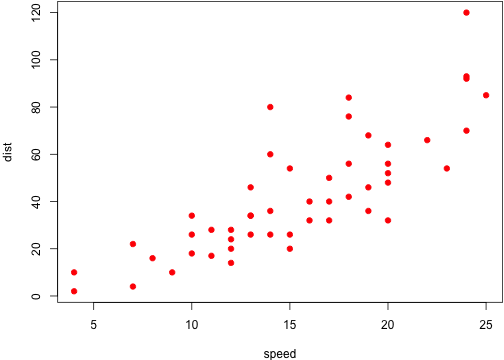
119 |
120 | ## The build script
121 |
122 | You can define all your **knitr** options and any other options in an R script. See the script [`R/build.R`](https://github.com/yihui/knitr-jekyll/blob/gh-pages/R/build.R) in the knitr-jekyll repository for an example: it calls the script [`R/build_one.R`](https://github.com/yihui/knitr-jekyll/blob/gh-pages/R/build_one.R) that will automatically set up the output renderers for **knitr**, e.g., when the Jekyll Markdown engine is `kramdown`, this script will call `knitr::render_jekyll()` so that the code chunk output will be put inside the Liquid tag `{% raw %}{% highlight lang %} {% endhighlight %}{% endraw %}`; it also sets up some **knitr** chunk and package options so that figures can be displayed correctly. For those who do not wish to store images in GIT (because normally they are binary files), you may check out how I host my images in Dropbox for this repository (see the code below `Sys.getenv('USER') == 'yihui'`).
123 |
124 | ## On the Markdown renderers
125 |
126 | Jekyll supports a number of Markdown renderers, such as kramdown, redcarpet, rdiscount, and so on. At the moment, it is a little annoying that kramdown supports LaTeX math expressions via `$$ math $$`[^4], but does not support syntax highlighting of code blocks using the three backticks syntax (you must write the awkward Liquid tags); on the other hand, redcarpet does not support LaTeX math but does support three backticks. In my opinion, all the different flavors and implementations of Markdown is the biggest problem of Markdown, since there is not an unambiguous spec for Markdown. [CommonMark](http://commonmark.org) looks like a promising project to set up a common spec for Markdown, and [Pandoc](http://pandoc.org) is a great implementation that has brought almost all the features that you may ever need in Markdown. You may find some Pandoc plugins for Jekyll by searching online. However, GitHub Pages does not support arbitrary Jekyll plugins, so you cannot just use a Pandoc plugin there, but that does not mean you cannot use Pandoc locally, nor does it mean you cannot push locally compiled HTML pages to GitHub Pages[^5].
127 |
128 | [^4]: Unfortunately, kramdown does not support math expressions in single dollars, e.g. `$ \alpha $`.
129 |
130 | [^5]: If you choose to generate your Jekyll website locally, and push the HTML files to GitHub, you will need the file [`.nojekyll`](https://help.github.com/articles/using-jekyll-with-pages) in the root directory of your website.
131 |
132 | I'd love you to [fork](https://github.com/yihui/knitr-jekyll) this repository, make some (hopefully minor) changes, and [let me know](https://github.com/yihui/knitr-jekyll/issues) your success of using Pandoc with Jekyll. Happy hacking, and good luck!
133 |
--------------------------------------------------------------------------------