├── js
├── app.js
├── itunesService.js
└── mainCtrl.js
├── Preview.png
├── style.css
├── index.html
└── README.md
/js/app.js:
--------------------------------------------------------------------------------
1 | angular.module('itunes', ['ngGrid'])
--------------------------------------------------------------------------------
/Preview.png:
--------------------------------------------------------------------------------
https://raw.githubusercontent.com/DevMountain/itunes/HEAD/Preview.png
--------------------------------------------------------------------------------
/style.css:
--------------------------------------------------------------------------------
1 | html, body {
2 | height: 100%;
3 | width: 100%;
4 | }
5 |
6 | .gridStyle {
7 | border: 1px solid rgb(212,212,212);
8 | width: 100%;
9 | height: 1200px;
10 | min-height: 100%;
11 | }
12 |
13 | .ngTopPanel {
14 | line-height: 25px;
15 | }
16 |
17 | .ngCell {
18 | display : table-cell;
19 | height: auto !important;
20 | overflow:visible;
21 | position: static;
22 | }
23 |
24 | .ngRow {
25 | display : table-row;
26 | height: auto !important;
27 | position: static;
28 | }
29 |
30 | .ngCellText{
31 | height: auto !important;
32 | white-space: normal;
33 | overflow:visible;
34 | }
35 |
36 | .ngGrid.unselectable {
37 | margin-top: 10px;
38 | }
--------------------------------------------------------------------------------
/js/itunesService.js:
--------------------------------------------------------------------------------
1 | angular.module('itunes').service('itunesService', function($http, $q){
2 | //This service is what will do the 'heavy lifting' and get our data from the iTunes API.
3 | //Also note that we're using a 'service' and not a 'factory' so all your methods you want to call in your controller need to be on 'this'.
4 |
5 | //Write a method that accepts an artist's name as the parameter, then makes a 'JSONP' http request to a url that looks like this
6 | //https://itunes.apple.com/search?term=' + artist + '&callback=JSON_CALLBACK'
7 | //Note that in the above line, artist is the parameter being passed in.
8 | //You can return the http request or you can make your own promise in order to manipulate the data before you resolve it.
9 |
10 | //Code here
11 |
12 |
13 |
14 |
15 |
16 | // Go to the next step in the README (Tie in your controller). You will come back to these instructions shortly.
17 | //
18 | // You need to sort the data you get back from the itunes API to be an object in the following format.
19 | /*
20 | AlbumArt: "http://a3.mzstatic.com/us/r30/Features4/v4/22/be/30/22be305b-d988-4525-453c-7203af1dc5a3/dj.srlprmuo.100x100-75.jpg"
21 | Artist: "Nelly"
22 | Song: "Ride Wit Me"
23 | Collection: "Nellyville"
24 | CollectionPrice: 11.99
25 | Play: "http://a423.phobos.apple.com/us/r1000/013/Music4/v4/4a/ab/7c/4aab7ce2-9a72-aa07-ac6b-2011b86b0042/mzaf_6553745548541009508.plus.aac.p.m4a"
26 | Type: "song"
27 | */
28 | //the iTunes API is going to give you a lot more details than ng-grid wants. Create a new array and then loop through the iTunes data pushing into your new array objects that look like the above data. Make sure your method returns this finalized array of data.
29 | // When this is complete, head back to your controller.
30 |
31 |
32 | });
33 |
--------------------------------------------------------------------------------
/index.html:
--------------------------------------------------------------------------------
1 |
2 |
3 |
4 |
5 |
6 |
7 |
8 |
9 |
10 |
29 |
30 |
31 |
32 |
33 |
34 |
35 |
36 |
--------------------------------------------------------------------------------
/js/mainCtrl.js:
--------------------------------------------------------------------------------
1 | angular.module('itunes').controller('mainCtrl', function($scope, itunesService){
2 | //This is setting up the default behavior of our ng-grid. The important thing to note is the 'data' property. The value is 'songData'. That means ng-grid is looking for songData on $scope and is putting whatever songData is into the grid.
3 | //This means when you make your iTunes request, you'll need to get back the information, parse it accordingly, then set it to songData on the scope -> $scope.songData = ...
4 | $scope.gridOptions = {
5 | data: 'songData',
6 | height: '110px',
7 | sortInfo: {fields: ['Song', 'Artist', 'Collection', 'Type'], directions: ['asc']},
8 | columnDefs: [
9 | {field: 'Play', displayName: 'Play', width: '40px', cellTemplate: '

 5 |
6 | iTunes Angular Clone
7 | ====================
8 |
9 | Use Angular, services, and $http to create an iTunes web application
10 |
11 | You now should be to the point where you create a full web application, like [this](https://smrtsmrf.github.io/day14-project-itunes/). Now, you're going to recreate your own version of it which fetches Artists using the iTunes API.
12 |
13 |
14 | 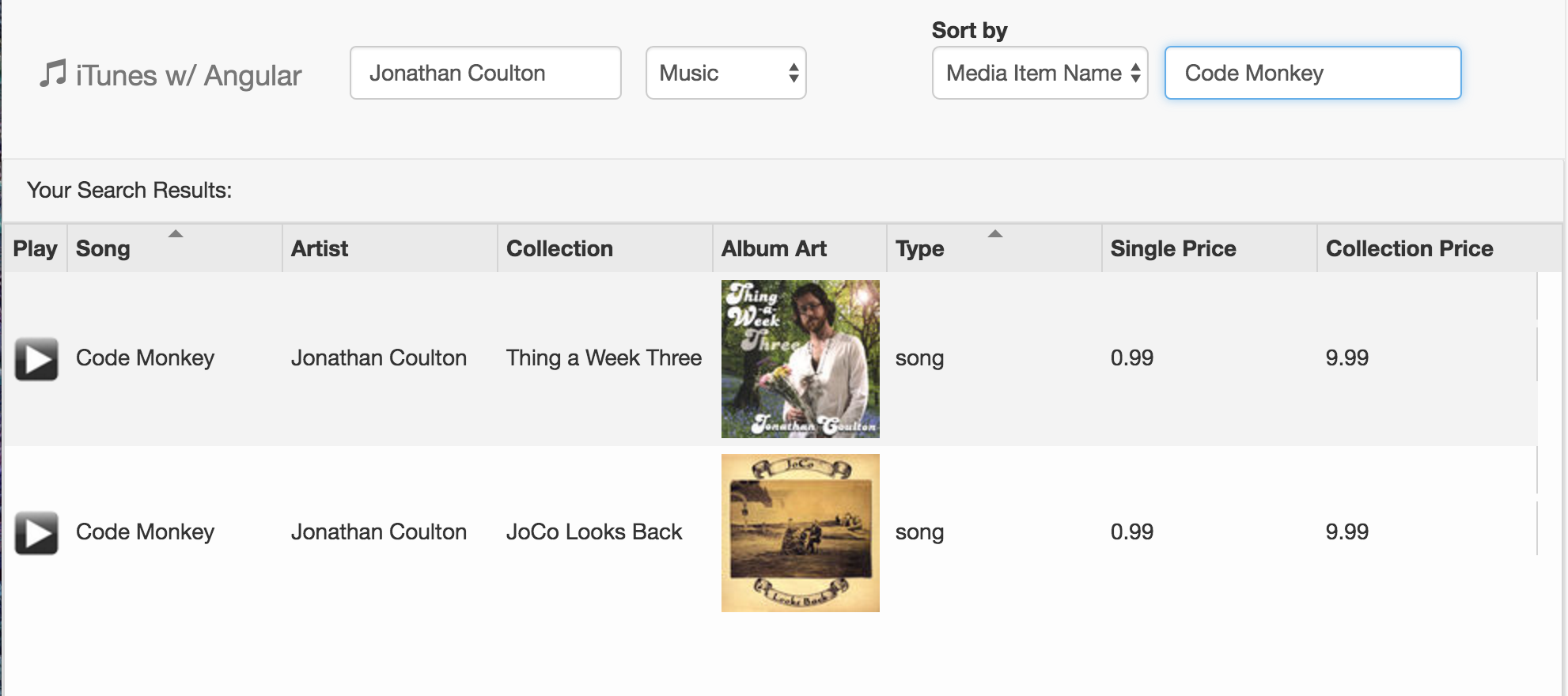
15 |
16 | The concepts this project will cover are:
17 |
18 | 1. $http
19 | 2. Angular Services
20 | 3. Injecting a service into your controller
21 | 4. Working with third party angular modules (ui-grid)
22 |
23 | ## Instructions
24 | ### Clone and Dissect the Repo
25 | ####
26 | * Fork and clone [this](https://github.com/devmountain/itunes) repository.
27 | * Examine the codebase. Like the ChatRoom project, the index.html page is already built for you. Your main goal is to fill in mainCtrl.js and itunesService.js
28 | * If you're feeling adventurous, feel free to change the CSS how you would like.
29 | * Head over to http://angular-ui.github.io/ui-grid/ and check out the examples there. We will be using ui-grid to display the data we get from iTunes. Although all this code will already be in place for you, it's a good idea to get familiar with ui-grid so you know exactly what that code is doing.
30 |
31 |
32 | ### Build your itunesService
33 | ####
34 | * In Angular we use 'services' to outsource some of our heavy lifting. That's exactly what we're going to do when we call the iTunes API.
35 | * Open up itunesService.js and read the instructions. The bigger picture is that this service is going to have a method which takes in an artist name as the parameter, then uses a JSONP http request to call the iTunes API and retrieve the data about that specific artist.
36 |
37 |
38 | ### Tie in your Controller
39 | ####
40 | * Now that your itunesService is finished, we somehow need a way to tie the data we're getting from itunesService to our view (index.html)
41 | * Go to mainCtrl.js and follow the instructions in order to get the itunes data from your service to your view.
42 |
43 |
44 | ### Add More Options
45 | ####
46 | * Go back and look at the original data you're getting from iTunes. There is a lot more that you can play around with...
47 | * Add more columns to ui-grid so the user can see more options.
48 | * Add a filtering option so they can filter by price, name, etc etc.
49 | * Also add a options dropdown so they can select which type of data they want from iTunes. Artist, song, movie, etc.
50 |
51 | ## Contributions
52 |
53 | If you see a problem or a typo, please fork, make the necessary changes, and create a pull request so we can review your changes and merge them into the master repo and branch.
54 |
55 | ## Copyright
56 |
57 | © DevMountain LLC, 2017. Unauthorized use and/or duplication of this material without express and written permission from DevMountain, LLC is strictly prohibited. Excerpts and links may be used, provided that full and clear credit is given to DevMountain with appropriate and specific direction to the original content.
58 |
59 |
5 |
6 | iTunes Angular Clone
7 | ====================
8 |
9 | Use Angular, services, and $http to create an iTunes web application
10 |
11 | You now should be to the point where you create a full web application, like [this](https://smrtsmrf.github.io/day14-project-itunes/). Now, you're going to recreate your own version of it which fetches Artists using the iTunes API.
12 |
13 |
14 | 
15 |
16 | The concepts this project will cover are:
17 |
18 | 1. $http
19 | 2. Angular Services
20 | 3. Injecting a service into your controller
21 | 4. Working with third party angular modules (ui-grid)
22 |
23 | ## Instructions
24 | ### Clone and Dissect the Repo
25 | ####
26 | * Fork and clone [this](https://github.com/devmountain/itunes) repository.
27 | * Examine the codebase. Like the ChatRoom project, the index.html page is already built for you. Your main goal is to fill in mainCtrl.js and itunesService.js
28 | * If you're feeling adventurous, feel free to change the CSS how you would like.
29 | * Head over to http://angular-ui.github.io/ui-grid/ and check out the examples there. We will be using ui-grid to display the data we get from iTunes. Although all this code will already be in place for you, it's a good idea to get familiar with ui-grid so you know exactly what that code is doing.
30 |
31 |
32 | ### Build your itunesService
33 | ####
34 | * In Angular we use 'services' to outsource some of our heavy lifting. That's exactly what we're going to do when we call the iTunes API.
35 | * Open up itunesService.js and read the instructions. The bigger picture is that this service is going to have a method which takes in an artist name as the parameter, then uses a JSONP http request to call the iTunes API and retrieve the data about that specific artist.
36 |
37 |
38 | ### Tie in your Controller
39 | ####
40 | * Now that your itunesService is finished, we somehow need a way to tie the data we're getting from itunesService to our view (index.html)
41 | * Go to mainCtrl.js and follow the instructions in order to get the itunes data from your service to your view.
42 |
43 |
44 | ### Add More Options
45 | ####
46 | * Go back and look at the original data you're getting from iTunes. There is a lot more that you can play around with...
47 | * Add more columns to ui-grid so the user can see more options.
48 | * Add a filtering option so they can filter by price, name, etc etc.
49 | * Also add a options dropdown so they can select which type of data they want from iTunes. Artist, song, movie, etc.
50 |
51 | ## Contributions
52 |
53 | If you see a problem or a typo, please fork, make the necessary changes, and create a pull request so we can review your changes and merge them into the master repo and branch.
54 |
55 | ## Copyright
56 |
57 | © DevMountain LLC, 2017. Unauthorized use and/or duplication of this material without express and written permission from DevMountain, LLC is strictly prohibited. Excerpts and links may be used, provided that full and clear credit is given to DevMountain with appropriate and specific direction to the original content.
58 |
59 |