├── .gitignore
├── .prettierignore
├── .github
└── funding.yml
├── images
├── adm.png
├── adm-add.png
├── emulator.gif
├── adm-add-1.png
├── adm-add-2.png
├── adm-add-3.png
├── adm-added.png
├── ic_emulator.png
├── vscode-settings.png
├── vscode-settings-edit.png
├── EmulatorRightTopAction_16x.svg
└── EmulatorRightTopAction_16x_dark.svg
├── .vscodeignore
├── jsconfig.json
├── .prettierrc.js
├── src
├── utils
│ └── commands.js
├── constants.js
├── extension.js
├── config.js
├── android.js
└── ios.js
├── .vscode
└── launch.json
├── LICENSE
├── CHANGELOG.md
├── WINDOWS.md
├── package.json
└── README.md
/.gitignore:
--------------------------------------------------------------------------------
1 | node_modules
2 | .vscode-test/
3 | *.vsix
--------------------------------------------------------------------------------
/.prettierignore:
--------------------------------------------------------------------------------
1 | node_modules
2 | .vscode-test/
3 | *.vsix
--------------------------------------------------------------------------------
/.github/funding.yml:
--------------------------------------------------------------------------------
1 | github: DiemasMichiels
2 | buy_me_a_coffee: diemas
3 |
--------------------------------------------------------------------------------
/images/adm.png:
--------------------------------------------------------------------------------
https://raw.githubusercontent.com/DiemasMichiels/emulator/HEAD/images/adm.png
--------------------------------------------------------------------------------
/images/adm-add.png:
--------------------------------------------------------------------------------
https://raw.githubusercontent.com/DiemasMichiels/emulator/HEAD/images/adm-add.png
--------------------------------------------------------------------------------
/images/emulator.gif:
--------------------------------------------------------------------------------
https://raw.githubusercontent.com/DiemasMichiels/emulator/HEAD/images/emulator.gif
--------------------------------------------------------------------------------
/images/adm-add-1.png:
--------------------------------------------------------------------------------
https://raw.githubusercontent.com/DiemasMichiels/emulator/HEAD/images/adm-add-1.png
--------------------------------------------------------------------------------
/images/adm-add-2.png:
--------------------------------------------------------------------------------
https://raw.githubusercontent.com/DiemasMichiels/emulator/HEAD/images/adm-add-2.png
--------------------------------------------------------------------------------
/images/adm-add-3.png:
--------------------------------------------------------------------------------
https://raw.githubusercontent.com/DiemasMichiels/emulator/HEAD/images/adm-add-3.png
--------------------------------------------------------------------------------
/images/adm-added.png:
--------------------------------------------------------------------------------
https://raw.githubusercontent.com/DiemasMichiels/emulator/HEAD/images/adm-added.png
--------------------------------------------------------------------------------
/images/ic_emulator.png:
--------------------------------------------------------------------------------
https://raw.githubusercontent.com/DiemasMichiels/emulator/HEAD/images/ic_emulator.png
--------------------------------------------------------------------------------
/images/vscode-settings.png:
--------------------------------------------------------------------------------
https://raw.githubusercontent.com/DiemasMichiels/emulator/HEAD/images/vscode-settings.png
--------------------------------------------------------------------------------
/images/vscode-settings-edit.png:
--------------------------------------------------------------------------------
https://raw.githubusercontent.com/DiemasMichiels/emulator/HEAD/images/vscode-settings-edit.png
--------------------------------------------------------------------------------
/.vscodeignore:
--------------------------------------------------------------------------------
1 | .vscode/**
2 | .vscode-test/**
3 | test/**
4 | .gitignore
5 | jsconfig.json
6 | vsc-extension-quickstart.md
7 | .eslintrc.json
8 |
--------------------------------------------------------------------------------
/jsconfig.json:
--------------------------------------------------------------------------------
1 | {
2 | "compilerOptions": {
3 | "module": "commonjs",
4 | "target": "es6",
5 | "checkJs": false,
6 | "lib": ["es6"]
7 | },
8 | "exclude": ["node_modules"]
9 | }
10 |
--------------------------------------------------------------------------------
/.prettierrc.js:
--------------------------------------------------------------------------------
1 | module.exports = {
2 | semi: false,
3 | trailingComma: 'all',
4 | singleQuote: true,
5 | printWidth: 80,
6 | tabWidth: 2,
7 | useTabs: false,
8 | jsxSingleQuote: true,
9 | endOfLine: 'auto',
10 | }
11 |
--------------------------------------------------------------------------------
/src/utils/commands.js:
--------------------------------------------------------------------------------
1 | const { exec } = require('node:child_process')
2 |
3 | exports.runCmd = async (cmd) => {
4 | return new Promise((resolve, reject) => {
5 | exec(cmd, (err, stdout) => {
6 | if (err) {
7 | console.log('err', err);
8 | reject({ err, stdout })
9 | } else {
10 | resolve(stdout)
11 | }
12 | })
13 | })
14 | }
15 |
--------------------------------------------------------------------------------
/.vscode/launch.json:
--------------------------------------------------------------------------------
1 | // A launch configuration that compiles the extension and then opens it inside a new window
2 | // Use IntelliSense to learn about possible attributes.
3 | // Hover to view descriptions of existing attributes.
4 | // For more information, visit: https://go.microsoft.com/fwlink/?linkid=830387
5 | {
6 | "version": "0.2.0",
7 | "configurations": [
8 | {
9 | "name": "Extension",
10 | "type": "extensionHost",
11 | "request": "launch",
12 | "runtimeExecutable": "${execPath}",
13 | "args": ["--extensionDevelopmentPath=${workspaceFolder}"]
14 | }
15 | ]
16 | }
17 |
--------------------------------------------------------------------------------
/src/constants.js:
--------------------------------------------------------------------------------
1 | exports.OS_PICKER = {
2 | ANDROID: 'View Android emulators',
3 | ANDROID_COLD: 'View Android cold boot emulators',
4 | IOS: 'View iOS simulators',
5 | }
6 |
7 | exports.ANDROID_COMMANDS = {
8 | LIST_AVDS: ' -list-avds',
9 | RUN_AVD: ' -avd ',
10 | RUN_AVD_COLD: ' -no-snapshot-load -avd ',
11 | }
12 |
13 | exports.IOS_COMMANDS = {
14 | LIST_SIMULATORS: 'xcrun simctl list --json devices',
15 | BOOT_SIMULATOR: 'xcrun simctl boot ',
16 | DEVELOPER_DIR: 'xcode-select -p',
17 | SIMULATOR_APP: '/Applications/Simulator.app ',
18 | SIMULATOR_ARGS: ' --args -CurrentDeviceUDID ',
19 | }
20 |
21 | exports.ANDROID = {
22 | PATH: 'emulator',
23 | }
24 |
--------------------------------------------------------------------------------
/images/EmulatorRightTopAction_16x.svg:
--------------------------------------------------------------------------------
1 |
--------------------------------------------------------------------------------
/images/EmulatorRightTopAction_16x_dark.svg:
--------------------------------------------------------------------------------
1 |
--------------------------------------------------------------------------------
/LICENSE:
--------------------------------------------------------------------------------
1 | MIT License
2 |
3 | Copyright (c) 2018 Diemas Michiels
4 |
5 | Permission is hereby granted, free of charge, to any person obtaining a copy
6 | of this software and associated documentation files (the "Software"), to deal
7 | in the Software without restriction, including without limitation the rights
8 | to use, copy, modify, merge, publish, distribute, sublicense, and/or sell
9 | copies of the Software, and to permit persons to whom the Software is
10 | furnished to do so, subject to the following conditions:
11 |
12 | The above copyright notice and this permission notice shall be included in all
13 | copies or substantial portions of the Software.
14 |
15 | THE SOFTWARE IS PROVIDED "AS IS", WITHOUT WARRANTY OF ANY KIND, EXPRESS OR
16 | IMPLIED, INCLUDING BUT NOT LIMITED TO THE WARRANTIES OF MERCHANTABILITY,
17 | FITNESS FOR A PARTICULAR PURPOSE AND NONINFRINGEMENT. IN NO EVENT SHALL THE
18 | AUTHORS OR COPYRIGHT HOLDERS BE LIABLE FOR ANY CLAIM, DAMAGES OR OTHER
19 | LIABILITY, WHETHER IN AN ACTION OF CONTRACT, TORT OR OTHERWISE, ARISING FROM,
20 | OUT OF OR IN CONNECTION WITH THE SOFTWARE OR THE USE OR OTHER DEALINGS IN THE
21 | SOFTWARE.
22 |
--------------------------------------------------------------------------------
/src/extension.js:
--------------------------------------------------------------------------------
1 | const { window, commands } = require('vscode')
2 | const { OS_PICKER } = require('./constants')
3 | const { androidColdBoot, isWSL } = require('./config')
4 | const { androidPick } = require('./android')
5 | const { iOSPick } = require('./ios')
6 |
7 | exports.activate = (context) => {
8 | const disposable = commands.registerCommand('emulator.start', () => {
9 | // If on Windows, directly show Android devices
10 | if (!androidColdBoot() && (process.platform.startsWith('win') || isWSL())) {
11 | androidPick(false)
12 | return
13 | }
14 |
15 | // For other platforms, show the OS picker
16 | const pickerList = [OS_PICKER.ANDROID]
17 | if (process.platform === 'darwin') {
18 | pickerList.push(OS_PICKER.IOS)
19 | }
20 | if (androidColdBoot()) {
21 | pickerList.push(OS_PICKER.ANDROID_COLD)
22 | }
23 |
24 | window.showQuickPick(pickerList).then((response) => {
25 | switch (response) {
26 | case OS_PICKER.ANDROID:
27 | androidPick(false)
28 | break
29 | case OS_PICKER.ANDROID_COLD:
30 | androidPick(true)
31 | break
32 | case OS_PICKER.IOS:
33 | iOSPick()
34 | break
35 | }
36 | })
37 | })
38 |
39 | context.subscriptions.push(disposable)
40 | }
41 |
42 | exports.deactivate = () => {}
43 |
--------------------------------------------------------------------------------
/src/config.js:
--------------------------------------------------------------------------------
1 | const { workspace } = require('vscode')
2 | const os = require('os')
3 |
4 | let config = workspace.getConfiguration('emulator')
5 |
6 | workspace.onDidChangeConfiguration((event) => {
7 | if (event.affectsConfiguration('emulator')) {
8 | config = workspace.getConfiguration('emulator')
9 | }
10 | })
11 |
12 | const isWSL = () => {
13 | if (process.platform !== 'linux') return false
14 | const release = os.release().toLowerCase()
15 | return release.includes('microsoft') || release.includes('wsl')
16 | }
17 |
18 | exports.getPath = () => {
19 | const pathMac = config.get('emulatorPathMac')
20 | const pathLinux = config.get('emulatorPathLinux')
21 | const pathWindows = config.get('emulatorPathWindows')
22 | const pathWSL = config.get('emulatorPathWSL')
23 |
24 | if (process.platform === 'darwin' && pathMac) {
25 | return pathMac
26 | }
27 | if (process.platform === 'linux' && !isWSL() && pathLinux) {
28 | return pathLinux
29 | }
30 | if (process.platform.startsWith('win') && pathWindows) {
31 | return pathWindows
32 | }
33 | if (isWSL() && pathWSL) {
34 | return pathWSL
35 | }
36 | return config.get('emulatorPath')
37 | }
38 |
39 | exports.androidColdBoot = () => config.get('androidColdBoot')
40 | exports.androidExtraBootArgs = () => config.get('androidExtraBootArgs')
41 | exports.simulatorPath = () => config.get('simulatorPath')
42 | exports.isWSL = isWSL
43 |
--------------------------------------------------------------------------------
/CHANGELOG.md:
--------------------------------------------------------------------------------
1 | # 1.8.0
2 |
3 | - When multiple iOS versions are installed an extra version selection menu is shown - issue 63 - enhancement
4 | - Removed exec options causing issues - issue 64 - bug
5 | - Remove child process dependency which is part of node thanks to noritaka1166 - pr 62
6 |
7 | # 1.7.1
8 |
9 | - Added buy me a coffee link to the readme
10 |
11 | # 1.7.0
12 |
13 | - Allow forward slash on windows and general improvements thanks to multimokia - issue 48 - bug
14 | - On windows the selection menu for Android or iOS is now gone
15 | - WSL is now supported
16 | - Improved selection flow and information messages
17 | - iOS now opens multiple simulators if another device is selected
18 |
19 | # 1.6.0
20 |
21 | - Instruments got deprecated launch through Simulator.app itself thanks to wbroek - issue 45 - bug
22 | - Add optional path to select the Xcode Simulator.app file
23 |
24 | # 1.5.0
25 |
26 | - Add optional boot args Android thanks to sableangle - issue 38 - bug
27 | - Switch from standardJS to prettier
28 |
29 | # 1.4.0
30 |
31 | - Remove 'Emulator is booting up...' message - issue 28 - bug
32 | - Add a config option to hide the editor/title icon in the top right - issue 27 - enhancement
33 | - Fix windows paths with spaces - issue 26 - bug
34 |
35 | # 1.3.0
36 |
37 | - Add more details to the ios simulator device list - issue 24 - enhancement
38 |
39 | # 1.2.0
40 |
41 | - Add cold boot option for android devices, this needs to be activated in the config - issue 22 - enhancement
42 |
43 | # 1.1.0
44 |
45 | - Add multiple config variable for multiple OS support - issue 23 - enhancement
46 |
47 | # 1.0.1
48 |
49 | - Expand path support thanks to antonholmbergmi and RodrigoSaka - issue 14
50 |
51 | # 1.0.0
52 |
53 | - Finally some decent error reporting
54 | - Bump packages
55 | - Support x86 emulators on mac thanks to antonholmbergmi - issue 12
56 |
57 | # 0.0.7
58 |
59 | - Add right top icon to start the emulator
60 | - Remove bad error messaging
61 |
62 | # 0.0.6 - preview
63 |
64 | - Add keybindings
65 |
66 | # 0.0.5 - preview
67 |
68 | - Much nicer emulator names to pick from
69 | - Add android emulator path to visual studio code settings
70 |
71 | # 0.0.4 - preview
72 |
73 | - Rename emulate to Android iOS Emulator
74 |
75 | # 0.0.3 - preview
76 |
77 | - Support other operation systems than mac
78 |
79 | # 0.0.2 - preview
80 |
81 | - You are now able to run iOS simulators
82 |
83 | # 0.0.1 - preview
84 |
85 | - Run Android emulators
86 |
--------------------------------------------------------------------------------
/WINDOWS.md:
--------------------------------------------------------------------------------
1 | # Windows guide
2 |
3 | This guide is for Windows users to help and setup the Emulator extension for Visual Studio Code.
4 |
5 | ## Requirements
6 |
7 | Make sure that you have read the android [requirements](https://github.com/DiemasMichiels/emulator/blob/main/README.md#requirements) section for the Emulator extension.
8 | If that doesn't work, you can try the following steps below.
9 |
10 | ## Steps
11 |
12 | ### Android Studio
13 |
14 | 1. Download and install [Android Studio](https://developer.android.com/studio)
15 | 2. Open Android Studio and to make it easier create a new project
16 | 3. Click on the lines in the top left and go to `Tools` -> `Device Manager`
17 | 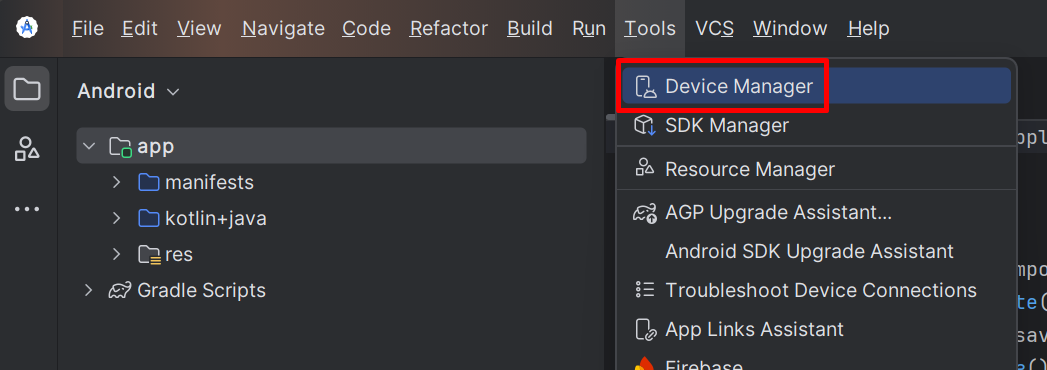
18 | There should be already a device created, but let's create a new one.
19 |
20 |
21 | 4. Click on the `+` icon "Create Virtual Device"
22 | 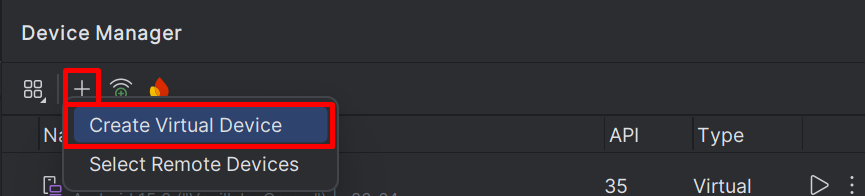
23 |
24 |
25 | 5. Select a device which you want to use as an emulator and click `Next`
26 | 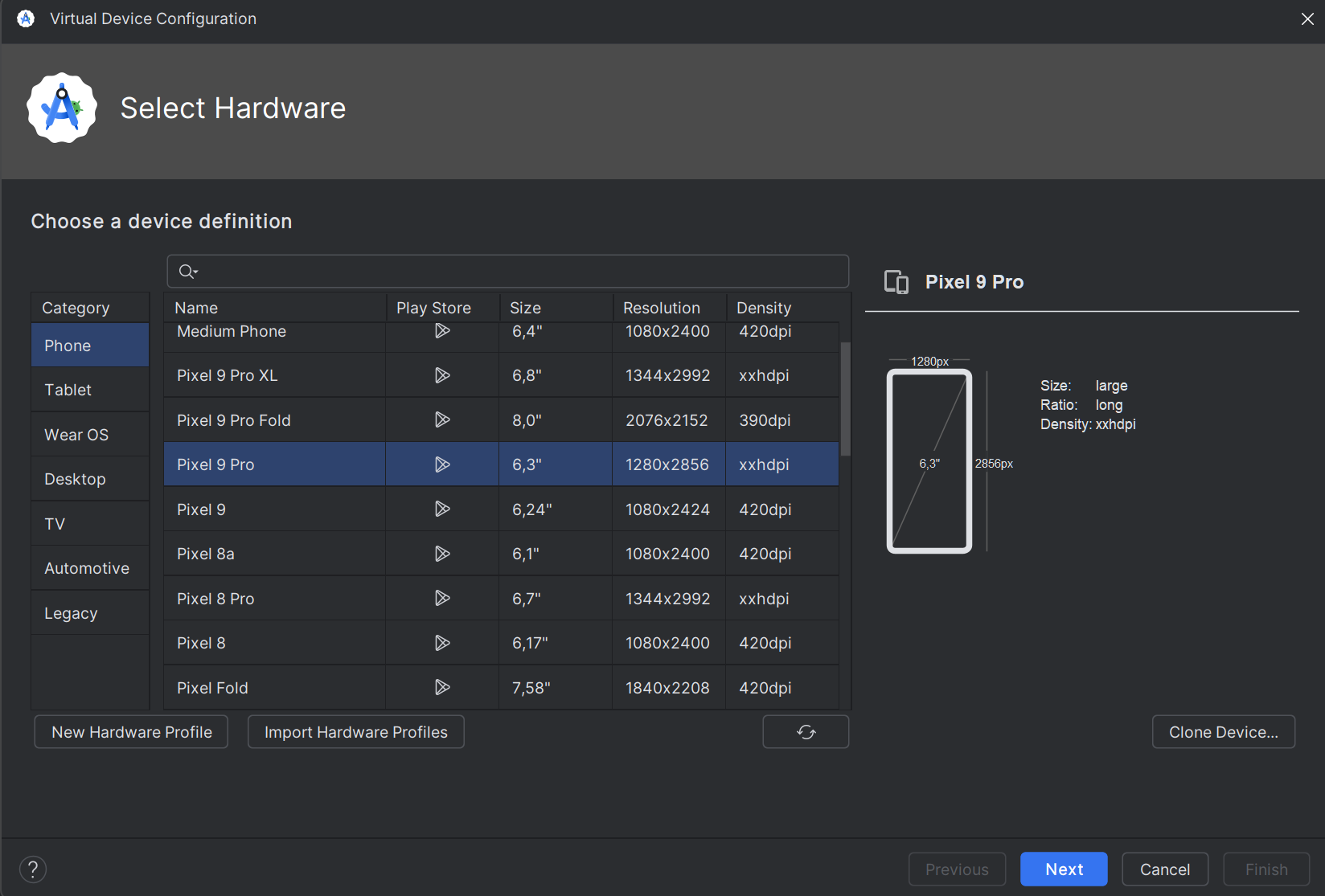
27 |
28 |
29 | 6. In the next screen select the Android version you want to use and click `Next`
30 | 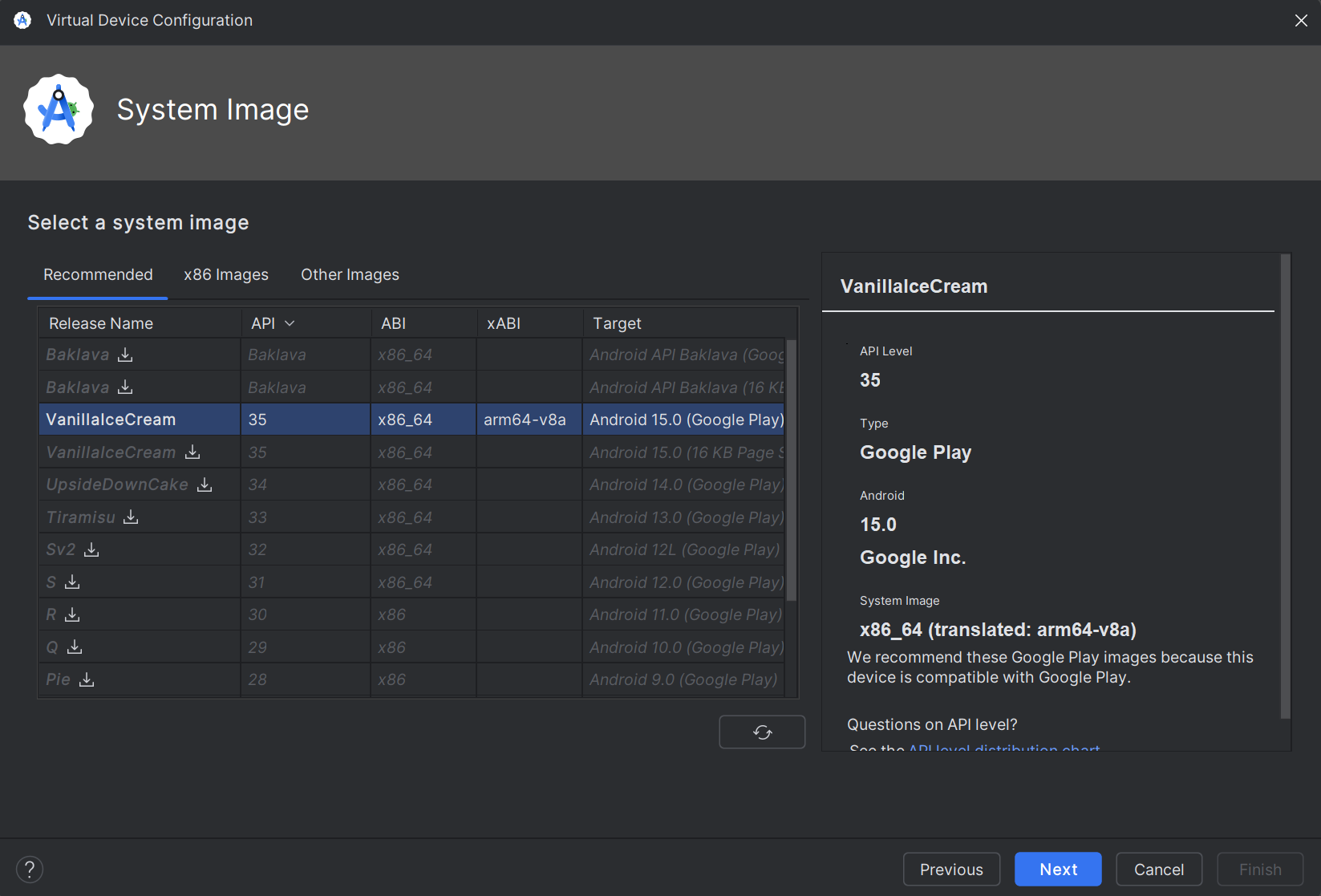
31 |
32 |
33 | 7. Don't change anything and click on `Finish` and the device will be created.
34 | 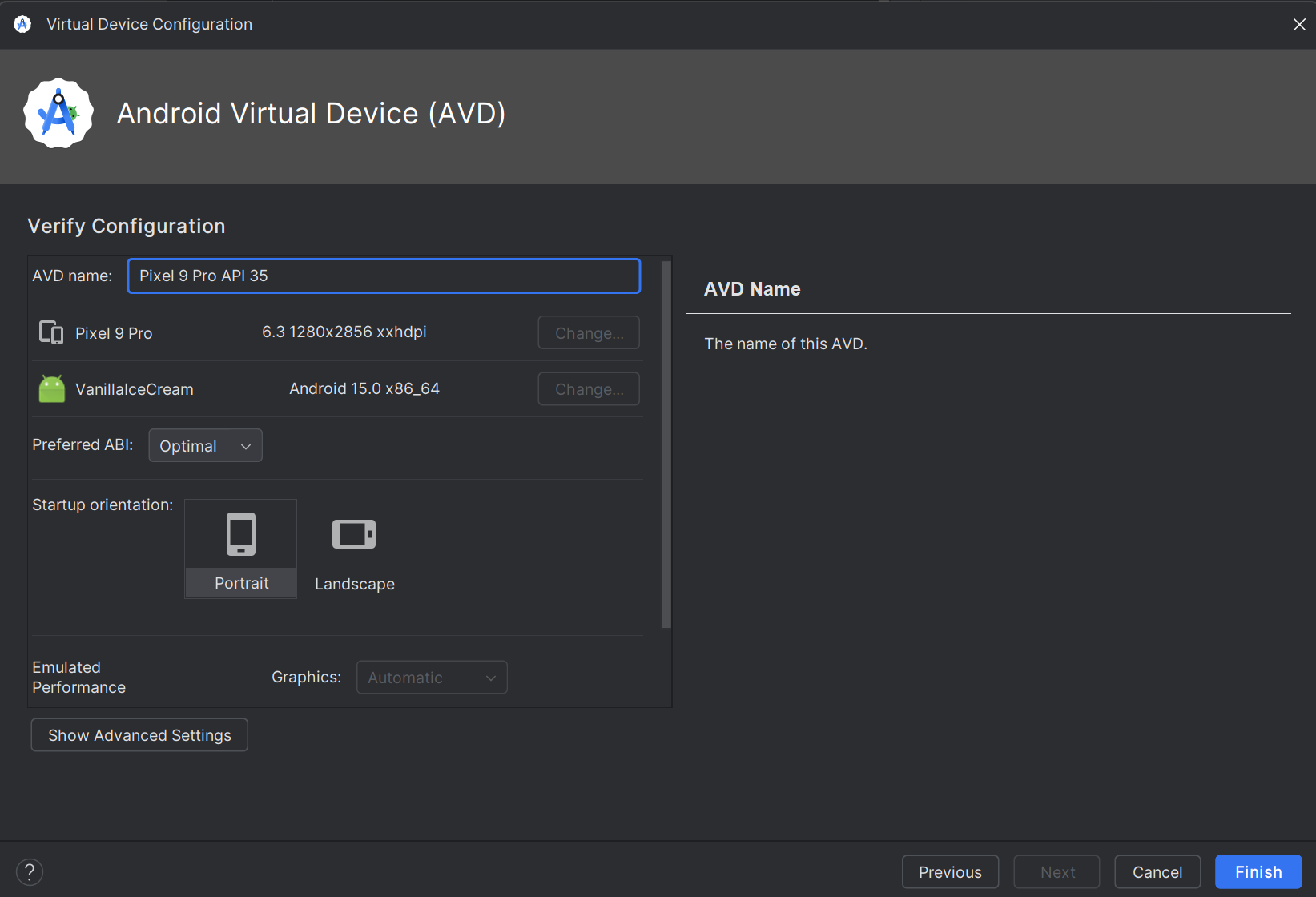
35 |
36 |
37 | 8. You should now see the device in the list of devices.
38 | You can also run it from there pressing the play button at the end of the line.
39 | 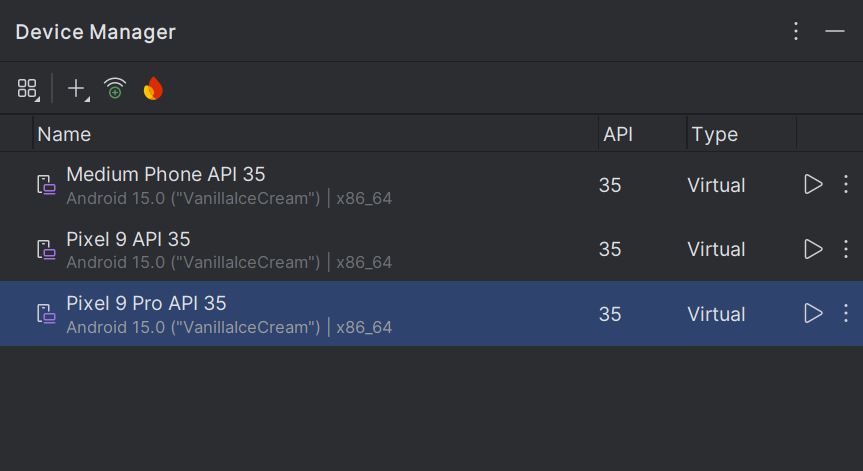
40 |
41 | ### Visual Studio Code
42 |
43 | 1. Open Visual Studio Code
44 | 2. At the top click on File -> Preferences -> Settings
45 | 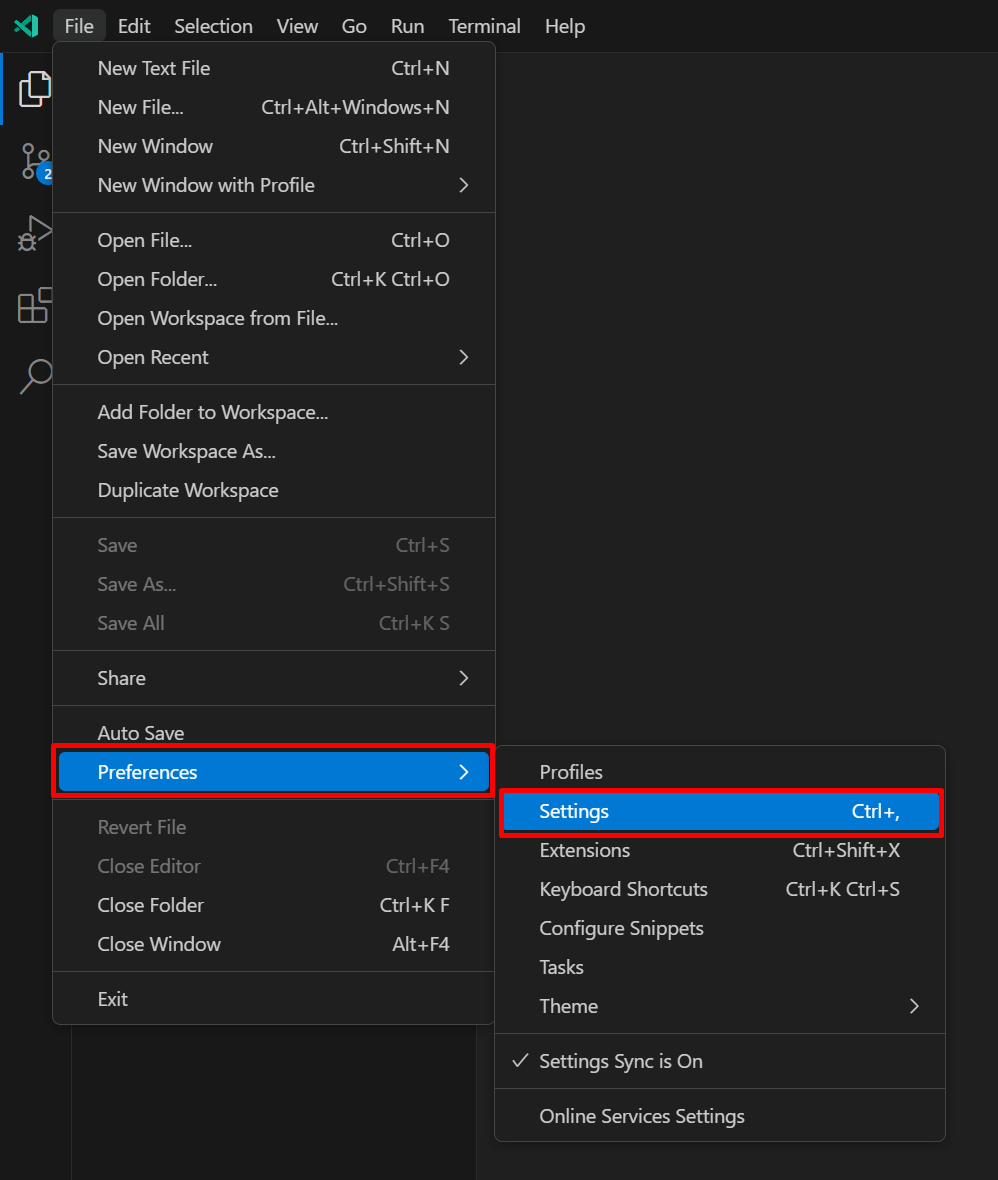
46 |
47 |
48 | 3. Click on the `Extensions` -> `Emulator Configuration`
49 | 4. Paste the following path in the `emulator.emulatorPathWindows` field:
50 | `C:\Users\\AppData\Local\Android\Sdk\emulator`
51 | 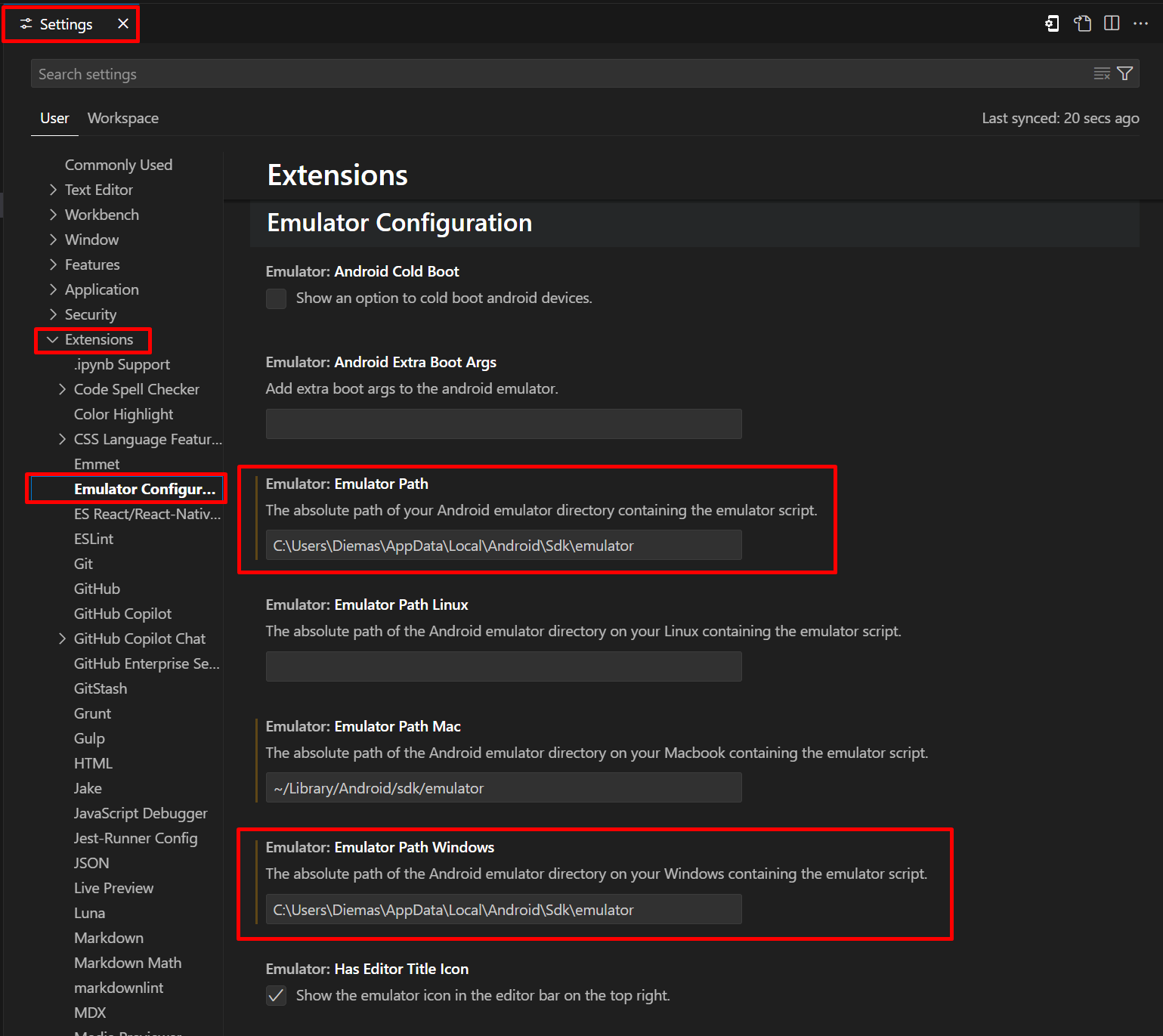
52 |
53 |
54 | 5. Now you can run the emulator from Visual Studio Code
55 | 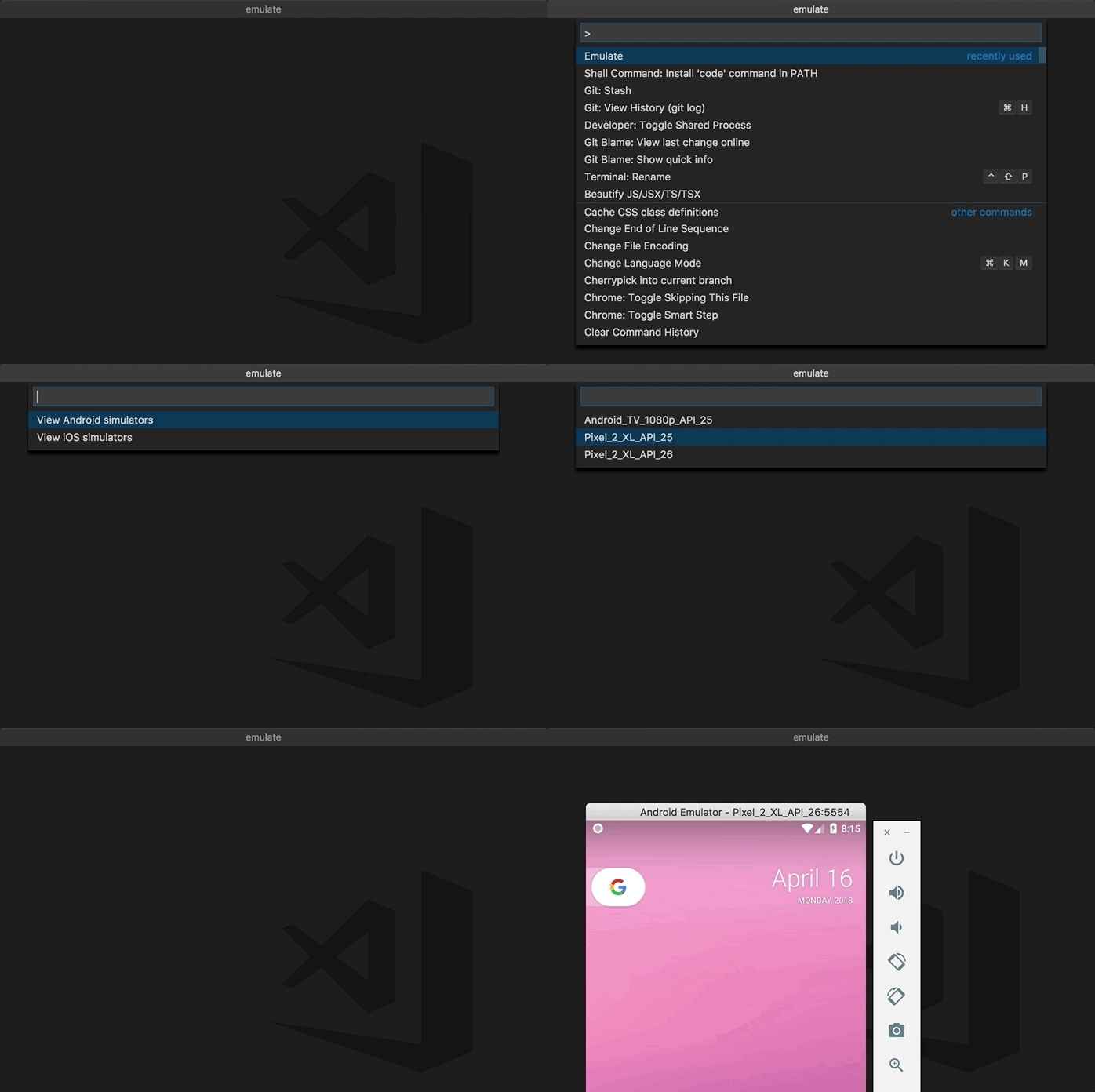
56 |
--------------------------------------------------------------------------------
/package.json:
--------------------------------------------------------------------------------
1 | {
2 | "name": "emulate",
3 | "displayName": "Android iOS Emulator",
4 | "description": "Run Android emulator and iOS simulator easily from VScode!",
5 | "version": "1.8.0",
6 | "publisher": "DiemasMichiels",
7 | "author": {
8 | "name": "Diemas Michiels"
9 | },
10 | "icon": "images/ic_emulator.png",
11 | "engines": {
12 | "vscode": "^1.22.0"
13 | },
14 | "categories": [
15 | "Debuggers",
16 | "Other"
17 | ],
18 | "keywords": [
19 | "Emulator",
20 | "Android",
21 | "iOS",
22 | "Simulator"
23 | ],
24 | "activationEvents": [
25 | "onCommand:emulator.start"
26 | ],
27 | "main": "./src/extension",
28 | "contributes": {
29 | "commands": [
30 | {
31 | "command": "emulator.start",
32 | "title": "Emulator",
33 | "icon": {
34 | "light": "./images/EmulatorRightTopAction_16x.svg",
35 | "dark": "./images/EmulatorRightTopAction_16x_dark.svg"
36 | }
37 | }
38 | ],
39 | "keybindings": [
40 | {
41 | "key": "ctrl+alt+e",
42 | "mac": "cmd+alt+e",
43 | "command": "emulator.start"
44 | }
45 | ],
46 | "menus": {
47 | "editor/title": [
48 | {
49 | "command": "emulator.start",
50 | "when": "config.emulator.hasEditorTitleIcon",
51 | "group": "navigation"
52 | }
53 | ]
54 | },
55 | "configuration": {
56 | "title": "Emulator Configuration",
57 | "properties": {
58 | "emulator.simulatorPath": {
59 | "type": "string",
60 | "default": "",
61 | "description": "The absolute path of your Xcode simulator directory containing the Simulator.app script. Leaving it empty will automatically select the path with xcode-select -p."
62 | },
63 | "emulator.emulatorPath": {
64 | "type": "string",
65 | "default": "~/Library/Android/sdk/emulator",
66 | "description": "The absolute path of your Android emulator directory containing the emulator script."
67 | },
68 | "emulator.emulatorPathMac": {
69 | "type": "string",
70 | "default": "",
71 | "description": "The absolute path of the Android emulator directory on your MacBook containing the emulator script."
72 | },
73 | "emulator.emulatorPathLinux": {
74 | "type": "string",
75 | "default": "",
76 | "description": "The absolute path of the Android emulator directory on your Linux containing the emulator script."
77 | },
78 | "emulator.emulatorPathWindows": {
79 | "type": "string",
80 | "default": "",
81 | "description": "The absolute path of the Android emulator directory on your Windows containing the emulator script."
82 | },
83 | "emulator.emulatorPathWSL": {
84 | "type": "string",
85 | "default": "",
86 | "description": "The absolute path of the Android emulator directory when running in WSL. (e.g. /mnt/c/Users/username/AppData/Local/Android/Sdk/emulator)"
87 | },
88 | "emulator.androidColdBoot": {
89 | "type": "boolean",
90 | "default": false,
91 | "description": "Show an option to cold boot android devices."
92 | },
93 | "emulator.androidExtraBootArgs": {
94 | "type": "string",
95 | "default": "",
96 | "description": "Add extra boot args to the android emulator."
97 | },
98 | "emulator.hasEditorTitleIcon": {
99 | "type": "boolean",
100 | "default": true,
101 | "description": "Show the emulator icon in the editor bar on the top right."
102 | }
103 | }
104 | }
105 | },
106 | "scripts": {
107 | "lint": "prettier --write ."
108 | },
109 | "devDependencies": {
110 | "prettier": "^2.3.2"
111 | },
112 | "dependencies": {},
113 | "license": "SEE LICENSE IN LICENSE",
114 | "repository": {
115 | "type": "git",
116 | "url": "https://github.com/DiemasMichiels/Emulator.git"
117 | },
118 | "homepage": "https://github.com/DiemasMichiels/Emulator",
119 | "bugs": {
120 | "url": "https://github.com/DiemasMichiels/Emulator/issues"
121 | }
122 | }
123 |
--------------------------------------------------------------------------------
/README.md:
--------------------------------------------------------------------------------
1 | 
2 | [](https://marketplace.visualstudio.com/items?itemName=DiemasMichiels.emulate)
3 | [](https://opensource.org/licenses/MIT)
4 |
5 | [](https://www.buymeacoffee.com/diemas)
6 |
7 | # Android iOS Emulator
8 |
9 | A small Visual Studio Code extension to run Android and iOS Simulators in a click.
10 | Link to marketplace: https://marketplace.visualstudio.com/items?itemName=DiemasMichiels.emulate
11 |
12 | **Running iOS simulators only works on Mac with Xcode!**
13 |
14 | ## Features
15 |
16 | Select and run your emulator from Visual Studio Code.
17 |
18 | Open all commands with `Cmd-Shift-P` and type `Emulator` or click the Emulator icon in the top right.
19 |
20 | 
21 |
22 | ## Requirements
23 |
24 | ### Android Studio
25 |
26 | To run Android emulators you need to have Android studio and already created the Android Virtual Devices.
27 |
28 | Add the Android Studio emulator script to your settings of Visual Studio Code:
29 | You can either set the default path or specify a specific path for each operating system. The default path will always be the fallback.
30 | Default: `"emulator.emulatorPath": "~/Library/Android/sdk/emulator"`
31 | Mac: `"emulator.emulatorPathMac": "~/Library/Android/sdk/emulator"`
32 | Linux: `"emulator.emulatorPathLinux": "~/Android/Sdk/emulator"`
33 | Windows: `"emulator.emulatorPathWindows":`
34 | `"\\Sdk\\emulator"`
35 | or
36 | `"C:\Users\\AppData\Local\Android\Sdk\emulator"`
37 | WSL: `"emulator.emulatorPathWSL": "/mnt/c/Users//AppData/Local/Android/Sdk/emulator"`
38 |
39 | Your visual studio code settings are found here:
40 | File -> Preferences -> Setting -> User Setting -> Extensions -> Emulator Configuration
41 |
42 | Enable selection for cold boot Android emulators. Activate it in your settings of Visual Studio Code:
43 | Android Cold Boot: `true`
44 |
45 | WSL has some limitations with the Android emulator and because of that some devices might not work. It will throw an ARM error even if the device is x86.
46 |
47 | ### Xcode
48 |
49 | To run iOS emulators Xcode is required.
50 |
51 | If your Xcode or simulator is not installed in the default location it is possible to set the correct path of the Simulator.app file:
52 | `"emulator.simulatorPath": "/Applications/Xcode.app/Contents/Developer/Applications/Simulator.app"`
53 |
54 | ### Windows guide
55 |
56 | Check out the [windows.md](https://github.com/DiemasMichiels/emulator/blob/main/WINDOWS.md) file for the Windows guide with pictures.
57 |
58 | ## License
59 |
60 | MIT License
61 |
62 | Copyright (c) 2019 Diemas Michiels
63 |
64 | Permission is hereby granted, free of charge, to any person obtaining a copy
65 | of this software and associated documentation files (the "Software"), to deal
66 | in the Software without restriction, including without limitation the rights
67 | to use, copy, modify, merge, publish, distribute, sublicense, and/or sell
68 | copies of the Software, and to permit persons to whom the Software is
69 | furnished to do so, subject to the following conditions:
70 |
71 | The above copyright notice and this permission notice shall be included in all
72 | copies or substantial portions of the Software.
73 |
74 | THE SOFTWARE IS PROVIDED "AS IS", WITHOUT WARRANTY OF ANY KIND, EXPRESS OR
75 | IMPLIED, INCLUDING BUT NOT LIMITED TO THE WARRANTIES OF MERCHANTABILITY,
76 | FITNESS FOR A PARTICULAR PURPOSE AND NONINFRINGEMENT. IN NO EVENT SHALL THE
77 | AUTHORS OR COPYRIGHT HOLDERS BE LIABLE FOR ANY CLAIM, DAMAGES OR OTHER
78 | LIABILITY, WHETHER IN AN ACTION OF CONTRACT, TORT OR OTHERWISE, ARISING FROM,
79 | OUT OF OR IN CONNECTION WITH THE SOFTWARE OR THE USE OR OTHER DEALINGS IN THE
80 | SOFTWARE.
81 |
--------------------------------------------------------------------------------
/src/android.js:
--------------------------------------------------------------------------------
1 | const path = require('path')
2 | const { window, ProgressLocation } = require('vscode')
3 | const { getPath, androidExtraBootArgs, isWSL } = require('./config')
4 | const { runCmd } = require('./utils/commands')
5 | const { ANDROID_COMMANDS, ANDROID } = require('./constants')
6 |
7 | // Get Android devices and pick one
8 | exports.androidPick = async (cold = false) => {
9 | // Create and show QuickPick with loading state
10 | const quickPick = window.createQuickPick()
11 | quickPick.placeholder = 'Loading Android emulators...'
12 | quickPick.busy = true
13 | quickPick.show()
14 |
15 | try {
16 | const emulators = await getAndroidEmulators()
17 |
18 | if (emulators) {
19 | quickPick.busy = false
20 | quickPick.placeholder = 'Select Android emulator'
21 | quickPick.items = emulators.map((e) => ({
22 | label: e.replace(/_/g, ' '),
23 | emulator: e,
24 | }))
25 |
26 | quickPick.onDidAccept(async () => {
27 | const selected = quickPick.selectedItems[0]
28 | if (selected) {
29 | // Update quickpick to show launching status
30 | quickPick.items = [
31 | {
32 | label: `Starting ${selected.label}...`,
33 | emulator: selected.emulator,
34 | },
35 | ]
36 | quickPick.busy = true
37 |
38 | const response = await runAndroidEmulator(selected.emulator, cold)
39 |
40 | if (!response) {
41 | quickPick.dispose()
42 | return
43 | }
44 |
45 | // Show success message in quickpick
46 | quickPick.items = [
47 | {
48 | label: `${response}${selected.label}!`,
49 | emulator: selected.emulator,
50 | },
51 | ]
52 | quickPick.busy = false
53 |
54 | // Close quickpick after brief delay
55 | setTimeout(() => quickPick.dispose(), 2000)
56 | }
57 | })
58 |
59 | quickPick.onDidHide(() => quickPick.dispose())
60 | } else {
61 | quickPick.dispose()
62 | }
63 | } catch (error) {
64 | quickPick.dispose()
65 | window.showErrorMessage(error.toString())
66 | }
67 | }
68 |
69 | const getAndroidPath = async () => {
70 | return (await runCmd(`echo "${getPath()}"`)).trim().replace(/[\n\r"]/g, '')
71 | }
72 |
73 | const getEmulatorPath = (androidPath) => {
74 | const emulatorPath = path.join(androidPath, ANDROID.PATH)
75 |
76 | if (isWSL()) {
77 | return `${emulatorPath}.exe`
78 | }
79 |
80 | if (process.platform.startsWith('win')) {
81 | return `"${emulatorPath}"`
82 | }
83 |
84 | return emulatorPath
85 | }
86 |
87 | const getAndroidEmulators = async () => {
88 | const androidPath = await getAndroidPath()
89 | if (!androidPath) {
90 | return false
91 | }
92 |
93 | const command = `${getEmulatorPath(androidPath)}${ANDROID_COMMANDS.LIST_AVDS}`
94 | try {
95 | const res = await runCmd(command)
96 |
97 | if (res) {
98 | return res.trim().split('\n')
99 | }
100 | window.showErrorMessage(
101 | 'No Android emulators found. Please check if you have any emulators installed.',
102 | )
103 | return false
104 | } catch (e) {
105 | window.showErrorMessage(
106 | `Error fetching your Android emulators! Make sure your path is correct. Try running this command: ${command}`,
107 | )
108 | return false
109 | }
110 | }
111 |
112 | const runAndroidEmulator = async (emulator, cold) => {
113 | const androidPath = await getAndroidPath()
114 | if (!androidPath) {
115 | return false
116 | }
117 |
118 | const command = `${getEmulatorPath(androidPath)} ${androidExtraBootArgs()}${
119 | cold ? ANDROID_COMMANDS.RUN_AVD_COLD : ANDROID_COMMANDS.RUN_AVD
120 | }${emulator}`
121 |
122 | try {
123 | await runCmd(command)
124 | return '✓ Started '
125 | } catch (e) {
126 |
127 | if (e && e.stdout && e.stdout.includes('Running multiple emulators with the same AVD')) {
128 | return 'Already running '
129 | }
130 |
131 | if (e && e.err && e.err.toString().includes("CPU Architecture 'arm'")) {
132 | window.showErrorMessage(
133 | 'ARM-based Android emulators are not supported in WSL. Please use an x86/x64-based Android Virtual Device instead.',
134 | )
135 | return false
136 | }
137 |
138 | window.showErrorMessage(
139 | `Error running your Android emulator! Try running this command: ${command}`,
140 | )
141 | return false
142 | }
143 | }
144 |
--------------------------------------------------------------------------------
/src/ios.js:
--------------------------------------------------------------------------------
1 | const { window } = require('vscode')
2 | const { runCmd } = require('./utils/commands')
3 | const { IOS_COMMANDS } = require('./constants')
4 | const { simulatorPath } = require('./config')
5 |
6 | // Get iOS devices and pick iOS version first, then device
7 | exports.iOSPick = async () => {
8 | // Create and show QuickPick with loading state
9 | const quickPick = window.createQuickPick()
10 | quickPick.placeholder = 'Loading iOS simulators...'
11 | quickPick.busy = true
12 | quickPick.show()
13 |
14 | try {
15 | const simulators = await getIOSSimulators()
16 |
17 | if (!simulators || simulators.length === 0) {
18 | quickPick.dispose()
19 | window.showWarningMessage('No iOS simulators found.')
20 | return
21 | }
22 |
23 | // Stage state: first pick version (if multiple), then pick device
24 | let stage = 'version'
25 | let selectedVersion = null
26 |
27 | // Prepare version list
28 | const versions = Array.from(new Set(simulators.map((s) => s.version))).sort()
29 |
30 | quickPick.busy = false
31 |
32 | if (versions.length === 1) {
33 | // Skip version selection UI, go straight to devices for that version
34 | stage = 'device'
35 | selectedVersion = versions[0]
36 | const devicesForVersion = simulators.filter(
37 | (s) => s.version === selectedVersion,
38 | )
39 |
40 | if (devicesForVersion.length === 0) {
41 | quickPick.dispose()
42 | window.showWarningMessage(
43 | `No devices found for iOS ${selectedVersion}.`,
44 | )
45 | return
46 | }
47 |
48 | quickPick.placeholder = 'Select iOS simulator device'
49 | quickPick.items = devicesForVersion.map((s) => ({
50 | label: s.name,
51 | description: `(${s.udid})`,
52 | simulator: s,
53 | }))
54 | } else {
55 | // Normal flow: ask for version first
56 | quickPick.placeholder = 'Select iOS version'
57 | quickPick.items = versions.map((version) => ({
58 | label: version,
59 | }))
60 | }
61 |
62 | quickPick.onDidAccept(async () => {
63 | const selected = quickPick.selectedItems[0]
64 | if (!selected) {
65 | return
66 | }
67 |
68 | if (stage === 'version') {
69 | // Move to device selection for this version
70 | selectedVersion = selected.label
71 | const devicesForVersion = simulators.filter(
72 | (s) => s.version === selectedVersion,
73 | )
74 |
75 | if (devicesForVersion.length === 0) {
76 | window.showWarningMessage(
77 | `No devices found for iOS ${selectedVersion}.`,
78 | )
79 | return
80 | }
81 |
82 | stage = 'device'
83 | quickPick.placeholder = 'Select iOS simulator device'
84 | quickPick.items = devicesForVersion.map((s) => ({
85 | label: s.name,
86 | description: `(${s.udid})`,
87 | simulator: s,
88 | }))
89 | } else if (stage === 'device') {
90 | // Run the selected device
91 | const simulator = selected.simulator
92 | if (!simulator) {
93 | return
94 | }
95 |
96 | quickPick.busy = true
97 | quickPick.items = [
98 | {
99 | label: `Starting ${selected.label}...`,
100 | simulator,
101 | },
102 | ]
103 |
104 | await runIOSSimulator(simulator)
105 |
106 | quickPick.items = [
107 | {
108 | label: `✓ Started ${selected.label}!`,
109 | simulator,
110 | },
111 | ]
112 | quickPick.busy = false
113 |
114 | setTimeout(() => quickPick.dispose(), 2000)
115 | }
116 | })
117 |
118 | quickPick.onDidHide(() => quickPick.dispose())
119 | } catch (error) {
120 | quickPick.dispose()
121 | window.showErrorMessage(error.toString())
122 | }
123 | }
124 |
125 | const getIOSSimulators = async () => {
126 | try {
127 | const res = await runCmd(IOS_COMMANDS.LIST_SIMULATORS)
128 | const { devices } = JSON.parse(res)
129 |
130 | return Object.keys(devices)
131 | .reduce((array, item) => {
132 | const version = item.split('.').pop().replace('-', ' ').replace('-', '.')
133 |
134 | if (devices[item].length > 0) {
135 | return [...array, ...devices[item].map((device) => ({
136 | ...device,
137 | version,
138 | }))]
139 | }
140 | return array
141 | }, [])
142 | .filter((item) => item.isAvailable)
143 | } catch (e) {
144 | window.showErrorMessage(
145 | `Error fetching your iOS simulators! Make sure you have Xcode installed. Try running this command: ${IOS_COMMANDS.LIST_SIMULATORS}`,
146 | )
147 | return false
148 | }
149 | }
150 |
151 | const runIOSSimulator = async (simulator) => {
152 | try {
153 | let developerDir
154 | const configPath = simulatorPath()
155 | const xcodePath = await runCmd(IOS_COMMANDS.DEVELOPER_DIR)
156 |
157 | if (configPath) {
158 | developerDir = configPath
159 | } else {
160 | developerDir = xcodePath.trim() + IOS_COMMANDS.SIMULATOR_APP
161 | }
162 |
163 | if (simulator.state !== 'Booted') {
164 | // If simulator isn't running, boot it up
165 | await runCmd(IOS_COMMANDS.BOOT_SIMULATOR + simulator.udid)
166 | }
167 |
168 | await runCmd(
169 | 'open ' + developerDir + IOS_COMMANDS.SIMULATOR_ARGS + simulator.udid
170 | )
171 |
172 | return
173 | } catch (e) {
174 | window.showErrorMessage(
175 | `Error running you iOS simulator! Try running this command: ${
176 | 'open ' + developerDir.trim() + IOS_COMMANDS.RUN_SIMULATOR + simulator
177 | }`,
178 | )
179 | return false
180 | }
181 | }
--------------------------------------------------------------------------------