6 |
7 | We will use Pandas, which we recommend for reading any kind of CSV or Excel files
8 | (with ``pandas.read_csv()`` and ``pandas.read_excel()``). The resulting dataframe
9 | can then be converted into records with ``dataframe.to_dict(orient='records')``
10 | and the records can be directly fed to Blabel.
11 |
12 | Install Pandas with:
13 |
14 | ```
15 | pip install pandas
16 | ```
17 |
--------------------------------------------------------------------------------
/tests/data/samples/logo_and_datamatrix/style.css:
--------------------------------------------------------------------------------
1 | @page {
2 | width: 27mm;
3 | height: 7mm;
4 | }
5 | .print-area {
6 | height: 7mm;
7 | width: 100%;
8 | text-align: center;
9 | }
10 | img {
11 | height: 3mm;
12 | display: block;
13 | position: absolute;
14 | }
15 | .logo {
16 | top: 3.5mm;
17 | left: 1px;
18 | }
19 | .datamatrix {
20 | image-rendering: pixelated;
21 | top: 1px;
22 | right: 1px;
23 | }
24 | .label {
25 | font-family: Arial, Verdana, Helvetica, sans;
26 | font-weight: bold;
27 | vertical-align: middle;
28 | display: inline-block;
29 | font-size: 7px;
30 | }
31 |
--------------------------------------------------------------------------------
/docs/Makefile:
--------------------------------------------------------------------------------
1 | # Minimal makefile for Sphinx documentation
2 | #
3 |
4 | # You can set these variables from the command line.
5 | SPHINXOPTS =
6 | SPHINXBUILD = sphinx-build
7 | SPHINXPROJ = blabel
8 | SOURCEDIR = .
9 | BUILDDIR = _build
10 |
11 | # Put it first so that "make" without argument is like "make help".
12 | help:
13 | @$(SPHINXBUILD) -M help "$(SOURCEDIR)" "$(BUILDDIR)" $(SPHINXOPTS) $(O)
14 |
15 | .PHONY: help Makefile
16 |
17 | # Catch-all target: route all unknown targets to Sphinx using the new
18 | # "make mode" option. $(O) is meant as a shortcut for $(SPHINXOPTS).
19 | %: Makefile
20 | @$(SPHINXBUILD) -M $@ "$(SOURCEDIR)" "$(BUILDDIR)" $(SPHINXOPTS) $(O)
--------------------------------------------------------------------------------
/examples/barcode_and_dynamic_picture/README.md:
--------------------------------------------------------------------------------
1 | # Barcode and dynamic picture
2 |
3 | In this example we will print an identicon and a barcode for each label.
4 |
5 |
6 |
7 | This example shows:
8 |
9 | - How to use ``label_tools.barcode``
10 | - How to transform a picture generated on-the-fly into base64 data so it can be integrated into a ```` tag.
11 | - How to define extra variables or functions and use them from inside the template (here, ``generate_identicon``).
12 |
13 | This example requires [pydenticon](https://github.com/azaghal/pydenticon) installed:
14 |
15 | ```
16 | pip install pydenticon
17 | ```
18 |
--------------------------------------------------------------------------------
/pyproject.toml:
--------------------------------------------------------------------------------
1 | [project]
2 | name = "blabel"
3 | version = "0.1.7"
4 | license = "MIT"
5 | authors = [{ name = "Zulko" }]
6 | description = "Generate multi-page, multi-label PDF files in Python."
7 | readme = "pypi-readme.rst"
8 | keywords = ["label", "barcode", "pdf", "generator"]
9 | dependencies = [
10 | "jinja2",
11 | "qrcode",
12 | "pystrich",
13 | "python-barcode",
14 | "pillow",
15 | "weasyprint",
16 | ]
17 |
18 | [project.urls]
19 | Homepage = "https://github.com/Edinburgh-Genome-Foundry/blabel"
20 |
21 | [build-system]
22 | requires = ["setuptools"]
23 | build-backend = "setuptools.build_meta"
24 |
25 | [tool.setuptools]
26 | include-package-data = true
27 |
28 | [tool.setuptools.packages.find]
29 | exclude = ["docs"]
30 |
--------------------------------------------------------------------------------
/examples/barcode_and_dynamic_picture/barcode_and_dynamic_picture.py:
--------------------------------------------------------------------------------
1 | from blabel import LabelWriter
2 |
3 | import pydenticon
4 | import base64
5 |
6 |
7 | def generate_identicon(sample_id):
8 | identicon_generator = pydenticon.Generator(
9 | 6, 6, foreground=["red", "blue", "green", "purple"]
10 | )
11 | img = identicon_generator.generate(sample_id, 60, 60)
12 | return "data:image/png;base64,%s" % (base64.b64encode(img).decode())
13 |
14 |
15 | label_writer = LabelWriter(
16 | "item_template.html",
17 | default_stylesheets=("style.css",),
18 | generate_identicon=generate_identicon,
19 | )
20 | records = [
21 | dict(sample_id="s01", sample_name="Sample 1"),
22 | dict(sample_id="s02", sample_name="Sample 2"),
23 | dict(sample_id="s03", sample_name="Sample 3"),
24 | ]
25 |
26 | label_writer.write_labels(records, target="barcode_and_dynamic_picture.pdf")
27 |
--------------------------------------------------------------------------------
/examples/labels_on_a4_paper/README.md:
--------------------------------------------------------------------------------
1 | # Labels on A4 paper
2 |
3 | In this example we will print a barcode with 2 custom text items on A4 paper. To use this example on any other paper size, you just need to change the
4 | paper *width* and *height* in the style.css file.
5 |
6 | You might need to change the label width and height depending on your type of paper. You can do this by changing the *width* and *height* of the *print-area* object in style.css.
7 |
8 | In this example we will print a matrix of custom labels on A4 paper.
9 |
10 |
11 |
12 | To print the generated PDF file to the A4 paper, it is important to set the proper configuration for the page in the printer settings. We need to set margins to 0 as shown in the example below:
13 |
14 |
15 |
--------------------------------------------------------------------------------
/docs/make.bat:
--------------------------------------------------------------------------------
1 | @ECHO OFF
2 |
3 | pushd %~dp0
4 |
5 | REM Command file for Sphinx documentation
6 |
7 | if "%SPHINXBUILD%" == "" (
8 | set SPHINXBUILD=sphinx-build
9 | )
10 | set SOURCEDIR=.
11 | set BUILDDIR=_build
12 | set SPHINXPROJ=blabel
13 |
14 | if "%1" == "" goto help
15 |
16 | %SPHINXBUILD% >NUL 2>NUL
17 | if errorlevel 9009 (
18 | echo.
19 | echo.The 'sphinx-build' command was not found. Make sure you have Sphinx
20 | echo.installed, then set the SPHINXBUILD environment variable to point
21 | echo.to the full path of the 'sphinx-build' executable. Alternatively you
22 | echo.may add the Sphinx directory to PATH.
23 | echo.
24 | echo.If you don't have Sphinx installed, grab it from
25 | echo.http://sphinx-doc.org/
26 | exit /b 1
27 | )
28 |
29 | %SPHINXBUILD% -M %1 %SOURCEDIR% %BUILDDIR% %SPHINXOPTS%
30 | goto end
31 |
32 | :help
33 | %SPHINXBUILD% -M help %SOURCEDIR% %BUILDDIR% %SPHINXOPTS%
34 |
35 | :end
36 | popd
37 |
--------------------------------------------------------------------------------
/blabel/tools.py:
--------------------------------------------------------------------------------
1 | def list_chunks(mylist, n):
2 | """Yield successive n-sized chunks from mylist."""
3 | return [mylist[i : i + n] for i in range(0, len(mylist), n)]
4 |
5 |
6 | class JupyterPDF(object):
7 | """Class to display PDFs in a Jupyter / IPython notebook.
8 | Just write this at the end of a code Cell to get in-browser PDF preview:
9 | >>> from pdf_reports import JupyterPDF
10 | >>> JupyterPDF("path_to_some.pdf")
11 | Credits to StackOverflow's Jakob: https://stackoverflow.com/a/19470377
12 | """
13 |
14 | def __init__(self, url, width=600, height=800):
15 | self.url = url
16 | self.width = width
17 | self.height = height
18 |
19 | def _repr_html_(self):
20 | return """
21 |
22 |
24 |
25 | """.format(
26 | self=self
27 | )
28 |
--------------------------------------------------------------------------------
/.github/workflows/build.yml:
--------------------------------------------------------------------------------
1 | name: build
2 |
3 | on: [push, workflow_dispatch]
4 |
5 | jobs:
6 | build:
7 | runs-on: ubuntu-24.04
8 |
9 | steps:
10 | - uses: actions/checkout@v4
11 | - name: Set up Python
12 | uses: actions/setup-python@v5
13 | with:
14 | python-version: "3.12"
15 | - name: Install dependencies
16 | run: |
17 | python -m pip install --upgrade pip
18 | pip install pytest pytest-cov coveralls
19 | pip install pandas pydenticon
20 | - name: Install
21 | run: |
22 | pip install -e .
23 | - name: Test with pytest
24 | run: |
25 | python -m pytest --cov blabel --cov-report term-missing
26 | - name: Coveralls
27 | uses: coverallsapp/github-action@v2
28 | continue-on-error: true
29 | with:
30 | github-token: ${{ secrets.GITHUB_TOKEN }}
31 | env:
32 | COVERALLS_SERVICE_NAME: github
33 |
--------------------------------------------------------------------------------
/LICENCE.txt:
--------------------------------------------------------------------------------
1 | MIT License
2 |
3 | Copyright (c) 2018 Edinburgh Genome Foundry, University of Edinburgh
4 |
5 | Permission is hereby granted, free of charge, to any person obtaining a copy
6 | of this software and associated documentation files (the "Software"), to deal
7 | in the Software without restriction, including without limitation the rights
8 | to use, copy, modify, merge, publish, distribute, sublicense, and/or sell
9 | copies of the Software, and to permit persons to whom the Software is
10 | furnished to do so, subject to the following conditions:
11 |
12 | The above copyright notice and this permission notice shall be included in all
13 | copies or substantial portions of the Software.
14 |
15 | THE SOFTWARE IS PROVIDED "AS IS", WITHOUT WARRANTY OF ANY KIND, EXPRESS OR
16 | IMPLIED, INCLUDING BUT NOT LIMITED TO THE WARRANTIES OF MERCHANTABILITY,
17 | FITNESS FOR A PARTICULAR PURPOSE AND NONINFRINGEMENT. IN NO EVENT SHALL THE
18 | AUTHORS OR COPYRIGHT HOLDERS BE LIABLE FOR ANY CLAIM, DAMAGES OR OTHER
19 | LIABILITY, WHETHER IN AN ACTION OF CONTRACT, TORT OR OTHERWISE, ARISING FROM,
20 | OUT OF OR IN CONNECTION WITH THE SOFTWARE OR THE USE OR OTHER DEALINGS IN THE
21 | SOFTWARE.
22 |
--------------------------------------------------------------------------------
/.github/workflows/publish.yml:
--------------------------------------------------------------------------------
1 | name: Publish to PyPI
2 |
3 | on:
4 | release:
5 | types: [created]
6 |
7 | jobs:
8 | test:
9 | runs-on: ubuntu-24.04
10 |
11 | steps:
12 | - uses: actions/checkout@v4
13 | - name: Set up Python
14 | uses: actions/setup-python@v5
15 | with:
16 | python-version: "3.12"
17 | - name: Install
18 | run: |
19 | pip install pytest
20 | pip install pandas pydenticon
21 | pip install -e .
22 | - name: Test
23 | run: |
24 | python -m pytest
25 | deploy:
26 | runs-on: ubuntu-24.04
27 | needs: [test]
28 | permissions:
29 | id-token: write
30 | steps:
31 | - uses: actions/checkout@v4
32 | - name: Set up Python
33 | uses: actions/setup-python@v5
34 | with:
35 | python-version: '3.12'
36 | cache: pip
37 | cache-dependency-path: '**/pyproject.toml'
38 | - name: Install dependencies
39 | run: |
40 | pip install setuptools wheel build
41 | - name: Build
42 | run: |
43 | python -m build
44 | - name: Publish
45 | uses: pypa/gh-action-pypi-publish@release/v1
46 |
--------------------------------------------------------------------------------
/examples/labels_on_a4_paper/style.css:
--------------------------------------------------------------------------------
1 | @page {
2 | width: 210mm;
3 | height: 297mm;
4 | }
5 |
6 | .print-area {
7 | border: 0.1mm solid black; /* Comment to disable the box around the label */
8 | height: 29.7mm; /* Single label height on the A4 paper */
9 | width: 52.3mm; /* Single label width on the A4 paper */
10 | float:left;
11 | }
12 | .item {
13 | margin-top:4mm;
14 | margin-left:4mm;
15 | margin-right:4mm;
16 | margin-bottom:4mm;
17 | text-align: center;
18 | }
19 |
20 | /*Styling below is used just for positioning the items inside the label. */
21 |
22 | .divbc
23 | {
24 | position: absolute;
25 | top: 17mm;
26 | left: 5mm;
27 | right: 0;
28 | width: 41mm;
29 | height: 8mm;
30 | }
31 | .barcode {
32 | height: 8mm;
33 | width:40mm;
34 | margin-left: 1mm;
35 | display: inline-block;
36 | vertical-align: middle;
37 | image-rendering: pixelated;
38 | }
39 |
40 | .divheading
41 | {
42 | position: absolute;
43 | top: 10mm;
44 | left: 3mm;
45 | right: 0;
46 | width: 45mm;
47 | height: 6mm;
48 | padding:0mm;
49 | vertical-align:middle;
50 |
51 | }
52 | .divheading .pheading
53 | {
54 | margin:0mm;
55 | vertical-align:middle;
56 | font-size: 10pt;
57 | }
58 |
59 | .divsample
60 | {
61 | position: absolute;
62 | top: 4mm;
63 | right: 5mm;
64 | width: 20mm;
65 | height: 6mm;
66 | padding:0mm;
67 | }
68 |
69 | .divsample .psample
70 | {
71 | margin:0mm;
72 | vertical-align:middle;
73 | text-align:right;
74 | font-size: 8pt;
75 |
76 | }
77 |
78 | .divid
79 | {
80 | position: absolute;
81 | top: 25mm;
82 | left:5mm;
83 | width: 41mm;
84 | height: 6mm;
85 | padding:0mm;
86 | }
87 |
88 | .divid .pid
89 | {
90 | margin:0mm;
91 | vertical-align:middle;
92 | text-align:center;
93 | font-size: 8pt;
94 |
95 | }
96 |
--------------------------------------------------------------------------------
/pypi-readme.rst:
--------------------------------------------------------------------------------
1 | Blabel
2 | ======
3 |
4 | .. image:: https://github.com/Edinburgh-Genome-Foundry/blabel/actions/workflows/build.yml/badge.svg
5 | :target: https://github.com/Edinburgh-Genome-Foundry/blabel/actions/workflows/build.yml
6 | :alt: GitHub CI build status
7 |
8 | .. image:: https://coveralls.io/repos/github/Edinburgh-Genome-Foundry/blabel/badge.svg?branch=master
9 | :target: https://coveralls.io/github/Edinburgh-Genome-Foundry/blabel?branch=master
10 |
11 |
12 | Blabel is a Python package to generate labels (typically for printing stickers)
13 | with barcodes and other niceties.
14 |
15 | **Some features:**
16 |
17 | - Generates PDF files where each page is a label (that's the way most label printers want it).
18 | - Label layout is defined by HTML (Jinja) templates and CSS. Supports any page dimensions and margins.
19 | - Builtin support for various barcodes, QR-codes, datamatrix, and more (wraps other libraries).
20 | - Labels data can be provided as list of dicts (easy to generate from spreadsheets).
21 | - Possibility to print several items per sticker.
22 |
23 | .. image:: https://raw.githubusercontent.com/Edinburgh-Genome-Foundry/blabel/master/docs/_static/images/demo_screenshot.png
24 |
25 |
26 | Infos
27 | -----
28 |
29 | **PIP installation:**
30 |
31 | .. code:: bash
32 |
33 | pip install blabel
34 |
35 | **Github Page:** ``_
36 |
37 | **Documentation:** ``_
38 |
39 | **License:** MIT
40 |
41 | Copyright 2018 Edinburgh Genome Foundry, University of Edinburgh
42 |
43 |
44 | More biology software
45 | ---------------------
46 |
47 | .. image:: https://raw.githubusercontent.com/Edinburgh-Genome-Foundry/Edinburgh-Genome-Foundry.github.io/master/static/imgs/logos/egf-codon-horizontal.png
48 | :target: https://edinburgh-genome-foundry.github.io/
49 |
50 | Blabel was originally written to print labels for biological samples and is part of the `EGF Codons `_
51 | synthetic biology software suite for DNA design, manufacturing and validation.
52 |
--------------------------------------------------------------------------------
/.gitignore:
--------------------------------------------------------------------------------
1 | # Byte-compiled / optimized / DLL files
2 | __pycache__/
3 | *.py[cod]
4 | *$py.class
5 |
6 | # C extensions
7 | *.so
8 |
9 | # Distribution / packaging
10 | .Python
11 | build/
12 | develop-eggs/
13 | dist/
14 | downloads/
15 | eggs/
16 | .eggs/
17 | lib/
18 | lib64/
19 | parts/
20 | sdist/
21 | var/
22 | wheels/
23 | pip-wheel-metadata/
24 | share/python-wheels/
25 | *.egg-info/
26 | .installed.cfg
27 | *.egg
28 | MANIFEST
29 |
30 | # PyInstaller
31 | # Usually these files are written by a python script from a template
32 | # before PyInstaller builds the exe, so as to inject date/other infos into it.
33 | *.manifest
34 | *.spec
35 |
36 | # Installer logs
37 | pip-log.txt
38 | pip-delete-this-directory.txt
39 |
40 | # Unit test / coverage reports
41 | htmlcov/
42 | .tox/
43 | .nox/
44 | .coverage
45 | .coverage.*
46 | .cache
47 | nosetests.xml
48 | coverage.xml
49 | *.cover
50 | *.py,cover
51 | .hypothesis/
52 | .pytest_cache/
53 |
54 | # Translations
55 | *.mo
56 | *.pot
57 |
58 | # Django stuff:
59 | *.log
60 | local_settings.py
61 | db.sqlite3
62 | db.sqlite3-journal
63 |
64 | # Flask stuff:
65 | instance/
66 | .webassets-cache
67 |
68 | # Scrapy stuff:
69 | .scrapy
70 |
71 | # Sphinx documentation
72 | docs/_build/
73 |
74 | # PyBuilder
75 | target/
76 |
77 | # Jupyter Notebook
78 | .ipynb_checkpoints
79 |
80 | # IPython
81 | profile_default/
82 | ipython_config.py
83 |
84 | # pyenv
85 | .python-version
86 |
87 | # pipenv
88 | # According to pypa/pipenv#598, it is recommended to include Pipfile.lock in version control.
89 | # However, in case of collaboration, if having platform-specific dependencies or dependencies
90 | # having no cross-platform support, pipenv may install dependencies that don't work, or not
91 | # install all needed dependencies.
92 | #Pipfile.lock
93 |
94 | # PEP 582; used by e.g. github.com/David-OConnor/pyflow
95 | __pypackages__/
96 |
97 | # Celery stuff
98 | celerybeat-schedule
99 | celerybeat.pid
100 |
101 | # SageMath parsed files
102 | *.sage.py
103 |
104 | # Environments
105 | .env
106 | .venv
107 | env/
108 | venv/
109 | ENV/
110 | env.bak/
111 | venv.bak/
112 |
113 | # Spyder project settings
114 | .spyderproject
115 | .spyproject
116 |
117 | # Rope project settings
118 | .ropeproject
119 |
120 | # mkdocs documentation
121 | /site
122 |
123 | # mypy
124 | .mypy_cache/
125 | .dmypy.json
126 | dmypy.json
127 |
128 | # Pyre type checker
129 | .pyre/
130 |
--------------------------------------------------------------------------------
/docs/index.rst:
--------------------------------------------------------------------------------
1 | .. include:: ../README.rst
2 |
3 | .. raw:: html
4 |
5 | Tweet
7 |
8 |
12 |
14 |
15 | .. raw:: html
16 |
17 |
18 |
19 |
20 | .. .. toctree::
21 | .. :hidden:
22 | .. :maxdepth: 3
23 |
24 | .. self
25 |
26 |
27 | .. toctree::
28 | :hidden:
29 | :caption: Reference
30 | :maxdepth: 3
31 |
32 | ref
33 |
34 |
35 | .. _Github: https://github.com/EdinburghGenomeFoundry/blabel
36 | .. _PYPI: https://pypi.python.org/pypi/blabel
37 |
--------------------------------------------------------------------------------
/tests/test_samples.py:
--------------------------------------------------------------------------------
1 | import os
2 | import base64
3 |
4 | import pydenticon
5 | import pandas
6 |
7 | import blabel
8 |
9 | SAMPLES_DIR = os.path.join("tests", "data", "samples")
10 |
11 |
12 | def get_template_and_style(folder_name):
13 | folder = os.path.join(SAMPLES_DIR, folder_name)
14 | template = os.path.join(folder, "item_template.html")
15 | style = os.path.join(folder, "style.css")
16 | return template, style
17 |
18 |
19 | def test_qrcode_and_date(tmpdir):
20 | template, style = get_template_and_style("qrcode_and_date")
21 |
22 | label_writer = blabel.LabelWriter(template, default_stylesheets=(style,))
23 | records = [
24 | dict(sample_id="s01", sample_name="Sample 1"),
25 | dict(sample_id="s02", sample_name="Sample 2"),
26 | ]
27 | target = os.path.join(str(tmpdir), "qrcode_and_date.pdf")
28 | label_writer.write_labels(records, target=target)
29 | target = os.path.join(str(tmpdir), "qrcode_and_date.html")
30 | label_writer.records_to_html(records, target=target)
31 |
32 | data = label_writer.write_labels(records, target=None)
33 | assert 5_000 < len(data) < 10_000
34 |
35 |
36 | def test_barcode_and_dynamic_picture(tmpdir):
37 | def generate_identicon(sample_id):
38 | identicon_generator = pydenticon.Generator(
39 | 6, 6, foreground=["red", "blue", "green", "purple"]
40 | )
41 | img = identicon_generator.generate(sample_id, 60, 60)
42 | return "data:image/png;base64,%s" % (base64.b64encode(img).decode())
43 |
44 | template, style = get_template_and_style("barcode_and_dynamic_picture")
45 | label_writer = blabel.LabelWriter(
46 | template,
47 | default_stylesheets=(style,),
48 | generate_identicon=generate_identicon,
49 | )
50 | records = [
51 | dict(sample_id="s01", sample_name="Sample 1"),
52 | dict(sample_id="s02", sample_name="Sample 2"),
53 | dict(sample_id="s03", sample_name="Sample 3"),
54 | ]
55 |
56 | target = os.path.join(str(tmpdir), "barcode_and_dynamic_picture.pdf")
57 | label_writer.write_labels(records, target=target)
58 |
59 | data = label_writer.write_labels(records, target=None)
60 | assert 30_000 > len(data) > 20_000
61 |
62 |
63 | def test_labels_from_spreadsheet(tmpdir):
64 | dataframe = pandas.read_csv(
65 | os.path.join(SAMPLES_DIR, "labels_from_spreadsheet", "records.csv")
66 | )
67 | records = dataframe.to_dict(orient="records")
68 | template, style = get_template_and_style("labels_from_spreadsheet")
69 | label_writer = blabel.LabelWriter(template, default_stylesheets=(style,))
70 |
71 | target = os.path.join(str(tmpdir), "labels_from_spreadsheet.pdf")
72 | data = label_writer.write_labels(records, target=target)
73 |
74 | data = label_writer.write_labels(records, target=None)
75 | assert 7_000 > len(data) > 5_000
76 |
77 |
78 | def test_logo_and_datamatrix(tmpdir):
79 | records = [
80 | dict(sample_id="s01", sample_name="Sample 1"),
81 | dict(sample_id="s02", sample_name="Sample 2"),
82 | ]
83 | template, style = get_template_and_style("logo_and_datamatrix")
84 | label_writer = blabel.LabelWriter(template, default_stylesheets=(style,))
85 |
86 | target = os.path.join(str(tmpdir), "logo_and_datamatrix.pdf")
87 | label_writer.write_labels(
88 | records,
89 | target=target,
90 | base_url=os.path.join(SAMPLES_DIR, "logo_and_datamatrix"),
91 | )
92 |
93 | data = label_writer.write_labels(
94 | records,
95 | target=None,
96 | base_url=os.path.join(SAMPLES_DIR, "logo_and_datamatrix"),
97 | )
98 | assert 55_000 > len(data) > 19_500
99 |
100 |
101 | def test_several_items_per_page(tmpdir):
102 | records = [
103 | dict(name="Scott", sex="M"),
104 | dict(name="Laura", sex="F"),
105 | dict(name="Jane", sex="F"),
106 | dict(name="Valentin", sex="M"),
107 | dict(name="Hille", sex="F"),
108 | ]
109 | template, style = get_template_and_style("several_items_per_page")
110 | label_writer = blabel.LabelWriter(
111 | template, items_per_page=3, default_stylesheets=(style,)
112 | )
113 | target = os.path.join(str(tmpdir), "several_items_per_page.pdf")
114 | label_writer.write_labels(
115 | records,
116 | target=target,
117 | base_url=os.path.join(SAMPLES_DIR, "several_items_per_page"),
118 | )
119 |
120 | data = label_writer.write_labels(
121 | records,
122 | target=None,
123 | base_url=os.path.join(SAMPLES_DIR, "several_items_per_page"),
124 | )
125 | assert 10_000 > len(data) > 6_000
126 |
--------------------------------------------------------------------------------
/blabel/Blabel.py:
--------------------------------------------------------------------------------
1 | import os
2 | from io import BytesIO
3 |
4 | import jinja2
5 | from weasyprint import HTML
6 | from . import label_tools
7 | from . import tools
8 |
9 | THIS_PATH = os.path.dirname(os.path.realpath(__file__))
10 | with open(os.path.join(THIS_PATH, "data", "print_template.html"), "r") as f:
11 | PRINT_TEMPLATE = jinja2.Template(f.read())
12 |
13 | GLOBALS = {
14 | "list": list,
15 | "len": len,
16 | "enumerate": enumerate,
17 | "label_tools": label_tools,
18 | "str": str,
19 | }
20 |
21 |
22 | def write_pdf(html, target=None, base_url=None, extra_stylesheets=()):
23 | """Write the provided HTML in a PDF file.
24 |
25 | Parameters
26 | ----------
27 | html
28 | A HTML string
29 |
30 | target
31 | A PDF file path or file-like object, or None for returning the raw bytes
32 | of the PDF.
33 |
34 | base_url
35 | The base path from which relative paths in the HTML template start.
36 |
37 | use_default_styling
38 | Setting this parameter to False, your PDF will have no styling at all by
39 | default. This means no Semantic UI, which can speed up the rendering.
40 |
41 | extra_stylesheets
42 | List of paths to other ".css" files used to define new styles or
43 | overwrite default styles.
44 | """
45 | weasy_html = HTML(string=html, base_url=base_url)
46 | if target in [None, "@memory"]:
47 | with BytesIO() as buffer:
48 | weasy_html.write_pdf(buffer, stylesheets=extra_stylesheets)
49 | pdf_data = buffer.getvalue()
50 | return pdf_data
51 | else:
52 | weasy_html.write_pdf(target, stylesheets=extra_stylesheets)
53 |
54 |
55 | class LabelWriter:
56 | """Class to write labels.
57 |
58 | Parameters
59 | ----------
60 | item_template_path
61 | Path to an HTML/jinja2 html template file that will serve as template
62 | for translating a dict record into the HTML of one item.
63 | Alternatively an ``item_template`` parameter can be provided.
64 | Set encoding of the file with the ``encoding`` parameter (e.g. utf-8).
65 |
66 | item_template
67 | jinja2.Template object to serve as a template for translating a dict
68 | record into the HTML of one item.
69 |
70 | default_stylesheets
71 | List of ``weasyprint.CSS`` objects or path to ``.css`` spreadsheets
72 | to be used for default styling.
73 |
74 | default_base_url
75 | Path to use as origin for relative paths in the HTML document.
76 | (Only useful when using assets such as images etc.)
77 |
78 | items_per_page
79 | Number of items per page (= per sticker). This is particularly practical
80 | if you only have "landscape" stickers and want to print square labels
81 | by printing 2 labels per stickers and cutting the stickers in two
82 | afterwards.
83 |
84 | encoding
85 | The encoding of the item template file.
86 |
87 | **default_context
88 | Use keywords to add any variable, function, etc. that you are using in
89 | the templates.
90 | """
91 |
92 | def __init__(
93 | self,
94 | item_template_path=None,
95 | item_template=None,
96 | default_stylesheets=(),
97 | default_base_url=None,
98 | items_per_page=1,
99 | encoding=None,
100 | **default_context
101 | ):
102 | if item_template_path is not None:
103 | if encoding is not None:
104 | with open(item_template_path, "r", encoding=encoding) as f:
105 | item_template = f.read()
106 | else: # use locale.getpreferredencoding()
107 | with open(item_template_path, "r") as f:
108 | item_template = f.read()
109 |
110 | if isinstance(item_template, str):
111 | item_template = jinja2.Template(item_template)
112 | self.default_context = default_context if default_context else {}
113 | self.default_stylesheets = default_stylesheets
114 | self.default_base_url = default_base_url
115 | self.item_template = item_template
116 | self.items_per_page = items_per_page
117 |
118 | def record_to_html(self, record):
119 | """Convert one record to an html string using the item template."""
120 | context = dict(GLOBALS.items())
121 | context.update(self.default_context)
122 | context.update(record)
123 | return self.item_template.render(**context)
124 |
125 | def records_to_html(self, records, target=None):
126 | """Build the full HTML document to be printed.
127 |
128 | If ``target`` is None, the raw HTML string is returned, else the HTML
129 | is written at the path specified by ``target``."""
130 | items_htmls = [self.record_to_html(record) for record in records]
131 | items_chunks = tools.list_chunks(items_htmls, self.items_per_page)
132 | html = PRINT_TEMPLATE.render(items_chunks=items_chunks)
133 | if target is not None:
134 | with open(target, "w") as f:
135 | f.write(html)
136 | else:
137 | return html
138 |
139 | def write_labels(self, records, target=None, extra_stylesheets=(), base_url=None):
140 | """Write the PDF document containing the labels to be printed.
141 |
142 | Parameters
143 | ----------
144 | records
145 | List of dictionaries with the parameters of each label to print.
146 |
147 | target
148 | Path of the PDF file to be generated. If left to None or "@memory",
149 | the raw file data will be returned.
150 |
151 | extra_stylesheets
152 | List of path to stylesheets of Weasyprint CSS objects to complement
153 | the default stylesheets.
154 |
155 | base_url
156 | Path of the origin for the different relative path inside the HTML
157 | document getting printed.
158 | """
159 | return write_pdf(
160 | self.records_to_html(records),
161 | target=target,
162 | extra_stylesheets=self.default_stylesheets + extra_stylesheets,
163 | base_url=base_url if base_url else self.default_base_url,
164 | )
165 |
--------------------------------------------------------------------------------
/docs/conf.py:
--------------------------------------------------------------------------------
1 | #!/usr/bin/env python3
2 | # -*- coding: utf-8 -*-
3 | #
4 | # blabel documentation build configuration file, created by
5 | # sphinx-quickstart on Sun Sep 16 16:41:52 2018.
6 | #
7 | # This file is execfile()d with the current directory set to its
8 | # containing dir.
9 | #
10 | # Note that not all possible configuration values are present in this
11 | # autogenerated file.
12 | #
13 | # All configuration values have a default; values that are commented out
14 | # serve to show the default.
15 |
16 | # If extensions (or modules to document with autodoc) are in another directory,
17 | # add these directories to sys.path here. If the directory is relative to the
18 | # documentation root, use os.path.abspath to make it absolute, like shown here.
19 | #
20 | import os
21 | import sys
22 |
23 | sys.path.insert(0, os.path.abspath("../blabel/"))
24 |
25 |
26 | # -- General configuration ------------------------------------------------
27 |
28 | # If your documentation needs a minimal Sphinx version, state it here.
29 | #
30 | # needs_sphinx = '1.0'
31 |
32 | # Add any Sphinx extension module names here, as strings. They can be
33 | # extensions coming with Sphinx (named 'sphinx.ext.*') or your custom
34 | # ones.
35 | extensions = [
36 | "sphinx.ext.autodoc",
37 | "sphinx.ext.napoleon",
38 | "sphinx.ext.todo",
39 | "sphinx.ext.viewcode",
40 | "sphinx.ext.githubpages",
41 | # "numpydoc",
42 | ]
43 | napoleon_numpy_docstring = True
44 |
45 | # Add any paths that contain templates here, relative to this directory.
46 | templates_path = ["_templates"]
47 |
48 | # The suffix(es) of source filenames.
49 | # You can specify multiple suffix as a list of string:
50 | #
51 | # source_suffix = ['.rst', '.md']
52 | source_suffix = ".rst"
53 |
54 | # The master toctree document.
55 | master_doc = "index"
56 |
57 | # General information about the project.
58 | project = "blabel"
59 | copyright = "2018 Edinburgh Genome Foundry, University of Edinburgh"
60 | author = "Zulko"
61 |
62 | # The version info for the project you're documenting, acts as replacement for
63 | # |version| and |release|, also used in various other places throughout the
64 | # built documents.
65 | #
66 | # The short X.Y version.
67 | # version = "0.1.0"
68 | # The full version, including alpha/beta/rc tags.
69 | # release = "0.1.0"
70 |
71 | # List of patterns, relative to source directory, that match files and
72 | # directories to ignore when looking for source files.
73 | # This patterns also effect to html_static_path and html_extra_path
74 | exclude_patterns = ["_build", "Thumbs.db", ".DS_Store"]
75 |
76 | # The name of the Pygments (syntax highlighting) style to use.
77 | pygments_style = "sphinx"
78 |
79 | # If true, `todo` and `todoList` produce output, else they produce nothing.
80 | todo_include_todos = True
81 |
82 |
83 | # -- Options for HTML output ----------------------------------------------
84 |
85 | # The theme to use for HTML and HTML Help pages. See the documentation for
86 | # a list of builtin themes.
87 | #
88 | # html_theme = 'alabaster'
89 | html_theme = "sphinx_rtd_theme"
90 |
91 | # Theme options are theme-specific and customize the look and feel of a theme
92 | # further. For a list of options available for each theme, see the
93 | # documentation.
94 | #
95 | # html_theme_options = {}
96 |
97 | # Add any paths that contain custom static files (such as style sheets) here,
98 | # relative to this directory. They are copied after the builtin static files,
99 | # so a file named "default.css" will overwrite the builtin "default.css".
100 | html_static_path = ["_static"]
101 |
102 | # Custom sidebar templates, must be a dictionary that maps document names
103 | # to template names.
104 | #
105 | # This is required for the alabaster theme
106 | # refs: http://alabaster.readthedocs.io/en/latest/installation.html#sidebars
107 | html_sidebars = {
108 | "**": [
109 | "relations.html", # needs 'show_related': True theme option to display
110 | "searchbox.html",
111 | ]
112 | }
113 |
114 |
115 | # -- Options for HTMLHelp output ------------------------------------------
116 |
117 | # Output file base name for HTML help builder.
118 | htmlhelp_basename = "blabeldoc"
119 |
120 |
121 | # -- Options for LaTeX output ---------------------------------------------
122 |
123 | latex_elements = {
124 | # The paper size ('letterpaper' or 'a4paper').
125 | #
126 | # 'papersize': 'letterpaper',
127 | # The font size ('10pt', '11pt' or '12pt').
128 | #
129 | # 'pointsize': '10pt',
130 | # Additional stuff for the LaTeX preamble.
131 | #
132 | # 'preamble': '',
133 | # Latex figure (float) alignment
134 | #
135 | # 'figure_align': 'htbp',
136 | }
137 |
138 | # Grouping the document tree into LaTeX files. List of tuples
139 | # (source start file, target name, title,
140 | # author, documentclass [howto, manual, or own class]).
141 | latex_documents = [
142 | (master_doc, "blabel.tex", "blabel Documentation", "Zulko", "manual"),
143 | ]
144 |
145 |
146 | # -- Options for manual page output ---------------------------------------
147 |
148 | # One entry per manual page. List of tuples
149 | # (source start file, name, description, authors, manual section).
150 | man_pages = [(master_doc, "blabel", "blabel Documentation", [author], 1)]
151 |
152 |
153 | # -- Options for Texinfo output -------------------------------------------
154 |
155 | # Grouping the document tree into Texinfo files. List of tuples
156 | # (source start file, target name, title, author,
157 | # dir menu entry, description, category)
158 | texinfo_documents = [
159 | (
160 | master_doc,
161 | "blabel",
162 | "blabel Documentation",
163 | author,
164 | "blabel",
165 | "One line description of project.",
166 | "Miscellaneous",
167 | ),
168 | ]
169 |
170 | autodoc_member_order = "bysource"
171 |
172 | on_rtd = os.environ.get("READTHEDOCS", None) == "True"
173 |
174 | if not on_rtd: # only import and set the theme if we're building docs locally
175 | import sphinx_rtd_theme
176 |
177 | html_theme = "sphinx_rtd_theme"
178 |
179 | def setup(app):
180 | app.add_css_file("css/main.css")
181 |
182 | else:
183 | html_context = {
184 | "css_files": [
185 | "https://media.readthedocs.org/css/sphinx_rtd_theme.css",
186 | "https://media.readthedocs.org/css/readthedocs-doc-embed.css",
187 | "_static/css/main.css",
188 | ],
189 | }
190 |
--------------------------------------------------------------------------------
/examples/several_items_per_page/assets/female.svg:
--------------------------------------------------------------------------------
1 |
2 |
3 |
188 |
--------------------------------------------------------------------------------
/tests/data/samples/several_items_per_page/assets/female.svg:
--------------------------------------------------------------------------------
1 |
2 |
3 |
188 |
--------------------------------------------------------------------------------
/examples/several_items_per_page/assets/male.svg:
--------------------------------------------------------------------------------
1 |
2 |
3 |
197 |
--------------------------------------------------------------------------------
/tests/data/samples/several_items_per_page/assets/male.svg:
--------------------------------------------------------------------------------
1 |
2 |
3 |
197 |
--------------------------------------------------------------------------------
/blabel/label_tools.py:
--------------------------------------------------------------------------------
1 | """Utilities for label generation."""
2 |
3 | import base64
4 | from io import BytesIO
5 | import datetime
6 | import textwrap
7 |
8 | import qrcode
9 | import barcode as python_barcode
10 | from pystrich.datamatrix import DataMatrixEncoder
11 | from PIL import Image, ImageOps
12 |
13 |
14 | def now(fmt="%Y-%m-%d %H:%M"):
15 | """Display the current time.
16 |
17 | Default format is "year-month-day hour:minute" but another format can be
18 | provided (see ``datetime`` docs for date formatting).
19 | """
20 | now = datetime.datetime.now()
21 | if fmt is not None:
22 | now = now.strftime(fmt)
23 | return now
24 |
25 |
26 | def pil_to_html_imgdata(img, fmt="PNG"):
27 | """Convert a PIL image into HTML-displayable data.
28 |
29 | The result is a string ``data:image/FMT;base64,xxxxxxxxx`` which you
30 | can provide as a "src" parameter to a ```` tag.
31 |
32 | Examples
33 | --------
34 |
35 | >>> data = pil_to_html_imgdata(my_pil_img)
36 | >>> html_data = '' % data
37 | """
38 | buffered = BytesIO()
39 | img.save(buffered, format=fmt)
40 | img_str = base64.b64encode(buffered.getvalue())
41 | prefix = "data:image/%s;charset=utf-8;base64," % fmt.lower()
42 | return prefix + img_str.decode()
43 |
44 |
45 | def wrap(text, col_width):
46 | """Breaks the text into lines with at maximum 'col_width' characters."""
47 | return "\n".join(textwrap.wrap(text, col_width))
48 |
49 |
50 | def hiro_square(width="100%"):
51 | """Return a string of a Hiro square to be included in HTML."""
52 | svg = """
53 |
58 | """ % (
59 | width,
60 | width,
61 | )
62 | prefix = "data:image/svg+xml;charset=utf-8;base64,"
63 | return prefix + base64.b64encode(svg.encode()).decode()
64 |
65 |
66 | def qr_code(
67 | data, optimize=20, fill_color="black", back_color="white", **qr_code_params
68 | ):
69 | """Return a QR code's image data.
70 |
71 | Powered by the Python library ``qrcode``. See this library's documentation
72 | for more details.
73 |
74 | Parameters
75 | ----------
76 | data
77 | Data to be encoded in the QR code.
78 |
79 | optimize
80 | Chunk length optimization setting.
81 |
82 | fill_color, back_color
83 | Colors to use for QRcode and its background.
84 |
85 | **qr_code_params
86 | Parameters of the ``qrcode.QRCode`` constructor, such as ``version``,
87 | ``error_correction``, ``box_size``, ``border``.
88 |
89 | Returns
90 | -------
91 | image_base64_data
92 | A string ``data:image/png;base64,xxxxxxxxx`` which you can provide as a
93 | "src" parameter to a ```` tag.
94 |
95 | Examples
96 | --------
97 |
98 | >>> data = qr_code('egf45728')
99 | >>> html_data = '' % data
100 | """
101 | params = dict(box_size=5, border=0)
102 | params.update(qr_code_params)
103 | qr = qrcode.QRCode(**params)
104 | qr.add_data(data, optimize=20)
105 | qri = qr.make_image(fill_color=fill_color, back_color=back_color)
106 | return pil_to_html_imgdata(qri.get_image())
107 |
108 |
109 | def datamatrix(data, cellsize=2, with_border=False):
110 | """Return a datamatrix's image data.
111 |
112 | Powered by the Python library ``pyStrich``. See this library's documentation
113 | for more details.
114 |
115 | Parameters
116 | ----------
117 | data
118 | Data to be encoded in the datamatrix.
119 |
120 | cellsize
121 | size of the picture in inches (?).
122 |
123 | with_border
124 | If false, there will be no border or margin to the datamatrix image.
125 |
126 | Returns
127 | -------
128 | image_base64_data
129 | A string ``data:image/png;base64,xxxxxxxxx`` which you can provide as a
130 | "src" parameter to a ```` tag.
131 |
132 | Examples
133 | --------
134 |
135 | >>> data = datamatrix('EGF')
136 | >>> html_data = '' % data
137 | """
138 | encoder = DataMatrixEncoder(data)
139 | img_data = encoder.get_imagedata(cellsize=cellsize)
140 | img = Image.open(BytesIO(img_data))
141 | if not with_border:
142 | img = img.crop(ImageOps.invert(img).getbbox())
143 | return pil_to_html_imgdata(img)
144 |
145 |
146 | def barcode(
147 | data, barcode_class="code128", fmt="png", add_checksum=True, **writer_options
148 | ):
149 | """Return a barcode's image data.
150 |
151 | Powered by the Python library ``python-barcode``. See this library's
152 | documentation for more details.
153 |
154 | Parameters
155 | ----------
156 | data
157 | Data to be encoded in the datamatrix.
158 |
159 | barcode_class
160 | Class/standard to use to encode the data. Different standards have
161 | different constraints.
162 |
163 | writer_options
164 | Various options for the writer to tune the appearance of the barcode
165 | (see python-barcode documentation).
166 |
167 | Returns
168 | -------
169 | image_base64_data
170 | A string ``data:image/png;base64,xxxxxxxxx`` which you can provide as a
171 | "src" parameter to a ```` tag.
172 |
173 | Examples
174 | --------
175 |
176 | >>> data = barcode('EGF12134', barcode_class='code128')
177 | >>> html_data = '' % data
178 |
179 | Examples of writer options:
180 |
181 | >>> { 'background': 'white',
182 | >>> 'font_size': 10,
183 | >>> 'foreground': 'black',
184 | >>> 'module_height': 15.0,
185 | >>> 'module_width': 0.2,
186 | >>> 'quiet_zone': 6.5,
187 | >>> 'text': '',
188 | >>> 'text_distance': 5.0,
189 | >>> 'write_text': True
190 | >>> }
191 | """
192 | constructor = python_barcode.get_barcode_class(barcode_class)
193 | data = str(data).zfill(constructor.digits)
194 | writer = {
195 | "svg": python_barcode.writer.SVGWriter,
196 | "png": python_barcode.writer.ImageWriter,
197 | }[fmt]
198 | if "add_checksum" in getattr(constructor, "__init__").__code__.co_varnames:
199 | barcode_img = constructor(data, writer=writer(), add_checksum=add_checksum)
200 | else:
201 | barcode_img = constructor(data, writer=writer())
202 | img = barcode_img.render(writer_options=writer_options)
203 | if fmt == "png":
204 | return pil_to_html_imgdata(img, fmt="PNG")
205 | else:
206 | prefix = "data:image/svg+xml;charset=utf-8;base64,"
207 | return prefix + base64.b64encode(img).decode()
208 |
--------------------------------------------------------------------------------
/README.rst:
--------------------------------------------------------------------------------
1 | .. raw:: html
2 |
3 |
4 |
5 |
6 |
7 |
8 | ----
9 |
10 | .. image:: https://github.com/Edinburgh-Genome-Foundry/blabel/actions/workflows/build.yml/badge.svg
11 | :target: https://github.com/Edinburgh-Genome-Foundry/blabel/actions/workflows/build.yml
12 | :alt: GitHub CI build status
13 |
14 | .. image:: https://coveralls.io/repos/github/Edinburgh-Genome-Foundry/blabel/badge.svg?branch=master
15 | :target: https://coveralls.io/github/Edinburgh-Genome-Foundry/blabel?branch=master
16 |
17 |
18 | Blabel is a Python package to generate labels (typically for printing stickers)
19 | with barcodes and other niceties.
20 |
21 | **Some features:**
22 |
23 | - Generates PDF files where each page is a label (that's the way most label printers want it).
24 | - Label layout is defined by HTML (Jinja) templates and CSS. Supports any page dimensions and margins.
25 | - Builtin support for various barcodes, QR-codes, datamatrix, and more (wraps other libraries).
26 | - Labels data can be provided as list of dicts (easy to generate from spreadsheets).
27 | - Possibility to print several items per sticker.
28 |
29 | .. raw:: html
30 |
31 |
32 |
33 |
34 |
35 |
36 |
37 | Example
38 | -------
39 |
40 | To generate labels with Blabel you first need a HTML/Jinja template, and
41 | optionally a style sheet, to define how your labels will look like.
42 |
43 | .. raw:: html
44 |
45 |
46 |
47 | **HTML item template** (``item_template.html``)
48 |
49 | Notice the use of ``label_tools`` (Blabel's builtin features). The variables
50 | ``sample_name`` and ``sample_id`` will be defined at label creation time.
51 |
52 | .. code:: html
53 |
54 |
55 |
56 | {{ sample_name }}
57 | Made with blabel
58 | {{ label_tools.now() }}
59 |
60 |
61 | .. raw:: html
62 |
63 |
64 |
65 | **CSS stylesheet** (``style.css``)
66 |
67 | Notice the CSS ``@page`` attributes which allows you to adjust the page format
68 | to the dimensions of your sticker.
69 | Also notice the ``pixelated`` image rendering. If your printer is black/white
70 | only with no greyscale support, this option will ensure crisp-looking barcodes,
71 | qr codes, etc.
72 |
73 | .. code:: css
74 |
75 | @page {
76 | width: 27mm;
77 | height: 7mm;
78 | padding: 0.5mm;
79 | }
80 | img {
81 | height: 6.4mm;
82 | display: inline-block;
83 | vertical-align: middle;
84 | image-rendering: pixelated;
85 | }
86 | .label {
87 | font-family: Verdana;
88 | font-weight: bold;
89 | vertical-align: middle;
90 | display: inline-block;
91 | font-size: 7px;
92 | }
93 |
94 | .. raw:: html
95 |
96 |
97 |
98 | **Python code**
99 |
100 | In your Python script, create a ``LabelWriter`` linked to the two files above,
101 | and feed it a list of of dicts ("records"), one for each label to print:
102 |
103 |
104 | .. code:: python
105 |
106 | from blabel import LabelWriter
107 |
108 | label_writer = LabelWriter("item_template.html",
109 | default_stylesheets=("style.css",))
110 | records= [
111 | dict(sample_id="s01", sample_name="Sample 1"),
112 | dict(sample_id="s02", sample_name="Sample 2")
113 | ]
114 |
115 | label_writer.write_labels(records, target='qrcode_and_label.pdf')
116 |
117 | .. raw:: html
118 |
119 |
129 |
130 |
131 | Other examples
132 | --------------
133 |
134 | - `Example with a barcode and a dynamically generated picture `_
135 | - `Ugly example with a logo and a datamatrix `_
136 | - `Example with date and QR code (sources of the example above) `_
137 | - `Example where the label data is read from spreadsheets `_
138 | - `Example where several items are printed on each page/sticker `_
139 |
140 |
141 | Installation
142 | ------------
143 |
144 | You can install Blabel via PIP:
145 |
146 | .. code::
147 |
148 | pip install blabel
149 |
150 |
151 | **Note:** the package depends on the WeasyPrint Python package. If there are any issues,
152 | see installation instructions in the `WeasyPrint documentation `_.
153 |
154 | If you have an older GNU/Linux distribution (e.g. Ubuntu 18.04), then install an older WeasyPrint (<=52),
155 | as they don't have the latest Pango that is required by the latest WeasyPrint: ``pip install weasyprint==52``
156 |
157 |
158 | **Note: on macOS**, you may need to first install pango with ``brew install pango``.
159 |
160 | **Note: on some Debian systems** you may need to first install libffi-dev (``apt install libffi-dev``).
161 | The package name may be libffi-devel on some systems.
162 |
163 |
164 | License = MIT
165 | -------------
166 |
167 | Blabel is an open-source software originally written at the `Edinburgh Genome Foundry
168 | `_ by `Zulko `_
169 | and `released on Github `_ under the MIT licence
170 | (Copyright 2018 Edinburgh Genome Foundry, University of Edinburgh). Everyone is welcome to contribute!
171 |
172 |
173 | More biology software
174 | ---------------------
175 |
176 | .. image:: https://raw.githubusercontent.com/Edinburgh-Genome-Foundry/Edinburgh-Genome-Foundry.github.io/master/static/imgs/logos/egf-codon-horizontal.png
177 | :target: https://edinburgh-genome-foundry.github.io/
178 |
179 | Blabel was originally written to print labels for biological samples and is part of the `EGF Codons `_
180 | synthetic biology software suite for DNA design, manufacturing and validation.
181 |
--------------------------------------------------------------------------------

 3 | {% else %}
4 |
3 | {% else %}
4 |  5 | {% endif %}
6 |
5 | {% endif %}
6 |  2 |
2 | 
 5 |
5 | 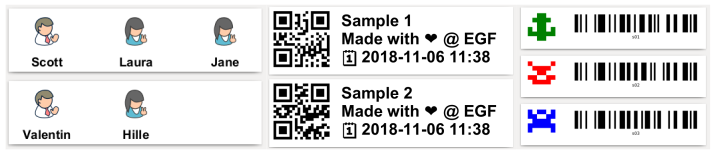 33 |
33 |  127 |
127 |