\`|`'%60'`|
36 | |`\r`|`'%0D'`|
37 | |`\n`|`'%0A'`|
38 | |`\t`|`'%09'`|
39 | |`{`|`'%7B'`|
40 | |`}`|`'%7D'`|
41 | |`|`|`'%7C'`|
42 | |`\\`|`'%5C'`|
43 | |`^`|`'%5E'`|
44 | |`'`|`'%27'`|
45 |
46 | Want to know more? Try this:
47 |
48 | ```javascript
49 | Array(range).fill(0)
50 | .map((_, i) => String.fromCharCode(i))
51 | .map(encodeURI)
52 | ```
53 |
54 | Try to set the range to 255 first (doge.
55 |
56 | ## Query Strings
57 |
58 | A query string is the part of a URL referring to the table above. Node.js provides a module called `querystring`.
59 |
60 | |Method|Description|
61 | |---|---|
62 | |.parse(str[, sep[, eq[, options]]])|Parse a query string into a json object|
63 | |.unescape(str)|Inner method used by .parse(). It is exported primarily to allow application code to provide a replacement decoding implementation if necessary|
64 | |.stringify(obj[, sep[, eq[, options]]])|
65 | Converts a json object to a query string|
66 | |.escape(str)|Inner method used by .stringify(). It is exported primarily to allow application code to provide a replacement percent-encoding implementation if necessary.|
67 |
68 | So far, the Node.js built-in querystring does not support for the deep structure:
69 |
70 | ```javascript
71 | const qs = require('qs'); //
72 | Third party
73 | const querystring = require('querystring'); // Node.js built-in
74 |
75 | let obj = { a: { b: { c: 1 } } };
76 |
77 | console.log(qs.stringify(obj)); // 'a%5Bb%5D%5Bc%5D=1'
78 | console.log(querystring.stringify(obj)); // 'a='
79 |
80 | let str = 'a%5Bb%5D%5Bc%5D=1';
81 |
82 | console.log(qs.parse(str)); // { a: { b: { c: '1' } } }
83 | console.log(querystring.parse(str)); // { 'a[b][c]': '1' }
84 | ```
85 |
86 | > How does HTTP pass `let arr = [1,2,3,4]` to the server by GET method?
87 |
88 | ```javascript
89 | const qs = require('qs');
90 |
91 | let arr = [1,2,3,4];
92 | let str = qs.stringify({arr});
93 |
94 | console.log(str); // arr%5B0%5D=1&arr%5B1%5D=2&arr%5B2%5D=3&arr%5B3%5D=4
95 | console.log(decodeURI(str)); // 'arr[0]=1&arr[1]=2&arr[2]=3&arr[3]=4'
96 | console.log(qs.parse(str)); // { arr: [ '1', '2', '3', '4' ] }
97 | ```
98 |
99 | You can pass arr Array to the server vir `https://your.host/api/?arr[0]=1&arr[1]=2&arr[2]=3&arr[3]=4`.
100 |
101 | ## util
102 |
103 | In v4.0.0 or later, util.is*() is not recommended and deprecated. Maybe it is because that maintaining the library is thankless and there are so many popular libraries. The following is the list:
104 |
105 | * util.debug(string)
106 | * util.error([...strings])
107 | * util.isArray(object)
108 | * util.isBoolean(object)
109 | * util.isBuffer(object)
110 | * util.isDate(object)
111 | * util.isError(object)
112 | * util.isFunction(object)
113 | * util.isNull(object)
114 | * util.isNullOrUndefined(object)
115 | * util.isNumber(object)
116 | * util.isObject(object)
117 | * util.isPrimitive(object)
118 | * util.isRegExp(object)
119 | * util.isString(object)
120 | * util.isSymbol(object)
121 | * util.isUndefined(object)
122 | * util.log(string)
123 | * util.print([...strings])
124 | * util.puts([...strings])
125 | * util._extend(target, source)
126 |
127 | Most of them can be used as an interview to ask how to implement.
128 |
129 | ### util.inherits
130 |
131 | > How to implement util.inherits in Node.js?
132 |
133 | https://github.com/nodejs/node/blob/v7.6.0/lib/util.js#L960
134 |
135 | ```javascript
136 | /**
137 | * Inherit the prototype methods from one constructor into another.
138 | *
139 | * The Function.prototype.inherits from lang.js rewritten as a standalone
140 | * function (not on Function.prototype). NOTE: If this file is to be loaded
141 | * during bootstrapping this function needs to be rewritten using some native
142 | * functions as prototype setup using normal JavaScript does not work as
143 | * expected during bootstrapping (see mirror.js in r114903).
144 | *
145 | * @param {function} ctor Constructor function which needs to inherit the
146 | * prototype.
147 | * @param {function} superCtor Constructor function to inherit prototype from.
148 | * @throws {TypeError} Will error if either constructor is null, or if
149 | * the super constructor lacks a prototype.
150 | */
151 | exports.inherits = function(ctor, superCtor) {
152 |
153 | if (ctor === undefined || ctor === null)
154 | throw new TypeError('The constructor to "inherits" must not be ' +
155 | 'null or undefined');
156 |
157 | if (superCtor === undefined || superCtor === null)
158 | throw new TypeError('The super constructor to "inherits" must not ' +
159 | 'be null or undefined');
160 |
161 | if (superCtor.prototype === undefined)
162 | throw new TypeError('The super constructor to "inherits" must ' +
163 | 'have a prototype');
164 |
165 | ctor.super_ = superCtor;
166 | Object.setPrototypeOf(ctor.prototype, superCtor.prototype);
167 | };
168 | ```
169 |
170 | ## Regex
171 |
172 | At first, regular expression is a biological expression that used to describe the brain neurons, GNU beard used to do the string match after the original road drifting away. Then it is used by men of GNU to match string, and
173 | deviates from the original road.
174 |
175 | Collecting...
176 |
177 | ## Common Modules
178 |
179 | [Awesome Node.js](https://github.com/sindresorhus/awesome-nodejs)
180 | [Most depended-upon packages](https://www.npmjs.com/browse/depended)
181 |
182 | > How do I get all the file names under a folder?
183 |
184 | ```javascript
185 | const fs = require('fs');
186 | const path = require('path');
187 |
188 | function traversal(dir) {
189 | let res = []
190 | for (let item of fs.readdirSync(dir)) {
191 | let filepath = path.join(dir, item);
192 | try {
193 | let fd = fs.openSync(filepath, 'r');
194 | let flag = fs.fstatSync(fd).isDirectory();
195 | fs.close(fd); // TODO
196 | if (flag) {
197 | res.push(...traversal(filepath));
198 | } else {
199 | res.push(filepath);
200 | }
201 | } catch(err) {
202 | if (err.code === 'ENOENT' && // can not open link file
203 | !!fs.readlinkSync(filepath)) { // if it is a link file
204 | res.push(filepath);
205 | } else {
206 | console.error('err', err);
207 | }
208 | }
209 | }
210 | return res.map((file) => path.basename(file));
211 | }
212 |
213 | console.log(traversal('.'));
214 |
215 |
216 | ```
217 |
218 |
219 | Of course you can also use Oh my [glob](https://github.com/isaacs/node-glob):
220 |
221 |
222 | ```javascript
223 | const glob = require("glob");
224 |
225 | glob("**/*.js", (err, files) {
226 | if (err) {
227 | throw new Error(err);
228 | }
229 | console.log('Here you are:', files.map(path.basename));
230 | });
231 |
--------------------------------------------------------------------------------
/sections/zh-cn/process.md:
--------------------------------------------------------------------------------
1 | # 进程
2 |
3 | * [`[Doc]` Process (进程)](/sections/zh-cn/process.md#process)
4 | * [`[Doc]` Child Processes (子进程)](/sections/zh-cn/process.md#child-process)
5 | * [`[Doc]` Cluster (集群)](/sections/zh-cn/process.md#cluster)
6 | * [`[Basic]` 进程间通信](/sections/zh-cn/process.md#进程间通信)
7 | * [`[Basic]` 守护进程](/sections/zh-cn/process.md#守护进程)
8 |
9 | ## 简述
10 |
11 | 关于 Process, 我们需要讨论的是两个概念, ①操作系统的进程, ② Node.js 中的 Process 对象. 操作进程对于服务端而言, 好比 html 之于前端一样基础. 想做服务端编程是不可能绕过 Unix/Linux 的. 在 Linux/Unix/Mac 系统中运行 `ps -ef` 命令可以看到当前系统中运行的进程. 各个参数如下:
12 |
13 | |列名称|意义|
14 | |-----|---|
15 | |UID|执行该进程的用户ID|
16 | |PID|进程编号|
17 | |PPID|该进程的父进程编号|
18 | |C|该进程所在的CPU利用率|
19 | |STIME|进程执行时间|
20 | |TTY|进程相关的终端类型|
21 | |TIME|进程所占用的CPU时间|
22 | |CMD|创建该进程的指令|
23 |
24 | 关于进程以及操作系统一些更深入的细节推荐阅读 APUE, 即《Unix 高级编程》等书籍来了解.
25 |
26 | ## Process
27 |
28 | 这里来讨论 Node.js 中的 `process` 对象. 直接在代码中通过 `console.log(process)` 即可打印出来. 可以看到 process 对象暴露了非常多有用的属性以及方法, 具体的细节见[官方文档](https://nodejs.org/dist/latest-v6.x/docs/api/process.html), 已经说的挺详细了. 其中包括但不限于:
29 |
30 | * 进程基础信息
31 | * 进程 Usage
32 | * 进程级事件
33 | * 依赖模块/版本信息
34 | * OS 基础信息
35 | * 账户信息
36 | * 信号收发
37 | * 三个标准流
38 |
39 | ### process.nextTick
40 |
41 | 上一节已经提到过 `process.nextTick` 了, 这是一个你需要了解的, 重要的, 基础方法.
42 |
43 |
44 | ```
45 | ┌───────────────────────┐
46 | ┌─>│ timers │
47 | │ └──────────┬────────────┘
48 | │ ┌──────────┴────────────┐
49 | │ │ I/O callbacks │
50 | │ └──────────┬────────────┘
51 | │ ┌──────────┴────────────┐
52 | │ │ idle, prepare │
53 | │ └──────────┬────────────┘ ┌───────────────┐
54 | │ ┌──────────┴────────────┐ │ incoming: │
55 | │ │ poll │<─────┤ connections, │
56 | │ └──────────┬────────────┘ │ data, etc. │
57 | │ ┌──────────┴────────────┐ └───────────────┘
58 | │ │ check │
59 | │ └──────────┬────────────┘
60 | │ ┌──────────┴────────────┐
61 | └──┤ close callbacks │
62 | └───────────────────────┘
63 | ```
64 |
65 | `process.nextTick` 并不属于 Event loop 中的某一个阶段, 而是在 Event loop 的每一个阶段结束后, 直接执行 `nextTickQueue` 中插入的 "Tick", 并且直到整个 Queue 处理完. 所以面试时又有可以问的问题了, 递归调用 process.nextTick 会怎么样? (doge
66 |
67 | ```javascript
68 | function test() {
69 | process.nextTick(() => test());
70 | }
71 | ```
72 |
73 | 这种情况与以下情况, 有什么区别? 为什么?
74 |
75 | ```javascript
76 | function test() {
77 | setTimeout(() => test(), 0);
78 | }
79 | ```
80 |
81 | ### 配置
82 |
83 | 配置是开发部署中一个很常见的问题. 普通的配置有两种方式, 一是定义配置文件, 二是使用环境变量.
84 |
85 | 
86 |
87 | 你可以通过[设置环境变量](http://cn.bing.com/search?q=linux+%E8%AE%BE%E7%BD%AE%E7%8E%AF%E5%A2%83%E5%8F%98%E9%87%8F)来指定配置, 然后通过 `process.env` 来获取配置项. 另外也可以通过读取定义好的配置文件来获取, 在这方面有很多不错的库例如 `dotenv`, `node-config` 等, 而在使用这些库来加载配置文件的时候, 通常都会碰到一个当前工作目录的问题.
88 |
89 | > 进程的当前工作目录是什么? 有什么作用?
90 |
91 | 当前进程启动的目录, 通过 process.cwd() 获取当前工作目录 (current working directory), 通常是命令行启动的时候所在的目录 (也可以在启动时指定), 文件操作等使用相对路径的时候会相对当前工作目录来获取文件.
92 |
93 | 一些获取配置的第三方模块就是通过你的当前目录来找配置文件的. 所以如果你错误的目录启动脚本, 可能没法得到正确的结果. 在程序中可以通过 `process.chdir()` 来改变当前的工作目录.
94 |
95 | ### 标准流
96 |
97 | 在 process 对象上还暴露了 `process.stderr`, `process.stdout` 以及 `process.stdin` 三个标准流, 熟悉 C/C++/Java 的同学应该对此比较熟悉. 关于这几个流, 常见的面试问题是问 **console.log 是同步还是异步? 如何实现一个 console.log?**
98 |
99 | 如果简历中有出现 C/C++ 关键字, 一般都会问到如何实现一个同步的输入 (类似实现C语言的 `scanf`, C++ 的 `cin`, Python 的 `raw_input` 等).
100 |
101 | ### 维护方面
102 |
103 | 熟悉与进程有关的基础命令, 如 top, ps, pstree 等命令.
104 |
105 | ## Child Process
106 |
107 | 子进程 (Child Process) 是进程中一个重要的概念. 你可以通过 Node.js 的 `child_process` 模块来执行可执行文件, 调用命令行命令, 比如其他语言的程序等. 也可以通过该模块来将 .js 代码以子进程的方式启动. 比较有名的网易的分布式架构 [pomelo](https://github.com/NetEase/pomelo) 就是基于该模块 (而不是 `cluster`) 来实现多进程分布式架构的.
108 |
109 | > child_process.fork 与 POSIX 的 fork 有什么区别?
110 |
111 | Node.js 的 `child_process.fork()` 在 Unix 上的实现最终调用了 POSIX [fork(2)](http://man7.org/linux/man-pages/man2/fork.2.html), 而 POSIX 的 fork 需要手动管理子进程的资源释放 (waitpid), child_process.fork 则不用关心这个问题, Node.js 会自动释放, 并且可以在 option 中选择父进程死后是否允许子进程存活.
112 |
113 | * spawn() 启动一个子进程来执行命令
114 | * options.detached 父进程死后是否允许子进程存活
115 | * options.stdio 指定子进程的三个标准流
116 | * spawnSync() 同步版的 spawn, 可指定超时, 返回的对象可获得子进程的情况
117 | * exec() 启动一个子进程来执行命令, 带回调参数获知子进程的情况, 可指定进程运行的超时时间
118 | * execSync() 同步版的 exec(), 可指定超时, 返回子进程的输出 (stdout)
119 | * execFile() 启动一个子进程来执行一个可执行文件, 可指定进程运行的超时时间
120 | * execFileSync() 同步版的 execFile(), 返回子进程的输出, 如何超时或者 exit code 不为 0, 会直接 throw Error
121 | * fork() 加强版的 spawn(), 返回值是 ChildProcess 对象可以与子进程交互
122 |
123 | 其中 exec/execSync 方法会直接调用 bash 来解释命令, 所以如果有命令有外部参数, 则需要注意被注入的情况.
124 |
125 | ### child.kill 与 child.send
126 |
127 | 常见会问的面试题, 如 `child.kill` 与 `child.send` 的区别. 二者一个是基于信号系统, 一个是基于 IPC.
128 |
129 | > 父进程或子进程的死亡是否会影响对方? 什么是孤儿进程?
130 |
131 | 子进程死亡不会影响父进程, 不过子进程死亡时(线程组的最后一个线程,通常是“领头”线程死亡时),会向它的父进程发送死亡信号. 反之父进程死亡, 一般情况下子进程也会随之死亡, 但如果此时子进程处于可运行态、僵死状态等等的话, 子进程将被`进程1`(init 进程)收养,从而成为孤儿进程. 另外, 子进程死亡的时候(处于“终止状态”),父进程没有及时调用 `wait()` 或 `waitpid()` 来返回死亡进程的相关信息,此时子进程还有一个 `PCB` 残留在进程表中,被称作僵尸进程.
132 |
133 | ## Cluster
134 |
135 | Cluster 是常见的 Node.js 利用多核的办法. 它是基于 `child_process.fork()` 实现的, 所以 cluster 产生的进程之间是通过 IPC 来通信的, 并且它也没有拷贝父进程的空间, 而是通过加入 cluster.isMaster 这个标识, 来区分父进程以及子进程, 达到类似 POSIX 的 [fork](http://man7.org/linux/man-pages/man2/fork.2.html) 的效果.
136 |
137 | ```javascript
138 | const cluster = require('cluster'); // | |
139 | const http = require('http'); // | |
140 | const numCPUs = require('os').cpus().length; // | | 都执行了
141 | // | |
142 | if (cluster.isMaster) { // |-|-----------------
143 | // Fork workers. // |
144 | for (var i = 0; i < numCPUs; i++) { // |
145 | cluster.fork(); // |
146 | } // | 仅父进程执行 (a.js)
147 | cluster.on('exit', (worker) => { // |
148 | console.log(`${worker.process.pid} died`); // |
149 | }); // |
150 | } else { // |-------------------
151 | // Workers can share any TCP connection // |
152 | // In this case it is an HTTP server // |
153 | http.createServer((req, res) => { // |
154 | res.writeHead(200); // | 仅子进程执行 (b.js)
155 | res.end('hello world\n'); // |
156 | }).listen(8000); // |
157 | } // |-------------------
158 | // | |
159 | console.log('hello'); // | | 都执行了
160 | ```
161 |
162 | 在上述代码中 numCPUs 虽然是全局变量但是, 在父进程中修改它, 子进程中并不会改变, 因为父进程与子进程是完全独立的两个空间. 他们所谓的共有仅仅只是都执行了, 并不是同一份.
163 |
164 | 你可以把父进程执行的部分当做 `a.js`, 子进程执行的部分当做 `b.js`, 你可以把他们想象成是先执行了 `node a.js` 然后 cluster.fork 了几次, 就执行了几次 `node b.js`. 而 cluster 模块则是二者之间的一个桥梁, 你可以通过 cluster 提供的方法, 让其二者之间进行沟通交流.
165 |
166 | ### How It Works
167 |
168 | worker 进程是由 child_process.fork() 方法创建的, 所以可以通过 IPC 在主进程和子进程之间相互传递服务器句柄.
169 |
170 | cluster 模块提供了两种分发连接的方式.
171 |
172 | 第一种方式 (默认方式, 不适用于 windows), 通过时间片轮转法(round-robin)分发连接. 主进程监听端口, 接收到新连接之后, 通过时间片轮转法来决定将接收到的客户端的 socket 句柄传递给指定的 worker 处理. 至于每个连接由哪个 worker 来处理, 完全由内置的循环算法决定.
173 |
174 | 第二种方式是由主进程创建 socket 监听端口后, 将 socket 句柄直接分发给相应的 worker, 然后当连接进来时, 就直接由相应的 worker 来接收连接并处理.
175 |
176 | 使用第二种方式时理论上性能应该较高, 然后时间上存在负载不均衡的问题, 比如通常 70% 的连接仅被 8 个进程中的 2 个处理, 而其他进程比较清闲.
177 |
178 | ## 进程间通信
179 |
180 | IPC (Inter-process communication) 进程间通信技术. 常见的进程间通信技术列表如下:
181 |
182 | 类型|无连接|可靠|流控制|优先级
183 | ---|-----|----|-----|-----
184 | 普通PIPE|N|Y|Y|N
185 | 命名PIPE|N|Y|Y|N
186 | 消息队列|N|Y|Y|N
187 | 信号量|N|Y|Y|Y
188 | 共享存储|N|Y|Y|Y
189 | UNIX流SOCKET|N|Y|Y|N
190 | UNIX数据包SOCKET|Y|Y|N|N
191 |
192 | Node.js 中的 IPC 通信是由 libuv 通过管道技术实现的, 在 windows 下由命名管道(named pipe)实现也就是上表中的最后第二个, *nix 系统则采用 UDS (Unix Domain Socket) 实现.
193 |
194 | 普通的 socket 是为网络通讯设计的, 而网络本身是不可靠的, 而为 IPC 设计的 socket 则不然, 因为默认本地的网络环境是可靠的, 所以可以简化大量不必要的 encode/decode 以及计算校验等, 得到效率更高的 UDS 通信.
195 |
196 | 如果了解 Node.js 的 IPC 的话, 可以问个比较有意思的问题
197 |
198 | > 在 IPC 通道建立之前, 父进程与子进程是怎么通信的? 如果没有通信, 那 IPC 是怎么建立的?
199 |
200 | 这个问题也挺简单, 只是个思路的问题. 在通过 child_process 建立子进程的时候, 是可以指定子进程的 env (环境变量) 的. 所以 Node.js 在启动子进程的时候, 主进程先建立 IPC 频道, 然后将 IPC 频道的 fd (文件描述符) 通过环境变量 (`NODE_CHANNEL_FD`) 的方式传递给子进程, 然后子进程通过 fd 连上 IPC 与父进程建立连接.
201 |
202 | 最后于进程间通信 (IPC) 的问题, 一般不会直接问 IPC 的实现, 而是会问什么情况下需要 IPC, 以及使用 IPC 处理过什么业务场景等.
203 |
204 |
205 | ## 守护进程
206 |
207 | 最后的守护进程, 是服务端方面一个很基础的概念了. 很多人可能只知道通过 pm2 之类的工具可以将进程以守护进程的方式启动, 却不了解什么是守护进程, 为什么要用守护进程. 对于水平好的同学, 我们是希望能了解守护进程的实现的.
208 |
209 | 普通的进程, 在用户退出终端之后就会直接关闭. 通过 `&` 启动到后台的进程, 之后会由于会话(session组)被回收而终止进程. 守护进程是不依赖终端(tty)的进程, 不会因为用户退出终端而停止运行的进程.
210 |
211 | ```c
212 | // 守护进程实现 (C语言版本)
213 | void init_daemon()
214 | {
215 | pid_t pid;
216 | int i = 0;
217 |
218 | if ((pid = fork()) == -1) {
219 | printf("Fork error !\n");
220 | exit(1);
221 | }
222 |
223 | if (pid != 0) {
224 | exit(0); // 父进程退出
225 | }
226 |
227 | setsid(); // 子进程开启新会话, 并成为会话首进程和组长进程
228 | if ((pid = fork()) == -1) {
229 | printf("Fork error !\n");
230 | exit(-1);
231 | }
232 | if (pid != 0) {
233 | exit(0); // 结束第一子进程, 第二子进程不再是会话首进程
234 | // 避免当前会话组重新与tty连接
235 | }
236 | chdir("/tmp"); // 改变工作目录
237 | umask(0); // 重设文件掩码
238 | for (; i < getdtablesize(); ++i) {
239 | close(i); // 关闭打开的文件描述符
240 | }
241 |
242 | return;
243 | }
244 | ```
245 |
246 | [Node.js 编写守护进程](https://cnodejs.org/topic/57adfadf476898b472247eac)
247 |
248 |
249 |
--------------------------------------------------------------------------------
/sections/en-us/event-async.md:
--------------------------------------------------------------------------------
1 | # event/Asynchronous
2 |
3 | * [`[Basic]` Promise](/sections/en-us/event-async.md#promise)
4 | * [`[Doc]` Events ](/sections/en-us/event-async.md#events)
5 | * [`[Doc]` Timers ](/sections/en-us/event-async.md#timers)
6 | * [`[Point]` Blocking/non-blocking](/sections/en-us/event-async.md#blocking-non-blocking)
7 | * [`[Point]` Paraller/Concurrent](/sections/en-us/event-async.md#paraller-concurrent)
8 |
9 | ## Summary
10 |
11 | Synchronous or Asynchronous ?That is a question.
12 |
13 | ## Promise
14 |
15 | 
16 |
17 |
18 | I believe that in the interview, many students have been asked such a question: how to handle `Callback Hell`. In the early years, there are lots of solutions like [Q](https://www.npmjs.com/package/q), [async](https://www.npmjs.com/package/async), [EventProxy](https://www.npmjs.com/package/eventproxy). Finally from the prevalence point of view, promise has been the winner of them, and has been the part of the ECMAScript 6 specification.
19 |
20 |
21 | To learn more basic knowledge about `promise`, we recommend this article. [Promise](http://javascript.ruanyifeng.com/advanced/promise.html#toc9)
22 |
23 | > What's the difference between the second argument of '.then' function and '.catch' function?
24 |
25 | To distinguish the difference, you can read this article [We have a problem with promises](https://pouchdb.com/2015/05/18/we-have-a-problem-with-promises.html)
26 |
27 | About Synchronous or Asynchronous, I hope you can pay attention to this question, a simple `promise` example below.
28 |
29 | ```javascript
30 | let doSth = new Promise((resolve, reject) => {
31 | console.log('hello');
32 | resolve();
33 | });
34 |
35 | doSth.then(() => {
36 | console.log('over');
37 | });
38 | ```
39 |
40 | there is no doubt that you can get the output
41 |
42 | ```
43 | hello
44 | over
45 | ```
46 |
47 |
48 | the first question is that the code wrapped by Promise is certainly synchronized, but whether the execution of `then` is Asynchronous?
49 |
50 | the second quesiton is `setTimeout` and `then` will be called after 10s, but how about `hello`? will `hello` be printed after 10s or at the beginning?
51 |
52 | ```javascript
53 | let doSth = new Promise((resolve, reject) => {
54 | console.log('hello');
55 | resolve();
56 | });
57 |
58 | setTimeout(() => {
59 | doSth.then(() => {
60 | console.log('over');
61 | })
62 | }, 10000);
63 | ```
64 |
65 |
66 | and how to understand the execution order of the code below: ([resource](https://zhuanlan.zhihu.com/p/25407758))
67 |
68 |
69 | ```javascript
70 | setTimeout(function() {
71 | console.log(1)
72 | }, 0);
73 | new Promise(function executor(resolve) {
74 | console.log(2);
75 | for( var i=0 ; i<10000 ; i++ ) {
76 | i == 9999 && resolve();
77 | }
78 | console.log(3);
79 | }).then(function() {
80 | console.log(4);
81 | });
82 | console.log(5);
83 | ```
84 |
85 |
86 | If you don't kown the answers of these questions, you can print the output at local environment. I hope you can understand the change of `promise` status, includes the relationship between `promise` and asynchronous, how promise help you to handle async situation , it would be better if you know the implementations of `promise`
87 |
88 | ## Events
89 |
90 |
91 | `Events` module is a very important core module in Node.js. There are many important core APIs in the node that depend on `Events` , for example, `Stream` is implemented based on `Events`, and `fs`, `net`, 'http' are implemented based on 'Stream', 'Events' is so important to Node.js.
92 |
93 | A class or a Object can get basic `events` methods by extending `EventEmitter` class, and we call it 'emitter', and the callback funciton that emit a kind of event is called as 'listener'. It is diffrent from DOM tree in browser, there are no bubble and capture actions or methods to handle event.
94 |
95 |
96 | >Is the Eventemitter.emit synchronous or asynchronous?
97 |
98 | The answer is **synchronous**, there are some description on Node.js documentation:
99 |
100 | >The EventListener calls all listeners synchronously in the order in which they were registered. This is important to ensure the proper sequencing of events and to avoid race conditions or logic errors.
101 |
102 |
103 | let's discuss the output is 'hi 1' or 'hi 2'?
104 |
105 | ```javascript
106 | const EventEmitter = require('events');
107 |
108 | let emitter = new EventEmitter();
109 |
110 | emitter.on('myEvent', () => {
111 | console.log('hi 1');
112 | });
113 |
114 | emitter.on('myEvent', () => {
115 | console.log('hi 2');
116 | });
117 |
118 | emitter.emit('myEvent');
119 | ```
120 | and whether there is a endless loop?
121 |
122 | ```javascript
123 | const EventEmitter = require('events');
124 |
125 | let emitter = new EventEmitter();
126 |
127 | emitter.on('myEvent', () => {
128 | console.log('hi');
129 | emitter.emit('myEvent');
130 | });
131 |
132 | emitter.emit('myEvent');
133 | ```
134 |
135 | and how about this case?
136 |
137 | ```javascript
138 | const EventEmitter = require('events');
139 |
140 | let emitter = new EventEmitter();
141 |
142 | emitter.on('myEvent', function sth () {
143 | emitter.on('myEvent', sth);
144 | console.log('hi');
145 | });
146 |
147 | emitter.emit('myEvent');
148 | ```
149 |
150 | Emitter can handle many complex state scenarios, such as TCP complex state machine, and if you are handling a multiple asynchronous operation and each step may throw an error, at this time .emit error and the excute some .once operations can save you from the mud.
151 |
152 |
153 | Pay attention to that some students prefer to monitor the status of certain class, but when you destroy this class, don't forget to destroy these emitters too , because inside the class, some listener may cause memory leak.
154 |
155 | ## Blocking/non-blocking
156 |
157 | > How to judge whether a interface is asynchronous? Is it asynchronous while a callback provided?
158 |
159 |
160 | This is a open question, you can have your own way to judge.
161 |
162 | * review documentation
163 | * console.log and print the output
164 | * whether there is IO operation
165 |
166 |
167 | Simply use the callback function is not asynchronous, IO operation may be asynchronous, in addition to the use of setTimeout and other ways are asynchronous.
168 |
169 |
170 | > if you have built a website by koa, this website has a interface A, and in some cases, interface A can be the endless loop, unfortunately, if you triggered this endless loop, what will be the impact on your website?
171 |
172 |
173 | In Node.js environment javascript code has only one single thread. Only the current code has been excuted, the process will cut into the event loop, and then pop out the next callback function from the event queue to start the implementation of the code. so ① to implement a Sleep function, as long as an infinite loop can block the execution of the entire js process (on how to avoid the colleagues write deadless loop, see the chapter of `test`.)
174 |
175 |
176 | > How to implement a Sleep function? ①
177 |
178 | ```javascript
179 | function sleep(ms) {
180 | var start = Date.now(), expire = start + ms;
181 | while (Date.now() < expire) ;
182 | return;
183 | }
184 | ```
185 |
186 | Asynchronous in Node.js means an event queue in other thread achived by libuv module.
187 |
188 | If endless loop logic trigger in your website, the whole process will be blocked, and all request will timeout, asynchronous code will never be excuted, and your website will be crashed.
189 |
190 | > How to implement an async.reduce?
191 |
192 | You need to konw that reduce is analyze a recursive data structure and through use of a given combining operation, recombine the results of recursively processing its constituent parts, building up a return value.
193 |
194 | ## Timers
195 |
196 | The writter think there are two kinds of 'asynchronous' in Node.js: `hard asynchronous` and `soft asynchronous`.
197 |
198 | `hard asynchronous` means IO operation or some cases that you need libuv module externally and of course includes `readFileSync` or `execSync`. Because of the single thread feature of Node.js, it is unwise to do some IO operation in synchronous way as it will block the excutation of other code.
199 |
200 | `soft asynchronous` is that some asynchronous cases implemented by `setTimeout`. To understand the diffrence among nextTick, setTimeout and setImmediate , you can see this article. [article](https://nodejs.org/en/docs/guides/event-loop-timers-and-nexttick/)
201 |
202 |
203 |
204 |
205 | **Event loop example**
206 |
207 | ```
208 | ┌───────────────────────┐
209 | ┌─>│ timers │
210 | │ └──────────┬────────────┘
211 | │ ┌──────────┴────────────┐
212 | │ │ I/O callbacks │
213 | │ └──────────┬────────────┘
214 | │ ┌──────────┴────────────┐
215 | │ │ idle, prepare │
216 | │ └──────────┬────────────┘ ┌───────────────┐
217 | │ ┌──────────┴────────────┐ │ incoming: │
218 | │ │ poll │<─────┤ connections, │
219 | │ └──────────┬────────────┘ │ data, etc. │
220 | │ ┌──────────┴────────────┐ └───────────────┘
221 | │ │ check │
222 | │ └──────────┬────────────┘
223 | │ ┌──────────┴────────────┐
224 | └──┤ close callbacks │
225 | └───────────────────────┘
226 | ```
227 |
228 | To know more about event loop, Timers, nextTick, we recommend the Node.js documentation, [*The Node.js Event Loop, Timers, and process.nextTick()*](https://nodejs.org/en/docs/guides/event-loop-timers-and-nexttick/) and [*Tasks, microtasks, queues and schedules*](https://jakearchibald.com/2015/tasks-microtasks-queues-and-schedules/).
229 |
230 |
231 | ## Paraller/Concurrent
232 |
233 |
234 | Parallelism and Concurrency are two very common concepts. You can read this blog of Joe Armstrong(the creator of Erlang) ([Concurrent and Parallel](http://joearms.github.io/2013/04/05/concurrent-and-parallel-programming.html))
235 |
236 | 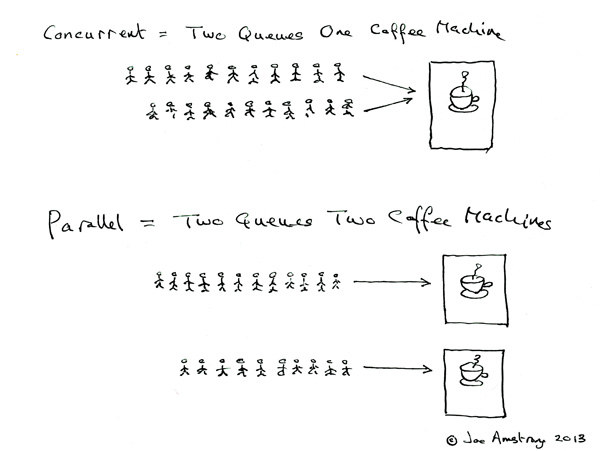
237 |
238 | Coucurrent = 2 queues with 1 coffee machine
239 |
240 | Parallel = 2 queues with 2 coffee machines
241 |
242 |
243 | Node.js executes each task of events queue one by one by event loop, by this way, it avoids that in some traditional multithreading situation, when '2 queues with 1 coffee machine', the context switch and resource scramble/synchronize problems, and achives high concurrent。
244 |
245 |
246 | you can add another 'coffee machine' by using `cluster` module to achieve paraller in Node.js.
247 |
--------------------------------------------------------------------------------
/sections/zh-cn/README.md:
--------------------------------------------------------------------------------
1 | 
2 |
3 | # 如何通过饿了么 Node.js 面试
4 |
5 | Hi, 欢迎来到 ElemeFE, 如标题所示本教程的目的是教你如何通过饿了么大前端的面试, 职位是 2~3 年经验的 Node.js 服务端程序员 (并不是全栈), 如果你对这个职位感兴趣或者学习 Node.js 一些进阶的内容, 那么欢迎围观.
6 |
7 | 需要注意的是, 本文针对的并不是零基础的同学, 你需要有一定的 JavaScript/Node.js 基础, 并且有一定的工作经验. 另外本教程的重点更准确的说是服务端基础中 Node.js 程序员需要了解的部分.
8 |
9 | 如果你觉得大多不了解, 就不用投简历了 (Connection oriented)|全双工(1:1)|可靠
(重传机制)|有序
(通过SYN排序)|无, 有[粘包情况](#粘包)|有|慢|低|20~60字节 108 | UDP|无连接
(Connection less)|n:m|不可靠
(丢包后数据丢失)|无序|有消息边界, **无粘包**|无|快|高|8字节 109 | 110 | UDP socket 支持 n 对 m 的连接状态, 在[官方文档](https://nodejs.org/dist/latest-v6.x/docs/api/dgram.html)中有写到在 `dgram.createSocket(options[, callback])` 中的 option 可以指定 `reuseAddr` 即 `SO_REUSEADDR`标志. 通过 `SO_REUSEADDR` 可以简单的实现 n 对 m 的多播特性 (不过仅在支持多播的系统上才有). 111 | 112 | 113 | ### 常见的应用场景 114 | 115 |
| 传输层协议 | 应用 | 应用层协议 |
|---|---|---|
| TCP | 电子邮件 | SMTP |
| 终端连接 | TELNET | |
| 终端连接 | SSH | |
| 万维网 | HTTP | |
| 文件传输 | FTP | |
| UDP | 域名解析 | DNS |
| 简单文件传输 | TFTP | |
| 网络时间校对 | NTP | |
| 网络文件系统 | NFS | |
| 路由选择 | RIP | |
| IP电话 | - | |
| 流式多媒体通信 | - |
| component | type | metric |
|---|---|---|
| CPU | utilization | system-wide: vmstat 1, "us" + "sy" + "st"; sar -u, sum fields except "%idle" and "%iowait"; dstat -c, sum fields except "idl" and "wai"; per-cpu: mpstat -P ALL 1, sum fields except "%idle" and "%iowait"; sar -P ALL, same as mpstat; per-process: top, "%CPU"; htop, "CPU%"; ps -o pcpu; pidstat 1, "%CPU"; per-kernel-thread: top/htop ("K" to toggle), where VIRT == 0 (heuristic). [1] |
| CPU | saturation | system-wide: vmstat 1, "r" > CPU count [2]; sar -q, "runq-sz" > CPU count; dstat -p, "run" > CPU count; per-process: /proc/PID/schedstat 2nd field (sched_info.run_delay); perf sched latency (shows "Average" and "Maximum" delay per-schedule); dynamic tracing, eg, SystemTap schedtimes.stp "queued(us)" [3] |
| CPU | errors | perf (LPE) if processor specific error events (CPC) are available; eg, AMD64's "04Ah Single-bit ECC Errors Recorded by Scrubber" [4] |
| Memory capacity | utilization | system-wide: free -m, "Mem:" (main memory), "Swap:" (virtual memory); vmstat 1, "free" (main memory), "swap" (virtual memory); sar -r, "%memused"; dstat -m, "free"; slabtop -s c for kmem slab usage; per-process: top/htop, "RES" (resident main memory), "VIRT" (virtual memory), "Mem" for system-wide summary |
| Memory capacity | saturation | system-wide: vmstat 1, "si"/"so" (swapping); sar -B, "pgscank" + "pgscand" (scanning); sar -W; per-process: 10th field (min_flt) from /proc/PID/stat for minor-fault rate, or dynamic tracing [5]; OOM killer: dmesg | grep killed |
| Memory capacity | errors | dmesg for physical failures; dynamic tracing, eg, SystemTap uprobes for failed malloc()s |
| Network Interfaces | utilization | sar -n DEV 1, "rxKB/s"/max "txKB/s"/max; ip -s link, RX/TX tput / max bandwidth; /proc/net/dev, "bytes" RX/TX tput/max; nicstat "%Util" [6] |
| Network Interfaces | saturation | ifconfig, "overruns", "dropped"; netstat -s, "segments retransmited"; sar -n EDEV, *drop and *fifo metrics; /proc/net/dev, RX/TX "drop"; nicstat "Sat" [6]; dynamic tracing for other TCP/IP stack queueing [7] |
| Network Interfaces | errors | ifconfig, "errors", "dropped"; netstat -i, "RX-ERR"/"TX-ERR"; ip -s link, "errors"; sar -n EDEV, "rxerr/s" "txerr/s"; /proc/net/dev, "errs", "drop"; extra counters may be under /sys/class/net/...; dynamic tracing of driver function returns 76] |
| Storage device I/O | utilization | system-wide: iostat -xz 1, "%util"; sar -d, "%util"; per-process: iotop; pidstat -d; /proc/PID/sched "se.statistics.iowait_sum" |
| Storage device I/O | saturation | iostat -xnz 1, "avgqu-sz" > 1, or high "await"; sar -d same; LPE block probes for queue length/latency; dynamic/static tracing of I/O subsystem (incl. LPE block probes) |
| Storage device I/O | errors | /sys/devices/.../ioerr_cnt; smartctl; dynamic/static tracing of I/O subsystem response codes [8] |
| Storage capacity | utilization | swap: swapon -s; free; /proc/meminfo "SwapFree"/"SwapTotal"; file systems: "df -h" |
| Storage capacity | saturation | not sure this one makes sense - once it's full, ENOSPC |
| Storage capacity | errors | strace for ENOSPC; dynamic tracing for ENOSPC; /var/log/messages errs, depending on FS |
| Storage controller | utilization | iostat -xz 1, sum devices and compare to known IOPS/tput limits per-card |
| Storage controller | saturation | see storage device saturation, ... |
| Storage controller | errors | see storage device errors, ... |
| Network controller | utilization | infer from ip -s link (or /proc/net/dev) and known controller max tput for its interfaces |
| Network controller | saturation | see network interface saturation, ... |
| Network controller | errors | see network interface errors, ... |
| CPU interconnect | utilization | LPE (CPC) for CPU interconnect ports, tput / max |
| CPU interconnect | saturation | LPE (CPC) for stall cycles |
| CPU interconnect | errors | LPE (CPC) for whatever is available |
| Memory interconnect | utilization | LPE (CPC) for memory busses, tput / max; or CPI greater than, say, 5; CPC may also have local vs remote counters |
| Memory interconnect | saturation | LPE (CPC) for stall cycles |
| Memory interconnect | errors | LPE (CPC) for whatever is available |
| I/O interconnect | utilization | LPE (CPC) for tput / max if available; inference via known tput from iostat/ip/... |
| I/O interconnect | saturation | LPE (CPC) for stall cycles |
| I/O interconnect | errors | LPE (CPC) for whatever is available |
| component | type | metric |
|---|---|---|
| Kernel mutex | utilization | With CONFIG_LOCK_STATS=y, /proc/lock_stat "holdtime-totat" / "acquisitions" (also see "holdtime-min", "holdtime-max") [8]; dynamic tracing of lock functions or instructions (maybe) |
| Kernel mutex | saturation | With CONFIG_LOCK_STATS=y, /proc/lock_stat "waittime-total" / "contentions" (also see "waittime-min", "waittime-max"); dynamic tracing of lock functions or instructions (maybe); spinning shows up with profiling (perf record -a -g -F 997 ..., oprofile, dynamic tracing) |
| Kernel mutex | errors | dynamic tracing (eg, recusive mutex enter); other errors can cause kernel lockup/panic, debug with kdump/crash |
| User mutex | utilization | valgrind --tool=drd --exclusive-threshold=... (held time); dynamic tracing of lock to unlock function time |
| User mutex | saturation | valgrind --tool=drd to infer contention from held time; dynamic tracing of synchronization functions for wait time; profiling (oprofile, PEL, ...) user stacks for spins |
| User mutex | errors | valgrind --tool=drd various errors; dynamic tracing of pthread_mutex_lock() for EAGAIN, EINVAL, EPERM, EDEADLK, ENOMEM, EOWNERDEAD, ... |
| Task capacity | utilization | top/htop, "Tasks" (current); sysctl kernel.threads-max, /proc/sys/kernel/threads-max (max) |
| Task capacity | saturation | threads blocking on memory allocation; at this point the page scanner should be running (sar -B "pgscan*"), else examine using dynamic tracing |
| Task capacity | errors | "can't fork()" errors; user-level threads: pthread_create() failures with EAGAIN, EINVAL, ...; kernel: dynamic tracing of kernel_thread() ENOMEM |
| File descriptors | utilization | system-wide: sar -v, "file-nr" vs /proc/sys/fs/file-max; dstat --fs, "files"; or just /proc/sys/fs/file-nr; per-process: ls /proc/PID/fd | wc -l vs ulimit -n |
| File descriptors | saturation | does this make sense? I don't think there is any queueing or blocking, other than on memory allocation. |
| File descriptors | errors | strace errno == EMFILE on syscalls returning fds (eg, open(), accept(), ...). |