├── .gitattributes
├── Case Study # 1 - Danny's Diner
├── .sql
└── README.md
├── Case Study #3 - Foodie-Fi
├── Part D
│ └── README.md
├── README.md
├── Part C
│ └── README.md
└── Part A & B
│ └── README.md
├── README.md
├── Case Study # 2 - Pizza Runner
├── README.md
├── D. Pricing and Ratings
│ ├── query-sql.sql
│ └── README.md
├── A. Pizza Metrics
│ └── README.md
├── B. Runner and Customer Experience
│ └── README.md
└── C. Ingredient Optimization
│ └── README.md
├── Case Study #4 - Data Bank
└── README.md
└── Case Study #5 - Data Mart
└── README.md
/.gitattributes:
--------------------------------------------------------------------------------
1 | *.sql linguist-detectable=true
2 | *.sql linguist-language=sql
3 |
--------------------------------------------------------------------------------
/Case Study # 1 - Danny's Diner/.sql:
--------------------------------------------------------------------------------
1 | SELECT
2 | coc.customer_id,
3 | SUM(CASE WHEN exlcusions IS NOT NULL OR extras IS NOT NULL THEN 1 ELSE 0 END) AS changes,
4 | SUM(CASE WHEN exlcusions IS NULL AND extras IS NULL THEN 1 ELSE 0 END) AS no_changes
5 | FROM customer_orders_table_cleaned AS coc
6 | INNER JOIN runner_orders_table_cleaned AS roc
7 | ON coc.order_id = roc.order_id
8 | WHERE roc.cancellation IS NULL
9 | OR roc.cancellation NOT IN ('Restaurant Cancellation', 'Customer Cancellation')
10 | GROUP BY coc.customer_id
11 | ORDER BY coc.customer_id;
12 |
--------------------------------------------------------------------------------
/Case Study #3 - Foodie-Fi/Part D/README.md:
--------------------------------------------------------------------------------
1 | # Part D. Outside The Box Questions
2 |
3 | 1. How would you calculate the rate of growth for Foodie-Fi?
4 |
5 | 2. What key metrics would you recommend Foodie-Fi management to track over time to assess performance of their overall business?
6 |
7 | 3. What are some key customer journeys or experiences that you would analyse further to improve customer retention?
8 |
9 | 4. If the Foodie-Fi team were to create an exit survey shown to customers who wish to cancel their subscription, what questions would you include in the survey?
10 | What business levers could the Foodie-Fi team use to reduce the customer churn rate? How would you validate the effectiveness of your ideas?
11 |
--------------------------------------------------------------------------------
/README.md:
--------------------------------------------------------------------------------
1 | # 8-Week-SQL-Challenge
2 | Danny Ma's Serious SQL Course is where I learned SQL and completed the provided case study's to build a SQL project portfolio.
3 |
4 | **Danny's LinkedIn - https://www.linkedin.com/in/datawithdanny/**
5 |
6 | **8 Week SQL Challenge Website - https://8weeksqlchallenge.com/getting-started/**
7 |
8 | # Case Studies
9 |
10 | **Case Study #1 - Danny's Diner- https://8weeksqlchallenge.com/case-study-1/**
11 |
12 | 
13 |
14 | **Case Study #2 - Pizza Runner - https://8weeksqlchallenge.com/case-study-2/**
15 | 
16 |
17 | **Case Study #3 - Foodie-Fi - https://8weeksqlchallenge.com/case-study-3/**
18 | 
19 |
20 | **Case Study #4 - Data Bank - https://8weeksqlchallenge.com/case-study-4/**
21 | 
22 |
23 | **Case Study #5 - Data Mart - https://8weeksqlchallenge.com/case-study-5/**
24 | 
25 |
26 | **Case Study #6 - Clique Bait - https://8weeksqlchallenge.com/case-study-6/**
27 | 
28 |
29 | **Case Study #7 - Balanced Tree Clothing Co. - https://8weeksqlchallenge.com/case-study-7/**
30 | 
31 |
32 | **Case Study #8 - Fresh Segments - https://8weeksqlchallenge.com/case-study-8/**
33 | 
34 |
--------------------------------------------------------------------------------
/Case Study #3 - Foodie-Fi/README.md:
--------------------------------------------------------------------------------
1 | # Case Study #3 - Foodie-Fi
2 | 3rd Case Study from Danny Ma's Serious SQL Course - https://8weeksqlchallenge.com/case-study-3/
3 |
4 | 
5 |
6 | ## Entity Relationship Diagram
7 | 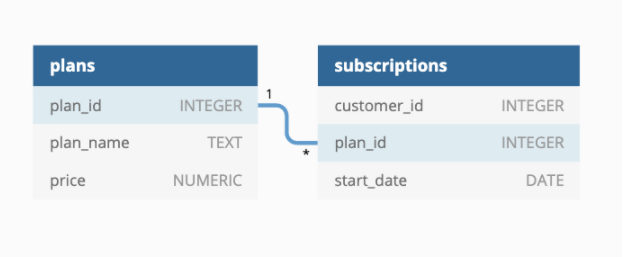
8 |
9 | ## Schema Link
10 | https://www.db-fiddle.com/f/rHJhRrXy5hbVBNJ6F6b9gJ/16
11 |
12 | ## **Datasets** - The required datasets reside within the foodie_fi schema on the PostgreSQL Docker setup
13 |
14 | **Table 1: plans**
15 | - Customers can choose which plans to join Foodie-Fi when they first sign up.
16 |
17 | - Basic plan customers have limited access and can only stream their videos and is only available monthly at $9.90
18 |
19 | - Pro plan customers have no watch time limits and are able to download videos for offline viewing. Pro plans start at $19.90 a month or $199 for an annual subscription.
20 |
21 | - Customers can sign up to an initial 7 day free trial will automatically continue with the pro monthly subscription plan unless they cancel, downgrade to basic or upgrade to an annual pro plan at any point during the trial.
22 |
23 | - When customers cancel their Foodie-Fi service - they will have a churn plan record with a null price but their plan will continue until the end of the billing period.
24 |
25 | 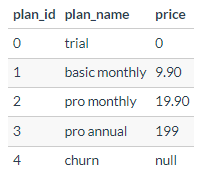
26 |
27 | **Table 2: subscriptions**
28 |
29 | - Customer subscriptions show the exact date where their specific plan_id starts.
30 |
31 | - If customers downgrade from a pro plan or cancel their subscription - the higher plan will remain in place until the period is over - the start_date in the subscriptions table will reflect the date that the actual plan changes.
32 |
33 | - When customers upgrade their account from a basic plan to a pro or annual pro plan - the higher plan will take effect straightaway.
34 |
35 | - When customers churn - they will keep their access until the end of their current billing period but the start_date will be technically the day they decided to cancel their service.
36 |
37 | 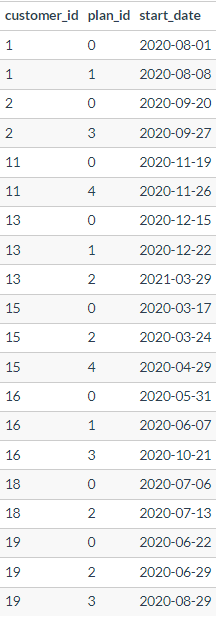
38 |
--------------------------------------------------------------------------------
/Case Study # 2 - Pizza Runner/README.md:
--------------------------------------------------------------------------------
1 | # Case Study #2 - Pizza Runner
2 | 2nd Case Study from Danny Ma's Serious SQL Course
3 |
4 | 
5 |
6 | ## Entity Relationship Diagram
7 | 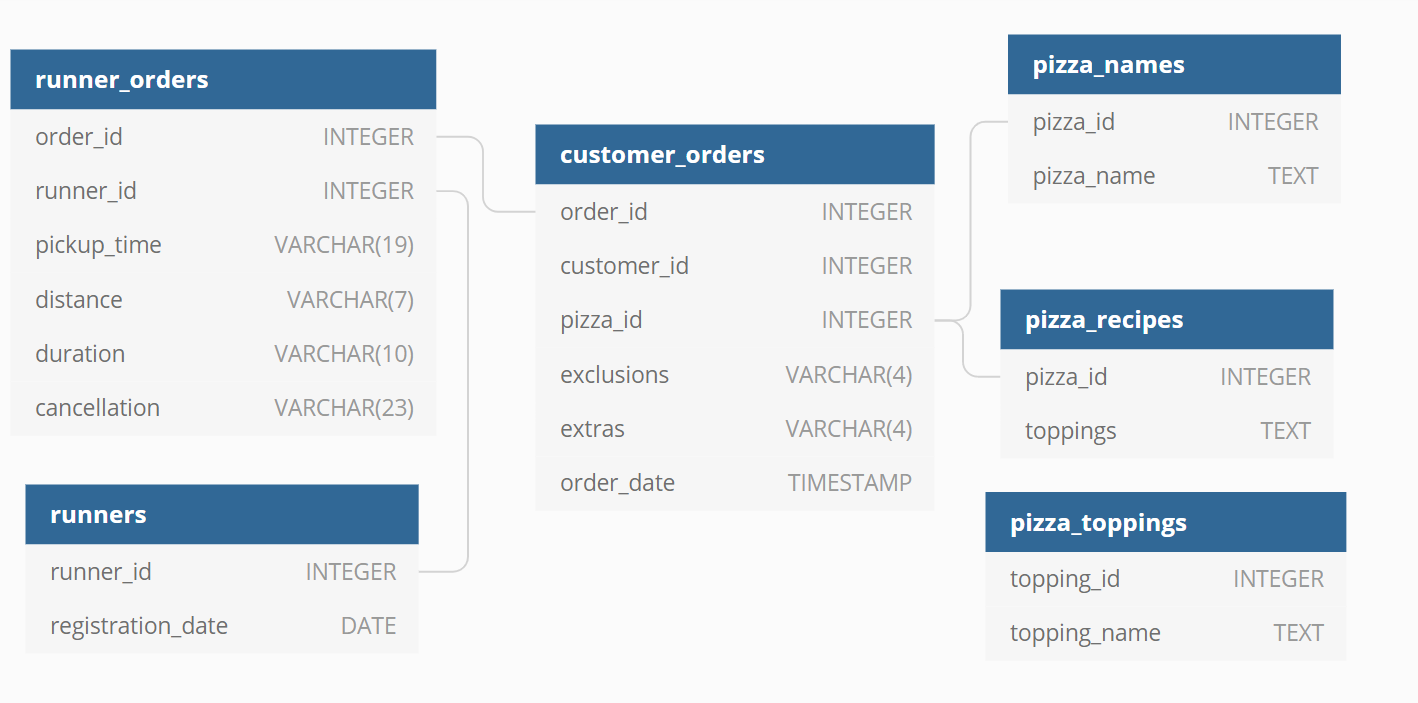
8 |
9 | **Link to ERD**: https://dbdiagram.io/d/5f3e085ccf48a141ff558487/?utm_source=dbdiagram_embed&utm_medium=bottom_open
10 |
11 | ## **Datasets** - All datasets exist within the pizza_runner database schema
12 |
13 | **Table 1: runners**
14 | The runners table shows the registration_date for each new runner
15 |
16 | 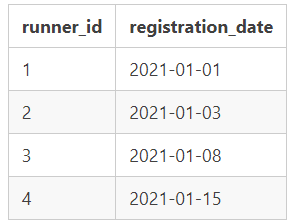
17 |
18 | **Table 2: customer_orders**
19 |
20 | - Customer pizza orders are captured in the customer_orders table with 1 row for each individual pizza that is part of the order.
21 |
22 | - The pizza_id relates to the type of pizza which was ordered whilst the exclusions are the ingredient_id values which should be removed from the pizza and the extras are the ingredient_id values which need to be added to the pizza.
23 |
24 | - Note that customers can order multiple pizzas in a single order with varying exclusions and extras values even if the pizza is the same type!
25 |
26 | - The exclusions and extras columns will need to be cleaned up before using them in your queries.
27 |
28 | 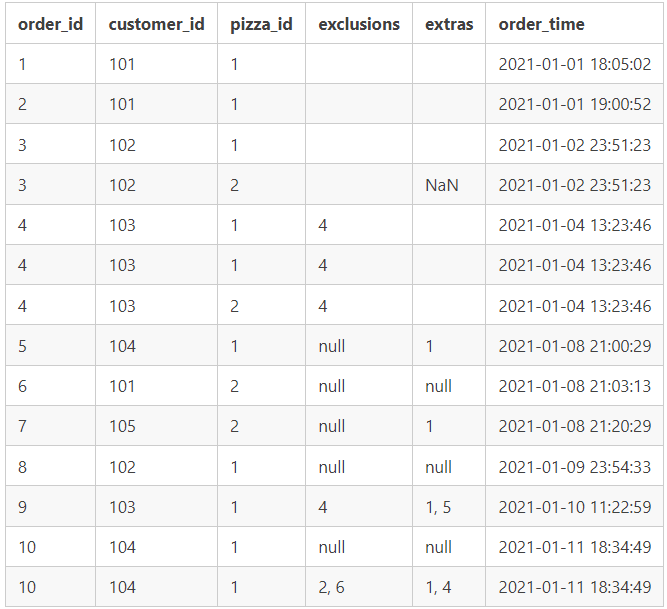
29 |
30 | **Table 3: runner_orders**
31 |
32 | - After each orders are received through the system - they are assigned to a runner - however not all orders are fully completed and can be cancelled by the restaurant or the customer.
33 |
34 | - The pickup_time is the timestamp at which the runner arrives at the Pizza Runner headquarters to pick up the freshly cooked pizzas. The distance and duration fields are related to how far and long the runner had to travel to deliver the order to the respective customer.
35 |
36 | 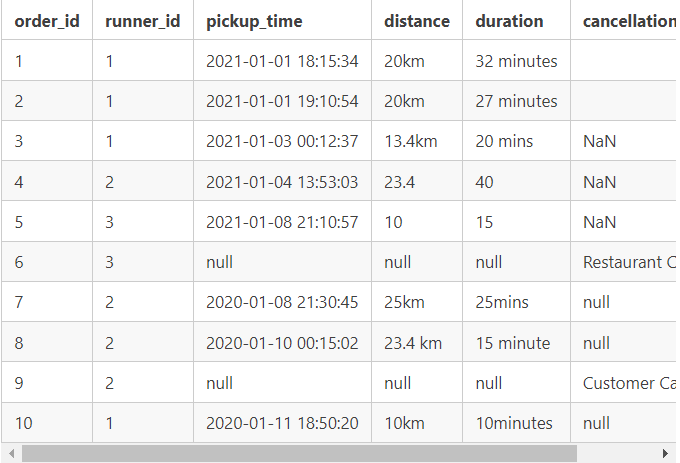
37 |
38 | **Table 4: pizza_names**
39 | At the moment - Pizza Runner only has 2 pizzas available the Meat Lovers or Vegetarian!
40 |
41 | 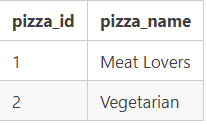
42 |
43 | **Table 5: pizza_recipes**
44 | Each pizza_id has a standard set of toppings which are used as part of the pizza recipe.
45 |
46 | 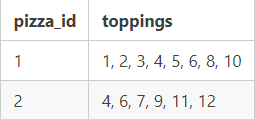
47 |
48 | **Table 6: pizza_toppings**
49 | This table contains all of the topping_name values with their corresponding topping_id value
50 |
51 | 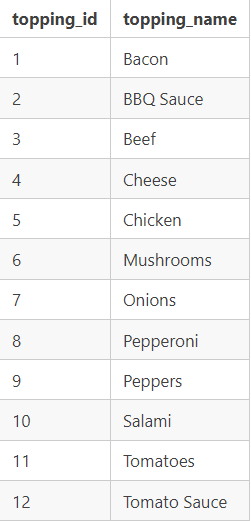
52 |
--------------------------------------------------------------------------------
/Case Study #3 - Foodie-Fi/Part C/README.md:
--------------------------------------------------------------------------------
1 | ## Entity Relationship Diagram
2 | 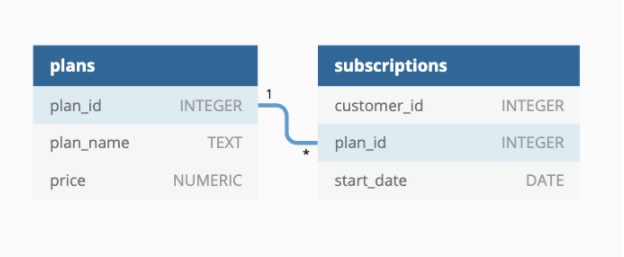
3 |
4 |
5 | Table 1: plans
6 |
7 | - Customers can choose which plans to join Foodie-Fi when they first sign up.
8 |
9 | - Basic plan customers have limited access and can only stream their videos and is only available monthly at $9.90
10 |
11 | - Pro plan customers have no watch time limits and are able to download videos for offline viewing. Pro plans start at $19.90 a month or $199 for an annual subscription.
12 |
13 | - Customers can sign up to an initial 7 day free trial will automatically continue with the pro monthly subscription plan unless they cancel, downgrade to basic or upgrade to an annual pro plan at any point during the trial.
14 |
15 | - When customers cancel their Foodie-Fi service - they will have a churn plan record with a null price but their plan will continue until the end of the billing period.
16 |
17 | 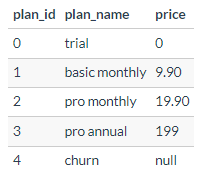
18 |
19 |
20 |
21 | Table 2: subscriptions
22 |
23 | Customer subscriptions show the exact date where their specific plan_id starts.
24 |
25 | If customers downgrade from a pro plan or cancel their subscription - the higher plan will remain in place until the period is over - the start_date in the subscriptions table will reflect the date that the actual plan changes.
26 |
27 | When customers upgrade their account from a basic plan to a pro or annual pro plan - the higher plan will take effect straightaway.
28 |
29 | When customers churn - they will keep their access until the end of their current billing period but the start_date will be technically the day they decided to cancel their service.
30 |
31 | 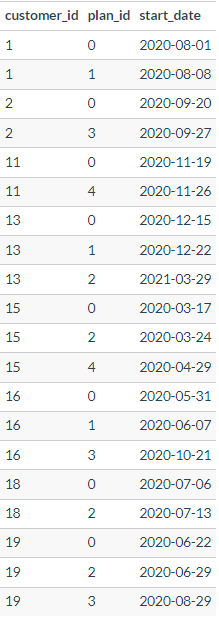
32 |
33 |
34 |
35 | # C. Challenge Payment Question
36 | The Foodie-Fi team wants you to create a new payments table for the year 2020 that includes amounts paid by each customer in the subscriptions table with the following requirements:
37 |
38 | monthly payments always occur on the same day of month as the original start_date of any monthly paid plan
39 | upgrades from basic to monthly or pro plans are reduced by the current paid amount in that month and start immediately
40 | upgrades from pro monthly to pro annual are paid at the end of the current billing period and also starts at the end of the month period
41 | once a customer churns they will no longer make payments
42 |
43 |
44 | Example outputs for this table might look like the following:
45 |
46 | 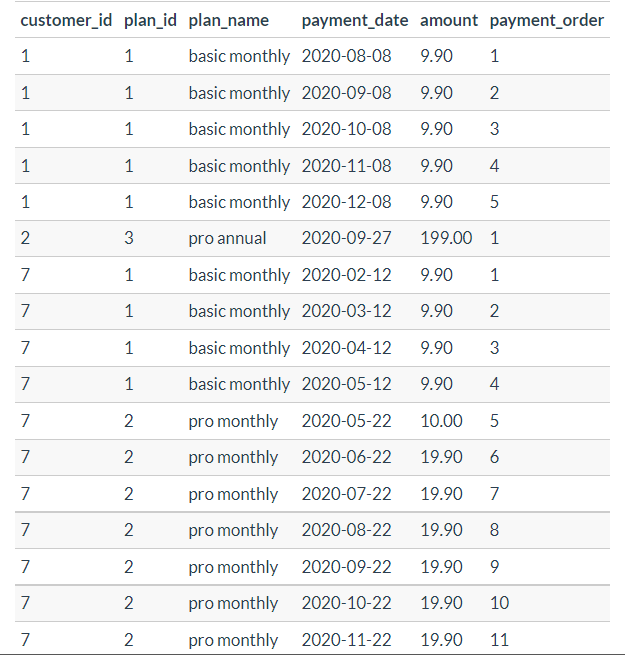
47 |
48 | 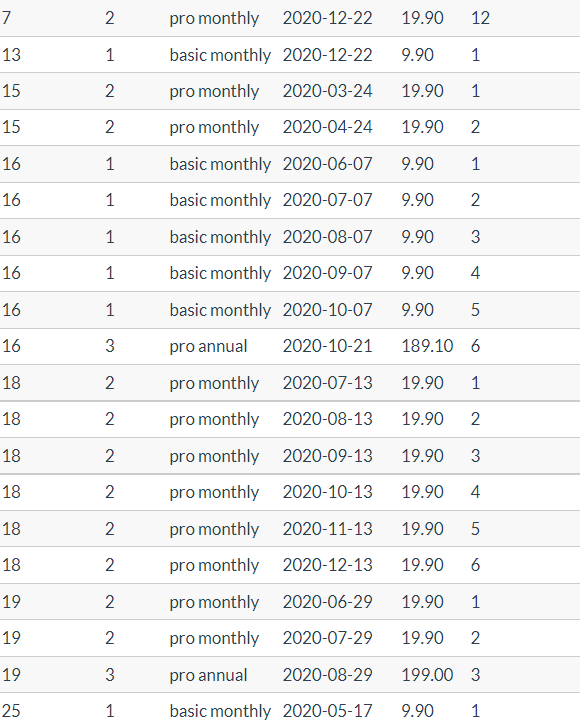
49 |
50 | 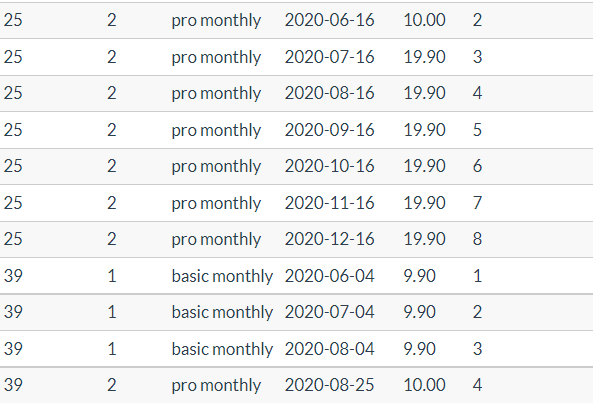
51 |
52 |
53 |
54 |
55 |
56 |
57 | # Case Study Questions & Solutions
58 |
59 |
60 |
61 |
--------------------------------------------------------------------------------
/Case Study # 2 - Pizza Runner/D. Pricing and Ratings/query-sql.sql:
--------------------------------------------------------------------------------
1 | SELECT
2 | table_name,
3 | column_name,
4 | data_type
5 | FROM information_schema.columns
6 | WHERE table_name = 'customer_orders';
7 |
8 | --Result:
9 | +──────────────────+──────────────+──────────────────────────────+
10 | | table_name | column_name | data_type |
11 | +──────────────────+──────────────+──────────────────────────────+
12 | | customer_orders | order_id | integer |
13 | | customer_orders | customer_id | integer |
14 | | customer_orders | pizza_id | integer |
15 | | customer_orders | exclusions | character varying |
16 | | customer_orders | extras | character varying |
17 | | customer_orders | order_time | timestamp without time zone |
18 | +──────────────────+──────────────+──────────────────────────────+
19 |
20 |
21 |
22 | +───────────+──────────────+───────────+───────────────────────────+─────────────+
23 | | order_id | customer_id | pizza_id | order_time | pizza_name |
24 | +───────────+──────────────+───────────+───────────────────────────+─────────────+
25 | | 1 | 101 | 1 | 2021-01-01T18:05:02.000Z | Meatlovers |
26 | | 2 | 101 | 1 | 2021-01-01T19:00:52.000Z | Meatlovers |
27 | | 3 | 102 | 1 | 2021-01-02T23:51:23.000Z | Meatlovers |
28 | | 3 | 102 | 2 | 2021-01-02T23:51:23.000Z | Vegetarian |
29 | | 4 | 103 | 1 | 2021-01-04T13:23:46.000Z | Meatlovers |
30 | | 4 | 103 | 1 | 2021-01-04T13:23:46.000Z | Meatlovers |
31 | | 4 | 103 | 2 | 2021-01-04T13:23:46.000Z | Vegetarian |
32 | | 5 | 104 | 1 | 2021-01-08T21:00:29.000Z | Meatlovers |
33 | | 6 | 101 | 2 | 2021-01-08T21:03:13.000Z | Vegetarian |
34 | | 7 | 105 | 2 | 2021-01-08T21:20:29.000Z | Vegetarian |
35 | | 8 | 102 | 1 | 2021-01-09T23:54:33.000Z | Meatlovers |
36 | | 9 | 103 | 1 | 2021-01-10T11:22:59.000Z | Meatlovers |
37 | | 9 | 103 | 1 | 2021-01-10T11:22:59.000Z | Meatlovers |
38 | | 10 | 104 | 1 | 2021-01-11T18:34:49.000Z | Meatlovers |
39 | | 10 | 104 | 1 | 2021-01-11T18:34:49.000Z | Meatlovers |
40 | | 10 | 104 | 1 | 2021-01-11T18:34:49.000Z | Meatlovers |
41 | +───────────+──────────────+───────────+───────────────────────────+─────────────+
42 |
43 |
44 |
45 | | order_id | customer_id | pizza_id | order_time | pizza_name |
46 | |----------|-------------|----------|--------------------------|------------|
47 | | 1 | 101 | 1 | 2021-01-01T18:05:02.000Z | Meatlovers |
48 | | 2 | 101 | 1 | 2021-01-01T19:00:52.000Z | Meatlovers |
49 | | 3 | 102 | 1 | 2021-01-02T23:51:23.000Z | Meatlovers |
50 | | 3 | 102 | 2 | 2021-01-02T23:51:23.000Z | Vegetarian |
51 | | 4 | 103 | 1 | 2021-01-04T13:23:46.000Z | Meatlovers |
52 | | 4 | 103 | 1 | 2021-01-04T13:23:46.000Z | Meatlovers |
53 | | 4 | 103 | 2 | 2021-01-04T13:23:46.000Z | Vegetarian |
54 | | 5 | 104 | 1 | 2021-01-08T21:00:29.000Z | Meatlovers |
55 | | 6 | 101 | 2 | 2021-01-08T21:03:13.000Z | Vegetarian |
56 | | 7 | 105 | 2 | 2021-01-08T21:20:29.000Z | Vegetarian |
57 | | 8 | 102 | 1 | 2021-01-09T23:54:33.000Z | Meatlovers |
58 | | 9 | 103 | 1 | 2021-01-10T11:22:59.000Z | Meatlovers |
59 | | 9 | 103 | 1 | 2021-01-10T11:22:59.000Z | Meatlovers |
60 | | 10 | 104 | 1 | 2021-01-11T18:34:49.000Z | Meatlovers |
61 | | 10 | 104 | 1 | 2021-01-11T18:34:49.000Z | Meatlovers |
62 | | 10 | 104 | 1 | 2021-01-11T18:34:49.000Z | Meatlovers |
63 |
64 |
--------------------------------------------------------------------------------
/Case Study #4 - Data Bank/README.md:
--------------------------------------------------------------------------------
1 | # Case Study # 4 - Data Bank
2 |
3 | 
4 |
5 | ## **Link to Case Study**
6 | https://8weeksqlchallenge.com/case-study-4/
7 |
8 | ## Introduction
9 |
10 | There is a new innovation in the financial industry called Neo-Banks: new aged digital only banks without physical branches.
11 |
12 | Danny thought that there should be some sort of intersection between these new age banks, cryptocurrency and the data world…so he decides to launch a new initiative - Data Bank!
13 |
14 | Data Bank runs just like any other digital bank - but it isn’t only for banking activities, they also have the world’s most secure distributed data storage platform!
15 |
16 | Customers are allocated cloud data storage limits which are directly linked to how much money they have in their accounts. There are a few interesting caveats that go with this business model, and this is where the Data Bank team need your help!
17 |
18 | The management team at Data Bank want to increase their total customer base - but also need some help tracking just how much data storage their customers will need.
19 |
20 | This case study is all about calculating metrics, growth and helping the business analyse their data in a smart way to better forecast and plan for their future developments!
21 |
22 | ## Avaliable Data
23 |
24 | 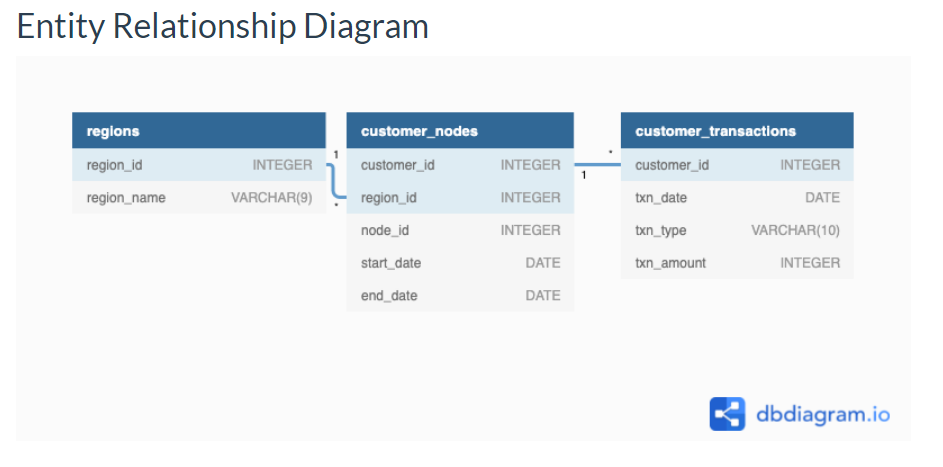
25 |
26 | 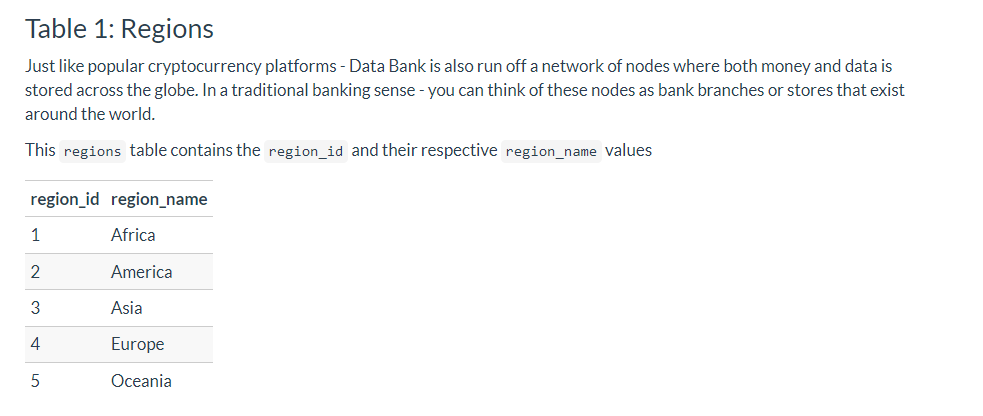
27 |
28 | 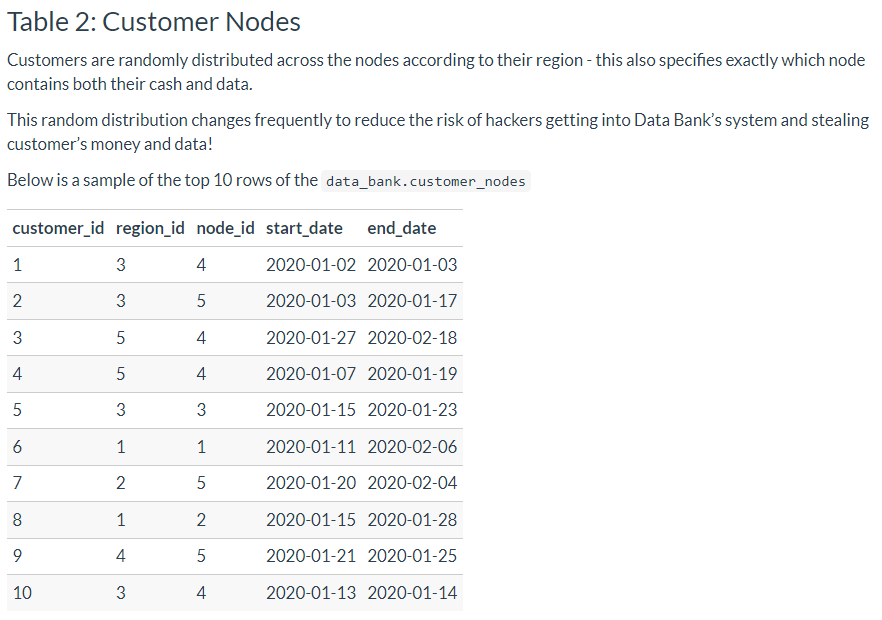
29 |
30 | 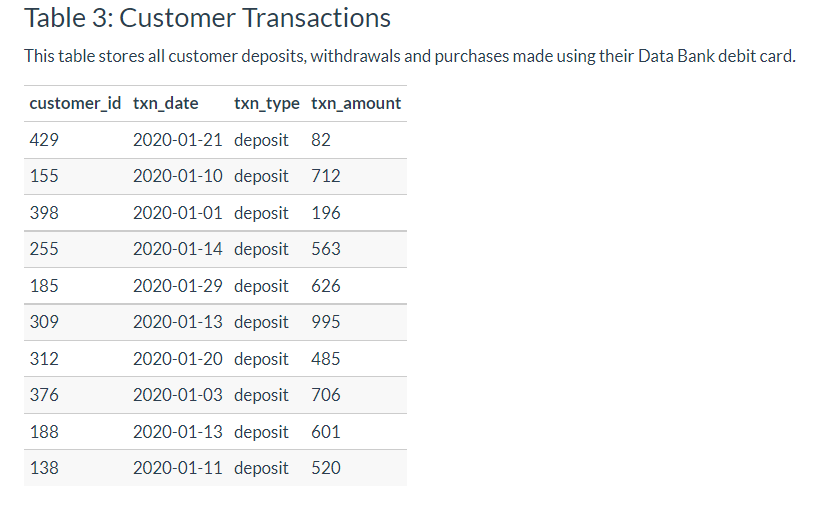
31 |
32 | ## Schema Link
33 | https://www.db-fiddle.com/f/2GtQz4wZtuNNu7zXH5HtV4/3
34 |
35 | # Case Study Questions and Solutions
36 |
37 | ## Part A. Customer Nodes Exploration
38 |
39 | 1. How many unique nodes are there on the Data Bank system?
40 | ```sql
41 | WITH unique_nodes AS (
42 | SELECT
43 | region_id,
44 | COUNT(DISTINCT node_id) AS unique_node_count
45 | FROM data_bank.customer_nodes
46 | GROUP BY region_id
47 | )
48 | SELECT
49 | SUM(unique_node_count) AS DB_unique_node_count
50 | FROM unique_nodes;
51 | ```
52 | **Result**
53 | | db\_unique\_node\_count |
54 | | ----------------------- |
55 | | 25 |
56 |
57 | 2. What is the number of nodes per region?
58 | ```sql
59 | SELECT
60 | regions.region_name,
61 | COUNT(DISTINCT customer_nodes.node_id) AS nodes
62 | FROM data_bank.customer_nodes
63 | INNER JOIN data_bank.regions
64 | ON regions.region_id = customer_nodes.node_id
65 | GROUP BY region_name;
66 | ```
67 | **Result**
68 | | region\_name | node\_counts |
69 | | ------------ | ------------ |
70 | | Africa | 5 |
71 | | America | 5 |
72 | | Asia | 5 |
73 | | Australia | 5 |
74 | | Europe | 5 |
75 |
76 | 3. How many customers are allocated to each region?
77 | ```sql
78 | --Original Code--
79 | SELECT
80 | node_id,--remove node_id, replace with region_name--
81 | COUNT(customer_nodes.customer_id) AS nodes -- Add DISTINCT inside customer_id COUNT()
82 | FROM data_bank.customer_nodes
83 | INNER JOIN data_bank.regions
84 | ON customer_nodes.region_id = regions.region_id
85 | GROUP BY region_name
86 | ORDER BY region_name;
87 |
88 | --Debugged Code--
89 | SELECT
90 | region_name,
91 | COUNT(DISTINCT customer_nodes.customer_id) AS nodes
92 | FROM data_bank.customer_nodes
93 | INNER JOIN data_bank.regions
94 | ON customer_nodes.region_id = regions.region_id
95 | GROUP BY region_name
96 | ORDER BY region_name;
97 | ```
98 | **Result**
99 | | region\_name | nodes |
100 | | ------------ | ----- |
101 | | Africa | 102 |
102 | | America | 105 |
103 | | Asia | 95 |
104 | | Australia | 110 |
105 | | Europe | 88 |
106 |
107 | 4. How many days on average are customers reallocated to a different node?
108 |
109 | 5. What is the median, 80th and 95th percentile for this same reallocation days metric for each region?
110 |
111 | ## B. Customer Transactions
112 |
113 | 1. What is the unique count and total amount for each transaction type?
114 | ```sql
115 | SELECT
116 | txn_type,
117 | COUNT(*) AS txn_count,
118 | SUM(txn_amount) AS total_amount
119 | FROM data_bank.customer_transactions
120 | GROUP BY txn_type;
121 | ```
122 | **Result**
123 | | txn\_type | txn\_count | total\_amount |
124 | | ---------- | ---------- | ------------- |
125 | | purchase | 1617 | 806537 |
126 | | withdrawal | 1580 | 793003 |
127 | | deposit | 2671 | 1359168 |
128 |
129 | 2. What is the average total historical deposit counts and amounts for all customers?
130 | ```sql
131 | WITH cte_customer AS (
132 | SELECT
133 | customer_id,
134 | COUNT(*) AS avg_customer_count,
135 | AVG(txn_amount) AS avg_customer_deposit
136 | FROM
137 | data_bank.customer_transactions
138 | WHERE
139 | txn_type = 'deposit'
140 | GROUP BY customer_id
141 | )
142 | SELECT
143 | ROUND(AVG(avg_customer_count)) AS avg_count,
144 | ROUND(AVG(avg_customer_deposit)) AS avg_deposit_amount
145 | FROM
146 | cte_customer;
147 |
148 | --Taking average of customer then calculating the final average from that--
149 | ```
150 | **Result**
151 | | avg\_count | avg\_deposit\_amount |
152 | | ---------- | -------------------- |
153 | | 5 | 509 |
154 |
155 | 3. For each month - how many Data Bank customers make more than 1 deposit and either 1 purchase or 1 withdrawal in a single month?
156 | ```sql
157 | --Original Code--
158 | WITH cte_customer_months AS (
159 | SELECT
160 | DATE_TRUNC('mon', txn_date)::DATE AS month,
161 | customer_id,
162 | SUM(CASE WHEN txn_type = 'deposit' THEN 0 ELSE 1 END) AS deposit_count,
163 | SUM(CASE WHEN txn_type = 'purchase' THEN 0 ELSE 1 END) AS purchase_count,
164 | SUM(CASE WHEN txn_type = 'withdrawal' THEN 1 ELSE 0 END) AS withdrawal_count
165 | FROM data_bank.customer_transactions
166 | GROUP BY month, customer_id
167 | )
168 | SELECT
169 | month,
170 | COUNT(DISTINCT customer_id) AS customer_count
171 | FROM cte_customer_months
172 | WHERE deposit_count >= 1 AND (
173 | purchase_count > 1 OR withdrawal_count > 1
174 | )
175 | GROUP BY month
176 | ORDER BY month;
177 |
178 | --Debugged Code--
179 | WITH cte_customer_months AS (
180 | SELECT
181 | DATE_TRUNC('month', txn_date)::DATE AS month,
182 | customer_id,
183 | SUM(CASE WHEN txn_type = 'deposit' THEN 1 ELSE 0 END) AS deposit_count,
184 | SUM(CASE WHEN txn_type = 'purchase' THEN 1 ELSE 0 END) AS purchase_count,
185 | SUM(CASE WHEN txn_type = 'withdrawal' THEN 1 ELSE 0 END) AS withdrawal_count
186 | FROM data_bank.customer_transactions
187 | GROUP BY month, customer_id
188 | )
189 | SELECT
190 | month,
191 | COUNT(DISTINCT customer_id) AS customer_count
192 | FROM cte_customer_months
193 | WHERE deposit_count > 1 AND (
194 | purchase_count >= 1 OR withdrawal_count >= 1
195 | )
196 | GROUP BY month
197 | ORDER BY month;
198 |
199 | --Changed all the THEN 0 to THEN 1--
200 | --Changed deposit_count from >=1 to > 1
201 | --Changed operators to >= for purchase_count, withdrawal_count
202 | ```
203 | **Result**
204 | | month | customer\_count |
205 | | ---------- | --------------- |
206 | | 2020-01-01 | 168 |
207 | | 2020-02-01 | 181 |
208 | | 2020-03-01 | 192 |
209 | | 2020-04-01 | 70 |
210 |
211 | 4. What is the closing balance for each customer at the end of the month?
212 |
213 | 5. What is the percentage of customers who increase their closing balance by more than 5%?
214 |
215 | - Have a negative first month balance?
216 |
217 | - Have a positive first month balance?
218 |
219 | - Increase their opening month’s positive closing balance by more than 5% in the following month?
220 |
221 | - Reduce their opening month’s positive closing balance by more than 5% in the following month?
222 |
223 | - Move from a positive balance in the first month to a negative balance in the second month?
224 |
225 |
226 |
--------------------------------------------------------------------------------
/Case Study #5 - Data Mart/README.md:
--------------------------------------------------------------------------------
1 | # Case Study # 5 - Data Mart
2 |
3 | 
4 |
5 | ## Link to Case Study
6 |
7 | https://8weeksqlchallenge.com/case-study-5/
8 |
9 | ## Introduction
10 |
11 | Data Mart is Danny’s latest venture and after running international operations for his online supermarket that specialises in fresh produce - Danny is asking for your support to analyse his sales performance.
12 |
13 | In June 2020 - large scale supply changes were made at Data Mart. All Data Mart products now use sustainable packaging methods in every single step from the farm all the way to the customer.
14 |
15 | Danny needs your help to quantify the impact of this change on the sales performance for Data Mart and it’s separate business areas.
16 |
17 | The key business question he wants you to help him answer are the following:
18 |
19 | - What was the quantifiable impact of the changes introduced in June 2020?
20 |
21 | - Which platform, region, segment and customer types were the most impacted by this change?
22 |
23 | - What can we do about future introduction of similar sustainability updates to the business to minimise impact on sales?
24 |
25 | ## Avaliable Data
26 |
27 | 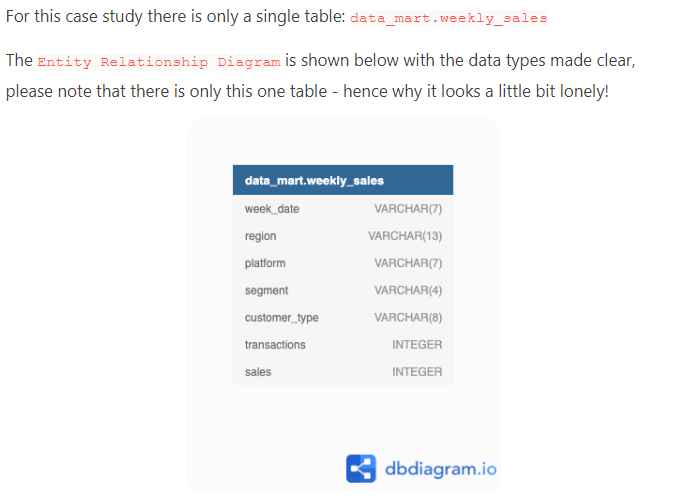
28 |
29 | ## Column Dictonary
30 |
31 | The columns are pretty self-explanatory based on the column names but here are some further details about the dataset:
32 |
33 | 1. Data Mart has international operations using a multi-region strategy
34 |
35 | 2. Data Mart has both, a retail and online platform in the form of a Shopify store front to serve their customers
36 |
37 | 3. Customer segment and customer_type data relates to personal age and demographics information that is shared with Data Mart
38 |
39 | 4. transactions is the count of unique purchases made through Data Mart and sales is the actual dollar amount of purchases
40 |
41 | Each record in the dataset is related to a specific aggregated slice of the underlying sales data rolled up into a week_date value which represents the start of the sales week.
42 |
43 | ## Example Rows
44 |
45 | 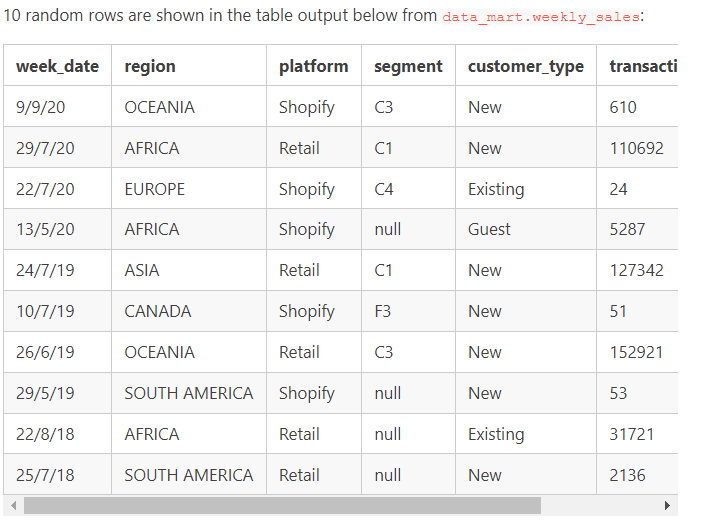
46 |
47 | ## Schema Link
48 |
49 | https://www.db-fiddle.com/f/2GtQz4wZtuNNu7zXH5HtV4/3
50 |
51 | # Case Study Questions and Solutions
52 |
53 | ## 1. Data Cleansing Steps
54 |
55 | In a single query, perform the following operations and generate a new table in the data_mart schema named clean_weekly_sales:
56 |
57 | - Convert the week_date to a DATE format
58 |
59 | - Add a week_number as the second column for each week_date value, for example any value from the 1st of January to 7th of January will be 1, 8th to 14th will be 2 etc
60 |
61 | - Add a month_number with the calendar month for each week_date value as the 3rd column
62 |
63 | - Add a calendar_year column as the 4th column containing either 2018, 2019 or 2020 values
64 |
65 | - Add a new column called age_band after the original segment column using the following mapping on the number inside the segment value
66 |
67 | | segment | age\_band |
68 | | ------- | ------------ |
69 | | 1 | Young Adults |
70 | | 2 | Middle Aged |
71 | | 3 or 4 | Retirees |
72 |
73 | - Add a new demographic column using the following mapping for the first letter in the segment values:
74 |
75 | | segment | demographic |
76 | | ------- | ----------- |
77 | | C | Couples |
78 | | F | Families |
79 |
80 | - Ensure all null string values with an "unknown" string value in the original segment column as well as the new age_band and demographic columns
81 |
82 | - Generate a new avg_transaction column as the sales value divided by transactions rounded to 2 decimal places for each record
83 |
84 | ```sql
85 | DROP TABLE IF EXISTS data_mart.clean_weekly_sales;
86 | CREATE TABLE data_mart.clean_weekly_sales AS
87 | SELECT
88 | TO_DATE(week_date, 'DD/MM/YY') AS week_date, --changed from 'MM/DD/YY'--
89 | DATE_PART('week', TO_DATE(week_date, 'DD/MM/YY')) AS week_number,
90 | DATE_PART('month', TO_DATE(week_date, 'DD/MM/YY')) AS month_number,
91 | DATE_PART('year', TO_DATE(week_date, 'DD/MM/YY')) AS calendar_year,
92 | region,
93 | platform,
94 | CASE
95 | WHEN segment = 'null' THEN 'Unknown'
96 | ELSE segment
97 | END AS segment,
98 | CASE
99 | WHEN RIGHT(segment, 1) = '1' THEN 'Young Adults' --Changed from WHEN LEFT--
100 | WHEN RIGHT(segment, 1) = '2' THEN 'Middle Aged'--Changed from WHEN LEFT--
101 | WHEN RIGHT(segment, 1) IN ('3', '4') THEN 'Retirees' --Changed from WHEN LEFT--
102 | ELSE 'Unknown'
103 | END AS age_band,
104 | CASE
105 | WHEN LEFT(segment, 1) = 'C' THEN 'Couples' --Changed from WHEN RIGHT--
106 | WHEN LEFT(segment, 1) = 'F' THEN 'Families'--Changed from WHEN RIGHT--
107 | ELSE 'Unknown'
108 | END AS demographic,
109 | customer_type,
110 | transactions,
111 | sales,
112 | ROUND(
113 | sales ::NUMERIC / transactions, --Casted sales as NUMERIC--
114 | 2
115 | ) AS avg_transaction
116 | FROM data_mart.weekly_sales;
117 | SELECT *
118 | FROM data_mart.clean_weekly_sales; --Added this SELECT statement--
119 | LIMIT 10; --Limtied to show only 10 results as the final output is > 17k rows
120 | ```
121 | **Result:**
122 | | week\_date | week\_number | month\_number | calendar\_year | region | platform | segment | age\_band | demographic | customer\_type | transactions | sales | avg\_transaction |
123 | | ---------- | ------------ | ------------- | -------------- | ------ | -------- | ------- | ------------ | ----------- | -------------- | ------------ | -------- | ---------------- |
124 | | 2020-08-31 | 36 | 8 | 2020 | ASIA | Retail | C3 | Retirees | Couples | New | 120631 | 3656163 | 30.31 |
125 | | 2020-08-31 | 36 | 8 | 2020 | ASIA | Retail | F1 | Young Adults | Families | New | 31574 | 996575 | 31.56 |
126 | | 2020-08-31 | 36 | 8 | 2020 | USA | Retail | Unknown | Unknown | Unknown | Guest | 529151 | 16509610 | 31.20 |
127 | | 2020-08-31 | 36 | 8 | 2020 | EUROPE | Retail | C1 | Young Adults | Couples | New | 4517 | 141942 | 31.42 |
128 | | 2020-08-31 | 36 | 8 | 2020 | AFRICA | Retail | C2 | Middle Aged | Couples | New | 58046 | 1758388 | 30.29 |
129 | | 2020-08-31 | 36 | 8 | 2020 | CANADA | Shopify | F2 | Middle Aged | Families | Existing | 1336 | 243878 | 182.54 |
130 | | 2020-08-31 | 36 | 8 | 2020 | AFRICA | Shopify | F3 | Retirees | Families | Existing | 2514 | 519502 | 206.64 |
131 | | 2020-08-31 | 36 | 8 | 2020 | ASIA | Shopify | F1 | Young Adults | Families | Existing | 2158 | 371417 | 172.11 |
132 | | 2020-08-31 | 36 | 8 | 2020 | AFRICA | Shopify | F2 | Middle Aged | Families | New | 318 | 49557 | 155.84 |
133 |
134 | ## 2. Data Exploration
135 |
136 | 1. What day of the week is used for each week_date value?
137 | ```sql
138 | SELECT
139 | DISTINCT TO_CHAR(week_date, 'day') AS weekday
140 | FROM
141 | data_mart.clean_weekly_sales;
142 | ```
143 | **Result:**
144 | | weekday |
145 | | ------- |
146 | | monday |
147 |
148 | 2. What range of week numbers are missing from the dataset?
149 | ```sql
150 | WITH all_week_numbers AS (
151 | SELECT GENERATE_SERIES(1, 52) AS week_number --Changeg to 52 from 26--
152 | )
153 | SELECT
154 | week_number
155 | FROM all_week_numbers AS t1
156 | WHERE EXISTS (
157 | SELECT 1
158 | FROM data_mart.clean_weekly_sales AS t2
159 | WHERE t1.week_number != t2.week_number --Added not equal to operator--
160 | );
161 | -- Only put 10 results to save scrolling time--
162 | ```
163 | **Result:**
164 | | week\_number |
165 | | ------------ |
166 | | 1 |
167 | | 2 |
168 | | 3 |
169 | | 4 |
170 | | 5 |
171 | | 6 |
172 | | 7 |
173 | | 8 |
174 | | 9 |
175 | | 10 |
176 |
177 | 3. How many total transactions were there for each year in the dataset?
178 |
179 | 4. What is the total sales for each region for each month?
180 |
181 | 5. What is the total count of transactions for each platform
182 |
183 | 6. What is the percentage of sales for Retail vs Shopify for each month?
184 |
185 | 7. What is the percentage of sales by demographic for each year in the dataset?
186 |
187 | 8. Which age_band and demographic values contribute the most to Retail sales?
188 |
189 | 9. Can we use the avg_transaction column to find the average transaction size for each year for Retail vs Shopify? If not - how would you calculate it instead?
190 |
191 | ## 3. Before & After Analysis
192 |
193 | This technique is usually used when we inspect an important event and want to inspect the impact before and after a certain point in time.
194 |
195 | Taking the week_date value of 2020-06-15 as the baseline week where the Data Mart sustainable packaging changes came into effect.
196 |
197 | We would include all week_date values for 2020-06-15 as the start of the period after the change and the previous week_date values would be before
198 |
199 | Using this analysis approach - answer the following questions:
200 |
201 | 1. What is the total sales for the 4 weeks before and after 2020-06-15? What is the growth or reduction rate in actual values and percentage of sales?
202 |
203 | 2. What about the entire 12 weeks before and after?
204 |
205 | 3. How do the sale metrics for these 2 periods before and after compare with the previous years in 2018 and 2019?
206 |
--------------------------------------------------------------------------------
/Case Study # 1 - Danny's Diner/README.md:
--------------------------------------------------------------------------------
1 | # Case Study #1 - Danny's Diner
2 | 1st Case Study from Danny Ma's Serious SQL Course
3 |
4 | 
5 |
6 | ## **Datasets**
7 |
8 | Danny has shared 3 key datasets for this case study: **Sales | Menu | Members**
9 |
10 | ## Entity Relationship Diagram
11 | 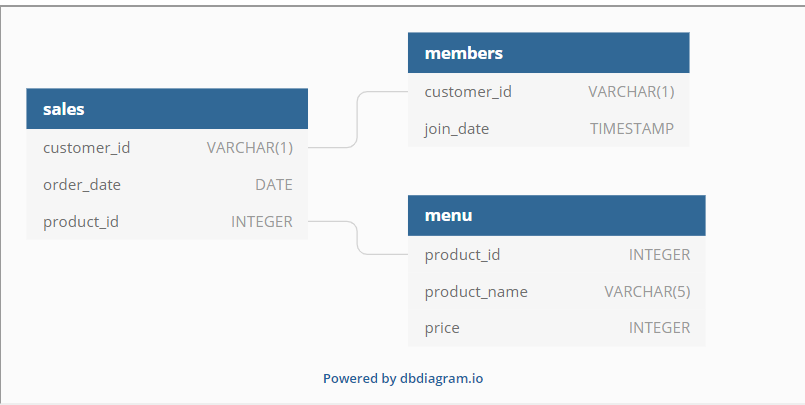
12 |
13 | **Link to ERD**: https://dbdiagram.io/d/608d07e4b29a09603d12edbd/?utm_source=dbdiagram_embed&utm_medium=bottom_open
14 |
15 | ## **Table 1: Sales**
16 | The sales table captures all customer_id level purchases with an corresponding order_date and product_id information for when and what menu items were ordered.
17 |
18 | 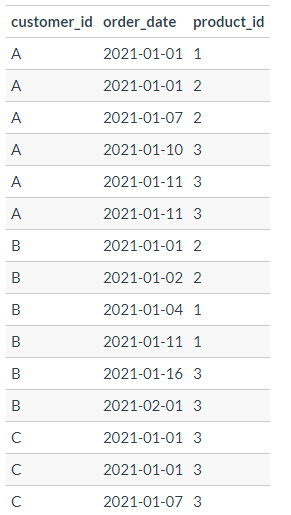
19 |
20 | ## **Table 2: Menu**
21 | The menu table maps the product_id to the actual product_name and price of each menu item.
22 |
23 | 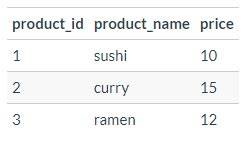
24 |
25 | ## **Table 3: Members**
26 | The final members table captures the join_date when a customer_id joined the beta version of the Danny’s Diner loyalty program.
27 |
28 | 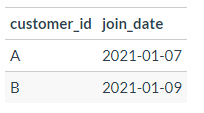
29 |
30 | # Case Study Questions & Solutions
31 | **1. What is the total amount each customer spent at the restaurant?**
32 |
33 | LEFT JOIN was conducted to marry up the sales amounts for each menu item. GROUP BY used to show what each customer purchased & how much.
34 | ```sql
35 | SELECT
36 | sales.customer_id,
37 | SUM(menu.price) AS total_customer_sales
38 | FROM
39 | dannys_diner.sales
40 | LEFT JOIN dannys_diner.menu ON sales.product_id = menu.product_id
41 | GROUP BY
42 | customer_id
43 | ORDER BY
44 | customer_id;
45 | ```
46 | **Result:**
47 | | customer\_id | total\_customer\_sales |
48 | | ------------ | ---------------------- |
49 | | A | 76 |
50 | | B | 74 |
51 | | C | 36 |
52 |
53 | **2. How many days has each customer visited the restaurant?**
54 |
55 | COUNT DISTINCT was needed in order to filter out duplicates and just get the days each customer visited the restaurant.
56 | ```sql
57 | SELECT
58 | customer_id,
59 | COUNT(DISTINCT order_date) AS customer_visit_days
60 | FROM
61 | dannys_diner.sales
62 | GROUP BY
63 | sales.customer_id
64 | ORDER BY
65 | sales.customer_id;
66 | ```
67 | **Result:**
68 | | customer\_id | customer\_visit\_days |
69 | | ------------ | --------------------- |
70 | | A | 4 |
71 | | B | 6 |
72 | | C | 2 |
73 |
74 | **3. What was the first item from the menu purchased by each customer?**
75 |
76 | Query result from order_date just gives dates, determining what was the first menu item purchase by the customer is not possible. Filtering to product_id gives a better idea of what the first purchase for the customer could be.
77 | ```sql
78 | WITH customer_first_purchase AS (
79 | SELECT
80 | sales.customer_id,
81 | menu.product_name,
82 | ROW_NUMBER() OVER (
83 | PARTITION BY sales.customer_id
84 | ORDER BY
85 | sales.order_date,
86 | sales.product_id
87 | ) AS first_item_order
88 | FROM
89 | dannys_diner.sales
90 | LEFT JOIN dannys_diner.menu ON sales.product_id = menu.product_id
91 | )
92 | SELECT
93 | *
94 | FROM
95 | customer_first_purchase
96 | WHERE
97 | first_item_order = 1;
98 | ```
99 | **Result:**
100 | | customer\_id | product\_name | first\_item\_order |
101 | | ------------ | ------------- | ------------------ |
102 | | A | sushi | 1 |
103 | | B | curry | 1 |
104 | | C | ramen | 1 |
105 |
106 | **4. What is the most purchased item on the menu and how many times was it purchased by all customers?**
107 |
108 | Most purchased item is ramen.
109 | ``` sql
110 | SELECT
111 | menu.product_name,
112 | COUNT(sales.product_id) AS most_purchased_item_count
113 | FROM
114 | dannys_diner.sales
115 | INNER JOIN dannys_diner.menu ON sales.product_id = menu.product_id
116 | GROUP BY
117 | menu.product_name
118 | ORDER BY
119 | most_purchased_item_count DESC
120 | LIMIT
121 | 1;
122 | ```
123 | **Result:**
124 | | product\_name | most\_purchased\_item\_count |
125 | | ------------- | --------------------- |
126 | | ramen | 8 |
127 |
128 | **5. Which item was the most popular for each customer?**
129 |
130 | Two ctes were used to better split up queries by order count and popularity.
131 |
132 | Customers Favorite Food:
133 |
134 | - Customer A - Ramen
135 |
136 | - Customer B - 3 way tie
137 |
138 | - Customer C - Ramen
139 | ``` sql
140 | WITH cte_most_popular_item AS (
141 | SELECT
142 | menu.product_name,
143 | sales.customer_id,
144 | COUNT(*) AS order_count
145 | FROM dannys_diner.sales
146 | LEFT JOIN dannys_diner.menu
147 | ON sales.product_id = menu.product_id
148 | GROUP BY
149 | customer_id,
150 | product_name
151 | ORDER BY
152 | customer_id,
153 | order_count DESC
154 | ),
155 | cte_pop_rank AS (
156 | SELECT *,
157 | RANK () OVER(PARTITION BY customer_id ORDER BY order_count DESC) AS popular_rank
158 | FROM cte_most_popular_item
159 | )
160 | SELECT * FROM cte_pop_rank
161 | WHERE popular_rank = 1;
162 | ```
163 | **Result:**
164 | | product\_name | customer\_id | order\_count | popular\_rank |
165 | | ------------- | ------------ | ------------ | ------------- |
166 | | ramen | A | 3 | 1 |
167 | | sushi | B | 2 | 1 |
168 | | curry | B | 2 | 1 |
169 | | ramen | B | 2 | 1 |
170 | | ramen | C | 3 | 1 |
171 |
172 | **6. Which item was purchased first by the customer after they became a member?**
173 |
174 | RANKED () was used in the window function to assign each row within the partition. Rows of exact value will receive the same rank, this query shows which item was first purchase by customers when they became members.
175 | ``` sql
176 | WITH first_customer_member_purchase AS (
177 | SELECT
178 | RANK () OVER(
179 | PARTITION BY members.customer_id
180 | ORDER BY
181 | order_date
182 | ) AS ranked,
183 | members.customer_id,
184 | menu.product_name
185 | FROM
186 | dannys_diner.sales
187 | LEFT JOIN dannys_diner.members ON sales.customer_id = members.customer_id
188 | LEFT JOIN dannys_diner.menu ON menu.product_id = sales.product_id
189 | WHERE
190 | order_date >= join_date
191 | )
192 | SELECT
193 | *
194 | FROM
195 | first_customer_member_purchase
196 | WHERE
197 | ranked = 1;
198 | ```
199 | **Result:**
200 | | ranked | customer\_id | product\_name |
201 | | ------ | ------------ | ------------- |
202 | | 1 | A | curry |
203 | | 1 | B | sushi |
204 |
205 | **7. Which item was purchased just before the customer became a member?**
206 |
207 | Basically the same query as above but >= (Greater Than or Equal To) is changed < (Less Than) to show what items customers purchased before becoming a member. Customer A purchased 2 items sushi and curry before they became a members vs customer B only bought one item curry.
208 | ``` sql
209 | WITH first_customer_member_purchase AS (
210 | SELECT
211 | RANK () OVER(
212 | PARTITION BY members.customer_id
213 | ORDER BY
214 | order_date
215 | ) AS ranked,
216 | members.customer_id,
217 | menu.product_name
218 | FROM
219 | dannys_diner.sales
220 | LEFT JOIN dannys_diner.members ON sales.customer_id = members.customer_id
221 | LEFT JOIN dannys_diner.menu ON menu.product_id = sales.product_id
222 | WHERE
223 | order_date < join_date
224 | )
225 | SELECT
226 | *
227 | FROM
228 | first_customer_member_purchase
229 | WHERE
230 | ranked = 1;
231 | ```
232 | **Result:**
233 | | ranked | customer\_id | product\_name |
234 | | ------ | ------------ | ------------- |
235 | | 1 | A | sushi |
236 | | 1 | A | curry |
237 | | 1 | B | curry |
238 |
239 | **8. What is the number of unique menu items and total amount spent for each member before they became a member?**
240 |
241 | Used DISTINCT because the question states **unique menu items**. This translates to how many items did the customer buy each item for the first time prior to membership including amount spent.
242 | ``` sql
243 | SELECT
244 | sales.customer_id,
245 | COUNT(DISTINCT menu.product_id) AS unique_menu_total_items,
246 | SUM(menu.price) AS amount
247 | FROM
248 | dannys_diner.sales
249 | LEFT JOIN dannys_diner.members on sales.customer_id = members.customer_id
250 | INNER JOIN dannys_diner.menu ON sales.product_id = menu.product_id
251 | WHERE
252 | order_date < join_date
253 | GROUP BY
254 | sales.customer_id
255 | ORDER BY
256 | sales.customer_id
257 | ```
258 | **Result:**
259 | | customer\_id | unique\_menu\_total\_items | amount |
260 | | ------------ | -------------------------- | ------ |
261 | | A | 2 | 25 |
262 | | B | 2 | 40 |
263 |
264 |
265 | **9. If each $1 spent equates to 10 points and sushi has a 2x points multiplier - how many points would each customer have?**
266 |
267 | SUM with CASE WHEN clauses were used to only identify the menu item 'sushi' then multiply only sushi by x2 points every other item does not fit this criteria. This is similar to a IF ELSE statement seen in other tools.
268 | ``` sql
269 | SELECT
270 | sales.customer_id,
271 | SUM(
272 | CASE
273 | WHEN product_name = 'sushi' THEN 20 * price
274 | ELSE 10 * PRICE
275 | END
276 | ) AS total_points
277 | FROM
278 | dannys_diner.sales
279 | LEFT JOIN dannys_diner.menu ON sales.product_id = menu.product_id
280 | GROUP BY
281 | sales.customer_id
282 | ORDER BY
283 | total_points DESC;
284 | ```
285 | **Result:**
286 | | customer\_id | total\_points |
287 | | ------------ | ------------- |
288 | | B | 940 |
289 | | A | 860 |
290 | | C | 360 |
291 |
292 | **10. In the first week after a customer joins the program (including their join date) they earn 2x points on all items, not just sushi - how many points do customer A and B have at the end of January?**
293 |
294 | Needed to look at 2 different dates the initial join date and a week later. To get 7 days past the join_date a + 7 was used after the AND clause. A second WHEN clause was used to clarify that the 2x points was only earned during that time period betwwen join_date and a week later. To ensure points we're only searching for points counted in January a WHERE order_date with a <= less then or equal sign.
295 | ``` sql
296 | SELECT
297 | sales.customer_id,
298 | SUM(
299 | CASE
300 | WHEN product_name = 'sushi' THEN 20 * price
301 | WHEN order_date BETWEEN join_date
302 | AND join_date + 7 THEN 20 * price
303 | ELSE 10 * PRICE
304 | END
305 | ) AS total_points
306 | FROM
307 | dannys_diner.members
308 | LEFT JOIN dannys_diner.sales ON sales.customer_id = members.customer_id
309 | LEFT JOIN dannys_diner.menu ON menu.product_id = sales.product_id
310 | WHERE
311 | order_date <= '2021-01-31'
312 | GROUP BY
313 | sales.customer_id;
314 | ```
315 | **Result:**
316 | | customer\_id | total\_points |
317 | | ------------ | ------------- |
318 | | A | 1370 |
319 | | B | 940 |
320 |
--------------------------------------------------------------------------------
/Case Study #3 - Foodie-Fi/Part A & B/README.md:
--------------------------------------------------------------------------------
1 | ## Entity Relationship Diagram
2 | 
3 |
4 |
5 | Table 1: plans
6 |
7 | - Customers can choose which plans to join Foodie-Fi when they first sign up.
8 |
9 | - Basic plan customers have limited access and can only stream their videos and is only available monthly at $9.90
10 |
11 | - Pro plan customers have no watch time limits and are able to download videos for offline viewing. Pro plans start at $19.90 a month or $199 for an annual subscription.
12 |
13 | - Customers can sign up to an initial 7 day free trial will automatically continue with the pro monthly subscription plan unless they cancel, downgrade to basic or upgrade to an annual pro plan at any point during the trial.
14 |
15 | - When customers cancel their Foodie-Fi service - they will have a churn plan record with a null price but their plan will continue until the end of the billing period.
16 |
17 | 
18 |
19 |
20 |
21 | Table 2: subscriptions
22 |
23 | Customer subscriptions show the exact date where their specific plan_id starts.
24 |
25 | If customers downgrade from a pro plan or cancel their subscription - the higher plan will remain in place until the period is over - the start_date in the subscriptions table will reflect the date that the actual plan changes.
26 |
27 | When customers upgrade their account from a basic plan to a pro or annual pro plan - the higher plan will take effect straightaway.
28 |
29 | When customers churn - they will keep their access until the end of their current billing period but the start_date will be technically the day they decided to cancel their service.
30 |
31 | 
32 |
33 |
34 |
35 | # Case Study Questions & Solutions
36 |
37 | ## Part A
38 |
39 | Customer Journey
40 | Based off the 8 sample customers provided in the sample from the subscriptions table, write a brief description about each customer’s onboarding journey.
41 |
42 | "Try to keep it as short as possible - you may also want to run some sort of join to make your explanations a bit easier!"
43 | ```sql
44 | SELECT
45 | customer_id,
46 | subscriptions.plan_id,
47 | plan_name,
48 | start_date
49 | FROM foodie_fi.subscriptions
50 | INNER JOIN foodie_fi.plans
51 | ON subscriptions.plan_id = plans.plan_id
52 | WHERE customer_id IN (1, 2, 13, 15, 16, 18, 19, 25, 39, 42);
53 | ```
54 | **Result:**
55 | | customer\_id | plan\_id | plan\_name | start\_date |
56 | | ------------ | -------- | ------------- | ----------- |
57 | | 1 | 0 | trial | 2020-08-01 |
58 | | 1 | 1 | basic monthly | 2020-08-08 |
59 | | 2 | 0 | trial | 2020-09-20 |
60 | | 2 | 3 | pro annual | 2020-09-27 |
61 | | 13 | 0 | trial | 2020-12-15 |
62 | | 13 | 1 | basic monthly | 2020-12-22 |
63 | | 13 | 2 | pro monthly | 2021-03-29 |
64 | | 15 | 0 | trial | 2020-03-17 |
65 | | 15 | 2 | pro monthly | 2020-03-24 |
66 | | 15 | 4 | churn | 2020-04-29 |
67 | | 16 | 0 | trial | 2020-05-31 |
68 | | 16 | 1 | basic monthly | 2020-06-07 |
69 | | 16 | 3 | pro annual | 2020-10-21 |
70 | | 18 | 0 | trial | 2020-07-06 |
71 | | 18 | 2 | pro monthly | 2020-07-13 |
72 | | 19 | 0 | trial | 2020-06-22 |
73 | | 19 | 2 | pro monthly | 2020-06-29 |
74 | | 19 | 3 | pro annual | 2020-08-29 |
75 | | 25 | 0 | trial | 2020-05-10 |
76 | | 25 | 1 | basic monthly | 2020-05-17 |
77 | | 25 | 2 | pro monthly | 2020-06-16 |
78 | | 39 | 0 | trial | 2020-05-28 |
79 | | 39 | 1 | basic monthly | 2020-06-04 |
80 | | 39 | 2 | pro monthly | 2020-08-25 |
81 | | 39 | 4 | churn | 2020-09-10 |
82 | | 42 | 0 | trial | 2020-10-27 |
83 | | 42 | 1 | basic monthly | 2020-11-03 |
84 | | 42 | 2 | pro monthly | 2021-04-28 |
85 |
86 |
87 |
88 | ## Part B. Data Analysis Questions
89 | **1. How many customers has Foodie-Fi ever had?**
90 | ```sql
91 | SELECT
92 | COUNT(DISTINCT customer_id) AS total_customers
93 | FROM foodie_fi.subscriptions;
94 | ```
95 | **Result:**
96 | | total\_customers |
97 | | ---------------- |
98 | | 1000 |
99 |
100 | **2. What is the monthly distribution of trial plan start_date values for our dataset - use the start of the month as the group by value**
101 | ```sql
102 | SELECT
103 | DATE_TRUNC('MONTH', start_date)::DATE AS month_start,
104 | COUNT(*) AS trial_customers
105 | FROM foodie_fi.subscriptions
106 | WHERE plan_id = 0
107 | GROUP BY month_start
108 | ORDER BY month_start;
109 | ```
110 | **Result:**
111 | | month\_start | trial\_customers |
112 | | ------------ | ---------------- |
113 | | 2020-01-01 | 88 |
114 | | 2020-02-01 | 68 |
115 | | 2020-03-01 | 94 |
116 | | 2020-04-01 | 81 |
117 | | 2020-05-01 | 88 |
118 | | 2020-06-01 | 79 |
119 | | 2020-07-01 | 89 |
120 | | 2020-08-01 | 88 |
121 | | 2020-09-01 | 87 |
122 | | 2020-10-01 | 79 |
123 | | 2020-11-01 | 75 |
124 | | 2020-12-01 | 84 |
125 |
126 | **3. What plan start_date values occur after the year 2020 for our dataset? Show the breakdown by count of events for each plan_name**
127 | ```sql
128 | SELECT
129 | plans.plan_id,
130 | plan_name,
131 | COUNT(*) AS count
132 | FROM foodie_fi.subscriptions
133 | INNER JOIN foodie_fi.plans
134 | ON subscriptions.plan_id = plans.plan_id
135 | WHERE start_date > '2020-01-01'::DATE
136 | GROUP BY plans.plan_id, plan_name
137 | ORDER BY plans.plan_id;
138 | ```
139 | **Result:**
140 | | plan\_id | plan\_name | count |
141 | | -------- | ------------- | ----- |
142 | | 0 | trial | 997 |
143 | | 1 | basic monthly | 546 |
144 | | 2 | pro monthly | 539 |
145 | | 3 | pro annual | 258 |
146 | | 4 | churn | 307 |
147 |
148 | **4. What is the customer count and percentage of customers who have churned rounded to 1 decimal place?**
149 | ```sql
150 | SELECT
151 | SUM(CASE WHEN plan_id = 4 THEN 1 ELSE 0 END) AS churn_customers,
152 | ROUND(
153 | 100 * SUM(CASE WHEN plan_id = 4 THEN 1 ELSE 0 END):: NUMERIC /
154 | COUNT(DISTINCT customer_id), 1
155 | ) AS percentage
156 | FROM foodie_fi.subscriptions;
157 | ```
158 | **Result:**
159 | | churn\_customers | percentage |
160 | | ---------------- | ---------- |
161 | | 307 | 30.7 |
162 |
163 |
164 | **5. How many customers have churned straight after their initial free trial - what percentage is this rounded to the nearest whole number?**
165 | ```sql
166 | WITH ranked_plans AS (
167 | SELECT
168 | subscriptions.customer_id,
169 | subscriptions.plan_id,
170 | plans.plan_name,
171 | ROW_NUMBER() OVER (
172 | PARTITION BY subscriptions.customer_id
173 | ORDER BY subscriptions.plan_id) AS plan_rank
174 | FROM foodie_fi.subscriptions
175 | INNER JOIN foodie_fi.plans
176 | ON subscriptions.plan_id = plans.plan_id)
177 |
178 | SELECT
179 | COUNT(*) as churn_count,
180 | ROUND(100 * COUNT(*) / (
181 | SELECT COUNT(DISTINCT customer_id)
182 | FROM foodie_fi.subscriptions),0) AS churn_percentage
183 | FROM ranked_plans
184 | WHERE plan_id = 4
185 | AND plan_rank = 2;
186 | ```
187 | **Result:**
188 | | churn\_count | churn\_percentage |
189 | | ------------ | ----------------- |
190 | | 92 | 9 |
191 |
192 | **6. What is the number and percentage of customer plans after their initial free trial?**
193 | ```sql
194 | --Need to debug this--
195 | WITH ranked_plans AS (
196 | SELECT
197 | customer_id,
198 | plan_id,
199 | ROW_NUMBER() OVER (
200 | PARTITION BY customer_id
201 | ORDER BY start_date DESC
202 | ) AS plan_rank
203 | FROM foodie_fi.subscriptions
204 | )
205 | SELECT
206 | plans.plan_id,
207 | plans.plan_name,
208 | COUNT(*) AS customer_count,
209 | ROUND(100 * COUNT(*) / SUM(COUNT(*)) OVER ()) AS percentage
210 | FROM ranked_plans
211 | INNER JOIN foodie_fi.plans
212 | ON ranked_plans.plan_id = plans.plan_id
213 | WHERE plan_rank = 1
214 | GROUP BY plans.plan_id, plans.plan_name
215 | ORDER BY plans.plan_id;
216 |
217 | --Debugged code--
218 | WITH ranked_plans AS (
219 | SELECT
220 | customer_id,
221 | plan_id,
222 | ROW_NUMBER() OVER (
223 | PARTITION BY customer_id
224 | ORDER BY plan_id ASC --plan_id ASC replaced start_date DESC--
225 | ) AS plan_rank
226 | FROM foodie_fi.subscriptions
227 | )
228 | SELECT
229 | plans.plan_id,
230 | plans.plan_name,
231 | COUNT(*) AS customer_count,
232 | ROUND(100 * COUNT(*) / SUM(COUNT(*)) OVER ()) AS percentage
233 | FROM ranked_plans
234 | INNER JOIN foodie_fi.plans
235 | ON ranked_plans.plan_id = plans.plan_id
236 | WHERE plan_rank = 2 --plan_rank = 1 was replaced with plan_rank = 2--
237 | GROUP BY plans.plan_id, plans.plan_name
238 | ORDER BY plans.plan_id;
239 | ```
240 | **Result:**
241 | | plan\_id | plan\_name | customer\_count | percentage |
242 | | -------- | ------------- | --------------- | ---------- |
243 | | 1 | basic monthly | 546 | 55 |
244 | | 2 | pro monthly | 325 | 33 |
245 | | 3 | pro annual | 37 | 4 |
246 | | 4 | churn | 92 | 9 |
247 |
248 |
249 | **7. What is the customer count and percentage breakdown of all 5 plan_name values at 2020-12-31?**
250 | ``` sql
251 | WITH valid_subscriptions AS (
252 | SELECT
253 | customer_id,
254 | plan_id,
255 | start_date,
256 | ROW_NUMBER() OVER (
257 | PARTITION BY customer_id
258 | ORDER BY start_date DESC
259 | ) AS plan_rank
260 | FROM foodie_fi.subscriptions
261 | WHERE start_date <= '2020-12-31'
262 | )
263 | SELECT
264 | plan_id,
265 | COUNT(DISTINCT customer_id) AS customers,
266 | ROUND(100 * COUNT(*) / SUM(COUNT(*)) OVER(), 1) AS percentage
267 | FROM
268 | valid_subscriptions
269 | WHERE
270 | plan_rank = 1
271 | GROUP BY
272 | plan_id;
273 | ```
274 | **Result:**
275 | | plan\_id | customers | percentage |
276 | | -------- | --------- | ---------- |
277 | | 0 | 19 | 1.9 |
278 | | 1 | 224 | 22.4 |
279 | | 2 | 326 | 32.6 |
280 | | 3 | 195 | 19.5 |
281 | | 4 | 236 | 23.6 |
282 |
283 | **8. How many customers have upgraded to an annual plan in 2020?**
284 | ```sql
285 | SELECT
286 | COUNT(DISTINCT customer_id) AS annual_customers
287 | FROM foodie_fi.subscriptions
288 | WHERE plan_id = 3
289 | AND start_date BETWEEN '2020-01-01' AND '2020-12-31';
290 | ```
291 | **Result:**
292 | | annual\_customers |
293 | | ----------------- |
294 | | 195 |
295 |
296 | **9. How many days on average does it take for a customer to an annual plan from the day they join Foodie-Fi?**
297 | ```sql
298 | WITH trial AS (
299 | SELECT
300 | customer_id,
301 | start_date AS trial_date
302 | FROM foodie_fi.subscriptions
303 | WHERE plan_id = 0
304 | ),
305 | annual AS (
306 | SELECT
307 | customer_id,
308 | start_date AS annual_date
309 | FROM foodie_fi.subscriptions
310 | WHERE plan_id = 3
311 | )
312 | SELECT
313 | ROUND(AVG(annual_date - trial_date), 0) AS avg
314 | FROM annual
315 | INNER JOIN trial
316 | ON trial.customer_id = annual.customer_id;
317 | ```
318 | **Result:**
319 | | avg |
320 | | --- |
321 | | 105 |
322 |
323 | **10. Can you further breakdown this average value into 30 day periods (i.e. 0-30 days, 31-60 days etc)**
324 | ```sql
325 | WITH join_date AS (
326 | SELECT
327 | customer_id, start_date AS trial_date
328 | FROM foodie_fi.subscriptions
329 | WHERE plan_id = 0
330 | ),
331 | pro_plan_date AS (
332 | SELECT
333 | customer_id, start_date AS upgrade_date
334 | FROM foodie_fi.subscriptions
335 | WHERE plan_id = 3
336 | ),
337 | day_bins AS (
338 | SELECT WIDTH_BUCKET(upgrade_date - trial_date, 0, 360,12) AS avg_days_to_upgrade
339 | --WIDTH BUCKET(expression, min, max, buckets)--
340 | FROM join_date INNER JOIN pro_plan_date
341 | ON join_date.customer_id = pro_plan_date.customer_id
342 | )
343 | SELECT ((avg_days_to_upgrade - 1)*30 || '-' || (avg_days_to_upgrade)*30) AS "30-day-range", COUNT(*)
344 | FROM day_bins
345 | GROUP BY avg_days_to_upgrade
346 | ORDER BY avg_days_to_upgrade;
347 | ```
348 | **Result:**
349 | | 30-day-range | count |
350 | | ------------ | ----- |
351 | | 0-30 | 48 |
352 | | 30-60 | 25 |
353 | | 60-90 | 33 |
354 | | 90-120 | 35 |
355 | | 120-150 | 43 |
356 | | 150-180 | 35 |
357 | | 180-210 | 27 |
358 | | 210-240 | 4 |
359 | | 240-270 | 5 |
360 | | 270-300 | 1 |
361 | | 300-330 | 1 |
362 | | 330-360 | 1 |
363 |
364 |
365 | **11. How many customers downgraded from a pro monthly to a basic monthly plan in 2020?**
366 | ```sql
367 | -- Code to be debugged --
368 | WITH ranked_plans AS (
369 | SELECT
370 | customer_id,
371 | plan_id,
372 | start_date,
373 | LAG(plan_id) OVER (
374 | PARTITION BY start_date
375 | ORDER BY start_date DESC
376 | ) AS lag_plan_id
377 | FROM foodie_fi.subscriptions
378 | WHERE DATE_PART('year', start_date) = 2020
379 | )
380 | SELECT
381 | COUNT(*)
382 | FROM ranked_plans
383 | WHERE lag_plan_id = 1 AND plan_id = 2;
384 |
385 | -- Debugged code --
386 | WITH ranked_plans AS (
387 | SELECT
388 | customer_id,
389 | plan_id,
390 | start_date,
391 | LAG(plan_id) OVER (
392 | PARTITION BY customer_id -- changed from PARTITION BY start_date to PARTITION BY customer_id
393 | ORDER BY start_date ASC -- changed from DESC to ASC
394 | ) AS lag_plan_id
395 | FROM foodie_fi.subscriptions
396 | WHERE DATE_PART('year', start_date) = 2020
397 | )
398 | SELECT
399 | COUNT(*) AS customer_count
400 | FROM ranked_plans
401 | WHERE lag_plan_id = 1 AND plan_id = 2;
402 | ```
403 | **Result:**
404 | | customer_count |
405 | | --- |
406 | | 163 |
407 |
--------------------------------------------------------------------------------
/Case Study # 2 - Pizza Runner/A. Pizza Metrics/README.md:
--------------------------------------------------------------------------------
1 | ## Entity Relationship Diagram
2 | 
3 |
4 | **Link to ERD**: https://dbdiagram.io/d/5f3e085ccf48a141ff558487/?utm_source=dbdiagram_embed&utm_medium=bottom_open
5 |
6 | ## **Datasets** - All datasets exist within the pizza_runner database schema
7 |
8 | **Table 1: runners**
9 | The runners table shows the registration_date for each new runner
10 |
11 | 
12 |
13 | **Table 2: customer_orders**
14 |
15 | - Customer pizza orders are captured in the customer_orders table with 1 row for each individual pizza that is part of the order.
16 |
17 | - The pizza_id relates to the type of pizza which was ordered whilst the exclusions are the ingredient_id values which should be removed from the pizza and the extras are the ingredient_id values which need to be added to the pizza.
18 |
19 | - Note that customers can order multiple pizzas in a single order with varying exclusions and extras values even if the pizza is the same type!
20 |
21 | - The exclusions and extras columns will need to be cleaned up before using them in your queries.
22 |
23 | 
24 |
25 | **Table 3: runner_orders**
26 |
27 | - After each orders are received through the system - they are assigned to a runner - however not all orders are fully completed and can be cancelled by the restaurant or the customer.
28 |
29 | - The pickup_time is the timestamp at which the runner arrives at the Pizza Runner headquarters to pick up the freshly cooked pizzas. The distance and duration fields are related to how far and long the runner had to travel to deliver the order to the respective customer.
30 |
31 | 
32 |
33 | **Table 4: pizza_names**
34 | At the moment - Pizza Runner only has 2 pizzas available the Meat Lovers or Vegetarian!
35 |
36 | 
37 |
38 | **Table 5: pizza_recipes**
39 | Each pizza_id has a standard set of toppings which are used as part of the pizza recipe.
40 |
41 | 
42 |
43 | **Table 6: pizza_toppings**
44 | This table contains all of the topping_name values with their corresponding topping_id value
45 |
46 | 
47 |
48 | ## Word of caution from Danny - "Before you start writing your SQL queries however - you might want to investigate the data, you may want to do something with some of those null values and data types in the customer_orders and runner_orders tables."
49 |
50 | ## Key tables to investigate need to check data types for each table
51 | - **customer_orders**
52 | - **runner_orders**
53 |
54 | ### Data type check - customer_orders
55 | ```sql
56 | SELECT
57 | table_name,
58 | column_name,
59 | data_type
60 | FROM information_schema.columns
61 | WHERE table_name = 'customer_orders';
62 | ```
63 | **Result:**
64 | | table\_name | column\_name | data\_type |
65 | | ---------------- | ------------ | --------------------------- |
66 | | customer\_orders | order\_id | integer |
67 | | customer\_orders | customer\_id | integer |
68 | | customer\_orders | pizza\_id | integer |
69 | | customer\_orders | exclusions | character varying |
70 | | customer\_orders | extras | character varying |
71 | | customer\_orders | order\_time | timestamp without time zone |
72 |
73 | ### Data type check - runner_orders
74 | ```sql
75 | SELECT
76 | table_name,
77 | column_name,
78 | data_type
79 | FROM information_schema.columns
80 | WHERE table_name = 'runner_orders';
81 | ```
82 | **Result:**
83 | | table\_name | column\_name | data\_type |
84 | | -------------- | ------------ | ----------------- |
85 | | runner\_orders | order\_id | integer |
86 | | runner\_orders | runner\_id | integer |
87 | | runner\_orders | pickup\_time | character varying |
88 | | runner\_orders | distance | character varying |
89 | | runner\_orders | duration | character varying |
90 | | runner\_orders | cancellation | character varying |
91 |
92 | ___
93 |
94 | ## Cleaning Tables
95 | ### **1. customer_orders**
96 | - exclusions & extras columns need to be cleaned
97 | - Need to update null values to be empty to indicate customers ordered no extras/exclusions
98 | - Current 'null' results in exclusions & extras are not truly null they are be interpreted as strings.
99 | ```sql
100 | DROP TABLE IF EXISTS customer_orders_table_cleaned;
101 | CREATE TEMP TABLE customer_orders_table_cleaned AS (
102 | SELECT
103 | order_id,
104 | customer_id,
105 | pizza_id,
106 | CASE
107 | WHEN exclusions = '' THEN NULL
108 | WHEN exclusions = 'null' THEN NULL
109 | ELSE exclusions
110 | END AS exlcusions,
111 | CASE
112 | WHEN extras = '' THEN NULL
113 | WHEN extras = 'null' THEN NULL
114 | WHEN extras = 'Nan' THEN NULL
115 | ELSE extras
116 | END AS extras,
117 | order_time
118 | FROM
119 | pizza_runner.customer_orders
120 | );
121 |
122 | SELECT * FROM customer_orders_table_cleaned;
123 | ```
124 | **New Table Result:**
125 | | order\_id | customer\_id | pizza\_id | exlcusions | extras | order\_time |
126 | | --------- | ------------ | --------- | ---------- | ----- | ------------------------ |
127 | | 1 | 101 | 1 | | | 2021-01-01T18:05:02.000Z |
128 | | 2 | 101 | 1 | | | 2021-01-01T19:00:52.000Z |
129 | | 3 | 102 | 1 | | | 2021-01-02T23:51:23.000Z |
130 | | 3 | 102 | 2 | | | 2021-01-02T23:51:23.000Z |
131 | | 4 | 103 | 1 | 4 | | 2021-01-04T13:23:46.000Z |
132 | | 4 | 103 | 1 | 4 | | 2021-01-04T13:23:46.000Z |
133 | | 4 | 103 | 2 | 4 | | 2021-01-04T13:23:46.000Z |
134 | | 5 | 104 | 1 | | 1 | 2021-01-08T21:00:29.000Z |
135 | | 6 | 101 | 2 | | | 2021-01-08T21:03:13.000Z |
136 | | 7 | 105 | 2 | | 1 | 2021-01-08T21:20:29.000Z |
137 | | 8 | 102 | 1 | | | 2021-01-09T23:54:33.000Z |
138 | | 9 | 103 | 1 | 4 | 1, 5 | 2021-01-10T11:22:59.000Z |
139 | | 10 | 104 | 1 | | | 2021-01-11T18:34:49.000Z |
140 | | 10 | 104 | 1 | 2, 6 | 1, 4 | 2021-01-11T18:34:49.000Z |
141 |
142 | ### **2. runner_orders**
143 | - **Need to convert pickup_time, distance, and duration from character varying to integer**
144 | - **Remove nulls where orders are cancelled**
145 | - **null text needs to be null values**
146 | - **distance and duration metrics need to be removed not consistent these columns are to be integers**
147 | ```sql
148 | DROP TABLE IF EXISTS runner_orders_table_cleaned;
149 | CREATE TEMP TABLE runner_orders_table_cleaned AS (
150 | SELECT
151 | order_id,
152 | runner_id,
153 | CASE
154 | WHEN pickup_time = 'null' THEN null
155 | ELSE pickup_time
156 | END :: timestamp AS pickup_time,
157 | --use NULLIF to handle blank string '' turns NULL if two expressions are equal, otherwise it returns the first expression.--
158 | NULLIF(REGEXP_REPLACE(distance, '[^0-9.]', '', 'g'), '') :: numeric AS distance,
159 | NULLIF(REGEXP_REPLACE(duration, '[^0-9.]', '', 'g'), '') :: numeric AS duration,
160 | /* ' to specify the regex
161 | [] generates any character inside range
162 | '' removes empty string
163 | 'g' means global match and removes all matches*/
164 | CASE
165 | WHEN cancellation IN ('null', 'NaN', '') THEN null
166 | ELSE cancellation
167 | END AS cancellation
168 | FROM
169 | pizza_runner.runner_orders
170 | );
171 | SELECT * FROM runner_orders_table_cleaned;
172 | ```
173 | **New Table Result:**
174 | | order\_id | runner\_id | pickup\_time | distance | duration | cancellation |
175 | | --------- | ---------- | ------------------------ | -------- | -------- | ----------------------- |
176 | | 1 | 1 | 2021-01-01T18:15:34.000Z | 20 | 32 | |
177 | | 2 | 1 | 2021-01-01T19:10:54.000Z | 20 | 27 | |
178 | | 3 | 1 | 2021-01-03T00:12:37.000Z | 13.4 | 20 | |
179 | | 4 | 2 | 2021-01-04T13:53:03.000Z | 23.4 | 40 | |
180 | | 5 | 3 | 2021-01-08T21:10:57.000Z | 10 | 15 | |
181 | | 6 | 3 | | | | Restaurant Cancellation |
182 | | 7 | 2 | 2021-01-08T21:30:45.000Z | 25 | 25 | |
183 | | 8 | 2 | 2021-01-10T00:15:02.000Z | 23.4 | 15 | |
184 | | 9 | 2 | | | | Customer Cancellation |
185 | | 10 | 1 | 2021-01-11T18:50:20.000Z | 10 | 10 | |
186 |
187 | ___
188 | # Verifying data types changes
189 | ### **1. customer_orders**
190 | ```sql
191 | SELECT
192 | table_name,
193 | column_name,
194 | data_type
195 | FROM information_schema.columns
196 | WHERE table_name = 'customer_orders_table_cleaned';
197 | ```
198 | **Result: No data types were changed**
199 | | table\_name | column\_name | data\_type |
200 | | -------------------------------- | ------------ | --------------------------- |
201 | | customer\_orders\_table\_cleaned | order\_id | integer |
202 | | customer\_orders\_table\_cleaned | customer\_id | integer |
203 | | customer\_orders\_table\_cleaned | pizza\_id | integer |
204 | | customer\_orders\_table\_cleaned | exlcusions | character varying |
205 | | customer\_orders\_table\_cleaned | extras | character varying |
206 | | customer\_orders\_table\_cleaned | order\_time | timestamp without time zone |
207 |
208 | ### **2. runner_orders**
209 | ```sql
210 | SELECT
211 | table_name,
212 | column_name,
213 | data_type
214 | FROM information_schema.columns
215 | WHERE table_name = 'runner_orders_table_cleaned';
216 | ```
217 | **Result: Changes below**
218 | | table\_name | column\_name | data\_type |
219 | | ------------------------------ | ------------ | --------------------------- |
220 | | runner\_orders\_table\_cleaned | order\_id | integer |
221 | | runner\_orders\_table\_cleaned | runner\_id | integer |
222 | | runner\_orders\_table\_cleaned | pickup\_time | timestamp without time zone |
223 | | runner\_orders\_table\_cleaned | distance | numeric |
224 | | runner\_orders\_table\_cleaned | duration | numeric |
225 | | runner\_orders\_table\_cleaned | cancellation | character varying |
226 |
227 | - Changed from character varying to timestamp without time zone
228 | - Changed from character varying to numeric
229 | - Changed from character varying to numeric
230 | ___
231 |
232 | # Case Study Questions & Solutions
233 |
234 | **1. How many pizzas were ordered?**
235 | ```sql
236 | SELECT COUNT(*) as pizza_orders
237 | FROM customer_orders_table_cleaned;
238 | ```
239 | **Result:**
240 | | pizza\_orders |
241 | | ------------- |
242 | | 14 |
243 |
244 | **2. How many unique customer orders were made?**
245 | ```sql
246 | SELECT COUNT (DISTINCT order_id) AS order_count
247 | FROM customer_orders_table_cleaned;
248 | ```
249 | **Result:**
250 | | order\_count |
251 | | ------------- |
252 | | 10 |
253 |
254 | **3.How many successful orders were delivered by each runner?**
255 | ```sql
256 | SELECT
257 | runner_id,
258 | COUNT(order_id) AS successful_orders
259 | FROM runner_orders_table_cleaned
260 | WHERE cancellation IS NULL
261 | OR cancellation NOT IN ('Restaurant Cancellation', 'Customer Cancellation')
262 | GROUP BY runner_id
263 | ORDER BY successful_orders DESC;
264 | ```
265 | **Result:**
266 | | runner\_id | successful\_orders |
267 | | ---------- | ------------------ |
268 | | 1 | 4 |
269 | | 2 | 3 |
270 | | 3 | 1 |
271 |
272 | **4. How many of each type of pizza was delivered?**
273 | ```sql
274 | /*Need 3 tables
275 | 1. customer_orders_table_cleaned AS t1
276 | Column - order_id
277 | 2. pizza_runner.pizza_names AS t2
278 | Column - pizza_id
279 | 3. runner_orders_table_cleaned AS t3
280 | Column - order_id*/
281 | SELECT
282 | t2.pizza_name,
283 | COUNT(t1.*) AS delivered_pizza_counts
284 | FROM
285 | customer_orders_table_cleaned AS t1
286 | INNER JOIN pizza_runner.pizza_names AS t2 ON t1.pizza_id = t2.pizza_id
287 | INNER JOIN runner_orders_table_cleaned AS t3 ON t3.order_id = t1.order_id
288 | WHERE
289 | cancellation IS NULL
290 | OR cancellation NOT IN (
291 | 'Restaurant Cancellation',
292 | 'Customer Cancellation'
293 | )
294 | GROUP BY
295 | t2.pizza_name
296 | ORDER BY
297 | t2.pizza_name;
298 | ```
299 | **Result:**
300 | | pizza\_name | delivered\_pizza\_counts |
301 | | ----------- | ------------------------ |
302 | | Meatlovers | 9 |
303 | | Vegetarian | 3 |
304 |
305 | **5. How many Vegetarian and Meatlovers were ordered by each customer?**
306 | ```sql
307 | SELECT
308 | customer_id,
309 | SUM(CASE WHEN pizza_id = 1 THEN 1 ELSE 0 END) AS meatlovers,
310 | SUM(CASE WHEN pizza_id = 2 THEN 2 ELSE 0 END) AS vegetarian
311 | FROM customer_orders_table_cleaned
312 | GROUP BY customer_id
313 | ORDER BY customer_id;
314 | ```
315 | **Result:**
316 | | customer\_id | meatlovers | vegetarian |
317 | | ------------ | ---------- | ---------- |
318 | | 101 | 2 | 2 |
319 | | 102 | 2 | 2 |
320 | | 103 | 3 | 2 |
321 | | 104 | 3 | 0 |
322 | | 105 | 0 | 2 |
323 |
324 | **6. What was the maximum number of pizzas delivered in a single order?**
325 | ```sql
326 | WITH max_pizza_order AS (
327 | SELECT
328 | t1.order_id,
329 | COUNT(pizza_id) AS max_count
330 | FROM customer_orders_table_cleaned AS t1
331 | INNER JOIN runner_orders_table_cleaned AS t2
332 | ON t1.order_id = t2.order_id
333 | WHERE
334 | t2.cancellation is NULL
335 | OR
336 | t2.cancellation NOT IN ('Restaurant Cancellation', 'Customer Cancellation')
337 | GROUP BY t1.order_id
338 | ORDER BY max_count DESC
339 | LIMIT 1
340 | )
341 | SELECT order_id, max_count FROM max_pizza_order WHERE max_count > 1;
342 | ```
343 | **Result:**
344 | | order\_id | max\_count |
345 | | --------- | ---------- |
346 | | 4 | 3 |
347 |
348 | **7. For each customer, how many delivered pizzas had at least 1 change and how many had no changes?**
349 | ```sql
350 | SELECT
351 | coc.customer_id,
352 | SUM(CASE WHEN exlcusions IS NOT NULL OR extras IS NOT NULL THEN 1 ELSE 0 END) AS changes,
353 | SUM(CASE WHEN exlcusions IS NULL AND extras IS NULL THEN 1 ELSE 0 END) AS no_changes
354 | FROM customer_orders_table_cleaned AS coc
355 | INNER JOIN runner_orders_table_cleaned AS roc
356 | ON coc.order_id = roc.order_id
357 | WHERE roc.cancellation IS NULL
358 | OR roc.cancellation NOT IN ('Restaurant Cancellation', 'Customer Cancellation')
359 | GROUP BY coc.customer_id
360 | ORDER BY coc.customer_id;
361 | ```
362 | **Result:**
363 | | customer\_id | changes | no\_changes |
364 | | ------------ | ------- | ----------- |
365 | | 101 | 0 | 2 |
366 | | 102 | 0 | 3 |
367 | | 103 | 3 | 0 |
368 | | 104 | 2 | 1 |
369 | | 105 | 1 | 0 |
370 |
371 | **8. How many pizzas were delivered that had both exclusions and extras?**
372 | ```sql
373 | SELECT COUNT(*) AS delievered_exclusions_extras
374 | FROM customer_orders_table_cleaned AS co
375 | INNER JOIN runner_orders_table_cleaned as ro
376 | ON
377 | co.order_id = ro.order_id
378 | WHERE cancellation is NULL
379 | AND (extras IS NOT NULL AND exlcusions IS NOT NULL);
380 | ```
381 | **Result:**
382 | | delievered\_exclusions\_extras |
383 | | ------------------------------ |
384 | | 1 |
385 |
386 | **9. What was the total volume of pizzas ordered for each hour of the day?**
387 | ```sql
388 | SELECT
389 | DATE_PART('HOUR', order_time::TIMESTAMP) AS hour_of_the_day,
390 | COUNT(*) AS pizza_count
391 | FROM customer_orders_table_cleaned
392 | GROUP BY hour_of_the_day
393 | ORDER BY hour_of_the_day;
394 | ```
395 | **Result:**
396 | | hour\_of\_the\_day | pizza\_count |
397 | | ------------------ | ------------ |
398 | | 11 | 1 |
399 | | 13 | 3 |
400 | | 18 | 3 |
401 | | 19 | 1 |
402 | | 21 | 3 |
403 | | 23 | 3 |
404 |
405 | **10. What was the volume of orders for each day of the week**
406 | ```sql
407 | SELECT
408 | TO_CHAR(order_time, 'Day') AS day_of_week,
409 | COUNT(*) AS pizza_count
410 | FROM
411 | customer_orders_table_cleaned
412 | GROUP BY
413 | day_of_week,
414 | DATE_PART('dow', order_time)
415 | ORDER BY
416 | day_of_week;
417 | ```
418 | **Result:**
419 | | day\_of\_week | pizza\_count |
420 | | ------------- | ------------ |
421 | | Friday | 5 |
422 | | Monday | 5 |
423 | | Saturday | 3 |
424 | | Sunday | 1 |
425 |
--------------------------------------------------------------------------------
/Case Study # 2 - Pizza Runner/D. Pricing and Ratings/README.md:
--------------------------------------------------------------------------------
1 | ## Entity Relationship Diagram
2 | 
3 |
4 | **Link to ERD**: https://dbdiagram.io/d/5f3e085ccf48a141ff558487/?utm_source=dbdiagram_embed&utm_medium=bottom_open
5 |
6 | ## **Datasets** - All datasets exist within the pizza_runner database schema
7 |
8 |
9 | Table 1: runners
10 | The runners table shows the registration_date for each new runner
11 |
12 | 
13 |
14 |
15 |
16 | Table 2: customer_orders
17 |
18 | 1. Cutomer pizza orders are captured in the customer_orders table with 1 row for each individual pizza that is part of the order.
19 |
20 | 2. The pizza_id relates to the type of pizza which was ordered whilst the exclusions are the ingredient_id values which should be removed from the pizza and the extras are the ingredient_id values which need to be added to the pizza.
21 |
22 | 3. Note that customers can order multiple pizzas in a single order with varying exclusions and extras values even if the pizza is the same type!
23 |
24 | 4. The exclusions and extras columns will need to be cleaned up before using them in your queries.
25 |
26 | 
27 |
28 |
29 |
30 |
31 | Table 3: runner_orders
32 |
33 | 1. After each orders are received through the system - they are assigned to a runner - however not all orders are fully completed and can be cancelled by the restaurant or the customer.
34 |
35 | 2. The pickup_time is the timestamp at which the runner arrives at the Pizza Runner headquarters to pick up the freshly cooked pizzas. The distance and duration fields are related to how far and long the runner had to travel to deliver the order to the respective customer.
36 |
37 | 
38 |
39 |
40 |
41 | Table 4: pizza_names
42 |
43 | At the moment - Pizza Runner only has 2 pizzas available the Meat Lovers or Vegetarian!
44 |
45 | 
46 |
47 |
48 |
49 | Table 5: pizza_recipes
50 |
51 | Each pizza_id has a standard set of toppings which are used as part of the pizza recipe.
52 |
53 | 
54 |
55 |
56 |
57 | Table 6: pizza_toppings
58 |
59 | This table contains all of the topping_name values with their corresponding topping_id value
60 |
61 | 
62 |
63 |
64 | ## Word of caution from Danny - "Before you start writing your SQL queries however - you might want to investigate the data, you may want to do something with some of those null values and data types in the customer_orders and runner_orders tables."
65 |
66 | ## Key tables to investigate need to check data types for each table
67 | - **customer_orders**
68 | - **runner_orders**
69 |
70 |
71 | Data type check - customer_orders
72 |
73 | ```sql
74 | SELECT
75 | table_name,
76 | column_name,
77 | data_type
78 | FROM information_schema.columns
79 | WHERE table_name = 'customer_orders';
80 | ```
81 | **Result:**
82 | | table\_name | column\_name | data\_type |
83 | | ---------------- | ------------ | --------------------------- |
84 | | customer\_orders | order\_id | integer |
85 | | customer\_orders | customer\_id | integer |
86 | | customer\_orders | pizza\_id | integer |
87 | | customer\_orders | exclusions | character varying |
88 | | customer\_orders | extras | character varying |
89 | | customer\_orders | order\_time | timestamp without time zone |
90 |
91 |
92 |
93 | Data type check - runner_orders
94 |
95 | ```sql
96 | SELECT
97 | table_name,
98 | column_name,
99 | data_type
100 | FROM information_schema.columns
101 | WHERE table_name = 'runner_orders';
102 | ```
103 | **Result:**
104 | | table\_name | column\_name | data\_type |
105 | | -------------- | ------------ | ----------------- |
106 | | runner\_orders | order\_id | integer |
107 | | runner\_orders | runner\_id | integer |
108 | | runner\_orders | pickup\_time | character varying |
109 | | runner\_orders | distance | character varying |
110 | | runner\_orders | duration | character varying |
111 | | runner\_orders | cancellation | character varying |
112 |
113 | _________________________________________________________________________________________________________________________________________________
114 |
115 | # Cleaning Tables
116 |
117 |
118 | customer_orders
119 |
120 | ### **1. customer_orders**
121 | - exclusions & extras columns need to be cleaned
122 | - Need to update null values to be empty to indicate customers ordered no extras/exclusions
123 | - Current 'null' results in exclusions & extras are not truly null they are be interpreted as strings.
124 | ```sql
125 | DROP TABLE IF EXISTS customer_orders_table_cleaned;
126 | CREATE TEMP TABLE customer_orders_table_cleaned AS (
127 | SELECT
128 | order_id,
129 | customer_id,
130 | pizza_id,
131 | CASE
132 | WHEN exclusions = '' THEN NULL
133 | WHEN exclusions = 'null' THEN NULL
134 | ELSE exclusions
135 | END AS exlcusions,
136 | CASE
137 | WHEN extras = '' THEN NULL
138 | WHEN extras = 'null' THEN NULL
139 | WHEN extras = 'Nan' THEN NULL
140 | ELSE extras
141 | END AS extras,
142 | order_time
143 | FROM
144 | pizza_runner.customer_orders
145 | );
146 |
147 | SELECT * FROM customer_orders_table_cleaned;
148 | ```
149 | **New Table Result:**
150 | | order\_id | customer\_id | pizza\_id | exlcusions | extras | order\_time |
151 | | --------- | ------------ | --------- | ---------- | ----- | ------------------------ |
152 | | 1 | 101 | 1 | | | 2021-01-01T18:05:02.000Z |
153 | | 2 | 101 | 1 | | | 2021-01-01T19:00:52.000Z |
154 | | 3 | 102 | 1 | | | 2021-01-02T23:51:23.000Z |
155 | | 3 | 102 | 2 | | | 2021-01-02T23:51:23.000Z |
156 | | 4 | 103 | 1 | 4 | | 2021-01-04T13:23:46.000Z |
157 | | 4 | 103 | 1 | 4 | | 2021-01-04T13:23:46.000Z |
158 | | 4 | 103 | 2 | 4 | | 2021-01-04T13:23:46.000Z |
159 | | 5 | 104 | 1 | | 1 | 2021-01-08T21:00:29.000Z |
160 | | 6 | 101 | 2 | | | 2021-01-08T21:03:13.000Z |
161 | | 7 | 105 | 2 | | 1 | 2021-01-08T21:20:29.000Z |
162 | | 8 | 102 | 1 | | | 2021-01-09T23:54:33.000Z |
163 | | 9 | 103 | 1 | 4 | 1, 5 | 2021-01-10T11:22:59.000Z |
164 | | 10 | 104 | 1 | | | 2021-01-11T18:34:49.000Z |
165 | | 10 | 104 | 1 | 2, 6 | 1, 4 | 2021-01-11T18:34:49.000Z |
166 |
167 |
168 |
169 | 2. runner_orders
170 |
171 | - **Need to convert pickup_time, distance, and duration from character varying to integer**
172 | - **Remove nulls where orders are cancelled**
173 | - **null text needs to be null values**
174 | - **distance and duration metrics need to be removed not consistent these columns are to be integers**
175 | ```sql
176 |
177 | DROP TABLE IF EXISTS runner_orders_table_cleaned;
178 | CREATE TEMP TABLE runner_orders_table_cleaned AS (
179 | SELECT
180 | order_id,
181 | runner_id,
182 | CASE
183 | WHEN pickup_time = 'null' THEN null
184 | ELSE pickup_time
185 | END :: timestamp AS pickup_time,
186 | --use NULLIF to handle blank string '' turns NULL if two expressions are equal, otherwise it returns the first expression.--
187 | NULLIF(REGEXP_REPLACE(distance, '[^0-9.]', '', 'g'), '') :: numeric AS distance,
188 | NULLIF(REGEXP_REPLACE(duration, '[^0-9.]', '', 'g'), '') :: numeric AS duration,
189 | /* ' to specify the regex
190 | [] generates any character inside range
191 | '' removes empty string
192 | 'g' means global match and removes all matches*/
193 | CASE
194 | WHEN cancellation IN ('null', 'NaN', '') THEN null
195 | ELSE cancellation
196 | END AS cancellation
197 | FROM
198 | pizza_runner.runner_orders
199 | );
200 | SELECT * FROM runner_orders_table_cleaned;
201 | ```
202 | **New Table Result:**
203 | | order\_id | runner\_id | pickup\_time | distance | duration | cancellation |
204 | | --------- | ---------- | ------------------------ | -------- | -------- | ----------------------- |
205 | | 1 | 1 | 2021-01-01T18:15:34.000Z | 20 | 32 | |
206 | | 2 | 1 | 2021-01-01T19:10:54.000Z | 20 | 27 | |
207 | | 3 | 1 | 2021-01-03T00:12:37.000Z | 13.4 | 20 | |
208 | | 4 | 2 | 2021-01-04T13:53:03.000Z | 23.4 | 40 | |
209 | | 5 | 3 | 2021-01-08T21:10:57.000Z | 10 | 15 | |
210 | | 6 | 3 | | | | Restaurant Cancellation |
211 | | 7 | 2 | 2021-01-08T21:30:45.000Z | 25 | 25 | |
212 | | 8 | 2 | 2021-01-10T00:15:02.000Z | 23.4 | 15 | |
213 | | 9 | 2 | | | | Customer Cancellation |
214 | | 10 | 1 | 2021-01-11T18:50:20.000Z | 10 | 10 | |
215 |
216 | _________________________________________________________________________________________________________________________________________________
217 |
218 | # Verifying data types changes
219 |
220 | 1. customer_orders
221 |
222 | ```sql
223 | SELECT
224 | table_name,
225 | column_name,
226 | data_type
227 | FROM information_schema.columns
228 | WHERE table_name = 'customer_orders_table_cleaned';
229 | ```
230 | **Result: No data types were changed**
231 | | table\_name | column\_name | data\_type |
232 | | -------------------------------- | ------------ | --------------------------- |
233 | | customer\_orders\_table\_cleaned | order\_id | integer |
234 | | customer\_orders\_table\_cleaned | customer\_id | integer |
235 | | customer\_orders\_table\_cleaned | pizza\_id | integer |
236 | | customer\_orders\_table\_cleaned | exlcusions | character varying |
237 | | customer\_orders\_table\_cleaned | extras | character varying |
238 | | customer\_orders\_table\_cleaned | order\_time | timestamp without time zone |
239 |
240 |
241 |
242 | 2. runner_orders
243 |
244 | ```sql
245 | SELECT
246 | table_name,
247 | column_name,
248 | data_type
249 | FROM information_schema.columns
250 | WHERE table_name = 'runner_orders_table_cleaned';
251 | ```
252 | **Result: Changes below**
253 | | table\_name | column\_name | data\_type |
254 | | ------------------------------ | ------------ | --------------------------- |
255 | | runner\_orders\_table\_cleaned | order\_id | integer |
256 | | runner\_orders\_table\_cleaned | runner\_id | integer |
257 | | runner\_orders\_table\_cleaned | pickup\_time | timestamp without time zone |
258 | | runner\_orders\_table\_cleaned | distance | numeric |
259 | | runner\_orders\_table\_cleaned | duration | numeric |
260 | | runner\_orders\_table\_cleaned | cancellation | character varying |
261 |
262 | - Changed from character varying to timestamp without time zone
263 | - Changed from character varying to numeric
264 | - Changed from character varying to numeric
265 |
266 | _________________________________________________________________________________________________________________________________________________
267 |
268 | # Case Study Questions & Solutions
269 |
270 | **1. If a Meat Lovers pizza costs $12 and Vegetarian costs $10 and there were no charges for changes - how much money has Pizza Runner made so far if there are no delivery fees?**
271 | ```sql
272 | SELECT
273 | SUM(
274 | CASE
275 | WHEN pizza_id = 1 THEN 12
276 | ELSE 10
277 | END
278 | ) AS revenue
279 | FROM
280 | customer_orders_table_cleaned;
281 | ```
282 | **Result:**
283 | | revenue |
284 | | ------- |
285 | | 160 |
286 |
287 | **2. What if there was an additional $1 charge for any pizza extras?**
288 | - Add cheese is $1 extra
289 | ```sql
290 | WITH cte_cleaned_customer_orders AS (
291 | SELECT
292 | order_id,
293 | customer_id,
294 | pizza_id,
295 | CASE
296 | WHEN exclusions IN ('', 'null') THEN NULL
297 | ELSE exclusions
298 | END AS exclusions,
299 | CASE
300 | WHEN extras IN ('', 'null') THEN NULL
301 | ELSE extras
302 | END AS extras,
303 | order_time,
304 | ROW_NUMBER() OVER () AS original_row_number
305 | FROM pizza_runner.customer_orders
306 | WHERE EXISTS (
307 | SELECT 1 FROM pizza_runner.runner_orders
308 | WHERE customer_orders.order_id = runner_orders.order_id
309 | AND runner_orders.pickup_time IS NOT NULL
310 | -- Changed = 'null' to IS NOT NULL--
311 | )
312 | )
313 | SELECT
314 | SUM(
315 | CASE
316 | WHEN pizza_id = 1 THEN 12
317 | WHEN pizza_id = 2 THEN 10
318 | END -
319 | -- we can use CARDINALITY to find the length of array of extras
320 | COALESCE(
321 | CARDINALITY(REGEXP_SPLIT_TO_ARRAY(extras, '[,\s]+')),
322 | 0
323 | )
324 | ) AS cost
325 | FROM cte_cleaned_customer_orders;
326 |
327 | # There are 2 errors but I only found 1.
328 | ```
329 | **Result:**
330 | | cost |
331 | | ------- |
332 | | 154 |
333 |
334 | **3. The Pizza Runner team now wants to add an additional ratings system that allows customers to rate their runner, how would you design an additional table for this new dataset - generate a schema for this new table and insert your own data for ratings for each successful customer order between 1 to 5.**
335 | ```sql
336 | SELECT SETSEED(1);
337 |
338 | DROP TABLE IF EXISTS pizza_runner.ratings;
339 | CREATE TABLE pizza_runner.ratings (
340 | "order_id" INTEGER,
341 | "rating" INTEGER
342 | );
343 |
344 | INSERT INTO pizza_runner.ratings
345 | SELECT
346 | order_id,
347 | FLOOR(1 + 5 * RANDOM()) AS rating
348 | FROM runner_orders_table_cleaned
349 | WHERE pickup_time IS NOT NULL;
350 |
351 | SELECT * FROM pizza_runner.ratings
352 | ```
353 | **Result:**
354 | | order\_id | rating |
355 | | --------- | ------ |
356 | | 1 | 3 |
357 | | 2 | 4 |
358 | | 3 | 4 |
359 | | 4 | 3 |
360 | | 5 | 3 |
361 | | 7 | 2 |
362 | | 8 | 2 |
363 | | 10 | 3 |
364 |
365 | **4. Using your newly generated table - can you join all of the information together to form a table which has the following information for successful deliveries?**
366 |
367 | - customer_id
368 | - order_id
369 | - runner_id
370 | - rating
371 | - order_time
372 | - pickup_time
373 | - Time between order and pickup
374 | - Delivery duration
375 | - Average speed
376 | - Total number of pizzas
377 |
378 | ```sql
379 | WITH pizza_successful_deliveries AS (
380 | SELECT order_id, customer_id, order_time, COUNT(pizza_id) AS pizza_count
381 | FROM pizza_runner.customer_orders
382 | GROUP BY order_id, customer_id, order_time
383 | ORDER BY order_id
384 | )
385 |
386 | SELECT customer_id,
387 | runner_orders_table_cleaned.order_id,
388 | runner_orders_table_cleaned.runner_id,
389 | --ratings,--
390 | order_time,
391 | pickup_time,
392 | -- pickup_time - order_time AS time_difference,--
393 | DATE_PART('min', AGE(pickup_time::TIMESTAMP, order_time))::INTEGER AS pickup_minutes,
394 | duration,
395 | ROUND(distance / duration * 60, 2) AS average_speed,
396 | pizza_count
397 | FROM runner_orders_table_cleaned
398 | INNER JOIN pizza_successful_deliveries ON runner_orders_table_cleaned.order_id = pizza_successful_deliveries.order_id
399 |
400 |
401 | /* For some reason ratings column does not exist but when I run the query below it does?
402 | select * from pizza_runner.ratings
403 | The time_difference looks strange for some reason { "minutes": 10, "seconds": 32 } can't seem to figure out why?
404 |
405 | --From couzhei in Discord--
406 | So you want to see the results only in minutes and minutes only, right? The reason I suggested ::minutes was that I saw it with my own eyes being used, now that I'm checking postgres' doc at https://www.postgresql.org/docs/8.4/functions-datetime.html, they say you should use EXTRACT(MINUTE FROM INTERVAL ), for example:
407 | SELECT EXTRACT(MINUTE FROM INTERVAL '38 minutes 3 seconds');
408 | --------------------------------------------------------
409 | Result: 38
410 |
411 | They also say that "the DATE_PART() function is modeled on the traditional Ingres equivalent to the SQL-standard function extract", so I guess that won't change your output much. In fact both of these function are practically the same, that's all I understood. I hope it helps.
412 | /*
413 | ```
414 | **Result:**
415 | | customer\_id | order\_id | runner\_id | order\_time | pickup\_time | pickup\_minutes | duration | average\_speed | pizza\_count |
416 | | ------------ | --------- | ---------- | ------------------------ | ------------------------ | --------------- | -------- | -------------- | ------------ |
417 | | 101 | 1 | 1 | 2021-01-01T18:05:02.000Z | 2021-01-01T18:15:34.000Z | 10 | 32 | 37.50 | 1 |
418 | | 101 | 2 | 1 | 2021-01-01T19:00:52.000Z | 2021-01-01T19:10:54.000Z | 10 | 27 | 44.44 | 1 |
419 | | 102 | 3 | 1 | 2021-01-02T23:51:23.000Z | 2021-01-03T00:12:37.000Z | 21 | 20 | 40.20 | 2 |
420 | | 103 | 4 | 2 | 2021-01-04T13:23:46.000Z | 2021-01-04T13:53:03.000Z | 29 | 40 | 35.10 | 3 |
421 | | 104 | 5 | 3 | 2021-01-08T21:00:29.000Z | 2021-01-08T21:10:57.000Z | 10 | 15 | 40.00 | 1 |
422 | | 101 | 6 | 3 | 2021-01-08T21:03:13.000Z | | | 1 |
423 | | 105 | 7 | 2 | 2021-01-08T21:20:29.000Z | 2021-01-08T21:30:45.000Z | 10 | 25 | 60.00 | 1 |
424 | | 102 | 8 | 2 | 2021-01-09T23:54:33.000Z | 2021-01-10T00:15:02.000Z | 20 | 15 | 93.60 | 1 |
425 | | 103 | 9 | 2 | 2021-01-10T11:22:59.000Z | | | 1 |
426 | | 104 | 10 | 1 | 2021-01-11T18:34:49.000Z | 2021-01-11T18:50:20.000Z | 15 | 10 | 60.00 | 2 |
427 |
428 |
429 | **5. If a Meat Lovers pizza was $12 and Vegetarian $10 fixed prices with no cost for extras and each runner is paid $0.30 per kilometre traveled - how much money does Pizza Runner have left over after these deliveries?**
430 | ```sql
431 | SELECT
432 | SUM(revenue) AS leftover_revenue
433 | FROM
434 | (
435 | SELECT
436 | SUM(
437 | CASE
438 | WHEN pizza_id = 1 THEN 12
439 | ELSE 10
440 | END
441 | ) AS revenue
442 | FROM
443 | customer_orders_table_cleaned
444 | UNION
445 | SELECT
446 | SUM(-1 * distance * 0.3) AS revenue
447 | FROM
448 | runner_orders_table_cleaned
449 | ) AS revenue_table
450 | ```
451 | **Result:**
452 | | leftover\_revenue |
453 | | ----------------- |
454 | | 116.44 |
455 |
--------------------------------------------------------------------------------
/Case Study # 2 - Pizza Runner/B. Runner and Customer Experience/README.md:
--------------------------------------------------------------------------------
1 | ## Entity Relationship Diagram
2 | 
3 |
4 | **Link to ERD**: https://dbdiagram.io/d/5f3e085ccf48a141ff558487/?utm_source=dbdiagram_embed&utm_medium=bottom_open
5 |
6 | ## **Datasets** - All datasets exist within the pizza_runner database schema
7 |
8 |
9 | Table 1: runners
10 | The runners table shows the registration_date for each new runner
11 |
12 | 
13 |
14 |
15 |
16 | Table 2: customer_orders
17 |
18 | 1. Cutomer pizza orders are captured in the customer_orders table with 1 row for each individual pizza that is part of the order.
19 |
20 | 2. The pizza_id relates to the type of pizza which was ordered whilst the exclusions are the ingredient_id values which should be removed from the pizza and the extras are the ingredient_id values which need to be added to the pizza.
21 |
22 | 3. Note that customers can order multiple pizzas in a single order with varying exclusions and extras values even if the pizza is the same type!
23 |
24 | 4. The exclusions and extras columns will need to be cleaned up before using them in your queries.
25 |
26 | 
27 |
28 |
29 |
30 |
31 | Table 3: runner_orders
32 |
33 | 1. After each orders are received through the system - they are assigned to a runner - however not all orders are fully completed and can be cancelled by the restaurant or the customer.
34 |
35 | 2. The pickup_time is the timestamp at which the runner arrives at the Pizza Runner headquarters to pick up the freshly cooked pizzas. The distance and duration fields are related to how far and long the runner had to travel to deliver the order to the respective customer.
36 |
37 | 
38 |
39 |
40 |
41 | Table 4: pizza_names
42 |
43 | At the moment - Pizza Runner only has 2 pizzas available the Meat Lovers or Vegetarian!
44 |
45 | 
46 |
47 |
48 |
49 | Table 5: pizza_recipes
50 |
51 | Each pizza_id has a standard set of toppings which are used as part of the pizza recipe.
52 |
53 | 
54 |
55 |
56 |
57 | Table 6: pizza_toppings
58 |
59 | This table contains all of the topping_name values with their corresponding topping_id value
60 |
61 | 
62 |
63 |
64 | ## Word of caution from Danny - "Before you start writing your SQL queries however - you might want to investigate the data, you may want to do something with some of those null values and data types in the customer_orders and runner_orders tables."
65 |
66 | ## Key tables to investigate need to check data types for each table
67 | - **customer_orders**
68 | - **runner_orders**
69 |
70 |
71 | Data type check - customer_orders
72 |
73 | ```sql
74 | SELECT
75 | table_name,
76 | column_name,
77 | data_type
78 | FROM information_schema.columns
79 | WHERE table_name = 'customer_orders';
80 | ```
81 | **Result:**
82 | | table\_name | column\_name | data\_type |
83 | | ---------------- | ------------ | --------------------------- |
84 | | customer\_orders | order\_id | integer |
85 | | customer\_orders | customer\_id | integer |
86 | | customer\_orders | pizza\_id | integer |
87 | | customer\_orders | exclusions | character varying |
88 | | customer\_orders | extras | character varying |
89 | | customer\_orders | order\_time | timestamp without time zone |
90 |
91 |
92 |
93 | Data type check - runner_orders
94 |
95 | ```sql
96 | SELECT
97 | table_name,
98 | column_name,
99 | data_type
100 | FROM information_schema.columns
101 | WHERE table_name = 'runner_orders';
102 | ```
103 | **Result:**
104 | | table\_name | column\_name | data\_type |
105 | | -------------- | ------------ | ----------------- |
106 | | runner\_orders | order\_id | integer |
107 | | runner\_orders | runner\_id | integer |
108 | | runner\_orders | pickup\_time | character varying |
109 | | runner\_orders | distance | character varying |
110 | | runner\_orders | duration | character varying |
111 | | runner\_orders | cancellation | character varying |
112 |
113 | _________________________________________________________________________________________________________________________________________________
114 |
115 | # Cleaning Tables
116 |
117 |
118 | customer_orders
119 |
120 | ### **1. customer_orders**
121 | - exclusions & extras columns need to be cleaned
122 | - Need to update null values to be empty to indicate customers ordered no extras/exclusions
123 | - Current 'null' results in exclusions & extras are not truly null they are be interpreted as strings.
124 | ```sql
125 | DROP TABLE IF EXISTS customer_orders_table_cleaned;
126 | CREATE TEMP TABLE customer_orders_table_cleaned AS (
127 | SELECT
128 | order_id,
129 | customer_id,
130 | pizza_id,
131 | CASE
132 | WHEN exclusions = '' THEN NULL
133 | WHEN exclusions = 'null' THEN NULL
134 | ELSE exclusions
135 | END AS exlcusions,
136 | CASE
137 | WHEN extras = '' THEN NULL
138 | WHEN extras = 'null' THEN NULL
139 | WHEN extras = 'Nan' THEN NULL
140 | ELSE extras
141 | END AS extras,
142 | order_time
143 | FROM
144 | pizza_runner.customer_orders
145 | );
146 |
147 | SELECT * FROM customer_orders_table_cleaned;
148 | ```
149 | **New Table Result:**
150 | | order\_id | customer\_id | pizza\_id | exlcusions | extras | order\_time |
151 | | --------- | ------------ | --------- | ---------- | ----- | ------------------------ |
152 | | 1 | 101 | 1 | | | 2021-01-01T18:05:02.000Z |
153 | | 2 | 101 | 1 | | | 2021-01-01T19:00:52.000Z |
154 | | 3 | 102 | 1 | | | 2021-01-02T23:51:23.000Z |
155 | | 3 | 102 | 2 | | | 2021-01-02T23:51:23.000Z |
156 | | 4 | 103 | 1 | 4 | | 2021-01-04T13:23:46.000Z |
157 | | 4 | 103 | 1 | 4 | | 2021-01-04T13:23:46.000Z |
158 | | 4 | 103 | 2 | 4 | | 2021-01-04T13:23:46.000Z |
159 | | 5 | 104 | 1 | | 1 | 2021-01-08T21:00:29.000Z |
160 | | 6 | 101 | 2 | | | 2021-01-08T21:03:13.000Z |
161 | | 7 | 105 | 2 | | 1 | 2021-01-08T21:20:29.000Z |
162 | | 8 | 102 | 1 | | | 2021-01-09T23:54:33.000Z |
163 | | 9 | 103 | 1 | 4 | 1, 5 | 2021-01-10T11:22:59.000Z |
164 | | 10 | 104 | 1 | | | 2021-01-11T18:34:49.000Z |
165 | | 10 | 104 | 1 | 2, 6 | 1, 4 | 2021-01-11T18:34:49.000Z |
166 |
167 |
168 |
169 | 2. runner_orders
170 |
171 | - **Need to convert pickup_time, distance, and duration from character varying to integer**
172 | - **Remove nulls where orders are cancelled**
173 | - **null text needs to be null values**
174 | - **distance and duration metrics need to be removed not consistent these columns are to be integers**
175 | ```sql
176 |
177 | DROP TABLE IF EXISTS runner_orders_table_cleaned;
178 | CREATE TEMP TABLE runner_orders_table_cleaned AS (
179 | SELECT
180 | order_id,
181 | runner_id,
182 | CASE
183 | WHEN pickup_time = 'null' THEN null
184 | ELSE pickup_time
185 | END :: timestamp AS pickup_time,
186 | --use NULLIF to handle blank string '' turns NULL if two expressions are equal, otherwise it returns the first expression.--
187 | NULLIF(REGEXP_REPLACE(distance, '[^0-9.]', '', 'g'), '') :: numeric AS distance,
188 | NULLIF(REGEXP_REPLACE(duration, '[^0-9.]', '', 'g'), '') :: numeric AS duration,
189 | /* ' to specify the regex
190 | [] generates any character inside range
191 | '' removes empty string
192 | 'g' means global match and removes all matches*/
193 | CASE
194 | WHEN cancellation IN ('null', 'NaN', '') THEN null
195 | ELSE cancellation
196 | END AS cancellation
197 | FROM
198 | pizza_runner.runner_orders
199 | );
200 | SELECT * FROM runner_orders_table_cleaned;
201 | ```
202 | **New Table Result:**
203 | | order\_id | runner\_id | pickup\_time | distance | duration | cancellation |
204 | | --------- | ---------- | ------------------------ | -------- | -------- | ----------------------- |
205 | | 1 | 1 | 2021-01-01T18:15:34.000Z | 20 | 32 | |
206 | | 2 | 1 | 2021-01-01T19:10:54.000Z | 20 | 27 | |
207 | | 3 | 1 | 2021-01-03T00:12:37.000Z | 13.4 | 20 | |
208 | | 4 | 2 | 2021-01-04T13:53:03.000Z | 23.4 | 40 | |
209 | | 5 | 3 | 2021-01-08T21:10:57.000Z | 10 | 15 | |
210 | | 6 | 3 | | | | Restaurant Cancellation |
211 | | 7 | 2 | 2021-01-08T21:30:45.000Z | 25 | 25 | |
212 | | 8 | 2 | 2021-01-10T00:15:02.000Z | 23.4 | 15 | |
213 | | 9 | 2 | | | | Customer Cancellation |
214 | | 10 | 1 | 2021-01-11T18:50:20.000Z | 10 | 10 | |
215 |
216 | _________________________________________________________________________________________________________________________________________________
217 |
218 | # Verifying data types changes
219 |
220 | 1. customer_orders
221 |
222 | ```sql
223 | SELECT
224 | table_name,
225 | column_name,
226 | data_type
227 | FROM information_schema.columns
228 | WHERE table_name = 'customer_orders_table_cleaned';
229 | ```
230 | **Result: No data types were changed**
231 | | table\_name | column\_name | data\_type |
232 | | -------------------------------- | ------------ | --------------------------- |
233 | | customer\_orders\_table\_cleaned | order\_id | integer |
234 | | customer\_orders\_table\_cleaned | customer\_id | integer |
235 | | customer\_orders\_table\_cleaned | pizza\_id | integer |
236 | | customer\_orders\_table\_cleaned | exlcusions | character varying |
237 | | customer\_orders\_table\_cleaned | extras | character varying |
238 | | customer\_orders\_table\_cleaned | order\_time | timestamp without time zone |
239 |
240 |
241 |
242 | 2. runner_orders
243 |
244 | ```sql
245 | SELECT
246 | table_name,
247 | column_name,
248 | data_type
249 | FROM information_schema.columns
250 | WHERE table_name = 'runner_orders_table_cleaned';
251 | ```
252 | **Result: Changes below**
253 | | table\_name | column\_name | data\_type |
254 | | ------------------------------ | ------------ | --------------------------- |
255 | | runner\_orders\_table\_cleaned | order\_id | integer |
256 | | runner\_orders\_table\_cleaned | runner\_id | integer |
257 | | runner\_orders\_table\_cleaned | pickup\_time | timestamp without time zone |
258 | | runner\_orders\_table\_cleaned | distance | numeric |
259 | | runner\_orders\_table\_cleaned | duration | numeric |
260 | | runner\_orders\_table\_cleaned | cancellation | character varying |
261 |
262 | - Changed from character varying to timestamp without time zone
263 | - Changed from character varying to numeric
264 | - Changed from character varying to numeric
265 |
266 | _________________________________________________________________________________________________________________________________________________
267 |
268 |
269 | # Case Study Questions & Solutions
270 |
271 | 1. How many runners signed up for each 1 week period? (i.e. week starts 2021-01-01)
272 | ```sql
273 | /* Using 'month with DATE_TRUNC was not giving me the approriate output so I decided to try using 'week'*/
274 |
275 | SELECT DATE_TRUNC('month', DATE '2021-01-01'),
276 | COUNT(*) AS runners
277 | FROM pizza_runner.runners;
278 | ```
279 | **Result:**
280 | | date\_trunc | runners |
281 | | ------------------------ | ------- |
282 | | 2021-01-01T00:00:00.000Z | 4 |
283 |
284 | ```sql
285 | /*I noticed that the beginning of the target date is 2020-12-28
286 | which tells me that 2021-01-01 does not start on a Monday.*/
287 |
288 | SELECT DATE_TRUNC('week', DATE '2021-01-01'),
289 | COUNT(*) AS runners
290 | FROM pizza_runner.runners;
291 | ```
292 | **Result:**
293 | | date\_trunc | runners |
294 | | ------------------------ | ------- |
295 | | 2020-12-28T00:00:00.000Z | 4 |
296 |
297 | ```sql
298 | /*I could of easily just went to the calender on my laptop and figured out what day of week
299 | 2020-12-28 & and 2021-01-01 fall on but I wanted to practied extracting the day of the week.*/
300 |
301 | SELECT
302 | EXTRACT(DOW FROM DATE '2020-12-28'),
303 | TO_CHAR(DATE '2020-12-28', 'Day') AS Dec_28_2020
304 | ```
305 | **Result:**
306 | | date\_part | dec\_28\_2020 |
307 | | ---------- | ------------- |
308 | | 1 | Monday |
309 |
310 | ```sql
311 | SELECT
312 | EXTRACT(DOW FROM DATE '2021-01-01'),
313 | TO_CHAR(DATE '2021-01-01', 'Day') AS Jan_01_2021
314 | ```
315 | **Result:**
316 | | date\_part | jan\_01\_2021 |
317 | | ---------- | ------------- |
318 | | 5 | Friday |
319 |
320 | ```sql
321 | SELECT
322 | DATE_TRUNC('week', registration_date)::DATE + 4 AS registration_week,
323 | COUNT(*) AS runners
324 | FROM pizza_runner.runners
325 | GROUP BY registration_week
326 | ORDER BY registration_week;
327 | /*The issue was that with DATE_TRUNC the default day starts on Monday as 1 but 2021-01-01 is a Friday which is Day 5.*/
328 | ```
329 | **Result:**
330 | | registration\_week | runners |
331 | | ------------------------ | ------- |
332 | | 2021-01-01T00:00:00.000Z | 2 |
333 | | 2021-01-08T00:00:00.000Z | 1 |
334 | | 2021-01-15T00:00:00.000Z | 1 |
335 |
336 | **2. What was the average time in minutes it took for each runner to arrive at the Pizza Runner HQ to pickup the order?**
337 | ```sql
338 | WITH cte_pickup_minutes AS (
339 | SELECT DISTINCT
340 | runner_id,
341 | t1.order_id,
342 | DATE_PART('minute', AGE(t1.pickup_time::TIMESTAMP, t2.order_time::TIMESTAMP))::INTEGER AS pickup_minutes
343 | FROM pizza_runner.runner_orders AS t1
344 | INNER JOIN pizza_runner.customer_orders AS t2
345 | ON t1.order_id = t2.order_id
346 | WHERE t1.pickup_time != 'null'
347 | )
348 | SELECT
349 | runner_id,
350 | ROUND(AVG(pickup_minutes), 3) AS avg_pickup_minutes
351 | FROM cte_pickup_minutes
352 | GROUP by runner_id
353 | ORDER BY runner_id ASC;
354 | ```
355 | **Result:**
356 | | runner\_id | avg\_pickup\_minutes |
357 | | ---------- | -------------------- |
358 | | 1 | 14.000 |
359 | | 2 | 19.667 |
360 | | 3 | 10.000 |
361 |
362 | **3. Is there any relationship between the number of pizzas and how long the order takes to prepare?**
363 | ```sql
364 | /*Original Code*/
365 | SELECT DISTINCT
366 | t1.order_id,
367 | DATE_PART('min', AGE(t1.pickup_time::TIMESTAMP, t2.order_time))::INTEGER AS pickup_minutes,
368 | SUM(t2.order_id) AS pizza_count
369 | FROM pizza_runner.runner_orders AS t1
370 | INNER JOIN pizza_runner.customer_orders AS t2
371 | ON t1.runner_id = t2.order_id
372 | WHERE t1.pickup_time != 'null'
373 | GROUP BY t1.order_id, pickup_minutes
374 | ORDER BY pizza_count;
375 | ```
376 | **Result:**
377 | | order\_id | pickup\_minutes | pizza\_count |
378 | | --------- | --------------- | ------------ |
379 | | 1 | 10 | 1 |
380 | | 2 | 5 | 1 |
381 | | 3 | 7 | 1 |
382 | | 10 | 45 | 1 |
383 | | 4 | 52 | 2 |
384 | | 7 | 29 | 2 |
385 | | 8 | 14 | 2 |
386 | | 5 | 19 | 6 |
387 |
388 | ```sql
389 | /*I decided to find the errors for the above code by changing the SUM to COUNT
390 | and the join from t1.pickup_time to t1.order_id.*/
391 | SELECT DISTINCT
392 | t1.order_id,
393 | DATE_PART('min', AGE(t1.pickup_time::TIMESTAMP, t2.order_time))::INTEGER AS pickup_minutes,
394 | COUNT(t2.order_id) AS pizza_count
395 | FROM pizza_runner.runner_orders AS t1
396 | INNER JOIN pizza_runner.customer_orders AS t2
397 | ON t1.order_id = t2.order_id
398 | WHERE t1.pickup_time != 'null'
399 | GROUP BY t1.order_id, pickup_minutes
400 | ORDER BY pizza_count, order_id;
401 | ```
402 | **Result:**
403 | | order\_id | pickup\_minutes | pizza\_count |
404 | | --------- | --------------- | ------------ |
405 | | 1 | 10 | 1 |
406 | | 2 | 10 | 1 |
407 | | 5 | 10 | 1 |
408 | | 7 | 10 | 1 |
409 | | 8 | 20 | 1 |
410 | | 3 | 21 | 2 |
411 | | 10 | 15 | 2 |
412 | | 4 | 29 | 3 |
413 |
414 | **4. What was the average distance travelled for each customer?**
415 | ```sql
416 | SELECT
417 | co.customer_id,
418 | ROUND(AVG(distance), 1) AS avg_distance
419 | FROM
420 | customer_orders_table_cleaned AS co
421 | INNER JOIN runner_orders_table_cleaned AS ro ON co.order_id = ro.order_id
422 | GROUP BY
423 | customer_id
424 | ORDER BY
425 | customer_id;
426 | ```
427 | **Result:**
428 | | customer\_id | avg\_distance |
429 | | ------------ | ------------- |
430 | | 101 | 20.0 |
431 | | 102 | 16.7 |
432 | | 103 | 23.4 |
433 | | 104 | 10.0 |
434 | | 105 | 25.0 |
435 |
436 | **5. What was the difference between the longest and shortest delivery times for all orders?**
437 | ```sql
438 | SELECT
439 | MAX(duration) - MIN(duration) AS max_difference
440 | FROM
441 | runner_orders_table_cleaned AS ro;
442 | ```
443 | **Result:**
444 | | max\_difference |
445 | | --------------- |
446 | | 30 |
447 |
448 | **6. What was the average speed for each runner for each delivery and do you notice any trend for these values?**
449 | ```sql
450 | SELECT
451 | co.customer_id,
452 | ro.runner_id,
453 | co.order_id,
454 | COUNT(co.order_id) AS pizza_count,
455 | DATE_PART('hour', pickup_time :: TIMESTAMP) AS hour_of_day,
456 | distance,
457 | duration,
458 | ROUND(AVG(distance / duration * 60), 2) AS avg_speed
459 | FROM
460 | customer_orders_table_cleaned AS co
461 | INNER JOIN runner_orders_table_cleaned AS ro ON co.order_id = ro.order_id
462 | WHERE
463 | pickup_time IS NOT NULL
464 | GROUP BY
465 | co.customer_id,
466 | ro.runner_id,
467 | co.order_id,
468 | ro.pickup_time,
469 | distance,
470 | duration
471 | ORDER BY
472 | runner_id, avg_speed DESC;
473 |
474 | /*Observations
475 | Runner 1 has the most orders qty 6
476 | Runner 2 has 5 orders
477 | Runner 3 has 1 order
478 |
479 | Runner 1 most has orders late in the day
480 | Runner 2 has late orders as well and the fastest being around midnight most
481 | likely due to no traffic
482 | Runner 3 needs to pick up more orders is not deliverying enough
483 |
484 | Overall, most orders are ran in the evenings could potentially have marketing times during those hours
485 | or make a delivery happy hour to increase the quantity of orders./*
486 | ```
487 | **Result:**
488 | | customer\_id | runner\_id | order\_id | pizza\_count | hour\_of\_day | distance | duration | avg\_speed |
489 | | ------------ | ---------- | --------- | ------------ | ------------- | -------- | -------- | ---------- |
490 | | 104 | 1 | 10 | 2 | 18 | 10 | 10 | 60.00 |
491 | | 101 | 1 | 2 | 1 | 19 | 20 | 27 | 44.44 |
492 | | 102 | 1 | 3 | 2 | 0 | 13.4 | 20 | 40.20 |
493 | | 101 | 1 | 1 | 1 | 18 | 20 | 32 | 37.50 |
494 | | 102 | 2 | 8 | 1 | 0 | 23.4 | 15 | 93.60 |
495 | | 105 | 2 | 7 | 1 | 21 | 25 | 25 | 60.00 |
496 | | 103 | 2 | 4 | 3 | 13 | 23.4 | 40 | 35.10 |
497 | | 104 | 3 | 5 | 1 | 21 | 10 | 15 | 40.00 |
498 |
499 | **7. What is the successful delivery percentage for each runner?**
500 | ```sql
501 | SELECT
502 | runner_id,
503 | COUNT(order_id) AS orders,
504 | COUNT(pickup_time) AS delivered,
505 | ROUND(100 * COUNT(pickup_time) / COUNT(order_id)) AS success_percentage
506 | FROM
507 | runner_orders_table_cleaned
508 | GROUP BY
509 | runner_id
510 | ORDER BY
511 | runner_id;
512 | ```
513 | **Result:**
514 | | runner\_id | orders | delivered | success\_percentage |
515 | | ---------- | ------ | --------- | ------------------- |
516 | | 1 | 4 | 4 | 100 |
517 | | 2 | 4 | 3 | 75 |
518 | | 3 | 2 | 1 | 50 |
519 |
--------------------------------------------------------------------------------
/Case Study # 2 - Pizza Runner/C. Ingredient Optimization/README.md:
--------------------------------------------------------------------------------
1 | ## Entity Relationship Diagram
2 | 
3 |
4 | **Link to ERD**: https://dbdiagram.io/d/5f3e085ccf48a141ff558487/?utm_source=dbdiagram_embed&utm_medium=bottom_open
5 |
6 | ## **Datasets** - All datasets exist within the pizza_runner database schema
7 |
8 |
9 | Table 1: runners
10 | The runners table shows the registration_date for each new runner
11 |
12 | 
13 |
14 |
15 |
16 | Table 2: customer_orders
17 |
18 | 1. Cutomer pizza orders are captured in the customer_orders table with 1 row for each individual pizza that is part of the order.
19 |
20 | 2. The pizza_id relates to the type of pizza which was ordered whilst the exclusions are the ingredient_id values which should be removed from the pizza and the extras are the ingredient_id values which need to be added to the pizza.
21 |
22 | 3. Note that customers can order multiple pizzas in a single order with varying exclusions and extras values even if the pizza is the same type!
23 |
24 | 4. The exclusions and extras columns will need to be cleaned up before using them in your queries.
25 |
26 | 
27 |
28 |
29 |
30 |
31 | Table 3: runner_orders
32 |
33 | 1. After each orders are received through the system - they are assigned to a runner - however not all orders are fully completed and can be cancelled by the restaurant or the customer.
34 |
35 | 2. The pickup_time is the timestamp at which the runner arrives at the Pizza Runner headquarters to pick up the freshly cooked pizzas. The distance and duration fields are related to how far and long the runner had to travel to deliver the order to the respective customer.
36 |
37 | 
38 |
39 |
40 |
41 | Table 4: pizza_names
42 |
43 | At the moment - Pizza Runner only has 2 pizzas available the Meat Lovers or Vegetarian!
44 |
45 | 
46 |
47 |
48 |
49 | Table 5: pizza_recipes
50 |
51 | Each pizza_id has a standard set of toppings which are used as part of the pizza recipe.
52 |
53 | 
54 |
55 |
56 |
57 | Table 6: pizza_toppings
58 |
59 | This table contains all of the topping_name values with their corresponding topping_id value
60 |
61 | 
62 |
63 |
64 | ## Word of caution from Danny - "Before you start writing your SQL queries however - you might want to investigate the data, you may want to do something with some of those null values and data types in the customer_orders and runner_orders tables."
65 |
66 | ## Key tables to investigate need to check data types for each table
67 | - **customer_orders**
68 | - **runner_orders**
69 |
70 |
71 | Data type check - customer_orders
72 |
73 | ```sql
74 | SELECT
75 | table_name,
76 | column_name,
77 | data_type
78 | FROM information_schema.columns
79 | WHERE table_name = 'customer_orders';
80 | ```
81 | **Result:**
82 | | table\_name | column\_name | data\_type |
83 | | ---------------- | ------------ | --------------------------- |
84 | | customer\_orders | order\_id | integer |
85 | | customer\_orders | customer\_id | integer |
86 | | customer\_orders | pizza\_id | integer |
87 | | customer\_orders | exclusions | character varying |
88 | | customer\_orders | extras | character varying |
89 | | customer\_orders | order\_time | timestamp without time zone |
90 |
91 |
92 |
93 | Data type check - runner_orders
94 |
95 | ```sql
96 | SELECT
97 | table_name,
98 | column_name,
99 | data_type
100 | FROM information_schema.columns
101 | WHERE table_name = 'runner_orders';
102 | ```
103 | **Result:**
104 | | table\_name | column\_name | data\_type |
105 | | -------------- | ------------ | ----------------- |
106 | | runner\_orders | order\_id | integer |
107 | | runner\_orders | runner\_id | integer |
108 | | runner\_orders | pickup\_time | character varying |
109 | | runner\_orders | distance | character varying |
110 | | runner\_orders | duration | character varying |
111 | | runner\_orders | cancellation | character varying |
112 |
113 | _________________________________________________________________________________________________________________________________________________
114 |
115 | # Cleaning Tables
116 |
117 |
118 | customer_orders
119 |
120 | ### **1. customer_orders**
121 | - exclusions & extras columns need to be cleaned
122 | - Need to update null values to be empty to indicate customers ordered no extras/exclusions
123 | - Current 'null' results in exclusions & extras are not truly null they are be interpreted as strings.
124 | ```sql
125 | DROP TABLE IF EXISTS customer_orders_table_cleaned;
126 | CREATE TEMP TABLE customer_orders_table_cleaned AS (
127 | SELECT
128 | order_id,
129 | customer_id,
130 | pizza_id,
131 | CASE
132 | WHEN exclusions = '' THEN NULL
133 | WHEN exclusions = 'null' THEN NULL
134 | ELSE exclusions
135 | END AS exlcusions,
136 | CASE
137 | WHEN extras = '' THEN NULL
138 | WHEN extras = 'null' THEN NULL
139 | WHEN extras = 'Nan' THEN NULL
140 | ELSE extras
141 | END AS extras,
142 | order_time
143 | FROM
144 | pizza_runner.customer_orders
145 | );
146 |
147 | SELECT * FROM customer_orders_table_cleaned;
148 | ```
149 | **New Table Result:**
150 | | order\_id | customer\_id | pizza\_id | exlcusions | extras | order\_time |
151 | | --------- | ------------ | --------- | ---------- | ----- | ------------------------ |
152 | | 1 | 101 | 1 | | | 2021-01-01T18:05:02.000Z |
153 | | 2 | 101 | 1 | | | 2021-01-01T19:00:52.000Z |
154 | | 3 | 102 | 1 | | | 2021-01-02T23:51:23.000Z |
155 | | 3 | 102 | 2 | | | 2021-01-02T23:51:23.000Z |
156 | | 4 | 103 | 1 | 4 | | 2021-01-04T13:23:46.000Z |
157 | | 4 | 103 | 1 | 4 | | 2021-01-04T13:23:46.000Z |
158 | | 4 | 103 | 2 | 4 | | 2021-01-04T13:23:46.000Z |
159 | | 5 | 104 | 1 | | 1 | 2021-01-08T21:00:29.000Z |
160 | | 6 | 101 | 2 | | | 2021-01-08T21:03:13.000Z |
161 | | 7 | 105 | 2 | | 1 | 2021-01-08T21:20:29.000Z |
162 | | 8 | 102 | 1 | | | 2021-01-09T23:54:33.000Z |
163 | | 9 | 103 | 1 | 4 | 1, 5 | 2021-01-10T11:22:59.000Z |
164 | | 10 | 104 | 1 | | | 2021-01-11T18:34:49.000Z |
165 | | 10 | 104 | 1 | 2, 6 | 1, 4 | 2021-01-11T18:34:49.000Z |
166 |
167 |
168 |
169 | 2. runner_orders
170 |
171 | - **Need to convert pickup_time, distance, and duration from character varying to integer**
172 | - **Remove nulls where orders are cancelled**
173 | - **null text needs to be null values**
174 | - **distance and duration metrics need to be removed not consistent these columns are to be integers**
175 | ```sql
176 |
177 | DROP TABLE IF EXISTS runner_orders_table_cleaned;
178 | CREATE TEMP TABLE runner_orders_table_cleaned AS (
179 | SELECT
180 | order_id,
181 | runner_id,
182 | CASE
183 | WHEN pickup_time = 'null' THEN null
184 | ELSE pickup_time
185 | END :: timestamp AS pickup_time,
186 | --use NULLIF to handle blank string '' turns NULL if two expressions are equal, otherwise it returns the first expression.--
187 | NULLIF(REGEXP_REPLACE(distance, '[^0-9.]', '', 'g'), '') :: numeric AS distance,
188 | NULLIF(REGEXP_REPLACE(duration, '[^0-9.]', '', 'g'), '') :: numeric AS duration,
189 | /* ' to specify the regex
190 | [] generates any character inside range
191 | '' removes empty string
192 | 'g' means global match and removes all matches*/
193 | CASE
194 | WHEN cancellation IN ('null', 'NaN', '') THEN null
195 | ELSE cancellation
196 | END AS cancellation
197 | FROM
198 | pizza_runner.runner_orders
199 | );
200 | SELECT * FROM runner_orders_table_cleaned;
201 | ```
202 | **New Table Result:**
203 | | order\_id | runner\_id | pickup\_time | distance | duration | cancellation |
204 | | --------- | ---------- | ------------------------ | -------- | -------- | ----------------------- |
205 | | 1 | 1 | 2021-01-01T18:15:34.000Z | 20 | 32 | |
206 | | 2 | 1 | 2021-01-01T19:10:54.000Z | 20 | 27 | |
207 | | 3 | 1 | 2021-01-03T00:12:37.000Z | 13.4 | 20 | |
208 | | 4 | 2 | 2021-01-04T13:53:03.000Z | 23.4 | 40 | |
209 | | 5 | 3 | 2021-01-08T21:10:57.000Z | 10 | 15 | |
210 | | 6 | 3 | | | | Restaurant Cancellation |
211 | | 7 | 2 | 2021-01-08T21:30:45.000Z | 25 | 25 | |
212 | | 8 | 2 | 2021-01-10T00:15:02.000Z | 23.4 | 15 | |
213 | | 9 | 2 | | | | Customer Cancellation |
214 | | 10 | 1 | 2021-01-11T18:50:20.000Z | 10 | 10 | |
215 |
216 | _________________________________________________________________________________________________________________________________________________
217 |
218 | # Verifying data types changes
219 |
220 | 1. customer_orders
221 |
222 | ```sql
223 | SELECT
224 | table_name,
225 | column_name,
226 | data_type
227 | FROM information_schema.columns
228 | WHERE table_name = 'customer_orders_table_cleaned';
229 | ```
230 | **Result: No data types were changed**
231 | | table\_name | column\_name | data\_type |
232 | | -------------------------------- | ------------ | --------------------------- |
233 | | customer\_orders\_table\_cleaned | order\_id | integer |
234 | | customer\_orders\_table\_cleaned | customer\_id | integer |
235 | | customer\_orders\_table\_cleaned | pizza\_id | integer |
236 | | customer\_orders\_table\_cleaned | exlcusions | character varying |
237 | | customer\_orders\_table\_cleaned | extras | character varying |
238 | | customer\_orders\_table\_cleaned | order\_time | timestamp without time zone |
239 |
240 |
241 |
242 | 2. runner_orders
243 |
244 | ```sql
245 | SELECT
246 | table_name,
247 | column_name,
248 | data_type
249 | FROM information_schema.columns
250 | WHERE table_name = 'runner_orders_table_cleaned';
251 | ```
252 | **Result: Changes below**
253 | | table\_name | column\_name | data\_type |
254 | | ------------------------------ | ------------ | --------------------------- |
255 | | runner\_orders\_table\_cleaned | order\_id | integer |
256 | | runner\_orders\_table\_cleaned | runner\_id | integer |
257 | | runner\_orders\_table\_cleaned | pickup\_time | timestamp without time zone |
258 | | runner\_orders\_table\_cleaned | distance | numeric |
259 | | runner\_orders\_table\_cleaned | duration | numeric |
260 | | runner\_orders\_table\_cleaned | cancellation | character varying |
261 |
262 | - Changed from character varying to timestamp without time zone
263 | - Changed from character varying to numeric
264 | - Changed from character varying to numeric
265 |
266 | _________________________________________________________________________________________________________________________________________________
267 |
268 | # Case Study Questions & Solutions
269 |
270 | **1. What are the standard ingredients for each pizza?**
271 | ```sql
272 | --Original Code--
273 | WITH cte_split_pizza_names AS (
274 | SELECT
275 | pizza_id,
276 | REGEXP_SPLIT_TO_TABLE(toppings, '[,\s]+') :: INTEGER AS topping_id
277 | FROM
278 | pizza_runner.pizza_recipes
279 | )
280 | SELECT
281 | pizza_id,
282 | STRING_AGG(t1.topping_id :: TEXT, '') AS standard_ingredients
283 | FROM
284 | cte_split_pizza_names AS t1
285 | INNER JOIN pizza_runner.pizza_toppings AS t2 ON t1.topping_id = t2.topping_id
286 | GROUP BY
287 | pizza_id
288 | ORDER BY
289 | pizza_id;
290 |
291 | --Debugged Code--
292 | WITH cte_split_pizza_names AS (
293 | SELECT
294 | pizza_id,
295 | REGEXP_SPLIT_TO_TABLE(toppings, '[,\s]+') :: INTEGER AS topping_id
296 | FROM
297 | pizza_runner.pizza_recipes
298 | )
299 | SELECT
300 | t1.pizza_id,
301 | t3.pizza_name,
302 | STRING_AGG(t2.topping_name :: TEXT, ', ') AS standard_ingredients
303 | FROM
304 | cte_split_pizza_names AS t1
305 | INNER JOIN pizza_runner.pizza_toppings AS t2 ON t1.topping_id = t2.topping_id
306 | INNER JOIN pizza_runner.pizza_names AS t3 ON t1.pizza_id = t3.pizza_id
307 | GROUP BY
308 | t1.pizza_id,
309 | t3.pizza_name
310 | ORDER BY
311 | t1.pizza_id;
312 | --Code debugging changes--
313 | /*
314 | - INNER JOIN pizza_names table (t3) to get the names
315 | - Changed STRING_AGG(t1.topping_id::TEXT, '')
316 | to STRING_AGG(t2.topping_name::TEXT, ',') /*
317 | ```
318 | **Result:**
319 | | pizza\_id | pizza\_name | standard\_ingredients |
320 | | --------- | ----------- | --------------------------------------------------------------------- |
321 | | 1 | Meatlovers | BBQ Sauce, Pepperoni, Cheese, Salami, Chicken, Bacon, Mushrooms, Beef |
322 | | 2 | Vegetarian | Tomato Sauce, Cheese, Mushrooms, Onions, Peppers, Tomatoes |
323 |
324 | **2. What was the most commonly added extra?**
325 | ```sql
326 | --Original Code--
327 | WITH cte_extras AS (
328 | SELECT
329 | REGEXP_SPLIT_TO_TABLE(extras, '[,\s]+')::INTEGER AS topping_id
330 | FROM pizza_runner.customer_orders
331 | WHERE extras IS NULL AND extras IN ('null', '')
332 | )
333 | SELECT
334 | topping_name,
335 | COUNT(*) AS extras_count
336 | FROM cte_extras
337 | INNER JOIN pizza_runner.pizza_toppings
338 | ON cte_extras.topping_id = pizza_toppings.topping_id
339 | GROUP BY topping_name
340 | ORDER BY extras_count DESC;
341 |
342 | --Debugged Code--
343 | WITH cte_extras AS (
344 | SELECT
345 | REGEXP_SPLIT_TO_TABLE(extras, '[,\s]+')::INTEGER AS topping_id
346 | FROM pizza_runner.customer_orders
347 | WHERE extras IS NOT NULL AND extras NOT IN ('null', '')
348 | )
349 | SELECT
350 | topping_name,
351 | COUNT(*) AS extras_count
352 | FROM cte_extras
353 | INNER JOIN pizza_runner.pizza_toppings
354 | ON cte_extras.topping_id = pizza_toppings.topping_id
355 | GROUP BY topping_name
356 | ORDER BY extras_count DESC;
357 | /*
358 | - Original code has no ouput
359 | - Changed the WHERE clause to IS NOT NULL AND extras NOT IN*/
360 | ```
361 | **Result:**
362 | | topping\_name | extras\_count |
363 | | ------------- | ------------- |
364 | | Bacon | 4 |
365 | | Chicken | 1 |
366 | | Cheese | 1 |
367 |
368 | **3. What was the most common exclusion?**
369 | ``` sql
370 | --Original Code--
371 | WITH cte_exclusions AS (
372 | SELECT
373 | REGEXP_SPLIT_TO_TABLE(exclusions, '[,\s]+')::INTEGER AS topping_id
374 | FROM pizza_runner.customer_orders
375 | WHERE exclusions IS NULL AND exclusions NOT IN ('null', '')
376 | )
377 | SELECT
378 | topping_name,
379 | COUNT(*) AS exclusions_count
380 | FROM cte_exclusions
381 | INNER JOIN pizza_runner.pizza_toppings
382 | ON cte_exclusions.topping_id = pizza_toppings.topping_id
383 | GROUP BY topping_name
384 | ORDER BY exclusions_count;
385 |
386 | --Debugged Code--
387 | WITH cte_exclusions AS (
388 | SELECT
389 | REGEXP_SPLIT_TO_TABLE(exclusions, '[,\s]+')::INTEGER AS topping_id
390 | FROM pizza_runner.customer_orders
391 | WHERE exclusions IS NOT NULL AND exclusions NOT IN ('null', '')
392 | )
393 | SELECT
394 | topping_name,
395 | COUNT(*) AS exclusions_count
396 | FROM cte_exclusions
397 | INNER JOIN pizza_runner.pizza_toppings
398 | ON cte_exclusions.topping_id = pizza_toppings.topping_id
399 | GROUP BY topping_name
400 | ORDER BY exclusions_count DESC;
401 | /*
402 | - Original code has no ouput
403 | - Changed the WHERE clause to IS NOT NULL
404 | - Added DESC to the ORDER BY clause to see the most excluded topping*/
405 | ```
406 | **Result:**
407 | | topping\_name | exclusions\_count |
408 | | ------------- | ----------------- |
409 | | Cheese | 4 |
410 | | Mushrooms | 1 |
411 | | BBQ Sauce | 1 |
412 |
413 | **4. Generate an order item for each record in the customers_orders table in the format of one of the following:**
414 |
415 | - Meat Lovers
416 |
417 | - Meat Lovers - Exclude Beef
418 |
419 | - Meat Lovers - Extra Bacon
420 |
421 | - Meat Lovers - Exclude Cheese, Bacon - Extra Mushroom, Peppers
422 | ```sql
423 | WITH order_item_table AS (
424 | SELECT
425 | order_id,
426 | customer_id,
427 | pizza_id,
428 | order_time,
429 | REGEXP_SPLIT_TO_TABLE(extras, '[,\s]+') :: text AS topping_id,
430 | REGEXP_SPLIT_TO_TABLE(exclusions, '[,\s]+') :: text AS exclusions
431 | FROM pizza_runner.customer_orders
432 | ORDER BY order_id
433 | )
434 | SELECT
435 | order_id,
436 | customer_id,
437 | oit2.pizza_id,
438 | order_time,
439 | pizza_name
440 | --|| exclusions || oit2.topping_id AS order_item--
441 | --topping_name--
442 | -- oit2.topping_id,--
443 | -- exclusions--,
444 | FROM order_item_table AS oit2
445 | INNER JOIN pizza_runner.pizza_names AS PN
446 | ON oit2.pizza_id = PN.pizza_id
447 | LEFT JOIN pizza_runner.pizza_toppings AS PT
448 | ON oit2.topping_id = pt.topping_id::text
449 | ```
450 | **Result:**
451 | | order\_id | customer\_id | pizza\_id | order\_time | pizza\_name |
452 | | --------- | ------------ | --------- | ------------------------ | ----------- |
453 | | 1 | 101 | 1 | 2021-01-01T18:05:02.000Z | Meatlovers |
454 | | 2 | 101 | 1 | 2021-01-01T19:00:52.000Z | Meatlovers |
455 | | 3 | 102 | 1 | 2021-01-02T23:51:23.000Z | Meatlovers |
456 | | 3 | 102 | 2 | 2021-01-02T23:51:23.000Z | Vegetarian |
457 | | 4 | 103 | 1 | 2021-01-04T13:23:46.000Z | Meatlovers |
458 | | 4 | 103 | 1 | 2021-01-04T13:23:46.000Z | Meatlovers |
459 | | 4 | 103 | 2 | 2021-01-04T13:23:46.000Z | Vegetarian |
460 | | 5 | 104 | 1 | 2021-01-08T21:00:29.000Z | Meatlovers |
461 | | 6 | 101 | 2 | 2021-01-08T21:03:13.000Z | Vegetarian |
462 | | 7 | 105 | 2 | 2021-01-08T21:20:29.000Z | Vegetarian |
463 | | 8 | 102 | 1 | 2021-01-09T23:54:33.000Z | Meatlovers |
464 | | 9 | 103 | 1 | 2021-01-10T11:22:59.000Z | Meatlovers |
465 | | 9 | 103 | 1 | 2021-01-10T11:22:59.000Z | Meatlovers |
466 | | 10 | 104 | 1 | 2021-01-11T18:34:49.000Z | Meatlovers |
467 | | 10 | 104 | 1 | 2021-01-11T18:34:49.000Z | Meatlovers |
468 | | 10 | 104 | 1 | 2021-01-11T18:34:49.000Z | Meatlovers |
469 |
470 | **5. Generate an alphabetically ordered comma separated ingredient list for each pizza order from the customer_orders table and add a 2x in front of any relevant ingredients**
471 |
472 | - For example: "Meat Lovers: 2xBacon, Beef, ... , Salami"
473 |
474 | **6. What is the total quantity of each ingredient used in all delivered pizzas sorted by most frequent first?**
475 | ```sql
476 | WITH cte_cleaned_customer_orders AS (
477 | SELECT
478 | order_id,
479 | customer_id,
480 | pizza_id,
481 | CASE
482 | WHEN exclusions IN ('', 'null') THEN NULL
483 | ELSE exclusions
484 | END AS exclusions,
485 | CASE
486 | WHEN extras IN ('', 'null') THEN NULL
487 | ELSE extras
488 | END AS extras,
489 | order_time,
490 | RANK() OVER () AS original_row_number
491 | FROM pizza_runner.customer_orders
492 | ),
493 | -- split the toppings using our previous solution
494 | cte_regular_toppings AS (
495 | SELECT
496 | pizza_id,
497 | REGEXP_SPLIT_TO_TABLE(toppings, '[,\s]+')::INTEGER AS topping_id
498 | FROM pizza_runner.pizza_recipes
499 | ),
500 | -- now we can should left join our regular toppings with all pizzas orders
501 | cte_base_toppings AS (
502 | SELECT
503 | cte_cleaned_customer_orders.order_id,
504 | cte_cleaned_customer_orders.customer_id,
505 | cte_cleaned_customer_orders.pizza_id,
506 | cte_cleaned_customer_orders.order_time,
507 | cte_cleaned_customer_orders.original_row_number,
508 | cte_regular_toppings.topping_id
509 | FROM cte_cleaned_customer_orders
510 | LEFT JOIN cte_regular_toppings
511 | ON cte_cleaned_customer_orders.pizza_id = cte_regular_toppings.pizza_id
512 | ),
513 | -- now we can generate CTEs for exclusions and extras by the original row number
514 | cte_exclusions AS (
515 | SELECT
516 | order_id,
517 | customer_id,
518 | pizza_id,
519 | order_time,
520 | original_row_number,
521 | REGEXP_SPLIT_TO_TABLE(exclusions, '[,\s]+')::INTEGER AS topping_id
522 | FROM cte_cleaned_customer_orders
523 | WHERE exclusions IS NOT NULL
524 | ),
525 | -- check this one!
526 | cte_extras AS (
527 | SELECT
528 | order_id,
529 | customer_id,
530 | pizza_id,
531 | order_time,
532 | original_row_number,
533 | REGEXP_SPLIT_TO_TABLE(extras, '[,\s]+')::INTEGER AS topping_id
534 | FROM cte_cleaned_customer_orders
535 | WHERE extras IS NOT NULL
536 |
537 | --Changed from NULL to IS NOT NULL--
538 | ),
539 | -- now we can perform an except and a union all on the respective CTEs
540 | -- also check this one!
541 | cte_combined_orders AS (
542 | SELECT * FROM cte_base_toppings
543 | UNION ALL
544 | SELECT * FROM cte_exclusions
545 | UNION ALL
546 | SELECT * FROM cte_extras
547 | )
548 | -- perform aggregation on topping_id and join to get topping names
549 | SELECT
550 | t2.topping_name,
551 | COUNT(*) AS topping_count
552 | FROM cte_combined_orders AS t1
553 | INNER JOIN pizza_runner.pizza_toppings AS t2
554 | ON t1.topping_id = t2.topping_id
555 | GROUP BY t2.topping_name
556 | ORDER BY topping_name;
557 |
558 | -- Changed from ORDER BY topping_count to topping_name--
559 |
560 | --Was only able to find 2 errors--
561 | ```
562 | **Result:**
563 | | topping\_name | topping\_count |
564 | | ------------- | -------------- |
565 | | Bacon | 14 |
566 | | BBQ Sauce | 11 |
567 | | Beef | 10 |
568 | | Cheese | 19 |
569 | | Chicken | 11 |
570 | | Mushrooms | 15 |
571 | | Onions | 4 |
572 | | Pepperoni | 10 |
573 | | Peppers | 4 |
574 | | Salami | 10 |
575 | | Tomatoes | 4 |
576 | | Tomato Sauce | 4 |
577 |
--------------------------------------------------------------------------------