image from aws guide
100 | 101 | ### GAN training example 102 | 103 | Let’s explain the GAN model with an example of image-to-image translation, focusing on modifying a human face. 104 | 105 | 1. **Input Image**: The input is a real image of a human face. 106 | 107 | 2. **Attribute Modification**: The generator modifies attributes of the face, like adding sunglasses to the eyes. 108 | 109 | 3. **Generated Images**: The generator creates a set of images with sunglasses added. 110 | 111 | 4. **Discriminator’s Task**: The discriminator receives a mix of real images (people with sunglasses) and generated images (faces where sunglasses were added). 112 | 113 | 5. **Evaluation**: The discriminator tries to differentiate between real and generated images. 114 | 115 | 6. **Feedback Loop**: If the discriminator correctly identifies fake images, the generator adjusts its parameters to produce more convincing images. If the generator successfully fools the discriminator, the discriminator updates its parameters to improve its detection. 116 | 117 | Through this adversarial process, both networks continuously improve. The generator gets better at creating realistic images, and the discriminator gets better at identifying fakes until equilibrium is reached, where the discriminator can no longer tell the difference between real and generated images. At this point, the GAN has successfully learned to produce realistic modifications. 118 | 119 | ## Setting the Stage 120 | 121 | Installing the required libraries is the first step in building our text-to-video model. 122 | ```bash 123 | pip install -r requirements.txt 124 | ``` 125 | 126 | We will be working with a range of Python libraries, Let’s import them. 127 | ```python 128 | # Operating System module for interacting with the operating system 129 | import os 130 | 131 | # Module for generating random numbers 132 | import random 133 | 134 | # Module for numerical operations 135 | import numpy as np 136 | 137 | # OpenCV library for image processing 138 | import cv2 139 | 140 | # Python Imaging Library for image processing 141 | from PIL import Image, ImageDraw, ImageFont 142 | 143 | # PyTorch library for deep learning 144 | import torch 145 | 146 | # Dataset class for creating custom datasets in PyTorch 147 | from torch.utils.data import Dataset 148 | 149 | # Module for image transformations 150 | import torchvision.transforms as transforms 151 | 152 | # Neural network module in PyTorch 153 | import torch.nn as nn 154 | 155 | # Optimization algorithms in PyTorch 156 | import torch.optim as optim 157 | 158 | # Function for padding sequences in PyTorch 159 | from torch.nn.utils.rnn import pad_sequence 160 | 161 | # Function for saving images in PyTorch 162 | from torchvision.utils import save_image 163 | 164 | # Module for plotting graphs and images 165 | import matplotlib.pyplot as plt 166 | 167 | # Module for displaying rich content in IPython environments 168 | from IPython.display import clear_output, display, HTML 169 | 170 | # Module for encoding and decoding binary data to text 171 | import base64 172 | ``` 173 | 174 | Now that we’ve imported all of our libraries, the next step is to define our training data that we will be using to train our GAN architecture. 175 | 176 | ## Coding the Training Data 177 | 178 | We need to have at least 10,000 videos as training data. Why? Well, because I tested with smaller numbers and the results were very poor, practically nothing to see. The next big question is: what are these videos about? Our training video dataset consists of a circle moving in different directions with different motions. So, let’s code it and generate 10,000 videos to see what it looks like. 179 | ```python 180 | # Create a directory named 'training_dataset' 181 | os.makedirs('training_dataset', exist_ok=True) 182 | 183 | # Define the number of videos to generate for the dataset 184 | num_videos = 10000 185 | 186 | # Define the number of frames per video (1 Second Video) 187 | frames_per_video = 10 188 | 189 | # Define the size of each image in the dataset 190 | img_size = (64, 64) 191 | 192 | # Define the size of the shapes (Circle) 193 | shape_size = 10 194 | ``` 195 | after settings some basic parameters next we need to define the text prompts of our training dataset based on which training videos will be generated. 196 | ```python 197 | # Define text prompts and corresponding movements for circles 198 | prompts_and_movements = [ 199 | ("circle moving down", "circle", "down"), # Move circle downward 200 | ("circle moving left", "circle", "left"), # Move circle leftward 201 | ("circle moving right", "circle", "right"), # Move circle rightward 202 | ("circle moving diagonally up-right", "circle", "diagonal_up_right"), # Move circle diagonally up-right 203 | ("circle moving diagonally down-left", "circle", "diagonal_down_left"), # Move circle diagonally down-left 204 | ("circle moving diagonally up-left", "circle", "diagonal_up_left"), # Move circle diagonally up-left 205 | ("circle moving diagonally down-right", "circle", "diagonal_down_right"), # Move circle diagonally down-right 206 | ("circle rotating clockwise", "circle", "rotate_clockwise"), # Rotate circle clockwise 207 | ("circle rotating counter-clockwise", "circle", "rotate_counter_clockwise"), # Rotate circle counter-clockwise 208 | ("circle shrinking", "circle", "shrink"), # Shrink circle 209 | ("circle expanding", "circle", "expand"), # Expand circle 210 | ("circle bouncing vertically", "circle", "bounce_vertical"), # Bounce circle vertically 211 | ("circle bouncing horizontally", "circle", "bounce_horizontal"), # Bounce circle horizontally 212 | ("circle zigzagging vertically", "circle", "zigzag_vertical"), # Zigzag circle vertically 213 | ("circle zigzagging horizontally", "circle", "zigzag_horizontal"), # Zigzag circle horizontally 214 | ("circle moving up-left", "circle", "up_left"), # Move circle up-left 215 | ("circle moving down-right", "circle", "down_right"), # Move circle down-right 216 | ("circle moving down-left", "circle", "down_left"), # Move circle down-left 217 | ] 218 | ``` 219 | We’ve defined several movements of our circle using these prompts. Now, we need to code some mathematical equations to move that circle based on the prompts. 220 | ```python 221 | # defining function to create image with moving shape 222 | def create_image_with_moving_shape(size, frame_num, shape, direction): 223 | 224 | # Create a new RGB image with specified size and white background 225 | img = Image.new('RGB', size, color=(255, 255, 255)) 226 | 227 | # Create a drawing context for the image 228 | draw = ImageDraw.Draw(img) 229 | 230 | # Calculate the center coordinates of the image 231 | center_x, center_y = size[0] // 2, size[1] // 2 232 | 233 | # Initialize position with center for all movements 234 | position = (center_x, center_y) 235 | 236 | # Define a dictionary mapping directions to their respective position adjustments or image transformations 237 | direction_map = { 238 | # Adjust position downwards based on frame number 239 | "down": (0, frame_num * 5 % size[1]), 240 | # Adjust position to the left based on frame number 241 | "left": (-frame_num * 5 % size[0], 0), 242 | # Adjust position to the right based on frame number 243 | "right": (frame_num * 5 % size[0], 0), 244 | # Adjust position diagonally up and to the right 245 | "diagonal_up_right": (frame_num * 5 % size[0], -frame_num * 5 % size[1]), 246 | # Adjust position diagonally down and to the left 247 | "diagonal_down_left": (-frame_num * 5 % size[0], frame_num * 5 % size[1]), 248 | # Adjust position diagonally up and to the left 249 | "diagonal_up_left": (-frame_num * 5 % size[0], -frame_num * 5 % size[1]), 250 | # Adjust position diagonally down and to the right 251 | "diagonal_down_right": (frame_num * 5 % size[0], frame_num * 5 % size[1]), 252 | # Rotate the image clockwise based on frame number 253 | "rotate_clockwise": img.rotate(frame_num * 10 % 360, center=(center_x, center_y), fillcolor=(255, 255, 255)), 254 | # Rotate the image counter-clockwise based on frame number 255 | "rotate_counter_clockwise": img.rotate(-frame_num * 10 % 360, center=(center_x, center_y), fillcolor=(255, 255, 255)), 256 | # Adjust position for a bouncing effect vertically 257 | "bounce_vertical": (0, center_y - abs(frame_num * 5 % size[1] - center_y)), 258 | # Adjust position for a bouncing effect horizontally 259 | "bounce_horizontal": (center_x - abs(frame_num * 5 % size[0] - center_x), 0), 260 | # Adjust position for a zigzag effect vertically 261 | "zigzag_vertical": (0, center_y - frame_num * 5 % size[1]) if frame_num % 2 == 0 else (0, center_y + frame_num * 5 % size[1]), 262 | # Adjust position for a zigzag effect horizontally 263 | "zigzag_horizontal": (center_x - frame_num * 5 % size[0], center_y) if frame_num % 2 == 0 else (center_x + frame_num * 5 % size[0], center_y), 264 | # Adjust position upwards and to the right based on frame number 265 | "up_right": (frame_num * 5 % size[0], -frame_num * 5 % size[1]), 266 | # Adjust position upwards and to the left based on frame number 267 | "up_left": (-frame_num * 5 % size[0], -frame_num * 5 % size[1]), 268 | # Adjust position downwards and to the right based on frame number 269 | "down_right": (frame_num * 5 % size[0], frame_num * 5 % size[1]), 270 | # Adjust position downwards and to the left based on frame number 271 | "down_left": (-frame_num * 5 % size[0], frame_num * 5 % size[1]) 272 | } 273 | 274 | # Check if direction is in the direction map 275 | if direction in direction_map: 276 | # Check if the direction maps to a position adjustment 277 | if isinstance(direction_map[direction], tuple): 278 | # Update position based on the adjustment 279 | position = tuple(np.add(position, direction_map[direction])) 280 | else: # If the direction maps to an image transformation 281 | # Update the image based on the transformation 282 | img = direction_map[direction] 283 | 284 | # Return the image as a numpy array 285 | return np.array(img) 286 | ``` 287 | The function above is used to move our circle for each frame based on the selected direction. We just need to run a loop on top of it up to the number of videos times to generate all videos. 288 | ```python 289 | # Iterate over the number of videos to generate 290 | for i in range(num_videos): 291 | # Randomly choose a prompt and movement from the predefined list 292 | prompt, shape, direction = random.choice(prompts_and_movements) 293 | 294 | # Create a directory for the current video 295 | video_dir = f'training_dataset/video_{i}' 296 | os.makedirs(video_dir, exist_ok=True) 297 | 298 | # Write the chosen prompt to a text file in the video directory 299 | with open(f'{video_dir}/prompt.txt', 'w') as f: 300 | f.write(prompt) 301 | 302 | # Generate frames for the current video 303 | for frame_num in range(frames_per_video): 304 | # Create an image with a moving shape based on the current frame number, shape, and direction 305 | img = create_image_with_moving_shape(img_size, frame_num, shape, direction) 306 | 307 | # Save the generated image as a PNG file in the video directory 308 | cv2.imwrite(f'{video_dir}/frame_{frame_num}.png', img) 309 | ``` 310 | Once you run the above code, it will generate our entire training dataset. Here is what the structure of our training dataset files looks like. 311 | 312 | 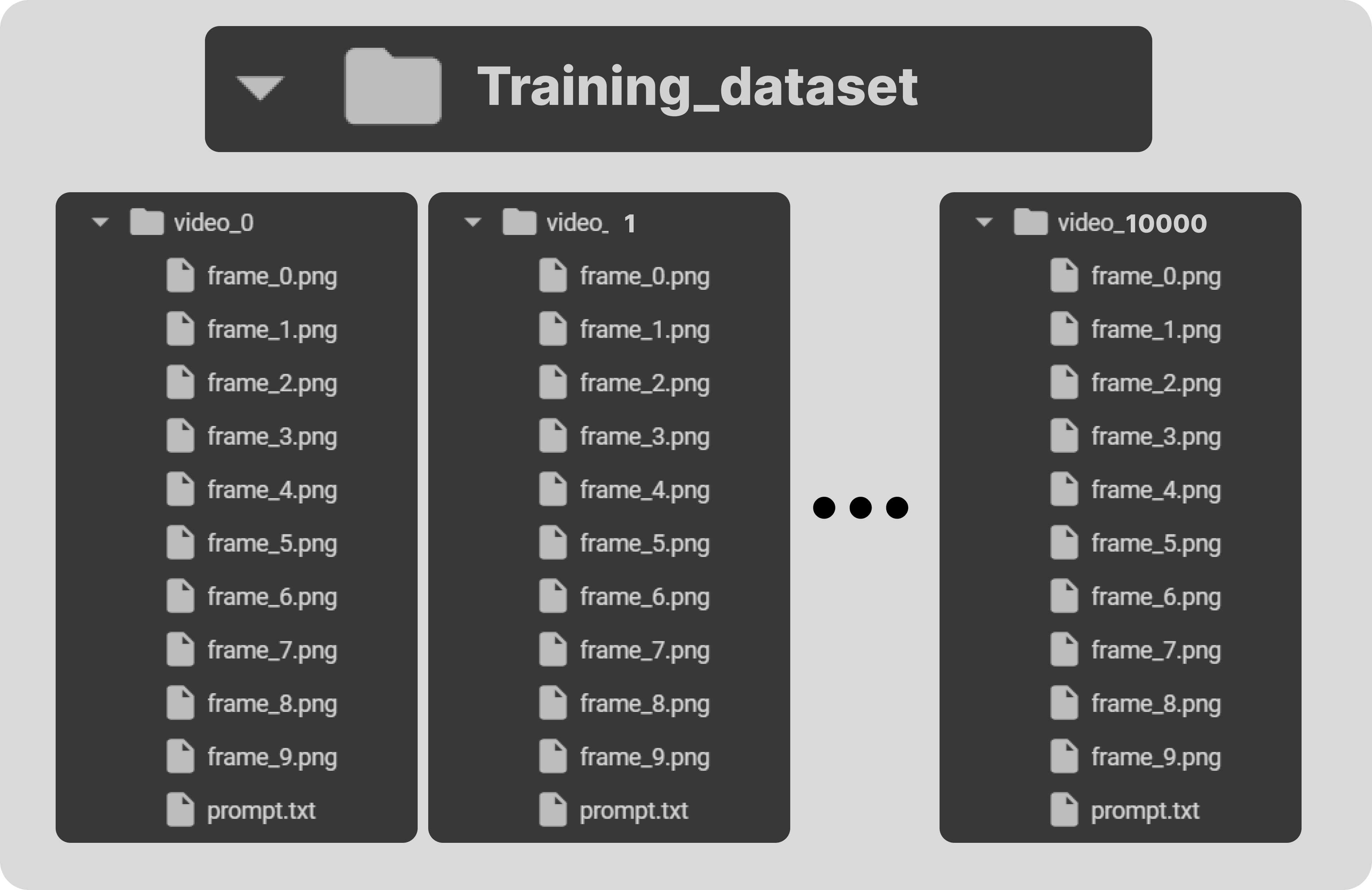 313 | 314 | Each training video folder contains its frames along with its text prompt. Let’s take a look at the sample of our training dataset. 315 | 316 | 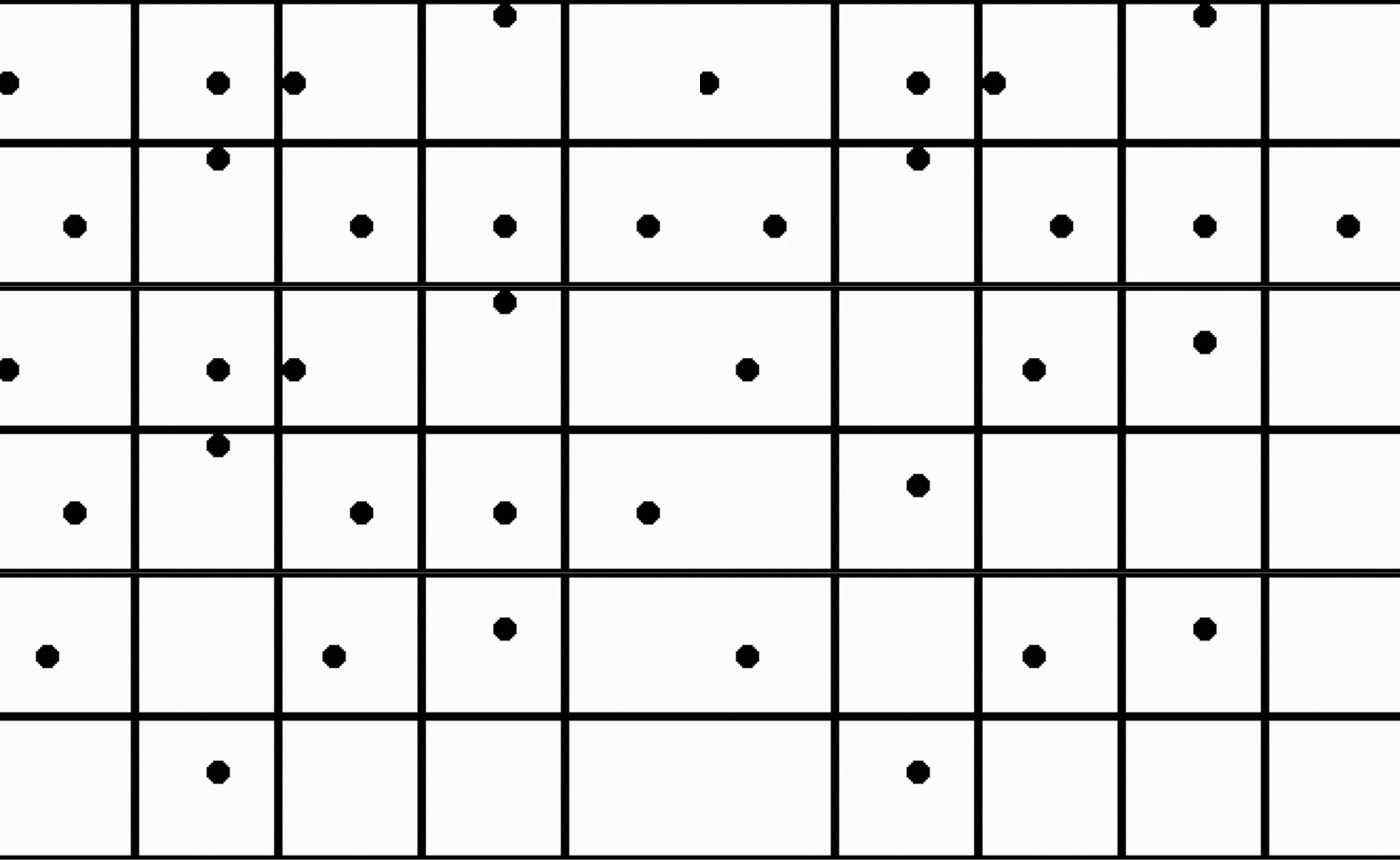 317 | 318 | In our training dataset, we haven’t included the **motion of the circle moving up and then to the right**. We will use this as our testing prompt to evaluate our trained model on unseen data. 319 | 320 | One more important point to note is that our training data does contains many samples where objects moving away from the scene or appear partially in front of the camera, similar to what we have observed in the OpenAI Sora demo videos. 321 | 322 | 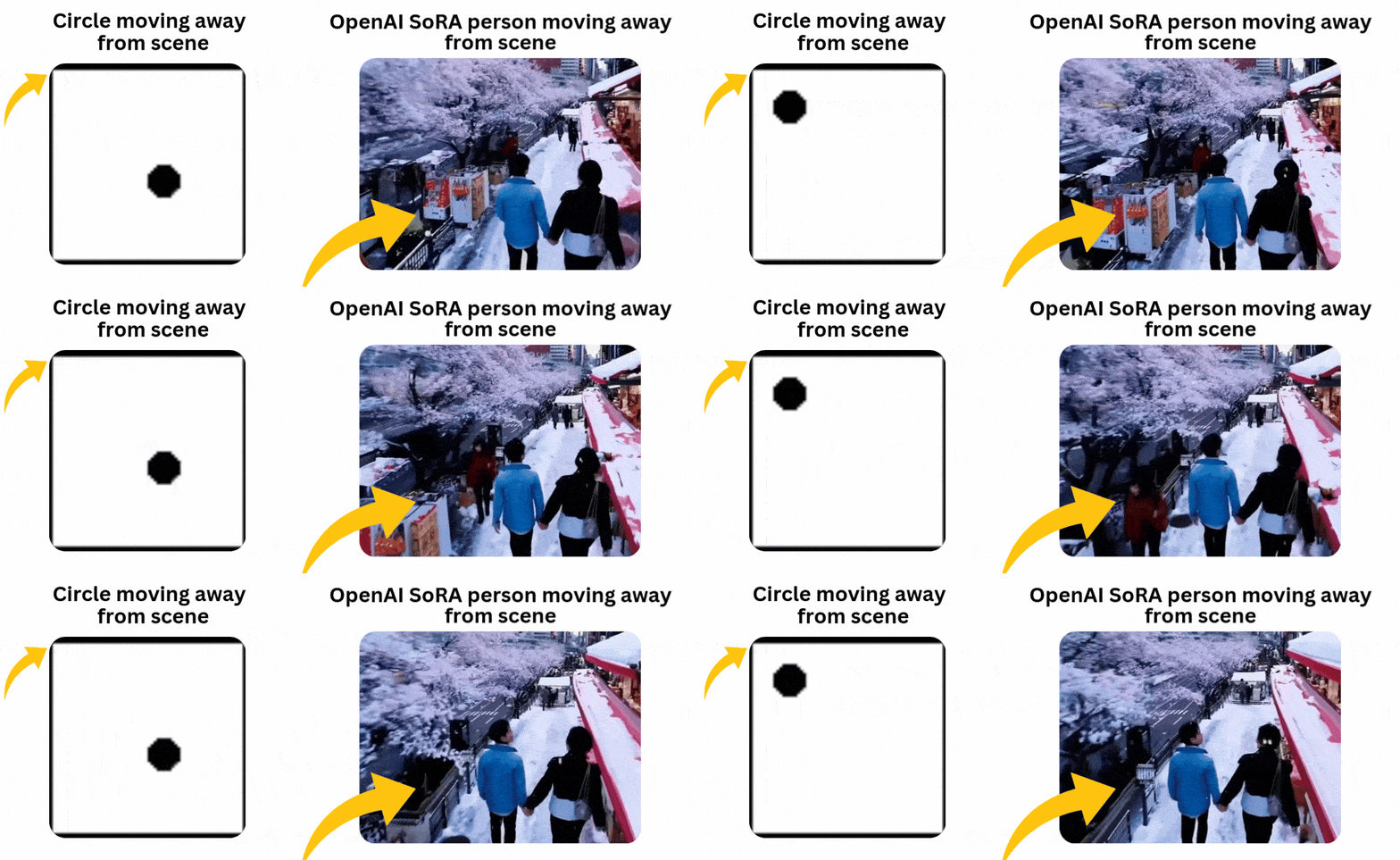 323 | 324 | The reason for including such samples in our training data is to test whether our model can maintain consistency when the circle enters the scene from the very corner without breaking its shape. 325 | 326 | Now that our training data has been generated, we need to convert the training videos to tensors, which are the primary data type used in deep learning frameworks like PyTorch. Additionally, performing transformations like normalization helps improve the convergence and stability of the training architecture by scaling the data to a smaller range. 327 | 328 | ## Pre-Processing Our Training Data 329 | 330 | We have to code a dataset class for text-to-video tasks, which can read video frames and their corresponding text prompts from the training dataset directory, making them available for use in PyTorch. 331 | ```python 332 | # Define a dataset class inheriting from torch.utils.data.Dataset 333 | class TextToVideoDataset(Dataset): 334 | def __init__(self, root_dir, transform=None): 335 | # Initialize the dataset with root directory and optional transform 336 | self.root_dir = root_dir 337 | self.transform = transform 338 | # List all subdirectories in the root directory 339 | self.video_dirs = [os.path.join(root_dir, d) for d in os.listdir(root_dir) if os.path.isdir(os.path.join(root_dir, d))] 340 | # Initialize lists to store frame paths and corresponding prompts 341 | self.frame_paths = [] 342 | self.prompts = [] 343 | 344 | # Loop through each video directory 345 | for video_dir in self.video_dirs: 346 | # List all PNG files in the video directory and store their paths 347 | frames = [os.path.join(video_dir, f) for f in os.listdir(video_dir) if f.endswith('.png')] 348 | self.frame_paths.extend(frames) 349 | # Read the prompt text file in the video directory and store its content 350 | with open(os.path.join(video_dir, 'prompt.txt'), 'r') as f: 351 | prompt = f.read().strip() 352 | # Repeat the prompt for each frame in the video and store in prompts list 353 | self.prompts.extend([prompt] * len(frames)) 354 | 355 | # Return the total number of samples in the dataset 356 | def __len__(self): 357 | return len(self.frame_paths) 358 | 359 | # Retrieve a sample from the dataset given an index 360 | def __getitem__(self, idx): 361 | # Get the path of the frame corresponding to the given index 362 | frame_path = self.frame_paths[idx] 363 | # Open the image using PIL (Python Imaging Library) 364 | image = Image.open(frame_path) 365 | # Get the prompt corresponding to the given index 366 | prompt = self.prompts[idx] 367 | 368 | # Apply transformation if specified 369 | if self.transform: 370 | image = self.transform(image) 371 | 372 | # Return the transformed image and the prompt 373 | return image, prompt 374 | ``` 375 | Before proceeding to code the architecture, we need to normalize our training data. We will use a batch size of 16 and shuffle the data to introduce more randomness. 376 | ```python 377 | # Define a set of transformations to be applied to the data 378 | transform = transforms.Compose([ 379 | transforms.ToTensor(), # Convert PIL Image or numpy.ndarray to tensor 380 | transforms.Normalize((0.5,), (0.5,)) # Normalize image with mean and standard deviation 381 | ]) 382 | 383 | # Load the dataset using the defined transform 384 | dataset = TextToVideoDataset(root_dir='training_dataset', transform=transform) 385 | # Create a dataloader to iterate over the dataset 386 | dataloader = torch.utils.data.DataLoader(dataset, batch_size=16, shuffle=True) 387 | ``` 388 | 389 | ## Implementing Text Embedding Layer 390 | 391 | You may have seen in transformer architecture where the starting point is to convert our text input into embedding for further processing in multi head attention similar here we have to code an text embedding layer based on which the GAN architecture training will take place on our embedding data and images tensor. 392 | ```python 393 | # Define a class for text embedding 394 | class TextEmbedding(nn.Module): 395 | # Constructor method with vocab_size and embed_size parameters 396 | def __init__(self, vocab_size, embed_size): 397 | # Call the superclass constructor 398 | super(TextEmbedding, self).__init__() 399 | # Initialize embedding layer 400 | self.embedding = nn.Embedding(vocab_size, embed_size) 401 | 402 | # Define the forward pass method 403 | def forward(self, x): 404 | # Return embedded representation of input 405 | return self.embedding(x) 406 | ``` 407 | The vocabulary size will be based on our training data, which we will calculate later. The embedding size will be 10. If working with a larger dataset, you can also use your own choice of embedding model available on Hugging Face. 408 | 409 | ## Implementing Generator Layer 410 | 411 | Now that we already know what the generator does in GANs, let’s code this layer and then understand its contents. 412 | ```python 413 | class Generator(nn.Module): 414 | def __init__(self, text_embed_size): 415 | super(Generator, self).__init__() 416 | 417 | # Fully connected layer that takes noise and text embedding as input 418 | self.fc1 = nn.Linear(100 + text_embed_size, 256 * 8 * 8) 419 | 420 | # Transposed convolutional layers to upsample the input 421 | self.deconv1 = nn.ConvTranspose2d(256, 128, 4, 2, 1) 422 | self.deconv2 = nn.ConvTranspose2d(128, 64, 4, 2, 1) 423 | self.deconv3 = nn.ConvTranspose2d(64, 3, 4, 2, 1) # Output has 3 channels for RGB images 424 | 425 | # Activation functions 426 | self.relu = nn.ReLU(True) # ReLU activation function 427 | self.tanh = nn.Tanh() # Tanh activation function for final output 428 | 429 | def forward(self, noise, text_embed): 430 | # Concatenate noise and text embedding along the channel dimension 431 | x = torch.cat((noise, text_embed), dim=1) 432 | 433 | # Fully connected layer followed by reshaping to 4D tensor 434 | x = self.fc1(x).view(-1, 256, 8, 8) 435 | 436 | # Upsampling through transposed convolution layers with ReLU activation 437 | x = self.relu(self.deconv1(x)) 438 | x = self.relu(self.deconv2(x)) 439 | 440 | # Final layer with Tanh activation to ensure output values are between -1 and 1 (for images) 441 | x = self.tanh(self.deconv3(x)) 442 | 443 | return x 444 | ``` 445 | This Generator class is responsible for creating video frames from a combination of random noise and text embeddings. It aims to produce realistic video frames conditioned on the given text descriptions. The network starts with a fully connected layer (nn.Linear) that combines the noise vector and text embedding into a single feature vector. This vector is then reshaped and passed through a series of transposed convolutional layers (nn.ConvTranspose2d), which progressively upsample the feature maps to the desired video frame size. 446 | 447 | The layers use ReLU activations (nn.ReLU) for non-linearity, and the final layer uses a Tanh activation (nn.Tanh) to scale the output to the range [-1, 1]. The generator thus transforms abstract, high-dimensional input into coherent video frames that visually represent the input text. 448 | 449 | ## Implementing Discriminator Layer 450 | 451 | After coding the generator layer, we need to implement the other half, which is the discriminator part. 452 | ```python 453 | class Discriminator(nn.Module): 454 | def __init__(self): 455 | super(Discriminator, self).__init__() 456 | 457 | # Convolutional layers to process input images 458 | self.conv1 = nn.Conv2d(3, 64, 4, 2, 1) # 3 input channels (RGB), 64 output channels, kernel size 4x4, stride 2, padding 1 459 | self.conv2 = nn.Conv2d(64, 128, 4, 2, 1) # 64 input channels, 128 output channels, kernel size 4x4, stride 2, padding 1 460 | self.conv3 = nn.Conv2d(128, 256, 4, 2, 1) # 128 input channels, 256 output channels, kernel size 4x4, stride 2, padding 1 461 | 462 | # Fully connected layer for classification 463 | self.fc1 = nn.Linear(256 * 8 * 8, 1) # Input size 256x8x8 (output size of last convolution), output size 1 (binary classification) 464 | 465 | # Activation functions 466 | self.leaky_relu = nn.LeakyReLU(0.2, inplace=True) # Leaky ReLU activation with negative slope 0.2 467 | self.sigmoid = nn.Sigmoid() # Sigmoid activation for final output (probability) 468 | 469 | def forward(self, input): 470 | # Pass input through convolutional layers with LeakyReLU activation 471 | x = self.leaky_relu(self.conv1(input)) 472 | x = self.leaky_relu(self.conv2(x)) 473 | x = self.leaky_relu(self.conv3(x)) 474 | 475 | # Flatten the output of convolutional layers 476 | x = x.view(-1, 256 * 8 * 8) 477 | 478 | # Pass through fully connected layer with Sigmoid activation for binary classification 479 | x = self.sigmoid(self.fc1(x)) 480 | 481 | return x 482 | ``` 483 | 484 | Discriminator class functions as a binary classifier that distinguishes between real and generated video frames. Its purpose is to evaluate the authenticity of video frames, thereby guiding the generator to produce more realistic outputs. The network is composed of convolutional layers (nn.Conv2d) that extract hierarchical features from the input video frames, with Leaky ReLU activations (nn.LeakyReLU) adding non-linearity while allowing a small gradient for negative values. The feature maps are then flattened and passed through a fully connected layer (nn.Linear), culminating in a sigmoid activation (nn.Sigmoid) that outputs a probability score indicating whether the frame is real or fake. 485 | 486 | By training the discriminator to accurately classify frames, the generator is concurrently trained to create more convincing video frames, as it aims to fool the discriminator. 487 | 488 | ## Coding Training Parameters 489 | 490 | We have to sets up the base components for training GAN such as loss function, optimizer and more. 491 | ```python 492 | # Check for GPU 493 | device = torch.device("cuda" if torch.cuda.is_available() else "cpu") 494 | 495 | # Create a simple vocabulary for text prompts 496 | all_prompts = [prompt for prompt, _, _ in prompts_and_movements] # Extract all prompts from prompts_and_movements list 497 | vocab = {word: idx for idx, word in enumerate(set(" ".join(all_prompts).split()))} # Create a vocabulary dictionary where each unique word is assigned an index 498 | vocab_size = len(vocab) # Size of the vocabulary 499 | embed_size = 10 # Size of the text embedding vector 500 | 501 | def encode_text(prompt): 502 | # Encode a given prompt into a tensor of indices using the vocabulary 503 | return torch.tensor([vocab[word] for word in prompt.split()]) 504 | 505 | # Initialize models, loss function, and optimizers 506 | text_embedding = TextEmbedding(vocab_size, embed_size).to(device) # Initialize TextEmbedding model with vocab_size and embed_size 507 | netG = Generator(embed_size).to(device) # Initialize Generator model with embed_size 508 | netD = Discriminator().to(device) # Initialize Discriminator model 509 | criterion = nn.BCELoss().to(device) # Binary Cross Entropy loss function 510 | optimizerD = optim.Adam(netD.parameters(), lr=0.0002, betas=(0.5, 0.999)) # Adam optimizer for Discriminator 511 | optimizerG = optim.Adam(netG.parameters(), lr=0.0002, betas=(0.5, 0.999)) # Adam optimizer for Generator 512 | ``` 513 | 514 | This is the part where we have to transform our code to run on the GPU if available. We’ve coded to find the vocab_size, and we’re using the ADAM optimizer for both the generator and discriminator. You can choose your own optimizer if you prefer. Here, we’re setting the learning rate to a small value of 0.0002, with an embedding size of 10, which is much smaller compared to other Hugging Face models available for public use. 515 | 516 | ## Coding the Training Loop 517 | 518 | Just like every other neural network, we are going to code the GAN architecture training in a similar manner. 519 | ```python 520 | # Number of epochs 521 | num_epochs = 13 522 | 523 | # Iterate over each epoch 524 | for epoch in range(num_epochs): 525 | # Iterate over each batch of data 526 | for i, (data, prompts) in enumerate(dataloader): 527 | # Move real data to device 528 | real_data = data.to(device) 529 | 530 | # Convert prompts to list 531 | prompts = [prompt for prompt in prompts] 532 | 533 | # Update Discriminator 534 | netD.zero_grad() # Zero the gradients of the Discriminator 535 | batch_size = real_data.size(0) # Get the batch size 536 | labels = torch.ones(batch_size, 1).to(device) # Create labels for real data (ones) 537 | output = netD(real_data) # Forward pass real data through Discriminator 538 | lossD_real = criterion(output, labels) # Calculate loss on real data 539 | lossD_real.backward() # Backward pass to calculate gradients 540 | 541 | # Generate fake data 542 | noise = torch.randn(batch_size, 100).to(device) # Generate random noise 543 | text_embeds = torch.stack([text_embedding(encode_text(prompt).to(device)).mean(dim=0) for prompt in prompts]) # Encode prompts into text embeddings 544 | fake_data = netG(noise, text_embeds) # Generate fake data from noise and text embeddings 545 | labels = torch.zeros(batch_size, 1).to(device) # Create labels for fake data (zeros) 546 | output = netD(fake_data.detach()) # Forward pass fake data through Discriminator (detach to avoid gradients flowing back to Generator) 547 | lossD_fake = criterion(output, labels) # Calculate loss on fake data 548 | lossD_fake.backward() # Backward pass to calculate gradients 549 | optimizerD.step() # Update Discriminator parameters 550 | 551 | # Update Generator 552 | netG.zero_grad() # Zero the gradients of the Generator 553 | labels = torch.ones(batch_size, 1).to(device) # Create labels for fake data (ones) to fool Discriminator 554 | output = netD(fake_data) # Forward pass fake data (now updated) through Discriminator 555 | lossG = criterion(output, labels) # Calculate loss for Generator based on Discriminator's response 556 | lossG.backward() # Backward pass to calculate gradients 557 | optimizerG.step() # Update Generator parameters 558 | 559 | # Print epoch information 560 | print(f"Epoch [{epoch + 1}/{num_epochs}] Loss D: {lossD_real + lossD_fake}, Loss G: {lossG}") 561 | ``` 562 | 563 | Through backpropagation, our loss will be adjusted for both the generator and discriminator. We have used 13 epochs for the training loop. I have tested different values, but the results don’t show much difference if epochs go higher than this. Moreover, there is a high risk of encountering overfitting. If we had a more diverse dataset with more movements and shapes, we could consider using higher epochs, but not in this case. 564 | 565 | When we run this code, it starts training and prints the loss for both the generator and discriminator after each epoch. 566 | ```python 567 | ## OUTPUT ## 568 | 569 | Epoch [1/13] Loss D: 0.8798642754554749, Loss G: 1.300612449645996 570 | Epoch [2/13] Loss D: 0.8235711455345154, Loss G: 1.3729925155639648 571 | Epoch [3/13] Loss D: 0.6098687052726746, Loss G: 1.3266581296920776 572 | ... 573 | ... 574 | ``` 575 | 576 | ## Saving the Trained Model 577 | 578 | After the training completes, we need to save both the discriminator and generator of our trained GAN architecture, which can be achieved with just two lines of code. 579 | ```python 580 | # Save the Generator model's state dictionary to a file named 'generator.pth' 581 | torch.save(netG.state_dict(), 'generator.pth') 582 | 583 | # Save the Discriminator model's state dictionary to a file named 'discriminator.pth' 584 | torch.save(netD.state_dict(), 'discriminator.pth') 585 | ``` 586 | 587 | ## Generating AI Video 588 | 589 | As we discussed, our approach to test our model on unseen data is comparable to the example where our training data involves dogs fetching balls and cats chasing mice. Therefore, our test prompt could involve scenarios like a cat fetching a ball or a dog chasing a mouse. 590 | 591 | In our specific case, the motion where the circle moves up and then to the right is not present in our training data, so the model is unfamiliar with this specific motion. However, it has been trained on other motions. We can use this motion as a prompt to test our trained model and observe its performance. 592 | ```python 593 | # Inference function to generate a video based on a given text prompt 594 | def generate_video(text_prompt, num_frames=10): 595 | # Create a directory for the generated video frames based on the text prompt 596 | os.makedirs(f'generated_video_{text_prompt.replace(" ", "_")}', exist_ok=True) 597 | 598 | # Encode the text prompt into a text embedding tensor 599 | text_embed = text_embedding(encode_text(text_prompt).to(device)).mean(dim=0).unsqueeze(0) 600 | 601 | # Generate frames for the video 602 | for frame_num in range(num_frames): 603 | # Generate random noise 604 | noise = torch.randn(1, 100).to(device) 605 | 606 | # Generate a fake frame using the Generator network 607 | with torch.no_grad(): 608 | fake_frame = netG(noise, text_embed) 609 | 610 | # Save the generated fake frame as an image file 611 | save_image(fake_frame, f'generated_video_{text_prompt.replace(" ", "_")}/frame_{frame_num}.png') 612 | 613 | # usage of the generate_video function with a specific text prompt 614 | generate_video('circle moving up-right') 615 | ``` 616 | 617 | When we run the above code, it will generate a directory containing all the frames of our generated video. We need to use a bit of code to merge all these frames into a single short video. 618 | ```python 619 | # Define the path to your folder containing the PNG frames 620 | folder_path = 'generated_video_circle_moving_up-right' 621 | 622 | 623 | # Get the list of all PNG files in the folder 624 | image_files = [f for f in os.listdir(folder_path) if f.endswith('.png')] 625 | 626 | # Sort the images by name (assuming they are numbered sequentially) 627 | image_files.sort() 628 | 629 | # Create a list to store the frames 630 | frames = [] 631 | 632 | # Read each image and append it to the frames list 633 | for image_file in image_files: 634 | image_path = os.path.join(folder_path, image_file) 635 | frame = cv2.imread(image_path) 636 | frames.append(frame) 637 | 638 | # Convert the frames list to a numpy array for easier processing 639 | frames = np.array(frames) 640 | 641 | # Define the frame rate (frames per second) 642 | fps = 10 643 | 644 | # Create a video writer object 645 | fourcc = cv2.VideoWriter_fourcc(*'XVID') 646 | out = cv2.VideoWriter('generated_video.avi', fourcc, fps, (frames[0].shape[1], frames[0].shape[0])) 647 | 648 | # Write each frame to the video 649 | for frame in frames: 650 | out.write(frame) 651 | 652 | # Release the video writer 653 | out.release() 654 | ``` 655 | 656 | Make sure the folder path points to where your newly generated video exists. After running this code, your AI video will have been successfully created. Let’s see what it looks like. 657 | 658 | 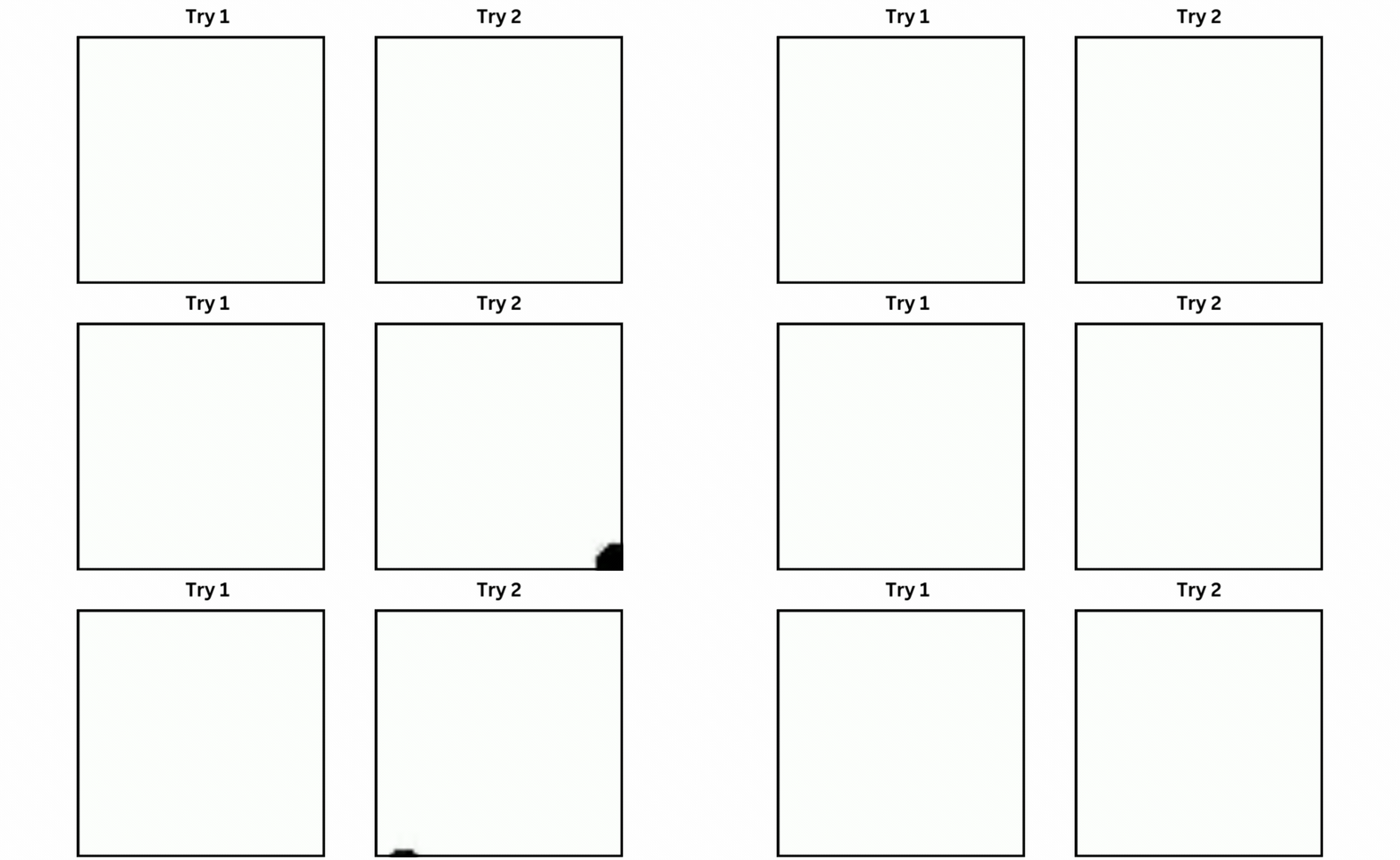 659 | 660 | I performed training multiple times with the same number of epochs. In both cases, the circle starts from the bottom appearing half. The good part is that our model attempted to perform the up-right motion in both cases. For example, in Try 1, the circle moved diagonally upward and then performed an up motion, while in Try 2, the circle moved diagonally while shrinking in size. In neither case did the circle move left or completely disappear, which is a good sign. 661 | 662 | ## What’s Missing? 663 | 664 | I’ve tested various aspects of this architecture, and found that the training data is the key. By including more motions and shapes in the dataset, you can increase variability and improve the model’s performance. Since the data is generated through code, generating more varied data won’t take much time; instead, you can focus on refining the logic. 665 | 666 | Furthermore, the GAN architecture discussed in this blog is relatively straightforward. You can make it more complex by integrating advanced techniques or using a language model embedding (LLM) instead of a basic neural network embedding. Additionally, tuning parameters such as embedding size and others can significantly impact the model’s effectiveness. 667 | 668 | ## About Me 669 | 670 | I hold an MSc degree in Data Science, and I have been working in the NLP and AI domains for over two years. You can hire me or ask me anything related to AI! I always reply to emails, regardless of the query. 671 | 672 | Connect with me: [https://www.linkedin.com/in/fareed-khan-dev/](https://www.linkedin.com/in/fareed-khan-dev/) 673 | 674 | Contact me at: fareedhassankhan12@gmail.com -------------------------------------------------------------------------------- /AI_text_to_Video.ipynb: -------------------------------------------------------------------------------- 1 | { 2 | "cells": [ 3 | { 4 | "cell_type": "markdown", 5 | "metadata": { 6 | "id": "fDZ1cweXj8s3" 7 | }, 8 | "source": [ 9 | "Sora from OpenAI, Stable Video Diffusion from Stability AI, and many other text-to-video models that have come out or will appear in the future are among the most popular AI trends in 2024, following large language models (LLMs). In this blog, we will build a **small scale text-to-video model from scratch**. We will input a text prompt, and our trained model will generate a video based on that prompt. This blog will cover everything from understanding the theoretical concepts to coding the entire architecture and generating the final result.\n", 10 | "\n", 11 | "Since I don’t have a fancy GPU, I’ve coded the small-scale architecture. Here’s a comparison of the time required to train the model on different processors:\n", 12 | "\n", 13 | "| Training Videos | Epochs | CPU | GPU A10 | GPU T4 |\n", 14 | "|---------------|--------|----------|---------|-----------|\n", 15 | "| 10K | 30 | more than 3 hr | 1 hr | 1 hr 42m |\n", 16 | "| 30K | 30 | more than 6 hr | 1 hr 30 | 2 hr 30 |\n", 17 | "| 100K | 30 | - | 3-4 hr | 5-6 hr |\n", 18 | "\n", 19 | "Running on a CPU will obviously take much longer to train the model. If you need to quickly test changes in the code and see results, CPU is not the best choice. I recommend using a T4 GPU from [Colab](https://colab.research.google.com/) or [Kaggle](https://kaggle.com/) for more efficient and faster training.\n", 20 | "\n", 21 | "Here is the blog link which guides you on how to create Stable Diffusion from scratch:\n", 22 | "[Coding Stable Diffusion from Scratch](https://levelup.gitconnected.com/building-stable-diffusion-from-scratch-using-python-f3ebc8c42da3)" 23 | ] 24 | }, 25 | { 26 | "cell_type": "markdown", 27 | "metadata": { 28 | "id": "_BnTekhJj8s6" 29 | }, 30 | "source": [ 31 | "## What We’re Building\n", 32 | "\n", 33 | "We will follow a similar approach to traditional machine learning or deep learning models that train on a dataset and are then tested on unseen data. In the context of text-to-video, let’s say we have a training dataset of 100K videos of dogs fetching balls and cats chasing mice. We will train our model to generate videos of a cat fetching a ball or a dog chasing a mouse.\n", 34 | "\n", 35 | " \n",
36 | "\n",
37 | "Although such training datasets are easily available on the internet, the required computational power is extremely high. Therefore, we will work with a video dataset of moving objects generated from Python code.\n",
38 | "\n",
39 | "We will use the GAN (Generative Adversarial Networks) architecture to create our model instead of the diffusion model that OpenAI Sora uses. I attempted to use the diffusion model, but it crashed due to memory requirements, which is beyond my capacity. GANs, on the other hand, are easier and quicker to train and test."
40 | ]
41 | },
42 | {
43 | "cell_type": "markdown",
44 | "metadata": {
45 | "id": "8zSgLUkmj8s6"
46 | },
47 | "source": [
48 | "## Prerequisites\n",
49 | "\n",
50 | "We will be using OOP (Object-Oriented Programming), so you must have a basic understanding of it along with neural networks. Knowledge of GANs (Generative Adversarial Networks) is not mandatory, as we will be covering their architecture here.\n",
51 | "\n",
52 | "| Topic | Link |\n",
53 | "| ---- | ---- |\n",
54 | "| OOP | [Video Link](https://www.youtube.com/watch?v=q2SGW2VgwAM) |\n",
55 | "| Neural Networks Theory | [Video Link](https://www.youtube.com/watch?v=Jy4wM2X21u0) |\n",
56 | "| GAN Architecture | [Video Link](https://www.youtube.com/watch?v=TpMIssRdhco) |\n",
57 | "| Python basics | [Video Link](https://www.youtube.com/watch?v=eWRfhZUzrAc) |\n"
58 | ]
59 | },
60 | {
61 | "cell_type": "markdown",
62 | "metadata": {
63 | "id": "FNm7BMx4j8s6"
64 | },
65 | "source": [
66 | "# Understanding the GAN Architecture\n",
67 | "\n",
68 | "Understanding GAN architecture is important because much of our architecture depends on it. Let’s explore what it is, its components, and more.\n",
69 | "\n",
70 | "### what is **GAN**?\n",
71 | "\n",
72 | "Generative Adversarial Network (GAN) is a deep learning model where two neural networks compete: one creates new data (like images or music) from a given dataset, and the other tries to tell if the data is real or fake. This process continues until the generated data is indistinguishable from the original.\n",
73 | "\n",
74 | "### Real-World Application\n",
75 | "\n",
76 | " 1. **Generate Images**: GANs create realistic images from text prompts or modify existing images, such as enhancing resolution or adding color to black-and-white photos.\n",
77 | "\n",
78 | " 2. **Data Augmentation**: They generate synthetic data to train other machine learning models, such as creating fraudulent transaction data for fraud detection systems.\n",
79 | "\n",
80 | " 3. **Complete Missing Information**: GANs can fill in missing data, like generating sub-surface images from terrain maps for energy applications.\n",
81 | "\n",
82 | " 4. **Generate 3D Models**: They convert 2D images into 3D models, useful in fields like healthcare for creating realistic organ images for surgical planning.\n",
83 | "\n",
84 | "### How does a GAN work?\n",
85 | "\n",
86 | "It consists of two deep neural networks: the **generator** and the **discriminator**. These networks train together in an adversarial setup, where one generates new data and the other evaluates if the data is real or fake.\n",
87 | "\n",
88 | "Here’s a simplified overview of how GAN works:\n",
89 | "\n",
90 | " 1. **Training Set Analysis**: The generator analyzes the training set to identify data attributes, while the discriminator independently analyzes the same data to learn its attributes.\n",
91 | "\n",
92 | " 2. **Data Modification**: The generator adds noise (random changes) to some attributes of the data.\n",
93 | "\n",
94 | " 3. **Data Passing**: The modified data is then passed to the discriminator.\n",
95 | "\n",
96 | " 4. **Probability Calculation**: The discriminator calculates the probability that the generated data is from the original dataset.\n",
97 | "\n",
98 | " 5. **Feedback Loop**: The discriminator provides feedback to the generator, guiding it to reduce random noise in the next cycle.\n",
99 | "\n",
100 | " 6. **Adversarial Training**: The generator tries to maximize the discriminator’s mistakes, while the discriminator tries to minimize its own errors. Through many training iterations, both networks improve and evolve.\n",
101 | "\n",
102 | " 7. **Equilibrium State**: Training continues until the discriminator can no longer distinguish between real and synthesized data, indicating that the generator has successfully learned to produce realistic data. At this point, the training process is complete.\n",
103 | "\n",
104 | "](https://cdn-images-1.medium.com/max/2796/1*2HsK-UFPRvCdAmQyS3Ol1Q.jpeg)\n",
105 | "\n",
106 | "### GAN training example\n",
107 | "\n",
108 | "Let’s explain the GAN model with an example of image-to-image translation, focusing on modifying a human face.\n",
109 | "\n",
110 | " 1. **Input Image**: The input is a real image of a human face.\n",
111 | "\n",
112 | " 2. **Attribute Modification**: The generator modifies attributes of the face, like adding sunglasses to the eyes.\n",
113 | "\n",
114 | " 3. **Generated Images**: The generator creates a set of images with sunglasses added.\n",
115 | "\n",
116 | " 4. **Discriminator’s Task**: The discriminator receives a mix of real images (people with sunglasses) and generated images (faces where sunglasses were added).\n",
117 | "\n",
118 | " 5. **Evaluation**: The discriminator tries to differentiate between real and generated images.\n",
119 | "\n",
120 | " 6. **Feedback Loop**: If the discriminator correctly identifies fake images, the generator adjusts its parameters to produce more convincing images. If the generator successfully fools the discriminator, the discriminator updates its parameters to improve its detection.\n",
121 | "\n",
122 | "Through this adversarial process, both networks continuously improve. The generator gets better at creating realistic images, and the discriminator gets better at identifying fakes until equilibrium is reached, where the discriminator can no longer tell the difference between real and generated images. At this point, the GAN has successfully learned to produce realistic modifications."
123 | ]
124 | },
125 | {
126 | "cell_type": "markdown",
127 | "metadata": {
128 | "id": "GFFrVzR9j8s7"
129 | },
130 | "source": [
131 | "## Importing Libraries"
132 | ]
133 | },
134 | {
135 | "cell_type": "code",
136 | "execution_count": 1,
137 | "metadata": {
138 | "id": "_vABkDvGj8s7"
139 | },
140 | "outputs": [],
141 | "source": [
142 | "# Operating System module for interacting with the operating system\n",
143 | "import os\n",
144 | "\n",
145 | "# Module for generating random numbers\n",
146 | "import random\n",
147 | "\n",
148 | "# Module for numerical operations\n",
149 | "import numpy as np\n",
150 | "\n",
151 | "# OpenCV library for image processing\n",
152 | "import cv2\n",
153 | "\n",
154 | "# Python Imaging Library for image processing\n",
155 | "from PIL import Image, ImageDraw, ImageFont\n",
156 | "\n",
157 | "# PyTorch library for deep learning\n",
158 | "import torch\n",
159 | "\n",
160 | "# Dataset class for creating custom datasets in PyTorch\n",
161 | "from torch.utils.data import Dataset\n",
162 | "\n",
163 | "# Module for image transformations\n",
164 | "import torchvision.transforms as transforms\n",
165 | "\n",
166 | "# Neural network module in PyTorch\n",
167 | "import torch.nn as nn\n",
168 | "\n",
169 | "# Optimization algorithms in PyTorch\n",
170 | "import torch.optim as optim\n",
171 | "\n",
172 | "# Function for padding sequences in PyTorch\n",
173 | "from torch.nn.utils.rnn import pad_sequence\n",
174 | "\n",
175 | "# Function for saving images in PyTorch\n",
176 | "from torchvision.utils import save_image\n",
177 | "\n",
178 | "# Module for plotting graphs and images\n",
179 | "import matplotlib.pyplot as plt\n",
180 | "\n",
181 | "# Module for displaying rich content in IPython environments\n",
182 | "from IPython.display import clear_output, display, HTML\n",
183 | "\n",
184 | "# Module for encoding and decoding binary data to text\n",
185 | "import base64"
186 | ]
187 | },
188 | {
189 | "cell_type": "markdown",
190 | "metadata": {
191 | "id": "Mg5sx3Qnj8s8"
192 | },
193 | "source": [
194 | "## Coding the Training Data"
195 | ]
196 | },
197 | {
198 | "cell_type": "code",
199 | "execution_count": 2,
200 | "metadata": {
201 | "colab": {
202 | "base_uri": "https://localhost:8080/"
203 | },
204 | "id": "8Lh9GLYXj8s8",
205 | "outputId": "0285032c-b1cd-4ab7-ba35-311484b27b52"
206 | },
207 | "outputs": [
208 | {
209 | "output_type": "stream",
210 | "name": "stdout",
211 | "text": [
212 | "Dataset generation complete.\n"
213 | ]
214 | }
215 | ],
216 | "source": [
217 | "# Create the directory for the training dataset\n",
218 | "os.makedirs('training_dataset', exist_ok=True)\n",
219 | "\n",
220 | "# Define the number of videos to generate for the dataset\n",
221 | "num_videos = 30000\n",
222 | "\n",
223 | "# Define the number of frames per video (1 Second Video)\n",
224 | "frames_per_video = 10\n",
225 | "\n",
226 | "# Define the size of each image in the dataset\n",
227 | "img_size = (64, 64)\n",
228 | "\n",
229 | "# Define the size of the shapes (Circle)\n",
230 | "shape_size = 10\n",
231 | "\n",
232 | "# Define text prompts and corresponding movements for circles\n",
233 | "prompts_and_movements = [\n",
234 | " (\"circle moving down\", \"circle\", \"down\"), # Move circle downward\n",
235 | " (\"circle moving left\", \"circle\", \"left\"), # Move circle leftward\n",
236 | " (\"circle moving right\", \"circle\", \"right\"), # Move circle rightward\n",
237 | " (\"circle moving diagonally up-right\", \"circle\", \"diagonal_up_right\"), # Move circle diagonally up-right\n",
238 | " (\"circle moving diagonally down-left\", \"circle\", \"diagonal_down_left\"), # Move circle diagonally down-left\n",
239 | " (\"circle moving diagonally up-left\", \"circle\", \"diagonal_up_left\"), # Move circle diagonally up-left\n",
240 | " (\"circle moving diagonally down-right\", \"circle\", \"diagonal_down_right\"), # Move circle diagonally down-right\n",
241 | " (\"circle rotating clockwise\", \"circle\", \"rotate_clockwise\"), # Rotate circle clockwise\n",
242 | " (\"circle rotating counter-clockwise\", \"circle\", \"rotate_counter_clockwise\"), # Rotate circle counter-clockwise\n",
243 | " (\"circle bouncing vertically\", \"circle\", \"bounce_vertical\"), # Bounce circle vertically\n",
244 | " (\"circle bouncing horizontally\", \"circle\", \"bounce_horizontal\"), # Bounce circle horizontally\n",
245 | " (\"circle zigzagging vertically\", \"circle\", \"zigzag_vertical\"), # Zigzag circle vertically\n",
246 | " (\"circle zigzagging horizontally\", \"circle\", \"zigzag_horizontal\"), # Zigzag circle horizontally\n",
247 | " (\"circle moving up-left\", \"circle\", \"up_left\"), # Move circle up-left\n",
248 | " (\"circle moving down-right\", \"circle\", \"down_right\"), # Move circle down-right\n",
249 | " (\"circle moving down-left\", \"circle\", \"down_left\") # Move circle down-left\n",
250 | "]\n",
251 | "\n",
252 | "# Define a function to create an image with a moving shape\n",
253 | "def create_image_with_moving_shape(size, frame_num, shape, direction):\n",
254 | " # Create a new RGB image with the specified size and white background\n",
255 | " img = Image.new('RGB', size, color=(255, 255, 255))\n",
256 | " draw = ImageDraw.Draw(img)\n",
257 | "\n",
258 | " # Calculate the initial position of the shape (center of the image)\n",
259 | " center_x, center_y = size[0] // 2, size[1] // 2\n",
260 | "\n",
261 | " # Determine the shape position based on the movement direction\n",
262 | " if direction == \"down\":\n",
263 | " position = (center_x, (center_y + frame_num * 5) % size[1])\n",
264 | " elif direction == \"left\":\n",
265 | " position = ((center_x - frame_num * 5) % size[0], center_y)\n",
266 | " elif direction == \"right\":\n",
267 | " position = ((center_x + frame_num * 5) % size[0], center_y)\n",
268 | " elif direction == \"diagonal_up_right\":\n",
269 | " position = ((center_x + frame_num * 5) % size[0], (center_y - frame_num * 5) % size[1])\n",
270 | " elif direction == \"diagonal_down_left\":\n",
271 | " position = ((center_x - frame_num * 5) % size[0], (center_y + frame_num * 5) % size[1])\n",
272 | " elif direction == \"diagonal_up_left\":\n",
273 | " position = ((center_x - frame_num * 5) % size[0], (center_y - frame_num * 5) % size[1])\n",
274 | " elif direction == \"diagonal_down_right\":\n",
275 | " position = ((center_x + frame_num * 5) % size[0], (center_y + frame_num * 5) % size[1])\n",
276 | " elif direction == \"rotate_clockwise\":\n",
277 | " img = img.rotate(frame_num * 10, center=(center_x, center_y), fillcolor=(255, 255, 255))\n",
278 | " position = (center_x, center_y)\n",
279 | " elif direction == \"rotate_counter_clockwise\":\n",
280 | " img = img.rotate(-frame_num * 10, center=(center_x, center_y), fillcolor=(255, 255, 255))\n",
281 | " position = (center_x, center_y)\n",
282 | " elif direction == \"bounce_vertical\":\n",
283 | " position = (center_x, center_y - abs(frame_num * 5 % size[1] - center_y))\n",
284 | " elif direction == \"bounce_horizontal\":\n",
285 | " position = (center_x - abs(frame_num * 5 % size[0] - center_x), center_y)\n",
286 | " elif direction == \"zigzag_vertical\":\n",
287 | " position = (center_x, center_y - frame_num * 5 % size[1] if frame_num % 2 == 0 else center_y + frame_num * 5 % size[1])\n",
288 | " elif direction == \"zigzag_horizontal\":\n",
289 | " position = (center_x - frame_num * 5 % size[0] if frame_num % 2 == 0 else center_x + frame_num * 5 % size[0], center_y)\n",
290 | " elif direction == \"up_left\":\n",
291 | " position = ((center_x - frame_num * 5) % size[0], (center_y - frame_num * 5) % size[1])\n",
292 | " elif direction == \"down_right\":\n",
293 | " position = ((center_x + frame_num * 5) % size[0], (center_y + frame_num * 5) % size[1])\n",
294 | " elif direction == \"down_left\":\n",
295 | " position = ((center_x - frame_num * 5) % size[0], (center_y + frame_num * 5) % size[1])\n",
296 | " else:\n",
297 | " position = (center_x, center_y)\n",
298 | "\n",
299 | " # Draw the shape (circle) at the calculated position\n",
300 | " if shape == \"circle\":\n",
301 | " draw.ellipse([position[0] - shape_size // 2, position[1] - shape_size // 2, position[0] + shape_size // 2, position[1] + shape_size // 2], fill=(0, 0, 255))\n",
302 | "\n",
303 | " # Return the image as a numpy array\n",
304 | " return np.array(img)\n",
305 | "\n",
306 | "# Generate the dataset\n",
307 | "for video_num in range(num_videos):\n",
308 | " prompt, shape, direction = random.choice(prompts_and_movements)\n",
309 | " video_frames = []\n",
310 | " for frame_num in range(frames_per_video):\n",
311 | " img_array = create_image_with_moving_shape(img_size, frame_num, shape, direction)\n",
312 | " video_frames.append(img_array)\n",
313 | "\n",
314 | " # Save the frames as images in the training dataset directory\n",
315 | " video_dir = os.path.join('training_dataset', f'video_{video_num}')\n",
316 | " os.makedirs(video_dir, exist_ok=True)\n",
317 | " for frame_num, frame in enumerate(video_frames):\n",
318 | " frame_image = Image.fromarray(frame)\n",
319 | " frame_image.save(os.path.join(video_dir, f'frame_{frame_num}.png'))\n",
320 | "\n",
321 | "print(\"Dataset generation complete.\")"
322 | ]
323 | },
324 | {
325 | "cell_type": "code",
326 | "execution_count": 3,
327 | "metadata": {
328 | "id": "IF10vxGej8s8"
329 | },
330 | "outputs": [],
331 | "source": [
332 | "# Iterate over the number of videos to generate\n",
333 | "for i in range(num_videos):\n",
334 | " # Randomly choose a prompt and movement from the predefined list\n",
335 | " prompt, shape, direction = random.choice(prompts_and_movements)\n",
336 | "\n",
337 | " # Create a directory for the current video\n",
338 | " video_dir = f'training_dataset/video_{i}'\n",
339 | " os.makedirs(video_dir, exist_ok=True)\n",
340 | "\n",
341 | " # Write the chosen prompt to a text file in the video directory\n",
342 | " with open(f'{video_dir}/prompt.txt', 'w') as f:\n",
343 | " f.write(prompt)\n",
344 | "\n",
345 | " # Generate frames for the current video\n",
346 | " for frame_num in range(frames_per_video):\n",
347 | " # Create an image with a moving shape based on the current frame number, shape, and direction\n",
348 | " img = create_image_with_moving_shape(img_size, frame_num, shape, direction)\n",
349 | "\n",
350 | " # Save the generated image as a PNG file in the video directory\n",
351 | " cv2.imwrite(f'{video_dir}/frame_{frame_num}.png', img)"
352 | ]
353 | },
354 | {
355 | "cell_type": "markdown",
356 | "metadata": {
357 | "id": "HXLQf-Wkj8s9"
358 | },
359 | "source": [
360 | "## Pre-Processing Our Training Data"
361 | ]
362 | },
363 | {
364 | "cell_type": "code",
365 | "execution_count": null,
366 | "metadata": {
367 | "id": "JlSlYNKpj8s9"
368 | },
369 | "outputs": [],
370 | "source": [
371 | "# Define a dataset class inheriting from torch.utils.data.Dataset\n",
372 | "class TextToVideoDataset(Dataset):\n",
373 | " def __init__(self, root_dir, transform=None):\n",
374 | " # Initialize the dataset with root directory and optional transform\n",
375 | " self.root_dir = root_dir\n",
376 | " self.transform = transform\n",
377 | " # List all subdirectories in the root directory\n",
378 | " self.video_dirs = [os.path.join(root_dir, d) for d in os.listdir(root_dir) if os.path.isdir(os.path.join(root_dir, d))]\n",
379 | " # Initialize lists to store frame paths and corresponding prompts\n",
380 | " self.frame_paths = []\n",
381 | " self.prompts = []\n",
382 | "\n",
383 | " # Loop through each video directory\n",
384 | " for video_dir in self.video_dirs:\n",
385 | " # List all PNG files in the video directory and store their paths\n",
386 | " frames = [os.path.join(video_dir, f) for f in os.listdir(video_dir) if f.endswith('.png')]\n",
387 | " self.frame_paths.extend(frames)\n",
388 | " # Read the prompt text file in the video directory and store its content\n",
389 | " with open(os.path.join(video_dir, 'prompt.txt'), 'r') as f:\n",
390 | " prompt = f.read().strip()\n",
391 | " # Repeat the prompt for each frame in the video and store in prompts list\n",
392 | " self.prompts.extend([prompt] * len(frames))\n",
393 | "\n",
394 | " # Return the total number of samples in the dataset\n",
395 | " def __len__(self):\n",
396 | " return len(self.frame_paths)\n",
397 | "\n",
398 | " # Retrieve a sample from the dataset given an index\n",
399 | " def __getitem__(self, idx):\n",
400 | " # Get the path of the frame corresponding to the given index\n",
401 | " frame_path = self.frame_paths[idx]\n",
402 | " # Open the image using PIL (Python Imaging Library)\n",
403 | " image = Image.open(frame_path)\n",
404 | " # Get the prompt corresponding to the given index\n",
405 | " prompt = self.prompts[idx]\n",
406 | "\n",
407 | " # Apply transformation if specified\n",
408 | " if self.transform:\n",
409 | " image = self.transform(image)\n",
410 | "\n",
411 | " # Return the transformed image and the prompt\n",
412 | " return image, prompt\n",
413 | "\n",
414 | "# Define a set of transformations to be applied to the data\n",
415 | "transform = transforms.Compose([\n",
416 | " transforms.ToTensor(), # Convert PIL Image or numpy.ndarray to tensor\n",
417 | " transforms.Normalize((0.5,), (0.5,)) # Normalize image with mean and standard deviation\n",
418 | "])\n",
419 | "\n",
420 | "# Load the dataset using the defined transform\n",
421 | "dataset = TextToVideoDataset(root_dir='training_dataset', transform=transform)\n",
422 | "# Create a dataloader to iterate over the dataset\n",
423 | "dataloader = torch.utils.data.DataLoader(dataset, batch_size=16, shuffle=True)"
424 | ]
425 | },
426 | {
427 | "cell_type": "markdown",
428 | "metadata": {
429 | "id": "OvaajlG2j8s9"
430 | },
431 | "source": [
432 | "## Implementing GAN Architecture"
433 | ]
434 | },
435 | {
436 | "cell_type": "code",
437 | "execution_count": null,
438 | "metadata": {
439 | "id": "QKgbkSNaj8s9"
440 | },
441 | "outputs": [],
442 | "source": [
443 | "# Define a class for text embedding\n",
444 | "class TextEmbedding(nn.Module):\n",
445 | " # Constructor method with vocab_size and embed_size parameters\n",
446 | " def __init__(self, vocab_size, embed_size):\n",
447 | " # Call the superclass constructor\n",
448 | " super(TextEmbedding, self).__init__()\n",
449 | " # Initialize embedding layer\n",
450 | " self.embedding = nn.Embedding(vocab_size, embed_size)\n",
451 | "\n",
452 | " # Define the forward pass method\n",
453 | " def forward(self, x):\n",
454 | " # Return embedded representation of input\n",
455 | " return self.embedding(x)\n",
456 | "\n",
457 | "class Generator(nn.Module):\n",
458 | " def __init__(self, text_embed_size):\n",
459 | " super(Generator, self).__init__()\n",
460 | "\n",
461 | " # Fully connected layer that takes noise and text embedding as input\n",
462 | " self.fc1 = nn.Linear(100 + text_embed_size, 256 * 8 * 8)\n",
463 | "\n",
464 | " # Transposed convolutional layers to upsample the input\n",
465 | " self.deconv1 = nn.ConvTranspose2d(256, 128, 4, 2, 1)\n",
466 | " self.deconv2 = nn.ConvTranspose2d(128, 64, 4, 2, 1)\n",
467 | " self.deconv3 = nn.ConvTranspose2d(64, 3, 4, 2, 1) # Output has 3 channels for RGB images\n",
468 | "\n",
469 | " # Activation functions\n",
470 | " self.relu = nn.ReLU(True) # ReLU activation function\n",
471 | " self.tanh = nn.Tanh() # Tanh activation function for final output\n",
472 | "\n",
473 | " def forward(self, noise, text_embed):\n",
474 | " # Concatenate noise and text embedding along the channel dimension\n",
475 | " x = torch.cat((noise, text_embed), dim=1)\n",
476 | "\n",
477 | " # Fully connected layer followed by reshaping to 4D tensor\n",
478 | " x = self.fc1(x).view(-1, 256, 8, 8)\n",
479 | "\n",
480 | " # Upsampling through transposed convolution layers with ReLU activation\n",
481 | " x = self.relu(self.deconv1(x))\n",
482 | " x = self.relu(self.deconv2(x))\n",
483 | "\n",
484 | " # Final layer with Tanh activation to ensure output values are between -1 and 1 (for images)\n",
485 | " x = self.tanh(self.deconv3(x))\n",
486 | "\n",
487 | " return x\n",
488 | "\n",
489 | "class Discriminator(nn.Module):\n",
490 | " def __init__(self):\n",
491 | " super(Discriminator, self).__init__()\n",
492 | "\n",
493 | " # Convolutional layers to process input images\n",
494 | " self.conv1 = nn.Conv2d(3, 64, 4, 2, 1) # 3 input channels (RGB), 64 output channels, kernel size 4x4, stride 2, padding 1\n",
495 | " self.conv2 = nn.Conv2d(64, 128, 4, 2, 1) # 64 input channels, 128 output channels, kernel size 4x4, stride 2, padding 1\n",
496 | " self.conv3 = nn.Conv2d(128, 256, 4, 2, 1) # 128 input channels, 256 output channels, kernel size 4x4, stride 2, padding 1\n",
497 | "\n",
498 | " # Fully connected layer for classification\n",
499 | " self.fc1 = nn.Linear(256 * 8 * 8, 1) # Input size 256x8x8 (output size of last convolution), output size 1 (binary classification)\n",
500 | "\n",
501 | " # Activation functions\n",
502 | " self.leaky_relu = nn.LeakyReLU(0.2, inplace=True) # Leaky ReLU activation with negative slope 0.2\n",
503 | " self.sigmoid = nn.Sigmoid() # Sigmoid activation for final output (probability)\n",
504 | "\n",
505 | " def forward(self, input):\n",
506 | " # Pass input through convolutional layers with LeakyReLU activation\n",
507 | " x = self.leaky_relu(self.conv1(input))\n",
508 | " x = self.leaky_relu(self.conv2(x))\n",
509 | " x = self.leaky_relu(self.conv3(x))\n",
510 | "\n",
511 | " # Flatten the output of convolutional layers\n",
512 | " x = x.view(-1, 256 * 8 * 8)\n",
513 | "\n",
514 | " # Pass through fully connected layer with Sigmoid activation for binary classification\n",
515 | " x = self.sigmoid(self.fc1(x))\n",
516 | "\n",
517 | " return x"
518 | ]
519 | },
520 | {
521 | "cell_type": "markdown",
522 | "metadata": {
523 | "id": "GfCQkirWj8s9"
524 | },
525 | "source": [
526 | "## Coding Training Parameters"
527 | ]
528 | },
529 | {
530 | "cell_type": "code",
531 | "execution_count": null,
532 | "metadata": {
533 | "id": "L9Zrz1szj8s9"
534 | },
535 | "outputs": [],
536 | "source": [
537 | "# Check for GPU\n",
538 | "device = torch.device(\"cuda\" if torch.cuda.is_available() else \"cpu\")\n",
539 | "\n",
540 | "# Create a simple vocabulary for text prompts\n",
541 | "all_prompts = [prompt for prompt, _, _ in prompts_and_movements] # Extract all prompts from prompts_and_movements list\n",
542 | "vocab = {word: idx for idx, word in enumerate(set(\" \".join(all_prompts).split()))} # Create a vocabulary dictionary where each unique word is assigned an index\n",
543 | "vocab_size = len(vocab) # Size of the vocabulary\n",
544 | "embed_size = 10 # Size of the text embedding vector\n",
545 | "\n",
546 | "def encode_text(prompt):\n",
547 | " # Encode a given prompt into a tensor of indices using the vocabulary\n",
548 | " return torch.tensor([vocab[word] for word in prompt.split()])\n",
549 | "\n",
550 | "# Initialize models, loss function, and optimizers\n",
551 | "text_embedding = TextEmbedding(vocab_size, embed_size).to(device) # Initialize TextEmbedding model with vocab_size and embed_size\n",
552 | "netG = Generator(embed_size).to(device) # Initialize Generator model with embed_size\n",
553 | "netD = Discriminator().to(device) # Initialize Discriminator model\n",
554 | "criterion = nn.BCELoss().to(device) # Binary Cross Entropy loss function\n",
555 | "optimizerD = optim.Adam(netD.parameters(), lr=0.0002, betas=(0.5, 0.999)) # Adam optimizer for Discriminator\n",
556 | "optimizerG = optim.Adam(netG.parameters(), lr=0.0002, betas=(0.5, 0.999)) # Adam optimizer for Generator"
557 | ]
558 | },
559 | {
560 | "cell_type": "markdown",
561 | "metadata": {
562 | "id": "X2tChYiEj8s9"
563 | },
564 | "source": [
565 | "## Training Loop"
566 | ]
567 | },
568 | {
569 | "cell_type": "code",
570 | "execution_count": null,
571 | "metadata": {
572 | "id": "mlSboIs5j8s9"
573 | },
574 | "outputs": [],
575 | "source": [
576 | "# Number of epochs\n",
577 | "num_epochs = 13\n",
578 | "\n",
579 | "# Iterate over each epoch\n",
580 | "for epoch in range(num_epochs):\n",
581 | " # Iterate over each batch of data\n",
582 | " for i, (data, prompts) in enumerate(dataloader):\n",
583 | " # Move real data to device\n",
584 | " real_data = data.to(device)\n",
585 | "\n",
586 | " # Convert prompts to list\n",
587 | " prompts = [prompt for prompt in prompts]\n",
588 | "\n",
589 | " # Update Discriminator\n",
590 | " netD.zero_grad() # Zero the gradients of the Discriminator\n",
591 | " batch_size = real_data.size(0) # Get the batch size\n",
592 | " labels = torch.ones(batch_size, 1).to(device) # Create labels for real data (ones)\n",
593 | " output = netD(real_data) # Forward pass real data through Discriminator\n",
594 | " lossD_real = criterion(output, labels) # Calculate loss on real data\n",
595 | " lossD_real.backward() # Backward pass to calculate gradients\n",
596 | "\n",
597 | " # Generate fake data\n",
598 | " noise = torch.randn(batch_size, 100).to(device) # Generate random noise\n",
599 | " text_embeds = torch.stack([text_embedding(encode_text(prompt).to(device)).mean(dim=0) for prompt in prompts]) # Encode prompts into text embeddings\n",
600 | " fake_data = netG(noise, text_embeds) # Generate fake data from noise and text embeddings\n",
601 | " labels = torch.zeros(batch_size, 1).to(device) # Create labels for fake data (zeros)\n",
602 | " output = netD(fake_data.detach()) # Forward pass fake data through Discriminator (detach to avoid gradients flowing back to Generator)\n",
603 | " lossD_fake = criterion(output, labels) # Calculate loss on fake data\n",
604 | " lossD_fake.backward() # Backward pass to calculate gradients\n",
605 | " optimizerD.step() # Update Discriminator parameters\n",
606 | "\n",
607 | " # Update Generator\n",
608 | " netG.zero_grad() # Zero the gradients of the Generator\n",
609 | " labels = torch.ones(batch_size, 1).to(device) # Create labels for fake data (ones) to fool Discriminator\n",
610 | " output = netD(fake_data) # Forward pass fake data (now updated) through Discriminator\n",
611 | " lossG = criterion(output, labels) # Calculate loss for Generator based on Discriminator's response\n",
612 | " lossG.backward() # Backward pass to calculate gradients\n",
613 | " optimizerG.step() # Update Generator parameters\n",
614 | "\n",
615 | " # Print epoch information\n",
616 | " print(f\"Epoch [{epoch + 1}/{num_epochs}] Loss D: {lossD_real + lossD_fake}, Loss G: {lossG}\")"
617 | ]
618 | },
619 | {
620 | "cell_type": "markdown",
621 | "metadata": {
622 | "id": "veLNs63Xj8s-"
623 | },
624 | "source": [
625 | "## Saving the Trained Model"
626 | ]
627 | },
628 | {
629 | "cell_type": "code",
630 | "execution_count": null,
631 | "metadata": {
632 | "id": "IixqmS-kj8s-"
633 | },
634 | "outputs": [],
635 | "source": [
636 | "# Save the Generator model's state dictionary to a file named 'generator.pth'\n",
637 | "torch.save(netG.state_dict(), 'generator.pth')\n",
638 | "\n",
639 | "# Save the Discriminator model's state dictionary to a file named 'discriminator.pth'\n",
640 | "torch.save(netD.state_dict(), 'discriminator.pth')"
641 | ]
642 | },
643 | {
644 | "cell_type": "markdown",
645 | "metadata": {
646 | "id": "dNlKX9P0j8s-"
647 | },
648 | "source": [
649 | "## Generating AI Video\n",
650 | "\n",
651 | "As we discussed, our approach to test our model on unseen data is comparable to the example where our training data involves dogs fetching balls and cats chasing mice. Therefore, our test prompt could involve scenarios like a cat fetching a ball or a dog chasing a mouse.\n",
652 | "In our specific case, the motion where the circle moves up and then to the right is not present in our training data, so the model is unfamiliar with this specific motion. However, it has been trained on other motions. We can use this motion as a prompt to test our trained model and observe its performance."
653 | ]
654 | },
655 | {
656 | "cell_type": "code",
657 | "execution_count": null,
658 | "metadata": {
659 | "id": "RALjTc8Tj8s-"
660 | },
661 | "outputs": [],
662 | "source": [
663 | "# Inference function to generate a video based on a given text prompt\n",
664 | "def generate_video(text_prompt, num_frames=10):\n",
665 | " # Create a directory for the generated video frames based on the text prompt\n",
666 | " os.makedirs(f'generated_video_{text_prompt.replace(\" \", \"_\")}', exist_ok=True)\n",
667 | "\n",
668 | " # Encode the text prompt into a text embedding tensor\n",
669 | " text_embed = text_embedding(encode_text(text_prompt).to(device)).mean(dim=0).unsqueeze(0)\n",
670 | "\n",
671 | " # Generate frames for the video\n",
672 | " for frame_num in range(num_frames):\n",
673 | " # Generate random noise\n",
674 | " noise = torch.randn(1, 100).to(device)\n",
675 | "\n",
676 | " # Generate a fake frame using the Generator network\n",
677 | " with torch.no_grad():\n",
678 | " fake_frame = netG(noise, text_embed)\n",
679 | "\n",
680 | " # Save the generated fake frame as an image file\n",
681 | " save_image(fake_frame, f'generated_video_{text_prompt.replace(\" \", \"_\")}/frame_{frame_num}.png')\n",
682 | "\n",
683 | "# usage of the generate_video function with a specific text prompt\n",
684 | "generate_video('circle moving up-right')"
685 | ]
686 | },
687 | {
688 | "cell_type": "markdown",
689 | "metadata": {
690 | "id": "7iymU6CVj8s-"
691 | },
692 | "source": [
693 | "When we run the above code, it will generate a directory containing all the frames of our generated video. We need to use a bit of code to merge all these frames into a single short video."
694 | ]
695 | },
696 | {
697 | "cell_type": "code",
698 | "execution_count": null,
699 | "metadata": {
700 | "id": "Gl9z6qoNj8s-"
701 | },
702 | "outputs": [],
703 | "source": [
704 | "# Define the path to your folder containing the PNG frames\n",
705 | "folder_path = 'generated_video_circle_moving_up-right'\n",
706 | "\n",
707 | "# Get the list of all PNG files in the folder\n",
708 | "image_files = [f for f in os.listdir(folder_path) if f.endswith('.png')]\n",
709 | "\n",
710 | "# Sort the images by name (assuming they are numbered sequentially)\n",
711 | "image_files.sort()\n",
712 | "\n",
713 | "# Create a list to store the frames\n",
714 | "frames = []\n",
715 | "\n",
716 | "# Read each image and append it to the frames list\n",
717 | "for image_file in image_files:\n",
718 | " image_path = os.path.join(folder_path, image_file)\n",
719 | " frame = cv2.imread(image_path)\n",
720 | " frames.append(frame)\n",
721 | "\n",
722 | "# Convert the frames list to a numpy array for easier processing\n",
723 | "frames = np.array(frames)\n",
724 | "\n",
725 | "# Define the frame rate (frames per second)\n",
726 | "fps = 10\n",
727 | "\n",
728 | "# Create a video writer object\n",
729 | "fourcc = cv2.VideoWriter_fourcc(*'XVID')\n",
730 | "out = cv2.VideoWriter('generated_video.avi', fourcc, fps, (frames[0].shape[1], frames[0].shape[0]))\n",
731 | "\n",
732 | "# Write each frame to the video\n",
733 | "for frame in frames:\n",
734 | " out.write(frame)\n",
735 | "\n",
736 | "# Release the video writer\n",
737 | "out.release()"
738 | ]
739 | },
740 | {
741 | "cell_type": "markdown",
742 | "metadata": {
743 | "id": "Sqy1GxSRj8s-"
744 | },
745 | "source": [
746 | "Make sure the folder path points to where your newly generated video exists. After running this code, your AI video will have been successfully created. Let's see what it looks like."
747 | ]
748 | },
749 | {
750 | "cell_type": "markdown",
751 | "metadata": {
752 | "id": "VRLTU_onj8s-"
753 | },
754 | "source": [
755 | "## What's Missing?\n",
756 | "I've tested various aspects of this architecture, and found that the training data is the key. By including more motions and shapes in the dataset, you can increase variability and improve the model's performance. Since the data is generated through code, generating more varied data won't take much time; instead, you can focus on refining the logic.\n",
757 | "Furthermore, the GAN architecture discussed in this blog is relatively straightforward. You can make it more complex by integrating advanced techniques or using a language model embedding (LLM) instead of a basic neural network embedding. Additionally, tuning parameters such as embedding size and others can significantly impact the model's effectiveness."
758 | ]
759 | }
760 | ],
761 | "metadata": {
762 | "language_info": {
763 | "name": "python"
764 | },
765 | "colab": {
766 | "provenance": []
767 | },
768 | "kernelspec": {
769 | "name": "python3",
770 | "display_name": "Python 3"
771 | }
772 | },
773 | "nbformat": 4,
774 | "nbformat_minor": 0
775 | }
--------------------------------------------------------------------------------
\n",
36 | "\n",
37 | "Although such training datasets are easily available on the internet, the required computational power is extremely high. Therefore, we will work with a video dataset of moving objects generated from Python code.\n",
38 | "\n",
39 | "We will use the GAN (Generative Adversarial Networks) architecture to create our model instead of the diffusion model that OpenAI Sora uses. I attempted to use the diffusion model, but it crashed due to memory requirements, which is beyond my capacity. GANs, on the other hand, are easier and quicker to train and test."
40 | ]
41 | },
42 | {
43 | "cell_type": "markdown",
44 | "metadata": {
45 | "id": "8zSgLUkmj8s6"
46 | },
47 | "source": [
48 | "## Prerequisites\n",
49 | "\n",
50 | "We will be using OOP (Object-Oriented Programming), so you must have a basic understanding of it along with neural networks. Knowledge of GANs (Generative Adversarial Networks) is not mandatory, as we will be covering their architecture here.\n",
51 | "\n",
52 | "| Topic | Link |\n",
53 | "| ---- | ---- |\n",
54 | "| OOP | [Video Link](https://www.youtube.com/watch?v=q2SGW2VgwAM) |\n",
55 | "| Neural Networks Theory | [Video Link](https://www.youtube.com/watch?v=Jy4wM2X21u0) |\n",
56 | "| GAN Architecture | [Video Link](https://www.youtube.com/watch?v=TpMIssRdhco) |\n",
57 | "| Python basics | [Video Link](https://www.youtube.com/watch?v=eWRfhZUzrAc) |\n"
58 | ]
59 | },
60 | {
61 | "cell_type": "markdown",
62 | "metadata": {
63 | "id": "FNm7BMx4j8s6"
64 | },
65 | "source": [
66 | "# Understanding the GAN Architecture\n",
67 | "\n",
68 | "Understanding GAN architecture is important because much of our architecture depends on it. Let’s explore what it is, its components, and more.\n",
69 | "\n",
70 | "### what is **GAN**?\n",
71 | "\n",
72 | "Generative Adversarial Network (GAN) is a deep learning model where two neural networks compete: one creates new data (like images or music) from a given dataset, and the other tries to tell if the data is real or fake. This process continues until the generated data is indistinguishable from the original.\n",
73 | "\n",
74 | "### Real-World Application\n",
75 | "\n",
76 | " 1. **Generate Images**: GANs create realistic images from text prompts or modify existing images, such as enhancing resolution or adding color to black-and-white photos.\n",
77 | "\n",
78 | " 2. **Data Augmentation**: They generate synthetic data to train other machine learning models, such as creating fraudulent transaction data for fraud detection systems.\n",
79 | "\n",
80 | " 3. **Complete Missing Information**: GANs can fill in missing data, like generating sub-surface images from terrain maps for energy applications.\n",
81 | "\n",
82 | " 4. **Generate 3D Models**: They convert 2D images into 3D models, useful in fields like healthcare for creating realistic organ images for surgical planning.\n",
83 | "\n",
84 | "### How does a GAN work?\n",
85 | "\n",
86 | "It consists of two deep neural networks: the **generator** and the **discriminator**. These networks train together in an adversarial setup, where one generates new data and the other evaluates if the data is real or fake.\n",
87 | "\n",
88 | "Here’s a simplified overview of how GAN works:\n",
89 | "\n",
90 | " 1. **Training Set Analysis**: The generator analyzes the training set to identify data attributes, while the discriminator independently analyzes the same data to learn its attributes.\n",
91 | "\n",
92 | " 2. **Data Modification**: The generator adds noise (random changes) to some attributes of the data.\n",
93 | "\n",
94 | " 3. **Data Passing**: The modified data is then passed to the discriminator.\n",
95 | "\n",
96 | " 4. **Probability Calculation**: The discriminator calculates the probability that the generated data is from the original dataset.\n",
97 | "\n",
98 | " 5. **Feedback Loop**: The discriminator provides feedback to the generator, guiding it to reduce random noise in the next cycle.\n",
99 | "\n",
100 | " 6. **Adversarial Training**: The generator tries to maximize the discriminator’s mistakes, while the discriminator tries to minimize its own errors. Through many training iterations, both networks improve and evolve.\n",
101 | "\n",
102 | " 7. **Equilibrium State**: Training continues until the discriminator can no longer distinguish between real and synthesized data, indicating that the generator has successfully learned to produce realistic data. At this point, the training process is complete.\n",
103 | "\n",
104 | "](https://cdn-images-1.medium.com/max/2796/1*2HsK-UFPRvCdAmQyS3Ol1Q.jpeg)\n",
105 | "\n",
106 | "### GAN training example\n",
107 | "\n",
108 | "Let’s explain the GAN model with an example of image-to-image translation, focusing on modifying a human face.\n",
109 | "\n",
110 | " 1. **Input Image**: The input is a real image of a human face.\n",
111 | "\n",
112 | " 2. **Attribute Modification**: The generator modifies attributes of the face, like adding sunglasses to the eyes.\n",
113 | "\n",
114 | " 3. **Generated Images**: The generator creates a set of images with sunglasses added.\n",
115 | "\n",
116 | " 4. **Discriminator’s Task**: The discriminator receives a mix of real images (people with sunglasses) and generated images (faces where sunglasses were added).\n",
117 | "\n",
118 | " 5. **Evaluation**: The discriminator tries to differentiate between real and generated images.\n",
119 | "\n",
120 | " 6. **Feedback Loop**: If the discriminator correctly identifies fake images, the generator adjusts its parameters to produce more convincing images. If the generator successfully fools the discriminator, the discriminator updates its parameters to improve its detection.\n",
121 | "\n",
122 | "Through this adversarial process, both networks continuously improve. The generator gets better at creating realistic images, and the discriminator gets better at identifying fakes until equilibrium is reached, where the discriminator can no longer tell the difference between real and generated images. At this point, the GAN has successfully learned to produce realistic modifications."
123 | ]
124 | },
125 | {
126 | "cell_type": "markdown",
127 | "metadata": {
128 | "id": "GFFrVzR9j8s7"
129 | },
130 | "source": [
131 | "## Importing Libraries"
132 | ]
133 | },
134 | {
135 | "cell_type": "code",
136 | "execution_count": 1,
137 | "metadata": {
138 | "id": "_vABkDvGj8s7"
139 | },
140 | "outputs": [],
141 | "source": [
142 | "# Operating System module for interacting with the operating system\n",
143 | "import os\n",
144 | "\n",
145 | "# Module for generating random numbers\n",
146 | "import random\n",
147 | "\n",
148 | "# Module for numerical operations\n",
149 | "import numpy as np\n",
150 | "\n",
151 | "# OpenCV library for image processing\n",
152 | "import cv2\n",
153 | "\n",
154 | "# Python Imaging Library for image processing\n",
155 | "from PIL import Image, ImageDraw, ImageFont\n",
156 | "\n",
157 | "# PyTorch library for deep learning\n",
158 | "import torch\n",
159 | "\n",
160 | "# Dataset class for creating custom datasets in PyTorch\n",
161 | "from torch.utils.data import Dataset\n",
162 | "\n",
163 | "# Module for image transformations\n",
164 | "import torchvision.transforms as transforms\n",
165 | "\n",
166 | "# Neural network module in PyTorch\n",
167 | "import torch.nn as nn\n",
168 | "\n",
169 | "# Optimization algorithms in PyTorch\n",
170 | "import torch.optim as optim\n",
171 | "\n",
172 | "# Function for padding sequences in PyTorch\n",
173 | "from torch.nn.utils.rnn import pad_sequence\n",
174 | "\n",
175 | "# Function for saving images in PyTorch\n",
176 | "from torchvision.utils import save_image\n",
177 | "\n",
178 | "# Module for plotting graphs and images\n",
179 | "import matplotlib.pyplot as plt\n",
180 | "\n",
181 | "# Module for displaying rich content in IPython environments\n",
182 | "from IPython.display import clear_output, display, HTML\n",
183 | "\n",
184 | "# Module for encoding and decoding binary data to text\n",
185 | "import base64"
186 | ]
187 | },
188 | {
189 | "cell_type": "markdown",
190 | "metadata": {
191 | "id": "Mg5sx3Qnj8s8"
192 | },
193 | "source": [
194 | "## Coding the Training Data"
195 | ]
196 | },
197 | {
198 | "cell_type": "code",
199 | "execution_count": 2,
200 | "metadata": {
201 | "colab": {
202 | "base_uri": "https://localhost:8080/"
203 | },
204 | "id": "8Lh9GLYXj8s8",
205 | "outputId": "0285032c-b1cd-4ab7-ba35-311484b27b52"
206 | },
207 | "outputs": [
208 | {
209 | "output_type": "stream",
210 | "name": "stdout",
211 | "text": [
212 | "Dataset generation complete.\n"
213 | ]
214 | }
215 | ],
216 | "source": [
217 | "# Create the directory for the training dataset\n",
218 | "os.makedirs('training_dataset', exist_ok=True)\n",
219 | "\n",
220 | "# Define the number of videos to generate for the dataset\n",
221 | "num_videos = 30000\n",
222 | "\n",
223 | "# Define the number of frames per video (1 Second Video)\n",
224 | "frames_per_video = 10\n",
225 | "\n",
226 | "# Define the size of each image in the dataset\n",
227 | "img_size = (64, 64)\n",
228 | "\n",
229 | "# Define the size of the shapes (Circle)\n",
230 | "shape_size = 10\n",
231 | "\n",
232 | "# Define text prompts and corresponding movements for circles\n",
233 | "prompts_and_movements = [\n",
234 | " (\"circle moving down\", \"circle\", \"down\"), # Move circle downward\n",
235 | " (\"circle moving left\", \"circle\", \"left\"), # Move circle leftward\n",
236 | " (\"circle moving right\", \"circle\", \"right\"), # Move circle rightward\n",
237 | " (\"circle moving diagonally up-right\", \"circle\", \"diagonal_up_right\"), # Move circle diagonally up-right\n",
238 | " (\"circle moving diagonally down-left\", \"circle\", \"diagonal_down_left\"), # Move circle diagonally down-left\n",
239 | " (\"circle moving diagonally up-left\", \"circle\", \"diagonal_up_left\"), # Move circle diagonally up-left\n",
240 | " (\"circle moving diagonally down-right\", \"circle\", \"diagonal_down_right\"), # Move circle diagonally down-right\n",
241 | " (\"circle rotating clockwise\", \"circle\", \"rotate_clockwise\"), # Rotate circle clockwise\n",
242 | " (\"circle rotating counter-clockwise\", \"circle\", \"rotate_counter_clockwise\"), # Rotate circle counter-clockwise\n",
243 | " (\"circle bouncing vertically\", \"circle\", \"bounce_vertical\"), # Bounce circle vertically\n",
244 | " (\"circle bouncing horizontally\", \"circle\", \"bounce_horizontal\"), # Bounce circle horizontally\n",
245 | " (\"circle zigzagging vertically\", \"circle\", \"zigzag_vertical\"), # Zigzag circle vertically\n",
246 | " (\"circle zigzagging horizontally\", \"circle\", \"zigzag_horizontal\"), # Zigzag circle horizontally\n",
247 | " (\"circle moving up-left\", \"circle\", \"up_left\"), # Move circle up-left\n",
248 | " (\"circle moving down-right\", \"circle\", \"down_right\"), # Move circle down-right\n",
249 | " (\"circle moving down-left\", \"circle\", \"down_left\") # Move circle down-left\n",
250 | "]\n",
251 | "\n",
252 | "# Define a function to create an image with a moving shape\n",
253 | "def create_image_with_moving_shape(size, frame_num, shape, direction):\n",
254 | " # Create a new RGB image with the specified size and white background\n",
255 | " img = Image.new('RGB', size, color=(255, 255, 255))\n",
256 | " draw = ImageDraw.Draw(img)\n",
257 | "\n",
258 | " # Calculate the initial position of the shape (center of the image)\n",
259 | " center_x, center_y = size[0] // 2, size[1] // 2\n",
260 | "\n",
261 | " # Determine the shape position based on the movement direction\n",
262 | " if direction == \"down\":\n",
263 | " position = (center_x, (center_y + frame_num * 5) % size[1])\n",
264 | " elif direction == \"left\":\n",
265 | " position = ((center_x - frame_num * 5) % size[0], center_y)\n",
266 | " elif direction == \"right\":\n",
267 | " position = ((center_x + frame_num * 5) % size[0], center_y)\n",
268 | " elif direction == \"diagonal_up_right\":\n",
269 | " position = ((center_x + frame_num * 5) % size[0], (center_y - frame_num * 5) % size[1])\n",
270 | " elif direction == \"diagonal_down_left\":\n",
271 | " position = ((center_x - frame_num * 5) % size[0], (center_y + frame_num * 5) % size[1])\n",
272 | " elif direction == \"diagonal_up_left\":\n",
273 | " position = ((center_x - frame_num * 5) % size[0], (center_y - frame_num * 5) % size[1])\n",
274 | " elif direction == \"diagonal_down_right\":\n",
275 | " position = ((center_x + frame_num * 5) % size[0], (center_y + frame_num * 5) % size[1])\n",
276 | " elif direction == \"rotate_clockwise\":\n",
277 | " img = img.rotate(frame_num * 10, center=(center_x, center_y), fillcolor=(255, 255, 255))\n",
278 | " position = (center_x, center_y)\n",
279 | " elif direction == \"rotate_counter_clockwise\":\n",
280 | " img = img.rotate(-frame_num * 10, center=(center_x, center_y), fillcolor=(255, 255, 255))\n",
281 | " position = (center_x, center_y)\n",
282 | " elif direction == \"bounce_vertical\":\n",
283 | " position = (center_x, center_y - abs(frame_num * 5 % size[1] - center_y))\n",
284 | " elif direction == \"bounce_horizontal\":\n",
285 | " position = (center_x - abs(frame_num * 5 % size[0] - center_x), center_y)\n",
286 | " elif direction == \"zigzag_vertical\":\n",
287 | " position = (center_x, center_y - frame_num * 5 % size[1] if frame_num % 2 == 0 else center_y + frame_num * 5 % size[1])\n",
288 | " elif direction == \"zigzag_horizontal\":\n",
289 | " position = (center_x - frame_num * 5 % size[0] if frame_num % 2 == 0 else center_x + frame_num * 5 % size[0], center_y)\n",
290 | " elif direction == \"up_left\":\n",
291 | " position = ((center_x - frame_num * 5) % size[0], (center_y - frame_num * 5) % size[1])\n",
292 | " elif direction == \"down_right\":\n",
293 | " position = ((center_x + frame_num * 5) % size[0], (center_y + frame_num * 5) % size[1])\n",
294 | " elif direction == \"down_left\":\n",
295 | " position = ((center_x - frame_num * 5) % size[0], (center_y + frame_num * 5) % size[1])\n",
296 | " else:\n",
297 | " position = (center_x, center_y)\n",
298 | "\n",
299 | " # Draw the shape (circle) at the calculated position\n",
300 | " if shape == \"circle\":\n",
301 | " draw.ellipse([position[0] - shape_size // 2, position[1] - shape_size // 2, position[0] + shape_size // 2, position[1] + shape_size // 2], fill=(0, 0, 255))\n",
302 | "\n",
303 | " # Return the image as a numpy array\n",
304 | " return np.array(img)\n",
305 | "\n",
306 | "# Generate the dataset\n",
307 | "for video_num in range(num_videos):\n",
308 | " prompt, shape, direction = random.choice(prompts_and_movements)\n",
309 | " video_frames = []\n",
310 | " for frame_num in range(frames_per_video):\n",
311 | " img_array = create_image_with_moving_shape(img_size, frame_num, shape, direction)\n",
312 | " video_frames.append(img_array)\n",
313 | "\n",
314 | " # Save the frames as images in the training dataset directory\n",
315 | " video_dir = os.path.join('training_dataset', f'video_{video_num}')\n",
316 | " os.makedirs(video_dir, exist_ok=True)\n",
317 | " for frame_num, frame in enumerate(video_frames):\n",
318 | " frame_image = Image.fromarray(frame)\n",
319 | " frame_image.save(os.path.join(video_dir, f'frame_{frame_num}.png'))\n",
320 | "\n",
321 | "print(\"Dataset generation complete.\")"
322 | ]
323 | },
324 | {
325 | "cell_type": "code",
326 | "execution_count": 3,
327 | "metadata": {
328 | "id": "IF10vxGej8s8"
329 | },
330 | "outputs": [],
331 | "source": [
332 | "# Iterate over the number of videos to generate\n",
333 | "for i in range(num_videos):\n",
334 | " # Randomly choose a prompt and movement from the predefined list\n",
335 | " prompt, shape, direction = random.choice(prompts_and_movements)\n",
336 | "\n",
337 | " # Create a directory for the current video\n",
338 | " video_dir = f'training_dataset/video_{i}'\n",
339 | " os.makedirs(video_dir, exist_ok=True)\n",
340 | "\n",
341 | " # Write the chosen prompt to a text file in the video directory\n",
342 | " with open(f'{video_dir}/prompt.txt', 'w') as f:\n",
343 | " f.write(prompt)\n",
344 | "\n",
345 | " # Generate frames for the current video\n",
346 | " for frame_num in range(frames_per_video):\n",
347 | " # Create an image with a moving shape based on the current frame number, shape, and direction\n",
348 | " img = create_image_with_moving_shape(img_size, frame_num, shape, direction)\n",
349 | "\n",
350 | " # Save the generated image as a PNG file in the video directory\n",
351 | " cv2.imwrite(f'{video_dir}/frame_{frame_num}.png', img)"
352 | ]
353 | },
354 | {
355 | "cell_type": "markdown",
356 | "metadata": {
357 | "id": "HXLQf-Wkj8s9"
358 | },
359 | "source": [
360 | "## Pre-Processing Our Training Data"
361 | ]
362 | },
363 | {
364 | "cell_type": "code",
365 | "execution_count": null,
366 | "metadata": {
367 | "id": "JlSlYNKpj8s9"
368 | },
369 | "outputs": [],
370 | "source": [
371 | "# Define a dataset class inheriting from torch.utils.data.Dataset\n",
372 | "class TextToVideoDataset(Dataset):\n",
373 | " def __init__(self, root_dir, transform=None):\n",
374 | " # Initialize the dataset with root directory and optional transform\n",
375 | " self.root_dir = root_dir\n",
376 | " self.transform = transform\n",
377 | " # List all subdirectories in the root directory\n",
378 | " self.video_dirs = [os.path.join(root_dir, d) for d in os.listdir(root_dir) if os.path.isdir(os.path.join(root_dir, d))]\n",
379 | " # Initialize lists to store frame paths and corresponding prompts\n",
380 | " self.frame_paths = []\n",
381 | " self.prompts = []\n",
382 | "\n",
383 | " # Loop through each video directory\n",
384 | " for video_dir in self.video_dirs:\n",
385 | " # List all PNG files in the video directory and store their paths\n",
386 | " frames = [os.path.join(video_dir, f) for f in os.listdir(video_dir) if f.endswith('.png')]\n",
387 | " self.frame_paths.extend(frames)\n",
388 | " # Read the prompt text file in the video directory and store its content\n",
389 | " with open(os.path.join(video_dir, 'prompt.txt'), 'r') as f:\n",
390 | " prompt = f.read().strip()\n",
391 | " # Repeat the prompt for each frame in the video and store in prompts list\n",
392 | " self.prompts.extend([prompt] * len(frames))\n",
393 | "\n",
394 | " # Return the total number of samples in the dataset\n",
395 | " def __len__(self):\n",
396 | " return len(self.frame_paths)\n",
397 | "\n",
398 | " # Retrieve a sample from the dataset given an index\n",
399 | " def __getitem__(self, idx):\n",
400 | " # Get the path of the frame corresponding to the given index\n",
401 | " frame_path = self.frame_paths[idx]\n",
402 | " # Open the image using PIL (Python Imaging Library)\n",
403 | " image = Image.open(frame_path)\n",
404 | " # Get the prompt corresponding to the given index\n",
405 | " prompt = self.prompts[idx]\n",
406 | "\n",
407 | " # Apply transformation if specified\n",
408 | " if self.transform:\n",
409 | " image = self.transform(image)\n",
410 | "\n",
411 | " # Return the transformed image and the prompt\n",
412 | " return image, prompt\n",
413 | "\n",
414 | "# Define a set of transformations to be applied to the data\n",
415 | "transform = transforms.Compose([\n",
416 | " transforms.ToTensor(), # Convert PIL Image or numpy.ndarray to tensor\n",
417 | " transforms.Normalize((0.5,), (0.5,)) # Normalize image with mean and standard deviation\n",
418 | "])\n",
419 | "\n",
420 | "# Load the dataset using the defined transform\n",
421 | "dataset = TextToVideoDataset(root_dir='training_dataset', transform=transform)\n",
422 | "# Create a dataloader to iterate over the dataset\n",
423 | "dataloader = torch.utils.data.DataLoader(dataset, batch_size=16, shuffle=True)"
424 | ]
425 | },
426 | {
427 | "cell_type": "markdown",
428 | "metadata": {
429 | "id": "OvaajlG2j8s9"
430 | },
431 | "source": [
432 | "## Implementing GAN Architecture"
433 | ]
434 | },
435 | {
436 | "cell_type": "code",
437 | "execution_count": null,
438 | "metadata": {
439 | "id": "QKgbkSNaj8s9"
440 | },
441 | "outputs": [],
442 | "source": [
443 | "# Define a class for text embedding\n",
444 | "class TextEmbedding(nn.Module):\n",
445 | " # Constructor method with vocab_size and embed_size parameters\n",
446 | " def __init__(self, vocab_size, embed_size):\n",
447 | " # Call the superclass constructor\n",
448 | " super(TextEmbedding, self).__init__()\n",
449 | " # Initialize embedding layer\n",
450 | " self.embedding = nn.Embedding(vocab_size, embed_size)\n",
451 | "\n",
452 | " # Define the forward pass method\n",
453 | " def forward(self, x):\n",
454 | " # Return embedded representation of input\n",
455 | " return self.embedding(x)\n",
456 | "\n",
457 | "class Generator(nn.Module):\n",
458 | " def __init__(self, text_embed_size):\n",
459 | " super(Generator, self).__init__()\n",
460 | "\n",
461 | " # Fully connected layer that takes noise and text embedding as input\n",
462 | " self.fc1 = nn.Linear(100 + text_embed_size, 256 * 8 * 8)\n",
463 | "\n",
464 | " # Transposed convolutional layers to upsample the input\n",
465 | " self.deconv1 = nn.ConvTranspose2d(256, 128, 4, 2, 1)\n",
466 | " self.deconv2 = nn.ConvTranspose2d(128, 64, 4, 2, 1)\n",
467 | " self.deconv3 = nn.ConvTranspose2d(64, 3, 4, 2, 1) # Output has 3 channels for RGB images\n",
468 | "\n",
469 | " # Activation functions\n",
470 | " self.relu = nn.ReLU(True) # ReLU activation function\n",
471 | " self.tanh = nn.Tanh() # Tanh activation function for final output\n",
472 | "\n",
473 | " def forward(self, noise, text_embed):\n",
474 | " # Concatenate noise and text embedding along the channel dimension\n",
475 | " x = torch.cat((noise, text_embed), dim=1)\n",
476 | "\n",
477 | " # Fully connected layer followed by reshaping to 4D tensor\n",
478 | " x = self.fc1(x).view(-1, 256, 8, 8)\n",
479 | "\n",
480 | " # Upsampling through transposed convolution layers with ReLU activation\n",
481 | " x = self.relu(self.deconv1(x))\n",
482 | " x = self.relu(self.deconv2(x))\n",
483 | "\n",
484 | " # Final layer with Tanh activation to ensure output values are between -1 and 1 (for images)\n",
485 | " x = self.tanh(self.deconv3(x))\n",
486 | "\n",
487 | " return x\n",
488 | "\n",
489 | "class Discriminator(nn.Module):\n",
490 | " def __init__(self):\n",
491 | " super(Discriminator, self).__init__()\n",
492 | "\n",
493 | " # Convolutional layers to process input images\n",
494 | " self.conv1 = nn.Conv2d(3, 64, 4, 2, 1) # 3 input channels (RGB), 64 output channels, kernel size 4x4, stride 2, padding 1\n",
495 | " self.conv2 = nn.Conv2d(64, 128, 4, 2, 1) # 64 input channels, 128 output channels, kernel size 4x4, stride 2, padding 1\n",
496 | " self.conv3 = nn.Conv2d(128, 256, 4, 2, 1) # 128 input channels, 256 output channels, kernel size 4x4, stride 2, padding 1\n",
497 | "\n",
498 | " # Fully connected layer for classification\n",
499 | " self.fc1 = nn.Linear(256 * 8 * 8, 1) # Input size 256x8x8 (output size of last convolution), output size 1 (binary classification)\n",
500 | "\n",
501 | " # Activation functions\n",
502 | " self.leaky_relu = nn.LeakyReLU(0.2, inplace=True) # Leaky ReLU activation with negative slope 0.2\n",
503 | " self.sigmoid = nn.Sigmoid() # Sigmoid activation for final output (probability)\n",
504 | "\n",
505 | " def forward(self, input):\n",
506 | " # Pass input through convolutional layers with LeakyReLU activation\n",
507 | " x = self.leaky_relu(self.conv1(input))\n",
508 | " x = self.leaky_relu(self.conv2(x))\n",
509 | " x = self.leaky_relu(self.conv3(x))\n",
510 | "\n",
511 | " # Flatten the output of convolutional layers\n",
512 | " x = x.view(-1, 256 * 8 * 8)\n",
513 | "\n",
514 | " # Pass through fully connected layer with Sigmoid activation for binary classification\n",
515 | " x = self.sigmoid(self.fc1(x))\n",
516 | "\n",
517 | " return x"
518 | ]
519 | },
520 | {
521 | "cell_type": "markdown",
522 | "metadata": {
523 | "id": "GfCQkirWj8s9"
524 | },
525 | "source": [
526 | "## Coding Training Parameters"
527 | ]
528 | },
529 | {
530 | "cell_type": "code",
531 | "execution_count": null,
532 | "metadata": {
533 | "id": "L9Zrz1szj8s9"
534 | },
535 | "outputs": [],
536 | "source": [
537 | "# Check for GPU\n",
538 | "device = torch.device(\"cuda\" if torch.cuda.is_available() else \"cpu\")\n",
539 | "\n",
540 | "# Create a simple vocabulary for text prompts\n",
541 | "all_prompts = [prompt for prompt, _, _ in prompts_and_movements] # Extract all prompts from prompts_and_movements list\n",
542 | "vocab = {word: idx for idx, word in enumerate(set(\" \".join(all_prompts).split()))} # Create a vocabulary dictionary where each unique word is assigned an index\n",
543 | "vocab_size = len(vocab) # Size of the vocabulary\n",
544 | "embed_size = 10 # Size of the text embedding vector\n",
545 | "\n",
546 | "def encode_text(prompt):\n",
547 | " # Encode a given prompt into a tensor of indices using the vocabulary\n",
548 | " return torch.tensor([vocab[word] for word in prompt.split()])\n",
549 | "\n",
550 | "# Initialize models, loss function, and optimizers\n",
551 | "text_embedding = TextEmbedding(vocab_size, embed_size).to(device) # Initialize TextEmbedding model with vocab_size and embed_size\n",
552 | "netG = Generator(embed_size).to(device) # Initialize Generator model with embed_size\n",
553 | "netD = Discriminator().to(device) # Initialize Discriminator model\n",
554 | "criterion = nn.BCELoss().to(device) # Binary Cross Entropy loss function\n",
555 | "optimizerD = optim.Adam(netD.parameters(), lr=0.0002, betas=(0.5, 0.999)) # Adam optimizer for Discriminator\n",
556 | "optimizerG = optim.Adam(netG.parameters(), lr=0.0002, betas=(0.5, 0.999)) # Adam optimizer for Generator"
557 | ]
558 | },
559 | {
560 | "cell_type": "markdown",
561 | "metadata": {
562 | "id": "X2tChYiEj8s9"
563 | },
564 | "source": [
565 | "## Training Loop"
566 | ]
567 | },
568 | {
569 | "cell_type": "code",
570 | "execution_count": null,
571 | "metadata": {
572 | "id": "mlSboIs5j8s9"
573 | },
574 | "outputs": [],
575 | "source": [
576 | "# Number of epochs\n",
577 | "num_epochs = 13\n",
578 | "\n",
579 | "# Iterate over each epoch\n",
580 | "for epoch in range(num_epochs):\n",
581 | " # Iterate over each batch of data\n",
582 | " for i, (data, prompts) in enumerate(dataloader):\n",
583 | " # Move real data to device\n",
584 | " real_data = data.to(device)\n",
585 | "\n",
586 | " # Convert prompts to list\n",
587 | " prompts = [prompt for prompt in prompts]\n",
588 | "\n",
589 | " # Update Discriminator\n",
590 | " netD.zero_grad() # Zero the gradients of the Discriminator\n",
591 | " batch_size = real_data.size(0) # Get the batch size\n",
592 | " labels = torch.ones(batch_size, 1).to(device) # Create labels for real data (ones)\n",
593 | " output = netD(real_data) # Forward pass real data through Discriminator\n",
594 | " lossD_real = criterion(output, labels) # Calculate loss on real data\n",
595 | " lossD_real.backward() # Backward pass to calculate gradients\n",
596 | "\n",
597 | " # Generate fake data\n",
598 | " noise = torch.randn(batch_size, 100).to(device) # Generate random noise\n",
599 | " text_embeds = torch.stack([text_embedding(encode_text(prompt).to(device)).mean(dim=0) for prompt in prompts]) # Encode prompts into text embeddings\n",
600 | " fake_data = netG(noise, text_embeds) # Generate fake data from noise and text embeddings\n",
601 | " labels = torch.zeros(batch_size, 1).to(device) # Create labels for fake data (zeros)\n",
602 | " output = netD(fake_data.detach()) # Forward pass fake data through Discriminator (detach to avoid gradients flowing back to Generator)\n",
603 | " lossD_fake = criterion(output, labels) # Calculate loss on fake data\n",
604 | " lossD_fake.backward() # Backward pass to calculate gradients\n",
605 | " optimizerD.step() # Update Discriminator parameters\n",
606 | "\n",
607 | " # Update Generator\n",
608 | " netG.zero_grad() # Zero the gradients of the Generator\n",
609 | " labels = torch.ones(batch_size, 1).to(device) # Create labels for fake data (ones) to fool Discriminator\n",
610 | " output = netD(fake_data) # Forward pass fake data (now updated) through Discriminator\n",
611 | " lossG = criterion(output, labels) # Calculate loss for Generator based on Discriminator's response\n",
612 | " lossG.backward() # Backward pass to calculate gradients\n",
613 | " optimizerG.step() # Update Generator parameters\n",
614 | "\n",
615 | " # Print epoch information\n",
616 | " print(f\"Epoch [{epoch + 1}/{num_epochs}] Loss D: {lossD_real + lossD_fake}, Loss G: {lossG}\")"
617 | ]
618 | },
619 | {
620 | "cell_type": "markdown",
621 | "metadata": {
622 | "id": "veLNs63Xj8s-"
623 | },
624 | "source": [
625 | "## Saving the Trained Model"
626 | ]
627 | },
628 | {
629 | "cell_type": "code",
630 | "execution_count": null,
631 | "metadata": {
632 | "id": "IixqmS-kj8s-"
633 | },
634 | "outputs": [],
635 | "source": [
636 | "# Save the Generator model's state dictionary to a file named 'generator.pth'\n",
637 | "torch.save(netG.state_dict(), 'generator.pth')\n",
638 | "\n",
639 | "# Save the Discriminator model's state dictionary to a file named 'discriminator.pth'\n",
640 | "torch.save(netD.state_dict(), 'discriminator.pth')"
641 | ]
642 | },
643 | {
644 | "cell_type": "markdown",
645 | "metadata": {
646 | "id": "dNlKX9P0j8s-"
647 | },
648 | "source": [
649 | "## Generating AI Video\n",
650 | "\n",
651 | "As we discussed, our approach to test our model on unseen data is comparable to the example where our training data involves dogs fetching balls and cats chasing mice. Therefore, our test prompt could involve scenarios like a cat fetching a ball or a dog chasing a mouse.\n",
652 | "In our specific case, the motion where the circle moves up and then to the right is not present in our training data, so the model is unfamiliar with this specific motion. However, it has been trained on other motions. We can use this motion as a prompt to test our trained model and observe its performance."
653 | ]
654 | },
655 | {
656 | "cell_type": "code",
657 | "execution_count": null,
658 | "metadata": {
659 | "id": "RALjTc8Tj8s-"
660 | },
661 | "outputs": [],
662 | "source": [
663 | "# Inference function to generate a video based on a given text prompt\n",
664 | "def generate_video(text_prompt, num_frames=10):\n",
665 | " # Create a directory for the generated video frames based on the text prompt\n",
666 | " os.makedirs(f'generated_video_{text_prompt.replace(\" \", \"_\")}', exist_ok=True)\n",
667 | "\n",
668 | " # Encode the text prompt into a text embedding tensor\n",
669 | " text_embed = text_embedding(encode_text(text_prompt).to(device)).mean(dim=0).unsqueeze(0)\n",
670 | "\n",
671 | " # Generate frames for the video\n",
672 | " for frame_num in range(num_frames):\n",
673 | " # Generate random noise\n",
674 | " noise = torch.randn(1, 100).to(device)\n",
675 | "\n",
676 | " # Generate a fake frame using the Generator network\n",
677 | " with torch.no_grad():\n",
678 | " fake_frame = netG(noise, text_embed)\n",
679 | "\n",
680 | " # Save the generated fake frame as an image file\n",
681 | " save_image(fake_frame, f'generated_video_{text_prompt.replace(\" \", \"_\")}/frame_{frame_num}.png')\n",
682 | "\n",
683 | "# usage of the generate_video function with a specific text prompt\n",
684 | "generate_video('circle moving up-right')"
685 | ]
686 | },
687 | {
688 | "cell_type": "markdown",
689 | "metadata": {
690 | "id": "7iymU6CVj8s-"
691 | },
692 | "source": [
693 | "When we run the above code, it will generate a directory containing all the frames of our generated video. We need to use a bit of code to merge all these frames into a single short video."
694 | ]
695 | },
696 | {
697 | "cell_type": "code",
698 | "execution_count": null,
699 | "metadata": {
700 | "id": "Gl9z6qoNj8s-"
701 | },
702 | "outputs": [],
703 | "source": [
704 | "# Define the path to your folder containing the PNG frames\n",
705 | "folder_path = 'generated_video_circle_moving_up-right'\n",
706 | "\n",
707 | "# Get the list of all PNG files in the folder\n",
708 | "image_files = [f for f in os.listdir(folder_path) if f.endswith('.png')]\n",
709 | "\n",
710 | "# Sort the images by name (assuming they are numbered sequentially)\n",
711 | "image_files.sort()\n",
712 | "\n",
713 | "# Create a list to store the frames\n",
714 | "frames = []\n",
715 | "\n",
716 | "# Read each image and append it to the frames list\n",
717 | "for image_file in image_files:\n",
718 | " image_path = os.path.join(folder_path, image_file)\n",
719 | " frame = cv2.imread(image_path)\n",
720 | " frames.append(frame)\n",
721 | "\n",
722 | "# Convert the frames list to a numpy array for easier processing\n",
723 | "frames = np.array(frames)\n",
724 | "\n",
725 | "# Define the frame rate (frames per second)\n",
726 | "fps = 10\n",
727 | "\n",
728 | "# Create a video writer object\n",
729 | "fourcc = cv2.VideoWriter_fourcc(*'XVID')\n",
730 | "out = cv2.VideoWriter('generated_video.avi', fourcc, fps, (frames[0].shape[1], frames[0].shape[0]))\n",
731 | "\n",
732 | "# Write each frame to the video\n",
733 | "for frame in frames:\n",
734 | " out.write(frame)\n",
735 | "\n",
736 | "# Release the video writer\n",
737 | "out.release()"
738 | ]
739 | },
740 | {
741 | "cell_type": "markdown",
742 | "metadata": {
743 | "id": "Sqy1GxSRj8s-"
744 | },
745 | "source": [
746 | "Make sure the folder path points to where your newly generated video exists. After running this code, your AI video will have been successfully created. Let's see what it looks like."
747 | ]
748 | },
749 | {
750 | "cell_type": "markdown",
751 | "metadata": {
752 | "id": "VRLTU_onj8s-"
753 | },
754 | "source": [
755 | "## What's Missing?\n",
756 | "I've tested various aspects of this architecture, and found that the training data is the key. By including more motions and shapes in the dataset, you can increase variability and improve the model's performance. Since the data is generated through code, generating more varied data won't take much time; instead, you can focus on refining the logic.\n",
757 | "Furthermore, the GAN architecture discussed in this blog is relatively straightforward. You can make it more complex by integrating advanced techniques or using a language model embedding (LLM) instead of a basic neural network embedding. Additionally, tuning parameters such as embedding size and others can significantly impact the model's effectiveness."
758 | ]
759 | }
760 | ],
761 | "metadata": {
762 | "language_info": {
763 | "name": "python"
764 | },
765 | "colab": {
766 | "provenance": []
767 | },
768 | "kernelspec": {
769 | "name": "python3",
770 | "display_name": "Python 3"
771 | }
772 | },
773 | "nbformat": 4,
774 | "nbformat_minor": 0
775 | }
--------------------------------------------------------------------------------