├── .gitignore
├── .github
├── ISSUE_TEMPLATE
│ ├── config.yml
│ ├── feature_request.md
│ ├── bug_report.md
│ └── usage-help.md
└── FUNDING.yml
├── .prettierrc
├── Assets
├── screenshot.png
└── expensify-logo.png
├── example
├── babel.config.js
├── .gitignore
├── package.json
├── app.json
├── README.md
└── App.js
├── images
├── powered_by_google_on_white.png
├── powered_by_google_on_white@2x.png
└── powered_by_google_on_white@3x.png
├── .npmignore
├── .release-it.json
├── .prettierignore
├── .eslintignore
├── .eslintrc
├── LICENSE
├── package.json
├── GooglePlacesAutocomplete.d.ts
├── README.md
└── GooglePlacesAutocomplete.js
/.gitignore:
--------------------------------------------------------------------------------
1 | .DS_Store
2 | npm-debug.log
3 | node_modules/
4 |
--------------------------------------------------------------------------------
/.github/ISSUE_TEMPLATE/config.yml:
--------------------------------------------------------------------------------
1 | blank_issues_enabled: false
2 |
--------------------------------------------------------------------------------
/.prettierrc:
--------------------------------------------------------------------------------
1 | {
2 | "jsxSingleQuote": true,
3 | "singleQuote": true,
4 | "trailingComma": "all"
5 | }
6 |
--------------------------------------------------------------------------------
/Assets/screenshot.png:
--------------------------------------------------------------------------------
https://raw.githubusercontent.com/FaridSafi/react-native-google-places-autocomplete/HEAD/Assets/screenshot.png
--------------------------------------------------------------------------------
/Assets/expensify-logo.png:
--------------------------------------------------------------------------------
https://raw.githubusercontent.com/FaridSafi/react-native-google-places-autocomplete/HEAD/Assets/expensify-logo.png
--------------------------------------------------------------------------------
/example/babel.config.js:
--------------------------------------------------------------------------------
1 | module.exports = function (api) {
2 | api.cache(true);
3 | return {
4 | presets: ['babel-preset-expo'],
5 | };
6 | };
7 |
--------------------------------------------------------------------------------
/images/powered_by_google_on_white.png:
--------------------------------------------------------------------------------
https://raw.githubusercontent.com/FaridSafi/react-native-google-places-autocomplete/HEAD/images/powered_by_google_on_white.png
--------------------------------------------------------------------------------
/images/powered_by_google_on_white@2x.png:
--------------------------------------------------------------------------------
https://raw.githubusercontent.com/FaridSafi/react-native-google-places-autocomplete/HEAD/images/powered_by_google_on_white@2x.png
--------------------------------------------------------------------------------
/images/powered_by_google_on_white@3x.png:
--------------------------------------------------------------------------------
https://raw.githubusercontent.com/FaridSafi/react-native-google-places-autocomplete/HEAD/images/powered_by_google_on_white@3x.png
--------------------------------------------------------------------------------
/.npmignore:
--------------------------------------------------------------------------------
1 | .DS_Store
2 | GooglePlacesAutocompleteExample
3 | Assets
4 | yarn.lock
5 | .eslintrc
6 | .prettierrc
7 | .*ignore
8 | .github
9 | .release-it.json
10 |
--------------------------------------------------------------------------------
/.release-it.json:
--------------------------------------------------------------------------------
1 | {
2 | "git": {
3 | "requireBranch": "master"
4 | },
5 | "github": {
6 | "release": true
7 | },
8 | "npm": {
9 | "publish": false
10 | }
11 | }
12 |
--------------------------------------------------------------------------------
/.prettierignore:
--------------------------------------------------------------------------------
1 | # Ignore all png files:
2 | *.png
3 |
4 | # Lock files
5 | yarn.lock
6 | **/yarn.lock
7 | package-lock.json
8 | **/package-lock.json
9 |
10 | # Dependencies
11 | node_modules/
12 | **/node_modules/
--------------------------------------------------------------------------------
/example/.gitignore:
--------------------------------------------------------------------------------
1 | node_modules/
2 | .expo/
3 | .expo-shared/
4 | dist/
5 | npm-debug.*
6 | *.jks
7 | *.p8
8 | *.p12
9 | *.key
10 | *.mobileprovision
11 | *.orig.*
12 | web-build/
13 |
14 | # macOS
15 | .DS_Store
16 |
17 | # Environment variables
18 | .env
19 | .env.local
20 |
21 |
--------------------------------------------------------------------------------
/.eslintignore:
--------------------------------------------------------------------------------
1 | # Dependencies
2 | node_modules/
3 | **/node_modules/
4 |
5 | # Lock files
6 | yarn.lock
7 | package-lock.json
8 | **/yarn.lock
9 | **/package-lock.json
10 |
11 | # Build outputs
12 | dist/
13 | build/
14 | *.min.js
15 |
16 | # Config files that don't need linting
17 | *.config.js
18 | babel.config.js
19 |
20 | # Other
21 | .DS_Store
22 | *.log
23 | .expo/
24 | .expo-shared/
25 |
26 |
--------------------------------------------------------------------------------
/.eslintrc:
--------------------------------------------------------------------------------
1 | {
2 | "extends": ["@react-native-community", "prettier"],
3 | "plugins": ["prettier"],
4 | "rules": {
5 | "prettier/prettier": "warn"
6 | },
7 | "ignorePatterns": [
8 | "node_modules/",
9 | "**/node_modules/",
10 | "yarn.lock",
11 | "**/yarn.lock",
12 | "package-lock.json",
13 | "**/package-lock.json",
14 | "dist/",
15 | "build/",
16 | "*.min.js",
17 | ".expo/",
18 | ".expo-shared/"
19 | ]
20 | }
21 |
--------------------------------------------------------------------------------
/example/package.json:
--------------------------------------------------------------------------------
1 | {
2 | "name": "google-places-autocomplete-example",
3 | "version": "1.0.0",
4 | "main": "node_modules/expo/AppEntry.js",
5 | "scripts": {
6 | "start": "expo start",
7 | "android": "expo start --android",
8 | "ios": "expo start --ios",
9 | "web": "expo start --web"
10 | },
11 | "dependencies": {
12 | "expo": "^54.0.25",
13 | "expo-status-bar": "~3.0.8",
14 | "react": "19.1.0",
15 | "react-native": "0.81.5",
16 | "react-native-google-places-autocomplete": "file:..",
17 | "react-native-safe-area-context": "~5.6.0"
18 | },
19 | "devDependencies": {
20 | "@babel/core": "^7.20.0"
21 | },
22 | "private": true
23 | }
24 |
--------------------------------------------------------------------------------
/example/app.json:
--------------------------------------------------------------------------------
1 | {
2 | "expo": {
3 | "name": "Google Places Autocomplete Example",
4 | "slug": "google-places-autocomplete-example",
5 | "version": "1.0.0",
6 | "orientation": "portrait",
7 | "userInterfaceStyle": "light",
8 | "splash": {
9 | "resizeMode": "contain",
10 | "backgroundColor": "#ffffff"
11 | },
12 | "assetBundlePatterns": ["**/*"],
13 | "ios": {
14 | "supportsTablet": true,
15 | "bundleIdentifier": "com.example.googleplacesautocomplete"
16 | },
17 | "android": {
18 | "adaptiveIcon": {
19 | "backgroundColor": "#ffffff"
20 | },
21 | "package": "com.example.googleplacesautocomplete"
22 | }
23 | }
24 | }
25 |
--------------------------------------------------------------------------------
/.github/FUNDING.yml:
--------------------------------------------------------------------------------
1 | # These are supported funding model platforms
2 |
3 | github: [faridsafi]
4 | patreon: # Replace with a single Patreon username
5 | open_collective: # Replace with a single Open Collective username
6 | ko_fi: # Replace with a single Ko-fi username
7 | tidelift: # Replace with a single Tidelift platform-name/package-name e.g., npm/babel
8 | community_bridge: # Replace with a single Community Bridge project-name e.g., cloud-foundry
9 | liberapay: # Replace with a single Liberapay username
10 | issuehunt: # Replace with a single IssueHunt username
11 | otechie: # Replace with a single Otechie username
12 | lfx_crowdfunding: # Replace with a single LFX Crowdfunding project-name e.g., cloud-foundry
13 | custom: # Replace with up to 4 custom sponsorship URLs e.g., ['link1', 'link2']
14 |
--------------------------------------------------------------------------------
/.github/ISSUE_TEMPLATE/feature_request.md:
--------------------------------------------------------------------------------
1 | ---
2 | name: Feature request
3 | about: Suggest an idea for this project
4 | title: 'Feature Request'
5 | labels: enhancement
6 | assignees: ''
7 | ---
8 |
9 | **Is your feature request related to a problem? Please describe.**
10 |
11 | A clear and concise description of what the problem is.
12 | Ex. I'm always frustrated when... or I would like the ability to be able to...
13 |
14 | **Describe the solution you'd like**
15 |
16 | A clear and concise description of what you want to happen.
17 |
18 | **Describe alternatives you've considered**
19 |
20 | A clear and concise description of any alternative solutions or features you've considered.
21 |
22 | **Additional context**
23 |
24 | Add any other context or screenshots about the feature request here.
25 |
--------------------------------------------------------------------------------
/.github/ISSUE_TEMPLATE/bug_report.md:
--------------------------------------------------------------------------------
1 | ---
2 | name: Bug report
3 | about: Report a bug in the library to help us improve
4 | title: 'Bug Report'
5 | labels: bug
6 | assignees: ''
7 | ---
8 |
9 | # Describe the bug
10 |
11 | A clear and concise description of what the bug is.
12 |
13 | # Reproduction - (required - issue will be closed without this)
14 |
15 | Steps to reproduce the behavior - a minimal reproducible code example, link to a [snack](https://snack.expo.dev/) or a repository.
16 |
17 | **Please provide a FULLY REPRODUCIBLE example.**
18 |
19 |
20 | Click to expand!
21 |
22 | ```javascript
23 |
24 |
25 | ```
26 |
27 |
28 | _Please remember to remove you google API key from the code you provide here_
29 |
30 | # Additional context
31 |
32 | - Library Version: [e.g. 1.4.2]
33 | - React Native Version: [e.g. 0.62.2]
34 |
35 | - [ ] iOS
36 | - [ ] Android
37 | - [ ] Web
38 |
39 | If you are using expo please indicate here:
40 |
41 | - [ ] I am using expo
42 |
43 | Add any other context about the problem here, screenshots etc
44 |
--------------------------------------------------------------------------------
/.github/ISSUE_TEMPLATE/usage-help.md:
--------------------------------------------------------------------------------
1 | ---
2 | name: Usage Help
3 | about: Use this if you are having a problem using the library
4 | title: ''
5 | labels: question
6 | assignees: ''
7 | ---
8 |
9 | # Describe the problem
10 |
11 | A clear and concise description of what you are trying to do and where things are going wrong.
12 |
13 | # Reproduction - (required - issue will be closed without this)
14 |
15 | Steps to reproduce the behavior - a minimal reproducible code example, link to a [snack](https://snack.expo.io) or a repository.
16 |
17 | **Please provide a FULLY REPRODUCIBLE example.**
18 |
19 |
20 | Click to expand!
21 |
22 | ```javascript
23 |
24 |
25 | ```
26 |
27 |
28 | _Please remember to remove you google API key from the code you provide here_
29 |
30 | # Additional context
31 |
32 | - Library Version: [e.g. 1.4.2]
33 | - React Native Version: [e.g. 0.62.2]
34 |
35 | - [ ] iOS
36 | - [ ] Android
37 | - [ ] Web
38 |
39 | If you are using expo please indicate here:
40 |
41 | - [ ] I am using expo
42 |
43 | Add any other context about the problem here, screenshots etc
44 |
--------------------------------------------------------------------------------
/LICENSE:
--------------------------------------------------------------------------------
1 | The MIT License (MIT)
2 |
3 | Copyright (c) 2015 Farid from Safi
4 |
5 | Permission is hereby granted, free of charge, to any person obtaining a copy
6 | of this software and associated documentation files (the "Software"), to deal
7 | in the Software without restriction, including without limitation the rights
8 | to use, copy, modify, merge, publish, distribute, sublicense, and/or sell
9 | copies of the Software, and to permit persons to whom the Software is
10 | furnished to do so, subject to the following conditions:
11 |
12 | The above copyright notice and this permission notice shall be included in all
13 | copies or substantial portions of the Software.
14 |
15 | THE SOFTWARE IS PROVIDED "AS IS", WITHOUT WARRANTY OF ANY KIND, EXPRESS OR
16 | IMPLIED, INCLUDING BUT NOT LIMITED TO THE WARRANTIES OF MERCHANTABILITY,
17 | FITNESS FOR A PARTICULAR PURPOSE AND NONINFRINGEMENT. IN NO EVENT SHALL THE
18 | AUTHORS OR COPYRIGHT HOLDERS BE LIABLE FOR ANY CLAIM, DAMAGES OR OTHER
19 | LIABILITY, WHETHER IN AN ACTION OF CONTRACT, TORT OR OTHERWISE, ARISING FROM,
20 | OUT OF OR IN CONNECTION WITH THE SOFTWARE OR THE USE OR OTHER DEALINGS IN THE
21 | SOFTWARE.
22 |
--------------------------------------------------------------------------------
/package.json:
--------------------------------------------------------------------------------
1 | {
2 | "name": "react-native-google-places-autocomplete",
3 | "version": "2.6.1",
4 | "description": "Customizable Google Places autocomplete component for iOS and Android React-Native apps",
5 | "main": "GooglePlacesAutocomplete.js",
6 | "types": "GooglePlacesAutocomplete.d.ts",
7 | "scripts": {
8 | "lint": "eslint . && prettier --write .",
9 | "release": "npx release-it",
10 | "prettier": "prettier --write ."
11 | },
12 | "author": "Farid from Safi",
13 | "license": "MIT",
14 | "repository": {
15 | "type": "git",
16 | "url": "git+https://github.com/FaridSafi/react-native-google-places-autocomplete.git"
17 | },
18 | "keywords": [
19 | "autocomplete",
20 | "google",
21 | "places",
22 | "react-component",
23 | "react-native",
24 | "ios",
25 | "android"
26 | ],
27 | "bugs": {
28 | "url": "https://github.com/FaridSafi/react-native-google-places-autocomplete/issues"
29 | },
30 | "homepage": "https://github.com/FaridSafi/react-native-google-places-autocomplete#readme",
31 | "dependencies": {
32 | "lodash.debounce": "^4.0.8",
33 | "qs": "~6.9.1",
34 | "react-native-uuid": "^2.0.3"
35 | },
36 | "devDependencies": {
37 | "@react-native-community/eslint-config": "2.0.0",
38 | "eslint": "7.10.0",
39 | "eslint-plugin-prettier": "^3.1.2",
40 | "husky": "4.3.0",
41 | "lint-staged": "10.4.0",
42 | "prettier": "2.1.2",
43 | "typescript": "^3.8.3"
44 | },
45 | "peerDependencies": {
46 | "react-native": ">= 0.59"
47 | },
48 | "husky": {
49 | "hooks": {
50 | "pre-commit": "lint-staged"
51 | }
52 | },
53 | "lint-staged": {
54 | "*/**": "yarn lint"
55 | }
56 | }
57 |
--------------------------------------------------------------------------------
/example/README.md:
--------------------------------------------------------------------------------
1 | # Google Places Autocomplete Example
2 |
3 | This is an example Expo project to test the `react-native-google-places-autocomplete` library locally.
4 |
5 | ## Setup
6 |
7 | 1. **Install dependencies:**
8 |
9 | ```bash
10 | cd example
11 | npm install
12 | # or
13 | yarn install
14 | ```
15 |
16 | 2. **Get your Google Places API Key:**
17 |
18 | - Go to [Google Cloud Console](https://console.cloud.google.com/)
19 | - Create a new project or select an existing one
20 | - Enable the "Places API" (Web Service)
21 | - Create credentials (API Key)
22 | - Optionally, enable "Geocoding API" if you want to use current location features
23 |
24 | 3. **Add your API Key:**
25 |
26 | - Open `App.js`
27 | - Replace `YOUR_API_KEY_HERE` with your actual Google Places API key
28 |
29 | 4. **Run the app:**
30 |
31 | ```bash
32 | npm start
33 | # or
34 | yarn start
35 | ```
36 |
37 | Then press:
38 |
39 | - `i` for iOS simulator
40 | - `a` for Android emulator
41 | - `w` for web browser
42 |
43 | ## Features Demonstrated
44 |
45 | This example app demonstrates:
46 |
47 | - **Basic Search**: Simple autocomplete search functionality
48 | - **Current Location**: Using the current location feature
49 | - **Predefined Places**: Adding predefined places like Home and Work
50 | - **Place Details**: Fetching detailed information about selected places
51 |
52 | ## Testing Local Changes
53 |
54 | Since this example uses `file:..` to link to the parent library, any changes you make to the library files in the parent directory will be reflected in this example app. You may need to:
55 |
56 | 1. Restart the Expo development server after making changes to the library
57 | 2. Clear the cache if changes aren't reflected: `npm start -- --clear` or `yarn start --clear`
58 |
59 | ## Notes
60 |
61 | - Make sure you have the Expo CLI installed globally: `npm install -g expo-cli` (optional, as npx can be used)
62 | - For iOS, you'll need Xcode installed
63 | - For Android, you'll need Android Studio and an emulator set up
64 | - The library requires a valid Google Places API key to function
65 |
--------------------------------------------------------------------------------
/example/App.js:
--------------------------------------------------------------------------------
1 | import React, { useState } from 'react';
2 | import {
3 | StyleSheet,
4 | View,
5 | Text,
6 | KeyboardAvoidingView,
7 | Platform,
8 | ScrollView,
9 | Alert,
10 | } from 'react-native';
11 | import { StatusBar } from 'expo-status-bar';
12 | import { GooglePlacesAutocomplete } from 'react-native-google-places-autocomplete';
13 | import { SafeAreaProvider, SafeAreaView } from 'react-native-safe-area-context';
14 |
15 | // Replace with your Google Places API Key
16 | const GOOGLE_PLACES_API_KEY = 'YOUR_API_KEY_HERE';
17 |
18 | export default function App() {
19 | const [selectedPlace, setSelectedPlace] = useState(null);
20 |
21 | return (
22 |
23 |
27 |
28 |
33 |
39 |
40 | Google Places Autocomplete
41 | Example App
42 |
43 |
44 |
45 | {
48 | console.log('Selected place:', data);
49 | console.log('Place details:', details);
50 | setSelectedPlace({ data, details });
51 | Alert.alert('Place Selected', data.description);
52 | }}
53 | query={{
54 | key: GOOGLE_PLACES_API_KEY,
55 | language: 'en',
56 | }}
57 | fetchDetails={true}
58 | styles={{
59 | textInputContainer: {
60 | backgroundColor: 'transparent',
61 | borderTopWidth: 0,
62 | borderBottomWidth: 0,
63 | },
64 | textInput: {
65 | marginLeft: 0,
66 | marginRight: 0,
67 | height: 50,
68 | color: '#5d5d5d',
69 | fontSize: 16,
70 | borderWidth: 1,
71 | borderColor: '#ddd',
72 | borderRadius: 8,
73 | paddingHorizontal: 12,
74 | },
75 | predefinedPlacesDescription: {
76 | color: '#1faadb',
77 | },
78 | }}
79 | debounce={200}
80 | />
81 |
82 |
83 | {selectedPlace && (
84 |
85 | Selected Place
86 |
87 | Description:
88 |
89 | {selectedPlace.data.description}
90 |
91 | {selectedPlace.details && (
92 | <>
93 | Address:
94 |
95 | {selectedPlace.details.formatted_address}
96 |
97 | {selectedPlace.details.geometry && (
98 | <>
99 | Coordinates:
100 |
101 | Lat: {selectedPlace.details.geometry.location.lat},
102 | Lng: {selectedPlace.details.geometry.location.lng}
103 |
104 |
105 | )}
106 |
107 | )}
108 |
109 |
110 | )}
111 |
112 | {GOOGLE_PLACES_API_KEY === 'YOUR_API_KEY_HERE' && (
113 |
114 |
115 | Make sure to replace YOUR_API_KEY_HERE with your actual Google
116 | Places API key in App.js
117 |
118 |
119 | )}
120 |
121 |
122 |
123 |
124 | );
125 | }
126 |
127 | const styles = StyleSheet.create({
128 | container: {
129 | flex: 1,
130 | backgroundColor: '#f5f5f5',
131 | },
132 | keyboardAvoidingView: {
133 | flex: 1,
134 | },
135 | scrollView: {
136 | flex: 1,
137 | },
138 | contentContainer: {
139 | padding: 16,
140 | },
141 | header: {
142 | marginBottom: 24,
143 | alignItems: 'center',
144 | },
145 | title: {
146 | fontSize: 28,
147 | fontWeight: 'bold',
148 | color: '#333',
149 | marginBottom: 8,
150 | },
151 | subtitle: {
152 | fontSize: 16,
153 | color: '#666',
154 | },
155 | section: {
156 | backgroundColor: '#fff',
157 | padding: 16,
158 | borderRadius: 12,
159 | shadowColor: '#000',
160 | shadowOffset: {
161 | width: 0,
162 | height: 2,
163 | },
164 | shadowOpacity: 0.1,
165 | shadowRadius: 3.84,
166 | elevation: 5,
167 | },
168 | sectionTitle: {
169 | fontSize: 18,
170 | fontWeight: '600',
171 | color: '#333',
172 | marginBottom: 12,
173 | },
174 | resultSection: {
175 | marginTop: 24,
176 | backgroundColor: '#fff',
177 | padding: 16,
178 | borderRadius: 12,
179 | shadowColor: '#000',
180 | shadowOffset: {
181 | width: 0,
182 | height: 2,
183 | },
184 | shadowOpacity: 0.1,
185 | shadowRadius: 3.84,
186 | elevation: 5,
187 | },
188 | resultBox: {
189 | backgroundColor: '#f9f9f9',
190 | padding: 12,
191 | borderRadius: 8,
192 | borderWidth: 1,
193 | borderColor: '#e0e0e0',
194 | },
195 | resultLabel: {
196 | fontSize: 14,
197 | fontWeight: '600',
198 | color: '#666',
199 | marginTop: 8,
200 | marginBottom: 4,
201 | },
202 | resultText: {
203 | fontSize: 14,
204 | color: '#333',
205 | marginBottom: 4,
206 | },
207 | footer: {
208 | marginTop: 16,
209 | marginBottom: 32,
210 | padding: 12,
211 | backgroundColor: '#fff3cd',
212 | borderRadius: 8,
213 | borderWidth: 1,
214 | borderColor: '#ffc107',
215 | },
216 | footerText: {
217 | fontSize: 12,
218 | color: '#856404',
219 | textAlign: 'center',
220 | },
221 | });
222 |
--------------------------------------------------------------------------------
/GooglePlacesAutocomplete.d.ts:
--------------------------------------------------------------------------------
1 | import * as React from 'react';
2 | import {
3 | ImageStyle,
4 | StyleProp,
5 | TextInput,
6 | TextInputProps,
7 | TextStyle,
8 | ViewStyle,
9 | } from 'react-native';
10 |
11 | /** @see https://developers.google.com/maps/faq#languagesupport */
12 | type Language =
13 | | 'af'
14 | | 'am'
15 | | 'ar'
16 | | 'az'
17 | | 'be'
18 | | 'bg'
19 | | 'bn'
20 | | 'bs'
21 | | 'ca'
22 | | 'cs'
23 | | 'da'
24 | | 'de'
25 | | 'el'
26 | | 'en-AU'
27 | | 'en-GB'
28 | | 'en'
29 | | 'es-419'
30 | | 'es'
31 | | 'et'
32 | | 'eu'
33 | | 'fa'
34 | | 'fi'
35 | | 'fil'
36 | | 'fr-CA'
37 | | 'fr'
38 | | 'gl'
39 | | 'gu'
40 | | 'hi'
41 | | 'hr'
42 | | 'hu'
43 | | 'hy'
44 | | 'id'
45 | | 'is'
46 | | 'it'
47 | | 'iw'
48 | | 'ja'
49 | | 'ka'
50 | | 'kk'
51 | | 'km'
52 | | 'kn'
53 | | 'ko'
54 | | 'ky'
55 | | 'lo'
56 | | 'lt'
57 | | 'lv'
58 | | 'mk'
59 | | 'ml'
60 | | 'mn'
61 | | 'mr'
62 | | 'ms'
63 | | 'my'
64 | | 'ne'
65 | | 'nl'
66 | | 'no'
67 | | 'pa'
68 | | 'pl'
69 | | 'pt-BR'
70 | | 'pt-PT'
71 | | 'pt'
72 | | 'ro'
73 | | 'ru'
74 | | 'si'
75 | | 'sk'
76 | | 'sl'
77 | | 'sq'
78 | | 'sr'
79 | | 'sv'
80 | | 'sw'
81 | | 'ta'
82 | | 'te'
83 | | 'th'
84 | | 'tr'
85 | | 'uk'
86 | | 'ur'
87 | | 'uz'
88 | | 'vi'
89 | | 'zh-CN'
90 | | 'zh-HK'
91 | | 'zh-TW'
92 | | 'zh'
93 | | 'zu';
94 |
95 | /** @see https://developers.google.com/places/web-service/supported_types#table1 */
96 | type SearchType =
97 | | 'accounting'
98 | | 'airport'
99 | | 'amusement_park'
100 | | 'aquarium'
101 | | 'art_gallery'
102 | | 'atm'
103 | | 'bakery'
104 | | 'bank'
105 | | 'bar'
106 | | 'beauty_salon'
107 | | 'bicycle_store'
108 | | 'book_store'
109 | | 'bowling_alley'
110 | | 'bus_station'
111 | | 'cafe'
112 | | 'campground'
113 | | 'car_dealer'
114 | | 'car_rental'
115 | | 'car_repair'
116 | | 'car_wash'
117 | | 'casino'
118 | | 'cemetery'
119 | | 'church'
120 | | 'city_hall'
121 | | 'clothing_store'
122 | | 'convenience_store'
123 | | 'courthouse'
124 | | 'dentist'
125 | | 'department_store'
126 | | 'doctor'
127 | | 'drugstore'
128 | | 'electrician'
129 | | 'electronics_store'
130 | | 'embassy'
131 | | 'fire_station'
132 | | 'florist'
133 | | 'funeral_home'
134 | | 'furniture_store'
135 | | 'gas_station'
136 | | 'gym'
137 | | 'hair_care'
138 | | 'hardware_store'
139 | | 'hindu_temple'
140 | | 'home_goods_store'
141 | | 'hospital'
142 | | 'insurance_agency'
143 | | 'jewelry_store'
144 | | 'laundry'
145 | | 'lawyer'
146 | | 'library'
147 | | 'light_rail_station'
148 | | 'liquor_store'
149 | | 'local_government_office'
150 | | 'locksmith'
151 | | 'lodging'
152 | | 'meal_delivery'
153 | | 'meal_takeaway'
154 | | 'mosque'
155 | | 'movie_rental'
156 | | 'movie_theater'
157 | | 'moving_company'
158 | | 'museum'
159 | | 'night_club'
160 | | 'painter'
161 | | 'park'
162 | | 'parking'
163 | | 'pet_store'
164 | | 'pharmacy'
165 | | 'physiotherapist'
166 | | 'plumber'
167 | | 'police'
168 | | 'post_office'
169 | | 'primary_school'
170 | | 'real_estate_agency'
171 | | 'restaurant'
172 | | 'roofing_contractor'
173 | | 'rv_park'
174 | | 'school'
175 | | 'secondary_school'
176 | | 'shoe_store'
177 | | 'shopping_mall'
178 | | 'spa'
179 | | 'stadium'
180 | | 'storage'
181 | | 'store'
182 | | 'subway_station'
183 | | 'supermarket'
184 | | 'synagogue'
185 | | 'taxi_stand'
186 | | 'tourist_attraction'
187 | | 'train_station'
188 | | 'transit_station'
189 | | 'travel_agency'
190 | | 'university'
191 | | 'veterinary_care'
192 | | 'zoo';
193 |
194 | /** @see https://developers.google.com/places/web-service/supported_types#table2 */
195 | type PlaceType =
196 | | 'administrative_area_level_1'
197 | | 'administrative_area_level_2'
198 | | 'administrative_area_level_3'
199 | | 'administrative_area_level_4'
200 | | 'administrative_area_level_5'
201 | | 'archipelago'
202 | | 'colloquial_area'
203 | | 'continent'
204 | | 'country'
205 | | 'establishment'
206 | | 'finance'
207 | | 'floor'
208 | | 'food'
209 | | 'general_contractor'
210 | | 'geocode'
211 | | 'health'
212 | | 'intersection'
213 | | 'locality'
214 | | 'natural_feature'
215 | | 'neighborhood'
216 | | 'place_of_worship'
217 | | 'plus_code'
218 | | 'point_of_interest'
219 | | 'political'
220 | | 'post_box'
221 | | 'postal_code'
222 | | 'postal_code_prefix'
223 | | 'postal_code_suffix'
224 | | 'postal_town'
225 | | 'premise'
226 | | 'room'
227 | | 'route'
228 | | 'street_address'
229 | | 'street_number'
230 | | 'sublocality'
231 | | 'sublocality_level_1'
232 | | 'sublocality_level_2'
233 | | 'sublocality_level_3'
234 | | 'sublocality_level_4'
235 | | 'sublocality_level_5'
236 | | 'subpremise'
237 | | 'town_square';
238 |
239 | /** @see https://developers.google.com/places/web-service/supported_types#table3 */
240 | type AutocompleteRequestType =
241 | | '(regions)'
242 | | '(cities)'
243 | | 'geocode'
244 | | 'address'
245 | | 'establishment';
246 |
247 | interface DescriptionRow {
248 | description: string;
249 | id: string;
250 | matched_substrings: MatchedSubString[];
251 | place_id: string;
252 | reference: string;
253 | structured_formatting: StructuredFormatting;
254 | terms: Term[];
255 | types: PlaceType[];
256 | }
257 |
258 | interface MatchedSubString {
259 | length: number;
260 | offset: number;
261 | }
262 |
263 | interface Term {
264 | offset: number;
265 | value: string;
266 | }
267 |
268 | interface StructuredFormatting {
269 | main_text: string;
270 | main_text_matched_substrings: Object[][];
271 | secondary_text: string;
272 | secondary_text_matched_substrings: Object[][];
273 | terms: Term[];
274 | types: PlaceType[];
275 | }
276 |
277 | interface GooglePlaceData {
278 | description: string;
279 | id: string;
280 | matched_substrings: MatchedSubString[];
281 | place_id: string;
282 | reference: string;
283 | structured_formatting: StructuredFormatting;
284 | }
285 |
286 | interface Point {
287 | lat: number;
288 | lng: number;
289 | latitude: number;
290 | longitude: number;
291 | }
292 |
293 | interface AddressComponent {
294 | long_name: string;
295 | short_name: string;
296 | longText: string;
297 | shortText: string;
298 | types: PlaceType[];
299 | }
300 |
301 | interface Geometry {
302 | location: Point;
303 | viewport: {
304 | northeast: Point;
305 | southwest: Point;
306 | };
307 | }
308 |
309 | interface PlusCode {
310 | compound_code: string;
311 | global_code: string;
312 | }
313 |
314 | interface GooglePlaceDetail {
315 | address_components: AddressComponent[];
316 | adr_address: string;
317 | formatted_address: string;
318 | geometry: Geometry;
319 | icon: string;
320 | id: string;
321 | name: string;
322 | place_id: string;
323 | plus_code: PlusCode;
324 | reference: string;
325 | scope: 'GOOGLE';
326 | types: PlaceType[];
327 | url: string;
328 | utc_offset: number;
329 | vicinity: string;
330 | // New Places API parameters
331 | addressComponents: AddressComponent[];
332 | adrFormatAddress: string;
333 | formattedAddress: string;
334 | location: Point;
335 | }
336 |
337 | /** @see https://developers.google.com/places/web-service/autocomplete */
338 | interface Query {
339 | key: string;
340 | sessiontoken?: string;
341 | offset?: number;
342 | location?: string;
343 | radius?: number;
344 | language?: Language;
345 | components?: string;
346 | rankby?: string;
347 | type?: T;
348 | strictbounds?: boolean;
349 | /** @deprecated @see https://github.com/FaridSafi/react-native-google-places-autocomplete/pull/384 */
350 | types?: T;
351 | }
352 |
353 | interface Styles {
354 | container: StyleProp;
355 | description: StyleProp;
356 | textInputContainer: StyleProp;
357 | textInput: StyleProp;
358 | loader: StyleProp;
359 | listView: StyleProp;
360 | predefinedPlacesDescription: StyleProp;
361 | poweredContainer: StyleProp;
362 | powered: StyleProp;
363 | separator: StyleProp;
364 | row: StyleProp;
365 | }
366 |
367 | interface Place {
368 | description: string;
369 | geometry: { location: Point };
370 | }
371 |
372 | interface RequestUrl {
373 | url: string;
374 | useOnPlatform: 'web' | 'all';
375 | headers?: Record;
376 | }
377 |
378 | interface GooglePlacesAutocompleteProps {
379 | autoFillOnNotFound?: boolean;
380 | /** Will add a 'Current location' button at the top of the predefined places list */
381 | currentLocation?: boolean;
382 | currentLocationLabel?: string;
383 | /** debounce the requests in ms. Set to 0 to remove debounce. By default 0ms. */
384 | debounce?: number;
385 | disableScroll?: boolean;
386 | enableHighAccuracyLocation?: boolean;
387 | enablePoweredByContainer?: boolean;
388 | fetchDetails?: boolean;
389 | /** filter the reverse geocoding results by types - ['locality', 'administrative_area_level_3'] if you want to display only cities */
390 | filterReverseGeocodingByTypes?: PlaceType[];
391 | /** available options for GooglePlacesDetails API: https://developers.google.com/places/web-service/details */
392 | GooglePlacesDetailsQuery?: Partial & { fields?: string };
393 | /** available options for GooglePlacesSearch API: https://developers.google.com/places/web-service/search */
394 | GooglePlacesSearchQuery?: Partial>;
395 | /** available options for GoogleReverseGeocoding API: https://developers.google.com/maps/documentation/geocoding/intro */
396 | GoogleReverseGeocodingQuery?: {
397 | bounds?: number;
398 | language?: Language;
399 | region?: string;
400 | components?: string;
401 | };
402 | inbetweenCompo?: React.ReactNode;
403 | isRowScrollable?: boolean;
404 | keyboardShouldPersistTaps?: 'never' | 'always' | 'handled';
405 | /** use the ListEmptyComponent prop when no autocomplete results are found. */
406 | listEmptyComponent?: JSX.Element | React.ComponentType<{}>;
407 | /** use the ListLoaderComponent prop when no results are loading. */
408 | listLoaderComponent?: JSX.Element | React.ComponentType<{}>;
409 | listHoverColor?: string;
410 | listUnderlayColor?: string;
411 | listViewDisplayed?: 'auto' | boolean;
412 | /** minimum length of text to search */
413 | minLength?: number;
414 | keepResultsAfterBlur?: boolean;
415 | /** Which API to use: GoogleReverseGeocoding or GooglePlacesSearch */
416 | nearbyPlacesAPI?: 'GoogleReverseGeocoding' | 'GooglePlacesSearch';
417 | numberOfLines?: number;
418 | onFail?: (error?: any) => void;
419 | onNotFound?: () => void;
420 | onPress?: (data: GooglePlaceData, detail: GooglePlaceDetail | null) => void;
421 | onTimeout?: () => void;
422 | placeholder: string;
423 | predefinedPlaces?: Place[];
424 | predefinedPlacesAlwaysVisible?: boolean;
425 | preProcess?: (text: string) => string;
426 | query: Query | Object;
427 | renderDescription?: (description: DescriptionRow) => string;
428 | renderHeaderComponent?: () => JSX.Element | React.ComponentType<{}>;
429 | renderLeftButton?: () => JSX.Element | React.ComponentType<{}>;
430 | renderRightButton?: () => JSX.Element | React.ComponentType<{}>;
431 | renderRow?: (
432 | data: GooglePlaceData,
433 | index: number,
434 | ) => JSX.Element | React.ComponentType<{}>;
435 | /** sets the request URL to something other than the google api. Helpful if you want web support or to use your own api. */
436 | requestUrl?: RequestUrl;
437 | styles?: Partial | Object;
438 | suppressDefaultStyles?: boolean;
439 | textInputHide?: boolean;
440 | /** text input props */
441 | textInputProps?: TextInputProps | Object;
442 | timeout?: number;
443 | isNewPlacesAPI?: boolean;
444 | fields?: string;
445 | }
446 |
447 | export type GooglePlacesAutocompleteRef = {
448 | setAddressText(address: string): void;
449 | getAddressText(): string;
450 | getCurrentLocation(): void;
451 | } & TextInput;
452 |
453 | export const GooglePlacesAutocomplete: React.ForwardRefExoticComponent<
454 | React.PropsWithoutRef &
455 | React.RefAttributes
456 | >;
457 |
--------------------------------------------------------------------------------
/README.md:
--------------------------------------------------------------------------------
1 |
2 |  3 |
4 |
5 | # Google Maps Search Component for React Native
6 |
7 | **Customizable Google Places autocomplete component for iOS and Android React-Native apps**
8 |
9 | ## Preview
10 |
11 | 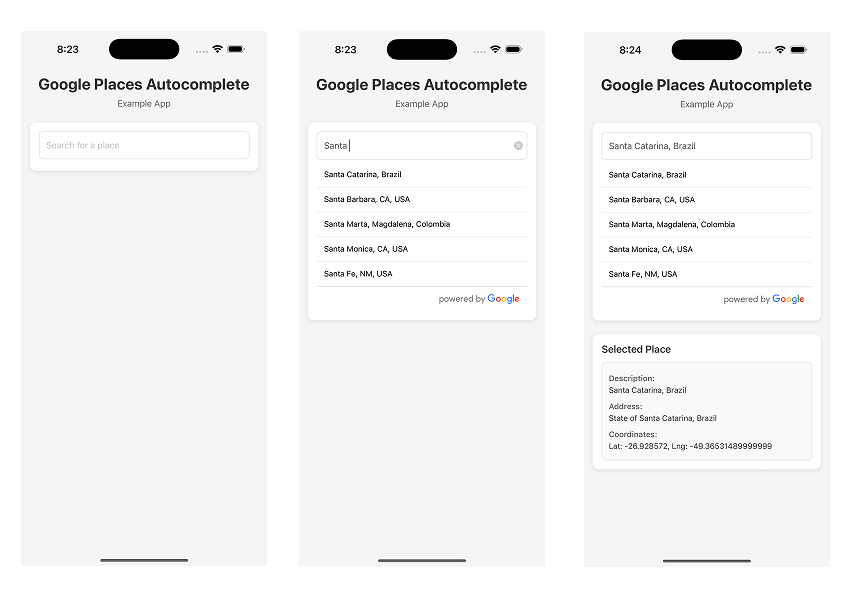
12 |
13 | ## Installation
14 |
15 | **Step 1.**
16 |
17 | ```
18 | npm install react-native-google-places-autocomplete --save
19 | ```
20 |
21 | or
22 |
23 | ```
24 | yarn add react-native-google-places-autocomplete
25 | ```
26 |
27 | **Step 2.**
28 |
29 | Get your [Google Places API keys](https://developers.google.com/maps/documentation/places/web-service/get-api-key/) and enable "Google Places API Web Service" (NOT Android or iOS) in the console. Billing must be enabled on the account.
30 |
31 | **Step 3.**
32 |
33 | Enable "Google Maps Geocoding API" if you want to use GoogleReverseGeocoding for Current Location
34 |
35 | ## Basic Example
36 |
37 | **Basic Address Search**
38 |
39 | ```js
40 | import React from 'react';
41 | import { GooglePlacesAutocomplete } from 'react-native-google-places-autocomplete';
42 |
43 | const GooglePlacesInput = () => {
44 | return (
45 | {
48 | // 'details' is provided when fetchDetails = true
49 | console.log(data, details);
50 | }}
51 | query={{
52 | key: 'YOUR API KEY',
53 | language: 'en',
54 | }}
55 | />
56 | );
57 | };
58 |
59 | export default GooglePlacesInput;
60 | ```
61 |
62 | You can also try the basic example in a snack [here](https://snack.expo.io/@sbell/react-native-google-places-autocomplete)
63 |
64 | ## More Examples
65 |
66 | **Get Current Location**
67 |
68 |
3 |
4 |
5 | # Google Maps Search Component for React Native
6 |
7 | **Customizable Google Places autocomplete component for iOS and Android React-Native apps**
8 |
9 | ## Preview
10 |
11 | 
12 |
13 | ## Installation
14 |
15 | **Step 1.**
16 |
17 | ```
18 | npm install react-native-google-places-autocomplete --save
19 | ```
20 |
21 | or
22 |
23 | ```
24 | yarn add react-native-google-places-autocomplete
25 | ```
26 |
27 | **Step 2.**
28 |
29 | Get your [Google Places API keys](https://developers.google.com/maps/documentation/places/web-service/get-api-key/) and enable "Google Places API Web Service" (NOT Android or iOS) in the console. Billing must be enabled on the account.
30 |
31 | **Step 3.**
32 |
33 | Enable "Google Maps Geocoding API" if you want to use GoogleReverseGeocoding for Current Location
34 |
35 | ## Basic Example
36 |
37 | **Basic Address Search**
38 |
39 | ```js
40 | import React from 'react';
41 | import { GooglePlacesAutocomplete } from 'react-native-google-places-autocomplete';
42 |
43 | const GooglePlacesInput = () => {
44 | return (
45 | {
48 | // 'details' is provided when fetchDetails = true
49 | console.log(data, details);
50 | }}
51 | query={{
52 | key: 'YOUR API KEY',
53 | language: 'en',
54 | }}
55 | />
56 | );
57 | };
58 |
59 | export default GooglePlacesInput;
60 | ```
61 |
62 | You can also try the basic example in a snack [here](https://snack.expo.io/@sbell/react-native-google-places-autocomplete)
63 |
64 | ## More Examples
65 |
66 | **Get Current Location**
67 |
68 |
69 | Click to expand
70 |
71 | _Extra step required!_
72 |
73 | If you are targeting React Native 0.60.0+ you must install either `@react-native-community/geolocation` ([link](https://github.com/react-native-community/react-native-geolocation)) or `react-native-geolocation-service`([link](https://github.com/Agontuk/react-native-geolocation-service)).
74 |
75 | Please make sure you follow the installation instructions there and add `navigator.geolocation = require(GEOLOCATION_PACKAGE)` somewhere in you application before ``.
76 |
77 | ```js
78 | import React from 'react';
79 | import { GooglePlacesAutocomplete } from 'react-native-google-places-autocomplete';
80 |
81 | // navigator.geolocation = require('@react-native-community/geolocation');
82 | // navigator.geolocation = require('react-native-geolocation-service');
83 |
84 | const GooglePlacesInput = () => {
85 | return (
86 | {
89 | // 'details' is provided when fetchDetails = true
90 | console.log(data, details);
91 | }}
92 | query={{
93 | key: 'YOUR API KEY',
94 | language: 'en',
95 | }}
96 | currentLocation={true}
97 | currentLocationLabel='Current location'
98 | />
99 | );
100 | };
101 |
102 | export default GooglePlacesInput;
103 | ```
104 |
105 |
106 |
107 | **Search with predefined option**
108 |
109 |
110 | Click to expand
111 |
112 | ```js
113 | import React from 'react';
114 | import { GooglePlacesAutocomplete } from 'react-native-google-places-autocomplete';
115 |
116 | const homePlace = {
117 | description: 'Home',
118 | geometry: { location: { lat: 48.8152937, lng: 2.4597668 } },
119 | };
120 | const workPlace = {
121 | description: 'Work',
122 | geometry: { location: { lat: 48.8496818, lng: 2.2940881 } },
123 | };
124 |
125 | const GooglePlacesInput = () => {
126 | return (
127 | {
130 | // 'details' is provided when fetchDetails = true
131 | console.log(data, details);
132 | }}
133 | query={{
134 | key: 'YOUR API KEY',
135 | language: 'en',
136 | }}
137 | predefinedPlaces={[homePlace, workPlace]}
138 | />
139 | );
140 | };
141 |
142 | export default GooglePlacesInput;
143 | ```
144 |
145 |
146 |
147 | **Limit results to one country**
148 |
149 |
150 | Click to expand
151 |
152 | ```js
153 | import React from 'react';
154 | import { GooglePlacesAutocomplete } from 'react-native-google-places-autocomplete';
155 |
156 | const GooglePlacesInput = () => {
157 | return (
158 | {
161 | // 'details' is provided when fetchDetails = true
162 | console.log(data, details);
163 | }}
164 | query={{
165 | key: 'YOUR API KEY',
166 | language: 'en',
167 | components: 'country:us',
168 | }}
169 | />
170 | );
171 | };
172 |
173 | export default GooglePlacesInput;
174 | ```
175 |
176 |
177 |
178 | **Use a custom Text Input Component**
179 |
180 |
181 | Click to expand
182 |
183 | This is an example using the Text Input from [`react-native-elements`](https://reactnativeelements.com/docs/components/input).
184 |
185 | ```js
186 | import React from 'react';
187 | import { Text, View, Image } from 'react-native';
188 | import { GooglePlacesAutocomplete } from 'react-native-google-places-autocomplete';
189 | import { Input } from 'react-native-elements';
190 |
191 | const GOOGLE_PLACES_API_KEY = 'YOUR_GOOGLE_API_KEY';
192 |
193 | const GooglePlacesInput = () => {
194 | return (
195 | console.log(data, details)}
201 | textInputProps={{
202 | InputComp: Input,
203 | leftIcon: { type: 'font-awesome', name: 'chevron-left' },
204 | errorStyle: { color: 'red' },
205 | }}
206 | />
207 | );
208 | };
209 |
210 | export default GooglePlacesInput;
211 | ```
212 |
213 |
214 |
215 | ## Props
216 |
217 | _This list is a work in progress. PRs welcome!_
218 |
219 | | Prop Name | type | description | default value | Options |
220 | | ----------------------------- | --------------- | ------------------------------------------------------------------------------------------------------------------------------------------------------------------------------------------------------------------------------------------- | ----------------------------------------------------------------- | ---------------------------------------------------------- |
221 | | autoFillOnNotFound | boolean | displays the result from autocomplete if the place details api return not found | false | true \| false |
222 | | currentLocation | boolean | Will add a 'Current location' button at the top of the predefined places list | false | true \| false |
223 | | currentLocationLabel | string | change the display label for the current location button | Current Location | Any string |
224 | | debounce | number | debounce the requests (in ms) | 0 | |
225 | | disableScroll | boolean | disable scroll on the results list | | |
226 | | enableHighAccuracyLocation | boolean | use GPS or not. If set to true, a GPS position will be requested. If set to false, a WIFI location will be requested. use GPS or not. If set to true, a GPS position will be requested. If set to false, a WIFI location will be requested. | true | |
227 | | enablePoweredByContainer | boolean | show "powered by Google" at the bottom of the search results list | true | |
228 | | fetchDetails | boolean | get more place details about the selected option from the Place Details API | false | |
229 | | filterReverseGeocodingByTypes | array | filter the reverse geocoding results by types - ['locality', 'administrative_area_level_3'] if you want to display only cities | | |
230 | | GooglePlacesDetailsQuery | object | "query" object for the Google Place Details API (when you press on a suggestion) | | |
231 | | GooglePlacesSearchQuery | object | "query" object for the Google Places Nearby API (when you use current location to find nearby places) | `{ rankby: 'distance', type: 'restaurant' }` | |
232 | | GoogleReverseGeocodingQuery | object | "query" object for the Google Geocode API (when you use current location to get the current address) | | |
233 | | isRowScrollable | boolean | enable/disable horizontal scrolling of a list result https://reactnative.dev/docs/scrollview#scrollenabled | true |
234 | | inbetweenCompo | React.ReactNode | Insert a ReactNode in between the search bar and the search results Flatlist |
235 | | keepResultsAfterBlur | boolean | show list of results after blur | false | true \| false |
236 | | keyboardShouldPersistTaps | string | Determines when the keyboard should stay visible after a tap https://reactnative.dev/docs/scrollview#keyboardshouldpersisttaps | 'always' | 'never' \| 'always' \| 'handled' |
237 | | listEmptyComponent | function | use FlatList's ListEmptyComponent prop when no autocomplete results are found. | | |
238 | | listLoaderComponent | function | show this component while results are loading. | | |
239 | | listHoverColor | string | underlay color of the list result when hovered (web only) | '#ececec' | |
240 | | listUnderlayColor | string | underlay color of the list result when pressed https://reactnative.dev/docs/touchablehighlight#underlaycolor | '#c8c7cc' | |
241 | | listViewDisplayed | string | override the default behavior of showing the list (results) view | 'auto' | 'auto' \| true \| false |
242 | | minLength | number | minimum length of text to trigger a search | 0 | |
243 | | nearbyPlacesAPI | string | which API to use for current location | 'GooglePlacesSearch' | 'none' \| 'GooglePlacesSearch' \| 'GoogleReverseGeocoding' |
244 | | numberOfLines | number | number of lines (android - multiline must be set to true) https://reactnative.dev/docs/textinput#numberoflines | 1 | |
245 | | onFail | function | returns if an unspecified error comes back from the API | | |
246 | | onNotFound | function | returns if the Google Places Details API returns a 'not found' code (when you press a suggestion). | | |
247 | | onPress | function | returns when after a suggestion is selected | | |
248 | | onTimeout | function | callback when a request timeout | `()=>console.warn('google places autocomplete: request timeout')` | |
249 | | placeholder | string | placeholder text https://reactnative.dev/docs/textinput#placeholder | 'Search' | |
250 | | predefinedPlaces | array | Allows you to show pre-defined places (e.g. home, work) | | |
251 | | predefinedPlacesAlwaysVisible | boolean | Shows predefined places at the top of the search results | false | |
252 | | preProcess | function | do something to the text of the search input before a search request is sent | | |
253 | | query | object | "query" object for the Google Places Autocomplete API (link) | `{ key: 'missing api key', language: 'en', types: 'geocode' }` | |
254 | | renderDescription | function | determines the data passed to each renderRow (search result) | | |
255 | | renderHeaderComponent | function | use the `ListHeaderComponent` from `FlatList` when showing autocomplete results | | |
256 | | renderLeftButton | function | add a component to the left side of the Text Input | | |
257 | | renderRightButton | function | add a component to the right side of the Text Input | | |
258 | | renderRow | function | custom component to render each result row (use this to show an icon beside each result). `data` and `index` will be passed as input parameters | | |
259 | | requestUrl | object | used to set the request url for the library | | |
260 | | returnKeyType | string | the return key text https://reactnative.dev/docs/textinput#returnkeytype | 'search' | |
261 | | styles | object | See styles section below | | |
262 | | suppressDefaultStyles | boolean | removes all default styling from the library | false | true \| false |
263 | | textInputHide | boolean | Hide the Search input | false | true \| false |
264 | | textInputProps | object | define props for the [textInput](https://reactnative.dev/docs/textinput), or provide a custom input component | | |
265 | | timeout | number | how many ms until the request will timeout | 20000 | |
266 |
267 | ## Methods
268 |
269 | | method name | type | description |
270 | | -------------------- | ------------------------- | ----------------------------------------------------------------------- |
271 | | `getAddressText` | `() => string` | return the value of TextInput |
272 | | `setAddressText` | `(value: string) => void` | set the value of TextInput |
273 | | `focus` | `void` | makes the TextInput focus |
274 | | `blur` | `void` | makes the TextInput lose focus |
275 | | `clear` | `void` | removes all text from the TextInput |
276 | | `isFocused` | `() => boolean` | returns `true` if the TextInput is currently focused; `false` otherwise |
277 | | `getCurrentLocation` | `() => void` | makes a query to find nearby places based on current location |
278 |
279 | You can access these methods using a ref.
280 |
281 | ### Example
282 |
283 | ```js
284 | import React, { useEffect, useRef } from 'react';
285 | import { GooglePlacesAutocomplete } from 'react-native-google-places-autocomplete';
286 |
287 | const GooglePlacesInput = () => {
288 | const ref = useRef();
289 |
290 | useEffect(() => {
291 | ref.current?.setAddressText('Some Text');
292 | }, []);
293 |
294 | return (
295 | {
299 | // 'details' is provided when fetchDetails = true
300 | console.log(data, details);
301 | }}
302 | query={{
303 | key: 'YOUR API KEY',
304 | language: 'en',
305 | }}
306 | />
307 | );
308 | };
309 |
310 | export default GooglePlacesInput;
311 | ```
312 |
313 | ## Styling
314 |
315 | `GooglePlacesAutocomplete` can be easily customized to meet styles of your app. Pass styles props to `GooglePlacesAutocomplete` with style object for different elements (keys for style object are listed below)
316 |
317 | | key | type |
318 | | --------------------------- | ----------------------- |
319 | | container | object (View) |
320 | | textInputContainer | object (View style) |
321 | | textInput | object (style) |
322 | | listView | object (ListView style) |
323 | | row | object (View style) |
324 | | loader | object (View style) |
325 | | description | object (Text style) |
326 | | predefinedPlacesDescription | object (Text style) |
327 | | separator | object (View style) |
328 | | poweredContainer | object (View style) |
329 | | powered | object (Image style) |
330 |
331 | #### Example
332 |
333 | ```js
334 |
354 | ```
355 |
356 | ### Default Styles
357 |
358 | ```js
359 | {
360 | container: {
361 | flex: 1,
362 | },
363 | textInputContainer: {
364 | flexDirection: 'row',
365 | },
366 | textInput: {
367 | backgroundColor: '#FFFFFF',
368 | height: 44,
369 | borderRadius: 5,
370 | paddingVertical: 5,
371 | paddingHorizontal: 10,
372 | fontSize: 15,
373 | flex: 1,
374 | },
375 | poweredContainer: {
376 | justifyContent: 'flex-end',
377 | alignItems: 'center',
378 | borderBottomRightRadius: 5,
379 | borderBottomLeftRadius: 5,
380 | borderColor: '#c8c7cc',
381 | borderTopWidth: 0.5,
382 | },
383 | powered: {},
384 | listView: {},
385 | row: {
386 | backgroundColor: '#FFFFFF',
387 | padding: 13,
388 | height: 44,
389 | flexDirection: 'row',
390 | },
391 | separator: {
392 | height: 0.5,
393 | backgroundColor: '#c8c7cc',
394 | },
395 | description: {},
396 | loader: {
397 | flexDirection: 'row',
398 | justifyContent: 'flex-end',
399 | height: 20,
400 | },
401 | }
402 | ```
403 |
404 | ## Web Support
405 |
406 | Web support can be enabled via the `requestUrl` prop, by passing in a URL that you can use to proxy your requests. CORS implemented by the Google Places API prevent using this library directly on the web. You will need to use a proxy server. Please be mindful of this limitation when opening an issue.
407 |
408 | The `requestUrl` prop takes an object with two required properties: `useOnPlatform` and `url`, and an optional `headers` property.
409 |
410 | The `url` property is used to set the url that requests will be made to. If you are using the regular google maps API, you need to make sure you are ultimately hitting https://maps.googleapis.com/maps/api.
411 |
412 | `useOnPlatform` configures when the proxy url is used. It can be set to either `web`- will be used only when the device platform is detected as web (but not iOS or Android, or `all` - will always be used.
413 |
414 | You can optionally specify headers to apply to your request in the `headers` object.
415 |
416 | ### Example:
417 |
418 | ```js
419 | import React from 'react';
420 | import { GooglePlacesAutocomplete } from 'react-native-google-places-autocomplete';
421 |
422 | const GooglePlacesInput = () => {
423 | return (
424 | {
427 | // 'details' is provided when fetchDetails = true
428 | console.log(data, details);
429 | }}
430 | query={{
431 | key: 'YOUR API KEY',
432 | language: 'en',
433 | }}
434 | requestUrl={{
435 | useOnPlatform: 'web', // or "all"
436 | url:
437 | 'https://cors-anywhere.herokuapp.com/https://maps.googleapis.com/maps/api', // or any proxy server that hits https://maps.googleapis.com/maps/api
438 | headers: {
439 | Authorization: `an auth token`, // if required for your proxy
440 | },
441 | }}
442 | />
443 | );
444 | };
445 |
446 | export default GooglePlacesInput;
447 | ```
448 |
449 | **_Note:_** The library expects the same response that the Google Maps API would return.
450 |
451 | ## Features
452 |
453 | - [x] Places autocompletion
454 | - [x] iOS and Android compatibility
455 | - [x] Places details fetching + ActivityIndicatorIOS/ProgressBarAndroid loaders
456 | - [x] Customizable using the `styles` parameter
457 | - [x] XHR cancellations when typing fast
458 | - [x] Google Places terms compliant
459 | - [x] Predefined places
460 | - [x] typescript types
461 | - [x] Current location
462 |
463 | ## Compatibility
464 |
465 | This library does not use the iOS, Android or JS SDKs from Google. This comes with some Pros and Cons.
466 |
467 | **Pros:**
468 |
469 | - smaller app size
470 | - better privacy for your users (although Google still tracks server calls)
471 | - no need to keep up with sdk updates
472 |
473 | **Cons:**
474 |
475 | - the library is not compatible with a Application key restrictions
476 | - doesn't work directly on the web without a proxy server
477 | - any Google API change can be a breaking change for the library.
478 |
479 | ### Use Inside a `` or ``
480 |
481 | If you need to include this component inside a ScrolView or FlatList, remember to apply the `keyboardShouldPersistTaps` attribute to all ancestors ScrollView or FlatList (see [this](https://github.com/FaridSafi/react-native-google-places-autocomplete/issues/486#issuecomment-665602257) issue comment).
482 |
483 | ## A word about the Google Maps APIs
484 |
485 | Google Provides a bunch of web APIs for finding an address or place, and getting it’s details.
486 | There are the Google Places Web APIs ([Place Search](https://developers.google.com/places/web-service/search), [Place Details](https://developers.google.com/places/web-service/details), [Place Photos](https://developers.google.com/places/web-service/photos), [Place Autocomplete](https://developers.google.com/places/web-service/autocomplete), [Query Autocomplete](https://developers.google.com/places/web-service/query)) and the [Google Geocode API](https://developers.google.com/maps/documentation/geocoding/intro) .
487 |
488 | The 5 Google Places Web APIs are:
489 |
490 | - **Place Autocomplete -** automatically fills in the name and/or address of a place as users type.
491 | - **Place Details -** returns more detailed information about a specific place (using a place_id that you get from Place Search, Place Autocomplete, or Query Autocomplete).
492 | - **Place Photos -** provides access to the millions of place-related photos stored in Google's Place database (using a reference_id that you get from Place Search, Place Autocomplete, or Query Autocomplete).
493 | - **Place Search -** returns a list of places based on a user's location or search string.
494 | - **Query Autocomplete -** provides a query prediction service for text-based geographic searches, returning suggested queries as users type.
495 |
496 | The **Geocoding API** allows you to convert an address into geographic coordinates (lat, long) and to "reverse geocode", which is the process of converting geographic coordinates into a human-readable address.
497 |
498 | ### Which APIs does this library use?
499 |
500 | Place Autocomplete API, Place Details API, Place Search API and the Geocoding API.
501 |
502 | We use the **Place Autocomplete API** to get suggestions as you type. When you click on a suggestion, we use the **Place Details API** to get more information about the place.
503 |
504 | We use the **Geocoding API** and the **Place Search API** to use your current location to get results.
505 |
506 | Because the query parameters are different for each API, there are 4 different "query" props.
507 |
508 | 1. Autocomplete -> `query` ([options](https://developers.google.com/places/web-service/autocomplete#place_autocomplete_requests))
509 | 2. Place Details -> `GooglePlacesDetailsQuery` ([options](https://developers.google.com/places/web-service/details#PlaceDetailsRequests))
510 | 3. Nearby Search -> `GooglePlacesSearchQuery` ([options](https://developers.google.com/places/web-service/search#PlaceSearchRequests))
511 | 4. Geocode -> `GoogleReverseGeocodingQuery` ([options](https://developers.google.com/maps/documentation/geocoding/intro#GeocodingRequests))
512 |
513 | Number 1 is used while getting autocomplete results.
514 | Number 2 is used when you click on a result.
515 | Number 3 is used when you select 'Current Location' to load nearby results.
516 | Number 4 is used when `nearbyPlacesAPI='GoogleReverseGeocoding'` is set and you select 'Current Location' to load nearby results.
517 |
518 | ## Changelog
519 |
520 | Please see the [releases](https://github.com/FaridSafi/react-native-google-places-autocomplete/releases) tab for the changelog information.
521 |
522 | ## License
523 |
524 | [MIT](LICENSE)
525 |
526 | ### Authors
527 |
528 | - [Farid Safi](https://www.twitter.com/FaridSafi)
529 | - [Maxim Yaskevich](https://www.twitter.com/mayaskme)
530 | - [Guilherme Pontes](https://www.twitter.com/guiiipontes)
531 |
--------------------------------------------------------------------------------
/GooglePlacesAutocomplete.js:
--------------------------------------------------------------------------------
1 | /* eslint-disable react-native/no-inline-styles */
2 | import debounce from 'lodash.debounce';
3 | import Qs from 'qs';
4 | import uuid from 'react-native-uuid';
5 | import React, {
6 | forwardRef,
7 | useMemo,
8 | useEffect,
9 | useImperativeHandle,
10 | useRef,
11 | useState,
12 | useCallback,
13 | } from 'react';
14 | import {
15 | ActivityIndicator,
16 | FlatList,
17 | Image,
18 | Keyboard,
19 | Platform,
20 | Pressable,
21 | ScrollView,
22 | StyleSheet,
23 | Text,
24 | TextInput,
25 | View,
26 | } from 'react-native';
27 |
28 | // ============================================================================
29 | // CONSTANTS
30 | // ============================================================================
31 |
32 | const defaultStyles = {
33 | container: {
34 | flex: 1,
35 | },
36 | textInputContainer: {
37 | flexDirection: 'row',
38 | },
39 | textInput: {
40 | backgroundColor: '#FFFFFF',
41 | height: 44,
42 | borderRadius: 5,
43 | paddingVertical: 5,
44 | paddingHorizontal: 10,
45 | fontSize: 15,
46 | flex: 1,
47 | marginBottom: 5,
48 | },
49 | listView: {
50 | backgroundColor: '#FFFFFF',
51 | },
52 | row: {
53 | backgroundColor: '#FFFFFF',
54 | padding: 13,
55 | minHeight: 44,
56 | flexDirection: 'row',
57 | },
58 | loader: {
59 | flexDirection: 'row',
60 | justifyContent: 'flex-end',
61 | height: 20,
62 | },
63 | description: {},
64 | separator: {
65 | height: StyleSheet.hairlineWidth,
66 | backgroundColor: '#c8c7cc',
67 | },
68 | poweredContainer: {
69 | justifyContent: 'flex-end',
70 | alignItems: 'center',
71 | borderBottomRightRadius: 5,
72 | borderBottomLeftRadius: 5,
73 | borderColor: '#c8c7cc',
74 | borderTopWidth: 0.5,
75 | },
76 | powered: {},
77 | };
78 |
79 | // ============================================================================
80 | // COMPONENT
81 | // ============================================================================
82 |
83 | export const GooglePlacesAutocomplete = forwardRef((props, ref) => {
84 | // ==========================================================================
85 | // PROPS DESTRUCTURING
86 | // ==========================================================================
87 | const {
88 | autoFillOnNotFound = false,
89 | currentLocation = false,
90 | currentLocationLabel = 'Current location',
91 | debounce: debounceMs = 0,
92 | disableScroll = false,
93 | enableHighAccuracyLocation = true,
94 | enablePoweredByContainer = true,
95 | fetchDetails = false,
96 | filterReverseGeocodingByTypes = [],
97 | GooglePlacesDetailsQuery = {},
98 | GooglePlacesSearchQuery = {
99 | rankby: 'distance',
100 | type: 'restaurant',
101 | },
102 | GoogleReverseGeocodingQuery = {},
103 | isRowScrollable = true,
104 | keyboardShouldPersistTaps = 'always',
105 | listHoverColor = '#ececec',
106 | listUnderlayColor = '#c8c7cc',
107 | listViewDisplayed: listViewDisplayedProp = 'auto',
108 | keepResultsAfterBlur = false,
109 | minLength = 0,
110 | nearbyPlacesAPI = 'GooglePlacesSearch',
111 | numberOfLines = 1,
112 | onFail = () => {},
113 | onNotFound = () => {},
114 | onPress = () => {},
115 | onTimeout = () =>
116 | console.warn('google places autocomplete: request timeout'),
117 | placeholder = '',
118 | predefinedPlaces: predefinedPlacesProp = [],
119 | predefinedPlacesAlwaysVisible = false,
120 | query = {
121 | key: 'missing api key',
122 | language: 'en',
123 | types: 'geocode',
124 | },
125 | styles = {},
126 | suppressDefaultStyles = false,
127 | textInputHide = false,
128 | textInputProps = {},
129 | timeout = 20000,
130 | isNewPlacesAPI = false,
131 | fields = '*',
132 | ...restProps
133 | } = props;
134 |
135 | // ==========================================================================
136 | // STATE & REFS
137 | // ==========================================================================
138 | const predefinedPlaces = useMemo(() => predefinedPlacesProp || [], [
139 | predefinedPlacesProp,
140 | ]);
141 |
142 | // Store results array - useRef prevents re-renders when updating results, allows access to latest results in callbacks
143 | const resultsRef = useRef([]);
144 |
145 | // Store active XMLHttpRequest objects - needed to abort requests when component unmounts or new search starts
146 | const requestsRef = useRef([]);
147 |
148 | // Track if navigator warning has been shown - prevents duplicate console warnings
149 | const hasWarnedAboutNavigator = useRef(false);
150 |
151 | // Reference to TextInput component - enables imperative methods (focus, blur, clear) via ref
152 | const inputRef = useRef(null);
153 |
154 | // Store current query object - allows access to latest query in callbacks without stale closures
155 | const queryRef = useRef(query);
156 |
157 | // Store previous query string - used to detect query changes without causing re-renders
158 | const prevQueryStringRef = useRef(JSON.stringify(query));
159 |
160 | // Store latest _request function - ensures debounced function always calls current version with latest closures
161 | const requestRef = useRef(_request);
162 | const queryString = useMemo(() => JSON.stringify(query), [query]);
163 |
164 | const [stateText, setStateText] = useState('');
165 | const [dataSource, setDataSource] = useState([]);
166 | const [listViewDisplayed, setListViewDisplayed] = useState(
167 | listViewDisplayedProp === 'auto' ? false : listViewDisplayedProp,
168 | );
169 | const [url, setUrl] = useState('');
170 | const [listLoaderDisplayed, setListLoaderDisplayed] = useState(false);
171 | const [sessionToken, setSessionToken] = useState(uuid.v4());
172 |
173 | // ==========================================================================
174 | // UTILITY FUNCTIONS
175 | // ==========================================================================
176 |
177 | const hasNavigator = useCallback(() => {
178 | if (navigator?.geolocation) {
179 | return true;
180 | }
181 | if (!hasWarnedAboutNavigator.current) {
182 | if (Platform.OS === 'web') {
183 | console.warn(
184 | 'Geolocation is not available. For web, ensure your site is served over HTTPS or localhost to use geolocation features.',
185 | );
186 | } else {
187 | console.warn(
188 | 'Geolocation is not available. For React Native, you may need to install and configure @react-native-community/geolocation or expo-location to enable currentLocation.',
189 | );
190 | }
191 | hasWarnedAboutNavigator.current = true;
192 | }
193 | return false;
194 | }, []);
195 |
196 | const supportedPlatform = () => {
197 | if (Platform.OS === 'web' && !props.requestUrl) {
198 | console.warn(
199 | 'This library cannot be used for the web unless you specify the requestUrl prop. See https://git.io/JflFv for more for details.',
200 | );
201 | return false;
202 | }
203 | return true;
204 | };
205 |
206 | const getRequestUrl = (requestUrl) => {
207 | if (requestUrl) {
208 | if (requestUrl.useOnPlatform === 'all') {
209 | return requestUrl.url;
210 | }
211 | if (requestUrl.useOnPlatform === 'web') {
212 | return Platform.select({
213 | web: requestUrl.url,
214 | default: 'https://maps.googleapis.com/maps/api',
215 | });
216 | }
217 | }
218 | return 'https://maps.googleapis.com/maps/api';
219 | };
220 |
221 | const getRequestHeaders = (requestUrl) => {
222 | return requestUrl?.headers || {};
223 | };
224 |
225 | const setRequestHeaders = (request, headers) => {
226 | Object.keys(headers).forEach((headerKey) =>
227 | request.setRequestHeader(headerKey, headers[headerKey]),
228 | );
229 | };
230 |
231 | const requestShouldUseWithCredentials = useCallback(() => {
232 | return url === 'https://maps.googleapis.com/maps/api';
233 | }, [url]);
234 |
235 | const _abortRequests = useCallback(() => {
236 | requestsRef.current.forEach((request) => {
237 | request.onreadystatechange = null;
238 | request.abort();
239 | });
240 | requestsRef.current = [];
241 | }, []);
242 |
243 | // ==========================================================================
244 | // DATA PROCESSING FUNCTIONS
245 | // ==========================================================================
246 |
247 | const buildRowsFromResults = useCallback(
248 | (results, text) => {
249 | let res = [];
250 | // Show predefined places if:
251 | // 1. No text entered and no results, OR
252 | // 2. predefinedPlacesAlwaysVisible is true
253 | const shouldDisplayPredefinedPlaces =
254 | (!text || text.length === 0) && results.length === 0;
255 | if (
256 | shouldDisplayPredefinedPlaces ||
257 | predefinedPlacesAlwaysVisible === true
258 | ) {
259 | if (predefinedPlaces.length > 0) {
260 | res = [
261 | ...predefinedPlaces.filter((place) => place?.description?.length),
262 | ];
263 | }
264 |
265 | if (currentLocation === true && hasNavigator()) {
266 | res.unshift({
267 | description: currentLocationLabel,
268 | isCurrentLocation: true,
269 | });
270 | }
271 | }
272 |
273 | res = res.map((place) => ({
274 | ...place,
275 | isPredefinedPlace: true,
276 | }));
277 |
278 | return [...res, ...results];
279 | },
280 | [
281 | predefinedPlacesAlwaysVisible,
282 | predefinedPlaces,
283 | currentLocation,
284 | currentLocationLabel,
285 | hasNavigator,
286 | ],
287 | );
288 |
289 | const _filterResultsByTypes = useCallback((unfilteredResults, types) => {
290 | if (!types || types.length === 0) return unfilteredResults;
291 |
292 | const results = [];
293 | for (let i = 0; i < unfilteredResults.length; i++) {
294 | let found = false;
295 |
296 | for (let j = 0; j < types.length; j++) {
297 | if (unfilteredResults[i].types?.indexOf(types[j]) !== -1) {
298 | found = true;
299 | break;
300 | }
301 | }
302 |
303 | if (found === true) {
304 | results.push(unfilteredResults[i]);
305 | }
306 | }
307 | return results;
308 | }, []);
309 |
310 | const _filterResultsByPlacePredictions = (unfilteredResults) => {
311 | const results = [];
312 | for (let i = 0; i < unfilteredResults.length; i++) {
313 | if (unfilteredResults[i].placePrediction) {
314 | results.push({
315 | description: unfilteredResults[i].placePrediction.text?.text,
316 | place_id: unfilteredResults[i].placePrediction.placeId,
317 | reference: unfilteredResults[i].placePrediction.placeId,
318 | structured_formatting: {
319 | main_text:
320 | unfilteredResults[i].placePrediction.structuredFormat?.mainText
321 | ?.text,
322 | secondary_text:
323 | unfilteredResults[i].placePrediction.structuredFormat
324 | ?.secondaryText?.text,
325 | },
326 | types: unfilteredResults[i].placePrediction.types ?? [],
327 | });
328 | }
329 | }
330 | return results;
331 | };
332 |
333 | const _getPredefinedPlace = (rowData) => {
334 | if (rowData.isPredefinedPlace !== true) {
335 | return rowData;
336 | }
337 |
338 | if (predefinedPlaces.length > 0) {
339 | for (let i = 0; i < predefinedPlaces.length; i++) {
340 | if (predefinedPlaces[i].description === rowData.description) {
341 | return predefinedPlaces[i];
342 | }
343 | }
344 | }
345 |
346 | return rowData;
347 | };
348 |
349 | // ==========================================================================
350 | // API REQUEST FUNCTIONS
351 | // ==========================================================================
352 |
353 | const _requestNearby = useCallback(
354 | (latitude, longitude) => {
355 | _abortRequests();
356 |
357 | if (
358 | latitude !== undefined &&
359 | longitude !== undefined &&
360 | latitude !== null &&
361 | longitude !== null
362 | ) {
363 | const request = new XMLHttpRequest();
364 | requestsRef.current.push(request);
365 | request.timeout = timeout;
366 | request.ontimeout = onTimeout;
367 | request.onreadystatechange = () => {
368 | if (request.readyState !== 4) {
369 | setListLoaderDisplayed(true);
370 | return;
371 | }
372 |
373 | setListLoaderDisplayed(false);
374 | if (request.status === 200) {
375 | const responseJSON = JSON.parse(request.responseText);
376 |
377 | _disableRowLoaders();
378 |
379 | if (typeof responseJSON.results !== 'undefined') {
380 | let results = [];
381 | if (nearbyPlacesAPI === 'GoogleReverseGeocoding') {
382 | results = _filterResultsByTypes(
383 | responseJSON.results,
384 | filterReverseGeocodingByTypes,
385 | );
386 | } else {
387 | results = responseJSON.results;
388 | }
389 |
390 | resultsRef.current = results;
391 | const newDataSource = buildRowsFromResults(results);
392 | setDataSource(newDataSource);
393 | // Auto-show list when results arrive if in 'auto' mode
394 | if (
395 | listViewDisplayedProp === 'auto' &&
396 | newDataSource.length > 0
397 | ) {
398 | setListViewDisplayed(true);
399 | }
400 | }
401 | if (typeof responseJSON.error_message !== 'undefined') {
402 | if (!onFail) {
403 | console.warn(
404 | 'google places autocomplete: ' + responseJSON.error_message,
405 | );
406 | } else {
407 | onFail(responseJSON.error_message);
408 | }
409 | }
410 | }
411 | };
412 |
413 | let requestUrl = '';
414 | if (nearbyPlacesAPI === 'GoogleReverseGeocoding') {
415 | // your key must be allowed to use Google Maps Geocoding API
416 | requestUrl =
417 | `${url}/geocode/json?` +
418 | Qs.stringify({
419 | latlng: latitude + ',' + longitude,
420 | key: query.key,
421 | ...GoogleReverseGeocodingQuery,
422 | });
423 | } else {
424 | requestUrl =
425 | `${url}/place/nearbysearch/json?` +
426 | Qs.stringify({
427 | location: latitude + ',' + longitude,
428 | key: query.key,
429 | ...GooglePlacesSearchQuery,
430 | });
431 | }
432 |
433 | request.open('GET', requestUrl);
434 |
435 | request.withCredentials = requestShouldUseWithCredentials();
436 | setRequestHeaders(request, getRequestHeaders(props.requestUrl));
437 |
438 | request.send();
439 | } else {
440 | resultsRef.current = [];
441 | setDataSource(buildRowsFromResults([]));
442 | }
443 | },
444 | [
445 | _abortRequests,
446 | timeout,
447 | onTimeout,
448 | _disableRowLoaders,
449 | nearbyPlacesAPI,
450 | _filterResultsByTypes,
451 | filterReverseGeocodingByTypes,
452 | buildRowsFromResults,
453 | listViewDisplayedProp,
454 | onFail,
455 | url,
456 | query,
457 | GoogleReverseGeocodingQuery,
458 | GooglePlacesSearchQuery,
459 | requestShouldUseWithCredentials,
460 | props.requestUrl,
461 | ],
462 | );
463 |
464 | const _request = (text) => {
465 | _abortRequests();
466 |
467 | if (!url) {
468 | return;
469 | }
470 |
471 | if (supportedPlatform() && text && text.length >= minLength) {
472 | const request = new XMLHttpRequest();
473 | requestsRef.current.push(request);
474 |
475 | request.timeout = timeout;
476 | request.ontimeout = onTimeout;
477 | request.onreadystatechange = () => {
478 | if (request.readyState !== 4) {
479 | setListLoaderDisplayed(true);
480 | return;
481 | }
482 |
483 | setListLoaderDisplayed(false);
484 |
485 | if (request.status === 200) {
486 | const responseJSON = JSON.parse(request.responseText);
487 |
488 | if (typeof responseJSON.predictions !== 'undefined') {
489 | const results =
490 | nearbyPlacesAPI === 'GoogleReverseGeocoding'
491 | ? _filterResultsByTypes(
492 | responseJSON.predictions,
493 | filterReverseGeocodingByTypes,
494 | )
495 | : responseJSON.predictions;
496 |
497 | resultsRef.current = results;
498 | const newDataSource = buildRowsFromResults(results, text);
499 | setDataSource(newDataSource);
500 | // Auto-show list when results arrive if in 'auto' mode
501 | if (listViewDisplayedProp === 'auto' && newDataSource.length > 0) {
502 | setListViewDisplayed(true);
503 | }
504 | }
505 | if (typeof responseJSON.suggestions !== 'undefined') {
506 | const results = _filterResultsByPlacePredictions(
507 | responseJSON.suggestions,
508 | );
509 |
510 | resultsRef.current = results;
511 | const newDataSource = buildRowsFromResults(results, text);
512 | setDataSource(newDataSource);
513 | // Auto-show list when results arrive if in 'auto' mode
514 | if (listViewDisplayedProp === 'auto' && newDataSource.length > 0) {
515 | setListViewDisplayed(true);
516 | }
517 | }
518 | if (typeof responseJSON.error_message !== 'undefined') {
519 | if (!onFail) {
520 | console.warn(
521 | 'google places autocomplete: ' + responseJSON.error_message,
522 | );
523 | } else {
524 | onFail(responseJSON.error_message);
525 | }
526 | }
527 | } else {
528 | console.warn(
529 | 'google places autocomplete: request could not be completed or has been aborted',
530 | );
531 | }
532 | };
533 |
534 | if (props.preProcess) {
535 | setStateText(props.preProcess(text));
536 | }
537 |
538 | if (isNewPlacesAPI) {
539 | const keyQueryParam = query.key
540 | ? '?' +
541 | Qs.stringify({
542 | key: query.key,
543 | })
544 | : '';
545 | request.open('POST', `${url}/v1/places:autocomplete${keyQueryParam}`);
546 | } else {
547 | request.open(
548 | 'GET',
549 | `${url}/place/autocomplete/json?input=` +
550 | encodeURIComponent(text) +
551 | '&' +
552 | Qs.stringify(query),
553 | );
554 | }
555 |
556 | request.withCredentials = requestShouldUseWithCredentials();
557 | setRequestHeaders(request, getRequestHeaders(props.requestUrl));
558 |
559 | if (isNewPlacesAPI) {
560 | const { key, locationbias, types, ...rest } = query;
561 | request.send(
562 | JSON.stringify({
563 | input: text,
564 | sessionToken,
565 | ...rest,
566 | }),
567 | );
568 | } else {
569 | request.send();
570 | }
571 | } else {
572 | resultsRef.current = [];
573 | setDataSource(buildRowsFromResults([]));
574 | }
575 | };
576 |
577 | const getCurrentLocation = useCallback(() => {
578 | let options = {
579 | enableHighAccuracy: false,
580 | timeout: 20000,
581 | maximumAge: 1000,
582 | };
583 |
584 | if (enableHighAccuracyLocation && Platform.OS === 'android') {
585 | options = {
586 | enableHighAccuracy: true,
587 | timeout: 20000,
588 | };
589 | }
590 | const getCurrentPosition =
591 | navigator.geolocation.getCurrentPosition ||
592 | navigator.geolocation.default?.getCurrentPosition;
593 |
594 | if (getCurrentPosition) {
595 | getCurrentPosition(
596 | (position) => {
597 | if (nearbyPlacesAPI === 'None') {
598 | const currentLocationData = {
599 | description: currentLocationLabel,
600 | geometry: {
601 | location: {
602 | lat: position.coords.latitude,
603 | lng: position.coords.longitude,
604 | },
605 | },
606 | };
607 |
608 | _disableRowLoaders();
609 | onPress(currentLocationData, currentLocationData);
610 | } else {
611 | _requestNearby(position.coords.latitude, position.coords.longitude);
612 | }
613 | },
614 | (error) => {
615 | _disableRowLoaders();
616 | console.error(error.message);
617 | },
618 | options,
619 | );
620 | }
621 | }, [
622 | enableHighAccuracyLocation,
623 | currentLocationLabel,
624 | nearbyPlacesAPI,
625 | _disableRowLoaders,
626 | onPress,
627 | _requestNearby,
628 | ]);
629 |
630 | // ==========================================================================
631 | // EVENT HANDLERS
632 | // ==========================================================================
633 |
634 | const _enableRowLoader = (rowData) => {
635 | const rows = buildRowsFromResults(resultsRef.current);
636 | for (let i = 0; i < rows.length; i++) {
637 | if (
638 | rows[i].place_id === rowData.place_id ||
639 | (rows[i].isCurrentLocation === true &&
640 | rowData.isCurrentLocation === true)
641 | ) {
642 | rows[i].isLoading = true;
643 | setDataSource(rows);
644 | break;
645 | }
646 | }
647 | };
648 |
649 | const _disableRowLoaders = useCallback(() => {
650 | for (let i = 0; i < resultsRef.current.length; i++) {
651 | if (resultsRef.current[i].isLoading === true) {
652 | resultsRef.current[i].isLoading = false;
653 | }
654 | }
655 |
656 | setDataSource(buildRowsFromResults(resultsRef.current));
657 | }, [buildRowsFromResults]);
658 |
659 | const _onPress = (rowData) => {
660 | if (rowData.isPredefinedPlace !== true && fetchDetails === true) {
661 | if (rowData.isLoading === true) {
662 | // already requesting
663 | return;
664 | }
665 |
666 | Keyboard.dismiss();
667 |
668 | _abortRequests();
669 |
670 | // display loader
671 | _enableRowLoader(rowData);
672 |
673 | // fetch details
674 | const request = new XMLHttpRequest();
675 | requestsRef.current.push(request);
676 | request.timeout = timeout;
677 | request.ontimeout = onTimeout;
678 | request.onreadystatechange = () => {
679 | if (request.readyState !== 4) return;
680 |
681 | if (request.status === 200) {
682 | const responseJSON = JSON.parse(request.responseText);
683 | if (
684 | responseJSON.status === 'OK' ||
685 | (isNewPlacesAPI && responseJSON.id)
686 | ) {
687 | const details = isNewPlacesAPI ? responseJSON : responseJSON.result;
688 | _disableRowLoaders();
689 | _onBlur();
690 |
691 | setStateText(_renderDescription(rowData));
692 |
693 | delete rowData.isLoading;
694 | onPress(rowData, details);
695 | } else {
696 | _disableRowLoaders();
697 |
698 | if (autoFillOnNotFound) {
699 | setStateText(_renderDescription(rowData));
700 | delete rowData.isLoading;
701 | }
702 |
703 | if (!onNotFound) {
704 | console.warn(
705 | 'google places autocomplete: ' + responseJSON.status,
706 | );
707 | } else {
708 | onNotFound(responseJSON);
709 | }
710 | }
711 | } else {
712 | _disableRowLoaders();
713 |
714 | if (!onFail) {
715 | console.warn(
716 | 'google places autocomplete: request could not be completed or has been aborted',
717 | );
718 | } else {
719 | onFail('request could not be completed or has been aborted');
720 | }
721 | }
722 | };
723 |
724 | if (isNewPlacesAPI) {
725 | request.open(
726 | 'GET',
727 | `${url}/v1/places/${rowData.place_id}?` +
728 | Qs.stringify({
729 | key: query.key,
730 | sessionToken,
731 | fields,
732 | }),
733 | );
734 | setSessionToken(uuid.v4());
735 | } else {
736 | request.open(
737 | 'GET',
738 | `${url}/place/details/json?` +
739 | Qs.stringify({
740 | key: query.key,
741 | placeid: rowData.place_id,
742 | language: query.language,
743 | ...GooglePlacesDetailsQuery,
744 | }),
745 | );
746 | }
747 |
748 | request.withCredentials = requestShouldUseWithCredentials();
749 | setRequestHeaders(request, getRequestHeaders(props.requestUrl));
750 |
751 | request.send();
752 | } else if (rowData.isCurrentLocation === true) {
753 | // display loader
754 | _enableRowLoader(rowData);
755 |
756 | setStateText(_renderDescription(rowData));
757 |
758 | delete rowData.isLoading;
759 | getCurrentLocation();
760 | } else {
761 | setStateText(_renderDescription(rowData));
762 |
763 | _onBlur();
764 | delete rowData.isLoading;
765 | const predefinedPlace = _getPredefinedPlace(rowData);
766 |
767 | // sending predefinedPlace as details for predefined places
768 | onPress(predefinedPlace, predefinedPlace);
769 | }
770 | };
771 |
772 | const _onChangeText = (text) => {
773 | setStateText(text);
774 | debounceData(text);
775 | };
776 |
777 | const _handleChangeText = (text) => {
778 | _onChangeText(text);
779 |
780 | const onChangeText = textInputProps?.onChangeText;
781 |
782 | if (onChangeText) {
783 | onChangeText(text);
784 | }
785 | };
786 |
787 | const isNewFocusInAutocompleteResultList = ({
788 | relatedTarget,
789 | currentTarget,
790 | }) => {
791 | if (!relatedTarget) return false;
792 |
793 | let node = relatedTarget.parentNode;
794 |
795 | while (node) {
796 | if (node.id === 'result-list-id') return true;
797 | node = node.parentNode;
798 | }
799 |
800 | return false;
801 | };
802 |
803 | const _onBlur = (e) => {
804 | if (e && isNewFocusInAutocompleteResultList(e)) return;
805 |
806 | if (!keepResultsAfterBlur) {
807 | setListViewDisplayed(false);
808 | }
809 | inputRef?.current?.blur();
810 | };
811 |
812 | const _onFocus = () => {
813 | setListViewDisplayed(true);
814 | };
815 |
816 | // ==========================================================================
817 | // RENDER FUNCTIONS
818 | // ==========================================================================
819 |
820 | const _renderDescription = (rowData) => {
821 | if (props.renderDescription) {
822 | return props.renderDescription(rowData);
823 | }
824 |
825 | return rowData.description || rowData.formatted_address || rowData.name;
826 | };
827 |
828 | const _getRowLoader = () => {
829 | return ;
830 | };
831 |
832 | const _renderLoader = (rowData) => {
833 | if (rowData.isLoading === true) {
834 | return (
835 |
841 | {_getRowLoader()}
842 |
843 | );
844 | }
845 |
846 | return null;
847 | };
848 |
849 | const _renderRowData = (rowData, index) => {
850 | if (props.renderRow) {
851 | return props.renderRow(rowData, index);
852 | }
853 |
854 | return (
855 |
863 | {_renderDescription(rowData)}
864 |
865 | );
866 | };
867 |
868 | const _renderRow = (rowData = {}, index) => {
869 | return (
870 |
880 | [
882 | isRowScrollable ? { minWidth: '100%' } : { width: '100%' },
883 | {
884 | backgroundColor: pressed
885 | ? listUnderlayColor
886 | : hovered
887 | ? listHoverColor
888 | : undefined,
889 | },
890 | ]}
891 | onPress={() => _onPress(rowData)}
892 | onBlur={_onBlur}
893 | >
894 |
901 | {_renderLoader(rowData)}
902 | {_renderRowData(rowData, index)}
903 |
904 |
905 |
906 | );
907 | };
908 |
909 | const _renderSeparator = (sectionID, rowID) => {
910 | if (rowID === dataSource.length - 1) {
911 | return null;
912 | }
913 |
914 | return (
915 |
922 | );
923 | };
924 |
925 | const _shouldShowPoweredLogo = () => {
926 | if (!enablePoweredByContainer || dataSource.length === 0) {
927 | return false;
928 | }
929 |
930 | for (let i = 0; i < dataSource.length; i++) {
931 | const row = dataSource[i];
932 |
933 | if (!('isCurrentLocation' in row) && !('isPredefinedPlace' in row)) {
934 | return true;
935 | }
936 | }
937 |
938 | return false;
939 | };
940 |
941 | const _renderPoweredLogo = () => {
942 | if (!_shouldShowPoweredLogo()) {
943 | return null;
944 | }
945 |
946 | return (
947 |
954 |
962 |
963 | );
964 | };
965 |
966 | const _renderLeftButton = () => {
967 | if (props.renderLeftButton) {
968 | return props.renderLeftButton();
969 | }
970 | return null;
971 | };
972 |
973 | const _renderRightButton = () => {
974 | if (props.renderRightButton) {
975 | return props.renderRightButton();
976 | }
977 | return null;
978 | };
979 |
980 | const _getFlatList = () => {
981 | const keyExtractor = (item, index) => {
982 | // Use stable keys based on item data
983 | if (item.place_id) {
984 | return `place_${item.place_id}_${index}`;
985 | }
986 | if (item.isCurrentLocation) {
987 | return 'current_location';
988 | }
989 | if (item.isPredefinedPlace && item.description) {
990 | return `predefined_${item.description}_${index}`;
991 | }
992 | // Fallback to index-based key (should rarely happen)
993 | return `item_${index}`;
994 | };
995 |
996 | // Show list if:
997 | // 1. Platform is supported
998 | // 2. There's data to show (dataSource has items)
999 | // 3. listViewDisplayed is true OR we're in 'auto' mode (auto-shows when data exists)
1000 | const isAutoMode =
1001 | listViewDisplayedProp === 'auto' || listViewDisplayedProp === undefined;
1002 | const shouldShowList =
1003 | supportedPlatform() &&
1004 | dataSource.length > 0 &&
1005 | (listViewDisplayed === true || isAutoMode);
1006 |
1007 | if (shouldShowList) {
1008 | return (
1009 | _renderRow(item, index)}
1022 | ListEmptyComponent={
1023 | listLoaderDisplayed
1024 | ? props.listLoaderComponent
1025 | : stateText.length > minLength && props.listEmptyComponent
1026 | }
1027 | ListHeaderComponent={
1028 | props.renderHeaderComponent &&
1029 | props.renderHeaderComponent(stateText)
1030 | }
1031 | ListFooterComponent={_renderPoweredLogo}
1032 | {...restProps}
1033 | />
1034 | );
1035 | }
1036 |
1037 | return null;
1038 | };
1039 |
1040 | // ==========================================================================
1041 | // EFFECTS
1042 | // ==========================================================================
1043 |
1044 | // Update query ref when query changes
1045 | useEffect(() => {
1046 | queryRef.current = query;
1047 | }, [query]);
1048 |
1049 | // Initialize URL from requestUrl prop
1050 | useEffect(() => {
1051 | setUrl(getRequestUrl(props.requestUrl));
1052 | }, [props.requestUrl]);
1053 |
1054 | // Initialize dataSource on mount
1055 | useEffect(() => {
1056 | setDataSource(buildRowsFromResults([]));
1057 | // eslint-disable-next-line react-hooks/exhaustive-deps
1058 | }, []);
1059 |
1060 | // Keep requestRef updated
1061 | requestRef.current = _request;
1062 |
1063 | // Debounce setup
1064 | const debounceData = useMemo(() => {
1065 | return debounce((text) => requestRef.current(text), debounceMs);
1066 | }, [debounceMs]);
1067 |
1068 | useEffect(() => {
1069 | return () => {
1070 | // Cleanup debounced function on unmount
1071 | if (debounceData.cancel) {
1072 | debounceData.cancel();
1073 | }
1074 | };
1075 | }, [debounceData]);
1076 |
1077 | // Reload search when query changes (using string comparison to avoid object reference issues)
1078 | useEffect(() => {
1079 | const queryChanged = prevQueryStringRef.current !== queryString;
1080 |
1081 | if (queryChanged) {
1082 | prevQueryStringRef.current = queryString;
1083 | if (stateText && stateText.length >= minLength) {
1084 | debounceData(stateText);
1085 | }
1086 | }
1087 |
1088 | return () => {
1089 | _abortRequests();
1090 | };
1091 | }, [queryString, debounceData, stateText, minLength, _abortRequests]);
1092 |
1093 | // Auto-show list when dataSource has items in 'auto' mode
1094 | useEffect(() => {
1095 | if (
1096 | listViewDisplayedProp === 'auto' &&
1097 | dataSource.length > 0 &&
1098 | !listViewDisplayed
1099 | ) {
1100 | setListViewDisplayed(true);
1101 | }
1102 | }, [dataSource.length, listViewDisplayedProp, listViewDisplayed]);
1103 |
1104 | // ==========================================================================
1105 | // IMPERATIVE HANDLE
1106 | // ==========================================================================
1107 |
1108 | useImperativeHandle(
1109 | ref,
1110 | () => ({
1111 | setAddressText: (address) => {
1112 | setStateText(address);
1113 | },
1114 | getAddressText: () => stateText,
1115 | blur: () => inputRef.current?.blur(),
1116 | focus: () => inputRef.current?.focus(),
1117 | isFocused: () => inputRef.current?.isFocused(),
1118 | clear: () => inputRef.current?.clear(),
1119 | getCurrentLocation,
1120 | }),
1121 | [stateText, getCurrentLocation],
1122 | );
1123 |
1124 | // ==========================================================================
1125 | // MAIN RENDER
1126 | // ==========================================================================
1127 |
1128 | const {
1129 | onFocus: textInputOnFocus,
1130 | onBlur: textInputOnBlur,
1131 | onChangeText: textInputOnChangeText, // destructuring here stops this being set after onChangeText={_handleChangeText}
1132 | clearButtonMode,
1133 | InputComp,
1134 | ...userProps
1135 | } = textInputProps || {};
1136 | const TextInputComp = InputComp || TextInput;
1137 |
1138 | return (
1139 |
1146 | {!textInputHide && (
1147 |
1153 | {_renderLeftButton()}
1154 | {
1165 | _onFocus();
1166 | textInputOnFocus(e);
1167 | }
1168 | : _onFocus
1169 | }
1170 | onBlur={
1171 | textInputOnBlur
1172 | ? (e) => {
1173 | _onBlur(e);
1174 | textInputOnBlur(e);
1175 | }
1176 | : _onBlur
1177 | }
1178 | clearButtonMode={clearButtonMode || 'while-editing'}
1179 | onChangeText={_handleChangeText}
1180 | {...userProps}
1181 | />
1182 | {_renderRightButton()}
1183 |
1184 | )}
1185 | {props.inbetweenCompo}
1186 | {_getFlatList()}
1187 | {props.children}
1188 |
1189 | );
1190 | });
1191 |
1192 | GooglePlacesAutocomplete.displayName = 'GooglePlacesAutocomplete';
1193 |
1194 | export default { GooglePlacesAutocomplete };
1195 |
--------------------------------------------------------------------------------