11 |
16 |
25 |
12 | {{ userDirection }}
13 | ...
14 |
15 | 16 |
17 |
24 |
18 |
19 | {{ spot.pin.name }} - {{ spot.away.meter.toFixed(5) }}
20 |
21 |
22 |
23 |
26 |
33 |
34 |
27 |
28 |
29 |
30 |
31 |
32 |
35 |
48 |
49 | Geolocation
36 |
37 | Compass
38 |
39 | Accelerometer
40 |
41 | Acceleration X: {{acceleration.x}}
42 | Acceleration Y: {{acceleration.y}}
43 | 'Acceleration Z: {{acceleration.z}} 44 |
45 | 42 | Acceleration Y: {{acceleration.y}}
43 | 'Acceleration Z: {{acceleration.z}} 44 |
Log
46 |
47 | 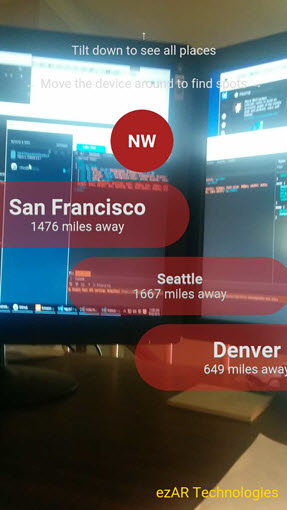 21 |
22 | ## Prerequisites
23 | - NVM - [Download](https://github.com/creationix/nvm) & Install Node Version Manage
24 | - NodeJS v7 - Download & Install Node.js and the npm package manager with NVM `$ nvm install node 7`.
25 | - [Typescript](https://www.npmjs.com/package/typescript) Latest stable version install in Global `$ npm install -g typescript`
26 | - [Ionic 2](https://ionicframework.com/) & [Cordova](https://cordova.apache.org/) - Latest stable version install in Global `$ npm install -g ionic cordova`
27 | - And you should also have git installed to a better working flow.
28 |
29 |
30 | ## Quick start
31 | - open this project in your IDE and install all node_modules from IDE CLI `$ nvm use 7.2`, `$ npm install`
32 | - run project (server+client side) with `$ ionic build ios`
33 | - enable geolocation on your IOS device
34 | - then deploy on your IOS device with Xcode
35 | - run application
36 |
37 | ## About author
38 | Hi, i'm a Front-end developper living in Geneva Switzerland and i build hybrid mobile & web applications for almost 15 years. You can follow me on Twitter @FazioNico or checkout my own website http://nicolasfazio.ch
39 |
--------------------------------------------------------------------------------
/src/theme/variables.scss:
--------------------------------------------------------------------------------
1 | // Ionic Variables and Theming. For more info, please see:
2 | // http://ionicframework.com/docs/v2/theming/
3 | $font-path: "../assets/fonts";
4 |
5 | @import "ionic.globals";
6 |
7 |
8 | // Shared Variables
9 | // --------------------------------------------------
10 | // To customize the look and feel of this app, you can override
11 | // the Sass variables found in Ionic's source scss files.
12 | // To view all the possible Ionic variables, see:
13 | // http://ionicframework.com/docs/v2/theming/overriding-ionic-variables/
14 |
15 |
16 |
17 |
18 | // Named Color Variables
19 | // --------------------------------------------------
20 | // Named colors makes it easy to reuse colors on various components.
21 | // It's highly recommended to change the default colors
22 | // to match your app's branding. Ionic uses a Sass map of
23 | // colors so you can add, rename and remove colors as needed.
24 | // The "primary" color is the only required color in the map.
25 |
26 | $colors: (
27 | primary: #387ef5,
28 | secondary: #32db64,
29 | danger: #f53d3d,
30 | light: #f4f4f4,
31 | dark: #222
32 | );
33 |
34 |
35 | // App iOS Variables
36 | // --------------------------------------------------
37 | // iOS only Sass variables can go here
38 |
39 |
40 |
41 |
42 | // App Material Design Variables
43 | // --------------------------------------------------
44 | // Material Design only Sass variables can go here
45 |
46 |
47 |
48 |
49 | // App Windows Variables
50 | // --------------------------------------------------
51 | // Windows only Sass variables can go here
52 |
53 |
54 |
55 |
56 | // App Theme
57 | // --------------------------------------------------
58 | // Ionic apps can have different themes applied, which can
59 | // then be future customized. This import comes last
60 | // so that the above variables are used and Ionic's
61 | // default are overridden.
62 |
63 | @import "ionic.theme.default";
64 |
65 |
66 | // Ionicons
67 | // --------------------------------------------------
68 | // The premium icon font for Ionic. For more info, please see:
69 | // http://ionicframework.com/docs/v2/ionicons/
70 |
71 | @import "ionic.ionicons";
72 |
73 |
74 | // Fonts
75 | // --------------------------------------------------
76 |
77 | @import "roboto";
78 | @import "noto-sans";
79 |
--------------------------------------------------------------------------------
/config.xml:
--------------------------------------------------------------------------------
1 |
8 |
9 |
10 |
21 |
22 | ## Prerequisites
23 | - NVM - [Download](https://github.com/creationix/nvm) & Install Node Version Manage
24 | - NodeJS v7 - Download & Install Node.js and the npm package manager with NVM `$ nvm install node 7`.
25 | - [Typescript](https://www.npmjs.com/package/typescript) Latest stable version install in Global `$ npm install -g typescript`
26 | - [Ionic 2](https://ionicframework.com/) & [Cordova](https://cordova.apache.org/) - Latest stable version install in Global `$ npm install -g ionic cordova`
27 | - And you should also have git installed to a better working flow.
28 |
29 |
30 | ## Quick start
31 | - open this project in your IDE and install all node_modules from IDE CLI `$ nvm use 7.2`, `$ npm install`
32 | - run project (server+client side) with `$ ionic build ios`
33 | - enable geolocation on your IOS device
34 | - then deploy on your IOS device with Xcode
35 | - run application
36 |
37 | ## About author
38 | Hi, i'm a Front-end developper living in Geneva Switzerland and i build hybrid mobile & web applications for almost 15 years. You can follow me on Twitter @FazioNico or checkout my own website http://nicolasfazio.ch
39 |
--------------------------------------------------------------------------------
/src/theme/variables.scss:
--------------------------------------------------------------------------------
1 | // Ionic Variables and Theming. For more info, please see:
2 | // http://ionicframework.com/docs/v2/theming/
3 | $font-path: "../assets/fonts";
4 |
5 | @import "ionic.globals";
6 |
7 |
8 | // Shared Variables
9 | // --------------------------------------------------
10 | // To customize the look and feel of this app, you can override
11 | // the Sass variables found in Ionic's source scss files.
12 | // To view all the possible Ionic variables, see:
13 | // http://ionicframework.com/docs/v2/theming/overriding-ionic-variables/
14 |
15 |
16 |
17 |
18 | // Named Color Variables
19 | // --------------------------------------------------
20 | // Named colors makes it easy to reuse colors on various components.
21 | // It's highly recommended to change the default colors
22 | // to match your app's branding. Ionic uses a Sass map of
23 | // colors so you can add, rename and remove colors as needed.
24 | // The "primary" color is the only required color in the map.
25 |
26 | $colors: (
27 | primary: #387ef5,
28 | secondary: #32db64,
29 | danger: #f53d3d,
30 | light: #f4f4f4,
31 | dark: #222
32 | );
33 |
34 |
35 | // App iOS Variables
36 | // --------------------------------------------------
37 | // iOS only Sass variables can go here
38 |
39 |
40 |
41 |
42 | // App Material Design Variables
43 | // --------------------------------------------------
44 | // Material Design only Sass variables can go here
45 |
46 |
47 |
48 |
49 | // App Windows Variables
50 | // --------------------------------------------------
51 | // Windows only Sass variables can go here
52 |
53 |
54 |
55 |
56 | // App Theme
57 | // --------------------------------------------------
58 | // Ionic apps can have different themes applied, which can
59 | // then be future customized. This import comes last
60 | // so that the above variables are used and Ionic's
61 | // default are overridden.
62 |
63 | @import "ionic.theme.default";
64 |
65 |
66 | // Ionicons
67 | // --------------------------------------------------
68 | // The premium icon font for Ionic. For more info, please see:
69 | // http://ionicframework.com/docs/v2/ionicons/
70 |
71 | @import "ionic.ionicons";
72 |
73 |
74 | // Fonts
75 | // --------------------------------------------------
76 |
77 | @import "roboto";
78 | @import "noto-sans";
79 |
--------------------------------------------------------------------------------
/config.xml:
--------------------------------------------------------------------------------
1 |
8 |
9 |
10 |