├── pr 가이드.pdf
├── .github
├── ISSUE_TEMPLATE
│ ├── -question.md
│ ├── 📄docs.md
│ ├── 🛠️bug-report.md
│ └── 💡feature-request.md
└── PULL_REQUEST_TEMPLATE.md
├── Git Guide_kr
├── Review Guide_kr.md
├── Branch Guide_kr.md
├── Version Control Tips FAQ_kr.md
├── Git Blog Tips FAQ_kr.md
├── Pull Requests Rules_kr.md
├── README_kr.md
├── Commit Rules_kr.md
└── Issues Rules_kr.md
├── Review Guide.md
├── Version Control Tips FAQ.md
├── Git Blog Tips FAQ.md
├── Branch Guide.md
├── Dictionary.md
├── Pull Requests Rules.md
├── README.md
├── Issues Rules.md
├── Commit Rules.md
└── Markdown.md
/pr 가이드.pdf:
--------------------------------------------------------------------------------
https://raw.githubusercontent.com/GDSC-DONGA/GDSC-DAU-GitGuide/HEAD/pr 가이드.pdf
--------------------------------------------------------------------------------
/.github/ISSUE_TEMPLATE/-question.md:
--------------------------------------------------------------------------------
1 | ---
2 | name: "❓Question"
3 | about: 질문할 사항이 있다면 적어주세요.
4 | title: "[Question]"
5 | labels: ''
6 | assignees: ''
7 |
8 | ---
9 |
10 | **write here**
11 |
--------------------------------------------------------------------------------
/.github/ISSUE_TEMPLATE/📄docs.md:
--------------------------------------------------------------------------------
1 | ---
2 | name: "\U0001F4C4Docs"
3 | about: 정보를 공유하세요.
4 | title: "[Docs]"
5 | labels: ''
6 | assignees: ''
7 |
8 | ---
9 |
10 | **Sharing Information**
11 |
12 | **Summary**
13 |
--------------------------------------------------------------------------------
/Git Guide_kr/Review Guide_kr.md:
--------------------------------------------------------------------------------
1 |
2 | # Review Guide
3 | **`아래 가이드에 따라 리뷰어로 활동해 보세요!😆`**
4 |
5 | **말하려는 내용이 이미 다른 댓글에 있다면 공감 이모지 눌러주세요.**
6 |
7 | **리뷰 내용에 대한 추가 의견이 있을 경우 해당 리뷰에 댓글로 의견을 주고받아주세요.**
8 |
9 | **왜 개선이 필요한지 이유를 충분한 설명해 주세요.**
10 |
11 | **코드를 클린하게 유지하고, 일관되게 구현하도록 안내해 주세요.**
12 |
13 | **답을 알려주기보다는 스스로 고민하고 개선 방법을 선택할 수 있게 해주세요.**
14 |
15 | **배울만한 점, 내가 몰랐던 점들에 대해 말하고, 칭찬해 주세요.**
16 |
17 | **누구든 ‘이 코드가 잘못됐다’라는 식으로 말해는 것은 안 돼요.**
18 |
--------------------------------------------------------------------------------
/Git Guide_kr/Branch Guide_kr.md:
--------------------------------------------------------------------------------
1 | # Branch Guide
2 |
3 | > **기본적으로 master/main 이라는 branch를 하나 가지고 있다.**
4 | >
5 | > **branch 만드는 이유는 지금 작업하는 내용과 다른 작업을 하기 위함이거나 각자의 공간(스터디)을 가지기 위함이다.**
6 | >
7 | > **기본 branch 가 아닌 곳에서 push 하면 PR 할 수 있다.**
8 | >
9 | > **branch 를 통해 개발하려는 기능을 컴포넌트 별로 테스트 및 실험이 가능하다.**
10 | >
11 | > **branch 는 만들었다가 쓸모 없어지면 지워도 무방하다. (master에 merge 된 경우, 안 쓰는 경우 등)**
12 | >
13 | > **항상 내가 작업할 branch 와 현재 연결이 되어있는지 확인이 필요하다.(PR 가이드 참고)**
14 |
15 | ### Master Branch Tip
16 | > **master에 모든 개발사항은 검토 후 저장해야 한다.**
17 | >
18 | > **마스터는 완성본이라고 생각하면 편하다.**
19 |
20 |
--------------------------------------------------------------------------------
/Git Guide_kr/Version Control Tips FAQ_kr.md:
--------------------------------------------------------------------------------
1 | # 버전 관리 팁
2 |
3 | > Q : 보통 버전은 어디에 적어요?
4 | A : 커밋 메시지 제목 부분에 코멘트로 달아준다.
5 |
6 | >Q : 이전 버전은 어디서 확인해요?
7 | A : 특정 파일에 대해 버전 기록을 보고 싶으면 repo에서 해당 파일 클릭 -> 오른쪽 상단 History 클릭 하면 됨
8 |
9 | >Q : 혹시 관련 단축키가 있을까요?
10 | A : 아래 표를 확인해 주세요
11 |
12 | |설명|단축키|
13 | |----|----|
14 | |Code 탭 이동|g+c|
15 | |Issues 탭 이동|g+i|
16 | |Pull requests 탭 이동|g+p|
17 | |파일 찾기|t|
18 | |해당 코드 라인 이동|l|
19 | |브랜치 또는 태그 변경|w|
20 | |검색창 이동|s or /|
21 |
22 | ----
23 | Writer - jh park
24 | Email - jhparkintlot@gmail.com
25 | Instagram - jh_parkland
26 |
--------------------------------------------------------------------------------
/Git Guide_kr/Git Blog Tips FAQ_kr.md:
--------------------------------------------------------------------------------
1 | # Git Blog Tips FAQ
2 |
3 | > Q : Markdown 작성하면서 잘 작성되고 있는지 실시간으로 확인하고 싶은데 방법이 없나요?
4 | A : VScode 같은 Markdown tool 을 사용하시면 편리하게 볼 수 있어요^^
5 |
6 | > Q : 링크를 삽입을 하려니 지저분합니다. ppt하이퍼 링크처럼 할 수 있나요?
7 | A : 물론 가능하죠 방법은 ```[제목](url)입니다.```
8 |
9 | > Q : 특수문자를 표현하려는데 Markdown 문법으로 인식해요 어떻게 해요?
10 | A : \ 문자를 같이 사용하면 됩니다. ex.) ```\[제목](url)``` 처럼 말이죠
11 |
12 | > Q : Markdown으로 이미지 삽입시 조금더 편리하게 할 수 있는 방법이나 팁이 있나요?
13 | A : 웹 방식으로 적용하는 방법이 있습니다(Html 사용)
14 |
15 | ----
16 | Writer - jh park
17 | Email - jhparkintlot@gmail.com
18 | Instagram - jh_parkland
19 |
--------------------------------------------------------------------------------
/.github/ISSUE_TEMPLATE/🛠️bug-report.md:
--------------------------------------------------------------------------------
1 | ---
2 | name: "\U0001F6E0️Bug report"
3 | about: 발견한 버그에 대해 알려주세요.
4 | title: "[BUG]"
5 | labels: ''
6 | assignees: ''
7 |
8 | ---
9 |
10 | **Describe the bug**
11 | A clear and concise description of what the bug is.
12 |
13 | **To Reproduce**
14 | Steps to reproduce the behavior:
15 | 1. Go to '...'
16 | 2. Click on '....'
17 | 3. Scroll down to '....'
18 | 4. See error
19 |
20 | **Expected behavior**
21 | A clear and concise description of what you expected to happen.
22 |
23 | **Screenshots**
24 | If applicable, add screenshots to help explain your problem.
25 |
26 | **Additional context**
27 | Add any other context about the problem here.
28 |
--------------------------------------------------------------------------------
/.github/ISSUE_TEMPLATE/💡feature-request.md:
--------------------------------------------------------------------------------
1 | ---
2 | name: "\U0001F4A1Feature request"
3 | about: "[새로운/기존] 기능을 제안 혹은 요청하세요."
4 | title: "[Feature]"
5 | labels: ''
6 | assignees: ''
7 |
8 | ---
9 |
10 | **Is your feature request related to a problem? Please describe.**
11 | A clear and concise description of what the problem is. Ex. I'm always frustrated when [...]
12 |
13 | **Describe the solution you'd like**
14 | A clear and concise description of what you want to happen.
15 |
16 | **Describe alternatives you've considered**
17 | A clear and concise description of any alternative solutions or features you've considered.
18 |
19 | **Additional context**
20 | Add any other context or screenshots about the feature request here.
21 |
--------------------------------------------------------------------------------
/Review Guide.md:
--------------------------------------------------------------------------------
1 | # Review Guide
2 |
3 | **`Follow the guide below to become a reviewer!😆`**
4 | **If what you want to say is already in another comment, please click the like emoji.**
5 |
6 | **If you have additional opinions about the review content, please share your opinions in the comments on the review.**
7 |
8 | **Please explain why the improvement is needed.**
9 |
10 | **Guide us to keep your code clean and consistent implementation.**
11 |
12 | **Rather than giving you an answer, please let me think for myself and choose a way to improve.**
13 |
14 | **Tell me about things I could learn, things I didn't know, and give me compliments.**
15 |
16 | **No one can say 'this code is bad'**
--------------------------------------------------------------------------------
/Version Control Tips FAQ.md:
--------------------------------------------------------------------------------
1 | # Version Control Tips FAQ
2 |
3 | >Q: Where do you usually write the version?
4 | A : Add a comment to the subject of the commit message.
5 |
6 | >Q : Where can I find the previous version?
7 | A: If you want to see the version history for a specific file, click the file in the repo -> click History at the top right
8 |
9 | >Q: Are there any related shortcut keys?
10 | A : Please check the table below
11 |
12 | |Description|Shortcut keys|
13 | |----|----|
14 | |Code tab move|g+c|
15 | |Go to Issues tab|g+i|
16 | |Pull requests tab |g+p|
17 | |Find file|t|
18 | |Move the corresponding line of code|l|
19 | |Change branch or tag|w|
20 | |Move search bar|s or /|
21 |
22 |
23 |
24 | -----
25 | Writer - jh park
26 | Email - jhparkintlot@gmail.com
27 | Instagram - jh_parkland
28 |
29 |
--------------------------------------------------------------------------------
/Git Blog Tips FAQ.md:
--------------------------------------------------------------------------------
1 | # Git Blog Tips FAQ
2 |
3 | > Q: While writing Markdown, I want to check in real time whether it is being written well, but is there any way?
4 | A: If you use a Markdown tool such as VScode, you can view it conveniently.
5 |
6 | >Q : It's messy trying to insert a link. Can you do it like ppt hyperlink?
7 | A : Yes, of course. The method is ```[title](url).```
8 |
9 | > Q : I want to express special characters, but they are recognized by Markdown grammar. How do I do it?
10 | A : You can use the \ character together. ex.) ```\[title](url)```
11 |
12 | > Q: Are there any methods or tips to make it a little more convenient when inserting images with Markdown?
13 | A : There is a way to apply it in the web way (using Html)
14 |
15 |
16 | ----
17 | Writer - jh park
18 | Email - jhparkintlot@gmail.com
19 | Instagram - jh_parkland
20 |
--------------------------------------------------------------------------------
/Branch Guide.md:
--------------------------------------------------------------------------------
1 | # Branch Guide
2 |
3 | > **Basically, it has one branch called master/main.**
4 | >
5 | > **The reason for creating a branch is to do a different work from what you are working on now or to have your own space (study).**
6 | >
7 | > **You can PR by pushing from a non-default branch.**
8 | >
9 | > **It is possible to test and experiment with the function to be developed through the branch for each component.**
10 | >
11 | > **It is okay to create a branch and delete it when it becomes obsolete (when it is merged into the master, when it is not used, etc.)**
12 | >
13 | > **It is always necessary to check whether the branch to work with is currently connected (refer to the PR guide)**
14 |
15 | ### master Branch Tip
16 | > **All developments in the master should be reviewed and stored.**
17 | >
18 | > **The master is comfortable to think of as a finished version.**
19 |
20 |
--------------------------------------------------------------------------------
/.github/PULL_REQUEST_TEMPLATE.md:
--------------------------------------------------------------------------------
1 | ## PR Checklist
2 | #### Please refer to the guidelines document https://github.com/GDSC-DONGA/GDSC-DAU-GitGuide/README.md.
3 | #### If you agree, make [ ] below [x].
4 |
5 | - [ ] Checked the guideline document and follow the rules.
6 |
7 |
8 | ## PR Type
9 | #### What kind of change does this PR introduce?
10 |
11 | - [ ] Bugfix
12 | - [ ] Feature
13 | - [ ] Code style update (formatting, local variables)
14 | - [ ] Refactoring (no functional changes, no api changes)
15 | - [ ] Build related changes
16 | - [ ] CI related changes
17 | - [ ] Documentation content changes
18 | - [ ] angular.io application / infrastructure changes
19 | - [ ] Other... Please describe:
20 |
21 |
22 | ## What is the current behavior?
23 | #### Please write down the issue number related to this Pull Request.
24 | #### You can check the title immediately by putting # in front of the issue or PR number. (Example. #99)
25 |
26 | Issue Number: #N/A
27 |
28 |
29 | ## PR Description
30 | #### Please give me a rough idea of what changes with this PR.
31 |
32 |
--------------------------------------------------------------------------------
/Git Guide_kr/Pull Requests Rules_kr.md:
--------------------------------------------------------------------------------
1 | # **Pull Requests**
2 |
3 | **1. Pull Request 본문에는 리뷰어들이 알아야 될 사항 명시, 셀프 코드 리뷰로 명시해주세요**
4 | - 코드 리뷰어가 사소한 것까지 확인하는 시간을 줄일 수 있어요!
5 |
6 | **2-1. 각자의 레파지토리로 fork 후 `feature/작업내용` 브랜치에서 기능 개발 해주세요. 기능 개발이 끝나면 팀 레파지토리의 `develop` 브랜치로 Pull Request 해주세요.**
7 |
8 | **2-2. 스터디의 경우 스터디 레파지토리에서 각자의 이름으로 브랜치를 만들어 작업해주세요.**
9 |
10 | **3. Pull Request 시 templete와 라벨을 사용해주세요.**
11 | - GitHub의 라벨을 활용하여 각각의 PR의 상태를 효율적으로 관리할 수 있습니다!
12 |
13 | **4. 해당하는 이슈번호가 있을 경우 표시해주세요.**
14 | - 어떤 코드에 대해서 History를 확인했을때, 해당 코드가 어떤 피쳐와 이슈로 인해서 수정되었는지 확인할 수 있습니다.
15 |
16 |
17 | **5. 하나의 Pull Request에는 하나의 변경 사항만 담아주세요.**
18 | - 여러 수정 사항에 대해서는 각각 다른 branch에서 작업하신 뒤, 새로운 PR을 만들어주세요. 이슈에 대해 여러 명이 작업할 수 있을 뿐만 아니라 빠르고 정확한 작업 및 리뷰를 할 수 있습니다.
19 |
20 | **6. 반드시 리뷰 후 승인 받은 뒤 main 브랜치에 병합해 주세요.**
21 | - approve and change request 경우 Repo master와 GDSC Skill 팀이 진행하게 됩니다. 반드시 자신의 작업 브랜치로부터 베이스 브랜치로의 PR을 열고 작업 내용에 대한 리뷰를 통해 승인을
22 | 받은 뒤 병합해야 합니다. 오류가 많거나 다른 PR의 commit이 섞여 있는 경우 해당 PR은 관리자가 닫을 수 있으니 주의해주세요.
23 |
24 | **7. 마스터 레파지토리와 동기화를 체크해주세요.**
25 | - 동기화 체크하여 혹시 모를 충돌을 예방합시다!
26 |
--------------------------------------------------------------------------------
/Dictionary.md:
--------------------------------------------------------------------------------
1 | # 용어정리
2 | ## 깃 관련 용어
3 | > #### Repo: repository의 줄임말
4 |
5 | > #### branch: 새 코드의 테스트나 새 기능을 넣어 사용해보기 위해 사용할 수 있는 따로 떨어진 독립적인 commit
6 |
7 | > #### Master branch: 새 프로젝트를 만들 때 마다 생성되는 기본 브랜치. 작업이 최종적으로 마무리되는 브랜치.
8 |
9 | > #### Pull Requests: 각각 업데이트된 서로 다른 개발 내용을 Remote Repository 관리자가 Merge 하도록 요청하는 것
10 |
11 | > #### PR: Pull Requests의 줄임말
12 |
13 | > #### fork: 남이 만든 오픈소스 등을 직접변경하고 싶다면 먼저 내 계정에 그 프로젝트의 복사본을 만든 다음 이를 수정하게 되는데 이 과정을 fork 라고 한다
14 |
15 | > #### clone: 복제를 의미한다. 로컬 작업을 위해 복사본을 github에서 다운로드 한다.
16 |
17 | > #### commit: Staging 된 파일의 업데이트를 Fix(확정)하는 것
18 |
19 | > #### merge: 가져온 업데이트된 상태들을 하나로 합치는 것
20 |
21 | > #### fetch: Remote Repository의 상태를 가져오기만 하는 것
22 |
23 | > #### push: Commit 된 Snapshot(업데이트 완료된 상태)을 Remote Repository에 업로드(업데이트)하는 것
24 |
25 | > #### pull: Remote repository의 상태를 다운로드하여 Local Repository의 상태를 업데이트 하는 것 (Fetch + Merge)
26 |
27 | > #### 로컬 저장소(local repository): 내 PC에서 관리하는 git 저장소
28 |
29 | > #### 원격 저장소(remote repository): 로컬 저장소를 업로드 하는 곳
30 |
31 | > #### 작업 폴더(Working Directory): 작업이 일어나는 폴더
32 |
33 | > #### Staging: 작업 폴더에서 작업한 변경 내용을 기록하는 곳
34 |
35 | ## Contribution 관련 용어
36 | > #### LGTM(Looks Good To Me): 나에게 좋아 보인다
37 | > 누군가 코드나 디자인 문서를 리뷰 후에 빠른 응답시 감사의 의미로 사용!!
38 |
39 | > #### PTAL(Please Take Another Look): 제발 좀 봐주세요?
40 | > Reviewer가 Review를 해주다가 중간에 stop된 상태에서 review 좀 해달라고 부탁할 때 사용!!
41 |
42 | > #### SGTM(Sounds Good to Me): 나에게 좋다
43 | > Pull Request 시 Reviewer가 긍정적인 반응을 표현할 때 사용!!
44 |
45 |
46 |
--------------------------------------------------------------------------------
/Git Guide_kr/README_kr.md:
--------------------------------------------------------------------------------
1 | -----
2 |
3 | # GDSC-DAU-GitGuide
4 | 여러분들의 활발하고 편안한 스터디 및 프로젝트 등 **협업 활동**을 위해 준비한 **GitGuide** 입니다.
5 | 📑**GitHub 이용 시 지켜야 할 규칙**, 📝**GitHub 사용하는 방법** 등 명시되어 있으므로 확인 부탁드립니다.
6 | 궁금하시거나 수정이 필요한 사항이 있으면 **Issues**에 적어주세요!! **GDSC Skill 팀**이 빠르게 확인하고 연락드리겠습니다.!!
7 | 앞으로 같이 성장해갔으면 좋겠습니다!😆
8 |
9 | ## **Top Rules**
10 | >**가능한 영어를 사용해 주세요!**
11 | > 개발자 문화 조성 및 영어 실력 향상을 위해 GitHub 에서는 영어를 사용해 주세요.
12 |
13 | > **다른 사람을 존중해주세요!**
14 | > GDSC 팀원들이 이용하는 공간입니다. 올바르고 재미있는 공간을 위해 같이 노력합시다!
15 |
16 | *타인의 권리를 침해하는 게시물 및 댓글은 GDSC Core Member 논의 후 삭제 될 수 있습니다.*
17 |
18 | ---
19 |
20 | ## Rules & Guides & Tips
21 | 쉽고 효율적인 Github 활동을 위해 Skill 팀이 열심히 준비했습니다. **꼭! 한번 씩 읽어주세요!**
22 |
23 | ### [📋Pull Requests Rules](./Pull%20Requests%20Rules_kr.md)
24 |
25 | ### [📋Issues Rules](./Issues%20Rules_kr.md)
26 |
27 | ### [📋Commit Rules](./Commit%20Rules_kr.md)
28 |
29 | ### [📋Branch Guide](./Branch%20Guide_kr.md)
30 |
31 | ### [📋Review Guide](./Review%20Guide_kr.md)
32 |
33 | ### [📋Version Control Tips](./Version%20Control%20Tips%20FAQ_kr.md)
34 |
35 | ### [📋Git Blog Tips](./Git%20Blog%20Tips%20FAQ_kr.md)
36 |
37 | ### [📋MarkDown](../Markdown.md)
38 |
39 | ### [📋Dictionary](../Dictionary.md)
40 |
41 | ---
42 |
43 |
44 | ✨모두 확인 하셨으면 Star 부탁드립니다✨
45 |

46 |
47 |
--------------------------------------------------------------------------------
/Pull Requests Rules.md:
--------------------------------------------------------------------------------
1 | # **Pull Requests**
2 |
3 | **1. In the body of the Pull Request, please specify what reviewers need to know, and write a self-code review.**
4 | - It can save code reviewers time checking down to the smallest detail!
5 |
6 | **2-1. After fork to your own repository, please develop the function in the `feature/work` content branch. When the feature development is finished, please make a Pull Request to the `develop` branch of the team repository.**
7 |
8 | **2-2. In the case of a study, please create a branch under your own name in the study repository and work on it.**
9 |
10 | **3. Please use the templete and label when making a pull request.**
11 | - Labels on GitHub allow you to efficiently manage the status of each PR!
12 |
13 | **4. If there is an issue number, please indicate it.**
14 | - When you check the History for a certain code, you can see what features and issues the code was modified due to.
15 |
16 | **5. Please include only one change in one Pull Request.**
17 | - Please make a new PR after working on different branches for various modifications. Multiple people can work on issues, as well as fast and accurate work and reviews.
18 |
19 | **6. Make sure to review and get approval before merging into the main branch.**
20 | - In case of approve and change request, the repo master and the GDSC Skill team will proceed. You must open a PR from your working branch to your base branch, review your work, and get approval before merging. If there are many errors or a mixture of commits from other PRs, the PR may be closed by the administrator, so please be careful.
21 |
22 | **7. Check synchronization with master Repository.**
23 | - Let's prevent any unexpected conflicts by checking the synchronization!
24 |
--------------------------------------------------------------------------------
/README.md:
--------------------------------------------------------------------------------
1 | -----
2 |
3 | # GDSC-DAU-GitGuide
4 | **GitGuide** for your active and comfortable study and project **collaboration activities**.
5 | 📑**Rules to follow when using GitHub**, 📝**How to use GitHub** are specified, so please check.
6 | If you have any questions or need to be corrected, please write them on **Issues**!! **GDSC Skill Team** will quickly check and contact you!!
7 | **GDSC Skill team hope we can grow together!😆**
8 |
9 | ## **Top Rules**
10 | >**Please use English as much as possible!**
11 | > Please use English on GitHub to create a developer culture and improve your English skills.
12 |
13 | > **Respect others!**
14 | > This is the space used by GDSC team members. Let's work together for the right and fun space!
15 |
16 | *Posts and comments that violate other people's rights may be deleted after discussion with GDSC Core Members.*
17 |
18 | ---
19 |
20 | ## Rules & Guides & Tips
21 | The Skill team worked hard to prepare for an easy and efficient Github activity. **Please read it!**
22 |
23 | ### [📋Pull Requests Rules](./Pull%20Requests%20Rules.md)
24 |
25 | ### [📋Issues Rules](./Issues%20Rules.md)
26 |
27 | ### [📋Commit Rules](./Commit%20Rules.md)
28 |
29 | ### [📋Branch Guide](./Branch%20Guide.md)
30 |
31 | ### [📋Review Guide](./Review%20Guide.md)
32 |
33 | ### [📋Version Control Tips](./Version%20Control%20Tips%20FAQ.md)
34 |
35 | ### [📋Git Blog Tips](./Git%20Blog%20Tips%20FAQ.md)
36 |
37 | ### [📋MarkDown](./Markdown.md)
38 |
39 | ### [📋Dictionary](./Dictionary.md)
40 |
41 | ---
42 |
43 |
44 | ✨If you've checked it out, please Star✨
45 |
46 |
47 |
--------------------------------------------------------------------------------
/Git Guide_kr/Commit Rules_kr.md:
--------------------------------------------------------------------------------
1 | # 커밋 메시지가 왜 필요한가?
2 |
3 | - 팀원들과의 커뮤니케이션
4 | - 과거 기록의 편리한 추적
5 | - 이슈를 함께 작성하면서 이슈와 관련된 진행 상황을 확인할 수 있습니다.
6 |
7 | # 커밋 메시지 작성하는 방법
8 | ```
9 | Type(타입): Subject(제목)
10 |
11 | Body(본문)
12 |
13 | Footer(바닥글)
14 | ```
15 | ## 타입은 무엇을 의미하나요?
16 |
17 | - `Feat` - 새로운 기능 추가
18 | - `Fix` - 버그 수정
19 | - `Build` - 빌드 관련 파일 수정
20 | - `Ci` - CI관련 설정 수정
21 | - `Docs` - 문서 (문서 추가, 수정, 삭제)
22 | - `Style` - 스타일 (코드 형식, 세미콜론 추가: 비즈니스 로직에 변경 없는 경우)
23 | - `Refactor` - 코드 리팩토링
24 | - `Test` - 테스트 (테스트 코드 추가, 수정, 삭제: 비즈니스 로직에 변경 없는 경우)
25 | - `Chore` - 기타 변경사항 (빌드 스크립트 수정 등)
26 |
27 | ## 제목을 작성하는 방법
28 |
29 | - 제목은 `50자를` 넘기지 않고, 마침표를 붙이지 않습니다.
30 | - 제목에는 `commit 타입을 함께` 작성합니다.
31 | -` 과거 시제를 사용하지 않고 명령조`로 작성합니다.
32 | - 제목과 본문은 `한 줄 띄워 분리`합니다.
33 | - 제목의 첫 글자는 `반드시 대문자`로 씁니다.
34 | - 제목이나 본문에 `이슈 번호`(가 있다면) 붙여야 합니다.
35 |
36 | 예시)
37 | ~~~
38 | Feat: New recognition function added
39 | ~~~
40 |
41 | ## 본문을 작성하는 방법
42 |
43 | - `선택 사항`이기에 모든 commit에 본문 내용을 작성할 필요는 없습니다.
44 | - 한 줄에 `72자를` 넘기면 안 됩니다.
45 | - 어떻게(How)보다 `무엇을, 왜`(What, Why)에 맞춰 작성합니다.
46 | - 설명뿐만 아니라, commit의 이유를 작성할 때에도 씁니다.
47 |
48 | 예시)
49 | ~~~
50 | New recognition function added
51 | -Reader.Js: Added recognition function due to user requirements
52 | ~~~
53 |
54 | ## 꼬리말을 작성하는 방법
55 |
56 | - `선택 사항`이므로 모든 commit에 꼬리말을 작성할 필요는 없습니다.
57 | - `Issue tracker ID`를 작성할 때 사용합니다.
58 | - `해결`: 이슈 해결 시 사용
59 | - `관련`: 해당 commit에 관련된 이슈 번호
60 | - `참고`: 참고할 이슈가 있는 경우 사용
61 |
62 | 예시)
63 | ~~~
64 | Resolutuin : #issues number
65 | ~~~
66 |
67 | ## 실습하기
68 | ~~~
69 | Fead: New recognition function added
70 |
71 | New recognition function added
72 | -Reader.Js: Added recognition function due to user requirements
73 |
74 | Resolutuin : #1234
75 | ~~~
76 |
77 | ## 커밋 메시지로 이슈 자동으로 닫기
78 | > 깃허브는 커밋 메시지에 특정 키워드를 사용하면 이슈가 자동으로 종료되는 기능을 탑재하고 있습니다.
79 | 예약어는 커밋 메시지 어느 위치는 사용 할 수 있습니다.
80 |
81 | 에시)
82 | ~~~
83 | Keyword #issues number
84 | ~~~
85 |
86 | ### 자동 닫기 키워드 리스트
87 |
88 | - close
89 | - closes
90 | - closed
91 | - fix
92 | - fixes
93 | - fixed
94 | - resolve
95 | - resolves
96 | - resolved
97 |
98 | 다함께 Commit 메시지 Rule에 맞는 문화를 함께 정착시켜요~~
99 |
100 |
101 | Writer - jh park
102 | Email - jhparkintlot@gmail.com
103 | Instagram - jh_parkland
104 | [Homepage](https://www.jhpark.org/)
--------------------------------------------------------------------------------
/Git Guide_kr/Issues Rules_kr.md:
--------------------------------------------------------------------------------
1 | # 이슈를 왜 작성하나요?
2 |
3 | - 이슈를 사용하여 GitHub에서 작업할 아이디어, 개선 사항, 작업 또는 버그를 추적합니다.
4 | - 사용자 피드백을 수집하고, 소프트웨어 버그를 보고하고, 리포지토리에서 문제에 대해 수행하려는 작업을 구성할 수 있습니다.
5 | - 풀 리퀘스트를 이슈에 연결하여 수정이 진행 중임을 표시하고 누군가 풀 리퀘스트를 병합할 때 자동으로 이슈를 닫을 수 있습니다.
6 |
7 |
8 | # 이슈 만들기(기본적인 방법)
9 | - 이슈는 유저의 이슈 사용이 허용된 깃헙 레포지토리에서 생성할 수 있다.
10 | 
11 |
12 | - 이슈를 생성하려는 저장소의 이슈 탭에서 New issue를 클릭합니다.
13 | 이슈에는 이슈의 제목과 설명이 포함 될 수 있습니다.
14 | 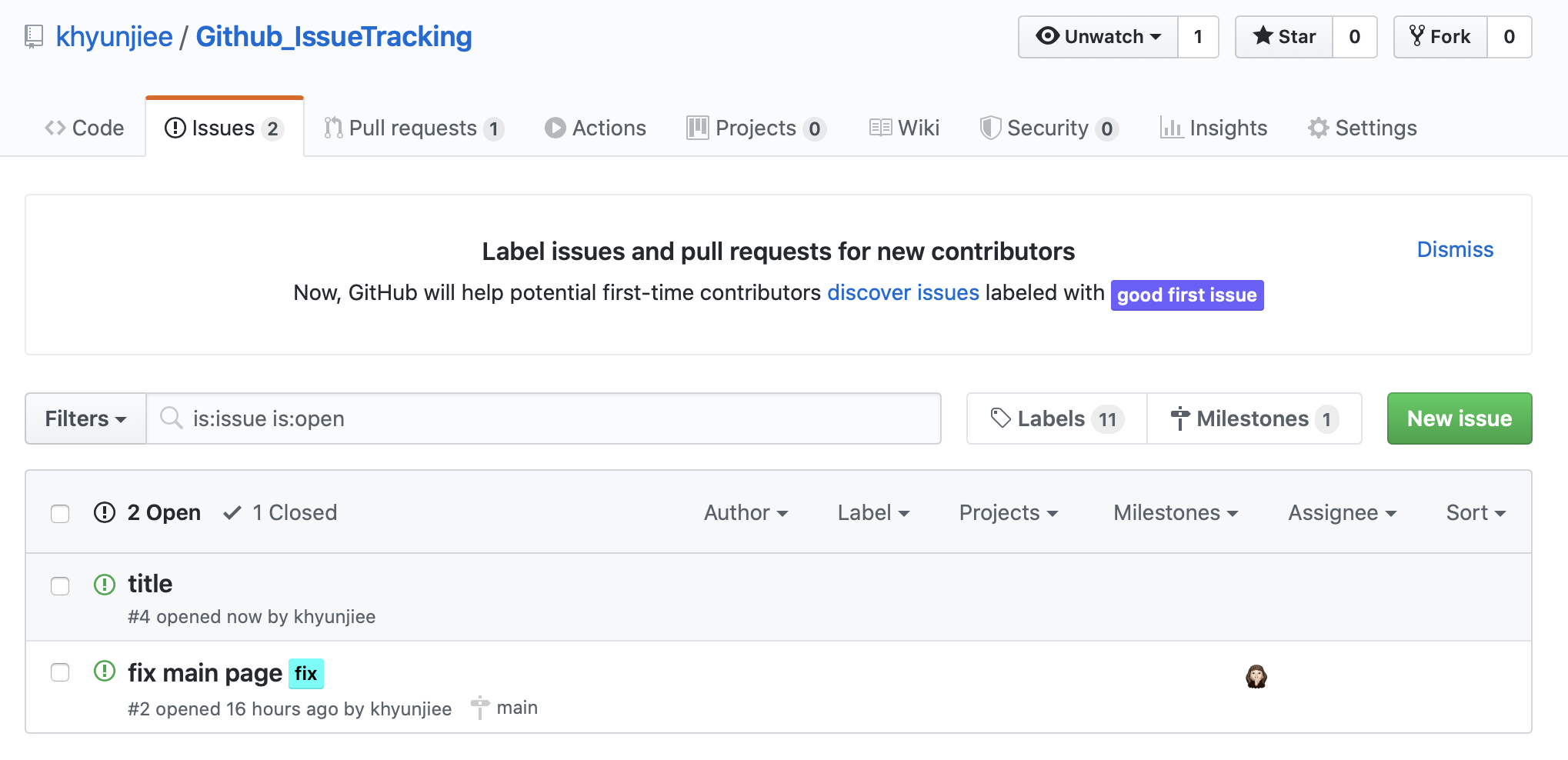
15 |
16 |
17 |
18 | ## 이슈 생성하기
19 |
20 | > 레이블 옵션
21 | 생성된 문제는 목록 형태로 관리하기 어려울 것 같습니다.
22 | 문제가 너무 많다면?
23 | 특정 문제를 찾기 어려울 것입니다.
24 | 이 문제를 개선하기 위해 Label 기능을 사용합니다.
25 | 이슈별 라벨링을 통해 이슈를 검색하고 이슈별로 주제를 분류할 수 있습니다.
26 |
27 | 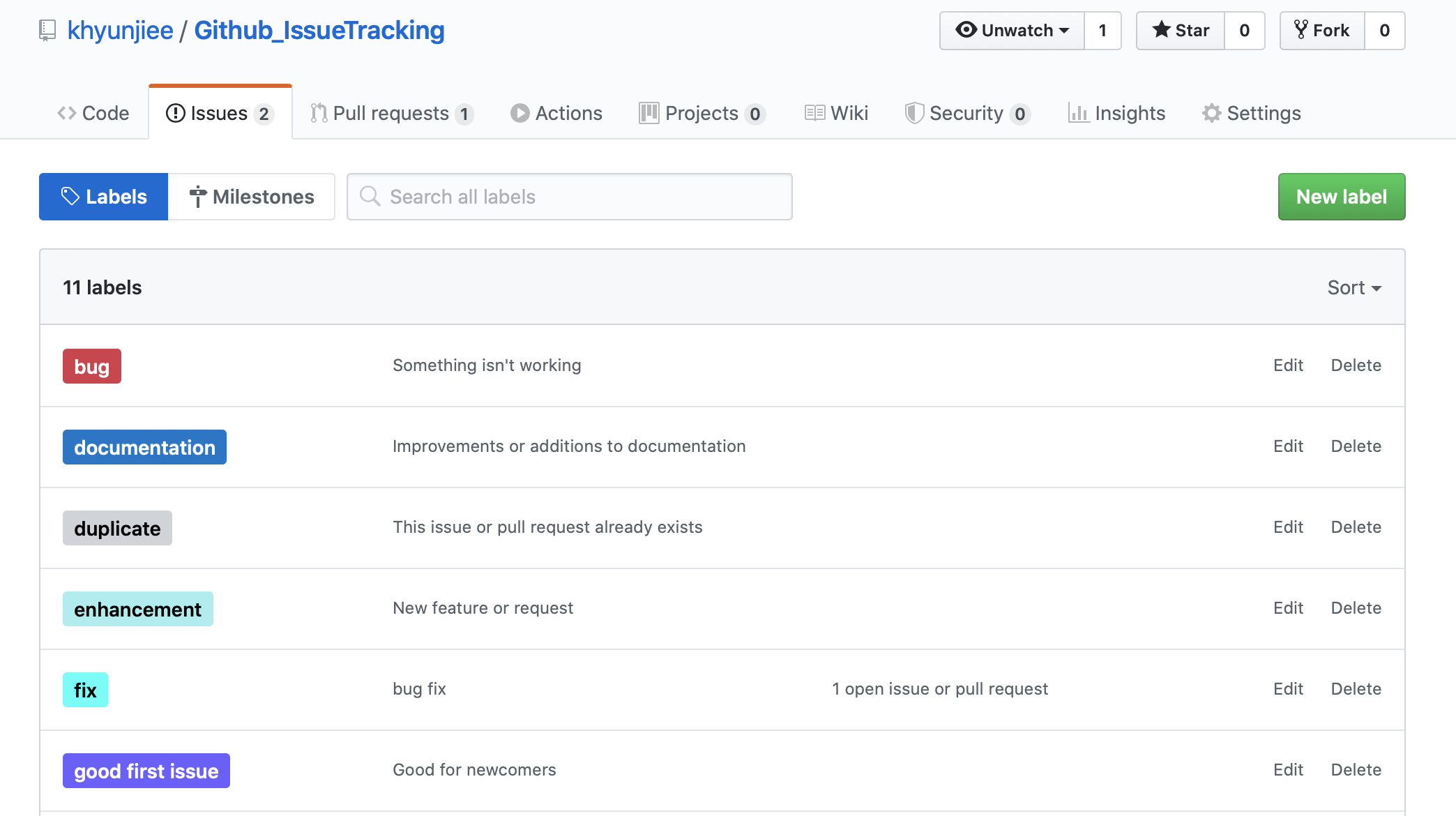
28 |
29 | - 이슈 상세 페이지에서 생성된 라벨로 이슈를 지정할 수 있습니다.
30 | 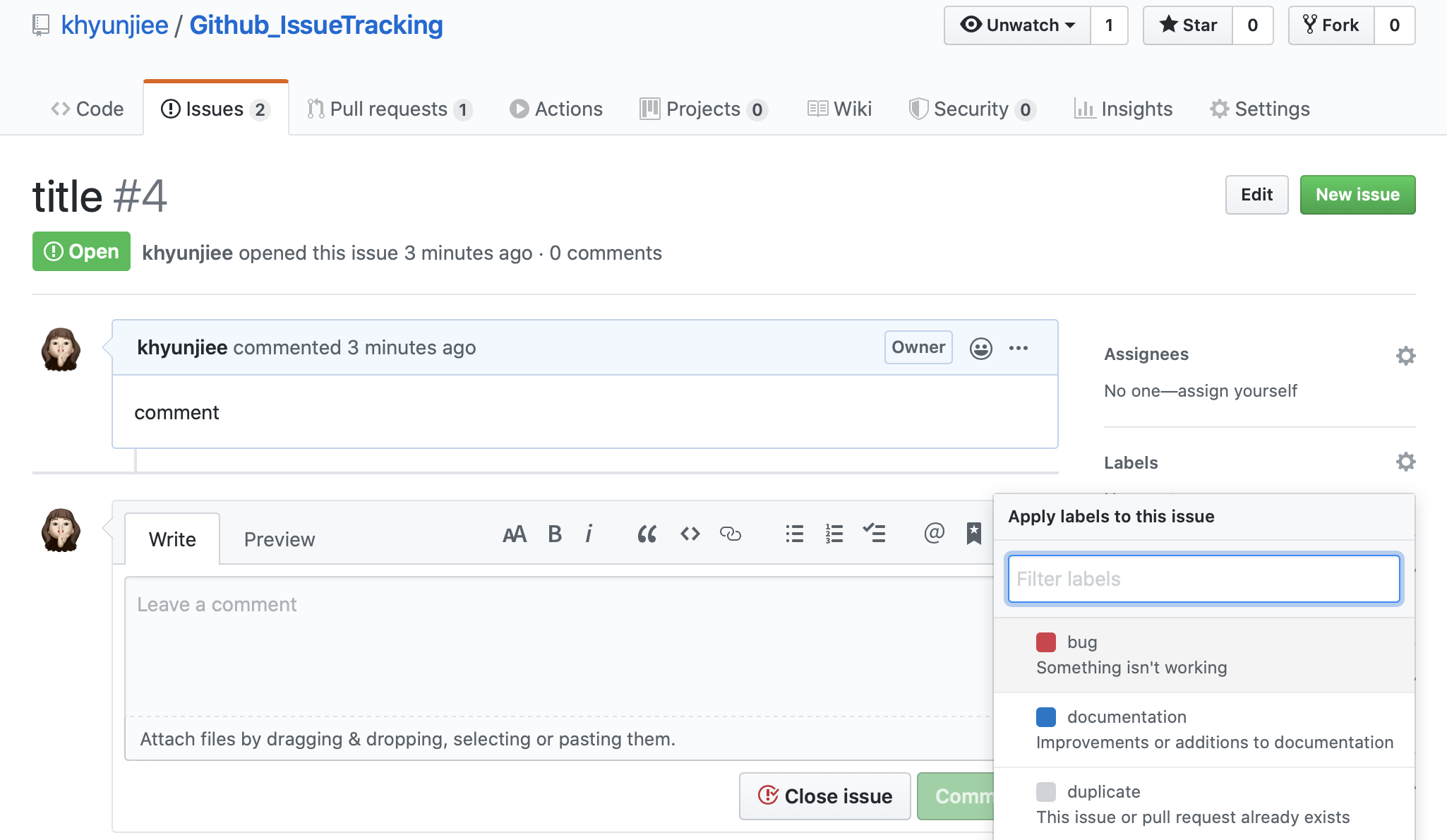
31 | 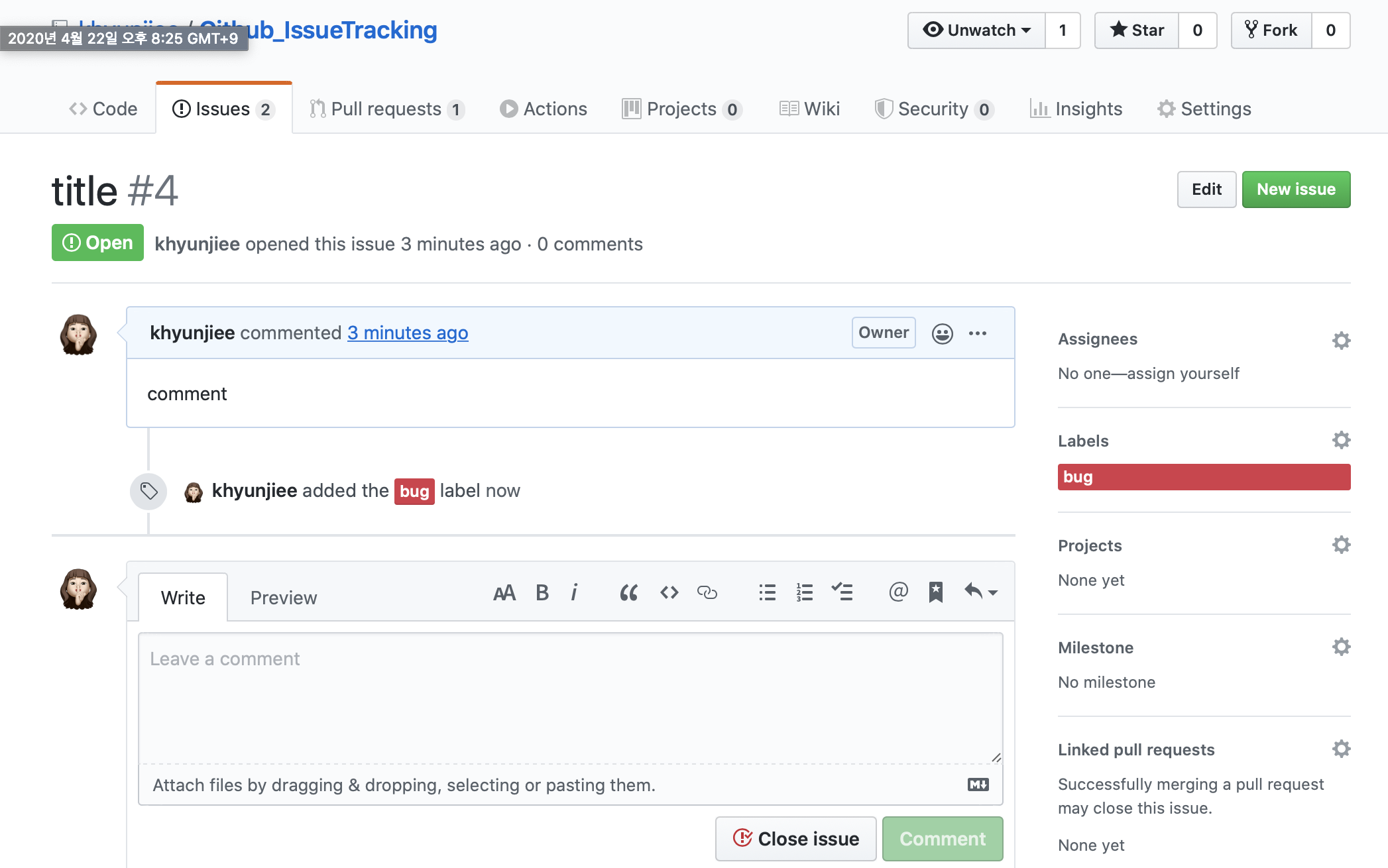
32 |
33 | **레이블은 문제, 범주 및 기타 유용한 정보의 우선 순위를 나누는 기준으로 사용해야 합니다..**
34 |
35 |
36 | ## Assigness 부여하기
37 |
38 | - Assigenss로 지정한 사람을 issue에 할당할 수 있습니다.
39 | 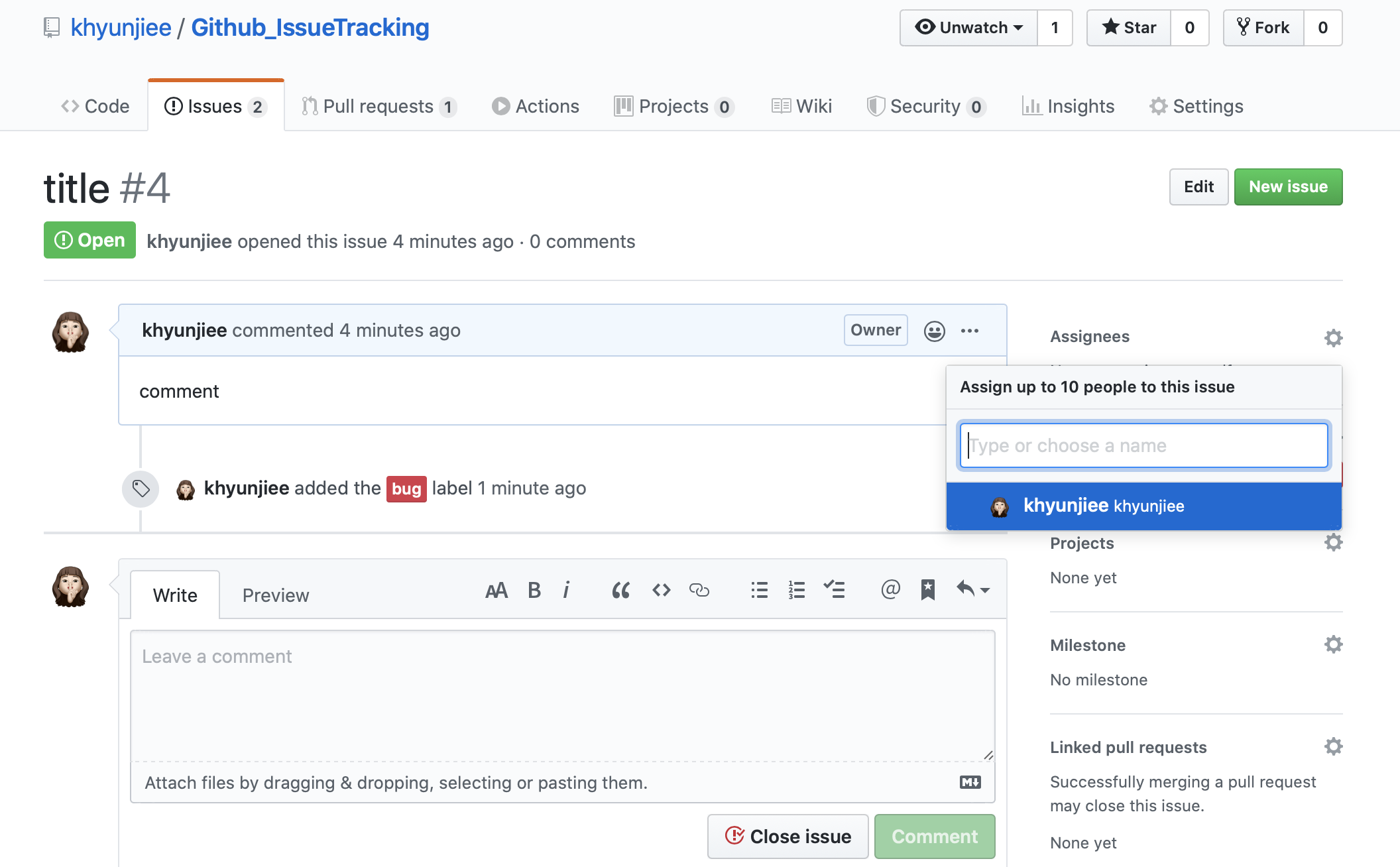
40 | 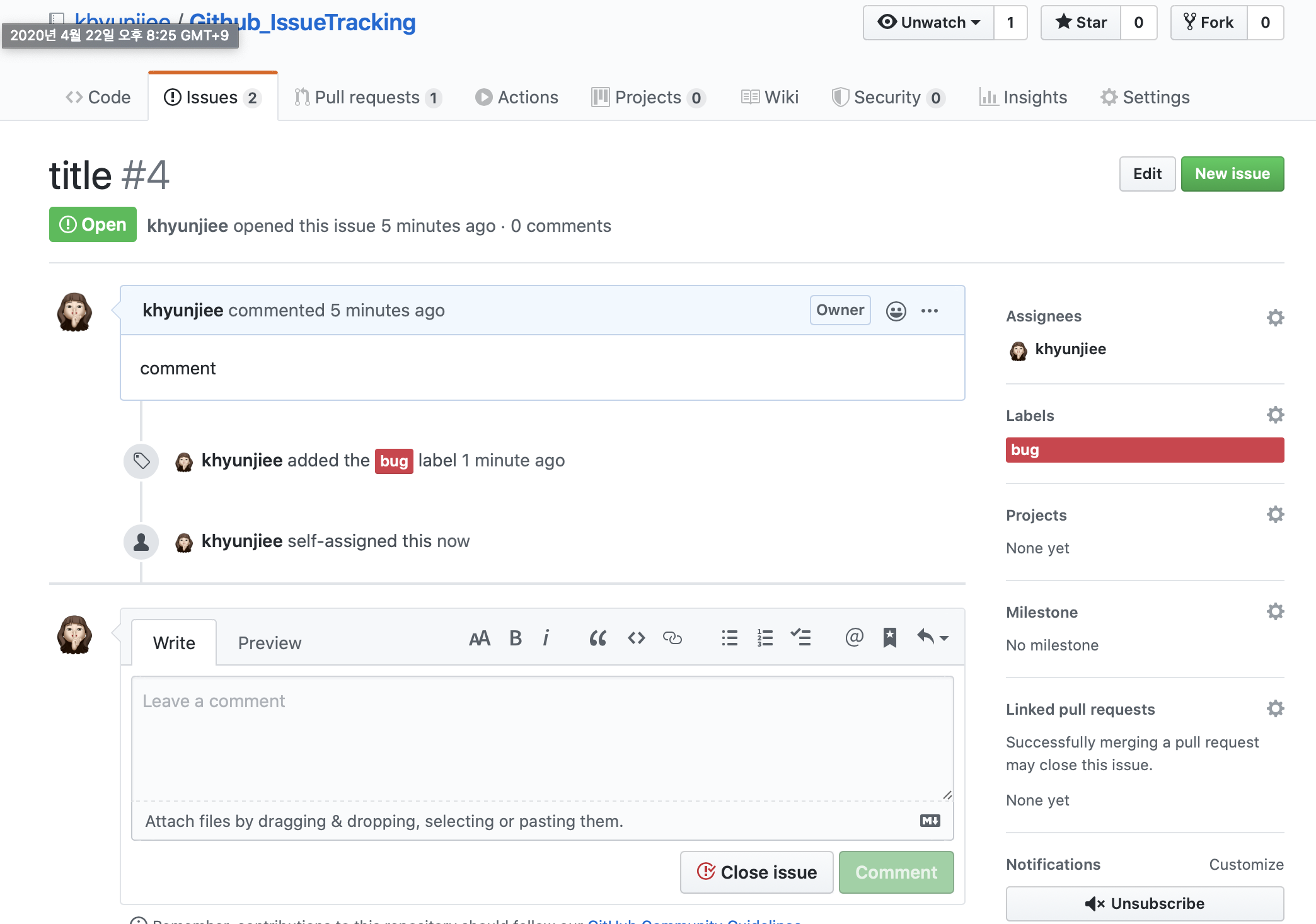
41 |
42 | >레이블과 담당자를 배정한 후 이슈 목록을 보면 깔끔하게 정리되어 있음을 알 수 있습니다.
43 | 지정된 레이블 및 담당자를 통해 필터 필드에서 필터링하여 문제를 검색할 수 있습니다.
44 | 그러나 Label과 Assignee를 지정하더라도 기능별로 유사한 문제가 존재하며, 관련 문제를 찾거나 해당 기능이 얼마나 구현되어 있는지 파악하기 위해서는 이를 일일히 추적할 필요가 있다.
45 |
46 |
47 | # Create issue(not default)
48 |
49 | - 이슈는 유저의 이슈 사용이 허용된 깃헙 레포지토리에서 생성할 수 있다.
50 | 
51 |
52 | - 기존 풀 리퀘스트의 코드로 이슈를 생성할 수도 있습니다.
53 | 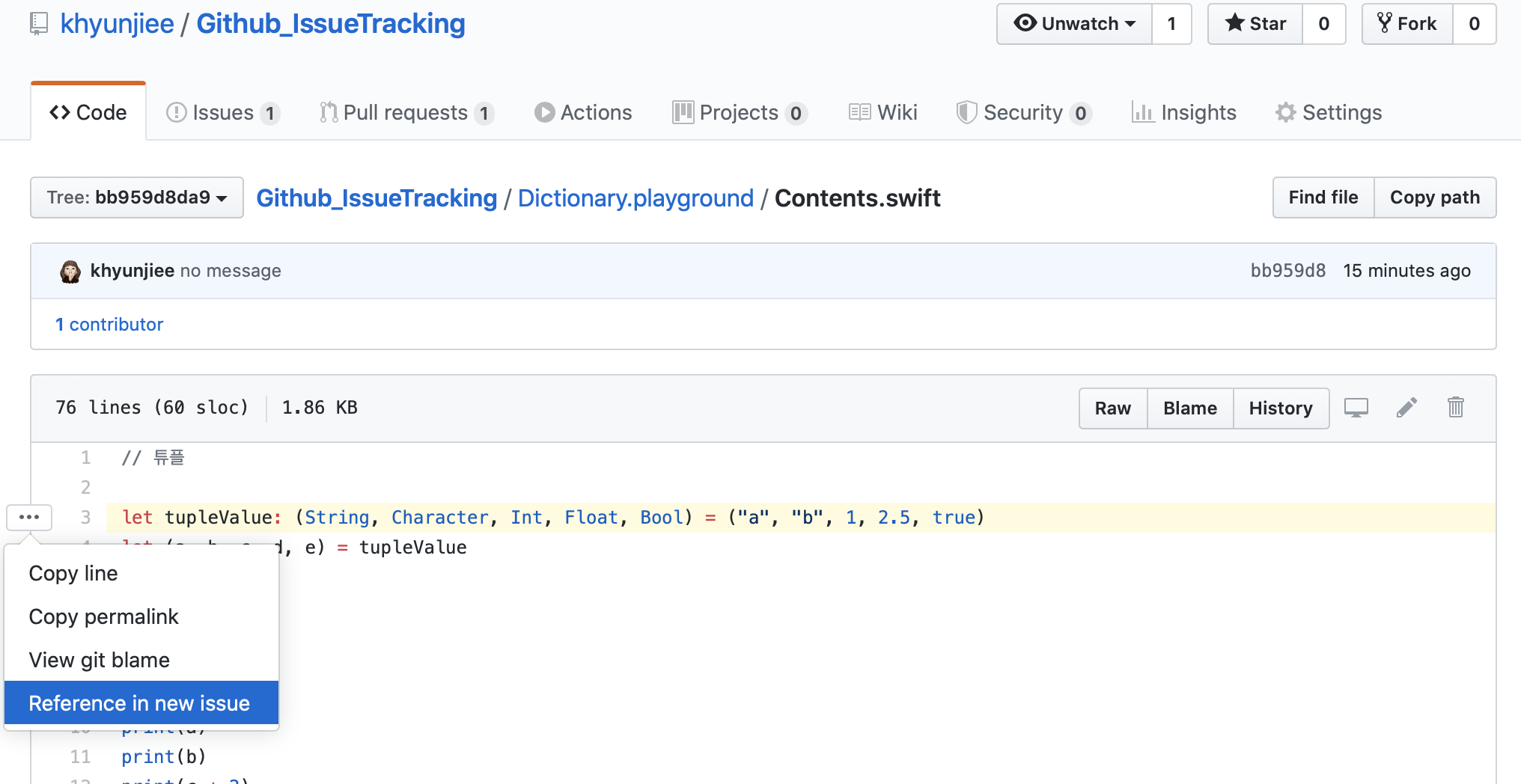
54 |
55 | - 이슈 검토 또는 풀 리퀘스트의 댓글에서 직접 이슈를 생성할 수도 있습니다.
56 | 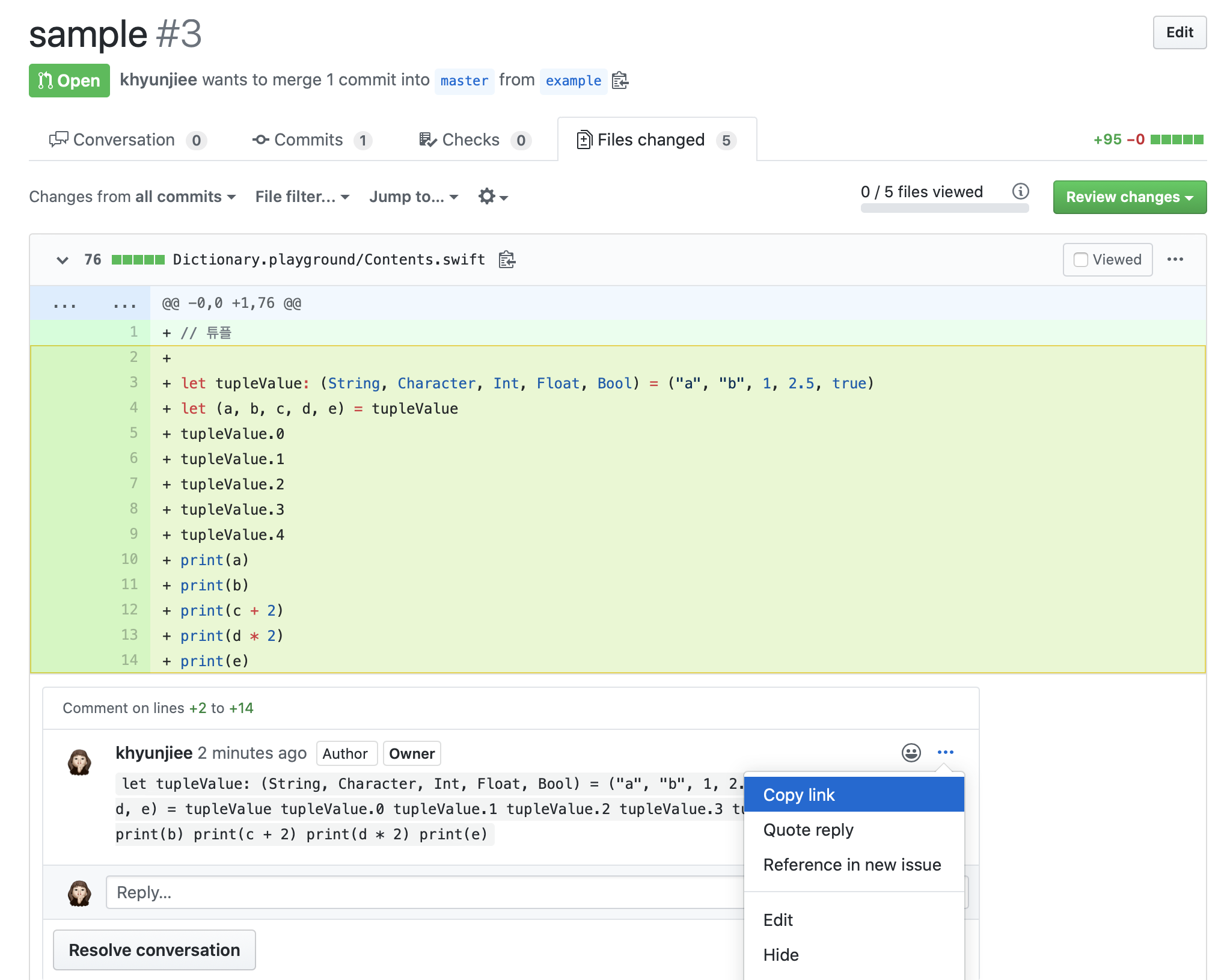
57 |
58 | Writer - jh park
59 | Email - jhparkintlot@gmail.com
60 | Instagram - jh_parkland
61 | [Homepage](https://www.jhpark.org/)
62 |
--------------------------------------------------------------------------------
/Issues Rules.md:
--------------------------------------------------------------------------------
1 | # Why write an issue
2 |
3 | - Use issues to track ideas, enhancements, tasks, or bugs for work on GitHub
4 | - You can collect user feedback, report software bugs, and organize tasks you'd like to accomplish with issues in a repository
5 | - You can link a pull request to an issue to show that a fix is in progress and to automatically close the issue when someone merges the pull request.
6 |
7 |
8 |
9 | # Create issue(default)
10 | - It can be created from the github repository.
11 | 
12 |
13 | - In the Repository where you want to create an issue, click New Issue in the Issue tab.
14 | Issues can include a title and a description of the issue.
15 | 
16 |
17 |
18 |
19 | ## create label
20 |
21 | > Label option
22 | The generated issues seem difficult to manage in the form of a list.
23 | What if there are too many issues?
24 | It will be difficult to find specific issues.
25 | To improve this problem, we use the Label function.
26 | Through labeling for each issue, you can search for issues and classify topics for each issue.
27 |
28 | 
29 |
30 | - In the issue detail page, you can designate the issue as the created label.
31 | 
32 | 
33 |
34 | **Labels should be used as a basis for dividing the priority of issues, categories, and other useful information.**
35 |
36 |
37 | ## Assigness
38 |
39 | - Assignees can be assigned to the issue.
40 | 
41 | 
42 |
43 | > If you look at the list of issues after assigning a label and a person in charge, you can see that it is neatly organized.
44 | You can search for issues by filtering in the Filters field through the designated label and assignee.
45 | However, even if Label and Assignee are assigned, similar issues exist for each function, and in order to find related issues or figure out how much of the corresponding functions are implemented, it is necessary to track them day by day.
46 |
47 |
48 | # Create issue(not default)
49 |
50 | - It can be created from the github repository.
51 | 
52 |
53 | - An issue can also be created with the code of an existing pull request.
54 | You can create an issue by selecting the code after View File you are requesting.
55 | 
56 |
57 | - You can also create an issue directly from a comment in the review of an issue or a pull request.
58 | 
59 |
60 | Writer - jh park
61 | Email - jhparkintlot@gmail.com
62 | Instagram - jh_parkland
63 | [Homepage](https://www.jhpark.org/)
64 |
--------------------------------------------------------------------------------
/Commit Rules.md:
--------------------------------------------------------------------------------
1 | # Need for Commit message
2 |
3 | - Communication with the team members
4 | - Convenient tracking of past records
5 | - You can check the progress related to the issue while writing the issue together
6 |
7 | # How to write a commit message
8 |
9 | ```
10 | Type: Subject
11 |
12 | Body
13 |
14 | Footer
15 | ```
16 |
17 | ## What mean type?
18 |
19 | - `Feat` - Add new function
20 | - `Fix` - Bug fixes
21 | - `Build` - Modify build related files
22 | - `Ci` - Modify CI(Continuity Integrated) related settings
23 | - `Docs` - Documentation (add, edit, delete documents)
24 | - `Style` - Style (code format, add semicolon: if no change in business logic)
25 | - `Refactor` - code refactoring
26 | - `Test` - Test (Add, modify, delete test code: if there is no change in business logic)
27 | - `Chore` - Miscellaneous changes (fix build scripts, etc.)
28 |
29 | ## How to writing subject?
30 |
31 | - Titles must be no longer than `50 characters`, and do not include periods.
32 | - Write the `commit type` together in the title.
33 | - `Do not use the past` tense and write in imperative.
34 | - The title and body are `separated` by a single space.
35 | - `The first letter `of the title must be `capitalized`.
36 | - The title or body text should `include the issue number` (if any)
37 |
38 | **Ex) Type - Subject**
39 | ~~~
40 | Feat: New recognition function added
41 | ~~~
42 |
43 | ## How to writing body?
44 | - `As this is optional`, there is no need to write body content in every commit.
45 | - Do not exceed `72 characters` on a line.
46 | - Write according to `what and why` rather than how.
47 | - It is used not only as a `description`, but also when writing the reason for the `commit`.
48 |
49 | **Ex) Body**
50 | ~~~
51 | New recognition function added
52 | -Reader.Js: Added recognition function due to user requirements
53 | ~~~
54 |
55 | ## How to writing Footer?
56 | - `It's optional`, so you don't need to put a footer on every commit.
57 | - Used to create an `issue tracker ID`.
58 | - `Resolution`: Used when resolving issues
59 | - `RELATED`: Issue number related to that commit
60 | - `Note`: Use if you have issues to refer to
61 |
62 | **Ex) Footer**
63 |
64 | ~~~
65 | Resolutuin : #issues number
66 | ~~~
67 |
68 | ## Hands - On
69 | ~~~
70 | Fead: New recognition function added
71 |
72 | New recognition function added
73 | -Reader.Js: Added recognition function due to user requirements
74 |
75 | Resolutuin : #1234
76 | ~~~
77 |
78 | ## Tip, Auto closing of issues with commit message
79 | > Git-hub is equipped with a function that `automatically closes` an issue when a reserved `keyword` is used when writing English in a commit message.
80 | Reserved words can be used `anywhere` in the commit message.
81 |
82 | ### Hands - On
83 | ~~~
84 | Keyword #issues number
85 | ~~~
86 |
87 | ### Auto closing keyword list
88 |
89 | - close
90 | - closes
91 | - closed
92 | - fix
93 | - fixes
94 | - fixed
95 | - resolve
96 | - resolves
97 | - resolved
98 |
99 | # Let's settle a culture that fits the Commit message Rule together.
100 |
101 | Writer - jh park
102 | Email - jhparkintlot@gmail.com
103 | Instagram - jh_parkland
104 | [Homepage](https://www.jhpark.org/)
105 |
--------------------------------------------------------------------------------
/Markdown.md:
--------------------------------------------------------------------------------
1 | ## 마크다운(markdown) 작성법
2 | ---
3 | ```
4 | 박스 안의 내용은 마크다운 작성 방식이다.
5 | ```
6 | 박스 밖의 내용은 박스 안의 내용이 실제로 마크다운에서 적용된 모습이다.
7 |
8 | ## 1. 헤더(Headers)
9 | * 글머리: 1~6까지만 지원
10 | ```
11 | # This is a H1
12 | ## This is a H2
13 | ### This is a H3
14 | #### This is a H4
15 | ##### This is a H5
16 | ###### This is a H6
17 | ```
18 | # This is a H1
19 | ## This is a H2
20 | ### This is a H3
21 | #### This is a H4
22 | ##### This is a H5
23 | ###### This is a H6
24 |
25 | ## 2. BlockQuote
26 | 이메일에서 사용하는 ```>``` 블럭인용문자를 이용한다.
27 | ```
28 | > This is a first blockqute.
29 | > > This is a second blockqute.
30 | > > > This is a third blockqute.
31 | ```
32 | > This is a first blockqute.
33 | > > This is a second blockqute.
34 | > > > This is a third blockqute.
35 |
36 | 이 안에서는 다른 마크다운 요소를 포함할 수 있다.
37 | > ### This is a H3
38 | > - List
39 | > ```
40 | > code
41 | > ```
42 |
43 | ## 3. 목록
44 | ### ● 순서있는 목록(번호)
45 | 순서있는 목록은 숫자와 점을 사용한다.
46 | ```
47 | 1. 첫번째
48 | 2. 두번째
49 | 3. 세번째
50 | ```
51 | 1. 첫번째
52 | 2. 두번째
53 | 3. 세번째
54 |
55 | **어떤 번호를 입력해도 순서는 내림차순으로 정의된다.**
56 | ```
57 | 1. 첫번째
58 | 3. 세번째
59 | 2. 두번째
60 | ```
61 | 1. 첫번째
62 | 3. 세번째
63 | 2. 두번째
64 |
65 | ### ● 순서없는 목록(글머리 기호: `*`, `+`, `-` 지원 / 어떤걸 써도 상관없다.)
66 | ```
67 | * 사람
68 | * 학생
69 | * 대학생
70 |
71 | + Alpha
72 | + Bravo
73 | + Charlie
74 |
75 | - 사야할 것
76 | - 아메리카노
77 | - 카페라떼
78 | ```
79 | * 사람
80 | * 학생
81 | * 대학생
82 |
83 | + Alpha
84 | + Bravo
85 | + Charlie
86 |
87 | - 사야할 것
88 | - 아메리카노
89 | - 카페라떼
90 |
91 | 혼합해서도 사용 가능하다
92 |
93 | ```
94 | * 1단계
95 | - 2단계
96 | + 3단계
97 | + 4단계
98 | ```
99 |
100 | * 1단계
101 | - 2단계
102 | + 3단계
103 | + 4단계
104 |
105 | ## 4. 코드
106 | **깃헙**에서는 코드블럭코드("\```") 시작점에 사용하는 언어를 선언하여 [문법강조(Syntax highlighting)](https://docs.github.com/en/github/writing-on-github/creating-and-highlighting-code-blocks#syntax-highlighting)이 가능하다.
107 |
108 |
109 |
110 | ```java
111 | public class BootSpringBootApplication {
112 |   public static void main(String[] args) {
113 |     System.out.println("Hello, GDSC DAU");
114 |   }
115 | }
116 | ```
117 |
118 |
119 |
120 | ```java
121 | public class BootSpringBootApplication {
122 | public static void main(String[] args) {
123 | System.out.println("Hello, GDSC DAU");
124 | }
125 | }
126 | ```
127 |
128 |
129 |
130 | ```c++
131 | #include
132 | int main()
133 | {
134 |     std::cout << "Hello, GDSC DAU" << std::endl;
135 |     return 0;
136 | }
137 | ```
138 |
139 |
140 |
141 | ```c++
142 | #include
143 | int main()
144 | {
145 | std::cout << "Hello, GDSC DAU" << std::endl;
146 | return 0;
147 | }
148 | ```
149 |
150 |
151 | ## 5. 수평선 ```
```
152 | 아래 줄은 모두 수평선을 만든다. 마크다운 문서를 미리보기로 출력할 때 *페이지 나누기* 용도로 많이 사용한다.
153 |
154 | ```
155 | * * *
156 | 1
157 | ***
158 | 2
159 | *****
160 | 3
161 | - - -
162 | 4
163 | ---------------------------------------
164 | ```
165 |
166 | * 적용예
167 | * * *
168 | 1
169 | ***
170 | 2
171 | *****
172 | 3
173 | - - -
174 | 4
175 | ---------------------------------------
176 |
177 | ## 6. 링크
178 | ```
179 | [Github](https://github.com/)
180 | ```
181 |
182 | [Github](https://github.com/)
183 |
184 | ```
185 | 일반적인 URL 혹은 이메일주소인 경우 적절한 형식으로 링크를 형성한다.
186 |
187 | * 외부링크:
188 | * 이메일링크:
189 | ```
190 |
191 | * 외부링크:
192 | * 이메일링크:
193 |
194 | ## 7. 강조
195 | ```
196 | *GDSC-DAU*
197 | _GDSC-DAU_
198 | **GDSC-DAU**
199 | __GDSC-DAU__
200 | ~~GDSC-DAU~~
201 | `GDSC-DAU`
202 | ```
203 |
204 | - *GDSC-DAU*
205 | - _GDSC-DAU_
206 | - **GDSC-DAU**
207 | - __GDSC-DAU__
208 | - ~~GDSC-DAU~~
209 | - `GDSC-DAU`
210 |
211 | > ```문장 중간에 사용할 경우에는 **띄어쓰기** 를 사용하는 것이 좋다.```
212 | > 문장 중간에 사용할 경우에는 띄어쓰기를 사용하는 것이 좋다.
213 |
214 |
215 | ## 8. 이미지
216 | ```
217 | 
218 | 
219 | ```
220 | 
221 | 
222 |
223 | 사이즈 조절 기능은 없기 때문에 ```![]() ```를 이용한다.
224 |
225 | 예
226 | ```
227 |
```를 이용한다.
224 |
225 | 예
226 | ```
227 | 
228 |
229 | ```
230 |
231 | 
232 |
233 |
234 | ## 9. 줄바꿈
235 | 2칸 이상 띄어쓰기(` `)후 Enter 하면 줄이 바뀐다.
236 |
237 | ```
238 | * 줄 바꿈을 하기 위해서는 문장 마지막에서 2칸이상을 띄어쓰기해야 한다.
239 | 이렇게
240 |
241 | * 줄 바꿈을 하기 위해서는 문장 마지막에서 2칸이상을 띄어쓰기해야 한다.___\\ 띄어쓰기
242 | 이렇게
243 | ```
244 |
245 | * 줄 바꿈을 하기 위해서는 문장 마지막에서 2칸이상을 띄어쓰기해야 한다.
246 | 이렇게
247 |
248 | * 줄 바꿈을 하기 위해서는 문장 마지막에서 2칸이상을 띄어쓰기해야 한다. \
249 | 이렇게
250 |
251 | ## 표
252 |
253 | 하이픈(-)는 세개이상
254 | :가 없을시 우측정렬
255 | 양쪽에 :가 있을시 중앙정렬
256 |
257 | ```
258 | |A|B|C|
259 | |---|---|---|
260 | |1|C++|Visual Studio|
261 | |2|Python|Colab|
262 |
263 | |DEF|GH|I|
264 | |:---:|:---|---:|
265 | |1|C++|Visual Studio|
266 | |2|Python|Colab|
267 | ```
268 | |A|B|C|
269 | |---|---|---|
270 | |1|C++|Visual Studio|
271 | |2|Python|Colab|
272 |
273 | |DEF|GH|I|
274 | |:---:|:---|---:|
275 | |1|C++|Visual Studio|
276 | |2|Python|Colab|
277 |
278 | [마크다운 표 제작 사이트](https://www.tablesgenerator.com/markdown_tables)
279 | ## 10. HTML
280 | - 마크다운만으로 표현이 부족하다고 느끼신다면, HTML 문법을 활용하시는 것도 좋습니다.
281 |
--------------------------------------------------------------------------------