├── faces1.jpg
├── faces2.jpg
├── hotels1.jpg
├── hotels2.jpg
├── faces_meanIm.npy
├── hotels_meanIm.npy
├── requirements.txt
├── similarity_ops.py
├── image_ops.py
├── README.md
└── visualize_similarity.py
/faces1.jpg:
--------------------------------------------------------------------------------
https://raw.githubusercontent.com/GWUvision/Similarity-Visualization/HEAD/faces1.jpg
--------------------------------------------------------------------------------
/faces2.jpg:
--------------------------------------------------------------------------------
https://raw.githubusercontent.com/GWUvision/Similarity-Visualization/HEAD/faces2.jpg
--------------------------------------------------------------------------------
/hotels1.jpg:
--------------------------------------------------------------------------------
https://raw.githubusercontent.com/GWUvision/Similarity-Visualization/HEAD/hotels1.jpg
--------------------------------------------------------------------------------
/hotels2.jpg:
--------------------------------------------------------------------------------
https://raw.githubusercontent.com/GWUvision/Similarity-Visualization/HEAD/hotels2.jpg
--------------------------------------------------------------------------------
/faces_meanIm.npy:
--------------------------------------------------------------------------------
https://raw.githubusercontent.com/GWUvision/Similarity-Visualization/HEAD/faces_meanIm.npy
--------------------------------------------------------------------------------
/hotels_meanIm.npy:
--------------------------------------------------------------------------------
https://raw.githubusercontent.com/GWUvision/Similarity-Visualization/HEAD/hotels_meanIm.npy
--------------------------------------------------------------------------------
/requirements.txt:
--------------------------------------------------------------------------------
1 | matplotlib==1.3.1
2 | numpy==1.15.4
3 | opencv-python==3.4.5.20
4 | Pillow==5.4.0
5 | tensorflow==1.12.0
6 |
--------------------------------------------------------------------------------
/similarity_ops.py:
--------------------------------------------------------------------------------
1 | import numpy as np
2 | from numpy import matlib as mb # matlib must be imported separately
3 |
4 | def compute_spatial_similarity(conv1,conv2):
5 | """
6 | Takes in the last convolutional layer from two images, computes the pooled output
7 | feature, and then generates the spatial similarity map for both images.
8 | """
9 | pool1 = np.mean(conv1,axis=0)
10 | pool2 = np.mean(conv2,axis=0)
11 | out_sz = (int(np.sqrt(conv1.shape[0])),int(np.sqrt(conv1.shape[0])))
12 | conv1_normed = conv1 / np.linalg.norm(pool1) / conv1.shape[0]
13 | conv2_normed = conv2 / np.linalg.norm(pool2) / conv2.shape[0]
14 | im_similarity = np.zeros((conv1_normed.shape[0],conv1_normed.shape[0]))
15 | for zz in range(conv1_normed.shape[0]):
16 | repPx = mb.repmat(conv1_normed[zz,:],conv1_normed.shape[0],1)
17 | im_similarity[zz,:] = np.multiply(repPx,conv2_normed).sum(axis=1)
18 | similarity1 = np.reshape(np.sum(im_similarity,axis=1),out_sz)
19 | similarity2 = np.reshape(np.sum(im_similarity,axis=0),out_sz)
20 | return similarity1, similarity2
21 |
--------------------------------------------------------------------------------
/image_ops.py:
--------------------------------------------------------------------------------
1 | import cv2
2 | import numpy as np
3 | from PIL import Image
4 | import matplotlib as mpl
5 | mpl.use('Agg')
6 | import matplotlib.pyplot as plt
7 |
8 | def load_and_resize(im_path):
9 | """
10 | Loads an image and resizes to 224x224.
11 | """
12 | bgr_img = cv2.imread(im_path)
13 | bgr_img = cv2.resize(bgr_img, (224,224))
14 | return bgr_img
15 |
16 | def preprocess_im(im_path,mean_im_path):
17 | """
18 | Takes in an the path to an image and a numpy array of the mean image for the dataset.
19 | Resizes the image to 224x224, subtracts off the mean image.
20 | Everything stays in BGR.
21 | """
22 | bgr_img = load_and_resize(im_path)
23 | mean_img = np.load(mean_im_path)
24 | img = bgr_img - mean_img
25 | return img
26 |
27 | def pil_bgr_to_rgb(img):
28 | b, g, r = img.split()
29 | return Image.merge("RGB", (r, g, b))
30 |
31 | def combine_image_and_heatmap(img,heatmap):
32 | """
33 | Takes in a numpy array for an image and the similarity heatmap.
34 | Blends the two images together and returns a np array of the blended image.
35 | """
36 | cmap = plt.get_cmap('jet') # colormap for the heatmap
37 | heatmap = heatmap - np.min(heatmap)
38 | heatmap /= np.max(heatmap)
39 | heatmap = cmap(np.max(heatmap)-heatmap)
40 | if np.max(heatmap) < 255.:
41 | heatmap *= 255
42 |
43 | heatmap_img = cv2.resize(heatmap,(224,224))
44 | bg = Image.fromarray(img.astype('uint8')).convert('RGBA')
45 | fg = Image.fromarray(heatmap_img.astype('uint8')).convert('RGBA')
46 | outIm = np.array(Image.blend(bg,fg,alpha=0.5))
47 | return outIm
48 |
49 | def combine_horz(images):
50 | """
51 | Combines two images into a single side-by-side PIL image object.
52 | """
53 | images = [Image.fromarray(img.astype('uint8')) for img in images]
54 | widths, heights = zip(*(i.size for i in images))
55 | total_width = sum(widths)
56 | max_height = max(heights)
57 | new_im = Image.new('RGB', (total_width, max_height))
58 | x_offset = 0
59 | for im in images:
60 | new_im.paste(im, (x_offset,0))
61 | x_offset += im.size[0]
62 | return new_im
63 |
--------------------------------------------------------------------------------
/README.md:
--------------------------------------------------------------------------------
1 | # Visualizing Deep Similarity Networks
2 | This repository contains code to generate the similarity visualizations for deep similarity, or embedding, networks described in https://arxiv.org/pdf/1901.00536.pdf (WACV 2019).
3 |
4 |
5 | 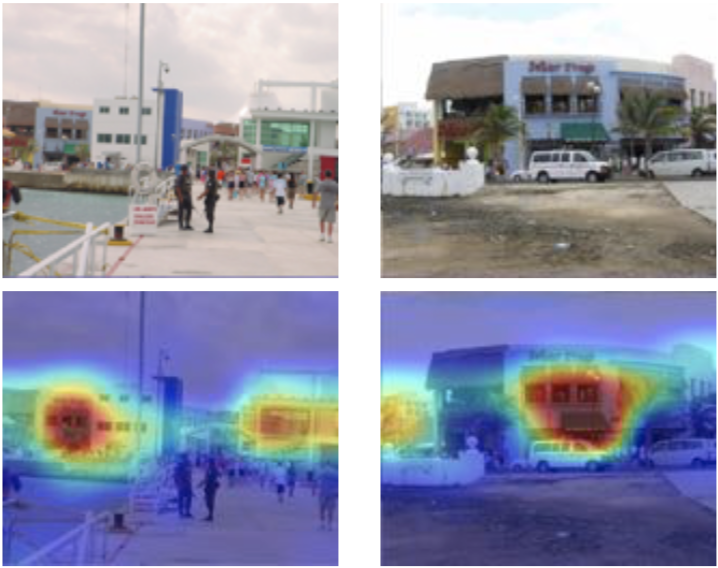 6 |
6 |
7 |
8 | Abstract: For convolutional neural network models that optimize an image embedding, we propose a method to highlight the regions of images that contribute most to pairwise similarity. This work is a corollary to the visualization tools developed for classification networks, but applicable to the problem domains better suited to similarity learning. The visualization shows how similarity networks that are fine-tuned learn to focus on different features. We also generalize our approach to embedding networks that use different pooling strategies and provide a simple mechanism to support image similarity searches on objects or sub-regions in the query image.
9 |
10 | ## Dependencies
11 | This code was run using the python libraries and versions listed in requirements.txt.
12 |
13 | To install these dependencies, run:
14 |
15 | ```
16 | pip install -r requirements.txt
17 | ```
18 |
19 | Other library versions may work, but have not been tested.
20 |
21 | ## Pretrained Models
22 | This code comes with example images from the [Hotels-50k](https://github.com/GWUvision/Hotels-50K) and [VGG-Faces2](http://www.robots.ox.ac.uk/~vgg/data/vgg_face2/) datasets.
23 |
24 | To generate the similarity visualizations, first download the pre-trained models:
25 | * Hotels: https://www2.seas.gwu.edu/~astylianou/similarity-visualization/hotels.tar.gz
26 | * Faces: https://www2.seas.gwu.edu/~astylianou/similarity-visualization/faces.tar.gz
27 |
28 | ## Code
29 | The main function to generate the similarity visualizations can be found in similarity_ops.py. The function, ```compute_spatial_similarity``` takes in the outputs of the final convolutional layer from an embedding network for a pair of images and returns two spatial similarity maps, one that explains which parts of the first image make it look like the second image, and one that explains which parts of the second image make it look like the first image.
30 |
31 | There are functions in image_ops.py that help interpolate and combine the original images with the similarity maps.
32 |
33 | The code in visualize_similarity.py provides an end to end demonstration, using either the Hotels-50K or VGG-Faces2 pretrained networks, of how to extract the output from the last convolutional layer using TensorFlow and generate the spatial similarity maps.
34 |
35 | ## Citation
36 | To cite this work, please use:
37 |
38 | ```
39 | @inproceedings{stylianouSimVis2019,
40 | author = {Stylianou, Abby and Souvenir, Richard and Pless, Robert},
41 | title = {Visualizing Deep Similarity Networks},
42 | booktitle = {IEEE Winter Conference on Applications of Computer Vision (WACV)},
43 | year = {2019}
44 | }
45 | ```
46 |
--------------------------------------------------------------------------------
/visualize_similarity.py:
--------------------------------------------------------------------------------
1 | from image_ops import *
2 | from similarity_ops import *
3 | import os
4 | import tensorflow as tf
5 | import tensorflow.contrib.slim as slim
6 | from tensorflow.contrib.slim.nets import resnet_v2
7 | # Recent versions may have a different TF slim models directory, such as:
8 | # import tensorflow.models.research.slim.nets.resnet_v2 as resnet_v2
9 |
10 | # Specify which dataset to use and which network to load ('faces' or 'hotels')
11 | # TODO: Include landmarks
12 | # You should have first downloaded and decompressed the pretrained networks from:
13 | # https://www2.seas.gwu.edu/~astylianou/similarity-visualization/faces.tar.gz
14 | # https://www2.seas.gwu.edu/~astylianou/similarity-visualization/hotels.tar.gz
15 | # If you didn't download these into the main directory, you'll need to change the "pretrained_net" variable
16 | which_dataset = 'faces'
17 | pretrained_net = os.path.join(which_dataset,which_dataset)
18 |
19 | # The mean image for each dataset is included in the repository.
20 | mean_im_path = which_dataset + '_meanIm.npy'
21 |
22 | # For this demo, there are two example images for each of the datasets.
23 | im1_path = which_dataset+'1.jpg'
24 | im2_path = which_dataset+'2.jpg'
25 |
26 | # Each batch will have two 256x256 RGB images
27 | image_batch = tf.placeholder(tf.float32, shape=[2, 224, 224, 3])
28 |
29 | # Load the model
30 | with slim.arg_scope(resnet_v2.resnet_arg_scope()):
31 | _, layers = resnet_v2.resnet_v2_50(image_batch, num_classes=128, is_training=True)
32 |
33 | # Specify which variables to restore when loading the pretrained network.
34 | variables_to_restore = [var for var in slim.get_model_variables()]
35 |
36 | # Start a session.
37 | # If you need to specify a GPU, you can pass in a tf.ConfigProto() to tf.Session()
38 | init_op = tf.global_variables_initializer()
39 | sess = tf.Session()
40 | sess.run(init_op)
41 |
42 | # Load the pre-trained network.
43 | # NOTE: Pre-trained networks were trained w/ L2 normalization on output features.
44 | restore_fn = slim.assign_from_checkpoint_fn(pretrained_net,variables_to_restore)
45 | restore_fn(sess)
46 |
47 | # Grab the output of the last convolutional layer
48 | last_conv = tf.squeeze(tf.get_default_graph().get_tensor_by_name("resnet_v2_50/postnorm/Relu:0"))
49 |
50 | # For this demo, load two example images from the same class.
51 | imgs = [preprocess_im(im,mean_im_path) for im in [im1_path,im2_path]]
52 |
53 | # Run the images through the network, get last conv features
54 | cv = sess.run(last_conv, feed_dict={image_batch: imgs})
55 |
56 | # Compute the spatial similarity maps (returns a heatmap that's the size of the last conv layer)
57 | heatmap1, heatmap2 = compute_spatial_similarity(cv[0].reshape(-1,cv[0].shape[-1]),cv[1].reshape(-1,cv[1].shape[-1]))
58 |
59 | # Combine the images with the (interpolated) similarity heatmaps.
60 | im1_with_similarity = combine_image_and_heatmap(load_and_resize(im1_path),heatmap1)
61 | im2_with_similarity = combine_image_and_heatmap(load_and_resize(im2_path),heatmap2)
62 |
63 | # Merge the two images into a single image and save it out
64 | combined_image = pil_bgr_to_rgb(combine_horz([im1_with_similarity,im2_with_similarity]))
65 | combined_image.save(os.path.join('.',which_dataset+'_similarity.jpg'))
66 |
--------------------------------------------------------------------------------