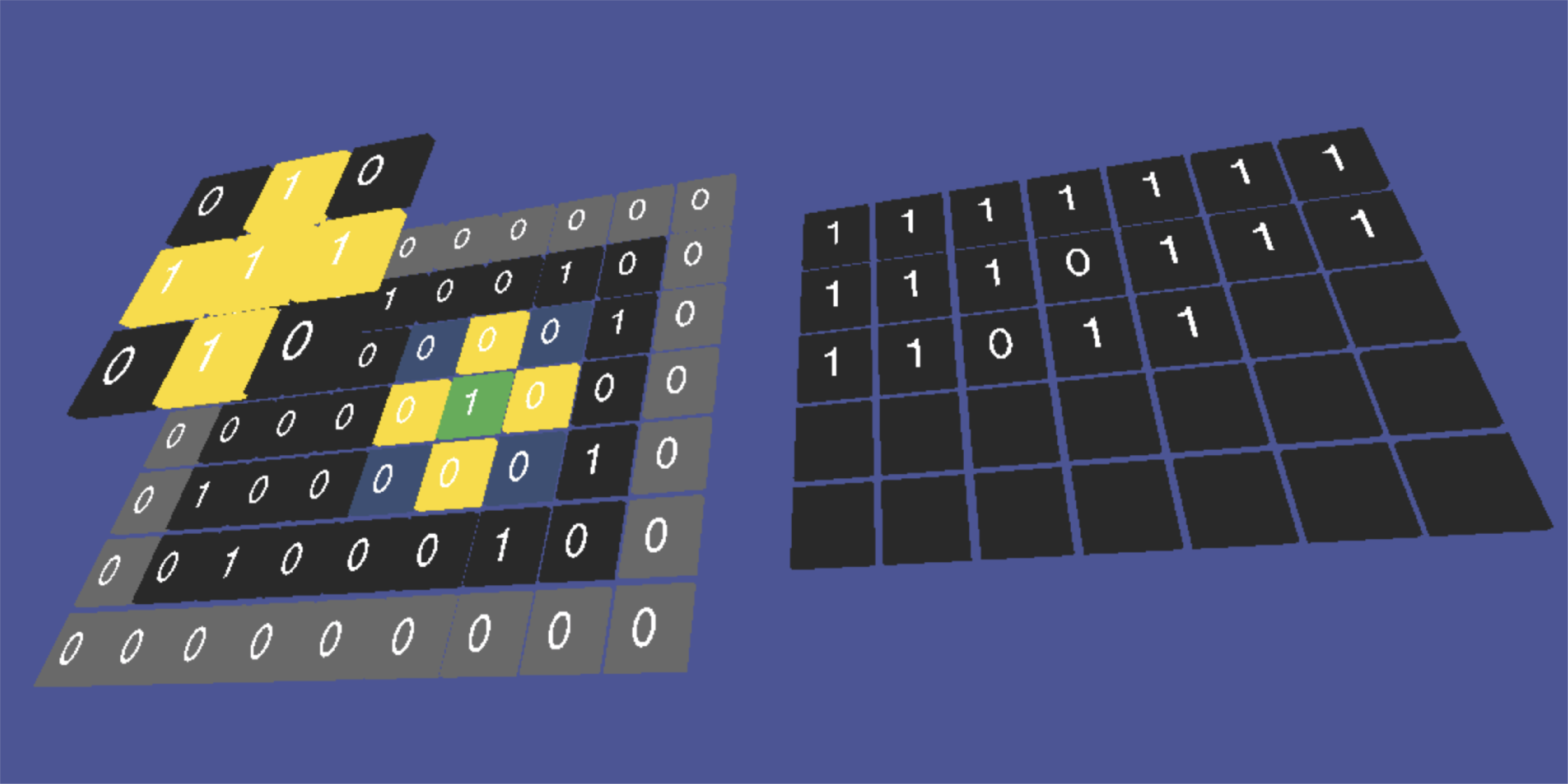
├── .gitignore
├── Dilation
├── assets
│ ├── dilation.png
│ ├── flash-image1.png
│ ├── flash-screen.png
│ ├── result-image.png
│ ├── original-image.png
│ ├── resultDilation.jpg
│ ├── dilation animation.avi
│ └── dilation7x7sample2.jpg
├── Dilation Animation Js
│ ├── assets
│ │ ├── favicon.png
│ │ ├── header-image.png
│ │ └── geekosophers-logo.png
│ ├── js
│ │ ├── drawCube.js
│ │ ├── drawText.js
│ │ ├── sketch.js
│ │ └── dilationAnimation.js
│ ├── css
│ │ └── styles.css
│ ├── index.html
│ └── animation.html
├── Dilation Animation
│ ├── drawOne.py
│ ├── makeSquareMatrix.py
│ ├── drawZero.py
│ ├── makeSquareResultMatrix.py
│ ├── makeKernelMatrix.py
│ ├── button.py
│ ├── flash-screen.py
│ ├── textures.py
│ ├── dilationAnimation.py
│ ├── graphics.py
│ └── input.py
├── grayscaleDilation.py
└── binaryDilation.py
├── Erosion
├── assets
│ ├── resultErosion.jpg
│ └── erosion7x7sample2.jpg
├── Erosion Animation Js
│ ├── assets
│ │ └── favicon.png
│ ├── js
│ │ ├── drawCube.js
│ │ ├── drawText.js
│ │ ├── sketch.js
│ │ └── erosionAnimation.js
│ ├── index.html
│ ├── animation.html
│ └── css
│ │ └── styles.css
├── grayscaleErosion.py
└── binaryErosion.py
├── Closing
├── Closing Animation Js
│ ├── assets
│ │ └── favicon.png
│ ├── js
│ │ ├── drawCube.js
│ │ ├── drawText.js
│ │ ├── sketch.js
│ │ └── closingAnimation.js
│ ├── index.html
│ ├── animation.html
│ └── css
│ │ └── styles.css
├── grayscaleClosing.py
└── binaryClosing.py
├── Opening
├── Opening Animation Js
│ ├── assets
│ │ └── favicon.png
│ ├── js
│ │ ├── drawCube.js
│ │ ├── drawText.js
│ │ ├── sketch.js
│ │ └── openingAnimation.js
│ ├── index.html
│ ├── animation.html
│ └── css
│ │ └── styles.css
├── grayscaleOpening.py
└── binaryOpening.py
├── requirements.txt
├── index.html
└── README.md
/.gitignore:
--------------------------------------------------------------------------------
1 | gs-morph/
2 | .DS_Store
3 | .vscode/
4 | Dilation/Dilation Animation/__pycache__/
--------------------------------------------------------------------------------
/Dilation/assets/dilation.png:
--------------------------------------------------------------------------------
https://raw.githubusercontent.com/Geekosophers/morphological-operations/HEAD/Dilation/assets/dilation.png
--------------------------------------------------------------------------------
/Dilation/assets/flash-image1.png:
--------------------------------------------------------------------------------
https://raw.githubusercontent.com/Geekosophers/morphological-operations/HEAD/Dilation/assets/flash-image1.png
--------------------------------------------------------------------------------
/Dilation/assets/flash-screen.png:
--------------------------------------------------------------------------------
https://raw.githubusercontent.com/Geekosophers/morphological-operations/HEAD/Dilation/assets/flash-screen.png
--------------------------------------------------------------------------------
/Dilation/assets/result-image.png:
--------------------------------------------------------------------------------
https://raw.githubusercontent.com/Geekosophers/morphological-operations/HEAD/Dilation/assets/result-image.png
--------------------------------------------------------------------------------
/Erosion/assets/resultErosion.jpg:
--------------------------------------------------------------------------------
https://raw.githubusercontent.com/Geekosophers/morphological-operations/HEAD/Erosion/assets/resultErosion.jpg
--------------------------------------------------------------------------------
/Dilation/assets/original-image.png:
--------------------------------------------------------------------------------
https://raw.githubusercontent.com/Geekosophers/morphological-operations/HEAD/Dilation/assets/original-image.png
--------------------------------------------------------------------------------
/Dilation/assets/resultDilation.jpg:
--------------------------------------------------------------------------------
https://raw.githubusercontent.com/Geekosophers/morphological-operations/HEAD/Dilation/assets/resultDilation.jpg
--------------------------------------------------------------------------------
/Erosion/assets/erosion7x7sample2.jpg:
--------------------------------------------------------------------------------
https://raw.githubusercontent.com/Geekosophers/morphological-operations/HEAD/Erosion/assets/erosion7x7sample2.jpg
--------------------------------------------------------------------------------
/Dilation/assets/dilation animation.avi:
--------------------------------------------------------------------------------
https://raw.githubusercontent.com/Geekosophers/morphological-operations/HEAD/Dilation/assets/dilation animation.avi
--------------------------------------------------------------------------------
/Dilation/assets/dilation7x7sample2.jpg:
--------------------------------------------------------------------------------
https://raw.githubusercontent.com/Geekosophers/morphological-operations/HEAD/Dilation/assets/dilation7x7sample2.jpg
--------------------------------------------------------------------------------
/Closing/Closing Animation Js/assets/favicon.png:
--------------------------------------------------------------------------------
https://raw.githubusercontent.com/Geekosophers/morphological-operations/HEAD/Closing/Closing Animation Js/assets/favicon.png
--------------------------------------------------------------------------------
/Erosion/Erosion Animation Js/assets/favicon.png:
--------------------------------------------------------------------------------
https://raw.githubusercontent.com/Geekosophers/morphological-operations/HEAD/Erosion/Erosion Animation Js/assets/favicon.png
--------------------------------------------------------------------------------
/Opening/Opening Animation Js/assets/favicon.png:
--------------------------------------------------------------------------------
https://raw.githubusercontent.com/Geekosophers/morphological-operations/HEAD/Opening/Opening Animation Js/assets/favicon.png
--------------------------------------------------------------------------------
/Dilation/Dilation Animation Js/assets/favicon.png:
--------------------------------------------------------------------------------
https://raw.githubusercontent.com/Geekosophers/morphological-operations/HEAD/Dilation/Dilation Animation Js/assets/favicon.png
--------------------------------------------------------------------------------
/Dilation/Dilation Animation Js/assets/header-image.png:
--------------------------------------------------------------------------------
https://raw.githubusercontent.com/Geekosophers/morphological-operations/HEAD/Dilation/Dilation Animation Js/assets/header-image.png
--------------------------------------------------------------------------------
/Dilation/Dilation Animation Js/assets/geekosophers-logo.png:
--------------------------------------------------------------------------------
https://raw.githubusercontent.com/Geekosophers/morphological-operations/HEAD/Dilation/Dilation Animation Js/assets/geekosophers-logo.png
--------------------------------------------------------------------------------
/requirements.txt:
--------------------------------------------------------------------------------
1 | altgraph==0.17
2 | macholib==1.14
3 | numpy==1.18.5
4 | opencv-python==4.4.0.42
5 | Pillow==7.2.0
6 | pygame==2.0.0
7 | pyinstaller==4.1
8 | pyinstaller-hooks-contrib==2020.10
9 | PyOpenGL==3.1.5
10 |
--------------------------------------------------------------------------------
/index.html:
--------------------------------------------------------------------------------
1 |
2 |
3 | Morphological Operations
4 | This page is intentionally left blank.
9 |
10 |
--------------------------------------------------------------------------------
/Dilation/Dilation Animation/drawOne.py:
--------------------------------------------------------------------------------
1 | # from math import *
2 | from OpenGL.GL import *
3 |
4 | def drawOne(posx,posy,kernel,HEIGHT=0):
5 | sides = 32
6 | radius = 0.25
7 | if(kernel):
8 | glVertex3f(posx,posy-0.25,HEIGHT)
9 | glVertex3f(posx,posy+0.25,HEIGHT)
10 | else:
11 | glVertex2f(posx,posy-0.25)
12 | glVertex2f(posx,posy+0.25)
--------------------------------------------------------------------------------
/Dilation/Dilation Animation/makeSquareMatrix.py:
--------------------------------------------------------------------------------
1 | def makeSquareMatrix(n1,n2):
2 | squares = []
3 | squareMatrix = []
4 |
5 | def setVertices(x,y):
6 | squares.append([(x,y,0),(x+1,y,0),(x+1,y-1,0),(x,y-1,0)])
7 |
8 | for y in range(n2):
9 | for x in range(n1):
10 | setVertices(x,-y)
11 | squareMatrix.append(squares)
12 | squares = []
13 |
14 | return squareMatrix
--------------------------------------------------------------------------------
/Dilation/Dilation Animation/drawZero.py:
--------------------------------------------------------------------------------
1 | from math import *
2 | from OpenGL.GL import *
3 |
4 | def drawZero(posx,posy,kernel,HEIGHT=0):
5 | sides = 32
6 | radius = 0.25
7 |
8 | for j in range(100):
9 | cosine = radius * cos(j*2*pi/sides) + posx
10 | sine = radius * sin(j*2*pi/sides) + posy
11 | if(kernel):
12 | glVertex3f(cosine,sine,HEIGHT)
13 | else:
14 | glVertex2f(cosine,sine)
--------------------------------------------------------------------------------
/Dilation/Dilation Animation/makeSquareResultMatrix.py:
--------------------------------------------------------------------------------
1 | def makeSquareResultMatrix(n1,n2):
2 | resultSquares = []
3 | squareResultMatrix = []
4 |
5 | def setVertices(x,y):
6 | resultSquares.append([(x,y,0),(x+1,y,0),(x+1,y-1,0),(x,y-1,0)])
7 |
8 | for y in range(1,n2-1):
9 | for x in range(1,n1-1):
10 | setVertices(x+n1+1,-y)
11 | squareResultMatrix.append(resultSquares)
12 | resultSquares = []
13 |
14 | return squareResultMatrix
--------------------------------------------------------------------------------
/Dilation/Dilation Animation/makeKernelMatrix.py:
--------------------------------------------------------------------------------
1 | def makeKernelMatrix(xindex,yindex,HEIGHT,kn1,kn2):
2 | kernelSquares = []
3 | kernelSquareMatrix = []
4 |
5 | kernelSquareMatrix = []
6 |
7 | def setKernel(x,y):
8 | kernelSquares.append([(x+xindex,y-yindex,HEIGHT),(x+1+xindex,y-yindex,HEIGHT),(x+1+xindex,y-1-yindex,HEIGHT),(x+xindex,y-1-yindex,HEIGHT)])
9 |
10 | for y in range(kn2):
11 | for x in range(kn1):
12 | setKernel(x,-y)
13 | kernelSquareMatrix.append(kernelSquares)
14 | kernelSquares = []
15 |
16 | return kernelSquareMatrix
--------------------------------------------------------------------------------
/Opening/grayscaleOpening.py:
--------------------------------------------------------------------------------
1 | import numpy as np
2 | import cv2
3 |
4 | # input image array
5 | img = np.array([[3, 4, 8, 1, 7],
6 | [9, 4, 2, 1, 6],
7 | [7, 8, 8, 1, 1]], np.uint8)
8 |
9 | # kernel array
10 | kernel = np.array([[0, 1, 0],
11 | [1, 1, 0],
12 | [0, 1, 0]], np.uint8)
13 |
14 | # performing opening using erosion followed by dilation
15 | erosion = cv2.erode(img,kernel,iterations = 1)
16 | dilation = cv2.dilate(erosion,kernel,iterations = 1)
17 |
18 | # performing opening using its function
19 | opening = cv2.morphologyEx(img, cv2.MORPH_OPEN, kernel)
20 |
21 | print(dilation)
22 | print(opening)
23 | print(dilation==opening)
24 |
25 | # Conclusion
26 | # Opening is just another way of saying erosion followed by dialtion
--------------------------------------------------------------------------------
/Closing/grayscaleClosing.py:
--------------------------------------------------------------------------------
1 | import numpy as np
2 | import cv2
3 |
4 | # input image array
5 | img = np.array([[3, 4, 8, 1, 7],
6 | [9, 4, 2, 1, 6],
7 | [7, 8, 8, 1, 1]], np.uint8)
8 |
9 | # kernel array
10 | kernel = np.array([[0, 1, 0],
11 | [1, 1, 0],
12 | [0, 1, 0]], np.uint8)
13 |
14 | # performing closing using dilation followed by erosion
15 | dilation = cv2.dilate(img,kernel,iterations = 1)
16 | erosion = cv2.erode(dilation,kernel,iterations = 1)
17 |
18 |
19 | # performing closing using its function
20 | closing = cv2.morphologyEx(img, cv2.MORPH_CLOSE, kernel)
21 |
22 | print(erosion)
23 | print(closing)
24 | print(erosion==closing)
25 |
26 | # Conclusion
27 | # Closing is just another way of saying dilation followed by erosion
--------------------------------------------------------------------------------
/Closing/Closing Animation Js/js/drawCube.js:
--------------------------------------------------------------------------------
1 | // const texture = new THREE.TextureLoader().load( 'assets/frame.PNG' );
2 | // create the shape
3 | var geometry = new THREE.BoxGeometry( 0.9, 0.9, 0.1);
4 |
5 | // const material = new THREE.MeshBasicMaterial( { map: texture } );
6 | var drawCube = function(xpos,ypos,zpos){
7 | // material, color and image texture
8 | // var material = new THREE.MeshBasicMaterial( { color: 0xe14e87, wireframe: false } );
9 | var cube = new THREE.Mesh( geometry, material);
10 | cube.position.set(xpos,ypos,zpos);
11 | scene.add(cube);
12 | };
13 |
14 | // grey cube color = 0x292929
15 | // padding cube color = 0x696969
16 |
17 | var drawCube = function(xpos,ypos,zpos,colorOfCube){
18 | // material, color and image texture
19 | var material = new THREE.MeshBasicMaterial( { color: colorOfCube, wireframe: false } );
20 | var cube = new THREE.Mesh( geometry, material);
21 | cube.position.set(xpos,ypos,zpos);
22 | scene.add(cube);
23 | return cube;
24 | };
--------------------------------------------------------------------------------
/Erosion/Erosion Animation Js/js/drawCube.js:
--------------------------------------------------------------------------------
1 | // const texture = new THREE.TextureLoader().load( 'assets/frame.PNG' );
2 | // create the shape
3 | var geometry = new THREE.BoxGeometry( 0.9, 0.9, 0.1);
4 |
5 | // const material = new THREE.MeshBasicMaterial( { map: texture } );
6 | var drawCube = function(xpos,ypos,zpos){
7 | // material, color and image texture
8 | // var material = new THREE.MeshBasicMaterial( { color: 0xe14e87, wireframe: false } );
9 | var cube = new THREE.Mesh( geometry, material);
10 | cube.position.set(xpos,ypos,zpos);
11 | scene.add(cube);
12 | };
13 |
14 | // grey cube color = 0x292929
15 | // padding cube color = 0x696969
16 |
17 | var drawCube = function(xpos,ypos,zpos,colorOfCube){
18 | // material, color and image texture
19 | var material = new THREE.MeshBasicMaterial( { color: colorOfCube, wireframe: false } );
20 | var cube = new THREE.Mesh( geometry, material);
21 | cube.position.set(xpos,ypos,zpos);
22 | scene.add(cube);
23 | return cube;
24 | };
--------------------------------------------------------------------------------
/Opening/Opening Animation Js/js/drawCube.js:
--------------------------------------------------------------------------------
1 | // const texture = new THREE.TextureLoader().load( 'assets/frame.PNG' );
2 | // create the shape
3 | var geometry = new THREE.BoxGeometry( 0.9, 0.9, 0.1);
4 |
5 | // const material = new THREE.MeshBasicMaterial( { map: texture } );
6 | var drawCube = function(xpos,ypos,zpos){
7 | // material, color and image texture
8 | // var material = new THREE.MeshBasicMaterial( { color: 0xe14e87, wireframe: false } );
9 | var cube = new THREE.Mesh( geometry, material);
10 | cube.position.set(xpos,ypos,zpos);
11 | scene.add(cube);
12 | };
13 |
14 | // grey cube color = 0x292929
15 | // padding cube color = 0x696969
16 |
17 | var drawCube = function(xpos,ypos,zpos,colorOfCube){
18 | // material, color and image texture
19 | var material = new THREE.MeshBasicMaterial( { color: colorOfCube, wireframe: false } );
20 | var cube = new THREE.Mesh( geometry, material);
21 | cube.position.set(xpos,ypos,zpos);
22 | scene.add(cube);
23 | return cube;
24 | };
--------------------------------------------------------------------------------
/Dilation/Dilation Animation Js/js/drawCube.js:
--------------------------------------------------------------------------------
1 | // const texture = new THREE.TextureLoader().load( 'assets/frame.PNG' );
2 | // create the shape
3 | var geometry = new THREE.BoxGeometry( 0.9, 0.9, 0.1);
4 |
5 | // const material = new THREE.MeshBasicMaterial( { map: texture } );
6 | var drawCube = function(xpos,ypos,zpos){
7 | // material, color and image texture
8 | // var material = new THREE.MeshBasicMaterial( { color: 0xe14e87, wireframe: false } );
9 | var cube = new THREE.Mesh( geometry, material);
10 | cube.position.set(xpos,ypos,zpos);
11 | scene.add(cube);
12 | };
13 |
14 | // grey cube color = 0x292929
15 | // padding cube color = 0x696969
16 |
17 | var drawCube = function(xpos,ypos,zpos,colorOfCube){
18 | // material, color and image texture
19 | var material = new THREE.MeshBasicMaterial( { color: colorOfCube, wireframe: false } );
20 | var cube = new THREE.Mesh( geometry, material);
21 | cube.position.set(xpos,ypos,zpos);
22 | scene.add(cube);
23 | return cube;
24 | };
--------------------------------------------------------------------------------
/Dilation/grayscaleDilation.py:
--------------------------------------------------------------------------------
1 | import numpy as np
2 | import cv2
3 |
4 | # Comment lines 9 to 12 and uncomment lines 5 and 6 to perform dialtion on a real image.
5 | # filepath = 'Dilation/assets/dilation7x7sample2.jpg'
6 | # img = cv2.imread(filepath,0)
7 |
8 | # The following code uses a grayscale range 0-255 where 0 represents a black pixel and 255 represents a white pixel.
9 | img = np.array([[3, 4, 8, 1, 7],
10 | [9, 4, 2, 1, 6],
11 | [7, 8, 8, 1, 1]], np.uint8)
12 |
13 | kernel = np.array([[0, 1, 0],
14 | [1, 1, 0],
15 | [0, 1, 0]], np.uint8)
16 |
17 | dilation = cv2.dilate(img,kernel,iterations = 1)
18 |
19 | outpath = 'Dilation/assets/resultDilation.jpg'
20 | cv2.imwrite(outpath,dilation)
21 |
22 | ##################################################################
23 |
24 | # The code automatically creates a padding of '0' around the image
25 |
26 | # Input Image (3X5):
27 | # 3 4 8 1 7
28 | # 9 4 2 1 6
29 | # 7 8 8 1 1
30 |
31 | # Padded Image for 3X3 kernel:
32 | # 0 0 0 0 0 0 0
33 | # 0 3 4 8 1 7 0
34 | # 0 9 4 2 1 6 0
35 | # 0 7 8 8 1 1 0
36 | # 0 0 0 0 0 0 0
37 |
38 | # Padded Image for 5X5 kernel:
39 | # 0 0 0 0 0 0 0 0 0
40 | # 0 0 0 0 0 0 0 0 0
41 | # 0 0 3 4 8 1 7 0 0
42 | # 0 0 9 4 2 1 6 0 0
43 | # 0 0 7 8 8 1 1 0 0
44 | # 0 0 0 0 0 0 0 0 0
45 | # 0 0 0 0 0 0 0 0 0
46 |
47 | ##################################################################
--------------------------------------------------------------------------------
/Closing/binaryClosing.py:
--------------------------------------------------------------------------------
1 | import numpy as np
2 | import cv2
3 |
4 | # In binary sometimes we express a black pixel and a white pixel as 0 and 1 respectively.
5 | # In the following code 0 denotes a black pixel and 255 denotes a white pixel. Read observations at the bottom to get full idea.
6 |
7 | # input image array
8 | img = np.array([[ 1, 1, 0, 0, 0],
9 | [ 1, 1, 1, 0, 1],
10 | [ 0, 1, 1, 0, 1],
11 | [ 0, 1, 1, 0, 1],
12 | [ 0, 0, 0, 0, 0],
13 | [ 1, 1, 0, 0, 0]], np.uint8)
14 |
15 | # kernel array
16 | kernel = np.array([[1, 1, 0],
17 | [1, 1, 0],
18 | [1, 1, 0]], np.uint8)
19 |
20 | # performing closing using dilation followed by erosion
21 | dilation = cv2.dilate(img,kernel,iterations = 1)
22 | erosion = cv2.erode(dilation,kernel,iterations = 1)
23 |
24 | # performing closing using its function
25 | closing = cv2.morphologyEx(img, cv2.MORPH_CLOSE, kernel)
26 |
27 | print(erosion)
28 | print(closing)
29 | print(erosion==closing)
30 |
31 | # Conclusion
32 | # Closing is just another way of saying dilation followed by erosion
33 |
34 | # Observations:
35 | # The 0s and 1s in the numpy array 'img' does not denote white and black.
36 | # It represents the actual pixel value in grayscale range 0-255.
37 | # To output the array in the form of the image will result in an image showing pixel value 1 which appears to be black.
38 | # To get black and white image output, replace 1 with 255 in 'img' array
--------------------------------------------------------------------------------
/Opening/binaryOpening.py:
--------------------------------------------------------------------------------
1 | import numpy as np
2 | import cv2
3 |
4 | # In binary sometimes we express a black pixel and a white pixel as 0 and 1 respectively.
5 | # In the following code 0 denotes a black pixel and 255 denotes a white pixel. Read observations at the bottom to get full idea.
6 |
7 | # input image array
8 | img = np.array([[ 1, 1, 0, 0, 0],
9 | [ 1, 1, 1, 0, 1],
10 | [ 0, 1, 1, 0, 1],
11 | [ 0, 1, 1, 0, 1],
12 | [ 0, 0, 0, 0, 0],
13 | [ 1, 1, 0, 0, 0]], np.uint8)
14 |
15 | # kernel array
16 | kernel = np.array([[1, 1, 0],
17 | [1, 1, 0],
18 | [1, 1, 0]], np.uint8)
19 |
20 | # performing opening using erosion followed by dilation
21 | erosion = cv2.erode(img,kernel,iterations = 1)
22 | dilation = cv2.dilate(erosion,kernel,iterations = 1)
23 |
24 | # performing opening using its function
25 | opening = cv2.morphologyEx(img, cv2.MORPH_OPEN, kernel)
26 |
27 | print(dilation)
28 | print(opening)
29 | print(dilation==opening)
30 |
31 | # Conclusion
32 | # Opening is just another way of saying erosion followed by dialtion
33 |
34 | # Observations:
35 | # The 0s and 1s in the numpy array 'img' does not denote white and black.
36 | # It represents the actual pixel value in grayscale range 0-255.
37 | # To output the array in the form of the image will result in an image showing pixel value 1 which appears to be black.
38 | # To get black and white image output, replace 1 with 255 in 'img' array
--------------------------------------------------------------------------------
/Erosion/grayscaleErosion.py:
--------------------------------------------------------------------------------
1 | import numpy as np
2 | import cv2
3 |
4 | # Comment lines 9 to 12 and uncomment lines 5 and 6 to perform erosion on a real image.
5 | # filepath = 'Erosion/assets/erosion7x7sample2.jpg'
6 | # img = cv2.imread(filepath,0)
7 |
8 | # The following code uses a grayscale range 0-255 where 0 represents a black pixel and 255 represents a white pixel.
9 | img = np.array([[3, 4, 8, 1, 7],
10 | [9, 4, 2, 1, 6],
11 | [7, 8, 8, 1, 1]], np.uint8)
12 |
13 | kernel = np.array([[0, 1, 0],
14 | [1, 1, 0],
15 | [0, 1, 0]], np.uint8)
16 |
17 | erosion = cv2.erode(img,kernel,iterations = 1)
18 |
19 | outpath = 'Erosion/assets/resultErosion.jpg'
20 | cv2.imwrite(outpath,erosion)
21 |
22 | ##################################################################
23 |
24 | # The code automatically creates a padding of '255' around the image
25 |
26 | # Input Image (3X5):
27 | # 3 4 8 1 7
28 | # 9 4 2 1 6
29 | # 7 8 8 1 1
30 |
31 | # Padded Image for 3X3 kernel:
32 | # 255 255 255 255 255 255 255
33 | # 255 3 4 8 1 7 255
34 | # 255 9 4 2 1 6 255
35 | # 255 7 8 8 1 1 255
36 | # 255 255 255 255 255 255 255
37 |
38 | # Padded Image for 5X5 kernel:
39 | # 255 255 255 255 255 255 255 255 255
40 | # 255 255 255 255 255 255 255 255 255
41 | # 255 255 3 4 8 1 7 255 255
42 | # 255 255 9 4 2 1 6 255 255
43 | # 255 255 7 8 8 1 1 255 255
44 | # 255 255 255 255 255 255 255 255 255
45 | # 255 255 255 255 255 255 255 255 255
46 |
47 | ##################################################################
--------------------------------------------------------------------------------
/Dilation/Dilation Animation Js/js/drawText.js:
--------------------------------------------------------------------------------
1 | var kernelTextTemp = []
2 |
3 | var drawText = function(xpos,ypos,zpos,textName,isKernel,pushToArray){
4 | const loader = new THREE.FontLoader();
5 |
6 |
7 | const text = '';
8 |
9 | loader.load( 'fonts/helvetiker_regular.typeface.json', function ( font ) {
10 |
11 | const color = 0xFFFFFF;
12 |
13 | const matDark = new THREE.LineBasicMaterial( {
14 | color: color,
15 | side: THREE.DoubleSide
16 | } );
17 |
18 | const matLite = new THREE.MeshBasicMaterial( {
19 | color: color,
20 | transparent: true,
21 | opacity: 1,
22 | side: THREE.DoubleSide
23 | } );
24 |
25 | const message = textName;
26 |
27 | const shapes = font.generateShapes( message, 0.4 );
28 |
29 | const geometry = new THREE.ShapeBufferGeometry( shapes );
30 |
31 | geometry.computeBoundingBox();
32 |
33 | // const xMid = - 0.5 * ( geometry.boundingBox.max.x - geometry.boundingBox.min.x );
34 |
35 | // geometry.translate( xMid, 0, 0 );
36 |
37 |
38 | const text = new THREE.Mesh( geometry, matLite );
39 | text.position.x = xpos;
40 | text.position.y = ypos;
41 | text.position.z = zpos;
42 | scene.add( text );
43 |
44 | if(isKernel==true)
45 | kernelTextTemp.push(text);
46 |
47 | if(isKernel && pushToArray){
48 | kernelText.push(kernelTextTemp)
49 | kernelTextTemp = []
50 | }
51 |
52 |
53 | } ); //end load function
54 | // console.log(text);
55 | };
--------------------------------------------------------------------------------
/Closing/Closing Animation Js/js/drawText.js:
--------------------------------------------------------------------------------
1 | var kernelTextTemp = []
2 |
3 | var drawText = function(xpos,ypos,zpos,textName,isKernel,pushToArray){
4 | const loader = new THREE.FontLoader();
5 |
6 |
7 | const text = '';
8 |
9 | loader.load( 'fonts/helvetiker_regular.typeface.json', function ( font ) {
10 |
11 | const color = 0xFFFFFF;
12 |
13 | const matDark = new THREE.LineBasicMaterial( {
14 | color: color,
15 | side: THREE.DoubleSide
16 | } );
17 |
18 | const matLite = new THREE.MeshBasicMaterial( {
19 | color: color,
20 | transparent: true,
21 | opacity: 1,
22 | side: THREE.DoubleSide
23 | } );
24 |
25 | const message = textName;
26 | let shapes = ''
27 | let xoffset = 0;
28 | let yoffset = 0;
29 |
30 | if(message==='255'){
31 | shapes = font.generateShapes( message, 0.3 );
32 | xoffset = 0.15;
33 | yoffset = 0.1;
34 | }
35 | else
36 | shapes = font.generateShapes( message, 0.4 );
37 |
38 | const geometry = new THREE.ShapeBufferGeometry( shapes );
39 | geometry.computeBoundingBox();
40 |
41 | const text = new THREE.Mesh( geometry, matLite );
42 |
43 |
44 | text.position.x = xpos-xoffset;
45 | text.position.y = ypos+yoffset;
46 | text.position.z = zpos;
47 | scene.add( text );
48 |
49 | if(isKernel==true)
50 | kernelTextTemp.push(text);
51 |
52 | if(isKernel && pushToArray){
53 | kernelText.push(kernelTextTemp)
54 | kernelTextTemp = []
55 | }
56 |
57 |
58 | } ); //end load function
59 | // console.log(text);
60 | };
--------------------------------------------------------------------------------
/Erosion/Erosion Animation Js/js/drawText.js:
--------------------------------------------------------------------------------
1 | var kernelTextTemp = []
2 |
3 | var drawText = function(xpos,ypos,zpos,textName,isKernel,pushToArray){
4 | const loader = new THREE.FontLoader();
5 |
6 |
7 | const text = '';
8 |
9 | loader.load( 'fonts/helvetiker_regular.typeface.json', function ( font ) {
10 |
11 | const color = 0xFFFFFF;
12 |
13 | const matDark = new THREE.LineBasicMaterial( {
14 | color: color,
15 | side: THREE.DoubleSide
16 | } );
17 |
18 | const matLite = new THREE.MeshBasicMaterial( {
19 | color: color,
20 | transparent: true,
21 | opacity: 1,
22 | side: THREE.DoubleSide
23 | } );
24 |
25 | const message = textName;
26 | let shapes = ''
27 | let xoffset = 0;
28 | let yoffset = 0;
29 |
30 | if(message==='255'){
31 | shapes = font.generateShapes( message, 0.3 );
32 | xoffset = 0.15;
33 | yoffset = 0.1;
34 | }
35 | else
36 | shapes = font.generateShapes( message, 0.4 );
37 |
38 | const geometry = new THREE.ShapeBufferGeometry( shapes );
39 | geometry.computeBoundingBox();
40 |
41 | const text = new THREE.Mesh( geometry, matLite );
42 |
43 |
44 | text.position.x = xpos-xoffset;
45 | text.position.y = ypos+yoffset;
46 | text.position.z = zpos;
47 | scene.add( text );
48 |
49 | if(isKernel==true)
50 | kernelTextTemp.push(text);
51 |
52 | if(isKernel && pushToArray){
53 | kernelText.push(kernelTextTemp)
54 | kernelTextTemp = []
55 | }
56 |
57 |
58 | } ); //end load function
59 | // console.log(text);
60 | };
--------------------------------------------------------------------------------
/Opening/Opening Animation Js/js/drawText.js:
--------------------------------------------------------------------------------
1 | var kernelTextTemp = []
2 |
3 | var drawText = function(xpos,ypos,zpos,textName,isKernel,pushToArray){
4 | const loader = new THREE.FontLoader();
5 |
6 |
7 | const text = '';
8 |
9 | loader.load( 'fonts/helvetiker_regular.typeface.json', function ( font ) {
10 |
11 | const color = 0xFFFFFF;
12 |
13 | const matDark = new THREE.LineBasicMaterial( {
14 | color: color,
15 | side: THREE.DoubleSide
16 | } );
17 |
18 | const matLite = new THREE.MeshBasicMaterial( {
19 | color: color,
20 | transparent: true,
21 | opacity: 1,
22 | side: THREE.DoubleSide
23 | } );
24 |
25 | const message = textName;
26 | let shapes = ''
27 | let xoffset = 0;
28 | let yoffset = 0;
29 |
30 | if(message==='255'){
31 | shapes = font.generateShapes( message, 0.3 );
32 | xoffset = 0.15;
33 | yoffset = 0.1;
34 | }
35 | else
36 | shapes = font.generateShapes( message, 0.4 );
37 |
38 | const geometry = new THREE.ShapeBufferGeometry( shapes );
39 | geometry.computeBoundingBox();
40 |
41 | const text = new THREE.Mesh( geometry, matLite );
42 |
43 |
44 | text.position.x = xpos-xoffset;
45 | text.position.y = ypos+yoffset;
46 | text.position.z = zpos;
47 | scene.add( text );
48 |
49 | if(isKernel==true)
50 | kernelTextTemp.push(text);
51 |
52 | if(isKernel && pushToArray){
53 | kernelText.push(kernelTextTemp)
54 | kernelTextTemp = []
55 | }
56 |
57 |
58 | } ); //end load function
59 | // console.log(text);
60 | };
--------------------------------------------------------------------------------
/Dilation/Dilation Animation/button.py:
--------------------------------------------------------------------------------
1 | import pygame
2 | import sys
3 |
4 |
5 | # initializing the constructor
6 | pygame.init()
7 |
8 | # screen resolution
9 | res = (720,720)
10 |
11 | # opens up a window
12 | screen = pygame.display.set_mode(res)
13 |
14 | # white color
15 | color = (255,255,255)
16 |
17 | # light shade of the button
18 | color_light = (170,170,170)
19 |
20 | # dark shade of the button
21 | color_dark = (100,100,100)
22 |
23 | # stores the width of the
24 | # screen into a variable
25 | width = screen.get_width()
26 |
27 | # stores the height of the
28 | # screen into a variable
29 | height = screen.get_height()
30 |
31 | # defining a font
32 | smallfont = pygame.font.SysFont('Corbel',35)
33 |
34 | # rendering a text written in
35 | # this font
36 | text = smallfont.render('quit' , True , color)
37 |
38 | while True:
39 |
40 | for ev in pygame.event.get():
41 |
42 | if ev.type == pygame.QUIT:
43 | pygame.quit()
44 |
45 | #checks if a mouse is clicked
46 | if ev.type == pygame.MOUSEBUTTONDOWN:
47 |
48 | #if the mouse is clicked on the
49 | # button the game is terminated
50 | if width/2 <= mouse[0] <= width/2+140 and height/2 <= mouse[1] <= height/2+40:
51 | pygame.quit()
52 |
53 | # fills the screen with a color
54 | screen.fill((60,25,60))
55 |
56 | # stores the (x,y) coordinates into
57 | # the variable as a tuple
58 | mouse = pygame.mouse.get_pos()
59 |
60 | # if mouse is hovered on a button it
61 | # changes to lighter shade
62 | if width/2 <= mouse[0] <= width/2+140 and height/2 <= mouse[1] <= height/2+40:
63 | pygame.draw.rect(screen,color_light,[width/2,height/2,140,40])
64 |
65 | else:
66 | pygame.draw.rect(screen,color_dark,[width/2,height/2,140,40])
67 |
68 | # superimposing the text onto our button
69 | screen.blit(text , (width/2+50,height/2))
70 |
71 | # updates the frames of the game
72 | pygame.display.update()
73 |
--------------------------------------------------------------------------------
/Erosion/binaryErosion.py:
--------------------------------------------------------------------------------
1 | import numpy as np
2 | import cv2
3 |
4 | # Comment lines 10 to 15 and uncomment lines 5 and 6 to perform erosion on a real image.
5 | # filepath = 'Erosion/assets/erosion7x7sample2.jpg'
6 | # img = cv2.imread(filepath,0)
7 |
8 | # In binary sometimes we express a black pixel and a white pixel as 0 and 1 respectively.
9 | # In the following code 0 denotes a black pixel and 255 denotes a white pixel. Read observations at the bottom to get full idea.
10 | img = np.array([[ 1, 1, 0, 0, 0],
11 | [ 1, 1, 1, 0, 1],
12 | [ 0, 1, 1, 0, 1],
13 | [ 0, 1, 1, 0, 1],
14 | [ 0, 0, 0, 0, 0],
15 | [ 1, 1, 0, 0, 0]], np.uint8)
16 |
17 | kernel = np.array([[1, 1, 0],
18 | [1, 1, 0],
19 | [1, 1, 0]], np.uint8)
20 |
21 | erosion = cv2.erode(img,kernel,iterations = 1)
22 |
23 | outpath = 'Erosion/assets/resultErosion.jpg'
24 | cv2.imwrite(outpath,erosion)
25 |
26 | ##################################################################
27 |
28 | # The code automatically creates a padding of '1' around the image
29 |
30 | # Input Image (3X5):
31 | # 1 0 1 0 0
32 | # 1 1 0 0 1
33 | # 0 0 1 1 0
34 |
35 | # Padded Image for 3X3 kernel:
36 | # 1 1 1 1 1 1 1
37 | # 1 1 0 1 0 0 1
38 | # 1 1 1 0 0 1 1
39 | # 1 0 0 1 1 0 1
40 | # 1 1 1 1 1 1 1
41 |
42 | # Padded Image for 5X5 kernel:
43 | # 1 1 1 1 1 1 1 1 1
44 | # 1 1 1 1 1 1 1 1 1
45 | # 1 1 1 0 1 0 0 1 1
46 | # 1 1 1 1 0 0 1 1 1
47 | # 1 1 0 0 1 1 0 1 1
48 | # 1 1 1 1 1 1 1 1 1
49 | # 1 1 1 1 1 1 1 1 1
50 |
51 | # Observations:
52 | # The 0s and 1s in the numpy array 'img' does not denote white and black.
53 | # It represents the actual pixel value in grayscale range 0-255.
54 | # To output the array in the form of the image will result in an image showing pixel value 1 which appears to be black.
55 | # To get black and white image output, replace 1 with 255 in 'img' array
56 |
57 | ##################################################################
--------------------------------------------------------------------------------
/Dilation/binaryDilation.py:
--------------------------------------------------------------------------------
1 | import numpy as np
2 | import cv2
3 |
4 | # Comment lines 10 to 15 and uncomment lines 5 and 6 to perform dialtion on a real image.
5 | # filepath = 'Dilation/assets/dilation7x7sample2.jpg'
6 | # img = cv2.imread(filepath,0)
7 |
8 | # In binary sometimes we express a black pixel and a white pixel as 0 and 1 respectively.
9 | # In the following code 0 denotes a black pixel and 255 denotes a white pixel. Read observations at the bottom to get full idea.
10 | img = np.array([[ 0, 0, 0, 0, 0],
11 | [ 0, 0, 1, 0, 1],
12 | [ 0, 0, 0, 0, 1],
13 | [ 0, 0, 1, 0, 0],
14 | [ 0, 0, 1, 0, 1],
15 | [ 1, 0, 0, 0, 0]], np.uint8)
16 |
17 | kernel = np.array([[0, 1, 0, 0, 0],
18 | [1, 0, 1, 0, 0],
19 | [0, 1, 1, 0, 0],
20 | [0, 0, 0, 0, 0],
21 | [1, 1, 1, 1, 1]], np.uint8)
22 |
23 | dilation = cv2.dilate(img,kernel,iterations = 1)
24 |
25 | outpath = 'Dilation/assets/resultDilation.jpg'
26 | cv2.imwrite(outpath,dilation)
27 |
28 | ##################################################################
29 |
30 | # The code automatically creates a padding of '0' around the image
31 |
32 | # Input Image (3X5):
33 | # 1 0 1 0 0
34 | # 1 1 0 0 1
35 | # 0 0 1 1 0
36 |
37 | # Padded Image for 3X3 kernel:
38 | # 0 0 0 0 0 0 0
39 | # 0 1 0 1 0 0 0
40 | # 0 1 1 0 0 1 0
41 | # 0 0 0 1 1 0 0
42 | # 0 0 0 0 0 0 0
43 |
44 | # Padded Image for 5X5 kernel:
45 | # 0 0 0 0 0 0 0 0 0
46 | # 0 0 0 0 0 0 0 0 0
47 | # 0 0 1 0 1 0 0 0 0
48 | # 0 0 1 1 0 0 1 0 0
49 | # 0 0 0 0 1 1 0 0 0
50 | # 0 0 0 0 0 0 0 0 0
51 | # 0 0 0 0 0 0 0 0 0
52 |
53 | # Observations:
54 | # The 0s and 1s in the numpy array 'img' does not denote white and black.
55 | # It represents the actual pixel value in grayscale range 0-255.
56 | # To output the array in the form of the image will result in an image showing pixel value 1 which appears to be black.
57 | # To get black and white image output, replace 1 with 255 in 'img' array
58 |
59 | ##################################################################
--------------------------------------------------------------------------------
/Dilation/Dilation Animation/flash-screen.py:
--------------------------------------------------------------------------------
1 | # import pygame module in this program
2 | import pygame
3 | from dilationAnimation import main
4 | from input import getInputs
5 | import time
6 |
7 | # activate the pygame library .
8 | # initiate pygame and give permission
9 | # to use pygame's functionality.
10 | pygame.init()
11 |
12 | # define the RGB value
13 | # for white colour
14 | white = (255, 255, 255)
15 |
16 | # assigning values to X and Y variable
17 | X = 1000
18 | Y = 563
19 |
20 | # create the display surface object
21 | # of specific dimension..e(X, Y).
22 | display_surface = pygame.display.set_mode((X, Y))
23 |
24 | # set the pygame window name
25 | pygame.display.set_caption('Dilation')
26 |
27 | # create a surface object, image is drawn on it.
28 | image = pygame.image.load(r'Dilation/assets/flash-image1.png')
29 |
30 | # white color
31 | color = (255,255,255)
32 |
33 | # light shade of the button
34 | color_light = (170,170,170)
35 |
36 | # dark shade of the button
37 | color_dark = (100,100,100)
38 |
39 | # stores the width of the
40 | # screen into a variable
41 | width = display_surface.get_width()
42 |
43 | # stores the height of the
44 | # screen into a variable
45 | height = display_surface.get_height()
46 |
47 | # defining a font
48 | smallfont = pygame.font.SysFont('Corbel',35)
49 |
50 | # rendering a text written in
51 | # this font
52 | text = smallfont.render('START' , True , color)
53 |
54 | # infinite loop
55 | while True:
56 |
57 | # completely fill the surface object
58 | # with white colour
59 | display_surface.fill(white)
60 |
61 | # copying the image surface object
62 | # to the display surface object at
63 | # (0, 0) coordinate.
64 | display_surface.blit(image, (0, 0))
65 |
66 | # iterate over the list of Event objects
67 | # that was returned by pygame.event.get() method.
68 | for event in pygame.event.get():
69 | # if event object type is QUIT
70 | # then quitting the pygame
71 | # and program both.
72 | if event.type == pygame.QUIT:
73 | # deactivates the pygame library
74 | pygame.quit()
75 |
76 | # quit the program.
77 | quit()
78 |
79 | if event.type == pygame.MOUSEBUTTONDOWN:
80 | #if the mouse is clicked on the
81 | # button the game is terminated
82 | if width/2-70 <= mouse[0] <= width/2+70 and height/2+80 <= mouse[1] <= height/2+120:
83 | # pygame.quit()
84 | time.sleep(1)
85 | getInputs()
86 | # main()
87 |
88 | # # Draws the surface object to the screen.
89 | # pygame.display.update()
90 | # fills the screen with a color
91 | # display_surface.fill((60,25,60))
92 | # stores the (x,y) coordinates into
93 | # the variable as a tuple
94 | mouse = pygame.mouse.get_pos()
95 |
96 | # if mouse is hovered on a button it
97 | # changes to lighter shade
98 | if width/2-70 <= mouse[0] <= width/2+70 and height/2+80 <= mouse[1] <= height/2+120:
99 | pygame.draw.rect(display_surface,color_light,[width/2-70,height/2+80,140,40])
100 | else:
101 | pygame.draw.rect(display_surface,color_dark,[width/2-70,height/2+80,140,40])
102 |
103 | # superimposing the text onto our button
104 | display_surface.blit(text , (width/2-40,height/2+90))
105 |
106 | # updates the frames of the game
107 | pygame.display.update()
--------------------------------------------------------------------------------
/Dilation/Dilation Animation Js/css/styles.css:
--------------------------------------------------------------------------------
1 | * {
2 | box-sizing: border-box;
3 | }
4 |
5 | html {
6 | font-size: 62.5%;
7 | }
8 |
9 | body {
10 | margin: 0;
11 | font-family: 'Lato', sans-serif;
12 | font-size: 1.8rem;
13 | line-height: 1.6;
14 | color: #ffffff;
15 | }
16 |
17 | button {
18 | cursor: pointer;
19 | }
20 |
21 | button:disabled {
22 | cursor: default;
23 | }
24 |
25 | .is-active {
26 | font-weight: bold;
27 | }
28 |
29 | canvas {
30 | width: 100vw;
31 | height: 100vh;
32 | }
33 |
34 | .base-class{
35 | display: flex;
36 | flex-direction: row;
37 | background-color: #e14e87;
38 | padding: 3rem;
39 | justify-content: space-around;
40 | }
41 |
42 | @media only screen and (max-width: 600px) {
43 | .base-class {
44 | display: flex;
45 | flex-direction: column;
46 | justify-content: center;
47 | padding: 1.5rem 0.5rem;
48 | }
49 | }
50 |
51 | .content {
52 | display: flex;
53 | flex-direction: row;
54 | justify-content: center;
55 | padding: 1.5rem 0;
56 |
57 | @media only screen and (max-width: 600px) {
58 | background;
59 | }
60 | }
61 |
62 | .config-section {
63 | height: 15rem;
64 | background-color: #e14e87;
65 | }
66 |
67 | /* class applies to select element itself, not a wrapper element */
68 | .select-css {
69 | display: block;
70 | font-size: 1.8rem;
71 | width: 7rem;
72 | max-width: 100%; /* useful when width is set to anything other than 100% */
73 | box-sizing: border-box;
74 | border: 1px solid #4b5399;
75 | box-shadow: 0 1px 0 1px rgba(0,0,0,.04);
76 | -moz-appearance: none;
77 | -webkit-appearance: none;
78 | appearance: none;
79 | background-color: #fff;
80 | background-image: url('data:image/svg+xml;charset=US-ASCII,%3Csvg%20xmlns%3D%22http%3A%2F%2Fwww.w3.org%2F2000%2Fsvg%22%20width%3D%22292.4%22%20height%3D%22292.4%22%3E%3Cpath%20fill%3D%22%23007CB2%22%20d%3D%22M287%2069.4a17.6%2017.6%200%200%200-13-5.4H18.4c-5%200-9.3%201.8-12.9%205.4A17.6%2017.6%200%200%200%200%2082.2c0%205%201.8%209.3%205.4%2012.9l128%20127.9c3.6%203.6%207.8%205.4%2012.8%205.4s9.2-1.8%2012.8-5.4L287%2095c3.5-3.5%205.4-7.8%205.4-12.8%200-5-1.9-9.2-5.5-12.8z%22%2F%3E%3C%2Fsvg%3E'),
81 | linear-gradient(to bottom, #ffffff 0%,#e5e5e5 100%);
82 | background-repeat: no-repeat, repeat;
83 | background-position: right .7em top 50%, 0 0;
84 | background-size: .65em auto, 100%;
85 | }
86 | .select-css::-ms-expand {
87 | display: none;
88 | }
89 | .select-css:hover {
90 | border-color: #888;
91 | }
92 | .select-css:focus {
93 | border-color: #aaa;
94 | box-shadow: 0 0 1px 3px rgba(59, 153, 252, .7);
95 | box-shadow: 0 0 0 3px -moz-mac-focusring;
96 | color: #222;
97 | outline: none;
98 | }
99 |
100 | *[dir="rtl"] .select-css, :root:lang(ar) .select-css, :root:lang(iw) .select-css {
101 | background-position: left .7em top 50%, 0 0;
102 | padding: .6em .8em .5em 1.4em;
103 | }
104 |
105 |
106 | /* Button 6d */
107 | .btn-6d {
108 | border: 2px solid #e14e87;
109 | padding: 1.5rem;
110 | color: #ffffff;
111 | font-size: 1.5rem;
112 | background: #4b5399;
113 | }
114 |
115 | .btn-6d:hover {
116 | background: transparent;
117 | border: 2px solid #ffffff;
118 | }
119 |
120 | /* Button Animation */
121 | .btn-animation {
122 | border: 2px solid #e14e87;
123 | padding: 1.5rem;
124 | color: #ffffff;
125 | font-size: 1.5rem;
126 | background: transparent;
127 | }
128 |
129 | .play-pause-buttons {
130 | position: absolute;
131 | left: 50%;
132 | bottom: 0;
133 | transform: translate(-50%, 0);
134 | padding: 0.5rem;
135 | }
136 |
137 | .btn-animation:hover {
138 | border: 2px solid #ffffff;
139 | }
140 |
141 | button:focus {
142 | outline: 0px solid #fff;
143 | }
144 |
145 | @media (max-width: 45rem){
146 | .show-for-mobile {
147 | display: none;
148 | }
149 |
150 | .play-pause-buttons {
151 | position: absolute;
152 | left: auto;
153 | right: 0;
154 | transform: translate(0, 0);
155 | }
156 | }
--------------------------------------------------------------------------------
/Dilation/Dilation Animation/textures.py:
--------------------------------------------------------------------------------
1 | from OpenGL.GL import *
2 | import pygame
3 |
4 | textureSurface = pygame.image.load('./Dilation/assets/original-image.png'), pygame.image.load('./Dilation/assets/dilation.png'), pygame.image.load('./Dilation/assets/result-image.png')
5 | textureSurface = pygame.transform.rotate(textureSurface[0],180),pygame.transform.rotate(textureSurface[1],180),pygame.transform.rotate(textureSurface[2],180)
6 | textureData = pygame.image.tostring(textureSurface[0], "RGBA"), pygame.image.tostring(textureSurface[1], "RGBA"), pygame.image.tostring(textureSurface[2], "RGBA")
7 | width = textureSurface[0].get_width(), textureSurface[1].get_width(), textureSurface[2].get_width()
8 | height = textureSurface[0].get_height(), textureSurface[1].get_height(), textureSurface[2].get_height()
9 |
10 |
11 | class Texture:
12 | def __init__(self, texture=False,n1=0,n2=0):
13 |
14 | self.n1=n1
15 | self.n2=n2
16 |
17 | self.vertices = [
18 | [5, -n1-0.5, -1],
19 | [0, -n1-0.5, -1],
20 | [0, -n1, 0],
21 | [5, -n1, 0]
22 | ]
23 |
24 | self.surfaces = (
25 | (0, 1, 2, 3),
26 | )
27 | self.colors = (
28 | (105 / 255, 210 / 255, 231 / 255),
29 | (167 / 255, 219 / 255, 216 / 255),
30 | (224 / 255, 228 / 255, 204 / 255),
31 | (243 / 255, 134 / 255, 48 / 255)
32 | )
33 | self.vertices_texture = (
34 | (0.0, 0.0),
35 | (1.0, 0.0),
36 | (1.0, 1.0),
37 | (0.0, 1.0),
38 | )
39 | self.texture = texture
40 | self.center = [0, 0, 0]
41 |
42 | def draw(self):
43 |
44 | if self.texture:
45 | glEnable(GL_TEXTURE_2D)
46 | glColor3f(1, 1, 1)
47 | glBindTexture(GL_TEXTURE_2D, self.id)
48 |
49 | glBegin(GL_QUADS)
50 |
51 | if self.texture:
52 | for surface in self.surfaces:
53 | for x, vertex in enumerate(surface):
54 | glTexCoord2fv(self.vertices_texture[x])
55 | glVertex3fv(self.vertices[vertex])
56 | else:
57 | for surface in self.surfaces:
58 | for x, vertex in enumerate(surface):
59 | glColor3fv(self.colors[x])
60 | glVertex3fv(self.vertices[vertex])
61 | glEnd()
62 |
63 | if self.texture:
64 | glDisable(GL_TEXTURE_2D)
65 |
66 | def set_vertices(self,imageNumber):
67 | if(imageNumber==1):
68 | self.vertices = [[2+self.n1,-self.n2-2,0],[self.n1-2,-self.n2-2,0],[self.n1-2,0.5-self.n2-2,1],[2+self.n1,0.5-self.n2-2,1]]
69 | elif(imageNumber==2):
70 | self.vertices = [[7+self.n1,-self.n2+1-0.5,-1],[self.n1+2,-self.n2+1-0.5,-1],[self.n1+2,-self.n2+1,0],[7+self.n1,-self.n2+1,0]]
71 |
72 | def rotate(self):
73 | glPushMatrix()
74 | glRotatef(25, 1, 0, 0)
75 | glPopMatrix()
76 |
77 | def loadTexture(self, file):
78 |
79 | glEnable(GL_TEXTURE_2D)
80 | id = [0,1]
81 | self.id = glGenTextures(1)
82 |
83 | if file == 0:
84 | glBindTexture(GL_TEXTURE_2D, self.id)
85 | glTexImage2D(GL_TEXTURE_2D, 0, GL_RGB, width[file], height[file], 0, GL_RGBA, GL_UNSIGNED_BYTE, textureData[file])
86 | if file == 1:
87 | glBindTexture(GL_TEXTURE_2D, self.id)
88 | glTexImage2D(GL_TEXTURE_2D, 0, GL_RGB, width[file], height[file], 0, GL_RGBA, GL_UNSIGNED_BYTE, textureData[file])
89 | if file == 2:
90 | glBindTexture(GL_TEXTURE_2D, self.id)
91 | glTexImage2D(GL_TEXTURE_2D, 0, GL_RGB, width[file], height[file], 0, GL_RGBA, GL_UNSIGNED_BYTE, textureData[file])
92 |
93 | glTexParameteri(GL_TEXTURE_2D, GL_TEXTURE_WRAP_S, GL_REPEAT)
94 | glTexParameteri(GL_TEXTURE_2D, GL_TEXTURE_WRAP_T, GL_REPEAT)
95 | glTexParameteri(GL_TEXTURE_2D, GL_TEXTURE_MAG_FILTER, GL_LINEAR)
96 | glTexParameteri(GL_TEXTURE_2D, GL_TEXTURE_MIN_FILTER, GL_LINEAR)
97 |
98 | glDisable(GL_TEXTURE_2D)
--------------------------------------------------------------------------------
/Erosion/Erosion Animation Js/index.html:
--------------------------------------------------------------------------------
1 |
2 |
3 | Erosion Animation
4 | EROSION - IMAGE PROCESSING
17 |
18 |
19 |
20 |
21 |
Image Type
22 |
23 |
24 | Binary
26 | Grayscale
27 |
28 |
29 |
30 |
31 |
32 |
Kernel Dimensions
33 |
34 |
35 | 3x3
37 | 5x5
38 | 7x7
39 |
40 |
41 |
42 |
43 |
44 |
Image Dimensions
45 |
46 |
47 | 3
49 | 5
50 | 7
51 |
52 |
53 |
x
54 |
55 |
56 | 3
58 | 5
59 | 7
60 |
61 |
62 |
63 |
64 |
65 | Start Animation
66 |
67 |
68 |
Opening Animation
4 | OPENING - IMAGE PROCESSING
17 |
18 |
19 |
20 |
21 |
Image Type
22 |
23 |
24 | Binary
26 | Grayscale
27 |
28 |
29 |
30 |
31 |
32 |
Kernel Dimensions
33 |
34 |
35 | 3x3
37 | 5x5
38 | 7x7
39 |
40 |
41 |
42 |
43 |
44 |
Image Dimensions
45 |
46 |
47 | 3
49 | 5
50 | 7
51 |
52 |
53 |
x
54 |
55 |
56 | 3
58 | 5
59 | 7
60 |
61 |
62 |
63 |
64 |
65 | Start Animation
66 |
67 |
68 |
Dilation Animation
4 | DILATION - IMAGE PROCESSING
17 |
18 |
19 |
20 |
21 |
Image Type
22 |
23 |
24 | Binary
26 | Grayscale
27 |
28 |
29 |
30 |
31 |
32 |
Kernel Dimensions
33 |
34 |
35 | 3x3
37 | 5x5
38 | 7x7
39 |
40 |
41 |
42 |
43 |
44 |
Image Dimensions
45 |
46 |
47 | 3
49 | 5
50 | 7
51 |
52 |
53 |
x
54 |
55 |
56 | 3
58 | 5
59 | 7
60 |
61 |
62 |
63 |
64 |
65 | Start Animation
66 |
67 |
68 |
Closing Animation
4 | CLOSING - IMAGE PROCESSING
17 |
18 |
19 |
20 |
Image Type
21 |
22 |
23 | Binary
25 | Grayscale
26 |
27 |
28 |
29 |
30 |
31 |
Kernel Dimensions
32 |
33 |
34 | 3x3
36 | 5x5
37 | 7x7
38 |
39 |
40 |
41 |
42 |
43 |
Image Dimensions
44 |
45 |
46 | 3
48 | 5
49 | 7
50 |
51 |
52 |
x
53 |
54 |
55 | 3
57 | 5
58 | 7
59 |
60 |
61 |
62 |
63 |
64 | Start Animation
65 |
66 |
67 |
Dilation Animation
4 |
68 | Pause
69 | Next Step
70 |
71 |
72 |
73 | Full Screen
74 |
75 |
76 |
105 |
106 |
107 |
108 |
109 |
--------------------------------------------------------------------------------
/README.md:
--------------------------------------------------------------------------------
1 | # About the Project
2 | The project is a part of the Series Visualizing the Code with Geekosophers which is designed to give users the ability to visualize different morphological operations which includes- Dilation, Erosion, Opening and Closing.
3 |
4 | # Visualising the Code with Geekosophers
5 | Closing Animation
4 |
68 | Pause
69 | Next Step
70 |
71 |
72 |
73 | Full Screen
74 |
75 |
76 |
105 |
106 |
107 |
108 |
109 |
--------------------------------------------------------------------------------
/Erosion/Erosion Animation Js/animation.html:
--------------------------------------------------------------------------------
1 |
2 |
3 | Erosion Animation
4 |
68 | Pause
69 | Next Step
70 |
71 |
72 |
73 | Full Screen
74 |
75 |
76 |
105 |
106 |
107 |
108 |
109 |
--------------------------------------------------------------------------------
/Opening/Opening Animation Js/animation.html:
--------------------------------------------------------------------------------
1 |
2 |
3 | Opening Animation
4 |
68 | Pause
69 | Next Step
70 |
71 |
72 |
73 | Full Screen
74 |
75 |
76 |
105 |
106 |
107 |
108 |
109 |
--------------------------------------------------------------------------------
/Dilation/Dilation Animation/dilationAnimation.py:
--------------------------------------------------------------------------------
1 | import pygame
2 | from pygame.locals import *
3 | from OpenGL.GL import *
4 | from OpenGL.GLU import *
5 | import cv2
6 | import numpy as np
7 | from math import *
8 | from PIL import Image
9 |
10 | from graphics import Graphics
11 | from makeKernelMatrix import makeKernelMatrix
12 | from makeSquareMatrix import makeSquareMatrix
13 | from makeSquareResultMatrix import makeSquareResultMatrix
14 | from drawOne import drawOne
15 | from drawZero import drawZero
16 | import textures
17 |
18 |
19 | def main(thresh1,kernel):
20 |
21 | print(kernel)
22 |
23 | HEIGHT = 3 # distance of kernel from x-y plane
24 |
25 | img = cv2.imread('./Dilation/assets/dilation7x7sample2.jpg',0)
26 |
27 | ret,thresh1 = cv2.threshold(img,127,255,cv2.THRESH_BINARY)
28 |
29 | n1, n2 = thresh1.shape
30 | n1+=2 # horizontal number of pixels plus 2 for padding
31 | n2+=2 # vertical number of pixels plus 2 for padding
32 |
33 | threshNew = [['' for j in range(n1)] for i in range(n2)]
34 | resultMatrix = [['' for j in range(n1)] for i in range(n2)]
35 | dilationSquareMatrixFront = [[[(2+n1,-n2-2,0),(2+n1,0.5-n2-2,1),(n1-2,0.5-n2-2,1),(n1-2,-n2-2,0)]]]
36 | dilationSquareMatrixBack = [[[(2+n1,-n2-2+1,0),(2+n1,0.5-n2-2,1),(n1-2,0.5-n2-2,1),(n1-2,-n2-2+1,0)]]]
37 |
38 | for y in range(n2):
39 | for x in range(n1):
40 | if(y==0 or x==0 or y==n2-1 or x==n1-1):
41 | threshNew[y][x] = 0
42 | else:
43 | threshNew[y][x] = thresh1[y-1][x-1]
44 | resultMatrix[y][x] = ''
45 |
46 |
47 | thresh1 = np.array(threshNew,np.uint8)
48 | kernel = np.array([[0, 1, 0, 0], [1, 1, 1, 0], [0, 1, 0, 1], [0, 0, 0, 0]], np.uint8)
49 | kn1, kn2 = kernel.shape
50 |
51 | squareMatrix = makeSquareMatrix(n1,n2)
52 | squareResultMatrix = makeSquareResultMatrix(n1,n2)
53 | kernelSquareMatrix = makeKernelMatrix(0,0,HEIGHT,kn1,kn2)
54 |
55 | pygame.init()
56 | display = (1000,563)
57 | img = pygame.display.set_mode(display, DOUBLEBUF|OPENGL)
58 |
59 | gluPerspective(45, (display[0]/display[1]), 0.1, 50.0)
60 |
61 | glTranslatef(-n1, n1/3, -(n1+n2))
62 |
63 | glEnable( GL_LINE_SMOOTH );
64 | glEnable( GL_POLYGON_SMOOTH );
65 | glHint( GL_LINE_SMOOTH_HINT, GL_NICEST );
66 | glHint( GL_POLYGON_SMOOTH_HINT, GL_NICEST );
67 | glEnable(GL_BLEND);
68 | glBlendFunc(GL_SRC_ALPHA, GL_ONE_MINUS_SRC_ALPHA);
69 | glEnable(GL_MULTISAMPLE);
70 |
71 | glRotatef(20, 0, 0, 1)
72 | glRotatef(-50, 1, 0, 0)
73 | glRotatef(20, 0, 1, 0)
74 |
75 | xindex = 0
76 | yindex = 0
77 |
78 | texture = textures.Texture(True,n1,n2)
79 | texture.loadTexture(0)
80 |
81 | tmp_texture = textures.Texture(True,n1,n2)
82 | tmp_texture.loadTexture(1)
83 | tmp_texture.set_vertices(1)
84 |
85 | tmp_texture2 = textures.Texture(True,n1,n2)
86 | tmp_texture2.loadTexture(2)
87 | tmp_texture2.set_vertices(2)
88 |
89 | rate=0
90 |
91 | while True:
92 | for event in pygame.event.get():
93 | if event.type == pygame.QUIT:
94 | pygame.quit()
95 | quit()
96 | if event.type == pygame.MOUSEBUTTONDOWN:
97 | if event.button == 4:
98 | glTranslatef(0, -1, 0)
99 | elif event.button == 5:
100 | glTranslatef(0, 1, 0)
101 | keys = pygame.key.get_pressed()
102 | if keys[K_LEFT]:
103 | glTranslatef(1, 0, 0)
104 | if keys[K_RIGHT]:
105 | glTranslatef(-1, 0, 0)
106 | if keys[K_UP]:
107 | glTranslatef(0, 0, -1)
108 | if keys[K_DOWN]:
109 | glTranslatef(0, 0, 1)
110 |
111 | # glClearColor(0.88, 0.3, 0.53, 1)
112 | glClearColor(0.29,0.32,0.6, 1)
113 | glClear(GL_COLOR_BUFFER_BIT|GL_DEPTH_BUFFER_BIT)
114 |
115 | if(xindex==0 and yindex==0):
116 | for y in range(n2):
117 | for x in range(n1):
118 | resultMatrix[y][x] = ''
119 |
120 | texture.draw()
121 | tmp_texture2.draw()
122 | Graphics(xindex,yindex,HEIGHT,kn1,kn2,n1,n2,squareMatrix,kernel,thresh1,squareResultMatrix,resultMatrix,dilationSquareMatrixBack,dilationSquareMatrixFront)
123 | tmp_texture.draw()
124 |
125 | if(rate==0):
126 | xindex = (xindex+1)%(n1-kn1+1)
127 | if(xindex==0):
128 | yindex = (yindex+1)%(n2-kn2+1)
129 |
130 | rate = (rate+1)%10
131 |
132 | pygame.display.flip()
133 | pygame.time.wait(50)
134 |
135 |
136 | # main('a','a')
137 |
138 |
139 |
140 | # NOTE: Here x and y denotes the axis in the 2d space
141 | # ------------------->x
142 | # |
143 | # |
144 | # |
145 | # |
146 | # |
147 | # \/
148 | # y
149 |
--------------------------------------------------------------------------------
/Closing/Closing Animation Js/css/styles.css:
--------------------------------------------------------------------------------
1 | * {
2 | box-sizing: border-box;
3 | }
4 |
5 | html {
6 | font-size: 62.5%;
7 | }
8 |
9 | body {
10 | margin: 0;
11 | font-family: 'Lato', sans-serif;
12 | /* font-size: 1.4rem; */
13 | font-size: 1.8rem;
14 | line-height: 1.6;
15 | color: #ffffff;
16 | }
17 |
18 | button {
19 | cursor: pointer;
20 | }
21 |
22 | button:disabled {
23 | cursor: default;
24 | }
25 |
26 | .is-active {
27 | font-weight: bold;
28 | }
29 |
30 | canvas {
31 | width: 100vw;
32 | height: 100vh;
33 | }
34 |
35 | .base-class{
36 | display: flex;
37 | flex-direction: row;
38 | background-color: #e14e87;
39 | padding: 3rem;
40 | justify-content: space-around;
41 | }
42 |
43 | @media only screen and (max-width: 600px) {
44 | .base-class {
45 | display: flex;
46 | flex-direction: column;
47 | justify-content: center;
48 | padding: 1.5rem 0.5rem;
49 | }
50 | }
51 |
52 | .content {
53 | display: flex;
54 | flex-direction: row;
55 | justify-content: center;
56 | padding: 1.5rem 0;
57 |
58 | @media only screen and (max-width: 600px) {
59 | background;
60 | }
61 | }
62 |
63 | .config-section {
64 | height: 15rem;
65 | background-color: #e14e87;
66 | }
67 |
68 | /* class applies to select element itself, not a wrapper element */
69 | .select-css {
70 | display: block;
71 | font-size: 1.8rem;
72 | /* font-family: sans-serif; */
73 | /* font-weight: 700; */
74 | /* color: #444; */
75 | /* line-height: 1.6; */
76 | /* padding: .6em 1.4em .5em .8em; */
77 | width: 7rem;
78 | max-width: 100%; /* useful when width is set to anything other than 100% */
79 | box-sizing: border-box;
80 | /* margin: 0 2em; */
81 | border: 1px solid #4b5399;
82 | box-shadow: 0 1px 0 1px rgba(0,0,0,.04);
83 | /* border-radius: .5em; */
84 | -moz-appearance: none;
85 | -webkit-appearance: none;
86 | appearance: none;
87 | background-color: #fff;
88 | /* note: bg image below uses 2 urls. The first is an svg data uri for the arrow icon, and the second is the gradient.
89 | for the icon, if you want to change the color, be sure to use `%23` instead of `#`, since it's a url. You can also swap in a different svg icon or an external image reference
90 |
91 | */
92 | background-image: url('data:image/svg+xml;charset=US-ASCII,%3Csvg%20xmlns%3D%22http%3A%2F%2Fwww.w3.org%2F2000%2Fsvg%22%20width%3D%22292.4%22%20height%3D%22292.4%22%3E%3Cpath%20fill%3D%22%23007CB2%22%20d%3D%22M287%2069.4a17.6%2017.6%200%200%200-13-5.4H18.4c-5%200-9.3%201.8-12.9%205.4A17.6%2017.6%200%200%200%200%2082.2c0%205%201.8%209.3%205.4%2012.9l128%20127.9c3.6%203.6%207.8%205.4%2012.8%205.4s9.2-1.8%2012.8-5.4L287%2095c3.5-3.5%205.4-7.8%205.4-12.8%200-5-1.9-9.2-5.5-12.8z%22%2F%3E%3C%2Fsvg%3E'),
93 | linear-gradient(to bottom, #ffffff 0%,#e5e5e5 100%);
94 | background-repeat: no-repeat, repeat;
95 | /* arrow icon position (1em from the right, 50% vertical) , then gradient position*/
96 | background-position: right .7em top 50%, 0 0;
97 | /* icon size, then gradient */
98 | background-size: .65em auto, 100%;
99 | }
100 | /* Hide arrow icon in IE browsers */
101 | .select-css::-ms-expand {
102 | display: none;
103 | }
104 | /* Hover style */
105 | .select-css:hover {
106 | border-color: #888;
107 | }
108 | /* Focus style */
109 | .select-css:focus {
110 | border-color: #aaa;
111 | /* It'd be nice to use -webkit-focus-ring-color here but it doesn't work on box-shadow */
112 | box-shadow: 0 0 1px 3px rgba(59, 153, 252, .7);
113 | box-shadow: 0 0 0 3px -moz-mac-focusring;
114 | color: #222;
115 | outline: none;
116 | }
117 |
118 | /* Set options to normal weight */
119 | .select-css option {
120 | /* font-weight:normal; */
121 | }
122 |
123 | /* Support for rtl text, explicit support for Arabic and Hebrew */
124 | *[dir="rtl"] .select-css, :root:lang(ar) .select-css, :root:lang(iw) .select-css {
125 | background-position: left .7em top 50%, 0 0;
126 | padding: .6em .8em .5em 1.4em;
127 | }
128 |
129 |
130 | /* Button 6d */
131 | .btn-6d {
132 | border: 2px solid #e14e87;
133 | padding: 1.5rem;
134 | color: #ffffff;
135 | font-size: 1.5rem;
136 | background: #4b5399;
137 | }
138 |
139 | .btn-6d:hover {
140 | background: transparent;
141 | border: 2px solid #ffffff;
142 | }
143 |
144 | /* Button Animation */
145 | .btn-animation {
146 | border: 2px solid #e14e87;
147 | padding: 1.5rem;
148 | color: #ffffff;
149 | font-size: 1.5rem;
150 | background: transparent;
151 | }
152 |
153 | .play-pause-buttons {
154 | position: absolute;
155 | left: 50%;
156 | bottom: 0;
157 | transform: translate(-50%, 0);
158 | padding: 0.5rem;
159 | }
160 |
161 | .btn-animation:hover {
162 | border: 2px solid #ffffff;
163 | }
164 |
165 | button:focus {
166 | outline: 0px solid #fff;
167 | }
168 |
169 | @media (max-width: 45rem){
170 | .show-for-mobile {
171 | display: none;
172 | }
173 |
174 | .play-pause-buttons {
175 | position: absolute;
176 | left: auto;
177 | right: 0;
178 | transform: translate(0, 0);
179 | }
180 | }
--------------------------------------------------------------------------------
/Erosion/Erosion Animation Js/css/styles.css:
--------------------------------------------------------------------------------
1 | * {
2 | box-sizing: border-box;
3 | }
4 |
5 | html {
6 | font-size: 62.5%;
7 | }
8 |
9 | body {
10 | margin: 0;
11 | font-family: 'Lato', sans-serif;
12 | /* font-size: 1.4rem; */
13 | font-size: 1.8rem;
14 | line-height: 1.6;
15 | color: #ffffff;
16 | }
17 |
18 | button {
19 | cursor: pointer;
20 | }
21 |
22 | button:disabled {
23 | cursor: default;
24 | }
25 |
26 | .is-active {
27 | font-weight: bold;
28 | }
29 |
30 | canvas {
31 | width: 100vw;
32 | height: 100vh;
33 | }
34 |
35 | .base-class{
36 | display: flex;
37 | flex-direction: row;
38 | background-color: #e14e87;
39 | padding: 3rem;
40 | justify-content: space-around;
41 | }
42 |
43 | @media only screen and (max-width: 600px) {
44 | .base-class {
45 | display: flex;
46 | flex-direction: column;
47 | justify-content: center;
48 | padding: 1.5rem 0.5rem;
49 | }
50 | }
51 |
52 | .content {
53 | display: flex;
54 | flex-direction: row;
55 | justify-content: center;
56 | padding: 1.5rem 0;
57 |
58 | @media only screen and (max-width: 600px) {
59 | background;
60 | }
61 | }
62 |
63 | .config-section {
64 | height: 15rem;
65 | background-color: #e14e87;
66 | }
67 |
68 | /* class applies to select element itself, not a wrapper element */
69 | .select-css {
70 | display: block;
71 | font-size: 1.8rem;
72 | /* font-family: sans-serif; */
73 | /* font-weight: 700; */
74 | /* color: #444; */
75 | /* line-height: 1.6; */
76 | /* padding: .6em 1.4em .5em .8em; */
77 | width: 7rem;
78 | max-width: 100%; /* useful when width is set to anything other than 100% */
79 | box-sizing: border-box;
80 | /* margin: 0 2em; */
81 | border: 1px solid #4b5399;
82 | box-shadow: 0 1px 0 1px rgba(0,0,0,.04);
83 | /* border-radius: .5em; */
84 | -moz-appearance: none;
85 | -webkit-appearance: none;
86 | appearance: none;
87 | background-color: #fff;
88 | /* note: bg image below uses 2 urls. The first is an svg data uri for the arrow icon, and the second is the gradient.
89 | for the icon, if you want to change the color, be sure to use `%23` instead of `#`, since it's a url. You can also swap in a different svg icon or an external image reference
90 |
91 | */
92 | background-image: url('data:image/svg+xml;charset=US-ASCII,%3Csvg%20xmlns%3D%22http%3A%2F%2Fwww.w3.org%2F2000%2Fsvg%22%20width%3D%22292.4%22%20height%3D%22292.4%22%3E%3Cpath%20fill%3D%22%23007CB2%22%20d%3D%22M287%2069.4a17.6%2017.6%200%200%200-13-5.4H18.4c-5%200-9.3%201.8-12.9%205.4A17.6%2017.6%200%200%200%200%2082.2c0%205%201.8%209.3%205.4%2012.9l128%20127.9c3.6%203.6%207.8%205.4%2012.8%205.4s9.2-1.8%2012.8-5.4L287%2095c3.5-3.5%205.4-7.8%205.4-12.8%200-5-1.9-9.2-5.5-12.8z%22%2F%3E%3C%2Fsvg%3E'),
93 | linear-gradient(to bottom, #ffffff 0%,#e5e5e5 100%);
94 | background-repeat: no-repeat, repeat;
95 | /* arrow icon position (1em from the right, 50% vertical) , then gradient position*/
96 | background-position: right .7em top 50%, 0 0;
97 | /* icon size, then gradient */
98 | background-size: .65em auto, 100%;
99 | }
100 | /* Hide arrow icon in IE browsers */
101 | .select-css::-ms-expand {
102 | display: none;
103 | }
104 | /* Hover style */
105 | .select-css:hover {
106 | border-color: #888;
107 | }
108 | /* Focus style */
109 | .select-css:focus {
110 | border-color: #aaa;
111 | /* It'd be nice to use -webkit-focus-ring-color here but it doesn't work on box-shadow */
112 | box-shadow: 0 0 1px 3px rgba(59, 153, 252, .7);
113 | box-shadow: 0 0 0 3px -moz-mac-focusring;
114 | color: #222;
115 | outline: none;
116 | }
117 |
118 | /* Set options to normal weight */
119 | .select-css option {
120 | /* font-weight:normal; */
121 | }
122 |
123 | /* Support for rtl text, explicit support for Arabic and Hebrew */
124 | *[dir="rtl"] .select-css, :root:lang(ar) .select-css, :root:lang(iw) .select-css {
125 | background-position: left .7em top 50%, 0 0;
126 | padding: .6em .8em .5em 1.4em;
127 | }
128 |
129 |
130 | /* Button 6d */
131 | .btn-6d {
132 | border: 2px solid #e14e87;
133 | padding: 1.5rem;
134 | color: #ffffff;
135 | font-size: 1.5rem;
136 | background: #4b5399;
137 | }
138 |
139 | .btn-6d:hover {
140 | background: transparent;
141 | border: 2px solid #ffffff;
142 | }
143 |
144 | /* Button Animation */
145 | .btn-animation {
146 | border: 2px solid #e14e87;
147 | padding: 1.5rem;
148 | color: #ffffff;
149 | font-size: 1.5rem;
150 | background: transparent;
151 | }
152 |
153 | .play-pause-buttons {
154 | position: absolute;
155 | left: 50%;
156 | bottom: 0;
157 | transform: translate(-50%, 0);
158 | padding: 0.5rem;
159 | }
160 |
161 | .btn-animation:hover {
162 | border: 2px solid #ffffff;
163 | }
164 |
165 | button:focus {
166 | outline: 0px solid #fff;
167 | }
168 |
169 | @media (max-width: 45rem){
170 | .show-for-mobile {
171 | display: none;
172 | }
173 |
174 | .play-pause-buttons {
175 | position: absolute;
176 | left: auto;
177 | right: 0;
178 | transform: translate(0, 0);
179 | }
180 | }
--------------------------------------------------------------------------------
/Opening/Opening Animation Js/css/styles.css:
--------------------------------------------------------------------------------
1 | * {
2 | box-sizing: border-box;
3 | }
4 |
5 | html {
6 | font-size: 62.5%;
7 | }
8 |
9 | body {
10 | margin: 0;
11 | font-family: 'Lato', sans-serif;
12 | /* font-size: 1.4rem; */
13 | font-size: 1.8rem;
14 | line-height: 1.6;
15 | color: #ffffff;
16 | }
17 |
18 | button {
19 | cursor: pointer;
20 | }
21 |
22 | button:disabled {
23 | cursor: default;
24 | }
25 |
26 | .is-active {
27 | font-weight: bold;
28 | }
29 |
30 | canvas {
31 | width: 100vw;
32 | height: 100vh;
33 | }
34 |
35 | .base-class{
36 | display: flex;
37 | flex-direction: row;
38 | background-color: #e14e87;
39 | padding: 3rem;
40 | justify-content: space-around;
41 | }
42 |
43 | @media only screen and (max-width: 600px) {
44 | .base-class {
45 | display: flex;
46 | flex-direction: column;
47 | justify-content: center;
48 | padding: 1.5rem 0.5rem;
49 | }
50 | }
51 |
52 | .content {
53 | display: flex;
54 | flex-direction: row;
55 | justify-content: center;
56 | padding: 1.5rem 0;
57 |
58 | @media only screen and (max-width: 600px) {
59 | background;
60 | }
61 | }
62 |
63 | .config-section {
64 | height: 15rem;
65 | background-color: #e14e87;
66 | }
67 |
68 | /* class applies to select element itself, not a wrapper element */
69 | .select-css {
70 | display: block;
71 | font-size: 1.8rem;
72 | /* font-family: sans-serif; */
73 | /* font-weight: 700; */
74 | /* color: #444; */
75 | /* line-height: 1.6; */
76 | /* padding: .6em 1.4em .5em .8em; */
77 | width: 7rem;
78 | max-width: 100%; /* useful when width is set to anything other than 100% */
79 | box-sizing: border-box;
80 | /* margin: 0 2em; */
81 | border: 1px solid #4b5399;
82 | box-shadow: 0 1px 0 1px rgba(0,0,0,.04);
83 | /* border-radius: .5em; */
84 | -moz-appearance: none;
85 | -webkit-appearance: none;
86 | appearance: none;
87 | background-color: #fff;
88 | /* note: bg image below uses 2 urls. The first is an svg data uri for the arrow icon, and the second is the gradient.
89 | for the icon, if you want to change the color, be sure to use `%23` instead of `#`, since it's a url. You can also swap in a different svg icon or an external image reference
90 |
91 | */
92 | background-image: url('data:image/svg+xml;charset=US-ASCII,%3Csvg%20xmlns%3D%22http%3A%2F%2Fwww.w3.org%2F2000%2Fsvg%22%20width%3D%22292.4%22%20height%3D%22292.4%22%3E%3Cpath%20fill%3D%22%23007CB2%22%20d%3D%22M287%2069.4a17.6%2017.6%200%200%200-13-5.4H18.4c-5%200-9.3%201.8-12.9%205.4A17.6%2017.6%200%200%200%200%2082.2c0%205%201.8%209.3%205.4%2012.9l128%20127.9c3.6%203.6%207.8%205.4%2012.8%205.4s9.2-1.8%2012.8-5.4L287%2095c3.5-3.5%205.4-7.8%205.4-12.8%200-5-1.9-9.2-5.5-12.8z%22%2F%3E%3C%2Fsvg%3E'),
93 | linear-gradient(to bottom, #ffffff 0%,#e5e5e5 100%);
94 | background-repeat: no-repeat, repeat;
95 | /* arrow icon position (1em from the right, 50% vertical) , then gradient position*/
96 | background-position: right .7em top 50%, 0 0;
97 | /* icon size, then gradient */
98 | background-size: .65em auto, 100%;
99 | }
100 | /* Hide arrow icon in IE browsers */
101 | .select-css::-ms-expand {
102 | display: none;
103 | }
104 | /* Hover style */
105 | .select-css:hover {
106 | border-color: #888;
107 | }
108 | /* Focus style */
109 | .select-css:focus {
110 | border-color: #aaa;
111 | /* It'd be nice to use -webkit-focus-ring-color here but it doesn't work on box-shadow */
112 | box-shadow: 0 0 1px 3px rgba(59, 153, 252, .7);
113 | box-shadow: 0 0 0 3px -moz-mac-focusring;
114 | color: #222;
115 | outline: none;
116 | }
117 |
118 | /* Set options to normal weight */
119 | .select-css option {
120 | /* font-weight:normal; */
121 | }
122 |
123 | /* Support for rtl text, explicit support for Arabic and Hebrew */
124 | *[dir="rtl"] .select-css, :root:lang(ar) .select-css, :root:lang(iw) .select-css {
125 | background-position: left .7em top 50%, 0 0;
126 | padding: .6em .8em .5em 1.4em;
127 | }
128 |
129 |
130 | /* Button 6d */
131 | .btn-6d {
132 | border: 2px solid #e14e87;
133 | padding: 1.5rem;
134 | color: #ffffff;
135 | font-size: 1.5rem;
136 | background: #4b5399;
137 | }
138 |
139 | .btn-6d:hover {
140 | background: transparent;
141 | border: 2px solid #ffffff;
142 | }
143 |
144 | /* Button Animation */
145 | .btn-animation {
146 | border: 2px solid #e14e87;
147 | padding: 1.5rem;
148 | color: #ffffff;
149 | font-size: 1.5rem;
150 | background: transparent;
151 | }
152 |
153 | .play-pause-buttons {
154 | position: absolute;
155 | left: 50%;
156 | bottom: 0;
157 | transform: translate(-50%, 0);
158 | padding: 0.5rem;
159 | }
160 |
161 | .btn-animation:hover {
162 | border: 2px solid #ffffff;
163 | }
164 |
165 | button:focus {
166 | outline: 0px solid #fff;
167 | }
168 |
169 | @media (max-width: 45rem){
170 | .show-for-mobile {
171 | display: none;
172 | }
173 |
174 | .play-pause-buttons {
175 | position: absolute;
176 | left: auto;
177 | right: 0;
178 | transform: translate(0, 0);
179 | }
180 | }
--------------------------------------------------------------------------------
/Erosion/Erosion Animation Js/js/sketch.js:
--------------------------------------------------------------------------------
1 | let kernelSquares = [];
2 | let imageSquares = [];
3 | let imageType = 'Binary';
4 | let textList = ['',''];
5 |
6 | function onchange_action(){
7 | var kernelValue = document.getElementsByName("mk-nk-value")[0];
8 | var m = document.getElementsByName("m-value")[0];
9 | var n = document.getElementsByName("n-value")[0];
10 | imageType = document.getElementsByName("image-type")[0].value;
11 | setup(kernelValue.value,m.value,n.value,imageType);
12 | }
13 |
14 | function setup(kernelValue,mValue,nValue,imageType) {
15 | kernelSquares = [];
16 | imageSquares = [];
17 | let width = window.innerWidth;
18 | let height = window.innerHeight;
19 | createCanvas(width, height);
20 | let length = width/20;
21 |
22 | let m = parseInt(mValue);
23 | let n = parseInt(nValue);
24 | let mk = parseInt(kernelValue);
25 | let nk = parseInt(kernelValue);
26 |
27 | if(height>width){
28 | length = height/20;
29 |
30 | for (let i = 1; i < nk+1; i++) {
31 | for(let j = 2; j< mk+2; j++){
32 | let b = new Square(i*(length), j*(length), length, i*length+(length/3),j*length+(2*length/3),'0',height/40);
33 | kernelSquares.push(b);
34 | }
35 | }
36 |
37 | for (let i = 1; i < n+1; i++) {
38 | for(let j = mk+4; j< m+mk+4; j++){
39 | let char = imageType=='Binary' ? '0' : Math.floor(Math.random()*10).toString();
40 | let b = new Square(i*(length), j*(length), length, i*length+(length/3),j*length+(2*length/3),char,height/40);
41 | imageSquares.push(b);
42 | }
43 | }
44 |
45 | let kernelHeading = new Heading(length,length,'Kernel Matrix',height/40);
46 | textList[0] = kernelHeading;
47 |
48 | let imageHeading = new Heading(length,length*(mk+3),'Image Matrix',height/40);
49 | textList[1] = imageHeading;
50 |
51 | }
52 | else{
53 | for (let i = 1; i < nk+1; i++) {
54 | for(let j = 2; j< mk+2; j++){
55 | let b = new Square(i*(length), j*(length), length, i*length+(length/3),j*length+(2*length/3),'0',width/40);
56 | kernelSquares.push(b);
57 | }
58 | }
59 |
60 | for (let i = nk+2; i < nk+2+n; i++) {
61 | for(let j = 2; j< m+2; j++){
62 | let char = imageType=='Binary' ? '0' : Math.floor(Math.random()*10).toString();
63 | let b = new Square(i*(length), j*(length), length, i*length+(length/3),j*length+(2*length/3),char,width/40);
64 | imageSquares.push(b);
65 | }
66 | }
67 |
68 | let kernelHeading = new Heading(length,length,'Kernel Matrix',width/40);
69 | textList[0] = kernelHeading;
70 |
71 | let imageHeading = new Heading(length*(nk+2),length,'Image Matrix',width/40);
72 | textList[1] = imageHeading;
73 | }
74 | }
75 |
76 | function isSafari() {
77 |
78 | var ua = navigator.userAgent.toLowerCase();
79 | if (ua.indexOf('safari') != -1) {
80 | if (ua.indexOf('chrome') > -1) {
81 | return false; // Chrome
82 | } else {
83 | return true; // Safari
84 | }
85 | }
86 | }
87 |
88 | const isTouchDevice = function() {
89 | const is_or_not = ('ontouchstart' in window // works on most browsers
90 | || navigator.maxTouchPoints) // works on IE10/11 and Surface;
91 | && !isSafari();
92 |
93 | console.log('is_or_not',is_or_not)
94 | return is_or_not ? true : false; // Fix to always return true or false
95 | };
96 |
97 | function mousePressed() {
98 | if( isTouchDevice() )
99 | return;
100 |
101 | mousePressX = mouseX;
102 | mousePressY = mouseY;
103 | }
104 |
105 | function mouseReleased(e) {
106 | if( isTouchDevice() )
107 | return;
108 |
109 | if(mousePressX == mouseX && mousePressY == mouseY)
110 | singleTap();
111 |
112 | }
113 |
114 | function mouseClicked() {
115 | if( !isTouchDevice() )
116 | return;
117 |
118 | singleTap();
119 | }
120 |
121 | function singleTap() {
122 |
123 | for (let i = 0; i < kernelSquares.length; i++) {
124 | kernelSquares[i].clicked(mouseX, mouseY);
125 | }
126 | if(imageType=='Binary'){
127 | for (let i = 0; i < imageSquares.length; i++) {
128 | imageSquares[i].clicked(mouseX, mouseY);
129 | }
130 | }
131 | }
132 |
133 | function draw() {
134 | background('#4b5399');
135 | for (let i = 0; i < kernelSquares.length; i++) {
136 | kernelSquares[i].show();
137 | }
138 | for (let i = 0; i < imageSquares.length; i++) {
139 | imageSquares[i].show();
140 | }
141 | textList[0].show();
142 | textList[1].show();
143 | }
144 |
145 | class Square {
146 | constructor(x, y, length, textx, texty, textValue, textSize) {
147 | this.x = x;
148 | this.y = y;
149 | this.length = length;
150 | this.textx = textx;
151 | this.texty = texty;
152 | this.textValue = textValue;
153 | this.textSize = textSize;
154 | this.brightness = 0;
155 | }
156 |
157 | clicked(px, py) {
158 | if (px>this.x && pxthis.y && pywidth){
28 | length = height/20;
29 |
30 | for (let i = 1; i < nk+1; i++) {
31 | for(let j = 2; j< mk+2; j++){
32 | let b = new Square(i*(length), j*(length), length, i*length+(length/3),j*length+(2*length/3),'0',height/40);
33 | kernelSquares.push(b);
34 | }
35 | }
36 |
37 | for (let i = 1; i < n+1; i++) {
38 | for(let j = mk+4; j< m+mk+4; j++){
39 | let char = imageType=='Binary' ? '0' : Math.floor(Math.random()*10).toString();
40 | let b = new Square(i*(length), j*(length), length, i*length+(length/3),j*length+(2*length/3),char,height/40);
41 | imageSquares.push(b);
42 | }
43 | }
44 |
45 | let kernelHeading = new Heading(length,length,'Kernel Matrix',height/40);
46 | textList[0] = kernelHeading;
47 |
48 | let imageHeading = new Heading(length,length*(mk+3),'Image Matrix',height/40);
49 | textList[1] = imageHeading;
50 |
51 | }
52 | else{
53 | for (let i = 1; i < nk+1; i++) {
54 | for(let j = 2; j< mk+2; j++){
55 | let b = new Square(i*(length), j*(length), length, i*length+(length/3),j*length+(2*length/3),'0',width/40);
56 | kernelSquares.push(b);
57 | }
58 | }
59 |
60 | for (let i = nk+2; i < nk+2+n; i++) {
61 | for(let j = 2; j< m+2; j++){
62 | let char = imageType=='Binary' ? '0' : Math.floor(Math.random()*10).toString();
63 | let b = new Square(i*(length), j*(length), length, i*length+(length/3),j*length+(2*length/3),char,width/40);
64 | imageSquares.push(b);
65 | }
66 | }
67 |
68 | let kernelHeading = new Heading(length,length,'Kernel Matrix',width/40);
69 | textList[0] = kernelHeading;
70 |
71 | let imageHeading = new Heading(length*(nk+2),length,'Image Matrix',width/40);
72 | textList[1] = imageHeading;
73 | }
74 | }
75 |
76 | function isSafari() {
77 |
78 | var ua = navigator.userAgent.toLowerCase();
79 | if (ua.indexOf('safari') != -1) {
80 | if (ua.indexOf('chrome') > -1) {
81 | return false; // Chrome
82 | } else {
83 | return true; // Safari
84 | }
85 | }
86 | }
87 |
88 | const isTouchDevice = function() {
89 | const is_or_not = ('ontouchstart' in window // works on most browsers
90 | || navigator.maxTouchPoints) // works on IE10/11 and Surface;
91 | && !isSafari();
92 |
93 | console.log('is_or_not',is_or_not)
94 | return is_or_not ? true : false; // Fix to always return true or false
95 | };
96 |
97 | function mousePressed() {
98 | if( isTouchDevice() )
99 | return;
100 |
101 | mousePressX = mouseX;
102 | mousePressY = mouseY;
103 | }
104 |
105 | function mouseReleased(e) {
106 | if( isTouchDevice() )
107 | return;
108 |
109 | if(mousePressX == mouseX && mousePressY == mouseY)
110 | singleTap();
111 |
112 | }
113 |
114 | function mouseClicked() {
115 | if( !isTouchDevice() )
116 | return;
117 |
118 | singleTap();
119 | }
120 |
121 | function singleTap() {
122 |
123 | for (let i = 0; i < kernelSquares.length; i++) {
124 | kernelSquares[i].clicked(mouseX, mouseY);
125 | }
126 | if(imageType=='Binary'){
127 | for (let i = 0; i < imageSquares.length; i++) {
128 | imageSquares[i].clicked(mouseX, mouseY);
129 | }
130 | }
131 | }
132 |
133 | function draw() {
134 | background('#4b5399');
135 | for (let i = 0; i < kernelSquares.length; i++) {
136 | kernelSquares[i].show();
137 | }
138 | for (let i = 0; i < imageSquares.length; i++) {
139 | imageSquares[i].show();
140 | }
141 | textList[0].show();
142 | textList[1].show();
143 | }
144 |
145 | class Square {
146 | constructor(x, y, length, textx, texty, textValue, textSize) {
147 | this.x = x;
148 | this.y = y;
149 | this.length = length;
150 | this.textx = textx;
151 | this.texty = texty;
152 | this.textValue = textValue;
153 | this.textSize = textSize;
154 | this.brightness = 0;
155 | }
156 |
157 | clicked(px, py) {
158 | if (px>this.x && pxthis.y && pywidth){
28 | length = height/20;
29 |
30 | for (let i = 1; i < nk+1; i++) {
31 | for(let j = 2; j< mk+2; j++){
32 | let b = new Square(i*(length), j*(length), length, i*length+(length/3),j*length+(2*length/3),'0',height/40);
33 | kernelSquares.push(b);
34 | }
35 | }
36 |
37 | for (let i = 1; i < n+1; i++) {
38 | for(let j = mk+4; j< m+mk+4; j++){
39 | let char = imageType=='Binary' ? '0' : Math.floor(Math.random()*10).toString();
40 | let b = new Square(i*(length), j*(length), length, i*length+(length/3),j*length+(2*length/3),char,height/40);
41 | imageSquares.push(b);
42 | }
43 | }
44 |
45 | let kernelHeading = new Heading(length,length,'Kernel Matrix',height/40);
46 | textList[0] = kernelHeading;
47 |
48 | let imageHeading = new Heading(length,length*(mk+3),'Image Matrix',height/40);
49 | textList[1] = imageHeading;
50 |
51 | }
52 | else{
53 |
54 | for (let i = 1; i < nk+1; i++) {
55 | for(let j = 2; j< mk+2; j++){
56 | let b = new Square(i*(length), j*(length), length, i*length+(length/3),j*length+(2*length/3),'0',width/40);
57 | kernelSquares.push(b);
58 | }
59 | }
60 |
61 | for (let i = nk+2; i < nk+2+n; i++) {
62 | for(let j = 2; j< m+2; j++){
63 | let char = imageType=='Binary' ? '0' : Math.floor(Math.random()*10).toString();
64 | let b = new Square(i*(length), j*(length), length, i*length+(length/3),j*length+(2*length/3),char,width/40);
65 | imageSquares.push(b);
66 | }
67 | }
68 |
69 | let kernelHeading = new Heading(length,length,'Kernel Matrix',width/40);
70 | textList[0] = kernelHeading;
71 |
72 | let imageHeading = new Heading(length*(nk+2),length,'Image Matrix',width/40);
73 | textList[1] = imageHeading;
74 |
75 | }
76 | }
77 |
78 | function isSafari() {
79 |
80 | var ua = navigator.userAgent.toLowerCase();
81 | if (ua.indexOf('safari') != -1) {
82 | if (ua.indexOf('chrome') > -1) {
83 | return false; // Chrome
84 | } else {
85 | return true; // Safari
86 | }
87 | }
88 | }
89 |
90 | const isTouchDevice = function() {
91 | const is_or_not = ('ontouchstart' in window // works on most browsers
92 | || navigator.maxTouchPoints) // works on IE10/11 and Surface;
93 | && !isSafari();
94 |
95 | console.log('is_or_not',is_or_not)
96 | return is_or_not ? true : false; // Fix to always return true or false
97 | };
98 |
99 | function mousePressed() {
100 | if( isTouchDevice() )
101 | return;
102 |
103 | mousePressX = mouseX;
104 | mousePressY = mouseY;
105 | }
106 |
107 | function mouseReleased(e) {
108 | if( isTouchDevice() )
109 | return;
110 |
111 | if(mousePressX == mouseX && mousePressY == mouseY)
112 | singleTap();
113 |
114 | }
115 |
116 | function mouseClicked() {
117 | if( !isTouchDevice() )
118 | return;
119 |
120 | singleTap();
121 | }
122 |
123 | function singleTap() {
124 |
125 | for (let i = 0; i < kernelSquares.length; i++) {
126 | kernelSquares[i].clicked(mouseX, mouseY);
127 | }
128 | if(imageType=='Binary'){
129 | for (let i = 0; i < imageSquares.length; i++) {
130 | imageSquares[i].clicked(mouseX, mouseY);
131 | }
132 | }
133 | }
134 |
135 | function draw() {
136 | background('#4b5399');
137 | for (let i = 0; i < kernelSquares.length; i++) {
138 | kernelSquares[i].show();
139 | }
140 | for (let i = 0; i < imageSquares.length; i++) {
141 | imageSquares[i].show();
142 | }
143 | textList[0].show();
144 | textList[1].show();
145 | }
146 |
147 | class Square {
148 | constructor(x, y, length, textx, texty, textValue, textSize) {
149 | this.x = x;
150 | this.y = y;
151 | this.length = length;
152 | this.textx = textx;
153 | this.texty = texty;
154 | this.textValue = textValue;
155 | this.textSize = textSize;
156 | this.brightness = 0;
157 | }
158 |
159 | clicked(px, py) {
160 | if (px>this.x && pxthis.y && pywidth){
28 | length = height/20;
29 |
30 | for (let i = 1; i < nk+1; i++) {
31 | for(let j = 2; j< mk+2; j++){
32 | let b = new Square(i*(length), j*(length), length, i*length+(length/3),j*length+(2*length/3),'0',height/40);
33 | kernelSquares.push(b);
34 | }
35 | }
36 |
37 | for (let i = 1; i < n+1; i++) {
38 | for(let j = mk+4; j< m+mk+4; j++){
39 | let char = imageType=='Binary' ? '0' : Math.floor(Math.random()*10).toString();
40 | let b = new Square(i*(length), j*(length), length, i*length+(length/3),j*length+(2*length/3),char,height/40);
41 | imageSquares.push(b);
42 | }
43 | }
44 |
45 | let kernelHeading = new Heading(length,length,'Kernel Matrix',height/40);
46 | textList[0] = kernelHeading;
47 |
48 | let imageHeading = new Heading(length,length*(mk+3),'Image Matrix',height/40);
49 | textList[1] = imageHeading;
50 |
51 | }
52 | else{
53 | for (let i = 1; i < nk+1; i++) {
54 | for(let j = 2; j< mk+2; j++){
55 | let b = new Square(i*(length), j*(length), length, i*length+(length/3),j*length+(2*length/3),'0',width/40);
56 | kernelSquares.push(b);
57 | }
58 | }
59 |
60 | for (let i = nk+2; i < nk+2+n; i++) {
61 | for(let j = 2; j< m+2; j++){
62 | let char = imageType=='Binary' ? '0' : Math.floor(Math.random()*10).toString();
63 | let b = new Square(i*(length), j*(length), length, i*length+(length/3),j*length+(2*length/3),char,width/40);
64 | imageSquares.push(b);
65 | }
66 | }
67 |
68 | let kernelHeading = new Heading(length,length,'Kernel Matrix',width/40);
69 | textList[0] = kernelHeading;
70 |
71 | let imageHeading = new Heading(length*(nk+2),length,'Image Matrix',width/40);
72 | textList[1] = imageHeading;
73 | }
74 | }
75 |
76 | function isSafari() {
77 | // var is_safari = navigator.userAgent.toLowerCase().indexOf('safari/') > -1;
78 | // return is_safari;
79 |
80 | // var ua = navigator.userAgent.toLowerCase();
81 | // if (ua.indexOf('safari') != -1) {
82 | // if (ua.indexOf('chrome') > -1) {
83 | // return false; // Chrome
84 | // } else {
85 | // return true; // Safari
86 | // }
87 | // }
88 |
89 | var isSafari = /^((?!chrome|android).)*safari/i.test(navigator.userAgent);
90 | return isSafari;
91 | }
92 |
93 | function isChromeiOS() {
94 | if(/CriOS/i.test(navigator.userAgent) &&
95 | /iphone|ipod|ipad/i.test(navigator.userAgent)){
96 | return true;
97 | }else{
98 | return false;
99 | }
100 | }
101 |
102 | const isTouchDevice = function() {
103 | const is_or_not = ('ontouchstart' in window // works on most browsers
104 | || navigator.maxTouchPoints) // works on IE10/11 and Surface;
105 | && !isSafari();
106 |
107 | // document.getElementById("testelem").innerHTML += isChromeiOS().toString()
108 | console.log('is chrome ios')
109 |
110 | return is_or_not ? true : false; // Fix to always return true or false
111 | };
112 |
113 | function mousePressed() {
114 | if( isTouchDevice() ){
115 | console.log('touch device')
116 | return;
117 | }
118 |
119 | mousePressX = mouseX;
120 | mousePressY = mouseY;
121 | }
122 |
123 | function mouseReleased(e) {
124 | if( isTouchDevice() )
125 | return;
126 |
127 | if(mousePressX == mouseX && mousePressY == mouseY)
128 | singleTap();
129 |
130 | }
131 |
132 | function mouseClicked() {
133 | if( !isTouchDevice() )
134 | return;
135 |
136 | singleTap();
137 | }
138 |
139 | function singleTap() {
140 |
141 | for (let i = 0; i < kernelSquares.length; i++) {
142 | kernelSquares[i].clicked(mouseX, mouseY);
143 | }
144 | if(imageType=='Binary'){
145 | for (let i = 0; i < imageSquares.length; i++) {
146 | imageSquares[i].clicked(mouseX, mouseY);
147 | }
148 | }
149 | }
150 |
151 | function draw() {
152 | background('#4b5399');
153 | for (let i = 0; i < kernelSquares.length; i++) {
154 | kernelSquares[i].show();
155 | }
156 | for (let i = 0; i < imageSquares.length; i++) {
157 | imageSquares[i].show();
158 | }
159 | textList[0].show();
160 | textList[1].show();
161 | }
162 |
163 | class Square {
164 | constructor(x, y, length, textx, texty, textValue, textSize) {
165 | this.x = x;
166 | this.y = y;
167 | this.length = length;
168 | this.textx = textx;
169 | this.texty = texty;
170 | this.textValue = textValue;
171 | this.textSize = textSize;
172 | this.brightness = 0;
173 | }
174 |
175 | clicked(px, py) {
176 | if (px>this.x && pxthis.y && py=Math.floor(kernelArray.length/2);y--){
11 | for(x=n+nk;x<2*n+nk;x++){
12 | drawCube(x,y,0,0x292929);
13 | }
14 | }
15 | };
16 |
17 | var drawPaddedImage = function(){
18 | for(y=m+2*Math.floor(mk/2)-1;y>=0;y--){
19 | var cubeTempObj = [];
20 | for(x=0;x=m-mk+2;y--){
38 | var kernelTempObj = [];
39 | for(x=0;x=0;y--){
54 | for(x=0;x=paddedImageArray.length-1-mk+1;y--){
76 | for(x=0;x=paddedImageArray.length-1-mk+1;y--){
108 | for(x=0;x new Array(n+2*Math.floor(nk/2)).fill(0));
158 |
159 | for(i=0;i=Math.floor(kernelArray.length/2);y--){
11 | for(x=n+nk;x<2*n+nk;x++){
12 | var cube = drawCube(x,y,0,0x292929);
13 | }
14 | }
15 | };
16 |
17 | var drawPaddedImage = function(){
18 | for(y=m+2*Math.floor(mk/2)-1;y>=0;y--){
19 | var cubeTempObj = [];
20 | for(x=0;x=m-mk+2;y--){
38 | var kernelTempObj = [];
39 | for(x=0;x=0;y--){
54 | for(x=0;x=paddedImageArray.length-1-mk+1;y--){
76 | for(x=0;x=paddedImageArray.length-1-mk+1;y--){
110 | for(x=0;xpixelValue ? pixelValue : minValue ;
115 | }
116 | else{
117 | cubeObj[paddedImageArray.length-1-y+updatedPositiony][updatedPositionx+x].material.color.setHex( 0x3a4f75 );
118 | }
119 | kernelObj[paddedImageArray.length-1-y][x].position.x=updatedPositionx+x;
120 | kernelObj[paddedImageArray.length-1-y][x].position.y=y-updatedPositiony;
121 | try{
122 | kernelText[paddedImageArray.length-1-y][x].position.x=updatedPositionx+x-0.18;
123 | kernelText[paddedImageArray.length-1-y][x].position.y=y-0.2-updatedPositiony;
124 | }catch(err){
125 | console.log('textHasNotInitialized');
126 | }
127 | }
128 | }
129 | minValue = minValue.toString();
130 | drawText(updatedPositionx-0.18+n+nk,m+Math.floor(kernelArray.length/2)-1-updatedPositiony-0.2,0.1,minValue,false,false);
131 | updatedPositionx = (updatedPositionx+1)%(paddedImageArray[0].length-kernelArray[0].length+1);
132 | updatedPositiony = updatedPositionx==0 ? ((updatedPositiony+1)<(paddedImageArray.length-kernelArray.length+1) ? (updatedPositiony+1): 0): updatedPositiony;
133 | }
134 | }
135 | };
136 |
137 |
138 | var scene = new THREE.Scene();
139 | scene.background = new THREE.Color( 0x4b5399 );
140 | var camera = new THREE.PerspectiveCamera( 75, window.innerWidth/window.innerHeight, 0.1, 1000);
141 |
142 | var renderer = new THREE.WebGLRenderer();
143 | renderer.setSize( window.innerWidth, window.innerHeight);
144 | document.body.appendChild( renderer.domElement);
145 |
146 | window.addEventListener('resize', function(){
147 | var width = window.innerWidth;
148 | var height = window.innerHeight;
149 | renderer.setSize( width, height);
150 | camera.aspect = width/height;
151 | camera.updateProjectionMatrix();
152 | });
153 |
154 | var m = imageArray.length;
155 | var n = imageArray[0].length;
156 |
157 | var mk = kernelArray.length;
158 | var nk = kernelArray[0].length;
159 |
160 | var paddedImageArray = new Array(m+2*Math.floor(mk/2)).fill(0).map(() => new Array(n+2*Math.floor(nk/2)).fill(0));
161 |
162 | for(i=0;i=str(0) and text<=str(9)):
188 | if(selectedBox==1 and len(kernelRows)<2):
189 | kernelRows += text
190 | elif(selectedBox==2 and len(kernelCols)<22):
191 | kernelCols += text
192 | elif(selectedBox==3 and len(imageRows)<2):
193 | imageRows += text
194 | elif(selectedBox==4 and len(imageCols)<22):
195 | imageCols += text
196 |
197 | # Kernel Text Label Boxes
198 | pygame.draw.rect(DISPLAY,squareColor,(200,75,35,25))
199 | DISPLAY.blit(smallfont.render(kernelRows ,True,whiteColor), (205,78))
200 | pygame.draw.rect(DISPLAY,squareColor,(265,75,35,25))
201 | DISPLAY.blit(smallfont.render(kernelCols ,True,whiteColor), (270,78))
202 |
203 | # Image Text Label Boxes
204 | pygame.draw.rect(DISPLAY,squareColor,(500,75,35,25))
205 | DISPLAY.blit(smallfont.render(imageRows ,True,whiteColor), (505,78))
206 | pygame.draw.rect(DISPLAY,squareColor,(565,75,35,25))
207 | DISPLAY.blit(smallfont.render(imageCols ,True,whiteColor), (570,78))
208 |
209 | # Render Image Matrix
210 | if(renderImage==True):
211 | if(imageGoPressed==True):
212 | for i in range(prevM):
213 | for j in range(prevN):
214 | pygame.draw.rect(DISPLAY,whiteColor,(500+51*i,150+51*j,50,50))
215 | imageGoPressed = False
216 | else:
217 | for i in range(m):
218 | for j in range(n):
219 | pygame.draw.rect(DISPLAY,squareColor,(500+51*i,150+51*j,50,50))
220 | DISPLAY.blit(smallfont.render(imageArray[i][j] , True , whiteColor) , (520+(51*i),165+51*j))
221 |
222 | # Render Kernel Matrix
223 | if(renderKernel==True):
224 | if(kernelGoPressed==True):
225 | for i in range(prevMK):
226 | for j in range(prevNK):
227 | pygame.draw.rect(DISPLAY,whiteColor,(200+51*i,150+51*j,50,50))
228 | kernelGoPressed = False
229 | else:
230 | for i in range(mk):
231 | for j in range(nk):
232 | pygame.draw.rect(DISPLAY,squareColor,(200+51*i,150+51*j,50,50))
233 | DISPLAY.blit(smallfont.render(kernelArray[i][j] , True , whiteColor) , (220+(51*i),165+51*j))
234 |
235 | mouse = pygame.mouse.get_pos()
236 |
237 | # START Button
238 | if 800 <= mouse[0] <= 800+140 and 75 <= mouse[1] <= 75+40:
239 | pygame.draw.rect(DISPLAY,colorLight,[800,75,140,40])
240 | else:
241 | pygame.draw.rect(DISPLAY,colorDark,[800,75,140,40])
242 |
243 | DISPLAY.blit(startText , (840,85))
244 |
245 | prevM = m
246 | prevN = n
247 | prevMK = mk
248 | prevNK = nk
249 |
250 | pygame.display.update()
251 |
252 | getInputs()
--------------------------------------------------------------------------------
/Opening/Opening Animation Js/js/openingAnimation.js:
--------------------------------------------------------------------------------
1 | // for showing the frame rate, ram usage
2 | (function(){var script=document.createElement('script');script.onload=function(){var stats=new Stats();document.body.appendChild(stats.dom);requestAnimationFrame(function loop(){stats.update();requestAnimationFrame(loop)});};script.src='//mrdoob.github.io/stats.js/build/stats.min.js';document.head.appendChild(script);})()
3 |
4 | var kernelObj = [];
5 | var kernelText = [];
6 | var cubePaddedInputObj = [];
7 | var cubePaddedErodedObj = [];
8 | var playErosion = true;
9 | var playDilation = false;
10 | var playAnimationVar = true;
11 |
12 | var drawImage = function(offsetX, offsetY){
13 | for(y=m+Math.floor(kernelArray.length/2)-1+offsetY;y>=Math.floor(kernelArray.length/2)+offsetY;y--){
14 | for(x=n+nk+Math.floor(kernelArray.length/2)+offsetX;x<2*n+nk+Math.floor(kernelArray.length/2)+offsetX;x++){
15 | drawCube(x,y,0,0x292929);
16 | }
17 | }
18 | };
19 |
20 | var drawPaddedImage = function(paddedArray,offsetX,offsetY,cubeObj){
21 | for(y=m+2*Math.floor(mk/2)-1+offsetY;y>=0+offsetY;y--){
22 | var cubeTempObj = [];
23 | for(x=0+offsetX;x=m-mk+2;y--){
41 | var kernelTempObj = [];
42 | for(x=0;x=0;y--){
57 | for(x=0;x=paddedImageArray.length-1-mk+1;y--){
102 | for(x=0;x=paddedImageArray.length-1-mk+1;y--){
140 | for(x=0;xpixelValue ? pixelValue : minValue ;
145 | }
146 | else{
147 | cubePaddedInputObj[paddedImageArray.length-1-y+updatedPositiony][updatedPositionx+x].material.color.setHex( 0x3a4f75 );
148 | }
149 | kernelObj[paddedImageArray.length-1-y][x].position.x=updatedPositionx+x;
150 | kernelObj[paddedImageArray.length-1-y][x].position.y=y-updatedPositiony;
151 | try{
152 | kernelText[paddedImageArray.length-1-y][x].position.x=updatedPositionx+x-0.18;
153 | kernelText[paddedImageArray.length-1-y][x].position.y=y-0.2-updatedPositiony;
154 | }catch(err){
155 | console.log('textHasNotInitialized');
156 | }
157 | }
158 | }
159 | minValue = minValue.toString();
160 | erodedImageArray[updatedPositiony][updatedPositionx] = minValue;
161 | drawText(updatedPositionx-0.18+n+nk+Math.floor(kernelArray.length/2),m+Math.floor(kernelArray.length/2)-1-updatedPositiony-0.2,0.1,minValue,false,false);
162 | updatedPositionx = (updatedPositionx+1)%(paddedImageArray[0].length-kernelArray[0].length+1);
163 | updatedPositiony = updatedPositionx==0 ? ((updatedPositiony+1)<(paddedImageArray.length-kernelArray.length+1) ? (updatedPositiony+1): 0): updatedPositiony;
164 | }
165 | if(updatedPositionx==0 && updatedPositiony==0){
166 | playErosion = false;
167 | getPaddedImage(paddedErodeArray,erodedImageArray,'dilation');
168 | drawPaddedImage(paddedErodeArray,n+nk,0,cubePaddedErodedObj)
169 | drawImage(n+Math.floor(nk/2)+1,0);
170 | colorTheCubeToDefault(paddedImageArray, cubePaddedInputObj);
171 | drawText(updatedPositionx-0.18+n+nk,-1-0.2,0.1,'Eroded Image',false,false);
172 | // controls.target = new THREE.Vector3((n+nk), m/2, 0);
173 | playDilation = true;
174 | }
175 | }
176 | else if(playDilation==true && playAnimationVar==true){
177 | if(imageType=='Binary'){
178 | var isUpdatedWithOne = false;
179 | colorTheCubeToDefault(paddedErodeArray, cubePaddedErodedObj);
180 | for(y=paddedErodeArray.length-1;y>=paddedErodeArray.length-1-mk+1;y--){
181 | for(x=0;x=paddedErodeArray.length-1-mk+1;y--){
213 | for(x=0;x new Array(n).fill(0));
267 |
268 | var paddedImageArray = new Array(m+2*Math.floor(mk/2)).fill(0).map(() => new Array(n+2*Math.floor(nk/2)).fill(0));
269 | var paddedErodeArray = new Array(m+2*Math.floor(mk/2)).fill(0).map(() => new Array(n+2*Math.floor(nk/2)).fill(0));
270 |
271 | getPaddedImage(paddedImageArray,imageArray,'erosion')
272 |
273 | var controls = new THREE.OrbitControls(camera, renderer.domElement);
274 |
275 | controls.target = new THREE.Vector3((n+nk), m/2, 0);
276 |
277 | drawImage(0,0);
278 | drawPaddedImage(paddedImageArray,0,0,cubePaddedInputObj);
279 |
280 | drawKernel(-100,0);
281 | camera.position.set((n+nk),-m/2,10);
282 |
283 | // animation logic
284 | var update = function(){
285 | controls.update();
286 | };
287 |
288 | // draw scene
289 | var render = function(){
290 | renderer.render(scene, camera);
291 | };
292 |
293 | // run animation loop {update, render, repeat}
294 | var animationLoop = function(){
295 | requestAnimationFrame( animationLoop );
296 | update();
297 | render();
298 | };
299 |
300 | var nextStep = function(){
301 | playAnimationVar = true;
302 | updateKernelPosition();
303 | playAnimationVar = false;
304 | document.getElementById("play-button").innerHTML = "Play";
305 | }
306 |
307 | var playAnimation = function(){
308 | playAnimationVar = !playAnimationVar;
309 | document.getElementById("play-button").innerHTML = playAnimationVar==true ? "Pause" : "Play";
310 | }
311 |
312 | setInterval(updateKernelPosition, 1000);
313 | animationLoop();
--------------------------------------------------------------------------------
/Closing/Closing Animation Js/js/closingAnimation.js:
--------------------------------------------------------------------------------
1 | // for showing the frame rate, ram usage
2 | (function(){var script=document.createElement('script');script.onload=function(){var stats=new Stats();document.body.appendChild(stats.dom);requestAnimationFrame(function loop(){stats.update();requestAnimationFrame(loop)});};script.src='//mrdoob.github.io/stats.js/build/stats.min.js';document.head.appendChild(script);})()
3 |
4 | var kernelObj = [];
5 | var kernelText = [];
6 | var cubePaddedInputObj = [];
7 | var cubePaddedDilatedObj = [];
8 | var playErosion = false;
9 | var playDilation = true;
10 | var playAnimationVar = true;
11 |
12 | var drawImage = function(offsetX, offsetY){
13 | for(y=m+Math.floor(kernelArray.length/2)-1+offsetY;y>=Math.floor(kernelArray.length/2)+offsetY;y--){
14 | for(x=n+nk+Math.floor(kernelArray.length/2)+offsetX;x<2*n+nk+Math.floor(kernelArray.length/2)+offsetX;x++){
15 | drawCube(x,y,0,0x292929);
16 | }
17 | }
18 | };
19 |
20 | var drawPaddedImage = function(paddedArray,offsetX,offsetY,cubeObj){
21 | for(y=m+2*Math.floor(mk/2)-1+offsetY;y>=0+offsetY;y--){
22 | var cubeTempObj = [];
23 | for(x=0+offsetX;x=m-mk+2;y--){
41 | var kernelTempObj = [];
42 | for(x=0;x=0;y--){
57 | for(x=0;x=paddedDilateArray.length-1-mk+1;y--){
103 | for(x=0;x=paddedDilateArray.length-1-mk+1;y--){
139 | for(x=0;xpixelValue ? pixelValue : minValue ;
144 | }
145 | else{
146 | cubePaddedDilatedObj[paddedDilateArray.length-1-y+updatedPositiony][updatedPositionx+x].material.color.setHex( 0x3a4f75 );
147 | }
148 | kernelObj[paddedDilateArray.length-1-y][x].position.x=updatedPositionx+x+n+nk;
149 | kernelObj[paddedDilateArray.length-1-y][x].position.y=y-updatedPositiony;
150 | try{
151 | kernelText[paddedDilateArray.length-1-y][x].position.x=updatedPositionx+x-0.18+n+nk;
152 | kernelText[paddedDilateArray.length-1-y][x].position.y=y-0.2-updatedPositiony;
153 | }catch(err){
154 | console.log('textHasNotInitialized');
155 | }
156 | }
157 | }
158 | minValue = minValue.toString();
159 | drawText(updatedPositionx-0.18+2*n+nk+Math.floor(kernelArray.length),m+Math.floor(kernelArray.length/2)-1-updatedPositiony-0.2,0.1,minValue,false,false);
160 | updatedPositionx = (updatedPositionx+1)%(paddedDilateArray[0].length-kernelArray[0].length+1);
161 | updatedPositiony = updatedPositionx==0 ? ((updatedPositiony+1)<(paddedDilateArray.length-kernelArray.length+1) ? (updatedPositiony+1): 0): updatedPositiony;
162 | }
163 | if(updatedPositionx==0 && updatedPositiony==0){
164 | playErosion = false;
165 | drawText(updatedPositionx-0.18+2*n+nk+Math.floor(nk),-1-0.2+Math.floor(nk/2),0.1,'Result Image',false,false);
166 | }
167 | }
168 | else if(playDilation==true && playAnimationVar==true){
169 | if(imageType=='Binary'){
170 | var isUpdatedWithOne = false;
171 | colorTheCubeToDefault(paddedImageArray, cubePaddedInputObj);
172 | for(y=paddedImageArray.length-1;y>=paddedImageArray.length-1-mk+1;y--){
173 | for(x=0;x=paddedImageArray.length-1-mk+1;y--){
209 | for(x=0;x new Array(n).fill(0));
272 |
273 | var paddedImageArray = new Array(m+2*Math.floor(mk/2)).fill(0).map(() => new Array(n+2*Math.floor(nk/2)).fill(0));
274 | var paddedDilateArray = new Array(m+2*Math.floor(mk/2)).fill(0).map(() => new Array(n+2*Math.floor(nk/2)).fill(0));
275 |
276 | getPaddedImage(paddedImageArray,imageArray,'dilation')
277 |
278 | var controls = new THREE.OrbitControls(camera, renderer.domElement);
279 |
280 | controls.target = new THREE.Vector3((n+nk), m/2, 0);
281 |
282 | drawImage(0,0);
283 | drawPaddedImage(paddedImageArray,0,0,cubePaddedInputObj);
284 |
285 | drawKernel(-100,0);
286 | camera.position.set((n+nk),-m/2,10);
287 |
288 | // animation logic
289 | var update = function(){
290 | controls.update();
291 | };
292 |
293 | // draw scene
294 | var render = function(){
295 | renderer.render(scene, camera);
296 | };
297 |
298 | // run animation loop {update, render, repeat}
299 | var animationLoop = function(){
300 | requestAnimationFrame( animationLoop );
301 | update();
302 | render();
303 | };
304 |
305 | var nextStep = function(){
306 | playAnimationVar = true;
307 | updateKernelPosition();
308 | playAnimationVar = false;
309 | document.getElementById("play-button").innerHTML = "Play";
310 | }
311 |
312 | var playAnimation = function(){
313 | playAnimationVar = !playAnimationVar;
314 | document.getElementById("play-button").innerHTML = playAnimationVar==true ? "Pause" : "Play";
315 | }
316 |
317 | setInterval(updateKernelPosition, 1000);
318 | animationLoop();
--------------------------------------------------------------------------------