├── .gitignore ├── images ├── bootstrap.png ├── bootstrap-forms.png ├── bootstrap-input.png ├── bootstrap-modal.png ├── bootstrap-range.png ├── bootstrap-switch.png ├── bootstrap-tabs.png ├── bootstrap-buttons.png ├── bootstrap-dropdown.png ├── bootstrap-forms-2.png ├── bootstrap-material.png ├── bootstrap-textarea.png ├── bootstrap-fileinput.png └── bootstrap-inputgroup.png ├── badges ├── styles.css └── index.htm ├── cards ├── styles.css └── index.htm ├── utilities-colors ├── styles.css └── index.htm ├── alert ├── styles.css └── index.htm ├── modal ├── styles.css ├── index.js └── index.htm ├── forms ├── styles.css └── index.js ├── dropdown ├── styles.css └── index.htm ├── inputs ├── styles.css └── index.htm ├── button ├── styles.css └── index.htm ├── utilities-display ├── styles.css └── index.htm ├── utilities-flex ├── styles.css └── index.htm ├── utilities-shadows ├── styles.css └── index.htm ├── utilities-tables ├── styles.css └── index.htm ├── utilities-valign ├── styles.css └── index.htm ├── utilities-typography ├── styles.css └── index.htm ├── utilities-spacing-and-text ├── styles.css └── index.htm ├── utilities-border ├── styles.css └── index.htm ├── utilities-close ├── styles.css └── index.htm ├── bower.json ├── tabs ├── index.js ├── styles.css └── index.htm ├── package.json ├── example ├── index.js └── styles.css ├── inputgroup ├── styles.css └── index.htm ├── README.md └── LICENSE /.gitignore: -------------------------------------------------------------------------------- 1 | /node_modules 2 | /package-lock.json -------------------------------------------------------------------------------- /images/bootstrap.png: -------------------------------------------------------------------------------- https://raw.githubusercontent.com/HTMLElements/smart-bootstrap/HEAD/images/bootstrap.png -------------------------------------------------------------------------------- /images/bootstrap-forms.png: -------------------------------------------------------------------------------- https://raw.githubusercontent.com/HTMLElements/smart-bootstrap/HEAD/images/bootstrap-forms.png -------------------------------------------------------------------------------- /images/bootstrap-input.png: -------------------------------------------------------------------------------- https://raw.githubusercontent.com/HTMLElements/smart-bootstrap/HEAD/images/bootstrap-input.png -------------------------------------------------------------------------------- /images/bootstrap-modal.png: -------------------------------------------------------------------------------- https://raw.githubusercontent.com/HTMLElements/smart-bootstrap/HEAD/images/bootstrap-modal.png -------------------------------------------------------------------------------- /images/bootstrap-range.png: -------------------------------------------------------------------------------- https://raw.githubusercontent.com/HTMLElements/smart-bootstrap/HEAD/images/bootstrap-range.png -------------------------------------------------------------------------------- /images/bootstrap-switch.png: -------------------------------------------------------------------------------- https://raw.githubusercontent.com/HTMLElements/smart-bootstrap/HEAD/images/bootstrap-switch.png -------------------------------------------------------------------------------- /images/bootstrap-tabs.png: -------------------------------------------------------------------------------- https://raw.githubusercontent.com/HTMLElements/smart-bootstrap/HEAD/images/bootstrap-tabs.png -------------------------------------------------------------------------------- /images/bootstrap-buttons.png: -------------------------------------------------------------------------------- https://raw.githubusercontent.com/HTMLElements/smart-bootstrap/HEAD/images/bootstrap-buttons.png -------------------------------------------------------------------------------- /images/bootstrap-dropdown.png: -------------------------------------------------------------------------------- https://raw.githubusercontent.com/HTMLElements/smart-bootstrap/HEAD/images/bootstrap-dropdown.png -------------------------------------------------------------------------------- /images/bootstrap-forms-2.png: -------------------------------------------------------------------------------- https://raw.githubusercontent.com/HTMLElements/smart-bootstrap/HEAD/images/bootstrap-forms-2.png -------------------------------------------------------------------------------- /images/bootstrap-material.png: -------------------------------------------------------------------------------- https://raw.githubusercontent.com/HTMLElements/smart-bootstrap/HEAD/images/bootstrap-material.png -------------------------------------------------------------------------------- /images/bootstrap-textarea.png: -------------------------------------------------------------------------------- https://raw.githubusercontent.com/HTMLElements/smart-bootstrap/HEAD/images/bootstrap-textarea.png -------------------------------------------------------------------------------- /images/bootstrap-fileinput.png: -------------------------------------------------------------------------------- https://raw.githubusercontent.com/HTMLElements/smart-bootstrap/HEAD/images/bootstrap-fileinput.png -------------------------------------------------------------------------------- /images/bootstrap-inputgroup.png: -------------------------------------------------------------------------------- https://raw.githubusercontent.com/HTMLElements/smart-bootstrap/HEAD/images/bootstrap-inputgroup.png -------------------------------------------------------------------------------- /badges/styles.css: -------------------------------------------------------------------------------- 1 | body { 2 | padding: 10px; 3 | } 4 | 5 | .group { 6 | display: flex; 7 | margin: 1rem; 8 | padding: 1rem; 9 | } 10 | 11 | span, a { 12 | margin-left: 0.5rem; 13 | } -------------------------------------------------------------------------------- /cards/styles.css: -------------------------------------------------------------------------------- 1 | body { 2 | padding: 10px; 3 | } 4 | 5 | .group { 6 | display: flex; 7 | margin: 1rem; 8 | padding: 1rem; 9 | } 10 | 11 | span, a { 12 | margin-left: 0.5rem; 13 | } -------------------------------------------------------------------------------- /utilities-colors/styles.css: -------------------------------------------------------------------------------- 1 | body { 2 | padding: 10px; 3 | } 4 | 5 | .group { 6 | margin: 1rem; 7 | padding: 1rem; 8 | } 9 | 10 | span, a { 11 | margin-left: 0.5rem; 12 | } 13 | 14 | p { 15 | display: block; 16 | } -------------------------------------------------------------------------------- /alert/styles.css: -------------------------------------------------------------------------------- 1 | body { 2 | padding: 10px; 3 | } 4 | 5 | .group { 6 | display: flex; 7 | margin: 10px; 8 | } 9 | 10 | bootstrap-button, bootstrap-check, bootstrap-toggle-button, bootstrap-radio { 11 | margin-left: 10px; 12 | } 13 | -------------------------------------------------------------------------------- /modal/styles.css: -------------------------------------------------------------------------------- 1 | body { 2 | padding: 10px; 3 | } 4 | 5 | .group { 6 | display: flex; 7 | margin: 10px; 8 | } 9 | 10 | bootstrap-button, bootstrap-check, bootstrap-toggle-button, bootstrap-radio { 11 | margin-left: 10px; 12 | } 13 | -------------------------------------------------------------------------------- /forms/styles.css: -------------------------------------------------------------------------------- 1 | body { 2 | padding: 1rem; 3 | } 4 | 5 | .group { 6 | position: relative; 7 | padding: 1rem; 8 | border: solid #f8f9fa; 9 | margin-top: 1rem; 10 | } 11 | 12 | .group > input, 13 | .group > select { 14 | margin-top: 1rem; 15 | } -------------------------------------------------------------------------------- /dropdown/styles.css: -------------------------------------------------------------------------------- 1 | body { 2 | padding: 10px; 3 | } 4 | 5 | .group{ 6 | display: flex; 7 | margin: 10px; 8 | } 9 | 10 | bootstrap-button, bootstrap-check, bootstrap-toggle-button, bootstrap-radio, bootstrap-drop-down, bootstrap-split-button { 11 | margin-left: 10px; 12 | } 13 | -------------------------------------------------------------------------------- /inputs/styles.css: -------------------------------------------------------------------------------- 1 | /* --- Bootstrap Element styles --- */ 2 | body { 3 | padding: 1rem; 4 | } 5 | 6 | .group { 7 | position: relative; 8 | padding: 1rem; 9 | border: solid #f8f9fa; 10 | margin-top: 1rem; 11 | } 12 | 13 | 14 | bootstrap-input, 15 | bootstrap-textarea { 16 | width: 300px; 17 | } -------------------------------------------------------------------------------- /button/styles.css: -------------------------------------------------------------------------------- 1 | body { 2 | padding: 10px; 3 | } 4 | 5 | .group { 6 | display: flex; 7 | margin: 10px; 8 | padding: 1rem; 9 | } 10 | 11 | bootstrap-button, bootstrap-check, bootstrap-toggle-button, bootstrap-radio { 12 | margin-left: 10px; 13 | } 14 | 15 | .button-group-vertical bootstrap-button { 16 | margin-left: 0px; 17 | } -------------------------------------------------------------------------------- /utilities-display/styles.css: -------------------------------------------------------------------------------- 1 | body { 2 | padding: 10px; 3 | } 4 | 5 | .group { 6 | margin: 1rem; 7 | padding: 1rem; 8 | } 9 | h2 { 10 | padding-top: 1rem; 11 | padding-bottom: 1rem; 12 | } 13 | .highlight { 14 | background-color: rgba(86,61,124,.15); 15 | border: 1px solid rgba(86,61,124,.15); 16 | } 17 | 18 | span, a { 19 | margin-left: 0.5rem; 20 | } 21 | 22 | p { 23 | display: block; 24 | } 25 | -------------------------------------------------------------------------------- /utilities-flex/styles.css: -------------------------------------------------------------------------------- 1 | body { 2 | padding: 10px; 3 | } 4 | 5 | .group { 6 | margin: 1rem; 7 | padding: 1rem; 8 | } 9 | h2 { 10 | padding-top: 1rem; 11 | padding-bottom: 1rem; 12 | } 13 | .highlight { 14 | background-color: rgba(86,61,124,.15); 15 | border: 1px solid rgba(86,61,124,.15); 16 | } 17 | 18 | span, a { 19 | margin-left: 0.5rem; 20 | } 21 | 22 | p { 23 | display: block; 24 | } 25 | -------------------------------------------------------------------------------- /utilities-shadows/styles.css: -------------------------------------------------------------------------------- 1 | body { 2 | padding: 10px; 3 | } 4 | 5 | .group { 6 | margin: 1rem; 7 | padding: 1rem; 8 | } 9 | h2 { 10 | padding-top: 1rem; 11 | padding-bottom: 1rem; 12 | } 13 | .highlight { 14 | background-color: rgba(86,61,124,.15); 15 | border: 1px solid rgba(86,61,124,.15); 16 | } 17 | 18 | span, a { 19 | margin-left: 0.5rem; 20 | } 21 | 22 | p { 23 | display: block; 24 | } 25 | -------------------------------------------------------------------------------- /utilities-tables/styles.css: -------------------------------------------------------------------------------- 1 | body { 2 | padding: 10px; 3 | } 4 | 5 | .group { 6 | margin: 1rem; 7 | padding: 1rem; 8 | } 9 | h2 { 10 | padding-top: 1rem; 11 | padding-bottom: 1rem; 12 | } 13 | .highlight { 14 | background-color: rgba(86,61,124,.15); 15 | border: 1px solid rgba(86,61,124,.15); 16 | } 17 | 18 | span, a { 19 | margin-left: 0.5rem; 20 | } 21 | 22 | p { 23 | display: block; 24 | } 25 | -------------------------------------------------------------------------------- /utilities-valign/styles.css: -------------------------------------------------------------------------------- 1 | body { 2 | padding: 10px; 3 | } 4 | 5 | .group { 6 | margin: 1rem; 7 | padding: 1rem; 8 | } 9 | h2 { 10 | padding-top: 1rem; 11 | padding-bottom: 1rem; 12 | } 13 | .highlight { 14 | background-color: rgba(86,61,124,.15); 15 | border: 1px solid rgba(86,61,124,.15); 16 | } 17 | 18 | span, a { 19 | margin-left: 0.5rem; 20 | } 21 | 22 | p { 23 | display: block; 24 | } 25 | -------------------------------------------------------------------------------- /utilities-typography/styles.css: -------------------------------------------------------------------------------- 1 | body { 2 | padding: 10px; 3 | } 4 | 5 | .group { 6 | margin: 1rem; 7 | padding: 1rem; 8 | } 9 | h2 { 10 | padding-top: 1rem; 11 | padding-bottom: 1rem; 12 | } 13 | .highlight { 14 | background-color: rgba(86,61,124,.15); 15 | border: 1px solid rgba(86,61,124,.15); 16 | } 17 | 18 | span, a { 19 | margin-left: 0.5rem; 20 | } 21 | 22 | p { 23 | display: block; 24 | } 25 | -------------------------------------------------------------------------------- /utilities-spacing-and-text/styles.css: -------------------------------------------------------------------------------- 1 | body { 2 | padding: 10px; 3 | } 4 | 5 | .group { 6 | margin: 1rem; 7 | padding: 1rem; 8 | } 9 | h2 { 10 | padding-top: 1rem; 11 | padding-bottom: 1rem; 12 | } 13 | .highlight { 14 | background-color: rgba(86,61,124,.15); 15 | border: 1px solid rgba(86,61,124,.15); 16 | } 17 | 18 | span, a { 19 | margin-left: 0.5rem; 20 | } 21 | 22 | p { 23 | display: block; 24 | } 25 | -------------------------------------------------------------------------------- /utilities-border/styles.css: -------------------------------------------------------------------------------- 1 | body { 2 | padding: 10px; 3 | } 4 | 5 | .group { 6 | display: flex; 7 | margin: 1rem; 8 | padding: 1rem; 9 | } 10 | 11 | span, a { 12 | margin-left: 0.5rem; 13 | } 14 | 15 | [class^="border"] { 16 | display: inline-block; 17 | width: 5rem; 18 | height: 5rem; 19 | margin: .25rem; 20 | background-color: #f5f5f5; 21 | } 22 | 23 | .bd-example-border-utils-0 { 24 | [class^="border"] { 25 | border: 1px solid $border-color; 26 | } 27 | } 28 | -------------------------------------------------------------------------------- /utilities-close/styles.css: -------------------------------------------------------------------------------- 1 | body { 2 | padding: 10px; 3 | } 4 | 5 | .group { 6 | display: flex; 7 | margin: 1rem; 8 | padding: 1rem; 9 | } 10 | 11 | span, a { 12 | margin-left: 0.5rem; 13 | } 14 | 15 | [class^="border"] { 16 | display: inline-block; 17 | width: 5rem; 18 | height: 5rem; 19 | margin: .25rem; 20 | background-color: #f5f5f5; 21 | } 22 | 23 | .bd-example-border-utils-0 { 24 | [class^="border"] { 25 | border: 1px solid $border-color; 26 | } 27 | } 28 | -------------------------------------------------------------------------------- /bower.json: -------------------------------------------------------------------------------- 1 | { 2 | "name": "smart-bootstrap", 3 | "authors": [ 4 | "jQWidgets Ltd" 5 | ], 6 | "description": "Material Design Boostrap Web Components by Smart HTML Elements | FREE", 7 | "license": "Apache-2.0", 8 | "keywords": [ 9 | "bootstrap web components", 10 | "boostrap custom elements", 11 | "html bootstrap", 12 | "javascript bootstrap", 13 | "bootstrap custom element", 14 | "bootstrap user interface", 15 | "bootstrap modal", 16 | "material bootstrap", 17 | "bootstrap tabs", 18 | "bootstrap" 19 | ], 20 | "main": "", 21 | "ignore": [ 22 | "**/.*", 23 | "**/node_modules", 24 | "**/bower_components", 25 | "**/tests" 26 | ], 27 | "dependencies": { 28 | 29 | } 30 | } 31 | -------------------------------------------------------------------------------- /forms/index.js: -------------------------------------------------------------------------------- 1 | function customDropDownPositioning(dropDown) { 2 | if (this.label === 'Left-aligned but right aligned when large screen') { 3 | dropDown.classList.add('dropdown-menu-lg-right'); 4 | } 5 | else if (this.label === 'Right-aligned but left aligned when large screen') { 6 | dropDown.classList.add('dropdown-menu-right'); 7 | dropDown.classList.add('dropdown-menu-lg-left'); 8 | } 9 | } 10 | 11 | window.onload = function () { 12 | document.addEventListener('click', function () { 13 | const target = event.target, 14 | isButton = event.target.closest('button'); 15 | 16 | if (isButton && isButton.getAttribute('data-toggle') === 'modal') { 17 | const modal = document.querySelector(isButton.getAttribute('data-target')), 18 | data = isButton.getAttribute('data-whatever'); 19 | 20 | if (data) { 21 | const modalInput = modal.querySelector('.modal-body input'); 22 | 23 | if (modalInput) { 24 | modalInput.value = data; 25 | } 26 | } 27 | 28 | if (modal) { 29 | modal.toggle(); 30 | } 31 | } 32 | }); 33 | 34 | const modal = document.querySelector('#exampleModal'); 35 | 36 | 37 | } -------------------------------------------------------------------------------- /tabs/index.js: -------------------------------------------------------------------------------- 1 | function customDropDownPositioning(dropDown) { 2 | if (this.label === 'Left-aligned but right aligned when large screen') { 3 | dropDown.classList.add('dropdown-menu-lg-right'); 4 | } 5 | else if (this.label === 'Right-aligned but left aligned when large screen') { 6 | dropDown.classList.add('dropdown-menu-right'); 7 | dropDown.classList.add('dropdown-menu-lg-left'); 8 | } 9 | } 10 | 11 | window.onload = function () { 12 | document.addEventListener('click', function () { 13 | const target = event.target, 14 | isButton = event.target.closest('button'); 15 | 16 | if (isButton && isButton.getAttribute('data-toggle') === 'modal') { 17 | const modal = document.querySelector(isButton.getAttribute('data-target')), 18 | data = isButton.getAttribute('data-whatever'); 19 | 20 | if (data) { 21 | const modalInput = modal.querySelector('.modal-body input'); 22 | 23 | if (modalInput) { 24 | modalInput.value = data; 25 | } 26 | } 27 | 28 | if (modal) { 29 | modal.toggle(); 30 | } 31 | } 32 | }); 33 | 34 | const modal = document.querySelector('#exampleModal'); 35 | 36 | 37 | } -------------------------------------------------------------------------------- /utilities-close/index.htm: -------------------------------------------------------------------------------- 1 | 2 | 3 | 4 | Material Bootstrap Utilities Close Icon | https://www.htmlelements.com 5 | 6 | 7 | 8 | 9 | 10 | 11 | 12 | 13 | 14 | 15 | 16 | 17 | 18 | 19 | 20 |

Material Bootstrap Utilities Close Icon


21 |

CSS for Close Icon

22 |
23 | 26 |
27 | 28 | 29 | -------------------------------------------------------------------------------- /package.json: -------------------------------------------------------------------------------- 1 | { 2 | "name": "@smarthtmlelements/smart-bootstrap", 3 | "version": "4.4.2", 4 | "description": "Material Design Bootstrap Web Components with CSS3 Variables", 5 | "main": "index.js", 6 | "scripts": { 7 | "test": "echo \"Error: no test specified\" && exit 1" 8 | }, 9 | "repository": { 10 | "type": "git", 11 | "url": "git+https://github.com/HTMLElements/smart-bootstrap.git" 12 | }, 13 | "dependencies": {}, 14 | "author": "jQWidgets LTD", 15 | "license": "Apache-2.0", 16 | "bugs": { 17 | "url": "https://github.com/HTMLElements/smart-bootstrap/issues" 18 | }, 19 | "homepage": "https://github.com/HTMLElements/smart-bootstrap#readme", 20 | "keywords": [ 21 | "input", 22 | "element", 23 | "bootstrap", 24 | "inputs", 25 | "bootstrap dropdown", 26 | "bootstrap button", 27 | "bootstrap input", 28 | "bootstrap tabs", 29 | "bootstrap modal", 30 | "material bootstrap", 31 | "mdbootstrap", 32 | "bootstrap input group", 33 | "input web component", 34 | "datainput web component", 35 | "input component", 36 | "datagrid bootstrap", 37 | "bootstrap typeahead", 38 | "typeahead", 39 | "auto complete", 40 | "auto suggest input", 41 | "input custom element", 42 | "html carousel", 43 | "material web components", 44 | "input", 45 | "material input", 46 | "custom elements", 47 | "inputs" 48 | ] 49 | } 50 | -------------------------------------------------------------------------------- /utilities-shadows/index.htm: -------------------------------------------------------------------------------- 1 | 2 | 3 | 4 | Material Bootstrap Utilities Shadows | https://www.htmlelements.com 5 | 6 | 7 | 8 | 9 | 10 | 11 | 12 | 13 | 14 | 15 | 16 | 17 | 18 | 19 | 20 |

Material Bootstrap Utilities Shadows


21 |

CSS for Shadows

22 |
No shadow
23 |
Small shadow
24 |
Regular shadow
25 |
Larger shadow
26 | 27 | 28 | -------------------------------------------------------------------------------- /modal/index.js: -------------------------------------------------------------------------------- 1 | function customDropDownPositioning(dropDown) { 2 | if (this.label === 'Left-aligned but right aligned when large screen') { 3 | dropDown.classList.add('dropdown-menu-lg-right'); 4 | } 5 | else if (this.label === 'Right-aligned but left aligned when large screen') { 6 | dropDown.classList.add('dropdown-menu-right'); 7 | dropDown.classList.add('dropdown-menu-lg-left'); 8 | } 9 | } 10 | 11 | window.onload = function () { 12 | document.addEventListener('click', function () { 13 | const target = event.target, 14 | isButton = event.target.closest('bootstrap-button'); 15 | 16 | if (isButton && isButton.getAttribute('data-toggle') === 'modal') { 17 | const modal = document.querySelector(isButton.getAttribute('data-target')), 18 | data = isButton.getAttribute('data-whatever'), 19 | size = isButton.getAttribute('data-size'); 20 | 21 | if (data) { 22 | const modalInput = modal.querySelector('.modal-body input'); 23 | 24 | if (modalInput) { 25 | modalInput.value = data; 26 | } 27 | } 28 | 29 | if(size) { 30 | modal.querySelector('.modal-title').innerHTML = isButton.textContent.trim(); 31 | modal.sizeMode = size; 32 | } 33 | 34 | 35 | if (modal) { 36 | modal.toggle(); 37 | } 38 | } 39 | }); 40 | 41 | const modal = document.querySelector('#exampleModal'); 42 | 43 | 44 | } -------------------------------------------------------------------------------- /utilities-valign/index.htm: -------------------------------------------------------------------------------- 1 | 2 | 3 | 4 | Material Bootstrap Utilities Vertical Align | https://www.htmlelements.com 5 | 6 | 7 | 8 | 9 | 10 | 11 | 12 | 13 | 14 | 15 | 16 | 17 | 18 | 19 | 20 |

Material Bootstrap Utilities Vertical Align


21 |

CSS for Vertical Align

22 |
23 | baseline 24 | top 25 | middle 26 | bottom 27 | text-top 28 | text-bottom 29 |
30 |
With table cells:
31 |
32 | 33 | 34 | 35 | 36 | 37 | 38 | 39 | 40 | 41 | 42 | 43 |
baselinetopmiddlebottomtext-toptext-bottom
44 |
45 | 46 | 47 | -------------------------------------------------------------------------------- /example/index.js: -------------------------------------------------------------------------------- 1 | // Copy code button click functionality 2 | function onClick(target) { 3 | const copyText = event.target.closest('.bd-clipboard').nextElementSibling, 4 | selection = window.getSelection(), 5 | range = new Range(); 6 | 7 | if (window.getSelection) { 8 | selection.removeAllRanges(); 9 | } 10 | 11 | range.selectNodeContents(copyText); 12 | selection.addRange(range); 13 | 14 | document.execCommand('copy'); 15 | 16 | selection.removeAllRanges(); 17 | event.target.querySelector('.tooltip-text').innerHTML = 'Copied!'; 18 | } 19 | 20 | // Copy code button hover functionality 21 | function onMouseOut(target) { 22 | const tooltipText = event.target.classList.contains('tooltip-text') ? event.target : event.target.querySelector('.tooltip-text'); 23 | 24 | tooltipText.innerHTML = 'Copy to clipboard'; 25 | } 26 | 27 | function customDropDownPositioning(dropDown) { 28 | if (this.label === 'Left-aligned but right aligned when large screen') { 29 | dropDown.classList.add('dropdown-menu-lg-right'); 30 | } 31 | else if (this.label === 'Right-aligned but left aligned when large screen') { 32 | dropDown.classList.add('dropdown-menu-right'); 33 | dropDown.classList.add('dropdown-menu-lg-left'); 34 | } 35 | } 36 | 37 | window.onload = function () { 38 | document.addEventListener('click', function () { 39 | const target = event.target, 40 | isButton = event.target.closest('button'); 41 | 42 | if (isButton && isButton.getAttribute('data-toggle') === 'modal') { 43 | const modal = document.querySelector(isButton.getAttribute('data-target')), 44 | data = isButton.getAttribute('data-whatever'); 45 | 46 | if (data) { 47 | const modalInput = modal.querySelector('.modal-body input'); 48 | 49 | if (modalInput) { 50 | modalInput.value = data; 51 | } 52 | } 53 | 54 | if (modal) { 55 | modal.toggle(); 56 | } 57 | } 58 | }); 59 | 60 | const modal = document.querySelector('#exampleModal'); 61 | 62 | modal 63 | } -------------------------------------------------------------------------------- /utilities-display/index.htm: -------------------------------------------------------------------------------- 1 | 2 | 3 | 4 | Material Bootstrap Utilities Display | https://www.htmlelements.com 5 | 6 | 7 | 8 | 9 | 10 | 11 | 12 | 13 | 14 | 15 | 16 | 17 | 18 | 19 | 20 |

Material Bootstrap Utilities Display


21 |

CSS for Display and Visibility

22 | Display utility classes that apply to all breakpoints, from xs to xl, have no breakpoint abbreviation in them. This is because those classes are applied from min-width: 0; and up, and thus are not bound by a media query. The remaining breakpoints, however, do include a breakpoint abbreviation. 23 | 24 | As such, the classes are named using the format: 25 |
26 | 30 |
31 |
32 | 43 |
44 |
Set the visibility of elements with our visibility utilities. These utility classes do not modify the display value at all and do not affect layout – .invisible elements still take up space in the page. Content will be hidden both visually and for assistive technology/screen reader users. 45 |
46 | Apply .visible or .invisible as needed. 47 | 48 | 49 | 50 | 51 | -------------------------------------------------------------------------------- /badges/index.htm: -------------------------------------------------------------------------------- 1 | 2 | 3 | 4 | Material Bootstrap Badge | https://www.htmlelements.com 5 | 6 | 7 | 8 | 9 | 10 | 11 | 12 | 13 | 14 | 15 | 16 | 17 | 18 | 19 | 20 |

Material Bootstrap Badges


21 |

CSS for Badges

22 | 23 |

Badge on Button

24 |
25 | 26 | Notifications 4 27 | 28 |
29 |

Badge on Span

30 |
31 | Primary 32 | Secondary 33 | Success 34 | Danger 35 | Warning 36 | Info 37 | Light 38 | Dark 39 |
40 |

Pill Badges

41 |
42 | Primary 43 | Secondary 44 | Success 45 | Danger 46 | Warning 47 | Info 48 | Light 49 | Dark 50 |
51 |

Link Badges

52 |
53 | Primary 54 | Secondary 55 | Success 56 | Danger 57 | Warning 58 | Info 59 | Light 60 | Dark 61 |
62 | 63 | 64 | -------------------------------------------------------------------------------- /utilities-border/index.htm: -------------------------------------------------------------------------------- 1 | 2 | 3 | 4 | Material Bootstrap Utilities Border | https://www.htmlelements.com 5 | 6 | 7 | 8 | 9 | 10 | 11 | 12 | 13 | 14 | 15 | 16 | 17 | 18 | 19 | 20 |

Material Bootstrap Utilities Border


21 |

CSS for Border. Use border utilities to add or remove an element’s borders. Choose from all borders or one at a time. 22 |

23 |

Additive

24 |
25 | 26 | 27 | 28 | 29 | 30 |
31 |

Substractive

32 |
33 | 34 | 35 | 36 | 37 | 38 |
39 |

Border color

40 |
Change the border color using utilities built on our theme colors.
41 |
42 | 43 | 44 | 45 | 46 | 47 | 48 | 49 | 50 | 51 |
52 |

Border radius

53 |
Add classes to an element to easily round its corners.
54 |
55 | 56 | 57 | 58 | 59 | 60 | 61 | 62 | 63 |
64 |

Sizes

65 |
Use .rounded-lg or .rounded-sm for larger or smaller border-radius
66 | 67 | 68 | 69 | 70 | -------------------------------------------------------------------------------- /cards/index.htm: -------------------------------------------------------------------------------- 1 | 2 | 3 | 4 | Material Bootstrap Cards | https://www.htmlelements.com 5 | 6 | 7 | 8 | 9 | 10 | 11 | 12 | 13 | 14 | 15 | 16 | 17 | 18 | 19 | 20 |

Material Bootstrap Badges


21 |

CSS for Cards

22 |
23 |
24 |
25 |
Card title
26 |
Card subtitle
27 |

Some quick example text to build on the card title and make up the bulk of the card's content.

28 | Card link 29 | Another link 30 |
31 |
32 |
33 |

Card Header and Footer

34 |
35 |
36 |
37 | Featured 38 |
39 |
40 |
Special title treatment
41 |

With supporting text below as a natural lead-in to additional content.

42 | Go there 43 |
44 |
45 |
46 |

Text Alignment

47 |
48 |
49 |
50 |
Special title treatment
51 |

With supporting text below as a natural lead-in to additional content.

52 | Go somewhere 53 |
54 |
55 |
56 |
57 |
58 |
59 |
Special title treatment
60 |

With supporting text below as a natural lead-in to additional content.

61 | Go somewhere 62 |
63 |
64 |
65 |
66 |
67 |
68 |
Special title treatment
69 |

With supporting text below as a natural lead-in to additional content.

70 | Go somewhere 71 |
72 |
73 |
74 | 75 | 76 | -------------------------------------------------------------------------------- /utilities-colors/index.htm: -------------------------------------------------------------------------------- 1 | 2 | 3 | 4 | Material Bootstrap Utilities Colors | https://www.htmlelements.com 5 | 6 | 7 | 8 | 9 | 10 | 11 | 12 | 13 | 14 | 15 | 16 | 17 | 18 | 19 | 20 |

Material Bootstrap Utilities Colors


21 |

CSS for Colors

22 |

Color

23 |
24 |

.text-primary

25 |

.text-secondary

26 |

.text-success

27 |

.text-danger

28 |

.text-warning

29 |

.text-info

30 |

.text-light

31 |

.text-dark

32 |

.text-body

33 |

.text-muted

34 |

.text-white

35 |

.text-black-50

36 |

.text-white-50

37 |
38 |

Contextual text classes also work well on anchors with the provided hover and focus states. Note that the .text-white and .text-muted class has no additional link styling beyond underline.

39 |
40 |

Primary link

41 |

Secondary link

42 |

Success link

43 |

Danger link

44 |

Warning link

45 |

Info link

46 |

Light link

47 |

Dark link

48 |

Muted link

49 |

White link

50 |
51 |

Background color

52 |

Similar to the contextual text color classes, easily set the background of an element to any contextual class. Anchor components will darken on hover, just like the text classes. Background utilities do not set color, so in some cases you’ll want to use .text-* utilities.

53 |
.bg-primary
54 |
.bg-secondary
55 |
.bg-success
56 |
.bg-danger
57 |
.bg-warning
58 |
.bg-info
59 |
.bg-light
60 |
.bg-dark
61 |
.bg-white
62 |
.bg-transparent
63 | 64 | 65 | -------------------------------------------------------------------------------- /alert/index.htm: -------------------------------------------------------------------------------- 1 | 2 | 3 | 4 | Material Bootstrap Alert | https://www.htmlelements.com 5 | 6 | 7 | 8 | 9 | 10 | 11 | 12 | 13 | 14 | 15 | 16 | 17 | 18 | 19 | 20 |

Material Bootstrap alerts


21 |

CSS for alert messages

22 | 23 | 26 | 29 | 32 | 35 | 38 | 41 | 44 | 47 |

Colored Anchors

48 | 51 | 54 | 57 | 60 | 63 | 66 | 69 | 72 |

More Content

73 | 79 | 80 | 81 | -------------------------------------------------------------------------------- /utilities-typography/index.htm: -------------------------------------------------------------------------------- 1 | 2 | 3 | 4 | Material Bootstrap Utilities Typography | https://www.htmlelements.com 5 | 6 | 7 | 8 | 9 | 10 | 11 | 12 | 13 | 14 | 15 | 16 | 17 | 18 | 19 | 20 |

Material Bootstrap Utilities Typography


21 |

CSS for Typography

22 | Display utility classes that apply to all breakpoints, from xs to xl, have no breakpoint abbreviation in them. This is because those classes are applied from min-width: 0; and up, and thus are not bound by a media query. The remaining breakpoints, however, do include a breakpoint abbreviation. 23 | 24 | 25 | 26 | 27 | 28 | 29 | 30 | 31 | 32 | 36 | 37 | 38 | 39 | 43 | 44 | 45 | 46 | 50 | 51 | 52 | 53 | 57 | 58 | 59 | 60 | 64 | 65 | 66 | 67 | 71 | 72 | 73 | 74 |
HeadingExample
33 |

<h1></h1>

34 | 35 |
h1. Bootstrap heading
40 |

<h2></h2>

41 | 42 |
h2. Bootstrap heading
47 |

<h3></h3>

48 | 49 |
h3. Bootstrap heading
54 |

<h4></h4>

55 | 56 |
h4. Bootstrap heading
61 |

<h5></h5>

62 | 63 |
h5. Bootstrap heading
68 |

<h6></h6>

69 | 70 |
h6. Bootstrap heading
75 |

h1. Bootstrap heading

76 |

h2. Bootstrap heading

77 |

h3. Bootstrap heading

78 |

h4. Bootstrap heading

79 |

h5. Bootstrap heading

80 |

h6. Bootstrap heading

81 |

Traditional heading elements are designed to work best in the meat of your page content. When you need a heading to stand out, consider using a display heading—a larger, slightly more opinionated heading style. Keep in mind these headings are not responsive by default, but it’s possible to enable responsive font sizes.

82 |

Display 1

83 |

Display 2

84 |

Display 3

85 |

Display 4

86 |

Lead

87 |

Make a paragraph stand out by adding .lead.

88 |

89 | Vivamus sagittis lacus vel augue laoreet rutrum faucibus dolor auctor. Duis mollis, est non commodo luctus. 90 |

91 |

Inline Text

92 |

You can use the mark tag to highlight text.

93 |

This line of text is meant to be treated as deleted text.

94 |

This line of text is meant to be treated as no longer accurate.

95 |

This line of text is meant to be treated as an addition to the document.

96 |

This line of text will render as underlined

97 |

This line of text is meant to be treated as fine print.

98 |

This line rendered as bold text.

99 |

This line rendered as italicized text.

100 | 101 | 102 | -------------------------------------------------------------------------------- /utilities-spacing-and-text/index.htm: -------------------------------------------------------------------------------- 1 | 2 | 3 | 4 | Material Bootstrap Utilities Spacing | https://www.htmlelements.com 5 | 6 | 7 | 8 | 9 | 10 | 11 | 12 | 13 | 14 | 15 | 16 | 17 | 18 | 19 | 20 |

Material Bootstrap Utilities Spacing


21 |

CSS for Spacing

22 | Bootstrap includes a wide range of shorthand responsive margin and padding utility classes to modify an element’s appearance. 23 |

Notation

24 | 25 |

Spacing utilities that apply to all breakpoints, from xs to xl, have no breakpoint abbreviation in them. This is because those classes are applied from min-width: 0 and up, and thus are not bound by a media query. The remaining breakpoints, however, do include a breakpoint abbreviation.

26 | 27 |

The classes are named using the format {property}{sides}-{size} for xs and {property}{sides}-{breakpoint}-{size} for sm, md, lg, and xl.

28 | 29 |

Where property is one of:

30 | 31 | 35 | 36 |

Where sides is one of:

37 | 38 | 47 | 48 |

Where size is one of:

49 | 50 | 59 |

Text Alignment

60 |

.text-left - Left aligned text on all viewport sizes.

61 |

.text-center - Center aligned text on all viewport sizes.

62 |

.text-right - Right aligned text on all viewport sizes.

63 | 64 |

.text-sm-left - Left aligned text on viewports sized SM (small) or wider.

65 |

.text-md-left - Left aligned text on viewports sized MD (medium) or wider.

66 |

.text-lg-left - Left aligned text on viewports sized LG (large) or wider.

67 |

.text-xl-left - Left aligned text on viewports sized XL (extra-large) or wider.

68 |
69 | .text-wrap - This text should wrap. 70 |
71 |

.text-monospace - This is in monospace

72 | 73 | 74 | -------------------------------------------------------------------------------- /utilities-tables/index.htm: -------------------------------------------------------------------------------- 1 | 2 | 3 | 4 | Material Bootstrap Utilities Typography | https://www.htmlelements.com 5 | 6 | 7 | 8 | 9 | 10 | 11 | 12 | 13 | 14 | 15 | 16 | 17 | 18 | 19 | 20 |

Material Bootstrap Utilities Tables


21 |

CSS for Tables

22 |

Due to the widespread use of tables across third-party widgets like calendars and date pickers, we’ve designed our tables to be opt-in. Just add the base class .table to any , then extend with custom styles or our various included modifier classes. 23 |

24 |
25 | 26 | 27 | 28 | 29 | 30 | 31 | 32 | 33 | 34 | 35 | 36 | 37 | 38 | 39 | 40 | 41 | 42 | 43 | 44 | 45 | 46 | 47 | 48 | 49 | 50 | 51 | 52 | 53 |
#FirstLastHandle
1MarkOtto@mdo
2JacobThornton@fat
3Larrythe Bird@twitter
54 |

You can also invert the colors—with light text on dark backgrounds—with .table-dark.
55 | 56 | 57 | 58 | 59 | 60 | 61 | 62 | 63 | 64 | 65 | 66 | 67 | 68 | 69 | 70 | 71 | 72 | 73 | 74 | 75 | 76 | 77 | 78 | 79 | 80 | 81 | 82 | 83 | 84 |
#FirstLastHandle
1MarkOtto@mdo
2JacobThornton@fat
3Larrythe Bird@twitter
85 |

Table head options

86 |
Similar to tables and dark tables, use the modifier classes .thead-light or .thead-dark to make s appear light or dark gray.
87 | 88 | 89 | 90 | 91 | 92 | 93 | 94 | 95 | 96 | 97 | 98 | 99 | 100 | 101 | 102 | 103 | 104 | 105 | 106 | 107 | 108 | 109 | 110 | 111 | 112 | 113 | 114 | 115 | 116 |
#FirstLastHandle
1MarkOtto@mdo
2JacobThornton@fat
3Larrythe Bird@twitter
117 | 118 | 119 | 120 | 121 | 122 | 123 | 124 | 125 | 126 | 127 | 128 | 129 | 130 | 131 | 132 | 133 | 134 | 135 | 136 | 137 | 138 | 139 | 140 | 141 | 142 | 143 | 144 | 145 | 146 | 147 |
#FirstLastHandle
1MarkOtto@mdo
2JacobThornton@fat
3Larrythe Bird@twitter
148 |

Striped rows

149 |
Use .table-striped to add zebra-striping to any table row within the .
150 | 151 | 152 | 153 | 154 | 155 | 156 | 157 | 158 | 159 | 160 | 161 | 162 | 163 | 164 | 165 | 166 | 167 | 168 | 169 | 170 | 171 | 172 | 173 | 174 | 175 | 176 | 177 | 178 | 179 |
#FirstLastHandle
1MarkOtto@mdo
2JacobThornton@fat
3Larrythe Bird@twitter
180 | 181 | 182 | 183 | 184 | 185 | 186 | 187 | 188 | 189 | 190 | 191 | 192 | 193 | 194 | 195 | 196 | 197 | 198 | 199 | 200 | 201 | 202 | 203 | 204 | 205 | 206 | 207 | 208 | 209 |
#FirstLastHandle
1MarkOtto@mdo
2JacobThornton@fat
3Larrythe Bird@twitter
210 |

Borderless table

211 | Add .table-borderless for a table without borders. 212 | 213 | 214 | 215 | 216 | 217 | 218 | 219 | 220 | 221 | 222 | 223 | 224 | 225 | 226 | 227 | 228 | 229 | 230 | 231 | 232 | 233 | 234 | 235 | 236 | 237 | 238 | 239 | 240 | 241 | 242 |
#FirstLastHandle
1MarkOtto@mdo
2JacobThornton@fat
3Larry the Bird@twitter
243 | 244 | 245 | -------------------------------------------------------------------------------- /tabs/styles.css: -------------------------------------------------------------------------------- 1 | body { 2 | padding: 1rem; 3 | } 4 | 5 | .group { 6 | position: relative; 7 | padding: 1rem; 8 | border: solid #f8f9fa; 9 | margin-top: 1rem; 10 | } 11 | 12 | 13 | chic-drop-down, chic-split-button, chic-input-group { 14 | display: block; 15 | } 16 | 17 | chic-input-group .input-group-prepend chic-button .btn, chic-input-group .input-group-append:last-child chic-button:not(:last-child) .btn, chic-input-group .input-group-prepend chic-drop-down .btn, chic-input-group .input-group-append:last-child chic-drop-down:not(:last-child) .btn, chic-input-group .input-group-prepend chic-split-button .btn, chic-input-group .input-group-append:last-child chic-split-button:not(:last-child) .btn { 18 | border-top-right-radius: 0; 19 | border-bottom-right-radius: 0; 20 | } 21 | 22 | chic-input-group .input-group-append chic-button .btn, chic-input-group .input-group-prepend:first-child chic-button:not(:first-child) .btn, chic-input-group .input-group-append chic-drop-down .btn, chic-input-group .input-group-prepend:first-child chic-drop-down:not(:first-child) .btn, chic-input-group .input-group-append chic-split-button .btn, chic-input-group .input-group-prepend:first-child chic-split-button:not(:first-child) .btn { 23 | border-top-left-radius: 0; 24 | border-bottom-left-radius: 0; 25 | } 26 | 27 | chic-input-group chic-button+chic-button { 28 | margin-left: -1px; 29 | } 30 | 31 | chic-input-group .custom-file.form-control { 32 | border: none; 33 | } 34 | 35 | /* --- --- */ 36 | 37 | footer { 38 | padding: 20px; 39 | background: #fafafa; 40 | color: #333; 41 | position: sticky; 42 | bottom: 0px; 43 | width: 100%; 44 | } 45 | 46 | footer a { 47 | color: #333; 48 | text-decoration: none; 49 | } 50 | 51 | .bd-example { 52 | position: relative; 53 | padding: 1rem; 54 | } 55 | 56 | .bd-example { 57 | position: relative; 58 | padding: 1rem; 59 | margin: 1rem -15px 0; 60 | border: solid #f8f9fa; 61 | } 62 | 63 | @media (min-width: 576px) { 64 | .bd-example { 65 | padding: 1.5rem; 66 | margin-right: 0; 67 | margin-left: 0; 68 | border-width: .2rem; 69 | } 70 | } 71 | 72 | .bd-example>.dropdown-menu:first-child { 73 | position: static; 74 | display: inline-block; 75 | float: initial; 76 | } 77 | 78 | .bd-content>table { 79 | width: 100%; 80 | max-width: 100%; 81 | margin-bottom: 1rem; 82 | } 83 | 84 | .bd-content>table>tbody>tr>td, .bd-content>table>tbody>tr>th, .bd-content>table>tfoot>tr>td, .bd-content>table>tfoot>tr>th, .bd-content>table>thead>tr>td, .bd-content>table>thead>tr>th { 85 | padding: .75rem; 86 | vertical-align: top; 87 | border: 1px solid #dee2e6; 88 | } 89 | 90 | .bd-content>table td:first-child>code { 91 | white-space: nowrap; 92 | } 93 | 94 | .bd-links { 95 | padding-top: 1rem; 96 | padding-bottom: 1rem; 97 | margin-right: -15px; 98 | margin-left: -15px; 99 | } 100 | 101 | @media (min-width: 768px) { 102 | .bd-links { 103 | display: block!important; 104 | } 105 | } 106 | 107 | @media (min-width: 768px) { 108 | .bd-links { 109 | max-height: calc(100vh - 9rem); 110 | overflow-y: auto; 111 | } 112 | } 113 | 114 | table { 115 | border-collapse: collapse; 116 | } 117 | 118 | h1 { 119 | text-align: center; 120 | } 121 | 122 | h2 { 123 | margin-top: 3rem; 124 | pointer-events: none; 125 | font-size: 2rem; 126 | } 127 | 128 | h1, h2 { 129 | margin-bottom: .5rem; 130 | font-weight: 500; 131 | line-height: 1.2; 132 | } 133 | 134 | p { 135 | margin-top: 0; 136 | margin-bottom: 1rem; 137 | } 138 | 139 | .bd-clipboard { 140 | display: block; 141 | position: relative; 142 | float: right; 143 | } 144 | 145 | .btn-clipboard:hover { 146 | color: #fff; 147 | background-color: #027de7; 148 | } 149 | 150 | .btn-clipboard:focus { 151 | outline: none; 152 | } 153 | 154 | .btn-clipboard { 155 | position: absolute; 156 | top: .5rem; 157 | right: .5rem; 158 | z-index: 10; 159 | display: block; 160 | padding: .25rem .5rem; 161 | font-size: 75%; 162 | color: #818a91; 163 | background-color: transparent; 164 | border: 0; 165 | border-radius: .25rem; 166 | } 167 | 168 | .btn-toolbar { 169 | display: -ms-flexbox; 170 | display: flex; 171 | -ms-flex-wrap: wrap; 172 | flex-wrap: wrap; 173 | -ms-flex-pack: start; 174 | justify-content: flex-start; 175 | } 176 | 177 | .bd-example>.btn-toolbar+.btn-toolbar { 178 | margin-top: .5rem; 179 | } 180 | 181 | .ml-2, .mx-2 { 182 | margin-left: .5rem!important; 183 | } 184 | 185 | .highlight { 186 | margin-right: -15px; 187 | margin-left: -15px; 188 | padding: 1rem; 189 | margin-top: 1rem; 190 | margin-bottom: 1rem; 191 | background-color: #f8f9fa; 192 | } 193 | 194 | .highlight pre { 195 | padding: 0; 196 | margin-top: 0; 197 | margin-bottom: 0; 198 | background-color: transparent; 199 | border: 0; 200 | } 201 | 202 | pre { 203 | display: block; 204 | font-size: 87.5%; 205 | color: #212529; 206 | overflow: auto; 207 | font-family: SFMono-Regular, Menlo, Monaco, Consolas, "Liberation Mono", "Courier New", monospace; 208 | } 209 | 210 | .highlight pre code { 211 | font-size: inherit; 212 | color: #212529; 213 | word-break: normal; 214 | } 215 | 216 | .bd-clipboard+.highlight { 217 | margin-top: 0; 218 | } 219 | 220 | code { 221 | font-family: SFMono-Regular, Menlo, Monaco, Consolas, "Liberation Mono", "Courier New", monospace; 222 | } 223 | 224 | @media (min-width: 576px) { 225 | .bd-content .highlight { 226 | margin-right: 0; 227 | margin-left: 0; 228 | } 229 | } 230 | 231 | @media (min-width: 576px) { 232 | .highlight { 233 | padding: 1.5rem; 234 | } 235 | } 236 | 237 | .main-container { 238 | display: grid; 239 | grid-template-columns: 20% 55% 20%; 240 | grid-column-gap: 2.5%; 241 | } 242 | 243 | .highlight pre.prettyprint { 244 | border: none; 245 | } 246 | 247 | h2.separator { 248 | border-bottom: 1px solid #dee2e6; 249 | } 250 | 251 | .simple-tooltip { 252 | position: relative; 253 | } 254 | 255 | .simple-tooltip .tooltip-text { 256 | visibility: hidden; 257 | white-space: nowrap; 258 | background-color: #555; 259 | color: #fff; 260 | text-align: center; 261 | border-radius: 6px; 262 | padding: 5px; 263 | position: absolute; 264 | z-index: 1; 265 | top: calc(-100% - 8px); 266 | left: 50%; 267 | transform: translateX(-50%); 268 | opacity: 0; 269 | transition: opacity 0.3s; 270 | } 271 | 272 | .simple-tooltip .tooltip-text::after { 273 | content: ""; 274 | position: absolute; 275 | top: 100%; 276 | left: 50%; 277 | margin-left: -5px; 278 | border-width: 5px; 279 | border-style: solid; 280 | border-color: #555 transparent transparent transparent; 281 | } 282 | 283 | .simple-tooltip:hover .tooltip-text { 284 | visibility: visible; 285 | opacity: 1; 286 | } 287 | 288 | .content-section { 289 | border-left: 1px solid #eee; 290 | padding-left: 3rem; 291 | } 292 | 293 | .nav-section { 294 | position: sticky; 295 | top: 4rem; 296 | z-index: 1000; 297 | height: calc(100vh - 4rem); 298 | } 299 | 300 | nav { 301 | display: block; 302 | /* border-right: 1px solid #eee; */ 303 | font-size: 100%; 304 | font: inherit; 305 | vertical-align: baseline; 306 | -webkit-font-smoothing: antialiased; 307 | font: inherit; 308 | } 309 | 310 | nav li { 311 | list-style: none; 312 | margin: 0; 313 | padding: 0; 314 | border: 0; 315 | font: inherit; 316 | vertical-align: baseline; 317 | font-size: 16px; 318 | } 319 | 320 | nav li a { 321 | display: block; 322 | padding: .25rem 1.5rem; 323 | font-size: 90%; 324 | color: rgba(0, 0, 0, .65); 325 | } 326 | 327 | /* Example modals */ 328 | 329 | .modal { 330 | z-index: 1072; 331 | } 332 | 333 | .modal .tooltip { 334 | z-index: 1073; 335 | } 336 | 337 | .modal-backdrop { 338 | z-index: 1071; 339 | } 340 | 341 | .bd-example-modal { 342 | background-color: #fafafa; 343 | } 344 | 345 | .bd-example-modal .modal { 346 | position: relative; 347 | top: auto; 348 | right: auto; 349 | bottom: auto; 350 | left: auto; 351 | z-index: 1; 352 | display: block; 353 | } 354 | 355 | .bd-example-modal .modal-dialog { 356 | left: auto; 357 | margin-right: auto; 358 | margin-left: auto; 359 | } 360 | 361 | /* Example tabbable tabs */ 362 | .bd-example-tabs .nav-tabs { 363 | margin-bottom: 1rem; 364 | } -------------------------------------------------------------------------------- /inputgroup/styles.css: -------------------------------------------------------------------------------- 1 | /* --- Bootstrap Element styles --- */ 2 | body { 3 | padding: 1rem; 4 | } 5 | 6 | .group { 7 | position: relative; 8 | padding: 1rem; 9 | border: solid #f8f9fa; 10 | margin-top: 1rem; 11 | } 12 | 13 | .group > input, 14 | .group > select { 15 | margin-top: 1rem; 16 | } 17 | 18 | bootstrap-drop-down, bootstrap-split-button, bootstrap-input-group { 19 | display: block; 20 | } 21 | 22 | bootstrap-input-group .input-group-prepend bootstrap-button .button, bootstrap-input-group .input-group-append:last-child bootstrap-button:not(:last-child) .button, bootstrap-input-group .input-group-prepend bootstrap-drop-down .button, bootstrap-input-group .input-group-append:last-child bootstrap-drop-down:not(:last-child) .button, bootstrap-input-group .input-group-prepend bootstrap-split-button .button, bootstrap-input-group .input-group-append:last-child bootstrap-split-button:not(:last-child) .button { 23 | border-top-right-radius: 0; 24 | border-bottom-right-radius: 0; 25 | } 26 | 27 | bootstrap-input-group .input-group-append bootstrap-button .button, bootstrap-input-group .input-group-prepend:first-child bootstrap-button:not(:first-child) .button, bootstrap-input-group .input-group-append bootstrap-drop-down .button, bootstrap-input-group .input-group-prepend:first-child bootstrap-drop-down:not(:first-child) .button, bootstrap-input-group .input-group-append bootstrap-split-button .button, bootstrap-input-group .input-group-prepend:first-child bootstrap-split-button:not(:first-child) .button { 28 | border-top-left-radius: 0; 29 | border-bottom-left-radius: 0; 30 | } 31 | 32 | bootstrap-input-group bootstrap-button+bootstrap-button { 33 | margin-left: -1px; 34 | } 35 | 36 | bootstrap-input-group .custom-file.form-control { 37 | border: none; 38 | } 39 | 40 | /* --- --- */ 41 | 42 | footer { 43 | padding: 20px; 44 | background: #fafafa; 45 | color: #333; 46 | position: sticky; 47 | bottom: 0px; 48 | width: 100%; 49 | } 50 | 51 | footer a { 52 | color: #333; 53 | text-decoration: none; 54 | } 55 | 56 | .group { 57 | position: relative; 58 | padding: 1rem; 59 | } 60 | 61 | .group { 62 | position: relative; 63 | padding: 1rem; 64 | margin: 1rem -15px 0; 65 | border: solid #f8f9fa; 66 | } 67 | 68 | @media (min-width: 576px) { 69 | .group { 70 | padding: 1.5rem; 71 | margin-right: 0; 72 | margin-left: 0; 73 | border-width: .2rem; 74 | } 75 | } 76 | 77 | .group>.dropdown-menu:first-child { 78 | position: static; 79 | display: inline-block; 80 | float: initial; 81 | } 82 | 83 | .bd-content>table { 84 | width: 100%; 85 | max-width: 100%; 86 | margin-bottom: 1rem; 87 | } 88 | 89 | .bd-content>table>tbody>tr>td, .bd-content>table>tbody>tr>th, .bd-content>table>tfoot>tr>td, .bd-content>table>tfoot>tr>th, .bd-content>table>thead>tr>td, .bd-content>table>thead>tr>th { 90 | padding: .75rem; 91 | vertical-align: top; 92 | border: 1px solid #dee2e6; 93 | } 94 | 95 | .bd-content>table td:first-child>code { 96 | white-space: nowrap; 97 | } 98 | 99 | .bd-links { 100 | padding-top: 1rem; 101 | padding-bottom: 1rem; 102 | margin-right: -15px; 103 | margin-left: -15px; 104 | } 105 | 106 | @media (min-width: 768px) { 107 | .bd-links { 108 | display: block!important; 109 | } 110 | } 111 | 112 | @media (min-width: 768px) { 113 | .bd-links { 114 | max-height: calc(100vh - 9rem); 115 | overflow-y: auto; 116 | } 117 | } 118 | 119 | table { 120 | border-collapse: collapse; 121 | } 122 | 123 | h1 { 124 | text-align: center; 125 | } 126 | 127 | h2 { 128 | margin-top: 3rem; 129 | pointer-events: none; 130 | font-size: 2rem; 131 | } 132 | 133 | h1, h2 { 134 | margin-bottom: .5rem; 135 | font-weight: 500; 136 | line-height: 1.2; 137 | } 138 | 139 | p { 140 | margin-top: 0; 141 | margin-bottom: 1rem; 142 | } 143 | 144 | .bd-clipboard { 145 | display: block; 146 | position: relative; 147 | float: right; 148 | } 149 | 150 | .button-clipboard:hover { 151 | color: #fff; 152 | background-color: #027de7; 153 | } 154 | 155 | .button-clipboard:focus { 156 | outline: none; 157 | } 158 | 159 | .button-clipboard { 160 | position: absolute; 161 | top: .5rem; 162 | right: .5rem; 163 | z-index: 10; 164 | display: block; 165 | padding: .25rem .5rem; 166 | font-size: 75%; 167 | color: #818a91; 168 | background-color: transparent; 169 | border: 0; 170 | border-radius: .25rem; 171 | } 172 | 173 | .button-toolbar { 174 | display: -ms-flexbox; 175 | display: flex; 176 | -ms-flex-wrap: wrap; 177 | flex-wrap: wrap; 178 | -ms-flex-pack: start; 179 | justify-content: flex-start; 180 | } 181 | 182 | .group>.button-toolbar+.button-toolbar { 183 | margin-top: .5rem; 184 | } 185 | 186 | .ml-2, .mx-2 { 187 | margin-left: .5rem!important; 188 | } 189 | 190 | .highlight { 191 | margin-right: -15px; 192 | margin-left: -15px; 193 | padding: 1rem; 194 | margin-top: 1rem; 195 | margin-bottom: 1rem; 196 | background-color: #f8f9fa; 197 | } 198 | 199 | .highlight pre { 200 | padding: 0; 201 | margin-top: 0; 202 | margin-bottom: 0; 203 | background-color: transparent; 204 | border: 0; 205 | } 206 | 207 | pre { 208 | display: block; 209 | font-size: 87.5%; 210 | color: #212529; 211 | overflow: auto; 212 | font-family: SFMono-Regular, Menlo, Monaco, Consolas, "Liberation Mono", "Courier New", monospace; 213 | } 214 | 215 | .highlight pre code { 216 | font-size: inherit; 217 | color: #212529; 218 | word-break: normal; 219 | } 220 | 221 | .bd-clipboard+.highlight { 222 | margin-top: 0; 223 | } 224 | 225 | code { 226 | font-family: SFMono-Regular, Menlo, Monaco, Consolas, "Liberation Mono", "Courier New", monospace; 227 | } 228 | 229 | @media (min-width: 576px) { 230 | .bd-content .highlight { 231 | margin-right: 0; 232 | margin-left: 0; 233 | } 234 | } 235 | 236 | @media (min-width: 576px) { 237 | .highlight { 238 | padding: 1.5rem; 239 | } 240 | } 241 | 242 | .main-container { 243 | display: grid; 244 | grid-template-columns: 20% 55% 20%; 245 | grid-column-gap: 2.5%; 246 | } 247 | 248 | .highlight pre.prettyprint { 249 | border: none; 250 | } 251 | 252 | h2.separator { 253 | border-bottom: 1px solid #dee2e6; 254 | } 255 | 256 | .simple-tooltip { 257 | position: relative; 258 | } 259 | 260 | .simple-tooltip .tooltip-text { 261 | visibility: hidden; 262 | white-space: nowrap; 263 | background-color: #555; 264 | color: #fff; 265 | text-align: center; 266 | border-radius: 6px; 267 | padding: 5px; 268 | position: absolute; 269 | z-index: 1; 270 | top: calc(-100% - 8px); 271 | left: 50%; 272 | transform: translateX(-50%); 273 | opacity: 0; 274 | transition: opacity 0.3s; 275 | } 276 | 277 | .simple-tooltip .tooltip-text::after { 278 | content: ""; 279 | position: absolute; 280 | top: 100%; 281 | left: 50%; 282 | margin-left: -5px; 283 | border-width: 5px; 284 | border-style: solid; 285 | border-color: #555 transparent transparent transparent; 286 | } 287 | 288 | .simple-tooltip:hover .tooltip-text { 289 | visibility: visible; 290 | opacity: 1; 291 | } 292 | 293 | .content-section { 294 | border-left: 1px solid #eee; 295 | padding-left: 3rem; 296 | } 297 | 298 | .nav-section { 299 | position: sticky; 300 | top: 4rem; 301 | z-index: 1000; 302 | height: calc(100vh - 4rem); 303 | } 304 | 305 | nav { 306 | display: block; 307 | /* border-right: 1px solid #eee; */ 308 | font-size: 100%; 309 | font: inherit; 310 | vertical-align: baseline; 311 | -webkit-font-smoothing: antialiased; 312 | font: inherit; 313 | } 314 | 315 | nav li { 316 | list-style: none; 317 | margin: 0; 318 | padding: 0; 319 | border: 0; 320 | font: inherit; 321 | vertical-align: baseline; 322 | font-size: 16px; 323 | } 324 | 325 | nav li a { 326 | display: block; 327 | padding: .25rem 1.5rem; 328 | font-size: 90%; 329 | color: rgba(0, 0, 0, .65); 330 | } 331 | 332 | /* Example modals */ 333 | 334 | .modal { 335 | z-index: 1072; 336 | } 337 | 338 | .modal .tooltip { 339 | z-index: 1073; 340 | } 341 | 342 | .modal-backdrop { 343 | z-index: 1071; 344 | } 345 | 346 | .group-modal { 347 | background-color: #fafafa; 348 | } 349 | 350 | .group-modal .modal { 351 | position: relative; 352 | top: auto; 353 | right: auto; 354 | bottom: auto; 355 | left: auto; 356 | z-index: 1; 357 | display: block; 358 | } 359 | 360 | .group-modal .modal-dialog { 361 | left: auto; 362 | margin-right: auto; 363 | margin-left: auto; 364 | } 365 | 366 | /* Example tabbable tabs */ 367 | .group-tabs .nav-tabs { 368 | margin-bottom: 1rem; 369 | } -------------------------------------------------------------------------------- /example/styles.css: -------------------------------------------------------------------------------- 1 | /* --- Bootstrap Element styles --- */ 2 | 3 | bootstrap-drop-down, bootstrap-split-button, bootstrap-input-group { 4 | display: block; 5 | } 6 | 7 | bootstrap-input-group .input-group-prepend bootstrap-button .btn, bootstrap-input-group .input-group-append:last-child bootstrap-button:not(:last-child) .btn, bootstrap-input-group .input-group-prepend bootstrap-drop-down .btn, bootstrap-input-group .input-group-append:last-child bootstrap-drop-down:not(:last-child) .btn, bootstrap-input-group .input-group-prepend bootstrap-split-button .btn, bootstrap-input-group .input-group-append:last-child bootstrap-split-button:not(:last-child) .btn { 8 | border-top-right-radius: 0; 9 | border-bottom-right-radius: 0; 10 | } 11 | 12 | bootstrap-input-group .input-group-append bootstrap-button .btn, bootstrap-input-group .input-group-prepend:first-child bootstrap-button:not(:first-child) .btn, bootstrap-input-group .input-group-append bootstrap-drop-down .btn, bootstrap-input-group .input-group-prepend:first-child bootstrap-drop-down:not(:first-child) .btn, bootstrap-input-group .input-group-append bootstrap-split-button .btn, bootstrap-input-group .input-group-prepend:first-child bootstrap-split-button:not(:first-child) .btn { 13 | border-top-left-radius: 0; 14 | border-bottom-left-radius: 0; 15 | } 16 | 17 | bootstrap-input-group bootstrap-button+bootstrap-button { 18 | margin-left: -1px; 19 | } 20 | 21 | bootstrap-input-group .custom-file.form-control { 22 | border: none; 23 | } 24 | 25 | /* --- --- */ 26 | 27 | footer { 28 | padding: 20px; 29 | background: #fafafa; 30 | color: #333; 31 | position: sticky; 32 | bottom: 0px; 33 | width: 100%; 34 | } 35 | 36 | footer a { 37 | color: #333; 38 | text-decoration: none; 39 | } 40 | 41 | .bd-example { 42 | position: relative; 43 | padding: 1rem; 44 | } 45 | 46 | .bd-example { 47 | position: relative; 48 | padding: 1rem; 49 | margin: 1rem -15px 0; 50 | border: solid #f8f9fa; 51 | } 52 | 53 | @media (min-width: 576px) { 54 | .bd-example { 55 | padding: 1.5rem; 56 | margin-right: 0; 57 | margin-left: 0; 58 | border-width: .2rem; 59 | } 60 | } 61 | 62 | .bd-example>.dropdown-menu:first-child { 63 | position: static; 64 | display: inline-block; 65 | float: initial; 66 | } 67 | 68 | .bd-content>table { 69 | width: 100%; 70 | max-width: 100%; 71 | margin-bottom: 1rem; 72 | } 73 | 74 | .bd-content>table>tbody>tr>td, .bd-content>table>tbody>tr>th, .bd-content>table>tfoot>tr>td, .bd-content>table>tfoot>tr>th, .bd-content>table>thead>tr>td, .bd-content>table>thead>tr>th { 75 | padding: .75rem; 76 | vertical-align: top; 77 | border: 1px solid #dee2e6; 78 | } 79 | 80 | .bd-content>table td:first-child>code { 81 | white-space: nowrap; 82 | } 83 | 84 | .bd-links { 85 | padding-top: 1rem; 86 | padding-bottom: 1rem; 87 | margin-right: -15px; 88 | margin-left: -15px; 89 | } 90 | 91 | @media (min-width: 768px) { 92 | .bd-links { 93 | display: block!important; 94 | } 95 | } 96 | 97 | @media (min-width: 768px) { 98 | .bd-links { 99 | max-height: calc(100vh - 9rem); 100 | overflow-y: auto; 101 | } 102 | } 103 | 104 | table { 105 | border-collapse: collapse; 106 | } 107 | 108 | h1 { 109 | text-align: center; 110 | } 111 | 112 | h2 { 113 | margin-top: 3rem; 114 | pointer-events: none; 115 | font-size: 2rem; 116 | } 117 | 118 | h1, h2 { 119 | margin-bottom: .5rem; 120 | font-weight: 500; 121 | line-height: 1.2; 122 | } 123 | 124 | p { 125 | margin-top: 0; 126 | margin-bottom: 1rem; 127 | } 128 | 129 | .bd-clipboard { 130 | display: block; 131 | position: relative; 132 | float: right; 133 | } 134 | 135 | .btn-clipboard:hover { 136 | color: #fff; 137 | background-color: #027de7; 138 | } 139 | 140 | .btn-clipboard:focus { 141 | outline: none; 142 | } 143 | 144 | .btn-clipboard { 145 | position: absolute; 146 | top: .5rem; 147 | right: .5rem; 148 | z-index: 10; 149 | display: block; 150 | padding: .25rem .5rem; 151 | font-size: 75%; 152 | color: #818a91; 153 | background-color: transparent; 154 | border: 0; 155 | border-radius: .25rem; 156 | } 157 | 158 | .btn-toolbar { 159 | display: -ms-flexbox; 160 | display: flex; 161 | -ms-flex-wrap: wrap; 162 | flex-wrap: wrap; 163 | -ms-flex-pack: start; 164 | justify-content: flex-start; 165 | } 166 | 167 | .bd-example>.btn-toolbar+.btn-toolbar { 168 | margin-top: .5rem; 169 | } 170 | 171 | .ml-2, .mx-2 { 172 | margin-left: .5rem!important; 173 | } 174 | 175 | .highlight { 176 | margin-right: -15px; 177 | margin-left: -15px; 178 | padding: 1rem; 179 | margin-top: 1rem; 180 | margin-bottom: 1rem; 181 | background-color: #f8f9fa; 182 | } 183 | 184 | .highlight pre { 185 | padding: 0; 186 | margin-top: 0; 187 | margin-bottom: 0; 188 | background-color: transparent; 189 | border: 0; 190 | } 191 | 192 | pre { 193 | display: block; 194 | font-size: 87.5%; 195 | color: #212529; 196 | overflow: auto; 197 | font-family: SFMono-Regular, Menlo, Monaco, Consolas, "Liberation Mono", "Courier New", monospace; 198 | } 199 | 200 | .highlight pre code { 201 | font-size: inherit; 202 | color: #212529; 203 | word-break: normal; 204 | } 205 | 206 | .bd-clipboard+.highlight { 207 | margin-top: 0; 208 | } 209 | 210 | code { 211 | font-family: SFMono-Regular, Menlo, Monaco, Consolas, "Liberation Mono", "Courier New", monospace; 212 | } 213 | 214 | @media (min-width: 576px) { 215 | .bd-content .highlight { 216 | margin-right: 0; 217 | margin-left: 0; 218 | } 219 | } 220 | 221 | @media (min-width: 576px) { 222 | .highlight { 223 | padding: 1.5rem; 224 | } 225 | } 226 | 227 | .main-container { 228 | display: grid; 229 | grid-template-columns: 20% 55% 20%; 230 | grid-column-gap: 2.5%; 231 | } 232 | 233 | .highlight pre.prettyprint { 234 | border: none; 235 | } 236 | 237 | h2.separator { 238 | border-bottom: 1px solid #dee2e6; 239 | } 240 | 241 | .simple-tooltip { 242 | position: relative; 243 | } 244 | 245 | .simple-tooltip .tooltip-text { 246 | visibility: hidden; 247 | white-space: nowrap; 248 | background-color: #555; 249 | color: #fff; 250 | text-align: center; 251 | border-radius: 6px; 252 | padding: 5px; 253 | position: absolute; 254 | z-index: 1; 255 | top: calc(-100% - 8px); 256 | left: 50%; 257 | transform: translateX(-50%); 258 | opacity: 0; 259 | transition: opacity 0.3s; 260 | } 261 | 262 | .simple-tooltip .tooltip-text::after { 263 | content: ""; 264 | position: absolute; 265 | top: 100%; 266 | left: 50%; 267 | margin-left: -5px; 268 | border-width: 5px; 269 | border-style: solid; 270 | border-color: #555 transparent transparent transparent; 271 | } 272 | 273 | .simple-tooltip:hover .tooltip-text { 274 | visibility: visible; 275 | opacity: 1; 276 | } 277 | 278 | .content-section { 279 | border-left: 1px solid #eee; 280 | padding-left: 3rem; 281 | } 282 | 283 | .nav-section { 284 | position: sticky; 285 | top: 4rem; 286 | z-index: 1000; 287 | height: calc(100vh - 4rem); 288 | } 289 | 290 | nav { 291 | display: block; 292 | /* border-right: 1px solid #eee; */ 293 | font-size: 100%; 294 | font: inherit; 295 | vertical-align: baseline; 296 | -webkit-font-smoothing: antialiased; 297 | font: inherit; 298 | } 299 | 300 | nav li { 301 | list-style: none; 302 | margin: 0; 303 | padding: 0; 304 | border: 0; 305 | font: inherit; 306 | vertical-align: baseline; 307 | font-size: 16px; 308 | } 309 | 310 | nav li a { 311 | display: block; 312 | padding: .25rem 1.5rem; 313 | font-size: 90%; 314 | color: rgba(0, 0, 0, .65); 315 | } 316 | 317 | /* Example modals */ 318 | 319 | .modal { 320 | z-index: 1072; 321 | } 322 | 323 | .modal .tooltip { 324 | z-index: 1073; 325 | } 326 | 327 | .modal-backdrop { 328 | z-index: 1071; 329 | } 330 | 331 | .bd-example-modal { 332 | background-color: #fafafa; 333 | } 334 | 335 | .bd-example-modal .modal { 336 | position: relative; 337 | top: auto; 338 | right: auto; 339 | bottom: auto; 340 | left: auto; 341 | z-index: 1; 342 | display: block; 343 | } 344 | 345 | .bd-example-modal .modal-dialog { 346 | left: auto; 347 | margin-right: auto; 348 | margin-left: auto; 349 | } 350 | 351 | /* Example tabbable tabs */ 352 | .bd-example-tabs .nav-tabs { 353 | margin-bottom: 1rem; 354 | } 355 | 356 | /* Forms */ 357 | .bd-example>.form-control+.form-control { 358 | margin-top: .5rem; 359 | } 360 | 361 | /* Example tabbable tabs */ 362 | 363 | .bd-example-tabs .nav-tabs { 364 | margin-bottom: 1rem; 365 | } 366 | 367 | #pills-tabContent { 368 | margin-top : 1rem; 369 | } 370 | -------------------------------------------------------------------------------- /inputs/index.htm: -------------------------------------------------------------------------------- 1 | 2 | 3 | 4 | Material Bootstrap Input | https://www.htmlelements.com 5 | 6 | 7 | 8 | 9 | 10 | 11 | 12 | 13 | 14 | 15 | 16 | 17 | 18 | 19 | 20 |

Material Bootstrap Input`


21 |

Use Material Bootstrap inputs to replace the standard text inputs. The component is available in Bootstrap and Material styles and supports different rendering modes.

22 |
23 |

Input

24 |

25 | The Input elements below are created with the "bootstrap-input" tag. The "style-mode" property of each input is set to "primary", "success", "info", "warning" or "danger". 26 |

27 |
28 |
29 | 30 |
31 |
32 | 33 |
34 |
35 | 36 |
37 |
38 | 39 |
40 |
41 | 42 |
43 |
44 |

Textarea

45 |

46 | The Textarea elements below are created with the "bootstrap-textarea" tag. The "style-mode" property of each input is set to "primary", "success", "info", "warning" or "danger". 47 |

48 |
49 |
50 | 51 |
52 |
53 | 54 |
55 |
56 | 57 |
58 |
59 | 60 |
61 |
62 | 63 |
64 |
65 |

Material Design

66 |

Input

67 |

68 | The Input elements below are created with the "bootstrap-input" tag. By default, they are outlined. The "style-mode" property of each input is set to "primary", "success", "info", "warning" or "danger". 69 |

70 |
71 |
72 | 73 |
74 |
75 | 76 |
77 |
78 | 79 |
80 |
81 | 82 |
83 |
84 | 85 |
86 |
87 |

Textarea

88 |

89 | The Textarea elements below are created with the "bootstrap-textarea" tag. The "style-mode" property of each input is set to "primary", "success", "info", "warning" or "danger". 90 |

91 |
92 |
93 | 94 |
95 |
96 | 97 |
98 |
99 | 100 |
101 |
102 | 103 |
104 |
105 | 106 |
107 |
108 |

Outlined Inputs

109 |

Input

110 |

111 | The Input elements below are created with the "bootstrap-input" tag. The "style-mode" property of each input is set to "primary", "success", "info", "warning" or "danger". 112 |

113 |
114 |
115 | 116 |
117 |
118 | 119 |
120 |
121 | 122 |
123 |
124 | 125 |
126 |
127 | 128 |
129 |
130 |

Textarea

131 |

132 | The Textarea elements below have "outlined" attribute. 133 |

134 |
135 |
136 | 137 |
138 |
139 | 140 |
141 |
142 | 143 |
144 |
145 | 146 |
147 |
148 | 149 |
150 |
151 |

Filled Inputs

152 |

Input

153 |

154 | The Input elements below have "filled" attribute. 155 |

156 |
157 |
158 | 159 |
160 |
161 | 162 |
163 |
164 | 165 |
166 |
167 | 168 |
169 |
170 | 171 |
172 |
173 |

Textarea

174 |

175 | The Textarea elements below are created with the "bootstrap-textarea" tag. The "style-mode" property of each input is set to "primary", "success", "info", "warning" or "danger". 176 |

177 |
178 |
179 | 180 |
181 |
182 | 183 |
184 |
185 | 186 |
187 |
188 | 189 |
190 |
191 | 192 |
193 |
194 | 195 | 196 | -------------------------------------------------------------------------------- /README.md: -------------------------------------------------------------------------------- 1 | # [Material Design Bootstrap Web Components | FREE](https://www.htmlelements.com)[![Tweet](https://img.shields.io/twitter/url/http/shields.io.svg?style=social)](https://twitter.com/intent/tweet?text=Get%20over%2020%20free%20custom%20elements%20based%20on%20SmartHTMLElements%20&url=https://www.htmlelements.com/&via=htmlelements&hashtags=bootstrap,design,templates,autocomplete,bootstrap-components,typeahead,developers,webcomponents,customelements,polymer,material) 2 | 3 | ## Installation 4 | 5 | ```javascript 6 | npm install @smarthtmlelemnets/smart-bootstrap 7 | ``` 8 | 9 | ## CSS 10 | 11 | Copy-paste the stylesheet into your before all othernpm stylesheets to load our CSS. 12 | 13 | ```html 14 | 15 | ``` 16 | 17 | or 18 | 19 | ```html 20 | import 'src/styles/smart.bootstrap.css'; 21 | ``` 22 | 23 | ## Javascript 24 | 25 | ```html 26 | 27 | 28 | ``` 29 | 30 | or 31 | 32 | ```html 33 | import 'src/smart.element.js' 34 | import 'src/smart.bootstrap.js' 35 | ``` 36 | 37 | 38 | ## Overview 39 | 40 | The package extends Bootstrap by adding Material Design and CSS3 Variables for Styling. 41 | 42 | The Boostrap components are rewritten from scratch and are built as Web Components by using the ```Smart Framework```. 43 | 44 | The Bootstrap SCSS is rewritten with CSS3 Variables and Material Design is added. 45 | 46 | ## Components 47 | 48 | ![Material Design Bootstrap](https://raw.githubusercontent.com/htmlelements/smart-bootstrap/master/images/bootstrap.png) 49 | 50 | [Demo ↗](https://www.htmlelements.com/bootstrap/) 51 | 52 | Material Design Bootstrap Button Web Component 53 | 54 | ![Material Design Buttons](https://raw.githubusercontent.com/htmlelements/smart-bootstrap/master/images/bootstrap-buttons.png) 55 | 56 | ```html 57 | Primary 58 | Secondary 59 | Success 60 | Danger 61 | Warning 62 | Info 63 | Light 64 | Dark 65 | Link 66 | ``` 67 | 68 | Material Design Bootstrap CheckBox Web Component 69 | 70 | ![Material Design Forms](https://raw.githubusercontent.com/htmlelements/smart-bootstrap/master/images/bootstrap-forms.png) 71 | 72 | ```html 73 | Checked 74 | Unchecked 75 | ``` 76 | 77 | Material Design Bootstrap Radio Button Web Component 78 | 79 | ```html 80 | Active 81 | Radio 82 | Radio 83 | ``` 84 | 85 | Material Design Bootstrap DropDown Web Component 86 | 87 | ![Material Design Dropdown](https://raw.githubusercontent.com/htmlelements/smart-bootstrap/master/images/bootstrap-dropdown.png) 88 | 89 | ```html 90 | 91 | Action 92 | Another action 93 | Something else here 94 | 95 | ``` 96 | 97 | Material Design Bootstrap Split Button Web Component 98 | 99 | ```html 100 | 101 | Action 102 | Another action 103 | Something else here 104 | 105 | ``` 106 | 107 | Material Design Bootstrap Input Group Web Component 108 | 109 | ![Material Design Bootstrap InputGroup](https://raw.githubusercontent.com/htmlelements/smart-bootstrap/master/images/bootstrap-inputgroup.png) 110 | 111 | ```html 112 | 113 | @ 114 | 116 | 117 | 118 | 120 | @example.com 121 | 122 | 123 | 124 | https://example.com/users/ 125 | 126 | 127 | $ 128 | 129 | .00 130 | 131 | 132 | With textarea 133 | 134 | 135 | ``` 136 | 137 | Material Design Bootstrap Modal Web Component 138 | 139 | ![Material Design Bootstrap Modal](https://raw.githubusercontent.com/htmlelements/smart-bootstrap/master/images/bootstrap-modal.png) 140 | 141 | ```html 142 | 143 | 149 | 152 | 156 | 157 | ``` 158 | 159 | Material Design Bootstrap Tabs Web Component 160 | 161 | ![Material Design Bootstrap abs](https://raw.githubusercontent.com/htmlelements/smart-bootstrap/master/images/bootstrap-tabs.png) 162 | 163 | ```html 164 | 165 | Home 167 | Profile 169 | Contact 171 | 172 |
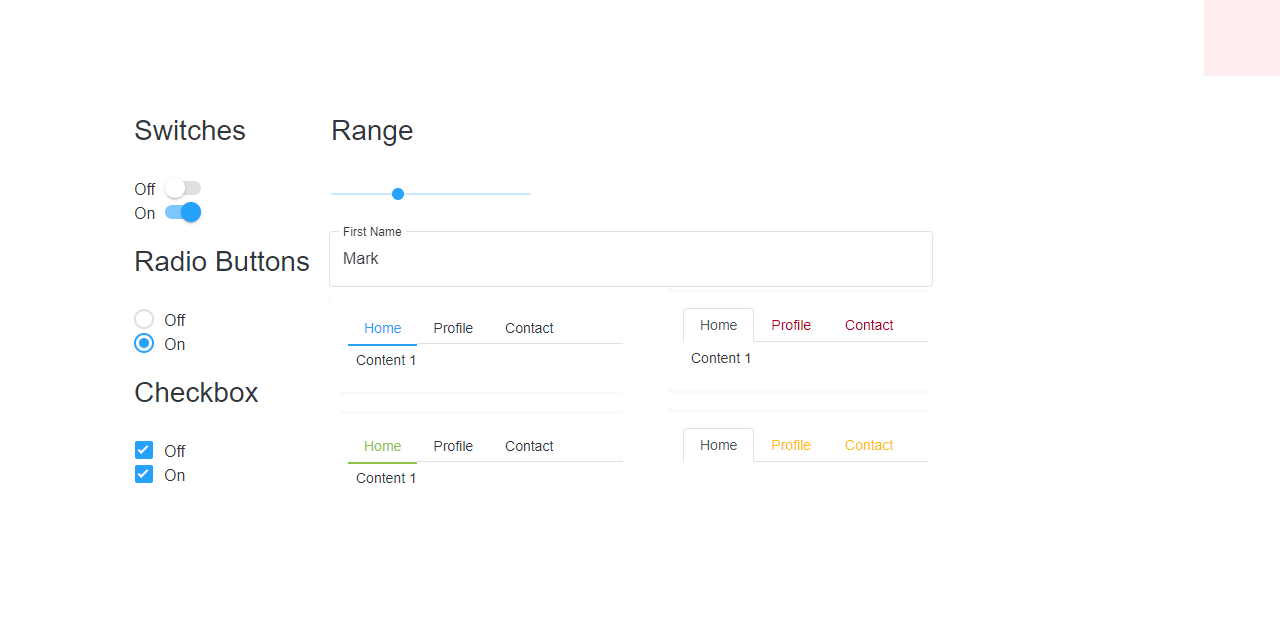
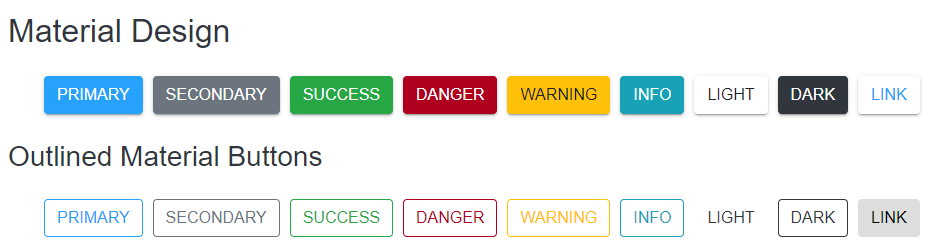
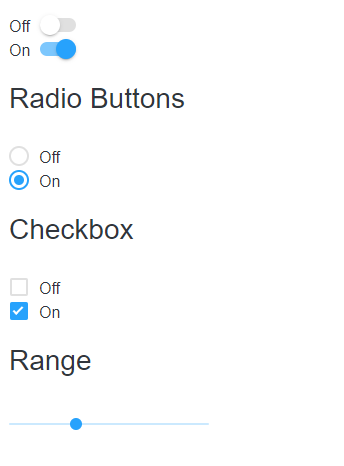
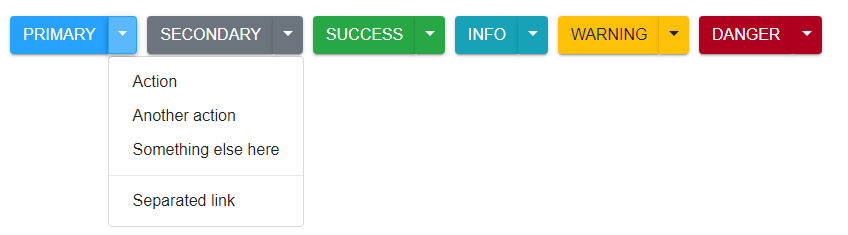
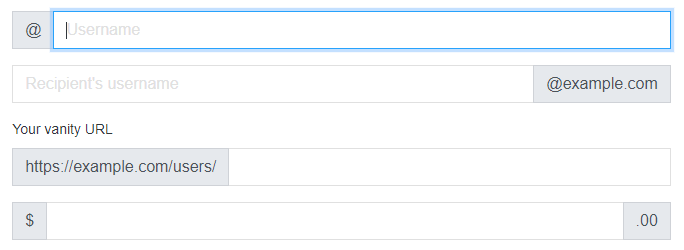
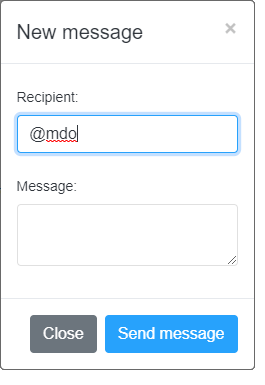
173 |
174 | Content 1 175 |
176 |
177 | Content 2 178 |
179 |
180 | Content 3 181 |
182 |
183 | ``` 184 | 185 | Material Design Bootstrap Input Web Component 186 | 187 | ![Material Design Bootstrap input](https://raw.githubusercontent.com/htmlelements/smart-bootstrap/master/images/bootstrap-input.png) 188 | 189 | ```html 190 | 191 | ``` 192 | 193 | Material Design Bootstrap TextArea Web Component 194 | 195 | ![Material Design Bootstrap Textarea](https://raw.githubusercontent.com/htmlelements/smart-bootstrap/master/images/bootstrap-textarea.png) 196 | 197 | ```html 198 | 199 | ``` 200 | 201 | Material Design Bootstrap Range Web Component 202 | 203 | ![Material Design Bootstrap Range](https://raw.githubusercontent.com/htmlelements/smart-bootstrap/master/images/bootstrap-range.png) 204 | 205 | ```html 206 | 207 | ``` 208 | 209 | Material Design Progress Web Component 210 | 211 | ![Material Design Bootstrap Progress](https://raw.githubusercontent.com/htmlelements/smart-bootstrap/master/images/bootstrap-forms-2.png) 212 | 213 | ```html 214 | 215 | ``` 216 | 217 | ```html 218 | Material Design Circular Progress Web Component 219 | 220 | ``` 221 | 222 | Material Design File Input Web Component 223 | 224 | ![Material Design Bootstrap File Input](https://raw.githubusercontent.com/htmlelements/smart-bootstrap/master/images/bootstrap-fileinput.png) 225 | 226 | ```html 227 | 228 | ``` 229 | 230 | Material Design Bootstrap Switch Button Web Component 231 | 232 | ![Material Design Bootstrap Switch Button](https://raw.githubusercontent.com/htmlelements/smart-bootstrap/master/images/bootstrap-switch.png) 233 | 234 | ```html 235 | 236 | ``` 237 | 238 | ## The file structure 239 | 240 | - `src/` 241 | 242 | Javascript files. 243 | 244 | - `src/styles/` 245 | 246 | 247 | ## License 248 | 249 | Apache License 2.0 250 | -------------------------------------------------------------------------------- /button/index.htm: -------------------------------------------------------------------------------- 1 | 2 | 3 | 4 | Material Bootstrap Button | https://www.htmlelements.com 5 | 6 | 7 | 8 | 9 | 10 | 11 | 12 | 13 | 14 | 15 | 16 | 17 | 18 | 19 | 20 |

Material Bootstrap Buttons


21 |

Use Material Bootstrap custom button styles for actions in forms, dialogs, and more with support for multiple 22 | sizes, states, and more.

23 |
24 |

Buttons

25 | 26 |

Material Bootstrap includes several predefined button styles, each serving its own semantic purpose, with a 27 | few extras thrown in for more control.

28 |
29 | Primary 30 | Secondary 31 | Success 32 | Danger 33 | Warning 34 | Info 35 | Light 36 | Dark 37 | Link 38 |
39 | 40 |

41 | StyleMode property allows the user to change the style of the elements. 42 |

43 | 44 |

Outlined Buttons


45 |

46 | In need of a button, but not the hefty background colors they bring? Just add the class 47 | outlined to remove all background images and colors on any button. 48 |

49 |
50 | Primary 51 | Secondary 52 | Success 53 | Danger 54 | Warning 55 | Info 56 | Light 57 | Dark 58 | Link 59 |
60 | 61 | 62 |

63 | Setting the outlined property the elements turn into outlined buttons with no filling untill 64 | hovered. 65 |

66 | 67 |

Buttons Sizes


68 |

69 | Fancy larger or smaller buttons? Just set the sizeMode property to 'sm' or 'lg' for 70 | additional sizes. 71 |

72 |
73 | Large Button 74 | Large Button 75 |
76 | 77 |
78 | Small Button 79 | Small Button 80 |
81 | 82 |

83 | Buttons can be reset back to normal if SizeMode is set to an empty string. 84 |

85 | 86 |

Disabled Buttons


87 |
88 | Primary 89 | Secondary 90 |
91 | 92 |

93 | To disable/enable an element just set the disabled property. 94 |

95 | 96 |

Material Bootstrap Checkbox


97 |

98 | Checkboxes are buttons that can be toggled. The checked state of these buttons can be updated via 99 | click or by setting the checked property to true. 100 | Checkboxes like the other toggle buttons can be pre-checked. 101 |

102 |
103 | Checked 104 | Unchecked 105 |
106 | 107 |

108 | Appling/Removing the checked attribute will toggle the state of the button. 109 |

110 | 111 |

Material Bootstrap Toggle Button

112 |
113 | Checked 114 | Unchecked 115 |
116 | 117 | 118 |

119 | Add the checked attribute to toggle a button’s active state. If you’re pre-toggling a button, 120 | you must manually add the checked attribute to the button. 121 |

122 | 123 |

Material Bootstrap Radio Button

124 |
125 | Active 126 | Radio 127 | Radio 128 |
129 | 130 | 131 |

132 | Radio buttons are group elements that allow only one of them to be checked. Similar to the other 133 | toggle elements to set a button into checked state the property checked has to be applied to 134 | the element. 135 | All elements that have the same group property are considered to be in the same group. 136 | group can be set on initialization. 137 |

138 | 139 |

Material Design

140 |
141 |
142 | Primary 143 | Secondary 144 | Success 145 | Danger 146 | Warning 147 | Info 148 | Light 149 | Dark 150 | Link 151 |
152 |

Outlined Material Buttons

153 |
154 | Primary 155 | Secondary 156 | Success 157 | Danger 158 | Warning 159 | Info 160 | Light 161 | Dark 162 | Link 163 |
164 |

Outlined Material Checkbox Buttons

165 |
166 | Checked 167 | Unchecked 168 |
169 |

Outlined Material Radio Buttons

170 |
171 | Active 172 | Radio 173 | Radio 174 |
175 |
176 |

Button Group

177 |
178 |
179 | Btn 1 180 | Btn 2 181 | Btn 3 182 |
183 |
184 |

Vertical Button Group

185 |
186 |
187 | Btn 1 188 | Btn 2 189 | Btn 3 190 |
191 |
192 |

Toggle Button Group

193 |
194 |
195 | Toggle 1 196 | Toggle 2 197 | Toggle 3 198 |
199 |
200 | 201 | 202 | -------------------------------------------------------------------------------- /utilities-flex/index.htm: -------------------------------------------------------------------------------- 1 | 2 | 3 | 4 | Material Bootstrap Utilities Flex | https://www.htmlelements.com 5 | 6 | 7 | 8 | 9 | 10 | 11 | 12 | 13 | 14 | 15 | 16 | 17 | 18 | 19 | 20 |

Material Bootstrap Utilities Flex


21 |

CSS for Flex

22 |

Enable flex behaviors

23 |
24 |
I'm a flexbox container!
25 |
I'm an inline flexbox container!
26 |
27 |

Direction

28 |

Set the direction of flex items in a flex container with direction utilities. In most cases you can omit the horizontal class here as the browser default is row. However, you may encounter situations where you needed to explicitly set this value (like responsive layouts). 29 |

30 |
Use .flex-row to set a horizontal direction (the browser default), or .flex-row-reverse to start the horizontal direction from the opposite side.
31 |
32 |
Flex item 1
33 |
Flex item 2
34 |
Flex item 3
35 |
36 |
37 |
Flex item 1
38 |
Flex item 2
39 |
Flex item 3
40 |
41 |
Use .flex-column to set a vertical direction, or .flex-column-reverse to start the vertical direction from the opposite side.
42 |
43 |
Flex item 1
44 |
Flex item 2
45 |
Flex item 3
46 |
47 |
48 |
Flex item 1
49 |
Flex item 2
50 |
Flex item 3
51 |
52 |

Justify Content

53 |
Use justify-content utilities on flexbox containers to change the alignment of flex items on the main axis (the x-axis to start, y-axis if flex-direction: column). Choose from start (browser default), end, center, between, or around.
54 |
55 |
56 |
Flex item
57 |
Flex item
58 |
Flex item
59 |
60 |
61 |
Flex item
62 |
Flex item
63 |
Flex item
64 |
65 |
66 |
Flex item
67 |
Flex item
68 |
Flex item
69 |
70 |
71 |
Flex item
72 |
Flex item
73 |
Flex item
74 |
75 |
76 |
Flex item
77 |
Flex item
78 |
Flex item
79 |
80 |

Align items

81 |
Use align-items utilities on flexbox containers to change the alignment of flex items on the cross axis (the y-axis to start, x-axis if flex-direction: column). Choose from start, end, center, baseline, or stretch (browser default).
82 |
83 |
Flex item
84 |
Flex item
85 |
Flex item
86 |
87 |
88 |
Flex item
89 |
Flex item
90 |
Flex item
91 |
92 |
93 |
Flex item
94 |
Flex item
95 |
Flex item
96 |
97 |
98 |
Flex item
99 |
Flex item
100 |
Flex item
101 |
102 |

Align self

103 |
104 |
105 |
Flex item
106 |
Aligned flex item
107 |
Flex item
108 |
109 |
110 |
Flex item
111 |
Aligned flex item
112 |
Flex item
113 |
114 |
115 |
Flex item
116 |
Aligned flex item
117 |
Flex item
118 |
119 |
120 |
Flex item
121 |
Aligned flex item
122 |
Flex item
123 |
124 |
125 |
Flex item
126 |
Aligned flex item
127 |
Flex item
128 |
129 |

Fill

130 |
131 |
Flex item with a lot of content
132 |
Flex item
133 |
Flex item
134 |
135 |

With align-items

136 |
137 |
Flex item
138 |
Flex item
139 |
Flex item
140 |
141 | 142 |
143 |
Flex item
144 |
Flex item
145 |
Flex item
146 |
147 |

Order

148 |

Change the visual order of specific flex items with a handful of order utilities. We only provide options for making an item first or last, as well as a reset to use the DOM order. As order takes any integer value (e.g., 5), add custom CSS for any additional values needed. 149 |

150 |
151 |
First flex item
152 |
Second flex item
153 |
Third flex item
154 |
155 |

Use align-content utilities on flexbox containers to align flex items together on the cross axis. Choose from start (browser default), end, center, between, around, or stretch. To demonstrate these utilities, we’ve enforced flex-wrap: wrap and increased the number of flex items.

156 |
157 |
Flex item
158 |
Flex item
159 |
Flex item
160 |
Flex item
161 |
Flex item
162 |
Flex item
163 |
Flex item
164 |
Flex item
165 |
Flex item
166 |
Flex item
167 |
Flex item
168 |
Flex item
169 |
Flex item
170 |
Flex item
171 |
Flex item
172 |
173 |
174 |
Flex item
175 |
Flex item
176 |
Flex item
177 |
Flex item
178 |
Flex item
179 |
Flex item
180 |
Flex item
181 |
Flex item
182 |
Flex item
183 |
Flex item
184 |
Flex item
185 |
Flex item
186 |
Flex item
187 |
Flex item
188 |
Flex item
189 |
190 |
191 |
192 | 193 | 194 | -------------------------------------------------------------------------------- /LICENSE: -------------------------------------------------------------------------------- 1 | Apache License 2 | Version 2.0, January 2004 3 | http://www.apache.org/licenses/ 4 | 5 | TERMS AND CONDITIONS FOR USE, REPRODUCTION, AND DISTRIBUTION 6 | 7 | 1. Definitions. 8 | 9 | "License" shall mean the terms and conditions for use, reproduction, 10 | and distribution as defined by Sections 1 through 9 of this document. 11 | 12 | "Licensor" shall mean the copyright owner or entity authorized by 13 | the copyright owner that is granting the License. 14 | 15 | "Legal Entity" shall mean the union of the acting entity and all 16 | other entities that control, are controlled by, or are under common 17 | control with that entity. For the purposes of this definition, 18 | "control" means (i) the power, direct or indirect, to cause the 19 | direction or management of such entity, whether by contract or 20 | otherwise, or (ii) ownership of fifty percent (50%) or more of the 21 | outstanding shares, or (iii) beneficial ownership of such entity. 22 | 23 | "You" (or "Your") shall mean an individual or Legal Entity 24 | exercising permissions granted by this License. 25 | 26 | "Source" form shall mean the preferred form for making modifications, 27 | including but not limited to software source code, documentation 28 | source, and configuration files. 29 | 30 | "Object" form shall mean any form resulting from mechanical 31 | transformation or translation of a Source form, including but 32 | not limited to compiled object code, generated documentation, 33 | and conversions to other media types. 34 | 35 | "Work" shall mean the work of authorship, whether in Source or 36 | Object form, made available under the License, as indicated by a 37 | copyright notice that is included in or attached to the work 38 | (an example is provided in the Appendix below). 39 | 40 | "Derivative Works" shall mean any work, whether in Source or Object 41 | form, that is based on (or derived from) the Work and for which the 42 | editorial revisions, annotations, elaborations, or other modifications 43 | represent, as a whole, an original work of authorship. For the purposes 44 | of this License, Derivative Works shall not include works that remain 45 | separable from, or merely link (or bind by name) to the interfaces of, 46 | the Work and Derivative Works thereof. 47 | 48 | "Contribution" shall mean any work of authorship, including 49 | the original version of the Work and any modifications or additions 50 | to that Work or Derivative Works thereof, that is intentionally 51 | submitted to Licensor for inclusion in the Work by the copyright owner 52 | or by an individual or Legal Entity authorized to submit on behalf of 53 | the copyright owner. For the purposes of this definition, "submitted" 54 | means any form of electronic, verbal, or written communication sent 55 | to the Licensor or its representatives, including but not limited to 56 | communication on electronic mailing lists, source code control systems, 57 | and issue tracking systems that are managed by, or on behalf of, the 58 | Licensor for the purpose of discussing and improving the Work, but 59 | excluding communication that is conspicuously marked or otherwise 60 | designated in writing by the copyright owner as "Not a Contribution." 61 | 62 | "Contributor" shall mean Licensor and any individual or Legal Entity 63 | on behalf of whom a Contribution has been received by Licensor and 64 | subsequently incorporated within the Work. 65 | 66 | 2. Grant of Copyright License. Subject to the terms and conditions of 67 | this License, each Contributor hereby grants to You a perpetual, 68 | worldwide, non-exclusive, no-charge, royalty-free, irrevocable 69 | copyright license to reproduce, prepare Derivative Works of, 70 | publicly display, publicly perform, sublicense, and distribute the 71 | Work and such Derivative Works in Source or Object form. 72 | 73 | 3. Grant of Patent License. Subject to the terms and conditions of 74 | this License, each Contributor hereby grants to You a perpetual, 75 | worldwide, non-exclusive, no-charge, royalty-free, irrevocable 76 | (except as stated in this section) patent license to make, have made, 77 | use, offer to sell, sell, import, and otherwise transfer the Work, 78 | where such license applies only to those patent claims licensable 79 | by such Contributor that are necessarily infringed by their 80 | Contribution(s) alone or by combination of their Contribution(s) 81 | with the Work to which such Contribution(s) was submitted. If You 82 | institute patent litigation against any entity (including a 83 | cross-claim or counterclaim in a lawsuit) alleging that the Work 84 | or a Contribution incorporated within the Work constitutes direct 85 | or contributory patent infringement, then any patent licenses 86 | granted to You under this License for that Work shall terminate 87 | as of the date such litigation is filed. 88 | 89 | 4. Redistribution. You may reproduce and distribute copies of the 90 | Work or Derivative Works thereof in any medium, with or without 91 | modifications, and in Source or Object form, provided that You 92 | meet the following conditions: 93 | 94 | (a) You must give any other recipients of the Work or 95 | Derivative Works a copy of this License; and 96 | 97 | (b) You must cause any modified files to carry prominent notices 98 | stating that You changed the files; and 99 | 100 | (c) You must retain, in the Source form of any Derivative Works 101 | that You distribute, all copyright, patent, trademark, and 102 | attribution notices from the Source form of the Work, 103 | excluding those notices that do not pertain to any part of 104 | the Derivative Works; and 105 | 106 | (d) If the Work includes a "NOTICE" text file as part of its 107 | distribution, then any Derivative Works that You distribute must 108 | include a readable copy of the attribution notices contained 109 | within such NOTICE file, excluding those notices that do not 110 | pertain to any part of the Derivative Works, in at least one 111 | of the following places: within a NOTICE text file distributed 112 | as part of the Derivative Works; within the Source form or 113 | documentation, if provided along with the Derivative Works; or, 114 | within a display generated by the Derivative Works, if and 115 | wherever such third-party notices normally appear. The contents 116 | of the NOTICE file are for informational purposes only and 117 | do not modify the License. You may add Your own attribution 118 | notices within Derivative Works that You distribute, alongside 119 | or as an addendum to the NOTICE text from the Work, provided 120 | that such additional attribution notices cannot be construed 121 | as modifying the License. 122 | 123 | You may add Your own copyright statement to Your modifications and 124 | may provide additional or different license terms and conditions 125 | for use, reproduction, or distribution of Your modifications, or 126 | for any such Derivative Works as a whole, provided Your use, 127 | reproduction, and distribution of the Work otherwise complies with 128 | the conditions stated in this License. 129 | 130 | 5. Submission of Contributions. Unless You explicitly state otherwise, 131 | any Contribution intentionally submitted for inclusion in the Work 132 | by You to the Licensor shall be under the terms and conditions of 133 | this License, without any additional terms or conditions. 134 | Notwithstanding the above, nothing herein shall supersede or modify 135 | the terms of any separate license agreement you may have executed 136 | with Licensor regarding such Contributions. 137 | 138 | 6. Trademarks. This License does not grant permission to use the trade 139 | names, trademarks, service marks, or product names of the Licensor, 140 | except as required for reasonable and customary use in describing the 141 | origin of the Work and reproducing the content of the NOTICE file. 142 | 143 | 7. Disclaimer of Warranty. Unless required by applicable law or 144 | agreed to in writing, Licensor provides the Work (and each 145 | Contributor provides its Contributions) on an "AS IS" BASIS, 146 | WITHOUT WARRANTIES OR CONDITIONS OF ANY KIND, either express or 147 | implied, including, without limitation, any warranties or conditions 148 | of TITLE, NON-INFRINGEMENT, MERCHANTABILITY, or FITNESS FOR A 149 | PARTICULAR PURPOSE. You are solely responsible for determining the 150 | appropriateness of using or redistributing the Work and assume any 151 | risks associated with Your exercise of permissions under this License. 152 | 153 | 8. Limitation of Liability. In no event and under no legal theory, 154 | whether in tort (including negligence), contract, or otherwise, 155 | unless required by applicable law (such as deliberate and grossly 156 | negligent acts) or agreed to in writing, shall any Contributor be 157 | liable to You for damages, including any direct, indirect, special, 158 | incidental, or consequential damages of any character arising as a 159 | result of this License or out of the use or inability to use the 160 | Work (including but not limited to damages for loss of goodwill, 161 | work stoppage, computer failure or malfunction, or any and all 162 | other commercial damages or losses), even if such Contributor 163 | has been advised of the possibility of such damages. 164 | 165 | 9. Accepting Warranty or Additional Liability. While redistributing 166 | the Work or Derivative Works thereof, You may choose to offer, 167 | and charge a fee for, acceptance of support, warranty, indemnity, 168 | or other liability obligations and/or rights consistent with this 169 | License. However, in accepting such obligations, You may act only 170 | on Your own behalf and on Your sole responsibility, not on behalf 171 | of any other Contributor, and only if You agree to indemnify, 172 | defend, and hold each Contributor harmless for any liability 173 | incurred by, or claims asserted against, such Contributor by reason 174 | of your accepting any such warranty or additional liability. 175 | 176 | END OF TERMS AND CONDITIONS 177 | 178 | APPENDIX: How to apply the Apache License to your work. 179 | 180 | To apply the Apache License to your work, attach the following 181 | boilerplate notice, with the fields enclosed by brackets "[]" 182 | replaced with your own identifying information. (Don't include 183 | the brackets!) The text should be enclosed in the appropriate 184 | comment syntax for the file format. We also recommend that a 185 | file or class name and description of purpose be included on the 186 | same "printed page" as the copyright notice for easier 187 | identification within third-party archives. 188 | 189 | Copyright [2019] [jQWidgets LTD] 190 | 191 | Licensed under the Apache License, Version 2.0 (the "License"); 192 | you may not use this file except in compliance with the License. 193 | You may obtain a copy of the License at 194 | 195 | http://www.apache.org/licenses/LICENSE-2.0 196 | 197 | Unless required by applicable law or agreed to in writing, software 198 | distributed under the License is distributed on an "AS IS" BASIS, 199 | WITHOUT WARRANTIES OR CONDITIONS OF ANY KIND, either express or implied. 200 | See the License for the specific language governing permissions and 201 | limitations under the License. 202 | -------------------------------------------------------------------------------- /inputgroup/index.htm: -------------------------------------------------------------------------------- 1 | 2 | 3 | 4 | Material Bootstrap Inputs Group | https://www.htmlelements.com 5 | 6 | 7 | 8 | 9 | 10 | 11 | 12 | 13 | 14 | 15 | 16 | 17 | 18 | 19 | 20 |

Material Bootstrap Input Groups


21 |

Easily extend form controls by adding text, buttons, or button groups on either side of textual 22 | inputs, custom selects, and custom file inputs.

23 |
24 | 25 |

Basic example

26 |

27 | Place one add-on or button on either side of an input. You may also place one on both sides of an 28 | input. Remember to place <label>s outside the input group. 29 |

30 | 31 |
32 | 33 | @ 34 | 36 | 37 | 38 | 40 | @example.com 41 | 42 | 43 | 44 | https://example.com/users/ 45 | 46 | 47 | $ 48 | 49 | .00 50 | 51 | 52 |
53 | 54 | With textarea 55 | 56 | 57 | 58 |

Wrapping

59 |

60 | Input groups wrap by default via flex-wrap: wrap in order to accommodate custom form field 61 | validation within an input group. You may disable this with the noWrap property. 62 |

63 | 64 |
65 | 66 | @ 67 | 69 | 70 |
71 | 72 |

Sizing

73 |

74 | Add the sizeMode property in order to change the size of the input group. 75 |

76 | 77 |
78 | 79 | Small 80 | 81 | 82 | Default 83 | 84 | 85 | Large 86 | 87 |
88 | 89 | 90 |

Checkbox and radios

91 |

92 | Place any checkbox or radio option within an input group’s addon instead of text. 93 |

94 | 95 |
96 | 97 |
98 | 99 |
100 |
101 | 102 |
103 | 104 |
105 |
106 |
107 | 108 | 109 |

Multiple inputs

110 |

111 | While multiple <input>s are supported visually, validation styles are only available for input 112 | groups with a single <input>. 113 |

114 | 115 |
116 | 117 | First and last name 118 | 119 | 120 | 121 |
122 | 123 | 124 |

Multiple addons

125 |

126 | Multiple add-ons are supported and can be mixed with checkbox and radio input elements. 127 |

128 | 129 |
130 | 131 | $ 132 | 0.00 133 | 135 | 136 | 137 | 139 | $ 140 | 0.00 141 | 142 |
143 | 144 | 145 |

Buttons addons

146 |

147 | Input groups with Material Bootstrap Button as addons. 148 |

149 | 150 |
151 | 152 | Button 153 | 154 | 155 | 156 | 158 | Button 159 | 160 | 161 | Button 162 | Button 163 | 164 | 165 | 166 | 168 | Button 169 | Button 170 | 171 |
172 | 173 |

Buttons with dropdowns

174 |

175 | Input groups with Material Bootstrap Dropdowns that contains Material Bootstrap buttons as addons. 176 |

177 | 178 |
179 | 180 | 181 | Action 182 | Another action 183 | Something else here 184 | 185 | Separated link 186 | 187 | 188 | 189 | 190 | 191 | 192 | Action 193 | Another action 194 | Something else here 195 | 196 | Separated link 197 | 198 | 199 |
200 | 201 | 202 |

Buttons with Split Buttons

203 |

204 | Input groups with Material Bootstrap Split Buttons that contains Material Bootstrap buttons as addons. 205 |

206 | 207 |
208 | 209 | 210 | Action 211 | Another action 212 | Something else here 213 | 214 | Separated link 215 | 216 | 217 | 218 | 219 | 220 | 221 | Action 222 | Another action 223 | Something else here 224 | 225 | Separated link 226 | 227 | 228 |
229 | 230 |

Custom select

231 |

232 | Input groups with a select insted of input. 233 |

234 | 235 |
236 | 237 | 238 | 244 | 245 | 246 | 252 | 253 | 254 | 255 | 256 | 262 | 263 | 264 | 270 | Button 271 | 272 |
273 | 274 | 275 |

Custom file input

276 |

277 | Input groups with a file upload. 278 |

279 | 280 |
281 | 282 | Upload 283 | Choose file 284 | 285 | 286 | Choose file 287 | Upload 288 | 289 | 290 | Button 291 | Choose file 292 | 293 | 294 | Choose file 295 | Button 296 | 297 |
298 | 299 |

Material Design

300 |
301 | 302 | Upload 303 | Choose file 304 | 305 | 306 | Choose file 307 | Upload 308 | 309 | 310 | Button 311 | Choose file 312 | 313 | 314 | Choose file 315 | Button 316 | 317 |
318 | 319 | 320 | -------------------------------------------------------------------------------- /dropdown/index.htm: -------------------------------------------------------------------------------- 1 | 2 | 3 | 4 | Material Bootstrap Dropdowns | https://www.htmlelements.com 5 | 6 | 7 | 8 | 9 | 10 | 11 | 12 | 13 | 14 | 15 | 16 | 17 | 18 | 19 | 20 | 21 |

22 | Dropdowns are toggleable, contextual overlays for displaying lists of links and more. 23 | They’re toggled by clicking, not by hovering; this is an intentional design decision. 24 | Dropdowns are built using the Smart Framework's DropDownPositioning API, which provides 25 | dynamic positioning and viewport detection. 26 | No additional references are required since the API is part of the base class 27 | smart.element.js. 28 |

29 | 30 |

31 | Smart.Core’s dropdowns are designed to be generic and applicable to a variety of situations and 32 | markup structures. 33 | For instance, it is possible to create dropdowns that contain additional inputs and form controls, 34 | such as search fields or login forms. 35 | However, Material Bootstrap does add built-in support for most standard keyboard menu interactions, such as 36 | the ability to move through individual .dropdown-item elements using the cursor keys and close the 37 | menu with the ESC key. 38 |

39 | 40 |

41 | In order for a DropDown item to visually appear as an item it is neccessary to add the class 42 | .dropdown-item. 43 |

44 |
45 | 46 | Action 47 | Another action 48 | Something else here 49 | 50 |
51 | 52 |
53 |

54 | label property is used to set the label of the drop down button. 55 |

56 |

57 |

Dropdown rendering modes

58 |
59 |
60 | 61 | Action 62 | Another action 63 | Something else here 64 | 65 | Separated link 66 | 67 | 68 | Action 69 | Another action 70 | Something else here 71 | 72 | Separated link 73 | 74 | 75 | Action 76 | Another action 77 | Something else here 78 | 79 | Separated link 80 | 81 | 82 | Action 83 | Another action 84 | Something else here 85 | 86 | Separated link 87 | 88 | 89 | Action 90 | Another action 91 | Something else here 92 | 93 | Separated link 94 | 95 | 96 | Action 97 | Another action 98 | Something else here 99 | 100 | Separated link 101 | 102 |
103 |
104 |

105 | style-mode attribute determines the style of the DropDown. 106 |

107 |

108 |

Material Bootstrap Split Button

109 |

110 | Similarly, create split button dropdowns with virtually the same markup as single button dropdowns 111 |

112 |
113 | 114 | Action 115 | Another action 116 | Something else here 117 | 118 |
119 |

120 |

Split Button rendering modes

121 |
122 |
123 | 124 | Action 125 | Another action 126 | Something else here 127 | 128 | Separated link 129 | 130 | 131 | Action 132 | Another action 133 | Something else here 134 | 135 | Separated link 136 | 137 | 138 | Action 139 | Another action 140 | Something else here 141 | 142 | Separated link 143 | 144 | 145 | Action 146 | Another action 147 | Something else here 148 | 149 | Separated link 150 | 151 | 152 | Action 153 | Another action 154 | Something else here 155 | 156 | Separated link 157 | 158 | 159 | Action 160 | Another action 161 | Something else here 162 | 163 | Separated link 164 | 165 |
166 |
167 | 168 | 169 |

170 |

Sizing

171 |

Button dropdowns work with buttons of all sizes, including default and split dropdown buttons.

172 |
173 |
174 | 175 | Action 176 | Another action 177 | Something else here 178 | 179 | Separated link 180 |

181 | 182 | Action 183 | Another action 184 | Something else here 185 | 186 | Separated link 187 |

188 | 189 | Action 190 | Another action 191 | Something else here 192 | 193 | Separated link 194 |

195 | 196 | Action 197 | Another action 198 | Something else here 199 | 200 | Separated link 201 | 202 |
203 |
204 |
205 |

206 | Similar to the other buttons the size-mode attribute determines the size of the component. 207 |

208 |
209 |

Directions

210 |
211 |

Dropup

212 |

Trigger dropdown menus above elements by adding changing the drop-down-position attribute to 213 | 'top' to the parent element.

214 |
215 |
216 |
217 | 218 | Action 219 | Another action 220 | Something else here 221 | 222 | Separated link 223 | 224 |

225 | 226 | Action 227 | Another action 228 | Something else here 229 | 230 | Separated link 231 | 232 |
233 |
234 |
235 | 236 |

Dropright


237 |

Trigger dropdown menus at the right of the elements by adding changing the drop-down-position 238 | property to 239 | 'right' to the parent element.

240 |
241 |
242 |
243 | 244 | Action 245 | Another action 246 | Something else here 247 | 248 | Separated link 249 | 250 |

251 | 252 | Action 253 | Another action 254 | Something else here 255 | 256 | Separated link 257 | 258 |
259 |
260 |
261 | 262 |

Dropleft

263 |

Trigger dropdown menus at the left of the elements by adding changing the drop-down-position 264 | property to 265 | 'left' to the parent element.

266 |
267 |
268 |
269 | 270 | Action 271 | Another action 272 | Something else here 273 | 274 | Separated link 275 | 276 |

277 | 278 | Action 279 | Another action 280 | Something else here 281 | 282 | Separated link 283 | 284 |
285 |
286 | 287 |
288 |

Menu items

289 |

Optionally you can use <button> elements in your dropdowns instead of just <a>'s.

290 | 291 |
292 | 293 | 294 | 295 | 296 | 297 |
298 | 299 |
300 |

Custom alignment

301 |

If you want to use custom positioning instead of the dynamic, create a callback and pass it to the 302 | customDropDownPositionCallback property.

303 |
304 |

To align right the dropdown menu with the given breakpoint or larger, add 305 | .dropdown-menu{-sm|-md|-lg|-xl}-right to the drop down.

306 |
307 | 309 | 310 | 311 | 312 | 313 |
314 | 315 |
316 |

To align left the dropdown menu with the given breakpoint or larger, add .dropdown-menu-right and 317 | .dropdown-menu{-sm|-md|-lg|-xl}-left to the drop down.

318 |
319 | 321 | 322 | 323 | 324 | 325 |
326 |
327 |

Material Design

328 |
329 |
330 |
331 | 332 | Action 333 | Another action 334 | Something else here 335 | 336 | Separated link 337 | 338 | 339 | Action 340 | Another action 341 | Something else here 342 | 343 | Separated link 344 | 345 | 346 | Action 347 | Another action 348 | Something else here 349 | 350 | Separated link 351 | 352 | 353 | Action 354 | Another action 355 | Something else here 356 | 357 | Separated link 358 | 359 | 360 | Action 361 | Another action 362 | Something else here 363 | 364 | Separated link 365 | 366 | 367 | Action 368 | Another action 369 | Something else here 370 | 371 | Separated link 372 | 373 |
374 |
375 |
376 |
377 |
378 |
379 |
380 |
381 |
382 |
383 |
384 | 385 | 386 | 387 | -------------------------------------------------------------------------------- /modal/index.htm: -------------------------------------------------------------------------------- 1 | 2 | 3 | 4 | Material Bootstrap Modal | https://www.htmlelements.com 5 | 6 | 7 | 8 | 9 | 10 | 11 | 12 | 13 | 14 | 15 | 16 | 17 | 18 | 19 | 20 | 21 |

Use Smart's Material Bootstrap JavaScript modal to add dialogs to your site for lightboxes, user 22 | notifications, or completely custom content.

23 | 24 |

How it works

25 |

Before getting started with Smart.Core’s modal component, be sure to read the following as our menu 26 | options have recently changed.

27 | 56 |

57 | Below is a static modal example (meaning its position and display have been overridden). Included 58 | are the modal header, modal body (required for padding), and modal footer (optional). We ask that 59 | you include modal headers with dismiss actions whenever possible, or provide another explicit 60 | dismiss action. 61 |

62 | 63 |
64 | 65 | 71 | 74 | 78 | 79 |
80 | 81 | 82 |

Live demo

83 | 84 |

85 | Toggle a working modal demo by clicking the button below. It will slide down and fade in from the 86 | top of the page. 87 |

88 | 89 | 90 | 96 | 99 | 103 | 104 |
105 | 106 | Launch demo modal 107 | 108 |
109 | 110 | 111 |

Scrolling long content

112 | 113 |

114 | When modals become too long for the user’s viewport or device, they scroll independent of the page 115 | itself. By default all modals are with auto height. 116 |

117 | 118 | 119 | 125 | 169 | 173 | 174 |
175 | 176 | Launch demo modal 177 | 178 |
179 | 180 | 181 |

182 | You can also create a scrollable modal that allows scroll the modal body by setting the 183 | scrollable property: 184 |

185 | 186 | 187 | 193 | 237 | 241 | 242 |
243 | 245 | Launch demo modal 246 | 247 |
248 | 249 | 250 |

Vertically centered

251 | 252 |

253 | Add the centered property to vertically center the modal. 254 |

255 | 256 | 257 | 263 | 267 | 271 | 272 | 273 | 279 | 292 | 296 | 297 |
298 | 299 | Vertically centered modal 300 | 301 | 303 | Vertically centered scrollable modal 304 | 305 |
306 | 307 |

Varying modal content

308 | 309 |

310 | Have a bunch of buttons that all trigger the same modal with slightly different contents? 311 | Below is a live demo followed by example HTML and JavaScript. For more information, read the modal 312 | events docs for details on relatedTarget. 313 |

314 |

315 | Have a bunch of buttons that all trigger the same modal with slightly different contents? 316 | Below is a live demo followed by example HTML and JavaScript. For more information, read the modal 317 | events docs for details on relatedTarget. 318 |

319 | 320 | 321 | 327 | 339 | 343 | 344 |
345 | Open modal for @mdo 347 | Open modal for @fat 349 | Open modal for @getbootstrap 351 |
352 | 353 | 354 |

355 | Changing the content of the input inside the modal is simple as that: 356 |

357 | 358 |
359 |
360 | window.onload = function () {
361 |     document.addEventListener('click', function () {
362 |         const target = event.target,
363 |             isButton = event.target.closest('bootstrap-button');
364 | 
365 |         if (isButton && isButton.getAttribute('data-toggle') === 'modal') {
366 |             const modal = document.querySelector(isButton.getAttribute('data-target')),
367 |                 data = isButton.getAttribute('data-whatever');
368 | 
369 |             if (data) {
370 |                 const modalInput = modal.querySelector('.modal-body input');
371 | 
372 |                 if (modalInput) {
373 |                     modalInput.value = data;
374 |                 }
375 |             }
376 | 
377 |             if (modal) {
378 |                 modal.toggle();
379 |             }
380 |         }
381 |  });
382 |
383 | 384 |

Change Animation

385 |

386 | Animation is purely made via CSS. The default animation depends on the CSS class fade. 387 | Removing that class will disable it. 388 |

389 | 390 |
391 |
392 | <bootstrap-modal> Empty Modal with no Animation </bootstrap-modal>
393 | 					
394 |
395 | 396 | 397 |

Optional Sizes

398 |

Modals have three optional sizes, available via modifier classes to be placed on a Modal 399 | These sizes kick in at certain breakpoints to avoid horizontal scrollbars on narrower viewports.

400 | 401 | 402 | 403 | 404 | 405 | 406 | 407 | 408 | 409 | 410 | 411 | 412 | 413 | 414 | 415 | 416 | 417 | 418 | 419 | 420 | 421 | 422 | 423 | 424 | 425 | 426 | 427 | 428 | 429 | 430 | 431 |
SizeClassModal max-width
Small.modal-sm300px
DefaultNone500px
Large.modal-lg800px
Extra large.modal-xl1140px
432 | 433 | 434 | 440 | 446 | 447 |
448 | Extra large modal 450 | Large modal 452 | Small modal 454 |
455 | 456 | 457 |

Usage

458 |

459 | The modal plugin toggles your hidden content on demand. It also 460 | adds .modal-open to the <body> to override default scrolling behavior and generates a 461 | .modal-backdrop to provide a click area for dismissing shown modals when clicking outside the modal. 462 |

463 | 464 |

Properties

465 |

The following properties are available:

466 | 467 | 468 | 469 | 470 | 471 | 472 | 473 | 474 | 475 | 476 | 477 | 478 | 479 | 480 | 481 | 484 | 485 | 486 | 487 | 488 | 489 | 490 | 491 | 492 | 493 | 494 | 495 | 496 | 497 | 498 | 499 | 500 | 501 | 502 | 503 | 504 | 505 | 506 | 507 | 508 | 509 | 510 | 511 | 512 | 513 | 514 | 515 | 516 | 517 | 518 | 519 | 521 | 522 | 523 |
NameTypeDefaultDescription
backdropstringtrueIncludes a modal-backdrop element. Alternatively, specify static for a 482 | backdrop which doesn't close the modal on click or 'none' if you don't want to have a 483 | .modal-backdrop element.
focusbooleantruePuts the modal in focus if true.
keyboardbooleantrueCloses the modal when escape key is pressed
openedbooleanfalseShows the modal when initialized.
centeredbooleanfalseDetermines if the Modal is center or not.
scrollablebooleanfalseDetermines if the Modal's body is scrollable or not.
sizeModestring''Determines the size of the modal. Possible values are: 'xl', 'lg', 'sm', ''. Empty 520 | string is the default size ( medium ).
524 | 525 |

Proeprties can be set as attributes on the Tag of the HTML element or during the window.onload stage 526 | via Javascript.

527 | 528 |

Methods

529 | 530 |

toggle

531 |

Manually toggles the modal. If the modal is opened this method will close it and vice versa.

532 |
533 |
document.querySelector('bootstra-modal').toggle()
534 |
535 | 536 |

show

537 |

Manually opens the modal.

538 |
539 |
document.querySelector('bootstra-modal').show()
540 |
541 | 542 |

hide

543 |

Manually opens the modal.

544 |
545 |
document.querySelector('bootstra-modal').hide()
546 |
547 | 548 |

handleUpdate

549 |

Manually readjust the modal’s position if the height of a modal changes while it is open (i.e. in 550 | case a scrollbar appears).

551 |
552 |
document.querySelector('bootstra-modal').handleUpdate()
553 |
554 | 555 |

dispose

556 |

Removes the element from the DOM.

557 |
558 |
document.querySelector('bootstra-modal').dispose()
559 |
560 | 561 |

Events

562 | 563 |

Smart's "bootstrap-modal" class exposes a few events for hooking into modal functionality. All modal 564 | events 565 | are fired at the modal itself (i.e. at the <bootstrap-modal>)

566 | 567 | 568 | 569 | 570 | 571 | 572 | 573 | 574 | 575 | 576 | 577 | 578 | 579 | 580 | 581 | 583 | 584 | 585 | 586 | 588 | 589 | 590 | 591 | 593 | 594 | 595 |
Event TypeDescription
showThis event fires immediately when the show instance method is called.
shownThis event is fired when the modal has been made visible to the user (will wait for CSS 582 | transitions to complete).
hideThis event is fired immediately when the hide instance method has been 587 | called.
hiddenThis event is fired when the modal has finished being hidden from the user (will wait 592 | for CSS transitions to complete).
596 | 597 | 598 | 599 | -------------------------------------------------------------------------------- /tabs/index.htm: -------------------------------------------------------------------------------- 1 | 2 | 3 | 4 | Material Bootstrap Tabs | https://www.htmlelements.com 5 | 6 | 7 | 8 | 9 | 10 | 11 | 12 | 13 | 14 | 15 | 16 | 17 | 18 | 19 | 20 |

Material Bootstrap Tabs

21 | 22 |

There are three types of Tab controls : nav, tab and pills. The tabType property determines 23 | the type. By default it's set to 'tabs'.

24 | 25 |

Navs

26 | 27 |

28 | Navigation available in Smart.Core share general markup and styles, from the base .nav class to the 29 | active and disabled states. Swap modifier classes to switch between each style. 30 |

31 | 32 |

33 | Navigation available in Smart.Core share general markup and styles, from the base .nav class to the 34 | active and disabled states. Swap modifier classes to switch between each style. 35 |

36 | 37 |
38 | 39 | Active 40 | Link 41 | Link 42 | Disabled 43 | 44 |
45 | 46 | 47 |

Alignment

48 | 49 |

50 | Change the horizontal alignment of your nav with flexbox utilities. By default, navs are 51 | left-aligned, but you can easily change them to center or right aligned via the align 52 | property. 53 |

54 | 55 |

Centered with align="center"

56 | 57 |
58 | 59 | Active 60 | Link 61 | Link 62 | Disabled 63 | 64 |
65 | 66 | 67 |

Right-aligned with align="end"

68 | 69 |
70 | 71 | Active 72 | Link 73 | Link 74 | Disabled 75 | 76 |
77 | 78 | 79 |

Vertical-aligned with align="vertical"

80 | 81 |
82 | 83 | Active 84 | Link 85 | Link 86 | Disabled 87 | 88 |
89 | 90 | 91 |

Vertical-aligned works with listType="nav" as well:

92 | 93 |
94 | 95 | Active 96 | Link 97 | Link 98 | Disabled 99 | 100 |
101 | 102 | 103 |

Tabs

104 | 105 |

Here's the default appearance of the Smart's core Tabs control. Setting the tabType 106 | property to 'tabs' will also change the the element to it's default state.

107 | 108 |
109 | 110 | Active 111 | Link 112 | Link 113 | Disabled 114 | 115 |
116 | 117 | 118 | 119 |

Pills

120 | 121 |

Pills is the third appearance of the Tab control. Changing the tabType property to 'pills' in 122 | order to change the appearance of the element.

123 | 124 |
125 | 126 | Active 127 | Link 128 | Link 129 | Disabled 130 | 131 |
132 | 133 | 134 |

Fill and justify

135 | 136 |

137 | Force your Tab contents to extend the full available width one of two modifier classes. To 138 | proportionately fill all available space with your .nav-items, set the fill property. Notice 139 | that all 140 | horizontal space is occupied, but not every nav item has the same width. 141 |

142 | 143 |
144 | 145 | Active 146 | Much longer nav link 147 | Link 148 | Disabled 149 | 150 |
151 | 152 | 153 | 154 |

155 | For equal-width elements, set the justified property. All horizontal space will be occupied 156 | by nav links, 157 | but unlike the fill above, every nav item will be the same width. 158 |

159 | 160 |
161 | 162 | Active 163 | Much longer nav link 164 | Link 165 | Disabled 166 | 167 |
168 | 169 | 170 |

Regarding accessibility

171 | 172 |

173 | If you’re using navs to provide a navigation bar, be sure to add a role="navigation" to the element. 174 | 175 | Note that navigation bars, even if visually styled as tabs with the tabType="tabs" property, 176 | should not be given role="tablist", role="tab" or role="tabpanel" attributes. These are 177 | only appropriate for dynamic tabbed interfaces, as described in the WAI ARIA Authoring 178 | Practices. See JavaScript behavior for dynamic tabbed interfaces in this section for an 179 | example. 180 |

181 | 182 |

Using dropdowns

183 | 184 |

185 | Tabs with dropdowns 186 |

187 | 188 |
189 | 190 | Active 191 | 192 | Action 193 | Another action 194 | Something else here 195 | 196 | Separated link 197 | 198 | Link 199 | Disabled 200 | 201 |
202 | 203 | 204 |

205 | Pills with dropdowns 206 |

207 | 208 |
209 | 210 | Active 211 | 212 | Action 213 | Another action 214 | Something else here 215 | 216 | Separated link 217 | 218 | Link 219 | Disabled 220 | 221 |
222 | 223 | 224 |

Dynamic Tabs

225 | 226 |

227 | Dynamic tabbed interfaces, as described in the WAI ARIA Authoring Practices, require role="tablist", 228 | role="tab", role="tabpanel", and additional aria- attributes in order to convey their structure, 229 | functionality and current state to users of assistive technologies (such as screen readers). 230 | 231 | Note that dynamic tabbed interfaces should not contain dropdown menus, as this causes both usability 232 | and accessibility issues. From a usability perspective, the fact that the currently displayed tab’s 233 | trigger element is not immediately visible (as it’s inside the closed dropdown menu) can cause 234 | confusion. From an accessibility point of view, there is currently no sensible way to map this sort 235 | of construct to a standard WAI ARIA pattern, meaning that it cannot be easily made understandable to 236 | users of assistive technologies. 237 |

238 | 239 |
240 | 241 | Home 243 | Profile 245 | Contact 247 | 248 |
249 |
250 | Raw denim you probably haven't heard of them jean shorts Austin. Nesciunt tofu stumptown 251 | aliqua, retro synth master cleanse. Mustache cliche tempor, williamsburg carles vegan 252 | helvetica. Reprehenderit butcher retro keffiyeh dreamcatcher synth. Cosby sweater eu 253 | banh mi, qui irure terry richardson ex squid. Aliquip placeat salvia cillum iphone. 254 | Seitan aliquip quis cardigan american apparel, butcher voluptate nisi qui. 255 |
256 |
257 | Food truck fixie locavore, accusamus mcsweeney's marfa nulla single-origin coffee squid. 258 | Exercitation +1 labore velit, blog sartorial PBR leggings next level wes anderson 259 | artisan four loko farm-to-table craft beer twee. Qui photo booth letterpress, commodo 260 | enim craft beer mlkshk aliquip jean shorts ullamco ad vinyl cillum PBR. Homo nostrud 261 | organic, assumenda labore aesthetic magna delectus mollit. Keytar helvetica VHS salvia 262 | yr, vero magna velit sapiente labore stumptown. Vegan fanny pack odio cillum wes 263 | anderson 8-bit, sustainable jean shorts beard ut DIY ethical culpa terry richardson 264 | biodiesel. Art party scenester stumptown, tumblr butcher vero sint qui sapiente 265 | accusamus tattooed echo park. 266 |
267 |
268 | Etsy mixtape wayfarers, ethical wes anderson tofu before they sold out mcsweeney's 269 | organic lomo retro fanny pack lo-fi farm-to-table readymade. Messenger bag gentrify 270 | pitchfork tattooed craft beer, iphone skateboard locavore carles etsy salvia banksy 271 | hoodie helvetica. DIY synth PBR banksy irony. Leggings gentrify squid 8-bit cred 272 | pitchfork. Williamsburg banh mi whatever gluten-free, carles pitchfork biodiesel fixie 273 | etsy retro mlkshk vice blog. Scenester cred you probably haven't heard of them, vinyl 274 | craft beer blog stumptown. Pitchfork sustainable tofu synth chambray yr. 275 |
276 |
277 | 278 |
279 | 280 | 281 |

Dynamic Tabs also works with pills:

282 | 283 |
284 | 285 | Home 287 | Profile 289 | Contact 291 | 292 |
293 |
294 | Raw denim you probably haven't heard of them jean shorts Austin. Nesciunt tofu stumptown 295 | aliqua, retro synth master cleanse. Mustache cliche tempor, williamsburg carles vegan 296 | helvetica. Reprehenderit butcher retro keffiyeh dreamcatcher synth. Cosby sweater eu 297 | banh mi, qui irure terry richardson ex squid. Aliquip placeat salvia cillum iphone. 298 | Seitan aliquip quis cardigan american apparel, butcher voluptate nisi qui. 299 |
300 |
301 | Food truck fixie locavore, accusamus mcsweeney's marfa nulla single-origin coffee squid. 302 | Exercitation +1 labore velit, blog sartorial PBR leggings next level wes anderson 303 | artisan four loko farm-to-table craft beer twee. Qui photo booth letterpress, commodo 304 | enim craft beer mlkshk aliquip jean shorts ullamco ad vinyl cillum PBR. Homo nostrud 305 | organic, assumenda labore aesthetic magna delectus mollit. Keytar helvetica VHS salvia 306 | yr, vero magna velit sapiente labore stumptown. Vegan fanny pack odio cillum wes 307 | anderson 8-bit, sustainable jean shorts beard ut DIY ethical culpa terry richardson 308 | biodiesel. Art party scenester stumptown, tumblr butcher vero sint qui sapiente 309 | accusamus tattooed echo park. 310 |
311 |
312 | Etsy mixtape wayfarers, ethical wes anderson tofu before they sold out mcsweeney's 313 | organic lomo retro fanny pack lo-fi farm-to-table readymade. Messenger bag gentrify 314 | pitchfork tattooed craft beer, iphone skateboard locavore carles etsy salvia banksy 315 | hoodie helvetica. DIY synth PBR banksy irony. Leggings gentrify squid 8-bit cred 316 | pitchfork. Williamsburg banh mi whatever gluten-free, carles pitchfork biodiesel fixie 317 | etsy retro mlkshk vice blog. Scenester cred you probably haven't heard of them, vinyl 318 | craft beer blog stumptown. Pitchfork sustainable tofu synth chambray yr. 319 |
320 |
321 | 322 |
323 | 324 | 325 | 326 |
327 |
328 | 329 | Home 331 | Profile 333 | Contact 335 | 336 |
337 |
338 | Content 1 339 |
340 |
341 | Content 2 342 |
343 |
344 | Content 3 345 |
346 |
347 |
348 |
349 | 350 | Home 352 | Profile 354 | Contact 356 | 357 |
358 |
359 | Content 1 360 |
361 |
362 | Content 2 363 |
364 |
365 | Content 3 366 |
367 |
368 |
369 |
370 | 371 | Home 373 | Profile 375 | Contact 377 | 378 |
379 |
380 | Content 1 381 |
382 |
383 | Content 2 384 |
385 |
386 | Content 3 387 |
388 |
389 |
390 |
391 | 392 | Home 394 | Profile 396 | Contact 398 | 399 |
400 |
401 | Content 1 402 |
403 |
404 | Content 5 405 |
406 |
407 | Content 3 408 |
409 |
410 |
411 |
412 | 413 | Home 415 | Profile 417 | Contact 419 | 420 |
421 |
422 | Content 1 423 |
424 |
425 | Content 2 426 |
427 |
428 | Content 3 429 |
430 |
431 |
432 |
433 | 434 | Home 436 | Profile 438 | Contact 440 | 441 |
442 |
443 | Content 1 444 |
445 |
446 | Content 2 447 |
448 |
449 | Content 3 450 |
451 |
452 |
453 |
454 |

Material Design

455 |
456 |
457 | 458 | Home 460 | Profile 462 | Contact 464 | 465 |
466 |
467 | Content 1 468 |
469 |
470 | Content 8 471 |
472 |
473 | Content 3 474 |
475 |
476 |
477 |
478 | 479 | Home 481 | Profile 483 | Contact 485 | 486 |
487 |
488 | Content 1 489 |
490 |
491 | Content 2 492 |
493 |
494 | Content 9 495 |
496 |
497 |
498 |
499 | 500 | Home 502 | Profile 504 | Contact 506 | 507 |
508 |
509 | Content 1 510 |
511 |
512 | Content 2 513 |
514 |
515 | Content 3 516 |
517 |
518 |
519 |
520 | 521 | Home 523 | Profile 525 | Contact 527 | 528 |
529 |
530 | Content 1 531 |
532 |
533 | Content 11 534 |
535 |
536 | Content 3 537 |
538 |
539 |
540 |
541 | 542 | Home 544 | Profile 546 | Contact 548 | 549 |
550 |
551 | Content 1 552 |
553 |
554 | Content 2 555 |
556 |
557 | Content 3 558 |
559 |
560 |
561 |
562 | 563 | Home 565 | Profile 567 | Contact 569 | 570 |
571 |
572 | Content 1 573 |
574 |
575 | Content 2 576 |
577 |
578 | Content 3 579 |
580 |
581 |
582 |
583 |


584 | 585 | 586 | --------------------------------------------------------------------------------