├── 效果图.png
├── fastlane
├── report.xml
├── README.md
└── Fastfile
├── README.md
└── add_udids.sh
/效果图.png:
--------------------------------------------------------------------------------
https://raw.githubusercontent.com/HansenCCC/HSAddUdids/HEAD/效果图.png
--------------------------------------------------------------------------------
/fastlane/report.xml:
--------------------------------------------------------------------------------
1 |
2 |
3 |
4 |
5 |
6 |
7 |
8 |
9 |
10 |
11 |
12 |
13 |
14 |
15 |
16 |
17 |
18 |
19 |
20 |
21 |
22 |
23 |
24 |
--------------------------------------------------------------------------------
/fastlane/README.md:
--------------------------------------------------------------------------------
1 | fastlane documentation
2 | ================
3 | # Installation
4 |
5 | Make sure you have the latest version of the Xcode command line tools installed:
6 |
7 | ```
8 | xcode-select --install
9 | ```
10 |
11 | Install _fastlane_ using
12 | ```
13 | [sudo] gem install fastlane -NV
14 | ```
15 | or alternatively using `brew cask install fastlane`
16 |
17 | # Available Actions
18 | ## iOS
19 | ### ios addUdids
20 | ```
21 | fastlane ios addUdids
22 | ```
23 | 注册手机udid到指定AppId账号
24 | ### ios downloadsProfile
25 | ```
26 | fastlane ios downloadsProfile
27 | ```
28 | 下载provisioning_profile,不存在的bundleid和certificates自动新建并下载
29 | ### ios adhoc_profile
30 | ```
31 | fastlane ios adhoc_profile
32 | ```
33 | 单纯下载provisioning_profile,不存在的bundleid自动新建并下载(已废弃)
34 | ### ios test
35 | ```
36 | fastlane ios test
37 | ```
38 |
39 |
40 | ----
41 |
42 | This README.md is auto-generated and will be re-generated every time [fastlane](https://fastlane.tools) is run.
43 | More information about fastlane can be found on [fastlane.tools](https://fastlane.tools).
44 | The documentation of fastlane can be found on [docs.fastlane.tools](https://docs.fastlane.tools).
45 |
--------------------------------------------------------------------------------
/README.md:
--------------------------------------------------------------------------------
1 | # HSAddUdids
2 |
3 | [](https://github.com/HansenCCC/HSAddUdids)
4 | [](https://github.com/HansenCCC/HSAddUdids)
5 | [](https://github.com/HansenCCC)
6 | [](https://www.zhihu.com/people/EngCCC)
7 |
8 | 超级签名中最重要的一步:跳过双重认证,自动化脚本添加udid并下载描述文件
9 |
10 | 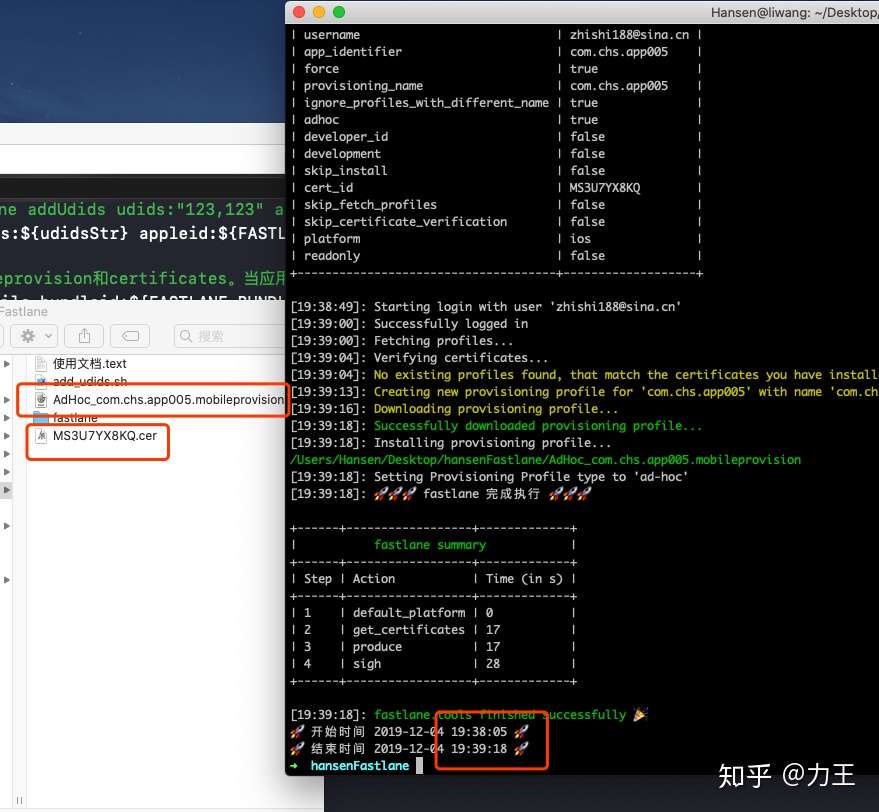 11 |
12 | ## 运行环境
13 | ### 编译系统:苹果Mac
14 | ### 编译系统版本:MacOS Catalina 10.15.1
15 | ### 需要终端环境:fastlane、ruby、cocoapods 需要安装APP:Xcode
16 | ***
17 |
18 | ## 使用文档
19 | 1、cd到当前文档路径
20 |
21 | 2、修改add_udids.sh文件以下环境变量
22 | ```
23 | 赋值FASTLANE_MAC_PASSWORD为当前Mac开机密码
24 | 赋值FASTLANE_APPLEID为需要添加的appid账号
25 | 赋值FASTLANE_PASSWORD为需要添加的appid密码
26 | 赋值FASTLANE_APPLE_APPLICATION_SPECIFIC_PASSWORD(进入苹果官网生成的特殊密码APP-SPECIFIC https://appleid.apple.com/account/manage)
27 | 赋值FASTLANE_SESSION(执行fastlane spaceauth -u user@email.com,生成session cookie)
28 | ```
29 |
30 | 3、使用终端执行 sh add_udids.sh 需要添加的udid集合,以空格隔开
31 | e.g,
32 | ```
33 | sh add_udids.sh 6f1b77ce2ff2cd5672734e00facbe97f305f9ddb 6f1b77ce2ff2cd5672734e00facbe97f305f9ddb 6f1b77ce2ff2cd5672734e00facbe97f305f9ddb
34 | ```
35 |
36 |
37 | ***
38 | ## 参考文档
39 | #### [fastlane官方文档](https://docs.fastlane.tools/ "fastlane官方文档")
40 | #### [关于spaceship工具的简单了解](https://www.jianshu.com/p/1d63bfef1738 "关于spaceship工具的简单了解")
41 | #### [fastlane使用说明书和处理关于开启两步验证如何全自动化问题](https://www.jianshu.com/p/19ae8cc865b0 "fastlane使用说明书和处理关于开启两步验证如何全自动化问题")
42 | #### [使用fastlane创建profile、添加设备、创建推送证书 以及上传蒲公英](https://www.jianshu.com/p/2defceba2761 "使用fastlane创建profile、添加设备、创建推送证书 以及上传蒲公英")
43 | #### [搭建 超级签 详细攻略](https://blog.csdn.net/LiaoQuesg/article/details/101219984 "搭建 超级签 详细攻略")
44 | #### [自动化打包---打包上传App Store Connect](https://www.jianshu.com/p/16e0d9b8e7ca "自动化打包---打包上传App Store Connect")
45 | #### [fastlane/spaceship/docs/DeveloperPortal.md](https://github.com/fastlane/fastlane/blob/master/spaceship/docs/DeveloperPortal.md "fastlane/spaceship/docs/DeveloperPortal.md")
46 | #### [从创建证书到上传到App Store](https://www.jianshu.com/p/db52889f20d0 "Fastlane从创建证书到上传到App Store")
47 | #### [记一次设置Fastlane支持苹果双重认证的过程](https://www.jianshu.com/p/665efd203259 "记一次设置Fastlane支持苹果双重认证的过程") https://www.jianshu.com/u/deffd9740b0b jcYang超仔
48 | ***
49 |
50 |
51 |
52 | ## 我
53 | #### Created by 程恒盛 on 2019/12/3.
54 | #### Copyright © 2019 力王. All rights reserved.
55 | #### QQ:2534550460@qq.com GitHub:https://github.com/HansenCCC tel:13767141841
56 | #### copy请标明出处,感谢
57 |
58 | ------------
59 |
60 | ## 你还对这些感兴趣吗
61 |
62 | 1、[iOS实现HTML H5秒开、拦截请求替换资源、优化HTML加载速度][1]
63 |
64 | 2、[超级签名中最重要的一步:跳过双重认证,自动化脚本添加udid并下载描述文件(证书和bundleid不存在时,会自动创建)][2]
65 |
66 | 3、[脚本自动化批量修改ipa的icon、启动图、APP名称等(demo只修改icon,其他原理一样)、重签ipa][3]
67 |
68 | 4、[QMKKXProduct iOS技术分享][4]
69 |
70 |
71 | [1]: https://github.com/HansenCCC/KKQuickDraw
72 | [2]: https://github.com/HansenCCC/HSAddUdids
73 | [3]: https://github.com/HansenCCC/HSIPAReplaceIcon
74 | [4]: https://github.com/HansenCCC/QMKKXProduct
75 |
76 |
--------------------------------------------------------------------------------
/fastlane/Fastfile:
--------------------------------------------------------------------------------
1 | # This file contains the fastlane.tools configuration
2 | # You can find the documentation at https://docs.fastlane.tools
3 | #
4 | # For a list of all available actions, check out
5 | #
6 | # https://docs.fastlane.tools/actions
7 | #
8 | # For a list of all available plugins, check out
9 | #
10 | # https://docs.fastlane.tools/plugins/available-plugins
11 | #
12 |
13 | # Uncomment the line if you want fastlane to automatically update itself
14 | # update_fastlane
15 |
16 | default_platform(:ios)
17 |
18 | platform :ios do
19 | desc "注册手机udid到指定AppId账号"
20 | lane :addUdids do |option|
21 | #接收到的所有参数
22 | puts "接收到的所有参数 #{option}"
23 | udidsStr = option[:udids]
24 | username = option[:appleid]
25 | if option.keys.size>0
26 | #字符串 -> 数组
27 | udidsArray = udidsStr.split(",")
28 | puts "需要添加的udid集合 #{udidsArray}"
29 | #数组 -> 字典(hash)
30 | udidsDic = {}
31 | for tmpUdid in udidsArray do
32 | tmpDic = {tmpUdid => tmpUdid}
33 | udidsDic = udidsDic.merge tmpDic
34 | end
35 | puts udidsDic
36 | #添加udid
37 | register_devices(
38 | devices:udidsDic,
39 | username: username,
40 | )
41 | elsif
42 | puts "⚠️ ⚠️ ⚠️ udids集合为空 ⚠️ ⚠️ ⚠️"
43 | end
44 | end
45 |
46 |
47 | #sign使用参考https://docs.fastlane.tools/actions/sigh/
48 | desc "下载provisioning_profile,不存在的bundleid和certificates自动新建并下载"
49 | lane :downloadsProfile do |option|
50 | #接收到的所有参数
51 | puts "接收到的所有参数 #{option}"
52 | bundleid = option[:bundleid] #bundleid
53 | username = option[:appleid] #Apple ID用户名
54 | name = option[:name] #Apple Developer Portal上使用的配置文件的名称
55 | cer = option[:cer] #0证书已经表示存在 1表示不存在
56 | mobileprovision = option[:mobileprovision] #0描述文件已经表示存在 1表示不存在
57 | #如果没有在Apple Developer创建证书的话,get_certificates会帮你自动创建证书
58 | puts "cer=#{cer}"
59 | puts "mobileprovision=#{mobileprovision}"
60 | if cer.to_i == 1
61 | get_certificates(
62 | username: username,
63 | #keychain_password: "123",
64 | )
65 | else
66 | puts "certificates已存在,跳过创建步骤"
67 | end
68 |
69 | #在开发者账号创建appid(此方法待优化,比较耗时)
70 | if mobileprovision.to_i == 1
71 | produce(
72 | username:username,
73 | app_identifier: bundleid,
74 | app_name: bundleid,
75 | )
76 | else
77 | puts "mobileprovision已存在,跳过创建步骤"
78 | end
79 | initError = ""
80 | if bundleid==nil
81 | initError = "⚠️ ⚠️ ⚠️ bundleid(bundleid)为空,请补充 ⚠️ ⚠️ ⚠️"
82 | elsif username==nil
83 | initError = "⚠️ ⚠️ ⚠️ appleid(Apple ID用户名)为空,请补充 ⚠️ ⚠️ ⚠️"
84 | elsif name==nil
85 | initError = "⚠️ ⚠️ ⚠️ name(配置文件名称)为空,请补充 ⚠️ ⚠️ ⚠️"
86 | else
87 | puts "参数获取正常"
88 | end
89 | if initError.length==0
90 | sigh(
91 | username:username,
92 | app_identifier: bundleid,
93 | force: true,
94 | provisioning_name: name,
95 | ignore_profiles_with_different_name: true,
96 | adhoc: true,
97 | )
98 | else
99 | puts initError
100 | end
101 | end
102 |
103 | desc "单纯下载provisioning_profile,不存在的bundleid自动新建并下载(已废弃)"
104 | lane :adhoc_profile do |option|
105 | #接收到的所有参数
106 | puts "接收到的所有参数 #{option}"
107 | bundleid = option[:bundleid] #bundleid
108 | username = option[:appleid] #Apple ID用户名
109 | name = option[:name] #Apple Developer Portal上使用的配置文件的名称
110 | get_provisioning_profile(
111 | username:username,
112 | adhoc: true,
113 | force: true,
114 | filename: "name.mobileprovision",
115 | app_identifier: bundleid,
116 | )
117 | end
118 |
119 | lane :test do |option|
120 | #接收到的所有参数
121 | puts "接收到的所有参数 #{option}"
122 | bundleid = option[:bundleid] #bundleid
123 | username = option[:appleid] #Apple ID用户名
124 | name = option[:name] #Apple Developer Portal上使用的配置文件的名称
125 | puts "请输入版本描述:"
126 | desc = STDIN.gets
127 | puts "开始打包 #{desc}"
128 | end
129 |
130 |
131 |
132 | before_all do |options|
133 | puts "🚀🚀🚀 fastlane 初始化准备执行 🚀🚀🚀"
134 | end
135 |
136 | before_each do |options|
137 | puts "🚀🚀🚀 lane #{options}初始化准备执行 🚀🚀🚀"
138 | end
139 |
140 | after_each do |options|
141 | puts "🚀🚀🚀 lane #{options}执行完成 🚀🚀🚀"
142 | end
143 |
144 | after_each do |options|
145 | puts "🚀🚀🚀 fastlane 完成执行 🚀🚀🚀"
146 | end
147 |
148 | error do |options|
149 | puts "⚠️ ⚠️ ⚠️ lane #{options}出现错误 ⚠️ ⚠️ ⚠️"
150 | end
151 |
152 | end
153 |
--------------------------------------------------------------------------------
/add_udids.sh:
--------------------------------------------------------------------------------
1 | #!/bin/bash
2 |
3 |
4 | #######################################################
5 |
6 | # addUdids.sh
7 | # 脚本添加udid
8 | # Created by 程恒盛 on 2019/12/3.
9 | # Copyright © 2019 力王工作室. All rights reserved.
10 | # QQ:2534550460@qq.com GitHub:https://github.com/HansenCCC tel:13767141841
11 |
12 | # 参考文档
13 | # https://docs.fastlane.tools/ fastlane官方文档
14 | # https://www.jianshu.com/p/1d63bfef1738 关于spaceship工具的简单了解
15 | # https://www.jianshu.com/p/19ae8cc865b0 fastlane使用说明书和处理关于开启两步验证如何全自动化问题
16 | # https://www.jianshu.com/p/2defceba2761 使用fastlane创建profile、添加设备、创建推送证书 以及上传蒲公英
17 | # https://blog.csdn.net/LiaoQuesg/article/details/101219984 搭建 超级签 详细攻略
18 | # https://www.jianshu.com/p/16e0d9b8e7ca Fastlane自动化打包---打包上传App Store Connect
19 | # https://github.com/fastlane/fastlane/blob/master/spaceship/docs/DeveloperPortal.md#example-data fastlane/spaceship/docs/DeveloperPortal.md
20 | # https://www.jianshu.com/p/db52889f20d0 Fastlane - 从创建证书到上传到App Store
21 | # https://www.jianshu.com/p/665efd203259 记一次设置Fastlane支持苹果双重认证的过程
22 |
23 |
24 | # 编译系统:苹果Mac
25 | # 编译系统版本:MacOS Catalina 10.15.1
26 | # 需要终端环境::fastlane、spaceship、lane、ruby、cocoapods 需要安装APP:Xcode
27 |
28 | #######################################################
29 | #安装fastlane
30 | #sudo gem install fastlane -n /usr/local/bin
31 | #安装pry
32 | #sudo gem install -n /usr/local/bin sigh --pre
33 |
34 | starttime=$(date +%Y-%m-%d\ %H:%M:%S)
35 | echo "🚀 开始时间 $starttime 🚀"
36 |
37 | #bundleid
38 | export FASTLANE_BUNDLEID=''
39 | #mac开机密码
40 | export FASTLANE_MAC_PASSWORD=''
41 | #提供需要添加udid的账号
42 | export FASTLANE_APPLEID=''
43 | #关闭双重认证 需要手动添加 APP-SPECIFIC和session cookie 进入苹果官网生成的特殊密码APP-SPECIFIC https://appleid.apple.com/account/manage
44 | export FASTLANE_APPLE_APPLICATION_SPECIFIC_PASSWORD=''
45 | #appleid密码
46 | export FASTLANE_PASSWORD=''
47 | #执行fastlane spaceauth -u user@email.com,生成session cookie
48 | export FASTLANE_SESSION=''
49 |
50 |
51 | function findSuffixFile(){
52 | for i in `ls -a *.$1`
53 | do
54 | echo "$1为后缀的文件存在"
55 | return 0
56 | done
57 | echo "$1为后缀的文件不存在"
58 | return 1
59 | }
60 | #判断是否存在后缀名为cer的文件
61 | CerSuffixFile=1
62 | if findSuffixFile 'cer'
63 | then
64 | CerSuffixFile=0
65 | fi
66 | #判断是否存在后缀名为mobileprovision的文件
67 | MobileprovisionSuffixFile=1
68 | if findSuffixFile 'mobileprovision'
69 | then
70 | MobileprovisionSuffixFile=0
71 | fi
72 |
73 | #code
74 | #解锁keychain,是其它工具可以访问证书
75 | security unlock-keychain -p ${FASTLANE_MAC_PASSWORD} ~/Library/Keychains/login.keychain
76 | #更新cocoapods
77 | #/usr/local/bin/pod update --verbose --no-repo-update
78 |
79 | #获取输入的所有的udid
80 | udids=$*
81 | #echo $udids
82 | udidsStr=""
83 | for udid in ${udids}
84 | do
85 | echo "正在添加的udid:${udid}"
86 | udidsStr+="${udid},"
87 | done
88 | echo "需要添加的udid集合${udidsStr}"
89 | #添加udid 测试案例fastlane addUdids udids:"123,123" appleid:"2534550460@qq.com"
90 | echo "fastlane addUdids udids:${udidsStr} appleid:${FASTLANE_APPLEID}"
91 | fastlane addUdids udids:${udidsStr} appleid:${FASTLANE_APPLEID}
92 |
93 | #添加udid成功,下载mobileprovision和certificates。当应用、mobileprovision、certificates、bundleid和不存在时,自动创建 0已经表示存在 1表示不存在
94 | echo "fastlane downloadsProfile bundleid:${FASTLANE_BUNDLEID} appleid:${FASTLANE_APPLEID} name:${FASTLANE_BUNDLEID} cer:${CerSuffixFile} mobileprovision:${MobileprovisionSuffixFile}"
95 | fastlane downloadsProfile bundleid:${FASTLANE_BUNDLEID} appleid:${FASTLANE_APPLEID} name:${FASTLANE_BUNDLEID} cer:${CerSuffixFile} mobileprovision:${MobileprovisionSuffixFile}
96 |
97 | endtime=$(date +%Y-%m-%d\ %H:%M:%S)
98 | echo "🚀 开始时间 $starttime 🚀"
99 | echo "🚀 结束时间 $endtime 🚀"
100 | #脚本过度文档
101 | #desc "注册手机udid到指定AppId账号"
102 | #lane :addUdids do |option|
103 | # #接收到的所有参数
104 | # puts "接收到的所有参数 #{option}"
105 | # udidsStr = option[:udids]
106 | # if option.keys.size>0
107 | # #字符串 -> 数组
108 | # udidsArray = udidsStr.split(",")
109 | # puts "需要添加的udid集合 #{udidsArray}"
110 | # #数组 -> 字典(hash)
111 | # udidsDic = {}
112 | # for tmpUdid in udidsArray do
113 | # tmpDic = {tmpUdid => tmpUdid}
114 | # udidsDic = udidsDic.merge tmpDic
115 | # end
116 | # puts udidsDic
117 | # #添加udid
118 | # register_devices(
119 | # devices:udidsDic,
120 | # username: "zhishi188@sina.cn"
121 | # #username: "2534550460@qq.com"
122 | # )
123 | # elsif
124 | # puts "⚠️ ⚠️ ⚠️ udids集合为空 ⚠️ ⚠️ ⚠️"
125 | # end
126 | #end
127 | #
128 | # before_all do |options|
129 | # puts "🚀🚀🚀 fastlane 初始化准备执行 🚀🚀🚀"
130 | # end
131 | #
132 | # before_each do |options|
133 | # puts "🚀🚀🚀 lane #{options}初始化准备执行 🚀🚀🚀"
134 | # end
135 | #
136 | # after_each do |options|
137 | # puts "🚀🚀🚀 lane #{options}执行完成 🚀🚀🚀"
138 | # end
139 | #
140 | # after_each do |options|
141 | # puts "🚀🚀🚀 fastlane 完成执行 🚀🚀🚀"
142 | # end
143 | #
144 | # error do |options|
145 | # puts "⚠️ ⚠️ ⚠️ lane #{options}出现错误 ⚠️ ⚠️ ⚠️"
146 | # end
147 |
148 |
149 |
150 |
151 | ####################################################################
152 |
153 | #desc "注册设备"
154 | #lane :add_devices do
155 | # register_devices(
156 | # #devices_file: "./devices.txt", # 指定包含设备信息的文件路径,文件具体格式参考https://devimages.apple.com.edgekey.net/downloads/devices/Multiple-Upload-Samples.zip
157 | # devices: {
158 | # "Luka iPhone 6" => "1234567890123456789012345678901234567890",
159 | # "Felix iPad Air 2" => "abcdefghijklmnopqrstvuwxyzabcdefghijklmn"
160 | # }, # 指定要注册的设备列表,格式为:设备名称 => UDID
161 | # username: "xx@apple.com" # 设置Apple ID
162 | # )
163 | #end
164 |
165 | #Appfile: 存储有关开发者账号相关信息
166 | #
167 | #Fastfile: 核心文件,主要用于 命令行调用和处理具体的流程,lane相对于一个方法或者函数
168 | #
169 | #Deliverfile: deliver工具的配置文件
170 | #metadata: 元数据文件夹
171 | #
172 | #Matchfile: Match操作对应的配置文件
173 | #
174 | #screenshots: 截图文件夹
175 |
176 |
177 |
178 |
179 | #关于开启两步验证如何全自动化问题
180 | #1.访问 https://appleid.apple.com/account/manage
181 | #2.生成一个 APP-SPECIFIC PASSWORDS,保留生成的特殊密码
182 | #3.使用环境变量提供这个密码给fastlane: FASTLANE_APPLE_APPLICATION_SPECIFIC_PASSWORD
183 | #4.执行fastlane spaceauth -u user@email.com,生成session cookie。
184 | #5.通过环境变量FASTLANE_SESSION 提供session cookies。
185 | #
186 | #配置地方:
187 | #
188 | #打包机:~/.bash_profile 中,配置 FASTLANE_APPLE_APPLICATION_SPECIFIC_PASSWORD 和 FASTLANE_SESSION
189 | #
190 | #例如:
191 | #export FASTLANE_APPLE_APPLICATION_SPECIFIC_PASSWORD='edwq-upll-vtpt-mkil'
192 | #export FASTLANE_SESSION='—\n- !ruby/object:HTTP::Cookie\n name: DES5612c57fe9305b07801a04a701978047c\n value: HSARMTKNSRVXWFlayJcyPJz1OsFDHeKrQRWoZIIItWMLqqur7wwChn2OFd5JKkjTlGs3FXQxc5Dh94xDMpd35T96YDp34rWOuQX04NnxBDmPdAOOi3fkVlOKkOFzlS7gOJG9r0B7SRVX\n domain: idmsa.apple.com\n for_domain: true\n path: "/"\n secure: true\n httponly: true\n expires: \n max_age: 2592000\n created_at: 2019-11-28 16:05:18.278616000 +08:00\n accessed_at: 2019-12-03 10:38:39.970422000 +08:00\n- !ruby/object:HTTP::Cookie\n name: myacinfo\n value: DAWTKNV2d60f519deb048710b61ff5ad231d487f5a542260a0036cc8ec44abb26dd218fa03fb71d4bfef0da574e3f2bb9d566183e1e6ca390593230258ba06ce84eaf399f07d6eda6ef5682bee77ffb78448543ca11ea41e43336e5243d255199e5e1b03c719f3918f0075c1399b120d9e7d12bd10a117f0ee7df1bbc5936993f54322a9b0abed258e30d3c9a69a582d2406d373ca360ac618cf1bc3bd1f1d7b3ea6ddc74ec6d637a24893f9851819fe8d40dc94fd47b82752829ebea292fc5830c29f6cbbdc64f3de575f405712e9d78ef58c6e6fd098c89453228bb22f0f4d657c14f4f49b4dbc99307c6ccfb680374b7298f50e3cb58bde7f3b18e2650afdf6b5b12e35653835393865613666363931646235306332373564666362663161343438636563633536633965MVRYV2\n domain: apple.com\n for_domain: true\n path: "/"\n secure: true\n httponly: true\n expires: \n max_age: \n created_at: 2019-12-03 10:38:40.883705000 +08:00\n accessed_at: 2019-12-03 10:38:40.884364000 +08:00\n- !ruby/object:HTTP::Cookie\n name: dqsid\n value: eyJ0eXAiOiJKV1QiLCJhbGciOiJIUzI1NiJ9.eyJpYXQiOjE1NzUzNDA3MzIsImp0aSI6Im1HNU1Wc0hYWENkQ2FzVmxCcm1qVkEifQ.NOFMQJjY4gZXAAhfRSDWHbKPyERqDte7boJL9Kx_XCM\n domain: appstoreconnect.apple.com\n for_domain: false\n path: "/"\n secure: true\n httponly: true\n expires: \n max_age: 1799\n created_at: &1 2019-12-03 10:38:41.912579000 +08:00\n accessed_at: *1\n'
193 |
194 |
195 | #fastlane sigh manage #列表出所有provisioning profiles
196 | #fastlane sigh manage -e #删除无效provisioning profiles
197 |
198 | #添加凭证
199 | #fastlane fastlane-credentials add --username zhishi188@sina.cn
200 | #删除凭证
201 | #fastlane fastlane-credentials remove --username zhishi188@sina.cn
202 |
--------------------------------------------------------------------------------
11 |
12 | ## 运行环境
13 | ### 编译系统:苹果Mac
14 | ### 编译系统版本:MacOS Catalina 10.15.1
15 | ### 需要终端环境:fastlane、ruby、cocoapods 需要安装APP:Xcode
16 | ***
17 |
18 | ## 使用文档
19 | 1、cd到当前文档路径
20 |
21 | 2、修改add_udids.sh文件以下环境变量
22 | ```
23 | 赋值FASTLANE_MAC_PASSWORD为当前Mac开机密码
24 | 赋值FASTLANE_APPLEID为需要添加的appid账号
25 | 赋值FASTLANE_PASSWORD为需要添加的appid密码
26 | 赋值FASTLANE_APPLE_APPLICATION_SPECIFIC_PASSWORD(进入苹果官网生成的特殊密码APP-SPECIFIC https://appleid.apple.com/account/manage)
27 | 赋值FASTLANE_SESSION(执行fastlane spaceauth -u user@email.com,生成session cookie)
28 | ```
29 |
30 | 3、使用终端执行 sh add_udids.sh 需要添加的udid集合,以空格隔开
31 | e.g,
32 | ```
33 | sh add_udids.sh 6f1b77ce2ff2cd5672734e00facbe97f305f9ddb 6f1b77ce2ff2cd5672734e00facbe97f305f9ddb 6f1b77ce2ff2cd5672734e00facbe97f305f9ddb
34 | ```
35 |
36 |
37 | ***
38 | ## 参考文档
39 | #### [fastlane官方文档](https://docs.fastlane.tools/ "fastlane官方文档")
40 | #### [关于spaceship工具的简单了解](https://www.jianshu.com/p/1d63bfef1738 "关于spaceship工具的简单了解")
41 | #### [fastlane使用说明书和处理关于开启两步验证如何全自动化问题](https://www.jianshu.com/p/19ae8cc865b0 "fastlane使用说明书和处理关于开启两步验证如何全自动化问题")
42 | #### [使用fastlane创建profile、添加设备、创建推送证书 以及上传蒲公英](https://www.jianshu.com/p/2defceba2761 "使用fastlane创建profile、添加设备、创建推送证书 以及上传蒲公英")
43 | #### [搭建 超级签 详细攻略](https://blog.csdn.net/LiaoQuesg/article/details/101219984 "搭建 超级签 详细攻略")
44 | #### [自动化打包---打包上传App Store Connect](https://www.jianshu.com/p/16e0d9b8e7ca "自动化打包---打包上传App Store Connect")
45 | #### [fastlane/spaceship/docs/DeveloperPortal.md](https://github.com/fastlane/fastlane/blob/master/spaceship/docs/DeveloperPortal.md "fastlane/spaceship/docs/DeveloperPortal.md")
46 | #### [从创建证书到上传到App Store](https://www.jianshu.com/p/db52889f20d0 "Fastlane从创建证书到上传到App Store")
47 | #### [记一次设置Fastlane支持苹果双重认证的过程](https://www.jianshu.com/p/665efd203259 "记一次设置Fastlane支持苹果双重认证的过程") https://www.jianshu.com/u/deffd9740b0b jcYang超仔
48 | ***
49 |
50 |
51 |
52 | ## 我
53 | #### Created by 程恒盛 on 2019/12/3.
54 | #### Copyright © 2019 力王. All rights reserved.
55 | #### QQ:2534550460@qq.com GitHub:https://github.com/HansenCCC tel:13767141841
56 | #### copy请标明出处,感谢
57 |
58 | ------------
59 |
60 | ## 你还对这些感兴趣吗
61 |
62 | 1、[iOS实现HTML H5秒开、拦截请求替换资源、优化HTML加载速度][1]
63 |
64 | 2、[超级签名中最重要的一步:跳过双重认证,自动化脚本添加udid并下载描述文件(证书和bundleid不存在时,会自动创建)][2]
65 |
66 | 3、[脚本自动化批量修改ipa的icon、启动图、APP名称等(demo只修改icon,其他原理一样)、重签ipa][3]
67 |
68 | 4、[QMKKXProduct iOS技术分享][4]
69 |
70 |
71 | [1]: https://github.com/HansenCCC/KKQuickDraw
72 | [2]: https://github.com/HansenCCC/HSAddUdids
73 | [3]: https://github.com/HansenCCC/HSIPAReplaceIcon
74 | [4]: https://github.com/HansenCCC/QMKKXProduct
75 |
76 |
--------------------------------------------------------------------------------
/fastlane/Fastfile:
--------------------------------------------------------------------------------
1 | # This file contains the fastlane.tools configuration
2 | # You can find the documentation at https://docs.fastlane.tools
3 | #
4 | # For a list of all available actions, check out
5 | #
6 | # https://docs.fastlane.tools/actions
7 | #
8 | # For a list of all available plugins, check out
9 | #
10 | # https://docs.fastlane.tools/plugins/available-plugins
11 | #
12 |
13 | # Uncomment the line if you want fastlane to automatically update itself
14 | # update_fastlane
15 |
16 | default_platform(:ios)
17 |
18 | platform :ios do
19 | desc "注册手机udid到指定AppId账号"
20 | lane :addUdids do |option|
21 | #接收到的所有参数
22 | puts "接收到的所有参数 #{option}"
23 | udidsStr = option[:udids]
24 | username = option[:appleid]
25 | if option.keys.size>0
26 | #字符串 -> 数组
27 | udidsArray = udidsStr.split(",")
28 | puts "需要添加的udid集合 #{udidsArray}"
29 | #数组 -> 字典(hash)
30 | udidsDic = {}
31 | for tmpUdid in udidsArray do
32 | tmpDic = {tmpUdid => tmpUdid}
33 | udidsDic = udidsDic.merge tmpDic
34 | end
35 | puts udidsDic
36 | #添加udid
37 | register_devices(
38 | devices:udidsDic,
39 | username: username,
40 | )
41 | elsif
42 | puts "⚠️ ⚠️ ⚠️ udids集合为空 ⚠️ ⚠️ ⚠️"
43 | end
44 | end
45 |
46 |
47 | #sign使用参考https://docs.fastlane.tools/actions/sigh/
48 | desc "下载provisioning_profile,不存在的bundleid和certificates自动新建并下载"
49 | lane :downloadsProfile do |option|
50 | #接收到的所有参数
51 | puts "接收到的所有参数 #{option}"
52 | bundleid = option[:bundleid] #bundleid
53 | username = option[:appleid] #Apple ID用户名
54 | name = option[:name] #Apple Developer Portal上使用的配置文件的名称
55 | cer = option[:cer] #0证书已经表示存在 1表示不存在
56 | mobileprovision = option[:mobileprovision] #0描述文件已经表示存在 1表示不存在
57 | #如果没有在Apple Developer创建证书的话,get_certificates会帮你自动创建证书
58 | puts "cer=#{cer}"
59 | puts "mobileprovision=#{mobileprovision}"
60 | if cer.to_i == 1
61 | get_certificates(
62 | username: username,
63 | #keychain_password: "123",
64 | )
65 | else
66 | puts "certificates已存在,跳过创建步骤"
67 | end
68 |
69 | #在开发者账号创建appid(此方法待优化,比较耗时)
70 | if mobileprovision.to_i == 1
71 | produce(
72 | username:username,
73 | app_identifier: bundleid,
74 | app_name: bundleid,
75 | )
76 | else
77 | puts "mobileprovision已存在,跳过创建步骤"
78 | end
79 | initError = ""
80 | if bundleid==nil
81 | initError = "⚠️ ⚠️ ⚠️ bundleid(bundleid)为空,请补充 ⚠️ ⚠️ ⚠️"
82 | elsif username==nil
83 | initError = "⚠️ ⚠️ ⚠️ appleid(Apple ID用户名)为空,请补充 ⚠️ ⚠️ ⚠️"
84 | elsif name==nil
85 | initError = "⚠️ ⚠️ ⚠️ name(配置文件名称)为空,请补充 ⚠️ ⚠️ ⚠️"
86 | else
87 | puts "参数获取正常"
88 | end
89 | if initError.length==0
90 | sigh(
91 | username:username,
92 | app_identifier: bundleid,
93 | force: true,
94 | provisioning_name: name,
95 | ignore_profiles_with_different_name: true,
96 | adhoc: true,
97 | )
98 | else
99 | puts initError
100 | end
101 | end
102 |
103 | desc "单纯下载provisioning_profile,不存在的bundleid自动新建并下载(已废弃)"
104 | lane :adhoc_profile do |option|
105 | #接收到的所有参数
106 | puts "接收到的所有参数 #{option}"
107 | bundleid = option[:bundleid] #bundleid
108 | username = option[:appleid] #Apple ID用户名
109 | name = option[:name] #Apple Developer Portal上使用的配置文件的名称
110 | get_provisioning_profile(
111 | username:username,
112 | adhoc: true,
113 | force: true,
114 | filename: "name.mobileprovision",
115 | app_identifier: bundleid,
116 | )
117 | end
118 |
119 | lane :test do |option|
120 | #接收到的所有参数
121 | puts "接收到的所有参数 #{option}"
122 | bundleid = option[:bundleid] #bundleid
123 | username = option[:appleid] #Apple ID用户名
124 | name = option[:name] #Apple Developer Portal上使用的配置文件的名称
125 | puts "请输入版本描述:"
126 | desc = STDIN.gets
127 | puts "开始打包 #{desc}"
128 | end
129 |
130 |
131 |
132 | before_all do |options|
133 | puts "🚀🚀🚀 fastlane 初始化准备执行 🚀🚀🚀"
134 | end
135 |
136 | before_each do |options|
137 | puts "🚀🚀🚀 lane #{options}初始化准备执行 🚀🚀🚀"
138 | end
139 |
140 | after_each do |options|
141 | puts "🚀🚀🚀 lane #{options}执行完成 🚀🚀🚀"
142 | end
143 |
144 | after_each do |options|
145 | puts "🚀🚀🚀 fastlane 完成执行 🚀🚀🚀"
146 | end
147 |
148 | error do |options|
149 | puts "⚠️ ⚠️ ⚠️ lane #{options}出现错误 ⚠️ ⚠️ ⚠️"
150 | end
151 |
152 | end
153 |
--------------------------------------------------------------------------------
/add_udids.sh:
--------------------------------------------------------------------------------
1 | #!/bin/bash
2 |
3 |
4 | #######################################################
5 |
6 | # addUdids.sh
7 | # 脚本添加udid
8 | # Created by 程恒盛 on 2019/12/3.
9 | # Copyright © 2019 力王工作室. All rights reserved.
10 | # QQ:2534550460@qq.com GitHub:https://github.com/HansenCCC tel:13767141841
11 |
12 | # 参考文档
13 | # https://docs.fastlane.tools/ fastlane官方文档
14 | # https://www.jianshu.com/p/1d63bfef1738 关于spaceship工具的简单了解
15 | # https://www.jianshu.com/p/19ae8cc865b0 fastlane使用说明书和处理关于开启两步验证如何全自动化问题
16 | # https://www.jianshu.com/p/2defceba2761 使用fastlane创建profile、添加设备、创建推送证书 以及上传蒲公英
17 | # https://blog.csdn.net/LiaoQuesg/article/details/101219984 搭建 超级签 详细攻略
18 | # https://www.jianshu.com/p/16e0d9b8e7ca Fastlane自动化打包---打包上传App Store Connect
19 | # https://github.com/fastlane/fastlane/blob/master/spaceship/docs/DeveloperPortal.md#example-data fastlane/spaceship/docs/DeveloperPortal.md
20 | # https://www.jianshu.com/p/db52889f20d0 Fastlane - 从创建证书到上传到App Store
21 | # https://www.jianshu.com/p/665efd203259 记一次设置Fastlane支持苹果双重认证的过程
22 |
23 |
24 | # 编译系统:苹果Mac
25 | # 编译系统版本:MacOS Catalina 10.15.1
26 | # 需要终端环境::fastlane、spaceship、lane、ruby、cocoapods 需要安装APP:Xcode
27 |
28 | #######################################################
29 | #安装fastlane
30 | #sudo gem install fastlane -n /usr/local/bin
31 | #安装pry
32 | #sudo gem install -n /usr/local/bin sigh --pre
33 |
34 | starttime=$(date +%Y-%m-%d\ %H:%M:%S)
35 | echo "🚀 开始时间 $starttime 🚀"
36 |
37 | #bundleid
38 | export FASTLANE_BUNDLEID=''
39 | #mac开机密码
40 | export FASTLANE_MAC_PASSWORD=''
41 | #提供需要添加udid的账号
42 | export FASTLANE_APPLEID=''
43 | #关闭双重认证 需要手动添加 APP-SPECIFIC和session cookie 进入苹果官网生成的特殊密码APP-SPECIFIC https://appleid.apple.com/account/manage
44 | export FASTLANE_APPLE_APPLICATION_SPECIFIC_PASSWORD=''
45 | #appleid密码
46 | export FASTLANE_PASSWORD=''
47 | #执行fastlane spaceauth -u user@email.com,生成session cookie
48 | export FASTLANE_SESSION=''
49 |
50 |
51 | function findSuffixFile(){
52 | for i in `ls -a *.$1`
53 | do
54 | echo "$1为后缀的文件存在"
55 | return 0
56 | done
57 | echo "$1为后缀的文件不存在"
58 | return 1
59 | }
60 | #判断是否存在后缀名为cer的文件
61 | CerSuffixFile=1
62 | if findSuffixFile 'cer'
63 | then
64 | CerSuffixFile=0
65 | fi
66 | #判断是否存在后缀名为mobileprovision的文件
67 | MobileprovisionSuffixFile=1
68 | if findSuffixFile 'mobileprovision'
69 | then
70 | MobileprovisionSuffixFile=0
71 | fi
72 |
73 | #code
74 | #解锁keychain,是其它工具可以访问证书
75 | security unlock-keychain -p ${FASTLANE_MAC_PASSWORD} ~/Library/Keychains/login.keychain
76 | #更新cocoapods
77 | #/usr/local/bin/pod update --verbose --no-repo-update
78 |
79 | #获取输入的所有的udid
80 | udids=$*
81 | #echo $udids
82 | udidsStr=""
83 | for udid in ${udids}
84 | do
85 | echo "正在添加的udid:${udid}"
86 | udidsStr+="${udid},"
87 | done
88 | echo "需要添加的udid集合${udidsStr}"
89 | #添加udid 测试案例fastlane addUdids udids:"123,123" appleid:"2534550460@qq.com"
90 | echo "fastlane addUdids udids:${udidsStr} appleid:${FASTLANE_APPLEID}"
91 | fastlane addUdids udids:${udidsStr} appleid:${FASTLANE_APPLEID}
92 |
93 | #添加udid成功,下载mobileprovision和certificates。当应用、mobileprovision、certificates、bundleid和不存在时,自动创建 0已经表示存在 1表示不存在
94 | echo "fastlane downloadsProfile bundleid:${FASTLANE_BUNDLEID} appleid:${FASTLANE_APPLEID} name:${FASTLANE_BUNDLEID} cer:${CerSuffixFile} mobileprovision:${MobileprovisionSuffixFile}"
95 | fastlane downloadsProfile bundleid:${FASTLANE_BUNDLEID} appleid:${FASTLANE_APPLEID} name:${FASTLANE_BUNDLEID} cer:${CerSuffixFile} mobileprovision:${MobileprovisionSuffixFile}
96 |
97 | endtime=$(date +%Y-%m-%d\ %H:%M:%S)
98 | echo "🚀 开始时间 $starttime 🚀"
99 | echo "🚀 结束时间 $endtime 🚀"
100 | #脚本过度文档
101 | #desc "注册手机udid到指定AppId账号"
102 | #lane :addUdids do |option|
103 | # #接收到的所有参数
104 | # puts "接收到的所有参数 #{option}"
105 | # udidsStr = option[:udids]
106 | # if option.keys.size>0
107 | # #字符串 -> 数组
108 | # udidsArray = udidsStr.split(",")
109 | # puts "需要添加的udid集合 #{udidsArray}"
110 | # #数组 -> 字典(hash)
111 | # udidsDic = {}
112 | # for tmpUdid in udidsArray do
113 | # tmpDic = {tmpUdid => tmpUdid}
114 | # udidsDic = udidsDic.merge tmpDic
115 | # end
116 | # puts udidsDic
117 | # #添加udid
118 | # register_devices(
119 | # devices:udidsDic,
120 | # username: "zhishi188@sina.cn"
121 | # #username: "2534550460@qq.com"
122 | # )
123 | # elsif
124 | # puts "⚠️ ⚠️ ⚠️ udids集合为空 ⚠️ ⚠️ ⚠️"
125 | # end
126 | #end
127 | #
128 | # before_all do |options|
129 | # puts "🚀🚀🚀 fastlane 初始化准备执行 🚀🚀🚀"
130 | # end
131 | #
132 | # before_each do |options|
133 | # puts "🚀🚀🚀 lane #{options}初始化准备执行 🚀🚀🚀"
134 | # end
135 | #
136 | # after_each do |options|
137 | # puts "🚀🚀🚀 lane #{options}执行完成 🚀🚀🚀"
138 | # end
139 | #
140 | # after_each do |options|
141 | # puts "🚀🚀🚀 fastlane 完成执行 🚀🚀🚀"
142 | # end
143 | #
144 | # error do |options|
145 | # puts "⚠️ ⚠️ ⚠️ lane #{options}出现错误 ⚠️ ⚠️ ⚠️"
146 | # end
147 |
148 |
149 |
150 |
151 | ####################################################################
152 |
153 | #desc "注册设备"
154 | #lane :add_devices do
155 | # register_devices(
156 | # #devices_file: "./devices.txt", # 指定包含设备信息的文件路径,文件具体格式参考https://devimages.apple.com.edgekey.net/downloads/devices/Multiple-Upload-Samples.zip
157 | # devices: {
158 | # "Luka iPhone 6" => "1234567890123456789012345678901234567890",
159 | # "Felix iPad Air 2" => "abcdefghijklmnopqrstvuwxyzabcdefghijklmn"
160 | # }, # 指定要注册的设备列表,格式为:设备名称 => UDID
161 | # username: "xx@apple.com" # 设置Apple ID
162 | # )
163 | #end
164 |
165 | #Appfile: 存储有关开发者账号相关信息
166 | #
167 | #Fastfile: 核心文件,主要用于 命令行调用和处理具体的流程,lane相对于一个方法或者函数
168 | #
169 | #Deliverfile: deliver工具的配置文件
170 | #metadata: 元数据文件夹
171 | #
172 | #Matchfile: Match操作对应的配置文件
173 | #
174 | #screenshots: 截图文件夹
175 |
176 |
177 |
178 |
179 | #关于开启两步验证如何全自动化问题
180 | #1.访问 https://appleid.apple.com/account/manage
181 | #2.生成一个 APP-SPECIFIC PASSWORDS,保留生成的特殊密码
182 | #3.使用环境变量提供这个密码给fastlane: FASTLANE_APPLE_APPLICATION_SPECIFIC_PASSWORD
183 | #4.执行fastlane spaceauth -u user@email.com,生成session cookie。
184 | #5.通过环境变量FASTLANE_SESSION 提供session cookies。
185 | #
186 | #配置地方:
187 | #
188 | #打包机:~/.bash_profile 中,配置 FASTLANE_APPLE_APPLICATION_SPECIFIC_PASSWORD 和 FASTLANE_SESSION
189 | #
190 | #例如:
191 | #export FASTLANE_APPLE_APPLICATION_SPECIFIC_PASSWORD='edwq-upll-vtpt-mkil'
192 | #export FASTLANE_SESSION='—\n- !ruby/object:HTTP::Cookie\n name: DES5612c57fe9305b07801a04a701978047c\n value: HSARMTKNSRVXWFlayJcyPJz1OsFDHeKrQRWoZIIItWMLqqur7wwChn2OFd5JKkjTlGs3FXQxc5Dh94xDMpd35T96YDp34rWOuQX04NnxBDmPdAOOi3fkVlOKkOFzlS7gOJG9r0B7SRVX\n domain: idmsa.apple.com\n for_domain: true\n path: "/"\n secure: true\n httponly: true\n expires: \n max_age: 2592000\n created_at: 2019-11-28 16:05:18.278616000 +08:00\n accessed_at: 2019-12-03 10:38:39.970422000 +08:00\n- !ruby/object:HTTP::Cookie\n name: myacinfo\n value: DAWTKNV2d60f519deb048710b61ff5ad231d487f5a542260a0036cc8ec44abb26dd218fa03fb71d4bfef0da574e3f2bb9d566183e1e6ca390593230258ba06ce84eaf399f07d6eda6ef5682bee77ffb78448543ca11ea41e43336e5243d255199e5e1b03c719f3918f0075c1399b120d9e7d12bd10a117f0ee7df1bbc5936993f54322a9b0abed258e30d3c9a69a582d2406d373ca360ac618cf1bc3bd1f1d7b3ea6ddc74ec6d637a24893f9851819fe8d40dc94fd47b82752829ebea292fc5830c29f6cbbdc64f3de575f405712e9d78ef58c6e6fd098c89453228bb22f0f4d657c14f4f49b4dbc99307c6ccfb680374b7298f50e3cb58bde7f3b18e2650afdf6b5b12e35653835393865613666363931646235306332373564666362663161343438636563633536633965MVRYV2\n domain: apple.com\n for_domain: true\n path: "/"\n secure: true\n httponly: true\n expires: \n max_age: \n created_at: 2019-12-03 10:38:40.883705000 +08:00\n accessed_at: 2019-12-03 10:38:40.884364000 +08:00\n- !ruby/object:HTTP::Cookie\n name: dqsid\n value: eyJ0eXAiOiJKV1QiLCJhbGciOiJIUzI1NiJ9.eyJpYXQiOjE1NzUzNDA3MzIsImp0aSI6Im1HNU1Wc0hYWENkQ2FzVmxCcm1qVkEifQ.NOFMQJjY4gZXAAhfRSDWHbKPyERqDte7boJL9Kx_XCM\n domain: appstoreconnect.apple.com\n for_domain: false\n path: "/"\n secure: true\n httponly: true\n expires: \n max_age: 1799\n created_at: &1 2019-12-03 10:38:41.912579000 +08:00\n accessed_at: *1\n'
193 |
194 |
195 | #fastlane sigh manage #列表出所有provisioning profiles
196 | #fastlane sigh manage -e #删除无效provisioning profiles
197 |
198 | #添加凭证
199 | #fastlane fastlane-credentials add --username zhishi188@sina.cn
200 | #删除凭证
201 | #fastlane fastlane-credentials remove --username zhishi188@sina.cn
202 |
--------------------------------------------------------------------------------