├── selecttext
├── .gitignore
├── src
│ └── main
│ │ ├── AndroidManifest.xml
│ │ ├── res
│ │ ├── drawable-xhdpi
│ │ │ └── ic_arrow.png
│ │ ├── drawable-xxhdpi
│ │ │ └── ic_arrow.png
│ │ ├── drawable
│ │ │ └── shape_color_4c4c4c_radius_8.xml
│ │ └── layout
│ │ │ ├── item_select_text_pop.xml
│ │ │ └── pop_operate.xml
│ │ └── java
│ │ └── com
│ │ └── xiaoguang
│ │ └── selecttext
│ │ ├── SelectImageSpan.kt
│ │ ├── SelectTextPopAdapter.kt
│ │ ├── SelectUtils.kt
│ │ └── SelectTextHelper.kt
└── build.gradle
├── app
├── .gitignore
├── select
├── src
│ └── main
│ │ ├── res
│ │ ├── drawable-xhdpi
│ │ │ ├── emoji_00.png
│ │ │ ├── emoji_01.png
│ │ │ ├── emoji_02.png
│ │ │ ├── emoji_03.png
│ │ │ ├── emoji_04.png
│ │ │ ├── emoji_gif.gif
│ │ │ ├── emoji_gif2.gif
│ │ │ └── ic_arrow_666.png
│ │ ├── mipmap-xxhdpi
│ │ │ ├── ic_launcher.webp
│ │ │ └── ic_launcher_round.webp
│ │ ├── drawable-xxhdpi
│ │ │ ├── ic_msg_copy.png
│ │ │ ├── ic_msg_quote.png
│ │ │ ├── ic_msg_collect.png
│ │ │ ├── ic_msg_delete.png
│ │ │ ├── ic_msg_forward.png
│ │ │ ├── ic_msg_resend.png
│ │ │ ├── ic_msg_rollback.png
│ │ │ ├── ic_msg_select.png
│ │ │ ├── ic_msg_select_all.png
│ │ │ └── ic_msg_cancel_upload.png
│ │ ├── values
│ │ │ ├── colors.xml
│ │ │ ├── strings.xml
│ │ │ └── themes.xml
│ │ ├── drawable
│ │ │ ├── shape_color_4c4c4c_radius_8.xml
│ │ │ ├── shape_color_666666_radius_8.xml
│ │ │ └── shape_color_f2f3f5_radius_8.xml
│ │ └── layout
│ │ │ ├── dialog_select_text.xml
│ │ │ ├── item_msg_img.xml
│ │ │ ├── item_msg_text.xml
│ │ │ ├── item_msg_link.xml
│ │ │ └── activity_main.xml
│ │ ├── java
│ │ └── com
│ │ │ └── xiaoguang
│ │ │ └── selecttextview
│ │ │ ├── MsgBean.kt
│ │ │ ├── SelectTextEvent.kt
│ │ │ ├── SelectTextEventBus.kt
│ │ │ ├── SelectTextDialog.kt
│ │ │ ├── CustomPop.kt
│ │ │ ├── MainActivity.kt
│ │ │ └── MsgAdapter.kt
│ │ └── AndroidManifest.xml
└── build.gradle
├── settings.gradle
├── Untitled
├── gradle.properties
├── gradle
└── wrapper
│ ├── gradle-wrapper.jar
│ └── gradle-wrapper.properties
├── .gitignore
├── gradlew.bat
├── gradlew
└── README.md
/selecttext/.gitignore:
--------------------------------------------------------------------------------
1 | /build
--------------------------------------------------------------------------------
/app/.gitignore:
--------------------------------------------------------------------------------
1 | /build
2 | /release
--------------------------------------------------------------------------------
/settings.gradle:
--------------------------------------------------------------------------------
1 | include ':app', ':selecttext'
--------------------------------------------------------------------------------
/Untitled:
--------------------------------------------------------------------------------
https://raw.githubusercontent.com/ITxiaoguang/SelectTextHelper/HEAD/Untitled
--------------------------------------------------------------------------------
/app/select:
--------------------------------------------------------------------------------
https://raw.githubusercontent.com/ITxiaoguang/SelectTextHelper/HEAD/app/select
--------------------------------------------------------------------------------
/gradle.properties:
--------------------------------------------------------------------------------
1 | org.gradle.jvmargs=-Xmx2048m -Dfile.encoding=UTF-8
2 | android.useAndroidX=true
3 | android.enableJetifier=true
--------------------------------------------------------------------------------
/gradle/wrapper/gradle-wrapper.jar:
--------------------------------------------------------------------------------
https://raw.githubusercontent.com/ITxiaoguang/SelectTextHelper/HEAD/gradle/wrapper/gradle-wrapper.jar
--------------------------------------------------------------------------------
/selecttext/src/main/AndroidManifest.xml:
--------------------------------------------------------------------------------
1 |
2 |
3 |
--------------------------------------------------------------------------------
/app/src/main/res/drawable-xhdpi/emoji_00.png:
--------------------------------------------------------------------------------
https://raw.githubusercontent.com/ITxiaoguang/SelectTextHelper/HEAD/app/src/main/res/drawable-xhdpi/emoji_00.png
--------------------------------------------------------------------------------
/app/src/main/res/drawable-xhdpi/emoji_01.png:
--------------------------------------------------------------------------------
https://raw.githubusercontent.com/ITxiaoguang/SelectTextHelper/HEAD/app/src/main/res/drawable-xhdpi/emoji_01.png
--------------------------------------------------------------------------------
/app/src/main/res/drawable-xhdpi/emoji_02.png:
--------------------------------------------------------------------------------
https://raw.githubusercontent.com/ITxiaoguang/SelectTextHelper/HEAD/app/src/main/res/drawable-xhdpi/emoji_02.png
--------------------------------------------------------------------------------
/app/src/main/res/drawable-xhdpi/emoji_03.png:
--------------------------------------------------------------------------------
https://raw.githubusercontent.com/ITxiaoguang/SelectTextHelper/HEAD/app/src/main/res/drawable-xhdpi/emoji_03.png
--------------------------------------------------------------------------------
/app/src/main/res/drawable-xhdpi/emoji_04.png:
--------------------------------------------------------------------------------
https://raw.githubusercontent.com/ITxiaoguang/SelectTextHelper/HEAD/app/src/main/res/drawable-xhdpi/emoji_04.png
--------------------------------------------------------------------------------
/app/src/main/res/drawable-xhdpi/emoji_gif.gif:
--------------------------------------------------------------------------------
https://raw.githubusercontent.com/ITxiaoguang/SelectTextHelper/HEAD/app/src/main/res/drawable-xhdpi/emoji_gif.gif
--------------------------------------------------------------------------------
/app/src/main/res/drawable-xhdpi/emoji_gif2.gif:
--------------------------------------------------------------------------------
https://raw.githubusercontent.com/ITxiaoguang/SelectTextHelper/HEAD/app/src/main/res/drawable-xhdpi/emoji_gif2.gif
--------------------------------------------------------------------------------
/app/src/main/res/mipmap-xxhdpi/ic_launcher.webp:
--------------------------------------------------------------------------------
https://raw.githubusercontent.com/ITxiaoguang/SelectTextHelper/HEAD/app/src/main/res/mipmap-xxhdpi/ic_launcher.webp
--------------------------------------------------------------------------------
/app/src/main/res/drawable-xhdpi/ic_arrow_666.png:
--------------------------------------------------------------------------------
https://raw.githubusercontent.com/ITxiaoguang/SelectTextHelper/HEAD/app/src/main/res/drawable-xhdpi/ic_arrow_666.png
--------------------------------------------------------------------------------
/app/src/main/res/drawable-xxhdpi/ic_msg_copy.png:
--------------------------------------------------------------------------------
https://raw.githubusercontent.com/ITxiaoguang/SelectTextHelper/HEAD/app/src/main/res/drawable-xxhdpi/ic_msg_copy.png
--------------------------------------------------------------------------------
/app/src/main/res/drawable-xxhdpi/ic_msg_quote.png:
--------------------------------------------------------------------------------
https://raw.githubusercontent.com/ITxiaoguang/SelectTextHelper/HEAD/app/src/main/res/drawable-xxhdpi/ic_msg_quote.png
--------------------------------------------------------------------------------
/app/src/main/res/drawable-xxhdpi/ic_msg_collect.png:
--------------------------------------------------------------------------------
https://raw.githubusercontent.com/ITxiaoguang/SelectTextHelper/HEAD/app/src/main/res/drawable-xxhdpi/ic_msg_collect.png
--------------------------------------------------------------------------------
/app/src/main/res/drawable-xxhdpi/ic_msg_delete.png:
--------------------------------------------------------------------------------
https://raw.githubusercontent.com/ITxiaoguang/SelectTextHelper/HEAD/app/src/main/res/drawable-xxhdpi/ic_msg_delete.png
--------------------------------------------------------------------------------
/app/src/main/res/drawable-xxhdpi/ic_msg_forward.png:
--------------------------------------------------------------------------------
https://raw.githubusercontent.com/ITxiaoguang/SelectTextHelper/HEAD/app/src/main/res/drawable-xxhdpi/ic_msg_forward.png
--------------------------------------------------------------------------------
/app/src/main/res/drawable-xxhdpi/ic_msg_resend.png:
--------------------------------------------------------------------------------
https://raw.githubusercontent.com/ITxiaoguang/SelectTextHelper/HEAD/app/src/main/res/drawable-xxhdpi/ic_msg_resend.png
--------------------------------------------------------------------------------
/app/src/main/res/drawable-xxhdpi/ic_msg_rollback.png:
--------------------------------------------------------------------------------
https://raw.githubusercontent.com/ITxiaoguang/SelectTextHelper/HEAD/app/src/main/res/drawable-xxhdpi/ic_msg_rollback.png
--------------------------------------------------------------------------------
/app/src/main/res/drawable-xxhdpi/ic_msg_select.png:
--------------------------------------------------------------------------------
https://raw.githubusercontent.com/ITxiaoguang/SelectTextHelper/HEAD/app/src/main/res/drawable-xxhdpi/ic_msg_select.png
--------------------------------------------------------------------------------
/selecttext/src/main/res/drawable-xhdpi/ic_arrow.png:
--------------------------------------------------------------------------------
https://raw.githubusercontent.com/ITxiaoguang/SelectTextHelper/HEAD/selecttext/src/main/res/drawable-xhdpi/ic_arrow.png
--------------------------------------------------------------------------------
/selecttext/src/main/res/drawable-xxhdpi/ic_arrow.png:
--------------------------------------------------------------------------------
https://raw.githubusercontent.com/ITxiaoguang/SelectTextHelper/HEAD/selecttext/src/main/res/drawable-xxhdpi/ic_arrow.png
--------------------------------------------------------------------------------
/.gitignore:
--------------------------------------------------------------------------------
1 | *.iml
2 | .gradle
3 | /local.properties
4 | .idea/
5 | .DS_Store
6 | /build
7 | /captures
8 | .externalNativeBuild
9 | .cxx
10 | local.properties
11 |
--------------------------------------------------------------------------------
/app/src/main/res/drawable-xxhdpi/ic_msg_select_all.png:
--------------------------------------------------------------------------------
https://raw.githubusercontent.com/ITxiaoguang/SelectTextHelper/HEAD/app/src/main/res/drawable-xxhdpi/ic_msg_select_all.png
--------------------------------------------------------------------------------
/app/src/main/res/mipmap-xxhdpi/ic_launcher_round.webp:
--------------------------------------------------------------------------------
https://raw.githubusercontent.com/ITxiaoguang/SelectTextHelper/HEAD/app/src/main/res/mipmap-xxhdpi/ic_launcher_round.webp
--------------------------------------------------------------------------------
/app/src/main/res/drawable-xxhdpi/ic_msg_cancel_upload.png:
--------------------------------------------------------------------------------
https://raw.githubusercontent.com/ITxiaoguang/SelectTextHelper/HEAD/app/src/main/res/drawable-xxhdpi/ic_msg_cancel_upload.png
--------------------------------------------------------------------------------
/app/src/main/res/values/colors.xml:
--------------------------------------------------------------------------------
1 |
2 |
3 | #39A6FF
4 | #4D39A6FF
5 |
--------------------------------------------------------------------------------
/app/src/main/java/com/xiaoguang/selecttextview/MsgBean.kt:
--------------------------------------------------------------------------------
1 | package com.xiaoguang.selecttextview
2 |
3 | /**
4 | * hxg 2021/9/13 16:28 qq:929842234
5 | */
6 | class MsgBean(// 消息类型
7 | val type: Int, // 判断消息方向,是否是接收到的消息
8 | val isReceive: Boolean, // 内容
9 | val content: String?)
--------------------------------------------------------------------------------
/gradle/wrapper/gradle-wrapper.properties:
--------------------------------------------------------------------------------
1 | #Mon Sep 13 11:46:38 CST 2021
2 | distributionBase=GRADLE_USER_HOME
3 | distributionUrl=https\://services.gradle.org/distributions/gradle-6.5-all.zip
4 | distributionPath=wrapper/dists
5 | zipStorePath=wrapper/dists
6 | zipStoreBase=GRADLE_USER_HOME
7 |
--------------------------------------------------------------------------------
/app/src/main/res/drawable/shape_color_4c4c4c_radius_8.xml:
--------------------------------------------------------------------------------
1 |
2 |
4 |
5 |
6 |
7 |
--------------------------------------------------------------------------------
/app/src/main/res/drawable/shape_color_666666_radius_8.xml:
--------------------------------------------------------------------------------
1 |
2 |
4 |
5 |
6 |
7 |
--------------------------------------------------------------------------------
/app/src/main/res/drawable/shape_color_f2f3f5_radius_8.xml:
--------------------------------------------------------------------------------
1 |
2 |
4 |
5 |
6 |
7 |
--------------------------------------------------------------------------------
/selecttext/src/main/res/drawable/shape_color_4c4c4c_radius_8.xml:
--------------------------------------------------------------------------------
1 |
2 |
4 |
5 |
6 |
7 |
--------------------------------------------------------------------------------
/app/src/main/java/com/xiaoguang/selecttextview/SelectTextEvent.kt:
--------------------------------------------------------------------------------
1 | package com.xiaoguang.selecttextview
2 |
3 | import java.io.Serializable
4 |
5 | /**
6 | * 选择文本的event
7 | * hxg 2021/08/31 15:26 qq:929842234
8 | */
9 | class SelectTextEvent(
10 | // 关闭所有弹窗 dismissAllPop
11 | // 延迟关闭所有弹窗 dismissAllPopDelayed
12 | // 关闭操作弹窗 dismissOperatePop
13 | val type: String) : Serializable
--------------------------------------------------------------------------------
/app/src/main/res/values/strings.xml:
--------------------------------------------------------------------------------
1 |
2 | SelectTextDemo
3 |
4 | 复制
5 | 全选
6 | 转发
7 | 收藏
8 | 多选
9 | 引用
10 | 撤回
11 | 删除
12 |
13 |
--------------------------------------------------------------------------------
/selecttext/build.gradle:
--------------------------------------------------------------------------------
1 | plugins {
2 | id 'com.android.library'
3 | // 1. 【必加】 启用 android-maven 插件
4 | id 'com.github.dcendents.android-maven'
5 | id 'kotlin-android'
6 | }
7 | // 2. 【必加】 关联Github地址, 格式为 com.github.(用户名)
8 | group = 'com.github.ITxiaoguang'
9 |
10 | android {
11 | compileSdk 31
12 |
13 | defaultConfig {
14 | minSdk 14
15 | }
16 |
17 | compileOptions {
18 | sourceCompatibility JavaVersion.VERSION_1_8
19 | targetCompatibility JavaVersion.VERSION_1_8
20 | }
21 |
22 | kotlinOptions {
23 | jvmTarget = '1.8'
24 | }
25 |
26 | }
27 |
28 | dependencies {
29 | implementation 'com.google.android.material:material:1.6.1'
30 | }
--------------------------------------------------------------------------------
/app/src/main/AndroidManifest.xml:
--------------------------------------------------------------------------------
1 |
2 |
4 |
5 |
6 |
7 |
14 |
18 |
19 |
20 |
21 |
22 |
23 |
24 |
25 |
26 |
--------------------------------------------------------------------------------
/app/build.gradle:
--------------------------------------------------------------------------------
1 | plugins {
2 | id 'com.android.application'
3 | id 'kotlin-android'
4 | }
5 |
6 | android {
7 | compileSdk 31
8 |
9 | defaultConfig {
10 | applicationId "com.xiaoguang.selecttextview"
11 | minSdk 14
12 | targetSdk 30
13 | versionCode 2
14 | versionName "1.1.0"
15 | }
16 |
17 | buildTypes {
18 | release {
19 | minifyEnabled false
20 | proguardFiles getDefaultProguardFile('proguard-android-optimize.txt'), 'proguard-rules.pro'
21 | }
22 | }
23 | compileOptions {
24 | sourceCompatibility JavaVersion.VERSION_1_8
25 | targetCompatibility JavaVersion.VERSION_1_8
26 | }
27 | kotlinOptions {
28 | jvmTarget = '1.8'
29 | }
30 | }
31 |
32 | dependencies {
33 | implementation 'com.google.android.material:material:1.6.1'
34 |
35 | // Eventbus
36 | implementation 'org.greenrobot:eventbus:3.1.1'
37 | // Glide 加载富文本图片
38 | implementation 'com.github.bumptech.glide:glide:4.12.0'
39 | // 富文本 https://github.com/zzhoujay/RichText
40 | implementation 'com.zzhoujay.richtext:richtext:3.0.8'
41 |
42 | implementation project(path: ':selecttext')
43 | }
--------------------------------------------------------------------------------
/app/src/main/res/layout/dialog_select_text.xml:
--------------------------------------------------------------------------------
1 |
2 |
7 |
8 |
18 |
19 |
30 |
31 |
32 |
33 |
--------------------------------------------------------------------------------
/app/src/main/res/values/themes.xml:
--------------------------------------------------------------------------------
1 |
2 |
3 |
12 |
13 |
17 |
18 |
19 |
25 |
--------------------------------------------------------------------------------
/selecttext/src/main/res/layout/item_select_text_pop.xml:
--------------------------------------------------------------------------------
1 |
2 |
11 |
12 |
19 |
20 |
34 |
35 |
36 |
--------------------------------------------------------------------------------
/app/src/main/res/layout/item_msg_img.xml:
--------------------------------------------------------------------------------
1 |
2 |
9 |
10 |
16 |
17 |
23 |
24 |
31 |
32 |
38 |
39 |
40 |
--------------------------------------------------------------------------------
/selecttext/src/main/java/com/xiaoguang/selecttext/SelectImageSpan.kt:
--------------------------------------------------------------------------------
1 | package com.xiaoguang.selecttext
2 |
3 | import android.graphics.Canvas
4 | import android.graphics.Paint
5 | import android.graphics.drawable.Drawable
6 | import android.text.style.ImageSpan
7 | import androidx.annotation.ColorInt
8 |
9 | /**
10 | * 继承ImageSpan,绘制图片背景
11 | * https://developer.android.google.cn/reference/android/text/style/DynamicDrawableSpan
12 | *
13 | * Create by gnmmdk
14 | */
15 | class SelectImageSpan(drawable: Drawable, @ColorInt var bgColor: Int, verticalAlignment: Int) :
16 | ImageSpan(drawable, verticalAlignment) {
17 |
18 | /**
19 | * 重写 draw 方法
20 | * 绘制背景
21 | */
22 | override fun draw(
23 | canvas: Canvas,
24 | text: CharSequence?,
25 | start: Int,
26 | end: Int,
27 | x: Float,
28 | top: Int,
29 | y: Int,
30 | bottom: Int,
31 | paint: Paint
32 | ) {
33 | // From super.draw(canvas, text, start, end, x, top, y, bottom, paint)
34 | val d = drawable
35 | canvas.save()
36 |
37 | // From gnmmdk 修改canvas paint颜色实现
38 | paint.color = bgColor
39 | canvas.drawRect(x, top.toFloat(), x + d.bounds.right, bottom.toFloat(), paint)
40 |
41 | // From super.draw(canvas, text, start, end, x, top, y, bottom, paint)
42 | var transY = bottom - d.bounds.bottom
43 | if (mVerticalAlignment == ALIGN_BASELINE) {
44 | transY -= paint.fontMetricsInt.descent
45 | } else if (mVerticalAlignment == ALIGN_CENTER) {
46 | transY = top + (bottom - top) / 2 - d.bounds.height() / 2
47 | }
48 | canvas.translate(x, transY.toFloat())
49 | d.draw(canvas)
50 | canvas.restore()
51 | }
52 |
53 | }
--------------------------------------------------------------------------------
/selecttext/src/main/res/layout/pop_operate.xml:
--------------------------------------------------------------------------------
1 |
2 |
9 |
10 |
21 |
22 |
36 |
37 |
46 |
47 |
--------------------------------------------------------------------------------
/app/src/main/res/layout/item_msg_text.xml:
--------------------------------------------------------------------------------
1 |
2 |
11 |
12 |
18 |
19 |
25 |
26 |
34 |
35 |
53 |
54 |
--------------------------------------------------------------------------------
/app/src/main/res/layout/item_msg_link.xml:
--------------------------------------------------------------------------------
1 |
2 |
11 |
12 |
18 |
19 |
25 |
26 |
34 |
35 |
54 |
55 |
--------------------------------------------------------------------------------
/app/src/main/java/com/xiaoguang/selecttextview/SelectTextEventBus.kt:
--------------------------------------------------------------------------------
1 | package com.xiaoguang.selecttextview
2 |
3 | import org.greenrobot.eventbus.EventBus
4 |
5 | /**
6 | * 选择文本的事件总线
7 | * 这里的方法比较low,用户自行实现
8 | * hxg 2021/9/2 14:26 qq:929842234
9 | */
10 | class SelectTextEventBus {
11 | private val typesBySubscriber: MutableMap>>
12 |
13 | init {
14 | typesBySubscriber = HashMap()
15 | }
16 |
17 | companion object {
18 | @Volatile
19 | private var defaultInstance: SelectTextEventBus? = null
20 |
21 | val instance: SelectTextEventBus
22 | get() {
23 | if (defaultInstance == null) {
24 | synchronized(SelectTextEventBus::class.java) {
25 | if (defaultInstance == null) {
26 | defaultInstance = SelectTextEventBus()
27 | }
28 | }
29 | }
30 | return defaultInstance!!
31 | }
32 | }
33 |
34 | fun register(subscriber: Any, eventClass: Class<*>) {
35 | EventBus.getDefault().register(subscriber)
36 | var subscribedEvents = typesBySubscriber[subscriber]
37 | if (subscribedEvents == null) {
38 | subscribedEvents = ArrayList()
39 | typesBySubscriber[subscriber] = subscribedEvents
40 | }
41 | subscribedEvents.add(eventClass)
42 | }
43 |
44 | @Synchronized
45 | fun isRegistered(subscriber: Any): Boolean {
46 | return if (EventBus.getDefault().isRegistered(subscriber)) {
47 | true
48 | } else typesBySubscriber.containsKey(subscriber)
49 | }
50 |
51 | /**
52 | * 这里主要实现了注销功能
53 | */
54 | @Synchronized
55 | fun unregister() {
56 | for (key in typesBySubscriber.keys) {
57 | EventBus.getDefault().unregister(key)
58 | }
59 | typesBySubscriber.clear()
60 | }
61 |
62 | /**
63 | * 注销
64 | */
65 | @Synchronized
66 | fun unregister(subscriber: Any) {
67 | if (typesBySubscriber.containsKey(subscriber)) {
68 | EventBus.getDefault().unregister(subscriber)
69 | typesBySubscriber.remove(subscriber)
70 | }
71 | }
72 |
73 | /**
74 | * 分发事件
75 | *
76 | * @param event
77 | */
78 | fun dispatch(event: Any?) {
79 | EventBus.getDefault().post(event)
80 | }
81 |
82 |
83 | }
--------------------------------------------------------------------------------
/gradlew.bat:
--------------------------------------------------------------------------------
1 | @if "%DEBUG%" == "" @echo off
2 | @rem ##########################################################################
3 | @rem
4 | @rem Gradle startup script for Windows
5 | @rem
6 | @rem ##########################################################################
7 |
8 | @rem Set local scope for the variables with windows NT shell
9 | if "%OS%"=="Windows_NT" setlocal
10 |
11 | set DIRNAME=%~dp0
12 | if "%DIRNAME%" == "" set DIRNAME=.
13 | set APP_BASE_NAME=%~n0
14 | set APP_HOME=%DIRNAME%
15 |
16 | @rem Add default JVM options here. You can also use JAVA_OPTS and GRADLE_OPTS to pass JVM options to this script.
17 | set DEFAULT_JVM_OPTS=
18 |
19 | @rem Find java.exe
20 | if defined JAVA_HOME goto findJavaFromJavaHome
21 |
22 | set JAVA_EXE=java.exe
23 | %JAVA_EXE% -version >NUL 2>&1
24 | if "%ERRORLEVEL%" == "0" goto init
25 |
26 | echo.
27 | echo ERROR: JAVA_HOME is not set and no 'java' command could be found in your PATH.
28 | echo.
29 | echo Please set the JAVA_HOME variable in your environment to match the
30 | echo location of your Java installation.
31 |
32 | goto fail
33 |
34 | :findJavaFromJavaHome
35 | set JAVA_HOME=%JAVA_HOME:"=%
36 | set JAVA_EXE=%JAVA_HOME%/bin/java.exe
37 |
38 | if exist "%JAVA_EXE%" goto init
39 |
40 | echo.
41 | echo ERROR: JAVA_HOME is set to an invalid directory: %JAVA_HOME%
42 | echo.
43 | echo Please set the JAVA_HOME variable in your environment to match the
44 | echo location of your Java installation.
45 |
46 | goto fail
47 |
48 | :init
49 | @rem Get command-line arguments, handling Windows variants
50 |
51 | if not "%OS%" == "Windows_NT" goto win9xME_args
52 |
53 | :win9xME_args
54 | @rem Slurp the command line arguments.
55 | set CMD_LINE_ARGS=
56 | set _SKIP=2
57 |
58 | :win9xME_args_slurp
59 | if "x%~1" == "x" goto execute
60 |
61 | set CMD_LINE_ARGS=%*
62 |
63 | :execute
64 | @rem Setup the command line
65 |
66 | set CLASSPATH=%APP_HOME%\gradle\wrapper\gradle-wrapper.jar
67 |
68 | @rem Execute Gradle
69 | "%JAVA_EXE%" %DEFAULT_JVM_OPTS% %JAVA_OPTS% %GRADLE_OPTS% "-Dorg.gradle.appname=%APP_BASE_NAME%" -classpath "%CLASSPATH%" org.gradle.wrapper.GradleWrapperMain %CMD_LINE_ARGS%
70 |
71 | :end
72 | @rem End local scope for the variables with windows NT shell
73 | if "%ERRORLEVEL%"=="0" goto mainEnd
74 |
75 | :fail
76 | rem Set variable GRADLE_EXIT_CONSOLE if you need the _script_ return code instead of
77 | rem the _cmd.exe /c_ return code!
78 | if not "" == "%GRADLE_EXIT_CONSOLE%" exit 1
79 | exit /b 1
80 |
81 | :mainEnd
82 | if "%OS%"=="Windows_NT" endlocal
83 |
84 | :omega
85 |
--------------------------------------------------------------------------------
/selecttext/src/main/java/com/xiaoguang/selecttext/SelectTextPopAdapter.kt:
--------------------------------------------------------------------------------
1 | package com.xiaoguang.selecttext
2 |
3 | import android.content.Context
4 | import android.util.Pair
5 | import android.view.LayoutInflater
6 | import android.view.View
7 | import android.view.ViewGroup
8 | import android.widget.ImageView
9 | import android.widget.LinearLayout
10 | import android.widget.TextView
11 | import androidx.recyclerview.widget.RecyclerView
12 |
13 | /**
14 | * 弹窗 适配器
15 | * hxg 2020.9.13 qq:929842234@qq.com
16 | */
17 | class SelectTextPopAdapter(
18 | private val mContext: Context,
19 | private val mList: List>?
20 | ) : RecyclerView.Adapter() {
21 | private var itemWrapContent = false
22 | fun setItemWrapContent(itemWrapContent: Boolean) {
23 | this.itemWrapContent = itemWrapContent
24 | }
25 |
26 | private var listener: onClickItemListener? = null
27 | fun setOnclickItemListener(l: onClickItemListener?) {
28 | listener = l
29 | }
30 |
31 | interface onClickItemListener {
32 | fun onClick(position: Int)
33 | }
34 |
35 | override fun onCreateViewHolder(parent: ViewGroup, viewType: Int): ViewHolder {
36 | val view =
37 | LayoutInflater.from(mContext).inflate(R.layout.item_select_text_pop, parent, false)
38 | return ViewHolder(view)
39 | }
40 |
41 | override fun onBindViewHolder(holder: ViewHolder, position: Int) {
42 | val drawableId = mList!![position].first
43 | val text = mList[position].second
44 | if (itemWrapContent) {
45 | val params = holder.tv_pop_func.layoutParams
46 | params.width = ViewGroup.LayoutParams.WRAP_CONTENT
47 | holder.tv_pop_func.layoutParams = params
48 | holder.tv_pop_func.setPadding(SelectUtils.dp2px(8f), 0,
49 | SelectUtils.dp2px(8f), 0)
50 | }
51 | holder.iv_pop_icon.setBackgroundResource(drawableId)
52 | holder.tv_pop_func.text = text
53 | holder.ll_pop_item.setOnClickListener { listener!!.onClick(position) }
54 | }
55 |
56 | override fun getItemCount(): Int {
57 | return mList?.size ?: 0
58 | }
59 |
60 | inner class ViewHolder(itemView: View) : RecyclerView.ViewHolder(itemView) {
61 | val ll_pop_item: LinearLayout
62 | val iv_pop_icon: ImageView
63 | val tv_pop_func: TextView
64 |
65 | init {
66 | ll_pop_item = itemView.findViewById(R.id.ll_pop_item)
67 | iv_pop_icon = itemView.findViewById(R.id.iv_pop_icon)
68 | tv_pop_func = itemView.findViewById(R.id.tv_pop_func)
69 | }
70 | }
71 | }
--------------------------------------------------------------------------------
/app/src/main/res/layout/activity_main.xml:
--------------------------------------------------------------------------------
1 |
2 |
9 |
10 |
18 |
19 |
25 |
26 |
33 |
34 |
39 |
40 |
54 |
55 |
70 |
71 |
72 |
73 |
--------------------------------------------------------------------------------
/app/src/main/java/com/xiaoguang/selecttextview/SelectTextDialog.kt:
--------------------------------------------------------------------------------
1 | package com.xiaoguang.selecttextview
2 |
3 | import android.app.Dialog
4 | import android.content.ClipData
5 | import android.content.ClipboardManager
6 | import android.content.Context
7 | import android.content.Intent
8 | import android.net.Uri
9 | import android.os.Bundle
10 | import android.text.Spannable
11 | import android.text.Spanned
12 | import android.view.Gravity
13 | import android.view.View
14 | import android.view.ViewGroup
15 | import android.widget.TextView
16 | import android.widget.Toast
17 | import androidx.core.content.ContextCompat
18 | import com.xiaoguang.selecttext.SelectTextHelper
19 | import com.zzhoujay.richtext.RichText
20 |
21 | /**
22 | * 选择文字
23 | * hxg 2021/9/14 qq:929842234z
24 | */
25 | class SelectTextDialog(context: Context?, private val mText: CharSequence) : Dialog(
26 | context!!, R.style.SelectTextFragment
27 | ) {
28 | private lateinit var mSelectableTextHelper: SelectTextHelper
29 | private var selectText: CharSequence? = null
30 | override fun onCreate(savedInstanceState: Bundle?) {
31 | super.onCreate(savedInstanceState)
32 | setCancelable(true)
33 | setCanceledOnTouchOutside(true)
34 | setContentView(R.layout.dialog_select_text)
35 |
36 | // 一定要在setContentView之后调用,否则无效
37 | window!!.setLayout(ViewGroup.LayoutParams.MATCH_PARENT, ViewGroup.LayoutParams.MATCH_PARENT)
38 | findViewById(R.id.rl_selector).setOnClickListener { v: View? ->
39 | if (mSelectableTextHelper.isPopShowing) {
40 | mSelectableTextHelper.reset()
41 | } else {
42 | dismiss()
43 | }
44 | }
45 | val tv_msg_content = findViewById(R.id.tv_msg_content)
46 | if (mText.isNotEmpty() && (mText.length > 16 || mText.contains("\n"))) {
47 | tv_msg_content.gravity = Gravity.START
48 | } else {
49 | tv_msg_content.gravity = Gravity.CENTER
50 | }
51 |
52 | // 不推荐 富文本可能被修改值 导致gif动不了
53 | if (mText is Spanned || mText is Spannable) {
54 | tv_msg_content.text = mText
55 | setSelectText(tv_msg_content)
56 | }
57 | // 推荐
58 | else {
59 | RichText.initCacheDir(context.applicationContext)
60 | RichText.from(mText.toString())
61 | .autoFix(false) // 是否自动修复宽高,默认true
62 | .autoPlay(true) // gif自动播放
63 | .done { // 在成功回调处理
64 | // 演示消息列表选择文本
65 | setSelectText(tv_msg_content)
66 | }
67 | .into(tv_msg_content)
68 | }
69 | }
70 |
71 | private fun setSelectText(textView: TextView) {
72 | mSelectableTextHelper = SelectTextHelper.Builder(textView)
73 | .setCursorHandleColor(ContextCompat.getColor(context, R.color.colorAccent))
74 | .setCursorHandleSizeInDp(24f)
75 | .setSelectedColor(ContextCompat.getColor(context, R.color.colorAccentTransparent))
76 | .setSelectAll(false)
77 | .addItem(R.drawable.ic_msg_copy, R.string.copy,
78 | object : SelectTextHelper.Builder.onSeparateItemClickListener {
79 | override fun onClick() {
80 | copy(selectText.toString())
81 | }
82 | })
83 | .addItem(
84 | R.drawable.ic_msg_select_all,
85 | R.string.select_all,
86 | object : SelectTextHelper.Builder.onSeparateItemClickListener {
87 | override fun onClick() {
88 | selectAll()
89 | }
90 | })
91 | .addItem(R.drawable.ic_msg_forward, R.string.forward,
92 | object : SelectTextHelper.Builder.onSeparateItemClickListener {
93 | override fun onClick() {
94 | forward(selectText.toString())
95 | }
96 | })
97 | .build()
98 | mSelectableTextHelper.setSelectListener(object : SelectTextHelper.OnSelectListenerImpl() {
99 | override fun onClick(v: View?, originalContent: CharSequence?) {}
100 | override fun onLongClick(v: View?) {}
101 | override fun onTextSelected(content: CharSequence?) {
102 | selectText = content
103 | }
104 |
105 | override fun onDismiss() {
106 | dismiss()
107 | }
108 |
109 | override fun onClickUrl(url: String?) {
110 | toast("点击了: $url")
111 |
112 | val intent = Intent(Intent.ACTION_VIEW, Uri.parse(url))
113 | context.startActivity(intent)
114 | }
115 | })
116 | }
117 |
118 | override fun dismiss() {
119 | mSelectableTextHelper.reset()
120 | super.dismiss()
121 | }
122 |
123 | /**
124 | * 复制
125 | */
126 | private fun copy(selectText: String?) {
127 | SelectTextEventBus.instance.dispatch(SelectTextEvent("dismissAllPop"))
128 | val cm = context.getSystemService(Context.CLIPBOARD_SERVICE) as ClipboardManager
129 | cm.setPrimaryClip(ClipData.newPlainText(selectText, selectText))
130 | mSelectableTextHelper.reset()
131 | toast("已复制")
132 | }
133 |
134 | /**
135 | * 全选
136 | */
137 | private fun selectAll() {
138 | SelectTextEventBus.instance.dispatch(SelectTextEvent("dismissAllPop"))
139 | mSelectableTextHelper.selectAll()
140 | }
141 |
142 | /**
143 | * 转发
144 | */
145 | private fun forward(content: String?) {
146 | SelectTextEventBus.instance.dispatch(SelectTextEvent("dismissAllPop"))
147 | toast("转发")
148 | }
149 |
150 | private fun toast(msg: String) {
151 | Toast.makeText(context.applicationContext, msg, Toast.LENGTH_SHORT).show()
152 | }
153 | }
--------------------------------------------------------------------------------
/gradlew:
--------------------------------------------------------------------------------
1 | #!/usr/bin/env sh
2 |
3 | ##############################################################################
4 | ##
5 | ## Gradle start up script for UN*X
6 | ##
7 | ##############################################################################
8 |
9 | # Attempt to set APP_HOME
10 | # Resolve links: $0 may be a link
11 | PRG="$0"
12 | # Need this for relative symlinks.
13 | while [ -h "$PRG" ] ; do
14 | ls=`ls -ld "$PRG"`
15 | link=`expr "$ls" : '.*-> \(.*\)$'`
16 | if expr "$link" : '/.*' > /dev/null; then
17 | PRG="$link"
18 | else
19 | PRG=`dirname "$PRG"`"/$link"
20 | fi
21 | done
22 | SAVED="`pwd`"
23 | cd "`dirname \"$PRG\"`/" >/dev/null
24 | APP_HOME="`pwd -P`"
25 | cd "$SAVED" >/dev/null
26 |
27 | APP_NAME="Gradle"
28 | APP_BASE_NAME=`basename "$0"`
29 |
30 | # Add default JVM options here. You can also use JAVA_OPTS and GRADLE_OPTS to pass JVM options to this script.
31 | DEFAULT_JVM_OPTS=""
32 |
33 | # Use the maximum available, or set MAX_FD != -1 to use that value.
34 | MAX_FD="maximum"
35 |
36 | warn () {
37 | echo "$*"
38 | }
39 |
40 | die () {
41 | echo
42 | echo "$*"
43 | echo
44 | exit 1
45 | }
46 |
47 | # OS specific support (must be 'true' or 'false').
48 | cygwin=false
49 | msys=false
50 | darwin=false
51 | nonstop=false
52 | case "`uname`" in
53 | CYGWIN* )
54 | cygwin=true
55 | ;;
56 | Darwin* )
57 | darwin=true
58 | ;;
59 | MINGW* )
60 | msys=true
61 | ;;
62 | NONSTOP* )
63 | nonstop=true
64 | ;;
65 | esac
66 |
67 | CLASSPATH=$APP_HOME/gradle/wrapper/gradle-wrapper.jar
68 |
69 | # Determine the Java command to use to start the JVM.
70 | if [ -n "$JAVA_HOME" ] ; then
71 | if [ -x "$JAVA_HOME/jre/sh/java" ] ; then
72 | # IBM's JDK on AIX uses strange locations for the executables
73 | JAVACMD="$JAVA_HOME/jre/sh/java"
74 | else
75 | JAVACMD="$JAVA_HOME/bin/java"
76 | fi
77 | if [ ! -x "$JAVACMD" ] ; then
78 | die "ERROR: JAVA_HOME is set to an invalid directory: $JAVA_HOME
79 |
80 | Please set the JAVA_HOME variable in your environment to match the
81 | location of your Java installation."
82 | fi
83 | else
84 | JAVACMD="java"
85 | which java >/dev/null 2>&1 || die "ERROR: JAVA_HOME is not set and no 'java' command could be found in your PATH.
86 |
87 | Please set the JAVA_HOME variable in your environment to match the
88 | location of your Java installation."
89 | fi
90 |
91 | # Increase the maximum file descriptors if we can.
92 | if [ "$cygwin" = "false" -a "$darwin" = "false" -a "$nonstop" = "false" ] ; then
93 | MAX_FD_LIMIT=`ulimit -H -n`
94 | if [ $? -eq 0 ] ; then
95 | if [ "$MAX_FD" = "maximum" -o "$MAX_FD" = "max" ] ; then
96 | MAX_FD="$MAX_FD_LIMIT"
97 | fi
98 | ulimit -n $MAX_FD
99 | if [ $? -ne 0 ] ; then
100 | warn "Could not set maximum file descriptor limit: $MAX_FD"
101 | fi
102 | else
103 | warn "Could not query maximum file descriptor limit: $MAX_FD_LIMIT"
104 | fi
105 | fi
106 |
107 | # For Darwin, add options to specify how the application appears in the dock
108 | if $darwin; then
109 | GRADLE_OPTS="$GRADLE_OPTS \"-Xdock:name=$APP_NAME\" \"-Xdock:icon=$APP_HOME/media/gradle.icns\""
110 | fi
111 |
112 | # For Cygwin, switch paths to Windows format before running java
113 | if $cygwin ; then
114 | APP_HOME=`cygpath --path --mixed "$APP_HOME"`
115 | CLASSPATH=`cygpath --path --mixed "$CLASSPATH"`
116 | JAVACMD=`cygpath --unix "$JAVACMD"`
117 |
118 | # We build the pattern for arguments to be converted via cygpath
119 | ROOTDIRSRAW=`find -L / -maxdepth 1 -mindepth 1 -type d 2>/dev/null`
120 | SEP=""
121 | for dir in $ROOTDIRSRAW ; do
122 | ROOTDIRS="$ROOTDIRS$SEP$dir"
123 | SEP="|"
124 | done
125 | OURCYGPATTERN="(^($ROOTDIRS))"
126 | # Add a user-defined pattern to the cygpath arguments
127 | if [ "$GRADLE_CYGPATTERN" != "" ] ; then
128 | OURCYGPATTERN="$OURCYGPATTERN|($GRADLE_CYGPATTERN)"
129 | fi
130 | # Now convert the arguments - kludge to limit ourselves to /bin/sh
131 | i=0
132 | for arg in "$@" ; do
133 | CHECK=`echo "$arg"|egrep -c "$OURCYGPATTERN" -`
134 | CHECK2=`echo "$arg"|egrep -c "^-"` ### Determine if an option
135 |
136 | if [ $CHECK -ne 0 ] && [ $CHECK2 -eq 0 ] ; then ### Added a condition
137 | eval `echo args$i`=`cygpath --path --ignore --mixed "$arg"`
138 | else
139 | eval `echo args$i`="\"$arg\""
140 | fi
141 | i=$((i+1))
142 | done
143 | case $i in
144 | (0) set -- ;;
145 | (1) set -- "$args0" ;;
146 | (2) set -- "$args0" "$args1" ;;
147 | (3) set -- "$args0" "$args1" "$args2" ;;
148 | (4) set -- "$args0" "$args1" "$args2" "$args3" ;;
149 | (5) set -- "$args0" "$args1" "$args2" "$args3" "$args4" ;;
150 | (6) set -- "$args0" "$args1" "$args2" "$args3" "$args4" "$args5" ;;
151 | (7) set -- "$args0" "$args1" "$args2" "$args3" "$args4" "$args5" "$args6" ;;
152 | (8) set -- "$args0" "$args1" "$args2" "$args3" "$args4" "$args5" "$args6" "$args7" ;;
153 | (9) set -- "$args0" "$args1" "$args2" "$args3" "$args4" "$args5" "$args6" "$args7" "$args8" ;;
154 | esac
155 | fi
156 |
157 | # Escape application args
158 | save () {
159 | for i do printf %s\\n "$i" | sed "s/'/'\\\\''/g;1s/^/'/;\$s/\$/' \\\\/" ; done
160 | echo " "
161 | }
162 | APP_ARGS=$(save "$@")
163 |
164 | # Collect all arguments for the java command, following the shell quoting and substitution rules
165 | eval set -- $DEFAULT_JVM_OPTS $JAVA_OPTS $GRADLE_OPTS "\"-Dorg.gradle.appname=$APP_BASE_NAME\"" -classpath "\"$CLASSPATH\"" org.gradle.wrapper.GradleWrapperMain "$APP_ARGS"
166 |
167 | # by default we should be in the correct project dir, but when run from Finder on Mac, the cwd is wrong
168 | if [ "$(uname)" = "Darwin" ] && [ "$HOME" = "$PWD" ]; then
169 | cd "$(dirname "$0")"
170 | fi
171 |
172 | exec "$JAVACMD" "$@"
173 |
--------------------------------------------------------------------------------
/app/src/main/java/com/xiaoguang/selecttextview/CustomPop.kt:
--------------------------------------------------------------------------------
1 | package com.xiaoguang.selecttextview
2 |
3 | import android.content.Context
4 | import android.content.res.Resources
5 | import android.graphics.drawable.BitmapDrawable
6 | import android.util.Pair
7 | import android.view.Gravity
8 | import android.view.LayoutInflater
9 | import android.view.View
10 | import android.view.ViewGroup
11 | import android.widget.ImageView
12 | import android.widget.PopupWindow
13 | import androidx.annotation.DrawableRes
14 | import androidx.annotation.StringRes
15 | import androidx.recyclerview.widget.GridLayoutManager
16 | import androidx.recyclerview.widget.RecyclerView
17 | import com.xiaoguang.selecttext.SelectTextPopAdapter
18 | import com.xiaoguang.selecttext.SelectTextPopAdapter.onClickItemListener
19 | import com.xiaoguang.selecttext.SelectUtils
20 | import org.greenrobot.eventbus.Subscribe
21 | import org.greenrobot.eventbus.ThreadMode
22 | import java.util.*
23 |
24 | /**
25 | * 聊天长按弹出
26 | * hxg 2019.11.20
27 | */
28 | class CustomPop(
29 | private val context: Context,
30 | private val msgView: View,
31 | private val isText: Boolean) : PopupWindow() {
32 |
33 | private var rv_content: RecyclerView? = null
34 | private var iv_arrow_up: ImageView? = null
35 | private var iv_arrow: ImageView? = null
36 | private val itemTextList: MutableList> = LinkedList()
37 | private val itemListenerList: MutableList = LinkedList()
38 | private var listAdapter: SelectTextPopAdapter? = null
39 | private var popupWindow: PopupWindow? = null
40 | private var mWidth = 0 // 本pop的宽
41 | private var mHeight = 0 // 本pop的高
42 |
43 | /**
44 | * 图标 和 文字
45 | */
46 | fun addItem(
47 | @DrawableRes drawableId: Int,
48 | @StringRes textResId: Int,
49 | listener: onSeparateItemClickListener
50 | ) {
51 | addItem(drawableId, context.getString(textResId), listener)
52 | }
53 |
54 | /**
55 | * 图标 和 文字
56 | */
57 | fun addItem(
58 | @DrawableRes drawableId: Int,
59 | itemText: String,
60 | listener: onSeparateItemClickListener
61 | ) {
62 | itemTextList.add(Pair(drawableId, itemText))
63 | itemListenerList.add(listener)
64 | }
65 |
66 | /**
67 | * 只有文字
68 | */
69 | fun addItem(itemText: String, listener: onSeparateItemClickListener) {
70 | addItem(0, itemText, listener)
71 | }
72 |
73 | /**
74 | * 只有文字
75 | */
76 | fun addItem(@StringRes textResId: Int, listener: onSeparateItemClickListener) {
77 | addItem(context.getString(textResId), listener)
78 | }
79 |
80 | /**
81 | * 设置背景 和 箭头
82 | */
83 | fun setPopStyle(bgColor: Int, arrowImg: Int) {
84 | if (null != rv_content && null != iv_arrow) {
85 | rv_content!!.setBackgroundResource(bgColor)
86 | iv_arrow!!.setBackgroundResource(arrowImg)
87 | SelectUtils.Companion.setWidthHeight(iv_arrow!!, dp2px(14), dp2px(7))
88 | }
89 | }
90 |
91 | /**
92 | * 设置每个item自适应
93 | */
94 | fun setItemWrapContent() {
95 | if (null != listAdapter) {
96 | listAdapter!!.setItemWrapContent(true)
97 | }
98 | }
99 |
100 | fun show() {
101 | if (null != itemTextList && itemTextList.size <= 0) {
102 | return
103 | }
104 | updateListView()
105 | }
106 |
107 | interface onSeparateItemClickListener {
108 | fun onClick()
109 | }
110 |
111 | /**
112 | * public end
113 | */
114 | private fun init() {
115 | listAdapter = SelectTextPopAdapter(context, itemTextList)
116 | listAdapter!!.setOnclickItemListener(object : onClickItemListener {
117 | override fun onClick(position: Int) {
118 | SelectTextEventBus.instance.dispatch(SelectTextEvent("dismissAllPop"))
119 | dismiss()
120 | itemListenerList[position].onClick()
121 | }
122 | })
123 | val popWindowView = LayoutInflater.from(context).inflate(R.layout.pop_operate, null)
124 | rv_content = popWindowView.findViewById(R.id.rv_content)
125 | iv_arrow_up = popWindowView.findViewById(R.id.iv_arrow_up)
126 | iv_arrow = popWindowView.findViewById(R.id.iv_arrow)
127 | if (isText) {
128 | popupWindow = PopupWindow(
129 | popWindowView,
130 | ViewGroup.LayoutParams.WRAP_CONTENT,
131 | ViewGroup.LayoutParams.WRAP_CONTENT,
132 | false
133 | )
134 | popupWindow!!.isClippingEnabled = false
135 | if (!SelectTextEventBus.instance.isRegistered(this)) {
136 | SelectTextEventBus.instance.register(this, SelectTextEvent::class.java)
137 | }
138 | } else {
139 | popupWindow = PopupWindow(
140 | popWindowView,
141 | ViewGroup.LayoutParams.WRAP_CONTENT,
142 | ViewGroup.LayoutParams.WRAP_CONTENT,
143 | true
144 | )
145 | // 使其聚集
146 | popupWindow!!.isFocusable = true
147 | // 设置允许在外点击消失
148 | popupWindow!!.isOutsideTouchable = true
149 | // 这个是为了点击“返回Back”也能使其消失,并且并不会影响你的背景
150 | popupWindow!!.setBackgroundDrawable(BitmapDrawable())
151 | }
152 | // 动画
153 | popupWindow?.animationStyle = R.style.Base_Animation_AppCompat_Dialog
154 | }
155 |
156 | private fun updateListView() {
157 | listAdapter!!.notifyDataSetChanged()
158 | if (rv_content != null) {
159 | rv_content!!.adapter = listAdapter
160 | }
161 | val size = itemTextList.size
162 | val deviceWidth = SelectUtils.Companion.displayWidth
163 | val deviceHeight = SelectUtils.Companion.displayHeight
164 | val statusHeight = SelectUtils.Companion.statusHeight
165 | //计算箭头显示的位置
166 | val location = IntArray(2)
167 | msgView.getLocationOnScreen(location)
168 | val msgViewWidth = msgView.width
169 | val msgViewHeight = msgView.height
170 | // view中心坐标 = view的位置 + view的宽度 / 2
171 | val centerWidth = location[0] + msgViewWidth / 2
172 | if (size > 5) {
173 | mWidth = dp2px(12 * 4 + 52 * 5)
174 | mHeight = dp2px(12 * 3 + 52 * 2 + 5)
175 | } else {
176 | mWidth = dp2px(12 * 4 + 52 * size)
177 | mHeight = dp2px(12 * 2 + 52 + 5)
178 | }
179 | // topUI true pop显示在顶部
180 | val topUI = location[1] > mHeight + statusHeight
181 | val arrowView: View?
182 | if (topUI) {
183 | iv_arrow!!.visibility = View.VISIBLE
184 | iv_arrow_up!!.visibility = View.GONE
185 | arrowView = iv_arrow
186 | } else {
187 | iv_arrow_up!!.visibility = View.VISIBLE
188 | iv_arrow!!.visibility = View.GONE
189 | arrowView = iv_arrow_up
190 | }
191 | if (size > 5) {
192 | rv_content!!.layoutManager =
193 | GridLayoutManager(context, 5, GridLayoutManager.VERTICAL, false)
194 | // x轴 (屏幕 - mWidth)/ 2
195 | val posX = (deviceWidth - mWidth) / 2
196 | // topUI ?
197 | // msgView的y轴 - popupWindow的高度
198 | // :msgView的y轴 + msgView高度 + 8dp间距
199 | var posY = if (topUI) location[1] - mHeight else location[1] + msgViewHeight + dp2px(8)
200 | if (!topUI // 反向的ui
201 | // 底部已经超过了 屏幕高度 - (弹窗高度 + 输入框)
202 | && location[1] + msgView.height > deviceHeight - dp2px(52 * 2 + 60)
203 | ) {
204 | // 显示在屏幕3/4高度
205 | posY = deviceHeight * 3 / 4
206 | }
207 | popupWindow!!.showAtLocation(msgView, Gravity.NO_GRAVITY, posX, posY)
208 | val arrX = mWidth / 2 - dp2px(12 + 4)
209 | arrowView!!.translationX = arrX.toFloat()
210 | } else {
211 | rv_content!!.layoutManager =
212 | GridLayoutManager(context, size, GridLayoutManager.VERTICAL, false)
213 | // x轴 (屏幕 - mWidth)/ 2
214 | var posX = centerWidth - mWidth / 2
215 | // 右侧的最大宽度
216 | val max = centerWidth + mWidth / 2
217 | if (posX < 0) {
218 | posX = 0
219 | } else if (max > deviceWidth) {
220 | posX = deviceWidth - mWidth
221 | }
222 | // topUI ?
223 | // msgView的y轴 - popupWindow的高度
224 | // :msgView的y轴 + msgView高度 + 8dp间距
225 | var posY = if (topUI) location[1] - mHeight else location[1] + msgViewHeight + dp2px(8)
226 | if (!topUI // 反向的ui
227 | // 底部已经超过了 屏幕高度 - (弹窗高度 + 输入框)
228 | && location[1] + msgView.height > deviceHeight - dp2px(52 * 2 + 60)
229 | ) {
230 | // 显示在屏幕3/4高度
231 | posY = deviceHeight * 3 / 4
232 | }
233 | popupWindow!!.showAtLocation(msgView, Gravity.NO_GRAVITY, posX, posY)
234 | // view中心坐标 - pop坐标 - 16dp padding
235 | val arrX = centerWidth - posX - dp2px(16)
236 | arrowView!!.translationX = arrX.toFloat()
237 | }
238 | }
239 |
240 | // 隐藏 弹窗
241 | @Subscribe(threadMode = ThreadMode.MAIN)
242 | fun handleSelector(event: SelectTextEvent) {
243 | // 隐藏操作弹窗
244 | if ("dismissOperatePop" == event.type) {
245 | dismiss()
246 | }
247 | }
248 |
249 | override fun dismiss() {
250 | popupWindow!!.dismiss()
251 | SelectTextEventBus.instance.unregister(this)
252 | }
253 |
254 | companion object {
255 | private fun dp2px(num: Int): Int {
256 | return (num * Resources.getSystem().displayMetrics.density + 0.5f).toInt()
257 | }
258 | }
259 |
260 | /**
261 | * public start
262 | */
263 | init {
264 | init()
265 | }
266 | }
--------------------------------------------------------------------------------
/README.md:
--------------------------------------------------------------------------------
1 | # SelectTextHelper-高仿微信聊天消息列表自由复制文字,双击查看文本内容
2 |
3 | ## [掘金地址](https://juejin.cn/post/7008080194116255752) [github地址](https://github.com/ITxiaoguang/SelectTextHelper)
4 |
5 | `SelectTextHelper`打造一个全网最逼近微信聊天消息自由复制,双击查看文本内容框架。 支持图片和富文本选中,汇聚底层`TextView`框架、原理并加以整理得出的一个实用的`Helper`。
6 | 仅用几个类实现便实现如此强大的功能,用法也超级简单,侵入性极低。
7 |
8 | 项目持续维护中...
9 | 您的宝贵意见和建议是技术前进的方向
10 |
11 | [](https://jitpack.io/#ITxiaoguang/SelectTextHelper)
12 |
13 |
14 | ## 项目演示
15 |
16 | | 消息页效果 | 查看内容效果 |
17 | | :-----------------------------------------------------------------------------------------------------------------------------------------------------------------------: | :---------------------------------------------------------------------------------------------------------------------------------------: |
18 | |  | 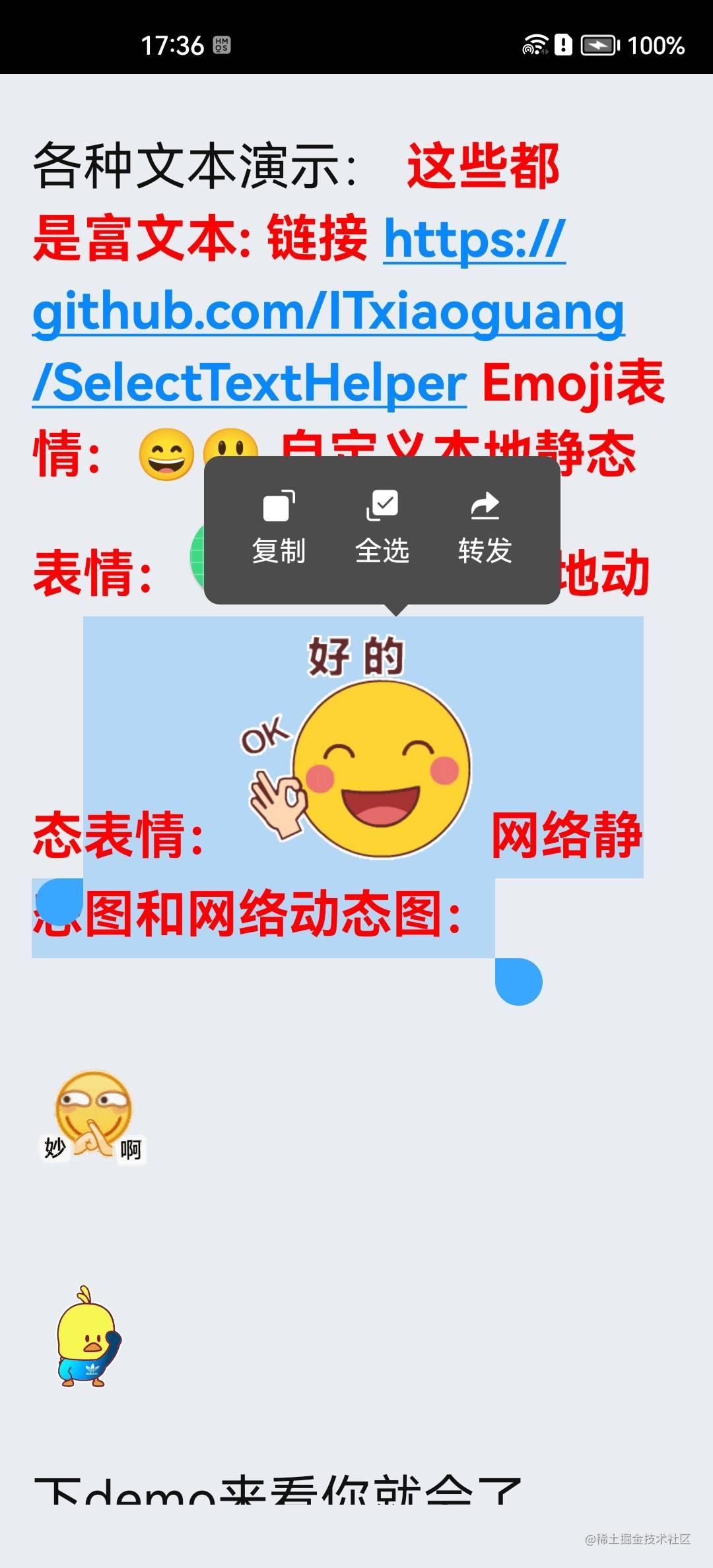 |
19 |
20 | | 消息页全选 | 消息页自由复制放大镜 |
21 | | :---------------------------------------------------------------------------------------------------------------------------------: | :---------------------------------------------------------------------------------------------------------------------------------: |
22 | | 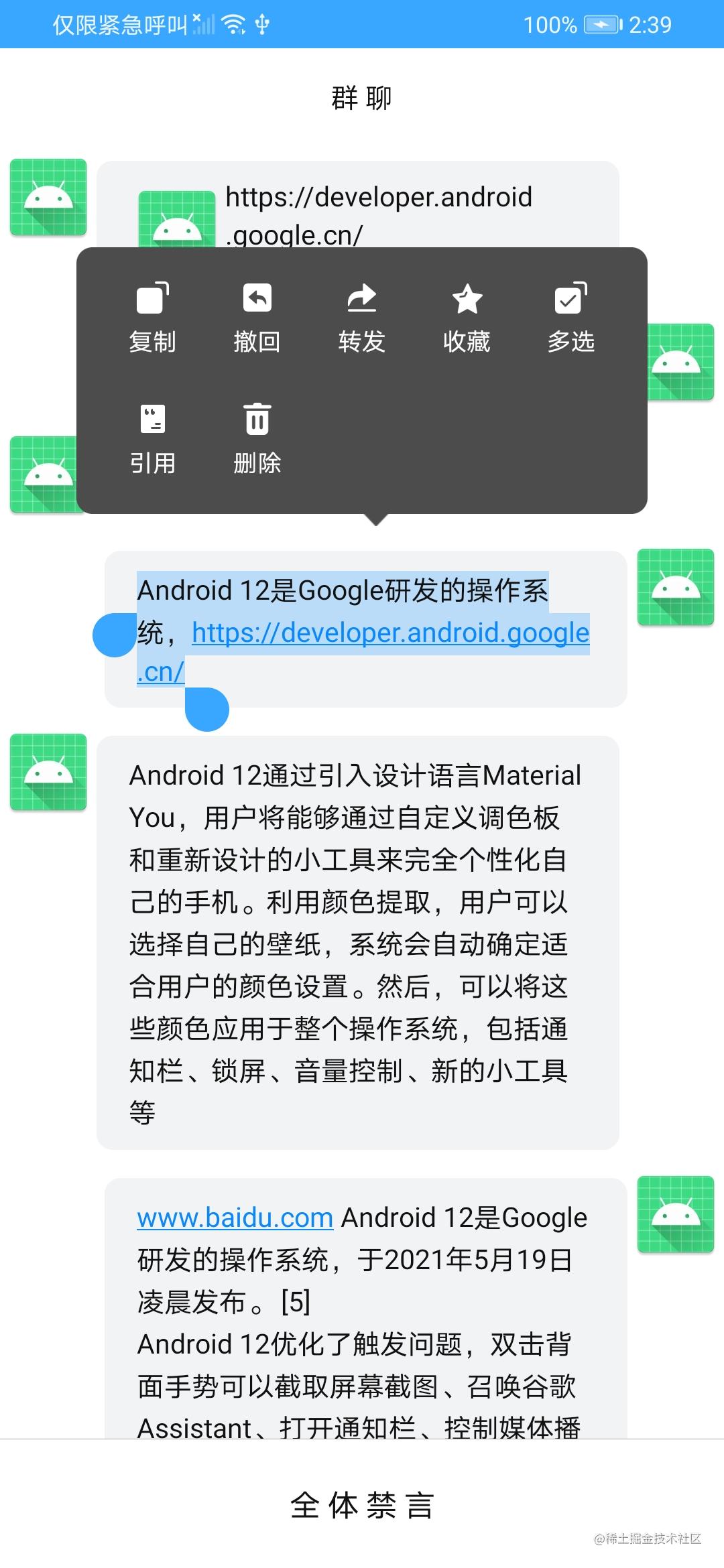 |  |
23 |
24 | | 消息页选中文本 | 查看内容 |
25 | | :---------------------------------------------------------------------------------------------------------------------------------: | :---------------------------------------------------------------------------------------------------------------------------------: |
26 | | 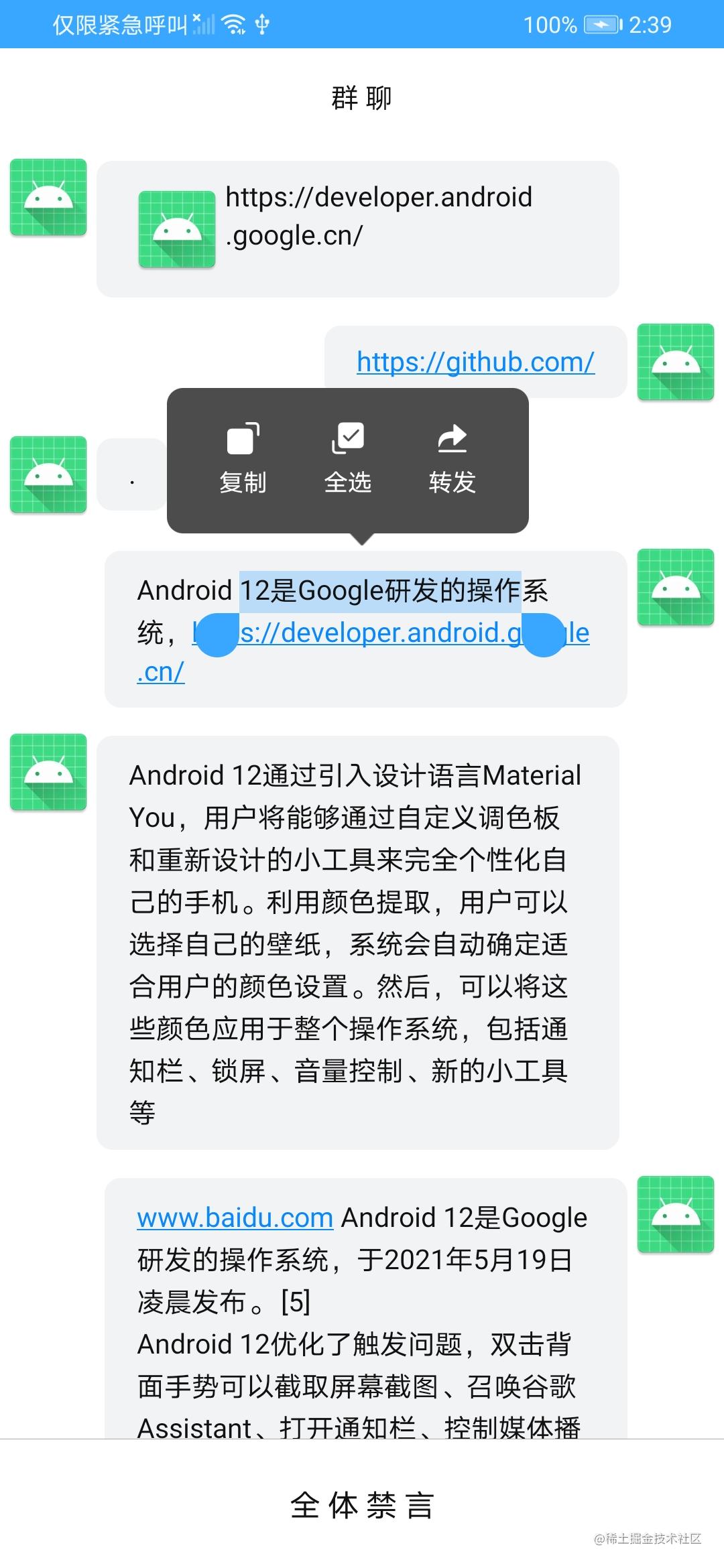 | 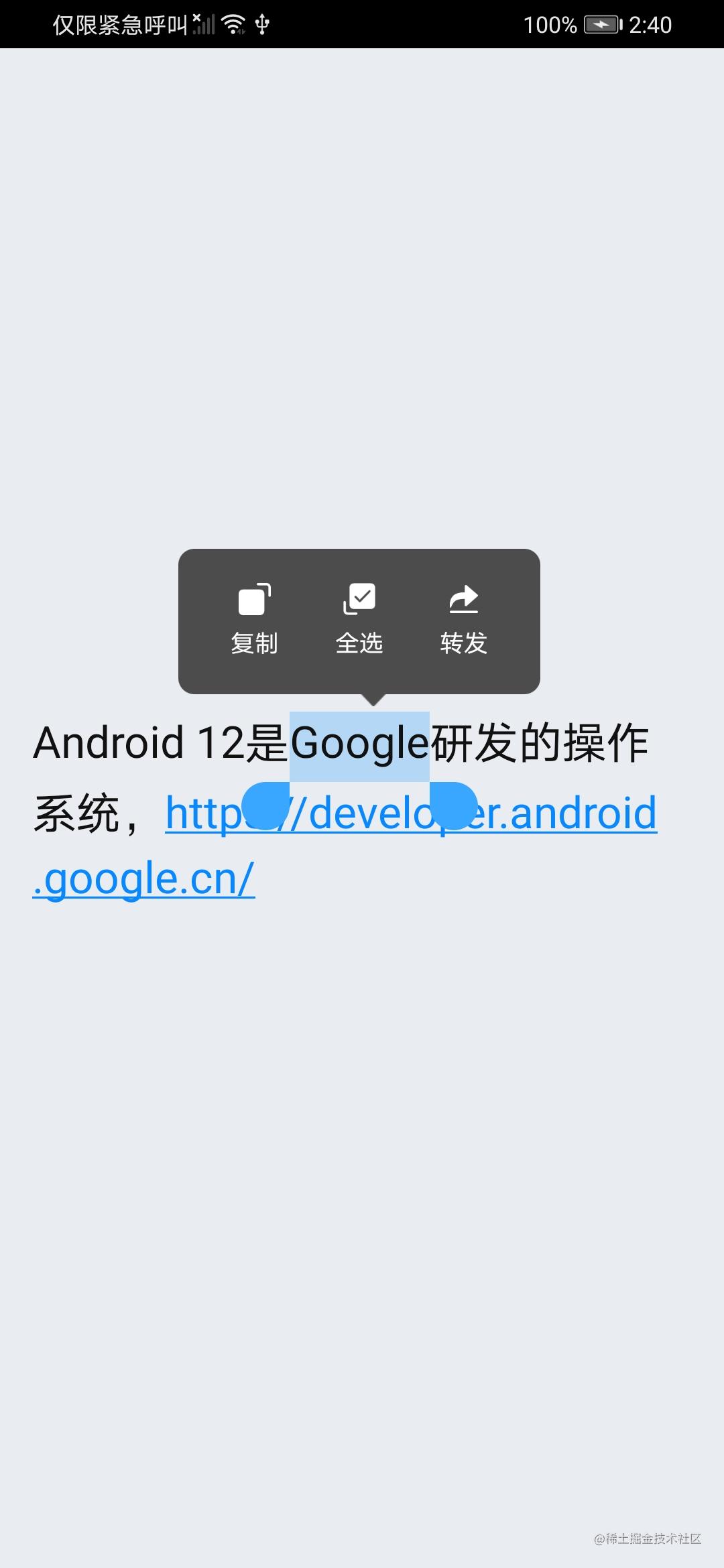 |
27 |
28 | ## 特点功能:
29 |
30 | * 支持自由选择文本
31 | * 支持`富文本`选择
32 | * 支持自定义文本有:游标颜色、游标大小、选中文本颜色
33 | * 支持默认全选文字或选2个文字
34 | * 支持滑动依然显示弹窗
35 | * 支持放大镜功能
36 | * 支持全选情况下自定义弹窗
37 | * 支持操作弹窗:每行个数、图片、文字、监听回调、弹窗颜色、箭头图片
38 |
39 | ## Demo
40 |
41 | 
42 |
43 | ## 如何添加
44 |
45 | ### Gradle添加:
46 |
47 | #### 1.在Project的`build.gradle`中添加仓库地址
48 |
49 | ```gradle
50 | allprojects {
51 | repositories {
52 | ...
53 | maven { url "https://jitpack.io" }
54 | }
55 | }
56 | ```
57 |
58 | #### 2.在Module目录下的`build.gradle`中添加依赖
59 |
60 | [](https://jitpack.io/#ITxiaoguang/SelectTextHelper)
61 |
62 |
63 | ```gradle
64 | dependencies {
65 | implementation 'com.github.ITxiaoguang:SelectTextHelper:1.1.0'
66 | }
67 | ```
68 |
69 | ## 传送门
70 |
71 | * [仿照的例子](https://www.dazhuanlan.com/t0915/topics/1440960)
72 | * [放大镜](https://developer.android.google.cn/guide/topics/text/magnifier)
73 | * [TextView](https://developer.android.google.cn/reference/android/widget/TextView)
74 | * [富文本](https://github.com/zzhoujay/RichText)
75 |
76 |
77 | ### 主要实现
78 |
79 | 通过 [仿照的例子](https://www.dazhuanlan.com/t0915/topics/1440960) 并改进弹窗坐标位置、加对ImageSpan支持、大小加上`EventBus`实现
80 |
81 | ### 简单用例
82 |
83 | #### 1.导入代码
84 |
85 | 把该项目里的`selecttext Module`放入你的项目里面 或者 按照`Gradle`添加的步骤导入依赖。
86 |
87 | #### 2.给你的`TextView`创建`Helper`和加监听
88 |
89 | ```kotlin
90 | val mSelectableTextHelper = SelectTextHelper.Builder(textView) // 放你的textView到这里!!
91 | .setCursorHandleColor(ContextCompat.getColor(mContext, R.color.colorAccent)) // 游标颜色
92 | .setCursorHandleSizeInDp(22f) // 游标大小 单位dp
93 | .setSelectedColor(ContextCompat.getColor(mContext, R.color.colorAccentTransparent)) // 选中文本的颜色
94 | .setSelectAll(true) // 初次选中是否全选 default true
95 | .setScrollShow(true) // 滚动时是否继续显示 default true
96 | .setSelectedAllNoPop(true) // 已经全选无弹窗,设置了监听会回调 onSelectAllShowCustomPop 方法
97 | .setMagnifierShow(true) // 放大镜 default true
98 | .setSelectTextLength(2)// 首次选中文本的长度 default 2
99 | .setPopDelay(100)// 弹窗延迟时间 default 100毫秒
100 | .setPopAnimationStyle(R.style.Base_Animation_AppCompat_Dialog)// 弹窗动画 default 无动画
101 | .addItem(0/*item的图标*/,"复制"/*item的描述*/, {Log.i("SelectTextHelper","复制")/*item的回调*/}// 操作弹窗的每个item
102 | .setPopSpanCount(5) // 设置操作弹窗每行个数 default 5
103 | .setPopStyle(
104 | R.drawable.shape_color_4c4c4c_radius_8 /*操作弹窗背*/,
105 | R.drawable.ic_arrow /*箭头图片*/
106 | ) // 设置操作弹窗背景色、箭头图片
107 | .build()
108 |
109 | mSelectableTextHelper!!.setSelectListener(object : OnSelectListener {
110 | /**
111 | * 点击回调
112 | */
113 | override fun onClick(v: View?, originalContent: CharSequence?) {
114 | // 拿原始文本方式
115 | // clickTextView(msgBean.content!!) // 推荐
116 | // clickTextView(originalContent!!) // 不推荐 富文本可能被修改值 导致gif动不了
117 | }
118 |
119 | /**
120 | * 长按回调
121 | */
122 | override fun onLongClick(v: View?) {
123 | }
124 |
125 | /**
126 | * 选中文本回调
127 | */
128 | override fun onTextSelected(content: CharSequence?) {
129 | }
130 |
131 | /**
132 | * 弹窗关闭回调
133 | */
134 | override fun onDismiss() {}
135 |
136 | /**
137 | * 点击TextView里的url回调
138 | *
139 | * 已被下面重写
140 | * textView.setMovementMethod(new LinkMovementMethodInterceptor());
141 | */
142 | override fun onClickUrl(url: String?) {
143 | }
144 |
145 | /**
146 | * 全选显示自定义弹窗回调
147 | */
148 | override fun onSelectAllShowCustomPop() {
149 | }
150 |
151 | /**
152 | * 重置回调
153 | */
154 | override fun onReset() {
155 | // SelectTextEventBus.instance.dispatch(SelectTextEvent("dismissOperatePop"))
156 | }
157 |
158 | /**
159 | * 解除自定义弹窗回调
160 | */
161 | override fun onDismissCustomPop() {
162 | // SelectTextEventBus.instance.dispatch(SelectTextEvent("dismissOperatePop"))
163 | }
164 |
165 | /**
166 | * 是否正在滚动回调
167 | */
168 | override fun onScrolling() {
169 | // removeShowSelectView()
170 | }
171 | })
172 |
173 | ```
174 |
175 | #### 3.demo中提供了查看文本内容的`SelectTextDialog`和 消息列表自由复制`MainActivity`
176 |
177 | 查看文本内容方法:
178 |
179 | * 该方法比较简单,将`textView`参照步骤2放入`SelectTextHelper`中,在`dismiss`调用`SelectTextHelper`的`reset()`即可。
180 |
181 | ```kotlin
182 | override fun dismiss() {
183 | mSelectableTextHelper.reset()
184 | super.dismiss()
185 | }
186 | ```
187 |
188 | 高仿微信聊天消息列表自由复制方法:
189 |
190 | * `recycleView` + `adapter` + 多布局的使用在这里不阐述,请看本项目demo。
191 |
192 | * 为`adapter`里text类型`ViewHolder`中的`textView`参照步骤2放入`SelectTextHelper`中,注册`SelectTextEventBus`。
193 |
194 | * `SelectTextEventBus`类特别说明、原理:
195 | `SelectTextEventBus`在`EventBus`基础上加功能。在`register`时记录下类和方法,方便在`Activity/Fragment Destroy`时`unregister`所有`SelectTextEventBus`的`EventBus`。
196 |
197 | * text类型`ViewHolder` 添加`EventBus`监听
198 |
199 | ```kotlin
200 | /**
201 | * 自定义SelectTextEvent 隐藏 光标
202 | */
203 | @Subscribe(threadMode = ThreadMode.MAIN)
204 | fun handleSelector(event: SelectTextEvent) {
205 | if (null == mSelectableTextHelper) {
206 | return
207 | }
208 | val type = event.type
209 | if (TextUtils.isEmpty(type)) {
210 | return
211 | }
212 | when (type) {
213 | "dismissAllPop" -> mSelectableTextHelper!!.reset()
214 | "dismissAllPopDelayed" -> postReset(Companion.RESET_DELAY)
215 | }
216 | }
217 | ```
218 |
219 | * 重写`adapter`里的`onViewRecycled`方法,该方法在回收`View`时调用
220 |
221 | ```kotlin
222 | override fun onViewRecycled(holder: RecyclerView.ViewHolder) {
223 | super.onViewRecycled(holder)
224 | if (holder is ViewHolderText) {
225 | // 注销
226 | SelectTextEventBus.instance.unregister(holder)
227 | }
228 | }
229 | ```
230 |
231 | - 对ImageSpan表情支持(支持动态表情!!)(https://github.com/ITxiaoguang/SelectTextHelper/issues/4 )
232 |
233 | ```kotlin
234 | val emojiMap: MutableMap = HashMap()
235 | emojiMap["\\[笑脸\\]"] = R.drawable.emoji_00
236 | emojiMap["\\[瘪嘴\\]"] = R.drawable.emoji_01
237 | emojiMap["\\[色\\]"] = R.drawable.emoji_02
238 | emojiMap["\\[瞪大眼\\]"] = R.drawable.emoji_03
239 | emojiMap["\\[酷\\]"] = R.drawable.emoji_04
240 | emojiMap["\\[Android\\]"] = R.mipmap.ic_launcher_round
241 | emojiMap["\\[好的\\]"] = R.drawable.emoji_gif
242 | emojiMap["\\[羊驼\\]"] = R.drawable.emoji_gif2
243 | ````
244 |
245 | - 富文本支持 [富文本用法点这里](https://github.com/zzhoujay/RichText)
246 |
247 | ```kotlin
248 | // todo 方法一:富文本 需要转行成富文本形式
249 | RichText.initCacheDir(holder.textView.context.applicationContext) // 项目里初始化一次即可
250 | RichText.from(msgBean.content)
251 | .autoFix(false) // 是否自动修复宽高,默认true
252 | .autoPlay(true) // gif自动播放
253 | .singleLoad(false) // RecyclerView里设为false 若同时启动了多个RichText,会并发解析,类似于AsyncTask的executeOnExecutor
254 | .done { // 在成功回调处理
255 | // 演示消息列表选择文本
256 | holder.selectText(msgBean)
257 | }
258 | .into(holder.textView)
259 |
260 | // todo 方法二:普通文本
261 | holder.textView.text = msgBean.content
262 | // 演示消息列表选择文本
263 | holder.selectText(msgBean)
264 | ```
265 |
--------------------------------------------------------------------------------
/selecttext/src/main/java/com/xiaoguang/selecttext/SelectUtils.kt:
--------------------------------------------------------------------------------
1 | package com.xiaoguang.selecttext
2 |
3 | import android.content.Context
4 | import android.content.res.Resources
5 | import android.graphics.Color
6 | import android.graphics.drawable.AnimatedImageDrawable
7 | import android.graphics.drawable.AnimatedVectorDrawable
8 | import android.graphics.drawable.AnimationDrawable
9 | import android.os.Build
10 | import android.text.Layout
11 | import android.text.Spannable
12 | import android.text.SpannableStringBuilder
13 | import android.text.TextUtils
14 | import android.text.style.DynamicDrawableSpan
15 | import android.view.View
16 | import android.widget.TextView
17 | import androidx.core.content.ContextCompat
18 | import java.util.regex.Pattern
19 |
20 | /**
21 | * 弹窗 适配器
22 | * hxg 2023.1.5 qq:929842234@qq.com
23 | */
24 | class SelectUtils {
25 |
26 | companion object {
27 |
28 | /**
29 | * 替换内容
30 | *
31 | * @param stringBuilder SpannableStringBuilder text
32 | * @param mOriginalContent CharSequence text
33 | * @param targetText Target Text
34 | * @param replaceText Replace Text
35 | */
36 | fun replaceContent(
37 | stringBuilder: SpannableStringBuilder,
38 | mOriginalContent: CharSequence,
39 | targetText: String,
40 | replaceText: String,
41 | ) {
42 | val startIndex = mOriginalContent.toString().indexOf(targetText)
43 | if (-1 != startIndex) {
44 | val endIndex = startIndex + targetText.length
45 | stringBuilder.replace(startIndex, endIndex, replaceText)
46 | }
47 | }
48 |
49 | /**
50 | * 文字转化成图片背景
51 | *
52 | * @param context Context
53 | * @param stringBuilder SpannableStringBuilder text
54 | * @param content Target content
55 | */
56 | fun replaceText2Emoji(
57 | context: Context?,
58 | emojiMap: MutableMap,
59 | stringBuilder: SpannableStringBuilder,
60 | content: CharSequence
61 | ) {
62 | if (emojiMap.isEmpty()) {
63 | return
64 | }
65 | for ((key, drawableRes) in emojiMap) {
66 | val matcher = Pattern.compile(key).matcher(content)
67 | while (matcher.find()) {
68 | val start = matcher.start()
69 | val end = matcher.end()
70 | val drawable = ContextCompat.getDrawable(context!!, drawableRes)
71 | // 动画图(加载多张 Drawable 图片资源组合而成的动画)
72 | if (drawable is AnimationDrawable) {
73 | drawable.start() // 开始播放动画
74 | }
75 | // 动态图
76 | if (Build.VERSION.SDK_INT >= Build.VERSION_CODES.P) {
77 | if (drawable is AnimatedImageDrawable) {
78 | drawable.start()
79 | }
80 | }
81 | // 动态矢量图
82 | if (Build.VERSION.SDK_INT >= Build.VERSION_CODES.LOLLIPOP) {
83 | if (drawable is AnimatedVectorDrawable) {
84 | drawable.start()
85 | }
86 | }
87 | drawable!!.setBounds(0, 0, drawable.intrinsicWidth, drawable.intrinsicHeight)
88 | val span = SelectImageSpan(
89 | drawable, Color.TRANSPARENT, DynamicDrawableSpan.ALIGN_CENTER
90 | )
91 | stringBuilder.setSpan(span, start, end, Spannable.SPAN_INCLUSIVE_EXCLUSIVE)
92 | }
93 | }
94 | }
95 |
96 | fun getPreciseOffset(textView: TextView, x: Int, y: Int): Int {
97 | val layout = textView.layout
98 | return if (layout != null) {
99 | val topVisibleLine = layout.getLineForVertical(y)
100 | val offset = layout.getOffsetForHorizontal(topVisibleLine, x.toFloat())
101 | val offsetX = layout.getPrimaryHorizontal(offset).toInt()
102 | if (offsetX > x) {
103 | layout.getOffsetToLeftOf(offset)
104 | } else {
105 | offset
106 | }
107 | } else {
108 | -1
109 | }
110 | }
111 |
112 | fun getHysteresisOffset(textView: TextView, x: Int, y: Int, previousOffset: Int): Int {
113 | var previousOffsetCopy = previousOffset
114 | val layout = textView.layout ?: return -1
115 | var line = layout.getLineForVertical(y)
116 |
117 | // The "HACK BLOCK"S in this function is required because of how Android Layout for
118 | // TextView works - if 'offset' equals to the last character of a line, then
119 | //
120 | // * getLineForOffset(offset) will result the NEXT line
121 | // * getPrimaryHorizontal(offset) will return 0 because the next insertion point is on the next line
122 | // * getOffsetForHorizontal(line, x) will not return the last offset of a line no matter where x is
123 | // These are highly undesired and is worked around with the HACK BLOCK
124 | //
125 | // @see Moon+ Reader/Color Note - see how it can't select the last character of a line unless you move
126 | // the cursor to the beginning of the next line.
127 | //
128 | ////////////////////HACK BLOCK////////////////////////////////////////////////////
129 | if (isEndOfLineOffset(layout, previousOffsetCopy)) { // we have to minus one from the offset so that the code below to find
130 | // the previous line can work correctly.
131 | val left = layout.getPrimaryHorizontal(previousOffsetCopy - 1).toInt()
132 | val right = layout.getLineRight(line).toInt()
133 | val threshold = (right - left) / 2 // half the width of the last character
134 | if (x > right - threshold) {
135 | previousOffsetCopy -= 1
136 | }
137 | } ///////////////////////////////////////////////////////////////////////////////////
138 | val previousLine = layout.getLineForOffset(previousOffsetCopy)
139 | val previousLineTop = layout.getLineTop(previousLine)
140 | val previousLineBottom = layout.getLineBottom(previousLine)
141 | val hysteresisThreshold = (previousLineBottom - previousLineTop) / 2
142 |
143 | // If new line is just before or after previous line and y position is less than
144 | // hysteresisThreshold away from previous line, keep cursor on previous line.
145 | if (line == previousLine + 1 && y - previousLineBottom < hysteresisThreshold || line == previousLine - 1 && (previousLineTop - y) < hysteresisThreshold) {
146 | line = previousLine
147 | }
148 | var offset = layout.getOffsetForHorizontal(line, x.toFloat())
149 |
150 | // This allow the user to select the last character of a line without moving the
151 | // cursor to the next line. (As Layout.getOffsetForHorizontal does not return the
152 | // offset of the last character of the specified line)
153 | //
154 | // But this function will probably get called again immediately, must decrement the offset
155 | // by 1 to compensate for the change made below. (see previous HACK BLOCK)
156 | /////////////////////HACK BLOCK///////////////////////////////////////////////////
157 | if (offset < textView.text.length - 1) {
158 | val right = layout.getLineRight(line).toInt()
159 | val isEnd = x >= right // 是否选到了最后
160 | // FIX 这里的 offset + 1 不一定是对的,需要判断最后一个字符长度,
161 | if (isEnd) {
162 | val left = layout.getPrimaryHorizontal(offset).toInt()
163 | val right = layout.getLineRight(line).toInt()
164 | val threshold = (right - left) / 2 // half the width of the last character
165 | if (x > right - threshold) {
166 | val index = getLastTextLength(layout, offset) // 得到最后一个字符长度
167 | offset += index // offset + 最后一个字符长度
168 | }
169 | }
170 | } //////////////////////////////////////////////////////////////////////////////////
171 | return offset
172 | }
173 |
174 | /**
175 | * 得到最后一个字符长度
176 | */
177 | private fun getLastTextLength(layout: Layout, offset: Int): Int {
178 | var index = 1 // 得到最后一个字符长度
179 | val num = 1..20
180 | for (i in num) {
181 | if (isEndOfLineOffset(layout, offset + i)) {
182 | index = i
183 | break
184 | }
185 | }
186 | return index
187 | }
188 |
189 | private fun isEndOfLineOffset(layout: Layout, offset: Int): Boolean {
190 | return offset > 0 && layout.getLineForOffset(offset) == layout.getLineForOffset(offset - 1) + 1
191 | }
192 |
193 | val displayWidth: Int
194 | get() = Resources.getSystem().displayMetrics.widthPixels
195 |
196 | val displayHeight: Int
197 | get() = Resources.getSystem().displayMetrics.heightPixels
198 |
199 | fun dp2px(dpValue: Float): Int {
200 | return (dpValue * Resources.getSystem().displayMetrics.density + 0.5f).toInt()
201 | }
202 |
203 | /**
204 | * 设置宽高
205 | *
206 | * @param v
207 | * @param w
208 | * @param h
209 | */
210 | fun setWidthHeight(v: View, w: Int, h: Int) {
211 | val params = v.layoutParams
212 | params.width = w
213 | params.height = h
214 | v.layoutParams = params
215 | }
216 |
217 | /**
218 | * 通知栏的高度
219 | */
220 | private var STATUS_HEIGHT = 0
221 |
222 | /**
223 | * 获取通知栏的高度
224 | */
225 | val statusHeight: Int
226 | get() {
227 | if (0 != STATUS_HEIGHT) {
228 | return STATUS_HEIGHT
229 | }
230 | val resid =
231 | Resources.getSystem().getIdentifier("status_bar_height", "dimen", "android")
232 | if (resid > 0) {
233 | STATUS_HEIGHT = Resources.getSystem().getDimensionPixelSize(resid)
234 | return STATUS_HEIGHT
235 | }
236 | return -1
237 | }
238 |
239 | /**
240 | * 反射获取对象属性值
241 | */
242 | fun getFieldValue(obj: Any?, fieldName: String?): Any? {
243 | if (obj == null || TextUtils.isEmpty(fieldName)) {
244 | return null
245 | }
246 | var clazz: Class<*> = obj.javaClass
247 | while (clazz != Any::class.java) {
248 | try {
249 | val field = clazz.getDeclaredField(fieldName!!)
250 | field.isAccessible = true
251 | return field[obj]
252 | } catch (ignore: Exception) {
253 | }
254 | clazz = clazz.superclass
255 | }
256 | return null
257 | }
258 |
259 | /**
260 | * 判断是否为emoji表情符
261 | *
262 | * @param c 字符
263 | * @return 是否为emoji字符
264 | */
265 | fun isEmojiText(c: Char): Boolean {
266 | return !(c.code == 0x0 || c.code == 0x9 || c.code == 0xA || c.code == 0xD || c.code in 0x20..0xD7FF || c.code in 0xE000..0xFFFD || c.code in 0x100000..0x10FFFF)
267 | }
268 |
269 | /**
270 | * 利用反射检测文本是否是ImageSpan文本
271 | */
272 | fun isImageSpanText(mSpannable: Spannable): Boolean {
273 | if (TextUtils.isEmpty(mSpannable)) {
274 | return false
275 | }
276 | try {
277 | val mSpans = getFieldValue(mSpannable, "mSpans") as Array<*>?
278 | if (null != mSpans) {
279 | for (mSpan in mSpans) {
280 | if (mSpan is SelectImageSpan) {
281 | return true
282 | }
283 | }
284 | }
285 | } catch (ignore: Exception) {
286 | }
287 | return false
288 | }
289 |
290 | /**
291 | * 匹配Image
292 | *
293 | * @param emojiMap Emoji picture
294 | * @param content Target content
295 | */
296 | fun matchImageSpan(emojiMap: MutableMap, content: String): Boolean {
297 | if (emojiMap.isEmpty()) {
298 | return false
299 | }
300 | for ((key) in emojiMap) {
301 | val matcher = Pattern.compile(key).matcher(content)
302 | if (matcher.find()) {
303 | return true
304 | }
305 | }
306 | return false
307 | }
308 | }
309 |
310 | }
--------------------------------------------------------------------------------
/app/src/main/java/com/xiaoguang/selecttextview/MainActivity.kt:
--------------------------------------------------------------------------------
1 | package com.xiaoguang.selecttextview
2 |
3 | import android.os.Bundle
4 | import android.view.MotionEvent
5 | import android.widget.EditText
6 | import android.widget.TextView
7 | import androidx.appcompat.app.AppCompatActivity
8 | import androidx.recyclerview.widget.LinearLayoutManager
9 | import androidx.recyclerview.widget.RecyclerView
10 | import com.xiaoguang.selecttext.SelectTextHelper
11 |
12 | class MainActivity : AppCompatActivity() {
13 | override fun onCreate(savedInstanceState: Bundle?) {
14 | super.onCreate(savedInstanceState)
15 | setContentView(R.layout.activity_main)
16 |
17 | // 绑定表情 方法一:
18 | // SelectTextHelper.putEmojiMap("\\[笑脸\\]", R.drawable.emoji_00)
19 | // SelectTextHelper.putEmojiMap("\\[瘪嘴\\]", R.drawable.emoji_01)
20 | // SelectTextHelper.putEmojiMap("\\[色\\]", R.drawable.emoji_02)
21 | // SelectTextHelper.putEmojiMap("\\[瞪大眼\\]", R.drawable.emoji_03)
22 | // SelectTextHelper.putEmojiMap("\\[酷\\]", R.drawable.emoji_04)
23 | // 绑定表情 方法二:
24 | val emojiMap: MutableMap = HashMap()
25 | emojiMap["\\[笑脸\\]"] = R.drawable.emoji_00
26 | emojiMap["\\[瘪嘴\\]"] = R.drawable.emoji_01
27 | emojiMap["\\[色\\]"] = R.drawable.emoji_02
28 | emojiMap["\\[瞪大眼\\]"] = R.drawable.emoji_03
29 | emojiMap["\\[酷\\]"] = R.drawable.emoji_04
30 | emojiMap["\\[Android\\]"] = R.mipmap.ic_launcher_round
31 | emojiMap["\\[好的\\]"] = R.drawable.emoji_gif
32 | emojiMap["\\[羊驼\\]"] = R.drawable.emoji_gif2
33 | SelectTextHelper.putAllEmojiMap(emojiMap)
34 |
35 | // todo 一:展示在列表中自由复制、双击查看文本
36 | val rvMsg = findViewById(R.id.rv_msg)
37 | rvMsg.layoutManager = LinearLayoutManager(this, LinearLayoutManager.VERTICAL, false)
38 | val mList: MutableList = ArrayList()
39 | addList(mList)
40 | val adapter = MsgAdapter(this, mList)
41 | rvMsg.adapter = adapter
42 | initInput(rvMsg, adapter, mList)
43 |
44 | // todo 二:展示查看文本
45 | // val dialog = SelectTextDialog(this, TEXT6)
46 | // dialog.show()
47 |
48 | }
49 |
50 | private fun initInput(
51 | rvMsg: RecyclerView,
52 | adapter: MsgAdapter,
53 | mList: MutableList
54 | ) {
55 | val etInput = findViewById(R.id.et_input)
56 | val tvSend = findViewById(R.id.tv_send)
57 | tvSend.setOnClickListener {
58 | rvMsg.scrollToPosition(adapter.itemCount - 1)
59 | rvMsg.postDelayed({
60 | val input = etInput.text.toString()
61 | mList.add(MsgBean(1, false, input))
62 | etInput.setText("")
63 | adapter.notifyItemChanged(adapter.itemCount - 1)
64 | rvMsg.scrollToPosition(adapter.itemCount - 1)
65 | }, 16)
66 | }
67 | }
68 |
69 | override fun onDestroy() {
70 | super.onDestroy()
71 | SelectTextEventBus.instance.unregister()
72 | }
73 |
74 | override fun dispatchTouchEvent(ev: MotionEvent): Boolean {
75 | if (ev.action == MotionEvent.ACTION_DOWN) {
76 | SelectTextEventBus.instance.dispatch(SelectTextEvent("dismissAllPopDelayed"))
77 | }
78 | return super.dispatchTouchEvent(ev)
79 | }
80 |
81 | // 1:文本、2:图片、3:链接
82 | private fun addList(mList: MutableList) {
83 | mList.add(MsgBean(1, true, TEXT0))
84 | mList.add(MsgBean(1, true, TEXT1))
85 | mList.add(MsgBean(2, false, IMG1))
86 | // mList.add(MsgBean(3, true, LINK1))
87 | mList.add(MsgBean(1, false, TEXT2))
88 | mList.add(MsgBean(1, true, TEXT3))
89 | mList.add(MsgBean(1, false, TEXT4))
90 | mList.add(MsgBean(1, true, TEXT5))
91 | mList.add(MsgBean(1, false, TEXT6))
92 | mList.add(MsgBean(1, true, TEXT7))
93 | mList.add(MsgBean(1, false, TEXT8))
94 | mList.add(MsgBean(1, true, TEXT9))
95 | }
96 |
97 | companion object {
98 | var TEXT0 =
99 | "各种文本演示:\n这些都是富文本: 链接 https://github.com/ITxiaoguang/SelectTextHelper Emoji表情:\uD83D\uDE04\uD83D\uDE03 自定义本地静态表情:[Android][笑脸] 自定义本地动态表情:[好的] 网络静态图和网络动态图:" +
100 | " 
" +
101 | " 
" +
102 | "下demo来看你就会了"
103 | var TEXT1 = "纯文本"
104 | var TEXT2 = "文本是链接 https://github.com/ITxiaoguang/SelectTextHelper\n作者QQ:929842234\n点点star"
105 | var TEXT3 = "ImageSpan 静态表情:[笑脸][笑脸][瞪大眼][瞪大眼][色][色][瘪嘴][瘪嘴][酷][酷]"
106 | var TEXT4 = "ImageSpan动态表情 [好的] [羊驼]"
107 | var TEXT5 =
108 | "文本是表情 Emoji 表情:\uD83D\uDE04\uD83D\uDE03\uD83D\uDE00\uD83D\uDE0A\uD83D\uDE09\uD83D\uDE0D\uD83D\uDE18\uD83D\uDCAF\uD83D\uDD18\uD83D\uDD17\uD83D\uDD31"
109 | var TEXT6 =
110 | "富文本网络静态图和网络动态图:" +
111 | "
" +
112 | "
" +
113 | "是不是选中了还没有背景,富文本里的ImageSpan图片也需要继承com.xiaoguang.selecttext.SelectImageSpan.kt "
114 | var TEXT7 =
115 | "\uD83D\uDD14\uD83D\uDD15✡✝\uD83D\uDD2F\uD83D\uDCDB\uD83D\uDD30\uD83D\uDD31⭕✅☑✔✖❌❎➕➖➗➰➿〽✳✴❇‼⁉❓❔❕❗©®™\uD83C\uDFA6\uD83D\uDD05\uD83D\uDD06\uD83D\uDCAF\uD83D\uDD20\uD83D\uDD21\uD83D\uDD22\uD83D\uDD23\uD83D\uDD24\uD83C\uDD70\uD83C\uDD8E\uD83C\uDD71\uD83C\uDD91\uD83C\uDD92\uD83C\uDD93ℹ\uD83C\uDD94Ⓜ\uD83C\uDD95\uD83C\uDD96\uD83C\uDD7E\uD83C\uDD97\uD83C\uDD7F\uD83C\uDD98\uD83C\uDD99\uD83C\uDD9A\uD83C\uDE01\uD83C\uDE02\uD83C\uDE37\uD83C\uDE362 现已推出,其中包含最新功能和变更,供您在应用中试用。如需开始使用,请先获取 Beta 版并更新您的工具。Android 12 Beta 版现已面向用户和开发者推出,请务必测试您的应用是否兼容,并根据需要发布任何相关更新。欢迎试用新功能,并通过我们的问题跟踪器分享反馈。"
116 | var TEXT8 =
117 | "提供更\uD83C\uDE35\uD83D\uDD34\uD83D\uDFE0\uD83D\uDFE1\uD83D\uDFE2\uD83D\uDD35\uD83D\uDFE3\uD83D\uDFE4⚫⚪\uD83D\uDFE5\uD83D\uDFE7\uD83D\uDFE8\uD83D\uDFE9\uD83D\uDFE6\uD83D\uDFEA\uD83D\uDFEB⬛⬜◼️◻️◾◽▪️▫️\uD83D\uDD36\uD83D\uDD37\uD83D\uDD38\uD83D\uDD39\uD83D\uDD3A\uD83D\uDD3B\uD83D\uDCA0\uD83D\uDD18\uD83D\uDD33\uD83D\uDD32\uD83C\uDFC1\uD83D\uDEA9\uD83C\uDF8C\uD83C\uDFF4\uD83C\uDFF3️\uD83C\uDFF3️\u200D\uD83C\uDF08\uD83C\uDFF3️\u200D⚧️\uD83C\uDFF4\u200D☠️\uD83C\uDDE6\uD83C\uDDE8\uD83C\uDDE6\uD83C\uDDE9\uD83C\uDDE6\uD83C\uDDEA\uD83C\uDDE6\uD83C\uDDEB\uD83C\uDDE6\uD83C\uDDEC\uD83C\uDDE6\uD83C\uDDEE\uD83C\uDDE6\uD83C\uDDF1\uD83C\uDDE6\uD83C\uDDF2\uD83C\uDDE6\uD83C\uDDF4\uD83C\uDDE6\uD83C\uDDF6\uD83C\uDDE6\uD83C\uDDF7\uD83C\uDDE6\uD83C\uDDF8\uD83C\uDDE6\uD83C\uDDF9\uD83C\uDDE6\uD83C\uDDFA\uD83C\uDDE6\uD83C\uDDFC\uD83C\uDDE6\uD83C\uDDFD\uD83C\uDDE6\uD83C\uDDFF\uD83C\uDDE7\uD83C\uDDE6\uD83C\uDDE7\uD83C\uDDE7\uD83C\uDDE7\uD83C\uDDE9\uD83C\uDDE7\uD83C\uDDEA\uD83C\uDDE7\uD83C\uDDEB\uD83C\uDDE7\uD83C\uDDEC\uD83C\uDDE7\uD83C\uDDED\uD83C\uDDE7\uD83C\uDDEE\uD83C\uDDE7\uD83C\uDDEF\uD83C\uDDE7\uD83C\uDDF1\uD83C\uDDE7\uD83C\uDDF2\uD83C\uDDE7\uD83C\uDDF3\uD83C\uDDE7\uD83C\uDDF4\uD83C\uDDE7\uD83C\uDDF6\uD83C\uDDE7\uD83C\uDDF7\uD83C\uDDE7\uD83C\uDDF8\uD83C\uDDE7\uD83C\uDDF9\uD83C\uDDE7\uD83C\uDDFB\uD83C\uDDE7\uD83C\uDDFC\uD83C\uDDE7\uD83C\uDDFE\uD83C\uDDE7\uD83C\uDDFF\uD83C\uDDE8\uD83C\uDDE6\uD83C\uDDE8\uD83C\uDDE8\uD83C\uDDE8\uD83C\uDDE9\uD83C\uDDE8\uD83C\uDDEB\uD83C\uDDE8\uD83C\uDDEC\uD83C\uDDE8\uD83C\uDDED\uD83C\uDDE8\uD83C\uDDEE\uD83C\uDDE8\uD83C\uDDF0\uD83C\uDDE8\uD83C\uDDF1\uD83C\uDDE8\uD83C\uDDF2\uD83C\uDDE8\uD83C\uDDF3\uD83C\uDDE8\uD83C\uDDF4\uD83C\uDDE8\uD83C\uDDF5\uD83C\uDDE8\uD83C\uDDF7\uD83C\uDDE8\uD83C\uDDFA\uD83C\uDDE8\uD83C\uDDFB\uD83C\uDDE8\uD83C\uDDFC\uD83C\uDDE8\uD83C\uDDFD\uD83C\uDDE8\uD83C\uDDFE\uD83C\uDDE8\uD83C\uDDFF\uD83C\uDDE9\uD83C\uDDEA\uD83C\uDDE9\uD83C\uDDEC\uD83C\uDDE9\uD83C\uDDEF\uD83C\uDDE9\uD83C\uDDF0\uD83C\uDDE9\uD83C\uDDF2\uD83C\uDDE9\uD83C\uDDF4\uD83C\uDDE9\uD83C\uDDFF\uD83C\uDDEA\uD83C\uDDE6\uD83C\uDDEA\uD83C\uDDE8\uD83C\uDDEA\uD83C\uDDEA\uD83C\uDDEA\uD83C\uDDEC\uD83C\uDDEA\uD83C\uDDED\uD83C\uDDEA\uD83C\uDDF7\uD83C\uDDEA\uD83C\uDDF8\uD83C\uDDEA\uD83C\uDDF9\uD83C\uDDEA\uD83C\uDDFA\uD83C\uDDEB\uD83C\uDDEE\uD83C\uDDEB\uD83C\uDDEF\uD83C\uDDEB\uD83C\uDDF0\uD83C\uDDEB\uD83C\uDDF2\uD83C\uDDEB\uD83C\uDDF4\uD83C\uDDEB\uD83C\uDDF7\uD83C\uDDEC\uD83C\uDDE6\uD83C\uDDEC\uD83C\uDDE7\uD83C\uDDEC\uD83C\uDDE9\uD83C\uDDEC\uD83C\uDDEA\uD83C\uDDEC\uD83C\uDDEB\uD83C\uDDEC\uD83C\uDDEC\uD83C\uDDEC\uD83C\uDDED\uD83C\uDDEC\uD83C\uDDEE\uD83C\uDDEC\uD83C\uDDF1\uD83C\uDDEC\uD83C\uDDF2\uD83C\uDDEC\uD83C\uDDF3\uD83C\uDDEC\uD83C\uDDF5\uD83C\uDDEC\uD83C\uDDF6\uD83C\uDDEC\uD83C\uDDF7\uD83C\uDDEC\uD83C\uDDF8\uD83C\uDDEC\uD83C\uDDF9\uD83C\uDDEC\uD83C\uDDFA\uD83C\uDDEC\uD83C\uDDFC\uD83C\uDDEC\uD83C\uDDFE\uD83C\uDDED\uD83C\uDDF0\uD83C\uDDED\uD83C\uDDF2\uD83C\uDDED\uD83C\uDDF3\uD83C\uDDED\uD83C\uDDF7\uD83C\uDDED\uD83C\uDDF9\uD83C\uDDED\uD83C\uDDFA\uD83C\uDDEE\uD83C\uDDE8\uD83C\uDDEE\uD83C\uDDE9\uD83C\uDDEE\uD83C\uDDEA\uD83C\uDDEE\uD83C\uDDF1\uD83C\uDDEE\uD83C\uDDF2\uD83C\uDDEE\uD83C\uDDF3\uD83C\uDDEE\uD83C\uDDF4\uD83C\uDDEE\uD83C\uDDF6\uD83C\uDDEE\uD83C\uDDF7\uD83C\uDDEE\uD83C\uDDF8\uD83C\uDDEE\uD83C\uDDF9\uD83C\uDDEF\uD83C\uDDEA\uD83C\uDDEF\uD83C\uDDF2\uD83C\uDDEF\uD83C\uDDF4\uD83C\uDDEF\uD83C\uDDF5\uD83C\uDDF0\uD83C\uDDEA\uD83C\uDDF0\uD83C\uDDEC\uD83C\uDDF0\uD83C\uDDED\uD83C\uDDF0\uD83C\uDDEE\uD83C\uDDF0\uD83C\uDDF2\uD83C\uDDF0\uD83C\uDDF3\uD83C\uDDF0\uD83C\uDDF5\uD83C\uDDF0\uD83C\uDDF7\uD83C\uDDF0\uD83C\uDDFC\uD83C\uDDF0\uD83C\uDDFE\uD83C\uDDF0\uD83C\uDDFF\uD83C\uDDF1\uD83C\uDDE6\uD83C\uDDF1\uD83C\uDDE7\uD83C\uDDF1\uD83C\uDDE8\uD83C\uDDF1\uD83C\uDDEE\uD83C\uDDF1\uD83C\uDDF0\uD83C\uDDF1\uD83C\uDDF7\uD83C\uDDF1\uD83C\uDDF8\uD83C\uDDF1\uD83C\uDDF9\uD83C\uDDF1\uD83C\uDDFA\uD83C\uDDF1\uD83C\uDDFB\uD83C\uDDF1\uD83C\uDDFE\uD83C\uDDF2\uD83C\uDDE6\uD83C\uDDF2\uD83C\uDDE8\uD83C\uDDF2\uD83C\uDDE9\uD83C\uDDF2\uD83C\uDDEA\uD83C\uDDF2\uD83C\uDDEB\uD83C\uDDF2\uD83C\uDDEC\uD83C\uDDF2\uD83C\uDDED\uD83C\uDDF2\uD83C\uDDF0\uD83C\uDDF2\uD83C\uDDF1\uD83C\uDDF2\uD83C\uDDF2\uD83C\uDDF2\uD83C\uDDF3\uD83C\uDDF2\uD83C\uDDF4\uD83C\uDDF2\uD83C\uDDF5\uD83C\uDDF2\uD83C\uDDF6\uD83C\uDDF2\uD83C\uDDF7\uD83C\uDDF2\uD83C\uDDF8\uD83C\uDDF2\uD83C\uDDF9\uD83C\uDDF2\uD83C\uDDFA\uD83C\uDDF2\uD83C\uDDFB\uD83C\uDDF2\uD83C\uDDFC\uD83C\uDDF2\uD83C\uDDFD\uD83C\uDDF2\uD83C\uDDFE\uD83C\uDDF2\uD83C\uDDFF\uD83C\uDDF3\uD83C\uDDE6\uD83C\uDDF3\uD83C\uDDE8\uD83C\uDDF3\uD83C\uDDEA\uD83C\uDDF3\uD83C\uDDEB\uD83C\uDDF3\uD83C\uDDEC\uD83C\uDDF3\uD83C\uDDEE\uD83C\uDDF3\uD83C\uDDF1\uD83C\uDDF3\uD83C\uDDF4\uD83C\uDDF3\uD83C\uDDF5\uD83C\uDDF3\uD83C\uDDF7\uD83C\uDDF3\uD83C\uDDFA\uD83C\uDDF3\uD83C\uDDFF\uD83C\uDDF4\uD83C\uDDF2\uD83C\uDDF5\uD83C\uDDE6\uD83C\uDDF5\uD83C\uDDEA\uD83C\uDDF5\uD83C\uDDEB\uD83C\uDDF5\uD83C\uDDEC\uD83C\uDDF5\uD83C\uDDED\uD83C\uDDF5\uD83C\uDDF0\uD83C\uDDF5\uD83C\uDDF1\uD83C\uDDF5\uD83C\uDDF2\uD83C\uDDF5\uD83C\uDDF3\uD83C\uDDF5\uD83C\uDDF7\uD83C\uDDF5\uD83C\uDDF8\uD83C\uDDF5\uD83C\uDDF9\uD83C\uDDF5\uD83C\uDDFC\uD83C\uDDF5\uD83C\uDDFE\uD83C\uDDF6\uD83C\uDDE6\uD83C\uDDF7\uD83C\uDDEA\uD83C\uDDF7\uD83C\uDDF4\uD83C\uDDF7\uD83C\uDDF8\uD83C\uDDF7\uD83C\uDDFA\uD83C\uDDF7\uD83C\uDDFC\uD83C\uDDF8\uD83C\uDDE6\uD83C\uDDF8\uD83C\uDDE7\uD83C\uDDF8\uD83C\uDDE8\uD83C\uDDF8\uD83C\uDDE9\uD83C\uDDF8\uD83C\uDDEA\uD83C\uDDF8\uD83C\uDDEC\uD83C\uDDF8\uD83C\uDDED\uD83C\uDDF8\uD83C\uDDEE\uD83C\uDDF8\uD83C\uDDEF\uD83C\uDDF8\uD83C\uDDF0\uD83C\uDDF8\uD83C\uDDF1\uD83C\uDDF8\uD83C\uDDF2\uD83C\uDDF8\uD83C\uDDF3\uD83C\uDDF8\uD83C\uDDF4\uD83C\uDDF8\uD83C\uDDF7\uD83C\uDDF8\uD83C\uDDF8\uD83C\uDDF8\uD83C\uDDF9\uD83C\uDDF8\uD83C\uDDFB\uD83C\uDDF8\uD83C\uDDFD\uD83C\uDDF8\uD83C\uDDFE\uD83C\uDDF8\uD83C\uDDFF\uD83C\uDDF9\uD83C\uDDE6\uD83C\uDDF9\uD83C\uDDE8\uD83C\uDDF9\uD83C\uDDE9\uD83C\uDDF9\uD83C\uDDEB\uD83C\uDDF9\uD83C\uDDEC\uD83C\uDDF9\uD83C\uDDED\uD83C\uDDF9\uD83C\uDDEF\uD83C\uDDF9\uD83C\uDDF0\uD83C\uDDF9\uD83C\uDDF1\uD83C\uDDF9\uD83C\uDDF2\uD83C\uDDF9\uD83C\uDDF3\uD83C\uDDF9\uD83C\uDDF4\uD83C\uDDF9\uD83C\uDDF7\uD83C\uDDF9\uD83C\uDDF9\uD83C\uDDF9\uD83C\uDDFB\uD83C\uDDF9\uD83C\uDDFC\uD83C\uDDF9\uD83C\uDDFF\uD83C\uDDFA\uD83C\uDDE6\uD83C\uDDFA\uD83C\uDDEC\uD83C\uDDFA\uD83C\uDDF2\uD83C\uDDFA\uD83C\uDDF3\uD83C\uDDFA\uD83C\uDDF8\uD83C\uDDFA\uD83C\uDDFE\uD83C\uDDFA\uD83C\uDDFF\uD83C\uDDFB\uD83C\uDDE6\uD83C\uDDFB\uD83C\uDDE8\uD83C\uDDFB\uD83C\uDDEA\uD83C\uDDFB\uD83C\uDDEC\uD83C\uDDFB\uD83C\uDDEE\uD83C\uDDFB\uD83C\uDDF3\uD83C\uDDFB\uD83C\uDDFA\uD83C\uDDFC\uD83C\uDDEB\uD83C\uDDFC\uD83C\uDDF8\uD83C\uDDFD\uD83C\uDDF0\uD83C\uDDFE\uD83C\uDDEA\uD83C\uDDFE\uD83C\uDDF9\uD83C\uDDFF\uD83C\uDDE6\uD83C\uDDFF\uD83C\uDDF2\uD83C\uDDFF\uD83C\uDDFC\uD83C\uDFF4\uDB40\uDC67\uDB40\uDC62\uDB40\uDC65\uDB40\uDC6E\uDB40\uDC67\uDB40\uDC7F\uD83C\uDFF4\uDB40\uDC67\uDB40\uDC62\uDB40\uDC73\uDB40\uDC63\uDB40\uDC74\uDB40\uDC7F\uD83C\uDFF4\uDB40\uDC67\uDB40\uDC62\uDB40\uDC77\uDB40\uDC6C\uDB40\uDC73\uDB40\uDC7F\uD83C\uDFF4\uDB40\uDC75\uDB40\uDC73\uDB40\uDC74\uDB40\uDC78\uDB40\uDC7F\uDB40\uDC75\uDB40\uDC73\uDB40\uDC74\uDB40\uDC78\uDB40\uDC7F \uDB40\uDC75\uDB40\uDC73\uDB40\uDC74\uDB40\uDC78\uDB40\uDC7F流畅的体验"
118 | var TEXT9 =
119 | "Android 13 为通过 Wi-Fi 管理设备与附近接入点连接的应用程序引入了 NEARBY_WIFI_DEVICES 运行时权限(NEARBY_DEVICES 权限组的一部分)。调用许多常用的 Wi-Fi API 的应用程序将需要新的权限,并使应用程序能够通过 Wi-Fi 发现和连接附近的设备,而不需要位置权限。[酷]"
120 | var IMG1: String? = null
121 | var LINK1 = "https://developer.android.google.cn/"
122 | }
123 | }
--------------------------------------------------------------------------------
/app/src/main/java/com/xiaoguang/selecttextview/MsgAdapter.kt:
--------------------------------------------------------------------------------
1 | package com.xiaoguang.selecttextview
2 |
3 | import android.content.ClipData
4 | import android.content.ClipboardManager
5 | import android.content.Context
6 | import android.content.Intent
7 | import android.net.Uri
8 | import android.text.TextUtils
9 | import android.view.Gravity
10 | import android.view.LayoutInflater
11 | import android.view.View
12 | import android.view.ViewGroup
13 | import android.widget.*
14 | import androidx.core.content.ContextCompat
15 | import androidx.recyclerview.widget.RecyclerView
16 | import com.xiaoguang.selecttext.SelectTextHelper
17 | import com.xiaoguang.selecttext.SelectTextHelper.OnSelectListener
18 | import com.zzhoujay.richtext.RichText
19 | import org.greenrobot.eventbus.Subscribe
20 | import org.greenrobot.eventbus.ThreadMode
21 |
22 | /**
23 | * 消息
24 | * hxg 2020.9.13 qq:929842234
25 | */
26 | class MsgAdapter(private val mContext: Context, private val mList: List?) :
27 | RecyclerView.Adapter() {
28 |
29 | companion object {
30 | private const val VIEW_TYPE_1 = 1 // 文本
31 | private const val VIEW_TYPE_2 = 2 // 图片
32 | private const val VIEW_TYPE_3 = 3 // 链接
33 |
34 | // 建议 SHOW_DELAY < RESET_DELAY
35 | // 避免从一个自定义弹窗到另一个自定义弹窗过度时出现闪动的bug
36 | // https://github.com/ITxiaoguang/SelectTextHelper/issues/5
37 | private const val SHOW_DELAY = 100L // 显示自定义弹窗延迟
38 | private const val RESET_DELAY = 130L // 重置自定义弹窗延迟
39 | }
40 |
41 | override fun getItemViewType(position: Int): Int {
42 | return mList!![position].type
43 | }
44 |
45 | override fun onCreateViewHolder(parent: ViewGroup, viewType: Int): RecyclerView.ViewHolder {
46 | val inflate: View
47 | return when (viewType) {
48 | VIEW_TYPE_2 -> {
49 | inflate =
50 | LayoutInflater.from(mContext).inflate(R.layout.item_msg_img, parent, false)
51 | ViewHolderImg(inflate)
52 | }
53 | VIEW_TYPE_3 -> {
54 | inflate =
55 | LayoutInflater.from(mContext).inflate(R.layout.item_msg_link, parent, false)
56 | ViewHolderLink(inflate)
57 | }
58 | VIEW_TYPE_1 -> {
59 | inflate =
60 | LayoutInflater.from(mContext).inflate(R.layout.item_msg_text, parent, false)
61 | ViewHolderText(inflate)
62 | }
63 | else -> {
64 | inflate =
65 | LayoutInflater.from(mContext).inflate(R.layout.item_msg_text, parent, false)
66 | ViewHolderText(inflate)
67 | }
68 | }
69 | }
70 |
71 | override fun onBindViewHolder(holder: RecyclerView.ViewHolder, position: Int) {
72 | val msgBean = mList!![position]
73 | when (holder) {
74 | is ViewHolderText -> {
75 | holder.iv_head_left.visibility = if (msgBean.isReceive) View.VISIBLE else View.GONE
76 | holder.iv_head_right.visibility = if (msgBean.isReceive) View.GONE else View.VISIBLE
77 | if (msgBean.isReceive) {
78 | setGravity(holder.textView, Gravity.START)
79 | } else {
80 | setGravity(holder.textView, Gravity.END)
81 | }
82 |
83 | // todo 方法一:富文本 需要转行成富文本形式
84 | RichText.initCacheDir(holder.textView.context.applicationContext) // 项目里初始化一次即可
85 | RichText.from(msgBean.content)
86 | .autoFix(false) // 是否自动修复宽高,默认true
87 | .autoPlay(true) // gif自动播放
88 | .singleLoad(false) // RecyclerView里设为false 若同时启动了多个RichText,会并发解析,类似于AsyncTask的executeOnExecutor
89 | .done { // 在成功回调处理
90 | // 演示消息列表选择文本
91 | holder.selectText(msgBean)
92 | }
93 | .into(holder.textView)
94 |
95 | // todo 方法二:普通文本
96 | // holder.textView.text = msgBean.content
97 | // // 演示消息列表选择文本
98 | // holder.selectText(msgBean)
99 |
100 | }
101 | is ViewHolderImg -> {
102 | holder.iv_head_left.visibility = if (msgBean.isReceive) View.VISIBLE else View.GONE
103 | holder.iv_head_right.visibility = if (msgBean.isReceive) View.GONE else View.VISIBLE
104 | holder.iv_img.setBackgroundResource(R.mipmap.ic_launcher_round)
105 | if (msgBean.isReceive) {
106 | setGravity(holder.iv_img, Gravity.START)
107 | } else {
108 | setGravity(holder.iv_img, Gravity.END)
109 | }
110 | holder.rl_container.setOnLongClickListener {
111 | showCustomPop(holder.rl_container, msgBean)
112 | true
113 | }
114 | }
115 | is ViewHolderLink -> {
116 | holder.iv_head_left.visibility = if (msgBean.isReceive) View.VISIBLE else View.GONE
117 | holder.iv_head_right.visibility = if (msgBean.isReceive) View.GONE else View.VISIBLE
118 | holder.tv_link.text = msgBean.content
119 | if (msgBean.isReceive) {
120 | setGravity(holder.tv_link, Gravity.START)
121 | } else {
122 | setGravity(holder.tv_link, Gravity.END)
123 | }
124 | holder.rl_container.setOnLongClickListener {
125 | showCustomPop(holder.rl_container, msgBean)
126 | true
127 | }
128 | }
129 | }
130 | }
131 |
132 | // 设置FrameLayout子控件的gravity参数
133 | private fun setGravity(view: View, gravity: Int) {
134 | val params = view.layoutParams as FrameLayout.LayoutParams
135 | params.gravity = gravity
136 | }
137 |
138 | private fun showCustomPop(targetView: View, msgBean: MsgBean) {
139 | val isText = msgBean.type == VIEW_TYPE_1 // 是否文本类型
140 | val msgPop = CustomPop(mContext, targetView, isText)
141 | msgPop.addItem(
142 | R.drawable.ic_msg_copy,
143 | R.string.copy,
144 | object : CustomPop.onSeparateItemClickListener {
145 | override fun onClick() {
146 | copy(null, msgBean.content)
147 | }
148 | })
149 | msgPop.addItem(R.drawable.ic_msg_rollback,
150 | R.string.rollback,
151 | object : CustomPop.onSeparateItemClickListener {
152 | override fun onClick() {
153 | toast(R.string.rollback)
154 | }
155 | })
156 | msgPop.addItem(R.drawable.ic_msg_forward,
157 | R.string.forward,
158 | object : CustomPop.onSeparateItemClickListener {
159 | override fun onClick() {
160 | toast(R.string.forward)
161 | }
162 | })
163 | msgPop.addItem(R.drawable.ic_msg_collect,
164 | R.string.collect,
165 | object : CustomPop.onSeparateItemClickListener {
166 | override fun onClick() {
167 | toast(R.string.collect)
168 | }
169 | })
170 | msgPop.addItem(R.drawable.ic_msg_select,
171 | R.string.select,
172 | object : CustomPop.onSeparateItemClickListener {
173 | override fun onClick() {
174 | toast(R.string.select)
175 | }
176 | })
177 | msgPop.addItem(R.drawable.ic_msg_quote,
178 | R.string.quote,
179 | object : CustomPop.onSeparateItemClickListener {
180 | override fun onClick() {
181 | toast(R.string.quote)
182 | }
183 | })
184 | msgPop.addItem(R.drawable.ic_msg_delete,
185 | R.string.delete,
186 | object : CustomPop.onSeparateItemClickListener {
187 | override fun onClick() {
188 | toast(R.string.delete)
189 | }
190 | })
191 | // msgPop.setItemWrapContent(); // 自适应每个item
192 | msgPop.show()
193 | }
194 |
195 | private fun toast(strId: Int) {
196 | toast(mContext.getString(strId))
197 | }
198 |
199 | private fun toast(str: String) {
200 | Toast.makeText(mContext.applicationContext, str, Toast.LENGTH_SHORT).show()
201 | }
202 |
203 | override fun getItemCount(): Int {
204 | return mList?.size ?: 0
205 | }
206 |
207 | ////////////////////////////////////////////////////////////////////////////////////
208 | //////////////////////// 演示消息列表选择文本 start ///////////////////////////////
209 | ////////////////////////////////////////////////////////////////////////////////////
210 |
211 | internal inner class ViewHolderText(itemView: View) : RecyclerView.ViewHolder(itemView) {
212 | private val text_rl_container: RelativeLayout
213 | val iv_head_left: ImageView
214 | val iv_head_right: ImageView
215 | val textView: TextView
216 | private var mSelectableTextHelper: SelectTextHelper? = null
217 | private var textMsgBean: MsgBean? = null
218 | private var selectedText: String? = null
219 |
220 | init {
221 | text_rl_container = itemView.findViewById(R.id.rl_container)
222 | iv_head_left = itemView.findViewById(R.id.iv_head_left)
223 | iv_head_right = itemView.findViewById(R.id.iv_head_right)
224 | textView = itemView.findViewById(R.id.tv_content)
225 | }
226 |
227 | /**
228 | * 演示消息列表选择文本
229 | */
230 | fun selectText(msgBean: MsgBean) {
231 | textMsgBean = msgBean
232 | mSelectableTextHelper = SelectTextHelper.Builder(textView) // 放你的textView到这里!!
233 | .setCursorHandleColor(ContextCompat.getColor(mContext, R.color.colorAccent)) // 游标颜色
234 | .setCursorHandleSizeInDp(22f) // 游标大小 单位dp
235 | .setSelectedColor(
236 | ContextCompat.getColor(
237 | mContext,
238 | R.color.colorAccentTransparent
239 | )
240 | ) // 选中文本的颜色
241 | .setSelectAll(true) // 初次选中是否全选 default true
242 | .setScrollShow(true) // 滚动时是否继续显示 default true
243 | .setSelectedAllNoPop(true) // 已经全选无弹窗,设置了监听会回调 onSelectAllShowCustomPop 方法
244 | .setMagnifierShow(true) // 放大镜 default true
245 | .setSelectTextLength(2)// 首次选中文本的长度 default 2
246 | .setPopDelay(100)// 弹窗延迟时间 default 100毫秒
247 | .setPopAnimationStyle(R.style.Base_Animation_AppCompat_Dialog)// 弹窗动画 default 无动画
248 | .addItem(R.drawable.ic_msg_copy,
249 | R.string.copy,
250 | object : SelectTextHelper.Builder.onSeparateItemClickListener {
251 | override fun onClick() {
252 | copy(mSelectableTextHelper, selectedText)
253 | }
254 | }).addItem(R.drawable.ic_msg_select_all,
255 | R.string.select_all,
256 | object : SelectTextHelper.Builder.onSeparateItemClickListener {
257 | override fun onClick() {
258 | selectAll()
259 | }
260 | }).addItem(R.drawable.ic_msg_forward,
261 | R.string.forward,
262 | object : SelectTextHelper.Builder.onSeparateItemClickListener {
263 | override fun onClick() {
264 | forward()
265 | }
266 | }).setPopSpanCount(5) // 设置操作弹窗每行个数 default 5
267 | .setPopStyle(
268 | R.drawable.shape_color_4c4c4c_radius_8 /*操作弹窗背*/,
269 | R.drawable.ic_arrow /*箭头图片*/
270 | ) // 设置操作弹窗背景色、箭头图片
271 | .build()
272 | mSelectableTextHelper!!.setSelectListener(object : OnSelectListener {
273 | /**
274 | * 点击回调
275 | */
276 | override fun onClick(v: View?, originalContent: CharSequence?) {
277 | // 拿原始文本方式
278 | clickTextView(msgBean.content!!) // 推荐
279 | // clickTextView(originalContent!!) // 不推荐 富文本可能被修改值 导致gif动不了
280 | }
281 |
282 | /**
283 | * 长按回调
284 | */
285 | override fun onLongClick(v: View?) {
286 | postShowCustomPop(Companion.SHOW_DELAY)
287 | }
288 |
289 | /**
290 | * 选中文本回调
291 | */
292 | override fun onTextSelected(content: CharSequence?) {
293 | selectedText = content.toString()
294 | }
295 |
296 | /**
297 | * 弹窗关闭回调
298 | */
299 | override fun onDismiss() {}
300 |
301 | /**
302 | * 点击TextView里的url回调
303 | *
304 | * 已被下面重写
305 | * textView.setMovementMethod(new LinkMovementMethodInterceptor());
306 | */
307 | override fun onClickUrl(url: String?) {
308 | toast("点击了: $url")
309 |
310 | val intent = Intent(Intent.ACTION_VIEW, Uri.parse(url))
311 | mContext.startActivity(intent)
312 | }
313 |
314 | /**
315 | * 全选显示自定义弹窗回调
316 | */
317 | override fun onSelectAllShowCustomPop() {
318 | postShowCustomPop(Companion.SHOW_DELAY)
319 | }
320 |
321 | /**
322 | * 重置回调
323 | */
324 | override fun onReset() {
325 | SelectTextEventBus.instance.dispatch(SelectTextEvent("dismissOperatePop"))
326 | }
327 |
328 | /**
329 | * 解除自定义弹窗回调
330 | */
331 | override fun onDismissCustomPop() {
332 | SelectTextEventBus.instance.dispatch(SelectTextEvent("dismissOperatePop"))
333 | }
334 |
335 | /**
336 | * 是否正在滚动回调
337 | */
338 | override fun onScrolling() {
339 | removeShowSelectView()
340 | }
341 | })
342 |
343 | // 注册
344 | if (!SelectTextEventBus.instance.isRegistered(this)) {
345 | SelectTextEventBus.instance.register(this, SelectTextEvent::class.java)
346 | }
347 | }
348 |
349 | private var downTime: Long = 0
350 |
351 | /**
352 | * 双击进入查看内容
353 | *
354 | * @param content 内容
355 | */
356 | private fun clickTextView(content: CharSequence) {
357 | if (System.currentTimeMillis() - downTime < 500) {
358 | downTime = 0
359 | val dialog = SelectTextDialog(mContext, content)
360 | dialog.show()
361 | } else {
362 | downTime = System.currentTimeMillis()
363 | }
364 | }
365 |
366 | /**
367 | * 延迟显示CustomPop
368 | * 防抖
369 | */
370 | private fun postShowCustomPop(duration: Long) {
371 | textView.removeCallbacks(mShowCustomPopRunnable)
372 | textView.postDelayed(mShowCustomPopRunnable, duration)
373 | }
374 |
375 | private val mShowCustomPopRunnable =
376 | Runnable { showCustomPop(text_rl_container, textMsgBean) }
377 |
378 | /**
379 | * 延迟重置
380 | * 为了支持滑动不重置
381 | */
382 | private fun postReset(duration: Long) {
383 | textView.removeCallbacks(mShowSelectViewRunnable)
384 | textView.postDelayed(mShowSelectViewRunnable, duration)
385 | }
386 |
387 | private fun removeShowSelectView() {
388 | textView.removeCallbacks(mShowSelectViewRunnable)
389 | }
390 |
391 | private val mShowSelectViewRunnable = Runnable { mSelectableTextHelper!!.reset() }
392 |
393 | /**
394 | * 全选
395 | */
396 | private fun selectAll() {
397 | SelectTextEventBus.instance.dispatch(SelectTextEvent("dismissAllPop"))
398 | if (null != mSelectableTextHelper) {
399 | mSelectableTextHelper!!.selectAll()
400 | }
401 | }
402 |
403 | /**
404 | * 转发
405 | */
406 | private fun forward() {
407 | SelectTextEventBus.instance.dispatch(SelectTextEvent("dismissAllPop"))
408 | toast("转发")
409 | }
410 |
411 | /**
412 | * 自定义弹窗
413 | *
414 | * @param targetView 目标View
415 | * @param msgBean 实体
416 | */
417 | private fun showCustomPop(targetView: View, msgBean: MsgBean?) {
418 | val isText = msgBean!!.type == VIEW_TYPE_1 // 是否文本类型
419 | val msgPop = CustomPop(mContext, targetView, isText)
420 | msgPop.addItem(R.drawable.ic_msg_copy,
421 | R.string.copy,
422 | object : CustomPop.onSeparateItemClickListener {
423 | override fun onClick() {
424 | copy(mSelectableTextHelper, selectedText)
425 | }
426 | })
427 | msgPop.addItem(R.drawable.ic_msg_rollback,
428 | R.string.rollback,
429 | object : CustomPop.onSeparateItemClickListener {
430 | override fun onClick() {
431 | toast(R.string.rollback)
432 | }
433 | })
434 | msgPop.addItem(R.drawable.ic_msg_forward,
435 | R.string.forward,
436 | object : CustomPop.onSeparateItemClickListener {
437 | override fun onClick() {
438 | toast(R.string.forward)
439 | }
440 | })
441 | msgPop.addItem(R.drawable.ic_msg_collect,
442 | R.string.collect,
443 | object : CustomPop.onSeparateItemClickListener {
444 | override fun onClick() {
445 | toast(R.string.collect)
446 | }
447 | })
448 | msgPop.addItem(R.drawable.ic_msg_select,
449 | R.string.select,
450 | object : CustomPop.onSeparateItemClickListener {
451 | override fun onClick() {
452 | toast(R.string.select)
453 | }
454 | })
455 | msgPop.addItem(R.drawable.ic_msg_quote,
456 | R.string.quote,
457 | object : CustomPop.onSeparateItemClickListener {
458 | override fun onClick() {
459 | toast(R.string.quote)
460 | }
461 | })
462 | msgPop.addItem(R.drawable.ic_msg_delete,
463 | R.string.delete,
464 | object : CustomPop.onSeparateItemClickListener {
465 | override fun onClick() {
466 | toast(R.string.delete)
467 | }
468 | })
469 | // 设置每个item自适应
470 | // msgPop.setItemWrapContent();
471 | // 设置背景 和 箭头
472 | // msgPop.setPopStyle(R.drawable.shape_color_666666_radius_8, R.drawable.ic_arrow_666);
473 | msgPop.show()
474 | }
475 |
476 | /**
477 | * 自定义SelectTextEvent 隐藏 光标
478 | */
479 | @Subscribe(threadMode = ThreadMode.MAIN)
480 | fun handleSelector(event: SelectTextEvent) {
481 | if (null == mSelectableTextHelper) {
482 | return
483 | }
484 | val type = event.type
485 | if (TextUtils.isEmpty(type)) {
486 | return
487 | }
488 | when (type) {
489 | "dismissAllPop" -> mSelectableTextHelper!!.reset()
490 | "dismissAllPopDelayed" -> postReset(Companion.RESET_DELAY)
491 | }
492 | }
493 |
494 | }
495 |
496 | /**
497 | * 复制
498 | */
499 | private fun copy(mSelectableTextHelper: SelectTextHelper?, selectedText: String?) {
500 | SelectTextEventBus.instance.dispatch(SelectTextEvent("dismissAllPop"))
501 | val cm = mContext.getSystemService(Context.CLIPBOARD_SERVICE) as ClipboardManager
502 | cm.setPrimaryClip(ClipData.newPlainText(selectedText, selectedText))
503 | mSelectableTextHelper?.reset()
504 | toast("已复制")
505 | }
506 |
507 | override fun onViewRecycled(holder: RecyclerView.ViewHolder) {
508 | super.onViewRecycled(holder)
509 | if (holder is ViewHolderText) {
510 | // 注销
511 | SelectTextEventBus.instance.unregister(holder)
512 | }
513 | }
514 |
515 | ////////////////////////////////////////////////////////////////////////////////////
516 | //////////////////////// 演示消息列表选择文本 end ///////////////////////////////
517 | ////////////////////////////////////////////////////////////////////////////////////
518 |
519 | internal inner class ViewHolderImg(itemView: View) : RecyclerView.ViewHolder(itemView) {
520 | val rl_container: RelativeLayout
521 | val iv_head_left: ImageView
522 | val iv_head_right: ImageView
523 | val iv_img: ImageView
524 |
525 | init {
526 | rl_container = itemView.findViewById(R.id.rl_container)
527 | iv_head_left = itemView.findViewById(R.id.iv_head_left)
528 | iv_head_right = itemView.findViewById(R.id.iv_head_right)
529 | iv_img = itemView.findViewById(R.id.iv_img)
530 | }
531 | }
532 |
533 | internal inner class ViewHolderLink(itemView: View) : RecyclerView.ViewHolder(itemView) {
534 | val rl_container: RelativeLayout
535 | val iv_head_left: ImageView
536 | val iv_head_right: ImageView
537 | val tv_link: TextView
538 |
539 | init {
540 | rl_container = itemView.findViewById(R.id.rl_container)
541 | iv_head_left = itemView.findViewById(R.id.iv_head_left)
542 | iv_head_right = itemView.findViewById(R.id.iv_head_right)
543 | tv_link = itemView.findViewById(R.id.tv_link)
544 | }
545 | }
546 |
547 | }
--------------------------------------------------------------------------------
/selecttext/src/main/java/com/xiaoguang/selecttext/SelectTextHelper.kt:
--------------------------------------------------------------------------------
1 | package com.xiaoguang.selecttext
2 |
3 | import android.annotation.SuppressLint
4 | import android.content.Context
5 | import android.graphics.Canvas
6 | import android.graphics.Color
7 | import android.graphics.Paint
8 | import android.os.Build
9 | import android.text.*
10 | import android.text.method.LinkMovementMethod
11 | import android.text.style.BackgroundColorSpan
12 | import android.text.style.ClickableSpan
13 | import android.text.style.URLSpan
14 | import android.util.Pair
15 | import android.view.*
16 | import android.view.View.OnTouchListener
17 | import android.view.ViewTreeObserver.OnScrollChangedListener
18 | import android.widget.ImageView
19 | import android.widget.Magnifier
20 | import android.widget.PopupWindow
21 | import android.widget.TextView
22 | import androidx.annotation.ColorInt
23 | import androidx.annotation.DrawableRes
24 | import androidx.annotation.StringRes
25 | import androidx.recyclerview.widget.GridLayoutManager
26 | import androidx.recyclerview.widget.RecyclerView
27 | import com.xiaoguang.selecttext.SelectTextPopAdapter.onClickItemListener
28 | import java.util.*
29 |
30 |
31 | /**
32 | * Created by hxg on 2021/9/13 929842234@qq.com
33 | *
34 | * 仿照的例子:https://github.com/laobie
35 | * 放大镜 Magnifier:https://developer.android.google.cn/guide/topics/text/magnifier
36 | */
37 | class SelectTextHelper(builder: Builder) {
38 | private var mTextView: TextView
39 |
40 | private var mOriginalContent: CharSequence // 原本的文本
41 | private var mStartHandle: CursorHandle? = null // 开始操作标
42 | private var mEndHandle: CursorHandle? = null // 结束操作标
43 | private var mOperateWindow: OperateWindow? = null // 操作弹窗
44 | private var mMagnifier: Magnifier? = null // 放大镜组件
45 | private val mSelectionInfo = SelectionInfo()
46 | private var mSelectListener: OnSelectListener? = null
47 | private val mContext: Context
48 | private var mSpannable: Spannable? = null
49 | private var mTouchX = 0
50 | private var mTouchY = 0
51 | private var mTextViewMarginStart = 0 // textView的marginStart值
52 | private val mSelectedColor: Int // 选中文本的颜色
53 | private val mCursorHandleColor: Int // 游标的颜色
54 | private val mCursorHandleSize: Int // 游标大小
55 | private val mSelectAll: Boolean // 全选
56 | private val mSelectedAllNoPop: Boolean // 已经全选无弹窗
57 | private val mSelectTextLength: Int // 首次选择文字长度
58 | private val mScrollShow: Boolean // 滑动依然显示弹窗
59 | private val mMagnifierShow: Boolean // 显示放大镜
60 | private val mPopSpanCount: Int // 弹窗每行个数
61 | private val mPopBgResource: Int // 弹窗箭头
62 | private val mPopDelay: Int // 弹窗延迟时间
63 | private val mPopAnimationStyle: Int // 弹窗动画
64 | private val mPopArrowImg: Int // 弹窗箭头
65 | private val itemTextList: List> // 操作弹窗item文本
66 | private var itemListenerList: List =
67 | LinkedList() // 操作弹窗item监听
68 | private var mSpan: BackgroundColorSpan? = null
69 | private var isHideWhenScroll = false
70 | private var isHide = true
71 | private var usedClickListener = false // 消费了点击事件
72 | private var mOnPreDrawListener: ViewTreeObserver.OnPreDrawListener? = null
73 | private var mOnScrollChangedListener: OnScrollChangedListener? = null
74 | private var mRootTouchListener: OnTouchListener? = null
75 |
76 | init {
77 | mTextView = builder.mTextView
78 | mOriginalContent = mTextView.text
79 | mContext = mTextView.context
80 | mSelectedColor = builder.mSelectedColor
81 | mCursorHandleColor = builder.mCursorHandleColor
82 | mSelectAll = builder.mSelectAll
83 | mScrollShow = builder.mScrollShow
84 | mMagnifierShow = builder.mMagnifierShow
85 | mSelectedAllNoPop = builder.mSelectedAllNoPop
86 | mSelectTextLength = builder.mSelectTextLength
87 | mPopSpanCount = builder.mPopSpanCount
88 | mPopBgResource = builder.mPopBgResource
89 | mPopDelay = builder.mPopDelay
90 | mPopAnimationStyle = builder.mPopAnimationStyle
91 | mPopArrowImg = builder.mPopArrowImg
92 | itemTextList = builder.itemTextList
93 | itemListenerList = builder.itemListenerList
94 | mCursorHandleSize = SelectUtils.dp2px(builder.mCursorHandleSizeInDp)
95 | init()
96 | }
97 |
98 | /**
99 | * public start
100 | */
101 | companion object {
102 | private const val DEFAULT_SELECTION_LENGTH = 2 // 选2个字节长度 例:表情属于2个字节
103 | private const val DEFAULT_SHOW_DURATION = 100 // 弹窗100毫秒延迟
104 |
105 | @Volatile
106 | var emojiMap: MutableMap = HashMap()
107 |
108 | @Synchronized
109 | fun putAllEmojiMap(map: Map?) {
110 | emojiMap.putAll(map!!)
111 | }
112 |
113 | @Synchronized
114 | fun putEmojiMap(emojiKey: String, @DrawableRes drawableRes: Int) {
115 | emojiMap[emojiKey] = drawableRes
116 | }
117 |
118 | }
119 |
120 | open class OnSelectListenerImpl : OnSelectListener {
121 | override fun onClick(v: View?, originalContent: CharSequence?) = Unit
122 | override fun onLongClick(v: View?) = Unit
123 | override fun onTextSelected(content: CharSequence?) = Unit
124 | override fun onDismiss() = Unit
125 | override fun onClickUrl(url: String?) = Unit
126 | override fun onSelectAllShowCustomPop() = Unit
127 | override fun onReset() = Unit
128 | override fun onDismissCustomPop() = Unit
129 | override fun onScrolling() = Unit
130 | }
131 |
132 | interface OnSelectListener {
133 | fun onClick(v: View?, originalContent: CharSequence?) // 点击textView
134 | fun onLongClick(v: View?) // 长按textView
135 | fun onTextSelected(content: CharSequence?) // 选中文本回调
136 | fun onDismiss() // 解除弹窗回调
137 | fun onClickUrl(url: String?) // 点击文本里的url回调
138 | fun onSelectAllShowCustomPop() // 全选显示自定义弹窗回调
139 | fun onReset() // 重置回调
140 | fun onDismissCustomPop() // 解除自定义弹窗回调
141 | fun onScrolling() // 正在滚动回调
142 | }
143 |
144 | class Builder(val mTextView: TextView) {
145 | var mCursorHandleColor = -0xec862a
146 | var mSelectedColor = -0x501e0c
147 | var mCursorHandleSizeInDp = 24f
148 | var mSelectAll = true
149 | var mSelectedAllNoPop = false
150 | var mSelectTextLength = DEFAULT_SELECTION_LENGTH
151 | var mScrollShow = true
152 | var mMagnifierShow = true
153 | var mPopSpanCount = 5
154 | var mPopBgResource = 0
155 | var mPopDelay = DEFAULT_SHOW_DURATION
156 | var mPopAnimationStyle = 0
157 | var mPopArrowImg = 0
158 | val itemTextList: MutableList> = LinkedList()
159 | val itemListenerList: MutableList = LinkedList()
160 |
161 | /**
162 | * 选择游标颜色
163 | */
164 | fun setCursorHandleColor(@ColorInt cursorHandleColor: Int): Builder {
165 | mCursorHandleColor = cursorHandleColor
166 | return this
167 | }
168 |
169 | /**
170 | * 选择游标大小
171 | */
172 | fun setCursorHandleSizeInDp(cursorHandleSizeInDp: Float): Builder {
173 | mCursorHandleSizeInDp = cursorHandleSizeInDp
174 | return this
175 | }
176 |
177 | /**
178 | * 选中文本的颜色
179 | */
180 | fun setSelectedColor(@ColorInt selectedBgColor: Int): Builder {
181 | mSelectedColor = selectedBgColor
182 | return this
183 | }
184 |
185 | /**
186 | * 全选
187 | */
188 | fun setSelectAll(selectAll: Boolean): Builder {
189 | mSelectAll = selectAll
190 | return this
191 | }
192 |
193 | /**
194 | * 已经全选无弹窗
195 | */
196 | fun setSelectedAllNoPop(selectedAllNoPop: Boolean): Builder {
197 | mSelectedAllNoPop = selectedAllNoPop
198 | return this
199 | }
200 |
201 | /**
202 | * 选择选择个数
203 | */
204 | fun setSelectTextLength(selectTextLength: Int): Builder {
205 | mSelectTextLength = selectTextLength
206 | return this
207 | }
208 |
209 | /**
210 | * 滑动依然显示弹窗
211 | */
212 | fun setScrollShow(scrollShow: Boolean): Builder {
213 | mScrollShow = scrollShow
214 | return this
215 | }
216 |
217 | /**
218 | * 显示放大镜
219 | */
220 | fun setMagnifierShow(magnifierShow: Boolean): Builder {
221 | mMagnifierShow = magnifierShow
222 | return this
223 | }
224 |
225 | /**
226 | * 弹窗每行个数
227 | */
228 | fun setPopSpanCount(popSpanCount: Int): Builder {
229 | mPopSpanCount = popSpanCount
230 | return this
231 | }
232 |
233 | /**
234 | * 弹窗背景颜色、弹窗箭头
235 | */
236 | fun setPopStyle(popBgResource: Int, popArrowImg: Int): Builder {
237 | mPopBgResource = popBgResource
238 | mPopArrowImg = popArrowImg
239 | return this
240 | }
241 |
242 | /**
243 | * 弹窗延迟
244 | */
245 | fun setPopDelay(popDelay: Int): Builder {
246 | mPopDelay = popDelay
247 | return this
248 | }
249 |
250 | /**
251 | * 弹窗动画
252 | */
253 | fun setPopAnimationStyle(popAnimationStyle: Int): Builder {
254 | mPopAnimationStyle = popAnimationStyle
255 | return this
256 | }
257 |
258 | fun addItem(
259 | @DrawableRes drawableId: Int,
260 | @StringRes textResId: Int,
261 | listener: onSeparateItemClickListener
262 | ): Builder {
263 | itemTextList.add(Pair(drawableId, mTextView.context.resources.getString(textResId)))
264 | itemListenerList.add(listener)
265 | return this
266 | }
267 |
268 | fun addItem(
269 | @DrawableRes drawableId: Int, itemText: String, listener: onSeparateItemClickListener
270 | ): Builder {
271 | itemTextList.add(Pair(drawableId, itemText))
272 | itemListenerList.add(listener)
273 | return this
274 | }
275 |
276 | fun addItem(@StringRes textResId: Int, listener: onSeparateItemClickListener): Builder {
277 | itemTextList.add(Pair(0, mTextView.context.resources.getString(textResId)))
278 | itemListenerList.add(listener)
279 | return this
280 | }
281 |
282 | fun addItem(itemText: String, listener: onSeparateItemClickListener): Builder {
283 | itemTextList.add(Pair(0, itemText))
284 | itemListenerList.add(listener)
285 | return this
286 | }
287 |
288 | fun build(): SelectTextHelper {
289 | return SelectTextHelper(this)
290 | }
291 |
292 | interface onSeparateItemClickListener {
293 | fun onClick()
294 | }
295 | }
296 |
297 | /**
298 | * 重置弹窗
299 | */
300 | fun reset() {
301 | hideSelectView()
302 | resetSelectionInfo()
303 | // 重置弹窗回调
304 | mSelectListener?.onReset()
305 | }
306 |
307 | /**
308 | * 操作弹窗是否显示中
309 | */
310 | val isPopShowing: Boolean
311 | get() = if (null != mOperateWindow) {
312 | mOperateWindow!!.isShowing
313 | } else false
314 |
315 | /**
316 | * 选择文本监听
317 | */
318 | fun setSelectListener(selectListener: OnSelectListener?) {
319 | mSelectListener = selectListener
320 | }
321 |
322 | /**
323 | * 销毁
324 | */
325 | fun destroy() {
326 | mTextView.viewTreeObserver.removeOnScrollChangedListener(mOnScrollChangedListener)
327 | mTextView.viewTreeObserver.removeOnPreDrawListener(mOnPreDrawListener)
328 | mTextView.rootView.setOnTouchListener(null)
329 | reset()
330 | mStartHandle = null
331 | mEndHandle = null
332 | mOperateWindow = null
333 | }
334 |
335 | /**
336 | * 全选
337 | */
338 | fun selectAll() {
339 | hideSelectView()
340 | selectText(0, mTextView.text.length)
341 | isHide = false
342 | showCursorHandle(mStartHandle)
343 | showCursorHandle(mEndHandle)
344 | showOperateWindow()
345 | }
346 |
347 | /**
348 | * public end
349 | */
350 |
351 | @SuppressLint("ClickableViewAccessibility")
352 | private fun init() {
353 | val spanStr = SpannableStringBuilder(mOriginalContent)
354 | // 处理空格 把不间断空格(\u00A0)/半角空格(\u0020)转成全角空格(\u3000)
355 | // 为什么处理2个,而不是1个呢?
356 | // 避免英文单词出现断节
357 | SelectUtils.replaceContent(spanStr, mOriginalContent, "\u00A0\u00A0", "\u3000\u3000")
358 | SelectUtils.replaceContent(spanStr, mOriginalContent, "\u0020\u0020", "\u3000\u3000")
359 | // 文字转化成图片背景
360 | SelectUtils.replaceText2Emoji(mContext, emojiMap, spanStr, mOriginalContent)
361 |
362 | // 去除超链接点击背景色 https://github.com/ITxiaoguang/SelectTextHelper/issues/2
363 | mTextView.highlightColor = Color.TRANSPARENT
364 | mTextView.setText(spanStr, TextView.BufferType.SPANNABLE)
365 | mTextView.setOnTouchListener { _: View?, event: MotionEvent ->
366 | mTouchX = event.x.toInt()
367 | mTouchY = event.y.toInt()
368 | false
369 | }
370 | mTextView.setOnClickListener {
371 | if (usedClickListener) {
372 | usedClickListener = false
373 | return@setOnClickListener
374 | }
375 | if (null == mOperateWindow || !mOperateWindow!!.isShowing) {
376 | mSelectListener?.onDismiss()
377 | }
378 | reset()
379 | mSelectListener?.onClick(mTextView, mOriginalContent)
380 | }
381 | mTextView.setOnLongClickListener {
382 | mTextView.addOnAttachStateChangeListener(object : View.OnAttachStateChangeListener {
383 | override fun onViewAttachedToWindow(v: View) {}
384 | override fun onViewDetachedFromWindow(v: View) {
385 | destroy()
386 | }
387 | })
388 | mOnPreDrawListener = ViewTreeObserver.OnPreDrawListener {
389 | if (isHideWhenScroll) {
390 | isHideWhenScroll = false
391 | postShowSelectView(mPopDelay)
392 | }
393 | // 拿textView的x坐标
394 | if (0 == mTextViewMarginStart) {
395 | val location = IntArray(2)
396 | mTextView.getLocationInWindow(location)
397 | mTextViewMarginStart = location[0]
398 | }
399 | return@OnPreDrawListener true
400 | }
401 | mTextView.viewTreeObserver.addOnPreDrawListener(mOnPreDrawListener)
402 |
403 | // 根布局监听
404 | mRootTouchListener = OnTouchListener { _, _ ->
405 | reset()
406 | mTextView.rootView.setOnTouchListener(null)
407 | return@OnTouchListener false
408 | }
409 | mTextView.rootView.setOnTouchListener(mRootTouchListener)
410 | mOnScrollChangedListener = OnScrollChangedListener {
411 | if (mScrollShow) {
412 | if (!isHideWhenScroll && !isHide) {
413 | isHideWhenScroll = true
414 | mOperateWindow?.dismiss()
415 | mStartHandle?.dismiss()
416 | mEndHandle?.dismiss()
417 | }
418 | mSelectListener?.onScrolling()
419 | } else {
420 | reset()
421 | }
422 | }
423 | mTextView.viewTreeObserver.addOnScrollChangedListener(mOnScrollChangedListener)
424 | if (null == mOperateWindow) {
425 | mOperateWindow = OperateWindow(mContext)
426 | }
427 | if (mSelectAll) {
428 | showAllView()
429 | } else {
430 | showSelectView(mTouchX, mTouchY)
431 | }
432 | mSelectListener?.onLongClick(mTextView)
433 | true
434 | }
435 | // 此setMovementMethod可被修改
436 | mTextView.movementMethod = LinkMovementMethodInterceptor()
437 | }
438 |
439 | private fun postShowSelectView(duration: Int) {
440 | mTextView.removeCallbacks(mShowSelectViewRunnable)
441 | if (duration <= 0) {
442 | mShowSelectViewRunnable.run()
443 | } else {
444 | mTextView.postDelayed(mShowSelectViewRunnable, duration.toLong())
445 | }
446 | }
447 |
448 | private val mShowSelectViewRunnable = Runnable {
449 | if (isHide) return@Runnable
450 | if (null != mOperateWindow) {
451 | showOperateWindow()
452 | }
453 | mStartHandle?.let { showCursorHandle(mStartHandle) }
454 | mEndHandle?.let { showCursorHandle(mEndHandle) }
455 | }
456 |
457 | private fun hideSelectView() {
458 | isHide = true
459 | usedClickListener = false
460 | mStartHandle?.dismiss()
461 | mEndHandle?.dismiss()
462 | mOperateWindow?.dismiss()
463 | }
464 |
465 | private fun resetSelectionInfo() {
466 | resetEmojiBackground()
467 | mSelectionInfo.mSelectionContent = null
468 | if (mSpannable != null && mSpan != null) {
469 | mSpannable!!.removeSpan(mSpan)
470 | mSpan = null
471 | }
472 | }
473 |
474 | /**
475 | * @param x 长按时的手指的x坐标
476 | * @param y 长按时的手指的y坐标
477 | */
478 | private fun showSelectView(x: Int, y: Int) {
479 | reset()
480 | isHide = false
481 | if (mStartHandle == null) mStartHandle = CursorHandle(true)
482 | if (mEndHandle == null) mEndHandle = CursorHandle(false)
483 | val startOffset = SelectUtils.getPreciseOffset(mTextView, x, y)
484 | var endOffset = startOffset + mSelectTextLength
485 | if (mTextView.text is Spannable) {
486 | mSpannable = mTextView.text as Spannable
487 | }
488 | if (mSpannable == null || endOffset - 1 >= mTextView.text.length) {
489 | endOffset = mTextView.text.length
490 | }
491 | endOffset = changeEndOffset(startOffset, endOffset)
492 | selectText(startOffset, endOffset)
493 | showCursorHandle(mStartHandle)
494 | showCursorHandle(mEndHandle)
495 | showOperateWindow()
496 | }
497 |
498 | /**
499 | * 处理endOffset位置
500 | * ImageSpan文本,则会加够ImageSpan匹配的字符
501 | * Emoji文本,则去除最后的文字emoji字符
502 | *
503 | * @param startOffset 开始文字坐标
504 | * @param endOffset 结束文字坐标
505 | * @return endOffset
506 | */
507 | private fun changeEndOffset(startOffset: Int, endOffset: Int): Int {
508 | var endOffsetCopy = endOffset
509 | var selectText =
510 | mSpannable!!.subSequence(startOffset, endOffsetCopy) as Spannable
511 | // 是否ImageSpan文本
512 | if (SelectUtils.isImageSpanText(selectText)) {
513 | // 是否匹配Image
514 | while (!SelectUtils.matchImageSpan(emojiMap, selectText.toString())) {
515 | endOffsetCopy++
516 | selectText = mSpannable!!.subSequence(startOffset, endOffsetCopy) as Spannable
517 | }
518 | }
519 | // 选中的文字倒数第二个是文字 且 倒数第一个字符是文字emoji
520 | // 则去除最后的文字emoji字符
521 | val selectTextString = selectText.toString()
522 | if (selectTextString.length > 1) {
523 | if (!SelectUtils.isEmojiText(selectTextString[selectTextString.length - 2])
524 | && SelectUtils.isEmojiText(selectTextString[selectTextString.length - 1])
525 | ) {
526 | endOffsetCopy--
527 | }
528 | }
529 | return endOffsetCopy
530 | }
531 |
532 | /**
533 | * 显示操作弹窗
534 | * 可能多次调用
535 | */
536 | private fun showOperateWindow() {
537 | if (null == mOperateWindow) {
538 | mOperateWindow = OperateWindow(mContext)
539 | } // 开启已经全选无弹窗
540 | if (mSelectedAllNoPop && mSelectionInfo.mSelectionContent.toString() == mTextView.text.toString()) {
541 | mOperateWindow!!.dismiss()
542 | mSelectListener?.onSelectAllShowCustomPop()
543 | } else {
544 | mOperateWindow!!.show()
545 | }
546 | }
547 |
548 | /**
549 | * 全选
550 | * Select all
551 | */
552 | private fun showAllView() {
553 | reset()
554 | isHide = false
555 | if (mStartHandle == null) mStartHandle = CursorHandle(true)
556 | if (mEndHandle == null) mEndHandle = CursorHandle(false)
557 | if (mTextView.text is Spannable) {
558 | mSpannable = mTextView.text as Spannable
559 | }
560 | if (mSpannable == null) {
561 | return
562 | }
563 | selectText(0, mTextView.text.length)
564 | showCursorHandle(mStartHandle)
565 | showCursorHandle(mEndHandle)
566 | showOperateWindow()
567 | }
568 |
569 | private fun showCursorHandle(cursorHandle: CursorHandle?) {
570 | val layout = mTextView.layout
571 | val offset = if (cursorHandle!!.isLeft) mSelectionInfo.mStart else mSelectionInfo.mEnd
572 | var x = layout.getPrimaryHorizontal(offset).toInt()
573 | var y = layout.getLineBottom(layout.getLineForOffset(offset))
574 |
575 | // 右游标
576 | // mSelectionInfo.mEnd != 0 不是第一位
577 | // x == 0 右游标在最后面
578 | // 把右游标水平坐标定位在减去一个字的线条右侧
579 | // 把右游标底部线坐标定位在上一行
580 | if (!cursorHandle.isLeft && mSelectionInfo.mEnd != 0 && x == 0) {
581 | x = layout.getLineRight(layout.getLineForOffset(mSelectionInfo.mEnd - 1)).toInt()
582 | y = layout.getLineBottom(layout.getLineForOffset(mSelectionInfo.mEnd - 1))
583 | }
584 | cursorHandle.show(x, y)
585 | }
586 |
587 | private fun selectText(startPos: Int, endPos: Int) {
588 | if (startPos != -1) {
589 | mSelectionInfo.mStart = startPos
590 | }
591 | if (endPos != -1) {
592 | mSelectionInfo.mEnd = endPos
593 | }
594 | if (mSelectionInfo.mStart > mSelectionInfo.mEnd) {
595 | val temp = mSelectionInfo.mStart
596 | mSelectionInfo.mStart = mSelectionInfo.mEnd
597 | mSelectionInfo.mEnd = temp
598 | }
599 | if (mSpannable != null) {
600 | if (mSpan == null) {
601 | mSpan = BackgroundColorSpan(mSelectedColor)
602 | }
603 | mSelectionInfo.mSelectionContent =
604 | mSpannable!!.subSequence(mSelectionInfo.mStart, mSelectionInfo.mEnd).toString()
605 | mSpannable!!.setSpan(
606 | mSpan, mSelectionInfo.mStart, mSelectionInfo.mEnd, Spanned.SPAN_INCLUSIVE_EXCLUSIVE
607 | )
608 | mSelectListener?.onTextSelected(mSelectionInfo.mSelectionContent)
609 |
610 | // 设置图片表情选中背景
611 | setEmojiBackground()
612 | }
613 | }
614 |
615 | /**
616 | * 设置图片表情选中背景
617 | */
618 | private fun setEmojiBackground() {
619 | if (emojiMap.isEmpty()) {
620 | return
621 | }
622 |
623 | // 前部 透明背景
624 | setEmojiBackground(
625 | mSpannable!!.subSequence(0, mSelectionInfo.mStart) as Spannable,
626 | Color.TRANSPARENT
627 | )
628 | // 中间 选择背景
629 | setEmojiBackground(
630 | mSpannable!!.subSequence(
631 | mSelectionInfo.mStart,
632 | mSelectionInfo.mEnd
633 | ) as Spannable, mSelectedColor
634 | )
635 | // 尾部 透明背景
636 | setEmojiBackground(
637 | mSpannable!!.subSequence(
638 | mSelectionInfo.mEnd,
639 | mSpannable!!.length
640 | ) as Spannable, Color.TRANSPARENT
641 | )
642 | }
643 |
644 | /**
645 | * 利用反射改变图片背景颜色
646 | *
647 | * @param mSpannable Spannable
648 | * @param bgColor background
649 | */
650 | private fun setEmojiBackground(mSpannable: Spannable, @ColorInt bgColor: Int) {
651 | if (TextUtils.isEmpty(mSpannable)) {
652 | return
653 | }
654 | val mSpans = SelectUtils.getFieldValue(mSpannable, "mSpans") as Array<*>?
655 | if (null != mSpans) {
656 | for (mSpan in mSpans) {
657 | if (mSpan is SelectImageSpan) {
658 | if (mSpan.bgColor != bgColor) {
659 | mSpan.bgColor = bgColor
660 | }
661 | }
662 | }
663 | }
664 | }
665 |
666 | /**
667 | * 重置emoji选择背景
668 | */
669 | private fun resetEmojiBackground() {
670 | mSpannable?.let { setEmojiBackground(it, Color.TRANSPARENT) }
671 | }
672 |
673 | /**
674 | * 操作弹窗
675 | * 提供全选时可另外配置自定义弹窗
676 | * 自定义功能:复制、全选、等等
677 | * Custom function:Copy, Select all, And so on.
678 | */
679 | @SuppressLint("InflateParams")
680 | private inner class OperateWindow(context: Context?) {
681 | private val mWindow: PopupWindow?
682 | private val mTempCoors = IntArray(2)
683 | private val mWidth: Int
684 | private val mHeight: Int
685 | private val listAdapter: SelectTextPopAdapter
686 | private val rvContent: RecyclerView?
687 | private val ivArrow: ImageView
688 |
689 | init {
690 | val contentView = LayoutInflater.from(context).inflate(R.layout.pop_operate, null)
691 | rvContent = contentView.findViewById(R.id.rv_content)
692 | ivArrow = contentView.findViewById(R.id.iv_arrow)
693 | if (0 != mPopBgResource) {
694 | rvContent.setBackgroundResource(mPopBgResource)
695 | }
696 | if (0 != mPopArrowImg) {
697 | ivArrow.setBackgroundResource(mPopArrowImg)
698 | }
699 | val size = itemTextList.size
700 | // 宽 个数超过mPopSpanCount 取 mPopSpanCount
701 | mWidth = SelectUtils.dp2px((12 * 4 + 52 * size.coerceAtMost(mPopSpanCount)).toFloat())
702 | // 行数
703 | val row = (size / mPopSpanCount // 行数
704 | + if (size % mPopSpanCount == 0) 0 else 1) // 有余数 加一行
705 | // 高
706 | mHeight = SelectUtils.dp2px((12 * (1 + row) + 52 * row + 5).toFloat())
707 | mWindow = PopupWindow(
708 | contentView,
709 | ViewGroup.LayoutParams.WRAP_CONTENT,
710 | ViewGroup.LayoutParams.WRAP_CONTENT,
711 | false
712 | )
713 | mWindow.isClippingEnabled = false
714 | // 动画
715 | if (0 != mPopAnimationStyle) {
716 | mWindow.animationStyle = mPopAnimationStyle
717 | }
718 | listAdapter = SelectTextPopAdapter(context!!, itemTextList)
719 | listAdapter.setOnclickItemListener(object : onClickItemListener {
720 | override fun onClick(position: Int) {
721 | dismiss()
722 | itemListenerList[position].onClick()
723 | }
724 | })
725 | rvContent.adapter = listAdapter
726 | }
727 |
728 | fun show() {
729 | val deviceWidth = SelectUtils.displayWidth
730 | val size = itemTextList.size
731 | if (size > mPopSpanCount) {
732 | rvContent!!.layoutManager =
733 | GridLayoutManager(mContext, mPopSpanCount, GridLayoutManager.VERTICAL, false)
734 | } else {
735 | rvContent!!.layoutManager =
736 | GridLayoutManager(mContext, size, GridLayoutManager.VERTICAL, false)
737 | }
738 | mTextView.getLocationInWindow(mTempCoors)
739 | val layout = mTextView.layout
740 | var posX: Int
741 | var posXTemp = 0
742 | val startX = layout.getPrimaryHorizontal(mSelectionInfo.mStart).toInt() + mTempCoors[0]
743 | val startY = layout.getLineTop(layout.getLineForOffset(mSelectionInfo.mStart))
744 | val endY = layout.getLineTop(layout.getLineForOffset(mSelectionInfo.mEnd))
745 | var posY = startY + mTempCoors[1] - mHeight
746 | if (posY < 0) posY = 0
747 |
748 | // 在同一行
749 | posX = if (startY == endY) {
750 | val endX = layout.getPrimaryHorizontal(mSelectionInfo.mEnd)
751 | .toInt() + mTempCoors[0] // posX = (起始点 + 终点) / 2 - (向左移动 mWidth / 2)
752 | (startX + endX) / 2 - mWidth / 2
753 | } else {
754 | // posX = (起始点 + (文本左边距 + 文本宽度 - 文本右padding)) / 2 - (向左移动 mWidth / 2)
755 | (startX + (mTempCoors[0] + mTextView.width - mTextView.paddingRight)) / 2 - mWidth / 2
756 | }
757 | if (posX <= 0) {
758 | posXTemp = posX
759 | posX = 0
760 | } else if (posX + mWidth > deviceWidth) {
761 | posXTemp = posX
762 | posX = deviceWidth - mWidth
763 | }
764 | mWindow!!.showAtLocation(mTextView, Gravity.NO_GRAVITY, posX, posY) // view中心位置
765 | // 在中间
766 | var arrowTranslationX = when {
767 | posXTemp == 0 -> {
768 | // - SelectUtils.dp2px(mContext, 16) 是 margin
769 | mWidth / 2 - SelectUtils.dp2px(16f)
770 | }
771 | posXTemp < 0 -> {
772 | posXTemp + mWidth / 2
773 | }
774 | else -> {
775 | // arrowTranslationX = 两坐标中心点 - 弹窗左侧点 - iv_arrow的margin
776 | posXTemp + mWidth / 2 - posX - SelectUtils.dp2px(16f)
777 | }
778 | }
779 | if (arrowTranslationX < SelectUtils.dp2px(4f)) {
780 | arrowTranslationX = SelectUtils.dp2px(4f)
781 | } else if (arrowTranslationX > mWidth - SelectUtils.dp2px(4f)) {
782 | arrowTranslationX = mWidth - SelectUtils.dp2px(4f)
783 | }
784 | ivArrow.translationX = arrowTranslationX.toFloat()
785 | }
786 |
787 | fun dismiss() {
788 | mWindow!!.dismiss()
789 | mSelectListener?.onDismissCustomPop()
790 | }
791 |
792 | val isShowing: Boolean
793 | get() = mWindow?.isShowing ?: false
794 | }
795 |
796 | /**
797 | * 游标
798 | */
799 | private inner class CursorHandle(var isLeft: Boolean) : View(mContext) {
800 | private var mPaint: Paint = Paint(Paint.ANTI_ALIAS_FLAG)
801 | private val mPopupWindow: PopupWindow
802 | private val mCircleRadius = mCursorHandleSize / 2
803 | private val mWidth = mCursorHandleSize
804 | private val mHeight = mCursorHandleSize
805 | private val mPadding = 32 // 游标padding
806 |
807 | init {
808 | mPaint.color = mCursorHandleColor
809 | mPopupWindow = PopupWindow(this)
810 | mPopupWindow.isClippingEnabled = false
811 | mPopupWindow.width = mWidth + mPadding * 2
812 | mPopupWindow.height = mHeight + mPadding / 2
813 | invalidate()
814 | }
815 |
816 | override fun onDraw(canvas: Canvas) {
817 | canvas.drawCircle(
818 | (mCircleRadius + mPadding).toFloat(),
819 | mCircleRadius.toFloat(),
820 | mCircleRadius.toFloat(),
821 | mPaint
822 | )
823 | if (isLeft) {
824 | canvas.drawRect(
825 | (mCircleRadius + mPadding).toFloat(),
826 | 0f,
827 | (mCircleRadius * 2 + mPadding).toFloat(),
828 | mCircleRadius.toFloat(),
829 | mPaint
830 | )
831 | } else {
832 | canvas.drawRect(
833 | mPadding.toFloat(),
834 | 0f,
835 | (mCircleRadius + mPadding).toFloat(),
836 | mCircleRadius.toFloat(),
837 | mPaint
838 | )
839 | }
840 | }
841 |
842 | private var mAdjustX = 0
843 | private var mAdjustY = 0
844 | private var mBeforeDragStart = 0
845 | private var mBeforeDragEnd = 0
846 |
847 | @SuppressLint("ClickableViewAccessibility")
848 | override fun onTouchEvent(event: MotionEvent): Boolean {
849 | when (event.action) {
850 | MotionEvent.ACTION_DOWN -> {
851 | mBeforeDragStart = mSelectionInfo.mStart
852 | mBeforeDragEnd = mSelectionInfo.mEnd
853 | mAdjustX = event.x.toInt()
854 | mAdjustY = event.y.toInt()
855 | }
856 | MotionEvent.ACTION_UP, MotionEvent.ACTION_CANCEL -> {
857 | showOperateWindow()
858 | if (mMagnifierShow) {
859 | // android 9 放大镜
860 | if (Build.VERSION.SDK_INT >= Build.VERSION_CODES.P && null != mMagnifier) {
861 | mMagnifier!!.dismiss()
862 | }
863 | }
864 | }
865 | MotionEvent.ACTION_MOVE -> {
866 | mOperateWindow!!.dismiss()
867 | mSelectListener?.onDismissCustomPop()
868 | val rawX = event.rawX.toInt()
869 | val rawY = event.rawY.toInt()
870 | // x y不准 x 减去textView距离x轴距离值 y减去字体大小的像素值
871 | update(
872 | rawX + mAdjustX - mWidth - mTextViewMarginStart,
873 | rawY + mAdjustY - mHeight - mTextView.textSize.toInt()
874 | )
875 | if (mMagnifierShow) {
876 | // android 9 放大镜功能
877 | if (Build.VERSION.SDK_INT >= Build.VERSION_CODES.P) {
878 | if (null == mMagnifier) {
879 | mMagnifier = if (Build.VERSION.SDK_INT >= Build.VERSION_CODES.Q) {
880 | Magnifier.Builder(mTextView).build()
881 | } else {
882 | Magnifier(mTextView)
883 | }
884 | }
885 | val viewPosition = IntArray(2)
886 | mTextView.getLocationOnScreen(viewPosition)
887 | val magnifierX = rawX - viewPosition[0]
888 | val magnifierY = rawY - viewPosition[1] - SelectUtils.dp2px(32f)
889 | mMagnifier!!.show(
890 | magnifierX.toFloat(), magnifierY.coerceAtLeast(0).toFloat()
891 | )
892 | }
893 | }
894 | }
895 | }
896 | return true
897 | }
898 |
899 | private fun changeDirection() {
900 | isLeft = !isLeft
901 | invalidate()
902 | }
903 |
904 | fun dismiss() {
905 | mPopupWindow.dismiss()
906 | }
907 |
908 | private val mTempCoors = IntArray(2)
909 | fun update(x: Int, y: Int) {
910 | var yCopy = y
911 | mTextView.getLocationInWindow(mTempCoors)
912 | val oldOffset = if (isLeft) {
913 | mSelectionInfo.mStart
914 | } else {
915 | mSelectionInfo.mEnd
916 | }
917 | yCopy -= mTempCoors[1]
918 | val offset = SelectUtils.getHysteresisOffset(mTextView, x, yCopy, oldOffset)
919 | if (offset != oldOffset) {
920 | resetSelectionInfo()
921 | if (isLeft) {
922 | if (offset > mBeforeDragEnd) {
923 | val handle = getCursorHandle(false)
924 | changeDirection()
925 | handle!!.changeDirection()
926 | mBeforeDragStart = mBeforeDragEnd
927 | selectText(mBeforeDragEnd, offset)
928 | handle.updateCursorHandle()
929 | } else {
930 | selectText(offset, -1)
931 | }
932 | updateCursorHandle()
933 | } else {
934 | if (offset < mBeforeDragStart) {
935 | val handle = getCursorHandle(true)
936 | handle!!.changeDirection()
937 | changeDirection()
938 | mBeforeDragEnd = mBeforeDragStart
939 | selectText(offset, mBeforeDragStart)
940 | handle.updateCursorHandle()
941 | } else {
942 | selectText(mBeforeDragStart, offset)
943 | }
944 | updateCursorHandle()
945 | }
946 | }
947 | }
948 |
949 | private fun updateCursorHandle() {
950 | mTextView.getLocationInWindow(mTempCoors)
951 | val layout = mTextView.layout
952 | if (isLeft) {
953 | mPopupWindow.update(
954 | layout.getPrimaryHorizontal(mSelectionInfo.mStart).toInt() - mWidth + extraX,
955 | layout.getLineBottom(layout.getLineForOffset(mSelectionInfo.mStart)) + extraY,
956 | -1,
957 | -1
958 | )
959 | } else {
960 | var horizontalEnd = layout.getPrimaryHorizontal(mSelectionInfo.mEnd).toInt()
961 | var lineBottomEnd =
962 | layout.getLineBottom(layout.getLineForOffset(mSelectionInfo.mEnd)) // 右游标 // mSelectionInfo.mEnd != 0 不是第一位
963 | // horizontalEnd == 0 右游标在最后面
964 | // 把右游标水平坐标定位在减去一个字的线条右侧
965 | // 把右游标底部线坐标定位在上一行
966 | if (mSelectionInfo.mEnd != 0 && horizontalEnd == 0) {
967 | horizontalEnd =
968 | layout.getLineRight(layout.getLineForOffset(mSelectionInfo.mEnd - 1))
969 | .toInt()
970 | lineBottomEnd =
971 | layout.getLineBottom(layout.getLineForOffset(mSelectionInfo.mEnd - 1))
972 | }
973 | mPopupWindow.update(horizontalEnd + extraX, lineBottomEnd + extraY, -1, -1)
974 | }
975 | }
976 |
977 | fun show(x: Int, y: Int) {
978 | mTextView.getLocationInWindow(mTempCoors)
979 | val offset = if (isLeft) mWidth else 0
980 | mPopupWindow.showAtLocation(
981 | mTextView, Gravity.NO_GRAVITY, x - offset + extraX, y + extraY
982 | )
983 | }
984 |
985 | val extraX: Int
986 | get() = mTempCoors[0] - mPadding + mTextView.paddingLeft
987 | val extraY: Int
988 | get() = mTempCoors[1] + mTextView.paddingTop
989 | }
990 |
991 | private fun getCursorHandle(isLeft: Boolean): CursorHandle? {
992 | return if (mStartHandle!!.isLeft == isLeft) {
993 | mStartHandle
994 | } else {
995 | mEndHandle
996 | }
997 | }
998 |
999 | private inner class SelectionInfo {
1000 | var mStart = 0
1001 | var mEnd = 0
1002 | var mSelectionContent: CharSequence? = null
1003 | }
1004 |
1005 | /**
1006 | * 处理内容链接跳转
1007 | */
1008 | private inner class LinkMovementMethodInterceptor : LinkMovementMethod() {
1009 | private var downLinkTime: Long = 0
1010 | override fun onTouchEvent(
1011 | widget: TextView,
1012 | buffer: Spannable,
1013 | event: MotionEvent
1014 | ): Boolean {
1015 | val action = event.action
1016 | if (action == MotionEvent.ACTION_UP || action == MotionEvent.ACTION_DOWN) {
1017 | var x = event.x.toInt()
1018 | var y = event.y.toInt()
1019 | x -= widget.totalPaddingLeft
1020 | y -= widget.totalPaddingTop
1021 | x += widget.scrollX
1022 | y += widget.scrollY
1023 | val layout = widget.layout
1024 | val line = layout.getLineForVertical(y)
1025 | val off = layout.getOffsetForHorizontal(line, x.toFloat())
1026 | val links = buffer.getSpans(off, off, ClickableSpan::class.java)
1027 | if (links.isNotEmpty()) {
1028 | if (action == MotionEvent.ACTION_UP) { // 长按
1029 | if (downLinkTime + ViewConfiguration.getLongPressTimeout() < System.currentTimeMillis()) {
1030 | return false
1031 | } // 点击
1032 | if (links[0] is URLSpan) {
1033 | val url = links[0] as URLSpan
1034 | if (!TextUtils.isEmpty(url.url)) {
1035 | if (null != mSelectListener) {
1036 | usedClickListener = true
1037 | mSelectListener!!.onClickUrl(url.url)
1038 | }
1039 | return true
1040 | } else {
1041 | links[0].onClick(widget)
1042 | }
1043 | }
1044 | } else if (action == MotionEvent.ACTION_DOWN) {
1045 | downLinkTime = System.currentTimeMillis()
1046 | Selection.setSelection(
1047 | buffer, buffer.getSpanStart(links[0]), buffer.getSpanEnd(links[0])
1048 | )
1049 | }
1050 | return true
1051 | } else {
1052 | Selection.removeSelection(buffer)
1053 | }
1054 | }
1055 | return super.onTouchEvent(widget, buffer, event)
1056 | }
1057 | }
1058 |
1059 | }
1060 |
--------------------------------------------------------------------------------