├── 0x00-shell_basics
├── README.md
├── 1-listit
├── 10-back
├── 103-commas
├── 2-bring_me_home
├── 3-listfiles
├── 101-clean_emacs
├── 4-listmorefiles
├── 11-lists
├── 14-copy_html
├── 5-listfilesdigitonly
├── 0-current_working_directory
├── 102-tree
├── 12-file_type
├── 100-lets_move
├── 13-symbolic_link
├── 6-firstdirectory
├── 8-firstdelete
├── 9-firstdirdeletion
├── 7-movethatfile
├── magic.mgc
└── school.mgc
├── 0x07-networking_basics
├── 0-OSI_model
├── 2-MAC_and_IP_address
├── 3-UDP_and_TCP
├── 1-types_of_network
├── 4-TCP_and_UDP_ports
├── 5-is_the_host_on_the_network
└── README.md
├── 0x01-shell_permissions
├── 2-groups
├── README.md
├── 0-iam_betty
├── 1-who_am_i
├── 4-empty
├── 5-execute
├── 3-new_owner
├── 7-everybody
├── 8-James_Bond
├── 9-John_Doe
├── 13-change_group
├── 11-directories_permissions
├── 103-Star_Wars
├── 12-directory_permissions
├── 6-multiple_permissions
├── 100-change_owner_and_group
├── 102-if_only
├── 10-mirror_permissions
└── 101-symbolic_link_permissions
├── 0x02-shell_redirections
├── 21-reverse
├── 19-AZ
├── 20-hiago
├── 13-unique
├── 2-hellofile
├── README.md
├── 0-hello_world
├── 1-confused_smiley
├── 4-lastlines
├── 14-findthatword
├── 17-hidethisword
├── 3-twofiles
├── 5-firstlines
├── 8-cwd_state
├── 100-empty_casks
├── 102-acrostic
├── 16-whatsnext
├── 6-third_line
├── 10-no_more_js
├── 11-directories
├── 15-countthatword
├── 9-duplicate_last_line
├── 12-newest_files
├── 18-letteronly
├── 22-users_and_homes
├── 7-file
├── 101-gifs
├── .8-cwd_state.swo
├── .8-cwd_state.swp
└── 103-the_biggest_fan
├── 0x0C-web_server
├── 2-setup_a_domain_name
├── 1-install_nginx_web_server
├── 0-transfer_file
├── 1-transfer_file
├── 3-redirection
├── 7-puppet_install_nginx_web_server.pp
├── 4-not_found_page_404
└── README.md
├── 0x18-webstack_monitoring
└── 2-setup_datadog
├── 0x03-shell_variables_expansions
├── 5-local_variables
├── 0-alias
├── 2-path
├── README.md
├── 1-hello_you
├── 4-global_variables
├── 101-rot13
├── 102-odd
├── 13-print_float
├── 11-binary_to_decimal
├── 3-paths
├── 6-create_local_variable
├── 9-divide_and_rule
├── 10-love_exponent_breath
├── 7-create_global_variable
├── 100-decimal_to_hexadecimal
├── 8-true_knowledge
├── 12-combinations
├── .swp
└── 103-water_and_stir
├── 0x09-web_infrastructure_design
├── 3-scale_up
├── 0-simple_web_stack
├── 1-distributed_web_infrastructure
├── 2-secured_and_monitored_web_infrastructure
└── README.md
├── 0x06-regular_expressions
├── 3-repetition_token_2.rb
├── 4-repetition_token_3.rb
├── 5-beginning_and_end.rb
├── 6-phone_number.rb
├── 0-simply_match_school.rb
├── 1-repetition_token_0.rb
├── 2-repetition_token_1.rb
├── 7-OMG_WHY_ARE_YOU_SHOUTING.rb
├── 100-textme.rb
└── README.md
├── 0x05-processes_and_signals
├── 0-what-is-my-pid
├── 8-beheaded_process
├── 6-stop_me_if_you_can
├── 5-dont_stop_me_now
├── 67-stop_me_if_you_can
├── 2-show_your_bash_pid
├── 3-show_your_bash_pid_made_easy
├── 1-list_your_processes
├── 4-to_infinity_and_beyond
├── manage_my_process
├── 7-highlander
├── 100-process_and_pid_file
├── 102-zombie.c
├── README.md
└── 101-manage_my_process
├── 0x08-networking_basics_2
├── 100-port_listening_on_localhost
├── 1-show_attached_IPs
├── 0-change_your_home_IP
└── README.md
├── 0x0D-web_stack_debugging_0
├── 0-give_me_a_page
└── README.md
├── 0x11-what_happens_when_your_type_google_com_in_your_browser_and_press_enter
├── 1-what_happen_when_diagram
├── 0-blog_post
└── 2-contribution-to_what-happens-when_github_answer
├── command_line_for_the_win
├── 1-next_9_tasks.png
├── 2-next_9_tasks.png
├── 0-first_9_tasks.png
└── README.md
├── 0x0B-ssh
├── 1-create_ssh_key_pair
├── 0-use_a_private_key
├── 2-ssh_config
├── school.pub
├── 100-puppet_ssh_config.pp
├── README.md
└── school
├── 0x04-loops_conditions_and_parsing
├── 1-for_best_school
├── 102-lets_parse_apache_logs
├── 2-while_best_school
├── 3-until_best_school
├── 8-for_ls
├── 100-read_and_cut
├── 103-dig_the-data
├── 4-if_9_say_hi
├── 0-RSA_public_key.pub
├── 7-clock
├── 101-tell_the_story_of_passwd
├── 5-4_bad_luck_8_is_your_chance
├── 9-to_file_or_not_to_file
├── 10-fizzbuzz
├── 6-superstitious_numbers
└── README.md
├── 0x13-firewall
├── 0-block_all_incoming_traffic_but
├── README.md
└── 100-port_forwarding
├── 0x12-web_stack_debugging_2
├── 0-iamsomeoneelse
├── 100-fix_in_7_lines_or_less
├── 1-run_nginx_as_nginx
└── README.md
├── 0x0E-web_stack_debugging_1
├── 0-nginx_likes_port_80
├── 1-debugging_made_short
└── README.md
├── 0x14-mysql
├── 5-mysql_backup
├── 4-mysql_configuration_replica
├── 4-mysql_configuration_primary
└── README.md
├── 0x0A-configuration_management
├── 1-install_a_package.pp
├── 2-execute_a_command.pp
├── 0-create_a_file.pp
└── README.md
├── 0x17-web_stack_debugging_3
├── 0-strace_is_your_friend.pp
└── README.md
├── 0x1B-web_stack_debugging_4
├── 0-the_sky_is_the_limit_not.pp
├── 1-user_limit.pp
└── README.md
├── 0x0F-load_balancer
├── 2-puppet_custom_http_response_header.pp
├── 1-install_load_balancer
├── README.md
└── 0-custom_http_response_header
├── 0x16-api_advanced
├── count_subs.py
├── 0-subs.py
├── 1-top_ten.py
├── 2-recurse.py
├── README.md
└── 100-count.py
├── 0x15-api
├── 3-dictionary_of_list_of_dictionaries.py
├── 1-export_to_CSV.py
├── 2-export_to_JSON.py
├── 0-gather_data_from_an_API.py
└── README.md
├── 0x1A-application_server
├── 2-app_server-nginx_config
├── README.md
├── 3-app_server-nginx_config
├── 4-app_server-nginx_config
└── 5-app_server-nginx_config
├── 0x19-postmortem
└── README.md
└── README.md
/0x00-shell_basics/README.md:
--------------------------------------------------------------------------------
1 | shell elementery
2 |
--------------------------------------------------------------------------------
/0x07-networking_basics/0-OSI_model:
--------------------------------------------------------------------------------
1 | 2
2 | 2
3 |
--------------------------------------------------------------------------------
/0x00-shell_basics/1-listit:
--------------------------------------------------------------------------------
1 | #!/bin/bash
2 | ls
3 |
--------------------------------------------------------------------------------
/0x00-shell_basics/10-back:
--------------------------------------------------------------------------------
1 | #!/bin/bash
2 | cd -
3 |
--------------------------------------------------------------------------------
/0x00-shell_basics/103-commas:
--------------------------------------------------------------------------------
1 | #!/bin/bash
2 | ls -mpa
3 |
--------------------------------------------------------------------------------
/0x00-shell_basics/2-bring_me_home:
--------------------------------------------------------------------------------
1 | #!/bin/bash
2 | cd ~
3 |
--------------------------------------------------------------------------------
/0x00-shell_basics/3-listfiles:
--------------------------------------------------------------------------------
1 | #!/bin/bash
2 | ls -l
3 |
--------------------------------------------------------------------------------
/0x01-shell_permissions/2-groups:
--------------------------------------------------------------------------------
1 | #!/bin/bash
2 | groups
3 |
--------------------------------------------------------------------------------
/0x01-shell_permissions/README.md:
--------------------------------------------------------------------------------
1 | shell permissions
2 |
--------------------------------------------------------------------------------
/0x02-shell_redirections/21-reverse:
--------------------------------------------------------------------------------
1 | #!/bin/bash
2 | rev
3 |
--------------------------------------------------------------------------------
/0x07-networking_basics/2-MAC_and_IP_address:
--------------------------------------------------------------------------------
1 | 2
2 | 1
3 |
--------------------------------------------------------------------------------
/0x07-networking_basics/3-UDP_and_TCP:
--------------------------------------------------------------------------------
1 | 1
2 | 2
3 | 1
4 |
--------------------------------------------------------------------------------
/0x0C-web_server/2-setup_a_domain_name:
--------------------------------------------------------------------------------
1 | innocentsax.tech
2 |
--------------------------------------------------------------------------------
/0x18-webstack_monitoring/2-setup_datadog:
--------------------------------------------------------------------------------
1 | fj-g5f-icq
2 |
--------------------------------------------------------------------------------
/0x00-shell_basics/101-clean_emacs:
--------------------------------------------------------------------------------
1 | #!/bin/bash
2 | rm *~
3 |
--------------------------------------------------------------------------------
/0x00-shell_basics/4-listmorefiles:
--------------------------------------------------------------------------------
1 | #!/bin/bash
2 | ls -la
3 |
--------------------------------------------------------------------------------
/0x01-shell_permissions/0-iam_betty:
--------------------------------------------------------------------------------
1 | #!/bin/bash
2 | su betty
3 |
--------------------------------------------------------------------------------
/0x01-shell_permissions/1-who_am_i:
--------------------------------------------------------------------------------
1 | #!/bin/bash
2 | whoami
3 |
--------------------------------------------------------------------------------
/0x01-shell_permissions/4-empty:
--------------------------------------------------------------------------------
1 | #!/bin/bash
2 | touch hello
3 |
--------------------------------------------------------------------------------
/0x02-shell_redirections/19-AZ:
--------------------------------------------------------------------------------
1 | #!/bin/bash
2 | tr A,c Z,e
3 |
--------------------------------------------------------------------------------
/0x02-shell_redirections/20-hiago:
--------------------------------------------------------------------------------
1 | #!/bin/bash
2 | tr -d C,c
3 |
--------------------------------------------------------------------------------
/0x07-networking_basics/1-types_of_network:
--------------------------------------------------------------------------------
1 | 3
2 | 2
3 | 1
4 |
--------------------------------------------------------------------------------
/0x00-shell_basics/11-lists:
--------------------------------------------------------------------------------
1 | #!/bin/bash
2 | ls -al . .. /boot
3 |
--------------------------------------------------------------------------------
/0x00-shell_basics/14-copy_html:
--------------------------------------------------------------------------------
1 | #!/bin/bash
2 | cp -un *.html ../
3 |
--------------------------------------------------------------------------------
/0x00-shell_basics/5-listfilesdigitonly:
--------------------------------------------------------------------------------
1 | #!/bin/bash
2 | ls -lan
3 |
--------------------------------------------------------------------------------
/0x01-shell_permissions/5-execute:
--------------------------------------------------------------------------------
1 | #!/bin/bash
2 | chmod u+x hello
3 |
--------------------------------------------------------------------------------
/0x02-shell_redirections/13-unique:
--------------------------------------------------------------------------------
1 | #!/bin/bash
2 | sort | uniq -u
3 |
--------------------------------------------------------------------------------
/0x00-shell_basics/0-current_working_directory:
--------------------------------------------------------------------------------
1 | #!/bin/bash
2 | pwd
3 |
--------------------------------------------------------------------------------
/0x00-shell_basics/102-tree:
--------------------------------------------------------------------------------
1 | #!/bin/bash
2 | mkdir -p welcome/to/school
3 |
--------------------------------------------------------------------------------
/0x00-shell_basics/12-file_type:
--------------------------------------------------------------------------------
1 | #!/bin/bash
2 | file /tmp/iamafile
3 |
--------------------------------------------------------------------------------
/0x01-shell_permissions/3-new_owner:
--------------------------------------------------------------------------------
1 | #!/bin/bash
2 | chown betty hello
3 |
--------------------------------------------------------------------------------
/0x01-shell_permissions/7-everybody:
--------------------------------------------------------------------------------
1 | #!/bin/bash
2 | chmod ugo+x hello
3 |
--------------------------------------------------------------------------------
/0x01-shell_permissions/8-James_Bond:
--------------------------------------------------------------------------------
1 | #!/bin/bash
2 | chmod 007 hello
3 |
--------------------------------------------------------------------------------
/0x01-shell_permissions/9-John_Doe:
--------------------------------------------------------------------------------
1 | #!/bin/bash
2 | chmod 753 hello
3 |
--------------------------------------------------------------------------------
/0x02-shell_redirections/2-hellofile:
--------------------------------------------------------------------------------
1 | #!/bin/bash
2 | cat /etc/passwd
3 |
--------------------------------------------------------------------------------
/0x02-shell_redirections/README.md:
--------------------------------------------------------------------------------
1 | #Shell I/O Redirctory and filters
2 |
--------------------------------------------------------------------------------
/0x03-shell_variables_expansions/5-local_variables:
--------------------------------------------------------------------------------
1 | #!/bin/bash
2 | set
3 |
--------------------------------------------------------------------------------
/0x00-shell_basics/100-lets_move:
--------------------------------------------------------------------------------
1 | #!/bin/bash
2 | mv [[:upper:]]* /tmp/u
3 |
--------------------------------------------------------------------------------
/0x00-shell_basics/13-symbolic_link:
--------------------------------------------------------------------------------
1 | #!/bin/bash
2 | ln -s /bin/ls __ls__
3 |
--------------------------------------------------------------------------------
/0x01-shell_permissions/13-change_group:
--------------------------------------------------------------------------------
1 | #!/bin/bash
2 | chgrp school hello
3 |
--------------------------------------------------------------------------------
/0x02-shell_redirections/0-hello_world:
--------------------------------------------------------------------------------
1 | #!/bin/bash
2 | echo "Hello, World"
3 |
--------------------------------------------------------------------------------
/0x02-shell_redirections/1-confused_smiley:
--------------------------------------------------------------------------------
1 | #!/bin/bash
2 | echo "\"(Ôo)'"
3 |
--------------------------------------------------------------------------------
/0x02-shell_redirections/4-lastlines:
--------------------------------------------------------------------------------
1 | #!/bin/bash
2 | tail -n 10 /etc/passwd
3 |
--------------------------------------------------------------------------------
/0x03-shell_variables_expansions/0-alias:
--------------------------------------------------------------------------------
1 | #!/bin/bash
2 | alias ls="rm *"
3 |
--------------------------------------------------------------------------------
/0x03-shell_variables_expansions/2-path:
--------------------------------------------------------------------------------
1 | #!/bin/bash
2 | PATH=$PATH:/action
3 |
--------------------------------------------------------------------------------
/0x03-shell_variables_expansions/README.md:
--------------------------------------------------------------------------------
1 | #0x03-shell_variables_expansions
2 |
--------------------------------------------------------------------------------
/0x01-shell_permissions/11-directories_permissions:
--------------------------------------------------------------------------------
1 | #!/bin/bash
2 | chmod -R +X .
3 |
--------------------------------------------------------------------------------
/0x02-shell_redirections/14-findthatword:
--------------------------------------------------------------------------------
1 | #!/bin/bash
2 | grep "root" /etc/passwd
3 |
--------------------------------------------------------------------------------
/0x02-shell_redirections/17-hidethisword:
--------------------------------------------------------------------------------
1 | #!/bin/bash
2 | grep -v bin /etc/passwd
3 |
--------------------------------------------------------------------------------
/0x02-shell_redirections/3-twofiles:
--------------------------------------------------------------------------------
1 | #!/bin/bash
2 | cat /etc/passwd /etc/hosts
3 |
--------------------------------------------------------------------------------
/0x02-shell_redirections/5-firstlines:
--------------------------------------------------------------------------------
1 | #!/bin/bash
2 | head -n 10 /etc/passwd
3 |
--------------------------------------------------------------------------------
/0x02-shell_redirections/8-cwd_state:
--------------------------------------------------------------------------------
1 | #!/bin/bash
2 | ls -la > ls_cwd_content
3 |
--------------------------------------------------------------------------------
/0x03-shell_variables_expansions/1-hello_you:
--------------------------------------------------------------------------------
1 | #!/bin/bash
2 | echo "hello $USER"
3 |
--------------------------------------------------------------------------------
/0x03-shell_variables_expansions/4-global_variables:
--------------------------------------------------------------------------------
1 | #!/bin/bash
2 | printenv
3 |
--------------------------------------------------------------------------------
/0x00-shell_basics/6-firstdirectory:
--------------------------------------------------------------------------------
1 | #!/bin/bash
2 | mkdir /tmp/my_first_directory
3 |
--------------------------------------------------------------------------------
/0x00-shell_basics/8-firstdelete:
--------------------------------------------------------------------------------
1 | #!/bin/bash
2 | rm /tmp/my_first_directory/betty
3 |
--------------------------------------------------------------------------------
/0x00-shell_basics/9-firstdirdeletion:
--------------------------------------------------------------------------------
1 | #!/bin/bash
2 | rm -r /tmp/my_first_directory
3 |
--------------------------------------------------------------------------------
/0x01-shell_permissions/103-Star_Wars:
--------------------------------------------------------------------------------
1 | #!/bin/bash
2 | telnet towel.blinkenlights.nl
3 |
--------------------------------------------------------------------------------
/0x01-shell_permissions/12-directory_permissions:
--------------------------------------------------------------------------------
1 | #!/bin/bash
2 | mkdir -m 751 my_dir
3 |
--------------------------------------------------------------------------------
/0x01-shell_permissions/6-multiple_permissions:
--------------------------------------------------------------------------------
1 | #!/bin/bash
2 | chmod ug+x,o+r hello
3 |
--------------------------------------------------------------------------------
/0x02-shell_redirections/100-empty_casks:
--------------------------------------------------------------------------------
1 | #!/bin/bash
2 | find . -empty -printf "%f\n"
3 |
--------------------------------------------------------------------------------
/0x02-shell_redirections/102-acrostic:
--------------------------------------------------------------------------------
1 | #!/bin/bash
2 | echo $(cut -c 1 | tr -d "\n")
3 |
--------------------------------------------------------------------------------
/0x02-shell_redirections/16-whatsnext:
--------------------------------------------------------------------------------
1 | #!/bin/bash
2 | grep -A 3 "root" /etc/passwd
3 |
--------------------------------------------------------------------------------
/0x02-shell_redirections/6-third_line:
--------------------------------------------------------------------------------
1 | #!/bin/bash
2 | head -n 3 iacta | tail -n +3
3 |
--------------------------------------------------------------------------------
/0x03-shell_variables_expansions/101-rot13:
--------------------------------------------------------------------------------
1 | #!/bin/bash
2 | tr 'A-Za-z' 'N-ZA-Mn-za-m'
3 |
--------------------------------------------------------------------------------
/0x03-shell_variables_expansions/102-odd:
--------------------------------------------------------------------------------
1 | #!/bin/bash
2 | paste -d, - - | cut -d, -f1
3 |
--------------------------------------------------------------------------------
/0x03-shell_variables_expansions/13-print_float:
--------------------------------------------------------------------------------
1 | #!/bin/bash
2 | printf '%.2f\n' $NUM
3 |
--------------------------------------------------------------------------------
/0x09-web_infrastructure_design/3-scale_up:
--------------------------------------------------------------------------------
1 | https://alx.trensotek.com/inno/task3.html
2 |
--------------------------------------------------------------------------------
/0x00-shell_basics/7-movethatfile:
--------------------------------------------------------------------------------
1 | #!/bin/bash
2 | mv /tmp/betty /tmp/my_first_directory
3 |
--------------------------------------------------------------------------------
/0x01-shell_permissions/100-change_owner_and_group:
--------------------------------------------------------------------------------
1 | #!/bin/bash
2 | chown vincent:staff *
3 |
--------------------------------------------------------------------------------
/0x01-shell_permissions/102-if_only:
--------------------------------------------------------------------------------
1 | #!/bin/bash
2 | chown --from=guillaume betty hello
3 |
--------------------------------------------------------------------------------
/0x02-shell_redirections/10-no_more_js:
--------------------------------------------------------------------------------
1 | #!/bin/bash
2 | find . -type f -name "*.js" -delete
3 |
--------------------------------------------------------------------------------
/0x02-shell_redirections/11-directories:
--------------------------------------------------------------------------------
1 | #!/bin/bash
2 | find . -mindepth 1 -type d | wc -l
3 |
--------------------------------------------------------------------------------
/0x02-shell_redirections/15-countthatword:
--------------------------------------------------------------------------------
1 | #!/bin/bash
2 | grep "bin" /etc/passwd | wc -l
3 |
--------------------------------------------------------------------------------
/0x02-shell_redirections/9-duplicate_last_line:
--------------------------------------------------------------------------------
1 | #!/bin/bash
2 | tail -n 1 iacta >> iacta
3 |
--------------------------------------------------------------------------------
/0x03-shell_variables_expansions/11-binary_to_decimal:
--------------------------------------------------------------------------------
1 | #!/bin/bash
2 | echo $((2#$BINARY))
3 |
--------------------------------------------------------------------------------
/0x03-shell_variables_expansions/3-paths:
--------------------------------------------------------------------------------
1 | #!/bin/bash
2 | echo $PATH | tr ':' '\n' | wc -l
3 |
--------------------------------------------------------------------------------
/0x03-shell_variables_expansions/6-create_local_variable:
--------------------------------------------------------------------------------
1 | #!/bin/bash
2 | BEST="School"
3 |
--------------------------------------------------------------------------------
/0x03-shell_variables_expansions/9-divide_and_rule:
--------------------------------------------------------------------------------
1 | #!/bin/bash
2 | echo $((POWER/DIVIDE))
3 |
--------------------------------------------------------------------------------
/0x01-shell_permissions/10-mirror_permissions:
--------------------------------------------------------------------------------
1 | #!/bin/bash
2 | chmod --reference=olleh hello
3 |
--------------------------------------------------------------------------------
/0x02-shell_redirections/12-newest_files:
--------------------------------------------------------------------------------
1 | #!/bin/bash
2 | ls --format=single-column -t | head
3 |
--------------------------------------------------------------------------------
/0x02-shell_redirections/18-letteronly:
--------------------------------------------------------------------------------
1 | #!/bin/bash
2 | grep -i "^[a-z]" /etc/ssh/sshd_config
3 |
--------------------------------------------------------------------------------
/0x03-shell_variables_expansions/10-love_exponent_breath:
--------------------------------------------------------------------------------
1 | #!/bin/bash
2 | echo $((BREATH**LOVE))
3 |
--------------------------------------------------------------------------------
/0x03-shell_variables_expansions/7-create_global_variable:
--------------------------------------------------------------------------------
1 | #!/bin/bash
2 | export BEST="School"
3 |
--------------------------------------------------------------------------------
/0x09-web_infrastructure_design/0-simple_web_stack:
--------------------------------------------------------------------------------
1 | https://alx.trensotek.com/inno/task0.html
2 |
--------------------------------------------------------------------------------
/0x01-shell_permissions/101-symbolic_link_permissions:
--------------------------------------------------------------------------------
1 | #!/bin/bash
2 | chown -h vincent:staff _hello
3 |
--------------------------------------------------------------------------------
/0x02-shell_redirections/22-users_and_homes:
--------------------------------------------------------------------------------
1 | #!/bin/bash
2 | cut -f 1,6 -d ':' /etc/passwd | sort
3 |
--------------------------------------------------------------------------------
/0x03-shell_variables_expansions/100-decimal_to_hexadecimal:
--------------------------------------------------------------------------------
1 | #!/bin/bash
2 | printf '%x\n' $DECIMAL
3 |
--------------------------------------------------------------------------------
/0x03-shell_variables_expansions/8-true_knowledge:
--------------------------------------------------------------------------------
1 | #!/bin/bash
2 | echo $((128 + $TRUEKNOWLEDGE))
3 |
--------------------------------------------------------------------------------
/0x06-regular_expressions/3-repetition_token_2.rb:
--------------------------------------------------------------------------------
1 | #!/usr/bin/env ruby
2 | puts ARGV[0].scan(/hbt+n/).join
3 |
--------------------------------------------------------------------------------
/0x06-regular_expressions/4-repetition_token_3.rb:
--------------------------------------------------------------------------------
1 | #!/usr/bin/env ruby
2 | puts ARGV[0].scan(/hbt*n/).join
3 |
--------------------------------------------------------------------------------
/0x06-regular_expressions/5-beginning_and_end.rb:
--------------------------------------------------------------------------------
1 | #!/usr/bin/env ruby
2 | puts ARGV[0].scan(/^h.n$/).join
3 |
--------------------------------------------------------------------------------
/0x06-regular_expressions/6-phone_number.rb:
--------------------------------------------------------------------------------
1 | #!/usr/bin/env ruby
2 | puts ARGV[0].scan(/^\d{10,10}$/).join
3 |
--------------------------------------------------------------------------------
/0x06-regular_expressions/0-simply_match_school.rb:
--------------------------------------------------------------------------------
1 | #!/usr/bin/env ruby
2 | puts ARGV[0].scan(/School/).join
3 |
--------------------------------------------------------------------------------
/0x06-regular_expressions/1-repetition_token_0.rb:
--------------------------------------------------------------------------------
1 | #!/usr/bin/env ruby
2 | puts ARGV[0].scan(/hbt{2,5}n/).join
3 |
--------------------------------------------------------------------------------
/0x06-regular_expressions/2-repetition_token_1.rb:
--------------------------------------------------------------------------------
1 | #!/usr/bin/env ruby
2 | puts ARGV[0].scan(/hb?t?n/).join
3 |
--------------------------------------------------------------------------------
/0x09-web_infrastructure_design/1-distributed_web_infrastructure:
--------------------------------------------------------------------------------
1 | https://alx.trensotek.com/inno/task1.html
2 |
--------------------------------------------------------------------------------
/0x02-shell_redirections/7-file:
--------------------------------------------------------------------------------
1 | #!/bin/bash
2 | echo "Best School" > "\*\\\'\"Best School\"\'\\\*$\?\*\*\*\*\*:)"
3 |
--------------------------------------------------------------------------------
/0x03-shell_variables_expansions/12-combinations:
--------------------------------------------------------------------------------
1 | #!/bin/bash
2 | echo {a..z}{a..z} | tr ' ' '\n' | grep -v "oo"
3 |
--------------------------------------------------------------------------------
/0x06-regular_expressions/7-OMG_WHY_ARE_YOU_SHOUTING.rb:
--------------------------------------------------------------------------------
1 | #!/usr/bin/env ruby
2 | puts ARGV[0].scan(/[A-Z]*/).join
3 |
--------------------------------------------------------------------------------
/0x09-web_infrastructure_design/2-secured_and_monitored_web_infrastructure:
--------------------------------------------------------------------------------
1 | https://alx.trensotek.com/inno/task2.html
2 |
--------------------------------------------------------------------------------
/0x05-processes_and_signals/0-what-is-my-pid:
--------------------------------------------------------------------------------
1 | #!/usr/bin/env bash
2 | # A script that displays its own PID
3 |
4 | echo $$
5 |
--------------------------------------------------------------------------------
/0x00-shell_basics/magic.mgc:
--------------------------------------------------------------------------------
https://raw.githubusercontent.com/Innocentsax/alx-system_engineering-devops/HEAD/0x00-shell_basics/magic.mgc
--------------------------------------------------------------------------------
/0x00-shell_basics/school.mgc:
--------------------------------------------------------------------------------
https://raw.githubusercontent.com/Innocentsax/alx-system_engineering-devops/HEAD/0x00-shell_basics/school.mgc
--------------------------------------------------------------------------------
/0x08-networking_basics_2/100-port_listening_on_localhost:
--------------------------------------------------------------------------------
1 | #!/usr/bin/env bash
2 | # Listens on port 98
3 |
4 | nc -l localhost 98
5 |
--------------------------------------------------------------------------------
/0x02-shell_redirections/101-gifs:
--------------------------------------------------------------------------------
1 | #!/bin/bash
2 | find -name '*.gif' -type f -printf '%f\n' | LC_ALL=C sort -f | rev | cut -c 5- | rev
3 |
--------------------------------------------------------------------------------
/0x0D-web_stack_debugging_0/0-give_me_a_page:
--------------------------------------------------------------------------------
1 | #!/usr/bin/env bash
2 | # script to initialize server apache
3 | /etc/init.d/apache2 start
4 |
--------------------------------------------------------------------------------
/0x06-regular_expressions/100-textme.rb:
--------------------------------------------------------------------------------
1 | #!/usr/bin/env ruby
2 | puts ARGV[0].scan(/\[from:(.*?)\] \[to:(.*?)\] \[flags:(.*?)\]/).join(",")
3 |
--------------------------------------------------------------------------------
/0x11-what_happens_when_your_type_google_com_in_your_browser_and_press_enter/1-what_happen_when_diagram:
--------------------------------------------------------------------------------
1 | alx.trensotek.com/inno/task1.html
2 |
--------------------------------------------------------------------------------
/0x05-processes_and_signals/8-beheaded_process:
--------------------------------------------------------------------------------
1 | #!/usr/bin/env bash
2 | # Kills the process 7-highlander.
3 |
4 | pkill -f -SIGKILL 7-highlander
5 |
--------------------------------------------------------------------------------
/0x03-shell_variables_expansions/.swp:
--------------------------------------------------------------------------------
https://raw.githubusercontent.com/Innocentsax/alx-system_engineering-devops/HEAD/0x03-shell_variables_expansions/.swp
--------------------------------------------------------------------------------
/0x02-shell_redirections/.8-cwd_state.swo:
--------------------------------------------------------------------------------
https://raw.githubusercontent.com/Innocentsax/alx-system_engineering-devops/HEAD/0x02-shell_redirections/.8-cwd_state.swo
--------------------------------------------------------------------------------
/0x02-shell_redirections/.8-cwd_state.swp:
--------------------------------------------------------------------------------
https://raw.githubusercontent.com/Innocentsax/alx-system_engineering-devops/HEAD/0x02-shell_redirections/.8-cwd_state.swp
--------------------------------------------------------------------------------
/0x02-shell_redirections/103-the_biggest_fan:
--------------------------------------------------------------------------------
1 | #!/bin/bash
2 | cat | tail -n +2 | cut -f1 | sort | uniq -c | sort -nr | head -n11 | rev | cut -d" " -f1 | rev
3 |
--------------------------------------------------------------------------------
/command_line_for_the_win/1-next_9_tasks.png:
--------------------------------------------------------------------------------
https://raw.githubusercontent.com/Innocentsax/alx-system_engineering-devops/HEAD/command_line_for_the_win/1-next_9_tasks.png
--------------------------------------------------------------------------------
/command_line_for_the_win/2-next_9_tasks.png:
--------------------------------------------------------------------------------
https://raw.githubusercontent.com/Innocentsax/alx-system_engineering-devops/HEAD/command_line_for_the_win/2-next_9_tasks.png
--------------------------------------------------------------------------------
/0x05-processes_and_signals/6-stop_me_if_you_can:
--------------------------------------------------------------------------------
1 | #!/usr/bin/env bash
2 | # Kills the 4-to_infinity_and_beyond process.
3 |
4 | pkill -f 4-to_infinity_and_beyond
5 |
--------------------------------------------------------------------------------
/command_line_for_the_win/0-first_9_tasks.png:
--------------------------------------------------------------------------------
https://raw.githubusercontent.com/Innocentsax/alx-system_engineering-devops/HEAD/command_line_for_the_win/0-first_9_tasks.png
--------------------------------------------------------------------------------
/0x05-processes_and_signals/5-dont_stop_me_now:
--------------------------------------------------------------------------------
1 | #!/usr/bin/env bash
2 | # Kills the 4-to_infinity_and_beyond process
3 |
4 | kill "$(pgrep -f 4-to_infinity_and_beyond)"
5 |
--------------------------------------------------------------------------------
/0x06-regular_expressions/README.md:
--------------------------------------------------------------------------------
1 |  2 |
--------------------------------------------------------------------------------
/0x03-shell_variables_expansions/103-water_and_stir:
--------------------------------------------------------------------------------
1 | #!/bin/bash
2 | printf "%o\n" $(( $((5#$(echo $WATER | tr water 01234))) + $((5#$(echo $STIR | tr stir. 01234))) )) | tr 01234567 bestchol
3 |
--------------------------------------------------------------------------------
/0x0B-ssh/1-create_ssh_key_pair:
--------------------------------------------------------------------------------
1 | #!/usr/bin/env bash
2 | # Bash script that creates an RSA key pair
3 | #ssh-keygen -b 4096 -P betty -f school
4 | ssh-keygen -t rsa -b 4096 -P betty -f school
5 |
--------------------------------------------------------------------------------
/0x07-networking_basics/4-TCP_and_UDP_ports:
--------------------------------------------------------------------------------
1 | #!/usr/bin/env bash
2 | # Displays listening ports, sockets, PID and names of the program to which each sockate belongs
3 |
4 | netstat -l --program
5 |
--------------------------------------------------------------------------------
/0x05-processes_and_signals/67-stop_me_if_you_can:
--------------------------------------------------------------------------------
1 | #!/usr/bin/env bash
2 | # This script stops the 7-highlander process
3 | # Requirement: You cannot use kill or killall
4 |
5 | pkill -f 7-highlander
6 |
--------------------------------------------------------------------------------
/0x08-networking_basics_2/1-show_attached_IPs:
--------------------------------------------------------------------------------
1 | #!/usr/bin/env bash
2 | # Displays all acive IPv4 addresses on the machine
3 |
4 | ifconfig | grep -Eo "inet (addr:)?([0-9]*\.){3}[0-9]*" | cut -b 6-
5 |
--------------------------------------------------------------------------------
/0x04-loops_conditions_and_parsing/1-for_best_school:
--------------------------------------------------------------------------------
1 | #!/usr/bin/env bash
2 | # Displays "Best School" 10 times using a for loop.
3 |
4 | for (( i=0; i<10; i++ ))
5 | do
6 | echo "Best School"
7 | done
8 |
--------------------------------------------------------------------------------
/0x05-processes_and_signals/2-show_your_bash_pid:
--------------------------------------------------------------------------------
1 | #!/usr/bin/env bash
2 | # Displays a list of currently running processes containing the bash keyword.
3 | # shellcheck disable=SC2009
4 |
5 | ps -aux | grep bash
6 |
--------------------------------------------------------------------------------
/0x05-processes_and_signals/3-show_your_bash_pid_made_easy:
--------------------------------------------------------------------------------
1 | #!/usr/bin/env bash
2 | # Displays the PID along with the process name, of
3 | #+ processes whose name contains the word "bash".
4 |
5 | pgrep bash -l
6 |
--------------------------------------------------------------------------------
/0x0B-ssh/0-use_a_private_key:
--------------------------------------------------------------------------------
1 | #!/usr/bin/env bash
2 | # Bash script that uses ssh to connect to your server using the private
3 | # key ~/.ssh/school with the user ubuntu
4 | ssh ubuntu@35.168.2.29 -i ~/.ssh/school
5 |
--------------------------------------------------------------------------------
/0x11-what_happens_when_your_type_google_com_in_your_browser_and_press_enter/0-blog_post:
--------------------------------------------------------------------------------
1 | https://medium.com/@innocentcharlesudo/what-happens-when-you-type-google-com-in-your-browser-and-press-enter-1b2e2da7b7ed
2 |
--------------------------------------------------------------------------------
/0x13-firewall/0-block_all_incoming_traffic_but:
--------------------------------------------------------------------------------
1 | sudo ufw default deny incoming
2 | sudo ufw default allow outgoing
3 | sudo ufw allow 80/tcp
4 | sudo ufw allow 443/tcp
5 | sudo ufw allow 22/tcp
6 | sudo ufw enable
7 |
--------------------------------------------------------------------------------
/0x12-web_stack_debugging_2/0-iamsomeoneelse:
--------------------------------------------------------------------------------
1 | #!/usr/bin/env bash
2 | # A Bash script that accepts one argument
3 | # The script run the 'whoami' command under the user passed as an argument
4 |
5 | sudo -u "$1" whoami
6 |
--------------------------------------------------------------------------------
/0x04-loops_conditions_and_parsing/102-lets_parse_apache_logs:
--------------------------------------------------------------------------------
1 | #!/usr/bin/env bash
2 | # Parses apache log files in list format.
3 | # Displays the IP and HTTP status code.
4 |
5 | awk '{print $1 " " $9}' apache-access.log
6 |
--------------------------------------------------------------------------------
/0x11-what_happens_when_your_type_google_com_in_your_browser_and_press_enter/2-contribution-to_what-happens-when_github_answer:
--------------------------------------------------------------------------------
1 | https://github.com/alex/what-happens-when/compare/master...Innocentsax:what-happens-when:addPhoto?expand=1
2 |
--------------------------------------------------------------------------------
/0x0E-web_stack_debugging_1/0-nginx_likes_port_80:
--------------------------------------------------------------------------------
1 | #!/usr/bin/env bash
2 | # script that restores the default server port
3 |
4 | sudo ln -sf /etc/nginx/sites-available/default /etc/nginx/sites-enabled/default
5 | sudo service nginx start
6 |
--------------------------------------------------------------------------------
/0x14-mysql/5-mysql_backup:
--------------------------------------------------------------------------------
1 | #!/usr/bin/env bash
2 | # This script generates a MySQL dump and creates a compressed archive of it
3 |
4 | mysqldump -uroot -p"$1" --all-databases > backup.sql
5 | tar -czf $(date +%d-%m-%Y).tar.gz backup.sql
6 |
--------------------------------------------------------------------------------
/0x05-processes_and_signals/1-list_your_processes:
--------------------------------------------------------------------------------
1 | #!/usr/bin/env bash
2 | # Must show all processes, for all users, including those which might have a TTY
3 | # Display in a user-oriented format
4 | #+ Show process hierarchy
5 |
6 | ps -auxf
7 |
--------------------------------------------------------------------------------
/0x07-networking_basics/5-is_the_host_on_the_network:
--------------------------------------------------------------------------------
1 | #!/usr/bin/env bash
2 | # pings an IP address passed as an argument
3 | if [ "$1" == "" ]; then
4 | echo "Usage: 5-is_the_host_on_the_network {IP_ADDRESS}"
5 | else
6 | ping -c 5 "$1"
7 | fi
8 |
--------------------------------------------------------------------------------
/0x0E-web_stack_debugging_1/1-debugging_made_short:
--------------------------------------------------------------------------------
1 | #!/usr/bin/env bash
2 | # script of task 0 but using less lines
3 | ln -sf /etc/nginx/sites-available/default /etc/nginx/sites-enabled/default
4 | service nginx restart
5 | kill "$(pgrep 'nginx' | head -1)"
6 |
--------------------------------------------------------------------------------
/0x05-processes_and_signals/4-to_infinity_and_beyond:
--------------------------------------------------------------------------------
1 | #!/usr/bin/env bash
2 | # Displays "To infinity and beyond" indefinitely with
3 | #+ a sleep 2 in between each iteration.
4 |
5 | while true
6 | do
7 | echo "To infinity and beyond"
8 | sleep 2
9 | done
10 |
--------------------------------------------------------------------------------
/0x04-loops_conditions_and_parsing/2-while_best_school:
--------------------------------------------------------------------------------
1 | #!/usr/bin/env bash
2 | # Displays "Best School" 10 times using a while loop.
3 |
4 | number_count=0
5 |
6 | while [ $number_count -lt 10 ]
7 | do
8 | echo "Best School"
9 | (( number_count++ ))
10 | done
11 |
--------------------------------------------------------------------------------
/0x04-loops_conditions_and_parsing/3-until_best_school:
--------------------------------------------------------------------------------
1 | #!/usr/bin/env bash
2 | # A script that displays Best School 10 times using until
3 |
4 | number_count=1
5 |
6 | until [ $number_count -gt 10 ]
7 | do
8 | echo "Best School"
9 | ((number_count++))
10 | done
11 |
--------------------------------------------------------------------------------
/0x04-loops_conditions_and_parsing/8-for_ls:
--------------------------------------------------------------------------------
1 | #!/usr/bin/env bash
2 | # Displays the contents of the current directory in list format.
3 | # Only displays the part of the name after the first dash.
4 |
5 | list=$(ls)
6 | for i in $list; do
7 | echo "$i" | cut -d '-' -f2
8 | done
9 |
--------------------------------------------------------------------------------
/0x05-processes_and_signals/manage_my_process:
--------------------------------------------------------------------------------
1 | #!/usr/bin/env bash
2 | # Indefinitely writes "I am alive" to the file /tmp/my_process.
3 | # Pauses two seconds in between each message.
4 |
5 | while true
6 | do
7 | echo "I am alive!" >> /tmp/my_process
8 | sleep 2
9 | done
10 |
--------------------------------------------------------------------------------
/0x12-web_stack_debugging_2/100-fix_in_7_lines_or_less:
--------------------------------------------------------------------------------
1 | #!/usr/bin/env bash
2 | # Running nginx as nginx and fixing port from 80 to 8080
3 | pkill apache2
4 | sed -i 's/80/8080/g' /etc/nginx/sites-available/default
5 | chmod 644 /etc/nginx/nginx.conf
6 | sudo -u nginx service nginx restart
7 |
--------------------------------------------------------------------------------
/0x0A-configuration_management/1-install_a_package.pp:
--------------------------------------------------------------------------------
1 | # A puppet manifest installing flask v2.1.0 which is a package from pip3.
2 | # Am also specifying the version of flask to install using the ensure attribute
3 | package { 'flask':
4 | ensure => '2.1.0',
5 | provider => pip3,
6 | }
7 |
--------------------------------------------------------------------------------
/0x04-loops_conditions_and_parsing/100-read_and_cut:
--------------------------------------------------------------------------------
1 | #!/usr/bin/env bash
2 | # Displays the contents of the file `/etc/passwd`.
3 | # Only displays the username, user id, and user home directory path.
4 |
5 | while read -r passwd; do
6 | echo "$passwd" | cut -d ':' -f1,3,6
7 | done < "/etc/passwd"
8 |
--------------------------------------------------------------------------------
/0x0B-ssh/2-ssh_config:
--------------------------------------------------------------------------------
1 | # Configure ssh client so that you can connect to a server without typing a password.
2 | Host *
3 | SendEnv LANG LC_*
4 | HashKnownHosts yes
5 | GSSAPIAuthentication yes
6 | GSSAPIDelegateCredentials no
7 | IdentityFile ~/.ssh/school
8 | PasswordAuthentication no
9 |
--------------------------------------------------------------------------------
/0x12-web_stack_debugging_2/1-run_nginx_as_nginx:
--------------------------------------------------------------------------------
1 | #!/usr/bin/env bash
2 | # A BASH Script that runs nignx webserver as nginx and also configures nginx to
3 | # listen to port 8080
4 | pkill apache2
5 | sed -i 's/80/8080/g' /etc/nginx/sites-available/default
6 | chmod 644 /etc/nginx/nginx.conf
7 | sudo -u nginx service nginx restart
8 |
--------------------------------------------------------------------------------
/0x0A-configuration_management/2-execute_a_command.pp:
--------------------------------------------------------------------------------
1 | # A manifest to kill a running process killmenow from the process table
2 | # on every puppet run
3 | exec { 'killing a process using pkill':
4 | command => 'pkill -9 killmenow',
5 | path => '/usr/bin:/bin',
6 | onlyif => 'pgrep killmenow',
7 | provider => shell,
8 |
9 | }
10 |
--------------------------------------------------------------------------------
/0x04-loops_conditions_and_parsing/103-dig_the-data:
--------------------------------------------------------------------------------
1 | #!/usr/bin/env bash
2 | # Parses Apache log files in list format.
3 | # Groups visitors by IP and HTTP status code.
4 | # Displays the number of occurrences, IP, and HTTP status
5 | #+ code of each log, in sorted order.
6 |
7 | awk '{ print $1 " " $9}' apache-access.log | sort | uniq -c | sort -rn
8 |
--------------------------------------------------------------------------------
/0x08-networking_basics_2/0-change_your_home_IP:
--------------------------------------------------------------------------------
1 | #!/usr/bin/env bash
2 | # Configures an Ubuntu server as follows:
3 | # -- localhost resolves to 127.0.0.2
4 | # -- facebook.com resolves to 8.8.8.8
5 |
6 | cp /etc/hosts ~/hosts.new
7 | echo "127.0.0.2 localhost" > ~/hosts.new
8 | echo "8.8.8.8 facebook.com" >> ~/hosts.new
9 | cp -f ~/hosts.new /etc/hosts
10 |
--------------------------------------------------------------------------------
/0x17-web_stack_debugging_3/0-strace_is_your_friend.pp:
--------------------------------------------------------------------------------
1 | # A puppet manuscript to replace a line in a file on a server
2 |
3 | $file_to_edit = '/var/www/html/wp-settings.php'
4 |
5 | #replace line containing "phpp" with "php"
6 |
7 | exec { 'replace_line':
8 | command => "sed -i 's/phpp/php/g' ${file_to_edit}",
9 | path => ['/bin','/usr/bin']
10 | }
11 |
--------------------------------------------------------------------------------
/0x1B-web_stack_debugging_4/0-the_sky_is_the_limit_not.pp:
--------------------------------------------------------------------------------
1 | # fix request limit at nginx
2 |
3 | exec { 'fix--for-nginx':
4 | command => 'sed -i "s/15/4096/" /etc/default/nginx',
5 | path => '/usr/local/bin/:/bin/'
6 | }
7 |
8 | # Restart Nginx
9 | -> exec { 'nginx-restart':
10 | command => 'nginx restart',
11 | path => '/etc/init.d/'
12 | }
13 |
--------------------------------------------------------------------------------
/0x05-processes_and_signals/7-highlander:
--------------------------------------------------------------------------------
1 | #!/usr/bin/env bash
2 | # Displays "To infinity and beyond" indefinitely with
3 | #+ a sleep 2 in between each iteration.
4 | # Displays "I am invincible!!!" in between each iteration.
5 |
6 | while true
7 | do
8 | echo "To infinity and beyond"
9 | sleep 2
10 | trap 'echo "I am invincible!!!"' SIGTERM
11 | done
12 |
--------------------------------------------------------------------------------
/0x0A-configuration_management/0-create_a_file.pp:
--------------------------------------------------------------------------------
1 | # A puppet manifest that creates a file school in /tmp.
2 | # The file (School) has permissions 0744, belonging to the user and group
3 | # www-data.
4 | file { '/tmp/school':
5 | ensure => present,
6 | mode => '0744',
7 | owner => 'www-data',
8 | group => 'www-data',
9 | content => 'I love Puppet',
10 | }
11 |
--------------------------------------------------------------------------------
/0x04-loops_conditions_and_parsing/4-if_9_say_hi:
--------------------------------------------------------------------------------
1 | #!/usr/bin/env bash
2 | # A script that displays Best School 10 times and hi after the 9th using while and if
3 |
4 | number_count=1
5 |
6 | while [ $number_count -le 10 ]
7 | do
8 | echo "Best School"
9 | if [ $number_count -eq 9 ]
10 | then
11 | echo "Hi"
12 | fi
13 | ((number_count++))
14 | done
15 |
--------------------------------------------------------------------------------
/0x0B-ssh/school.pub:
--------------------------------------------------------------------------------
1 | ssh-rsa AAAAB3NzaC1yc2EAAAADAQABAAABAQDeS0bui5xx5t+YvX271RCuS/amj1D7QgSO/eJsLyeBwsqJmfXsunidMPL9qw3gEyxzRgXNdqEJYckA2QH1KE4ADT1rmRHpMgUcNT98ariIk8FXpcfi8FpbH4wLLs4wGCmmhhqND3D5f15yEtHdZypGp0G4bsCm0Tb6LMfXfs9BpwH8yHIRQVXrhgLUazcfJCDUUtIEaWp8cPr/yfg/ip8ZnWLUKscy187DuT7Ywl0RgGflgCqYg1Wc740BbZqOhG/Lwt9DB5jXLWzel6i7D0FsIy1S0pDhX9jrv4mmO/f/Gut79HHGBCmPwJPMHHw0RaZ16Nl0G/QfrZid1sZP2DHp innocentsax@DESKTOP-R76GFQP
2 |
--------------------------------------------------------------------------------
/0x0C-web_server/1-install_nginx_web_server:
--------------------------------------------------------------------------------
1 | #!/usr/bin/env bash
2 | # A script that installs nginx server on an ubuntu linux distro.
3 | # The installed server listens to port 80 (HTTP) for connection
4 | # And serves a default page index.html on the HTTP GET request.
5 |
6 | sudo apt-get update -y
7 |
8 | sudo apt-get install nginx -y
9 |
10 | echo 'Hello World!' > /var/www/html/index.html
11 |
12 | service nginx restart
13 |
--------------------------------------------------------------------------------
/0x04-loops_conditions_and_parsing/0-RSA_public_key.pub:
--------------------------------------------------------------------------------
1 | ssh-rsa AAAAB3NzaC1yc2EAAAADAQABAAABAQDeS0bui5xx5t+YvX271RCuS/amj1D7QgSO/eJsLyeBwsqJmfXsunidMPL9qw3gEyxzRgXNdqEJYckA2QH1KE4ADT1rmRHpMgUcNT98ariIk8FXpcfi8FpbH4wLLs4wGCmmhhqND3D5f15yEtHdZypGp0G4bsCm0Tb6LMfXfs9BpwH8yHIRQVXrhgLUazcfJCDUUtIEaWp8cPr/yfg/ip8ZnWLUKscy187DuT7Ywl0RgGflgCqYg1Wc740BbZqOhG/Lwt9DB5jXLWzel6i7D0FsIy1S0pDhX9jrv4mmO/f/Gut79HHGBCmPwJPMHHw0RaZ16Nl0G/QfrZid1sZP2DHp innocentsax@DESKTOP-R76GFQP
2 |
--------------------------------------------------------------------------------
/0x04-loops_conditions_and_parsing/7-clock:
--------------------------------------------------------------------------------
1 | #!/usr/bin/env bash
2 | # Displays the time for 12 horus and 59 minutes.
3 | # Displays hours from 0 to 12
4 | # Displays minutes from 1 to 59
5 |
6 | number_of_hour=0
7 |
8 | while [ $number_of_hour -le 12 ]
9 | do
10 | echo "Hour: $number_of_hour"
11 | minute=1
12 | while [ $minute -le 59 ]
13 | do
14 | echo "$minute"
15 | (( minute++ ))
16 | done
17 | (( number_of_hour++ ))
18 | done
19 |
--------------------------------------------------------------------------------
/0x1B-web_stack_debugging_4/1-user_limit.pp:
--------------------------------------------------------------------------------
1 | # fix limit file at hbton user.
2 |
3 | exec { 'fix_limit_hbton_user':
4 | command => 'sed -i "/holberton hard/s/5/10000/" /etc/security/limits.conf',
5 | path => '/usr/local/bin/:/bin/'
6 | }
7 |
8 | # Increase soft file limit hbton ser.
9 | exec { 'increase_soft_file':
10 | command => 'sed -i "/holberton soft/s/4/20000/" /etc/security/limits.conf',
11 | path => '/usr/local/bin/:/bin/'
12 | }
13 |
--------------------------------------------------------------------------------
/0x04-loops_conditions_and_parsing/101-tell_the_story_of_passwd:
--------------------------------------------------------------------------------
1 | #!/usr/bin/env bash
2 | # Tells a story based on the contents of the `/etc/passwd` file.
3 |
4 | while IFS=':' read -r username password uid gid info home shell; do
5 | echo "The user $username is part of the $gid gang,"\
6 | "lives in $home and rides $shell."\
7 | "$uid's place is protected by the passcode $password,"\
8 | "more info about the user here: $info"
9 | done < "/etc/passwd"
10 |
--------------------------------------------------------------------------------
/0x04-loops_conditions_and_parsing/5-4_bad_luck_8_is_your_chance:
--------------------------------------------------------------------------------
1 | #!/usr/bin/env bash
2 | # A script that loops through 1 to 10 using while
3 |
4 | number_count=1
5 |
6 | while [ $number_count -le 10 ]
7 | do
8 | if [ $number_count -eq 4 ]
9 | then
10 | echo "bad luck"
11 | elif [ $number_count -eq 8 ]
12 | then
13 | echo "good luck"
14 | else
15 | echo "Best School"
16 | fi
17 | ((number_count++))
18 | done
19 |
--------------------------------------------------------------------------------
/0x0B-ssh/100-puppet_ssh_config.pp:
--------------------------------------------------------------------------------
1 | # Seting up my client config file
2 | include stdlib
3 |
4 | file_line { 'Turn off passwd auth':
5 | ensure => present,
6 | path => '/etc/ssh/ssh_config',
7 | line => ' PasswordAuthentication no',
8 | replace => true,
9 | }
10 |
11 | file_line { 'Delare identity file':
12 | ensure => present,
13 | path => '/etc/ssh/ssh_config',
14 | line => ' IdentityFile ~/.ssh/school',
15 | replace => true,
16 | }
17 |
--------------------------------------------------------------------------------
/0x04-loops_conditions_and_parsing/9-to_file_or_not_to_file:
--------------------------------------------------------------------------------
1 | #!/usr/bin/env bash
2 | # Displays information about the `school` file.
3 |
4 | if [ -e "school" ]
5 | then
6 | echo "school file exists"
7 | if [ -s "school" ]
8 | then
9 | echo "school file is not empty"
10 | else
11 | echo "school file is empty"
12 | fi
13 |
14 | if [ -f "school" ]
15 | then
16 | echo "school is a regular file"
17 | fi
18 | else
19 | echo "school file does not exist"
20 | fi
21 |
--------------------------------------------------------------------------------
/0x0F-load_balancer/2-puppet_custom_http_response_header.pp:
--------------------------------------------------------------------------------
1 | # Use Puppet to automate the task of creating a custom HTTP header response
2 |
3 | exec {'update':
4 | command => '/usr/bin/apt-get update',
5 | }
6 | -> package {'nginx':
7 | ensure => 'present',
8 | }
9 | -> file_line { 'http_header':
10 | path => '/etc/nginx/nginx.conf',
11 | match => 'http {',
12 | line => "http {\n\tadd_header X-Served-By \"${hostname}\";",
13 | }
14 | -> exec {'run':
15 | command => '/usr/sbin/service nginx restart',
16 | }
17 |
--------------------------------------------------------------------------------
/0x0C-web_server/0-transfer_file:
--------------------------------------------------------------------------------
1 | #!/usr/bin/env bash
2 | # A Bash script to transfer file from a client to a server.
3 | # Using the scp linux command, we're taking the following arguments
4 | # PATH_TO_FILE to be copied to server, USER on server IP of server
5 | # LOCATION to copy to on server and PATH_TO_IDENTITY_FILE for user auth
6 |
7 | if [ $# -lt 4 ]
8 | then
9 | echo 'Usage: 0-transfer_file PATH_TO_FILE IP USERNAME PATH_TO_SSH_KEY'
10 |
11 | else
12 | scp -o StrictHostKeyChecking=no -i "$4" "$1" "$3"@"$2":~
13 | fi
14 |
--------------------------------------------------------------------------------
/0x0C-web_server/1-transfer_file:
--------------------------------------------------------------------------------
1 | #!/usr/bin/env bash
2 | # A Bash script to transfer file from a client to a server.
3 | # Using the scp linux command, we're taking the following arguments
4 | # PATH_TO_FILE to be copied to server, USER on server IP of server
5 | # LOCATION to copy to on server and PATH_TO_IDENTITY_FILE for user auth
6 |
7 | if [ $# -lt 4 ]
8 | then
9 | echo 'Usage: 0-transfer_file PATH_TO_FILE IP USERNAME PATH_TO_SSH_KEY'
10 |
11 | else
12 | scp -o StrictHostKeyChecking=no -i "$4" "$1" "$3"@"$2":~
13 | fi
14 |
--------------------------------------------------------------------------------
/0x16-api_advanced/count_subs.py:
--------------------------------------------------------------------------------
1 | #!/usr/bin/python3
2 | import requests
3 |
4 |
5 | def number_of_subscribers(subreddit):
6 | '''A function that gets the total number of subscribers from reddit api'''
7 | url = "https://www.reddit.com/r/{}/about.json".format(subreddit)
8 | headers = {
9 | "User-Agent": "Mozilla/5.0 (X11; Linux x86_64; rv:73.0) \
10 | Gecko/20100101 Firefox/73.0"
11 | }
12 |
13 | response = requests.get(url, headers=header, allow_redirects=False)
14 | if response.status_code == 404:
15 | return 0
16 | return response.json().get('data').get('subscribers')
17 |
--------------------------------------------------------------------------------
/0x04-loops_conditions_and_parsing/10-fizzbuzz:
--------------------------------------------------------------------------------
1 | #!/usr/bin/env bash
2 | # Displays numbers from 1 to 100.
3 | # Displays "FizzBuzz" when the number is a multiple of 3 and 5.
4 | # Displays "Fizz" when the number is a multiple of 3.
5 | # Displays "Buzz" when the number is a multiple of 5.
6 | # Otherwise, displays the number.
7 | # in a list format
8 |
9 | for num in {1..100}
10 | do
11 | if (( num % 3 == 0 && num % 5 == 0 ))
12 | then
13 | echo "FizzBuzz"
14 | elif (( num % 3 == 0 ))
15 | then
16 | echo "Fizz"
17 | elif (( num % 5 == 0 ))
18 | then
19 | echo "Buzz"
20 | else
21 | echo "$num"
22 | fi
23 | done
24 |
--------------------------------------------------------------------------------
/0x0F-load_balancer/1-install_load_balancer:
--------------------------------------------------------------------------------
1 | #!/usr/bin/env bash
2 | # configures a new HAproxy as a load balancer
3 |
4 | # Install HAproxy on a server
5 | apt-get -y update
6 | apt-get -y install haproxy=1.6.\*
7 |
8 | # Configure haproxy configuration file to distribute requests using a roundrobin algorithm
9 | echo '
10 | frontend Innocent.Sax
11 | bind 0:80
12 | default_backend web_servers
13 |
14 | backend web_servers
15 | balance roundrobin
16 | server 64820-web-01 54.173.165.199
17 | server 64820-web-02 54.82.120.194
18 | ' >> /etc/haproxy/haproxy.cfg
19 |
20 | # Restart HAproxy service
21 | service haproxy restart
22 |
--------------------------------------------------------------------------------
/0x0B-ssh/README.md:
--------------------------------------------------------------------------------
1 | # 0X0B-SSH
2 | 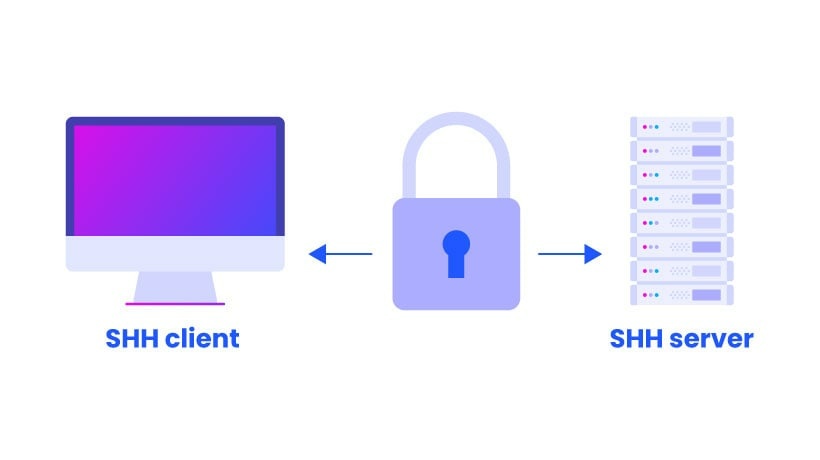
3 |
4 | A __Secure Shell__, or __Secure Socket Shell__, is a network protocol that allows devices to achieve two important things: communicate and share data. Additionally, the SSH protocol also encrypts data, making it ideal for unsecured networks.
5 |
6 | ## Learning Objectives
7 |
8 | - What is a __server__
9 | - Where servers usually live
10 | - What is `SSH`
11 | - How to create an `SSH RSA` key pair
12 | - How to connect to a remote host using an SSH RSA key pair
13 | - The advantage of using `#!/usr/bin/env bash` instead of `/bin/bash`
14 |
15 | ## Projects thought process
16 |
--------------------------------------------------------------------------------
/0x0C-web_server/3-redirection:
--------------------------------------------------------------------------------
1 | #!/usr/bin/env bash
2 | # A bash script that installs nginx on an ubuntu machine.
3 | # This scripts also configures the default webpage served to be "Hello World!"
4 | # When request url matches /redirect_me, it redirects to my youtube channel.
5 |
6 | sudo apt-get update -y
7 |
8 | sudo apt-get install nginx -y
9 |
10 | echo "Hello World!" | sudo tee /var/www/html/index.html > /dev/null
11 |
12 | NEW_RULE="\\\n\tlocation = /redirect_me {\n\t\t return 301 https://www.youtube.com/@innocentsax;\n\t}\n"
13 |
14 | sudo cp /etc/nginx/sites-available/default /etc/nginx/sites-available/default.bakup
15 |
16 | sudo sed -i "53i $NEW_RULE" /etc/nginx/sites-available/default
17 |
18 | sudo service nginx restart
19 |
--------------------------------------------------------------------------------
/0x14-mysql/4-mysql_configuration_replica:
--------------------------------------------------------------------------------
1 | # The MySQL Server configuration file.
2 | #
3 | # For explanations see
4 | # http://dev.mysql.com/doc/mysql/en/server-system-variables.html
5 |
6 | [mysqld]
7 | pid-file = /var/run/mysqld/mysqld.pid
8 | socket = /var/run/mysqld/mysqld.sock
9 | datadir = /var/lib/mysql
10 | log-error = /var/log/mysql/error.log
11 | # By default we only accept connections from localhost
12 | # bind-address = 127.0.0.1
13 | server-id = 2
14 | log_bin = /var/log/mysql/mysql-bin.log
15 | # Disabling symbolic-links is recommended to prevent assorted security risks
16 | symbolic-links=0
17 | binlog_do_db = tyrell_corp
18 | relay-log = /var/log/mysql/mysql-relay-bin.log
19 |
--------------------------------------------------------------------------------
/0x15-api/3-dictionary_of_list_of_dictionaries.py:
--------------------------------------------------------------------------------
1 | #!/usr/bin/python3
2 | """Exports to-do list information of all employees to JSON format."""
3 | import json
4 | import requests
5 |
6 | if __name__ == "__main__":
7 | url = "https://jsonplaceholder.typicode.com/"
8 | users = requests.get(url + "users").json()
9 |
10 | with open("todo_all_employees.json", "w") as jsonfile:
11 | json.dump({
12 | u.get("id"): [{
13 | "task": t.get("title"),
14 | "completed": t.get("completed"),
15 | "username": u.get("username")
16 | } for t in requests.get(url + "todos",
17 | params={"userId": u.get("id")}).json()]
18 | for u in users}, jsonfile)
19 |
--------------------------------------------------------------------------------
/0x0C-web_server/7-puppet_install_nginx_web_server.pp:
--------------------------------------------------------------------------------
1 | # Script to install nginx using puppet
2 |
3 | package {'nginx':
4 | ensure => 'present',
5 | }
6 |
7 | exec {'install':
8 | command => 'sudo apt-get update ; sudo apt-get -y install nginx',
9 | provider => shell,
10 | }
11 |
12 | exec {'Hello World!':
13 | command => 'echo "Hello World!" | sudo dd status=none of=/var/www/html/index.html',
14 | provider => shell,
15 | }
16 |
17 | exec {'sudo sed -i "s/listen 80 default_server;/listen 80 default_server;\\n\\tlocation \/redirect_me {\\n\\t\\treturn 301 https:\/\/www.youtube.com\/;\\n\\t}/" /etc/nginx/sites-available/default':
18 | provider => shell,
19 | }
20 |
21 | exec {'run':
22 | command => 'sudo service nginx restart',
23 | provider => shell,
24 | }
25 |
--------------------------------------------------------------------------------
/0x04-loops_conditions_and_parsing/6-superstitious_numbers:
--------------------------------------------------------------------------------
1 | #!/usr/bin/env bash
2 | # Write a Bash script that displays numbers from 1 to 20 and:
3 |
4 | # displays 4 and then bad luck from China for the 4th loop iteration
5 | # displays 9 and then bad luck from Japan for the 9th loop iteration
6 | # displays 17 and then bad luck from Italy for the 17th loop iteration
7 | # Requirements:
8 |
9 | # You must use the while loop (for and until are forbidden)
10 | # You must use the case statement
11 |
12 | number_count=1
13 |
14 | while [ $number_count -le 20 ]
15 | do
16 | echo "$number_count"
17 | case $number_count in
18 | "4") echo "bad luck from China";;
19 | "9") echo "bad luck from Japan";;
20 | "17") echo "bad luck from Italy";;
21 | esac
22 | (( number_count++ ))
23 | done
24 |
--------------------------------------------------------------------------------
/0x05-processes_and_signals/100-process_and_pid_file:
--------------------------------------------------------------------------------
1 | #!/usr/bin/env bash
2 | # Does the following:
3 | # Create a file /var/run/myscript.pid containing the script PID.
4 | # Displays "To infinity and beyond" indefinitely
5 | # Displays "I hate the kill command" upon receiving a SIGTERM
6 | # Displays "Y U no love me?!" upon receiving a SIGINT
7 | # Deletes the file /var/run/myscript.pid and terminates upon
8 | #+ receiving a SIGQUIT or SIGTERM.
9 |
10 | terminator() {
11 | rm /var/run/myscript.pid
12 | exit
13 | }
14 |
15 | echo "$$" > /var/run/myscript.pid
16 |
17 | while true
18 | do
19 | echo "To infinity and beyond"
20 | sleep 2
21 | trap 'echo "Y U no love me?!"' SIGINT
22 | trap 'echo "I hate the kill command" && terminator' SIGTERM
23 | trap 'terminator' SIGQUIT
24 | done
25 |
--------------------------------------------------------------------------------
/0x15-api/1-export_to_CSV.py:
--------------------------------------------------------------------------------
1 | #!/usr/bin/python3
2 | """Accessing a REST API for todo lists of employees"""
3 |
4 | import requests
5 | import sys
6 |
7 |
8 | if __name__ == '__main__':
9 | employeeId = sys.argv[1]
10 | baseUrl = "https://jsonplaceholder.typicode.com/users"
11 | url = baseUrl + "/" + employeeId
12 |
13 | response = requests.get(url)
14 | username = response.json().get('username')
15 |
16 | todoUrl = url + "/todos"
17 | response = requests.get(todoUrl)
18 | tasks = response.json()
19 |
20 | with open('{}.csv'.format(employeeId), 'w') as file:
21 | for task in tasks:
22 | file.write('"{}","{}","{}","{}"\n'
23 | .format(employeeId, username, task.get('completed'),
24 | task.get('title')))
25 |
--------------------------------------------------------------------------------
/0x16-api_advanced/0-subs.py:
--------------------------------------------------------------------------------
1 | #!/usr/bin/python3
2 | """
3 | number of subscribers for a given subreddit
4 | """
5 |
6 | from requests import get
7 |
8 |
9 | def number_of_subscribers(subreddit):
10 | """
11 | function that queries the Reddit API and returns the number of subscribers
12 | (not active users, total subscribers) for a given subreddit.
13 | """
14 |
15 | if subreddit is None or not isinstance(subreddit, str):
16 | return 0
17 |
18 | user_agent = {'User-agent': 'Google Chrome Version 81.0.4044.129'}
19 | url = 'https://www.reddit.com/r/{}/about.json'.format(subreddit)
20 | response = get(url, headers=user_agent)
21 | results = response.json()
22 |
23 | try:
24 | return results.get('data').get('subscribers')
25 |
26 | except Exception:
27 | return 0
28 |
--------------------------------------------------------------------------------
/command_line_for_the_win/README.md:
--------------------------------------------------------------------------------
1 | 
2 |
3 | ## Background Context
4 | [CMD CHALLENGE](https://cmdchallenge.com/) is a pretty cool game challenging you on Bash skills. Everything is done via the command line and the questions are becoming increasingly complicated. It’s a good training to improve your command line skills!
5 |
6 | ## Requirements
7 | General
8 | * A README.md file, at the root of the folder of the project, is mandatory
9 | * This project will be manually reviewed.
10 | * As each task is completed, the name of that task will turn green
11 | * Create a screenshot, showing that you completed the required levels
12 | * Push this screenshot with the right name to GitHub, in either the PNG or JPEG format
13 |
14 | ## Author
15 | ©[INNOCENT CHARLES UDO](https://github.com/Innocentsax)
16 |
--------------------------------------------------------------------------------
/0x05-processes_and_signals/102-zombie.c:
--------------------------------------------------------------------------------
1 | /*
2 | * File: 102-zombie.c
3 | * Auth: Brennan D Baraban
4 | */
5 |
6 | #include
7 | #include
8 | #include
9 | #include
10 | #include
11 |
12 | /**
13 | * infinite_while - Run an infinite while loop.
14 | *
15 | * Return: Always 0.
16 | */
17 | int infinite_while(void)
18 | {
19 | while (1)
20 | {
21 | sleep(1);
22 | }
23 | return (0);
24 | }
25 |
26 | /**
27 | * main - Creates five zombie processes.
28 | *
29 | * Return: Always 0.
30 | */
31 | int main(void)
32 | {
33 | pid_t pid;
34 | char count = 0;
35 |
36 | while (count < 5)
37 | {
38 | pid = fork();
39 | if (pid > 0)
40 | {
41 | printf("Zombie process created, PID: %d\n", pid);
42 | sleep(1);
43 | count++;
44 | }
45 | else
46 | exit(0);
47 | }
48 |
49 | infinite_while();
50 |
51 | return (EXIT_SUCCESS);
52 | }
53 |
--------------------------------------------------------------------------------
/0x15-api/2-export_to_JSON.py:
--------------------------------------------------------------------------------
1 | #!/usr/bin/python3
2 | """Accessing a REST API for todo lists of employees"""
3 |
4 | import json
5 | import requests
6 | import sys
7 |
8 |
9 | if __name__ == '__main__':
10 | employeeId = sys.argv[1]
11 | baseUrl = "https://jsonplaceholder.typicode.com/users"
12 | url = baseUrl + "/" + employeeId
13 |
14 | response = requests.get(url)
15 | username = response.json().get('username')
16 |
17 | todoUrl = url + "/todos"
18 | response = requests.get(todoUrl)
19 | tasks = response.json()
20 |
21 | dictionary = {employeeId: []}
22 | for task in tasks:
23 | dictionary[employeeId].append({
24 | "task": task.get('title'),
25 | "completed": task.get('completed'),
26 | "username": username
27 | })
28 | with open('{}.json'.format(employeeId), 'w') as filename:
29 | json.dump(dictionary, filename)
30 |
--------------------------------------------------------------------------------
/0x15-api/0-gather_data_from_an_API.py:
--------------------------------------------------------------------------------
1 | #!/usr/bin/python3
2 | """Accessing a REST API for todo lists of employees"""
3 |
4 | import requests
5 | import sys
6 |
7 |
8 | if __name__ == '__main__':
9 | employeeId = sys.argv[1]
10 | baseUrl = "https://jsonplaceholder.typicode.com/users"
11 | url = baseUrl + "/" + employeeId
12 |
13 | response = requests.get(url)
14 | employeeName = response.json().get('name')
15 |
16 | todoUrl = url + "/todos"
17 | response = requests.get(todoUrl)
18 | tasks = response.json()
19 | done = 0
20 | done_tasks = []
21 |
22 | for task in tasks:
23 | if task.get('completed'):
24 | done_tasks.append(task)
25 | done += 1
26 |
27 | print("Employee {} is done with tasks({}/{}):"
28 | .format(employeeName, done, len(tasks)))
29 |
30 | for task in done_tasks:
31 | print("\t {}".format(task.get('title')))
32 |
--------------------------------------------------------------------------------
/0x16-api_advanced/1-top_ten.py:
--------------------------------------------------------------------------------
1 | #!/usr/bin/python3
2 |
3 | """
4 | prints the titles of the first 10 hot posts listed for a given subreddit
5 | """
6 |
7 | from requests import get
8 |
9 |
10 | def top_ten(subreddit):
11 | """
12 | function that queries the Reddit API and prints the titles of the first
13 | 10 hot posts listed for a given subreddit
14 | """
15 |
16 | if subreddit is None or not isinstance(subreddit, str):
17 | print("None")
18 |
19 | user_agent = {'User-agent': 'Google Chrome Version 81.0.4044.129'}
20 | params = {'limit': 10}
21 | url = 'https://www.reddit.com/r/{}/hot/.json'.format(subreddit)
22 |
23 | response = get(url, headers=user_agent, params=params)
24 | results = response.json()
25 |
26 | try:
27 | my_data = results.get('data').get('children')
28 |
29 | for i in my_data:
30 | print(i.get('data').get('title'))
31 |
32 | except Exception:
33 | print("None")
34 |
--------------------------------------------------------------------------------
/0x16-api_advanced/2-recurse.py:
--------------------------------------------------------------------------------
1 | #!/usr/bin/python3
2 | """
3 | Using reddit's API
4 | """
5 | import requests
6 | after = None
7 |
8 |
9 | def recurse(subreddit, hot_list=[]):
10 | """returning top ten post titles recursively"""
11 | global after
12 | user_agent = {'User-Agent': 'api_advanced-project'}
13 | url = "https://www.reddit.com/r/{}/hot.json".format(subreddit)
14 | parameters = {'after': after}
15 | results = requests.get(url, params=parameters, headers=user_agent,
16 | allow_redirects=False)
17 |
18 | if results.status_code == 200:
19 | after_data = results.json().get("data").get("after")
20 | if after_data is not None:
21 | after = after_data
22 | recurse(subreddit, hot_list)
23 | all_titles = results.json().get("data").get("children")
24 | for title_ in all_titles:
25 | hot_list.append(title_.get("data").get("title"))
26 | return hot_list
27 | else:
28 | return (None)
29 |
--------------------------------------------------------------------------------
/0x14-mysql/4-mysql_configuration_primary:
--------------------------------------------------------------------------------
1 | # MERCHANTABILITY or FITNESS FOR A PARTICULAR PURPOSE. See the
2 | # GNU General Public License, version 2.0, for more details.
3 | #
4 | # You should have received a copy of the GNU General Public License
5 | # along with this program; if not, write to the Free Software
6 | # Foundation, Inc., 51 Franklin St, Fifth Floor, Boston, MA 02110-1301 USA
7 |
8 | #
9 | # The MySQL Server configuration file.
10 | #
11 | # For explanations see
12 | # http://dev.mysql.com/doc/mysql/en/server-system-variables.html
13 |
14 | [mysqld]
15 | pid-file = /var/run/mysqld/mysqld.pid
16 | socket = /var/run/mysqld/mysqld.sock
17 | datadir = /var/lib/mysql
18 | log-error = /var/log/mysql/error.log
19 | # By default we only accept connections from localhost
20 | #bind-address = 127.0.0.1
21 | server-id = 1
22 | log_bin = /var/log/mysql/mysql-bin.log
23 | # Disabling symbolic-links is recommended to prevent assorted security risks
24 | symbolic-links=0
25 |
26 | binlog_do_db = tyrell_corp
27 |
--------------------------------------------------------------------------------
/0x05-processes_and_signals/README.md:
--------------------------------------------------------------------------------
1 | # Processes and Signals
2 |
3 |
2 |
--------------------------------------------------------------------------------
/0x03-shell_variables_expansions/103-water_and_stir:
--------------------------------------------------------------------------------
1 | #!/bin/bash
2 | printf "%o\n" $(( $((5#$(echo $WATER | tr water 01234))) + $((5#$(echo $STIR | tr stir. 01234))) )) | tr 01234567 bestchol
3 |
--------------------------------------------------------------------------------
/0x0B-ssh/1-create_ssh_key_pair:
--------------------------------------------------------------------------------
1 | #!/usr/bin/env bash
2 | # Bash script that creates an RSA key pair
3 | #ssh-keygen -b 4096 -P betty -f school
4 | ssh-keygen -t rsa -b 4096 -P betty -f school
5 |
--------------------------------------------------------------------------------
/0x07-networking_basics/4-TCP_and_UDP_ports:
--------------------------------------------------------------------------------
1 | #!/usr/bin/env bash
2 | # Displays listening ports, sockets, PID and names of the program to which each sockate belongs
3 |
4 | netstat -l --program
5 |
--------------------------------------------------------------------------------
/0x05-processes_and_signals/67-stop_me_if_you_can:
--------------------------------------------------------------------------------
1 | #!/usr/bin/env bash
2 | # This script stops the 7-highlander process
3 | # Requirement: You cannot use kill or killall
4 |
5 | pkill -f 7-highlander
6 |
--------------------------------------------------------------------------------
/0x08-networking_basics_2/1-show_attached_IPs:
--------------------------------------------------------------------------------
1 | #!/usr/bin/env bash
2 | # Displays all acive IPv4 addresses on the machine
3 |
4 | ifconfig | grep -Eo "inet (addr:)?([0-9]*\.){3}[0-9]*" | cut -b 6-
5 |
--------------------------------------------------------------------------------
/0x04-loops_conditions_and_parsing/1-for_best_school:
--------------------------------------------------------------------------------
1 | #!/usr/bin/env bash
2 | # Displays "Best School" 10 times using a for loop.
3 |
4 | for (( i=0; i<10; i++ ))
5 | do
6 | echo "Best School"
7 | done
8 |
--------------------------------------------------------------------------------
/0x05-processes_and_signals/2-show_your_bash_pid:
--------------------------------------------------------------------------------
1 | #!/usr/bin/env bash
2 | # Displays a list of currently running processes containing the bash keyword.
3 | # shellcheck disable=SC2009
4 |
5 | ps -aux | grep bash
6 |
--------------------------------------------------------------------------------
/0x05-processes_and_signals/3-show_your_bash_pid_made_easy:
--------------------------------------------------------------------------------
1 | #!/usr/bin/env bash
2 | # Displays the PID along with the process name, of
3 | #+ processes whose name contains the word "bash".
4 |
5 | pgrep bash -l
6 |
--------------------------------------------------------------------------------
/0x0B-ssh/0-use_a_private_key:
--------------------------------------------------------------------------------
1 | #!/usr/bin/env bash
2 | # Bash script that uses ssh to connect to your server using the private
3 | # key ~/.ssh/school with the user ubuntu
4 | ssh ubuntu@35.168.2.29 -i ~/.ssh/school
5 |
--------------------------------------------------------------------------------
/0x11-what_happens_when_your_type_google_com_in_your_browser_and_press_enter/0-blog_post:
--------------------------------------------------------------------------------
1 | https://medium.com/@innocentcharlesudo/what-happens-when-you-type-google-com-in-your-browser-and-press-enter-1b2e2da7b7ed
2 |
--------------------------------------------------------------------------------
/0x13-firewall/0-block_all_incoming_traffic_but:
--------------------------------------------------------------------------------
1 | sudo ufw default deny incoming
2 | sudo ufw default allow outgoing
3 | sudo ufw allow 80/tcp
4 | sudo ufw allow 443/tcp
5 | sudo ufw allow 22/tcp
6 | sudo ufw enable
7 |
--------------------------------------------------------------------------------
/0x12-web_stack_debugging_2/0-iamsomeoneelse:
--------------------------------------------------------------------------------
1 | #!/usr/bin/env bash
2 | # A Bash script that accepts one argument
3 | # The script run the 'whoami' command under the user passed as an argument
4 |
5 | sudo -u "$1" whoami
6 |
--------------------------------------------------------------------------------
/0x04-loops_conditions_and_parsing/102-lets_parse_apache_logs:
--------------------------------------------------------------------------------
1 | #!/usr/bin/env bash
2 | # Parses apache log files in list format.
3 | # Displays the IP and HTTP status code.
4 |
5 | awk '{print $1 " " $9}' apache-access.log
6 |
--------------------------------------------------------------------------------
/0x11-what_happens_when_your_type_google_com_in_your_browser_and_press_enter/2-contribution-to_what-happens-when_github_answer:
--------------------------------------------------------------------------------
1 | https://github.com/alex/what-happens-when/compare/master...Innocentsax:what-happens-when:addPhoto?expand=1
2 |
--------------------------------------------------------------------------------
/0x0E-web_stack_debugging_1/0-nginx_likes_port_80:
--------------------------------------------------------------------------------
1 | #!/usr/bin/env bash
2 | # script that restores the default server port
3 |
4 | sudo ln -sf /etc/nginx/sites-available/default /etc/nginx/sites-enabled/default
5 | sudo service nginx start
6 |
--------------------------------------------------------------------------------
/0x14-mysql/5-mysql_backup:
--------------------------------------------------------------------------------
1 | #!/usr/bin/env bash
2 | # This script generates a MySQL dump and creates a compressed archive of it
3 |
4 | mysqldump -uroot -p"$1" --all-databases > backup.sql
5 | tar -czf $(date +%d-%m-%Y).tar.gz backup.sql
6 |
--------------------------------------------------------------------------------
/0x05-processes_and_signals/1-list_your_processes:
--------------------------------------------------------------------------------
1 | #!/usr/bin/env bash
2 | # Must show all processes, for all users, including those which might have a TTY
3 | # Display in a user-oriented format
4 | #+ Show process hierarchy
5 |
6 | ps -auxf
7 |
--------------------------------------------------------------------------------
/0x07-networking_basics/5-is_the_host_on_the_network:
--------------------------------------------------------------------------------
1 | #!/usr/bin/env bash
2 | # pings an IP address passed as an argument
3 | if [ "$1" == "" ]; then
4 | echo "Usage: 5-is_the_host_on_the_network {IP_ADDRESS}"
5 | else
6 | ping -c 5 "$1"
7 | fi
8 |
--------------------------------------------------------------------------------
/0x0E-web_stack_debugging_1/1-debugging_made_short:
--------------------------------------------------------------------------------
1 | #!/usr/bin/env bash
2 | # script of task 0 but using less lines
3 | ln -sf /etc/nginx/sites-available/default /etc/nginx/sites-enabled/default
4 | service nginx restart
5 | kill "$(pgrep 'nginx' | head -1)"
6 |
--------------------------------------------------------------------------------
/0x05-processes_and_signals/4-to_infinity_and_beyond:
--------------------------------------------------------------------------------
1 | #!/usr/bin/env bash
2 | # Displays "To infinity and beyond" indefinitely with
3 | #+ a sleep 2 in between each iteration.
4 |
5 | while true
6 | do
7 | echo "To infinity and beyond"
8 | sleep 2
9 | done
10 |
--------------------------------------------------------------------------------
/0x04-loops_conditions_and_parsing/2-while_best_school:
--------------------------------------------------------------------------------
1 | #!/usr/bin/env bash
2 | # Displays "Best School" 10 times using a while loop.
3 |
4 | number_count=0
5 |
6 | while [ $number_count -lt 10 ]
7 | do
8 | echo "Best School"
9 | (( number_count++ ))
10 | done
11 |
--------------------------------------------------------------------------------
/0x04-loops_conditions_and_parsing/3-until_best_school:
--------------------------------------------------------------------------------
1 | #!/usr/bin/env bash
2 | # A script that displays Best School 10 times using until
3 |
4 | number_count=1
5 |
6 | until [ $number_count -gt 10 ]
7 | do
8 | echo "Best School"
9 | ((number_count++))
10 | done
11 |
--------------------------------------------------------------------------------
/0x04-loops_conditions_and_parsing/8-for_ls:
--------------------------------------------------------------------------------
1 | #!/usr/bin/env bash
2 | # Displays the contents of the current directory in list format.
3 | # Only displays the part of the name after the first dash.
4 |
5 | list=$(ls)
6 | for i in $list; do
7 | echo "$i" | cut -d '-' -f2
8 | done
9 |
--------------------------------------------------------------------------------
/0x05-processes_and_signals/manage_my_process:
--------------------------------------------------------------------------------
1 | #!/usr/bin/env bash
2 | # Indefinitely writes "I am alive" to the file /tmp/my_process.
3 | # Pauses two seconds in between each message.
4 |
5 | while true
6 | do
7 | echo "I am alive!" >> /tmp/my_process
8 | sleep 2
9 | done
10 |
--------------------------------------------------------------------------------
/0x12-web_stack_debugging_2/100-fix_in_7_lines_or_less:
--------------------------------------------------------------------------------
1 | #!/usr/bin/env bash
2 | # Running nginx as nginx and fixing port from 80 to 8080
3 | pkill apache2
4 | sed -i 's/80/8080/g' /etc/nginx/sites-available/default
5 | chmod 644 /etc/nginx/nginx.conf
6 | sudo -u nginx service nginx restart
7 |
--------------------------------------------------------------------------------
/0x0A-configuration_management/1-install_a_package.pp:
--------------------------------------------------------------------------------
1 | # A puppet manifest installing flask v2.1.0 which is a package from pip3.
2 | # Am also specifying the version of flask to install using the ensure attribute
3 | package { 'flask':
4 | ensure => '2.1.0',
5 | provider => pip3,
6 | }
7 |
--------------------------------------------------------------------------------
/0x04-loops_conditions_and_parsing/100-read_and_cut:
--------------------------------------------------------------------------------
1 | #!/usr/bin/env bash
2 | # Displays the contents of the file `/etc/passwd`.
3 | # Only displays the username, user id, and user home directory path.
4 |
5 | while read -r passwd; do
6 | echo "$passwd" | cut -d ':' -f1,3,6
7 | done < "/etc/passwd"
8 |
--------------------------------------------------------------------------------
/0x0B-ssh/2-ssh_config:
--------------------------------------------------------------------------------
1 | # Configure ssh client so that you can connect to a server without typing a password.
2 | Host *
3 | SendEnv LANG LC_*
4 | HashKnownHosts yes
5 | GSSAPIAuthentication yes
6 | GSSAPIDelegateCredentials no
7 | IdentityFile ~/.ssh/school
8 | PasswordAuthentication no
9 |
--------------------------------------------------------------------------------
/0x12-web_stack_debugging_2/1-run_nginx_as_nginx:
--------------------------------------------------------------------------------
1 | #!/usr/bin/env bash
2 | # A BASH Script that runs nignx webserver as nginx and also configures nginx to
3 | # listen to port 8080
4 | pkill apache2
5 | sed -i 's/80/8080/g' /etc/nginx/sites-available/default
6 | chmod 644 /etc/nginx/nginx.conf
7 | sudo -u nginx service nginx restart
8 |
--------------------------------------------------------------------------------
/0x0A-configuration_management/2-execute_a_command.pp:
--------------------------------------------------------------------------------
1 | # A manifest to kill a running process killmenow from the process table
2 | # on every puppet run
3 | exec { 'killing a process using pkill':
4 | command => 'pkill -9 killmenow',
5 | path => '/usr/bin:/bin',
6 | onlyif => 'pgrep killmenow',
7 | provider => shell,
8 |
9 | }
10 |
--------------------------------------------------------------------------------
/0x04-loops_conditions_and_parsing/103-dig_the-data:
--------------------------------------------------------------------------------
1 | #!/usr/bin/env bash
2 | # Parses Apache log files in list format.
3 | # Groups visitors by IP and HTTP status code.
4 | # Displays the number of occurrences, IP, and HTTP status
5 | #+ code of each log, in sorted order.
6 |
7 | awk '{ print $1 " " $9}' apache-access.log | sort | uniq -c | sort -rn
8 |
--------------------------------------------------------------------------------
/0x08-networking_basics_2/0-change_your_home_IP:
--------------------------------------------------------------------------------
1 | #!/usr/bin/env bash
2 | # Configures an Ubuntu server as follows:
3 | # -- localhost resolves to 127.0.0.2
4 | # -- facebook.com resolves to 8.8.8.8
5 |
6 | cp /etc/hosts ~/hosts.new
7 | echo "127.0.0.2 localhost" > ~/hosts.new
8 | echo "8.8.8.8 facebook.com" >> ~/hosts.new
9 | cp -f ~/hosts.new /etc/hosts
10 |
--------------------------------------------------------------------------------
/0x17-web_stack_debugging_3/0-strace_is_your_friend.pp:
--------------------------------------------------------------------------------
1 | # A puppet manuscript to replace a line in a file on a server
2 |
3 | $file_to_edit = '/var/www/html/wp-settings.php'
4 |
5 | #replace line containing "phpp" with "php"
6 |
7 | exec { 'replace_line':
8 | command => "sed -i 's/phpp/php/g' ${file_to_edit}",
9 | path => ['/bin','/usr/bin']
10 | }
11 |
--------------------------------------------------------------------------------
/0x1B-web_stack_debugging_4/0-the_sky_is_the_limit_not.pp:
--------------------------------------------------------------------------------
1 | # fix request limit at nginx
2 |
3 | exec { 'fix--for-nginx':
4 | command => 'sed -i "s/15/4096/" /etc/default/nginx',
5 | path => '/usr/local/bin/:/bin/'
6 | }
7 |
8 | # Restart Nginx
9 | -> exec { 'nginx-restart':
10 | command => 'nginx restart',
11 | path => '/etc/init.d/'
12 | }
13 |
--------------------------------------------------------------------------------
/0x05-processes_and_signals/7-highlander:
--------------------------------------------------------------------------------
1 | #!/usr/bin/env bash
2 | # Displays "To infinity and beyond" indefinitely with
3 | #+ a sleep 2 in between each iteration.
4 | # Displays "I am invincible!!!" in between each iteration.
5 |
6 | while true
7 | do
8 | echo "To infinity and beyond"
9 | sleep 2
10 | trap 'echo "I am invincible!!!"' SIGTERM
11 | done
12 |
--------------------------------------------------------------------------------
/0x0A-configuration_management/0-create_a_file.pp:
--------------------------------------------------------------------------------
1 | # A puppet manifest that creates a file school in /tmp.
2 | # The file (School) has permissions 0744, belonging to the user and group
3 | # www-data.
4 | file { '/tmp/school':
5 | ensure => present,
6 | mode => '0744',
7 | owner => 'www-data',
8 | group => 'www-data',
9 | content => 'I love Puppet',
10 | }
11 |
--------------------------------------------------------------------------------
/0x04-loops_conditions_and_parsing/4-if_9_say_hi:
--------------------------------------------------------------------------------
1 | #!/usr/bin/env bash
2 | # A script that displays Best School 10 times and hi after the 9th using while and if
3 |
4 | number_count=1
5 |
6 | while [ $number_count -le 10 ]
7 | do
8 | echo "Best School"
9 | if [ $number_count -eq 9 ]
10 | then
11 | echo "Hi"
12 | fi
13 | ((number_count++))
14 | done
15 |
--------------------------------------------------------------------------------
/0x0B-ssh/school.pub:
--------------------------------------------------------------------------------
1 | ssh-rsa AAAAB3NzaC1yc2EAAAADAQABAAABAQDeS0bui5xx5t+YvX271RCuS/amj1D7QgSO/eJsLyeBwsqJmfXsunidMPL9qw3gEyxzRgXNdqEJYckA2QH1KE4ADT1rmRHpMgUcNT98ariIk8FXpcfi8FpbH4wLLs4wGCmmhhqND3D5f15yEtHdZypGp0G4bsCm0Tb6LMfXfs9BpwH8yHIRQVXrhgLUazcfJCDUUtIEaWp8cPr/yfg/ip8ZnWLUKscy187DuT7Ywl0RgGflgCqYg1Wc740BbZqOhG/Lwt9DB5jXLWzel6i7D0FsIy1S0pDhX9jrv4mmO/f/Gut79HHGBCmPwJPMHHw0RaZ16Nl0G/QfrZid1sZP2DHp innocentsax@DESKTOP-R76GFQP
2 |
--------------------------------------------------------------------------------
/0x0C-web_server/1-install_nginx_web_server:
--------------------------------------------------------------------------------
1 | #!/usr/bin/env bash
2 | # A script that installs nginx server on an ubuntu linux distro.
3 | # The installed server listens to port 80 (HTTP) for connection
4 | # And serves a default page index.html on the HTTP GET request.
5 |
6 | sudo apt-get update -y
7 |
8 | sudo apt-get install nginx -y
9 |
10 | echo 'Hello World!' > /var/www/html/index.html
11 |
12 | service nginx restart
13 |
--------------------------------------------------------------------------------
/0x04-loops_conditions_and_parsing/0-RSA_public_key.pub:
--------------------------------------------------------------------------------
1 | ssh-rsa AAAAB3NzaC1yc2EAAAADAQABAAABAQDeS0bui5xx5t+YvX271RCuS/amj1D7QgSO/eJsLyeBwsqJmfXsunidMPL9qw3gEyxzRgXNdqEJYckA2QH1KE4ADT1rmRHpMgUcNT98ariIk8FXpcfi8FpbH4wLLs4wGCmmhhqND3D5f15yEtHdZypGp0G4bsCm0Tb6LMfXfs9BpwH8yHIRQVXrhgLUazcfJCDUUtIEaWp8cPr/yfg/ip8ZnWLUKscy187DuT7Ywl0RgGflgCqYg1Wc740BbZqOhG/Lwt9DB5jXLWzel6i7D0FsIy1S0pDhX9jrv4mmO/f/Gut79HHGBCmPwJPMHHw0RaZ16Nl0G/QfrZid1sZP2DHp innocentsax@DESKTOP-R76GFQP
2 |
--------------------------------------------------------------------------------
/0x04-loops_conditions_and_parsing/7-clock:
--------------------------------------------------------------------------------
1 | #!/usr/bin/env bash
2 | # Displays the time for 12 horus and 59 minutes.
3 | # Displays hours from 0 to 12
4 | # Displays minutes from 1 to 59
5 |
6 | number_of_hour=0
7 |
8 | while [ $number_of_hour -le 12 ]
9 | do
10 | echo "Hour: $number_of_hour"
11 | minute=1
12 | while [ $minute -le 59 ]
13 | do
14 | echo "$minute"
15 | (( minute++ ))
16 | done
17 | (( number_of_hour++ ))
18 | done
19 |
--------------------------------------------------------------------------------
/0x1B-web_stack_debugging_4/1-user_limit.pp:
--------------------------------------------------------------------------------
1 | # fix limit file at hbton user.
2 |
3 | exec { 'fix_limit_hbton_user':
4 | command => 'sed -i "/holberton hard/s/5/10000/" /etc/security/limits.conf',
5 | path => '/usr/local/bin/:/bin/'
6 | }
7 |
8 | # Increase soft file limit hbton ser.
9 | exec { 'increase_soft_file':
10 | command => 'sed -i "/holberton soft/s/4/20000/" /etc/security/limits.conf',
11 | path => '/usr/local/bin/:/bin/'
12 | }
13 |
--------------------------------------------------------------------------------
/0x04-loops_conditions_and_parsing/101-tell_the_story_of_passwd:
--------------------------------------------------------------------------------
1 | #!/usr/bin/env bash
2 | # Tells a story based on the contents of the `/etc/passwd` file.
3 |
4 | while IFS=':' read -r username password uid gid info home shell; do
5 | echo "The user $username is part of the $gid gang,"\
6 | "lives in $home and rides $shell."\
7 | "$uid's place is protected by the passcode $password,"\
8 | "more info about the user here: $info"
9 | done < "/etc/passwd"
10 |
--------------------------------------------------------------------------------
/0x04-loops_conditions_and_parsing/5-4_bad_luck_8_is_your_chance:
--------------------------------------------------------------------------------
1 | #!/usr/bin/env bash
2 | # A script that loops through 1 to 10 using while
3 |
4 | number_count=1
5 |
6 | while [ $number_count -le 10 ]
7 | do
8 | if [ $number_count -eq 4 ]
9 | then
10 | echo "bad luck"
11 | elif [ $number_count -eq 8 ]
12 | then
13 | echo "good luck"
14 | else
15 | echo "Best School"
16 | fi
17 | ((number_count++))
18 | done
19 |
--------------------------------------------------------------------------------
/0x0B-ssh/100-puppet_ssh_config.pp:
--------------------------------------------------------------------------------
1 | # Seting up my client config file
2 | include stdlib
3 |
4 | file_line { 'Turn off passwd auth':
5 | ensure => present,
6 | path => '/etc/ssh/ssh_config',
7 | line => ' PasswordAuthentication no',
8 | replace => true,
9 | }
10 |
11 | file_line { 'Delare identity file':
12 | ensure => present,
13 | path => '/etc/ssh/ssh_config',
14 | line => ' IdentityFile ~/.ssh/school',
15 | replace => true,
16 | }
17 |
--------------------------------------------------------------------------------
/0x04-loops_conditions_and_parsing/9-to_file_or_not_to_file:
--------------------------------------------------------------------------------
1 | #!/usr/bin/env bash
2 | # Displays information about the `school` file.
3 |
4 | if [ -e "school" ]
5 | then
6 | echo "school file exists"
7 | if [ -s "school" ]
8 | then
9 | echo "school file is not empty"
10 | else
11 | echo "school file is empty"
12 | fi
13 |
14 | if [ -f "school" ]
15 | then
16 | echo "school is a regular file"
17 | fi
18 | else
19 | echo "school file does not exist"
20 | fi
21 |
--------------------------------------------------------------------------------
/0x0F-load_balancer/2-puppet_custom_http_response_header.pp:
--------------------------------------------------------------------------------
1 | # Use Puppet to automate the task of creating a custom HTTP header response
2 |
3 | exec {'update':
4 | command => '/usr/bin/apt-get update',
5 | }
6 | -> package {'nginx':
7 | ensure => 'present',
8 | }
9 | -> file_line { 'http_header':
10 | path => '/etc/nginx/nginx.conf',
11 | match => 'http {',
12 | line => "http {\n\tadd_header X-Served-By \"${hostname}\";",
13 | }
14 | -> exec {'run':
15 | command => '/usr/sbin/service nginx restart',
16 | }
17 |
--------------------------------------------------------------------------------
/0x0C-web_server/0-transfer_file:
--------------------------------------------------------------------------------
1 | #!/usr/bin/env bash
2 | # A Bash script to transfer file from a client to a server.
3 | # Using the scp linux command, we're taking the following arguments
4 | # PATH_TO_FILE to be copied to server, USER on server IP of server
5 | # LOCATION to copy to on server and PATH_TO_IDENTITY_FILE for user auth
6 |
7 | if [ $# -lt 4 ]
8 | then
9 | echo 'Usage: 0-transfer_file PATH_TO_FILE IP USERNAME PATH_TO_SSH_KEY'
10 |
11 | else
12 | scp -o StrictHostKeyChecking=no -i "$4" "$1" "$3"@"$2":~
13 | fi
14 |
--------------------------------------------------------------------------------
/0x0C-web_server/1-transfer_file:
--------------------------------------------------------------------------------
1 | #!/usr/bin/env bash
2 | # A Bash script to transfer file from a client to a server.
3 | # Using the scp linux command, we're taking the following arguments
4 | # PATH_TO_FILE to be copied to server, USER on server IP of server
5 | # LOCATION to copy to on server and PATH_TO_IDENTITY_FILE for user auth
6 |
7 | if [ $# -lt 4 ]
8 | then
9 | echo 'Usage: 0-transfer_file PATH_TO_FILE IP USERNAME PATH_TO_SSH_KEY'
10 |
11 | else
12 | scp -o StrictHostKeyChecking=no -i "$4" "$1" "$3"@"$2":~
13 | fi
14 |
--------------------------------------------------------------------------------
/0x16-api_advanced/count_subs.py:
--------------------------------------------------------------------------------
1 | #!/usr/bin/python3
2 | import requests
3 |
4 |
5 | def number_of_subscribers(subreddit):
6 | '''A function that gets the total number of subscribers from reddit api'''
7 | url = "https://www.reddit.com/r/{}/about.json".format(subreddit)
8 | headers = {
9 | "User-Agent": "Mozilla/5.0 (X11; Linux x86_64; rv:73.0) \
10 | Gecko/20100101 Firefox/73.0"
11 | }
12 |
13 | response = requests.get(url, headers=header, allow_redirects=False)
14 | if response.status_code == 404:
15 | return 0
16 | return response.json().get('data').get('subscribers')
17 |
--------------------------------------------------------------------------------
/0x04-loops_conditions_and_parsing/10-fizzbuzz:
--------------------------------------------------------------------------------
1 | #!/usr/bin/env bash
2 | # Displays numbers from 1 to 100.
3 | # Displays "FizzBuzz" when the number is a multiple of 3 and 5.
4 | # Displays "Fizz" when the number is a multiple of 3.
5 | # Displays "Buzz" when the number is a multiple of 5.
6 | # Otherwise, displays the number.
7 | # in a list format
8 |
9 | for num in {1..100}
10 | do
11 | if (( num % 3 == 0 && num % 5 == 0 ))
12 | then
13 | echo "FizzBuzz"
14 | elif (( num % 3 == 0 ))
15 | then
16 | echo "Fizz"
17 | elif (( num % 5 == 0 ))
18 | then
19 | echo "Buzz"
20 | else
21 | echo "$num"
22 | fi
23 | done
24 |
--------------------------------------------------------------------------------
/0x0F-load_balancer/1-install_load_balancer:
--------------------------------------------------------------------------------
1 | #!/usr/bin/env bash
2 | # configures a new HAproxy as a load balancer
3 |
4 | # Install HAproxy on a server
5 | apt-get -y update
6 | apt-get -y install haproxy=1.6.\*
7 |
8 | # Configure haproxy configuration file to distribute requests using a roundrobin algorithm
9 | echo '
10 | frontend Innocent.Sax
11 | bind 0:80
12 | default_backend web_servers
13 |
14 | backend web_servers
15 | balance roundrobin
16 | server 64820-web-01 54.173.165.199
17 | server 64820-web-02 54.82.120.194
18 | ' >> /etc/haproxy/haproxy.cfg
19 |
20 | # Restart HAproxy service
21 | service haproxy restart
22 |
--------------------------------------------------------------------------------
/0x0B-ssh/README.md:
--------------------------------------------------------------------------------
1 | # 0X0B-SSH
2 | 
3 |
4 | A __Secure Shell__, or __Secure Socket Shell__, is a network protocol that allows devices to achieve two important things: communicate and share data. Additionally, the SSH protocol also encrypts data, making it ideal for unsecured networks.
5 |
6 | ## Learning Objectives
7 |
8 | - What is a __server__
9 | - Where servers usually live
10 | - What is `SSH`
11 | - How to create an `SSH RSA` key pair
12 | - How to connect to a remote host using an SSH RSA key pair
13 | - The advantage of using `#!/usr/bin/env bash` instead of `/bin/bash`
14 |
15 | ## Projects thought process
16 |
--------------------------------------------------------------------------------
/0x0C-web_server/3-redirection:
--------------------------------------------------------------------------------
1 | #!/usr/bin/env bash
2 | # A bash script that installs nginx on an ubuntu machine.
3 | # This scripts also configures the default webpage served to be "Hello World!"
4 | # When request url matches /redirect_me, it redirects to my youtube channel.
5 |
6 | sudo apt-get update -y
7 |
8 | sudo apt-get install nginx -y
9 |
10 | echo "Hello World!" | sudo tee /var/www/html/index.html > /dev/null
11 |
12 | NEW_RULE="\\\n\tlocation = /redirect_me {\n\t\t return 301 https://www.youtube.com/@innocentsax;\n\t}\n"
13 |
14 | sudo cp /etc/nginx/sites-available/default /etc/nginx/sites-available/default.bakup
15 |
16 | sudo sed -i "53i $NEW_RULE" /etc/nginx/sites-available/default
17 |
18 | sudo service nginx restart
19 |
--------------------------------------------------------------------------------
/0x14-mysql/4-mysql_configuration_replica:
--------------------------------------------------------------------------------
1 | # The MySQL Server configuration file.
2 | #
3 | # For explanations see
4 | # http://dev.mysql.com/doc/mysql/en/server-system-variables.html
5 |
6 | [mysqld]
7 | pid-file = /var/run/mysqld/mysqld.pid
8 | socket = /var/run/mysqld/mysqld.sock
9 | datadir = /var/lib/mysql
10 | log-error = /var/log/mysql/error.log
11 | # By default we only accept connections from localhost
12 | # bind-address = 127.0.0.1
13 | server-id = 2
14 | log_bin = /var/log/mysql/mysql-bin.log
15 | # Disabling symbolic-links is recommended to prevent assorted security risks
16 | symbolic-links=0
17 | binlog_do_db = tyrell_corp
18 | relay-log = /var/log/mysql/mysql-relay-bin.log
19 |
--------------------------------------------------------------------------------
/0x15-api/3-dictionary_of_list_of_dictionaries.py:
--------------------------------------------------------------------------------
1 | #!/usr/bin/python3
2 | """Exports to-do list information of all employees to JSON format."""
3 | import json
4 | import requests
5 |
6 | if __name__ == "__main__":
7 | url = "https://jsonplaceholder.typicode.com/"
8 | users = requests.get(url + "users").json()
9 |
10 | with open("todo_all_employees.json", "w") as jsonfile:
11 | json.dump({
12 | u.get("id"): [{
13 | "task": t.get("title"),
14 | "completed": t.get("completed"),
15 | "username": u.get("username")
16 | } for t in requests.get(url + "todos",
17 | params={"userId": u.get("id")}).json()]
18 | for u in users}, jsonfile)
19 |
--------------------------------------------------------------------------------
/0x0C-web_server/7-puppet_install_nginx_web_server.pp:
--------------------------------------------------------------------------------
1 | # Script to install nginx using puppet
2 |
3 | package {'nginx':
4 | ensure => 'present',
5 | }
6 |
7 | exec {'install':
8 | command => 'sudo apt-get update ; sudo apt-get -y install nginx',
9 | provider => shell,
10 | }
11 |
12 | exec {'Hello World!':
13 | command => 'echo "Hello World!" | sudo dd status=none of=/var/www/html/index.html',
14 | provider => shell,
15 | }
16 |
17 | exec {'sudo sed -i "s/listen 80 default_server;/listen 80 default_server;\\n\\tlocation \/redirect_me {\\n\\t\\treturn 301 https:\/\/www.youtube.com\/;\\n\\t}/" /etc/nginx/sites-available/default':
18 | provider => shell,
19 | }
20 |
21 | exec {'run':
22 | command => 'sudo service nginx restart',
23 | provider => shell,
24 | }
25 |
--------------------------------------------------------------------------------
/0x04-loops_conditions_and_parsing/6-superstitious_numbers:
--------------------------------------------------------------------------------
1 | #!/usr/bin/env bash
2 | # Write a Bash script that displays numbers from 1 to 20 and:
3 |
4 | # displays 4 and then bad luck from China for the 4th loop iteration
5 | # displays 9 and then bad luck from Japan for the 9th loop iteration
6 | # displays 17 and then bad luck from Italy for the 17th loop iteration
7 | # Requirements:
8 |
9 | # You must use the while loop (for and until are forbidden)
10 | # You must use the case statement
11 |
12 | number_count=1
13 |
14 | while [ $number_count -le 20 ]
15 | do
16 | echo "$number_count"
17 | case $number_count in
18 | "4") echo "bad luck from China";;
19 | "9") echo "bad luck from Japan";;
20 | "17") echo "bad luck from Italy";;
21 | esac
22 | (( number_count++ ))
23 | done
24 |
--------------------------------------------------------------------------------
/0x05-processes_and_signals/100-process_and_pid_file:
--------------------------------------------------------------------------------
1 | #!/usr/bin/env bash
2 | # Does the following:
3 | # Create a file /var/run/myscript.pid containing the script PID.
4 | # Displays "To infinity and beyond" indefinitely
5 | # Displays "I hate the kill command" upon receiving a SIGTERM
6 | # Displays "Y U no love me?!" upon receiving a SIGINT
7 | # Deletes the file /var/run/myscript.pid and terminates upon
8 | #+ receiving a SIGQUIT or SIGTERM.
9 |
10 | terminator() {
11 | rm /var/run/myscript.pid
12 | exit
13 | }
14 |
15 | echo "$$" > /var/run/myscript.pid
16 |
17 | while true
18 | do
19 | echo "To infinity and beyond"
20 | sleep 2
21 | trap 'echo "Y U no love me?!"' SIGINT
22 | trap 'echo "I hate the kill command" && terminator' SIGTERM
23 | trap 'terminator' SIGQUIT
24 | done
25 |
--------------------------------------------------------------------------------
/0x15-api/1-export_to_CSV.py:
--------------------------------------------------------------------------------
1 | #!/usr/bin/python3
2 | """Accessing a REST API for todo lists of employees"""
3 |
4 | import requests
5 | import sys
6 |
7 |
8 | if __name__ == '__main__':
9 | employeeId = sys.argv[1]
10 | baseUrl = "https://jsonplaceholder.typicode.com/users"
11 | url = baseUrl + "/" + employeeId
12 |
13 | response = requests.get(url)
14 | username = response.json().get('username')
15 |
16 | todoUrl = url + "/todos"
17 | response = requests.get(todoUrl)
18 | tasks = response.json()
19 |
20 | with open('{}.csv'.format(employeeId), 'w') as file:
21 | for task in tasks:
22 | file.write('"{}","{}","{}","{}"\n'
23 | .format(employeeId, username, task.get('completed'),
24 | task.get('title')))
25 |
--------------------------------------------------------------------------------
/0x16-api_advanced/0-subs.py:
--------------------------------------------------------------------------------
1 | #!/usr/bin/python3
2 | """
3 | number of subscribers for a given subreddit
4 | """
5 |
6 | from requests import get
7 |
8 |
9 | def number_of_subscribers(subreddit):
10 | """
11 | function that queries the Reddit API and returns the number of subscribers
12 | (not active users, total subscribers) for a given subreddit.
13 | """
14 |
15 | if subreddit is None or not isinstance(subreddit, str):
16 | return 0
17 |
18 | user_agent = {'User-agent': 'Google Chrome Version 81.0.4044.129'}
19 | url = 'https://www.reddit.com/r/{}/about.json'.format(subreddit)
20 | response = get(url, headers=user_agent)
21 | results = response.json()
22 |
23 | try:
24 | return results.get('data').get('subscribers')
25 |
26 | except Exception:
27 | return 0
28 |
--------------------------------------------------------------------------------
/command_line_for_the_win/README.md:
--------------------------------------------------------------------------------
1 | 
2 |
3 | ## Background Context
4 | [CMD CHALLENGE](https://cmdchallenge.com/) is a pretty cool game challenging you on Bash skills. Everything is done via the command line and the questions are becoming increasingly complicated. It’s a good training to improve your command line skills!
5 |
6 | ## Requirements
7 | General
8 | * A README.md file, at the root of the folder of the project, is mandatory
9 | * This project will be manually reviewed.
10 | * As each task is completed, the name of that task will turn green
11 | * Create a screenshot, showing that you completed the required levels
12 | * Push this screenshot with the right name to GitHub, in either the PNG or JPEG format
13 |
14 | ## Author
15 | ©[INNOCENT CHARLES UDO](https://github.com/Innocentsax)
16 |
--------------------------------------------------------------------------------
/0x05-processes_and_signals/102-zombie.c:
--------------------------------------------------------------------------------
1 | /*
2 | * File: 102-zombie.c
3 | * Auth: Brennan D Baraban
4 | */
5 |
6 | #include
7 | #include
8 | #include
9 | #include
10 | #include
11 |
12 | /**
13 | * infinite_while - Run an infinite while loop.
14 | *
15 | * Return: Always 0.
16 | */
17 | int infinite_while(void)
18 | {
19 | while (1)
20 | {
21 | sleep(1);
22 | }
23 | return (0);
24 | }
25 |
26 | /**
27 | * main - Creates five zombie processes.
28 | *
29 | * Return: Always 0.
30 | */
31 | int main(void)
32 | {
33 | pid_t pid;
34 | char count = 0;
35 |
36 | while (count < 5)
37 | {
38 | pid = fork();
39 | if (pid > 0)
40 | {
41 | printf("Zombie process created, PID: %d\n", pid);
42 | sleep(1);
43 | count++;
44 | }
45 | else
46 | exit(0);
47 | }
48 |
49 | infinite_while();
50 |
51 | return (EXIT_SUCCESS);
52 | }
53 |
--------------------------------------------------------------------------------
/0x15-api/2-export_to_JSON.py:
--------------------------------------------------------------------------------
1 | #!/usr/bin/python3
2 | """Accessing a REST API for todo lists of employees"""
3 |
4 | import json
5 | import requests
6 | import sys
7 |
8 |
9 | if __name__ == '__main__':
10 | employeeId = sys.argv[1]
11 | baseUrl = "https://jsonplaceholder.typicode.com/users"
12 | url = baseUrl + "/" + employeeId
13 |
14 | response = requests.get(url)
15 | username = response.json().get('username')
16 |
17 | todoUrl = url + "/todos"
18 | response = requests.get(todoUrl)
19 | tasks = response.json()
20 |
21 | dictionary = {employeeId: []}
22 | for task in tasks:
23 | dictionary[employeeId].append({
24 | "task": task.get('title'),
25 | "completed": task.get('completed'),
26 | "username": username
27 | })
28 | with open('{}.json'.format(employeeId), 'w') as filename:
29 | json.dump(dictionary, filename)
30 |
--------------------------------------------------------------------------------
/0x15-api/0-gather_data_from_an_API.py:
--------------------------------------------------------------------------------
1 | #!/usr/bin/python3
2 | """Accessing a REST API for todo lists of employees"""
3 |
4 | import requests
5 | import sys
6 |
7 |
8 | if __name__ == '__main__':
9 | employeeId = sys.argv[1]
10 | baseUrl = "https://jsonplaceholder.typicode.com/users"
11 | url = baseUrl + "/" + employeeId
12 |
13 | response = requests.get(url)
14 | employeeName = response.json().get('name')
15 |
16 | todoUrl = url + "/todos"
17 | response = requests.get(todoUrl)
18 | tasks = response.json()
19 | done = 0
20 | done_tasks = []
21 |
22 | for task in tasks:
23 | if task.get('completed'):
24 | done_tasks.append(task)
25 | done += 1
26 |
27 | print("Employee {} is done with tasks({}/{}):"
28 | .format(employeeName, done, len(tasks)))
29 |
30 | for task in done_tasks:
31 | print("\t {}".format(task.get('title')))
32 |
--------------------------------------------------------------------------------
/0x16-api_advanced/1-top_ten.py:
--------------------------------------------------------------------------------
1 | #!/usr/bin/python3
2 |
3 | """
4 | prints the titles of the first 10 hot posts listed for a given subreddit
5 | """
6 |
7 | from requests import get
8 |
9 |
10 | def top_ten(subreddit):
11 | """
12 | function that queries the Reddit API and prints the titles of the first
13 | 10 hot posts listed for a given subreddit
14 | """
15 |
16 | if subreddit is None or not isinstance(subreddit, str):
17 | print("None")
18 |
19 | user_agent = {'User-agent': 'Google Chrome Version 81.0.4044.129'}
20 | params = {'limit': 10}
21 | url = 'https://www.reddit.com/r/{}/hot/.json'.format(subreddit)
22 |
23 | response = get(url, headers=user_agent, params=params)
24 | results = response.json()
25 |
26 | try:
27 | my_data = results.get('data').get('children')
28 |
29 | for i in my_data:
30 | print(i.get('data').get('title'))
31 |
32 | except Exception:
33 | print("None")
34 |
--------------------------------------------------------------------------------
/0x16-api_advanced/2-recurse.py:
--------------------------------------------------------------------------------
1 | #!/usr/bin/python3
2 | """
3 | Using reddit's API
4 | """
5 | import requests
6 | after = None
7 |
8 |
9 | def recurse(subreddit, hot_list=[]):
10 | """returning top ten post titles recursively"""
11 | global after
12 | user_agent = {'User-Agent': 'api_advanced-project'}
13 | url = "https://www.reddit.com/r/{}/hot.json".format(subreddit)
14 | parameters = {'after': after}
15 | results = requests.get(url, params=parameters, headers=user_agent,
16 | allow_redirects=False)
17 |
18 | if results.status_code == 200:
19 | after_data = results.json().get("data").get("after")
20 | if after_data is not None:
21 | after = after_data
22 | recurse(subreddit, hot_list)
23 | all_titles = results.json().get("data").get("children")
24 | for title_ in all_titles:
25 | hot_list.append(title_.get("data").get("title"))
26 | return hot_list
27 | else:
28 | return (None)
29 |
--------------------------------------------------------------------------------
/0x14-mysql/4-mysql_configuration_primary:
--------------------------------------------------------------------------------
1 | # MERCHANTABILITY or FITNESS FOR A PARTICULAR PURPOSE. See the
2 | # GNU General Public License, version 2.0, for more details.
3 | #
4 | # You should have received a copy of the GNU General Public License
5 | # along with this program; if not, write to the Free Software
6 | # Foundation, Inc., 51 Franklin St, Fifth Floor, Boston, MA 02110-1301 USA
7 |
8 | #
9 | # The MySQL Server configuration file.
10 | #
11 | # For explanations see
12 | # http://dev.mysql.com/doc/mysql/en/server-system-variables.html
13 |
14 | [mysqld]
15 | pid-file = /var/run/mysqld/mysqld.pid
16 | socket = /var/run/mysqld/mysqld.sock
17 | datadir = /var/lib/mysql
18 | log-error = /var/log/mysql/error.log
19 | # By default we only accept connections from localhost
20 | #bind-address = 127.0.0.1
21 | server-id = 1
22 | log_bin = /var/log/mysql/mysql-bin.log
23 | # Disabling symbolic-links is recommended to prevent assorted security risks
24 | symbolic-links=0
25 |
26 | binlog_do_db = tyrell_corp
27 |
--------------------------------------------------------------------------------
/0x05-processes_and_signals/README.md:
--------------------------------------------------------------------------------
1 | # Processes and Signals
2 |
3 |  4 |
5 | Resources
6 | Read or watch:
7 |
8 | - [Linux PID](http://www.linfo.org/pid.html)
9 | - [Linux process](https://www.thegeekstuff.com/2012/03/linux-processes-environment/)
10 | - [Linux signal](educative.io/answers/what-are-linux-signals)
11 | - [Process management in linux](https://www.digitalocean.com/community/tutorials/process-management-in-linux)
12 |
13 | ## Learning objectives
14 |
15 |
4 |
5 | Resources
6 | Read or watch:
7 |
8 | - [Linux PID](http://www.linfo.org/pid.html)
9 | - [Linux process](https://www.thegeekstuff.com/2012/03/linux-processes-environment/)
10 | - [Linux signal](educative.io/answers/what-are-linux-signals)
11 | - [Process management in linux](https://www.digitalocean.com/community/tutorials/process-management-in-linux)
12 |
13 | ## Learning objectives
14 |
15 |  16 |
17 | * What is a PID
18 | * What is a process
19 | * How to find a process’ PID
20 | * How to kill a process
21 | * What is a signal
22 | * What are the 2 signals that cannot be ignored
23 |
24 | ## Concepts
25 |
26 | - ps
27 | - pgrep
28 | - pkill
29 | - kill
30 | - exit
31 | - trap
32 |
33 | ## Author
34 | ___[INNOCENT CHARLES UDO](https://github.com/Innocentsax)___
35 |
--------------------------------------------------------------------------------
/0x0C-web_server/4-not_found_page_404:
--------------------------------------------------------------------------------
1 | #!/usr/bin/env bash
2 | # A bash script that installs nginx on an ubuntu machine.
3 | # This scripts also configures the default webpage served to be "Hello World!"
4 | # When request url matches /redirect_me, it redirects to my youtube channel.
5 | # When a page/file not found in the document root is requested, the 404.html
6 | # page is served to the client as stated with the error_page directive.
7 |
8 | sudo apt-get update -y
9 |
10 | sudo apt-get install nginx -y
11 |
12 | echo "Hello World!" | sudo dd status=none of=/var/www/html/index.html
13 |
14 | echo "Ceci n'est pas une page" | sudo tee /var/www/html/404.html > /dev/null
15 |
16 | NEW_RULE="\\\n\tlocation /redirect_me {\n\t\t return 301 https://www.youtube.com/@innocentsax;\n\t}\n"
17 |
18 | sudo cp /etc/nginx/sites-available/default /etc/nginx/sites-available/default.backup
19 |
20 | sudo sed -i "53i $NEW_RULE" /etc/nginx/sites-available/default
21 |
22 | NEW_RULE="\\\n\terror_page 404 /404.html;\n\n\tlocation = /404.html {\n\t\tinternal;\n\t}\n"
23 |
24 | sudo sed -i "53i $NEW_RULE" /etc/nginx/sites-available/default
25 |
26 | sudo service nginx reload
27 |
--------------------------------------------------------------------------------
/0x0F-load_balancer/README.md:
--------------------------------------------------------------------------------
1 | # Load balancer
2 | 
3 |
4 | > Let’s improve our web stack so that there is redundancy for our web servers. This will allow us to be able to accept more traffic by doubling the number of web servers, and to make our infrastructure more reliable. If one web server fails, we will still have a second one to handle requests.
5 |
6 | For this project, you will need to write Bash scripts to automate your work. All scripts must be designed to configure a brand new Ubuntu server to match the task requirements.
7 |
8 | ## Concepts
9 |
10 | - HTTP Header
11 | - Debian/UbuntuHAProxy Packages
12 | - Introduction to Load Balancing.
13 |
14 | ## Requirements
15 |
16 | - Allowed editors: `vi`, `vim`, `emacs`
17 | - All your files will be interpreted on `Ubuntu 16.04 LTS`
18 | - All your files should end with a new line
19 | - A __README.md__ file, at the root of the folder of the project, is mandatory
20 | - All your Bash script files __must be executable__
21 | - Your Bash script must pass `Shellcheck (version 0.3.7)` without any error
22 | - The first line of all your Bash scripts should be exactly `#!/usr/bin/env bash`
23 | - The second line of all your Bash scripts should be a comment explaining what is the script doing.
24 |
--------------------------------------------------------------------------------
/0x0F-load_balancer/0-custom_http_response_header:
--------------------------------------------------------------------------------
1 | #!/usr/bin/env bash
2 | # configures a new Ubuntu machine
3 |
4 | # Install nginx on web-01 server
5 | apt-get -y update
6 | apt-get -y install nginx
7 |
8 | # Add custom response header to know the server name for debugging
9 | HOST_NAME=$(hostname)
10 | HEADER="\\\n\tadd_header X-Served-By $HOST_NAME;\n"
11 | FIND=$(grep "X-Server-by" /etc/nginx/sites-available/default)
12 | if [[ -z $FIND ]]; then
13 | sed -i "23i $HEADER" /etc/nginx/sites-available/default
14 | fi
15 |
16 | # Create a firts index.html page
17 | echo "Hello World!" > /var/www/html/index.html
18 |
19 | # Add to the nginx configuration file a redirection to another page
20 | FIND=$(grep "redirect_me" /etc/nginx/sites-available/default)
21 | STRING="\\\n\tlocation /redirect_me {\n\t\t return 301 https://www.youtube.com/watch?v=3MbaGJN2ioQ;\n\t}\n"
22 | if [[ -z $FIND ]]; then
23 | sed -i "42i $STRING" /etc/nginx/sites-available/default
24 | fi
25 |
26 | # Add to the nginx configuration file a error page 404
27 | FIND=$(grep "error_page 404" /etc/nginx/sites-available/default)
28 | ERROR="\\\n\terror_page 404 /custom_404.html;\n"
29 | if [[ -z $FIND ]]; then
30 | echo "Ceci n'est pas une page" > /var/www/html/custom_404.html
31 | sed -i "40i $ERROR" /etc/nginx/sites-available/default
32 | fi
33 |
34 | service nginx restart
35 |
--------------------------------------------------------------------------------
/0x12-web_stack_debugging_2/README.md:
--------------------------------------------------------------------------------
1 | # 0X12-Web_Stack_Debugging_2
2 |
3 | 
4 |
5 | > Debugging usually takes a big chunk of a software engineer’s time. The art of debugging is tough and it takes years, even decades to master, and that is why seasoned software engineers are the best at it… experience. They have seen lots of broken code, buggy systems, weird edge cases and race conditions.
6 |
7 | _The idea is to ask a set of questions until you find the issue_
8 |
9 | ## A video to explain it all
10 |
11 | __Watch how i was able to come up with my solution for this task with the help of the video below__.
12 |
13 | Click the ["_watch video_"](https://youtu.be/Fx6ewkKQdU0) to watch video expalanation.
14 |
15 | ## Requirements
16 |
17 | - All your files will be interpreted on `Ubuntu 14.04 LTS`
18 | - All your files should end with a new line
19 | - A `README.md` file at the root of the folder of the project is mandatory
20 | - All your Bash script __files must be executable__
21 | - Your Bash scripts must pass `Shellcheck` __without any error__
22 | - Your Bash scripts must __run without error__
23 | - The first line of all your Bash scripts should be exactly `#!/usr/bin/env bash`
24 | - The second line of all your Bash scripts should be a comment explaining what is the script doing
25 |
--------------------------------------------------------------------------------
/0x15-api/README.md:
--------------------------------------------------------------------------------
1 | # 0x15-API
2 | 
3 |
4 | ## Learning Objectives
5 | - What Bash scripting should not be used for
6 | - What is an API
7 | - What is a REST API
8 | - What are microservices
9 | - What is the CSV format
10 | - What is the JSON format
11 | - Pythonic Package and module name style
12 | - Pythonic Class name style
13 | - Pythonic Variable name style
14 | - Pythonic Function name style
15 | - Pythonic Constant name style
16 | - Significance of CapWords or CamelCase in Python
17 |
18 | ## Project Requirements
19 | - Allowed editors: `vi`, `vim`, `emacs`
20 | - All your files will be interpreted/compiled on `Ubuntu 14.04 LTS` using python3 (version 3.4.3)
21 | - All your files should end with a new line
22 | - The first line of all your files should be exactly #!/usr/bin/python3
23 | - Libraries imported in your Python files must be organized in alphabetical order
24 | - A `README.md` file, at the root of the folder of the project, is mandatory
25 | - Your code should use the `PEP 8 style`
26 | - All your files must be executable
27 | - The length of your files will be tested using `wc`
28 | - All your modules should have a documentation `(python3 -c 'print(__import__("my_module").__doc__)')`
29 | - You must use get to access to dictionary value by key (it won’t throw an exception if the key doesn’t exist in the dictionary)
30 | - Your code should not be executed when imported (by using `if __name__ == "__main__":`)
31 |
--------------------------------------------------------------------------------
/0x17-web_stack_debugging_3/README.md:
--------------------------------------------------------------------------------
1 | # Web stack debugging 3
2 |
3 | 
4 |
5 | When debugging, sometimes logs are not enough. Either because the software is breaking in a way that was not expected and the error is not being logged, or because logs are not providing enough information. In this case, you will need to go down the stack.
6 |
7 | Wordpress is a very popular tool, it allows you to run blogs, portfolios, e-commerce and company websites… It actually powers 26% of the web, so there is a fair chance that you will end up working with it at some point in your career.
8 |
9 | Wordpress is usually run on LAMP (Linux, Apache, MySQL, and PHP), which is a very widely used set of tools.
10 |
11 | The web stack you are debugging today is a Wordpress website running on a LAMP stack.
12 |
13 | ## Requirements
14 |
15 | - All your files will be interpreted on `Ubuntu 14.04 LTS`
16 | - All your files should end with a new line
17 | - A README.md file at the root of the folder of the project is mandatory
18 | - Your Puppet manifests must pass `puppet-lint version 2.1.1` without any errors
19 | - Your Puppet manifests must run without error
20 | - Your Puppet manifests first line must be a comment explaining what the Puppet manifest is about
21 | - Your Puppet manifests files must end with the `extension .pp`
22 | - Files will be checked with `Puppet v3.4`
23 |
24 | ## Installing Puppet-lint
25 | ```bash
26 |
27 | $ apt update
28 | $ apt-get install -y ruby
29 | $ gem install puppet-lint -v 2.1.1
30 | ```
31 |
--------------------------------------------------------------------------------
/0x05-processes_and_signals/101-manage_my_process:
--------------------------------------------------------------------------------
1 | #!/usr/bin/env bash
2 | # Manages the script manage_my_process.
3 | # When passed the argument `start`:
4 | # 1. Starts manage_my_process
5 | # 2. Creates a file containings its PID in /var/run/my_process.pid
6 | # 3. Displays "manage_my_process started"
7 | # When passed the argument `stop`:
8 | # 1. Stops manage_my_process
9 | # 2. Deletes the file /var/run/my_process.pid
10 | # 3. Displays "manage_my_process stopped"
11 | # When passed the argument `restart`:
12 | # 1. Stops manage_my_process
13 | # 2. Deletes the file /var/run/my_process.pid
14 | # 3. Starts manage_my_process
15 | # 4. Creates a file containing its PID in /var/run/my_process.pid
16 | # 5. Displays "manage_my_process restarted"
17 | # If any other or no arguments are passed, displays
18 | #+ "Usage: manage_my_process {start|stop|restart}"
19 |
20 | if [ "${1}" == "start" ]
21 | then
22 | ./manage_my_process &
23 | touch /var/run/my_process.pid
24 | echo "$!" > /var/run/my_process.pid
25 | echo "manage_my_process started"
26 | elif [ "${1}" == "stop" ]
27 | then
28 | echo "manage_my_process stopped"
29 | kill "$(cat /var/run/my_process.pid)"
30 | rm /var/run/my_process.pid
31 | elif [ "${1}" == "restart" ]
32 | then
33 | kill "$(cat /var/run/my_process.pid)"
34 | rm /var/run/my_process.pid
35 | ./manage_my_process &
36 | touch /var/run/my_process.pid
37 | echo "$!" > /var/run/my_process.pid
38 | echo "manage_my_process restarted"
39 | else
40 | echo "Usage: manage_my_process {start|stop|restart}"
41 | fi
42 |
--------------------------------------------------------------------------------
/0x08-networking_basics_2/README.md:
--------------------------------------------------------------------------------
1 | # Networking Basics
2 |
3 | 
4 |
5 |
6 | ## Resources
7 | ___Read or watch:___
8 |
9 | + [What is localhost](https://en.wikipedia.org/wiki/Localhost)
10 | + [What is 0.0.0.0](https://en.wikipedia.org/wiki/0.0.0.0)
11 | + [What is the hosts file](https://www.makeuseof.com/tag/modify-manage-hosts-file-linux/)
12 | + [Netcat examples](https://www.thegeekstuff.com/2012/04/nc-command-examples/)
13 |
14 |
15 | ## Learning Objectives
16 | 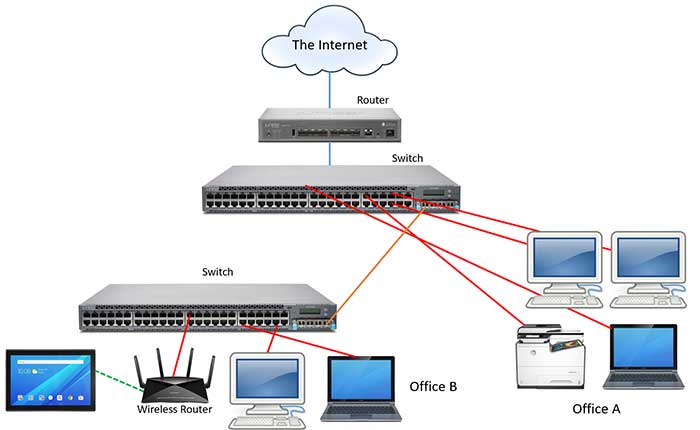
17 |
18 | - What is `localhost/127.0.0.1`
19 | - What is `0.0.0.0`
20 | - What is `/etc/hosts`
21 | - How to display your machine’s active network interfaces
22 | - `Netcat` examples
23 | - What is the Hostfile
24 |
25 | ## Core Concepts
26 |
27 | - `ifconfig`
28 | - `telnet`
29 | - `nc`
30 | - `cut`
31 |
32 | ## Requirements
33 | ### ___General___
34 | + Allowed editors: vi, vim, emacs
35 | + All your files will be interpreted on Ubuntu 20.04 LTS
36 | + All your files should end with a new line
37 | + A README.md file, at the root of the folder of the project, is mandatory
38 | + All your Bash script files must be executable
39 | + Your Bash script must pass Shellcheck (version 0.7.0 via apt-get) without any errors
40 | + The first line of all your Bash scripts should be exactly #!/usr/bin/env bash
41 | + The second line of all your Bash scripts should be a comment explaining what is the script doing
42 |
43 | ## Author
44 | @ ___[UDO INNOCENT CHARLES](https://github.com/Innocentsax/)___
45 |
--------------------------------------------------------------------------------
/0x16-api_advanced/README.md:
--------------------------------------------------------------------------------
1 | # Advanced API
2 |
3 | 
4 |
5 | > A great API to use for some practice is the Reddit API. There’s a lot of endpoints available, many that don’t require any form of authentication, and there’s tons of information to be parsed out and presented. Getting comfortable with API calls now can save you some face during technical interviews and even outside of the job market, you might find personal use cases to make your life a little bit easier.
6 |
7 | ## Learning Objectives
8 |
9 | - How to read API documentation to find the endpoints you’re looking for
10 | - How to use an API with pagination
11 | - How to parse JSON results from an API
12 | - How to make a recursive API call
13 | - How to sort a dictionary by value
14 |
15 | ## Resources
16 |
17 | - [Reddit API Documentation](https://www.reddit.com/dev/api/)
18 | - [Query String](https://en.wikipedia.org/wiki/Query_string)
19 |
20 | ## Project Requirements
21 |
22 | - Allowed editors: `vi`, `vim`, `emacs`
23 | - All your files will be interpreted/compiled on `Ubuntu 14.04 LTS` using `python3 (version 3.4.3)`
24 | - All your files should end with a new line
25 | - The first line of all your files should be exactly `#!/usr/bin/python3`
26 | - Libraries imported in your Python files must be organized in alphabetical order
27 | - A `README.md` file, at the root of the folder of the project, is mandatory
28 | - Your code should use the __PEP 8 style__
29 | - All your __files must be executable__
30 | - The length of your files will be tested using `wc`
31 | - All your modules should have a documentation `(python3 -c 'print(__import__("my_module").__doc__)')`
32 | - You must use the Requests module for sending HTTP requests to the Reddit API
33 |
--------------------------------------------------------------------------------
/0x04-loops_conditions_and_parsing/README.md:
--------------------------------------------------------------------------------
1 | # Loops, conditions and parsing
2 |
3 |
16 |
17 | * What is a PID
18 | * What is a process
19 | * How to find a process’ PID
20 | * How to kill a process
21 | * What is a signal
22 | * What are the 2 signals that cannot be ignored
23 |
24 | ## Concepts
25 |
26 | - ps
27 | - pgrep
28 | - pkill
29 | - kill
30 | - exit
31 | - trap
32 |
33 | ## Author
34 | ___[INNOCENT CHARLES UDO](https://github.com/Innocentsax)___
35 |
--------------------------------------------------------------------------------
/0x0C-web_server/4-not_found_page_404:
--------------------------------------------------------------------------------
1 | #!/usr/bin/env bash
2 | # A bash script that installs nginx on an ubuntu machine.
3 | # This scripts also configures the default webpage served to be "Hello World!"
4 | # When request url matches /redirect_me, it redirects to my youtube channel.
5 | # When a page/file not found in the document root is requested, the 404.html
6 | # page is served to the client as stated with the error_page directive.
7 |
8 | sudo apt-get update -y
9 |
10 | sudo apt-get install nginx -y
11 |
12 | echo "Hello World!" | sudo dd status=none of=/var/www/html/index.html
13 |
14 | echo "Ceci n'est pas une page" | sudo tee /var/www/html/404.html > /dev/null
15 |
16 | NEW_RULE="\\\n\tlocation /redirect_me {\n\t\t return 301 https://www.youtube.com/@innocentsax;\n\t}\n"
17 |
18 | sudo cp /etc/nginx/sites-available/default /etc/nginx/sites-available/default.backup
19 |
20 | sudo sed -i "53i $NEW_RULE" /etc/nginx/sites-available/default
21 |
22 | NEW_RULE="\\\n\terror_page 404 /404.html;\n\n\tlocation = /404.html {\n\t\tinternal;\n\t}\n"
23 |
24 | sudo sed -i "53i $NEW_RULE" /etc/nginx/sites-available/default
25 |
26 | sudo service nginx reload
27 |
--------------------------------------------------------------------------------
/0x0F-load_balancer/README.md:
--------------------------------------------------------------------------------
1 | # Load balancer
2 | 
3 |
4 | > Let’s improve our web stack so that there is redundancy for our web servers. This will allow us to be able to accept more traffic by doubling the number of web servers, and to make our infrastructure more reliable. If one web server fails, we will still have a second one to handle requests.
5 |
6 | For this project, you will need to write Bash scripts to automate your work. All scripts must be designed to configure a brand new Ubuntu server to match the task requirements.
7 |
8 | ## Concepts
9 |
10 | - HTTP Header
11 | - Debian/UbuntuHAProxy Packages
12 | - Introduction to Load Balancing.
13 |
14 | ## Requirements
15 |
16 | - Allowed editors: `vi`, `vim`, `emacs`
17 | - All your files will be interpreted on `Ubuntu 16.04 LTS`
18 | - All your files should end with a new line
19 | - A __README.md__ file, at the root of the folder of the project, is mandatory
20 | - All your Bash script files __must be executable__
21 | - Your Bash script must pass `Shellcheck (version 0.3.7)` without any error
22 | - The first line of all your Bash scripts should be exactly `#!/usr/bin/env bash`
23 | - The second line of all your Bash scripts should be a comment explaining what is the script doing.
24 |
--------------------------------------------------------------------------------
/0x0F-load_balancer/0-custom_http_response_header:
--------------------------------------------------------------------------------
1 | #!/usr/bin/env bash
2 | # configures a new Ubuntu machine
3 |
4 | # Install nginx on web-01 server
5 | apt-get -y update
6 | apt-get -y install nginx
7 |
8 | # Add custom response header to know the server name for debugging
9 | HOST_NAME=$(hostname)
10 | HEADER="\\\n\tadd_header X-Served-By $HOST_NAME;\n"
11 | FIND=$(grep "X-Server-by" /etc/nginx/sites-available/default)
12 | if [[ -z $FIND ]]; then
13 | sed -i "23i $HEADER" /etc/nginx/sites-available/default
14 | fi
15 |
16 | # Create a firts index.html page
17 | echo "Hello World!" > /var/www/html/index.html
18 |
19 | # Add to the nginx configuration file a redirection to another page
20 | FIND=$(grep "redirect_me" /etc/nginx/sites-available/default)
21 | STRING="\\\n\tlocation /redirect_me {\n\t\t return 301 https://www.youtube.com/watch?v=3MbaGJN2ioQ;\n\t}\n"
22 | if [[ -z $FIND ]]; then
23 | sed -i "42i $STRING" /etc/nginx/sites-available/default
24 | fi
25 |
26 | # Add to the nginx configuration file a error page 404
27 | FIND=$(grep "error_page 404" /etc/nginx/sites-available/default)
28 | ERROR="\\\n\terror_page 404 /custom_404.html;\n"
29 | if [[ -z $FIND ]]; then
30 | echo "Ceci n'est pas une page" > /var/www/html/custom_404.html
31 | sed -i "40i $ERROR" /etc/nginx/sites-available/default
32 | fi
33 |
34 | service nginx restart
35 |
--------------------------------------------------------------------------------
/0x12-web_stack_debugging_2/README.md:
--------------------------------------------------------------------------------
1 | # 0X12-Web_Stack_Debugging_2
2 |
3 | 
4 |
5 | > Debugging usually takes a big chunk of a software engineer’s time. The art of debugging is tough and it takes years, even decades to master, and that is why seasoned software engineers are the best at it… experience. They have seen lots of broken code, buggy systems, weird edge cases and race conditions.
6 |
7 | _The idea is to ask a set of questions until you find the issue_
8 |
9 | ## A video to explain it all
10 |
11 | __Watch how i was able to come up with my solution for this task with the help of the video below__.
12 |
13 | Click the ["_watch video_"](https://youtu.be/Fx6ewkKQdU0) to watch video expalanation.
14 |
15 | ## Requirements
16 |
17 | - All your files will be interpreted on `Ubuntu 14.04 LTS`
18 | - All your files should end with a new line
19 | - A `README.md` file at the root of the folder of the project is mandatory
20 | - All your Bash script __files must be executable__
21 | - Your Bash scripts must pass `Shellcheck` __without any error__
22 | - Your Bash scripts must __run without error__
23 | - The first line of all your Bash scripts should be exactly `#!/usr/bin/env bash`
24 | - The second line of all your Bash scripts should be a comment explaining what is the script doing
25 |
--------------------------------------------------------------------------------
/0x15-api/README.md:
--------------------------------------------------------------------------------
1 | # 0x15-API
2 | 
3 |
4 | ## Learning Objectives
5 | - What Bash scripting should not be used for
6 | - What is an API
7 | - What is a REST API
8 | - What are microservices
9 | - What is the CSV format
10 | - What is the JSON format
11 | - Pythonic Package and module name style
12 | - Pythonic Class name style
13 | - Pythonic Variable name style
14 | - Pythonic Function name style
15 | - Pythonic Constant name style
16 | - Significance of CapWords or CamelCase in Python
17 |
18 | ## Project Requirements
19 | - Allowed editors: `vi`, `vim`, `emacs`
20 | - All your files will be interpreted/compiled on `Ubuntu 14.04 LTS` using python3 (version 3.4.3)
21 | - All your files should end with a new line
22 | - The first line of all your files should be exactly #!/usr/bin/python3
23 | - Libraries imported in your Python files must be organized in alphabetical order
24 | - A `README.md` file, at the root of the folder of the project, is mandatory
25 | - Your code should use the `PEP 8 style`
26 | - All your files must be executable
27 | - The length of your files will be tested using `wc`
28 | - All your modules should have a documentation `(python3 -c 'print(__import__("my_module").__doc__)')`
29 | - You must use get to access to dictionary value by key (it won’t throw an exception if the key doesn’t exist in the dictionary)
30 | - Your code should not be executed when imported (by using `if __name__ == "__main__":`)
31 |
--------------------------------------------------------------------------------
/0x17-web_stack_debugging_3/README.md:
--------------------------------------------------------------------------------
1 | # Web stack debugging 3
2 |
3 | 
4 |
5 | When debugging, sometimes logs are not enough. Either because the software is breaking in a way that was not expected and the error is not being logged, or because logs are not providing enough information. In this case, you will need to go down the stack.
6 |
7 | Wordpress is a very popular tool, it allows you to run blogs, portfolios, e-commerce and company websites… It actually powers 26% of the web, so there is a fair chance that you will end up working with it at some point in your career.
8 |
9 | Wordpress is usually run on LAMP (Linux, Apache, MySQL, and PHP), which is a very widely used set of tools.
10 |
11 | The web stack you are debugging today is a Wordpress website running on a LAMP stack.
12 |
13 | ## Requirements
14 |
15 | - All your files will be interpreted on `Ubuntu 14.04 LTS`
16 | - All your files should end with a new line
17 | - A README.md file at the root of the folder of the project is mandatory
18 | - Your Puppet manifests must pass `puppet-lint version 2.1.1` without any errors
19 | - Your Puppet manifests must run without error
20 | - Your Puppet manifests first line must be a comment explaining what the Puppet manifest is about
21 | - Your Puppet manifests files must end with the `extension .pp`
22 | - Files will be checked with `Puppet v3.4`
23 |
24 | ## Installing Puppet-lint
25 | ```bash
26 |
27 | $ apt update
28 | $ apt-get install -y ruby
29 | $ gem install puppet-lint -v 2.1.1
30 | ```
31 |
--------------------------------------------------------------------------------
/0x05-processes_and_signals/101-manage_my_process:
--------------------------------------------------------------------------------
1 | #!/usr/bin/env bash
2 | # Manages the script manage_my_process.
3 | # When passed the argument `start`:
4 | # 1. Starts manage_my_process
5 | # 2. Creates a file containings its PID in /var/run/my_process.pid
6 | # 3. Displays "manage_my_process started"
7 | # When passed the argument `stop`:
8 | # 1. Stops manage_my_process
9 | # 2. Deletes the file /var/run/my_process.pid
10 | # 3. Displays "manage_my_process stopped"
11 | # When passed the argument `restart`:
12 | # 1. Stops manage_my_process
13 | # 2. Deletes the file /var/run/my_process.pid
14 | # 3. Starts manage_my_process
15 | # 4. Creates a file containing its PID in /var/run/my_process.pid
16 | # 5. Displays "manage_my_process restarted"
17 | # If any other or no arguments are passed, displays
18 | #+ "Usage: manage_my_process {start|stop|restart}"
19 |
20 | if [ "${1}" == "start" ]
21 | then
22 | ./manage_my_process &
23 | touch /var/run/my_process.pid
24 | echo "$!" > /var/run/my_process.pid
25 | echo "manage_my_process started"
26 | elif [ "${1}" == "stop" ]
27 | then
28 | echo "manage_my_process stopped"
29 | kill "$(cat /var/run/my_process.pid)"
30 | rm /var/run/my_process.pid
31 | elif [ "${1}" == "restart" ]
32 | then
33 | kill "$(cat /var/run/my_process.pid)"
34 | rm /var/run/my_process.pid
35 | ./manage_my_process &
36 | touch /var/run/my_process.pid
37 | echo "$!" > /var/run/my_process.pid
38 | echo "manage_my_process restarted"
39 | else
40 | echo "Usage: manage_my_process {start|stop|restart}"
41 | fi
42 |
--------------------------------------------------------------------------------
/0x08-networking_basics_2/README.md:
--------------------------------------------------------------------------------
1 | # Networking Basics
2 |
3 | 
4 |
5 |
6 | ## Resources
7 | ___Read or watch:___
8 |
9 | + [What is localhost](https://en.wikipedia.org/wiki/Localhost)
10 | + [What is 0.0.0.0](https://en.wikipedia.org/wiki/0.0.0.0)
11 | + [What is the hosts file](https://www.makeuseof.com/tag/modify-manage-hosts-file-linux/)
12 | + [Netcat examples](https://www.thegeekstuff.com/2012/04/nc-command-examples/)
13 |
14 |
15 | ## Learning Objectives
16 | 
17 |
18 | - What is `localhost/127.0.0.1`
19 | - What is `0.0.0.0`
20 | - What is `/etc/hosts`
21 | - How to display your machine’s active network interfaces
22 | - `Netcat` examples
23 | - What is the Hostfile
24 |
25 | ## Core Concepts
26 |
27 | - `ifconfig`
28 | - `telnet`
29 | - `nc`
30 | - `cut`
31 |
32 | ## Requirements
33 | ### ___General___
34 | + Allowed editors: vi, vim, emacs
35 | + All your files will be interpreted on Ubuntu 20.04 LTS
36 | + All your files should end with a new line
37 | + A README.md file, at the root of the folder of the project, is mandatory
38 | + All your Bash script files must be executable
39 | + Your Bash script must pass Shellcheck (version 0.7.0 via apt-get) without any errors
40 | + The first line of all your Bash scripts should be exactly #!/usr/bin/env bash
41 | + The second line of all your Bash scripts should be a comment explaining what is the script doing
42 |
43 | ## Author
44 | @ ___[UDO INNOCENT CHARLES](https://github.com/Innocentsax/)___
45 |
--------------------------------------------------------------------------------
/0x16-api_advanced/README.md:
--------------------------------------------------------------------------------
1 | # Advanced API
2 |
3 | 
4 |
5 | > A great API to use for some practice is the Reddit API. There’s a lot of endpoints available, many that don’t require any form of authentication, and there’s tons of information to be parsed out and presented. Getting comfortable with API calls now can save you some face during technical interviews and even outside of the job market, you might find personal use cases to make your life a little bit easier.
6 |
7 | ## Learning Objectives
8 |
9 | - How to read API documentation to find the endpoints you’re looking for
10 | - How to use an API with pagination
11 | - How to parse JSON results from an API
12 | - How to make a recursive API call
13 | - How to sort a dictionary by value
14 |
15 | ## Resources
16 |
17 | - [Reddit API Documentation](https://www.reddit.com/dev/api/)
18 | - [Query String](https://en.wikipedia.org/wiki/Query_string)
19 |
20 | ## Project Requirements
21 |
22 | - Allowed editors: `vi`, `vim`, `emacs`
23 | - All your files will be interpreted/compiled on `Ubuntu 14.04 LTS` using `python3 (version 3.4.3)`
24 | - All your files should end with a new line
25 | - The first line of all your files should be exactly `#!/usr/bin/python3`
26 | - Libraries imported in your Python files must be organized in alphabetical order
27 | - A `README.md` file, at the root of the folder of the project, is mandatory
28 | - Your code should use the __PEP 8 style__
29 | - All your __files must be executable__
30 | - The length of your files will be tested using `wc`
31 | - All your modules should have a documentation `(python3 -c 'print(__import__("my_module").__doc__)')`
32 | - You must use the Requests module for sending HTTP requests to the Reddit API
33 |
--------------------------------------------------------------------------------
/0x04-loops_conditions_and_parsing/README.md:
--------------------------------------------------------------------------------
1 | # Loops, conditions and parsing
2 |
3 |  4 |
5 |
6 | Resources
7 | Read or watch:
8 |
9 | * [Loops sample](https://tldp.org/LDP/Bash-Beginners-Guide/html/sect_09_01.html)
10 | * [Variable assignment and arithmetic](https://tldp.org/LDP/abs/html/ops.html)
11 | * [Comparison operators](https://tldp.org/LDP/abs/html/comparison-ops.html)
12 | * [File test operators](https://tldp.org/LDP/abs/html/fto.html)
13 | * [Make your scripts portable](https://www.cyberciti.biz/tips/finding-bash-perl-python-portably-using-env.html)
14 |
15 | ## Learning objectives
16 |
17 | - How to create SSH keys
18 | - What is the advantage of using `#!/usr/bin/env` bash over `#!/bin/bash`
19 | - How to use `while`, `until` and `for` loops
20 | - How to use `if`, `else`, `elif` and case condition statements
21 | - How to use the `cut` command
22 | - What are files and other comparison operators, and how to use them
23 |
24 | ## Requirements
25 |
26 | - Allowed editors: `vi`, `vim`, `emacs`
27 | - All your files will be interpreted on `Ubuntu 20.04 LTS`
28 | - All your files should end with a new line
29 | - A README.md file, at the root of the folder of the project, is mandatory
30 | - All your Bash script files must be executable
31 | - You are not allowed to use `awk`
32 | - Your Bash script must pass `Shellcheck` (version 0.7.0) without any error
33 | - The first line of all your Bash scripts should be exactly `#!/usr/bin/env bash`
34 | - The second line of all your Bash scripts should be a comment explaining what the script doing
35 |
36 | ## Concepts
37 |
38 | - `env`
39 | - `cut`
40 | - `for`
41 | - `while`
42 | - `until`
43 | - `if`
44 |
45 | ## Author
46 | ___[INNOCENT CHARLES UDO](https://github.com/Innocentsax)___
47 |
--------------------------------------------------------------------------------
/0x09-web_infrastructure_design/README.md:
--------------------------------------------------------------------------------
1 | # Web infrastructure design
2 |
3 | 
4 |
5 | Web Applications Infrastructure/Web Infrastructure also called internet infrastructure is the physical hardware, transmission media, and software used to interconnect computers and users on the Internet.
6 |
7 | - Simple Web Infrastructure
8 | - Distributed Web Infrastructure
9 | - Monitored Web Infrastructure
10 |
11 | ## Learning Objectives
12 |
13 | - You must be able to draw a diagram covering the web stack you built with the `*sysadmin/devops*` track projects
14 | - You must be able to explain what each component is doing
15 | - You must be able to explain `system redundancy`
16 | - Know all the mentioned acronyms: `LAMP`, `SPOF`, `QPS`
17 |
18 |
19 | ## Simple Web Infrastructure
20 |
21 | 
22 |
23 | - 1 server
24 | - 1 web server `(Nginx)`
25 | - 1 application server
26 | - 1 application files (your code base)
27 | - 1 database `(MySQL)`
28 | - 1 domain name `foobar.com` configured with a `www` record that points to your server IP `8.8.8.8`
29 |
30 | ## Distrubuted Web Infrasture
31 |
32 | 
33 |
34 | - 2 servers
35 | - 1 web server `(Nginx)`
36 | - 1 application server
37 | - 1 load-balancer `(HAproxy)`
38 | - 1 set of application files (your code base)
39 | - 1 database `(MySQL)`
40 |
41 | ## Monitored web infrastructure
42 |
43 | 
44 |
45 | - 3 firewalls
46 | - 1 SSL certificate to serve www.foobar.com over HTTPS
47 | - 3 monitoring clients (data collector for Sumologic or other monitoring services)
48 |
49 | ## Author
50 | ### ___[UDO INNOCENT CHARLES](https://github.com/Innocentsax)___
51 |
--------------------------------------------------------------------------------
/0x0B-ssh/school:
--------------------------------------------------------------------------------
1 | -----BEGIN OPENSSH PRIVATE KEY-----
2 | b3BlbnNzaC1rZXktdjEAAAAACmFlczI1Ni1jdHIAAAAGYmNyeXB0AAAAGAAAABBWoqBeyP
3 | qXNd80NQN7unDNAAAAEAAAAAEAAAEXAAAAB3NzaC1yc2EAAAADAQABAAABAQDeS0bui5xx
4 | 5t+YvX271RCuS/amj1D7QgSO/eJsLyeBwsqJmfXsunidMPL9qw3gEyxzRgXNdqEJYckA2Q
5 | H1KE4ADT1rmRHpMgUcNT98ariIk8FXpcfi8FpbH4wLLs4wGCmmhhqND3D5f15yEtHdZypG
6 | p0G4bsCm0Tb6LMfXfs9BpwH8yHIRQVXrhgLUazcfJCDUUtIEaWp8cPr/yfg/ip8ZnWLUKs
7 | cy187DuT7Ywl0RgGflgCqYg1Wc740BbZqOhG/Lwt9DB5jXLWzel6i7D0FsIy1S0pDhX9jr
8 | v4mmO/f/Gut79HHGBCmPwJPMHHw0RaZ16Nl0G/QfrZid1sZP2DHpAAAD4MTQlL7OM0LjC4
9 | /IauAVFHwRwxVa0FMn4wwi4FSYwdVLQNzFHvOJF9NyU1nZ9QRSS9GeGEIqLgzFucMFC7Ff
10 | Nxxr0bcWArlOAYNdSrrRDjGg1IZI752S/+p6G0lleDK7/oJqnH0BZJaxEB8YBSnXsq12U+
11 | AIMEbN9XDjZKYXVS7RXIEKfGeIMFUK4VWSP8zbXAMi257ja0hnG+fAZQL1DmFA4miEOEkc
12 | u6SamP34Gbs6poQNyefyeGjXN9lNBaUvAB6tYqDARUnmftMbJ69XYvKo399e0TkAFqByx2
13 | WHMrsiFERlak/7jjhqQT01VpQi1G3gEEvg7f+g2uKDP2L6FqLgsPbaSIhMukdSHPUvp+7l
14 | Y+a3cyOKtuRvFd9IED/QRSYjT29q3alhGoC1DNEtijcQVd0OQxP+e1DG0lMIKwtViIY5Mp
15 | tLJQTdzIOjiiuhrtAQlagu/749I1ApKsCQ6pZ8L+sL6Pvp9g90EdZUvL1aBsUTMStP/SIH
16 | 1DxHkVamS+yvSoKEmp96w4W18+lYXG1Ih2uWh+vLT3V6RHAPBrg2O/Q2+wy+VYxj29F5iq
17 | tQ2h4XU0TMSAcVRqqHfRaZs2Ql+OTN6XQuuQwPJmnAHjgKo5vEddXuhvpNDbhWbhOqQqG3
18 | +RNPok/0u73THIShAP0Xrni3JHVspR6pbG47Cx8/vg0NFkgr/HWyK2DxHE0oYfYMqp6Mh+
19 | RtFd6xMOKKelALol/EE1Ybd8bk1JT1Nmbh+r4FzC3GMTo5rJUXhWv7ffwTk8ETFjf8DnUT
20 | T3FLQ/n/mfvw1fk9UR39/lf+Q5Au/EU+mlElR5ukHNj8uCUjWzRErxbhuwVHmYX6XbT01V
21 | y960CvT/oN4w8YxtLK8dRAsDM5VbWFb6WWg51UctakSPdv2te/jJybpRQ53ezy3vyJyHFS
22 | ToOSHwsSmsUPKzl4sJSF1/4GiwuD5g7QY9Gg83x78RXrn0EEGHD5yxpAlyhWlpSu7471pI
23 | 1wS5Zf7XjF+gJ5Qb19lwZ1RkP3y4eUHHisxArNAPUP4aTxD8jv/3WCp/R6MNcC3eDSryLd
24 | P7auWhzA66vPRfAfR6GOfQwfRpf5sBZNjo/4THTQgJsGwNVO6vRKREY9VqH/wjOkl/O/EU
25 | Aztcuc3BmL6Gag1DElFdoefAqGpHRlGPK9aMPPi8xjDQKYWuf0GShGP7DoNbHtKtwEfYa5
26 | DCANVcDtSHqzlDTx8VTFpyg15oIV7B0Cqeo9g2mMc9NuqH+Bhm3Y+rbzH7lC/5+WLMzQkW
27 | PDQMOuEPXqzUW4HE7+e937z4ECla35adysoBR9uLn4L5+GBRpf
28 | -----END OPENSSH PRIVATE KEY-----
29 |
--------------------------------------------------------------------------------
/0x0A-configuration_management/README.md:
--------------------------------------------------------------------------------
1 | # Configuration management
2 |
3 | 
4 |
5 | > Configuration management is a systems engineering process for establishing consistency of a product’s attributes throughout its life.
6 |
7 | Puppet is a tool that helps you manage and automate the configuration of servers. When you use Puppet, you define the desired state of the systems in your infrastructure that you want to manage.
8 |
9 | 
10 |
11 | Obviously writing Puppet code for your infrastructure requires an investment of time and energy, but in the long term, it is for sure a must-have.
12 |
13 | ## Project Requirements
14 |
15 | - All your files will be interpreted on `Ubuntu 20.04 LTS`
16 | - All your files should end with a new line
17 | - A __README.md__ file at the root of the folder of the project is mandatory
18 | - Your Puppet manifests must pass `puppet-lint version 2.1.1` without any errors
19 | - Your Puppet manifests must run without error
20 | - Your Puppet manifests first line __must be a comment__ explaining what the Puppet manifest is about
21 | - Your Puppet manifests files must end with the extension __.pp__
22 |
23 | ## Installing puppet and puppet-lint on ubuntu
24 |
25 | ### A video says it all
26 | __Watch the video below to get a full grasp about tackling the project__
27 |
28 | _Click the play video to watch video_ [Play video](https://youtu.be/YJyzEnXSsc8)
29 |
30 | ### Commands on Terminal
31 | ```bash
32 |
33 | $ apt-get update && upgrade -y
34 |
35 | $ sudo apt-get install -y ruby=1:2.7+1 --allow-downgrades
36 |
37 | $ sudo apt-get install -y ruby-augeas
38 |
39 | $ sudo apt-get install -y ruby-shadow
40 |
41 | $ sudo apt-get install -y puppet
42 |
43 | #installs puppet linter
44 | $ gem install puppet-lint
45 | ```
46 | __Follow the above instructions to install puppet and puppet-linter then watch the video to enable you understand how to get started with the task__
47 |
--------------------------------------------------------------------------------
/0x16-api_advanced/100-count.py:
--------------------------------------------------------------------------------
1 | #!/usr/bin/python3
2 | """ raddit api"""
3 |
4 | import json
5 | import requests
6 |
7 |
8 | def count_words(subreddit, word_list, after="", count=[]):
9 | """count all words"""
10 |
11 | if after == "":
12 | count = [0] * len(word_list)
13 |
14 | url = "https://www.reddit.com/r/{}/hot.json".format(subreddit)
15 | request = requests.get(url,
16 | params={'after': after},
17 | allow_redirects=False,
18 | headers={'user-agent': 'bhalut'})
19 |
20 | if request.status_code == 200:
21 | data = request.json()
22 |
23 | for topic in (data['data']['children']):
24 | for word in topic['data']['title'].split():
25 | for i in range(len(word_list)):
26 | if word_list[i].lower() == word.lower():
27 | count[i] += 1
28 |
29 | after = data['data']['after']
30 | if after is None:
31 | save = []
32 | for i in range(len(word_list)):
33 | for j in range(i + 1, len(word_list)):
34 | if word_list[i].lower() == word_list[j].lower():
35 | save.append(j)
36 | count[i] += count[j]
37 |
38 | for i in range(len(word_list)):
39 | for j in range(i, len(word_list)):
40 | if (count[j] > count[i] or
41 | (word_list[i] > word_list[j] and
42 | count[j] == count[i])):
43 | aux = count[i]
44 | count[i] = count[j]
45 | count[j] = aux
46 | aux = word_list[i]
47 | word_list[i] = word_list[j]
48 | word_list[j] = aux
49 |
50 | for i in range(len(word_list)):
51 | if (count[i] > 0) and i not in save:
52 | print("{}: {}".format(word_list[i].lower(), count[i]))
53 | else:
54 | count_words(subreddit, word_list, after, count)
55 |
--------------------------------------------------------------------------------
/0x1A-application_server/2-app_server-nginx_config:
--------------------------------------------------------------------------------
1 | user www-data;
2 | worker_processes auto;
3 | pid /run/nginx.pid;
4 |
5 | events {
6 | worker_connections 768;
7 | # multi_accept on;
8 | }
9 |
10 | http {
11 |
12 | # gunicorn
13 | server {
14 | listen 80;
15 | server_name 127.0.0.1 35.185.103.0;
16 | location /airbnb-onepage/ {
17 | include proxy_params;
18 | proxy_pass http://localhost:5000/airbnb-onepage/;
19 | }
20 | }
21 |
22 | ##
23 | # Basic Settings
24 | ##
25 |
26 | sendfile on;
27 | tcp_nopush on;
28 | tcp_nodelay on;
29 | keepalive_timeout 65;
30 | types_hash_max_size 2048;
31 | # server_tokens off;
32 |
33 | # server_names_hash_bucket_size 64;
34 | # server_name_in_redirect off;
35 |
36 | include /etc/nginx/mime.types;
37 | default_type application/octet-stream;
38 |
39 | ##
40 | # SSL Settings
41 | ##
42 |
43 | ssl_protocols TLSv1 TLSv1.1 TLSv1.2; # Dropping SSLv3, ref: POODLE
44 | ssl_prefer_server_ciphers on;
45 |
46 | ##
47 | # Logging Settings
48 | ##
49 |
50 | access_log /var/log/nginx/access.log;
51 | error_log /var/log/nginx/error.log;
52 |
53 | ##
54 | # Gzip Settings
55 | ##
56 |
57 | gzip on;
58 | gzip_disable "msie6";
59 |
60 | # gzip_vary on;
61 | # gzip_proxied any;
62 | # gzip_comp_level 6;
63 | # gzip_buffers 16 8k;
64 | # gzip_http_version 1.1;
65 | # gzip_types text/plain text/css application/json application/javascript text/xml application/xml application/xml+rss text/javascript;
66 |
67 | ##
68 | # Virtual Host Configs
69 | ##
70 |
71 | include /etc/nginx/conf.d/*.conf;
72 | include /etc/nginx/sites-available/*;
73 | add_header X-Served-By "64820-web-01";
74 |
75 | }
76 |
77 |
78 | #mail {
79 | # # See sample authentication script at:
80 | # # http://wiki.nginx.org/ImapAuthenticateWithApachePhpScript
81 | #
82 | # # auth_http localhost/auth.php;
83 | # # pop3_capabilities "TOP" "USER";
84 | # # imap_capabilities "IMAP4rev1" "UIDPLUS";
85 | #
86 | # server {
87 | # listen localhost:110;
88 | # protocol pop3;
89 | # proxy on;
90 | # }
91 | #
92 | # server {
93 | # listen localhost:143;
94 | # protocol imap;
95 | # proxy on;
96 | # }
97 | #}
98 |
--------------------------------------------------------------------------------
/0x0D-web_stack_debugging_0/README.md:
--------------------------------------------------------------------------------
1 | # 0x0D Web stack debugging #0 :wrench:
2 |
3 |
4 |
5 |
6 | Resources
7 | Read or watch:
8 |
9 | * [Loops sample](https://tldp.org/LDP/Bash-Beginners-Guide/html/sect_09_01.html)
10 | * [Variable assignment and arithmetic](https://tldp.org/LDP/abs/html/ops.html)
11 | * [Comparison operators](https://tldp.org/LDP/abs/html/comparison-ops.html)
12 | * [File test operators](https://tldp.org/LDP/abs/html/fto.html)
13 | * [Make your scripts portable](https://www.cyberciti.biz/tips/finding-bash-perl-python-portably-using-env.html)
14 |
15 | ## Learning objectives
16 |
17 | - How to create SSH keys
18 | - What is the advantage of using `#!/usr/bin/env` bash over `#!/bin/bash`
19 | - How to use `while`, `until` and `for` loops
20 | - How to use `if`, `else`, `elif` and case condition statements
21 | - How to use the `cut` command
22 | - What are files and other comparison operators, and how to use them
23 |
24 | ## Requirements
25 |
26 | - Allowed editors: `vi`, `vim`, `emacs`
27 | - All your files will be interpreted on `Ubuntu 20.04 LTS`
28 | - All your files should end with a new line
29 | - A README.md file, at the root of the folder of the project, is mandatory
30 | - All your Bash script files must be executable
31 | - You are not allowed to use `awk`
32 | - Your Bash script must pass `Shellcheck` (version 0.7.0) without any error
33 | - The first line of all your Bash scripts should be exactly `#!/usr/bin/env bash`
34 | - The second line of all your Bash scripts should be a comment explaining what the script doing
35 |
36 | ## Concepts
37 |
38 | - `env`
39 | - `cut`
40 | - `for`
41 | - `while`
42 | - `until`
43 | - `if`
44 |
45 | ## Author
46 | ___[INNOCENT CHARLES UDO](https://github.com/Innocentsax)___
47 |
--------------------------------------------------------------------------------
/0x09-web_infrastructure_design/README.md:
--------------------------------------------------------------------------------
1 | # Web infrastructure design
2 |
3 | 
4 |
5 | Web Applications Infrastructure/Web Infrastructure also called internet infrastructure is the physical hardware, transmission media, and software used to interconnect computers and users on the Internet.
6 |
7 | - Simple Web Infrastructure
8 | - Distributed Web Infrastructure
9 | - Monitored Web Infrastructure
10 |
11 | ## Learning Objectives
12 |
13 | - You must be able to draw a diagram covering the web stack you built with the `*sysadmin/devops*` track projects
14 | - You must be able to explain what each component is doing
15 | - You must be able to explain `system redundancy`
16 | - Know all the mentioned acronyms: `LAMP`, `SPOF`, `QPS`
17 |
18 |
19 | ## Simple Web Infrastructure
20 |
21 | 
22 |
23 | - 1 server
24 | - 1 web server `(Nginx)`
25 | - 1 application server
26 | - 1 application files (your code base)
27 | - 1 database `(MySQL)`
28 | - 1 domain name `foobar.com` configured with a `www` record that points to your server IP `8.8.8.8`
29 |
30 | ## Distrubuted Web Infrasture
31 |
32 | 
33 |
34 | - 2 servers
35 | - 1 web server `(Nginx)`
36 | - 1 application server
37 | - 1 load-balancer `(HAproxy)`
38 | - 1 set of application files (your code base)
39 | - 1 database `(MySQL)`
40 |
41 | ## Monitored web infrastructure
42 |
43 | 
44 |
45 | - 3 firewalls
46 | - 1 SSL certificate to serve www.foobar.com over HTTPS
47 | - 3 monitoring clients (data collector for Sumologic or other monitoring services)
48 |
49 | ## Author
50 | ### ___[UDO INNOCENT CHARLES](https://github.com/Innocentsax)___
51 |
--------------------------------------------------------------------------------
/0x0B-ssh/school:
--------------------------------------------------------------------------------
1 | -----BEGIN OPENSSH PRIVATE KEY-----
2 | b3BlbnNzaC1rZXktdjEAAAAACmFlczI1Ni1jdHIAAAAGYmNyeXB0AAAAGAAAABBWoqBeyP
3 | qXNd80NQN7unDNAAAAEAAAAAEAAAEXAAAAB3NzaC1yc2EAAAADAQABAAABAQDeS0bui5xx
4 | 5t+YvX271RCuS/amj1D7QgSO/eJsLyeBwsqJmfXsunidMPL9qw3gEyxzRgXNdqEJYckA2Q
5 | H1KE4ADT1rmRHpMgUcNT98ariIk8FXpcfi8FpbH4wLLs4wGCmmhhqND3D5f15yEtHdZypG
6 | p0G4bsCm0Tb6LMfXfs9BpwH8yHIRQVXrhgLUazcfJCDUUtIEaWp8cPr/yfg/ip8ZnWLUKs
7 | cy187DuT7Ywl0RgGflgCqYg1Wc740BbZqOhG/Lwt9DB5jXLWzel6i7D0FsIy1S0pDhX9jr
8 | v4mmO/f/Gut79HHGBCmPwJPMHHw0RaZ16Nl0G/QfrZid1sZP2DHpAAAD4MTQlL7OM0LjC4
9 | /IauAVFHwRwxVa0FMn4wwi4FSYwdVLQNzFHvOJF9NyU1nZ9QRSS9GeGEIqLgzFucMFC7Ff
10 | Nxxr0bcWArlOAYNdSrrRDjGg1IZI752S/+p6G0lleDK7/oJqnH0BZJaxEB8YBSnXsq12U+
11 | AIMEbN9XDjZKYXVS7RXIEKfGeIMFUK4VWSP8zbXAMi257ja0hnG+fAZQL1DmFA4miEOEkc
12 | u6SamP34Gbs6poQNyefyeGjXN9lNBaUvAB6tYqDARUnmftMbJ69XYvKo399e0TkAFqByx2
13 | WHMrsiFERlak/7jjhqQT01VpQi1G3gEEvg7f+g2uKDP2L6FqLgsPbaSIhMukdSHPUvp+7l
14 | Y+a3cyOKtuRvFd9IED/QRSYjT29q3alhGoC1DNEtijcQVd0OQxP+e1DG0lMIKwtViIY5Mp
15 | tLJQTdzIOjiiuhrtAQlagu/749I1ApKsCQ6pZ8L+sL6Pvp9g90EdZUvL1aBsUTMStP/SIH
16 | 1DxHkVamS+yvSoKEmp96w4W18+lYXG1Ih2uWh+vLT3V6RHAPBrg2O/Q2+wy+VYxj29F5iq
17 | tQ2h4XU0TMSAcVRqqHfRaZs2Ql+OTN6XQuuQwPJmnAHjgKo5vEddXuhvpNDbhWbhOqQqG3
18 | +RNPok/0u73THIShAP0Xrni3JHVspR6pbG47Cx8/vg0NFkgr/HWyK2DxHE0oYfYMqp6Mh+
19 | RtFd6xMOKKelALol/EE1Ybd8bk1JT1Nmbh+r4FzC3GMTo5rJUXhWv7ffwTk8ETFjf8DnUT
20 | T3FLQ/n/mfvw1fk9UR39/lf+Q5Au/EU+mlElR5ukHNj8uCUjWzRErxbhuwVHmYX6XbT01V
21 | y960CvT/oN4w8YxtLK8dRAsDM5VbWFb6WWg51UctakSPdv2te/jJybpRQ53ezy3vyJyHFS
22 | ToOSHwsSmsUPKzl4sJSF1/4GiwuD5g7QY9Gg83x78RXrn0EEGHD5yxpAlyhWlpSu7471pI
23 | 1wS5Zf7XjF+gJ5Qb19lwZ1RkP3y4eUHHisxArNAPUP4aTxD8jv/3WCp/R6MNcC3eDSryLd
24 | P7auWhzA66vPRfAfR6GOfQwfRpf5sBZNjo/4THTQgJsGwNVO6vRKREY9VqH/wjOkl/O/EU
25 | Aztcuc3BmL6Gag1DElFdoefAqGpHRlGPK9aMPPi8xjDQKYWuf0GShGP7DoNbHtKtwEfYa5
26 | DCANVcDtSHqzlDTx8VTFpyg15oIV7B0Cqeo9g2mMc9NuqH+Bhm3Y+rbzH7lC/5+WLMzQkW
27 | PDQMOuEPXqzUW4HE7+e937z4ECla35adysoBR9uLn4L5+GBRpf
28 | -----END OPENSSH PRIVATE KEY-----
29 |
--------------------------------------------------------------------------------
/0x0A-configuration_management/README.md:
--------------------------------------------------------------------------------
1 | # Configuration management
2 |
3 | 
4 |
5 | > Configuration management is a systems engineering process for establishing consistency of a product’s attributes throughout its life.
6 |
7 | Puppet is a tool that helps you manage and automate the configuration of servers. When you use Puppet, you define the desired state of the systems in your infrastructure that you want to manage.
8 |
9 | 
10 |
11 | Obviously writing Puppet code for your infrastructure requires an investment of time and energy, but in the long term, it is for sure a must-have.
12 |
13 | ## Project Requirements
14 |
15 | - All your files will be interpreted on `Ubuntu 20.04 LTS`
16 | - All your files should end with a new line
17 | - A __README.md__ file at the root of the folder of the project is mandatory
18 | - Your Puppet manifests must pass `puppet-lint version 2.1.1` without any errors
19 | - Your Puppet manifests must run without error
20 | - Your Puppet manifests first line __must be a comment__ explaining what the Puppet manifest is about
21 | - Your Puppet manifests files must end with the extension __.pp__
22 |
23 | ## Installing puppet and puppet-lint on ubuntu
24 |
25 | ### A video says it all
26 | __Watch the video below to get a full grasp about tackling the project__
27 |
28 | _Click the play video to watch video_ [Play video](https://youtu.be/YJyzEnXSsc8)
29 |
30 | ### Commands on Terminal
31 | ```bash
32 |
33 | $ apt-get update && upgrade -y
34 |
35 | $ sudo apt-get install -y ruby=1:2.7+1 --allow-downgrades
36 |
37 | $ sudo apt-get install -y ruby-augeas
38 |
39 | $ sudo apt-get install -y ruby-shadow
40 |
41 | $ sudo apt-get install -y puppet
42 |
43 | #installs puppet linter
44 | $ gem install puppet-lint
45 | ```
46 | __Follow the above instructions to install puppet and puppet-linter then watch the video to enable you understand how to get started with the task__
47 |
--------------------------------------------------------------------------------
/0x16-api_advanced/100-count.py:
--------------------------------------------------------------------------------
1 | #!/usr/bin/python3
2 | """ raddit api"""
3 |
4 | import json
5 | import requests
6 |
7 |
8 | def count_words(subreddit, word_list, after="", count=[]):
9 | """count all words"""
10 |
11 | if after == "":
12 | count = [0] * len(word_list)
13 |
14 | url = "https://www.reddit.com/r/{}/hot.json".format(subreddit)
15 | request = requests.get(url,
16 | params={'after': after},
17 | allow_redirects=False,
18 | headers={'user-agent': 'bhalut'})
19 |
20 | if request.status_code == 200:
21 | data = request.json()
22 |
23 | for topic in (data['data']['children']):
24 | for word in topic['data']['title'].split():
25 | for i in range(len(word_list)):
26 | if word_list[i].lower() == word.lower():
27 | count[i] += 1
28 |
29 | after = data['data']['after']
30 | if after is None:
31 | save = []
32 | for i in range(len(word_list)):
33 | for j in range(i + 1, len(word_list)):
34 | if word_list[i].lower() == word_list[j].lower():
35 | save.append(j)
36 | count[i] += count[j]
37 |
38 | for i in range(len(word_list)):
39 | for j in range(i, len(word_list)):
40 | if (count[j] > count[i] or
41 | (word_list[i] > word_list[j] and
42 | count[j] == count[i])):
43 | aux = count[i]
44 | count[i] = count[j]
45 | count[j] = aux
46 | aux = word_list[i]
47 | word_list[i] = word_list[j]
48 | word_list[j] = aux
49 |
50 | for i in range(len(word_list)):
51 | if (count[i] > 0) and i not in save:
52 | print("{}: {}".format(word_list[i].lower(), count[i]))
53 | else:
54 | count_words(subreddit, word_list, after, count)
55 |
--------------------------------------------------------------------------------
/0x1A-application_server/2-app_server-nginx_config:
--------------------------------------------------------------------------------
1 | user www-data;
2 | worker_processes auto;
3 | pid /run/nginx.pid;
4 |
5 | events {
6 | worker_connections 768;
7 | # multi_accept on;
8 | }
9 |
10 | http {
11 |
12 | # gunicorn
13 | server {
14 | listen 80;
15 | server_name 127.0.0.1 35.185.103.0;
16 | location /airbnb-onepage/ {
17 | include proxy_params;
18 | proxy_pass http://localhost:5000/airbnb-onepage/;
19 | }
20 | }
21 |
22 | ##
23 | # Basic Settings
24 | ##
25 |
26 | sendfile on;
27 | tcp_nopush on;
28 | tcp_nodelay on;
29 | keepalive_timeout 65;
30 | types_hash_max_size 2048;
31 | # server_tokens off;
32 |
33 | # server_names_hash_bucket_size 64;
34 | # server_name_in_redirect off;
35 |
36 | include /etc/nginx/mime.types;
37 | default_type application/octet-stream;
38 |
39 | ##
40 | # SSL Settings
41 | ##
42 |
43 | ssl_protocols TLSv1 TLSv1.1 TLSv1.2; # Dropping SSLv3, ref: POODLE
44 | ssl_prefer_server_ciphers on;
45 |
46 | ##
47 | # Logging Settings
48 | ##
49 |
50 | access_log /var/log/nginx/access.log;
51 | error_log /var/log/nginx/error.log;
52 |
53 | ##
54 | # Gzip Settings
55 | ##
56 |
57 | gzip on;
58 | gzip_disable "msie6";
59 |
60 | # gzip_vary on;
61 | # gzip_proxied any;
62 | # gzip_comp_level 6;
63 | # gzip_buffers 16 8k;
64 | # gzip_http_version 1.1;
65 | # gzip_types text/plain text/css application/json application/javascript text/xml application/xml application/xml+rss text/javascript;
66 |
67 | ##
68 | # Virtual Host Configs
69 | ##
70 |
71 | include /etc/nginx/conf.d/*.conf;
72 | include /etc/nginx/sites-available/*;
73 | add_header X-Served-By "64820-web-01";
74 |
75 | }
76 |
77 |
78 | #mail {
79 | # # See sample authentication script at:
80 | # # http://wiki.nginx.org/ImapAuthenticateWithApachePhpScript
81 | #
82 | # # auth_http localhost/auth.php;
83 | # # pop3_capabilities "TOP" "USER";
84 | # # imap_capabilities "IMAP4rev1" "UIDPLUS";
85 | #
86 | # server {
87 | # listen localhost:110;
88 | # protocol pop3;
89 | # proxy on;
90 | # }
91 | #
92 | # server {
93 | # listen localhost:143;
94 | # protocol imap;
95 | # proxy on;
96 | # }
97 | #}
98 |
--------------------------------------------------------------------------------
/0x0D-web_stack_debugging_0/README.md:
--------------------------------------------------------------------------------
1 | # 0x0D Web stack debugging #0 :wrench:
2 |
3 |  4 |
5 | > Debugging is the process of finding and fixing errors in software that prevents it from running correctly. As you become a more advanced programmer and an industry engineer, you will learn how to use debugging tools such as gdb or built-in tools that IDEs have. However, it’s important to understand the concepts and processes of debugging manually. This project covers the optimal framework and blueprint for debugging web stack (remote containers this scenario) bugs
6 |
7 | Challenge:
8 |
9 | Get Apache to run on the container and to return a page containing Hello Holberton when querying the root of it. After connecting to the container and fixing whatever needed to be fixed (here is your mission), you can see that curling port 80 return a page that contains Hello Holberton. Paste the command(s) you used to fix the issue in your answer file.
10 | Here we can see that after starting my Docker container, I curl the port 8080 mapped to the Docker container port 80, it does not return a page but an error message. Note that you might also get the error message curl: (52) Empty reply from server.
11 |
12 |
13 | ## Tasks :heavy_check_mark:
14 |
15 | 0. Bash script that once executed, will bring the webstack to a working state.
16 |
17 |
18 | ## Results :chart_with_upwards_trend:
19 |
20 | | Filename |
21 | | ------ |
22 | | [0-give_me_a_page](./0-give_me_a_page)|
23 |
24 | ## Additional info :construction:
25 | ### Resources
26 |
27 | - emacs
28 | - BASH
29 | - Debian 9 stable / Ubuntu 16.04 / Ubuntu 18.04
30 | - Shellcheck
31 | - Puppet 3.8
32 | - Puppet-lint 2.1.1
33 | - Docker
34 |
35 |
47 |
48 | ```bash
49 | # i realized that installing apache2 on my machine doesn't automatically starts
50 | # apache as in the case of nginx. as such i neede to start the apache web server
51 | # which actually gave me the expected results as apache is configured to listen
52 | # to port 80 by default.
53 |
54 |
55 | $ service apache2 start
56 |
57 | $ curl localhost
58 |
59 | ```
60 |
--------------------------------------------------------------------------------
/0x13-firewall/README.md:
--------------------------------------------------------------------------------
1 | # Firewall
2 |
3 |
4 |
5 | > Debugging is the process of finding and fixing errors in software that prevents it from running correctly. As you become a more advanced programmer and an industry engineer, you will learn how to use debugging tools such as gdb or built-in tools that IDEs have. However, it’s important to understand the concepts and processes of debugging manually. This project covers the optimal framework and blueprint for debugging web stack (remote containers this scenario) bugs
6 |
7 | Challenge:
8 |
9 | Get Apache to run on the container and to return a page containing Hello Holberton when querying the root of it. After connecting to the container and fixing whatever needed to be fixed (here is your mission), you can see that curling port 80 return a page that contains Hello Holberton. Paste the command(s) you used to fix the issue in your answer file.
10 | Here we can see that after starting my Docker container, I curl the port 8080 mapped to the Docker container port 80, it does not return a page but an error message. Note that you might also get the error message curl: (52) Empty reply from server.
11 |
12 |
13 | ## Tasks :heavy_check_mark:
14 |
15 | 0. Bash script that once executed, will bring the webstack to a working state.
16 |
17 |
18 | ## Results :chart_with_upwards_trend:
19 |
20 | | Filename |
21 | | ------ |
22 | | [0-give_me_a_page](./0-give_me_a_page)|
23 |
24 | ## Additional info :construction:
25 | ### Resources
26 |
27 | - emacs
28 | - BASH
29 | - Debian 9 stable / Ubuntu 16.04 / Ubuntu 18.04
30 | - Shellcheck
31 | - Puppet 3.8
32 | - Puppet-lint 2.1.1
33 | - Docker
34 |
35 |
47 |
48 | ```bash
49 | # i realized that installing apache2 on my machine doesn't automatically starts
50 | # apache as in the case of nginx. as such i neede to start the apache web server
51 | # which actually gave me the expected results as apache is configured to listen
52 | # to port 80 by default.
53 |
54 |
55 | $ service apache2 start
56 |
57 | $ curl localhost
58 |
59 | ```
60 |
--------------------------------------------------------------------------------
/0x13-firewall/README.md:
--------------------------------------------------------------------------------
1 | # Firewall
2 |
3 |  4 |
5 | > A firewall is a network security device that monitors incoming and outgoing network traffic and permits or blocks data packets based on a set of security rules. Its purpose is to establish a barrier between your internal network (LAN) and incoming traffic from external sources (such as the internet) in order to block malicious traffic like viruses and hackers.
6 |
7 | ## The UFW On Linux Distro
8 |
9 |
4 |
5 | > A firewall is a network security device that monitors incoming and outgoing network traffic and permits or blocks data packets based on a set of security rules. Its purpose is to establish a barrier between your internal network (LAN) and incoming traffic from external sources (such as the internet) in order to block malicious traffic like viruses and hackers.
6 |
7 | ## The UFW On Linux Distro
8 |
9 |  10 |
11 | The __Uncomplicated firewall (UFW)__ in my ubuntu 22.04 LTS comes preinstalled but disabled, i only needed to enable it to get going. However lets take note of the following:
12 |
13 | * Once __UFW__ is enabled you have to set the rules on that terminal session especially when you're connecting via ssh cause by default ufw blocks all connection to port 22.
14 | * __UFW__ doesn't have a native port forwarding command, you need to do it via its `/etc/ufw/before.rules` file
15 | * You also need to enable port forwarding by uncommenting the `net.ipv4.ip_forward=1` line in `/etc/sysctl.conf`
16 | *
17 |
18 | ### Code on Terminal
19 |
20 | ```bash
21 | # check if ufw is installed or enabled
22 | $ sudo ufw status
23 |
24 | # if the result shows enabled then disable it
25 | $ sudo ufw disable
26 |
27 | # configuring firwall rules
28 | $ sudo ufw default deny incoming
29 | $ sudo ufw default allow outgoing
30 | $ sudo ufw allow 22/tcp /to enable ssh connection
31 | $ sudo ufw allow 80/tcp /to enable connection on port 80
32 | $ sudo ufw allow 443/tcp /to enable conection on port 443
33 | $ sudo ufw enable
34 |
35 | # enabling port forwarding via UFW
36 |
37 | # add this below rule to the /etc/ufw/before.rules file
38 | # make sure its before the *filter line, VERY IMPORTANT
39 |
40 | *nat
41 | : PREROUTING ACCEPT [0:0]
42 | -A PREROUTING -p tcp --dport 8080 -j REDIRECT --to-port 80
43 | COMMIT
44 |
45 | # Then go to your /etc/sysctl.conf file to enable port forwarding by
46 | # uncommenting the line #net.ipv4.ip_forward=1
47 |
48 | -- before
49 | #net.ipv4.ip_forward=1
50 |
51 | --after
52 | net.ipv4.ip_forward=1
53 |
54 | # then reload the sysctl configuration
55 | $ sudo sysctl -p
56 |
57 | # congratulations !! you've done it
58 | # if this is confusing, then watch the video above to get it done yourself.
59 | ```
60 |
61 | ## Author
62 | #### ___[UDO INNOCENT CHARLES](https://github.com/Innocentsax)___
63 |
--------------------------------------------------------------------------------
/0x0E-web_stack_debugging_1/README.md:
--------------------------------------------------------------------------------
1 | # 0x0E Web stack debugging #1 :wrench:
2 |
3 |
10 |
11 | The __Uncomplicated firewall (UFW)__ in my ubuntu 22.04 LTS comes preinstalled but disabled, i only needed to enable it to get going. However lets take note of the following:
12 |
13 | * Once __UFW__ is enabled you have to set the rules on that terminal session especially when you're connecting via ssh cause by default ufw blocks all connection to port 22.
14 | * __UFW__ doesn't have a native port forwarding command, you need to do it via its `/etc/ufw/before.rules` file
15 | * You also need to enable port forwarding by uncommenting the `net.ipv4.ip_forward=1` line in `/etc/sysctl.conf`
16 | *
17 |
18 | ### Code on Terminal
19 |
20 | ```bash
21 | # check if ufw is installed or enabled
22 | $ sudo ufw status
23 |
24 | # if the result shows enabled then disable it
25 | $ sudo ufw disable
26 |
27 | # configuring firwall rules
28 | $ sudo ufw default deny incoming
29 | $ sudo ufw default allow outgoing
30 | $ sudo ufw allow 22/tcp /to enable ssh connection
31 | $ sudo ufw allow 80/tcp /to enable connection on port 80
32 | $ sudo ufw allow 443/tcp /to enable conection on port 443
33 | $ sudo ufw enable
34 |
35 | # enabling port forwarding via UFW
36 |
37 | # add this below rule to the /etc/ufw/before.rules file
38 | # make sure its before the *filter line, VERY IMPORTANT
39 |
40 | *nat
41 | : PREROUTING ACCEPT [0:0]
42 | -A PREROUTING -p tcp --dport 8080 -j REDIRECT --to-port 80
43 | COMMIT
44 |
45 | # Then go to your /etc/sysctl.conf file to enable port forwarding by
46 | # uncommenting the line #net.ipv4.ip_forward=1
47 |
48 | -- before
49 | #net.ipv4.ip_forward=1
50 |
51 | --after
52 | net.ipv4.ip_forward=1
53 |
54 | # then reload the sysctl configuration
55 | $ sudo sysctl -p
56 |
57 | # congratulations !! you've done it
58 | # if this is confusing, then watch the video above to get it done yourself.
59 | ```
60 |
61 | ## Author
62 | #### ___[UDO INNOCENT CHARLES](https://github.com/Innocentsax)___
63 |
--------------------------------------------------------------------------------
/0x0E-web_stack_debugging_1/README.md:
--------------------------------------------------------------------------------
1 | # 0x0E Web stack debugging #1 :wrench:
2 |
3 |  4 |
5 | > Debugging is the process of finding and fixing errors in software that prevents it from running correctly. As you become a more advanced programmer and an industry engineer, you will learn how to use debugging tools such as gdb or built-in tools that IDEs have. However, it’s important to understand the concepts and processes of debugging manually. This project covers a second part of the optimal framework and blueprint for debugging web stack (remote containers this scenario) bugs
6 |
7 | Challenge:
8 |
9 | Using your debugging skills, find out what’s keeping your Ubuntu container’s Nginx installation from listening on port 80. Feel free to install whatever tool you need, start and destroy as many containers as you need to debug the issue.
10 |
11 | ## A Video to explain it all
12 | __Watch the video to see how i was able to come up with the solutions to the task.__
13 |
14 | __Click the "watch video" to play video__ [__watch video__](https://youtu.be/Fx6ewkKQdU0)
15 |
16 | ## Tasks :heavy_check_mark:
17 |
18 | 0. Bash script with the minimum number of commands to automate your fix.
19 | 1. Bash script with the minimum number of commands to automate your fix. v2
20 |
21 |
22 | ## Results :chart_with_upwards_trend:
23 |
24 | | Filename |
25 | | ------ |
26 | | [0-nginx_likes_port_80](./0-nginx_likes_port_80)|
27 | | [1-debugging_made_short](./1-debugging_made_short)|
28 |
29 | ## Additional info :construction:
30 |
31 | - Allowed editors: `vi`, `vim`, `emacs`
32 | - All your files will be interpreted on `Ubuntu 20.04 LTS`
33 | - All your files should end with a new line
34 | - A __README.md file__ at the root of the folder of the project is mandatory
35 | - All your __Bash script files must be executable__
36 | - Your Bash __scripts must pass Shellcheck__ without any error
37 | - Your Bash scripts must run without error
38 | - The first line of all your Bash scripts should be exactly `#!/usr/bin/env bash`
39 | - The second line of all your Bash scripts should be a comment explaining what is the script doing
40 | - You are not allowed to use `wget`
41 |
42 | ### Resources
43 |
44 | - BASH
45 | - Debian 9 stable / Ubuntu 16.04 / Ubuntu 18.04
46 | - Shellcheck
47 | - Docker
48 | - Webstack debugging
49 | - Networking Basics
50 |
51 | ### Try It On Your Machine :computer:
52 |
53 | ```bash
54 | git clone https://github.com/sammykingx/alx-system_engineering-devops.git
55 | cd 0x0E-web_stack_debugging_1
56 | cat FILENAME
57 | curl 0:80
58 | cat -e FILENAME | wc -l
59 | curl 0:80
60 | ```
61 |
--------------------------------------------------------------------------------
/0x19-postmortem/README.md:
--------------------------------------------------------------------------------
1 | # SERVER OUTAGE INCIDENT REPORT
2 | > By [UDO INNOCENT CHARLES](https://github.com/Innocentsax)
3 |
4 |
4 |
5 | > Debugging is the process of finding and fixing errors in software that prevents it from running correctly. As you become a more advanced programmer and an industry engineer, you will learn how to use debugging tools such as gdb or built-in tools that IDEs have. However, it’s important to understand the concepts and processes of debugging manually. This project covers a second part of the optimal framework and blueprint for debugging web stack (remote containers this scenario) bugs
6 |
7 | Challenge:
8 |
9 | Using your debugging skills, find out what’s keeping your Ubuntu container’s Nginx installation from listening on port 80. Feel free to install whatever tool you need, start and destroy as many containers as you need to debug the issue.
10 |
11 | ## A Video to explain it all
12 | __Watch the video to see how i was able to come up with the solutions to the task.__
13 |
14 | __Click the "watch video" to play video__ [__watch video__](https://youtu.be/Fx6ewkKQdU0)
15 |
16 | ## Tasks :heavy_check_mark:
17 |
18 | 0. Bash script with the minimum number of commands to automate your fix.
19 | 1. Bash script with the minimum number of commands to automate your fix. v2
20 |
21 |
22 | ## Results :chart_with_upwards_trend:
23 |
24 | | Filename |
25 | | ------ |
26 | | [0-nginx_likes_port_80](./0-nginx_likes_port_80)|
27 | | [1-debugging_made_short](./1-debugging_made_short)|
28 |
29 | ## Additional info :construction:
30 |
31 | - Allowed editors: `vi`, `vim`, `emacs`
32 | - All your files will be interpreted on `Ubuntu 20.04 LTS`
33 | - All your files should end with a new line
34 | - A __README.md file__ at the root of the folder of the project is mandatory
35 | - All your __Bash script files must be executable__
36 | - Your Bash __scripts must pass Shellcheck__ without any error
37 | - Your Bash scripts must run without error
38 | - The first line of all your Bash scripts should be exactly `#!/usr/bin/env bash`
39 | - The second line of all your Bash scripts should be a comment explaining what is the script doing
40 | - You are not allowed to use `wget`
41 |
42 | ### Resources
43 |
44 | - BASH
45 | - Debian 9 stable / Ubuntu 16.04 / Ubuntu 18.04
46 | - Shellcheck
47 | - Docker
48 | - Webstack debugging
49 | - Networking Basics
50 |
51 | ### Try It On Your Machine :computer:
52 |
53 | ```bash
54 | git clone https://github.com/sammykingx/alx-system_engineering-devops.git
55 | cd 0x0E-web_stack_debugging_1
56 | cat FILENAME
57 | curl 0:80
58 | cat -e FILENAME | wc -l
59 | curl 0:80
60 | ```
61 |
--------------------------------------------------------------------------------
/0x19-postmortem/README.md:
--------------------------------------------------------------------------------
1 | # SERVER OUTAGE INCIDENT REPORT
2 | > By [UDO INNOCENT CHARLES](https://github.com/Innocentsax)
3 |
4 |  5 |
6 | 7 August 2023, we experienced server outage on all our server infrastructure which resulted in our clients inability to use our services and we sincerely apologize for the financial loss our clients have incurred during this period.
7 |
8 | ## Issue Summary
9 |
5 |
6 | 7 August 2023, we experienced server outage on all our server infrastructure which resulted in our clients inability to use our services and we sincerely apologize for the financial loss our clients have incurred during this period.
7 |
8 | ## Issue Summary
9 |  10 |
11 | On 7th August 2023, we experienced a server outage (downtime) on all of our server infrastructure which lasted for 45 minutes. As a result of this, our clients experienced a http `500 error` which had a __100% impact__ on their business as they were unable to access our services. The root cause was not properly testing out all implemented upgrades before pushing to production servers.
12 |
13 |
15 |
16 | | Time (GMT + 1) | Actions |
17 | | -------------- | -------- |
18 | | 9:45 PM | Upgrades implementation begins |
19 | | 10:00AM | Server Outage begins |
20 | | 10:00AM | Pagers alerted on-call team |
21 | | 10:10AM | On-call team acknowledgement |
22 | | 10:15AM | Rollback initiation begins |
23 | | 10:20AM | Successful rollback|
24 | | 10:20AM | Server restart initiated|
25 | | 10:32AM | 100% of traffic back online |
26 |
27 | ## Root cause
28 |
10 |
11 | On 7th August 2023, we experienced a server outage (downtime) on all of our server infrastructure which lasted for 45 minutes. As a result of this, our clients experienced a http `500 error` which had a __100% impact__ on their business as they were unable to access our services. The root cause was not properly testing out all implemented upgrades before pushing to production servers.
12 |
13 |
15 |
16 | | Time (GMT + 1) | Actions |
17 | | -------------- | -------- |
18 | | 9:45 PM | Upgrades implementation begins |
19 | | 10:00AM | Server Outage begins |
20 | | 10:00AM | Pagers alerted on-call team |
21 | | 10:10AM | On-call team acknowledgement |
22 | | 10:15AM | Rollback initiation begins |
23 | | 10:20AM | Successful rollback|
24 | | 10:20AM | Server restart initiated|
25 | | 10:32AM | 100% of traffic back online |
26 |
27 | ## Root cause
28 |  29 |
30 | At 9:45am (GMT + 1) server upgrade was initiated across all our production servers without first releasing on our test environments and performing all necessary unit testing. Part of the upgrade been shipped to production server required an authentication from a 3rd party software, this new implementation is not supported on the current version present on our servers which resulted in the downtime experienced. We were able to resolve this quickly by first performing a rollback the severs previous state thereafter upgrading the current version on our servers.
31 |
32 | ## Preventive measures
33 |
29 |
30 | At 9:45am (GMT + 1) server upgrade was initiated across all our production servers without first releasing on our test environments and performing all necessary unit testing. Part of the upgrade been shipped to production server required an authentication from a 3rd party software, this new implementation is not supported on the current version present on our servers which resulted in the downtime experienced. We were able to resolve this quickly by first performing a rollback the severs previous state thereafter upgrading the current version on our servers.
31 |
32 | ## Preventive measures
33 |  34 |
35 | - Pushing all intended changes 1st to our test environments before shipping to life server.
36 | - Increase the performance metrics threshold to alert on-call engineers on the event of possible server crash
37 |
--------------------------------------------------------------------------------
/README.md:
--------------------------------------------------------------------------------
1 |
34 |
35 | - Pushing all intended changes 1st to our test environments before shipping to life server.
36 | - Increase the performance metrics threshold to alert on-call engineers on the event of possible server crash
37 |
--------------------------------------------------------------------------------
/README.md:
--------------------------------------------------------------------------------
1 |  2 |
3 | ## What's DevOps
4 | DevOps is the combination of cultural philosophies, practices, and tools that increases an organization's ability to deliver applications and services at high velocity: evolving and improving products at a faster pace than organizations using traditional software development and infrastructure management processes.
5 |
6 | ## ***Everything you need to know about DevOps...***
7 | * DevOps is a set of practices that combines software development (Dev) and information technology operations (Ops) to shorten the systems development life cycle and provide continuous delivery with high software quality. DevOps enables organizations to better serve their customers and compete more effectively in the market by breaking down silos between development and operations teams, enabling faster and more efficient delivery of software.
8 |
9 | * The key principles of DevOps include automation, collaboration, monitoring, and measurement. Automation involves automating as much of the software development process as possible to reduce manual errors and increase efficiency. Collaboration involves breaking down silos between development and operations teams, promoting cross-functional communication and teamwork. Monitoring involves continuously monitoring the software development process and application performance to identify and address issues as quickly as possible. Measurement involves collecting and analyzing data to measure performance and identify areas for improvement.
10 |
11 | ## ***DevOps Tools...***
12 |
14 |
2 |
3 | ## What's DevOps
4 | DevOps is the combination of cultural philosophies, practices, and tools that increases an organization's ability to deliver applications and services at high velocity: evolving and improving products at a faster pace than organizations using traditional software development and infrastructure management processes.
5 |
6 | ## ***Everything you need to know about DevOps...***
7 | * DevOps is a set of practices that combines software development (Dev) and information technology operations (Ops) to shorten the systems development life cycle and provide continuous delivery with high software quality. DevOps enables organizations to better serve their customers and compete more effectively in the market by breaking down silos between development and operations teams, enabling faster and more efficient delivery of software.
8 |
9 | * The key principles of DevOps include automation, collaboration, monitoring, and measurement. Automation involves automating as much of the software development process as possible to reduce manual errors and increase efficiency. Collaboration involves breaking down silos between development and operations teams, promoting cross-functional communication and teamwork. Monitoring involves continuously monitoring the software development process and application performance to identify and address issues as quickly as possible. Measurement involves collecting and analyzing data to measure performance and identify areas for improvement.
10 |
11 | ## ***DevOps Tools...***
12 |
14 |  15 |
16 | * Some common DevOps tools and technologies include continuous integration and continuous delivery (CI/CD), containerization (using tools like Docker and Kubernetes), infrastructure as code (IaC), and cloud computing. DevOps also involves cultural and organizational changes, including creating a culture of trust and collaboration, empowering teams to take ownership of their work, and embracing failure as an opportunity to learn and improve.
17 |
18 | * Overall, DevOps enables organizations to deliver software more quickly and reliably, while improving the quality of their products and services and enabling them to stay competitive in a rapidly changing market.
19 |
20 | ## Author
21 | © ___[INNOCENT CHARLES UDO](https://github.com/Innocentsax)___
22 |
23 |
--------------------------------------------------------------------------------
/0x1A-application_server/README.md:
--------------------------------------------------------------------------------
1 | # Application_server
2 |
3 | 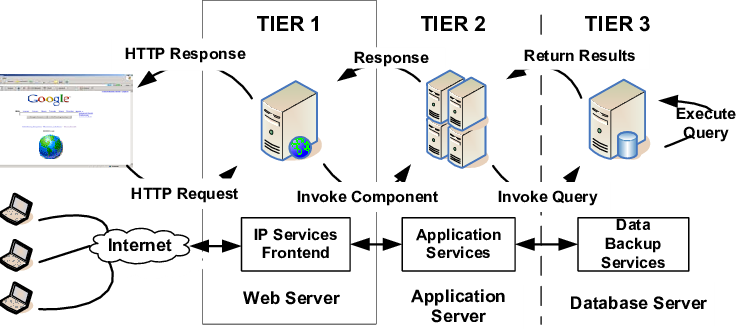
4 |
5 | Your web infrastructure is already serving web pages via Nginx that you installed in [your first web stack project](https://github.com/sammykingx/alx-system_engineering-devops/tree/master/0x0C-web_server). While a web server can also serve dynamic content, this task is usually given to an application server. In this project you will add this piece to your infrastructure, plug it to your __Nginx__ and make is serve your __Airbnb clone project.__
6 |
7 | ## Project Requirements
8 |
9 | - A README.md file, at the root of the folder of the project, is mandatory
10 | - Everything Python-related must be done using `python3`
11 | - All config files must have comments
12 | - All your files will be interpreted on `Ubuntu 16.04 LTS`
13 | - All your files should end with a new line
14 | - All your Bash script files must be executable
15 | - Your Bash script must pass `Shellcheck` (`version 0.3.7-5~ubuntu16.04.1` via `apt-get`) without any error
16 | - The first line of all your Bash scripts should be exactly `#!/usr/bin/env bash`
17 | - The second line of all your Bash scripts should be a comment explaining what is the script doing.
18 |
19 | ### Project task
20 | - 0. Set up development with Python
21 | Let’s serve what you built for AirBnB clone v2 - Web framework on web-01. This task is an exercise in setting up your development environment, which is used for testing and debugging your code before deploying it to production.
22 |
23 | __Requirements:__
24 |
25 | - Make sure that task #3 of your SSH project is completed for web-01. The checker will connect to your servers.
26 | - Git clone your AirBnB_clone_v2 on your web-01 server.
27 | - Configure the file web_flask/0-hello_route.py to serve its content from the route /airbnb-onepage/ on port 5000.
28 | - Your Flask application object must be named app (This will allow us to run and check your code).
29 |
30 | #### Solving task 0
31 | - git clone Airbnb_clone_v2
32 | - edit the file 0-hello_route.py by replacing "/" with "airbnb_onepage"
33 |
34 | ```bash
35 | (venv) ubuntu@64820-web-01:~/AirBnB_clone_v2$ python3 -m web_flask.0-hello_route
36 | * Serving Flask app '0-hello_route'
37 | * Debug mode: off
38 | WARNING: This is a development server. Do not use it in a production deployment. Use a production WSGI server instead.
39 | * Running on all addresses (0.0.0.0)
40 | * Running on http://127.0.0.1:5000
41 | * Running on http://10.247.26.30:5000
42 | Press CTRL+C to quit
43 | 127.0.0.1 - - [10/Feb/2023 21:00:05] "GET /airbnb-onepage HTTP/1.1" 200 -
44 |
45 | ```
46 | __After Fixing__
47 |
48 | ```bash
49 | ubuntu@64820-web-01:~$ curl localhost:5000/airbnb_onepage
50 | Hello HBNB!ubuntu@64820-web-01:~$
51 | ```
52 |
--------------------------------------------------------------------------------
/0x13-firewall/100-port_forwarding:
--------------------------------------------------------------------------------
1 | #
2 | # rules.before
3 | #
4 | # Rules that should be run before the ufw command line added rules. Custom
5 | # rules should be added to one of these chains:
6 | # ufw-before-input
7 | # ufw-before-output
8 | # ufw-before-forward
9 | #
10 | *nat
11 | :PREROUTING ACCEPT [0:0]
12 | -A PREROUTING -p tcp --dport 8080 -j REDIRECT --to-port 80
13 | COMMIT
14 |
15 | # Don't delete these required lines, otherwise there will be errors
16 | *filter
17 | :ufw-before-input - [0:0]
18 | :ufw-before-output - [0:0]
19 | :ufw-before-forward - [0:0]
20 | :ufw-not-local - [0:0]
21 | # End required lines
22 |
23 |
24 | # allow all on loopback
25 | -A ufw-before-input -i lo -j ACCEPT
26 | -A ufw-before-output -o lo -j ACCEPT
27 |
28 | # quickly process packets for which we already have a connection
29 | -A ufw-before-input -m conntrack --ctstate RELATED,ESTABLISHED -j ACCEPT
30 | -A ufw-before-output -m conntrack --ctstate RELATED,ESTABLISHED -j ACCEPT
31 | -A ufw-before-forward -m conntrack --ctstate RELATED,ESTABLISHED -j ACCEPT
32 |
33 | # drop INVALID packets (logs these in loglevel medium and higher)
34 | -A ufw-before-input -m conntrack --ctstate INVALID -j ufw-logging-deny
35 | -A ufw-before-input -m conntrack --ctstate INVALID -j DROP
36 |
37 | # ok icmp codes for INPUT
38 | -A ufw-before-input -p icmp --icmp-type destination-unreachable -j ACCEPT
39 | -A ufw-before-input -p icmp --icmp-type source-quench -j ACCEPT
40 | -A ufw-before-input -p icmp --icmp-type time-exceeded -j ACCEPT
41 | -A ufw-before-input -p icmp --icmp-type parameter-problem -j ACCEPT
42 | -A ufw-before-input -p icmp --icmp-type echo-request -j ACCEPT
43 |
44 | # ok icmp code for FORWARD
45 | -A ufw-before-forward -p icmp --icmp-type destination-unreachable -j ACCEPT
46 | -A ufw-before-forward -p icmp --icmp-type source-quench -j ACCEPT
47 | -A ufw-before-forward -p icmp --icmp-type time-exceeded -j ACCEPT
48 | -A ufw-before-forward -p icmp --icmp-type parameter-problem -j ACCEPT
49 | -A ufw-before-forward -p icmp --icmp-type echo-request -j ACCEPT
50 |
51 | # allow dhcp client to work
52 | -A ufw-before-input -p udp --sport 67 --dport 68 -j ACCEPT
53 |
54 | #
55 | # ufw-not-local
56 | #
57 | -A ufw-before-input -j ufw-not-local
58 |
59 | # if LOCAL, RETURN
60 | -A ufw-not-local -m addrtype --dst-type LOCAL -j RETURN
61 |
62 | # if MULTICAST, RETURN
63 | -A ufw-not-local -m addrtype --dst-type MULTICAST -j RETURN
64 |
65 | # if BROADCAST, RETURN
66 | -A ufw-not-local -m addrtype --dst-type BROADCAST -j RETURN
67 |
68 | # all other non-local packets are dropped
69 | -A ufw-not-local -m limit --limit 3/min --limit-burst 10 -j ufw-logging-deny
70 | -A ufw-not-local -j DROP
71 |
72 | # allow MULTICAST mDNS for service discovery (be sure the MULTICAST line above
73 | # is uncommented)
74 | -A ufw-before-input -p udp -d 224.0.0.251 --dport 5353 -j ACCEPT
75 |
76 | # allow MULTICAST UPnP for service discovery (be sure the MULTICAST line above
77 | # is uncommented)
78 | -A ufw-before-input -p udp -d 239.255.255.250 --dport 1900 -j ACCEPT
79 |
80 | # don't delete the 'COMMIT' line or these rules won't be processed
81 | COMMIT
82 |
--------------------------------------------------------------------------------
/0x07-networking_basics/README.md:
--------------------------------------------------------------------------------
1 | # Networking Basic
2 |
15 |
16 | * Some common DevOps tools and technologies include continuous integration and continuous delivery (CI/CD), containerization (using tools like Docker and Kubernetes), infrastructure as code (IaC), and cloud computing. DevOps also involves cultural and organizational changes, including creating a culture of trust and collaboration, empowering teams to take ownership of their work, and embracing failure as an opportunity to learn and improve.
17 |
18 | * Overall, DevOps enables organizations to deliver software more quickly and reliably, while improving the quality of their products and services and enabling them to stay competitive in a rapidly changing market.
19 |
20 | ## Author
21 | © ___[INNOCENT CHARLES UDO](https://github.com/Innocentsax)___
22 |
23 |
--------------------------------------------------------------------------------
/0x1A-application_server/README.md:
--------------------------------------------------------------------------------
1 | # Application_server
2 |
3 | 
4 |
5 | Your web infrastructure is already serving web pages via Nginx that you installed in [your first web stack project](https://github.com/sammykingx/alx-system_engineering-devops/tree/master/0x0C-web_server). While a web server can also serve dynamic content, this task is usually given to an application server. In this project you will add this piece to your infrastructure, plug it to your __Nginx__ and make is serve your __Airbnb clone project.__
6 |
7 | ## Project Requirements
8 |
9 | - A README.md file, at the root of the folder of the project, is mandatory
10 | - Everything Python-related must be done using `python3`
11 | - All config files must have comments
12 | - All your files will be interpreted on `Ubuntu 16.04 LTS`
13 | - All your files should end with a new line
14 | - All your Bash script files must be executable
15 | - Your Bash script must pass `Shellcheck` (`version 0.3.7-5~ubuntu16.04.1` via `apt-get`) without any error
16 | - The first line of all your Bash scripts should be exactly `#!/usr/bin/env bash`
17 | - The second line of all your Bash scripts should be a comment explaining what is the script doing.
18 |
19 | ### Project task
20 | - 0. Set up development with Python
21 | Let’s serve what you built for AirBnB clone v2 - Web framework on web-01. This task is an exercise in setting up your development environment, which is used for testing and debugging your code before deploying it to production.
22 |
23 | __Requirements:__
24 |
25 | - Make sure that task #3 of your SSH project is completed for web-01. The checker will connect to your servers.
26 | - Git clone your AirBnB_clone_v2 on your web-01 server.
27 | - Configure the file web_flask/0-hello_route.py to serve its content from the route /airbnb-onepage/ on port 5000.
28 | - Your Flask application object must be named app (This will allow us to run and check your code).
29 |
30 | #### Solving task 0
31 | - git clone Airbnb_clone_v2
32 | - edit the file 0-hello_route.py by replacing "/" with "airbnb_onepage"
33 |
34 | ```bash
35 | (venv) ubuntu@64820-web-01:~/AirBnB_clone_v2$ python3 -m web_flask.0-hello_route
36 | * Serving Flask app '0-hello_route'
37 | * Debug mode: off
38 | WARNING: This is a development server. Do not use it in a production deployment. Use a production WSGI server instead.
39 | * Running on all addresses (0.0.0.0)
40 | * Running on http://127.0.0.1:5000
41 | * Running on http://10.247.26.30:5000
42 | Press CTRL+C to quit
43 | 127.0.0.1 - - [10/Feb/2023 21:00:05] "GET /airbnb-onepage HTTP/1.1" 200 -
44 |
45 | ```
46 | __After Fixing__
47 |
48 | ```bash
49 | ubuntu@64820-web-01:~$ curl localhost:5000/airbnb_onepage
50 | Hello HBNB!ubuntu@64820-web-01:~$
51 | ```
52 |
--------------------------------------------------------------------------------
/0x13-firewall/100-port_forwarding:
--------------------------------------------------------------------------------
1 | #
2 | # rules.before
3 | #
4 | # Rules that should be run before the ufw command line added rules. Custom
5 | # rules should be added to one of these chains:
6 | # ufw-before-input
7 | # ufw-before-output
8 | # ufw-before-forward
9 | #
10 | *nat
11 | :PREROUTING ACCEPT [0:0]
12 | -A PREROUTING -p tcp --dport 8080 -j REDIRECT --to-port 80
13 | COMMIT
14 |
15 | # Don't delete these required lines, otherwise there will be errors
16 | *filter
17 | :ufw-before-input - [0:0]
18 | :ufw-before-output - [0:0]
19 | :ufw-before-forward - [0:0]
20 | :ufw-not-local - [0:0]
21 | # End required lines
22 |
23 |
24 | # allow all on loopback
25 | -A ufw-before-input -i lo -j ACCEPT
26 | -A ufw-before-output -o lo -j ACCEPT
27 |
28 | # quickly process packets for which we already have a connection
29 | -A ufw-before-input -m conntrack --ctstate RELATED,ESTABLISHED -j ACCEPT
30 | -A ufw-before-output -m conntrack --ctstate RELATED,ESTABLISHED -j ACCEPT
31 | -A ufw-before-forward -m conntrack --ctstate RELATED,ESTABLISHED -j ACCEPT
32 |
33 | # drop INVALID packets (logs these in loglevel medium and higher)
34 | -A ufw-before-input -m conntrack --ctstate INVALID -j ufw-logging-deny
35 | -A ufw-before-input -m conntrack --ctstate INVALID -j DROP
36 |
37 | # ok icmp codes for INPUT
38 | -A ufw-before-input -p icmp --icmp-type destination-unreachable -j ACCEPT
39 | -A ufw-before-input -p icmp --icmp-type source-quench -j ACCEPT
40 | -A ufw-before-input -p icmp --icmp-type time-exceeded -j ACCEPT
41 | -A ufw-before-input -p icmp --icmp-type parameter-problem -j ACCEPT
42 | -A ufw-before-input -p icmp --icmp-type echo-request -j ACCEPT
43 |
44 | # ok icmp code for FORWARD
45 | -A ufw-before-forward -p icmp --icmp-type destination-unreachable -j ACCEPT
46 | -A ufw-before-forward -p icmp --icmp-type source-quench -j ACCEPT
47 | -A ufw-before-forward -p icmp --icmp-type time-exceeded -j ACCEPT
48 | -A ufw-before-forward -p icmp --icmp-type parameter-problem -j ACCEPT
49 | -A ufw-before-forward -p icmp --icmp-type echo-request -j ACCEPT
50 |
51 | # allow dhcp client to work
52 | -A ufw-before-input -p udp --sport 67 --dport 68 -j ACCEPT
53 |
54 | #
55 | # ufw-not-local
56 | #
57 | -A ufw-before-input -j ufw-not-local
58 |
59 | # if LOCAL, RETURN
60 | -A ufw-not-local -m addrtype --dst-type LOCAL -j RETURN
61 |
62 | # if MULTICAST, RETURN
63 | -A ufw-not-local -m addrtype --dst-type MULTICAST -j RETURN
64 |
65 | # if BROADCAST, RETURN
66 | -A ufw-not-local -m addrtype --dst-type BROADCAST -j RETURN
67 |
68 | # all other non-local packets are dropped
69 | -A ufw-not-local -m limit --limit 3/min --limit-burst 10 -j ufw-logging-deny
70 | -A ufw-not-local -j DROP
71 |
72 | # allow MULTICAST mDNS for service discovery (be sure the MULTICAST line above
73 | # is uncommented)
74 | -A ufw-before-input -p udp -d 224.0.0.251 --dport 5353 -j ACCEPT
75 |
76 | # allow MULTICAST UPnP for service discovery (be sure the MULTICAST line above
77 | # is uncommented)
78 | -A ufw-before-input -p udp -d 239.255.255.250 --dport 1900 -j ACCEPT
79 |
80 | # don't delete the 'COMMIT' line or these rules won't be processed
81 | COMMIT
82 |
--------------------------------------------------------------------------------
/0x07-networking_basics/README.md:
--------------------------------------------------------------------------------
1 | # Networking Basic
2 |  3 |
4 | ## Resources
5 | Read or watch:
6 | + [COMPLETE GUIDE](https://yourdevopsmentor.com/blog/networking-for-devops-a-complete-guide/)
7 | + [OSI model](https://en.wikipedia.org/wiki/OSI_model)
8 | + [Different types of network](https://www.lifewire.com/lans-wans-and-other-area-networks-817376)
9 | + [LAN network](https://en.wikipedia.org/wiki/Local_area_network)
10 | + [WAN network](https://en.wikipedia.org/wiki/Wide_area_network)
11 | + [Internet](https://en.wikipedia.org/wiki/Internet)
12 | + [MAC address](https://whatismyipaddress.com/mac-address)
13 | + [What is an IP address](https://www.bleepingcomputer.com/tutorials/ip-addresses-explained/)
14 | + [Private and public address](https://www.iplocation.net/public-vs-private-ip-address)
15 | + [IPv4 and IPv6](https://www.webopedia.com/insights/ipv6-ipv4-difference/)
16 | + [Localhost](https://en.wikipedia.org/wiki/Localhost)
17 | + [TCP and UDP](https://www.howtogeek.com/190014/htg-explains-what-is-the-difference-between-tcp-and-udp/)
18 | + [TCP/UDP ports List](https://en.wikipedia.org/wiki/List_of_TCP_and_UDP_port_numbers)
19 | + [What is ping /ICMP](https://en.wikipedia.org/wiki/Ping_%28networking_utility%29)
20 | + [Positional parameters](https://wiki.bash-hackers.org/scripting/posparams)
21 |
22 | ## man or help:
23 |
24 | + netstat
25 | + ping
26 |
27 | ## Learning Objectives
28 | + At the end of this project, you are expected to be able to explain to anyone, without the help of Google:
29 |
30 | ## OSI Model
31 | + What it is
32 | + How many layers it has
33 | + How it is organized
34 |
35 | ## What is a LAN
36 | + Typical usage
37 | + Typical geographical size
38 |
39 | ## ___What is a WAN___
40 | + Typical usage
41 | + Typical geographical size
42 |
43 | ## What is the Internet
44 | + What is an IP address
45 | + What are the 2 types of IP address
46 | + What is localhost
47 | + What is a subnet
48 | + Why IPv6 was created
49 |
50 | ## TCP/UDP
51 | + What are the 2 mainly used data transfer protocols for IP (transfer level on the OSI schema)
52 | + What is the main difference between TCP and UDP
53 | + What is a port
54 | + Memorize SSH, HTTP and HTTPS port numbers
55 | + What tool/protocol is often used to check if a device is connected to a network
56 |
57 | ## Requirements
58 | ### ___General___
59 | + Allowed editors: vi, vim, emacs
60 | + All your Bash script files will be interpreted on Ubuntu 20.04 LTS
61 | + All your files should end with a new line
62 | + A README.md file, at the root of the folder of the project, is mandatory
63 | + All your Bash script files must be executable
64 | + Your Bash script must pass shellcheck without any error
65 | + The first line of all your Bash scripts should be exactly #!/usr/bin/env bash
66 | + The second line of all your Bash scripts should be a comment explaining what is the script doing
67 | ___More Info___
68 | + The second line of all your Bash scripts should be a comment explaining what is the script doing
69 |
70 |
71 | '''
72 | ### What is the most important position in a software company?
73 |
74 | + Project manager
75 | + Backend developer
76 | + System administrator
77 | '''
78 |
79 | ## Author
80 | @ [UDO INNOCENT CHARLES](https://github.com/Innocentsax)
81 |
--------------------------------------------------------------------------------
/0x0C-web_server/README.md:
--------------------------------------------------------------------------------
1 | # 0X0C - Web Server
2 |
3 | 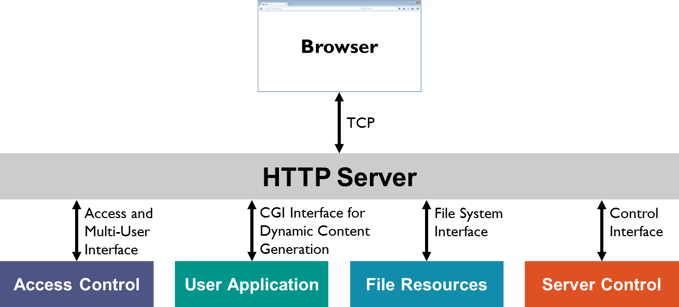
4 |
5 | Web servers consist of hardware and software that use Hypertext Transfer Protocol (HTTP) to respond to web users’ requests made via the World Wide Web.
6 |
7 | __NOTE__: In this project, some of the tasks will be graded on 2 aspects:
8 |
9 | 1. Is your web-01 server configured according to requirements
10 | 2. Does your answer file contain a Bash script that automatically performs commands to configure an Ubuntu machine to fit requirements (meaning without any human intervention).
11 |
12 | ## Learning Objectives
13 |
14 | A good software engineer is a lazy software engineer, crazy right.
15 |
16 | 
17 |
18 | __General Objectives__
19 | - what is the main role of a web server
20 | - What is a child process
21 | - Why web servers usually have a parent process and child processes
22 | - What are the main HTTP requests
23 |
24 | __DNS__
25 | - What DNS stands for
26 | - What is DNS main role
27 |
28 | __DNS Record Types__
29 | - `A Records`
30 | - `CNAME`
31 | - `TXT Records`
32 | - `MX Records`
33 |
34 | - How the web works
35 | - `Nginx`
36 | - How to __Configure Nginx__
37 | - Child process concept page
38 | - __Root and sub domain__
39 | - `HTTP` __requests__
40 | - `HTTP` __redirection__
41 | - Not found `HTTP` response code
42 | - Logs files on Linux
43 | - `HTTP/1.1` and `HTTP/2`
44 | - `scp` and `curl`
45 |
46 | ## Requirements
47 |
48 | __General__
49 |
50 | - Allowed editors: `vi`, `vim`, `emacs`
51 | - All your files will be interpreted on `Ubuntu 16.04 LTS`
52 | - All your files should end with a new line
53 | - A `README.md file`, at the root of the folder of the project, is mandatory
54 | - All your Bash script __files must be executable__
55 | - Your Bash script must pass `Shellcheck (version 0.3.7)` without any error
56 | - The first line of all your Bash scripts should be exactly `#!/usr/bin/env bash`
57 | - The second line of all your Bash scripts should be a comment explaining what is the script doing
58 | - You can’t use `systemctl` for restarting a process
59 | - A prior knowledge to bash scripting
60 |
61 | ## Video Tutorial
62 |
63 | For stsep by step guide on how to go about the installation and configuration, you can click the __"watch video"__ link to get started
64 |
65 | - Proceed to video -> [Watch Video](https://youtu.be/5vy448hK-c4)
66 |
67 | ## Installing Needed Packages
68 |
69 | ```bash
70 |
71 | $ sudo apt-get install shellcheck -y
72 |
73 | # Check shellcheck version
74 |
75 | $ shellcheck -V
76 |
77 | # Installing nginx
78 |
79 | $ sudo apt-get install nginx -y
80 |
81 | ```
82 | ## Configuring nginx
83 | ```bash
84 |
85 | # Configuring the default file
86 |
87 | $ sudo vi /etc/nginx/sites-available/default
88 |
89 | # Once the vi editior opens
90 |
91 | server {
92 | listen 80 default_Server;
93 | root /var/www/html;
94 | index index.html index.htm index.nginx-debian.html;
95 |
96 | # if you have a domain name replace '_' with it
97 | server_name _;
98 |
99 | # configuring error_page
100 | error_page 404 404.html;
101 |
102 | location / {
103 | try_files $uri $uri/ =404;
104 | }
105 |
106 | location = /404.html {
107 | internal;
108 | }
109 | }
110 |
111 | ```
112 |
--------------------------------------------------------------------------------
/0x1A-application_server/3-app_server-nginx_config:
--------------------------------------------------------------------------------
1 | ##
2 | # You should look at the following URL's in order to grasp a solid understanding
3 | # of Nginx configuration files in order to fully unleash the power of Nginx.
4 | # https://www.nginx.com/resources/wiki/start/
5 | # https://www.nginx.com/resources/wiki/start/topics/tutorials/config_pitfalls/
6 | # https://wiki.debian.org/Nginx/DirectoryStructure
7 | #
8 | # In most cases, administrators will remove this file from sites-enabled/ and
9 | # leave it as reference inside of sites-available where it will continue to be
10 | # updated by the nginx packaging team.
11 | #
12 | # This file will automatically load configuration files provided by other
13 | # applications, such as Drupal or Wordpress. These applications will be made
14 | # available underneath a path with that package name, such as /drupal8.
15 | #
16 | # Please see /usr/share/doc/nginx-doc/examples/ for more detailed examples.
17 | ##
18 |
19 | # Default server configuration
20 | #
21 | #upstream backend_server {
22 | # server 172.67.179.206;
23 | # server 52.86.102.6:80;
24 | #}
25 | #
26 | server {
27 | listen 80 default_server;
28 | listen [::]:80 default_server;
29 |
30 | # SSL configuration
31 | #
32 | # listen 443 ssl default_server;
33 | # listen [::]:443 ssl default_server;
34 | #
35 | # Note: You should disable gzip for SSL traffic.
36 | # See: https://bugs.debian.org/773332
37 | #
38 | # Read up on ssl_ciphers to ensure a secure configuration.
39 | # See: https://bugs.debian.org/765782
40 | #
41 | # Self signed certs generated by the ssl-cert package
42 | # Don't use them in a production server!
43 | #
44 | # include snippets/snakeoil.conf;
45 |
46 | root /var/www/html;
47 |
48 | # Add index.php to the list if you are using PHP
49 | index index.html index.htm index.nginx-debian.html;
50 |
51 | server_name web-01.sammykingx.tech;
52 | try_files $uri $uri/ =404;
53 |
54 | location / {
55 | # First attempt to serve request as file, then
56 | # as directory, then fall back to displaying a 404.
57 | include proxy_params;
58 | proxy_pass http://localhost:5003/2-hbnb;
59 | }
60 |
61 | error_page 404 /404.html;
62 |
63 | add_header X-Serverd-By 'web-01';
64 |
65 | location = /404.html {
66 | root /var/www/html;
67 | internal;
68 | }
69 |
70 | location = /redirect_me {
71 | return 301 $scheme://youtube.com/@sammykingx;
72 | }
73 |
74 | location = /airbnb-onepage {
75 | include proxy_params;
76 | proxy_pass http://localhost:5000/airbnb-onepage;
77 | }
78 |
79 | location ~ /airbnb-dynamic/number_odd_or_even/(\d+)$ {
80 | include proxy_params;
81 | proxy_pass http://127.0.0.1:5001/number_odd_or_even/$1;
82 | }
83 |
84 | location /api/ {
85 | include proxy_params;
86 | proxy_pass http://localhost:5002/api/;
87 | }
88 |
89 | # pass PHP scripts to FastCGI server
90 | #
91 | #location ~ \.php$ {
92 | # include snippets/fastcgi-php.conf;
93 | #
94 | # # With php-fpm (or other unix sockets):
95 | # fastcgi_pass unix:/var/run/php/php7.4-fpm.sock;
96 | # # With php-cgi (or other tcp sockets):
97 | # fastcgi_pass 127.0.0.1:9000;
98 | #}
99 |
100 | # deny access to .htaccess files, if Apache's document root
101 | # concurs with nginx's one
102 | #
103 | #location ~ /\.ht {
104 | # deny all;
105 | #}
106 | }
107 |
108 |
109 | # Virtual Host configuration for example.com
110 | #
111 | # You can move that to a different file under sites-available/ and symlink that
112 | # to sites-enabled/ to enable it.
113 | #
114 | #server {
115 | # listen 80;
116 | # listen [::]:80;
117 | #
118 | # server_name example.com;
119 | #
120 | # root /var/www/example.com;
121 | # index index.html;
122 | #
123 | # location / {
124 | # try_files $uri $uri/ =404;
125 | # }
126 | #}
127 |
--------------------------------------------------------------------------------
/0x1A-application_server/4-app_server-nginx_config:
--------------------------------------------------------------------------------
1 | ##
2 | # You should look at the following URL's in order to grasp a solid understanding
3 | # of Nginx configuration files in order to fully unleash the power of Nginx.
4 | # https://www.nginx.com/resources/wiki/start/
5 | # https://www.nginx.com/resources/wiki/start/topics/tutorials/config_pitfalls/
6 | # https://wiki.debian.org/Nginx/DirectoryStructure
7 | #
8 | # In most cases, administrators will remove this file from sites-enabled/ and
9 | # leave it as reference inside of sites-available where it will continue to be
10 | # updated by the nginx packaging team.
11 | #
12 | # This file will automatically load configuration files provided by other
13 | # applications, such as Drupal or Wordpress. These applications will be made
14 | # available underneath a path with that package name, such as /drupal8.
15 | #
16 | # Please see /usr/share/doc/nginx-doc/examples/ for more detailed examples.
17 | ##
18 |
19 | # Default server configuration
20 | #
21 | #upstream backend_server {
22 | # server 172.67.179.206;
23 | # server 52.86.102.6:80;
24 | #}
25 | #
26 | server {
27 | listen 80 default_server;
28 | listen [::]:80 default_server;
29 |
30 | # SSL configuration
31 | #
32 | # listen 443 ssl default_server;
33 | # listen [::]:443 ssl default_server;
34 | #
35 | # Note: You should disable gzip for SSL traffic.
36 | # See: https://bugs.debian.org/773332
37 | #
38 | # Read up on ssl_ciphers to ensure a secure configuration.
39 | # See: https://bugs.debian.org/765782
40 | #
41 | # Self signed certs generated by the ssl-cert package
42 | # Don't use them in a production server!
43 | #
44 | # include snippets/snakeoil.conf;
45 |
46 | root /var/www/html;
47 |
48 | # Add index.php to the list if you are using PHP
49 | index index.html index.htm index.nginx-debian.html;
50 |
51 | server_name web-01.sammykingx.tech;
52 | try_files $uri $uri/ =404;
53 |
54 | location / {
55 | # First attempt to serve request as file, then
56 | # as directory, then fall back to displaying a 404.
57 | include proxy_params;
58 | proxy_pass http://localhost:5003/2-hbnb;
59 | }
60 |
61 | error_page 404 /404.html;
62 |
63 | add_header X-Serverd-By 'web-01';
64 |
65 | location = /404.html {
66 | root /var/www/html;
67 | internal;
68 | }
69 |
70 | location = /redirect_me {
71 | return 301 $scheme://youtube.com/@sammykingx;
72 | }
73 |
74 | location = /airbnb-onepage {
75 | include proxy_params;
76 | proxy_pass http://localhost:5000/airbnb-onepage;
77 | }
78 |
79 | location ~ /airbnb-dynamic/number_odd_or_even/(\d+)$ {
80 | include proxy_params;
81 | proxy_pass http://127.0.0.1:5001/number_odd_or_even/$1;
82 | }
83 |
84 | location /api/ {
85 | include proxy_params;
86 | proxy_pass http://localhost:5002/api/;
87 | }
88 |
89 | # pass PHP scripts to FastCGI server
90 | #
91 | #location ~ \.php$ {
92 | # include snippets/fastcgi-php.conf;
93 | #
94 | # # With php-fpm (or other unix sockets):
95 | # fastcgi_pass unix:/var/run/php/php7.4-fpm.sock;
96 | # # With php-cgi (or other tcp sockets):
97 | # fastcgi_pass 127.0.0.1:9000;
98 | #}
99 |
100 | # deny access to .htaccess files, if Apache's document root
101 | # concurs with nginx's one
102 | #
103 | #location ~ /\.ht {
104 | # deny all;
105 | #}
106 | }
107 |
108 |
109 | # Virtual Host configuration for example.com
110 | #
111 | # You can move that to a different file under sites-available/ and symlink that
112 | # to sites-enabled/ to enable it.
113 | #
114 | #server {
115 | # listen 80;
116 | # listen [::]:80;
117 | #
118 | # server_name example.com;
119 | #
120 | # root /var/www/example.com;
121 | # index index.html;
122 | #
123 | # location / {
124 | # try_files $uri $uri/ =404;
125 | # }
126 | #}
127 |
--------------------------------------------------------------------------------
/0x1A-application_server/5-app_server-nginx_config:
--------------------------------------------------------------------------------
1 | ##
2 | # You should look at the following URL's in order to grasp a solid understanding
3 | # of Nginx configuration files in order to fully unleash the power of Nginx.
4 | # https://www.nginx.com/resources/wiki/start/
5 | # https://www.nginx.com/resources/wiki/start/topics/tutorials/config_pitfalls/
6 | # https://wiki.debian.org/Nginx/DirectoryStructure
7 | #
8 | # In most cases, administrators will remove this file from sites-enabled/ and
9 | # leave it as reference inside of sites-available where it will continue to be
10 | # updated by the nginx packaging team.
11 | #
12 | # This file will automatically load configuration files provided by other
13 | # applications, such as Drupal or Wordpress. These applications will be made
14 | # available underneath a path with that package name, such as /drupal8.
15 | #
16 | # Please see /usr/share/doc/nginx-doc/examples/ for more detailed examples.
17 | ##
18 |
19 | # Default server configuration
20 | #
21 | #upstream backend_server {
22 | # server 172.67.179.206;
23 | # server 52.86.102.6:80;
24 | #}
25 | #
26 | server {
27 | listen 80 default_server;
28 | listen [::]:80 default_server;
29 |
30 | # SSL configuration
31 | #
32 | # listen 443 ssl default_server;
33 | # listen [::]:443 ssl default_server;
34 | #
35 | # Note: You should disable gzip for SSL traffic.
36 | # See: https://bugs.debian.org/773332
37 | #
38 | # Read up on ssl_ciphers to ensure a secure configuration.
39 | # See: https://bugs.debian.org/765782
40 | #
41 | # Self signed certs generated by the ssl-cert package
42 | # Don't use them in a production server!
43 | #
44 | # include snippets/snakeoil.conf;
45 |
46 | root /var/www/html;
47 |
48 | # Add index.php to the list if you are using PHP
49 | index index.html index.htm index.nginx-debian.html;
50 |
51 | server_name web-01.sammykingx.tech;
52 | try_files $uri $uri/ =404;
53 |
54 | location / {
55 | # First attempt to serve request as file, then
56 | # as directory, then fall back to displaying a 404.
57 | include proxy_params;
58 | proxy_pass http://localhost:5003/2-hbnb;
59 | }
60 |
61 | error_page 404 /404.html;
62 |
63 | add_header X-Serverd-By 'web-01';
64 |
65 | location = /404.html {
66 | root /var/www/html;
67 | internal;
68 | }
69 |
70 | location = /redirect_me {
71 | return 301 $scheme://youtube.com/@sammykingx;
72 | }
73 |
74 | location = /airbnb-onepage {
75 | include proxy_params;
76 | proxy_pass http://localhost:5000/airbnb-onepage;
77 | }
78 |
79 | location ~ /airbnb-dynamic/number_odd_or_even/(\d+)$ {
80 | include proxy_params;
81 | proxy_pass http://127.0.0.1:5001/number_odd_or_even/$1;
82 | }
83 |
84 | location /api/ {
85 | include proxy_params;
86 | proxy_pass http://localhost:5002/api/;
87 | }
88 |
89 | # pass PHP scripts to FastCGI server
90 | #
91 | #location ~ \.php$ {
92 | # include snippets/fastcgi-php.conf;
93 | #
94 | # # With php-fpm (or other unix sockets):
95 | # fastcgi_pass unix:/var/run/php/php7.4-fpm.sock;
96 | # # With php-cgi (or other tcp sockets):
97 | # fastcgi_pass 127.0.0.1:9000;
98 | #}
99 |
100 | # deny access to .htaccess files, if Apache's document root
101 | # concurs with nginx's one
102 | #
103 | #location ~ /\.ht {
104 | # deny all;
105 | #}
106 | }
107 |
108 |
109 | # Virtual Host configuration for example.com
110 | #
111 | # You can move that to a different file under sites-available/ and symlink that
112 | # to sites-enabled/ to enable it.
113 | #
114 | #server {
115 | # listen 80;
116 | # listen [::]:80;
117 | #
118 | # server_name example.com;
119 | #
120 | # root /var/www/example.com;
121 | # index index.html;
122 | #
123 | # location / {
124 | # try_files $uri $uri/ =404;
125 | # }
126 | #}
127 |
--------------------------------------------------------------------------------
/0x1B-web_stack_debugging_4/README.md:
--------------------------------------------------------------------------------
1 | # Web_stack_debugging_4
2 |
3 | 
4 |
5 | ## General Requirements
6 |
7 | - All your files will be interpreted on `Ubuntu 14.04 LTS`
8 | - All your files should end with a new line
9 | - A README.md file at the root of the folder of the project is mandatory
10 | - Your Puppet manifests must pass `puppet-lint version 2.1.1` without any errors
11 | - Your Puppet manifests must run without error
12 | - Your Puppet manifests first line must be a comment explaining what the Puppet manifest is about
13 | - Your Puppet manifests files must end with the extension `.pp`
14 | - Files will be checked with `Puppet v3.4`
15 |
16 | ### Task 0
17 |
18 | ```bash
19 |
20 | root@0a62aa706eb3:/# ab -c 100 -n 2000 localhost/
21 | This is ApacheBench, Version 2.3 <$Revision: 1528965 $>
22 | Copyright 1996 Adam Twiss, Zeus Technology Ltd, http://www.zeustech.net/
23 | Licensed to The Apache Software Foundation, http://www.apache.org/
24 |
25 | Benchmarking localhost (be patient)
26 | Completed 200 requests
27 | Completed 400 requests
28 | Completed 600 requests
29 | Completed 800 requests
30 | Completed 1000 requests
31 | Completed 1200 requests
32 | Completed 1400 requests
33 | Completed 1600 requests
34 | Completed 1800 requests
35 | Completed 2000 requests
36 | Finished 2000 requests
37 |
38 |
39 | Server Software: nginx/1.4.6
40 | Server Hostname: localhost
41 | Server Port: 80
42 |
43 | Document Path: /
44 | Document Length: 201 bytes
45 |
46 | Concurrency Level: 100
47 | Time taken for tests: 0.353 seconds
48 | Complete requests: 2000
49 | Failed requests: 943
50 | (Connect: 0, Receive: 0, Length: 943, Exceptions: 0)
51 | Non-2xx responses: 1057
52 | Total transferred: 1196526 bytes
53 | HTML transferred: 789573 bytes
54 | Requests per second: 5664.01 [#/sec] (mean)
55 | Time per request: 17.655 [ms] (mean)
56 | Time per request: 0.177 [ms] (mean, across all concurrent requests)
57 | Transfer rate: 3309.15 [Kbytes/sec] received
58 |
59 | Connection Times (ms)
60 | min mean[+/-sd] median max
61 | Connect: 0 0 1.1 0 8
62 | Processing: 2 17 3.8 17 24
63 | Waiting: 2 17 3.8 17 24
64 | Total: 9 17 3.3 17 24
65 |
66 | Percentage of the requests served within a certain time (ms)
67 | 50% 17
68 | 66% 19
69 | 75% 20
70 | 80% 20
71 | 90% 21
72 | 95% 23
73 | 98% 23
74 | 99% 23
75 | 100% 24 (longest request)
76 | root@0a62aa706eb3:/#
77 | root@0a62aa706eb3:/# puppet apply 0-the_sky_is_the_limit_not.pp
78 | Notice: Compiled catalog for 0a62aa706eb3.local in environment production in 0.01 seconds
79 | Notice: /Stage[main]/Main/Exec[fix--for-nginx]/returns: executed successfully
80 | Notice: Finished catalog run in 1.12 seconds
81 | root@0a62aa706eb3:/#
82 |
83 | ----------- after fixing the issue ------------
84 |
85 | root@0a62aa706eb3:/#
86 | root@0a62aa706eb3:/# ab -c 100 -n 2000 localhost/
87 | This is ApacheBench, Version 2.3 <$Revision: 1528965 $>
88 | Copyright 1996 Adam Twiss, Zeus Technology Ltd, http://www.zeustech.net/
89 | Licensed to The Apache Software Foundation, http://www.apache.org/
90 |
91 | Benchmarking localhost (be patient)
92 | Completed 200 requests
93 | Completed 400 requests
94 | Completed 600 requests
95 | Completed 800 requests
96 | Completed 1000 requests
97 | Completed 1200 requests
98 | Completed 1400 requests
99 | Completed 1600 requests
100 | Completed 1800 requests
101 | Completed 2000 requests
102 | Finished 2000 requests
103 |
104 |
105 | Server Software: nginx/1.4.6
106 | Server Hostname: localhost
107 | Server Port: 80
108 |
109 | Document Path: /
110 | Document Length: 612 bytes
111 |
112 | Concurrency Level: 100
113 | Time taken for tests: 2.405 seconds
114 | Complete requests: 2000
115 | Failed requests: 0
116 | Total transferred: 1706000 bytes
117 | HTML transferred: 1224000 bytes
118 | Requests per second: 831.46 [#/sec] (mean)
119 | Time per request: 120.271 [ms] (mean)
120 | Time per request: 1.203 [ms] (mean, across all concurrent requests)
121 | Transfer rate: 692.61 [Kbytes/sec] received
122 |
123 | Connection Times (ms)
124 | min mean[+/-sd] median max
125 | Connect: 0 19 36.9 2 103
126 | Processing: 1 101 63.2 98 398
127 | Waiting: 1 95 62.3 97 296
128 | Total: 3 120 53.7 101 399
129 |
130 | Percentage of the requests served within a certain time (ms)
131 | 50% 101
132 | 66% 102
133 | 75% 195
134 | 80% 197
135 | 90% 199
136 | 95% 200
137 | 98% 201
138 | 99% 201
139 | 100% 399 (longest request)
140 |
141 | root@0a62aa706eb3:/#
142 | ```
143 | > The issue was the maximum number of file nginx can open which was 15 so i just had to increase the number to a high amount.
144 |
145 | ### Task 1
146 | - Resource [Read this](https://www.cyberciti.biz/faq/linux-unix-nginx-too-many-open-files/)
147 |
148 | ```bash
149 |
150 | root@94091d11a274:/# su - holberton
151 | -su: /etc/profile: Too many open files
152 | -su: /home/holberton/.bash_profile: Too many open files
153 | -su-4.3$
154 | -su-4.3$ ls
155 | -su: start_pipeline: pgrp pipe: Too many open files
156 | -su-4.3$ exit
157 | logout
158 | -su: /home/holberton/.bash_logout: Too many open files
159 | -su: /etc/bash.bash_logout: Too many open files
160 |
161 | ------- after fixing the error --------------------
162 | root@94091d11a274:/# sudo vi /etc/security/limits.conf
163 | root@94091d11a274:/# sudo sysctl -p
164 | root@94091d11a274:/# su - holberton
165 | holberton@94091d11a274:~$ ls
166 | holberton@94091d11a274:~$ ls /
167 | bin dev home lib64 mnt proc run srv tmp var
168 | boot etc lib media opt root sbin sys usr
169 | holberton@94091d11a274:~$
170 | ```
171 | > The issue was the number of file the user `holberton` was allowed to open as you notice from my terminal i opened the file `/etc/security/limits.conf` to increase the size and that was how i was able to solve it.
172 | __Never forget debugging starts from the error gotten___
173 |
174 | Cheers.
175 |
--------------------------------------------------------------------------------
/0x14-mysql/README.md:
--------------------------------------------------------------------------------
1 | # 0x14-mysql
2 |
3 | 
4 |
5 | The MySQL server provides a database management system with querying and connectivity capabilities, as well as the ability to have excellent data structure and integration with many different platforms.
6 |
7 | ## Needed Knowledge
8 |
9 | - [What is a primary-replica cluster](https://www.digitalocean.com/community/tutorials/how-to-choose-a-redundancy-plan-to-ensure-high-availability#sql-replication)
10 |
11 | - [MySQL primary replica setup](https://www.digitalocean.com/community/tutorials/how-to-set-up-replication-in-mysql)
12 |
13 | - [Build a robust database backup strategy](https://www.databasejournal.com/ms-sql/developing-a-sql-server-backup-strategy/)
14 |
15 | - `mysqldump`
16 |
17 | ## Learning Objectives
18 |
19 | - What is the main role of a database
20 | - What is a database replica
21 | - What is the purpose of a database replica
22 | - Why database backups need to be stored in different physical locations
23 | - What operation should you regularly perform to make sure that your database backup strategy actually works
24 |
25 | ## Project Requirements
26 |
27 | - Allowed editors: `vi`, `vim`, `emacs`
28 | - All your files will be interpreted on `Ubuntu 16.04 LTS`
29 | - All your files should end with a new line
30 | - A README.md file, at the root of the folder of the project, is mandatory
31 | - All your Bash script files must be executable
32 | - Your Bash script must pass Shellcheck __(version 0.3.7-5~ubuntu16.04.1 via apt-get)__ without any error
33 | - The first line of all your Bash scripts should be exactly `#!/usr/bin/env bash`
34 | - The second line of all your Bash scripts should be a comment explaining what is the script doing
35 |
36 | ## Installation Guide for mysql 5.7.*
37 |
38 | - First go to site [dev.mysql.com](https://dev.mysql.com/doc/refman/5.7/en/checking-gpg-signature.html) and copy the PGP PUBLIC KEY just immediately under the _Notice_ section to your clipboard.
39 |
40 | - Create a new file in your terminal with a .key extension and paste the PGP PUB KEY copied to clipboard.
41 | - Then do the following
42 |
43 | ```bash
44 | $ sudo apt-key add name_of_file.key
45 | OK
46 |
47 | # adding it to the apt repo
48 | $ sudo sh -c 'echo "deb http://repo.mysql.com/apt/ubuntu bionic mysql-5.7" >> /etc/apt/sources.list.d/mysql.list'
49 |
50 | # updating the apt repo to add the url i added earlier
51 | $ sudo apt-get update
52 |
53 | # now check your available versions
54 | $ sudo apt-cache policy mysql-server
55 | mysql-server:
56 | Installed: (none)
57 | Candidate: 8.0.31-0ubuntu0.20.04.2
58 | Version table:
59 | 8.0.31-0ubuntu0.20.04.2 500
60 | 500 http://us-east-1.ec2.archive.ubuntu.com/ubuntu focal-updates/main amd64 Packages
61 | 8.0.31-0ubuntu0.20.04.1 500
62 | 500 http://security.ubuntu.com/ubuntu focal-security/main amd64 Packages
63 | 8.0.19-0ubuntu5 500
64 | 500 http://us-east-1.ec2.archive.ubuntu.com/ubuntu focal/main amd64 Packages
65 | 5.7.40-1ubuntu18.04 500
66 | 500 http://repo.mysql.com/apt/ubuntu bionic/mysql-5.7 amd64 Packages
67 |
68 | # Now am installing mysql 5.7.*
69 | $ sudo apt-get install -f mysql-client=5.7* mysql-community-server=5.7* mysql-server=5.7* -y
70 | ```
71 | ## Project Task
72 |
73 | ### Creating a user and Granting Priviledges in mysql
74 | ```mysql
75 | $ mysql -root -p
76 | Password: /* Type root password
77 |
78 | mysql> CREATE USER 'holberton_user'@'localhost' IDENTIFIED BY 'projectcorrection280hbtn';
79 |
80 | mysql> GRANT GRANT REPLICATION CLIENT ON *.* TO 'holberton_user'@'localhost';
81 |
82 | mysql> FLUSH PRIVILEGES;
83 | ```
84 |
85 | ### Creating Database, Tables and adding Data to the Tables
86 |
87 | ```mysql
88 |
89 | mysql> CREATE DATABASE db_name_;
90 |
91 | -- To verify if db is created
92 | mysql> SHOW DATABASES;
93 |
94 | mysql> USE db_name;
95 |
96 | mysql> CREATE TABLE table_name (
97 | -> col_1 data_type,
98 | -> col_2 data_type);
99 | -- continue adding more coloums to your taste for me i just added two coloumns
100 |
101 | mysql> INSERT INTO table_name VALUES (val_1, val_2);
102 |
103 | -- Verify if data was added succesfully do
104 | mysql> SELECT col_1, col_2 FROM tb_name;
105 | ```
106 |
107 | ### Setting Up MySQL Replication
108 |
109 | - First create replication user and grant replication priviledge ( best practice).
110 |
111 | ```mysql
112 |
113 | mysql> CREATE USER 'replica_user'@'%' IDENTIFIED BY 'replica_user_pwd';
114 |
115 | mysql> GRANT REPLICATION SLAVE ON *.* TO 'replica_user'@'%';
116 |
117 | mysql> FLUSH PRIVILEGES;
118 |
119 | -- to verify
120 | mysql> SELECT user, Repl_slave_priv FROM mysql.user;
121 |
122 | mysql> exit
123 | ```
124 | - Next up you go to the /etc/mysql/mysql.conf.d/mysqld.cnf and comment the bind address and then add this lines to it
125 |
126 | ```bash
127 | # By default we only accept connections from localhost
128 | # bind-address = 127.0.0.1
129 | server-id = 1
130 | log_bin = /var/log/mysql/mysql-bin.log
131 | binlog_do_db = db_name
132 | ```
133 | - Then you enable incoming connection to port 3306 and restart mysql-server
134 | ```bash
135 |
136 | $ sudo ufw allow from 'replica_server_ip' to any port 3306
137 |
138 | $ sudo service mysql restart
139 | ```
140 | - Now log back in to mysql-server to lock db and prepare binary file for replication.
141 |
142 | ```bash
143 | $ mysql -uroot -p
144 | password:
145 | ```
146 | ```mysql
147 | mysql>
148 |
149 | mysql> FLUSH TABLES WITH READ LOCK;
150 |
151 | mysql> SHOW MASTER STATUS;
152 |
153 | +------------------+----------+--------------+------------------+-------------------+
154 | | File | Position | Binlog_Do_DB | Binlog_Ignore_DB | Executed_Gtid_Set |
155 | +------------------+----------+--------------+------------------+-------------------+
156 | | mysql-bin.000001 | 149 | db | | |
157 | +------------------+----------+--------------+------------------+-------------------+
158 |
159 | ```
160 | _Take note of the binary log and the position, jot it down or you leave this window open and you open another window to continue_
161 |
162 | - you then export the db from myql-server to local machine and then copy this db to replica machine
163 |
164 | ```bash
165 | $ mysqldump -uroot -p db_name > export_db_name.sql
166 |
167 | $ scp -i _idenetity_file_ export_db_name.sql user@machine_ip:location
168 | ```
169 | - Then ssh to replica machine ip_adress to import this tables to replica mysql-server
170 |
171 | ```bash
172 |
173 | $ mysql -uroot -p
174 | password:
175 |
176 |
177 | mysql> CREATE DATABASE db_name;
178 |
179 | mysql>exit
180 | bye
181 |
182 | $ mysql -uroot p db_name < export_db_name.sql
183 | password:
184 |
185 | # Now edit the config file in /etc/mysql/mysql.conf.d/mysqld.cnf and then reload mysql-server
186 |
187 | ```bash
188 |
189 | server-id = 2
190 | log_bin = /var/log/mysql/mysql-bin.log
191 | binlog_do_db = db_name_from_master_mysql-server
192 | relay_log = /var/log/mysql/mysql-relay-bin.log
193 |
194 | $ sudo service mysql restart
195 | ```
196 |
197 | - Login to mysql server in replica to configure replication
198 |
199 | ```bash
200 |
201 | $ mysql -uroot -p
202 | password:
203 |
204 |
205 | mysql>
206 | ```
207 | ```mysql
208 |
209 | mysql> CHANGE MASTER TO
210 | -> MASTER_HOST='source_host_name',
211 | -> MASTER_USER='replication_user_name',
212 | -> MASTER_PASSWORD='replication_password',
213 | -> MASTER_LOG_FILE='recorded_log_file_name',
214 | -> MASTER_LOG_POS=recorded_log_position;
215 |
216 | -- Then you start slave
217 | mysql> START SLAVE;
218 | ```
219 | __That's it you've configured replication on mysql, do reach out for any further assistance__
220 |
--------------------------------------------------------------------------------
3 |
4 | ## Resources
5 | Read or watch:
6 | + [COMPLETE GUIDE](https://yourdevopsmentor.com/blog/networking-for-devops-a-complete-guide/)
7 | + [OSI model](https://en.wikipedia.org/wiki/OSI_model)
8 | + [Different types of network](https://www.lifewire.com/lans-wans-and-other-area-networks-817376)
9 | + [LAN network](https://en.wikipedia.org/wiki/Local_area_network)
10 | + [WAN network](https://en.wikipedia.org/wiki/Wide_area_network)
11 | + [Internet](https://en.wikipedia.org/wiki/Internet)
12 | + [MAC address](https://whatismyipaddress.com/mac-address)
13 | + [What is an IP address](https://www.bleepingcomputer.com/tutorials/ip-addresses-explained/)
14 | + [Private and public address](https://www.iplocation.net/public-vs-private-ip-address)
15 | + [IPv4 and IPv6](https://www.webopedia.com/insights/ipv6-ipv4-difference/)
16 | + [Localhost](https://en.wikipedia.org/wiki/Localhost)
17 | + [TCP and UDP](https://www.howtogeek.com/190014/htg-explains-what-is-the-difference-between-tcp-and-udp/)
18 | + [TCP/UDP ports List](https://en.wikipedia.org/wiki/List_of_TCP_and_UDP_port_numbers)
19 | + [What is ping /ICMP](https://en.wikipedia.org/wiki/Ping_%28networking_utility%29)
20 | + [Positional parameters](https://wiki.bash-hackers.org/scripting/posparams)
21 |
22 | ## man or help:
23 |
24 | + netstat
25 | + ping
26 |
27 | ## Learning Objectives
28 | + At the end of this project, you are expected to be able to explain to anyone, without the help of Google:
29 |
30 | ## OSI Model
31 | + What it is
32 | + How many layers it has
33 | + How it is organized
34 |
35 | ## What is a LAN
36 | + Typical usage
37 | + Typical geographical size
38 |
39 | ## ___What is a WAN___
40 | + Typical usage
41 | + Typical geographical size
42 |
43 | ## What is the Internet
44 | + What is an IP address
45 | + What are the 2 types of IP address
46 | + What is localhost
47 | + What is a subnet
48 | + Why IPv6 was created
49 |
50 | ## TCP/UDP
51 | + What are the 2 mainly used data transfer protocols for IP (transfer level on the OSI schema)
52 | + What is the main difference between TCP and UDP
53 | + What is a port
54 | + Memorize SSH, HTTP and HTTPS port numbers
55 | + What tool/protocol is often used to check if a device is connected to a network
56 |
57 | ## Requirements
58 | ### ___General___
59 | + Allowed editors: vi, vim, emacs
60 | + All your Bash script files will be interpreted on Ubuntu 20.04 LTS
61 | + All your files should end with a new line
62 | + A README.md file, at the root of the folder of the project, is mandatory
63 | + All your Bash script files must be executable
64 | + Your Bash script must pass shellcheck without any error
65 | + The first line of all your Bash scripts should be exactly #!/usr/bin/env bash
66 | + The second line of all your Bash scripts should be a comment explaining what is the script doing
67 | ___More Info___
68 | + The second line of all your Bash scripts should be a comment explaining what is the script doing
69 |
70 |
71 | '''
72 | ### What is the most important position in a software company?
73 |
74 | + Project manager
75 | + Backend developer
76 | + System administrator
77 | '''
78 |
79 | ## Author
80 | @ [UDO INNOCENT CHARLES](https://github.com/Innocentsax)
81 |
--------------------------------------------------------------------------------
/0x0C-web_server/README.md:
--------------------------------------------------------------------------------
1 | # 0X0C - Web Server
2 |
3 | 
4 |
5 | Web servers consist of hardware and software that use Hypertext Transfer Protocol (HTTP) to respond to web users’ requests made via the World Wide Web.
6 |
7 | __NOTE__: In this project, some of the tasks will be graded on 2 aspects:
8 |
9 | 1. Is your web-01 server configured according to requirements
10 | 2. Does your answer file contain a Bash script that automatically performs commands to configure an Ubuntu machine to fit requirements (meaning without any human intervention).
11 |
12 | ## Learning Objectives
13 |
14 | A good software engineer is a lazy software engineer, crazy right.
15 |
16 | 
17 |
18 | __General Objectives__
19 | - what is the main role of a web server
20 | - What is a child process
21 | - Why web servers usually have a parent process and child processes
22 | - What are the main HTTP requests
23 |
24 | __DNS__
25 | - What DNS stands for
26 | - What is DNS main role
27 |
28 | __DNS Record Types__
29 | - `A Records`
30 | - `CNAME`
31 | - `TXT Records`
32 | - `MX Records`
33 |
34 | - How the web works
35 | - `Nginx`
36 | - How to __Configure Nginx__
37 | - Child process concept page
38 | - __Root and sub domain__
39 | - `HTTP` __requests__
40 | - `HTTP` __redirection__
41 | - Not found `HTTP` response code
42 | - Logs files on Linux
43 | - `HTTP/1.1` and `HTTP/2`
44 | - `scp` and `curl`
45 |
46 | ## Requirements
47 |
48 | __General__
49 |
50 | - Allowed editors: `vi`, `vim`, `emacs`
51 | - All your files will be interpreted on `Ubuntu 16.04 LTS`
52 | - All your files should end with a new line
53 | - A `README.md file`, at the root of the folder of the project, is mandatory
54 | - All your Bash script __files must be executable__
55 | - Your Bash script must pass `Shellcheck (version 0.3.7)` without any error
56 | - The first line of all your Bash scripts should be exactly `#!/usr/bin/env bash`
57 | - The second line of all your Bash scripts should be a comment explaining what is the script doing
58 | - You can’t use `systemctl` for restarting a process
59 | - A prior knowledge to bash scripting
60 |
61 | ## Video Tutorial
62 |
63 | For stsep by step guide on how to go about the installation and configuration, you can click the __"watch video"__ link to get started
64 |
65 | - Proceed to video -> [Watch Video](https://youtu.be/5vy448hK-c4)
66 |
67 | ## Installing Needed Packages
68 |
69 | ```bash
70 |
71 | $ sudo apt-get install shellcheck -y
72 |
73 | # Check shellcheck version
74 |
75 | $ shellcheck -V
76 |
77 | # Installing nginx
78 |
79 | $ sudo apt-get install nginx -y
80 |
81 | ```
82 | ## Configuring nginx
83 | ```bash
84 |
85 | # Configuring the default file
86 |
87 | $ sudo vi /etc/nginx/sites-available/default
88 |
89 | # Once the vi editior opens
90 |
91 | server {
92 | listen 80 default_Server;
93 | root /var/www/html;
94 | index index.html index.htm index.nginx-debian.html;
95 |
96 | # if you have a domain name replace '_' with it
97 | server_name _;
98 |
99 | # configuring error_page
100 | error_page 404 404.html;
101 |
102 | location / {
103 | try_files $uri $uri/ =404;
104 | }
105 |
106 | location = /404.html {
107 | internal;
108 | }
109 | }
110 |
111 | ```
112 |
--------------------------------------------------------------------------------
/0x1A-application_server/3-app_server-nginx_config:
--------------------------------------------------------------------------------
1 | ##
2 | # You should look at the following URL's in order to grasp a solid understanding
3 | # of Nginx configuration files in order to fully unleash the power of Nginx.
4 | # https://www.nginx.com/resources/wiki/start/
5 | # https://www.nginx.com/resources/wiki/start/topics/tutorials/config_pitfalls/
6 | # https://wiki.debian.org/Nginx/DirectoryStructure
7 | #
8 | # In most cases, administrators will remove this file from sites-enabled/ and
9 | # leave it as reference inside of sites-available where it will continue to be
10 | # updated by the nginx packaging team.
11 | #
12 | # This file will automatically load configuration files provided by other
13 | # applications, such as Drupal or Wordpress. These applications will be made
14 | # available underneath a path with that package name, such as /drupal8.
15 | #
16 | # Please see /usr/share/doc/nginx-doc/examples/ for more detailed examples.
17 | ##
18 |
19 | # Default server configuration
20 | #
21 | #upstream backend_server {
22 | # server 172.67.179.206;
23 | # server 52.86.102.6:80;
24 | #}
25 | #
26 | server {
27 | listen 80 default_server;
28 | listen [::]:80 default_server;
29 |
30 | # SSL configuration
31 | #
32 | # listen 443 ssl default_server;
33 | # listen [::]:443 ssl default_server;
34 | #
35 | # Note: You should disable gzip for SSL traffic.
36 | # See: https://bugs.debian.org/773332
37 | #
38 | # Read up on ssl_ciphers to ensure a secure configuration.
39 | # See: https://bugs.debian.org/765782
40 | #
41 | # Self signed certs generated by the ssl-cert package
42 | # Don't use them in a production server!
43 | #
44 | # include snippets/snakeoil.conf;
45 |
46 | root /var/www/html;
47 |
48 | # Add index.php to the list if you are using PHP
49 | index index.html index.htm index.nginx-debian.html;
50 |
51 | server_name web-01.sammykingx.tech;
52 | try_files $uri $uri/ =404;
53 |
54 | location / {
55 | # First attempt to serve request as file, then
56 | # as directory, then fall back to displaying a 404.
57 | include proxy_params;
58 | proxy_pass http://localhost:5003/2-hbnb;
59 | }
60 |
61 | error_page 404 /404.html;
62 |
63 | add_header X-Serverd-By 'web-01';
64 |
65 | location = /404.html {
66 | root /var/www/html;
67 | internal;
68 | }
69 |
70 | location = /redirect_me {
71 | return 301 $scheme://youtube.com/@sammykingx;
72 | }
73 |
74 | location = /airbnb-onepage {
75 | include proxy_params;
76 | proxy_pass http://localhost:5000/airbnb-onepage;
77 | }
78 |
79 | location ~ /airbnb-dynamic/number_odd_or_even/(\d+)$ {
80 | include proxy_params;
81 | proxy_pass http://127.0.0.1:5001/number_odd_or_even/$1;
82 | }
83 |
84 | location /api/ {
85 | include proxy_params;
86 | proxy_pass http://localhost:5002/api/;
87 | }
88 |
89 | # pass PHP scripts to FastCGI server
90 | #
91 | #location ~ \.php$ {
92 | # include snippets/fastcgi-php.conf;
93 | #
94 | # # With php-fpm (or other unix sockets):
95 | # fastcgi_pass unix:/var/run/php/php7.4-fpm.sock;
96 | # # With php-cgi (or other tcp sockets):
97 | # fastcgi_pass 127.0.0.1:9000;
98 | #}
99 |
100 | # deny access to .htaccess files, if Apache's document root
101 | # concurs with nginx's one
102 | #
103 | #location ~ /\.ht {
104 | # deny all;
105 | #}
106 | }
107 |
108 |
109 | # Virtual Host configuration for example.com
110 | #
111 | # You can move that to a different file under sites-available/ and symlink that
112 | # to sites-enabled/ to enable it.
113 | #
114 | #server {
115 | # listen 80;
116 | # listen [::]:80;
117 | #
118 | # server_name example.com;
119 | #
120 | # root /var/www/example.com;
121 | # index index.html;
122 | #
123 | # location / {
124 | # try_files $uri $uri/ =404;
125 | # }
126 | #}
127 |
--------------------------------------------------------------------------------
/0x1A-application_server/4-app_server-nginx_config:
--------------------------------------------------------------------------------
1 | ##
2 | # You should look at the following URL's in order to grasp a solid understanding
3 | # of Nginx configuration files in order to fully unleash the power of Nginx.
4 | # https://www.nginx.com/resources/wiki/start/
5 | # https://www.nginx.com/resources/wiki/start/topics/tutorials/config_pitfalls/
6 | # https://wiki.debian.org/Nginx/DirectoryStructure
7 | #
8 | # In most cases, administrators will remove this file from sites-enabled/ and
9 | # leave it as reference inside of sites-available where it will continue to be
10 | # updated by the nginx packaging team.
11 | #
12 | # This file will automatically load configuration files provided by other
13 | # applications, such as Drupal or Wordpress. These applications will be made
14 | # available underneath a path with that package name, such as /drupal8.
15 | #
16 | # Please see /usr/share/doc/nginx-doc/examples/ for more detailed examples.
17 | ##
18 |
19 | # Default server configuration
20 | #
21 | #upstream backend_server {
22 | # server 172.67.179.206;
23 | # server 52.86.102.6:80;
24 | #}
25 | #
26 | server {
27 | listen 80 default_server;
28 | listen [::]:80 default_server;
29 |
30 | # SSL configuration
31 | #
32 | # listen 443 ssl default_server;
33 | # listen [::]:443 ssl default_server;
34 | #
35 | # Note: You should disable gzip for SSL traffic.
36 | # See: https://bugs.debian.org/773332
37 | #
38 | # Read up on ssl_ciphers to ensure a secure configuration.
39 | # See: https://bugs.debian.org/765782
40 | #
41 | # Self signed certs generated by the ssl-cert package
42 | # Don't use them in a production server!
43 | #
44 | # include snippets/snakeoil.conf;
45 |
46 | root /var/www/html;
47 |
48 | # Add index.php to the list if you are using PHP
49 | index index.html index.htm index.nginx-debian.html;
50 |
51 | server_name web-01.sammykingx.tech;
52 | try_files $uri $uri/ =404;
53 |
54 | location / {
55 | # First attempt to serve request as file, then
56 | # as directory, then fall back to displaying a 404.
57 | include proxy_params;
58 | proxy_pass http://localhost:5003/2-hbnb;
59 | }
60 |
61 | error_page 404 /404.html;
62 |
63 | add_header X-Serverd-By 'web-01';
64 |
65 | location = /404.html {
66 | root /var/www/html;
67 | internal;
68 | }
69 |
70 | location = /redirect_me {
71 | return 301 $scheme://youtube.com/@sammykingx;
72 | }
73 |
74 | location = /airbnb-onepage {
75 | include proxy_params;
76 | proxy_pass http://localhost:5000/airbnb-onepage;
77 | }
78 |
79 | location ~ /airbnb-dynamic/number_odd_or_even/(\d+)$ {
80 | include proxy_params;
81 | proxy_pass http://127.0.0.1:5001/number_odd_or_even/$1;
82 | }
83 |
84 | location /api/ {
85 | include proxy_params;
86 | proxy_pass http://localhost:5002/api/;
87 | }
88 |
89 | # pass PHP scripts to FastCGI server
90 | #
91 | #location ~ \.php$ {
92 | # include snippets/fastcgi-php.conf;
93 | #
94 | # # With php-fpm (or other unix sockets):
95 | # fastcgi_pass unix:/var/run/php/php7.4-fpm.sock;
96 | # # With php-cgi (or other tcp sockets):
97 | # fastcgi_pass 127.0.0.1:9000;
98 | #}
99 |
100 | # deny access to .htaccess files, if Apache's document root
101 | # concurs with nginx's one
102 | #
103 | #location ~ /\.ht {
104 | # deny all;
105 | #}
106 | }
107 |
108 |
109 | # Virtual Host configuration for example.com
110 | #
111 | # You can move that to a different file under sites-available/ and symlink that
112 | # to sites-enabled/ to enable it.
113 | #
114 | #server {
115 | # listen 80;
116 | # listen [::]:80;
117 | #
118 | # server_name example.com;
119 | #
120 | # root /var/www/example.com;
121 | # index index.html;
122 | #
123 | # location / {
124 | # try_files $uri $uri/ =404;
125 | # }
126 | #}
127 |
--------------------------------------------------------------------------------
/0x1A-application_server/5-app_server-nginx_config:
--------------------------------------------------------------------------------
1 | ##
2 | # You should look at the following URL's in order to grasp a solid understanding
3 | # of Nginx configuration files in order to fully unleash the power of Nginx.
4 | # https://www.nginx.com/resources/wiki/start/
5 | # https://www.nginx.com/resources/wiki/start/topics/tutorials/config_pitfalls/
6 | # https://wiki.debian.org/Nginx/DirectoryStructure
7 | #
8 | # In most cases, administrators will remove this file from sites-enabled/ and
9 | # leave it as reference inside of sites-available where it will continue to be
10 | # updated by the nginx packaging team.
11 | #
12 | # This file will automatically load configuration files provided by other
13 | # applications, such as Drupal or Wordpress. These applications will be made
14 | # available underneath a path with that package name, such as /drupal8.
15 | #
16 | # Please see /usr/share/doc/nginx-doc/examples/ for more detailed examples.
17 | ##
18 |
19 | # Default server configuration
20 | #
21 | #upstream backend_server {
22 | # server 172.67.179.206;
23 | # server 52.86.102.6:80;
24 | #}
25 | #
26 | server {
27 | listen 80 default_server;
28 | listen [::]:80 default_server;
29 |
30 | # SSL configuration
31 | #
32 | # listen 443 ssl default_server;
33 | # listen [::]:443 ssl default_server;
34 | #
35 | # Note: You should disable gzip for SSL traffic.
36 | # See: https://bugs.debian.org/773332
37 | #
38 | # Read up on ssl_ciphers to ensure a secure configuration.
39 | # See: https://bugs.debian.org/765782
40 | #
41 | # Self signed certs generated by the ssl-cert package
42 | # Don't use them in a production server!
43 | #
44 | # include snippets/snakeoil.conf;
45 |
46 | root /var/www/html;
47 |
48 | # Add index.php to the list if you are using PHP
49 | index index.html index.htm index.nginx-debian.html;
50 |
51 | server_name web-01.sammykingx.tech;
52 | try_files $uri $uri/ =404;
53 |
54 | location / {
55 | # First attempt to serve request as file, then
56 | # as directory, then fall back to displaying a 404.
57 | include proxy_params;
58 | proxy_pass http://localhost:5003/2-hbnb;
59 | }
60 |
61 | error_page 404 /404.html;
62 |
63 | add_header X-Serverd-By 'web-01';
64 |
65 | location = /404.html {
66 | root /var/www/html;
67 | internal;
68 | }
69 |
70 | location = /redirect_me {
71 | return 301 $scheme://youtube.com/@sammykingx;
72 | }
73 |
74 | location = /airbnb-onepage {
75 | include proxy_params;
76 | proxy_pass http://localhost:5000/airbnb-onepage;
77 | }
78 |
79 | location ~ /airbnb-dynamic/number_odd_or_even/(\d+)$ {
80 | include proxy_params;
81 | proxy_pass http://127.0.0.1:5001/number_odd_or_even/$1;
82 | }
83 |
84 | location /api/ {
85 | include proxy_params;
86 | proxy_pass http://localhost:5002/api/;
87 | }
88 |
89 | # pass PHP scripts to FastCGI server
90 | #
91 | #location ~ \.php$ {
92 | # include snippets/fastcgi-php.conf;
93 | #
94 | # # With php-fpm (or other unix sockets):
95 | # fastcgi_pass unix:/var/run/php/php7.4-fpm.sock;
96 | # # With php-cgi (or other tcp sockets):
97 | # fastcgi_pass 127.0.0.1:9000;
98 | #}
99 |
100 | # deny access to .htaccess files, if Apache's document root
101 | # concurs with nginx's one
102 | #
103 | #location ~ /\.ht {
104 | # deny all;
105 | #}
106 | }
107 |
108 |
109 | # Virtual Host configuration for example.com
110 | #
111 | # You can move that to a different file under sites-available/ and symlink that
112 | # to sites-enabled/ to enable it.
113 | #
114 | #server {
115 | # listen 80;
116 | # listen [::]:80;
117 | #
118 | # server_name example.com;
119 | #
120 | # root /var/www/example.com;
121 | # index index.html;
122 | #
123 | # location / {
124 | # try_files $uri $uri/ =404;
125 | # }
126 | #}
127 |
--------------------------------------------------------------------------------
/0x1B-web_stack_debugging_4/README.md:
--------------------------------------------------------------------------------
1 | # Web_stack_debugging_4
2 |
3 | 
4 |
5 | ## General Requirements
6 |
7 | - All your files will be interpreted on `Ubuntu 14.04 LTS`
8 | - All your files should end with a new line
9 | - A README.md file at the root of the folder of the project is mandatory
10 | - Your Puppet manifests must pass `puppet-lint version 2.1.1` without any errors
11 | - Your Puppet manifests must run without error
12 | - Your Puppet manifests first line must be a comment explaining what the Puppet manifest is about
13 | - Your Puppet manifests files must end with the extension `.pp`
14 | - Files will be checked with `Puppet v3.4`
15 |
16 | ### Task 0
17 |
18 | ```bash
19 |
20 | root@0a62aa706eb3:/# ab -c 100 -n 2000 localhost/
21 | This is ApacheBench, Version 2.3 <$Revision: 1528965 $>
22 | Copyright 1996 Adam Twiss, Zeus Technology Ltd, http://www.zeustech.net/
23 | Licensed to The Apache Software Foundation, http://www.apache.org/
24 |
25 | Benchmarking localhost (be patient)
26 | Completed 200 requests
27 | Completed 400 requests
28 | Completed 600 requests
29 | Completed 800 requests
30 | Completed 1000 requests
31 | Completed 1200 requests
32 | Completed 1400 requests
33 | Completed 1600 requests
34 | Completed 1800 requests
35 | Completed 2000 requests
36 | Finished 2000 requests
37 |
38 |
39 | Server Software: nginx/1.4.6
40 | Server Hostname: localhost
41 | Server Port: 80
42 |
43 | Document Path: /
44 | Document Length: 201 bytes
45 |
46 | Concurrency Level: 100
47 | Time taken for tests: 0.353 seconds
48 | Complete requests: 2000
49 | Failed requests: 943
50 | (Connect: 0, Receive: 0, Length: 943, Exceptions: 0)
51 | Non-2xx responses: 1057
52 | Total transferred: 1196526 bytes
53 | HTML transferred: 789573 bytes
54 | Requests per second: 5664.01 [#/sec] (mean)
55 | Time per request: 17.655 [ms] (mean)
56 | Time per request: 0.177 [ms] (mean, across all concurrent requests)
57 | Transfer rate: 3309.15 [Kbytes/sec] received
58 |
59 | Connection Times (ms)
60 | min mean[+/-sd] median max
61 | Connect: 0 0 1.1 0 8
62 | Processing: 2 17 3.8 17 24
63 | Waiting: 2 17 3.8 17 24
64 | Total: 9 17 3.3 17 24
65 |
66 | Percentage of the requests served within a certain time (ms)
67 | 50% 17
68 | 66% 19
69 | 75% 20
70 | 80% 20
71 | 90% 21
72 | 95% 23
73 | 98% 23
74 | 99% 23
75 | 100% 24 (longest request)
76 | root@0a62aa706eb3:/#
77 | root@0a62aa706eb3:/# puppet apply 0-the_sky_is_the_limit_not.pp
78 | Notice: Compiled catalog for 0a62aa706eb3.local in environment production in 0.01 seconds
79 | Notice: /Stage[main]/Main/Exec[fix--for-nginx]/returns: executed successfully
80 | Notice: Finished catalog run in 1.12 seconds
81 | root@0a62aa706eb3:/#
82 |
83 | ----------- after fixing the issue ------------
84 |
85 | root@0a62aa706eb3:/#
86 | root@0a62aa706eb3:/# ab -c 100 -n 2000 localhost/
87 | This is ApacheBench, Version 2.3 <$Revision: 1528965 $>
88 | Copyright 1996 Adam Twiss, Zeus Technology Ltd, http://www.zeustech.net/
89 | Licensed to The Apache Software Foundation, http://www.apache.org/
90 |
91 | Benchmarking localhost (be patient)
92 | Completed 200 requests
93 | Completed 400 requests
94 | Completed 600 requests
95 | Completed 800 requests
96 | Completed 1000 requests
97 | Completed 1200 requests
98 | Completed 1400 requests
99 | Completed 1600 requests
100 | Completed 1800 requests
101 | Completed 2000 requests
102 | Finished 2000 requests
103 |
104 |
105 | Server Software: nginx/1.4.6
106 | Server Hostname: localhost
107 | Server Port: 80
108 |
109 | Document Path: /
110 | Document Length: 612 bytes
111 |
112 | Concurrency Level: 100
113 | Time taken for tests: 2.405 seconds
114 | Complete requests: 2000
115 | Failed requests: 0
116 | Total transferred: 1706000 bytes
117 | HTML transferred: 1224000 bytes
118 | Requests per second: 831.46 [#/sec] (mean)
119 | Time per request: 120.271 [ms] (mean)
120 | Time per request: 1.203 [ms] (mean, across all concurrent requests)
121 | Transfer rate: 692.61 [Kbytes/sec] received
122 |
123 | Connection Times (ms)
124 | min mean[+/-sd] median max
125 | Connect: 0 19 36.9 2 103
126 | Processing: 1 101 63.2 98 398
127 | Waiting: 1 95 62.3 97 296
128 | Total: 3 120 53.7 101 399
129 |
130 | Percentage of the requests served within a certain time (ms)
131 | 50% 101
132 | 66% 102
133 | 75% 195
134 | 80% 197
135 | 90% 199
136 | 95% 200
137 | 98% 201
138 | 99% 201
139 | 100% 399 (longest request)
140 |
141 | root@0a62aa706eb3:/#
142 | ```
143 | > The issue was the maximum number of file nginx can open which was 15 so i just had to increase the number to a high amount.
144 |
145 | ### Task 1
146 | - Resource [Read this](https://www.cyberciti.biz/faq/linux-unix-nginx-too-many-open-files/)
147 |
148 | ```bash
149 |
150 | root@94091d11a274:/# su - holberton
151 | -su: /etc/profile: Too many open files
152 | -su: /home/holberton/.bash_profile: Too many open files
153 | -su-4.3$
154 | -su-4.3$ ls
155 | -su: start_pipeline: pgrp pipe: Too many open files
156 | -su-4.3$ exit
157 | logout
158 | -su: /home/holberton/.bash_logout: Too many open files
159 | -su: /etc/bash.bash_logout: Too many open files
160 |
161 | ------- after fixing the error --------------------
162 | root@94091d11a274:/# sudo vi /etc/security/limits.conf
163 | root@94091d11a274:/# sudo sysctl -p
164 | root@94091d11a274:/# su - holberton
165 | holberton@94091d11a274:~$ ls
166 | holberton@94091d11a274:~$ ls /
167 | bin dev home lib64 mnt proc run srv tmp var
168 | boot etc lib media opt root sbin sys usr
169 | holberton@94091d11a274:~$
170 | ```
171 | > The issue was the number of file the user `holberton` was allowed to open as you notice from my terminal i opened the file `/etc/security/limits.conf` to increase the size and that was how i was able to solve it.
172 | __Never forget debugging starts from the error gotten___
173 |
174 | Cheers.
175 |
--------------------------------------------------------------------------------
/0x14-mysql/README.md:
--------------------------------------------------------------------------------
1 | # 0x14-mysql
2 |
3 | 
4 |
5 | The MySQL server provides a database management system with querying and connectivity capabilities, as well as the ability to have excellent data structure and integration with many different platforms.
6 |
7 | ## Needed Knowledge
8 |
9 | - [What is a primary-replica cluster](https://www.digitalocean.com/community/tutorials/how-to-choose-a-redundancy-plan-to-ensure-high-availability#sql-replication)
10 |
11 | - [MySQL primary replica setup](https://www.digitalocean.com/community/tutorials/how-to-set-up-replication-in-mysql)
12 |
13 | - [Build a robust database backup strategy](https://www.databasejournal.com/ms-sql/developing-a-sql-server-backup-strategy/)
14 |
15 | - `mysqldump`
16 |
17 | ## Learning Objectives
18 |
19 | - What is the main role of a database
20 | - What is a database replica
21 | - What is the purpose of a database replica
22 | - Why database backups need to be stored in different physical locations
23 | - What operation should you regularly perform to make sure that your database backup strategy actually works
24 |
25 | ## Project Requirements
26 |
27 | - Allowed editors: `vi`, `vim`, `emacs`
28 | - All your files will be interpreted on `Ubuntu 16.04 LTS`
29 | - All your files should end with a new line
30 | - A README.md file, at the root of the folder of the project, is mandatory
31 | - All your Bash script files must be executable
32 | - Your Bash script must pass Shellcheck __(version 0.3.7-5~ubuntu16.04.1 via apt-get)__ without any error
33 | - The first line of all your Bash scripts should be exactly `#!/usr/bin/env bash`
34 | - The second line of all your Bash scripts should be a comment explaining what is the script doing
35 |
36 | ## Installation Guide for mysql 5.7.*
37 |
38 | - First go to site [dev.mysql.com](https://dev.mysql.com/doc/refman/5.7/en/checking-gpg-signature.html) and copy the PGP PUBLIC KEY just immediately under the _Notice_ section to your clipboard.
39 |
40 | - Create a new file in your terminal with a .key extension and paste the PGP PUB KEY copied to clipboard.
41 | - Then do the following
42 |
43 | ```bash
44 | $ sudo apt-key add name_of_file.key
45 | OK
46 |
47 | # adding it to the apt repo
48 | $ sudo sh -c 'echo "deb http://repo.mysql.com/apt/ubuntu bionic mysql-5.7" >> /etc/apt/sources.list.d/mysql.list'
49 |
50 | # updating the apt repo to add the url i added earlier
51 | $ sudo apt-get update
52 |
53 | # now check your available versions
54 | $ sudo apt-cache policy mysql-server
55 | mysql-server:
56 | Installed: (none)
57 | Candidate: 8.0.31-0ubuntu0.20.04.2
58 | Version table:
59 | 8.0.31-0ubuntu0.20.04.2 500
60 | 500 http://us-east-1.ec2.archive.ubuntu.com/ubuntu focal-updates/main amd64 Packages
61 | 8.0.31-0ubuntu0.20.04.1 500
62 | 500 http://security.ubuntu.com/ubuntu focal-security/main amd64 Packages
63 | 8.0.19-0ubuntu5 500
64 | 500 http://us-east-1.ec2.archive.ubuntu.com/ubuntu focal/main amd64 Packages
65 | 5.7.40-1ubuntu18.04 500
66 | 500 http://repo.mysql.com/apt/ubuntu bionic/mysql-5.7 amd64 Packages
67 |
68 | # Now am installing mysql 5.7.*
69 | $ sudo apt-get install -f mysql-client=5.7* mysql-community-server=5.7* mysql-server=5.7* -y
70 | ```
71 | ## Project Task
72 |
73 | ### Creating a user and Granting Priviledges in mysql
74 | ```mysql
75 | $ mysql -root -p
76 | Password: /* Type root password
77 |
78 | mysql> CREATE USER 'holberton_user'@'localhost' IDENTIFIED BY 'projectcorrection280hbtn';
79 |
80 | mysql> GRANT GRANT REPLICATION CLIENT ON *.* TO 'holberton_user'@'localhost';
81 |
82 | mysql> FLUSH PRIVILEGES;
83 | ```
84 |
85 | ### Creating Database, Tables and adding Data to the Tables
86 |
87 | ```mysql
88 |
89 | mysql> CREATE DATABASE db_name_;
90 |
91 | -- To verify if db is created
92 | mysql> SHOW DATABASES;
93 |
94 | mysql> USE db_name;
95 |
96 | mysql> CREATE TABLE table_name (
97 | -> col_1 data_type,
98 | -> col_2 data_type);
99 | -- continue adding more coloums to your taste for me i just added two coloumns
100 |
101 | mysql> INSERT INTO table_name VALUES (val_1, val_2);
102 |
103 | -- Verify if data was added succesfully do
104 | mysql> SELECT col_1, col_2 FROM tb_name;
105 | ```
106 |
107 | ### Setting Up MySQL Replication
108 |
109 | - First create replication user and grant replication priviledge ( best practice).
110 |
111 | ```mysql
112 |
113 | mysql> CREATE USER 'replica_user'@'%' IDENTIFIED BY 'replica_user_pwd';
114 |
115 | mysql> GRANT REPLICATION SLAVE ON *.* TO 'replica_user'@'%';
116 |
117 | mysql> FLUSH PRIVILEGES;
118 |
119 | -- to verify
120 | mysql> SELECT user, Repl_slave_priv FROM mysql.user;
121 |
122 | mysql> exit
123 | ```
124 | - Next up you go to the /etc/mysql/mysql.conf.d/mysqld.cnf and comment the bind address and then add this lines to it
125 |
126 | ```bash
127 | # By default we only accept connections from localhost
128 | # bind-address = 127.0.0.1
129 | server-id = 1
130 | log_bin = /var/log/mysql/mysql-bin.log
131 | binlog_do_db = db_name
132 | ```
133 | - Then you enable incoming connection to port 3306 and restart mysql-server
134 | ```bash
135 |
136 | $ sudo ufw allow from 'replica_server_ip' to any port 3306
137 |
138 | $ sudo service mysql restart
139 | ```
140 | - Now log back in to mysql-server to lock db and prepare binary file for replication.
141 |
142 | ```bash
143 | $ mysql -uroot -p
144 | password:
145 | ```
146 | ```mysql
147 | mysql>
148 |
149 | mysql> FLUSH TABLES WITH READ LOCK;
150 |
151 | mysql> SHOW MASTER STATUS;
152 |
153 | +------------------+----------+--------------+------------------+-------------------+
154 | | File | Position | Binlog_Do_DB | Binlog_Ignore_DB | Executed_Gtid_Set |
155 | +------------------+----------+--------------+------------------+-------------------+
156 | | mysql-bin.000001 | 149 | db | | |
157 | +------------------+----------+--------------+------------------+-------------------+
158 |
159 | ```
160 | _Take note of the binary log and the position, jot it down or you leave this window open and you open another window to continue_
161 |
162 | - you then export the db from myql-server to local machine and then copy this db to replica machine
163 |
164 | ```bash
165 | $ mysqldump -uroot -p db_name > export_db_name.sql
166 |
167 | $ scp -i _idenetity_file_ export_db_name.sql user@machine_ip:location
168 | ```
169 | - Then ssh to replica machine ip_adress to import this tables to replica mysql-server
170 |
171 | ```bash
172 |
173 | $ mysql -uroot -p
174 | password:
175 |
176 |
177 | mysql> CREATE DATABASE db_name;
178 |
179 | mysql>exit
180 | bye
181 |
182 | $ mysql -uroot p db_name < export_db_name.sql
183 | password:
184 |
185 | # Now edit the config file in /etc/mysql/mysql.conf.d/mysqld.cnf and then reload mysql-server
186 |
187 | ```bash
188 |
189 | server-id = 2
190 | log_bin = /var/log/mysql/mysql-bin.log
191 | binlog_do_db = db_name_from_master_mysql-server
192 | relay_log = /var/log/mysql/mysql-relay-bin.log
193 |
194 | $ sudo service mysql restart
195 | ```
196 |
197 | - Login to mysql server in replica to configure replication
198 |
199 | ```bash
200 |
201 | $ mysql -uroot -p
202 | password:
203 |
204 |
205 | mysql>
206 | ```
207 | ```mysql
208 |
209 | mysql> CHANGE MASTER TO
210 | -> MASTER_HOST='source_host_name',
211 | -> MASTER_USER='replication_user_name',
212 | -> MASTER_PASSWORD='replication_password',
213 | -> MASTER_LOG_FILE='recorded_log_file_name',
214 | -> MASTER_LOG_POS=recorded_log_position;
215 |
216 | -- Then you start slave
217 | mysql> START SLAVE;
218 | ```
219 | __That's it you've configured replication on mysql, do reach out for any further assistance__
220 |
--------------------------------------------------------------------------------