├── .gitignore
├── .github
└── workflows
│ ├── toc.yml
│ ├── link_checker.yml
│ └── chatops.yaml
├── LICENSE
└── README.md
/.gitignore:
--------------------------------------------------------------------------------
1 | .vscode/settings.json
--------------------------------------------------------------------------------
/.github/workflows/toc.yml:
--------------------------------------------------------------------------------
1 | on: push
2 | name: TOC Generator
3 | jobs:
4 | generateTOC:
5 | name: TOC Generator
6 | runs-on: ubuntu-latest
7 | steps:
8 | - uses: technote-space/toc-generator@v2
--------------------------------------------------------------------------------
/.github/workflows/link_checker.yml:
--------------------------------------------------------------------------------
1 | name: Link checker (runs on push)
2 | on:
3 | push:
4 | branches:
5 | - main
6 | schedule:
7 | - cron: "0 0 1 * *"
8 | jobs:
9 | markdown-link-check:
10 | runs-on: ubuntu-latest
11 | steps:
12 | - uses: actions/checkout@master
13 | - uses: gaurav-nelson/github-action-markdown-link-check@v1
--------------------------------------------------------------------------------
/.github/workflows/chatops.yaml:
--------------------------------------------------------------------------------
1 | name: Trigger Checks on Fork
2 | on: [issue_comment]
3 |
4 | jobs:
5 | label-pr:
6 | runs-on: ubuntu-latest
7 | steps:
8 | - name: listen for PR Comments
9 | uses: machine-learning-apps/actions-chatops@master
10 | with:
11 | APP_PEM: ${{ secrets.APP_PEM }}
12 | APP_ID: ${{ secrets.APP_ID }}
13 | TRIGGER_PHRASE: "/check-pr"
14 | env: # you must supply GITHUB_TOKEN
15 | GITHUB_TOKEN: ${{ secrets.manual_github_token }}
16 | id: prcomm
17 | # This step clones the branch of the PR associated with the triggering phrase, but only if it is triggered.
18 | - name: clone branch of PR
19 | if: steps.prcomm.outputs.BOOL_TRIGGERED == 'true'
20 | uses: actions/checkout@master
21 | with:
22 | ref: ${{ steps.prcomm.outputs.SHA }}
23 |
24 | # This step is a toy example that illustrates how you can use outputs from the pr-command action
25 | - name: print variables
26 | if: steps.prcomm.outputs.BOOL_TRIGGERED == 'true'
27 | run: echo "${USERNAME} made a triggering comment on PR# ${PR_NUMBER} for ${BRANCH_NAME}"
28 | env:
29 | BRANCH_NAME: ${{ steps.prcomm.outputs.BRANCH_NAME }}
30 | PR_NUMBER: ${{ steps.prcomm.outputs.PULL_REQUEST_NUMBER }}
31 | USERNAME: ${{ steps.prcomm.outputs.COMMENTER_USERNAME }}
32 |
33 | - name: Check Spelling
34 | if: steps.prcomm.outputs.BOOL_TRIGGERED == 'true'
35 | uses: UnicornGlobal/spellcheck-github-actions@master
36 |
37 | - name: Link Checker
38 | if: steps.prcomm.outputs.BOOL_TRIGGERED == 'true'
39 | id: lc
40 | uses: peter-evans/link-checker@v1
41 | with:
42 | args: -v -r *
43 | - name: Fail if there were link errors
44 | run: exit ${{ steps.lc.outputs.exit_code }}
45 |
46 | - name: Comment on PR if checks pass
47 | if: success() && steps.prcomm.outputs.BOOL_TRIGGERED == 'true'
48 | uses: actions/github-script@0.9.0
49 | with:
50 | github-token: ${{secrets.manual_github_token}}
51 | script: |
52 | github.issues.createComment({
53 | issue_number: context.issue.number,
54 | owner: context.repo.owner,
55 | repo: context.repo.repo,
56 | body: '👋 All checks passed!'
57 | })
58 |
59 | - name: Comment on PR if checks fail
60 | if: failure() && steps.prcomm.outputs.BOOL_TRIGGERED == 'true'
61 | uses: actions/github-script@0.9.0
62 | with:
63 | github-token: ${{secrets.manual_github_token}}
64 | script: |
65 | github.issues.createComment({
66 | issue_number: context.issue.number,
67 | owner: context.repo.owner,
68 | repo: context.repo.repo,
69 | body: 'Some checks failled :(, check Github Actions for more details.'
70 | })
71 |
--------------------------------------------------------------------------------
/LICENSE:
--------------------------------------------------------------------------------
1 | Creative Commons Legal Code
2 |
3 | CC0 1.0 Universal
4 |
5 | CREATIVE COMMONS CORPORATION IS NOT A LAW FIRM AND DOES NOT PROVIDE
6 | LEGAL SERVICES. DISTRIBUTION OF THIS DOCUMENT DOES NOT CREATE AN
7 | ATTORNEY-CLIENT RELATIONSHIP. CREATIVE COMMONS PROVIDES THIS
8 | INFORMATION ON AN "AS-IS" BASIS. CREATIVE COMMONS MAKES NO WARRANTIES
9 | REGARDING THE USE OF THIS DOCUMENT OR THE INFORMATION OR WORKS
10 | PROVIDED HEREUNDER, AND DISCLAIMS LIABILITY FOR DAMAGES RESULTING FROM
11 | THE USE OF THIS DOCUMENT OR THE INFORMATION OR WORKS PROVIDED
12 | HEREUNDER.
13 |
14 | Statement of Purpose
15 |
16 | The laws of most jurisdictions throughout the world automatically confer
17 | exclusive Copyright and Related Rights (defined below) upon the creator
18 | and subsequent owner(s) (each and all, an "owner") of an original work of
19 | authorship and/or a database (each, a "Work").
20 |
21 | Certain owners wish to permanently relinquish those rights to a Work for
22 | the purpose of contributing to a commons of creative, cultural and
23 | scientific works ("Commons") that the public can reliably and without fear
24 | of later claims of infringement build upon, modify, incorporate in other
25 | works, reuse and redistribute as freely as possible in any form whatsoever
26 | and for any purposes, including without limitation commercial purposes.
27 | These owners may contribute to the Commons to promote the ideal of a free
28 | culture and the further production of creative, cultural and scientific
29 | works, or to gain reputation or greater distribution for their Work in
30 | part through the use and efforts of others.
31 |
32 | For these and/or other purposes and motivations, and without any
33 | expectation of additional consideration or compensation, the person
34 | associating CC0 with a Work (the "Affirmer"), to the extent that he or she
35 | is an owner of Copyright and Related Rights in the Work, voluntarily
36 | elects to apply CC0 to the Work and publicly distribute the Work under its
37 | terms, with knowledge of his or her Copyright and Related Rights in the
38 | Work and the meaning and intended legal effect of CC0 on those rights.
39 |
40 | 1. Copyright and Related Rights. A Work made available under CC0 may be
41 | protected by copyright and related or neighboring rights ("Copyright and
42 | Related Rights"). Copyright and Related Rights include, but are not
43 | limited to, the following:
44 |
45 | i. the right to reproduce, adapt, distribute, perform, display,
46 | communicate, and translate a Work;
47 | ii. moral rights retained by the original author(s) and/or performer(s);
48 | iii. publicity and privacy rights pertaining to a person's image or
49 | likeness depicted in a Work;
50 | iv. rights protecting against unfair competition in regards to a Work,
51 | subject to the limitations in paragraph 4(a), below;
52 | v. rights protecting the extraction, dissemination, use and reuse of data
53 | in a Work;
54 | vi. database rights (such as those arising under Directive 96/9/EC of the
55 | European Parliament and of the Council of 11 March 1996 on the legal
56 | protection of databases, and under any national implementation
57 | thereof, including any amended or successor version of such
58 | directive); and
59 | vii. other similar, equivalent or corresponding rights throughout the
60 | world based on applicable law or treaty, and any national
61 | implementations thereof.
62 |
63 | 2. Waiver. To the greatest extent permitted by, but not in contravention
64 | of, applicable law, Affirmer hereby overtly, fully, permanently,
65 | irrevocably and unconditionally waives, abandons, and surrenders all of
66 | Affirmer's Copyright and Related Rights and associated claims and causes
67 | of action, whether now known or unknown (including existing as well as
68 | future claims and causes of action), in the Work (i) in all territories
69 | worldwide, (ii) for the maximum duration provided by applicable law or
70 | treaty (including future time extensions), (iii) in any current or future
71 | medium and for any number of copies, and (iv) for any purpose whatsoever,
72 | including without limitation commercial, advertising or promotional
73 | purposes (the "Waiver"). Affirmer makes the Waiver for the benefit of each
74 | member of the public at large and to the detriment of Affirmer's heirs and
75 | successors, fully intending that such Waiver shall not be subject to
76 | revocation, rescission, cancellation, termination, or any other legal or
77 | equitable action to disrupt the quiet enjoyment of the Work by the public
78 | as contemplated by Affirmer's express Statement of Purpose.
79 |
80 | 3. Public License Fallback. Should any part of the Waiver for any reason
81 | be judged legally invalid or ineffective under applicable law, then the
82 | Waiver shall be preserved to the maximum extent permitted taking into
83 | account Affirmer's express Statement of Purpose. In addition, to the
84 | extent the Waiver is so judged Affirmer hereby grants to each affected
85 | person a royalty-free, non transferable, non sublicensable, non exclusive,
86 | irrevocable and unconditional license to exercise Affirmer's Copyright and
87 | Related Rights in the Work (i) in all territories worldwide, (ii) for the
88 | maximum duration provided by applicable law or treaty (including future
89 | time extensions), (iii) in any current or future medium and for any number
90 | of copies, and (iv) for any purpose whatsoever, including without
91 | limitation commercial, advertising or promotional purposes (the
92 | "License"). The License shall be deemed effective as of the date CC0 was
93 | applied by Affirmer to the Work. Should any part of the License for any
94 | reason be judged legally invalid or ineffective under applicable law, such
95 | partial invalidity or ineffectiveness shall not invalidate the remainder
96 | of the License, and in such case Affirmer hereby affirms that he or she
97 | will not (i) exercise any of his or her remaining Copyright and Related
98 | Rights in the Work or (ii) assert any associated claims and causes of
99 | action with respect to the Work, in either case contrary to Affirmer's
100 | express Statement of Purpose.
101 |
102 | 4. Limitations and Disclaimers.
103 |
104 | a. No trademark or patent rights held by Affirmer are waived, abandoned,
105 | surrendered, licensed or otherwise affected by this document.
106 | b. Affirmer offers the Work as-is and makes no representations or
107 | warranties of any kind concerning the Work, express, implied,
108 | statutory or otherwise, including without limitation warranties of
109 | title, merchantability, fitness for a particular purpose, non
110 | infringement, or the absence of latent or other defects, accuracy, or
111 | the present or absence of errors, whether or not discoverable, all to
112 | the greatest extent permissible under applicable law.
113 | c. Affirmer disclaims responsibility for clearing rights of other persons
114 | that may apply to the Work or any use thereof, including without
115 | limitation any person's Copyright and Related Rights in the Work.
116 | Further, Affirmer disclaims responsibility for obtaining any necessary
117 | consents, permissions or other rights required for any use of the
118 | Work.
119 | d. Affirmer understands and acknowledges that Creative Commons is not a
120 | party to this document and has no duty or obligation with respect to
121 | this CC0 or use of the Work.
122 |
--------------------------------------------------------------------------------
/README.md:
--------------------------------------------------------------------------------
1 | # awesome-python-bytes
2 |
3 | 😎 🐍 Awesome lists about Python Bytes
4 |
5 | [Python Bytes](https://pythonbytes.fm/) is a weekly, short & sweet podcast by [Michael Kennedy](https://twitter.com/mkennedy) & [Brian Okken](https://twitter.com/brianokken).
6 |
7 | 
8 |
9 | This repository is intended to list the awesome packages mentioned on the podcast. Pull requests are open to anyone to add packages mentioned on the podcast that are awesome!
10 |
11 | # Format
12 |
13 | Each package is listed in the following format:
14 |
15 | ``` markdown
16 | [Package Name](link/to/package)
17 |
18 | *Link to show notes where mentioned*
19 |
20 | Short package description
21 |
22 | [![IMAGE IF APPLICABLE]](link/to/package)
23 | ```
24 |
25 |
26 | **Table of Contents**
27 |
28 | - [Web Development](#web-development)
29 | - [Wagtail](#wagtail)
30 | - [Wooey](#wooey)
31 | - [Anvil](#anvil)
32 | - [Vue.py](#vuepy)
33 | - [fastpages](#fastpages)
34 | - [Data Science](#data-science)
35 | - [D-Tale](#d-tale)
36 | - [Great Expectations](#great-expectations)
37 | - [PDF Plumber](#pdf-plumber)
38 | - [PyJanitor](#pyjanitor)
39 | - [Pandas Vet](#pandas-vet)
40 | - [NB2XLS](#nb2xls)
41 | - [pylightxl](#pylightxl)
42 | - [Streamlit](#streamlit)
43 | - [Mimesis](#mimesis)
44 | - [SideTable](#sidetable)
45 | - [Tabulate](#tabulate)
46 | - [DVC](#dvc)
47 | - [Moving Pandas](#moving-pandas)
48 | - [visidata](#visidata)
49 | - [Data Visualization](#data-visualization)
50 | - [Pylustrator](#pylustrator)
51 | - [Chartify](#chartify)
52 | - [PandasBokeh](#pandasbokeh)
53 | - [Missingno](#missingno)
54 | - [HoloViz](#holoviz)
55 | - [Awesome Panel](#awesome-panel)
56 | - [Datapane](#datapane)
57 | - [Pandas_Alive](#pandas_alive)
58 | - [Machine Learning](#machine-learning)
59 | - [PyTorch](#pytorch)
60 | - [Yellow Brick](#yellow-brick)
61 | - [Thinc](#thinc)
62 | - [TextAttack](#textattack)
63 | - [Databases](#databases)
64 | - [GeoAlchemy](#geoalchemy)
65 | - [BeeKeeper Studio Open Source SQL Editor and Database Manager](#beekeeper-studio-open-source-sql-editor-and-database-manager)
66 | - [Command Line Interfaces (CLIs)](#command-line-interfaces-clis)
67 | - [Python Fire](#python-fire)
68 | - [Clize](#clize)
69 | - [Typer](#typer)
70 | - [Rich](#rich)
71 | - [invoke](#invoke)
72 | - [Graphical User Interfaces (GUIs)](#graphical-user-interfaces-guis)
73 | - [Gooey](#gooey)
74 | - [Eel GUI](#eel-gui)
75 | - [PySimpleGUI](#pysimplegui)
76 | - [QUICK](#quick)
77 | - [Python Development](#python-development)
78 | - [Attrs](#attrs)
79 | - [PyOxidizer](#pyoxidizer)
80 | - [Python Date Utils](#python-date-utils)
81 | - [Pycel](#pycel)
82 | - [PyDantic](#pydantic)
83 | - [Dacite](#dacite)
84 | - [wemake-python-styleguide](#wemake-python-styleguide)
85 | - [NBDev](#nbdev)
86 | - [Hypothesis](#hypothesis)
87 | - [Safer](#safer)
88 | - [Codespell](#codespell)
89 | - [Interrogate](#interrogate)
90 | - [Alive-Progress](#alive-progress)
91 | - [Unsync](#unsync)
92 | - [Pylance](#pylance)
93 | - [Pathlib](#pathlib)
94 | - [Handcalcs](#handcalcs)
95 | - [LittleTable](#littletable)
96 | - [Events](#events)
97 | - [filprofiler](#filprofiler)
98 | - [PyInstaller Extractor](#pyinstaller-extractor)
99 | - [blackcellmagic](#blackcellmagic)
100 | - [ugit](#ugit)
101 | - [jupyterblack](#jupyterblack)
102 | - [nbQA](#nbqa)
103 | - [pipchill](#pipchill)
104 | - [airspeed velocity](#airspeed-velocity)
105 | - [PrettyErrors](#prettyerrors)
106 | - [scalene](#scalene)
107 | - [Game Development](#game-development)
108 | - [Panda3D](#panda3d)
109 | - [Interesting Tidbits](#interesting-tidbits)
110 |
111 |
112 |
113 | # Web Development
114 |
115 | ## [Wagtail](https://wagtail.io/)
116 |
117 | *[https://pythonbytes.fm/episodes/show/70/have-you-seen-my-log-it-s-cute](https://pythonbytes.fm/episodes/show/70/have-you-seen-my-log-it-s-cute)*
118 |
119 | `Wagtail` is a content management system (CMS) (like Wordpress), written in `Python`, based off `Django`.
120 |
121 | [Gallery of sites made with `wagtail`](https://madewithwagtail.org/)
122 |
123 | ## [Wooey](https://github.com/wooey/Wooey)
124 |
125 | *[https://pythonbytes.fm/episodes/show/62/wooey-and-gooey-are-simple-python-guis](https://pythonbytes.fm/episodes/show/62/wooey-and-gooey-are-simple-python-guis)*
126 |
127 | A `Django` app that creates automatic web UIs for `Python` scripts.
128 |
129 | Live example at: [https://wooey.herokuapp.com/](https://wooey.herokuapp.com/)
130 |
131 | [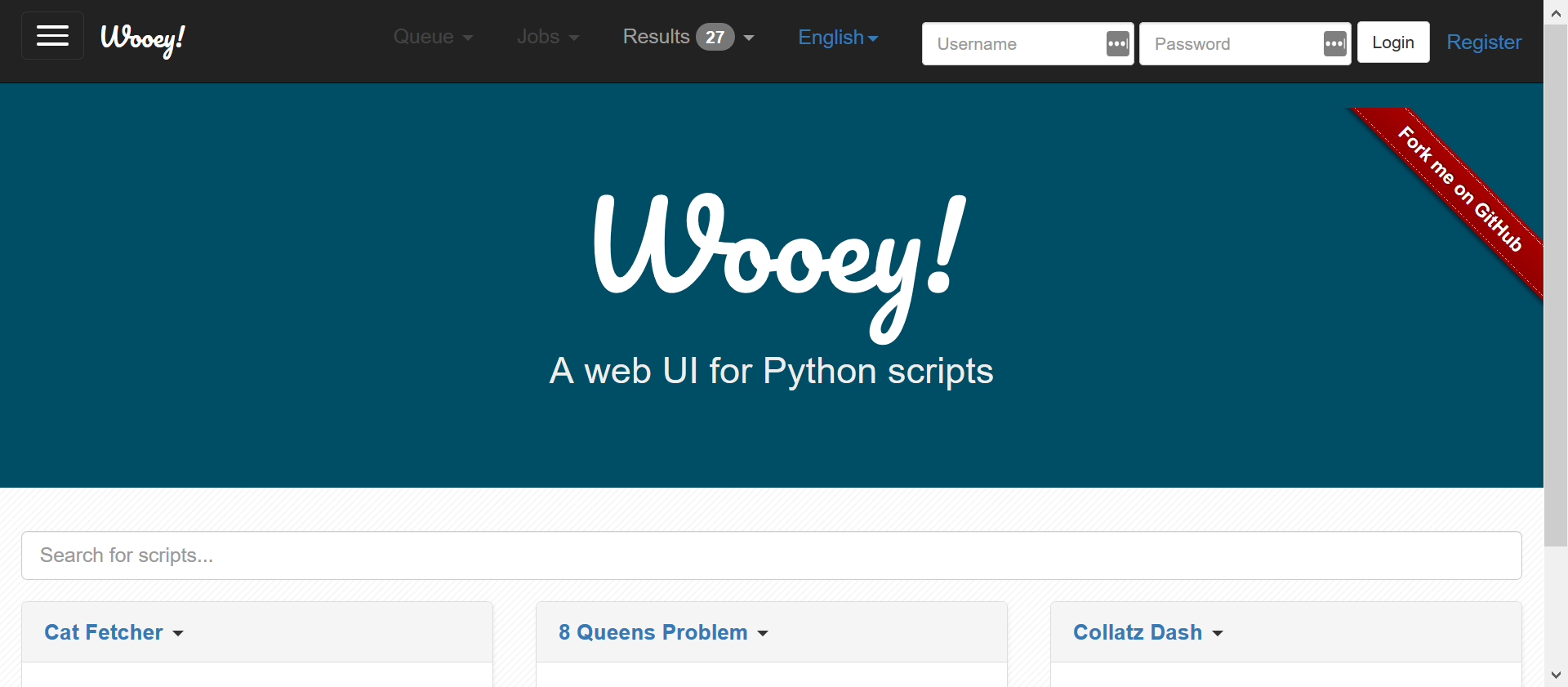](https://github.com/wooey/Wooey)
132 |
133 | ## [Anvil](https://anvil.works/)
134 |
135 | *[https://pythonbytes.fm/episodes/show/106/fluent-query-apis-on-python-collections](https://pythonbytes.fm/episodes/show/106/fluent-query-apis-on-python-collections)*
136 |
137 | Full stack web apps with nothing but `Python`.
138 |
139 | ## [Vue.py](https://github.com/stefanhoelzl/vue.py)
140 |
141 | *[https://pythonbytes.fm/episodes/show/140/becoming-a-10x-developer-sorta](https://pythonbytes.fm/episodes/show/140/becoming-a-10x-developer-sorta)*
142 |
143 | use `Vue.js` with pure `Python`
144 |
145 | `vue.py` provides `Python` bindings for `Vue.js`. It uses `brython` to run `Python` in the browser.
146 |
147 | Live example at: [https://stefanhoelzl.github.io/vue.py/examples/todo_mvc/](https://stefanhoelzl.github.io/vue.py/examples/todo_mvc/)
148 |
149 | [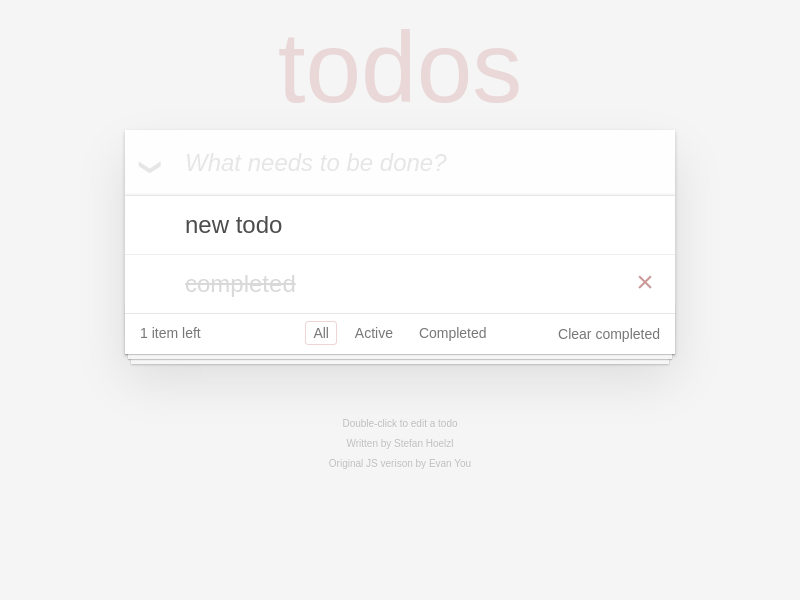](https://github.com/stefanhoelzl/vue.py)
150 |
151 | ## [fastpages](https://github.com/fastai/fastpages)
152 |
153 | **
154 |
155 | An easy to use blogging platform, with enhanced support for Jupyter Notebooks.
156 |
157 | - Uses GitHub actions to Jekyll blog posts on GitHub Pages.
158 | - Create posts with code, output of code, formatted text, directory from Jupyter Notebooks.
159 | - Altair interactive visualizations
160 | - Collapsible code cells that can be open or closed by default.
161 |
162 | 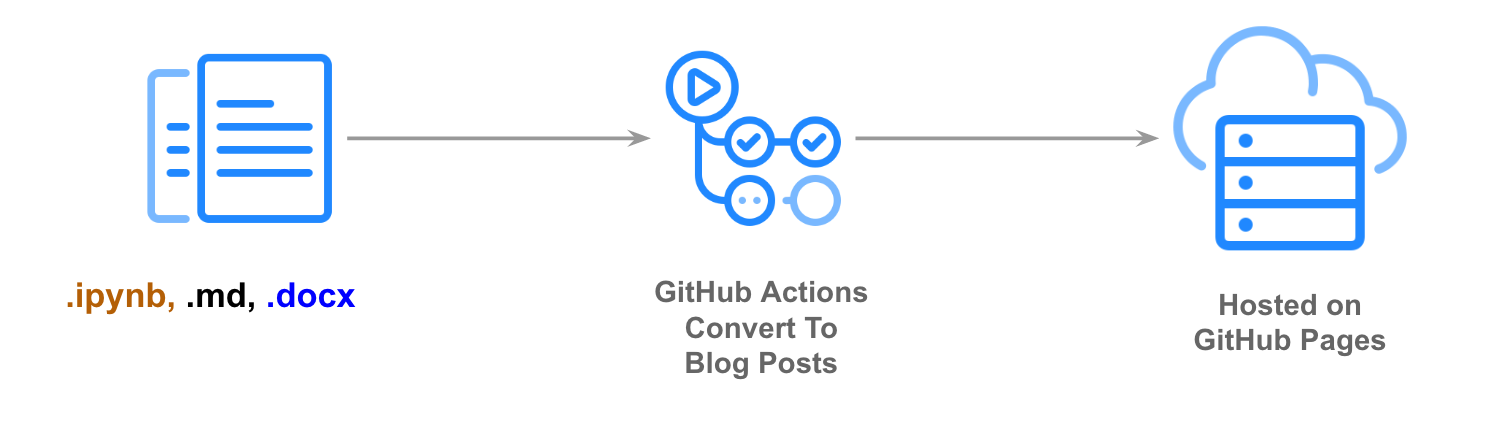
163 |
164 | # Data Science
165 |
166 | ## [D-Tale](https://github.com/man-group/dtale)
167 |
168 | *[https://pythonbytes.fm/episodes/show/169/jupyter-notebooks-natively-on-your-ipad](https://pythonbytes.fm/episodes/show/169/jupyter-notebooks-natively-on-your-ipad)*
169 |
170 | `D-Tale` is a Flask/React client for visualizing pandas data structures. [Live Demo](http://alphatechadmin.pythonanywhere.com/)
171 |
172 | [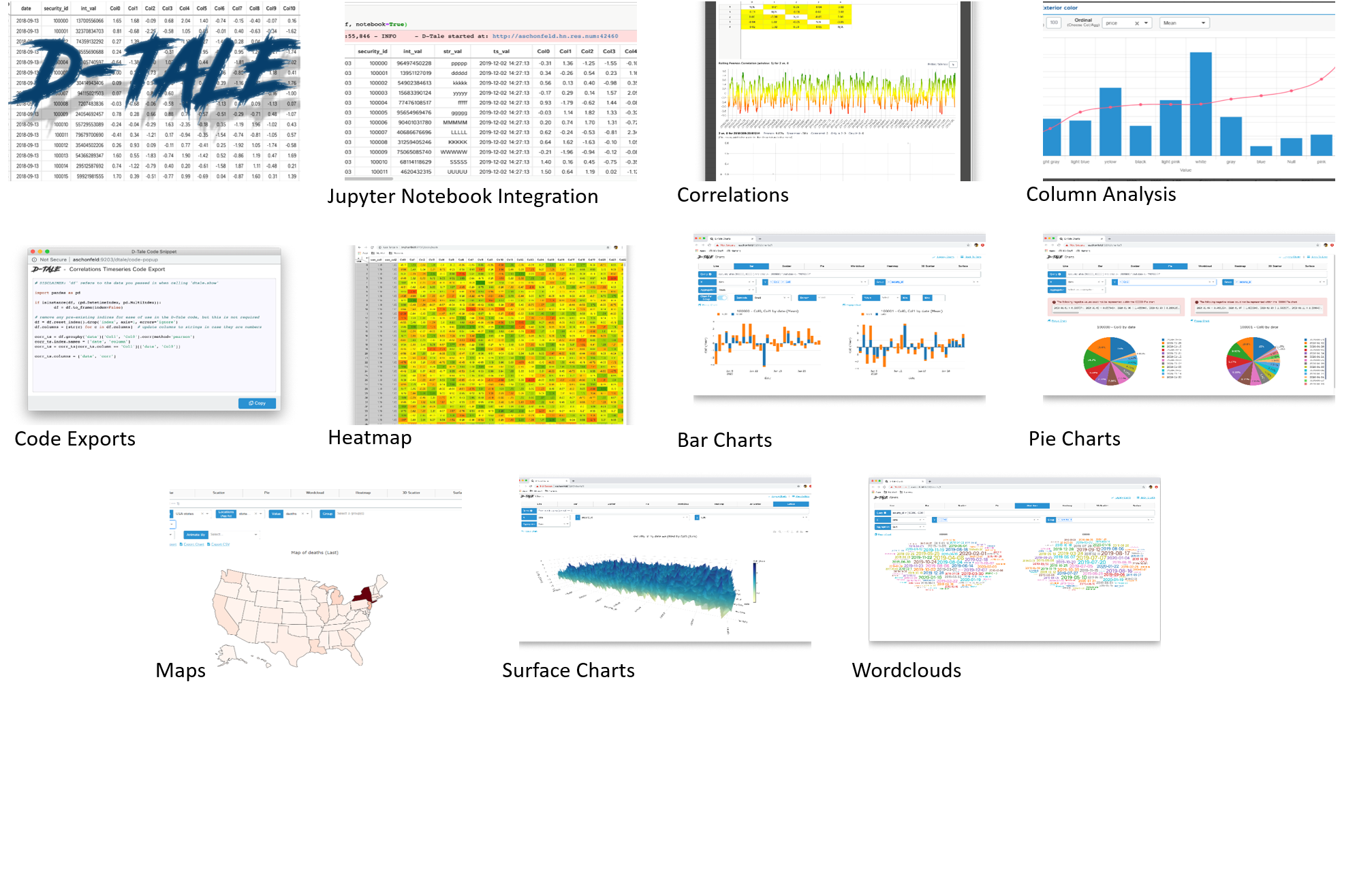](https://github.com/man-group/dtale)
173 |
174 | Why the Deets?
175 |
176 | - Integrates easily into any python console or jupyter notebook
177 | - Works with Google Colab & Kaggle
178 | - Quickly explore large dataframes with our grid using sorting, filtering & show/hide/move columns
179 | - Browse column information & statistics with "Describe"
180 | - View correlation matrices
181 | - Quick histograms, value counts & category breakdowns using "Column Analysis"
182 | - Easy chart builder built on top of plotly/dash (export your charts to take them on the go as well :smile:)
183 |
184 | ## [Great Expectations](https://great-expectations.readthedocs.io/en/latest/)
185 |
186 | *[https://pythonbytes.fm/episodes/show/115/dataclass-csv-reader-and-nina-drops-by](https://pythonbytes.fm/episodes/show/115/dataclass-csv-reader-and-nina-drops-by)*
187 |
188 | `Great Expectations` is a leading tool for validating, documenting, and profiling, your data to maintain quality and improve communication between teams.
189 |
190 | ## [PDF Plumber](https://github.com/jsvine/pdfplumber)
191 |
192 | *[https://pythonbytes.fm/episodes/show/26/how-have-you-automated-your-life-or-cli-with-python](https://pythonbytes.fm/episodes/show/26/how-have-you-automated-your-life-or-cli-with-python)*
193 |
194 | Plumb a PDF for detailed information about each char, rectangle, line, et cetera — and easily extract text and tables.
195 |
196 | [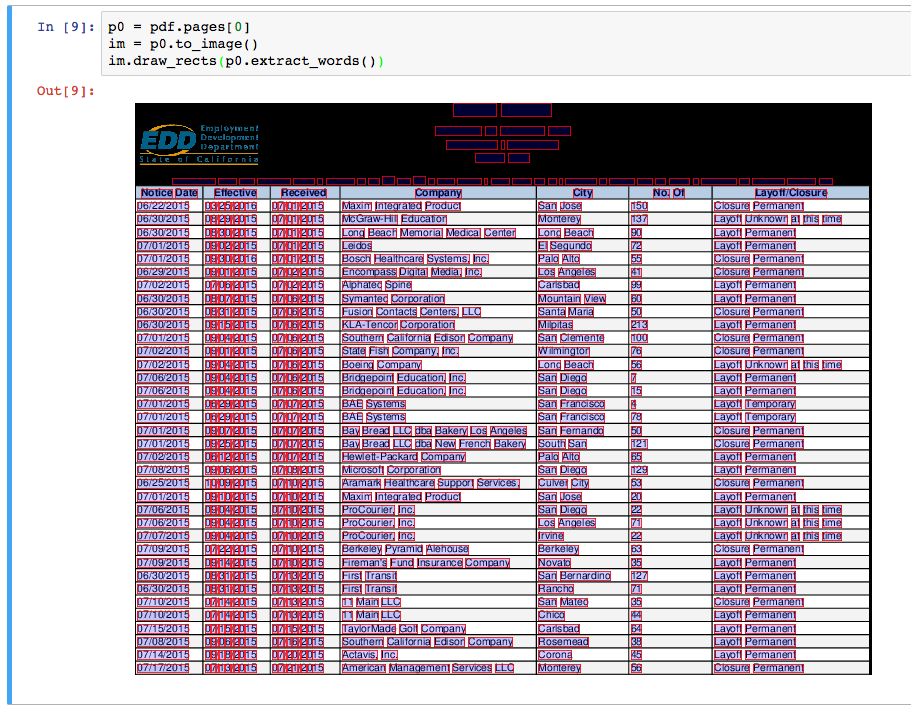](https://github.com/jsvine/pdfplumber)
197 |
198 | ## [PyJanitor](https://pyjanitor.readthedocs.io/)
199 |
200 | *[https://pythonbytes.fm/episodes/show/108/spilled-data-call-the-pyjanitor](https://pythonbytes.fm/episodes/show/108/spilled-data-call-the-pyjanitor)*
201 |
202 | `pyjanitor` is a project that extends Pandas with a verb-based API, providing convenient data cleaning routines for repetitive tasks.
203 |
204 | ## [Pandas Vet](https://github.com/deppen8/pandas-vet)
205 |
206 | *[https://pythonbytes.fm/episodes/show/167/cheating-at-kaggle-and-uwsgi-in-prod](https://pythonbytes.fm/episodes/show/167/cheating-at-kaggle-and-uwsgi-in-prod)*
207 |
208 | `pandas-vet` is a plugin for `flake8` that provides opinionated linting for pandas code.
209 |
210 | ## [NB2XLS](https://github.com/ideonate/nb2xls)
211 |
212 | *[https://github.com/ideonate/nb2xls](https://github.com/ideonate/nb2xls)*
213 |
214 | Convert `Jupyter` notebooks to Excel Spreadsheets (xlsx), through a new 'Download As' option or via `nbconvert` on the command line.
215 |
216 | [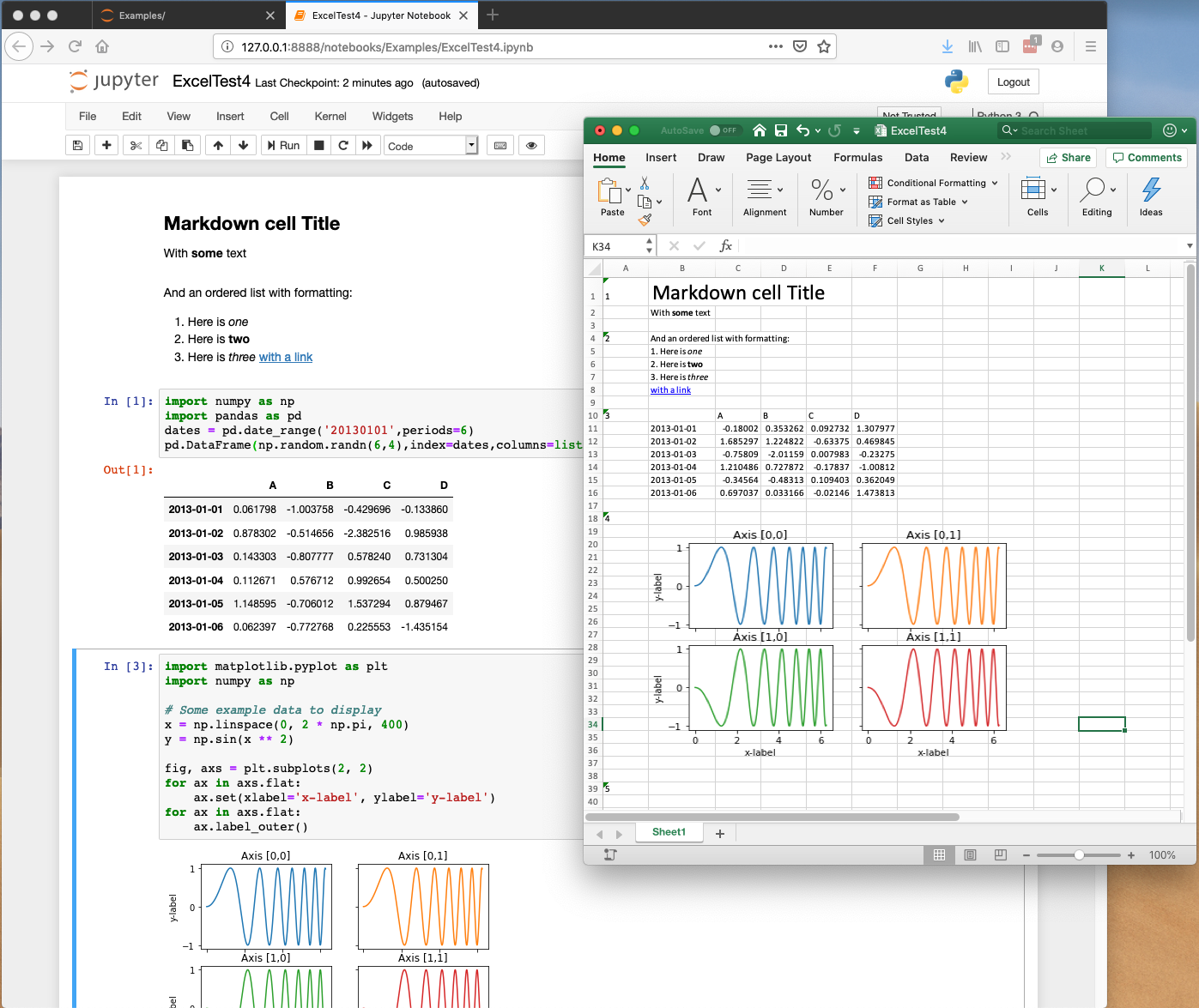](https://github.com/ideonate/nb2xls)
217 |
218 | ## [pylightxl](https://github.com/PydPiper/pylightxl)
219 |
220 | *[https://pythonbytes.fm/episodes/show/165/ranges-as-dictionary-keys-oh-my](https://pythonbytes.fm/episodes/show/165/ranges-as-dictionary-keys-oh-my)*
221 |
222 | A light weight, zero dependency (only standard libs used), to the point (no bells and whistles) Microsoft Excel reader/writer python 2.7-3+ library.
223 |
224 | [](https://github.com/PydPiper/pylightxl)
225 |
226 | Why pylightxl over pandas/openpyxl
227 |
228 | - (compatibility +1, small lib +1) pylightxl has no external dependencies (only uses python built-in standard libs).
229 | (compatibility +1) pylightxl was written to be compatible for python 2.7-3+ under one single pylightxl version. It does not impose rules on users to switch versions.
230 | - (small lib +1) pylightxl was written to simply read/write, thereby making the library small without any bells or whistles which makes it easy to compile with PyInstaller and other packagers
231 | - (user friendly +1) pylightxl was written to be as pythonic and easy to use as possible. Core developers actively survey Stack Overflow questions on working with excel files to tailor the API for most common problems.
232 | - (see xlrd before pylightxl) Note that the xlrd library is very similar in values to pylightxl, but with much more functionality! Please take a look at xlrd to see if it is a good fit for your project. So why pick pylightxl over xlrd that has much more to offer? Currently, xlrd does not have any active developers. Pylightxl is a new library aimed to help solve current excel data issues (as surveyed by Stack Overflow), please submit your suggestions to help improve this library together.
233 |
234 | ## [Streamlit](https://www.streamlit.io/)
235 |
236 | **
237 |
238 | The fastest way to build data apps.
239 |
240 | Streamlit’s open-source app framework is the easiest way for data scientists and machine learning engineers to create beautiful, performant apps in only a few hours! All in pure Python. All for free.
241 |
242 | [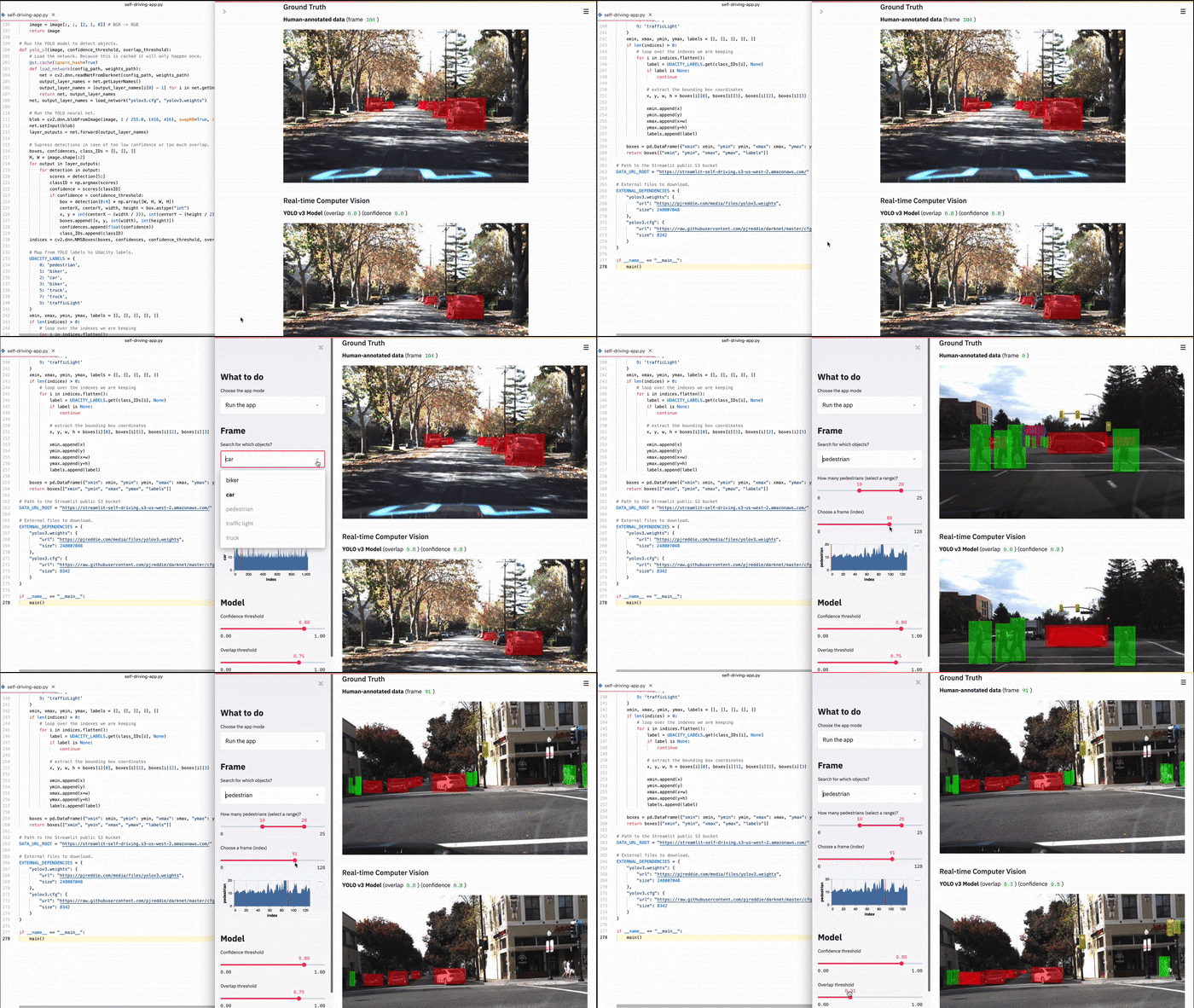](https://www.streamlit.io/)
243 |
244 | ## [Mimesis](https://mimesis.name/)
245 |
246 | Mimesis is fast and extremely easy to use Python package, which helps generate big volumes of fake data for a variety of purposes in a variety of languages.
247 |
248 | The fake data can be particularly useful during software development and testing. For example, it could be used to populate a testing database, create beautiful JSON and XML files, anonymize data taken from a production service and etc.
249 |
250 | ## [SideTable](https://pbpython.com/sidetable.html)
251 |
252 | **
253 |
254 | Makes it easy to build a frequency table and simple summary of missing values in a DataFrame. A useful tool when starting data exploration on a new data set
255 | At its core, `sidetable` is a super-charged version of pandas `value_counts` with a little bit of `crosstab` mixed in. With `sidetable` is imported, you have a new accessor on all your DataFrames - `stb` that you can use to build summary tables.
256 |
257 | [](https://pbpython.com/sidetable.html)
258 |
259 | ## [Tabulate](https://github.com/astanin/python-tabulate)
260 |
261 | **
262 |
263 | Pretty-print tabular data in Python, a library and a command-line utility.
264 |
265 | ``` python
266 | from tabulate import tabulate
267 |
268 | table = [["Sun",696000,1989100000],
269 | ["Earth",6371,5973.6],
270 | ["Moon",1737,73.5],
271 | ["Mars",3390,641.85]]
272 | headers=["Planet","R (km)", "mass (x 10^29 kg)"]
273 | table_str = tabulate(table, headers=headers)
274 | print(table_str)
275 | ```
276 |
277 | ``` bash
278 | Planet R (km) mass (x 10^29 kg)
279 | -------- -------- -------------------
280 | Sun 696000 1.9891e+09
281 | Earth 6371 5973.6
282 | Moon 1737 73.5
283 | Mars 3390 641.85
284 | ```
285 |
286 | ## [DVC](https://dvc.org/)
287 |
288 | **
289 |
290 | Data Version Control (DVC) tracks machine learning models and data sets.
291 |
292 | DVC is built to make machine learning models shareable and reproducible. It is designed to handle large files, data sets, machine learning models, and metrics as well as code.
293 |
294 | [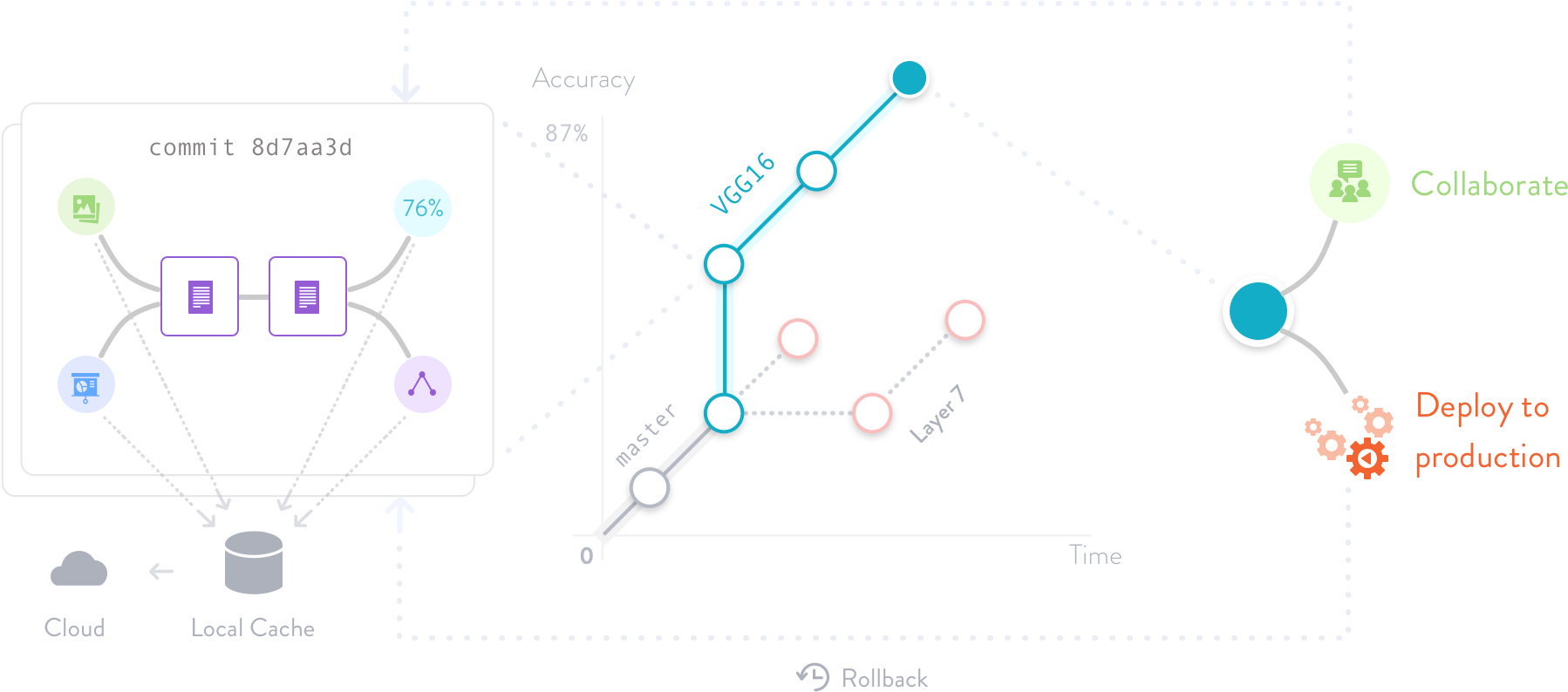](https://dvc.org/)
295 |
296 | ## [Moving Pandas](https://anitagraser.github.io/movingpandas/)
297 |
298 | **
299 |
300 | MovingPandas is a Python library for handling movement data based on Pandas and GeoPandas. It provides trajectory data structures and functions for analysis and visualization.
301 |
302 | [](https://anitagraser.github.io/movingpandas/)
303 |
304 | ## [visidata](https://www.visidata.org/)
305 |
306 | **
307 |
308 | VisiData is an interactive multitool for tabular data. It combines the clarity of a spreadsheet, the efficiency of the terminal, and the power of Python, into a lightweight utility which can handle millions of rows with ease.
309 |
310 | [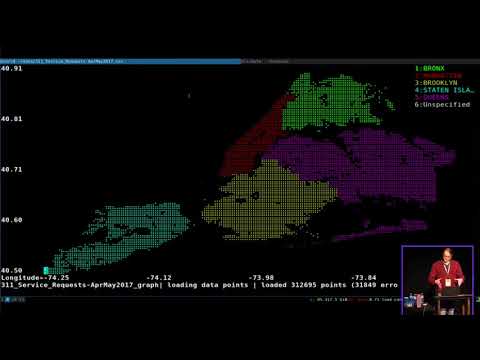](https://www.youtube.com/watch?v=N1CBDTgGtOU "VisiData Lightning Demo at PyCascades 2018")
311 |
312 | # Data Visualization
313 |
314 | ## [Pylustrator](https://pylustrator.readthedocs.io/en/latest/)
315 |
316 | *[https://pythonbytes.fm/episodes/show/137/advanced-python-testing-and-big-time-diffs](https://pythonbytes.fm/episodes/show/137/advanced-python-testing-and-big-time-diffs)*
317 |
318 | `Pylustrator` offers an interactive interface to find the best way to present your data in a figure for publication. Added formatting an styling can be saved by automatically generated code. To compose multiple figures to panels, pylustrator can compose different subfigures to a single figure.
319 |
320 | [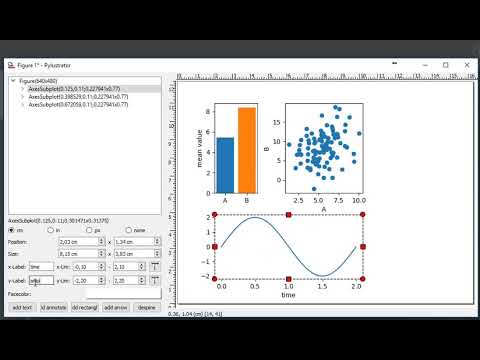](https://www.youtube.com/watch?v=xXPI4LLrNuM "pylustrator demonstration")
321 |
322 | ## [Chartify](https://github.com/spotify/chartify)
323 |
324 | *[https://pythonbytes.fm/episodes/show/109/cpython-byte-code-explorer](https://pythonbytes.fm/episodes/show/109/cpython-byte-code-explorer)*
325 |
326 | `Chartify` is a `Python` library that makes it easy for data scientists to create charts.
327 |
328 | [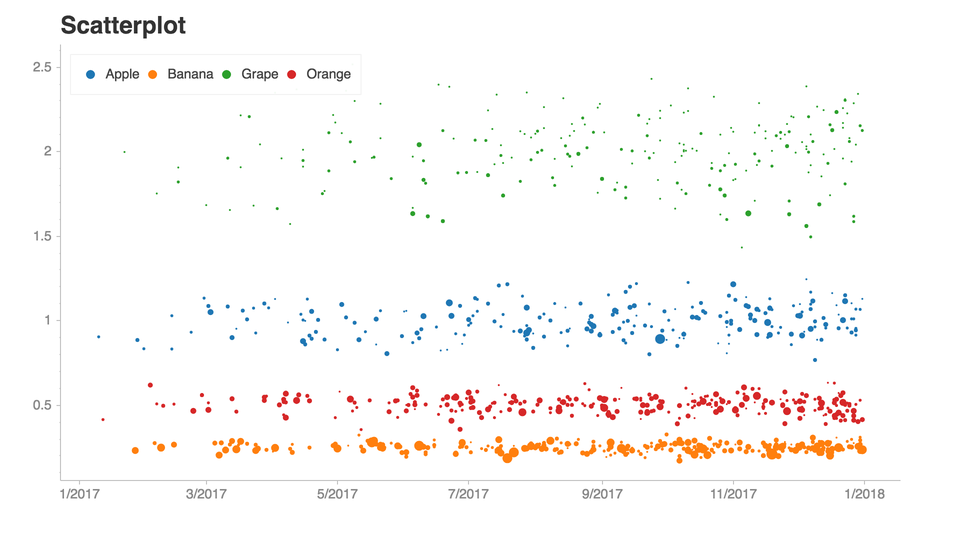](https://github.com/spotify/chartify)
329 |
330 | ## [PandasBokeh](https://github.com/PatrikHlobil/Pandas-Bokeh)
331 |
332 | **
333 |
334 | Pandas-Bokeh provides a Bokeh plotting backend for Pandas, GeoPandas and Pyspark DataFrames, similar to the already existing Visualization feature of Pandas. Importing the library adds a complementary plotting method `plot_bokeh()` on DataFrames and Series.
335 |
336 | With Pandas-Bokeh, creating stunning, interactive, HTML-based visualization is as easy as calling:
337 |
338 | ``` python
339 | df.plot_bokeh()
340 | ```
341 |
342 | [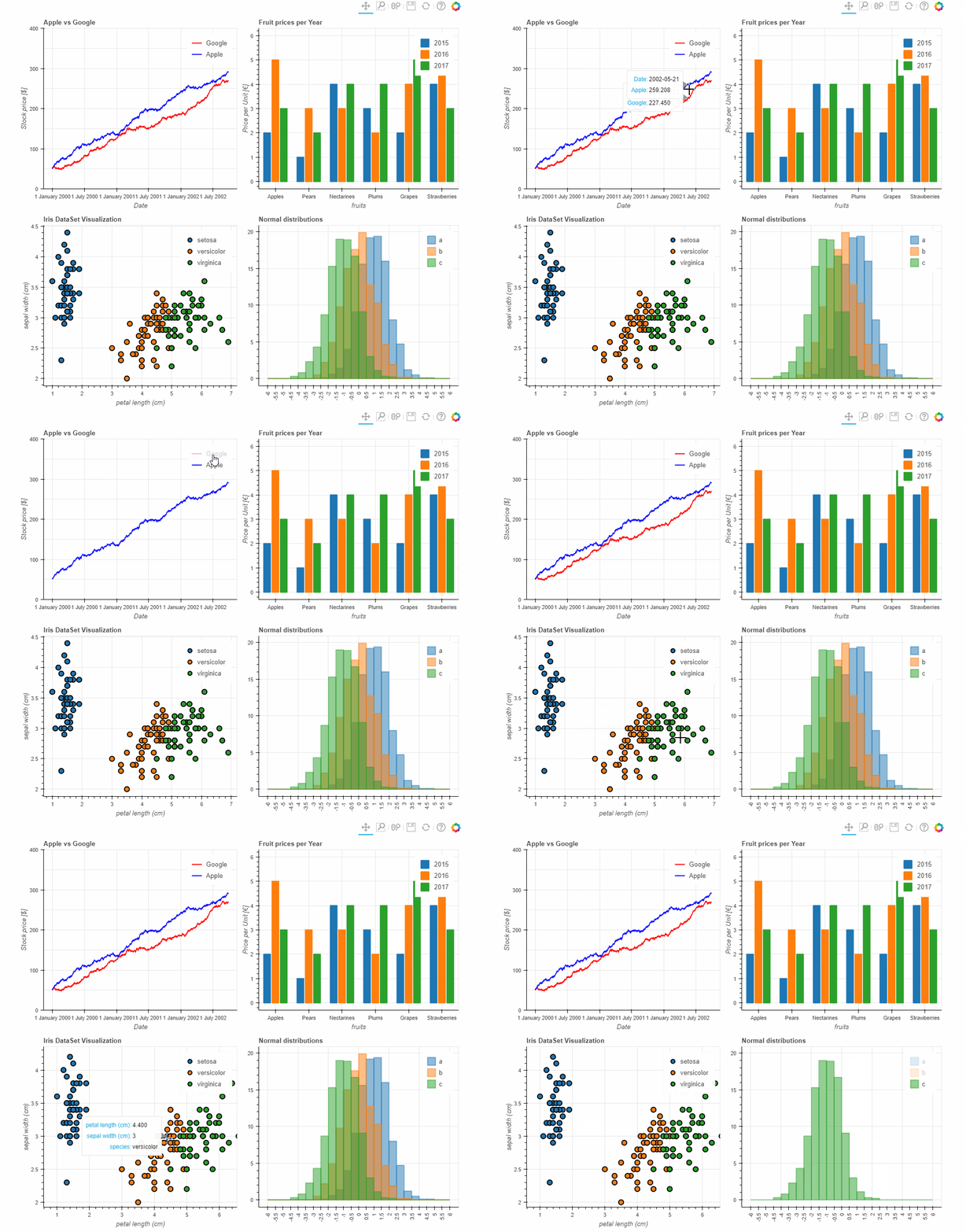](https://github.com/PatrikHlobil/Pandas-Bokeh)
343 |
344 | ## [Missingno](https://github.com/ResidentMario/missingno)
345 |
346 | **
347 |
348 | Messy data sets? Missing values? `missingno` provides a small tool set of flexible and easy-to-use missing data visualizations and utilities that allows you to get a quick visual summary of the completeness (or lack thereof) of your data set. Just pip install `missingno` to get started.
349 |
350 | [](https://github.com/ResidentMario/missingno)
351 |
352 | ## [HoloViz](https://holoviz.org/)
353 |
354 | **
355 |
356 | HoloViz is a coordinated effort to make browser-based data visualization in Python easier to use, easier to learn, and more powerful.
357 |
358 | [](https://holoviz.org/tutorial/index.html)
359 |
360 | ## [Awesome Panel](https://github.com/MarcSkovMadsen/awesome-panel)
361 |
362 | **
363 |
364 | Panel is announced as a high-level app and dashboarding solution for Python. I think the terms powerful and full of features should be added to that.
365 |
366 | The purpose of the Awesome Panel Project is to share knowledge on how Awesome Panel is and can become.
367 |
368 | [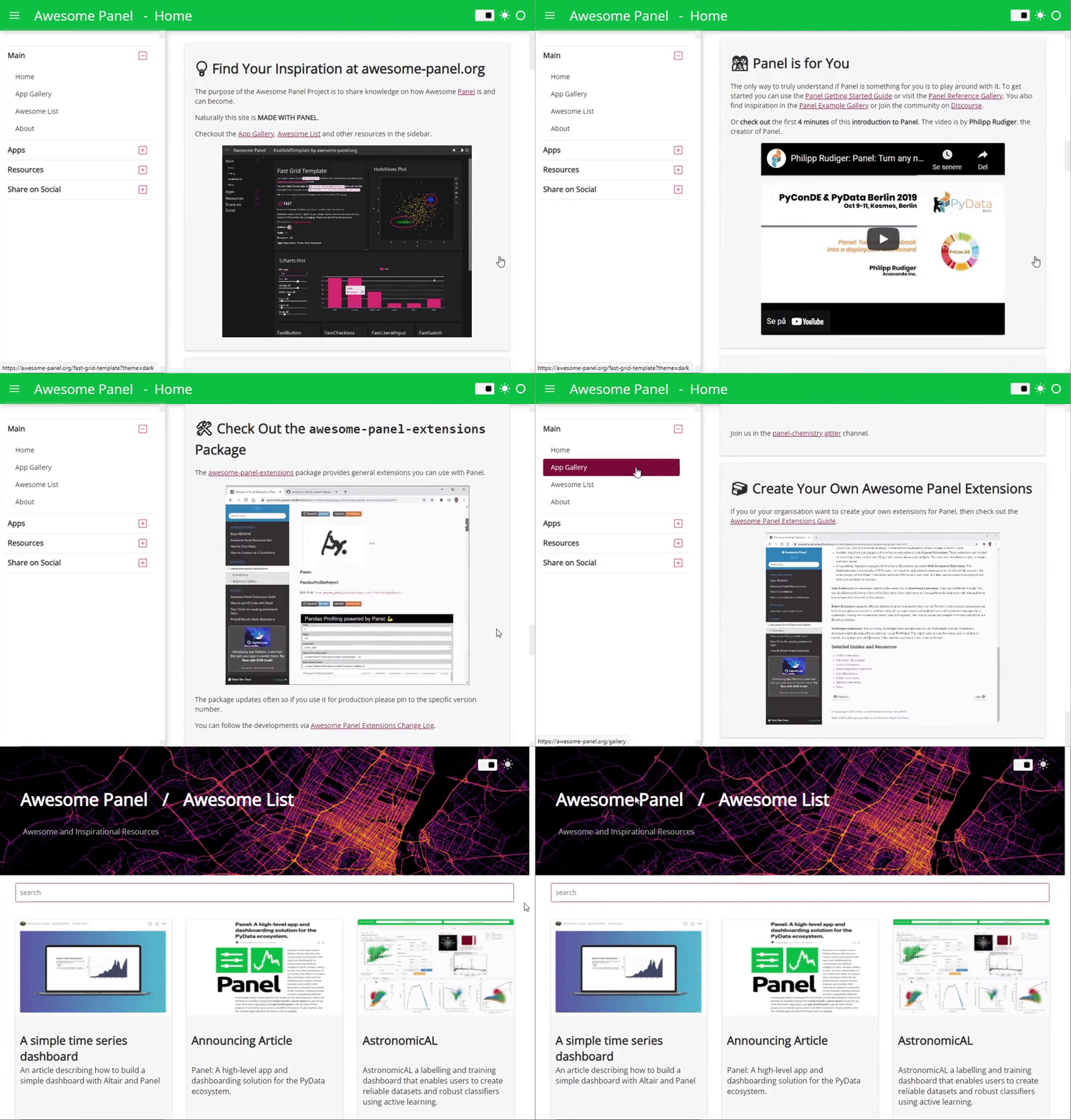](https://github.com/MarcSkovMadsen/awesome-panel)
369 |
370 | ## [Datapane](https://datapane.com/)
371 |
372 | **
373 |
374 | Datapane is an open source framework which makes it easy to turn scripts and notebooks into interactive reports.
375 |
376 | Examples gallery at:
377 |
378 | ## [Pandas_Alive](https://github.com/JackMcKew/pandas_alive)
379 |
380 | **
381 |
382 | `Pandas_Alive` is intended to provide a plotting backend for animated matplotlib charts for Pandas DataFrames, similar to the already existing Visualization feature of Pandas.
383 |
384 | With `Pandas_Alive`, creating stunning, animated visualisations is as easy as calling:
385 |
386 | ``` python
387 | df.plot_animated()
388 | ```
389 |
390 | [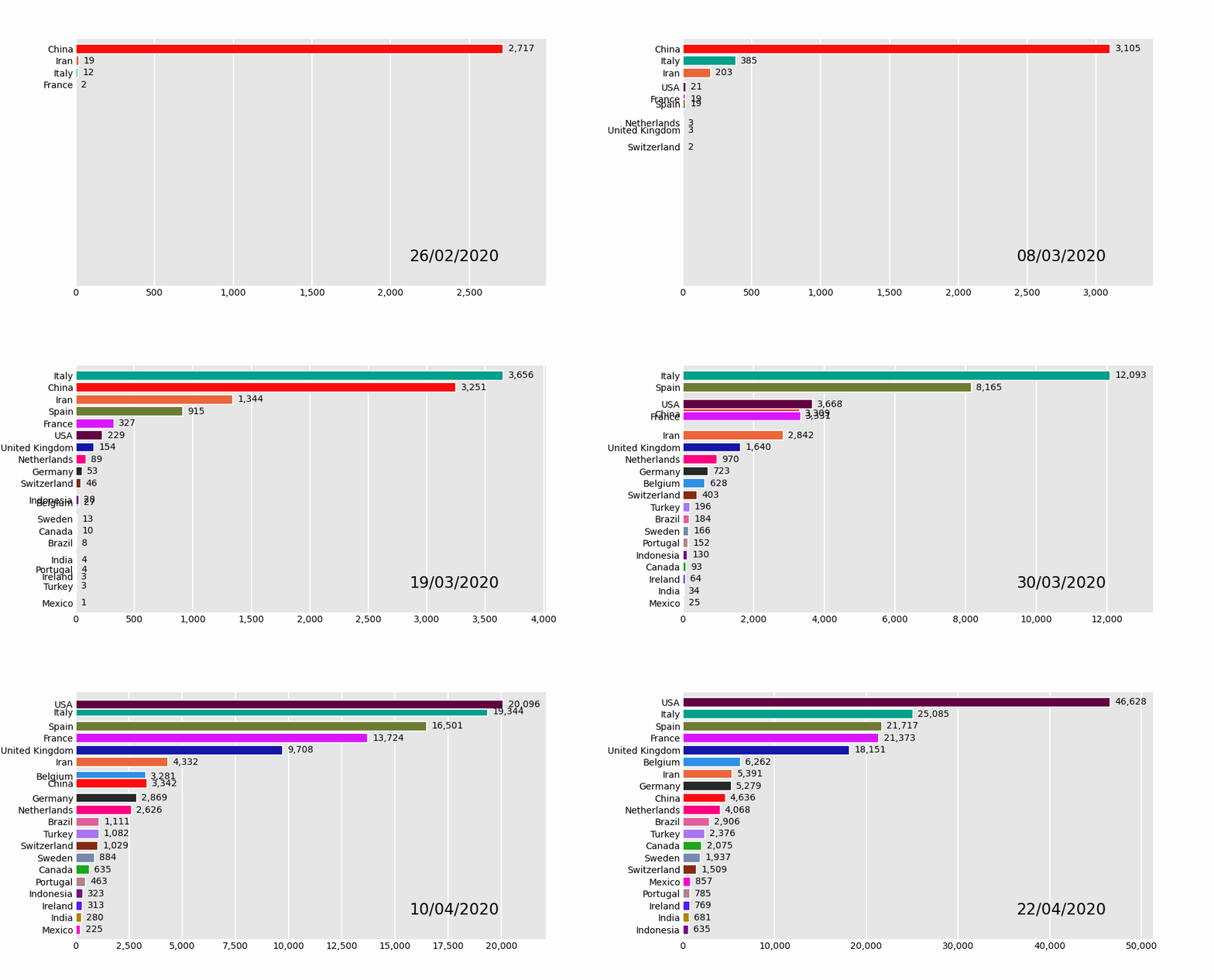](https://github.com/JackMcKew/pandas_alive)
391 |
392 | # Machine Learning
393 |
394 | ## [PyTorch](https://github.com/pytorch/pytorch)
395 |
396 | *[https://pythonbytes.fm/episodes/show/80/dan-bader-drops-by-and-we-found-30-new-python-projects](https://pythonbytes.fm/episodes/show/80/dan-bader-drops-by-and-we-found-30-new-python-projects)*
397 |
398 | Tensors and Dynamic neural networks in `Python` with strong GPU acceleration
399 |
400 | ## [Yellow Brick](https://www.scikit-yb.org/en/latest/)
401 |
402 | *[https://pythonbytes.fm/episodes/show/74/contributing-to-open-source-effectively](https://pythonbytes.fm/episodes/show/74/contributing-to-open-source-effectively)*
403 |
404 | `Yellowbrick` extends the `Scikit-Learn` API to make model selection and hyperparameter tuning easier. Under the hood, it’s using `Matplotlib`.
405 |
406 | [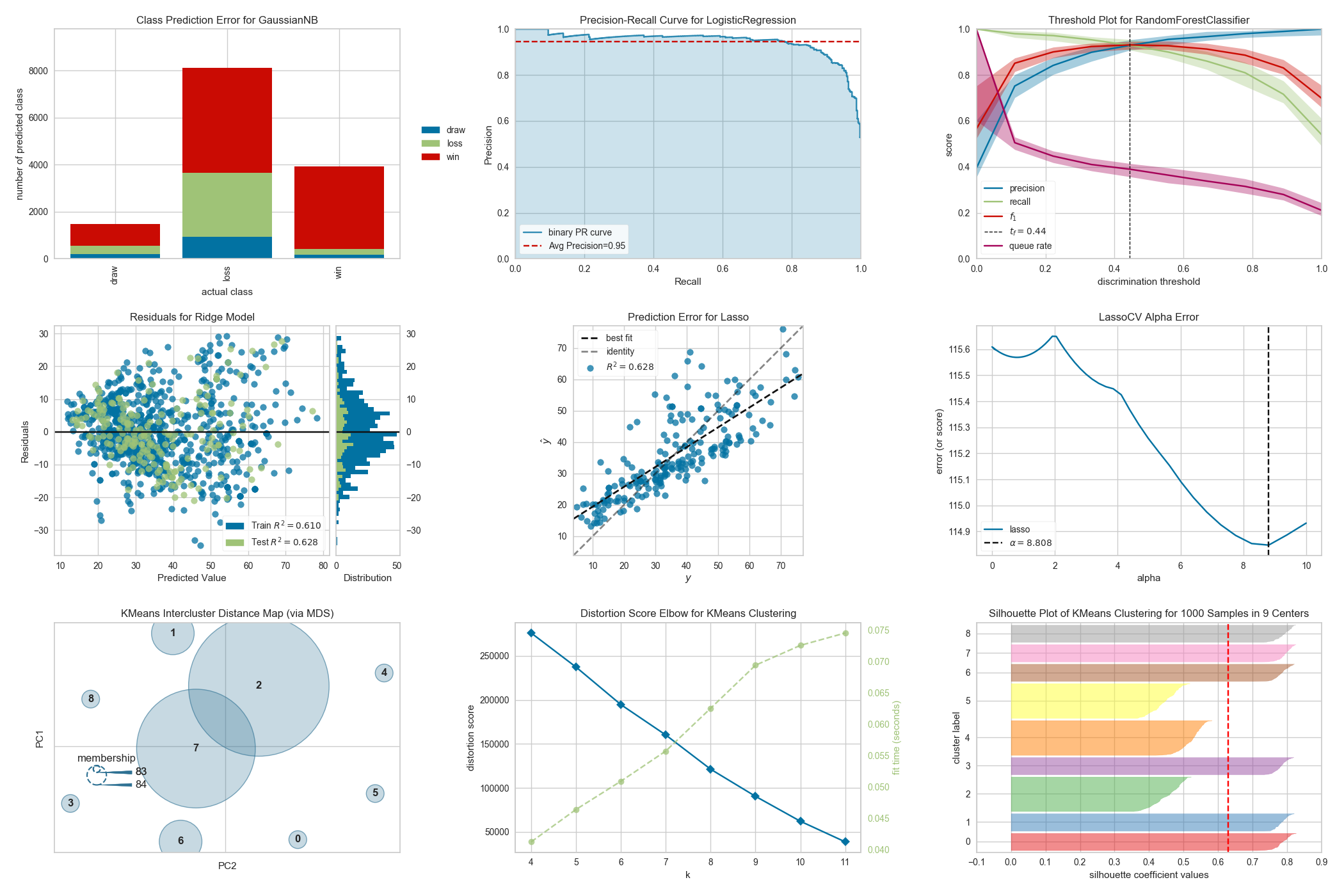](https://www.scikit-yb.org/en/latest/)
407 |
408 | ## [Thinc](https://thinc.ai/)
409 |
410 | *[https://pythonbytes.fm/episodes/show/167/cheating-at-kaggle-and-uwsgi-in-prod](https://pythonbytes.fm/episodes/show/167/cheating-at-kaggle-and-uwsgi-in-prod)*
411 |
412 | A refreshing functional take on deep learning, compatible with your favorite libraries.
413 | From the makers of `spaCy`, `Prodigy` & `FastAPI`
414 |
415 | ## [TextAttack](https://github.com/QData/TextAttack)
416 |
417 | **
418 |
419 | Python framework for adversarial attacks and data augmentation for natural language processing
420 |
421 | [](https://github.com/QData/TextAttack)
422 |
423 | # Databases
424 |
425 | ## [GeoAlchemy](https://geoalchemy-2.readthedocs.io/en/latest/)
426 |
427 | *[https://pythonbytes.fm/episodes/show/77/you-don-t-have-to-be-a-workaholic-to-win](https://pythonbytes.fm/episodes/show/77/you-don-t-have-to-be-a-workaholic-to-win)*
428 |
429 | Using `SQLAlchemy` with Spatial Databases.
430 |
431 | `GeoAlchemy 2` provides extensions to `SQLAlchemy` for working with spatial databases.
432 |
433 | `GeoAlchemy 2` focuses on `PostGIS`. `PostGIS 1.5` and `PostGIS 2` are supported.
434 |
435 | ## [BeeKeeper Studio Open Source SQL Editor and Database Manager](https://www.beekeeperstudio.io/)
436 |
437 | Use Beekeeper Studio to query and manage your relational databases, like MySQL, Postgres, SQLite, and SQL Server. Runs on all the things (Windows, Linux, macOS).
438 |
439 | Features:
440 |
441 | - Auto complete SQL query editor with syntax highlighting
442 | - Tabbed interface, so you can multitask
443 | - Sort and filter table data to find just what you need
444 | - Sensible keyboard-shortcuts
445 | - Save queries for later
446 | - Query run-history, so you can find that one query you got working 3 days ago
447 | - Default dark theme
448 |
449 | 
450 |
451 | # Command Line Interfaces (CLIs)
452 |
453 | ## [Python Fire](https://github.com/google/python-fire)
454 |
455 | *[https://pythonbytes.fm/episodes/show/17/google-s-python-is-on-fire-and-simon-says-you-have-cpu-load-pythonically](https://pythonbytes.fm/episodes/show/17/google-s-python-is-on-fire-and-simon-says-you-have-cpu-load-pythonically)*
456 |
457 | `Python Fire` is a library for automatically generating command line interfaces (CLIs) from absolutely any `Python` object.
458 |
459 | ## [Clize](https://clize.readthedocs.io/en/stable/)
460 |
461 | *[https://pythonbytes.fm/episodes/show/167/cheating-at-kaggle-and-uwsgi-in-prod](https://pythonbytes.fm/episodes/show/167/cheating-at-kaggle-and-uwsgi-in-prod)*
462 |
463 | `Clize` is an argument parser for `Python`. You can use `Clize` as an alternative to `argparse` if you want an even easier way to create command-line interfaces.
464 |
465 | ## [Typer](https://typer.tiangolo.com/)
466 |
467 | *[https://pythonbytes.fm/episodes/show/164/use-type-hints-to-build-your-next-cli-app](https://pythonbytes.fm/episodes/show/164/use-type-hints-to-build-your-next-cli-app)*
468 |
469 | `Typer`, build great CLIs. Easy to code. Based on `Python` type hints.
470 |
471 | ## [Rich](https://github.com/willmcgugan/rich)
472 |
473 | *[https://pythonbytes.fm/episodes/show/176/how-python-implements-super-long-integers](https://pythonbytes.fm/episodes/show/176/how-python-implements-super-long-integers)*
474 |
475 | Rich is a Python library for rich text and beautiful formatting in the terminal.
476 |
477 | [](https://github.com/willmcgugan/rich)
478 |
479 | ## [invoke](http://pyinvoke.org/)
480 |
481 | *[https://pythonbytes.fm/episodes/show/188/will-there-be-a-switch-in-python-the-language](https://pythonbytes.fm/episodes/show/188/will-there-be-a-switch-in-python-the-language)*
482 |
483 | `invoke` is a task execution tool & library. Replacement for Makefiles.
484 |
485 | # Graphical User Interfaces (GUIs)
486 |
487 | ## [Gooey](https://github.com/chriskiehl/Gooey)
488 |
489 | *[https://pythonbytes.fm/episodes/show/62/wooey-and-gooey-are-simple-python-guis](https://pythonbytes.fm/episodes/show/62/wooey-and-gooey-are-simple-python-guis)*
490 |
491 | I personally love `Gooey` and have it installed in almost every project lately. `Gooey` turns (almost) any `Python` command line program into a full GUI application with one line.
492 |
493 | I have also done a tutorial blog post on Gooey as well at: [https://jackmckew.dev/making-executable-guis-with-python-gooey-pyinstaller.html](https://jackmckew.dev/making-executable-guis-with-python-gooey-pyinstaller.html#making-executable-guis-with-python-gooey-pyinstaller)
494 |
495 | [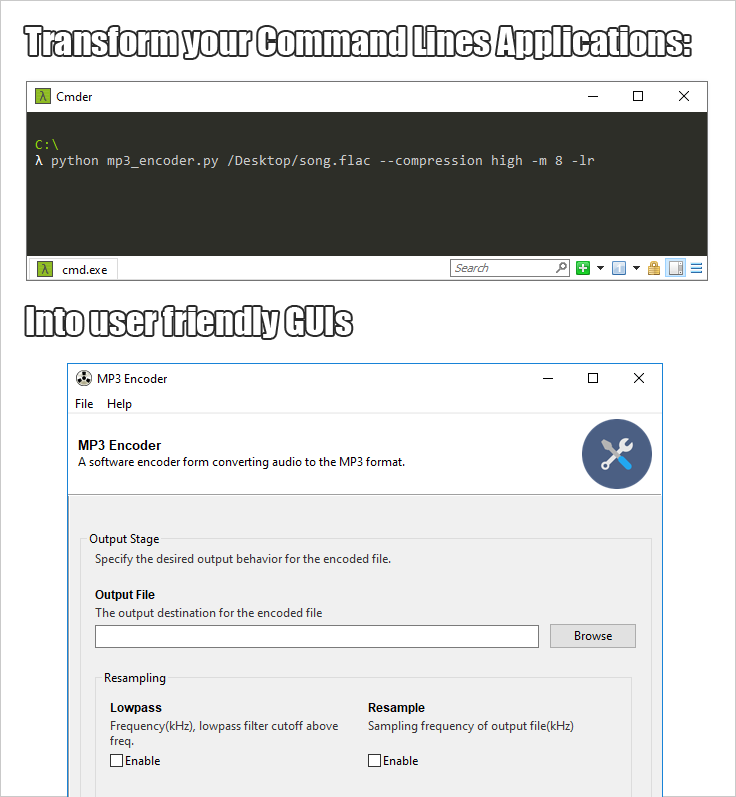](https://github.com/chriskiehl/Gooey)
496 |
497 | ## [Eel GUI](https://github.com/samuelhwilliams/Eel)
498 |
499 | *[https://pythonbytes.fm/episodes/show/61/on-being-a-senior-engineer](https://pythonbytes.fm/episodes/show/61/on-being-a-senior-engineer)*
500 |
501 | `Eel` is a little `Python` library for making simple Electron-like offline HTML/JS GUI apps, with full access to `Python` capabilities and libraries.
502 |
503 | [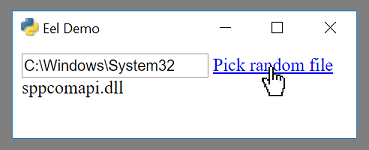](https://github.com/samuelhwilliams/Eel)
504 |
505 | ## [PySimpleGUI](https://github.com/PySimpleGUI/PySimpleGUI)
506 |
507 | *[https://pythonbytes.fm/episodes/show/90/a-django-async-roadmap](https://pythonbytes.fm/episodes/show/90/a-django-async-roadmap)*
508 |
509 | *[https://pythonbytes.fm/episodes/show/104/api-evolution-the-right-way](https://pythonbytes.fm/episodes/show/104/api-evolution-the-right-way)*
510 |
511 | PySimpleGUI enables anyone with a week of PySimpleGUI education or more to develop an entirely custom desktop GUI application. The underlying GUI frameworks supported include tkinter, Qt, WxPython and Remi. PySimpleGUI code can be run on any of these underlying frameworks with little or often no modification to the source code.
512 |
513 | Unlike other simplified GUI packages, PySimpleGUI has a rich palette of widgets that are not dumbed down and can be assembled into any configuration desired, resulting in applications that look and operate as if written directly in tkinter, Qt, etc. Simple defines the ease of writing the programs, not the class of problems that are capable of being solved. 100's of demo programs are provided to give programmers a jump start on integrating with other packages such as OpenCV, Matplotlib. There are over 500 GitHub projects currently using PySimpleGUI.
514 |
515 | A couple recent projects include:
516 |
517 | A series of Rainmeter-style "Desktop Widgets":
518 |
519 | [](https://github.com/PySimpleGUI/PySimpleGUI-Widgets)
520 |
521 | A photo and video colorizer:
522 |
523 | [](https://github.com/PySimpleGUI/PySimpleGUI-Photo-Colorizer)
524 |
525 | ## [QUICK](https://github.com/szsdk/quick)
526 |
527 | *[https://pythonbytes.fm/episodes/show/166/misunderstanding-software-clocks-and-time](https://pythonbytes.fm/episodes/show/166/misunderstanding-software-clocks-and-time)*
528 |
529 | A real quick GUI generator for `click`. Inspired by `Gooey`, the GUI generator for classical `Python` `argparse`-based command line programs.
530 |
531 | [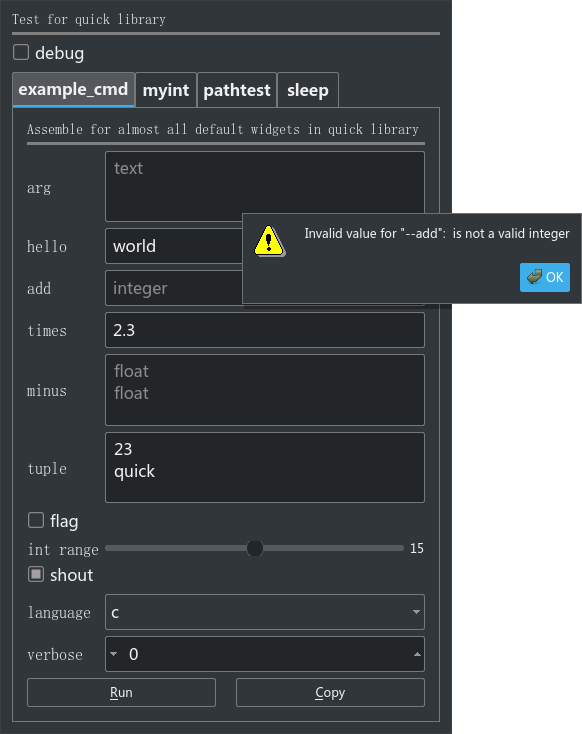](https://github.com/szsdk/quick)
532 |
533 | # Python Development
534 |
535 | ## [Attrs](https://github.com/python-attrs/attrs)
536 |
537 | *[https://pythonbytes.fm/episodes/show/11/django-2.0-is-dropping-python-2-entirely-pipenv-for-profile-functionality-and-pythonic-home-automation](https://pythonbytes.fm/episodes/show/11/django-2.0-is-dropping-python-2-entirely-pipenv-for-profile-functionality-and-pythonic-home-automation)*
538 |
539 | `Python` Classes Without Boilerplate
540 |
541 | ## [PyOxidizer](https://github.com/indygreg/PyOxidizer)
542 |
543 | *[https://pythonbytes.fm/episodes/show/114/what-should-be-in-the-python-standard-library](https://pythonbytes.fm/episodes/show/114/what-should-be-in-the-python-standard-library)*
544 |
545 | `PyOxidizer` is a utility for producing binaries that embed `Python`. The over-arching goal of `PyOxidizer` is to make complex packaging and distribution problems simple so application maintainers can focus on building applications instead of toiling with build systems and packaging tools.
546 |
547 | ## [Python Date Utils](https://dateutil.readthedocs.io/en/stable/)
548 |
549 | *[https://pythonbytes.fm/episodes/show/136/a-python-kernel-rather-than-cleaning-the-batteries](https://pythonbytes.fm/episodes/show/136/a-python-kernel-rather-than-cleaning-the-batteries)*
550 |
551 | The `dateutil` module provides powerful extensions to the standard datetime module, available in `Python`.
552 |
553 | ## [Pycel](https://github.com/dgorissen/pycel)
554 |
555 | *[https://pythonbytes.fm/episodes/show/171/chilled-out-python-decorators-with-pep-614](https://pythonbytes.fm/episodes/show/171/chilled-out-python-decorators-with-pep-614)*
556 |
557 | A library for compiling excel spreadsheets to `Python` code & visualizing them as a graph
558 |
559 | ## [PyDantic](https://pydantic-docs.helpmanual.io/)
560 |
561 | *[https://pythonbytes.fm/episodes/show/174/happy-developers-use-python-3](https://pythonbytes.fm/episodes/show/174/happy-developers-use-python-3)*
562 |
563 | Data validation and settings management using python type annotations.
564 |
565 | ## [Dacite](https://github.com/konradhalas/dacite)
566 |
567 | *[https://pythonbytes.fm/episodes/show/174/happy-developers-use-python-3](https://pythonbytes.fm/episodes/show/174/happy-developers-use-python-3)*
568 |
569 | Simplifies creation of data classes from dictionaries. Converting from dict to dataclass is trivial for trivial cases: `x = MyClass(**data_as_dict)`.
570 |
571 | ## [wemake-python-styleguide](https://github.com/wemake-services/wemake-python-styleguide)
572 |
573 | *[https://pythonbytes.fm/episodes/show/155/guido-van-rossum-retires](https://pythonbytes.fm/episodes/show/155/guido-van-rossum-retires)*
574 |
575 | The strictest and most opinionated python linter ever. wemake-python-styleguide is actually a flake8 plugin with some other plugins as dependencies.
576 |
577 | ## [NBDev](https://github.com/fastai/nbdev)
578 |
579 | **
580 |
581 | `nbdev` is a library that allows you to fully develop a library in Jupyter Notebooks, putting all your code, tests and documentation in one place. That is: you now have a true literate programming environment, as envisioned by Donald Knuth back in 1983!
582 |
583 | Using the interactive environment, you can easily debug and refactor your code. Add #export flags to the cells that define the functions you want to include in your python modules. Here, for instance, is how combined_cos is defined and documented in the `fastai` library:
584 |
585 | [](https://github.com/fastai/nbdev)
586 |
587 | - Creates Python packages out of a notebook
588 | - Creates documentation from the notebook
589 | - Solves the git perma-conflict issues with git pre-commit hooks
590 | - Use #export to declare a cell should become a function in the package
591 | - Manages the boilerplate issues for creating Python packages (setup.py, etc)
592 | - Makes testing possible inside notebooks
593 | - Navigate and edit your code in a standard text editor or IDE, and sync any changes automatically back into your notebooks (reverse basically)
594 |
595 | ## [Hypothesis](https://hypothesis.readthedocs.io/en/latest/)
596 |
597 | **
598 |
599 | Hypothesis is a Python library for creating unit tests which are simpler to write and more powerful when run, finding edge cases in your code you wouldn’t have thought to look for. It is stable, powerful and easy to add to any existing test suite.
600 |
601 | It works by letting you write tests that assert that something should be true for every case, not just the ones you happen to think of.
602 |
603 | ## [Safer](https://github.com/rec/safer)
604 |
605 | **
606 |
607 | safer: a safer file opener
608 |
609 | No more partial writes or corruption! For file streams, sockets or any callable.
610 |
611 | ``` python
612 | # dangerous
613 | with open(filename, 'w') as fp:
614 | json.dump(data, fp)
615 | # If an exception is raised, the file is empty or partly written
616 |
617 | # safer
618 | with safer.open(filename, 'w') as fp:
619 | json.dump(data, fp)
620 | # If an exception is raised, the file is unchanged.
621 | ```
622 |
623 | ## [Codespell](https://github.com/codespell-project/codespell)
624 |
625 | **
626 |
627 | Fix common misspellings in text files. It's designed primarily for checking misspelled words in source code, but it can be used with other files as well.
628 |
629 | ## [Interrogate](https://pypi.org/project/interrogate/)
630 |
631 | **
632 |
633 | `interrogate` checks your code base for missing docstrings.
634 |
635 | Documentation should be as important as code itself. And it should live within code. Python standardized docstrings, allowing for developers to navigate libraries as simply as calling `help()` on objects, and with powerful tools like Sphinx, pydoc, and Docutils to automatically generate HTML, LaTeX, PDFs, etc.
636 |
637 | Enter: `interrogate`.
638 |
639 | `interrogate` will tell you which methods, functions, classes, and modules have docstrings, and which do not. Use interrogate to:
640 |
641 | - Get an understanding of how well your code is documented;
642 | - Add it to CI/CD checks to enforce documentation on newly-added code;
643 | - Assess a new code base for (one aspect of) code quality and maintainability.
644 |
645 | ## [Alive-Progress](https://github.com/rsalmei/alive-progress)
646 |
647 | **
648 |
649 | A new kind of Progress Bar, with real-time throughput, eta and very cool animations!
650 |
651 | ``` python
652 | from alive_progress import alive_bar
653 | items = range(1000) # retrieve your set of items
654 | with alive_bar(len(items)) as bar: # declare your expected total
655 | for item in items: # iterate as usual
656 | # process each item
657 | bar() # call after consuming one item
658 | ```
659 |
660 | [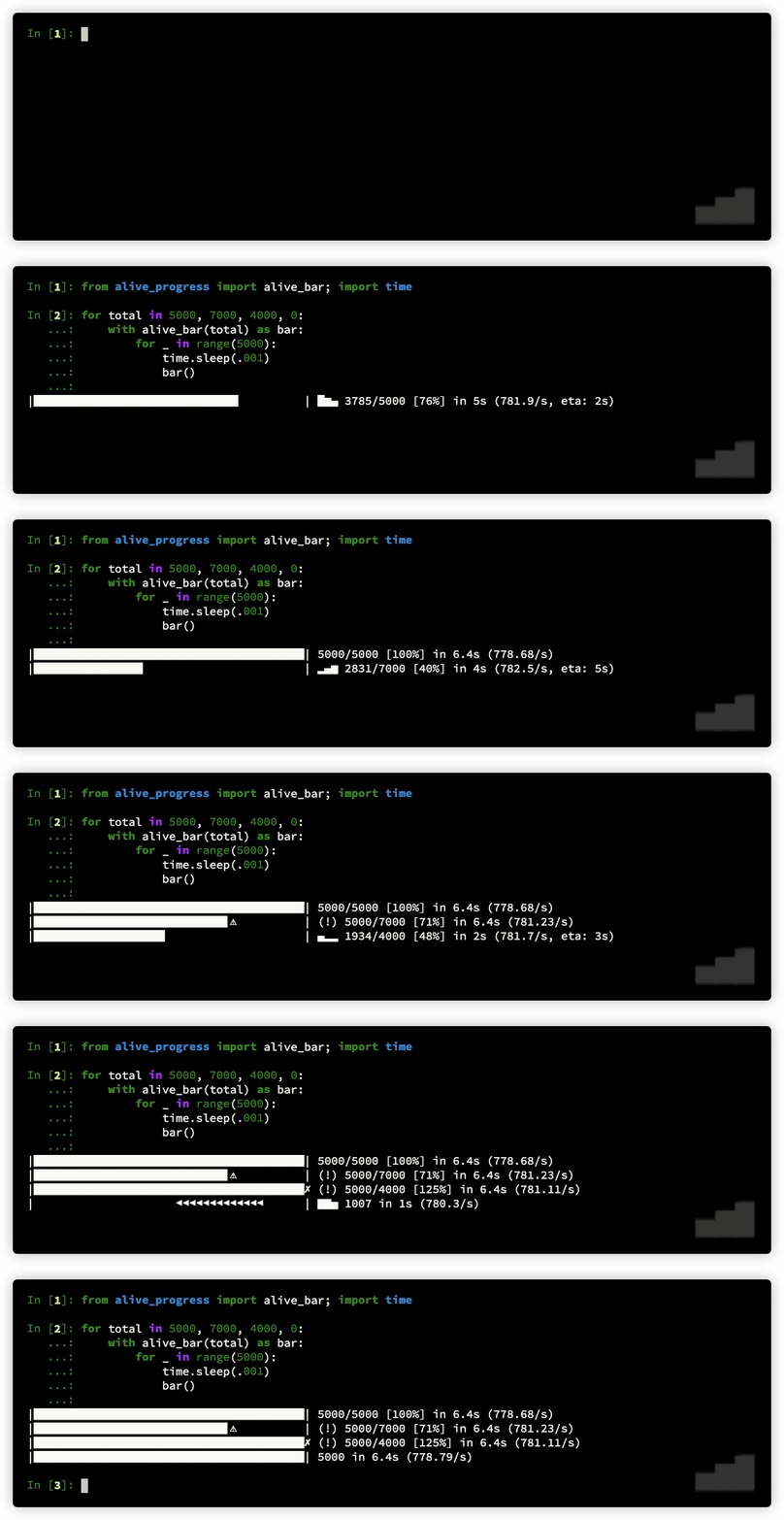](https://github.com/rsalmei/alive-progress)
661 |
662 | ## [Unsync](https://github.com/alex-sherman/unsync)
663 |
664 | **
665 |
666 | Unsync makes functions asynchronous and parallelized with a single decorator `@unsync`.
667 |
668 | A simple sleeping example with `asyncio`:
669 |
670 | ``` python
671 | async def sync_async():
672 | await asyncio.sleep(0.1)
673 | return 'I hate event loops'
674 |
675 | result = asyncio.run(sync_async())
676 | print(result)
677 | ```
678 |
679 | Same example with `unsync`:
680 |
681 | ``` python
682 | @unsync
683 | async def unsync_async():
684 | await asyncio.sleep(0.1)
685 | return 'I like decorators'
686 |
687 | print(unsync_async().result())
688 | ```
689 |
690 | > [Tutorial — making a trading bot asynchronous using Python’s “unsync” library](https://medium.com/@MattGosden/tutorial-using-pythons-unsync-library-to-make-an-asynchronous-trading-bot-9ee2ae881272)
691 |
692 | ## [Pylance](https://marketplace.visualstudio.com/items?itemName=ms-python.vscode-pylance)
693 |
694 | **
695 |
696 | Pylance has the ability to supercharge your Python IntelliSense experience with rich type information, helping you write better code faster.
697 |
698 | - Features docstring automation, Signature help, parameter suggestions, code completion (better than existing)
699 | - Supports auto-imports, if you start typing from a namespace, like a standard library module, it will add the import for you.
700 | - Go to Reference, Go to Implementation shortcuts
701 | - Uses the pyright type checker (an alternative to MyPy (Dropbox), Pyre (Facebook) and Pytype (Google))
702 | - If you have pyright extension installed, remove it first!
703 |
704 | [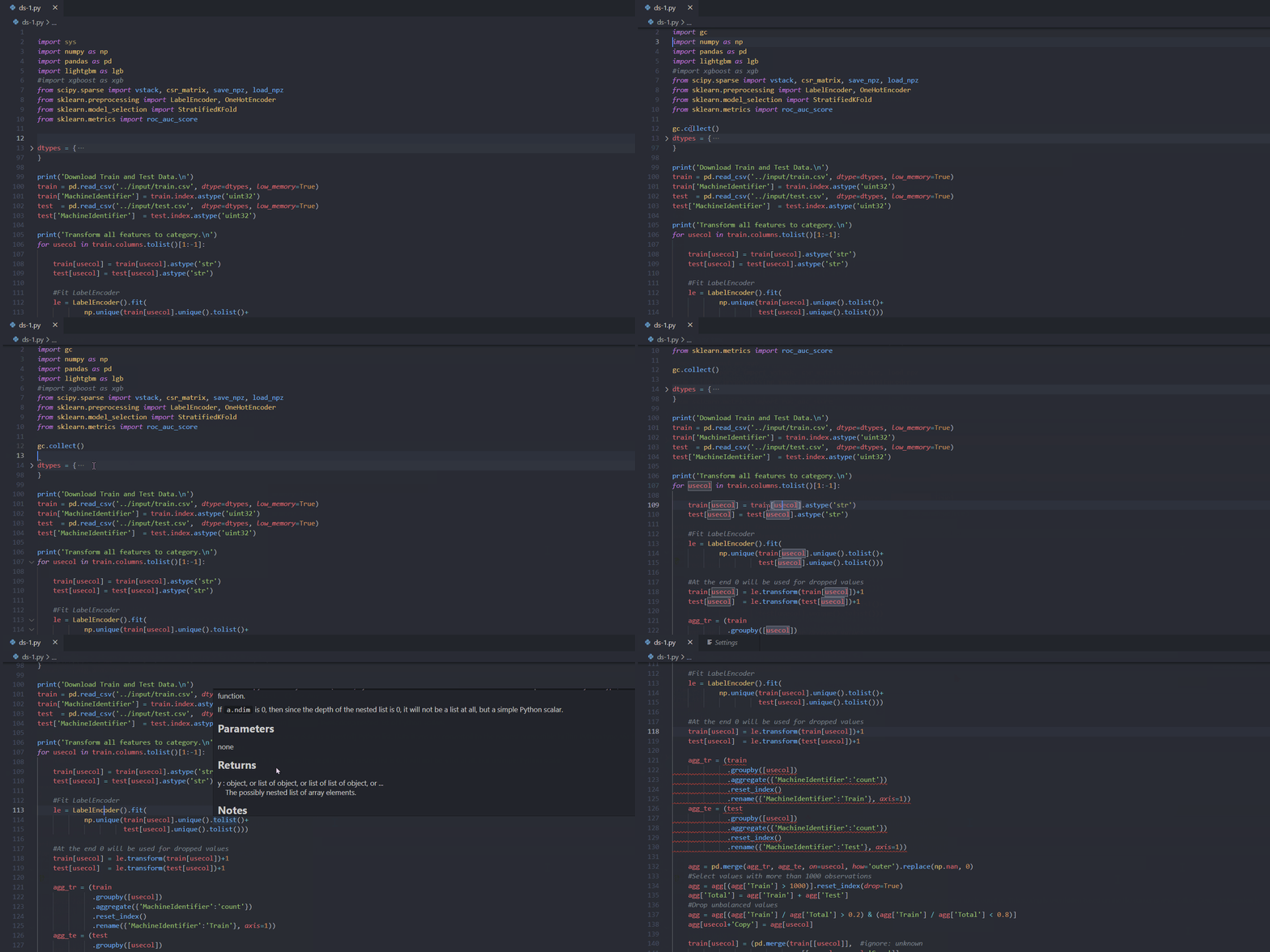](https://marketplace.visualstudio.com/items?itemName=ms-python.vscode-pylance)
705 |
706 | ## [Pathlib](https://docs.python.org/3/library/pathlib.html)
707 |
708 | **
709 |
710 | Introduced in version 3.4, `pathlib` is a module in the standard library for dealing with paths for you! From the documentation itself *This module offers classes representing filesystem paths with semantics appropriate for different operating systems.*
711 |
712 | An intro to `pathlib` blog post mentioned in episode 191 can be found at: .
713 |
714 | ## [Handcalcs](https://github.com/connorferster/handcalcs)
715 |
716 | **
717 |
718 | handcalcs is a library to render Python calculation code automatically in Latex, but in a manner that mimics how one might format their calculation if it were written with a pencil: write the symbolic formula, followed by numeric substitutions, and then the result.
719 |
720 | [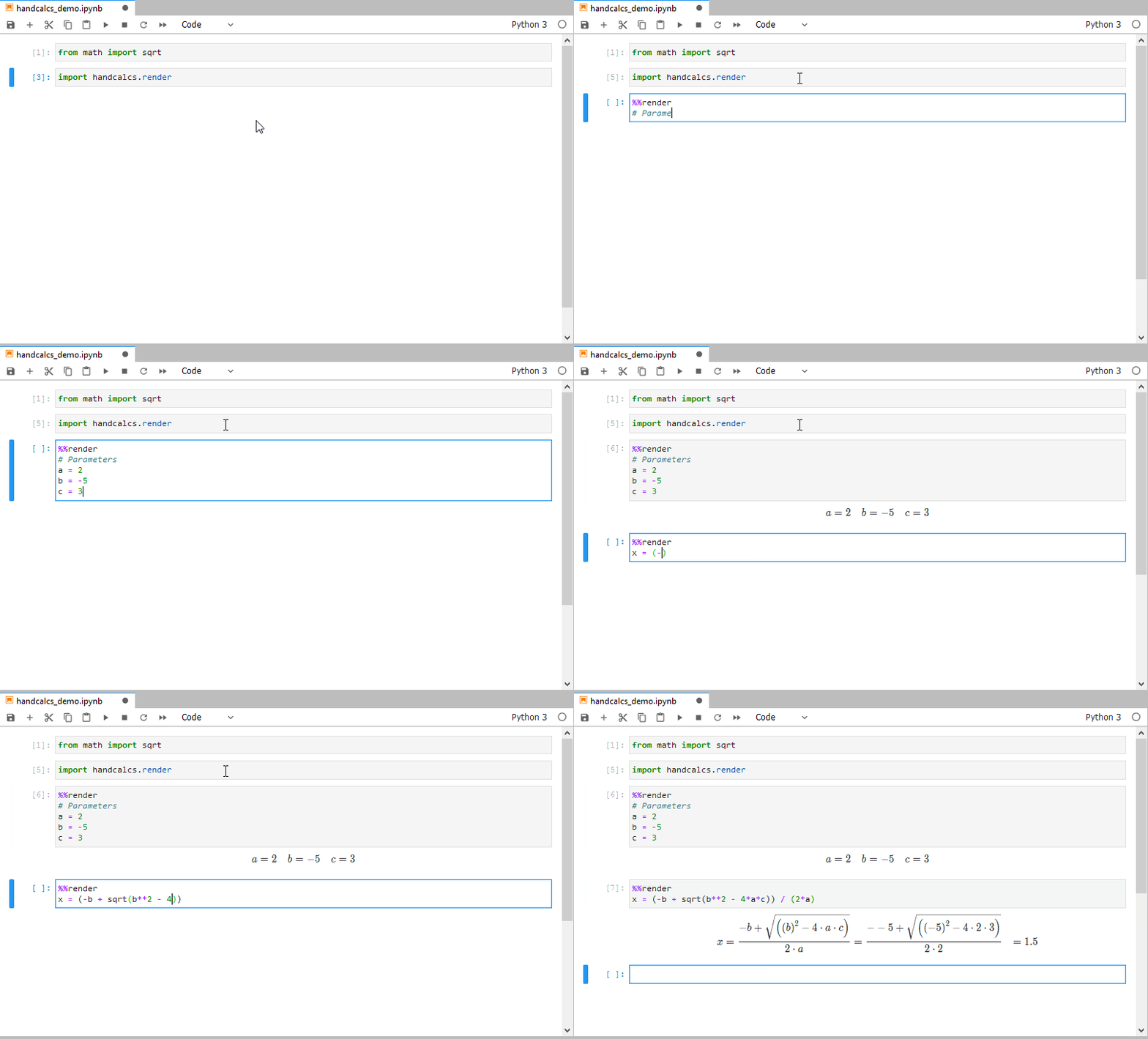](https://github.com/connorferster/handcalcs)
721 |
722 | ## [LittleTable](https://github.com/ptmcg/littletable)
723 |
724 | **
725 |
726 | The littletable module provides a low-overhead, schema-less, in-memory database access to a collection of user objects. littletable provides a DataObject class for ad hoc creation of semi-immutable objects that can be stored in a littletable Table. Tables can also contain user-defined objects, using those objects' `__dict__`, `__slots__`, or `_fields` mappings to access object attributes.
727 |
728 | ## [Events](https://pypi.org/project/Events/)
729 |
730 | **
731 |
732 | The C# language provides a handy way to declare, subscribe to and fire events. Technically, an event is a “slot” where callback functions (event handlers) can be attached to - a process referred to as subscribing to an event. Here is a handy package that encapsulates the core to event subscription and event firing and feels like a “natural” part of the language.
733 |
734 | ``` python
735 | >>> def something_changed(reason):
736 | ... print "something changed because %s" % reason
737 | ...
738 |
739 | >>> from events import Events
740 | >>> events = Events()
741 | >>> events.on_change += something_changed
742 | ```
743 |
744 | ## [filprofiler](https://pythonspeed.com/products/filmemoryprofiler/)
745 |
746 | **
747 |
748 | Fil is a new open source Python memory profiler ([currently hosted on GitHub](https://github.com/pythonspeed/filprofiler)), designed for code that processes large amounts of data: the kind of code written by data scientists, data engineers, and scientists.
749 |
750 | Some features highlighted in episode 185:
751 |
752 | - If your Python data pipeline is using too much memory, it can be very difficult to figure where exactly all that memory is going.
753 | - What you need is some way to know exactly where peak memory usage is, and what code was responsible for memory at that point. And that’s exactly what the [Fil memory profiler](https://pythonspeed.com/products/filmemoryprofiler/) does.
754 | - Many tools track just Python memory. *Fil captures*all allocations going to the standard C memory allocation APIs.
755 |
756 | ## [PyInstaller Extractor](https://github.com/extremecoders-re/pyinstxtractor)
757 |
758 | **
759 |
760 | PyInstaller Extractor is a Python script to extract the contents of a PyInstaller generated Windows executable file. The contents of the pyz file (usually pyc files) present inside the executable are also extracted.
761 |
762 | ## [blackcellmagic](https://github.com/csurfer/blackcellmagic)
763 |
764 | **
765 |
766 | IPython magic command to format python code in cell using black.
767 |
768 | [](https://github.com/csurfer/blackcellmagic)
769 |
770 | ## [ugit](https://www.leshenko.net/p/ugit/#)
771 |
772 | **
773 |
774 | ugit: DIY Git in Python
775 |
776 | Welcome aboard! We're going to implement Git in Python to learn more about how Git works on the inside.
777 |
778 | ## [jupyterblack](https://github.com/drillan/jupyter-black)
779 |
780 | **
781 |
782 | This extension reformats/prettifies code in a notebook's code cell by black.
783 |
784 | [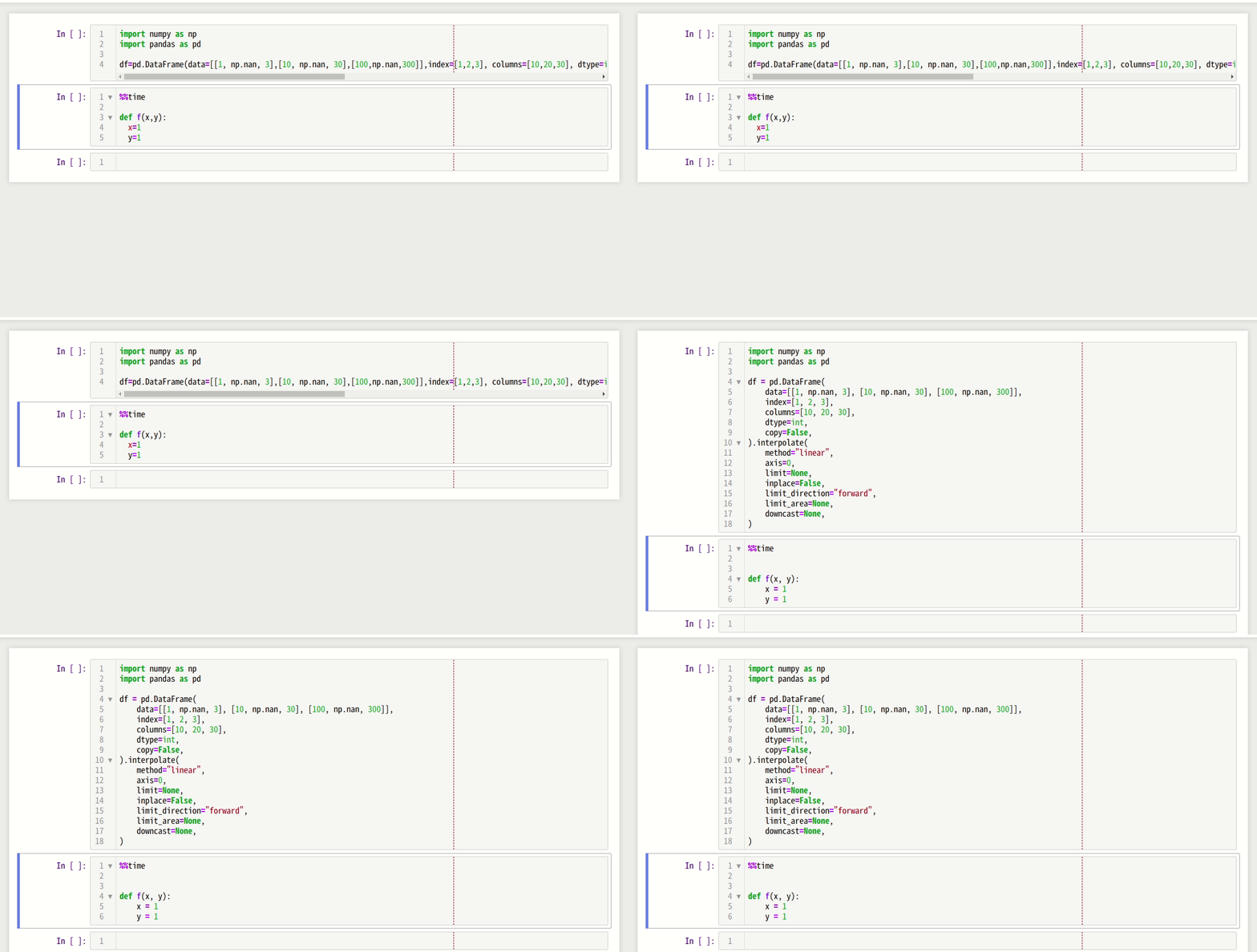](https://github.com/drillan/jupyter-black)
785 |
786 | ## [nbQA](https://github.com/nbQA-dev/nbQA)
787 |
788 | **
789 |
790 | Run any standard Python code quality tool on a Jupyter Notebook.
791 |
792 | [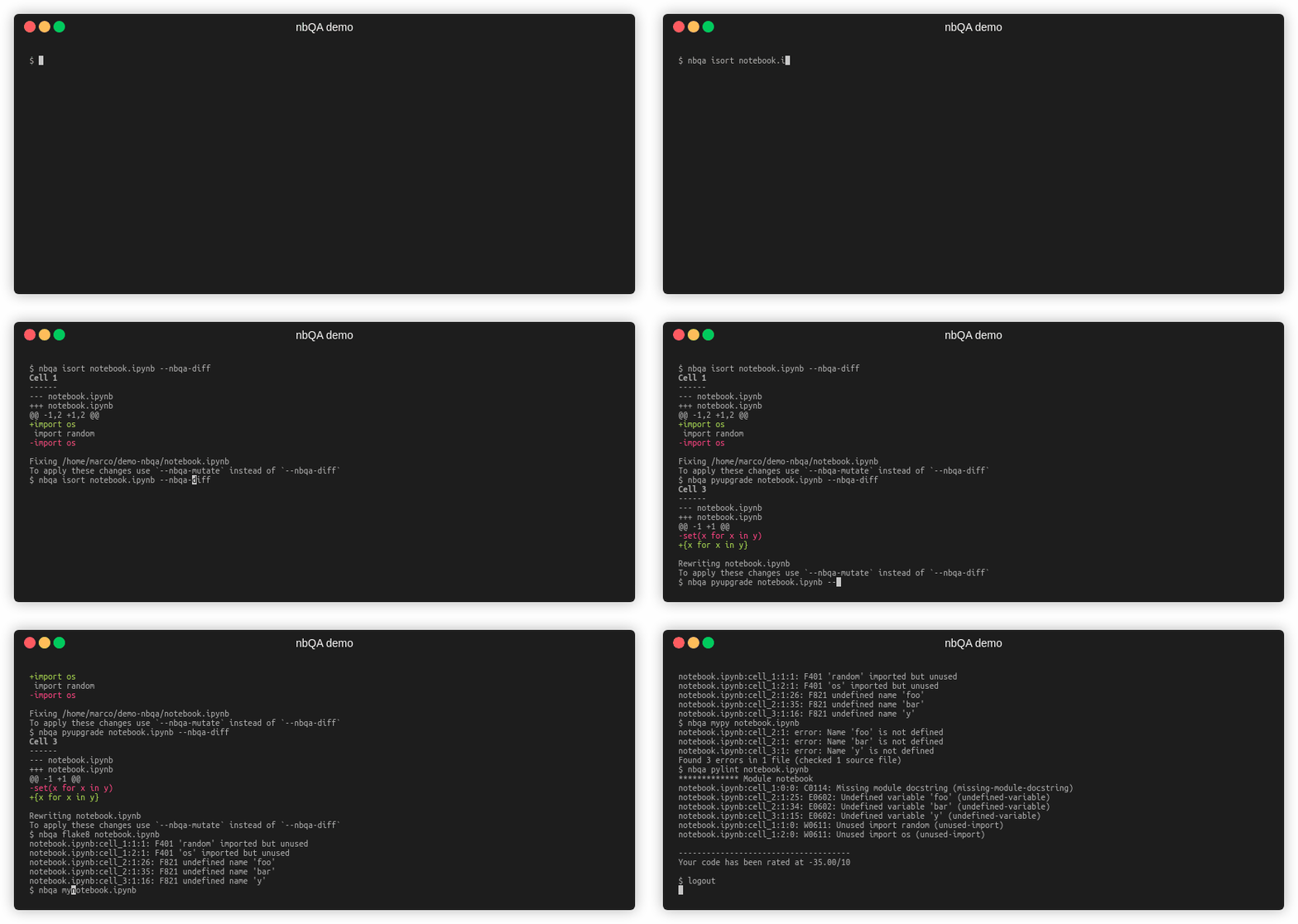](https://github.com/nbQA-dev/nbQA)
793 |
794 | ## [pipchill](https://github.com/rbanffy/pip-chill)
795 |
796 | **
797 |
798 | PIP Chill - Make requirements with only the packages you need. Like pip freeze but lists only the packages that are not dependencies of installed packages.
799 |
800 | [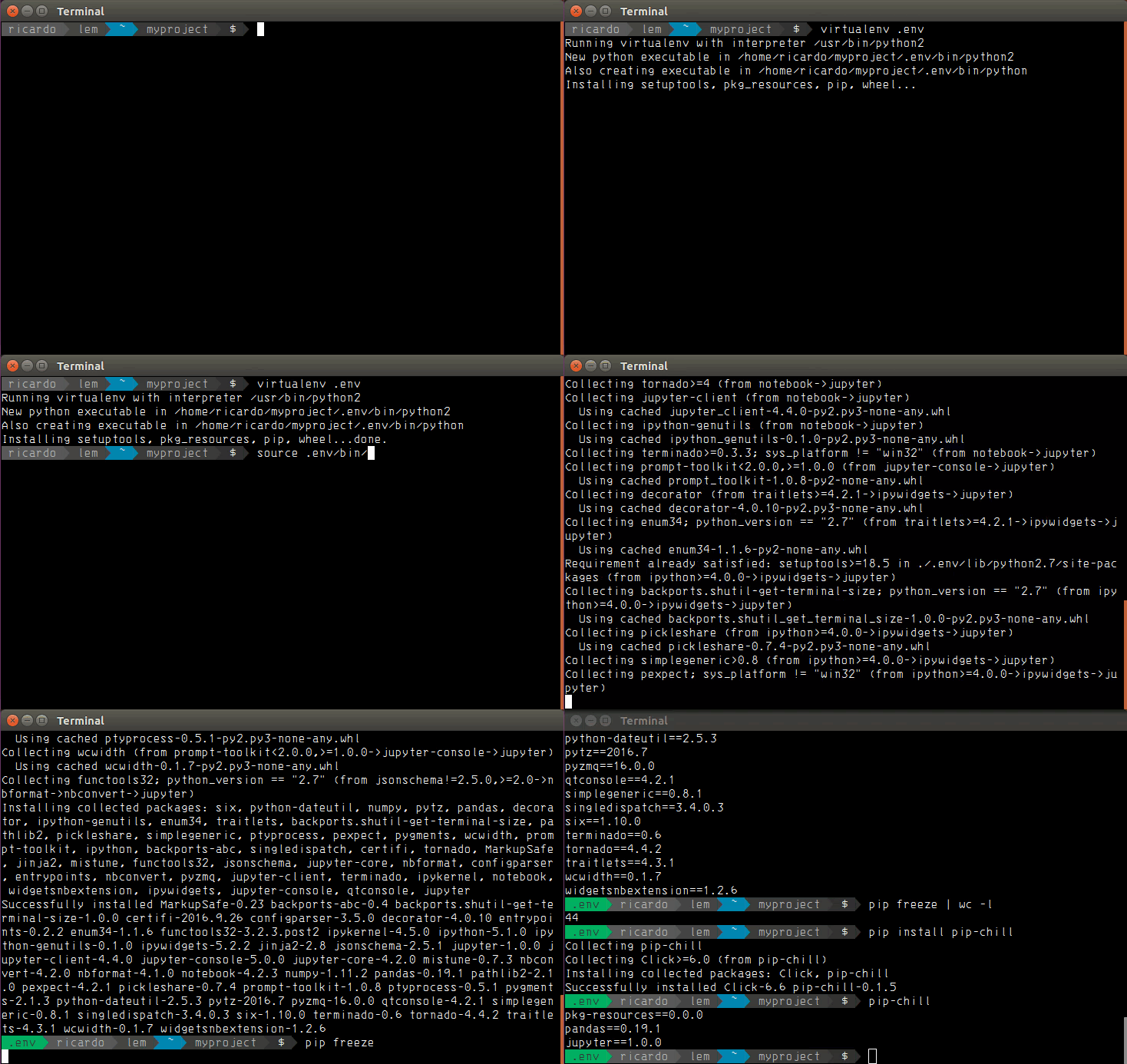](https://github.com/rbanffy/pip-chill)
801 |
802 | ## [airspeed velocity](https://github.com/airspeed-velocity/asv)
803 |
804 | **
805 |
806 | airspeed velocity (asv) is a tool for benchmarking Python packages over their lifetime.
807 |
808 | It is primarily designed to benchmark a single project over its lifetime using a given suite of benchmarks. The results are displayed in an interactive web frontend that requires only a basic static webserver to host.
809 |
810 | [Example airspeed velocity site](https://pv.github.io/numpy-bench/)
811 |
812 | ## [PrettyErrors](https://github.com/onelivesleft/PrettyErrors)
813 |
814 | **
815 |
816 | Prettifies Python exception output to make it legible.
817 |
818 | [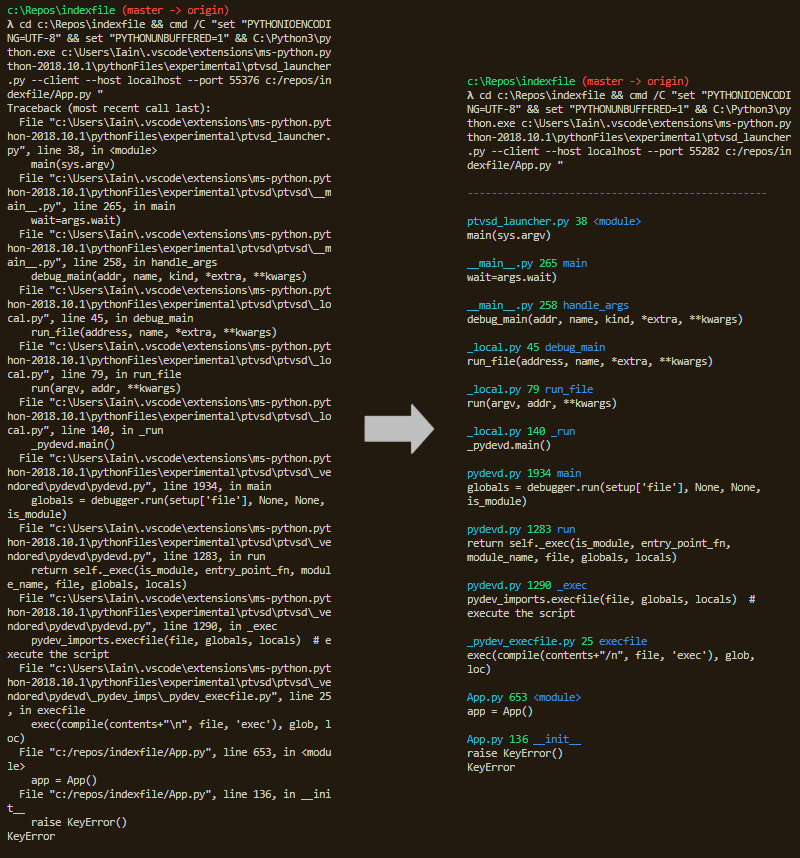](https://github.com/onelivesleft/PrettyErrors)
819 |
820 | ## [scalene](https://github.com/plasma-umass/scalene)
821 |
822 | **
823 |
824 | Scalene is a high-performance CPU, GPU *and* memory profiler for Python that does a number of things that other Python profilers do not and cannot do. It runs orders of magnitude faster than other profilers while delivering far more detailed information.
825 |
826 | # Game Development
827 |
828 | ## [Panda3D](https://www.panda3d.org/)
829 |
830 | *[https://pythonbytes.fm/episodes/show/116/so-you-want-python-in-a-3d-graphics-engine](https://pythonbytes.fm/episodes/show/116/so-you-want-python-in-a-3d-graphics-engine)*
831 |
832 | `Panda3D` is an open-source, completely free-to-use engine for real time 3D games, visualizations, simulations, experiments
833 |
834 | [](https://www.youtube.com/watch?v=MYlBW0f4HhA "Panda3D Example")
835 |
836 | # Interesting Tidbits
837 |
838 | - Using --prompt to name your virtualenv for easy identification later on is something I use widely now. [https://pythonbytes.fm/episodes/show/168/race-your-donkey-car-with-python](https://pythonbytes.fm/episodes/show/168/race-your-donkey-car-with-python)
839 | - [Python Graph Gallery](https://python-graph-gallery.com/) is an amazing resource for examples of already made data visualizations.
840 | - [Type hints for busy programmers](https://inventwithpython.com/blog/2019/11/24/type-hints-for-busy-python-programmers/) is a great resource for understanding what type hints are and why you should use them.
841 | - [https://pythonbytes.fm/episodes/show/160/your-json-shall-be-streamed](https://pythonbytes.fm/episodes/show/160/your-json-shall-be-streamed)
842 | - This list was mentioned in Episode #176
843 | - Fruit Salad scrum estimation scale, use fruit analogies rather than estimating time for tasks
844 | - How to find the difference between two times with timedeltas
845 | - ``` python
846 | weeks = dt / timedelta(days=7)
847 | hours = dt / timedelta(hours=1)
848 | ```
849 | - Flyweight design pattern for memory management
850 | - Optimal Peanut Butter and Banana Sandwiches
851 |
--------------------------------------------------------------------------------