 8 |
9 |
10 | キャンバスを介して Canvas ソースを処理するための純粋な JavaScript ライブラリ。
11 |
12 |
13 | [中文文档](./README.zh.md) | [English](./README.md) | [日本語](./README.jp.md)
14 |
15 | [examples](http://events.jackpu.com/daycaca/)
16 |
17 |
18 | ## 使い方
19 |
20 | ### Npm
21 |
22 | ``` bash
23 | $ npm install daycaca --save
24 | ```
25 |
26 | ``` js
27 | // es6import daycaca from 'daycaca';// src specify an image src (url or base64)
28 | daycaca.rotate(src, degress, (data, w, h) => {
29 | // your code here
30 | });
31 | ```
32 |
33 | ### CDN (ブラウザーで直接使う)
34 |
35 | ``` html
36 |
37 |
42 | ```
43 |
44 | ## API
45 |
46 | すべてのAPI source は以下の1つのタイプでなければなりません:
47 | + 画像url (URLを使う場合、クロスドメインの設置にお気を付けください。)
48 | + 画像のDOM節点
49 | + [type="file"]を使用する画像ファイルの対象值
50 |
51 | ### base64(source, callback)
52 |
53 | 画像をbase64 code値に転換する。参考数elは画像のDOM節点やDOMのURLである。
54 |
55 | ``` js
56 | const img = document.querySelector('img')
57 | daycaca.base64(img, (data) => {
58 | //... handle base64
59 | })
60 | ```
61 |
62 | ### compress(source, quailty, callback)
63 |
64 | 画像を圧縮する場合、画質を圧縮し、画像のサイズを小さくする。
65 |
66 | + PNGは無損失圧縮されるので、quality無効。
67 | + JPG/JPEG/BMP は損失圧縮される。
68 |
69 | `quality` は圧縮後の画質を表す。Qualityの数値が大きいほど、画質が高いのである。
70 |
71 | ``` js
72 | const img = document.querySelector('img')daycaca.compress(img, 0.5,(data) => {
73 | //... handle base64
74 | })
75 | ```
76 |
77 | ### crop(source, option, callback)
78 |
79 | 画像をカットする。
80 |
81 | `option` {} では、指定する必要がある参考数値である:
82 |
83 | + `x`;はカットされたエリアが画像の左までの距離
84 | + `y`;はカットされたエリアが画像の上までの距離
85 | + `w`;はカットされたエリアの横幅
86 | + `h`;はカットされたエリアの高度
87 | + `ratio`: スケール比率;
88 |
89 | ``` js
90 | const img = document.querySelector('img')
91 | daycaca.reszie(img, {
92 | x: 10,
93 | y: 20,
94 | w: 100,
95 | h: 70
96 | },(data) => {
97 | //... handle base64
98 | })
99 | ```
100 |
101 | ### rotate(source, degree, callback)
102 |
103 | 画像を回転させる。
104 |
105 | ``` js
106 | const img = document.querySelector('img')
107 | daycaca.rotate(img, 90,(data) => {
108 | //... handle base64
109 | })
110 | ```
111 |
112 | ### reszie(source, ratio, callback)
113 |
114 | 画像を拡大、縮小させる;
115 |
116 | + `ratio` (0~1)は画像のスケール比率である。1と設定する場合は、画像の大きさが変わらない。0以下の数値は設定できない。
117 |
118 | ``` js
119 | const img = document.querySelector('img')
120 | daycaca.reszie(img, 0.5,(data) => {
121 | //... handle base64
122 | })
123 | ```
124 |
125 | ### コメント
126 |
127 | ご意見やご質問大歓迎です!
128 |
129 |
130 |
131 |
132 |
133 |
--------------------------------------------------------------------------------
/README.zh.md:
--------------------------------------------------------------------------------
1 | # daycaca
2 |
3 | [](https://circleci.com/gh/JackPu/daycaca)
4 | [](https://www.npmjs.com/package/daycaca)
5 |
6 |
7 |
8 |
9 |
10 | キャンバスを介して Canvas ソースを処理するための純粋な JavaScript ライブラリ。
11 |
12 |
13 | [中文文档](./README.zh.md) | [English](./README.md) | [日本語](./README.jp.md)
14 |
15 | [examples](http://events.jackpu.com/daycaca/)
16 |
17 |
18 | ## 使い方
19 |
20 | ### Npm
21 |
22 | ``` bash
23 | $ npm install daycaca --save
24 | ```
25 |
26 | ``` js
27 | // es6import daycaca from 'daycaca';// src specify an image src (url or base64)
28 | daycaca.rotate(src, degress, (data, w, h) => {
29 | // your code here
30 | });
31 | ```
32 |
33 | ### CDN (ブラウザーで直接使う)
34 |
35 | ``` html
36 |
37 |
42 | ```
43 |
44 | ## API
45 |
46 | すべてのAPI source は以下の1つのタイプでなければなりません:
47 | + 画像url (URLを使う場合、クロスドメインの設置にお気を付けください。)
48 | + 画像のDOM節点
49 | + [type="file"]を使用する画像ファイルの対象值
50 |
51 | ### base64(source, callback)
52 |
53 | 画像をbase64 code値に転換する。参考数elは画像のDOM節点やDOMのURLである。
54 |
55 | ``` js
56 | const img = document.querySelector('img')
57 | daycaca.base64(img, (data) => {
58 | //... handle base64
59 | })
60 | ```
61 |
62 | ### compress(source, quailty, callback)
63 |
64 | 画像を圧縮する場合、画質を圧縮し、画像のサイズを小さくする。
65 |
66 | + PNGは無損失圧縮されるので、quality無効。
67 | + JPG/JPEG/BMP は損失圧縮される。
68 |
69 | `quality` は圧縮後の画質を表す。Qualityの数値が大きいほど、画質が高いのである。
70 |
71 | ``` js
72 | const img = document.querySelector('img')daycaca.compress(img, 0.5,(data) => {
73 | //... handle base64
74 | })
75 | ```
76 |
77 | ### crop(source, option, callback)
78 |
79 | 画像をカットする。
80 |
81 | `option` {} では、指定する必要がある参考数値である:
82 |
83 | + `x`;はカットされたエリアが画像の左までの距離
84 | + `y`;はカットされたエリアが画像の上までの距離
85 | + `w`;はカットされたエリアの横幅
86 | + `h`;はカットされたエリアの高度
87 | + `ratio`: スケール比率;
88 |
89 | ``` js
90 | const img = document.querySelector('img')
91 | daycaca.reszie(img, {
92 | x: 10,
93 | y: 20,
94 | w: 100,
95 | h: 70
96 | },(data) => {
97 | //... handle base64
98 | })
99 | ```
100 |
101 | ### rotate(source, degree, callback)
102 |
103 | 画像を回転させる。
104 |
105 | ``` js
106 | const img = document.querySelector('img')
107 | daycaca.rotate(img, 90,(data) => {
108 | //... handle base64
109 | })
110 | ```
111 |
112 | ### reszie(source, ratio, callback)
113 |
114 | 画像を拡大、縮小させる;
115 |
116 | + `ratio` (0~1)は画像のスケール比率である。1と設定する場合は、画像の大きさが変わらない。0以下の数値は設定できない。
117 |
118 | ``` js
119 | const img = document.querySelector('img')
120 | daycaca.reszie(img, 0.5,(data) => {
121 | //... handle base64
122 | })
123 | ```
124 |
125 | ### コメント
126 |
127 | ご意見やご質問大歓迎です!
128 |
129 |
130 |
131 |
132 |
133 |
--------------------------------------------------------------------------------
/README.zh.md:
--------------------------------------------------------------------------------
1 | # daycaca
2 |
3 | [](https://circleci.com/gh/JackPu/daycaca)
4 | [](https://www.npmjs.com/package/daycaca)
5 |
6 |
7 | 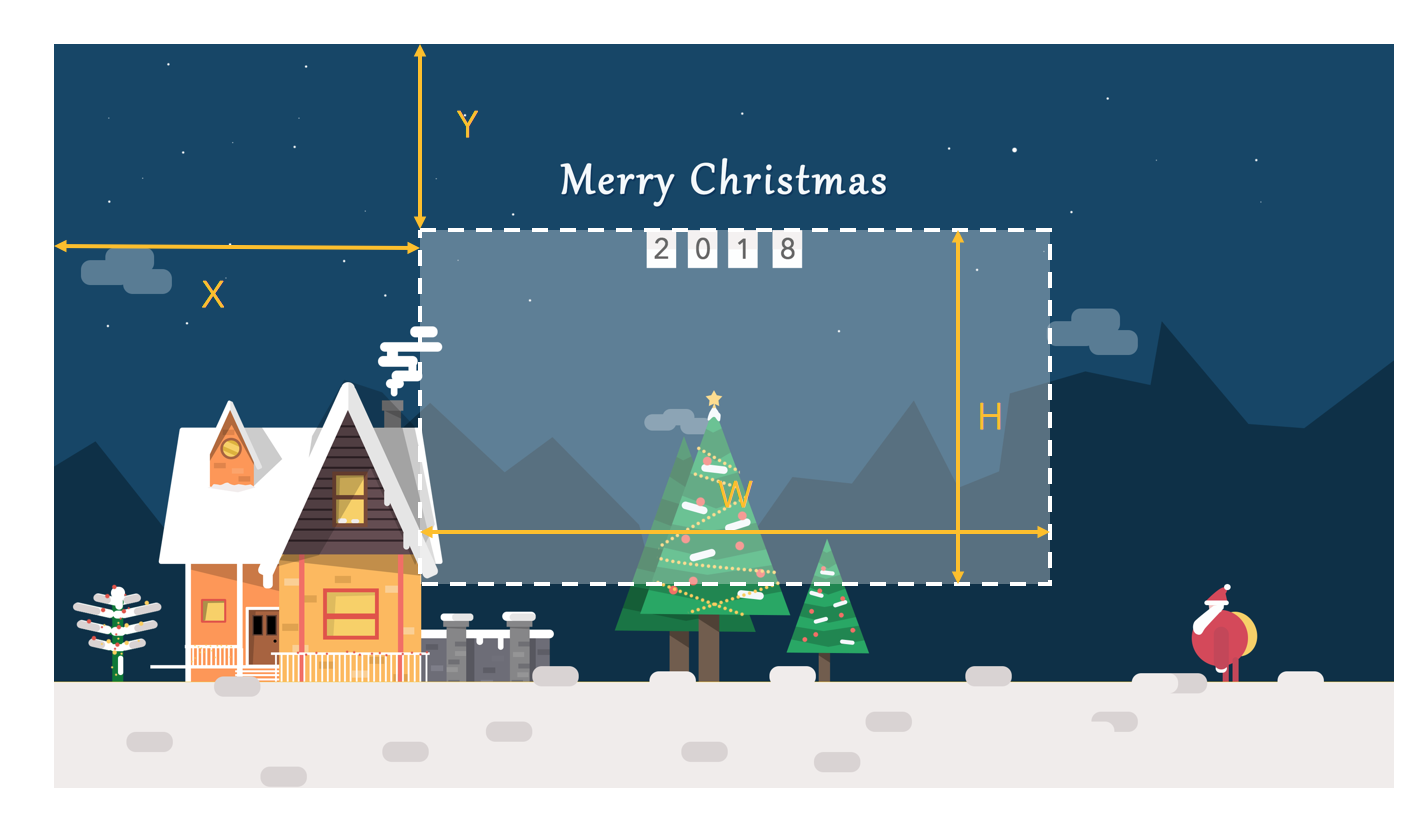 100 |
101 |
102 | ``` js
103 | const img = document.querySelector('img')
104 | daycaca.reszie(img, {
105 | x: 10,
106 | y: 20,
107 | w: 100,
108 | h: 70
109 | },(data) => {
110 | //... handle base64
111 | })
112 | ```
113 |
114 |
115 | ### rotate(source, degree, callback)
116 |
117 | 旋转图片至某个角度。
118 |
119 | ``` js
120 | const img = document.querySelector('img')
121 | daycaca.rotate(img, 90,(data) => {
122 | //... handle base64
123 | })
124 | ```
125 |
126 |
127 | ### reszie(source, ratio, callback)
128 |
129 | 图片缩放,将图片进行放大缩小
130 |
131 | + ratio 表示图片缩放的比例,其中 1 表示图片不进行缩放,最小值必须 **大于0**
132 |
133 | ``` js
134 | const img = document.querySelector('img')
135 | daycaca.reszie(img, 0.5,(data) => {
136 | //... handle base64
137 | })
138 | ```
139 |
140 | ## 贡献
141 |
142 | 欢迎您提出自己的代码 PR 以及任何建议 😄😄🌺🌺🎆🎆
143 |
144 |
145 | ## MIT License
146 |
147 |
148 |
149 |
--------------------------------------------------------------------------------
/README.md:
--------------------------------------------------------------------------------
1 | # daycaca
2 |
3 | [](https://circleci.com/gh/JackPu/daycaca)
4 | []()
5 | []()
6 |
7 |
8 |
100 |
101 |
102 | ``` js
103 | const img = document.querySelector('img')
104 | daycaca.reszie(img, {
105 | x: 10,
106 | y: 20,
107 | w: 100,
108 | h: 70
109 | },(data) => {
110 | //... handle base64
111 | })
112 | ```
113 |
114 |
115 | ### rotate(source, degree, callback)
116 |
117 | 旋转图片至某个角度。
118 |
119 | ``` js
120 | const img = document.querySelector('img')
121 | daycaca.rotate(img, 90,(data) => {
122 | //... handle base64
123 | })
124 | ```
125 |
126 |
127 | ### reszie(source, ratio, callback)
128 |
129 | 图片缩放,将图片进行放大缩小
130 |
131 | + ratio 表示图片缩放的比例,其中 1 表示图片不进行缩放,最小值必须 **大于0**
132 |
133 | ``` js
134 | const img = document.querySelector('img')
135 | daycaca.reszie(img, 0.5,(data) => {
136 | //... handle base64
137 | })
138 | ```
139 |
140 | ## 贡献
141 |
142 | 欢迎您提出自己的代码 PR 以及任何建议 😄😄🌺🌺🎆🎆
143 |
144 |
145 | ## MIT License
146 |
147 |
148 |
149 |
--------------------------------------------------------------------------------
/README.md:
--------------------------------------------------------------------------------
1 | # daycaca
2 |
3 | [](https://circleci.com/gh/JackPu/daycaca)
4 | []()
5 | []()
6 |
7 |
8 |
20 |
34 |
124 |
125 |
126 |
129 |
130 |
131 |
193 |
194 |
195 |
196 |
--------------------------------------------------------------------------------
/src/index.js:
--------------------------------------------------------------------------------
1 | // a canvas lib to compress or crop images
2 |
3 | const isNumber = num => (typeof num === 'number');
4 | const imageReg = /[./](png|jpeg|jpg|gif|bmp)/;
5 |
6 | const defaultConfig = {
7 | ratio: 1,
8 | compress: 80,
9 | enableWebWorker: false,
10 | };
11 |
12 |
13 | module.exports = {
14 | setConfig(config) {
15 | this._config = Object.assign(defaultConfig, config)
16 | },
17 |
18 | /**
19 | * init image for reset size and rotation
20 | */
21 | init(src, callback) {
22 | const scrTypes = src.split(';');
23 | let srcType = null;
24 | const image = this._createImage(src);
25 | if (scrTypes.length > 1) {
26 | srcType = scrTypes[0].replace('data:', '');
27 | }
28 | image.onload = () => {
29 | const cvs = this._getCanvas(image.naturalWidth, image.naturalHeight);
30 | const ctx = cvs.getContext('2d');
31 | ctx.drawImage(image, 0, 0);
32 | const newImageData = cvs.toDataURL(srcType);
33 | callback(newImageData);
34 | };
35 | },
36 |
37 | /**
38 | * encode image to base64
39 | * @param {Element|String} el
40 | * @param {Function} callback
41 | */
42 | base64(el, callback) {
43 | const { src, type } = this._getSrc(el);
44 | if (type === 'file') {
45 | return this._readFile(src, callback);
46 | } else if (type === 'video') {
47 | const video = el;
48 | const cvs = this._getCanvas(video.videoWidth, video.videoHeight);
49 | const ctx = cvs.getContext('2d');
50 | ctx.drawImage(video, 0, 0);
51 | const newImageData = cvs.toDataURL();
52 | callback(newImageData, cvs);
53 | }
54 | return this.init(src, callback);
55 | },
56 |
57 | /**
58 | * compress image
59 | * @param {el|String} src the source of image
60 | * @param {Number} the quality of image ( 100 = the highest quality)
61 | * @param {Function} callback
62 | */
63 | compress(source, quality, callback) {
64 | const { src, type } = this._getSrc(source);
65 | if (type === 'file') {
66 | return this._readFile(src, (data) => {
67 | this._compress(data, source, quality, callback);
68 | });
69 | }
70 | this._compress(src, source, quality, callback);
71 | },
72 |
73 | _compress(src, source, quality, callback) {
74 | this._loadImage(src, (image) => {
75 | const mimeType = this._getImageType(source);
76 | const cvs = this._getCanvas(image.naturalWidth, image.naturalHeight);
77 | const ctx = cvs.getContext('2d');
78 | ctx.drawImage(image, 0, 0);
79 | const newImageData = cvs.toDataURL(mimeType, quality / 100);
80 | callback(newImageData);
81 | });
82 | },
83 |
84 | /**
85 | * crop image via canvas and generate data
86 | */
87 | crop(source, options, callback) {
88 | const { src, type } = this._getSrc(source);
89 | if (type === 'file') {
90 | return this._readFile(src, (data) => {
91 | this._crop(data, source, options, callback);
92 | })
93 | }
94 | this._crop(src, source, options, callback);
95 | },
96 |
97 | _crop(src, source, options, callback) {
98 | this._loadImage(src, (image) => {
99 | // check crop options
100 | if (isNumber(options.x) &&
101 | isNumber(options.y) &&
102 | options.w > 0 &&
103 | options.h > 0) {
104 | let { w, h } = options;
105 | if (options.maxWidth && options.maxWidth < w) {
106 | w = options.maxWidth;
107 | h = (options.h * w) / options.w;
108 | }
109 | if (options.maxHeight && options.maxHeight < h) {
110 | h = options.maxHeight;
111 | }
112 | if (options.fixedWidth && options.fixedHeight) {
113 | w = options.fixedWidth;
114 | h = options.fixedHeight;
115 | }
116 | const cvs = this._getCanvas(w, h);
117 | cvs.getContext('2d').drawImage(image, options.x, options.y, options.w, options.h, 0, 0, w, h);
118 | const mimeType = this._getImageType(source);
119 | const data = cvs.toDataURL(mimeType, options.compress / 100);
120 | callback(data);
121 | }
122 | });
123 | },
124 |
125 | resize(source, ratio, callback) {
126 | const { src, type } = this._getSrc(source);
127 | let options = {};
128 | if (typeof ratio === 'number' || typeof ratio === 'string') {
129 | options = {
130 | ratio,
131 | compress: defaultConfig.compress,
132 | };
133 | }
134 | if (typeof ratio === 'object') {
135 | options = ratio;
136 | }
137 | if (type === 'file') {
138 | return this._readFile(src, (data) => {
139 | this._resize(data, source, options, callback);
140 | });
141 | }
142 | this._resize(src, source, options, callback);
143 | },
144 |
145 | _resize(src, source, options, callback) {
146 | this._loadImage(src, (image) => {
147 | let w = image.naturalWidth;
148 | let h = image.naturalHeight;
149 | if (options.ratio > 0) {
150 | w = Math.floor(image.naturalWidth * options.ratio);
151 | h = Math.floor(image.naturalHeight * options.ratio);
152 | } else if (typeof options.width === 'number' && typeof options.height === 'number') {
153 | w = Math.floor(options.width);
154 | h = Math.floor(options.height);
155 | }
156 | const cvs = this._getCanvas(w, h);
157 | cvs.getContext('2d').drawImage(image, 0, 0, image.naturalWidth, image.naturalHeight, 0, 0, w, h);
158 | const mimeType = this._getImageType(source);
159 | const data = cvs.toDataURL(mimeType, options.compress / 100);
160 | callback(data);
161 | });
162 | },
163 |
164 | /**
165 | * rotate image
166 | */
167 | rotate(source, degree, callback) {
168 | const { src, type } = this._getSrc(source);
169 | if (type === 'file') {
170 | return this._readFile(src, () => {
171 | this._rotate(src, source, degree, callback);
172 | });
173 | }
174 | if (degree % 360 === 0) {
175 | return callback(src);
176 | }
177 | this._rotate(src, source, degree, callback);
178 | },
179 |
180 | _rotate(src, source, degree, callback) {
181 | this._loadImage(src, (image) => {
182 | let w = image.naturalWidth;
183 | let h = image.naturalHeight;
184 | degree %= 360;
185 | if (degree === 90 || degree === 270) {
186 | w = image.naturalHeight;
187 | h = image.naturalWidth;
188 | }
189 | let cvs = this._getCanvas(w, h);
190 | let ctx = cvs.getContext('2d');
191 | ctx.clearRect(0, 0, w, h);
192 | ctx.fillStyle = 'white';
193 | ctx.fillRect(0, 0, w, h);
194 | ctx.translate(w / 2, h / 2);
195 | ctx.rotate((degree * Math.PI) / 180);
196 | ctx.drawImage(image, -image.naturalWidth / 2, -image.naturalHeight / 2);
197 | const mimeType = this._getImageType(source);
198 | const data = cvs.toDataURL(mimeType, 1);
199 | callback(data, w, h);
200 | cvs = null;
201 | ctx = null;
202 | });
203 | },
204 |
205 | _loadImage(src, callback) {
206 | const image = this._createImage(src);
207 | image.onload = () => {
208 | callback(image);
209 | };
210 | },
211 |
212 | _readFile(file, callback) {
213 | const reader = new FileReader();
214 | reader.onload = (event) => {
215 | const data = event.target.result;
216 | callback(data);
217 | };
218 | reader.readAsDataURL(file);
219 | },
220 |
221 | _getCanvas(width, height) {
222 | const canvas = document.createElement('canvas');
223 | canvas.width = width;
224 | canvas.height = height;
225 | return canvas;
226 | },
227 |
228 | _createImage(src) {
229 | const image = new Image();
230 | image.src = src;
231 | return image;
232 | },
233 |
234 | _getSrc(source) {
235 | let src = source;
236 | let type = 'url';
237 | if (this._isImageElement(source)) {
238 | const imgSrc = source.src;
239 | if (!imgSrc) {
240 | throw new Error('Element must hava src');
241 | }
242 | src = imgSrc;
243 | type = 'element';
244 | } else if (this._isVideoElement(source)) {
245 | src = source;
246 | type = 'video';
247 | } else if (this._isFileObject(source)) {
248 | src = source;
249 | type = 'file';
250 | }
251 | return {
252 | src,
253 | type,
254 | };
255 | },
256 |
257 | _isFileObject(file) {
258 | return (typeof file === 'object' && file.type && file.size > 0);
259 | },
260 |
261 | _isImageElement(el) {
262 | return (typeof el === 'object' && el.tagName === 'IMG');
263 | },
264 |
265 | _isVideoElement(el) {
266 | return (typeof el === 'object' && el.tagName === 'VIDEO');
267 | },
268 |
269 | _getImageType(source) {
270 | const { src, type } = this._getSrc(source);
271 | let mimeType = 'image/jpeg';
272 | if (type === 'file') {
273 | const fileType = source.type;
274 | const outputType = fileType.match(/(image\/[\w]+)\.*/)[0];
275 | if (typeof outputType !== 'undefined') {
276 | mimeType = outputType;
277 | }
278 | } else {
279 | const arr = imageReg.exec(src);
280 | if (arr && arr[1]) {
281 | mimeType = `image/${arr[1]}`;
282 | }
283 | }
284 | return mimeType;
285 | },
286 |
287 | };
288 |
--------------------------------------------------------------------------------
/dist/index.js:
--------------------------------------------------------------------------------
1 | (function webpackUniversalModuleDefinition(root, factory) {
2 | if(typeof exports === 'object' && typeof module === 'object')
3 | module.exports = factory();
4 | else if(typeof define === 'function' && define.amd)
5 | define([], factory);
6 | else if(typeof exports === 'object')
7 | exports["daycaca"] = factory();
8 | else
9 | root["daycaca"] = factory();
10 | })(typeof self !== 'undefined' ? self : this, function() {
11 | return /******/ (function(modules) { // webpackBootstrap
12 | /******/ // The module cache
13 | /******/ var installedModules = {};
14 | /******/
15 | /******/ // The require function
16 | /******/ function __webpack_require__(moduleId) {
17 | /******/
18 | /******/ // Check if module is in cache
19 | /******/ if(installedModules[moduleId]) {
20 | /******/ return installedModules[moduleId].exports;
21 | /******/ }
22 | /******/ // Create a new module (and put it into the cache)
23 | /******/ var module = installedModules[moduleId] = {
24 | /******/ i: moduleId,
25 | /******/ l: false,
26 | /******/ exports: {}
27 | /******/ };
28 | /******/
29 | /******/ // Execute the module function
30 | /******/ modules[moduleId].call(module.exports, module, module.exports, __webpack_require__);
31 | /******/
32 | /******/ // Flag the module as loaded
33 | /******/ module.l = true;
34 | /******/
35 | /******/ // Return the exports of the module
36 | /******/ return module.exports;
37 | /******/ }
38 | /******/
39 | /******/
40 | /******/ // expose the modules object (__webpack_modules__)
41 | /******/ __webpack_require__.m = modules;
42 | /******/
43 | /******/ // expose the module cache
44 | /******/ __webpack_require__.c = installedModules;
45 | /******/
46 | /******/ // define getter function for harmony exports
47 | /******/ __webpack_require__.d = function(exports, name, getter) {
48 | /******/ if(!__webpack_require__.o(exports, name)) {
49 | /******/ Object.defineProperty(exports, name, {
50 | /******/ configurable: false,
51 | /******/ enumerable: true,
52 | /******/ get: getter
53 | /******/ });
54 | /******/ }
55 | /******/ };
56 | /******/
57 | /******/ // getDefaultExport function for compatibility with non-harmony modules
58 | /******/ __webpack_require__.n = function(module) {
59 | /******/ var getter = module && module.__esModule ?
60 | /******/ function getDefault() { return module['default']; } :
61 | /******/ function getModuleExports() { return module; };
62 | /******/ __webpack_require__.d(getter, 'a', getter);
63 | /******/ return getter;
64 | /******/ };
65 | /******/
66 | /******/ // Object.prototype.hasOwnProperty.call
67 | /******/ __webpack_require__.o = function(object, property) { return Object.prototype.hasOwnProperty.call(object, property); };
68 | /******/
69 | /******/ // __webpack_public_path__
70 | /******/ __webpack_require__.p = "";
71 | /******/
72 | /******/ // Load entry module and return exports
73 | /******/ return __webpack_require__(__webpack_require__.s = 0);
74 | /******/ })
75 | /************************************************************************/
76 | /******/ ([
77 | /* 0 */
78 | /***/ (function(module, exports, __webpack_require__) {
79 |
80 | "use strict";
81 |
82 |
83 | var _typeof = typeof Symbol === "function" && typeof Symbol.iterator === "symbol" ? function (obj) { return typeof obj; } : function (obj) { return obj && typeof Symbol === "function" && obj.constructor === Symbol && obj !== Symbol.prototype ? "symbol" : typeof obj; };
84 |
85 | var _extends = Object.assign || function (target) { for (var i = 1; i < arguments.length; i++) { var source = arguments[i]; for (var key in source) { if (Object.prototype.hasOwnProperty.call(source, key)) { target[key] = source[key]; } } } return target; };
86 |
87 | // a canvas lib to compress or crop images
88 |
89 | var isNumber = function isNumber(num) {
90 | return typeof num === 'number';
91 | };
92 | var imageReg = /[./](png|jpeg|jpg|gif|bmp)/;
93 |
94 | var defaultConfig = {
95 | ratio: 1,
96 | compress: 80,
97 | enableWebWorker: false
98 | };
99 |
100 | module.exports = {
101 | setConfig: function setConfig(config) {
102 | this._config = _extends(defaultConfig, config);
103 | },
104 |
105 |
106 | /**
107 | * init image for reset size and rotation
108 | */
109 | init: function init(src, callback) {
110 | var _this = this;
111 |
112 | var scrTypes = src.split(';');
113 | var srcType = null;
114 | var image = this._createImage(src);
115 | if (scrTypes.length > 1) {
116 | srcType = scrTypes[0].replace('data:', '');
117 | }
118 | image.onload = function () {
119 | var cvs = _this._getCanvas(image.naturalWidth, image.naturalHeight);
120 | var ctx = cvs.getContext('2d');
121 | ctx.drawImage(image, 0, 0);
122 | var newImageData = cvs.toDataURL(srcType);
123 | callback(newImageData);
124 | };
125 | },
126 |
127 |
128 | /**
129 | * encode image to base64
130 | * @param {Element|String} el
131 | * @param {Function} callback
132 | */
133 | base64: function base64(el, callback) {
134 | var _getSrc = this._getSrc(el),
135 | src = _getSrc.src,
136 | type = _getSrc.type;
137 |
138 | if (type === 'file') {
139 | return this._readFile(src, callback);
140 | } else if (type === 'video') {
141 | var video = el;
142 | var cvs = this._getCanvas(video.videoWidth, video.videoHeight);
143 | var ctx = cvs.getContext('2d');
144 | ctx.drawImage(video, 0, 0);
145 | var newImageData = cvs.toDataURL();
146 | callback(newImageData, cvs);
147 | }
148 | return this.init(src, callback);
149 | },
150 |
151 |
152 | /**
153 | * compress image
154 | * @param {el|String} src the source of image
155 | * @param {Number} the quality of image ( 100 = the highest quality)
156 | * @param {Function} callback
157 | */
158 | compress: function compress(source, quality, callback) {
159 | var _this2 = this;
160 |
161 | var _getSrc2 = this._getSrc(source),
162 | src = _getSrc2.src,
163 | type = _getSrc2.type;
164 |
165 | if (type === 'file') {
166 | return this._readFile(src, function (data) {
167 | _this2._compress(data, source, quality, callback);
168 | });
169 | }
170 | this._compress(src, source, quality, callback);
171 | },
172 | _compress: function _compress(src, source, quality, callback) {
173 | var _this3 = this;
174 |
175 | this._loadImage(src, function (image) {
176 | var mimeType = _this3._getImageType(source);
177 | var cvs = _this3._getCanvas(image.naturalWidth, image.naturalHeight);
178 | var ctx = cvs.getContext('2d');
179 | ctx.drawImage(image, 0, 0);
180 | var newImageData = cvs.toDataURL(mimeType, quality / 100);
181 | callback(newImageData);
182 | });
183 | },
184 |
185 |
186 | /**
187 | * crop image via canvas and generate data
188 | */
189 | crop: function crop(source, options, callback) {
190 | var _this4 = this;
191 |
192 | var _getSrc3 = this._getSrc(source),
193 | src = _getSrc3.src,
194 | type = _getSrc3.type;
195 |
196 | if (type === 'file') {
197 | return this._readFile(src, function (data) {
198 | _this4._crop(data, source, options, callback);
199 | });
200 | }
201 | this._crop(src, source, options, callback);
202 | },
203 | _crop: function _crop(src, source, options, callback) {
204 | var _this5 = this;
205 |
206 | this._loadImage(src, function (image) {
207 | // check crop options
208 | if (isNumber(options.x) && isNumber(options.y) && options.w > 0 && options.h > 0) {
209 | var w = options.w,
210 | h = options.h;
211 |
212 | if (options.maxWidth && options.maxWidth < w) {
213 | w = options.maxWidth;
214 | h = options.h * w / options.w;
215 | }
216 | if (options.maxHeight && options.maxHeight < h) {
217 | h = options.maxHeight;
218 | }
219 | if (options.fixedWidth && options.fixedHeight) {
220 | w = options.fixedWidth;
221 | h = options.fixedHeight;
222 | }
223 | var cvs = _this5._getCanvas(w, h);
224 | cvs.getContext('2d').drawImage(image, options.x, options.y, options.w, options.h, 0, 0, w, h);
225 | var mimeType = _this5._getImageType(source);
226 | var data = cvs.toDataURL(mimeType, options.compress / 100);
227 | callback(data);
228 | }
229 | });
230 | },
231 | resize: function resize(source, ratio, callback) {
232 | var _this6 = this;
233 |
234 | var _getSrc4 = this._getSrc(source),
235 | src = _getSrc4.src,
236 | type = _getSrc4.type;
237 |
238 | var options = {};
239 | if (typeof ratio === 'number' || typeof ratio === 'string') {
240 | options = {
241 | ratio: ratio,
242 | compress: defaultConfig.compress
243 | };
244 | }
245 | if ((typeof ratio === 'undefined' ? 'undefined' : _typeof(ratio)) === 'object') {
246 | options = ratio;
247 | }
248 | if (type === 'file') {
249 | return this._readFile(src, function (data) {
250 | _this6._resize(data, source, options, callback);
251 | });
252 | }
253 | this._resize(src, source, options, callback);
254 | },
255 | _resize: function _resize(src, source, options, callback) {
256 | var _this7 = this;
257 |
258 | this._loadImage(src, function (image) {
259 | var w = image.naturalWidth;
260 | var h = image.naturalHeight;
261 | if (options.ratio > 0) {
262 | w = Math.floor(image.naturalWidth * options.ratio);
263 | h = Math.floor(image.naturalHeight * options.ratio);
264 | } else if (typeof options.width === 'number' && typeof options.height === 'number') {
265 | w = Math.floor(options.width);
266 | h = Math.floor(options.height);
267 | }
268 | var cvs = _this7._getCanvas(w, h);
269 | cvs.getContext('2d').drawImage(image, 0, 0, image.naturalWidth, image.naturalHeight, 0, 0, w, h);
270 | var mimeType = _this7._getImageType(source);
271 | var data = cvs.toDataURL(mimeType, options.compress / 100);
272 | callback(data);
273 | });
274 | },
275 |
276 |
277 | /**
278 | * rotate image
279 | */
280 | rotate: function rotate(source, degree, callback) {
281 | var _this8 = this;
282 |
283 | var _getSrc5 = this._getSrc(source),
284 | src = _getSrc5.src,
285 | type = _getSrc5.type;
286 |
287 | if (type === 'file') {
288 | return this._readFile(src, function () {
289 | _this8._rotate(src, source, degree, callback);
290 | });
291 | }
292 | if (degree % 360 === 0) {
293 | return callback(src);
294 | }
295 | this._rotate(src, source, degree, callback);
296 | },
297 | _rotate: function _rotate(src, source, degree, callback) {
298 | var _this9 = this;
299 |
300 | this._loadImage(src, function (image) {
301 | var w = image.naturalWidth;
302 | var h = image.naturalHeight;
303 | degree %= 360;
304 | if (degree === 90 || degree === 270) {
305 | w = image.naturalHeight;
306 | h = image.naturalWidth;
307 | }
308 | var cvs = _this9._getCanvas(w, h);
309 | var ctx = cvs.getContext('2d');
310 | ctx.clearRect(0, 0, w, h);
311 | ctx.fillStyle = 'white';
312 | ctx.fillRect(0, 0, w, h);
313 | ctx.translate(w / 2, h / 2);
314 | ctx.rotate(degree * Math.PI / 180);
315 | ctx.drawImage(image, -image.naturalWidth / 2, -image.naturalHeight / 2);
316 | var mimeType = _this9._getImageType(source);
317 | var data = cvs.toDataURL(mimeType, 1);
318 | callback(data, w, h);
319 | cvs = null;
320 | ctx = null;
321 | });
322 | },
323 | _loadImage: function _loadImage(src, callback) {
324 | var image = this._createImage(src);
325 | image.onload = function () {
326 | callback(image);
327 | };
328 | },
329 | _readFile: function _readFile(file, callback) {
330 | var reader = new FileReader();
331 | reader.onload = function (event) {
332 | var data = event.target.result;
333 | callback(data);
334 | };
335 | reader.readAsDataURL(file);
336 | },
337 | _getCanvas: function _getCanvas(width, height) {
338 | var canvas = document.createElement('canvas');
339 | canvas.width = width;
340 | canvas.height = height;
341 | return canvas;
342 | },
343 | _createImage: function _createImage(src) {
344 | var image = new Image();
345 | image.src = src;
346 | return image;
347 | },
348 | _getSrc: function _getSrc(source) {
349 | var src = source;
350 | var type = 'url';
351 | if (this._isImageElement(source)) {
352 | var imgSrc = source.src;
353 | if (!imgSrc) {
354 | throw new Error('Element must hava src');
355 | }
356 | src = imgSrc;
357 | type = 'element';
358 | } else if (this._isVideoElement(source)) {
359 | src = source;
360 | type = 'video';
361 | } else if (this._isFileObject(source)) {
362 | src = source;
363 | type = 'file';
364 | }
365 | return {
366 | src: src,
367 | type: type
368 | };
369 | },
370 | _isFileObject: function _isFileObject(file) {
371 | return (typeof file === 'undefined' ? 'undefined' : _typeof(file)) === 'object' && file.type && file.size > 0;
372 | },
373 | _isImageElement: function _isImageElement(el) {
374 | return (typeof el === 'undefined' ? 'undefined' : _typeof(el)) === 'object' && el.tagName === 'IMG';
375 | },
376 | _isVideoElement: function _isVideoElement(el) {
377 | return (typeof el === 'undefined' ? 'undefined' : _typeof(el)) === 'object' && el.tagName === 'VIDEO';
378 | },
379 | _getImageType: function _getImageType(source) {
380 | var _getSrc6 = this._getSrc(source),
381 | src = _getSrc6.src,
382 | type = _getSrc6.type;
383 |
384 | var mimeType = 'image/jpeg';
385 | if (type === 'file') {
386 | var fileType = source.type;
387 | var outputType = fileType.match(/(image\/[\w]+)\.*/)[0];
388 | if (typeof outputType !== 'undefined') {
389 | mimeType = outputType;
390 | }
391 | } else {
392 | var arr = imageReg.exec(src);
393 | if (arr && arr[1]) {
394 | mimeType = 'image/' + arr[1];
395 | }
396 | }
397 | return mimeType;
398 | }
399 | };
400 |
401 | /***/ })
402 | /******/ ]);
403 | });
--------------------------------------------------------------------------------
35 |
41 | Daycaca
36 |A pure JavaScript library to handle image via canvas
37 |38 | Install Now 39 |
40 |How To Use
42 |
43 |
51 | 52 |
53 | Browser
44 |<script src="./dist/daycaca.min.js"></script>Npm
46 |$ npm install daycaca --saveIn your JS File
48 |daycaca.setConfig({});51 | 52 |
Examples
54 |
55 |  65 |
65 |  76 |
76 |  92 |
92 |  103 |
103 |
113 |
114 | 115 | 116 |
117 | Base64
56 |daycaca.base64('./images/test-base64.png', () => {
57 | //...
58 | });60 | 61 |
62 |compress
64 |
65 | before
66 | 67 | 68 |daycaca.base64('./images/test-compress.jpg', 10, () => {
69 | //...
70 | });72 | 73 |
74 |Crop
75 |
76 | 裁剪前
77 | 78 | 79 |daycaca.crop('./images/test-compress.jpg', {
80 | x: 20,
81 | y: 20,
82 | w: 120,
83 | h: 60
84 | }, () => {
85 | //...
86 | });88 | 89 |
90 |Rotate
91 |
92 | before
93 | 94 | 95 |daycaca.rotate(el, 90, () => {
96 | //...
97 | });99 | 100 |
101 |Resize
102 |
103 | before
104 | 105 | 106 |daycaca.resize(el, 2, () => {
107 | //...
108 | });110 | 111 |
112 |113 |
114 | 115 | 116 |
118 | The Project Made ❤️ by Jack Pu
119 |
120 |
121 |
122 |
123 |