Use JavaScript to Speech Your Text
21 |使用JavaScript 拼读你的文本
22 |Demo:
23 | 35 | 36 | 37 |38 | 更多说明: 39 | 40 |
41 | 42 | 43 |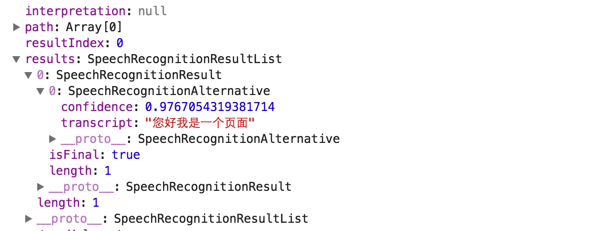 19 |
20 | #### 响应流
21 | [DEMO地址](https://www.google.com/intl/en/chrome/demos/speech.html)
22 |
23 | 你需要等待用户准备好对话,并且直到对话结束;
24 |
25 | ``` js
26 | var recognition = new webkitSpeechRecognition();
27 | recognition.continuous = true;
28 | recognition.interimResults = true;
29 | recognition.onresult = function(event) {
30 | console.log(event)
31 | }
32 | recognition.start();
33 | ```
34 | 这样你可以在用户开始讲话时,提前渲染结果。
35 |
36 | 你可以自动以识别的语言,默认情况为所在地区语言。
37 |
38 | #### x-webkit-speech
39 |
40 | Webkit 内核的浏览器支持语音输入
41 |
42 | ``` html
43 |
44 | ```
45 | 它会识别音频并进行转化为文字
46 |
47 | ### 安全性
48 |
49 | http协议下浏览器每次都会提醒用户去确认语音操作,然而https的页面,没有这样一个麻烦的操作。
50 | JavaScript上下文,整个页面,都能过访问到捕获的音频。
51 |
52 | ### 小结
53 | JavaScript的语音识别总体还并未大范围使用,而且受限于浏览器支持,因此只有少数需求或许能够使用到把。
54 |
55 |
56 | ### 参考
57 |
58 | + [The HTML5 Speech Recognition API](http://shapeshed.com/html5-speech-recognition-api/)
59 |
60 | + [Voice Driven Web Apps: Introduction to the Web Speech API](https://developers.google.com/web/updates/2013/01/Voice-Driven-Web-Apps-Introduction-to-the-Web-Speech-API?hl=en)
61 |
62 |
--------------------------------------------------------------------------------
/demo/css/page.css:
--------------------------------------------------------------------------------
1 | *{
2 | margin:0;
3 | padding: 0;
4 | }
5 |
6 | body{
7 | font-size: 16px;
8 | font-family: Microsoft Yahei, SimHei, arial, sans-serif;
9 | }
10 | .page{
11 | position: relative;
12 | width: 100%;
13 | }
14 | img{
15 | max-width: 100%;
16 | }
17 | a{
18 | color: #1ba1e2;
19 | text-decoration: none;
20 | }
21 | h1{
22 | text-align: center;
23 | padding-top: 30px;
24 | }
25 |
26 | h1 img{
27 | width: 480px;
28 |
29 | }
30 | h2{
31 | width: 960px;
32 | margin: 0 auto;
33 | line-height: 35px;
34 | font-size: 18px;
35 | padding: 15px;
36 | background: #f1f1f1;
37 | }
38 | ul{
39 | padding-left: 40px;
40 | }
41 | .img-wrap{
42 | width: 660px;
43 | margin: 60px auto;
44 | display: flex;
45 | justify-content: space-between;
46 | }
47 | .img-wrap .item{
48 | width: 320px;
49 | text-align: center;
50 | }
51 | p{
52 | padding: 10px;
53 | color:#454545;
54 | }
55 | .img-wrap .item .filter-use{
56 | color: #1ba1e2;
57 | }
58 |
59 | .m-form{
60 | text-align: center;
61 | background: #f3f3f3;
62 | padding: 20px;
63 | }
64 |
65 | .search{
66 | width: 180px;
67 | height: 32px;
68 | border:1px solid #ddd;
69 | }
70 | .doc{
71 | width: 960px;
72 | margin: 20px auto;
73 | }
74 | .ft{
75 | padding-top: 40px;
76 | padding-bottom: 30px;
77 | }
78 | pre{
79 | border-width: 0px;
80 | }
81 | @media all and (max-width:960px) {
82 | h2,.doc,.img-wrap{
83 | width:95%;
84 | flex-wrap: wrap;
85 | }
86 | .img-wrap .item{
87 | width: 100%'
88 | }
89 | }
90 | /** view doc https://highlightjs.org **/
91 | .hljs {
92 | display: block;
93 | overflow-x: auto;
94 | padding: 0.5em;
95 | background: #f7f7f7;
96 | }
97 | .hljs,
98 | .hljs-subst {
99 | color: #2c3e50;
100 | }
101 | .hljs-comment {
102 | color: #999;
103 | }
104 | .hljs-keyword,
105 | .hljs-attribute,
106 | .hljs-selector-tag,
107 | .hljs-meta-keyword,
108 | .hljs-doctag,
109 | .hljs-name {
110 | font-weight: bold;
111 | }
112 | .hljs-type,
113 | .hljs-string,
114 | .hljs-number,
115 | .hljs-selector-id,
116 | .hljs-selector-class,
117 | .hljs-quote,
118 | .hljs-template-tag,
119 | .hljs-deletion {
120 | color: #e74c3c;
121 | }
122 | .hljs-title,
123 | .hljs-section {
124 | color: #e74c3c;
125 | font-weight: bold;
126 | }
127 | .hljs-regexp,
128 | .hljs-symbol,
129 | .hljs-variable,
130 | .hljs-template-variable,
131 | .hljs-link,
132 | .hljs-selector-attr,
133 | .hljs-selector-pseudo {
134 | color: #bc6060;
135 | }
136 | .hljs-literal {
137 | color: #78a960;
138 | }
139 | .hljs-built_in,
140 | .hljs-bullet,
141 | .hljs-code,
142 | .hljs-addition {
143 | color: #16a085;
144 | }
145 | .hljs-meta {
146 | color: #2980b9;
147 | }
148 | .hljs-meta-string {
149 | color: #2980b9;
150 | }
151 | .hljs-emphasis {
152 | font-style: italic;
153 | }
154 | .hljs-strong {
155 | font-weight: bold;
156 | }
--------------------------------------------------------------------------------
/demo/regonition.html:
--------------------------------------------------------------------------------
1 |
2 |
3 |
4 |
19 |
20 | #### 响应流
21 | [DEMO地址](https://www.google.com/intl/en/chrome/demos/speech.html)
22 |
23 | 你需要等待用户准备好对话,并且直到对话结束;
24 |
25 | ``` js
26 | var recognition = new webkitSpeechRecognition();
27 | recognition.continuous = true;
28 | recognition.interimResults = true;
29 | recognition.onresult = function(event) {
30 | console.log(event)
31 | }
32 | recognition.start();
33 | ```
34 | 这样你可以在用户开始讲话时,提前渲染结果。
35 |
36 | 你可以自动以识别的语言,默认情况为所在地区语言。
37 |
38 | #### x-webkit-speech
39 |
40 | Webkit 内核的浏览器支持语音输入
41 |
42 | ``` html
43 |
44 | ```
45 | 它会识别音频并进行转化为文字
46 |
47 | ### 安全性
48 |
49 | http协议下浏览器每次都会提醒用户去确认语音操作,然而https的页面,没有这样一个麻烦的操作。
50 | JavaScript上下文,整个页面,都能过访问到捕获的音频。
51 |
52 | ### 小结
53 | JavaScript的语音识别总体还并未大范围使用,而且受限于浏览器支持,因此只有少数需求或许能够使用到把。
54 |
55 |
56 | ### 参考
57 |
58 | + [The HTML5 Speech Recognition API](http://shapeshed.com/html5-speech-recognition-api/)
59 |
60 | + [Voice Driven Web Apps: Introduction to the Web Speech API](https://developers.google.com/web/updates/2013/01/Voice-Driven-Web-Apps-Introduction-to-the-Web-Speech-API?hl=en)
61 |
62 |
--------------------------------------------------------------------------------
/demo/css/page.css:
--------------------------------------------------------------------------------
1 | *{
2 | margin:0;
3 | padding: 0;
4 | }
5 |
6 | body{
7 | font-size: 16px;
8 | font-family: Microsoft Yahei, SimHei, arial, sans-serif;
9 | }
10 | .page{
11 | position: relative;
12 | width: 100%;
13 | }
14 | img{
15 | max-width: 100%;
16 | }
17 | a{
18 | color: #1ba1e2;
19 | text-decoration: none;
20 | }
21 | h1{
22 | text-align: center;
23 | padding-top: 30px;
24 | }
25 |
26 | h1 img{
27 | width: 480px;
28 |
29 | }
30 | h2{
31 | width: 960px;
32 | margin: 0 auto;
33 | line-height: 35px;
34 | font-size: 18px;
35 | padding: 15px;
36 | background: #f1f1f1;
37 | }
38 | ul{
39 | padding-left: 40px;
40 | }
41 | .img-wrap{
42 | width: 660px;
43 | margin: 60px auto;
44 | display: flex;
45 | justify-content: space-between;
46 | }
47 | .img-wrap .item{
48 | width: 320px;
49 | text-align: center;
50 | }
51 | p{
52 | padding: 10px;
53 | color:#454545;
54 | }
55 | .img-wrap .item .filter-use{
56 | color: #1ba1e2;
57 | }
58 |
59 | .m-form{
60 | text-align: center;
61 | background: #f3f3f3;
62 | padding: 20px;
63 | }
64 |
65 | .search{
66 | width: 180px;
67 | height: 32px;
68 | border:1px solid #ddd;
69 | }
70 | .doc{
71 | width: 960px;
72 | margin: 20px auto;
73 | }
74 | .ft{
75 | padding-top: 40px;
76 | padding-bottom: 30px;
77 | }
78 | pre{
79 | border-width: 0px;
80 | }
81 | @media all and (max-width:960px) {
82 | h2,.doc,.img-wrap{
83 | width:95%;
84 | flex-wrap: wrap;
85 | }
86 | .img-wrap .item{
87 | width: 100%'
88 | }
89 | }
90 | /** view doc https://highlightjs.org **/
91 | .hljs {
92 | display: block;
93 | overflow-x: auto;
94 | padding: 0.5em;
95 | background: #f7f7f7;
96 | }
97 | .hljs,
98 | .hljs-subst {
99 | color: #2c3e50;
100 | }
101 | .hljs-comment {
102 | color: #999;
103 | }
104 | .hljs-keyword,
105 | .hljs-attribute,
106 | .hljs-selector-tag,
107 | .hljs-meta-keyword,
108 | .hljs-doctag,
109 | .hljs-name {
110 | font-weight: bold;
111 | }
112 | .hljs-type,
113 | .hljs-string,
114 | .hljs-number,
115 | .hljs-selector-id,
116 | .hljs-selector-class,
117 | .hljs-quote,
118 | .hljs-template-tag,
119 | .hljs-deletion {
120 | color: #e74c3c;
121 | }
122 | .hljs-title,
123 | .hljs-section {
124 | color: #e74c3c;
125 | font-weight: bold;
126 | }
127 | .hljs-regexp,
128 | .hljs-symbol,
129 | .hljs-variable,
130 | .hljs-template-variable,
131 | .hljs-link,
132 | .hljs-selector-attr,
133 | .hljs-selector-pseudo {
134 | color: #bc6060;
135 | }
136 | .hljs-literal {
137 | color: #78a960;
138 | }
139 | .hljs-built_in,
140 | .hljs-bullet,
141 | .hljs-code,
142 | .hljs-addition {
143 | color: #16a085;
144 | }
145 | .hljs-meta {
146 | color: #2980b9;
147 | }
148 | .hljs-meta-string {
149 | color: #2980b9;
150 | }
151 | .hljs-emphasis {
152 | font-style: italic;
153 | }
154 | .hljs-strong {
155 | font-weight: bold;
156 | }
--------------------------------------------------------------------------------
/demo/regonition.html:
--------------------------------------------------------------------------------
1 |
2 |
3 |
4 | 
38 | 更多说明: 39 | 40 |
41 | 42 | 43 || 样句 | 51 |预加载时间 | 52 |时间 | 53 |操作 | 54 |
|---|---|---|---|
| Hello I am Stark | 57 |未测试(0s) | 58 |未测试(0s) | 59 |60 | |
| Hello-I-am-Stark | 63 |未测试(0s) | 64 |未测试(0s) | 65 |66 | |
| The cake in the photo had "Love Wins Fag" written on it in frosting — a message that would likely be upsetting to many | 69 |未测试(0s) | 70 |未测试(0s) | 71 |72 | |
| The-cake-in-the-photo-had-"Love Wins Fag"-written-on-it-in-frosting — a-message-that-would-likely-be-upsetting-to-many | 75 |未测试(0s) | 76 |未测试(0s) | 77 |78 | |
82 | 更多说明: 83 | 84 |
85 | 86 | 87 |在w3c草案中增加了对Web Speech Api的支持;主要作用在 两个非常重要的方面: 59 |
60 | 64 |而chrome在版本33发布后宣布对该特性的支持;今天重要介绍第二部分。
65 |// 你可以直接打开你的控制台粘贴下面代码
68 | var words = new SpeechSynthesisUtterance('Hello captain');
69 | window.speechSynthesis.speak(words);
70 | 当然你还可以修改很多参数去调整你的发音:
73 | 74 |volume:声音;rate:发音速度;pitch:音调;voice:声音;language:语言(en,zh,ja…更多参考)var msg = new SpeechSynthesisUtterance();
82 | var voices = window.speechSynthesis.getVoices();
83 | msg.voice = voices[10]; //
84 | msg.voiceURI = 'native';
85 | msg.volume = 1; // 0 to 1
86 | msg.rate = 1; // 0.1 to 10
87 | msg.pitch = 2; //0 to 2
88 | msg.text = 'I am Stark';
89 | msg.lang = 'en';
90 |
91 | msg.onend = function(e) {
92 | console.log('Finished in ' + event.elapsedTime + ' seconds.');
93 | };
94 |
95 | speechSynthesis.speak(msg);
96 | 你可以通过下面函数获取可以使用的发音列表名称
99 |speechSynthesis.getVoices().forEach(function(voice) {
100 | console.log(voice.name, voice.default ? '(default)' :'');
101 | });
102 | 大概你可以获取下面的一个列表
104 |// 省略一部分结果
105 | Google Deutsch
106 | Google US English
107 | Google UK English Female
108 | Google UK English Male
109 | Google 日本語
110 | Google 普通话(中国大陆)
111 | Google 國語(臺灣)
112 | 接下来我们可以试验下改变发音名称
114 | 115 |var msg = new SpeechSynthesisUtterance('hey captain,sometime I just want to break you perfect teeth');
116 | msg.voice = speechSynthesis.getVoices().filter(function(voice) { return voice.name == 'Google US English'; })[0];
117 | speechSynthesis.speak(msg);
118 | 除了英文,我们还可以使用其他语言
120 |// 使用日语
126 | var msg = new SpeechSynthesisUtterance('おはようございます');
127 | msg.voice = speechSynthesis.getVoices().filter(function(voice) { return voice.name == 'Google 日本語'; })[0];
128 | speechSynthesis.speak(msg);
129 | // or 使用中文
130 | var msg = new SpeechSynthesisUtterance('美国队长3');
131 | msg.voice = speechSynthesis.getVoices().filter(function(voice) { return voice.name == 'Google 普通话(中国大陆)'; })[0];
132 | speechSynthesis.speak(msg);
133 | 兼容性检测
140 |if ('speechSynthesis' in window) {
141 | // Synthesis support. Make your web apps talk!
142 | }
143 |
144 | 如果对于不支持的浏览器,我们可以使用老的方法,即将需要发音的单词发送到服务端进行处理,返回一个音频,类似如下:
146 |// 使用来自谷歌翻译的音频
147 | var audio = new Audio();
148 | audio.src ='http://translate.google.com/translate_tts?ie=utf-8&tl=en&q=' + encodeURI('hello captain');
149 | audio.play();
150 | 当然我们如果追求快速开发的话,我们现在依旧有成熟的框架来支持这个功能,让他实现更多浏览器的支持。
153 |ResponsiveVoice.JS 是一款基于html5的跨平台的发音支持类库,支持超过56种语言和168种 声音,分为免费版和商业版。 156 | Demo 157 |
158 |speak.js 基于eSpeack改造而来的一款js单词拼读类库.
161 |meSpeak.js 是一个100%的客户端发音类库,支持chrome和safari,并且无需要任何html元素;
164 |say.js一款基于node.js的发音扩展类库。
167 |持续更新中…
170 |[1] Web apps that talk - Introduction to the Speech Synthesis API 172 | 173 |
174 |[2] using-google-text-to-speech-in-javascript 175 |
176 |[3] A More Awesome Web: Features You’ve Always Wanted - Google I/O 2013 177 | 178 |
179 |[4] HTML Speech API Examples 180 |
181 | 182 |183 | 更多说明: 184 | 185 |
186 | 187 | 188 |