├── README_cn.md
└── README.md
/README_cn.md:
--------------------------------------------------------------------------------
1 | # 鬼手剪辑_智能去字幕和视频擦除
2 | 通过自动视频OCR和视频修复,擦除任何视频内的文本,也可擦除视频水印、文本、字幕、徽标、表情符号、人物、物体等…
3 |
4 | ## [English Version](https://github.com/JollyToday/GhostCut_Remove_Video_Text/blob/main/README.md "GhostCut Video text removal info") --- [中文介绍](https://github.com/JollyToday/GhostCut_Remove_Video_Text/blob/main/README_cn.md "鬼手剪辑去字幕中文介绍")
5 |
6 | ## 鬼手剪辑简介
7 | 鬼手剪辑又称为GhostCut,他是一款智能视频编辑工具,核心目的是帮助用户提升素材的处理速度和视频创意制作的质量,在各种音视频的处理细节中使用了大量的AI能力,为很多视频提升了处理效率。
8 |
9 | 免费体验地址:[鬼手剪辑视频去文字](https://jollytoday.com/Smart_Text_Removal?redirect=%2Fhome&code=th741 "免费试用GhostCut视频文字移除")
10 |
11 | 软件有中英文版本,提供API支持和私有化部署服务。大陆用户可以在微信小程序中访问产品,搜索GhostCut或鬼手剪辑。
12 |
13 | ## 智能去字幕和视频擦除的案例演示
14 |  15 |
16 | 这是智能文本移除和视频修复演示视频。如果您需要了解视频擦除,请访问视频擦除介绍。与其他的擦除和修复软件相比,例如Runway的修复功能,GhostCut的文本移除(修复)更简单、更智能、更实惠。您可以在此处查看GhostCut和Runway在视频修复中的具体区别:[GhostCut和Runway在视频修复中的区别](https://ghostcut.notion.site/Difference-between-GhostCut-and-Runway-in-Video-Inpainting-f5764304757f4bb995aff2c48fb148a7 "GhostCut和Runway在视频修复中的区别")。
17 |
18 | ### 1. 鬼手剪辑可以擦除什么样的视频元素?
19 |
20 | 具体如下
21 |
22 |
15 |
16 | 这是智能文本移除和视频修复演示视频。如果您需要了解视频擦除,请访问视频擦除介绍。与其他的擦除和修复软件相比,例如Runway的修复功能,GhostCut的文本移除(修复)更简单、更智能、更实惠。您可以在此处查看GhostCut和Runway在视频修复中的具体区别:[GhostCut和Runway在视频修复中的区别](https://ghostcut.notion.site/Difference-between-GhostCut-and-Runway-in-Video-Inpainting-f5764304757f4bb995aff2c48fb148a7 "GhostCut和Runway在视频修复中的区别")。
17 |
18 | ### 1. 鬼手剪辑可以擦除什么样的视频元素?
19 |
20 | 具体如下
21 |
22 |  23 |
24 | ### 2.相关视频擦除场景有哪些:
25 |
26 | 鬼手剪辑通过智能OCR检测视频中的所有文本,并应用修复以再次恢复视频。
27 |
28 | - 任何英语或中文文字、日语、韩语、阿拉伯语等视频字幕、标题、文本、单词、文案和硬编码的字幕;
29 | - 去除视频上下区域有黑色填充和覆盖文字
30 | - 去除浮动/移动水印(文字)
31 | - 去除中英文logo水印(在视频中间,通过抹除视频实现)
32 | - 去除徽标和贴纸等
33 |
34 | ### 3.支持的视频OCR和文本删除语言
35 | 同时去掉中文和英文,或者分别去掉中文、英文、日文、韩文、阿拉伯文等;
36 |
37 | ### 4.文本移除和视频修复细节
38 |
39 | - 支持文本自动移除,先标记区域后仅自动移除标记区域内的文本,标记区域后全部移除,调整保护或擦除区域后重新合成
40 | - 支持自动检测视频主体和上下边缘,在视频主主体外重新填充背景
41 | 更多用法参考后文的擦除应用案例
42 |
43 | ### 5.智能去字幕和视频擦除的区别
44 | 鬼手剪辑提供两种类型的视频擦除/修复产品。智能去文字可以自动从视频中移除中、英等语言字幕,视频擦除可以通过网页版或API手动标记移除位置来移除任何视频内的对象。
45 |
46 | GhostCut的智能去字幕也使用AI Inpainting技术,他会首先使用视频OCR检测视频中所有的文本,然后自动擦除,在过程中尽量避免擦除商品本身的文字。如果你想从视频中删除一些特定的标志、贴纸或水印,你需要使用手动标记的方法来删除它们。
47 |
48 | 目前小程序端和GhostCut的PC板块都已经发布了【视频移除】功能,可以直接选择任意想要移除的元素,下面的元素都可以移除。【文字】【图标】【logo】【水印】【logo】【贴纸】【动画】等等…
49 |
50 |
51 |
52 | ## 视频去字幕和视频擦除的API接口支持
53 | 鬼手剪辑提供了所有API功能的输出,包括视频去重编辑、文本自动去除、视频擦除、视频字幕翻译、视频语音翻译(含配音)等界面。多种能力可以叠加在一起选择。(需要AppKey)
54 | 可以集成到第三方产品中。
55 |
56 | 如:智能去文字:https://api.zhaoli.com/v-w-c/gateway/ve/work/fast
57 |
58 | 智能去除视频字幕API请求示例
59 | ```json
60 | {"callback":"https://xxx.com/tool/api/ghost-cut/call-back","music":2,"musicRegion":"","needChineseOcclude":1,"needCrop":0,"needMask":0,"needMirror":0,"needRescale":0,"needShift":0,"needTransition":0,"needTrim":0,"outUserId":"624585","randomBorder":0,"resolution":"720p","uid":"xxx","urls":["https://v.douyin.com/Sqv7vgw/"]}
61 | ```
62 |
63 | 智能去字幕API响应示例
64 | ```json
65 | {"msg":"success","trace":"c178bdf50dd7454e8db672f0e44593c4","code":1000,"body":{"idProject":220925302,"dataList":[{"url":"https://v.douyin.com/Sqv7vgw/","id":476993630}]}}
66 | ```
67 |
68 | [视频去字幕API文档](https://jollytoday.feishu.cn/docx/ItgYd4MDvooxFNx37DdcYxQ9n8c "GhostCut视频去字幕接口文档")
69 |
70 |
71 | ## 视频擦除类产品支持以下四种模式,你可以自定义保护区域或指定删除区域:
72 |
73 | a.自动删除视频内所有检测到的文本
74 |
75 | b.先标记指定区域,然后自动擦除指定区域的文字
76 |
77 | c.先标记区域,然后移除标记区域的所有内容
78 |
79 | d.移除文字后,对指定区域的处理结果进行二次调整,设置保护区域放置误擦除或指定再次擦除。
80 |
81 |
23 |
24 | ### 2.相关视频擦除场景有哪些:
25 |
26 | 鬼手剪辑通过智能OCR检测视频中的所有文本,并应用修复以再次恢复视频。
27 |
28 | - 任何英语或中文文字、日语、韩语、阿拉伯语等视频字幕、标题、文本、单词、文案和硬编码的字幕;
29 | - 去除视频上下区域有黑色填充和覆盖文字
30 | - 去除浮动/移动水印(文字)
31 | - 去除中英文logo水印(在视频中间,通过抹除视频实现)
32 | - 去除徽标和贴纸等
33 |
34 | ### 3.支持的视频OCR和文本删除语言
35 | 同时去掉中文和英文,或者分别去掉中文、英文、日文、韩文、阿拉伯文等;
36 |
37 | ### 4.文本移除和视频修复细节
38 |
39 | - 支持文本自动移除,先标记区域后仅自动移除标记区域内的文本,标记区域后全部移除,调整保护或擦除区域后重新合成
40 | - 支持自动检测视频主体和上下边缘,在视频主主体外重新填充背景
41 | 更多用法参考后文的擦除应用案例
42 |
43 | ### 5.智能去字幕和视频擦除的区别
44 | 鬼手剪辑提供两种类型的视频擦除/修复产品。智能去文字可以自动从视频中移除中、英等语言字幕,视频擦除可以通过网页版或API手动标记移除位置来移除任何视频内的对象。
45 |
46 | GhostCut的智能去字幕也使用AI Inpainting技术,他会首先使用视频OCR检测视频中所有的文本,然后自动擦除,在过程中尽量避免擦除商品本身的文字。如果你想从视频中删除一些特定的标志、贴纸或水印,你需要使用手动标记的方法来删除它们。
47 |
48 | 目前小程序端和GhostCut的PC板块都已经发布了【视频移除】功能,可以直接选择任意想要移除的元素,下面的元素都可以移除。【文字】【图标】【logo】【水印】【logo】【贴纸】【动画】等等…
49 |
50 |
51 |
52 | ## 视频去字幕和视频擦除的API接口支持
53 | 鬼手剪辑提供了所有API功能的输出,包括视频去重编辑、文本自动去除、视频擦除、视频字幕翻译、视频语音翻译(含配音)等界面。多种能力可以叠加在一起选择。(需要AppKey)
54 | 可以集成到第三方产品中。
55 |
56 | 如:智能去文字:https://api.zhaoli.com/v-w-c/gateway/ve/work/fast
57 |
58 | 智能去除视频字幕API请求示例
59 | ```json
60 | {"callback":"https://xxx.com/tool/api/ghost-cut/call-back","music":2,"musicRegion":"","needChineseOcclude":1,"needCrop":0,"needMask":0,"needMirror":0,"needRescale":0,"needShift":0,"needTransition":0,"needTrim":0,"outUserId":"624585","randomBorder":0,"resolution":"720p","uid":"xxx","urls":["https://v.douyin.com/Sqv7vgw/"]}
61 | ```
62 |
63 | 智能去字幕API响应示例
64 | ```json
65 | {"msg":"success","trace":"c178bdf50dd7454e8db672f0e44593c4","code":1000,"body":{"idProject":220925302,"dataList":[{"url":"https://v.douyin.com/Sqv7vgw/","id":476993630}]}}
66 | ```
67 |
68 | [视频去字幕API文档](https://jollytoday.feishu.cn/docx/ItgYd4MDvooxFNx37DdcYxQ9n8c "GhostCut视频去字幕接口文档")
69 |
70 |
71 | ## 视频擦除类产品支持以下四种模式,你可以自定义保护区域或指定删除区域:
72 |
73 | a.自动删除视频内所有检测到的文本
74 |
75 | b.先标记指定区域,然后自动擦除指定区域的文字
76 |
77 | c.先标记区域,然后移除标记区域的所有内容
78 |
79 | d.移除文字后,对指定区域的处理结果进行二次调整,设置保护区域放置误擦除或指定再次擦除。
80 |
81 |  82 |
82 |  83 |
84 | [鬼手剪辑用户使用教程](https://ghostcut.notion.site/5df83fa6726747b39bd4272a052c1bc1?v=7afb54a3dc70455a949d3945bb0c4221 "GhostCut鬼手剪辑用户指南")
85 |
86 | ## 更多关于招鲤科技和鬼手剪辑API
87 | - 招鲤科技对外提供的产品包括智能剪辑工具、AI图片翻译服务和智能账号管理系统等,先后服务近百万中小客户并为数百家顶级的DTC品牌、电商平台、MCN机构、游戏、内容平台等提供视频化和智能化综合解决方案。[查看招鲤科技公司介绍和客户案例](https://jollytoday.feishu.cn/docx/doxcnqiDVJ3UEMtSLBnBtkuSrSb "招鲤科技公司介绍")
88 | - 鬼手剪辑提供以下能力,包括视频去重、视频修复(去文字)、视频擦除、视频翻译(通过识别字幕)、视频翻译(通过识别于语音)、视频翻译和配音、模版剪辑、视频分割、视频合成、视频OCR等接口,多个能力可以在一个接口组合调用
89 | - 鬼手剪辑的产品优势:专注AI视频领域,已服务百万用户,国内外API客户信赖。产品体验好、效果有优势、性价比高、支持私有化和部分定制、支持二次编辑、提供专属对接群支持等
90 | - 欢迎联系我们获得更多接口权限和专属对接支持
91 |
92 | ## 联系鬼手剪辑
93 | - 微信:360254,备注请注明GitHub。
94 | - 邮箱:niumoz#izhaoli.com (#-->@)
95 |
--------------------------------------------------------------------------------
/README.md:
--------------------------------------------------------------------------------
1 | # GhostCut_Remove_Video_Text
2 | Remove any video text by auto OCR and inpainting. Auto erase video watermarks、texts 、subtitles、logos、emojis...
3 |
4 | ## [English Version](https://github.com/JollyToday/GhostCut_Remove_Video_Text/blob/main/README.md "GhostCut Video text removal info") --- [中文介绍](https://github.com/JollyToday/GhostCut_Remove_Video_Text/blob/main/README_cn.md "鬼手剪辑去字幕中文介绍")
5 |
6 | ## Introduction to GhostCut
7 | GhostCut is an intelligent video editing tool. The core purpose is to help users improve the processing speed of materials and the quality of video creative production. It uses a lot of AI capabilities in the processing details of various audio & video, improving the processing efficiency for many video.
8 |
9 | Experience address:[Free Try GhostCut Video Text Removal](https://jollytoday.com/Smart_Text_Removal?redirect=%2Fhome&code=th741 "Free Try GhostCut Video Text Removal")
10 |
11 | There are Chinese and English versions. Mainland users can access product in WeChat mini program, search GhostCut.
12 |
13 | ### Smart Text Removal- video demos
14 |
15 |
16 | This is Smart Text Removal and Video Inpainting demo video. If you need to learn about video inpainting, please to visit the video inpainting introduction. Compared to other text removal software, such as Runway's Inpainting feature, GhostCut's text removal(Inpainting) is simpler, smarter, and more affordable. You can check the specific differences between GhostCut and Runway in Video Inpainting here: [Difference between GhostCut and Runway in Video Inpainting](https://ghostcut.notion.site/Difference-between-GhostCut-and-Runway-in-Video-Inpainting-f5764304757f4bb995aff2c48fb148a7 "Difference between GhostCut and Runway in Video Inpainting")。
17 |
18 | ### 1.What kind of video texts can GhostCut automatically remove?
19 |
20 | Specifically as follows
21 |
22 |
83 |
84 | [鬼手剪辑用户使用教程](https://ghostcut.notion.site/5df83fa6726747b39bd4272a052c1bc1?v=7afb54a3dc70455a949d3945bb0c4221 "GhostCut鬼手剪辑用户指南")
85 |
86 | ## 更多关于招鲤科技和鬼手剪辑API
87 | - 招鲤科技对外提供的产品包括智能剪辑工具、AI图片翻译服务和智能账号管理系统等,先后服务近百万中小客户并为数百家顶级的DTC品牌、电商平台、MCN机构、游戏、内容平台等提供视频化和智能化综合解决方案。[查看招鲤科技公司介绍和客户案例](https://jollytoday.feishu.cn/docx/doxcnqiDVJ3UEMtSLBnBtkuSrSb "招鲤科技公司介绍")
88 | - 鬼手剪辑提供以下能力,包括视频去重、视频修复(去文字)、视频擦除、视频翻译(通过识别字幕)、视频翻译(通过识别于语音)、视频翻译和配音、模版剪辑、视频分割、视频合成、视频OCR等接口,多个能力可以在一个接口组合调用
89 | - 鬼手剪辑的产品优势:专注AI视频领域,已服务百万用户,国内外API客户信赖。产品体验好、效果有优势、性价比高、支持私有化和部分定制、支持二次编辑、提供专属对接群支持等
90 | - 欢迎联系我们获得更多接口权限和专属对接支持
91 |
92 | ## 联系鬼手剪辑
93 | - 微信:360254,备注请注明GitHub。
94 | - 邮箱:niumoz#izhaoli.com (#-->@)
95 |
--------------------------------------------------------------------------------
/README.md:
--------------------------------------------------------------------------------
1 | # GhostCut_Remove_Video_Text
2 | Remove any video text by auto OCR and inpainting. Auto erase video watermarks、texts 、subtitles、logos、emojis...
3 |
4 | ## [English Version](https://github.com/JollyToday/GhostCut_Remove_Video_Text/blob/main/README.md "GhostCut Video text removal info") --- [中文介绍](https://github.com/JollyToday/GhostCut_Remove_Video_Text/blob/main/README_cn.md "鬼手剪辑去字幕中文介绍")
5 |
6 | ## Introduction to GhostCut
7 | GhostCut is an intelligent video editing tool. The core purpose is to help users improve the processing speed of materials and the quality of video creative production. It uses a lot of AI capabilities in the processing details of various audio & video, improving the processing efficiency for many video.
8 |
9 | Experience address:[Free Try GhostCut Video Text Removal](https://jollytoday.com/Smart_Text_Removal?redirect=%2Fhome&code=th741 "Free Try GhostCut Video Text Removal")
10 |
11 | There are Chinese and English versions. Mainland users can access product in WeChat mini program, search GhostCut.
12 |
13 | ### Smart Text Removal- video demos
14 |
15 |
16 | This is Smart Text Removal and Video Inpainting demo video. If you need to learn about video inpainting, please to visit the video inpainting introduction. Compared to other text removal software, such as Runway's Inpainting feature, GhostCut's text removal(Inpainting) is simpler, smarter, and more affordable. You can check the specific differences between GhostCut and Runway in Video Inpainting here: [Difference between GhostCut and Runway in Video Inpainting](https://ghostcut.notion.site/Difference-between-GhostCut-and-Runway-in-Video-Inpainting-f5764304757f4bb995aff2c48fb148a7 "Difference between GhostCut and Runway in Video Inpainting")。
17 |
18 | ### 1.What kind of video texts can GhostCut automatically remove?
19 |
20 | Specifically as follows
21 |
22 | 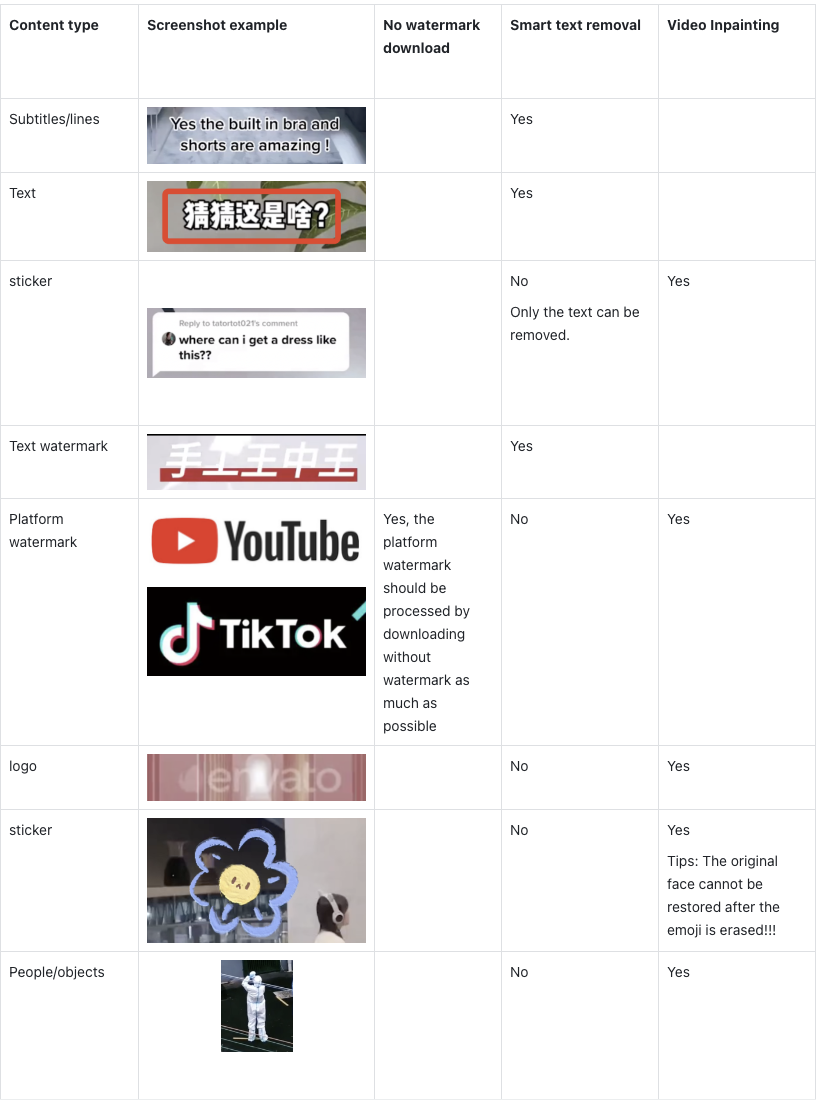 23 |
24 | ### 2.Related Video text removal scenarios:
25 |
26 | All text in the video is detected by intelligent OCR , and inpainting is applied to restore the video again.
27 |
28 | * Any English or Chinese、Japanese、Korean、Arabian subtitle、caption、text、word、copywriting and hardcode subtitles
29 | * Video up and down area with black filling and covered text
30 | * Floating/moving watermark (text)
31 | * Chinese and English watermarking (in the middle of the video, achieved by erasing the video)
32 | * Logo and sticker removal
33 |
34 | ### 3.Supported Languages for Video OCR and Text Removal
35 | Remove both Chinese and English at the same time, or remove Chinese, English, Japanese, Korean, and Arabic separately;
36 |
37 |
38 | ### 4.Text Removal and Video Inpainting Details
39 |
40 | * Support automatic text removal, first mark the area and only automatically remove the text in marked area, remove all after marking the area, adjust the protection or erasure area and re-synthesize
41 | * Support automatic detection of video subject and upper and lower edges, and refill the background outside the video main subject
42 |
43 | ### 5.Difference between Smart text removal and Video remover
44 | GhostCut offers two types of video remover products. Smart text removal can automatically remove Chinese and English text from videos, and video remover can remove any objects by manually marking the removal positions through the web version or APIs.
45 |
46 | The [Smart Text Removal] of GhostCut also use AI Remover tech but first detects the text in the video and then erases it automatically. If you want to remove some specific logos, stickers or watermarks from the video, you need to use the manual marking method to remove them.
47 |
48 | At present, the [Video Remover] function has been released on both the Mini Program side and the PC section of GhostCut. You can directly select any element you want to remove, and the following elements can be removed.[Text] [Icon] [logo] [ watermark ] [logo] [sticker] [animation] and so on…
49 |
50 | Compared to other Remover software, such as Runway's Inpainting feature, GhostCut's Inpainting is simpler, smarter, and more affordable. You can check the specific differences between GhostCut and Runway in Video Inpainting here: Difference between GhostCut and Runway in Video Inpainting
51 |
52 | ## Video Text Removal API interface support
53 | GhostCut provides the output of all API functions, including video deduplicate editing, automatic text removal, video erasure, video subtitle translation, video voice translation (including dubbing) and other interfaces. Multiple capabilities can be superimposed and selected together. (AppKey required)
54 |
55 | It can be integrated into third-party products (of course, it is not necessary to develop or have other alternatives, after all, this is a fee).
56 |
57 | Such as: Smart Text Removal: https://api.zhaoli.com/v-w-c/gateway/ve/work/fast
58 |
59 | **Video Text Removal API Request example**
60 |
61 | ```json
62 | {"callback":"https://xxx.com/tool/api/ghost-cut/call-back","music":2,"musicRegion":"","needChineseOcclude":1,"needCrop":0,"needMask":0,"needMirror":0,"needRescale":0,"needShift":0,"needTransition":0,"needTrim":0,"outUserId":"624585","randomBorder":0,"resolution":"720p","uid":"xxx","urls":["https://v.douyin.com/Sqv7vgw/"]}
63 | ```
64 |
65 | **Video Text Removal API Response Example**
66 | ```json
67 | {"msg":"success","trace":"c178bdf50dd7454e8db672f0e44593c4","code":1000,"body":{"idProject":220925302,"dataList":[{"url":"https://v.douyin.com/Sqv7vgw/","id":476993630}]}}
68 | ```
69 | [Video Text Removal API documents](https://jollytoday.feishu.cn/docx/LSNzdoGtOoTSqsxM4K8cooc7nAc "GhostCut Video Text Removal API documents")
70 |
71 |
72 | ## Text removal supports the following four modes, and you can customize the protection area or specify the deletion area:
73 |
74 | > a. Automatic text removal
75 |
76 | > b. First mark the specified area, and then automatically remove the text in the specified area
77 |
78 | > c. First mark the area, and then remove all the contents of the marked area
79 |
80 | > d. After removing the text, adjust the specified area later
81 |
82 | 
83 |
84 | 
85 |
86 | [GhostCut User Guides](https://ghostcut.notion.site/5df83fa6726747b39bd4272a052c1bc1?v=7afb54a3dc70455a949d3945bb0c4221 "GhostCut User Guides")
87 |
88 | ## More about JollyToday and GhostCut APIs
89 | - GhostCut product tutorial, please refer to:ghostcut.medium.com
90 | - GhostCut's API advantages: Focus on AI video, has served millions of users, and is trusted by API customers at home and abroad. Good product experience, superior effect, cost effective, support private deployment and partial customization, support secondary editing, and provide exclusive docking group support.
91 | - GhostCut API provides the following capabilities, includingvideo inpainting (de-text), video deduplication, video eraser, video translation (by ASR), video translation (by OCR), AI dubbing, template editing, video segmentation, video OCR and other interfaces, multiple capabilities can be combined in one interface., If you need more, please contact us !
92 |
93 | ## Contact GhostCut
94 | * WeChat: 360254, please indicate GitHub in the remark.
95 | * Email:niumoz#izhaoli.com(#-->@)
96 |
97 |
--------------------------------------------------------------------------------
23 |
24 | ### 2.Related Video text removal scenarios:
25 |
26 | All text in the video is detected by intelligent OCR , and inpainting is applied to restore the video again.
27 |
28 | * Any English or Chinese、Japanese、Korean、Arabian subtitle、caption、text、word、copywriting and hardcode subtitles
29 | * Video up and down area with black filling and covered text
30 | * Floating/moving watermark (text)
31 | * Chinese and English watermarking (in the middle of the video, achieved by erasing the video)
32 | * Logo and sticker removal
33 |
34 | ### 3.Supported Languages for Video OCR and Text Removal
35 | Remove both Chinese and English at the same time, or remove Chinese, English, Japanese, Korean, and Arabic separately;
36 |
37 |
38 | ### 4.Text Removal and Video Inpainting Details
39 |
40 | * Support automatic text removal, first mark the area and only automatically remove the text in marked area, remove all after marking the area, adjust the protection or erasure area and re-synthesize
41 | * Support automatic detection of video subject and upper and lower edges, and refill the background outside the video main subject
42 |
43 | ### 5.Difference between Smart text removal and Video remover
44 | GhostCut offers two types of video remover products. Smart text removal can automatically remove Chinese and English text from videos, and video remover can remove any objects by manually marking the removal positions through the web version or APIs.
45 |
46 | The [Smart Text Removal] of GhostCut also use AI Remover tech but first detects the text in the video and then erases it automatically. If you want to remove some specific logos, stickers or watermarks from the video, you need to use the manual marking method to remove them.
47 |
48 | At present, the [Video Remover] function has been released on both the Mini Program side and the PC section of GhostCut. You can directly select any element you want to remove, and the following elements can be removed.[Text] [Icon] [logo] [ watermark ] [logo] [sticker] [animation] and so on…
49 |
50 | Compared to other Remover software, such as Runway's Inpainting feature, GhostCut's Inpainting is simpler, smarter, and more affordable. You can check the specific differences between GhostCut and Runway in Video Inpainting here: Difference between GhostCut and Runway in Video Inpainting
51 |
52 | ## Video Text Removal API interface support
53 | GhostCut provides the output of all API functions, including video deduplicate editing, automatic text removal, video erasure, video subtitle translation, video voice translation (including dubbing) and other interfaces. Multiple capabilities can be superimposed and selected together. (AppKey required)
54 |
55 | It can be integrated into third-party products (of course, it is not necessary to develop or have other alternatives, after all, this is a fee).
56 |
57 | Such as: Smart Text Removal: https://api.zhaoli.com/v-w-c/gateway/ve/work/fast
58 |
59 | **Video Text Removal API Request example**
60 |
61 | ```json
62 | {"callback":"https://xxx.com/tool/api/ghost-cut/call-back","music":2,"musicRegion":"","needChineseOcclude":1,"needCrop":0,"needMask":0,"needMirror":0,"needRescale":0,"needShift":0,"needTransition":0,"needTrim":0,"outUserId":"624585","randomBorder":0,"resolution":"720p","uid":"xxx","urls":["https://v.douyin.com/Sqv7vgw/"]}
63 | ```
64 |
65 | **Video Text Removal API Response Example**
66 | ```json
67 | {"msg":"success","trace":"c178bdf50dd7454e8db672f0e44593c4","code":1000,"body":{"idProject":220925302,"dataList":[{"url":"https://v.douyin.com/Sqv7vgw/","id":476993630}]}}
68 | ```
69 | [Video Text Removal API documents](https://jollytoday.feishu.cn/docx/LSNzdoGtOoTSqsxM4K8cooc7nAc "GhostCut Video Text Removal API documents")
70 |
71 |
72 | ## Text removal supports the following four modes, and you can customize the protection area or specify the deletion area:
73 |
74 | > a. Automatic text removal
75 |
76 | > b. First mark the specified area, and then automatically remove the text in the specified area
77 |
78 | > c. First mark the area, and then remove all the contents of the marked area
79 |
80 | > d. After removing the text, adjust the specified area later
81 |
82 | 
83 |
84 | 
85 |
86 | [GhostCut User Guides](https://ghostcut.notion.site/5df83fa6726747b39bd4272a052c1bc1?v=7afb54a3dc70455a949d3945bb0c4221 "GhostCut User Guides")
87 |
88 | ## More about JollyToday and GhostCut APIs
89 | - GhostCut product tutorial, please refer to:ghostcut.medium.com
90 | - GhostCut's API advantages: Focus on AI video, has served millions of users, and is trusted by API customers at home and abroad. Good product experience, superior effect, cost effective, support private deployment and partial customization, support secondary editing, and provide exclusive docking group support.
91 | - GhostCut API provides the following capabilities, includingvideo inpainting (de-text), video deduplication, video eraser, video translation (by ASR), video translation (by OCR), AI dubbing, template editing, video segmentation, video OCR and other interfaces, multiple capabilities can be combined in one interface., If you need more, please contact us !
92 |
93 | ## Contact GhostCut
94 | * WeChat: 360254, please indicate GitHub in the remark.
95 | * Email:niumoz#izhaoli.com(#-->@)
96 |
97 |
--------------------------------------------------------------------------------