├── Dune-Phone.jpg
├── Dune-Obsidian.jpg
├── manifest.json
├── Wiki
├── Sharing.md
├── Profile.md
├── Contacts.md
├── Recipes.md
├── Poetry.md
├── Mermaid diagrams.md
├── cheatsheet cssclasses Dune.md
├── Movie list.md
├── UX Design.md
├── Folders.md
├── Tables.md
├── Pictures.md
├── Text-highlight.md
├── Callouts.md
├── cheatsheet-Callouts, Fences, Tags.md
└── Troubleshooting.md
├── .github
└── ISSUE_TEMPLATE
│ ├── feature_request.md
│ ├── pull-request-template.md
│ └── bug_report.md
├── CONTRIBUTING.md
├── snippets
├── Dune-pluginsupport.css
├── Dune-mermaid.css
└── Dune-foldericons.css
├── README.md
└── LICENSE
/Dune-Phone.jpg:
--------------------------------------------------------------------------------
https://raw.githubusercontent.com/Jopp-gh/Obsidian-Dune84/HEAD/Dune-Phone.jpg
--------------------------------------------------------------------------------
/Dune-Obsidian.jpg:
--------------------------------------------------------------------------------
https://raw.githubusercontent.com/Jopp-gh/Obsidian-Dune84/HEAD/Dune-Obsidian.jpg
--------------------------------------------------------------------------------
/manifest.json:
--------------------------------------------------------------------------------
1 | {
2 | "name": "Dune",
3 | "version": "2.5.63",
4 | "minAppVersion": "1.6.0",
5 | "author": "joval"
6 | }
7 |
--------------------------------------------------------------------------------
/Wiki/Sharing.md:
--------------------------------------------------------------------------------
1 | # Sharing
2 |
3 |
4 | ## Slide (show)
5 | currently not working, waiting on a update of Obsidian to re-inplement the improvements of Slides.
6 |
7 | ## Pdf export
8 | - replaced dark themed backgrounds with white, printer-friendly backgrounds
9 | - all text is optimized for readablility
10 |
11 | ---
12 | [go back to the ReadMe](https://github.com/Jopp-gh/Obsidian-Dune84/tree/main)
13 |
--------------------------------------------------------------------------------
/.github/ISSUE_TEMPLATE/feature_request.md:
--------------------------------------------------------------------------------
1 | ---
2 | name: Feature request
3 | about: Suggest an idea for this project
4 | title: ''
5 | labels: ''
6 | assignees: ''
7 |
8 | ---
9 |
10 | **Is your feature request related to a problem? Please describe.**
11 | A clear and concise description of what the problem is. Ex. I'm always frustrated when [...]
12 |
13 | **Describe the solution you'd like**
14 | A clear and concise description of what you want to happen.
15 |
16 | **Describe alternatives you've considered**
17 | A clear and concise description of any alternative solutions or features you've considered.
18 |
19 | **Additional context**
20 | Add any other context or screenshots about the feature request here.
21 |
--------------------------------------------------------------------------------
/CONTRIBUTING.md:
--------------------------------------------------------------------------------
1 | ## Accepted contributions:
2 |
3 | - **documentation rework** of [Dune's Wiki](https://github.com/Jopp-gh/Obsidian-Dune84/tree/main/Wiki). I am looking for *proofwriters and translators* (in no particular oder: English, Deutsch, Italiano, Français, Español)
4 | - **pull requests** to improve compatibility with *tablets*. Other pull requests are welcome too, after consultation.
5 | - **financial support** for the development and upkeeping of Dune and to support future projects for Obsidian
6 | - **feature request** contributions (not requests)
7 | - **bugfix contributions** (not requests)
8 |
9 |
10 |
11 | ---
12 | *Thanks for your interest in [Dune](https://github.com/Jopp-gh/Obsidian-Dune84/) for [Obsidian.md](https://obsidian.md)*
13 |
--------------------------------------------------------------------------------
/.github/ISSUE_TEMPLATE/pull-request-template.md:
--------------------------------------------------------------------------------
1 | ---
2 | name: Pull request template
3 | about: Suggest features or submit a patch
4 | title: ''
5 | labels: ''
6 | assignees: ''
7 |
8 | ---
9 |
10 | **Is your pull request related to a problem? Please describe**
11 | A clear and concise description of what the problem is. Ex. I'm always frustrated when [...]
12 |
13 | **Describe the solution you'd like**
14 | short description.
15 |
16 | **Screenshots**
17 | add screenshots to help explain your problem.
18 |
19 | **Mobile (please complete or delete the following section):**
20 |
21 | Device: [e.g. iPad pro, Samsung Galaxy]
22 | OS: [e.g. iOS8.1]
23 | Browser [e.g. Firefox, Safari]
24 | Version [e.g. 22]
25 |
26 | **Desktop (please complete or delete the following section):**
27 |
28 | OS: [e.g. iOS]
29 | Browser [e.g. Firefox, Safari]
30 | Version [e.g. 22]
31 |
--------------------------------------------------------------------------------
/.github/ISSUE_TEMPLATE/bug_report.md:
--------------------------------------------------------------------------------
1 | ---
2 | name: Bug report
3 | about: Create a report to help us improve
4 | title: ''
5 | labels: ''
6 | assignees: ''
7 |
8 | ---
9 |
10 | **Describe the bug**
11 | A clear and concise description of what the bug is.
12 |
13 | **To Reproduce**
14 | Steps to reproduce the behavior:
15 | 1. Go to '...'
16 | 2. Click on '....'
17 | 3. Scroll down to '....'
18 | 4. See error
19 |
20 | **Expected behavior**
21 | A clear and concise description of what you expected to happen.
22 |
23 | **Screenshots**
24 | If applicable, add screenshots to help explain your problem.
25 |
26 | **Desktop (please complete the following information):**
27 | - OS: [e.g. iOS]
28 | - Browser [e.g. chrome, safari]
29 | - Version [e.g. 22]
30 |
31 | **Smartphone (please complete the following information):**
32 | - Device: [e.g. iPhone6]
33 | - OS: [e.g. iOS8.1]
34 | - Browser [e.g. stock browser, safari]
35 | - Version [e.g. 22]
36 |
37 | **Additional context**
38 | Add any other context about the problem here.
39 |
--------------------------------------------------------------------------------
/Wiki/Profile.md:
--------------------------------------------------------------------------------
1 | # Profile
2 | ### Phone
3 | swap your vault name with an icon.
4 |
5 |
6 |
7 | #### Generic profile Icon
8 | to add a icon, go to **Style Settings>Dune>Pictures>Profile picture - (phone)**
9 |
10 |
11 |
12 | #### Custom profile picture
13 |
14 | 1. find a *black & white icon* / *color icon*, **png file**
15 | 2. Make sure your url is correct and if you are allowed to link icons back to Obsidian. To check, type in `` in a note and give Obsidian a few moments to load some icon from the web (pay attention to the "!" In front of your link)
16 | 3. If your link works, go ahead and add your link to the url field in **Style Settings>Dune>Pictures>Profile picture - (phone)** : `url('https://url/to/your/pic.png')`
17 | 4. If you got a *black and white icon*, enable "monochrome vault profile" so you can see your icon also in dark theme mode.
18 |
19 |
20 | >Obsolete: Profile Pictures on desktop don't work anymore starting from Obsidian 1.6.0+. Maybe, I will re-implement again Profile pictures for desktops, in the future.
21 |
22 | ---
23 | [go back to the ReadMe](https://github.com/Jopp-gh/Obsidian-Dune84/tree/main)
24 |
--------------------------------------------------------------------------------
/Wiki/Contacts.md:
--------------------------------------------------------------------------------
1 | # Contact list
2 |
3 | 
4 |
5 | > **note**: for profile pictures, please use only square-shaped pictures
6 |
7 | ### Usage
8 | 1. First, add `cssclasses: contacts` to your frontmatter
9 | 2. then add a simple table, like in the example below:
10 |
11 | ```
12 | | | name| tel | mail| group| relations |
13 | | --- | --- | --- | --- | ---- | --------- |
14 | | | | | | | |
15 | | | | | | | |
16 | | | | | | | |
17 | ```
18 |
19 | 3. finally, fill in your data. If you include profile images, then the best place to put them in, is the first column.
20 |
21 | ### Example
22 | ```
23 | | | name | tel | mail | group | relations |
24 | | ------------------ | ----------------- | ------------- | ------------- | ------- | ----------------- |
25 | | ![[profile1.png]] | [[Frank Herbert]] | +765 0967887 | some@mail.com | #autor | [[Anne Hubbard]] |
26 | | ![[profile2.jpg]] | [[Anne Hubbard]] | +765 0939885 | some@mail.com | #client | [[Frank Herbert]] |
27 | ```
28 |
29 |
30 | ---
31 | [Back to ReadMe](https://github.com/Jopp-gh/Obsidian-Dune84/tree/main)
32 |
--------------------------------------------------------------------------------
/Wiki/Recipes.md:
--------------------------------------------------------------------------------
1 | # Recipes
2 |
3 | if you love to collect recipes, you can create your own cookbook with Dune's recipes.
4 | Just insert the template down below in a new, blank note.
5 | Feel free to change the template layout below to suit your needs and taste :)
6 |
7 | ```
8 | ---
9 | cssclasses: recipes
10 | ---
11 | #lunch
12 |
13 | - [#] 4 servings
14 | - [t] 45 min
15 | - [g] [[salad]]
16 | - [d] [[drinks]]
17 |
18 | >[!column|r]
19 | >![[recipe.jpg|300]]
20 |
21 | | lot | ingredients |
22 | | ---- | ----------- |
23 | | 400g | Loremipsum |
24 | | 1 | dolorsit |
25 | | 1 | amet |
26 |
27 | ### Steps
28 | 1. Lorem ipsum dolor sit amet, consectetur adipisicing elit, sed do eiusmod tempor incididunt ut labore et dolore magna aliqua.
29 | 2. Ut enim ad minim veniam, quis nostrud exercitation ullamco laboris nisi ut aliquip ex ea commodo consequat.
30 | 3. Duis aute irure dolor in reprehenderit in voluptate velit esse cillum dolore eu fugiat nulla pariatur. Excepteur sint occaecat cupidatat non proident, sunt in culpa qui officia deserunt mollit anim id est laborum.
31 |
32 | > [!note|yellow]
33 | > Lorem ipsum dolor sit amet
34 |
35 | ---
36 | ```
37 |
38 | ### Example: (PC)
39 |  40 |
41 | ### Example: (Phone)
42 |
40 |
41 | ### Example: (Phone)
42 |  43 |
44 |
45 | ### Bon appétit!
46 |
47 | ---
48 | [Back to ReadMe](https://github.com/Jopp-gh/Obsidian-Dune84/tree/main)
49 |
--------------------------------------------------------------------------------
/Wiki/Poetry.md:
--------------------------------------------------------------------------------
1 | # Poetry
2 | ## Initials
3 | 
4 | 
5 |
6 | **Example**
7 | `#dropcap ==A==` or `#raisecap ==A==` or
8 |
9 | **Deutsch**: `#initiale ==A==` oder `#majuskel ==A==`
10 |
11 |
43 |
44 |
45 | ### Bon appétit!
46 |
47 | ---
48 | [Back to ReadMe](https://github.com/Jopp-gh/Obsidian-Dune84/tree/main)
49 |
--------------------------------------------------------------------------------
/Wiki/Poetry.md:
--------------------------------------------------------------------------------
1 | # Poetry
2 | ## Initials
3 | 
4 | 
5 |
6 | **Example**
7 | `#dropcap ==A==` or `#raisecap ==A==` or
8 |
9 | **Deutsch**: `#initiale ==A==` oder `#majuskel ==A==`
10 |
11 |
12 |
13 | Choose how your **first letter**, your **Initial**, looks:
14 | - **Dropcap** (half submerged and surrounded by a text block)
15 | - **Raisecap** (on the same baseline with the first line but bigger First Letter)
16 |
17 |
18 | ### Related Settings
19 | - to change fonts, go to **Style Settings>Dune>Fonts>Typesets>2 - Poetry**
20 | - to change font colors for poetry, go to **Style Settings>Dune>Colors>Extra Colors>Initial (Poetry)**
21 |
22 | >[!tip]
23 | >You can add typesettings to notes in **Preview View** if you add one of the following cssclasses: `ftheme-1`, `ftheme-2`, `ftheme-3`, `ftheme-4`
24 |
25 |
26 |
27 |
28 | ## Decorative delimiters
29 | 
30 | ````
31 | ```wave
32 | ```
33 | ````
34 |
35 | **Options**: `wave`, `wave2,` `wave3`, `wave4`
36 |
37 | **Deutsch**: `deko`, `deko2,` `deko3`, `deko4`
38 |
39 | these are pretty delimiters to divide chapters, relax paragraphs or to add a little design to your pages. If you want simple delimiters, check out [simple delimiters](https://github.com/Jopp-gh/Obsidian-Dune84/blob/main/Wiki/Text-highlight.md#simple-horizontal-lines)
40 |
41 |
42 |
43 | ---
44 | [Back to ReadMe](https://github.com/Jopp-gh/Obsidian-Dune84/tree/main)
45 |
--------------------------------------------------------------------------------
/Wiki/Mermaid diagrams.md:
--------------------------------------------------------------------------------
1 | ## Mermaid diagrams
2 |
3 | if you want to change Mermaids colors, you need to download this companion snippet: [Dune-mermaid.css](https://github.com/Jopp-gh/Obsidian-Dune84/blob/main/snippets/Dune-mermaid.css).
4 | Dune should cover most, if not all mermaid diagram types for both dark / light theme - if you notice missing diagrams or hard to read strings, then please let me know and send me a report, just click the tab **Issues** on top, thanks.
5 |
6 | 
7 |
8 |
9 | ### Mermaid Diagrams on-the-fly
10 |
11 | Use [Quickadd](https://github.com/chhoumann/quickadd) by **chhoumann** or any text-expander application to add custom-made mermaid templates on-the-fly. Another good option is [Mermaid tools](https://github.com/dartungar/obsidian-mermaid) by dartungar.
12 | To learn more about diagram types, check out [mermaid-tutorials](https://mermaid.js.org/syntax/flowchart.html)
13 |
14 | ### Pdf output
15 |
16 | Dune will print always the same output, no matter if your current theme is dark or light.
17 | See below (A4)
18 |
19 |  20 |
21 | ## Example Diagrams
22 | 
23 | 
24 | 
25 | 
26 | 
27 | 
28 | 
29 | 
30 |
31 | ---
32 | to learn more about mermaid diagram types and other mermaid settings see [mermaid-tutorials](https://mermaid.js.org/syntax/flowchart.html)
33 |
34 |
35 |
--------------------------------------------------------------------------------
/Wiki/cheatsheet cssclasses Dune.md:
--------------------------------------------------------------------------------
1 | # CHEATSHEET - cssclasses
2 | cssclasses are case sensitive eg. `Banner-a` ≠ `banner-a`
3 |
4 |
20 |
21 | ## Example Diagrams
22 | 
23 | 
24 | 
25 | 
26 | 
27 | 
28 | 
29 | 
30 |
31 | ---
32 | to learn more about mermaid diagram types and other mermaid settings see [mermaid-tutorials](https://mermaid.js.org/syntax/flowchart.html)
33 |
34 |
35 |
--------------------------------------------------------------------------------
/Wiki/cheatsheet cssclasses Dune.md:
--------------------------------------------------------------------------------
1 | # CHEATSHEET - cssclasses
2 | cssclasses are case sensitive eg. `Banner-a` ≠ `banner-a`
3 |
4 |
5 |
6 | ## TABLES
7 |
8 | ### TABLE ALIGNMENT
9 | center tables
10 |
11 | `cssclasses: table-c`
12 |
13 | equally distribuited columns
14 |
15 | `cssclasses: table-eq`
16 |
17 | stretch tables
18 |
19 | `cssclasses: table-wide`
20 |
21 | headless tables
22 |
23 | `cssclasses: table-hl`
24 |
25 |
26 |
27 | #### Deutsch
28 | m = Mitte
29 |
30 | `cssclasses: tabelle-m`
31 |
32 | gs = gleiche Spalten(weite)
33 |
34 | `cssclasses: tabelle-gs`
35 |
36 | weit = ganze Breite
37 |
38 | `cssclasses: tabelle-weit`
39 |
40 | kl = kopflos
41 |
42 | `cssclasses: tabelle-kl`
43 |
44 |
45 |
46 |
47 | ### TABLE COLORS
48 | classic header tint - red / green / blue / monochrome
49 |
50 | ```
51 | cssclasses: table-r
52 | cssclasses: table-g
53 | cssclasses: table-b
54 | cssclasses: table-m
55 | ```
56 |
57 | double-header tint - red / green / blue / monochrome
58 |
59 | ```
60 | cssclasses: table-xyr
61 | cssclasses: table-xyg
62 | cssclasses: table-xyb
63 | cssclasses: table-xym
64 | ```
65 |
66 |
67 |
68 | #### Deutsch
69 | klassische Tabelle
70 |
71 | ```
72 | cssclasses: tabelle-r
73 | cssclasses: tabelle-g
74 | cssclasses: tabelle-b
75 | cssclasses: tabelle-m
76 | ```
77 |
78 | doppelköpfige Tabelle
79 |
80 | ```
81 | cssclasses: tabelle-xyr
82 | cssclasses: tabelle-xyg
83 | cssclasses: tabelle-xyb
84 | cssclasses: tabelle-xym
85 | ```
86 |
87 |
88 |
89 | ### TABLE HIGHLIGHTS
90 | highlight first column
91 |
92 | `cssclasses: table-fc`
93 |
94 | highlight last column
95 |
96 | `cssclasses: table-lc`
97 |
98 | highlight alternate columns
99 |
100 | `cssclasses: table-alt`
101 |
102 | highlight last row
103 |
104 | `cssclasses: table-lr`
105 |
106 |
107 |
108 | #### Deutsch
109 | es= erste Spalte
110 |
111 | `cssclasses: tabelle-es`
112 |
113 | ls = letzte Spalte
114 |
115 | `cssclasses: tabelle-ls`
116 |
117 | alt = alternierend
118 |
119 | `cssclasses: tabelle-alt`
120 |
121 | letzte Reihe
122 |
123 | `cssclasses: tabelle-lr`
124 |
125 |
126 |
127 |
128 | ### SPECIAL TABLES
129 | Contacts
130 |
131 | `cssclasses: contacts`
132 |
133 | Recipes
134 |
135 | `cssclasses: recipes`
136 |
137 | Movies
138 |
139 | `cssclasses: movies`
140 |
141 |
142 |
143 |
144 |
145 | ## FONTS
146 | change font family of your active note
147 |
148 | `cssclasses: ftheme-1`
149 | `cssclasses: ftheme-2`
150 | `cssclasses: ftheme-3`
151 |
152 |
153 |
154 |
155 |
156 | ## IMAGES
157 |
158 | ### BANNER
159 | top
160 | `cssclasses: banner-a` and `![[image.png|banner-a]]`
161 | bottom
162 | `cssclasses: banner-b` and `![[image.png|banner-b]]`
163 | everywhere
164 | `![[image.png|banner-m]]`
165 |
166 | ### Simple image descriptions
167 | cssclasses: `capt-10`, `capt-15`, `capt-20`, `capt-25`, `capt-30`, `capt-35`, `capt-40`
168 |
169 | ### Simple Image grid
170 |
171 | cssclasses: `grid-10`, `grid-20`, `grid-30`, `grid-40`, `grid-15`, `grid-25`, `grid-35`, `grid-45`
172 |
--------------------------------------------------------------------------------
/Wiki/Movie list.md:
--------------------------------------------------------------------------------
1 | # Movie list
2 |
3 | ## Simple Movie catalog
4 | 
5 |
6 | ````
7 | ---
8 | cssclass: movies
9 | tags:
10 | ---
11 |
12 | # Genre
13 |
14 | ```fade2
15 | ```
16 |
17 | | cover | cover | cover | cover |
18 | | ----------------- | ----------------- | ----------------- | ----------------- |
19 | | title (year) [^1] | title (year) [^2] | title (year) [^3] | title (year) [^4] |
20 | | 100 min | 100 min | 100 min | 100 min |
21 | | #action | #comedy | #adventure | #drama |
22 | | director | director | director | director |
23 | | ⭐️5/10 | ⭐️5/10 | ⭐️5/10 | ⭐️5/10 |
24 |
25 | ```fade2
26 | ```
27 |
28 | ````
29 |
30 | my goal was to build a compact Movie list / overview to remember watched movies, or to bookmark movies to watch. I love good entertainment but keep informations pretty basic. To start, add some basic descriptions (of course you can add much more informations if you wish):
31 |
32 | ### Table layout
33 |
34 | - cover image (recommended)
35 | - title and year (Dune (1984) OR title and a footnote (to display plot, actors, etc) (recommended)
36 | - duration
37 | - genre
38 | - director
39 | - rating (recommended)
40 |
41 | ### Usage
42 | 1) for informations about your movies, visit the Internet Movie Database: https://www.imdb.com/
43 | 2) next, add a **cssclass**, eg `cssclasses: movies` to your frontmatter
44 | 3) optionally, set a special font for your movie title, go to: `Dune>Fonts>Extra Fonts>Special Header Font>Header - Movies`
45 | 4) finally, use this template:
46 |
47 | ```
48 | | cover | cover | cover | cover |
49 | | ----------------- | ----------------- | ----------------- | ----------------- |
50 | | title (year) [^1] | title (year) [^2] | title (year) [^3] | title (year) [^4] |
51 | | 100 min | 100 min | 100 min | 100 min |
52 | | #action | #comedy | #adventure | #drama |
53 | | director | director | director | director |
54 | | ⭐️5/10 | ⭐️5/10 | ⭐️5/10 | ⭐️5/10 |
55 |
56 | ```
57 |
58 |
59 |
60 | 1. **cover**: add a cover picture, eg `![[your-picture.jpg]]`
61 | 2. **title**: add a movie name, ideally followed by the release year and a footnote for plots eg. `MovieName (Year) [^1]`
62 | 3. **duration, genre, director and rating** are optional values.
63 | 4. **expand** your movie table with more keywords (rows) or add another movie table below (keep at least an empty line between tables).
64 |
65 | >[!tip]
66 | >add as many columns as you like, for a clean overview i suggest 4 in a row for phone and 6 to 8 movies in a row for desktop pcs.
67 |
68 |
69 |
70 | ### Zoomed view
71 |
72 | 
73 |
74 | zoomed view (press and keep left mouse button)
75 |
76 |
77 |
78 | ---
79 | [Back to ReadMe](https://github.com/Jopp-gh/Obsidian-Dune84/tree/main)
80 |
--------------------------------------------------------------------------------
/Wiki/UX Design.md:
--------------------------------------------------------------------------------
1 | # UI improvements
2 |
3 | - **Banners, picture placements and picture arrangements** eg. add footer or top -banners, place pictures on page and more: [see here](https://github.com/Jopp-gh/Obsidian-Dune84/blob/main/Wiki/Pictures.md)
4 | - add **multiple linebreaks** , [see here](https://github.com/Jopp-gh/Obsidian-Dune84/blob/main/Wiki/Callouts.md#multiple-line-breaks)
5 | - innovative **tag modifiers** to change font font color, font highlight, add subscript and superscript strings and much, much more. [See here](https://github.com/Jopp-gh/Obsidian-Dune84/blob/main/Wiki/Text-highlight.md)
6 | - innovative actionable **list bullets** - forget your old-fashion list bullets, because you wont need them anymore. Checkmark buttons replace them completely, they look similar, now `- [ ] some text`
7 | - new **checkboxes without strikeout** - Dune disables strikeout for completed tasks, if you prefer default looks, go to `Dune>Show ui elements>Text body>Show strikeout line (checklists)`
8 | - **svg mermaid diagrams** -readable diagram elements (arrows, labels, etc) in both dark and light themes. Learn more about mermaid diagrams in [this tutorial](https://mermaid.js.org/syntax/flowchart.html), to see some examples [see here](https://github.com/Jopp-gh/Obsidian-Dune84/blob/main/Wiki/Mermaid%20diagrams.md). To enable this feature, you need to install the [Dune-Mermaid.css](https://github.com/Jopp-gh/Obsidian-Dune84/blob/main/snippets/Dune-mermaid.css) snippet
9 | - add a variety of **table configurations** to change colors, table highlights (Highlight first, last, alternate column or the last row), special tables (recipes, movie list, contact list) [see here](https://github.com/Jopp-gh/Obsidian-Dune84/blob/main/Wiki/Tables.md)
10 | - add a variety of **beautiful decorations** (horizontal lines) to break chapters, paragraphs. For examples, [see here](https://github.com/Jopp-gh/Obsidian-Dune84/blob/main/Wiki/Poetry.md)
11 | - try between 6 varied **theme color schemes** (3 for day and 3 for night) or make it your own, simply go to: **Settings>Style Settings>Dune>Colors>Custom Theme**
12 | - and much more… for a full list of features, see [here](https://github.com/Jopp-gh/Obsidian-Dune84/blob/main/Wiki/cheatsheet%20cssclasses%20Dune.md) and [here](https://github.com/Jopp-gh/Obsidian-Dune84/blob/main/Wiki/cheatsheet-Callouts%2C%20Fences%2C%20Tags.md)
13 |
14 | ### Obsolete
15 | >- personalize your vault with a true [**Profile picture**](https://github.com/Jopp-gh/Obsidian-Dune84/blob/main/Wiki/Profile.md) (see **Style Settings>Dune>Pictures**)
16 | >- new **find-and-replace** dialog
17 |
18 |
19 | ### Phone / Tablet
20 | - bigger buttons, overall more space on screen
21 | - to **open Obsidians preferences**, swipe from the left border of your screen to right, to open the Right sidepanel, swipe from right border of your screen to the left.
22 | - to **rename** a note, use the command palette or touch the top-left area on your display
23 |
24 | ### Desktop
25 | - **rename** your notes with right-click on your active tab or hover-over your note header or right-click on your file/folder in the *folder-tree view*
26 | - to display your **status bar**, hover over the bottom-right corner (to re-enable Obsidians status bar, go to **Style Settings>Dune>Show**)
27 | - clean interface - most buttons are hidden / semi-hidden by default
28 |
29 |
30 | ---
31 | [go back to the ReadMe](https://github.com/Jopp-gh/Obsidian-Dune84/tree/main)
32 |
--------------------------------------------------------------------------------
/Wiki/Folders.md:
--------------------------------------------------------------------------------
1 | # Folders
2 |
3 | ## Folders Icons
4 |
5 | >[!important]
6 | >This companion plugin is obsolete by now. I wrote **Folders Icons** years ago, to add icons to folders in absence of suitable plugins. You can still use **Folders Icons** if you want, but I recommend you to download and use the community plugin **Iconic** by Holo
7 |
8 | to use **folder icons**, *add special keywords* to folder names, eg. `Project`, `Area`, `Resources`, `Archive`
9 |
10 | ### Usage
11 | 1. To get started, download [folder-icons-v2.css](https://github.com/Jopp-gh/Obsidian-Dune84/blob/main/snippets/folder-icons-v2.css) first.
12 | 2. Then [install snippets](https://help.obsidian.md/Extending+Obsidian/CSS+snippets),
13 | 3. pick a random keyword from the list below (notice, keywords which share the same icon are separated with a slash "/"):
14 |
15 |
16 |
17 | - Workbench
18 | - Journal / Training / Education
19 | - Design / Draft
20 | - Read
21 | - Project
22 | - Responsibility / Area
23 | - Resources
24 | - Archive
25 | - Portfolio
26 | - Photo
27 | - Software / Linux / Mac / Win
28 | - Entertainment / Movie
29 | - Study / Research
30 | - Contact
31 | - Society / Social
32 | - Health
33 | - Network
34 | - Travel
35 | - Sport
36 | - Language
37 | - Code / Shell
38 | - Game
39 |
40 |
41 |
42 | ### In practice
43 | use following *name convention* : `folderName keyword` eg. "Test Project"
44 |
45 |
46 | >**Tip**
47 | >- if you add multiple words to a folder name, put your *keyword* **last**
48 | >- **Folders Icons** is an extension of Dune, so you can display the icons you like with the keywords you want.
49 | >- Keywords are case sensitive, eg. "project" is not the same as "Project"
50 |
51 |
52 |
53 | ### Expand your Iconset
54 | Check [folder-icons-v2.css](https://github.com/Jopp-gh/Obsidian-Dune84/blob/main/snippets/folder-icons-v2.css) and make changes as you see fit.
55 | You can add or remove keywords, change keywords to lowercase and change or remove icons. Find a list of available icons on top of [folder-icons-v2.css](https://github.com/Jopp-gh/Obsidian-Dune84/blob/main/snippets/folder-icons-v2.css) or add new icons by yourself, check out icon websites like: https://lucide.dev
56 |
57 |
58 |
59 | ### Change Icons and Folder names
60 | to display icons you need to modify my snippet. All you need to know is:
61 | - the folder you want to use
62 | - the icon you want to use
63 |
64 |
65 |
66 | 1. First of all, open `folder-icons-v2.css` in a text editor of your choice. Consider, `folder-icons-v2.css` is organized in 2 parts: the top section holds all icons , the bottom section holds the rule.
67 | 2. now search for "Journal" in the rules and replace that name with a name of one (1) of your folders
68 | 3. open the command palette `cmd+p` on Mac, should be `ctrl+p` on Win/Linux and type "reload" for "reload app without saving" .
69 |
70 |
71 |
72 | > Note, you can assign Multiple Names to an icon, but not to a folder.
73 |
74 |
75 |
76 | ## Example
77 | the following rule contains: "Journal", "Education" and "Training".
78 | ```
79 | /* Journal, Education, Training */
80 | .nav-folder-title:is([data-path$="Journal"], [data-path$="Education"], [data-path$="Training"]) .nav-folder-title-content::after {
81 | content: var(--openbook-icon);
82 | }
83 | ```
84 |
85 | For simplicity, I renamed my folders to A, B and C:
86 | ```
87 | .nav-folder-title:is([data-path$="A"], [data-path$="B"], [data-path$="C"]) .nav-folder-title-content::after {
88 | content: var(--openbook-icon);
89 | }
90 | ```
91 |
92 | if you don't like the icon given to A, B and C (--openbook-icon), find in the top part of my snippet another icon-name (example --bookmark-icon) and replace the content of: `var(--openbook-icon);` with: `content: var(--bookmark-icon);`
93 |
94 |
95 | ---
96 | [go back to the ReadMe](https://github.com/Jopp-gh/Obsidian-Dune84/tree/main)
97 |
--------------------------------------------------------------------------------
/Wiki/Tables.md:
--------------------------------------------------------------------------------
1 | # TABLES
2 |
3 | ### Default table
4 |
5 | 
6 |
7 | copy this template:
8 | ```
9 | | | A | B | C |
10 | | --- | --- | --- | --- |
11 | | 1 | | | |
12 | | 2 | | | |
13 | | 3 | | | |
14 | ```
15 |
16 |
17 | ### TABLE HIGHLIGHT
18 |
19 |    
20 |
21 |
22 | cssclasses: `table-fc`, `table-lc`, `table-alt`, `table-lr`
23 |
24 | fc = first column, lc = last column, alt = alternating columns, lr = last row
25 |
26 |
27 |
28 | #### Deutsch
29 |
30 | cssclasses `tabelle-es`, `tabelle-ls`, `tabelle-alt`, `tabelle-lr`
31 |
32 | es = erste Spalte, ls = letzte Spalte, alt = alternierende Spalte, lr = letzte Reihe
33 |
34 |
35 |
36 | ## MONOCHROME TABLES
37 | replaces default tables with slightly updated versions. Dune's custom tables are available both with edgy or rounded (default) corners
38 |
39 | >`m` = monochrome
40 | >`xy` = cartesian x and y axes
41 |
42 |
43 |  
44 |
45 | LEFT: use `cssclasses: table-m`, RIGHT: use `cssclasses: table-xym`
46 |
47 |
48 |
49 |
50 | #### Deutsch
51 |
52 | cssclasses `tabelle-m`, `tabelle-xym`
53 |
54 |
55 |
56 | ## TABLE COLOR
57 |
58 | ### CLASSIC TABLE
59 | header in red, green, blue (r,g,b)
60 |
61 | **Options** cssclasses : `table-r`,`table-g`,`table-b`
62 |
63 | 
64 | 
65 | 
66 |
67 |
68 |
69 | #### Deutsch
70 | cssclasses: `tabelle-r`,`tabelle-g`,`tabelle-b`
71 |
72 |
73 |
74 | ### DOUBLE HEADED TABLE
75 | 2 axes in red, green, blue, monochrome (xyr, xyg, xyb, xym)
76 |
77 | **Options** cssclasses: `table-xyr`,`table-xyg`,`table-xyb`, `table-xym`
78 |
79 | 
80 | 
81 | 
82 |
83 |
84 |
85 |
86 | #### Deutsch
87 | cssclasses: `tabelle-xyr`,`tabelle-xyg`,`tabelle-xyb`, `tabelle-xym`
88 |
89 |
90 |
91 | ## TABLE ALIGNMENT
92 | center tables
93 |
94 | `cssclasses: table-c`
95 |
96 | equally distribuited columns
97 |
98 | `cssclasses: table-eq`
99 |
100 | stretch tables to cover the whole page
101 |
102 | `cssclasses: table-wide`
103 |
104 | headless tables
105 |
106 | `cssclasses: table-hl`
107 |
108 |
109 |
110 | #### Deutsch
111 | m = Mitte
112 |
113 | `cssclasses: tabelle-m`
114 |
115 | gs = gleiche Spalten(weite)
116 |
117 | `cssclasses: tabelle-gs`
118 |
119 | weit = ganze Weite
120 |
121 | `cssclasses: tabelle-weit`
122 |
123 | kl = Kopflos
124 |
125 | `cssclasses: tabelle-kl`
126 |
127 |
128 |
129 | ## MORE TABLES
130 |
131 | Catalogize your [Movies](https://github.com/Jopp-gh/Obsidian-Dune84/blob/main/Wiki/Movie%20list.md)
132 |
133 | Collect your [Recipes](https://github.com/Jopp-gh/Obsidian-Dune84/blob/main/Wiki/Recipes.md)
134 |
135 | Document your [Contacts](https://github.com/Jopp-gh/Obsidian-Dune84/blob/main/Wiki/Contacts.md)
136 |
137 |
138 | ---
139 | [go back to the ReadMe](https://github.com/Jopp-gh/Obsidian-Dune84/tree/main)
140 |
--------------------------------------------------------------------------------
/Wiki/Pictures.md:
--------------------------------------------------------------------------------
1 | # PICTURES
2 | ## BANNER
3 |
4 | ```
5 | ---
6 | cssclass: banner-a
7 | ---
8 | ```
9 | `![[picture.jpg | banner-a]]`
10 |
11 |
12 |
13 | there are 3 banner types:
14 |
15 | - banner-a (**top** banner, height adjustable in **Style Settings**)
16 | - banner-b (**bottom** banner, height adjustable in **Style Settings**)
17 | - banner-m ( **everywhere** on your page, placeholder for decorations, height is fixed)
18 |
19 |
20 |
21 | to insert a top or bottom -page banner, choose a banner type (eg `cssclasses: banner-a` or `cssclasses: banner-b`) to reserve a top/bottom spot, then add the same tag `banner-a` to your image metadata, eg. `![[picture.jpg | banner-a]]` to transform your image into a banner.
22 | Banner `banner-m` doesn't need a cssclass, just add `![[picture.jpg | banner-m]]` to your picture.
23 |
24 | >[!Note]
25 | >to get **bottom banners** working, put your image at bottom page, so Obsidian and Dune know where to load your banner. Do not put a footer banner `![[picture.jpg | banner-b]]` at top page, unless your note is very short.
26 |
27 |
28 |
29 | ### Banner height
30 | to configure your banner height (`cssclass: banner-a` or `cssclass: banner-b`), go to: `Dune>Pictures>Banners>Resize Banner` . Banner `banner-m` has a fixed height.
31 |
32 |
33 |
34 | ### Banner, vertical shift
35 | only for `banner-a`
36 |
37 | If your top banner looks truncated, you can use **b**anner **c**oordinates:
38 | - **locally**: use 15 different placements in your yaml header (10, 20, 30, 40, 50, 60, 70, 80), eg. `cssclass: bc-10` and median values, eg. `cssclass: bc-15`
39 |
40 |
41 |
42 | ## PICTURE LAYOUT
43 |
44 | 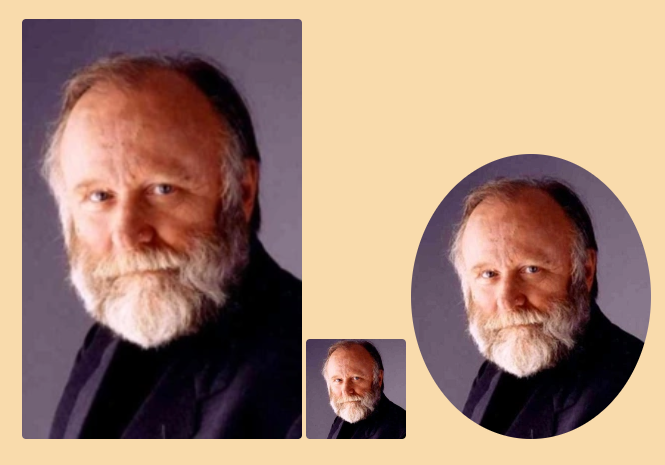
45 |
46 | `![[Pict.png | portrait]]`, `![[Pict.png|avatar]]`, `![[Pict.png|round]]`
47 |
48 | shape and resize your pictures as you like.
49 |
50 | **Deutsch**: `![[bild.png|rund]]`
51 |
52 |
53 |
54 |
55 | ### IMAGE POSITION
56 |
57 | `![[Pict.png | pos-l]]`, `![[Pict.png | pos-r]]`, `![[Pict.png | pos-c]]`
58 |
59 | place your images on your **Left**, **Right** or at the **Center** of your note
60 |
61 |
62 |
63 |
64 | ## IMAGE FRAMES
65 | ### SIMPLE IMAGE FRAMES
66 |
67 | 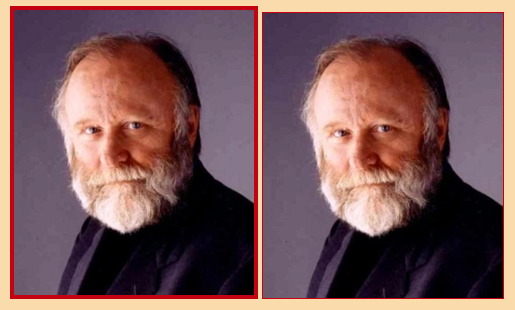
68 |
69 | **Options**: `![[Pict.png | frame-s1]]`, `![[Pict.png | frame-s2]]`
70 |
71 | **Deutsch**: `![[bild.png | rahmen-s1]]`, `![[bild.png | rahmen-s2]]`
72 |
73 | Change picture frame colors under **Style Settings>Dune>Pictures>Picture frames**
74 |
75 | ### SIMPLE IMAGE GRID
76 |
77 | 
78 |
79 | **Cssclass**: `grid-10, grid-20, grid-30, grid-40, grid-15, grid-25, grid-35, grid-45`
80 |
81 | Perfect to arrange any pictures on your page. All pictures will use the same height and keep their full aspect ratio.
82 | Just throw in all your images and forget about spacings or new line breaks between images.
83 |
84 |
85 |
86 | ### BEAUTIFUL IMAGE FRAMES
87 |
88 | 
89 |
90 |
91 | **Options**: `![[Pict.png | frame-a]]`, `![[Pict.png | frame-b]]`
92 |
93 | **Deutsch**: `![[bild.png | rahmen-a]]`, `![[bild.png | rahmen-b]]`
94 |
95 | To apply beautiful frames, you have to use a online url pointing to a png frame. Unfortunately, Obsidian restricts users from loading local images into **Style Settings** for security issues.
96 |
97 |
98 |
99 | ## BOOK PICTURES
100 | 
101 |
102 | ```
103 | > [!pict|l]
104 | > ![[Pict.png | frame-b | 250]]
105 | > description
106 | ```
107 | **Options**: `> [!pict|l]`, `> [!pict|r]`
108 |
109 | **Deutsch**: `> [!bild|l]`, `> [!bild|r]`
110 |
111 | place your images, add a picture frame and description.
112 |
113 |
114 |
115 |
116 | ## SIMPLE IMAGE DESCRIPTION
117 |
118 | 
119 |
120 | `![[Pict.png#cap|capture]]`
121 |
122 | you can adjust the max width of "simple descriptions" by adding cssclasses: `capt-10`, `capt-15`, `capt-20`, `capt-25`, `capt-30`, `capt-35`, `capt-40`.
123 | `capt-10` means max string width is 100px.
124 |
125 |
126 |
127 | ## VIDEO SIZE
128 |
129 | 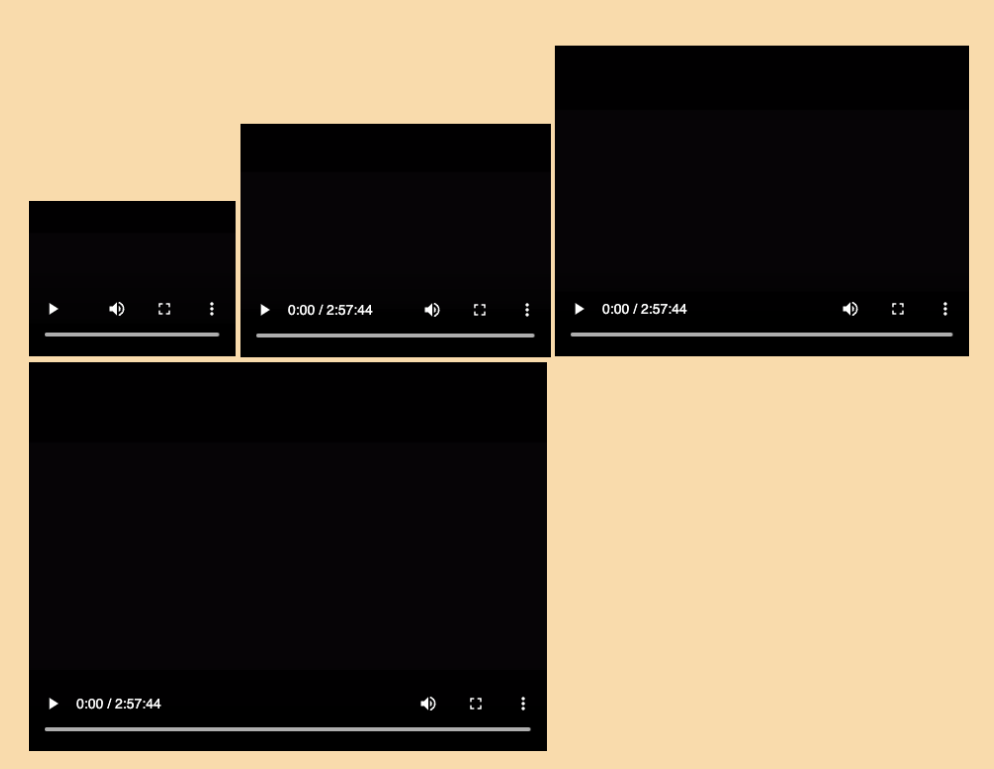
130 |
131 | `![[video.mp4|vid-20]] `
132 |
133 | **Options**:
134 |
135 | - smaller `vid-20`, `vid-30`, `vid-40`, `vid-50`
136 | - bigger `vid-120`, `vid-150`, `vid-200`
137 |
138 |
139 | ---
140 | [Back to ReadMe](https://github.com/Jopp-gh/Obsidian-Dune84/tree/main)
141 |
--------------------------------------------------------------------------------
/Wiki/Text-highlight.md:
--------------------------------------------------------------------------------
1 | # Text highlights
2 | ## Inline - text colors
3 |
4 | 
5 |
6 | `#red **Abc**`
7 | `#green **Abc**`
8 | `#blue **Abc**`
9 | `#gray **Abc**`
10 |
11 | >red, green, blue, gray - fat
12 |
13 |
14 |
15 | 
16 |
17 |
18 | `#red *Abc*`
19 | `#green *Abc*`
20 | `#blue *Abc*`
21 | `#gray *Abc*`
22 |
23 | >red, green, blue, gray - italic
24 |
25 |
26 |
27 | 
28 |
29 | `#red ==text==`
30 | `#green ==text==`
31 | `#blue ==text==`
32 | `#gray ==text==`
33 |
34 | >red, green, blue - highlight
35 |
36 | **Deutsch**
37 | `#rot`, `#grün`,`#blau`,`#grau`
38 |
39 |
40 |
41 |
42 | ## Sub & Sup
43 |
44 | 
45 |
46 | Words `#sup ==sup==` Words `#sub ==sub==`
47 |
48 |
49 |
50 | ## Spoiler
51 | 
52 |
53 | `#-spoiler ==Words==`
54 |
55 | >redact text - view on hover (desktop) or touch (mobile)
56 |
57 | **Deutsch**
58 | `#-geheim ==Words==`
59 |
60 |
61 |
62 |
63 | ## Tips
64 | 
65 |
66 | `#-tips ==Words Words Words Words Words==`
67 |
68 | >read hidden text on hover (desktop) or touch (mobile)
69 |
70 |
71 |
72 | ## Citations
73 | 
74 |
75 | 
76 |
77 | `my #cite-br ==citation==`, `my #cite-de ==citation==`, `my #cite-fr ==citation==`
78 |
79 | **Deutsch**
80 | `mein #zitat-de ==Zitat==`, `mein #zitat-br ==Zitat==`, `mein #zitat-fr ==Zitat==`
81 |
82 |
83 |
84 |
85 |
86 |
87 | ## Text Lines
88 | 
89 |
90 | `Words #line-a ==Words Words Words== Words`
91 |
92 | `Words #line-b ==Words Words Words== Words`
93 |
94 | `Words #line-c ==Words Words Words== Words`
95 |
96 |
97 |
98 | `#line-c` may be a quicker solution for mobile users than adding the default shortcut key double tilde, eg. `~~Words~~`
99 |
100 | **Deutsch**
101 | `#strich-a`, `#strich-b`, `#strich-c`
102 |
103 |
104 |
105 | ## Custom line indent
106 | open Obidians `Dune>Fonts>Text layout>Indent line` to specify your indentation depth.
107 |
108 | - custom mode (text tag) - applies to desired paragraphs
109 |
110 |
111 | **Custom indentation**
112 |
113 |  114 |
114 |
115 |  116 |
117 | **Options**
118 | `#indent ==Text==`
119 |
120 | **Deutsch**
121 | `#einzug ==Text==`
122 |
123 |
116 |
117 | **Options**
118 | `#indent ==Text==`
119 |
120 | **Deutsch**
121 | `#einzug ==Text==`
122 |
123 |
124 |
125 | ### Related
126 | #### [Text blocks - smaller & larger](https://github.com/Jopp-gh/Obsidian-Dune84/blob/main/Wiki/Callouts.md#word-blocks---small--large)
127 |
128 | #### [Multiple line breaks](https://github.com/Jopp-gh/Obsidian-Dune84/blob/main/Wiki/Callouts.md#multiple-line-breaks)
129 |
130 |
131 |
132 | ## Mini Admonitions
133 |
134 | `- [t] t`
135 |
136 | `- [a] a`
137 |
138 | `- [>] >`
139 |
140 | `- [<] <`
141 |
142 | `- [-] -`
143 |
144 | `- [b] b`
145 |
146 | `- [#] #`
147 |
148 | `- [p] p`
149 |
150 | `- [<] <`
151 |
152 | `- [e] e`
153 |
154 | `- [!] !`
155 |
156 | `- [l] l`
157 |
158 | `- [h] h`
159 |
160 | `- [g] g`
161 |
162 | `- [w] w`
163 |
164 | `- [+] +`
165 |
166 | `- [q] q`
167 |
168 | `- [n] n`
169 |
170 | `- [i] i`
171 |
172 | `- [d] d`
173 |
174 | `- [f] f`
175 |
176 | `- [m] m`
177 |
178 | `- [/] /`
179 |
180 | `- [?] ?`
181 |
182 | `- [s] s`
183 |
184 | 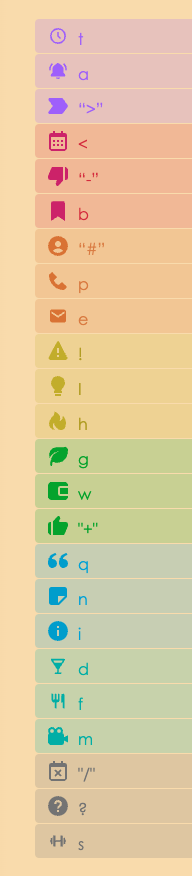
185 |
186 | 24 mini admonitions
187 |
188 | ## Other uses
189 | - [q] q
190 | - test 1
191 | - [x] test 2
192 |
193 | 
194 |
195 | ## Enable strikeout line for completed tasks
196 |
197 | to enable strikeout for completed tasks, go to `Dune>Show ui elements>Show strikeout line (checklists)`
198 |
199 |
200 |
201 | ## Simple Horizontal lines
202 | **Options**: `fade`, `fade2`, `fade3`, `stars`
203 |
204 | **Deutsch**: `trenner`, `trenner2`, `trenner3`, `sterne`
205 |
206 | simple delimiter to divide chapters or paragraphs. If you want beautiful delimiters, check out [Poetry delimiters](https://github.com/Jopp-gh/Obsidian-Dune84/blob/main/Wiki/Poetry.md#horizontal-line-styles)
207 |
208 | ### Usage
209 | ````
210 | ```fade
211 | ```
212 | ````
213 | ````
214 | ```trenner
215 | ```
216 | ````
217 |
218 | ---
219 | [Back to ReadMe](https://github.com/Jopp-gh/Obsidian-Dune84/tree/main)
220 |
--------------------------------------------------------------------------------
/Wiki/Callouts.md:
--------------------------------------------------------------------------------
1 | # Callouts
2 | ## Callouts colors
3 | Tint any callout in: red, green, blue, gray
4 |
5 | 
6 |
7 | ```
8 | > [!note|red]
9 | > note
10 | ```
11 |
12 | **Options:** `> [!note|red]`, `> [!note|green]`, `> [!note|blue]`, `> [!note|gray]`
13 |
14 | **Deutsch:** `> [!note|rot]`, `> [!note|grün]`, `> [!note|blau]`, `> [!note|grau]`
15 |
16 |
17 |
18 | ## Aside notes (hidden)
19 | Hidden box with a visual reference to open your side note.
20 | To display your box, hover over its thin, button on your right/left note border
21 |
22 | 
23 |
24 | ```
25 | > [!aside|rh]
26 | ```
27 |
28 | **Options:** `> [!aside|rh]` or `> [!aside|lh]`
29 |
30 | **Deutsch**: `> [!seite|rv]` or `> [!seite|lv]`
31 |
32 | >Hover in `source mode`/`live preview` is deactivated, to prevent visual glitches.
33 |
34 |
35 |
36 | ## Aside-in (visible)
37 | Box on your right or left side.
38 |
39 | 
40 |
41 | ```
42 | > [!aside-r]
43 | ```
44 |
45 | **Options:** `> [!aside|r]` or `> [!aside|l]`
46 |
47 | **Deutsch**: `> [!seite|r]` or `> [!seite|l]`
48 |
49 |
50 |
51 | ## COLUMN HIGHLIGHT
52 | Tint column blocks with a rgbm highlight.
53 |
54 | 
55 |
56 | **Options:** `> [!column|hl]` , `> [!column|hlr]`, `> [!column|hlg]`, `> [!column|hlb]`, `> [!column|hlm]`
57 |
58 | **Deutsch**: `> [!spalte|w]` or `> [!spalte|wr]`, `> [!spalte|wg]`, `> [!spalte|wb]`, `> [!spalte|wm]`
59 |
60 |
61 |
62 | ## Multi-column
63 | A multi-purpose callout column box to organize nested callouts, pictures, embeds.
64 |
65 | 
66 | ```
67 | > [!multi-column]
68 | >
69 | >> [!check]+ Title 1
70 | >>
71 | >> - words words words
72 | >> - words words words
73 | >
74 | >> [!info]+ Title 2
75 | >> - words words **words**
76 | ```
77 |
78 | **Common Callouts**
79 |
80 | ```
81 | > [!multi-column]
82 | >
83 | >> [!blank-container]
84 | >>
85 | >> - words words words
86 | >> - words words words
87 | >
88 | >> [!blank-container]
89 | >> - words words **words**
90 | ```
91 |
92 | **Options:** Use either callout metadata tags or `> [!blank-container]` if you want to insert a blank callout
93 |
94 | **Deutsch**:
95 |
96 | ```
97 | > [!mehrspaltig]
98 | >
99 | >> [!leerraum]
100 | >>
101 | >> - words words words
102 | >> - words words words
103 | >
104 | >> [!leerraum]
105 | >> - words words **words**
106 | ```
107 |
108 | >Note: use > [predefined Callouts](https://help.obsidian.md/Editing+and+formatting/Callouts) or generate custom callouts (use > [**Admonition**](https://github.com/valentine195/obsidian-admonition) by valentine195)
109 |
110 |
111 |
112 |
113 | ## Sidebox
114 | Sidebox to summarize most important details of a topic. Accepted formats: pictures, text and links.
115 |
116 | 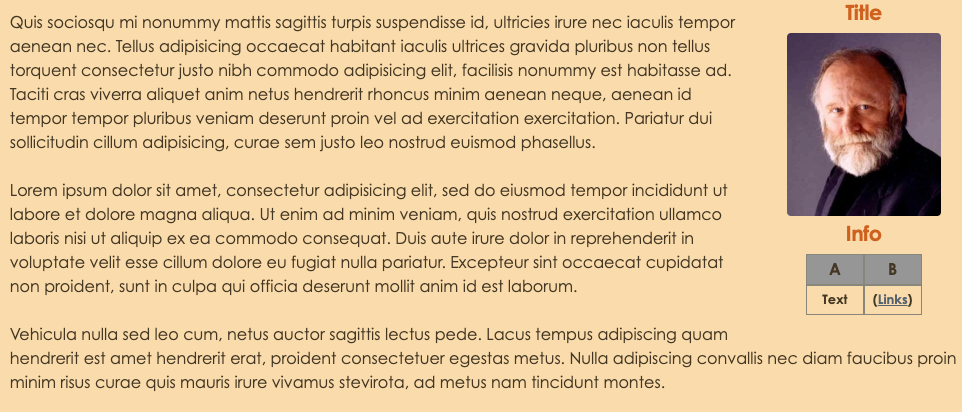
117 |
118 | ```
119 | > [!infobox|r]
120 | > ## Title
121 | > ![> [Pict.png]]
122 | > ## Info
123 | > A| B |
124 | > ---|---|
125 | > Text| (> [Links](https://en.wikipedia.org/wiki/Frank_Herbert)) |
126 | ```
127 |
128 | **Options:** `> [!infobox|l]`, `> [!infobox|r]`
129 |
130 |
131 |
132 |
133 | ## Citation
134 | embed citations in boxes and place them on the left or right side of your note.
135 |
136 | 
137 |
138 |
139 | ```
140 | > [!citation]
141 | > description
142 | ```
143 |
144 | **Options:** `> [!citation|l]`, `> [!citation|r]`
145 |
146 | **Deutsch:** `> [!zitat|l]`, `> [!zitat|r]`
147 |
148 |
149 |
150 | ## Read more…
151 | Callout to shorten longer documents.
152 |
153 | ```
154 | > [!read-more]-
155 | > Lorem ipsum etc
156 | ```
157 |
158 | **Options** `> [!read-more]-`
159 |
160 | **Deutsch** `> [!weiterlesen]-`
161 |
162 | >do not forget to add the minus after the callout, othewise this callout won't fold as expected
163 |
164 |
165 |
166 | ## Callouts alignment
167 | Callout floats left
168 |
169 | `> [!note|l]`
170 |
171 | Callout floats right
172 |
173 | `> [!note|r]`
174 |
175 | Callout columns, left, right, axis (centered)
176 | ```
177 | > [!column|l]
178 | > [!column|r]
179 | > [!column|a]
180 | ```
181 |
182 | **Deutsch**
183 |
184 | Ausruffeld Spalte links, rechts, Axis (Mitte)
185 | ```
186 | > [!spalte|l]
187 | > [!spalte|r]
188 | > [!spalte|a]
189 | ```
190 |
191 |
192 |
193 | ## Text blocks - Small & Large
194 | `l` in `font-l]` equals to large and `s` in `font-s]` equals to small
195 |
196 |
197 | 
198 |
199 | ```
200 | > [!font-l]
201 | > Words Words Words Words
202 | > Words Words Words Words
203 | ```
204 |
205 | **Options** `> [font-l]`
206 |
207 | **Deutsch**: `> [schrift-g]`
208 |
209 |
210 | 
211 |
212 | ```
213 | > [!font-s]
214 | > Words Words Words Words
215 | > Words Words Words Words
216 | ```
217 |
218 | **Options** `> [font-s]`
219 |
220 | **Deutsch**: `> [schrift-k]`
221 |
222 |
223 |
224 |
225 | ## Line breaks
226 | ### Simple line breaks (global)
227 | to change line breaks globally, go to `Dune>Fonts>Text layout>Linebreak - blank` and toggle linebreaks on, to ignore empty lines and merge lines/paragraphs
228 |
229 |
230 |
231 |
232 |
233 | ### Multiple Line breaks (local)
234 | for smaller line breaks, you don't need to add any line breaks inside this code block. For bigger breaks,
235 | add as many line breaks as you need to this code fence.
236 |
237 | ````
238 | ```br
239 |
240 |
241 | ```
242 | ````
243 |
244 |
245 |
246 |
247 | ## Memo
248 | to add more color variations, use: red, green, blue, gray.
249 |
250 | **Options**: `memo-r`, `memo-g`, `memo-b`, `memo-m`,
251 |
252 | 
253 |
254 | ````
255 | ```memo-b
256 | abc
257 | ```
258 | ````
259 |
260 | ---
261 | > [go back to the ReadMe](https://github.com/Jopp-gh/Obsidian-Dune84/tree/main)
262 |
--------------------------------------------------------------------------------
/Wiki/cheatsheet-Callouts, Fences, Tags.md:
--------------------------------------------------------------------------------
1 | ## CALLOUTS
2 |
3 | ### CALLOUTS ALIGNMENT
4 | Callout floats left / right
5 |
6 | `> [!note|l]`
7 | `> [!note|r]`
8 |
9 |
10 |
11 | ### CALLOUTS COLORS
12 | 5 callout tints
13 |
14 | ```
15 | > [!note|red]
16 | > [!note|green]
17 | > [!note|blue]
18 | > [!note|gray]
19 | ```
20 |
21 | #### Deutsch
22 |
23 | ```
24 | > [!note|rot]
25 | > [!note|grün]
26 | > [!note|blau]
27 | > [!note|grau]
28 | ```
29 |
30 |
31 |
32 | ### TEXT AND IMAGE ALIGNMENT
33 | align columns to the left, right or around the middle axis
34 |
35 | `>[!column|l]`,
36 | `>[!column|r]`,
37 | `>[!column|a]`
38 |
39 |
40 | #### Deutsch
41 |
42 | `>[!spalte|l]`,
43 | `>[!spalte|r]`,
44 | `>[!spalte|a]`
45 |
46 |
47 |
48 | ### MULTICOLUMN
49 | Add a multi-column box and blank sub-callouts or custom callouts
50 |
51 | ```
52 | > [!multi-column]
53 | >
54 | >> [!blank-container]
55 | >> abc
56 | >
57 | >> [!blank-container]
58 | >> abc
59 | ```
60 |
61 | ```
62 | > [!multi-column]
63 | >
64 | >> [!note]
65 | >> abc
66 | >
67 | >> [!caution]
68 | >> abc
69 | ```
70 |
71 | #### Deutsch
72 |
73 | ```
74 | > [!mehrspaltig]
75 | >
76 | >> [!leerraum]
77 | >> abc
78 | >
79 | >> [!leerraum]
80 | >> abc
81 | ```
82 |
83 |
84 |
85 | #### MULTICOLUMN - COLORS
86 | colors for the `multi-column` callout
87 |
88 | ```
89 | > [!multi-column|red]
90 | > [!multi-column|green]
91 | > [!multi-column|blue]
92 | > [!multi-column|gray]
93 | ```
94 |
95 | #### Deutsch
96 |
97 | ```
98 | > [!mehrspaltig|rot]
99 | > [!mehrspaltig|grün]
100 | > [!mehrspaltig|blau]
101 | > [!mehrspaltig|grau]
102 | ```
103 |
104 |
105 |
106 | ### TEXT BOXES
107 | add a **citation callout** and place it on the left of right hand side.
108 |
109 | `>[!citation]`
110 | `>[!citation|l]`
111 | `>[!citation|r]`
112 |
113 | #### Deutsch
114 |
115 | `>[!zitat]`
116 | `>[!zitat|l]`
117 | `>[!zitat|r]`
118 |
119 |
120 |
121 | #### ASIDE BOX
122 |
123 | add a **aside callout** and place it on the left of right hand side.
124 |
125 | ```
126 | >[!aside-l]
127 | >[!aside-r]
128 | ```
129 |
130 | #### Deutsch
131 |
132 | ```
133 | >[!seite-l]
134 | >[!seite-r]
135 | ```
136 |
137 |
138 |
139 | #### HIDDEN ASIDE BOX
140 | on the left / right on-page
141 |
142 | ```
143 | >[!aside-lh]
144 | >[!aside-rh]
145 | ```
146 |
147 | #### Deutsch
148 |
149 | ```
150 | >[!seite-lv]
151 | >[!seite-rv]
152 | ```
153 |
154 |
155 |
156 | #### READ_MORE
157 | shortens long documents. Dig into details on demand
158 |
159 | `>[!read-more]`
160 |
161 | #### Deutsch
162 |
163 | `>[!weiterlesen]`
164 |
165 |
166 |
167 | #### INFOBOX
168 | accepts a mix of headers, text, tables
169 |
170 | `>[!infobox|l]`
171 | `>[!infobox|r]`
172 |
173 |
174 |
175 |
176 | ### HIGHLIGHT TEXT BLOCKS
177 | highlight a paragraph with a left-hand-side colored border
178 |
179 | `>[!column|hl]`
180 | `>[!column|hlr]`
181 | `>[!column|hlg]`
182 | `>[!column|hlb]`
183 | `>[!column|hlm]`
184 |
185 | #### Deutsch
186 |
187 | `>[!spalte|w]`
188 | `>[!spalte|wr]`
189 | `>[!spalte|wg]`
190 | `>[!spalte|wb]`
191 | `>[!spalte|wm]`
192 |
193 |
194 |
195 | ### SMALLER AND LARGER TEXT BLOCKS
196 | decrease or increase font size
197 |
198 | ```
199 | >[!font-s]
200 | > abc
201 | ```
202 |
203 | ```
204 | >[!font-l]
205 | > abc
206 | ```
207 |
208 | #### Deutsch
209 |
210 | ```
211 | >[!schrift-g]
212 | >[!schrift-k]
213 | ```
214 |
215 |
216 |
217 | ## FENCES
218 | #### Memo colors
219 | red, green, blue, monochrome
220 |
221 | ````
222 | ```memo-r
223 | notes
224 | ```
225 | ````
226 |
227 |
228 |
229 | ````
230 | ```memo-g
231 | notes
232 | ```
233 | ````
234 |
235 |
236 |
237 | ````
238 | ```memo-b
239 | notes
240 | ```
241 | ````
242 |
243 |
244 | ````
245 | ```memo-m
246 | notes
247 | ```
248 | ````
249 |
250 |
251 |
252 | ### PARAGRAPH BREAK
253 | add -n paragraphs of linebreak
254 |
255 |
256 | ````
257 | ```br
258 |
259 | ```
260 | ````
261 |
262 |
263 |
264 | ### HORIZONTAL LINES
265 | simple delimiters
266 |
267 | ````
268 | ```fade
269 | ```
270 | ````
271 | ````
272 | ```fade2
273 | ```
274 | ````
275 | ````
276 | ```fade3
277 | ```
278 | ````
279 | ````
280 | ```stars
281 | ```
282 | ````
283 |
284 | #### Deutsch
285 | einfache Trenner
286 |
287 | ````
288 | ```trenner
289 | ```
290 | ````
291 | ````
292 | ```trenner2
293 | ```
294 | ````
295 | ````
296 | ```trenner3
297 | ```
298 | ````
299 | ````
300 | ```sterne
301 | ```
302 | ````
303 |
304 |
305 | **beautiful delimiters**
306 |
307 | ````
308 | ```wave
309 | ```
310 | ````
311 | ````
312 | ```wave2
313 | ```
314 | ````
315 | ````
316 | ```wave3
317 | ```
318 | ````
319 | ````
320 | ```wave4
321 | ```
322 | ````
323 |
324 | #### Deutsch
325 | schöne Trenner
326 |
327 | ````
328 | ```deko
329 | ```
330 | ````
331 | ````
332 | ```deko2
333 | ```
334 | ````
335 | ````
336 | ```deko3
337 | ```
338 | ````
339 | ````
340 | ```deko4
341 | ```
342 | ````
343 |
344 |
345 |
346 | ## TAGS
347 | ### TEXT COLORS
348 | colored - **bold**, colored - *italic*, colored - highlight
349 |
350 | ```
351 | Bold
352 |
353 | #red **Abc**
354 | #green **Abc**
355 | #blue **Abc**
356 | #gray **Abc**
357 | ```
358 |
359 |
360 | ```
361 | Italic
362 |
363 | #red *Abc*
364 | #green *Abc*
365 | #blue *Abc*
366 | #gray *Abc*
367 | ```
368 |
369 |
370 | ```
371 | highlight
372 |
373 | #red ==Abc==
374 | #green ==Abc==
375 | #blue ==Abc==
376 | #gray ==Abc==
377 | ```
378 |
379 |
380 | #### Deutsch
381 |
382 | ```
383 | Markiert. Auch mit Fett und Kursiv möglich.
384 |
385 | #rot ==Abc==
386 | #grün ==Abc==
387 | #blau ==Abc==
388 | #grau ==Abc==
389 | #mfarbe ==Abc==
390 | ```
391 |
392 |
393 |
394 | ### POETRY
395 | raisecap and dropcap
396 |
397 | ```
398 | #raisecap ==Abc==
399 | #dropcap ==Abc==
400 | ```
401 |
402 |
403 | #### Deutsch
404 |
405 | Majuskel und Initiale
406 |
407 | ```
408 | #maiuskel ==Abc==
409 | #initiale ==Abc==
410 | ```
411 |
412 |
413 |
414 | ### CITATION QUOTE
415 | citation marks for sentences, words
416 |
417 | ```
418 | #cite-de ==Abc==
419 | #cite-br ==Abc==
420 | #cite-fr ==Abc==
421 | ```
422 |
423 | #### Deutsch
424 |
425 | ```
426 | #zitat-de ==Abc==`
427 | #zitat-br ==Abc==`
428 | #zitat-fr ==Abc==`
429 | ```
430 |
431 |
432 |
433 |
434 | ### SUB & SUP
435 |
436 | ```
437 | Words #sup ==sup==
438 | Words #sub ==sub==
439 | ```
440 |
441 |
442 |
443 | ### SPOILER
444 | hide text, short and long version
445 |
446 | `#-spoiler ==Abc==`
447 |
448 | `#-tips ==Abc==`
449 |
450 |
451 | #### Deutsch
452 |
453 | `#-geheim ==Abc==`
454 |
455 |
456 |
457 |
458 | ### LINES
459 | underlined, double underlined, strikeout
460 |
461 | ```
462 | #line-a ==Abc==
463 | #line-b ==Abc==
464 | #line-c ==Abc==
465 | ```
466 |
467 | #### Deutsch
468 |
469 | ```
470 | #strich-a ==Abc==
471 | #strich-b ==Abc==
472 | #strich-c ==Abc==
473 | ```
474 |
475 |
476 |
477 |
478 | ### SENTENCE INDENT
479 | Indent sentences
480 |
481 | `#indent ==Abc==`
482 |
483 | #### Deutsch
484 |
485 | `#einzug ==Abc== `
486 |
--------------------------------------------------------------------------------
/snippets/Dune-pluginsupport.css:
--------------------------------------------------------------------------------
1 | @charset "UTF-8";
2 | /* @settings
3 |
4 | name: DUNE - Plugin-Support
5 | id: obsidian-plugins
6 | settings:
7 | -
8 | id: show-dataview
9 | title: Dataview
10 | description: Author ~ Blacksmithgu
11 | type: class-toggle
12 | default: false
13 | -
14 | id: show-kanban
15 | title: Kanban
16 | description: Author ~ mgMeyers
17 | type: class-toggle
18 | default: false
19 | -
20 | id: show-svelte-cal
21 | title: Calendar
22 | description: Author ~ Liam Cain
23 | type: class-toggle
24 | default: false
25 | -
26 | id: show-Full-Calendar
27 | title: Full Calendar
28 | description: Author ~ Davis Haupt
29 | type: class-toggle
30 | default: false
31 | -
32 | id: show-dice-roller
33 | title: Dice Roller
34 | description: Author ~ Jeremy Valentine
35 | type: class-toggle
36 | default: false
37 | -
38 | id: show-HKcode-styler
39 | title: HKcode Styler
40 | description: Author ~ Heekang Park
41 | type: class-toggle
42 | default: false
43 | -
44 | id: show-cardview-switcher
45 | title: Cardview Switcher
46 | description: Author ~ qawatake
47 | type: class-toggle
48 | default: false
49 | -
50 | id: mobile-tweaks
51 | title: "Mobile"
52 | description: Tel, Tablet
53 | type: heading
54 | level: 1
55 | collapsed: true
56 | -
57 | id: show-obsidian-camera
58 | title: Obsidian Camera (Mobile)
59 | description: Author ~ Aldrin Jenson
60 | type: class-toggle
61 | default: false
62 | -
63 | id: show-commander
64 | title: Commander
65 | description: Author ~ Jonny & phibr0
66 | type: class-toggle
67 | default: false
68 | */
69 |
70 | /*----------------------------------------------------------------
71 | Dune PLUGIN SUPPORT
72 | ----------------------------------------------------------------*/
73 |
74 | /* body {
75 | --text-accent-special: #0080ff;
76 | --soft-shadow: rgba(0, 0, 0, 0.1);
77 | --light-tone: white;
78 | --dark-tone: black;
79 | } */
80 |
81 | /* vertical tabs */
82 | .obsidian-vertical-tabs-container .tree-item.is-tab-slot .tree-item-self:not(:hover) {
83 | height: 26px;
84 | padding: revert;
85 | }
86 |
87 | /*
88 | cal - Do 3. Okt 14:03:51 CEST 2024
89 | */
90 |
91 | .theme-light.show-svelte-cal .year.svelte-1vwr9dd.svelte-1vwr9dd,
92 | .theme-light.show-svelte-cal .today.svelte-q3wqg9 {
93 | color: darkred;
94 | }
95 |
96 | .theme-dark.show-svelte-cal .year.svelte-1vwr9dd.svelte-1vwr9dd,
97 | .theme-dark.show-svelte-cal .today.svelte-q3wqg9 {
98 | color: red;
99 | }
100 |
101 | th.svelte-pcimu8:nth-child(odd) {
102 | color: darkgoldenrod;
103 | }
104 |
105 | /*
106 | Full Calendar
107 | */
108 |
109 | .show-Full-Calendar .fc-icon {
110 | height: 0;
111 | line-height: 0;
112 | }
113 |
114 | .show-Full-Calendar .fc .fc-button {
115 | line-height: 0;
116 | }
117 |
118 |
119 | /*
120 | dataview - Do 3. Okt 14:03:00 CEST 2024
121 | */
122 |
123 | table.dataview.table-view-table th,
124 | table.dataview.table-view-table thead tr>th:nth-child(2n+2) {
125 | color: revert;
126 | /* background: revert; */
127 | }
128 |
129 | .dataview.markdown-rendered blockquote,
130 | .theme-dark .cm-s-obsidian span.cm-quote :not(mark) .today.svelte-q3wqg9 {
131 | font-weight: bold;
132 | }
133 |
134 |
135 | /* head transparent */
136 | .show-dataview .block-language-dataview progress {
137 | --background-secondary: transparent;
138 | }
139 |
140 | /* head aligned to left */
141 | .show-dataview .block-language-dataview th.table-view-th {
142 | text-align-last: justify;
143 | }
144 |
145 | /* spacing */
146 | .show-dataview .callout .block-language-dataview table {
147 | margin-bottom: 0 !important;
148 | margin-top: 0;
149 | }
150 |
151 | /* use max width */
152 | .show-dataview div[data-callout="mehrspaltig"].callout>.callout-content :is(.markdown-rendered blockquote),
153 | .show-dataview div[data-callout="multi-column"].callout>.callout-content :is(.markdown-rendered blockquote) {
154 | width: 100%;
155 | padding-left: 0;
156 | padding-right: 0;
157 | }
158 |
159 | .show-dataview .block-language-dataview table th:first-of-type {
160 | border-top-left-radius: 0px;
161 | }
162 |
163 | .show-dataview .block-language-dataview table th:last-of-type {
164 | border-top-right-radius: 0px;
165 | }
166 |
167 |
168 | /*
169 | kanban - Do 3. Okt 14:02:20 CEST 2024
170 | */
171 |
172 | .show-kanban .kanban-plugin__item {
173 | border: 0;
174 | }
175 |
176 | .show-kanban .kanban-plugin__item-button-wrapper {
177 | border-top: 0;
178 | }
179 |
180 | .show-kanban .kanban-plugin__lane-header-wrapper {
181 | border-bottom: 0;
182 | }
183 |
184 | .show-kanban button.kanban-plugin__new-item-button:hover {
185 | color: var(--text-normal);
186 | }
187 |
188 | .theme-light.show-kanban .kanban-plugin__lane {
189 | background-color: rgba(0, 0, 0, 0.1);
190 | }
191 |
192 | .theme-dark.show-kanban .kanban-plugin__lane {
193 | background-color: rgba(255, 255, 255, 0.1);
194 | }
195 |
196 | .show-kanban button.kanban-plugin__new-item-button {
197 | color: inherit;
198 | }
199 |
200 |
201 | /*
202 | dice roller
203 | */
204 |
205 | .show-dice-roller .dice-roller.no-icon {
206 | display: contents;
207 | }
208 |
209 | .show-dice-roller .dice-roller.has-embed .internal-embed {
210 | padding: 0;
211 | }
212 |
213 |
214 | /*
215 | card view switcher - 3yo
216 | */
217 |
218 | .show-cardview-switcher .modal-background.svelte-qhdq3h {
219 | position: fixed;
220 | }
221 |
222 |
223 | /*
224 | HK code styler - Do 3. Okt 14:01:35 CEST 2024
225 | */
226 |
227 | .show-HKcode-styler .hk-codeblock-linenos.show-splitter>* {
228 | display: block;
229 | }
230 |
231 | .show-HKcode-styler .hk-codeblock pre code.hk-codeblock-code {
232 | background-color: transparent;
233 | color: inherit;
234 | }
235 |
236 | .show-HKcode-styler .hk-codeblock pre {
237 | border-radius: 4px;
238 | }
239 |
240 | .show-HKcode-styler .hk-codeblock.hk-codeblock-show-copybtn pre .copy-code-button {
241 | font-size: 0;
242 | }
243 |
244 | .show-HKcode-styler .app-container pre.language-br:not(.hk-codeblock-linenos.show-splitter) {
245 | visibility: hidden;
246 | }
247 |
248 | .show-HKcode-styler .hk-codeblock.hk-codeblock-show-linenos pre:is([class="memo"], [class*="sterne"], [class*="stars"], [class*="fade"], [class*="wave"], [class*="trenner"], [class*="deko"]) .hk-codeblock-linenos.show-splitter {
249 | visibility: hidden;
250 | }
251 |
252 | .show-HKcode-styler .hk-codeblock pre:is([class*="sterne"], [class*="stars"]) {
253 | display: block;
254 | }
255 |
256 | /*------------------------------------------------------
257 | MOBILE
258 | ------------------------------------------------------*/
259 | /*
260 | commander
261 | */
262 |
263 | .show-commander .is-phone .cmdr-setting-modal>.modal {
264 | height: revert;
265 | width: revert;
266 | }
267 |
268 |
269 | /*
270 | obs camera (mobile)
271 | */
272 |
273 | .show-obsidian-camera .modal input[accept="image/*,video/*"]::before {
274 | content: "\1F4F9";
275 | }
276 |
277 | .show-obsidian-camera .modal input[accept="image/*"]::before {
278 | content: "\1F4F7";
279 | }
280 |
--------------------------------------------------------------------------------
/README.md:
--------------------------------------------------------------------------------
1 | # Dune
2 | 
3 |
4 |
5 |
6 | ## 🔍 Jump
7 | - [First steps](https://github.com/Jopp-gh/Obsidian-Dune84/tree/main#-first-steps)
8 | - [Features](https://github.com/Jopp-gh/Obsidian-Dune84/tree/main#-features)
9 | - [Project](https://github.com/Jopp-gh/Obsidian-Dune84/tree/main#-project)
10 | - [License](https://github.com/Jopp-gh/Obsidian-Dune84/tree/main#license)
11 | - [Troubleshooting](https://github.com/Jopp-gh/Obsidian-Dune84/blob/main/Wiki/Troubleshooting.md#troubleshooting)
12 |
13 | ---
14 | ### Intro
15 | My theme is called after [**Frank Herbert**](https://en.wikipedia.org/wiki/Frank_Herbert)'s eponymous novel cycle. His novels were incredibly successful and influenced **Science-fiction** and everything related afterwards, so nobody dared to portray his universe on big screen until [**Dune** from 1984](https://www.imdb.com/title/tt0087182/), directed by [**David Lynch**](https://www.imdb.com/name/nm0000186/bio). I still enjoy to watch Dune from 1984, - both Frank and David created an epic, evergreen artwork.
16 |
17 | > Dune's color palette:
18 | > - **daylight palette** with warm colors: _wood - sand - rosé_,
19 | > - **nighttime palette** with fresh colors: _dusk - midnight - blacky_,
20 | > - **flat tones** resembling Obsidian's default b/w theme. You can customize both "flat tones" with the colors you like!
21 |
22 | > [!tip]
23 | >
24 | > If you read further, you'll discover this theme is not just a color play, **Dune adds a ton of new features** too! Check out its [features](https://github.com/Jopp-gh/Obsidian-Dune84/tree/main#-features)
25 |
26 |
27 |
28 | ### 🔑 Motivation
29 |
30 | > To connect with each other is like to connect useful and interesting data in Obsidian and grow new, inspiring and awesome insights!
31 |
32 | Apart from developing Dune, feel free to _Private Message / Direct Message_ [Jopp](https://forum.obsidian.md/u/jopp/summary) and chat with me about topics related to:
33 |
34 | ```
35 | - #architecture,
36 | - #furniture #design,
37 | - #workflow #code,
38 | - #cultural #events,
39 | - #entertainment #art,
40 | - #drawing,
41 | - #photography,
42 | - #economy,
43 | - #world #languages,
44 | ```
45 |
46 | ### ⭐ Project
47 | > Support me, if you like what you get with this project :)
48 |
49 | **Dune-Silver** (the free version available on this page) is loaded with a lot of features, still it offers less options than **Dune-Gold**.
50 | Get [Dune Gold](https://buymeacoffee.com/jopp.gh) now! This includes:
51 | - 70 pages strong, user-friendly manual,
52 | - 2 add-ons (Dune Marmaid, Dune Plugin-support)
53 | - Dune-Gold, the theme.
54 |
55 |  56 |
57 |
56 |
57 |
58 |
59 | ### 📋 First steps
60 |
61 | > [!important]
62 | > 1. **to display "Dune" correctly** and to change all preferences added by my theme, install the community plugin [**Style Settings**](https://github.com/mgmeyers/obsidian-style-settings) by mgMeyers
63 | > 2. Dune offers a **clean, clutter-free experience**. Open `Settings>Style Settings>Dune>Show` if you want re-enable buttons / tabs and restore default looks of Obsidian.
64 | > 3. download Dune's **Mermaid theme** and **tweaks for supported community plugins** from [here](https://github.com/Jopp-gh/Obsidian-Dune84/tree/main/snippets). See the list of tweaked plugins for Dune [here](https://github.com/Jopp-gh/Obsidian-Dune84/tree/main#-plugins)
65 | > 4. I highly reccomend to download Dune's [cssclass cheatsheet](https://github.com/Jopp-gh/Obsidian-Dune84/blob/main/Wiki/cheatsheet%20cssclasses%20Dune.md#cheatsheet---cssclasses) and Dune's [callout-fences-tags cheatsheet](https://github.com/Jopp-gh/Obsidian-Dune84/blob/main/Wiki/cheatsheet-Callouts%2C%20Fences%2C%20Tags.md#callouts). Also take a look at Dune's quick [Troubleshooting](https://github.com/Jopp-gh/Obsidian-Dune84/blob/main/Wiki/Troubleshooting.md#troubleshooting)
66 |
67 |
68 |
69 | ### 📐 Features
70 |
71 | - #### [Text-highlight](https://github.com/Jopp-gh/Obsidian-Dune84/blob/main/Wiki/Text-highlight.md)
72 | - #### [Mermaid Diagrams](https://github.com/Jopp-gh/Obsidian-Dune84/blob/main/Wiki/Mermaid%20diagrams.md)
73 | - #### [Tables](https://github.com/Jopp-gh/Obsidian-Dune84/blob/main/Wiki/Tables.md)
74 | - #### [Callouts](https://github.com/Jopp-gh/Obsidian-Dune84/blob/main/Wiki/Callouts.md)
75 | - #### [Pictures](https://github.com/Jopp-gh/Obsidian-Dune84/blob/main/Wiki/Pictures.md)
76 | - #### [Poetry](https://github.com/Jopp-gh/Obsidian-Dune84/blob/main/Wiki/Poetry.md)
77 | - #### [Folders](https://github.com/Jopp-gh/Obsidian-Dune84/blob/main/Wiki/Folders.md)
78 | - #### [Slideshow & Print](https://github.com/Jopp-gh/Obsidian-Dune84/blob/main/Wiki/Sharing.md)
79 | - #### [UX design](https://github.com/Jopp-gh/Obsidian-Dune84/blob/main/Wiki/UX%20Design.md)
80 |
81 |
82 |
83 | ### 📎 Plugins
84 |
85 | _PC_
86 | - Calendar (Liam Cain)
87 | - Commander (Jonny & phibr0)
88 | - Dataview (Michael Brenan)
89 | - Dice roller (Jeremy Valentine)
90 | - Full Calendar (Davis Haupt)
91 | - HKcode Styler (Heekang Park)
92 | - Kanban (mgmeyers)
93 | - QuickAdd (BB.Houmann)
94 |
95 | _MOBILE_
96 | - Obsidian Camera
97 |
98 |
99 |
100 | ### ❤️ Thanks
101 |
102 | - **[Sailkite](https://github.com/sailKiteV)**
103 | - **[SlRvb](https://github.com/SlRvb)**
104 | - everyone else helping me
105 |
106 |
107 |
108 |
109 | ### 📦 Resources
110 |
111 | **Dune** has been developed with care over an extended period of time!
112 | Fonts [Louis George Cafe](https://www.dafont.com/louis-george-caf.font), [Manuskript Gothisch](https://www.dafont.com/manuskript-gotisch.font), [LiberationSerifRegular](https://www.dafont.com/liberation-serif.font) and [icons](https://boxicons.com/) in [folder-icons.css](https://github.com/Jopp-gh/Obsidian-Dune84/blob/main/snippets/folder-icons-v2.css) added by this theme are licensed under free software licenses, borrowed and reworked code comes from following sources:
113 |
114 | - **Braweria** - [Spectrum](https://github.com/nuttingd/spectrum-obsidian-theme)
115 | - **Slrvb** - [In-the-Shadows](https://github.com/SlRvb/Obsidian--ITS-Theme)
116 | - **Efemkay** - [obsidian-modular-css-layout](https://github.com/efemkay/obsidian-modular-css-layout)
117 | - **D. Dubinin** - [Obsidian-Obuntu](https://github.com/dmytrodubinin/Obuntu-theme-for-Obsidian)
118 |
119 | inspiration from following sources:
120 |
121 | - **BB.Houmann** - [Quickadd](https://github.com/chhoumann/quickadd)
122 | - **Nick Milo** [Youtube Tutorials](https://www.youtube.com/channel/UC85D7ERwhke7wVqskV_DZUA)
123 |
124 |
125 |
126 | ### 👔 Collaboration
127 | **thanks for your interest in my theme**. Right now I'm looking for people interested to :
128 | - rework my current documentation, to make **Dune** even more accessible. Send me a message in private on [Jopp](https://forum.obsidian.md/t/theme-dune/60433), thanks!
129 | - Feel free to contribute with git pulls for tablets and other optimisations.
130 | - If you've any ideas relevant to **Dune** or want to report bugs, then feel free to open a ticked on top, under [issues](https://github.com/Jopp-gh/Obsidian-Dune84/issues)
131 |
132 |
133 |
134 | ## License
135 | Dune for Obsidian (desktop & phone) is licensed under the GPL-2.0 License, following conditions must be preserved in your css file (including standalone snippets), if you modify and redistribute my code :
136 |
137 | - License and copyright notice
138 | - State changes
139 | - Disclose source
140 | - Same license
141 |
--------------------------------------------------------------------------------
/Wiki/Troubleshooting.md:
--------------------------------------------------------------------------------
1 | ## Troubleshooting
2 |
3 | ### Check your installation
4 | 1. Download/update and activate the **Style settings** plugin. *Please don't miss this step*
5 | 2. Download/update Dune
6 | 3. Download/update Dune's *optional* companion snippets (Dune's mermaid theme, Dune's supported plugins)
7 |
8 |
9 | ### Dune's preferences - too many steps
10 | Install and activate mgmeyers' `Style Settings` plugin, then open the command palette with `Ctrl+P` (Win, Linux) or `Cmd+P` (Mac) and type `style settings` . You will get a suggestion with `style settings: show style settings view` , just confirm to open Style settings as a note. Next, grab Style Setting's tab and drag this window to the right or left side panel of Obsidian. From now on, you can tweak Dune's interface to your hearts content, Nice!
11 |
12 | ### Unable to access Obsidian Settings (phone)
13 | to access Obsidian's Settings, open the command palette with a swipe from the top edge of your phone. With the command palette open, type `settings` and confirm the suggestion `Open settings`
14 |
15 | ### Interface looks odd
16 | A possible cause is an outdated version of Dune.
17 | Yet another cause are incompatible snippets, which try to change the same rules as Dune does. Finally, please check if you need to update Dune's companion snippets, if you use these snippets as well.
18 |
19 | Obsidian is growing steadily and Dune needs to adapt to their development progress. Sometimes the changes in Obsidian are minor, sometimes major and due to these circumstances, some features of Dune may not work as expected or break completely. Please report any bugs.
20 |
21 | ### Slow interface
22 | Please update Dune to the latest version.
23 | To make sure you're always up-to-date, open in Obsidian `Settings>Appearance>`, then click on `Check for updates`
24 |
25 | ### Dune hides everything
26 | Open `Dune>Show` to reactivate hidden elements in Dune.
27 | The reason why Dune hides interface elements is to help you focus better. Newcomers should familiarize with Obsidians interface, before they hide or deactivate something. Anyway, user interface elements like buttons or icons in Dune don't disappear completely and will re-appear sharply if you move your mouse over them.
28 |
29 | ### Large margins
30 | if you experience large margins, try to deactivate `Settings>Editor>Readable line lenght` as this option is usually on by default. An "improved" implementation of readable line length is Dune's *Zen view*. Please see `Dune>Show>Zen view`.
31 |
32 | ### Large/small fonts
33 | Reset font size to defaults in `Dune>Fonts>Typesets` and `1 - Modern` or `2 - Poetry` or `3 - Dashboard` with the slider `Custom Font size` or press the reset button at the line end.
34 |
35 | ### Emojis turn into black/white blotches (pdf)
36 | this bug is font related and Dune is unable to solve the underlying problem. Check out Obsidian without Dune and you will see the same bug.
37 |
38 | ### Problems with fonts
39 | Style Settings does a good job but fonts are not always displaying correctly. To remedy and see your favorite fonts, open first `Dune>Fonts` . In there, delete and re-enter some letter in the input fields to refresh fonts.
40 |
41 | ### Theme falls back on default black / white
42 | This issue seems related to newer versions of Obsidian starting from Obsian v1.7.x and up. Please try the following steps:
43 | 1. open `Dune>Colors>Theme` and switch to another color scheme.
44 | 2. if switching didn't help, deactivate and reactivate **Style Settings**
45 | 3. if the problem persists, try to reload Obsidian.
46 |
47 | ### Typesetting cssclasses
48 | Typesetting **cssclasses** `ftheme-1`, `ftheme-2`, `ftheme-3` applies only to the current note and to Preview View. Sometimes fonts are pretty artistic and hard to read, therefore fonts are only visible in Preview view. This behaviour gives you two benefits: edit your text in a easy-to-read format and preview and then print your writing in any font you like.
49 | ### Callout framed-a
50 | If typesetting alignment is set to justified, the callout `framed-a` won't align to the center.
51 |
52 | ### Problems with colors
53 | if Dune is unable to display custom colors, go to `Dune>Colors`, click on the problematic color and then press `Save`. Alternatively, click the `Restore default` Button. This should refresh Dune's color palette as well.
54 |
55 | ### Other Issues
56 | Check your CSS snippets under `Settings>Appearance>CSS snippets` and deactivate them all to see if this solves your issue.
57 | If you're using my companion snippets, try to download them again, just to make sure to have their latest version.
58 |
59 | ### Bottom toolbar is messed up (phone)
60 | Please check if you have the community plugin **Commander** installed. If so, please change following settings:
61 | Open `Settings>Commander>Mobile Toolbar` and set **Toolbar Row Count** to 4, deactivate **Column Layout**, deactivate **Bottom Offset**, scroll down and under **Advanced Settings** set Button Height as well as Button Width to 30, finally set **Toobar Extra Spacing** to 6. This should give you a nice 3 row x 8 column toolbar layout on conventional phones.
62 |
63 | ### Top toolbar buttons (phone)
64 | on phone, the top row is a small and thight space, with title, path bar, the (superfluous) left sidebar button and some more buttons. In addition, you may use some plugins, which add toolbar buttons (example, **Commander plugin** to name a popular one) . These interface elements will clutter and operlap with your notes and make editing much harder at the top page. Additionally, in edit mode Obsidian jumps abruptly to the top, when the keyboard shifts in.
65 | With Dune, the switch between preview mode and edit mode / live preview should be less abrupt and more smooth so you can edit your first line to without worry for buttons or names getting in your way. Also, top toolbar buttons can be semi-opaque to add more space to your notes.
66 |
67 | ### Note title is always visible (phone)
68 | Just tab on the title field first, then tab somewhere else in your note. This should hide your note title.
69 |
70 | ### Locked in Canvas view (phone)
71 | to exit from canvas view, click on the bottom-right tab button to exit from canvas view and change to another tab.
72 |
73 | ### Dune starts with a white band on top (phone)
74 | This issue is outside of Dune's control and needs a better implementation of Obsidians code itself. A workaround is to re-apply the light or dark theme with the command palette, type `light` / `dark` and choose the right autosuggestion choice.
75 |
76 | ### Too many open tabs (phone)
77 | if you've a lot of open tabs, you may want to deactivate tab previews to scroll less. Dune offers you a compact tab view, just go to `Dune>Main Window>Slim bars (Phone & Desktop)`
78 |
79 | ### Exit from zoomed view (phone)
80 | To exit from zoomed images, tab on the left of right edge of your phone screen.
81 |
82 | ### Dune Silver - Dune Gold
83 | **Dune-Silver** is free and comes already with a lot of features on top of stylistical changes. To make *Dune - a theme for Obsidian* not just **future-proof** but much more important, **sustainable**, I've split the future development of Dune into two branches, one in a free and one in a paid tier. Dune Gold is packed with many more features than the free version.
84 |
85 | In the past 3 years I've spent many hundreds of hours of continuous work in research, design, development and implementation of features, debugging and fixing issues in Dune. Also, Dune - a theme for Obsidian works on desktop pc's (Mac/Linux/Windows) and phone (Android) devices, so the effort to maintain this theme isn't trivial.
86 |
87 | *Only maintenance guarantees that all of Dune's features work always as expected.*
88 |
89 |  90 |
--------------------------------------------------------------------------------
/LICENSE:
--------------------------------------------------------------------------------
1 | GNU GENERAL PUBLIC LICENSE
2 | Version 2, June 1991
3 |
4 | Copyright (C) 1989, 1991 Free Software Foundation, Inc.,
5 | 51 Franklin Street, Fifth Floor, Boston, MA 02110-1301 USA
6 | Everyone is permitted to copy and distribute verbatim copies
7 | of this license document, but changing it is not allowed.
8 |
9 | Preamble
10 |
11 | The licenses for most software are designed to take away your
12 | freedom to share and change it. By contrast, the GNU General Public
13 | License is intended to guarantee your freedom to share and change free
14 | software--to make sure the software is free for all its users. This
15 | General Public License applies to most of the Free Software
16 | Foundation's software and to any other program whose authors commit to
17 | using it. (Some other Free Software Foundation software is covered by
18 | the GNU Lesser General Public License instead.) You can apply it to
19 | your programs, too.
20 |
21 | When we speak of free software, we are referring to freedom, not
22 | price. Our General Public Licenses are designed to make sure that you
23 | have the freedom to distribute copies of free software (and charge for
24 | this service if you wish), that you receive source code or can get it
25 | if you want it, that you can change the software or use pieces of it
26 | in new free programs; and that you know you can do these things.
27 |
28 | To protect your rights, we need to make restrictions that forbid
29 | anyone to deny you these rights or to ask you to surrender the rights.
30 | These restrictions translate to certain responsibilities for you if you
31 | distribute copies of the software, or if you modify it.
32 |
33 | For example, if you distribute copies of such a program, whether
34 | gratis or for a fee, you must give the recipients all the rights that
35 | you have. You must make sure that they, too, receive or can get the
36 | source code. And you must show them these terms so they know their
37 | rights.
38 |
39 | We protect your rights with two steps: (1) copyright the software, and
40 | (2) offer you this license which gives you legal permission to copy,
41 | distribute and/or modify the software.
42 |
43 | Also, for each author's protection and ours, we want to make certain
44 | that everyone understands that there is no warranty for this free
45 | software. If the software is modified by someone else and passed on, we
46 | want its recipients to know that what they have is not the original, so
47 | that any problems introduced by others will not reflect on the original
48 | authors' reputations.
49 |
50 | Finally, any free program is threatened constantly by software
51 | patents. We wish to avoid the danger that redistributors of a free
52 | program will individually obtain patent licenses, in effect making the
53 | program proprietary. To prevent this, we have made it clear that any
54 | patent must be licensed for everyone's free use or not licensed at all.
55 |
56 | The precise terms and conditions for copying, distribution and
57 | modification follow.
58 |
59 | GNU GENERAL PUBLIC LICENSE
60 | TERMS AND CONDITIONS FOR COPYING, DISTRIBUTION AND MODIFICATION
61 |
62 | 0. This License applies to any program or other work which contains
63 | a notice placed by the copyright holder saying it may be distributed
64 | under the terms of this General Public License. The "Program", below,
65 | refers to any such program or work, and a "work based on the Program"
66 | means either the Program or any derivative work under copyright law:
67 | that is to say, a work containing the Program or a portion of it,
68 | either verbatim or with modifications and/or translated into another
69 | language. (Hereinafter, translation is included without limitation in
70 | the term "modification".) Each licensee is addressed as "you".
71 |
72 | Activities other than copying, distribution and modification are not
73 | covered by this License; they are outside its scope. The act of
74 | running the Program is not restricted, and the output from the Program
75 | is covered only if its contents constitute a work based on the
76 | Program (independent of having been made by running the Program).
77 | Whether that is true depends on what the Program does.
78 |
79 | 1. You may copy and distribute verbatim copies of the Program's
80 | source code as you receive it, in any medium, provided that you
81 | conspicuously and appropriately publish on each copy an appropriate
82 | copyright notice and disclaimer of warranty; keep intact all the
83 | notices that refer to this License and to the absence of any warranty;
84 | and give any other recipients of the Program a copy of this License
85 | along with the Program.
86 |
87 | You may charge a fee for the physical act of transferring a copy, and
88 | you may at your option offer warranty protection in exchange for a fee.
89 |
90 | 2. You may modify your copy or copies of the Program or any portion
91 | of it, thus forming a work based on the Program, and copy and
92 | distribute such modifications or work under the terms of Section 1
93 | above, provided that you also meet all of these conditions:
94 |
95 | a) You must cause the modified files to carry prominent notices
96 | stating that you changed the files and the date of any change.
97 |
98 | b) You must cause any work that you distribute or publish, that in
99 | whole or in part contains or is derived from the Program or any
100 | part thereof, to be licensed as a whole at no charge to all third
101 | parties under the terms of this License.
102 |
103 | c) If the modified program normally reads commands interactively
104 | when run, you must cause it, when started running for such
105 | interactive use in the most ordinary way, to print or display an
106 | announcement including an appropriate copyright notice and a
107 | notice that there is no warranty (or else, saying that you provide
108 | a warranty) and that users may redistribute the program under
109 | these conditions, and telling the user how to view a copy of this
110 | License. (Exception: if the Program itself is interactive but
111 | does not normally print such an announcement, your work based on
112 | the Program is not required to print an announcement.)
113 |
114 | These requirements apply to the modified work as a whole. If
115 | identifiable sections of that work are not derived from the Program,
116 | and can be reasonably considered independent and separate works in
117 | themselves, then this License, and its terms, do not apply to those
118 | sections when you distribute them as separate works. But when you
119 | distribute the same sections as part of a whole which is a work based
120 | on the Program, the distribution of the whole must be on the terms of
121 | this License, whose permissions for other licensees extend to the
122 | entire whole, and thus to each and every part regardless of who wrote it.
123 |
124 | Thus, it is not the intent of this section to claim rights or contest
125 | your rights to work written entirely by you; rather, the intent is to
126 | exercise the right to control the distribution of derivative or
127 | collective works based on the Program.
128 |
129 | In addition, mere aggregation of another work not based on the Program
130 | with the Program (or with a work based on the Program) on a volume of
131 | a storage or distribution medium does not bring the other work under
132 | the scope of this License.
133 |
134 | 3. You may copy and distribute the Program (or a work based on it,
135 | under Section 2) in object code or executable form under the terms of
136 | Sections 1 and 2 above provided that you also do one of the following:
137 |
138 | a) Accompany it with the complete corresponding machine-readable
139 | source code, which must be distributed under the terms of Sections
140 | 1 and 2 above on a medium customarily used for software interchange; or,
141 |
142 | b) Accompany it with a written offer, valid for at least three
143 | years, to give any third party, for a charge no more than your
144 | cost of physically performing source distribution, a complete
145 | machine-readable copy of the corresponding source code, to be
146 | distributed under the terms of Sections 1 and 2 above on a medium
147 | customarily used for software interchange; or,
148 |
149 | c) Accompany it with the information you received as to the offer
150 | to distribute corresponding source code. (This alternative is
151 | allowed only for noncommercial distribution and only if you
152 | received the program in object code or executable form with such
153 | an offer, in accord with Subsection b above.)
154 |
155 | The source code for a work means the preferred form of the work for
156 | making modifications to it. For an executable work, complete source
157 | code means all the source code for all modules it contains, plus any
158 | associated interface definition files, plus the scripts used to
159 | control compilation and installation of the executable. However, as a
160 | special exception, the source code distributed need not include
161 | anything that is normally distributed (in either source or binary
162 | form) with the major components (compiler, kernel, and so on) of the
163 | operating system on which the executable runs, unless that component
164 | itself accompanies the executable.
165 |
166 | If distribution of executable or object code is made by offering
167 | access to copy from a designated place, then offering equivalent
168 | access to copy the source code from the same place counts as
169 | distribution of the source code, even though third parties are not
170 | compelled to copy the source along with the object code.
171 |
172 | 4. You may not copy, modify, sublicense, or distribute the Program
173 | except as expressly provided under this License. Any attempt
174 | otherwise to copy, modify, sublicense or distribute the Program is
175 | void, and will automatically terminate your rights under this License.
176 | However, parties who have received copies, or rights, from you under
177 | this License will not have their licenses terminated so long as such
178 | parties remain in full compliance.
179 |
180 | 5. You are not required to accept this License, since you have not
181 | signed it. However, nothing else grants you permission to modify or
182 | distribute the Program or its derivative works. These actions are
183 | prohibited by law if you do not accept this License. Therefore, by
184 | modifying or distributing the Program (or any work based on the
185 | Program), you indicate your acceptance of this License to do so, and
186 | all its terms and conditions for copying, distributing or modifying
187 | the Program or works based on it.
188 |
189 | 6. Each time you redistribute the Program (or any work based on the
190 | Program), the recipient automatically receives a license from the
191 | original licensor to copy, distribute or modify the Program subject to
192 | these terms and conditions. You may not impose any further
193 | restrictions on the recipients' exercise of the rights granted herein.
194 | You are not responsible for enforcing compliance by third parties to
195 | this License.
196 |
197 | 7. If, as a consequence of a court judgment or allegation of patent
198 | infringement or for any other reason (not limited to patent issues),
199 | conditions are imposed on you (whether by court order, agreement or
200 | otherwise) that contradict the conditions of this License, they do not
201 | excuse you from the conditions of this License. If you cannot
202 | distribute so as to satisfy simultaneously your obligations under this
203 | License and any other pertinent obligations, then as a consequence you
204 | may not distribute the Program at all. For example, if a patent
205 | license would not permit royalty-free redistribution of the Program by
206 | all those who receive copies directly or indirectly through you, then
207 | the only way you could satisfy both it and this License would be to
208 | refrain entirely from distribution of the Program.
209 |
210 | If any portion of this section is held invalid or unenforceable under
211 | any particular circumstance, the balance of the section is intended to
212 | apply and the section as a whole is intended to apply in other
213 | circumstances.
214 |
215 | It is not the purpose of this section to induce you to infringe any
216 | patents or other property right claims or to contest validity of any
217 | such claims; this section has the sole purpose of protecting the
218 | integrity of the free software distribution system, which is
219 | implemented by public license practices. Many people have made
220 | generous contributions to the wide range of software distributed
221 | through that system in reliance on consistent application of that
222 | system; it is up to the author/donor to decide if he or she is willing
223 | to distribute software through any other system and a licensee cannot
224 | impose that choice.
225 |
226 | This section is intended to make thoroughly clear what is believed to
227 | be a consequence of the rest of this License.
228 |
229 | 8. If the distribution and/or use of the Program is restricted in
230 | certain countries either by patents or by copyrighted interfaces, the
231 | original copyright holder who places the Program under this License
232 | may add an explicit geographical distribution limitation excluding
233 | those countries, so that distribution is permitted only in or among
234 | countries not thus excluded. In such case, this License incorporates
235 | the limitation as if written in the body of this License.
236 |
237 | 9. The Free Software Foundation may publish revised and/or new versions
238 | of the General Public License from time to time. Such new versions will
239 | be similar in spirit to the present version, but may differ in detail to
240 | address new problems or concerns.
241 |
242 | Each version is given a distinguishing version number. If the Program
243 | specifies a version number of this License which applies to it and "any
244 | later version", you have the option of following the terms and conditions
245 | either of that version or of any later version published by the Free
246 | Software Foundation. If the Program does not specify a version number of
247 | this License, you may choose any version ever published by the Free Software
248 | Foundation.
249 |
250 | 10. If you wish to incorporate parts of the Program into other free
251 | programs whose distribution conditions are different, write to the author
252 | to ask for permission. For software which is copyrighted by the Free
253 | Software Foundation, write to the Free Software Foundation; we sometimes
254 | make exceptions for this. Our decision will be guided by the two goals
255 | of preserving the free status of all derivatives of our free software and
256 | of promoting the sharing and reuse of software generally.
257 |
258 | NO WARRANTY
259 |
260 | 11. BECAUSE THE PROGRAM IS LICENSED FREE OF CHARGE, THERE IS NO WARRANTY
261 | FOR THE PROGRAM, TO THE EXTENT PERMITTED BY APPLICABLE LAW. EXCEPT WHEN
262 | OTHERWISE STATED IN WRITING THE COPYRIGHT HOLDERS AND/OR OTHER PARTIES
263 | PROVIDE THE PROGRAM "AS IS" WITHOUT WARRANTY OF ANY KIND, EITHER EXPRESSED
264 | OR IMPLIED, INCLUDING, BUT NOT LIMITED TO, THE IMPLIED WARRANTIES OF
265 | MERCHANTABILITY AND FITNESS FOR A PARTICULAR PURPOSE. THE ENTIRE RISK AS
266 | TO THE QUALITY AND PERFORMANCE OF THE PROGRAM IS WITH YOU. SHOULD THE
267 | PROGRAM PROVE DEFECTIVE, YOU ASSUME THE COST OF ALL NECESSARY SERVICING,
268 | REPAIR OR CORRECTION.
269 |
270 | 12. IN NO EVENT UNLESS REQUIRED BY APPLICABLE LAW OR AGREED TO IN WRITING
271 | WILL ANY COPYRIGHT HOLDER, OR ANY OTHER PARTY WHO MAY MODIFY AND/OR
272 | REDISTRIBUTE THE PROGRAM AS PERMITTED ABOVE, BE LIABLE TO YOU FOR DAMAGES,
273 | INCLUDING ANY GENERAL, SPECIAL, INCIDENTAL OR CONSEQUENTIAL DAMAGES ARISING
274 | OUT OF THE USE OR INABILITY TO USE THE PROGRAM (INCLUDING BUT NOT LIMITED
275 | TO LOSS OF DATA OR DATA BEING RENDERED INACCURATE OR LOSSES SUSTAINED BY
276 | YOU OR THIRD PARTIES OR A FAILURE OF THE PROGRAM TO OPERATE WITH ANY OTHER
277 | PROGRAMS), EVEN IF SUCH HOLDER OR OTHER PARTY HAS BEEN ADVISED OF THE
278 | POSSIBILITY OF SUCH DAMAGES.
279 |
280 | END OF TERMS AND CONDITIONS
281 |
282 | How to Apply These Terms to Your New Programs
283 |
284 | If you develop a new program, and you want it to be of the greatest
285 | possible use to the public, the best way to achieve this is to make it
286 | free software which everyone can redistribute and change under these terms.
287 |
288 | To do so, attach the following notices to the program. It is safest
289 | to attach them to the start of each source file to most effectively
290 | convey the exclusion of warranty; and each file should have at least
291 | the "copyright" line and a pointer to where the full notice is found.
292 |
293 |
294 | Copyright (C)
295 |
296 | This program is free software; you can redistribute it and/or modify
297 | it under the terms of the GNU General Public License as published by
298 | the Free Software Foundation; either version 2 of the License, or
299 | (at your option) any later version.
300 |
301 | This program is distributed in the hope that it will be useful,
302 | but WITHOUT ANY WARRANTY; without even the implied warranty of
303 | MERCHANTABILITY or FITNESS FOR A PARTICULAR PURPOSE. See the
304 | GNU General Public License for more details.
305 |
306 | You should have received a copy of the GNU General Public License along
307 | with this program; if not, write to the Free Software Foundation, Inc.,
308 | 51 Franklin Street, Fifth Floor, Boston, MA 02110-1301 USA.
309 |
310 | Also add information on how to contact you by electronic and paper mail.
311 |
312 | If the program is interactive, make it output a short notice like this
313 | when it starts in an interactive mode:
314 |
315 | Gnomovision version 69, Copyright (C) year name of author
316 | Gnomovision comes with ABSOLUTELY NO WARRANTY; for details type `show w'.
317 | This is free software, and you are welcome to redistribute it
318 | under certain conditions; type `show c' for details.
319 |
320 | The hypothetical commands `show w' and `show c' should show the appropriate
321 | parts of the General Public License. Of course, the commands you use may
322 | be called something other than `show w' and `show c'; they could even be
323 | mouse-clicks or menu items--whatever suits your program.
324 |
325 | You should also get your employer (if you work as a programmer) or your
326 | school, if any, to sign a "copyright disclaimer" for the program, if
327 | necessary. Here is a sample; alter the names:
328 |
329 | Yoyodyne, Inc., hereby disclaims all copyright interest in the program
330 | `Gnomovision' (which makes passes at compilers) written by James Hacker.
331 |
332 | , 1 April 1989
333 | Ty Coon, President of Vice
334 |
335 | This General Public License does not permit incorporating your program into
336 | proprietary programs. If your program is a subroutine library, you may
337 | consider it more useful to permit linking proprietary applications with the
338 | library. If this is what you want to do, use the GNU Lesser General
339 | Public License instead of this License.
340 |
--------------------------------------------------------------------------------
/snippets/Dune-mermaid.css:
--------------------------------------------------------------------------------
1 | @charset "UTF-8";
2 | /* @settings
3 |
4 | name: DUNE-mermaid
5 | id: mermaid-joval-theme
6 | settings:
7 | -
8 | id: mer-diagram-shapes1
9 | title: Shapes-1
10 | title.de: Formen-1
11 | type: heading
12 | level: 1
13 | collapsed: true
14 | -
15 | id: mer-rect-1
16 | title: Rectangle
17 | title.de: Rechteck
18 | type: variable-themed-color
19 | format: hex
20 | opacity: false
21 | default-light: '#add8e6'
22 | default-dark: '#add8e6'
23 | -
24 | id: mer-rect-2
25 | title: Rectangle 2
26 | title.de: Rechteck 2
27 | type: variable-themed-color
28 | format: rgb
29 | opacity: true
30 | default-light: '#ADD8E6'
31 | default-dark: '#6EDBFF'
32 | -
33 | id: mer-rect-entity
34 | title: Rectangle Entity
35 | title.de: Einheiten-Rechteck
36 | type: variable-themed-color
37 | format: hex
38 | opacity: false
39 | default-light: '#C8DFF7'
40 | default-dark: '#2c455f'
41 | -
42 | id: mer-rect-base
43 | title: Basic Rectangle
44 | title.de: Einfaches Rechteck
45 | type: variable-themed-color
46 | format: hex
47 | opacity: false
48 | default-light: '#d3d3d3'
49 | default-dark: '#696969'
50 | -
51 | id: mer-clust-rect
52 | title: Cluster Rectangle
53 | title.de: Gruppen Rechteck
54 | type: variable-themed-color
55 | format: rgb
56 | opacity: true
57 | default-light: '#9D9D9D3B'
58 | default-dark: '#5656563B'
59 | -
60 | id: mer-clust-rect-2
61 | title: Diagram cluster rectangle
62 | title.de: Diagrammgruppe Rechteck
63 | type: variable-themed-color
64 | format: rgb
65 | opacity: true
66 | default-light: '#88867b33'
67 | default-dark: '#88867b33'
68 | -
69 | id: mer-rect-note
70 | title: Rectangle Note
71 | title.de: Rechteck Notiz
72 | type: variable-themed-color
73 | format: hex
74 | opacity: false
75 | default-light: '#d3d3d3'
76 | default-dark: '#88867bcc'
77 | -
78 | id: mer-poly-1
79 | title: Polygon
80 | title.de: Polygon
81 | type: variable-themed-color
82 | format: hex
83 | opacity: false
84 | default-light: '#7ba8d2'
85 | default-dark: '#667ab1'
86 | -
87 | id: mer-circle-1
88 | title: Circle
89 | title.de: Kreis
90 | type: variable-themed-color
91 | format: rgb
92 | opacity: true
93 | default-light: '#B1CEE4'
94 | default-dark: '#7DA6C2'
95 | -
96 | id: mer-actor0
97 | title: Actor
98 | title.de: Akteur
99 | type: variable-themed-color
100 | format: rgb
101 | opacity: true
102 | default-light: '#ff4c4c'
103 | default-dark: '#ff4c4c'
104 | -
105 | id: mer-poly-start
106 | title: Start point
107 | title.de: Startpunkt
108 | type: variable-themed-color
109 | format: hex
110 | opacity: false
111 | default-light: '#6495ed'
112 | default-dark: '#6495ed'
113 | -
114 | id: mer-poly-end
115 | title: End point
116 | title.de: Endpunkt
117 | type: variable-themed-color
118 | format: hex
119 | opacity: false
120 | default-light: '#ff0000'
121 | default-dark: '#ff0000'
122 | -
123 | id: mer-stat-rect
124 | title: State Diagram Rectangle
125 | title.de: Status Diagramm Rechteck
126 | type: variable-themed-color
127 | format: rgb
128 | opacity: true
129 | default-light: '#E2D872'
130 | default-dark: '#a3982b'
131 | -
132 | id: mer-diagram-shapes2
133 | title: Shapes-2
134 | title.de: Formen-2
135 | type: heading
136 | level: 1
137 | collapsed: true
138 | -
139 | id: color-blue
140 | title: Default blue
141 | title.de: Standard Blau
142 | type: variable-themed-color
143 | format: rgb
144 | opacity: true
145 | default-light: '#7fadff'
146 | default-dark: '#678ed3'
147 | -
148 | id: color-cyan
149 | title: Default cyan
150 | title.de: Standard Cyan
151 | type: variable-themed-color
152 | format: rgb
153 | opacity: true
154 | default-light: '#64e5ff'
155 | default-dark: '#55c1d6'
156 | -
157 | id: color-green
158 | title: Default green
159 | title.de: Standard Grün
160 | type: variable-themed-color
161 | format: rgb
162 | opacity: true
163 | default-light: '#5bbe49'
164 | default-dark: '#228b22'
165 | -
166 | id: color-yellow
167 | title: Default yellow
168 | title.de: Standard Gelb
169 | type: variable-themed-color
170 | format: rgb
171 | opacity: true
172 | default-light: '#ffc800'
173 | default-dark: '#dbac01'
174 | -
175 | id: color-orange
176 | title: Default orange
177 | title.de: Standard Orange
178 | type: variable-themed-color
179 | format: rgb
180 | opacity: true
181 | default-light: '#ff9900'
182 | default-dark: '#e68a00'
183 | -
184 | id: color-pink
185 | title: Default pink
186 | title.de: Standard Rosa
187 | type: variable-themed-color
188 | format: rgb
189 | opacity: true
190 | default-light: '#ff9999'
191 | default-dark: '#d18080'
192 | -
193 | id: color-red
194 | title: Default red
195 | title.de: Standard Rot
196 | type: variable-themed-color
197 | format: rgb
198 | opacity: true
199 | default-light: '#e73737'
200 | default-dark: '#b92b2b'
201 | -
202 | id: color-purple
203 | title: Default purple
204 | title.de: Standard Purpur
205 | type: variable-themed-color
206 | format: rgb
207 | opacity: true
208 | default-light: '#ae5cff'
209 | default-dark: '#8e4cd1'
210 | -
211 | id: mer-diagram-boxes
212 | title: Boxes
213 | title.de: Felder
214 | type: heading
215 | level: 1
216 | collapsed: true
217 | -
218 | id: mer-req-box
219 | title: Requirements
220 | title.de: Voraussetzungen
221 | type: variable-themed-color
222 | format: hex
223 | opacity: false
224 | default-light: '#C5C5C5'
225 | default-dark: '#7395B9'
226 | -
227 | id: label-bg-col
228 | title: Labels
229 | title.de: Etiketten
230 | type: variable-themed-color
231 | format: hex
232 | opacity: false
233 | default-light: '#C5C5C5'
234 | default-dark: '#3a5b7f'
235 | -
236 | id: mer-labl-box
237 | title: Labels 2
238 | title.de: Etiketten 2
239 | type: variable-themed-color
240 | format: hex
241 | opacity: false
242 | default-light: '#d3d3d3'
243 | default-dark: '#406285'
244 | -
245 | id: mer-attr-bx-o
246 | title: Attributes odd
247 | title.de: Attribute ungleiche Felder
248 | type: variable-themed-color
249 | format: hex
250 | opacity: false
251 | default-light: '#BABABA'
252 | default-dark: '#656f85'
253 | -
254 | id: mer-attr-bx-e
255 | title: Attributes even
256 | title.de: Attribute gleiche Felder
257 | type: variable-themed-color
258 | format: hex
259 | opacity: false
260 | default-light: '#DFDFDF'
261 | default-dark: '#708090'
262 | -
263 | id: mer-rel-box
264 | title: Relationships
265 | title.de: Verhältnisse
266 | type: variable-themed-color
267 | format: hex
268 | opacity: false
269 | default-light: '#fab247'
270 | default-dark: '#98671e'
271 | -
272 | id: mer-diagram-text
273 | title: Text
274 | title.de: Text
275 | type: heading
276 | level: 1
277 | collapsed: true
278 | -
279 | id: mer-text
280 | title: Main text
281 | title.de: Haupttext
282 | type: variable-themed-color
283 | format: hex
284 | opacity: false
285 | default-light: '#000000'
286 | default-dark: '#FFFFFF'
287 | -
288 | id: mer-req-title
289 | title: Requirement Title
290 | title.de: Voraussetzungen Titel
291 | type: variable-themed-color
292 | format: hex
293 | opacity: false
294 | default-light: '#000000'
295 | default-dark: '#FFFFFF'
296 | -
297 | id: mer-label-txt
298 | title: Label text
299 | title.de: Etiketten Text
300 | type: variable-themed-color
301 | format: hex
302 | opacity: false
303 | default-light: '#000000'
304 | default-dark: '#FFFFFF'
305 | -
306 | id: mer-task-text
307 | title: Task text
308 | title.de: Aufgabentext
309 | type: variable-themed-color
310 | format: hex
311 | opacity: false
312 | default-light: '#000000'
313 | default-dark: '#FFFFFF'
314 | -
315 | id: mer-task-text2
316 | title: Task text 2
317 | title.de: Aufgabentext 2
318 | type: variable-themed-color
319 | format: hex
320 | opacity: false
321 | default-light: '#000000'
322 | default-dark: '#FFFFFF'
323 | -
324 | id: mer-excl-range
325 | title: Exclude range
326 | title.de: Bereichsbegrenzung
327 | type: variable-themed-color
328 | format: hex
329 | opacity: false
330 | default-light: '#708090'
331 | default-dark: '#708090'
332 | -
333 | id: mer-legd-txt
334 | title: Legend Text
335 | title.de: Legenden Text
336 | type: variable-themed-color
337 | format: hex
338 | opacity: false
339 | default-light: '#676767'
340 | default-dark: '#ffffff'
341 | -
342 | id: mer-loop-txt
343 | title: Loop text
344 | title.de: Kreislauf Text
345 | type: variable-themed-color
346 | format: hex
347 | opacity: false
348 | default-light: '#b1361b'
349 | default-dark: '#b1361b'
350 | -
351 | id: mer-mer-div
352 | title: Divider
353 | title.de: Trennzeichen
354 | type: variable-themed-color
355 | format: hex
356 | opacity: false
357 | default-light: '#000000'
358 | default-dark: '#FFFFFF'
359 | -
360 | id: mer-diagram-conn
361 | title: Connections
362 | title.de: Verbindungen
363 | type: heading
364 | level: 1
365 | collapsed: true
366 | -
367 | id: mer-node-pt
368 | title: Node path
369 | title.de: Knotenpfad
370 | type: variable-themed-color
371 | format: hex
372 | opacity: false
373 | default-light: '#d3d3d3'
374 | default-dark: '#708090'
375 | -
376 | id: mer-fork-jn
377 | title: Fork join
378 | title.de: Verbindung
379 | type: variable-themed-color
380 | format: hex
381 | opacity: false
382 | default-light: '#8DBEEF'
383 | default-dark: '#8DBEEF'
384 | -
385 | id: mer-node-lbl
386 | title: Node Label
387 | title.de: Knotenetikett
388 | type: variable-themed-color
389 | format: hex
390 | opacity: false
391 | default-light: '#000000'
392 | default-dark: '#000000'
393 | */
394 |
395 |
396 | .theme-light {
397 | --text-normal: #433721;
398 | --mer-text: #000000;
399 | --mer-rect-1: #add8e6;
400 | --mer-rect-base: #d3d3d3;
401 | --mer-rect-2: #ADD8E6;
402 | --mer-poly-1: #7ba8d2;
403 | --mer-poly-start: #6495ed;
404 | --mer-poly-end: #ff0000;
405 | --mer-circle-1: #B1CEE4;
406 | --mer-clust-rect: #9D9D9D3B;
407 | --mer-rect-entity: #C8DFF7;
408 | --mer-clust-rect-2: #88867b33;
409 | --mer-req-box: #C5C5C5;
410 | --mer-labl-box: #dedede;
411 | --mer-stat-rect: #E2D872;
412 | --mer-rect-note: #d3d3d3;
413 | --mer-attr-bx-o: #BABABA;
414 | --mer-attr-bx-e: #DFDFDF;
415 |
416 | --mer-node-pt: #d3d3d3;
417 | --mer-fork-jn: #8DBEEF;
418 | --mer-node-lbl: #000000;
419 |
420 | --mer-rel-box: #fab247;
421 | --label-bg-col: #C5C5C5;
422 | --mer-task-text: #8B0000;
423 | --mer-task-text2: #000000;
424 | --mer-label-txt: #000000;
425 | --mer-excl-range: #708090;
426 | --mer-legd-txt: #676767;
427 | --mer-loop-txt: #b1361b;
428 | --mer-req-title: #000000;
429 | --mer-mer-div: #000000;
430 | --mer-actor0: #ff4c4c;
431 |
432 | --color-blue: #7fadff;
433 | --color-cyan: #64e5ff;
434 | --color-green: #5bbe49;
435 | --color-yellow: #ffc800;
436 | --color-orange: #ff9900;
437 | --color-pink: #ff9999;
438 | --color-red: #e73737;
439 | --color-purple: #ae5cff;
440 |
441 | --persons-bg: rgba(0, 0, 0, 0.04)
442 | }
443 |
444 | .theme-dark {
445 | --text-normal: #f3f2e9;
446 | --mer-text: #FFFFFF;
447 | --mer-rect-1: #add8e6;
448 | --mer-rect-base: #696969;
449 | --mer-rect-2: #6EDBFF;
450 | --mer-poly-1: #667ab1;
451 | --mer-poly-start: #6495ed;
452 | --mer-poly-end: #ff0000;
453 | --mer-circle-1: #7DA6C2;
454 | --mer-clust-rect: #5656563B;
455 | --mer-rect-entity: #2c455f;
456 | --mer-clust-rect-2: #88867b33;
457 | --mer-req-box: #5D7FA1;
458 | --mer-labl-box: #406285;
459 | --mer-stat-rect: #d0c12f;
460 | --mer-rect-note: #88867bcc;
461 | --mer-attr-bx-o: #656f85;
462 | --mer-attr-bx-e: #708090;
463 |
464 | --mer-node-pt: #708090;
465 | --mer-fork-jn: #8DBEEF;
466 | --mer-node-lbl: #000000;
467 |
468 | --mer-rel-box: #98671e;
469 | --label-bg-col: #3a5b7f;
470 | --mer-task-text: #8B0000;
471 | --mer-task-text2: #FFFFFF;
472 | --mer-label-txt: #000000;
473 | --mer-excl-range: #708090;
474 | --mer-legd-txt: #ffffff;
475 | --mer-loop-txt: #b1361b;
476 | --mer-req-title: #FFFFFF;
477 | --mer-mer-div: #FFFFFF;
478 | --mer-actor0: #ff4c4c;
479 |
480 | --color-blue: #678ed3;
481 | --color-cyan: #55c1d6;
482 | --color-green: #228b22;
483 | --color-yellow: #dbac01;
484 | --color-orange: #e68a00;
485 | --color-pink: #d18080;
486 | --color-red: #b92b2b;
487 | --color-purple: #8e4cd1;
488 |
489 | --persons-bg: rgba(255, 255, 255, 0.04);
490 | }
491 |
492 |
493 | /* Mermaid theme */
494 | .mermaid line.loopLine {
495 | filter: invert(1) !important;
496 | }
497 |
498 | .mermaid path.pieCircle {
499 | stroke: transparent !important;
500 | }
501 |
502 | .mermaid g .person-man {
503 | filter: brightness(2.5);
504 | }
505 |
506 | .mermaid g>g>circle {
507 | fill: var(--color-blue) !important;
508 | }
509 |
510 | .mermaid .node path {
511 | fill: var(--mer-node-pt) !important;
512 | }
513 |
514 | .mermaid text :not(.tag-label, tspan) {
515 | fill: var(--mer-text) !important;
516 | }
517 |
518 | .mermaid text.pieTitleText {
519 | font-size: revert !important;
520 | }
521 |
522 | .mermaid text.titleText {
523 | fill: var(--text-normal) !important;
524 | }
525 |
526 | .mermaid text:is(.taskTextOutsideRight, .taskTextOutsideLeft) {
527 | fill: var(--mer-task-text2) !important;
528 | }
529 |
530 | .mermaid .legend text {
531 | fill: var(--mer-legd-txt) !important;
532 | }
533 |
534 | /* .theme-dark .mermaid text.legend, */
535 | .theme-dark .mermaid tspan.row,
536 | .theme-dark .mermaid tspan .node-bkg.node-undefined {
537 | filter: invert(1);
538 | }
539 |
540 | .theme-dark .mermaid .quadrant rect {
541 | filter: saturate(0) brightness(.6) !important;
542 | }
543 |
544 | .theme-light .mermaid .quadrant rect {
545 | filter: saturate(0) brightness(.9) !important;
546 | }
547 |
548 | .theme-dark .mermaid g.border {
549 | filter: invert(1);
550 | }
551 |
552 | .theme-light .mermaid g.border {
553 | filter: brightness(0.5);
554 | }
555 |
556 | .theme-light .mermaid .person-man rect,
557 | .theme-light .mermaid .person-man path {
558 | filter: brightness(2);
559 | }
560 |
561 | .theme-light .mermaid g.actor-man {
562 | filter: brightness(0.5);
563 | }
564 |
565 | .theme-dark .mermaid g.actor-man {
566 | filter: brightness(4);
567 | }
568 |
569 | /* .theme-dark .mermaid tspan {
570 | fill: black;
571 | } */
572 |
573 | .theme-dark .mermaid rect.req.reqBox {
574 | fill: var(--mer-req-box) !important;
575 | }
576 |
577 | .mermaid rect.note {
578 | fill: var(--mer-rect-note) !important;
579 | }
580 |
581 | .mermaid rect.er.attributeBoxOdd {
582 | fill: var(--mer-attr-bx-o) !important;
583 | }
584 |
585 | .mermaid rect.er.attributeBoxEven {
586 | fill: var(--mer-attr-bx-e) !important;
587 | }
588 |
589 | .mermaid rect.activation0 {
590 | fill: var(--mer-poly-1) !important;
591 | }
592 |
593 | .mermaid rect :not(.task) {
594 | fill: var(--mer-rect-2) !important;
595 | }
596 |
597 | .mermaid rect.er.entityBox {
598 | fill: var(--mer-rect-entity) !important;
599 | }
600 |
601 | .mermaid .node rect {
602 | fill: var(--mer-rect-base) !important;
603 | }
604 |
605 | .mermaid .cluster rect {
606 | fill: var(--mer-clust-rect) !important;
607 | }
608 |
609 | .mermaid .statediagram-cluster rect {
610 | fill: var(--mer-clust-rect-2) !important;
611 | }
612 |
613 | .mermaid .statediagram-note rect {
614 | fill: var(--mer-stat-rect) !important;
615 | }
616 |
617 | .mermaid :is(rect.req.reqBox, rect.actor) {
618 | fill: var(--mer-req-box) !important;
619 | stroke: gray !important;
620 | }
621 |
622 | .mermaid polygon.label-container {
623 | fill: var(--mer-poly-1) !important;
624 | }
625 |
626 | .mermaid polygon.state-start,
627 | .mermaid .node circle.state-start {
628 | fill: var(--mer-poly-start) !important;
629 | }
630 |
631 | .mermaid polygon.state-end,
632 | .mermaid .node circle.state-end {
633 | fill: var(--mer-poly-end) !important;
634 | }
635 |
636 | .mermaid circle {
637 | fill: var(--mer-circle-1) !important;
638 | }
639 |
640 | .mermaid circle.pieOuterCircle {
641 | stroke: transparent !important;
642 | }
643 |
644 | .mermaid .node .fork-join {
645 | fill: var(--mer-fork-jn) !important;
646 | stroke: gray;
647 | }
648 |
649 | .mermaid .node .label {
650 | color: var(--mer-node-lbl) !important;
651 | }
652 |
653 | .mermaid .edgeLabel,
654 | .mermaid .label text,
655 | .mermaid span {
656 | color: var(--mer-label-txt) !important;
657 | }
658 |
659 | .mermaid :not(span.nodeLabel) :is(.cluster span) {
660 | color: var(--text-normal) !important;
661 | }
662 |
663 | .mermaid .loopText>tspan {
664 | fill: var(--mer-loop-txt) !important;
665 | }
666 |
667 | .mermaid .exclude-range {
668 | fill: var(--mer-excl-range) !important;
669 | }
670 |
671 | .mermaid .label {
672 | background: var(--label-bg-col) !important;
673 | }
674 |
675 | .mermaid .edgeLabel {
676 | color: var(--text-normal) !important;
677 | }
678 |
679 | .mermaid .taskText {
680 | fill: var(--mer-task-text) !important;
681 | }
682 |
683 | .mermaid .labelBox {
684 | fill: var(--mer-labl-box) !important;
685 | }
686 |
687 | .mermaid .req-title-line {
688 | stroke: var(--mer-req-title) !important;
689 | }
690 |
691 | .mermaid .divider {
692 | stroke: var(--mer-mer-div) !important;
693 | }
694 |
695 | .mermaid .nodeLabel {
696 | color: var(--text-normal) !important;
697 | border-radius: 4px;
698 | }
699 |
700 | .theme-light .mermaid .relation {
701 | filter: contrast(0.9) brightness(0.1);
702 | }
703 |
704 | .theme-dark .mermaid .relation {
705 | filter: contrast(0.2) brightness(0.1) !important;
706 | }
707 |
708 | .theme-dark .mermaid .messageLine0,
709 | .theme-dark .mermaid .messageLine1 {
710 | filter: contrast(0.2) brightness(1.8) !important;
711 | }
712 |
713 | .theme-dark .mermaid .edgePaths {
714 | filter: invert(1) !important;
715 | }
716 |
717 | .theme-dark .mermaid polygon,
718 | .theme-dark .mermaid circle,
719 | .theme-dark .mermaid .node rect,
720 | .theme-dark .mermaid rect.basic.label-container {
721 | filter: brightness(0.8);
722 | }
723 |
724 | .theme-dark .mermaid path:is(.flowchart-link, .transition) {
725 | stroke: var(--text-normal) !important;
726 | filter: contrast(0.2) brightness(0.2) !important;
727 | }
728 |
729 | .theme-dark .mermaid path:is(.relationshipLine) {
730 | filter: contrast(0.2) brightness(1.4) !important;
731 | }
732 |
733 | .mermaid circle:is(.actor-0, .actor-1, .actor-2, .actor-3) {
734 | fill: var(--mer-actor0) !important;
735 | }
736 |
737 | .mermaid circle.actor-1 {
738 | filter: hue-rotate(-70deg) !important;
739 | }
740 |
741 | .mermaid circle.actor-2 {
742 | filter: hue-rotate(-140deg) !important;
743 | }
744 |
745 | .mermaid circle.actor-3 {
746 | filter: hue-rotate(-210deg) !important;
747 | }
748 |
749 | /* fixed colors */
750 | /* gantt */
751 | .theme-dark .mermaid rect:is(.done0, .done1, .done2, .done3) {
752 | fill: #8d8d8d !important;
753 | }
754 |
755 | .mermaid circle.face {
756 | fill: yellow !important;
757 | }
758 |
759 | .mermaid path#node-undefined>tspan {
760 | fill: var(--mer-node-lbl) !important;
761 | }
762 |
763 | .theme-dark .mermaid .lineWrapper line {
764 | stroke: white !important;
765 | }
766 |
767 | .theme-dark .mermaid .slice {
768 | fill: var(--mer-node-lbl) !important;
769 | text-shadow: 0 0 white !important;
770 | }
771 |
772 | .theme-dark .mermaid tspan.text-inner-tspan {
773 | fill: var(--mer-node-lbl);
774 | }
775 |
776 | .mermaid g:is(.taskWrapper, .eventWrapper) text {
777 | fill: var(--mer-node-lbl) !important;
778 | }
779 |
780 | .mermaid .quadrant text {
781 | fill: var(--mer-node-lbl) !important;
782 | }
783 |
784 | .mermaid text.sequenceNumber {
785 | stroke: var(--mer-node-lbl);
786 | }
787 |
788 | .mermaid text.tag-label {
789 | fill: var(--mer-node-lbl) !important;
790 | }
791 |
792 | .mermaid .gitTitleText {
793 | transform: translateY(-10px);
794 | }
795 |
796 | /*
797 | Pdf
798 | */
799 | @media print {
800 |
801 | .print .mermaid .edgeLabel {
802 | color: black !important;
803 | }
804 |
805 | .print .mermaid .node path,
806 | .print .mermaid .node polygon,
807 | .print .mermaid .node circle,
808 | .print .mermaid rect.reqLabelBox {
809 | fill: #a8cce7 !important;
810 | }
811 |
812 | .print .mermaid .node rect,
813 | .print .mermaid rect.basic.label-container,
814 | .print .mermaid :is(rect.req.reqBox, rect.actor) {
815 | fill: #e8e8e8 !important;
816 | }
817 |
818 | .print .mermaid rect.er.attributeBoxOdd {
819 | fill: white !important;
820 | }
821 |
822 | .print .mermaid .cluster rect {
823 | fill: rgba(150, 150, 150, 0.2) !important;
824 | }
825 |
826 | .print .mermaid .person-man rect {
827 | filter: brightness(2.4) saturate(0.4) !important;
828 | }
829 |
830 | .print .mermaid path.pieCircle {
831 | stroke: transparent !important;
832 | }
833 |
834 | .print .mermaid circle.pieOuterCircle {
835 | stroke: white !important;
836 | }
837 |
838 | .print .mermaid span.edgeLabel {
839 | background: white !important;
840 | }
841 | }
842 |
--------------------------------------------------------------------------------
/snippets/Dune-foldericons.css:
--------------------------------------------------------------------------------
1 | :root {
2 | /*study*/
3 | --openbook-icon: url("data:image/svg+xml,%3Csvg xmlns='http://www.w3.org/2000/svg' width='24' height='24' style='fill: rgba(0, 0, 0, 1);transform: scale(0.8, 0.8);msFilter:;'%3E%3Cpath d='M21 3h-7a2.98 2.98 0 0 0-2 .78A2.98 2.98 0 0 0 10 3H3a1 1 0 0 0-1 1v15a1 1 0 0 0 1 1h5.758c.526 0 1.042.214 1.414.586l1.121 1.121c.009.009.021.012.03.021.086.079.182.149.294.196h.002a.996.996 0 0 0 .762 0h.002c.112-.047.208-.117.294-.196.009-.009.021-.012.03-.021l1.121-1.121A2.015 2.015 0 0 1 15.242 20H21a1 1 0 0 0 1-1V4a1 1 0 0 0-1-1zM8.758 18H4V5h6c.552 0 1 .449 1 1v12.689A4.032 4.032 0 0 0 8.758 18zM20 18h-4.758c-.799 0-1.584.246-2.242.689V6c0-.551.448-1 1-1h6v13z'%3E%3C/path%3E%3C/svg%3E");
4 | --portfolio-icon: url("data:image/svg+xml,%3Csvg xmlns='http://www.w3.org/2000/svg' width='24' height='24' style='fill: rgba(0, 0, 0, 1);transform: scale(0.8, 0.8);msFilter:;'%3E%3Cpath d='M19 2H6c-1.206 0-3 .799-3 3v14c0 2.201 1.794 3 3 3h15v-2H6.012C5.55 19.988 5 19.806 5 19c0-.101.009-.191.024-.273.112-.576.584-.717.988-.727H21V4a2 2 0 0 0-2-2zm0 9-2-1-2 1V4h4v7z'%3E%3C/path%3E%3C/svg%3E");
5 | --bookmark-icon: url("data:image/svg+xml,%3Csvg xmlns='http://www.w3.org/2000/svg' width='24' height='24' style='fill: rgba(0, 0, 0, 1);transform: scale(0.8, 0.8);msFilter:;'%3E%3Cpath d='M19 10.132v-6c0-1.103-.897-2-2-2H7c-1.103 0-2 .897-2 2V22l7-4.666L19 22V10.132z'%3E%3C/path%3E%3C/svg%3E");
6 | --lightbulb-icon: url("data:image/svg+xml,%3Csvg xmlns='http://www.w3.org/2000/svg' width='24' height='24' style='fill: rgba(0, 0, 0, 1);transform: scale(0.8, 0.8);msFilter:;'%3E%3Cpath d='M9 20h6v2H9zm7.906-6.288C17.936 12.506 19 11.259 19 9c0-3.859-3.141-7-7-7S5 5.141 5 9c0 2.285 1.067 3.528 2.101 4.73.358.418.729.851 1.084 1.349.144.206.38.996.591 1.921h-.792v2h8.032v-2h-.79c.213-.927.45-1.719.593-1.925.352-.503.726-.94 1.087-1.363z'%3E%3C/path%3E%3C/svg%3E");
7 | --paperclip-icon: url("data:image/svg+xml, %3Csvg xmlns='http://www.w3.org/2000/svg' width='24' height='24' style='fill: rgba(0, 0, 0, 1);transform: ;msFilter:;' %3E%3Cpath d='M17.004 5H9c-1.838 0-3.586.737-4.924 2.076C2.737 8.415 2 10.163 2 12c0 1.838.737 3.586 2.076 4.924C5.414 18.263 7.162 19 9 19h8v-2H9c-1.303 0-2.55-.529-3.51-1.49C4.529 14.55 4 13.303 4 12c0-1.302.529-2.549 1.49-3.51C6.45 7.529 7.697 7 9 7h8V6l.001 1h.003c.79 0 1.539.314 2.109.886.571.571.886 1.322.887 2.116a2.966 2.966 0 0 1-.884 2.11A2.988 2.988 0 0 1 17 13H9a.99.99 0 0 1-.698-.3A.991.991 0 0 1 8 12c0-.252.11-.507.301-.698A.987.987 0 0 1 9 11h8V9H9c-.79 0-1.541.315-2.114.889C6.314 10.461 6 11.211 6 12s.314 1.54.888 2.114A2.974 2.974 0 0 0 9 15h8.001a4.97 4.97 0 0 0 3.528-1.473 4.967 4.967 0 0 0-.001-7.055A4.95 4.95 0 0 0 17.004 5z' %3E%3C/path%3E%3C/svg%3E");
8 | --note-icon: url("data:image/svg+xml,%3Csvg xmlns='http://www.w3.org/2000/svg' width='24' height='24' style='fill: rgba(0, 0, 0, 1);transform: scale(0.8, 0.8);msFilter:;'%3E%3Cpath d='M19 3H5a2 2 0 0 0-2 2v14a2 2 0 0 0 2 2h8l8-8V5a2 2 0 0 0-2-2zm-7 16v-7h7l-7 7z'%3E%3C/path%3E%3C/svg%3E");
9 |
10 | /*org*/
11 | --calendar-icon: url("data:image/svg+xml,%3Csvg xmlns='http://www.w3.org/2000/svg' width='24' height='24' style='fill: rgba(0, 0, 0, 1);transform: scale(0.8, 0.8);msFilter:;'%3E%3Cpath d='M21 20V6c0-1.103-.897-2-2-2h-2V2h-2v2H9V2H7v2H5c-1.103 0-2 .897-2 2v14c0 1.103.897 2 2 2h14c1.103 0 2-.897 2-2zM9 18H7v-2h2v2zm0-4H7v-2h2v2zm4 4h-2v-2h2v2zm0-4h-2v-2h2v2zm4 4h-2v-2h2v2zm0-4h-2v-2h2v2zm2-5H5V7h14v2z'%3E%3C/path%3E%3C/svg%3E");
12 | --tagging-icon: url("data:image/svg+xml,%3Csvg xmlns='http://www.w3.org/2000/svg' width='24' height='24' style='fill: rgba(0, 0, 0, 1);transform: scale(0.8, 0.8);msFilter:;'%3E%3Cpath d='M12.586 2.586A2 2 0 0 0 11.172 2H4a2 2 0 0 0-2 2v7.172a2 2 0 0 0 .586 1.414l8 8a2 2 0 0 0 2.828 0l7.172-7.172a2 2 0 0 0 0-2.828l-8-8zM7 9a2 2 0 1 1 .001-4.001A2 2 0 0 1 7 9z'%3E%3C/path%3E%3C/svg%3E");
13 | --waiting-icon: url("data:image/svg+xml,%3Csvg xmlns='http://www.w3.org/2000/svg' width='24' height='24' style='fill: rgba(0, 0, 0, 1);transform: scale(0.8, 0.8);msFilter:;'%3E%3Cpath d='M5 2h2v3H5zm4 0h2v3H9zm4 0h2v3h-2zm6 7h-2V8a1 1 0 0 0-1-1H4a1 1 0 0 0-1 1v10a3 3 0 0 0 3 3h8a3 3 0 0 0 3-3h2c1.103 0 2-.897 2-2v-5c0-1.103-.897-2-2-2zm-2 7v-5h2l.002 5H17z'%3E%3C/path%3E%3C/svg%3E");
14 | --compass-icon: url("data:image/svg+xml,%3Csvg xmlns='http://www.w3.org/2000/svg' width='24' height='24' style='fill: rgba(0, 0, 0, 1);transform: scale(0.8, 0.8);msFilter:;'%3E%3Cpath d='M12 2C6.486 2 2 6.486 2 12s4.486 10 10 10 10-4.486 10-10S17.514 2 12 2zm3 13-8 2 2-8 8-2-2 8z'%3E%3C/path%3E%3Ccircle cx='12' cy='12' r='2'%3E%3C/circle%3E%3C/svg%3E");
15 | --key-icon: url("data:image/svg+xml, %3Csvg xmlns='http://www.w3.org/2000/svg' width='24' height='24' style='fill: rgba(0, 0, 0, 1);transform: ;msFilter:;' %3E%3Cpath d='M3.433 17.325 3.079 19.8a1 1 0 0 0 1.131 1.131l2.475-.354C7.06 20.524 8 18 8 18s.472.405.665.466c.412.13.813-.274.948-.684L10 16.01s.577.292.786.335c.266.055.524-.109.707-.293a.988.988 0 0 0 .241-.391L12 14.01s.675.187.906.214c.263.03.519-.104.707-.293l1.138-1.137a5.502 5.502 0 0 0 5.581-1.338 5.507 5.507 0 0 0 0-7.778 5.507 5.507 0 0 0-7.778 0 5.5 5.5 0 0 0-1.338 5.581l-7.501 7.5a.994.994 0 0 0-.282.566zM18.504 5.506a2.919 2.919 0 0 1 0 4.122l-4.122-4.122a2.919 2.919 0 0 1 4.122 0z' %3E%3C/path%3E%3C/svg%3E");
16 | --archive-icon: url("data:image/svg+xml,%3Csvg xmlns='http://www.w3.org/2000/svg' width='24' height='24' style='fill: rgba(0, 0, 0, 1);transform: scale(0.8, 0.8);msFilter:;'%3E%3Cpath d='m21.704 5.29-2.997-2.997A.996.996 0 0 0 18 2H6a.996.996 0 0 0-.707.293L2.296 5.29A.994.994 0 0 0 2 5.999V19a2 2 0 0 0 2 2h16a2 2 0 0 0 2-2V5.999a.994.994 0 0 0-.296-.709zM6.414 4h11.172l1 1H5.414l1-1zM17 13v1H7v-4h2v2h6v-2h2v3z'%3E%3C/path%3E%3C/svg%3E");
17 |
18 | /*relation*/
19 | --inbox-icon: url("data:image/svg+xml,%3Csvg xmlns='http://www.w3.org/2000/svg' width='24' height='24' style='fill: rgba(0, 0, 0, 1);transform: scale(0.8, 0.8);msFilter:;'%3E%3Cpath d='M20 3H4c-1.103 0-2 .897-2 2v14a2 2 0 0 0 2 2h16a2 2 0 0 0 2-2V5c0-1.103-.897-2-2-2zm-1 9h-3.142c-.446 1.722-1.997 3-3.858 3s-3.412-1.278-3.858-3H4V5h16v7h-1z'%3E%3C/path%3E%3C/svg%3E");
20 | --email-icon: url("data:image/svg+xml,%3Csvg xmlns='http://www.w3.org/2000/svg' width='24' height='24' style='fill: rgba(0, 0, 0, 1);transform: scale(0.8, 0.8);msFilter:;'%3E%3Cpath d='M20 4H4a2 2 0 0 0-2 2v12a2 2 0 0 0 2 2h16a2 2 0 0 0 2-2V6a2 2 0 0 0-2-2zm0 4.7-8 5.334L4 8.7V6.297l8 5.333 8-5.333V8.7z'%3E%3C/path%3E%3C/svg%3E");
21 | --contacts-icon: url("data:image/svg+xml,%3Csvg xmlns='http://www.w3.org/2000/svg' width='24' height='24' style='fill: rgba(0, 0, 0, 1);transform: scale(0.8, 0.8);msFilter:;'%3E%3Cpath d='M21 2H6a2 2 0 0 0-2 2v3H2v2h2v2H2v2h2v2H2v2h2v3a2 2 0 0 0 2 2h15a1 1 0 0 0 1-1V3a1 1 0 0 0-1-1zm-8 2.999c1.648 0 3 1.351 3 3A3.012 3.012 0 0 1 13 11c-1.647 0-3-1.353-3-3.001 0-1.649 1.353-3 3-3zM19 18H7v-.75c0-2.219 2.705-4.5 6-4.5s6 2.281 6 4.5V18z'%3E%3C/path%3E%3C/svg%3E");
22 | --node-icon: url("data:image/svg+xml,%3Csvg xmlns='http://www.w3.org/2000/svg' width='24' height='24' style='fill: rgba(0, 0, 0, 1);transform: scale(0.8, 0.8);msFilter:;'%3E%3Cpath d='M19.5 3A2.502 2.502 0 0 0 17 5.5c0 .357.078.696.214 1.005l-1.955 2.199A3.977 3.977 0 0 0 13 8c-.74 0-1.424.216-2.019.566L8.707 6.293l-.023.023C8.88 5.918 9 5.475 9 5a3 3 0 1 0-3 3c.475 0 .917-.12 1.316-.316l-.023.023L9.567 9.98A3.956 3.956 0 0 0 9 12c0 .997.38 1.899.985 2.601l-2.577 2.576A2.472 2.472 0 0 0 6.5 17C5.122 17 4 18.121 4 19.5S5.122 22 6.5 22 9 20.879 9 19.5c0-.321-.066-.626-.177-.909l2.838-2.838c.421.15.867.247 1.339.247 2.206 0 4-1.794 4-4 0-.636-.163-1.229-.428-1.764l2.117-2.383c.256.088.526.147.811.147C20.879 8 22 6.879 22 5.5S20.879 3 19.5 3zM13 14c-1.103 0-2-.897-2-2s.897-2 2-2 2 .897 2 2-.897 2-2 2z'%3E%3C/path%3E%3C/svg%3E");
23 | --people-icon: url("data:image/svg+xml,%3Csvg xmlns='http://www.w3.org/2000/svg' width='24' height='24' style='fill: rgba(0, 0, 0, 1);transform: scale(0.8, 0.8);msFilter:;'%3E%3Ccircle cx='6' cy='4' r='2'%3E%3C/circle%3E%3Cpath d='M9 7H3a1 1 0 0 0-1 1v7h2v7h4v-7h2V8a1 1 0 0 0-1-1z'%3E%3C/path%3E%3Ccircle cx='17' cy='4' r='2'%3E%3C/circle%3E%3Cpath d='M20.21 7.73a1 1 0 0 0-1-.73h-4.5a1 1 0 0 0-1 .73L12 14h2l-1 4h2v4h4v-4h2l-1-4h2z'%3E%3C/path%3E%3C/svg%3E");
24 | --chat-icon: url("data:image/svg+xml,%3Csvg xmlns='http://www.w3.org/2000/svg' width='24' height='24' style='fill: rgba(0, 0, 0, 1);transform: scale(0.8, 0.8);msFilter:;'%3E%3Cpath d='M4 18h2v4.081L11.101 18H16c1.103 0 2-.897 2-2V8c0-1.103-.897-2-2-2H4c-1.103 0-2 .897-2 2v8c0 1.103.897 2 2 2z'%3E%3C/path%3E%3Cpath d='M20 2H8c-1.103 0-2 .897-2 2h12c1.103 0 2 .897 2 2v8c1.103 0 2-.897 2-2V4c0-1.103-.897-2-2-2z'%3E%3C/path%3E%3C/svg%3E");
25 |
26 | /*job*/
27 | --code-icon: url("data:image/svg+xml,%3Csvg xmlns='http://www.w3.org/2000/svg' width='24' height='24' style='fill: rgba(0, 0, 0, 1);transform: scale(0.8, 0.8);msFilter:;'%3E%3Cpath d='m7.375 16.781 1.25-1.562L4.601 12l4.024-3.219-1.25-1.562-5 4a1 1 0 0 0 0 1.562l5 4zm9.25-9.562-1.25 1.562L19.399 12l-4.024 3.219 1.25 1.562 5-4a1 1 0 0 0 0-1.562l-5-4zm-1.649-4.003-4 18-1.953-.434 4-18z'%3E%3C/path%3E%3C/svg%3E");
28 | --design-icon: url("data:image/svg+xml,%3Csvg xmlns='http://www.w3.org/2000/svg' width='24' height='24' style='fill: rgba(0, 0, 0, 1);transform: scale(0.8, 0.8);msFilter:;'%3E%3Cpath d='M9.38 21.646A9.985 9.985 0 0 0 12 22l.141-.001a2.998 2.998 0 0 0 2.515-1.425c.542-.876.6-1.953.153-2.88l-.198-.415c-.453-.942-.097-1.796.388-2.281.485-.485 1.341-.841 2.28-.388h.001l.413.199a2.99 2.99 0 0 0 2.881-.153A2.997 2.997 0 0 0 22 12.141a9.926 9.926 0 0 0-.353-2.76c-1.038-3.827-4.353-6.754-8.246-7.285-3.149-.427-6.241.602-8.471 2.833S1.666 10.247 2.096 13.4c.53 3.894 3.458 7.208 7.284 8.246zM15.5 6a1.5 1.5 0 1 1 0 3 1.5 1.5 0 0 1 0-3zm-5-1a1.5 1.5 0 1 1 0 3 1.5 1.5 0 0 1 0-3zM9 15.506a1.5 1.5 0 1 1-3 0 1.5 1.5 0 0 1 3 0zm-2.5-6.5a1.5 1.5 0 1 1-.001 3.001A1.5 1.5 0 0 1 6.5 9.006z'%3E%3C/path%3E%3C/svg%3E");
29 | --camera-icon: url("data:image/svg+xml,%3Csvg xmlns='http://www.w3.org/2000/svg' width='24' height='24' style='fill: rgba(0, 0, 0, 1);transform: scale(0.8, 0.8);msFilter:;'%3E%3Cpath d='M12 9c-1.626 0-3 1.374-3 3s1.374 3 3 3 3-1.374 3-3-1.374-3-3-3z'%3E%3C/path%3E%3Cpath d='M20 5h-2.586l-2.707-2.707A.996.996 0 0 0 14 2h-4a.996.996 0 0 0-.707.293L6.586 5H4c-1.103 0-2 .897-2 2v11c0 1.103.897 2 2 2h16c1.103 0 2-.897 2-2V7c0-1.103-.897-2-2-2zm-8 12c-2.71 0-5-2.29-5-5s2.29-5 5-5 5 2.29 5 5-2.29 5-5 5z'%3E%3C/path%3E%3C/svg%3E");
30 | --computer-icon: url("data:image/svg+xml,%3Csvg xmlns='http://www.w3.org/2000/svg' width='24' height='24' style='fill: rgba(0, 0, 0, 1);transform: scale(0.8, 0.8);msFilter:;'%3E%3Cpath d='M20 3H4c-1.103 0-2 .897-2 2v11c0 1.103.897 2 2 2h7v2H8v2h8v-2h-3v-2h7c1.103 0 2-.897 2-2V5c0-1.103-.897-2-2-2zM4 14V5h16l.002 9H4z'%3E%3C/path%3E%3C/svg%3E");
31 | --box-icon: url("data:image/svg+xml,%3Csvg xmlns='http://www.w3.org/2000/svg' width='24' height='24' style='fill: rgba(0, 0, 0, 1);transform: scale(0.8, 0.8);msFilter:;'%3E%3Cpath d='M2 3h20v4H2zm17 5H3v11a2 2 0 0 0 2 2h14a2 2 0 0 0 2-2V8h-2zm-3 6H8v-2h8v2z'%3E%3C/path%3E%3C/svg%3E");
32 | --marketing-icon: url("data:image/svg+xml,%3Csvg xmlns='http://www.w3.org/2000/svg' width='24' height='24' style='fill: rgba(0, 0, 0, 1);transform: scale(0.8, 0.8);msFilter:;'%3E%3Cpath d='M20.664 3.478 8 8v7l.748.267-1.127 2.254a1.999 1.999 0 0 0 1.156 2.792l4.084 1.361a2.015 2.015 0 0 0 2.421-1.003l1.303-2.606 4.079 1.457A1 1 0 0 0 22 18.581V4.419a1 1 0 0 0-1.336-.941zm-7.171 16.299L9.41 18.416l1.235-2.471 4.042 1.444-1.194 2.388zM4 15h2V8H4c-1.103 0-2 .897-2 2v3c0 1.103.897 2 2 2z'%3E%3C/path%3E%3C/svg%3E");
33 |
34 | /*nature*/
35 | --leaf-icon: url("data:image/svg+xml,%3Csvg xmlns='http://www.w3.org/2000/svg' width='24' height='24' style='fill: rgba(0, 0, 0, 1);transform: scale(0.8, 0.8);msFilter:;'%3E%3Cpath d='m22 3.41-.12-1.26-1.2.4a13.84 13.84 0 0 1-6.41.64 11.87 11.87 0 0 0-6.68.9A7.23 7.23 0 0 0 3.3 9.5a9 9 0 0 0 .39 4.58 16.6 16.6 0 0 1 1.18-2.2 9.85 9.85 0 0 1 4.07-3.43 11.16 11.16 0 0 1 5.06-1A12.08 12.08 0 0 0 9.34 9.2a9.48 9.48 0 0 0-1.86 1.53 11.38 11.38 0 0 0-1.39 1.91 16.39 16.39 0 0 0-1.57 4.54A26.42 26.42 0 0 0 4 22h2a30.69 30.69 0 0 1 .59-4.32 9.25 9.25 0 0 0 4.52 1.11 11 11 0 0 0 4.28-.87C23 14.67 22 3.86 22 3.41z'%3E%3C/path%3E%3C/svg%3E");
36 | --bolt-icon: url("data:image/svg+xml,%3Csvg xmlns='http://www.w3.org/2000/svg' width='24' height='24' style='fill: rgba(0, 0, 0, 1);transform: scale(0.8, 0.8);msFilter:;'%3E%3Cpath d='M17.168 8H13l.806-4.835A1 1 0 0 0 12.819 2H7.667a1 1 0 0 0-.986.835l-1.667 10A1 1 0 0 0 6 14h4v8l8.01-12.459A1 1 0 0 0 17.168 8z'%3E%3C/path%3E%3C/svg%3E");
37 | --flame-icon: url("data:image/svg+xml,%3Csvg xmlns='http://www.w3.org/2000/svg' width='24' height='24' style='fill: rgba(0, 0, 0, 1);transform: scale(0.8, 0.8);msFilter:;'%3E%3Cpath d='M16.5 8c0 1.5-.5 3.5-2.9 4.3.7-1.7.8-3.4.3-5-.7-2.1-3-3.7-4.6-4.6-.4-.3-1.1.1-1 .7 0 1.1-.3 2.7-2 4.4C4.1 10 3 12.3 3 14.5 3 17.4 5 21 9 21c-4-4-1-7.5-1-7.5.8 5.9 5 7.5 7 7.5 1.7 0 5-1.2 5-6.4 0-3.1-1.3-5.5-2.4-6.9-.3-.5-1-.2-1.1.3'%3E%3C/path%3E%3C/svg%3E");
38 | --waterdrop-icon: url("data:image/svg+xml,%3Csvg xmlns='http://www.w3.org/2000/svg' width='24' height='24' style='fill: rgba(0, 0, 0, 1);transform: scale(0.8, 0.8);msFilter:;'%3E%3Cpath d='M12.6 2.4c-.4-.3-.9-.3-1.2 0C9.5 3.9 4 8.5 4 14c0 4.4 3.6 8 8 8s8-3.6 8-8c0-5.4-5.5-10.1-7.4-11.6'%3E%3C/path%3E%3C/svg%3E");
39 | --globe-icon: url("data:image/svg+xml,%3Csvg xmlns='http://www.w3.org/2000/svg' width='24' height='24' style='fill: rgba(0, 0, 0, 1);transform: scale(0.8, 0.8);msFilter:;'%3E%3Cpath d='M12 2C6.486 2 2 6.486 2 12s4.486 10 10 10 10-4.486 10-10S17.514 2 12 2zm7.931 9h-2.764a14.67 14.67 0 0 0-1.792-6.243A8.013 8.013 0 0 1 19.931 11zM12.53 4.027c1.035 1.364 2.427 3.78 2.627 6.973H9.03c.139-2.596.994-5.028 2.451-6.974.172-.01.344-.026.519-.026.179 0 .354.016.53.027zm-3.842.7C7.704 6.618 7.136 8.762 7.03 11H4.069a8.013 8.013 0 0 1 4.619-6.273zM4.069 13h2.974c.136 2.379.665 4.478 1.556 6.23A8.01 8.01 0 0 1 4.069 13zm7.381 6.973C10.049 18.275 9.222 15.896 9.041 13h6.113c-.208 2.773-1.117 5.196-2.603 6.972-.182.012-.364.028-.551.028-.186 0-.367-.016-.55-.027zm4.011-.772c.955-1.794 1.538-3.901 1.691-6.201h2.778a8.005 8.005 0 0 1-4.469 6.201z'%3E%3C/path%3E%3C/svg%3E");
40 | --cloud-icon: url("data:image/svg+xml,%3Csvg xmlns='http://www.w3.org/2000/svg' width='24' height='24' style='fill: rgba(0, 0, 0, 1);transform: scale(0.8, 0.8);msFilter:;' %3E%3Cpath d='M18.944 11.112C18.507 7.67 15.56 5 12 5 9.244 5 6.85 6.611 5.757 9.15 3.609 9.792 2 11.82 2 14c0 2.757 2.243 5 5 5h11c2.206 0 4-1.794 4-4a4.01 4.01 0 0 0-3.056-3.888z'%3E%3C/path%3E%3C/svg%3E");
41 |
42 |
43 | /*life*/
44 | --heart-icon: url("data:image/svg+xml,%3Csvg xmlns='http://www.w3.org/2000/svg' width='24' height='24' style='fill: rgba(0, 0, 0, 1);transform: scale(0.8, 0.8);msFilter:;'%3E%3Cpath d='M20.205 4.791a5.938 5.938 0 0 0-4.209-1.754A5.906 5.906 0 0 0 12 4.595a5.904 5.904 0 0 0-3.996-1.558 5.942 5.942 0 0 0-4.213 1.758c-2.353 2.363-2.352 6.059.002 8.412L12 21.414l8.207-8.207c2.354-2.353 2.355-6.049-.002-8.416z'%3E%3C/path%3E%3C/svg%3E");
45 | --dumbbell-icon: url("data:image/svg+xml,%3Csvg xmlns='http://www.w3.org/2000/svg' width='24' height='24' style='fill: rgba(0, 0, 0, 1);transform: scale(0.8, 0.8);msFilter:;'%3E%3Cpath d='M6 5v14h3v-6h6v6h3V5h-3v6H9V5zM3 15a1 1 0 0 0 1 1h1V8H4a1 1 0 0 0-1 1v2H2v2h1v2zm18-6a1 1 0 0 0-1-1h-1v8h1a1 1 0 0 0 1-1v-2h1v-2h-1V9z'%3E%3C/path%3E%3C/svg%3E");
46 | --game-icon: url("data:image/svg+xml,%3Csvg xmlns='http://www.w3.org/2000/svg' width='24' height='24' style='fill: rgba(0, 0, 0, 1);transform: scale(0.8, 0.8);msFilter:;'%3E%3Cpath d='M21.986 9.74a3.193 3.193 0 0 0-.008-.088A5.003 5.003 0 0 0 17 5H7a4.97 4.97 0 0 0-4.987 4.737c-.01.079-.013.161-.013.253v6.51c0 .925.373 1.828 1.022 2.476A3.524 3.524 0 0 0 5.5 20c1.8 0 2.504-1 3.5-3 .146-.292.992-2 3-2 1.996 0 2.853 1.707 3 2 1.004 2 1.7 3 3.5 3 .925 0 1.828-.373 2.476-1.022A3.524 3.524 0 0 0 22 16.5V10c0-.095-.004-.18-.014-.26zM7 12.031a2 2 0 1 1-.001-3.999A2 2 0 0 1 7 12.031zm10-5a1 1 0 1 1 0 2 1 1 0 1 1 0-2zm-2 4a1 1 0 1 1 0-2 1 1 0 1 1 0 2zm2 2a1 1 0 1 1 0-2 1 1 0 1 1 0 2zm2-2a1 1 0 1 1 0-2 1 1 0 1 1 0 2z'%3E%3C/path%3E%3C/svg%3E");
47 | --movie-icon: url("data:image/svg+xml,%3Csvg xmlns='http://www.w3.org/2000/svg' width='24' height='24' style='fill: rgba(0, 0, 0, 1);transform: scale(0.8, 0.8);msFilter:;'%3E%3Cpath d='M20 3H4c-1.103 0-2 .897-2 2v14c0 1.103.897 2 2 2h16c1.103 0 2-.897 2-2V5c0-1.103-.897-2-2-2zm.001 6c-.001 0-.001 0 0 0h-.465l-2.667-4H20l.001 4zM15.5 15 10 18v-6l5.5 3zm-.964-6-2.667-4h2.596l2.667 4h-2.596zm-2.404 0H9.536L6.869 5h2.596l2.667 4zM4 5h.465l2.667 4H4V5z'%3E%3C/path%3E%3C/svg%3E");
48 | --takeoff-icon: url("data:image/svg+xml,%3Csvg xmlns='http://www.w3.org/2000/svg' width='24' height='24' style='fill: rgba(0, 0, 0, 1);transform: scale(0.8, 0.8);msFilter:;'%3E%3Cpath d='M3 18h18v2H3zm18.509-9.473a1.61 1.61 0 0 0-2.036-1.019L15 9 7 6 5 7l6 4-4 2-4-2-1 1 4 4 14.547-5.455a1.611 1.611 0 0 0 .962-2.018z'%3E%3C/path%3E%3C/svg%3E");
49 | --map-icon: url("data:image/svg+xml,%3Csvg xmlns='http://www.w3.org/2000/svg' width='24' height='24' style='fill: rgba(0, 0, 0, 1);transform: scale(0.8, 0.8);msFilter:;'%3E%3Cpath d='m21.447 6.105-6-3a1 1 0 0 0-.895 0L9 5.882 3.447 3.105A1 1 0 0 0 2 4v13c0 .379.214.725.553.895l6 3a1 1 0 0 0 .895 0L15 18.118l5.553 2.776a.992.992 0 0 0 .972-.043c.295-.183.475-.504.475-.851V7c0-.379-.214-.725-.553-.895zM10 7.618l4-2v10.764l-4 2V7.618zm-6-2 4 2v10.764l-4-2V5.618zm16 12.764-4-2V5.618l4 2v10.764z'%3E%3C/path%3E%3C/svg%3E");
50 |
51 | }
52 |
53 | /*----------------------------------------------------------------
54 | FOLDER ICONS SETTINGS - do not edit
55 | ----------------------------------------------------------------*/
56 |
57 | .theme-dark .nav-folder-title .nav-folder-title-content::before {
58 | filter: invert(1);
59 | }
60 |
61 | .nav-folder-title-content::after {
62 | background-color: transparent !important;
63 | padding-right: 2px;
64 | margin-bottom: -8px;
65 | float: left;
66 | }
67 |
68 | .nav-folder-title-content::after {
69 | top: -2px;
70 | position: relative;
71 | }
72 |
73 | /*----------------------------------------------------------------
74 | FOLDER ICONS - editable
75 | ----------------------------------------------------------------*/
76 |
77 | /* Workbench */
78 | .nav-folder-title[data-path$="Workbench"] .nav-folder-title-content::after {
79 | content: var(--inbox-icon);
80 | }
81 |
82 | /* Journal, Education, Training */
83 | .nav-folder-title:is([data-path$="Journal"], [data-path$="Education"], [data-path$="Training"]) .nav-folder-title-content::after {
84 | content: var(--openbook-icon);
85 | }
86 |
87 |
88 | /* Design, Draft */
89 | .nav-folder-title:is([data-path$="Design"], [data-path$="Draft"]) .nav-folder-title-content::after {
90 | content: var(--design-icon);
91 | }
92 |
93 |
94 | /* Read */
95 | .nav-folder-title[data-path$="Read"] .nav-folder-title-content::after {
96 | content: var(--bookmark-icon);
97 | }
98 |
99 |
100 | /* Game */
101 | .nav-folder-title[data-path$="Game"] .nav-folder-title-content::after {
102 | content: var(--game-icon);
103 | }
104 |
105 |
106 | /* Portfolio */
107 | .nav-folder-title[data-path$="Portfolio"] .nav-folder-title-content::after {
108 | content: var(--portfolio-icon);
109 | }
110 |
111 |
112 | /* Photo */
113 | .nav-folder-title[data-path$="Photo"] .nav-folder-title-content::after {
114 | content: var(--camera-icon);
115 | }
116 |
117 |
118 | /* Software, Linux, Mac, Win */
119 | .nav-folder-title:is([data-path$="Software"], [data-path$="Linux"], [data-path$="Mac"], [data-path$="Win"]) .nav-folder-title-content::after {
120 | content: var(--computer-icon);
121 | }
122 |
123 |
124 | /* Entertainment, Movie */
125 | .nav-folder-title:is([data-path$="Entertainment"], [data-path$="Movie"]) .nav-folder-title-content::after {
126 | content: var(--movie-icon);
127 | }
128 |
129 |
130 | /* Study, Research */
131 | .nav-folder-title:is([data-path$="Study"], [data-path$="Research"]) .nav-folder-title-content::after {
132 | content: var(--compass-icon);
133 | }
134 |
135 |
136 | /* Contact */
137 | .nav-folder-title[data-path$="Contact"] .nav-folder-title-content::after {
138 | content: var(--contacts-icon);
139 | }
140 |
141 |
142 | /* Society, Social */
143 | .nav-folder-title:is([data-path$="Society"], [data-path$="Social"]) .nav-folder-title-content::after {
144 | content: var(--people-icon);
145 | }
146 |
147 |
148 | /* Health */
149 | .nav-folder-title[data-path$="Health"] .nav-folder-title-content::after {
150 | content: var(--heart-icon);
151 | }
152 |
153 |
154 | /* Network */
155 | .nav-folder-title[data-path$="Network"] .nav-folder-title-content::after {
156 | content: var(--globe-icon);
157 | }
158 |
159 |
160 | /* Travel */
161 | .nav-folder-title[data-path$="Travel"] .nav-folder-title-content::after {
162 | content: var(--takeoff-icon);
163 | }
164 |
165 |
166 | /* Sport */
167 | .nav-folder-title[data-path$="Sport"] .nav-folder-title-content::after {
168 | content: var(--dumbbell-icon);
169 | }
170 |
171 |
172 | /* Code, Shell, JS */
173 | .nav-folder-title:is([data-path$="Code"], [data-path$="Shell"], [data-path$="JS"]) .nav-folder-title-content::after {
174 | content: var(--code-icon);
175 | }
176 |
177 |
178 | /* Project */
179 | .nav-folder-title[data-path$="Project"] .nav-folder-title-content::after {
180 | content: var(--calendar-icon);
181 | }
182 |
183 |
184 | /* Responsibility, Area */
185 | .nav-folder-title:is([data-path$="Responsibility"], [data-path$="Area"]) .nav-folder-title-content::after {
186 | content: var(--key-icon);
187 | }
188 |
189 |
190 | /* Archive */
191 | .nav-folder-title[data-path$="Archive"] .nav-folder-title-content::after {
192 | content: var(--box-icon);
193 | }
194 |
195 |
196 | /* Resources */
197 | .nav-folder-title[data-path$="Resources"] .nav-folder-title-content::after {
198 | content: var(--node-icon);
199 | }
200 |
201 |
202 |
203 | /*
204 | --EXAMPLES--
205 |
206 | 1. pick a icon from the top: eg. '--heart-icon'
207 | 2. copy the 'single-keyword' rule below without slash and asterisk and pay attention to the closing parentesis '}'
208 | 3. replace the keyword in there '--node-icon' with '--heart-icon'
209 | $. if you want to add more keywords to the same icon, use the example below with --multiple-keywords
210 | */
211 |
212 | /*
213 | .nav-folder-title[data-path$="Resources"] .nav-folder-title-content::after {
214 | content: var(--node-icon);
215 | }
216 |
217 |
218 | .nav-folder-title:is([data-path$="Responsibility"], [data-path$="Area"]) .nav-folder-title-content::after {
219 | content: var(--key-icon);
220 | }
221 | */
--------------------------------------------------------------------------------
90 |
--------------------------------------------------------------------------------
/LICENSE:
--------------------------------------------------------------------------------
1 | GNU GENERAL PUBLIC LICENSE
2 | Version 2, June 1991
3 |
4 | Copyright (C) 1989, 1991 Free Software Foundation, Inc.,
5 | 51 Franklin Street, Fifth Floor, Boston, MA 02110-1301 USA
6 | Everyone is permitted to copy and distribute verbatim copies
7 | of this license document, but changing it is not allowed.
8 |
9 | Preamble
10 |
11 | The licenses for most software are designed to take away your
12 | freedom to share and change it. By contrast, the GNU General Public
13 | License is intended to guarantee your freedom to share and change free
14 | software--to make sure the software is free for all its users. This
15 | General Public License applies to most of the Free Software
16 | Foundation's software and to any other program whose authors commit to
17 | using it. (Some other Free Software Foundation software is covered by
18 | the GNU Lesser General Public License instead.) You can apply it to
19 | your programs, too.
20 |
21 | When we speak of free software, we are referring to freedom, not
22 | price. Our General Public Licenses are designed to make sure that you
23 | have the freedom to distribute copies of free software (and charge for
24 | this service if you wish), that you receive source code or can get it
25 | if you want it, that you can change the software or use pieces of it
26 | in new free programs; and that you know you can do these things.
27 |
28 | To protect your rights, we need to make restrictions that forbid
29 | anyone to deny you these rights or to ask you to surrender the rights.
30 | These restrictions translate to certain responsibilities for you if you
31 | distribute copies of the software, or if you modify it.
32 |
33 | For example, if you distribute copies of such a program, whether
34 | gratis or for a fee, you must give the recipients all the rights that
35 | you have. You must make sure that they, too, receive or can get the
36 | source code. And you must show them these terms so they know their
37 | rights.
38 |
39 | We protect your rights with two steps: (1) copyright the software, and
40 | (2) offer you this license which gives you legal permission to copy,
41 | distribute and/or modify the software.
42 |
43 | Also, for each author's protection and ours, we want to make certain
44 | that everyone understands that there is no warranty for this free
45 | software. If the software is modified by someone else and passed on, we
46 | want its recipients to know that what they have is not the original, so
47 | that any problems introduced by others will not reflect on the original
48 | authors' reputations.
49 |
50 | Finally, any free program is threatened constantly by software
51 | patents. We wish to avoid the danger that redistributors of a free
52 | program will individually obtain patent licenses, in effect making the
53 | program proprietary. To prevent this, we have made it clear that any
54 | patent must be licensed for everyone's free use or not licensed at all.
55 |
56 | The precise terms and conditions for copying, distribution and
57 | modification follow.
58 |
59 | GNU GENERAL PUBLIC LICENSE
60 | TERMS AND CONDITIONS FOR COPYING, DISTRIBUTION AND MODIFICATION
61 |
62 | 0. This License applies to any program or other work which contains
63 | a notice placed by the copyright holder saying it may be distributed
64 | under the terms of this General Public License. The "Program", below,
65 | refers to any such program or work, and a "work based on the Program"
66 | means either the Program or any derivative work under copyright law:
67 | that is to say, a work containing the Program or a portion of it,
68 | either verbatim or with modifications and/or translated into another
69 | language. (Hereinafter, translation is included without limitation in
70 | the term "modification".) Each licensee is addressed as "you".
71 |
72 | Activities other than copying, distribution and modification are not
73 | covered by this License; they are outside its scope. The act of
74 | running the Program is not restricted, and the output from the Program
75 | is covered only if its contents constitute a work based on the
76 | Program (independent of having been made by running the Program).
77 | Whether that is true depends on what the Program does.
78 |
79 | 1. You may copy and distribute verbatim copies of the Program's
80 | source code as you receive it, in any medium, provided that you
81 | conspicuously and appropriately publish on each copy an appropriate
82 | copyright notice and disclaimer of warranty; keep intact all the
83 | notices that refer to this License and to the absence of any warranty;
84 | and give any other recipients of the Program a copy of this License
85 | along with the Program.
86 |
87 | You may charge a fee for the physical act of transferring a copy, and
88 | you may at your option offer warranty protection in exchange for a fee.
89 |
90 | 2. You may modify your copy or copies of the Program or any portion
91 | of it, thus forming a work based on the Program, and copy and
92 | distribute such modifications or work under the terms of Section 1
93 | above, provided that you also meet all of these conditions:
94 |
95 | a) You must cause the modified files to carry prominent notices
96 | stating that you changed the files and the date of any change.
97 |
98 | b) You must cause any work that you distribute or publish, that in
99 | whole or in part contains or is derived from the Program or any
100 | part thereof, to be licensed as a whole at no charge to all third
101 | parties under the terms of this License.
102 |
103 | c) If the modified program normally reads commands interactively
104 | when run, you must cause it, when started running for such
105 | interactive use in the most ordinary way, to print or display an
106 | announcement including an appropriate copyright notice and a
107 | notice that there is no warranty (or else, saying that you provide
108 | a warranty) and that users may redistribute the program under
109 | these conditions, and telling the user how to view a copy of this
110 | License. (Exception: if the Program itself is interactive but
111 | does not normally print such an announcement, your work based on
112 | the Program is not required to print an announcement.)
113 |
114 | These requirements apply to the modified work as a whole. If
115 | identifiable sections of that work are not derived from the Program,
116 | and can be reasonably considered independent and separate works in
117 | themselves, then this License, and its terms, do not apply to those
118 | sections when you distribute them as separate works. But when you
119 | distribute the same sections as part of a whole which is a work based
120 | on the Program, the distribution of the whole must be on the terms of
121 | this License, whose permissions for other licensees extend to the
122 | entire whole, and thus to each and every part regardless of who wrote it.
123 |
124 | Thus, it is not the intent of this section to claim rights or contest
125 | your rights to work written entirely by you; rather, the intent is to
126 | exercise the right to control the distribution of derivative or
127 | collective works based on the Program.
128 |
129 | In addition, mere aggregation of another work not based on the Program
130 | with the Program (or with a work based on the Program) on a volume of
131 | a storage or distribution medium does not bring the other work under
132 | the scope of this License.
133 |
134 | 3. You may copy and distribute the Program (or a work based on it,
135 | under Section 2) in object code or executable form under the terms of
136 | Sections 1 and 2 above provided that you also do one of the following:
137 |
138 | a) Accompany it with the complete corresponding machine-readable
139 | source code, which must be distributed under the terms of Sections
140 | 1 and 2 above on a medium customarily used for software interchange; or,
141 |
142 | b) Accompany it with a written offer, valid for at least three
143 | years, to give any third party, for a charge no more than your
144 | cost of physically performing source distribution, a complete
145 | machine-readable copy of the corresponding source code, to be
146 | distributed under the terms of Sections 1 and 2 above on a medium
147 | customarily used for software interchange; or,
148 |
149 | c) Accompany it with the information you received as to the offer
150 | to distribute corresponding source code. (This alternative is
151 | allowed only for noncommercial distribution and only if you
152 | received the program in object code or executable form with such
153 | an offer, in accord with Subsection b above.)
154 |
155 | The source code for a work means the preferred form of the work for
156 | making modifications to it. For an executable work, complete source
157 | code means all the source code for all modules it contains, plus any
158 | associated interface definition files, plus the scripts used to
159 | control compilation and installation of the executable. However, as a
160 | special exception, the source code distributed need not include
161 | anything that is normally distributed (in either source or binary
162 | form) with the major components (compiler, kernel, and so on) of the
163 | operating system on which the executable runs, unless that component
164 | itself accompanies the executable.
165 |
166 | If distribution of executable or object code is made by offering
167 | access to copy from a designated place, then offering equivalent
168 | access to copy the source code from the same place counts as
169 | distribution of the source code, even though third parties are not
170 | compelled to copy the source along with the object code.
171 |
172 | 4. You may not copy, modify, sublicense, or distribute the Program
173 | except as expressly provided under this License. Any attempt
174 | otherwise to copy, modify, sublicense or distribute the Program is
175 | void, and will automatically terminate your rights under this License.
176 | However, parties who have received copies, or rights, from you under
177 | this License will not have their licenses terminated so long as such
178 | parties remain in full compliance.
179 |
180 | 5. You are not required to accept this License, since you have not
181 | signed it. However, nothing else grants you permission to modify or
182 | distribute the Program or its derivative works. These actions are
183 | prohibited by law if you do not accept this License. Therefore, by
184 | modifying or distributing the Program (or any work based on the
185 | Program), you indicate your acceptance of this License to do so, and
186 | all its terms and conditions for copying, distributing or modifying
187 | the Program or works based on it.
188 |
189 | 6. Each time you redistribute the Program (or any work based on the
190 | Program), the recipient automatically receives a license from the
191 | original licensor to copy, distribute or modify the Program subject to
192 | these terms and conditions. You may not impose any further
193 | restrictions on the recipients' exercise of the rights granted herein.
194 | You are not responsible for enforcing compliance by third parties to
195 | this License.
196 |
197 | 7. If, as a consequence of a court judgment or allegation of patent
198 | infringement or for any other reason (not limited to patent issues),
199 | conditions are imposed on you (whether by court order, agreement or
200 | otherwise) that contradict the conditions of this License, they do not
201 | excuse you from the conditions of this License. If you cannot
202 | distribute so as to satisfy simultaneously your obligations under this
203 | License and any other pertinent obligations, then as a consequence you
204 | may not distribute the Program at all. For example, if a patent
205 | license would not permit royalty-free redistribution of the Program by
206 | all those who receive copies directly or indirectly through you, then
207 | the only way you could satisfy both it and this License would be to
208 | refrain entirely from distribution of the Program.
209 |
210 | If any portion of this section is held invalid or unenforceable under
211 | any particular circumstance, the balance of the section is intended to
212 | apply and the section as a whole is intended to apply in other
213 | circumstances.
214 |
215 | It is not the purpose of this section to induce you to infringe any
216 | patents or other property right claims or to contest validity of any
217 | such claims; this section has the sole purpose of protecting the
218 | integrity of the free software distribution system, which is
219 | implemented by public license practices. Many people have made
220 | generous contributions to the wide range of software distributed
221 | through that system in reliance on consistent application of that
222 | system; it is up to the author/donor to decide if he or she is willing
223 | to distribute software through any other system and a licensee cannot
224 | impose that choice.
225 |
226 | This section is intended to make thoroughly clear what is believed to
227 | be a consequence of the rest of this License.
228 |
229 | 8. If the distribution and/or use of the Program is restricted in
230 | certain countries either by patents or by copyrighted interfaces, the
231 | original copyright holder who places the Program under this License
232 | may add an explicit geographical distribution limitation excluding
233 | those countries, so that distribution is permitted only in or among
234 | countries not thus excluded. In such case, this License incorporates
235 | the limitation as if written in the body of this License.
236 |
237 | 9. The Free Software Foundation may publish revised and/or new versions
238 | of the General Public License from time to time. Such new versions will
239 | be similar in spirit to the present version, but may differ in detail to
240 | address new problems or concerns.
241 |
242 | Each version is given a distinguishing version number. If the Program
243 | specifies a version number of this License which applies to it and "any
244 | later version", you have the option of following the terms and conditions
245 | either of that version or of any later version published by the Free
246 | Software Foundation. If the Program does not specify a version number of
247 | this License, you may choose any version ever published by the Free Software
248 | Foundation.
249 |
250 | 10. If you wish to incorporate parts of the Program into other free
251 | programs whose distribution conditions are different, write to the author
252 | to ask for permission. For software which is copyrighted by the Free
253 | Software Foundation, write to the Free Software Foundation; we sometimes
254 | make exceptions for this. Our decision will be guided by the two goals
255 | of preserving the free status of all derivatives of our free software and
256 | of promoting the sharing and reuse of software generally.
257 |
258 | NO WARRANTY
259 |
260 | 11. BECAUSE THE PROGRAM IS LICENSED FREE OF CHARGE, THERE IS NO WARRANTY
261 | FOR THE PROGRAM, TO THE EXTENT PERMITTED BY APPLICABLE LAW. EXCEPT WHEN
262 | OTHERWISE STATED IN WRITING THE COPYRIGHT HOLDERS AND/OR OTHER PARTIES
263 | PROVIDE THE PROGRAM "AS IS" WITHOUT WARRANTY OF ANY KIND, EITHER EXPRESSED
264 | OR IMPLIED, INCLUDING, BUT NOT LIMITED TO, THE IMPLIED WARRANTIES OF
265 | MERCHANTABILITY AND FITNESS FOR A PARTICULAR PURPOSE. THE ENTIRE RISK AS
266 | TO THE QUALITY AND PERFORMANCE OF THE PROGRAM IS WITH YOU. SHOULD THE
267 | PROGRAM PROVE DEFECTIVE, YOU ASSUME THE COST OF ALL NECESSARY SERVICING,
268 | REPAIR OR CORRECTION.
269 |
270 | 12. IN NO EVENT UNLESS REQUIRED BY APPLICABLE LAW OR AGREED TO IN WRITING
271 | WILL ANY COPYRIGHT HOLDER, OR ANY OTHER PARTY WHO MAY MODIFY AND/OR
272 | REDISTRIBUTE THE PROGRAM AS PERMITTED ABOVE, BE LIABLE TO YOU FOR DAMAGES,
273 | INCLUDING ANY GENERAL, SPECIAL, INCIDENTAL OR CONSEQUENTIAL DAMAGES ARISING
274 | OUT OF THE USE OR INABILITY TO USE THE PROGRAM (INCLUDING BUT NOT LIMITED
275 | TO LOSS OF DATA OR DATA BEING RENDERED INACCURATE OR LOSSES SUSTAINED BY
276 | YOU OR THIRD PARTIES OR A FAILURE OF THE PROGRAM TO OPERATE WITH ANY OTHER
277 | PROGRAMS), EVEN IF SUCH HOLDER OR OTHER PARTY HAS BEEN ADVISED OF THE
278 | POSSIBILITY OF SUCH DAMAGES.
279 |
280 | END OF TERMS AND CONDITIONS
281 |
282 | How to Apply These Terms to Your New Programs
283 |
284 | If you develop a new program, and you want it to be of the greatest
285 | possible use to the public, the best way to achieve this is to make it
286 | free software which everyone can redistribute and change under these terms.
287 |
288 | To do so, attach the following notices to the program. It is safest
289 | to attach them to the start of each source file to most effectively
290 | convey the exclusion of warranty; and each file should have at least
291 | the "copyright" line and a pointer to where the full notice is found.
292 |
293 |
294 | Copyright (C)
295 |
296 | This program is free software; you can redistribute it and/or modify
297 | it under the terms of the GNU General Public License as published by
298 | the Free Software Foundation; either version 2 of the License, or
299 | (at your option) any later version.
300 |
301 | This program is distributed in the hope that it will be useful,
302 | but WITHOUT ANY WARRANTY; without even the implied warranty of
303 | MERCHANTABILITY or FITNESS FOR A PARTICULAR PURPOSE. See the
304 | GNU General Public License for more details.
305 |
306 | You should have received a copy of the GNU General Public License along
307 | with this program; if not, write to the Free Software Foundation, Inc.,
308 | 51 Franklin Street, Fifth Floor, Boston, MA 02110-1301 USA.
309 |
310 | Also add information on how to contact you by electronic and paper mail.
311 |
312 | If the program is interactive, make it output a short notice like this
313 | when it starts in an interactive mode:
314 |
315 | Gnomovision version 69, Copyright (C) year name of author
316 | Gnomovision comes with ABSOLUTELY NO WARRANTY; for details type `show w'.
317 | This is free software, and you are welcome to redistribute it
318 | under certain conditions; type `show c' for details.
319 |
320 | The hypothetical commands `show w' and `show c' should show the appropriate
321 | parts of the General Public License. Of course, the commands you use may
322 | be called something other than `show w' and `show c'; they could even be
323 | mouse-clicks or menu items--whatever suits your program.
324 |
325 | You should also get your employer (if you work as a programmer) or your
326 | school, if any, to sign a "copyright disclaimer" for the program, if
327 | necessary. Here is a sample; alter the names:
328 |
329 | Yoyodyne, Inc., hereby disclaims all copyright interest in the program
330 | `Gnomovision' (which makes passes at compilers) written by James Hacker.
331 |
332 | , 1 April 1989
333 | Ty Coon, President of Vice
334 |
335 | This General Public License does not permit incorporating your program into
336 | proprietary programs. If your program is a subroutine library, you may
337 | consider it more useful to permit linking proprietary applications with the
338 | library. If this is what you want to do, use the GNU Lesser General
339 | Public License instead of this License.
340 |
--------------------------------------------------------------------------------
/snippets/Dune-mermaid.css:
--------------------------------------------------------------------------------
1 | @charset "UTF-8";
2 | /* @settings
3 |
4 | name: DUNE-mermaid
5 | id: mermaid-joval-theme
6 | settings:
7 | -
8 | id: mer-diagram-shapes1
9 | title: Shapes-1
10 | title.de: Formen-1
11 | type: heading
12 | level: 1
13 | collapsed: true
14 | -
15 | id: mer-rect-1
16 | title: Rectangle
17 | title.de: Rechteck
18 | type: variable-themed-color
19 | format: hex
20 | opacity: false
21 | default-light: '#add8e6'
22 | default-dark: '#add8e6'
23 | -
24 | id: mer-rect-2
25 | title: Rectangle 2
26 | title.de: Rechteck 2
27 | type: variable-themed-color
28 | format: rgb
29 | opacity: true
30 | default-light: '#ADD8E6'
31 | default-dark: '#6EDBFF'
32 | -
33 | id: mer-rect-entity
34 | title: Rectangle Entity
35 | title.de: Einheiten-Rechteck
36 | type: variable-themed-color
37 | format: hex
38 | opacity: false
39 | default-light: '#C8DFF7'
40 | default-dark: '#2c455f'
41 | -
42 | id: mer-rect-base
43 | title: Basic Rectangle
44 | title.de: Einfaches Rechteck
45 | type: variable-themed-color
46 | format: hex
47 | opacity: false
48 | default-light: '#d3d3d3'
49 | default-dark: '#696969'
50 | -
51 | id: mer-clust-rect
52 | title: Cluster Rectangle
53 | title.de: Gruppen Rechteck
54 | type: variable-themed-color
55 | format: rgb
56 | opacity: true
57 | default-light: '#9D9D9D3B'
58 | default-dark: '#5656563B'
59 | -
60 | id: mer-clust-rect-2
61 | title: Diagram cluster rectangle
62 | title.de: Diagrammgruppe Rechteck
63 | type: variable-themed-color
64 | format: rgb
65 | opacity: true
66 | default-light: '#88867b33'
67 | default-dark: '#88867b33'
68 | -
69 | id: mer-rect-note
70 | title: Rectangle Note
71 | title.de: Rechteck Notiz
72 | type: variable-themed-color
73 | format: hex
74 | opacity: false
75 | default-light: '#d3d3d3'
76 | default-dark: '#88867bcc'
77 | -
78 | id: mer-poly-1
79 | title: Polygon
80 | title.de: Polygon
81 | type: variable-themed-color
82 | format: hex
83 | opacity: false
84 | default-light: '#7ba8d2'
85 | default-dark: '#667ab1'
86 | -
87 | id: mer-circle-1
88 | title: Circle
89 | title.de: Kreis
90 | type: variable-themed-color
91 | format: rgb
92 | opacity: true
93 | default-light: '#B1CEE4'
94 | default-dark: '#7DA6C2'
95 | -
96 | id: mer-actor0
97 | title: Actor
98 | title.de: Akteur
99 | type: variable-themed-color
100 | format: rgb
101 | opacity: true
102 | default-light: '#ff4c4c'
103 | default-dark: '#ff4c4c'
104 | -
105 | id: mer-poly-start
106 | title: Start point
107 | title.de: Startpunkt
108 | type: variable-themed-color
109 | format: hex
110 | opacity: false
111 | default-light: '#6495ed'
112 | default-dark: '#6495ed'
113 | -
114 | id: mer-poly-end
115 | title: End point
116 | title.de: Endpunkt
117 | type: variable-themed-color
118 | format: hex
119 | opacity: false
120 | default-light: '#ff0000'
121 | default-dark: '#ff0000'
122 | -
123 | id: mer-stat-rect
124 | title: State Diagram Rectangle
125 | title.de: Status Diagramm Rechteck
126 | type: variable-themed-color
127 | format: rgb
128 | opacity: true
129 | default-light: '#E2D872'
130 | default-dark: '#a3982b'
131 | -
132 | id: mer-diagram-shapes2
133 | title: Shapes-2
134 | title.de: Formen-2
135 | type: heading
136 | level: 1
137 | collapsed: true
138 | -
139 | id: color-blue
140 | title: Default blue
141 | title.de: Standard Blau
142 | type: variable-themed-color
143 | format: rgb
144 | opacity: true
145 | default-light: '#7fadff'
146 | default-dark: '#678ed3'
147 | -
148 | id: color-cyan
149 | title: Default cyan
150 | title.de: Standard Cyan
151 | type: variable-themed-color
152 | format: rgb
153 | opacity: true
154 | default-light: '#64e5ff'
155 | default-dark: '#55c1d6'
156 | -
157 | id: color-green
158 | title: Default green
159 | title.de: Standard Grün
160 | type: variable-themed-color
161 | format: rgb
162 | opacity: true
163 | default-light: '#5bbe49'
164 | default-dark: '#228b22'
165 | -
166 | id: color-yellow
167 | title: Default yellow
168 | title.de: Standard Gelb
169 | type: variable-themed-color
170 | format: rgb
171 | opacity: true
172 | default-light: '#ffc800'
173 | default-dark: '#dbac01'
174 | -
175 | id: color-orange
176 | title: Default orange
177 | title.de: Standard Orange
178 | type: variable-themed-color
179 | format: rgb
180 | opacity: true
181 | default-light: '#ff9900'
182 | default-dark: '#e68a00'
183 | -
184 | id: color-pink
185 | title: Default pink
186 | title.de: Standard Rosa
187 | type: variable-themed-color
188 | format: rgb
189 | opacity: true
190 | default-light: '#ff9999'
191 | default-dark: '#d18080'
192 | -
193 | id: color-red
194 | title: Default red
195 | title.de: Standard Rot
196 | type: variable-themed-color
197 | format: rgb
198 | opacity: true
199 | default-light: '#e73737'
200 | default-dark: '#b92b2b'
201 | -
202 | id: color-purple
203 | title: Default purple
204 | title.de: Standard Purpur
205 | type: variable-themed-color
206 | format: rgb
207 | opacity: true
208 | default-light: '#ae5cff'
209 | default-dark: '#8e4cd1'
210 | -
211 | id: mer-diagram-boxes
212 | title: Boxes
213 | title.de: Felder
214 | type: heading
215 | level: 1
216 | collapsed: true
217 | -
218 | id: mer-req-box
219 | title: Requirements
220 | title.de: Voraussetzungen
221 | type: variable-themed-color
222 | format: hex
223 | opacity: false
224 | default-light: '#C5C5C5'
225 | default-dark: '#7395B9'
226 | -
227 | id: label-bg-col
228 | title: Labels
229 | title.de: Etiketten
230 | type: variable-themed-color
231 | format: hex
232 | opacity: false
233 | default-light: '#C5C5C5'
234 | default-dark: '#3a5b7f'
235 | -
236 | id: mer-labl-box
237 | title: Labels 2
238 | title.de: Etiketten 2
239 | type: variable-themed-color
240 | format: hex
241 | opacity: false
242 | default-light: '#d3d3d3'
243 | default-dark: '#406285'
244 | -
245 | id: mer-attr-bx-o
246 | title: Attributes odd
247 | title.de: Attribute ungleiche Felder
248 | type: variable-themed-color
249 | format: hex
250 | opacity: false
251 | default-light: '#BABABA'
252 | default-dark: '#656f85'
253 | -
254 | id: mer-attr-bx-e
255 | title: Attributes even
256 | title.de: Attribute gleiche Felder
257 | type: variable-themed-color
258 | format: hex
259 | opacity: false
260 | default-light: '#DFDFDF'
261 | default-dark: '#708090'
262 | -
263 | id: mer-rel-box
264 | title: Relationships
265 | title.de: Verhältnisse
266 | type: variable-themed-color
267 | format: hex
268 | opacity: false
269 | default-light: '#fab247'
270 | default-dark: '#98671e'
271 | -
272 | id: mer-diagram-text
273 | title: Text
274 | title.de: Text
275 | type: heading
276 | level: 1
277 | collapsed: true
278 | -
279 | id: mer-text
280 | title: Main text
281 | title.de: Haupttext
282 | type: variable-themed-color
283 | format: hex
284 | opacity: false
285 | default-light: '#000000'
286 | default-dark: '#FFFFFF'
287 | -
288 | id: mer-req-title
289 | title: Requirement Title
290 | title.de: Voraussetzungen Titel
291 | type: variable-themed-color
292 | format: hex
293 | opacity: false
294 | default-light: '#000000'
295 | default-dark: '#FFFFFF'
296 | -
297 | id: mer-label-txt
298 | title: Label text
299 | title.de: Etiketten Text
300 | type: variable-themed-color
301 | format: hex
302 | opacity: false
303 | default-light: '#000000'
304 | default-dark: '#FFFFFF'
305 | -
306 | id: mer-task-text
307 | title: Task text
308 | title.de: Aufgabentext
309 | type: variable-themed-color
310 | format: hex
311 | opacity: false
312 | default-light: '#000000'
313 | default-dark: '#FFFFFF'
314 | -
315 | id: mer-task-text2
316 | title: Task text 2
317 | title.de: Aufgabentext 2
318 | type: variable-themed-color
319 | format: hex
320 | opacity: false
321 | default-light: '#000000'
322 | default-dark: '#FFFFFF'
323 | -
324 | id: mer-excl-range
325 | title: Exclude range
326 | title.de: Bereichsbegrenzung
327 | type: variable-themed-color
328 | format: hex
329 | opacity: false
330 | default-light: '#708090'
331 | default-dark: '#708090'
332 | -
333 | id: mer-legd-txt
334 | title: Legend Text
335 | title.de: Legenden Text
336 | type: variable-themed-color
337 | format: hex
338 | opacity: false
339 | default-light: '#676767'
340 | default-dark: '#ffffff'
341 | -
342 | id: mer-loop-txt
343 | title: Loop text
344 | title.de: Kreislauf Text
345 | type: variable-themed-color
346 | format: hex
347 | opacity: false
348 | default-light: '#b1361b'
349 | default-dark: '#b1361b'
350 | -
351 | id: mer-mer-div
352 | title: Divider
353 | title.de: Trennzeichen
354 | type: variable-themed-color
355 | format: hex
356 | opacity: false
357 | default-light: '#000000'
358 | default-dark: '#FFFFFF'
359 | -
360 | id: mer-diagram-conn
361 | title: Connections
362 | title.de: Verbindungen
363 | type: heading
364 | level: 1
365 | collapsed: true
366 | -
367 | id: mer-node-pt
368 | title: Node path
369 | title.de: Knotenpfad
370 | type: variable-themed-color
371 | format: hex
372 | opacity: false
373 | default-light: '#d3d3d3'
374 | default-dark: '#708090'
375 | -
376 | id: mer-fork-jn
377 | title: Fork join
378 | title.de: Verbindung
379 | type: variable-themed-color
380 | format: hex
381 | opacity: false
382 | default-light: '#8DBEEF'
383 | default-dark: '#8DBEEF'
384 | -
385 | id: mer-node-lbl
386 | title: Node Label
387 | title.de: Knotenetikett
388 | type: variable-themed-color
389 | format: hex
390 | opacity: false
391 | default-light: '#000000'
392 | default-dark: '#000000'
393 | */
394 |
395 |
396 | .theme-light {
397 | --text-normal: #433721;
398 | --mer-text: #000000;
399 | --mer-rect-1: #add8e6;
400 | --mer-rect-base: #d3d3d3;
401 | --mer-rect-2: #ADD8E6;
402 | --mer-poly-1: #7ba8d2;
403 | --mer-poly-start: #6495ed;
404 | --mer-poly-end: #ff0000;
405 | --mer-circle-1: #B1CEE4;
406 | --mer-clust-rect: #9D9D9D3B;
407 | --mer-rect-entity: #C8DFF7;
408 | --mer-clust-rect-2: #88867b33;
409 | --mer-req-box: #C5C5C5;
410 | --mer-labl-box: #dedede;
411 | --mer-stat-rect: #E2D872;
412 | --mer-rect-note: #d3d3d3;
413 | --mer-attr-bx-o: #BABABA;
414 | --mer-attr-bx-e: #DFDFDF;
415 |
416 | --mer-node-pt: #d3d3d3;
417 | --mer-fork-jn: #8DBEEF;
418 | --mer-node-lbl: #000000;
419 |
420 | --mer-rel-box: #fab247;
421 | --label-bg-col: #C5C5C5;
422 | --mer-task-text: #8B0000;
423 | --mer-task-text2: #000000;
424 | --mer-label-txt: #000000;
425 | --mer-excl-range: #708090;
426 | --mer-legd-txt: #676767;
427 | --mer-loop-txt: #b1361b;
428 | --mer-req-title: #000000;
429 | --mer-mer-div: #000000;
430 | --mer-actor0: #ff4c4c;
431 |
432 | --color-blue: #7fadff;
433 | --color-cyan: #64e5ff;
434 | --color-green: #5bbe49;
435 | --color-yellow: #ffc800;
436 | --color-orange: #ff9900;
437 | --color-pink: #ff9999;
438 | --color-red: #e73737;
439 | --color-purple: #ae5cff;
440 |
441 | --persons-bg: rgba(0, 0, 0, 0.04)
442 | }
443 |
444 | .theme-dark {
445 | --text-normal: #f3f2e9;
446 | --mer-text: #FFFFFF;
447 | --mer-rect-1: #add8e6;
448 | --mer-rect-base: #696969;
449 | --mer-rect-2: #6EDBFF;
450 | --mer-poly-1: #667ab1;
451 | --mer-poly-start: #6495ed;
452 | --mer-poly-end: #ff0000;
453 | --mer-circle-1: #7DA6C2;
454 | --mer-clust-rect: #5656563B;
455 | --mer-rect-entity: #2c455f;
456 | --mer-clust-rect-2: #88867b33;
457 | --mer-req-box: #5D7FA1;
458 | --mer-labl-box: #406285;
459 | --mer-stat-rect: #d0c12f;
460 | --mer-rect-note: #88867bcc;
461 | --mer-attr-bx-o: #656f85;
462 | --mer-attr-bx-e: #708090;
463 |
464 | --mer-node-pt: #708090;
465 | --mer-fork-jn: #8DBEEF;
466 | --mer-node-lbl: #000000;
467 |
468 | --mer-rel-box: #98671e;
469 | --label-bg-col: #3a5b7f;
470 | --mer-task-text: #8B0000;
471 | --mer-task-text2: #FFFFFF;
472 | --mer-label-txt: #000000;
473 | --mer-excl-range: #708090;
474 | --mer-legd-txt: #ffffff;
475 | --mer-loop-txt: #b1361b;
476 | --mer-req-title: #FFFFFF;
477 | --mer-mer-div: #FFFFFF;
478 | --mer-actor0: #ff4c4c;
479 |
480 | --color-blue: #678ed3;
481 | --color-cyan: #55c1d6;
482 | --color-green: #228b22;
483 | --color-yellow: #dbac01;
484 | --color-orange: #e68a00;
485 | --color-pink: #d18080;
486 | --color-red: #b92b2b;
487 | --color-purple: #8e4cd1;
488 |
489 | --persons-bg: rgba(255, 255, 255, 0.04);
490 | }
491 |
492 |
493 | /* Mermaid theme */
494 | .mermaid line.loopLine {
495 | filter: invert(1) !important;
496 | }
497 |
498 | .mermaid path.pieCircle {
499 | stroke: transparent !important;
500 | }
501 |
502 | .mermaid g .person-man {
503 | filter: brightness(2.5);
504 | }
505 |
506 | .mermaid g>g>circle {
507 | fill: var(--color-blue) !important;
508 | }
509 |
510 | .mermaid .node path {
511 | fill: var(--mer-node-pt) !important;
512 | }
513 |
514 | .mermaid text :not(.tag-label, tspan) {
515 | fill: var(--mer-text) !important;
516 | }
517 |
518 | .mermaid text.pieTitleText {
519 | font-size: revert !important;
520 | }
521 |
522 | .mermaid text.titleText {
523 | fill: var(--text-normal) !important;
524 | }
525 |
526 | .mermaid text:is(.taskTextOutsideRight, .taskTextOutsideLeft) {
527 | fill: var(--mer-task-text2) !important;
528 | }
529 |
530 | .mermaid .legend text {
531 | fill: var(--mer-legd-txt) !important;
532 | }
533 |
534 | /* .theme-dark .mermaid text.legend, */
535 | .theme-dark .mermaid tspan.row,
536 | .theme-dark .mermaid tspan .node-bkg.node-undefined {
537 | filter: invert(1);
538 | }
539 |
540 | .theme-dark .mermaid .quadrant rect {
541 | filter: saturate(0) brightness(.6) !important;
542 | }
543 |
544 | .theme-light .mermaid .quadrant rect {
545 | filter: saturate(0) brightness(.9) !important;
546 | }
547 |
548 | .theme-dark .mermaid g.border {
549 | filter: invert(1);
550 | }
551 |
552 | .theme-light .mermaid g.border {
553 | filter: brightness(0.5);
554 | }
555 |
556 | .theme-light .mermaid .person-man rect,
557 | .theme-light .mermaid .person-man path {
558 | filter: brightness(2);
559 | }
560 |
561 | .theme-light .mermaid g.actor-man {
562 | filter: brightness(0.5);
563 | }
564 |
565 | .theme-dark .mermaid g.actor-man {
566 | filter: brightness(4);
567 | }
568 |
569 | /* .theme-dark .mermaid tspan {
570 | fill: black;
571 | } */
572 |
573 | .theme-dark .mermaid rect.req.reqBox {
574 | fill: var(--mer-req-box) !important;
575 | }
576 |
577 | .mermaid rect.note {
578 | fill: var(--mer-rect-note) !important;
579 | }
580 |
581 | .mermaid rect.er.attributeBoxOdd {
582 | fill: var(--mer-attr-bx-o) !important;
583 | }
584 |
585 | .mermaid rect.er.attributeBoxEven {
586 | fill: var(--mer-attr-bx-e) !important;
587 | }
588 |
589 | .mermaid rect.activation0 {
590 | fill: var(--mer-poly-1) !important;
591 | }
592 |
593 | .mermaid rect :not(.task) {
594 | fill: var(--mer-rect-2) !important;
595 | }
596 |
597 | .mermaid rect.er.entityBox {
598 | fill: var(--mer-rect-entity) !important;
599 | }
600 |
601 | .mermaid .node rect {
602 | fill: var(--mer-rect-base) !important;
603 | }
604 |
605 | .mermaid .cluster rect {
606 | fill: var(--mer-clust-rect) !important;
607 | }
608 |
609 | .mermaid .statediagram-cluster rect {
610 | fill: var(--mer-clust-rect-2) !important;
611 | }
612 |
613 | .mermaid .statediagram-note rect {
614 | fill: var(--mer-stat-rect) !important;
615 | }
616 |
617 | .mermaid :is(rect.req.reqBox, rect.actor) {
618 | fill: var(--mer-req-box) !important;
619 | stroke: gray !important;
620 | }
621 |
622 | .mermaid polygon.label-container {
623 | fill: var(--mer-poly-1) !important;
624 | }
625 |
626 | .mermaid polygon.state-start,
627 | .mermaid .node circle.state-start {
628 | fill: var(--mer-poly-start) !important;
629 | }
630 |
631 | .mermaid polygon.state-end,
632 | .mermaid .node circle.state-end {
633 | fill: var(--mer-poly-end) !important;
634 | }
635 |
636 | .mermaid circle {
637 | fill: var(--mer-circle-1) !important;
638 | }
639 |
640 | .mermaid circle.pieOuterCircle {
641 | stroke: transparent !important;
642 | }
643 |
644 | .mermaid .node .fork-join {
645 | fill: var(--mer-fork-jn) !important;
646 | stroke: gray;
647 | }
648 |
649 | .mermaid .node .label {
650 | color: var(--mer-node-lbl) !important;
651 | }
652 |
653 | .mermaid .edgeLabel,
654 | .mermaid .label text,
655 | .mermaid span {
656 | color: var(--mer-label-txt) !important;
657 | }
658 |
659 | .mermaid :not(span.nodeLabel) :is(.cluster span) {
660 | color: var(--text-normal) !important;
661 | }
662 |
663 | .mermaid .loopText>tspan {
664 | fill: var(--mer-loop-txt) !important;
665 | }
666 |
667 | .mermaid .exclude-range {
668 | fill: var(--mer-excl-range) !important;
669 | }
670 |
671 | .mermaid .label {
672 | background: var(--label-bg-col) !important;
673 | }
674 |
675 | .mermaid .edgeLabel {
676 | color: var(--text-normal) !important;
677 | }
678 |
679 | .mermaid .taskText {
680 | fill: var(--mer-task-text) !important;
681 | }
682 |
683 | .mermaid .labelBox {
684 | fill: var(--mer-labl-box) !important;
685 | }
686 |
687 | .mermaid .req-title-line {
688 | stroke: var(--mer-req-title) !important;
689 | }
690 |
691 | .mermaid .divider {
692 | stroke: var(--mer-mer-div) !important;
693 | }
694 |
695 | .mermaid .nodeLabel {
696 | color: var(--text-normal) !important;
697 | border-radius: 4px;
698 | }
699 |
700 | .theme-light .mermaid .relation {
701 | filter: contrast(0.9) brightness(0.1);
702 | }
703 |
704 | .theme-dark .mermaid .relation {
705 | filter: contrast(0.2) brightness(0.1) !important;
706 | }
707 |
708 | .theme-dark .mermaid .messageLine0,
709 | .theme-dark .mermaid .messageLine1 {
710 | filter: contrast(0.2) brightness(1.8) !important;
711 | }
712 |
713 | .theme-dark .mermaid .edgePaths {
714 | filter: invert(1) !important;
715 | }
716 |
717 | .theme-dark .mermaid polygon,
718 | .theme-dark .mermaid circle,
719 | .theme-dark .mermaid .node rect,
720 | .theme-dark .mermaid rect.basic.label-container {
721 | filter: brightness(0.8);
722 | }
723 |
724 | .theme-dark .mermaid path:is(.flowchart-link, .transition) {
725 | stroke: var(--text-normal) !important;
726 | filter: contrast(0.2) brightness(0.2) !important;
727 | }
728 |
729 | .theme-dark .mermaid path:is(.relationshipLine) {
730 | filter: contrast(0.2) brightness(1.4) !important;
731 | }
732 |
733 | .mermaid circle:is(.actor-0, .actor-1, .actor-2, .actor-3) {
734 | fill: var(--mer-actor0) !important;
735 | }
736 |
737 | .mermaid circle.actor-1 {
738 | filter: hue-rotate(-70deg) !important;
739 | }
740 |
741 | .mermaid circle.actor-2 {
742 | filter: hue-rotate(-140deg) !important;
743 | }
744 |
745 | .mermaid circle.actor-3 {
746 | filter: hue-rotate(-210deg) !important;
747 | }
748 |
749 | /* fixed colors */
750 | /* gantt */
751 | .theme-dark .mermaid rect:is(.done0, .done1, .done2, .done3) {
752 | fill: #8d8d8d !important;
753 | }
754 |
755 | .mermaid circle.face {
756 | fill: yellow !important;
757 | }
758 |
759 | .mermaid path#node-undefined>tspan {
760 | fill: var(--mer-node-lbl) !important;
761 | }
762 |
763 | .theme-dark .mermaid .lineWrapper line {
764 | stroke: white !important;
765 | }
766 |
767 | .theme-dark .mermaid .slice {
768 | fill: var(--mer-node-lbl) !important;
769 | text-shadow: 0 0 white !important;
770 | }
771 |
772 | .theme-dark .mermaid tspan.text-inner-tspan {
773 | fill: var(--mer-node-lbl);
774 | }
775 |
776 | .mermaid g:is(.taskWrapper, .eventWrapper) text {
777 | fill: var(--mer-node-lbl) !important;
778 | }
779 |
780 | .mermaid .quadrant text {
781 | fill: var(--mer-node-lbl) !important;
782 | }
783 |
784 | .mermaid text.sequenceNumber {
785 | stroke: var(--mer-node-lbl);
786 | }
787 |
788 | .mermaid text.tag-label {
789 | fill: var(--mer-node-lbl) !important;
790 | }
791 |
792 | .mermaid .gitTitleText {
793 | transform: translateY(-10px);
794 | }
795 |
796 | /*
797 | Pdf
798 | */
799 | @media print {
800 |
801 | .print .mermaid .edgeLabel {
802 | color: black !important;
803 | }
804 |
805 | .print .mermaid .node path,
806 | .print .mermaid .node polygon,
807 | .print .mermaid .node circle,
808 | .print .mermaid rect.reqLabelBox {
809 | fill: #a8cce7 !important;
810 | }
811 |
812 | .print .mermaid .node rect,
813 | .print .mermaid rect.basic.label-container,
814 | .print .mermaid :is(rect.req.reqBox, rect.actor) {
815 | fill: #e8e8e8 !important;
816 | }
817 |
818 | .print .mermaid rect.er.attributeBoxOdd {
819 | fill: white !important;
820 | }
821 |
822 | .print .mermaid .cluster rect {
823 | fill: rgba(150, 150, 150, 0.2) !important;
824 | }
825 |
826 | .print .mermaid .person-man rect {
827 | filter: brightness(2.4) saturate(0.4) !important;
828 | }
829 |
830 | .print .mermaid path.pieCircle {
831 | stroke: transparent !important;
832 | }
833 |
834 | .print .mermaid circle.pieOuterCircle {
835 | stroke: white !important;
836 | }
837 |
838 | .print .mermaid span.edgeLabel {
839 | background: white !important;
840 | }
841 | }
842 |
--------------------------------------------------------------------------------
/snippets/Dune-foldericons.css:
--------------------------------------------------------------------------------
1 | :root {
2 | /*study*/
3 | --openbook-icon: url("data:image/svg+xml,%3Csvg xmlns='http://www.w3.org/2000/svg' width='24' height='24' style='fill: rgba(0, 0, 0, 1);transform: scale(0.8, 0.8);msFilter:;'%3E%3Cpath d='M21 3h-7a2.98 2.98 0 0 0-2 .78A2.98 2.98 0 0 0 10 3H3a1 1 0 0 0-1 1v15a1 1 0 0 0 1 1h5.758c.526 0 1.042.214 1.414.586l1.121 1.121c.009.009.021.012.03.021.086.079.182.149.294.196h.002a.996.996 0 0 0 .762 0h.002c.112-.047.208-.117.294-.196.009-.009.021-.012.03-.021l1.121-1.121A2.015 2.015 0 0 1 15.242 20H21a1 1 0 0 0 1-1V4a1 1 0 0 0-1-1zM8.758 18H4V5h6c.552 0 1 .449 1 1v12.689A4.032 4.032 0 0 0 8.758 18zM20 18h-4.758c-.799 0-1.584.246-2.242.689V6c0-.551.448-1 1-1h6v13z'%3E%3C/path%3E%3C/svg%3E");
4 | --portfolio-icon: url("data:image/svg+xml,%3Csvg xmlns='http://www.w3.org/2000/svg' width='24' height='24' style='fill: rgba(0, 0, 0, 1);transform: scale(0.8, 0.8);msFilter:;'%3E%3Cpath d='M19 2H6c-1.206 0-3 .799-3 3v14c0 2.201 1.794 3 3 3h15v-2H6.012C5.55 19.988 5 19.806 5 19c0-.101.009-.191.024-.273.112-.576.584-.717.988-.727H21V4a2 2 0 0 0-2-2zm0 9-2-1-2 1V4h4v7z'%3E%3C/path%3E%3C/svg%3E");
5 | --bookmark-icon: url("data:image/svg+xml,%3Csvg xmlns='http://www.w3.org/2000/svg' width='24' height='24' style='fill: rgba(0, 0, 0, 1);transform: scale(0.8, 0.8);msFilter:;'%3E%3Cpath d='M19 10.132v-6c0-1.103-.897-2-2-2H7c-1.103 0-2 .897-2 2V22l7-4.666L19 22V10.132z'%3E%3C/path%3E%3C/svg%3E");
6 | --lightbulb-icon: url("data:image/svg+xml,%3Csvg xmlns='http://www.w3.org/2000/svg' width='24' height='24' style='fill: rgba(0, 0, 0, 1);transform: scale(0.8, 0.8);msFilter:;'%3E%3Cpath d='M9 20h6v2H9zm7.906-6.288C17.936 12.506 19 11.259 19 9c0-3.859-3.141-7-7-7S5 5.141 5 9c0 2.285 1.067 3.528 2.101 4.73.358.418.729.851 1.084 1.349.144.206.38.996.591 1.921h-.792v2h8.032v-2h-.79c.213-.927.45-1.719.593-1.925.352-.503.726-.94 1.087-1.363z'%3E%3C/path%3E%3C/svg%3E");
7 | --paperclip-icon: url("data:image/svg+xml, %3Csvg xmlns='http://www.w3.org/2000/svg' width='24' height='24' style='fill: rgba(0, 0, 0, 1);transform: ;msFilter:;' %3E%3Cpath d='M17.004 5H9c-1.838 0-3.586.737-4.924 2.076C2.737 8.415 2 10.163 2 12c0 1.838.737 3.586 2.076 4.924C5.414 18.263 7.162 19 9 19h8v-2H9c-1.303 0-2.55-.529-3.51-1.49C4.529 14.55 4 13.303 4 12c0-1.302.529-2.549 1.49-3.51C6.45 7.529 7.697 7 9 7h8V6l.001 1h.003c.79 0 1.539.314 2.109.886.571.571.886 1.322.887 2.116a2.966 2.966 0 0 1-.884 2.11A2.988 2.988 0 0 1 17 13H9a.99.99 0 0 1-.698-.3A.991.991 0 0 1 8 12c0-.252.11-.507.301-.698A.987.987 0 0 1 9 11h8V9H9c-.79 0-1.541.315-2.114.889C6.314 10.461 6 11.211 6 12s.314 1.54.888 2.114A2.974 2.974 0 0 0 9 15h8.001a4.97 4.97 0 0 0 3.528-1.473 4.967 4.967 0 0 0-.001-7.055A4.95 4.95 0 0 0 17.004 5z' %3E%3C/path%3E%3C/svg%3E");
8 | --note-icon: url("data:image/svg+xml,%3Csvg xmlns='http://www.w3.org/2000/svg' width='24' height='24' style='fill: rgba(0, 0, 0, 1);transform: scale(0.8, 0.8);msFilter:;'%3E%3Cpath d='M19 3H5a2 2 0 0 0-2 2v14a2 2 0 0 0 2 2h8l8-8V5a2 2 0 0 0-2-2zm-7 16v-7h7l-7 7z'%3E%3C/path%3E%3C/svg%3E");
9 |
10 | /*org*/
11 | --calendar-icon: url("data:image/svg+xml,%3Csvg xmlns='http://www.w3.org/2000/svg' width='24' height='24' style='fill: rgba(0, 0, 0, 1);transform: scale(0.8, 0.8);msFilter:;'%3E%3Cpath d='M21 20V6c0-1.103-.897-2-2-2h-2V2h-2v2H9V2H7v2H5c-1.103 0-2 .897-2 2v14c0 1.103.897 2 2 2h14c1.103 0 2-.897 2-2zM9 18H7v-2h2v2zm0-4H7v-2h2v2zm4 4h-2v-2h2v2zm0-4h-2v-2h2v2zm4 4h-2v-2h2v2zm0-4h-2v-2h2v2zm2-5H5V7h14v2z'%3E%3C/path%3E%3C/svg%3E");
12 | --tagging-icon: url("data:image/svg+xml,%3Csvg xmlns='http://www.w3.org/2000/svg' width='24' height='24' style='fill: rgba(0, 0, 0, 1);transform: scale(0.8, 0.8);msFilter:;'%3E%3Cpath d='M12.586 2.586A2 2 0 0 0 11.172 2H4a2 2 0 0 0-2 2v7.172a2 2 0 0 0 .586 1.414l8 8a2 2 0 0 0 2.828 0l7.172-7.172a2 2 0 0 0 0-2.828l-8-8zM7 9a2 2 0 1 1 .001-4.001A2 2 0 0 1 7 9z'%3E%3C/path%3E%3C/svg%3E");
13 | --waiting-icon: url("data:image/svg+xml,%3Csvg xmlns='http://www.w3.org/2000/svg' width='24' height='24' style='fill: rgba(0, 0, 0, 1);transform: scale(0.8, 0.8);msFilter:;'%3E%3Cpath d='M5 2h2v3H5zm4 0h2v3H9zm4 0h2v3h-2zm6 7h-2V8a1 1 0 0 0-1-1H4a1 1 0 0 0-1 1v10a3 3 0 0 0 3 3h8a3 3 0 0 0 3-3h2c1.103 0 2-.897 2-2v-5c0-1.103-.897-2-2-2zm-2 7v-5h2l.002 5H17z'%3E%3C/path%3E%3C/svg%3E");
14 | --compass-icon: url("data:image/svg+xml,%3Csvg xmlns='http://www.w3.org/2000/svg' width='24' height='24' style='fill: rgba(0, 0, 0, 1);transform: scale(0.8, 0.8);msFilter:;'%3E%3Cpath d='M12 2C6.486 2 2 6.486 2 12s4.486 10 10 10 10-4.486 10-10S17.514 2 12 2zm3 13-8 2 2-8 8-2-2 8z'%3E%3C/path%3E%3Ccircle cx='12' cy='12' r='2'%3E%3C/circle%3E%3C/svg%3E");
15 | --key-icon: url("data:image/svg+xml, %3Csvg xmlns='http://www.w3.org/2000/svg' width='24' height='24' style='fill: rgba(0, 0, 0, 1);transform: ;msFilter:;' %3E%3Cpath d='M3.433 17.325 3.079 19.8a1 1 0 0 0 1.131 1.131l2.475-.354C7.06 20.524 8 18 8 18s.472.405.665.466c.412.13.813-.274.948-.684L10 16.01s.577.292.786.335c.266.055.524-.109.707-.293a.988.988 0 0 0 .241-.391L12 14.01s.675.187.906.214c.263.03.519-.104.707-.293l1.138-1.137a5.502 5.502 0 0 0 5.581-1.338 5.507 5.507 0 0 0 0-7.778 5.507 5.507 0 0 0-7.778 0 5.5 5.5 0 0 0-1.338 5.581l-7.501 7.5a.994.994 0 0 0-.282.566zM18.504 5.506a2.919 2.919 0 0 1 0 4.122l-4.122-4.122a2.919 2.919 0 0 1 4.122 0z' %3E%3C/path%3E%3C/svg%3E");
16 | --archive-icon: url("data:image/svg+xml,%3Csvg xmlns='http://www.w3.org/2000/svg' width='24' height='24' style='fill: rgba(0, 0, 0, 1);transform: scale(0.8, 0.8);msFilter:;'%3E%3Cpath d='m21.704 5.29-2.997-2.997A.996.996 0 0 0 18 2H6a.996.996 0 0 0-.707.293L2.296 5.29A.994.994 0 0 0 2 5.999V19a2 2 0 0 0 2 2h16a2 2 0 0 0 2-2V5.999a.994.994 0 0 0-.296-.709zM6.414 4h11.172l1 1H5.414l1-1zM17 13v1H7v-4h2v2h6v-2h2v3z'%3E%3C/path%3E%3C/svg%3E");
17 |
18 | /*relation*/
19 | --inbox-icon: url("data:image/svg+xml,%3Csvg xmlns='http://www.w3.org/2000/svg' width='24' height='24' style='fill: rgba(0, 0, 0, 1);transform: scale(0.8, 0.8);msFilter:;'%3E%3Cpath d='M20 3H4c-1.103 0-2 .897-2 2v14a2 2 0 0 0 2 2h16a2 2 0 0 0 2-2V5c0-1.103-.897-2-2-2zm-1 9h-3.142c-.446 1.722-1.997 3-3.858 3s-3.412-1.278-3.858-3H4V5h16v7h-1z'%3E%3C/path%3E%3C/svg%3E");
20 | --email-icon: url("data:image/svg+xml,%3Csvg xmlns='http://www.w3.org/2000/svg' width='24' height='24' style='fill: rgba(0, 0, 0, 1);transform: scale(0.8, 0.8);msFilter:;'%3E%3Cpath d='M20 4H4a2 2 0 0 0-2 2v12a2 2 0 0 0 2 2h16a2 2 0 0 0 2-2V6a2 2 0 0 0-2-2zm0 4.7-8 5.334L4 8.7V6.297l8 5.333 8-5.333V8.7z'%3E%3C/path%3E%3C/svg%3E");
21 | --contacts-icon: url("data:image/svg+xml,%3Csvg xmlns='http://www.w3.org/2000/svg' width='24' height='24' style='fill: rgba(0, 0, 0, 1);transform: scale(0.8, 0.8);msFilter:;'%3E%3Cpath d='M21 2H6a2 2 0 0 0-2 2v3H2v2h2v2H2v2h2v2H2v2h2v3a2 2 0 0 0 2 2h15a1 1 0 0 0 1-1V3a1 1 0 0 0-1-1zm-8 2.999c1.648 0 3 1.351 3 3A3.012 3.012 0 0 1 13 11c-1.647 0-3-1.353-3-3.001 0-1.649 1.353-3 3-3zM19 18H7v-.75c0-2.219 2.705-4.5 6-4.5s6 2.281 6 4.5V18z'%3E%3C/path%3E%3C/svg%3E");
22 | --node-icon: url("data:image/svg+xml,%3Csvg xmlns='http://www.w3.org/2000/svg' width='24' height='24' style='fill: rgba(0, 0, 0, 1);transform: scale(0.8, 0.8);msFilter:;'%3E%3Cpath d='M19.5 3A2.502 2.502 0 0 0 17 5.5c0 .357.078.696.214 1.005l-1.955 2.199A3.977 3.977 0 0 0 13 8c-.74 0-1.424.216-2.019.566L8.707 6.293l-.023.023C8.88 5.918 9 5.475 9 5a3 3 0 1 0-3 3c.475 0 .917-.12 1.316-.316l-.023.023L9.567 9.98A3.956 3.956 0 0 0 9 12c0 .997.38 1.899.985 2.601l-2.577 2.576A2.472 2.472 0 0 0 6.5 17C5.122 17 4 18.121 4 19.5S5.122 22 6.5 22 9 20.879 9 19.5c0-.321-.066-.626-.177-.909l2.838-2.838c.421.15.867.247 1.339.247 2.206 0 4-1.794 4-4 0-.636-.163-1.229-.428-1.764l2.117-2.383c.256.088.526.147.811.147C20.879 8 22 6.879 22 5.5S20.879 3 19.5 3zM13 14c-1.103 0-2-.897-2-2s.897-2 2-2 2 .897 2 2-.897 2-2 2z'%3E%3C/path%3E%3C/svg%3E");
23 | --people-icon: url("data:image/svg+xml,%3Csvg xmlns='http://www.w3.org/2000/svg' width='24' height='24' style='fill: rgba(0, 0, 0, 1);transform: scale(0.8, 0.8);msFilter:;'%3E%3Ccircle cx='6' cy='4' r='2'%3E%3C/circle%3E%3Cpath d='M9 7H3a1 1 0 0 0-1 1v7h2v7h4v-7h2V8a1 1 0 0 0-1-1z'%3E%3C/path%3E%3Ccircle cx='17' cy='4' r='2'%3E%3C/circle%3E%3Cpath d='M20.21 7.73a1 1 0 0 0-1-.73h-4.5a1 1 0 0 0-1 .73L12 14h2l-1 4h2v4h4v-4h2l-1-4h2z'%3E%3C/path%3E%3C/svg%3E");
24 | --chat-icon: url("data:image/svg+xml,%3Csvg xmlns='http://www.w3.org/2000/svg' width='24' height='24' style='fill: rgba(0, 0, 0, 1);transform: scale(0.8, 0.8);msFilter:;'%3E%3Cpath d='M4 18h2v4.081L11.101 18H16c1.103 0 2-.897 2-2V8c0-1.103-.897-2-2-2H4c-1.103 0-2 .897-2 2v8c0 1.103.897 2 2 2z'%3E%3C/path%3E%3Cpath d='M20 2H8c-1.103 0-2 .897-2 2h12c1.103 0 2 .897 2 2v8c1.103 0 2-.897 2-2V4c0-1.103-.897-2-2-2z'%3E%3C/path%3E%3C/svg%3E");
25 |
26 | /*job*/
27 | --code-icon: url("data:image/svg+xml,%3Csvg xmlns='http://www.w3.org/2000/svg' width='24' height='24' style='fill: rgba(0, 0, 0, 1);transform: scale(0.8, 0.8);msFilter:;'%3E%3Cpath d='m7.375 16.781 1.25-1.562L4.601 12l4.024-3.219-1.25-1.562-5 4a1 1 0 0 0 0 1.562l5 4zm9.25-9.562-1.25 1.562L19.399 12l-4.024 3.219 1.25 1.562 5-4a1 1 0 0 0 0-1.562l-5-4zm-1.649-4.003-4 18-1.953-.434 4-18z'%3E%3C/path%3E%3C/svg%3E");
28 | --design-icon: url("data:image/svg+xml,%3Csvg xmlns='http://www.w3.org/2000/svg' width='24' height='24' style='fill: rgba(0, 0, 0, 1);transform: scale(0.8, 0.8);msFilter:;'%3E%3Cpath d='M9.38 21.646A9.985 9.985 0 0 0 12 22l.141-.001a2.998 2.998 0 0 0 2.515-1.425c.542-.876.6-1.953.153-2.88l-.198-.415c-.453-.942-.097-1.796.388-2.281.485-.485 1.341-.841 2.28-.388h.001l.413.199a2.99 2.99 0 0 0 2.881-.153A2.997 2.997 0 0 0 22 12.141a9.926 9.926 0 0 0-.353-2.76c-1.038-3.827-4.353-6.754-8.246-7.285-3.149-.427-6.241.602-8.471 2.833S1.666 10.247 2.096 13.4c.53 3.894 3.458 7.208 7.284 8.246zM15.5 6a1.5 1.5 0 1 1 0 3 1.5 1.5 0 0 1 0-3zm-5-1a1.5 1.5 0 1 1 0 3 1.5 1.5 0 0 1 0-3zM9 15.506a1.5 1.5 0 1 1-3 0 1.5 1.5 0 0 1 3 0zm-2.5-6.5a1.5 1.5 0 1 1-.001 3.001A1.5 1.5 0 0 1 6.5 9.006z'%3E%3C/path%3E%3C/svg%3E");
29 | --camera-icon: url("data:image/svg+xml,%3Csvg xmlns='http://www.w3.org/2000/svg' width='24' height='24' style='fill: rgba(0, 0, 0, 1);transform: scale(0.8, 0.8);msFilter:;'%3E%3Cpath d='M12 9c-1.626 0-3 1.374-3 3s1.374 3 3 3 3-1.374 3-3-1.374-3-3-3z'%3E%3C/path%3E%3Cpath d='M20 5h-2.586l-2.707-2.707A.996.996 0 0 0 14 2h-4a.996.996 0 0 0-.707.293L6.586 5H4c-1.103 0-2 .897-2 2v11c0 1.103.897 2 2 2h16c1.103 0 2-.897 2-2V7c0-1.103-.897-2-2-2zm-8 12c-2.71 0-5-2.29-5-5s2.29-5 5-5 5 2.29 5 5-2.29 5-5 5z'%3E%3C/path%3E%3C/svg%3E");
30 | --computer-icon: url("data:image/svg+xml,%3Csvg xmlns='http://www.w3.org/2000/svg' width='24' height='24' style='fill: rgba(0, 0, 0, 1);transform: scale(0.8, 0.8);msFilter:;'%3E%3Cpath d='M20 3H4c-1.103 0-2 .897-2 2v11c0 1.103.897 2 2 2h7v2H8v2h8v-2h-3v-2h7c1.103 0 2-.897 2-2V5c0-1.103-.897-2-2-2zM4 14V5h16l.002 9H4z'%3E%3C/path%3E%3C/svg%3E");
31 | --box-icon: url("data:image/svg+xml,%3Csvg xmlns='http://www.w3.org/2000/svg' width='24' height='24' style='fill: rgba(0, 0, 0, 1);transform: scale(0.8, 0.8);msFilter:;'%3E%3Cpath d='M2 3h20v4H2zm17 5H3v11a2 2 0 0 0 2 2h14a2 2 0 0 0 2-2V8h-2zm-3 6H8v-2h8v2z'%3E%3C/path%3E%3C/svg%3E");
32 | --marketing-icon: url("data:image/svg+xml,%3Csvg xmlns='http://www.w3.org/2000/svg' width='24' height='24' style='fill: rgba(0, 0, 0, 1);transform: scale(0.8, 0.8);msFilter:;'%3E%3Cpath d='M20.664 3.478 8 8v7l.748.267-1.127 2.254a1.999 1.999 0 0 0 1.156 2.792l4.084 1.361a2.015 2.015 0 0 0 2.421-1.003l1.303-2.606 4.079 1.457A1 1 0 0 0 22 18.581V4.419a1 1 0 0 0-1.336-.941zm-7.171 16.299L9.41 18.416l1.235-2.471 4.042 1.444-1.194 2.388zM4 15h2V8H4c-1.103 0-2 .897-2 2v3c0 1.103.897 2 2 2z'%3E%3C/path%3E%3C/svg%3E");
33 |
34 | /*nature*/
35 | --leaf-icon: url("data:image/svg+xml,%3Csvg xmlns='http://www.w3.org/2000/svg' width='24' height='24' style='fill: rgba(0, 0, 0, 1);transform: scale(0.8, 0.8);msFilter:;'%3E%3Cpath d='m22 3.41-.12-1.26-1.2.4a13.84 13.84 0 0 1-6.41.64 11.87 11.87 0 0 0-6.68.9A7.23 7.23 0 0 0 3.3 9.5a9 9 0 0 0 .39 4.58 16.6 16.6 0 0 1 1.18-2.2 9.85 9.85 0 0 1 4.07-3.43 11.16 11.16 0 0 1 5.06-1A12.08 12.08 0 0 0 9.34 9.2a9.48 9.48 0 0 0-1.86 1.53 11.38 11.38 0 0 0-1.39 1.91 16.39 16.39 0 0 0-1.57 4.54A26.42 26.42 0 0 0 4 22h2a30.69 30.69 0 0 1 .59-4.32 9.25 9.25 0 0 0 4.52 1.11 11 11 0 0 0 4.28-.87C23 14.67 22 3.86 22 3.41z'%3E%3C/path%3E%3C/svg%3E");
36 | --bolt-icon: url("data:image/svg+xml,%3Csvg xmlns='http://www.w3.org/2000/svg' width='24' height='24' style='fill: rgba(0, 0, 0, 1);transform: scale(0.8, 0.8);msFilter:;'%3E%3Cpath d='M17.168 8H13l.806-4.835A1 1 0 0 0 12.819 2H7.667a1 1 0 0 0-.986.835l-1.667 10A1 1 0 0 0 6 14h4v8l8.01-12.459A1 1 0 0 0 17.168 8z'%3E%3C/path%3E%3C/svg%3E");
37 | --flame-icon: url("data:image/svg+xml,%3Csvg xmlns='http://www.w3.org/2000/svg' width='24' height='24' style='fill: rgba(0, 0, 0, 1);transform: scale(0.8, 0.8);msFilter:;'%3E%3Cpath d='M16.5 8c0 1.5-.5 3.5-2.9 4.3.7-1.7.8-3.4.3-5-.7-2.1-3-3.7-4.6-4.6-.4-.3-1.1.1-1 .7 0 1.1-.3 2.7-2 4.4C4.1 10 3 12.3 3 14.5 3 17.4 5 21 9 21c-4-4-1-7.5-1-7.5.8 5.9 5 7.5 7 7.5 1.7 0 5-1.2 5-6.4 0-3.1-1.3-5.5-2.4-6.9-.3-.5-1-.2-1.1.3'%3E%3C/path%3E%3C/svg%3E");
38 | --waterdrop-icon: url("data:image/svg+xml,%3Csvg xmlns='http://www.w3.org/2000/svg' width='24' height='24' style='fill: rgba(0, 0, 0, 1);transform: scale(0.8, 0.8);msFilter:;'%3E%3Cpath d='M12.6 2.4c-.4-.3-.9-.3-1.2 0C9.5 3.9 4 8.5 4 14c0 4.4 3.6 8 8 8s8-3.6 8-8c0-5.4-5.5-10.1-7.4-11.6'%3E%3C/path%3E%3C/svg%3E");
39 | --globe-icon: url("data:image/svg+xml,%3Csvg xmlns='http://www.w3.org/2000/svg' width='24' height='24' style='fill: rgba(0, 0, 0, 1);transform: scale(0.8, 0.8);msFilter:;'%3E%3Cpath d='M12 2C6.486 2 2 6.486 2 12s4.486 10 10 10 10-4.486 10-10S17.514 2 12 2zm7.931 9h-2.764a14.67 14.67 0 0 0-1.792-6.243A8.013 8.013 0 0 1 19.931 11zM12.53 4.027c1.035 1.364 2.427 3.78 2.627 6.973H9.03c.139-2.596.994-5.028 2.451-6.974.172-.01.344-.026.519-.026.179 0 .354.016.53.027zm-3.842.7C7.704 6.618 7.136 8.762 7.03 11H4.069a8.013 8.013 0 0 1 4.619-6.273zM4.069 13h2.974c.136 2.379.665 4.478 1.556 6.23A8.01 8.01 0 0 1 4.069 13zm7.381 6.973C10.049 18.275 9.222 15.896 9.041 13h6.113c-.208 2.773-1.117 5.196-2.603 6.972-.182.012-.364.028-.551.028-.186 0-.367-.016-.55-.027zm4.011-.772c.955-1.794 1.538-3.901 1.691-6.201h2.778a8.005 8.005 0 0 1-4.469 6.201z'%3E%3C/path%3E%3C/svg%3E");
40 | --cloud-icon: url("data:image/svg+xml,%3Csvg xmlns='http://www.w3.org/2000/svg' width='24' height='24' style='fill: rgba(0, 0, 0, 1);transform: scale(0.8, 0.8);msFilter:;' %3E%3Cpath d='M18.944 11.112C18.507 7.67 15.56 5 12 5 9.244 5 6.85 6.611 5.757 9.15 3.609 9.792 2 11.82 2 14c0 2.757 2.243 5 5 5h11c2.206 0 4-1.794 4-4a4.01 4.01 0 0 0-3.056-3.888z'%3E%3C/path%3E%3C/svg%3E");
41 |
42 |
43 | /*life*/
44 | --heart-icon: url("data:image/svg+xml,%3Csvg xmlns='http://www.w3.org/2000/svg' width='24' height='24' style='fill: rgba(0, 0, 0, 1);transform: scale(0.8, 0.8);msFilter:;'%3E%3Cpath d='M20.205 4.791a5.938 5.938 0 0 0-4.209-1.754A5.906 5.906 0 0 0 12 4.595a5.904 5.904 0 0 0-3.996-1.558 5.942 5.942 0 0 0-4.213 1.758c-2.353 2.363-2.352 6.059.002 8.412L12 21.414l8.207-8.207c2.354-2.353 2.355-6.049-.002-8.416z'%3E%3C/path%3E%3C/svg%3E");
45 | --dumbbell-icon: url("data:image/svg+xml,%3Csvg xmlns='http://www.w3.org/2000/svg' width='24' height='24' style='fill: rgba(0, 0, 0, 1);transform: scale(0.8, 0.8);msFilter:;'%3E%3Cpath d='M6 5v14h3v-6h6v6h3V5h-3v6H9V5zM3 15a1 1 0 0 0 1 1h1V8H4a1 1 0 0 0-1 1v2H2v2h1v2zm18-6a1 1 0 0 0-1-1h-1v8h1a1 1 0 0 0 1-1v-2h1v-2h-1V9z'%3E%3C/path%3E%3C/svg%3E");
46 | --game-icon: url("data:image/svg+xml,%3Csvg xmlns='http://www.w3.org/2000/svg' width='24' height='24' style='fill: rgba(0, 0, 0, 1);transform: scale(0.8, 0.8);msFilter:;'%3E%3Cpath d='M21.986 9.74a3.193 3.193 0 0 0-.008-.088A5.003 5.003 0 0 0 17 5H7a4.97 4.97 0 0 0-4.987 4.737c-.01.079-.013.161-.013.253v6.51c0 .925.373 1.828 1.022 2.476A3.524 3.524 0 0 0 5.5 20c1.8 0 2.504-1 3.5-3 .146-.292.992-2 3-2 1.996 0 2.853 1.707 3 2 1.004 2 1.7 3 3.5 3 .925 0 1.828-.373 2.476-1.022A3.524 3.524 0 0 0 22 16.5V10c0-.095-.004-.18-.014-.26zM7 12.031a2 2 0 1 1-.001-3.999A2 2 0 0 1 7 12.031zm10-5a1 1 0 1 1 0 2 1 1 0 1 1 0-2zm-2 4a1 1 0 1 1 0-2 1 1 0 1 1 0 2zm2 2a1 1 0 1 1 0-2 1 1 0 1 1 0 2zm2-2a1 1 0 1 1 0-2 1 1 0 1 1 0 2z'%3E%3C/path%3E%3C/svg%3E");
47 | --movie-icon: url("data:image/svg+xml,%3Csvg xmlns='http://www.w3.org/2000/svg' width='24' height='24' style='fill: rgba(0, 0, 0, 1);transform: scale(0.8, 0.8);msFilter:;'%3E%3Cpath d='M20 3H4c-1.103 0-2 .897-2 2v14c0 1.103.897 2 2 2h16c1.103 0 2-.897 2-2V5c0-1.103-.897-2-2-2zm.001 6c-.001 0-.001 0 0 0h-.465l-2.667-4H20l.001 4zM15.5 15 10 18v-6l5.5 3zm-.964-6-2.667-4h2.596l2.667 4h-2.596zm-2.404 0H9.536L6.869 5h2.596l2.667 4zM4 5h.465l2.667 4H4V5z'%3E%3C/path%3E%3C/svg%3E");
48 | --takeoff-icon: url("data:image/svg+xml,%3Csvg xmlns='http://www.w3.org/2000/svg' width='24' height='24' style='fill: rgba(0, 0, 0, 1);transform: scale(0.8, 0.8);msFilter:;'%3E%3Cpath d='M3 18h18v2H3zm18.509-9.473a1.61 1.61 0 0 0-2.036-1.019L15 9 7 6 5 7l6 4-4 2-4-2-1 1 4 4 14.547-5.455a1.611 1.611 0 0 0 .962-2.018z'%3E%3C/path%3E%3C/svg%3E");
49 | --map-icon: url("data:image/svg+xml,%3Csvg xmlns='http://www.w3.org/2000/svg' width='24' height='24' style='fill: rgba(0, 0, 0, 1);transform: scale(0.8, 0.8);msFilter:;'%3E%3Cpath d='m21.447 6.105-6-3a1 1 0 0 0-.895 0L9 5.882 3.447 3.105A1 1 0 0 0 2 4v13c0 .379.214.725.553.895l6 3a1 1 0 0 0 .895 0L15 18.118l5.553 2.776a.992.992 0 0 0 .972-.043c.295-.183.475-.504.475-.851V7c0-.379-.214-.725-.553-.895zM10 7.618l4-2v10.764l-4 2V7.618zm-6-2 4 2v10.764l-4-2V5.618zm16 12.764-4-2V5.618l4 2v10.764z'%3E%3C/path%3E%3C/svg%3E");
50 |
51 | }
52 |
53 | /*----------------------------------------------------------------
54 | FOLDER ICONS SETTINGS - do not edit
55 | ----------------------------------------------------------------*/
56 |
57 | .theme-dark .nav-folder-title .nav-folder-title-content::before {
58 | filter: invert(1);
59 | }
60 |
61 | .nav-folder-title-content::after {
62 | background-color: transparent !important;
63 | padding-right: 2px;
64 | margin-bottom: -8px;
65 | float: left;
66 | }
67 |
68 | .nav-folder-title-content::after {
69 | top: -2px;
70 | position: relative;
71 | }
72 |
73 | /*----------------------------------------------------------------
74 | FOLDER ICONS - editable
75 | ----------------------------------------------------------------*/
76 |
77 | /* Workbench */
78 | .nav-folder-title[data-path$="Workbench"] .nav-folder-title-content::after {
79 | content: var(--inbox-icon);
80 | }
81 |
82 | /* Journal, Education, Training */
83 | .nav-folder-title:is([data-path$="Journal"], [data-path$="Education"], [data-path$="Training"]) .nav-folder-title-content::after {
84 | content: var(--openbook-icon);
85 | }
86 |
87 |
88 | /* Design, Draft */
89 | .nav-folder-title:is([data-path$="Design"], [data-path$="Draft"]) .nav-folder-title-content::after {
90 | content: var(--design-icon);
91 | }
92 |
93 |
94 | /* Read */
95 | .nav-folder-title[data-path$="Read"] .nav-folder-title-content::after {
96 | content: var(--bookmark-icon);
97 | }
98 |
99 |
100 | /* Game */
101 | .nav-folder-title[data-path$="Game"] .nav-folder-title-content::after {
102 | content: var(--game-icon);
103 | }
104 |
105 |
106 | /* Portfolio */
107 | .nav-folder-title[data-path$="Portfolio"] .nav-folder-title-content::after {
108 | content: var(--portfolio-icon);
109 | }
110 |
111 |
112 | /* Photo */
113 | .nav-folder-title[data-path$="Photo"] .nav-folder-title-content::after {
114 | content: var(--camera-icon);
115 | }
116 |
117 |
118 | /* Software, Linux, Mac, Win */
119 | .nav-folder-title:is([data-path$="Software"], [data-path$="Linux"], [data-path$="Mac"], [data-path$="Win"]) .nav-folder-title-content::after {
120 | content: var(--computer-icon);
121 | }
122 |
123 |
124 | /* Entertainment, Movie */
125 | .nav-folder-title:is([data-path$="Entertainment"], [data-path$="Movie"]) .nav-folder-title-content::after {
126 | content: var(--movie-icon);
127 | }
128 |
129 |
130 | /* Study, Research */
131 | .nav-folder-title:is([data-path$="Study"], [data-path$="Research"]) .nav-folder-title-content::after {
132 | content: var(--compass-icon);
133 | }
134 |
135 |
136 | /* Contact */
137 | .nav-folder-title[data-path$="Contact"] .nav-folder-title-content::after {
138 | content: var(--contacts-icon);
139 | }
140 |
141 |
142 | /* Society, Social */
143 | .nav-folder-title:is([data-path$="Society"], [data-path$="Social"]) .nav-folder-title-content::after {
144 | content: var(--people-icon);
145 | }
146 |
147 |
148 | /* Health */
149 | .nav-folder-title[data-path$="Health"] .nav-folder-title-content::after {
150 | content: var(--heart-icon);
151 | }
152 |
153 |
154 | /* Network */
155 | .nav-folder-title[data-path$="Network"] .nav-folder-title-content::after {
156 | content: var(--globe-icon);
157 | }
158 |
159 |
160 | /* Travel */
161 | .nav-folder-title[data-path$="Travel"] .nav-folder-title-content::after {
162 | content: var(--takeoff-icon);
163 | }
164 |
165 |
166 | /* Sport */
167 | .nav-folder-title[data-path$="Sport"] .nav-folder-title-content::after {
168 | content: var(--dumbbell-icon);
169 | }
170 |
171 |
172 | /* Code, Shell, JS */
173 | .nav-folder-title:is([data-path$="Code"], [data-path$="Shell"], [data-path$="JS"]) .nav-folder-title-content::after {
174 | content: var(--code-icon);
175 | }
176 |
177 |
178 | /* Project */
179 | .nav-folder-title[data-path$="Project"] .nav-folder-title-content::after {
180 | content: var(--calendar-icon);
181 | }
182 |
183 |
184 | /* Responsibility, Area */
185 | .nav-folder-title:is([data-path$="Responsibility"], [data-path$="Area"]) .nav-folder-title-content::after {
186 | content: var(--key-icon);
187 | }
188 |
189 |
190 | /* Archive */
191 | .nav-folder-title[data-path$="Archive"] .nav-folder-title-content::after {
192 | content: var(--box-icon);
193 | }
194 |
195 |
196 | /* Resources */
197 | .nav-folder-title[data-path$="Resources"] .nav-folder-title-content::after {
198 | content: var(--node-icon);
199 | }
200 |
201 |
202 |
203 | /*
204 | --EXAMPLES--
205 |
206 | 1. pick a icon from the top: eg. '--heart-icon'
207 | 2. copy the 'single-keyword' rule below without slash and asterisk and pay attention to the closing parentesis '}'
208 | 3. replace the keyword in there '--node-icon' with '--heart-icon'
209 | $. if you want to add more keywords to the same icon, use the example below with --multiple-keywords
210 | */
211 |
212 | /*
213 | .nav-folder-title[data-path$="Resources"] .nav-folder-title-content::after {
214 | content: var(--node-icon);
215 | }
216 |
217 |
218 | .nav-folder-title:is([data-path$="Responsibility"], [data-path$="Area"]) .nav-folder-title-content::after {
219 | content: var(--key-icon);
220 | }
221 | */
--------------------------------------------------------------------------------