├── .gitignore
├── typings
├── node.d.ts
└── vscode-typings.d.ts
├── MyTrelloDog.png
├── trellologinsite.png
├── trellocommandbox.png
├── trellopastelogin.png
├── trellologinsitetoken.png
├── .travis.yml
├── .vscodeignore
├── tsconfig.json
├── .vscode
├── launch.json
└── tasks.json
├── test
├── extension.test.ts
└── index.ts
├── LICENSE
├── README.md
├── package.json
├── vsc-extension-quickstart.md
└── src
├── trello.ts
├── vscodeInteractions.ts
└── extension.ts
/.gitignore:
--------------------------------------------------------------------------------
1 | out
2 | node_modules
--------------------------------------------------------------------------------
/typings/node.d.ts:
--------------------------------------------------------------------------------
1 | ///
--------------------------------------------------------------------------------
/MyTrelloDog.png:
--------------------------------------------------------------------------------
https://raw.githubusercontent.com/KatVHarris/VSCode-Trello/HEAD/MyTrelloDog.png
--------------------------------------------------------------------------------
/trellologinsite.png:
--------------------------------------------------------------------------------
https://raw.githubusercontent.com/KatVHarris/VSCode-Trello/HEAD/trellologinsite.png
--------------------------------------------------------------------------------
/typings/vscode-typings.d.ts:
--------------------------------------------------------------------------------
1 | ///
2 |
--------------------------------------------------------------------------------
/trellocommandbox.png:
--------------------------------------------------------------------------------
https://raw.githubusercontent.com/KatVHarris/VSCode-Trello/HEAD/trellocommandbox.png
--------------------------------------------------------------------------------
/trellopastelogin.png:
--------------------------------------------------------------------------------
https://raw.githubusercontent.com/KatVHarris/VSCode-Trello/HEAD/trellopastelogin.png
--------------------------------------------------------------------------------
/trellologinsitetoken.png:
--------------------------------------------------------------------------------
https://raw.githubusercontent.com/KatVHarris/VSCode-Trello/HEAD/trellologinsitetoken.png
--------------------------------------------------------------------------------
/.travis.yml:
--------------------------------------------------------------------------------
1 | language: node_js
2 |
3 | node_js:
4 | - 4.0
5 |
6 | install:
7 | - "npm install -g typescript"
8 | - "npm install -g mocha"
9 | - "npm install"
--------------------------------------------------------------------------------
/.vscodeignore:
--------------------------------------------------------------------------------
1 | .vscode/**
2 | typings/**
3 | out/test/**
4 | test/**
5 | src/**
6 | **/*.map
7 | .gitignore
8 | tsconfig.json
9 | vsc-extension-quickstart.md
10 |
--------------------------------------------------------------------------------
/tsconfig.json:
--------------------------------------------------------------------------------
1 | {
2 | "compilerOptions": {
3 | "module": "commonjs",
4 | "target": "ES5",
5 | "outDir": "out",
6 | "noLib": true,
7 | "sourceMap": true
8 | },
9 | "exclude": [
10 | "node_modules"
11 | ]
12 | }
--------------------------------------------------------------------------------
/.vscode/launch.json:
--------------------------------------------------------------------------------
1 | {
2 | "version": "0.2.0",
3 | "configurations": [
4 | {
5 | "name": "Launch Extension",
6 | "type": "extensionHost",
7 | "request": "launch",
8 | "runtimeExecutable": "${execPath}",
9 | "args": [
10 | "--extensionDevelopmentPath=${workspaceRoot}"
11 | ],
12 | "stopOnEntry": false,
13 | "sourceMaps": true,
14 | "outDir": "${workspaceRoot}/out",
15 | "preLaunchTask": "npm"
16 | }
17 | ]
18 | }
--------------------------------------------------------------------------------
/.vscode/tasks.json:
--------------------------------------------------------------------------------
1 | {
2 | // See https://go.microsoft.com/fwlink/?LinkId=733558
3 | // for the documentation about the tasks.json format
4 | "version": "0.1.0",
5 | "command": "npm",
6 | "isShellCommand": true,
7 | "showOutput": "always",
8 | "suppressTaskName": true,
9 | // we run the custom script "compile" as defined in package.json
10 | "args": ["run", "compile", "--loglevel", "silent"],
11 |
12 | // The tsc compiler is started in watching mode
13 | "isWatching": true,
14 |
15 | // use the standard tsc in watch mode problem matcher to find compile problems in the output.
16 | "problemMatcher": "$tsc-watch"
17 | }
18 |
--------------------------------------------------------------------------------
/test/extension.test.ts:
--------------------------------------------------------------------------------
1 | //
2 | // Note: This example test is leveraging the Mocha test framework.
3 | // Please refer to their documentation on https://mochajs.org/ for help.
4 | //
5 |
6 | // The module 'assert' provides assertion methods from node
7 | import * as assert from 'assert';
8 |
9 | // You can import and use all API from the 'vscode' module
10 | // as well as import your extension to test it
11 | import * as vscode from 'vscode';
12 | import * as myExtension from '../src/extension';
13 | import TrelloClient from '../src/trello';
14 |
15 | // Defines a Mocha test suite to group tests of similar kind together
16 | suite("Extension Tests", () => {
17 |
18 | // Defines a Mocha unit test
19 | test("Something 1", () => {
20 | assert.equal(-1, [1, 2, 3].indexOf(5));
21 | assert.equal(-1, [1, 2, 3].indexOf(0));
22 | });
23 |
24 | test("Trello 1", () => {
25 | let trelloClient = new TrelloClient("123","123");
26 | assert.equal("Hello!", trelloClient.testingT());
27 | });
28 |
29 | });
--------------------------------------------------------------------------------
/test/index.ts:
--------------------------------------------------------------------------------
1 | //
2 | // PLEASE DO NOT MODIFY / DELETE UNLESS YOU KNOW WHAT YOU ARE DOING
3 | //
4 | // This file is providing the test runner to use when running extension tests.
5 | // By default the test runner in use is Mocha based.
6 | //
7 | // You can provide your own test runner if you want to override it by exporting
8 | // a function run(testRoot: string, clb: (error:Error) => void) that the extension
9 | // host can call to run the tests. The test runner is expected to use console.log
10 | // to report the results back to the caller. When the tests are finished, return
11 | // a possible error to the callback or null if none.
12 |
13 | var testRunner = require('vscode/lib/testrunner');
14 |
15 | // You can directly control Mocha options by uncommenting the following lines
16 | // See https://github.com/mochajs/mocha/wiki/Using-mocha-programmatically#set-options for more info
17 | testRunner.configure({
18 | ui: 'tdd', // the TDD UI is being used in extension.test.ts (suite, test, etc.)
19 | useColors: true // colored output from test results
20 | });
21 |
22 | module.exports = testRunner;
--------------------------------------------------------------------------------
/LICENSE:
--------------------------------------------------------------------------------
1 | The MIT License (MIT)
2 |
3 | Copyright (c) 2015 Katherine Harris
4 |
5 | Permission is hereby granted, free of charge, to any person obtaining a copy
6 | of this software and associated documentation files (the "Software"), to deal
7 | in the Software without restriction, including without limitation the rights
8 | to use, copy, modify, merge, publish, distribute, sublicense, and/or sell
9 | copies of the Software, and to permit persons to whom the Software is
10 | furnished to do so, subject to the following conditions:
11 |
12 | The above copyright notice and this permission notice shall be included in all
13 | copies or substantial portions of the Software.
14 |
15 | THE SOFTWARE IS PROVIDED "AS IS", WITHOUT WARRANTY OF ANY KIND, EXPRESS OR
16 | IMPLIED, INCLUDING BUT NOT LIMITED TO THE WARRANTIES OF MERCHANTABILITY,
17 | FITNESS FOR A PARTICULAR PURPOSE AND NONINFRINGEMENT. IN NO EVENT SHALL THE
18 | AUTHORS OR COPYRIGHT HOLDERS BE LIABLE FOR ANY CLAIM, DAMAGES OR OTHER
19 | LIABILITY, WHETHER IN AN ACTION OF CONTRACT, TORT OR OTHERWISE, ARISING FROM,
20 | OUT OF OR IN CONNECTION WITH THE SOFTWARE OR THE USE OR OTHER DEALINGS IN THE
21 | SOFTWARE.
22 |
--------------------------------------------------------------------------------
/README.md:
--------------------------------------------------------------------------------
1 | [](https://travis-ci.org/KatVHarris/VSCode-Trello)
2 |
3 | # VSCode-Trello
4 | Extension for Trello and VSCode
5 |
6 | ### Commands
7 | 1) Trello: Login - Logs the user into their Trello account. (currently being worked on)
8 |
9 | 2) Trello: Get A Card - Allows Users to select a board from their boards, then a particular list from the board they selected, and then a specific Card to work on
10 |
11 | 3) Trello: Move Card to a New List - Moves the current card the user has to a new list in the Current Board
12 |
13 | 4) Trello: Close Current Card - Closes the current card the user is working with
14 |
15 | Scheduled Commands:
16 |
17 | 1) Trello: Add Myself to Card
18 |
19 | 2) Trello: Add Label to Card
20 |
21 |
22 | ### Login
23 | #### Step 1: Login and Authorize
24 | To make this Trello Client work you first need to get your Client Token and add it to the trello.ts file.
25 | Then you must authorize the extension on Trellos side. I am currently trying to automate this so it's easier for the user to get authorize their token.
26 |
27 | 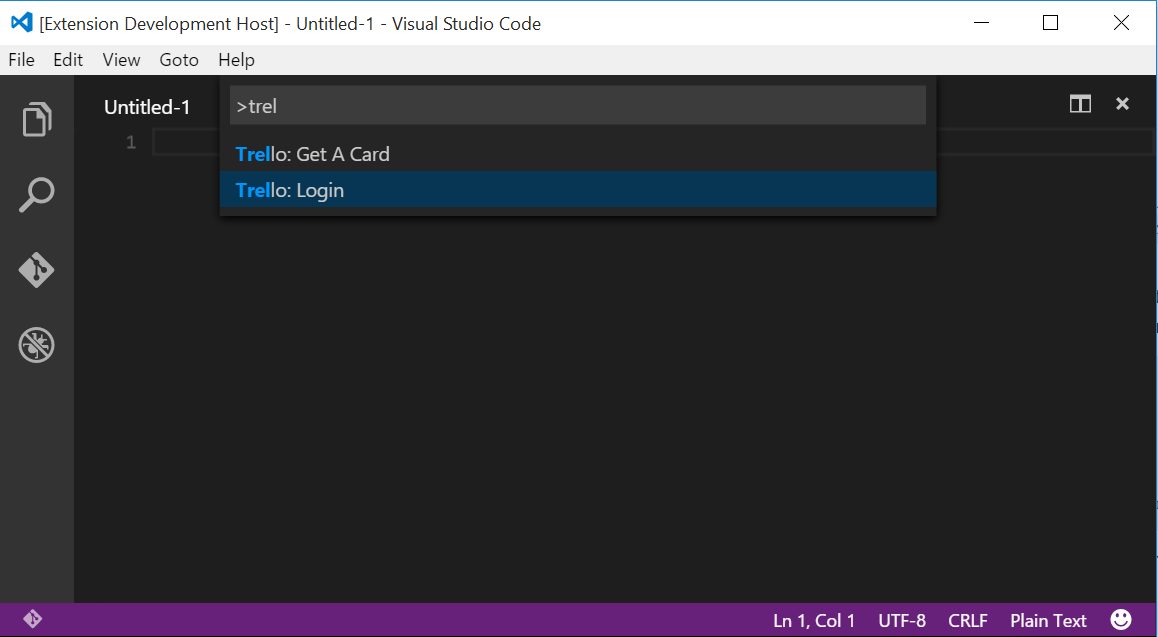
28 |
29 | 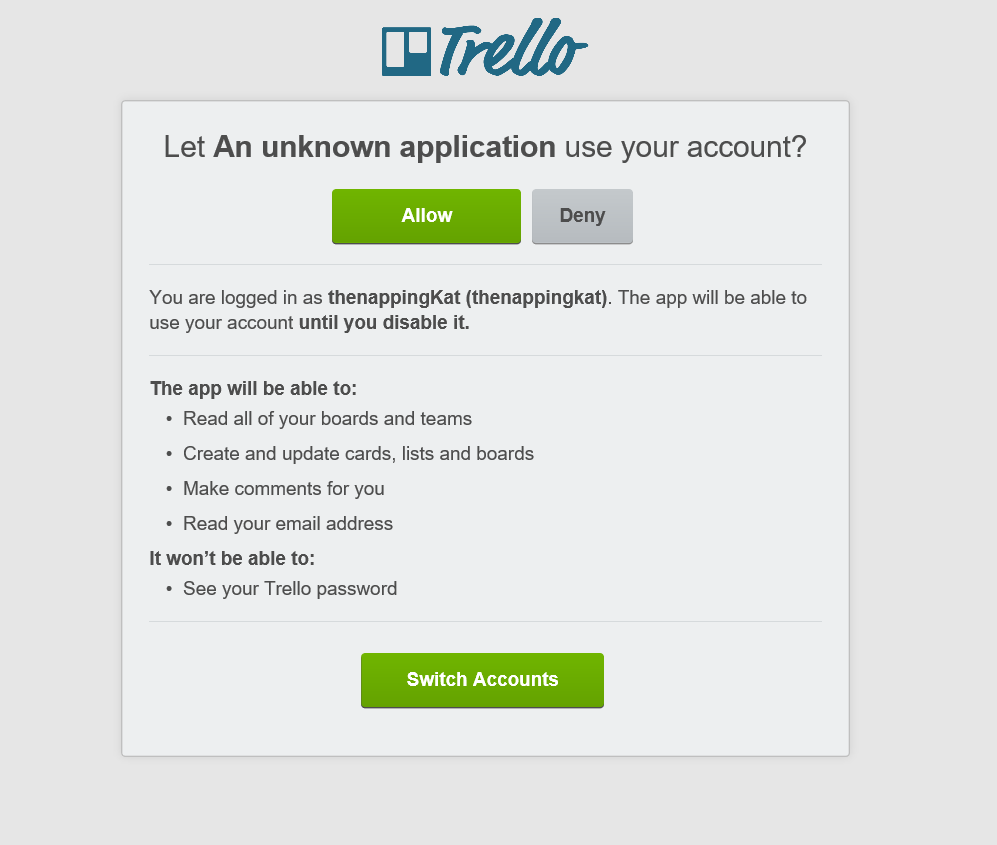
30 |
31 | #### Step 2: Copy User Token and Paste into InputBox
32 |
33 | 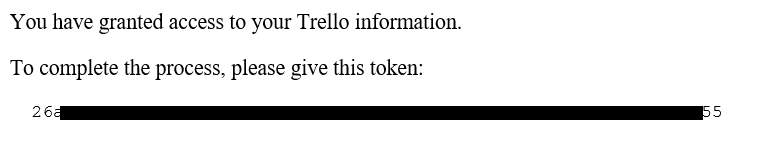
34 |
35 | 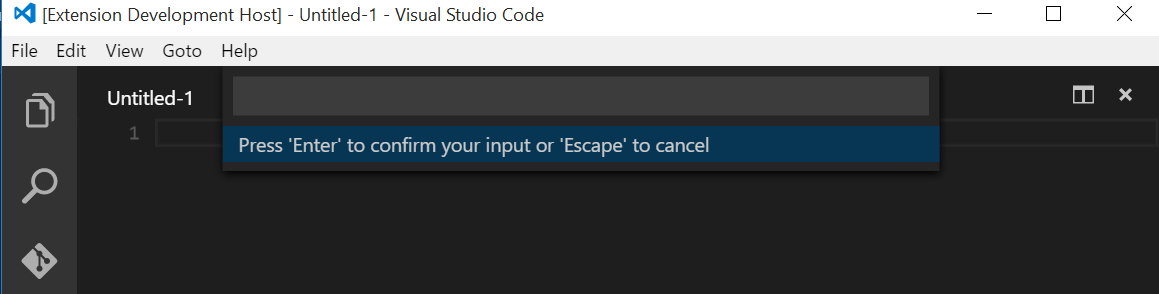
36 |
37 | Press 'Enter'
38 |
39 | #### You can now use other normal commands.
40 |
--------------------------------------------------------------------------------
/package.json:
--------------------------------------------------------------------------------
1 | {
2 | "name": "TrelloVSCodeExtension",
3 | "displayName": "Trello VSCode Extension",
4 | "description": "Connect to Trello and access your boards, lists, and cards, to manipulate cards.",
5 | "version": "0.1.2",
6 | "publisher": "katvharris",
7 | "engines": {
8 | "vscode": "^0.10.1"
9 | },
10 | "license": "MIT",
11 | "homepage" : "https://github.com/KatVHarris/VSCode-Trello/blob/master/README.md",
12 | "categories": [
13 | "Other"
14 | ],
15 | "keywords": [
16 | "Trello",
17 | "Tracking",
18 | "Project Organization"
19 | ],
20 | "icon": "MyTrelloDog.png",
21 | "galleryBanner": {
22 | "color": "#A1A0A0",
23 | "theme": "light"
24 | },
25 | "bugs": {
26 | "url":"https://github.com/katvharris/vscode-trello/issues",
27 | "email": ""
28 | },
29 | "activationEvents": [
30 | "onCommand:extension.loginToTrello",
31 | "onCommand:extension.mCCTNL",
32 | "onCommand:extension.getAllBoards",
33 | "onCommand:extension.closeCard"
34 | ],
35 | "main": "./out/src/extension",
36 | "contributes": {
37 | "commands": [
38 | {
39 | "command": "extension.mCCTNL",
40 | "title": "Trello: Move Current Card to New List"
41 | },
42 | {
43 | "command": "extension.loginToTrello",
44 | "title": "Trello: Login"
45 | },
46 | {
47 | "command": "extension.getAllBoards",
48 | "title": "Trello: Get A Card"
49 | },
50 | {
51 | "command": "extension.closeCard",
52 | "title" : "Trello: Close Current Card"
53 | }
54 | ]
55 | },
56 | "scripts": {
57 | "vscode:prepublish": "node ./node_modules/vscode/bin/compile",
58 | "compile": "node ./node_modules/vscode/bin/compile -watch -p ./",
59 | "pretest": "tsc",
60 | "test": "mocha --ui tdd ./out/test"
61 | },
62 | "devDependencies": {
63 | "typescript": "^1.6.2",
64 | "vscode": "0.10.x"
65 | },
66 | "dependencies": {
67 | "node-trello": "^1.1.2",
68 | "open": "0.0.5",
69 | "trello": "^0.5.0"
70 | }
71 | }
72 |
--------------------------------------------------------------------------------
/vsc-extension-quickstart.md:
--------------------------------------------------------------------------------
1 | # Welcome to your first VS Code Extension
2 |
3 | ## What's in the folder
4 | * This folder contains all of the files necessary for your extension
5 | * `package.json` - this is the manifest file in which you declare your extension and command.
6 | The sample plugin registers a command and defines its title and command name. With this information
7 | VS Code can show the command in the command palette. It doesn’t yet need to load the plugin.
8 | * `src/extension.ts` - this is the main file where you will provide the implementation of your command.
9 | The file exports one function, `activate`, which is called the very first time your extension is
10 | activated (in this case by executing the command). Inside the `activate` function we call `registerCommand`.
11 | We pass the function containing the implementation of the command as the second parameter to
12 | `registerCommand`.
13 |
14 | ## Get up and running straight away
15 | * press `F5` to open a new window with your extension loaded
16 | * run your command from the command palette by pressing (`Ctrl+Shift+P` or `Cmd+Shift+P` on Mac) and typing `Hello World`
17 | * set breakpoints in your code inside `src/extension.ts` to debug your extension
18 | * find output from your extension in the debug console
19 |
20 | ## Make changes
21 | * you can relaunch the extension from the debug toolbar after changing code in `src/extension.ts`
22 | * you can also reload (`Ctrl+R` or `Cmd+R` on Mac) the VS Code window with your extension to load your changes
23 |
24 | ## Explore the API
25 | * you can open the full set of our API when you open the file `node_modules/vscode/vscode.d.ts`
26 |
27 | ## Run tests
28 | * open the debug viewlet (`Ctrl+Shift+D` or `Cmd+Shift+D` on Mac) and from the launch configuration dropdown pick `Launch Tests`
29 | * press `F5` to run the tests in a new window with your extension loaded
30 | * see the output of the test result in the debug console
31 | * make changes to `test/extension.test.ts` or create new test files inside the `test` folder
32 | * by convention, the test runner will only consider files matching the name pattern `**.test.ts`
33 | * you can create folders inside the `test` folder to structure your tests any way you want
--------------------------------------------------------------------------------
/src/trello.ts:
--------------------------------------------------------------------------------
1 | var Trello = require("node-trello");
2 |
3 | export default class TrelloClient {
4 |
5 | private _trello : any;
6 | private _key : string;
7 | private _token : string;
8 |
9 | public _boards : Array;
10 | public _boardsIDs : Array;
11 |
12 | public _lists : Array;
13 | public _listsIDs : Array;
14 |
15 | public _cards : Array;
16 | public _cardsIDs : Array;
17 |
18 | public currentBID : string;
19 | public currentLID : string;
20 | public currentCID : string;
21 |
22 | public currentCard : string;
23 |
24 |
25 | constructor(key?: string, token?: string) {
26 | this._key = key;
27 | this._token = token;
28 |
29 | this._trello = new Trello(this._key, this._token);
30 | }
31 |
32 | public testingT(): string{
33 | return "Hello!";
34 | }
35 |
36 | public getMyBoards() : Thenable {
37 | return new Promise((resolve, reject) => {
38 |
39 | this._trello.get("/1/members/me/boards", (err, data) => {
40 | if (err) reject(err);
41 | this._boards = new Array();
42 | this._boardsIDs = new Array();
43 |
44 | for(var i = 0; i < data.length; i++){
45 | this._boards.push(data[i].name);
46 | this._boardsIDs.push(data[i].id);
47 | }
48 |
49 | resolve(true);
50 | });
51 |
52 |
53 | });
54 |
55 |
56 | }
57 |
58 | public getBoardLists(boardID: string){
59 | return new Promise(( resolve, rejcet) =>{
60 | this._trello.get("/1/boards/"+boardID + "/lists", (err, data) => {
61 | if (err) throw err;
62 | console.log(data);
63 | this._lists = new Array();
64 | this._listsIDs = new Array();
65 |
66 | for(var i = 0; i < data.length; i++){
67 | this._lists.push(data[i].name);
68 | this._listsIDs.push(data[i].id);
69 | }
70 | resolve(true);
71 | });
72 | });
73 | }
74 | //
75 | public _getAllCards(listID: string){
76 | return new Promise((resolve, reject) => {
77 | this._trello.get("/1/lists/"+listID + "/cards", (err, data) => {
78 | if (err) throw err;
79 | console.log(data);
80 | this._cards = new Array();
81 | this._cardsIDs = new Array();
82 |
83 | for(var i = 0; i < data.length; i++){
84 | this._cards.push(data[i].name);
85 | this._cardsIDs.push(data[i].id);
86 | }
87 | resolve(true);
88 | });
89 |
90 | });
91 | }
92 |
93 | public _setCurCardID(currentCardName: string){
94 | this.currentCard = currentCardName;
95 | for (var i = 0; i < this._cards.length; i++){
96 | if(currentCardName == this._cards[i]){
97 | var cid = this._cardsIDs[i];
98 | }
99 | }
100 | this.currentCID = cid;
101 |
102 | }
103 |
104 | public _moveCurrentCardToList(newListID: string){
105 | var putstring = "/1/cards/" + this.currentCID + "/" ;
106 |
107 | this._trello.put(putstring, { idList: newListID }, (err, data) => {
108 | console.log("currentID "+ this.currentCID + " new list ID "+ newListID);
109 | console.log(err);
110 | if (err) throw err;
111 | console.log(data);
112 | });
113 | }
114 |
115 | public _closeCard(){
116 | var putstring = "/1/cards/" + this.currentCID + "/" ;
117 |
118 | this._trello.put(putstring, { closed: true }, (err, data) => {
119 | console.log(err);
120 | if (err) throw err;
121 | console.log(data);
122 | });
123 | }
124 |
125 | }
--------------------------------------------------------------------------------
/src/vscodeInteractions.ts:
--------------------------------------------------------------------------------
1 | import * as vscode from 'vscode';
2 |
3 | //This is for interacting with TrelloClient Object and VS UI
4 |
5 |
6 |
7 | var _cards : Array;
8 |
9 | export var currentBID : string;
10 | export var currentLID : string;
11 | export var currentCID : string;
12 |
13 | var currentCard : string;
14 | var currentList : string;
15 | var currentBoard : string;
16 | var statusBarItem : vscode.StatusBarItem;
17 |
18 | export function ShowBoards(boards: Array, boardsID: Array) : Thenable{
19 | return vscode.window.showQuickPick(boards).then(x => {
20 | console.log("ShowBoards: " + x);
21 | currentBoard = x;
22 | //go through name list and get correesponding selected ID
23 | for (var j = 0; j console.log(err));
31 | }
32 |
33 |
34 | export function ShowLists(lists: Array, listsID: Array): Thenable {
35 | return vscode.window.showQuickPick(lists).then(x => {
36 | currentList = x;
37 | //find ID for selected list
38 | for (var j = 0; j {});
48 | }
49 |
50 | export function ShowCards(cards: Array, cardsID: Array) {
51 | return vscode.window.showQuickPick(cards).then(x => {
52 | console.log("console display:" + x);
53 | currentCard = x;
54 | //find ID for selected list
55 | for (var j = 0; j {});
63 |
64 | }
65 |
66 | export function AddToBar(message?:string, boardname?:string , listname?: string, cardname?: string, iconname?: string): void{
67 | if(!statusBarItem){
68 | statusBarItem = vscode.window.createStatusBarItem(vscode.StatusBarAlignment.Left);
69 | }
70 | console.log("printing current cardname "+ cardname);
71 | console.log("printing current list" + currentList);
72 | console.log("printing current board " + currentBoard);
73 | statusBarItem.text = (cardname) ?
74 | iconname + " " + message + " " + currentBoard + " $(chevron-right)" +
75 | currentList + " $(chevron-right)" + cardname: iconname + " " + message;
76 | statusBarItem.show();
77 | //createStatusBarItem(alignment?: StatusBarAlignment, priority?: number): StatusBarItem
78 | }
79 |
80 | export function AddStatusIcon(iconName: string){
81 | if(!statusBarItem){
82 | statusBarItem = vscode.window.createStatusBarItem(vscode.StatusBarAlignment.Left);
83 | }
84 |
85 | }
86 |
87 | export function InsertUserToken(){
88 | return vscode.window.showInputBox("Please paste in your user token, then hit 'Enter'.").then(x => {
89 | if(!x){
90 | return vscode.window.showErrorMessage("need to paste your token in");
91 | }
92 | else{
93 | return x;
94 | }
95 | }, err => {});
96 | }
97 |
98 | export function ShowError(errMessage: string){
99 | vscode.window.showErrorMessage(errMessage);
100 | }
101 |
102 | export function ShowMessage(infoMessage: string){
103 | vscode.window.showInformationMessage(infoMessage);
104 | }
105 |
--------------------------------------------------------------------------------
/src/extension.ts:
--------------------------------------------------------------------------------
1 | // The module 'vscode' contains the VS Code extensibility API
2 | // Import the module and reference it with the alias vscode in your code below
3 | import * as vscode from 'vscode';
4 | import TrelloClient from './trello';
5 | import * as vsInterface from './vscodeInteractions';
6 |
7 | var open = require('open');
8 |
9 | var trelloClient : TrelloClient
10 | var token, extensionKey, currentBID, currentCID, currentLID
11 |
12 |
13 | // TODO: Ensure that the usertoken is stored somewhere - and configured, so that the user
14 | // doesn't have to do this all the time
15 | const appKey = '03e153ce92addad232ddc24891e07c60';
16 | var _userToken = '';
17 |
18 | // this method is called when your extension is activated
19 | // your extension is activated the very first time the command is executed
20 | export function activate(context: vscode.ExtensionContext) {
21 |
22 | // Use the console to output diagnostic information (console.log) and errors (console.error)
23 | // This line of code will only be executed once when your extension is activated
24 | console.log('Congratulations, your extension "txc" is now active!');
25 |
26 | // The command has been defined in the package.json file
27 | // Now provide the implementation of the command with registerCommand
28 | // The commandId parameter must match the command field in package.json
29 | var disposable = vscode.commands.registerCommand('extension.sayHello', () => { //this is like function () {} //anonymos don't change function
30 | // The code you place here will be executed every time your command is executed
31 |
32 | // Display a message box to the user
33 | vscode.window.showInformationMessage('Hello World!');
34 |
35 | });
36 |
37 |
38 |
39 | var login = vscode.commands.registerCommand('extension.loginToTrello', () => loginTrello());
40 | var getBoards = vscode.commands.registerCommand('extension.getAllBoards', () => getACard());
41 | var moveCardTL = vscode.commands.registerCommand('extension.mCCTNL', () => moveCurCardTL());
42 | var closeCurCard = vscode.commands.registerCommand('extension.closeCard', () => closeCurrentCard());
43 |
44 |
45 | context.subscriptions.push(disposable);
46 |
47 | context.subscriptions.push(login);
48 | context.subscriptions.push(moveCardTL);
49 | context.subscriptions.push(getBoards);
50 | context.subscriptions.push(closeCurCard);
51 |
52 | }
53 |
54 |
55 | function loginTrello(){
56 | //need to authenticate user
57 | // Display a message box to the user
58 | //vscode.window.showInformationMessage('Trying To Login');
59 | let authUrl = 'https://trello.com/1/authorize?key=' + appKey + '&expiration=never&response_type=token&scope=read,write,account';
60 | open(authUrl);
61 | createClient();
62 | }
63 |
64 | function loginTrelloTest(){
65 |
66 | createClient();
67 | }
68 |
69 | function createClient() {
70 | vsInterface.InsertUserToken().then(userToken => {
71 | console.log(userToken);
72 | _userToken = userToken;
73 | trelloClient = trelloClient || new TrelloClient(appKey, userToken);
74 | displayLoggedIn('Trello logged in');
75 | });
76 | }
77 |
78 | function getACardTest(){
79 | _userToken = '';
80 | trelloClient = trelloClient || new TrelloClient(appKey, '');
81 | getACard();
82 | }
83 |
84 | function getACard() {
85 | //getBoards from TrelloAPI
86 | //UPdate the UI with vscodeInteractions
87 | //repeat
88 | if(!_userToken){
89 | vsInterface.ShowError("You are not LoggedIn. Use 'Trello: Login' command to Login.");
90 | }else{
91 | trelloClient.getMyBoards().then(() => {
92 | return vsInterface.ShowBoards(trelloClient._boards, trelloClient._boardsIDs)
93 | }).then(selectedBoard => {
94 | currentBID = selectedBoard;
95 | return trelloClient.getBoardLists(selectedBoard);
96 | }).then(() => {
97 | return vsInterface.ShowLists(trelloClient._lists, trelloClient._listsIDs)
98 | }).then(selectedList => {
99 | currentLID = selectedList;
100 | return trelloClient._getAllCards(selectedList);
101 | }).then(() => {
102 | return vsInterface.ShowCards(trelloClient._cards, trelloClient._cardsIDs)
103 | }).then(selectedCard => {
104 | trelloClient._setCurCardID(selectedCard);
105 | displayCardOnBottom(selectedCard);
106 | return (true);
107 | }, err => {
108 |
109 | });
110 | }
111 |
112 |
113 | }
114 |
115 | function moveCurCardTL(){
116 | if(!(trelloClient || trelloClient.currentCID)){
117 | vsInterface.ShowError("You need to get a card before you try to move one.");
118 | }
119 | else{
120 | //ask user for a listName to move card || show user possible lists
121 | //if no current card, show user a error box and ask them to "Trello: Get A Card"
122 | vsInterface.ShowLists(trelloClient._lists, trelloClient._listsIDs).then(
123 | selectedList => {
124 | //moveCard to the specified List...
125 | //get new List ID then
126 | trelloClient._moveCurrentCardToList(selectedList);
127 | displayCardOnBottom(trelloClient.currentCard);
128 | },err => {
129 |
130 | });
131 | }
132 | }
133 |
134 | function closeCurrentCard(){
135 | if(!(trelloClient) || !(trelloClient.currentCID)){
136 | vsInterface.ShowError("You need to get a card to work on.");
137 | }else{
138 | trelloClient._closeCard();
139 | vsInterface.AddToBar("Select a Card", '', '', '','$(terminal)');
140 | }
141 |
142 | }
143 |
144 | function displayCardOnBottom(displayString: string){
145 | vsInterface.AddToBar('', '', '', displayString, '$(file-text)' );
146 | }
147 |
148 | function displayLoggedIn(loggedIn: string){
149 | vsInterface.AddToBar(loggedIn, '', '', '', '$(person)');
150 | }
151 |
152 |
--------------------------------------------------------------------------------