├── ico.ico
├── requirements.txt
├── .gitignore
├── functions
├── select_exe_file.py
├── checktokenslist.py
├── display_logo.py
├── launch_authy.py
├── html_table.py
├── music.py
└── export.py
├── LICENSE
├── README.md
└── authy-export.py
/ico.ico:
--------------------------------------------------------------------------------
https://raw.githubusercontent.com/Korben00/authy-export/HEAD/ico.ico
--------------------------------------------------------------------------------
/requirements.txt:
--------------------------------------------------------------------------------
1 | PyChromeDevTools
2 | colorama
3 | musicalbeeps
4 | pyfiglet
5 | qrcode
6 |
--------------------------------------------------------------------------------
/.gitignore:
--------------------------------------------------------------------------------
1 | .DS_Store
2 | dist/
3 | build/
4 | authy-export.spec
5 | functions/__pycache__/
6 |
--------------------------------------------------------------------------------
/functions/select_exe_file.py:
--------------------------------------------------------------------------------
1 | import tkinter as tk
2 | from tkinter import filedialog
3 |
4 | def select_exe_file():
5 | root = tk.Tk()
6 | root.withdraw()
7 | top = tk.Toplevel(root)
8 | top.withdraw()
9 | file_path = filedialog.askopenfilename(filetypes=[("EXE files", "*.exe")])
10 | root.destroy()
11 | return file_path
--------------------------------------------------------------------------------
/functions/checktokenslist.py:
--------------------------------------------------------------------------------
1 | def check_tokens_list(chromex):
2 | # Check if the tokens list is loaded
3 | result = chromex.Runtime.evaluate(expression="document.getElementById('tokens-list').innerHTML")
4 | try :
5 | result = result[1][0]['result']['result']['value']
6 | except:
7 | return False
8 | else:
9 | return True
10 |
--------------------------------------------------------------------------------
/functions/display_logo.py:
--------------------------------------------------------------------------------
1 | import pyfiglet
2 | import tkinter as tk
3 |
4 | def display_logo():
5 | logo = pyfiglet.figlet_format("AUTHY", font="slant")
6 | label = tk.Label(text=logo, font=("Courier", 15), fg="white", bg="black", padx=10, pady=10)
7 | label.pack()
8 |
9 | def display_logo_korben():
10 | logo = pyfiglet.figlet_format("TOTP Extractor", font="sblood")
11 | label = tk.Label(text=logo, font=("Courier", 7), fg="red", bg="black")
12 | label.pack()
--------------------------------------------------------------------------------
/LICENSE:
--------------------------------------------------------------------------------
1 | MIT License
2 |
3 | Copyright (c) 2023 Korben
4 |
5 | Permission is hereby granted, free of charge, to any person obtaining a copy
6 | of this software and associated documentation files (the "Software"), to deal
7 | in the Software without restriction, including without limitation the rights
8 | to use, copy, modify, merge, publish, distribute, sublicense, and/or sell
9 | copies of the Software, and to permit persons to whom the Software is
10 | furnished to do so, subject to the following conditions:
11 |
12 | The above copyright notice and this permission notice shall be included in all
13 | copies or substantial portions of the Software.
14 |
15 | THE SOFTWARE IS PROVIDED "AS IS", WITHOUT WARRANTY OF ANY KIND, EXPRESS OR
16 | IMPLIED, INCLUDING BUT NOT LIMITED TO THE WARRANTIES OF MERCHANTABILITY,
17 | FITNESS FOR A PARTICULAR PURPOSE AND NONINFRINGEMENT. IN NO EVENT SHALL THE
18 | AUTHORS OR COPYRIGHT HOLDERS BE LIABLE FOR ANY CLAIM, DAMAGES OR OTHER
19 | LIABILITY, WHETHER IN AN ACTION OF CONTRACT, TORT OR OTHERWISE, ARISING FROM,
20 | OUT OF OR IN CONNECTION WITH THE SOFTWARE OR THE USE OR OTHER DEALINGS IN THE
21 | SOFTWARE.
22 |
--------------------------------------------------------------------------------
/functions/launch_authy.py:
--------------------------------------------------------------------------------
1 | import subprocess
2 | import platform
3 | from functions.select_exe_file import select_exe_file
4 |
5 | def launch_authy():
6 |
7 | # Display a message indicating that Authy is launching
8 | print("Launching Authy")
9 |
10 | # Determine the machine's OS
11 | os = platform.system()
12 |
13 | # If the OS is macOS (Darwin), launch Authy in debug mode using the 'open' command
14 | if os == 'Darwin':
15 | subprocess.run(['open', '--background', '-a', 'Authy Desktop', '--args', '--remote-debugging-port=5858'], check=True)
16 | subprocess.run(['osascript', '-e', 'tell application "Authy Desktop" to activate'])
17 | subprocess.run(['osascript', '-e', 'tell application "System Events" to keystroke "m" using command down'])
18 |
19 | # If the OS is Linux, launch Authy in debug mode using the 'authy' command
20 | elif os == 'Linux':
21 | subprocess.run(['authy', '--no-ui', '--remote-debugging-port=5858'], check=True)
22 |
23 | # If the OS is neither macOS nor Linux, raise an exception indicating that the OS is not supported
24 | elif os == 'Windows':
25 | file = select_exe_file()
26 | subprocess.run([file, '--remote-debugging-port=5858'], check=True)
27 | else:
28 | raise ValueError("The OS is not supported")
--------------------------------------------------------------------------------
/functions/html_table.py:
--------------------------------------------------------------------------------
1 | import base64
2 | import tkinter as tk
3 | from tkinter import filedialog
4 | import qrcode
5 | from io import BytesIO
6 |
7 |
8 | def htmltable(parsed_json):
9 |
10 | #create a html table that containe name and totp
11 |
12 | html = f"""
13 |
14 |
15 |
32 |
33 |
34 |
35 | Authy TOTP Extractor by Korben
36 |
37 |
38 |
39 | | Nom |
40 | Code TOTP |
41 | QR Code |
42 |
43 | """
44 | for item in parsed_json["items"]:
45 | name = item["name"]
46 | totp = item["login"]["totp"]
47 | url = totp
48 | qr = qrcode.QRCode(version=1, error_correction=qrcode.constants.ERROR_CORRECT_L, box_size=10, border=4)
49 | qr.add_data(url)
50 | qr.make(fit=True)
51 | img = qr.make_image(fill_color="black", back_color="white")
52 | # save the QR code to a BytesIO object
53 | buffer = BytesIO()
54 | img.save(buffer)
55 | # encode the QR code as base64
56 | qr_code = base64.b64encode(buffer.getvalue()).decode("utf-8")
57 | # add the QR code to the HTML table
58 | html += f"""
59 |
60 | | {name} |
61 | {totp} |
62 |  |
63 |
64 | """
65 | html += """
66 |
67 |
68 |
69 |
70 | """
71 | # save the html table to a file
72 | default_file_name = "export-authy.html"
73 | file_path = filedialog.asksaveasfilename(defaultextension=".html", initialfile=default_file_name)
74 | if file_path:
75 | with open(file_path, "w") as f:
76 | f.write(html)
--------------------------------------------------------------------------------
/functions/music.py:
--------------------------------------------------------------------------------
1 | import time
2 | import musicalbeeps
3 |
4 | # use musicalbeeps to play a sound without blocking the GUI
5 | def play_sound():
6 |
7 | # Define the notes and duration for the melody
8 | note_duration = 0.2
9 | melody = ["C#", "D", "E", "F#", "G", "A", "B", "C#"]
10 | verse1_notes = ["C#", "D", "E", "F#", "G", "A", "B", "C#"]
11 | chorus1_notes = ["C#", "G#", "F#", "G#", "A#", "B", "C#", "G#"]
12 | verse2_notes = ["D#", "E", "F#", "G#", "A", "B", "C#", "D#"]
13 | bridge_notes = ["G#", "D#", "C#", "G#", "B", "A", "G#", "F#"]
14 | chorus2_notes = ["C#", "G#", "F#", "G#", "A#", "B", "C#", "G#"]
15 |
16 | # Create a new player
17 | player = musicalbeeps.Player(volume=0.1, mute_output=True)
18 |
19 | # Play the melody for 8 bars
20 | for i in range(4):
21 | for note in melody:
22 | player.play_note(note, note_duration)
23 |
24 | # First verse
25 | for i in range(2):
26 | for note in verse1_notes:
27 | player.play_note(note, note_duration)
28 |
29 | # First chorus
30 | for i in range(2):
31 | for note in chorus1_notes:
32 | player.play_note(note, note_duration)
33 |
34 | # Second verse
35 | for i in range(2):
36 | for note in verse2_notes:
37 | player.play_note(note, note_duration)
38 |
39 | # Bridge
40 | for i in range(2):
41 | for note in bridge_notes:
42 | player.play_note(note, note_duration)
43 |
44 | # Second chorus
45 | for i in range(2):
46 | for note in chorus2_notes:
47 | player.play_note(note, note_duration)
48 |
49 | # Repeat the melody for 8 bars
50 | for i in range(8):
51 | for note in melody:
52 | player.play_note(note, note_duration)
53 |
54 | # Repeat the song for 1 minute
55 | for i in range(3):
56 | # First verse
57 | for i in range(2):
58 | for note in verse1_notes:
59 | player.play_note(note, note_duration)
60 |
61 | # First chorus
62 | for i in range(2):
63 | for note in chorus1_notes:
64 | player.play_note(note, note_duration)
65 |
66 | # Second verse
67 | for i in range(2):
68 | for note in verse2_notes:
69 | player.play_note(note, note_duration)
70 |
71 | # Bridge
72 | for i in range(2):
73 | for note in bridge_notes:
74 | player.play_note(note, note_duration)
75 |
76 | # Second chorus
77 | for i in range(2):
78 | for note in chorus2_notes:
79 | player.play_note(note, note_duration)
80 |
81 | # Repeat the melody for 8 bars
82 | for i in range(8):
83 | for note in melody:
84 | player.play_note(note, note_duration)
85 |
86 | # Wait for the song to finish
87 | time.sleep(2)
88 |
89 | # Stop the player
90 | player.stop()
--------------------------------------------------------------------------------
/functions/export.py:
--------------------------------------------------------------------------------
1 | from functions.html_table import htmltable
2 | import PyChromeDevTools
3 | import json
4 | import time
5 |
6 | def export():
7 |
8 | # Create a ChromeInterface object to communicate with the Chrome DevTools API
9 | chrome = PyChromeDevTools.ChromeInterface(host='localhost', port=5858)
10 |
11 | # Enable the Network and Page domains to allow access to their features
12 | chrome.Network.enable()
13 | chrome.Page.enable()
14 |
15 | # Define a JavaScript script to be run in the browser
16 | # Source : https://kinduff.com/2021/10/24/migrate-authy-to-bitwarden/
17 | script="""function hex_to_b32(hex) {
18 | let alphabet = "ABCDEFGHIJKLMNOPQRSTUVWXYZ234567", bytes = [];
19 | for (let i = 0; i < hex.length; i += 2) {
20 | bytes.push(parseInt(hex.substr(i, 2), 16));
21 | }
22 | let bits = 0, value = 0, output = "";
23 | for (let i = 0; i < bytes.length; i++) {
24 | value = (value << 8) | bytes[i];
25 | bits += 8;
26 | while (bits >= 5) {
27 | output += alphabet[(value >>> (bits - 5)) & 31];
28 | bits -= 5;
29 | }
30 | }
31 | if (bits > 0) output += alphabet[(value << (5 - bits)) & 31];
32 | return output;
33 | }
34 | function uuidv4() {
35 | return "xxxxxxxx-xxxx-4xxx-yxxx-xxxxxxxxxxxx".replace(/[xy]/g, function (c) {
36 | var r = Math.random() * 16 | 0, v = c == "x" ? r : (r & 0x3 | 0x8);
37 | return v.toString(16);
38 | });
39 | }
40 | function saveToFile(content, mimeType, filename) {
41 | if (!content) {
42 | console.error("Console.save: No content");
43 | return;
44 | }
45 | if (typeof content === "object") content = JSON.stringify(content, undefined, 2);
46 | const a = document.createElement("a")
47 | const blob = new Blob([content], { type: mimeType })
48 | const url = URL.createObjectURL(blob)
49 | a.setAttribute("href", url)
50 | a.setAttribute("download", filename)
51 | a.click()
52 | }
53 | function deEncrypt({ log = false, save = false }) {
54 | const folder = { id: uuidv4(), name: "Imported from Authy by Authy TOTP Extractor @Korben" };
55 | const bw = {
56 | "encrypted": false,
57 | "folders": [
58 | folder
59 | ],
60 | "items": appManager.getModel().map((i) => {
61 | const secret = (i.markedForDeletion === false ? i.decryptedSeed : hex_to_b32(i.secretSeed));
62 | const period = (i.digits === 7 ? 10 : 30);
63 |
64 | const [issuer, rawName] = (i.name.includes(":"))
65 | ? i.name.split(":")
66 | : ["", i.name];
67 | const name = [issuer, rawName].filter(Boolean).join(": ");
68 | const totp = `otpauth://totp/${rawName.trim()}?secret=${secret}&digits=${i.digits}&period=${period}${issuer ? "&issuer=" + issuer : ""}`;
69 | return ({
70 | id: uuidv4(),
71 | organizationId: null,
72 | folderId: folder.id,
73 | type: 1,
74 | reprompt: 0,
75 | name,
76 | notes: null,
77 | favorite: false,
78 | login: {
79 | username: null,
80 | password: null,
81 | totp
82 | },
83 | collectionIds: null
84 | });
85 | }),
86 | };
87 | if (log) console.log(JSON.stringify(bw));
88 | if (save) saveToFile(bw, "text/json", "authy-export.json");
89 | return JSON.stringify(bw);
90 | }
91 | deEncrypt({ log: true, save: false });"""
92 |
93 | time.sleep(5)
94 | # Run the script in the browser
95 | result = chrome.Runtime.evaluate(expression=script)
96 |
97 | #change result to a json object
98 | result = result[1][0]['result']['result']['value']
99 | parsed_json = json.loads(result)
100 | htmltable(parsed_json)
101 | chrome.close()
102 |
--------------------------------------------------------------------------------
/README.md:
--------------------------------------------------------------------------------
1 | # Authy Export - TOTP Extractor
2 |
3 |
4 | 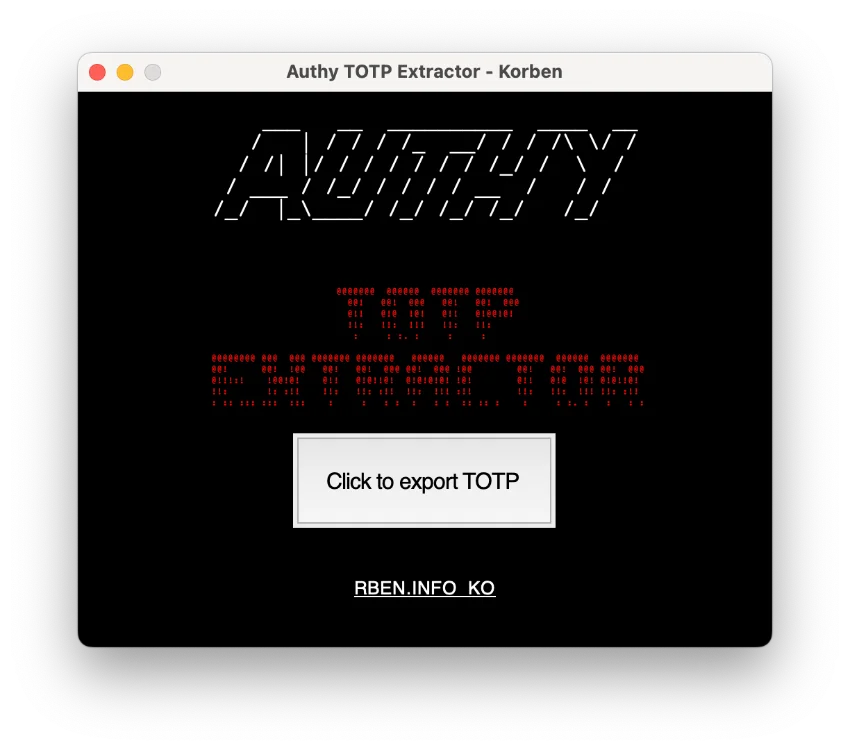 5 |
5 |
6 |
7 | This application is designed to extract TOTP (Time-based One-Time Password) information from Authy by launching Authy in debug mode and using the Chrome DevTools API to communicate with the browser. It then runs a JavaScript script to decrypt and extract the TOTP information, which can be saved to a file or displayed to the user. This can be useful for those who want to migrate their TOTP information from Authy to another service, or simply want to access and view their TOTP information in an easier way.
8 |
9 | # Features
10 |
11 | Extract TOTP information from Authy macOS / Linux.
12 |
13 | # Requirements
14 |
15 | * Authy Desktop <= 2.2.3
16 | * Python 3
17 | * PyChromeDevTools
18 | * tkinter
19 | * pyfiglet
20 | * musicalbeeps
21 | * colorama
22 | * qrcode
23 |
24 | # Installation
25 |
26 | ## Install Authy Destop
27 | Install Authy desktop version 2.2.3 (later versions does not work)
28 | It might still work if you haven't updated Authy Desktop.
29 |
30 | ### Windows / MacOS
31 | - **macOS:** [https://pkg.authy.com/authy/stable/2.2.3/darwin/x64/Authy%20Desktop-2.2.3.dmg](https://pkg.authy.com/authy/stable/2.2.3/darwin/x64/Authy%20Desktop-2.2.3.dmg)
32 | - **Win (x64):** [https://pkg.authy.com/authy/stable/2.2.3/win32/x64/Authy%20Desktop%20Setup%202.2.3.exe](https://pkg.authy.com/authy/stable/2.2.3/win32/x64/Authy%20Desktop%20Setup%202.2.3.exe)
33 | - **Win (x32):** [https://pkg.authy.com/authy/stable/2.2.3/win64/x64/Authy%20Desktop%20Setup%202.2.3.exe](https://pkg.authy.com/authy/stable/2.2.3/win64/x64/Authy%20Desktop%20Setup%202.2.3.exe)
34 |
35 | (thanks to @gboudreau for the links)
36 |
37 | In case your Authy Desktop updates itself without any notification, just close it, reinstall version 2.2.3, and then reopen it.
38 | - On Windows, you may have to delete the update file found in the Authy Desktop's file location (inside the app-2.2.3 folder) after starting up version 2.2.3 to stop automatic updates.
39 | - For Mac users, you can enter the given command in Terminal prior to launching Authy Desktop, which will prevent automatic updates:
40 |
41 | ```mkdir -p ~/Library/Caches/com.authy.authy-mac.ShipIt ; rm -rf ~/Library/Caches/com.authy.authy-mac.ShipIt/* ; chmod 500 ~/Library/Caches/com.authy.authy-mac.ShipIt```
42 |
43 | ### Linux
44 | Authy does not provide a snap package version history so you have to use flatpak which is community-run.
45 |
46 | ```sh
47 | flatpak install com.authy.Authy
48 | sudo flatpak update --commit=9e872aaec7746c602f8b24679824c87ccc28d8e81b77f9b0213f7644cd939cee com.authy.Authy
49 | alias authy="flatpak run com.authy.Authy"
50 | ```
51 | **note:** run `alias authy="flatpak run com.authy.Authy` before running Authy Export if you've closed the terminal session
52 |
53 | ## Install Authy-Export
54 |
55 | Clone or download this repository
56 | Navigate to the repository directory in a terminal
57 | Run the following command:
58 |
59 | ```sh
60 | git clone https://github.com/Korben00/authy-export.git
61 | cd authy-export
62 | pip install -r requirements.txt
63 | ```
64 |
65 | **Linux:** You need python3-dev libasound2-dev to install musicalbeeps package.
66 |
67 | # Usage
68 |
69 | Run the script: python authy-export.py
70 | The script will launch Authy in debug mode. If Authy is not already installed, it will need to be installed first.
71 | The script will run the JavaScript script to decrypt and extract the TOTP information.
72 | The TOTP information will be displayed to the user and can be saved to a file by entering the desired file name and pressing enter.
73 |
74 | # Execution
75 | ```sh
76 | python3 authy-export.py
77 | ```
78 |
79 | # Compilation
80 |
81 | To compile the script into an executable file, run the following command:
82 |
83 | ```sh
84 | pyinstaller --collect-all pyfiglet --onefile --noconsole --icon ico.ico authy-export.py
85 | ```
86 |
87 | # Author
88 |
89 | Korben - https://korben.info
90 |
--------------------------------------------------------------------------------
/authy-export.py:
--------------------------------------------------------------------------------
1 | #!/usr/bin/env python3
2 | """
3 | Authy TOTP Extractor
4 |
5 | This application is designed to extract TOTP (Time-based One-Time Password) information from Authy.
6 | It does this by launching Authy in debug mode and using the Chrome DevTools API to communicate
7 | with the browser. The application then runs a JavaScript script to decrypt and extract the TOTP
8 | information, which it can then save to a file or display to the user. This can be useful for
9 | those who want to migrate their TOTP information from Authy to another service, or simply want to
10 | access and view their TOTP information in an easier way.
11 |
12 | Author: Korben
13 | Version: 1.0
14 | Website: https://korben.info
15 | Date: 25/12/2022
16 | """
17 | # To compile : pyinstaller --onefile --noconsole --icon ico.ico authy-export.py
18 | import tkinter as tk
19 | import PyChromeDevTools
20 | import platform
21 | import subprocess
22 | import time
23 | import webbrowser
24 | import colorama
25 | import threading
26 |
27 |
28 | from functions.display_logo import display_logo, display_logo_korben
29 | from functions.select_exe_file import select_exe_file
30 | from functions.launch_authy import launch_authy
31 | from functions.export import export
32 | from functions.music import play_sound
33 | from functions.checktokenslist import check_tokens_list
34 |
35 | # Define the function to quit Authy and close the program
36 | def quit_authy():
37 |
38 | # Display a message indicating that Authy is quitting
39 | os = platform.system()
40 |
41 | # Stop Authy
42 | if os == 'Darwin':
43 | subprocess.run(['killall', 'Authy Desktop'], check=True)
44 | elif os == 'Linux':
45 | subprocess.run(['pkill', 'authy'], check=True)
46 | else:
47 | raise ValueError("The OS is not supported.")
48 | root.destroy()
49 | tk.Tk().quit()
50 |
51 | # Define the function to execute when the button is clicked
52 | def on_button_click():
53 |
54 | # Disable the button
55 | button.configure(state='disabled', text='Please wait...')
56 | root.update()
57 |
58 | # Start Authy
59 | launch_authy()
60 |
61 | # Wait for the tokens list to be loaded
62 | time.sleep(3)
63 |
64 | # Export the TOTP
65 | chromex = PyChromeDevTools.ChromeInterface(host='localhost', port=5858)
66 | chromex.Network.enable()
67 |
68 | # Wait for the tokens list to be loaded
69 | tokens_list = None
70 | while tokens_list is None:
71 | tokens_list = check_tokens_list(chromex)
72 | time.sleep(0.1)
73 |
74 | # Export the TOTP
75 | chromex.close()
76 |
77 | # Stop Authy
78 | export()
79 | button.configure(state='normal', text='Quit', command=quit_authy)
80 | label['text'] = ' TOTP data extracted successfully! You\'re amazing! '
81 | label["font"] = 'Helvetica 20 bold'
82 |
83 | # Define the function to rotate the text in the label
84 | def rotate_text():
85 | current_text = label["text"]
86 | new_text = current_text[1:] + current_text[0]
87 | label.config(text=new_text)
88 | root.after(100, rotate_text)
89 |
90 |
91 | # Initialize the root window
92 | colorama.init()
93 |
94 | # Create the root window
95 | root = tk.Tk()
96 |
97 | # background color black
98 | bg_color = '#000000'
99 |
100 | # foreground color white
101 | fg_color = '#ffffff'
102 | root.configure(background=bg_color)
103 | screen_width = root.winfo_screenwidth()
104 | screen_height = root.winfo_screenheight()
105 |
106 | # Calculate x and y coordinates for the center of the screen
107 | x = (screen_width / 2) - (500 / 2) # 500 is the width of the window
108 | y = (screen_height / 2) - (400 / 2) # 400 is the height of the window
109 |
110 | # Set window size and position
111 | root.geometry('500x400+{}+{}'.format(int(x), int(y)))
112 | root.title("Authy TOTP Extractor - Korben")
113 | root.resizable(False, False)
114 |
115 | # Set the font for the label and button
116 | font = ('Helvetica', 16)
117 |
118 | # Set the hover color for the button
119 | hover_color = '#cccccc'
120 | display_logo()
121 | display_logo_korben()
122 |
123 | # Create the button
124 | button = tk.Button(root, text="Click to export TOTP", font=font, bg=bg_color, activebackground='#999999', activeforeground='#ffffff', command=on_button_click, width=15, height=2, padx=10, pady=10)
125 | button.pack()
126 |
127 | # Add hover effect to the button
128 | button.bind("", lambda event: event.widget.configure(bg=hover_color))
129 | button.bind("", lambda event: event.widget.configure(bg=bg_color))
130 |
131 | # Create the label with the text to scroll, label with a width of 200 pixels.
132 | label = tk.Label(root, text=" KORBEN.INFO ", font=('Helvetica', 13, 'underline'), bg=bg_color, fg=fg_color, pady=100, width=400)
133 |
134 | # Make this label clickable to open url https://korben.info
135 | label.bind("", lambda e: webbrowser.open_new("https://korben.info"))
136 | label.pack()
137 |
138 | # Update every 100 ms
139 | root.after(1, rotate_text)
140 |
141 | # Create a new thread for musicalbeeps
142 | thread = threading.Thread(target=play_sound)
143 |
144 | # start the thread until the program is closed
145 | thread.daemon = True
146 | thread.start()
147 | root.mainloop()
148 |
--------------------------------------------------------------------------------