├── static
├── .nojekyll
├── img
│ ├── mpc.png
│ ├── ll_acc.png
│ ├── ll_pok.png
│ ├── LAW-graph.png
│ ├── docusaurus.png
│ ├── lit_swap.png
│ ├── ll_welcome.png
│ ├── siws-accs.png
│ ├── BTC-Overview.png
│ ├── BTC-Swimlane.png
│ ├── CloudSigning.png
│ ├── LAW-diagram.png
│ ├── SessionSigs.png
│ ├── authOverview.png
│ ├── learningLab.png
│ ├── sign_bundlr.webp
│ ├── AccessControl.png
│ ├── decrypt_bundlr.webp
│ ├── lit-node-arch.png
│ ├── ll_introToLit.png
│ ├── ll_progSigning.png
│ ├── networkOverview.png
│ ├── shareModalCover.png
│ ├── siws-encryption.png
│ ├── stytch_pimlico.png
│ ├── full_decryption.webp
│ ├── full_encryption.webp
│ ├── lit_explanation.jpeg
│ ├── aa_provider_table.webp
│ ├── browser-request-id.png
│ ├── bundlr_explanation.webp
│ ├── lit_encrypt_bundlr.webp
│ ├── siws-authentication.png
│ ├── ceramic-images
│ │ ├── sign_in.png
│ │ ├── sign_lit.png
│ │ ├── lit_message.png
│ │ ├── authentication.png
│ │ ├── message_board.png
│ │ └── decrypted_message.png
│ ├── event_listener_no_code.png
│ ├── irys-images
│ │ ├── decrypting.png
│ │ └── encrypting.png
│ ├── lit_encrypt_highlight.webp
│ ├── siws-session-signatures.png
│ ├── tutorial
│ │ ├── localeDropdown.png
│ │ └── docsVersionDropdown.png
│ └── process_of_encrypting_static_content.webp
├── brand
│ ├── docs-og.png
│ ├── favicon.ico
│ ├── docs-twitter.png
│ ├── lit-logo-black.svg
│ └── lit-logo-white.svg
├── onLoad.js
└── icons
│ └── arrow-up-right.svg
├── versions.json
├── sdk
└── authentication
│ └── session-sigs
│ └── intro.md
├── .husky
└── pre-commit
├── docs
├── sdk
│ ├── _category_.json
│ ├── access-control
│ │ ├── evm
│ │ │ ├── _category_.json
│ │ │ ├── timelock.md
│ │ │ └── siwe.md
│ │ ├── _category_.json
│ │ ├── other-chains
│ │ │ └── _category_.json
│ │ ├── condition-types
│ │ │ ├── _category_.json
│ │ │ └── boolean-logic.md
│ │ └── lit-action-conditions.md
│ ├── authentication
│ │ └── session-sigs
│ │ │ ├── walletless-sigs.md
│ │ │ ├── resources-and-abilities.md
│ │ │ ├── use-cases.md
│ │ │ └── capability-objects.md
│ └── serverless-signing
│ │ ├── dependencies.md
│ │ ├── web-assembly.md
│ │ ├── broadcast-and-collect.md
│ │ ├── eip191.md
│ │ └── get-rpc-url.md
├── tools
│ ├── _category_.json
│ ├── access-control.md
│ ├── searchlit.md
│ ├── litexplorer.md
│ └── event-listener.md
├── intro
│ ├── _category_.json
│ ├── first-request
│ │ ├── overview.md
│ │ └── installing-sdk.md
│ └── overview.mdx
├── resources
│ ├── _category_.json
│ ├── contracts.md
│ ├── supported-chains.md
│ └── how-it-works.md
├── support
│ ├── _category_.json
│ ├── bug-bounty.md
│ └── intro.md
├── security
│ ├── audits.md
│ ├── bug-bounty.md
│ ├── introduction.md
│ ├── on-chain-coordination.md
│ ├── node-architecture.md
│ ├── crypto-security.md
│ └── distributed-key-gen.md
├── paying-for-lit
│ ├── minting-capacity-credit
│ │ └── assets
│ │ │ ├── profile.png
│ │ │ ├── sign-tx.png
│ │ │ ├── lit-explorer.png
│ │ │ ├── minting-credit.png
│ │ │ ├── connecting-wallet.png
│ │ │ ├── selecting-datil-test.png
│ │ │ └── confirmation-notification.png
│ └── capacity-credits.md
├── api-reference
│ ├── latest.md
│ ├── v6-sdk.md
│ ├── v2-sdk.md
│ ├── v3-sdk.md
│ └── v1-sdk.md
├── additional-examples
│ └── intro.md
├── user-wallets
│ └── pkps
│ │ └── minting
│ │ ├── overview.md
│ │ └── via-web-authn.md
├── network
│ └── networks
│ │ ├── mainnet.md
│ │ └── testnet.md
├── connecting-to-a-lit-network
│ └── connecting.md
└── integrations
│ └── tee-providers
│ └── phala.md
├── security.txt
├── not-docs
├── tutorial-basics
│ ├── _category_.json
│ ├── deploy-your-site.md
│ ├── congratulations.md
│ ├── create-a-blog-post.md
│ ├── create-a-page.md
│ └── create-a-document.md
└── tutorial-extras
│ ├── _category_.json
│ ├── manage-docs-versions.md
│ └── translate-your-site.md
├── learningLab
├── intro-to-lit
│ ├── _category_.json
│ ├── welcome.md
│ ├── pok.md
│ └── network.md
└── intro.mdx
├── src
├── pages
│ ├── support.md
│ ├── token-disclaimer.md
│ ├── markdown-page.md
│ ├── old-migration-notice.md
│ ├── naga-disclaimer.md
│ ├── feedback.md
│ ├── index.module.css
│ ├── vincent-announcement.md
│ └── state-of-the-network.md
├── theme
│ ├── CodeBlock
│ │ └── Container
│ │ │ ├── styles.module.css
│ │ │ └── index.js
│ ├── SearchBar
│ │ └── index.js
│ └── Admonition
│ │ └── styles.module.css
└── components
│ ├── LLCardSections
│ ├── Codebreaker.jsx
│ └── Intro.jsx
│ ├── SDKCardSectionsV2
│ ├── Resources.jsx
│ ├── QuickStart.jsx
│ ├── AccessControl.jsx
│ └── Actions.jsx
│ ├── AddRollupButton.jsx
│ ├── CardSectionsV3
│ ├── QuickStart.jsx
│ ├── CoreConcepts.jsx
│ ├── LearnCode.jsx
│ └── Ecosystem.jsx
│ ├── AddRollupButtonYellowstone.jsx
│ ├── HomepageComponents.jsx
│ └── CardSectionsV2
│ ├── CoreConcepts.jsx
│ ├── LearnCode.jsx
│ ├── QuickStart.jsx
│ └── Ecosystem.jsx
├── versioned_docs
└── version-2.0
│ ├── resources
│ ├── _category_.json
│ ├── networkMatrix.md
│ └── contracts.md
│ ├── sdk
│ ├── _category_.json
│ ├── explanation
│ │ ├── _category_.json
│ │ └── authentication
│ │ │ ├── overview.md
│ │ │ └── sessionSigs
│ │ │ ├── authMethods
│ │ │ └── overview.md
│ │ │ ├── resources-and-abilities.md
│ │ │ ├── use-cases.md
│ │ │ ├── capability-objects.md
│ │ │ └── usage.md
│ └── intro.mdx
│ ├── support
│ ├── _category_.json
│ ├── bugBounty.md
│ └── stateOfNetwork.md
│ ├── LitActions
│ ├── _category_.json
│ ├── additionalExamples
│ │ └── _category_.json
│ ├── workingWithActions
│ │ ├── _category_.json
│ │ └── singleExecution.md
│ ├── getlitCli.md
│ └── bestPractices.md
│ ├── accessControl
│ ├── EVM
│ │ ├── _category_.json
│ │ ├── timelock.md
│ │ └── siwe.md
│ ├── _category_.json
│ ├── otherChains
│ │ └── _category_.json
│ ├── conditionTypes
│ │ ├── _category_.json
│ │ ├── litActionConditions.md
│ │ ├── booleanLogic.md
│ │ └── updateableConditions.md
│ └── intro.md
│ ├── intro
│ ├── _category_.json
│ └── overview.mdx
│ ├── ToolsAndExamples
│ ├── Tools
│ │ ├── _category_.json
│ │ ├── pkpexplorer.md
│ │ ├── jwtverify.md
│ │ ├── accessControl.md
│ │ ├── getlitCli.md
│ │ └── shareModal.md
│ ├── Integrations
│ │ ├── _category_.json
│ │ ├── Ceramic
│ │ │ ├── _category_.json
│ │ │ ├── intro.md
│ │ │ └── installation.md
│ │ └── additionalIntegrations.md
│ ├── _category_.json
│ └── SDKExamples
│ │ ├── _category_.json
│ │ └── OnchainMetadata
│ │ ├── _category_.json
│ │ ├── polygonMumbai.md
│ │ ├── introduction.md
│ │ └── setup.md
│ └── pkp
│ ├── toolsAndExamples.md
│ └── minting.md
├── babel.config.js
├── .prettierrc
├── .idea
├── .gitignore
├── vcs.xml
├── modules.xml
└── docs.iml
├── .env.example
├── sidebars-ecosystem.js
├── blog
├── 2021-08-26-welcome
│ ├── docusaurus-plushie-banner.jpeg
│ └── index.md
├── 2019-05-28-first-blog-post.md
├── authors.yml
└── 2021-08-01-mdx-blog-post.mdx
├── sidebars-learning-lab.js
├── .prettierignore
├── repos.config.json
├── .gitignore
├── .github
├── ISSUE_TEMPLATE
│ └── documentation-feature-requests.md
├── workflows
│ └── reindex-crawler.yml
└── pull_request_template.md
├── unusedPages
└── examples.md
├── Ecosystem
├── community.md
└── lit-grants.md
├── package.json
└── scripts
└── run-crawler.mjs
/static/.nojekyll:
--------------------------------------------------------------------------------
1 |
--------------------------------------------------------------------------------
/versions.json:
--------------------------------------------------------------------------------
1 | ["2.0"]
2 |
--------------------------------------------------------------------------------
/sdk/authentication/session-sigs/intro.md:
--------------------------------------------------------------------------------
1 |
--------------------------------------------------------------------------------
/.husky/pre-commit:
--------------------------------------------------------------------------------
1 | #!/bin/sh
2 | . "$(dirname "$0")/_/husky.sh"
3 |
--------------------------------------------------------------------------------
/docs/sdk/_category_.json:
--------------------------------------------------------------------------------
1 | {
2 | "label": "SDK Reference",
3 | "position": 4
4 | }
5 |
--------------------------------------------------------------------------------
/docs/tools/_category_.json:
--------------------------------------------------------------------------------
1 | {
2 | "label": "Tools 🛠",
3 | "position": 1
4 | }
--------------------------------------------------------------------------------
/docs/intro/_category_.json:
--------------------------------------------------------------------------------
1 | {
2 | "label": "Getting Started",
3 | "position": 1
4 | }
--------------------------------------------------------------------------------
/docs/resources/_category_.json:
--------------------------------------------------------------------------------
1 | {
2 | "label": "Resources",
3 | "position": 6
4 | }
--------------------------------------------------------------------------------
/docs/support/_category_.json:
--------------------------------------------------------------------------------
1 | {
2 | "label": "Support",
3 | "position": 7
4 | }
5 |
--------------------------------------------------------------------------------
/security.txt:
--------------------------------------------------------------------------------
1 | Contact: mailto:security@litprotocol.com
2 | Expires: 2030-01-01T00:00:00.000Z
--------------------------------------------------------------------------------
/static/img/mpc.png:
--------------------------------------------------------------------------------
https://raw.githubusercontent.com/LIT-Protocol/docs/HEAD/static/img/mpc.png
--------------------------------------------------------------------------------
/docs/sdk/access-control/evm/_category_.json:
--------------------------------------------------------------------------------
1 | {
2 | "label": "EVM",
3 | "position": 4
4 | }
5 |
--------------------------------------------------------------------------------
/static/img/ll_acc.png:
--------------------------------------------------------------------------------
https://raw.githubusercontent.com/LIT-Protocol/docs/HEAD/static/img/ll_acc.png
--------------------------------------------------------------------------------
/static/img/ll_pok.png:
--------------------------------------------------------------------------------
https://raw.githubusercontent.com/LIT-Protocol/docs/HEAD/static/img/ll_pok.png
--------------------------------------------------------------------------------
/static/brand/docs-og.png:
--------------------------------------------------------------------------------
https://raw.githubusercontent.com/LIT-Protocol/docs/HEAD/static/brand/docs-og.png
--------------------------------------------------------------------------------
/static/brand/favicon.ico:
--------------------------------------------------------------------------------
https://raw.githubusercontent.com/LIT-Protocol/docs/HEAD/static/brand/favicon.ico
--------------------------------------------------------------------------------
/static/img/LAW-graph.png:
--------------------------------------------------------------------------------
https://raw.githubusercontent.com/LIT-Protocol/docs/HEAD/static/img/LAW-graph.png
--------------------------------------------------------------------------------
/static/img/docusaurus.png:
--------------------------------------------------------------------------------
https://raw.githubusercontent.com/LIT-Protocol/docs/HEAD/static/img/docusaurus.png
--------------------------------------------------------------------------------
/static/img/lit_swap.png:
--------------------------------------------------------------------------------
https://raw.githubusercontent.com/LIT-Protocol/docs/HEAD/static/img/lit_swap.png
--------------------------------------------------------------------------------
/static/img/ll_welcome.png:
--------------------------------------------------------------------------------
https://raw.githubusercontent.com/LIT-Protocol/docs/HEAD/static/img/ll_welcome.png
--------------------------------------------------------------------------------
/static/img/siws-accs.png:
--------------------------------------------------------------------------------
https://raw.githubusercontent.com/LIT-Protocol/docs/HEAD/static/img/siws-accs.png
--------------------------------------------------------------------------------
/docs/sdk/access-control/_category_.json:
--------------------------------------------------------------------------------
1 | {
2 | "label": "Access Control",
3 | "position": 2
4 | }
5 |
--------------------------------------------------------------------------------
/not-docs/tutorial-basics/_category_.json:
--------------------------------------------------------------------------------
1 | {
2 | "label": "Tutorial - Basics",
3 | "position": 2
4 | }
5 |
--------------------------------------------------------------------------------
/not-docs/tutorial-extras/_category_.json:
--------------------------------------------------------------------------------
1 | {
2 | "label": "Tutorial - Extras",
3 | "position": 3
4 | }
5 |
--------------------------------------------------------------------------------
/static/img/BTC-Overview.png:
--------------------------------------------------------------------------------
https://raw.githubusercontent.com/LIT-Protocol/docs/HEAD/static/img/BTC-Overview.png
--------------------------------------------------------------------------------
/static/img/BTC-Swimlane.png:
--------------------------------------------------------------------------------
https://raw.githubusercontent.com/LIT-Protocol/docs/HEAD/static/img/BTC-Swimlane.png
--------------------------------------------------------------------------------
/static/img/CloudSigning.png:
--------------------------------------------------------------------------------
https://raw.githubusercontent.com/LIT-Protocol/docs/HEAD/static/img/CloudSigning.png
--------------------------------------------------------------------------------
/static/img/LAW-diagram.png:
--------------------------------------------------------------------------------
https://raw.githubusercontent.com/LIT-Protocol/docs/HEAD/static/img/LAW-diagram.png
--------------------------------------------------------------------------------
/static/img/SessionSigs.png:
--------------------------------------------------------------------------------
https://raw.githubusercontent.com/LIT-Protocol/docs/HEAD/static/img/SessionSigs.png
--------------------------------------------------------------------------------
/static/img/authOverview.png:
--------------------------------------------------------------------------------
https://raw.githubusercontent.com/LIT-Protocol/docs/HEAD/static/img/authOverview.png
--------------------------------------------------------------------------------
/static/img/learningLab.png:
--------------------------------------------------------------------------------
https://raw.githubusercontent.com/LIT-Protocol/docs/HEAD/static/img/learningLab.png
--------------------------------------------------------------------------------
/static/img/sign_bundlr.webp:
--------------------------------------------------------------------------------
https://raw.githubusercontent.com/LIT-Protocol/docs/HEAD/static/img/sign_bundlr.webp
--------------------------------------------------------------------------------
/learningLab/intro-to-lit/_category_.json:
--------------------------------------------------------------------------------
1 | {
2 | "label": "Introduction to Lit",
3 | "position": 2
4 | }
5 |
--------------------------------------------------------------------------------
/src/pages/support.md:
--------------------------------------------------------------------------------
1 | # Support
2 |
3 | If you need help, join our discord: https://litgateway.com/discord
4 |
--------------------------------------------------------------------------------
/static/brand/docs-twitter.png:
--------------------------------------------------------------------------------
https://raw.githubusercontent.com/LIT-Protocol/docs/HEAD/static/brand/docs-twitter.png
--------------------------------------------------------------------------------
/static/img/AccessControl.png:
--------------------------------------------------------------------------------
https://raw.githubusercontent.com/LIT-Protocol/docs/HEAD/static/img/AccessControl.png
--------------------------------------------------------------------------------
/static/img/decrypt_bundlr.webp:
--------------------------------------------------------------------------------
https://raw.githubusercontent.com/LIT-Protocol/docs/HEAD/static/img/decrypt_bundlr.webp
--------------------------------------------------------------------------------
/static/img/lit-node-arch.png:
--------------------------------------------------------------------------------
https://raw.githubusercontent.com/LIT-Protocol/docs/HEAD/static/img/lit-node-arch.png
--------------------------------------------------------------------------------
/static/img/ll_introToLit.png:
--------------------------------------------------------------------------------
https://raw.githubusercontent.com/LIT-Protocol/docs/HEAD/static/img/ll_introToLit.png
--------------------------------------------------------------------------------
/static/img/ll_progSigning.png:
--------------------------------------------------------------------------------
https://raw.githubusercontent.com/LIT-Protocol/docs/HEAD/static/img/ll_progSigning.png
--------------------------------------------------------------------------------
/static/img/networkOverview.png:
--------------------------------------------------------------------------------
https://raw.githubusercontent.com/LIT-Protocol/docs/HEAD/static/img/networkOverview.png
--------------------------------------------------------------------------------
/static/img/shareModalCover.png:
--------------------------------------------------------------------------------
https://raw.githubusercontent.com/LIT-Protocol/docs/HEAD/static/img/shareModalCover.png
--------------------------------------------------------------------------------
/static/img/siws-encryption.png:
--------------------------------------------------------------------------------
https://raw.githubusercontent.com/LIT-Protocol/docs/HEAD/static/img/siws-encryption.png
--------------------------------------------------------------------------------
/static/img/stytch_pimlico.png:
--------------------------------------------------------------------------------
https://raw.githubusercontent.com/LIT-Protocol/docs/HEAD/static/img/stytch_pimlico.png
--------------------------------------------------------------------------------
/versioned_docs/version-2.0/resources/_category_.json:
--------------------------------------------------------------------------------
1 | {
2 | "label": "Resources",
3 | "position": 6
4 | }
--------------------------------------------------------------------------------
/versioned_docs/version-2.0/sdk/_category_.json:
--------------------------------------------------------------------------------
1 | {
2 | "label": "SDK Reference",
3 | "position": 4
4 | }
5 |
--------------------------------------------------------------------------------
/versioned_docs/version-2.0/support/_category_.json:
--------------------------------------------------------------------------------
1 | {
2 | "label": "Support",
3 | "position": 7
4 | }
5 |
--------------------------------------------------------------------------------
/babel.config.js:
--------------------------------------------------------------------------------
1 | module.exports = {
2 | presets: [require.resolve('@docusaurus/core/lib/babel/preset')],
3 | };
4 |
--------------------------------------------------------------------------------
/docs/sdk/access-control/other-chains/_category_.json:
--------------------------------------------------------------------------------
1 | {
2 | "label": "Other Chains",
3 | "position": 6
4 | }
--------------------------------------------------------------------------------
/static/img/full_decryption.webp:
--------------------------------------------------------------------------------
https://raw.githubusercontent.com/LIT-Protocol/docs/HEAD/static/img/full_decryption.webp
--------------------------------------------------------------------------------
/static/img/full_encryption.webp:
--------------------------------------------------------------------------------
https://raw.githubusercontent.com/LIT-Protocol/docs/HEAD/static/img/full_encryption.webp
--------------------------------------------------------------------------------
/static/img/lit_explanation.jpeg:
--------------------------------------------------------------------------------
https://raw.githubusercontent.com/LIT-Protocol/docs/HEAD/static/img/lit_explanation.jpeg
--------------------------------------------------------------------------------
/versioned_docs/version-2.0/LitActions/_category_.json:
--------------------------------------------------------------------------------
1 | {
2 | "label": "Lit Actions",
3 | "position": 5
4 | }
--------------------------------------------------------------------------------
/versioned_docs/version-2.0/accessControl/EVM/_category_.json:
--------------------------------------------------------------------------------
1 | {
2 | "label": "EVM",
3 | "position": 4
4 | }
5 |
--------------------------------------------------------------------------------
/versioned_docs/version-2.0/intro/_category_.json:
--------------------------------------------------------------------------------
1 | {
2 | "label": "Getting Started",
3 | "position": 1
4 | }
--------------------------------------------------------------------------------
/static/img/aa_provider_table.webp:
--------------------------------------------------------------------------------
https://raw.githubusercontent.com/LIT-Protocol/docs/HEAD/static/img/aa_provider_table.webp
--------------------------------------------------------------------------------
/static/img/browser-request-id.png:
--------------------------------------------------------------------------------
https://raw.githubusercontent.com/LIT-Protocol/docs/HEAD/static/img/browser-request-id.png
--------------------------------------------------------------------------------
/static/img/bundlr_explanation.webp:
--------------------------------------------------------------------------------
https://raw.githubusercontent.com/LIT-Protocol/docs/HEAD/static/img/bundlr_explanation.webp
--------------------------------------------------------------------------------
/static/img/lit_encrypt_bundlr.webp:
--------------------------------------------------------------------------------
https://raw.githubusercontent.com/LIT-Protocol/docs/HEAD/static/img/lit_encrypt_bundlr.webp
--------------------------------------------------------------------------------
/static/img/siws-authentication.png:
--------------------------------------------------------------------------------
https://raw.githubusercontent.com/LIT-Protocol/docs/HEAD/static/img/siws-authentication.png
--------------------------------------------------------------------------------
/versioned_docs/version-2.0/ToolsAndExamples/Tools/_category_.json:
--------------------------------------------------------------------------------
1 | {
2 | "label": "Tools 🛠",
3 | "position": 1
4 | }
--------------------------------------------------------------------------------
/versioned_docs/version-2.0/accessControl/_category_.json:
--------------------------------------------------------------------------------
1 | {
2 | "label": "Access Control",
3 | "position": 2
4 | }
5 |
--------------------------------------------------------------------------------
/.prettierrc:
--------------------------------------------------------------------------------
1 | {
2 | "arrowParens": "avoid",
3 | "trailingComma": "es5",
4 | "singleQuote": true,
5 | "semi": true
6 | }
7 |
--------------------------------------------------------------------------------
/docs/sdk/access-control/condition-types/_category_.json:
--------------------------------------------------------------------------------
1 | {
2 | "label": "Types of Conditions",
3 | "position": 3
4 | }
--------------------------------------------------------------------------------
/static/img/ceramic-images/sign_in.png:
--------------------------------------------------------------------------------
https://raw.githubusercontent.com/LIT-Protocol/docs/HEAD/static/img/ceramic-images/sign_in.png
--------------------------------------------------------------------------------
/static/img/event_listener_no_code.png:
--------------------------------------------------------------------------------
https://raw.githubusercontent.com/LIT-Protocol/docs/HEAD/static/img/event_listener_no_code.png
--------------------------------------------------------------------------------
/static/img/irys-images/decrypting.png:
--------------------------------------------------------------------------------
https://raw.githubusercontent.com/LIT-Protocol/docs/HEAD/static/img/irys-images/decrypting.png
--------------------------------------------------------------------------------
/static/img/irys-images/encrypting.png:
--------------------------------------------------------------------------------
https://raw.githubusercontent.com/LIT-Protocol/docs/HEAD/static/img/irys-images/encrypting.png
--------------------------------------------------------------------------------
/static/img/lit_encrypt_highlight.webp:
--------------------------------------------------------------------------------
https://raw.githubusercontent.com/LIT-Protocol/docs/HEAD/static/img/lit_encrypt_highlight.webp
--------------------------------------------------------------------------------
/static/img/ceramic-images/sign_lit.png:
--------------------------------------------------------------------------------
https://raw.githubusercontent.com/LIT-Protocol/docs/HEAD/static/img/ceramic-images/sign_lit.png
--------------------------------------------------------------------------------
/static/img/siws-session-signatures.png:
--------------------------------------------------------------------------------
https://raw.githubusercontent.com/LIT-Protocol/docs/HEAD/static/img/siws-session-signatures.png
--------------------------------------------------------------------------------
/static/img/tutorial/localeDropdown.png:
--------------------------------------------------------------------------------
https://raw.githubusercontent.com/LIT-Protocol/docs/HEAD/static/img/tutorial/localeDropdown.png
--------------------------------------------------------------------------------
/versioned_docs/version-2.0/accessControl/otherChains/_category_.json:
--------------------------------------------------------------------------------
1 | {
2 | "label": "Other Chains",
3 | "position": 6
4 | }
--------------------------------------------------------------------------------
/versioned_docs/version-2.0/sdk/explanation/_category_.json:
--------------------------------------------------------------------------------
1 | {
2 | "label": "Working with the SDK",
3 | "position": 3
4 | }
--------------------------------------------------------------------------------
/.idea/.gitignore:
--------------------------------------------------------------------------------
1 | # Default ignored files
2 | /shelf/
3 | /workspace.xml
4 | # Editor-based HTTP Client requests
5 | /httpRequests/
6 |
--------------------------------------------------------------------------------
/static/img/ceramic-images/lit_message.png:
--------------------------------------------------------------------------------
https://raw.githubusercontent.com/LIT-Protocol/docs/HEAD/static/img/ceramic-images/lit_message.png
--------------------------------------------------------------------------------
/versioned_docs/version-2.0/LitActions/additionalExamples/_category_.json:
--------------------------------------------------------------------------------
1 | {
2 | "label": "More Examples",
3 | "position": 6
4 | }
--------------------------------------------------------------------------------
/versioned_docs/version-2.0/ToolsAndExamples/Integrations/_category_.json:
--------------------------------------------------------------------------------
1 | {
2 | "label": "Integrations",
3 | "position": 2
4 | }
--------------------------------------------------------------------------------
/versioned_docs/version-2.0/ToolsAndExamples/_category_.json:
--------------------------------------------------------------------------------
1 | {
2 | "label": "Tools & Integrations",
3 | "position": 5
4 | }
5 |
--------------------------------------------------------------------------------
/static/img/ceramic-images/authentication.png:
--------------------------------------------------------------------------------
https://raw.githubusercontent.com/LIT-Protocol/docs/HEAD/static/img/ceramic-images/authentication.png
--------------------------------------------------------------------------------
/static/img/ceramic-images/message_board.png:
--------------------------------------------------------------------------------
https://raw.githubusercontent.com/LIT-Protocol/docs/HEAD/static/img/ceramic-images/message_board.png
--------------------------------------------------------------------------------
/static/img/tutorial/docsVersionDropdown.png:
--------------------------------------------------------------------------------
https://raw.githubusercontent.com/LIT-Protocol/docs/HEAD/static/img/tutorial/docsVersionDropdown.png
--------------------------------------------------------------------------------
/versioned_docs/version-2.0/accessControl/conditionTypes/_category_.json:
--------------------------------------------------------------------------------
1 | {
2 | "label": "Types of Conditions",
3 | "position": 3
4 | }
--------------------------------------------------------------------------------
/static/img/ceramic-images/decrypted_message.png:
--------------------------------------------------------------------------------
https://raw.githubusercontent.com/LIT-Protocol/docs/HEAD/static/img/ceramic-images/decrypted_message.png
--------------------------------------------------------------------------------
/versioned_docs/version-2.0/LitActions/workingWithActions/_category_.json:
--------------------------------------------------------------------------------
1 | {
2 | "label": "Working With Lit Actions",
3 | "position": 1
4 | }
--------------------------------------------------------------------------------
/.env.example:
--------------------------------------------------------------------------------
1 | CRAWLER_USER_ID=
2 | CRAWLER_API_KEY=
3 | CRAWLER_API_BASE_URL=https://crawler.algolia.com/api/1/
4 | ALGOLIA_APP_ID=
5 | ALGOLIA_API_KEY=
--------------------------------------------------------------------------------
/sidebars-ecosystem.js:
--------------------------------------------------------------------------------
1 | module.exports = {
2 | ecosystem: [
3 | {
4 | type: 'autogenerated',
5 | dirName: '.',
6 | },
7 | ],
8 | };
--------------------------------------------------------------------------------
/versioned_docs/version-2.0/ToolsAndExamples/SDKExamples/_category_.json:
--------------------------------------------------------------------------------
1 | {
2 | "label": "Additional Examples",
3 | "position": 6
4 | }
5 |
--------------------------------------------------------------------------------
/static/img/process_of_encrypting_static_content.webp:
--------------------------------------------------------------------------------
https://raw.githubusercontent.com/LIT-Protocol/docs/HEAD/static/img/process_of_encrypting_static_content.webp
--------------------------------------------------------------------------------
/versioned_docs/version-2.0/ToolsAndExamples/Integrations/Ceramic/_category_.json:
--------------------------------------------------------------------------------
1 | {
2 | "label": "Ceramic Integration",
3 | "position": 2
4 | }
5 |
--------------------------------------------------------------------------------
/blog/2021-08-26-welcome/docusaurus-plushie-banner.jpeg:
--------------------------------------------------------------------------------
https://raw.githubusercontent.com/LIT-Protocol/docs/HEAD/blog/2021-08-26-welcome/docusaurus-plushie-banner.jpeg
--------------------------------------------------------------------------------
/sidebars-learning-lab.js:
--------------------------------------------------------------------------------
1 | module.exports = {
2 | learningLab: [
3 | {
4 | type: "autogenerated",
5 | dirName: ".",
6 | },
7 | ],
8 | };
9 |
--------------------------------------------------------------------------------
/src/pages/token-disclaimer.md:
--------------------------------------------------------------------------------
1 | :::info
2 | The $LITKEY token and v1 Mainnet are NOT YET LIVE, but coming soon. [Stay up to date](https://x.com/LitProtocol).
3 | :::
--------------------------------------------------------------------------------
/docs/security/audits.md:
--------------------------------------------------------------------------------
1 | # Audits
2 |
3 | All security audit reports can be found here: https://drive.google.com/drive/folders/1Rrht88iUkzpofwl1CvP9gEjqY60BKyFn
4 |
--------------------------------------------------------------------------------
/src/pages/markdown-page.md:
--------------------------------------------------------------------------------
1 | ---
2 | title: Markdown page example
3 | ---
4 |
5 | # Markdown page example
6 |
7 | You don't need React to write simple standalone pages.
8 |
--------------------------------------------------------------------------------
/docs/paying-for-lit/minting-capacity-credit/assets/profile.png:
--------------------------------------------------------------------------------
https://raw.githubusercontent.com/LIT-Protocol/docs/HEAD/docs/paying-for-lit/minting-capacity-credit/assets/profile.png
--------------------------------------------------------------------------------
/docs/paying-for-lit/minting-capacity-credit/assets/sign-tx.png:
--------------------------------------------------------------------------------
https://raw.githubusercontent.com/LIT-Protocol/docs/HEAD/docs/paying-for-lit/minting-capacity-credit/assets/sign-tx.png
--------------------------------------------------------------------------------
/versioned_docs/version-2.0/resources/networkMatrix.md:
--------------------------------------------------------------------------------
1 | ---
2 | hide_title: true
3 | ---
4 |
5 | import Network from '/docs/network/feature-matrix.md';
6 |
7 |
8 |
--------------------------------------------------------------------------------
/docs/paying-for-lit/minting-capacity-credit/assets/lit-explorer.png:
--------------------------------------------------------------------------------
https://raw.githubusercontent.com/LIT-Protocol/docs/HEAD/docs/paying-for-lit/minting-capacity-credit/assets/lit-explorer.png
--------------------------------------------------------------------------------
/versioned_docs/version-2.0/ToolsAndExamples/SDKExamples/OnchainMetadata/_category_.json:
--------------------------------------------------------------------------------
1 | {
2 | "label": "Encrypting and Decrypting On-chain Metadata",
3 | "position": 1
4 | }
5 |
--------------------------------------------------------------------------------
/docs/paying-for-lit/minting-capacity-credit/assets/minting-credit.png:
--------------------------------------------------------------------------------
https://raw.githubusercontent.com/LIT-Protocol/docs/HEAD/docs/paying-for-lit/minting-capacity-credit/assets/minting-credit.png
--------------------------------------------------------------------------------
/docs/paying-for-lit/minting-capacity-credit/assets/connecting-wallet.png:
--------------------------------------------------------------------------------
https://raw.githubusercontent.com/LIT-Protocol/docs/HEAD/docs/paying-for-lit/minting-capacity-credit/assets/connecting-wallet.png
--------------------------------------------------------------------------------
/docs/paying-for-lit/minting-capacity-credit/assets/selecting-datil-test.png:
--------------------------------------------------------------------------------
https://raw.githubusercontent.com/LIT-Protocol/docs/HEAD/docs/paying-for-lit/minting-capacity-credit/assets/selecting-datil-test.png
--------------------------------------------------------------------------------
/.prettierignore:
--------------------------------------------------------------------------------
1 | node_modules/
2 | dist/
3 | .prettierrc
4 | blog/
5 | docs/
6 | Ecosystem/
7 | learningLab/
8 | not-docs/
9 | static/
10 | unusedPages/
11 | versioned_docs/
12 | versioned_sidebars/
--------------------------------------------------------------------------------
/.idea/vcs.xml:
--------------------------------------------------------------------------------
1 |
2 |
3 |
4 |
5 |
6 |
--------------------------------------------------------------------------------
/docs/paying-for-lit/minting-capacity-credit/assets/confirmation-notification.png:
--------------------------------------------------------------------------------
https://raw.githubusercontent.com/LIT-Protocol/docs/HEAD/docs/paying-for-lit/minting-capacity-credit/assets/confirmation-notification.png
--------------------------------------------------------------------------------
/repos.config.json:
--------------------------------------------------------------------------------
1 | [
2 | {
3 | "sidebarPosition": 5,
4 | "copyFrom": "https://raw.githubusercontent.com/LIT-Protocol/getlit/main/README.md",
5 | "pasteTo": "/docs/tools-and-examples/Tools/getlit-cli.md"
6 | }
7 | ]
8 |
--------------------------------------------------------------------------------
/versioned_docs/version-2.0/ToolsAndExamples/Tools/pkpexplorer.md:
--------------------------------------------------------------------------------
1 | ---
2 | sidebar_position: 4
3 | ---
4 |
5 | # PKP Explorer
6 |
7 | Mint a PKP, create and manage Lit Actions, and more. Visit https://explorer.litprotocol.com/mint-pkp
--------------------------------------------------------------------------------
/static/onLoad.js:
--------------------------------------------------------------------------------
1 | window.onload = function () {
2 | setTimeout(() => {
3 | document
4 | .querySelectorAll(".repls")
5 | .forEach((f) => (f.style.display = "block"));
6 | console.log("onload");
7 | }, 200);
8 | };
9 |
--------------------------------------------------------------------------------
/static/icons/arrow-up-right.svg:
--------------------------------------------------------------------------------
1 |
--------------------------------------------------------------------------------
/src/pages/old-migration-notice.md:
--------------------------------------------------------------------------------
1 | :::info
2 | This migration guide is outdated and refers to a previous version of the Lit SDK. If you are looking for the most updated version of the Lit SDK, you can view it on [GitHub](https://github.com/LIT-Protocol/js-sdk).
3 | :::
--------------------------------------------------------------------------------
/src/pages/naga-disclaimer.md:
--------------------------------------------------------------------------------
1 | :::info
2 | The next version of Lit is currently in testnet. Check out the Naga networks and learn about the Lit Protocol token model, governance structure, and node operations. [Get started](https://naga.developer.litprotocol.com/).
3 | :::
4 |
--------------------------------------------------------------------------------
/docs/api-reference/latest.md:
--------------------------------------------------------------------------------
1 | import FeedbackComponent from "@site/src/pages/feedback.md";
2 |
3 | # Latest SDK Version
4 |
5 | The most recent version of the SDK (v7.x.x) API docs can be viewed [here](https://v7-api-doc-lit-js-sdk.vercel.app/).
6 |
7 |
8 |
--------------------------------------------------------------------------------
/.idea/modules.xml:
--------------------------------------------------------------------------------
1 |
2 |
3 |
4 |
5 |
6 |
7 |
8 |
--------------------------------------------------------------------------------
/src/pages/feedback.md:
--------------------------------------------------------------------------------
1 | :::info
2 | Not finding the answer you're looking for? Share your feedback on these docs by creating an issue in our [GitHub Issues and Reports](https://github.com/LIT-Protocol/Issues-and-Reports/issues) repository or get support by visiting our [Support](/support/intro) page.
3 | :::
--------------------------------------------------------------------------------
/src/theme/CodeBlock/Container/styles.module.css:
--------------------------------------------------------------------------------
1 | .codeBlockContainer {
2 | background: var(--prism-background-color);
3 | color: var(--prism-color);
4 | margin-bottom: var(--ifm-leading);
5 | /* box-shadow: var(--ifm-global-shadow-lw); */
6 | border-radius: var(--ifm-code-border-radius);
7 | }
8 |
--------------------------------------------------------------------------------
/docs/api-reference/v6-sdk.md:
--------------------------------------------------------------------------------
1 |
2 | # SDK 6.x.x
3 |
4 | The SDK v6.x.x API docs can be viewed [here](https://v6-api-doc-lit-js-sdk.vercel.app/).
5 |
6 | :::warning
7 | Please note that the latest API docs are [here](https://developer.litprotocol.com/api-reference/latest/).
8 | :::
9 |
10 |
--------------------------------------------------------------------------------
/docs/additional-examples/intro.md:
--------------------------------------------------------------------------------
1 | import FeedbackComponent from "@site/src/pages/feedback.md";
2 |
3 | # Example Code
4 |
5 | All example code present in the Lit docs, along with additional examples, can be found in this [repository](https://github.com/LIT-Protocol/developer-guides-code/tree/master).
6 |
7 |
8 |
--------------------------------------------------------------------------------
/.gitignore:
--------------------------------------------------------------------------------
1 | # Dependencies
2 | /node_modules
3 |
4 | # Production
5 | /build
6 |
7 | # Generated files
8 | .docusaurus
9 | .cache-loader
10 |
11 | # Misc
12 | .DS_Store
13 | .env
14 | .env.local
15 | .env.development.local
16 | .env.test.local
17 | .env.production.local
18 |
19 | npm-debug.log*
20 | yarn-debug.log*
21 | yarn-error.log*
22 |
--------------------------------------------------------------------------------
/versioned_docs/version-2.0/ToolsAndExamples/Tools/jwtverify.md:
--------------------------------------------------------------------------------
1 | ---
2 | sidebar_position: 3
3 | ---
4 |
5 | # JS JWT Verifier
6 |
7 | If you just want to verify Lit JWTs, you can use this lightweight JS library to do it: https://github.com/LIT-Protocol/lit-jwt-verifier
8 |
9 | If you're looking to do anything more complex, you'll need to use the Lit JS SDK V2 to do it.
10 |
--------------------------------------------------------------------------------
/docs/api-reference/v2-sdk.md:
--------------------------------------------------------------------------------
1 | import FeedbackComponent from "@site/src/pages/feedback.md";
2 |
3 | # SDK v2.x.x
4 |
5 | The SDK v2.x.x API docs can be viewed [here](https://docs.lit-js-sdk-v2.litprotocol.com/).
6 |
7 | :::warning
8 | Please note that the latest API docs are [here](https://developer.litprotocol.com/api-reference/latest/).
9 | :::
10 |
11 |
--------------------------------------------------------------------------------
/docs/api-reference/v3-sdk.md:
--------------------------------------------------------------------------------
1 | import FeedbackComponent from "@site/src/pages/feedback.md";
2 |
3 | # SDK 3.x.x to v5.x.x
4 |
5 | The SDK v3.x.x to v5.x.x API docs can be viewed [here](https://lit-js-sdk-v3-api-docs.vercel.app/).
6 |
7 | :::warning
8 | Please note that the latest API docs are [here](https://developer.litprotocol.com/api-reference/latest/).
9 | :::
10 |
11 |
--------------------------------------------------------------------------------
/docs/api-reference/v1-sdk.md:
--------------------------------------------------------------------------------
1 | import FeedbackComponent from "@site/src/pages/feedback.md";
2 |
3 | # SDK v1.x.x
4 |
5 | The SDK v1.x.x API docs can be viewed [here](https://lit-protocol.github.io/lit-js-sdk/api_docs_html/index.html).
6 |
7 | :::warning
8 | Please note that the latest API docs are [here](https://developer.litprotocol.com/api-reference/latest/).
9 | :::
10 |
11 |
--------------------------------------------------------------------------------
/blog/2019-05-28-first-blog-post.md:
--------------------------------------------------------------------------------
1 | ---
2 | slug: first-blog-post
3 | title: First Blog Post
4 | authors:
5 | name: Gao Wei
6 | title: Docusaurus Core Team
7 | url: https://github.com/wgao19
8 | image_url: https://github.com/wgao19.png
9 | tags: [hola, docusaurus]
10 | ---
11 |
12 | Lorem ipsum dolor sit amet, consectetur adipiscing elit. Pellentesque elementum dignissim ultricies. Fusce rhoncus ipsum tempor eros aliquam consequat. Lorem ipsum dolor sit amet
13 |
--------------------------------------------------------------------------------
/versioned_docs/version-2.0/ToolsAndExamples/Tools/accessControl.md:
--------------------------------------------------------------------------------
1 | ---
2 | sidebar_position: 1
3 | ---
4 |
5 | # Access Control
6 |
7 | ## Debugger
8 | Use the debugger to help with writing access control conditions: https://lit-accs-debugger.vercel.app/
9 |
10 | ## Custom Access Control Conditions
11 |
12 | Set custom access control conditions and check that you're able to encrypt and decrypt them through this application: https://custom-access-control-conditions.lit.repl.co/
13 |
--------------------------------------------------------------------------------
/src/pages/index.module.css:
--------------------------------------------------------------------------------
1 | /**
2 | * CSS files with the .module.css suffix will be treated as CSS modules
3 | * and scoped locally.
4 | */
5 |
6 | .heroBanner {
7 | padding: 4rem 0;
8 | text-align: center;
9 | position: relative;
10 | overflow: hidden;
11 | }
12 |
13 | @media screen and (max-width: 966px) {
14 | .heroBanner {
15 | padding: 2rem;
16 | }
17 | }
18 |
19 | .buttons {
20 | display: flex;
21 | align-items: center;
22 | justify-content: center;
23 | }
24 |
--------------------------------------------------------------------------------
/.idea/docs.iml:
--------------------------------------------------------------------------------
1 |
2 |
3 |
4 |
5 |
6 |
7 |
8 |
9 |
10 |
11 |
12 |
--------------------------------------------------------------------------------
/blog/authors.yml:
--------------------------------------------------------------------------------
1 | endi:
2 | name: Endilie Yacop Sucipto
3 | title: Maintainer of Docusaurus
4 | url: https://github.com/endiliey
5 | image_url: https://github.com/endiliey.png
6 |
7 | yangshun:
8 | name: Yangshun Tay
9 | title: Front End Engineer @ Facebook
10 | url: https://github.com/yangshun
11 | image_url: https://github.com/yangshun.png
12 |
13 | slorber:
14 | name: Sébastien Lorber
15 | title: Docusaurus maintainer
16 | url: https://sebastienlorber.com
17 | image_url: https://github.com/slorber.png
18 |
--------------------------------------------------------------------------------
/src/components/LLCardSections/Codebreaker.jsx:
--------------------------------------------------------------------------------
1 | import React from "react";
2 | import {
3 | HomepageCard as Card,
4 | HomepageSection as Section,
5 | } from "../HomepageComponents";
6 |
7 | export default function CodebreakerSection({ title, className }) {
8 | return (
9 |
10 |
15 |
16 | );
17 | }
18 |
--------------------------------------------------------------------------------
/docs/tools/access-control.md:
--------------------------------------------------------------------------------
1 | ---
2 | sidebar_position: 1
3 | ---
4 |
5 | import FeedbackComponent from "@site/src/pages/feedback.md";
6 |
7 | # Access Control
8 |
9 | ## Debugger
10 | Use the debugger to help with writing access control conditions: https://lit-accs-debugger.vercel.app/
11 |
12 | ## Custom Access Control Conditions
13 |
14 | Set custom access control conditions and check that you're able to encrypt and decrypt them through this application: https://custom-access-control-conditions.lit.repl.co/
15 |
16 |
17 |
--------------------------------------------------------------------------------
/blog/2021-08-01-mdx-blog-post.mdx:
--------------------------------------------------------------------------------
1 | ---
2 | slug: mdx-blog-post
3 | title: MDX Blog Post
4 | authors: [slorber]
5 | tags: [docusaurus]
6 | ---
7 |
8 | Blog posts support [Docusaurus Markdown features](https://docusaurus.io/docs/markdown-features), such as [MDX](https://mdxjs.com/).
9 |
10 | :::tip
11 |
12 | Use the power of React to create interactive blog posts.
13 |
14 | ```js
15 |
16 | ```
17 |
18 |
19 |
20 | :::
21 |
--------------------------------------------------------------------------------
/src/components/LLCardSections/Intro.jsx:
--------------------------------------------------------------------------------
1 | import React from "react";
2 | import {
3 | HomepageCard as Card,
4 | HomepageSection as Section,
5 | } from "../HomepageComponents";
6 |
7 | export default function IntroSection({ title, className }) {
8 | return (
9 |
10 |
15 |
16 | );
17 | }
18 |
--------------------------------------------------------------------------------
/docs/resources/contracts.md:
--------------------------------------------------------------------------------
1 | import FeedbackComponent from "@site/src/pages/feedback.md";
2 |
3 | import Tabs from '@theme/Tabs';
4 | import TabItem from '@theme/TabItem';
5 |
6 | # Contracts
7 |
8 | Find the full list of the most up to date Lit smart contracts on [Lit's network repository](https://github.com/LIT-Protocol/networks/tree/main). The folders named after the Lit networks contain their respective smart contracts.
9 |
10 | The contracts are live on the [Chronicle Yellowstone Testnet](../connecting-to-a-lit-network/lit-blockchains/chronicle-yellowstone.md).
11 |
12 |
13 |
--------------------------------------------------------------------------------
/src/pages/vincent-announcement.md:
--------------------------------------------------------------------------------
1 | :::info
2 | ### Introducing Vincent! 🚀
3 |
4 | We're excited to announce that Vincent is now live! Vincent is a powerful toolkit that enables secure web3 capabilities for AI agents through:
5 |
6 | - 🔐 **Secure Delegation**: Safely delegate wallet operations to AI agents while maintaining full control
7 | - 🛠️ **Customizable Tools**: Define and manage specific web3 actions your agents can perform
8 | - 📜 **Policy Controls**: Set granular rules and restrictions for how agents interact with web3
9 |
10 | Check out our [documentation](https://docs.heyvincent.ai) to get started!
11 | :::
12 |
13 |
--------------------------------------------------------------------------------
/src/pages/state-of-the-network.md:
--------------------------------------------------------------------------------
1 | :::info
2 |
3 | The [Datil](https://developer.litprotocol.com/connecting-to-a-lit-network/mainnets#datil) mainnet is now live and superseding the Habanero mainnet, ready to store real world assets.
4 |
5 | The [Datil-test](https://developer.litprotocol.com/connecting-to-a-lit-network/testnets#datil-test) and [Datil-dev](https://developer.litprotocol.com/connecting-to-a-lit-network/testnets#datil-dev) testnets are now live and are superseding the Manzano and Cayenne testnet respectively.
6 |
7 | Check out the [migration docs](https://developer.litprotocol.com/connecting-to-a-lit-network/migrating-to-datil) to learn how you can start building on the Datil networks today.
8 | :::
9 |
--------------------------------------------------------------------------------
/docs/tools/searchlit.md:
--------------------------------------------------------------------------------
1 | ---
2 | sidebar_position: 5
3 | ---
4 |
5 | import FeedbackComponent from "@site/src/pages/feedback.md";
6 |
7 | # SearchLit Explorer
8 |
9 | Use the [SearchLit Explorer](https://searchlit.io/) (built by the [Lore](https://www.lorescan.com/new/networks) team) to simplify development on Lit!
10 |
11 | With SearchLit, you can view all of the on-chain activity on [Chronicle](../connecting-to-a-lit-network/lit-blockchains/chronicle), including your token balances, verified contracts, top addresses, transactions, and more.
12 |
13 | SearchLit also supports the creation of custom notifications (based on on-chain events) and an intuitive support interface powered by AI.
14 |
15 |
--------------------------------------------------------------------------------
/src/theme/SearchBar/index.js:
--------------------------------------------------------------------------------
1 | import React from 'react';
2 | import SearchBar from '@theme-original/SearchBar';
3 | import AskCookbook from '@cookbookdev/docsbot/react'
4 | import BrowserOnly from '@docusaurus/BrowserOnly';
5 | /** It's a public API key, so it's safe to expose it here */
6 | const COOKBOOK_PUBLIC_API_KEY = "eyJhbGciOiJIUzI1NiIsInR5cCI6IkpXVCJ9.eyJzdWIiOiI2NzE4MjZhMThhZGI5YjAzMTQ1YWRiY2UiLCJpYXQiOjE3Mjk2MzYwMDEsImV4cCI6MjA0NTIxMjAwMX0.uaHypp9o7BjKRg40pttxo2WCKfeX8vDW7R-GMZaDuIw";
7 | export default function SearchBarWrapper(props) {
8 | return (
9 | <>
10 |
11 | {() => }
12 |
13 | );
14 | }
15 |
--------------------------------------------------------------------------------
/.github/ISSUE_TEMPLATE/documentation-feature-requests.md:
--------------------------------------------------------------------------------
1 | ---
2 | name: Documentation Feature Requests
3 | about: Suggest an idea for this project
4 | title: ''
5 | labels: ''
6 | assignees: ''
7 |
8 | ---
9 |
10 | **Is your feature request related to a problem? Please describe.**
11 | A clear and concise description of what the problem is. Ex. I'm always frustrated when [...]
12 |
13 | **Describe the solution you'd like**
14 | A clear and concise description of what you want to happen.
15 |
16 | **Describe alternatives you've considered**
17 | A clear and concise description of any alternative solutions or features you've considered.
18 |
19 | **Additional context**
20 | Add any other context or screenshots about the feature request here.
21 |
--------------------------------------------------------------------------------
/src/components/SDKCardSectionsV2/Resources.jsx:
--------------------------------------------------------------------------------
1 | import React from "react";
2 | import {
3 | HomepageCard as Card,
4 | HomepageSection as Section,
5 | } from "../HomepageComponents";
6 |
7 | export default function ResourcesSection({ title, className }) {
8 | return (
9 |
10 |
15 |
20 |
21 | );
22 | }
--------------------------------------------------------------------------------
/versioned_docs/version-2.0/accessControl/EVM/timelock.md:
--------------------------------------------------------------------------------
1 | ---
2 | sidebar_position: 4
3 | ---
4 |
5 | # Timelock Example
6 |
7 | ## Timelock (Time-based Access Control)
8 |
9 | This will get the latest block from your blockchain of choice, and compare it to the unix timestamp that was specified in the `returnValueTest`. In this example, the user will be able to unlock after unix timestamp `1651276942`. Make sure to pass the unix timestamp as a string.
10 |
11 | ```js
12 | var accessControlConditions = [
13 | {
14 | contractAddress: "",
15 | standardContractType: "timestamp",
16 | chain: "ethereum",
17 | method: "eth_getBlockByNumber",
18 | parameters: ["latest"],
19 | returnValueTest: {
20 | comparator: ">=",
21 | value: "1651276942"
22 | },
23 | },
24 | ];
25 | ```
26 |
--------------------------------------------------------------------------------
/src/theme/CodeBlock/Container/index.js:
--------------------------------------------------------------------------------
1 | import React from 'react';
2 | import clsx from 'clsx';
3 | import {ThemeClassNames, usePrismTheme} from '@docusaurus/theme-common';
4 | import {getPrismCssVariables} from '@docusaurus/theme-common/internal';
5 | import styles from './styles.module.css';
6 | export default function CodeBlockContainer({as: As, ...props}) {
7 | const prismTheme = usePrismTheme();
8 | const prismCssVariables = getPrismCssVariables(prismTheme);
9 | return (
10 |
20 | );
21 | }
22 |
--------------------------------------------------------------------------------
/not-docs/tutorial-basics/deploy-your-site.md:
--------------------------------------------------------------------------------
1 | ---
2 | sidebar_position: 5
3 | ---
4 |
5 | # Deploy your site
6 |
7 | Docusaurus is a **static-site-generator** (also called **[Jamstack](https://jamstack.org/)**).
8 |
9 | It builds your site as simple **static HTML, JavaScript and CSS files**.
10 |
11 | ## Build your site
12 |
13 | Build your site **for production**:
14 |
15 | ```bash
16 | npm run build
17 | ```
18 |
19 | The static files are generated in the `build` folder.
20 |
21 | ## Deploy your site
22 |
23 | Test your production build locally:
24 |
25 | ```bash
26 | npm run serve
27 | ```
28 |
29 | The `build` folder is now served at `http://localhost:3000/`.
30 |
31 | You can now deploy the `build` folder **almost anywhere** easily, **for free** or very small cost (read the **[Deployment Guide](https://docusaurus.io/docs/deployment)**).
32 |
--------------------------------------------------------------------------------
/docs/tools/litexplorer.md:
--------------------------------------------------------------------------------
1 | ---
2 | sidebar_position: 4
3 | ---
4 |
5 | import FeedbackComponent from "@site/src/pages/feedback.md";
6 |
7 | # Lit Explorer
8 |
9 | The Lit Explorer is a tool designed to help developers get started with Lit Protocol.
10 |
11 | By signing in with either a Coinbase or MetaMask account, developers can use the Explorer to view the [PKPs](../user-wallets/pkps/overview) and [Capacity Credits](../sdk/capacity-credits) minted to their account.
12 |
13 | Additionally, the Explorer provides chain details for [Chronicle](../connecting-to-a-lit-network/lit-blockchains/chronicle) and [Chronicle Yellowstone](../connecting-to-a-lit-network/lit-blockchains/chronicle-yellowstone), as well as the contract addresses for each chain.
14 |
15 | To check it out, visit the [Lit Explorer](https://explorer.litprotocol.com/).
16 |
17 |
--------------------------------------------------------------------------------
/.github/workflows/reindex-crawler.yml:
--------------------------------------------------------------------------------
1 | name: reindex-crawler
2 | on:
3 | workflow_dispatch:
4 | push:
5 | branches:
6 | - main
7 |
8 | jobs:
9 | build:
10 | runs-on: ubuntu-latest
11 |
12 | steps:
13 | - uses: actions/checkout@v3
14 | - name: Use Node.js [20.x]
15 | uses: actions/setup-node@v3
16 | with:
17 | node-version: 20.x
18 | - name: Install dependencies
19 | run: yarn
20 | - name: Trigger crawler reindexing
21 | run: yarn run:crawler
22 | env:
23 | CRAWLER_USER_ID: ${{ secrets.CRAWLER_USER_ID }}
24 | CRAWLER_API_KEY: ${{ secrets.CRAWLER_API_KEY }}
25 | CRAWLER_API_BASE_URL: ${{ secrets.CRAWLER_API_BASE_URL }}
26 | ALGOLIA_APP_ID: ${{ secrets.ALGOLIA_APP_ID }}
27 | ALGOLIA_API_KEY: ${{ secrets.ALGOLIA_API_KEY }}
28 |
--------------------------------------------------------------------------------
/docs/sdk/access-control/evm/timelock.md:
--------------------------------------------------------------------------------
1 | ---
2 | sidebar_position: 4
3 | ---
4 |
5 | import FeedbackComponent from "@site/src/pages/feedback.md";
6 |
7 | # Timelock Example
8 |
9 | ## Timelock (Time-based Access Control)
10 |
11 | This will get the latest block from your blockchain of choice, and compare it to the unix timestamp that was specified in the `returnValueTest`. In this example, the user will be able to unlock after unix timestamp `1651276942`. Make sure to pass the unix timestamp as a string.
12 |
13 | ```js
14 | var accessControlConditions = [
15 | {
16 | contractAddress: "",
17 | standardContractType: "timestamp",
18 | chain: "ethereum",
19 | method: "eth_getBlockByNumber",
20 | parameters: ["latest"],
21 | returnValueTest: {
22 | comparator: ">=",
23 | value: "1651276942"
24 | },
25 | },
26 | ];
27 | ```
28 |
29 |
30 |
--------------------------------------------------------------------------------
/docs/security/bug-bounty.md:
--------------------------------------------------------------------------------
1 | # Bug Bounty Program
2 |
3 | We have a bug bounty program to reward security researchers who find and report vulnerabilities in our code. We are committed to keeping our code secure and we want to reward those who help us achieve that goal.
4 |
5 | Our repos can be found here on GitHub: https://github.com/LIT-Protocol
6 |
7 | If you find something and want to report it, email bugs@litprotocol.com with the following information:
8 |
9 |
10 | - A description of the vulnerability
11 | - Steps to reproduce the vulnerability
12 | - A description of the impact of the vulnerability
13 | - Your name, email address, and country of residence
14 |
15 |
16 | Not all our repos are covered by the bug bounty program. For example, our documentation repos and some application repos are not covered. If you are unsure if a repo is covered, please email bugs@litprotocol.com to check.
17 |
--------------------------------------------------------------------------------
/versioned_docs/version-2.0/support/bugBounty.md:
--------------------------------------------------------------------------------
1 | # Bug Bounty
2 |
3 | We have a bug bounty program to reward security researchers who find and report vulnerabilities in our code. We are committed to keeping our code secure and we want to reward those who help us achieve that goal.
4 |
5 | Our repos can be found here on GitHub: https://github.com/LIT-Protocol
6 |
7 | If you find something and want to report it, email bugs@litprotocol.com with the following information:
8 |
9 | - A description of the vulnerability
10 | - Steps to reproduce the vulnerability
11 | - A description of the impact of the vulnerability
12 | - Your name, email address, and country of residence
13 |
14 | Not all our repos are covered by the bug bounty program. For example, our documentation repos and some application repos are not covered. If you are unsure if a repo is covered, please email bugs@litprotocol.com to check.
15 |
--------------------------------------------------------------------------------
/blog/2021-08-26-welcome/index.md:
--------------------------------------------------------------------------------
1 | ---
2 | slug: welcome
3 | title: Welcome
4 | authors: [slorber, yangshun]
5 | tags: [facebook, hello, docusaurus]
6 | ---
7 |
8 | [Docusaurus blogging features](https://docusaurus.io/docs/blog) are powered by the [blog plugin](https://docusaurus.io/docs/api/plugins/@docusaurus/plugin-content-blog).
9 |
10 | Simply add Markdown files (or folders) to the `blog` directory.
11 |
12 | Regular blog authors can be added to `authors.yml`.
13 |
14 | The blog post date can be extracted from filenames, such as:
15 |
16 | - `2019-05-30-welcome.md`
17 | - `2019-05-30-welcome/index.md`
18 |
19 | A blog post folder can be convenient to co-locate blog post images:
20 |
21 | 
22 |
23 | The blog supports tags as well!
24 |
25 | **And if you don't want a blog**: just delete this directory, and use `blog: false` in your Docusaurus config.
26 |
--------------------------------------------------------------------------------
/src/components/AddRollupButton.jsx:
--------------------------------------------------------------------------------
1 | import React from 'react';
2 |
3 | export default function AddRollupButton() {
4 | const addNetwork = () => {
5 | const params = [
6 | {
7 | chainId: '0x2AC49',
8 | chainName: 'Chronicle - Lit Protocol Testnet',
9 | nativeCurrency: {
10 | name: 'Lit Protocol - Chronicle Testnet Token (tstLIT)',
11 | symbol: 'tstLIT',
12 | decimals: 18,
13 | },
14 | rpcUrls: ['https://chain-rpc.litprotocol.com/replica-http'],
15 | blockExplorerUrls: ['https://chain.litprotocol.com'],
16 | },
17 | ];
18 |
19 | window.ethereum
20 | .request({ method: 'wallet_addEthereumChain', params })
21 | .then(() => console.log('Success'))
22 | .catch(error => console.log('Error', error.message));
23 | };
24 |
25 | return ;
26 | }
27 |
--------------------------------------------------------------------------------
/versioned_docs/version-2.0/resources/contracts.md:
--------------------------------------------------------------------------------
1 | ---
2 | sidebar_position: 4
3 | ---
4 |
5 | import Tabs from '@theme/Tabs';
6 | import TabItem from '@theme/TabItem';
7 |
8 | # Contracts
9 |
10 | Find the full list of the most up to date Lit smart contracts on [Lit's network repository - for the serrano network](https://github.com/LIT-Protocol/networks/tree/main/serrano).
11 |
12 | The contracts live on the [Chronicle Testnet](../intro/rollup).
13 |
14 |
15 |
16 | ## TypeScript Contracts SDK
17 |
18 | The [Lit Contracts SDK](https://github.com/LIT-Protocol/js-sdk/tree/master/packages/contracts-sdk) is a bundled package that allows you to make calls to Lit Protocol smart contracts. Some contracts come with additional abstracted functions that can be accessed by appending Util to the contract variable name, for example, pkpNftContract becomes pkpNftContractUtil.
19 |
20 | Demo: https://demo-contracts-sdk-react.vercel.app/
21 |
--------------------------------------------------------------------------------
/versioned_docs/version-2.0/sdk/intro.mdx:
--------------------------------------------------------------------------------
1 | ---
2 | sidebar_position: 1
3 | ---
4 |
5 | import LitActionsSection from '@site/src/components/SDKCardSectionsV2/Actions';
6 | import AccessControlSection from '@site/src/components/SDKCardSectionsV2/AccessControl';
7 | import ResourcesSection from '@site/src/components/SDKCardSectionsV2/Resources';
8 | import QuickStartSection from '@site/src/components/SDKCardSectionsV2/QuickStart';
9 |
10 | # Intro
11 |
12 | The Lit JavaScript SDK provides developers with a framework for implementing Lit functionality into their own applications.
13 | Get started with the Lit SDK based on your use case.
14 |
15 |
16 |
17 |
18 |
19 |
20 |
21 |
--------------------------------------------------------------------------------
/src/components/SDKCardSectionsV2/QuickStart.jsx:
--------------------------------------------------------------------------------
1 | import React from "react";
2 | import {
3 | HomepageCard as Card,
4 | HomepageSection as Section,
5 | } from "../HomepageComponents";
6 |
7 | export default function QuickStartSection({ title, className }) {
8 | return (
9 |
10 |
15 |
20 |
25 |
26 | );
27 | }
--------------------------------------------------------------------------------
/docs/support/bug-bounty.md:
--------------------------------------------------------------------------------
1 | import FeedbackComponent from "@site/src/pages/feedback.md";
2 |
3 | # Bug Bounty
4 |
5 | We have a bug bounty program to reward security researchers who find and report vulnerabilities in our code. We are committed to keeping our code secure and we want to reward those who help us achieve that goal.
6 |
7 | Our repos can be found here on GitHub: https://github.com/LIT-Protocol
8 |
9 | If you find something and want to report it, email bugs@litprotocol.com with the following information:
10 |
11 | - A description of the vulnerability
12 | - Steps to reproduce the vulnerability
13 | - A description of the impact of the vulnerability
14 | - Your name, email address, and country of residence
15 |
16 | Not all our repos are covered by the bug bounty program. For example, our documentation repos and some application repos are not covered. If you are unsure if a repo is covered, please email bugs@litprotocol.com to check.
17 |
18 |
19 |
--------------------------------------------------------------------------------
/not-docs/tutorial-basics/congratulations.md:
--------------------------------------------------------------------------------
1 | ---
2 | sidebar_position: 6
3 | ---
4 |
5 | # Congratulations!
6 |
7 | You have just learned the **basics of Docusaurus** and made some changes to the **initial template**.
8 |
9 | Docusaurus has **much more to offer**!
10 |
11 | Have **5 more minutes**? Take a look at **[versioning](../tutorial-extras/manage-docs-versions.md)** and **[i18n](../tutorial-extras/translate-your-site.md)**.
12 |
13 | Anything **unclear** or **buggy** in this tutorial? [Please report it!](https://github.com/facebook/docusaurus/discussions/4610)
14 |
15 | ## What's next?
16 |
17 | - Read the [official documentation](https://docusaurus.io/).
18 | - Add a custom [Design and Layout](https://docusaurus.io/docs/styling-layout)
19 | - Add a [search bar](https://docusaurus.io/docs/search)
20 | - Find inspirations in the [Docusaurus showcase](https://docusaurus.io/showcase)
21 | - Get involved in the [Docusaurus Community](https://docusaurus.io/community/support)
22 |
--------------------------------------------------------------------------------
/src/components/CardSectionsV3/QuickStart.jsx:
--------------------------------------------------------------------------------
1 | import React from "react";
2 | import {
3 | HomepageCard as Card,
4 | HomepageSection as Section,
5 | } from "../HomepageComponents";
6 |
7 | export default function QuickStartSection({ title, className }) {
8 | return (
9 |
10 |
15 |
20 |
25 |
26 | );
27 | }
28 |
--------------------------------------------------------------------------------
/src/components/AddRollupButtonYellowstone.jsx:
--------------------------------------------------------------------------------
1 | import React from 'react';
2 |
3 | export default function AddRollupButton() {
4 | const addNetwork = () => {
5 | const params = [
6 | {
7 | chainId: '0x2AC54',
8 | chainName: 'Chronicle Yellowstone - Lit Protocol Testnet',
9 | nativeCurrency: {
10 | name: 'Lit Protocol - Chronicle Yellowstone Testnet Token (tstLPX)',
11 | symbol: 'tstLPX',
12 | decimals: 18,
13 | },
14 | rpcUrls: ['https://yellowstone-rpc.litprotocol.com'],
15 | blockExplorerUrls: [
16 | 'https://yellowstone-explorer.litprotocol.com',
17 | ],
18 | },
19 | ];
20 |
21 | window.ethereum
22 | .request({ method: 'wallet_addEthereumChain', params })
23 | .then(() => console.log('Success'))
24 | .catch(error => console.log('Error', error.message));
25 | };
26 |
27 | return (
28 |
29 | );
30 | }
31 |
--------------------------------------------------------------------------------
/not-docs/tutorial-basics/create-a-blog-post.md:
--------------------------------------------------------------------------------
1 | ---
2 | sidebar_position: 3
3 | ---
4 |
5 | # Create a Blog Post
6 |
7 | Docusaurus creates a **page for each blog post**, but also a **blog index page**, a **tag system**, an **RSS** feed...
8 |
9 | ## Create your first Post
10 |
11 | Create a file at `blog/2021-02-28-greetings.md`:
12 |
13 | ```md title="blog/2021-02-28-greetings.md"
14 | ---
15 | slug: greetings
16 | title: Greetings!
17 | authors:
18 | - name: Joel Marcey
19 | title: Co-creator of Docusaurus 1
20 | url: https://github.com/JoelMarcey
21 | image_url: https://github.com/JoelMarcey.png
22 | - name: Sébastien Lorber
23 | title: Docusaurus maintainer
24 | url: https://sebastienlorber.com
25 | image_url: https://github.com/slorber.png
26 | tags: [greetings]
27 | ---
28 |
29 | Congratulations, you have made your first post!
30 |
31 | Feel free to play around and edit this post as much you like.
32 | ```
33 |
34 | A new blog post is now available at `http://localhost:3000/blog/greetings`.
35 |
--------------------------------------------------------------------------------
/src/components/SDKCardSectionsV2/AccessControl.jsx:
--------------------------------------------------------------------------------
1 | import React from "react";
2 | import {
3 | HomepageCard as Card,
4 | HomepageSection as Section,
5 | } from "../HomepageComponents";
6 |
7 | export default function AccessControlSection({ title, className }) {
8 | return (
9 |
10 |
15 |
20 |
25 |
26 | );
27 | }
--------------------------------------------------------------------------------
/src/components/CardSectionsV3/CoreConcepts.jsx:
--------------------------------------------------------------------------------
1 | import React from "react";
2 | import {
3 | HomepageCard as Card,
4 | HomepageSection as Section,
5 | } from "../HomepageComponents";
6 |
7 | export default function CoreConceptsSection({ title, className }) {
8 | return (
9 |
10 |
15 |
20 |
25 |
26 | );
27 | }
28 |
--------------------------------------------------------------------------------
/docs/security/introduction.md:
--------------------------------------------------------------------------------
1 |
2 | # Introduction
3 |
4 | The following section provides a highly detailed and technical overview of how the Lit network keeps data and assets secure. For an introductory overview of how Lit works, check out the [how it works](../resources/how-it-works.md) section.
5 |
6 | Lit uses Multi-Party Computation Threshold Signature Schemes (MPC TSS) and Trusted Execution Environments (TEEs) to manage secrets, perform signing and decryption operations, and execute Lit Actions. Each of these is actioned by every node in parallel and requires participation from more than two-thirds of the network to be executed.
7 |
8 | MPC TSS eliminates the central points of failure associated with key management, preventing any single entity from compromising or unilaterally accessing the private key material and other secrets managed by the network.
9 |
10 | The use of TEEs provide hardware-enforced isolation, ensuring that even if an adversary gains control of a node’s infrastructure, **they cannot extract private key shares, manipulate computation outputs, or interfere with cryptographic execution**.
11 |
--------------------------------------------------------------------------------
/not-docs/tutorial-basics/create-a-page.md:
--------------------------------------------------------------------------------
1 | ---
2 | sidebar_position: 1
3 | ---
4 |
5 | # Create a Page
6 |
7 | Add **Markdown or React** files to `src/pages` to create a **standalone page**:
8 |
9 | - `src/pages/index.js` -> `localhost:3000/`
10 | - `src/pages/foo.md` -> `localhost:3000/foo`
11 | - `src/pages/foo/bar.js` -> `localhost:3000/foo/bar`
12 |
13 | ## Create your first React Page
14 |
15 | Create a file at `src/pages/my-react-page.js`:
16 |
17 | ```jsx title="src/pages/my-react-page.js"
18 | import React from 'react';
19 | import Layout from '@theme/Layout';
20 |
21 | export default function MyReactPage() {
22 | return (
23 |
24 |
My React page
25 |
This is a React page
26 |
27 | );
28 | }
29 | ```
30 |
31 | A new page is now available at `http://localhost:3000/my-react-page`.
32 |
33 | ## Create your first Markdown Page
34 |
35 | Create a file at `src/pages/my-markdown-page.md`:
36 |
37 | ```mdx title="src/pages/my-markdown-page.md"
38 | # My Markdown page
39 |
40 | This is a Markdown page
41 | ```
42 |
43 | A new page is now available at `http://localhost:3000/my-markdown-page`.
44 |
--------------------------------------------------------------------------------
/docs/intro/first-request/overview.md:
--------------------------------------------------------------------------------
1 | # Getting Started
2 |
3 | To start building with the Lit SDK, we recommend that you first familiarize yourself with Lit Protocol by reading the [What is Lit Protocol](../what-is-lit-protocol) and [How Does Lit Work](../../resources/how-it-works) guides.
4 |
5 | ## Prerequisites
6 |
7 | ### An Ethereum Wallet
8 |
9 | With Lit Protocol being a blockchain-based protocol, you'll need an Ethereum wallet to interact with the protocol. An Ethereum wallet is widely used within the Lit SDK, but is most importantly used to sign messages to provide identity and ownership, as well as to pay gas fees for transactions.
10 |
11 | ### Lit `tstLPX` Tokens
12 |
13 | Lit Protocol uses a custom EVM rollup, [Chronicle Yellowstone](../../connecting-to-a-lit-network/lit-blockchains/chronicle-yellowstone), for Lit's backend infrastructure. To pay for transactions on the rollup, users must use the `tstLPX` token.
14 |
15 | Please be aware that `tstLPX` are test tokens. When the live token is released, the mainnet Lit networks will require its use instead.
16 |
17 | If you need `tstLPX` tokens, you can get them at the [faucet](https://chronicle-yellowstone-faucet.getlit.dev/).
--------------------------------------------------------------------------------
/docs/user-wallets/pkps/minting/overview.md:
--------------------------------------------------------------------------------
1 | import FeedbackComponent from "@site/src/pages/feedback.md";
2 |
3 | # Minting a PKP
4 |
5 | A PKP is a public/private key-pair generated by the Lit Network using Distributed Key Generation (DKG), meaning no one node ever has access to the entire private key. Instead, the private key is stored in shares across the network, where each node holds a single share. In other words, each PKP is functionally a wallet, where the private key lives across the Lit Network.
6 |
7 | A PKP is represented as an ERC-721 NFT, and the owner of the NFT becomes the designated “controller” of the Programmable Key Pair. The controller has the ability to assign additional signing logic and [authentication](../../../sdk/authentication/overview) mechanisms to their PKP using Lit Actions.
8 |
9 | This section will walk you through the process of creating PKPs. You can mint PKPs using the following methods:
10 |
11 | - [Mint via Contracts](./via-contracts.md)
12 | - [Mint via Social or Email/SMS (OTP) ](./via-social.md)
13 | - [Mint via WebAuthn](./via-web-authn.md)
14 | - [Mint via Multiple Auth Methods](./via-multiple-auth-methods.md)
15 |
16 |
17 |
--------------------------------------------------------------------------------
/docs/sdk/authentication/session-sigs/walletless-sigs.md:
--------------------------------------------------------------------------------
1 | ---
2 | sidebar_position: 1
3 | ---
4 |
5 | import FeedbackComponent from "@site/src/pages/feedback.md";
6 |
7 | # Walletless Signatures
8 |
9 | With Lit Protocol, you can seamlessly onboard users into web3 using familiar authentication flows like social login and passkeys. The Lit SDK simplifies the process of generating and presenting signatures derived from authentication methods that don't require users to have an existing web3 wallet. Currently, Lit Protocol supports the following non-wallet authentication methods:
10 |
11 | - [Social Login (e.g., Google, Discord)](../../wallets/auth-methods/lit-auth-methods/social-login)
12 | - [WebAuthn](../../wallets/auth-methods/lit-auth-methods/web-authn)
13 | - [Email / SMS](../../wallets/auth-methods/lit-auth-methods/email-sms)
14 |
15 | :::info
16 | Support for one-time passcodes (OTPs) through email and SMS is now live!
17 | :::
18 |
19 | By utilizing PKP authentication methods, you can build frictionless and secure experiences in the decentralized web without the complexities of private key management and without trusting a centralized custodian with your data.
20 |
21 |
--------------------------------------------------------------------------------
/docs/intro/overview.mdx:
--------------------------------------------------------------------------------
1 | ---
2 | slug: /
3 | sidebar_position: 1
4 | ---
5 |
6 | import NagaAnnouncement from "@site/src/pages/naga-disclaimer.md";
7 | import VincentAnnouncement from "@site/src/pages/vincent-announcement.md";
8 | import FeedbackComponent from "@site/src/pages/feedback.md";
9 | import EcosystemSection from "@site/src/components/CardSectionsV3/Ecosystem";
10 | import QuickStartSection from "@site/src/components/CardSectionsV3/QuickStart";
11 | import CoreConceptsSection from "@site/src/components/CardSectionsV3/CoreConcepts";
12 | import LearnCodeSection from "@site/src/components/CardSectionsV3/LearnCode";
13 |
14 | # Overview
15 |
16 | Lit is an internet native security network for signing and encryption. With Lit, you can create and control keys and run code for virtually any application that can be made private, immutable, and / or autonomous.
17 |
18 |
19 |
20 |
21 |
22 |
23 |
24 |
25 |
--------------------------------------------------------------------------------
/versioned_docs/version-2.0/LitActions/workingWithActions/singleExecution.md:
--------------------------------------------------------------------------------
1 | import EventListener from '/docs/tools/event-listener.md';
2 |
3 | import Tabs from '@theme/Tabs';
4 | import TabItem from '@theme/TabItem';
5 |
6 | # Event Listener and Single Node Execution
7 |
8 | ## Single Execution
9 |
10 | For some use cases (such as making an API or RPC request), it may be desired to execute a Lit Action on a *single* node, as opposed to every node in the Lit Network in parallel.
11 |
12 | Single execution is now enabled in the SDK by passing the `targetNodeRange` parameter after your `executeJS` function (i.e. 'executeJs({ targetNodeRange: 1 })'). You can pass 1-10 to specify the number of nodes the Lit Action should be executed on. The selection process for this is random, and the client can't choose which specific node runs it.
13 |
14 | Single execution allows you to request that a Lit Action be *ran* by a single node, but you will still need to call 100% of the nodes and collect responses from at least two-thirds of them in order to *sign* a particular output. In order to return a signed value in single execution mode, you’ll need to use a “one-to-many” node call, which is not yet supported.
15 |
16 |
17 |
18 |
--------------------------------------------------------------------------------
/not-docs/tutorial-basics/create-a-document.md:
--------------------------------------------------------------------------------
1 | ---
2 | sidebar_position: 2
3 | ---
4 |
5 | # Create a Document
6 |
7 | Documents are **groups of pages** connected through:
8 |
9 | - a **sidebar**
10 | - **previous/next navigation**
11 | - **versioning**
12 |
13 | ## Create your first Doc
14 |
15 | Create a markdown file at `docs/hello.md`:
16 |
17 | ```md title="docs/hello.md"
18 | # Hello
19 |
20 | This is my **first Docusaurus document**!
21 | ```
22 |
23 | A new document is now available at `http://localhost:3000/docs/hello`.
24 |
25 | ## Configure the Sidebar
26 |
27 | Docusaurus automatically **creates a sidebar** from the `docs` folder.
28 |
29 | Add metadatas to customize the sidebar label and position:
30 |
31 | ```md title="docs/hello.md" {1-4}
32 | ---
33 | sidebar_label: 'Hi!'
34 | sidebar_position: 3
35 | ---
36 |
37 | # Hello
38 |
39 | This is my **first Docusaurus document**!
40 | ```
41 |
42 | It is also possible to create your sidebar explicitly in `sidebars.js`:
43 |
44 | ```diff title="sidebars.js"
45 | module.exports = {
46 | tutorialSidebar: [
47 | {
48 | type: 'category',
49 | label: 'Tutorial',
50 | - items: [...],
51 | + items: ['hello'],
52 | },
53 | ],
54 | };
55 | ```
56 |
--------------------------------------------------------------------------------
/versioned_docs/version-2.0/ToolsAndExamples/Integrations/additionalIntegrations.md:
--------------------------------------------------------------------------------
1 | ---
2 | sidebar_position: 6
3 | ---
4 |
5 | # Additional Integrations
6 |
7 |
8 | ## Oauth Integrations
9 |
10 | We've created oauth integrations with Zoom and Google Drive to provide the ability to protect Zoom meetings or Google Drive files using Lit Protocol.
11 |
12 | Check out our code to see how it works
13 |
14 | https://github.com/LIT-Protocol/lit-oauth
15 |
16 | ## More Guides!
17 |
18 | Private data [Workshop](https://www.youtube.com/watch?v=9h-n3_T8Exk) at Zora's Metabolism Hackathon.
19 |
20 | [Cask x Lit Protocol](https://medium.com/@caskprotocol/cask-protocol-integrates-with-lit-protocol-to-attach-private-data-to-nfts-token-gate-content-496b2c5bb995): Attach Private Data to NFT Subscriptions.
21 |
22 | [Control a Tesla with an NFT](https://www.youtube.com/watch?v=2EZiWT-7Xkk).
23 |
24 | [Lit Protocol x Cloudflare](https://github.com/LIT-Protocol/lit-cloudflare-frontend): Gate a video or livestream using Lit and Cloudflare.
25 |
26 | [Token-gated Shopify](https://www.youtube.com/watch?v=R1gMwiJjtKo).
27 |
28 | [ACL Smart Contract](https://github.com/masaun/ACL-smart-contract): Create a flexible and powerful authorization system.
29 |
--------------------------------------------------------------------------------
/learningLab/intro-to-lit/welcome.md:
--------------------------------------------------------------------------------
1 | ---
2 | sidebar_position: 1
3 | sidebar_label: Welcome
4 | title: ''
5 | ---
6 |
7 | 
8 |
9 | Welcome to the beginning of your journey into the world of Lit! This 'Introduction to Lit' module is your first step towards gaining a high level understanding of Lit's encryption, access control, and programmatic signing capabilities.
10 |
11 | In this course, you'll learn about the basics of Lit, its architecture, and the technology behind it. We will also explore the role and significance of Lit in the broader context of the decentralized web, highlighting its applications and potential for creating a more secure and private digital space.
12 |
13 | By the end of this lesson, you will have a solid foundation in understanding Lit Protocol, setting you up for success in our more advanced, coding focused modules.
14 |
15 | Remember, your learning journey is not a race! Take your time and enjoy the process.
16 |
17 | At the close of this module, you'll complete a quiz to confirm your grasp of the concepts. Successfully completing it will earn you a proof of knowledge credential, a testament to your growing proficiency in the Lit universe!
18 |
19 | Let's get started!
20 |
--------------------------------------------------------------------------------
/src/theme/Admonition/styles.module.css:
--------------------------------------------------------------------------------
1 | .admonition {
2 | --ifm-alert-border-radius: 0.5rem;
3 | /* --ifm-alert-border-left-width: 0; */
4 | --ifm-alert-border-width: 1px;
5 | --ifm-alert-padding-vertical: 1.5rem;
6 | --ifm-alert-shadow: none;
7 | --ifm-paragraph-margin-bottom: 1rem;
8 | margin-top: 1.5rem;
9 | margin-bottom: 1.5rem;
10 | display: flex;
11 | align-items: flex-start;
12 | }
13 |
14 | .admonition a {
15 | text-decoration: none;
16 | }
17 |
18 | .admonitionHeading {
19 | font: var(--ifm-heading-font-weight) var(--ifm-h6-font-size) /
20 | var(--ifm-heading-line-height) var(--ifm-heading-font-family);
21 | }
22 |
23 | .admonitionHeading code {
24 | text-transform: none;
25 | }
26 |
27 | .admonitionIcon {
28 | display: flex;
29 | align-items: center;
30 | justify-content: center;
31 | padding-top: 0.125rem;
32 | margin-right: 1rem;
33 | }
34 |
35 | .admonitionIcon svg {
36 | height: 1.25rem;
37 | width: 1.25rem;
38 | fill: var(--ifm-alert-icon-fill);
39 | }
40 |
41 | .admonitionContent > :last-child {
42 | margin-bottom: 0;
43 | }
44 |
45 | @media only screen and (min-width: 1200px) {
46 | .admonition {
47 | margin-top: 2.5rem;
48 | margin-bottom: 2.5rem;
49 | }
50 | }
51 |
--------------------------------------------------------------------------------
/unusedPages/examples.md:
--------------------------------------------------------------------------------
1 | ---
2 | sidebar_position: 3
3 | ---
4 |
5 | # Examples
6 |
7 | ## Gating dynamic and interactive content inside a React app
8 |
9 | This example code shows how to lock an entire React app behind a Lit JWT.
10 |
11 | https://github.com/LIT-Protocol/lit-locked-react-app-minimal-example
12 |
13 | ## Minimal JWT verification example to gate dynamic content on a server
14 |
15 | This repo is a minimal example to:
16 |
17 | - Mint an NFT (client side)
18 | - Provision access to a resource (a web url) behind ownership of that NFT (client side)
19 | - Request a signed JWT from the Lit network to access that resource (client side)
20 | - Verify the signature on that JWT (server side)
21 |
22 | https://github.com/LIT-Protocol/lit-minimal-jwt-example
23 |
24 | ## Minting HTML NFTs
25 |
26 | An example that showcases the ability to mint an HTML NFT with locked content that only the NFT owner can decrypt or see.
27 |
28 | https://github.com/LIT-Protocol/MintLIT
29 |
30 | ## Using the Lit JS SDK entirely serverside
31 |
32 | This shows how to use the Lit JS SDK to provision access to a resource, and then request access to it, entirely on the server side.
33 |
34 | https://github.com/LIT-Protocol/lit-only-serverside-sdk-example
35 |
--------------------------------------------------------------------------------
/docs/security/on-chain-coordination.md:
--------------------------------------------------------------------------------
1 | # On-Chain Coordination Mechanisms
2 |
3 | While Lit Protocol itself **is not a blockchain**, it relies on on-chain coordination mechanisms to manage shared state and enforce cryptoeconomic security for each Lit node. This is achieved through Chronicle, an Arbitrum Orbit chain that functions as the protocol’s on-chain registry and node coordination layer.
4 |
5 | Chronicle serves several important functions, namely:
6 |
7 | 1. Registering Keys and Associated Permissions: Each Programmable Key Pair (PKP) generated by the Lit node network is minted as an ERC-721 token on Chronicle. The permissions associated with these keys are managed via the related smart contracts on-chain.
8 |
9 |
10 | 2. Node Staking and Rewards: Lit nodes must stake $LITKEY tokens on-chain in order to participate in network operations. Staking and rewards distribution take place on Chronicle.
11 |
12 |
13 | 3. Service Payments: Developers who integrate the services provided by the Lit network into their own apps pay for the service via the payment contract deployed on Chronicle.
14 |
15 | All Lit node operators also run a replica node for the Orbit chain (also inside of the TEE), ensuring Lit’s on and off-chain operations remain tightly synchronized.
16 |
--------------------------------------------------------------------------------
/versioned_docs/version-2.0/sdk/explanation/authentication/overview.md:
--------------------------------------------------------------------------------
1 | ---
2 | sidebar_position: 1
3 | ---
4 |
5 | # Overview
6 |
7 | To interact with the nodes in the Lit Network, you will need to generate and present signatures. Currently, there are two ways to do this:
8 |
9 | ## Obtain an `AuthSig`
10 |
11 | A wallet signature, also referred to as `AuthSig`, is a signature that proves you own a particular public key. Learn more about wallet signatures [here](../authentication/authSig).
12 |
13 | ## Generate `SessionSigs` (Recommended)
14 |
15 | Session signatures, or `SessionSigs`, are signatures that are scoped to specific capabilities and resources. For example, you can set up `SessionSigs` to permit only the encryption and decryption of data during a particular time frame.
16 |
17 | `SessionSigs` are designed to be ephemeral and limited in scope, allowing for fine-grained control and enabling secure, seamless interactions with any platform integrating Lit. Get started with `SessionSigs` [here](../authentication/sessionSigs/intro).
18 |
19 | :::note
20 |
21 | `SessionSigs` are only available on Ethereum and are heavily in development, so things may change. Be sure to use the latest version of the Lit SDK and connect to the `serrano` testnet.
22 |
23 | :::
24 |
--------------------------------------------------------------------------------
/src/components/HomepageComponents.jsx:
--------------------------------------------------------------------------------
1 | import React from 'react';
2 | import { paramCase } from 'param-case';
3 | import Link from '@docusaurus/Link';
4 | import clsx from 'clsx';
5 |
6 | export function HomepageSection({
7 | id,
8 | title,
9 | children,
10 | description,
11 | className,
12 | hasSubSections = false,
13 | HeadingTag = 'h3',
14 | }) {
15 | return (
16 |
40 | );
41 | }
42 |
--------------------------------------------------------------------------------
/docs/sdk/serverless-signing/dependencies.md:
--------------------------------------------------------------------------------
1 | import FeedbackComponent from "@site/src/pages/feedback.md";
2 |
3 | # Dependencies in Lit Actions
4 |
5 | We preload some dependencies for you:
6 |
7 | * Ethers v5.7 is loaded and available via the global `ethers` object
8 | * The jsonwebtoken library located here https://www.npmjs.com/package/jsonwebtoken is loaded and available via the global `jwt` object
9 |
10 | :::note
11 | You cannot use `require` or `import` to load other dependencies in Lit Actions except for pre-loaded dependencies like `ethers` and `jsonwebtoken`. If you need to use other dependencies, you can bundle them and upload the bundle as a single Lit Action file.
12 |
13 | Moreover, there is 5mb size limit on a Lit Action file.
14 | :::
15 |
16 | ## Adding your own dependencies
17 |
18 | To add your own dependencies, you'll have to use a bundler, and provide the bundle as your Lit Action. There's an example of how to do this using esbuild here, but you could use any bundler: https://github.com/LIT-Protocol/js-serverless-function-test/tree/main/bundleTests/siwe
19 |
20 | ## Built in functions
21 |
22 | We provide a number of functions in the Lit.Actions.* namespace, to do things like call a contract or check an access control condition. The API docs for this are located here: https://actions-docs.litprotocol.com/
23 |
24 |
--------------------------------------------------------------------------------
/src/components/CardSectionsV3/LearnCode.jsx:
--------------------------------------------------------------------------------
1 | import React from "react";
2 | import {
3 | HomepageCard as Card,
4 | HomepageSection as Section,
5 | } from "../HomepageComponents";
6 |
7 | export default function LearnCodeSection({ title, className }) {
8 | return (
9 |
10 |
15 |
20 |
25 |
30 |
35 |
36 | );
37 | }
38 |
--------------------------------------------------------------------------------
/versioned_docs/version-2.0/sdk/explanation/authentication/sessionSigs/authMethods/overview.md:
--------------------------------------------------------------------------------
1 | ---
2 | sidebar_position: 1
3 | ---
4 |
5 | # Walletless Signatures
6 |
7 | With Lit Protocol, you can seamlessly onboard users into web3 using familiar authentication flows like social login and passkeys. The Lit SDK simplifies the process of generating and presenting signatures derived from authentication methods that don't require users to have an existing web3 wallet. Currently, Lit Protocol supports the following non-wallet authentication methods:
8 |
9 | - [Social Login (e.g., Google, Discord)](../../../../../SDK/Explanation/authentication/sessionSigs/authMethods/socialLogin)
10 | - [WebAuthn](../../../../../SDK/Explanation/authentication/sessionSigs/authMethods/webAuthn)
11 | - [Email / SMS](../../../../../SDK/Explanation/authentication/sessionSigs/authMethods/email-sms)
12 |
13 | Support for one-time passcodes (OTPs) through email and SMS is coming soon.
14 |
15 | By utilizing PKP authentication methods, you can build frictionless and secure experiences in the decentralized web without the complexities of private key management.
16 |
17 | :::note
18 |
19 | Generating `SessionSigs` using various authentication methods is still in active development, so things may change. To stay up-to-date, always use the latest version of the Lit SDK and connect to the `serrano` testnet.
20 |
21 | :::
--------------------------------------------------------------------------------
/static/brand/lit-logo-black.svg:
--------------------------------------------------------------------------------
1 |
5 |
--------------------------------------------------------------------------------
/static/brand/lit-logo-white.svg:
--------------------------------------------------------------------------------
1 |
5 |
--------------------------------------------------------------------------------
/docs/intro/first-request/installing-sdk.md:
--------------------------------------------------------------------------------
1 | import Tabs from '@theme/Tabs'; import TabItem from '@theme/TabItem';
2 |
3 | # Installing the SDK
4 |
5 | The `@lit-protocol/lit-node-client` package forms the core of the Lit SDK, providing essential functionality for both Node.js and browser environments. This page guides you through its installation process.
6 |
7 | ## Installation with npm or Yarn
8 |
14 |
15 |
16 | ```bash
17 | npm install @lit-protocol/lit-node-client
18 | ```
19 |
20 |
21 |
22 |
23 |
24 | ```bash
25 | yarn add @lit-protocol/lit-node-client
26 | ```
27 |
28 |
29 |
30 |
31 | ## Node.js
32 | The minimum required version of Node.js is **v19.9.0** because of the requirement for **crypto** support.
33 |
34 | ## Browser
35 | Setting up the Lit SDK in a browser environment is very similar to using it in Node.js, but there are a few differences. One key difference is the need for polyfills. These may include the `buffer`, `crypto`, `vm`, and `stream` libraries, but exactly which ones you need depends on the framework you're using. To resolve these issues, an example of polyfilling for Vite can be found [here](https://github.com/LIT-Protocol/developer-guides-code/blob/master/starter-guides/browser/vite.config.ts).
--------------------------------------------------------------------------------
/learningLab/intro.mdx:
--------------------------------------------------------------------------------
1 | ---
2 | sidebar_position: 1
3 | ---
4 | import IntroSection from '@site/src/components/LLCardSections/Intro';
5 | import CodebreakerSection from '@site/src/components/LLCardSections/Codebreaker';
6 | import EcosystemSection from '@site/src/components/CardSectionsV3/Ecosystem';
7 |
8 | # Introduction to the Learning Lab
9 |
10 | 
11 |
12 | Welcome to Lit Protocol's Learning Lab! Our curriculum has been designed to empower you with the necessary skills and expertise to excel in building and implementing decentralized access control and programmatic signing. Additionally, by completing each module, you'll have the opportunity to earn exclusive NFTs, demonstrating your expertise in the subject matter.
13 |
14 | Whether you're a curious beginner or an experienced professional aiming to stay at the forefront of this field, the lessons cater to individuals of all proficiency levels.
15 |
16 | You can commence your learning journey by starting with the fundamentals and progressively advancing, or you can directly explore the more complex concepts, pushing the boundaries of your understanding to reach new heights.
17 |
18 | Embark on your Lit adventure today!
19 |
20 |
21 |
22 |
23 |
24 |
--------------------------------------------------------------------------------
/.github/pull_request_template.md:
--------------------------------------------------------------------------------
1 | # Description
2 |
3 | Please include a summary of the changes and the related issue. Please also include relevant motivation and context. List any dependencies that are required for this change.
4 |
5 | Fixes # (issue)
6 |
7 | ## Type of change
8 |
9 | Please delete options that are not relevant.
10 |
11 | - [ ] Bug fix (non-breaking change which fixes an issue)
12 | - [ ] Introducing new feature (non-breaking change which adds functionality)
13 | - [ ] Breaking change (fix or feature that would cause existing functionality to not work as expected)
14 |
15 | Link to the relevant updated sections in the Netlify preview
16 |
17 | - [ ] Link 1: [description of change]
18 | - [ ] Link 2: [...]
19 |
20 | # Checklist:
21 |
22 | General
23 | - [ ] I have performed a self-review of my code
24 | - [ ] I have fixed all grammar issues (can use an AI tool to check), and explanations are in active voice
25 | - [ ] I have checked the additions are concise
26 | - [ ] Language is consistent with existing documentation
27 | - [ ] My changes generate no new warnings
28 | - [ ] Any dependent changes have been merged and published (ie. SDK changes, node dependencies)
29 |
30 |
31 | If I have added a new concept, I have
32 | - [ ] included a beginner friendly explanation
33 | - [ ] included a basic technical introduction and code sample
34 | - [ ] new terms are defined, both in relevant new pages and in the glossary
35 |
36 |
--------------------------------------------------------------------------------
/docs/security/node-architecture.md:
--------------------------------------------------------------------------------
1 | # Node Architecture
2 |
3 | 
4 |
5 | Each Lit Protocol Node starts with a sealed encrypted virtual machine (otherwise known as a Trusted Execution Environment (TEE)) running on an independently operated server. The use of the TEE guarantees that all signing, encryption, and Lit Action execution requests are processed securely, without exposing sensitive key material to node operators or end users consuming the services provided by Lit Protocol. Each time you connect to the Lit network, you do an attestation handshake with each of the nodes. The Lit SDK automatically checks this attestation against certificates provided by AMD (the secure hardware utilized by Lit is AMD’s SEV-SNP), and also checks the details of the attestation report to verify that the node is genuine and running the correct version of the code.
6 |
7 | Within the sealed hardware, each Lit node contains a JavaScript execution environment ([Deno](https://deno.com/)) and any given number of key shares. Each key share corresponds to a key pair that is generated collectively by all participating nodes using a process called distributed key generation (DKG).
8 |
9 | The diagram above illustrates the make-up of a single Lit node (left), a threshold of Lit nodes cooperating to perform a given operation (middle), and a finally collection of Lit networks interoperating across a subnet architecture (right).
10 |
--------------------------------------------------------------------------------
/docs/support/intro.md:
--------------------------------------------------------------------------------
1 | # Resources and Support
2 |
3 | If you have any issues with Lit SDK, general questions about Lit Protocol, or feature requests with Lit, please post them here - [Issues and Reports](https://github.com/LIT-Protocol/Issues-and-Reports/issues) GitHub Repo.
4 |
5 | ## Join the Community
6 |
7 | Join the Lit developer community on [Discord](https://litgateway.com/discord) and [Telegram](https://t.me/+aa73FAF9Vp82ZjJh) to stay up to date on the latest developments, troubleshoot errors, get technical support, and engage with fellow builders. Have an idea for a project or currently building? Take a look at Lit's [Ecosystem RFPs](https://github.com/LIT-Protocol/Ecosystem-Ideas) and [Grant program](https://github.com/LIT-Protocol/LitGrants).
8 |
9 | Wanna collaborate with Lit? Please [get in touch](https://docs.google.com/forms/d/e/1FAIpQLScBVsg-NhdMIC1H1mozh2zaVX0V4WtmEPSPrtmqVtnj_3qqNw/viewform?usp=send_form).
10 |
11 | Check out the Lit [blog](https://spark.litprotocol.com/) to read about new product announcements, integrations, ecosystem updates, and additional insights into the world of cryptography and web3.
12 |
13 | Subscribe to Lit's [community calendar](https://calendar.google.com/calendar/u/5?cid=Y19hMnVxZDNjaHVqZ2Q0a3FqbGlvcDdxY2JhMEBncm91cC5jYWxlbmRhci5nb29nbGUuY29t) to stay up to date on sponsored events, hackathons, office hours, and additional opportunities to engage with the Lit development team.
14 |
15 | Follow Lit on [X](https://twitter.com/LitProtocol).
--------------------------------------------------------------------------------
/learningLab/intro-to-lit/pok.md:
--------------------------------------------------------------------------------
1 | ---
2 | sidebar_position: 6
3 | ---
4 |
5 | # Proof of Knowledge
6 | 
7 |
8 | Congratulations on completing this Intro to Lit Protocol lesson! Now it's time to put your newly acquired knowledge to the test and showcase your understanding of Lit.
9 |
10 | ## Test Your Knowledge
11 |
12 | [Go to Gateway.xyz to complete this learning assessment!](https://www.mygateway.xyz/credential/ddbd809c-4450-4048-b11a-7f43ce048ab4)
13 |
14 | This quiz serves as a crucial step in solidifying your understanding and demonstrating your competence in understanding access control and programmatic signing. The quiz encompasses a range of questions that will challenge your comprehension of what you've read so far on key concepts, principles, and real-world applications of Lit.
15 |
16 | By successfully completing the quiz, you will earn a Proof of Knowledge credential, validating your proficiency.
17 |
18 | Take the plunge and test your knowledge today! Good luck and may your expertise shine through as you dive deeper into the world of decentralized tech.
19 |
20 | ---
21 |
22 | ## Continue Learning
23 | - Check out the [Lit JS SDK](https://github.com/LIT-Protocol/js-sdk)
24 | - Continue reading the [developer docs](https://developer.litprotocol.com/)
25 | - Ask questions in the [Lit Discord](https://litgateway.com/discord)
26 |
27 | Stay tuned for the codebreaker lessons that will require getting into code and building with Lit!
28 |
29 |
--------------------------------------------------------------------------------
/versioned_docs/version-2.0/support/stateOfNetwork.md:
--------------------------------------------------------------------------------
1 | ---
2 | sidebar_position: 1
3 | ---
4 |
5 | # State of the Network
6 |
7 | ## Jalapeno Mainnet - Default network
8 |
9 | Right now, Lit Protocol is in an alpha mainnet state (the "Jalapeno Mainnet") and we are running all the nodes. It is unaudited and the nodes are not distributed yet. There are various security improvements to be made, and cryptoeconomic guarantees as a result of staking are not in place yet. Data is persistent and we plan to support this network in perpetuity. We are in the active process of decentralizing and working towards a decentralized mainnet release. The Jalapeno network is the default. You can also specify this network via the `litNetwork: "jalapeno"` option in your `LitNodeClient` config.
10 |
11 | ### Uptime and Status
12 |
13 | https://jalapeno-status.litprotocol.com/
14 |
15 | ## Serrano Developer Preview
16 |
17 | The Lit Actions and PKP network (the "Serrano Testnet") is in a developer preview state.
18 |
19 | The data on the Serrano Testnet is not persistent and may be erased at any time. Therefore, we do not recommend storing anything of value on the Serrano Testnet. You may use the Serrano testnet by installing the latest `@lit-protocol/lit-node-client` package and specifying `litNetwork: "serrano"` in your `LitNodeClient` config. You can find more info in the [Lit Actions](../../LitActions/intro) sections of the docs.
20 |
21 | ### Uptime and Status
22 |
23 | https://serrano-status.litprotocol.com/
24 |
--------------------------------------------------------------------------------
/docs/sdk/serverless-signing/web-assembly.md:
--------------------------------------------------------------------------------
1 | import FeedbackComponent from "@site/src/pages/feedback.md";
2 |
3 | # WebAssembly / WASM
4 |
5 | ## Overview
6 |
7 | :::info
8 | WebAssembly / WASM is currently only live on the Datil-Dev network. Please reach out to us if you'd like to use it on another network.
9 | :::
10 |
11 | You can run WebAssembly / WASM within a Lit Action. This is useful if you want to run something other than JavaScript within a Lit Action.
12 |
13 | # Example
14 |
15 | This example loads some WebAssembly code that exposes an `add` function. It then calls this function with the arguments `123` and `456`, and sets the response to the result. How to create a bundle with your WebAssembly code is beyond the scope of this documentation, but there are many guides online. You are free to mix JS and WASM within a single Lit Action, as you can see in the example below.
16 |
17 | ```js
18 | const wasmCode = new Uint8Array([
19 | 0x00, 0x61, 0x73, 0x6d, 0x01, 0x00, 0x00, 0x00, 0x01, 0x07, 0x01, 0x60, 0x02,
20 | 0x7f, 0x7f, 0x01, 0x7f, 0x03, 0x02, 0x01, 0x00, 0x07, 0x07, 0x01, 0x03, 0x61,
21 | 0x64, 0x64, 0x00, 0x00, 0x0a, 0x09, 0x01, 0x07, 0x00, 0x20, 0x00, 0x20, 0x01,
22 | 0x6a, 0x0b,
23 | ]);
24 | const wasmModule = new WebAssembly.Module(wasmCode);
25 | const wasmInstance = new WebAssembly.Instance(wasmModule);
26 | const { add } = wasmInstance.exports;
27 | const sum = add(123, 456);
28 | Lit.Actions.setResponse({ response: JSON.stringify({ sum }) });
29 |
30 | ```
31 |
32 |
--------------------------------------------------------------------------------
/versioned_docs/version-2.0/intro/overview.mdx:
--------------------------------------------------------------------------------
1 | ---
2 | slug: /
3 | sidebar_position: 1
4 | ---
5 | import EcosystemSection from '@site/src/components/CardSectionsV2/Ecosystem';
6 | import QuickStartSection from '@site/src/components/CardSectionsV2/QuickStart';
7 | import CoreConceptsSection from '@site/src/components/CardSectionsV2/CoreConcepts';
8 | import LearnCodeSection from '@site/src/components/CardSectionsV2/LearnCode';
9 |
10 | # Overview
11 |
12 | Lit Protocol lets you create and manage distributed cryptographic key-pairs for condition-based encryption and programmatic signing. A decentralized key management network, Lit can be used in place of centralized key custodians and other key management solutions.
13 |
14 | Get started today!
15 |
16 | :::note
17 |
18 | **FOR DEVELOPERS: SDK API DOCUMENTATION**
19 |
20 | To start building on Lit, check out the Lit SDK [intro](../v2/sdk/intro). For an in-depth understanding of the functionality provided, check out the [API docs](https://js-sdk.litprotocol.com/).
21 |
22 | For references to the Lit Actions functions which can be accessed inside a Lit Action via the `Lit.Actions` object, check out the [Lit Actions](http://actions-docs.litprotocol.com/) API docs.
23 | :::
24 |
25 |
26 |
27 |
28 |
29 |
--------------------------------------------------------------------------------
/src/components/CardSectionsV2/CoreConcepts.jsx:
--------------------------------------------------------------------------------
1 | import React from "react";
2 | import {
3 | HomepageCard as Card,
4 | HomepageSection as Section,
5 | } from "../HomepageComponents";
6 |
7 | export default function CoreConceptsSection({ title, className }) {
8 | return (
9 |
10 |
15 |
20 |
25 |
30 |
35 |
36 | );
37 | }
38 |
--------------------------------------------------------------------------------
/not-docs/tutorial-extras/manage-docs-versions.md:
--------------------------------------------------------------------------------
1 | ---
2 | sidebar_position: 1
3 | ---
4 |
5 | # Manage Docs Versions
6 |
7 | Docusaurus can manage multiple versions of your docs.
8 |
9 | ## Create a docs version
10 |
11 | Release a version 1.0 of your project:
12 |
13 | ```bash
14 | npm run docusaurus docs:version 1.0
15 | ```
16 |
17 | The `docs` folder is copied into `versioned_docs/version-1.0` and `versions.json` is created.
18 |
19 | Your docs now have 2 versions:
20 |
21 | - `1.0` at `http://localhost:3000/docs/` for the version 1.0 docs
22 | - `current` at `http://localhost:3000/docs/next/` for the **upcoming, unreleased docs**
23 |
24 | ## Add a Version Dropdown
25 |
26 | To navigate seamlessly across versions, add a version dropdown.
27 |
28 | Modify the `docusaurus.config.js` file:
29 |
30 | ```js title="docusaurus.config.js"
31 | module.exports = {
32 | themeConfig: {
33 | navbar: {
34 | items: [
35 | // highlight-start
36 | {
37 | type: 'docsVersionDropdown',
38 | },
39 | // highlight-end
40 | ],
41 | },
42 | },
43 | };
44 | ```
45 |
46 | The docs version dropdown appears in your navbar:
47 |
48 | 
49 |
50 | ## Update an existing version
51 |
52 | It is possible to edit versioned docs in their respective folder:
53 |
54 | - `versioned_docs/version-1.0/hello.md` updates `http://localhost:3000/docs/hello`
55 | - `docs/hello.md` updates `http://localhost:3000/docs/next/hello`
56 |
--------------------------------------------------------------------------------
/Ecosystem/community.md:
--------------------------------------------------------------------------------
1 | ---
2 | sidebar_position: 2
3 | ---
4 |
5 | # Community Resources
6 |
7 | Welcome to Lit Protocol's Community Resources! Here you'll find everything you need to get involved and stay connected with our community.
8 |
9 | ## Join Our Developer Hub
10 | - **Discord:** [Join our Telegram group](https://t.me/+aa73FAF9Vp82ZjJh) and engage with fellow developers, ask questions, and stay updated.
11 |
12 | ## Explore Examples and Educational Content
13 | - **GitHub Repository:** Discover a plethora of example projects, code demos, educational content, and more on our [Awesome Lit Repository](https://github.com/LIT-Protocol/awesome/blob/main/README.md).
14 |
15 | ## Get Involved
16 | - **Contact Us:** Interested in building with us or have inquiries? [Contact Lit Protocol](https://forms.gle/n4WKtsyxaduEz8dDA) directly.
17 |
18 | ## Opportunities
19 | - **Ecosystem RFPs:** Explore and contribute to Lit Protocol's [Ecosystem RFPs](https://github.com/LIT-Protocol/Ecosystem-Ideas/issues) on GitHub.
20 | - **Request for Startups:** Have a startup idea? Submit it through our [Request for Startups form](https://spark.litprotocol.com/request-for-startups/).
21 |
22 | ## Stay Updated
23 | - **Community Calendar:** Subscribe to the Lit Community [Calendar](https://litgateway.com/calendar) to stay informed about upcoming events, workshops, and releases.
24 |
25 | ## Join Us
26 | - **Jobs:** Explore opportunities to join our team at [Lit Protocol](https://jobs.litprotocol.com).
27 |
28 | We look forward to having you be a part of our vibrant community!
29 |
30 |
--------------------------------------------------------------------------------
/docs/user-wallets/pkps/minting/via-web-authn.md:
--------------------------------------------------------------------------------
1 | import FeedbackComponent from "@site/src/pages/feedback.md";
2 |
3 | # Mint via WebAuthn
4 |
5 | You can mint a PKP by presenting a valid WebAuthn credential generated by your browser to the Lit Relay server.
6 |
7 | We have a frontend that helps with this process at https://lit-pkp-auth-demo.vercel.app/.
8 |
9 | We currently support both username-based and username-less WebAuthn registration, and usernames are purely used for your convenience / reference on the client-side.
10 |
11 | ## Technical Details
12 |
13 | ### Contract Specifics
14 |
15 | - The `authMethodId` is derived from the credential's [rawId](https://www.w3.org/TR/webauthn-2/#dom-publickeycredential-rawid) parameter.
16 | - The `authMethodPubkey` is the [COSE credential public key](https://datatracker.ietf.org/doc/html/rfc8812). **We currently only support Elliptic Curve COSE Key Type IDs**.
17 |
18 | ### Relying Parties and Supported Origins
19 |
20 | In order to allow for various frontends to integrate with our platform, we plan to support any domain to act as a [Relying Party](https://www.w3.org/TR/webauthn-2/#webauthn-relying-party) in the long run. However, we are in the process of slowly rolling out this authentication method currently maintain an allowlist of origins / domains that can integrate with the Lit network.
21 |
22 | ### Challenge-Free Registration
23 |
24 | We do not currently use challenges as part of our PKP minting / WebAuthn registration process and only use it for the PKP / WebAuthn authentication step.
25 |
26 |
27 |
--------------------------------------------------------------------------------
/docs/security/crypto-security.md:
--------------------------------------------------------------------------------
1 | # Cryptoeconomic Security
2 |
3 | :::info
4 | The $LITKEY token and v1 Mainnet are NOT YET LIVE, but coming soon. [Stay up to date](https://x.com/LitProtocol).
5 | :::
6 |
7 | While threshold cryptography and TEEs provide technical security guarantees, the $LITKEY token introduces cryptoeconomic security that adds another layer of **defense in depth**.
8 |
9 | **$LITKEY ensures liveness** by requiring node operators to stake tokens in order to participate in the signing, encryption, and compute operations provided by the network. Slashing has been implemented to ensure that node operators keep their machines online and responsive at all times, preventing any downtime that could disrupt the network. Unlike some other protocols where slashing may also enforce computational ‘correctness,’ Lit Protocol relies on Trusted Execution Environments (TEEs) and threshold consensus mechanisms to guarantee the accuracy and integrity of operations. As a result, slashing in Lit Protocol is **specifically designed to enforce availability and liveness rather than correctness**.
10 |
11 | Additionally, token holders who aren’t node operators themselves will be able to delegate their $LITKEY tokens to a node operator(s) of their choice, curating the set of active node operators and helping distribute cryptographic security across a broader set of participants.
12 |
13 | You can learn more about the role and utility of the $LITKEY token by checking out the [token whitepaper](https://github.com/LIT-Protocol/LITKEY-Token-Paper-v1/blob/main/%24LITKEY%20Whitepaper%20-%20v1.pdf).
14 |
--------------------------------------------------------------------------------
/src/components/CardSectionsV2/LearnCode.jsx:
--------------------------------------------------------------------------------
1 | import React from "react";
2 | import {
3 | HomepageCard as Card,
4 | HomepageSection as Section,
5 | } from "../HomepageComponents";
6 |
7 | export default function LearnCodeSection({ title, className }) {
8 | return (
9 |
10 |
15 |
20 |
25 |
30 |
35 |
40 |
41 | );
42 | }
43 |
--------------------------------------------------------------------------------
/docs/network/networks/mainnet.md:
--------------------------------------------------------------------------------
1 | import FeedbackComponent from "@site/src/pages/feedback.md";
2 |
3 | # Mainnet
4 |
5 | ## Overview
6 |
7 | Main networks should be used by applications that are currently live in production, supporting the storage of live assets. Mainnet keys are persistent and will not be deleted.
8 |
9 | You can set your Lit Network in the [LitNodeClient config of the Lit SDK](../../sdk/installation.md), by passing the network name to the `litNetwork` parameter.
10 |
11 |
12 |
13 | | Name | Description | Supported Algorithms | Supported Features | Status | SDK Version | Development status | Contracts |
14 | | ---- | ----------- | -------------------- | ------------------ | ------ | ----------- | -------------------- | --------------- |
15 | | Jalapeno | Centralized alpha network. Persistent, keys will not be deleted. | BLS | Encryption | [Live](https://jalapeno-status.litprotocol.com/) | V1, V2 | Deprecated. Do not build new apps that use this network. | n/a |
16 | | Habanero | Decentralized mainnet. Persistent, keys will not be deleted. | BLS, ECDSA | Encryption, User Wallets (PKPs), Serverless Signing (Lit Actions) | Live | V4+ | Deprecated. Do not build new apps that use this network. | [habanero](https://github.com/LIT-Protocol/networks/tree/main/habanero) |
17 | Datil | Decentralized mainnet. Persistent, keys will not be deleted. | BLS, ECDSA | Encryption, User Wallets (PKPs), Serverless Signing (Lit Actions), Wrapped Keys | Live | V6+ | Good to use | [datil](https://github.com/LIT-Protocol/networks/tree/main/datil-prod) |
18 |
19 |
20 |
21 |
22 |
23 |
--------------------------------------------------------------------------------
/versioned_docs/version-2.0/sdk/explanation/authentication/sessionSigs/resources-and-abilities.md:
--------------------------------------------------------------------------------
1 | ---
2 | sidebar_position: 2
3 | ---
4 |
5 | # Lit Resources and Abilities
6 |
7 | Lit Resources and Abilities are used to specifying what action is to be done against which resource. These are primitives that are used to seucrely authenticate users through appropriate scoping of users' abilities across various resources.
8 |
9 | ## Lit Resources
10 |
11 | A Lit Resource refers to one of the following:
12 |
13 | - An access control condition
14 | - A Programmable Key Pair (PKP) NFT
15 | - A Capacity Increase NFT
16 | - A Lit Action
17 |
18 | Each Lit Resource is identified by its Resource Key:
19 |
20 | - For access control conditions, the resource key is derived from the hash of either the encrypted symmetric key or the JWT signing payload (resource ID)
21 | - For PKP NFTs, the resource key is the token ID of the NFT
22 | - For RLI NFTs, the resource key is the token ID of the NFT
23 | - For Lit Actions, the resource key is the IPFS Content ID (CID) of the Lit Action code
24 |
25 | A wildcard resource key, identified by `*`, refers to all of the resources in that category, i.e. all of the PKP NFTs or all of the access control conditions.
26 |
27 | ## Lit Abilities
28 |
29 | A Lit Ability is an action to be performed. It can only be one of the following:
30 |
31 | - Threshold decryption from an access control condition
32 | - Threshold signing from an access control condition
33 | - Threshold signing with a PKP NFT
34 | - Authenticating with an increased rate limit threshold with a RLI NFT
35 | - Threshold signing of a piece of Lit Action code
--------------------------------------------------------------------------------
/versioned_docs/version-2.0/ToolsAndExamples/SDKExamples/OnchainMetadata/polygonMumbai.md:
--------------------------------------------------------------------------------
1 | ---
2 | sidebar_position: 6
3 | ---
4 |
5 | # Deploy to Polygon Mumbai network
6 |
7 | Before deploying the contract to Polygon Mumbai testnet ensure it's correctly working on the local hardhat network. After that, you may add the contract to Polygon.
8 |
9 | :::note
10 |
11 | This is **not** a tutorial on deploying a smart contract to Polygon, check out the [Polygon documentation](https://wiki.polygon.technology/docs/develop/getting-started) to get more info.
12 | :::
13 |
14 | After deploying, set the contract address & the testnet params, which you will use to initialize the `ethers.Contract` object:
15 |
16 | ```js
17 | const litNFTContractAddress = "0xBb6fd36bf6E45FBd29321c8f915E456ED42fDc13"; // this is our contract, replace it with yours
18 | const mumbaiTestnet = {
19 | chainId: "0x13881",
20 | chainName: "Matic Mumbai",
21 | nativeCurrency: {
22 | name: "MATIC",
23 | symbol: "MATIC",
24 | decimals: 18,
25 | },
26 | rpcUrls: ["https://rpc-mumbai.maticvigil.com/"],
27 | blockExplorerUrls: ["https://mumbai.polygonscan.com/"],
28 | };
29 | ```
30 |
31 | Congratulations, you're done! You have successfully deployed a Lit encrypted metadata NFT smart contract on the Polygon Mumbai testnet. You've also successfully decrypted the metadata using the Lit SDK.
32 |
33 | For the best experience please open the web app in a new tab.
34 |
35 |
36 |
--------------------------------------------------------------------------------
/package.json:
--------------------------------------------------------------------------------
1 | {
2 | "name": "lit-docs",
3 | "version": "0.0.0",
4 | "private": true,
5 | "scripts": {
6 | "docusaurus": "docusaurus",
7 | "start": "docusaurus start",
8 | "build": "docusaurus build",
9 | "swizzle": "docusaurus swizzle",
10 | "deploy": "docusaurus deploy",
11 | "clear": "docusaurus clear",
12 | "serve": "docusaurus serve",
13 | "write-translations": "docusaurus write-translations",
14 | "write-heading-ids": "docusaurus write-heading-ids",
15 | "prepare": "husky install",
16 | "run:crawler": "node scripts/run-crawler.mjs",
17 | "tools": "node tools.mjs"
18 | },
19 | "packageManager": "yarn@1.22.19",
20 | "dependencies": {
21 | "@babel/plugin-bugfix-safari-id-destructuring-collision-in-function-expression": "^7.18.6",
22 | "@cookbookdev/docsbot": "^4.24.0",
23 | "@docusaurus/core": "2.1.0",
24 | "@docusaurus/plugin-google-analytics": "^2.1.0",
25 | "@docusaurus/preset-classic": "2.1.0",
26 | "@lit-protocol/constants": "^7.1.2",
27 | "@mdx-js/react": "^1.6.21",
28 | "@svgr/webpack": "^5.5.0",
29 | "clsx": "^1.1.1",
30 | "file-loader": "^6.2.0",
31 | "node-fetch": "^3.3.1",
32 | "prism-react-renderer": "^1.2.1",
33 | "react": "^17.0.1",
34 | "react-dom": "^17.0.1",
35 | "url-loader": "^4.1.1"
36 | },
37 | "browserslist": {
38 | "production": [
39 | ">0.5%",
40 | "not dead",
41 | "not op_mini all"
42 | ],
43 | "development": [
44 | "last 1 chrome version",
45 | "last 1 firefox version",
46 | "last 1 safari version"
47 | ]
48 | },
49 | "devDependencies": {
50 | "dotenv": "^16.0.3",
51 | "husky": "^7.0.4"
52 | }
53 | }
54 |
--------------------------------------------------------------------------------
/docs/sdk/authentication/session-sigs/resources-and-abilities.md:
--------------------------------------------------------------------------------
1 | ---
2 | sidebar_position: 2
3 | ---
4 |
5 | import FeedbackComponent from "@site/src/pages/feedback.md";
6 |
7 | # Lit Resources and Abilities
8 |
9 | Lit Resources and Abilities are used to specifying what action is to be done against which resource. These are primitives that are used to securely authenticate users through appropriate scoping of users' abilities across various resources.
10 |
11 | ## Lit Resources
12 |
13 | A Lit Resource refers to one of the following:
14 |
15 | - An access control condition
16 | - A Programmable Key Pair (PKP) NFT
17 | - A Capacity Credit NFT
18 | - A Lit Action
19 |
20 | Each Lit Resource is identified by its Resource Key:
21 |
22 | - For access control conditions, the resource key is derived from the hash of either the encrypted symmetric key or the JWT signing payload (resource ID)
23 | - For PKP NFTs, the resource key is the token ID of the NFT
24 | - For Capacity Credit NFTs, the resource key is the token ID of the NFT
25 | - For Lit Actions, the resource key is the IPFS Content ID (CID) of the Lit Action code
26 |
27 | A wildcard resource key, identified by `*`, refers to all of the resources in that category, i.e. all of the PKP NFTs or all of the access control conditions.
28 |
29 | ## Lit Abilities
30 |
31 | A Lit Ability is an action to be performed. It can only be one of the following:
32 |
33 | - Threshold decryption from an access control condition
34 | - Threshold signing from an access control condition
35 | - Threshold signing with a PKP NFT
36 | - Authenticating with an increased rate limit threshold with a Capacity Credit NFT
37 | - Threshold signing of a piece of Lit Action code
38 |
39 |
40 |
--------------------------------------------------------------------------------
/src/components/CardSectionsV2/QuickStart.jsx:
--------------------------------------------------------------------------------
1 | import React from "react";
2 | import {
3 | HomepageCard as Card,
4 | HomepageSection as Section,
5 | } from "../HomepageComponents";
6 |
7 | export default function QuickStartSection({ title, className }) {
8 | return (
9 |
10 |
15 |
20 |
25 |
30 |
35 |
40 |
41 | );
42 | }
43 |
--------------------------------------------------------------------------------
/src/components/SDKCardSectionsV2/Actions.jsx:
--------------------------------------------------------------------------------
1 | import React from "react";
2 | import {
3 | HomepageCard as Card,
4 | HomepageSection as Section,
5 | } from "../HomepageComponents";
6 |
7 | export default function LitActionsSection({ title, className }) {
8 | return (
9 |
10 |
15 |
20 |
25 |
30 |
35 |
40 |
41 | );
42 | }
--------------------------------------------------------------------------------
/docs/paying-for-lit/capacity-credits.md:
--------------------------------------------------------------------------------
1 | # Capacity Credits
2 |
3 | Capacity Credits are a key component in paying for usage of the Lit network, specifically for operations that occur on the network itself. They allow you to reserve a specific amount of capacity (i.e. requests per second) on the network over a pre-defined period (e.g. one week).
4 |
5 | There are two main types of payments in the Lit ecosystem:
6 |
7 | 1. **Capacity Credits:** Used for operations on the Lit network itself, such as:
8 | - Signing using a PKP
9 | - Decrypting data
10 | - Executing a Lit Action
11 | 2. **Lit Test Tokens:** Used for transactions on the [Chronicle Yellowstone](../connecting-to-a-lit-network/lit-blockchains/chronicle-yellowstone.md) rollup blockchain, such as minting Capacity Credits or interacting with smart contracts.
12 |
13 | When making requests to the Lit network for operations like those listed above, you'll need to provide the token ID of an active Capacity Credit along with your request.
14 |
15 | :::info
16 | For an overview of what requests to the Lit network require payment, go [here](./overview.md#overview-of-what-requires-payment).
17 | :::
18 |
19 | Capacity Credits are NFT tokens on the Chronicle Yellowstone blockchain. They can be minted by making a transaction directly to the NFT contract or by using [the Lit Explorer](https://explorer.litprotocol.com/). To learn more about minting Capacity Credits, refer to these pages:
20 |
21 | - [Minting via the NFT contract](./minting-capacity-credit/via-contract.md)
22 | - [Minting via the Lit Explorer](./minting-capacity-credit/via-explorer.md)
23 |
24 | After minting a Capacity Credit, you'll want to learn [how to delegate usage](./delegating-credit.md) of it to either your users or yourself via a Capacity Delegation Auth Sig.
--------------------------------------------------------------------------------
/Ecosystem/lit-grants.md:
--------------------------------------------------------------------------------
1 | ---
2 | sidebar_position: 1
3 | ---
4 |
5 | # Grants and Ecosystem Ideas
6 |
7 | ## Grant Program
8 |
9 | The Lit grant program is looking to fund projects that improve developer experience and community development in the web3 ecosystem. We want to support those who are building the infrastructure and applications that will make it easier for people to use and develop Lit-enabled applications.
10 |
11 | ### Grant Criteria
12 | 1. Must be open source.
13 |
14 | ## [Small Grants](https://github.com/LIT-Protocol/LitGrants/tree/main/small-grants)
15 | Capped at $2,500 USD, small grants are aimed at projects that are limited in scope, in early stages or have a short timeline. These grants are for smaller teams (individual developers, non-profits, and/or researchers).
16 |
17 | We are looking for projects that have implemented Lit into a project and are looking to prototype or build additional functionality.
18 |
19 | ## [Open Grants](https://github.com/LIT-Protocol/LitGrants/tree/main/open-grants)
20 | We're looking for projects that will significantly increase Lit Protocol's adoption and open use new use cases for the project. This requires an in depth review process and feedback from the grants team before acceptance.
21 |
22 | Project grants are targeted toward projects with multiple phases, longer timelines, complex needs and greater financial or operational overhead. At this current time, we are capping the open grants at $10K USDC.
23 |
24 | [Apply here through our grants GitHub page.](https://github.com/LIT-Protocol/LitGrants)
25 |
26 | ## Ecosystem Ideas
27 |
28 | Get inspired by taking a look at our [Ecosystem Ideas page](https://github.com/LIT-Protocol/Ecosystem-Ideas/issues) and [Request for Startups](https://spark.litprotocol.com/request-for-startups/).
29 |
--------------------------------------------------------------------------------
/docs/resources/supported-chains.md:
--------------------------------------------------------------------------------
1 | import SupportedChainCard from '@site/src/components/SupportedChainCard';
2 |
3 | # Supported Blockchains
4 |
5 | Lit extends its functionality across many blockchains, enabling the signing of data/transactions and setting up precise access control conditions using on-chain state.
6 |
7 | ## Signing Data
8 |
9 | Lit's [Programmable Key Pairs (PKPs)](../user-wallets/pkps/overview) support signing data/transactions with the ECDSA secp256k1 curve, commonly used in EVM based blockchains. For a shortlist of which blockchains use ECDSA, please visit [here](http://ethanfast.com/top-crypto.html).
10 |
11 | Additionally, we accommodate the Solana ecosystem by supporting the Ed25519 curve with our [Wrapped Keys SDK](../user-wallets/wrapped-keys/overview). For those working with other cryptographic curves, Lit provides the flexibility to integrate custom signing functions using [Custom Wrapped Keys](../user-wallets/wrapped-keys/custom-wrapped-keys).
12 |
13 | If you require support beyond our existing implementations, please [contact us](https://forms.gle/YQV5R7WoRyPk32xc7); we are continually expanding our capabilities to meet developer needs.
14 |
15 | ## Access Control Conditions
16 |
17 | Lit's [Access Control Conditions](../sdk/access-control/intro) allow you to specify fine-grained access control policies using on-chain state. Currently Lit supports reading state from most EVM based chains, the Cosmos ecosystem, and Solana. Below is an overview of the EVM based chains currently supported:
18 |
19 | :::info
20 | Is your preferred blockchain not yet supported? Submit a request for its addition using [this form](https://forms.gle/YQV5R7WoRyPk32xc7).
21 | :::
22 |
23 |
27 |
--------------------------------------------------------------------------------
/versioned_docs/version-2.0/LitActions/getlitCli.md:
--------------------------------------------------------------------------------
1 | ---
2 | sidebar_position: 2
3 | ---
4 |
5 | # GetLit CLI
6 |
7 | 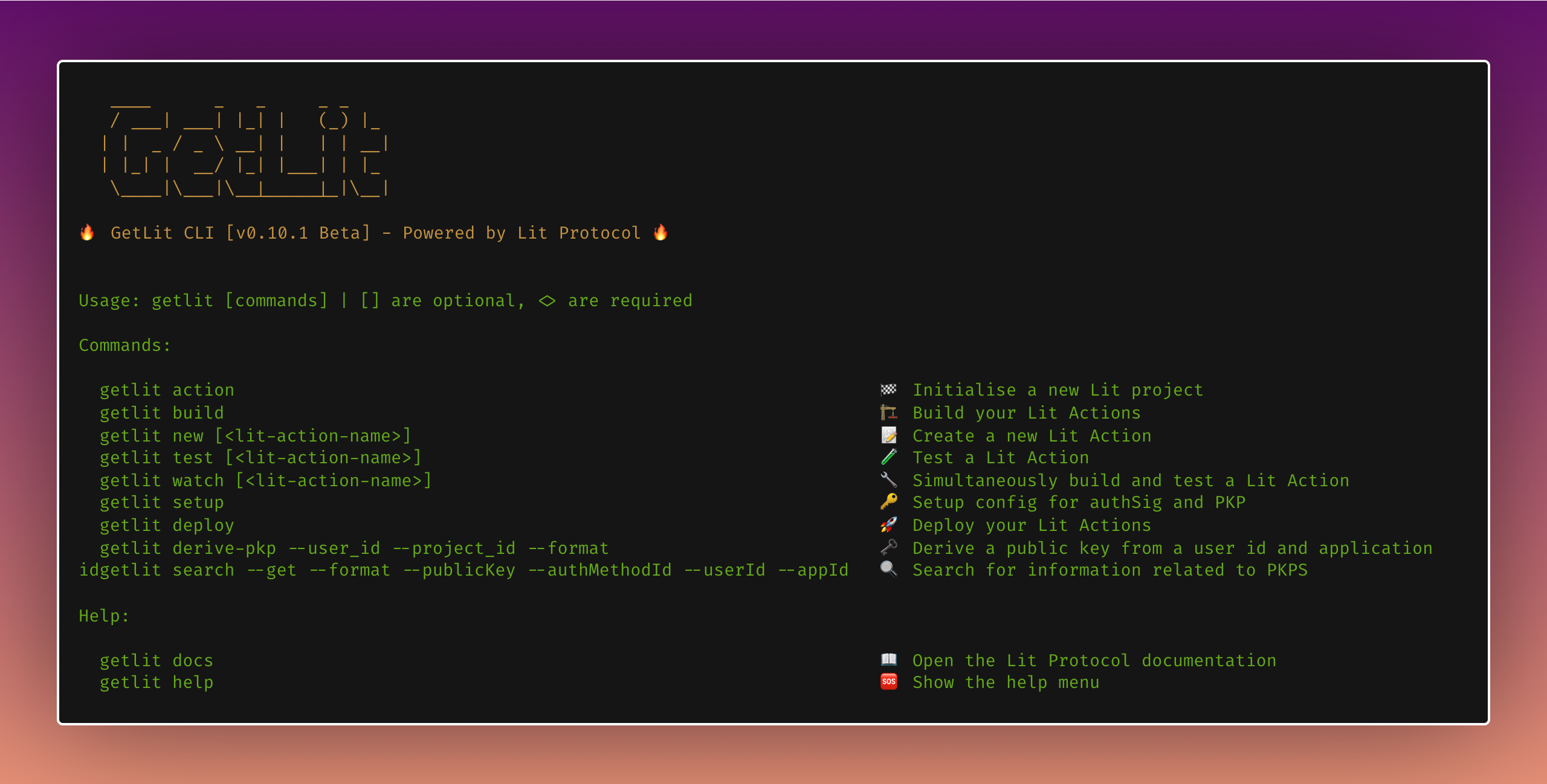
8 |
9 | The GetLit CLI is a command-line tool designed to help developers manage their Lit Actions projects. The CLI provides a set of commands to create, build, test, and configure Lit Actions.
10 |
11 | ## Getting Started
12 |
13 | ```
14 | npm install -g getlit
15 |
16 | // or
17 | yarn add global getlit
18 | ```
19 |
20 | | Command | Usage | Description |
21 | | ------------------------ | ----------------------------------- | ----------------------------------------- |
22 | | `getlit init` \| `here` | `getlit init` | 🏁 Initialise a new Lit project |
23 | | `getlit build` | `getlit build` | 🏗 Build your Lit Actions |
24 | | `getlit new` \| `action` | `getlit new []` | 📝 Create a new Lit Action |
25 | | `getlit test` | `getlit test []` | 🧪 Test a Lit Action |
26 | | `getlit watch` | `getlit watch []` | 🔧 Simultaneously build and test a Lit Action |
27 | | `getlit setup` | `getlit setup` | 🔑 Setup config for authSig and PKP |
28 | | `getlit docs` \| `doc` | `getlit docs` | 📖 Open the Lit Protocol documentation |
29 | | `getlit help` \| `show` | `help` | 🆘 Show the help menu |
30 |
31 | ## Usage
32 |
33 | To use the GetLit CLI, simply run the desired command followed by any required or optional arguments. The CLI will execute the associated function and display the output accordingly.
34 |
--------------------------------------------------------------------------------
/versioned_docs/version-2.0/LitActions/bestPractices.md:
--------------------------------------------------------------------------------
1 | ---
2 | sidebar_position: 5
3 | ---
4 |
5 | # Best Practices
6 |
7 | :::note
8 | It is NOT recommended to use the Lit JS SDK within a Lit Action due to the potential for exponential growth of computational complexity (n^2) (eg. If 10 nodes try to get 10 signature shares, there are now 100 http requests). It is the responsibility of the client to collect and combine the signature or decryption shares, as the combination operation is not supported within a Lit Action.
9 |
10 | For some use cases (such as making an API or RPC request), it may be desired to execute a Lit Action on a single node, as opposed to every node in the Lit Network in parallel.
11 |
12 | [Single execution](../LitActions/workingWithActions/singleExecution.md) is now enabled in the SDK by passing the targetNodeRange parameter after your executeJS function (i.e. 'executeJs({ targetNodeRange: 1 })'). You can pass 1-10 to specify the number of nodes the Lit Action should be executed on. Returning signed values in single execution is not yet supported.
13 | :::
14 |
15 | ## Ideal Use Cases
16 | - Generating [proofs](../LitActions/intro.md)
17 | - Looking up permitted actions, addresses and [auth methods](../pkp/authHelpers/overview) associated with a PKP
18 | - Checking access control conditions with [conditional signing](../LitActions/workingWithActions/conditionalSigning.md)
19 |
20 | ## Think Twice Use Case -- Ideal for Single Node Execution
21 | - POST request that inserts a new SQL row (if not called in single execution, the Lit Action will be executed by every node in parallel, you will end up with n number of rows, where n is no less than two-thirds the number of total nodes in the Lit network)
22 | - ETH RPC calls
23 |
24 | ## Bad Use Cases
25 | - Sending a signed transaction (the transaction will be sent n times, where n is no less than two-thirds the number of total nodes in the Lit network)
--------------------------------------------------------------------------------
/versioned_docs/version-2.0/ToolsAndExamples/SDKExamples/OnchainMetadata/introduction.md:
--------------------------------------------------------------------------------
1 | ---
2 | sidebar_position: 1
3 | ---
4 |
5 | # Introduction
6 |
7 | _Estimated time to complete: 1 hour_
8 |
9 | - Encrypting on-chain meta-data (an **NFT description**) using the Lit SDK.
10 | - Upon fetching, the NFTs show their metadata (image & name) to all the users. But, show the decrypted metadata (NFT description) to **only** users with more than 0.1 MATIC in their wallet, using the Lit SDK.
11 |
12 | ## Table of Contents
13 |
14 | - [Setup the Project](../OnchainMetadata/setup)
15 | - [Encrypt & Decrypt](../OnchainMetadata/encryptDecrypt)
16 | - [NFT Smart Contract](../OnchainMetadata/smartContract)
17 | - [Lit SDK on the Frontend](../OnchainMetadata/frontend)
18 | - [Deploy to Polygon Mumbai network](../OnchainMetadata/polygonMumbai)
19 |
20 | ## Tech Stack
21 |
22 | - [Lit SDK](../../../SDK/intro) - encrypting & decrypting the input description
23 | - [Hardhat](https://hardhat.org/) - local Ethereum development environment
24 | - [Ethers.js](https://docs.ethers.io/v5/) - interacting with our deployed NFT smart contract
25 | - [Polygon Mumbai network](https://faucet.polygon.technology/) - where we deploy our NFT smart contract
26 | - [OpenZeppelin](https://www.openzeppelin.com/) - library for smart contracts for the Ethereum network
27 | - [MetaMask](https://metamask.io/) - crypto wallet to connect to our DApp
28 |
29 | ## Project Replit
30 |
31 | Below is the complete [**React** project](https://replit.com/@lit/Encrypt-and-Decrypt-On-chain-NFT-Metadata#encrypt_and_decrypt_on-chain_nft_metadata/src/App.js).
32 |
33 | For the best experience please open the web app in a new tab.
34 |
35 |
36 |
--------------------------------------------------------------------------------
/docs/sdk/serverless-signing/broadcast-and-collect.md:
--------------------------------------------------------------------------------
1 | import FeedbackComponent from "@site/src/pages/feedback.md";
2 |
3 | # Broadcast and Collect Within an Action
4 |
5 | ## Overview
6 |
7 | The `broadcastAndCollect` function let's you run an operation on every node in the Lit network, collect their responses, and aggregate them into a single data set. This is useful if you'd like to perform additional operations over their responses, such as calculating a median or average.
8 |
9 | When you call this function, the responses from each node will be grouped together before being returned back to each node for further processing.
10 |
11 | # Broadcasting and Collecting a fetch response
12 |
13 | The following Lit Action uses `broadcastAndCollect` to fetch the forecast using the weather.gov API before combining the responses from each Lit node into a single array.
14 |
15 | ```js
16 | const code = `(async () => {
17 | const url = "https://api.weather.gov/gridpoints/TOP/31,80/forecast";
18 | const resp = await fetch(url).then((response) => response.json());
19 | const temp = resp.properties.periods[0].temperature;
20 |
21 | const temperatures = await Lit.Actions.broadcastAndCollect({
22 | name: "temperature",
23 | value: temp,
24 | });
25 |
26 | // at this point, temperatures is an array of all the values that all the nodes got
27 | const median = temperatures.sort()[Math.floor(temperatures.length / 2)];
28 | Lit.Actions.setResponse({response: median});
29 | })();
30 | `;
31 |
32 | const client = new LitNodeClient({
33 | litNetwork: "datil-dev",
34 | });
35 | await client.connect();
36 | const res = await client.executeJs({
37 | code,
38 | sessionSigs: {} // your session
39 | jsParams: {
40 | publicKey: "",
41 | sigName: 'fooSig',
42 | }
43 | });
44 |
45 | console.log("response from broadcast and collecting within a lit action: ", res);
46 | ```
47 |
48 |
--------------------------------------------------------------------------------
/versioned_docs/version-2.0/ToolsAndExamples/Tools/getlitCli.md:
--------------------------------------------------------------------------------
1 | ---
2 | sidebar_position: 5
3 | ---
4 |
5 | # GetLit CLI
6 |
7 | 
8 |
9 | The GetLit CLI is a command-line tool designed to help developers manage their Lit Actions projects. The CLI provides a set of commands to create, build, test, and configure Lit Actions.
10 |
11 | - GitHub repo: https://github.com/LIT-Protocol/getlit
12 | - npm: https://www.npmjs.com/getlit
13 |
14 | ## Getting Started
15 |
16 | ```
17 | npm install -g getlit
18 |
19 | // or
20 | yarn add global getlit
21 | ```
22 |
23 | ## Usage
24 |
25 | To use the GetLit CLI, navigate to a directory or your existing project, and then simply run the desired command followed by any required or optional arguments. The CLI will execute the associated function and display the output accordingly.
26 |
27 | | Command | Usage | Description |
28 | | ------------------------ | ----------------------------------- | ----------------------------------------- |
29 | | `action` \| `init` | `getlit action` | 🏁 Initialise a new Lit project |
30 | | `build` | `getlit build` | 🏗 Build your Lit Actions |
31 | | `new` | `getlit new []` | 📝 Create a new Lit Action |
32 | | `test` | `getlit test []` | 🧪 Test a Lit Action |
33 | | `watch` | `getlit watch []` | 🔧 Simultaneously build and test a Lit Action |
34 | | `setup` | `getlit setup` | 🔑 Setup config for authSig and PKP |
35 | | `docs` \| `doc` | `getlit docs` | 📖 Open the Lit Protocol documentation |
36 | | `help` \| `show` | `getlit help` | 🆘 Show the help menu |
--------------------------------------------------------------------------------
/src/components/CardSectionsV2/Ecosystem.jsx:
--------------------------------------------------------------------------------
1 | import React from "react";
2 | import {
3 | HomepageCard as Card,
4 | HomepageSection as Section,
5 | } from "../HomepageComponents";
6 |
7 | export default function EcosystemSection({ title, className }) {
8 | return (
9 |
10 |
15 |
20 |
25 |
30 |
35 |
40 |
41 | );
42 | }
43 |
44 | /** TODO: Add in this section once Tools and Integrations have their separate landing spots
45 | *
50 | */
51 |
--------------------------------------------------------------------------------
/src/components/CardSectionsV3/Ecosystem.jsx:
--------------------------------------------------------------------------------
1 | import React from "react";
2 | import {
3 | HomepageCard as Card,
4 | HomepageSection as Section,
5 | } from "../HomepageComponents";
6 |
7 | export default function EcosystemSection({ title, className }) {
8 | return (
9 |
10 |
15 |
20 |
25 |
30 |
35 |
40 |
41 | );
42 | }
43 |
44 | /** TODO: Add in this section once Tools and Integrations have their separate landing spots
45 | *
50 | */
51 |
--------------------------------------------------------------------------------
/versioned_docs/version-2.0/sdk/explanation/authentication/sessionSigs/use-cases.md:
--------------------------------------------------------------------------------
1 | # Use Cases
2 |
3 | Below are some use cases of how to use session signatures and capability objects.
4 |
5 | _Note that these are not yet currently possible as we need to implement proof verification logic for delegation chains._
6 |
7 | ### Letting A User Use Your Rate Limit Increase (RLI) NFT
8 |
9 | Alice owns a Capacity Credit NFT and wants to let Bob use it, but only for specific Lit Actions or another resource or set of resources that she owns.
10 |
11 | Alice can create a session capability object that specifies the ability to Authenticate with a Capacity Credit NFT as well as request for Threshold Execution against a particular Lit Action IPFS CID(s). Alice then signs and issues these capabilities to Bob.
12 |
13 | Bob can generate an `AuthSig` by delegating equal rights to Bob's session keys, and attaching the capabilities granted to him by Alice as a proof in the session object. Bob can subsequently generate a `SessionSig` that requests for Alice's Capacity Credit NFT and Lit Action IPFS CID in the `resourceAbilityRequests`.
14 |
15 | ### Letting A User Use Your PKP For A Specific Lit Action
16 |
17 | Alice owns a PKP and Bob wants use it with a specific Lit Action that he has not authorized yet. He could use the smart contract and `addPermittedAction()`, run the function, then `removePermittedAction()` function, but would prefer not to spend the gas and wait for blocks etc.
18 |
19 | Alice can create a session capability object that specifies the ability to perform Threshold Execution with a PKP NFT. Alice then signs and issues this capability to Bob.
20 |
21 | Bob can generate an `AuthSig` by delegating equal rights to Bob's session keys, and attaching the capabilities granted to him by Alice as a proof in the session capability object. Bob can subsequently generate a `SessionSig` that requests for Alice's PKP NFT as well as Bob's Lit Action IPFS CID in the `resourceAbilityRequests`.
--------------------------------------------------------------------------------
/not-docs/tutorial-extras/translate-your-site.md:
--------------------------------------------------------------------------------
1 | ---
2 | sidebar_position: 2
3 | ---
4 |
5 | # Translate your site
6 |
7 | Let's translate `docs/intro.md` to French.
8 |
9 | ## Configure i18n
10 |
11 | Modify `docusaurus.config.js` to add support for the `fr` locale:
12 |
13 | ```js title="docusaurus.config.js"
14 | module.exports = {
15 | i18n: {
16 | defaultLocale: 'en',
17 | locales: ['en', 'fr'],
18 | },
19 | };
20 | ```
21 |
22 | ## Translate a doc
23 |
24 | Copy the `docs/intro.md` file to the `i18n/fr` folder:
25 |
26 | ```bash
27 | mkdir -p i18n/fr/docusaurus-plugin-content-docs/current/
28 |
29 | cp docs/intro.md i18n/fr/docusaurus-plugin-content-docs/current/intro.md
30 | ```
31 |
32 | Translate `i18n/fr/docusaurus-plugin-content-docs/current/intro.md` in French.
33 |
34 | ## Start your localized site
35 |
36 | Start your site on the French locale:
37 |
38 | ```bash
39 | npm run start -- --locale fr
40 | ```
41 |
42 | Your localized site is accessible at `http://localhost:3000/fr/` and the `Getting Started` page is translated.
43 |
44 | :::caution
45 |
46 | In development, you can only use one locale at a same time.
47 |
48 | :::
49 |
50 | ## Add a Locale Dropdown
51 |
52 | To navigate seamlessly across languages, add a locale dropdown.
53 |
54 | Modify the `docusaurus.config.js` file:
55 |
56 | ```js title="docusaurus.config.js"
57 | module.exports = {
58 | themeConfig: {
59 | navbar: {
60 | items: [
61 | // highlight-start
62 | {
63 | type: 'localeDropdown',
64 | },
65 | // highlight-end
66 | ],
67 | },
68 | },
69 | };
70 | ```
71 |
72 | The locale dropdown now appears in your navbar:
73 |
74 | 
75 |
76 | ## Build your localized site
77 |
78 | Build your site for a specific locale:
79 |
80 | ```bash
81 | npm run build -- --locale fr
82 | ```
83 |
84 | Or build your site to include all the locales at once:
85 |
86 | ```bash
87 | npm run build
88 | ```
89 |
--------------------------------------------------------------------------------
/versioned_docs/version-2.0/ToolsAndExamples/Integrations/Ceramic/intro.md:
--------------------------------------------------------------------------------
1 | ---
2 | sidebar_position: 1
3 | ---
4 |
5 | # Intro
6 | ## Ceramic Integration
7 |
8 | We are going to build simple web application encrypting and decrypting a string using Lit's Ceramic SDK. Check out the complete project [here](https://github.com/LIT-Protocol/CeramicIntegrationExample).
9 |
10 |
19 |
20 | ## Why?
21 |
22 | Ceramic is amazing but doesn't have permission on data. Everything is public. With Lit Protocol, you can specify who can decrypt and therefore read data based on on-chain conditions. This module allows you to integrate Ceramic with Lit.
23 |
24 | For example, you are building a website for a social DAO that throws member-only events. Members are people who hold the NFT for the DAO. Using Ceramic as your database and Lit for encrypting and decrypting events information, you can specify that only DAO members can see the events. You can use Lit to encrypt the events data, then store that encrypted data in Ceramic. When you want to access that information - you can use Lit to check access control conditions (in this case, NFT ownership) and decrypt the data from Ceramic.
25 | ## Motivation
26 |
27 | The goal of this project is to provide a decentralized fully serverless database solution with the ability to easily share private data. Ceramic is a great solution for the decentralized serverless database, but it doesn't have the ability to share private data on it's own. This module will allow you to share private data on Ceramic with the ability to specify who can decrypt the data.
28 |
29 | ## Code
30 |
31 | You can find the NPM module with more extensive documentation here: https://github.com/LIT-Protocol/CeramicIntegration
32 |
--------------------------------------------------------------------------------
/versioned_docs/version-2.0/ToolsAndExamples/SDKExamples/OnchainMetadata/setup.md:
--------------------------------------------------------------------------------
1 | ---
2 | sidebar_position: 2
3 | ---
4 |
5 | # Setup the Project
6 |
7 | ## Smart Contract
8 |
9 | 1. Install hardhat:
10 |
11 | ```js
12 | yarn add hardhat
13 | ```
14 |
15 | 2. Init hardhat to create the boilerplate for a **Basic project (with Javascript)**:
16 |
17 | ```js
18 | npx hardhat init
19 | ```
20 |
21 | 3. Install Openzepplin:
22 |
23 | ```js
24 | yarn add @openzeppelin/contracts
25 | ```
26 |
27 | 4. Test deploy the sample smart contract on 2 separate terminals:
28 |
29 | ```js
30 | npx hardhat node
31 | npx hardhat run scripts/deploy.js --network localhost
32 | ```
33 |
34 | Now that we have our hardhat working & the sample smart contract is deployed correctly, let's setup our Lit SDK, which we will use to encrypt & decrypt the metadata.
35 |
36 | ## Lit JS SDK V2
37 |
38 | You can use the Lit JS SDK V2 to encrypt and store any static content. This could be a file, a string, or anything that won't change (we're going to encrypt an input string). You have to store the content and metadata yourself (we're storing that on a blockchain network), but Lit will store who is allowed to decrypt it and enforce this (aka key management).
39 |
40 | 1. Install Lit JS SDK V2:
41 |
42 | ```js
43 | yarn add @lit-protocol/lit-node-client@serrano
44 | ```
45 |
46 | 2. Create a Lit class which will have all the encryption & decryption functions we require:
47 |
48 | ```js
49 | import * as LitJsSdk from "@lit-protocol/lit-node-client@serrano";
50 |
51 | const client = new LitJsSdk.LitNodeClient();
52 |
53 | class Lit {
54 | litNodeClient;
55 |
56 | async connect() {
57 | await client.connect();
58 | this.litNodeClient = client;
59 | }
60 | }
61 | ```
62 |
63 | :::note
64 |
65 | `client.connect()` will return a promise that resolves when you are connected to the Lit Network. You may also listen for the `lit-ready` event.
66 |
67 | In this code example, the `litNodeClient` is set as a global variable for use throughout the web app.
68 | :::
69 |
--------------------------------------------------------------------------------
/scripts/run-crawler.mjs:
--------------------------------------------------------------------------------
1 | import "dotenv/config";
2 | import fetch from "node-fetch";
3 |
4 | const BASE64_BASIC_AUTH = `Basic ${Buffer.from(
5 | `${process.env.CRAWLER_USER_ID}:${process.env.CRAWLER_API_KEY}`
6 | ).toString("base64")}`;
7 |
8 | const CRAWLER_ID = "c9ce8d38-5794-48bd-be81-10f4e812bf96";
9 |
10 | async function reindex(crawlerId) {
11 | console.info(`Triggering reindex on ${crawlerId}`);
12 |
13 | const res = await fetch(
14 | `${process.env.CRAWLER_API_BASE_URL}/crawlers/${crawlerId}/reindex`,
15 | {
16 | method: "POST",
17 | headers: {
18 | Authorization: BASE64_BASIC_AUTH,
19 | "Content-Type": "application/json",
20 | },
21 | }
22 | );
23 | const jsonResponse = await res.json();
24 | // Each success response will look like: { taskId: '18bf6357-fbad-42b2-9a0f-d685e25a24f9' }
25 | // Use the '/crawlers/{id}/tasks/{taskId}' endpoint to get the status of the task
26 |
27 | console.log("reindex response", jsonResponse);
28 | return jsonResponse.taskId;
29 | }
30 |
31 | async function monitorForTaskCompletion(crawlerId, taskId) {
32 | let taskPending = true;
33 |
34 | while (taskPending) {
35 | const res = await fetch(
36 | `${process.env.CRAWLER_API_BASE_URL}/crawlers/${crawlerId}/tasks/${taskId}`,
37 | {
38 | headers: {
39 | Authorization: BASE64_BASIC_AUTH,
40 | "Content-Type": "application/json",
41 | },
42 | }
43 | );
44 | const jsonResponse = await res.json();
45 | console.log("monitor response", jsonResponse);
46 | taskPending = jsonResponse.pending;
47 |
48 | // Wait 5 seconds before checking again
49 | await new Promise((resolve) => setTimeout(resolve, 5000));
50 | }
51 | }
52 |
53 | async function run() {
54 | // Trigger reindexing of crawler.
55 | const taskId = await reindex(CRAWLER_ID);
56 |
57 | // Monitor crawler until completed
58 | await monitorForTaskCompletion(CRAWLER_ID, taskId);
59 |
60 | console.info("Crawler reindexing complete.");
61 | }
62 |
63 | run().catch((err) => {
64 | console.error(err);
65 | process.exit(1);
66 | });
67 |
--------------------------------------------------------------------------------
/docs/sdk/authentication/session-sigs/use-cases.md:
--------------------------------------------------------------------------------
1 | import FeedbackComponent from "@site/src/pages/feedback.md";
2 |
3 | # Use Cases
4 |
5 | Below are some use cases of how to use session signatures and capability objects.
6 |
7 | _Note that these are not yet currently possible as we need to implement proof verification logic for delegation chains._
8 |
9 | ### Letting A User Use Your Capacity Credit NFT
10 |
11 | Alice owns a Capacity Credit NFT and wants to let Bob use it, but only for specific Lit Actions or another resource or set of resources that she owns.
12 |
13 | Alice can create a session capability object that specifies the ability to Authenticate with a Capacity Credit NFT as well as request for Threshold Execution against a particular Lit Action IPFS CID(s). Alice then signs and issues these capabilities to Bob.
14 |
15 | Bob can generate an `AuthSig` by delegating equal rights to Bob's session keys, and attaching the capabilities granted to him by Alice as a proof in the session object. Bob can subsequently generate a `SessionSig` that requests for Alice's Capacity Credit NFT and Lit Action IPFS CID in the `resourceAbilityRequests`.
16 |
17 | For an example of how you may delegate usage of your NFT see [here](../../authentication/session-sigs/capacity-credits)
18 |
19 | ### Letting A User Use Your PKP For A Specific Lit Action
20 |
21 | Alice owns a PKP and Bob wants use it with a specific Lit Action that he has not authorized yet. He could use the smart contract and `addPermittedAction()`, run the function, then `removePermittedAction()` function, but would prefer not to spend the gas and wait for blocks etc.
22 |
23 | Alice can create a session capability object that specifies the ability to perform Threshold Execution with a PKP NFT. Alice then signs and issues this capability to Bob.
24 |
25 | Bob can generate an `AuthSig` by delegating equal rights to Bob's session keys, and attaching the capabilities granted to him by Alice as a proof in the session capability object. Bob can subsequently generate a `SessionSig` that requests for Alice's PKP NFT as well as Bob's Lit Action IPFS CID in the `resourceAbilityRequests`.
26 |
27 |
--------------------------------------------------------------------------------
/versioned_docs/version-2.0/accessControl/EVM/siwe.md:
--------------------------------------------------------------------------------
1 | ---
2 | sidebar_position: 5
3 | ---
4 |
5 | # Sign In With Ethereum Parameters
6 |
7 | A EIP-4631 compliant Sign in with Ethereum message is signed by the user's wallet and presented with every request to the Lit Nodes. This signed message is used to authenticate the user's wallet, but you can also create access control conditions based on the content of this message. Specifically, you can create access control conditions based on the Domain and Resources parameters of the Sign in with Ethereum message. You can learn more about Sign in with Ethereum here: [https://docs.login.xyz/](https://docs.login.xyz/).
8 |
9 | ## Domain
10 |
11 | This will check the domain of the Sign in with Ethereum message and compare it to the domain specified in the `returnValueTest`. In this case, the domain must match "localhost:3050". This condition is useful to prevent signature reuse across domains. You can use the "AND" operator with Boolean Logic to add this condition to any other condition which will prevent using signatures from other domains.
12 |
13 | ```js
14 | const accessControlConditions = [
15 | {
16 | contractAddress: "",
17 | standardContractType: "SIWE",
18 | chain: "ethereum",
19 | method: "",
20 | parameters: [":domain"],
21 | returnValueTest: {
22 | comparator: "=",
23 | value: "localhost:3050",
24 | },
25 | },
26 | ];
27 | ```
28 |
29 | ## Resources
30 |
31 | This will check the resources field of the Sign in with Ethereum message and compare it to the resource specified in the `returnValueTest`. In this case, the resources array must contain `ipfs://someTestId`.
32 |
33 | ```js
34 | const accessControlConditions = [
35 | {
36 | contractAddress: "",
37 | standardContractType: "SIWE",
38 | chain: "ethereum",
39 | method: "",
40 | parameters: [":resources"],
41 | returnValueTest: {
42 | comparator: "contains",
43 | value: "ipfs://someTestId",
44 | },
45 | },
46 | ];
47 | ```
48 |
49 | ## Using SIWE params in Custom Contract Calls
50 |
51 | See the [Custom Contract Calls](../EVM/customContractCalls.md) page for more information on how to use SIWE params in custom contract calls.
52 |
--------------------------------------------------------------------------------
/versioned_docs/version-2.0/ToolsAndExamples/Tools/shareModal.md:
--------------------------------------------------------------------------------
1 | ---
2 | sidebar_position: 2
3 | ---
4 | import Tabs from '@theme/Tabs';
5 | import TabItem from '@theme/TabItem';
6 |
7 | # Share Modal
8 |
9 | The Lit Share Modal is a tool for creating access control conditions for securing content with Lit Protocol.
10 |
11 | - Secure content based on wallet address, token/NFT holdings, POAP ownership, or DAO membership.
12 | - Create multiple paths for unlocking content by using AND/OR operators.
13 | - Set your most used tokens/NFTs as defaults for quick and easy access.
14 |
15 | 
16 |
17 | For an in-depth explanation of how to use the share modal, please follow the [README.md](https://github.com/LIT-Protocol/lit-share-modal-v3#readme).
18 |
19 | ## Installation
20 |
21 |
27 |
28 |
29 | ```js
30 | yarn add lit-share-modal-v3
31 | ```
32 |
33 |
34 |
35 |
36 | ```js
37 | npm install --save lit-share-modal-v3
38 | ```
39 |
40 |
41 |
42 | ## Usage in React
43 |
44 | Use this UI library to allow users to setup custom blockchain based access control. This library can be used in any React app.
45 |
46 | https://github.com/LIT-Protocol/lit-share-modal-v3
47 |
48 | A playground for experimenting with the modal is available here: https://lit-share-modal-v3-playground.netlify.app/.
49 |
50 |
51 | ## Usage in Vanilla JS (No React)
52 |
53 | A version of this library without React will be available soon.
54 |
55 | [//]: # (To use this library without React, you can use the following package, which wraps the react library up in vanilla JS.)
56 |
57 | [//]: # ()
58 | [//]: # (https://github.com/LIT-Protocol/lit-share-modal-v2-vanilla-js)
59 |
60 | ## Usage in Next.js
61 |
62 | If you are using NextJS, the CSS injection will not work. Set the `injectCSS` prop to false, and import the CSS file directly from `node_modules/lit-share-modal-v3/dist/ShareModal.css` in `_app.tsx` or `_app.jsx`.
63 | More information is available in the docs. https://github.com/LIT-Protocol/lit-share-modal-v3.
64 |
65 |
--------------------------------------------------------------------------------
/docs/connecting-to-a-lit-network/connecting.md:
--------------------------------------------------------------------------------
1 | # Connecting to a Lit Network
2 |
3 | After installing the Lit SDK, you can connect an instance of [LitNodeClient](https://v7-api-doc-lit-js-sdk.vercel.app/classes/lit_node_client_src.LitNodeClient.html) to a Lit network. This is done by setting the `litNetwork` property when instantiating an instance of `LitNodeClient`:
4 |
5 | ```ts
6 | import { LitNodeClient } from "@lit-protocol/lit-node-client";
7 | import { LIT_NETWORK } from "@lit-protocol/constants";
8 |
9 | const litNodeClient = new LitNodeClient({
10 | // Change this to the Lit SDK Network Identifier you want to connect to
11 | litNetwork: LIT_NETWORK.DatilDev,
12 | });
13 | await litNodeClient.connect();
14 | ```
15 |
16 | ## Available Lit Networks
17 |
18 | :::warning
19 | With the release of [Chronicle Yellowstone](./lit-blockchains/chronicle-yellowstone) and the Datil networks, the [Chronicle](./lit-blockchains/chronicle) based Lit networks: `habanero`, `manzano`, and `cayenne` have been deprecated.
20 |
21 | If you are currently using these networks, please review the [Migrating to Datil](./migrating-to-datil) guide to migrate your application and Lit assets to a Datil network.
22 | :::
23 |
24 | ### Mainnets
25 |
26 | | Name | Lit SDK Network Identifier | Doc Page Link | Network is Live |
27 | |------------|----------------------------|------------------------------|---------------------------|
28 | | Datil | `datil` | [Link](./mainnets#datil)| ✅ |
29 | | Habanero | `habanero` | n/a | ⚠️ Deprecated |
30 |
31 | ### Testnets
32 |
33 | | Name | Lit SDK Network Identifier | Doc Page Link | Network is Live |
34 | |------------|----------------------------|-------------------------------|---------------------------|
35 | | Datil-test | `datil-test` | [Link](./testnets#datil-test) | ✅ |
36 | | Datil-dev | `datil-dev` | [Link](./testnets#datil-dev) | ✅ |
37 | | Manzano | `manzano` | n/a | ⚠️ Deprecated |
38 | | Cayenne | `cayenne` | n/a | ⚠️ Deprecated |
39 |
--------------------------------------------------------------------------------
/versioned_docs/version-2.0/pkp/toolsAndExamples.md:
--------------------------------------------------------------------------------
1 | # Initial Implementations
2 |
3 | ## Swap Playground
4 | Uniswap trade interface for Programmable Key Pairs (PKPs).
5 | This is a demo to create actions that developers can copy and paste to use for their own projects. After an action is created, the swap can be executed.
6 | 
7 |
8 | Check it out here: https://lit-swap-playground.netlify.app/
9 |
10 | ## Ceramic Signer
11 |
12 | This package can be used to sign Ceramic transactions with a PKP using Lit Actions: https://github.com/LIT-Protocol/key-did-provider-secp256k1
13 |
14 | ### Example Application
15 |
16 | You can find an example implementation (a React app) of talking to Ceramic and signing with Lit Actions / PKPs here: https://github.com/LIT-Protocol/lit-action-ceramic-signing-demo
17 |
18 | ## Sling Protocol
19 |
20 | An SDK for automating DEX interactions using PKPs and Lit Actions. Example functionality includes frictionless swaps with signature abstraction
21 | and on-chain limit orders. This project was funded by our Grants program: https://github.com/Sling-Protocol/pkp-dex-sdk
22 |
23 | ## Conditional Signing
24 |
25 | Conditionally signed response using Lit Actions.
26 | Displays the returned JSON if Ether balance >= Min balance entered AND if you signed the transaction within 2 mins of the set time.
27 |
28 | Below is the complete [**React** project](https://replit.com/@lit/Lit-Actions-Conditional-Signing#lit-actions_sign_api_response/src/App.js).
29 |
30 |
31 |
32 | ## Weather API Signing
33 |
34 | Signed Response from Weather API. Within a Lit Action, the example project calls the Weather API and then signs the weather response.
35 |
36 | Below is the complete [**React** project](https://replit.com/@lit/Lit-Actions-Return-signed-API-reponse#lit-actions_sign_api_response/src/App.js).
37 |
38 |
39 |
--------------------------------------------------------------------------------
/docs/sdk/access-control/evm/siwe.md:
--------------------------------------------------------------------------------
1 | ---
2 | sidebar_position: 5
3 | ---
4 |
5 | import FeedbackComponent from "@site/src/pages/feedback.md";
6 |
7 | # Sign In With Ethereum Parameters
8 |
9 | A EIP-4631 compliant Sign in with Ethereum message is signed by the user's wallet and presented with every request to the Lit Nodes. This signed message is used to authenticate the user's wallet, but you can also create access control conditions based on the content of this message. Specifically, you can create access control conditions based on the Domain and Resources parameters of the Sign in with Ethereum message. You can learn more about Sign in with Ethereum here: [https://docs.login.xyz/](https://docs.login.xyz/).
10 |
11 | ## Domain
12 |
13 | This will check the domain of the Sign in with Ethereum message and compare it to the domain specified in the `returnValueTest`. In this case, the domain must match "localhost:3050". This condition is useful to prevent signature reuse across domains. You can use the "AND" operator with Boolean Logic to add this condition to any other condition which will prevent using signatures from other domains.
14 |
15 | ```js
16 | const accessControlConditions = [
17 | {
18 | contractAddress: "",
19 | standardContractType: "SIWE",
20 | chain: "ethereum",
21 | method: "",
22 | parameters: [":domain"],
23 | returnValueTest: {
24 | comparator: "=",
25 | value: "localhost:3050",
26 | },
27 | },
28 | ];
29 | ```
30 |
31 | ## Resources
32 |
33 | This will check the resources field of the Sign in with Ethereum message and compare it to the resource specified in the `returnValueTest`. In this case, the resources array must contain `ipfs://someTestId`.
34 |
35 | ```js
36 | const accessControlConditions = [
37 | {
38 | contractAddress: "",
39 | standardContractType: "SIWE",
40 | chain: "ethereum",
41 | method: "",
42 | parameters: [":resources"],
43 | returnValueTest: {
44 | comparator: "contains",
45 | value: "ipfs://someTestId",
46 | },
47 | },
48 | ];
49 | ```
50 |
51 | ## Using SIWE params in Custom Contract Calls
52 |
53 | See the [Custom Contract Calls](../evm/custom-contract-calls.md) page for more information on how to use SIWE params in custom contract calls.
54 |
55 |
56 |
--------------------------------------------------------------------------------
/docs/integrations/tee-providers/phala.md:
--------------------------------------------------------------------------------
1 | import FeedbackComponent from "@site/src/pages/feedback.md";
2 |
3 | # Using Lit Protocol as a secret store for a Phala TEE
4 |
5 | ## Overview
6 |
7 | Lit Protocol can be used as a secure secret store for Phala TEE (Trusted Execution Environment) applications. This integration allows you to conditionally decrypt secrets where decryption is only permitted for verified Phala TEE instances running known-good software builds.
8 |
9 | ## How It Works
10 |
11 | The integration leverages:
12 | - Attestation verification from Phala TEE instances
13 | - Lit Actions to verify TEE attestations
14 | - Conditional decryption that only releases secrets to verified TEE instances
15 | - Assurance that secrets are only accessible to specific, trusted TEE builds
16 |
17 | ## Example Implementation
18 |
19 | A complete example demonstrating this workflow is available in the Lit Protocol repository:
20 |
21 | **Repository**: [https://github.com/LIT-Protocol/tee_secrets_test](https://github.com/LIT-Protocol/tee_secrets_test)
22 |
23 | This example shows:
24 | - How to obtain attestations from Phala TEE
25 | - Verification of attestations within Lit Actions using WASM-compiled verification logic
26 | - Conditional decryption based on successful verification
27 | - Complete workflow for securing and retrieving secrets from within a TEE environment
28 |
29 | ## Key Benefits
30 |
31 | - **Secure Secret Management**: Secrets remain encrypted until accessed by verified TEE instances
32 | - **Attestation-Based Access**: Only TEE instances with valid attestations can decrypt secrets
33 | - **Build Verification**: Ensure only specific, trusted TEE builds can access sensitive data
34 | - **Decentralized Security**: Leverage Lit Protocol's distributed network for secret storage and access control
35 |
36 | ## Getting Started
37 |
38 | To implement this integration:
39 |
40 | 1. Clone the example repository
41 | 2. Configure your TEE verification requirements in the Lit Action
42 | 3. Deploy your secrets to Lit Protocol with appropriate access conditions
43 | 4. Run the decryption from within your Phala TEE environment
44 |
45 | For detailed implementation steps and code examples, refer to the [example repository](https://github.com/LIT-Protocol/tee_secrets_test).
46 |
47 |
48 |
--------------------------------------------------------------------------------
/docs/sdk/serverless-signing/eip191.md:
--------------------------------------------------------------------------------
1 | import FeedbackComponent from "@site/src/pages/feedback.md";
2 |
3 | import Tabs from '@theme/Tabs';
4 | import TabItem from '@theme/TabItem';
5 |
6 | # Signing within a Lit Action using EIP-191
7 |
8 | ## Overview
9 |
10 | Lit Actions offer the ability to use [EIP-191](https://eips.ethereum.org/EIPS/eip-191?ref=blog.spruceid.com) to sign a message instead of a transaction or raw signature. This is done with the Lit Actions method [ethPersonalSignMessageEcdsa](https://actions-docs.litprotocol.com/#ethpersonalsignmessageecdsa).
11 |
12 | It will prepend to your message: `"\x19Ethereum Signed Message:\n"` and the length of the message, then hash and sign it according to the EIP-191 standard.
13 |
14 | ## Prerequisites
15 |
16 | - Basic understanding of [PKPs](../../../user-wallets/pkps/overview)
17 | - Basic understanding of [Lit Actions](../serverless-signing/quick-start)
18 |
19 | ## Complete Code Example
20 |
21 | The complete code example is available in the [Lit Developer Guides Code Repository](https://github.com/LIT-Protocol/developer-guides-code/tree/master/eip-191-signing). There you can find a Node.js and browser implementation of this example code.
22 |
23 | ### Example Lit Action
24 |
25 | The return value of `ethPersonalSignMessageEcdsa` (the `sigShare` variable in this example) is set to a boolean value of `true` if the signature was successfully generated, and `false` otherwise. The Lit Action will also return the complete signature as an object under the `sigName` key.
26 |
27 | ```jsx
28 | const _litActionCode = async () => {
29 | try {
30 | const sigShare = await LitActions.ethPersonalSignMessageEcdsa({
31 | message: dataToSign,
32 | publicKey,
33 | sigName,
34 | });
35 | LitActions.setResponse({ response: sigShare });
36 | } catch (error) {
37 | LitActions.setResponse({ response: error.message });
38 | }
39 | };
40 |
41 | export const litActionCode = `(${_litActionCode.toString()})();`;
42 | ```
43 |
44 | ## Summary
45 | This guide demonstrates how to sign an EIP-191 message using Lit Actions.
46 |
47 | If you'd like to learn more about Lit Actions, check out the [Lit Actions SDK](https://actions-docs.litprotocol.com/), or our [Advanced Topics](https://developer.litprotocol.com/category/advanced-topics-1) section on Lit Actions.
48 |
49 |
50 |
--------------------------------------------------------------------------------
/versioned_docs/version-2.0/accessControl/conditionTypes/litActionConditions.md:
--------------------------------------------------------------------------------
1 | ---
2 | sidebar_position: 4
3 | ---
4 |
5 | # Lit Action Conditions
6 |
7 | You can create a Lit Action Condition to grant access whenever a given Lit Action returns true. Lit Actions are JS code that can be executed on the Lit Protocol network. You can use Lit Actions to create custom access control conditions.
8 |
9 | :::note
10 |
11 | **Serrano Testnet Only**
12 |
13 | This feature currently only works on the Serrano Testnet. Be sure to install the latest version of the Lit JS SDK V2, and connect to the Serrano Testnet.
14 |
15 | :::
16 |
17 | ## Lit Action must return true
18 |
19 | Suppose you wanted to make a Lit Action that returns true if the forecast temperature is below 40 degrees. You could use this to create a document that can only be decrypted when it's cold out.
20 |
21 | This would be your Lit Action code, and is where you choose your conditions. You can talk to any API here:
22 |
23 | ```js
24 | const go = async (maxTemp) => {
25 | const url = "https://api.weather.gov/gridpoints/LWX/97,71/forecast";
26 | try {
27 | const response = await fetch(url).then((res) => res.json());
28 | const nearestForecast = response.properties.periods[0];
29 | const temp = nearestForecast.temperature;
30 | return temp < parseInt(maxTemp);
31 | } catch (e) {
32 | console.log(e);
33 | }
34 | return false;
35 | };
36 | ```
37 |
38 | Save the above code to IPFS.
39 |
40 | In this example, the Lit Action is on IPFS with the CID "QmcgbVu2sJSPpTeFhBd174FnmYmoVYvUFJeDkS7eYtwoFY". The below condition will run the `go()` function of the Lit Action, and check if the return value is true. It will pass a parameter of 40 to the `go()` function. Note that all parameters must be strings so you must use `parseInt()` to convert the string to a number to check it against the forecast temperature.
41 |
42 | ```js
43 | var accessControlConditions = [
44 | {
45 | contractAddress: "ipfs://QmcgbVu2sJSPpTeFhBd174FnmYmoVYvUFJeDkS7eYtwoFY",
46 | standardContractType: "LitAction",
47 | chain: "ethereum",
48 | method: "go",
49 | parameters: ["40"],
50 | returnValueTest: {
51 | comparator: "=",
52 | value: "true",
53 | },
54 | },
55 | ];
56 | ```
57 |
58 | You can see a full working example of this here: https://github.com/LIT-Protocol/js-serverless-function-test/blob/main/js-sdkTests/decrypt.js
59 |
--------------------------------------------------------------------------------
/docs/security/distributed-key-gen.md:
--------------------------------------------------------------------------------
1 | # Distributed Key Generation
2 |
3 | All Lit Protocol node operators use a [Distributed Key Generation](https://github.com/LIT-Protocol/whitepaper/blob/main/Lit%20Protocol%20Whitepaper%20(2024).pdf) (DKG) process to collectively generate all of the signing and encryption keys managed by the network. DKG ensures that no single node or party ever has access to any key in its entirety, as the entire key never exists at all. Instead, more than a threshold of the Lit nodes must come together (more than two-thirds of the network) to generate these keys and perform signing and decryption operations.
4 |
5 | ## Root Keys
6 |
7 | All signing keys are derived hierarchically from a set of root keys. These root keys are periodically refreshed or reshared (see below) and are backed up regularly. See the [recovery](../security/backup-and-recover.md) section below for more information on the backup process.
8 |
9 | ## Key Refresh and Resharing
10 |
11 | Periodically, key shares are updated with a refresh scheme. This rotates the private key shares among an existing set of participating node operators without changing the underlying private key, a process known as [Proactive Secret Sharing](https://github.com/LIT-Protocol/whitepaper/blob/main/Lit%20Protocol%20Whitepaper%20(2024).pdf). This method helps ensure the integrity of private key material for long periods of time while minimizing the risk of key compromise.
12 |
13 | The key refresh protocol is performed by first linearizing all of the key shares, running the same DKG algorithm with existing participants, then checking that the public key doesn't change.
14 |
15 | Key resharing includes the additional ability to update the set of participating node operators. This scheme allows nodes to leave and join without disrupting the service of the network. This process involves transitioning from the existing participant set to the new participant set, and can be performed as long as there are enough existing participants with key shares. The end result is that the new node operator who is dealt into the active set holds threshold shares of the same private key. This works by having existing participants linearize their shares, and new participants set their share to zero and run the same DKG while checking that the same public key is generated.
16 |
17 | Key refresh can be seen as a natural case of key resharing, with the participants and threshold potentially changing.
18 |
--------------------------------------------------------------------------------
/docs/sdk/serverless-signing/get-rpc-url.md:
--------------------------------------------------------------------------------
1 | import FeedbackComponent from "@site/src/pages/feedback.md";
2 |
3 | # Get Chain RPC URLs Within an Action
4 |
5 | ## Overview
6 |
7 | You can use the `getRpcUrl` function within a Lit Action to call make an RPC call to a given blockchain. This can be useful for sending transactions, calling contract methods, pulling block data, and other related use cases.
8 |
9 | By default, this RPC call will be made by all the nodes in parallel. You can check out an example of making this call on a single node below.
10 |
11 | ## Getting the RPC context from all nodes
12 | ```js
13 | code = `(async () => {
14 | const rpcUrl = await Lit.Actions.getRpcUrl({ chain: "ethereum" });
15 | const blockByNumber = await provider.send("eth_getBlockByNumber", ["latest", false]);
16 | const transactions = blockByNumber.transactions;
17 | Lit.Actions.setResponse(JSON.stringify(transactions));
18 | })();
19 | `;
20 |
21 | const client = new LitNodeClient({
22 | litNetwork: "datil-dev"
23 | });
24 | await client.connect();
25 |
26 | const res = await client.executeJs({
27 | code,
28 | sessionSigs: {} // your session
29 | jsParams: {}
30 | });
31 | console.log("transactions in latest block from all nodes: ", res);
32 | ```
33 | In the above example we are requesting every node to use their `rpcUrl` for the `ethereum` mainnet to pull the `latest` block which has settled and return the transactions which it contained. This operation will be performed by all nodes.
34 |
35 | ## Getting the RPC context from a single node
36 |
37 | ```js
38 | code = `(async () => {
39 | let res = await Lit.Actions.runOnce({ waitForResponse: true, name: "txnSender" }, async () => {
40 | const rpcUrl = await Lit.Actions.getRpcUrl({ chain: "ethereum" });
41 | const blockByNumber = await provider.send("eth_getBlockByNumber", ["latest", false]);
42 | const transactions = blockByNumber.transactions;
43 | return res;
44 | });
45 | // get the broadcast result from the single node which executed the block query and return it from all clients.
46 | Lit.Actions.setResponse(res);
47 | })();
48 | `;
49 | const client = new LitNodeClient({
50 | litNetwork: "datil-dev"
51 | });
52 | await client.connect();
53 |
54 | const res = await client.executeJs({
55 | code,
56 | sessionSigs: {} // your session
57 | jsParams: {}
58 | });
59 | console.log("transactions in latest block from all nodes: ", res);
60 | ```
61 |
62 | For information on `runOnce` see [here](./run-once.md)
--------------------------------------------------------------------------------
/versioned_docs/version-2.0/ToolsAndExamples/Integrations/Ceramic/installation.md:
--------------------------------------------------------------------------------
1 | ---
2 | sidebar_position: 2
3 | ---
4 |
5 | # Installation
6 |
7 | Create a new yarn project:
8 |
9 | ```
10 | yarn init
11 | ```
12 |
13 | Add the Lit Ceramic SDK package:
14 |
15 | ```
16 | yarn add lit-ceramic-sdk
17 | ```
18 |
19 | ## Import the SDK
20 |
21 | Within your main Typescript file (in the example, `app.ts`)
22 | ```
23 | import { Integration } from 'lit-ceramic-sdk'
24 | ```
25 |
26 | Create a new Integration that runs upon startup and is accessible where you intend to do encryptAndWrite or readAndDecrypt operations. Pass your Ceramic RPC URL and the chain you wish to use:
27 | ```
28 | let litCeramicIntegration = new Integration("https://ceramic-clay.3boxlabs.com", "ethereum")
29 | ```
30 |
31 | ## Instantiating the Lit Client
32 |
33 | Start the Lit Client when the DOM is loaded, or early on in the lifecycle:
34 | ```
35 | litCeramicIntegration.startLitClient(window)
36 | ```
37 |
38 | ##
39 |
40 | # Encrypting
41 |
42 | First the string will need to be encrypted using the Lit Ceramic SDK.
43 |
44 | Set access control conditions, in this example the access is for any wallet that holds a minimum of 0.000001 ETH.
45 |
46 | ```
47 | const accessControlConditions = [
48 | {
49 | contractAddress: '',
50 | standardContractType: '',
51 | chain: 'ethereum',
52 | method: 'eth_getBalance',
53 | parameters: [':userAddress', 'latest'],
54 | returnValueTest: {
55 | comparator: '>=',
56 | value: '1000000000000', // 0.000001 ETH
57 | },
58 | },
59 | ]
60 | ```
61 |
62 | ```
63 | const stringToEncrypt = 'This is what we want to encrypt on Lit and then store on ceramic'
64 | const response = litCeramicIntegration
65 | .encryptAndWrite(stringToEncrypt, accessControlConditions)
66 | .then((streamID) => console.log(streamID))
67 | ```
68 |
69 | This uses an example streamID and prints the secret value to the console.
70 |
71 | Save the streamID, you'll need it to decrypt the message.
72 |
73 | ##
74 |
75 | # Decrypting
76 |
77 | In order to decrypt the string, pass in the streamID saved from the earlier encrypting step.
78 |
79 | ```
80 | const response = litCeramicIntegration.readAndDecrypt(streamID).then(
81 | (value) =>
82 | console.log(value)
83 | )
84 | ```
85 |
86 | In the example code, the decryption element is update and displays the decrypted message.
87 |
88 | ```
89 | (document.getElementById('decryption').innerText = value)
90 | ```
91 |
--------------------------------------------------------------------------------
/versioned_docs/version-2.0/sdk/explanation/authentication/sessionSigs/capability-objects.md:
--------------------------------------------------------------------------------
1 | ---
2 | sidebar_position: 1
3 | ---
4 |
5 | # Capability Objects
6 |
7 | Session signatures work by having scoped capabilities be granted to session keys by an inner `AuthSig`. The capability object is a [SIWE ReCap](https://eips.ethereum.org/EIPS/eip-5573) object.
8 |
9 | When session capability objects are omitted from the `getSessionSigs()` function call, the SDK will generate a session capability object with **wildcard permissions against all of the resources in that category by default**, i.e. ability to perform operations against all access control conditions. Below are some examples for creating custom session capability objects.
10 |
11 | ## Grant Decryption Capability To Access Control Condition
12 |
13 | ```javascript
14 | // Create the session capability object
15 | const sessionCapabilityObject = new newSessionCapabilityObject();
16 |
17 | // Create the Lit Resource keyed by `someResource`
18 | const litResource = new LitAccessControlConditionResource('someResource');
19 |
20 | // Add the capability to decrypt from the access control condition referred to by the
21 | // lit resource.
22 | sessionCapabilityObject.addCapabilityForResource(
23 | litResource,
24 | LitAbility.AccessControlConditionDecryption
25 | );
26 | ```
27 |
28 | ## Grant All (Valid) Capabilities To Access Control Condition
29 |
30 | _Note that the Authentication Lit Ability is not valid against an Access Control Condition._
31 |
32 | ```javascript
33 | // Create the session capability object
34 | const sessionCapabilityObject = new newSessionCapabilityObject();
35 |
36 | // Create the Lit Resource keyed by `someResource`
37 | const litResource = new LitAccessControlConditionResource('someResource');
38 |
39 | // Add all capabilities that are valid and relevant to the specified lit resource.
40 | sessionCapabilityObject.addAllCapabilitiesForResource(litResource);
41 | ```
42 |
43 | ## Grant Decryption Capability To All Access Control Conditions
44 |
45 | ```javascript
46 | // Create the session capability object
47 | const sessionCapabilityObject = new newSessionCapabilityObject();
48 |
49 | // Create the Lit Resource keyed by `someResource`
50 | const litResource = new LitAccessControlConditionResource('*');
51 |
52 | // Add the capability to decrypt from the access control condition referred to by the
53 | // lit resource.
54 | sessionCapabilityObject.addCapabilityForResource(
55 | litResource,
56 | LitAbility.AccessControlConditionDecryption
57 | );
58 | ```
--------------------------------------------------------------------------------
/versioned_docs/version-2.0/accessControl/conditionTypes/booleanLogic.md:
--------------------------------------------------------------------------------
1 | ---
2 | sidebar_position: 2
3 | ---
4 |
5 | # Boolean Logic
6 |
7 | Lit Protocol supports boolean logic when checking conditions. Use an object with the "operator" property set to "and" or "or" to combine conditions.
8 |
9 | If you wanted to check that the user is a member of a DAO or that they hold more than 0.00001 ETH, you could use the following:
10 |
11 | ```js
12 | const accessControlConditions = [
13 | {
14 | contractAddress: "0x50D8EB685a9F262B13F28958aBc9670F06F819d9",
15 | standardContractType: "MolochDAOv2.1",
16 | chain,
17 | method: "members",
18 | parameters: [":userAddress"],
19 | returnValueTest: {
20 | comparator: "=",
21 | value: "true",
22 | },
23 | },
24 | { operator: "or" },
25 | {
26 | contractAddress: "",
27 | standardContractType: "",
28 | chain,
29 | method: "eth_getBalance",
30 | parameters: [":userAddress", "latest"],
31 | returnValueTest: {
32 | comparator: ">=",
33 | value: "10000000000000",
34 | },
35 | },
36 | ];
37 | ```
38 |
39 | ## Boolean nesting
40 |
41 | You can also nest boolean conditions. For example, if you want to check that the user is a member of a DAO and that they either hold more than 0.00001 ETH or 10 of an ERC20 token, you can use the following:
42 |
43 | ```js
44 | const accessControlConditions = [
45 | {
46 | "contractAddress":"0x50D8EB685a9F262B13F28958aBc9670F06F819d9",
47 | "standardContractType":"MolochDAOv2.1",
48 | "chain",
49 | "method":"members",
50 | "parameters":[
51 | ":userAddress"
52 | ],
53 | "returnValueTest":{
54 | "comparator":"=",
55 | "value":"true"
56 | }
57 | },
58 | {
59 | "operator":"and"
60 | },
61 | [
62 | {
63 | "contractAddress":"",
64 | "standardContractType":"",
65 | "chain",
66 | "method":"eth_getBalance",
67 | "parameters":[
68 | ":userAddress",
69 | "latest"
70 | ],
71 | "returnValueTest":{
72 | "comparator":">=",
73 | "value":"10000000000000"
74 | }
75 | },
76 | {
77 | "operator":"or"
78 | },
79 | {
80 | "contractAddress":"0xc0ad7861fe8848002a3d9530999dd29f6b6cae75",
81 | "standardContractType":"ERC20",
82 | "chain",
83 | "method":"balanceOf",
84 | "parameters":[
85 | ":userAddress"
86 | ],
87 | "returnValueTest":{
88 | "comparator":">",
89 | "value":"10"
90 | }
91 | }
92 | ]
93 | ]
94 | ```
95 |
--------------------------------------------------------------------------------
/docs/sdk/access-control/lit-action-conditions.md:
--------------------------------------------------------------------------------
1 | ---
2 | sidebar_position: 4
3 | ---
4 |
5 | import FeedbackComponent from "@site/src/pages/feedback.md";
6 |
7 | # Lit Action Conditions
8 |
9 | You can create a Lit Action Condition to grant access whenever a given Lit Action meets the conditions you set. Lit Actions are JS code that can be executed on the Lit Protocol network. You can use Lit Actions to create custom access control conditions.
10 |
11 | ## Example: Lit Action Must Return True
12 |
13 | Suppose you wanted to make a Lit Action that returns true if the forecast temperature is below 40 degrees. You could use this to create a document that can only be decrypted when it's cold out.
14 |
15 | This would be your Lit Action code, and is where you choose your conditions. You can talk to any API here:
16 |
17 | ```js
18 | const go = async (maxTemp) => {
19 | const url = "https://api.weather.gov/gridpoints/LWX/97,71/forecast";
20 | try {
21 | const response = await fetch(url).then((res) => res.json());
22 | const nearestForecast = response.properties.periods[0];
23 | const temp = nearestForecast.temperature;
24 | return temp < parseInt(maxTemp);
25 | } catch (e) {
26 | console.log(e);
27 | }
28 | return false;
29 | };
30 | ```
31 |
32 | Save the above code to IPFS.
33 |
34 | In this example, the Lit Action is on IPFS with the CID `QmcgbVu2sJSPpTeFhBd174FnmYmoVYvUFJeDkS7eYtwoFY`. The below condition will run the `go()` function of the Lit Action, and check if the return value is true. It will pass a parameter of 40 to the `go()` function. Note that all parameters must be strings so you must use `parseInt()` to convert the string to a number to check it against the forecast temperature.
35 |
36 | ```js
37 | var accessControlConditions = [
38 | {
39 | contractAddress: "ipfs://QmcgbVu2sJSPpTeFhBd174FnmYmoVYvUFJeDkS7eYtwoFY",
40 | standardContractType: "LitAction",
41 | chain: "ethereum",
42 | method: "go",
43 | parameters: ["40"],
44 | returnValueTest: {
45 | comparator: "=",
46 | value: "true",
47 | },
48 | },
49 | ];
50 | ```
51 |
52 | You can see a full working example of this here: https://github.com/LIT-Protocol/js-serverless-function-test/blob/main/js-sdkTests/decrypt.js
53 |
54 | ## Return Value Options
55 |
56 | Your JS function can return any string (not just true or false), and you can compare it against any string in your `returnValueTest`. Note that only strings are supported here, so you should stick to the `comparator` options that make sense with strings. These are below:
57 |
58 | * =
59 | * !=
60 | * contains
61 | * !contains
62 |
63 |
64 |
--------------------------------------------------------------------------------
/docs/sdk/access-control/condition-types/boolean-logic.md:
--------------------------------------------------------------------------------
1 | ---
2 | sidebar_position: 2
3 | ---
4 |
5 | import FeedbackComponent from "@site/src/pages/feedback.md";
6 |
7 | # Boolean Logic
8 |
9 | Lit Protocol supports boolean logic when checking conditions. Use an object with the "operator" property set to "and" or "or" to combine conditions.
10 |
11 | If you wanted to check that the user is a member of a DAO or that they hold more than 0.00001 ETH, you could use the following:
12 |
13 | ```js
14 | const accessControlConditions = [
15 | {
16 | contractAddress: "0x50D8EB685a9F262B13F28958aBc9670F06F819d9",
17 | standardContractType: "MolochDAOv2.1",
18 | chain,
19 | method: "members",
20 | parameters: [":userAddress"],
21 | returnValueTest: {
22 | comparator: "=",
23 | value: "true",
24 | },
25 | },
26 | { operator: "or" },
27 | {
28 | contractAddress: "",
29 | standardContractType: "",
30 | chain,
31 | method: "eth_getBalance",
32 | parameters: [":userAddress", "latest"],
33 | returnValueTest: {
34 | comparator: ">=",
35 | value: "10000000000000",
36 | },
37 | },
38 | ];
39 | ```
40 |
41 | ## Boolean nesting
42 |
43 | You can also nest boolean conditions. For example, if you want to check that the user is a member of a DAO and that they either hold more than 0.00001 ETH or 10 of an ERC20 token, you can use the following:
44 |
45 | ```js
46 | const accessControlConditions = [
47 | {
48 | "contractAddress":"0x50D8EB685a9F262B13F28958aBc9670F06F819d9",
49 | "standardContractType":"MolochDAOv2.1",
50 | "chain",
51 | "method":"members",
52 | "parameters":[
53 | ":userAddress"
54 | ],
55 | "returnValueTest":{
56 | "comparator":"=",
57 | "value":"true"
58 | }
59 | },
60 | {
61 | "operator":"and"
62 | },
63 | [
64 | {
65 | "contractAddress":"",
66 | "standardContractType":"",
67 | "chain",
68 | "method":"eth_getBalance",
69 | "parameters":[
70 | ":userAddress",
71 | "latest"
72 | ],
73 | "returnValueTest":{
74 | "comparator":">=",
75 | "value":"10000000000000"
76 | }
77 | },
78 | {
79 | "operator":"or"
80 | },
81 | {
82 | "contractAddress":"0xc0ad7861fe8848002a3d9530999dd29f6b6cae75",
83 | "standardContractType":"ERC20",
84 | "chain",
85 | "method":"balanceOf",
86 | "parameters":[
87 | ":userAddress"
88 | ],
89 | "returnValueTest":{
90 | "comparator":">",
91 | "value":"10"
92 | }
93 | }
94 | ]
95 | ]
96 | ```
97 |
98 |
99 |
--------------------------------------------------------------------------------
/docs/network/networks/testnet.md:
--------------------------------------------------------------------------------
1 | import FeedbackComponent from "@site/src/pages/feedback.md";
2 |
3 | # Testnets
4 |
5 | Test networks are designed for early-stage application development, for development and testing pre-production. Storing assets with real world value on these networks is highly discouraged and keys may be deleted. All test networks may be deprecated in the future.
6 |
7 | You can set your Lit Network in the [LitNodeClient config of the Lit SDK](../../connecting-to-a-lit-network/connecting), by passing the network name to the `litNetwork` parameter.
8 |
9 |
10 |
11 | | Name | Description | Supported Algorithms | Supported Features | Status | SDK Version | Development status | Contracts |
12 | | ---- | ----------- | -------------------- | ------------------ | ------ | ----------- | -------------------- | --------- |
13 | | Serrano | Centralized test network. Keys are persistent. | BLS, ECDSA | Encryption, User Wallets (PKPs), Serverless Signing (Lit Actions) | [Live](https://serrano-status.litprotocol.com/) | V1, V2 | Deprecated. Do not build new apps that use this network. | [serrano](https://github.com/LIT-Protocol/networks/tree/main/serrano) |
14 | | Cayenne | Centralized test network. Keys are not persistent and will be deleted. This network does not enforce payment and can be used for free, for testing. | BLS, ECDSA | Encryption, User Wallets (PKPs), Serverless Signing (Lit Actions) | Live | V4+ | Deprecated. Do not build new apps that use this network.| [cayenne](https://github.com/LIT-Protocol/networks/tree/main/cayenne) |
15 | | Manzano | Decentralized test network. No persistency guarantees. Mirrors Habanero code and configuration. Payment is enforced. | BLS, ECDSA | Encryption, User Wallets (PKPs), Serverless Signing (Lit Actions) | Live | V4+ | Deprecated. Do not build new apps that use this network | [manzano](https://github.com/LIT-Protocol/networks/tree/main/manzano)
16 | | Datil-dev | Centralized test network. Keys are not persistent and will be deleted. This network does not enforce payment and can be used for free, for testing. | BLS, ECDSA | Encryption, User Wallets (PKPs), Serverless Signing (Lit Actions), Wrapped Keys | Live | V6+ | Good to use | [datil-dev](https://github.com/LIT-Protocol/networks/tree/main/datil-dev)
17 | | Datil-test | Decentralized test network. No persistency guarantees. Mirrors Datil code and configuration. Payment is enforced. | BLS, ECDSA | Encryption, User Wallets (PKPs), Serverless Signing (Lit Actions), Wrapped Keys | Live | V6+ | Good to use | [datil-test](https://github.com/LIT-Protocol/networks/tree/main/datil-test) |
18 |
19 |
20 |
21 |
22 |
23 |
--------------------------------------------------------------------------------
/docs/sdk/authentication/session-sigs/capability-objects.md:
--------------------------------------------------------------------------------
1 | ---
2 | sidebar_position: 1
3 | ---
4 |
5 | import FeedbackComponent from "@site/src/pages/feedback.md";
6 |
7 | # Capability Objects
8 |
9 | Session signatures work by having scoped capabilities be granted to session keys by an inner `AuthSig`. The capability object is a [SIWE ReCap](https://eips.ethereum.org/EIPS/eip-5573) object.
10 |
11 | When session capability objects are omitted from the `getSessionSigs()` function call, the SDK will generate a session capability object with **wildcard permissions against all of the resources in that category by default**, i.e. ability to perform operations against all access control conditions. Below are some examples for creating custom session capability objects.
12 |
13 | ## Grant Decryption Capability To Access Control Condition
14 |
15 | ```javascript
16 | import { LIT_ABILITY } from "@lit-protocol/constants";
17 |
18 | // Create the session capability object
19 | const sessionCapabilityObject = new newSessionCapabilityObject();
20 |
21 | // Create the Lit Resource keyed by `someResource`
22 | const litResource = new LitAccessControlConditionResource('someResource');
23 |
24 | // Add the capability to decrypt from the access control condition referred to by the
25 | // lit resource.
26 | sessionCapabilityObject.addCapabilityForResource(
27 | litResource,
28 | LIT_ABILITY.AccessControlConditionDecryption
29 | );
30 | ```
31 |
32 | ## Grant All (Valid) Capabilities To Access Control Condition
33 |
34 | _Note that the Authentication Lit Ability is not valid against an Access Control Condition._
35 |
36 | ```javascript
37 | // Create the session capability object
38 | const sessionCapabilityObject = new newSessionCapabilityObject();
39 |
40 | // Create the Lit Resource keyed by `someResource`
41 | const litResource = new LitAccessControlConditionResource('someResource');
42 |
43 | // Add all capabilities that are valid and relevant to the specified lit resource.
44 | sessionCapabilityObject.addAllCapabilitiesForResource(litResource);
45 | ```
46 |
47 | ## Grant Decryption Capability To All Access Control Conditions
48 |
49 | ```javascript
50 | // Create the session capability object
51 | const sessionCapabilityObject = new newSessionCapabilityObject();
52 |
53 | // Create the Lit Resource keyed by `someResource`
54 | const litResource = new LitAccessControlConditionResource('*');
55 |
56 | // Add the capability to decrypt from the access control condition referred to by the
57 | // lit resource.
58 | sessionCapabilityObject.addCapabilityForResource(
59 | litResource,
60 | LIT_ABILITY.AccessControlConditionDecryption
61 | );
62 | ```
63 |
64 |
--------------------------------------------------------------------------------
/docs/resources/how-it-works.md:
--------------------------------------------------------------------------------
1 | ---
2 | sidebar_position: 1
3 | ---
4 |
5 | import FeedbackComponent from "@site/src/pages/feedback.md";
6 |
7 | # How Does Lit Protocol Work
8 |
9 | ## Overview
10 | Lit Protocol is a decentralized and programmable key management network for signing and encryption. The network is composed of a decentralized set of independent nodes, each running inside of a sealed Trusted Execution Environment (TEE). Within the TEE each node contains a unique set of key shares alongside a JavaScript execution environment. Each individual key share corresponds to a certain threshold signing or encryption key, each managed collectively by all of the nodes participating in the network.
11 |
12 | Developers can write immutable JS functions (called [Lit Actions](../sdk/serverless-signing/overview.md)) that dictate how the keys managed by the network are used. This includes creating transaction automations, spending policies, access control rules, and more. These Lit Action functions inherit the same threshold and TEE-based security assumptions as the rest of the network as they are executed within the JS execution environment present in each node.
13 |
14 | ## Managing Keys and Other Secrets
15 | Each Lit Protocol node participates in a Distributed Key Generation (DKG) process to create new public/private key pairs where no one party ever holds the entire key. Instead, each node holds a key share used to perform its portion of signing and decryption operations in parallel with the rest of the network. All operations require participation from more than two-thirds of the network to be executed. At no point during signing or decryption is the underlying private key exposed to any single node or requesting client.
16 |
17 | The Lit network supports multiple cryptographic curves, signing schemes, and key types. Additional curves and schemes can be added as desired to enable additional interoperability with a wide variety of protocols and standards.
18 |
19 | ## Policy Enforcement and Data Orchestration – Lit Actions
20 | Each Lit node contains a JavaScript execution environment which allows developers to write arbitrary code that dictates how the secrets and keys managed by the network are used. These programs are called [Lit Actions](../sdk/serverless-signing/overview.md), immutable JS serverless functions that govern signing and encryption / decryption operations. Lit Actions can natively fetch and process data from any on or off-chain source, be used to create complex transaction automations (e.g. dollar-cost-averaging), define rules for usage and access, create spending policies, trigger signature generation, and more.
21 |
22 | ## Further Reading
23 | For an in-depth overview of how Lit keeps keys and assets secure, please check out the [security](../security/introduction.md) section.
24 |
25 |
--------------------------------------------------------------------------------
/learningLab/intro-to-lit/network.md:
--------------------------------------------------------------------------------
1 | ---
2 | sidebar_position: 3
3 | ---
4 |
5 | # 2. The Lit Network
6 |
7 | 
8 |
9 | The Lit network operates through a distributed federation of nodes, where each node plays a vital role in key generation, consensus, and the execution of Lit Actions. What sets Lit apart is its foundation on threshold cryptography. With this approach, Lit ensures that no single node possesses complete control or executive authority over the network. This decentralized structure guarantees enhanced security, resilience, and trustworthiness for all participants in the Lit ecosystem.
10 |
11 |
12 | ---
13 |
14 | ## Objectives
15 | At completion of this reading you should be able to:
16 |
17 | - Explain how the Lit network uses threshold cryptography.
18 |
19 | ---
20 |
21 | ## Threshold Cryptography
22 | Threshold cryptography, in the context of Lit, is employed to generate shares of a new public/private key pair, a process known as Distributed Key Generation (DKG). Unlike traditional cryptography, the private key of this pair never exists in its entirety. Instead, each node within the network holds a unique private key share.
23 |
24 | These private key shares function similarly to a regular private key, enabling nodes to perform cryptographic operations such as signing and decryption. However, here's the key difference: to obtain the final signature or decrypted content, a combination of signature or decryption shares from multiple nodes, above a pre-defined threshold, is required.
25 |
26 | Currently, the threshold is set to two-thirds, meaning that if there are 100 nodes in the Lit network, you would need to gather decryption or signature shares from at least 67 nodes. Consequently, a single private key share is insufficient on its own, and the ownership of the private key is decentralized across the participating nodes.
27 |
28 | Importantly, all cryptographic operations take place within a secure, black-box environment. This ensures that node operators and external agents have no access to the private key shares contained within. In user-facing operations, such as the provisioning of shares for signing and decryption, nodes communicate with each user through independent and encrypted channels. Consequently, shares are only exposed client-side at the precise moment of recombination, maintaining a high level of security.
29 |
30 | ## Conclusion
31 | By employing threshold cryptography within the Lit network, power resides in the collective participation and collaboration of nodes, ensuring the network's security and integrity. No single node has complete control.
32 |
33 | As you delve deeper into the world of cryptography, understanding threshold cryptography's role in Lit's infrastructure will enhance your grasp of decentralized systems and their applications in real-world scenarios.
34 |
--------------------------------------------------------------------------------
/versioned_docs/version-2.0/pkp/minting.md:
--------------------------------------------------------------------------------
1 | # Minting a PKP
2 |
3 | ## Mint via Contracts
4 |
5 | You can mint an NFT from our PKP contract on Chronicle - Lit's custom EVM rollup testnet - [here](https://explorer.litprotocol.com/mint-pkp). This NFT represents the root ownership of the PKP. The NFT owner can grant other users (via a wallet address) or grant Lit Actions the ability to use the PKP to sign and decrypt data. They also have the ability to assign additional authentication methods, described at the bottom of the page.
6 |
7 | You can also use our handy auth helper contract on Chronicle [here](https://github.com/LIT-Protocol/LitNodeContracts/blob/main/contracts/PKPHelper.sol) and you can find the contract addresses [here](https://explorer.litprotocol.com/contracts).
8 |
9 | ## Mint via Social
10 |
11 | You can mint a PKP by presenting a valid OAuth token as an authentication method to the Lit Relay server. Currently, only Google OAuth tokens are supported, but we plan to support Discord in the near term.
12 |
13 | Read more about this process [here](../pkp/authHelpers/overview).
14 |
15 | ## Mint via Email / SMS (OTP)
16 |
17 | You can mint a PKP by presenting a generated token from sucessful OTP code confirmation, which will be returned by the `lit-auth-client` in the `AuthMethod` return from successful code confirmation.
18 | Read more [here](../pkp/authHelpers/overview).
19 |
20 | ## Mint via WebAuthn
21 |
22 | You can mint a PKP by presenting a valid WebAuthn credential generated by your browser to the Lit Relay server.
23 |
24 | We have a frontend that helps with this process at https://pkp-walletconnect.vercel.app/.
25 |
26 | We currently support both username-based and username-less WebAuthn registration, and usernames are purely used for your convenience / reference on the client-side.
27 |
28 | ### Technical Details
29 |
30 | #### Contract Specifics
31 |
32 | - The `authMethodId` is derived from the credential's [rawId](https://www.w3.org/TR/webauthn-2/#dom-publickeycredential-rawid) parameter.
33 | - The `authMethodPubkey` is the [COSE credential public key](https://datatracker.ietf.org/doc/html/rfc8812). **We currently only support Elliptic Curve COSE Key Type IDs**.
34 |
35 | #### Relying Parties and Supported Origins
36 |
37 | In order to allow for various frontends to integrate with our platform, we plan to support any domain to act as a [Relying Party](https://www.w3.org/TR/webauthn-2/#webauthn-relying-party) in the long run. However, we are in the process of slowly rolling out this authentication method currently maintain an allowlist of origins / domains that can integrate with the Lit network.
38 |
39 | #### Challenge-Free Registration
40 |
41 | We do not currently use [challenges](../resources/glossary#challenge) as part of our PKP minting / WebAuthn registration process and only use it for the PKP / WebAuthn authentication step.
42 |
--------------------------------------------------------------------------------
/versioned_docs/version-2.0/accessControl/conditionTypes/updateableConditions.md:
--------------------------------------------------------------------------------
1 | ---
2 | sidebar_position: 3
3 | ---
4 |
5 | # Updateable Conditions
6 |
7 | Lit Protocol supports updating conditions by the creator of those conditions. This works for static and dynamic content.
8 |
9 | To create an updateable condition, pass `permanent: false` when storing conditions in Lit:
10 |
11 | ```js
12 | const encryptedSymmetricKey = await litNodeClient.saveEncryptionKey({
13 | accessControlConditions,
14 | symmetricKey,
15 | authSig,
16 | chain,
17 | permanent: false,
18 | });
19 | ```
20 |
21 | ## Permanent Conditions
22 |
23 | By default, conditions are permanent. You can either omit the `permanent` property when saving a condition or set it to `true`.
24 |
25 | ## How to update a condition
26 |
27 | The main idea here is that you just store the new condition in the same way you stored it originally. It differs slightly between updating an encryption condition (static content) vs a signing condition (dynamic content).
28 |
29 | ### Static Content
30 |
31 | To update the conditions of some static content, simply pass in the `encryptedSymmetricKey` instead of a `symmetricKey`. The `encryptedSymmetricKey` is hashed to create the "primary key" in Lit Protocol DB that represents the condition, so therefore you must pass it so that the Protocol knows which condition to update.
32 |
33 | For example:
34 |
35 | ```js
36 | const newAccessControlConditions = [
37 | {
38 | contractAddress: "",
39 | standardContractType: "",
40 | chain,
41 | method: "eth_getBalance",
42 | parameters: [":userAddress", "latest"],
43 | returnValueTest: {
44 | comparator: ">=",
45 | value: "10000000000000",
46 | },
47 | },
48 | ];
49 |
50 | const newEncryptedSymmetricKey = await litNodeClient.saveEncryptionKey({
51 | accessControlConditions: newAccessControlConditions,
52 | encryptedSymmetricKey,
53 | authSig,
54 | chain,
55 | permanent: false,
56 | });
57 | ```
58 |
59 | Note that in the above example, you may throw away `newEncryptedSymmetricKey` because it is identical to the `encryptedSymmetricKey` you passed in and presumably already saved somewhere.
60 |
61 | ### Dynamic Content
62 |
63 | For dynamic content, there is nothing special you have to do or pass in. Simply store the signing condition again and the protocol will update it for you. Make sure you pass in the identical `resourceId` as you did when you stored the condition.
64 |
65 | ```js
66 | const newAccessControlConditions = [
67 | {
68 | contractAddress: "",
69 | standardContractType: "",
70 | chain,
71 | method: "eth_getBalance",
72 | parameters: [":userAddress", "latest"],
73 | returnValueTest: {
74 | comparator: ">=",
75 | value: "10000000000000",
76 | },
77 | },
78 | ];
79 |
80 | const saved = await litNodeClient.saveSigningCondition({
81 | accessControlConditions: newAccessControlConditions,
82 | chain,
83 | authSig,
84 | resourceId,
85 | });
86 | ```
87 |
--------------------------------------------------------------------------------
/docs/tools/event-listener.md:
--------------------------------------------------------------------------------
1 | import FeedbackComponent from "@site/src/pages/feedback.md";
2 |
3 | # Event Listener
4 |
5 | :::warning
6 |
7 | The Lit Event Listener tool is currently **incompatible** with the latest version of the Lit SDK and must be updated before it can be used by developers building on any of the Lit ['Datil' networks](../connecting-to-a-lit-network/connecting.md). These updates are planned and the community will be notified as soon as they've been completed.
8 |
9 | If you're new to Lit Actions and are looking for a place to start, please consult the [quick start](../sdk/serverless-signing/quick-start.md) guide.
10 |
11 | If you have a support request or would like to stay up to date with the latest updates, please join Lit's [Ecosystem Builders channel](https://t.me/+aa73FAF9Vp82ZjJh) on Telegram.
12 |
13 | :::
14 |
15 |
23 |
24 | :::note
25 | Only available on the `test` networks
26 | :::
27 |
28 | The [Lit event listener](https://github.com/LIT-Protocol/LitListenerSDK) allows you to create specific event-based triggers for executing Lit Actions.
29 |
30 | The SDK is designed around the principle of conditionally pre-approved chain reactions with account abstraction. This series of actions encrypted, conditional, often on-chain, can be chained together to trigger complex strategies.
31 |
32 | With the SDK, you'll be able to set three core condition functions: webhooks, on-chain events, and intervals.
33 |
34 | 1. Webhooks
35 | Webhooks are automated messages sent from apps triggered by user defined behavior. The event listener SDK is designed to query (request) and monitor information from specific APIs. In a blockchain context, this might include tracking price changes of a specific cryptocurrency or updates from a decentralized app.
36 |
37 | 2. On-Chain Events
38 | The SDK allows you to set up listeners for specific events occurring on the blockchain, like a contract being executed or a new block being added. By subscribing to these events, you're telling the SDK to keep an eye on particular occurrences within blockchain networks.
39 |
40 | 3. Intervals
41 | Intervals within the SDK act as the timing mechanism that governs how frequently the SDK checks the webhooks and on-chain events. By setting intervals, you determine how often the SDK will check for updates in the specified webhooks or on-chain events. If you need real-time reaction, you might set a short interval, whereas a less time-sensitive circuit might have longer intervals.
42 |
43 |
44 | Event listener SDK brought to you by [DIGITALAX](https://github.com/DIGITALAX). Read the [documentation](https://docs.irrevocable.dev/) to learn more.
45 |
46 |
47 |
--------------------------------------------------------------------------------
/versioned_docs/version-2.0/sdk/explanation/authentication/sessionSigs/usage.md:
--------------------------------------------------------------------------------
1 | ---
2 | sidebar_position: 3
3 | ---
4 |
5 | # Authenticate with SessionSigs
6 |
7 | Once you have obtained `SessionSigs`, you can replace where you provide an `AuthSig` with the `SessionSigs` object. Below are some examples using the Lit SDK.
8 |
9 | ## Making Signing Requests
10 |
11 | ```javascript
12 | var unifiedAccessControlConditions = [
13 | {
14 | conditionType: "evmBasic",
15 | contractAddress: "",
16 | standardContractType: "",
17 | chain: "ethereum",
18 | method: "eth_getBalance",
19 | parameters: [":userAddress", "latest"],
20 | returnValueTest: {
21 | comparator: ">=",
22 | value: "10000000000000",
23 | },
24 | },
25 | ];
26 |
27 | // Saving signing condition
28 | await litNodeClient.saveSigningCondition({
29 | unifiedAccessControlConditions,
30 | sessionSigs,
31 | resourceId,
32 | chain: "litSessionSign",
33 | });
34 |
35 | // Retrieving a signature
36 | let jwt = await litNodeClient.getSignedToken({
37 | unifiedAccessControlConditions,
38 | sessionSigs,
39 | resourceId,
40 | });
41 | ```
42 |
43 | ## Making Encryption Requests
44 |
45 | ```javascript
46 | var unifiedAccessControlConditions = [
47 | {
48 | conditionType: "evmBasic",
49 | contractAddress: "",
50 | standardContractType: "",
51 | chain: "ethereum",
52 | method: "eth_getBalance",
53 | parameters: [":userAddress", "latest"],
54 | returnValueTest: {
55 | comparator: ">=",
56 | value: "10000000000000",
57 | },
58 | },
59 | ];
60 |
61 | // encrypt
62 | const { encryptedZip, symmetricKey } =
63 | await LitJsSdk.zipAndEncryptString("this is a secret message");
64 |
65 | // store the decryption conditions
66 | const encryptedSymmetricKey = await litNodeClient.saveEncryptionKey({
67 | unifiedAccessControlConditions,
68 | symmetricKey,
69 | sessionSigs,
70 | });
71 |
72 | // retrieving the key:
73 | const hashOfKey = await LitJsSdk.hashEncryptionKey({
74 | encryptedSymmetricKey,
75 | });
76 |
77 | // Create an access control condition resource
78 | var litResource = new LitAccessControlConditionResource(hashOfKey);
79 |
80 | sessionSigs = await LitJsSdk.getSessionSigs({
81 | chain: "ethereum",
82 | litNodeClient,
83 | resourceAbilityRequests: [
84 | resource: litResource,
85 | ability: LitAbility.AccessControlConditionDecryption
86 | ]
87 | });
88 |
89 | const retrievedSymmKey = await litNodeClient.getEncryptionKey({
90 | unifiedAccessControlConditions,
91 | toDecrypt: LitJsSdk.uint8arrayToString(
92 | encryptedSymmetricKey,
93 | "base16"
94 | ),
95 | sessionSigs,
96 | });
97 |
98 | const decryptedFiles = await LitJsSdk.decryptZip(
99 | encryptedZip,
100 | retrievedSymmKey
101 | );
102 | const decryptedString = await decryptedFiles["string.txt"].async(
103 | "text"
104 | );
105 | console.log("decrypted string", decryptedString);
106 | ```
--------------------------------------------------------------------------------
/versioned_docs/version-2.0/accessControl/intro.md:
--------------------------------------------------------------------------------
1 | ---
2 | sidebar_position: 1
3 | ---
4 |
5 | # Introduction to Decentralized Access Control
6 |
7 | ## Quick Start
8 |
9 | Ready to jump right in? Quickly learn how you can integrate decentralized access control into your own product:
10 |
11 | 1. Guide: [Working with Decentralized Access Control](https://spark.litprotocol.com/working-with-decentralized-access-control/)
12 | 2. Guide: [Encrypting and Decrypting Content with Lit](../SDK/Explanation/encryption)
13 | 3. Tool: [Custom Access Controls Creator](https://custom-access-control-conditions.lit.repl.co/)
14 | 4. Example: [Basic EVM Conditions](../accessControl/EVM/basicExamples)
15 |
16 | ## Overview
17 |
18 | Lit Protocol provides developers with a decentralized access control layer that can be used to [encrypt](../resources/glossary#encryption) content for private and permissioned storage on the open Web. The [Lit SDK](https://github.com/LIT-Protocol/js-sdk) provides utilities that can be used for encrypting and decrypting content client-side, while [access control conditions](../accessControl/conditionTypes/unifiedAccessControlConditions) (ACCs) are used to define who can decrypt and access the locked data.
19 |
20 | Lit supports the use of both on and [off-chain data](../accessControl/conditionTypes/litActionConditions) when defining access control conditions. Examples include gating against:
21 |
22 | - [Membership within a particular DAO](../accessControl/EVM/basicExamples#must-be-a-member-of-a-dao-molochdaov21-also-supports-daohaus)
23 | - Ownership of a particular [ERC-721](../accessControl/EVM/basicExamples#must-posess-any-token-in-an-erc721-collection-nft-collection) or [ERC-20](../accessControl/EVM/basicExamples#must-posess-at-least-one-erc20-token) token
24 | - The result of [any smart contract call](../accessControl/EVM/customContractCalls)
25 | - The result of [any API call](../accessControl/conditionTypes/litActionConditions), such as a follow on Twitter
26 |
27 | ## Features
28 |
29 | 1. Access Control Conditions are compatible with most EVM chains, Cosmos, and Solana. View the full list [here](../resources/supportedChains).
30 | 2. AND + OR operators ([boolean logic](../accessControl/conditionTypes/booleanLogic)) can be used to combine any of the supported conditions listed above.
31 | 3. ACCs may be permanent or [updateable](../accessControl/conditionTypes/updateableConditions).
32 | 4. Storage provider agnostic: use your preferred storage solution, including IPFS, Arweave, Ceramic, or even a centralized provider, like AWS.
33 |
34 | ## Examples and Use Cases
35 |
36 | 1. [Private data](https://docs.lens.xyz/docs/gated) for web3 social
37 | 2. [Token-gated video](https://github.com/suhailkakar/livepeer-token-gated-vod) streaming
38 | 3. [Encrypted token metadata](https://spark.litprotocol.com/semantic/)
39 | 4. [Persistent and private data marketplaces](https://blog.streamr.network/streamr-integrates-lit-protocol/)
40 | 5. Token-gating access to apps, [such as Streamlit](https://github.com/AlgoveraAI/streamlit-metamask/tree/main#lit-protocol-components)
--------------------------------------------------------------------------------