├── code
├── 03.modules
│ ├── random-file
│ │ ├── outputs.tf
│ │ ├── variables.tf
│ │ └── main.tf
│ ├── outputs.tf
│ ├── version.tf
│ └── main.tf
├── public-cloud
│ ├── gcp-state
│ │ ├── backend.tf
│ │ └── main.tf
│ ├── azure-vm
│ │ ├── version.tf
│ │ └── main.tf
│ ├── gcp-pubsub
│ │ ├── version.tf
│ │ └── main.tf
│ ├── azure-postgresql
│ │ ├── variables.tf
│ │ ├── pg-fs-db.tf
│ │ ├── version.tf
│ │ ├── outputs.tf
│ │ └── main.tf
│ ├── azure-aks
│ │ ├── terraform
│ │ │ ├── version.tf
│ │ │ ├── outputs.tf
│ │ │ ├── variables.tf
│ │ │ └── main.tf
│ │ └── kubernetes
│ │ │ └── azure-vote.yaml
│ └── azure-state
│ │ └── main.tf
├── 02.providers
│ └── version.tf
├── 01.introduction
│ └── main.tf
└── 04.states
│ └── main.tf
├── pictures
├── 00.preface
│ ├── .DS_Store
│ ├── terraform-associate.certificate.png
│ └── terraform-associate.certificate-larry.png
├── 01.introduction
│ ├── logo.aws-cf.png
│ ├── logo.chef.png
│ ├── logo.puppet.jpg
│ ├── logo.ansible.png
│ ├── logo.terraform.png
│ ├── arch.how-it-works.png
│ ├── logo.vagrant-logo.png
│ ├── introduction.download.png
│ ├── logo.azure-resource-manager.jpg
│ └── logo.google-deployment-manager.jpg
├── 04.states
│ └── state.postgresql-table.png
├── public-cloud
│ ├── azure
│ │ ├── tenant-info.png
│ │ ├── aks-cli.front-page.png
│ │ ├── create-vm.add-vm.png
│ │ ├── create-vm.config.png
│ │ ├── create-vm.vm-list.png
│ │ ├── subscription-list.png
│ │ ├── create-azure-account.png
│ │ ├── state.azure-storage.png
│ │ ├── subscription-access.png
│ │ ├── subscription-add-sp.png
│ │ ├── subscription-add-role.png
│ │ ├── postgresql.cli.connected.png
│ │ ├── create-azure-account.portal.png
│ │ ├── create-azure-account.profile.png
│ │ ├── create-vm.download-ssh-key.png
│ │ ├── postgresql.terraform.portal.png
│ │ ├── terraform-create-resources.png
│ │ ├── create-azure-account.visa-card.png
│ │ ├── create-azure-account.with-github.png
│ │ ├── create-service-principal.app-reg.png
│ │ ├── create-service-principal.app-reg2.png
│ │ ├── create-service-principal.config-password.png
│ │ ├── create-service-principal.markdown-password.png
│ │ └── create-service-principal.add-client-password.png
│ └── gcp
│ │ ├── init-gcp-sdk.pubsub.png
│ │ ├── init-gcp-sdk.new-project.png
│ │ ├── init-gcp-sdk.new-sa-key.png
│ │ ├── init-gcp-sdk.new-sa-name.png
│ │ ├── init-gcp-sdk.new-sa-role.png
│ │ ├── terraform-gcp-pubsub.pull.png
│ │ ├── terraform-gcs.bucket-state.png
│ │ ├── init-gcp-sdk.new-service-account.png
│ │ └── terraform-gcp-pubsub.console-pub.png
└── 02.providers
│ └── providers.official-site.png
├── .gitignore
├── Terraform常用命令.md
├── README.md
├── 03.Modules模块化.md
├── 02.Providers插件管理.md
├── Terraform在公有云GCP上的应用.md
├── 04.States状态管理.md
├── 05.HCL语法.md
├── LICENSE
├── 01.Terraform初相识.md
├── Functions函数.md
└── Terraform在公有云Azure上的应用.md
/code/03.modules/random-file/outputs.tf:
--------------------------------------------------------------------------------
1 | output "file_name" {
2 | value = local_file.file.filename
3 | }
--------------------------------------------------------------------------------
/pictures/00.preface/.DS_Store:
--------------------------------------------------------------------------------
https://raw.githubusercontent.com/LarryDpk/terraform-101/HEAD/pictures/00.preface/.DS_Store
--------------------------------------------------------------------------------
/pictures/01.introduction/logo.aws-cf.png:
--------------------------------------------------------------------------------
https://raw.githubusercontent.com/LarryDpk/terraform-101/HEAD/pictures/01.introduction/logo.aws-cf.png
--------------------------------------------------------------------------------
/pictures/01.introduction/logo.chef.png:
--------------------------------------------------------------------------------
https://raw.githubusercontent.com/LarryDpk/terraform-101/HEAD/pictures/01.introduction/logo.chef.png
--------------------------------------------------------------------------------
/pictures/01.introduction/logo.puppet.jpg:
--------------------------------------------------------------------------------
https://raw.githubusercontent.com/LarryDpk/terraform-101/HEAD/pictures/01.introduction/logo.puppet.jpg
--------------------------------------------------------------------------------
/pictures/01.introduction/logo.ansible.png:
--------------------------------------------------------------------------------
https://raw.githubusercontent.com/LarryDpk/terraform-101/HEAD/pictures/01.introduction/logo.ansible.png
--------------------------------------------------------------------------------
/pictures/01.introduction/logo.terraform.png:
--------------------------------------------------------------------------------
https://raw.githubusercontent.com/LarryDpk/terraform-101/HEAD/pictures/01.introduction/logo.terraform.png
--------------------------------------------------------------------------------
/pictures/04.states/state.postgresql-table.png:
--------------------------------------------------------------------------------
https://raw.githubusercontent.com/LarryDpk/terraform-101/HEAD/pictures/04.states/state.postgresql-table.png
--------------------------------------------------------------------------------
/pictures/public-cloud/azure/tenant-info.png:
--------------------------------------------------------------------------------
https://raw.githubusercontent.com/LarryDpk/terraform-101/HEAD/pictures/public-cloud/azure/tenant-info.png
--------------------------------------------------------------------------------
/pictures/01.introduction/arch.how-it-works.png:
--------------------------------------------------------------------------------
https://raw.githubusercontent.com/LarryDpk/terraform-101/HEAD/pictures/01.introduction/arch.how-it-works.png
--------------------------------------------------------------------------------
/pictures/01.introduction/logo.vagrant-logo.png:
--------------------------------------------------------------------------------
https://raw.githubusercontent.com/LarryDpk/terraform-101/HEAD/pictures/01.introduction/logo.vagrant-logo.png
--------------------------------------------------------------------------------
/pictures/01.introduction/introduction.download.png:
--------------------------------------------------------------------------------
https://raw.githubusercontent.com/LarryDpk/terraform-101/HEAD/pictures/01.introduction/introduction.download.png
--------------------------------------------------------------------------------
/pictures/02.providers/providers.official-site.png:
--------------------------------------------------------------------------------
https://raw.githubusercontent.com/LarryDpk/terraform-101/HEAD/pictures/02.providers/providers.official-site.png
--------------------------------------------------------------------------------
/pictures/public-cloud/azure/aks-cli.front-page.png:
--------------------------------------------------------------------------------
https://raw.githubusercontent.com/LarryDpk/terraform-101/HEAD/pictures/public-cloud/azure/aks-cli.front-page.png
--------------------------------------------------------------------------------
/pictures/public-cloud/azure/create-vm.add-vm.png:
--------------------------------------------------------------------------------
https://raw.githubusercontent.com/LarryDpk/terraform-101/HEAD/pictures/public-cloud/azure/create-vm.add-vm.png
--------------------------------------------------------------------------------
/pictures/public-cloud/azure/create-vm.config.png:
--------------------------------------------------------------------------------
https://raw.githubusercontent.com/LarryDpk/terraform-101/HEAD/pictures/public-cloud/azure/create-vm.config.png
--------------------------------------------------------------------------------
/pictures/public-cloud/azure/create-vm.vm-list.png:
--------------------------------------------------------------------------------
https://raw.githubusercontent.com/LarryDpk/terraform-101/HEAD/pictures/public-cloud/azure/create-vm.vm-list.png
--------------------------------------------------------------------------------
/pictures/public-cloud/azure/subscription-list.png:
--------------------------------------------------------------------------------
https://raw.githubusercontent.com/LarryDpk/terraform-101/HEAD/pictures/public-cloud/azure/subscription-list.png
--------------------------------------------------------------------------------
/pictures/public-cloud/gcp/init-gcp-sdk.pubsub.png:
--------------------------------------------------------------------------------
https://raw.githubusercontent.com/LarryDpk/terraform-101/HEAD/pictures/public-cloud/gcp/init-gcp-sdk.pubsub.png
--------------------------------------------------------------------------------
/code/public-cloud/gcp-state/backend.tf:
--------------------------------------------------------------------------------
1 | terraform {
2 | backend "gcs" {
3 | bucket = "pkslow-terraform"
4 | prefix = "state/gcp/pubsub"
5 | }
6 | }
--------------------------------------------------------------------------------
/pictures/public-cloud/azure/create-azure-account.png:
--------------------------------------------------------------------------------
https://raw.githubusercontent.com/LarryDpk/terraform-101/HEAD/pictures/public-cloud/azure/create-azure-account.png
--------------------------------------------------------------------------------
/pictures/public-cloud/azure/state.azure-storage.png:
--------------------------------------------------------------------------------
https://raw.githubusercontent.com/LarryDpk/terraform-101/HEAD/pictures/public-cloud/azure/state.azure-storage.png
--------------------------------------------------------------------------------
/pictures/public-cloud/azure/subscription-access.png:
--------------------------------------------------------------------------------
https://raw.githubusercontent.com/LarryDpk/terraform-101/HEAD/pictures/public-cloud/azure/subscription-access.png
--------------------------------------------------------------------------------
/pictures/public-cloud/azure/subscription-add-sp.png:
--------------------------------------------------------------------------------
https://raw.githubusercontent.com/LarryDpk/terraform-101/HEAD/pictures/public-cloud/azure/subscription-add-sp.png
--------------------------------------------------------------------------------
/pictures/00.preface/terraform-associate.certificate.png:
--------------------------------------------------------------------------------
https://raw.githubusercontent.com/LarryDpk/terraform-101/HEAD/pictures/00.preface/terraform-associate.certificate.png
--------------------------------------------------------------------------------
/pictures/public-cloud/azure/subscription-add-role.png:
--------------------------------------------------------------------------------
https://raw.githubusercontent.com/LarryDpk/terraform-101/HEAD/pictures/public-cloud/azure/subscription-add-role.png
--------------------------------------------------------------------------------
/pictures/public-cloud/gcp/init-gcp-sdk.new-project.png:
--------------------------------------------------------------------------------
https://raw.githubusercontent.com/LarryDpk/terraform-101/HEAD/pictures/public-cloud/gcp/init-gcp-sdk.new-project.png
--------------------------------------------------------------------------------
/pictures/public-cloud/gcp/init-gcp-sdk.new-sa-key.png:
--------------------------------------------------------------------------------
https://raw.githubusercontent.com/LarryDpk/terraform-101/HEAD/pictures/public-cloud/gcp/init-gcp-sdk.new-sa-key.png
--------------------------------------------------------------------------------
/pictures/public-cloud/gcp/init-gcp-sdk.new-sa-name.png:
--------------------------------------------------------------------------------
https://raw.githubusercontent.com/LarryDpk/terraform-101/HEAD/pictures/public-cloud/gcp/init-gcp-sdk.new-sa-name.png
--------------------------------------------------------------------------------
/pictures/public-cloud/gcp/init-gcp-sdk.new-sa-role.png:
--------------------------------------------------------------------------------
https://raw.githubusercontent.com/LarryDpk/terraform-101/HEAD/pictures/public-cloud/gcp/init-gcp-sdk.new-sa-role.png
--------------------------------------------------------------------------------
/pictures/public-cloud/gcp/terraform-gcp-pubsub.pull.png:
--------------------------------------------------------------------------------
https://raw.githubusercontent.com/LarryDpk/terraform-101/HEAD/pictures/public-cloud/gcp/terraform-gcp-pubsub.pull.png
--------------------------------------------------------------------------------
/pictures/01.introduction/logo.azure-resource-manager.jpg:
--------------------------------------------------------------------------------
https://raw.githubusercontent.com/LarryDpk/terraform-101/HEAD/pictures/01.introduction/logo.azure-resource-manager.jpg
--------------------------------------------------------------------------------
/pictures/public-cloud/azure/postgresql.cli.connected.png:
--------------------------------------------------------------------------------
https://raw.githubusercontent.com/LarryDpk/terraform-101/HEAD/pictures/public-cloud/azure/postgresql.cli.connected.png
--------------------------------------------------------------------------------
/pictures/public-cloud/gcp/terraform-gcs.bucket-state.png:
--------------------------------------------------------------------------------
https://raw.githubusercontent.com/LarryDpk/terraform-101/HEAD/pictures/public-cloud/gcp/terraform-gcs.bucket-state.png
--------------------------------------------------------------------------------
/pictures/01.introduction/logo.google-deployment-manager.jpg:
--------------------------------------------------------------------------------
https://raw.githubusercontent.com/LarryDpk/terraform-101/HEAD/pictures/01.introduction/logo.google-deployment-manager.jpg
--------------------------------------------------------------------------------
/pictures/public-cloud/azure/create-azure-account.portal.png:
--------------------------------------------------------------------------------
https://raw.githubusercontent.com/LarryDpk/terraform-101/HEAD/pictures/public-cloud/azure/create-azure-account.portal.png
--------------------------------------------------------------------------------
/pictures/public-cloud/azure/create-azure-account.profile.png:
--------------------------------------------------------------------------------
https://raw.githubusercontent.com/LarryDpk/terraform-101/HEAD/pictures/public-cloud/azure/create-azure-account.profile.png
--------------------------------------------------------------------------------
/pictures/public-cloud/azure/create-vm.download-ssh-key.png:
--------------------------------------------------------------------------------
https://raw.githubusercontent.com/LarryDpk/terraform-101/HEAD/pictures/public-cloud/azure/create-vm.download-ssh-key.png
--------------------------------------------------------------------------------
/pictures/public-cloud/azure/postgresql.terraform.portal.png:
--------------------------------------------------------------------------------
https://raw.githubusercontent.com/LarryDpk/terraform-101/HEAD/pictures/public-cloud/azure/postgresql.terraform.portal.png
--------------------------------------------------------------------------------
/pictures/public-cloud/azure/terraform-create-resources.png:
--------------------------------------------------------------------------------
https://raw.githubusercontent.com/LarryDpk/terraform-101/HEAD/pictures/public-cloud/azure/terraform-create-resources.png
--------------------------------------------------------------------------------
/pictures/00.preface/terraform-associate.certificate-larry.png:
--------------------------------------------------------------------------------
https://raw.githubusercontent.com/LarryDpk/terraform-101/HEAD/pictures/00.preface/terraform-associate.certificate-larry.png
--------------------------------------------------------------------------------
/pictures/public-cloud/azure/create-azure-account.visa-card.png:
--------------------------------------------------------------------------------
https://raw.githubusercontent.com/LarryDpk/terraform-101/HEAD/pictures/public-cloud/azure/create-azure-account.visa-card.png
--------------------------------------------------------------------------------
/pictures/public-cloud/gcp/init-gcp-sdk.new-service-account.png:
--------------------------------------------------------------------------------
https://raw.githubusercontent.com/LarryDpk/terraform-101/HEAD/pictures/public-cloud/gcp/init-gcp-sdk.new-service-account.png
--------------------------------------------------------------------------------
/pictures/public-cloud/gcp/terraform-gcp-pubsub.console-pub.png:
--------------------------------------------------------------------------------
https://raw.githubusercontent.com/LarryDpk/terraform-101/HEAD/pictures/public-cloud/gcp/terraform-gcp-pubsub.console-pub.png
--------------------------------------------------------------------------------
/pictures/public-cloud/azure/create-azure-account.with-github.png:
--------------------------------------------------------------------------------
https://raw.githubusercontent.com/LarryDpk/terraform-101/HEAD/pictures/public-cloud/azure/create-azure-account.with-github.png
--------------------------------------------------------------------------------
/pictures/public-cloud/azure/create-service-principal.app-reg.png:
--------------------------------------------------------------------------------
https://raw.githubusercontent.com/LarryDpk/terraform-101/HEAD/pictures/public-cloud/azure/create-service-principal.app-reg.png
--------------------------------------------------------------------------------
/pictures/public-cloud/azure/create-service-principal.app-reg2.png:
--------------------------------------------------------------------------------
https://raw.githubusercontent.com/LarryDpk/terraform-101/HEAD/pictures/public-cloud/azure/create-service-principal.app-reg2.png
--------------------------------------------------------------------------------
/pictures/public-cloud/azure/create-service-principal.config-password.png:
--------------------------------------------------------------------------------
https://raw.githubusercontent.com/LarryDpk/terraform-101/HEAD/pictures/public-cloud/azure/create-service-principal.config-password.png
--------------------------------------------------------------------------------
/pictures/public-cloud/azure/create-service-principal.markdown-password.png:
--------------------------------------------------------------------------------
https://raw.githubusercontent.com/LarryDpk/terraform-101/HEAD/pictures/public-cloud/azure/create-service-principal.markdown-password.png
--------------------------------------------------------------------------------
/pictures/public-cloud/azure/create-service-principal.add-client-password.png:
--------------------------------------------------------------------------------
https://raw.githubusercontent.com/LarryDpk/terraform-101/HEAD/pictures/public-cloud/azure/create-service-principal.add-client-password.png
--------------------------------------------------------------------------------
/code/public-cloud/azure-vm/version.tf:
--------------------------------------------------------------------------------
1 | terraform {
2 | required_version = ">= 1.1.3"
3 | required_providers {
4 |
5 | azurerm = {
6 | source = "hashicorp/azurerm"
7 | version = "3.38.0"
8 | }
9 | }
10 | }
--------------------------------------------------------------------------------
/code/public-cloud/gcp-pubsub/version.tf:
--------------------------------------------------------------------------------
1 | terraform {
2 | required_version = ">= 1.0.11"
3 | required_providers {
4 |
5 | google = {
6 | source = "hashicorp/google"
7 | version = "= 4.0.0"
8 | }
9 | }
10 | }
--------------------------------------------------------------------------------
/code/public-cloud/azure-postgresql/variables.tf:
--------------------------------------------------------------------------------
1 | variable "name_prefix" {
2 | default = "pkslow-pg-fs"
3 | description = "Prefix of the resource name."
4 | }
5 |
6 | variable "location" {
7 | default = "eastus"
8 | description = "Location of the resource."
9 | }
--------------------------------------------------------------------------------
/code/public-cloud/azure-postgresql/pg-fs-db.tf:
--------------------------------------------------------------------------------
1 | resource "azurerm_postgresql_flexible_server_database" "default" {
2 | name = "${var.name_prefix}-db"
3 | server_id = azurerm_postgresql_flexible_server.default.id
4 | collation = "en_US.UTF8"
5 | charset = "UTF8"
6 | }
--------------------------------------------------------------------------------
/code/03.modules/random-file/variables.tf:
--------------------------------------------------------------------------------
1 | variable "prefix" {
2 | type = string
3 | default = "pkslow"
4 | description = "File name prefix"
5 | }
6 |
7 | variable "content" {
8 | type = string
9 | default = "www.pkslow.com"
10 | description = "File content"
11 | }
--------------------------------------------------------------------------------
/code/public-cloud/azure-postgresql/version.tf:
--------------------------------------------------------------------------------
1 | terraform {
2 | required_version = ">= 1.1.3"
3 | required_providers {
4 |
5 | azurerm = {
6 | source = "hashicorp/azurerm"
7 | version = "3.38.0"
8 | }
9 | }
10 | }
11 |
12 | provider "azurerm" {
13 | features {}
14 | }
--------------------------------------------------------------------------------
/code/03.modules/random-file/main.tf:
--------------------------------------------------------------------------------
1 | resource "random_string" "random" {
2 | length = 6
3 | lower = true
4 | special = false
5 | }
6 |
7 | resource "local_file" "file" {
8 | content = var.content
9 | filename = "${path.root}/.result/${var.prefix}.${random_string.random.result}.txt"
10 | }
--------------------------------------------------------------------------------
/code/02.providers/version.tf:
--------------------------------------------------------------------------------
1 | terraform {
2 | required_version = ">= v1.0.11"
3 |
4 | required_providers {
5 | local = {
6 | source = "hashicorp/local"
7 | version = "= 2.1.0"
8 | }
9 | random = {
10 | source = "hashicorp/random"
11 | version = "3.1.0"
12 | }
13 | }
14 | }
--------------------------------------------------------------------------------
/code/03.modules/outputs.tf:
--------------------------------------------------------------------------------
1 | output "pkslowPileNameList" {
2 | value = module.pkslow-file.*.file_name
3 | # value = module.pkslow-file[*].file_name
4 | }
5 |
6 | output "larryFileName" {
7 | value = module.larry-file.file_name
8 | }
9 |
10 | output "larryFileResult" {
11 | value = module.echo-larry-result.stdout
12 | }
--------------------------------------------------------------------------------
/code/public-cloud/azure-aks/terraform/version.tf:
--------------------------------------------------------------------------------
1 | terraform {
2 | required_version = ">= 1.1.3"
3 | required_providers {
4 |
5 | azurerm = {
6 | source = "hashicorp/azurerm"
7 | version = "3.38.0"
8 | }
9 |
10 | random = {
11 | source = "hashicorp/random"
12 | version = "= 3.1.0"
13 | }
14 | }
15 | }
--------------------------------------------------------------------------------
/code/public-cloud/gcp-state/main.tf:
--------------------------------------------------------------------------------
1 | data "terraform_remote_state" "foo" {
2 | backend = "gcs"
3 | config = {
4 | bucket = "terraform-state"
5 | prefix = "prod"
6 | }
7 | }
8 |
9 | resource "template_file" "bar" {
10 | template = "${greeting}"
11 |
12 | vars {
13 | greeting = "${data.terraform_remote_state.foo.greeting}"
14 | }
15 | }
--------------------------------------------------------------------------------
/code/public-cloud/azure-postgresql/outputs.tf:
--------------------------------------------------------------------------------
1 | output "resource_group_name" {
2 | value = azurerm_resource_group.default.name
3 | }
4 |
5 | output "azurerm_postgresql_flexible_server" {
6 | value = azurerm_postgresql_flexible_server.default.name
7 | }
8 |
9 | output "postgresql_flexible_server_database_name" {
10 | value = azurerm_postgresql_flexible_server_database.default.name
11 | }
--------------------------------------------------------------------------------
/code/03.modules/version.tf:
--------------------------------------------------------------------------------
1 | terraform {
2 | required_version = ">= v1.0.11"
3 |
4 | required_providers {
5 | local = {
6 | source = "hashicorp/local"
7 | version = "= 2.1.0"
8 | }
9 | random = {
10 | source = "hashicorp/random"
11 | version = "3.1.0"
12 | }
13 | null = {
14 | source = "hashicorp/null"
15 | version = "3.1.0"
16 | }
17 | }
18 | }
19 |
--------------------------------------------------------------------------------
/code/01.introduction/main.tf:
--------------------------------------------------------------------------------
1 | terraform {
2 | required_version = ">= v1.0.11"
3 |
4 | required_providers {
5 | local = {
6 | source = "hashicorp/local"
7 | version = "= 2.1.0"
8 | }
9 | }
10 | }
11 |
12 | resource "local_file" "terraform-introduction" {
13 | content = "Hi guys, this is the tutorial of Terraform from pkslow.com"
14 | filename = "${path.module}/terraform-introduction-by-pkslow.txt"
15 | }
--------------------------------------------------------------------------------
/code/04.states/main.tf:
--------------------------------------------------------------------------------
1 | terraform {
2 | required_version = ">= v1.0.11"
3 |
4 | required_providers {
5 | local = {
6 | source = "hashicorp/local"
7 | version = "= 2.1.0"
8 | }
9 | }
10 |
11 | backend "pg" {
12 | conn_str = "postgres://pkslow:pkslow@localhost:5432/terraform?sslmode=disable"
13 | }
14 | }
15 |
16 | resource "local_file" "test-file" {
17 | content = "https://www.pkslow.com"
18 | filename = "${path.root}/terraform-guides-by-pkslow.txt"
19 | }
--------------------------------------------------------------------------------
/code/03.modules/main.tf:
--------------------------------------------------------------------------------
1 | module "pkslow-file" {
2 | count = 6
3 | source = "./random-file"
4 | prefix = "pkslow-${count.index}"
5 | content = "Hi guys, this is www.pkslow.com\nBest wishes!"
6 | }
7 |
8 | module "larry-file" {
9 | source = "./random-file"
10 | prefix = "larrydpk"
11 | content = "Hi guys, this is Larry Deng!"
12 | }
13 |
14 | # external module
15 | module "echo-larry-result" {
16 | source = "matti/resource/shell"
17 | version = "1.5.0"
18 | command = "cat ${module.larry-file.file_name}"
19 | }
--------------------------------------------------------------------------------
/code/public-cloud/gcp-pubsub/main.tf:
--------------------------------------------------------------------------------
1 | provider "google" {
2 | project = "pkslow"
3 | }
4 |
5 | resource "google_pubsub_topic" "pkslow-poc" {
6 | name = "pkslow-poc"
7 | }
8 |
9 | resource "google_pubsub_subscription" "pkslow-poc" {
10 | name = "pkslow-poc"
11 | topic = google_pubsub_topic.pkslow-poc.name
12 |
13 | labels = {
14 | foo = "bar"
15 | }
16 |
17 | # 20 minutes
18 | message_retention_duration = "1200s"
19 | retain_acked_messages = true
20 |
21 | ack_deadline_seconds = 20
22 |
23 | expiration_policy {
24 | ttl = "300000.5s"
25 | }
26 | retry_policy {
27 | minimum_backoff = "10s"
28 | }
29 |
30 | enable_message_ordering = true
31 | }
--------------------------------------------------------------------------------
/code/public-cloud/azure-state/main.tf:
--------------------------------------------------------------------------------
1 | terraform {
2 | required_version = ">= 1.1.3"
3 | required_providers {
4 |
5 | azurerm = {
6 | source = "hashicorp/azurerm"
7 | version = "3.38.0"
8 | }
9 | local = {
10 | source = "hashicorp/local"
11 | version = "= 2.1.0"
12 | }
13 | }
14 |
15 | backend "azurerm" {
16 | resource_group_name = "pkslow-tstate-rg"
17 | storage_account_name = "pkslowtfstate"
18 | container_name = "tfstate"
19 | key = "pkslow.tfstate"
20 | }
21 | }
22 |
23 | provider "azurerm" {
24 | features {}
25 | }
26 |
27 | resource "local_file" "test-file" {
28 | content = "https://www.pkslow.com"
29 | filename = "${path.root}/terraform-guides-by-pkslow.txt"
30 | }
--------------------------------------------------------------------------------
/.gitignore:
--------------------------------------------------------------------------------
1 | # Local .terraform directories
2 | **/.terraform/*
3 |
4 | # .tfstate files
5 | *.tfstate
6 | *.tfstate.*
7 |
8 | # Crash log files
9 | crash.log
10 |
11 | # Ignore any .tfvars files that are generated automatically for each Terraform run. Most
12 | # .tfvars files are managed as part of configuration and so should be included in
13 | # version control.
14 | #
15 | # example.tfvars
16 |
17 | # Ignore override files as they are usually used to override resources locally and so
18 | # are not checked in
19 | override.tf
20 | override.tf.json
21 | *_override.tf
22 | *_override.tf.json
23 |
24 | # Include override files you do wish to add to version control using negated pattern
25 | #
26 | # !example_override.tf
27 |
28 | # Include tfplan files to ignore the plan output of command: terraform plan -out=tfplan
29 | # example: *tfplan*
30 |
31 | *.lock.hcl
32 | .result
33 |
34 | *.tfplan
35 |
36 | .idea
37 | #pictures
38 | terraform-introduction-by-pkslow.txt
39 | .DS_Store
40 | /code/public-cloud/azure-aks/terraform/azurek8s
41 |
--------------------------------------------------------------------------------
/code/public-cloud/azure-aks/terraform/outputs.tf:
--------------------------------------------------------------------------------
1 | output "client_certificate" {
2 | value = azurerm_kubernetes_cluster.k8s.kube_config[0].client_certificate
3 | sensitive = true
4 | }
5 |
6 | output "client_key" {
7 | value = azurerm_kubernetes_cluster.k8s.kube_config[0].client_key
8 | sensitive = true
9 | }
10 |
11 | output "cluster_ca_certificate" {
12 | value = azurerm_kubernetes_cluster.k8s.kube_config[0].cluster_ca_certificate
13 | sensitive = true
14 | }
15 |
16 | output "cluster_password" {
17 | value = azurerm_kubernetes_cluster.k8s.kube_config[0].password
18 | sensitive = true
19 | }
20 |
21 | output "cluster_username" {
22 | value = azurerm_kubernetes_cluster.k8s.kube_config[0].username
23 | sensitive = true
24 | }
25 |
26 | output "host" {
27 | value = azurerm_kubernetes_cluster.k8s.kube_config[0].host
28 | sensitive = true
29 | }
30 |
31 | output "kube_config" {
32 | value = azurerm_kubernetes_cluster.k8s.kube_config_raw
33 | sensitive = true
34 | }
35 |
36 | output "resource_group_name" {
37 | value = azurerm_resource_group.rg.name
38 | }
--------------------------------------------------------------------------------
/code/public-cloud/azure-aks/terraform/variables.tf:
--------------------------------------------------------------------------------
1 | variable "agent_count" {
2 | default = 1
3 | }
4 |
5 | # The following two variable declarations are placeholder references.
6 | # Set the values for these variable in terraform.tfvars
7 | variable "aks_service_principal_app_id" {
8 | default = ""
9 | }
10 |
11 | variable "aks_service_principal_client_secret" {
12 | default = ""
13 | }
14 |
15 | variable "cluster_name" {
16 | default = "pkslow-k8s"
17 | }
18 |
19 | variable "dns_prefix" {
20 | default = "pkslow"
21 | }
22 |
23 | # Refer to https://azure.microsoft.com/global-infrastructure/services/?products=monitor for available Log Analytics regions.
24 | variable "log_analytics_workspace_location" {
25 | default = "eastus"
26 | }
27 |
28 | variable "log_analytics_workspace_name" {
29 | default = "testLogAnalyticsWorkspaceName"
30 | }
31 |
32 | # Refer to https://azure.microsoft.com/pricing/details/monitor/ for Log Analytics pricing
33 | variable "log_analytics_workspace_sku" {
34 | default = "PerGB2018"
35 | }
36 |
37 | variable "resource_group_location" {
38 | default = "eastus"
39 | description = "Location of the resource group."
40 | }
41 |
42 | variable "resource_group_name_prefix" {
43 | default = "rg"
44 | description = "Prefix of the resource group name that's combined with a random ID so name is unique in your Azure subscription."
45 | }
46 |
47 | variable "ssh_public_key" {
48 | default = "~/.ssh/id_rsa.pub"
49 | }
--------------------------------------------------------------------------------
/Terraform常用命令.md:
--------------------------------------------------------------------------------
1 | > 《Terraform 101 从入门到实践》这本小册在[南瓜慢说官方网站](https://www.pkslow.com/tags/terraform101)和[GitHub](https://github.com/LarryDpk/terraform-101)两个地方同步更新,书中的示例代码也是放在GitHub上,方便大家参考查看。
2 |
3 | ---
4 |
5 | 指定插件目录初始化:
6 |
7 | ```bash
8 | $ terraform init -plugin-dir=/Users/larry/Software/terraform/plugins
9 | $ terraform init -plugin-dir=${TERRAFORM_PLUGIN}
10 | ```
11 |
12 |
13 |
14 | 将目录下所有Terraform文件格式化,包含子目录:
15 |
16 | ```bash
17 | $ terraform fmt -recursive
18 | ```
19 |
20 |
21 |
22 | 非交互式apply和destroy:
23 |
24 | ```bash
25 | $ terraform apply -auto-approve
26 | $ terraform destroy -auto-approve
27 | ```
28 |
29 |
30 |
31 | 创建一个工作区并切换:
32 |
33 | ```bash
34 | $ terraform workspace new pkslow
35 | ```
36 |
37 |
38 |
39 | 切换到已存在的工作区:
40 |
41 | ```bash
42 | $ terraform workspace select pkslow
43 | ```
44 |
45 |
46 |
47 | 输出变更计划到指定文件:
48 |
49 | ```bash
50 | $ terraform plan -out=pkslow.plan
51 | ```
52 |
53 | 根据计划执行变更:
54 |
55 | ```bash
56 | $ terraform apply pkslow.plan
57 | ```
58 |
59 |
60 |
61 | 输入变量:
62 |
63 | ```bash
64 | $ terraform apply -var="env=uat"
65 | $ terraform apply -var-file="prod.tfvars"
66 | ```
67 |
68 |
69 |
70 | 其它:
71 |
72 | ```bash
73 | $ terraform output
74 | $ terraform console
75 | $ terraform get
76 | ```
77 |
78 |
79 |
80 | 有用的别名:
81 |
82 | ```bash
83 | alias tfmt='terraform fmt -recursive'
84 | alias tinit='terraform init -plugin-dir=${TERRAFORM_PLUGIN}'
85 | alias tapply='terraform apply -auto-approve'
86 | alias tdestroy='terraform destroy -auto-approve'
87 | alias tplan='terraform plan'
88 | ```
89 |
90 |
--------------------------------------------------------------------------------
/code/public-cloud/azure-aks/kubernetes/azure-vote.yaml:
--------------------------------------------------------------------------------
1 | apiVersion: apps/v1
2 | kind: Deployment
3 | metadata:
4 | name: azure-vote-back
5 | spec:
6 | replicas: 1
7 | selector:
8 | matchLabels:
9 | app: azure-vote-back
10 | template:
11 | metadata:
12 | labels:
13 | app: azure-vote-back
14 | spec:
15 | nodeSelector:
16 | "kubernetes.io/os": linux
17 | containers:
18 | - name: azure-vote-back
19 | image: mcr.microsoft.com/oss/bitnami/redis:6.0.8
20 | env:
21 | - name: ALLOW_EMPTY_PASSWORD
22 | value: "yes"
23 | resources:
24 | requests:
25 | cpu: 100m
26 | memory: 128Mi
27 | limits:
28 | cpu: 250m
29 | memory: 256Mi
30 | ports:
31 | - containerPort: 6379
32 | name: redis
33 | ---
34 | apiVersion: v1
35 | kind: Service
36 | metadata:
37 | name: azure-vote-back
38 | spec:
39 | ports:
40 | - port: 6379
41 | selector:
42 | app: azure-vote-back
43 | ---
44 | apiVersion: apps/v1
45 | kind: Deployment
46 | metadata:
47 | name: azure-vote-front
48 | spec:
49 | replicas: 1
50 | selector:
51 | matchLabels:
52 | app: azure-vote-front
53 | template:
54 | metadata:
55 | labels:
56 | app: azure-vote-front
57 | spec:
58 | nodeSelector:
59 | "kubernetes.io/os": linux
60 | containers:
61 | - name: azure-vote-front
62 | image: mcr.microsoft.com/azuredocs/azure-vote-front:v1
63 | resources:
64 | requests:
65 | cpu: 100m
66 | memory: 128Mi
67 | limits:
68 | cpu: 250m
69 | memory: 256Mi
70 | ports:
71 | - containerPort: 80
72 | env:
73 | - name: REDIS
74 | value: "azure-vote-back"
75 | ---
76 | apiVersion: v1
77 | kind: Service
78 | metadata:
79 | name: azure-vote-front
80 | spec:
81 | type: LoadBalancer
82 | ports:
83 | - port: 80
84 | selector:
85 | app: azure-vote-front
--------------------------------------------------------------------------------
/code/public-cloud/azure-aks/terraform/main.tf:
--------------------------------------------------------------------------------
1 | provider "azurerm" {
2 | features {}
3 | }
4 |
5 | # Generate random resource group name
6 | resource "random_pet" "rg_name" {
7 | prefix = var.resource_group_name_prefix
8 | }
9 |
10 | resource "azurerm_resource_group" "rg" {
11 | location = var.resource_group_location
12 | name = random_pet.rg_name.id
13 | }
14 |
15 | resource "random_id" "log_analytics_workspace_name_suffix" {
16 | byte_length = 8
17 | }
18 |
19 | resource "azurerm_log_analytics_workspace" "test" {
20 | location = var.log_analytics_workspace_location
21 | # The WorkSpace name has to be unique across the whole of azure;
22 | # not just the current subscription/tenant.
23 | name = "${var.log_analytics_workspace_name}-${random_id.log_analytics_workspace_name_suffix.dec}"
24 | resource_group_name = azurerm_resource_group.rg.name
25 | sku = var.log_analytics_workspace_sku
26 | }
27 |
28 | resource "azurerm_log_analytics_solution" "test" {
29 | location = azurerm_log_analytics_workspace.test.location
30 | resource_group_name = azurerm_resource_group.rg.name
31 | solution_name = "ContainerInsights"
32 | workspace_name = azurerm_log_analytics_workspace.test.name
33 | workspace_resource_id = azurerm_log_analytics_workspace.test.id
34 |
35 | plan {
36 | product = "OMSGallery/ContainerInsights"
37 | publisher = "Microsoft"
38 | }
39 | }
40 |
41 | resource "azurerm_kubernetes_cluster" "k8s" {
42 | location = azurerm_resource_group.rg.location
43 | name = var.cluster_name
44 | resource_group_name = azurerm_resource_group.rg.name
45 | dns_prefix = var.dns_prefix
46 | tags = {
47 | Environment = "Development"
48 | }
49 |
50 | default_node_pool {
51 | name = "agentpool"
52 | vm_size = "Standard_D2_v2"
53 | node_count = var.agent_count
54 | }
55 | linux_profile {
56 | admin_username = "ubuntu"
57 |
58 | ssh_key {
59 | key_data = file(var.ssh_public_key)
60 | }
61 | }
62 | network_profile {
63 | network_plugin = "kubenet"
64 | load_balancer_sku = "standard"
65 | }
66 | service_principal {
67 | client_id = var.aks_service_principal_app_id
68 | client_secret = var.aks_service_principal_client_secret
69 | }
70 | }
--------------------------------------------------------------------------------
/code/public-cloud/azure-vm/main.tf:
--------------------------------------------------------------------------------
1 | provider "azurerm" {
2 | features {}
3 | }
4 |
5 | variable "prefix" {
6 | default = "pkslow-azure"
7 | }
8 |
9 | resource "azurerm_resource_group" "example" {
10 | name = "${var.prefix}-resources"
11 | location = "West Europe"
12 | }
13 |
14 | resource "azurerm_virtual_network" "main" {
15 | name = "${var.prefix}-network"
16 | address_space = ["10.0.0.0/16"]
17 | location = azurerm_resource_group.example.location
18 | resource_group_name = azurerm_resource_group.example.name
19 | }
20 |
21 | resource "azurerm_subnet" "internal" {
22 | name = "internal"
23 | resource_group_name = azurerm_resource_group.example.name
24 | virtual_network_name = azurerm_virtual_network.main.name
25 | address_prefixes = ["10.0.2.0/24"]
26 | }
27 |
28 | resource "azurerm_network_interface" "main" {
29 | name = "${var.prefix}-nic"
30 | location = azurerm_resource_group.example.location
31 | resource_group_name = azurerm_resource_group.example.name
32 |
33 | ip_configuration {
34 | name = "testconfiguration1"
35 | subnet_id = azurerm_subnet.internal.id
36 | private_ip_address_allocation = "Dynamic"
37 | }
38 | }
39 |
40 | resource "azurerm_virtual_machine" "main" {
41 | name = "${var.prefix}-vm"
42 | location = azurerm_resource_group.example.location
43 | resource_group_name = azurerm_resource_group.example.name
44 | network_interface_ids = [azurerm_network_interface.main.id]
45 | vm_size = "Standard_DS1_v2"
46 |
47 | # Uncomment this line to delete the OS disk automatically when deleting the VM
48 | # delete_os_disk_on_termination = true
49 |
50 | # Uncomment this line to delete the data disks automatically when deleting the VM
51 | # delete_data_disks_on_termination = true
52 |
53 | storage_image_reference {
54 | publisher = "Canonical"
55 | offer = "0001-com-ubuntu-server-jammy"
56 | sku = "22_04-lts"
57 | version = "22.04.202301100"
58 | }
59 | storage_os_disk {
60 | name = "myosdisk1"
61 | caching = "ReadWrite"
62 | create_option = "FromImage"
63 | managed_disk_type = "Standard_LRS"
64 | }
65 | os_profile {
66 | computer_name = "hostname"
67 | admin_username = "larry"
68 | admin_password = "Password1234!"
69 | }
70 | os_profile_linux_config {
71 | disable_password_authentication = false
72 | }
73 | tags = {
74 | environment = "staging"
75 | }
76 | }
--------------------------------------------------------------------------------
/README.md:
--------------------------------------------------------------------------------
1 | > 《Terraform 101 从入门到实践》这本小册在[南瓜慢说官方网站](https://www.pkslow.com/tags/terraform101)和[GitHub](https://github.com/LarryDpk/terraform-101)两个地方同步更新,书中的示例代码也是放在GitHub上,方便大家参考查看。
2 |
3 | ---
4 |
5 | # Terraform 101 从入门到实践
6 | Terraform作为基础设施即代码(Infrastructure as Code,很简称IaC)的事实标准,非常值得大家学习。我是工作中会使用公有云,所以需要经常使用Terraform作为IaC工具以实现自动化部署;也花时间考取了**Terraform Associate**的证书。所以对它的使用我还是有一些经验的。但Terraform本身发展是比较快的,国内的资料也相对较少,所以我整理了我的学习心得,希望可以帮助到大家。
7 |
8 | 因此,我做了一个决定,将知识点整理成小册,叫《Terraform 101 从入门到实践》。该小册会不断增加和完善内容,所以初期会有很多不完美的地方。如果大家有问题可以提Issue,但前期不会处理。**因为工作变动和育儿的原因,我需要学习和适应,没有ETA,慢慢更新吧**。
9 |
10 | 但Terraform的基本概念是已经介绍了的,了解与入门是够用了。我会尽量在工作之余、带娃之余、睡觉之余挤时间完成。这篇文章也算是立个Flag,并自我监督吧。
11 |
12 |
13 |
14 |
15 |
16 | 如果大家觉得不错,可以好心给个STAR支持一下哦。你的鼓励,是我的动力。
17 |
18 |
19 | **GitHub目录**:
20 |
21 | - [前言](https://github.com/LarryDpk/terraform-101/blob/main/README.md)
22 | - [第一章 Terraform初相识](https://github.com/LarryDpk/terraform-101/blob/main/01.Terraform初相识.md)
23 | - [第二章 Providers插件管理](https://github.com/LarryDpk/terraform-101/blob/main/02.Providers插件管理.md)
24 | - [第三章 Modules模块化](https://github.com/LarryDpk/terraform-101/blob/main/03.Modules模块化.md)
25 | - [第四章 States状态管理](https://github.com/LarryDpk/terraform-101/blob/main/04.States状态管理.md)
26 | - [第五章 HCL语法](https://github.com/LarryDpk/terraform-101/blob/main/05.HCL语法.md)
27 | - [Functions函数](https://github.com/LarryDpk/terraform-101/blob/main/Functions函数.md)
28 | - [Terraform常用命令](https://github.com/LarryDpk/terraform-101/blob/main/Terraform常用命令.md)
29 | - [Terraform在公有云GCP上的应用](https://github.com/LarryDpk/terraform-101/blob/main/Terraform在公有云GCP上的应用.md)
30 | - [Terraform在公有云Azure上的应用](https://github.com/LarryDpk/terraform-101/blob/main/Terraform在公有云Azure上的应用.md)
31 | - Terraform问题定位与分析(未开始)
32 | - 插件开发(未开始)
33 | - 最佳实践(未开始)
34 | - 开发套件(未开始)
35 |
36 |
37 | **博客目录**:
38 |
39 | - [前言](https://www.pkslow.com/archives/terraform-101-preface)
40 | - [第一章 Terraform初相识](https://www.pkslow.com/archives/terraform-101-introduction)
41 | - [第二章 Providers插件管理](https://www.pkslow.com/archives/terraform-101-providers)
42 | - [第三章 Modules模块化](https://www.pkslow.com/archives/terraform-101-modules)
43 | - [第四章 States状态管理](https://www.pkslow.com/archives/terraform-101-states)
44 | - [第五章 HCL语法](https://www.pkslow.com/archives/terraform-101-hcl)
45 | - [Functions函数](https://www.pkslow.com/archives/terraform-101-functions)
46 | - [Terraform常用命令](https://www.pkslow.com/archives/terraform-101-commands)
47 | - [Terraform在公有云GCP上的应用](https://www.pkslow.com/archives/terraform-101-gcp)
48 | - [Terraform在公有云Azure上的应用](https://www.pkslow.com/archives/terraform-101-azure)
49 | ---
50 |
51 |
52 | 最后,附上我的Terraform证书:
53 |
54 |  55 |
56 |
57 |
58 |
55 |
56 |
57 |
58 |  59 |
60 |
61 |
62 |
--------------------------------------------------------------------------------
/code/public-cloud/azure-postgresql/main.tf:
--------------------------------------------------------------------------------
1 | resource "random_pet" "rg-name" {
2 | prefix = var.name_prefix
3 | }
4 |
5 | resource "azurerm_resource_group" "default" {
6 | name = random_pet.rg-name.id
7 | location = var.location
8 | }
9 |
10 | resource "azurerm_virtual_network" "default" {
11 | name = "${var.name_prefix}-vnet"
12 | location = azurerm_resource_group.default.location
13 | resource_group_name = azurerm_resource_group.default.name
14 | address_space = ["10.0.0.0/16"]
15 | }
16 |
17 | resource "azurerm_network_security_group" "default" {
18 | name = "${var.name_prefix}-nsg"
19 | location = azurerm_resource_group.default.location
20 | resource_group_name = azurerm_resource_group.default.name
21 |
22 | security_rule {
23 | name = "test123"
24 | priority = 100
25 | direction = "Inbound"
26 | access = "Allow"
27 | protocol = "Tcp"
28 | source_port_range = "*"
29 | destination_port_range = "*"
30 | source_address_prefix = "*"
31 | destination_address_prefix = "*"
32 | }
33 | }
34 |
35 | resource "azurerm_subnet" "default" {
36 | name = "${var.name_prefix}-subnet"
37 | virtual_network_name = azurerm_virtual_network.default.name
38 | resource_group_name = azurerm_resource_group.default.name
39 | address_prefixes = ["10.0.2.0/24"]
40 | service_endpoints = ["Microsoft.Storage"]
41 |
42 | delegation {
43 | name = "fs"
44 |
45 | service_delegation {
46 | name = "Microsoft.DBforPostgreSQL/flexibleServers"
47 |
48 | actions = [
49 | "Microsoft.Network/virtualNetworks/subnets/join/action",
50 | ]
51 | }
52 | }
53 | }
54 |
55 | resource "azurerm_subnet_network_security_group_association" "default" {
56 | subnet_id = azurerm_subnet.default.id
57 | network_security_group_id = azurerm_network_security_group.default.id
58 | }
59 |
60 | resource "azurerm_private_dns_zone" "default" {
61 | name = "${var.name_prefix}-pdz.postgres.database.azure.com"
62 | resource_group_name = azurerm_resource_group.default.name
63 |
64 | depends_on = [azurerm_subnet_network_security_group_association.default]
65 | }
66 |
67 | resource "azurerm_private_dns_zone_virtual_network_link" "default" {
68 | name = "${var.name_prefix}-pdzvnetlink.com"
69 | private_dns_zone_name = azurerm_private_dns_zone.default.name
70 | virtual_network_id = azurerm_virtual_network.default.id
71 | resource_group_name = azurerm_resource_group.default.name
72 | }
73 |
74 | resource "azurerm_postgresql_flexible_server" "default" {
75 | name = "${var.name_prefix}-server"
76 | resource_group_name = azurerm_resource_group.default.name
77 | location = azurerm_resource_group.default.location
78 | version = "13"
79 | delegated_subnet_id = azurerm_subnet.default.id
80 | private_dns_zone_id = azurerm_private_dns_zone.default.id
81 | administrator_login = "pguser"
82 | administrator_password = "QAZwsx123"
83 | zone = "1"
84 | storage_mb = 32768
85 | sku_name = "GP_Standard_D2s_v3"
86 | backup_retention_days = 7
87 |
88 | depends_on = [azurerm_private_dns_zone_virtual_network_link.default]
89 | }
--------------------------------------------------------------------------------
/03.Modules模块化.md:
--------------------------------------------------------------------------------
1 | > 《Terraform 101 从入门到实践》这本小册在[南瓜慢说官方网站](https://www.pkslow.com/tags/terraform101)和[GitHub](https://github.com/LarryDpk/terraform-101)两个地方同步更新,书中的示例代码也是放在GitHub上,方便大家参考查看。
2 |
3 | ---
4 |
5 |
6 |
7 |
8 | # 模块的概念
9 |
10 | 模块化是Terraform实现代码重用的方式。模块可以理解为一个包含多个资源的容器模板。封装好之后,可以给大家使用。也可以理解为代码中的函数或方法,它接收入参,经过一些声明式的调用后,输出一些结果变量。
11 |
12 | 从Terraform的代码层面来看,模块其实就是一个包含多个.tf或.tf.json文件的目录。任何一个Terraform项目,都是一个目录,所以也都是一个模块,我们把它称为根模块(Root Module)。而在它目录下的其它模块,都是子模块。我们可以调用多个模块,也可以多次调用同一个子模块。在子模块中,也可以调用其它模块。这些特点,与函数无异。
13 |
14 |
15 |
16 | 调用模块有两种方式,一种是在当前项目定义一个模块,另一种是引入外部的模块。而外部模块的方式也很多种,如Git的仓库、压缩文件等。
17 |
18 |
19 |
20 | # 定义并使用模块
21 |
22 | 我们先来使用第一种方式,引用当前项目中的模块。
23 |
24 | 子模块的功能很简单,创建一个文件,文件名有随机字符串,以避免冲突。写入文件的内容可以通过参数指定。
25 |
26 | 子模块:
27 |
28 | 定义入参:创建一个文件叫variables.tf,专门用来定义入参:
29 |
30 | ```hcl
31 | variable "prefix" {
32 | type = string
33 | default = "pkslow"
34 | description = "File name prefix"
35 | }
36 |
37 | variable "content" {
38 | type = string
39 | default = "www.pkslow.com"
40 | description = "File content"
41 | }
42 | ```
43 |
44 | 这里输入有两个变量,都是字符串类型,分别是文件名前缀prefix和文件内容context。
45 |
46 |
47 |
48 | 定义模块功能,主要配置这个模块用管理的资源,一般会放在main.tf文件中,内容如下:
49 |
50 | ```hcl
51 | resource "random_string" "random" {
52 | length = 6
53 | lower = true
54 | special = false
55 | }
56 |
57 | resource "local_file" "file" {
58 | content = var.content
59 | filename = "${path.root}/${var.prefix}.${random_string.random.result}.txt"
60 | }
61 | ```
62 |
63 | 这里定义了两个resource,第一个是生成6位的随机字符串。第二个是生成一个文件,第二个resource使用了输入参数,还使用了第一个资源生成的结果。所以第二个resource是依赖于第一个的。输入的变量引用方式为`var.xxx`。
64 |
65 |
66 |
67 | 定义返回值:
68 |
69 | 可以不需要返回值,也可以定义一个或多个返回值。创建一个outputs.tf文件,内容如下:
70 |
71 | ```hcl
72 | output "file_name" {
73 | value = local_file.file.filename
74 | }
75 | ```
76 |
77 | 它返回的是前面第二个resource中的值。
78 |
79 |
80 |
81 | 现在,模块random-file已经定义完成了。现在我们在根模块调用这个子模块。代码如下:
82 |
83 | ```hcl
84 | module "local-file" {
85 | source = "./random-file"
86 | prefix = "pkslow"
87 | content = "Hi guys, this is www.pkslow.com\nBest wishes!"
88 | }
89 | ```
90 |
91 | 这个source是被调用模块的地址。`prefix`和`content`都是入参,之前已经定义了。
92 |
93 |
94 |
95 | 在根模块也可以定义输出变量:
96 |
97 | ```hcl
98 | output "fileName" {
99 | value = module.local-file.file_name
100 | }
101 | ```
102 |
103 | 这里直接输出子模块的文件名,也就是子模块的返回变量file_name。
104 |
105 |
106 |
107 | `apply`后通过`terraform output`查看输出:
108 |
109 | ```bash
110 | $ terraform output
111 | fileName = "./pkslow.B2UwmR.txt"
112 | ```
113 |
114 |
115 |
116 | # 多个block调用同一个module
117 |
118 | 我们说过模块是为了实现代码复用,Terraform允许一个模块被多次调用。我们修改根模块的调用代码:
119 |
120 | ```hcl
121 | module "pkslow-file" {
122 | source = "./random-file"
123 | prefix = "pkslow"
124 | content = "Hi guys, this is www.pkslow.com\nBest wishes!"
125 | }
126 |
127 | module "larry-file" {
128 | source = "./random-file"
129 | prefix = "larrydpk"
130 | content = "Hi guys, this is Larry Deng!"
131 | }
132 | ```
133 |
134 | 这里两个调用的source都是一样的,都调用了`random-file`这个模块,只是入参不同。
135 |
136 | 根模块的输出也修改一下:
137 |
138 | ```hcl
139 | output "pkslowPileName" {
140 | value = module.pkslow-file.file_name
141 | }
142 |
143 | output "larryFileName" {
144 | value = module.larry-file.file_name
145 | }
146 | ```
147 |
148 |
149 |
150 | 执行`apply`后output输出结果为:
151 |
152 | ```bash
153 | $ terraform output
154 | larryFileName = "./larrydpk.txoV34.txt"
155 | pkslowPileName = "./pkslow.WnJVMm.txt"
156 | ```
157 |
158 |
159 |
160 | # 循环调用一个module
161 |
162 | ## count方式
163 |
164 | 多次调用一个模块还有另一种方式就是循环调用,通过`count`来实现,具体如下:
165 |
166 | ```hcl
167 | module "pkslow-file" {
168 | count = 6
169 | source = "./random-file"
170 | prefix = "pkslow-${count.index}"
171 | content = "Hi guys, this is www.pkslow.com\nBest wishes!"
172 | }
173 | ```
174 |
175 | 这里会调用6次子模块`random-file`,下标索引为`count.index`,它是从0开始的索引。
176 |
177 | 因此,执行后,会生成以下6个文件:
178 |
179 | ```bash
180 | pkslow-0.JBDuhH.txt
181 | pkslow-1.Z6QmPV.txt
182 | pkslow-2.PlCK5u.txt
183 | pkslow-3.a70sWN.txt
184 | pkslow-4.UnxYue.txt
185 | pkslow-5.8bSNxg.txt
186 | ```
187 |
188 |
189 |
190 | 这里根模块的输出就需要修改了,它成了一个List,通过`*`引用所有元素:
191 |
192 | ```hcl
193 | output "pkslowPileNameList" {
194 | value = module.pkslow-file.*.file_name
195 | }
196 | ```
197 |
198 |
199 |
200 | ## for each方式
201 |
202 | 通过`for_each`也可以实现循环调用:
203 |
204 | Map的情况:
205 |
206 | ```hcl
207 | resource "azurerm_resource_group" "rg" {
208 | for_each = {
209 | a_group = "eastus"
210 | another_group = "westus2"
211 | }
212 | name = each.key
213 | location = each.value
214 | }
215 | ```
216 |
217 |
218 |
219 | Set的情况:
220 |
221 | ```hcl
222 | resource "aws_iam_user" "the-accounts" {
223 | for_each = toset( ["Todd", "James", "Alice", "Dottie"] )
224 | name = each.key
225 | }
226 | ```
227 |
228 |
229 |
230 |
231 |
232 |
233 |
234 | # 引用外部模块
235 |
236 | 除了在本项目中定义并引用模块之外,还可以引用外部的模块。在官方的仓库中已经有非常多的可重用的模块了,可以到上面查找:https://registry.terraform.io/browse/modules
237 |
238 |
239 |
240 | 比如我引用了( https://registry.terraform.io/modules/matti/resource/shell/latest )这个模块:
241 |
242 | ```hcl
243 | module "echo-larry-result" {
244 | source = "matti/resource/shell"
245 | version = "1.5.0"
246 | command = "cat ${module.larry-file.file_name}"
247 | }
248 | ```
249 |
250 | 执行`terraform get`会从仓库下载模块:
251 |
252 | ```bash
253 | $ terraform get
254 | Downloading matti/resource/shell 1.5.0 for echo-larry-result...
255 | - echo-larry-result in .terraform/modules/echo-larry-result
256 | - larry-file in random-file
257 | - pkslow-file in random-file
258 | ```
259 |
260 | 在`.modules`目录下可以查看模块内容。
261 |
262 |
263 |
264 | 这个模块可以执行shell命令,并返回结果。我这里执行的命令是读取之前生成文件的内容。输出调用结果:
265 |
266 | ```hscl
267 | output "larryFileResult" {
268 | value = module.echo-larry-result.stdout
269 | }
270 | ```
271 |
272 | 执行结果如下:
273 |
274 | ```bash
275 | larryFileName = "./.result/larrydpk.GfgMyh.txt"
276 | larryFileResult = "Hi guys, this is Larry Deng!"
277 | ```
278 |
279 |
280 |
281 | # 模块来源
282 |
283 | 引入模块的来源很多:
284 |
285 | - 本地目录
286 | - Terraform官方仓库
287 | - GitHub或其它Git仓库
288 | - Bitbucket
289 | - HTTP URLs
290 | - S3 Buckets
291 | - GCS Bucket
292 |
293 | 非常方便。我们已经介绍过比较常用的前两种了,其它更多细节可以参考:https://www.terraform.io/docs/language/modules/sources.html
294 |
295 |
296 |
297 |
298 |
299 |
300 |
301 | ---
302 |
303 | 参考:
304 |
305 | https://www.terraform.io/docs/language/meta-arguments/count.html
306 |
307 | https://stackoverflow.com/questions/64989080/terraform-modules-output-from-for-each
308 |
309 |
310 |
311 |
--------------------------------------------------------------------------------
/02.Providers插件管理.md:
--------------------------------------------------------------------------------
1 | > 《Terraform 101 从入门到实践》这本小册在[南瓜慢说官方网站](https://www.pkslow.com/tags/terraform101)和[GitHub](https://github.com/LarryDpk/terraform-101)两个地方同步更新,书中的示例代码也是放在GitHub上,方便大家参考查看。
2 |
3 | ---
4 |
5 |
6 |
7 |
8 |
9 | > 不怕出身低,行行出状元。
10 |
11 |
12 |
13 | # 插件
14 |
15 | Terraform可以对多种平台的多种资源进行管理,这个是通过插件来实现的。
16 |
17 | 这里的插件,在Terraform的世界也叫Providers,也是一个个可执行文件。不同的插件完成不同的功能,对接AWS,就要使用AWS的插件;对接GCP,就要用GCP的插件。
18 |
19 | 当我们通过`terraform init`初始化一个项目时,Terraform就会根据配置帮我们下载插件。在我们执行apply的时候,就会调用这些插件实现对应的资源管理。
20 |
21 | 我们可以到官方仓库( https://registry.terraform.io/browse/providers )去搜有什么插件可用,这里有极其丰富的插件,也有详细的使用说明:
22 |
23 | 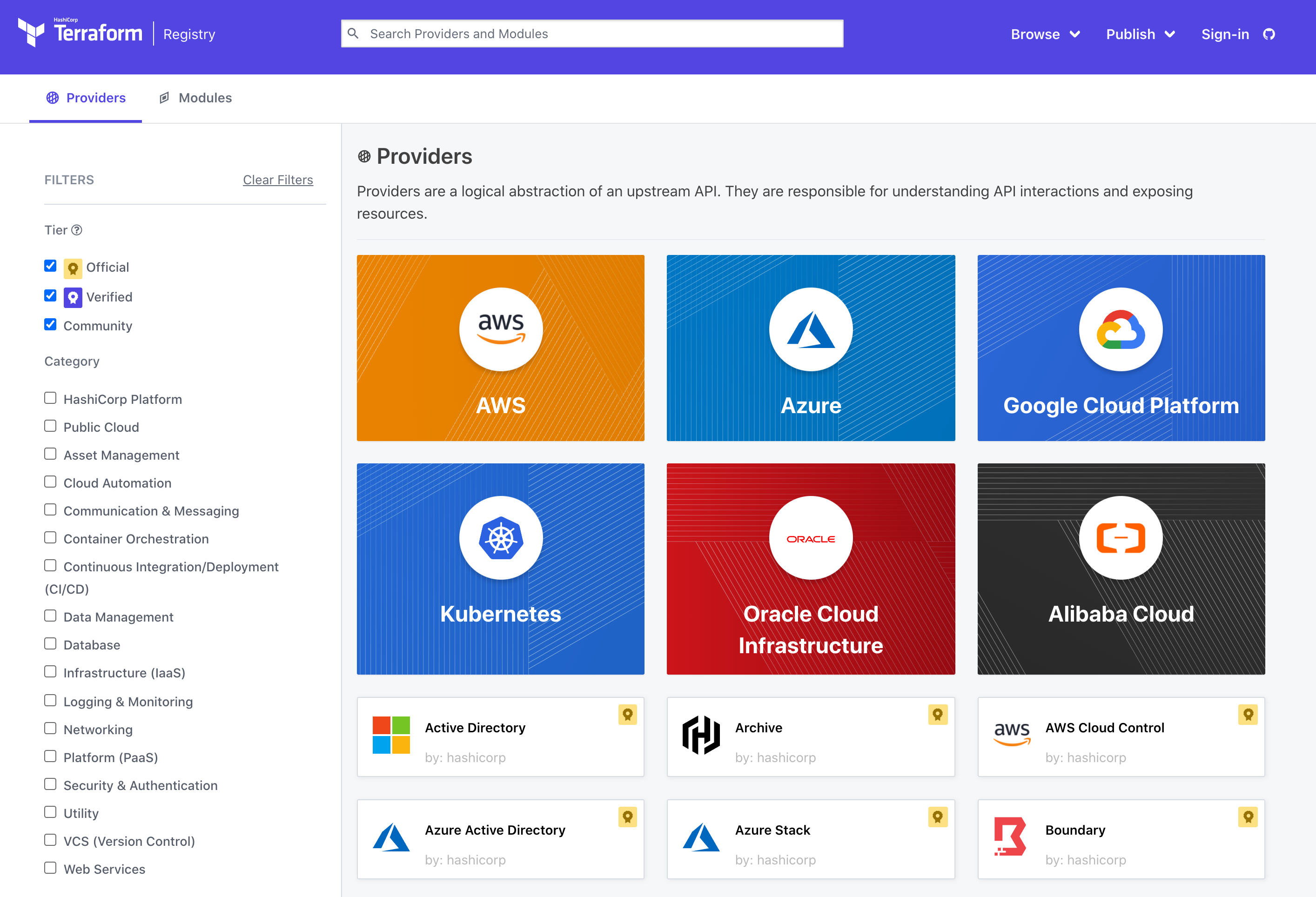
24 |
25 |
26 |
27 | 接下来,我们就插件探讨几个问题:
28 |
29 | - 怎么指定下载哪些插件和版本号?
30 | - 从哪里下载?
31 | - 下载到什么地方?
32 | - 没有对插件库有访问权限的环境下怎么处理?
33 | - 是否每个项目都要下载相同的插件?
34 |
35 |
36 |
37 | # 指定下载哪些插件和版本
38 |
39 |
40 |
41 | Terraform是通过解析required_providers知道需要哪些插件,一般习惯是定义一个verion.tf文件,把相关配置都放在这个文件里,比如:
42 |
43 | ```hcl
44 | terraform {
45 | required_version = "= v1.0.11"
46 |
47 | required_providers {
48 | local = {
49 | source = "hashicorp/local"
50 | version = "= 2.1.0"
51 | }
52 | random = {
53 | source = "hashicorp/random"
54 | version = "3.1.0"
55 | }
56 | }
57 | }
58 | ```
59 |
60 | 这个文件定义了Terraform核心组件的版本,还定义了local和random插件及其版本号。上面指定Terraform版本为1.0.11,local版本为2.1.0,random版本为3.1.0。
61 |
62 | 我们看这里的版本号有两个等于`=`号,会不会觉得奇怪?其实这是HCL语言的一个特性,除了`=`号,还可以是`>`、`<=`等,这样可以指定版本范围,而不只是某个特定版本。
63 |
64 |
65 |
66 | # 从哪里下载
67 |
68 | 可以通过命令`terraform providers`查看当前项目配置的插件是从哪里下载的。如下:
69 |
70 | ```bash
71 | $ terraform providers
72 |
73 | Providers required by configuration:
74 | .
75 | ├── provider[registry.terraform.io/hashicorp/random] 3.1.0
76 | └── provider[registry.terraform.io/hashicorp/local] 2.1.0
77 | ```
78 |
79 | 默认是从官方的公共仓库`registry.terraform.io`下载的。
80 |
81 |
82 |
83 | 如果需要指定其它仓库,代码如下:
84 |
85 | ```hcl
86 | terraform {
87 | required_version = "= v1.0.11"
88 |
89 | required_providers {
90 | local = {
91 | source = "hashicorp/local"
92 | version = "= 2.1.0"
93 | }
94 | random = {
95 | source = "hashicorp/random"
96 | version = "3.1.0"
97 | }
98 | pkslowcloud = {
99 | source = "registry.pkslow.com/examplecorp/pkslowcloud"
100 | version = "0.1.0"
101 | }
102 | }
103 | }
104 | ```
105 |
106 | 这里`pkslowcloud`就是使用自定义的仓库地址,执行providers命令如下:
107 |
108 | ```bash
109 | $ terraform providers
110 |
111 | Providers required by configuration:
112 | .
113 | ├── provider[registry.terraform.io/hashicorp/local] 2.1.0
114 | ├── provider[registry.terraform.io/hashicorp/random] 3.1.0
115 | └── provider[registry.pkslow.com/examplecorp/pkslowcloud] 0.1.0
116 | ```
117 |
118 | 注意:`pkslowcloud`实际不存在,大家不必尝试下载使用。
119 |
120 |
121 |
122 | # 下载到什么地方
123 |
124 | 执行`terraform init`进行初始化,就会下载插件:
125 |
126 | ```bash
127 | $ terraform init
128 |
129 | Initializing the backend...
130 |
131 | Initializing provider plugins...
132 | - Finding hashicorp/random versions matching "3.1.0"...
133 | - Finding hashicorp/local versions matching "2.1.0"...
134 | - Installing hashicorp/random v3.1.0...
135 | - Installed hashicorp/random v3.1.0 (signed by HashiCorp)
136 | - Installing hashicorp/local v2.1.0...
137 | - Installed hashicorp/local v2.1.0 (signed by HashiCorp)
138 | ```
139 |
140 | 执行完init命令后,当前工作目录就会有一个`.terraform`文件夹,这里就放了插件的程序。目录结构如下:
141 |
142 | ```bash
143 | $ tree -a
144 | .
145 | ├── .terraform
146 | │ └── providers
147 | │ └── registry.terraform.io
148 | │ └── hashicorp
149 | │ ├── local
150 | │ │ └── 2.1.0
151 | │ │ └── darwin_amd64
152 | │ │ └── terraform-provider-local_v2.1.0_x5
153 | │ └── random
154 | │ └── 3.1.0
155 | │ └── darwin_amd64
156 | │ └── terraform-provider-random_v3.1.0_x5
157 | ```
158 |
159 |
160 |
161 | # 没有网络环境怎么办
162 |
163 | 在有些情况下,并不能直接访问Terraform的公共仓库去下载插件,如果可以从其它地方复制一份插件,并可以使用,那岂不是美哉?Terraform已经考虑了这种需求。
164 |
165 | 首先它支持有网络环境的机器把当前目录的插件复制到特定目录,命令如下:
166 |
167 | ```bash
168 | $ terraform providers mirror /Users/larry/Software/terraform/plugins
169 | - Mirroring hashicorp/local...
170 | - Selected v2.1.0 to meet constraints 2.1.0
171 | - Downloading package for darwin_amd64...
172 | - Package authenticated: signed by HashiCorp
173 | - Mirroring hashicorp/random...
174 | - Selected v3.1.0 to meet constraints 3.1.0
175 | - Downloading package for darwin_amd64...
176 | - Package authenticated: signed by HashiCorp
177 | ```
178 |
179 |
180 |
181 | 查看一下目录结构,Terraform会打包好插件为zip文件:
182 |
183 | ```bash
184 | $ tree -a /Users/larry/Software/terraform/plugins
185 | /Users/larry/Software/terraform/plugins-localdisk
186 | └── registry.terraform.io
187 | └── hashicorp
188 | ├── local
189 | │ ├── 2.1.0.json
190 | │ ├── index.json
191 | │ └── terraform-provider-local_2.1.0_darwin_amd64.zip
192 | └── random
193 | ├── 3.1.0.json
194 | ├── index.json
195 | └── terraform-provider-random_3.1.0_darwin_amd64.zip
196 | ```
197 |
198 |
199 |
200 | 下次我们可以指定插件目录实现复用:
201 |
202 | ```bash
203 | $ terraform init -plugin-dir=/Users/larry/Software/terraform/plugins
204 |
205 | Initializing the backend...
206 |
207 | Initializing provider plugins...
208 | - Reusing previous version of hashicorp/random from the dependency lock file
209 | - Reusing previous version of hashicorp/local from the dependency lock file
210 | - Using previously-installed hashicorp/random v3.1.0
211 | - Using previously-installed hashicorp/local v2.1.0
212 | ```
213 |
214 | 看日志可以看到,Terraform不再下载,而是重用插件。
215 |
216 |
217 |
218 | 执行完命令init后,再查看`terraform version`,则会显示插件的版本:
219 |
220 | ```bash
221 | $ terraform version
222 | Terraform v1.0.11
223 | on darwin_amd64
224 | + provider registry.terraform.io/hashicorp/local v2.1.0
225 | + provider registry.terraform.io/hashicorp/random v3.1.0
226 | ```
227 |
228 |
229 |
230 |
231 |
232 | Terraform对于这种插件目录重用的支持,不只是zip包,二进制也是支持的,但对应的目录结果有点不一样。这里不展开介绍了。
233 |
234 |
235 |
236 | # 常用插件介绍
237 |
238 | 常用插件有:
239 |
240 | - local
241 | - random: https://registry.terraform.io/providers/hashicorp/random/latest
242 | - template
243 | - gcp
244 | - aws
245 | - azure
246 |
247 |
248 |
249 | Null: https://registry.terraform.io/providers/hashicorp/null/latest
250 |
251 | http: https://registry.terraform.io/providers/hashicorp/http/latest
252 |
253 |
254 |
255 |
256 |
257 |
258 |
259 |
260 |
261 |
--------------------------------------------------------------------------------
/Terraform在公有云GCP上的应用.md:
--------------------------------------------------------------------------------
1 | > 《Terraform 101 从入门到实践》这本小册在[南瓜慢说官方网站](https://www.pkslow.com/tags/terraform101)和[GitHub](https://github.com/LarryDpk/terraform-101)两个地方同步更新,书中的示例代码也是放在GitHub上,方便大家参考查看。
2 |
3 | ---
4 |
5 | Terraform支持的公有云有很多,如AWS、Azure、Google、Alibaba等。将Terraform应用于公有云,才最能发挥其强大的功能。
6 |
7 | # 初始化GCP项目
8 |
9 |
10 |
11 | ## 创建一个新项目
12 | 首先我们需要初始化一个GCP项目。GCP给开发者提供了免费试用的服务,我们可以在不花钱的情况下学习GCP的功能。
13 |
14 | 要使用GCP,我们需要创建一个项目,它所有的资源都是在项目之下管理的:
15 |
16 | 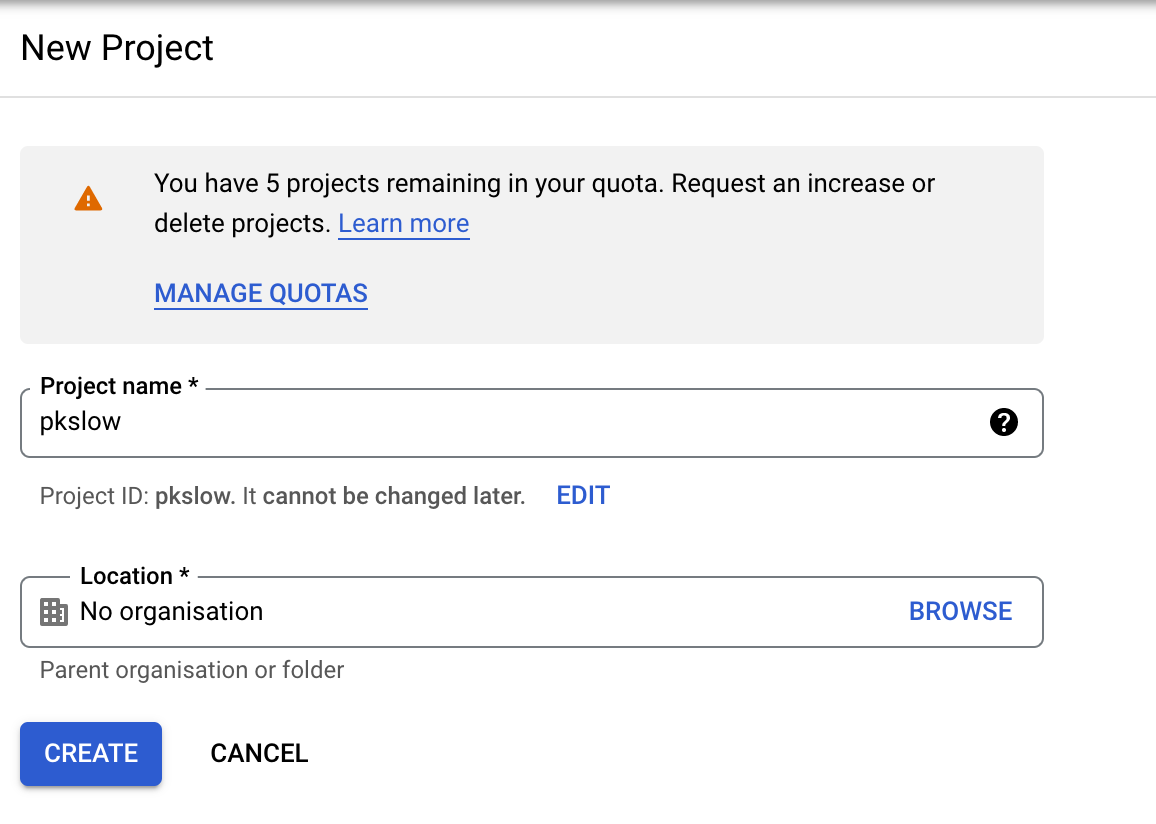
17 |
18 |
19 |
20 | ## 创建Service Account
21 |
22 | 在实际开发中,我们不能使用自己的账号在做操作,最好的方式是创建一个服务账号(Service Account),这应该也是所有云平台都推荐的方式。创建位置如下:
23 |
24 | 
25 |
26 |
27 |
28 | 输入账号名字:
29 |
30 | 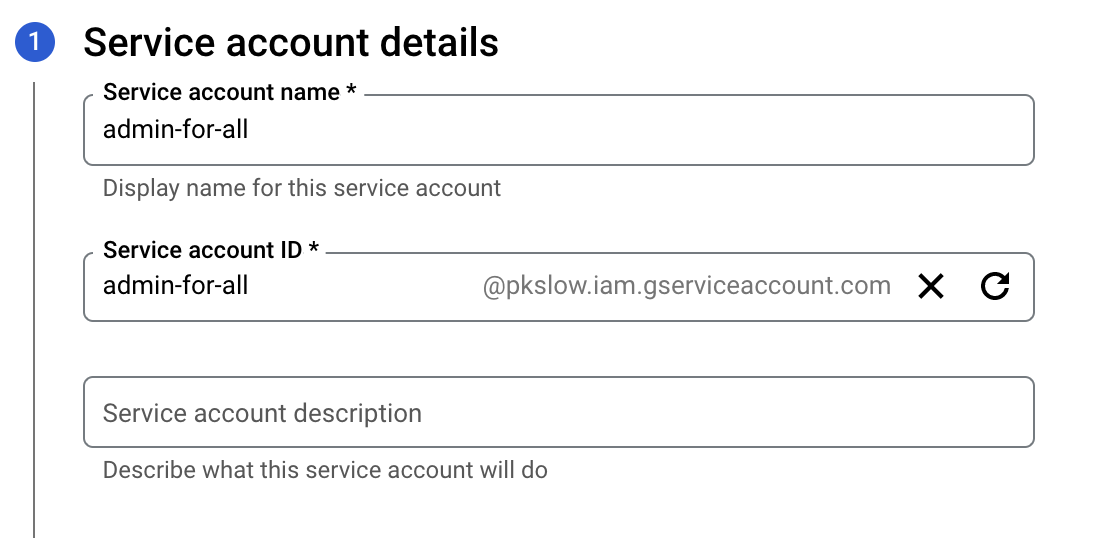
31 |
32 |
33 |
34 | 选择角色,为了方便,我直接选择Owner,会拥有所有权限,但实际应用肯定不能这样,要做好隔离:
35 |
36 | 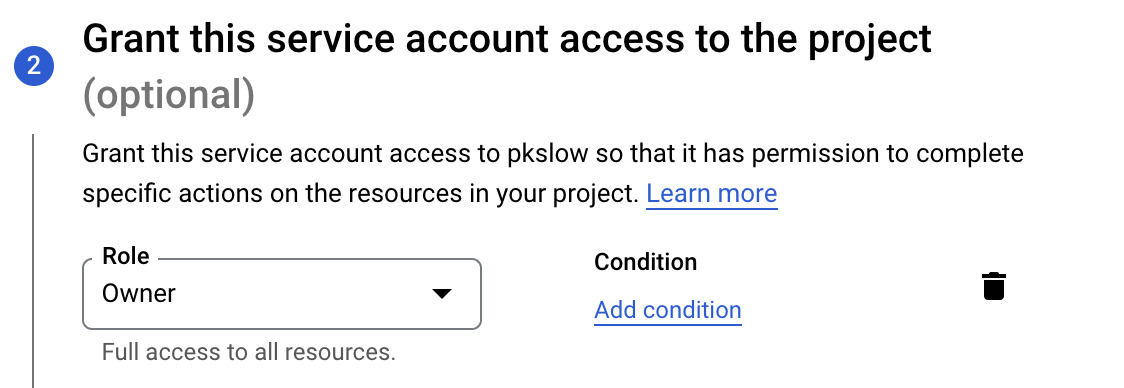
37 |
38 |
39 |
40 |
41 |
42 | ## 创建密钥文件
43 |
44 | 对于Service Account,不是通过用户名密码来授权的,而是通过密钥文件,创建如下:
45 |
46 | 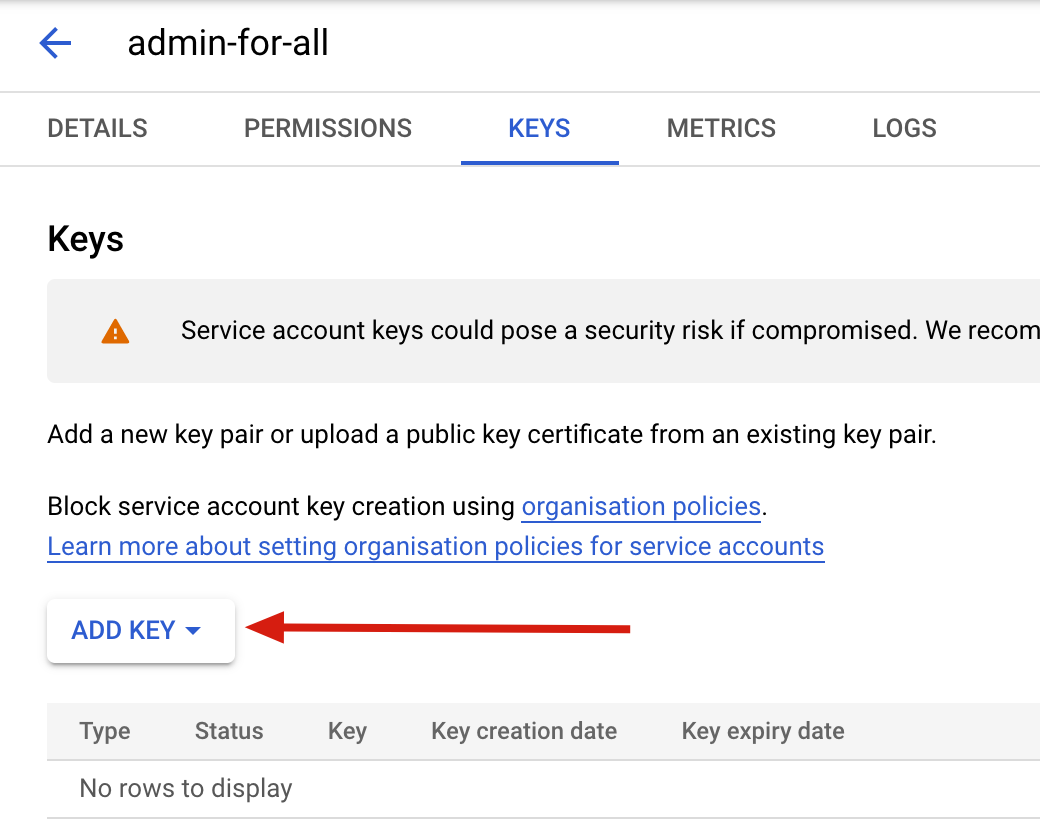
47 |
48 |
49 |
50 | 选择新建一个密钥,并格式为json。创建后,会自动下载key文件。
51 |
52 |
53 |
54 | ## 设置gcloud SDK
55 |
56 | Key文件拿到后,我们可以设置环境变量:**GOOGLE_APPLICATION_CREDENTIALS**:
57 |
58 | ```bash
59 | $ export GOOGLE_APPLICATION_CREDENTIALS=/Users/larry/Software/google-cloud-sdk/pkslow-admin-for-all.json
60 | ```
61 |
62 |
63 |
64 | 激活Service Account:
65 |
66 | ```bash
67 | $ gcloud auth activate-service-account admin-for-all@pkslow.iam.gserviceaccount.com --key-file=${GOOGLE_APPLICATION_CREDENTIALS}
68 | ```
69 |
70 |
71 |
72 | 设置SDK的项目ID:
73 |
74 | ```bash
75 | $ gcloud config set project pkslow
76 | ```
77 |
78 |
79 |
80 | 检查一下设置是否正确:
81 |
82 | ```bash
83 | $ gcloud auth list
84 | Credentialed Accounts
85 | ACTIVE ACCOUNT
86 | * admin-for-all@pkslow.iam.gserviceaccount.com
87 |
88 | To set the active account, run:
89 | $ gcloud config set account `ACCOUNT`
90 |
91 |
92 | $ gcloud config list
93 | [core]
94 | account = admin-for-all@pkslow.iam.gserviceaccount.com
95 | disable_usage_reporting = True
96 | project = pkslow
97 |
98 | Your active configuration is: [default]
99 | ```
100 |
101 |
102 |
103 | ## 使用gcloud创建Pub/Sub
104 |
105 | SDK设置好后,就可以使用了,我们使用它来创建Pub/Sub试试。创建主题和订阅:
106 |
107 | ```bash
108 | $ gcloud pubsub topics create pkslow-test
109 | Created topic [projects/pkslow/topics/pkslow-test].
110 |
111 | $ gcloud pubsub subscriptions create pkslow-sub --topic=pkslow-test
112 | Created subscription [projects/pkslow/subscriptions/pkslow-sub].
113 | ```
114 |
115 |
116 |
117 | 检查是否创建成功:
118 |
119 | ```bash
120 | $ gcloud pubsub topics list
121 | ---
122 | name: projects/pkslow/topics/pkslow-test
123 |
124 |
125 | $ gcloud pubsub subscriptions list
126 | ---
127 | ackDeadlineSeconds: 10
128 | expirationPolicy:
129 | ttl: 2678400s
130 | messageRetentionDuration: 604800s
131 | name: projects/pkslow/subscriptions/pkslow-sub
132 | pushConfig: {}
133 | topic: projects/pkslow/topics/pkslow-test
134 | ```
135 |
136 |
137 |
138 | 在浏览器查看,发现已经成功创建了:
139 |
140 | 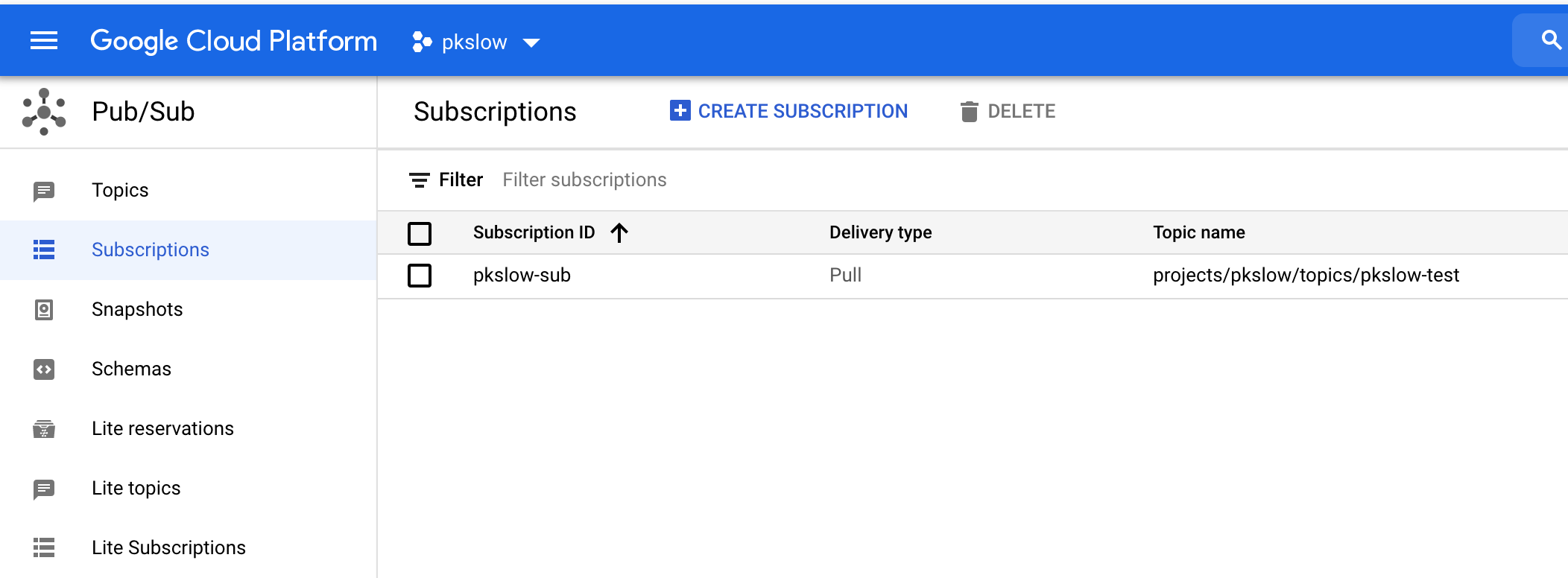
141 |
142 | ---
143 |
144 | # Terraform创建Pub/Sub
145 |
146 | ## 下载Terraform插件
147 |
148 | 我们需要安装GCP的Terraform插件来管理GCP资源:
149 |
150 | ```bash
151 | # 设置插件目录
152 | $ export TERRAFORM_PLUGIN=/Users/larry/Software/terraform/plugins
153 | # 创建目录
154 | $ mkdir -p ${TERRAFORM_PLUGIN}/registry.terraform.io/hashicorp/google/4.0.0/darwin_amd64
155 | $ cd ${TERRAFORM_PLUGIN}/registry.terraform.io/hashicorp/google/4.0.0/darwin_amd64
156 | # 下载
157 | $ wget https://releases.hashicorp.com/terraform-provider-google/4.0.0/terraform-provider-google_4.0.0_darwin_amd64.zip
158 | # 解压
159 | $ unzip terraform-provider-google_4.0.0_darwin_amd64.zip
160 | ```
161 |
162 |
163 |
164 | ## 准备Terraform代码
165 |
166 | 需要提供Terraform代码理管理Pub/Sub,更多细节请参考: [Terrafrom GCP](https://registry.terraform.io/providers/hashicorp/google/latest/docs/resources/pubsub_subscription).
167 |
168 |
169 |
170 | 版本文件version.tf:
171 |
172 | ```hcl
173 | terraform {
174 | required_version = "= 1.0.11"
175 | required_providers {
176 |
177 | google = {
178 | source = "hashicorp/google"
179 | version = "= 4.0.0"
180 | }
181 | }
182 | }
183 | ```
184 |
185 |
186 |
187 | 主文件main.tf:
188 |
189 | ```hcl
190 | provider "google" {
191 | project = "pkslow"
192 | }
193 |
194 | resource "google_pubsub_topic" "pkslow-poc" {
195 | name = "pkslow-poc"
196 | }
197 |
198 | resource "google_pubsub_subscription" "pkslow-poc" {
199 | name = "pkslow-poc"
200 | topic = google_pubsub_topic.pkslow-poc.name
201 |
202 | labels = {
203 | foo = "bar"
204 | }
205 |
206 | # 20 minutes
207 | message_retention_duration = "1200s"
208 | retain_acked_messages = true
209 |
210 | ack_deadline_seconds = 20
211 |
212 | expiration_policy {
213 | ttl = "300000.5s"
214 | }
215 | retry_policy {
216 | minimum_backoff = "10s"
217 | }
218 |
219 | enable_message_ordering = true
220 | }
221 | ```
222 |
223 |
224 |
225 | ## 初始化和变更
226 |
227 | 指定插件目录初始化:
228 |
229 | ```bash
230 | $ terraform init -plugin-dir=${TERRAFORM_PLUGIN}
231 | ```
232 |
233 |
234 |
235 | 使变更生效,就会在GCP上创建对应的资源:
236 |
237 | ```bash
238 | $ terraform apply -auto-approve
239 | ```
240 |
241 |
242 |
243 | 如果没有发生错误,则意味着创建成功,我们检查一下:
244 |
245 | ```bash
246 | $ gcloud pubsub topics list
247 | ---
248 | name: projects/pkslow/topics/pkslow-poc
249 |
250 | $ gcloud pubsub subscriptions list
251 | ---
252 | ackDeadlineSeconds: 20
253 | enableMessageOrdering: true
254 | expirationPolicy:
255 | ttl: 300000.500s
256 | labels:
257 | foo: bar
258 | messageRetentionDuration: 1200s
259 | name: projects/pkslow/subscriptions/pkslow-poc
260 | pushConfig: {}
261 | retainAckedMessages: true
262 | retryPolicy:
263 | maximumBackoff: 600s
264 | minimumBackoff: 10s
265 | topic: projects/pkslow/topics/pkslow-poc
266 | ```
267 |
268 |
269 |
270 | 注意:我们并没有提供任何密码或密钥,那Terraform怎么可以直接操作我的GCP资源呢?因为它会根据环境变量**GOOGLE_APPLICATION_CREDENTIALS**来获取。
271 |
272 |
273 |
274 | ## 发送和接收消息
275 |
276 | 我们通过gcloud来发送消息到Pub/Sub上:
277 |
278 | ```bash
279 | $ gcloud pubsub topics publish pkslow-poc --message="www.pkslow.com"
280 | messageIds:
281 | - '3491736520339885'
282 |
283 | $ gcloud pubsub topics publish pkslow-poc --message="Larry Deng"
284 | messageIds:
285 | - '3491738650256958'
286 |
287 | $ gcloud pubsub topics publish pkslow-poc --message="Hi, pkslower"
288 | messageIds:
289 | - '3491739306095970'
290 | ```
291 |
292 |
293 |
294 | 从Pub/Sub拉取消息:
295 |
296 | ```bash
297 | $ gcloud pubsub subscriptions pull pkslow-poc --auto-ack
298 | ```
299 |
300 |
301 |
302 | 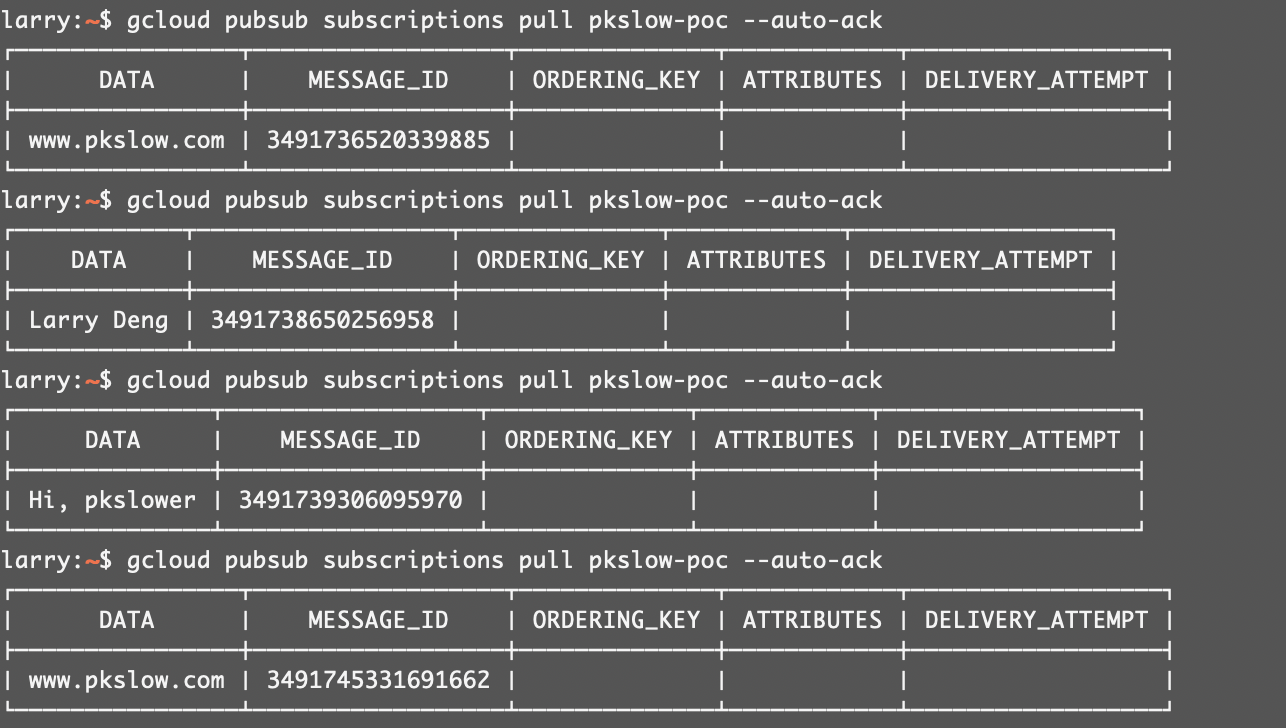
303 |
304 |
305 |
306 | 我们还能在GCP界面上监控对应的队列,十分方便:
307 |
308 | 
309 |
310 | ---
311 | # 通过Google Cloud Storage(GCS)管理Terraform的状态State
312 | 管理Terraform状态文件的最佳方式是通过云端的统一的存储,如谷歌云就用GCS。
313 |
314 | 首先要创建一个Bucket:
315 |
316 | ```bash
317 | $ gsutil mb -p pkslow -l us-west1 -b on gs://pkslow-terraform
318 | Creating gs://pkslow-terraform/...
319 |
320 | $ gsutil ls gs://
321 | gs://pkslow-terraform/
322 | ```
323 |
324 |
325 |
326 | 然后在Terraform文件中配置对应的信息:
327 |
328 | ```hcl
329 | terraform {
330 | backend "gcs" {
331 | bucket = "pkslow-terraform"
332 | prefix = "state/gcp/pubsub"
333 | }
334 | }
335 | ```
336 |
337 |
338 |
339 | 初始化后,就会在Bucket上创建对应的目录:
340 |
341 | ```bash
342 | $ terraform init -plugin-dir=${TERRAFORM_PLUGIN}
343 | ```
344 |
345 |
346 |
347 | 变更生效:
348 |
349 | ```bash
350 | $ terraform apply -auto-approve
351 | ```
352 |
353 |
354 |
355 | 我们在浏览器查看一下,发现已经成功状态了对应的状态文件:
356 |
357 | 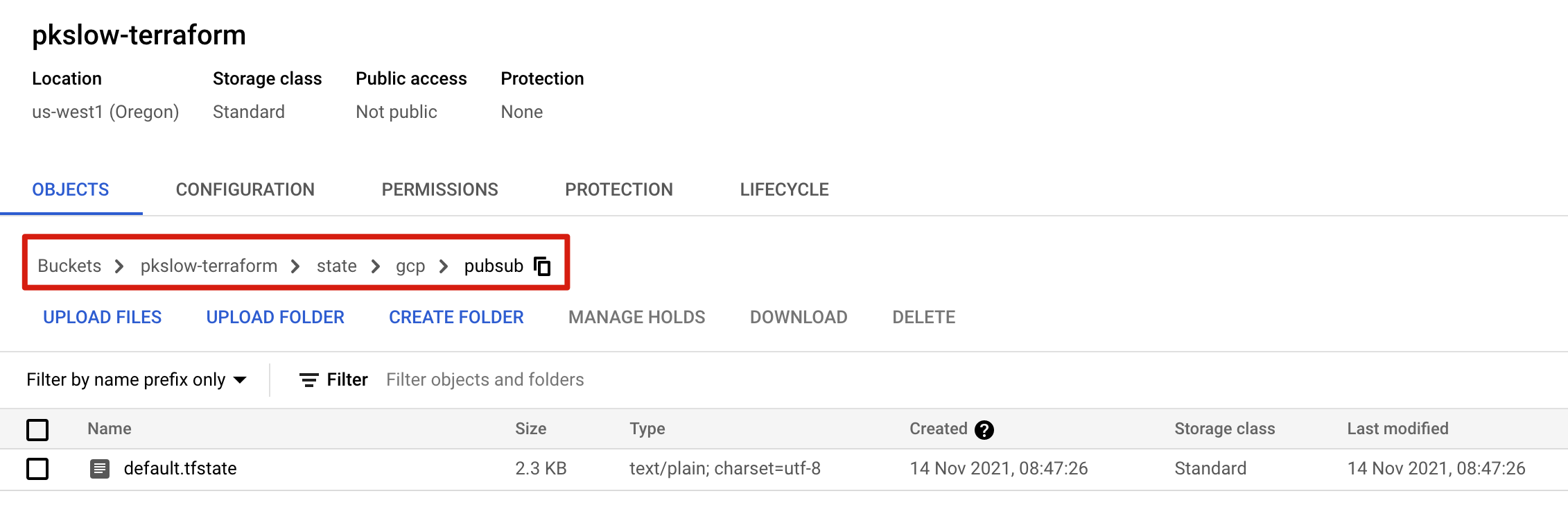
358 |
359 |
360 |
361 | 通过远程的云端,不仅可以存入状态文件,也可以从状态文件读取数据,如一些输出变量。比如模块A创建了一个VM,而我们可能通过这种方式获取它的IP,以便在其它模块使用。大致的配置如下:
362 |
363 | ```hcl
364 | data "terraform_remote_state" "foo" {
365 | backend = "gcs"
366 | config = {
367 | bucket = "terraform-state"
368 | prefix = "prod"
369 | }
370 | }
371 |
372 | resource "template_file" "bar" {
373 | template = "${greeting}"
374 |
375 | vars {
376 | greeting = "${data.terraform_remote_state.foo.greeting}"
377 | }
378 | }
379 | ```
380 |
381 |
--------------------------------------------------------------------------------
/04.States状态管理.md:
--------------------------------------------------------------------------------
1 | > 《Terraform 101 从入门到实践》这本小册在[南瓜慢说官方网站](https://www.pkslow.com/tags/terraform101)和[GitHub](https://github.com/LarryDpk/terraform-101)两个地方同步更新,书中的示例代码也是放在GitHub上,方便大家参考查看。
2 |
3 | ---
4 |
5 |
6 | > 军书十二卷,卷卷有爷名。
7 |
8 |
9 |
10 | # 为什么需要状态管理
11 |
12 | Terraform的主要作用是管理云平台上的资源,通过声明式的HCL配置来映射资源,如果云平台上没有资源则需要创建,如果有则不用。那Terraform要实现这个功能有多种方式。
13 |
14 | 一种是每次执行apply命令时都调用API接口检查一下远程的云资源是否与配置文件一致,如果没有则创建,如果有但不同则需要修改,如果有且相同则不用变更。这种机制能保证云平台的资源与HCL配置是一致的。缺点也是非常明显的,每次都需要调用API去检查远程资源,效率很低,特别是当资源特别多的场景。
15 |
16 | 另一种方式是每次变更资源的时候,都会创建一个映射文件,它保存云平台资源的状态。这样每次执行`apply`命令时,只需要检查HCL配置与映射文件的差异即可。
17 |
18 | Terraform选择的是第二种方式,通过映射文件来保存资源状态,在Terraform的世界里叫状态文件。Terraform这样做是基于以下考虑:
19 |
20 | - 云平台真实状态的映射,解析状态文件即可以知道真实情况。
21 | - 元数据存储,如资源之间的依赖关系,需要通过依赖关系来知道创建或销毁顺序。
22 | - 提升性能,特别是在大规模云平台上,多次调用API去查询资源状态是很费时的。
23 | - 同步状态,通过远程状态文件来同步状态,这也是Terraform最佳的实践。
24 |
25 |
26 |
27 | 讲到这里,已经回答了之前在第一章留下的思考题:
28 |
29 | > 如果再次执行apply会不会再次创建一个文件呢?还是创建失败,因为文件已存在?为什么?
30 |
31 | 答案:不会创建,因为通过状态文件记录了变更,Terraform判断不再需要创建了。
32 |
33 |
34 |
35 | # 状态管理的示例
36 |
37 | 为了更多注意力放在状态管理上,我们还是使用最简单的例子`local_file`,具体代码如下:
38 |
39 | ```hcl
40 | resource "local_file" "terraform-introduction" {
41 | content = "https://www.pkslow.com"
42 | filename = "${path.root}/terraform-guides-by-pkslow.txt"
43 | }
44 | ```
45 |
46 |
47 |
48 | 我们以实际操作及现象来讲解状态文件的作用和工作原理:
49 |
50 | | 操作 | 现象及说明 |
51 | | ----------------- | ------------------------------------------------------------ |
52 | | terraform apply | 生成资源:第一次生成 |
53 | | terraform apply | 没有变化:状态文件生成,不需要再创建 |
54 | | terraform destroy | 删除资源:根据状态文件的内容删除 |
55 | | terraform apply | 生成资源:状态显示没有资源,再次生成 |
56 | | 删除状态文件 | 没有变化 |
57 | | terraform apply | 生成资源:没有状态文件,直接生成资源和状态文件(插件做了容错处理,已存在也会新生成覆盖) |
58 | | 删除状态文件 | 没有变化 |
59 | | terraform destroy | 无法删除资源,没有资源存在的状态 |
60 |
61 |
62 |
63 | 我们一直在讲状态文件,我们先来看一下它的真面目。首先它的默认文件名是`terraform.tfstate`,默认会放在当前目录下。它是以`json`格式存储的信息,示例中的内容如下:
64 |
65 | ```json
66 | {
67 | "version": 4,
68 | "terraform_version": "1.0.11",
69 | "serial": 1,
70 | "lineage": "acb408bb-2a95-65fd-02e6-c23487f7a3f6",
71 | "outputs": {},
72 | "resources": [
73 | {
74 | "mode": "managed",
75 | "type": "local_file",
76 | "name": "test-file",
77 | "provider": "provider[\"registry.terraform.io/hashicorp/local\"]",
78 | "instances": [
79 | {
80 | "schema_version": 0,
81 | "attributes": {
82 | "content": "https://www.pkslow.com",
83 | "content_base64": null,
84 | "directory_permission": "0777",
85 | "file_permission": "0777",
86 | "filename": "./terraform-guides-by-pkslow.txt",
87 | "id": "6db7ad1bbf57df0c859cd5fc62ff5408515b5fc1",
88 | "sensitive_content": null,
89 | "source": null
90 | },
91 | "sensitive_attributes": [],
92 | "private": "bnVsbA=="
93 | }
94 | ]
95 | }
96 | ]
97 | }
98 | ```
99 |
100 | 可以看到它记录了Terraform的版本信息,还有资源的详细信息:包括类型、名字、插件、属性等。有这些信息便可直接从状态文件里解析出具体的资源。
101 |
102 |
103 |
104 | # 状态管理命令
105 |
106 | 可以通过`terraform state`做一些状态管理:
107 |
108 | 显示状态列表:
109 |
110 | ```bash
111 | $ terraform state list
112 | local_file.test-file
113 | ```
114 |
115 |
116 |
117 | 查看具体资源的状态信息:
118 |
119 | ```bash
120 | $ terraform state show local_file.test-file
121 | # local_file.test-file:
122 | resource "local_file" "test-file" {
123 | content = "https://www.pkslow.com"
124 | directory_permission = "0777"
125 | file_permission = "0777"
126 | filename = "./terraform-guides-by-pkslow.txt"
127 | id = "6db7ad1bbf57df0c859cd5fc62ff5408515b5fc1"
128 | }
129 | ```
130 |
131 |
132 |
133 | 显示当前状态信息:
134 |
135 | ```bash
136 | $ terraform state pull
137 | ```
138 |
139 |
140 |
141 | 重命名:
142 |
143 | ```bash
144 | $ terraform state mv local_file.test-file local_file.pkslow-file
145 | Move "local_file.test-file" to "local_file.pkslow-file"
146 | Successfully moved 1 object(s).
147 |
148 | $ terraform state list
149 | local_file.pkslow-file
150 | ```
151 |
152 | 要注意这里只是修改状态文件的名字,代码里的HCL并不会修改。
153 |
154 |
155 |
156 | 删除状态里的资源:
157 |
158 | ```bash
159 | $ terraform state rm local_file.pkslow-file
160 | Removed local_file.pkslow-file
161 | Successfully removed 1 resource instance(s).
162 | ```
163 |
164 |
165 |
166 | # 远程状态
167 |
168 | 状态文件默认是在本地目录上的`terraform.tfstate`文件,在团队使用中,每个人的电脑环境独立的,那么需要保证每个人当前的状态文件都是最新且与现实资源真实对应,简直是天方夜谭。而状态不一致所带的灾难也是极其可怕的。所以,状态文件最好是要存储在一个独立的大家可共同访问的位置。对于状态的管理的配置,Terraform称之为`Backends`。
169 |
170 | `Backend`是两种模式,分别是`local`和`remote`。`local`模式很好理解,就是使用本地路径来存储状态文件。配置示例如下:
171 |
172 | ```hcl
173 | terraform {
174 | backend "local" {
175 | path = "pkslow.tfstate"
176 | }
177 | }
178 | ```
179 |
180 | 通过这样配置后,不再使用默认的`terraform.tfstate`文件,而是使用自定义的文件名`pkslow.tfstate`。
181 |
182 |
183 |
184 | 对于`remote`模式,则有多种配置方式,Terraform支持的有:
185 |
186 | - s3
187 | - gcs
188 | - oss
189 | - etcd
190 | - pg
191 | - http
192 | - kubernetes
193 |
194 | 等,能满足主流云平台的需求。每一个配置可以参考官网,在本地我采用数据库postgresql的方式,让大家都能快速实验。
195 |
196 | 我通过Docker的方式启动PostgreSQL,命令如下:
197 |
198 | ```bash
199 | $ docker run -itd \
200 | --name terraform-postgres \
201 | -e POSTGRES_DB=terraform \
202 | -e POSTGRES_USER=pkslow \
203 | -e POSTGRES_PASSWORD=pkslow \
204 | -p 5432:5432 \
205 | postgres:13
206 | ```
207 |
208 |
209 |
210 | 在`terraform`块中配置`backend`,这里指定数据库连接信息即可,更多参数请参考:https://www.terraform.io/language/settings/backends/pg
211 |
212 | ```hcl
213 | terraform {
214 | backend "pg" {
215 | conn_str = "postgres://pkslow:pkslow@localhost:5432/terraform?sslmode=disable"
216 | }
217 | }
218 | ```
219 |
220 |
221 |
222 | 当然,把敏感信息直接放在代码中并不合适,可以直接在命令行中传入参数:
223 |
224 | ```bash
225 | terraform init -backend-config="conn_str=postgres://pkslow:pkslow@localhost:5432/terraform?sslmode=disable"
226 | ```
227 |
228 |
229 |
230 | 执行init和apply之后,连接数据库查看,会创建一个叫`terraform_remote_state`的Schema,在该Schema下有一张states表来存储对应的状态信息,如下:
231 |
232 | 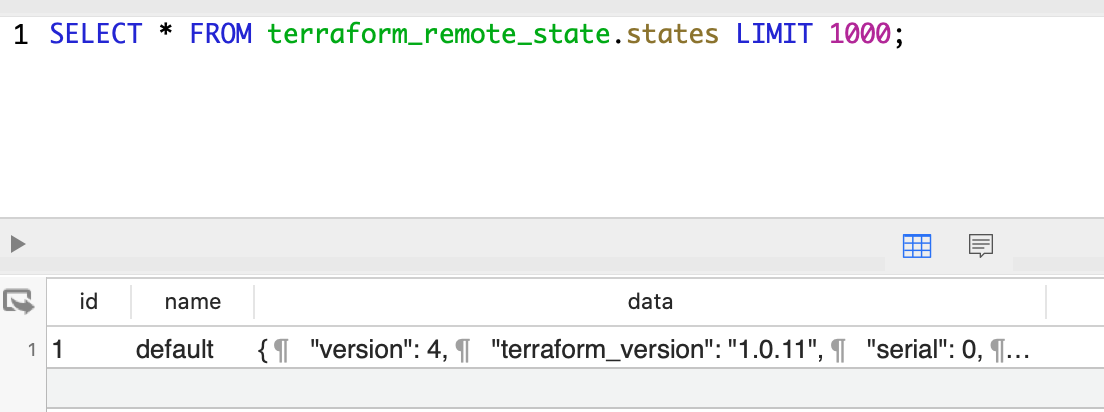
233 |
234 | 表中字段name是namespace,而data是具体的状态信息,如下:
235 |
236 | ```json
237 | {
238 | "version": 4,
239 | "terraform_version": "1.0.11",
240 | "serial": 0,
241 | "lineage": "de390d13-d0e0-44dc-8738-d95b6d8f1868",
242 | "outputs": {},
243 | "resources": [
244 | {
245 | "mode": "managed",
246 | "type": "local_file",
247 | "name": "test-file",
248 | "provider": "provider[\"registry.terraform.io/hashicorp/local\"]",
249 | "instances": [
250 | {
251 | "schema_version": 0,
252 | "attributes": {
253 | "content": "https://www.pkslow.com",
254 | "content_base64": null,
255 | "directory_permission": "0777",
256 | "file_permission": "0777",
257 | "filename": "./terraform-guides-by-pkslow.txt",
258 | "id": "6db7ad1bbf57df0c859cd5fc62ff5408515b5fc1",
259 | "sensitive_content": null,
260 | "source": null
261 | },
262 | "sensitive_attributes": [],
263 | "private": "bnVsbA=="
264 | }
265 | ]
266 | }
267 | ]
268 | }
269 | ```
270 |
271 |
272 |
273 | # Workspace 工作区
274 |
275 | 如果我们用Terraform代码生成了dev环境,但现在需要uat环境,该如何处理呢?
276 |
277 | 首先,不同环境的变量一般是不一样的,我们需要定义各种的变量文件如`dev.tfvars`、`uat.tfvars`和`prod.tfvars`等。但只有各自变量是不够的,因为还有状态。状态也必须要隔离,而`Workspace`就是Terraform用来隔离状态的方式。默认的工作区为`default`,如果没有指定,则表示工作于`default`工作区中。而当指定了工作区,状态文件就会与工作区绑定。
278 |
279 | 创建一个工作区并切换:
280 |
281 | ```bash
282 | $ terraform workspace new pkslow
283 | ```
284 |
285 |
286 |
287 | 切换到已存在的工作区:
288 |
289 | ```bash
290 | $ terraform workspace select pkslow
291 | ```
292 |
293 | 而当我们处于某个工作区时,是可以获取工作区的名字的,引用为:`${terraform.workspace}`,示例如下:
294 |
295 | ```hcl
296 | resource "aws_instance" "example" {
297 | count = "${terraform.workspace == "default" ? 5 : 1}"
298 |
299 | # ... other arguments
300 | }
301 | ```
302 |
303 |
304 |
305 | 之前讲过默认的状态文件名为`terraform.tfstate`;而在多工作区的情况下(只要你创建了一个非默认工作区),状态文件就会存在`terraform.tfstate.d`目录下。而在远程状态的情况下,也会有一个映射,Key为工作区名,Value一般是状态内容。
306 |
307 |
308 |
309 | # 敏感数据
310 |
311 | 本地状态文件都是明文存储状态信息的,所以要保护好自己的状态文件。对于远程状态文件,有些存储方案是支持加密的,会对敏感数据(`sensitive`)进行加密。
312 |
313 |
314 |
315 | # 状态锁
316 |
317 | 本地状态文件下不需要状态锁,因为只有一个人在变更。而远程状态的情况下,就可能出现竞争了。比如一个人在apply,而另一个人在destroy,那就乱了。而状态锁可以确保远程状态文件只能被一个人使用。但不是所有远程状态的方式都支持锁的,一般常用的都会支持,如GCS、S3等。
318 |
319 |
320 |
321 | 所以,每当我们在执行变更时,Terraform总会先尝试去拿锁,如果拿锁失败,就该命令失败。可以强制解锁,但要非常小心,一般只建议在自己明确知道安全的时候才使用,比如死锁了。
322 |
323 |
324 |
325 | # 共享状态-数据源
326 |
327 | 既然远程状态文件是可以共享的,那状态信息也是可以共享的。这样会带来的一个好处是,即使两个根模块,也是可以共享信息的。比如我们在根模块A创建了一个数据库,而根模块B需要用到数据库的信息如IP,这样通过远程状态文件就可以共享给根模块B了。
328 |
329 | > 注意这里我强调的是根模块,因为如果A和B在同一个根模块下,那就不需要通过远程状态的方式来共享状态了。
330 |
331 |
332 |
333 | 远程状态的示例:
334 |
335 | ```hcl
336 | data "terraform_remote_state" "vpc" {
337 | backend = "remote"
338 |
339 | config = {
340 | organization = "hashicorp"
341 | workspaces = {
342 | name = "vpc-prod"
343 | }
344 | }
345 | }
346 |
347 | resource "aws_instance" "foo" {
348 | # ...
349 | subnet_id = data.terraform_remote_state.vpc.outputs.subnet_id
350 | }
351 | ```
352 |
353 |
354 |
355 | 本地状态的示例:
356 |
357 | ```hcl
358 | data "terraform_remote_state" "vpc" {
359 | backend = "local"
360 |
361 | config = {
362 | path = "..."
363 | }
364 | }
365 |
366 | resource "aws_instance" "foo" {
367 | # ...
368 | subnet_id = data.terraform_remote_state.vpc.outputs.subnet_id
369 | }
370 | ```
371 |
372 |
373 |
374 | 要注意的是,只有根模块的输出变量才能被共享,子模块是不能被获取的。
375 |
--------------------------------------------------------------------------------
/05.HCL语法.md:
--------------------------------------------------------------------------------
1 | > 《Terraform 101 从入门到实践》这本小册在[南瓜慢说官方网站](https://www.pkslow.com/tags/terraform101)和[GitHub](https://github.com/LarryDpk/terraform-101)两个地方同步更新,书中的示例代码也是放在GitHub上,方便大家参考查看。
2 |
3 | ---
4 |
5 | 介绍了Terraform一些比较基础的概念后,我们可以先了解一下Terraform的语法,也就是HCL的语法。
6 |
7 |
8 |
9 | # 变量Variables
10 |
11 | 变量是实现代码复用的一种方式,同样的代码不同的变量往往会有不同的效果。而在Terraform里,有一个概念非常重要,就是变量都是从属于模块的。变量无法跨模块引用。即在模块A定义的变量X,无法在模块B中直接引用。但父模块的变量,可以作为子模块的入参;而子模块的输出变量可以被父模块获取。
12 |
13 | ## 变量类型
14 |
15 | ### 从语言角度
16 |
17 | 跟任何编程语言一样,变量都是有类型的,Terraform的变量类型从语言的角度可分为两大类:基本类型和组合类型,具体如下:
18 |
19 | 基本类型:
20 |
21 | - 字符串string,如`"pkslow.com"`
22 | - 数字number,如`319`或`5.11`
23 | - 布尔值bool,如`true`
24 |
25 |
26 |
27 | 组合类型:
28 |
29 | - 列表list(),如`["dev", "uat", "prod"]`
30 | - 集合set(),如`set(...)`
31 | - 映射map(),如`{name="Larry", age="18"}`
32 | - 对象object({name1=T1, name2=T2})
33 | - 元组tuple([T1,T2,T3...])
34 |
35 |
36 |
37 | 如果不想指定某个类型,可以用`any`来表示任意类型;或者不指定,默认为任意类型。
38 |
39 |
40 |
41 | ### 从功能角度
42 |
43 | 从功能角度来看,变量可以分为输入变量、输出变量和本地变量。
44 |
45 | 输入变量是模块接收外部变量的方式,它定义在`variable`块中,如下:
46 |
47 | ```hcl
48 | variable "image_id" {
49 | type = string
50 | }
51 |
52 | variable "availability_zone_names" {
53 | type = list(string)
54 | default = ["us-west-1a"]
55 | }
56 |
57 | variable "docker_ports" {
58 | type = list(object({
59 | internal = number
60 | external = number
61 | protocol = string
62 | }))
63 | default = [
64 | {
65 | internal = 8300
66 | external = 8300
67 | protocol = "tcp"
68 | }
69 | ]
70 | }
71 | ```
72 |
73 |
74 |
75 | 输出变量定义了一个模块对外返回的变量,通过`output`块来定义,如下:
76 |
77 | ```hcl
78 | output "instance_ip_addr" {
79 | value = aws_instance.server.private_ip
80 | }
81 | ```
82 |
83 |
84 |
85 | 本地变量是模块内定义且可引用的临时变量,在`locals`块中定义,如下:
86 |
87 | ```hcl
88 | locals {
89 | service_name = "forum"
90 | owner = "Community Team"
91 | }
92 | ```
93 |
94 |
95 |
96 | # 输入变量Input Variable
97 |
98 | 输入变量是定义在`variable`块中的,它就像是函数的入参。
99 |
100 | ## 定义输入变量
101 |
102 | 定义`variable`有很多可选属性:
103 |
104 | - 类型type:指定变量是什么类型;如果没有指定,则可以是任意类型;
105 | - 默认值default:变量的默认值,定义后可以不用提供变量的值,注意它的值的类型要与type对应上;
106 | - 说明description:说明这个变量的作用和用途;
107 | - 校验validation:提供校验逻辑来判断输入的变量是否合法;
108 | - 敏感性sensitive:定义变量是否敏感,如果是则不会显示;默认为`false`;
109 | - 可空nullable:如果为true则可以为空,否则不能。默认为`true`。
110 |
111 |
112 |
113 | 所有属性都显性指定如下面例子所示:
114 |
115 | ```hcl
116 | variable "env" {
117 | type = string
118 | default = "dev"
119 | description = "environment name"
120 | sensitive = false
121 | nullable = false
122 | validation {
123 | condition = contains(["dev", "uat", "prod"], var.env)
124 | error_message = "The env must be one of dev/uat/prod."
125 | }
126 | }
127 | ```
128 |
129 | 这个变量名为`env`,表示环境名,默认值为`dev`,这个值必须为`dev`、`uat`和`prod`中的其中一个。如果输出一个非法的值,会报错:
130 |
131 | ```bash
132 | $ terraform plan -var="env=sit"
133 | ╷
134 | │ Error: Invalid value for variable
135 | │
136 | │ on input.tf line 1:
137 | │ 1: variable "env" {
138 | │
139 | │ The env must be one of dev/uat/prod.
140 | ```
141 |
142 |
143 |
144 | ## 使用输入变量
145 |
146 | 只有定义了变量才可以使用,使用的方式是`var.name`。比如这里定义了两个变量`env`和`random_string_length`:
147 |
148 | ```hcl
149 | variable "env" {
150 | type = string
151 | default = "dev"
152 | }
153 |
154 | variable "random_string_length" {
155 | type = number
156 | default = 10
157 | }
158 | ```
159 |
160 |
161 |
162 | 则使用如下:
163 |
164 | ```hcl
165 | resource "random_string" "random" {
166 | length = var.random_string_length
167 | lower = true
168 | special = false
169 | }
170 |
171 | locals {
172 | instance_name = "${var.env}-${random_string.random.result}"
173 | }
174 |
175 | output "instance_name" {
176 | value = local.instance_name
177 | }
178 | ```
179 |
180 |
181 |
182 | ## 传入变量到根模块
183 |
184 | 要从外部传入变量到根模块,有多种方式,常见的有以下几种,按优先级从低到高:
185 |
186 | - 环境变量`export TF_VAR_image_id=ami-abc123`
187 | - `terraform.tfvars`文件;
188 | - `terraform.tfvars.json`文件;
189 | - `*.auto.tfvars`或`*.auto.tfvars.json`文件;
190 |
191 | - 命令行参数`-var`传入一个变量;命令行参数`-var-file`传入一个变量的集合文件;
192 |
193 |
194 |
195 | 在实践中,最常用的还是通过命令行来传入参数,因为一般需要指定不同环境的特定变量,所以会把变量放到文件中,然后通过命令行指定特定环境的主文件:
196 |
197 | ```bash
198 | $ terraform apply -var="env=uat"
199 | $ terraform apply -var-file="prod.tfvars"
200 | ```
201 |
202 |
203 |
204 | 而`prod.tfvars`的内容如下:
205 |
206 | ```hcl
207 | env = "prod"
208 | random_string_length = 12
209 | ```
210 |
211 | 我们可以定义`dev.tfvars`、`uat.tfvars`和`prod.tfvars`等,要使用不同环境的变量就直接改变文件名即可。
212 |
213 |
214 |
215 | # 输出变量Output Variable
216 |
217 | 有输入就有输出,输出变量就像是模块的返回值,比如我们调用一个模块去创建一台服务,那就要获取服务的IP,这个IP事先是不知道,它是服务器创建完后的结果之一。输出变量有以下作用:
218 |
219 | - 子模块的输出变量可以暴露一些资源的属性;
220 | - 根模块的输出变量可以在apply后输出到控制台;
221 | - 根模块的输出变量可以通过`remote state`的方式共享给其它Terraform配置,作为数据源。
222 |
223 |
224 |
225 | ## 定义输出变量
226 |
227 | 输出变量需要定义在`output`块中,如下:
228 |
229 | ```hcl
230 | output "instance_ip_addr" {
231 | value = aws_instance.server.private_ip
232 | }
233 | ```
234 |
235 | 这个`value`可以是reource的属性,也可以是各种变量计算后的结果。只要在执行apply的时候才会去计算输出变量,像plan是不会执行计算的。
236 |
237 |
238 |
239 | 还可以定义输出变量的一些属性:
240 |
241 | - `description`:输出变量的描述,说明清楚这个变量是干嘛的;
242 | - `sensitive`:如果是`true`,就不会在控制台打印出来;
243 | - `depends_on`:显性地定义依赖关系。
244 |
245 |
246 |
247 | 完整的定义如下:
248 |
249 | ```hcl
250 | output "instance_ip_addr" {
251 | value = aws_instance.server.private_ip
252 | description = "The private IP address of the main server instance."
253 | sensitive = false
254 | depends_on = [
255 | # Security group rule must be created before this IP address could
256 | # actually be used, otherwise the services will be unreachable.
257 | aws_security_group_rule.local_access,
258 | ]
259 | }
260 | ```
261 |
262 |
263 |
264 |
265 |
266 | ## 引用输出变量
267 |
268 | 引用输出变量很容易,表达式为`module..
59 |
60 |
61 |
62 |
--------------------------------------------------------------------------------
/code/public-cloud/azure-postgresql/main.tf:
--------------------------------------------------------------------------------
1 | resource "random_pet" "rg-name" {
2 | prefix = var.name_prefix
3 | }
4 |
5 | resource "azurerm_resource_group" "default" {
6 | name = random_pet.rg-name.id
7 | location = var.location
8 | }
9 |
10 | resource "azurerm_virtual_network" "default" {
11 | name = "${var.name_prefix}-vnet"
12 | location = azurerm_resource_group.default.location
13 | resource_group_name = azurerm_resource_group.default.name
14 | address_space = ["10.0.0.0/16"]
15 | }
16 |
17 | resource "azurerm_network_security_group" "default" {
18 | name = "${var.name_prefix}-nsg"
19 | location = azurerm_resource_group.default.location
20 | resource_group_name = azurerm_resource_group.default.name
21 |
22 | security_rule {
23 | name = "test123"
24 | priority = 100
25 | direction = "Inbound"
26 | access = "Allow"
27 | protocol = "Tcp"
28 | source_port_range = "*"
29 | destination_port_range = "*"
30 | source_address_prefix = "*"
31 | destination_address_prefix = "*"
32 | }
33 | }
34 |
35 | resource "azurerm_subnet" "default" {
36 | name = "${var.name_prefix}-subnet"
37 | virtual_network_name = azurerm_virtual_network.default.name
38 | resource_group_name = azurerm_resource_group.default.name
39 | address_prefixes = ["10.0.2.0/24"]
40 | service_endpoints = ["Microsoft.Storage"]
41 |
42 | delegation {
43 | name = "fs"
44 |
45 | service_delegation {
46 | name = "Microsoft.DBforPostgreSQL/flexibleServers"
47 |
48 | actions = [
49 | "Microsoft.Network/virtualNetworks/subnets/join/action",
50 | ]
51 | }
52 | }
53 | }
54 |
55 | resource "azurerm_subnet_network_security_group_association" "default" {
56 | subnet_id = azurerm_subnet.default.id
57 | network_security_group_id = azurerm_network_security_group.default.id
58 | }
59 |
60 | resource "azurerm_private_dns_zone" "default" {
61 | name = "${var.name_prefix}-pdz.postgres.database.azure.com"
62 | resource_group_name = azurerm_resource_group.default.name
63 |
64 | depends_on = [azurerm_subnet_network_security_group_association.default]
65 | }
66 |
67 | resource "azurerm_private_dns_zone_virtual_network_link" "default" {
68 | name = "${var.name_prefix}-pdzvnetlink.com"
69 | private_dns_zone_name = azurerm_private_dns_zone.default.name
70 | virtual_network_id = azurerm_virtual_network.default.id
71 | resource_group_name = azurerm_resource_group.default.name
72 | }
73 |
74 | resource "azurerm_postgresql_flexible_server" "default" {
75 | name = "${var.name_prefix}-server"
76 | resource_group_name = azurerm_resource_group.default.name
77 | location = azurerm_resource_group.default.location
78 | version = "13"
79 | delegated_subnet_id = azurerm_subnet.default.id
80 | private_dns_zone_id = azurerm_private_dns_zone.default.id
81 | administrator_login = "pguser"
82 | administrator_password = "QAZwsx123"
83 | zone = "1"
84 | storage_mb = 32768
85 | sku_name = "GP_Standard_D2s_v3"
86 | backup_retention_days = 7
87 |
88 | depends_on = [azurerm_private_dns_zone_virtual_network_link.default]
89 | }
--------------------------------------------------------------------------------
/03.Modules模块化.md:
--------------------------------------------------------------------------------
1 | > 《Terraform 101 从入门到实践》这本小册在[南瓜慢说官方网站](https://www.pkslow.com/tags/terraform101)和[GitHub](https://github.com/LarryDpk/terraform-101)两个地方同步更新,书中的示例代码也是放在GitHub上,方便大家参考查看。
2 |
3 | ---
4 |
5 |
6 |
7 |
8 | # 模块的概念
9 |
10 | 模块化是Terraform实现代码重用的方式。模块可以理解为一个包含多个资源的容器模板。封装好之后,可以给大家使用。也可以理解为代码中的函数或方法,它接收入参,经过一些声明式的调用后,输出一些结果变量。
11 |
12 | 从Terraform的代码层面来看,模块其实就是一个包含多个.tf或.tf.json文件的目录。任何一个Terraform项目,都是一个目录,所以也都是一个模块,我们把它称为根模块(Root Module)。而在它目录下的其它模块,都是子模块。我们可以调用多个模块,也可以多次调用同一个子模块。在子模块中,也可以调用其它模块。这些特点,与函数无异。
13 |
14 |
15 |
16 | 调用模块有两种方式,一种是在当前项目定义一个模块,另一种是引入外部的模块。而外部模块的方式也很多种,如Git的仓库、压缩文件等。
17 |
18 |
19 |
20 | # 定义并使用模块
21 |
22 | 我们先来使用第一种方式,引用当前项目中的模块。
23 |
24 | 子模块的功能很简单,创建一个文件,文件名有随机字符串,以避免冲突。写入文件的内容可以通过参数指定。
25 |
26 | 子模块:
27 |
28 | 定义入参:创建一个文件叫variables.tf,专门用来定义入参:
29 |
30 | ```hcl
31 | variable "prefix" {
32 | type = string
33 | default = "pkslow"
34 | description = "File name prefix"
35 | }
36 |
37 | variable "content" {
38 | type = string
39 | default = "www.pkslow.com"
40 | description = "File content"
41 | }
42 | ```
43 |
44 | 这里输入有两个变量,都是字符串类型,分别是文件名前缀prefix和文件内容context。
45 |
46 |
47 |
48 | 定义模块功能,主要配置这个模块用管理的资源,一般会放在main.tf文件中,内容如下:
49 |
50 | ```hcl
51 | resource "random_string" "random" {
52 | length = 6
53 | lower = true
54 | special = false
55 | }
56 |
57 | resource "local_file" "file" {
58 | content = var.content
59 | filename = "${path.root}/${var.prefix}.${random_string.random.result}.txt"
60 | }
61 | ```
62 |
63 | 这里定义了两个resource,第一个是生成6位的随机字符串。第二个是生成一个文件,第二个resource使用了输入参数,还使用了第一个资源生成的结果。所以第二个resource是依赖于第一个的。输入的变量引用方式为`var.xxx`。
64 |
65 |
66 |
67 | 定义返回值:
68 |
69 | 可以不需要返回值,也可以定义一个或多个返回值。创建一个outputs.tf文件,内容如下:
70 |
71 | ```hcl
72 | output "file_name" {
73 | value = local_file.file.filename
74 | }
75 | ```
76 |
77 | 它返回的是前面第二个resource中的值。
78 |
79 |
80 |
81 | 现在,模块random-file已经定义完成了。现在我们在根模块调用这个子模块。代码如下:
82 |
83 | ```hcl
84 | module "local-file" {
85 | source = "./random-file"
86 | prefix = "pkslow"
87 | content = "Hi guys, this is www.pkslow.com\nBest wishes!"
88 | }
89 | ```
90 |
91 | 这个source是被调用模块的地址。`prefix`和`content`都是入参,之前已经定义了。
92 |
93 |
94 |
95 | 在根模块也可以定义输出变量:
96 |
97 | ```hcl
98 | output "fileName" {
99 | value = module.local-file.file_name
100 | }
101 | ```
102 |
103 | 这里直接输出子模块的文件名,也就是子模块的返回变量file_name。
104 |
105 |
106 |
107 | `apply`后通过`terraform output`查看输出:
108 |
109 | ```bash
110 | $ terraform output
111 | fileName = "./pkslow.B2UwmR.txt"
112 | ```
113 |
114 |
115 |
116 | # 多个block调用同一个module
117 |
118 | 我们说过模块是为了实现代码复用,Terraform允许一个模块被多次调用。我们修改根模块的调用代码:
119 |
120 | ```hcl
121 | module "pkslow-file" {
122 | source = "./random-file"
123 | prefix = "pkslow"
124 | content = "Hi guys, this is www.pkslow.com\nBest wishes!"
125 | }
126 |
127 | module "larry-file" {
128 | source = "./random-file"
129 | prefix = "larrydpk"
130 | content = "Hi guys, this is Larry Deng!"
131 | }
132 | ```
133 |
134 | 这里两个调用的source都是一样的,都调用了`random-file`这个模块,只是入参不同。
135 |
136 | 根模块的输出也修改一下:
137 |
138 | ```hcl
139 | output "pkslowPileName" {
140 | value = module.pkslow-file.file_name
141 | }
142 |
143 | output "larryFileName" {
144 | value = module.larry-file.file_name
145 | }
146 | ```
147 |
148 |
149 |
150 | 执行`apply`后output输出结果为:
151 |
152 | ```bash
153 | $ terraform output
154 | larryFileName = "./larrydpk.txoV34.txt"
155 | pkslowPileName = "./pkslow.WnJVMm.txt"
156 | ```
157 |
158 |
159 |
160 | # 循环调用一个module
161 |
162 | ## count方式
163 |
164 | 多次调用一个模块还有另一种方式就是循环调用,通过`count`来实现,具体如下:
165 |
166 | ```hcl
167 | module "pkslow-file" {
168 | count = 6
169 | source = "./random-file"
170 | prefix = "pkslow-${count.index}"
171 | content = "Hi guys, this is www.pkslow.com\nBest wishes!"
172 | }
173 | ```
174 |
175 | 这里会调用6次子模块`random-file`,下标索引为`count.index`,它是从0开始的索引。
176 |
177 | 因此,执行后,会生成以下6个文件:
178 |
179 | ```bash
180 | pkslow-0.JBDuhH.txt
181 | pkslow-1.Z6QmPV.txt
182 | pkslow-2.PlCK5u.txt
183 | pkslow-3.a70sWN.txt
184 | pkslow-4.UnxYue.txt
185 | pkslow-5.8bSNxg.txt
186 | ```
187 |
188 |
189 |
190 | 这里根模块的输出就需要修改了,它成了一个List,通过`*`引用所有元素:
191 |
192 | ```hcl
193 | output "pkslowPileNameList" {
194 | value = module.pkslow-file.*.file_name
195 | }
196 | ```
197 |
198 |
199 |
200 | ## for each方式
201 |
202 | 通过`for_each`也可以实现循环调用:
203 |
204 | Map的情况:
205 |
206 | ```hcl
207 | resource "azurerm_resource_group" "rg" {
208 | for_each = {
209 | a_group = "eastus"
210 | another_group = "westus2"
211 | }
212 | name = each.key
213 | location = each.value
214 | }
215 | ```
216 |
217 |
218 |
219 | Set的情况:
220 |
221 | ```hcl
222 | resource "aws_iam_user" "the-accounts" {
223 | for_each = toset( ["Todd", "James", "Alice", "Dottie"] )
224 | name = each.key
225 | }
226 | ```
227 |
228 |
229 |
230 |
231 |
232 |
233 |
234 | # 引用外部模块
235 |
236 | 除了在本项目中定义并引用模块之外,还可以引用外部的模块。在官方的仓库中已经有非常多的可重用的模块了,可以到上面查找:https://registry.terraform.io/browse/modules
237 |
238 |
239 |
240 | 比如我引用了( https://registry.terraform.io/modules/matti/resource/shell/latest )这个模块:
241 |
242 | ```hcl
243 | module "echo-larry-result" {
244 | source = "matti/resource/shell"
245 | version = "1.5.0"
246 | command = "cat ${module.larry-file.file_name}"
247 | }
248 | ```
249 |
250 | 执行`terraform get`会从仓库下载模块:
251 |
252 | ```bash
253 | $ terraform get
254 | Downloading matti/resource/shell 1.5.0 for echo-larry-result...
255 | - echo-larry-result in .terraform/modules/echo-larry-result
256 | - larry-file in random-file
257 | - pkslow-file in random-file
258 | ```
259 |
260 | 在`.modules`目录下可以查看模块内容。
261 |
262 |
263 |
264 | 这个模块可以执行shell命令,并返回结果。我这里执行的命令是读取之前生成文件的内容。输出调用结果:
265 |
266 | ```hscl
267 | output "larryFileResult" {
268 | value = module.echo-larry-result.stdout
269 | }
270 | ```
271 |
272 | 执行结果如下:
273 |
274 | ```bash
275 | larryFileName = "./.result/larrydpk.GfgMyh.txt"
276 | larryFileResult = "Hi guys, this is Larry Deng!"
277 | ```
278 |
279 |
280 |
281 | # 模块来源
282 |
283 | 引入模块的来源很多:
284 |
285 | - 本地目录
286 | - Terraform官方仓库
287 | - GitHub或其它Git仓库
288 | - Bitbucket
289 | - HTTP URLs
290 | - S3 Buckets
291 | - GCS Bucket
292 |
293 | 非常方便。我们已经介绍过比较常用的前两种了,其它更多细节可以参考:https://www.terraform.io/docs/language/modules/sources.html
294 |
295 |
296 |
297 |
298 |
299 |
300 |
301 | ---
302 |
303 | 参考:
304 |
305 | https://www.terraform.io/docs/language/meta-arguments/count.html
306 |
307 | https://stackoverflow.com/questions/64989080/terraform-modules-output-from-for-each
308 |
309 |
310 |
311 |
--------------------------------------------------------------------------------
/02.Providers插件管理.md:
--------------------------------------------------------------------------------
1 | > 《Terraform 101 从入门到实践》这本小册在[南瓜慢说官方网站](https://www.pkslow.com/tags/terraform101)和[GitHub](https://github.com/LarryDpk/terraform-101)两个地方同步更新,书中的示例代码也是放在GitHub上,方便大家参考查看。
2 |
3 | ---
4 |
5 |
6 |
7 |
8 |
9 | > 不怕出身低,行行出状元。
10 |
11 |
12 |
13 | # 插件
14 |
15 | Terraform可以对多种平台的多种资源进行管理,这个是通过插件来实现的。
16 |
17 | 这里的插件,在Terraform的世界也叫Providers,也是一个个可执行文件。不同的插件完成不同的功能,对接AWS,就要使用AWS的插件;对接GCP,就要用GCP的插件。
18 |
19 | 当我们通过`terraform init`初始化一个项目时,Terraform就会根据配置帮我们下载插件。在我们执行apply的时候,就会调用这些插件实现对应的资源管理。
20 |
21 | 我们可以到官方仓库( https://registry.terraform.io/browse/providers )去搜有什么插件可用,这里有极其丰富的插件,也有详细的使用说明:
22 |
23 | 
24 |
25 |
26 |
27 | 接下来,我们就插件探讨几个问题:
28 |
29 | - 怎么指定下载哪些插件和版本号?
30 | - 从哪里下载?
31 | - 下载到什么地方?
32 | - 没有对插件库有访问权限的环境下怎么处理?
33 | - 是否每个项目都要下载相同的插件?
34 |
35 |
36 |
37 | # 指定下载哪些插件和版本
38 |
39 |
40 |
41 | Terraform是通过解析required_providers知道需要哪些插件,一般习惯是定义一个verion.tf文件,把相关配置都放在这个文件里,比如:
42 |
43 | ```hcl
44 | terraform {
45 | required_version = "= v1.0.11"
46 |
47 | required_providers {
48 | local = {
49 | source = "hashicorp/local"
50 | version = "= 2.1.0"
51 | }
52 | random = {
53 | source = "hashicorp/random"
54 | version = "3.1.0"
55 | }
56 | }
57 | }
58 | ```
59 |
60 | 这个文件定义了Terraform核心组件的版本,还定义了local和random插件及其版本号。上面指定Terraform版本为1.0.11,local版本为2.1.0,random版本为3.1.0。
61 |
62 | 我们看这里的版本号有两个等于`=`号,会不会觉得奇怪?其实这是HCL语言的一个特性,除了`=`号,还可以是`>`、`<=`等,这样可以指定版本范围,而不只是某个特定版本。
63 |
64 |
65 |
66 | # 从哪里下载
67 |
68 | 可以通过命令`terraform providers`查看当前项目配置的插件是从哪里下载的。如下:
69 |
70 | ```bash
71 | $ terraform providers
72 |
73 | Providers required by configuration:
74 | .
75 | ├── provider[registry.terraform.io/hashicorp/random] 3.1.0
76 | └── provider[registry.terraform.io/hashicorp/local] 2.1.0
77 | ```
78 |
79 | 默认是从官方的公共仓库`registry.terraform.io`下载的。
80 |
81 |
82 |
83 | 如果需要指定其它仓库,代码如下:
84 |
85 | ```hcl
86 | terraform {
87 | required_version = "= v1.0.11"
88 |
89 | required_providers {
90 | local = {
91 | source = "hashicorp/local"
92 | version = "= 2.1.0"
93 | }
94 | random = {
95 | source = "hashicorp/random"
96 | version = "3.1.0"
97 | }
98 | pkslowcloud = {
99 | source = "registry.pkslow.com/examplecorp/pkslowcloud"
100 | version = "0.1.0"
101 | }
102 | }
103 | }
104 | ```
105 |
106 | 这里`pkslowcloud`就是使用自定义的仓库地址,执行providers命令如下:
107 |
108 | ```bash
109 | $ terraform providers
110 |
111 | Providers required by configuration:
112 | .
113 | ├── provider[registry.terraform.io/hashicorp/local] 2.1.0
114 | ├── provider[registry.terraform.io/hashicorp/random] 3.1.0
115 | └── provider[registry.pkslow.com/examplecorp/pkslowcloud] 0.1.0
116 | ```
117 |
118 | 注意:`pkslowcloud`实际不存在,大家不必尝试下载使用。
119 |
120 |
121 |
122 | # 下载到什么地方
123 |
124 | 执行`terraform init`进行初始化,就会下载插件:
125 |
126 | ```bash
127 | $ terraform init
128 |
129 | Initializing the backend...
130 |
131 | Initializing provider plugins...
132 | - Finding hashicorp/random versions matching "3.1.0"...
133 | - Finding hashicorp/local versions matching "2.1.0"...
134 | - Installing hashicorp/random v3.1.0...
135 | - Installed hashicorp/random v3.1.0 (signed by HashiCorp)
136 | - Installing hashicorp/local v2.1.0...
137 | - Installed hashicorp/local v2.1.0 (signed by HashiCorp)
138 | ```
139 |
140 | 执行完init命令后,当前工作目录就会有一个`.terraform`文件夹,这里就放了插件的程序。目录结构如下:
141 |
142 | ```bash
143 | $ tree -a
144 | .
145 | ├── .terraform
146 | │ └── providers
147 | │ └── registry.terraform.io
148 | │ └── hashicorp
149 | │ ├── local
150 | │ │ └── 2.1.0
151 | │ │ └── darwin_amd64
152 | │ │ └── terraform-provider-local_v2.1.0_x5
153 | │ └── random
154 | │ └── 3.1.0
155 | │ └── darwin_amd64
156 | │ └── terraform-provider-random_v3.1.0_x5
157 | ```
158 |
159 |
160 |
161 | # 没有网络环境怎么办
162 |
163 | 在有些情况下,并不能直接访问Terraform的公共仓库去下载插件,如果可以从其它地方复制一份插件,并可以使用,那岂不是美哉?Terraform已经考虑了这种需求。
164 |
165 | 首先它支持有网络环境的机器把当前目录的插件复制到特定目录,命令如下:
166 |
167 | ```bash
168 | $ terraform providers mirror /Users/larry/Software/terraform/plugins
169 | - Mirroring hashicorp/local...
170 | - Selected v2.1.0 to meet constraints 2.1.0
171 | - Downloading package for darwin_amd64...
172 | - Package authenticated: signed by HashiCorp
173 | - Mirroring hashicorp/random...
174 | - Selected v3.1.0 to meet constraints 3.1.0
175 | - Downloading package for darwin_amd64...
176 | - Package authenticated: signed by HashiCorp
177 | ```
178 |
179 |
180 |
181 | 查看一下目录结构,Terraform会打包好插件为zip文件:
182 |
183 | ```bash
184 | $ tree -a /Users/larry/Software/terraform/plugins
185 | /Users/larry/Software/terraform/plugins-localdisk
186 | └── registry.terraform.io
187 | └── hashicorp
188 | ├── local
189 | │ ├── 2.1.0.json
190 | │ ├── index.json
191 | │ └── terraform-provider-local_2.1.0_darwin_amd64.zip
192 | └── random
193 | ├── 3.1.0.json
194 | ├── index.json
195 | └── terraform-provider-random_3.1.0_darwin_amd64.zip
196 | ```
197 |
198 |
199 |
200 | 下次我们可以指定插件目录实现复用:
201 |
202 | ```bash
203 | $ terraform init -plugin-dir=/Users/larry/Software/terraform/plugins
204 |
205 | Initializing the backend...
206 |
207 | Initializing provider plugins...
208 | - Reusing previous version of hashicorp/random from the dependency lock file
209 | - Reusing previous version of hashicorp/local from the dependency lock file
210 | - Using previously-installed hashicorp/random v3.1.0
211 | - Using previously-installed hashicorp/local v2.1.0
212 | ```
213 |
214 | 看日志可以看到,Terraform不再下载,而是重用插件。
215 |
216 |
217 |
218 | 执行完命令init后,再查看`terraform version`,则会显示插件的版本:
219 |
220 | ```bash
221 | $ terraform version
222 | Terraform v1.0.11
223 | on darwin_amd64
224 | + provider registry.terraform.io/hashicorp/local v2.1.0
225 | + provider registry.terraform.io/hashicorp/random v3.1.0
226 | ```
227 |
228 |
229 |
230 |
231 |
232 | Terraform对于这种插件目录重用的支持,不只是zip包,二进制也是支持的,但对应的目录结果有点不一样。这里不展开介绍了。
233 |
234 |
235 |
236 | # 常用插件介绍
237 |
238 | 常用插件有:
239 |
240 | - local
241 | - random: https://registry.terraform.io/providers/hashicorp/random/latest
242 | - template
243 | - gcp
244 | - aws
245 | - azure
246 |
247 |
248 |
249 | Null: https://registry.terraform.io/providers/hashicorp/null/latest
250 |
251 | http: https://registry.terraform.io/providers/hashicorp/http/latest
252 |
253 |
254 |
255 |
256 |
257 |
258 |
259 |
260 |
261 |
--------------------------------------------------------------------------------
/Terraform在公有云GCP上的应用.md:
--------------------------------------------------------------------------------
1 | > 《Terraform 101 从入门到实践》这本小册在[南瓜慢说官方网站](https://www.pkslow.com/tags/terraform101)和[GitHub](https://github.com/LarryDpk/terraform-101)两个地方同步更新,书中的示例代码也是放在GitHub上,方便大家参考查看。
2 |
3 | ---
4 |
5 | Terraform支持的公有云有很多,如AWS、Azure、Google、Alibaba等。将Terraform应用于公有云,才最能发挥其强大的功能。
6 |
7 | # 初始化GCP项目
8 |
9 |
10 |
11 | ## 创建一个新项目
12 | 首先我们需要初始化一个GCP项目。GCP给开发者提供了免费试用的服务,我们可以在不花钱的情况下学习GCP的功能。
13 |
14 | 要使用GCP,我们需要创建一个项目,它所有的资源都是在项目之下管理的:
15 |
16 | 
17 |
18 |
19 |
20 | ## 创建Service Account
21 |
22 | 在实际开发中,我们不能使用自己的账号在做操作,最好的方式是创建一个服务账号(Service Account),这应该也是所有云平台都推荐的方式。创建位置如下:
23 |
24 | 
25 |
26 |
27 |
28 | 输入账号名字:
29 |
30 | 
31 |
32 |
33 |
34 | 选择角色,为了方便,我直接选择Owner,会拥有所有权限,但实际应用肯定不能这样,要做好隔离:
35 |
36 | 
37 |
38 |
39 |
40 |
41 |
42 | ## 创建密钥文件
43 |
44 | 对于Service Account,不是通过用户名密码来授权的,而是通过密钥文件,创建如下:
45 |
46 | 
47 |
48 |
49 |
50 | 选择新建一个密钥,并格式为json。创建后,会自动下载key文件。
51 |
52 |
53 |
54 | ## 设置gcloud SDK
55 |
56 | Key文件拿到后,我们可以设置环境变量:**GOOGLE_APPLICATION_CREDENTIALS**:
57 |
58 | ```bash
59 | $ export GOOGLE_APPLICATION_CREDENTIALS=/Users/larry/Software/google-cloud-sdk/pkslow-admin-for-all.json
60 | ```
61 |
62 |
63 |
64 | 激活Service Account:
65 |
66 | ```bash
67 | $ gcloud auth activate-service-account admin-for-all@pkslow.iam.gserviceaccount.com --key-file=${GOOGLE_APPLICATION_CREDENTIALS}
68 | ```
69 |
70 |
71 |
72 | 设置SDK的项目ID:
73 |
74 | ```bash
75 | $ gcloud config set project pkslow
76 | ```
77 |
78 |
79 |
80 | 检查一下设置是否正确:
81 |
82 | ```bash
83 | $ gcloud auth list
84 | Credentialed Accounts
85 | ACTIVE ACCOUNT
86 | * admin-for-all@pkslow.iam.gserviceaccount.com
87 |
88 | To set the active account, run:
89 | $ gcloud config set account `ACCOUNT`
90 |
91 |
92 | $ gcloud config list
93 | [core]
94 | account = admin-for-all@pkslow.iam.gserviceaccount.com
95 | disable_usage_reporting = True
96 | project = pkslow
97 |
98 | Your active configuration is: [default]
99 | ```
100 |
101 |
102 |
103 | ## 使用gcloud创建Pub/Sub
104 |
105 | SDK设置好后,就可以使用了,我们使用它来创建Pub/Sub试试。创建主题和订阅:
106 |
107 | ```bash
108 | $ gcloud pubsub topics create pkslow-test
109 | Created topic [projects/pkslow/topics/pkslow-test].
110 |
111 | $ gcloud pubsub subscriptions create pkslow-sub --topic=pkslow-test
112 | Created subscription [projects/pkslow/subscriptions/pkslow-sub].
113 | ```
114 |
115 |
116 |
117 | 检查是否创建成功:
118 |
119 | ```bash
120 | $ gcloud pubsub topics list
121 | ---
122 | name: projects/pkslow/topics/pkslow-test
123 |
124 |
125 | $ gcloud pubsub subscriptions list
126 | ---
127 | ackDeadlineSeconds: 10
128 | expirationPolicy:
129 | ttl: 2678400s
130 | messageRetentionDuration: 604800s
131 | name: projects/pkslow/subscriptions/pkslow-sub
132 | pushConfig: {}
133 | topic: projects/pkslow/topics/pkslow-test
134 | ```
135 |
136 |
137 |
138 | 在浏览器查看,发现已经成功创建了:
139 |
140 | 
141 |
142 | ---
143 |
144 | # Terraform创建Pub/Sub
145 |
146 | ## 下载Terraform插件
147 |
148 | 我们需要安装GCP的Terraform插件来管理GCP资源:
149 |
150 | ```bash
151 | # 设置插件目录
152 | $ export TERRAFORM_PLUGIN=/Users/larry/Software/terraform/plugins
153 | # 创建目录
154 | $ mkdir -p ${TERRAFORM_PLUGIN}/registry.terraform.io/hashicorp/google/4.0.0/darwin_amd64
155 | $ cd ${TERRAFORM_PLUGIN}/registry.terraform.io/hashicorp/google/4.0.0/darwin_amd64
156 | # 下载
157 | $ wget https://releases.hashicorp.com/terraform-provider-google/4.0.0/terraform-provider-google_4.0.0_darwin_amd64.zip
158 | # 解压
159 | $ unzip terraform-provider-google_4.0.0_darwin_amd64.zip
160 | ```
161 |
162 |
163 |
164 | ## 准备Terraform代码
165 |
166 | 需要提供Terraform代码理管理Pub/Sub,更多细节请参考: [Terrafrom GCP](https://registry.terraform.io/providers/hashicorp/google/latest/docs/resources/pubsub_subscription).
167 |
168 |
169 |
170 | 版本文件version.tf:
171 |
172 | ```hcl
173 | terraform {
174 | required_version = "= 1.0.11"
175 | required_providers {
176 |
177 | google = {
178 | source = "hashicorp/google"
179 | version = "= 4.0.0"
180 | }
181 | }
182 | }
183 | ```
184 |
185 |
186 |
187 | 主文件main.tf:
188 |
189 | ```hcl
190 | provider "google" {
191 | project = "pkslow"
192 | }
193 |
194 | resource "google_pubsub_topic" "pkslow-poc" {
195 | name = "pkslow-poc"
196 | }
197 |
198 | resource "google_pubsub_subscription" "pkslow-poc" {
199 | name = "pkslow-poc"
200 | topic = google_pubsub_topic.pkslow-poc.name
201 |
202 | labels = {
203 | foo = "bar"
204 | }
205 |
206 | # 20 minutes
207 | message_retention_duration = "1200s"
208 | retain_acked_messages = true
209 |
210 | ack_deadline_seconds = 20
211 |
212 | expiration_policy {
213 | ttl = "300000.5s"
214 | }
215 | retry_policy {
216 | minimum_backoff = "10s"
217 | }
218 |
219 | enable_message_ordering = true
220 | }
221 | ```
222 |
223 |
224 |
225 | ## 初始化和变更
226 |
227 | 指定插件目录初始化:
228 |
229 | ```bash
230 | $ terraform init -plugin-dir=${TERRAFORM_PLUGIN}
231 | ```
232 |
233 |
234 |
235 | 使变更生效,就会在GCP上创建对应的资源:
236 |
237 | ```bash
238 | $ terraform apply -auto-approve
239 | ```
240 |
241 |
242 |
243 | 如果没有发生错误,则意味着创建成功,我们检查一下:
244 |
245 | ```bash
246 | $ gcloud pubsub topics list
247 | ---
248 | name: projects/pkslow/topics/pkslow-poc
249 |
250 | $ gcloud pubsub subscriptions list
251 | ---
252 | ackDeadlineSeconds: 20
253 | enableMessageOrdering: true
254 | expirationPolicy:
255 | ttl: 300000.500s
256 | labels:
257 | foo: bar
258 | messageRetentionDuration: 1200s
259 | name: projects/pkslow/subscriptions/pkslow-poc
260 | pushConfig: {}
261 | retainAckedMessages: true
262 | retryPolicy:
263 | maximumBackoff: 600s
264 | minimumBackoff: 10s
265 | topic: projects/pkslow/topics/pkslow-poc
266 | ```
267 |
268 |
269 |
270 | 注意:我们并没有提供任何密码或密钥,那Terraform怎么可以直接操作我的GCP资源呢?因为它会根据环境变量**GOOGLE_APPLICATION_CREDENTIALS**来获取。
271 |
272 |
273 |
274 | ## 发送和接收消息
275 |
276 | 我们通过gcloud来发送消息到Pub/Sub上:
277 |
278 | ```bash
279 | $ gcloud pubsub topics publish pkslow-poc --message="www.pkslow.com"
280 | messageIds:
281 | - '3491736520339885'
282 |
283 | $ gcloud pubsub topics publish pkslow-poc --message="Larry Deng"
284 | messageIds:
285 | - '3491738650256958'
286 |
287 | $ gcloud pubsub topics publish pkslow-poc --message="Hi, pkslower"
288 | messageIds:
289 | - '3491739306095970'
290 | ```
291 |
292 |
293 |
294 | 从Pub/Sub拉取消息:
295 |
296 | ```bash
297 | $ gcloud pubsub subscriptions pull pkslow-poc --auto-ack
298 | ```
299 |
300 |
301 |
302 | 
303 |
304 |
305 |
306 | 我们还能在GCP界面上监控对应的队列,十分方便:
307 |
308 | 
309 |
310 | ---
311 | # 通过Google Cloud Storage(GCS)管理Terraform的状态State
312 | 管理Terraform状态文件的最佳方式是通过云端的统一的存储,如谷歌云就用GCS。
313 |
314 | 首先要创建一个Bucket:
315 |
316 | ```bash
317 | $ gsutil mb -p pkslow -l us-west1 -b on gs://pkslow-terraform
318 | Creating gs://pkslow-terraform/...
319 |
320 | $ gsutil ls gs://
321 | gs://pkslow-terraform/
322 | ```
323 |
324 |
325 |
326 | 然后在Terraform文件中配置对应的信息:
327 |
328 | ```hcl
329 | terraform {
330 | backend "gcs" {
331 | bucket = "pkslow-terraform"
332 | prefix = "state/gcp/pubsub"
333 | }
334 | }
335 | ```
336 |
337 |
338 |
339 | 初始化后,就会在Bucket上创建对应的目录:
340 |
341 | ```bash
342 | $ terraform init -plugin-dir=${TERRAFORM_PLUGIN}
343 | ```
344 |
345 |
346 |
347 | 变更生效:
348 |
349 | ```bash
350 | $ terraform apply -auto-approve
351 | ```
352 |
353 |
354 |
355 | 我们在浏览器查看一下,发现已经成功状态了对应的状态文件:
356 |
357 | 
358 |
359 |
360 |
361 | 通过远程的云端,不仅可以存入状态文件,也可以从状态文件读取数据,如一些输出变量。比如模块A创建了一个VM,而我们可能通过这种方式获取它的IP,以便在其它模块使用。大致的配置如下:
362 |
363 | ```hcl
364 | data "terraform_remote_state" "foo" {
365 | backend = "gcs"
366 | config = {
367 | bucket = "terraform-state"
368 | prefix = "prod"
369 | }
370 | }
371 |
372 | resource "template_file" "bar" {
373 | template = "${greeting}"
374 |
375 | vars {
376 | greeting = "${data.terraform_remote_state.foo.greeting}"
377 | }
378 | }
379 | ```
380 |
381 |
--------------------------------------------------------------------------------
/04.States状态管理.md:
--------------------------------------------------------------------------------
1 | > 《Terraform 101 从入门到实践》这本小册在[南瓜慢说官方网站](https://www.pkslow.com/tags/terraform101)和[GitHub](https://github.com/LarryDpk/terraform-101)两个地方同步更新,书中的示例代码也是放在GitHub上,方便大家参考查看。
2 |
3 | ---
4 |
5 |
6 | > 军书十二卷,卷卷有爷名。
7 |
8 |
9 |
10 | # 为什么需要状态管理
11 |
12 | Terraform的主要作用是管理云平台上的资源,通过声明式的HCL配置来映射资源,如果云平台上没有资源则需要创建,如果有则不用。那Terraform要实现这个功能有多种方式。
13 |
14 | 一种是每次执行apply命令时都调用API接口检查一下远程的云资源是否与配置文件一致,如果没有则创建,如果有但不同则需要修改,如果有且相同则不用变更。这种机制能保证云平台的资源与HCL配置是一致的。缺点也是非常明显的,每次都需要调用API去检查远程资源,效率很低,特别是当资源特别多的场景。
15 |
16 | 另一种方式是每次变更资源的时候,都会创建一个映射文件,它保存云平台资源的状态。这样每次执行`apply`命令时,只需要检查HCL配置与映射文件的差异即可。
17 |
18 | Terraform选择的是第二种方式,通过映射文件来保存资源状态,在Terraform的世界里叫状态文件。Terraform这样做是基于以下考虑:
19 |
20 | - 云平台真实状态的映射,解析状态文件即可以知道真实情况。
21 | - 元数据存储,如资源之间的依赖关系,需要通过依赖关系来知道创建或销毁顺序。
22 | - 提升性能,特别是在大规模云平台上,多次调用API去查询资源状态是很费时的。
23 | - 同步状态,通过远程状态文件来同步状态,这也是Terraform最佳的实践。
24 |
25 |
26 |
27 | 讲到这里,已经回答了之前在第一章留下的思考题:
28 |
29 | > 如果再次执行apply会不会再次创建一个文件呢?还是创建失败,因为文件已存在?为什么?
30 |
31 | 答案:不会创建,因为通过状态文件记录了变更,Terraform判断不再需要创建了。
32 |
33 |
34 |
35 | # 状态管理的示例
36 |
37 | 为了更多注意力放在状态管理上,我们还是使用最简单的例子`local_file`,具体代码如下:
38 |
39 | ```hcl
40 | resource "local_file" "terraform-introduction" {
41 | content = "https://www.pkslow.com"
42 | filename = "${path.root}/terraform-guides-by-pkslow.txt"
43 | }
44 | ```
45 |
46 |
47 |
48 | 我们以实际操作及现象来讲解状态文件的作用和工作原理:
49 |
50 | | 操作 | 现象及说明 |
51 | | ----------------- | ------------------------------------------------------------ |
52 | | terraform apply | 生成资源:第一次生成 |
53 | | terraform apply | 没有变化:状态文件生成,不需要再创建 |
54 | | terraform destroy | 删除资源:根据状态文件的内容删除 |
55 | | terraform apply | 生成资源:状态显示没有资源,再次生成 |
56 | | 删除状态文件 | 没有变化 |
57 | | terraform apply | 生成资源:没有状态文件,直接生成资源和状态文件(插件做了容错处理,已存在也会新生成覆盖) |
58 | | 删除状态文件 | 没有变化 |
59 | | terraform destroy | 无法删除资源,没有资源存在的状态 |
60 |
61 |
62 |
63 | 我们一直在讲状态文件,我们先来看一下它的真面目。首先它的默认文件名是`terraform.tfstate`,默认会放在当前目录下。它是以`json`格式存储的信息,示例中的内容如下:
64 |
65 | ```json
66 | {
67 | "version": 4,
68 | "terraform_version": "1.0.11",
69 | "serial": 1,
70 | "lineage": "acb408bb-2a95-65fd-02e6-c23487f7a3f6",
71 | "outputs": {},
72 | "resources": [
73 | {
74 | "mode": "managed",
75 | "type": "local_file",
76 | "name": "test-file",
77 | "provider": "provider[\"registry.terraform.io/hashicorp/local\"]",
78 | "instances": [
79 | {
80 | "schema_version": 0,
81 | "attributes": {
82 | "content": "https://www.pkslow.com",
83 | "content_base64": null,
84 | "directory_permission": "0777",
85 | "file_permission": "0777",
86 | "filename": "./terraform-guides-by-pkslow.txt",
87 | "id": "6db7ad1bbf57df0c859cd5fc62ff5408515b5fc1",
88 | "sensitive_content": null,
89 | "source": null
90 | },
91 | "sensitive_attributes": [],
92 | "private": "bnVsbA=="
93 | }
94 | ]
95 | }
96 | ]
97 | }
98 | ```
99 |
100 | 可以看到它记录了Terraform的版本信息,还有资源的详细信息:包括类型、名字、插件、属性等。有这些信息便可直接从状态文件里解析出具体的资源。
101 |
102 |
103 |
104 | # 状态管理命令
105 |
106 | 可以通过`terraform state`做一些状态管理:
107 |
108 | 显示状态列表:
109 |
110 | ```bash
111 | $ terraform state list
112 | local_file.test-file
113 | ```
114 |
115 |
116 |
117 | 查看具体资源的状态信息:
118 |
119 | ```bash
120 | $ terraform state show local_file.test-file
121 | # local_file.test-file:
122 | resource "local_file" "test-file" {
123 | content = "https://www.pkslow.com"
124 | directory_permission = "0777"
125 | file_permission = "0777"
126 | filename = "./terraform-guides-by-pkslow.txt"
127 | id = "6db7ad1bbf57df0c859cd5fc62ff5408515b5fc1"
128 | }
129 | ```
130 |
131 |
132 |
133 | 显示当前状态信息:
134 |
135 | ```bash
136 | $ terraform state pull
137 | ```
138 |
139 |
140 |
141 | 重命名:
142 |
143 | ```bash
144 | $ terraform state mv local_file.test-file local_file.pkslow-file
145 | Move "local_file.test-file" to "local_file.pkslow-file"
146 | Successfully moved 1 object(s).
147 |
148 | $ terraform state list
149 | local_file.pkslow-file
150 | ```
151 |
152 | 要注意这里只是修改状态文件的名字,代码里的HCL并不会修改。
153 |
154 |
155 |
156 | 删除状态里的资源:
157 |
158 | ```bash
159 | $ terraform state rm local_file.pkslow-file
160 | Removed local_file.pkslow-file
161 | Successfully removed 1 resource instance(s).
162 | ```
163 |
164 |
165 |
166 | # 远程状态
167 |
168 | 状态文件默认是在本地目录上的`terraform.tfstate`文件,在团队使用中,每个人的电脑环境独立的,那么需要保证每个人当前的状态文件都是最新且与现实资源真实对应,简直是天方夜谭。而状态不一致所带的灾难也是极其可怕的。所以,状态文件最好是要存储在一个独立的大家可共同访问的位置。对于状态的管理的配置,Terraform称之为`Backends`。
169 |
170 | `Backend`是两种模式,分别是`local`和`remote`。`local`模式很好理解,就是使用本地路径来存储状态文件。配置示例如下:
171 |
172 | ```hcl
173 | terraform {
174 | backend "local" {
175 | path = "pkslow.tfstate"
176 | }
177 | }
178 | ```
179 |
180 | 通过这样配置后,不再使用默认的`terraform.tfstate`文件,而是使用自定义的文件名`pkslow.tfstate`。
181 |
182 |
183 |
184 | 对于`remote`模式,则有多种配置方式,Terraform支持的有:
185 |
186 | - s3
187 | - gcs
188 | - oss
189 | - etcd
190 | - pg
191 | - http
192 | - kubernetes
193 |
194 | 等,能满足主流云平台的需求。每一个配置可以参考官网,在本地我采用数据库postgresql的方式,让大家都能快速实验。
195 |
196 | 我通过Docker的方式启动PostgreSQL,命令如下:
197 |
198 | ```bash
199 | $ docker run -itd \
200 | --name terraform-postgres \
201 | -e POSTGRES_DB=terraform \
202 | -e POSTGRES_USER=pkslow \
203 | -e POSTGRES_PASSWORD=pkslow \
204 | -p 5432:5432 \
205 | postgres:13
206 | ```
207 |
208 |
209 |
210 | 在`terraform`块中配置`backend`,这里指定数据库连接信息即可,更多参数请参考:https://www.terraform.io/language/settings/backends/pg
211 |
212 | ```hcl
213 | terraform {
214 | backend "pg" {
215 | conn_str = "postgres://pkslow:pkslow@localhost:5432/terraform?sslmode=disable"
216 | }
217 | }
218 | ```
219 |
220 |
221 |
222 | 当然,把敏感信息直接放在代码中并不合适,可以直接在命令行中传入参数:
223 |
224 | ```bash
225 | terraform init -backend-config="conn_str=postgres://pkslow:pkslow@localhost:5432/terraform?sslmode=disable"
226 | ```
227 |
228 |
229 |
230 | 执行init和apply之后,连接数据库查看,会创建一个叫`terraform_remote_state`的Schema,在该Schema下有一张states表来存储对应的状态信息,如下:
231 |
232 | 
233 |
234 | 表中字段name是namespace,而data是具体的状态信息,如下:
235 |
236 | ```json
237 | {
238 | "version": 4,
239 | "terraform_version": "1.0.11",
240 | "serial": 0,
241 | "lineage": "de390d13-d0e0-44dc-8738-d95b6d8f1868",
242 | "outputs": {},
243 | "resources": [
244 | {
245 | "mode": "managed",
246 | "type": "local_file",
247 | "name": "test-file",
248 | "provider": "provider[\"registry.terraform.io/hashicorp/local\"]",
249 | "instances": [
250 | {
251 | "schema_version": 0,
252 | "attributes": {
253 | "content": "https://www.pkslow.com",
254 | "content_base64": null,
255 | "directory_permission": "0777",
256 | "file_permission": "0777",
257 | "filename": "./terraform-guides-by-pkslow.txt",
258 | "id": "6db7ad1bbf57df0c859cd5fc62ff5408515b5fc1",
259 | "sensitive_content": null,
260 | "source": null
261 | },
262 | "sensitive_attributes": [],
263 | "private": "bnVsbA=="
264 | }
265 | ]
266 | }
267 | ]
268 | }
269 | ```
270 |
271 |
272 |
273 | # Workspace 工作区
274 |
275 | 如果我们用Terraform代码生成了dev环境,但现在需要uat环境,该如何处理呢?
276 |
277 | 首先,不同环境的变量一般是不一样的,我们需要定义各种的变量文件如`dev.tfvars`、`uat.tfvars`和`prod.tfvars`等。但只有各自变量是不够的,因为还有状态。状态也必须要隔离,而`Workspace`就是Terraform用来隔离状态的方式。默认的工作区为`default`,如果没有指定,则表示工作于`default`工作区中。而当指定了工作区,状态文件就会与工作区绑定。
278 |
279 | 创建一个工作区并切换:
280 |
281 | ```bash
282 | $ terraform workspace new pkslow
283 | ```
284 |
285 |
286 |
287 | 切换到已存在的工作区:
288 |
289 | ```bash
290 | $ terraform workspace select pkslow
291 | ```
292 |
293 | 而当我们处于某个工作区时,是可以获取工作区的名字的,引用为:`${terraform.workspace}`,示例如下:
294 |
295 | ```hcl
296 | resource "aws_instance" "example" {
297 | count = "${terraform.workspace == "default" ? 5 : 1}"
298 |
299 | # ... other arguments
300 | }
301 | ```
302 |
303 |
304 |
305 | 之前讲过默认的状态文件名为`terraform.tfstate`;而在多工作区的情况下(只要你创建了一个非默认工作区),状态文件就会存在`terraform.tfstate.d`目录下。而在远程状态的情况下,也会有一个映射,Key为工作区名,Value一般是状态内容。
306 |
307 |
308 |
309 | # 敏感数据
310 |
311 | 本地状态文件都是明文存储状态信息的,所以要保护好自己的状态文件。对于远程状态文件,有些存储方案是支持加密的,会对敏感数据(`sensitive`)进行加密。
312 |
313 |
314 |
315 | # 状态锁
316 |
317 | 本地状态文件下不需要状态锁,因为只有一个人在变更。而远程状态的情况下,就可能出现竞争了。比如一个人在apply,而另一个人在destroy,那就乱了。而状态锁可以确保远程状态文件只能被一个人使用。但不是所有远程状态的方式都支持锁的,一般常用的都会支持,如GCS、S3等。
318 |
319 |
320 |
321 | 所以,每当我们在执行变更时,Terraform总会先尝试去拿锁,如果拿锁失败,就该命令失败。可以强制解锁,但要非常小心,一般只建议在自己明确知道安全的时候才使用,比如死锁了。
322 |
323 |
324 |
325 | # 共享状态-数据源
326 |
327 | 既然远程状态文件是可以共享的,那状态信息也是可以共享的。这样会带来的一个好处是,即使两个根模块,也是可以共享信息的。比如我们在根模块A创建了一个数据库,而根模块B需要用到数据库的信息如IP,这样通过远程状态文件就可以共享给根模块B了。
328 |
329 | > 注意这里我强调的是根模块,因为如果A和B在同一个根模块下,那就不需要通过远程状态的方式来共享状态了。
330 |
331 |
332 |
333 | 远程状态的示例:
334 |
335 | ```hcl
336 | data "terraform_remote_state" "vpc" {
337 | backend = "remote"
338 |
339 | config = {
340 | organization = "hashicorp"
341 | workspaces = {
342 | name = "vpc-prod"
343 | }
344 | }
345 | }
346 |
347 | resource "aws_instance" "foo" {
348 | # ...
349 | subnet_id = data.terraform_remote_state.vpc.outputs.subnet_id
350 | }
351 | ```
352 |
353 |
354 |
355 | 本地状态的示例:
356 |
357 | ```hcl
358 | data "terraform_remote_state" "vpc" {
359 | backend = "local"
360 |
361 | config = {
362 | path = "..."
363 | }
364 | }
365 |
366 | resource "aws_instance" "foo" {
367 | # ...
368 | subnet_id = data.terraform_remote_state.vpc.outputs.subnet_id
369 | }
370 | ```
371 |
372 |
373 |
374 | 要注意的是,只有根模块的输出变量才能被共享,子模块是不能被获取的。
375 |
--------------------------------------------------------------------------------
/05.HCL语法.md:
--------------------------------------------------------------------------------
1 | > 《Terraform 101 从入门到实践》这本小册在[南瓜慢说官方网站](https://www.pkslow.com/tags/terraform101)和[GitHub](https://github.com/LarryDpk/terraform-101)两个地方同步更新,书中的示例代码也是放在GitHub上,方便大家参考查看。
2 |
3 | ---
4 |
5 | 介绍了Terraform一些比较基础的概念后,我们可以先了解一下Terraform的语法,也就是HCL的语法。
6 |
7 |
8 |
9 | # 变量Variables
10 |
11 | 变量是实现代码复用的一种方式,同样的代码不同的变量往往会有不同的效果。而在Terraform里,有一个概念非常重要,就是变量都是从属于模块的。变量无法跨模块引用。即在模块A定义的变量X,无法在模块B中直接引用。但父模块的变量,可以作为子模块的入参;而子模块的输出变量可以被父模块获取。
12 |
13 | ## 变量类型
14 |
15 | ### 从语言角度
16 |
17 | 跟任何编程语言一样,变量都是有类型的,Terraform的变量类型从语言的角度可分为两大类:基本类型和组合类型,具体如下:
18 |
19 | 基本类型:
20 |
21 | - 字符串string,如`"pkslow.com"`
22 | - 数字number,如`319`或`5.11`
23 | - 布尔值bool,如`true`
24 |
25 |
26 |
27 | 组合类型:
28 |
29 | - 列表list(),如`["dev", "uat", "prod"]`
30 | - 集合set(),如`set(...)`
31 | - 映射map(),如`{name="Larry", age="18"}`
32 | - 对象object({name1=T1, name2=T2})
33 | - 元组tuple([T1,T2,T3...])
34 |
35 |
36 |
37 | 如果不想指定某个类型,可以用`any`来表示任意类型;或者不指定,默认为任意类型。
38 |
39 |
40 |
41 | ### 从功能角度
42 |
43 | 从功能角度来看,变量可以分为输入变量、输出变量和本地变量。
44 |
45 | 输入变量是模块接收外部变量的方式,它定义在`variable`块中,如下:
46 |
47 | ```hcl
48 | variable "image_id" {
49 | type = string
50 | }
51 |
52 | variable "availability_zone_names" {
53 | type = list(string)
54 | default = ["us-west-1a"]
55 | }
56 |
57 | variable "docker_ports" {
58 | type = list(object({
59 | internal = number
60 | external = number
61 | protocol = string
62 | }))
63 | default = [
64 | {
65 | internal = 8300
66 | external = 8300
67 | protocol = "tcp"
68 | }
69 | ]
70 | }
71 | ```
72 |
73 |
74 |
75 | 输出变量定义了一个模块对外返回的变量,通过`output`块来定义,如下:
76 |
77 | ```hcl
78 | output "instance_ip_addr" {
79 | value = aws_instance.server.private_ip
80 | }
81 | ```
82 |
83 |
84 |
85 | 本地变量是模块内定义且可引用的临时变量,在`locals`块中定义,如下:
86 |
87 | ```hcl
88 | locals {
89 | service_name = "forum"
90 | owner = "Community Team"
91 | }
92 | ```
93 |
94 |
95 |
96 | # 输入变量Input Variable
97 |
98 | 输入变量是定义在`variable`块中的,它就像是函数的入参。
99 |
100 | ## 定义输入变量
101 |
102 | 定义`variable`有很多可选属性:
103 |
104 | - 类型type:指定变量是什么类型;如果没有指定,则可以是任意类型;
105 | - 默认值default:变量的默认值,定义后可以不用提供变量的值,注意它的值的类型要与type对应上;
106 | - 说明description:说明这个变量的作用和用途;
107 | - 校验validation:提供校验逻辑来判断输入的变量是否合法;
108 | - 敏感性sensitive:定义变量是否敏感,如果是则不会显示;默认为`false`;
109 | - 可空nullable:如果为true则可以为空,否则不能。默认为`true`。
110 |
111 |
112 |
113 | 所有属性都显性指定如下面例子所示:
114 |
115 | ```hcl
116 | variable "env" {
117 | type = string
118 | default = "dev"
119 | description = "environment name"
120 | sensitive = false
121 | nullable = false
122 | validation {
123 | condition = contains(["dev", "uat", "prod"], var.env)
124 | error_message = "The env must be one of dev/uat/prod."
125 | }
126 | }
127 | ```
128 |
129 | 这个变量名为`env`,表示环境名,默认值为`dev`,这个值必须为`dev`、`uat`和`prod`中的其中一个。如果输出一个非法的值,会报错:
130 |
131 | ```bash
132 | $ terraform plan -var="env=sit"
133 | ╷
134 | │ Error: Invalid value for variable
135 | │
136 | │ on input.tf line 1:
137 | │ 1: variable "env" {
138 | │
139 | │ The env must be one of dev/uat/prod.
140 | ```
141 |
142 |
143 |
144 | ## 使用输入变量
145 |
146 | 只有定义了变量才可以使用,使用的方式是`var.name`。比如这里定义了两个变量`env`和`random_string_length`:
147 |
148 | ```hcl
149 | variable "env" {
150 | type = string
151 | default = "dev"
152 | }
153 |
154 | variable "random_string_length" {
155 | type = number
156 | default = 10
157 | }
158 | ```
159 |
160 |
161 |
162 | 则使用如下:
163 |
164 | ```hcl
165 | resource "random_string" "random" {
166 | length = var.random_string_length
167 | lower = true
168 | special = false
169 | }
170 |
171 | locals {
172 | instance_name = "${var.env}-${random_string.random.result}"
173 | }
174 |
175 | output "instance_name" {
176 | value = local.instance_name
177 | }
178 | ```
179 |
180 |
181 |
182 | ## 传入变量到根模块
183 |
184 | 要从外部传入变量到根模块,有多种方式,常见的有以下几种,按优先级从低到高:
185 |
186 | - 环境变量`export TF_VAR_image_id=ami-abc123`
187 | - `terraform.tfvars`文件;
188 | - `terraform.tfvars.json`文件;
189 | - `*.auto.tfvars`或`*.auto.tfvars.json`文件;
190 |
191 | - 命令行参数`-var`传入一个变量;命令行参数`-var-file`传入一个变量的集合文件;
192 |
193 |
194 |
195 | 在实践中,最常用的还是通过命令行来传入参数,因为一般需要指定不同环境的特定变量,所以会把变量放到文件中,然后通过命令行指定特定环境的主文件:
196 |
197 | ```bash
198 | $ terraform apply -var="env=uat"
199 | $ terraform apply -var-file="prod.tfvars"
200 | ```
201 |
202 |
203 |
204 | 而`prod.tfvars`的内容如下:
205 |
206 | ```hcl
207 | env = "prod"
208 | random_string_length = 12
209 | ```
210 |
211 | 我们可以定义`dev.tfvars`、`uat.tfvars`和`prod.tfvars`等,要使用不同环境的变量就直接改变文件名即可。
212 |
213 |
214 |
215 | # 输出变量Output Variable
216 |
217 | 有输入就有输出,输出变量就像是模块的返回值,比如我们调用一个模块去创建一台服务,那就要获取服务的IP,这个IP事先是不知道,它是服务器创建完后的结果之一。输出变量有以下作用:
218 |
219 | - 子模块的输出变量可以暴露一些资源的属性;
220 | - 根模块的输出变量可以在apply后输出到控制台;
221 | - 根模块的输出变量可以通过`remote state`的方式共享给其它Terraform配置,作为数据源。
222 |
223 |
224 |
225 | ## 定义输出变量
226 |
227 | 输出变量需要定义在`output`块中,如下:
228 |
229 | ```hcl
230 | output "instance_ip_addr" {
231 | value = aws_instance.server.private_ip
232 | }
233 | ```
234 |
235 | 这个`value`可以是reource的属性,也可以是各种变量计算后的结果。只要在执行apply的时候才会去计算输出变量,像plan是不会执行计算的。
236 |
237 |
238 |
239 | 还可以定义输出变量的一些属性:
240 |
241 | - `description`:输出变量的描述,说明清楚这个变量是干嘛的;
242 | - `sensitive`:如果是`true`,就不会在控制台打印出来;
243 | - `depends_on`:显性地定义依赖关系。
244 |
245 |
246 |
247 | 完整的定义如下:
248 |
249 | ```hcl
250 | output "instance_ip_addr" {
251 | value = aws_instance.server.private_ip
252 | description = "The private IP address of the main server instance."
253 | sensitive = false
254 | depends_on = [
255 | # Security group rule must be created before this IP address could
256 | # actually be used, otherwise the services will be unreachable.
257 | aws_security_group_rule.local_access,
258 | ]
259 | }
260 | ```
261 |
262 |
263 |
264 |
265 |
266 | ## 引用输出变量
267 |
268 | 引用输出变量很容易,表达式为`module..