├── .github
└── workflows
│ ├── sandpaper-version.txt
│ ├── pr-close-signal.yaml
│ ├── pr-post-remove-branch.yaml
│ ├── pr-preflight.yaml
│ ├── sandpaper-main.yaml
│ ├── update-workflows.yaml
│ ├── pr-receive.yaml
│ ├── update-cache.yaml
│ ├── pr-comment.yaml
│ └── README.md
├── .DS_Store
├── site
└── README.md
├── profiles
└── learner-profiles.md
├── CITATION
├── AUTHORS
├── learners
├── setup.md
├── discuss.md
└── reference.md
├── CODE_OF_CONDUCT.md
├── .editorconfig
├── index.md
├── .gitignore
├── .zenodo.json
├── README.md
├── config.yaml
├── episodes
├── 05-quiz.md
├── 02-think-data.md
├── 06-quiz-answers.md
├── 01-introduction.md
├── 03-foundations.md
└── 04-regular-expressions.md
├── LICENSE.md
├── instructors
└── instructor-notes.md
└── CONTRIBUTING.md
/.github/workflows/sandpaper-version.txt:
--------------------------------------------------------------------------------
1 | 0.16.7
2 |
--------------------------------------------------------------------------------
/.DS_Store:
--------------------------------------------------------------------------------
https://raw.githubusercontent.com/LibraryCarpentry/lc-data-intro-archives/HEAD/.DS_Store
--------------------------------------------------------------------------------
/site/README.md:
--------------------------------------------------------------------------------
1 | This directory contains rendered lesson materials. Please do not edit files
2 | here.
3 |
--------------------------------------------------------------------------------
/profiles/learner-profiles.md:
--------------------------------------------------------------------------------
1 | ---
2 | title: FIXME
3 | ---
4 |
5 | This is a placeholder file. Please add content here.
6 |
--------------------------------------------------------------------------------
/CITATION:
--------------------------------------------------------------------------------
1 | Please cite as:
2 |
3 | Library Carpentry. Data Intro for Archivists. June 2017. https://data-lessons.github.io/data-intro-archives/.
4 |
--------------------------------------------------------------------------------
/AUTHORS:
--------------------------------------------------------------------------------
1 | Library Carpentry is authored and maintained by the [community](https://github.com/data-lessons/data-intro-archives/network/members).
2 |
3 | Credit for the Library Carpentry logos goes to [Tammy Nguyen](https://twitter.com/tammysongnguyen).
4 |
--------------------------------------------------------------------------------
/learners/setup.md:
--------------------------------------------------------------------------------
1 | ---
2 | title: Setup
3 | ---
4 |
5 | 1. Installation instructions for core lessons are included in the [workshop template's home page][template],
6 | so that they are all in one place.
7 | The `setup.md` files of core lessons link to the appropriate sections of the [workshop template page][template].
8 |
9 | 2. Other lessons' `setup.md` include full installation instructions organized by OS
10 | (following the model of the workshop template home page).
11 |
12 | ***
13 |
14 |
15 |
--------------------------------------------------------------------------------
/CODE_OF_CONDUCT.md:
--------------------------------------------------------------------------------
1 | ---
2 | title: "Contributor Code of Conduct"
3 | ---
4 |
5 | As contributors and maintainers of this project,
6 | we pledge to follow the [The Carpentries Code of Conduct][coc].
7 |
8 | Instances of abusive, harassing, or otherwise unacceptable behavior
9 | may be reported by following our [reporting guidelines][coc-reporting].
10 |
11 |
12 | [coc-reporting]: https://docs.carpentries.org/topic_folders/policies/incident-reporting.html
13 | [coc]: https://docs.carpentries.org/topic_folders/policies/code-of-conduct.html
14 |
--------------------------------------------------------------------------------
/.editorconfig:
--------------------------------------------------------------------------------
1 | root = true
2 |
3 | [*]
4 | charset = utf-8
5 | insert_final_newline = true
6 | trim_trailing_whitespace = true
7 |
8 | [*.md]
9 | indent_size = 2
10 | indent_style = space
11 | max_line_length = 100 # Please keep this in sync with bin/lesson_check.py!
12 | trim_trailing_whitespace = false # keep trailing spaces in markdown - 2+ spaces are translated to a hard break (
)
13 |
14 | [*.r]
15 | max_line_length = 80
16 |
17 | [*.py]
18 | indent_size = 4
19 | indent_style = space
20 | max_line_length = 79
21 |
22 | [*.sh]
23 | end_of_line = lf
24 |
25 | [Makefile]
26 | indent_style = tab
27 |
--------------------------------------------------------------------------------
/.github/workflows/pr-close-signal.yaml:
--------------------------------------------------------------------------------
1 | name: "Bot: Send Close Pull Request Signal"
2 |
3 | on:
4 | pull_request:
5 | types:
6 | [closed]
7 |
8 | jobs:
9 | send-close-signal:
10 | name: "Send closing signal"
11 | runs-on: ubuntu-latest
12 | if: ${{ github.event.action == 'closed' }}
13 | steps:
14 | - name: "Create PRtifact"
15 | run: |
16 | mkdir -p ./pr
17 | printf ${{ github.event.number }} > ./pr/NUM
18 | - name: Upload Diff
19 | uses: actions/upload-artifact@v4
20 | with:
21 | name: pr
22 | path: ./pr
23 |
24 |
--------------------------------------------------------------------------------
/learners/discuss.md:
--------------------------------------------------------------------------------
1 | ---
2 | title: Discussion
3 | ---
4 |
5 | There are many ways to discuss Library Carpentry lessons:
6 |
7 | - Join our [Gitter discussion forum](https://gitter.im/LibraryCarpentry/).
8 | - Join our [Slack organisation](https://swc-slack-invite.herokuapp.com/) and #libraries channel.
9 | - Stay in touch with our [Topicbox Group](https://carpentries.topicbox.com/groups/discuss-library-carpentry).
10 | - Follow updates on [Twitter](https://twitter.com/LibCarpentry).
11 | - Make a suggestion or correct an error by [raising an Issue](https://github.com/LibraryCarpentry/lc-open-refine/issues).
12 |
13 |
14 |
--------------------------------------------------------------------------------
/index.md:
--------------------------------------------------------------------------------
1 | ---
2 | permalink: index.html
3 | site: sandpaper::sandpaper_site
4 | ---
5 |
6 | This Library Carpentry lesson introduces archivists to working with data. At the conclusion of the lesson you will: be able to explain terms, phrases, and concepts in code or software development; identify and use best practice in data structures; use regular expressions in searches.
7 |
8 | :::::::::::::::::::::::::::::::::::::::::: prereq
9 |
10 | ## Prerequisites
11 |
12 | This lesson has no prerequisites. Ideally you will need a laptop and an internet connection, though this is not required.
13 |
14 |
15 | ::::::::::::::::::::::::::::::::::::::::::::::::::
16 |
17 |
18 |
--------------------------------------------------------------------------------
/.github/workflows/pr-post-remove-branch.yaml:
--------------------------------------------------------------------------------
1 | name: "Bot: Remove Temporary PR Branch"
2 |
3 | on:
4 | workflow_run:
5 | workflows: ["Bot: Send Close Pull Request Signal"]
6 | types:
7 | - completed
8 |
9 | jobs:
10 | delete:
11 | name: "Delete branch from Pull Request"
12 | runs-on: ubuntu-latest
13 | if: >
14 | github.event.workflow_run.event == 'pull_request' &&
15 | github.event.workflow_run.conclusion == 'success'
16 | permissions:
17 | contents: write
18 | steps:
19 | - name: 'Download artifact'
20 | uses: carpentries/actions/download-workflow-artifact@main
21 | with:
22 | run: ${{ github.event.workflow_run.id }}
23 | name: pr
24 | - name: "Get PR Number"
25 | id: get-pr
26 | run: |
27 | unzip pr.zip
28 | echo "NUM=$(<./NUM)" >> $GITHUB_OUTPUT
29 | - name: 'Remove branch'
30 | uses: carpentries/actions/remove-branch@main
31 | with:
32 | pr: ${{ steps.get-pr.outputs.NUM }}
33 |
--------------------------------------------------------------------------------
/.gitignore:
--------------------------------------------------------------------------------
1 | # sandpaper files
2 | episodes/*html
3 | site/*
4 | !site/README.md
5 |
6 | # History files
7 | .Rhistory
8 | .Rapp.history
9 | # Session Data files
10 | .RData
11 | # User-specific files
12 | .Ruserdata
13 | # Example code in package build process
14 | *-Ex.R
15 | # Output files from R CMD build
16 | /*.tar.gz
17 | # Output files from R CMD check
18 | /*.Rcheck/
19 | # RStudio files
20 | .Rproj.user/
21 | # produced vignettes
22 | vignettes/*.html
23 | vignettes/*.pdf
24 | # OAuth2 token, see https://github.com/hadley/httr/releases/tag/v0.3
25 | .httr-oauth
26 | # knitr and R markdown default cache directories
27 | *_cache/
28 | /cache/
29 | # Temporary files created by R markdown
30 | *.utf8.md
31 | *.knit.md
32 | # R Environment Variables
33 | .Renviron
34 | # pkgdown site
35 | docs/
36 | # translation temp files
37 | po/*~
38 | # renv detritus
39 | renv/sandbox/
40 | *.pyc
41 | *~
42 | .DS_Store
43 | .ipynb_checkpoints
44 | .sass-cache
45 | .jekyll-cache/
46 | .jekyll-metadata
47 | __pycache__
48 | _site
49 | .Rproj.user
50 | .bundle/
51 | .vendor/
52 | vendor/
53 | .docker-vendor/
54 | Gemfile.lock
55 | .*history
56 |
--------------------------------------------------------------------------------
/.zenodo.json:
--------------------------------------------------------------------------------
1 | {
2 | "contributors": [
3 | {
4 | "type": "Editor",
5 | "name": "Katherine E. Koziar",
6 | "orcid": "0000-0003-0505-7973"
7 | }
8 | ],
9 | "creators": [
10 | {
11 | "name": "James Baker",
12 | "orcid": "0000-0002-2682-6922"
13 | },
14 | {
15 | "name": "Katherine E. Koziar",
16 | "orcid": "0000-0003-0505-7973"
17 | },
18 | {
19 | "name": "Christopher Erdmann",
20 | "orcid": "0000-0003-2554-180X"
21 | },
22 | {
23 | "name": "JennyBunn"
24 | },
25 | {
26 | "name": "Scott Carl Peterson",
27 | "orcid": "0000-0002-1920-616X"
28 | },
29 | {
30 | "name": "Doing archives"
31 | },
32 | {
33 | "name": "Charlotte Kostelic"
34 | },
35 | {
36 | "name": "Jamie"
37 | },
38 | {
39 | "name": "JuliaScheel"
40 | },
41 | {
42 | "name": "Katrin Leinweber",
43 | "orcid": "0000-0001-5135-5758"
44 | },
45 | {
46 | "name": "Noah Geraci"
47 | },
48 | {
49 | "name": "ch3080"
50 | }
51 | ],
52 | "license": {
53 | "id": "CC-BY-4.0"
54 | }
55 | }
--------------------------------------------------------------------------------
/.github/workflows/pr-preflight.yaml:
--------------------------------------------------------------------------------
1 | name: "Pull Request Preflight Check"
2 |
3 | on:
4 | pull_request_target:
5 | branches:
6 | ["main"]
7 | types:
8 | ["opened", "synchronize", "reopened"]
9 |
10 | jobs:
11 | test-pr:
12 | name: "Test if pull request is valid"
13 | if: ${{ github.event.action != 'closed' }}
14 | runs-on: ubuntu-latest
15 | outputs:
16 | is_valid: ${{ steps.check-pr.outputs.VALID }}
17 | permissions:
18 | pull-requests: write
19 | steps:
20 | - name: "Get Invalid Hashes File"
21 | id: hash
22 | run: |
23 | echo "json<> $GITHUB_OUTPUT
26 | - name: "Check PR"
27 | id: check-pr
28 | uses: carpentries/actions/check-valid-pr@main
29 | with:
30 | pr: ${{ github.event.number }}
31 | invalid: ${{ fromJSON(steps.hash.outputs.json)[github.repository] }}
32 | fail_on_error: true
33 | - name: "Comment result of validation"
34 | id: comment-diff
35 | if: ${{ always() }}
36 | uses: carpentries/actions/comment-diff@main
37 | with:
38 | pr: ${{ github.event.number }}
39 | body: ${{ steps.check-pr.outputs.MSG }}
40 |
--------------------------------------------------------------------------------
/.github/workflows/sandpaper-main.yaml:
--------------------------------------------------------------------------------
1 | name: "01 Build and Deploy Site"
2 |
3 | on:
4 | push:
5 | branches:
6 | - main
7 | - master
8 | schedule:
9 | - cron: '0 0 * * 2'
10 | workflow_dispatch:
11 | inputs:
12 | name:
13 | description: 'Who triggered this build?'
14 | required: true
15 | default: 'Maintainer (via GitHub)'
16 | reset:
17 | description: 'Reset cached markdown files'
18 | required: false
19 | default: false
20 | type: boolean
21 | jobs:
22 | full-build:
23 | name: "Build Full Site"
24 | runs-on: ubuntu-latest
25 | permissions:
26 | checks: write
27 | contents: write
28 | pages: write
29 | env:
30 | GITHUB_PAT: ${{ secrets.GITHUB_TOKEN }}
31 | RENV_PATHS_ROOT: ~/.local/share/renv/
32 | steps:
33 |
34 | - name: "Checkout Lesson"
35 | uses: actions/checkout@v4
36 |
37 | - name: "Set up R"
38 | uses: r-lib/actions/setup-r@v2
39 | with:
40 | use-public-rspm: true
41 | install-r: false
42 |
43 | - name: "Set up Pandoc"
44 | uses: r-lib/actions/setup-pandoc@v2
45 |
46 | - name: "Setup Lesson Engine"
47 | uses: carpentries/actions/setup-sandpaper@main
48 | with:
49 | cache-version: ${{ secrets.CACHE_VERSION }}
50 |
51 | - name: "Setup Package Cache"
52 | uses: carpentries/actions/setup-lesson-deps@main
53 | with:
54 | cache-version: ${{ secrets.CACHE_VERSION }}
55 |
56 | - name: "Deploy Site"
57 | run: |
58 | reset <- "${{ github.event.inputs.reset }}" == "true"
59 | sandpaper::package_cache_trigger(TRUE)
60 | sandpaper:::ci_deploy(reset = reset)
61 | shell: Rscript {0}
62 |
--------------------------------------------------------------------------------
/learners/reference.md:
--------------------------------------------------------------------------------
1 | ---
2 | title: Reference
3 | ---
4 |
5 | ## Glossary
6 |
7 | # Regular Expressions Cheat Sheet
8 |
9 | - `[]` defines a range of characters
10 | - `.` matches any character
11 | - `\` is used to escape the following character when that character is a special character. So, for example, a regular expression that found `.com` would be `\.com` because `.` is a special character that matches any character.
12 | - `\d` matches any single digit
13 | - `\w` matches any part of word character (equivalent to `[A-Za-z0-9]`)
14 | - `\s` matches any space, tab, or newline
15 | - `^` asserts the position at the start of the line. So what you put after it will only match if they are the first characters of a line.
16 | - `$` asserts the position at the end of the line. So what you put before it will only match if they are the last characters of a line.
17 | - `\b` adds a word boundary. Putting this either side of a stops the regular expression matching longer variants of words.
18 | - `*` matches the preceding element zero or more times. For example, `ab*c` matches "ac", "abc", "abbbc", etc.
19 | - `+` matches the preceding element one or more times. For example, `ab+c` matches "abc", "abbbc" but not "ac".
20 | - `?` matches when the preceding character appears one or zero times
21 | - `{VALUE}` matches the preceding character the number of times define by VALUE; ranges can be specified with the syntax `{VALUE,VALUE}`
22 | - `|` means or
23 | - Check your regex with: regex101 [https://regex101.com/](https://regex101.com/), rexegper [http://regexper.com/](https://regexper.com/), or myregexp [http://myregexp.com/]([http://myregexp.com/])
24 | - Test yourself with: Regex Crossword [https://regexcrossword.com/](https://regexcrossword.com/) or our The Multiple Choice Quiz [http://data-lessons.github.io/library-data-intro/05-quiz/](https://data-lessons.github.io/library-data-intro/05-quiz/)
25 |
26 |
27 |
--------------------------------------------------------------------------------
/README.md:
--------------------------------------------------------------------------------
1 | # Library Carpentry
2 |
3 | The Library Carpentry module '[Data Intro for Archivists](https://librarycarpentry.org/lc-data-intro-archives/)' is maintained by [Jeanine Finn](https://github.com/jellenf), *[Katherine Koziar](https://github.com/kekoziar)*, and [Scott Peterson](https://github.com/scottcpeterson) (Past Maintainers: [Jenny Bunn](https://github.com/JennyBunn), [Noah Geraci](https://github.com/ngeraci), and [James Baker](https://github.com/drjwbaker)).
4 |
5 | ## Background
6 |
7 | Library Carpentry is a software skills training programme aimed at library and information professions. It builds on the work of [Software Carpentry](https://software-carpentry.org/) and [Data Carpentry](https://www.datacarpentry.org/). 'Data Intro for Archivists' is a version of '[http://data-lessons.github.io/library-data-intro/](https://data-lessons.github.io/library-data-intro/)' developed by the 2017 Mozilla Global Sprint.
8 |
9 | Library Carpentry is in the commons and for the commons. It is not tied to any institution of person. For more information on Library Carpentry, see our website [librarycarpentry.github.io](https://librarycarpentry.github.io/).
10 |
11 | ## Contribution
12 |
13 | There are many ways of contributing to Library Carpentry:
14 |
15 | - Join our [Gitter discussion forum](https://gitter.im/LibraryCarpentry/).
16 | - Follow updates on [Twitter](https://twitter.com/LibCarpentry).
17 | - Make a suggestion or correct an error by [raising an Issue](https://github.com/data-lessons/data-intro-archives/issues).
18 |
19 | ## Code of Conduct
20 |
21 | All participants should agree to abide by the [Software Carpentry Code of Conduct](https://software-carpentry.org/conduct/).
22 |
23 | ## Authors
24 |
25 | Library Carpentry is authored and maintained by the [community](https://github.com/data-lessons/data-intro-archives/network/members).
26 |
27 | ## Citation
28 |
29 | Please cite as:
30 |
31 | Library Carpentry. Data Intro for Archivists. June 2017. [https://librarycarpentry.org/lc-data-intro-archives/](https://librarycarpentry.org/lc-data-intro-archives/).
32 |
33 |
34 |
--------------------------------------------------------------------------------
/config.yaml:
--------------------------------------------------------------------------------
1 | #------------------------------------------------------------
2 | # Values for this lesson.
3 | #------------------------------------------------------------
4 |
5 | # Which carpentry is this (swc, dc, lc, or cp)?
6 | # swc: Software Carpentry
7 | # dc: Data Carpentry
8 | # lc: Library Carpentry
9 | # cp: Carpentries (to use for instructor training for instance)
10 | # incubator: The Carpentries Incubator
11 | carpentry: 'lc'
12 |
13 | # Overall title for pages.
14 | title: 'Data Intro for Archivists'
15 |
16 | # Date the lesson was created (YYYY-MM-DD, this is empty by default)
17 | created: '2018-04-16'
18 |
19 | # Comma-separated list of keywords for the lesson
20 | keywords: 'software, data, lesson, The Carpentries'
21 |
22 | # Life cycle stage of the lesson
23 | # possible values: pre-alpha, alpha, beta, stable
24 | life_cycle: 'stable'
25 |
26 | # License of the lesson materials (recommended CC-BY 4.0)
27 | license: 'CC-BY 4.0'
28 |
29 | # Link to the source repository for this lesson
30 | source: 'https://github.com/librarycarpentry/lc-data-intro-archives'
31 |
32 | # Default branch of your lesson
33 | branch: 'main'
34 |
35 | # Who to contact if there are any issues
36 | contact: 'team@carpentries.org'
37 |
38 | # Navigation ------------------------------------------------
39 | #
40 | # Use the following menu items to specify the order of
41 | # individual pages in each dropdown section. Leave blank to
42 | # include all pages in the folder.
43 | #
44 | # Example -------------
45 | #
46 | # episodes:
47 | # - introduction.md
48 | # - first-steps.md
49 | #
50 | # learners:
51 | # - setup.md
52 | #
53 | # instructors:
54 | # - instructor-notes.md
55 | #
56 | # profiles:
57 | # - one-learner.md
58 | # - another-learner.md
59 |
60 | # Order of episodes in your lesson
61 | episodes:
62 | - 01-introduction.md
63 | - 02-think-data.md
64 | - 03-foundations.md
65 | - 04-regular-expressions.md
66 | - 05-quiz.md
67 | - 06-quiz-answers.md
68 |
69 | # Information for Learners
70 | learners:
71 |
72 | # Information for Instructors
73 | instructors:
74 |
75 | # Learner Profiles
76 | profiles:
77 |
78 | # Customisation ---------------------------------------------
79 | #
80 | # This space below is where custom yaml items (e.g. pinning
81 | # sandpaper and varnish versions) should live
82 |
83 |
84 | url: 'https://librarycarpentry.github.io/lc-data-intro-archives'
85 | analytics: carpentries
86 | lang: en
87 |
--------------------------------------------------------------------------------
/.github/workflows/update-workflows.yaml:
--------------------------------------------------------------------------------
1 | name: "02 Maintain: Update Workflow Files"
2 |
3 | on:
4 | workflow_dispatch:
5 | inputs:
6 | name:
7 | description: 'Who triggered this build (enter github username to tag yourself)?'
8 | required: true
9 | default: 'weekly run'
10 | clean:
11 | description: 'Workflow files/file extensions to clean (no wildcards, enter "" for none)'
12 | required: false
13 | default: '.yaml'
14 | schedule:
15 | # Run every Tuesday
16 | - cron: '0 0 * * 2'
17 |
18 | jobs:
19 | check_token:
20 | name: "Check SANDPAPER_WORKFLOW token"
21 | runs-on: ubuntu-latest
22 | outputs:
23 | workflow: ${{ steps.validate.outputs.wf }}
24 | repo: ${{ steps.validate.outputs.repo }}
25 | steps:
26 | - name: "validate token"
27 | id: validate
28 | uses: carpentries/actions/check-valid-credentials@main
29 | with:
30 | token: ${{ secrets.SANDPAPER_WORKFLOW }}
31 |
32 | update_workflow:
33 | name: "Update Workflow"
34 | runs-on: ubuntu-latest
35 | needs: check_token
36 | if: ${{ needs.check_token.outputs.workflow == 'true' }}
37 | steps:
38 | - name: "Checkout Repository"
39 | uses: actions/checkout@v4
40 |
41 | - name: Update Workflows
42 | id: update
43 | uses: carpentries/actions/update-workflows@main
44 | with:
45 | clean: ${{ github.event.inputs.clean }}
46 |
47 | - name: Create Pull Request
48 | id: cpr
49 | if: "${{ steps.update.outputs.new }}"
50 | uses: carpentries/create-pull-request@main
51 | with:
52 | token: ${{ secrets.SANDPAPER_WORKFLOW }}
53 | delete-branch: true
54 | branch: "update/workflows"
55 | commit-message: "[actions] update sandpaper workflow to version ${{ steps.update.outputs.new }}"
56 | title: "Update Workflows to Version ${{ steps.update.outputs.new }}"
57 | body: |
58 | :robot: This is an automated build
59 |
60 | Update Workflows from sandpaper version ${{ steps.update.outputs.old }} -> ${{ steps.update.outputs.new }}
61 |
62 | - Auto-generated by [create-pull-request][1] on ${{ steps.update.outputs.date }}
63 |
64 | [1]: https://github.com/carpentries/create-pull-request/tree/main
65 | labels: "type: template and tools"
66 | draft: false
67 |
--------------------------------------------------------------------------------
/episodes/05-quiz.md:
--------------------------------------------------------------------------------
1 | ---
2 | title: Introduction to Data - Multiple Choice Quiz
3 | teaching: 0
4 | exercises: 30
5 | ---
6 |
7 | ::::::::::::::::::::::::::::::::::::::: objectives
8 |
9 | - Test knowledge of use of regular expressions in searches
10 |
11 | ::::::::::::::::::::::::::::::::::::::::::::::::::
12 |
13 | :::::::::::::::::::::::::::::::::::::::: questions
14 |
15 | - What does `Fr[ea]nc[eh]` match?
16 |
17 | ::::::::::::::::::::::::::::::::::::::::::::::::::
18 |
19 | ## Multiple Choice Quiz
20 |
21 | This multiple choice quiz is designed to embed the regex knowledge you learned during this module. We recommend you work through it someone after class (within a week or so). Answers are on the answer sheet.
22 |
23 | Q1. What is the special character that matches zero or more characters
24 |
25 | - A) `^`
26 | - B) `#`
27 | - C) `*`
28 |
29 | Q2. Which of the following matches any space, tab, or newline?
30 |
31 | - A) `\s`
32 | - B) `\b`
33 | - C) `$`
34 |
35 | Q3. How do you match the string `Foobar` appearing at the beginning of a line?
36 |
37 | - A) `$Foobar`
38 | - B) `^Foobar`
39 | - C) `#Foobar`
40 |
41 | Q4. How do you match the word `Foobar` appearing at the beginning of a line?
42 |
43 | - A) `^Foobar\d`
44 | - B) `^Foobar\b`
45 | - C) `^Foobar\w`
46 |
47 | Q5. What does the regular expression `[a-z]` match?
48 |
49 | - A) The characters a and z only
50 | - B) All characters between the ranges a to z and A to Z
51 | - C) All characters between the range a to z
52 |
53 | Q6. Which of these will match the strings `revolution`, `revolutionary`, and `revolutionaries`?
54 |
55 | - A) `revolution[a-z]?`
56 | - B) `revolution[a-z]*`
57 | - C) `revolution[a-z]+`
58 |
59 | Q7. Which of these will match the strings `revolution`, `Revolution`, and their plural variants only?
60 |
61 | - A) `[rR]evolution[s]+`
62 | - B) `revolution[s]?`
63 | - C) `[rR]evolution[s]?`
64 |
65 | Q8. What regular expression matches the strings `dog` or `cat`?
66 |
67 | - A) `dog|cat`
68 | - B) `dog,cat`
69 | - C) `dog | cat`
70 |
71 | Q9. What regular expression matches the whole words `dog` or `cat`?
72 |
73 | - A) `\bdog|cat\b`
74 | - B) `\bdog\b | \bcat\b`
75 | - C) `\bdog\b|\bcat\b`
76 |
77 | Q10. What do we put after a character to match strings where that character appears 2 to 4 times in sequence?
78 |
79 | - A) `{2,4}`
80 | - B) `{2-4}`
81 | - C) `[2,4]`
82 |
83 | Q11. The regular expression `\d{4}` will match what?
84 |
85 | - A) Any four character sequence?
86 | - B) Any four digit sequence?
87 | - C) The letter `d` four times?
88 |
89 | Q12. If brackets are used to define a group, what would match the regular expression `(,\s[0-9]{1,4}){4},\s[0-9]{1,3}\.[0-9]`?
90 |
91 | - A) , 135, 1155, 915, 513, 18.8
92 | - B) , 135, 11557, 915, 513, 18.8
93 | - C) , 135, 1155, 915, 513, 188
94 |
95 | :::::::::::::::::::::::::::::::::::::::: keypoints
96 |
97 | - Regular expressions reference guide
98 |
99 | ::::::::::::::::::::::::::::::::::::::::::::::::::
100 |
101 |
102 |
--------------------------------------------------------------------------------
/episodes/02-think-data.md:
--------------------------------------------------------------------------------
1 | ---
2 | title: Don't think you work with data?
3 | teaching: 10
4 | exercises: 50
5 | ---
6 |
7 | ::::::::::::::::::::::::::::::::::::::: objectives
8 |
9 | - Recognise that they work with data
10 | - Compare what tasks they peform on data and the tools they use
11 |
12 | ::::::::::::::::::::::::::::::::::::::::::::::::::
13 |
14 | :::::::::::::::::::::::::::::::::::::::: questions
15 |
16 | - What sort of data do you work with?
17 | - What do you do with it?
18 | - What tools do you use to help you?
19 |
20 | ::::::::::::::::::::::::::::::::::::::::::::::::::
21 |
22 | ## Don't think you work with data? Think again
23 |
24 | ### Task 1
25 |
26 | This group task is an opportunity for you to think about the sort of data you have, what you do
27 | with it, and what tools you use to do that.
28 |
29 | - Start by getting into pairs.
30 | - Brainstorm all the different sorts of data you work with (examples might include metadata,
31 | catalogue data, legacy data, data ouptut from DROID etc.)
32 | - Your instructor will gather in these ideas and lead a discussion to establish that we are all
33 | talking about roughly the same thing when we talk about data
34 | - Get into groups of 4-6.
35 | - Discuss your own data, trying to answer questions including; How much data do you have? Where
36 | is it stored? Who has access to it? How is it formatted or stored? Can you move it about easily -
37 | in and out of systems? In particular think about the tools you use to help you manage your data as
38 | well as any problems you have with it.
39 | - Each group then reports back on two problems they have with their data.
40 | - The instructor will collate these on a whiteboard and facilitate a discussion about; a) how
41 | starting to think in terms of data is a good first step for what we will be learning, b) what it
42 | is we will be learning, and c) how what we will be learning will help us to solve some of the
43 | problems we are facing.
44 |
45 | ### Task 2
46 |
47 | This follow-on task aims to guide learners in thinking about data as conceptually seperate from
48 | the systems that produce, store, and preserve it. It offers an opportunity to think about how
49 | data move through archival systems and the value of archival data outside of those systems.
50 |
51 | - As a group, consider the types of data you discussed in the previous task and select one
52 | representative example.
53 | - Using sticky notes, map the lifecycle of a data point from the moment of creation to its
54 | long-term home or to disposition (long term transfer, destruction, etc.)
55 | - Discuss: How many people or organizations have been custodians of the data? How many systems
56 | has it moved through? Is there a relationship between the individual(s) creating the data and
57 | those who make preservation or disposition decisions? How does the lifecycle of the dataset impact
58 | documentation, metadata, or the data itself?
59 | - Each group attaches their data lifecycle map to the whiteboard
60 | - The instructor will lead a discussion about lifecycles of archival data and highlight the
61 | potential value of these data outside of the systems we typically associate with archival data.
62 |
63 | :::::::::::::::::::::::::::::::::::::::: keypoints
64 |
65 | - We all have data and it is not just enough to put it into a system and forget about it
66 |
67 | ::::::::::::::::::::::::::::::::::::::::::::::::::
68 |
69 |
70 |
--------------------------------------------------------------------------------
/episodes/06-quiz-answers.md:
--------------------------------------------------------------------------------
1 | ---
2 | title: Introduction to Data - Multiple Choice Quiz (answers)"
3 | teaching: 0
4 | exercises: 0
5 | ---
6 |
7 | ::::::::::::::::::::::::::::::::::::::: objectives
8 |
9 | - Test knowledge of use of regular expressions in searches
10 |
11 | ::::::::::::::::::::::::::::::::::::::::::::::::::
12 |
13 | :::::::::::::::::::::::::::::::::::::::: questions
14 |
15 | - What does `Fr[ea]nc[eh]` match?
16 |
17 | ::::::::::::::::::::::::::::::::::::::::::::::::::
18 |
19 | ## Library Carpentry Week One: Introduction to Data
20 |
21 | ## Exercise Answers
22 |
23 | What does `Fr[ea]nc[eh]` match?
24 |
25 | - this matches `France`, `French`, `Frence`, and `Franch`. It would find words where there were characters either side of these so `Francer`, `foobarFrench`, or `Franch911`.
26 |
27 | What does `Fr[ea]nc[eh]$` match?
28 |
29 | - this matches `France`, `French`, `Frence`, and `Franch` at the end of a line. It would find words where there were characters before these so `foobarFrench`.
30 |
31 | What would match the strings `French` and `France` only that appear at the beginning of a line?
32 |
33 | - `^France|^French` This would also find words where there were characters after `French` such as `Frenchness`.
34 |
35 | How do you match the whole words `colour` and `color` (case insensitive)?
36 |
37 | - In real life, you *should* only come across the case insensitive variations `colour`, `color`, `Colour`, `Color`, `COLOUR`, and `COLOR` (rather than, say, `coLour`. So one option would be `\b[Cc]olou?r\b|\bCOLOU?R\b`. This can, however, get quickly quite complex. An option we've not discussed is to take advantage of the `/` delimiters and add an ignore case flag: so `/colou?r/i` will match all case insensitive variants of `colour` and `color`.
38 |
39 | How would you find the whole-word `headrest` and or the 2-gram `head rest` but not `head rest` (that is, with two spaces between `head` and `rest`?
40 |
41 | - `\bhead ?rest\b`. Note that although `\bhead\s?rest\b` does work, it would also match zero or one tabs or newline characters between `head` and `rest`. In most real world cases it should, however, be fine :)
42 |
43 | How would you find a 4 letter word that ends a string and is preceded by at least one zero?
44 |
45 | - `0+[a-z]{4}\b`
46 |
47 | How do you match any 4 digit string anywhere?
48 |
49 | - `\d{4}`. Note this will match 4 digit strings only but will find them within longer strings of numbers.
50 |
51 | How would you match the date format `dd-MM-yyyy`?
52 |
53 | - `\b\d{2}-\d{2}-\d{4}\b` In most real world situations, you are likely to want word bounding here (but it may depend on your data).
54 |
55 | How would you match the date format `dd-MM-yyyy` or `dd-MM-yy` at the end of a string only?
56 |
57 | - `\d{2}-\d{2}-\d{2,4}$`
58 |
59 | How would you match publication formats such as `British Library : London, 2015` and `Manchester University Press: Manchester, 1999`?
60 |
61 | - `.* : .*, \d{4}` You will find that this matches any text you put before `British` or `Manchester`. In this case, this regular expression does a good job on the first look up and may be need to be refined on a second depending on your real world application.
62 |
63 | ## Multiple Choice Quiz Answers
64 |
65 | - Q1. C
66 | - Q2. A
67 | - Q3. B
68 | - Q4. B
69 | - Q5. C
70 | - Q6. B
71 | - Q7. C
72 | - Q8. A
73 | - Q9. C
74 | - Q10. A
75 | - Q11. B
76 | - Q12. A
77 |
78 | :::::::::::::::::::::::::::::::::::::::: keypoints
79 |
80 | - Regular expressions answer sheet
81 |
82 | ::::::::::::::::::::::::::::::::::::::::::::::::::
83 |
84 |
85 |
--------------------------------------------------------------------------------
/episodes/01-introduction.md:
--------------------------------------------------------------------------------
1 | ---
2 | title: Introduction to Library Carpentry
3 | teaching: 15
4 | exercises: 0
5 | ---
6 |
7 | ::::::::::::::::::::::::::::::::::::::: objectives
8 |
9 | - Explain why software skills are valuable to archivists
10 | - Know where to go for help during Library Carpentry
11 |
12 | ::::::::::::::::::::::::::::::::::::::::::::::::::
13 |
14 | :::::::::::::::::::::::::::::::::::::::: questions
15 |
16 | - What do archivists gain from code?
17 |
18 | ::::::::::::::::::::::::::::::::::::::::::::::::::
19 |
20 | ## Overview
21 |
22 | ### Introduction
23 |
24 | Welcome to Library Carpentry! This series of introductory workshops on software skills for librarians and archivists started life as an exploratory programme funded by the Software Sustainability Institute and supported by [Software Carpentry](https://software-carpentry.org/) and City University London. Thanks also go to the British Library and the University of Sussex where James Baker, who developed the workshops, worked when planning and delivering the workshops. The aim of Library Carpentry is to create a set of tools the community can manage, support, enrich, and reuse as it sees fit. Periodically during the sessions we will collect anonymous feedback that will go into improving the classes and ensuring that they best fit the evolving needs and requirements of the library and information science community.
25 |
26 | The rationale for Library Carpentry is twofold. First, as Andromeda Yelton argues in her excellent [ALA Library Technology Report](https://journals.ala.org/ltr/issue/view/506) 'Coding for Librarians: learning by example', code is a means for librarians to take control of practice and to empower themselves and their organisation to meet user needs in flexible ways. Second, librarians play a crucial role in cultivating world class research. And in most research areas today world class research relies on the use of software. Librarians with software skills are then well placed to continue that cultivation of world class research.
27 |
28 | ### Where to go for help
29 |
30 | First, identify people on your table who can help: you will all be working from the same material, so someone around you may have figured out the point you are stuck at.
31 |
32 | Second, there are helpers on hand to help if those around you can't. You should all have access to coloured sticky notes: attaching a red sticky note to your laptop indicates that you need help (it might also alert the attention of someone around you!). So, please use them.
33 |
34 | Third, each part of Library Carpentry may require you to install software or download data. Breaks are a good time to ask for help.
35 |
36 | Fourth, we encourage you to finish up or repeat tasks after class time: if you run into any problem, please report them on the relevant Github issues page (see the bottom of each lesson page for a link).
37 |
38 | Most Library Carpentry lessons will require you to follow along while your instructor demonstrates a software tool or approach. Sometimes you will fall behind. If you put your red sticky note up on your computer, this lets a helper know you need assistance. Your issue may be specific to your computer. Computers are stupid, can frustrate, and as you all have different machines it can be tricky to resolve problems. Please be patient, particularly if your issue is local. Stepping outside and taking a gulp of fresh air always helps.
39 |
40 | :::::::::::::::::::::::::::::::::::::::: keypoints
41 |
42 | - Don't be scared to ask for help
43 |
44 | ::::::::::::::::::::::::::::::::::::::::::::::::::
45 |
46 |
47 |
--------------------------------------------------------------------------------
/LICENSE.md:
--------------------------------------------------------------------------------
1 | ---
2 | title: "Licenses"
3 | ---
4 |
5 | ## Instructional Material
6 |
7 | All Carpentries (Software Carpentry, Data Carpentry, and Library Carpentry)
8 | instructional material is made available under the [Creative Commons
9 | Attribution license][cc-by-human]. The following is a human-readable summary of
10 | (and not a substitute for) the [full legal text of the CC BY 4.0
11 | license][cc-by-legal].
12 |
13 | You are free:
14 |
15 | - to **Share**---copy and redistribute the material in any medium or format
16 | - to **Adapt**---remix, transform, and build upon the material
17 |
18 | for any purpose, even commercially.
19 |
20 | The licensor cannot revoke these freedoms as long as you follow the license
21 | terms.
22 |
23 | Under the following terms:
24 |
25 | - **Attribution**---You must give appropriate credit (mentioning that your work
26 | is derived from work that is Copyright (c) The Carpentries and, where
27 | practical, linking to ), provide a [link to the
28 | license][cc-by-human], and indicate if changes were made. You may do so in
29 | any reasonable manner, but not in any way that suggests the licensor endorses
30 | you or your use.
31 |
32 | - **No additional restrictions**---You may not apply legal terms or
33 | technological measures that legally restrict others from doing anything the
34 | license permits. With the understanding that:
35 |
36 | Notices:
37 |
38 | * You do not have to comply with the license for elements of the material in
39 | the public domain or where your use is permitted by an applicable exception
40 | or limitation.
41 | * No warranties are given. The license may not give you all of the permissions
42 | necessary for your intended use. For example, other rights such as publicity,
43 | privacy, or moral rights may limit how you use the material.
44 |
45 | ## Software
46 |
47 | Except where otherwise noted, the example programs and other software provided
48 | by The Carpentries are made available under the [OSI][osi]-approved [MIT
49 | license][mit-license].
50 |
51 | Permission is hereby granted, free of charge, to any person obtaining a copy of
52 | this software and associated documentation files (the "Software"), to deal in
53 | the Software without restriction, including without limitation the rights to
54 | use, copy, modify, merge, publish, distribute, sublicense, and/or sell copies
55 | of the Software, and to permit persons to whom the Software is furnished to do
56 | so, subject to the following conditions:
57 |
58 | The above copyright notice and this permission notice shall be included in all
59 | copies or substantial portions of the Software.
60 |
61 | THE SOFTWARE IS PROVIDED "AS IS", WITHOUT WARRANTY OF ANY KIND, EXPRESS OR
62 | IMPLIED, INCLUDING BUT NOT LIMITED TO THE WARRANTIES OF MERCHANTABILITY,
63 | FITNESS FOR A PARTICULAR PURPOSE AND NONINFRINGEMENT. IN NO EVENT SHALL THE
64 | AUTHORS OR COPYRIGHT HOLDERS BE LIABLE FOR ANY CLAIM, DAMAGES OR OTHER
65 | LIABILITY, WHETHER IN AN ACTION OF CONTRACT, TORT OR OTHERWISE, ARISING FROM,
66 | OUT OF OR IN CONNECTION WITH THE SOFTWARE OR THE USE OR OTHER DEALINGS IN THE
67 | SOFTWARE.
68 |
69 | ## Trademark
70 |
71 | "The Carpentries", "Software Carpentry", "Data Carpentry", and "Library
72 | Carpentry" and their respective logos are registered trademarks of [Community
73 | Initiatives][ci].
74 |
75 | [cc-by-human]: https://creativecommons.org/licenses/by/4.0/
76 | [cc-by-legal]: https://creativecommons.org/licenses/by/4.0/legalcode
77 | [mit-license]: https://opensource.org/licenses/mit-license.html
78 | [ci]: https://communityin.org/
79 | [osi]: https://opensource.org
80 |
--------------------------------------------------------------------------------
/instructors/instructor-notes.md:
--------------------------------------------------------------------------------
1 | ---
2 | title: Instructor Notes
3 | ---
4 |
5 | ***
6 |
7 | # Tips and Tricks
8 |
9 | ***
10 |
11 | ## Making a handout
12 |
13 | Librarians like handouts. To make a handout for this lesson, adapt/print from [the lesson reference page](../learners/reference.md).
14 |
15 | ***
16 |
17 | ## 02-jargon-busting.md
18 |
19 | Requirements for this task are:
20 |
21 | - boards/pads
22 | - pens
23 |
24 | The purpose of this task is threefold. First, it is an icebreaker. Second, it helps learners find their confidence level and situate their experience and knowledge in the context of fellow learners. Third, it helps manage expectation as the instructor can explain to learners which terms, phrases, or ideas will be covered by this Library Carpentry workshop, which terms, phrases, or ideas are covered by other Library Carpentry lessons, and which terms, phrases, or ideas are covered elsewhere.
25 |
26 | When collating feedback on the whiteboard, one strategy is to organise the board from sad (on the left) to happy (on the right), then to locate the terms, phrases, or ideas offered by learners on that spectrum. This performs three functions. First, it opens space to discuss which terms, phrases, or ideas people find or perceive to be easy to understand and what they find or perceive to be hard to understand. Second, it helps identify expertise in the room that learners may turn to for questions during breaks. Third, the instructor can return to the board at the end of the workshop to judge whether learners are more or less confident with some of the terms, phrases, or ideas identified at the outset.
27 |
28 | ***
29 |
30 | ## 03-foundation.md
31 |
32 | The material in this episode is intended as a guide. Instructors are recommended to use this section as an opportunity to discuss foundational skills that they think are relevant.
33 |
34 | The purpose of the section is to situate a Library Carpentry workshop in a wider landscape of practice and to demonstrate the value of commonsense approaches to software and data.
35 |
36 | ***
37 |
38 | ## 04-regular-expressions.md 05-quiz.md 06-quiz-answers.md
39 |
40 | You may find it useful to use slides to work through episode four (see below for potential slides). Before starting the exercise, encourage learners to work with pen and paper, explain that with regex there are sometimes multiple answers to the same question (that is, some regex is perfect and some does the job given the likely data structures we use) and point them towards places to test their regex: for example regex101 [https://regex101.com/](https://regex101.com/), rexegper [http://regexper.com/](https://regexper.com/), myregexp [http://myregexp.com/]([http://myregexp.com/]), or whichever service you prefer. Also point them towards the quiz (episode five and six) as something they may move onto if they they finish the exercises early or look at after the workshop.
41 |
42 | ***
43 |
44 | # General notes on Data Intro
45 |
46 | Two sets of sticky notes (ideally one red and one blue) are required to run a Library Carpentry workshop. Learners should be encouraged to put a red sticky note on the back of their laptop (raised like a flag) if they need help, and to put the blue sticky note on the back of their laptop if they don't need help.
47 |
48 | At each break, ask learners to provide feedback on their learning experience since the last break. They should do this by writing one thing that didn't go well on their red sticky note and and one thing that did go well on their white sticky note. Collect these sticky notes, keep them organised so you know which section of the lesson their pertain to, and collate them after the workshop. Matters arising should be raised as Github issues for the relevant lesson.
49 |
50 |
51 |
--------------------------------------------------------------------------------
/.github/workflows/pr-receive.yaml:
--------------------------------------------------------------------------------
1 | name: "Receive Pull Request"
2 |
3 | on:
4 | pull_request:
5 | types:
6 | [opened, synchronize, reopened]
7 |
8 | concurrency:
9 | group: ${{ github.ref }}
10 | cancel-in-progress: true
11 |
12 | jobs:
13 | test-pr:
14 | name: "Record PR number"
15 | if: ${{ github.event.action != 'closed' }}
16 | runs-on: ubuntu-latest
17 | outputs:
18 | is_valid: ${{ steps.check-pr.outputs.VALID }}
19 | steps:
20 | - name: "Record PR number"
21 | id: record
22 | if: ${{ always() }}
23 | run: |
24 | echo ${{ github.event.number }} > ${{ github.workspace }}/NR # 2022-03-02: artifact name fixed to be NR
25 | - name: "Upload PR number"
26 | id: upload
27 | if: ${{ always() }}
28 | uses: actions/upload-artifact@v4
29 | with:
30 | name: pr
31 | path: ${{ github.workspace }}/NR
32 | - name: "Get Invalid Hashes File"
33 | id: hash
34 | run: |
35 | echo "json<> $GITHUB_OUTPUT
38 | - name: "echo output"
39 | run: |
40 | echo "${{ steps.hash.outputs.json }}"
41 | - name: "Check PR"
42 | id: check-pr
43 | uses: carpentries/actions/check-valid-pr@main
44 | with:
45 | pr: ${{ github.event.number }}
46 | invalid: ${{ fromJSON(steps.hash.outputs.json)[github.repository] }}
47 |
48 | build-md-source:
49 | name: "Build markdown source files if valid"
50 | needs: test-pr
51 | runs-on: ubuntu-latest
52 | if: ${{ needs.test-pr.outputs.is_valid == 'true' }}
53 | env:
54 | GITHUB_PAT: ${{ secrets.GITHUB_TOKEN }}
55 | RENV_PATHS_ROOT: ~/.local/share/renv/
56 | CHIVE: ${{ github.workspace }}/site/chive
57 | PR: ${{ github.workspace }}/site/pr
58 | MD: ${{ github.workspace }}/site/built
59 | steps:
60 | - name: "Check Out Main Branch"
61 | uses: actions/checkout@v4
62 |
63 | - name: "Check Out Staging Branch"
64 | uses: actions/checkout@v4
65 | with:
66 | ref: md-outputs
67 | path: ${{ env.MD }}
68 |
69 | - name: "Set up R"
70 | uses: r-lib/actions/setup-r@v2
71 | with:
72 | use-public-rspm: true
73 | install-r: false
74 |
75 | - name: "Set up Pandoc"
76 | uses: r-lib/actions/setup-pandoc@v2
77 |
78 | - name: "Setup Lesson Engine"
79 | uses: carpentries/actions/setup-sandpaper@main
80 | with:
81 | cache-version: ${{ secrets.CACHE_VERSION }}
82 |
83 | - name: "Setup Package Cache"
84 | uses: carpentries/actions/setup-lesson-deps@main
85 | with:
86 | cache-version: ${{ secrets.CACHE_VERSION }}
87 |
88 | - name: "Validate and Build Markdown"
89 | id: build-site
90 | run: |
91 | sandpaper::package_cache_trigger(TRUE)
92 | sandpaper::validate_lesson(path = '${{ github.workspace }}')
93 | sandpaper:::build_markdown(path = '${{ github.workspace }}', quiet = FALSE)
94 | shell: Rscript {0}
95 |
96 | - name: "Generate Artifacts"
97 | id: generate-artifacts
98 | run: |
99 | sandpaper:::ci_bundle_pr_artifacts(
100 | repo = '${{ github.repository }}',
101 | pr_number = '${{ github.event.number }}',
102 | path_md = '${{ env.MD }}',
103 | path_pr = '${{ env.PR }}',
104 | path_archive = '${{ env.CHIVE }}',
105 | branch = 'md-outputs'
106 | )
107 | shell: Rscript {0}
108 |
109 | - name: "Upload PR"
110 | uses: actions/upload-artifact@v4
111 | with:
112 | name: pr
113 | path: ${{ env.PR }}
114 | overwrite: true
115 |
116 | - name: "Upload Diff"
117 | uses: actions/upload-artifact@v4
118 | with:
119 | name: diff
120 | path: ${{ env.CHIVE }}
121 | retention-days: 1
122 |
123 | - name: "Upload Build"
124 | uses: actions/upload-artifact@v4
125 | with:
126 | name: built
127 | path: ${{ env.MD }}
128 | retention-days: 1
129 |
130 | - name: "Teardown"
131 | run: sandpaper::reset_site()
132 | shell: Rscript {0}
133 |
--------------------------------------------------------------------------------
/.github/workflows/update-cache.yaml:
--------------------------------------------------------------------------------
1 | name: "03 Maintain: Update Package Cache"
2 |
3 | on:
4 | workflow_dispatch:
5 | inputs:
6 | name:
7 | description: 'Who triggered this build (enter github username to tag yourself)?'
8 | required: true
9 | default: 'monthly run'
10 | schedule:
11 | # Run every tuesday
12 | - cron: '0 0 * * 2'
13 |
14 | jobs:
15 | preflight:
16 | name: "Preflight Check"
17 | runs-on: ubuntu-latest
18 | outputs:
19 | ok: ${{ steps.check.outputs.ok }}
20 | steps:
21 | - id: check
22 | run: |
23 | if [[ ${{ github.event_name }} == 'workflow_dispatch' ]]; then
24 | echo "ok=true" >> $GITHUB_OUTPUT
25 | echo "Running on request"
26 | # using single brackets here to avoid 08 being interpreted as octal
27 | # https://github.com/carpentries/sandpaper/issues/250
28 | elif [ `date +%d` -le 7 ]; then
29 | # If the Tuesday lands in the first week of the month, run it
30 | echo "ok=true" >> $GITHUB_OUTPUT
31 | echo "Running on schedule"
32 | else
33 | echo "ok=false" >> $GITHUB_OUTPUT
34 | echo "Not Running Today"
35 | fi
36 |
37 | check_renv:
38 | name: "Check if We Need {renv}"
39 | runs-on: ubuntu-latest
40 | needs: preflight
41 | if: ${{ needs.preflight.outputs.ok == 'true'}}
42 | outputs:
43 | needed: ${{ steps.renv.outputs.exists }}
44 | steps:
45 | - name: "Checkout Lesson"
46 | uses: actions/checkout@v4
47 | - id: renv
48 | run: |
49 | if [[ -d renv ]]; then
50 | echo "exists=true" >> $GITHUB_OUTPUT
51 | fi
52 |
53 | check_token:
54 | name: "Check SANDPAPER_WORKFLOW token"
55 | runs-on: ubuntu-latest
56 | needs: check_renv
57 | if: ${{ needs.check_renv.outputs.needed == 'true' }}
58 | outputs:
59 | workflow: ${{ steps.validate.outputs.wf }}
60 | repo: ${{ steps.validate.outputs.repo }}
61 | steps:
62 | - name: "validate token"
63 | id: validate
64 | uses: carpentries/actions/check-valid-credentials@main
65 | with:
66 | token: ${{ secrets.SANDPAPER_WORKFLOW }}
67 |
68 | update_cache:
69 | name: "Update Package Cache"
70 | needs: check_token
71 | if: ${{ needs.check_token.outputs.repo== 'true' }}
72 | runs-on: ubuntu-latest
73 | env:
74 | GITHUB_PAT: ${{ secrets.GITHUB_TOKEN }}
75 | RENV_PATHS_ROOT: ~/.local/share/renv/
76 | steps:
77 |
78 | - name: "Checkout Lesson"
79 | uses: actions/checkout@v4
80 |
81 | - name: "Set up R"
82 | uses: r-lib/actions/setup-r@v2
83 | with:
84 | use-public-rspm: true
85 | install-r: false
86 |
87 | - name: "Update {renv} deps and determine if a PR is needed"
88 | id: update
89 | uses: carpentries/actions/update-lockfile@main
90 | with:
91 | cache-version: ${{ secrets.CACHE_VERSION }}
92 |
93 | - name: Create Pull Request
94 | id: cpr
95 | if: ${{ steps.update.outputs.n > 0 }}
96 | uses: carpentries/create-pull-request@main
97 | with:
98 | token: ${{ secrets.SANDPAPER_WORKFLOW }}
99 | delete-branch: true
100 | branch: "update/packages"
101 | commit-message: "[actions] update ${{ steps.update.outputs.n }} packages"
102 | title: "Update ${{ steps.update.outputs.n }} packages"
103 | body: |
104 | :robot: This is an automated build
105 |
106 | This will update ${{ steps.update.outputs.n }} packages in your lesson with the following versions:
107 |
108 | ```
109 | ${{ steps.update.outputs.report }}
110 | ```
111 |
112 | :stopwatch: In a few minutes, a comment will appear that will show you how the output has changed based on these updates.
113 |
114 | If you want to inspect these changes locally, you can use the following code to check out a new branch:
115 |
116 | ```bash
117 | git fetch origin update/packages
118 | git checkout update/packages
119 | ```
120 |
121 | - Auto-generated by [create-pull-request][1] on ${{ steps.update.outputs.date }}
122 |
123 | [1]: https://github.com/carpentries/create-pull-request/tree/main
124 | labels: "type: package cache"
125 | draft: false
126 |
--------------------------------------------------------------------------------
/CONTRIBUTING.md:
--------------------------------------------------------------------------------
1 | ## Contributing
2 |
3 | [The Carpentries][cp-site] ([Software Carpentry][swc-site], [Data
4 | Carpentry][dc-site], and [Library Carpentry][lc-site]) are open source
5 | projects, and we welcome contributions of all kinds: new lessons, fixes to
6 | existing material, bug reports, and reviews of proposed changes are all
7 | welcome.
8 |
9 | ### Contributor Agreement
10 |
11 | By contributing, you agree that we may redistribute your work under [our
12 | license](LICENSE.md). In exchange, we will address your issues and/or assess
13 | your change proposal as promptly as we can, and help you become a member of our
14 | community. Everyone involved in [The Carpentries][cp-site] agrees to abide by
15 | our [code of conduct](CODE_OF_CONDUCT.md).
16 |
17 | ### How to Contribute
18 |
19 | The easiest way to get started is to file an issue to tell us about a spelling
20 | mistake, some awkward wording, or a factual error. This is a good way to
21 | introduce yourself and to meet some of our community members.
22 |
23 | 1. If you do not have a [GitHub][github] account, you can [send us comments by
24 | email][contact]. However, we will be able to respond more quickly if you use
25 | one of the other methods described below.
26 |
27 | 2. If you have a [GitHub][github] account, or are willing to [create
28 | one][github-join], but do not know how to use Git, you can report problems
29 | or suggest improvements by [creating an issue][issues]. This allows us to
30 | assign the item to someone and to respond to it in a threaded discussion.
31 |
32 | 3. If you are comfortable with Git, and would like to add or change material,
33 | you can submit a pull request (PR). Instructions for doing this are
34 | [included below](#using-github).
35 |
36 | Note: if you want to build the website locally, please refer to [The Workbench
37 | documentation][template-doc].
38 |
39 | ### Where to Contribute
40 |
41 | 1. If you wish to change this lesson, add issues and pull requests here.
42 | 2. If you wish to change the template used for workshop websites, please refer
43 | to [The Workbench documentation][template-doc].
44 |
45 |
46 | ### What to Contribute
47 |
48 | There are many ways to contribute, from writing new exercises and improving
49 | existing ones to updating or filling in the documentation and submitting [bug
50 | reports][issues] about things that do not work, are not clear, or are missing.
51 | If you are looking for ideas, please see [the list of issues for this
52 | repository][repo], or the issues for [Data Carpentry][dc-issues], [Library
53 | Carpentry][lc-issues], and [Software Carpentry][swc-issues] projects.
54 |
55 | Comments on issues and reviews of pull requests are just as welcome: we are
56 | smarter together than we are on our own. **Reviews from novices and newcomers
57 | are particularly valuable**: it's easy for people who have been using these
58 | lessons for a while to forget how impenetrable some of this material can be, so
59 | fresh eyes are always welcome.
60 |
61 | ### What *Not* to Contribute
62 |
63 | Our lessons already contain more material than we can cover in a typical
64 | workshop, so we are usually *not* looking for more concepts or tools to add to
65 | them. As a rule, if you want to introduce a new idea, you must (a) estimate how
66 | long it will take to teach and (b) explain what you would take out to make room
67 | for it. The first encourages contributors to be honest about requirements; the
68 | second, to think hard about priorities.
69 |
70 | We are also not looking for exercises or other material that only run on one
71 | platform. Our workshops typically contain a mixture of Windows, macOS, and
72 | Linux users; in order to be usable, our lessons must run equally well on all
73 | three.
74 |
75 | ### Using GitHub
76 |
77 | If you choose to contribute via GitHub, you may want to look at [How to
78 | Contribute to an Open Source Project on GitHub][how-contribute]. In brief, we
79 | use [GitHub flow][github-flow] to manage changes:
80 |
81 | 1. Create a new branch in your desktop copy of this repository for each
82 | significant change.
83 | 2. Commit the change in that branch.
84 | 3. Push that branch to your fork of this repository on GitHub.
85 | 4. Submit a pull request from that branch to the [upstream repository][repo].
86 | 5. If you receive feedback, make changes on your desktop and push to your
87 | branch on GitHub: the pull request will update automatically.
88 |
89 | NB: The published copy of the lesson is usually in the `main` branch.
90 |
91 | Each lesson has a team of maintainers who review issues and pull requests or
92 | encourage others to do so. The maintainers are community volunteers, and have
93 | final say over what gets merged into the lesson.
94 |
95 | ### Other Resources
96 |
97 | The Carpentries is a global organisation with volunteers and learners all over
98 | the world. We share values of inclusivity and a passion for sharing knowledge,
99 | teaching and learning. There are several ways to connect with The Carpentries
100 | community listed at including via social
101 | media, slack, newsletters, and email lists. You can also [reach us by
102 | email][contact].
103 |
104 | [repo]: https://example.com/FIXME
105 | [contact]: mailto:team@carpentries.org
106 | [cp-site]: https://carpentries.org/
107 | [dc-issues]: https://github.com/issues?q=user%3Adatacarpentry
108 | [dc-lessons]: https://datacarpentry.org/lessons/
109 | [dc-site]: https://datacarpentry.org/
110 | [discuss-list]: https://lists.software-carpentry.org/listinfo/discuss
111 | [github]: https://github.com
112 | [github-flow]: https://guides.github.com/introduction/flow/
113 | [github-join]: https://github.com/join
114 | [how-contribute]: https://egghead.io/series/how-to-contribute-to-an-open-source-project-on-github
115 | [issues]: https://carpentries.org/help-wanted-issues/
116 | [lc-issues]: https://github.com/issues?q=user%3ALibraryCarpentry
117 | [swc-issues]: https://github.com/issues?q=user%3Aswcarpentry
118 | [swc-lessons]: https://software-carpentry.org/lessons/
119 | [swc-site]: https://software-carpentry.org/
120 | [lc-site]: https://librarycarpentry.org/
121 | [template-doc]: https://carpentries.github.io/workbench/
122 |
--------------------------------------------------------------------------------
/episodes/03-foundations.md:
--------------------------------------------------------------------------------
1 | ---
2 | title: Foundations
3 | teaching: 30
4 | exercises: 15
5 | ---
6 |
7 | ::::::::::::::::::::::::::::::::::::::: objectives
8 |
9 | - identify and use best practice in data structures
10 | - identify and understand a data-driven mindset
11 |
12 | ::::::::::::::::::::::::::::::::::::::::::::::::::
13 |
14 | :::::::::::::::::::::::::::::::::::::::: questions
15 |
16 | - what best practice and generic skills underpin your encounters with data and research?
17 |
18 | ::::::::::::::::::::::::::::::::::::::::::::::::::
19 |
20 | ## Foundations
21 |
22 | In the last episode, we discussed what we each think of as data. We came up with a lot of different ideas of what data looks like and how it can be used. Before we crack on with using the computational tools at our disposal, I want to spend some time on some foundation level stuff - a combination of best practice and generic skills that frame what you'll encounter across Archive Carpentry.
23 |
24 | **Trainer Note**: we recommend using this section as an opportunity to discuss foundational skills that you think are relevant.
25 |
26 | ### Data are Collected Through Research
27 |
28 | To summarize the brainstorming session that we had in the last episode, data are information collected through research. As archivists, we support research. When we start to think of our collections as data, we can start to support new methods of providing access to our data. Data can be manipulated using automated or computational methods, allowing us to improve our workflows. When approaching our work with a data-aware mindset, we should think of the systems that we are using to do our work.
29 |
30 | ### The computer and the systems inside it are stupid
31 |
32 | This does not mean that the computer isn't useful. Given a repetitive task, an enumerative task, or a task that relies on memory, it can produce results faster, more accurately, and less grudgingly than you or I. Rather when I say that you should keep in mind that the computer is stupid, I mean to say that computer only does what you tell it to. If it throws up an error, it is often not your fault; in most cases, the computer has failed to interpret what you mean because it can only work with what it knows (ergo, it is bad at interpreting). This is not to say that the people who told the computer what to tell you when it doesn't know what to do couldn't have done a better job with error messages -- they could. So keep in mind as we go along that if you find an error message frustrating, it isn't the computer's fault that it is giving you an archaic and incomprehensible error message, it is a human person's.
33 |
34 | - **The correct language to learn is the one that works in your local context**. There truly isn't a best language, just languages with different strengths and weaknesses, all of which incorporate the same fundamental principles;
35 | - **Knowing the structure of the interface that you are using will assist you in learning**. Databases and computer systems can seem opaque. Knowing what data structures they were built to support can help you to troubleshoot
36 | - **Automate to make the time to do something else!** Taking the time to gather together even the most simple programming skills can save time to do more interesting stuff! (even if often that more interesting stuff is learning more programming skills ...)
37 | - **Understanding the interface can help you to communicate with developers and engineers** Taking the time to gather together even the most simple programming skills can help you to better communicate your needs to developers.
38 |
39 | ### Beyond the Interface
40 |
41 | Much of the work that you do with data may be completed through a software interface. Your archival catalog and Excel spreadsheets are interfaces that allow you to view your data more easily. The data itself is organized into structures that many of you will be familiar with, but is much more text-heavy and may not be as simple for humans to read.
42 |
43 | ### Plain text formats are your friend
44 |
45 | Why? Because computers can process them! Structures and formats that may be easier for humans to read often cannot be read by computers.
46 |
47 | If you want computers to be able to process your stuff, try to get into the habit of using platform-agnostic formats where possible, such as .txt for notes and .csv or .tsv for tabulated data (the latter pair are just spreadsheet formats, separated by commas and tabs respectively). These plain text formats are preferable to the proprietary formats used as defaults by Microsoft Office because they can be opened by many software packages and have a strong chance of remaining viewable and editable in the future. Most standard office suites include the option to save files in .txt, .csv and .tsv formats, meaning you can continue to work with familiar software and still take appropriate action to make your work accessible. Compared to .doc or .xls, these formats have the additional benefit of containing only machine-readable elements.
48 |
49 | Whilst it is common practice to use bold, italics, and colouring to signify headings or to make a visual connection between data elements, these display-orientated annotations are not (easily) machine-readable, and hence can neither be queried and searched nor are appropriate for large quantities of information (the rule of thumb is, if you can't find it by CTRL+F, it isn't machine readable). It is preferable to use standards that signify heading levels, as these standards are not only machine-readable, but also translate easily across web browsers and potential future content migrations.
50 |
51 | In archival practice, standards have been developed in order for computers to understand the methods that we use to describe our collections. ISAD(G) -- General International Standard Archival Description -- has helped archivists to determine how to describe their collections but EAD -- Encoded Archival Description -- has given archivists a standard way to format their description.
52 |
53 | :::::::::::::::::::::::::::::::::::::::: keypoints
54 |
55 | - data are used in research
56 | - archival collections and archival description are data
57 | - data structures should be consistent and predictable
58 | - consider the standards and structures used in your own data
59 | - identify and use computational methods in your work
60 | - identify how standards and structures can be used in research
61 |
62 | ::::::::::::::::::::::::::::::::::::::::::::::::::
63 |
64 |
65 |
--------------------------------------------------------------------------------
/.github/workflows/pr-comment.yaml:
--------------------------------------------------------------------------------
1 | name: "Bot: Comment on the Pull Request"
2 |
3 | # read-write repo token
4 | # access to secrets
5 | on:
6 | workflow_run:
7 | workflows: ["Receive Pull Request"]
8 | types:
9 | - completed
10 |
11 | concurrency:
12 | group: pr-${{ github.event.workflow_run.pull_requests[0].number }}
13 | cancel-in-progress: true
14 |
15 |
16 | jobs:
17 | # Pull requests are valid if:
18 | # - they match the sha of the workflow run head commit
19 | # - they are open
20 | # - no .github files were committed
21 | test-pr:
22 | name: "Test if pull request is valid"
23 | runs-on: ubuntu-latest
24 | if: >
25 | github.event.workflow_run.event == 'pull_request' &&
26 | github.event.workflow_run.conclusion == 'success'
27 | outputs:
28 | is_valid: ${{ steps.check-pr.outputs.VALID }}
29 | payload: ${{ steps.check-pr.outputs.payload }}
30 | number: ${{ steps.get-pr.outputs.NUM }}
31 | msg: ${{ steps.check-pr.outputs.MSG }}
32 | steps:
33 | - name: 'Download PR artifact'
34 | id: dl
35 | uses: carpentries/actions/download-workflow-artifact@main
36 | with:
37 | run: ${{ github.event.workflow_run.id }}
38 | name: 'pr'
39 |
40 | - name: "Get PR Number"
41 | if: ${{ steps.dl.outputs.success == 'true' }}
42 | id: get-pr
43 | run: |
44 | unzip pr.zip
45 | echo "NUM=$(<./NR)" >> $GITHUB_OUTPUT
46 |
47 | - name: "Fail if PR number was not present"
48 | id: bad-pr
49 | if: ${{ steps.dl.outputs.success != 'true' }}
50 | run: |
51 | echo '::error::A pull request number was not recorded. The pull request that triggered this workflow is likely malicious.'
52 | exit 1
53 | - name: "Get Invalid Hashes File"
54 | id: hash
55 | run: |
56 | echo "json<> $GITHUB_OUTPUT
59 | - name: "Check PR"
60 | id: check-pr
61 | if: ${{ steps.dl.outputs.success == 'true' }}
62 | uses: carpentries/actions/check-valid-pr@main
63 | with:
64 | pr: ${{ steps.get-pr.outputs.NUM }}
65 | sha: ${{ github.event.workflow_run.head_sha }}
66 | headroom: 3 # if it's within the last three commits, we can keep going, because it's likely rapid-fire
67 | invalid: ${{ fromJSON(steps.hash.outputs.json)[github.repository] }}
68 | fail_on_error: true
69 |
70 | # Create an orphan branch on this repository with two commits
71 | # - the current HEAD of the md-outputs branch
72 | # - the output from running the current HEAD of the pull request through
73 | # the md generator
74 | create-branch:
75 | name: "Create Git Branch"
76 | needs: test-pr
77 | runs-on: ubuntu-latest
78 | if: ${{ needs.test-pr.outputs.is_valid == 'true' }}
79 | env:
80 | NR: ${{ needs.test-pr.outputs.number }}
81 | permissions:
82 | contents: write
83 | steps:
84 | - name: 'Checkout md outputs'
85 | uses: actions/checkout@v4
86 | with:
87 | ref: md-outputs
88 | path: built
89 | fetch-depth: 1
90 |
91 | - name: 'Download built markdown'
92 | id: dl
93 | uses: carpentries/actions/download-workflow-artifact@main
94 | with:
95 | run: ${{ github.event.workflow_run.id }}
96 | name: 'built'
97 |
98 | - if: ${{ steps.dl.outputs.success == 'true' }}
99 | run: unzip built.zip
100 |
101 | - name: "Create orphan and push"
102 | if: ${{ steps.dl.outputs.success == 'true' }}
103 | run: |
104 | cd built/
105 | git config --local user.email "actions@github.com"
106 | git config --local user.name "GitHub Actions"
107 | CURR_HEAD=$(git rev-parse HEAD)
108 | git checkout --orphan md-outputs-PR-${NR}
109 | git add -A
110 | git commit -m "source commit: ${CURR_HEAD}"
111 | ls -A | grep -v '^.git$' | xargs -I _ rm -r '_'
112 | cd ..
113 | unzip -o -d built built.zip
114 | cd built
115 | git add -A
116 | git commit --allow-empty -m "differences for PR #${NR}"
117 | git push -u --force --set-upstream origin md-outputs-PR-${NR}
118 |
119 | # Comment on the Pull Request with a link to the branch and the diff
120 | comment-pr:
121 | name: "Comment on Pull Request"
122 | needs: [test-pr, create-branch]
123 | runs-on: ubuntu-latest
124 | if: ${{ needs.test-pr.outputs.is_valid == 'true' }}
125 | env:
126 | NR: ${{ needs.test-pr.outputs.number }}
127 | permissions:
128 | pull-requests: write
129 | steps:
130 | - name: 'Download comment artifact'
131 | id: dl
132 | uses: carpentries/actions/download-workflow-artifact@main
133 | with:
134 | run: ${{ github.event.workflow_run.id }}
135 | name: 'diff'
136 |
137 | - if: ${{ steps.dl.outputs.success == 'true' }}
138 | run: unzip ${{ github.workspace }}/diff.zip
139 |
140 | - name: "Comment on PR"
141 | id: comment-diff
142 | if: ${{ steps.dl.outputs.success == 'true' }}
143 | uses: carpentries/actions/comment-diff@main
144 | with:
145 | pr: ${{ env.NR }}
146 | path: ${{ github.workspace }}/diff.md
147 |
148 | # Comment if the PR is open and matches the SHA, but the workflow files have
149 | # changed
150 | comment-changed-workflow:
151 | name: "Comment if workflow files have changed"
152 | needs: test-pr
153 | runs-on: ubuntu-latest
154 | if: ${{ always() && needs.test-pr.outputs.is_valid == 'false' }}
155 | env:
156 | NR: ${{ github.event.workflow_run.pull_requests[0].number }}
157 | body: ${{ needs.test-pr.outputs.msg }}
158 | permissions:
159 | pull-requests: write
160 | steps:
161 | - name: 'Check for spoofing'
162 | id: dl
163 | uses: carpentries/actions/download-workflow-artifact@main
164 | with:
165 | run: ${{ github.event.workflow_run.id }}
166 | name: 'built'
167 |
168 | - name: 'Alert if spoofed'
169 | id: spoof
170 | if: ${{ steps.dl.outputs.success == 'true' }}
171 | run: |
172 | echo 'body<> $GITHUB_ENV
173 | echo '' >> $GITHUB_ENV
174 | echo '## :x: DANGER :x:' >> $GITHUB_ENV
175 | echo 'This pull request has modified workflows that created output. Close this now.' >> $GITHUB_ENV
176 | echo '' >> $GITHUB_ENV
177 | echo 'EOF' >> $GITHUB_ENV
178 |
179 | - name: "Comment on PR"
180 | id: comment-diff
181 | uses: carpentries/actions/comment-diff@main
182 | with:
183 | pr: ${{ env.NR }}
184 | body: ${{ env.body }}
185 |
186 |
--------------------------------------------------------------------------------
/.github/workflows/README.md:
--------------------------------------------------------------------------------
1 | # Carpentries Workflows
2 |
3 | This directory contains workflows to be used for Lessons using the {sandpaper}
4 | lesson infrastructure. Two of these workflows require R (`sandpaper-main.yaml`
5 | and `pr-receive.yaml`) and the rest are bots to handle pull request management.
6 |
7 | These workflows will likely change as {sandpaper} evolves, so it is important to
8 | keep them up-to-date. To do this in your lesson you can do the following in your
9 | R console:
10 |
11 | ```r
12 | # Install/Update sandpaper
13 | options(repos = c(carpentries = "https://carpentries.r-universe.dev/",
14 | CRAN = "https://cloud.r-project.org"))
15 | install.packages("sandpaper")
16 |
17 | # update the workflows in your lesson
18 | library("sandpaper")
19 | update_github_workflows()
20 | ```
21 |
22 | Inside this folder, you will find a file called `sandpaper-version.txt`, which
23 | will contain a version number for sandpaper. This will be used in the future to
24 | alert you if a workflow update is needed.
25 |
26 | What follows are the descriptions of the workflow files:
27 |
28 | ## Deployment
29 |
30 | ### 01 Build and Deploy (sandpaper-main.yaml)
31 |
32 | This is the main driver that will only act on the main branch of the repository.
33 | This workflow does the following:
34 |
35 | 1. checks out the lesson
36 | 2. provisions the following resources
37 | - R
38 | - pandoc
39 | - lesson infrastructure (stored in a cache)
40 | - lesson dependencies if needed (stored in a cache)
41 | 3. builds the lesson via `sandpaper:::ci_deploy()`
42 |
43 | #### Caching
44 |
45 | This workflow has two caches; one cache is for the lesson infrastructure and
46 | the other is for the the lesson dependencies if the lesson contains rendered
47 | content. These caches are invalidated by new versions of the infrastructure and
48 | the `renv.lock` file, respectively. If there is a problem with the cache,
49 | manual invaliation is necessary. You will need maintain access to the repository
50 | and you can either go to the actions tab and [click on the caches button to find
51 | and invalidate the failing cache](https://github.blog/changelog/2022-10-20-manage-caches-in-your-actions-workflows-from-web-interface/)
52 | or by setting the `CACHE_VERSION` secret to the current date (which will
53 | invalidate all of the caches).
54 |
55 | ## Updates
56 |
57 | ### Setup Information
58 |
59 | These workflows run on a schedule and at the maintainer's request. Because they
60 | create pull requests that update workflows/require the downstream actions to run,
61 | they need a special repository/organization secret token called
62 | `SANDPAPER_WORKFLOW` and it must have the `public_repo` and `workflow` scope.
63 |
64 | This can be an individual user token, OR it can be a trusted bot account. If you
65 | have a repository in one of the official Carpentries accounts, then you do not
66 | need to worry about this token being present because the Carpentries Core Team
67 | will take care of supplying this token.
68 |
69 | If you want to use your personal account: you can go to
70 |
71 | to create a token. Once you have created your token, you should copy it to your
72 | clipboard and then go to your repository's settings > secrets > actions and
73 | create or edit the `SANDPAPER_WORKFLOW` secret, pasting in the generated token.
74 |
75 | If you do not specify your token correctly, the runs will not fail and they will
76 | give you instructions to provide the token for your repository.
77 |
78 | ### 02 Maintain: Update Workflow Files (update-workflow.yaml)
79 |
80 | The {sandpaper} repository was designed to do as much as possible to separate
81 | the tools from the content. For local builds, this is absolutely true, but
82 | there is a minor issue when it comes to workflow files: they must live inside
83 | the repository.
84 |
85 | This workflow ensures that the workflow files are up-to-date. The way it work is
86 | to download the update-workflows.sh script from GitHub and run it. The script
87 | will do the following:
88 |
89 | 1. check the recorded version of sandpaper against the current version on github
90 | 2. update the files if there is a difference in versions
91 |
92 | After the files are updated, if there are any changes, they are pushed to a
93 | branch called `update/workflows` and a pull request is created. Maintainers are
94 | encouraged to review the changes and accept the pull request if the outputs
95 | are okay.
96 |
97 | This update is run weekly or on demand.
98 |
99 | ### 03 Maintain: Update Package Cache (update-cache.yaml)
100 |
101 | For lessons that have generated content, we use {renv} to ensure that the output
102 | is stable. This is controlled by a single lockfile which documents the packages
103 | needed for the lesson and the version numbers. This workflow is skipped in
104 | lessons that do not have generated content.
105 |
106 | Because the lessons need to remain current with the package ecosystem, it's a
107 | good idea to make sure these packages can be updated periodically. The
108 | update cache workflow will do this by checking for updates, applying them in a
109 | branch called `updates/packages` and creating a pull request with _only the
110 | lockfile changed_.
111 |
112 | From here, the markdown documents will be rebuilt and you can inspect what has
113 | changed based on how the packages have updated.
114 |
115 | ## Pull Request and Review Management
116 |
117 | Because our lessons execute code, pull requests are a secruity risk for any
118 | lesson and thus have security measures associted with them. **Do not merge any
119 | pull requests that do not pass checks and do not have bots commented on them.**
120 |
121 | This series of workflows all go together and are described in the following
122 | diagram and the below sections:
123 |
124 | 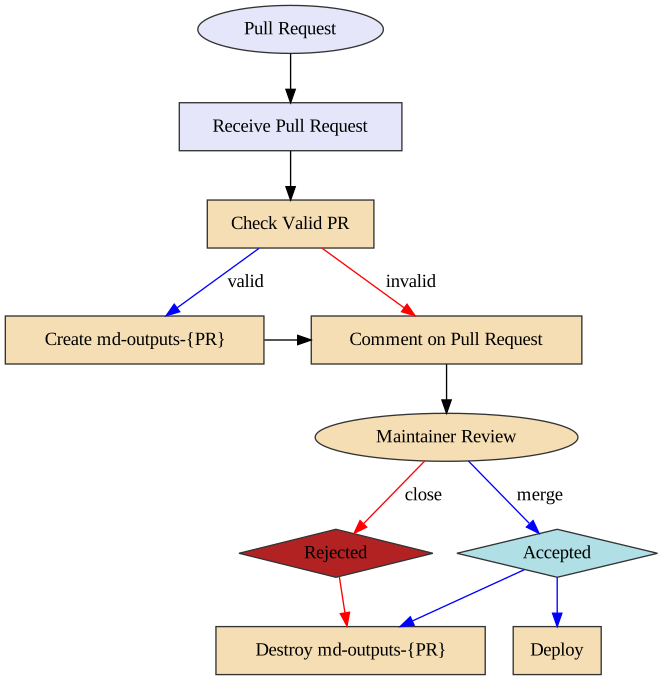
125 |
126 | ### Pre Flight Pull Request Validation (pr-preflight.yaml)
127 |
128 | This workflow runs every time a pull request is created and its purpose is to
129 | validate that the pull request is okay to run. This means the following things:
130 |
131 | 1. The pull request does not contain modified workflow files
132 | 2. If the pull request contains modified workflow files, it does not contain
133 | modified content files (such as a situation where @carpentries-bot will
134 | make an automated pull request)
135 | 3. The pull request does not contain an invalid commit hash (e.g. from a fork
136 | that was made before a lesson was transitioned from styles to use the
137 | workbench).
138 |
139 | Once the checks are finished, a comment is issued to the pull request, which
140 | will allow maintainers to determine if it is safe to run the
141 | "Receive Pull Request" workflow from new contributors.
142 |
143 | ### Receive Pull Request (pr-receive.yaml)
144 |
145 | **Note of caution:** This workflow runs arbitrary code by anyone who creates a
146 | pull request. GitHub has safeguarded the token used in this workflow to have no
147 | priviledges in the repository, but we have taken precautions to protect against
148 | spoofing.
149 |
150 | This workflow is triggered with every push to a pull request. If this workflow
151 | is already running and a new push is sent to the pull request, the workflow
152 | running from the previous push will be cancelled and a new workflow run will be
153 | started.
154 |
155 | The first step of this workflow is to check if it is valid (e.g. that no
156 | workflow files have been modified). If there are workflow files that have been
157 | modified, a comment is made that indicates that the workflow is not run. If
158 | both a workflow file and lesson content is modified, an error will occurr.
159 |
160 | The second step (if valid) is to build the generated content from the pull
161 | request. This builds the content and uploads three artifacts:
162 |
163 | 1. The pull request number (pr)
164 | 2. A summary of changes after the rendering process (diff)
165 | 3. The rendered files (build)
166 |
167 | Because this workflow builds generated content, it follows the same general
168 | process as the `sandpaper-main` workflow with the same caching mechanisms.
169 |
170 | The artifacts produced are used by the next workflow.
171 |
172 | ### Comment on Pull Request (pr-comment.yaml)
173 |
174 | This workflow is triggered if the `pr-receive.yaml` workflow is successful.
175 | The steps in this workflow are:
176 |
177 | 1. Test if the workflow is valid and comment the validity of the workflow to the
178 | pull request.
179 | 2. If it is valid: create an orphan branch with two commits: the current state
180 | of the repository and the proposed changes.
181 | 3. If it is valid: update the pull request comment with the summary of changes
182 |
183 | Importantly: if the pull request is invalid, the branch is not created so any
184 | malicious code is not published.
185 |
186 | From here, the maintainer can request changes from the author and eventually
187 | either merge or reject the PR. When this happens, if the PR was valid, the
188 | preview branch needs to be deleted.
189 |
190 | ### Send Close PR Signal (pr-close-signal.yaml)
191 |
192 | Triggered any time a pull request is closed. This emits an artifact that is the
193 | pull request number for the next action
194 |
195 | ### Remove Pull Request Branch (pr-post-remove-branch.yaml)
196 |
197 | Tiggered by `pr-close-signal.yaml`. This removes the temporary branch associated with
198 | the pull request (if it was created).
199 |
--------------------------------------------------------------------------------
/episodes/04-regular-expressions.md:
--------------------------------------------------------------------------------
1 | ---
2 | title: Regular Expressions
3 | teaching: 20
4 | exercises: 25
5 | ---
6 |
7 | ::::::::::::::::::::::::::::::::::::::: objectives
8 |
9 | - Use regular expressions in searches
10 |
11 | ::::::::::::::::::::::::::::::::::::::::::::::::::
12 |
13 | :::::::::::::::::::::::::::::::::::::::: questions
14 |
15 | - How can you imagine using regular expressions in your work?
16 |
17 | ::::::::::::::::::::::::::::::::::::::::::::::::::
18 |
19 | ## Regular Expressions
20 |
21 | One of the reason why I have stressed the value of consistent and predictable directory and filenaming conventions is that working in this way enables you to use the computer to select files based on the characteristics of their file name. So, for example, if you have a bunch of files where the first four digits are the year and you only want to do something with files from '2014', then you can. Or if you have 'journal' somewhere in a filename when you have data about journals, you can use the computer to select just those files then do something with them. Equally, using plain text formats means that you can go further and select files or elements of files based on characteristics of the data *within* files.
22 |
23 | A powerful means of doing this selecting based on file characteristics is to use regular expressions, often abbreviated to regex. A regular expression is a sequence of characters that define a search pattern, mainly for use in pattern matching with strings, or string matching, i.e. "find and replace"-like operations. Regular expressions are typically surrounded by `/` characters, though we will (mostly) ignore those for ease of comprehension. Regular expressions will let you:
24 |
25 | - Match on types of character (e.g. 'upper case letters', 'digits', 'spaces', etc.)
26 | - Match patterns that repeat any number of times
27 | - Capture the parts of the original string that match your pattern
28 |
29 | As most computational software has regular expression functionality built in and as many computational tasks in libraries are built around complex matching, it is good place for Library Carpentry to start in earnest.
30 |
31 | A very simple use of a regular expression would be to locate the same word spelled two different ways. For example the regular expression `organi[sz]e` matches both "organise" and "organize".
32 |
33 | But it would also match `reorganise`, `reorganize`, `organises`, `organizes`, `organised`, `organized`, et cetera, because we've not specified the beginning or end of our string. So there are a bunch of special syntax that help us be more precise.
34 |
35 | The first we've seen: square brackets can be used to define a list or range of characters to be found. So:
36 |
37 | - `[ABC]` matches A or B or C
38 | - `[A-Z]` matches any upper case letter
39 | - `[A-Za-z0-9]` matches any upper or lower case letter or any digit (note: this is case-sensitive)
40 |
41 | Then there are:
42 |
43 | - `.` matches any character
44 | - `\d` matches any single digit
45 | - `\w` matches any part of word character (equivalent to `[A-Za-z0-9]`)
46 | - `\s` matches any space, tab, or newline
47 | - `\` NB: this is also used to escape the following character when that character is a special character. So, for example, a regular expression that found `.com` would be `\.com` because `.` is a special character that matches any character.
48 | - `^` asserts the position at the start of the line. So what you put after it will only match if they are the first characters of a line.
49 | - `$` asserts the position at the end of the line. So what you put before it will only match if they are the last characters of a line.
50 | - `\b` adds a word boundary. Putting this either side of a word stops the regular expression matching longer variants of words. So:
51 | - the regular expression `foobar` will match `foobar` and find `666foobar`, `foobar777`, `8thfoobar8th` et cetera
52 | - the regular expression `\bfoobar` will match `foobar` and find `foobar777`
53 | - the regular expression `foobar\b` will match `foobar` and find `666foobar`
54 | - the regular expression `\bfoobar\b` will find `foobar`
55 |
56 | So, what is `^[Oo]rgani.e\b` going to match.
57 |
58 | ::::::::::::::::::::::::::::::::::::::: challenge
59 |
60 | ## Using special characters in regular expression matches
61 |
62 | Can you guess what the regular expression `^[Oo]rgani.e\b` will match?
63 |
64 | ::::::::::::::: solution
65 |
66 | ## Solution
67 |
68 | ```
69 | organise
70 | organize
71 | Organise
72 | Organize
73 | organife
74 | Organike
75 | ```
76 |
77 | Or, any other string that starts a line, begins with a letter `o` in lower or capital case, proceeds with `rgani`, has any character in the 7th position, and ends with the letter `e`.
78 |
79 |
80 |
81 | :::::::::::::::::::::::::
82 |
83 | ::::::::::::::::::::::::::::::::::::::::::::::::::
84 |
85 | Other useful special characters are:
86 |
87 | - `*` matches the preceding element zero or more times. For example, ab\*c matches "ac", "abc", "abbbc", etc.
88 | - `+` matches the preceding element one or more times. For example, ab+c matches "abc", "abbbc" but not "ac".
89 | - `?` matches when the preceding character appears zero or one time.
90 | - `{VALUE}` matches the preceding character the number of times define by VALUE; ranges can be specified with the syntax `{VALUE,VALUE}`
91 | - `|` means or.
92 |
93 | So, what are these going to match?
94 |
95 | ::::::::::::::::::::::::::::::::::::::: challenge
96 |
97 | ## `^[Oo]rgani.e\w*`
98 |
99 | Can you guess what the regular expression `^[Oo]rgani.e\w*` will match?
100 |
101 | ::::::::::::::: solution
102 |
103 | ## Solution
104 |
105 | ```
106 | organise
107 | Organize
108 | organifer
109 | Organi2ed111
110 | ```
111 |
112 | Or, any other string that starts a line, begins with a letter `o` in lower or capital case, proceeds with `rgani`, has any character in the 7th position, follows with letter `e` and zero or more characters from the range `[A-Za-z0-9]`.
113 |
114 |
115 |
116 | :::::::::::::::::::::::::
117 |
118 | ::::::::::::::::::::::::::::::::::::::::::::::::::
119 |
120 | ::::::::::::::::::::::::::::::::::::::: challenge
121 |
122 | ## `[Oo]rgani.e\w+$`
123 |
124 | Can you guess what the regular expression `[Oo]rgani.e\w+$` will match?
125 |
126 | ::::::::::::::: solution
127 |
128 | ## Solution
129 |
130 | ```
131 | organiser
132 | Organized
133 | organifer
134 | Organi2ed111
135 | ```
136 |
137 | Or, any other string that ends a line, begins with a letter `o` in lower or capital case, proceeds with `rgani`, has any character in the 7th position, follows with letter `e` and one or more characters from the range `[A-Za-z0-9]`.
138 |
139 |
140 |
141 | :::::::::::::::::::::::::
142 |
143 | ::::::::::::::::::::::::::::::::::::::::::::::::::
144 |
145 | ::::::::::::::::::::::::::::::::::::::: challenge
146 |
147 | ## `^[Oo]rgani.e\w?\b`
148 |
149 | Can you guess what the regular expression `^[Oo]rgani.e\w?\b` will match?
150 |
151 | ::::::::::::::: solution
152 |
153 | ## Solution
154 |
155 | ```
156 | organise
157 | Organized
158 | organifer
159 | Organi2ek
160 | ```
161 |
162 | Or, any other string that starts a line, begins with a letter `o` in lower or capital case, proceeds with `rgani`, has any character in the 7th position, follows with letter `e`, and ends with zero or one characters from the range `[A-Za-z0-9]`.
163 |
164 |
165 |
166 | :::::::::::::::::::::::::
167 |
168 | ::::::::::::::::::::::::::::::::::::::::::::::::::
169 |
170 | ::::::::::::::::::::::::::::::::::::::: challenge
171 |
172 | ## `^[Oo]rgani.e\w?$`
173 |
174 | Can you guess what the regular expression `^[Oo]rgani.e\w?$` will match?
175 |
176 | ::::::::::::::: solution
177 |
178 | ## Solution
179 |
180 | ```
181 | organise
182 | Organized
183 | organifer
184 | Organi2ek
185 | ```
186 |
187 | Or, any other string that starts and ends a line, begins with a letter `o` in lower or capital case, proceeds with `rgani`, has any character in the 7th position, follows with letter `e` and zero or one characters from the range `[A-Za-z0-9]`.
188 |
189 |
190 |
191 | :::::::::::::::::::::::::
192 |
193 | ::::::::::::::::::::::::::::::::::::::::::::::::::
194 |
195 | ::::::::::::::::::::::::::::::::::::::: challenge
196 |
197 | ## `\b[Oo]rgani.e\w{2}\b`
198 |
199 | Can you guess what the regular expression `\b[Oo]rgani.e\w{2}\b` will match?
200 |
201 | ::::::::::::::: solution
202 |
203 | ## Solution
204 |
205 | ```
206 | organisers
207 | Organizers
208 | organifers
209 | Organi2ek1
210 | ```
211 |
212 | Or, any other string that begins with a letter `o` in lower or capital case after a word boundary, proceeds with `rgani`, has any character in the 7th position, follows with letter `e`, and ends with two characters from the range `[A-Za-z0-9]`.
213 |
214 |
215 |
216 | :::::::::::::::::::::::::
217 |
218 | ::::::::::::::::::::::::::::::::::::::::::::::::::
219 |
220 | ::::::::::::::::::::::::::::::::::::::: challenge
221 |
222 | ## `\b[Oo]rgani.e\b|\b[Oo]rgani.e\w{1}\b`
223 |
224 | Can you guess what the regular expression `\b[Oo]rgani.e\b|\b[Oo]rgani.e\w{1}\b` will match?
225 |
226 | ::::::::::::::: solution
227 |
228 | ## Solution
229 |
230 | ```
231 | organise
232 | Organi1e
233 | Organizer
234 | organifed
235 | ```
236 |
237 | Or, any other string that begins with a letter `o` in lower or capital case after a word boundary, proceeds with `rgani`, has any character in the 7th position, and end with letter `e`, or any other string that begins with a letter `o` in lower or capital case after a word boundary, proceeds with `rgani`, has any character in the 7th position, follows with letter `e`, and ends with a single character from the range `[A-Za-z0-9]`.
238 |
239 |
240 |
241 | :::::::::::::::::::::::::
242 |
243 | ::::::::::::::::::::::::::::::::::::::::::::::::::
244 |
245 | This logic is super useful when you have lots of files in a directory, when those files have logical file names, and when you want to isolate a selection of files. Or for looking at cells in spreadsheets for certain values. Or for extracting some data from a column of a spreadsheet to make new columns. I could go on. The point is, it is super useful in many contexts. To embed this knowledge we won't - however - be using computers. Instead we'll use pen and paper. Work in teams of 4-6 on the exercises below. When you think you have the right answer, check it against the solution. When you finish, I'd like you to split your team into two groups and write each other some tests. These should include a) strings you want the other team to write regex for and b) regular expressions you want the other team to work out what they would match. Then test each other on the answers. If you want to check your logic, use [regex101](https://regex101.com/), [myregexp](https://myregexp.com/), or [regex pal](https://www.regexpal.com/) [regexper.com](https://regexper.com/): the first three help you see what text your regular expression will match, the latter visualises the workflow of a regular expression.
246 |
247 | ### Exercise
248 |
249 | Pair up with the person next to you to work through the following problems.
250 |
251 | ::::::::::::::::::::::::::::::::::::::: challenge
252 |
253 | ## Using square brackets
254 |
255 | Can you guess what the regular expression `Fr[ea]nc[eh]` will match?
256 |
257 | ::::::::::::::: solution
258 |
259 | ## Solution
260 |
261 | ```
262 | French
263 | France
264 | Frence
265 | Franch
266 | ```
267 |
268 | This will also find words where there are characters either side of the solutions above, such as `Francer`, `foobarFrench`, and `Franch911`.
269 |
270 |
271 |
272 | :::::::::::::::::::::::::
273 |
274 | ::::::::::::::::::::::::::::::::::::::::::::::::::
275 |
276 | ::::::::::::::::::::::::::::::::::::::: challenge
277 |
278 | ## Using dollar signs
279 |
280 | Can you guess what the regular expression `Fr[ea]nc[eh]$` will match?
281 |
282 | ::::::::::::::: solution
283 |
284 | ## Solution
285 |
286 | ```
287 | French
288 | France
289 | Frence
290 | Franch
291 | ```
292 |
293 | This will also find strings at the end of a line. It will find words where there were characters before these, for example `foobarFrench`.
294 |
295 |
296 |
297 | :::::::::::::::::::::::::
298 |
299 | ::::::::::::::::::::::::::::::::::::::::::::::::::
300 |
301 | ::::::::::::::::::::::::::::::::::::::: challenge
302 |
303 | ## Introducing options
304 |
305 | What would match the strings `French` and `France` only that appear at the beginning of a line?
306 |
307 | ::::::::::::::: solution
308 |
309 | ## Solution
310 |
311 | ```
312 | ^France|^French
313 | ```
314 |
315 | This will also find words where there were characters after `French` such as `Frenchness`.
316 |
317 |
318 |
319 | :::::::::::::::::::::::::
320 |
321 | ::::::::::::::::::::::::::::::::::::::::::::::::::
322 |
323 | ::::::::::::::::::::::::::::::::::::::: challenge
324 |
325 | ## Case insensitivity
326 |
327 | How do you match the whole words `colour` and `color` (case insensitive)?
328 |
329 | ::::::::::::::: solution
330 |
331 | ## Solutions
332 |
333 | ```
334 | \b[Cc]olou?r\b|\bCOLOU?R\b
335 | /colou?r/i
336 | ```
337 |
338 | In real life, you *should* only come across the case insensitive variations `colour`, `color`, `Colour`, `Color`, `COLOUR`, and `COLOR` (rather than, say, `coLour`). So based on what we know, the logical regular expression is `\b[Cc]olou?r\b|\bCOLOU?R\b`. An alternative more elegant option we've not discussed is to take advantage of the `/` delimiters and add an ignore case flag: so `/colou?r/i` will match all case insensitive variants of `colour` and `color`.
339 |
340 |
341 |
342 | :::::::::::::::::::::::::
343 |
344 | ::::::::::::::::::::::::::::::::::::::::::::::::::
345 |
346 | ::::::::::::::::::::::::::::::::::::::: challenge
347 |
348 | ## Word boundaries
349 |
350 | How would you find the whole-word `headrest` and or the 2-gram `head rest` but not `head rest` (that is, with two spaces between `head` and `rest`?
351 |
352 | ::::::::::::::: solution
353 |
354 | ## Solution
355 |
356 | ```
357 | \bhead ?rest\b
358 | ```
359 |
360 | Note that although `\bhead\s?rest\b` does work, it will also match zero or one tabs or newline characters between `head` and `rest`. So again, although in most real world cases it will be fine, it isn't strictly correct.
361 |
362 |
363 |
364 | :::::::::::::::::::::::::
365 |
366 | ::::::::::::::::::::::::::::::::::::::::::::::::::
367 |
368 | ::::::::::::::::::::::::::::::::::::::: challenge
369 |
370 | ## Matching non-linguistic patterns
371 |
372 | How would you find a string that ends with 4 letters preceded by at least one zero?
373 |
374 | ::::::::::::::: solution
375 |
376 | ## Solution
377 |
378 | ```
379 | 0+[a-z]{4}\b
380 | ```
381 |
382 | :::::::::::::::::::::::::
383 |
384 | ::::::::::::::::::::::::::::::::::::::::::::::::::
385 |
386 | ::::::::::::::::::::::::::::::::::::::: challenge
387 |
388 | ## Matching digits
389 |
390 | How do you match any 4 digit string anywhere?
391 |
392 | ::::::::::::::: solution
393 |
394 | ## Solution
395 |
396 | ```
397 | \d{4}
398 | ```
399 |
400 | Note this will also match 4 digit strings within longer strings of numbers and letters.
401 |
402 |
403 |
404 | :::::::::::::::::::::::::
405 |
406 | ::::::::::::::::::::::::::::::::::::::::::::::::::
407 |
408 | ::::::::::::::::::::::::::::::::::::::: challenge
409 |
410 | ## Matching dates
411 |
412 | How would you match the date format `dd-MM-yyyy`?
413 |
414 | ::::::::::::::: solution
415 |
416 | ## Solution
417 |
418 | ```
419 | \b\d{2}-\d{2}-\d{4}\b
420 | ```
421 |
422 | Depending on your data, you may chose to remove the word bounding.
423 |
424 |
425 |
426 | :::::::::::::::::::::::::
427 |
428 | ::::::::::::::::::::::::::::::::::::::::::::::::::
429 |
430 | ::::::::::::::::::::::::::::::::::::::: challenge
431 |
432 | ## Matching multiple date formats
433 |
434 | How would you match the date format `dd-MM-yyyy` or `dd-MM-yy` at the end of a string only?
435 |
436 | ::::::::::::::: solution
437 |
438 | ## Solution
439 |
440 | ```
441 | \d{2}-\d{2}-\d{2,4}$
442 | ```
443 |
444 | Note this will also find strings such as `31-01-198` at the end of a line, so you may wish to check your data and revise the expression to exclude false positives. Depending on your data, you may chose to add word bounding at the start of the expression.
445 |
446 |
447 |
448 | :::::::::::::::::::::::::
449 |
450 | ::::::::::::::::::::::::::::::::::::::::::::::::::
451 |
452 | ::::::::::::::::::::::::::::::::::::::: challenge
453 |
454 | ## Matching publication formats
455 |
456 | How would you match publication formats such as `British Library : London, 2015` and `Manchester University Press: Manchester, 1999`?
457 |
458 | ::::::::::::::: solution
459 |
460 | ## Solution
461 |
462 | ```
463 | .* ?: .*, \d{4}
464 | ```
465 |
466 | Without word boundaries you will find that this matches any text you put before `British` or `Manchester`. Nevertheless, the regular expression does a good job on the first look up and may be need to be refined on a second depending on your data.
467 |
468 |
469 |
470 | :::::::::::::::::::::::::
471 |
472 | ::::::::::::::::::::::::::::::::::::::::::::::::::
473 |
474 | ## References
475 |
476 | James Baker , "Preserving Your Research Data," *Programming Historian* (30 April 2014), [http://programminghistorian.org/lessons/preserving-your-research-data.html](https://programminghistorian.org/lessons/preserving-your-research-data.html). The sub-sections 'Plain text formats are your friend' and 'Naming files sensible things is good for you and for your computers' are reworked from this lesson.
477 |
478 | Owen Stephens, "Working with Data using OpenRefine", \*Overdue Ideas" (19 November 2014), [http://www.meanboyfriend.com/overdue\_ideas/2014/11/working-with-data-using-openrefine/](https://www.meanboyfriend.com/overdue_ideas/2014/11/working-with-data-using-openrefine/). The section on 'Regular Expressions' is reworked from this lesson developed by Owen Stephens on behalf of the British Library
479 |
480 | Andromeda Yelton, "Coding for Librarians: Learning by Example", *Library Technology Reports* 51:3 (April 2015), doi: [10\.5860/ltr.51n3](https://doi.org/10.5860/ltr.51n3)
481 |
482 | Fiona Tweedie, "Why Code?", *The Research Bazaar* (October 2014), [http://melbourne.resbaz.edu.au/post/95320810834/why-code](https://melbourne.resbaz.edu.au/post/95320810834/why-code)
483 |
484 | :::::::::::::::::::::::::::::::::::::::: keypoints
485 |
486 | - Regular expressions are powerful tools for pattern matching
487 |
488 | ::::::::::::::::::::::::::::::::::::::::::::::::::
489 |
490 |
491 |
--------------------------------------------------------------------------------