├── docs
├── .nojekyll
├── favicon.ico
├── _coverpage.md
├── show
│ ├── up.md
│ ├── wechat.md
│ └── count.md
├── log
│ └── README.md
├── statement
│ └── README.md
├── api
│ ├── README.md
│ ├── remix.md
│ ├── server.md
│ └── github.md
├── python
│ ├── local.md
│ ├── server.md
│ └── cloud.md
├── _sidebar.md
├── attention
│ └── README.md
├── README.md
├── download
│ └── README.md
├── structure
│ └── README.md
├── index.html
├── question
│ └── README.md
├── document
│ └── README.md
├── sw.js
└── config
│ └── README.md
├── requirements.txt
├── account.json
├── init.config
├── README.md
├── LICENSE
├── index.py
└── main.py
/docs/.nojekyll:
--------------------------------------------------------------------------------
1 |
--------------------------------------------------------------------------------
/requirements.txt:
--------------------------------------------------------------------------------
1 | requests==2.20.0
2 |
3 |
--------------------------------------------------------------------------------
/docs/favicon.ico:
--------------------------------------------------------------------------------
https://raw.githubusercontent.com/LunaticTian/netease-cloud/master/docs/favicon.ico
--------------------------------------------------------------------------------
/docs/_coverpage.md:
--------------------------------------------------------------------------------
1 |
2 |
3 | # 网易云升级全家桶
4 |
5 | 一个用于网易云音乐快速满级的服务。
6 |
7 | - 每天自动升级
8 | - 任务进度推送到微信
9 | - 自定义网易云日推风格
10 |
11 | [GitHub](https://github.com/ZainCheung/netease-cloud/) [Get Started](#首页)
--------------------------------------------------------------------------------
/docs/show/up.md:
--------------------------------------------------------------------------------
1 | # 账号升级
2 |
3 | 使用前可以看到是**9027**首
4 |
5 | 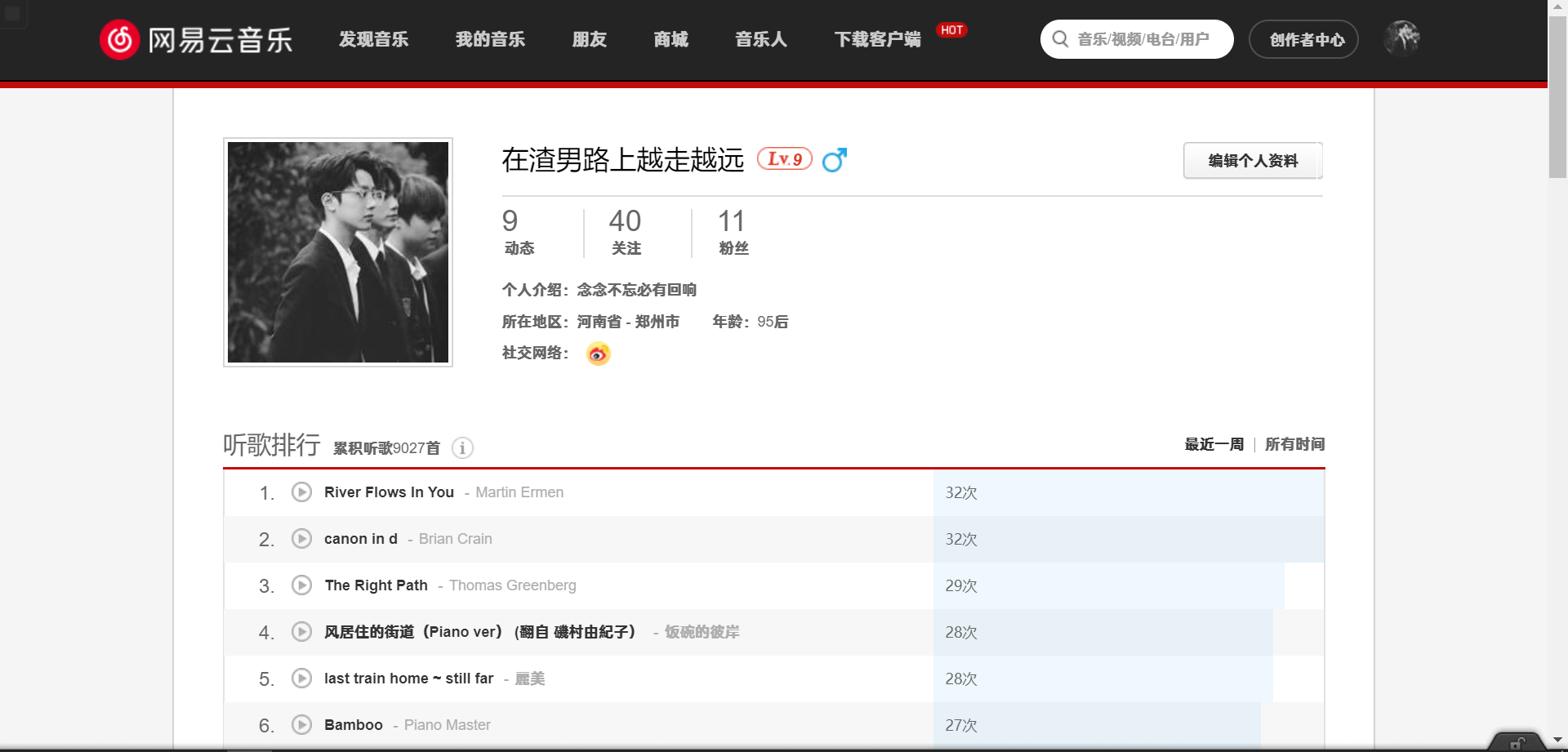
6 |
7 | 使用后是**9327**首,刚好涨了300首
8 |
9 | 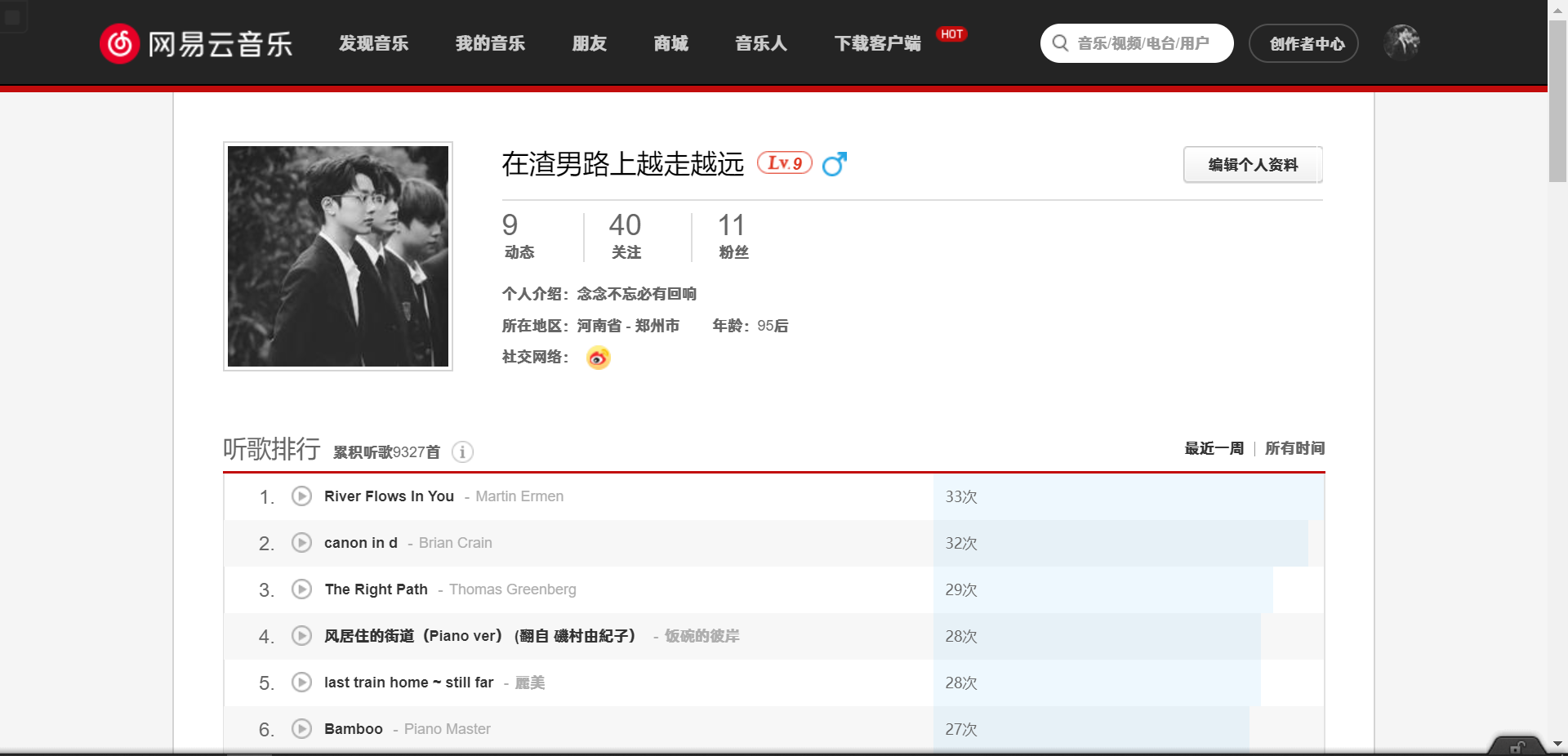
10 |
11 |
12 |
13 |
--------------------------------------------------------------------------------
/docs/log/README.md:
--------------------------------------------------------------------------------
1 | # 查看日志
2 |
3 | 只有本地部署和服务器部署才会生成日志文件,而用云函数搭建的不会有这个`run.log`文件,如需查看日志可以查看云函数内置的日志。
4 |
5 | 日志文件记录了程序运行的状况,程序运行中生成的所有记录都会保存在日志文件中,第一次克隆项目时,不会看到`run.log`日志文件,而在程序第一次运行时才会生成,下面看一下我在服务器上的日志:
6 |
7 | 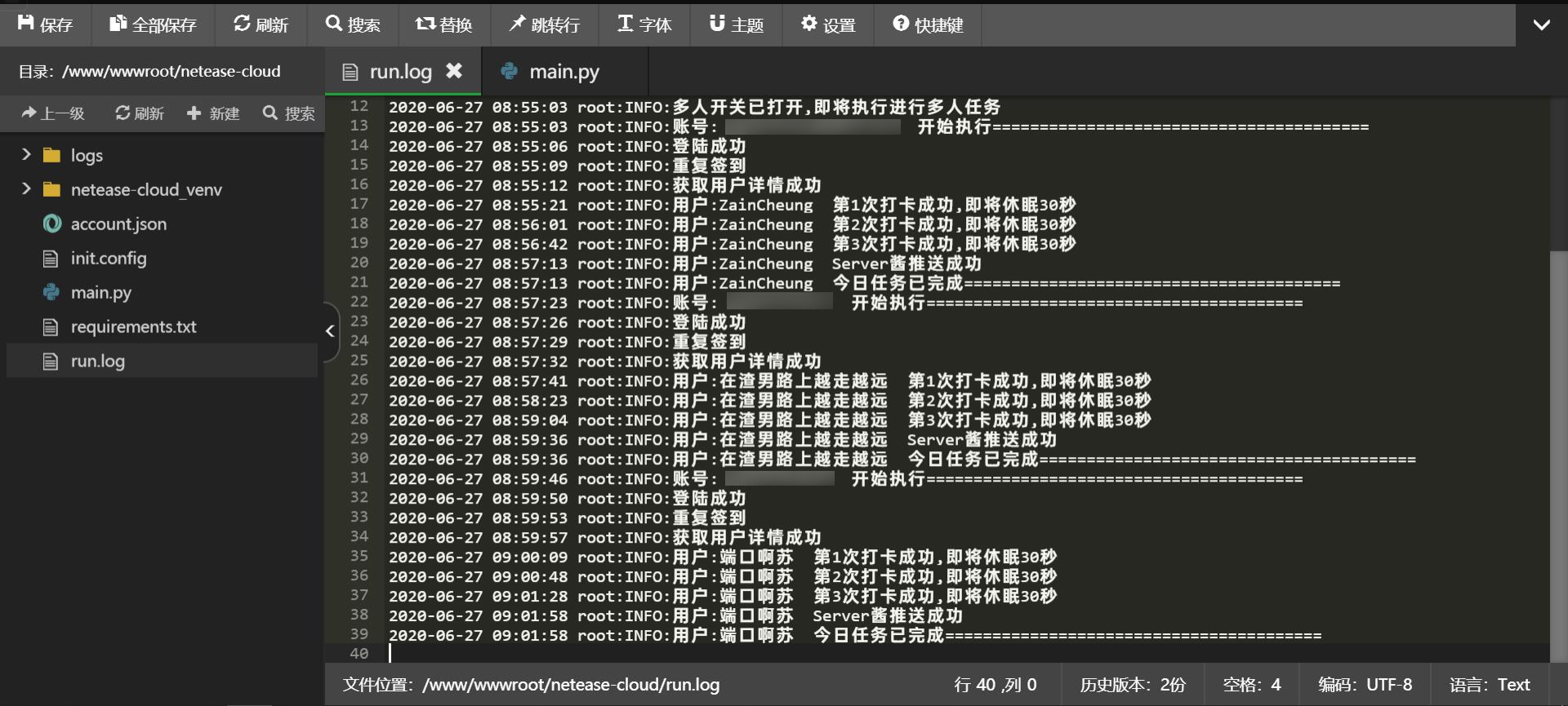
8 |
--------------------------------------------------------------------------------
/docs/statement/README.md:
--------------------------------------------------------------------------------
1 | # 免责声明
2 |
3 | 请不要找其他人代挂账号,不要向他人透露自己的账号密码信息,如果使用项目默认的api请使用md5摘要密码,本项目的所有脚本以及软件仅用于个人学习开发测试,我们不保证功能的实时性和可行性,通过使用本项目随之而来的风险与本项目无关,所有`网易云`相关字样版权属于网易公司,勿用于商业及非法用途,如产生法律纠纷与本项目无关。
4 |
5 | 如果您喜欢网易云音乐,请支持官方渠道,共建生态,以便得到更好的服务。
6 |
7 | 如果该项目侵犯了你的利益,携带**权利证明**请发送邮箱到 ZainCheung@qq.com,我们会很快的为您处理。
--------------------------------------------------------------------------------
/docs/show/wechat.md:
--------------------------------------------------------------------------------
1 | # 微信提醒
2 |
3 | 微信提醒依赖于Server酱,这是个很奈斯的工具,个人开发的一个项目,对所有人保持免费开放,需要使用GitHub登陆,然后绑定微信,拿到你的密匙,填入到配置文件的`sckey`中,或者多账号文件`account.json`中
4 |
5 | 提示的内容也可以自行修改,`main.py`文件的第143行左右的`diyText`函数里的content为提示内容,里面可以自定义提示内容,比如你不是考研党就把考研那一行删去,以及每日一句,,等等,如有需要尽情改。
6 |
7 | 看一下效果:
8 |
9 | 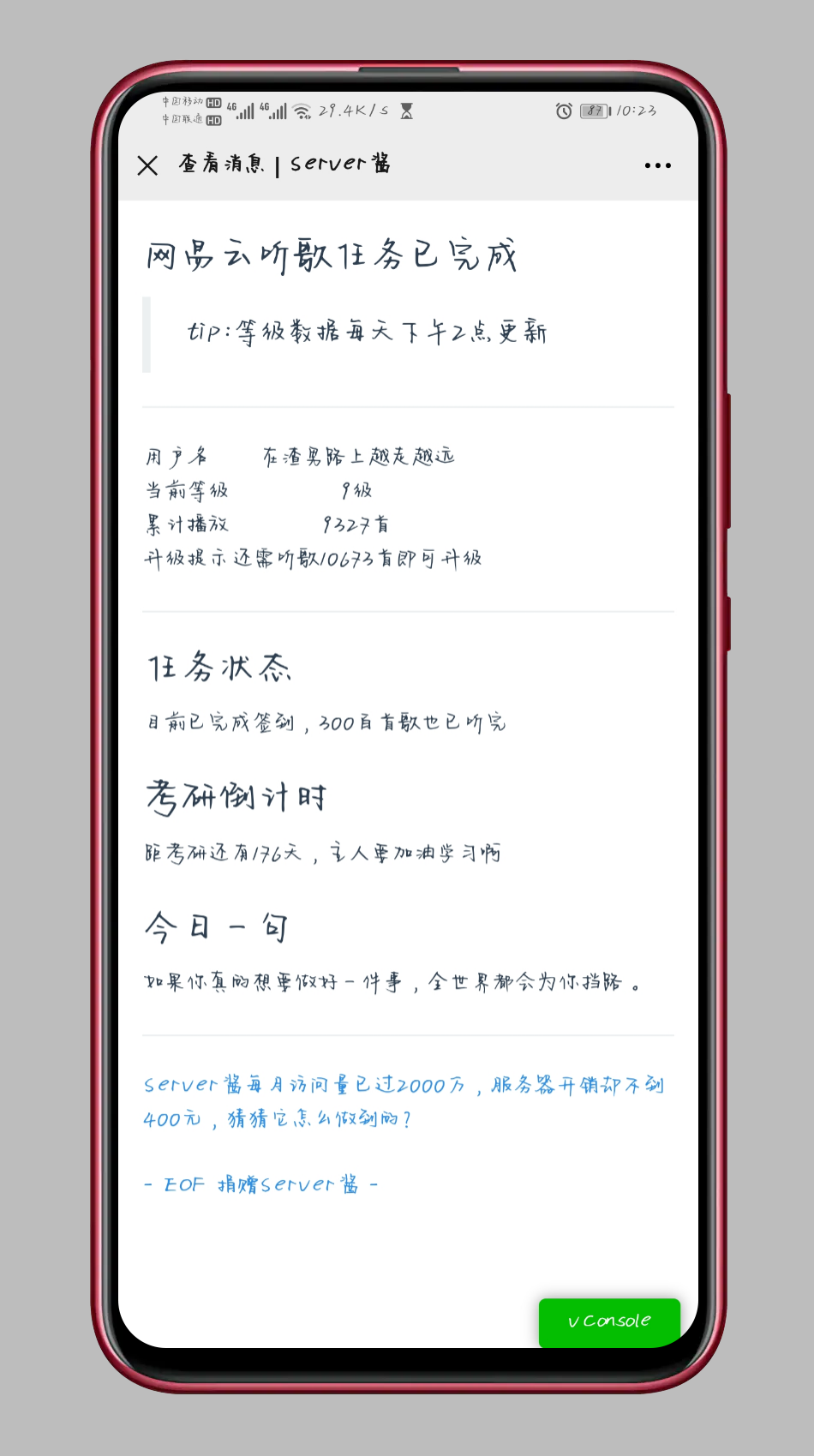
10 |
11 | ------
12 |
13 |
--------------------------------------------------------------------------------
/docs/api/README.md:
--------------------------------------------------------------------------------
1 | # 部署接口
2 |
3 | 建议新手使用自动托管方式,可以完全不需要编程基础即可搭建api接口,推荐使用网站:[https://glitch.com/](https://glitch.com/)
4 |
5 | 这个网站是国外的,名气也很大,在上面托管网站的有几百万,免费使用,缺点就是速度没有国内的服务器快,还有就是如果没有访问了,一定时间后会进入休眠,等待下一次请求到来后需要等待几秒的解冻时间。不过这些对这个项目并没有什么影响,所以可以放心部署。
6 |
7 | API项目地址:[https://github.com/ZainCheung/netease-cloud-api](https://github.com/ZainCheung/netease-cloud-api)
8 |
9 | 下面三种方法,第一种第二种最简单但速度慢,而且需要你有网站账号,第三种访问速度快但需要你有服务器,大家自己取舍,但基本上有服务器了都想自己搭建吧,大家随意
--------------------------------------------------------------------------------
/docs/api/remix.md:
--------------------------------------------------------------------------------
1 | ## 直接复制项目 {docsify-ignore-all}
2 |
3 | 或者可以直接复制一份这个API项目成为你的项目,进入开发者的api服务器: https://glitch.com/edit/#!/netease-cloud-api 选择右上角的 `Remix to Exit`,即可成为你自己的项目,你便可以对代码进行修改,自定义你的域名。
4 |
5 | 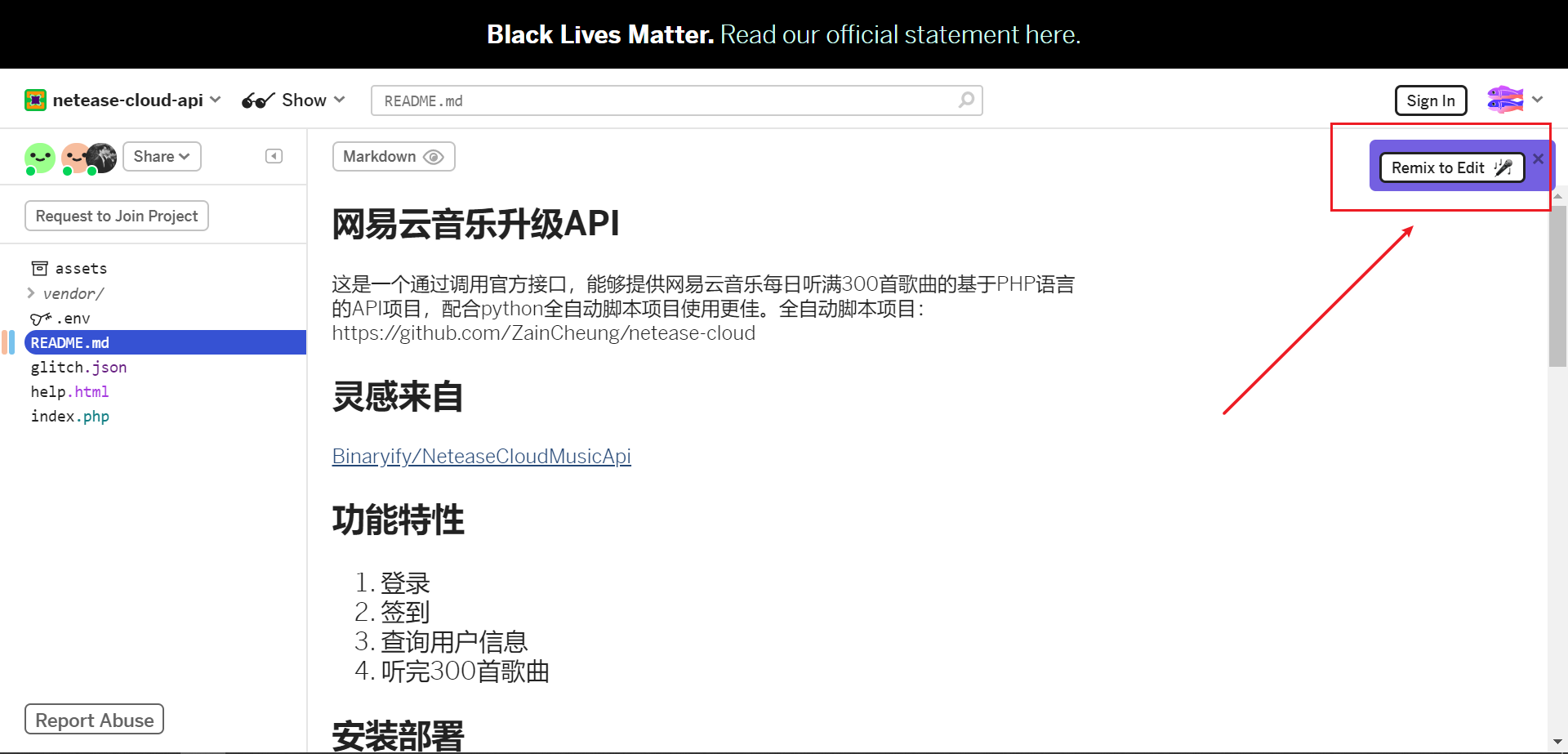
6 |
7 | ##### 获得API地址
8 |
9 | 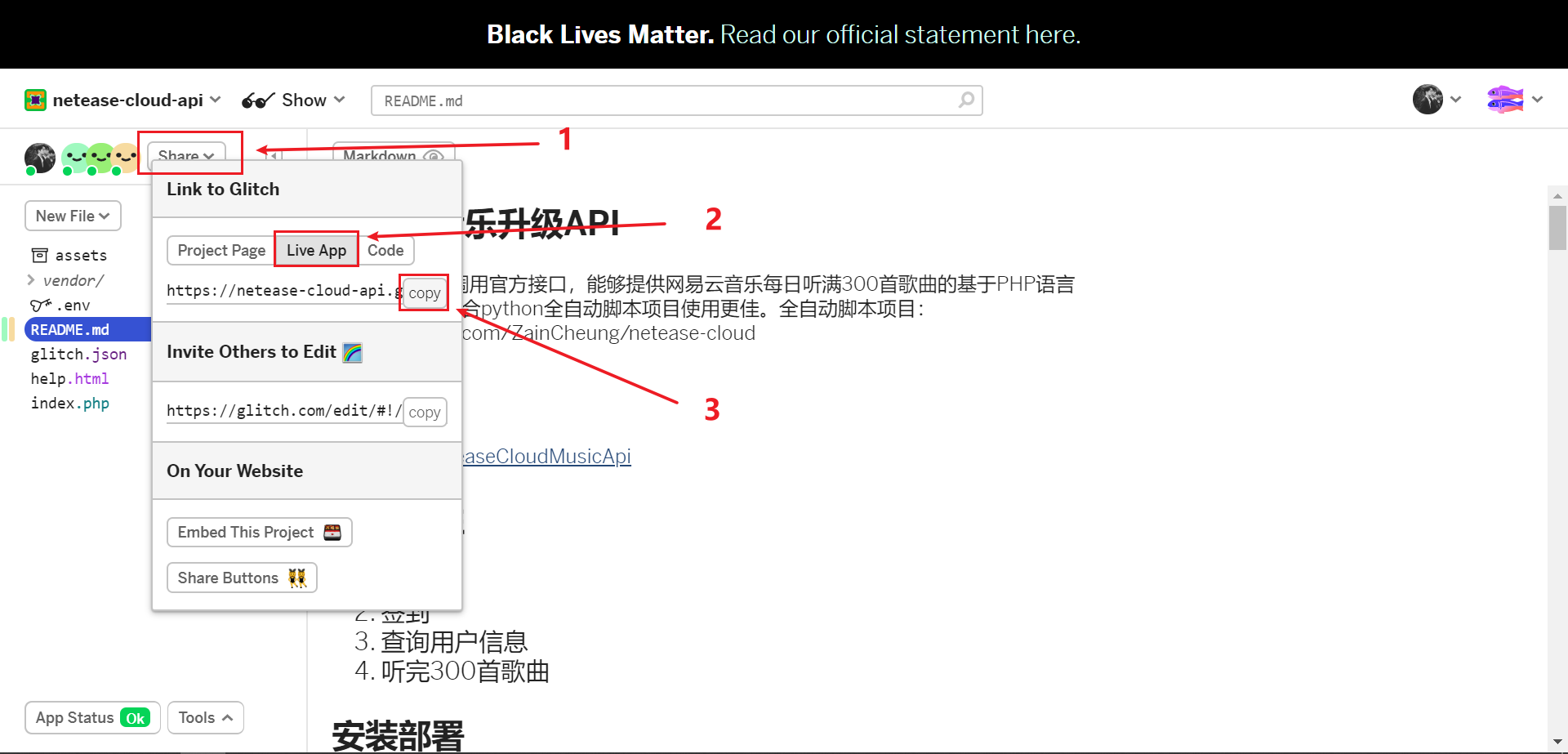
10 |
11 | ##### 又或者
12 |
13 | 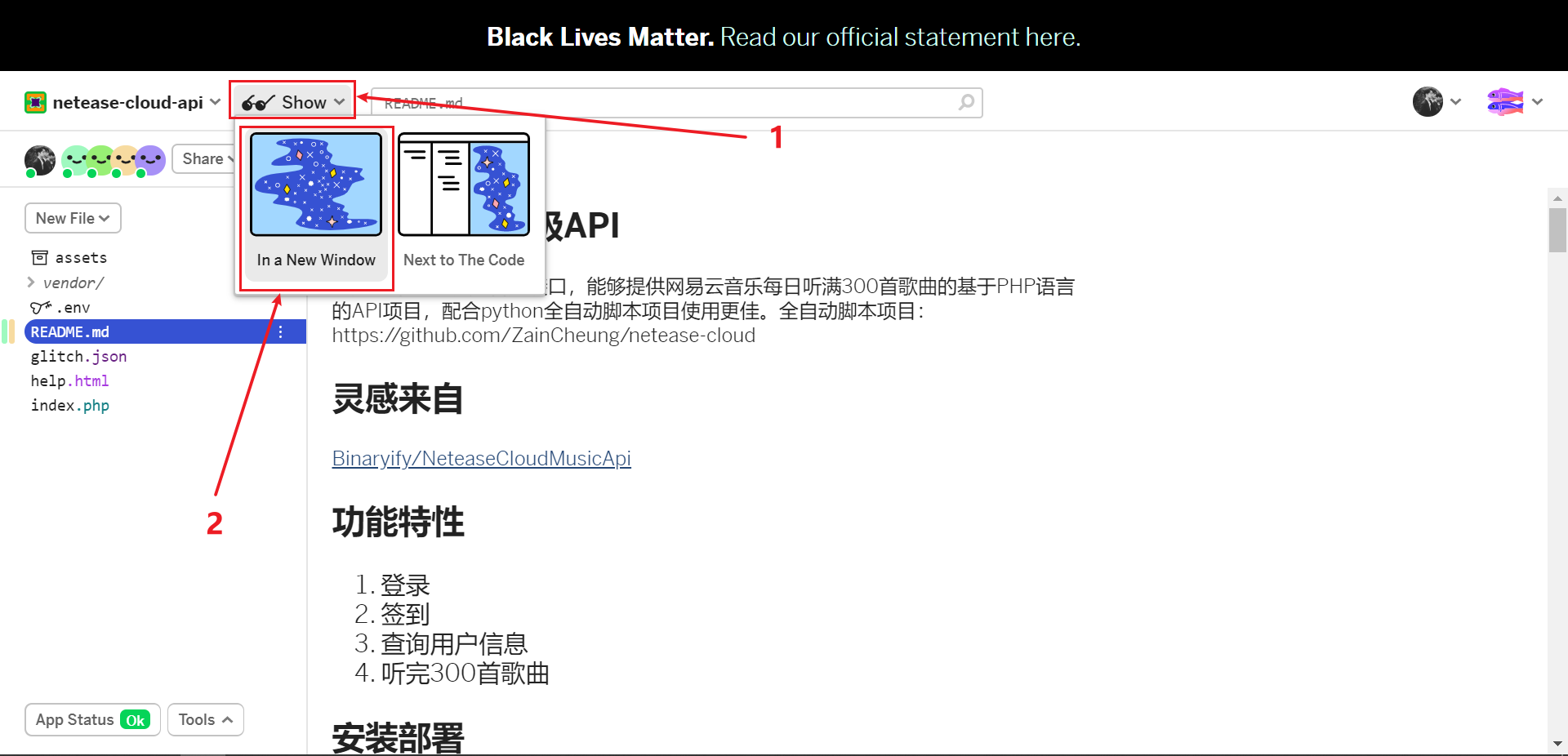
14 |
15 | 访问你的接口看到欢迎页面即部署成功
16 |
17 | 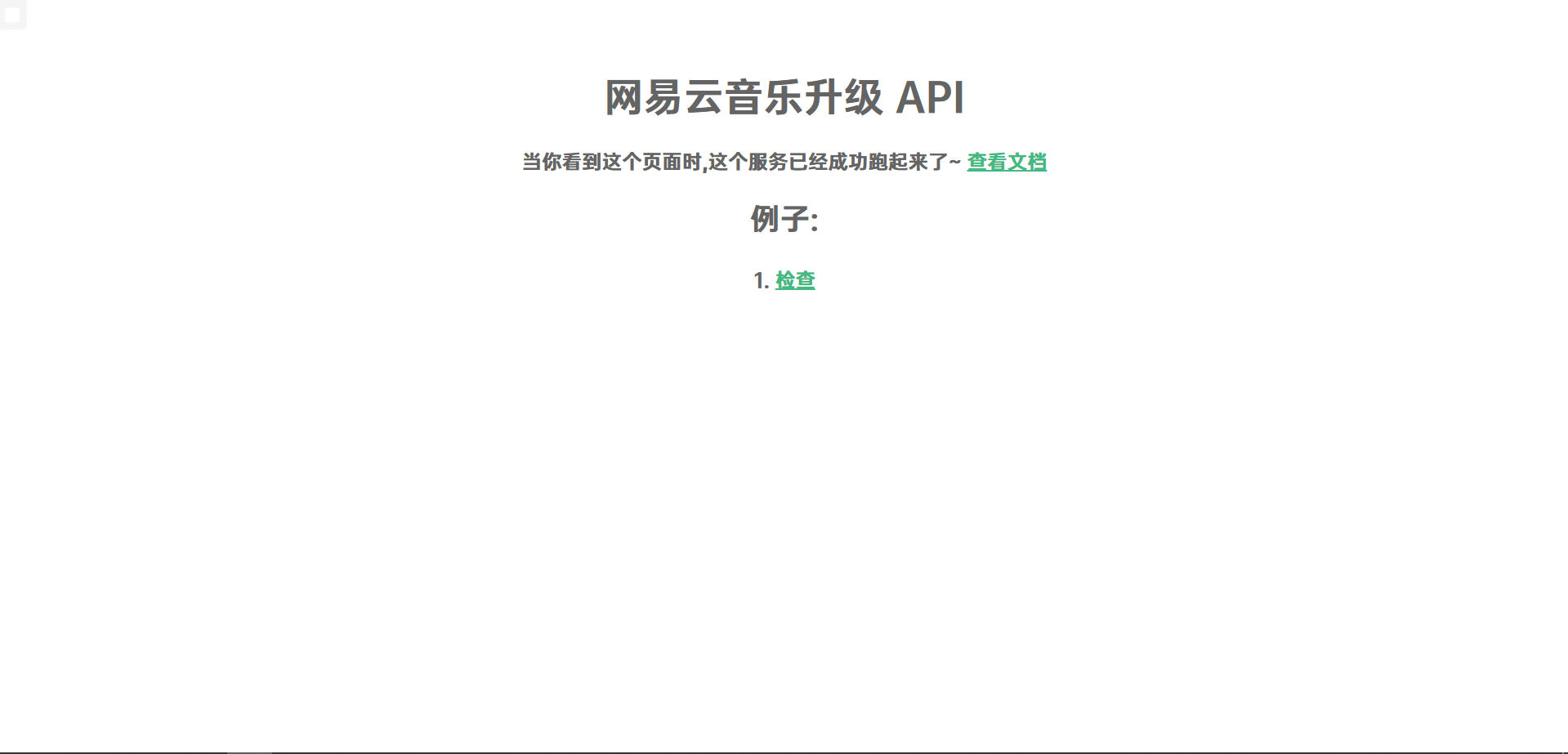
--------------------------------------------------------------------------------
/docs/python/local.md:
--------------------------------------------------------------------------------
1 | ## 本地使用 {docsify-ignore-all}
2 |
3 | > 本地部署需要电脑下载并**安装配置好Python**
4 |
5 | ### 1. 下载项目
6 |
7 | 克隆项目到本地
8 |
9 | ```bash
10 | git clone https://github.com/ZainCheung/netease-cloud.git
11 | ```
12 |
13 | 或者fork本项目到你的仓库进行克隆
14 |
15 | 又或者在项目仓库直接下载ZIP压缩包,这些都是可以的
16 |
17 | ### 2. 安装依赖
18 |
19 | > 需要安装的依赖目前只有一个`request`,如果运行报错缺少什么模块就给什么模块加进`requirements.txt`中
20 |
21 | ```bash
22 | pip install -r requirements.txt
23 | ```
24 |
25 | ### 3. 配置账号见后文
26 |
27 | ### 4. 启动程序
28 |
29 | > 程序需要`python3`的运行环境,如果没有请自行下载安装配置,,启动程序前一定要先配置账号,然后再启动程序
30 |
31 | ```
32 | python main.py
33 | ```
34 |
35 | ------
36 |
37 |
--------------------------------------------------------------------------------
/account.json:
--------------------------------------------------------------------------------
1 | [
2 | {
3 | "account": "ZainCheung@163.com",
4 | "password": "10ca5e4c316f81c5d9b56702********",
5 | "sckey": "SCU97783T70c13167b4daa422f4d419a765eb4ebb5ebc9********"
6 | },
7 | {
8 | "account": "150********",
9 | "password": "bfa834f7de58cb650ca01edb********",
10 | "sckey": "SCU97783T70c13167b4daa422f4d419a765eb4ebb5ebc9********"
11 | },
12 | {
13 | "account": "132********",
14 | "password": "f391235b15781c95384cd5bb********",
15 | "sckey": "SCU97783T70c13167b4daa422f4d419a765eb4ebb5ebc9********"
16 | }
17 | ]
--------------------------------------------------------------------------------
/docs/python/server.md:
--------------------------------------------------------------------------------
1 | ## 服务器部署 {docsify-ignore-all}
2 |
3 | 推荐使用宝塔面板,在宝塔应用商店里面有一个Python项目管理器,下载安装,并选择3.0以上版本,推荐3.7.2版本.
4 |
5 | ### 1. 下载安装Python项目管理器
6 |
7 | 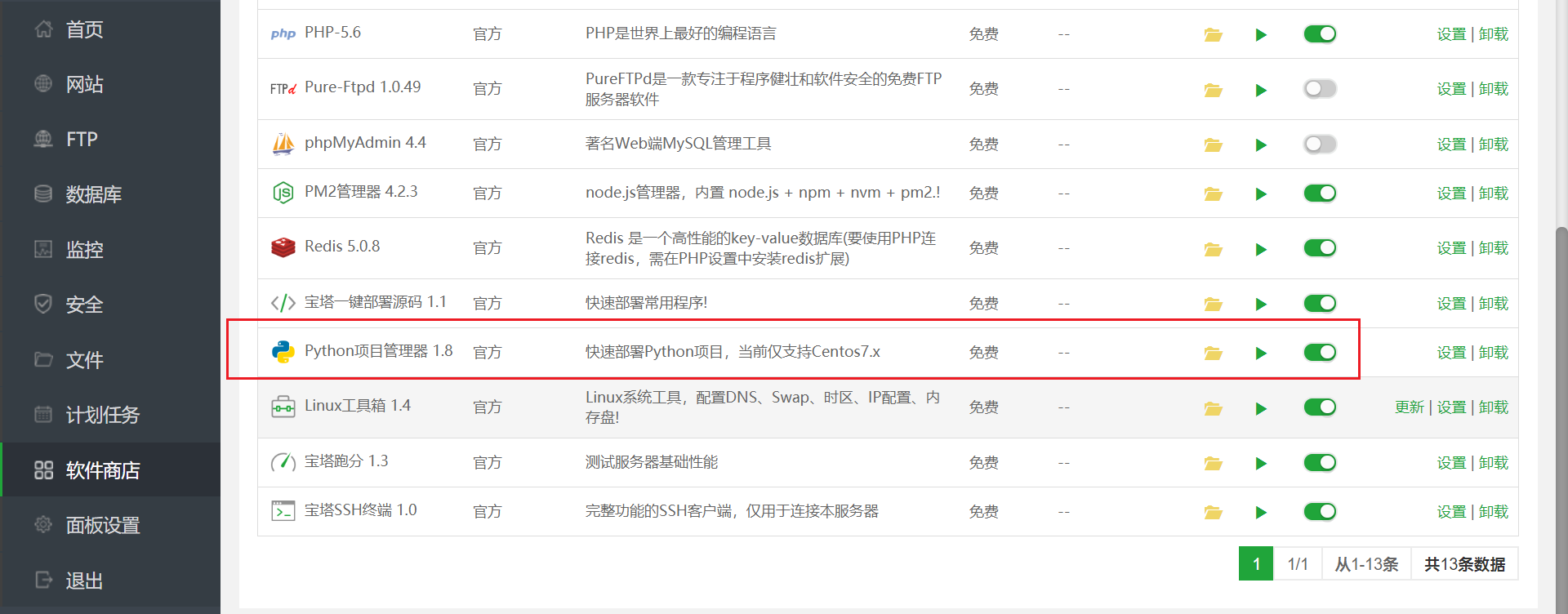
8 |
9 | ### 2. 新建项目
10 |
11 | > 这里的netease-cloud就是这个项目的文件夹,我给放在了/www/wwwroot/路径下了,可见我这里下载安装的是3.7.2版本的python框架选择Python,启动方式也为Python,启动文件选择`main.py`端口不用填,勾选安装模块依赖,是否要开机启动自己随意咯,然后确定。
12 |
13 | 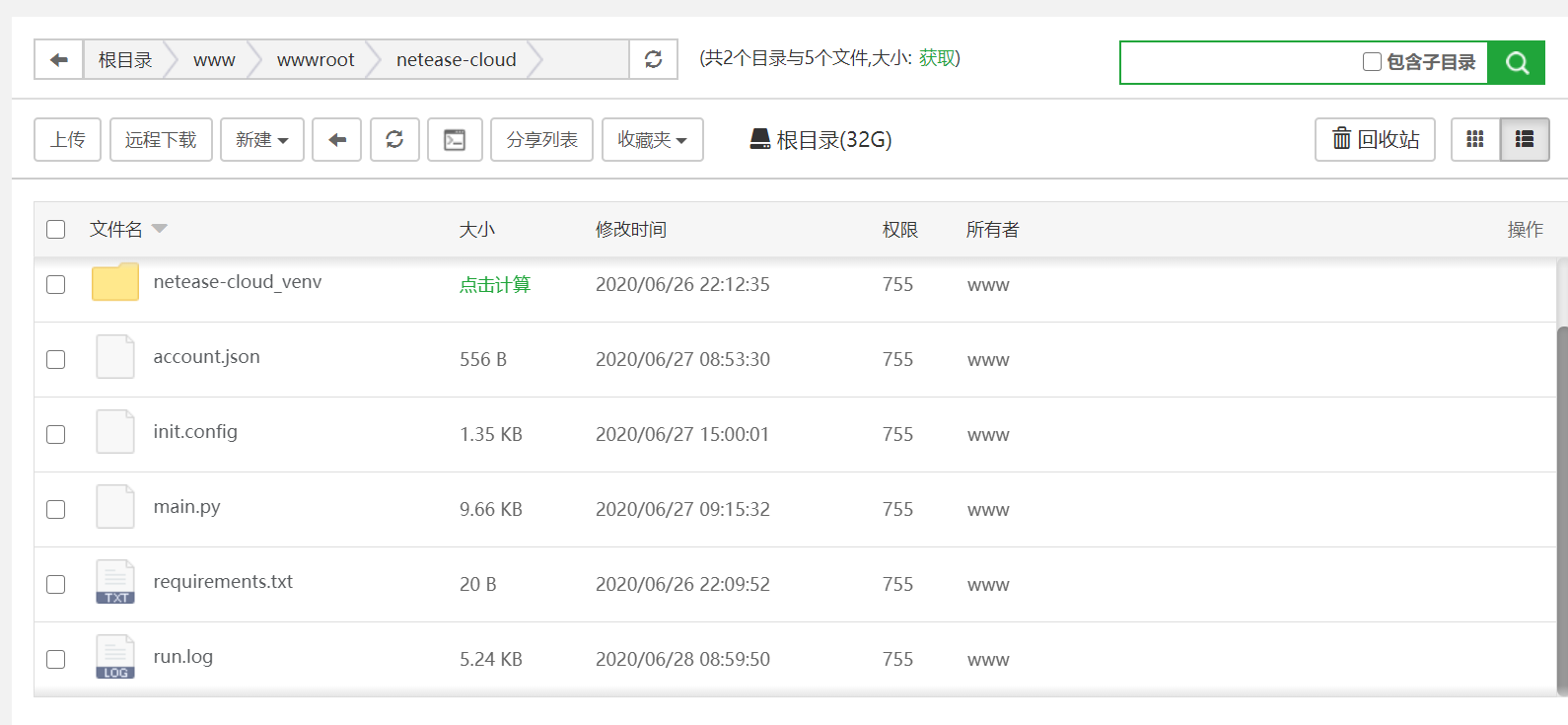
14 |
15 | 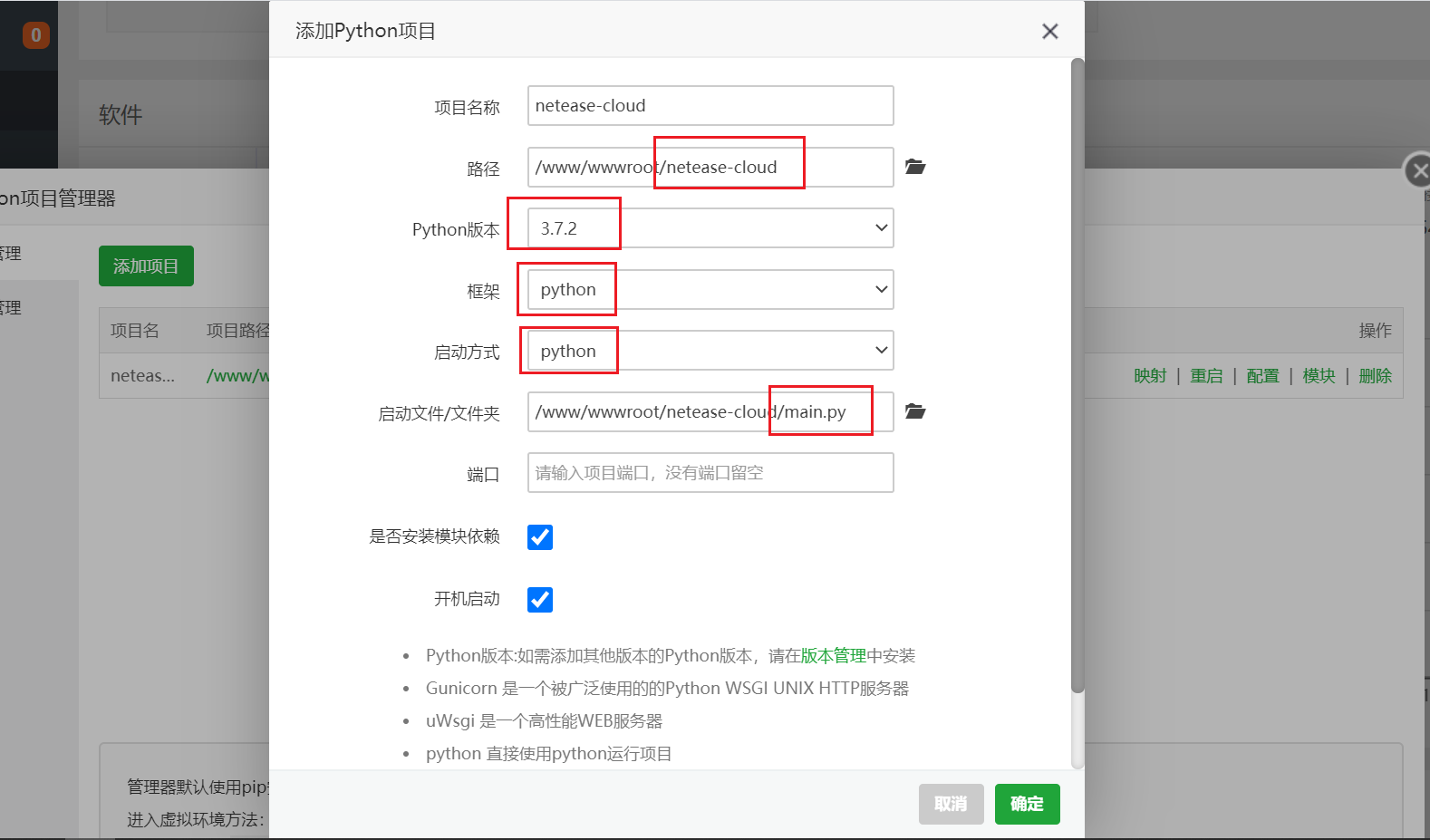
16 |
17 | ### 3. 确定运行状态
18 |
19 | 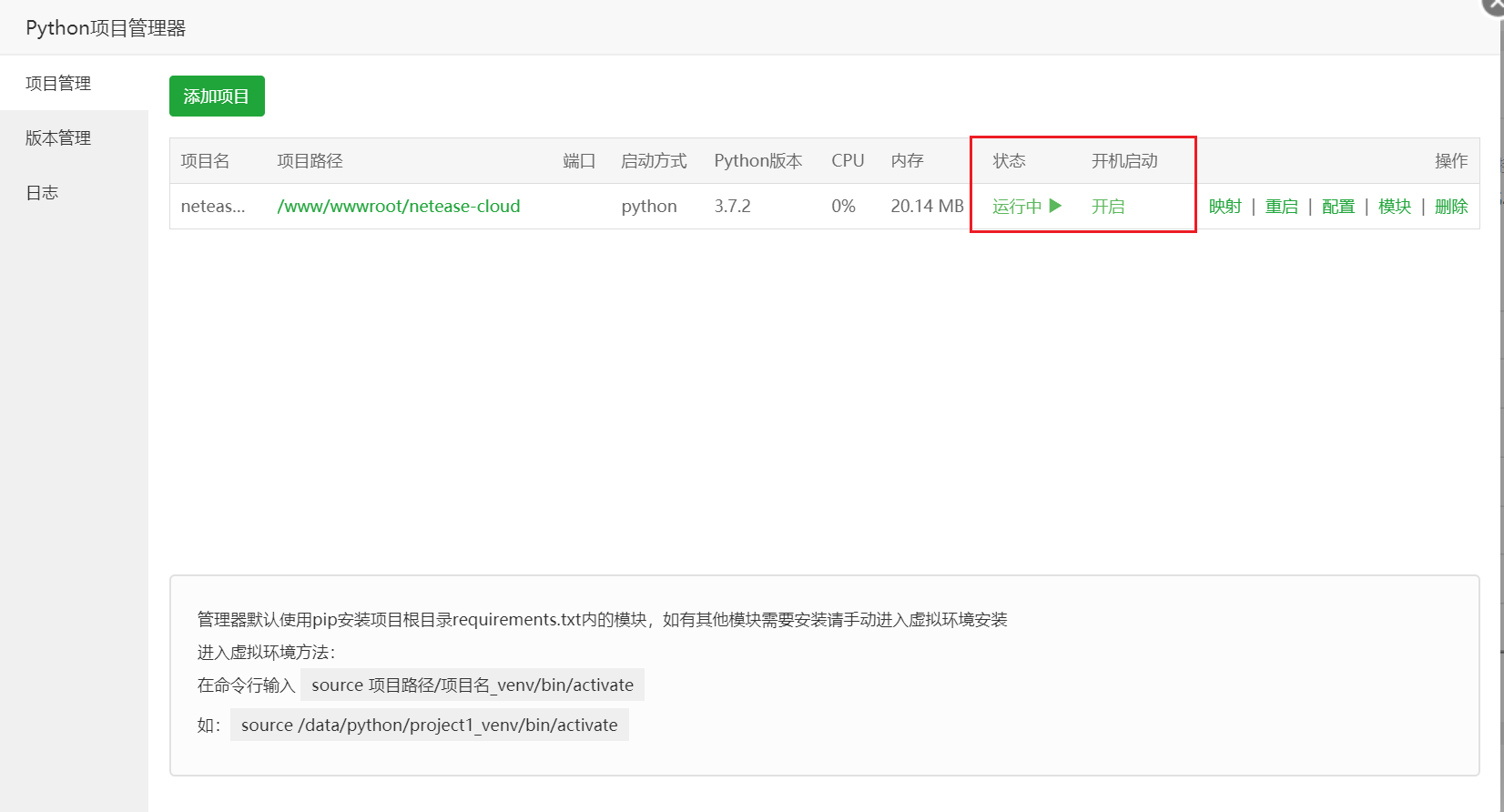
20 |
21 | 这时候项目就开始在运行了,就可以去项目在文件夹的路径,找到`run.log`即可查看运行日志
22 |
23 | 部署前也要记得先配置,然后再部署
--------------------------------------------------------------------------------
/docs/_sidebar.md:
--------------------------------------------------------------------------------
1 |
2 |
3 | * [首页](/ "网易云升级服务")
4 | * 部署项目
5 | * * [云函数](python/cloud "使用云函数部署")
6 | * * [服务器](python/server "使用云函数部署")
7 | * * [本地使用](python/local "本地部署")
8 | * [部署接口](api/ "API接口的使用")
9 | * * [GitHub](api/github "使用GitHub部署API")
10 | * * [复制服务](api/remix "使用Glitch的remix部署API")
11 | * * [服务器](api/server "使用服务器部署API")
12 | * 效果演示
13 | * * [账号升级](show/up "账号升级页面演示")
14 | * * [微信提醒](show/wechat "微信推送消息")
15 | * * [播放次数](show/count "刷单曲播放次数")
16 | * [项目配置](config/)
17 | * [接口文档](document/)
18 | * [下载地址](download/)
19 | * [查看日志](log/)
20 | * [注意事项](attention/)
21 | * [常见问题](question/)
22 | * [项目结构](structure/)
23 | * [免责声明](statement/)
--------------------------------------------------------------------------------
/docs/show/count.md:
--------------------------------------------------------------------------------
1 | # 播放次数
2 |
3 | 使用前可以看到两首歌分别是**92**次和**41**次
4 |
5 | 
6 |
7 | 使用后两首各自涨了**300**首
8 |
9 | 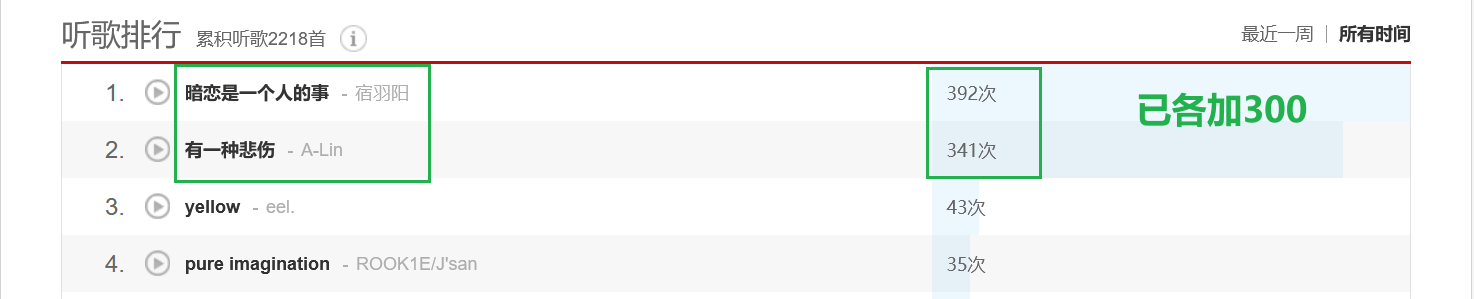
10 |
11 | 如果没有立刻变化,那么在右上角切换到所有时间即可
12 |
13 | 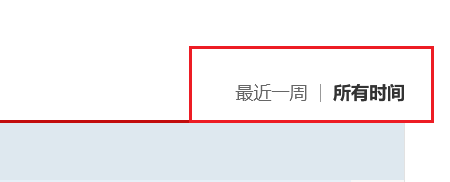
14 |
15 | 有人可能会问上面那个累计播放次数**2218**首没有变化,那是因为总数的累计播放只计算不重复的歌曲。
16 |
17 | 调用的API地址是(这个API可以自己搭建):
18 |
19 | 
20 |
21 | 打开软件填好账号密码(**MD5**)和**API**就可以开始执行任务了
22 |
23 | 软件的截图是这样
24 |
25 | 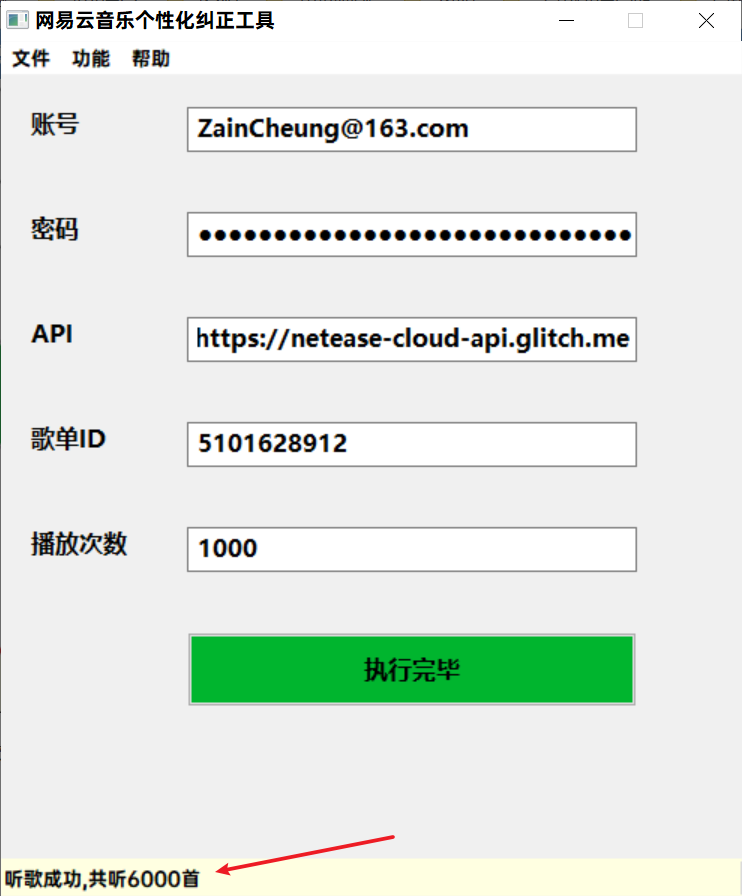
26 |
27 | 这个歌单的`id`为`5101628912`,一共有6首歌,播放次数填写为`1000`,点击开始执行后等待几秒钟便可以在软件下方的状态栏看到反馈,这里一共听了6000首。
--------------------------------------------------------------------------------
/docs/api/server.md:
--------------------------------------------------------------------------------
1 | ## 服务器部署 {docsify-ignore-all}
2 |
3 | 部署到服务器,对于新手还是比较建议安装宝塔面板,然后就可以在浏览器中进行界面化操作,免得有的人不会Linux的命令行。
4 |
5 | #### 1. 下载PHP
6 |
7 | 确保下载了PHP,版本不要太老就行
8 |
9 | 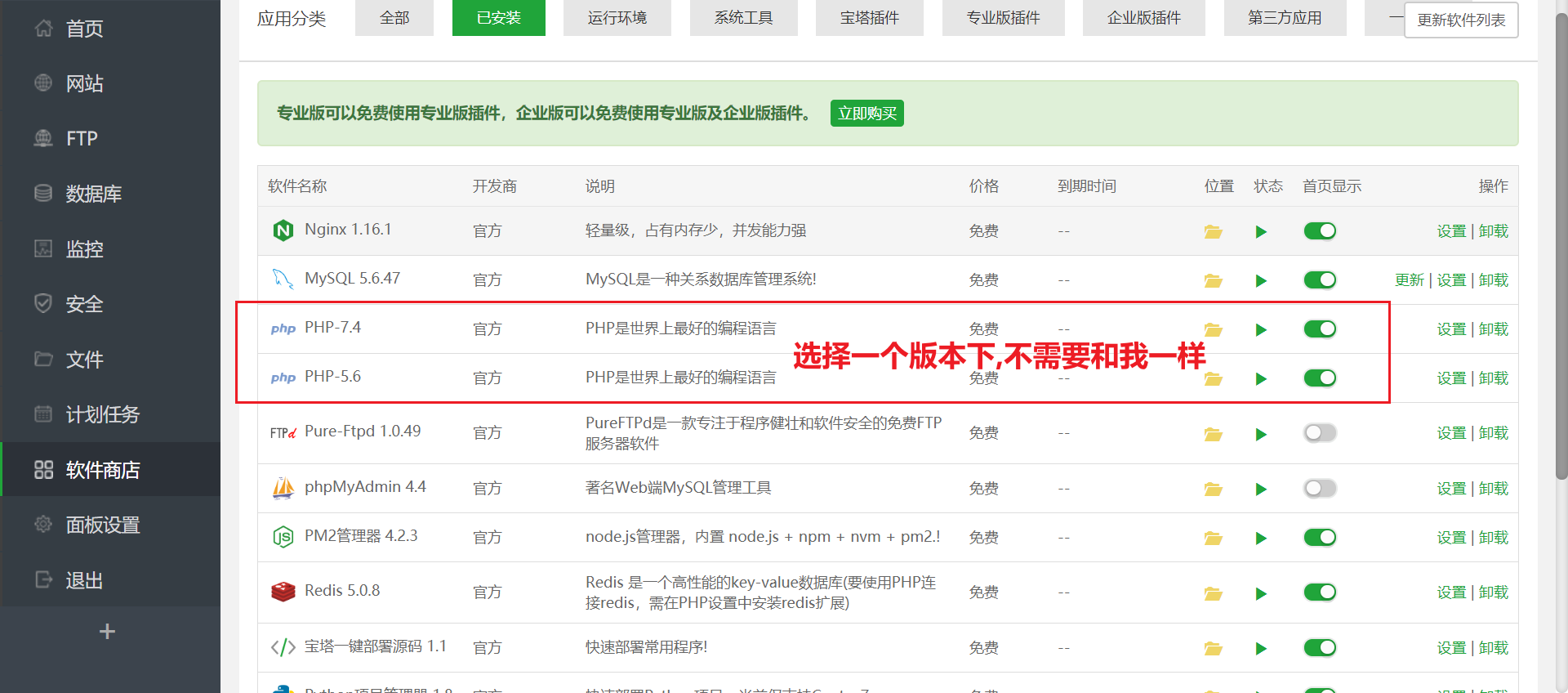
10 |
11 | #### 2. 添加网站
12 |
13 | 填入你提前在你的域名运营商解析的域名,可以是子域名比如,api.xxxxxx.com,写个网站备注,然后根目录选择到下载的项目路径,FTP不创建,数据库不创建默认utf-8就行,程序类型PHP,版本选择下载的版本,提交即可运行你的网站.
14 |
15 | 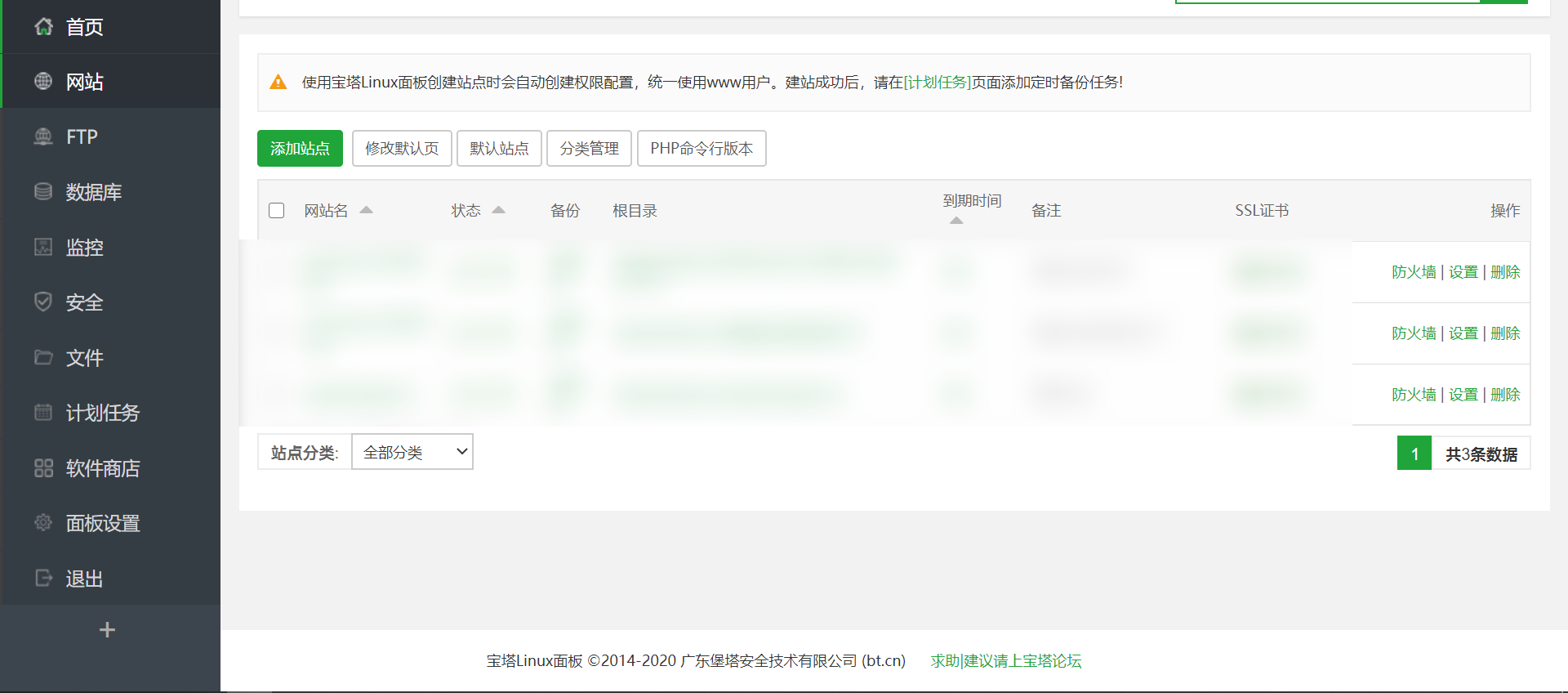
16 |
17 | 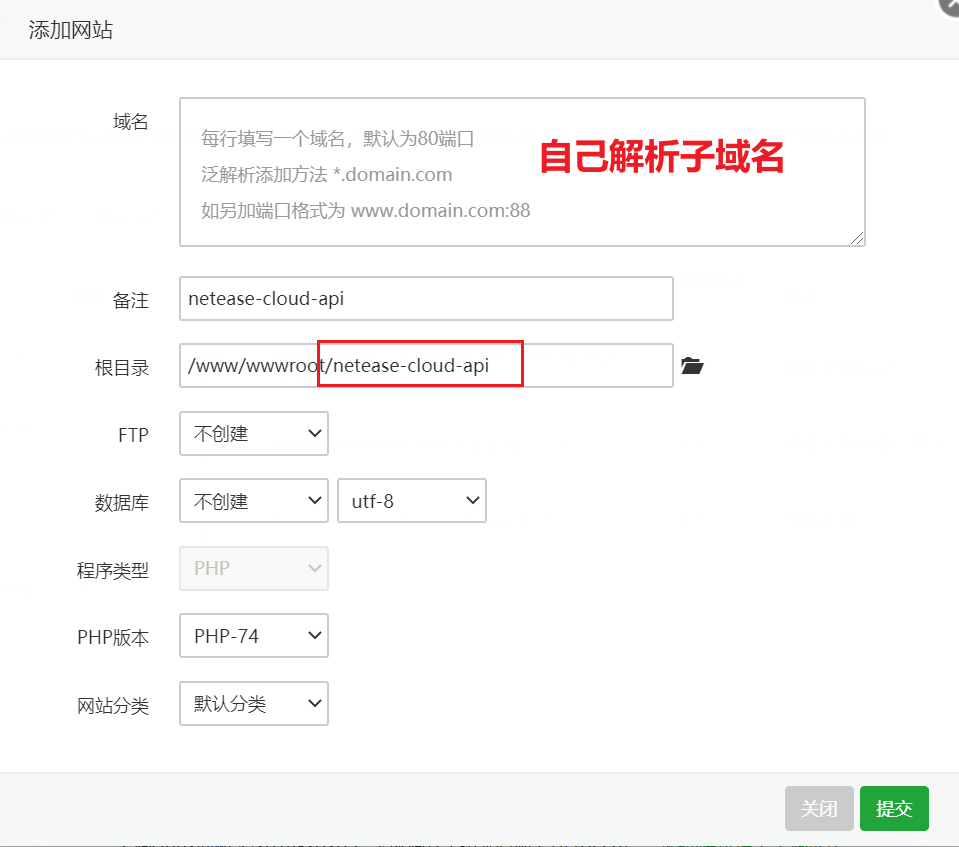
18 |
19 | #### 3. 运行网站
20 |
21 | 这里演示域名为test.com,然后在浏览器里输入你的网站地址,看到欢迎页面即为部署成功
22 |
23 | 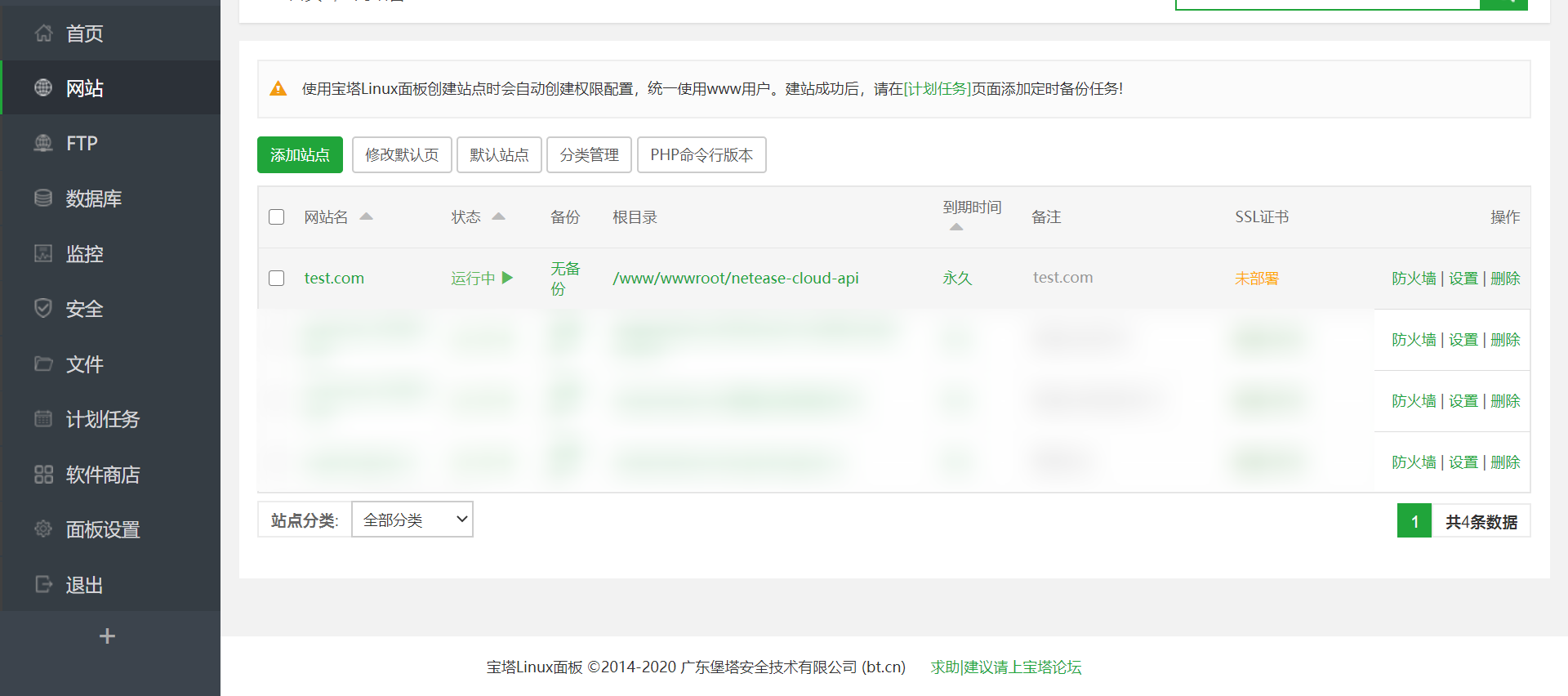
24 |
25 | 
--------------------------------------------------------------------------------
/docs/api/github.md:
--------------------------------------------------------------------------------
1 | ## 从GitHub导入项目 {docsify-ignore-all}
2 |
3 | 使用这种方式部署网站接口,0成本且快速可用,且不用担心环境部署运维等问题,当然如果有条件用自己的服务器搭建也是可以的。
4 |
5 | #### 1. fork项目
6 |
7 | fork这个API项目到你的仓库,记得点个Star哦
8 |
9 | 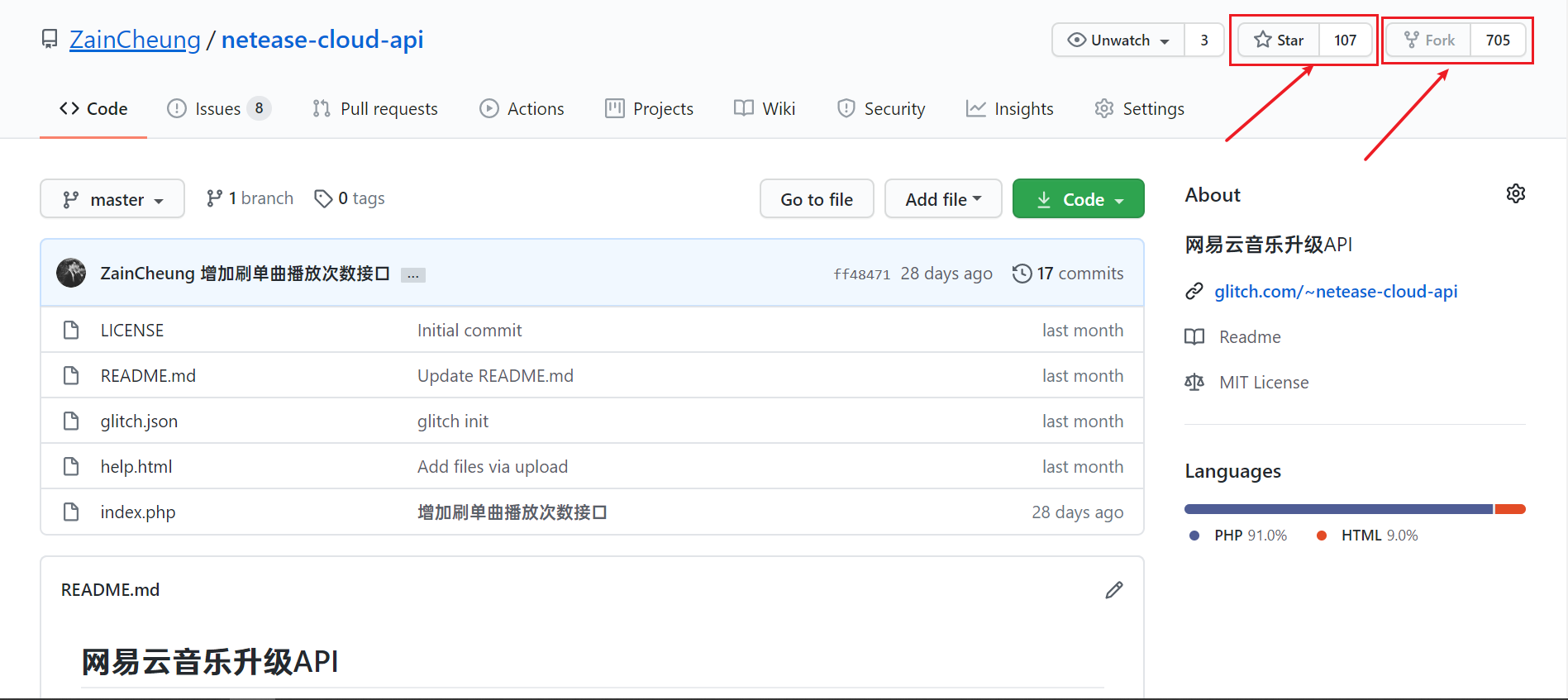
10 |
11 | #### 2. 导入项目
12 |
13 | 打开网站注册并登陆,新建项目,选择从GitHub导入,填入你的的git地址,地址在你的Github项目的clone按钮里,要用https
14 |
15 | 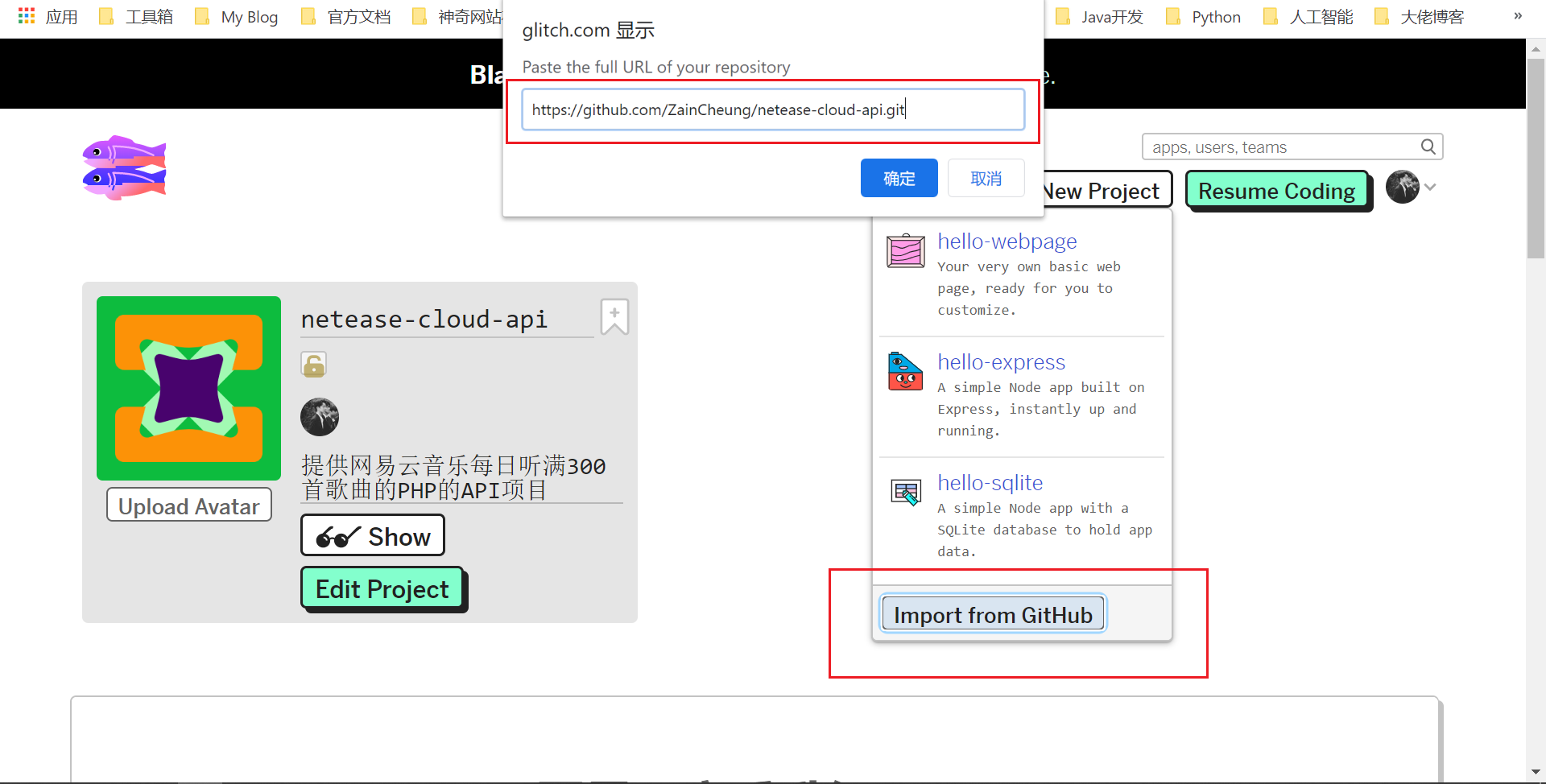
16 |
17 | #### 3. 修改项目名
18 |
19 | 修改你的glitch项目名,例如:netease-test
20 |
21 | 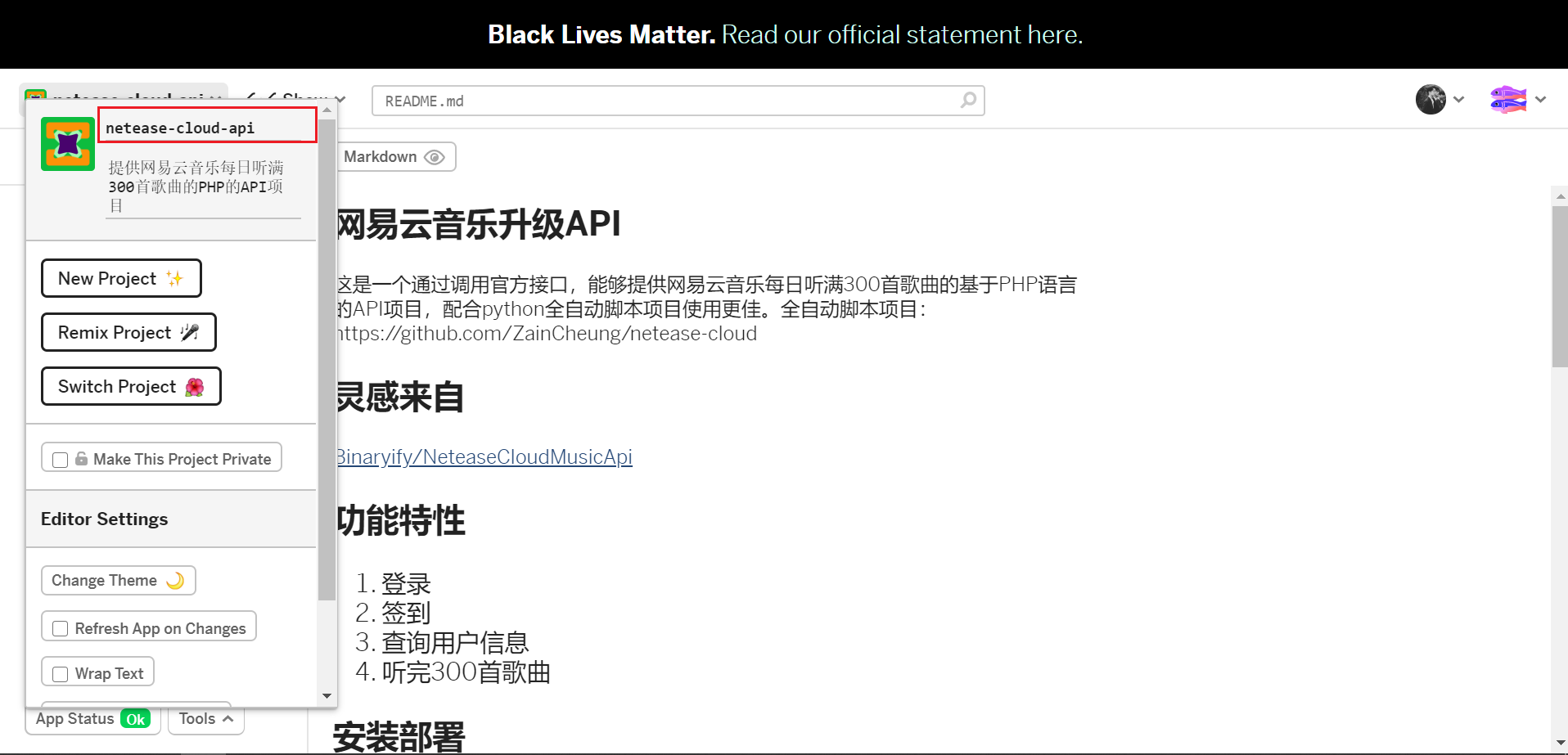
22 |
23 | ------
24 |
25 | #### 4. 得到API地址
26 |
27 | 你的接口名为“项目名.glitch.com”,例如:https://netease-test.glitch.me/
28 |
29 | 
30 |
31 | ##### 又或者
32 |
33 | 
34 |
35 | 访问你的接口看到欢迎页面即部署成功
36 |
37 | 
--------------------------------------------------------------------------------
/docs/attention/README.md:
--------------------------------------------------------------------------------
1 | # 注意事项
2 |
3 | ### Server酱
4 |
5 | 一定要绑定微信才会有效果
6 |
7 | Server酱的官网地址:[http://sc.ftqq.com/](http://sc.ftqq.com/)
8 |
9 | ### MD5
10 |
11 | **制作时选择32位小写!!!**
12 |
13 | 在线“制作”MD5:[https://tool.chinaz.com/tools/md5.aspx](https://tool.chinaz.com/tools/md5.aspx)
14 |
15 | 比较建议大家使用MD5,因为别人即使知道了你的MD5,也很难还原你的密码,相对而言要安全很多,而原密码在你制作MD5时就被隐藏起来了,只有你一个人知道密码
16 |
17 | ### 修改听歌次数
18 |
19 | 注意:云函数修改`index.py`,服务器或者本地的话则是修改`main.py`
20 |
21 | 如果你的等级比较高,然后使用这个发现每次都没有听满300首,那么你可以修改主程序的`start`函数(165行左右)的打卡次数,将3改大点,比如改到6就可以打卡6次
22 |
23 | ```python
24 | for i in range(1,3):
25 | ```
26 |
27 | 如果你嫌打卡速度慢了,可以修改休眠时间,30秒改为10秒之类的,请自行调试
28 |
29 | ```python
30 | time.sleep(30)
31 | ```
32 |
33 | ### 可用性
34 |
35 | 可能有人会说,直接使用网页或者电脑程序每天打卡不就好了,干嘛还要脚本。是的,使用网站和程序确实可以做到一样的效果,不过我懒啊,还总是忘事,所以就让它彻底全自动化,可能也有不少人愿意像我这样折腾一番,然后就可以坐享其成一劳永逸,每天坐等微信提醒就行。
36 |
37 | ### 初衷
38 |
39 | 使用网易云也有挺久了,听的歌也挺多,但总是会听重复的歌,而重复的歌又不算进等级里去,所以还是很想升级的。
--------------------------------------------------------------------------------
/docs/README.md:
--------------------------------------------------------------------------------
1 | # 网易云音乐升级全家桶
2 |
3 |
4 |  5 |
5 |  6 |
6 |  7 |
7 |
8 | 通过调用官方接口,每天自动刷完300首歌,借此可以达到快速升级的目的。
9 |
10 | 一个账号平均耗时为1分钟左右。放在服务器运行即可不需要人工干预,支持无服务器的云函数部署,每天自动听歌做任务,向你的微信发送任务通知。
11 |
12 | ------
13 |
14 | 目前已实现功能:
15 |
16 |
17 | - [x] 每天自动升级
18 | - [x] 任务进度推送到微信
19 | - [x] 自定义网易云日推风格
20 |
21 | 本项目实则由三个项目组成,分别是:
22 |
23 | ?>给账号升级的Python项目:[netease-cloud](https://github.com/ZainCheung/netease-cloud)
24 |
25 | ?>使用PHP搭建的API接口:[netease-cloud-api](https://github.com/ZainCheung/netease-cloud-api)
26 |
27 | ?>使用Python开发的修改日推(每日推荐歌曲)Windows软件:[netease-cloud-fast](https://github.com/ZainCheung/netease-cloud-fastplay)
--------------------------------------------------------------------------------
/docs/download/README.md:
--------------------------------------------------------------------------------
1 | # 下载地址 {docsify-ignore-all}
2 |
3 |
4 |
5 | ## netease-cloud(升级服务)
6 |
7 | 项目地址:[https://github.com/ZainCheung/netease-cloud](https://github.com/ZainCheung/netease-cloud)
8 |
9 |
10 |
11 | ## netease-cloud-api(API接口)
12 |
13 | api接口项目地址:[https://github.com/ZainCheung/netease-cloud-api](https://github.com/ZainCheung/netease-cloud-api)
14 |
15 | api的Demo演示地址:[https://netease-cloud-api.glitch.me/](https://netease-cloud-api.glitch.me/)
16 |
17 | api的Glitch在线服务器:[https://glitch.com/edit/#!/netease-cloud-api](https://glitch.com/edit/#!/netease-cloud-api)
18 |
19 |
20 |
21 | ## netease-cloud-fastplay(快速刷歌)
22 |
23 | 项目地址:[https://github.com/ZainCheung/netease-cloud-fastplay](https://github.com/ZainCheung/netease-cloud-fastplay)
24 |
25 | 软件下载地址(蓝奏云):[https://zaincheung.lanzous.com/i9HD9ehj29g](https://zaincheung.lanzous.com/i9HD9ehj29g)
26 |
27 | 软件下载地址(天翼云):https://cloud.189.cn/t/2mERFjiiUj2u (访问码:fd6v)
28 |
--------------------------------------------------------------------------------
/docs/structure/README.md:
--------------------------------------------------------------------------------
1 | # 项目结构
2 |
3 |
4 |
5 | ## netease-cloud
6 |
7 | ```
8 | |-- 项目文件夹
9 | |-- LICENSE
10 | |-- README.md
11 | |-- account.json
12 | |-- init.config
13 | |-- main.py
14 | |-- requirements.txt
15 | |-- run.log
16 | ```
17 |
18 | `LICENSE`:开源许可证
19 |
20 | `README.md`:项目自述文件
21 |
22 | `account.json`:账号存放文件
23 |
24 | `init.config`:配置文件
25 |
26 | `main.py`:主程序
27 |
28 | `requirements.txt`:依赖清单
29 |
30 | `run.log`:运行日志
31 |
32 |
33 |
34 | ## netease-cloud-fastplay
35 |
36 | ```
37 | |-- 项目文件夹
38 | |-- LICENSE
39 | |-- README.md
40 | |-- init.config
41 | |-- main.py
42 | |-- ui.py
43 | |-- api.py
44 | |-- requirements.txt
45 | |-- run.log
46 | ```
47 |
48 | `LICENSE`:开源许可证
49 |
50 | `README.md`:项目自述文件
51 |
52 | `init.config`:配置文件
53 |
54 | `main.py`:主程序
55 |
56 | `ui.py`:界面模块
57 |
58 | `api.py`:接口模块
59 |
60 | `requirements.txt`:依赖清单
61 |
62 | `run.log`:运行日志
--------------------------------------------------------------------------------
/init.config:
--------------------------------------------------------------------------------
1 | # setting.config(UTF-8)
2 |
3 | [token]
4 | # 网易云音乐账号(手机号/网易邮箱)
5 | account = 150********
6 |
7 | # 密码,明文/MD5,建议自己去MD5在线加密网站给密码加密,然后填到下面
8 | # 明文例如:123456abcd
9 | # MD5例如:efa224f8de55cb668cd01edbccdfc8a9
10 | password = bfa834f7de58cb650ca01edb********
11 |
12 |
13 | [setting]
14 | # 开关的选项只有 True 和 False
15 | # 打卡网站的网址,如果失效请提issue:https://github.com/ZainCheung/netease-cloud-api/issues/new
16 | api = https://netease-cloud-api.glitch.me/
17 |
18 | # 密码是否需要MD5加密,如果是明文密码一定要打开
19 | # true 需要, 则直接将你的密码(明文)填入password,程序会替你进行加密
20 | # false 不需要, 那就自己计算出密码的MD5,然后填入上面的password内
21 | md5Switch = false
22 |
23 | # 是否开启多账号功能,如果打开将会忽视配置文件里的账号而从account.json中寻找账号信息
24 | # 如果选择使用多账号,请配置好account里的账号和密码,即account和password,而sckey不是必需的,如果为空则不会进行微信推送
25 | # 介于账号安全着想,account.json中的密码必须填写md5加密过的,请不要向他人透露自己的明文密码
26 | peopleSwitch = false
27 |
28 | # Server酱的密匙,不需要推送就留空,密匙的免费申请参考:http://sc.ftqq.com/
29 | sckey = SCU97783T70c13167b4daa422f4d419a765eb4ebb5ebc9********
30 |
--------------------------------------------------------------------------------
/README.md:
--------------------------------------------------------------------------------
1 | # 网易云音乐升级全家桶
2 |
3 |
4 |
5 |
6 |
7 |
8 | 通过调用官方接口,每天自动刷完300首歌,借此可以达到快速升级的目的。
9 |
10 | 一个账号平均耗时为1分钟左右。放在服务器运行即可不需要人工干预,支持无服务器的云函数部署,每天自动听歌做任务,向你的微信发送任务通知。
11 |
12 | ------
13 |
14 |
15 |
16 | ### 使用文档: https://zaincheung.gitee.io/netease-cloud
17 |
18 |
19 |
20 | 目前已实现功能:
21 |
22 |
23 | - [x] 每天自动升级
24 | - [x] 任务进度推送到微信
25 | - [x] 自定义网易云日推风格
26 |
27 | 本项目实则由三个项目组成,分别是:
28 |
29 | - 给账号升级的Python项目:[netease-cloud](https://github.com/ZainCheung/netease-cloud)
30 |
31 | - 使用PHP搭建的API接口:[netease-cloud-api](https://github.com/ZainCheung/netease-cloud-api)
32 |
33 | - 使用Python开发的修改日推(每日推荐歌曲)Windows软件:[netease-cloud-fast](https://github.com/ZainCheung/netease-cloud-fastplay)
34 |
--------------------------------------------------------------------------------
/LICENSE:
--------------------------------------------------------------------------------
1 | MIT License
2 |
3 | Copyright (c) 2020 Zain
4 |
5 | Permission is hereby granted, free of charge, to any person obtaining a copy
6 | of this software and associated documentation files (the "Software"), to deal
7 | in the Software without restriction, including without limitation the rights
8 | to use, copy, modify, merge, publish, distribute, sublicense, and/or sell
9 | copies of the Software, and to permit persons to whom the Software is
10 | furnished to do so, subject to the following conditions:
11 |
12 | The above copyright notice and this permission notice shall be included in all
13 | copies or substantial portions of the Software.
14 |
15 | THE SOFTWARE IS PROVIDED "AS IS", WITHOUT WARRANTY OF ANY KIND, EXPRESS OR
16 | IMPLIED, INCLUDING BUT NOT LIMITED TO THE WARRANTIES OF MERCHANTABILITY,
17 | FITNESS FOR A PARTICULAR PURPOSE AND NONINFRINGEMENT. IN NO EVENT SHALL THE
18 | AUTHORS OR COPYRIGHT HOLDERS BE LIABLE FOR ANY CLAIM, DAMAGES OR OTHER
19 | LIABILITY, WHETHER IN AN ACTION OF CONTRACT, TORT OR OTHERWISE, ARISING FROM,
20 | OUT OF OR IN CONNECTION WITH THE SOFTWARE OR THE USE OR OTHER DEALINGS IN THE
21 | SOFTWARE.
22 |
--------------------------------------------------------------------------------
/docs/python/cloud.md:
--------------------------------------------------------------------------------
1 | ## 云函数 {docsify-ignore-all}
2 |
3 | **全民升级时代来了!项目支持了云函数!!!**
4 |
5 | 什么是**云函数**?就是可以让你没有服务器、本地电脑不用下载Python也可以使用这个项目,而且还是**白嫖**!
6 |
7 | 既解决了很多人部署的麻烦,也给了那些被劝退的朋友回来的勇气,**十分钟**便可以全部弄完。
8 |
9 | ### 1. 进入云函数
10 |
11 | 这里拿腾讯云的云函数做个案例,没有的可以免费开通一下,地址:[https://console.cloud.tencent.com/scf/list-create?rid=1&ns=default](https://console.cloud.tencent.com/scf/list-create?rid=1&ns=default)
12 |
13 | ### 2. 新建函数
14 |
15 | 函数名随意,运行环境选**Python 3.6**,创建空白函数,然后下一步
16 |
17 | 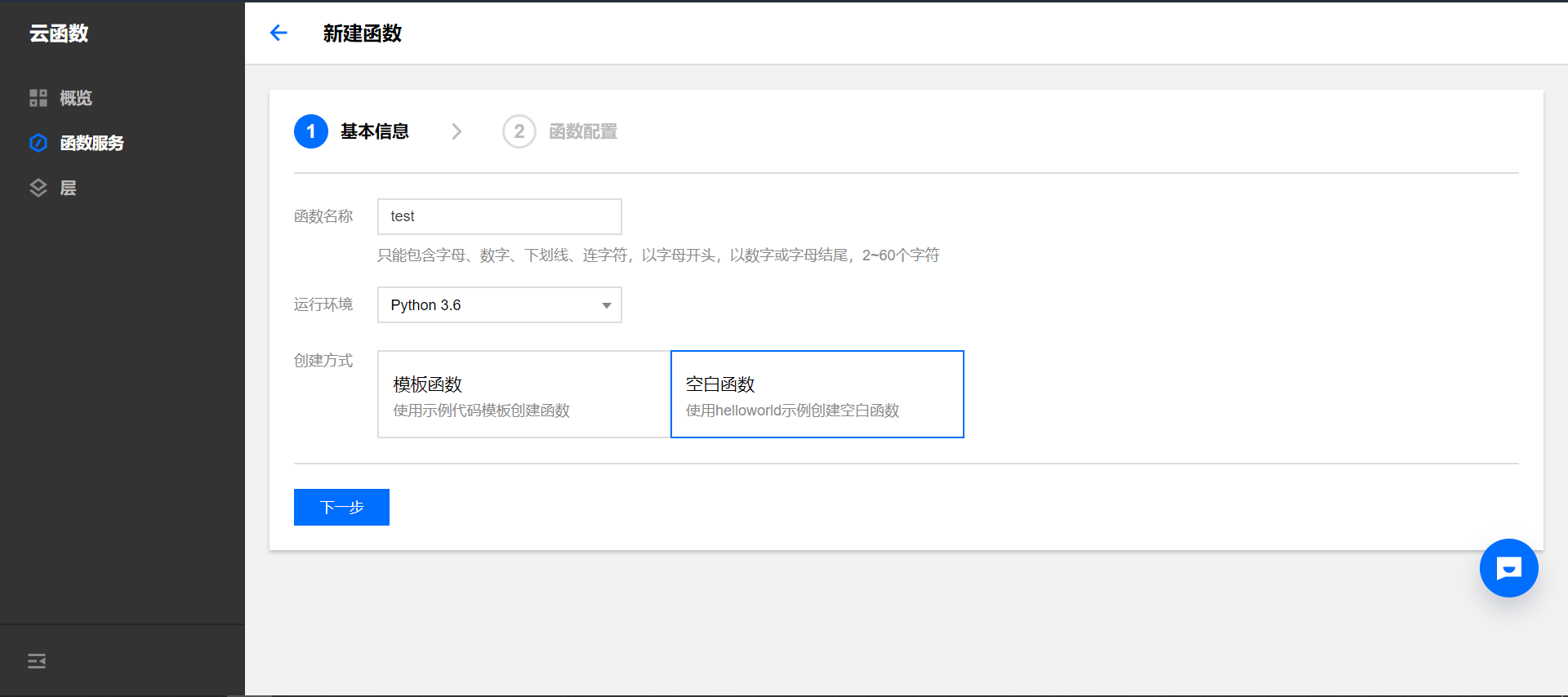
18 |
19 | ### 3. 上传代码
20 |
21 | 确保环境为python 3.6,执行方法改为:`index.main`,提交方式一定要选本地文件夹,然后从GitHub项目克隆Zip压缩包,解压成文件夹,然后点击这个上传把文件夹上传进来,完了后点击下面的高级设置。
22 |
23 | 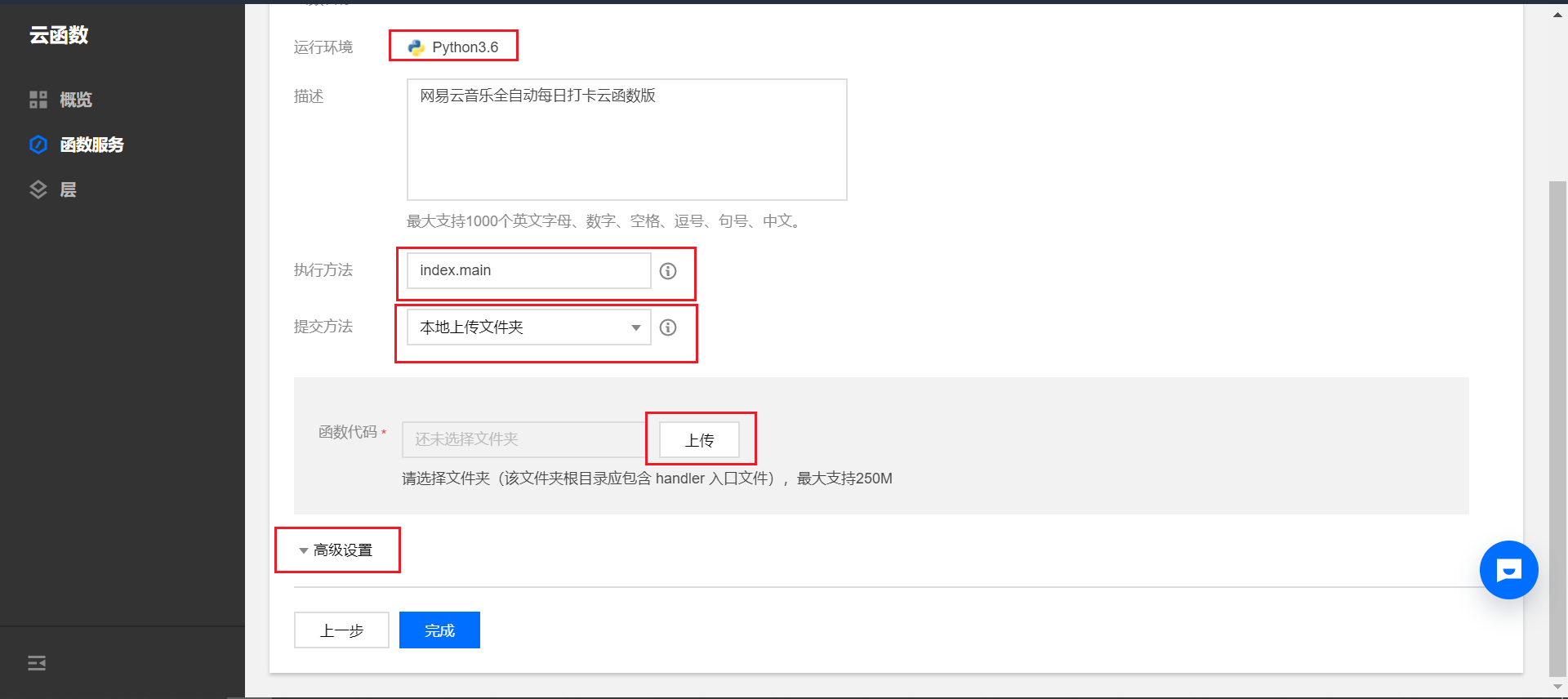
24 |
25 | ### 4. 高级设置
26 |
27 | 内存用不了太大,**64MB**就够了,超时时间改为最大的**900秒**,然后点击最下面的完成。
28 |
29 | 
30 |
31 | ### 5. 配置账号
32 |
33 | 自己改下`init.config`里的账号密码以及Server酱密匙,用到多账号的也要配置`account.json`,做完后点击保存并测试。如果你的配置没有错,稍等几分钟便可以看到结果,在此期间不要刷新页面。结果会在自行日志里。
34 |
35 | 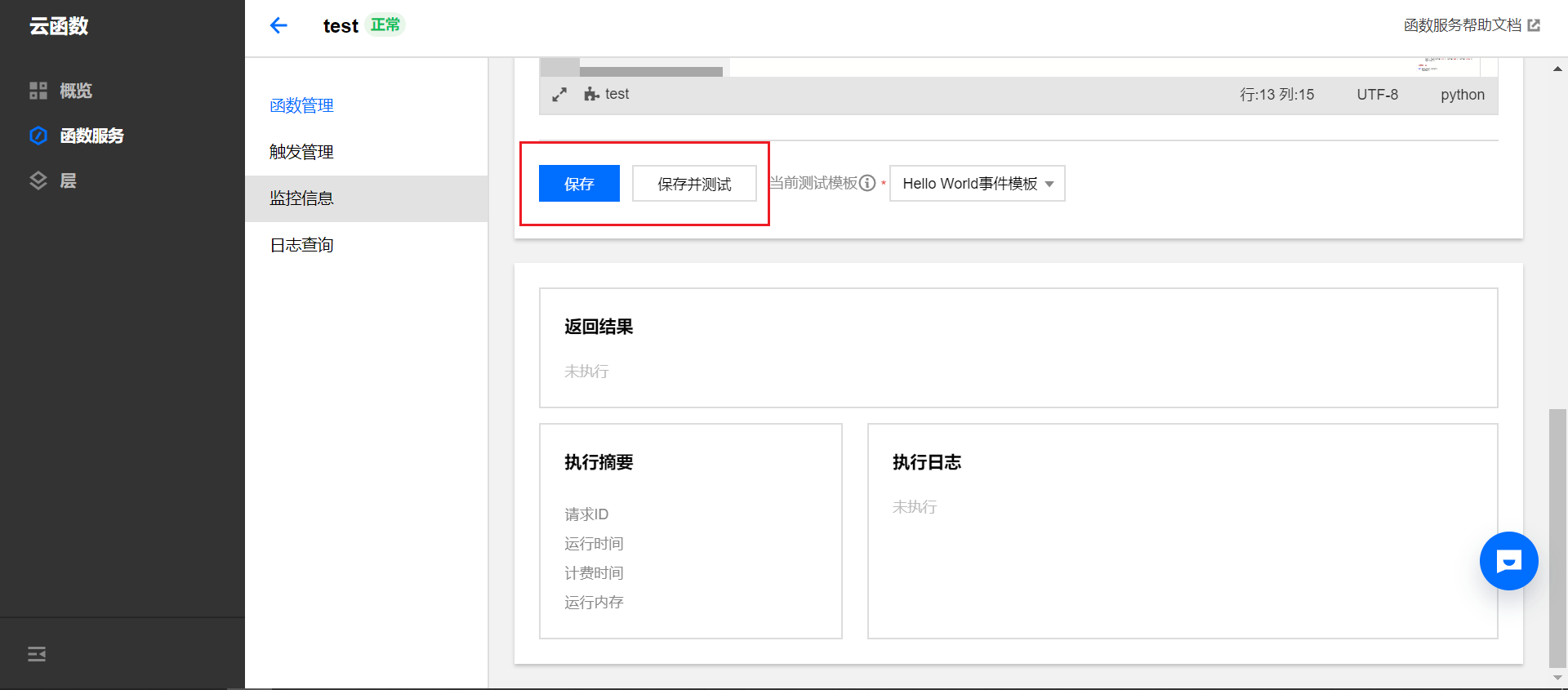
36 |
37 | ### 6. 设置定时
38 |
39 | 点击左边的触发管理,然后新建触发器,触发周期为自定义,表达式就是每天的什么时候做任务,我选择的早上8点30分,可以自行修改,填好后点击提交即可,到此你的每日听歌项目便部署完成,感谢使用!!
40 |
41 | 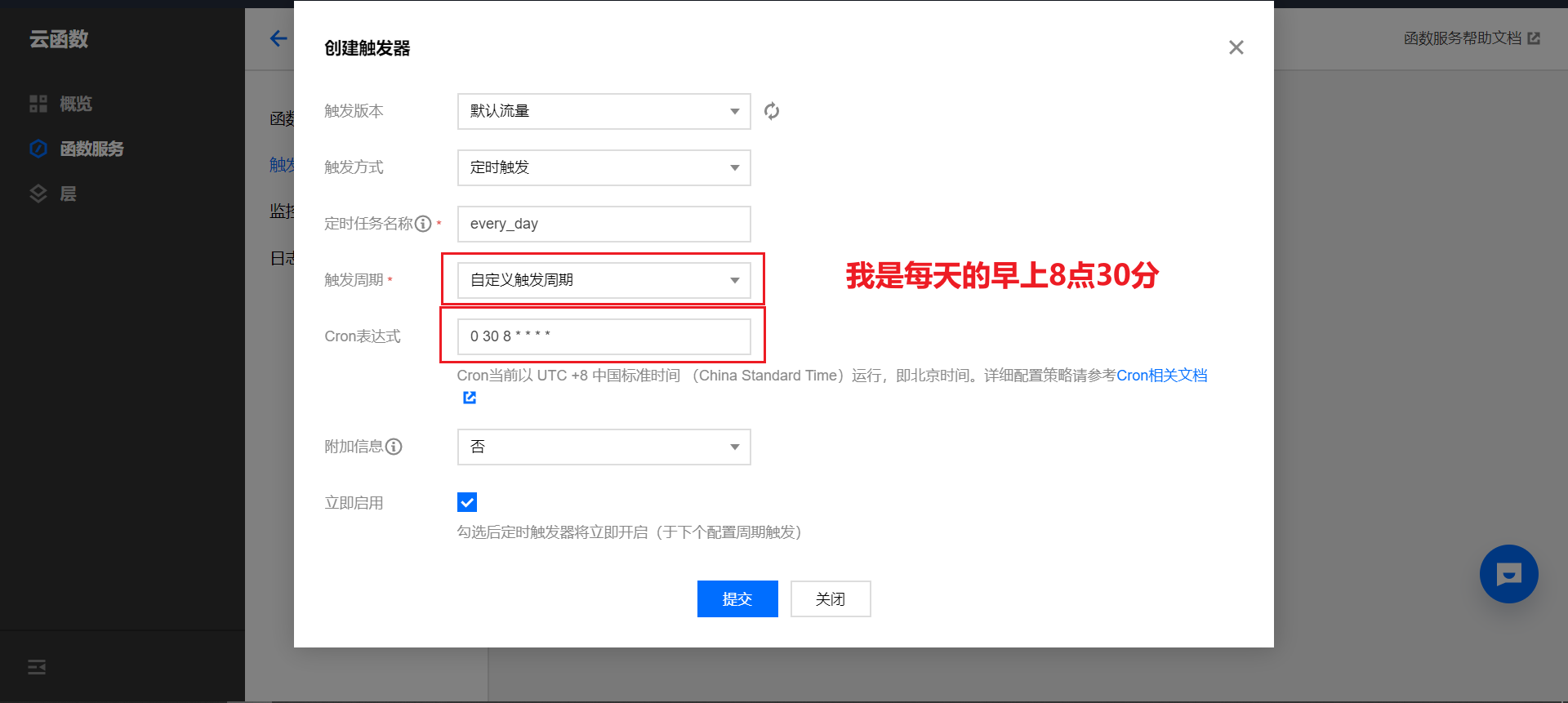
--------------------------------------------------------------------------------
/docs/index.html:
--------------------------------------------------------------------------------
1 |
2 |
3 |
4 |
5 | 网易云音乐升级
6 |
7 |
8 |
9 |
10 |
11 |
12 |
13 |
14 |
24 |
29 |
30 |
31 |
32 |
33 |
34 |
35 |
36 |
37 |
38 |
--------------------------------------------------------------------------------
/docs/question/README.md:
--------------------------------------------------------------------------------
1 | # 常见问题 {docsify-ignore-all}
2 |
3 | ### 1. 确保自己的账号密码都没有问题,却总是提示检查账号密码怎么回事?
4 |
5 | 答:很有可能是当前的API不可用了,默认API使用的人较多,,而且大多都挤在一个时间段用了,,导致平台反应不过来,本身就是国外站,速度比较慢,大家可以分开点做任务,下午晚上都是可以的,不然这个API就会被挤挂掉了,还是建议大家自己搭建API,这样自己访问速度也会快很多。
6 | 大家部署完API记得在 **init.config**文件中更改 **api**地址为自己部署的地址,比如你的域名是api.test.com或者api.glitch.me等等。
7 |
8 |
9 |
10 | ### 2. 已经换了API,还是报错检查账号密码?
11 |
12 | 答:如果确定API可以用,但依旧提示账号密码有问题,还请检查一下配置文件的账号密码以及**md5Switch**有没有选对,密码的MD5一定要是**32位小写**,已经有人因为没注意这个而出错的了。
13 |
14 | 并且 **init.config**文件中要更改 **api**地址为自己部署的地址。
15 |
16 |
17 |
18 | ### 3. 打卡完成后为什么歌曲累计播放没有涨或者涨幅很小?
19 |
20 | 答:打卡完成后听歌数量并不会立刻更新,建议等待半小时或者更多一段时间,由于官方计数规则限制,只有从未听过的歌曲才计入总数,所以如果你的播放量本来就很高,建议加大打卡的循环次数,教程见其他事项第三条。
21 |
22 |
23 |
24 | ### 4. 自己用服务器搭建的API,首页能打开,但点击检查没反应?
25 |
26 | 答:API一定要用PHP部署,如果是纯静态是没有任何作用的,建议新手或者小白使用前两种部署方式,有能力者使用第三种。
27 |
28 | ### 5. 使用多账号报错怎么办?
29 |
30 | 答:在确保其他配置没有问题的情况下,检查一下`account.json`里面的格式是否正确,账号与账号之间要有逗号,具体格式参考项目里的案例。
31 |
32 | ### 6. 使用这个会影响我的听歌风格吗?
33 |
34 | 答:刷的歌都来自您的每日推荐歌单,不影响。
35 |
36 | ### 7. 使用这个我的账号安全吗?
37 |
38 | 答:从技术上来说,在配置文件中填写的账号密码无论是自行加密还是让程序加密(MD5其实不是加密,只是一种摘要算法,用来防止文件信息等被篡改),最终API接口收到的都是MD5,假设你使用的是网上随便找的API,即使别人改过代码,保存了你的账号信息,想要通过彩虹表暴力破解,也是大费周章还只能搞到简单的密码,至于大神级别的Hack可能毫无压力,但人家大神也不稀罕做这些,所以说安全性基本上没有问题。
39 |
40 | ### 8. 其他报错
41 |
42 | ##### 错误:{"errorCode":1,"errorMessage":"user code exception caught","stackTrace":"module 'index' has no attribute 'main_handler'"}
43 |
44 | 答:这个是通过云函数部署报的错,原因是没有改执行方法,请看云函数部署那一节的图片内容。
45 |
46 | ##### 错误:在您选择的文件夹里面找不到netease-cloud-master/index.py文件
47 |
48 | 答:重新去GitHub下载最新的项目。
49 |
50 | ##### 错误:腾讯云提示当前函数状态不支持绑定触发器怎么办?
51 |
52 | 答:新用户初次使用需要对角色授权,允许服务代替用户完成对授权资源的操作。操作步骤见官网文档。
53 |
54 | 还有其他问题可以提Issue,遇到程序报错可以截图或者复制报错信息。
--------------------------------------------------------------------------------
/docs/document/README.md:
--------------------------------------------------------------------------------
1 | # 接口文档
2 |
3 | ## 调用前须知
4 |
5 | !> 本项目不提供线上 demo,请不要轻易信任使用他人提供的公开服务,如果使用,填写密码时一定要自己加密MD5,以免发生安全问题,泄露自己的账号和密码。
6 |
7 | !> 为使用方便,降低门槛, 文档示例接口直接使用了 GET 请求,本项目同时支持 GET/POST 请按实际需求使用
8 |
9 | !> 本项目仅供学习使用,请尊重版权,请勿利用此项目从事商业行为
10 |
11 | !> API登陆接口只接收MD5加密后的密码,并且不会储存你的个人信息,原密码除了你自己谁也不知道
12 |
13 | !> 使用本项目不会影响你的听歌风格,刷的歌都来自你的每日推荐歌单。
14 |
15 | ## 登录
16 |
17 | 说明 : 登录有两个接口,建议使用`encodeURIComponent`对密码编码或者使用`POST`请求,避免某些特殊字符无法解析,如`#`(`#`在url中会被识别为hash,而不是query)
18 |
19 | **无论是手机登录还是邮箱登陆,密码都必须使用MD5,不可以直接传入明文**
20 |
21 | 明文例如:123456abcd
22 |
23 | MD5例如:efa224f8de55cb668cd01edbccdfc8a9
24 |
25 | ### 1. 手机登录
26 |
27 | **必选参数 :**
28 |
29 | `uin`: 手机号码
30 |
31 | `pwd`: 密码
32 |
33 | **接口地址 :** `/?do=login`
34 |
35 | **可选参数 :** `r`: 0至1的随机数,例如`0.20246864764818318`
36 |
37 | **调用例子 :** `/?do=login&uin=xxx&pwd=yyy`
38 |
39 | ### 2. 邮箱登录
40 |
41 | **必选参数 :**
42 |
43 | `uin`: 163 网易邮箱
44 |
45 | `pwd`: 密码
46 |
47 | **接口地址 :** `/?do=email`
48 |
49 | **调用例子 :** `/?do=email&uin=xxx&pwd=yyy`
50 |
51 | 完成登录后 , 会在浏览器保存一个 Cookies 用作登录凭证 , 大部分 API 都需要用到这个 Cookies,请求会自动带上 Cookies
52 |
53 | ## 签到
54 |
55 | 说明:调用接口这个接口可以签到
56 |
57 | **接口地址 :** `/?do=sign`
58 |
59 | ## 打卡听歌
60 |
61 | 说明:由于网易云官方问题,如果打卡听歌只刷了一部分,可以多请求几次,建议每次间隔30秒请求3次左右
62 |
63 | **接口地址 :** `/?do=daka`
64 |
65 | ## 获取用户详情
66 |
67 | 说明 : 登陆后调用此接口 , 传入用户 id, 可以获取用户详情
68 |
69 | **必选参数 :**
70 |
71 | `uid` : 用户 id
72 |
73 | **接口地址 :** `/?do=detail`
74 |
75 | **调用例子 :** `/?do=detail&uid=32953014`
76 |
77 | 注意获取用户信息接口传入的时`uid`,而登陆接口传入的是`uin`,不要搞混淆
78 |
79 | ## 检查接口
80 |
81 | 说明:调用此接口可检查当前项目API是否可用,建议在调用接口前先调用此接口做个判断
82 |
83 | **接口地址 :** `/?do=check`
84 |
85 | ## 刷单曲播放次数
86 |
87 | 说明 : 登陆后调用此接口 , 传入指定歌单id和次数, 可以使该歌单内每首单曲各增加一定的播放次数
88 |
89 | ?> 应用场景常用于定向性训练账号的听歌趋向,可自主纠正系统的个性化推送,让它推送你真正喜欢的内容。这里的次数是指歌单播放次数,比如歌单内有两首歌,次数定为300,则两首歌各增加300次播放次数,如果只想提高某一首歌的次数,那就让这个歌单只留下这一首即可。
90 |
91 | **必选参数 :**
92 |
93 | `id` : 歌单 id
94 |
95 | `time` : 歌单播放次数
96 |
97 | **接口地址 :** `/?do=listen`
98 |
99 | **调用例子 :** `/?do=listen&id=5101628912&time=300`
100 |
--------------------------------------------------------------------------------
/docs/sw.js:
--------------------------------------------------------------------------------
1 | /* ===========================================================
2 | * docsify sw.js
3 | * ===========================================================
4 | * Copyright 2016 @huxpro
5 | * Licensed under Apache 2.0
6 | * Register service worker.
7 | * ========================================================== */
8 |
9 | const RUNTIME = 'docsify'
10 | const HOSTNAME_WHITELIST = [
11 | self.location.hostname,
12 | 'fonts.gstatic.com',
13 | 'fonts.googleapis.com',
14 | 'cdn.jsdelivr.net'
15 | ]
16 |
17 | // The Util Function to hack URLs of intercepted requests
18 | const getFixedUrl = (req) => {
19 | var now = Date.now()
20 | var url = new URL(req.url)
21 |
22 | // 1. fixed http URL
23 | // Just keep syncing with location.protocol
24 | // fetch(httpURL) belongs to active mixed content.
25 | // And fetch(httpRequest) is not supported yet.
26 | url.protocol = self.location.protocol
27 |
28 | // 2. add query for caching-busting.
29 | // Github Pages served with Cache-Control: max-age=600
30 | // max-age on mutable content is error-prone, with SW life of bugs can even extend.
31 | // Until cache mode of Fetch API landed, we have to workaround cache-busting with query string.
32 | // Cache-Control-Bug: https://bugs.chromium.org/p/chromium/issues/detail?id=453190
33 | if (url.hostname === self.location.hostname) {
34 | url.search += (url.search ? '&' : '?') + 'cache-bust=' + now
35 | }
36 | return url.href
37 | }
38 |
39 | /**
40 | * @Lifecycle Activate
41 | * New one activated when old isnt being used.
42 | *
43 | * waitUntil(): activating ====> activated
44 | */
45 | self.addEventListener('activate', event => {
46 | event.waitUntil(self.clients.claim())
47 | })
48 |
49 | /**
50 | * @Functional Fetch
51 | * All network requests are being intercepted here.
52 | *
53 | * void respondWith(Promise r)
54 | */
55 | self.addEventListener('fetch', event => {
56 | // Skip some of cross-origin requests, like those for Google Analytics.
57 | if (HOSTNAME_WHITELIST.indexOf(new URL(event.request.url).hostname) > -1) {
58 | // Stale-while-revalidate
59 | // similar to HTTP's stale-while-revalidate: https://www.mnot.net/blog/2007/12/12/stale
60 | // Upgrade from Jake's to Surma's: https://gist.github.com/surma/eb441223daaedf880801ad80006389f1
61 | const cached = caches.match(event.request)
62 | const fixedUrl = getFixedUrl(event.request)
63 | const fetched = fetch(fixedUrl, { cache: 'no-store' })
64 | const fetchedCopy = fetched.then(resp => resp.clone())
65 |
66 | // Call respondWith() with whatever we get first.
67 | // If the fetch fails (e.g disconnected), wait for the cache.
68 | // If there’s nothing in cache, wait for the fetch.
69 | // If neither yields a response, return offline pages.
70 | event.respondWith(
71 | Promise.race([fetched.catch(_ => cached), cached])
72 | .then(resp => resp || fetched)
73 | .catch(_ => { /* eat any errors */ })
74 | )
75 |
76 | // Update the cache with the version we fetched (only for ok status)
77 | event.waitUntil(
78 | Promise.all([fetchedCopy, caches.open(RUNTIME)])
79 | .then(([response, cache]) => response.ok && cache.put(event.request, response))
80 | .catch(_ => { /* eat any errors */ })
81 | )
82 | }
83 | })
--------------------------------------------------------------------------------
/docs/config/README.md:
--------------------------------------------------------------------------------
1 | # 配置账号
2 |
3 | !> 为了保护账号信息,所有的账号密匙都打上了*号,使用时请换成自己的账号
4 |
5 | 打开`init.config`文件,进行配置
6 |
7 | ```bash
8 | # setting.config(UTF-8)
9 | ```
10 |
11 | 第一句注释是为了声明编码格式,请不要删除该行注释
12 |
13 | ------
14 |
15 |
16 |
17 | ## 账号
18 |
19 | ```bash
20 | [token]
21 | # 网易云音乐账号(手机号/网易邮箱)
22 | account = 150********
23 |
24 | # 密码,明文/MD5,建议自己去MD5在线加密网站给密码加密,然后填到下面
25 | # 明文例如:123456abcd
26 | # MD5例如:efa224f8de55cb668cd01edbccdfc8a9
27 | password = bfa834f7de58cb650ca01edb********
28 | ```
29 |
30 | `token`区域下存放个人账号信息,account存放网易云账号,password存放密码
31 |
32 | !> 注意,这里密码填写类型与后面的md5开关相关联,具体见后面介绍
33 |
34 | ------
35 |
36 |
37 |
38 | ## 设置
39 |
40 | ```bash
41 | [setting]
42 | # 开关的选项只有 True 和 False
43 | # 打卡网站的网址,如果失效请提issue:https://github.com/ZainCheung/netease-cloud-api/issues/new
44 | api = https://netease-cloud-api.glitch.me/
45 | ```
46 |
47 | api是指提供接口的服务器地址,这里提供一个Demo,源码也已经全部开源,如有对项目存在疑问欢迎查看源码,项目地址:[ZainCheung/netease-cloud-api](https://github.com/ZainCheung/netease-cloud-api)
48 |
49 | 另外想快速拥有一个一模一样的api服务并且使用自己定义的域名,那么可以按照上面项目的教程自己快速搭建
50 |
51 | ------
52 |
53 |
54 |
55 | ### MD5
56 |
57 |
58 | ```bash
59 | # 密码是否需要MD5加密,如果是明文密码一定要打开
60 | # true 需要, 则直接将你的密码(明文)填入password,程序会替你进行加密
61 | # false 不需要, 那就自己计算出密码的MD5,然后填入上面的password内
62 | md5Switch = false
63 | ```
64 |
65 | md5开关,如果自己不会加密md5,那么将这个开关置为true,并且将你的密码(明文)填入password,程序会为你加密。如果已经知道密码的md5,则将这个开关置为false,将md5填入上面的password内
66 |
67 | !> 自己制作MD5时一定要是32位小写!!!
68 |
69 | ------
70 |
71 |
72 |
73 | ### 微信提醒
74 |
75 | ```bash
76 | # Server酱的密匙,不需要推送就留空,密匙的免费申请参考:http://sc.ftqq.com/
77 | sckey = SCU97783T70c13167b4daa422f4d419a765eb4ebb5ebc9********
78 | ```
79 |
80 | Server酱,是一个可以向你的微信推送消息的服务,并且消息内容完全自定义,使用之前只需要前往官网,使用GitHub登陆,扫码绑定微信,便可以获得密匙,从此免费使用Server酱
81 |
82 | ------
83 |
84 |
85 |
86 | ## 配置多账号
87 |
88 | ```bash
89 | # 是否开启多账号功能,如果打开将会忽视配置文件里的账号而从account.json中寻找账号信息
90 | # 如果选择使用多账号,请配置好account里的账号和密码,即account和password,而sckey不是必需的,如果为空则不会进行微信推送
91 | # 介于账号安全着想,account.json中的密码必须填写md5加密过的,请不要向他人透露自己的明文密码
92 | peopleSwitch = false
93 | ```
94 |
95 | 这个开关是为那些拥有多账号或者准备带朋友一起使用的朋友准备的,正如注释所说,如果你有多个账号,都想使用这个服务,那么可以打开`peopleSwitch`置为true,那么配置文件里的账号就会被程序忽略,直接读取`account.json`中的账号信息。
96 |
97 | 第一次打开`account.json`,内容会是这样
98 |
99 | ```json
100 | [
101 | {
102 | "account": "ZainCheung@163.com",
103 | "password": "10ca5e4c316f81c5d9b56702********",
104 | "sckey": "SCU97783T70c13167b4daa422f4d419a765eb4ebb5ebc9********"
105 | },
106 | {
107 | "account": "150********",
108 | "password": "bfa834f7de58cb650ca01edb********",
109 | "sckey": "SCU97783T70c13167b4daa422f4d419a765eb4ebb5ebc9********"
110 | },
111 | {
112 | "account": "132********",
113 | "password": "f391235b15781c95384cd5bb********",
114 | "sckey": "SCU97783T70c13167b4daa422f4d419a765eb4ebb5ebc9********"
115 | }
116 | ]
117 | ```
118 |
119 | 可见里面是一个数组文件,成员为账号对象,对象有三个属性,分别是账号、密码、Server酱密匙。
120 |
121 | 不同的账号对应不同的密匙,在做完这个账号的任务后会给这个密匙绑定的微信发送消息提醒,如果留空则不提醒,留空也请注意语法,记得加双引号,列举一个正确的案例
122 |
123 | ```json
124 | [
125 | {
126 | "account": "ZainCheung@163.com",
127 | "password": "10ca5e4c316f81c5d9b56702********",
128 | "sckey": ""
129 | },
130 | ]
131 | ```
132 |
133 | 可见这里的`sckey`为空,那么完成任务后便不会发送消息提醒,如果不确定是否成功可以查看日志
--------------------------------------------------------------------------------
/index.py:
--------------------------------------------------------------------------------
1 | #coding:utf-8
2 | '''
3 | @author: ZainCheung
4 | @LastEditors: Daphel
5 | @description:网易云音乐全自动每日打卡云函数版
6 | @Date: 2020-06-25 14:28:48
7 | @LastEditTime: 2020-08-20 10:16:15
8 | '''
9 | from configparser import ConfigParser
10 | from threading import Timer
11 | import requests
12 | import random
13 | import hashlib
14 | import datetime
15 | import time
16 | import json
17 | import logging
18 | import math
19 |
20 | logger = logging.getLogger()
21 | grade = [10,40,70,130,200,400,1000,3000,8000,20000]
22 | api = ''
23 |
24 | class Task(object):
25 |
26 | '''
27 | 对象的构造函数
28 | '''
29 | def __init__(self, uin, pwd, sckey):
30 | self.uin = uin
31 | self.pwd = pwd
32 | self.sckey = sckey
33 |
34 | '''
35 | 带上用户的cookie去发送数据
36 | url:完整的URL路径
37 | postJson:要以post方式发送的数据
38 | 返回response
39 | '''
40 | def getResponse(self, url, postJson):
41 | response = requests.post(url, data=postJson, headers={'Content-Type':'application/x-www-form-urlencoded'},cookies=self.cookies)
42 | return response
43 |
44 | '''
45 | 登录
46 | '''
47 | def login(self):
48 | data = {"uin":self.uin,"pwd":self.pwd,"r":random.random()}
49 | if '@' in self.uin:
50 | url = api + '?do=email'
51 | else:
52 | url = api + '?do=login'
53 | response = requests.post(url, data=data, headers={'Content-Type':'application/x-www-form-urlencoded'})
54 | code = json.loads(response.text)['code']
55 | self.name = json.loads(response.text)['profile']['nickname']
56 | self.uid = json.loads(response.text)['account']['id']
57 | if code==200:
58 | self.error = ''
59 | else:
60 | self.error = '登录失败,请检查账号'
61 | self.cookies = response.cookies.get_dict()
62 | self.log('登录成功')
63 |
64 | '''
65 | 每日签到
66 | '''
67 | def sign(self):
68 | url = api + '?do=sign'
69 | response = self.getResponse(url, {"r":random.random()})
70 | data = json.loads(response.text)
71 | if data['code'] == 200:
72 | self.log('签到成功')
73 | else:
74 | self.log('重复签到')
75 |
76 | '''
77 | 每日打卡300首歌
78 | '''
79 | def daka(self):
80 | url = api + '?do=daka'
81 | response = self.getResponse(url, {"r":random.random()})
82 | self.log(response.text)
83 |
84 | '''
85 | 查询用户详情
86 | '''
87 | def detail(self):
88 | url = api + '?do=detail'
89 | data = {"uid":self.uid, "r":random.random()}
90 | response = self.getResponse(url, data)
91 | data = json.loads(response.text)
92 | self.level = data['level']
93 | self.listenSongs = data['listenSongs']
94 | self.log('获取用户详情成功')
95 |
96 | '''
97 | Server推送
98 | '''
99 | def server(self):
100 | if self.sckey == '':
101 | return
102 | url = 'https://sc.ftqq.com/' + self.sckey + '.send'
103 | self.diyText() # 构造发送内容
104 | response = requests.get(url,params={"text":self.title, "desp":self.content})
105 | data = json.loads(response.text)
106 | if data['errno'] == 0:
107 | self.log('用户:' + self.name + ' Server酱推送成功')
108 | else:
109 | self.log('用户:' + self.name + ' Server酱推送失败,请检查sckey是否正确')
110 |
111 | '''
112 | 自定义要推送到微信的内容
113 | title:消息的标题
114 | content:消息的内容,支持MarkDown格式
115 | '''
116 | def diyText(self):
117 | today = datetime.date.today()
118 | kaoyan_day = datetime.date(2020,12,21) #2021考研党的末日
119 | date = (kaoyan_day - today).days
120 | one = requests.get('https://api.qinor.cn/soup/').text # 每日一句的api
121 | for count in grade:
122 | if self.level < 10:
123 | if self.listenSongs < 20000:
124 | if self.listenSongs < count:
125 | self.tip = '还需听歌' + str(count-self.listenSongs) + '首即可升级'
126 | break
127 | else:
128 | self.tip = '你已经听够20000首歌曲,如果登录天数达到800天即可满级'
129 | else:
130 | self.tip = '恭喜你已经满级!'
131 | if self.error == '':
132 | state = ("- 目前已完成签到\n"
133 | "- 今日共打卡" + str(self.dakanum) + "次\n"
134 | "- 今日共播放" + str(self.dakaSongs) + "首歌\n"
135 | "- 还需要打卡" + str(self.day) +"天")
136 | self.title = ("网易云今日打卡" + str(self.dakaSongs) + "首,已播放" + str(self.listenSongs) + "首")
137 | else:
138 | state = self.error
139 | self.title = '网易云听歌任务出现问题!'
140 | self.content = (
141 | "------\n"
142 | "#### 账户信息\n"
143 | "- 用户名称:" + str(self.name) + "\n"
144 | "- 当前等级:" + str(self.level) + "级\n"
145 | "- 累计播放:" + str(self.listenSongs) + "首\n"
146 | "- 升级提示:" + self.tip + "\n\n"
147 | "------\n"
148 | "#### 任务状态\n" + str(state) + "\n\n"
149 | "------\n"
150 | "#### 打卡日志\n" + self.dakaSongs_list + "\n\n"
151 | "------\n"
152 | "#### 考研倒计时\n- 距考研还有" + str(date) + "天,主人要加油学习啊!\n\n"
153 | "------\n"
154 | "#### 今日一句\n- " + one + "\n\n")
155 |
156 | '''
157 | 打印日志
158 | '''
159 | def log(self, text):
160 | time_stamp = datetime.datetime.now()
161 | print(time_stamp.strftime('%Y.%m.%d-%H:%M:%S') + ' ' + str(text))
162 | self.time =time_stamp.strftime('%H:%M:%S')
163 | self.list.append("- [" + self.time + "] " + str(text) + "\n\n")
164 |
165 | '''
166 | 开始执行
167 | '''
168 | def start(self):
169 | try:
170 | self.list = []
171 | self.list.append("- 初始化完成\n\n")
172 | self.login()
173 | self.sign()
174 | self.detail()
175 | counter = self.listenSongs
176 | for i in range(1,10):
177 | self.daka()
178 | #self.log('用户:' + self.name + ' 第' + str(i) + '次打卡成功,即将休眠10秒')
179 | self.log('第' + str(i) + '次打卡成功,即将休眠10秒')
180 | time.sleep(10)
181 | self.dakanum = i
182 | self.detail()
183 | self.dakaSongs = self.listenSongs - counter
184 | self.log('今日已打卡播放' + str(self.dakaSongs) + '首')
185 | if self.dakaSongs == 300:
186 | break
187 | if self.listenSongs >= 20000:
188 | self.day = 0
189 | else:
190 | self.day = math.ceil((20000 - self.listenSongs)/300)
191 | self.list.append("- 打卡结束,消息推送\n\n")
192 | self.dakaSongs_list = ''.join(self.list)
193 | self.server()
194 | except:
195 | self.log('用户任务执行中断,请检查账号密码是否正确')
196 | else:
197 | self.log('用户:' + self.name + ' 今日任务已完成')
198 |
199 |
200 | '''
201 | 初始化:读取配置,配置文件为init.config
202 | 返回字典类型的配置对象
203 | '''
204 | def init():
205 | global api # 初始化时设置api
206 | config = ConfigParser()
207 | config.read('init.config', encoding='UTF-8-sig')
208 | uin = config['token']['account']
209 | pwd = config['token']['password']
210 | api = config['setting']['api']
211 | md5Switch = config.getboolean('setting','md5Switch')
212 | peopleSwitch = config.getboolean('setting','peopleSwitch')
213 | sckey = config['setting']['sckey']
214 | logger.info('配置文件读取完毕')
215 | conf = {
216 | 'uin': uin,
217 | 'pwd': pwd,
218 | 'api': api,
219 | 'md5Switch': md5Switch,
220 | 'peopleSwitch':peopleSwitch,
221 | 'sckey':sckey
222 | }
223 | return conf
224 |
225 | '''
226 | MD5加密
227 | str:待加密字符
228 | 返回加密后的字符
229 | '''
230 | def md5(str):
231 | hl = hashlib.md5()
232 | hl.update(str.encode(encoding='utf-8'))
233 | return hl.hexdigest()
234 |
235 | '''
236 | 加载Json文件
237 | jsonPath:json文件的名字,例如account.json
238 | '''
239 | def loadJson(jsonPath):
240 | with open(jsonPath,encoding='utf-8') as f:
241 | account = json.load(f)
242 | return account
243 |
244 | '''
245 | 检查api
246 | '''
247 | def check():
248 | url = api + '?do=check'
249 | respones = requests.get(url)
250 | if respones.status_code == 200:
251 | logger.info('api测试正常')
252 | else:
253 | logger.error('api测试异常')
254 |
255 | '''
256 | 任务池
257 | '''
258 | def taskPool():
259 |
260 | config = init()
261 | check() # 每天对api做一次检查
262 | if config['peopleSwitch'] is True:
263 | logger.info('多人开关已打开,即将执行进行多人任务')
264 | account = loadJson("account.json")
265 | for man in account:
266 | logger.info('账号: ' + man['account'] + ' 开始执行\n========================================')
267 | task = Task(man['account'], man['password'], man['sckey'])
268 | task.start()
269 | time.sleep(10)
270 | logger.info('所有账号已全部完成任务,服务进入休眠中,等待明天重新启动')
271 | else :
272 | logger.info('账号: ' + config['uin'] + ' 开始执行\n========================================')
273 | if config['md5Switch'] is True:
274 | logger.info('MD5开关已打开,即将开始为你加密,密码不会上传至服务器,请知悉')
275 | config['pwd'] = md5(config['pwd'])
276 | task = Task(config['uin'], config['pwd'], config['sckey'])
277 | task.start()
278 |
279 | '''
280 | 程序的入口
281 | '''
282 | def main(event,content):
283 | taskPool()
284 |
--------------------------------------------------------------------------------
/main.py:
--------------------------------------------------------------------------------
1 | #coding:utf-8
2 | '''
3 | @author: ZainCheung
4 | @LastEditors: Daphel
5 | @description:网易云音乐全自动每日打卡300首歌升级账号等级,使用前请先到init.config文件配置
6 | @Date: 2020-06-25 14:28:48
7 | @LastEditTime: 2020-08-20 09:50:18
8 | '''
9 | from configparser import ConfigParser
10 | from threading import Timer
11 | import requests
12 | import random
13 | import hashlib
14 | import datetime
15 | import time
16 | import json
17 | import logging
18 | import math
19 |
20 | logFile = open("run.log", encoding="utf-8", mode="a")
21 | logging.basicConfig(stream=logFile, format="%(asctime)s %(name)s:%(levelname)s:%(message)s", datefmt="%Y-%m-%d %H:%M:%S", level=logging.INFO)
22 | grade = [10,40,70,130,200,400,1000,3000,8000,20000]
23 | api = ''
24 |
25 | class Task(object):
26 |
27 | '''
28 | 对象的构造函数
29 | '''
30 | def __init__(self, uin, pwd, sckey):
31 | self.uin = uin
32 | self.pwd = pwd
33 | self.sckey = sckey
34 |
35 | '''
36 | 带上用户的cookie去发送数据
37 | url:完整的URL路径
38 | postJson:要以post方式发送的数据
39 | 返回response
40 | '''
41 | def getResponse(self, url, postJson):
42 | response = requests.post(url, data=postJson, headers={'Content-Type':'application/x-www-form-urlencoded'},cookies=self.cookies)
43 | return response
44 |
45 | '''
46 | 登录
47 | '''
48 | def login(self):
49 | data = {"uin":self.uin,"pwd":self.pwd,"r":random.random()}
50 | if '@' in self.uin:
51 | url = api + '?do=email'
52 | else:
53 | url = api + '?do=login'
54 | response = requests.post(url, data=data, headers={'Content-Type':'application/x-www-form-urlencoded'})
55 | code = json.loads(response.text)['code']
56 | self.name = json.loads(response.text)['profile']['nickname']
57 | self.uid = json.loads(response.text)['account']['id']
58 | if code==200:
59 | self.error = ''
60 | else:
61 | self.error = '登录失败,请检查账号'
62 | self.cookies = response.cookies.get_dict()
63 | self.log('登录成功')
64 | logging.info("登录成功")
65 |
66 | '''
67 | 每日签到
68 | '''
69 | def sign(self):
70 | url = api + '?do=sign'
71 | response = self.getResponse(url, {"r":random.random()})
72 | data = json.loads(response.text)
73 | if data['code'] == 200:
74 | self.log('签到成功')
75 | logging.info('签到成功')
76 | else:
77 | self.log('重复签到')
78 | logging.info('重复签到')
79 |
80 | '''
81 | 每日打卡300首歌
82 | '''
83 | def daka(self):
84 | url = api + '?do=daka'
85 | response = self.getResponse(url, {"r":random.random()})
86 | self.log(response.text)
87 |
88 | '''
89 | 查询用户详情
90 | '''
91 | def detail(self):
92 | url = api + '?do=detail'
93 | data = {"uid":self.uid, "r":random.random()}
94 | response = self.getResponse(url, data)
95 | data = json.loads(response.text)
96 | self.level = data['level']
97 | self.listenSongs = data['listenSongs']
98 | self.log('获取用户详情成功')
99 | logging.info('获取用户详情成功')
100 |
101 | '''
102 | Server推送
103 | '''
104 | def server(self):
105 | if self.sckey == '':
106 | return
107 | url = 'https://sc.ftqq.com/' + self.sckey + '.send'
108 | self.diyText() # 构造发送内容
109 | response = requests.get(url,params={"text":self.title, "desp":self.content})
110 | data = json.loads(response.text)
111 | if data['errno'] == 0:
112 | self.log('用户:' + self.name + ' Server酱推送成功')
113 | logging.info('用户:' + self.name + ' Server酱推送成功')
114 | else:
115 | self.log('用户:' + self.name + ' Server酱推送失败,请检查sckey是否正确')
116 | logging.info('用户:' + self.name + ' Server酱推送失败,请检查sckey是否正确')
117 |
118 | '''
119 | 自定义要推送到微信的内容
120 | title:消息的标题
121 | content:消息的内容,支持MarkDown格式
122 | '''
123 | def diyText(self):
124 | today = datetime.date.today()
125 | kaoyan_day = datetime.date(2020,12,21) #2021考研党的末日
126 | date = (kaoyan_day - today).days
127 | one = requests.get('https://api.qinor.cn/soup/').text # 每日一句的api
128 | for count in grade:
129 | if self.level < 10:
130 | if self.listenSongs < 20000:
131 | if self.listenSongs < count:
132 | self.tip = '还需听歌' + str(count-self.listenSongs) + '首即可升级'
133 | break
134 | else:
135 | self.tip = '你已经听够20000首歌曲,如果登录天数达到800天即可满级'
136 | else:
137 | self.tip = '恭喜你已经满级!'
138 | if self.error == '':
139 | state = ("- 目前已完成签到\n"
140 | "- 今日共打卡" + str(self.dakanum) + "次\n"
141 | "- 今日共播放" + str(self.dakaSongs) + "首歌\n"
142 | "- 还需要打卡" + str(self.day) +"天")
143 | self.title = ("网易云今日打卡" + str(self.dakaSongs) + "首,已播放" + str(self.listenSongs) + "首")
144 | else:
145 | state = self.error
146 | self.title = '网易云听歌任务出现问题!'
147 | self.content = (
148 | "------\n"
149 | "#### 账户信息\n"
150 | "- 用户名称:" + str(self.name) + "\n"
151 | "- 当前等级:" + str(self.level) + "级\n"
152 | "- 累计播放:" + str(self.listenSongs) + "首\n"
153 | "- 升级提示:" + self.tip + "\n\n"
154 | "------\n"
155 | "#### 任务状态\n" + str(state) + "\n\n"
156 | "------\n"
157 | "#### 注意事项\n- 网易云音乐等级数据每天下午2点更新 \n\n"
158 | "------\n"
159 | "#### 打卡日志\n" + self.dakaSongs_list + "\n\n"
160 | "------\n"
161 | "#### 考研倒计时\n- 距考研还有" + str(date) + "天,主人要加油学习啊!\n\n"
162 | "------\n"
163 | "#### 今日一句\n- " + one + "\n\n")
164 |
165 | '''
166 | 打印日志
167 | '''
168 | def log(self, text):
169 | time_stamp = datetime.datetime.now()
170 | print(time_stamp.strftime('%Y.%m.%d-%H:%M:%S') + ' ' + str(text))
171 | self.time =time_stamp.strftime('%H:%M:%S')
172 | self.list.append("- [" + self.time + "] " + str(text) + "\n\n")
173 |
174 | '''
175 | 开始执行
176 | '''
177 | def start(self):
178 | try:
179 | self.list = []
180 | self.list.append("- 初始化完成\n\n")
181 | self.login()
182 | self.sign()
183 | self.detail()
184 | counter = self.listenSongs
185 | self.list.append("- 开始打卡\n\n")
186 | for i in range(1,10):
187 | self.daka()
188 | # self.log('用户:' + self.name + ' 第' + str(i) + '次打卡成功,即将休眠30秒')
189 | self.log('第' + str(i) + '次打卡成功')
190 | logging.info('用户:' + self.name + ' 第' + str(i) + '次打卡成功,即将休眠30秒')
191 | time.sleep(10)
192 | self.dakanum =i
193 | self.detail()
194 | self.dakaSongs = self.listenSongs - counter
195 | self.log('今日已打卡' + str(self.dakaSongs) + '首')
196 | if self.dakaSongs == 300:
197 | break
198 |
199 | if self.listenSongs >= 20000:
200 | self.day = 0
201 | else:
202 | self.day = math.ceil((20000 - self.listenSongs)/300)
203 |
204 | self.list.append("- 打卡结束\n\n")
205 | self.list.append("- 消息推送\n\n")
206 | self.dakaSongs_list = ''.join(self.list)
207 | self.server()
208 | except:
209 | self.log('用户任务执行中断,请检查账号密码是否正确')
210 | logging.error('用户任务执行中断,请检查账号密码是否正确========================================')
211 | else:
212 | self.log('用户:' + self.name + ' 今日任务已完成')
213 | logging.info('用户:' + self.name + ' 今日任务已完成========================================')
214 |
215 |
216 | '''
217 | 初始化:读取配置,配置文件为init.config
218 | 返回字典类型的配置对象
219 | '''
220 | def init():
221 | global api # 初始化时设置api
222 | config = ConfigParser()
223 | config.read('init.config', encoding='UTF-8-sig')
224 | uin = config['token']['account']
225 | pwd = config['token']['password']
226 | api = config['setting']['api']
227 | md5Switch = config.getboolean('setting','md5Switch')
228 | peopleSwitch = config.getboolean('setting','peopleSwitch')
229 | sckey = config['setting']['sckey']
230 | print('配置文件读取完毕')
231 | logging.info('配置文件读取完毕')
232 | conf = {
233 | 'uin': uin,
234 | 'pwd': pwd,
235 | 'api': api,
236 | 'md5Switch': md5Switch,
237 | 'peopleSwitch':peopleSwitch,
238 | 'sckey':sckey
239 | }
240 | return conf
241 |
242 | '''
243 | MD5加密
244 | str:待加密字符
245 | 返回加密后的字符
246 | '''
247 | def md5(str):
248 | hl = hashlib.md5()
249 | hl.update(str.encode(encoding='utf-8'))
250 | return hl.hexdigest()
251 |
252 | '''
253 | 加载Json文件
254 | jsonPath:json文件的名字,例如account.json
255 | '''
256 | def loadJson(jsonPath):
257 | with open(jsonPath,encoding='utf-8') as f:
258 | account = json.load(f)
259 | return account
260 |
261 | '''
262 | 检查api
263 | '''
264 | def check():
265 | url = api + '?do=check'
266 | respones = requests.get(url)
267 | if respones.status_code == 200:
268 | print('api测试正常')
269 | logging.info('api测试正常')
270 | else:
271 | print('api测试异常')
272 | logging.error('api测试异常')
273 |
274 | '''
275 | 任务池
276 | '''
277 | def taskPool():
278 |
279 | config = init()
280 | check() # 每天对api做一次检查
281 | if config['peopleSwitch'] is True:
282 | print('多人开关已打开,即将开始执行多人任务')
283 | logging.info('多人开关已打开,即将执行进行多人任务')
284 | account = loadJson("account.json")
285 | for man in account:
286 | print('账号: ' + man['account'] + ' 开始执行')
287 | logging.info('账号: ' + man['account'] + ' 开始执行========================================')
288 | task = Task(man['account'], man['password'], man['sckey'])
289 | task.start()
290 | time.sleep(10)
291 | print('所有账号已全部完成任务,服务进入休眠中,等待明天重新启动')
292 | logging.info('所有账号已全部完成任务,服务进入休眠中,等待明天重新启动')
293 | else :
294 | print('账号: ' + config['uin'] + ' 开始执行')
295 | logging.info('账号: ' + config['uin'] + ' 开始执行========================================')
296 | if config['md5Switch'] is True:
297 | print('MD5开关已打开,即将开始为你加密,密码不会上传至服务器,请知悉')
298 | logging.info('MD5开关已打开,即将开始为你加密,密码不会上传至服务器,请知悉')
299 | config['pwd'] = md5(config['pwd'])
300 | task = Task(config['uin'], config['pwd'], config['sckey'])
301 | task.start()
302 |
303 | '''
304 | 程序的入口
305 | '''
306 | if __name__ == '__main__':
307 | while True:
308 | Timer(0, taskPool, ()).start()
309 | time.sleep(60*60*24) # 间隔一天
310 |
--------------------------------------------------------------------------------