├── 0607-sales-person
├── NOTES.md
└── 0607-sales-person.sql
├── 0608-tree-node
├── NOTES.md
├── 0608-tree-node.sql
└── README.md
├── 1341-movie-rating
├── NOTES.md
└── 1341-movie-rating.sql
├── 1421-npv-queries
├── NOTES.md
├── 1421-npv-queries.sql
└── README.md
├── 0610-triangle-judgement
├── NOTES.md
├── 0610-triangle-judgement.sql
└── README.md
├── 1083-sales-analysis-ii
├── NOTES.md
├── 1083-sales-analysis-ii.sql
└── README.md
├── 1084-sales-analysis-iii
├── NOTES.md
└── 1084-sales-analysis-iii.sql
├── 1113-reported-posts
├── NOTES.md
├── 1113-reported-posts.sql
└── README.md
├── 1126-active-businesses
├── NOTES.md
├── 1126-active-businesses.sql
└── README.md
├── 1132-reported-posts-ii
├── NOTES.md
├── 1132-reported-posts-ii.sql
└── README.md
├── 1148-article-views-i
├── NOTES.md
├── 1148-article-views-i.sql
└── README.md
├── 1149-article-views-ii
├── NOTES.md
├── 1149-article-views-ii.sql
└── README.md
├── 1194-tournament-winners
├── NOTES.md
├── 1194-tournament-winners.sql
└── README.md
├── 1303-find-the-team-size
├── NOTES.md
├── 1303-find-the-team-size.sql
└── README.md
├── 1321-restaurant-growth
├── NOTES.md
├── 1321-restaurant-growth.sql
└── README.md
├── 1322-ads-performance
├── NOTES.md
├── 1322-ads-performance.sql
└── README.md
├── 1393-capital-gain-loss
├── NOTES.md
├── 1393-capital-gain-loss.sql
└── README.md
├── 1407-top-travellers
├── NOTES.md
├── 1407-top-travellers.sql
└── README.md
├── 1468-calculate-salaries
├── NOTES.md
└── 1468-calculate-salaries.sql
├── 0511-game-play-analysis-i
├── NOTES.md
├── 0511-game-play-analysis-i.sql
└── README.md
├── 0512-game-play-analysis-ii
├── NOTES.md
├── 0512-game-play-analysis-ii.sql
└── README.md
├── 0534-game-play-analysis-iii
├── NOTES.md
├── 0534-game-play-analysis-iii.sql
└── README.md
├── 0550-game-play-analysis-iv
├── NOTES.md
├── 0550-game-play-analysis-iv.sql
└── README.md
├── 1075-project-employees-i
├── NOTES.md
├── 1075-project-employees-i.sql
└── README.md
├── 1076-project-employees-ii
├── NOTES.md
├── 1076-project-employees-ii.sql
└── README.md
├── 1077-project-employees-iii
├── NOTES.md
├── 1077-project-employees-iii.sql
└── README.md
├── 1193-monthly-transactions-i
├── NOTES.md
├── 1193-monthly-transactions-i.sql
└── README.md
├── 1205-monthly-transactions-ii
├── NOTES.md
├── 1205-monthly-transactions-ii.sql
└── README.md
├── 1225-report-contiguous-dates
├── NOTES.md
├── 1225-report-contiguous-dates.sql
└── README.md
├── 1251-average-selling-price
├── NOTES.md
├── 1251-average-selling-price.sql
└── README.md
├── 1264-page-recommendations
├── NOTES.md
├── 1264-page-recommendations.sql
└── README.md
├── 1445-apples-and-amp-oranges
├── NOTES.md
├── 1445-apples-and-amp-oranges.sql
└── README.md
├── 0603-consecutive-available-seats
├── NOTES.md
├── 0603-consecutive-available-seats.sql
└── README.md
├── 0613-shortest-distance-in-a-line
├── NOTES.md
├── 0613-shortest-distance-in-a-line.sql
└── README.md
├── 1068-product-sales-analysis-i
├── NOTES.md
├── 1068-product-sales-analysis-i.sql
└── README.md
├── 1173-immediate-food-delivery-i
├── NOTES.md
├── 1173-immediate-food-delivery-i.sql
└── README.md
├── 1280-students-and-examinations
├── NOTES.md
└── 1280-students-and-examinations.sql
├── 1294-weather-type-in-each-country
├── NOTES.md
└── 1294-weather-type-in-each-country.sql
├── 1384-total-sales-amount-by-year
├── NOTES.md
├── 1384-total-sales-amount-by-year.sql
└── README.md
├── 1440-evaluate-boolean-expression
├── NOTES.md
├── 1440-evaluate-boolean-expression.sql
└── README.md
├── 1511-customer-order-frequency
├── NOTES.md
└── 1511-customer-order-frequency.sql
├── 1532-the-most-recent-three-orders
├── NOTES.md
└── 1532-the-most-recent-three-orders.sql
├── 1045-customers-who-bought-all-products
├── NOTES.md
└── 1045-customers-who-bought-all-products.sql
├── 1112-highest-grade-for-each-student
├── NOTES.md
├── 1112-highest-grade-for-each-student.sql
└── README.md
├── 1164-product-price-at-a-given-date
├── NOTES.md
├── 1164-product-price-at-a-given-date.sql
└── README.md
├── 1204-last-person-to-fit-in-the-bus
├── NOTES.md
├── 1204-last-person-to-fit-in-the-bus.sql
└── README.md
├── 1350-students-with-invalid-departments
├── NOTES.md
├── 1350-students-with-invalid-departments.sql
└── README.md
├── 1484-group-sold-products-by-the-date
├── NOTES.md
├── 1484-group-sold-products-by-the-date.sql
└── README.md
├── 1517-find-users-with-valid-e-mails
├── NOTES.md
├── 1517-find-users-with-valid-e-mails.sql
└── README.md
├── 0571-find-median-given-frequency-of-numbers
├── NOTES.md
├── 0571-find-median-given-frequency-of-numbers.sql
└── README.md
├── 0580-count-student-number-in-departments
├── NOTES.md
├── 0580-count-student-number-in-departments.sql
└── README.md
├── 0615-average-salary-departments-vs-company
├── NOTES.md
├── 0615-average-salary-departments-vs-company.sql
└── README.md
├── 1141-user-activity-for-the-past-30-days-i
├── NOTES.md
├── 1141-user-activity-for-the-past-30-days-i.sql
└── README.md
├── 1212-team-scores-in-football-tournament
├── NOTES.md
└── 1212-team-scores-in-football-tournament.sql
├── 1270-all-people-report-to-the-given-manager
├── NOTES.md
├── 1270-all-people-report-to-the-given-manager.sql
└── README.md
├── 1308-running-total-for-different-genders
├── NOTES.md
├── 1308-running-total-for-different-genders.sql
└── README.md
├── 1327-list-the-products-ordered-in-a-period
├── NOTES.md
├── 1327-list-the-products-ordered-in-a-period.sql
└── README.md
├── 1369-get-the-second-most-recent-activity
├── NOTES.md
├── 1369-get-the-second-most-recent-activity.sql
└── README.md
├── 1412-find-the-quiet-students-in-all-exams
├── NOTES.md
├── 1412-find-the-quiet-students-in-all-exams.sql
└── README.md
├── 1495-friendly-movies-streamed-last-month
├── NOTES.md
├── 1495-friendly-movies-streamed-last-month.sql
└── README.md
├── 1501-countries-you-can-safely-invest-in
├── NOTES.md
└── 1501-countries-you-can-safely-invest-in.sql
├── 0586-customer-placing-the-largest-number-of-orders
├── NOTES.md
├── 0586-customer-placing-the-largest-number-of-orders.sql
└── README.md
├── 1378-replace-employee-id-with-the-unique-identifier
├── NOTES.md
├── 1378-replace-employee-id-with-the-unique-identifier.sql
└── README.md
├── 1285-find-the-start-and-end-number-of-continuous-ranges
├── NOTES.md
├── 1285-find-the-start-and-end-number-of-continuous-ranges.sql
└── README.md
├── 1050-actors-and-directors-who-cooperated-at-least-three-times
├── NOTES.md
├── 1050-actors-and-directors-who-cooperated-at-least-three-times.sql
└── README.md
├── 1082-sales-analysis-i
├── 1082-sales-analysis-i.sql
└── README.md
├── 1098-unpopular-books
├── NOTES.md
├── 1098-unpopular-books.sql
└── README.md
├── 0570-managers-with-at-least-5-direct-reports
├── 0570-managers-with-at-least-5-direct-reports.sql
├── NOTES.md
└── README.md
├── 1097-game-play-analysis-v
├── NOTES.md
├── 1097-game-play-analysis-v.sql
└── README.md
├── 1336-number-of-transactions-per-visit
├── 1336-number-of-transactions-per-visit.sql
└── NOTES.md
├── LICENSE
└── README.md
/0607-sales-person/NOTES.md:
--------------------------------------------------------------------------------
1 |
--------------------------------------------------------------------------------
/0608-tree-node/NOTES.md:
--------------------------------------------------------------------------------
1 |
--------------------------------------------------------------------------------
/1341-movie-rating/NOTES.md:
--------------------------------------------------------------------------------
1 |
--------------------------------------------------------------------------------
/1421-npv-queries/NOTES.md:
--------------------------------------------------------------------------------
1 |
--------------------------------------------------------------------------------
/0610-triangle-judgement/NOTES.md:
--------------------------------------------------------------------------------
1 |
--------------------------------------------------------------------------------
/1083-sales-analysis-ii/NOTES.md:
--------------------------------------------------------------------------------
1 |
--------------------------------------------------------------------------------
/1084-sales-analysis-iii/NOTES.md:
--------------------------------------------------------------------------------
1 |
--------------------------------------------------------------------------------
/1113-reported-posts/NOTES.md:
--------------------------------------------------------------------------------
1 |
--------------------------------------------------------------------------------
/1126-active-businesses/NOTES.md:
--------------------------------------------------------------------------------
1 |
--------------------------------------------------------------------------------
/1132-reported-posts-ii/NOTES.md:
--------------------------------------------------------------------------------
1 |
--------------------------------------------------------------------------------
/1148-article-views-i/NOTES.md:
--------------------------------------------------------------------------------
1 |
--------------------------------------------------------------------------------
/1149-article-views-ii/NOTES.md:
--------------------------------------------------------------------------------
1 |
--------------------------------------------------------------------------------
/1194-tournament-winners/NOTES.md:
--------------------------------------------------------------------------------
1 |
--------------------------------------------------------------------------------
/1303-find-the-team-size/NOTES.md:
--------------------------------------------------------------------------------
1 |
--------------------------------------------------------------------------------
/1321-restaurant-growth/NOTES.md:
--------------------------------------------------------------------------------
1 |
--------------------------------------------------------------------------------
/1322-ads-performance/NOTES.md:
--------------------------------------------------------------------------------
1 |
--------------------------------------------------------------------------------
/1393-capital-gain-loss/NOTES.md:
--------------------------------------------------------------------------------
1 |
--------------------------------------------------------------------------------
/1407-top-travellers/NOTES.md:
--------------------------------------------------------------------------------
1 |
--------------------------------------------------------------------------------
/1468-calculate-salaries/NOTES.md:
--------------------------------------------------------------------------------
1 |
--------------------------------------------------------------------------------
/0511-game-play-analysis-i/NOTES.md:
--------------------------------------------------------------------------------
1 |
--------------------------------------------------------------------------------
/0512-game-play-analysis-ii/NOTES.md:
--------------------------------------------------------------------------------
1 |
--------------------------------------------------------------------------------
/0534-game-play-analysis-iii/NOTES.md:
--------------------------------------------------------------------------------
1 |
--------------------------------------------------------------------------------
/0550-game-play-analysis-iv/NOTES.md:
--------------------------------------------------------------------------------
1 |
--------------------------------------------------------------------------------
/1075-project-employees-i/NOTES.md:
--------------------------------------------------------------------------------
1 |
--------------------------------------------------------------------------------
/1076-project-employees-ii/NOTES.md:
--------------------------------------------------------------------------------
1 |
--------------------------------------------------------------------------------
/1077-project-employees-iii/NOTES.md:
--------------------------------------------------------------------------------
1 |
--------------------------------------------------------------------------------
/1193-monthly-transactions-i/NOTES.md:
--------------------------------------------------------------------------------
1 |
--------------------------------------------------------------------------------
/1205-monthly-transactions-ii/NOTES.md:
--------------------------------------------------------------------------------
1 |
--------------------------------------------------------------------------------
/1225-report-contiguous-dates/NOTES.md:
--------------------------------------------------------------------------------
1 |
--------------------------------------------------------------------------------
/1251-average-selling-price/NOTES.md:
--------------------------------------------------------------------------------
1 |
--------------------------------------------------------------------------------
/1264-page-recommendations/NOTES.md:
--------------------------------------------------------------------------------
1 |
--------------------------------------------------------------------------------
/1445-apples-and-amp-oranges/NOTES.md:
--------------------------------------------------------------------------------
1 |
--------------------------------------------------------------------------------
/0603-consecutive-available-seats/NOTES.md:
--------------------------------------------------------------------------------
1 |
--------------------------------------------------------------------------------
/0613-shortest-distance-in-a-line/NOTES.md:
--------------------------------------------------------------------------------
1 |
--------------------------------------------------------------------------------
/1068-product-sales-analysis-i/NOTES.md:
--------------------------------------------------------------------------------
1 |
--------------------------------------------------------------------------------
/1173-immediate-food-delivery-i/NOTES.md:
--------------------------------------------------------------------------------
1 |
--------------------------------------------------------------------------------
/1280-students-and-examinations/NOTES.md:
--------------------------------------------------------------------------------
1 |
--------------------------------------------------------------------------------
/1294-weather-type-in-each-country/NOTES.md:
--------------------------------------------------------------------------------
1 |
--------------------------------------------------------------------------------
/1384-total-sales-amount-by-year/NOTES.md:
--------------------------------------------------------------------------------
1 |
--------------------------------------------------------------------------------
/1440-evaluate-boolean-expression/NOTES.md:
--------------------------------------------------------------------------------
1 |
--------------------------------------------------------------------------------
/1511-customer-order-frequency/NOTES.md:
--------------------------------------------------------------------------------
1 |
--------------------------------------------------------------------------------
/1532-the-most-recent-three-orders/NOTES.md:
--------------------------------------------------------------------------------
1 |
--------------------------------------------------------------------------------
/1045-customers-who-bought-all-products/NOTES.md:
--------------------------------------------------------------------------------
1 |
--------------------------------------------------------------------------------
/1112-highest-grade-for-each-student/NOTES.md:
--------------------------------------------------------------------------------
1 |
--------------------------------------------------------------------------------
/1164-product-price-at-a-given-date/NOTES.md:
--------------------------------------------------------------------------------
1 |
--------------------------------------------------------------------------------
/1204-last-person-to-fit-in-the-bus/NOTES.md:
--------------------------------------------------------------------------------
1 |
--------------------------------------------------------------------------------
/1350-students-with-invalid-departments/NOTES.md:
--------------------------------------------------------------------------------
1 |
--------------------------------------------------------------------------------
/1484-group-sold-products-by-the-date/NOTES.md:
--------------------------------------------------------------------------------
1 |
--------------------------------------------------------------------------------
/1517-find-users-with-valid-e-mails/NOTES.md:
--------------------------------------------------------------------------------
1 |
--------------------------------------------------------------------------------
/0571-find-median-given-frequency-of-numbers/NOTES.md:
--------------------------------------------------------------------------------
1 |
--------------------------------------------------------------------------------
/0580-count-student-number-in-departments/NOTES.md:
--------------------------------------------------------------------------------
1 |
--------------------------------------------------------------------------------
/0615-average-salary-departments-vs-company/NOTES.md:
--------------------------------------------------------------------------------
1 |
--------------------------------------------------------------------------------
/1141-user-activity-for-the-past-30-days-i/NOTES.md:
--------------------------------------------------------------------------------
1 |
--------------------------------------------------------------------------------
/1212-team-scores-in-football-tournament/NOTES.md:
--------------------------------------------------------------------------------
1 |
--------------------------------------------------------------------------------
/1270-all-people-report-to-the-given-manager/NOTES.md:
--------------------------------------------------------------------------------
1 |
--------------------------------------------------------------------------------
/1308-running-total-for-different-genders/NOTES.md:
--------------------------------------------------------------------------------
1 |
--------------------------------------------------------------------------------
/1327-list-the-products-ordered-in-a-period/NOTES.md:
--------------------------------------------------------------------------------
1 |
--------------------------------------------------------------------------------
/1369-get-the-second-most-recent-activity/NOTES.md:
--------------------------------------------------------------------------------
1 |
--------------------------------------------------------------------------------
/1412-find-the-quiet-students-in-all-exams/NOTES.md:
--------------------------------------------------------------------------------
1 |
--------------------------------------------------------------------------------
/1495-friendly-movies-streamed-last-month/NOTES.md:
--------------------------------------------------------------------------------
1 |
--------------------------------------------------------------------------------
/1501-countries-you-can-safely-invest-in/NOTES.md:
--------------------------------------------------------------------------------
1 |
--------------------------------------------------------------------------------
/0586-customer-placing-the-largest-number-of-orders/NOTES.md:
--------------------------------------------------------------------------------
1 |
--------------------------------------------------------------------------------
/1378-replace-employee-id-with-the-unique-identifier/NOTES.md:
--------------------------------------------------------------------------------
1 |
--------------------------------------------------------------------------------
/1285-find-the-start-and-end-number-of-continuous-ranges/NOTES.md:
--------------------------------------------------------------------------------
1 |
--------------------------------------------------------------------------------
/1050-actors-and-directors-who-cooperated-at-least-three-times/NOTES.md:
--------------------------------------------------------------------------------
1 |
--------------------------------------------------------------------------------
/1148-article-views-i/1148-article-views-i.sql:
--------------------------------------------------------------------------------
1 | # Write your MySQL query statement below
2 | SELECT DISTINCT author_id AS id
3 | FROM Views
4 | WHERE author_id = viewer_id
5 | ORDER BY id ASC;
--------------------------------------------------------------------------------
/1082-sales-analysis-i/1082-sales-analysis-i.sql:
--------------------------------------------------------------------------------
1 | SELECT seller_id
2 | FROM Sales
3 | GROUP BY seller_id
4 | HAVING SUM(PRICE) >= ALL (
5 | SELECT SUM(PRICE)
6 | FROM Sales
7 | GROUP BY seller_id
8 | )
9 |
--------------------------------------------------------------------------------
/1098-unpopular-books/NOTES.md:
--------------------------------------------------------------------------------
1 | * Left Join is used, because there are cases when the book has zero sales; If we use inner join then that particular book with zero sales is excluded when we join it with the Orders table.
--------------------------------------------------------------------------------
/1303-find-the-team-size/1303-find-the-team-size.sql:
--------------------------------------------------------------------------------
1 | SELECT
2 | e.employee_id,
3 | COUNT(*) OVER(PARTITION BY e.team_id) AS team_size
4 | FROM
5 | employee AS e
6 | ORDER BY
7 | team_size DESC;
8 |
--------------------------------------------------------------------------------
/1068-product-sales-analysis-i/1068-product-sales-analysis-i.sql:
--------------------------------------------------------------------------------
1 | # Write your MySQL query statement below
2 | SELECT P.product_name, S.year, S.price
3 | FROM Sales S
4 | INNER JOIN Product P
5 | ON S.product_id = P.product_id;
6 |
--------------------------------------------------------------------------------
/0610-triangle-judgement/0610-triangle-judgement.sql:
--------------------------------------------------------------------------------
1 | # Write your MySQL query statement below
2 | SELECT *,
3 | (CASE WHEN x >= (y+z) OR y >= (x+z) OR z >= (x+y)
4 | THEN 'No'
5 | ELSE 'Yes'
6 | END) AS triangle
7 | FROM triangle;
8 |
--------------------------------------------------------------------------------
/1075-project-employees-i/1075-project-employees-i.sql:
--------------------------------------------------------------------------------
1 | SELECT P.project_id, ROUND(AVG(E.experience_years), 2) AS average_years
2 | FROM Project P
3 | INNER JOIN Employee E
4 | ON P.employee_id = E.employee_id
5 | GROUP BY P.project_id;
6 |
--------------------------------------------------------------------------------
/1149-article-views-ii/1149-article-views-ii.sql:
--------------------------------------------------------------------------------
1 | # Write your MySQL query statement below
2 | SELECT DISTINCT viewer_id AS id
3 | FROM Views
4 | GROUP BY viewer_id, view_date
5 | HAVING COUNT(DISTINCT article_id) > 1
6 | ORDER BY viewer_id;
--------------------------------------------------------------------------------
/0534-game-play-analysis-iii/0534-game-play-analysis-iii.sql:
--------------------------------------------------------------------------------
1 | # Write your MySQL query statement below
2 | select player_id, event_date,
3 | sum(games_played) over(partition by player_id order by event_date) games_played_so_far
4 | from Activity;
--------------------------------------------------------------------------------
/0586-customer-placing-the-largest-number-of-orders/0586-customer-placing-the-largest-number-of-orders.sql:
--------------------------------------------------------------------------------
1 | # Write your MySQL query statement below
2 | SELECT customer_number
3 | FROM Orders
4 | GROUP BY customer_number
5 | ORDER BY count(*) DESC
6 | LIMIT 1;
--------------------------------------------------------------------------------
/0613-shortest-distance-in-a-line/0613-shortest-distance-in-a-line.sql:
--------------------------------------------------------------------------------
1 | # Write your MySQL query statement below
2 | SELECT MIN(distance) AS shortest
3 | FROM (
4 | SELECT x, ABS(x - LEAD(x) OVER (ORDER BY x ASC)) AS distance
5 | FROM point
6 | ) AS subquery;
--------------------------------------------------------------------------------
/1045-customers-who-bought-all-products/1045-customers-who-bought-all-products.sql:
--------------------------------------------------------------------------------
1 | # Write your MySQL query statement below
2 | SELECT customer_id
3 | FROM Customer
4 | GROUP BY customer_id
5 | HAVING COUNT(DISTINCT product_key) = (SELECT COUNT(*) FROM Product);
--------------------------------------------------------------------------------
/1173-immediate-food-delivery-i/1173-immediate-food-delivery-i.sql:
--------------------------------------------------------------------------------
1 | # Write your MySQL query statement below
2 | SELECT ROUND((100.0 * COUNT(CASE WHEN order_date = customer_pref_delivery_date THEN 1 END)) / COUNT(*), 2) AS immediate_percentage
3 | FROM Delivery;
--------------------------------------------------------------------------------
/1421-npv-queries/1421-npv-queries.sql:
--------------------------------------------------------------------------------
1 | # Write your MySQL query statement below
2 | SELECT
3 | Q.id,
4 | Q.year,
5 | COALESCE(N.npv, 0) AS npv
6 | FROM
7 | Queries Q
8 | LEFT JOIN
9 | NPV N ON Q.id = N.id AND Q.year = N.year;
10 |
--------------------------------------------------------------------------------
/1308-running-total-for-different-genders/1308-running-total-for-different-genders.sql:
--------------------------------------------------------------------------------
1 | # Write your MySQL query statement below
2 | SELECT
3 | gender,
4 | day,
5 | SUM(score_points) OVER (PARTITION BY gender ORDER BY day) AS total
6 | FROM Scores;
7 |
8 |
--------------------------------------------------------------------------------
/1050-actors-and-directors-who-cooperated-at-least-three-times/1050-actors-and-directors-who-cooperated-at-least-three-times.sql:
--------------------------------------------------------------------------------
1 | # Write your MySQL query statement
2 | SELECT actor_id, director_id
3 | FROM ActorDirector
4 | GROUP BY actor_id, director_id
5 | HAVING COUNT(*) >= 3;
6 |
--------------------------------------------------------------------------------
/1378-replace-employee-id-with-the-unique-identifier/1378-replace-employee-id-with-the-unique-identifier.sql:
--------------------------------------------------------------------------------
1 | # Write your MySQL query statement below
2 | SELECT EmployeeUNI.unique_id, Employees.name
3 | FROM Employees
4 | LEFT JOIN EmployeeUNI
5 | ON Employees.id = EmployeeUNI.id;
6 |
--------------------------------------------------------------------------------
/0603-consecutive-available-seats/0603-consecutive-available-seats.sql:
--------------------------------------------------------------------------------
1 | # Write your MySQL query statement below
2 | SELECT DISTINCT a.seat_id
3 | FROM cinema a
4 | JOIN cinema b
5 | ON ABS(a.seat_id - b.seat_id) = 1
6 | AND a.free = 1
7 | AND b.free = 1
8 | ORDER BY a.seat_id;
9 |
--------------------------------------------------------------------------------
/1393-capital-gain-loss/1393-capital-gain-loss.sql:
--------------------------------------------------------------------------------
1 | # Write your MySQL query statement below
2 | SELECT
3 | stock_name,
4 | SUM(CASE
5 | WHEN operation = 'Buy' THEN -price
6 | ELSE price
7 | END) AS capital_gain_loss
8 | FROM Stocks
9 | GROUP BY stock_name;
10 |
--------------------------------------------------------------------------------
/0512-game-play-analysis-ii/0512-game-play-analysis-ii.sql:
--------------------------------------------------------------------------------
1 | # Write your MySQL query statement below
2 | with CTE as
3 | (select player_id,device_id,dense_rank() over (partition by player_id order by event_date) as rnk
4 | from Activity)
5 | select player_id,device_id
6 | from CTE
7 | where rnk=1;
--------------------------------------------------------------------------------
/0608-tree-node/0608-tree-node.sql:
--------------------------------------------------------------------------------
1 | # Write your MySQL query statement below
2 |
3 | SELECT id,
4 |
5 | CASE
6 | WHEN p_id IS NULL THEN 'Root'
7 | WHEN id IN (SELECT p_id FROM Tree)THEN 'Inner'
8 | ELSE 'Leaf'
9 | END AS type
10 | FROM Tree
11 |
--------------------------------------------------------------------------------
/1204-last-person-to-fit-in-the-bus/1204-last-person-to-fit-in-the-bus.sql:
--------------------------------------------------------------------------------
1 | SELECT person_name
2 | FROM (
3 | SELECT person_name, weight, turn, SUM(weight) OVER (ORDER BY turn) AS cum_sum
4 | FROM queue
5 | ) x
6 | WHERE cum_sum <= 1000
7 | ORDER BY turn DESC
8 | LIMIT 1;
9 |
10 |
--------------------------------------------------------------------------------
/1407-top-travellers/1407-top-travellers.sql:
--------------------------------------------------------------------------------
1 | # Write your MySQL query statement below
2 | SELECT Users.name, COALESCE(SUM(Rides.distance), 0) AS travelled_distance
3 | FROM Users
4 | LEFT JOIN Rides ON Users.id = Rides.user_id
5 | GROUP BY Users.id
6 | ORDER BY travelled_distance DESC, Users.name;
7 |
--------------------------------------------------------------------------------
/1113-reported-posts/1113-reported-posts.sql:
--------------------------------------------------------------------------------
1 | # Write your MySQL query statement below
2 | SELECT
3 | extra AS report_reason,
4 | COUNT(DISTINCT post_id) AS report_count
5 | FROM Actions
6 | WHERE action = 'report' AND action_date = DATE('2019-07-04')
7 | GROUP BY report_reason
8 | HAVING report_count > 0;
--------------------------------------------------------------------------------
/1270-all-people-report-to-the-given-manager/1270-all-people-report-to-the-given-manager.sql:
--------------------------------------------------------------------------------
1 | SELECT e1.employee_id
2 | FROM Employees e1
3 | JOIN Employees e2 ON e1.manager_id = e2.employee_id
4 | JOIN Employees e3 ON e2.manager_id = e3.employee_id
5 | WHERE e3.manager_id = 1
6 | AND e1.employee_id != 1
7 |
8 |
--------------------------------------------------------------------------------
/0570-managers-with-at-least-5-direct-reports/0570-managers-with-at-least-5-direct-reports.sql:
--------------------------------------------------------------------------------
1 | # Write your MySQL query statement below
2 | SELECT E2.name
3 | FROM Employee E1, Employee E2
4 | WHERE E1.managerId = E2.id
5 | GROUP BY E1.managerId
6 | HAVING COUNT(E1.managerId) >= 5
7 |
--------------------------------------------------------------------------------
/1141-user-activity-for-the-past-30-days-i/1141-user-activity-for-the-past-30-days-i.sql:
--------------------------------------------------------------------------------
1 | # Write your MySQL query statement below
2 | SELECT activity_date AS day, COUNT(DISTINCT user_id) AS active_users
3 | FROM Activity
4 | WHERE activity_date BETWEEN '2019-06-28' AND '2019-07-27'
5 | GROUP BY activity_date;
6 |
7 |
--------------------------------------------------------------------------------
/0511-game-play-analysis-i/0511-game-play-analysis-i.sql:
--------------------------------------------------------------------------------
1 | # Write your MySQL query statement below
2 | with CTE as
3 | (select player_id, event_date, dense_rank() over(partition by player_id order by event_date) as rnk
4 | from Activity)
5 |
6 | select player_id, event_date as first_login
7 | from CTE
8 | where
9 | rnk = 1;
--------------------------------------------------------------------------------
/0607-sales-person/0607-sales-person.sql:
--------------------------------------------------------------------------------
1 | # Write your MySQL query statement below
2 | SELECT name
3 | FROM salesperson
4 | WHERE sales_id NOT IN (
5 | SELECT sales_id
6 | FROM orders
7 | WHERE com_id IN (
8 | SELECT com_id
9 | FROM company
10 | WHERE name = 'RED'
11 | )
12 | )
13 |
--------------------------------------------------------------------------------
/1084-sales-analysis-iii/1084-sales-analysis-iii.sql:
--------------------------------------------------------------------------------
1 | # Write your MySQL query statement below
2 | SELECT p.product_id, p.product_name
3 | FROM Product p
4 | JOIN Sales s
5 | ON p.product_id = s.product_id
6 | GROUP BY p.product_id, p.product_name
7 | HAVING MIN(s.sale_date) >= '2019-01-01' AND MAX(s.sale_date) <= '2019-03-31';
--------------------------------------------------------------------------------
/1327-list-the-products-ordered-in-a-period/1327-list-the-products-ordered-in-a-period.sql:
--------------------------------------------------------------------------------
1 | SELECT p.product_name, SUM(o.unit) AS unit
2 | FROM products p
3 | JOIN orders o ON p.product_id = o.product_id
4 | WHERE o.order_date BETWEEN '2020-02-01' AND '2020-02-29'
5 | GROUP BY o.product_id
6 | HAVING SUM(o.unit) >= 100;
7 |
8 |
9 |
--------------------------------------------------------------------------------
/1076-project-employees-ii/1076-project-employees-ii.sql:
--------------------------------------------------------------------------------
1 | WITH project_counts AS (
2 | SELECT project_id, COUNT(employee_id) AS num_employees
3 | FROM Project
4 | GROUP BY project_id
5 | )
6 |
7 | SELECT project_id
8 | FROM project_counts
9 | WHERE num_employees = (SELECT MAX(num_employees) FROM project_counts);
10 |
--------------------------------------------------------------------------------
/0580-count-student-number-in-departments/0580-count-student-number-in-departments.sql:
--------------------------------------------------------------------------------
1 | # Write your MySQL query statement below
2 |
3 | SELECT d.dept_name, COUNT(s.student_id) AS student_number
4 | FROM Department d
5 | LEFT JOIN Student s ON s.dept_id = d.dept_id
6 | GROUP BY d.dept_name
7 | ORDER BY student_number DESC, d.dept_name ASC
8 |
9 |
--------------------------------------------------------------------------------
/1112-highest-grade-for-each-student/1112-highest-grade-for-each-student.sql:
--------------------------------------------------------------------------------
1 | # Write your MySQL query statement below
2 | WITH CTE AS (
3 | SELECT *,
4 | RANK() OVER (PARTITION BY student_id ORDER BY grade DESC, course_id) AS rnk
5 | FROM Enrollments
6 | )
7 |
8 | SELECT student_id, course_id, grade
9 | FROM CTE
10 | WHERE rnk = 1;
11 |
--------------------------------------------------------------------------------
/1285-find-the-start-and-end-number-of-continuous-ranges/1285-find-the-start-and-end-number-of-continuous-ranges.sql:
--------------------------------------------------------------------------------
1 | # Write your MySQL query statement below
2 | SELECT MIN(log_id) AS start_id, MAX(log_id) AS end_id
3 | FROM (
4 | SELECT log_id, log_id - ROW_NUMBER() OVER (ORDER BY log_id) AS grp
5 | FROM Logs
6 | ) t
7 | GROUP BY grp
8 | ORDER BY start_id;
--------------------------------------------------------------------------------
/1083-sales-analysis-ii/1083-sales-analysis-ii.sql:
--------------------------------------------------------------------------------
1 | SELECT DISTINCT s1.buyer_id
2 | FROM Sales s1
3 | JOIN Product p1 ON s1.product_id = p1.product_id
4 | WHERE p1.product_name = 'S8'
5 | AND s1.buyer_id NOT IN (
6 | SELECT DISTINCT s2.buyer_id
7 | FROM Sales s2
8 | JOIN Product p2 ON s2.product_id = p2.product_id
9 | WHERE p2.product_name = 'iPhone'
10 | );
11 |
--------------------------------------------------------------------------------
/1126-active-businesses/1126-active-businesses.sql:
--------------------------------------------------------------------------------
1 | # Write your MySQL query statement below
2 | SELECT business_id
3 | FROM events AS a
4 | JOIN (
5 | SELECT event_type, AVG(occurences) AS av
6 | FROM events
7 | GROUP BY event_type
8 | ) AS b
9 | ON a.event_type = b.event_type
10 | WHERE a.occurences > b.av
11 | GROUP BY business_id
12 | HAVING COUNT(*) > 1;
13 |
--------------------------------------------------------------------------------
/1251-average-selling-price/1251-average-selling-price.sql:
--------------------------------------------------------------------------------
1 | # Write your MySQL query statement below
2 | SELECT
3 | u.product_id,
4 | ROUND(SUM(p.price * u.units) / SUM(u.units), 2) AS average_price
5 | FROM UnitsSold u
6 | JOIN Prices p
7 | ON
8 | u.product_id = p.product_id AND
9 | u.purchase_date BETWEEN p.start_date AND p.end_date
10 | GROUP BY u.product_id;
11 |
--------------------------------------------------------------------------------
/1077-project-employees-iii/1077-project-employees-iii.sql:
--------------------------------------------------------------------------------
1 | WITH CTE AS (
2 | SELECT project_id,
3 | p.employee_id,
4 | RANK() OVER(PARTITION BY project_id ORDER BY experience_years DESC) AS exp_rank
5 | FROM Project p
6 | JOIN Employee e ON p.employee_id = e.employee_id
7 | )
8 |
9 |
10 | SELECT project_id, employee_id
11 | FROM CTE
12 | WHERE exp_rank = 1;
13 |
--------------------------------------------------------------------------------
/1369-get-the-second-most-recent-activity/1369-get-the-second-most-recent-activity.sql:
--------------------------------------------------------------------------------
1 | SELECT username, activity, startDate, endDate
2 | FROM (
3 | SELECT username, activity, startDate, endDate,
4 | RANK() OVER (PARTITION BY username ORDER BY endDate DESC) AS rn
5 | FROM UserActivity
6 | ) tmp
7 | WHERE rn = 2 OR (rn = 1 AND NOT EXISTS (
8 | SELECT 1 FROM UserActivity
9 | WHERE username = tmp.username AND endDate < tmp.endDate))
10 | ;
11 |
--------------------------------------------------------------------------------
/0570-managers-with-at-least-5-direct-reports/NOTES.md:
--------------------------------------------------------------------------------
1 | * The table "Employee" is referenced twice in the query, with aliases "E1" and "E2".
2 | * The condition E1.managerId = E2.id is used to match each employee (E2) with their corresponding manager (E1).
3 | * The GROUP BY E1.managerId groups the results by the manager's ID.
4 | * The HAVING COUNT(E1.managerId) >= 5 filters the grouped results to only include managers who have at least 5 employees reporting to them.
--------------------------------------------------------------------------------
/1132-reported-posts-ii/1132-reported-posts-ii.sql:
--------------------------------------------------------------------------------
1 | # Write your MySQL query statement below
2 | SELECT ROUND(SUM(percent) / COUNT(DISTINCT action_date), 2) AS average_daily_percent
3 | FROM (
4 | SELECT a.action_date,
5 | COUNT(DISTINCT r.post_id) / COUNT(DISTINCT a.post_id) * 100 AS percent
6 | FROM actions a
7 | LEFT JOIN removals r
8 | ON a.post_id = r.post_id
9 | WHERE a.extra = 'spam'
10 | GROUP BY a.action_date
11 | ) temp;
12 |
--------------------------------------------------------------------------------
/1280-students-and-examinations/1280-students-and-examinations.sql:
--------------------------------------------------------------------------------
1 | # Write your MySQL query statement below
2 | SELECT s.student_id,
3 | s.student_name,
4 | sub.subject_name,
5 | COUNT(e.student_id) AS attended_exams
6 | FROM Students s
7 | CROSS JOIN Subjects sub
8 |
9 | LEFT JOIN Examinations e
10 | ON s.student_id = e.student_id AND sub.subject_name = e.subject_name
11 | GROUP BY s.student_id, sub.subject_name
12 | ORDER BY s.student_id, sub.subject_name;
--------------------------------------------------------------------------------
/0550-game-play-analysis-iv/0550-game-play-analysis-iv.sql:
--------------------------------------------------------------------------------
1 | WITH tomorrow_cte AS (
2 | SELECT player_id, DATE_ADD(MIN(event_date), INTERVAL 1 DAY) AS tomorrow_date
3 | FROM Activity
4 | GROUP BY player_id
5 | )
6 |
7 | SELECT ROUND(COUNT(DISTINCT a.player_id) / (SELECT COUNT(DISTINCT player_id)
8 | FROM Activity), 2) AS fraction
9 | FROM Activity a
10 | JOIN tomorrow_cte t ON t.player_id = a.player_id AND t.tomorrow_date = a.event_date
11 |
12 |
--------------------------------------------------------------------------------
/1097-game-play-analysis-v/NOTES.md:
--------------------------------------------------------------------------------
1 | * The query uses two common table expressions (CTEs) to simplify the logic and make the query more readable.
2 | * The first CTE, first_logins, finds the first login date for each player.
3 | * The second CTE, consec_login_info, determines whether each player logged in consecutively (i.e., logged in on the day right after their first login).
4 | * The final query groups the data by install date and calculates the number of installs and day one retention for each install date.
--------------------------------------------------------------------------------
/1164-product-price-at-a-given-date/1164-product-price-at-a-given-date.sql:
--------------------------------------------------------------------------------
1 | # Write your MySQL query statement below
2 | SELECT product_id, new_price AS price
3 | FROM Products
4 | WHERE (product_id, change_date) IN (
5 | SELECT product_id, MAX(change_date)
6 | FROM Products
7 | WHERE change_date <= '2019-08-16'
8 | GROUP BY product_id
9 | )
10 |
11 | UNION
12 |
13 | SELECT DISTINCT product_id, 10
14 | FROM Products
15 | GROUP BY product_id
16 | HAVING MIN(change_date) > '2019-08-16';
17 |
--------------------------------------------------------------------------------
/1264-page-recommendations/1264-page-recommendations.sql:
--------------------------------------------------------------------------------
1 | # Write your MySQL query statement below
2 | SELECT DISTINCT l.page_id AS recommended_page
3 | FROM Likes l
4 | JOIN (
5 | SELECT user2_id AS user_id
6 | FROM Friendship
7 | WHERE user1_id = 1
8 |
9 | UNION
10 |
11 | SELECT user1_id AS user_id
12 | FROM Friendship
13 | WHERE user2_id = 1
14 | ) f
15 | ON l.user_id = f.user_id
16 | WHERE l.page_id NOT IN (
17 | SELECT page_id
18 | FROM Likes
19 | WHERE user_id = 1
20 | )
21 |
--------------------------------------------------------------------------------
/1294-weather-type-in-each-country/1294-weather-type-in-each-country.sql:
--------------------------------------------------------------------------------
1 | # Write your MySQL query statement below
2 | SELECT
3 | c.country_name,
4 | CASE
5 | WHEN AVG(w.weather_state) <= 15 THEN 'Cold'
6 | WHEN AVG(w.weather_state) >= 25 THEN 'Hot'
7 | ELSE 'Warm'
8 | END AS weather_type
9 | FROM
10 | Countries c
11 | JOIN
12 | Weather w ON c.country_id = w.country_id
13 | WHERE
14 | w.day Between '2019-11-01' AND '2019-11-30'
15 | GROUP BY
16 | c.country_name;
17 |
--------------------------------------------------------------------------------
/1341-movie-rating/1341-movie-rating.sql:
--------------------------------------------------------------------------------
1 | (
2 | SELECT u.name AS results
3 | FROM MovieRating r
4 | JOIN Users u
5 | ON r.user_id = u.user_id
6 | GROUP BY r.user_id
7 | ORDER BY COUNT(r.movie_id) DESC, u.name
8 | LIMIT 1
9 | )
10 |
11 | UNION ALL
12 |
13 | (
14 | SELECT m.title AS results
15 | FROM MovieRating r
16 | JOIN Movies m
17 | ON r.movie_id = m.movie_id
18 | WHERE r.created_at LIKE '2020-02%'
19 | GROUP BY r.movie_id
20 | ORDER BY AVG(r.rating) DESC, m.title
21 | LIMIT 1
22 | )
23 |
--------------------------------------------------------------------------------
/1322-ads-performance/1322-ads-performance.sql:
--------------------------------------------------------------------------------
1 | SELECT
2 | ad_id,
3 | COALESCE(
4 | ROUND(
5 | (
6 | SUM(CASE WHEN action = 'clicked' THEN 1 ELSE 0 END)
7 | /
8 | (SUM(CASE WHEN action = 'viewed' THEN 1 ELSE 0 END)
9 | + SUM(CASE WHEN action = 'clicked' THEN 1 ELSE 0 END))
10 | ) * 100,
11 | 2),
12 | 0) AS ctr
13 | FROM
14 | Ads
15 | GROUP BY
16 | ad_id
17 | ORDER BY
18 | ctr DESC,
19 | ad_id;
20 |
--------------------------------------------------------------------------------
/1193-monthly-transactions-i/1193-monthly-transactions-i.sql:
--------------------------------------------------------------------------------
1 | # Write your MySQL query statement below
2 | # Write your MySQL query statement below
3 | SELECT
4 | DATE_FORMAT(trans_date, '%Y-%m') AS month,
5 | country,
6 | COUNT(*) AS trans_count,
7 | SUM(CASE WHEN state = 'approved' THEN 1 ELSE 0 END) AS approved_count,
8 | SUM(amount) AS trans_total_amount,
9 | SUM(CASE WHEN state = 'approved' THEN amount ELSE 0 END) AS approved_total_amount
10 | FROM
11 | Transactions
12 | GROUP BY
13 | month, country;
14 |
--------------------------------------------------------------------------------
/1517-find-users-with-valid-e-mails/1517-find-users-with-valid-e-mails.sql:
--------------------------------------------------------------------------------
1 | -- Select all columns
2 | SELECT *
3 | FROM Users -- From the Users table
4 | WHERE
5 | mail REGEXP '^[a-zA-Z][a-zA-Z0-9_.-]*@leetcode\.com$' -- Where the email adheres to the regular expression. The regex enforces that the email must start with a letter and can then have any alphanumeric characters or special characters ('.', '_', '-'). It must end with '@leetcode.com'.
6 | AND
7 | mail NOT LIKE '%?%'; -- In addition, the email should not contain any '?' character.
8 |
--------------------------------------------------------------------------------
/1194-tournament-winners/1194-tournament-winners.sql:
--------------------------------------------------------------------------------
1 | SELECT group_id, player_id
2 | FROM (
3 | SELECT p.group_id, ps.player_id, SUM(ps.score) AS score
4 | FROM Players p,
5 | (
6 | SELECT first_player AS player_id, first_score AS score
7 | FROM Matches
8 | UNION ALL
9 | SELECT second_player, second_score
10 | FROM Matches
11 | ) ps
12 | WHERE p.player_id = ps.player_id
13 | GROUP BY ps.player_id
14 | ORDER BY group_id, score DESC, player_id
15 | ) top_scores
16 | GROUP BY group_id;
17 |
--------------------------------------------------------------------------------
/1350-students-with-invalid-departments/1350-students-with-invalid-departments.sql:
--------------------------------------------------------------------------------
1 | # Write your MySQL query statement below
2 | -- Select students who are not associated with any department
3 | SELECT
4 | id, -- Selecting student id
5 | name -- Selecting student name
6 | FROM
7 | Students -- From the Students table
8 | WHERE
9 | department_id -- Where the department_id
10 | NOT IN (
11 | SELECT id -- Is not in the list of department ids
12 | FROM Departments -- From the Departments table
13 | );
14 |
15 |
--------------------------------------------------------------------------------
/1321-restaurant-growth/1321-restaurant-growth.sql:
--------------------------------------------------------------------------------
1 | -- This query calculates the distinct visited dates, total amount for a 7-day rolling window, and average amount per day for each date.
2 |
3 | WITH cte AS (
4 | SELECT visited_on,
5 | SUM(amount) OVER (ORDER BY visited_on RANGE BETWEEN INTERVAL 6 DAY PRECEDING AND CURRENT ROW) AS amount,
6 | DENSE_RANK() OVER (ORDER BY visited_on) AS rn
7 | FROM Customer
8 | )
9 |
10 | SELECT DISTINCT visited_on,
11 | amount,
12 | ROUND(amount/7, 2) AS average_amount
13 | FROM cte
14 | WHERE rn >= 7;
15 |
--------------------------------------------------------------------------------
/1440-evaluate-boolean-expression/1440-evaluate-boolean-expression.sql:
--------------------------------------------------------------------------------
1 | # Write your MySQL query statement below
2 | SELECT
3 | E.left_operand,
4 | E.operator,
5 | E.right_operand,
6 | CASE
7 | WHEN E.operator = '>' AND V1.value > V2.value THEN 'true'
8 | WHEN E.operator = '<' AND V1.value < V2.value THEN 'true'
9 | WHEN E.operator = '=' AND V1.value = V2.value THEN 'true'
10 | ELSE 'false'
11 | END as value
12 | FROM
13 | Expressions E
14 | JOIN
15 | Variables V1 ON E.left_operand = V1.name
16 | JOIN
17 | Variables V2 ON E.right_operand = V2.name;
--------------------------------------------------------------------------------
/1098-unpopular-books/1098-unpopular-books.sql:
--------------------------------------------------------------------------------
1 | # Write your MySQL query statement below
2 | SELECT
3 | B.book_id,
4 | B.name
5 | FROM
6 | Books B
7 | LEFT JOIN
8 | (SELECT
9 | O.book_id,
10 | SUM(O.quantity) AS total_sales
11 | FROM
12 | Orders O
13 | WHERE
14 | O.dispatch_date BETWEEN DATE('2018-06-23') AND DATE('2019-06-23')
15 | GROUP BY
16 | O.book_id
17 | ) AS Sales
18 | ON
19 | B.book_id = Sales.book_id
20 | WHERE
21 | (Sales.total_sales < 10 OR Sales.total_sales IS NULL)
22 | AND
23 | B.available_from <= DATE('2019-05-23')
--------------------------------------------------------------------------------
/1445-apples-and-amp-oranges/1445-apples-and-amp-oranges.sql:
--------------------------------------------------------------------------------
1 | -- Calculate the daily difference in 'sold_num' based on whether the fruit is apples or not
2 | SELECT
3 | sale_date, -- Grouping by sale date
4 | SUM(
5 | CASE
6 | WHEN fruit = 'apples' THEN sold_num -- If fruit is 'apples', add the sold_num
7 | ELSE -sold_num -- If fruit is not 'apples', subtract the sold_num
8 | END
9 | ) AS diff -- diff column shows the calculated daily difference
10 | FROM
11 | Sales -- Using the Sales table
12 | GROUP BY
13 | sale_date -- Grouping the results by sale date
14 | ORDER BY
15 | sale_date; -- Ordering the results by sale date
16 |
17 |
--------------------------------------------------------------------------------
/1532-the-most-recent-three-orders/1532-the-most-recent-three-orders.sql:
--------------------------------------------------------------------------------
1 | # Write your MySQL query statement below
2 | WITH Order_Ranks AS (
3 | SELECT
4 | C.name AS customer_name,
5 | O.customer_id,
6 | O.order_id,
7 | O.order_date,
8 | RANK() OVER(PARTITION BY O.customer_id ORDER BY O.order_date DESC) AS order_rank
9 | FROM
10 | Customers C
11 | JOIN
12 | Orders O ON C.customer_id = O.customer_id
13 | )
14 |
15 | SELECT
16 | customer_name,
17 | customer_id,
18 | order_id,
19 | order_date
20 | FROM
21 | Order_Ranks
22 | WHERE
23 | order_rank <= 3
24 | ORDER BY
25 | customer_name ASC,
26 | customer_id ASC,
27 | order_date DESC;
28 |
--------------------------------------------------------------------------------
/1384-total-sales-amount-by-year/1384-total-sales-amount-by-year.sql:
--------------------------------------------------------------------------------
1 | # Write your MySQL query statement below
2 | WITH RECURSIVE date_range AS (
3 | SELECT product_id, period_start AS sales_date, period_end, average_daily_sales
4 | FROM Sales
5 | UNION ALL
6 | SELECT product_id, sales_date + INTERVAL 1 DAY, period_end, average_daily_sales
7 | FROM date_range
8 | WHERE sales_date < period_end
9 | )
10 |
11 | SELECT
12 | p.product_id,
13 | p.product_name,
14 | CAST(YEAR(d.sales_date) AS CHAR) AS report_year,
15 | SUM(d.average_daily_sales) AS total_amount
16 | FROM date_range AS d
17 | JOIN Product AS p ON p.product_id = d.product_id
18 | GROUP BY p.product_id, p.product_name, report_year
19 | ORDER BY p.product_id, report_year;
20 |
21 |
--------------------------------------------------------------------------------
/1212-team-scores-in-football-tournament/1212-team-scores-in-football-tournament.sql:
--------------------------------------------------------------------------------
1 | SELECT team_id, team_name, COALESCE(SUM(num_points), 0) as num_points
2 | FROM (
3 | SELECT t.team_id, t.team_name,
4 | CASE
5 | WHEN host_goals > guest_goals THEN 3
6 | WHEN host_goals = guest_goals THEN 1
7 | ELSE 0
8 | END AS num_points
9 | FROM Teams t LEFT JOIN Matches m ON t.team_id = m.host_team
10 |
11 | UNION ALL
12 |
13 | SELECT t.team_id, t.team_name,
14 | CASE
15 | WHEN guest_goals > host_goals THEN 3
16 | WHEN guest_goals = host_goals THEN 1
17 | ELSE 0
18 | END AS num_points
19 | FROM Teams t LEFT JOIN Matches m ON t.team_id = m.guest_team
20 | ) as all_matches
21 | GROUP BY team_id
22 | ORDER BY num_points DESC, team_id ASC;
23 |
--------------------------------------------------------------------------------
/1225-report-contiguous-dates/1225-report-contiguous-dates.sql:
--------------------------------------------------------------------------------
1 | WITH combined AS (
2 | SELECT fail_date AS task_date, 'failed' AS period_state
3 | FROM Failed
4 | WHERE fail_date BETWEEN '2019-01-01' AND '2019-12-31'
5 | UNION ALL
6 | SELECT success_date AS task_date, 'succeeded' AS period_state
7 | FROM Succeeded
8 | WHERE success_date BETWEEN '2019-01-01' AND '2019-12-31'
9 | ),
10 |
11 | ranked AS (
12 | SELECT task_date,
13 | period_state,
14 | ROW_NUMBER() OVER (ORDER BY task_date)
15 | - ROW_NUMBER() OVER (PARTITION BY period_state ORDER BY task_date) AS grp
16 | FROM combined
17 | )
18 |
19 | SELECT period_state, MIN(task_date) AS start_date, MAX(task_date) AS end_date
20 | FROM ranked
21 | GROUP BY period_state, grp
22 | ORDER BY start_date
23 |
--------------------------------------------------------------------------------
/0615-average-salary-departments-vs-company/0615-average-salary-departments-vs-company.sql:
--------------------------------------------------------------------------------
1 | # Write your MySQL query statement below
2 | WITH MonthlySalaries AS (
3 | SELECT
4 | DATE_FORMAT(s.pay_date, '%Y-%m') AS pay_month,
5 | e.department_id,
6 | AVG(s.amount) OVER(PARTITION BY DATE_FORMAT(s.pay_date, '%Y-%m')) AS company_avg_salary,
7 | AVG(s.amount) OVER(PARTITION BY e.department_id, DATE_FORMAT(s.pay_date, '%Y-%m')) AS dept_avg_salary
8 | FROM Salary s
9 | JOIN Employee e ON s.employee_id = e.employee_id
10 | )
11 | SELECT
12 | DISTINCT pay_month,department_id,
13 | CASE
14 | WHEN dept_avg_salary > company_avg_salary THEN 'higher'
15 | WHEN dept_avg_salary < company_avg_salary THEN 'lower'
16 | ELSE 'same'
17 | END AS comparison
18 | FROM
19 | MonthlySalaries
20 | ORDER BY
21 | pay_month desc,department_id;
--------------------------------------------------------------------------------
/1511-customer-order-frequency/1511-customer-order-frequency.sql:
--------------------------------------------------------------------------------
1 | # Write your MySQL query statement below
2 | WITH customer_spending AS (
3 | SELECT
4 | o.customer_id,
5 | c.name,
6 | SUM(p.price * o.quantity) AS total_spent,
7 | MONTH(o.order_date) AS month,
8 | YEAR(o.order_date) AS year
9 | FROM
10 | Orders o
11 | JOIN
12 | Product p ON o.product_id = p.product_id
13 | JOIN
14 | Customers c ON c.customer_id = o.customer_id
15 | WHERE
16 | YEAR(o.order_date) = 2020 AND MONTH(o.order_date) IN (6,7)
17 | GROUP BY
18 | o.customer_id, MONTH(o.order_date)
19 | HAVING
20 | total_spent >= 100
21 | )
22 |
23 | SELECT
24 | customer_id,
25 | name
26 | FROM
27 | customer_spending
28 | GROUP BY
29 | customer_id
30 | HAVING
31 | COUNT(DISTINCT month) = 2
32 |
33 |
--------------------------------------------------------------------------------
/1097-game-play-analysis-v/1097-game-play-analysis-v.sql:
--------------------------------------------------------------------------------
1 | # Write your MySQL query statement below
2 | WITH first_logins AS (
3 | SELECT
4 | A.player_id,
5 | MIN(A.event_date) AS first_login
6 | FROM
7 | Activity A
8 | GROUP BY
9 | A.player_id
10 | ),
11 |
12 | consec_login_info AS (
13 | SELECT
14 | F.player_id,
15 | (CASE
16 | WHEN A.player_id IS NULL THEN 0
17 | ELSE 1
18 | END) AS logged_in_consecutively,
19 | F.first_login
20 | FROM
21 | first_logins F
22 | LEFT JOIN Activity A ON F.player_id = A.player_id
23 | AND F.first_login = DATE_SUB(A.event_date, INTERVAL 1 DAY)
24 | )
25 |
26 |
27 | SELECT
28 | C.first_login AS install_dt,
29 | COUNT(C.player_id) AS installs,
30 | ROUND(
31 | SUM(C.logged_in_consecutively)
32 | / COUNT(C.player_id)
33 | , 2) AS Day1_Retention
34 | FROM
35 | consec_login_info C
36 | GROUP BY
37 | C.first_login;
--------------------------------------------------------------------------------
/1205-monthly-transactions-ii/1205-monthly-transactions-ii.sql:
--------------------------------------------------------------------------------
1 | WITH cte AS (
2 | SELECT
3 | id,
4 | country,
5 | state,
6 | amount,
7 | DATE_FORMAT(trans_date, '%Y-%m') AS month
8 | FROM
9 | Transactions
10 | WHERE
11 | state = 'approved'
12 |
13 | UNION ALL
14 |
15 | SELECT
16 | trans_id AS id,
17 | country,
18 | 'chargeback' AS state,
19 | amount,
20 | DATE_FORMAT(c.trans_date, '%Y-%m') AS month
21 | FROM
22 | Chargebacks c
23 | JOIN
24 | Transactions t ON c.trans_id = t.id
25 | )
26 |
27 | SELECT
28 | month,
29 | country,
30 | SUM(IF(state = 'approved', 1, 0)) AS approved_count,
31 | SUM(IF(state = 'approved', amount, 0)) AS approved_amount,
32 | SUM(IF(state = 'chargeback', 1, 0)) AS chargeback_count,
33 | SUM(IF(state = 'chargeback', amount, 0)) AS chargeback_amount
34 | FROM
35 | cte
36 | GROUP BY
37 | month,
38 | country;
39 |
--------------------------------------------------------------------------------
/1484-group-sold-products-by-the-date/1484-group-sold-products-by-the-date.sql:
--------------------------------------------------------------------------------
1 | # Write your MySQL query statement below
2 | SELECT
3 | sell_date, -- Select 'sell_date' from the 'Activities' table.
4 |
5 | COUNT(DISTINCT product) as num_sold, -- Count the distinct number of 'product' sold on each 'sell_date'. The result is given the new column name 'num_sold'.
6 |
7 | GROUP_CONCAT(DISTINCT product ORDER BY product SEPARATOR ',') as products -- Concatenate distinct 'product' values sold on each 'sell_date', ordered in ascending order. The concatenated string is separated by commas. The result is given the new column name 'products'.
8 |
9 | FROM Activities -- Specifies the 'Activities' table as the source of data.
10 |
11 | GROUP BY sell_date -- Group the selected data by the 'sell_date'. This allows the COUNT and GROUP_CONCAT functions to operate on each set of 'product' that share the same 'sell_date'.
12 |
13 | ORDER BY sell_date; -- Orders the final result set by 'sell_date'.
14 |
15 |
--------------------------------------------------------------------------------
/1501-countries-you-can-safely-invest-in/1501-countries-you-can-safely-invest-in.sql:
--------------------------------------------------------------------------------
1 | -- Subquery to calculate average call durations for each country and overall
2 | WITH country_duration AS (
3 | SELECT
4 | c.name AS country,
5 | ca.duration,
6 | AVG(ca.duration) OVER (PARTITION BY c.name) AS avg_duration, -- Calculate average call duration per country
7 | AVG(ca.duration) OVER () AS avg_total -- Calculate overall average call duration
8 | FROM
9 | calls ca
10 | JOIN
11 | person p ON (ca.caller_id = p.id) OR (ca.callee_id = p.id) -- Join on caller and callee
12 | JOIN
13 | country c ON SUBSTRING(p.phone_number, 1, 3) = c.country_code -- Extract country code from phone number and join
14 | )
15 |
16 | -- Main query to get countries with higher than average call duration
17 | SELECT DISTINCT
18 | country
19 | FROM
20 | country_duration
21 | WHERE
22 | avg_duration > avg_total; -- Select only countries where average duration is higher than overall average
23 |
--------------------------------------------------------------------------------
/1336-number-of-transactions-per-visit/1336-number-of-transactions-per-visit.sql:
--------------------------------------------------------------------------------
1 | WITH recursive seq AS (
2 | SELECT 0 AS transactions_count
3 | UNION ALL
4 | SELECT transactions_count + 1
5 | FROM seq
6 | WHERE transactions_count < (SELECT MAX(transactions_count) FROM (
7 | SELECT V.user_id, V.visit_date, COUNT(T.transaction_date) AS transactions_count
8 | FROM Visits V
9 | LEFT JOIN Transactions T
10 | ON V.user_id = T.user_id AND V.visit_date = T.transaction_date
11 | GROUP BY V.user_id, V.visit_date) AS max_trans)
12 | ),
13 | trans_count AS (
14 | SELECT V.user_id, V.visit_date, COUNT(T.transaction_date) AS transactions_count
15 | FROM Visits V
16 | LEFT JOIN Transactions T
17 | ON V.user_id = T.user_id AND V.visit_date = T.transaction_date
18 | GROUP BY V.user_id, V.visit_date
19 | )
20 |
21 | SELECT seq.transactions_count, COALESCE(COUNT(trans_count.user_id), 0) AS visits_count
22 | FROM seq
23 | LEFT JOIN trans_count ON seq.transactions_count = trans_count.transactions_count
24 | GROUP BY seq.transactions_count
25 | ORDER BY seq.transactions_count;
26 |
--------------------------------------------------------------------------------
/LICENSE:
--------------------------------------------------------------------------------
1 | MIT License
2 |
3 | Copyright (c) 2023 Manikanta Sanjay Veera
4 |
5 | Permission is hereby granted, free of charge, to any person obtaining a copy
6 | of this software and associated documentation files (the "Software"), to deal
7 | in the Software without restriction, including without limitation the rights
8 | to use, copy, modify, merge, publish, distribute, sublicense, and/or sell
9 | copies of the Software, and to permit persons to whom the Software is
10 | furnished to do so, subject to the following conditions:
11 |
12 | The above copyright notice and this permission notice shall be included in all
13 | copies or substantial portions of the Software.
14 |
15 | THE SOFTWARE IS PROVIDED "AS IS", WITHOUT WARRANTY OF ANY KIND, EXPRESS OR
16 | IMPLIED, INCLUDING BUT NOT LIMITED TO THE WARRANTIES OF MERCHANTABILITY,
17 | FITNESS FOR A PARTICULAR PURPOSE AND NONINFRINGEMENT. IN NO EVENT SHALL THE
18 | AUTHORS OR COPYRIGHT HOLDERS BE LIABLE FOR ANY CLAIM, DAMAGES OR OTHER
19 | LIABILITY, WHETHER IN AN ACTION OF CONTRACT, TORT OR OTHERWISE, ARISING FROM,
20 | OUT OF OR IN CONNECTION WITH THE SOFTWARE OR THE USE OR OTHER DEALINGS IN THE
21 | SOFTWARE.
22 |
--------------------------------------------------------------------------------
/0571-find-median-given-frequency-of-numbers/0571-find-median-given-frequency-of-numbers.sql:
--------------------------------------------------------------------------------
1 | # Write your MySQL query statement below
2 | #Step 1:- Calculate Cumlative sum of frequency and store it to a new columns
3 | #Step 2:- Now for median there are two possibilites
4 | #1. where cumsum = cumsum/2 (for ex:- cumsum = 12 then where cumsum is =6 that will be median incase more than one row is satisfying this condition that's why we will take min(number)
5 | #2. where cumsum >cumsum/2 (for this case there can be multiple rows so we. will choose min(num)
6 |
7 | WITH t1 AS (
8 | SELECT *,
9 | SUM(frequency) OVER (ORDER BY num) AS cumulative_sum
10 | FROM Numbers
11 | )
12 |
13 | SELECT ROUND(AVG(num), 1) AS median
14 | FROM t1
15 | WHERE num = (
16 | SELECT MIN(num)
17 | FROM t1
18 | WHERE cumulative_sum = (
19 | SELECT SUM(frequency) / 2
20 | FROM t1
21 | )
22 | )
23 | OR num = (
24 | SELECT MIN(num)
25 | FROM t1
26 | WHERE cumulative_sum > (
27 | SELECT SUM(frequency) / 2
28 | FROM t1
29 | )
30 | )
31 |
--------------------------------------------------------------------------------
/1495-friendly-movies-streamed-last-month/1495-friendly-movies-streamed-last-month.sql:
--------------------------------------------------------------------------------
1 | # Write your MySQL query statement below
2 | SELECT DISTINCT c.title -- Select the distinct titles from the 'Content' table. 'DISTINCT' is used to eliminate duplicate entries.
3 |
4 | FROM TVProgram tv -- Specifies the 'TVProgram' table as the main source of data.
5 |
6 | JOIN Content c -- Joins the 'Content' table to the 'TVProgram' table. The alias 'c' is used for easier reference to the 'Content' table in the rest of the query.
7 |
8 | ON tv.content_id = c.content_id -- Specifies the condition for the join operation. The 'content_id' field is matched between 'TVProgram' and 'Content' tables.
9 |
10 | WHERE MONTH(tv.program_date) = 6 -- Only include records where the month of 'program_date' is June (6).
11 |
12 | AND YEAR(tv.program_date) = 2020 -- Additionally, only include records where the year of 'program_date' is 2020.
13 |
14 | AND c.Kids_content = 'Y' -- Further restricts the query to only include records where the 'Kids_content' field is 'Y' (Yes).
15 |
16 | AND c.content_type = 'Movies'; -- Finally, only include records where the 'content_type' field is 'Movies'.
17 |
18 |
--------------------------------------------------------------------------------
/1412-find-the-quiet-students-in-all-exams/1412-find-the-quiet-students-in-all-exams.sql:
--------------------------------------------------------------------------------
1 | -- Create a common table expression (CTE) 'main' that includes each student's ranks in each exam based on their scores
2 | WITH main AS (
3 | SELECT
4 | student_id,
5 | -- Rank students within each exam based on their scores in ascending order
6 | RANK() OVER (PARTITION BY exam_id ORDER BY score ASC) AS rank_asc,
7 | -- Rank students within each exam based on their scores in descending order
8 | RANK() OVER (PARTITION BY exam_id ORDER BY score DESC) AS rank_desc
9 | FROM
10 | exam
11 | )
12 |
13 | -- From the 'student' table, select students who never had the best or worst score in any exam
14 | SELECT *
15 | FROM student
16 | WHERE student_id IN (
17 | -- In the subquery, we are grouping by student_id and making sure that the minimum rank in either ascending or descending order is greater than 1
18 | -- This ensures that the student did not get the highest or lowest score in any of the exams
19 | SELECT student_id
20 | FROM main
21 | GROUP BY student_id
22 | HAVING MIN(rank_asc) > 1 AND MIN(rank_desc) > 1
23 | )
24 | ORDER BY
25 | student_id;
26 |
--------------------------------------------------------------------------------
/1468-calculate-salaries/1468-calculate-salaries.sql:
--------------------------------------------------------------------------------
1 | -- Create a common table expression named 'tax_rates'
2 | -- This table will hold each company_id and the corresponding tax rate to be applied to the employees of that company
3 | WITH tax_rates AS (
4 | SELECT
5 | company_id,
6 | -- Determine the tax rate based on the max salary in each company
7 | CASE
8 | WHEN MAX(salary) < 1000 THEN 0 -- Tax rate is 0% if max salary is less than 1000
9 | WHEN MAX(salary) BETWEEN 1000 AND 10000 THEN 0.24 -- Tax rate is 24% if max salary is between 1000 and 10000
10 | ELSE 0.49 -- Tax rate is 49% if max salary is more than 10000
11 | END AS tax_rate
12 | FROM Salaries
13 | GROUP BY company_id -- Group by company_id to calculate max salary for each company
14 | )
15 |
16 | -- Now calculate the salary after tax for each employee
17 | SELECT
18 | S.company_id,
19 | S.employee_id,
20 | S.employee_name,
21 | -- Salary after tax is calculated by multiplying the original salary with (1 - tax_rate)
22 | -- Round function is used to round the result to the nearest integer
23 | ROUND((1 - T.tax_rate) * S.salary) AS salary
24 | FROM
25 | Salaries S -- Original salaries table
26 | JOIN
27 | tax_rates T ON S.company_id = T.company_id; -- Join with tax_rates table based on company_id
28 |
--------------------------------------------------------------------------------
/1336-number-of-transactions-per-visit/NOTES.md:
--------------------------------------------------------------------------------
1 | * Recursive Common Table Expression (CTE) seq: This CTE generates a series of numbers from 0 to the maximum number of transactions done by any user in a single visit. This is achieved using a recursive SELECT statement that adds 1 to the previous transactions_count on each iteration. The recursive operation stops when transactions_count equals the maximum transactions count from the subquery.
2 |
3 | * CTE trans_count: This CTE aggregates the data from the Visits and Transactions tables. It counts the number of transactions (transaction_date) for each user's visit (user_id, visit_date).
4 |
5 | * Final SELECT Statement: This statement retrieves the transaction count from the seq CTE and calculates the number of visits for each transaction count by joining the seq and trans_count CTEs on transactions_count. It uses the COALESCE function to replace NULL with 0 in case there are transaction counts in the seq CTE that do not exist in trans_count. This could happen if, for example, no user had a certain number of transactions in a visit. The GROUP BY clause groups the results by transactions_count, and the ORDER BY clause orders the result set by transactions_count in ascending order.
6 |
7 |
8 | This query helps to determine how many visits had each possible number of transactions. For example, you can find out how many visits had no transactions, how many had 1 transaction, how many had 2 transactions, and so on, up to the maximum number of transactions recorded in a single visit.
9 |
--------------------------------------------------------------------------------
/0610-triangle-judgement/README.md:
--------------------------------------------------------------------------------
1 | Easy
Table: Triangle
2 |
3 |
+-------------+------+
 4 | | Column Name | Type |
 5 | +-------------+------+
 6 | | x           | int  |
 7 | | y           | int  |
 8 | | z           | int  |
 9 | +-------------+------+
10 | (x, y, z) is the primary key column for this table.
11 | Each row of this table contains the lengths of three line segments.
12 |
13 |
14 |
15 |
16 |
Write an SQL query to report for every three line segments whether they can form a triangle.
17 |
18 |
Return the result table in any order.
19 |
20 |
The query result format is in the following example.
21 |
22 |
23 |
Example 1:
24 |
25 |
Input:
26 | Triangle table:
27 | +----+----+----+
28 | | x  | y  | z  |
29 | +----+----+----+
30 | | 13 | 15 | 30 |
31 | | 10 | 20 | 15 |
32 | +----+----+----+
33 | Output:
34 | +----+----+----+----------+
35 | | x  | y  | z  | triangle |
36 | +----+----+----+----------+
37 | | 13 | 15 | 30 | No       |
38 | | 10 | 20 | 15 | Yes      |
39 | +----+----+----+----------+
40 |
41 |
Easy
Table: Point
2 |
3 |
+-------------+------+
 4 | | Column Name | Type |
 5 | +-------------+------+
 6 | | x           | int  |
 7 | +-------------+------+
 8 | x is the primary key column for this table.
 9 | Each row of this table indicates the position of a point on the X-axis.
10 |
11 |
12 |
13 |
14 |
Write an SQL query to report the shortest distance between any two points from the Point table.
15 |
16 |
The query result format is in the following example.
17 |
18 |
19 |
Example 1:
20 |
21 |
Input:
22 | Point table:
23 | +----+
24 | | x  |
25 | +----+
26 | | -1 |
27 | | 0  |
28 | | 2  |
29 | +----+
30 | Output:
31 | +----------+
32 | | shortest |
33 | +----------+
34 | | 1        |
35 | +----------+
36 | Explanation: The shortest distance is between points -1 and 0 which is |(-1) - 0| = 1.
37 |
38 |
39 |
40 |
Follow up: How could you optimize your query if the Point table is ordered in ascending order?
41 |
Easy
Table: Cinema
2 |
3 |
+-------------+------+
 4 | | Column Name | Type |
 5 | +-------------+------+
 6 | | seat_id     | int  |
 7 | | free        | bool |
 8 | +-------------+------+
 9 | seat_id is an auto-increment primary key column for this table.
10 | Each row of this table indicates whether the ith seat is free or not. 1 means free while 0 means occupied.
11 |
12 |
13 |
14 |
15 |
Write an SQL query to report all the consecutive available seats in the cinema.
16 |
17 |
Return the result table ordered by seat_id in ascending order.
18 |
19 |
The test cases are generated so that more than two seats are consecutively available.
20 |
21 |
The query result format is in the following example.
22 |
23 |
24 |
Example 1:
25 |
26 |
Input:
27 | Cinema table:
28 | +---------+------+
29 | | seat_id | free |
30 | +---------+------+
31 | | 1       | 1    |
32 | | 2       | 0    |
33 | | 3       | 1    |
34 | | 4       | 1    |
35 | | 5       | 1    |
36 | +---------+------+
37 | Output:
38 | +---------+
39 | | seat_id |
40 | +---------+
41 | | 3       |
42 | | 4       |
43 | | 5       |
44 | +---------+
45 |
46 |
Hard
Table: Numbers
2 |
3 |
+-------------+------+
 4 | | Column Name | Type |
 5 | +-------------+------+
 6 | | num         | int  |
 7 | | frequency   | int  |
 8 | +-------------+------+
 9 | num is the primary key for this table.
10 | Each row of this table shows the frequency of a number in the database.
11 |
12 |
13 |
14 |
15 |
The median is the value separating the higher half from the lower half of a data sample.
16 |
17 |
Write an SQL query to report the median of all the numbers in the database after decompressing the Numbers table. Round the median to one decimal point.
18 |
19 |
The query result format is in the following example.
20 |
21 |
22 |
Example 1:
23 |
24 |
Input:
25 | Numbers table:
26 | +-----+-----------+
27 | | num | frequency |
28 | +-----+-----------+
29 | | 0   | 7         |
30 | | 1   | 1         |
31 | | 2   | 3         |
32 | | 3   | 1         |
33 | +-----+-----------+
34 | Output:
35 | +--------+
36 | | median |
37 | +--------+
38 | | 0.0    |
39 | +--------+
40 | Explanation:
41 | If we decompress the Numbers table, we will get [0, 0, 0, 0, 0, 0, 0, 1, 2, 2, 2, 3], so the median is (0 + 0) / 2 = 0.
42 |
43 |
Medium
Table: Employee
2 |
3 |
+-------------+---------+
 4 | | Column Name | Type    |
 5 | +-------------+---------+
 6 | | id          | int     |
 7 | | name        | varchar |
 8 | | department  | varchar |
 9 | | managerId   | int     |
10 | +-------------+---------+
11 | id is the primary key column for this table.
12 | Each row of this table indicates the name of an employee, their department, and the id of their manager.
13 | If managerId is null, then the employee does not have a manager.
14 | No employee will be the manager of themself.
15 |
16 |
17 |
18 |
19 |
Find the managers with at least five direct reports.
20 |
21 |
Return the result table in any order.
22 |
23 |
The result format is in the following example.
24 |
25 |
26 |
Example 1:
27 |
28 |
Input:
29 | Employee table:
30 | +-----+-------+------------+-----------+
31 | | id  | name  | department | managerId |
32 | +-----+-------+------------+-----------+
33 | | 101 | John  | A          | None      |
34 | | 102 | Dan   | A          | 101       |
35 | | 103 | James | A          | 101       |
36 | | 104 | Amy   | A          | 101       |
37 | | 105 | Anne  | A          | 101       |
38 | | 106 | Ron   | B          | 101       |
39 | +-----+-------+------------+-----------+
40 | Output:
41 | +------+
42 | | name |
43 | +------+
44 | | John |
45 | +------+
46 |
47 |
Medium
Table: Logs
2 |
3 |
+---------------+---------+
 4 | | Column Name   | Type    |
 5 | +---------------+---------+
 6 | | log_id        | int     |
 7 | +---------------+---------+
 8 | log_id is the primary key for this table.
 9 | Each row of this table contains the ID in a log Table.
10 |
11 |
12 |
13 |
14 |
Write an SQL query to find the start and end number of continuous ranges in the table Logs.
15 |
16 |
Return the result table ordered by start_id.
17 |
18 |
The query result format is in the following example.
19 |
20 |
21 |
Example 1:
22 |
23 |
Input:
24 | Logs table:
25 | +------------+
26 | | log_id     |
27 | +------------+
28 | | 1          |
29 | | 2          |
30 | | 3          |
31 | | 7          |
32 | | 8          |
33 | | 10         |
34 | +------------+
35 | Output:
36 | +------------+--------------+
37 | | start_id   | end_id       |
38 | +------------+--------------+
39 | | 1          | 3            |
40 | | 7          | 8            |
41 | | 10         | 10           |
42 | +------------+--------------+
43 | Explanation:
44 | The result table should contain all ranges in table Logs.
45 | From 1 to 3 is contained in the table.
46 | From 4 to 6 is missing in the table
47 | From 7 to 8 is contained in the table.
48 | Number 9 is missing from the table.
49 | Number 10 is contained in the table.
50 |
51 |
Medium
Table: Products
2 |
3 |
+---------------+---------+
 4 | | Column Name   | Type    |
 5 | +---------------+---------+
 6 | | product_id    | int     |
 7 | | new_price     | int     |
 8 | | change_date   | date    |
 9 | +---------------+---------+
10 | (product_id, change_date) is the primary key of this table.
11 | Each row of this table indicates that the price of some product was changed to a new price at some date.
12 |
13 |
14 |
15 |
Write an SQL query to find the prices of all products on 2019-08-16. Assume the price of all products before any change is 10.
16 |
17 |
Return the result table in any order.
18 |
19 |
The query result format is in the following example.
20 |
21 |
22 |
Example 1:
23 |
24 |
Input:
25 | Products table:
26 | +------------+-----------+-------------+
27 | | product_id | new_price | change_date |
28 | +------------+-----------+-------------+
29 | | 1          | 20        | 2019-08-14  |
30 | | 2          | 50        | 2019-08-14  |
31 | | 1          | 30        | 2019-08-15  |
32 | | 1          | 35        | 2019-08-16  |
33 | | 2          | 65        | 2019-08-17  |
34 | | 3          | 20        | 2019-08-18  |
35 | +------------+-----------+-------------+
36 | Output:
37 | +------------+-------+
38 | | product_id | price |
39 | +------------+-------+
40 | | 2          | 50    |
41 | | 1          | 35    |
42 | | 3          | 10    |
43 | +------------+-------+
44 |
45 |
Easy
Table: Views
2 |
3 |
+---------------+---------+
 4 | | Column Name   | Type    |
 5 | +---------------+---------+
 6 | | article_id    | int     |
 7 | | author_id     | int     |
 8 | | viewer_id     | int     |
 9 | | view_date     | date    |
10 | +---------------+---------+
11 | There is no primary key for this table, it may have duplicate rows.
12 | Each row of this table indicates that some viewer viewed an article (written by some author) on some date.
13 | Note that equal author_id and viewer_id indicate the same person.
14 |
15 |
16 |
17 |
18 |
Find all the authors that viewed at least one of their own articles.
19 |
20 |
Return the result table sorted by id in ascending order.
21 |
22 |
The result format is in the following example.
23 |
24 |
25 |
Example 1:
26 |
27 |
Input:
28 | Views table:
29 | +------------+-----------+-----------+------------+
30 | | article_id | author_id | viewer_id | view_date  |
31 | +------------+-----------+-----------+------------+
32 | | 1          | 3         | 5         | 2019-08-01 |
33 | | 1          | 3         | 6         | 2019-08-02 |
34 | | 2          | 7         | 7         | 2019-08-01 |
35 | | 2          | 7         | 6         | 2019-08-02 |
36 | | 4          | 7         | 1         | 2019-07-22 |
37 | | 3          | 4         | 4         | 2019-07-21 |
38 | | 3          | 4         | 4         | 2019-07-21 |
39 | +------------+-----------+-----------+------------+
40 | Output:
41 | +------+
42 | | id   |
43 | +------+
44 | | 4    |
45 | | 7    |
46 | +------+
47 |
48 |
Medium
Table: Enrollments
2 |
3 |
+---------------+---------+
 4 | | Column Name   | Type    |
 5 | +---------------+---------+
 6 | | student_id    | int     |
 7 | | course_id     | int     |
 8 | | grade         | int     |
 9 | +---------------+---------+
10 | (student_id, course_id) is the primary key of this table.
11 | grade is never NULL.
12 |
13 |
14 |
15 |
16 |
Write a SQL query to find the highest grade with its corresponding course for each student. In case of a tie, you should find the course with the smallest course_id.
17 |
18 |
Return the result table ordered by student_id in ascending order.
19 |
20 |
The query result format is in the following example.
21 |
22 |
23 |
Example 1:
24 |
25 |
Input:
26 | Enrollments table:
27 | +------------+-------------------+
28 | | student_id | course_id | grade |
29 | +------------+-----------+-------+
30 | | 2          | 2         | 95    |
31 | | 2          | 3         | 95    |
32 | | 1          | 1         | 90    |
33 | | 1          | 2         | 99    |
34 | | 3          | 1         | 80    |
35 | | 3          | 2         | 75    |
36 | | 3          | 3         | 82    |
37 | +------------+-----------+-------+
38 | Output:
39 | +------------+-------------------+
40 | | student_id | course_id | grade |
41 | +------------+-----------+-------+
42 | | 1          | 2         | 99    |
43 | | 2          | 2         | 95    |
44 | | 3          | 3         | 82    |
45 | +------------+-----------+-------+
46 |
47 |
Easy
Table: Employee
2 |
3 |
+---------------+---------+
 4 | | Column Name   | Type    |
 5 | +---------------+---------+
 6 | | employee_id   | int     |
 7 | | team_id       | int     |
 8 | +---------------+---------+
 9 | employee_id is the primary key for this table.
10 | Each row of this table contains the ID of each employee and their respective team.
11 |
12 |
13 |
14 |
15 |
Write an SQL query to find the team size of each of the employees.
16 |
17 |
Return result table in any order.
18 |
19 |
The query result format is in the following example.
20 |
21 |
22 |
Example 1:
23 |
24 |
Input:
25 | Employee Table:
26 | +-------------+------------+
27 | | employee_id | team_id    |
28 | +-------------+------------+
29 | |     1       |     8      |
30 | |     2       |     8      |
31 | |     3       |     8      |
32 | |     4       |     7      |
33 | |     5       |     9      |
34 | |     6       |     9      |
35 | +-------------+------------+
36 | Output:
37 | +-------------+------------+
38 | | employee_id | team_size  |
39 | +-------------+------------+
40 | |     1       |     3      |
41 | |     2       |     3      |
42 | |     3       |     3      |
43 | |     4       |     1      |
44 | |     5       |     2      |
45 | |     6       |     2      |
46 | +-------------+------------+
47 | Explanation:
48 | Employees with Id 1,2,3 are part of a team with team_id = 8.
49 | Employee with Id 4 is part of a team with team_id = 7.
50 | Employees with Id 5,6 are part of a team with team_id = 9.
51 |
52 |
Easy
Table: ActorDirector
2 |
3 |
+-------------+---------+
 4 | | Column Name | Type    |
 5 | +-------------+---------+
 6 | | actor_id    | int     |
 7 | | director_id | int     |
 8 | | timestamp   | int     |
 9 | +-------------+---------+
10 | timestamp is the primary key column for this table.
11 |
12 |
13 |
14 |
15 |
Find all the pairs (actor_id, director_id) where the actor has cooperated with the director at least three times.
16 |
17 |
Return the result table in any order.
18 |
19 |
The result format is in the following example.
20 |
21 |
22 |
Example 1:
23 |
24 |
Input:
25 | ActorDirector table:
26 | +-------------+-------------+-------------+
27 | | actor_id    | director_id | timestamp   |
28 | +-------------+-------------+-------------+
29 | | 1           | 1           | 0           |
30 | | 1           | 1           | 1           |
31 | | 1           | 1           | 2           |
32 | | 1           | 2           | 3           |
33 | | 1           | 2           | 4           |
34 | | 2           | 1           | 5           |
35 | | 2           | 1           | 6           |
36 | +-------------+-------------+-------------+
37 | Output:
38 | +-------------+-------------+
39 | | actor_id    | director_id |
40 | +-------------+-------------+
41 | | 1           | 1           |
42 | +-------------+-------------+
43 | Explanation: The only pair is (1, 1) where they cooperated exactly 3 times.
44 |
45 |
Easy
Table: Activity
2 |
3 |
+--------------+---------+
 4 | | Column Name  | Type    |
 5 | +--------------+---------+
 6 | | player_id    | int     |
 7 | | device_id    | int     |
 8 | | event_date   | date    |
 9 | | games_played | int     |
10 | +--------------+---------+
11 | (player_id, event_date) is the primary key of this table.
12 | This table shows the activity of players of some games.
13 | Each row is a record of a player who logged in and played a number of games (possibly 0) before logging out on someday using some device.
14 |
15 |
16 |
17 |
18 |
Find the first login date for each player.
19 |
20 |
Return the result table in any order.
21 |
22 |
The result format is in the following example.
23 |
24 |
25 |
Example 1:
26 |
27 |
Input:
28 | Activity table:
29 | +-----------+-----------+------------+--------------+
30 | | player_id | device_id | event_date | games_played |
31 | +-----------+-----------+------------+--------------+
32 | | 1         | 2         | 2016-03-01 | 5            |
33 | | 1         | 2         | 2016-05-02 | 6            |
34 | | 2         | 3         | 2017-06-25 | 1            |
35 | | 3         | 1         | 2016-03-02 | 0            |
36 | | 3         | 4         | 2018-07-03 | 5            |
37 | +-----------+-----------+------------+--------------+
38 | Output:
39 | +-----------+-------------+
40 | | player_id | first_login |
41 | +-----------+-------------+
42 | | 1         | 2016-03-01  |
43 | | 2         | 2017-06-25  |
44 | | 3         | 2016-03-02  |
45 | +-----------+-------------+
46 |
47 |
Easy
Table: Activity
2 |
3 |
+--------------+---------+
 4 | | Column Name  | Type    |
 5 | +--------------+---------+
 6 | | player_id    | int     |
 7 | | device_id    | int     |
 8 | | event_date   | date    |
 9 | | games_played | int     |
10 | +--------------+---------+
11 | (player_id, event_date) is the primary key of this table.
12 | This table shows the activity of players of some games.
13 | Each row is a record of a player who logged in and played a number of games (possibly 0) before logging out on someday using some device.
14 |
15 |
16 |
17 |
18 |
Write an SQL query to report the device that is first logged in for each player.
19 |
20 |
Return the result table in any order.
21 |
22 |
The query result format is in the following example.
23 |
24 |
25 |
Example 1:
26 |
27 |
Input:
28 | Activity table:
29 | +-----------+-----------+------------+--------------+
30 | | player_id | device_id | event_date | games_played |
31 | +-----------+-----------+------------+--------------+
32 | | 1         | 2         | 2016-03-01 | 5            |
33 | | 1         | 2         | 2016-05-02 | 6            |
34 | | 2         | 3         | 2017-06-25 | 1            |
35 | | 3         | 1         | 2016-03-02 | 0            |
36 | | 3         | 4         | 2018-07-03 | 5            |
37 | +-----------+-----------+------------+--------------+
38 | Output:
39 | +-----------+-----------+
40 | | player_id | device_id |
41 | +-----------+-----------+
42 | | 1         | 2         |
43 | | 2         | 3         |
44 | | 3         | 1         |
45 | +-----------+-----------+
46 |
47 |
Medium
Table: Views
2 |
3 |
+---------------+---------+
 4 | | Column Name   | Type    |
 5 | +---------------+---------+
 6 | | article_id    | int     |
 7 | | author_id     | int     |
 8 | | viewer_id     | int     |
 9 | | view_date     | date    |
10 | +---------------+---------+
11 | There is no primary key for this table, it may have duplicate rows.
12 | Each row of this table indicates that some viewer viewed an article (written by some author) on some date.
13 | Note that equal author_id and viewer_id indicate the same person.
14 |
15 |
16 |
17 |
Write an SQL query to find all the people who viewed more than one article on the same date.
18 |
19 |
Return the result table sorted by id in ascending order.
20 |
21 |
The query result format is in the following example.
22 |
23 |
24 |
Example 1:
25 |
26 |
Input:
27 | Views table:
28 | +------------+-----------+-----------+------------+
29 | | article_id | author_id | viewer_id | view_date  |
30 | +------------+-----------+-----------+------------+
31 | | 1          | 3         | 5         | 2019-08-01 |
32 | | 3          | 4         | 5         | 2019-08-01 |
33 | | 1          | 3         | 6         | 2019-08-02 |
34 | | 2          | 7         | 7         | 2019-08-01 |
35 | | 2          | 7         | 6         | 2019-08-02 |
36 | | 4          | 7         | 1         | 2019-07-22 |
37 | | 3          | 4         | 4         | 2019-07-21 |
38 | | 3          | 4         | 4         | 2019-07-21 |
39 | +------------+-----------+-----------+------------+
40 | Output:
41 | +------+
42 | | id   |
43 | +------+
44 | | 5    |
45 | | 6    |
46 | +------+
47 |
48 |
Easy
Table: Orders
2 |
3 |
+-----------------+----------+
 4 | | Column Name     | Type     |
 5 | +-----------------+----------+
 6 | | order_number    | int      |
 7 | | customer_number | int      |
 8 | +-----------------+----------+
 9 | order_number is the primary key for this table.
10 | This table contains information about the order ID and the customer ID.
11 |
12 |
13 |
14 |
15 |
Find the customer_number for the customer who has placed the largest number of orders.
16 |
17 |
The test cases are generated so that exactly one customer will have placed more orders than any other customer.
18 |
19 |
The result format is in the following example.
20 |
21 |
22 |
Example 1:
23 |
24 |
Input:
25 | Orders table:
26 | +--------------+-----------------+
27 | | order_number | customer_number |
28 | +--------------+-----------------+
29 | | 1            | 1               |
30 | | 2            | 2               |
31 | | 3            | 3               |
32 | | 4            | 3               |
33 | +--------------+-----------------+
34 | Output:
35 | +-----------------+
36 | | customer_number |
37 | +-----------------+
38 | | 3               |
39 | +-----------------+
40 | Explanation:
41 | The customer with number 3 has two orders, which is greater than either customer 1 or 2 because each of them only has one order.
42 | So the result is customer_number 3.
43 |
44 |
45 |
46 |
Follow up: What if more than one customer has the largest number of orders, can you find all the customer_number in this case?
47 |
Medium
Table: Activity
2 |
3 |
+--------------+---------+
 4 | | Column Name  | Type    |
 5 | +--------------+---------+
 6 | | player_id    | int     |
 7 | | device_id    | int     |
 8 | | event_date   | date    |
 9 | | games_played | int     |
10 | +--------------+---------+
11 | (player_id, event_date) is the primary key of this table.
12 | This table shows the activity of players of some games.
13 | Each row is a record of a player who logged in and played a number of games (possibly 0) before logging out on someday using some device.
14 |
15 |
16 |
17 |
18 |
Write an SQL query to report the fraction of players that logged in again on the day after the day they first logged in, rounded to 2 decimal places. In other words, you need to count the number of players that logged in for at least two consecutive days starting from their first login date, then divide that number by the total number of players.
19 |
20 |
The query result format is in the following example.
21 |
22 |
23 |
Example 1:
24 |
25 |
Input:
26 | Activity table:
27 | +-----------+-----------+------------+--------------+
28 | | player_id | device_id | event_date | games_played |
29 | +-----------+-----------+------------+--------------+
30 | | 1         | 2         | 2016-03-01 | 5            |
31 | | 1         | 2         | 2016-03-02 | 6            |
32 | | 2         | 3         | 2017-06-25 | 1            |
33 | | 3         | 1         | 2016-03-02 | 0            |
34 | | 3         | 4         | 2018-07-03 | 5            |
35 | +-----------+-----------+------------+--------------+
36 | Output:
37 | +-----------+
38 | | fraction  |
39 | +-----------+
40 | | 0.33      |
41 | +-----------+
42 | Explanation:
43 | Only the player with id 1 logged back in after the first day he had logged in so the answer is 1/3 = 0.33
44 |
45 |
Easy
Table Activities:
2 |
3 |
+-------------+---------+
 4 | | Column Name | Type    |
 5 | +-------------+---------+
 6 | | sell_date   | date    |
 7 | | product     | varchar |
 8 | +-------------+---------+
 9 | There is no primary key for this table, it may contain duplicates.
10 | Each row of this table contains the product name and the date it was sold in a market.
11 |
12 |
13 |
14 |
15 |
Find for each date the number of different products sold and their names.
16 |
17 |
The sold products names for each date should be sorted lexicographically.
18 |
19 |
Return the result table ordered by sell_date.
20 |
21 |
The result format is in the following example.
22 |
23 |
24 |
Example 1:
25 |
26 |
Input:
27 | Activities table:
28 | +------------+------------+
29 | | sell_date  | product     |
30 | +------------+------------+
31 | | 2020-05-30 | Headphone  |
32 | | 2020-06-01 | Pencil     |
33 | | 2020-06-02 | Mask       |
34 | | 2020-05-30 | Basketball |
35 | | 2020-06-01 | Bible      |
36 | | 2020-06-02 | Mask       |
37 | | 2020-05-30 | T-Shirt    |
38 | +------------+------------+
39 | Output:
40 | +------------+----------+------------------------------+
41 | | sell_date  | num_sold | products                     |
42 | +------------+----------+------------------------------+
43 | | 2020-05-30 | 3        | Basketball,Headphone,T-shirt |
44 | | 2020-06-01 | 2        | Bible,Pencil                 |
45 | | 2020-06-02 | 1        | Mask                         |
46 | +------------+----------+------------------------------+
47 | Explanation:
48 | For 2020-05-30, Sold items were (Headphone, Basketball, T-shirt), we sort them lexicographically and separate them by a comma.
49 | For 2020-06-01, Sold items were (Pencil, Bible), we sort them lexicographically and separate them by a comma.
50 | For 2020-06-02, the Sold item is (Mask), we just return it.
51 |
52 |
Medium
Table: Sales
2 |
3 |
+---------------+---------+
 4 | | Column Name   | Type    |
 5 | +---------------+---------+
 6 | | sale_date     | date    |
 7 | | fruit         | enum    |
 8 | | sold_num      | int     |
 9 | +---------------+---------+
10 | (sale_date, fruit) is the primary key for this table.
11 | This table contains the sales of "apples" and "oranges" sold each day.
12 |
13 |
14 |
15 |
16 |
Write an SQL query to report the difference between the number of apples and oranges sold each day.
17 |
18 |
Return the result table ordered by sale_date.
19 |
20 |
The query result format is in the following example.
21 |
22 |
23 |
Example 1:
24 |
25 |
Input:
26 | Sales table:
27 | +------------+------------+-------------+
28 | | sale_date  | fruit      | sold_num    |
29 | +------------+------------+-------------+
30 | | 2020-05-01 | apples     | 10          |
31 | | 2020-05-01 | oranges    | 8           |
32 | | 2020-05-02 | apples     | 15          |
33 | | 2020-05-02 | oranges    | 15          |
34 | | 2020-05-03 | apples     | 20          |
35 | | 2020-05-03 | oranges    | 0           |
36 | | 2020-05-04 | apples     | 15          |
37 | | 2020-05-04 | oranges    | 16          |
38 | +------------+------------+-------------+
39 | Output:
40 | +------------+--------------+
41 | | sale_date  | diff         |
42 | +------------+--------------+
43 | | 2020-05-01 | 2            |
44 | | 2020-05-02 | 0            |
45 | | 2020-05-03 | 20           |
46 | | 2020-05-04 | -1           |
47 | +------------+--------------+
48 | Explanation:
49 | Day 2020-05-01, 10 apples and 8 oranges were sold (Difference  10 - 8 = 2).
50 | Day 2020-05-02, 15 apples and 15 oranges were sold (Difference 15 - 15 = 0).
51 | Day 2020-05-03, 20 apples and 0 oranges were sold (Difference 20 - 0 = 20).
52 | Day 2020-05-04, 15 apples and 16 oranges were sold (Difference 15 - 16 = -1).
53 |
54 |
Medium
Table: Transactions
2 |
3 |
+---------------+---------+
 4 | | Column Name   | Type    |
 5 | +---------------+---------+
 6 | | id            | int     |
 7 | | country       | varchar |
 8 | | state         | enum    |
 9 | | amount        | int     |
10 | | trans_date    | date    |
11 | +---------------+---------+
12 | id is the primary key of this table.
13 | The table has information about incoming transactions.
14 | The state column is an enum of type ["approved", "declined"].
15 |
16 |
17 |
18 |
19 |
Write an SQL query to find for each month and country, the number of transactions and their total amount, the number of approved transactions and their total amount.
20 |
21 |
Return the result table in any order.
22 |
23 |
The query result format is in the following example.
24 |
25 |
26 |
Example 1:
27 |
28 |
Input:
29 | Transactions table:
30 | +------+---------+----------+--------+------------+
31 | | id   | country | state    | amount | trans_date |
32 | +------+---------+----------+--------+------------+
33 | | 121  | US      | approved | 1000   | 2018-12-18 |
34 | | 122  | US      | declined | 2000   | 2018-12-19 |
35 | | 123  | US      | approved | 2000   | 2019-01-01 |
36 | | 124  | DE      | approved | 2000   | 2019-01-07 |
37 | +------+---------+----------+--------+------------+
38 | Output:
39 | +----------+---------+-------------+----------------+--------------------+-----------------------+
40 | | month    | country | trans_count | approved_count | trans_total_amount | approved_total_amount |
41 | +----------+---------+-------------+----------------+--------------------+-----------------------+
42 | | 2018-12  | US      | 2           | 1              | 3000               | 1000                  |
43 | | 2019-01  | US      | 1           | 1              | 2000               | 2000                  |
44 | | 2019-01  | DE      | 1           | 1              | 2000               | 2000                  |
45 | +----------+---------+-------------+----------------+--------------------+-----------------------+
46 |
47 |
Medium
Table: Events
2 |
3 |
+---------------+---------+
 4 | | Column Name   | Type    |
 5 | +---------------+---------+
 6 | | business_id   | int     |
 7 | | event_type    | varchar |
 8 | | occurences    | int     |
 9 | +---------------+---------+
10 | (business_id, event_type) is the primary key of this table.
11 | Each row in the table logs the info that an event of some type occurred at some business for a number of times.
12 |
13 |
14 |
15 |
16 |
The average activity for a particular event_type is the average occurences across all companies that have this event.
17 |
18 |
An active business is a business that has more than one event_type such that their occurences is strictly greater than the average activity for that event.
19 |
20 |
Write an SQL query to find all active businesses.
21 |
22 |
Return the result table in any order.
23 |
24 |
The query result format is in the following example.
25 |
26 |
27 |
Example 1:
28 |
29 |
Input:
30 | Events table:
31 | +-------------+------------+------------+
32 | | business_id | event_type | occurences |
33 | +-------------+------------+------------+
34 | | 1           | reviews    | 7          |
35 | | 3           | reviews    | 3          |
36 | | 1           | ads        | 11         |
37 | | 2           | ads        | 7          |
38 | | 3           | ads        | 6          |
39 | | 1           | page views | 3          |
40 | | 2           | page views | 12         |
41 | +-------------+------------+------------+
42 | Output:
43 | +-------------+
44 | | business_id |
45 | +-------------+
46 | | 1           |
47 | +-------------+
48 | Explanation:
49 | The average activity for each event can be calculated as follows:
50 | - 'reviews': (7+3)/2 = 5
51 | - 'ads': (11+7+6)/3 = 8
52 | - 'page views': (3+12)/2 = 7.5
53 | The business with id=1 has 7 'reviews' events (more than 5) and 11 'ads' events (more than 8), so it is an active business.
54 |
55 |
Easy
Table: Employees
2 |
3 |
+---------------+---------+
 4 | | Column Name   | Type    |
 5 | +---------------+---------+
 6 | | id            | int     |
 7 | | name          | varchar |
 8 | +---------------+---------+
 9 | id is the primary key for this table.
10 | Each row of this table contains the id and the name of an employee in a company.
11 |
12 |
13 |
14 |
15 |
Table: EmployeeUNI
16 |
17 |
+---------------+---------+
18 | | Column Name   | Type    |
19 | +---------------+---------+
20 | | id            | int     |
21 | | unique_id     | int     |
22 | +---------------+---------+
23 | (id, unique_id) is the primary key for this table.
24 | Each row of this table contains the id and the corresponding unique id of an employee in the company.
25 |
26 |
27 |
28 |
29 |
Show the unique ID of each user, If a user does not have a unique ID replace just show null.
30 |
31 |
Return the result table in any order.
32 |
33 |
The result format is in the following example.
34 |
35 |
36 |
Example 1:
37 |
38 |
Input:
39 | Employees table:
40 | +----+----------+
41 | | id | name     |
42 | +----+----------+
43 | | 1  | Alice    |
44 | | 7  | Bob      |
45 | | 11 | Meir     |
46 | | 90 | Winston  |
47 | | 3  | Jonathan |
48 | +----+----------+
49 | EmployeeUNI table:
50 | +----+-----------+
51 | | id | unique_id |
52 | +----+-----------+
53 | | 3  | 1         |
54 | | 11 | 2         |
55 | | 90 | 3         |
56 | +----+-----------+
57 | Output:
58 | +-----------+----------+
59 | | unique_id | name     |
60 | +-----------+----------+
61 | | null      | Alice    |
62 | | null      | Bob      |
63 | | 2         | Meir     |
64 | | 3         | Winston  |
65 | | 1         | Jonathan |
66 | +-----------+----------+
67 | Explanation:
68 | Alice and Bob do not have a unique ID, We will show null instead.
69 | The unique ID of Meir is 2.
70 | The unique ID of Winston is 3.
71 | The unique ID of Jonathan is 1.
72 |
73 |
Easy
Table: Delivery
2 |
3 |
+-----------------------------+---------+
 4 | | Column Name                 | Type    |
 5 | +-----------------------------+---------+
 6 | | delivery_id                 | int     |
 7 | | customer_id                 | int     |
 8 | | order_date                  | date    |
 9 | | customer_pref_delivery_date | date    |
10 | +-----------------------------+---------+
11 | delivery_id is the primary key of this table.
12 | The table holds information about food delivery to customers that make orders at some date and specify a preferred delivery date (on the same order date or after it).
13 |
14 |
15 |
16 |
17 |
If the customer's preferred delivery date is the same as the order date, then the order is called immediate; otherwise, it is called scheduled.
18 |
19 |
Find the percentage of immediate orders in the table, rounded to 2 decimal places.
20 |
21 |
The result format is in the following example.
22 |
23 |
24 |
Example 1:
25 |
26 |
Input:
27 | Delivery table:
28 | +-------------+-------------+------------+-----------------------------+
29 | | delivery_id | customer_id | order_date | customer_pref_delivery_date |
30 | +-------------+-------------+------------+-----------------------------+
31 | | 1           | 1           | 2019-08-01 | 2019-08-02                  |
32 | | 2           | 5           | 2019-08-02 | 2019-08-02                  |
33 | | 3           | 1           | 2019-08-11 | 2019-08-11                  |
34 | | 4           | 3           | 2019-08-24 | 2019-08-26                  |
35 | | 5           | 4           | 2019-08-21 | 2019-08-22                  |
36 | | 6           | 2           | 2019-08-11 | 2019-08-13                  |
37 | +-------------+-------------+------------+-----------------------------+
38 | Output:
39 | +----------------------+
40 | | immediate_percentage |
41 | +----------------------+
42 | | 33.33                |
43 | +----------------------+
44 | Explanation: The orders with delivery id 2 and 3 are immediate while the others are scheduled.
45 |
46 |
Hard
Table: UserActivity
2 |
3 |
+---------------+---------+
 4 | | Column Name   | Type    |
 5 | +---------------+---------+
 6 | | username      | varchar |
 7 | | activity      | varchar |
 8 | | startDate     | Date    |
 9 | | endDate       | Date    |
10 | +---------------+---------+
11 | There is no primary key for this table. It may contain duplicates.
12 | This table contains information about the activity performed by each user in a period of time.
13 | A person with username performed an activity from startDate to endDate.
14 |
15 |
16 |
17 |
18 |
Write an SQL query to show the second most recent activity of each user.
19 |
20 |
If the user only has one activity, return that one. A user cannot perform more than one activity at the same time.
21 |
22 |
Return the result table in any order.
23 |
24 |
The query result format is in the following example.
25 |
26 |
27 |
Example 1:
28 |
29 |
Input:
30 | UserActivity table:
31 | +------------+--------------+-------------+-------------+
32 | | username   | activity     | startDate   | endDate     |
33 | +------------+--------------+-------------+-------------+
34 | | Alice      | Travel       | 2020-02-12  | 2020-02-20  |
35 | | Alice      | Dancing      | 2020-02-21  | 2020-02-23  |
36 | | Alice      | Travel       | 2020-02-24  | 2020-02-28  |
37 | | Bob        | Travel       | 2020-02-11  | 2020-02-18  |
38 | +------------+--------------+-------------+-------------+
39 | Output:
40 | +------------+--------------+-------------+-------------+
41 | | username   | activity     | startDate   | endDate     |
42 | +------------+--------------+-------------+-------------+
43 | | Alice      | Dancing      | 2020-02-21  | 2020-02-23  |
44 | | Bob        | Travel       | 2020-02-11  | 2020-02-18  |
45 | +------------+--------------+-------------+-------------+
46 | Explanation:
47 | The most recent activity of Alice is Travel from 2020-02-24 to 2020-02-28, before that she was dancing from 2020-02-21 to 2020-02-23.
48 | Bob only has one record, we just take that one.
49 |
50 |
Easy
Table: Project
2 |
3 |
+-------------+---------+
 4 | | Column Name | Type    |
 5 | +-------------+---------+
 6 | | project_id  | int     |
 7 | | employee_id | int     |
 8 | +-------------+---------+
 9 | (project_id, employee_id) is the primary key of this table.
10 | employee_id is a foreign key to Employee table.
11 | Each row of this table indicates that the employee with employee_id is working on the project with project_id.
12 |
13 |
14 |
15 |
16 |
Table: Employee
17 |
18 |
+------------------+---------+
19 | | Column Name      | Type    |
20 | +------------------+---------+
21 | | employee_id      | int     |
22 | | name             | varchar |
23 | | experience_years | int     |
24 | +------------------+---------+
25 | employee_id is the primary key of this table.
26 | Each row of this table contains information about one employee.
27 |
28 |
29 |
30 |
31 |
Write an SQL query that reports all the projects that have the most employees.
32 |
33 |
Return the result table in any order.
34 |
35 |
The query result format is in the following example.
36 |
37 |
38 |
Example 1:
39 |
40 |
Input:
41 | Project table:
42 | +-------------+-------------+
43 | | project_id  | employee_id |
44 | +-------------+-------------+
45 | | 1           | 1           |
46 | | 1           | 2           |
47 | | 1           | 3           |
48 | | 2           | 1           |
49 | | 2           | 4           |
50 | +-------------+-------------+
51 | Employee table:
52 | +-------------+--------+------------------+
53 | | employee_id | name   | experience_years |
54 | +-------------+--------+------------------+
55 | | 1           | Khaled | 3                |
56 | | 2           | Ali    | 2                |
57 | | 3           | John   | 1                |
58 | | 4           | Doe    | 2                |
59 | +-------------+--------+------------------+
60 | Output:
61 | +-------------+
62 | | project_id  |
63 | +-------------+
64 | | 1           |
65 | +-------------+
66 | Explanation: The first project has 3 employees while the second one has 2.
67 |
68 |
Easy
Table: Ads
2 |
3 |
+---------------+---------+
 4 | | Column Name   | Type    |
 5 | +---------------+---------+
 6 | | ad_id         | int     |
 7 | | user_id       | int     |
 8 | | action        | enum    |
 9 | +---------------+---------+
10 | (ad_id, user_id) is the primary key for this table.
11 | Each row of this table contains the ID of an Ad, the ID of a user, and the action taken by this user regarding this Ad.
12 | The action column is an ENUM type of ('Clicked', 'Viewed', 'Ignored').
13 |
14 |
15 |
16 |
17 |
A company is running Ads and wants to calculate the performance of each Ad.
18 |
19 |
Performance of the Ad is measured using Click-Through Rate (CTR) where:
20 |

21 |
Write an SQL query to find the ctr of each Ad. Round ctr to two decimal points.
22 |
23 |
Return the result table ordered by ctr in descending order and by ad_id in ascending order in case of a tie.
24 |
25 |
The query result format is in the following example.
26 |
27 |
28 |
Example 1:
29 |
30 |
Input:
31 | Ads table:
32 | +-------+---------+---------+
33 | | ad_id | user_id | action  |
34 | +-------+---------+---------+
35 | | 1     | 1       | Clicked |
36 | | 2     | 2       | Clicked |
37 | | 3     | 3       | Viewed  |
38 | | 5     | 5       | Ignored |
39 | | 1     | 7       | Ignored |
40 | | 2     | 7       | Viewed  |
41 | | 3     | 5       | Clicked |
42 | | 1     | 4       | Viewed  |
43 | | 2     | 11      | Viewed  |
44 | | 1     | 2       | Clicked |
45 | +-------+---------+---------+
46 | Output:
47 | +-------+-------+
48 | | ad_id | ctr   |
49 | +-------+-------+
50 | | 1     | 66.67 |
51 | | 3     | 50.00 |
52 | | 2     | 33.33 |
53 | | 5     | 0.00  |
54 | +-------+-------+
55 | Explanation:
56 | for ad_id = 1, ctr = (2/(2+1)) * 100 = 66.67
57 | for ad_id = 2, ctr = (1/(1+2)) * 100 = 33.33
58 | for ad_id = 3, ctr = (1/(1+1)) * 100 = 50.00
59 | for ad_id = 5, ctr = 0.00, Note that ad_id = 5 has no clicks or views.
60 | Note that we do not care about Ignored Ads.
61 |
62 |
Medium
Table: Activity
2 |
3 |
+--------------+---------+
 4 | | Column Name  | Type    |
 5 | +--------------+---------+
 6 | | player_id    | int     |
 7 | | device_id    | int     |
 8 | | event_date   | date    |
 9 | | games_played | int     |
10 | +--------------+---------+
11 | (player_id, event_date) is the primary key of this table.
12 | This table shows the activity of players of some games.
13 | Each row is a record of a player who logged in and played a number of games (possibly 0) before logging out on someday using some device.
14 |
15 |
16 |
17 |
18 |
Write an SQL query to report for each player and date, how many games played so far by the player. That is, the total number of games played by the player until that date. Check the example for clarity.
19 |
20 |
Return the result table in any order.
21 |
22 |
The query result format is in the following example.
23 |
24 |
25 |
Example 1:
26 |
27 |
Input:
28 | Activity table:
29 | +-----------+-----------+------------+--------------+
30 | | player_id | device_id | event_date | games_played |
31 | +-----------+-----------+------------+--------------+
32 | | 1         | 2         | 2016-03-01 | 5            |
33 | | 1         | 2         | 2016-05-02 | 6            |
34 | | 1         | 3         | 2017-06-25 | 1            |
35 | | 3         | 1         | 2016-03-02 | 0            |
36 | | 3         | 4         | 2018-07-03 | 5            |
37 | +-----------+-----------+------------+--------------+
38 | Output:
39 | +-----------+------------+---------------------+
40 | | player_id | event_date | games_played_so_far |
41 | +-----------+------------+---------------------+
42 | | 1         | 2016-03-01 | 5                   |
43 | | 1         | 2016-05-02 | 11                  |
44 | | 1         | 2017-06-25 | 12                  |
45 | | 3         | 2016-03-02 | 0                   |
46 | | 3         | 2018-07-03 | 5                   |
47 | +-----------+------------+---------------------+
48 | Explanation:
49 | For the player with id 1, 5 + 6 = 11 games played by 2016-05-02, and 5 + 6 + 1 = 12 games played by 2017-06-25.
50 | For the player with id 3, 0 + 5 = 5 games played by 2018-07-03.
51 | Note that for each player we only care about the days when the player logged in.
52 |
53 |
Easy
Table: Activity
2 |
3 |
+---------------+---------+
 4 | | Column Name   | Type    |
 5 | +---------------+---------+
 6 | | user_id       | int     |
 7 | | session_id    | int     |
 8 | | activity_date | date    |
 9 | | activity_type | enum    |
10 | +---------------+---------+
11 | There is no primary key for this table, it may have duplicate rows.
12 | The activity_type column is an ENUM of type ('open_session', 'end_session', 'scroll_down', 'send_message').
13 | The table shows the user activities for a social media website.
14 | Note that each session belongs to exactly one user.
15 |
16 |
17 |
18 |
19 |
Write an SQL query to find the daily active user count for a period of 30 days ending 2019-07-27 inclusively. A user was active on someday if they made at least one activity on that day.
20 |
21 |
Return the result table in any order.
22 |
23 |
The query result format is in the following example.
24 |
25 |
26 |
Example 1:
27 |
28 |
Input:
29 | Activity table:
30 | +---------+------------+---------------+---------------+
31 | | user_id | session_id | activity_date | activity_type |
32 | +---------+------------+---------------+---------------+
33 | | 1       | 1          | 2019-07-20    | open_session  |
34 | | 1       | 1          | 2019-07-20    | scroll_down   |
35 | | 1       | 1          | 2019-07-20    | end_session   |
36 | | 2       | 4          | 2019-07-20    | open_session  |
37 | | 2       | 4          | 2019-07-21    | send_message  |
38 | | 2       | 4          | 2019-07-21    | end_session   |
39 | | 3       | 2          | 2019-07-21    | open_session  |
40 | | 3       | 2          | 2019-07-21    | send_message  |
41 | | 3       | 2          | 2019-07-21    | end_session   |
42 | | 4       | 3          | 2019-06-25    | open_session  |
43 | | 4       | 3          | 2019-06-25    | end_session   |
44 | +---------+------------+---------------+---------------+
45 | Output:
46 | +------------+--------------+
47 | | day        | active_users |
48 | +------------+--------------+
49 | | 2019-07-20 | 2            |
50 | | 2019-07-21 | 2            |
51 | +------------+--------------+
52 | Explanation: Note that we do not care about days with zero active users.
53 |
54 |
Easy
Table: Actions
2 |
3 |
+---------------+---------+
 4 | | Column Name   | Type    |
 5 | +---------------+---------+
 6 | | user_id       | int     |
 7 | | post_id       | int     |
 8 | | action_date   | date    |
 9 | | action        | enum    |
10 | | extra         | varchar |
11 | +---------------+---------+
12 | There is no primary key for this table, it may have duplicate rows.
13 | The action column is an ENUM type of ('view', 'like', 'reaction', 'comment', 'report', 'share').
14 | The extra column has optional information about the action, such as a reason for the report or a type of reaction.
15 | extra is never NULL.
16 |
17 |
18 |
19 |
20 |
Write an SQL query that reports the number of posts reported yesterday for each report reason. Assume today is 2019-07-05.
21 |
22 |
Return the result table in any order.
23 |
24 |
The query result format is in the following example.
25 |
26 |
27 |
Example 1:
28 |
29 |
Input:
30 | Actions table:
31 | +---------+---------+-------------+--------+--------+
32 | | user_id | post_id | action_date | action | extra  |
33 | +---------+---------+-------------+--------+--------+
34 | | 1       | 1       | 2019-07-01  | view   | null   |
35 | | 1       | 1       | 2019-07-01  | like   | null   |
36 | | 1       | 1       | 2019-07-01  | share  | null   |
37 | | 2       | 4       | 2019-07-04  | view   | null   |
38 | | 2       | 4       | 2019-07-04  | report | spam   |
39 | | 3       | 4       | 2019-07-04  | view   | null   |
40 | | 3       | 4       | 2019-07-04  | report | spam   |
41 | | 4       | 3       | 2019-07-02  | view   | null   |
42 | | 4       | 3       | 2019-07-02  | report | spam   |
43 | | 5       | 2       | 2019-07-04  | view   | null   |
44 | | 5       | 2       | 2019-07-04  | report | racism |
45 | | 5       | 5       | 2019-07-04  | view   | null   |
46 | | 5       | 5       | 2019-07-04  | report | racism |
47 | +---------+---------+-------------+--------+--------+
48 | Output:
49 | +---------------+--------------+
50 | | report_reason | report_count |
51 | +---------------+--------------+
52 | | spam          | 1            |
53 | | racism        | 2            |
54 | +---------------+--------------+
55 | Explanation: Note that we only care about report reasons with non-zero number of reports.
56 |
57 |
Easy
Table: NPV
2 |
3 |
+---------------+---------+
 4 | | Column Name   | Type    |
 5 | +---------------+---------+
 6 | | id            | int     |
 7 | | year          | int     |
 8 | | npv           | int     |
 9 | +---------------+---------+
10 | (id, year) is the primary key of this table.
11 | The table has information about the id and the year of each inventory and the corresponding net present value.
12 |
13 |
14 |
15 |
16 |
Table: Queries
17 |
18 |
+---------------+---------+
19 | | Column Name   | Type    |
20 | +---------------+---------+
21 | | id            | int     |
22 | | year          | int     |
23 | +---------------+---------+
24 | (id, year) is the primary key of this table.
25 | The table has information about the id and the year of each inventory query.
26 |
27 |
28 |
29 |
30 |
Write an SQL query to find the npv of each query of the Queries table.
31 |
32 |
Return the result table in any order.
33 |
34 |
The query result format is in the following example.
35 |
36 |
37 |
Example 1:
38 |
39 |
Input:
40 | NPV table:
41 | +------+--------+--------+
42 | | id   | year   | npv    |
43 | +------+--------+--------+
44 | | 1    | 2018   | 100    |
45 | | 7    | 2020   | 30     |
46 | | 13   | 2019   | 40     |
47 | | 1    | 2019   | 113    |
48 | | 2    | 2008   | 121    |
49 | | 3    | 2009   | 12     |
50 | | 11   | 2020   | 99     |
51 | | 7    | 2019   | 0      |
52 | +------+--------+--------+
53 | Queries table:
54 | +------+--------+
55 | | id   | year   |
56 | +------+--------+
57 | | 1    | 2019   |
58 | | 2    | 2008   |
59 | | 3    | 2009   |
60 | | 7    | 2018   |
61 | | 7    | 2019   |
62 | | 7    | 2020   |
63 | | 13   | 2019   |
64 | +------+--------+
65 | Output:
66 | +------+--------+--------+
67 | | id   | year   | npv    |
68 | +------+--------+--------+
69 | | 1    | 2019   | 113    |
70 | | 2    | 2008   | 121    |
71 | | 3    | 2009   | 12     |
72 | | 7    | 2018   | 0      |
73 | | 7    | 2019   | 0      |
74 | | 7    | 2020   | 30     |
75 | | 13   | 2019   | 40     |
76 | +------+--------+--------+
77 | Explanation:
78 | The npv value of (7, 2018) is not present in the NPV table, we consider it 0.
79 | The npv values of all other queries can be found in the NPV table.
80 |
81 |
Medium
Table: Tree
2 |
3 |
+-------------+------+
 4 | | Column Name | Type |
 5 | +-------------+------+
 6 | | id          | int  |
 7 | | p_id        | int  |
 8 | +-------------+------+
 9 | id is the primary key column for this table.
10 | Each row of this table contains information about the id of a node and the id of its parent node in a tree.
11 | The given structure is always a valid tree.
12 |
13 |
14 |
15 |
16 |
Each node in the tree can be one of three types:
17 |
18 |
19 | - "Leaf": if the node is a leaf node.
20 | - "Root": if the node is the root of the tree.
21 | - "Inner": If the node is neither a leaf node nor a root node.
22 |
23 |
24 |
Write an SQL query to report the type of each node in the tree.
25 |
26 |
Return the result table in any order.
27 |
28 |
The query result format is in the following example.
29 |
30 |
31 |
Example 1:
32 |
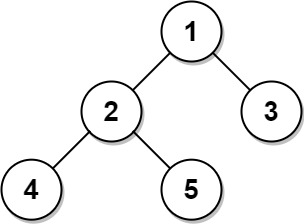
33 |
Input:
34 | Tree table:
35 | +----+------+
36 | | id | p_id |
37 | +----+------+
38 | | 1  | null |
39 | | 2  | 1    |
40 | | 3  | 1    |
41 | | 4  | 2    |
42 | | 5  | 2    |
43 | +----+------+
44 | Output:
45 | +----+-------+
46 | | id | type  |
47 | +----+-------+
48 | | 1  | Root  |
49 | | 2  | Inner |
50 | | 3  | Leaf  |
51 | | 4  | Leaf  |
52 | | 5  | Leaf  |
53 | +----+-------+
54 | Explanation:
55 | Node 1 is the root node because its parent node is null and it has child nodes 2 and 3.
56 | Node 2 is an inner node because it has parent node 1 and child node 4 and 5.
57 | Nodes 3, 4, and 5 are leaf nodes because they have parent nodes and they do not have child nodes.
58 |
59 |
60 |
Example 2:
61 |

62 |
Input:
63 | Tree table:
64 | +----+------+
65 | | id | p_id |
66 | +----+------+
67 | | 1  | null |
68 | +----+------+
69 | Output:
70 | +----+-------+
71 | | id | type  |
72 | +----+-------+
73 | | 1  | Root  |
74 | +----+-------+
75 | Explanation: If there is only one node on the tree, you only need to output its root attributes.
76 |
77 |
Easy
Table: Users
2 |
3 |
+---------------+---------+
 4 | | Column Name   | Type    |
 5 | +---------------+---------+
 6 | | user_id       | int     |
 7 | | name          | varchar |
 8 | | mail          | varchar |
 9 | +---------------+---------+
10 | user_id is the primary key for this table.
11 | This table contains information of the users signed up in a website. Some e-mails are invalid.
12 |
13 |
14 |
15 |
16 |
Find the users who have valid emails.
17 |
18 |
A valid e-mail has a prefix name and a domain where:
19 |
20 |
21 | - The prefix name is a string that may contain letters (upper or lower case), digits, underscore
'_', period '.', and/or dash '-'. The prefix name must start with a letter.
22 | - The domain is
'@leetcode.com'.
23 |
24 |
25 |
Return the result table in any order.
26 |
27 |
The result format is in the following example.
28 |
29 |
30 |
Example 1:
31 |
32 |
Input:
33 | Users table:
34 | +---------+-----------+-------------------------+
35 | | user_id | name      | mail                    |
36 | +---------+-----------+-------------------------+
37 | | 1       | Winston   | winston@leetcode.com    |
38 | | 2       | Jonathan  | jonathanisgreat         |
39 | | 3       | Annabelle | bella-@leetcode.com     |
40 | | 4       | Sally     | sally.come@leetcode.com |
41 | | 5       | Marwan    | quarz#2020@leetcode.com |
42 | | 6       | David     | david69@gmail.com       |
43 | | 7       | Shapiro   | .shapo@leetcode.com     |
44 | +---------+-----------+-------------------------+
45 | Output:
46 | +---------+-----------+-------------------------+
47 | | user_id | name      | mail                    |
48 | +---------+-----------+-------------------------+
49 | | 1       | Winston   | winston@leetcode.com    |
50 | | 3       | Annabelle | bella-@leetcode.com     |
51 | | 4       | Sally     | sally.come@leetcode.com |
52 | +---------+-----------+-------------------------+
53 | Explanation:
54 | The mail of user 2 does not have a domain.
55 | The mail of user 5 has the # sign which is not allowed.
56 | The mail of user 6 does not have the leetcode domain.
57 | The mail of user 7 starts with a period.
58 |
59 |
Medium
Table: Friendship
2 |
3 |
+---------------+---------+
 4 | | Column Name   | Type    |
 5 | +---------------+---------+
 6 | | user1_id      | int     |
 7 | | user2_id      | int     |
 8 | +---------------+---------+
 9 | (user1_id, user2_id) is the primary key for this table.
10 | Each row of this table indicates that there is a friendship relation between user1_id and user2_id.
11 |
12 |
13 |
14 |
15 |
Table: Likes
16 |
17 |
+-------------+---------+
18 | | Column Name | Type    |
19 | +-------------+---------+
20 | | user_id     | int     |
21 | | page_id     | int     |
22 | +-------------+---------+
23 | (user_id, page_id) is the primary key for this table.
24 | Each row of this table indicates that user_id likes page_id.
25 |
26 |
27 |
28 |
29 |
Write an SQL query to recommend pages to the user with user_id = 1 using the pages that your friends liked. It should not recommend pages you already liked.
30 |
31 |
Return result table in any order without duplicates.
32 |
33 |
The query result format is in the following example.
34 |
35 |
36 |
Example 1:
37 |
38 |
Input:
39 | Friendship table:
40 | +----------+----------+
41 | | user1_id | user2_id |
42 | +----------+----------+
43 | | 1        | 2        |
44 | | 1        | 3        |
45 | | 1        | 4        |
46 | | 2        | 3        |
47 | | 2        | 4        |
48 | | 2        | 5        |
49 | | 6        | 1        |
50 | +----------+----------+
51 | Likes table:
52 | +---------+---------+
53 | | user_id | page_id |
54 | +---------+---------+
55 | | 1       | 88      |
56 | | 2       | 23      |
57 | | 3       | 24      |
58 | | 4       | 56      |
59 | | 5       | 11      |
60 | | 6       | 33      |
61 | | 2       | 77      |
62 | | 3       | 77      |
63 | | 6       | 88      |
64 | +---------+---------+
65 | Output:
66 | +------------------+
67 | | recommended_page |
68 | +------------------+
69 | | 23               |
70 | | 24               |
71 | | 56               |
72 | | 33               |
73 | | 77               |
74 | +------------------+
75 | Explanation:
76 | User one is friend with users 2, 3, 4 and 6.
77 | Suggested pages are 23 from user 2, 24 from user 3, 56 from user 3 and 33 from user 6.
78 | Page 77 is suggested from both user 2 and user 3.
79 | Page 88 is not suggested because user 1 already likes it.
80 |
81 |
Medium
Table: Employees
2 |
3 |
+---------------+---------+
 4 | | Column Name   | Type    |
 5 | +---------------+---------+
 6 | | employee_id   | int     |
 7 | | employee_name | varchar |
 8 | | manager_id    | int     |
 9 | +---------------+---------+
10 | employee_id is the primary key for this table.
11 | Each row of this table indicates that the employee with ID employee_id and name employee_name reports his work to his/her direct manager with manager_id
12 | The head of the company is the employee with employee_id = 1.
13 |
14 |
15 |
16 |
17 |
Write an SQL query to find employee_id of all employees that directly or indirectly report their work to the head of the company.
18 |
19 |
The indirect relation between managers will not exceed three managers as the company is small.
20 |
21 |
Return the result table in any order.
22 |
23 |
The query result format is in the following example.
24 |
25 |
26 |
Example 1:
27 |
28 |
Input:
29 | Employees table:
30 | +-------------+---------------+------------+
31 | | employee_id | employee_name | manager_id |
32 | +-------------+---------------+------------+
33 | | 1           | Boss          | 1          |
34 | | 3           | Alice         | 3          |
35 | | 2           | Bob           | 1          |
36 | | 4           | Daniel        | 2          |
37 | | 7           | Luis          | 4          |
38 | | 8           | Jhon          | 3          |
39 | | 9           | Angela        | 8          |
40 | | 77          | Robert        | 1          |
41 | +-------------+---------------+------------+
42 | Output:
43 | +-------------+
44 | | employee_id |
45 | +-------------+
46 | | 2           |
47 | | 77          |
48 | | 4           |
49 | | 7           |
50 | +-------------+
51 | Explanation:
52 | The head of the company is the employee with employee_id 1.
53 | The employees with employee_id 2 and 77 report their work directly to the head of the company.
54 | The employee with employee_id 4 reports their work indirectly to the head of the company 4 --> 2 --> 1.
55 | The employee with employee_id 7 reports their work indirectly to the head of the company 7 --> 4 --> 2 --> 1.
56 | The employees with employee_id 3, 8, and 9 do not report their work to the head of the company directly or indirectly.
57 |
58 |
Medium
Table: Student
2 |
3 |
+--------------+---------+
 4 | | Column Name  | Type    |
 5 | +--------------+---------+
 6 | | student_id   | int     |
 7 | | student_name | varchar |
 8 | | gender       | varchar |
 9 | | dept_id      | int     |
10 | +--------------+---------+
11 | student_id is the primary key column for this table.
12 | dept_id is a foreign key to dept_id in the Department tables.
13 | Each row of this table indicates the name of a student, their gender, and the id of their department.
14 |
15 |
16 |
17 |
18 |
Table: Department
19 |
20 |
+-------------+---------+
21 | | Column Name | Type    |
22 | +-------------+---------+
23 | | dept_id     | int     |
24 | | dept_name   | varchar |
25 | +-------------+---------+
26 | dept_id is the primary key column for this table.
27 | Each row of this table contains the id and the name of a department.
28 |
29 |
30 |
31 |
32 |
Write an SQL query to report the respective department name and number of students majoring in each department for all departments in the Department table (even ones with no current students).
33 |
34 |
Return the result table ordered by student_number in descending order. In case of a tie, order them by dept_name alphabetically.
35 |
36 |
The query result format is in the following example.
37 |
38 |
39 |
Example 1:
40 |
41 |
Input:
42 | Student table:
43 | +------------+--------------+--------+---------+
44 | | student_id | student_name | gender | dept_id |
45 | +------------+--------------+--------+---------+
46 | | 1          | Jack         | M      | 1       |
47 | | 2          | Jane         | F      | 1       |
48 | | 3          | Mark         | M      | 2       |
49 | +------------+--------------+--------+---------+
50 | Department table:
51 | +---------+-------------+
52 | | dept_id | dept_name   |
53 | +---------+-------------+
54 | | 1       | Engineering |
55 | | 2       | Science     |
56 | | 3       | Law         |
57 | +---------+-------------+
58 | Output:
59 | +-------------+----------------+
60 | | dept_name   | student_number |
61 | +-------------+----------------+
62 | | Engineering | 2              |
63 | | Science     | 1              |
64 | | Law         | 0              |
65 | +-------------+----------------+
66 |
67 |
Easy
Table: Project
2 |
3 |
+-------------+---------+
 4 | | Column Name | Type    |
 5 | +-------------+---------+
 6 | | project_id  | int     |
 7 | | employee_id | int     |
 8 | +-------------+---------+
 9 | (project_id, employee_id) is the primary key of this table.
10 | employee_id is a foreign key to Employee table.
11 | Each row of this table indicates that the employee with employee_id is working on the project with project_id.
12 |
13 |
14 |
15 |
16 |
Table: Employee
17 |
18 |
+------------------+---------+
19 | | Column Name      | Type    |
20 | +------------------+---------+
21 | | employee_id      | int     |
22 | | name             | varchar |
23 | | experience_years | int     |
24 | +------------------+---------+
25 | employee_id is the primary key of this table. It's guaranteed that experience_years is not NULL.
26 | Each row of this table contains information about one employee.
27 |
28 |
29 |
30 |
31 |
Write an SQL query that reports the average experience years of all the employees for each project, rounded to 2 digits.
32 |
33 |
Return the result table in any order.
34 |
35 |
The query result format is in the following example.
36 |
37 |
38 |
Example 1:
39 |
40 |
Input:
41 | Project table:
42 | +-------------+-------------+
43 | | project_id  | employee_id |
44 | +-------------+-------------+
45 | | 1           | 1           |
46 | | 1           | 2           |
47 | | 1           | 3           |
48 | | 2           | 1           |
49 | | 2           | 4           |
50 | +-------------+-------------+
51 | Employee table:
52 | +-------------+--------+------------------+
53 | | employee_id | name   | experience_years |
54 | +-------------+--------+------------------+
55 | | 1           | Khaled | 3                |
56 | | 2           | Ali    | 2                |
57 | | 3           | John   | 1                |
58 | | 4           | Doe    | 2                |
59 | +-------------+--------+------------------+
60 | Output:
61 | +-------------+---------------+
62 | | project_id  | average_years |
63 | +-------------+---------------+
64 | | 1           | 2.00          |
65 | | 2           | 2.50          |
66 | +-------------+---------------+
67 | Explanation: The average experience years for the first project is (3 + 2 + 1) / 3 = 2.00 and for the second project is (3 + 2) / 2 = 2.50
68 |
69 |
Easy
Table: Product
2 |
3 |
+--------------+---------+
 4 | | Column Name  | Type    |
 5 | +--------------+---------+
 6 | | product_id   | int     |
 7 | | product_name | varchar |
 8 | | unit_price   | int     |
 9 | +--------------+---------+
10 | product_id is the primary key of this table.
11 | Each row of this table indicates the name and the price of each product.
12 |
13 |
14 |
Table: Sales
15 |
16 |
+-------------+---------+
17 | | Column Name | Type    |
18 | +-------------+---------+
19 | | seller_id   | int     |
20 | | product_id  | int     |
21 | | buyer_id    | int     |
22 | | sale_date   | date    |
23 | | quantity    | int     |
24 | | price       | int     |
25 | +-------------+---------+
26 | This table has no primary key, it can have repeated rows.
27 | product_id is a foreign key to the Product table.
28 | Each row of this table contains some information about one sale.
29 |
30 |
31 |
32 |
33 |
Write an SQL query that reports the best seller by total sales price, If there is a tie, report them all.
34 |
35 |
Return the result table in any order.
36 |
37 |
The query result format is in the following example.
38 |
39 |
40 |
Example 1:
41 |
42 |
Input:
43 | Product table:
44 | +------------+--------------+------------+
45 | | product_id | product_name | unit_price |
46 | +------------+--------------+------------+
47 | | 1          | S8           | 1000       |
48 | | 2          | G4           | 800        |
49 | | 3          | iPhone       | 1400       |
50 | +------------+--------------+------------+
51 | Sales table:
52 | +-----------+------------+----------+------------+----------+-------+
53 | | seller_id | product_id | buyer_id | sale_date  | quantity | price |
54 | +-----------+------------+----------+------------+----------+-------+
55 | | 1         | 1          | 1        | 2019-01-21 | 2        | 2000  |
56 | | 1         | 2          | 2        | 2019-02-17 | 1        | 800   |
57 | | 2         | 2          | 3        | 2019-06-02 | 1        | 800   |
58 | | 3         | 3          | 4        | 2019-05-13 | 2        | 2800  |
59 | +-----------+------------+----------+------------+----------+-------+
60 | Output:
61 | +-------------+
62 | | seller_id   |
63 | +-------------+
64 | | 1           |
65 | | 3           |
66 | +-------------+
67 | Explanation: Both sellers with id 1 and 3 sold products with the most total price of 2800.
68 |
69 |
Easy
Table: Departments
2 |
3 |
+---------------+---------+
 4 | | Column Name   | Type    |
 5 | +---------------+---------+
 6 | | id            | int     |
 7 | | name          | varchar |
 8 | +---------------+---------+
 9 | id is the primary key of this table.
10 | The table has information about the id of each department of a university.
11 |
12 |
13 |
14 |
15 |
Table: Students
16 |
17 |
+---------------+---------+
18 | | Column Name   | Type    |
19 | +---------------+---------+
20 | | id            | int     |
21 | | name          | varchar |
22 | | department_id | int     |
23 | +---------------+---------+
24 | id is the primary key of this table.
25 | The table has information about the id of each student at a university and the id of the department he/she studies at.
26 |
27 |
28 |
29 |
30 |
Write an SQL query to find the id and the name of all students who are enrolled in departments that no longer exist.
31 |
32 |
Return the result table in any order.
33 |
34 |
The query result format is in the following example.
35 |
36 |
37 |
Example 1:
38 |
39 |
Input:
40 | Departments table:
41 | +------+--------------------------+
42 | | id   | name                     |
43 | +------+--------------------------+
44 | | 1    | Electrical Engineering   |
45 | | 7    | Computer Engineering     |
46 | | 13   | Bussiness Administration |
47 | +------+--------------------------+
48 | Students table:
49 | +------+----------+---------------+
50 | | id   | name     | department_id |
51 | +------+----------+---------------+
52 | | 23   | Alice    | 1             |
53 | | 1    | Bob      | 7             |
54 | | 5    | Jennifer | 13            |
55 | | 2    | John     | 14            |
56 | | 4    | Jasmine  | 77            |
57 | | 3    | Steve    | 74            |
58 | | 6    | Luis     | 1             |
59 | | 8    | Jonathan | 7             |
60 | | 7    | Daiana   | 33            |
61 | | 11   | Madelynn | 1             |
62 | +------+----------+---------------+
63 | Output:
64 | +------+----------+
65 | | id   | name     |
66 | +------+----------+
67 | | 2    | John     |
68 | | 7    | Daiana   |
69 | | 4    | Jasmine  |
70 | | 3    | Steve    |
71 | +------+----------+
72 | Explanation:
73 | John, Daiana, Steve, and Jasmine are enrolled in departments 14, 33, 74, and 77 respectively. department 14, 33, 74, and 77 do not exist in the Departments table.
74 |
75 |
Medium
Table: Project
2 |
3 |
+-------------+---------+
 4 | | Column Name | Type    |
 5 | +-------------+---------+
 6 | | project_id  | int     |
 7 | | employee_id | int     |
 8 | +-------------+---------+
 9 | (project_id, employee_id) is the primary key of this table.
10 | employee_id is a foreign key to Employee table.
11 | Each row of this table indicates that the employee with employee_id is working on the project with project_id.
12 |
13 |
14 |
15 |
16 |
Table: Employee
17 |
18 |
+------------------+---------+
19 | | Column Name      | Type    |
20 | +------------------+---------+
21 | | employee_id      | int     |
22 | | name             | varchar |
23 | | experience_years | int     |
24 | +------------------+---------+
25 | employee_id is the primary key of this table.
26 | Each row of this table contains information about one employee.
27 |
28 |
29 |
30 |
31 |
Write an SQL query that reports the most experienced employees in each project. In case of a tie, report all employees with the maximum number of experience years.
32 |
33 |
Return the result table in any order.
34 |
35 |
The query result format is in the following example.
36 |
37 |
38 |
Example 1:
39 |
40 |
Input:
41 | Project table:
42 | +-------------+-------------+
43 | | project_id  | employee_id |
44 | +-------------+-------------+
45 | | 1           | 1           |
46 | | 1           | 2           |
47 | | 1           | 3           |
48 | | 2           | 1           |
49 | | 2           | 4           |
50 | +-------------+-------------+
51 | Employee table:
52 | +-------------+--------+------------------+
53 | | employee_id | name   | experience_years |
54 | +-------------+--------+------------------+
55 | | 1           | Khaled | 3                |
56 | | 2           | Ali    | 2                |
57 | | 3           | John   | 3                |
58 | | 4           | Doe    | 2                |
59 | +-------------+--------+------------------+
60 | Output:
61 | +-------------+---------------+
62 | | project_id  | employee_id   |
63 | +-------------+---------------+
64 | | 1           | 1             |
65 | | 1           | 3             |
66 | | 2           | 1             |
67 | +-------------+---------------+
68 | Explanation: Both employees with id 1 and 3 have the most experience among the employees of the first project. For the second project, the employee with id 1 has the most experience.
69 |
70 |
Hard
Table: Activity
2 |
3 |
+--------------+---------+
 4 | | Column Name  | Type    |
 5 | +--------------+---------+
 6 | | player_id    | int     |
 7 | | device_id    | int     |
 8 | | event_date   | date    |
 9 | | games_played | int     |
10 | +--------------+---------+
11 | (player_id, event_date) is the primary key of this table.
12 | This table shows the activity of players of some games.
13 | Each row is a record of a player who logged in and played a number of games (possibly 0) before logging out on someday using some device.
14 |
15 |
16 |
17 |
18 |
The install date of a player is the first login day of that player.
19 |
20 |
We define day one retention of some date x to be the number of players whose install date is x and they logged back in on the day right after x, divided by the number of players whose install date is x, rounded to 2 decimal places.
21 |
22 |
Write an SQL query to report for each install date, the number of players that installed the game on that day, and the day one retention.
23 |
24 |
Return the result table in any order.
25 |
26 |
The query result format is in the following example.
27 |
28 |
29 |
Example 1:
30 |
31 |
Input:
32 | Activity table:
33 | +-----------+-----------+------------+--------------+
34 | | player_id | device_id | event_date | games_played |
35 | +-----------+-----------+------------+--------------+
36 | | 1         | 2         | 2016-03-01 | 5            |
37 | | 1         | 2         | 2016-03-02 | 6            |
38 | | 2         | 3         | 2017-06-25 | 1            |
39 | | 3         | 1         | 2016-03-01 | 0            |
40 | | 3         | 4         | 2016-07-03 | 5            |
41 | +-----------+-----------+------------+--------------+
42 | Output:
43 | +------------+----------+----------------+
44 | | install_dt | installs | Day1_retention |
45 | +------------+----------+----------------+
46 | | 2016-03-01 | 2        | 0.50           |
47 | | 2017-06-25 | 1        | 0.00           |
48 | +------------+----------+----------------+
49 | Explanation:
50 | Player 1 and 3 installed the game on 2016-03-01 but only player 1 logged back in on 2016-03-02 so the day 1 retention of 2016-03-01 is 1 / 2 = 0.50
51 | Player 2 installed the game on 2017-06-25 but didn't log back in on 2017-06-26 so the day 1 retention of 2017-06-25 is 0 / 1 = 0.00
52 |
53 |
Easy
Table: Sales
2 |
3 |
+-------------+-------+
 4 | | Column Name | Type  |
 5 | +-------------+-------+
 6 | | sale_id     | int   |
 7 | | product_id  | int   |
 8 | | year        | int   |
 9 | | quantity    | int   |
10 | | price       | int   |
11 | +-------------+-------+
12 | (sale_id, year) is the primary key of this table.
13 | product_id is a foreign key to Product table.
14 | Each row of this table shows a sale on the product product_id in a certain year.
15 | Note that the price is per unit.
16 |
17 |
18 |
19 |
20 |
Table: Product
21 |
22 |
+--------------+---------+
23 | | Column Name  | Type    |
24 | +--------------+---------+
25 | | product_id   | int     |
26 | | product_name | varchar |
27 | +--------------+---------+
28 | product_id is the primary key of this table.
29 | Each row of this table indicates the product name of each product.
30 |
31 |
32 |
33 |
34 |
Write an SQL query that reports the product_name, year, and price for each sale_id in the Sales table.
35 |
36 |
Return the resulting table in any order.
37 |
38 |
The query result format is in the following example.
39 |
40 |
41 |
Example 1:
42 |
43 |
Input:
44 | Sales table:
45 | +---------+------------+------+----------+-------+
46 | | sale_id | product_id | year | quantity | price |
47 | +---------+------------+------+----------+-------+
48 | | 1       | 100        | 2008 | 10       | 5000  |
49 | | 2       | 100        | 2009 | 12       | 5000  |
50 | | 7       | 200        | 2011 | 15       | 9000  |
51 | +---------+------------+------+----------+-------+
52 | Product table:
53 | +------------+--------------+
54 | | product_id | product_name |
55 | +------------+--------------+
56 | | 100        | Nokia        |
57 | | 200        | Apple        |
58 | | 300        | Samsung      |
59 | +------------+--------------+
60 | Output:
61 | +--------------+-------+-------+
62 | | product_name | year  | price |
63 | +--------------+-------+-------+
64 | | Nokia        | 2008  | 5000  |
65 | | Nokia        | 2009  | 5000  |
66 | | Apple        | 2011  | 9000  |
67 | +--------------+-------+-------+
68 | Explanation:
69 | From sale_id = 1, we can conclude that Nokia was sold for 5000 in the year 2008.
70 | From sale_id = 2, we can conclude that Nokia was sold for 5000 in the year 2009.
71 | From sale_id = 7, we can conclude that Apple was sold for 9000 in the year 2011.
72 |
73 |
Easy
Table: Product
2 |
3 |
+--------------+---------+
 4 | | Column Name  | Type    |
 5 | +--------------+---------+
 6 | | product_id   | int     |
 7 | | product_name | varchar |
 8 | | unit_price   | int     |
 9 | +--------------+---------+
10 | product_id is the primary key of this table.
11 | Each row of this table indicates the name and the price of each product.
12 |
13 |
14 |
Table: Sales
15 |
16 |
+-------------+---------+
17 | | Column Name | Type    |
18 | +-------------+---------+
19 | | seller_id   | int     |
20 | | product_id  | int     |
21 | | buyer_id    | int     |
22 | | sale_date   | date    |
23 | | quantity    | int     |
24 | | price       | int     |
25 | +-------------+---------+
26 | This table has no primary key, it can have repeated rows.
27 | product_id is a foreign key to the Product table.
28 | buyer_id is never NULL.
29 | sale_date is never NULL.
30 | Each row of this table contains some information about one sale.
31 |
32 |
33 |
34 |
35 |
Write an SQL query that reports the buyers who have bought S8 but not iPhone. Note that S8 and iPhone are products present in the Product table.
36 |
37 |
Return the result table in any order.
38 |
39 |
The query result format is in the following example.
40 |
41 |
42 |
Example 1:
43 |
44 |
Input:
45 | Product table:
46 | +------------+--------------+------------+
47 | | product_id | product_name | unit_price |
48 | +------------+--------------+------------+
49 | | 1          | S8           | 1000       |
50 | | 2          | G4           | 800        |
51 | | 3          | iPhone       | 1400       |
52 | +------------+--------------+------------+
53 | Sales table:
54 | +-----------+------------+----------+------------+----------+-------+
55 | | seller_id | product_id | buyer_id | sale_date  | quantity | price |
56 | +-----------+------------+----------+------------+----------+-------+
57 | | 1         | 1          | 1        | 2019-01-21 | 2        | 2000  |
58 | | 1         | 2          | 2        | 2019-02-17 | 1        | 800   |
59 | | 2         | 1          | 3        | 2019-06-02 | 1        | 800   |
60 | | 3         | 3          | 3        | 2019-05-13 | 2        | 2800  |
61 | +-----------+------------+----------+------------+----------+-------+
62 | Output:
63 | +-------------+
64 | | buyer_id    |
65 | +-------------+
66 | | 1           |
67 | +-------------+
68 | Explanation: The buyer with id 1 bought an S8 but did not buy an iPhone. The buyer with id 3 bought both.
69 |
70 |
Medium
Table: Queue
2 |
3 |
+-------------+---------+
 4 | | Column Name | Type    |
 5 | +-------------+---------+
 6 | | person_id   | int     |
 7 | | person_name | varchar |
 8 | | weight      | int     |
 9 | | turn        | int     |
10 | +-------------+---------+
11 | person_id is the primary key column for this table.
12 | This table has the information about all people waiting for a bus.
13 | The person_id and turn columns will contain all numbers from 1 to n, where n is the number of rows in the table.
14 | turn determines the order of which the people will board the bus, where turn=1 denotes the first person to board and turn=n denotes the last person to board.
15 | weight is the weight of the person in kilograms.
16 |
17 |
18 |
19 |
20 |
There is a queue of people waiting to board a bus. However, the bus has a weight limit of 1000 kilograms, so there may be some people who cannot board.
21 |
22 |
Write an SQL query to find the person_name of the last person that can fit on the bus without exceeding the weight limit. The test cases are generated such that the first person does not exceed the weight limit.
23 |
24 |
The query result format is in the following example.
25 |
26 |
27 |
Example 1:
28 |
29 |
Input:
30 | Queue table:
31 | +-----------+-------------+--------+------+
32 | | person_id | person_name | weight | turn |
33 | +-----------+-------------+--------+------+
34 | | 5         | Alice       | 250    | 1    |
35 | | 4         | Bob         | 175    | 5    |
36 | | 3         | Alex        | 350    | 2    |
37 | | 6         | John Cena   | 400    | 3    |
38 | | 1         | Winston     | 500    | 6    |
39 | | 2         | Marie       | 200    | 4    |
40 | +-----------+-------------+--------+------+
41 | Output:
42 | +-------------+
43 | | person_name |
44 | +-------------+
45 | | John Cena   |
46 | +-------------+
47 | Explanation: The folowing table is ordered by the turn for simplicity.
48 | +------+----+-----------+--------+--------------+
49 | | Turn | ID | Name      | Weight | Total Weight |
50 | +------+----+-----------+--------+--------------+
51 | | 1    | 5  | Alice     | 250    | 250          |
52 | | 2    | 3  | Alex      | 350    | 600          |
53 | | 3    | 6  | John Cena | 400    | 1000         | (last person to board)
54 | | 4    | 2  | Marie     | 200    | 1200         | (cannot board)
55 | | 5    | 4  | Bob       | 175    | ___          |
56 | | 6    | 1  | Winston   | 500    | ___          |
57 | +------+----+-----------+--------+--------------+
58 |
59 |
Medium
Table: Books
2 |
3 |
+----------------+---------+
 4 | | Column Name    | Type    |
 5 | +----------------+---------+
 6 | | book_id        | int     |
 7 | | name           | varchar |
 8 | | available_from | date    |
 9 | +----------------+---------+
10 | book_id is the primary key of this table.
11 |
12 |
13 |
14 |
15 |
Table: Orders
16 |
17 |
+----------------+---------+
18 | | Column Name    | Type    |
19 | +----------------+---------+
20 | | order_id       | int     |
21 | | book_id        | int     |
22 | | quantity       | int     |
23 | | dispatch_date  | date    |
24 | +----------------+---------+
25 | order_id is the primary key of this table.
26 | book_id is a foreign key to the Books table.
27 |
28 |
29 |
30 |
31 |
Write an SQL query that reports the books that have sold less than 10 copies in the last year, excluding books that have been available for less than one month from today. Assume today is 2019-06-23.
32 |
33 |
Return the result table in any order.
34 |
35 |
The query result format is in the following example.
36 |
37 |
38 |
Example 1:
39 |
40 |
Input:
41 | Books table:
42 | +---------+--------------------+----------------+
43 | | book_id | name               | available_from |
44 | +---------+--------------------+----------------+
45 | | 1       | "Kalila And Demna" | 2010-01-01     |
46 | | 2       | "28 Letters"       | 2012-05-12     |
47 | | 3       | "The Hobbit"       | 2019-06-10     |
48 | | 4       | "13 Reasons Why"   | 2019-06-01     |
49 | | 5       | "The Hunger Games" | 2008-09-21     |
50 | +---------+--------------------+----------------+
51 | Orders table:
52 | +----------+---------+----------+---------------+
53 | | order_id | book_id | quantity | dispatch_date |
54 | +----------+---------+----------+---------------+
55 | | 1        | 1       | 2        | 2018-07-26    |
56 | | 2        | 1       | 1        | 2018-11-05    |
57 | | 3        | 3       | 8        | 2019-06-11    |
58 | | 4        | 4       | 6        | 2019-06-05    |
59 | | 5        | 4       | 5        | 2019-06-20    |
60 | | 6        | 5       | 9        | 2009-02-02    |
61 | | 7        | 5       | 8        | 2010-04-13    |
62 | +----------+---------+----------+---------------+
63 | Output:
64 | +-----------+--------------------+
65 | | book_id   | name               |
66 | +-----------+--------------------+
67 | | 1         | "Kalila And Demna" |
68 | | 2         | "28 Letters"       |
69 | | 5         | "The Hunger Games" |
70 | +-----------+--------------------+
71 |
72 |
Medium
Table Variables:
2 |
3 |
+---------------+---------+
 4 | | Column Name   | Type    |
 5 | +---------------+---------+
 6 | | name          | varchar |
 7 | | value         | int     |
 8 | +---------------+---------+
 9 | name is the primary key for this table.
10 | This table contains the stored variables and their values.
11 |
12 |
13 |
14 |
15 |
Table Expressions:
16 |
17 |
+---------------+---------+
18 | | Column Name   | Type    |
19 | +---------------+---------+
20 | | left_operand  | varchar |
21 | | operator      | enum    |
22 | | right_operand | varchar |
23 | +---------------+---------+
24 | (left_operand, operator, right_operand) is the primary key for this table.
25 | This table contains a boolean expression that should be evaluated.
26 | operator is an enum that takes one of the values ('<', '>', '=')
27 | The values of left_operand and right_operand are guaranteed to be in the Variables table.
28 |
29 |
30 |
31 |
32 |
Write an SQL query to evaluate the boolean expressions in Expressions table.
33 |
34 |
Return the result table in any order.
35 |
36 |
The query result format is in the following example.
37 |
38 |
39 |
Example 1:
40 |
41 |
Input:
42 | Variables table:
43 | +------+-------+
44 | | name | value |
45 | +------+-------+
46 | | x    | 66    |
47 | | y    | 77    |
48 | +------+-------+
49 | Expressions table:
50 | +--------------+----------+---------------+
51 | | left_operand | operator | right_operand |
52 | +--------------+----------+---------------+
53 | | x            | >        | y             |
54 | | x            | <        | y             |
55 | | x            | =        | y             |
56 | | y            | >        | x             |
57 | | y            | <        | x             |
58 | | x            | =        | x             |
59 | +--------------+----------+---------------+
60 | Output:
61 | +--------------+----------+---------------+-------+
62 | | left_operand | operator | right_operand | value |
63 | +--------------+----------+---------------+-------+
64 | | x            | >        | y             | false |
65 | | x            | <        | y             | true  |
66 | | x            | =        | y             | false |
67 | | y            | >        | x             | true  |
68 | | y            | <        | x             | false |
69 | | x            | =        | x             | true  |
70 | +--------------+----------+---------------+-------+
71 | Explanation:
72 | As shown, you need to find the value of each boolean expression in the table using the variables table.
73 |
74 |
Easy
Table: Users
2 |
3 |
+---------------+---------+
 4 | | Column Name   | Type    |
 5 | +---------------+---------+
 6 | | id            | int     |
 7 | | name          | varchar |
 8 | +---------------+---------+
 9 | id is the primary key for this table.
10 | name is the name of the user.
11 |
12 |
13 |
14 |
15 |
Table: Rides
16 |
17 |
+---------------+---------+
18 | | Column Name   | Type    |
19 | +---------------+---------+
20 | | id            | int     |
21 | | user_id       | int     |
22 | | distance      | int     |
23 | +---------------+---------+
24 | id is the primary key for this table.
25 | user_id is the id of the user who traveled the distance "distance".
26 |
27 |
28 |
29 |
30 |
Write an SQL query to report the distance traveled by each user.
31 |
32 |
Return the result table ordered by travelled_distance in descending order, if two or more users traveled the same distance, order them by their name in ascending order.
33 |
34 |
The query result format is in the following example.
35 |
36 |
37 |
Example 1:
38 |
39 |
Input:
40 | Users table:
41 | +------+-----------+
42 | | id   | name      |
43 | +------+-----------+
44 | | 1    | Alice     |
45 | | 2    | Bob       |
46 | | 3    | Alex      |
47 | | 4    | Donald    |
48 | | 7    | Lee       |
49 | | 13   | Jonathan  |
50 | | 19   | Elvis     |
51 | +------+-----------+
52 | Rides table:
53 | +------+----------+----------+
54 | | id   | user_id  | distance |
55 | +------+----------+----------+
56 | | 1    | 1        | 120      |
57 | | 2    | 2        | 317      |
58 | | 3    | 3        | 222      |
59 | | 4    | 7        | 100      |
60 | | 5    | 13       | 312      |
61 | | 6    | 19       | 50       |
62 | | 7    | 7        | 120      |
63 | | 8    | 19       | 400      |
64 | | 9    | 7        | 230      |
65 | +------+----------+----------+
66 | Output:
67 | +----------+--------------------+
68 | | name     | travelled_distance |
69 | +----------+--------------------+
70 | | Elvis    | 450                |
71 | | Lee      | 450                |
72 | | Bob      | 317                |
73 | | Jonathan | 312                |
74 | | Alex     | 222                |
75 | | Alice    | 120                |
76 | | Donald   | 0                  |
77 | +----------+--------------------+
78 | Explanation:
79 | Elvis and Lee traveled 450 miles, Elvis is the top traveler as his name is alphabetically smaller than Lee.
80 | Bob, Jonathan, Alex, and Alice have only one ride and we just order them by the total distances of the ride.
81 | Donald did not have any rides, the distance traveled by him is 0.
82 |
83 |
Hard
Table: Failed
2 |
3 |
+--------------+---------+
 4 | | Column Name  | Type    |
 5 | +--------------+---------+
 6 | | fail_date    | date    |
 7 | +--------------+---------+
 8 | fail_date is the primary key for this table.
 9 | This table contains the days of failed tasks.
10 |
11 |
12 |
13 |
14 |
Table: Succeeded
15 |
16 |
+--------------+---------+
17 | | Column Name  | Type    |
18 | +--------------+---------+
19 | | success_date | date    |
20 | +--------------+---------+
21 | success_date is the primary key for this table.
22 | This table contains the days of succeeded tasks.
23 |
24 |
25 |
26 |
27 |
A system is running one task every day. Every task is independent of the previous tasks. The tasks can fail or succeed.
28 |
29 |
Write an SQL query to generate a report of period_state for each continuous interval of days in the period from 2019-01-01 to 2019-12-31.
30 |
31 |
period_state is 'failed' if tasks in this interval failed or 'succeeded' if tasks in this interval succeeded. Interval of days are retrieved as start_date and end_date.
32 |
33 |
Return the result table ordered by start_date.
34 |
35 |
The query result format is in the following example.
36 |
37 |
38 |
Example 1:
39 |
40 |
Input:
41 | Failed table:
42 | +-------------------+
43 | | fail_date         |
44 | +-------------------+
45 | | 2018-12-28        |
46 | | 2018-12-29        |
47 | | 2019-01-04        |
48 | | 2019-01-05        |
49 | +-------------------+
50 | Succeeded table:
51 | +-------------------+
52 | | success_date      |
53 | +-------------------+
54 | | 2018-12-30        |
55 | | 2018-12-31        |
56 | | 2019-01-01        |
57 | | 2019-01-02        |
58 | | 2019-01-03        |
59 | | 2019-01-06        |
60 | +-------------------+
61 | Output:
62 | +--------------+--------------+--------------+
63 | | period_state | start_date   | end_date     |
64 | +--------------+--------------+--------------+
65 | | succeeded    | 2019-01-01   | 2019-01-03   |
66 | | failed       | 2019-01-04   | 2019-01-05   |
67 | | succeeded    | 2019-01-06   | 2019-01-06   |
68 | +--------------+--------------+--------------+
69 | Explanation:
70 | The report ignored the system state in 2018 as we care about the system in the period 2019-01-01 to 2019-12-31.
71 | From 2019-01-01 to 2019-01-03 all tasks succeeded and the system state was "succeeded".
72 | From 2019-01-04 to 2019-01-05 all tasks failed and the system state was "failed".
73 | From 2019-01-06 to 2019-01-06 all tasks succeeded and the system state was "succeeded".
74 |
75 |
Easy
Table: Prices
2 |
3 |
+---------------+---------+
 4 | | Column Name   | Type    |
 5 | +---------------+---------+
 6 | | product_id    | int     |
 7 | | start_date    | date    |
 8 | | end_date      | date    |
 9 | | price         | int     |
10 | +---------------+---------+
11 | (product_id, start_date, end_date) is the primary key for this table.
12 | Each row of this table indicates the price of the product_id in the period from start_date to end_date.
13 | For each product_id there will be no two overlapping periods. That means there will be no two intersecting periods for the same product_id.
14 |
15 |
16 |
17 |
18 |
Table: UnitsSold
19 |
20 |
+---------------+---------+
21 | | Column Name   | Type    |
22 | +---------------+---------+
23 | | product_id    | int     |
24 | | purchase_date | date    |
25 | | units         | int     |
26 | +---------------+---------+
27 | There is no primary key for this table, it may contain duplicates.
28 | Each row of this table indicates the date, units, and product_id of each product sold.
29 |
30 |
31 |
32 |
33 |
Write an SQL query to find the average selling price for each product. average_price should be rounded to 2 decimal places.
34 |
35 |
Return the result table in any order.
36 |
37 |
The query result format is in the following example.
38 |
39 |
40 |
Example 1:
41 |
42 |
Input:
43 | Prices table:
44 | +------------+------------+------------+--------+
45 | | product_id | start_date | end_date   | price  |
46 | +------------+------------+------------+--------+
47 | | 1          | 2019-02-17 | 2019-02-28 | 5      |
48 | | 1          | 2019-03-01 | 2019-03-22 | 20     |
49 | | 2          | 2019-02-01 | 2019-02-20 | 15     |
50 | | 2          | 2019-02-21 | 2019-03-31 | 30     |
51 | +------------+------------+------------+--------+
52 | UnitsSold table:
53 | +------------+---------------+-------+
54 | | product_id | purchase_date | units |
55 | +------------+---------------+-------+
56 | | 1          | 2019-02-25    | 100   |
57 | | 1          | 2019-03-01    | 15    |
58 | | 2          | 2019-02-10    | 200   |
59 | | 2          | 2019-03-22    | 30    |
60 | +------------+---------------+-------+
61 | Output:
62 | +------------+---------------+
63 | | product_id | average_price |
64 | +------------+---------------+
65 | | 1          | 6.96          |
66 | | 2          | 16.96         |
67 | +------------+---------------+
68 | Explanation:
69 | Average selling price = Total Price of Product / Number of products sold.
70 | Average selling price for product 1 = ((100 * 5) + (15 * 20)) / 115 = 6.96
71 | Average selling price for product 2 = ((200 * 15) + (30 * 30)) / 230 = 16.96
72 |
73 |
Hard
Table: Players
2 |
3 |
+-------------+-------+
 4 | | Column Name | Type  |
 5 | +-------------+-------+
 6 | | player_id   | int   |
 7 | | group_id    | int   |
 8 | +-------------+-------+
 9 | player_id is the primary key of this table.
10 | Each row of this table indicates the group of each player.
11 |
12 |
13 |
Table: Matches
14 |
15 |
+---------------+---------+
16 | | Column Name   | Type    |
17 | +---------------+---------+
18 | | match_id      | int     |
19 | | first_player  | int     |
20 | | second_player | int     |
21 | | first_score   | int     |
22 | | second_score  | int     |
23 | +---------------+---------+
24 | match_id is the primary key of this table.
25 | Each row is a record of a match, first_player and second_player contain the player_id of each match.
26 | first_score and second_score contain the number of points of the first_player and second_player respectively.
27 | You may assume that, in each match, players belong to the same group.
28 |
29 |
30 |
31 |
32 |
The winner in each group is the player who scored the maximum total points within the group. In the case of a tie, the lowest player_id wins.
33 |
34 |
Write an SQL query to find the winner in each group.
35 |
36 |
Return the result table in any order.
37 |
38 |
The query result format is in the following example.
39 |
40 |
41 |
Example 1:
42 |
43 |
Input:
44 | Players table:
45 | +-----------+------------+
46 | | player_id | group_id   |
47 | +-----------+------------+
48 | | 15        | 1          |
49 | | 25        | 1          |
50 | | 30        | 1          |
51 | | 45        | 1          |
52 | | 10        | 2          |
53 | | 35        | 2          |
54 | | 50        | 2          |
55 | | 20        | 3          |
56 | | 40        | 3          |
57 | +-----------+------------+
58 | Matches table:
59 | +------------+--------------+---------------+-------------+--------------+
60 | | match_id   | first_player | second_player | first_score | second_score |
61 | +------------+--------------+---------------+-------------+--------------+
62 | | 1          | 15           | 45            | 3           | 0            |
63 | | 2          | 30           | 25            | 1           | 2            |
64 | | 3          | 30           | 15            | 2           | 0            |
65 | | 4          | 40           | 20            | 5           | 2            |
66 | | 5          | 35           | 50            | 1           | 1            |
67 | +------------+--------------+---------------+-------------+--------------+
68 | Output:
69 | +-----------+------------+
70 | | group_id  | player_id  |
71 | +-----------+------------+
72 | | 1         | 15         |
73 | | 2         | 35         |
74 | | 3         | 40         |
75 | +-----------+------------+
76 |
77 |
Medium
Table: Transactions
2 |
3 |
+----------------+---------+
 4 | | Column Name    | Type    |
 5 | +----------------+---------+
 6 | | id             | int     |
 7 | | country        | varchar |
 8 | | state          | enum    |
 9 | | amount         | int     |
10 | | trans_date     | date    |
11 | +----------------+---------+
12 | id is the primary key of this table.
13 | The table has information about incoming transactions.
14 | The state column is an enum of type ["approved", "declined"].
15 |
16 |
17 |
Table: Chargebacks
18 |
19 |
+----------------+---------+
20 | | Column Name    | Type    |
21 | +----------------+---------+
22 | | trans_id       | int     |
23 | | trans_date     | date    |
24 | +----------------+---------+
25 | Chargebacks contains basic information regarding incoming chargebacks from some transactions placed in Transactions table.
26 | trans_id is a foreign key to the id column of Transactions table.
27 | Each chargeback corresponds to a transaction made previously even if they were not approved.
28 |
29 |
30 |
31 |
Write an SQL query to find for each month and country: the number of approved transactions and their total amount, the number of chargebacks, and their total amount.
32 |
33 |
Note: In your query, given the month and country, ignore rows with all zeros.
34 |
35 |
Return the result table in any order.
36 |
37 |
The query result format is in the following example.
38 |
39 |
40 |
Example 1:
41 |
42 |
Input:
43 | Transactions table:
44 | +-----+---------+----------+--------+------------+
45 | | id  | country | state    | amount | trans_date |
46 | +-----+---------+----------+--------+------------+
47 | | 101 | US      | approved | 1000   | 2019-05-18 |
48 | | 102 | US      | declined | 2000   | 2019-05-19 |
49 | | 103 | US      | approved | 3000   | 2019-06-10 |
50 | | 104 | US      | declined | 4000   | 2019-06-13 |
51 | | 105 | US      | approved | 5000   | 2019-06-15 |
52 | +-----+---------+----------+--------+------------+
53 | Chargebacks table:
54 | +----------+------------+
55 | | trans_id | trans_date |
56 | +----------+------------+
57 | | 102      | 2019-05-29 |
58 | | 101      | 2019-06-30 |
59 | | 105      | 2019-09-18 |
60 | +----------+------------+
61 | Output:
62 | +---------+---------+----------------+-----------------+------------------+-------------------+
63 | | month   | country | approved_count | approved_amount | chargeback_count | chargeback_amount |
64 | +---------+---------+----------------+-----------------+------------------+-------------------+
65 | | 2019-05 | US      | 1              | 1000            | 1                | 2000              |
66 | | 2019-06 | US      | 2              | 8000            | 1                | 1000              |
67 | | 2019-09 | US      | 0              | 0               | 1                | 5000              |
68 | +---------+---------+----------------+-----------------+------------------+-------------------+
69 |
70 |
Medium
Table: Stocks
2 |
3 |
+---------------+---------+
 4 | | Column Name   | Type    |
 5 | +---------------+---------+
 6 | | stock_name    | varchar |
 7 | | operation     | enum    |
 8 | | operation_day | int     |
 9 | | price         | int     |
10 | +---------------+---------+
11 | (stock_name, operation_day) is the primary key for this table.
12 | The operation column is an ENUM of type ('Sell', 'Buy')
13 | Each row of this table indicates that the stock which has stock_name had an operation on the day operation_day with the price.
14 | It is guaranteed that each 'Sell' operation for a stock has a corresponding 'Buy' operation in a previous day. It is also guaranteed that each 'Buy' operation for a stock has a corresponding 'Sell' operation in an upcoming day.
15 |
16 |
17 |
18 |
19 |
Write an SQL query to report the Capital gain/loss for each stock.
20 |
21 |
The Capital gain/loss of a stock is the total gain or loss after buying and selling the stock one or many times.
22 |
23 |
Return the result table in any order.
24 |
25 |
The query result format is in the following example.
26 |
27 |
28 |
Example 1:
29 |
30 |
Input:
31 | Stocks table:
32 | +---------------+-----------+---------------+--------+
33 | | stock_name    | operation | operation_day | price  |
34 | +---------------+-----------+---------------+--------+
35 | | Leetcode      | Buy       | 1             | 1000   |
36 | | Corona Masks  | Buy       | 2             | 10     |
37 | | Leetcode      | Sell      | 5             | 9000   |
38 | | Handbags      | Buy       | 17            | 30000  |
39 | | Corona Masks  | Sell      | 3             | 1010   |
40 | | Corona Masks  | Buy       | 4             | 1000   |
41 | | Corona Masks  | Sell      | 5             | 500    |
42 | | Corona Masks  | Buy       | 6             | 1000   |
43 | | Handbags      | Sell      | 29            | 7000   |
44 | | Corona Masks  | Sell      | 10            | 10000  |
45 | +---------------+-----------+---------------+--------+
46 | Output:
47 | +---------------+-------------------+
48 | | stock_name    | capital_gain_loss |
49 | +---------------+-------------------+
50 | | Corona Masks  | 9500              |
51 | | Leetcode      | 8000              |
52 | | Handbags      | -23000            |
53 | +---------------+-------------------+
54 | Explanation:
55 | Leetcode stock was bought at day 1 for 1000$ and was sold at day 5 for 9000$. Capital gain = 9000 - 1000 = 8000$.
56 | Handbags stock was bought at day 17 for 30000$ and was sold at day 29 for 7000$. Capital loss = 7000 - 30000 = -23000$.
57 | Corona Masks stock was bought at day 1 for 10$ and was sold at day 3 for 1010$. It was bought again at day 4 for 1000$ and was sold at day 5 for 500$. At last, it was bought at day 6 for 1000$ and was sold at day 10 for 10000$. Capital gain/loss is the sum of capital gains/losses for each ('Buy' --> 'Sell') operation = (1010 - 10) + (500 - 1000) + (10000 - 1000) = 1000 - 500 + 9000 = 9500$.
58 |
59 |
Easy
Table: TVProgram
2 |
3 |
+---------------+---------+
 4 | | Column Name   | Type    |
 5 | +---------------+---------+
 6 | | program_date  | date    |
 7 | | content_id    | int     |
 8 | | channel       | varchar |
 9 | +---------------+---------+
10 | (program_date, content_id) is the primary key for this table.
11 | This table contains information of the programs on the TV.
12 | content_id is the id of the program in some channel on the TV.
13 |
14 |
15 |
16 |
Table: Content
17 |
18 |
+------------------+---------+
19 | | Column Name      | Type    |
20 | +------------------+---------+
21 | | content_id       | varchar |
22 | | title            | varchar |
23 | | Kids_content     | enum    |
24 | | content_type     | varchar |
25 | +------------------+---------+
26 | content_id is the primary key for this table.
27 | Kids_content is an enum that takes one of the values ('Y', 'N') where:
28 | 'Y' means is content for kids otherwise 'N' is not content for kids.
29 | content_type is the category of the content as movies, series, etc.
30 |
31 |
32 |
33 |
34 |
Write an SQL query to report the distinct titles of the kid-friendly movies streamed in June 2020.
35 |
36 |
Return the result table in any order.
37 |
38 |
The query result format is in the following example.
39 |
40 |
41 |
Example 1:
42 |
43 |
Input:
44 | TVProgram table:
45 | +--------------------+--------------+-------------+
46 | | program_date       | content_id   | channel     |
47 | +--------------------+--------------+-------------+
48 | | 2020-06-10 08:00   | 1            | LC-Channel  |
49 | | 2020-05-11 12:00   | 2            | LC-Channel  |
50 | | 2020-05-12 12:00   | 3            | LC-Channel  |
51 | | 2020-05-13 14:00   | 4            | Disney Ch   |
52 | | 2020-06-18 14:00   | 4            | Disney Ch   |
53 | | 2020-07-15 16:00   | 5            | Disney Ch   |
54 | +--------------------+--------------+-------------+
55 | Content table:
56 | +------------+----------------+---------------+---------------+
57 | | content_id | title          | Kids_content  | content_type  |
58 | +------------+----------------+---------------+---------------+
59 | | 1          | Leetcode Movie | N             | Movies        |
60 | | 2          | Alg. for Kids  | Y             | Series        |
61 | | 3          | Database Sols  | N             | Series        |
62 | | 4          | Aladdin        | Y             | Movies        |
63 | | 5          | Cinderella     | Y             | Movies        |
64 | +------------+----------------+---------------+---------------+
65 | Output:
66 | +--------------+
67 | | title        |
68 | +--------------+
69 | | Aladdin      |
70 | +--------------+
71 | Explanation:
72 | "Leetcode Movie" is not a content for kids.
73 | "Alg. for Kids" is not a movie.
74 | "Database Sols" is not a movie
75 | "Alladin" is a movie, content for kids and was streamed in June 2020.
76 | "Cinderella" was not streamed in June 2020.
77 |
78 |
Hard
Table: Student
2 |
3 |
+---------------------+---------+
 4 | | Column Name         | Type    |
 5 | +---------------------+---------+
 6 | | student_id          | int     |
 7 | | student_name        | varchar |
 8 | +---------------------+---------+
 9 | student_id is the primary key for this table.
10 | student_name is the name of the student.
11 |
12 |
13 |
14 |
Table: Exam
15 |
16 |
+---------------+---------+
17 | | Column Name   | Type    |
18 | +---------------+---------+
19 | | exam_id       | int     |
20 | | student_id    | int     |
21 | | score         | int     |
22 | +---------------+---------+
23 | (exam_id, student_id) is the primary key for this table.
24 | Each row of this table indicates that the student with student_id had a score points in the exam with id exam_id.
25 |
26 |
27 |
28 |
29 |
A quiet student is the one who took at least one exam and did not score the high or the low score.
30 |
31 |
Write an SQL query to report the students (student_id, student_name) being quiet in all exams. Do not return the student who has never taken any exam.
32 |
33 |
Return the result table ordered by student_id.
34 |
35 |
The query result format is in the following example.
36 |
37 |
38 |
Example 1:
39 |
40 |
Input:
41 | Student table:
42 | +-------------+---------------+
43 | | student_id  | student_name  |
44 | +-------------+---------------+
45 | | 1           | Daniel        |
46 | | 2           | Jade          |
47 | | 3           | Stella        |
48 | | 4           | Jonathan      |
49 | | 5           | Will          |
50 | +-------------+---------------+
51 | Exam table:
52 | +------------+--------------+-----------+
53 | | exam_id    | student_id   | score     |
54 | +------------+--------------+-----------+
55 | | 10         |     1        |    70     |
56 | | 10         |     2        |    80     |
57 | | 10         |     3        |    90     |
58 | | 20         |     1        |    80     |
59 | | 30         |     1        |    70     |
60 | | 30         |     3        |    80     |
61 | | 30         |     4        |    90     |
62 | | 40         |     1        |    60     |
63 | | 40         |     2        |    70     |
64 | | 40         |     4        |    80     |
65 | +------------+--------------+-----------+
66 | Output:
67 | +-------------+---------------+
68 | | student_id  | student_name  |
69 | +-------------+---------------+
70 | | 2           | Jade          |
71 | +-------------+---------------+
72 | Explanation:
73 | For exam 1: Student 1 and 3 hold the lowest and high scores respectively.
74 | For exam 2: Student 1 hold both highest and lowest score.
75 | For exam 3 and 4: Studnet 1 and 4 hold the lowest and high scores respectively.
76 | Student 2 and 5 have never got the highest or lowest in any of the exams.
77 | Since student 5 is not taking any exam, he is excluded from the result.
78 | So, we only return the information of Student 2.
79 |
80 |
Hard
Table: Salary
2 |
3 |
+-------------+------+
 4 | | Column Name | Type |
 5 | +-------------+------+
 6 | | id          | int  |
 7 | | employee_id | int  |
 8 | | amount      | int  |
 9 | | pay_date    | date |
10 | +-------------+------+
11 | id is the primary key column for this table.
12 | Each row of this table indicates the salary of an employee in one month.
13 | employee_id is a foreign key from the Employee table.
14 |
15 |
16 |
17 |
18 |
Table: Employee
19 |
20 |
+---------------+------+
21 | | Column Name   | Type |
22 | +---------------+------+
23 | | employee_id   | int  |
24 | | department_id | int  |
25 | +---------------+------+
26 | employee_id is the primary key column for this table.
27 | Each row of this table indicates the department of an employee.
28 |
29 |
30 |
31 |
32 |
Write an SQL query to report the comparison result (higher/lower/same) of the average salary of employees in a department to the company's average salary.
33 |
34 |
Return the result table in any order.
35 |
36 |
The query result format is in the following example.
37 |
38 |
39 |
Example 1:
40 |
41 |
Input:
42 | Salary table:
43 | +----+-------------+--------+------------+
44 | | id | employee_id | amount | pay_date   |
45 | +----+-------------+--------+------------+
46 | | 1  | 1           | 9000   | 2017/03/31 |
47 | | 2  | 2           | 6000   | 2017/03/31 |
48 | | 3  | 3           | 10000  | 2017/03/31 |
49 | | 4  | 1           | 7000   | 2017/02/28 |
50 | | 5  | 2           | 6000   | 2017/02/28 |
51 | | 6  | 3           | 8000   | 2017/02/28 |
52 | +----+-------------+--------+------------+
53 | Employee table:
54 | +-------------+---------------+
55 | | employee_id | department_id |
56 | +-------------+---------------+
57 | | 1           | 1             |
58 | | 2           | 2             |
59 | | 3           | 2             |
60 | +-------------+---------------+
61 | Output:
62 | +-----------+---------------+------------+
63 | | pay_month | department_id | comparison |
64 | +-----------+---------------+------------+
65 | | 2017-02   | 1             | same       |
66 | | 2017-03   | 1             | higher     |
67 | | 2017-02   | 2             | same       |
68 | | 2017-03   | 2             | lower      |
69 | +-----------+---------------+------------+
70 | Explanation:
71 | In March, the company's average salary is (9000+6000+10000)/3 = 8333.33...
72 | The average salary for department '1' is 9000, which is the salary of employee_id '1' since there is only one employee in this department. So the comparison result is 'higher' since 9000 > 8333.33 obviously.
73 | The average salary of department '2' is (6000 + 10000)/2 = 8000, which is the average of employee_id '2' and '3'. So the comparison result is 'lower' since 8000 < 8333.33.
74 |
75 | With he same formula for the average salary comparison in February, the result is 'same' since both the department '1' and '2' have the same average salary with the company, which is 7000.
76 |
77 |
Medium
Table: Actions
2 |
3 |
+---------------+---------+
 4 | | Column Name   | Type    |
 5 | +---------------+---------+
 6 | | user_id       | int     |
 7 | | post_id       | int     |
 8 | | action_date   | date    |
 9 | | action        | enum    |
10 | | extra         | varchar |
11 | +---------------+---------+
12 | There is no primary key for this table, it may have duplicate rows.
13 | The action column is an ENUM type of ('view', 'like', 'reaction', 'comment', 'report', 'share').
14 | The extra column has optional information about the action, such as a reason for the report or a type of reaction.
15 |
16 |
17 |
18 |
19 |
Table: Removals
20 |
21 |
+---------------+---------+
22 | | Column Name   | Type    |
23 | +---------------+---------+
24 | | post_id       | int     |
25 | | remove_date   | date    |
26 | +---------------+---------+
27 | post_id is the primary key of this table.
28 | Each row in this table indicates that some post was removed due to being reported or as a result of an admin review.
29 |
30 |
31 |
32 |
33 |
Write an SQL query to find the average daily percentage of posts that got removed after being reported as spam, rounded to 2 decimal places.
34 |
35 |
The query result format is in the following example.
36 |
37 |
38 |
Example 1:
39 |
40 |
Input:
41 | Actions table:
42 | +---------+---------+-------------+--------+--------+
43 | | user_id | post_id | action_date | action | extra  |
44 | +---------+---------+-------------+--------+--------+
45 | | 1       | 1       | 2019-07-01  | view   | null   |
46 | | 1       | 1       | 2019-07-01  | like   | null   |
47 | | 1       | 1       | 2019-07-01  | share  | null   |
48 | | 2       | 2       | 2019-07-04  | view   | null   |
49 | | 2       | 2       | 2019-07-04  | report | spam   |
50 | | 3       | 4       | 2019-07-04  | view   | null   |
51 | | 3       | 4       | 2019-07-04  | report | spam   |
52 | | 4       | 3       | 2019-07-02  | view   | null   |
53 | | 4       | 3       | 2019-07-02  | report | spam   |
54 | | 5       | 2       | 2019-07-03  | view   | null   |
55 | | 5       | 2       | 2019-07-03  | report | racism |
56 | | 5       | 5       | 2019-07-03  | view   | null   |
57 | | 5       | 5       | 2019-07-03  | report | racism |
58 | +---------+---------+-------------+--------+--------+
59 | Removals table:
60 | +---------+-------------+
61 | | post_id | remove_date |
62 | +---------+-------------+
63 | | 2       | 2019-07-20  |
64 | | 3       | 2019-07-18  |
65 | +---------+-------------+
66 | Output:
67 | +-----------------------+
68 | | average_daily_percent |
69 | +-----------------------+
70 | | 75.00                 |
71 | +-----------------------+
72 | Explanation:
73 | The percentage for 2019-07-04 is 50% because only one post of two spam reported posts were removed.
74 | The percentage for 2019-07-02 is 100% because one post was reported as spam and it was removed.
75 | The other days had no spam reports so the average is (50 + 100) / 2 = 75%
76 | Note that the output is only one number and that we do not care about the remove dates.
77 |
78 |
Medium
Table: Customer
2 |
3 |
+---------------+---------+
 4 | | Column Name   | Type    |
 5 | +---------------+---------+
 6 | | customer_id   | int     |
 7 | | name          | varchar |
 8 | | visited_on    | date    |
 9 | | amount        | int     |
10 | +---------------+---------+
11 | (customer_id, visited_on) is the primary key for this table.
12 | This table contains data about customer transactions in a restaurant.
13 | visited_on is the date on which the customer with ID (customer_id) has visited the restaurant.
14 | amount is the total paid by a customer.
15 |
16 |
17 |
18 |
19 |
You are the restaurant owner and you want to analyze a possible expansion (there will be at least one customer every day).
20 |
21 |
Write an SQL query to compute the moving average of how much the customer paid in a seven days window (i.e., current day + 6 days before). average_amount should be rounded to two decimal places.
22 |
23 |
Return result table ordered by visited_on in ascending order.
24 |
25 |
The query result format is in the following example.
26 |
27 |
28 |
Example 1:
29 |
30 |
Input:
31 | Customer table:
32 | +-------------+--------------+--------------+-------------+
33 | | customer_id | name         | visited_on   | amount      |
34 | +-------------+--------------+--------------+-------------+
35 | | 1           | Jhon         | 2019-01-01   | 100         |
36 | | 2           | Daniel       | 2019-01-02   | 110         |
37 | | 3           | Jade         | 2019-01-03   | 120         |
38 | | 4           | Khaled       | 2019-01-04   | 130         |
39 | | 5           | Winston      | 2019-01-05   | 110         |
40 | | 6           | Elvis        | 2019-01-06   | 140         |
41 | | 7           | Anna         | 2019-01-07   | 150         |
42 | | 8           | Maria        | 2019-01-08   | 80          |
43 | | 9           | Jaze         | 2019-01-09   | 110         |
44 | | 1           | Jhon         | 2019-01-10   | 130         |
45 | | 3           | Jade         | 2019-01-10   | 150         |
46 | +-------------+--------------+--------------+-------------+
47 | Output:
48 | +--------------+--------------+----------------+
49 | | visited_on   | amount       | average_amount |
50 | +--------------+--------------+----------------+
51 | | 2019-01-07   | 860          | 122.86         |
52 | | 2019-01-08   | 840          | 120            |
53 | | 2019-01-09   | 840          | 120            |
54 | | 2019-01-10   | 1000         | 142.86         |
55 | +--------------+--------------+----------------+
56 | Explanation:
57 | 1st moving average from 2019-01-01 to 2019-01-07 has an average_amount of (100 + 110 + 120 + 130 + 110 + 140 + 150)/7 = 122.86
58 | 2nd moving average from 2019-01-02 to 2019-01-08 has an average_amount of (110 + 120 + 130 + 110 + 140 + 150 + 80)/7 = 120
59 | 3rd moving average from 2019-01-03 to 2019-01-09 has an average_amount of (120 + 130 + 110 + 140 + 150 + 80 + 110)/7 = 120
60 | 4th moving average from 2019-01-04 to 2019-01-10 has an average_amount of (130 + 110 + 140 + 150 + 80 + 110 + 130 + 150)/7 = 142.86
61 |
62 |
Medium
Table: Scores
2 |
3 |
+---------------+---------+
 4 | | Column Name   | Type    |
 5 | +---------------+---------+
 6 | | player_name   | varchar |
 7 | | gender        | varchar |
 8 | | day           | date    |
 9 | | score_points  | int     |
10 | +---------------+---------+
11 | (gender, day) is the primary key for this table.
12 | A competition is held between the female team and the male team.
13 | Each row of this table indicates that a player_name and with gender has scored score_point in someday.
14 | Gender is 'F' if the player is in the female team and 'M' if the player is in the male team.
15 |
16 |
17 |
18 |
19 |
Write an SQL query to find the total score for each gender on each day.
20 |
21 |
Return the result table ordered by gender and day in ascending order.
22 |
23 |
The query result format is in the following example.
24 |
25 |
26 |
Example 1:
27 |
28 |
Input:
29 | Scores table:
30 | +-------------+--------+------------+--------------+
31 | | player_name | gender | day        | score_points |
32 | +-------------+--------+------------+--------------+
33 | | Aron        | F      | 2020-01-01 | 17           |
34 | | Alice       | F      | 2020-01-07 | 23           |
35 | | Bajrang     | M      | 2020-01-07 | 7            |
36 | | Khali       | M      | 2019-12-25 | 11           |
37 | | Slaman      | M      | 2019-12-30 | 13           |
38 | | Joe         | M      | 2019-12-31 | 3            |
39 | | Jose        | M      | 2019-12-18 | 2            |
40 | | Priya       | F      | 2019-12-31 | 23           |
41 | | Priyanka    | F      | 2019-12-30 | 17           |
42 | +-------------+--------+------------+--------------+
43 | Output:
44 | +--------+------------+-------+
45 | | gender | day        | total |
46 | +--------+------------+-------+
47 | | F      | 2019-12-30 | 17    |
48 | | F      | 2019-12-31 | 40    |
49 | | F      | 2020-01-01 | 57    |
50 | | F      | 2020-01-07 | 80    |
51 | | M      | 2019-12-18 | 2     |
52 | | M      | 2019-12-25 | 13    |
53 | | M      | 2019-12-30 | 26    |
54 | | M      | 2019-12-31 | 29    |
55 | | M      | 2020-01-07 | 36    |
56 | +--------+------------+-------+
57 | Explanation:
58 | For the female team:
59 | The first day is 2019-12-30, Priyanka scored 17 points and the total score for the team is 17.
60 | The second day is 2019-12-31, Priya scored 23 points and the total score for the team is 40.
61 | The third day is 2020-01-01, Aron scored 17 points and the total score for the team is 57.
62 | The fourth day is 2020-01-07, Alice scored 23 points and the total score for the team is 80.
63 |
64 | For the male team:
65 | The first day is 2019-12-18, Jose scored 2 points and the total score for the team is 2.
66 | The second day is 2019-12-25, Khali scored 11 points and the total score for the team is 13.
67 | The third day is 2019-12-30, Slaman scored 13 points and the total score for the team is 26.
68 | The fourth day is 2019-12-31, Joe scored 3 points and the total score for the team is 29.
69 | The fifth day is 2020-01-07, Bajrang scored 7 points and the total score for the team is 36.
70 |
71 |
Easy
Table: Products
2 |
3 |
+------------------+---------+
 4 | | Column Name      | Type    |
 5 | +------------------+---------+
 6 | | product_id       | int     |
 7 | | product_name     | varchar |
 8 | | product_category | varchar |
 9 | +------------------+---------+
10 | product_id is the primary key for this table.
11 | This table contains data about the company's products.
12 |
13 |
14 |
15 |
16 |
Table: Orders
17 |
18 |
+---------------+---------+
19 | | Column Name   | Type    |
20 | +---------------+---------+
21 | | product_id    | int     |
22 | | order_date    | date    |
23 | | unit          | int     |
24 | +---------------+---------+
25 | There is no primary key for this table. It may have duplicate rows.
26 | product_id is a foreign key to the Products table.
27 | unit is the number of products ordered in order_date.
28 |
29 |
30 |
31 |
32 |
Write an SQL query to get the names of products that have at least 100 units ordered in February 2020 and their amount.
33 |
34 |
Return result table in any order.
35 |
36 |
The query result format is in the following example.
37 |
38 |
39 |
Example 1:
40 |
41 |
Input:
42 | Products table:
43 | +-------------+-----------------------+------------------+
44 | | product_id  | product_name          | product_category |
45 | +-------------+-----------------------+------------------+
46 | | 1           | Leetcode Solutions    | Book             |
47 | | 2           | Jewels of Stringology | Book             |
48 | | 3           | HP                    | Laptop           |
49 | | 4           | Lenovo                | Laptop           |
50 | | 5           | Leetcode Kit          | T-shirt          |
51 | +-------------+-----------------------+------------------+
52 | Orders table:
53 | +--------------+--------------+----------+
54 | | product_id   | order_date   | unit     |
55 | +--------------+--------------+----------+
56 | | 1            | 2020-02-05   | 60       |
57 | | 1            | 2020-02-10   | 70       |
58 | | 2            | 2020-01-18   | 30       |
59 | | 2            | 2020-02-11   | 80       |
60 | | 3            | 2020-02-17   | 2        |
61 | | 3            | 2020-02-24   | 3        |
62 | | 4            | 2020-03-01   | 20       |
63 | | 4            | 2020-03-04   | 30       |
64 | | 4            | 2020-03-04   | 60       |
65 | | 5            | 2020-02-25   | 50       |
66 | | 5            | 2020-02-27   | 50       |
67 | | 5            | 2020-03-01   | 50       |
68 | +--------------+--------------+----------+
69 | Output:
70 | +--------------------+---------+
71 | | product_name       | unit    |
72 | +--------------------+---------+
73 | | Leetcode Solutions | 130     |
74 | | Leetcode Kit       | 100     |
75 | +--------------------+---------+
76 | Explanation:
77 | Products with product_id = 1 is ordered in February a total of (60 + 70) = 130.
78 | Products with product_id = 2 is ordered in February a total of 80.
79 | Products with product_id = 3 is ordered in February a total of (2 + 3) = 5.
80 | Products with product_id = 4 was not ordered in February 2020.
81 | Products with product_id = 5 is ordered in February a total of (50 + 50) = 100.
82 |
83 |
Hard
Table: Product
2 |
3 |
+---------------+---------+
 4 | | Column Name   | Type    |
 5 | +---------------+---------+
 6 | | product_id    | int     |
 7 | | product_name  | varchar |
 8 | +---------------+---------+
 9 | product_id is the primary key for this table.
10 | product_name is the name of the product.
11 |
12 |
13 |
14 |
15 |
Table: Sales
16 |
17 |
+---------------------+---------+
18 | | Column Name         | Type    |
19 | +---------------------+---------+
20 | | product_id          | int     |
21 | | period_start        | date    |
22 | | period_end          | date    |
23 | | average_daily_sales | int     |
24 | +---------------------+---------+
25 | product_id is the primary key for this table.
26 | period_start and period_end indicate the start and end date for the sales period, and both dates are inclusive.
27 | The average_daily_sales column holds the average daily sales amount of the items for the period.
28 | The dates of the sales years are between 2018 to 2020.
29 |
30 |
31 |
32 |
33 |
Write an SQL query to report the total sales amount of each item for each year, with corresponding product_name, product_id, report_year, and total_amount.
34 |
35 |
Return the result table ordered by product_id and report_year.
36 |
37 |
The query result format is in the following example.
38 |
39 |
40 |
Example 1:
41 |
42 |
Input:
43 | Product table:
44 | +------------+--------------+
45 | | product_id | product_name |
46 | +------------+--------------+
47 | | 1          | LC Phone     |
48 | | 2          | LC T-Shirt   |
49 | | 3          | LC Keychain  |
50 | +------------+--------------+
51 | Sales table:
52 | +------------+--------------+-------------+---------------------+
53 | | product_id | period_start | period_end  | average_daily_sales |
54 | +------------+--------------+-------------+---------------------+
55 | | 1          | 2019-01-25   | 2019-02-28  | 100                 |
56 | | 2          | 2018-12-01   | 2020-01-01  | 10                  |
57 | | 3          | 2019-12-01   | 2020-01-31  | 1                   |
58 | +------------+--------------+-------------+---------------------+
59 | Output:
60 | +------------+--------------+-------------+--------------+
61 | | product_id | product_name | report_year | total_amount |
62 | +------------+--------------+-------------+--------------+
63 | | 1          | LC Phone     |    2019     | 3500         |
64 | | 2          | LC T-Shirt   |    2018     | 310          |
65 | | 2          | LC T-Shirt   |    2019     | 3650         |
66 | | 2          | LC T-Shirt   |    2020     | 10           |
67 | | 3          | LC Keychain  |    2019     | 31           |
68 | | 3          | LC Keychain  |    2020     | 31           |
69 | +------------+--------------+-------------+--------------+
70 | Explanation:
71 | LC Phone was sold for the period of 2019-01-25 to 2019-02-28, and there are 35 days for this period. Total amount 35*100 = 3500.
72 | LC T-shirt was sold for the period of 2018-12-01 to 2020-01-01, and there are 31, 365, 1 days for years 2018, 2019 and 2020 respectively.
73 | LC Keychain was sold for the period of 2019-12-01 to 2020-01-31, and there are 31, 31 days for years 2019 and 2020 respectively.
74 |
75 |