`
166 | }
167 | };
168 |
169 | // Start node testing server
170 | nodeTestingServer.start();
171 |
--------------------------------------------------------------------------------
/tests/test1-I.feature:
--------------------------------------------------------------------------------
1 | @long @i-steps
2 |
3 | Feature: Running Cucumber with TestCafe - test "I ..." steps feature 1
4 | As a user of TestCafe
5 | I should be able to use Cucumber
6 | to run my e2e tests
7 |
8 | Scenario: 'I go to URL' should open corresponding page, 'title should contain' should verify the title
9 | Given I go to URL "http://localhost:8001/test1.html"
10 | Then the title should be "Test1 Page"
11 | And the title should contain "st1 Pa"
12 |
13 | Scenario: 'I go to page' should open corresponding page
14 | Given I go to "test1-page"."pageTest1"
15 | Then the title should be "Test1 Page"
16 |
17 | Scenario: 'I go to page' should open corresponding page (text style step)
18 | Given I go to pageTest1 from test1-page page
19 | Then the title should be "Test1 Page"
20 |
21 | Scenario: 'I reload the page' should refresh the page
22 | Given I go to "test1-page"."pageTest1"
23 | When I reload the page
24 | Then "test1-page"."linkTest2Page" should be present
25 |
26 | Scenario: 'I click' Page1 test page link should lead to Page2 test page
27 | Given I go to URL "http://localhost:8001/test1.html"
28 | When I click "test1-page"."linkTest2Page"
29 | Then the title should be "Test2 Page"
30 |
31 | Scenario: 'I click' Page1 test page link should lead to Page2 test page (text style step, XPath)
32 | Given I go to URL "http://localhost:8001/test1.html"
33 | When I click linkTest2PageXPath from test1-page page
34 | Then the title should be "Test2 Page"
35 |
36 | Scenario: 'I right click' on Right click menu button should open a menu
37 | Given I go to URL "http://localhost:8001/test1.html"
38 | When I right click "test1-page"."buttonMenuRightClick"
39 | Then "test1-page"."blockMenu" should be present
40 |
41 | Scenario: 'I right click' on Right click menu button should open a menu (text style step, XPath)
42 | Given I go to URL "http://localhost:8001/test1.html"
43 | When I right click buttonMenuRightClickXPath from test1-page
44 | Then blockMenu from test1-page should be present
45 |
46 | Scenario: 'I wait and click' on Page1 test page link should lead to Page2 test page
47 | Given I go to "test1-page"."pageTest1"
48 | When I wait and click "test1-page"."linkTest2Page"
49 | Then the title should be "Test2 Page"
50 |
51 | Scenario: 'I wait and click' on Page1 test page link should lead to Page2 test page (text style step)
52 | Given I go to "test1-page"."pageTest1"
53 | When I wait and click linkTest2Page from test1-page page
54 | Then the title should be "Test2 Page"
55 |
56 | Scenario: 'I click if present': link on Page1 test page should be clicked if it is visible and lead to Page2 test page
57 | Given I go to "test1-page"."pageTest1"
58 | And I wait for 200 ms
59 | When I click "test1-page"."linkTest2Page" if present
60 | And I wait for 200 ms
61 | Then the title should be "Test2 Page"
62 |
63 | Scenario: 'I click if present': link on Page1 test page should not be clicked if it is not present
64 | Given I go to "test1-page"."pageTest1"
65 | And I wait for 200 ms
66 | When I click "test1-page"."linkInvisibleTest2Page" if present
67 | And I wait for 200 ms
68 | Then the title should be "Test1 Page"
69 |
70 | Scenario: 'I click if present': link on Page1 test page should be clicked if it is visible and lead to Page2 test page (text style step, XPath)
71 | Given I go to pageTest1 from test1-page page
72 | And I wait for 200 ms
73 | When I click linkTest2PageXPath from test1-page page if present
74 | And I wait for 200 ms
75 | Then the title should be "Test2 Page"
76 |
77 | Scenario: 'I click if present': link on Page1 test page should not be clicked if it is not present (text style step, XPath)
78 | Given I go to pageTest1 from test1-page page
79 | And I wait for 200 ms
80 | When I click linkInvisibleTest2PageXPath from test1-page page if present
81 | And I wait for 200 ms
82 | Then the title should be "Test1 Page"
83 |
84 | Scenario: 'I double click' on Page1 test page link should lead to Page2 test page
85 | Given I go to URL "http://localhost:8001/test1.html"
86 | When I double click "test1-page"."linkTest2Page"
87 | Then the title should be "Test2 Page"
88 |
89 | Scenario: 'I double click' on Page1 test page link should lead to Page2 test page (text style step)
90 | Given I go to URL "http://localhost:8001/test1.html"
91 | When I double click linkTest2Page from test1-page page
92 | Then the title should be "Test2 Page"
93 |
94 | Scenario: 'I type' "Green" (string) text inside input should get this text typed in, 'text should be' should verify the text
95 | Given I go to "test2-page"."pageTest2"
96 | When I type "Green" in "test2-page"."inputColors"
97 | Then "test2-page"."blockInputColor" text should be "Green"
98 |
99 | Scenario: 'I type' "Green" (string) text inside input should get this text typed in, 'text should be' should verify the text (text style step)
100 | Given I go to "test2-page"."pageTest2"
101 | When I type "Green" in inputColors from test2-page page
102 | Then blockInputColor from test2-page page text should be "Green"
103 |
104 | Scenario: 'I type' "Gold" (page object) text inside input should get this text typed in, 'text should be' should verify the text
105 | Given I go to "test2-page"."pageTest2"
106 | When I type "test2-page"."textGold" in "test2-page"."inputColors"
107 | Then "test2-page"."blockInputColor" text should be "test2-page"."textGold"
108 |
109 | Scenario: 'I type' "Gold" (page object) text inside input should get this text typed in, 'text should be' should verify the text (text style step)
110 | Given I go to "test2-page"."pageTest2"
111 | When I type textGold from test2-page page in inputColors from test2-page page
112 | Then blockInputColor from test2-page page text should be textGold from test2-page page
113 |
114 | Scenario: 'I clear and type' "Green" (string) text inside input should overwrite the text
115 | Given I go to "test2-page"."pageTest2"
116 | And I type "Yellow" in "test2-page"."inputColors"
117 | When I clear "test2-page"."inputColors" and type "Green"
118 | Then "test2-page"."blockInputColor" text should be "Green"
119 |
120 | Scenario: 'I clear and type' "Green" (string) text inside input should overwrite the text (text style step)
121 | Given I go to "test2-page"."pageTest2"
122 | And I type "Yellow" in inputColors from test2-page page
123 | When I clear inputColors from test2-page page and type "Green"
124 | Then blockInputColor from test2-page page text should be "Green"
125 |
126 | Scenario: 'I clear and type' "Gold" (page object) text inside input should overwrite the text
127 | Given I go to "test2-page"."pageTest2"
128 | And I type "test2-page"."textIndigo" in "test2-page"."inputColors"
129 | When I clear "test2-page"."inputColors" and type "test2-page"."textGold"
130 | Then "test2-page"."blockInputColor" text should be "test2-page"."textGold"
131 |
132 | Scenario: 'I clear and type' "Gold" (page object) text inside input should overwrite the text (text style step)
133 | Given I go to "test2-page"."pageTest2"
134 | And I type textIndigo from test2-page page in inputColors from test2-page page
135 | When I clear inputColors from test2-page page and type textGold from test2-page page
136 | Then blockInputColor from test2-page page text should be textGold from test2-page page
137 |
138 | Scenario: 'I select' "Green" (string) option text inside select dropdown should get this option selected, 'text should be' should verify the text
139 | Given I go to "test2-page"."pageTest2"
140 | When I select "Green" in "test2-page"."dropdownColors"
141 | Then "test2-page"."blockDropdownColor" text should be "green"
142 |
143 | Scenario: 'I select' "Green" (string) option text inside select dropdown should get this option selected, 'text should be' should verify the text (text style step)
144 | Given I go to "test2-page"."pageTest2"
145 | When I select "Green" in dropdownColors from test2-page page
146 | Then blockDropdownColor from test2-page page text should be "green"
147 |
148 | Scenario: 'I select' "Gold" (page object) option text inside select dropdown should get this option selected, 'text should be' should verify the text
149 | Given I go to "test2-page"."pageTest2"
150 | When I select "test2-page"."textGold" in "test2-page"."dropdownColors"
151 | Then "test2-page"."blockDropdownColor" text should be "test2-page"."textGold"
152 |
153 | Scenario: 'I select' "Gold" (page object) option text inside select dropdown should get this option selected, 'text should be' should verify the text (text style step)
154 | Given I go to "test2-page"."pageTest2"
155 | When I select textGold from test2-page page in dropdownColors from test2-page page
156 | Then blockDropdownColor from test2-page page text should be textGold from test2-page page
157 |
--------------------------------------------------------------------------------
/tests/test2-I.feature:
--------------------------------------------------------------------------------
1 | @long @i-steps
2 |
3 | Feature: Running Cucumber with TestCafe - test "I ..." steps feature 2
4 | As a user of TestCafe
5 | I should be able to use Cucumber
6 | to run my e2e tests
7 |
8 | Scenario: 'I log in with l: and p: and click' should show credentials that were submitted for logging in
9 | Given I go to "test2-page"."pageTest2"
10 | When I log in with l: "testUser" in "test2-page"."inputUsername" and p: "1111" in "test2-page"."inputPassword" and click "test2-page"."buttonLogin"
11 | Then blockCredentials from test2-page text should be "testUser1111"
12 |
13 | Scenario: 'I log in with l: and p: and click' should show credentials that were submitted for logging in (text style step)
14 | Given I go to "test2-page"."pageTest2"
15 | When I log in with l: "testUser" in inputUsername from test2-page and p: "1111" in inputPassword from test2-page and click buttonLogin from test2-page
16 | Then blockCredentials from test2-page text should be "testUser1111"
17 |
18 | Scenario: 'I log in with l: and p: and click' should show credentials that were submitted for logging in (Page Object style step)
19 | Given I go to "test2-page"."pageTest2"
20 | When I log in with l: "test2-page"."loginTest2" in "test2-page"."inputUsername" and p: "test2-page"."passwordTest2" in "test2-page"."inputPassword" and click "test2-page"."buttonLogin"
21 | Then blockCredentials from test2-page text should be "testUser1111"
22 |
23 | Scenario: 'I log in with l: and p: and click' should show credentials that were submitted for logging in (text style step)
24 | Given I go to "test2-page"."pageTest2"
25 | When I log in with l: loginTest2 from test2-page in inputUsername from test2-page and p: passwordTest2 from test2-page in inputPassword from test2-page and click buttonLogin from test2-page
26 | Then blockCredentials from test2-page text should be "testUser1111"
27 |
28 | Scenario: 'I move to' element should trigger its hovered state, 'text should contain' should verify the text
29 | Given I go to URL "http://localhost:8001/test1.html"
30 | When I move to "test1-page"."titleTest1"
31 | Then "test1-page"."blockTextTest" text should contain "test1-page"."txtTest1"
32 |
33 | Scenario: 'I move to' element should trigger its hovered state, 'text should contain' should verify the text (text style step)
34 | Given I go to URL "http://localhost:8001/test1.html"
35 | When I move to titleTest1 from test1-page page
36 | Then blockTextTest from test1-page page text should contain txtTest1 from test1-page page
37 |
38 | Scenario: 'I move to with an offset' should trigger element's hovered state
39 | Given I go to URL "http://localhost:8001/test1.html"
40 | When I move to "test1-page"."titleTest1" with an offset of x: 10px, y: 5px
41 | Then "test1-page"."blockTextTest" text should contain "test1-page"."txtTest1"
42 |
43 | Scenario: 'I move to with an offset' should trigger element's hovered state (text style step)
44 | Given I go to URL "http://localhost:8001/test1.html"
45 | When I move to titleTest1 from test1-page page with an offset of x: 10px, y: 5px
46 | Then "test1-page"."blockTextTest" text should contain "test1-page"."txtTest1"
47 |
48 | Scenario: 'I switch to frame' should change the context to this iframe
49 | Given I go to URL "http://localhost:8001/test-iframe.html"
50 | When I switch to "iframe-page"."iframeTest1Page" frame
51 | Then "test1-page"."linkTest2Page" should be present
52 |
53 | Scenario: 'I switch to frame' should change the context to this iframe (text style step)
54 | Given I go to URL "http://localhost:8001/test-iframe.html"
55 | When I switch to iframeTest1Page frame from iframe-page page
56 | Then "test1-page"."linkTest2Page" should be present
57 |
58 | Scenario: 'I wait up to and switch to frame' should wait for the iframe to load up to provided number of ms and then change the context to this iframe
59 | Given I go to URL "http://localhost:8001/test-iframe.html"
60 | When I wait up to 10000 ms and switch to "iframe-page"."iframeTest1Page" frame
61 | Then "test1-page"."linkTest2Page" should be present
62 |
63 | Scenario: 'I wait up to and switch to frame' should wait for the iframe to load up to provided number of ms and then change the context to this iframe (text style step)
64 | Given I go to URL "http://localhost:8001/test-iframe.html"
65 | When I wait up to 10000 ms and switch to iframeTest1Page frame from iframe-page page
66 | Then "test1-page"."linkTest2Page" should be present
67 |
68 | Scenario: 'I switch to main frame' should change the context back to the main page
69 | Given I go to URL "http://localhost:8001/test-iframe.html"
70 | And I switch to "iframe-page"."iframeTest1Page" frame
71 | And "test1-page"."linkTest2Page" should be present
72 | When I switch to main frame
73 | Then "test1-page"."linkTest2Page" should not be present
74 |
75 | Scenario: 'I set file path' should set the path to the file (string) inside the Upload image input
76 | Given I go to URL "http://localhost:8001/test1.html"
77 | When I set "media/test-image1.jpg" file path in "test1-page"."inputUploadFile"
78 | Then "test1-page"."inputUploadFile" should be present
79 |
80 | Scenario: 'I set file path' should set the path to the file (string) inside the Upload image input (text style step)
81 | Given I go to URL "http://localhost:8001/test1.html"
82 | When I set "media/test-image1.jpg" file path in inputUploadFile from test1-page
83 | Then "test1-page"."inputUploadFile" should be present
84 |
85 | Scenario: 'I set file path' should set the path to the file (page object) inside the Upload image input
86 | Given I go to URL "http://localhost:8001/test1.html"
87 | When I set "test1-page"."pathToImage1" file path in "test1-page"."inputUploadFile"
88 | Then "test1-page"."inputUploadFile" should be present
89 |
90 | Scenario: 'I set file path' should set the path to the file (page object) inside the Upload image input (text style step)
91 | Given I go to URL "http://localhost:8001/test1.html"
92 | When I set pathToImage1 from test1-page file path in inputUploadFile from test1-page
93 | Then "test1-page"."inputUploadFile" should be present
94 |
95 | Scenario: 'I execute function' should change the content on the page
96 | Given I go to URL "http://localhost:8001/test1.html"
97 | When I execute "test2-page"."updateText" function
98 | Then "test1-page"."blockTextTest" text should contain "Text to test script execution"
99 |
100 | Scenario: 'I execute function' should change the content on the page (text style step)
101 | Given I go to URL "http://localhost:8001/test1.html"
102 | When I execute updateText function from test2-page page
103 | Then "test1-page"."blockTextTest" text should contain "Text to test script execution"
104 |
105 | Scenario: 'I accept further browser alerts' should get the alert accepted
106 | Given I go to URL "http://localhost:8001/test-alert.html"
107 | When I accept further browser alerts
108 | And I click "alert-page"."buttonLaunchAlert"
109 | Then "alert-page"."blockAlertStatus" text should be "alert-page"."textAlertAccepted"
110 |
111 | Scenario: 'I dismiss further browser alerts' should get the alert canceled
112 | Given I go to URL "http://localhost:8001/test-alert.html"
113 | When I dismiss further browser alerts
114 | And I click "alert-page"."buttonLaunchAlert"
115 | Then "alert-page"."blockAlertStatus" text should be "alert-page"."textAlertCanceled"
116 |
117 | # Commented out due to the Native Automation mode not supporting the use of multiple browser windows (TestCafe v3.0.0 and higher)
118 | # Scenario: 'I open in new browser window' should open the page in the new browser window/tab (URL provided in the step string)
119 | # Given I go to URL "http://localhost:8001/test1.html"
120 | # When I open "http://localhost:8001/test2.html" in new browser window
121 | # Then URL should contain "/test2.html"
122 |
123 | # Scenario: 'I open in new browser window' should open the page in the new browser window/tab (Page Object style step)
124 | # Given I go to URL "http://localhost:8001/test1.html"
125 | # When I open "test2-page"."urlTest2" in new browser window
126 | # Then URL should contain "/test2.html"
127 |
128 | # Scenario: 'I open in new browser window' should open the page in the new browser window/tab (text style step)
129 | # Given I go to URL "http://localhost:8001/test1.html"
130 | # When I open urlTest2 from test2-page page in new browser window
131 | # Then URL should contain "/test2.html"
132 |
133 | # Scenario: 'I close current browser window' should close current browser window/tab
134 | # Given I go to URL "http://localhost:8001/test1.html"
135 | # And I open urlTest2 from test2-page page in new browser window
136 | # When I close current browser window
137 | # Then URL should contain "/test1.html"
138 |
139 | Scenario: 'I press' should press the specified keyboard keys
140 | Given I go to URL "http://localhost:8001/test2.html"
141 | And I type "Text is 12" in "test2-page"."inputColors"
142 | And I click "test2-page"."inputColors"
143 | When I press "home right right right right delete delete delete"
144 | Then "test2-page"."blockInputColor" text should be "Text 12"
145 |
146 | Scenario: 'I set PAGE_URL environment variable', 'I go to PAGE_URL' should set PAGE_URL environment variable and open a page with this URL
147 | Given I go to URL "http://localhost:8001/test1.html"
148 | When I set PAGE_URL environment variable
149 | And I go to URL "http://localhost:8001/test2.html"
150 | And I go to PAGE_URL
151 | Then URL should contain "/test1.html"
152 |
--------------------------------------------------------------------------------
/tests/test1-user.feature:
--------------------------------------------------------------------------------
1 | @fast @user-steps @test1
2 |
3 | Feature: Running Cucumber with TestCafe - test "user ..." steps feature 1
4 | As a user of TestCafe
5 | I should be able to use Cucumber
6 | to run my e2e tests
7 |
8 | Scenario: 'user goes to URL' should open corresponding page, 'title should contain' should verify the title
9 | Given user goes to URL "http://localhost:8001/test1.html"
10 | Then the title should be "Test1 Page"
11 | And the title should contain "st1 Pa"
12 |
13 | Scenario: 'user goes to page' should open corresponding page
14 | Given user goes to "test1-page"."pageTest1"
15 | Then the title should be "Test1 Page"
16 |
17 | Scenario: 'user goes to page' should open corresponding page (text style step)
18 | Given user goes to pageTest1 from test1-page
19 | Then the title should be "Test1 Page"
20 |
21 | Scenario: 'user reloads the page' should refresh the page, 'should be present' should verify the element
22 | Given user goes to "test1-page"."pageTest1"
23 | And user reloads the page
24 | Then "test1-page"."linkTest2Page" should be present
25 |
26 | Scenario: 'user reloads the page' should refresh the page, 'should be present' should verify the element (text style step)
27 | Given user goes to "test1-page"."pageTest1"
28 | And user reloads the page
29 | Then linkTest2Page from test1-page should be present
30 |
31 | Scenario: 'number should be present' should verify the number of elements
32 | Given user goes to "test2-page"."pageTest2"
33 | Then 4 "test2-page"."input" should be present
34 |
35 | Scenario: 'number should be present' should verify the number of elements (text style step)
36 | Given user goes to "test2-page"."pageTest2"
37 | Then 4 input from test2-page should be present
38 |
39 | Scenario: 'should not be present': link on Page1 test page should not be present, 'user waits for' should wait for 200 ms
40 | Given user goes to "test1-page"."pageTest1"
41 | And user waits for 200 ms
42 | Then "test1-page"."linkInvisibleTest2Page" should not be present
43 |
44 | Scenario: 'should not be present': text error on Page1 test page should not be present, 'user waits for' should wait for 200 ms (text style step, XPath)
45 | Given user goes to "test1-page"."pageTest1"
46 | And user waits for 200 ms
47 | Then textErrorXPath from test1-page should not be present
48 |
49 | Scenario: 'user clicks' Page1 test page link should lead to Page2 test page
50 | Given user goes to URL "http://localhost:8001/test1.html"
51 | When user clicks "test1-page"."linkTest2Page"
52 | Then the title should be "Test2 Page"
53 |
54 | Scenario: 'user clicks' Page1 test page link should lead to Page2 test page (text style step, XPath)
55 | Given user goes to URL "http://localhost:8001/test1.html"
56 | When user clicks linkTest2PageXPath from test1-page
57 | Then the title should be "Test2 Page"
58 |
59 | Scenario: 'user right clicks' on Right click menu button should open a menu
60 | Given user goes to URL "http://localhost:8001/test1.html"
61 | When user right clicks "test1-page"."buttonMenuRightClick"
62 | Then "test1-page"."blockMenu" should be present
63 |
64 | Scenario: 'user right clicks' on Right click menu button should open a menu (text style step, XPath)
65 | Given user goes to URL "http://localhost:8001/test1.html"
66 | When user right clicks buttonMenuRightClickXPath from test1-page
67 | Then blockMenu from test1-page should be present
68 |
69 | Scenario: 'user waits and clicks' on Page1 test page link should lead to Page2 test page
70 | Given user goes to "test1-page"."pageTest1"
71 | When user waits and clicks "test1-page"."linkTest2Page"
72 | Then the title should be "Test2 Page"
73 |
74 | Scenario: 'user waits and clicks' on Page1 test page link should lead to Page2 test page (text style step)
75 | Given user goes to "test1-page"."pageTest1"
76 | When user waits and clicks linkTest2Page from test1-page
77 | Then the title should be "Test2 Page"
78 |
79 | Scenario: 'user waits to appear' should wait for the content to appear up to provided number of ms
80 | Given user goes to "test1-page"."pageLoader"
81 | When user waits up to 10000 ms for "test1-page"."blockTestContent" to appear
82 |
83 | Scenario: 'user waits to appear' should wait for the content to appear up to provided number of ms (text style step)
84 | Given user goes to pageLoader from test1-page
85 | When user waits up to 10000 ms for blockTestContentXPath from test1-page to appear
86 |
87 | Scenario: 'user clicks if present': link on Page1 test page should be clicked if it is visible and lead to Page2 test page
88 | Given user goes to "test1-page"."pageTest1"
89 | And user waits for 200 ms
90 | When user clicks "test1-page"."linkTest2Page" if present
91 | And user waits for 200 ms
92 | Then the title should be "Test2 Page"
93 |
94 | Scenario: 'user clicks if present': link on Page1 test page should not be clicked if it is not present
95 | Given user goes to "test1-page"."pageTest1"
96 | And user waits for 200 ms
97 | When user clicks "test1-page"."linkInvisibleTest2Page" if present
98 | And user waits for 200 ms
99 | Then the title should be "Test1 Page"
100 |
101 | Scenario: 'user clicks if present': link on Page1 test page should be clicked if it is visible and lead to Page2 test page (text style step, XPath)
102 | Given user goes to pageTest1 from test1-page
103 | And user waits for 200 ms
104 | When user clicks linkTest2PageXPath from test1-page if present
105 | And user waits for 200 ms
106 | Then the title should be "Test2 Page"
107 |
108 | Scenario: 'user clicks if present': link on Page1 test page should not be clicked if it is not present (text style step, XPath)
109 | Given user goes to pageTest1 from test1-page
110 | And user waits for 200 ms
111 | When user clicks linkInvisibleTest2PageXPath from test1-page if present
112 | And user waits for 200 ms
113 | Then the title should be "Test1 Page"
114 |
115 | Scenario: 'user double clicks' on Page1 test page link should lead to Page2 test page
116 | Given user goes to URL "http://localhost:8001/test1.html"
117 | When user double clicks "test1-page"."linkTest2Page"
118 | Then the title should be "Test2 Page"
119 |
120 | Scenario: 'user double clicks' on Page1 test page link should lead to Page2 test page (text style step)
121 | Given user goes to URL "http://localhost:8001/test1.html"
122 | When user double clicks linkTest2Page from test1-page
123 | Then the title should be "Test2 Page"
124 |
125 | Scenario: 'user types' "Green" (string) text inside input should get this text typed in, 'text should be' should verify the text
126 | Given user goes to "test2-page"."pageTest2"
127 | When user types "Green" in "test2-page"."inputColors"
128 | Then "test2-page"."blockInputColor" text should be "Green"
129 |
130 | Scenario: 'user types' "Green" (string) text inside input should get this text typed in, 'text should be' should verify the text (text style step)
131 | Given user goes to "test2-page"."pageTest2"
132 | When user types "Green" in inputColors from test2-page
133 | Then blockInputColor from test2-page text should be "Green"
134 |
135 | Scenario: 'user types' "Gold" (page object) text inside input should get this text typed in, 'text should be' should verify the text
136 | Given user goes to "test2-page"."pageTest2"
137 | When user types "test2-page"."textGold" in "test2-page"."inputColors"
138 | Then "test2-page"."blockInputColor" text should be "test2-page"."textGold"
139 |
140 | Scenario: 'user types' "Gold" (page object) text inside input should get this text typed in, 'text should be' should verify the text (text style step)
141 | Given user goes to "test2-page"."pageTest2"
142 | When user types textGold from test2-page in inputColors from test2-page
143 | Then blockInputColor from test2-page text should be textGold from test2-page
144 |
145 | Scenario: 'user clears and types' "Green" (string) text inside input should overwrite the text
146 | Given user goes to "test2-page"."pageTest2"
147 | And user types "Yellow" in "test2-page"."inputColors"
148 | When user clears "test2-page"."inputColors" and types "Green"
149 | Then "test2-page"."blockInputColor" text should be "Green"
150 |
151 | Scenario: 'user clears and types' "Green" (string) text inside input should overwrite the text (text style step)
152 | Given user goes to "test2-page"."pageTest2"
153 | And user types "Yellow" in inputColors from test2-page
154 | When user clears inputColors from test2-page and types "Green"
155 | Then blockInputColor from test2-page text should be "Green"
156 |
157 | Scenario: 'user clears and types' "Gold" (page object) text inside input should overwrite the text
158 | Given user goes to "test2-page"."pageTest2"
159 | And user types "test2-page"."textIndigo" in "test2-page"."inputColors"
160 | When user clears "test2-page"."inputColors" and types "test2-page"."textGold"
161 | Then "test2-page"."blockInputColor" text should be "test2-page"."textGold"
162 |
163 | Scenario: 'user clears and types' "Gold" (page object) text inside input should overwrite the text (text style step)
164 | Given user goes to "test2-page"."pageTest2"
165 | And user types textIndigo from test2-page in inputColors from test2-page
166 | When user clears inputColors from test2-page and types textGold from test2-page
167 | Then blockInputColor from test2-page text should be textGold from test2-page
168 |
169 | Scenario: 'user selects' "Green" (string) option text inside select dropdown should get this option selected, 'text should be' should verify the text
170 | Given user goes to "test2-page"."pageTest2"
171 | When user selects "Green" in "test2-page"."dropdownColors"
172 | Then "test2-page"."blockDropdownColor" text should be "green"
173 |
174 | Scenario: 'user selects' "Green" (string) option text inside select dropdown should get this option selected, 'text should be' should verify the text (text style step)
175 | Given user goes to "test2-page"."pageTest2"
176 | When user selects "Green" in dropdownColors from test2-page
177 | Then blockDropdownColor from test2-page text should be "green"
178 |
179 | Scenario: 'user selects' "Gold" (page object) option text inside select dropdown should get this option selected, 'text should be' should verify the text
180 | Given user goes to "test2-page"."pageTest2"
181 | When user selects "test2-page"."textGold" in "test2-page"."dropdownColors"
182 | Then "test2-page"."blockDropdownColor" text should be "test2-page"."textGold"
183 |
184 | Scenario: 'user selects' "Gold" (page object) option text inside select dropdown should get this option selected, 'text should be' should verify the text (text style step)
185 | Given user goes to "test2-page"."pageTest2"
186 | When user selects textGold from test2-page in dropdownColors from test2-page
187 | Then blockDropdownColor from test2-page text should be textGold from test2-page
188 |
--------------------------------------------------------------------------------
/tests/test2-user.feature:
--------------------------------------------------------------------------------
1 | @fast @user-steps @test2
2 |
3 | Feature: Running Cucumber with TestCafe - test "user ..." steps feature 2
4 | As a user of TestCafe
5 | I should be able to use Cucumber
6 | to run my e2e tests
7 |
8 | Scenario: 'user logs in with l: and p: and clicks' should show credentials that were submitted for logging in
9 | Given user goes to "test2-page"."pageTest2"
10 | When user logs in with l: "testUser" in "test2-page"."inputUsername" and p: "1111" in "test2-page"."inputPassword" and clicks "test2-page"."buttonLogin"
11 | Then blockCredentials from test2-page text should be "testUser1111"
12 |
13 | Scenario: 'user logs in with l: and p: and clicks' should show credentials that were submitted for logging in (text style step)
14 | Given user goes to "test2-page"."pageTest2"
15 | When user logs in with l: "testUser" in inputUsername from test2-page and p: "1111" in inputPassword from test2-page and clicks buttonLogin from test2-page
16 | Then blockCredentials from test2-page text should be "testUser1111"
17 |
18 | Scenario: 'user logs in with l: and p: and clicks' should show credentials that were submitted for logging in (Page Object style step)
19 | Given user goes to "test2-page"."pageTest2"
20 | When user logs in with l: "test2-page"."loginTest2" in "test2-page"."inputUsername" and p: "test2-page"."passwordTest2" in "test2-page"."inputPassword" and clicks "test2-page"."buttonLogin"
21 | Then blockCredentials from test2-page text should be "testUser1111"
22 |
23 | Scenario: 'user logs in with l: and p: and clicks' should show credentials that were submitted for logging in (text style step)
24 | Given user goes to "test2-page"."pageTest2"
25 | When user logs in with l: loginTest2 from test2-page in inputUsername from test2-page and p: passwordTest2 from test2-page in inputPassword from test2-page and clicks buttonLogin from test2-page
26 | Then blockCredentials from test2-page text should be "testUser1111"
27 |
28 | Scenario: 'user moves to' element should trigger its hovered state, 'text should contain' should verify the text
29 | Given user goes to URL "http://localhost:8001/test1.html"
30 | When user moves to "test1-page"."titleTest1"
31 | Then "test1-page"."blockTextTest" text should contain "test1-page"."txtTest1"
32 |
33 | Scenario: 'user moves to' element should trigger its hovered state, 'text should contain' should verify the text (text style step)
34 | Given user goes to URL "http://localhost:8001/test1.html"
35 | When user moves to titleTest1 from test1-page
36 | Then blockTextTest from test1-page text should contain txtTest1 from test1-page
37 |
38 | Scenario: 'user moves to with an offset' should trigger element's hovered state
39 | Given user goes to URL "http://localhost:8001/test1.html"
40 | When user moves to "test1-page"."titleTest1" with an offset of x: 10px, y: 5px
41 | Then "test1-page"."blockTextTest" text should contain "test1-page"."txtTest1"
42 |
43 | Scenario: 'user moves to with an offset' should trigger element's hovered state (text style step)
44 | Given user goes to URL "http://localhost:8001/test1.html"
45 | When user moves to titleTest1 from test1-page with an offset of x: 10px, y: 5px
46 | Then "test1-page"."blockTextTest" text should contain "test1-page"."txtTest1"
47 |
48 | Scenario: 'user switches to frame' should change the context to this iframe
49 | Given user goes to URL "http://localhost:8001/test-iframe.html"
50 | When user switches to "iframe-page"."iframeTest1Page" frame
51 | Then "test1-page"."linkTest2Page" should be present
52 |
53 | Scenario: 'user switches to frame' should change the context to this iframe (text style step)
54 | Given user goes to URL "http://localhost:8001/test-iframe.html"
55 | When user switches to iframeTest1Page frame from iframe-page
56 | Then "test1-page"."linkTest2Page" should be present
57 |
58 | Scenario: 'user waits up to and switches to frame' should wait for the iframe to load up to provided number of ms and then change the context to this iframe
59 | Given user goes to URL "http://localhost:8001/test-iframe.html"
60 | When user waits up to 10000 ms and switches to "iframe-page"."iframeTest1Page" frame
61 | Then "test1-page"."linkTest2Page" should be present
62 |
63 | Scenario: 'user waits up to and switches to frame' should wait for the iframe to load up to provided number of ms and then change the context to this iframe (text style step)
64 | Given user goes to URL "http://localhost:8001/test-iframe.html"
65 | When user waits up to 10000 ms and switches to iframeTest1Page frame from iframe-page page
66 | Then "test1-page"."linkTest2Page" should be present
67 |
68 | Scenario: 'user switches to main frame' should change the context back to the main page
69 | Given user goes to URL "http://localhost:8001/test-iframe.html"
70 | And user switches to "iframe-page"."iframeTest1Page" frame
71 | And "test1-page"."linkTest2Page" should be present
72 | When user switches to main frame
73 | Then "test1-page"."linkTest2Page" should not be present
74 |
75 | Scenario: 'user sets file path' should set the path to the file (string) inside the Upload image input
76 | Given user goes to URL "http://localhost:8001/test1.html"
77 | When user sets "media/test-image1.jpg" file path in "test1-page"."inputUploadFile"
78 | Then "test1-page"."inputUploadFile" should be present
79 |
80 | Scenario: 'user sets file path' should set the path to the file (string) inside the Upload image input (text style step)
81 | Given user goes to URL "http://localhost:8001/test1.html"
82 | When user sets "media/test-image1.jpg" file path in inputUploadFile from test1-page
83 | Then "test1-page"."inputUploadFile" should be present
84 |
85 | Scenario: 'user sets file path' should set the path to the file (page object) inside the Upload image input
86 | Given user goes to URL "http://localhost:8001/test1.html"
87 | When user sets "test1-page"."pathToImage1" file path in "test1-page"."inputUploadFile"
88 | Then "test1-page"."inputUploadFile" should be present
89 |
90 | Scenario: 'user sets file path' should set the path to the file (page object) inside the Upload image input (text style step)
91 | Given user goes to URL "http://localhost:8001/test1.html"
92 | When user sets pathToImage1 from test1-page file path in inputUploadFile from test1-page
93 | Then "test1-page"."inputUploadFile" should be present
94 |
95 | Scenario: 'user executes function' should change the content on the page
96 | Given user goes to URL "http://localhost:8001/test1.html"
97 | When user executes "test2-page"."updateText" function
98 | Then "test1-page"."blockTextTest" text should contain "Text to test script execution"
99 |
100 | Scenario: 'user executes function' should change the content on the page (text style step)
101 | Given user goes to URL "http://localhost:8001/test1.html"
102 | When user executes updateText function from test2-page
103 | Then "test1-page"."blockTextTest" text should contain "Text to test script execution"
104 |
105 | Scenario: 'user sets cookie' should change the content on the page (cookie provided in the step string)
106 | Given user goes to URL "http://localhost:8001/test1.html"
107 | When user sets cookie "my_test_cookie1=11"
108 | And user sets cookie "my_test_cookie2=22"
109 | And user executes "test2-page"."updateTextWithCookies" function
110 | And user waits for 5000 ms
111 | Then "test1-page"."blockTextTest" text should contain "my_test_cookie1=11; my_test_cookie2=22"
112 |
113 | Scenario: 'user sets cookie' should change the content on the page
114 | Given user goes to URL "http://localhost:8001/test1.html"
115 | When user sets cookie "test2-page"."cookieTest"
116 | And user executes "test2-page"."updateTextWithCookies" function
117 | Then "test1-page"."blockTextTest" text should contain "my_test_cookie1=11"
118 |
119 | Scenario: 'user sets cookie' should change the content on the page (text style step)
120 | Given user goes to URL "http://localhost:8001/test1.html"
121 | When user sets cookie cookieTest from test2-page
122 | And user executes "test2-page"."updateTextWithCookies" function
123 | Then "test1-page"."blockTextTest" text should contain "my_test_cookie1=11"
124 |
125 | Scenario: 'user sends "POST" request' should return the content of the page (body provided in the step string)
126 | When user sends "POST" request to "http://localhost:8001/post" with body "{ \"test1\": 1, \"test2\": 2 }"
127 |
128 | Scenario: 'user sends "GET" request' should return the content of the page (body provided in the step string)
129 | When user sends "GET" request to "http://localhost:8001/" with body ""
130 |
131 | Scenario: 'user sends "POST" request' should return the content of the page (Page Object style step)
132 | When user sends "POST" request to "http://localhost:8001/post" with body "test2-page"."bodyTest"
133 |
134 | Scenario: 'user sends "POST" request' should return the content of the page (full Page Object style step)
135 | When user sends "POST" request to "test2-page"."urlTestRequest" with body "test2-page"."bodyTest"
136 |
137 | Scenario: 'user sends "POST" request' should return the content of the page (full text style step)
138 | When user sends "POST" request to urlTestRequest from test2-page with body bodyTest from test2-page
139 |
140 | Scenario: 'user sends "POST" request' should return the content of the page (body provided in the step string)
141 | When user sends "POST" request to "http://localhost:8001/post" with headers "{ \"Content-Type\": \"application/json\", \"Authorization\": \"Bearer aBcD1234\" }" and body "{ \"test1\": 1, \"test2\": 2 }"
142 |
143 | Scenario: 'user sends "POST" request' should return the content of the page (body provided in the step string)
144 | When user sends "POST" request to "http://localhost:8001/post" with headers "" and body "{ \"test1\": 1, \"test2\": 2 }"
145 |
146 | Scenario: 'user sends "POST" request' should return the content of the page (Page Object style step)
147 | When user sends "POST" request to "http://localhost:8001/post" with headers "test2-page"."headersTest" and body "test2-page"."bodyTest"
148 |
149 | Scenario: 'user sends "POST" request' should return the content of the page (full Page Object style step)
150 | When user sends "POST" request to "test2-page"."urlTestRequest" with headers "test2-page"."headersTest" and body "test2-page"."bodyTest"
151 |
152 | Scenario: 'user sends "POST" request' should return the content of the page (full text style step)
153 | When user sends "POST" request to urlTestRequest from test2-page with headers headersTest from test2-page and body bodyTest from test2-page
154 |
155 | Scenario: 'utils/set-timestamp.js' should set global variable with timestamp string
156 | Given user goes to URL "http://localhost:8001/test2.html"
157 | When user types "test2-page"."timestamp" in "test2-page"."inputColors"
158 | Then "test2-page"."blockInputColor" text should be "test2-page"."timestamp"
159 |
160 | Scenario: 'user accepts further browser alerts' should get the alert accepted
161 | Given user goes to URL "http://localhost:8001/test-alert.html"
162 | When user accepts further browser alerts
163 | And user clicks "alert-page"."buttonLaunchAlert"
164 | Then "alert-page"."blockAlertStatus" text should be "alert-page"."textAlertAccepted"
165 |
166 | Scenario: 'user dismisses further browser alerts' should get the alert canceled
167 | Given user goes to URL "http://localhost:8001/test-alert.html"
168 | When user dismisses further browser alerts
169 | And user clicks "alert-page"."buttonLaunchAlert"
170 | Then "alert-page"."blockAlertStatus" text should be "alert-page"."textAlertCanceled"
171 |
172 | # Commented out due to the Native Automation mode not supporting the use of multiple browser windows (TestCafe v3.0.0 and higher)
173 | # Scenario: 'user opens in new browser window' should open the page in the new browser window/tab (URL provided in the step string)
174 | # Given user goes to URL "http://localhost:8001/test1.html"
175 | # When user opens "http://localhost:8001/test2.html" in new browser window
176 | # Then URL should contain "/test2.html"
177 |
178 | # Scenario: 'user opens in new browser window' should open the page in the new browser window/tab (Page Object style step)
179 | # Given user goes to URL "http://localhost:8001/test1.html"
180 | # When user opens "test2-page"."urlTest2" in new browser window
181 | # Then URL should contain "/test2.html"
182 |
183 | # Scenario: 'user opens in new browser window' should open the page in the new browser window/tab (text style step)
184 | # Given user goes to URL "http://localhost:8001/test1.html"
185 | # When user opens urlTest2 from test2-page page in new browser window
186 | # Then URL should contain "/test2.html"
187 |
188 | # Scenario: 'user closes current browser window' should close current browser window/tab
189 | # Given user goes to URL "http://localhost:8001/test1.html"
190 | # And user opens urlTest2 from test2-page page in new browser window
191 | # When user closes current browser window
192 | # Then URL should contain "/test1.html"
193 |
194 | Scenario: 'user presses' should press the specified keyboard keys
195 | Given user goes to URL "http://localhost:8001/test2.html"
196 | And user types "Text is 12" in "test2-page"."inputColors"
197 | And user clicks "test2-page"."inputColors"
198 | When user presses "home right right right right delete delete delete"
199 | Then "test2-page"."blockInputColor" text should be "Text 12"
200 |
201 | Scenario: 'user sets PAGE_URL environment variable', 'user goes to PAGE_URL' should set PAGE_URL environment variable and open a page with this URL
202 | Given user goes to URL "http://localhost:8001/test1.html"
203 | When user sets PAGE_URL environment variable
204 | And user goes to URL "http://localhost:8001/test2.html"
205 | And user goes to PAGE_URL
206 | Then URL should contain "/test1.html"
207 |
208 | Scenario: 'URL should be' should verify that current URL equals provided string
209 | Given user goes to URL "http://localhost:8001/test1.html"
210 | Then URL should be "http://localhost:8001/test1.html"
211 |
212 | Scenario: 'URL should be' should verify that current URL equals provided string (Page Object style step)
213 | Given user goes to URL "http://localhost:8001/test1.html"
214 | Then URL should be "test2-page"."urlTest1"
215 |
216 | Scenario: 'URL should be' should verify that current URL equals provided string (text style step)
217 | Given user goes to URL "http://localhost:8001/test1.html"
218 | Then URL should be urlTest1 from test2-page
219 |
220 | Scenario: 'URL should contain' should verify that current URL contains provided string
221 | Given user goes to URL "http://localhost:8001/test1.html"
222 | Then URL should contain "/test1.html"
223 |
224 | Scenario: 'URL should contain' should verify that current URL contains provided string (Page Object style step)
225 | Given user goes to URL "http://localhost:8001/test1.html"
226 | Then URL should contain "test2-page"."pathTest1"
227 |
228 | Scenario: 'URL should contain' should verify that current URL contains provided string (text style step)
229 | Given user goes to URL "http://localhost:8001/test1.html"
230 | Then URL should contain pathTest1 from test2-page
231 |
232 | Scenario: 'attribute should contain' should verify that the attribute of the element contains provided string
233 | Given user goes to "test2-page"."pageTest2"
234 | Then "test2-page"."inputPassword" attribute "type" should contain "password"
235 |
236 | Scenario: 'attribute should contain' should verify that the attribute of the element contains provided string (text style step)
237 | Given user goes to "test2-page"."pageTest2"
238 | Then inputPassword from test2-page attribute "type" should contain "password"
239 |
--------------------------------------------------------------------------------
/README.md:
--------------------------------------------------------------------------------
1 | # testcafe-cucumber-steps
2 |
3 | Cucumber steps (step definitions) written with TestCafe for end-to-end (e2e)
4 | tests - see the presentation of why and how you can easily use
5 | [TestCafe with Cucumber in 5 steps](https://prezi.com/e1wfgwlfvnhr/testcafe-with-cucumber-in-5-steps/)
6 |
7 | [](https://github.com/Marketionist/testcafe-cucumber-steps/actions)
8 | [](https://www.npmjs.com/package/testcafe-cucumber-steps)
9 | [](https://github.com/Marketionist/testcafe-cucumber-steps/blob/master/LICENSE)
10 |
11 | ## Supported versions
12 |
28 |
29 | ## Table of contents
30 |
31 | * [Installation fast](#installation-fast)
32 | * [Installation detailed](#installation-detailed)
33 | * [Writing tests](#writing-tests)
34 | * [Importing and running in CLI](#importing-and-running-in-cli)
35 | * [Importing and running with config file](#importing-and-running-with-config-file)
36 | * [List of predefined steps](#list-of-predefined-steps)
37 | * [Given steps](#given-steps)
38 | * [When steps](#when-steps)
39 | * [Then steps](#then-steps)
40 | * [Bonus feature: use XPath selectors in TestCafe](#bonus-feature-use-xpath-selectors-in-testcafe)
41 | * [Contributing](#contributing)
42 | * [Thanks](#thanks)
43 |
44 | ## Installation fast
45 | If you want to start writing tests as fast as possible, here are the commands
46 | you'll need to execute:
47 | ```bash
48 | npm init --yes # To create a basic package.json
49 | npm install testcafe-cucumber-steps @cucumber/cucumber testcafe gherkin-testcafe --save-dev # To install dependencies and save them to package.json
50 | node node_modules/testcafe-cucumber-steps/utils/prepare.js # To create basic test and Page Object files
51 | ```
52 |
53 | Then just see the [list of predefined steps](#list-of-predefined-steps) and
54 | start writing tests (in `tests/*.feature`) and adding Page Objects
55 | (in `tests/page-model/*.js`).
56 |
57 | Run the tests with:
58 | ```bash
59 | node_modules/.bin/gherkin-testcafe chrome,firefox
60 | ```
61 |
62 | > Note: all [TestCafe CLI options](https://devexpress.github.io/testcafe/documentation/using-testcafe/command-line-interface.html)
63 | > are supported.
64 |
65 | 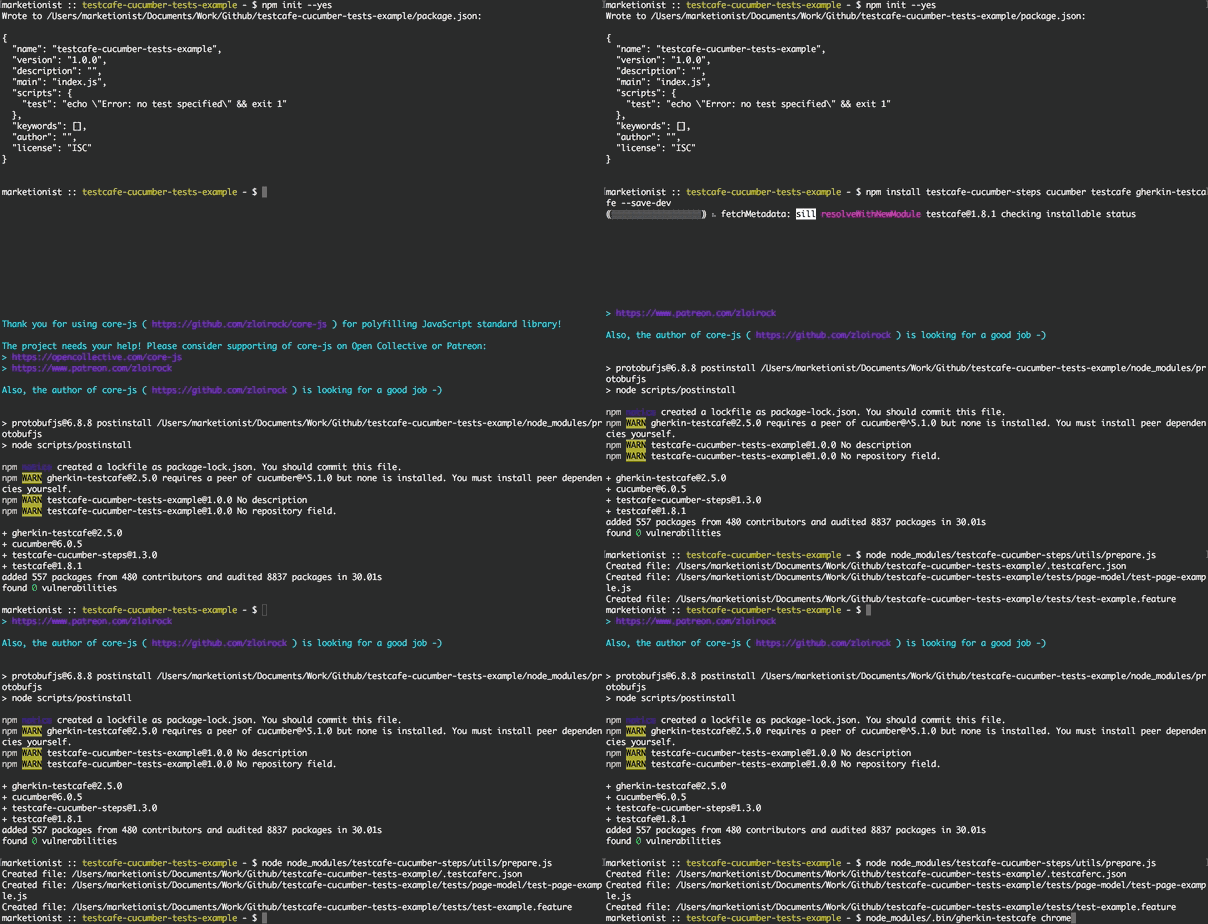
66 |
67 | ## Installation detailed
68 | > Note: this package is lightweight and has only 3 peerDependencies - it uses:
69 | > - [cucumber](https://github.com/cucumber/cucumber-js) to parse step definitions
70 | > - [testcafe](https://github.com/DevExpress/testcafe) to execute steps
71 | > - [gherkin-testcafe](https://github.com/Arthy000/gherkin-testcafe) to connect TestCafe with Cucumber
72 |
73 | First of all you will need to create `package.json` if you do not have one in
74 | the root folder of your project:
75 | ```bash
76 | npm init --yes
77 | ```
78 |
79 | To install the testcafe-cucumber-steps package and its peerDependencies and to
80 | save it to your `package.json` just run:
81 |
82 | ```bash
83 | npm install testcafe-cucumber-steps @cucumber/cucumber testcafe gherkin-testcafe --save-dev # In case if you want to use Cucumber 7 (the recent one)
84 | ```
85 | OR
86 | ```bash
87 | npm install testcafe-cucumber-steps cucumber@6.0.5 testcafe gherkin-testcafe@2.5.1 --save-dev # In case if you want to use Cucumber 6
88 | ```
89 | OR
90 | ```bash
91 | npm install testcafe-cucumber-steps cucumber@5.1.0 testcafe gherkin-testcafe@2.5.1 --save-dev # In case if you want to use Cucumber 5
92 | ```
93 |
94 | If you also want to have pre-created config (`.testcaferc.json`) and example
95 | test files (`tests/test-example.feature`, `tests/page-model/test-page-example.js`) -
96 | run additionally:
97 | ```bash
98 | node node_modules/testcafe-cucumber-steps/utils/prepare.js
99 | ```
100 |
101 | ## Writing tests
102 | To give a short example of how you can write the tests - here is
103 | `test-main-page.feature` feature file:
104 | ```gherkin
105 | # tests/test-main-page.feature
106 |
107 | Feature: My portal main page tests
108 | As a user of My portal
109 | I should be able to use main page
110 | to log in
111 |
112 | Scenario: Open the main page, page title should be present
113 | Given user goes to URL "http://myportal.test/login.html"
114 | Then the title should be "Test1 main page"
115 |
116 | Scenario: Products link should lead to Products page
117 | Given user goes to pageMain from main-page
118 | When user clicks linkProducts from main-page
119 | Then URL should contain "/products"
120 | And the title should contain "Test1 Products"
121 |
122 | Scenario: Log in, link with username and status should be present
123 | Given user goes to pageMain from main-page
124 | When user types "mytestuser" in inputLogin from main-page
125 | And user types "mytestpassword" in inputPassword from main-page
126 | And user clicks buttonLogin from main-page
127 | Then linkUsernameLoggedIn from main-page should be present
128 | ```
129 |
130 | And the Page Object file for this tests will look like this:
131 | ```javascript
132 | // tests/page-model/main-page.js
133 |
134 | let mainPage = {
135 |
136 | pageMain: 'http://myportal.test/login.html',
137 | linkProducts: '.link-products',
138 | inputLogin: '#login',
139 | inputPassword: '#pass',
140 | buttonLogin: '.btn-login',
141 | linkUsernameLoggedIn: 'a.username-authorized'
142 |
143 | };
144 |
145 | module.exports = mainPage;
146 | ```
147 |
148 | If you want the Page Objects to look even shorter - you can write the same tests
149 | like this:
150 | ```gherkin
151 | # tests/test-main-page.feature
152 |
153 | Feature: My portal main page tests
154 | As a user of My portal
155 | I should be able to use main page
156 | to log in
157 |
158 | Scenario: Open the main page, page title should be present
159 | Given user goes to URL "http://myportal.test/login.html"
160 | Then the title should be "Test1 main page"
161 |
162 | Scenario: Products link should lead to Products page
163 | Given user goes to "main-page"."pageMain"
164 | When user clicks "main-page"."linkProducts"
165 | Then URL should contain "/products"
166 | And the title should contain "Test1 Products"
167 |
168 | Scenario: Log in, link with username and status should be present
169 | Given user goes to "main-page"."pageMain"
170 | When user types "mytestuser" in "main-page"."inputLogin"
171 | And user types "mytestpassword" in "main-page"."inputPassword"
172 | And user clicks "main-page"."buttonLogin"
173 | Then "main-page"."linkUsernameLoggedIn" should be present
174 | ```
175 |
176 | See more examples of how to use predefined steps in
177 | [`test1-user.feature`](https://github.com/Marketionist/testcafe-cucumber-steps/blob/master/tests/test1-user.feature) and
178 | [`test2-user.feature`](https://github.com/Marketionist/testcafe-cucumber-steps/blob/master/tests/test2-user.feature).
179 |
180 | If you want to get access to Page Objects in your custom Cucumber steps - you can just require them inside any step definitions
181 | file like this:
182 | ```javascript
183 | const pageObjects = require('testcafe-cucumber-steps/utils/get-page-objects.js');
184 | ```
185 |
186 | ## Importing and running in CLI
187 | To get access to all Cucumber steps defined in this package just specify the
188 | path to this package when launching tests:
189 | ```bash
190 | node_modules/.bin/gherkin-testcafe chrome,firefox node_modules/testcafe-cucumber-steps/index.js tests/**/*.js tests/**/*.feature
191 | ```
192 |
193 | If you store your Page Objects not in `tests/page-model` folder, then
194 | `PO_FOLDER_PATH` environment variable has to be specified to show the path to
195 | your Page Objects folder:
196 | ```bash
197 | PO_FOLDER_PATH='tests/my-custom-page-objects' node_modules/.bin/gherkin-testcafe chrome,firefox node_modules/testcafe-cucumber-steps/index.js tests/**/*.js tests/**/*.feature
198 | ```
199 |
200 | > Note: you can specify multiple Page Object folders by separating them with commas:
201 | > `PO_FOLDER_PATH='main/my-custom1,login/my-custom2,auth,create/my-custom3'`
202 |
203 | Also you can just add `test-e2e` command to `scripts` in `package.json`:
204 | ```json
205 | "test-e2e": "PO_FOLDER_PATH='tests/my-custom-page-objects' node_modules/.bin/gherkin-testcafe 'chrome:headless' node_modules/testcafe-cucumber-steps/index.js tests/**/*.js tests/**/*.feature"
206 | ```
207 | and then launch tests with:
208 | ```
209 | npm run test-e2e
210 | ```
211 |
212 | > Note: all [TestCafe CLI options](https://devexpress.github.io/testcafe/documentation/using-testcafe/command-line-interface.html)
213 | > are supported.
214 |
215 | Additionally, you can specify:
216 |
217 | - tags to run:
218 | ```bash
219 | node_modules/.bin/gherkin-testcafe chrome,firefox node_modules/testcafe-cucumber-steps/index.js tests/**/*.js tests/**/*.feature --tags @fast
220 | ```
221 |
222 | When using more than one tag, the list needs to be comma separated:
223 | ```bash
224 | node_modules/.bin/gherkin-testcafe chrome node_modules/testcafe-cucumber-steps/index.js tests/**/*.js tests/**/*.feature --tags @fast,@long
225 | ```
226 |
227 | Negation of a tag (via `~`) is also possible (to run all scenarios that have
228 | tag `fast`, but not `long`):
229 | ```bash
230 | node_modules/.bin/gherkin-testcafe chrome node_modules/testcafe-cucumber-steps/index.js tests/**/*.js tests/**/*.feature --tags @fast,~@long
231 | ```
232 |
233 | - custom parameter types:
234 | ```bash
235 | node_modules/.bin/gherkin-testcafe chrome node_modules/testcafe-cucumber-steps/index.js tests/**/*.js tests/**/*.feature --param-type-registry-file ./a-file-that-exports-a-parameter-type-registry.js
236 | ```
237 |
238 | > Note: see Cucumber Expressions in
239 | > [gherkin-testcafe](https://github.com/kiwigrid/gherkin-testcafe#cucumber-expressions)
240 | > and Custom Parameter types in
241 | > [cucumber.io](https://cucumber.io/docs/cucumber/cucumber-expressions/#custom-parameter-types).
242 |
243 | ## Importing and running with config file
244 | To make life easier and not to specify all options in CLI command, a
245 | `.testcaferc.json` configuration file can be created in the root directory of
246 | your project to store all settings (pathes to all step definitions and tests
247 | should be specified inside the array in `src`):
248 | ```json
249 | {
250 | "browsers": "chrome",
251 | "src": ["node_modules/testcafe-cucumber-steps/index.js", "tests/**/*.js", "tests/**/*.feature"],
252 | "screenshots": {
253 | "path": "tests/screenshots/",
254 | "takeOnFails": true,
255 | "pathPattern": "${DATE}_${TIME}/test-${TEST_INDEX}/${USERAGENT}/${FILE_INDEX}.png"
256 | },
257 | "quarantineMode": false,
258 | "stopOnFirstFail": true,
259 | "skipJsErrors": true,
260 | "skipUncaughtErrors": true,
261 | "concurrency": 1,
262 | "selectorTimeout": 3000,
263 | "assertionTimeout": 1000,
264 | "pageLoadTimeout": 1000,
265 | "disablePageCaching": true
266 | }
267 | ```
268 | and then launch tests with:
269 | ```bash
270 | node_modules/.bin/gherkin-testcafe
271 | ```
272 | or if you use custom Page Objects folder:
273 | ```bash
274 | PO_FOLDER_PATH='tests/my-custom-page-objects' node_modules/.bin/gherkin-testcafe
275 | ```
276 |
277 | All options that are specified in CLI command will override settings from `.testcaferc.json`.
278 |
279 | > Note: for all possible settings see:
280 | > - [TestCafe configuration file description](https://devexpress.github.io/testcafe/documentation/using-testcafe/configuration-file.html) and
281 | > [example of .testcaferc.json](https://github.com/DevExpress/testcafe/blob/master/examples/.testcaferc.json)
282 | > - [TestCafe command line options](https://devexpress.github.io/testcafe/documentation/using-testcafe/command-line-interface.html)
283 |
284 | ## List of predefined steps
285 | ### Given steps
286 | 1. `I/user go(es) to URL "..."` - open a site (by its URL provided in "" as a
287 | string - for example: `"https://github.com/Marketionist"`) in the current
288 | browser window/tab.
289 | 2. `I/user go(es) to "..."."..."` - open a site (by its URL provided in
290 | **"page"."object"**) in the current browser window/tab.
291 | - `I/user go(es) to ... from ...` - open a site (by its URL provided in
292 | **object** from **page**) in the current browser window/tab.
293 | 3. `I/user set(s) cookie "..."` - set cookie on the current site (cookie
294 | provided in "" as a string - for example: `"my_test_cookie1=11"`).
295 | - `I/user set(s) cookie "..."."..."` - set cookie on the current site (cookie
296 | provided in **"page"."object"**).
297 | - `I/user set(s) cookie ... from ...` - set cookie on the current site (cookie
298 | provided in **object** from **page**).
299 | 4. `I/user send(s) "..." request to "..." with body "..."` - send request
300 | (request method provided in "" as a string - for example: `POST`) to URL
301 | (provided in "" as a string - for example: `"http://httpbin.org/post"`) with
302 | body (provided in "" as JSON - for example: `"{ \"test1\": 1, \"test2\": 2 }"`).
303 | > Note: GET request will be sent with default header `'Content-Type': 'text/html'`,
304 | > all other requests will be sent with default header
305 | > `'Content-Type': 'application/json'`.
306 | - `I/user send(s) "..." request to "..." with body "..."."..."` - send request
307 | (request method provided in "" as a string - for example: `POST`) to URL
308 | (provided in "" as a string - for example: `"http://httpbin.org/post"`) with
309 | body (provided in **"page"."object"**).
310 | - `I/user send(s) "..." request to "..."."..." with body "..."."..."` - send
311 | request (request method provided in "" as a string - for example: `POST`) to URL
312 | (provided in **"page"."object"**) with body (provided in **"page"."object"**).
313 | - `I/user send(s) "..." request to ... from ... with body ... from ...` - send
314 | request (request method provided in "" as a string - for example: `POST`) to URL
315 | (provided in **object** from **page**) with body (provided in **object** from
316 | **page**).
317 | 5. `I/user send(s) "..." request to "..." with headers "..." and body "..."` -
318 | send request (request method provided in "" as a string - for example: `POST`)
319 | to URL (provided in "" as a string - for example: `"http://httpbin.org/post"`)
320 | with headers (provided in "" as JSON - for example:
321 | `"{ \"Content-Type\": \"application/json\", \"Authorization\": \"Bearer aBcD1234\" }"`
322 | ) and body (provided in "" as JSON - for example:
323 | `"{ \"test1\": 1, \"test2\": 2 }"`).
324 | - `I/user send(s) "..." request to "..." with headers "..."."..." and body "..."."..."` -
325 | send request (request method provided in "" as a string - for example: `POST`) to URL
326 | (provided in "" as a string - for example: `"http://httpbin.org/post"`) with
327 | headers (provided in **"page"."object"**) and body (provided in
328 | **"page"."object"**).
329 | - `I/user send(s) "..." request to "..."."..." with headers "..."."..." and body "..."."..."` -
330 | send request (request method provided in "" as a string - for example: `POST`)
331 | to URL (provided in **"page"."object"**) with headers (provided in
332 | **"page"."object"**) and body (provided in **"page"."object"**).
333 | - `I/user send(s) "..." request to ... from ... with headers ... from ... and body ... from ...` -
334 | send request (request method provided in "" as a string - for example: `POST`) to URL
335 | (provided in **object** from **page**) with headers (provided in **object** from
336 | **page**) and body (provided in **object** from **page**).
337 |
338 | ### When steps
339 | 6. `I/user log(s) in with l: "..." in "..."."..." and p: "..." in
340 | "..."."..." and click(s) "..."."..."` - log in to any site with login (provided
341 | in "" as a string), login/username input (provided in **page1**.**object1** as
342 | CSS selector), password (provided in "" as a string), password input (provided
343 | in **page2**.**object2** as CSS or XPath selector), login button (provided in
344 | **page3**.**object3** as CSS or XPath selector).
345 | - `I/user log(s) in with l: "..." in ... from ... and p: "..." in ...
346 | from ... and click(s) ... from ...` - log in to any site with login (provided
347 | in "" as a string), login/username input (provided in **object1** from **page1**
348 | as CSS or XPath selector), password (provided in "" as a string), password input
349 | (provided in **object2** from **page2** as CSS or XPath selector), login button
350 | (provided in **object3** from **page3** as CSS or XPath selector).
351 | - `I/user log(s) in with l: "..."."..." in "..."."..." and p: "..."."..." in
352 | "..."."..." and click(s) "..."."..."` - log in to any site with login (provided
353 | in **page1**.**object1** as CSS or XPath selector), login/username input
354 | (provided in **page2**.**object2** as CSS or XPath selector), password (provided
355 | in **page3**.**object3** as CSS or XPath selector), password input (provided in
356 | **page4**.**object4** as CSS or XPath selector), login button (provided in
357 | **page5**.**object5** as CSS or XPath selector).
358 | - `I/user log(s) in with l: ... from ... in ... from ... and p: ... from ... in
359 | ... from ... and click(s) ... from ...` - log in to any site with login
360 | (provided in **object1** from **page1** as CSS or XPath selector),
361 | login/username input (provided in **object2** from **page2** as CSS or XPath
362 | selector), password (provided in **object3** from **page3** as CSS or XPath
363 | selector), password input (provided in **object4** from **page4** as CSS or
364 | XPath selector), login button (provided in **object5** from **page5** as CSS or
365 | XPath selector).
366 | 7. `I/user reload(s) the page` - reload current page.
367 | 8. `I/user click(s) "..."."..."` - click on any element (provided in
368 | **"page"."object"** as CSS or XPath selector).
369 | - `I/user click(s) ... from ...` - click on any element (provided in **object**
370 | from **page** as CSS or XPath selector).
371 | 9. `I/user right click(s) "..."."..."` - right click on any element (provided in
372 | **"page"."object"** as CSS or XPath selector).
373 | - `I/user right click(s) ... from ...` - right click on any element (provided in
374 | **object** from **page** as CSS or XPath selector).
375 | 10. `I/user wait(s) for ... ms` - wait for provided amount of time (in
376 | milliseconds).
377 | 11. `I/user wait(s) and click(s) "..."."..."` - wait for 300 ms and then click
378 | on any element (provided in **"page"."object"** as CSS or XPath selector).
379 | - `I/user wait(s) and click(s) ... from ...` - wait for 300 ms and then click on
380 | any element (provided in **object** from **page** as CSS or XPath selector).
381 | 12. `I/user wait(s) up to ... ms for "..."."..." to appear` - wait up to
382 | provided amount of time (in milliseconds) for any element (provided in
383 | **"page"."object"** as CSS or XPath selector) to appear.
384 | - `I/user wait(s) up to ... ms for ... from ... to appear` - wait up to provided
385 | amount of time (in milliseconds) for any element (provided in **object** from
386 | **page** as CSS or XPath selector) to appear.
387 | 13. `I/user click(s) "..."."..." if present` - click on any element (provided in
388 | **"page"."object"** as CSS or XPath selector) only if it is present on the page.
389 | - `I/user click(s) ... from ... if present` - click on any element (provided in
390 | **object** from **page** as CSS or XPath selector) only if it is present on the
391 | page.
392 | 14. `I/user double click(s) "..."."..."` - double click on any element (provided
393 | in **"page"."object"** as CSS or XPath selector).
394 | - `I/user double click(s) ... from ...` - double click on any element (provided
395 | in **object** from **page** as CSS or XPath selector).
396 | 15. `I/user type(s) "..." in "..."."..."` - type any text (provided in "" as a
397 | string) in the input field (provided in **"page"."object"** as CSS or XPath
398 | selector).
399 | - `I/user type(s) "..." in ... from ...` - type any text (provided in "" as a
400 | string) in the input field (provided in **object** from **page** as CSS
401 | selector).
402 | - `I/user type(s) "..."."..." in "..."."..."` - type any text (provided in
403 | **"page1"."object1"**) in the input field (provided in **"page2"."object2"** as
404 | CSS selector).
405 | - `I/user type(s) ... from ... in ... from ...` - type any text (provided in
406 | **object1** from **page1**) in the input field (provided in **object2** from
407 | **page2** as CSS or XPath selector).
408 | 16. `I/user clear(s) "..."."..." and type(s) "..."` - clear the input field
409 | (provided in **"page"."object"** as CSS or XPath selector) and type any text
410 | (provided in "" as a string).
411 | - `I/user clear(s) ... from ... and type(s) "..."` - clear the input field
412 | (provided in **object** from **page** as CSS or XPath selector) and type any
413 | text (provided in "" as a string).
414 | - `I/user clear(s) "..."."..." and type(s) "..."."..."` - clear the input field (provided in **"page1"."object1"** as CSS or XPath selector) and type any text
415 | (provided in **"page2"."object2"**).
416 | - `I/user clear(s) ... from ... and type(s) ... from ...` - clear the input
417 | field (provided in **object1** from **page1** as CSS or XPath selector) and type
418 | any text (provided in **object2** from **page2**).
419 | 17. `I/user select(s) "..." in "..."."..."` - select any option (provided in ""
420 | as a string) in the dropdown (provided in **"page"."object"** as CSS or XPath
421 | selector).
422 | - `I/user select(s) "..." in ... from ...` - select any option (provided in ""
423 | as a string) in the dropdown (provided in **object** from **page** as CSS or
424 | XPath selector).
425 | - `I/user select(s) "..."."..." in "..."."..."` - select any option (provided in
426 | **"page1"."object1"**) in the dropdown (provided in **"page2"."object2"** as CSS
427 | or XPath selector).
428 | - `I/user select(s) ... from ... in ... from ...` - select any option
429 | (provided in **object1** from **page1**) in the dropdown (provided in
430 | **object2** from **page2** as CSS or XPath selector).
431 | 18. `I/user move(s) to "..."."..."` - move the mouse pointer over any element
432 | (hover with cursor an element provided in **"page"."object"** as CSS or XPath
433 | selector).
434 | - `I/user move(s) to ... from ...` - move the mouse pointer over any element
435 | (hover with cursor an element provided in **object** from **page** as CSS or
436 | XPath selector).
437 | 19. `I/user move(s) to "..."."..." with an offset of x: ...px, y: ...px` - move
438 | the mouse pointer over any element (hover with cursor an element provided in
439 | **"page"."object"** as CSS or XPath selector) with an offset of x: ...px,
440 | y: ...px.
441 | - `I/user move(s) to ... from ... with an offset of x: ...px, y: ...px` - move
442 | the mouse pointer over any element (hover with cursor an element provided in
443 | **object** from **page** as CSS or XPath selector) with an offset of x: ...px,
444 | y: ...px.
445 | 20. `I/user switch(es) to "..."."..." frame` - switch the context to iframe
446 | (provided in **"page"."object"** as CSS or XPath selector).
447 | - `I/user switch(es) to ... frame from ...` - switch the context to iframe
448 | (provided in **object** from **page** as CSS or XPath selector).
449 | 21. `I/user wait(s) up to ... ms and switch(es) to "..."."..." frame` - wait up
450 | to provided amount of time (in milliseconds) for the iframe to load and then
451 | switch the context to that iframe (provided in **"page"."object"** as CSS or
452 | XPath selector).
453 | - `I/user wait(s) up to ... ms and switch(es) to ... frame from ...` - wait up
454 | to provided amount of time (in milliseconds) for the iframe to load and then
455 | switch the context to that iframe (provided in **object** from **page** as CSS
456 | or XPath selector).
457 | 22. `I/user switch(es) to main frame` - switch the context back to default
458 | (initial) frame.
459 | 23. `I/user set(s) "..." file path in "..."."..."` - set a file path (provided
460 | in "" as a string) in the input (provided in **"page"."object"** as CSS or XPath
461 | selector). This step can be used to upload files and images.
462 | - `I/user set(s) "..." file path in ... from ...` - set a file path (provided in
463 | "" as a string) in the input (provided in **object** from **page** as CSS
464 | selector).
465 | - `I/user set(s) "..."."..." file path in "..."."..."` - set a file path
466 | (provided in **"page1"."object1"**) in the input (provided in
467 | **"page2"."object2"** as CSS or XPath selector).
468 | - `I/user set(s) ... from ... file path in ... from ...` - set a file path
469 | (provided in **object1** from **page1**) in the input (provided in
470 | **object2** from **page2** as CSS or XPath selector).
471 | 24. `I/user execute(s) "..."."..." function` - execute script (JavaScript
472 | function) provided in **"page"."object"**.
473 | - `I/user execute(s) ... function from ...` - execute script (JavaScript
474 | function) provided in **object** from **page**.
475 | 25. `I/user drag(s)-and-drop(s) "..."."..." to "..."."..."` - drag-and-drop
476 | element (provided in **"page1"."object1"** as CSS or XPath selector) to another
477 | element (provided in **"page2"."object2"** as CSS or XPath selector).
478 | - `I/user drag(s)-and-drop(s) ... from ... to ... from ...` - drag-and-drop
479 | element (provided in **object1** from **page1** as CSS or XPath selector) to
480 | another element (provided in **object2** from **page2** as CSS or XPath selector
481 | ).
482 | 26. `I/user accept(s) further browser alerts` - accept (OK) all further browser
483 | alerts (after this step).
484 | 27. `I/user dismiss(es) further browser alerts` - dismiss (Cancel) all further
485 | browser alerts (after this step).
486 | 28. `I/user open(s) "..." in new browser window` - open a site (by its URL
487 | provided in "" as a string - for example: `"https://github.com/Marketionist"`)
488 | in the new browser window/tab.
489 | - `I/user open(s) "..."."..." in new browser window` - open a site (by its URL
490 | provided in **"page"."object"**) in the new browser window/tab.
491 | - `I/user open(s) ... from ... in new browser window` - open a site (by its URL
492 | provided in **object** from **page**) in the new browser window/tab.
493 | 29. `I/user close(s) current browser window` - close current browser window/tab.
494 | 30. `I/user press(es) "..."` - press the specified keyboard keys (provided in ""
495 | as a string - see the
496 | [list of supported keys and key combinations](https://devexpress.github.io/testcafe/documentation/test-api/actions/press-key.html#browser-processing-emulation)).
497 | 31. `I/user set(s) PAGE_URL environment variable` - take current page URL and
498 | write it to PAGE_URL environment variable.
499 | 32. `I/user go(es) to PAGE_URL` - open a site from PAGE_URL environment
500 | variable.
501 | 33. `I/user debug(s)` - set a breakpoint to stop the tests execution and start
502 | debugging.
503 |
504 | ### Then steps
505 | 34. `the title should be "..."` - verify that title of the current browser
506 | window/tab equals to the text (provided in "" as a string).
507 | 35. `the title should contain "..."` - verify that title of the current browser
508 | window/tab contains the text (provided in "" as a string).
509 | 36. `"..."."..." should be present` - verify that element (provided in
510 | **"page"."object"** as CSS or XPath selector) is present on the page.
511 | - `... from ... should be present` - verify that element (provided in
512 | **object** from **page** as CSS or XPath selector) is present on the page.
513 | 37. `... "..."."..." should be present` - verify that the number of elements
514 | (provided in **"page"."object"** as CSS or XPath selector) are present on the
515 | page.
516 | - `... ... from ... should be present` - verify that the number of elements
517 | (provided in **object** from **page** as CSS or XPath selector) are present on
518 | the page.
519 | 38. `"..."."..." should not be present` - verify that element (provided in
520 | **"page"."object"** as CSS or XPath selector) is not present on the page.
521 | - `... from ... should not be present` - verify that element (provided in
522 | **object** from **page** as CSS or XPath selector) is not present on the page.
523 | 39. `"..."."..." text should be "..."` - verify that text of the element
524 | (provided in **"page"."object"** as CSS or XPath selector) equals to the text
525 | (provided in "" as a string).
526 | - `... from ... text should be "..."` - verify that text of the element
527 | (provided in **object** from **page** as CSS or XPath selector) equals to the
528 | text (provided in "" as a string).
529 | - `"..."."..." text should be "..."."..."` - verify that text of the element
530 | (provided in **"page1"."object1"** as CSS or XPath selector) equals to the text
531 | (provided in **"page2"."object2"**).
532 | - `... from ... text should be ... from ...` - verify that text of the
533 | element (provided in **object1** from **page1** as CSS or XPath selector) equals
534 | to the text (provided in **object2** from **page2**).
535 | 40. `"..."."..." text should contain "..."` - verify that text of the element
536 | (provided in **"page"."object"** as CSS or XPath selector) contains the text
537 | (provided in "" as a string).
538 | - `... from ... text should contain "..."` - verify that text of the element
539 | (provided in **object** from **page** as CSS or XPath selector) contains the
540 | text (provided in "" as a string).
541 | - `"..."."..." text should contain "..."."..."` - verify that text of the
542 | element (provided in **"page1"."object1"** as CSS or XPath selector) contains
543 | the text (provided in **"page2"."object2"**).
544 | - `... from ... text should contain ... from ...` - verify that text
545 | of the element (provided in **object1** from **page1** as CSS or XPath selector)
546 | contains the text (provided in **object2** from **page2**).
547 | 41. `URL should be "..."` - verify that URL of the current page equals to the
548 | text (provided in "" as a string).
549 | - `URL should be "..."."..."` - verify that URL of the current page equals to
550 | the text (provided in **"page"."object"**).
551 | - `URL should be ... from ...` - verify that URL of the current page equals to
552 | the text (provided in **object** from **page**).
553 | 42. `URL should contain "..."` - verify that URL of the current page contains
554 | the text (provided in "" as a string).
555 | - `URL should contain "..."."..."` - verify that URL of the current page
556 | contains the text (provided in **"page"."object"**).
557 | - `URL should contain ... from ...` - verify that URL of the current page
558 | contains the text (provided in **object** from **page**).
559 | 43. `"..."."..." attribute "..." should contain "..."` - verify that the
560 | attribute (provided in "" as a string) of the element (provided in
561 | **"page"."object"**) contains provided string (provided in "" as a string).
562 | - `... from ... attribute "..." should contain "..."` - verify that the
563 | attribute (provided in "" as a string) of the element (provided in
564 | **"page"."object"**) contains provided string (provided in "" as a string).
565 |
566 | ## Bonus feature: use XPath selectors in TestCafe
567 | As you know TestCafe does not support XPath selectors out of the box. But now
568 | you can use them in TestCafe Cucumber steps - just write XPath selector in
569 | a Page Object file the same way as you do with CSS selectors - see the example
570 | in [`test1-page.js`](https://github.com/Marketionist/testcafe-cucumber-steps/blob/master/tests/page-model/test1-page.js).
571 | It can also be used in your custom Cucumber steps - for example:
572 | ```javascript
573 | const SelectorXPath = require('testcafe-cucumber-steps/utils/selector-xpath.js');
574 |
575 | const buttonStartTest = SelectorXPath('//*[ancestor::*[@class="test-panel"] and contains(text(), "Start test")]');
576 | ```
577 |
578 | ## Contributing
579 | You are welcome to contribute to this repository - please see
580 | [CONTRIBUTING.md](https://github.com/Marketionist/testcafe-cucumber-steps/blob/master/CONTRIBUTING.md)
581 | to help you get started. It is not mandatory, so you can just create a pull
582 | request and we will help you refine it along the way.
583 |
584 | ## Thanks
585 | If this package was helpful to you, please give it a **★ Star** on
586 | [GitHub](https://github.com/Marketionist/testcafe-cucumber-steps).
587 |
--------------------------------------------------------------------------------
/index.js:
--------------------------------------------------------------------------------
1 | 'use strict';
2 | /* eslint new-cap: 0 */ // --> OFF for Given, When, Then, Selector
3 |
4 | // #############################################################################
5 |
6 | const { ClientFunction, Selector } = require('testcafe');
7 | const { createRequest } = require('js-automation-tools');
8 | const SelectorXPath = require('./utils/selector-xpath.js');
9 | const errors = require('./utils/errors.js');
10 | const pageObjects = require('./utils/get-page-objects.js');
11 |
12 | let Given;
13 | let When;
14 | let Then;
15 |
16 | try {
17 | Given = require('@cucumber/cucumber').Given;
18 | When = require('@cucumber/cucumber').When;
19 | Then = require('@cucumber/cucumber').Then;
20 | } catch (error) {
21 | console.log('Using older version of cucumber (< 7)');
22 | Given = require('cucumber').Given;
23 | When = require('cucumber').When;
24 | Then = require('cucumber').Then;
25 | }
26 |
27 | const spacesToIndent = 4;
28 |
29 | /**
30 | * Checks if locator is XPath
31 | * @param {String} locator
32 | * @returns {Boolean}
33 | */
34 | function isXPath (locator) {
35 | const firstCharOfLocator = 0;
36 | const fourthCharOfLocator = 3;
37 |
38 | return locator.slice(firstCharOfLocator, fourthCharOfLocator).includes('//');
39 | }
40 |
41 | /**
42 | * Checks for XPath and gets proper element for further actions
43 | * @param {String} page
44 | * @param {String} elem
45 | * @returns {Object} element
46 | */
47 | function getElement (page, elem) {
48 | const locator = pageObjects[page][elem];
49 | let element;
50 |
51 | try {
52 | if (isXPath(locator)) {
53 | element = SelectorXPath(locator);
54 | } else {
55 | element = locator;
56 | }
57 | } catch (error) {
58 | throw new ReferenceError(`${errors.SELECTOR_NOT_DEFINED} "${page}"."${elem}" ${error}`);
59 | }
60 |
61 | return element;
62 | }
63 |
64 | /**
65 | * Sets cookie on the current website
66 | * @param {String} cookie
67 | */
68 | function setCookie (cookie) {
69 | const domain = window.location.hostname.split('.').filter((part) => {
70 | return part !== 'www';
71 | }).join('.');
72 |
73 | document.cookie = `${cookie};domain=.${domain};path=/`;
74 | window.location.reload();
75 | }
76 |
77 | /**
78 | * Gets title of the current page
79 | * @returns {String} title
80 | */
81 | const getTitle = ClientFunction(() => {
82 | try {
83 | const pageTitle = window.document.title;
84 |
85 | return pageTitle;
86 | } catch (error) {
87 | throw new Error(`${errors.NO_TITLE} ${error}`);
88 | }
89 | });
90 |
91 | /**
92 | * Gets URL of the current page
93 | * @returns {String} URL
94 | */
95 | const getCurrentPageUrl = ClientFunction(() => {
96 | try {
97 | const pageUrl = window.location.href;
98 |
99 | return pageUrl;
100 | } catch (error) {
101 | throw new Error(`${errors.NO_URL} ${error}`);
102 | }
103 | });
104 |
105 | // #### Given steps ############################################################
106 |
107 | Given('I/user go(es) to URL {string}', async function (t, [url]) {
108 | await t.navigateTo(url);
109 | });
110 |
111 | Given('I/user go(es) to {string}.{string}', async function (t, [page, element]) {
112 | await t.navigateTo(pageObjects[page][element]);
113 | });
114 |
115 | Given('I/user go(es) to {word} from {word}( page)', async function (t, [element, page]) {
116 | await t.navigateTo(pageObjects[page][element]);
117 | });
118 |
119 | Given('I/user set(s) cookie {string}', async function (t, [cookie]) {
120 | const executeSetCookie = ClientFunction((setCookieFunction, cookieString) => {
121 | return setCookieFunction(cookieString);
122 | });
123 |
124 | await executeSetCookie(setCookie, cookie);
125 | });
126 |
127 | Given('I/user set(s) cookie {string}.{string}', async function (t, [page, element]) {
128 | const executeSetCookie = ClientFunction((setCookieFunction, cookieString) => {
129 | return setCookieFunction(cookieString);
130 | });
131 |
132 | await executeSetCookie(setCookie, pageObjects[page][element]);
133 | });
134 |
135 | Given('I/user set(s) cookie {word} from {word}( page)', async function (t, [element, page]) {
136 | const executeSetCookie = ClientFunction((setCookieFunction, cookieString) => {
137 | return setCookieFunction(cookieString);
138 | });
139 |
140 | await executeSetCookie(setCookie, pageObjects[page][element]);
141 | });
142 |
143 | Given('I/user send(s) {string} request to {string} with body {string}', async function (
144 | t, [method, reqUrl, body]
145 | ) {
146 | await createRequest(method, reqUrl, '', body);
147 | });
148 |
149 | Given('I/user send(s) {string} request to {string} with body {string}.{string}', async function (
150 | t, [method, reqUrl, page, element]
151 | ) {
152 | await createRequest(method, reqUrl, '', pageObjects[page][element]);
153 | });
154 |
155 | Given('I/user send(s) {string} request to {string}.{string} with body {string}.{string}', async function (
156 | t, [method, page1, element1, page2, element2]
157 | ) {
158 | await createRequest(method, pageObjects[page1][element1], '', pageObjects[page2][element2]);
159 | });
160 |
161 | Given(
162 | 'I/user send(s) {string} request to {word} from {word}( page) with body {word} from {word}( page)',
163 | async function (t, [method, element1, page1, element2, page2]
164 | ) {
165 | await createRequest(method, pageObjects[page1][element1], '', pageObjects[page2][element2]);
166 | }
167 | );
168 |
169 | Given('I/user send(s) {string} request to {string} with headers {string} and body {string}', async function (
170 | t, [method, reqUrl, headers, body]
171 | ) {
172 | await createRequest(method, reqUrl, headers, body);
173 | });
174 |
175 | Given(
176 | 'I/user send(s) {string} request to {string} with headers {string}.{string} and body {string}.{string}',
177 | async function (t, [method, reqUrl, page1, element1, page2, element2]) {
178 | await createRequest(method, reqUrl, pageObjects[page1][element1], pageObjects[page2][element2]);
179 | }
180 | );
181 |
182 | Given(
183 | 'I/user send(s) {string} request to {string}.{string} with headers {string}.{string} and body {string}.{string}',
184 | async function (t, [method, page1, element1, page2, element2, page3, element3]) {
185 | await createRequest(
186 | method,
187 | pageObjects[page1][element1],
188 | pageObjects[page2][element2],
189 | pageObjects[page3][element3]
190 | );
191 | }
192 | );
193 |
194 | Given(
195 | // eslint-disable-next-line cucumber/expression-type
196 | 'I/user send(s) {string} request to {word} from {word}( page) with ' +
197 | 'headers {word} from {word}( page) and body {word} from {word}( page)',
198 | async function (t, [method, element1, page1, element2, page2, element3, page3]
199 | ) {
200 | await createRequest(
201 | method,
202 | pageObjects[page1][element1],
203 | pageObjects[page2][element2],
204 | pageObjects[page3][element3]
205 | );
206 | }
207 | );
208 |
209 | // #### When steps #############################################################
210 |
211 | When(
212 | // eslint-disable-next-line cucumber/expression-type
213 | 'I/user log(s) in with l: {string} in {string}.{string} and ' +
214 | 'p: {string} in {string}.{string} and click(s) {string}.{string}',
215 | async function (
216 | t, [login, page1, element1, password, page2, element2, page3, element3]
217 | ) {
218 | const inputLogin = getElement(page1, element1);
219 | const inputPassword = getElement(page2, element2);
220 | const buttonLogin = getElement(page3, element3);
221 |
222 | await t.typeText(inputLogin, login)
223 | .typeText(inputPassword, password).click(buttonLogin);
224 | }
225 | );
226 |
227 | When(
228 | // eslint-disable-next-line cucumber/expression-type
229 | 'I/user log(s) in with l: {string} in {word} from {word}( page) and ' +
230 | 'p: {string} in {word} from {word}( page) and click(s) ' +
231 | '{word} from {word}( page)',
232 | async function (
233 | t, [login, element1, page1, password, element2, page2, element3, page3]
234 | ) {
235 | const inputLogin = getElement(page1, element1);
236 | const inputPassword = getElement(page2, element2);
237 | const buttonLogin = getElement(page3, element3);
238 |
239 | await t.typeText(inputLogin, login)
240 | .typeText(inputPassword, password).click(buttonLogin);
241 | }
242 | );
243 |
244 | When(
245 | // eslint-disable-next-line cucumber/expression-type
246 | 'I/user log(s) in with l: {string}.{string} in {string}.{string} and ' +
247 | 'p: {string}.{string} in {string}.{string} and click(s) {string}.{string}',
248 | async function (
249 | t, [page1, element1, page2, element2, page3, element3, page4, element4, page5, element5]
250 | ) {
251 | const login = getElement(page1, element1);
252 | const inputLogin = getElement(page2, element2);
253 | const password = getElement(page3, element3);
254 | const inputPassword = getElement(page4, element4);
255 | const buttonLogin = getElement(page5, element5);
256 |
257 | await t.typeText(inputLogin, login)
258 | .typeText(inputPassword, password).click(buttonLogin);
259 | }
260 | );
261 |
262 | When(
263 | // eslint-disable-next-line cucumber/expression-type
264 | 'I/user log(s) in with l: {word} from {word}( page) in {word} from {word}( page) and ' +
265 | 'p: {word} from {word}( page) in {word} from {word}( page) and click(s) ' +
266 | '{word} from {word}( page)',
267 | async function (
268 | t, [element1, page1, element2, page2, element3, page3, element4, page4, element5, page5]
269 | ) {
270 | const login = getElement(page1, element1);
271 | const inputLogin = getElement(page2, element2);
272 | const password = getElement(page3, element3);
273 | const inputPassword = getElement(page4, element4);
274 | const buttonLogin = getElement(page5, element5);
275 |
276 | await t.typeText(inputLogin, login)
277 | .typeText(inputPassword, password).click(buttonLogin);
278 | }
279 | );
280 |
281 | When('I/user reload(s) the page', async function (t) {
282 | await t.eval(() => location.reload());
283 | });
284 |
285 | When('I/user click(s) {string}.{string}', async function (t, [page, element]) {
286 | const elem = getElement(page, element);
287 |
288 | try {
289 | await t.click(elem);
290 | } catch (error) {
291 | throw new Error(`${errors.NO_ELEMENT} "${page}"."${element}"
292 | ${JSON.stringify(error, null, spacesToIndent)}`);
293 | }
294 | });
295 |
296 | When(
297 | 'I/user click(s) {word} from {word}( page)',
298 | async function (t, [element, page]) {
299 | const elem = getElement(page, element);
300 |
301 | try {
302 | await t.click(elem);
303 | } catch (error) {
304 | throw new Error(`${errors.NO_ELEMENT} "${page}"."${element}"
305 | ${JSON.stringify(error, null, spacesToIndent)}`);
306 | }
307 | }
308 | );
309 |
310 | When(
311 | 'I/user right click(s) {string}.{string}',
312 | async function (t, [page, element]) {
313 | const elem = getElement(page, element);
314 |
315 | try {
316 | await t.rightClick(elem);
317 | } catch (error) {
318 | throw new Error(`${errors.NO_ELEMENT} "${page}"."${element}"
319 | ${JSON.stringify(error, null, spacesToIndent)}`);
320 | }
321 | }
322 | );
323 |
324 | When(
325 | 'I/user right click(s) {word} from {word}( page)',
326 | async function (t, [element, page]) {
327 | const elem = getElement(page, element);
328 |
329 | try {
330 | await t.rightClick(elem);
331 | } catch (error) {
332 | throw new Error(`${errors.NO_ELEMENT} "${page}"."${element}"
333 | ${JSON.stringify(error, null, spacesToIndent)}`);
334 | }
335 | }
336 | );
337 |
338 | When('I/user wait(s) for {int} ms', async function (t, [timeToWait]) {
339 | await t.wait(timeToWait);
340 | });
341 |
342 | When('I/user wait(s) and click(s) {string}.{string}', async function (
343 | t, [page, element]
344 | ) {
345 | const elem = getElement(page, element);
346 | const timeToWait = 300;
347 |
348 | try {
349 | await t.wait(timeToWait).click(elem);
350 | } catch (error) {
351 | throw new Error(`${errors.NO_ELEMENT} "${page}"."${element}"
352 | ${JSON.stringify(error, null, spacesToIndent)}`);
353 | }
354 | });
355 |
356 | When('I/user wait(s) and click(s) {word} from {word}( page)', async function (
357 | t, [element, page]
358 | ) {
359 | const elem = getElement(page, element);
360 | const timeToWait = 300;
361 |
362 | try {
363 | await t.wait(timeToWait).click(elem);
364 | } catch (error) {
365 | throw new Error(`${errors.NO_ELEMENT} "${page}"."${element}"
366 | ${JSON.stringify(error, null, spacesToIndent)}`);
367 | }
368 | });
369 |
370 | When('I/user wait(s) up to {int} ms for {string}.{string} to appear', async function (
371 | t, [timeToWait, page, element]
372 | ) {
373 | const elem = getElement(page, element);
374 |
375 | await t.expect(Selector(elem).with(
376 | { timeout: timeToWait, visibilityCheck: true }
377 | ).exists).ok(
378 | `${errors.ELEMENT_NOT_PRESENT} "${page}"."${element}" up to ${timeToWait} ms`,
379 | { timeout: timeToWait }
380 | );
381 | });
382 |
383 | When('I/user wait(s) up to {int} ms for {word} from {word}( page) to appear', async function (
384 | t, [timeToWait, element, page]
385 | ) {
386 | const elem = getElement(page, element);
387 |
388 | await t.expect(Selector(elem).with(
389 | { timeout: timeToWait, visibilityCheck: true }
390 | ).exists).ok(
391 | `${errors.ELEMENT_NOT_PRESENT} "${page}"."${element}" up to ${timeToWait} ms`,
392 | { timeout: timeToWait }
393 | );
394 | });
395 |
396 | When('I/user click(s) {string}.{string} if present', async function (
397 | t, [page, element]
398 | ) {
399 | const elem = getElement(page, element);
400 | const isPresent = await Selector(elem).exists;
401 |
402 | if (isPresent) {
403 | // Click only if element is present
404 | await t.click(elem);
405 | }
406 | });
407 |
408 | When('I/user click(s) {word} from {word}( page) if present', async function (
409 | t, [element, page]
410 | ) {
411 | const elem = getElement(page, element);
412 | const isPresent = await Selector(elem).exists;
413 |
414 | if (isPresent) {
415 | // Click only if element is present
416 | await t.click(elem);
417 | }
418 | });
419 |
420 | When('I/user double click(s) {string}.{string}', async function (
421 | t, [page, element]
422 | ) {
423 | const elem = getElement(page, element);
424 |
425 | try {
426 | await t.doubleClick(elem);
427 | } catch (error) {
428 | throw new Error(`${errors.NO_ELEMENT} "${page}"."${element}"
429 | ${JSON.stringify(error, null, spacesToIndent)}`);
430 | }
431 | });
432 |
433 | When('I/user double click(s) {word} from {word}( page)', async function (
434 | t, [element, page]
435 | ) {
436 | const elem = getElement(page, element);
437 |
438 | try {
439 | await t.doubleClick(elem);
440 | } catch (error) {
441 | throw new Error(`${errors.NO_ELEMENT} "${page}"."${element}"
442 | ${JSON.stringify(error, null, spacesToIndent)}`);
443 | }
444 | });
445 |
446 | When('I/user type(s) {string} in {string}.{string}', async function (
447 | t, [text, page, element]
448 | ) {
449 | const elem = getElement(page, element);
450 |
451 | await t.typeText(elem, text);
452 | });
453 |
454 | When('I/user type(s) {string} in {word} from {word}( page)', async function (
455 | t, [text, element, page]
456 | ) {
457 | const elem = getElement(page, element);
458 |
459 | await t.typeText(elem, text);
460 | });
461 |
462 | When('I/user type(s) {string}.{string} in {string}.{string}', async function (
463 | t, [page1, element1, page2, element2]
464 | ) {
465 | const elem = getElement(page2, element2);
466 |
467 | await t.typeText(elem, pageObjects[page1][element1]);
468 | });
469 |
470 | When(
471 | 'I/user type(s) {word} from {word}( page) in {word} from {word}( page)',
472 | async function (t, [element1, page1, element2, page2]) {
473 | const elem = getElement(page2, element2);
474 |
475 | await t.typeText(elem, pageObjects[page1][element1]);
476 | }
477 | );
478 |
479 | When('I/user clear(s) {string}.{string} and type(s) {string}', async function (
480 | t, [page, element, text]
481 | ) {
482 | const elem = getElement(page, element);
483 |
484 | await t.typeText(elem, text, { replace: true });
485 | });
486 |
487 | When(
488 | 'I/user clear(s) {word} from {word}( page) and type(s) {string}',
489 | async function (t, [element, page, text]) {
490 | const elem = getElement(page, element);
491 |
492 | await t.typeText(elem, text, { replace: true });
493 | }
494 | );
495 |
496 | When(
497 | 'I/user clear(s) {string}.{string} and type(s) {string}.{string}',
498 | async function (t, [page1, element1, page2, element2]) {
499 | const elem = getElement(page1, element1);
500 |
501 | await t.typeText(
502 | elem,
503 | pageObjects[page2][element2],
504 | { replace: true }
505 | );
506 | }
507 | );
508 |
509 | When(
510 | 'I/user clear(s) {word} from {word}( page) and type(s) {word} from {word}( page)',
511 | async function (t, [element1, page1, element2, page2]) {
512 | const elem = getElement(page1, element1);
513 |
514 | await t.typeText(
515 | elem,
516 | pageObjects[page2][element2],
517 | { replace: true }
518 | );
519 | }
520 | );
521 |
522 | When('I/user select(s) {string} in {string}.{string}', async function (
523 | t, [text, page, element]
524 | ) {
525 | const elem = getElement(page, element);
526 | const dropdown = Selector(elem);
527 | const option = dropdown.find('option');
528 |
529 | try {
530 | await t.click(dropdown).click(option.withText(text));
531 | } catch (error) {
532 | throw new Error(`${errors.NO_ELEMENT} "${page}"."${element}"
533 | ${JSON.stringify(error, null, spacesToIndent)}`);
534 | }
535 | });
536 |
537 | When('I/user select(s) {string} in {word} from {word}( page)', async function (
538 | t, [text, element, page]
539 | ) {
540 | const elem = getElement(page, element);
541 | const dropdown = Selector(elem);
542 | const option = dropdown.find('option');
543 |
544 | try {
545 | await t.click(dropdown).click(option.withText(text));
546 | } catch (error) {
547 | throw new Error(`${errors.NO_ELEMENT} "${page}"."${element}"
548 | ${JSON.stringify(error, null, spacesToIndent)}`);
549 | }
550 | });
551 |
552 | When('I/user select(s) {string}.{string} in {string}.{string}', async function (
553 | t, [page1, element1, page2, element2]
554 | ) {
555 | const elem = getElement(page2, element2);
556 | const dropdown = Selector(elem);
557 | const option = dropdown.find('option');
558 |
559 | try {
560 | await t.click(dropdown)
561 | .click(option.withText(pageObjects[page1][element1]));
562 | } catch (error) {
563 | throw new Error(`${errors.NO_ELEMENT} "${page2}"."${element2}"
564 | ${JSON.stringify(error, null, spacesToIndent)}`);
565 | }
566 | });
567 |
568 | When(
569 | 'I/user select(s) {word} from {word}( page) in {word} from {word}( page)',
570 | async function (t, [element1, page1, element2, page2]) {
571 | const elem = getElement(page2, element2);
572 | const dropdown = Selector(elem);
573 | const option = dropdown.find('option');
574 |
575 | try {
576 | await t.click(dropdown)
577 | .click(option.withText(pageObjects[page1][element1]));
578 | } catch (error) {
579 | throw new Error(`${errors.NO_ELEMENT} "${page2}"."${element2}"
580 | ${JSON.stringify(error, null, spacesToIndent)}`);
581 | }
582 | }
583 | );
584 |
585 | When(
586 | 'I/user move(s) to {string}.{string}',
587 | async function (t, [page, element]) {
588 | const elem = getElement(page, element);
589 |
590 | await t.hover(elem);
591 | }
592 | );
593 |
594 | When(
595 | 'I/user move(s) to {word} from {word}( page)',
596 | async function (t, [element, page]) {
597 | const elem = getElement(page, element);
598 |
599 | await t.hover(elem);
600 | }
601 | );
602 |
603 | When(
604 | 'I/user move(s) to {string}.{string} with an offset of x: {int}px, y: {int}px',
605 | async function (t, [page, element, offsetX, offsetY]) {
606 | const elem = getElement(page, element);
607 |
608 | await t.hover(elem, {
609 | offsetX: offsetX,
610 | offsetY: offsetY
611 | });
612 | }
613 | );
614 |
615 | When(
616 | 'I/user move(s) to {word} from {word}( page) with an offset of x: {int}px, y: {int}px',
617 | async function (t, [element, page, offsetX, offsetY]) {
618 | const elem = getElement(page, element);
619 |
620 | await t.hover(elem, {
621 | offsetX: offsetX,
622 | offsetY: offsetY
623 | });
624 | }
625 | );
626 |
627 | When('I/user switch(es) to {string}.{string} frame', async function (
628 | t, [page, element]
629 | ) {
630 | const elem = getElement(page, element);
631 |
632 | await t.switchToIframe(elem);
633 | });
634 |
635 | When('I/user switch(es) to {word} frame from {word}( page)', async function (
636 | t, [element, page]
637 | ) {
638 | const elem = getElement(page, element);
639 |
640 | await t.switchToIframe(elem);
641 | });
642 |
643 | When(
644 | 'I/user wait(s) up to {int} ms and switch(es) to {string}.{string} frame',
645 | async function (
646 | t, [timeToWait, page, element]
647 | ) {
648 | const elem = Selector(
649 | getElement(page, element),
650 | { timeout: timeToWait }
651 | );
652 |
653 | await t.switchToIframe(elem);
654 | }
655 | );
656 |
657 | When(
658 | 'I/user wait(s) up to {int} ms and switch(es) to {word} frame from {word}( page)',
659 | async function (
660 | t, [timeToWait, element, page]
661 | ) {
662 | const elem = Selector(
663 | getElement(page, element),
664 | { timeout: timeToWait }
665 | );
666 |
667 | await t.switchToIframe(elem);
668 | }
669 | );
670 |
671 | When('I/user switch(es) to main frame', async function (t) {
672 | await t.switchToMainWindow();
673 | });
674 |
675 | When('I/user set(s) {string} file path in {string}.{string}', async function (
676 | t, [pathToFile, page, element]
677 | ) {
678 | const elem = getElement(page, element);
679 |
680 | await t.setFilesToUpload(elem, [pathToFile]);
681 | });
682 |
683 | When('I/user set(s) {string} file path in {word} from {word}( page)', async function (
684 | t, [pathToFile, element, page]
685 | ) {
686 | const elem = getElement(page, element);
687 |
688 | await t.setFilesToUpload(elem, [pathToFile]);
689 | });
690 |
691 | When('I/user set(s) {string}.{string} file path in {string}.{string}', async function (
692 | t, [page1, element1, page2, element2]
693 | ) {
694 | const elem = getElement(page2, element2);
695 |
696 | await t.setFilesToUpload(elem, [pageObjects[page1][element1]]);
697 | });
698 |
699 | When(
700 | 'I/user set(s) {word} from {word}( page) file path in {word} from {word}( page)',
701 | async function (t, [element1, page1, element2, page2]) {
702 | const elem = getElement(page2, element2);
703 |
704 | await t.setFilesToUpload(elem, [pageObjects[page1][element1]]);
705 | }
706 | );
707 |
708 | When('I/user execute(s) {string}.{string} function', async function (
709 | t, [page, element]
710 | ) {
711 | const executeCustomFunction = ClientFunction((customFunction) => {
712 | return customFunction();
713 | });
714 |
715 | await executeCustomFunction(pageObjects[page][element]);
716 | });
717 |
718 | When('I/user execute(s) {word} function from {word}( page)', async function (
719 | t, [element, page]
720 | ) {
721 | const executeCustomFunction = ClientFunction((customFunction) => {
722 | return customFunction();
723 | });
724 |
725 | await executeCustomFunction(pageObjects[page][element]);
726 | });
727 |
728 | When(
729 | 'I/user drag(s)-and-drop(s) {string}.{string} to {string}.{string}',
730 | async function (
731 | t, [page1, element1, page2, element2]
732 | ) {
733 | const elemToDrag = getElement(page1, element1);
734 | const elemToDropTo = getElement(page2, element2);
735 |
736 | await t.dragToElement(elemToDrag, elemToDropTo);
737 | }
738 | );
739 |
740 | When(
741 | 'I/user drag(s)-and-drop(s) {word} from {word}( page) to {word} from {word}( page)',
742 | async function (
743 | t, [element1, page1, element2, page2]
744 | ) {
745 | const elemToDrag = getElement(page1, element1);
746 | const elemToDropTo = getElement(page2, element2);
747 |
748 | await t.dragToElement(elemToDrag, elemToDropTo);
749 | }
750 | );
751 |
752 | When('I/user accept(s) further browser alerts', async function (t) {
753 | await t.setNativeDialogHandler(() => true);
754 | });
755 |
756 | When('I/user dismiss(es) further browser alerts', async function (t) {
757 | await t.setNativeDialogHandler(() => false);
758 | });
759 |
760 | When(
761 | 'I/user open(s) {string} in new browser window',
762 | async function (t, [url]) {
763 | await t.openWindow(url);
764 | }
765 | );
766 |
767 | When(
768 | 'I/user open(s) {string}.{string} in new browser window',
769 | async function (t, [page, element]) {
770 | await t.openWindow(pageObjects[page][element]);
771 | }
772 | );
773 |
774 | When(
775 | 'I/user open(s) {word} from {word}( page) in new browser window',
776 | async function (t, [element, page]) {
777 | await t.openWindow(pageObjects[page][element]);
778 | }
779 | );
780 |
781 | When('I/user close(s) current browser window', async function (t) {
782 | await t.closeWindow();
783 | });
784 |
785 | When('I/user press(es) {string}', async function (t, [text]) {
786 | await t.pressKey(text);
787 | });
788 |
789 | When('I/user set(s) PAGE_URL environment variable', async function () {
790 | process.env.PAGE_URL = await getCurrentPageUrl();
791 |
792 | console.log(`process.env.PAGE_URL: ${process.env.PAGE_URL}`);
793 | });
794 |
795 | When('I/user go(es) to PAGE_URL', async function (t) {
796 | await t.navigateTo(process.env.PAGE_URL);
797 | });
798 |
799 | When('I/user debug(s)', async function (t) {
800 | await t.debug();
801 | });
802 |
803 | // #### Then steps #############################################################
804 |
805 | Then('the title should be {string}', async function (t, [text]) {
806 | await t.expect(getTitle()).eql(text);
807 | });
808 |
809 | Then('the title should contain {string}', async function (t, [text]) {
810 | await t.expect(getTitle()).contains(text);
811 | });
812 |
813 | Then('{string}.{string} should be present', async function (
814 | t, [page, element]
815 | ) {
816 | const elem = getElement(page, element);
817 |
818 | await t.expect(Selector(elem).exists).ok(
819 | `${errors.ELEMENT_NOT_PRESENT} "${page}"."${element}"`
820 | );
821 | });
822 |
823 | Then('{word} from {word}( page) should be present', async function (
824 | t, [element, page]
825 | ) {
826 | const elem = getElement(page, element);
827 |
828 | await t.expect(Selector(elem).exists).ok(
829 | `${errors.ELEMENT_NOT_PRESENT} "${page}"."${element}"`
830 | );
831 | });
832 |
833 | Then('{int} {string}.{string} should be present', async function (
834 | t, [number, page, element]
835 | ) {
836 | const elem = getElement(page, element);
837 |
838 | await t.expect(Selector(elem).count).eql(number);
839 | });
840 |
841 | Then('{int} {word} from {word}( page) should be present', async function (
842 | t, [number, element, page]
843 | ) {
844 | const elem = getElement(page, element);
845 |
846 | await t.expect(Selector(elem).count).eql(number);
847 | });
848 |
849 | Then('{string}.{string} should not be present', async function (
850 | t, [page, element]
851 | ) {
852 | const elem = getElement(page, element);
853 |
854 | await t.expect(Selector(elem).exists).notOk(
855 | `${errors.ELEMENT_PRESENT} "${page}"."${element}"`
856 | );
857 | });
858 |
859 | Then('{word} from {word}( page) should not be present', async function (
860 | t, [element, page]
861 | ) {
862 | const elem = getElement(page, element);
863 |
864 | await t.expect(Selector(elem).exists).notOk(
865 | `${errors.ELEMENT_PRESENT} "${page}"."${element}"`
866 | );
867 | });
868 |
869 | Then('{string}.{string} text should be {string}', async function (
870 | t, [page, element, text]
871 | ) {
872 | const elem = getElement(page, element);
873 |
874 | await t.expect(Selector(elem).innerText).eql(text);
875 | });
876 |
877 | Then('{word} from {word}( page) text should be {string}', async function (
878 | t, [element, page, text]
879 | ) {
880 | const elem = getElement(page, element);
881 |
882 | await t.expect(Selector(elem).innerText).eql(text);
883 | });
884 |
885 | Then('{string}.{string} text should be {string}.{string}', async function (
886 | t, [page1, element1, page2, element2]
887 | ) {
888 | const elem = getElement(page1, element1);
889 |
890 | await t.expect(Selector(elem).innerText)
891 | .eql(pageObjects[page2][element2]);
892 | });
893 |
894 | Then(
895 | '{word} from {word}( page) text should be {word} from {word}( page)',
896 | async function (t, [element1, page1, element2, page2]) {
897 | const elem = getElement(page1, element1);
898 |
899 | await t.expect(Selector(elem).innerText)
900 | .eql(pageObjects[page2][element2]);
901 | }
902 | );
903 |
904 | Then('{string}.{string} text should contain {string}', async function (
905 | t, [page, element, text]
906 | ) {
907 | const elem = getElement(page, element);
908 |
909 | await t.expect(Selector(elem).innerText).contains(text);
910 | });
911 |
912 | Then('{word} from {word}( page) text should contain {string}', async function (
913 | t, [element, page, text]
914 | ) {
915 | const elem = getElement(page, element);
916 |
917 | await t.expect(Selector(elem).innerText).contains(text);
918 | });
919 |
920 | Then('{string}.{string} text should contain {string}.{string}', async function (
921 | t, [page1, element1, page2, element2]
922 | ) {
923 | const elem = getElement(page1, element1);
924 |
925 | await t.expect(Selector(elem).innerText)
926 | .contains(pageObjects[page2][element2]);
927 | });
928 |
929 | Then(
930 | '{word} from {word}( page) text should contain {word} from {word}( page)',
931 | async function (t, [element1, page1, element2, page2]) {
932 | const elem = getElement(page1, element1);
933 |
934 | await t.expect(Selector(elem).innerText)
935 | .contains(pageObjects[page2][element2]);
936 | }
937 | );
938 |
939 | Then('URL should be {string}', async function (t, [url]) {
940 | await t.expect(getCurrentPageUrl()).eql(url);
941 | });
942 |
943 | Then('URL should be {string}.{string}', async function (t, [page, element]) {
944 | const url = getElement(page, element);
945 |
946 | await t.expect(getCurrentPageUrl()).eql(url);
947 | });
948 |
949 | Then('URL should be {word} from {word}( page)', async function (
950 | t, [element, page]
951 | ) {
952 | const url = getElement(page, element);
953 |
954 | await t.expect(getCurrentPageUrl()).eql(url);
955 | });
956 |
957 | Then('URL should contain {string}', async function (t, [url]) {
958 | await t.expect(getCurrentPageUrl()).contains(url);
959 | });
960 |
961 | Then('URL should contain {string}.{string}', async function (
962 | t, [page, element]
963 | ) {
964 | const url = getElement(page, element);
965 |
966 | await t.expect(getCurrentPageUrl()).contains(url);
967 | });
968 |
969 | Then('URL should contain {word} from {word}( page)', async function (
970 | t, [element, page]
971 | ) {
972 | const url = getElement(page, element);
973 |
974 | await t.expect(getCurrentPageUrl()).contains(url);
975 | });
976 |
977 | Then('{string}.{string} attribute {string} should contain {string}',
978 | async function (t, [page, element, attribute, attributeValue]) {
979 | const locator = pageObjects[page][element];
980 | let elem;
981 |
982 | if (isXPath(locator)) {
983 | elem = SelectorXPath(`${locator.slice(0, -1)} and contains(@${attribute}, "${attributeValue}")]`);
984 | } else {
985 | elem = `${locator}[${attribute}*="${attributeValue}"]`;
986 | }
987 |
988 | await t.expect(Selector(elem).exists).ok(
989 | `${errors.ATTRIBUTE_NOT_INCLUDES} "${page}"."${element}" -> "${attribute}" to include "${attributeValue}"`
990 | );
991 | }
992 | );
993 |
994 | Then('{word} from {word}( page) attribute {string} should contain {string}',
995 | async function (t, [element, page, attribute, attributeValue]) {
996 | const locator = pageObjects[page][element];
997 | let elem;
998 |
999 | if (isXPath(locator)) {
1000 | elem = SelectorXPath(`${locator.slice(0, -1)} and contains(@${attribute}, "${attributeValue}")]`);
1001 | } else {
1002 | elem = `${locator}[${attribute}*="${attributeValue}"]`;
1003 | }
1004 |
1005 | await t.expect(Selector(elem).exists).ok(
1006 | `${errors.ATTRIBUTE_NOT_INCLUDES} "${page}"."${element}" -> "${attribute}" to include "${attributeValue}"`
1007 | );
1008 | }
1009 | );
1010 |
--------------------------------------------------------------------------------