├── images
├── boot_kernel.JPG
├── beastie_disable.JPG
├── boot_old_kernel.JPG
└── shutdown-h-now.JPG
├── README.md
├── posts
├── reboot.md
├── enable-ls-colour-output.md
├── accept-default-options-during-installing-port.md
├── install-bash-completion.md
├── enable-root-login-over-ssh.md
├── mount-procfs-file-system.md
├── shutdown.md
├── search-backwards-in-csh.md
├── configure-proxy.md
├── ssl-certificate.md
├── dmesg-boot.md
├── trim-a-file-in-csh.md
├── kldstat-command.md
├── current-vs-stable.md
├── update-ports-collection.md
├── install-source-code.md
├── upgrade-system.md
├── Use-freecolor-to-display-memory-and-swap-usage.md
├── change-path-environment-variable.md
├── get-system-version.md
├── backup-old-kernel.md
├── display-swap-space-utilization.md
├── clear-directory-structure.md
├── sockstat-command.md
├── build-kernel.md
├── search-software.md
├── rehash-command.md
├── remove-software.md
├── load-and-unload-files-into-kernel.md
├── print-pci-devices-info.md
├── change-the-shell.md
├── upgrade-to-new-release.md
├── use-procstat-to-get-process-info.md
├── notice-of-using-subversion.md
├── install-software.md
├── colorize-bash.md
└── use-ps-to-display-process-status.md
├── LICENSE
└── SUMMARY.md
/images/boot_kernel.JPG:
--------------------------------------------------------------------------------
https://raw.githubusercontent.com/NanXiao/FreeBSD-101-Hacks/HEAD/images/boot_kernel.JPG
--------------------------------------------------------------------------------
/images/beastie_disable.JPG:
--------------------------------------------------------------------------------
https://raw.githubusercontent.com/NanXiao/FreeBSD-101-Hacks/HEAD/images/beastie_disable.JPG
--------------------------------------------------------------------------------
/images/boot_old_kernel.JPG:
--------------------------------------------------------------------------------
https://raw.githubusercontent.com/NanXiao/FreeBSD-101-Hacks/HEAD/images/boot_old_kernel.JPG
--------------------------------------------------------------------------------
/images/shutdown-h-now.JPG:
--------------------------------------------------------------------------------
https://raw.githubusercontent.com/NanXiao/FreeBSD-101-Hacks/HEAD/images/shutdown-h-now.JPG
--------------------------------------------------------------------------------
/README.md:
--------------------------------------------------------------------------------
1 | # FreeBSD-101-Hacks
2 | A collection of FreeBSD hacks.
3 | # Project Homepage
4 | [https://github.com/NanXiao/FreeBSD-101-Hacks](https://github.com/NanXiao/FreeBSD-101-Hacks)
5 |
--------------------------------------------------------------------------------
/posts/reboot.md:
--------------------------------------------------------------------------------
1 | Reboot
2 | ----
3 | If you want to reboot `FreeBSD` immediately, you can use the following methods:
4 |
5 | (1) Run "`reboot`" command directly:
6 |
7 | # reboot
8 | (2) Utilize "`shutdown`" command:
9 |
10 | # shutdown -r now
11 | "`-r`" option stands for `reboot`.
12 |
--------------------------------------------------------------------------------
/posts/enable-ls-colour-output.md:
--------------------------------------------------------------------------------
1 | Enable ls colour output
2 | ----
3 | `ls -G` can make `ls` output colourful. If you use `csh`, you can add following statement in `.cshrc`:
4 |
5 | alias ls ls -G
6 |
7 | Reference:
8 | [FreeBSD: Enable Colorized ls Output](https://www.cyberciti.biz/tips/freebsd-how-to-enable-colorized-ls-output.html).
9 |
10 |
11 |
12 |
--------------------------------------------------------------------------------
/posts/accept-default-options-during-installing-port.md:
--------------------------------------------------------------------------------
1 | Accept default options during installing port
2 | ----
3 | During building and installing port, if you are tired of the prompt, and want to use all default options, you can utilize `BATCH`:
4 |
5 | # make install clean BATCH=yes
6 |
7 | Reference:
8 | [How can I avoid the prompts when installing a FreeBSD port?](http://unix.stackexchange.com/questions/5257/how-can-i-avoid-the-prompts-when-installing-a-freebsd-port).
--------------------------------------------------------------------------------
/posts/install-bash-completion.md:
--------------------------------------------------------------------------------
1 | Install bash-completion
2 | ----
3 | [bash-completion](https://github.com/scop/bash-completion) is a really handy tool which can help you auto-complete many commands, such as `git`. To use it, you need `2` steps:
4 |
5 | (1) Install it:
6 |
7 | pkg install bash-completion
8 |
9 | (2) Add following command in your `~/.profile`:
10 |
11 | [[ $PS1 && -f /usr/local/share/bash-completion/bash_completion.sh ]] && \
12 | source /usr/local/share/bash-completion/bash_completion.sh
13 |
14 |
15 |
16 |
17 |
--------------------------------------------------------------------------------
/posts/enable-root-login-over-ssh.md:
--------------------------------------------------------------------------------
1 | # Enable root login over SSH
2 | ----
3 | By default, `FreeBSD` box doesn't allow `root` user login over `SSH`, to enable it, you need to modify `SSH` daemon configuration file (`/etc/ssh/sshd_config`).
4 |
5 | Change the following line:
6 |
7 | #PermitRootLogin no
8 | to:
9 |
10 | PermitRootLogin yes
11 | Then restart `SSH` daemon:
12 |
13 | # /etc/rc.d/sshd restart
14 | Reference:
15 | [How to enable root login over SSH on FreeBSD 8.2](http://blog.bobbyallen.me/2011/07/22/how-to-enable-root-login-over-ssh-on-freebsd-8-2/).
--------------------------------------------------------------------------------
/posts/mount-procfs-file-system.md:
--------------------------------------------------------------------------------
1 | Mount procfs file system
2 | ----
3 | `FreeBSD` doesn't mount `procfs` file system by default, if you need it, you can mount it yourself:
4 |
5 | mount -t procfs proc /proc
6 | If you want the `procfs` is automatically mounted at boot time, you can add the following line in `/etc/fstab` file:
7 |
8 | proc /proc procfs rw 0 0
9 |
10 | References:
11 | [procfs: Gone But Not Forgotten](https://www.freebsd.org/doc/en/articles/linux-users/procfs.html);
12 | [procfs -- process file system](https://www.freebsd.org/cgi/man.cgi?query=procfs&sektion=&n=1).
13 |
14 |
15 |
--------------------------------------------------------------------------------
/posts/shutdown.md:
--------------------------------------------------------------------------------
1 | Shutdown
2 | ----
3 | Compared to some `GNU/Linux` flavors, "`shutdown -h now`" command just halts the `FreeBSD`, not turns off the power. Refer the following screen shot from my Virtual Machine:
4 | 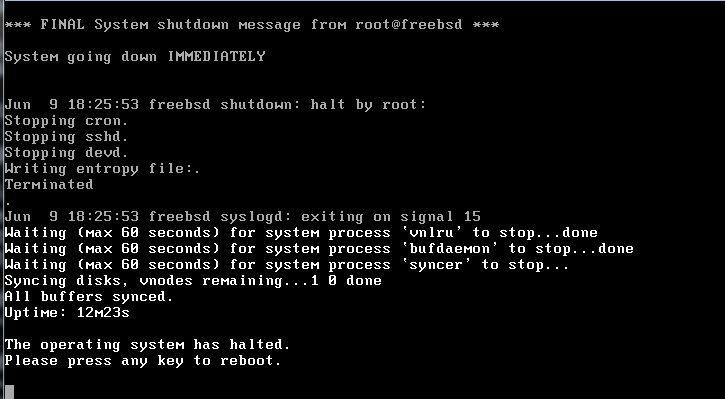
5 | You can see, after running "`shutdown -h now`", the system is just halted, and press any key can reboot the system immediately.
6 |
7 | If you want to halt and power off the system, you should execute "`shutdown -p now`".
8 |
9 | Reference:
10 | SHUTDOWN.
--------------------------------------------------------------------------------
/posts/search-backwards-in-csh.md:
--------------------------------------------------------------------------------
1 | Search backwards in csh
2 | ----
3 | In `bash`, `Ctrl + R` provides the handy "search backwards" feature which isn't shipped by `csh` by default. If you want to use the similar function in `csh`, you can employ `csh` built-in `bindkey` command to implement it:
4 |
5 | # cat .cshrc
6 | ......
7 |
8 | bindkey "^R" i-search-back
9 | Then you can use "search backwards" when pressing `Ctrl + R`:
10 |
11 | root@FreeBSD:~ # pkg install subversion
12 | bck:pk
13 |
14 | References:
15 | [Ctrl-R to search backwards for shell commands in csh](http://stackoverflow.com/questions/1387357/ctrl-r-to-search-backwards-for-shell-commands-in-csh).
--------------------------------------------------------------------------------
/posts/configure-proxy.md:
--------------------------------------------------------------------------------
1 | # Configure proxy
2 | ----
3 |
4 | If your `FreeBSD` box works behind a proxy, you may need to configure proxy to make it access network.
5 |
6 | For `csh` or `tcsh`, set proxy in `/etc/csh.cshrc`:
7 |
8 | setenv HTTP_PROXY http://web-proxy.xxxxxx.com:8080
9 | setenv HTTPS_PROXY https://web-proxy.xxxxxx.com:8080
10 | For `sh`, set proxy in `/etc/profile`:
11 |
12 | export HTTP_PROXY http://web-proxy.xxxxxx.com:8080
13 | export HTTPS_PROXY https://web-proxy.xxxxxx.com:8080
14 |
15 | Reference:
16 | [Using FreeBSD inside a controlled network – A required HTTP Proxy and No FTP](http://www.rhyous.com/2012/04/13/using-freebsd-inside-a-controlled-network-a-required-http-proxy-and-no-ftp/).
--------------------------------------------------------------------------------
/posts/ssl-certificate.md:
--------------------------------------------------------------------------------
1 | Fix git SSL certificate problem
2 | ----
3 | When you face "`git clone`" error like this:
4 |
5 | # git clone https://github.com/NanXiao/FreeBSD-101-Hacks.git
6 | Cloning into 'FreeBSD-101-Hacks'...
7 | fatal: unable to access 'https://github.com/NanXiao/FreeBSD-101-Hacks.git': SSL certificate problem: certificate is not yet valid
8 |
9 | The simplest solution may be just disable `SSL` verification:
10 |
11 | # git config --global http.sslVerify false
12 |
13 | Reference:
14 | [SSL certificate rejected trying to access GitHub over HTTPS behind firewall](https://stackoverflow.com/questions/3777075/ssl-certificate-rejected-trying-to-access-github-over-https-behind-firewall).
15 |
16 |
17 |
18 |
--------------------------------------------------------------------------------
/posts/dmesg-boot.md:
--------------------------------------------------------------------------------
1 | /var/run/dmesg.boot
2 | ----
3 | `/var/run/dmesg.boot` file contains the `FreeBSD` boot messages, and this is very helpful for checking hardware related info:
4 |
5 | # cat /var/run/dmesg.boot | grep -i CPU
6 | CPU: Intel(R) Core(TM) i5-4310U CPU @ 2.00GHz (2594.03-MHz K8-class CPU)
7 | cpu0: on acpi0
8 | Because the capacity of system message buffer is limited, `FreeBSD` employs `/var/run/dmesg.boot` in case the content of buffer is flushed.
9 |
10 | References:
11 | [Devices and Device Nodes](https://www.freebsd.org/doc/handbook/basics-devices.html);
12 | [Back To Basics: Unix Differences in Performing Tasks](http://www.longitudetech.com/linux-unix/back-to-basics-unix-differences-in-performing-tasks/).
--------------------------------------------------------------------------------
/posts/trim-a-file-in-csh.md:
--------------------------------------------------------------------------------
1 | Trim a file in csh
2 | ----
3 | In `bash`, if you want to clear out a file, the easiest command may be "`> file`":
4 |
5 | # cat test.txt
6 | Hello world!
7 | # > test.txt
8 | # cat test.txt
9 | #
10 |
11 | But in `csh`, "`> file`" will cause "`Invalid null command.`" error:
12 |
13 | # cat test.txt
14 | Hello world!
15 | # > test.txt
16 | Invalid null command.
17 |
18 | The solution is using "`: > file`" command:
19 |
20 | # cat test.txt
21 | Hello world!
22 | # : > test.txt
23 | # cat test.txt
24 | #
25 |
26 | Or employ "`cat /dev/null > file`".
27 |
28 | Reference:
29 | [What does a leading colon (:) mean in a script?](http://aplawrence.com/Basics/leading-colon.html).
--------------------------------------------------------------------------------
/posts/kldstat-command.md:
--------------------------------------------------------------------------------
1 | Kldstat command
2 | ----
3 | On `FreeBSD`, you can use `kldstat` command to display the status of any files dynamically linked into the kernel:
4 |
5 | # kldstat
6 | Id Refs Address Size Name
7 | 1 6 0xffffffff80200000 17bc6a8 kernel
8 | 2 1 0xffffffff81a11000 56c6 fdescfs.ko
9 | 3 1 0xffffffff81a17000 2ba8 uhid.ko
10 |
11 | If you want more detailed info, you can use `-v` option:
12 |
13 | # kldstat -v
14 | Id Refs Address Size Name
15 | 1 6 0xffffffff80200000 17bc6a8 kernel (/boot/kernel/kernel)
16 | Contains modules:
17 | Id Name
18 | 386 if_lo
19 | 398 newreno
20 | 373 elf32
21 | 372 elf64
22 | 374 shell
23 | .....
24 |
25 | Reference:
26 | [KLDSTAT(8)](https://www.freebsd.org/cgi/man.cgi?kldstat(8)).
27 |
28 |
--------------------------------------------------------------------------------
/posts/current-vs-stable.md:
--------------------------------------------------------------------------------
1 | CURRENT VS STABLE
2 | ----
3 | `FreeBSD` has two development branches: `FreeBSD-CURRENT` and `FreeBSD-STABLE`.
4 |
5 | `FreeBSD-CURRENT` is the active development branch of `FreeBSD`, and all new development work, such as adding new feature, will occur in `FreeBSD-CURRENT` branch firstly.
6 |
7 | `FreeBSD-STABLE` is span off from `FreeBSD-CURRENT`, and for production version. It mainly accepts bug and security fixes.
8 |
9 | You should notice, branches are not points but constant streams of development. And the `FreeBSD RELEASE` version is a point, and it is just a snapshot of `FreeBSD-STABLE` branch at some time.
10 |
11 | References:
12 | [Tracking a Development Branch](https://www.freebsd.org/doc/handbook/current-stable.html);
13 | [Release Engineering](http://www.over-yonder.net/~fullermd/rants/bsd4linux/05).
--------------------------------------------------------------------------------
/posts/update-ports-collection.md:
--------------------------------------------------------------------------------
1 | Update Ports Collection
2 | ----
3 | The stuff under `/usr/ports` is referred as Ports Collection, and we can employ `portsnap` command to update it:
4 |
5 | (1) If it is the first time to use `portsnap`, you should run following command:
6 |
7 | # portsnap fetch extract
8 | Otherwise, you can encounter errors as shown here:
9 |
10 | ......
11 | /usr/ports was not created by portsnap.
12 | You must run 'portsnap extract' before running 'portsnap update'.
13 |
14 | (2) Hereafter, you only need to execute "`portsnap fetch update`" to update the Ports Collection.
15 |
16 | Reference:
17 | [Using the Ports Collection](https://www.freebsd.org/doc/handbook/ports-using.html);
18 | [A question about using portsnanp to upgrade ports tree](https://lists.freebsd.org/pipermail/freebsd-questions/2016-June/272255.html).
--------------------------------------------------------------------------------
/posts/install-source-code.md:
--------------------------------------------------------------------------------
1 | Install source code
2 | ----
3 | Download `FreeBSD` source code according architecture, version:
4 |
5 | fetch ftp://ftp.freebsd.org/pub/`uname -s`/releases/`uname -m`/`uname -r | cut -d'-' -f1,2`/src.txz
6 |
7 | Uncompress the source package:
8 |
9 | tar -C / -xvzf src.txz
10 | Make sure the `src` is included in `Components` line in `/etc/freebsd-update.conf`, so when using `freebsd-update` to update system, also the source code is refreshed.
11 |
12 | # cat /etc/freebsd-update.conf
13 | ......
14 | # Components of the base system which should be kept updated.
15 | Components src world kernel
16 | ......
17 |
18 |
19 | References:
20 | [A question about downloading FreeBSD kernel code](https://lists.freebsd.org/pipermail/freebsd-questions/2016-July/272497.html);
21 | [Install FreeBSD kernel source after installed freebsd](https://www.netroby.com/view/3595).
--------------------------------------------------------------------------------
/posts/upgrade-system.md:
--------------------------------------------------------------------------------
1 | Upgrade system
2 | ----
3 | You should make use of "`freebsd-update`" utility to upgrade your system non-periodically to keep your system safe and not stale. E.g., after installing a fresh `10.3` version:
4 |
5 | # freebsd-version -ku
6 | 10.3-RELEASE
7 | 10.3-RELEASE
8 | You should update the patches released by `FreeBSD` team:
9 |
10 | # freebsd-update fetch install
11 | When it is done, check the system version again:
12 |
13 | # freebsd-version -ku
14 | 10.3-RELEASE-p4
15 | 10.3-RELEASE-p5
16 | Yeap! your system is refreshed now!
17 |
18 | References:
19 | [FreeBSD Man Pages](https://www.freebsd.org/cgi/man.cgi?query=freebsd-update&sektion=8);
20 | [What are the first commands I run after installing FreeBSD? Or How to patch FreeBSD? Or How to install ports on FreeBSD?](http://www.rhyous.com/2009/11/03/what-are-the-first-commands-i-run-after-installing-freebsd/).
--------------------------------------------------------------------------------
/posts/Use-freecolor-to-display-memory-and-swap-usage.md:
--------------------------------------------------------------------------------
1 | Use "freecolor" to display memory and swap usage
2 | ----
3 | `Freecolor` on `FreeBSD` is equal to `free` on `GNU/Linux`. Install it:
4 |
5 | # cd /usr/ports/sysutils/freecolor
6 | # make install clean
7 |
8 | Display the memory and swap usage in bar format:
9 |
10 | # freecolor
11 | Physical : [#################################..] 94% (1907820/2018396)
12 | Swap : [###################################] 100% (1048540/1048540)
13 |
14 | Display usage in traditional "`free`" format:
15 |
16 | # freecolor -m -o
17 | total used free shared buffers cached
18 | Mem: 1971 107 1863 0 0 0
19 | Swap: 1023 0 1023
20 | Reference:
21 | [FreeBSD find out RAM size Including Total Amount of Free and Used Memory Size](http://www.cyberciti.biz/faq/freebsd-command-to-get-ram-information/).
--------------------------------------------------------------------------------
/posts/change-path-environment-variable.md:
--------------------------------------------------------------------------------
1 | Change PATH environment variable
2 | ----
3 | In `csh`, if you want to change `$PATH` environment variable, you should modify `.cshrc` file:
4 |
5 | # cat .cshrc
6 | ......
7 | set path = (/sbin /bin /usr/sbin /usr/bin /usr/games /usr/local/sbin /usr/local/bin $HOME/bin $HOME/gocode/bin)
8 | ......
9 | For example, you add "`/usr/local/go/bin`" into `$PATH`:
10 |
11 | # cat .cshrc
12 | ......
13 | set path = (/sbin /bin /usr/sbin /usr/bin /usr/games /usr/local/sbin /usr/local/bin $HOME/bin $HOME/gocode/bin /usr/local/go/bin)
14 | ......
15 |
16 | Then executing "`source .cshrc`" command, you will find the new `$PATH` takes effect:
17 |
18 | # source .cshrc
19 | # echo $PATH
20 | /sbin:/bin:/usr/sbin:/usr/bin:/usr/games:/usr/local/sbin:/usr/local/bin:/root/bin:/root/gocode/bin:/usr/local/go/bin
21 |
22 | Reference:
23 | [Misc Tips & Tricks](http://www.freebsdmadeeasy.com/tutorials/freebsd/freebsd-tricks.php).
24 |
--------------------------------------------------------------------------------
/posts/get-system-version.md:
--------------------------------------------------------------------------------
1 | Get system version
2 | ----
3 | There are `2` versions of `FreeBSD`: kernel and userland. Use "`freebsd-version -ku`" can output both versions:
4 |
5 | # freebsd-version -uk
6 | 10.3-RELEASE-p4
7 | 10.3-RELEASE-p5
8 | The first one is kernel version info. You can see the versions of both kernel and userland is `10.3`, but kernel patch level is `p4`, while userland is `p5`. That's because in some cases, only the userland requires a patch whilst kernel not, so kernel patch level doesn't change. If there is no option, "`freebsd-version`" prints userland version only:
9 |
10 | # freebsd-version
11 | 10.3-RELEASE-p5
12 |
13 |
14 | "`uname -r`" command also outputs the kernel version:
15 |
16 | # uname -r
17 | 10.3-RELEASE-p4
18 |
19 | Reference:
20 | [Why the outputs of “freebsd-version” and “freebsd-version -k” are different?](http://stackoverflow.com/questions/37800913/why-the-outputs-of-freebsd-version-and-freebsd-version-k-are-different).
--------------------------------------------------------------------------------
/posts/backup-old-kernel.md:
--------------------------------------------------------------------------------
1 | Backup old kernel
2 | ----
3 | Every time, when a new kernel is installed, the last installed kernel will be backed up in a directory who is called `kernel.old`. So it is important to remember to save a copy of usable kernel in case the newly-built kernel can't work. For example:
4 |
5 | # mv /boot/kernel.old /boot/kernel.good
6 | # mv /boot/kernel /boot/kernel.bad
7 | # mv /boot/kernel.good /boot/kernel
8 |
9 | During boot, you can press `5` to select which kernel to run:
10 | 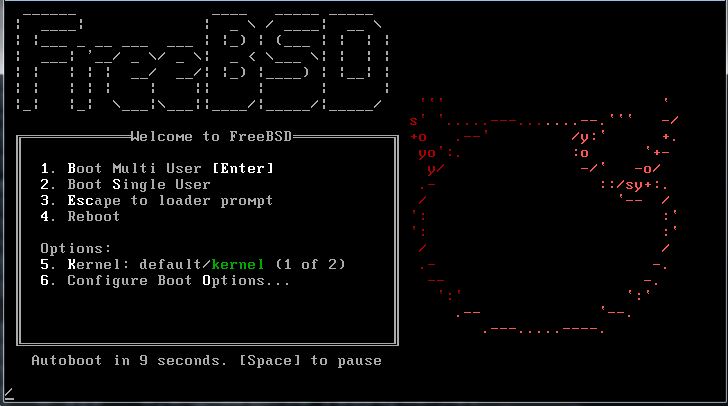
11 | 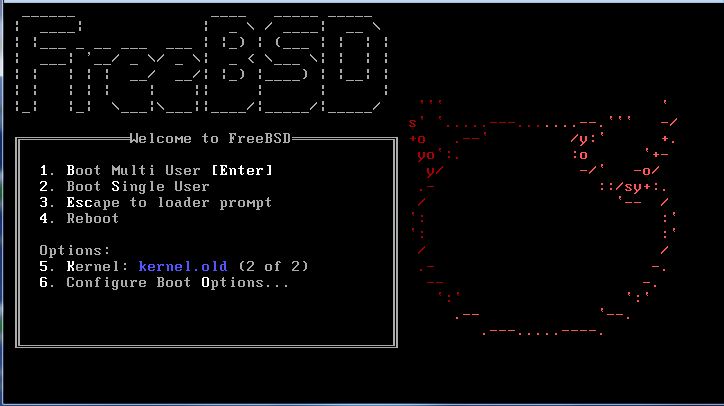
12 | References:
13 | [FreeBSD: reverting to previous kernel](http://www.linuxquestions.org/questions/*bsd-17/freebsd-reverting-to-previous-kernel-4175429007/);
14 | [If Something Goes Wrong](https://www.freebsd.org/doc/en_US.ISO8859-1/books/handbook/kernelconfig-trouble.html).
--------------------------------------------------------------------------------
/posts/display-swap-space-utilization.md:
--------------------------------------------------------------------------------
1 | Display swap space utilization
2 | ----
3 | On `FreeBSD`, you can use `pstat -s` to display swap space utilization:
4 |
5 | # pstat -s
6 | Device 1K-blocks Used Avail Capacity
7 | /dev/da0p3 1048540 0 1048540 0%
8 | There is another specified `swapinfo` command you can use:
9 |
10 | # swapinfo
11 | Device 1K-blocks Used Avail Capacity
12 | /dev/da0p3 1048540 0 1048540 0%
13 |
14 | You can also display swap info in "Human-readable" format:
15 |
16 | # swapinfo -h
17 | Device 1K-blocks Used Avail Capacity
18 | /dev/da0p3 1048540 0B 1.0G 0%
19 |
20 | Or display swap space size in megabyte unit:
21 |
22 | # swapinfo -m
23 | Device 1M-blocks Used Avail Capacity
24 | /dev/da0p3 1023 0 1023 0%
25 |
26 | References:
27 | [PSTAT](https://www.freebsd.org/cgi/man.cgi?query=swapinfo&sektion=8).
28 |
29 |
30 |
--------------------------------------------------------------------------------
/posts/clear-directory-structure.md:
--------------------------------------------------------------------------------
1 | Clear directory structure
2 | ----
3 | `FreeBSD` has a clear separation between base operating system and user-added applications, that means everything which does not belong to the base operating system is under `/usr/local` directory, and the `/usr/local` directory contains a directory structure that mostly mirrors the structure found in the `/` or `/usr` directory.
4 |
5 | For example, the application installed from port tree or `package` command will be located in `/usr/local/bin` or `/usr/local/sbin`, corresponding to `/bin`, `/sbin`, `/usr/bin` and `/usr/local/sbin`; and `/etc` directory contains configuration files for the base operating system while `/usr/local/etc` for user-added applications.
6 |
7 | References:
8 | [A Comparative Introduction to FreeBSD for Linux Users](https://www.digitalocean.com/community/tutorials/a-comparative-introduction-to-freebsd-for-linux-users);
9 | [Directory Structure](https://www.freebsd.org/doc/handbook/dirstructure.html);
10 | [Ten Things I like About FreeBSD](https://bsdmag.org/download/the_begginers_guide/).
11 |
--------------------------------------------------------------------------------
/posts/sockstat-command.md:
--------------------------------------------------------------------------------
1 | Sockstat command
2 | ----
3 | On `FreeBSD`, we can employ `sockstat` command to list both open Internet and `UNIX `domain sockets:
4 |
5 | # sockstat
6 | USER COMMAND PID FD PROTO LOCAL ADDRESS FOREIGN ADDRESS
7 | root sshd 45768 3 tcp4 192.168.80.129:22 192.168.80.1:60803
8 | root sshd 22144 3 tcp4 192.168.80.129:22 192.168.80.1:54834
9 | root sshd 19097 3 tcp4 192.168.80.129:22 192.168.80.1:58174
10 | smmsp sendmail 662 3 dgram -> /var/run/log
11 | root sendmail 659 3 tcp4 127.0.0.1:25 *:*
12 | root sendmail 659 4 dgram -> /var/run/logpriv
13 | root sshd 656 3 tcp6 *:22 *:*
14 | root sshd 656 4 tcp4 *:22 *:*
15 | ......
16 |
17 | We can see the output of `sockstat` lists which process owns the socket, the file descriptor number of the socket, etc. So it is a really awesome tool to diagnose network related issues.
18 |
19 | Reference:
20 | [SOCKSTAT(1)](https://www.freebsd.org/cgi/man.cgi?query=sockstat&sektion=1).
21 |
22 |
23 |
--------------------------------------------------------------------------------
/posts/build-kernel.md:
--------------------------------------------------------------------------------
1 | Build kernel
2 | ----
3 | If you want to build a custom kernel yourself, you need to install the source code firstly (you can take [post](../posts/install-source-code.md) as a reference). Then enter the configuration directory of your machine:
4 |
5 | # cd /usr/src/sys/`uname -m`/conf
6 |
7 | Copy a new kernel configuration file:
8 |
9 | # cp GENERIC NAN_FIRST_BUILD
10 | You can modify the new configuration file (`NAN_FIRST_BUILD`) according to your needs.
11 |
12 | Build the kernel:
13 |
14 | # cd /usr/src
15 | # make buildkernel KERNCONF="NAN_FIRST_BUILD"
16 |
17 | Once it is finished, install the fresh kernel binary and reboot:
18 |
19 | # make installkernel KERNCONF="NAN_FIRST_BUILD"
20 | # reboot
21 |
22 | Check the kernel version, you will find now the OS is harnessing your newly built kernel now:
23 |
24 | # uname -a
25 | FreeBSD FreeBSD 10.3-RELEASE-p5 FreeBSD 10.3-RELEASE-p5 #0: Tue Jul 19 17:52:57 CST 2016 root@FreeBSD:/usr/obj/usr/src/sys/NAN_FIRST_BUILD amd64
26 |
27 | Reference:
28 | [How to build a custom kernel in FreeBSD](https://www.youtube.com/watch?v=KVNxaKu11F0).
29 |
30 |
31 |
32 |
--------------------------------------------------------------------------------
/posts/search-software.md:
--------------------------------------------------------------------------------
1 | Search software
2 | ----
3 | If you want to search a specified application, you can use "`pkg search`" command. For example:
4 |
5 | # pkg search lsof
6 | lsof-4.90.b,8 Lists information about open files (similar to fstat(1))
7 | p5-Unix-Lsof-0.0.5_2 Unix::Lsof -- a wrapper to the Unix lsof utility
8 | If you want to know the software's path in the ports tree, you can use `-o` option:
9 |
10 | # pkg search -o lsof
11 | sysutils/lsof Lists information about open files (similar to fstat(1))
12 | sysutils/p5-Unix-Lsof Unix::Lsof -- a wrapper to the Unix lsof utility
13 | In case the Ports Collection is already installed, you can employ `whereis` command:
14 |
15 | # whereis lsof
16 | lsof: /usr/local/sbin/lsof /usr/local/man/man8/lsof.8.gz /usr/ports/sysutils/lsof
17 |
18 | Another tricky method is using "`echo`" command:
19 |
20 | # echo /usr/ports/*/*lsof*
21 | /usr/ports/distfiles/lsof_4.90B.freebsd.tar.bz2 /usr/ports/sysutils/lsof
22 |
23 | Reference:
24 | [Finding Software](https://www.freebsd.org/doc/handbook/ports-finding-applications.html).
25 |
26 |
27 |
--------------------------------------------------------------------------------
/posts/rehash-command.md:
--------------------------------------------------------------------------------
1 | Rehash command
2 | ----
3 | After removing the application in the directory listed in the `$PATH` variable, you may even see the command prompt when you type the first characters:
4 |
5 | # pkg delete lsof
6 | Checking integrity... done (0 conflicting)
7 | Deinstallation has been requested for the following 1 packages (of 0 packages in the universe):
8 |
9 | Installed packages to be REMOVED:
10 | lsof-4.90.b,8
11 |
12 | Proceed with deinstalling packages? [y/N]: y
13 | [1/1] Deinstalling lsof-4.90.b,8...
14 | [1/1] Deleting files for lsof-4.90.b,8: 100%
15 | # ls
16 | ls ls-F lsextattr lsof lspci lsvfs
17 | While running it will prompt "`Command not found.`" definitely:
18 |
19 | # lsof
20 | lsof: Command not found.
21 | Np matter install or remove application , you need to run `rehash` command in `csh` to causes the shell to recompute a table of where commands are located.
22 |
23 | Reference:
24 | [Misc Tips & Tricks](http://www.freebsdmadeeasy.com/tutorials/freebsd/freebsd-tricks.php);
25 | [Rehash](http://www.panix.com/~spkemp/examplex/csh/rehash.htm).
26 |
27 |
28 |
29 |
30 |
--------------------------------------------------------------------------------
/posts/remove-software.md:
--------------------------------------------------------------------------------
1 | Remove software
2 | ----
3 | After installing application, you can use "`pkg delete`" command to remove it:
4 |
5 | # pkg delete lsof
6 | Checking integrity... done (0 conflicting)
7 | Deinstallation has been requested for the following 1 packages (of 0 packages in the universe):
8 |
9 | Installed packages to be REMOVED:
10 | lsof-4.90.b,8
11 |
12 | Proceed with deinstalling packages? [y/N]: y
13 | [1/1] Deinstalling lsof-4.90.b,8...
14 | [1/1] Deleting files for lsof-4.90.b,8: 100%
15 | You can also enter the port directory, and execute "`make deinstall`" instruction:
16 |
17 | # pwd
18 | /usr/ports/sysutils/lsof
19 | # make deinstall
20 | ===> Deinstalling for lsof
21 | ===> Deinstalling lsof-4.90.b,8
22 | Updating database digests format: 100%
23 | Checking integrity... done (0 conflicting)
24 | Deinstallation has been requested for the following 1 packages (of 0 packages in the universe):
25 |
26 | Installed packages to be REMOVED:
27 | lsof-4.90.b,8
28 | [1/1] Deinstalling lsof-4.90.b,8...
29 | [1/1] Deleting files for lsof-4.90.b,8: 100%
30 |
31 | Reference:
32 | [Using the Ports Collection](https://www.freebsd.org/doc/handbook/ports-using.html).
--------------------------------------------------------------------------------
/posts/load-and-unload-files-into-kernel.md:
--------------------------------------------------------------------------------
1 | Load and unload files into kernel
2 | ----
3 | You can use `kldload` command to load files into kernel. For example, enter `/boot/kernel` directory, and use `kldstat` to check currently loaded files:
4 |
5 | # cd /boot/kernel
6 | # kldstat
7 | Id Refs Address Size Name
8 | 1 6 0xffffffff80200000 17bc6a8 kernel
9 | 2 1 0xffffffff81a11000 56c6 fdescfs.ko
10 | 3 1 0xffffffff81a17000 2ba8 uhid.ko
11 | Use `kldload` to load `zfs.ko` file:
12 |
13 | # kldload zfs.ko
14 | # kldstat
15 | Id Refs Address Size Name
16 | 1 15 0xffffffff80200000 17bc6a8 kernel
17 | 2 1 0xffffffff81a11000 56c6 fdescfs.ko
18 | 3 1 0xffffffff81a17000 2ba8 uhid.ko
19 | 7 1 0xffffffff81a1a000 1ee0c8 zfs.ko
20 | 8 1 0xffffffff81c09000 3330 opensolaris.ko
21 | You can see the `zfs.ko` is loaded successfully.
22 |
23 | Unloading file uses `kldunload` command:
24 |
25 | # kldunload zfs.ko
26 | # kldstat
27 | Id Refs Address Size Name
28 | 1 6 0xffffffff80200000 17bc6a8 kernel
29 | 2 1 0xffffffff81a11000 56c6 fdescfs.ko
30 | 3 1 0xffffffff81a17000 2ba8 uhid.ko
31 |
32 |
33 | Reference:
34 | kldload;
35 | kldunload.
36 |
--------------------------------------------------------------------------------
/posts/print-pci-devices-info.md:
--------------------------------------------------------------------------------
1 | Print PCI devices info
2 | ----
3 | `FreeBSD` provides `pciconf` command which can list `PCI` devices info:
4 |
5 | # pciconf -lv
6 | hostb0@pci0:0:0:0: class=0x060000 card=0x197615ad chip=0x71908086 rev=0x01 hdr=0x00
7 | vendor = 'Intel Corporation'
8 | device = '440BX/ZX/DX - 82443BX/ZX/DX Host bridge'
9 | class = bridge
10 | subclass = HOST-PCI
11 | pcib1@pci0:0:1:0: class=0x060400 card=0x00000000 chip=0x71918086 rev=0x01 hdr=0x01
12 | vendor = 'Intel Corporation'
13 | device = '440BX/ZX/DX - 82443BX/ZX/DX AGP bridge'
14 | class = bridge
15 | subclass = PCI-PCI
16 | isab0@pci0:0:7:0: class=0x060100 card=0x197615ad chip=0x71108086 rev=0x08 hdr=0x00
17 | vendor = 'Intel Corporation'
18 | device = '82371AB/EB/MB PIIX4 ISA'
19 | class = bridge
20 | subclass = PCI-ISA
21 | ......
22 |
23 | If you are accustomed to `lspci` which is shipped on `GNU/Linux`, you can install it yourself:
24 |
25 | # pkg install pciutils
26 | ......
27 | # lspci
28 | 00:00.0 Host bridge: Intel Corporation 440BX/ZX/DX - 82443BX/ZX/DX Host bridge (rev 01)
29 | 00:01.0 PCI bridge: Intel Corporation 440BX/ZX/DX - 82443BX/ZX/DX AGP bridge (rev 01)
30 | 00:07.0 ISA bridge: Intel Corporation 82371AB/EB/MB PIIX4 ISA (rev 08)
31 | ......
32 |
33 | Reference:
34 | ["lspci" & pciconf commands in FreeBSD](http://kazaonfreebsd.blogspot.com/2012/12/lspci-pciconf-commands-in-freebsd.html).
--------------------------------------------------------------------------------
/posts/change-the-shell.md:
--------------------------------------------------------------------------------
1 | Change the shell
2 | ----
3 | If you were previously working on `Linux`, you may miss `Bash`, and not accustomed to `csh` which is shipped on `FreeBSD` by default. You can change the shell to `Bash` following the below instructions:
4 |
5 | (1) The `Bash` must already be installed on your `FreeBSD`, and its full path should also be included in `/etc/shells`. E.g:
6 |
7 | # pkg install bash
8 | Updating FreeBSD repository catalogue...
9 | FreeBSD repository is up-to-date.
10 | All repositories are up-to-date.
11 | The following 1 package(s) will be affected (of 0 checked):
12 |
13 | New packages to be INSTALLED:
14 | bash: 4.3.42_1
15 | ......
16 |
17 | Then you will find the `Bash` path is presented in `/etc/shells` automatically:
18 |
19 | # cat /etc/shells
20 | # $FreeBSD: releng/10.3/etc/shells 59717 2000-04-27 21:58:46Z ache $
21 | #
22 | # List of acceptable shells for chpass(1).
23 | # Ftpd will not allow users to connect who are not using
24 | # one of these shells.
25 |
26 | /bin/sh
27 | /bin/csh
28 | /bin/tcsh
29 | /usr/local/bin/bash
30 | /usr/local/bin/rbash
31 |
32 | (2) Execute `chsh -s /usr/local/bin/bash`:
33 |
34 | # chsh -s /usr/local/bin/bash
35 | chsh: user information updated
36 |
37 | After you login again, you can find the shell is `bash` now:
38 |
39 | # echo $SHELL
40 | /usr/local/bin/bash
41 |
42 | Reference:
43 | [Shells](https://www.freebsd.org/doc/handbook/shells.html).
44 |
45 |
--------------------------------------------------------------------------------
/posts/upgrade-to-new-release.md:
--------------------------------------------------------------------------------
1 | Upgrade to new release
2 | ----
3 | This article takes upgrading system from `10.2-RELEASE` to `10.3-RELEASE` as an example, but you must notice this tutorial may **not** apply to other versions. So please read the related release notes.
4 |
5 | (1) Check current version:
6 |
7 | # freebsd-version -ku
8 | 10.2-RELEASE
9 | 10.2-RELEASE
10 |
11 | (2) Run "`freebsd-update upgrade`" command to upgrade current system to a new version:
12 |
13 | # freebsd-update upgrade -r 10.3-RELEASE
14 | ......
15 | To install the downloaded upgrades, run "/usr/sbin/freebsd-update install".
16 | (3) The last log of "`freebsd-update upgrade -r 10.3-RELEASE`" prompts executing "`freebsd-update install`":
17 |
18 | # freebsd-update install
19 | src component not installed, skipped
20 | Installing updates...
21 | Kernel updates have been installed. Please reboot and run
22 | "/usr/sbin/freebsd-update install" again to finish installing updates.
23 |
24 | (4) Reboot the system and execute "`freebsd-update install`" again:
25 |
26 | # reboot
27 | # freebsd-update install
28 | src component not installed, skipped
29 | Installing updates... done.
30 |
31 | (5) Now check the version:
32 |
33 | # freebsd-version -ku
34 | 10.3-RELEASE-p4
35 | 10.3-RELEASE-p5
36 | The system has been upgraded to `10.3-RELEASE` now.
37 |
38 | Reference:
39 | [freebsd-update](https://www.freebsd.org/cgi/man.cgi?freebsd-update);
40 | [FreeBSD 10.3-RELEASE Installation Instructions](https://www.freebsd.org/releases/10.3R/installation.html).
--------------------------------------------------------------------------------
/LICENSE:
--------------------------------------------------------------------------------
1 | Copyright (c) 2016, Nan Xiao
2 | All rights reserved.
3 |
4 | Redistribution and use in source and binary forms, with or without
5 | modification, are permitted provided that the following conditions are met:
6 |
7 | * Redistributions of source code must retain the above copyright notice, this
8 | list of conditions and the following disclaimer.
9 |
10 | * Redistributions in binary form must reproduce the above copyright notice,
11 | this list of conditions and the following disclaimer in the documentation
12 | and/or other materials provided with the distribution.
13 |
14 | * Neither the name of FreeBSD-101-Hacks nor the names of its
15 | contributors may be used to endorse or promote products derived from
16 | this software without specific prior written permission.
17 |
18 | THIS SOFTWARE IS PROVIDED BY THE COPYRIGHT HOLDERS AND CONTRIBUTORS "AS IS"
19 | AND ANY EXPRESS OR IMPLIED WARRANTIES, INCLUDING, BUT NOT LIMITED TO, THE
20 | IMPLIED WARRANTIES OF MERCHANTABILITY AND FITNESS FOR A PARTICULAR PURPOSE ARE
21 | DISCLAIMED. IN NO EVENT SHALL THE COPYRIGHT HOLDER OR CONTRIBUTORS BE LIABLE
22 | FOR ANY DIRECT, INDIRECT, INCIDENTAL, SPECIAL, EXEMPLARY, OR CONSEQUENTIAL
23 | DAMAGES (INCLUDING, BUT NOT LIMITED TO, PROCUREMENT OF SUBSTITUTE GOODS OR
24 | SERVICES; LOSS OF USE, DATA, OR PROFITS; OR BUSINESS INTERRUPTION) HOWEVER
25 | CAUSED AND ON ANY THEORY OF LIABILITY, WHETHER IN CONTRACT, STRICT LIABILITY,
26 | OR TORT (INCLUDING NEGLIGENCE OR OTHERWISE) ARISING IN ANY WAY OUT OF THE USE
27 | OF THIS SOFTWARE, EVEN IF ADVISED OF THE POSSIBILITY OF SUCH DAMAGE.
28 |
--------------------------------------------------------------------------------
/posts/use-procstat-to-get-process-info.md:
--------------------------------------------------------------------------------
1 | Use "procstat" to get process info
2 | ----
3 | On `FreeBSD`, you can use `procstat` command to get detailed info of process. E.g.:
4 |
5 | # procstat 521
6 | PID PPID PGID SID TSID THR LOGIN WCHAN EMUL COMM
7 | 521 1 521 521 0 1 root select FreeBSD ELF64 syslogd
8 | The above outputs describe the info of process whose `PID` is `521`: its `PID`, parent `PID`, command name, etc.
9 |
10 | If you want to display all processes' info, use `-a` option:
11 |
12 | # procstat -a
13 | PID PPID PGID SID TSID THR LOGIN WCHAN EMUL COMM
14 | 0 0 0 0 0 10 - - - kernel
15 | 1 0 1 1 0 1 root wait FreeBSD ELF64 init
16 | 2 0 0 0 0 2 - - - cam
17 | 3 0 0 0 0 1 - idle - mpt_recovery0
18 | 4 0 0 0 0 1 - waiting_ - sctp_iterator
19 | 5 0 0 0 0 2 - umarcl - pagedaemon
20 | 6 0 0 0 0 1 - psleep - vmdaemon
21 | 7 0 0 0 0 1 - pgzero - pagezero
22 |
23 | There are many options you can use for `procstat`, i.e., if you are curious about thread info, use `-t` option:
24 |
25 | # procstat -t 521
26 | PID TID COMM TDNAME CPU PRI STATE WCHAN
27 | 521 100065 syslogd - 0 120 sleep select
28 |
29 | For details of every option, please refer the [manual](https://www.freebsd.org/cgi/man.cgi?procstat).
30 |
31 |
--------------------------------------------------------------------------------
/posts/notice-of-using-subversion.md:
--------------------------------------------------------------------------------
1 | Notices of using Subversion
2 | ----
3 | If you want to use `Subversion`, for example, updating ports tree, you should pay attention to the following issues:
4 |
5 | (1) If your server works behind a proxy, you should modify your `Subversion` configuration file:
6 |
7 | # cat ~/.subversion/servers
8 | [global]
9 | http-proxy-host = web-proxy.xxxx.com
10 | http-proxy-port = 8080
11 | http-compression = no
12 | Otherwise, you may encounter following errors:
13 |
14 | # svn checkout https://svn.FreeBSD.org/ports/head /usr/ports
15 | Error validating server certificate for 'https://svn.freebsd.org:443':
16 | - The certificate is not issued by a trusted authority. Use the
17 | fingerprint to validate the certificate manually!
18 | - The certificate hostname does not match.
19 | Certificate information:
20 | - Hostname: FG3K6C3A15800021
21 | - Valid: from Mar 21 09:15:26 2015 GMT until Mar 21 09:15:26 2025 GMT
22 | - Issuer: FG3K6C3A15800021, Fortinet Ltd.
23 | - Fingerprint: 1D:F4:21:20:2F:06:41:45:3F:7A:18:FB:79:F3:BB:30:36:32:22:A3
24 | (R)eject, accept (t)emporarily or accept (p)ermanently? p
25 | svn: E170013: Unable to connect to a repository at URL 'https://svn.freebsd.org/ports/head'
26 | svn: E000054: Error running context: Connection reset by peer
27 | Or:
28 |
29 | # svn checkout https://svn.FreeBSD.org/ports/head /usr/ports
30 | ......
31 | svn: E175002: REPORT request on '/ports/!svn/me' failed
32 |
33 | (2) If you meet similar errors like as follows executing `svn` command:
34 |
35 | svn: E200030: SQLite compiled for 3.11.1, but running with 3.9.2
36 | You should update your `SQLite`:
37 |
38 | # pkg upgrade sqlite3
39 |
40 | References:
41 | [Using FreeBSD inside a controlled network – A required HTTP Proxy and No FTP](http://www.rhyous.com/2012/04/13/using-freebsd-inside-a-controlled-network-a-required-http-proxy-and-no-ftp/);
42 | [How to configure a HTTP proxy for svn](http://stackoverflow.com/questions/1491180/how-to-configure-a-http-proxy-for-svn).
--------------------------------------------------------------------------------
/SUMMARY.md:
--------------------------------------------------------------------------------
1 | ### Summary
2 | * [Get system version](posts/get-system-version.md)
3 | * [Enable root login over SSH](posts/enable-root-login-over-ssh.md)
4 | * [Configure proxy](posts/configure-proxy.md)
5 | * [Shutdown](posts/shutdown.md)
6 | * [Reboot](posts/reboot.md)
7 | * [Upgrade system](posts/upgrade-system.md)
8 | * [Upgrade to new release](posts/upgrade-to-new-release.md)
9 | * [Install software](posts/install-software.md)
10 | * [Search software](posts/search-software.md)
11 | * [Remove software](posts/remove-software.md)
12 | * [Install source code](posts/install-source-code.md)
13 | * [Build kernel](posts/build-kernel.md)
14 | * [Backup old kernel](posts/backup-old-kernel.md)
15 | * [CURRENT VS STABLE](posts/current-vs-stable.md)
16 | * [Update Ports Collection](posts/update-ports-collection.md)
17 | * [Accept default options during installing port](posts/accept-default-options-during-installing-port.md)
18 | * [Enable ls colour output](posts/enable-ls-colour-output.md)
19 | * [Clear Directory Structure](posts/clear-directory-structure.md)
20 | * [Change the shell](posts/change-the-shell.md)
21 | * [Change PATH environment variable](posts/change-path-environment-variable.md)
22 | * [Colorize bash](posts/colorize-bash.md)
23 | * [Install bash-completion](posts/install-bash-completion.md)
24 | * [Fix git SSL certificate problem](posts/ssl-certificate.md)
25 | * [Rehash command](posts/rehash-command.md)
26 | * [Search backwards in csh](posts/search-backwards-in-csh.md)
27 | * [Trim a file in csh](posts/trim-a-file-in-csh.md)
28 | * [/var/run/dmesg.boot](posts/dmesg-boot.md)
29 | * [Display swap space utilization](posts/display-swap-space-utilization.md)
30 | * [Use "ps" to display process status](posts/use-ps-to-display-process-status.md)
31 | * [Use "procstat" to get process info](posts/use-procstat-to-get-process-info.md)
32 | * [Sockstat command](posts/sockstat-command.md)
33 | * [Use "freecolor" to display memory and swap usage](posts/Use-freecolor-to-display-memory-and-swap-usage.md)
34 | * [Notices of using Subversion](posts/notice-of-using-subversion.md)
35 | * [Print PCI devices info](posts/print-pci-devices-info.md)
36 | * [Mount procfs file system](posts/mount-procfs-file-system.md)
37 | * [Kldstat command](posts/kldstat-command.md)
38 | * [Load and unload files into kernel](posts/load-and-unload-files-into-kernel.md)
39 |
--------------------------------------------------------------------------------
/posts/install-software.md:
--------------------------------------------------------------------------------
1 | Install software
2 | ----
3 | If you don't have any specific requirements for needed software, you can use `pkg` utility to install the pre-built package on `FreeBSD`, and it looks like using `yum` or `apt-get` on `GNU/Linux` boxes. E.g., install `python` on your host:
4 |
5 | # pkg install python
6 | ......
7 | ===========================================================================
8 |
9 | Note that some standard Python modules are provided as separate ports
10 | as they require additional dependencies. They are available as:
11 |
12 | bsddb databases/py-bsddb
13 | gdbm databases/py-gdbm
14 | sqlite3 databases/py-sqlite3
15 | tkinter x11-toolkits/py-tkinter
16 |
17 | ===========================================================================
18 | Now you can run `python` now:
19 |
20 | # python
21 | Python 2.7.11 (default, Jun 5 2016, 01:23:11)
22 | [GCC 4.2.1 Compatible FreeBSD Clang 3.4.1 (tags/RELEASE_34/dot1-final 208032)] on freebsd10
23 | Type "help", "copyright", "credits" or "license" for more information.
24 | >>>
25 | But the end logs of installing `python` prompts we still need to install other `4` packages: `py-bsddb`, `py-gdbm`, `py-sqlite3` and `py-tkinter`, otherwise "`import sqlite3`" will complain:
26 |
27 | >>> import sqlite3
28 | Traceback (most recent call last):
29 | File "", line 1, in
30 | File "/usr/local/lib/python2.7/sqlite3/__init__.py", line 24, in
31 | from dbapi2 import *
32 | File "/usr/local/lib/python2.7/sqlite3/dbapi2.py", line 28, in
33 | from _sqlite3 import *
34 | ImportError: No module named _sqlite3
35 | This introduces another installation method: using ports. This method will download, compile and install from source code, and the benefit of this approach is you can do some customizations if you want. You can find all ports under `/usr/ports` directory. Now you begin to install `py-bsddb` (follow this method to set up `py-gdbm`, `py-sqlite3` and `py-tkinter`):
36 |
37 | # cd /usr/ports/databases/py-bsddb
38 | # make install clean
39 |
40 | After all are installed, we can use `sqlite` in `python` now:
41 |
42 | # python
43 | Python 2.7.11 (default, Jun 5 2016, 01:23:11)
44 | [GCC 4.2.1 Compatible FreeBSD Clang 3.4.1 (tags/RELEASE_34/dot1-final 208032)] on freebsd10
45 | Type "help", "copyright", "credits" or "license" for more information.
46 | >>> import sqlite3
47 |
48 | The other method is installing from `DVD`:
49 | (1) Put `DVD` in the drive;
50 | (2) Mount `DVD`:
51 |
52 | mkdir -p /dist
53 | mount -t cd9660 /dev/cd0 /dist
54 | (3) Install the package (E.g., `xorg`):
55 |
56 | env REPOS_DIR=/dist/packages/repos pkg install xorg
57 | References:
58 | [Packages and Ports: Adding Software in FreeBSD](https://www.freebsd.org/doc/en_US.ISO8859-1/articles/linux-users/software.html);
59 | [Get started with FreeBSD: A brief intro for Linux users](http://www.infoworld.com/article/2858288/unix/intro-to-freebsd-for-linux-users.html);
60 | [FreeBSD 10 install packages from DVD](https://forums.freebsd.org/threads/44430/#post-300633).
61 |
--------------------------------------------------------------------------------
/posts/colorize-bash.md:
--------------------------------------------------------------------------------
1 | Colorize bash
2 | ----
3 | (1) In your `$HOME` directory, create `..dir_colors` file:
4 |
5 | # Below, there should be one TERM entry for each termtype that is colorizable
6 | TERM ansi
7 | TERM color-xterm
8 | TERM con132x25
9 | TERM con132x30
10 | TERM con132x43
11 | TERM con132x60
12 | TERM con80x25
13 | TERM con80x28
14 | TERM con80x30
15 | TERM con80x43
16 | TERM con80x50
17 | TERM con80x60
18 | TERM cons25
19 | TERM console
20 | TERM cygwin
21 | TERM dtterm
22 | TERM Eterm
23 | TERM gnome
24 | TERM konsole
25 | TERM kterm
26 | TERM linux
27 | TERM linux-c
28 | TERM mach-color
29 | TERM putty
30 | TERM rxvt
31 | TERM rxvt-cygwin
32 | TERM rxvt-cygwin-native
33 | TERM rxvt-unicode
34 | TERM screen
35 | TERM screen-bce
36 | TERM screen-w
37 | TERM screen.linux
38 | TERM vt100
39 | TERM xterm
40 | TERM xterm-256color
41 | TERM xterm-color
42 | TERM xterm-debian
43 |
44 | # Below are the color init strings for the basic file types. A color init
45 | # string consists of one or more of the following numeric codes:
46 | # Attribute codes:
47 | # 00=none 01=bold 04=underscore 05=blink 07=reverse 08=concealed
48 | # Text color codes:
49 | # 30=black 31=red 32=green 33=yellow 34=blue 35=magenta 36=cyan 37=white
50 | # Background color codes:
51 | # 40=black 41=red 42=green 43=yellow 44=blue 45=magenta 46=cyan 47=white
52 | NORMAL 00 # global default, although everything should be something.
53 | FILE 00 # normal file
54 | DIR 01;34 # directory
55 | LINK 01;36 # symbolic link. (If you set this to 'target' instead of a
56 | # numerical value, the color will match the file pointed to)
57 | FIFO 40;33 # pipe
58 | SOCK 01;35 # socket
59 | DOOR 01;35 # door
60 | BLK 40;33;01 # block device driver
61 | CHR 40;33;01 # character device driver
62 | ORPHAN 01;05;37;41 # orphaned syminks
63 | MISSING 01;05;37;41 # ... and the files they point to
64 |
65 | # This is for files with execute permission:
66 | EXEC 01;32
67 |
68 | # List any file extensions like '.gz' or '.tar' that you would like ls
69 | # to colorize below. Put the extension, a space, and the color init string.
70 | # (and any comments you want to add after a '#')
71 |
72 | .cmd 01;32 # executables (bright green)
73 | .exe 01;32
74 | .com 01;32
75 | .btm 01;32
76 | .bat 01;32
77 | .sh 01;32
78 | .csh 01;32
79 |
80 | .tar 01;31 # archives / compressed (bright red)
81 | .tgz 01;31
82 | .arj 01;31
83 | .taz 01;31
84 | .lzh 01;31
85 | .zip 01;31
86 | .z 01;31
87 | .Z 01;31
88 | .gz 01;31
89 | .bz2 01;31
90 | .bz 01;31
91 | .tbz2 01;31
92 | .tz 01;31
93 | .deb 01;31
94 | .rpm 01;31
95 | .rar 01;31 # app-arch/rar
96 | .ace 01;31 # app-arch/unace
97 | .zoo 01;31 # app-arch/zoo
98 | .cpio 01;31 # app-arch/cpio
99 | .7z 01;31 # app-arch/p7zip
100 | .rz 01;31 # app-arch/rzip
101 |
102 | .jpg 01;35 # image formats
103 | .jpeg 01;35
104 | .gif 01;35
105 | .bmp 01;35
106 | .ppm 01;35
107 | .tga 01;35
108 | .xbm 01;35
109 | .xpm 01;35
110 | .tif 01;35
111 | .tiff 01;35
112 | .png 01;35
113 | .mng 01;35
114 | .xcf 01;35
115 | .pcx 01;35
116 | .mpg 01;35
117 | .mpeg 01;35
118 | .m2v 01;35 # MPEG-2 Video only
119 | .avi 01;35
120 | .mkv 01;35 # Matroska (http://matroska.org/)
121 | .ogm 01;35 # Ogg Media File
122 | .mp4 01;35 # "Offical" container for MPEG-4
123 | .m4v 01;35 # MPEG-4 Video only
124 | .mp4v 01;35 # MPEG-4 Video only
125 | .mov 01;35 # Quicktime (http://developer.apple.com/qa/qtw/qtw99.html)
126 | .qt 01;35 # Quicktime (http://developer.apple.com/qa/qtw/qtw99.html)
127 | .wmv 01;35 # Windows Media Video
128 | .asf 01;35 # Advanced Systems Format (contains Windows Media Video)
129 | .rm 01;35 # Real Media
130 | .rmvb 01;35 # Real Media Variable Bitrate
131 | .flc 01;35 # AutoDesk Animator
132 | .fli 01;35 # AutoDesk Animator
133 | .gl 01;35
134 | .dl 01;35
135 |
136 | .pdf 00;32 # Document files
137 | .ps 00;32
138 | .txt 00;32
139 | .patch 00;32
140 | .diff 00;32
141 | .log 00;32
142 | .tex 00;32
143 | .doc 00;32
144 |
145 | .mp3 00;36 # Audio files
146 | .wav 00;36
147 | .mid 00;36
148 | .midi 00;36
149 | .au 00;36
150 | .ogg 00;36
151 | .flac 00;36
152 | .aac 00;36
153 | (2) Add following statements in `/etc/profile`:
154 |
155 | eval $(dircolors -b ~/.dir_colors)
156 |
157 | if [[ ${EUID} == 0 ]] ; then
158 | PS1='\[\033[01;31m\]\h\[\033[01;34m\] \W \$\[\033[00m\] '
159 | else
160 | PS1='\[\033[01;32m\]\u@\h\[\033[01;34m\] \w \$\[\033[00m\] '
161 | fi
162 |
163 | CLICOLOR="YES"; export CLICOLOR
164 | LSCOLORS="ExGxFxdxCxDxDxhbadExEx"; export LSCOLORS
165 |
166 | Reference:
167 | [Colorize your bash like linux.](https://forums.freebsd.org/threads/45006/).
168 |
169 |
170 |
171 |
--------------------------------------------------------------------------------
/posts/use-ps-to-display-process-status.md:
--------------------------------------------------------------------------------
1 | Use "ps" to display process status
2 | ----
3 | If you run "`ps`" command without any options, it will only show **your** processes who have a controlling terminal:
4 |
5 | # ps
6 | PID TT STAT TIME COMMAND
7 | 854 v0 Is+ 0:00.00 /usr/libexec/getty Pc ttyv0
8 | 710 v1 Is+ 0:00.00 /usr/libexec/getty Pc ttyv1
9 | 711 v2 Is+ 0:00.00 /usr/libexec/getty Pc ttyv2
10 | 712 v3 Is+ 0:00.00 /usr/libexec/getty Pc ttyv3
11 | 713 v4 Is+ 0:00.00 /usr/libexec/getty Pc ttyv4
12 | 714 v5 Is+ 0:00.00 /usr/libexec/getty Pc ttyv5
13 | 715 v6 Is+ 0:00.00 /usr/libexec/getty Pc ttyv6
14 | 716 v7 Is+ 0:00.00 /usr/libexec/getty Pc ttyv7
15 | 847 0 Ss 0:00.04 -csh (csh)
16 | 883 0 R+ 0:00.00 ps
17 | If you also want to see processes who don't have a controlling terminal, add "`-x`" option:
18 |
19 | # ps -ax
20 | PID TT STAT TIME COMMAND
21 | 0 - DLs 0:00.10 [kernel]
22 | 1 - ILs 0:00.05 /sbin/init --
23 | 2 - DL 0:00.05 [cam]
24 | 3 - DL 0:00.00 [mpt_recovery0]
25 | 4 - DL 0:00.00 [sctp_iterator]
26 | 5 - DL 0:00.04 [pagedaemon]
27 | 6 - DL 0:00.00 [vmdaemon]
28 | 7 - DL 0:00.00 [pagezero]
29 | 8 - DL 0:00.08 [bufdaemon]
30 | 9 - DL 0:00.01 [vnlru]
31 | 10 - DL 0:00.00 [audit]
32 | 11 - RL 50:35.75 [idle]
33 | 12 - WL 0:08.20 [intr]
34 | 13 - DL 0:00.02 [geom]
35 | 14 - DL 0:00.91 [rand_harvestq]
36 | 15 - DL 0:00.44 [usb]
37 | 16 - DL 0:00.20 [syncer]
38 | 302 - Is 0:00.01 dhclient: em0 [priv] (dhclient)
39 | 364 - Is 0:00.00 dhclient: em0 (dhclient)
40 | 379 - Is 0:00.00 /sbin/devd
41 | 524 - Ss 0:00.02 /usr/sbin/syslogd -s
42 | 652 - Is 0:00.00 /usr/sbin/sshd
43 | 655 - Ss 0:00.10 sendmail: accepting connections (sendmail)
44 | 658 - Is 0:00.00 sendmail: Queue runner@00:30:00 for /var/spool/clientmqueue (sendmail)
45 | 662 - Ss 0:00.01 /usr/sbin/cron -s
46 | 844 - Ss 0:00.06 sshd: root@pts/0 (sshd)
47 | 854 v0 Is+ 0:00.00 /usr/libexec/getty Pc ttyv0
48 | 710 v1 Is+ 0:00.00 /usr/libexec/getty Pc ttyv1
49 | 711 v2 Is+ 0:00.00 /usr/libexec/getty Pc ttyv2
50 | 712 v3 Is+ 0:00.00 /usr/libexec/getty Pc ttyv3
51 | 713 v4 Is+ 0:00.00 /usr/libexec/getty Pc ttyv4
52 | 714 v5 Is+ 0:00.00 /usr/libexec/getty Pc ttyv5
53 | 715 v6 Is+ 0:00.00 /usr/libexec/getty Pc ttyv6
54 | 716 v7 Is+ 0:00.00 /usr/libexec/getty Pc ttyv7
55 | 847 0 Ss 0:00.04 -csh (csh)
56 | 897 0 R+ 0:00.00 ps -ax
57 |
58 | This time, there are more results whose `TT` columns are `-`.
59 |
60 | The most used "`ps`" command is "`ps auwwx`" which displays all running processes detailed info, and this is similar to "`# ps -ef`" on `GNU/Linux`:
61 |
62 | # ps auwwx
63 | USER PID %CPU %MEM VSZ RSS TT STAT STARTED TIME COMMAND
64 | root 11 99.2 0.0 0 16 - RL 5:48PM 54:14.29 [idle]
65 | root 0 0.0 0.0 0 160 - DLs 5:48PM 0:00.10 [kernel]
66 | root 1 0.0 0.0 9492 772 - ILs 5:48PM 0:00.05 /sbin/init --
67 | root 2 0.0 0.0 0 32 - DL 5:48PM 0:00.05 [cam]
68 | root 3 0.0 0.0 0 16 - DL 5:48PM 0:00.00 [mpt_recovery0]
69 | root 4 0.0 0.0 0 16 - DL 5:48PM 0:00.00 [sctp_iterator]
70 | root 5 0.0 0.0 0 32 - DL 5:48PM 0:00.05 [pagedaemon]
71 | root 6 0.0 0.0 0 16 - DL 5:48PM 0:00.00 [vmdaemon]
72 | root 7 0.0 0.0 0 16 - DL 5:48PM 0:00.00 [pagezero]
73 | root 8 0.0 0.0 0 32 - DL 5:48PM 0:00.08 [bufdaemon]
74 | root 9 0.0 0.0 0 16 - DL 5:48PM 0:00.01 [vnlru]
75 | root 10 0.0 0.0 0 16 - DL 5:48PM 0:00.00 [audit]
76 | root 12 0.0 0.0 0 208 - WL 5:48PM 0:08.78 [intr]
77 | root 13 0.0 0.0 0 48 - DL 5:48PM 0:00.02 [geom]
78 | root 14 0.0 0.0 0 16 - DL 5:48PM 0:00.98 [rand_harvestq]
79 | root 15 0.0 0.0 0 160 - DL 5:48PM 0:00.47 [usb]
80 | root 16 0.0 0.0 0 16 - DL 5:48PM 0:00.21 [syncer]
81 | root 302 0.0 0.1 14656 2148 - Is 5:48PM 0:00.01 dhclient: em0 [priv] (dhclient)
82 | _dhcp 364 0.0 0.1 14656 2236 - Is 5:48PM 0:00.00 dhclient: em0 (dhclient)
83 | root 379 0.0 0.2 13628 4932 - Ss 5:48PM 0:00.00 /sbin/devd
84 | root 524 0.0 0.1 14520 2092 - Ss 5:48PM 0:00.02 /usr/sbin/syslogd -s
85 | root 652 0.0 0.3 61316 6564 - Is 5:48PM 0:00.00 /usr/sbin/sshd
86 | root 655 0.0 0.3 24156 5380 - Ss 5:48PM 0:00.10 sendmail: accepting connections (sendmail)
87 | smmsp 658 0.0 0.2 24156 5044 - Is 5:48PM 0:00.00 sendmail: Queue runner@00:30:00 for /var/spool/clientmqueue (sendmail)
88 | root 662 0.0 0.1 16624 2212 - Is 5:48PM 0:00.01 /usr/sbin/cron -s
89 |
90 | References:
91 | [ps -- process status](https://www.freebsd.org/cgi/man.cgi?query=ps&sektion=1&manpath=freebsd-release-ports);
92 | [Processes and Daemons](https://www.freebsd.org/doc/handbook/basics-processes.html);
93 | [Show all processes in FreeBSD](http://raghukumarc.blogspot.com/2011/11/show-all-processes-in-freebsd.html).
--------------------------------------------------------------------------------