├── dht22
├── .npmignore
├── Build.md.toc.2024-12-05_190607
├── README.md.toc.2024-12-05_190607
├── test
├── hbConfig
│ ├── .uix-secrets
│ ├── auth.json
│ ├── config.json
│ └── .uix-dashboard.json
└── dht22
├── docs
├── F0HUC8RIPQMFX45.LARGE.jpg
├── F1URZJMIXUS8F9D.LARGE.jpg
├── F2ZT48SIPQMFX6O.LARGE.jpg
├── F5B7NX5IPQMFX58.LARGE.jpg
├── F6MF5JAIPQMFX6P.LARGE.jpg
├── F9IYKORIPQMFX01.LARGE.jpg
├── FE4KRT4IPQMFWVW.LARGE.jpg
├── FIA2Y3BIXUS8CG9.LARGE.jpg
├── FQGJ6NLIXLAK3FR.LARGE.jpg
├── FRKDW3MIXQFYWMT.LARGE.jpg
└── FXE3HVMIPQMFX48.LARGE.jpg
├── sample-config.json
├── test_DHTXXD.patch
├── .gitignore
├── eslint.config.mjs
├── package.json
├── .github
└── workflows
│ └── Build and Publish.yml
├── src
└── index.js
├── README.md
├── README.md.orig.2024-12-05_190607
├── Build.md
├── Build.md.orig.2024-12-05_190607
└── gh-md-toc.1
/dht22:
--------------------------------------------------------------------------------
https://raw.githubusercontent.com/NorthernMan54/homebridge-dht/HEAD/dht22
--------------------------------------------------------------------------------
/.npmignore:
--------------------------------------------------------------------------------
1 | gh-md-toc
2 | docs
3 | publish.sh
4 | README.md.orig.*
5 | README.md.toc.*
6 | tools/*
7 |
--------------------------------------------------------------------------------
/Build.md.toc.2024-12-05_190607:
--------------------------------------------------------------------------------
1 |
2 |
3 |
4 |
5 |
--------------------------------------------------------------------------------
/README.md.toc.2024-12-05_190607:
--------------------------------------------------------------------------------
1 |
2 |
3 |
4 |
5 |
--------------------------------------------------------------------------------
/test/hbConfig/.uix-secrets:
--------------------------------------------------------------------------------
1 | {"secretKey":"de1a0f965770285a6dec91739fc725a91d6e0cb91a4aaae8116e8f140d44edc3"}
2 |
--------------------------------------------------------------------------------
/docs/F0HUC8RIPQMFX45.LARGE.jpg:
--------------------------------------------------------------------------------
https://raw.githubusercontent.com/NorthernMan54/homebridge-dht/HEAD/docs/F0HUC8RIPQMFX45.LARGE.jpg
--------------------------------------------------------------------------------
/docs/F1URZJMIXUS8F9D.LARGE.jpg:
--------------------------------------------------------------------------------
https://raw.githubusercontent.com/NorthernMan54/homebridge-dht/HEAD/docs/F1URZJMIXUS8F9D.LARGE.jpg
--------------------------------------------------------------------------------
/docs/F2ZT48SIPQMFX6O.LARGE.jpg:
--------------------------------------------------------------------------------
https://raw.githubusercontent.com/NorthernMan54/homebridge-dht/HEAD/docs/F2ZT48SIPQMFX6O.LARGE.jpg
--------------------------------------------------------------------------------
/docs/F5B7NX5IPQMFX58.LARGE.jpg:
--------------------------------------------------------------------------------
https://raw.githubusercontent.com/NorthernMan54/homebridge-dht/HEAD/docs/F5B7NX5IPQMFX58.LARGE.jpg
--------------------------------------------------------------------------------
/docs/F6MF5JAIPQMFX6P.LARGE.jpg:
--------------------------------------------------------------------------------
https://raw.githubusercontent.com/NorthernMan54/homebridge-dht/HEAD/docs/F6MF5JAIPQMFX6P.LARGE.jpg
--------------------------------------------------------------------------------
/docs/F9IYKORIPQMFX01.LARGE.jpg:
--------------------------------------------------------------------------------
https://raw.githubusercontent.com/NorthernMan54/homebridge-dht/HEAD/docs/F9IYKORIPQMFX01.LARGE.jpg
--------------------------------------------------------------------------------
/docs/FE4KRT4IPQMFWVW.LARGE.jpg:
--------------------------------------------------------------------------------
https://raw.githubusercontent.com/NorthernMan54/homebridge-dht/HEAD/docs/FE4KRT4IPQMFWVW.LARGE.jpg
--------------------------------------------------------------------------------
/docs/FIA2Y3BIXUS8CG9.LARGE.jpg:
--------------------------------------------------------------------------------
https://raw.githubusercontent.com/NorthernMan54/homebridge-dht/HEAD/docs/FIA2Y3BIXUS8CG9.LARGE.jpg
--------------------------------------------------------------------------------
/docs/FQGJ6NLIXLAK3FR.LARGE.jpg:
--------------------------------------------------------------------------------
https://raw.githubusercontent.com/NorthernMan54/homebridge-dht/HEAD/docs/FQGJ6NLIXLAK3FR.LARGE.jpg
--------------------------------------------------------------------------------
/docs/FRKDW3MIXQFYWMT.LARGE.jpg:
--------------------------------------------------------------------------------
https://raw.githubusercontent.com/NorthernMan54/homebridge-dht/HEAD/docs/FRKDW3MIXQFYWMT.LARGE.jpg
--------------------------------------------------------------------------------
/docs/FXE3HVMIPQMFX48.LARGE.jpg:
--------------------------------------------------------------------------------
https://raw.githubusercontent.com/NorthernMan54/homebridge-dht/HEAD/docs/FXE3HVMIPQMFX48.LARGE.jpg
--------------------------------------------------------------------------------
/test/dht22:
--------------------------------------------------------------------------------
1 | TEMP=`date | awk '{ print $5 }' | cut -d: -f1-2 | sed -e 's/:/./'`
2 | HUMID=`date | awk '{ print $5 }' | cut -d: -f2-3 | sed -e 's/:/./'`
3 | echo "0 $TEMP C $HUMID %"
4 |
--------------------------------------------------------------------------------
/test/hbConfig/auth.json:
--------------------------------------------------------------------------------
1 | [
2 | {
3 | "id": 1,
4 | "username": "test",
5 | "name": "test",
6 | "hashedPassword": "df121e72b850a058bd68f3d05b1f94dc985821a3885b5da38e263654f29843f98bb6d8e594f6042ff871a424602a9bff50dffa97f258bdc1dca4c79e87bac20c",
7 | "salt": "64085e70da64670349f042d4c3d3cac75b20233ffeb71db68399973f60da077d",
8 | "admin": true
9 | }
10 | ]
11 |
--------------------------------------------------------------------------------
/sample-config.json:
--------------------------------------------------------------------------------
1 | {
2 | "bridge": {
3 | "name": "Penny",
4 | "username": "CC:22:3D:E3:CD:33",
5 | "port": 51826,
6 | "pin": "031-45-154"
7 | },
8 |
9 | "description": "HomeBridge DHT Temp/Humidity Sensor",
10 |
11 | "platforms": [],
12 |
13 | "accessories": [{
14 | "accessory": "Dht",
15 | "name": "cputemp",
16 | "service": "Temperature"
17 | }, {
18 | "accessory": "Dht",
19 | "name": "Temp/Humidity Sensor",
20 | "service": "dht22"
21 | }]
22 |
23 |
24 | }
25 |
--------------------------------------------------------------------------------
/test_DHTXXD.patch:
--------------------------------------------------------------------------------
1 | --- orig/test_DHTXXD.c 2016-02-16 22:53:10.000000000 -0500
2 | +++ test_DHTXXD.c 2016-06-21 19:59:39.290481549 -0400
3 | @@ -125,7 +125,7 @@
4 |
5 | void cbf(DHTXXD_data_t r)
6 | {
7 | - printf("%d %.1f %.1f\n", r.status, r.temperature, r.humidity);
8 | + printf("%d %.1f C %.1f %%\n", r.status, r.temperature, r.humidity);
9 | }
10 |
11 | int main(int argc, char *argv[])
12 | @@ -155,6 +155,9 @@
13 | DHTXXD_cancel(dht); /* Cancel DHTXX. */
14 |
15 | pigpio_stop(pi); /* Disconnect from local Pi. */
16 | + } else {
17 | + fprintf(stderr, "ERROR: pigpiod not running\n");
18 | + return 1;
19 | }
20 | return 0;
21 | }
22 |
--------------------------------------------------------------------------------
/.gitignore:
--------------------------------------------------------------------------------
1 | # Logs
2 | logs
3 | *.log
4 | npm-debug.log*
5 |
6 | # Runtime data
7 | pids
8 | *.pid
9 | *.seed
10 |
11 | # Directory for instrumented libs generated by jscoverage/JSCover
12 | lib-cov
13 |
14 | # Coverage directory used by tools like istanbul
15 | coverage
16 |
17 | # Grunt intermediate storage (http://gruntjs.com/creating-plugins#storing-task-files)
18 | .grunt
19 |
20 | # node-waf configuration
21 | .lock-wscript
22 |
23 | # Compiled binary addons (http://nodejs.org/api/addons.html)
24 | build/Release
25 |
26 | # Dependency directory
27 | node_modules
28 |
29 | # Optional npm cache directory
30 | .npm
31 |
32 | # Optional REPL history
33 | .node_repl_history
34 | /test/hbConfig/persist
35 | /test/hbConfig/backups
36 | /test/hbConfig/accessories
37 |
--------------------------------------------------------------------------------
/eslint.config.mjs:
--------------------------------------------------------------------------------
1 | import pluginJs from "@eslint/js";
2 | import pluginJest from "eslint-plugin-jest";
3 | import globals from "globals";
4 |
5 | /** @type {import('eslint').Linter.Config[]} */
6 | export default [
7 | {
8 | files: ["**/*.js"],
9 | languageOptions: {
10 | sourceType: "commonjs", // Change to "module" for ES6
11 | globals: {
12 | ...globals.browser,
13 | ...globals.es2021,
14 | ...globals.jest, // Add Jest globals
15 | },
16 | },
17 | },
18 | pluginJs.configs.recommended,
19 | {
20 | plugins: {
21 | jest: pluginJest,
22 | },
23 | rules: {
24 | ...pluginJest.configs.recommended.rules,
25 | "no-unused-vars": "warn", // Change no-unused-vars to a warning
26 | },
27 | },
28 | ];
--------------------------------------------------------------------------------
/test/hbConfig/config.json:
--------------------------------------------------------------------------------
1 | {
2 | "bridge": {
3 | "name": "Heisenberg",
4 | "username": "AA:BB:CC:DD:FF:FF",
5 | "port": 51826,
6 | "pin": "031-45-154"
7 | },
8 | "description": "HomeBridge HTTP Status Control",
9 | "plugins": [
10 | "homebridge-yamaha-zone-tv",
11 | "homebridge-config-ui-x"
12 | ],
13 | "platforms": [
14 | {
15 | "name": "Config",
16 | "port": 8581,
17 | "auth": "none",
18 | "theme": "auto",
19 | "tempUnits": "c",
20 | "lang": "auto",
21 | "sudo": false,
22 | "platform": "config",
23 | "debug": false
24 | }
25 | ],
26 | "accessories": [
27 | {
28 | "accessory": "Dht",
29 | "name": "cputemp",
30 | "service": "Temperature"
31 | },
32 | {
33 | "accessory": "Dht",
34 | "name": "Temp Humidity Sensor",
35 | "service": "dht22"
36 | }
37 | ]
38 | }
--------------------------------------------------------------------------------
/test/hbConfig/.uix-dashboard.json:
--------------------------------------------------------------------------------
1 | [{"component":"HomebridgeStatusWidgetComponent","x":0,"y":7,"cols":5,"rows":7,"mobileOrder":10,"hidePort":true,"hideOnMobile":false,"draggable":true},{"component":"ChildBridgeWidgetComponent","x":15,"y":9,"cols":5,"rows":5,"mobileOrder":35,"hideOnMobile":false,"draggable":true},{"component":"CpuWidgetComponent","x":5,"y":8,"cols":5,"rows":3,"mobileOrder":40,"hideOnMobile":false,"draggable":true},{"component":"MemoryWidgetComponent","x":5,"y":11,"cols":5,"rows":3,"mobileOrder":50,"hideOnMobile":false,"draggable":true},{"component":"NetworkWidgetComponent","x":10,"y":11,"cols":5,"rows":3,"mobileOrder":55,"hideOnMobile":false,"draggable":true},{"component":"UptimeWidgetComponent","x":10,"y":8,"cols":5,"rows":3,"mobileOrder":60,"hideOnMobile":false,"draggable":true},{"component":"SystemInfoWidgetComponent","x":15,"y":0,"cols":5,"rows":9,"mobileOrder":70,"hideOnMobile":false,"draggable":true},{"component":"HapQrcodeWidgetComponent","x":0,"y":0,"cols":5,"rows":7,"mobileOrder":100,"hideOnMobile":false,"draggable":true},{"component":"HomebridgeLogsWidgetComponent","x":5,"y":0,"cols":10,"rows":8,"mobileOrder":1000,"hideOnMobile":true,"draggable":true}]
2 |
--------------------------------------------------------------------------------
/package.json:
--------------------------------------------------------------------------------
1 | {
2 | "name": "homebridge-dht",
3 | "version": "0.2.0",
4 | "description": "Homebridge accessory plugin that support's connecting a dht22 Temperature/Humidity Sensor to a Raspberry PI.",
5 | "main": "src/index.js",
6 | "scripts": {
7 | "lint": "eslint --max-warnings=0 .",
8 | "lint:fix": "eslint --fix --max-warnings=0 .",
9 | "watch": "nodemon",
10 | "test": "jest --detectOpenHandles",
11 | "test-coverage": "jest --coverage",
12 | "document": "./gh-md-toc --insert README.md;./gh-md-toc --insert Build.md"
13 | },
14 | "repository": {
15 | "type": "git",
16 | "url": "git+https://github.com/NorthernMan54/homebridge-dht.git"
17 | },
18 | "keywords": [
19 | "nodemcu",
20 | "dht22",
21 | "homebridge",
22 | "homebridge-plugin"
23 | ],
24 | "engines": {
25 | "homebridge": "^1.6.0 || ^2.0.0-beta.0",
26 | "node": "^18.20.4 || ^20.15.1 || ^22.0.0"
27 | },
28 | "dependencies": {
29 | "debug": ">2.6.9",
30 | "fakegato-history": "^0.6.5",
31 | "mcuiot-logger": ">0.0.6",
32 | "moment": ">2.20.1",
33 | "node-dht-sensor": ">0.0.34"
34 | },
35 | "devDependencies": {
36 | "@eslint/js": "^9.14.0",
37 | "eslint": "^8.57.1",
38 | "eslint-plugin-format": "^0.1.2",
39 | "eslint-plugin-jest": "^28.8.3",
40 | "globals": "^15.12.0",
41 | "jest": "^29.7.0",
42 | "nodemon": "^3.1.7"
43 | },
44 | "author": "NorthernMan54",
45 | "license": "Apache-2.0",
46 | "bugs": {
47 | "url": "https://github.com/NorthernMan54/homebridge-dht/issues"
48 | },
49 | "homepage": "https://github.com/NorthernMan54/homebridge-dht#readme",
50 | "nodemonConfig": {
51 | "watch": [
52 | "src"
53 | ],
54 | "ext": "js,cjs,mjs,json",
55 | "ignore": [
56 | "**/*.spec.js",
57 | "**/*.test.js"
58 | ],
59 | "exec": "DEBUG=yamaha*,Yamaha*- ~/npm/bin/homebridge -U ./test/hbConfig -I -T -D -P .",
60 | "signal": "SIGTERM",
61 | "env": {
62 | "NODE_OPTIONS": "--trace-warnings"
63 | }
64 | },
65 | "jest": {
66 | "testEnvironment": "node",
67 | "modulePathIgnorePatterns": [],
68 | "coverageReporters": [
69 | "lcov"
70 | ],
71 | "collectCoverageFrom": [
72 | "src/**",
73 | "!src/accessories/**",
74 | "!src/lib/definitions/generate-definitions.ts",
75 | "!src/lib/definitions/generator-configuration.ts",
76 | "!src/test-utils"
77 | ]
78 | }
79 | }
--------------------------------------------------------------------------------
/.github/workflows/Build and Publish.yml:
--------------------------------------------------------------------------------
1 | name:
2 | 'Build, Publish and Release'
3 |
4 | #
5 | # Automatically publish beta releases on pushes, require a manual workflow action for production releases
6 | #
7 | # Does the following
8 | # 1 - Run the documentation script against the package
9 | # 2 - Create the npm package using the package.json version tag ( or for beta releases, adds a beta tag and increments as needed )
10 | # 3 - Publish the npm package
11 | # 4 - For releases against the latest branch, create a github release as well
12 |
13 | on:
14 | push:
15 | branches: [beta-*.*.*, beta]
16 | workflow_dispatch:
17 |
18 | jobs:
19 | get_tags:
20 | runs-on: ubuntu-latest
21 |
22 | steps:
23 | # checkout repo
24 | - uses: actions/checkout@v4
25 |
26 | # get branch / tag name
27 | - name: Get Branch / Tag Name
28 | id: get_branch
29 | run: |
30 | export BRANCH_NAME=$(if [[ ${GITHUB_REF} =~ "refs/tags/" ]]; then echo ${GITHUB_REF/refs\/tags\//}; else echo ${GITHUB_REF/refs\/heads\//}; fi)
31 | echo $BRANCH_NAME
32 | echo "BRANCH_NAME=${BRANCH_NAME}" >> $GITHUB_OUTPUT
33 |
34 | # generate the image tag
35 | - name: Get Image Tag
36 | id: get_tag
37 | run: |
38 | export TARGET_IMAGE_TAG=$(if [ "${{ steps.get_branch.outputs.BRANCH_NAME }}" = "main" ]; then echo "main"; else echo "${{ steps.get_branch.outputs.BRANCH_NAME }}" | awk -F- '{ print $1 }'; fi)
39 | echo $TARGET_IMAGE_TAG
40 | echo "TARGET_IMAGE_TAG=${TARGET_IMAGE_TAG}" >> $GITHUB_OUTPUT
41 |
42 | outputs:
43 | BRANCH_NAME: ${{ steps.get_branch.outputs.BRANCH_NAME }}
44 | TARGET_IMAGE_TAG: ${{ steps.get_tag.outputs.TARGET_IMAGE_TAG }}
45 |
46 | create_documentation:
47 | runs-on: ubuntu-latest
48 |
49 | steps:
50 | # checkout repo
51 | - uses: actions/checkout@v4
52 | with:
53 | persist-credentials: false # otherwise, the token used is the GITHUB_TOKEN, instead of your personal access token.
54 | fetch-depth: 0 # otherwise, there would be errors pushing refs to the destination repository.
55 |
56 | - uses: actions/setup-node@v4
57 | with:
58 | node-version: lts/*
59 |
60 | - name: Retrieve github-markdown-toc
61 | run: |
62 | wget -q https://raw.githubusercontent.com/ekalinin/github-markdown-toc/master/gh-md-toc
63 | chmod a+x gh-md-toc
64 |
65 | - name: Create Table of Contents
66 | run: |
67 | npm run-script document --if-present
68 | rm gh-md-toc
69 |
70 | - name: Commit files
71 | run: |
72 | git config --local user.email "github-actions[bot]@users.noreply.github.com"
73 | git config --local user.name "github-actions[bot]"
74 | git add * || true
75 | git commit -a -m "Update TOC" || true
76 |
77 | - name: Push changes
78 | uses: ad-m/github-push-action@master
79 | with:
80 | github_token: ${{ secrets.GITHUB_TOKEN }}
81 | branch: ${{ github.ref }}
82 |
83 | publish_prod_release:
84 | permissions:
85 | id-token: write
86 | needs: [get_tags, create_documentation]
87 | name: Publish Release Version
88 | if: ${{ needs.get_tags.outputs.BRANCH_NAME == 'main' }}
89 | uses: homebridge/.github/.github/workflows/npm-publish.yml@latest
90 | with:
91 | install_cmd: npm ci
92 | secrets:
93 | npm_auth_token: ${{ secrets.NPM_TOKEN }}
94 |
95 | publish_test_release:
96 | permissions:
97 | id-token: write
98 | needs: [get_tags, create_documentation]
99 | name: Publish Test Version - ${{ needs.get_tags.outputs.BRANCH_NAME }}
100 | if: ${{ needs.get_tags.outputs.BRANCH_NAME != 'main' }}
101 | uses: homebridge/.github/.github/workflows/npm-publish.yml@latest
102 | with:
103 | tag: ${{ needs.get_tags.outputs.TARGET_IMAGE_TAG }}
104 | dynamically_adjust_version: true
105 | npm_version_command: pre
106 | pre_id: ${{ needs.get_tags.outputs.TARGET_IMAGE_TAG }}
107 | install_cmd: npm ci
108 | secrets:
109 | npm_auth_token: ${{ secrets.NPM_TOKEN }}
110 |
111 | publish_github_release:
112 | needs: [publish_prod_release]
113 | runs-on: ubuntu-latest
114 | steps:
115 | - uses: actions/checkout@v4
116 | - name: Create Release
117 | uses: softprops/action-gh-release@v1
118 | env:
119 | GITHUB_TOKEN: ${{ secrets.GITHUB_TOKEN }}
120 | with:
121 | tag_name: ${{ needs.publish_prod_release.outputs.NPM_VERSION }}
122 | name: Release ${{ needs.publish_prod_release.outputs.NPM_VERSION }}
123 | generate_release_notes: true
124 | draft: false
125 | prerelease: false
126 |
--------------------------------------------------------------------------------
/src/index.js:
--------------------------------------------------------------------------------
1 | const sensor = require('node-dht-sensor');
2 | const exec = require('child_process').execFile;
3 | const Logger = require('mcuiot-logger').logger;
4 | const moment = require('moment');
5 | const os = require('os');
6 | const hostname = os.hostname();
7 |
8 | let Service, Characteristic, FakeGatoHistoryService;
9 |
10 | module.exports = (homebridge) => {
11 | Service = homebridge.hap.Service;
12 | Characteristic = homebridge.hap.Characteristic;
13 | FakeGatoHistoryService = require('fakegato-history')(homebridge);
14 |
15 | homebridge.registerAccessory('homebridge-dht', 'Dht', DhtAccessory);
16 | };
17 |
18 | class DhtAccessory {
19 | constructor(log, config) {
20 | this.log = log;
21 | this.log('Initializing accessory:', config.name);
22 |
23 | // Destructure configuration with defaults
24 | const {
25 | name,
26 | name_temperature = name,
27 | name_humidity = name,
28 | service = 'dht22',
29 | gpio = '4',
30 | refresh = 60,
31 | storage = 'fs',
32 | cputemp = 'cputemp',
33 | spreadsheetId
34 | } = config;
35 |
36 | this.config = config;
37 | this.name = name;
38 | this.name_temperature = name_temperature;
39 | this.name_humidity = name_humidity;
40 | this.service = service;
41 | this.gpio = gpio;
42 | this.refresh = refresh;
43 | this.storage = storage;
44 | this.cputemp = cputemp;
45 | this.type = parseInt(service.replace(/\D/g, ''), 10);
46 | this.log_event_counter = 0;
47 |
48 | if (spreadsheetId) {
49 | this.logger = new Logger(spreadsheetId);
50 | }
51 | }
52 |
53 | logSensorData(temperature, humidity) {
54 | this.log(`DHT Status: OK, Temperature: ${temperature}°C, Humidity: ${humidity}%`);
55 |
56 | if (++this.log_event_counter >= 60 && this.logger) {
57 | this.logger.storeDHT(this.name, 0, temperature, humidity);
58 | this.log_event_counter = 0;
59 | }
60 |
61 | this.loggingService.addEntry({
62 | time: moment().unix(),
63 | temp: temperature,
64 | humidity: humidity
65 | });
66 |
67 | this.humidityService
68 | .getCharacteristic(Characteristic.CurrentRelativeHumidity)
69 | .updateValue(humidity);
70 | }
71 |
72 | getDHTTemperature(callback) {
73 | sensor.read(this.type, this.gpio, (err, temperature, humidity) => {
74 | if (err) {
75 | this.log.error('Error reading DHT sensor:', err);
76 | return callback(err);
77 | }
78 |
79 | const roundedTemp = roundInt(temperature);
80 | const roundedHumidity = roundInt(humidity);
81 | this.logSensorData(roundedTemp, roundedHumidity);
82 | callback(null, roundedTemp);
83 | });
84 | }
85 |
86 | getCPUTemperature(callback) {
87 | exec(this.cputemp, (error, stdout) => {
88 | if (error) {
89 | this.log.error('Failed to get CPU temperature:', error);
90 | return callback(error);
91 | }
92 |
93 | const temp = parseFloat(stdout);
94 | this.log(`CPU Temperature: ${temp}°C`);
95 | callback(null, temp);
96 | });
97 | }
98 |
99 | identify(callback) {
100 | this.log('Identify requested!');
101 | callback();
102 | }
103 |
104 | createInformationService() {
105 | return new Service.AccessoryInformation()
106 | .setCharacteristic(Characteristic.Manufacturer, 'dht22')
107 | .setCharacteristic(Characteristic.Model, this.service)
108 | .setCharacteristic(Characteristic.SerialNumber, `${hostname}-${this.name}`)
109 | .setCharacteristic(Characteristic.FirmwareRevision, require('../package.json').version);
110 | }
111 |
112 | setupTemperatureService() {
113 | this.temperatureService = new Service.TemperatureSensor(this.name);
114 |
115 | this.temperatureService
116 | .getCharacteristic(Characteristic.CurrentTemperature)
117 | .setProps({ minValue: -100, maxValue: 100 })
118 | .on('get', this.getCPUTemperature.bind(this));
119 |
120 | setInterval(() => {
121 | this.getCPUTemperature((err, temp) => {
122 | if (!err) {
123 | this.temperatureService
124 | .getCharacteristic(Characteristic.CurrentTemperature)
125 | .updateValue(temp);
126 | }
127 | });
128 | }, this.refresh * 1000);
129 |
130 | return this.temperatureService;
131 | }
132 |
133 | setupDHTServices() {
134 | this.dhtService = new Service.TemperatureSensor(this.name_temperature);
135 | this.humidityService = new Service.HumiditySensor(this.name_humidity);
136 |
137 | this.loggingService = new FakeGatoHistoryService('weather', this.dhtService, {
138 | storage: this.storage,
139 | minutes: (this.refresh * 10) / 60
140 | });
141 |
142 | setInterval(() => {
143 | this.getDHTTemperature((err, temp) => {
144 | if (!err) {
145 | this.dhtService
146 | .getCharacteristic(Characteristic.CurrentTemperature)
147 | .updateValue(temp);
148 | }
149 | });
150 | }, this.refresh * 1000);
151 |
152 | this.getDHTTemperature((err, temp) => {
153 | if (!err) {
154 | this.dhtService.setCharacteristic(Characteristic.CurrentTemperature, temp);
155 | }
156 | });
157 |
158 | return [this.dhtService, this.humidityService, this.loggingService];
159 | }
160 |
161 | getServices() {
162 | this.log('Initializing services for:', this.name);
163 |
164 | const informationService = this.createInformationService();
165 | if (this.service === 'Temperature') {
166 | return [informationService, this.setupTemperatureService()];
167 | }
168 |
169 | return [informationService, ...this.setupDHTServices()];
170 | }
171 | }
172 |
173 | function roundInt(value) {
174 | return Math.round(parseFloat(value) * 10) / 10;
175 | }
176 |
--------------------------------------------------------------------------------
/README.md:
--------------------------------------------------------------------------------
1 |
2 | [](https://npmjs.org/package/homebridge-dht)
3 |
4 | Supports integration of a DHT11/DHT21/DHT22/DHT33/DHT44 Temperature/Humidity Sensor into hombridge via the [BCM2835](http://www.airspayce.com/mikem/bcm2835/) library on a Raspberry PI. I have tried numerous other interface methods for the DHT22, and found that this was least problematic. Also includes optional reporting of the RaspBerry PI CPU Temperature. This latest version splits the temperature and humidity into separate sensors, so they are readable from the home screen icon. Historical display of temperature data is available via HomeKit apps thats support graphing.
5 |
6 | 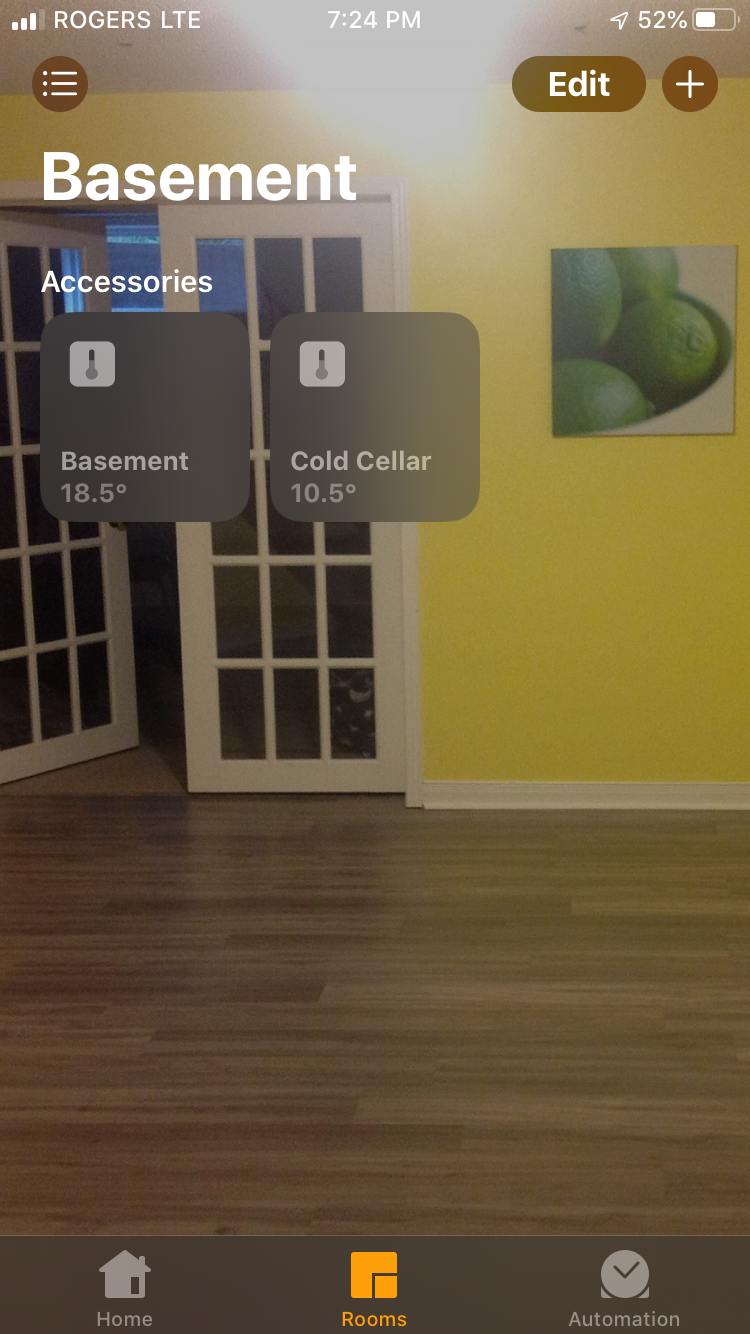
7 |
8 | Also support use of multiple DHT22's, see config.json fragment.
9 |
10 |
11 |
12 |
13 |
14 |
15 |
16 |
17 | # 1 - Detailed build instructions
18 |
19 | For detailed installation instructions, please see the [build instructions](Build.md)
20 |
21 | # 2 - Install and configure required libraries
22 |
23 | Prior to installation of this plugin, the [BCM2835](http://www.airspayce.com/mikem/bcm2835/) library needs to be installed. Detailed installation instructions are part way down the page
24 |
25 | If you run homebridge as non-root user - add it to GPIO group: (in case in logs: bcm2835_init: Unable to open /dev/gpiomem: Permission denied)
26 | ```
27 | sudo adduser homebridge gpio
28 | ```
29 |
30 | # 3 - Installing the plugin
31 |
32 | ```
33 | sudo npm install -g homebridge-dht
34 | ```
35 |
36 | # 4 - Configure the Plugin
37 |
38 | A minimal config.json looks like this
39 |
40 | ```
41 | {
42 | "bridge": {
43 | "name": "Penny",
44 | "username": "CC:22:3D:E3:CD:33",
45 | "port": 51826,
46 | "pin": "031-45-154"
47 | },
48 |
49 | "description": "HomeBridge DHT22",
50 |
51 | "platforms": [],
52 |
53 | "accessories": [
54 | { "accessory": "Dht",
55 | "name": "Outside"
56 | }
57 | ]
58 | }
59 | ```
60 |
61 | ## Required Configuration options
62 |
63 | * `accessory`: must be Dht
64 | * `name`: descriptive name for the temperature sensor
65 |
66 | ## Optional Configuration Options
67 |
68 | * `service`: dht22, dht11 or Temperature. dht22/dht11 reads local dht sensor, Temperature reads cputemp. Defaults to dht22
69 | * `cputemp` - Full command including path to read cpu temp sensor. Not needed unless cputemp is installed in a location not on the path. Defaults to cputemp
70 | ```
71 | "cputemp": "/usr/local/bin/cputemp"
72 | ```
73 | * `gpio` - Gpio pin to read for dht sensor. Defaults to 4
74 | ```
75 | "gpio": "4"
76 | ```
77 | * `refresh` - Frequency of data refresh in seconds. Defaults to 60 seconds
78 | * `storage` - Storage of chart graphing data for history graphing, either fs or googleDrive, defaults to fs
79 | * `spreadsheetId` - Log data to a google sheet, this is part of the URL of your spreadsheet. ie the spreadsheet ID in the URL https://docs.google.com/spreadsheets/d/abc1234567/edit#gid=0 is "abc1234567".
80 |
81 | # config.json Samples
82 |
83 | ## Configuration - with RPI cpu temperature sensor, requires cputemp program ( Optional )
84 |
85 | ```
86 | {
87 | "bridge": {
88 | "name": "Penny",
89 | "username": "CC:22:3D:E3:CD:33",
90 | "port": 51826,
91 | "pin": "031-45-154"
92 | },
93 |
94 | "description": "HomeBridge DHT22",
95 |
96 | "platforms": [],
97 |
98 | "accessories": [
99 | { "accessory": "Dht",
100 | "name": "cputemp",
101 | "service": "Temperature" },
102 | { "accessory": "Dht",
103 | "name": "dht22",
104 | "service": "dht22" }
105 | ]
106 | }
107 | ```
108 |
109 | ## Configuration - without cputemp
110 |
111 | ```
112 | {
113 | "bridge": {
114 | "name": "Penny",
115 | "username": "CC:22:3D:E3:CD:33",
116 | "port": 51826,
117 | "pin": "031-45-154"
118 | },
119 |
120 | "description": "HomeBridge DHT22",
121 |
122 | "platforms": [],
123 |
124 | "accessories": [
125 | { "accessory": "Dht",
126 | "name": "dht22",
127 | "service": "dht22" }
128 | ]
129 | }
130 | ```
131 |
132 | ## or with multiple DHT22's
133 |
134 | ```
135 | { "accessory": "Dht",
136 | "name": "dht22 - indoor",
137 | "gpio": "4",
138 | "service": "dht22" },
139 | { "accessory": "Dht",
140 | "name": "dht22 - outdoor",
141 | "gpio": "2",
142 | "service": "dht22" }
143 | ```
144 |
145 | # Optional cputemp script - install in /usr/local/bin
146 |
147 | ```
148 | #!/bin/bash
149 | cpuTemp0=$(cat /sys/class/thermal/thermal_zone0/temp)
150 | cpuTemp1=$(($cpuTemp0/1000))
151 | cpuTemp2=$(($cpuTemp0/100))
152 | cpuTempM=$(($cpuTemp2 % $cpuTemp1))
153 |
154 | echo $cpuTemp1" C"
155 | ```
156 |
157 | Output from the cputemp command
158 |
159 | ```
160 | cputemp
161 | 42 C
162 | ```
163 |
164 | # ToDo
165 |
166 | # Optional - Enable access to Google to log data and store history charting data
167 |
168 | This presumes you already have a google account, and have access to google drive/sheets already
169 |
170 | Step 1: Turn on the Drive API
171 | a. Use this wizard ( https://console.developers.google.com/start/api?id=sheets.googleapis.com )
172 | to create or select a project in the Google Developers Console and automatically turn on the API. Click Continue, then Go to credentials.
173 |
174 | b. On the Add credentials to your project page, click the Cancel button.
175 |
176 | c. At the top of the page, select the OAuth consent screen tab. Select an Email address, enter a Product name if not already set, and click the Save button. I used 'Sheets Data Logger'
177 |
178 | d. Select the Credentials tab, click the Create credentials button and select OAuth client ID.
179 |
180 | e. Select the application type Other, enter the name "Drive API Quickstart", and click the Create button.
181 |
182 | f. Click OK to dismiss the resulting dialog.
183 |
184 | g. Click the file_download (Download JSON) button to the right of the client ID.
185 |
186 | h. Move this file to your .homebridge and rename it logger_client_secret.json.
187 |
188 | Step 2: Authorize your computer to access your Drive Account
189 |
190 | a. Change to the directory where the plugin is installed i.e.
191 |
192 | cd /usr/lib/node_modules/homebridge-mcuiot/node_modules/mcuiot-logger
193 |
194 | b. Run the authorization module
195 |
196 | node quickstart.js
197 |
198 | c. Browse to the provided URL in your web browser.
199 |
200 | If you are not already logged into your Google account, you will be prompted to log in. If you are logged into multiple Google accounts, you will be asked to select one account to use for the authorization.
201 |
202 | d. Click the Accept button.
203 |
204 | e. Copy the code you're given, paste it into the command-line prompt, and press Enter.
205 |
206 | # Credits
207 |
208 | * rxseger - separate humidity sensor
209 | * hector305 - Multiple sensor testing
210 | * merdok - Removed duplicate humidity sensor.
211 | * tooodooo - Added device polling
212 | * simont77 - History Service
213 |
--------------------------------------------------------------------------------
/README.md.orig.2024-12-05_190607:
--------------------------------------------------------------------------------
1 |
2 | [](https://npmjs.org/package/homebridge-dht)
3 |
4 | Supports integration of a DHT11/DHT21/DHT22/DHT33/DHT44 Temperature/Humidity Sensor into hombridge via the [BCM2835](http://www.airspayce.com/mikem/bcm2835/) library on a Raspberry PI. I have tried numerous other interface methods for the DHT22, and found that this was least problematic. Also includes optional reporting of the RaspBerry PI CPU Temperature. This latest version splits the temperature and humidity into separate sensors, so they are readable from the home screen icon. Historical display of temperature data is available via HomeKit apps thats support graphing.
5 |
6 | 
7 |
8 | Also support use of multiple DHT22's, see config.json fragment.
9 |
10 |
11 | * [1 - Detailed build instructions](#1---detailed--build-instructions)
12 | * [2 - Install and configure required libraries](#2---install-and-configure-required-libraries)
13 | * [3 - Installing the plugin](#3---installing-the-plugin)
14 | * [4 - Configure the Plugin](#4---configure-the-plugin)
15 | * [Required Configuration options](#required-configuration-options)
16 | * [Optional Configuration Options](#optional-configuration-options)
17 | * [config.json Samples](#configjson-samples)
18 | * [Configuration - with RPI cpu temperature sensor, requires cputemp program ( Optional )](#configuration---with-rpi-cpu-temperature-sensor-requires-cputemp-program--optional-)
19 | * [Configuration - without cputemp](#configuration---without-cputemp)
20 | * [or with multiple DHT22's](#or-with-multiple-dht22s)
21 | * [Optional cputemp script - install in /usr/local/bin](#optional-cputemp-script---install-in-usrlocalbin)
22 | * [ToDo](#todo)
23 | * [Optional - Enable access to Google to log data and store history charting data](#optional---enable-access-to-google-to-log-data-and-store-history-charting-data)
24 | * [Credits](#credits)
25 |
26 |
27 |
28 |
29 |
30 | # 1 - Detailed build instructions
31 |
32 | For detailed installation instructions, please see the [build instructions](Build.md)
33 |
34 | # 2 - Install and configure required libraries
35 |
36 | Prior to installation of this plugin, the [BCM2835](http://www.airspayce.com/mikem/bcm2835/) library needs to be installed. Detailed installation instructions are part way down the page
37 |
38 | If you run homebridge as non-root user - add it to GPIO group: (in case in logs: bcm2835_init: Unable to open /dev/gpiomem: Permission denied)
39 | ```
40 | sudo adduser homebridge gpio
41 | ```
42 |
43 | # 3 - Installing the plugin
44 |
45 | ```
46 | sudo npm install -g homebridge-dht
47 | ```
48 |
49 | # 4 - Configure the Plugin
50 |
51 | A minimal config.json looks like this
52 |
53 | ```
54 | {
55 | "bridge": {
56 | "name": "Penny",
57 | "username": "CC:22:3D:E3:CD:33",
58 | "port": 51826,
59 | "pin": "031-45-154"
60 | },
61 |
62 | "description": "HomeBridge DHT22",
63 |
64 | "platforms": [],
65 |
66 | "accessories": [
67 | { "accessory": "Dht",
68 | "name": "Outside"
69 | }
70 | ]
71 | }
72 | ```
73 |
74 | ## Required Configuration options
75 |
76 | * `accessory`: must be Dht
77 | * `name`: descriptive name for the temperature sensor
78 |
79 | ## Optional Configuration Options
80 |
81 | * `service`: dht22, dht11 or Temperature. dht22/dht11 reads local dht sensor, Temperature reads cputemp. Defaults to dht22
82 | * `cputemp` - Full command including path to read cpu temp sensor. Not needed unless cputemp is installed in a location not on the path. Defaults to cputemp
83 | ```
84 | "cputemp": "/usr/local/bin/cputemp"
85 | ```
86 | * `gpio` - Gpio pin to read for dht sensor. Defaults to 4
87 | ```
88 | "gpio": "4"
89 | ```
90 | * `refresh` - Frequency of data refresh in seconds. Defaults to 60 seconds
91 | * `storage` - Storage of chart graphing data for history graphing, either fs or googleDrive, defaults to fs
92 | * `spreadsheetId` - Log data to a google sheet, this is part of the URL of your spreadsheet. ie the spreadsheet ID in the URL https://docs.google.com/spreadsheets/d/abc1234567/edit#gid=0 is "abc1234567".
93 |
94 | # config.json Samples
95 |
96 | ## Configuration - with RPI cpu temperature sensor, requires cputemp program ( Optional )
97 |
98 | ```
99 | {
100 | "bridge": {
101 | "name": "Penny",
102 | "username": "CC:22:3D:E3:CD:33",
103 | "port": 51826,
104 | "pin": "031-45-154"
105 | },
106 |
107 | "description": "HomeBridge DHT22",
108 |
109 | "platforms": [],
110 |
111 | "accessories": [
112 | { "accessory": "Dht",
113 | "name": "cputemp",
114 | "service": "Temperature" },
115 | { "accessory": "Dht",
116 | "name": "dht22",
117 | "service": "dht22" }
118 | ]
119 | }
120 | ```
121 |
122 | ## Configuration - without cputemp
123 |
124 | ```
125 | {
126 | "bridge": {
127 | "name": "Penny",
128 | "username": "CC:22:3D:E3:CD:33",
129 | "port": 51826,
130 | "pin": "031-45-154"
131 | },
132 |
133 | "description": "HomeBridge DHT22",
134 |
135 | "platforms": [],
136 |
137 | "accessories": [
138 | { "accessory": "Dht",
139 | "name": "dht22",
140 | "service": "dht22" }
141 | ]
142 | }
143 | ```
144 |
145 | ## or with multiple DHT22's
146 |
147 | ```
148 | { "accessory": "Dht",
149 | "name": "dht22 - indoor",
150 | "gpio": "4",
151 | "service": "dht22" },
152 | { "accessory": "Dht",
153 | "name": "dht22 - outdoor",
154 | "gpio": "2",
155 | "service": "dht22" }
156 | ```
157 |
158 | # Optional cputemp script - install in /usr/local/bin
159 |
160 | ```
161 | #!/bin/bash
162 | cpuTemp0=$(cat /sys/class/thermal/thermal_zone0/temp)
163 | cpuTemp1=$(($cpuTemp0/1000))
164 | cpuTemp2=$(($cpuTemp0/100))
165 | cpuTempM=$(($cpuTemp2 % $cpuTemp1))
166 |
167 | echo $cpuTemp1" C"
168 | ```
169 |
170 | Output from the cputemp command
171 |
172 | ```
173 | cputemp
174 | 42 C
175 | ```
176 |
177 | # ToDo
178 |
179 | # Optional - Enable access to Google to log data and store history charting data
180 |
181 | This presumes you already have a google account, and have access to google drive/sheets already
182 |
183 | Step 1: Turn on the Drive API
184 | a. Use this wizard ( https://console.developers.google.com/start/api?id=sheets.googleapis.com )
185 | to create or select a project in the Google Developers Console and automatically turn on the API. Click Continue, then Go to credentials.
186 |
187 | b. On the Add credentials to your project page, click the Cancel button.
188 |
189 | c. At the top of the page, select the OAuth consent screen tab. Select an Email address, enter a Product name if not already set, and click the Save button. I used 'Sheets Data Logger'
190 |
191 | d. Select the Credentials tab, click the Create credentials button and select OAuth client ID.
192 |
193 | e. Select the application type Other, enter the name "Drive API Quickstart", and click the Create button.
194 |
195 | f. Click OK to dismiss the resulting dialog.
196 |
197 | g. Click the file_download (Download JSON) button to the right of the client ID.
198 |
199 | h. Move this file to your .homebridge and rename it logger_client_secret.json.
200 |
201 | Step 2: Authorize your computer to access your Drive Account
202 |
203 | a. Change to the directory where the plugin is installed i.e.
204 |
205 | cd /usr/lib/node_modules/homebridge-mcuiot/node_modules/mcuiot-logger
206 |
207 | b. Run the authorization module
208 |
209 | node quickstart.js
210 |
211 | c. Browse to the provided URL in your web browser.
212 |
213 | If you are not already logged into your Google account, you will be prompted to log in. If you are logged into multiple Google accounts, you will be asked to select one account to use for the authorization.
214 |
215 | d. Click the Accept button.
216 |
217 | e. Copy the code you're given, paste it into the command-line prompt, and press Enter.
218 |
219 | # Credits
220 |
221 | * rxseger - separate humidity sensor
222 | * hector305 - Multiple sensor testing
223 | * merdok - Removed duplicate humidity sensor.
224 | * tooodooo - Added device polling
225 | * simont77 - History Service
226 |
--------------------------------------------------------------------------------
/Build.md:
--------------------------------------------------------------------------------
1 | # homebridge-dht build
2 |
3 | I was looking for a low cost temperature / humidity sensor I could use to monitor what is happening in my crawlspace, as I found that this spring it was very wet, and had a lot of damp. So I was looking for a reasonably priced sensor that I could put down there, and monitor remotely. After doing some digging on the net for what was available locally and shown to work with a RaspBerry PI and a NodeMCU ( more on this later ). I decided on a DHT22 Sensor. It was cheap, offered both temperature and humididty and available locally.
4 |
5 | 
6 |
7 | Update December 2016 - After running these for a few months, I have found that the accuracy of the humidity sensor varies greatly over time and have stopped trusting these for reasonably accurate humidty information. And am changing all my devices over to the Bosch BME280 Temperature/Humidity/Barometric Pressure sensor. So I have created a new instructable showing how to connect this sensor to the RaspberryPI ( Connect Your RaspberryPI to the BME280 Temperature and NodeMCU/ESP8266 ( Homebridge-MCUIOT ).
8 |
9 |
10 |
11 |
12 |
13 |
14 |
15 |
16 | # Step 1: Parts List
17 |
18 | So I went to my local parts store, and purchased
19 |
20 | ```
21 | 1 - DHT22 / AM2302 Temperature / Humidity Sensor
22 | 1 - 4.7K Resistor
23 | 4 Pin Female header ( Sensor side )
24 | 5 Pin Female header ( RPI Side )
25 |
26 | Heatshrink tubing narrow, and wide
27 | Old serial mouse
28 | ```
29 |
30 | To wire the sensor to PI, I used the cable from an old serial mouse I had lying around. Any used cable could be used, as long at it has 3 wires. The one I used had a couple of wires, but I used the Red, Yellow and Black to keep things simple.
31 |
32 | # Step 2: Prepare the RPI End of the Cable
33 |
34 | 
35 |
36 | I then soldered the pins to my wire. The pins I had were crimp ones, but I couldn't get them to crimp correctly, so I went with solder instead.
37 |
38 | After soldering the pins, I then inserted them into the 5 Pin Female header, with the Red in 1, Yellow in 4, and Black in 5.
39 |
40 | RPI Connection is wired like this
41 |
42 | ```
43 | RPI -> 5 Pin Header -> Description -> Wire Colour
44 |
45 | 1 -> 1 -> 3.3 VDC Power -> Red
46 | 7 -> 4 -> GPIO4 -> Yellow
47 | 9 -> 5 -> Ground -> Black
48 | ```
49 |
50 | # Step 3: Sensor End of the Cable
51 |
52 | 
53 |
54 | At this end we use the 4 Pin female header, the resistor and the heat shrink tubing.
55 |
56 | 
57 |
58 | Solder the red and yellow wires each to a pin, and put the resistor between them as well. Also cover these with heat shrink so you don't get a short. Then solder the black wire to a pin as well. Insert the pins into the 4 Pin header as follows
59 |
60 | 
61 |
62 | ```
63 | 1 - Red
64 | 2 - Yellow
65 | 3 - Empty
66 | 4 - Black
67 | ```
68 |
69 | 
70 |
71 | Then cover the wires with the larger heat shrink tubing.
72 |
73 | # Step 4: Connecting the Cables
74 |
75 | 
76 |
77 | With your RPI powered off, carefully connect the 5 pin female to the GPIO connection, with the Red wire in pin 1 lining up with pin 1 on the GPIO connector. The header should only cover the first 5 odd numbered GPU pins.
78 |
79 | For the sensor side, align the pins on the sensor with the header, and ensure that pin 1 of the sensor ( on the left side ), connects with pin 1 of the header ( with the red wire ).
80 |
81 | 
82 |
83 | After putting the heat shrink on, I couldn't see the wire colour anymore, so I marked it with a sharpie.
84 |
85 | # Step 5: Installing the Homebridge Software
86 |
87 | As their are a lot of other guides for setting up a raspberry pi, I'm not going to repeat this here, but am assuming that you have your RPI setup with Raspbian Jessie, with Node.JS installed and homebridge running. Their are a number of homebridge getting started guides around covering this already.
88 |
89 |
90 | # Step 6: Installing BCM2835 Library
91 |
92 | 1. Go to this website and download the [BCM2835](http://www.airspayce.com/mikem/bcm2835/) package.
93 |
94 | 2. Install the package with these instructions.
95 |
96 | ```
97 | # download the latest version of the library, say bcm2835-1.xx.tar.gz, then:
98 | wget bcm2835-1.xx.tar.gz
99 | tar zxvf bcm2835-1.xx.tar.gz
100 | cd bcm2835-1.xx
101 | ./configure
102 | make
103 | sudo make check
104 | sudo make install
105 | ```
106 |
107 | 3. Add permissions to access GPIO
108 |
109 | If you run homebridge as non-root user - add it to GPIO group: (in case in logs: bcm2835_init: Unable to open /dev/gpiomem: Permission denied)
110 | ```
111 | sudo adduser homebridge gpio
112 | ```
113 |
114 | # Step 7: Install Homebridge-dht
115 |
116 | 1. Install homebridge-dht with the command
117 |
118 | ```
119 | sudo npm install -g homebridge-dht
120 | ```
121 |
122 | If during installation you receive this error
123 |
124 | ```
125 | CXX(target) Release/obj.target/node_dht_sensor/dht-sensor.o SOLINK_MODULE(target)
126 | Release/obj.target/node_dht_sensor.node /usr/bin/ld: /usr/local/lib/libbcm2835.a(bcm2835.o): relocation R_X86_64_PC32 against symbolbcm2835_peripherals' can not be used when making a shared object; recompile with -fPIC
127 | /usr/bin/ld: final link failed: nonrepresentable section on output
128 | collect2: error: ld returned 1 exit status
129 | ```
130 |
131 | Please go back to step 6.2 and add -fPIC flags to the configure line
132 |
133 | ```
134 | ./configure CFLAGS=-fPIC CXXFLAGS=-fPIC
135 | make
136 | make check
137 | make install
138 | ```
139 |
140 | 2. Update your config.json file in ~/.homebridge with the following
141 |
142 | ```
143 | { "bridge": {
144 | "name": "Penny",
145 | "username": "CC:22:3D:E3:CD:33",
146 | "port": 51826,
147 | "pin": "031-45-154"
148 | },
149 |
150 | "description": "HomeBridge",
151 |
152 | "platforms": [],
153 |
154 | "accessories": [
155 | { "accessory": "Dht",
156 | "name": "dht22",
157 | "name_temperature": "Temperature",
158 | "name_humidity": "Humidity",
159 | "service": "dht22" }
160 |
161 | ]}
162 | ```
163 |
164 | # Step 8: Raspberry PI CPU Temperature Monitoring - Optional
165 |
166 | This is an optional step, that allows you to remotely monitor the temperature of your raspberry PI CPU as well.
167 |
168 | 1. Create a file in /usr/local/bin/cputemp containing
169 |
170 | ```
171 | #!/bin/bash
cpuTemp0=$(cat /sys/class/thermal/thermal_zone0/temp)
172 | cpuTemp1=$(($cpuTemp0/1000))
173 | cpuTemp2=$(($cpuTemp0/100))
174 | cpuTempM=$(($cpuTemp2 % $cpuTemp1))
175 |
176 | echo $cpuTemp1" C"
177 | ```
178 |
179 | 2. Make file executable
180 |
181 | ```
182 | chmod a+x /usr/local/bin/cputemp
183 | ```
184 |
185 | 3. Update your config.json file in ~/.homebridge and replace the accessories section with the following:
186 |
187 | ```
188 | "accessories": [
189 | { "accessory": "Dht",
190 | "name": "cputemp",
191 | "service": "Temperature" },
192 | { "accessory": "Dht",
193 | "name": "Temp/Humidity Sensor",
194 | "service": "dht22" }
195 | ]
196 | ```
197 |
198 | # Step 9: Start Homebridge
199 |
200 | Start homebridge, and your log file should look like this
201 |
202 | ```
203 | [6/21/2016, 9:37:31 PM] Loaded plugin: homebridge-dht
204 | [6/21/2016, 9:37:31 PM] Registering accessory 'homebridge-dht.Dht'
205 | [6/21/2016, 9:37:31 PM] ---
206 | [6/21/2016, 9:37:31 PM] Loaded config.json with 2 accessories and 0 platforms.
207 | [6/21/2016, 9:37:31 PM] ---
208 | [6/21/2016, 9:37:32 PM] Loading 0 platforms...
209 | [6/21/2016, 9:37:32 PM] Loading 2 accessories...
210 | [6/21/2016, 9:37:32 PM] [cputemp] Initializing Dht accessory...
211 | [6/21/2016, 9:37:32 PM] [cputemp] INIT: cputemp
212 | [6/21/2016, 9:37:32 PM] [Temp/Humidity Sensor] Initializing Dht accessory...
213 | [6/21/2016, 9:37:32 PM] [Temp/Humidity Sensor] INIT: Temp/Humidity Sensor
214 | Scan this code with your HomeKit App on your iOS device to pair with Homebridge:
215 |
216 | ┌────────────┐
217 | │ 031-45-154 │
218 | └────────────┘
219 |
220 | [6/21/2016, 9:37:32 PM] Homebridge is running on port 51826.
221 | ```
222 |
223 | # Step 10: Testing With Home Kit
224 |
225 | 
226 |
227 | Fire up your favourite homekit client, and pair with your new accessory. You should then see the new Temperature/Humidity Sensor.
228 |
229 | If you have problems or issues, please raise an issue on GitHub
230 |
231 | # Step 11: Bonus Chapter - Dual Sensors
232 |
233 | Picture of Bonus Chapter - Dual Sensors
234 |
235 | 
236 |
237 | After being asked by several people I thought I would include the notes needed to add a second sensor.
238 |
239 | For the wiring, take a look at the at the attached image, this is the one that I shared with Hector305 to connect the second sensor.
240 |
241 | And for the updated config file, this is config.json for that.
242 |
243 | ```
244 | { "accessory": "Dht",
245 |
246 | "name": "dht22 - indoor",
247 | "name_temperature": "Indoor Temperature",
248 | "name_humidity": "Indoor Humdity",
249 | "gpio": "4",
250 | "service": "dht22" },
251 | { "accessory": "Dht",
252 | "name": "dht22 - outdoor",
253 | "name_temperature": "Outdoor Temperature",
254 | "name_humidity": "Outdoor Humdity",
255 | "gpio": "2",
256 | "service": "dht22" }
257 | ```
258 |
--------------------------------------------------------------------------------
/Build.md.orig.2024-12-05_190607:
--------------------------------------------------------------------------------
1 | # homebridge-dht build
2 |
3 | I was looking for a low cost temperature / humidity sensor I could use to monitor what is happening in my crawlspace, as I found that this spring it was very wet, and had a lot of damp. So I was looking for a reasonably priced sensor that I could put down there, and monitor remotely. After doing some digging on the net for what was available locally and shown to work with a RaspBerry PI and a NodeMCU ( more on this later ). I decided on a DHT22 Sensor. It was cheap, offered both temperature and humididty and available locally.
4 |
5 | 
6 |
7 | Update December 2016 - After running these for a few months, I have found that the accuracy of the humidity sensor varies greatly over time and have stopped trusting these for reasonably accurate humidty information. And am changing all my devices over to the Bosch BME280 Temperature/Humidity/Barometric Pressure sensor. So I have created a new instructable showing how to connect this sensor to the RaspberryPI ( Connect Your RaspberryPI to the BME280 Temperature and NodeMCU/ESP8266 ( Homebridge-MCUIOT ).
8 |
9 |
10 | * [homebridge-dht build](#homebridge-dht-build)
11 | * [Step 1: Parts List](#step-1-parts-list)
12 | * [Step 2: Prepare the RPI End of the Cable](#step-2-prepare-the-rpi-end-of-the-cable)
13 | * [Step 3: Sensor End of the Cable](#step-3-sensor-end-of-the-cable)
14 | * [Step 4: Connecting the Cables](#step-4-connecting-the-cables)
15 | * [Step 5: Installing the Homebridge Software](#step-5-installing-the-homebridge-software)
16 | * [Step 6: Installing BCM2835 Library](#step-6-installing-bcm2835-library)
17 | * [Step 7: Install Homebridge-dht](#step-7-install-homebridge-dht)
18 | * [Step 8: Raspberry PI CPU Temperature Monitoring - Optional](#step-8-raspberry-pi-cpu-temperature-monitoring---optional)
19 | * [Step 9: Start Homebridge](#step-9-start-homebridge)
20 | * [Step 10: Testing With Home Kit](#step-10-testing-with-home-kit)
21 | * [Step 11: Bonus Chapter - Dual Sensors](#step-11-bonus-chapter---dual-sensors)
22 |
23 |
24 |
25 |
26 |
27 | # Step 1: Parts List
28 |
29 | So I went to my local parts store, and purchased
30 |
31 | ```
32 | 1 - DHT22 / AM2302 Temperature / Humidity Sensor
33 | 1 - 4.7K Resistor
34 | 4 Pin Female header ( Sensor side )
35 | 5 Pin Female header ( RPI Side )
36 |
37 | Heatshrink tubing narrow, and wide
38 | Old serial mouse
39 | ```
40 |
41 | To wire the sensor to PI, I used the cable from an old serial mouse I had lying around. Any used cable could be used, as long at it has 3 wires. The one I used had a couple of wires, but I used the Red, Yellow and Black to keep things simple.
42 |
43 | # Step 2: Prepare the RPI End of the Cable
44 |
45 | 
46 |
47 | I then soldered the pins to my wire. The pins I had were crimp ones, but I couldn't get them to crimp correctly, so I went with solder instead.
48 |
49 | After soldering the pins, I then inserted them into the 5 Pin Female header, with the Red in 1, Yellow in 4, and Black in 5.
50 |
51 | RPI Connection is wired like this
52 |
53 | ```
54 | RPI -> 5 Pin Header -> Description -> Wire Colour
55 |
56 | 1 -> 1 -> 3.3 VDC Power -> Red
57 | 7 -> 4 -> GPIO4 -> Yellow
58 | 9 -> 5 -> Ground -> Black
59 | ```
60 |
61 | # Step 3: Sensor End of the Cable
62 |
63 | 
64 |
65 | At this end we use the 4 Pin female header, the resistor and the heat shrink tubing.
66 |
67 | 
68 |
69 | Solder the red and yellow wires each to a pin, and put the resistor between them as well. Also cover these with heat shrink so you don't get a short. Then solder the black wire to a pin as well. Insert the pins into the 4 Pin header as follows
70 |
71 | 
72 |
73 | ```
74 | 1 - Red
75 | 2 - Yellow
76 | 3 - Empty
77 | 4 - Black
78 | ```
79 |
80 | 
81 |
82 | Then cover the wires with the larger heat shrink tubing.
83 |
84 | # Step 4: Connecting the Cables
85 |
86 | 
87 |
88 | With your RPI powered off, carefully connect the 5 pin female to the GPIO connection, with the Red wire in pin 1 lining up with pin 1 on the GPIO connector. The header should only cover the first 5 odd numbered GPU pins.
89 |
90 | For the sensor side, align the pins on the sensor with the header, and ensure that pin 1 of the sensor ( on the left side ), connects with pin 1 of the header ( with the red wire ).
91 |
92 | 
93 |
94 | After putting the heat shrink on, I couldn't see the wire colour anymore, so I marked it with a sharpie.
95 |
96 | # Step 5: Installing the Homebridge Software
97 |
98 | As their are a lot of other guides for setting up a raspberry pi, I'm not going to repeat this here, but am assuming that you have your RPI setup with Raspbian Jessie, with Node.JS installed and homebridge running. Their are a number of homebridge getting started guides around covering this already.
99 |
100 |
101 | # Step 6: Installing BCM2835 Library
102 |
103 | 1. Go to this website and download the [BCM2835](http://www.airspayce.com/mikem/bcm2835/) package.
104 |
105 | 2. Install the package with these instructions.
106 |
107 | ```
108 | # download the latest version of the library, say bcm2835-1.xx.tar.gz, then:
109 | wget bcm2835-1.xx.tar.gz
110 | tar zxvf bcm2835-1.xx.tar.gz
111 | cd bcm2835-1.xx
112 | ./configure
113 | make
114 | sudo make check
115 | sudo make install
116 | ```
117 |
118 | 3. Add permissions to access GPIO
119 |
120 | If you run homebridge as non-root user - add it to GPIO group: (in case in logs: bcm2835_init: Unable to open /dev/gpiomem: Permission denied)
121 | ```
122 | sudo adduser homebridge gpio
123 | ```
124 |
125 | # Step 7: Install Homebridge-dht
126 |
127 | 1. Install homebridge-dht with the command
128 |
129 | ```
130 | sudo npm install -g homebridge-dht
131 | ```
132 |
133 | If during installation you receive this error
134 |
135 | ```
136 | CXX(target) Release/obj.target/node_dht_sensor/dht-sensor.o SOLINK_MODULE(target)
137 | Release/obj.target/node_dht_sensor.node /usr/bin/ld: /usr/local/lib/libbcm2835.a(bcm2835.o): relocation R_X86_64_PC32 against symbolbcm2835_peripherals' can not be used when making a shared object; recompile with -fPIC
138 | /usr/bin/ld: final link failed: nonrepresentable section on output
139 | collect2: error: ld returned 1 exit status
140 | ```
141 |
142 | Please go back to step 6.2 and add -fPIC flags to the configure line
143 |
144 | ```
145 | ./configure CFLAGS=-fPIC CXXFLAGS=-fPIC
146 | make
147 | make check
148 | make install
149 | ```
150 |
151 | 2. Update your config.json file in ~/.homebridge with the following
152 |
153 | ```
154 | { "bridge": {
155 | "name": "Penny",
156 | "username": "CC:22:3D:E3:CD:33",
157 | "port": 51826,
158 | "pin": "031-45-154"
159 | },
160 |
161 | "description": "HomeBridge",
162 |
163 | "platforms": [],
164 |
165 | "accessories": [
166 | { "accessory": "Dht",
167 | "name": "dht22",
168 | "name_temperature": "Temperature",
169 | "name_humidity": "Humidity",
170 | "service": "dht22" }
171 |
172 | ]}
173 | ```
174 |
175 | # Step 8: Raspberry PI CPU Temperature Monitoring - Optional
176 |
177 | This is an optional step, that allows you to remotely monitor the temperature of your raspberry PI CPU as well.
178 |
179 | 1. Create a file in /usr/local/bin/cputemp containing
180 |
181 | ```
182 | #!/bin/bash
cpuTemp0=$(cat /sys/class/thermal/thermal_zone0/temp)
183 | cpuTemp1=$(($cpuTemp0/1000))
184 | cpuTemp2=$(($cpuTemp0/100))
185 | cpuTempM=$(($cpuTemp2 % $cpuTemp1))
186 |
187 | echo $cpuTemp1" C"
188 | ```
189 |
190 | 2. Make file executable
191 |
192 | ```
193 | chmod a+x /usr/local/bin/cputemp
194 | ```
195 |
196 | 3. Update your config.json file in ~/.homebridge and replace the accessories section with the following:
197 |
198 | ```
199 | "accessories": [
200 | { "accessory": "Dht",
201 | "name": "cputemp",
202 | "service": "Temperature" },
203 | { "accessory": "Dht",
204 | "name": "Temp/Humidity Sensor",
205 | "service": "dht22" }
206 | ]
207 | ```
208 |
209 | # Step 9: Start Homebridge
210 |
211 | Start homebridge, and your log file should look like this
212 |
213 | ```
214 | [6/21/2016, 9:37:31 PM] Loaded plugin: homebridge-dht
215 | [6/21/2016, 9:37:31 PM] Registering accessory 'homebridge-dht.Dht'
216 | [6/21/2016, 9:37:31 PM] ---
217 | [6/21/2016, 9:37:31 PM] Loaded config.json with 2 accessories and 0 platforms.
218 | [6/21/2016, 9:37:31 PM] ---
219 | [6/21/2016, 9:37:32 PM] Loading 0 platforms...
220 | [6/21/2016, 9:37:32 PM] Loading 2 accessories...
221 | [6/21/2016, 9:37:32 PM] [cputemp] Initializing Dht accessory...
222 | [6/21/2016, 9:37:32 PM] [cputemp] INIT: cputemp
223 | [6/21/2016, 9:37:32 PM] [Temp/Humidity Sensor] Initializing Dht accessory...
224 | [6/21/2016, 9:37:32 PM] [Temp/Humidity Sensor] INIT: Temp/Humidity Sensor
225 | Scan this code with your HomeKit App on your iOS device to pair with Homebridge:
226 |
227 | ┌────────────┐
228 | │ 031-45-154 │
229 | └────────────┘
230 |
231 | [6/21/2016, 9:37:32 PM] Homebridge is running on port 51826.
232 | ```
233 |
234 | # Step 10: Testing With Home Kit
235 |
236 | 
237 |
238 | Fire up your favourite homekit client, and pair with your new accessory. You should then see the new Temperature/Humidity Sensor.
239 |
240 | If you have problems or issues, please raise an issue on GitHub
241 |
242 | # Step 11: Bonus Chapter - Dual Sensors
243 |
244 | Picture of Bonus Chapter - Dual Sensors
245 |
246 | 
247 |
248 | After being asked by several people I thought I would include the notes needed to add a second sensor.
249 |
250 | For the wiring, take a look at the at the attached image, this is the one that I shared with Hector305 to connect the second sensor.
251 |
252 | And for the updated config file, this is config.json for that.
253 |
254 | ```
255 | { "accessory": "Dht",
256 |
257 | "name": "dht22 - indoor",
258 | "name_temperature": "Indoor Temperature",
259 | "name_humidity": "Indoor Humdity",
260 | "gpio": "4",
261 | "service": "dht22" },
262 | { "accessory": "Dht",
263 | "name": "dht22 - outdoor",
264 | "name_temperature": "Outdoor Temperature",
265 | "name_humidity": "Outdoor Humdity",
266 | "gpio": "2",
267 | "service": "dht22" }
268 | ```
269 |
--------------------------------------------------------------------------------
/gh-md-toc.1:
--------------------------------------------------------------------------------
1 | #!/usr/bin/env bash
2 |
3 | #
4 | # Steps:
5 | #
6 | # 1. Download corresponding html file for some README.md:
7 | # curl -s $1
8 | #
9 | # 2. Discard rows where no substring 'user-content-' (github's markup):
10 | # awk '/user-content-/ { ...
11 | #
12 | # 3.1 Get last number in each row like ' ... sitemap.js.*<\/h/)+2, RLENGTH-5)
21 | #
22 | # 5. Find anchor and insert it inside "(...)":
23 | # substr($0, match($0, "href=\"[^\"]+?\" ")+6, RLENGTH-8)
24 | #
25 |
26 | gh_toc_version="0.10.0"
27 |
28 | gh_user_agent="gh-md-toc v$gh_toc_version"
29 |
30 | #
31 | # Download rendered into html README.md by its url.
32 | #
33 | #
34 | gh_toc_load() {
35 | local gh_url=$1
36 |
37 | if type curl &>/dev/null; then
38 | curl --user-agent "$gh_user_agent" -s "$gh_url"
39 | elif type wget &>/dev/null; then
40 | wget --user-agent="$gh_user_agent" -qO- "$gh_url"
41 | else
42 | echo "Please, install 'curl' or 'wget' and try again."
43 | exit 1
44 | fi
45 | }
46 |
47 | #
48 | # Converts local md file into html by GitHub
49 | #
50 | # -> curl -X POST --data '{"text": "Hello world github/linguist#1 **cool**, and #1!"}' https://api.github.com/markdown
51 | # Hello world github/linguist#1 cool, and #1!
'"
52 | gh_toc_md2html() {
53 | local gh_file_md=$1
54 | local skip_header=$2
55 |
56 | URL=https://api.github.com/markdown/raw
57 |
58 | if [ -n "$GH_TOC_TOKEN" ]; then
59 | TOKEN=$GH_TOC_TOKEN
60 | else
61 | TOKEN_FILE="$(cd "$(dirname "${BASH_SOURCE[0]}")" && pwd)/token.txt"
62 | if [ -f "$TOKEN_FILE" ]; then
63 | TOKEN="$(cat "$TOKEN_FILE")"
64 | fi
65 | fi
66 | if [ -n "${TOKEN}" ]; then
67 | AUTHORIZATION="Authorization: token ${TOKEN}"
68 | fi
69 |
70 | local gh_tmp_file_md=$gh_file_md
71 | if [ "$skip_header" = "yes" ]; then
72 | if grep -Fxq "" "$gh_src"; then
73 | # cut everything before the toc
74 | gh_tmp_file_md=$gh_file_md~~
75 | sed '1,//d' "$gh_file_md" > "$gh_tmp_file_md"
76 | fi
77 | fi
78 |
79 | # echo $URL 1>&2
80 | OUTPUT=$(curl -s \
81 | --user-agent "$gh_user_agent" \
82 | --data-binary @"$gh_tmp_file_md" \
83 | -H "Content-Type:text/plain" \
84 | -H "$AUTHORIZATION" \
85 | "$URL")
86 |
87 | rm -f "${gh_file_md}~~"
88 |
89 | if [ "$?" != "0" ]; then
90 | echo "XXNetworkErrorXX"
91 | fi
92 | if [ "$(echo "${OUTPUT}" | awk '/API rate limit exceeded/')" != "" ]; then
93 | echo "XXRateLimitXX"
94 | else
95 | echo "${OUTPUT}"
96 | fi
97 | }
98 |
99 |
100 | #
101 | # Is passed string url
102 | #
103 | gh_is_url() {
104 | case $1 in
105 | https* | http*)
106 | echo "yes";;
107 | *)
108 | echo "no";;
109 | esac
110 | }
111 |
112 | #
113 | # TOC generator
114 | #
115 | gh_toc(){
116 | local gh_src=$1
117 | local gh_src_copy=$1
118 | local gh_ttl_docs=$2
119 | local need_replace=$3
120 | local no_backup=$4
121 | local no_footer=$5
122 | local indent=$6
123 | local skip_header=$7
124 |
125 | if [ "$gh_src" = "" ]; then
126 | echo "Please, enter URL or local path for a README.md"
127 | exit 1
128 | fi
129 |
130 |
131 | # Show "TOC" string only if working with one document
132 | if [ "$gh_ttl_docs" = "1" ]; then
133 |
134 | echo "Table of Contents"
135 | echo "================="
136 | echo ""
137 | gh_src_copy=""
138 |
139 | fi
140 |
141 | if [ "$(gh_is_url "$gh_src")" == "yes" ]; then
142 | gh_toc_load "$gh_src" | gh_toc_grab "$gh_src_copy" "$indent"
143 | if [ "${PIPESTATUS[0]}" != "0" ]; then
144 | echo "Could not load remote document."
145 | echo "Please check your url or network connectivity"
146 | exit 1
147 | fi
148 | if [ "$need_replace" = "yes" ]; then
149 | echo
150 | echo "!! '$gh_src' is not a local file"
151 | echo "!! Can't insert the TOC into it."
152 | echo
153 | fi
154 | else
155 | local rawhtml
156 | rawhtml=$(gh_toc_md2html "$gh_src" "$skip_header")
157 | if [ "$rawhtml" == "XXNetworkErrorXX" ]; then
158 | echo "Parsing local markdown file requires access to github API"
159 | echo "Please make sure curl is installed and check your network connectivity"
160 | exit 1
161 | fi
162 | if [ "$rawhtml" == "XXRateLimitXX" ]; then
163 | echo "Parsing local markdown file requires access to github API"
164 | echo "Error: You exceeded the hourly limit. See: https://developer.github.com/v3/#rate-limiting"
165 | TOKEN_FILE="$(cd "$(dirname "${BASH_SOURCE[0]}")" && pwd)/token.txt"
166 | echo "or place GitHub auth token here: ${TOKEN_FILE}"
167 | exit 1
168 | fi
169 | local toc
170 | toc=`echo "$rawhtml" | gh_toc_grab "$gh_src_copy" "$indent"`
171 | echo "$toc"
172 | if [ "$need_replace" = "yes" ]; then
173 | if grep -Fxq "" "$gh_src" && grep -Fxq "" "$gh_src"; then
174 | echo "Found markers"
175 | else
176 | echo "You don't have or in your file...exiting"
177 | exit 1
178 | fi
179 | local ts="<\!--ts-->"
180 | local te="<\!--te-->"
181 | local dt
182 | dt=$(date +'%F_%H%M%S')
183 | local ext=".orig.${dt}"
184 | local toc_path="${gh_src}.toc.${dt}"
185 | local toc_createdby=""
186 | local toc_footer
187 | toc_footer=""
188 | # http://fahdshariff.blogspot.ru/2012/12/sed-mutli-line-replacement-between-two.html
189 | # clear old TOC
190 | sed -i"${ext}" "/${ts}/,/${te}/{//!d;}" "$gh_src"
191 | # create toc file
192 | echo "${toc}" > "${toc_path}"
193 | if [ "${no_footer}" != "yes" ]; then
194 | echo -e "\n${toc_createdby}\n${toc_footer}\n" >> "$toc_path"
195 | fi
196 |
197 | # insert toc file
198 | if ! sed --version > /dev/null 2>&1; then
199 | sed -i "" "/${ts}/r ${toc_path}" "$gh_src"
200 | else
201 | sed -i "/${ts}/r ${toc_path}" "$gh_src"
202 | fi
203 | echo
204 | if [ "${no_backup}" = "yes" ]; then
205 | rm "$toc_path" "$gh_src$ext"
206 | fi
207 | echo "!! TOC was added into: '$gh_src'"
208 | if [ -z "${no_backup}" ]; then
209 | echo "!! Origin version of the file: '${gh_src}${ext}'"
210 | echo "!! TOC added into a separate file: '${toc_path}'"
211 | fi
212 | echo
213 | fi
214 | fi
215 | }
216 |
217 | #
218 | # Grabber of the TOC from rendered html
219 | #
220 | # $1 - a source url of document.
221 | # It's need if TOC is generated for multiple documents.
222 | # $2 - number of spaces used to indent.
223 | #
224 | gh_toc_grab() {
225 |
226 | href_regex="/href=\"[^\"]+?\"/"
227 | common_awk_script='
228 | modified_href = ""
229 | split(href, chars, "")
230 | for (i=1;i <= length(href); i++) {
231 | c = chars[i]
232 | res = ""
233 | if (c == "+") {
234 | res = " "
235 | } else {
236 | if (c == "%") {
237 | res = "\\x"
238 | } else {
239 | res = c ""
240 | }
241 | }
242 | modified_href = modified_href res
243 | }
244 | print sprintf("%*s", (level-1)*'"$2"', "") "* [" text "](" gh_url modified_href ")"
245 | '
246 | if [ "`uname -s`" == "OS/390" ]; then
247 | grepcmd="pcregrep -o"
248 | echoargs=""
249 | awkscript='{
250 | level = substr($0, 3, 1)
251 | text = substr($0, match($0, /<\/span><\/a>[^<]*<\/h/)+11, RLENGTH-14)
252 | href = substr($0, match($0, '$href_regex')+6, RLENGTH-7)
253 | '"$common_awk_script"'
254 | }'
255 | else
256 | grepcmd="grep -Eo"
257 | echoargs="-e"
258 | awkscript='{
259 | level = substr($0, 3, 1)
260 | text = substr($0, match($0, /">.*<\/h/)+2, RLENGTH-5)
261 | href = substr($0, match($0, '$href_regex')+6, RLENGTH-7)
262 | '"$common_awk_script"'
263 | }'
264 | fi
265 |
266 | # if closed is on the new line, then move it on the prev line
267 | # for example:
268 | # was: The command foo1
269 | #
270 | # became: The command foo1
271 | sed -e ':a' -e 'N' -e '$!ba' -e 's/\n<\/h/<\/h/g' |
272 |
273 | # Sometimes a line can start with . Fix that.
274 | sed -e ':a' -e 'N' -e '$!ba' -e 's/\n//g' | sed 's/<\/code>//g' |
281 |
282 | # remove g-emoji
283 | sed 's/]*[^<]*<\/g-emoji> //g' |
284 |
285 | # now all rows are like:
286 | # title
..
287 | # format result line
288 | # * $0 - whole string
289 | # * last element of each row: "/dev/null; then
313 | $tool --version | head -n 1
314 | else
315 | echo "not installed"
316 | fi
317 | done
318 | }
319 |
320 | show_help() {
321 | local app_name
322 | app_name=$(basename "$0")
323 | echo "GitHub TOC generator ($app_name): $gh_toc_version"
324 | echo ""
325 | echo "Usage:"
326 | echo " $app_name [options] src [src] Create TOC for a README file (url or local path)"
327 | echo " $app_name - Create TOC for markdown from STDIN"
328 | echo " $app_name --help Show help"
329 | echo " $app_name --version Show version"
330 | echo ""
331 | echo "Options:"
332 | echo " --indent Set indent size. Default: 3."
333 | echo " --insert Insert new TOC into original file. For local files only. Default: false."
334 | echo " See https://github.com/ekalinin/github-markdown-toc/issues/41 for details."
335 | echo " --no-backup Remove backup file. Set --insert as well. Default: false."
336 | echo " --hide-footer Do not write date & author of the last TOC update. Set --insert as well. Default: false."
337 | echo " --skip-header Hide entry of the topmost headlines. Default: false."
338 | echo " See https://github.com/ekalinin/github-markdown-toc/issues/125 for details."
339 | echo ""
340 | }
341 |
342 | #
343 | # Options handlers
344 | #
345 | gh_toc_app() {
346 | local need_replace="no"
347 | local indent=3
348 |
349 | if [ "$1" = '--help' ] || [ $# -eq 0 ] ; then
350 | show_help
351 | return
352 | fi
353 |
354 | if [ "$1" = '--version' ]; then
355 | show_version
356 | return
357 | fi
358 |
359 | if [ "$1" = '--indent' ]; then
360 | indent="$2"
361 | shift 2
362 | fi
363 |
364 | if [ "$1" = "-" ]; then
365 | if [ -z "$TMPDIR" ]; then
366 | TMPDIR="/tmp"
367 | elif [ -n "$TMPDIR" ] && [ ! -d "$TMPDIR" ]; then
368 | mkdir -p "$TMPDIR"
369 | fi
370 | local gh_tmp_md
371 | if [ "`uname -s`" == "OS/390" ]; then
372 | local timestamp
373 | timestamp=$(date +%m%d%Y%H%M%S)
374 | gh_tmp_md="$TMPDIR/tmp.$timestamp"
375 | else
376 | gh_tmp_md=$(mktemp "$TMPDIR/tmp.XXXXXX")
377 | fi
378 | while read -r input; do
379 | echo "$input" >> "$gh_tmp_md"
380 | done
381 | gh_toc_md2html "$gh_tmp_md" | gh_toc_grab "" "$indent"
382 | return
383 | fi
384 |
385 | if [ "$1" = '--insert' ]; then
386 | need_replace="yes"
387 | shift
388 | fi
389 |
390 | if [ "$1" = '--no-backup' ]; then
391 | need_replace="yes"
392 | no_backup="yes"
393 | shift
394 | fi
395 |
396 | if [ "$1" = '--hide-footer' ]; then
397 | need_replace="yes"
398 | no_footer="yes"
399 | shift
400 | fi
401 |
402 | if [ "$1" = '--skip-header' ]; then
403 | skip_header="yes"
404 | shift
405 | fi
406 |
407 |
408 | for md in "$@"
409 | do
410 | echo ""
411 | gh_toc "$md" "$#" "$need_replace" "$no_backup" "$no_footer" "$indent" "$skip_header"
412 | done
413 |
414 | echo ""
415 | echo ""
416 | }
417 |
418 | #
419 | # Entry point
420 | #
421 | gh_toc_app "$@"
422 |
--------------------------------------------------------------------------------